EP3710939B1 - Assistives sprach-agnostisches debuggung mit multikollaborator-steuerung - Google Patents
Assistives sprach-agnostisches debuggung mit multikollaborator-steuerung Download PDFInfo
- Publication number
- EP3710939B1 EP3710939B1 EP18811420.1A EP18811420A EP3710939B1 EP 3710939 B1 EP3710939 B1 EP 3710939B1 EP 18811420 A EP18811420 A EP 18811420A EP 3710939 B1 EP3710939 B1 EP 3710939B1
- Authority
- EP
- European Patent Office
- Prior art keywords
- computer system
- owner
- participant
- debug
- source code
- Prior art date
- Legal status (The legal status is an assumption and is not a legal conclusion. Google has not performed a legal analysis and makes no representation as to the accuracy of the status listed.)
- Active
Links
Images





Classifications
-
- G—PHYSICS
- G06—COMPUTING OR CALCULATING; COUNTING
- G06F—ELECTRIC DIGITAL DATA PROCESSING
- G06F11/00—Error detection; Error correction; Monitoring
- G06F11/36—Prevention of errors by analysis, debugging or testing of software
- G06F11/3698—Environments for analysis, debugging or testing of software
-
- G—PHYSICS
- G06—COMPUTING OR CALCULATING; COUNTING
- G06F—ELECTRIC DIGITAL DATA PROCESSING
- G06F8/00—Arrangements for software engineering
- G06F8/70—Software maintenance or management
- G06F8/71—Version control; Configuration management
-
- G—PHYSICS
- G06—COMPUTING OR CALCULATING; COUNTING
- G06F—ELECTRIC DIGITAL DATA PROCESSING
- G06F11/00—Error detection; Error correction; Monitoring
- G06F11/36—Prevention of errors by analysis, debugging or testing of software
- G06F11/362—Debugging of software
-
- G—PHYSICS
- G06—COMPUTING OR CALCULATING; COUNTING
- G06F—ELECTRIC DIGITAL DATA PROCESSING
- G06F11/00—Error detection; Error correction; Monitoring
- G06F11/36—Prevention of errors by analysis, debugging or testing of software
- G06F11/362—Debugging of software
- G06F11/3632—Debugging of software of specific synchronisation aspects
-
- G—PHYSICS
- G06—COMPUTING OR CALCULATING; COUNTING
- G06F—ELECTRIC DIGITAL DATA PROCESSING
- G06F11/00—Error detection; Error correction; Monitoring
- G06F11/36—Prevention of errors by analysis, debugging or testing of software
- G06F11/362—Debugging of software
- G06F11/3636—Debugging of software by tracing the execution of the program
-
- G—PHYSICS
- G06—COMPUTING OR CALCULATING; COUNTING
- G06F—ELECTRIC DIGITAL DATA PROCESSING
- G06F11/00—Error detection; Error correction; Monitoring
- G06F11/36—Prevention of errors by analysis, debugging or testing of software
- G06F11/3668—Testing of software
-
- G—PHYSICS
- G06—COMPUTING OR CALCULATING; COUNTING
- G06F—ELECTRIC DIGITAL DATA PROCESSING
- G06F16/00—Information retrieval; Database structures therefor; File system structures therefor
- G06F16/10—File systems; File servers
- G06F16/13—File access structures, e.g. distributed indices
-
- G—PHYSICS
- G06—COMPUTING OR CALCULATING; COUNTING
- G06F—ELECTRIC DIGITAL DATA PROCESSING
- G06F16/00—Information retrieval; Database structures therefor; File system structures therefor
- G06F16/10—File systems; File servers
- G06F16/17—Details of further file system functions
- G06F16/1734—Details of monitoring file system events, e.g. by the use of hooks, filter drivers, logs
-
- G—PHYSICS
- G06—COMPUTING OR CALCULATING; COUNTING
- G06F—ELECTRIC DIGITAL DATA PROCESSING
- G06F16/00—Information retrieval; Database structures therefor; File system structures therefor
- G06F16/10—File systems; File servers
- G06F16/17—Details of further file system functions
- G06F16/176—Support for shared access to files; File sharing support
-
- G—PHYSICS
- G06—COMPUTING OR CALCULATING; COUNTING
- G06F—ELECTRIC DIGITAL DATA PROCESSING
- G06F16/00—Information retrieval; Database structures therefor; File system structures therefor
- G06F16/10—File systems; File servers
- G06F16/18—File system types
- G06F16/1873—Versioning file systems, temporal file systems, e.g. file system supporting different historic versions of files
-
- G—PHYSICS
- G06—COMPUTING OR CALCULATING; COUNTING
- G06F—ELECTRIC DIGITAL DATA PROCESSING
- G06F21/00—Security arrangements for protecting computers, components thereof, programs or data against unauthorised activity
- G06F21/60—Protecting data
- G06F21/62—Protecting access to data via a platform, e.g. using keys or access control rules
- G06F21/6218—Protecting access to data via a platform, e.g. using keys or access control rules to a system of files or objects, e.g. local or distributed file system or database
-
- G—PHYSICS
- G06—COMPUTING OR CALCULATING; COUNTING
- G06F—ELECTRIC DIGITAL DATA PROCESSING
- G06F40/00—Handling natural language data
- G06F40/10—Text processing
- G06F40/166—Editing, e.g. inserting or deleting
-
- G—PHYSICS
- G06—COMPUTING OR CALCULATING; COUNTING
- G06F—ELECTRIC DIGITAL DATA PROCESSING
- G06F40/00—Handling natural language data
- G06F40/10—Text processing
- G06F40/197—Version control
-
- G—PHYSICS
- G06—COMPUTING OR CALCULATING; COUNTING
- G06F—ELECTRIC DIGITAL DATA PROCESSING
- G06F8/00—Arrangements for software engineering
- G06F8/30—Creation or generation of source code
- G06F8/33—Intelligent editors
-
- G—PHYSICS
- G06—COMPUTING OR CALCULATING; COUNTING
- G06F—ELECTRIC DIGITAL DATA PROCESSING
- G06F8/00—Arrangements for software engineering
- G06F8/40—Transformation of program code
- G06F8/41—Compilation
-
- G—PHYSICS
- G06—COMPUTING OR CALCULATING; COUNTING
- G06F—ELECTRIC DIGITAL DATA PROCESSING
- G06F8/00—Arrangements for software engineering
- G06F8/70—Software maintenance or management
-
- G—PHYSICS
- G06—COMPUTING OR CALCULATING; COUNTING
- G06F—ELECTRIC DIGITAL DATA PROCESSING
- G06F9/00—Arrangements for program control, e.g. control units
- G06F9/06—Arrangements for program control, e.g. control units using stored programs, i.e. using an internal store of processing equipment to receive or retain programs
- G06F9/46—Multiprogramming arrangements
- G06F9/52—Program synchronisation; Mutual exclusion, e.g. by means of semaphores
-
- G—PHYSICS
- G06—COMPUTING OR CALCULATING; COUNTING
- G06F—ELECTRIC DIGITAL DATA PROCESSING
- G06F9/00—Arrangements for program control, e.g. control units
- G06F9/06—Arrangements for program control, e.g. control units using stored programs, i.e. using an internal store of processing equipment to receive or retain programs
- G06F9/46—Multiprogramming arrangements
- G06F9/54—Interprogram communication
- G06F9/542—Event management; Broadcasting; Multicasting; Notifications
-
- G—PHYSICS
- G06—COMPUTING OR CALCULATING; COUNTING
- G06F—ELECTRIC DIGITAL DATA PROCESSING
- G06F9/00—Arrangements for program control, e.g. control units
- G06F9/06—Arrangements for program control, e.g. control units using stored programs, i.e. using an internal store of processing equipment to receive or retain programs
- G06F9/46—Multiprogramming arrangements
- G06F9/54—Interprogram communication
- G06F9/543—User-generated data transfer, e.g. clipboards, dynamic data exchange [DDE], object linking and embedding [OLE]
-
- G—PHYSICS
- G06—COMPUTING OR CALCULATING; COUNTING
- G06Q—INFORMATION AND COMMUNICATION TECHNOLOGY [ICT] SPECIALLY ADAPTED FOR ADMINISTRATIVE, COMMERCIAL, FINANCIAL, MANAGERIAL OR SUPERVISORY PURPOSES; SYSTEMS OR METHODS SPECIALLY ADAPTED FOR ADMINISTRATIVE, COMMERCIAL, FINANCIAL, MANAGERIAL OR SUPERVISORY PURPOSES, NOT OTHERWISE PROVIDED FOR
- G06Q10/00—Administration; Management
- G06Q10/10—Office automation; Time management
- G06Q10/101—Collaborative creation, e.g. joint development of products or services
-
- H—ELECTRICITY
- H04—ELECTRIC COMMUNICATION TECHNIQUE
- H04L—TRANSMISSION OF DIGITAL INFORMATION, e.g. TELEGRAPHIC COMMUNICATION
- H04L12/00—Data switching networks
- H04L12/02—Details
- H04L12/16—Arrangements for providing special services to substations
- H04L12/18—Arrangements for providing special services to substations for broadcast or conference, e.g. multicast
- H04L12/1813—Arrangements for providing special services to substations for broadcast or conference, e.g. multicast for computer conferences, e.g. chat rooms
-
- H—ELECTRICITY
- H04—ELECTRIC COMMUNICATION TECHNIQUE
- H04L—TRANSMISSION OF DIGITAL INFORMATION, e.g. TELEGRAPHIC COMMUNICATION
- H04L12/00—Data switching networks
- H04L12/02—Details
- H04L12/16—Arrangements for providing special services to substations
- H04L12/18—Arrangements for providing special services to substations for broadcast or conference, e.g. multicast
- H04L12/1813—Arrangements for providing special services to substations for broadcast or conference, e.g. multicast for computer conferences, e.g. chat rooms
- H04L12/1822—Conducting the conference, e.g. admission, detection, selection or grouping of participants, correlating users to one or more conference sessions, prioritising transmission
-
- H—ELECTRICITY
- H04—ELECTRIC COMMUNICATION TECHNIQUE
- H04L—TRANSMISSION OF DIGITAL INFORMATION, e.g. TELEGRAPHIC COMMUNICATION
- H04L63/00—Network architectures or network communication protocols for network security
- H04L63/08—Network architectures or network communication protocols for network security for authentication of entities
-
- H—ELECTRICITY
- H04—ELECTRIC COMMUNICATION TECHNIQUE
- H04L—TRANSMISSION OF DIGITAL INFORMATION, e.g. TELEGRAPHIC COMMUNICATION
- H04L65/00—Network arrangements, protocols or services for supporting real-time applications in data packet communication
- H04L65/1066—Session management
- H04L65/1069—Session establishment or de-establishment
-
- H—ELECTRICITY
- H04—ELECTRIC COMMUNICATION TECHNIQUE
- H04L—TRANSMISSION OF DIGITAL INFORMATION, e.g. TELEGRAPHIC COMMUNICATION
- H04L65/00—Network arrangements, protocols or services for supporting real-time applications in data packet communication
- H04L65/40—Support for services or applications
- H04L65/403—Arrangements for multi-party communication, e.g. for conferences
-
- H—ELECTRICITY
- H04—ELECTRIC COMMUNICATION TECHNIQUE
- H04L—TRANSMISSION OF DIGITAL INFORMATION, e.g. TELEGRAPHIC COMMUNICATION
- H04L67/00—Network arrangements or protocols for supporting network services or applications
- H04L67/01—Protocols
- H04L67/02—Protocols based on web technology, e.g. hypertext transfer protocol [HTTP]
-
- H—ELECTRICITY
- H04—ELECTRIC COMMUNICATION TECHNIQUE
- H04L—TRANSMISSION OF DIGITAL INFORMATION, e.g. TELEGRAPHIC COMMUNICATION
- H04L67/00—Network arrangements or protocols for supporting network services or applications
- H04L67/14—Session management
-
- G—PHYSICS
- G06—COMPUTING OR CALCULATING; COUNTING
- G06F—ELECTRIC DIGITAL DATA PROCESSING
- G06F3/00—Input arrangements for transferring data to be processed into a form capable of being handled by the computer; Output arrangements for transferring data from processing unit to output unit, e.g. interface arrangements
- G06F3/01—Input arrangements or combined input and output arrangements for interaction between user and computer
- G06F3/048—Interaction techniques based on graphical user interfaces [GUI]
- G06F3/0481—Interaction techniques based on graphical user interfaces [GUI] based on specific properties of the displayed interaction object or a metaphor-based environment, e.g. interaction with desktop elements like windows or icons, or assisted by a cursor's changing behaviour or appearance
- G06F3/0482—Interaction with lists of selectable items, e.g. menus
-
- G—PHYSICS
- G06—COMPUTING OR CALCULATING; COUNTING
- G06F—ELECTRIC DIGITAL DATA PROCESSING
- G06F3/00—Input arrangements for transferring data to be processed into a form capable of being handled by the computer; Output arrangements for transferring data from processing unit to output unit, e.g. interface arrangements
- G06F3/01—Input arrangements or combined input and output arrangements for interaction between user and computer
- G06F3/048—Interaction techniques based on graphical user interfaces [GUI]
- G06F3/0484—Interaction techniques based on graphical user interfaces [GUI] for the control of specific functions or operations, e.g. selecting or manipulating an object, an image or a displayed text element, setting a parameter value or selecting a range
-
- G—PHYSICS
- G06—COMPUTING OR CALCULATING; COUNTING
- G06F—ELECTRIC DIGITAL DATA PROCESSING
- G06F40/00—Handling natural language data
- G06F40/10—Text processing
- G06F40/12—Use of codes for handling textual entities
-
- G—PHYSICS
- G06—COMPUTING OR CALCULATING; COUNTING
- G06F—ELECTRIC DIGITAL DATA PROCESSING
- G06F8/00—Arrangements for software engineering
- G06F8/30—Creation or generation of source code
-
- G—PHYSICS
- G06—COMPUTING OR CALCULATING; COUNTING
- G06F—ELECTRIC DIGITAL DATA PROCESSING
- G06F8/00—Arrangements for software engineering
- G06F8/70—Software maintenance or management
- G06F8/72—Code refactoring
-
- H—ELECTRICITY
- H04—ELECTRIC COMMUNICATION TECHNIQUE
- H04L—TRANSMISSION OF DIGITAL INFORMATION, e.g. TELEGRAPHIC COMMUNICATION
- H04L67/00—Network arrangements or protocols for supporting network services or applications
- H04L67/14—Session management
- H04L67/141—Setup of application sessions
Definitions
- Computers and computing systems have impacted nearly every aspect of modern-day living. For instance, computers are generally involved in work, recreation, healthcare, transportation, and so forth.
- a computer operates by executing a set of executable instructions (i.e. code). These instructions were created in a development environment by a developer in order to create an application. In many instances, the developer will generate many different versions of the code in an effort to improve the computer's operations and to remove any bugs that are present in the code. Once the instructions are compiled, interpreted, and/or built, an underlying computer system executes the instructions to provide the application's functionalities.
- executable instructions i.e. code
- US 2013/007716 A1 relates to a distributed system that includes a debug server and debug clients coupled for data communications through a data communications network, where the debug server includes a debug administrator, a message router, a back-end debugger, and a debuggee.
- the debug server includes a debug administrator, a message router, a back-end debugger, and a debuggee.
- Collaborative software debugging includes receiving, by the debug server from the debug clients, application-level messages including receiving, from a requesting debug client, a request to establish a private debug session of the debuggee; routing, by the message router, the application-level messages among the debug clients, the debug administrator, and the back-end debugger, including forwarding, to the back-end debugger, the request to establish a private debug session of the debuggee; and; and returning, by the debug server to the debug clients in response to the application-level messages routed to the back-end debugger, client-specific debug results, including establishing the private debug session of the debuggee for the requesting debug client.
- the source code may be a part of a multi-file workspace that is shared to multiple collaborators during the debugging session.
- a debugging session in which an owner computer system and a participant computer system are both members is established. Within this debugging session, both the owner computer system and the participant computer system are provided access to a multi-file workspace's build instance.
- the multi-file workspace and the build instance are both stored locally on the owner computer system. Further, this workspace includes multiple files of source code. As a result, the build instance is a build of that source code.
- various debug commands that are directed to the build instance are received.
- some of the debug commands originate from the owner computer system while others originate from the participant computer system.
- the debug commands are multiplexed and then the build instance is executed in accordance with those debug commands.
- debugging data is generated. In this manner, the claimed invention significantly improves how a workspace can be debugged.
- An advantage of the disclosed embodiments is that they allow an "owner collaborator” (or simply “owner”) to remain in control of his/her multi-file workspace even when outside collaborators (also called hereinafter “participant collaborators” or simply “participant(s)”) are joined with the owner in a "collaborative session.”
- owner can refer to either a “human owner” or an "owner computer system.”
- participant can refer to either a "human participant” or a “participant computer system.”
- an "owner computer system” and a “participant computer system” refer only to a computer system and do not include a human operator.
- collaboration session refers to any entity (e.g., an owner or a participant) that has joined a collaboration session while “collaborators” refers to some or all of the entities in the collaboration session (e.g., the owner and all of the participants).
- a "multi-file workspace” is an assembly of multiple files that operate collectively by interacting with each other.
- a code development project may include multiple files of source code that, when executed, operate together to perform complex functions.
- a code development project may be considered a multi-file workspace.
- Other examples of a multi-file workspace include, but are not limited to, text files and/or word processing files (e.g., where the files are linked via a table of contents or some other linking unit), or any other content in which multiple sources of data are joined together.
- Yet another non-limiting example of a multi-file workspace is a wiki-based workspace that is configured to receive edits and/or markdowns from multiple entities.
- a "collaboration session,” as used herein, is an occurrence in which an owner computer system is joined with one or more participant computer systems in order to jointly collaborate on a multi-file workspace.
- the participant computer systems are provided access to a multi-file workspace that is stored locally on the owner computer system. In this manner, the participants need not download the multi-file workspace. Instead, the participant computer systems act as headless units because editing and other operations may be performed on the owner computer system as opposed to occurring on each of the participant computer systems.
- collaboration sessions may be initiated for a broad variety of reasons.
- a collaboration session may be established so that the participants can assist the owner in performing a certain function.
- the owner might be the primary person tasked with generating the code, whereas the participants may be other developers who are helping the owner debug that code.
- the owner may be a student, and the participant may be a teacher.
- a professor may be the owner and his/her students may be the participants. In such a scenario, the professor is able to guide his/her students in demonstrating how the workspace operates. In this context, the owner is able to retain administrative control over his/her multi-file workspace.
- Yet another example scenario includes a coding interview process in which the interviewer sets up a workspace environment (e.g., a coding environment).
- the interviewer is the owner and the interviewee is the participant.
- an owner need not be a human on one end of the system.
- an owner computer system may be a build server that has no human owner.
- a human participant who is using a participant computer system, is able to join a remote codebase (i.e. an "owner" build instance) for the purpose of collaborating in a debugging scenario.
- a remote codebase i.e. an "owner" build instance
- the disclosed embodiments enable one (or perhaps more) of the participants to assume control of the multi-file workspace.
- a participant is also able to assume ownership for specific changes to the multi-file workspace.
- the disclosure will now introduce some of the technical benefits that are provided herein.
- the disclosed embodiments may be implemented to overcome many of the technical difficulties and computational expenses associated with jointly controlling and collaborating on a multi-file workspace.
- conventional methods for debugging an application often involve each collaborator installing a workspace's global environment/context and then applying the same data (or steps) in order to reproduce the exact issues that led to finding a bug. Such a process consumes a significant amount of time, computing resources, and manpower.
- the term "context" refers to the state of a workspace.
- the disclosed embodiments provide significant advantages because they enable multiple computers to connect to a single computer, which is running a workspace's environmental logic (e.g., services) and which is maintaining a global context of the workspace, to thereby allow the collaborators to jointly collaborate on the multi-file workspace (as opposed to having multiple different workspaces operating on multiple different computers). These operations result in a significant increase in the overall efficiency of the collaborating computer systems.
- a workspace's environmental logic e.g., services
- Another advantage of the disclosed embodiments is that because only a single workspace is being operated on, the collaborators' operations are synchronized with each other. For example, when multiple collaborators (e.g., code developers) are joined together in a collaborative session, each collaborator is made aware (in real-time) of at least some, and potentially all, of the actions of all of the other collaborators because each collaborator is working on the same workspace. In other words, each collaborator's individual action is "synced" with the actions of the other collaborators.
- multiple collaborators e.g., code developers
- Figure 1 presents an introductory discussion of an example computer system.
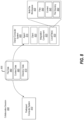
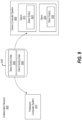
- Figures 2 through 9 illustrate various architectures and supporting illustrations for providing a collaboration session according to the disclosed principles.
- Figures 10 through 13 illustrate various architectures, supporting illustrations, and methods for providing multiple collaborators control over a debugging session.
- a computer system 100 in its most basic configuration, includes various different components.
- computer system 100 includes at least one hardware processing unit 105 (aka “processor”), storage 110, input/output (I/O) interfaces 115, graphics rendering engines 120, and various communication channels 125.
- hardware processing unit 105 aka "processor”
- storage 110 includes at least one hardware processing unit 105 (aka "processor"), storage 110, input/output (I/O) interfaces 115, graphics rendering engines 120, and various communication channels 125.
- I/O input/output
- the storage 110 may be physical system memory, which may be volatile, non-volatile, or some combination of the two. Accordingly, the storage 115 may be referred to as a "hardware storage device" on which computer-executable instructions are stored.
- the term “memory” may also be used herein to refer to non-volatile mass storage such as physical storage media. If the computer system 100 is distributed, the processing, memory, and/or storage capability may be distributed as well.
- the term "executable module,” “executable component,” or even “component” can refer to software objects, routines, or methods that may be executed on the computer system 100.
- the different components, modules, engines, and services described herein may be implemented as objects or processors that execute on the computer system 100 (e.g., as separate threads).
- the disclosed embodiments may comprise or utilize a special-purpose or general-purpose computer including computer hardware, such as, for example, one or more processors (such as hardware processing unit 105) and system memory (such as storage 110), as discussed in greater detail below.
- Embodiments also include physical and other computer-readable media for carrying or storing computer-executable instructions and/or data structures.
- Such computer-readable media can be any available media that can be accessed by a general-purpose or special-purpose computer system.
- Computer-readable media that store computer-executable instructions in the form of data are physical computer storage media.
- Computer-readable media that carry computer-executable instructions are transmission media.
- the current embodiments can comprise at least two distinctly different kinds of computer-readable media: computer storage media and transmission media.
- Computer storage media are hardware/physical storage devices, such as RAM, ROM, EEPROM, CD-ROM, solid state drives (SSDs) that are based on RAM, Flash memory, phase-change memory (PCM), or other types of memory, or other optical disk storage, magnetic disk storage or other magnetic storage devices, or any other medium that can be used to store desired program code means in the form of computer-executable instructions, data, or data structures and that can be accessed by a general-purpose or special-purpose computer.
- RAM random access memory
- ROM read-only memory
- EEPROM electrically erasable programmable read-only memory
- CD-ROM Compact Disk Read Only Memory
- SSDs solid state drives
- PCM phase-change memory
- the computer system 100 may also be connected (via a wired or wireless connection) to external sensors (e.g., data acquisition devices). Further, the computer system 100 may also be connected through one or more wired or wireless network(s) 130 to remote systems(s) that are configured to perform any of the processing described with regard to computer system 100.
- external sensors e.g., data acquisition devices
- the computer system 100 may also be connected through one or more wired or wireless network(s) 130 to remote systems(s) that are configured to perform any of the processing described with regard to computer system 100.
- the graphics rendering engine 120 is configured, with the processor(s) 105, to render one or more objects on a display of the computer system 100. As a result, a user is able to view the results of the various functionalities of the computer system 100.
- a "network,” like the network(s) 130 shown in Figure 1 , is defined as one or more data links and/or data switches that enable the transport of electronic data between computer systems, modules, and/or other electronic devices.
- a network either hardwired, wireless, or a combination of hardwired and wireless
- the computer properly views the connection as a transmission medium.
- the computer system 100 includes one or more communication channels 125 that are used to communicate with the network(s) 130.
- Transmissions media include a network that can be used to carry data or desired program code means in the form of computer-executable instructions or in the form of data structures. Further, these computer-executable instructions can be accessed by a general-purpose or special-purpose computer. Combinations of the above should also be included within the scope of computer-readable media.
- program code means in the form of computer-executable instructions or data structures can be transferred automatically from transmission media to computer storage media (or vice versa).
- program code means in the form of computer-executable instructions or data structures received over a network or data link can be buffered in RAM within a network interface module (e.g., a network interface card or "NIC") and then eventually transferred to computer system RAM and/or to less volatile computer storage media at a computer system.
- NIC network interface card
- Computer-executable (or computer-interpretable) instructions comprise, for example, instructions that cause a general-purpose computer, special-purpose computer, or special-purpose processing device to perform a certain function or group of functions.
- the computer-executable instructions may be, for example, binaries, intermediate format instructions such as assembly language, or even source code.
- embodiments may be practiced in network computing environments with many types of computer system configurations, including personal computers, desktop computers, laptop computers, message processors, hand-held devices, multi-processor systems, microprocessor-based or programmable consumer electronics, network PCs, minicomputers, mainframe computers, mobile telephones, PDAs, tablets, pagers, routers, switches, cloud-based machines and infrastructures, and the like.
- the embodiments may also be practiced in distributed system environments where local and remote computer systems that are linked (either by hardwired data links, wireless data links, or by a combination of hardwired and wireless data links) through a network each perform tasks (e.g. cloud computing, cloud services and the like).
- program modules may be located in both local and remote memory storage devices.
- illustrative types of hardware logic components include Field-Programmable Gate Arrays (FPGAs), Program-Specific or Application-Specific Integrated Circuits (ASICs), Program-Specific Standard Products (ASSPs), System-On-A-Chip Systems (SOCs), Complex Programmable Logic Devices (CPLDs), Central Processing Units (CPUs), and other types of programmable hardware.
- FPGAs Field-Programmable Gate Arrays
- ASICs Program-Specific or Application-Specific Integrated Circuits
- ASSPs Program-Specific Standard Products
- SOCs System-On-A-Chip Systems
- CPLDs Complex Programmable Logic Devices
- CPUs Central Processing Units
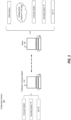
- FIG 2 illustrates a collaboration session 200 in which an owner computer system 205 and a participant computer system 210 are both members.
- both the owner computer system 205 and the participant computer system 210 may include all of the features and functionalities that were discussed in relation to the computer system 100 of Figure 1 . Accordingly, when reference is made to a "computer system,” it will be appreciated that such a system may include the features of computer system 100.
- FIG. 2 shows that Participant "A,” Participant “B,” and/or Participant “C” may be included in the collaboration session 200.
- the owner computer system 205 may be a first member in the collaboration session 200
- Participant "A” may be a second member in the collaboration session 200
- Participant "B” may be a third member in the collaboration session (i.e. three or more members are joined), and so on with potentially no limit.
- Figure 2 is for example purposes only and should not be considered limiting.
- the remaining portion of this disclosure focuses on collaboration sessions that depict only a single participant; however, it should be understood that the principles may be practiced with any number of participants.
- the disclosed embodiments establish the collaboration session 200 so that the participant computer system 210 is able to gain access to a multi-file workspace stored on the owner computer system 205.
- the participant computer system 210 can operate on the remote workspace as if the remote workspace were local.
- a human participant can independently view, edit, and otherwise operate on the remote workspace.
- all of the collaborators e.g., the owner and participant(s)
- the disclosed embodiments provide many efficiencies over traditional collaboration processes.
- the collaboration session 200 may be initiated in a variety of ways.
- the collaborators e.g., the owner computer system 205 and the participant computer system 210) are able to communicate with each other over a local area network (LAN) connection 215.
- LAN local area network
- the collaboration session 200 may be initiated by sending a request 220 over the LAN connection 215. In this manner, the collaborators are able to communicate directly in a peer-to-peer manner.
- the owner computer system 205 may desire that the participant computer system 210 be authenticated prior to entering the collaboration session 200.
- the embodiments are able to use the cloud 225 to provide authentication services.
- some embodiments provide an authentication service 230 in the cloud 225.
- the participant computer system 210 can use this authentication service 230 to authenticate itself to the owner computer system 205.
- the collaboration session 200 can be initiated and the owner computer system 205 and the authenticated participant computer system 210 can jointly work on a multi-file workspace.
- the collaboration session 200 is initiated by sending the request 220 through a relay service 235 operating in the cloud 225.
- this relay service 235 is able to connect computers that are on different native networks. Accordingly, the embodiments are able to use various services residing in the cloud 225 in order to initiate the collaboration session 200.
- Other embodiments use a hybrid approach to initiating the collaboration session 200. For instance, if some participant computer systems are located on the same LAN as the owner computer system 205, then the request 220 can be sent to those participant computer systems using the LAN. Additionally, if some participant computer systems are not using the same LAN as the owner computer system 205, then the request 220 can be transmitted using the relay service 235 in the cloud 225. Accordingly, the disclosed embodiments are able to use a variety of methods for initiating the collaboration session 200. Here, it is worthwhile to note that the disclosed embodiments are able to intelligently select whichever process is most efficient to initiate the collaboration session 200. On a related note, the collaboration session 200 is able to continue to use the respective network connections to maintain the communications between the collaborators.
- Ending the collaboration session 200 may be performed in a variety of ways.
- the collaboration session 200 ends through an action of one of the collaborators. For example, one of the collaborators may select an "End Collaboration" option.
- the collaboration session may end upon expiration of a time-out period.
- the owner may have configured a policy controlling how long the collaboration session will remain active. Upon expiration of that period, the participants' connection to the collaboration session will be terminated.
- the owner may set a policy indicating a time-out period associated with the shutting down of a client (e.g., an IDE). For example, the owner may set a time-out period to cause the collaboration session to terminate after a predetermined period of time has elapsed after the client was shut down.
- a client e.g., an IDE
- embodiments are configured to end the collaboration session when the owner computer system shuts down and/or the owner logs off of the owner computer system.
- the collaboration session may continue to run even after the owner computer system has shut down, gone to sleep, or been logged off.
- the human owner decided to perform a quick reboot or had to quickly attend a meeting.
- the collaboration session is still active (even though the owner computer system may not be active)
- the human owner will be able to quickly resume her work when she returns from her activities.
- An advantage realized by this embodiment is that if any configuration options are adjusted, then those adjustments can be persisted and will be in place for the remaining duration of the collaboration session. In this manner, the collaborators will be able to quickly resume working at the locations where they left off, and they can continue to operate using the same configuration options.
- embodiments include audit tracking features that record each collaborators' actions (e.g., their edits). In this manner, these embodiments provide an audit trail that can be reviewed and analyzed at a later time, if the need or desire arises. Once the collaboration session ends based on the principles discussed above, then the audit tracking may also end.
- Figure 3 illustrates another collaboration session 300.
- collaboration session 300 is analogous to the collaboration session 200 of Figure 3 .
- the collaboration session 300 includes an owner 305 and a participant computer system 310.
- Figure 3 shows some of the various characteristics that the owner 305 and the participant computer system 310 may have.
- the owner 305 may not be a computer system with a human operator. Instead, it may be a build instance of an application, as shown in Figure 3 .
- the owner 305 may be a headless build instance that is residing in the cloud. In such a scenario, then the various participants are able to operate on the codebase on which the build instance is based.
- the owner 305 may be a computer system (as shown in Figure 3 ) that is using a first type of operating system (e.g., Operating System "A").
- a human owner will operate the owner 305.
- the human owner is able to perform work on the multi-file workspace through the use of a client application that is residing on the owner 305.
- a "client application” may be any type of application that enables the owner 305 to operate on the multi-file workspace.
- a client application may be a text editor, a word processing program, or any other program suitable to operate on the text files.
- a client application may be a source code editor, an integrated development environment (IDE), or any other program suitable to operate on source code.
- IDE integrated development environment
- these client applications are provided permissions to access the multi-file workspace residing on the owner 305.
- Figure 3 shows that the owner 305 is able to operate a client application that is in the form of an IDE (e.g., IDE "A"), it will be appreciated that any type of client application may be used, not just an IDE.
- the participant computer system 310 may also be a computer system that is using an operating system (e.g., Operating System "B”).
- Operating System “B” may be different than Operating System “A.”
- the owner 305 and the participant computer system 310 need not use the same type of operating system in order to be joined together in the collaboration session 300 to work on the multi-file workspace.
- the participant computer system 310 need not use the same type of client application (e.g., IDE "B") as the owner 305.
- a participant is able to use his/her preferred operating system and client application regardless of the type of operating system and/or client application that the owner (e.g., owner 305) is using. Accordingly, the embodiments are operating system agnostic and client application agnostic.
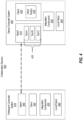
- FIG 4 illustrates a collaboration session 400 in which an owner computer system 405 and a participant computer system 410 are members.
- the owner computer system 405 is a computer system that includes a collaboration agent 415.
- this collaboration agent 415 includes a set of base tools 420 (e.g., Tool A, Tool B, and Tool C).
- base tools 420 e.g., Tool A, Tool B, and Tool C.
- Figure 4 shows the collaboration agent 415 as including only three base tools, it will be appreciated that the collaboration agent 415 may include any number of base tools. Additional details on the base tools 420 will be presented momentarily.
- the owner computer system 405 also includes a client application 425.
- a client application e.g., client application 425) may be a text editor, word processing editor, source code editor, IDE, or any other type of application that enables a user to operate on a multi-file workspace.
- client application 425 may include a client tool 430. Similar to the above disclosure, although the client application 425 is shown as including only a single tool, it will be appreciated that the client application 425 may have any number of tools.
- the owner computer system 405 may have any number of client applications installed thereon.
- the client application 425 may be an integrated development environment (IDE) that has permissions to access the multi-file workspace. Further, this IDE may manage/host a set of client development tools. In this manner, the IDE can be used to work on the multi-file workspace.
- IDE integrated development environment
- a base tool may be a service or other type of function/tool that is generally common across many or all of the different types of client applications.
- the base tools 420 may include a code completion service, a code debugging service (e.g., a source code error checking tool), a code highlighting service, a code navigation service, a code colorization service (e.g., syntax highlighting in which different colors are applied to the syntax depending on what category a syntax term belongs to), a code refactoring service (e.g., restructuring code without altering its behavior), a code hinting service (e.g., code completion), a source code search tool, a source code control tool, and/or a lightbulb service (e.g., an icon service that provides an expanded display of options).
- a code completion service e.g., a code debugging service (e.g., a source code error checking tool), a code highlighting service, a code navigation service, a code colorization service (e.g., syntax
- Additional services and tools include, but are not limited to, providing member lists, parameter information, symbol services, source code transpilation (e.g., changing the source code so it reads in a different coding language), hover features, smart typing abilities, and quick code information.
- the client tool 430 may be a tool that is specific to a particular client application and that is not generally common among different client applications.
- the client tool 420 may be a tool or service specific to a particular type of IDE.
- the owner computer system 405 is able to make these set of development tools (i.e. both the set of base tools 420 and the client tool 430) accessible to the participant computer system 410. Because these tools reside on the owner computer system 405, the tools have access to the entire context of the multi-file workspace. By making the tools accessible to the participant computer system 410, a human participant is able to use the tools in light of the entire context of the multi-file workspace. In this manner, the collaborators are able to operate on the multi-file workspace using a set of tools that understand the workspace's entire context.
- the owner computer system 405 also includes an integration component 435 and a set of local files 440.
- the multi-file workspace is included within the set of local files 440 on the owner computer system 405.
- the collaboration session 400 may be initiated so as to enable one or more participants (e.g., participant computer system 410) to join the owner computer system 405 in collaborating on a multi-file workspace that is stored locally on the owner computer system 405 (e.g., perhaps in the local files 440).
- participants e.g., participant computer system 410
- the disclosed embodiments cause the integration component 435 to attach, or rather "hook,” to the client application 425 in a lightweight manner.
- the integration component 435 may be a plugin or other type of client extension that hooks into the client application 425 to perform "redirection,” "rerouting,” and customization operations.
- the integration component 435 (which is on the owner computer system 405) is configured to add additional functionalities to the client application 425. Of note, these additional functionalities are at least directed to establishing and maintaining the collaboration session 400.
- Figure 5 shows an owner computer system 500, which is analogous to the owner computer system 405 of Figure 4 .
- the owner computer system 500 includes a client application 505 and an integration component 510.
- the client application 505 is also shown as including a user interface 515. After the integration component 510 hooks itself onto the client application 505, then the integration component 510 is able to expand upon the abilities of the client application 505.
- the integration component 510 will alter the user interface 515 so that it includes additional features related to a collaboration session.
- a set of new collaboration options 525 have been added to the user interface 515 as a result of the integration component 510 attaching itself to the client application 505.
- the set of new collaboration options 525 include Option 1, Option 2, and Option 3.
- the ellipses 520 demonstrates that any number of options may be added to the user interface 515.
- Some of the set of collaboration options 525 may include, but are not limited to, (1) an option to initiate a collaboration session, (2) an option to terminate a collaboration session, and/or (3) an option to acquire information about a particular participant (e.g., the participant's avatar may be displayed and, when the avatar is selected, identifying information about the participant may be displayed).
- the embodiments enable a participant to work on a multi-file workspace that is stored locally on an owner computer system. Included with this functionality is the ability of the participant to independently navigate to areas within the multi-file workspace where the owner computer system is not currently operating (or even in locations where the owner computer system is operating). Furthermore, the embodiments also enable the participant to independently edit files. In light of these abilities, an owner may desire to learn where a participant is currently navigating/operating within his/her multi-file workspace.
- the embodiments automatically navigate the owner to the same location as a participant within the workspace. If there are multiple participants, then the owner may initially be prompted to select a particular participant. As an example, suppose an owner is editing File 1 shown in the user interface 515 in Figure 5 . At the same time, a participant may be independently editing File 2. By clicking the pin to participant's position option, the owner can be automatically navigated to File 2, and in particular to the exact location where the participant is editing File 2. Therefore, although the embodiments enable participants to independently navigate and edit the files within the workspace, the embodiments also enable the owner to be automatically directed to the locations within the workspace where the participants are working. In some embodiments, this feature is also provided to each of the participants. Therefore, in these embodiments, each collaborator is able to follow the actions of the other collaborators.
- the pin to participant's position option e.g., the options can be selectable buttons
- Another option that may be provided among the set of new collaboration options 525 is the option to adjust the access controls of the participants.
- the owner may be provided with an option to adjust a policy so that participants are allowed to navigate to or edit only certain files.
- Yet another option is related to an audit feature in which the actions of the participants are recorded and are made available for viewing by the owner. Accordingly, the integration component 510 is able to interact with the client application 505 to enhance the owner's control over the participants in a collaboration session.
- the participant computer system 410 is shown as including a collaboration agent 445, a client application 450, an integration component 455, and local files 460.
- the collaboration agent 445 communicates with the collaboration agent 415 to provide the participant computer system 410 access to the multi-file workspace residing on the owner computer system 405. Additional details on this interaction will be presented later.
- the client application 450 also provides a user interface to the participant so that the participant is able to view (and therefore work on) the multi-file workspace.
- the integration component 455 Similar to the integration component 435, the integration component 455 also attaches itself to the client application 455. The functionalities of this integration component 455 will now be discussed in relation to Figures 6A and 6B .
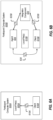
- Figure 6A shows a participant computer system 600A that includes a set of local files 605A, which are analogous to the local files 460, and a client application 610A.
- the participant computer system 600A does not have an integration component. Accordingly, when the participant computer system 600A is thusly configured, the client application 610A is able to submit requests 615A to the set of local files 605A. In this manner, the client application 610A operates on files that are stored locally on the participant computer system 600A.
- the participant computer system uses a collaboration agent and an integration component.
- a collaboration agent 605 a set of local files 610B, a client application 615B, and an integration component 620.
- the integration component 620 is able to intercept requests 625B that are issued by the client application 615B. Normally, these requests 625B would be fulfilled using the set of local files 610B.
- the integration component 620 intercepts those requests 625B and routes the intercepted requests 625B to the collaboration agent 605. Once the requests 625B are received, the collaboration agent 605 then routes the intercepted requests 625B to a collaboration agent residing on the owner computer system (e.g., collaboration agent 415 in Figure 4 ).
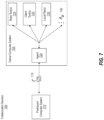
- Figure 7 shows how an owner-side collaboration agent handles requests that are received from a participant-side collaboration agent.
- the collaboration session 700 includes an owner computer system 705 and a participant computer system 710.
- the owner computer system 705 includes a collaboration agent 720, a set of base tools 725, a set of client tools 730, and a set of local files 735.
- the ellipses 740 demonstrates that the owner computer system 705 may have additional features.
- a participant-side collaboration agent is able to receive an intercepted request as described in connection with Figure 6B .
- This request is shown as request 715 in Figure 7 .
- the participant-side collaboration agent transmits the request 715 to the collaboration agent 720.
- the collaboration agent 720 processes the request 715.
- processing the request 715 includes making the set of base tools 725 accessible to the participant computer system 710.
- processing the request 715 may include making the set of client tools 730 accessible to the participant computer system 710.
- processing the request 715 may include making the set of local files 735 accessible to the participant computer system 710.
- processing the request 715 includes making edits to the files in the multi-file workspace. Edits include, but are not limited to, changing text within the file, adding a new file, deleting an existing file, or any other file editing operations.
- the participant computer system 710 is not downloading the multi-file workspace. Instead, it is being given access to the workspace through the use of its collaboration agent, its integration component, and the owner-side collaboration agent. In this manner, the participant computer system 710 is able to reach across and perform work on the owner computer system 705's multi-file workspace.
- the collaboration agent 720 transmits a response back to the participant computer system 710. In particular, the collaboration agent 720 transmits the response back to the participant-side collaboration agent.
- the collaboration agent 605 will then receive any responses generated by an owner computer system. Once a response is received, then some embodiments will cause the response to be transmitted back to the client application 615B via the integration component 620. In other embodiments, however, the collaboration agent 605 is able to directly transmit the response (e.g., response 630) to the client application 615B. In this manner, the participant is able to see the results of his/her processed requests.
- an owner establishes a collaboration session in which a participant is a member.
- the owner has asked the participant to assist him/her in debugging source code.
- the owner begins by debugging a first file while the participant begins by debugging a second file.
- both of these files are included in the multi-file workspace and both are stored on the owner's computer system.
- the second file is displayed on the participant's computer system even though the file's contents are actually stored only on the owner's computer system.
- the participant is able to independently view and edit the contents of the second file even though the owner is currently working on the first file.
- multiple collaborators are able to jointly work on a single multi-file workspace.
- the owner and the participant will be working on the same file.
- the owner will be able to see (in real-time) the changes made by the participant, and the participant will be able to see (in-real time) the changes made by the owner.
- the changes made by the collaborators are made in real-time and are synchronized with each other.
- the participant is given the illusion that he/she is working on a local workspace whereas, in actuality, the workspace is not local.
- the disclosed embodiments are able to provide a participant computer system access to a multi-file workspace that is stored on the owner computer system. Furthermore, a human participant is able to view that workspace and to edit that workspace. This viewing and editing can be performed independently of any viewing and editing that an owner may be performing on the multi-file workspace. In this manner, a participant no longer needs to replicate a workspace's context in order to work on that workspace. Additionally, the participant is able to use his/her preferred client application, even if that client application is different from the owner's client application. Even further, the participant is able to use the owner's set of tools, which tools understand the entire context of the multi-file workspace.
- the collaboration session 800 includes an owner computer system 805 and a participant computer system 810.
- the owner computer system 805 includes a collaboration agent 815, a client application 820, an integration component 825, and a set of local files 830.
- the set of local files 830 includes a multi-file workspace 835.
- this multi-file workspace 835 includes a set of files 840, a context 845 of the multi-file workspace 835, and a file directory 850.
- this response 855 may include file data 860 (i.e. data concerning the set of files 840), context data 865 (i.e. data concerning the context 845), or directory data 870 (i.e. data concerning the file directory 850).
- this data is metadata while in other instances this data enables the participant computer system 810 to display the multi-file workspace and receive edits directed to the multi-file workspace.
- providing the participant computer system 810 access to the multi-file workspace includes providing access to the workspace's file directory, context, and files. From this information, the multi-file workspace 835 can be displayed on the participant computer system 810, and the participant will be able to operate on that multi-file workspace.
- the owner computer system 805 is transmitting sufficient information (e.g., metadata and other information) so that the participant computer system 810 is able to understand what is included within the multi-file workspace 835. Furthermore, the participant computer system 810 is able to receive enough information so that a visualization of the multi-file workspace 835 may be rendered on a user interface of the participant computer system 810. In this manner, the participant computer system 810 is acting as a headless entity because a majority of the operations are actually being performed on the owner computer system 805.
- sufficient information e.g., metadata and other information
- the participant computer system 810 submits viewing and editing requests to the owner computer system 805.
- the owner computer system 805 then processes those requests and returns results back to the participant computer system 810.
- the participant computer system 810 is provided the illusion that it is working on a local workspace, but in actuality the workspace is not local and the operations on the workspace are being performed by the owner computer system 805.
- the collaboration session 900 includes an owner computer system 905 and a participant computer system 910.
- the owner computer system 905 includes a collaboration agent 915. As discussed, this collaboration agent 915 is able to maintain a set of base tools 920.
- the owner computer system 905 also includes a client application 925, which client application 925 is able to maintain a set of client tools 930.
- the embodiments are also able to make the set of base tools 920 and the set of client tools 930 accessible to the participant computer system 910.
- the participant computer system 910 is able to use the tools that are residing on the owner computer system 905 in order to perform operations on the owner computer system 905's multi-file workspace. Therefore, not only is the participant computer system 910 able to view and edit the multi-file workspace on the owner computer system 905, but it is also able to make use of the tools that are on the owner computer system 905.
- the participant computer system 910 is able to receive information 935 that includes base tool data 940 and/or client tool data 945. In this manner, the participant computer system 910 is able make use of the owner computer system 905's development tools.
- a client application e.g., an IDE
- a workspace e.g., an application
- the IDE is able to perform a build on that application and initiate/create a build instance.
- any collaborator e.g., the owner or any of the participants
- the source code resides only on the owner computer system, any one of the collaborators can trigger when the build instance will be created.
- a human developer can use the IDE to debug the application.
- the process of debugging the application may include issuing various debug commands against the build instance.
- a debug command may be a step forward command, a step backward command, a step into command, a step over command, or even an execute to breakpoint command.
- a "step backward" command causes the debugger to present historical debugging information to the developer.
- the debugger may present information that was generated previously and that is being displayed again in response to the step backward command (i.e. the step backward command may display a "historical view" of the execution steps).
- the source code's execution does not actually progress in a backward manner. Instead, the source code's execution is paused, and then historical debugging data is displayed in response to the step backward command. In this manner, a developer is able to replay past debugging information in an effort to better understand how the source code operates. These commands cause various portions of the source code to execute and to generate debugging data.
- the disclosed embodiments provide these valuable benefits to multiple collaborators at the same time through the use of a collaboration session. For example, even though multiple collaborators are present in the session, each of the collaborators retains the ability to independently view and navigate the compiled and executed source code.
- FIG. 10 illustrates an example scenario in which multiple collaborators are able to jointly debug a body of source code.
- a collaboration session may include any number of participant computer systems. These participant computer systems will be joined with an owner computer system. Together, these collaborators (e.g., the owner computer system and the participant computer systems) are able to operate on a multi-file workspace (e.g., an application) that is stored locally on the owner computer system. After operating on the application (e.g., by editing the application's source code), it may be desired to compile, build, execute, and debug the application. Accordingly, the disclosed embodiments enable any one of the collaborators (e.g., the owner or the participants) to initiate a debugging session which is shown as debugging session 1005 in Figure 10 .
- the disclosed embodiments enable any one of the collaborators (e.g., the owner or the participants) to initiate a debugging session which is shown as debugging session 1005 in Figure 10 .
- this debugging session 1005 includes an owner computer system 1010 and three participant computer systems (e.g., Participant 1, Participant 2, and Participant 3).
- the owner computer system 1010 includes a multi-file workspace 1015 (e.g., an application that includes multiple files of source code), a build instance 1020 of the workspace 1015, and a multiplexor 1025 (i.e. the multiplexor 1025 is residing on the owner computer system 1010).
- the owner computer system 1010 also includes a client application (e.g., an IDE) that is able to compile, build, execute, and debug the workspace 1015 as well as a collaboration agent.
- client application e.g., an IDE
- both the workspace 1015 and the build instance 1020 are stored locally on the owner computer system 1010. It will be appreciated that some embodiments store this information in the cloud.
- the output of the build instance 1020 is then made available (i.e. it is accessible) to all of the collaborators (i.e. the owner computer system 1010, Participant 1, Participant 2, and Participant 3) via the debugging session 1005.
- the process of providing access to the build instance also includes the process of providing the build instance's output to each of the collaborator computer systems.
- the owner computer system 1010 is the entity providing the debugging services, diagnostic services, and build services. It will be appreciated, however, that the owner computer system 1010 is making its debugging services, diagnostic services, and build services available to some (or all) of the participant computer systems. Indeed, the participant computer systems are able to query the owner computer system 1010's debugging services so that each participant computer system is able to independently view/access the debugging information.
- the debugging process often includes issuing various debug commands.
- Such a scenario is presented in Figure 10 .
- Participant 1 is issuing a debug command 1035
- Participant 2 is issuing a debug command 1040
- Participant 3 is issuing a debug command 1045.
- the owner computer system is not shown as issuing a debug command, such an event may occur.
- the multiplexor 1025 is able to receive these debug commands (e.g., debug commands 1035, 1040, and 1045) and multiplex them.
- debug commands e.g., debug commands 1035, 1040, and 1045
- multiplex refers to the process of receiving (in parallel) debug commands from multiple different sources, organizing those debug commands into a determined order, and then transmitting (serially) those debug commands to another entity.
- the multiplexor 1025 is able to initially receive debug commands (e.g., debug commands 1035, 1040, and 1045) in a parallel manner. It then organizes these debug commands (e.g., based on the time that they were received). Finally, it transmits those debug commands to another entity (e.g., an IDE that is being used to debug the build instance 1020) in a serial manner.
- the debug commands 1050 illustrate the output of the multiplexor 1025.
- debug commands 1050 are then executed against the build instance 1020 to generate debugging results 1055.
- the debugging results 1055 are generated by the owner computer system 1010.
- these debugging results 1055 are provided to the collaborators (e.g., the owner computer system 1010, Participant 1, Participant 2, and Participant 3). Therefore, although the debugging services are being performed on the owner computer system 1010, the debugging results 1055 are published/broadcast to some (or all) of the participant computer systems. In this manner, each collaborator (i.e. the owner computer system 1010, Participant 1, Participant 2, and Participant 3) is able to independently view and inspect the debugging results 1055.
- Figure 11 provides another example illustration of how a debugging session allows each collaborator to view debugging results.
- this figure shows a debugging session 1100 in which an owner computer system and three participant computer systems (e.g., Participant 1, Participant 2, and Participant 3) are members.
- this figure shows a body of built/compiled source code 1105 that is stored locally on the owner computer system.
- each of the collaborators are able to independently submit debug commands that will be executed by the owner computer system.
- the collaborators i.e. the owner computer system, Participant 1, Participant 2, and Participant 3
- the collaborators are all sharing 1110 a single "debug cursor” (e.g., debug cursor 1115).
- debug cursor e.g., debug cursor 1115
- a "debug cursor” is not actually visualized on a user interface but it is provided in these figures to signify where a stop event has occurred in the executing source code.
- the debug cursor e.g., debug cursor 1115 signifies which portion of the source code will be executed next.
- a stop event has occurred in the compiled source code 1105 at line item 7 (illustrated by the highlighted code 1120). Accordingly, all of the collaborators share this debug cursor 1115. Furthermore, when the collaborators submit debug commands, they cause this debug cursor 1115 to progressively execute through the compiled source code 1105. In this manner, the collaborators are able to share control of a single debug cursor.
- each of these debug commands is a step forward command (i.e. only one program statement is executed at a single time).
- the compiled source code 1105 was previously executed up to line 7 (i.e. a stop event occurred at line 7).
- the debug cursor 1115 indicates that the code beginning at line 7 will be the next program statement to be executed.
- a multiplexor (e.g., multiplexor 1025 shown in Figure 10 ) will initially receive the three debug commands, serialize them, and pass them to the IDE for execution.
- the first debug command which is a step forward command
- the compiled source code 1105 will be executed one program statement.
- a stop event will cause the execution to pause at line 8
- the debug cursor 1115 will now be at line 8.
- new debugging results will now available.
- the new debugging results will be published to each of the collaborators (e.g., see the debugging results 1055 in Figure 10 ). As a result, each collaborator will be able to see the debugging results.
- this second step forward command will be executed. Similar to the above discussion, this second step forward command will cause one program statement to be executed, new debugging results will be generated, a new stop event will occur, and the debug cursor 1115 will move to line 9.
- the third step forward command will be performed and the same events will occur.
- the debug cursor 1115 will move to line 10.
- those debug commands will cause the debug cursor 1115 to progress in accordance with the debug command.
- this debug cursor 1115 is shared by all of the collaborators, the action of one collaborator will influence what information (e.g., debugging results) is available to the other collaborators. While the above example was focused on the execution of step forward commands, it will be appreciated that the embodiments are able to employ any type of debug command.
- some embodiments highlight the program statement that corresponds to the debug cursor 1115.
- This highlighting may be viewable on each of the collaborators' user interfaces. In this manner, each human collaborator will be able to visibly see where the execution of the source code is currently paused. It will be appreciated that this highlighting will move as debug commands are executed. It follows then that a human collaborator may witness the highlighting progressively move even though he/she did not submit a debug command. Such a scenario occurs because, as discussed, all of the collaborators are sharing the same debug cursor 1115 (i.e. all collaborators are tied to the same execution of the compiled source code 1105).
- FIG. 12 illustrates how each collaborator is able to independently inspect debugging results.
- a debugging session 1200 in which an owner computer system 1205 and a participant computer system 1210 are both members has been established.
- Figure 12 shows that the owner computer system 1205 may include an owner UI 1215 and that the participant computer system 1210 may include a participant UI 1220.
- the owner UI 1215 and the participant UI 1220 are displaying the same body of compiled source code.
- this source code has been executed up to line 9.
- a stop event occurred at line 9. This stop event occurred because a breakpoint 1225 was place in the source code.
- each collaborator is able to independently place breakpoints in the source code. Accordingly, the source code has executed up to line 9, and this execution has produced debugging results. These results are published to each of the collaborators.
- Figure 12 shows two cursors that are pointing to the same variable (i.e. the variable "foo" found on line 8).
- One cursor is on the owner UI 1215 while the other cursor is on the participant UI 1220.
- both the owner UI 1215 and the participant UI 1220 are displaying some debugging results 1230.
- the debugging results 1230 indicate the value of the variable "foo," which value is 4.
- these debugging results 1230 are presented as a result of the cursor hovering over that variable.
- Figure 12 presents a scenario in which both cursors are pointing to the same variable, the embodiments are configured to enable the collaborators to independently view the values of the other variables. Accordingly, Figure 12 is just one example scenario and should not be considered limiting. In this manner, the thread data, variable data, memory data, etc. is all preserved and made available to the collaborators.
- each collaborator may be able to independently access source code watches, the call stack, and/or the variables.
- diagnostic tools that enable the collaborators to access a wide variety of diagnostic information.
- some embodiments enable the performance of operations that include, but are not limited to, viewing/manipulating memory, accessing in-context production data, and/or generating/accessing performance profiling features.
- the collaborators are able to use interactive windows that can be used to change the debugging state across all of the collaborators (e.g., Console or Immediate Windows).
- the owner of the shared build instance is a machine (e.g., a machine that is operating in a "live” or “production” environment) rather than a human owner. Even when operating under such scenarios, the human participants will still be able to perform debugging and diagnostic operations (e.g., the diagnostic operations described above) in a collaborative manner.
- a debugging session (e.g., debugging session 1200) is tied to the process that is currently being debugged.
- a collaboration session (e.g., collaboration session 1000 shown in Figure 10 ) can actually include multiple debugging sessions. Therefore, in some instances, there may be multiple active debugging sessions, where each debugging session can be initiated, stopped, and restarted multiple times within the same overall collaboration session.
- the disclosed embodiments enable the human owner to retrace his/her steps while using the application and to publish his/her steps to the participant computer systems so the human participants can view those steps.
- the collaborators are able to use one or more step backward commands in order to view historical debugging data, as discussed earlier. By retracing the steps, the process leading up to an error can be followed and the human participants will be better informed regarding where the error lies in the source code.
- one of the collaborators may leave the debugging session and then return at a later time.
- some of the embodiments are configured to automatically direct the collaborator to the location of the debug cursor. In this manner, the collaborator will be able to very quickly learn where the debugging process is occurring.
- a computer system includes one or more computer-readable hardware storage media that store computer-executable code. This computer-executable code is executable by the one or more processors to cause the computer system to perform these methods.
- Figure 13 illustrates an example method 1300 for providing a debugging session with full multi-collaborator control.
- method 1300 includes an act of establishing a debugging session in which an owner computer system and a participant computer system are both members (act 1305). Within this debugging session, both the owner computer system and the participant computer system are provided access to a build instance of a multi-file workspace (act 1310).
- both of these acts may be performed by a collaboration agent (e.g., collaboration agent 415 shown in Figure 4 ).
- the multi-file workspace and the build instance are both stored locally on the owner computer system.
- the multi-file workspace may include multiple files of source code.
- the build instance may be a build of the source code.
- method 1300 includes an act of receiving various different debug commands that are directed to the build instance (act 1315).
- this act may be performed by the multiplexor 1025 shown in Figure 10 .
- some of the debug commands may originate from the owner computer system while some of the other debug commands may originate from the participant computer system.
- Method 1300 also includes an act of multiplexing the debug commands (act 1320).
- this act may also be performed by the multiplexor 1025 shown in Figure 10 .
- this act may also be performed by the multiplexor 1025 shown in Figure 10 .
- no differentiation will be made between a debug command that is issued by the owner computer system and a debug command that is issued by the participant computer system.
- method 1300 includes an act of generating debugging data/results as a consequence of executing the build instance in accordance with the debug commands (act 1325).
- this act may be performed by the client application 425 shown in Figure 4 .
- the client application 425 may be an IDE that is configured to compile, build, execute, and debug source code.
- executing the build instance may be performed only on the owner computer system such that the debugging data is generated only on the owner computer system.
- the disclosed embodiments enable collaborators in a collaboration session to each issue debug commands so as to jointly debug a multi-file workspace.
- the embodiments are able to provide valuable debugging data to the collaborators. This data will help the collaborators understand how the workspace operates. Further, the debugging data is independently accessible by both the owner computer system and the participant computer systems.
Landscapes
- Engineering & Computer Science (AREA)
- Theoretical Computer Science (AREA)
- General Engineering & Computer Science (AREA)
- Physics & Mathematics (AREA)
- General Physics & Mathematics (AREA)
- Software Systems (AREA)
- Computer Hardware Design (AREA)
- Quality & Reliability (AREA)
- Business, Economics & Management (AREA)
- Signal Processing (AREA)
- Computer Networks & Wireless Communication (AREA)
- Multimedia (AREA)
- Databases & Information Systems (AREA)
- Data Mining & Analysis (AREA)
- Human Resources & Organizations (AREA)
- General Health & Medical Sciences (AREA)
- Health & Medical Sciences (AREA)
- Entrepreneurship & Innovation (AREA)
- Computer Security & Cryptography (AREA)
- Strategic Management (AREA)
- Computational Linguistics (AREA)
- Artificial Intelligence (AREA)
- Audiology, Speech & Language Pathology (AREA)
- General Business, Economics & Management (AREA)
- Bioethics (AREA)
- Tourism & Hospitality (AREA)
- Operations Research (AREA)
- Marketing (AREA)
- Economics (AREA)
- Computing Systems (AREA)
- Computer And Data Communications (AREA)
- Information Transfer Between Computers (AREA)
Claims (10)
- Eigentümercomputersystem (205, 305, 405, 500, 705, 805, 905, 1010, 1210), umfassend:einen oder mehrere Prozessoren (105); undeine oder mehrere computerlesbare Hardwarespeichervorrichtungen (110), auf denen computerausführbare Anweisungen gespeichert sind, die so strukturiert sind, dass sie von dem einen oder den mehreren Prozessoren ausgeführt werden können, um das Eigentümercomputersystem dadurch zu Folgendem zu veranlassen:innerhalb einer Debugging-Sitzung (1005, 1100, 1200), in der das Eigentümercomputersystem und ein Teilnehmercomputersystem (210, 310, 410, 600, 710, 810, 910, 1205) beide Mitglieder sind, Bereitstellen von Zugriff auf eine Build-Instanz (1020) eines Mehrdateien-Arbeitsbereichs (1015), wobei der Zugriff an das Eigentümercomputersystem und das Teilnehmercomputersystem bereitgestellt wird, wobei der Mehrdateien-Arbeitsbereich und die Build-Instanz beide lokal auf dem Eigentümercomputersystem gespeichert sind, der Mehrdateien-Arbeitsbereich mehrere Dateien von Quellcode beinhaltet und die Build-Instanz ein Build des Quellcodes ist, und wobei sich das Eigentümercomputersystem und das Teilnehmercomputersystem eine Steuerung eines einzelnen Debug-Cursors (1115) teilen, der angibt, wo ein Stoppereignis im ausgeführten Quellcode aufgetreten ist und welcher Teil des Quellcodes als nächstes ausgeführt wird;Empfangen einer Vielzahl von Debug-Befehlen (1035, 1040, 1045), die an die Build-Instanz gerichtet sind, wobei einige der Vielzahl von Debug-Befehlen vom Eigentümercomputersystem stammen und einige der Vielzahl von Debug-Befehlen vom Teilnehmercomputersystem stammen;Multiplexen der Vielzahl von Debug-Befehlen, wobei Multiplexen Organisieren der Vielzahl von Debug-Befehlen in eine bestimmte Reihenfolge beinhaltet; undfür jeden Debug-Befehl der gemultiplexten Vielzahl von Debug-Befehlen (1050) in der bestimmten Reihenfolge,Ausführen des Debug-Befehls an der Build-Instanz bei einer aktuellen Position des geteilten Debug-Cursors im Quellcode nur auf dem Eigentümercomputersystem, um Debugging-Daten (1055) zu erzeugen; undVeröffentlichen der Debugging-Daten für das Eigentümercomputersystem und für das Teilnehmercomputersystem.
- Computersystem nach Anspruch 1, wobei die Debugging-Sitzung innerhalb einer Kollaborationssitzung (200, 300, 400, 700, 800, 900) initiiert wird, in der sowohl das Eigentümercomputersystem als auch das Teilnehmercomputersystem Mitglieder sind.
- Computersystem nach Anspruch 1, wobei Multiplexen der Vielzahl von Debug-Befehlen von einem Multiplexer (1025) durchgeführt wird, der sich auf dem Eigentümercomputersystem befindet.
- Computersystem nach Anspruch 1, wobei das Eigentümercomputersystem Erstellen der Build-Instanz des Quellcodes initiiert.
- Computersystem nach Anspruch 1, wobei das Teilnehmercomputersystem Erstellen der Build-Instanz des Quellcodes initiiert.
- Computersystem nach Anspruch 1, wobei das Eigentümercomputersystem die Debugging-Sitzung initiiert.
- Computersystem nach Anspruch 1, wobei das Teilnehmercomputersystem die Debugging-Sitzung initiiert.
- Computersystem nach Anspruch 1, wobei Bereitstellen von Zugriff auf die Build-Instanz Bereitstellen einer Ausgabe der Build-Instanz sowohl an das Eigentümercomputersystem als auch an das Teilnehmercomputersystem beinhaltet.
- Computerimplementiertes Verfahren zum Bereitstellen einer Debugging-Sitzung, umfassend:innerhalb einer Debugging-Sitzung (1005, 1100, 1200), in der das Eigentümercomputersystem und ein Teilnehmercomputersystem (210, 310, 410, 600, 710, 810, 910, 1205) beide Mitglieder sind, Bereitstellen (1310) von Zugriff auf eine Build-Instanz (1020) eines Mehrdateien-Arbeitsbereichs (1015), wobei der Zugriff an das Eigentümercomputersystem und das Teilnehmercomputersystem bereitgestellt wird, wobei der Mehrdateien-Arbeitsbereich und die Build-Instanz beide lokal auf dem Eigentümercomputersystem gespeichert sind, der Mehrdateien-Arbeitsbereich mehrere Dateien von Quellcode beinhaltet und die Build-Instanz ein Build des Quellcodes ist, und wobei sich das Eigentümercomputersystem und das Teilnehmercomputersystem eine Steuerung eines einzelnen Debug-Cursors (1115) teilen, der angibt, wo ein Stoppereignis im ausgeführten Quellcode aufgetreten ist und welcher Teil des Quellcodes als nächstes ausgeführt wird;Empfangen (1315) einer Vielzahl von Debug-Befehlen (1035, 1040, 1045), die an die Build-Instanz gerichtet sind, wobei einige der Vielzahl von Debug-Befehlen vom Eigentümercomputersystem stammen und einige der Vielzahl von Debug-Befehlen vom Teilnehmercomputersystem stammen;Multiplexen (1320) der Vielzahl von Debug-Befehlen, wobei Multiplexen Organisieren der Vielzahl von Debug-Befehlen in eine bestimmte Reihenfolge beinhaltet; undfür jeden Debug-Befehl der gemultiplexten Vielzahl von Debug-Befehlen (1050) in der bestimmten Reihenfolge,Ausführen (1325) des Debug-Befehls an der Build-Instanz bei einer aktuellen Position des geteilten Debug-Cursors im Quellcode nur auf dem Eigentümercomputersystem, um Debugging-Daten (1055) zu erzeugen; undVeröffentlichen der Debugging-Daten für das Eigentümercomputersystem und für das Teilnehmercomputersystem.
- Computerlesbares Medium, auf dem computerausführbare Anweisungen gespeichert sind, die, wenn sie von einem Prozessor ausgeführt werden, den Prozessor veranlassen, das Verfahren nach Anspruch 9 durchzuführen.
Applications Claiming Priority (3)
| Application Number | Priority Date | Filing Date | Title |
|---|---|---|---|
| US201762585988P | 2017-11-14 | 2017-11-14 | |
| US15/879,266 US10678675B2 (en) | 2017-11-14 | 2018-01-24 | Assistive, language-agnostic debugging with multi-collaborator control |
| PCT/US2018/059718 WO2019099264A1 (en) | 2017-11-14 | 2018-11-08 | Assistive, language-agnostic debugging with multi-collaborator control |
Publications (2)
| Publication Number | Publication Date |
|---|---|
| EP3710939A1 EP3710939A1 (de) | 2020-09-23 |
| EP3710939B1 true EP3710939B1 (de) | 2024-01-17 |
Family
ID=66431326
Family Applications (6)
| Application Number | Title | Priority Date | Filing Date |
|---|---|---|---|
| EP18808585.6A Withdrawn EP3710934A1 (de) | 2017-11-14 | 2018-11-08 | Kollaborative bearbeitung von quellcode mit intelligenten operationen |
| EP18807825.7A Ceased EP3710933A1 (de) | 2017-11-14 | 2018-11-08 | Architektur zum remoting von sprachdiensten |
| EP18811995.2A Withdrawn EP3710940A1 (de) | 2017-11-14 | 2018-11-08 | Unterstützende fehlerbeseitigung von webanwendungen mit port-weiterleitung |
| EP18811419.3A Withdrawn EP3710932A1 (de) | 2017-11-14 | 2018-11-08 | Kollaborative software-entwicklung mit heterogenen entwicklungswerkzeugen |
| EP18811996.0A Ceased EP3710935A1 (de) | 2017-11-14 | 2018-11-08 | Antworten auf anfragen durch verfolgung von dateiänderungen |
| EP18811420.1A Active EP3710939B1 (de) | 2017-11-14 | 2018-11-08 | Assistives sprach-agnostisches debuggung mit multikollaborator-steuerung |
Family Applications Before (5)
| Application Number | Title | Priority Date | Filing Date |
|---|---|---|---|
| EP18808585.6A Withdrawn EP3710934A1 (de) | 2017-11-14 | 2018-11-08 | Kollaborative bearbeitung von quellcode mit intelligenten operationen |
| EP18807825.7A Ceased EP3710933A1 (de) | 2017-11-14 | 2018-11-08 | Architektur zum remoting von sprachdiensten |
| EP18811995.2A Withdrawn EP3710940A1 (de) | 2017-11-14 | 2018-11-08 | Unterstützende fehlerbeseitigung von webanwendungen mit port-weiterleitung |
| EP18811419.3A Withdrawn EP3710932A1 (de) | 2017-11-14 | 2018-11-08 | Kollaborative software-entwicklung mit heterogenen entwicklungswerkzeugen |
| EP18811996.0A Ceased EP3710935A1 (de) | 2017-11-14 | 2018-11-08 | Antworten auf anfragen durch verfolgung von dateiänderungen |
Country Status (4)
| Country | Link |
|---|---|
| US (6) | US20190146899A1 (de) |
| EP (6) | EP3710934A1 (de) |
| CN (2) | CN111344666A (de) |
| WO (6) | WO2019099262A1 (de) |
Families Citing this family (23)
| Publication number | Priority date | Publication date | Assignee | Title |
|---|---|---|---|---|
| WO2019086519A1 (en) | 2017-11-02 | 2019-05-09 | Silicon Mobility Sas | Software environment for control engine debug, test, calibration and tuning |
| US20190146899A1 (en) | 2017-11-14 | 2019-05-16 | Microsoft Technology Licensing, Llc | Assistive debugging of web applications with port forwarding |
| US10938641B1 (en) * | 2018-11-09 | 2021-03-02 | Amazon Technologies, Inc. | On-demand development environment |
| US10846197B1 (en) * | 2018-12-13 | 2020-11-24 | Facebook, Inc. | Systems and methods for debugging mixed-language applications |
| CN110405759B (zh) * | 2019-07-16 | 2020-11-13 | 大唐微电子技术有限公司 | 一种芯片控制系统 |
| CN111078269A (zh) * | 2019-07-19 | 2020-04-28 | 华控清交信息科技(北京)有限公司 | 版本管理方法及恢复方法、编辑器、系统及存储介质 |
| US11765152B2 (en) | 2019-07-25 | 2023-09-19 | Microsoft Technology Licensing, Llc | Related asset access based on proven primary asset access |
| CN112632016B (zh) * | 2019-09-24 | 2024-12-20 | 腾讯科技(深圳)有限公司 | 一种文件编辑方法、装置 |
| USD965028S1 (en) * | 2020-02-07 | 2022-09-27 | Bottomline Technologies, Inc | Display screen with a machine learning score graphical user interface |
| USD942507S1 (en) * | 2020-02-07 | 2022-02-01 | Bottomline Technologies Inc | Display screen with graphical user interface |
| US11941064B1 (en) | 2020-02-14 | 2024-03-26 | Bottomline Technologies, Inc. | Machine learning comparison of receipts and invoices |
| CN112306595A (zh) | 2020-04-30 | 2021-02-02 | 北京字节跳动网络技术有限公司 | 交互方法、装置和电子设备 |
| US11677574B1 (en) * | 2020-07-02 | 2023-06-13 | Intrado Corporation | Automated conference sessions generated to manage application development |
| US11711493B1 (en) | 2021-03-04 | 2023-07-25 | Meta Platforms, Inc. | Systems and methods for ephemeral streaming spaces |
| US11763078B2 (en) | 2021-04-22 | 2023-09-19 | Microsoft Technology Licensing, Llc | Provisional selection drives edit suggestion generation |
| CN113094033B (zh) * | 2021-06-07 | 2021-08-27 | 南京沁恒微电子股份有限公司 | 一种mcu集成开发环境的工程结构适配方法 |
| US20230342285A1 (en) * | 2022-04-22 | 2023-10-26 | Replit, Inc. | Multiplayer Debugger |
| US20240119156A1 (en) * | 2022-10-11 | 2024-04-11 | Change Healthcare Holdings, Llc | System and method for automated software development compliance verification and auditing |
| WO2024147201A1 (ja) * | 2023-01-06 | 2024-07-11 | 株式会社プログミー | プログラミング教育方法、プログラミング教育プログラム、プログラミング教育サーバ、及びプログラミング教育端末 |
| US12197400B1 (en) * | 2023-09-25 | 2025-01-14 | Databricks, Inc. | Clean room generation for data collaboration |
| US12554619B2 (en) | 2024-03-01 | 2026-02-17 | Robert Bosch Gmbh | Systems and methods for implementing a trusted multiparty build process using confidential computing |
| US20250278495A1 (en) * | 2024-03-04 | 2025-09-04 | Robert Bosch Gmbh | Systems and methods for setting up and maintaining multi-party computation environments |
| US12536004B1 (en) * | 2025-05-13 | 2026-01-27 | Morgan Stanley Services Group Inc. | System and method for round-robinediting of a generated user interface |
Citations (1)
| Publication number | Priority date | Publication date | Assignee | Title |
|---|---|---|---|---|
| US9645910B1 (en) * | 2015-03-12 | 2017-05-09 | Amazon Technologies, Inc. | Cross platform mobile HTML debugging |
Family Cites Families (117)
| Publication number | Priority date | Publication date | Assignee | Title |
|---|---|---|---|---|
| JPH05165610A (ja) * | 1991-12-13 | 1993-07-02 | Hitachi Ltd | ソフトウェア開発環境の生成および保守方法 |
| JPH0619771A (ja) | 1992-04-20 | 1994-01-28 | Internatl Business Mach Corp <Ibm> | 異種のクライアントによる共用ファイルのファイル管理機構 |
| US6405364B1 (en) * | 1999-08-31 | 2002-06-11 | Accenture Llp | Building techniques in a development architecture framework |
| AU2001251481A1 (en) | 2000-04-11 | 2001-10-23 | Gausa L.L.C. | System and method for real-time multi-directional file-based data streaming editor |
| US8196029B1 (en) | 2000-06-21 | 2012-06-05 | Microsoft Corporation | System and method for enabling simultaneous multi-user electronic document editing |
| US6842770B1 (en) | 2000-08-18 | 2005-01-11 | Apple Computer, Inc. | Method and system for seamlessly accessing remotely stored files |
| US7249314B2 (en) | 2000-08-21 | 2007-07-24 | Thoughtslinger Corporation | Simultaneous multi-user document editing system |
| US20020129106A1 (en) * | 2001-03-12 | 2002-09-12 | Surgency, Inc. | User-extensible system for manipulating information in a collaborative environment |
| CA2391719A1 (en) * | 2002-06-26 | 2003-12-26 | Ibm Canada Limited-Ibm Canada Limitee | Editing files of remote systems using an integrated development environment |
| US8032470B1 (en) * | 2003-11-10 | 2011-10-04 | James Ralph Heidenreich | System and method to facilitate user thinking about an arbitrary problem with collaboration or social networking system |
| US20040234315A1 (en) | 2003-05-20 | 2004-11-25 | Colwell Steven Lee | Method and computer-readable medium for faster data entry |
| US7877738B2 (en) * | 2003-06-20 | 2011-01-25 | Apple Inc. | Speculative compilation |
| US7805702B2 (en) * | 2003-10-29 | 2010-09-28 | International Business Machines Corporation | Collaborative development environments for software |
| US7216257B2 (en) | 2004-01-21 | 2007-05-08 | Sap Ag | Remote debugging |
| US7734685B2 (en) * | 2004-07-27 | 2010-06-08 | International Business Machines Corporation | Method, system and program product for annotating a development artifact |
| US7748033B2 (en) * | 2005-02-25 | 2010-06-29 | Microsoft Corporation | Windows remote debugger service |
| US7774703B2 (en) | 2006-02-09 | 2010-08-10 | Microsoft Corporation | Virtual shadow awareness for multi-user editors |
| US20070220479A1 (en) | 2006-03-14 | 2007-09-20 | Hughes John M | Systems and methods for software development |
| US8079019B2 (en) | 2007-11-21 | 2011-12-13 | Replay Solutions, Inc. | Advancing and rewinding a replayed program execution |
| US20080005235A1 (en) * | 2006-06-30 | 2008-01-03 | Microsoft Corporation | Collaborative integrated development environment using presence information |
| US20080028323A1 (en) * | 2006-07-27 | 2008-01-31 | Joshua Rosen | Method for Initiating and Launching Collaboration Sessions |
| US20080059941A1 (en) | 2006-08-30 | 2008-03-06 | Timothy Payne | Method and system for supporting a collaborative development environment |
| US20160112262A1 (en) | 2014-10-18 | 2016-04-21 | Weaved, Inc. | Installation and configuration of connected devices |
| US7904418B2 (en) | 2006-11-14 | 2011-03-08 | Microsoft Corporation | On-demand incremental update of data structures using edit list |
| US8555257B2 (en) * | 2006-11-20 | 2013-10-08 | Wind River Systems, Inc. | System and method for networked software development |
| US8234620B1 (en) | 2007-04-30 | 2012-07-31 | Oracle America, Inc. | Method and system for software development using distributed computing resources |
| US7697230B2 (en) | 2007-07-17 | 2010-04-13 | Hewlett-Packard Development Company, L.P. | Tape drive position control |
| US8788589B2 (en) | 2007-10-12 | 2014-07-22 | Watchitoo, Inc. | System and method for coordinating simultaneous edits of shared digital data |
| US7941399B2 (en) | 2007-11-09 | 2011-05-10 | Microsoft Corporation | Collaborative authoring |
| JP2009237190A (ja) * | 2008-03-27 | 2009-10-15 | Seiko Epson Corp | ベルト定着装置の制御方法とベルト定着装置および画像形成装置 |
| US20090249224A1 (en) | 2008-03-31 | 2009-10-01 | Microsoft Corporation | Simultaneous collaborative review of a document |
| CN102084354A (zh) | 2008-04-05 | 2011-06-01 | 社会传播公司 | 基于共享虚拟区域通信环境的装置和方法 |
| US8230348B2 (en) * | 2008-04-28 | 2012-07-24 | Roger Peters | Collaboration software with real-time synchronization |
| US20100057865A1 (en) * | 2008-09-04 | 2010-03-04 | International Business Machines Corporation | Transferable Debug Session in a Team Environment |
| US20100257457A1 (en) | 2009-04-07 | 2010-10-07 | De Goes John A | Real-time content collaboration |
| US8555161B2 (en) | 2010-05-27 | 2013-10-08 | Microsoft Corporation | Concurrent editing of a document by multiple clients |
| US8843832B2 (en) | 2010-07-23 | 2014-09-23 | Reh Hat, Inc. | Architecture, system and method for a real-time collaboration interface |
| US9799004B2 (en) | 2010-07-30 | 2017-10-24 | Avaya Inc. | System and method for multi-model, context-aware visualization, notification, aggregation and formation |
| US8151017B2 (en) * | 2010-08-23 | 2012-04-03 | Smartech World Wide Limited | Multiplexing application and debug channels on a single USB connection |
| US20120084758A1 (en) | 2010-10-05 | 2012-04-05 | International Business Machines Corporation | Collaborative Software Debugging In A Distributed System With Client-Specific Variable Evaluation |
| US8904356B2 (en) * | 2010-10-20 | 2014-12-02 | International Business Machines Corporation | Collaborative software debugging in a distributed system with multi-member variable expansion |
| US20120102459A1 (en) * | 2010-10-20 | 2012-04-26 | International Business Machines Corporation | Collaborative Software Debugging In A Distributed System With Stacked Event Group Management |
| US8972945B2 (en) * | 2010-10-21 | 2015-03-03 | International Business Machines Corporation | Collaborative software debugging in a distributed system with client-specific access control |
| US20120102467A1 (en) * | 2010-10-21 | 2012-04-26 | International Business Machines Corporation | Collaborative Software Debugging In A Distributed System With Client-Specific Display Location Upon Event Notification |
| US8671393B2 (en) * | 2010-10-21 | 2014-03-11 | International Business Machines Corporation | Collaborative software debugging in a distributed system with client-specific dynamic breakpoints |
| US9009673B2 (en) * | 2010-10-21 | 2015-04-14 | International Business Machines Corporation | Collaborative software debugging in a distributed system with collaborative step over operation |
| US20120102466A1 (en) * | 2010-10-21 | 2012-04-26 | International Business Machines Corporation | Collaborative Software Debugging In A Distributed System With Graphic Representation Of Source Code Ownership Assignments |
| US8739021B2 (en) | 2010-11-04 | 2014-05-27 | Microsoft Corporation | Version history inside document |
| US8850397B2 (en) * | 2010-11-10 | 2014-09-30 | International Business Machines Corporation | Collaborative software debugging in a distributed system with client-specific display of local variables |
| US9411709B2 (en) * | 2010-11-10 | 2016-08-09 | International Business Machines Corporation | Collaborative software debugging in a distributed system with client-specific event alerts |
| US8990775B2 (en) * | 2010-11-10 | 2015-03-24 | International Business Machines Corporation | Collaborative software debugging in a distributed system with dynamically displayed chat sessions |
| US8869052B2 (en) * | 2010-11-30 | 2014-10-21 | Sap Se | Context-dependent object types in an integrated development environment |
| US9021436B2 (en) * | 2010-12-08 | 2015-04-28 | Microsoft Technology Licensing Llc | Automatic reconnection of debugger to a reactivated application |
| EP2659363A4 (de) | 2010-12-30 | 2016-06-29 | Kyle Kleinbart | System und verfahren für online-kommunikationsverwaltung |
| US20120254773A1 (en) * | 2011-01-07 | 2012-10-04 | Subramanian V | Touch screen based interactive media sharing |
| US8869097B2 (en) * | 2011-03-23 | 2014-10-21 | Infosys Limited | Online integrated development environment with code assist |
| US8656360B2 (en) * | 2011-04-20 | 2014-02-18 | International Business Machines Corporation | Collaborative software debugging in a distributed system with execution resumption on consensus |
| US20120272218A1 (en) * | 2011-04-20 | 2012-10-25 | International Business Machines Corporation | Collaborative Software Debugging In A Distributed System With Stacked Run-To-Cursor Commands |
| US8739127B2 (en) * | 2011-04-20 | 2014-05-27 | International Business Machines Corporation | Collaborative software debugging in a distributed system with symbol locking |
| US8806438B2 (en) * | 2011-04-20 | 2014-08-12 | International Business Machines Corporation | Collaborative software debugging in a distributed system with variable-specific messages |
| US20120278790A1 (en) * | 2011-04-26 | 2012-11-01 | International Business Machines Corporation | Collaborative Software Debugging In A Distributed System With Real-Time Variable Modification Indicators |
| US8789014B2 (en) * | 2011-05-13 | 2014-07-22 | Microsoft Corporation | Managing a working set in an integrated development environment |
| US20120297363A1 (en) | 2011-05-19 | 2012-11-22 | Microsoft Corporation | Inferred and shared source control integration across mulitiple program development tools |
| US8495590B2 (en) * | 2011-06-10 | 2013-07-23 | International Business Machines Corporation | User-specific software debugging |
| US8572438B2 (en) | 2011-06-24 | 2013-10-29 | Microsoft Corporation | N-way runtime interoperative debugging |
| US8756577B2 (en) | 2011-06-28 | 2014-06-17 | International Business Machines Corporation | Collaborative software debugging in a distributed system with private debug sessions |
| US9595009B2 (en) * | 2011-06-29 | 2017-03-14 | International Business Machines Corporation | Code reviewer selection in a distributed software development environment |
| US20150193406A1 (en) | 2011-09-02 | 2015-07-09 | Micah Lemonik | System and Method to Provide Collaborative Document Processing Services Via Interframe Communication |
| US8682973B2 (en) * | 2011-10-05 | 2014-03-25 | Microsoft Corporation | Multi-user and multi-device collaboration |
| US8434002B1 (en) | 2011-10-17 | 2013-04-30 | Google Inc. | Systems and methods for collaborative editing of elements in a presentation document |
| US20130185252A1 (en) | 2012-01-17 | 2013-07-18 | Jeffrey J. Palmucci | Document Revision Manager |
| US9344486B2 (en) * | 2012-01-18 | 2016-05-17 | Rafael Julio de Ameller | Remote geobrowser control for collaborative decision making |
| US9342493B2 (en) | 2012-02-07 | 2016-05-17 | International Business Machines Corporation | Transient, real-time position tracking interface for user activity in a document editing application |
| US9720809B2 (en) * | 2012-02-17 | 2017-08-01 | Microsoft Technology Licensing, Llc | Dynamically enabling debugging over the internet |
| US20130247004A1 (en) * | 2012-03-19 | 2013-09-19 | International Business Machines Corporation | Visually indicating file allocation in an integrated development environment |
| US9286597B2 (en) | 2012-03-30 | 2016-03-15 | Microsoft Technology Licensing, Llc | Tracking co-authoring conflicts using document comments |
| US9864973B2 (en) * | 2012-04-12 | 2018-01-09 | Avid Technology, Inc. | Methods and systems for collaborative media creation |
| US8881115B2 (en) * | 2012-04-17 | 2014-11-04 | International Business Machines Corporation | Compiling source code for debugging with expanded snapshots |
| US9483259B1 (en) * | 2012-05-07 | 2016-11-01 | Google Inc. | System and method for providing real-time execution of source code in a collaborative online software development environment |
| CN103973741B (zh) * | 2013-01-31 | 2018-02-09 | 国际商业机器公司 | 用于在云系统中进行远程调试的方法和装置 |
| US9256341B2 (en) | 2013-03-20 | 2016-02-09 | Microsoft Technology Licensing, Llc | Tracking changes in collaborative authoring environment |
| US9465784B1 (en) | 2013-06-20 | 2016-10-11 | Bulletin Intelligence LLC | Method and system for enabling real-time, collaborative generation of documents having overlapping subject matter |
| US9201759B2 (en) * | 2013-07-26 | 2015-12-01 | Sap Se | Debugging applications in the cloud |
| US20150040101A1 (en) | 2013-08-05 | 2015-02-05 | Sap Ag | Collaborative Awareness in Software Development |
| US9268670B1 (en) | 2013-08-08 | 2016-02-23 | Google Inc. | System for module selection in software application testing including generating a test executable based on an availability of root access |
| US8819617B1 (en) | 2013-09-19 | 2014-08-26 | Fmr Llc | System and method for providing access to data in a plurality of software development systems |
| US9158658B2 (en) | 2013-10-15 | 2015-10-13 | International Business Machines Corporation | Detecting merge conflicts and compilation errors in a collaborative integrated development environment |
| US9727445B2 (en) * | 2013-11-09 | 2017-08-08 | Microsoft Technology Licensing, Llc. | Debugging a web application locally during development |
| US9729615B2 (en) | 2013-11-18 | 2017-08-08 | Nuwafin Holdings Ltd | System and method for collaborative designing, development, deployment, execution, monitoring and maintenance of enterprise applications |
| US9832237B2 (en) * | 2013-11-27 | 2017-11-28 | Getgo, Inc. | Collaborative online document editing |
| US9348579B2 (en) | 2014-07-03 | 2016-05-24 | Sap Se | Integration of social networks with integrated development environment (IDE) |
| US9026652B1 (en) | 2014-07-09 | 2015-05-05 | Fmr Llc | Web service asset management and web service information storage |
| US10353701B2 (en) | 2014-09-29 | 2019-07-16 | Sap Se | Code analysis for cloud-based integrated development environments |
| GB201417913D0 (en) * | 2014-10-10 | 2014-11-26 | Ibm | Collaborative development of software programs based on service invocations |
| US10095509B2 (en) | 2015-02-04 | 2018-10-09 | Sap Se | Supporting developer-user collaborative software review in IDE |
| US20160323351A1 (en) | 2015-04-29 | 2016-11-03 | Box, Inc. | Low latency and low defect media file transcoding using optimized storage, retrieval, partitioning, and delivery techniques |
| US20170003835A1 (en) * | 2015-06-30 | 2017-01-05 | Microsoft Technology Licensing, Llc | State-specific ordering in collaboration services |
| US10169552B2 (en) | 2015-07-17 | 2019-01-01 | Box, Inc. | Event-driven generation of watermarked previews of an object in a collaboration environment |
| US10409901B2 (en) * | 2015-09-18 | 2019-09-10 | Microsoft Technology Licensing, Llc | Providing collaboration communication tools within document editor |
| US9858070B2 (en) | 2015-10-05 | 2018-01-02 | International Business Machines Corporation | Development team file collaboration |
| US10521215B2 (en) | 2015-12-10 | 2019-12-31 | Intel Corporation | Technologies for customized crowd-sourced features, automated safety and quality assurance with a technical computing environment |
| EP3411807A1 (de) * | 2016-02-02 | 2018-12-12 | Activewrite, Inc. | Werkzeuge zur zusammenarbeit und konsolidierung von dokumenten und verfahren zur verwendung davon |
| US10375074B2 (en) * | 2016-03-11 | 2019-08-06 | Postoak. Today Llc | Methods and apparatus for establishing shared memory spaces for data access and distribution |
| US10671376B2 (en) * | 2016-03-15 | 2020-06-02 | Shenzhen Skyworth-Rgb Electronic Co., Ltd. | Server program hot upgrading method and device |
| US10547601B2 (en) * | 2016-06-06 | 2020-01-28 | Salesforce.Com, Inc. | System and method to allow third-party developer to debug code in customer environment |
| US20170357486A1 (en) * | 2016-06-10 | 2017-12-14 | International Business Machines Corporation | Enhancing a crowdsourced integrated development environment application |
| US10216616B2 (en) | 2016-07-02 | 2019-02-26 | Intel Corporation | Cooperative triggering |
| US10942839B2 (en) | 2016-10-28 | 2021-03-09 | Ingram Micro Inc. | System and method for debugging applications on a developer workstation |
| US20180124155A1 (en) | 2016-11-01 | 2018-05-03 | Microsoft Technology Licensing, Llc | Network-based group communication and file sharing system |
| US10261885B2 (en) | 2016-11-02 | 2019-04-16 | Servicenow, Inc. | Debug event handling |
| US10049028B2 (en) | 2016-11-02 | 2018-08-14 | Servicenow, Inc. | Debug session management |
| US10152404B2 (en) | 2016-11-07 | 2018-12-11 | Vmware, Inc. | Collaborative debugging |
| US20180157676A1 (en) | 2016-12-01 | 2018-06-07 | Microsoft Technology Licensing, Llc | Managing activity data related to collaboratively edited electronic documents |
| US10133716B2 (en) | 2016-12-23 | 2018-11-20 | Documill Oy | Generation of notifications in a collaborative document editing environment |
| US10867128B2 (en) | 2017-09-12 | 2020-12-15 | Microsoft Technology Licensing, Llc | Intelligently updating a collaboration site or template |
| US10872062B2 (en) | 2017-10-27 | 2020-12-22 | Dropbox, Inc. | Moderated collaborative editing in collaborative content items |
| US20190146899A1 (en) | 2017-11-14 | 2019-05-16 | Microsoft Technology Licensing, Llc | Assistive debugging of web applications with port forwarding |
-
2018
- 2018-01-24 US US15/879,296 patent/US20190146899A1/en not_active Abandoned
- 2018-01-24 US US15/879,256 patent/US20190146783A1/en not_active Abandoned
- 2018-01-24 US US15/879,266 patent/US10678675B2/en active Active
- 2018-01-24 US US15/879,289 patent/US10810109B2/en active Active
- 2018-01-24 US US15/879,261 patent/US20190146758A1/en not_active Abandoned
- 2018-04-09 US US15/948,714 patent/US10846203B2/en active Active
- 2018-11-08 CN CN201880073640.1A patent/CN111344666A/zh active Pending
- 2018-11-08 WO PCT/US2018/059716 patent/WO2019099262A1/en not_active Ceased
- 2018-11-08 WO PCT/US2018/059715 patent/WO2019099261A1/en not_active Ceased
- 2018-11-08 EP EP18808585.6A patent/EP3710934A1/de not_active Withdrawn
- 2018-11-08 EP EP18807825.7A patent/EP3710933A1/de not_active Ceased
- 2018-11-08 EP EP18811995.2A patent/EP3710940A1/de not_active Withdrawn
- 2018-11-08 EP EP18811419.3A patent/EP3710932A1/de not_active Withdrawn
- 2018-11-08 CN CN201880073634.6A patent/CN111344678A/zh not_active Withdrawn
- 2018-11-08 EP EP18811996.0A patent/EP3710935A1/de not_active Ceased
- 2018-11-08 EP EP18811420.1A patent/EP3710939B1/de active Active
- 2018-11-08 WO PCT/US2018/059718 patent/WO2019099264A1/en not_active Ceased
- 2018-11-08 WO PCT/US2018/059719 patent/WO2019099265A1/en not_active Ceased
- 2018-11-08 WO PCT/US2018/059717 patent/WO2019099263A1/en not_active Ceased
- 2018-11-08 WO PCT/US2018/059714 patent/WO2019099260A1/en not_active Ceased
Patent Citations (1)
| Publication number | Priority date | Publication date | Assignee | Title |
|---|---|---|---|---|
| US9645910B1 (en) * | 2015-03-12 | 2017-05-09 | Amazon Technologies, Inc. | Cross platform mobile HTML debugging |
Non-Patent Citations (5)
| Title |
|---|
| BANI-SALAMEH HANI ET AL: "Using Social Development Environments in Introductory Computer Science Classrooms: A Case Study on SCI", 2017 SECOND INTERNATIONAL CONFERENCE ON INFORMATION SYSTEMS ENGINEERING (ICISE), IEEE, 1 April 2017 (2017-04-01), pages 22 - 26, XP033280962, DOI: 10.1109/ICISE.2017.15 * |
| CHUN HUA TIAN ET AL: "Multi-party collaborative debug service for Java application", SERVICE OPERATIONS, LOGISTICS, AND INFORMATICS (SOLI), 2011 IEEE INTERNATIONAL CONFERENCE ON, IEEE, 10 July 2011 (2011-07-10), pages 281 - 284, XP032040147, ISBN: 978-1-4577-0573-1, DOI: 10.1109/SOLI.2011.5986571 * |
| HANI BANI-SALAMEH ET AL: "A Social Collaborative virtual environment for software development", COLLABORATIVE TECHNOLOGIES AND SYSTEMS (CTS), 2010 INTERNATIONAL SYMPOSIUM ON, IEEE, PISCATAWAY, NJ, USA, 17 May 2010 (2010-05-17), pages 46 - 55, XP031685246, ISBN: 978-1-4244-6619-1 * |
| HANI BANI-SALAMEH ET AL: "SCI: Towards a Social Collaborative Integrated Development Environment", COMPUTATIONAL SCIENCE AND ENGINEERING, 2009. CSE '09. INTERNATIONAL CONFERENCE ON, IEEE, PISCATAWAY, NJ, USA, 29 August 2009 (2009-08-29), pages 915 - 920, XP031543758, ISBN: 978-1-4244-5334-4 * |
| HUBERT PHAM ET AL: "PerViz: Painkillers for pervasive application debugging", PERVASIVE COMPUTING AND COMMUNICATIONS (PERCOM), 2010 IEEE INTERNATIONAL CONFERENCE ON, IEEE, PISCATAWAY, NJ, USA, 29 March 2010 (2010-03-29), pages 208 - 216, XP031677607, ISBN: 978-1-4244-5329-0 * |
Also Published As
| Publication number | Publication date |
|---|---|
| US10678675B2 (en) | 2020-06-09 |
| EP3710940A1 (de) | 2020-09-23 |
| US20190146783A1 (en) | 2019-05-16 |
| US10846203B2 (en) | 2020-11-24 |
| US20190146758A1 (en) | 2019-05-16 |
| CN111344666A (zh) | 2020-06-26 |
| EP3710932A1 (de) | 2020-09-23 |
| EP3710939A1 (de) | 2020-09-23 |
| US20190149346A1 (en) | 2019-05-16 |
| EP3710934A1 (de) | 2020-09-23 |
| WO2019099263A1 (en) | 2019-05-23 |
| EP3710935A1 (de) | 2020-09-23 |
| CN111344678A (zh) | 2020-06-26 |
| WO2019099261A1 (en) | 2019-05-23 |
| WO2019099260A1 (en) | 2019-05-23 |
| US20190147048A1 (en) | 2019-05-16 |
| WO2019099265A1 (en) | 2019-05-23 |
| EP3710933A1 (de) | 2020-09-23 |
| US10810109B2 (en) | 2020-10-20 |
| WO2019099262A1 (en) | 2019-05-23 |
| US20190146898A1 (en) | 2019-05-16 |
| US20190146899A1 (en) | 2019-05-16 |
| WO2019099264A1 (en) | 2019-05-23 |
Similar Documents
| Publication | Publication Date | Title |
|---|---|---|
| US10678675B2 (en) | Assistive, language-agnostic debugging with multi-collaborator control | |
| US12417234B2 (en) | System and method for duplicating an application state | |
| Chen et al. | Codeon: On-demand software development assistance | |
| US9119056B2 (en) | Context-driven application information access and knowledge sharing | |
| US9483259B1 (en) | System and method for providing real-time execution of source code in a collaborative online software development environment | |
| US11262983B2 (en) | Services integration in an integrated development environment | |
| Kurniawan et al. | Coder: Real-time code editor application for collaborative programming | |
| US20210117313A1 (en) | Language agnostic automation scripting tool | |
| CN108829591B (zh) | 一种基于Web的协同调试系统及方法 | |
| Leno et al. | Robidium: automated synthesis of robotic process automation scripts from UI logs | |
| Aslam et al. | Cross-platform real-time collaborative modeling: An architecture and a prototype implementation via emf. cloud | |
| US20190018759A1 (en) | Socialized software debugging | |
| Tschudnowsky et al. | Towards real-time collaboration in user interface mashups | |
| US10680905B1 (en) | Application help desk | |
| Horemans et al. | Elmsvuur: A multi-tier version of elm and its time-traveling debugger | |
| García López | Web application for the exploitation of generative technologies | |
| Ragunath et al. | DevSync: Cloud-Based Real-Time Code Collaboration Platform | |
| Dangol | DUDE time tracking system | |
| Gruhn et al. | Components of a wiki-based software development environment | |
| de Jesús Hoyos-Rivera et al. | CoLab: A new paradigm and tool for collaboratively browsing the Web | |
| CN117472609A (zh) | 用于实时调试基板管理控制器的方法及系统 | |
| Aven | Apache Spark in 24 Hours, Sams Teach Yourself | |
| HK40090777A (zh) | 任务信息的处理方法、装置、设备、存储介质及程序产品 | |
| Holdorf | Automated Generation of Source Files for a ROS-Unity Interface | |
| Backlund et al. | Remote pair programming in Visual Studio |
Legal Events
| Date | Code | Title | Description |
|---|---|---|---|
| STAA | Information on the status of an ep patent application or granted ep patent |
Free format text: STATUS: UNKNOWN |
|
| STAA | Information on the status of an ep patent application or granted ep patent |
Free format text: STATUS: THE INTERNATIONAL PUBLICATION HAS BEEN MADE |
|
| PUAI | Public reference made under article 153(3) epc to a published international application that has entered the european phase |
Free format text: ORIGINAL CODE: 0009012 |
|
| STAA | Information on the status of an ep patent application or granted ep patent |
Free format text: STATUS: REQUEST FOR EXAMINATION WAS MADE |
|
| 17P | Request for examination filed |
Effective date: 20200429 |
|
| AK | Designated contracting states |
Kind code of ref document: A1 Designated state(s): AL AT BE BG CH CY CZ DE DK EE ES FI FR GB GR HR HU IE IS IT LI LT LU LV MC MK MT NL NO PL PT RO RS SE SI SK SM TR |
|
| AX | Request for extension of the european patent |
Extension state: BA ME |
|
| DAV | Request for validation of the european patent (deleted) | ||
| DAX | Request for extension of the european patent (deleted) | ||
| RAP3 | Party data changed (applicant data changed or rights of an application transferred) |
Owner name: MICROSOFT TECHNOLOGY LICENSING, LLC |
|
| STAA | Information on the status of an ep patent application or granted ep patent |
Free format text: STATUS: EXAMINATION IS IN PROGRESS |
|
| 17Q | First examination report despatched |
Effective date: 20220203 |
|
| GRAP | Despatch of communication of intention to grant a patent |
Free format text: ORIGINAL CODE: EPIDOSNIGR1 |
|
| STAA | Information on the status of an ep patent application or granted ep patent |
Free format text: STATUS: GRANT OF PATENT IS INTENDED |
|
| INTG | Intention to grant announced |
Effective date: 20230331 |
|
| GRAJ | Information related to disapproval of communication of intention to grant by the applicant or resumption of examination proceedings by the epo deleted |
Free format text: ORIGINAL CODE: EPIDOSDIGR1 |
|
| STAA | Information on the status of an ep patent application or granted ep patent |
Free format text: STATUS: EXAMINATION IS IN PROGRESS |
|
| INTC | Intention to grant announced (deleted) | ||
| GRAP | Despatch of communication of intention to grant a patent |
Free format text: ORIGINAL CODE: EPIDOSNIGR1 |
|
| STAA | Information on the status of an ep patent application or granted ep patent |
Free format text: STATUS: GRANT OF PATENT IS INTENDED |
|
| INTG | Intention to grant announced |
Effective date: 20230731 |
|
| P01 | Opt-out of the competence of the unified patent court (upc) registered |
Effective date: 20230731 |
|
| GRAS | Grant fee paid |
Free format text: ORIGINAL CODE: EPIDOSNIGR3 |
|
| GRAA | (expected) grant |
Free format text: ORIGINAL CODE: 0009210 |
|
| STAA | Information on the status of an ep patent application or granted ep patent |
Free format text: STATUS: THE PATENT HAS BEEN GRANTED |
|
| AK | Designated contracting states |
Kind code of ref document: B1 Designated state(s): AL AT BE BG CH CY CZ DE DK EE ES FI FR GB GR HR HU IE IS IT LI LT LU LV MC MK MT NL NO PL PT RO RS SE SI SK SM TR |
|
| REG | Reference to a national code |
Ref country code: GB Ref legal event code: FG4D |
|
| REG | Reference to a national code |
Ref country code: DE Ref legal event code: R096 Ref document number: 602018064304 Country of ref document: DE |
|
| REG | Reference to a national code |
Ref country code: CH Ref legal event code: EP |
|
| REG | Reference to a national code |
Ref country code: IE Ref legal event code: FG4D |
|
| REG | Reference to a national code |
Ref country code: LT Ref legal event code: MG9D |
|
| REG | Reference to a national code |
Ref country code: NL Ref legal event code: MP Effective date: 20240117 |
|
| REG | Reference to a national code |
Ref country code: AT Ref legal event code: MK05 Ref document number: 1651007 Country of ref document: AT Kind code of ref document: T Effective date: 20240117 |
|
| PG25 | Lapsed in a contracting state [announced via postgrant information from national office to epo] |
Ref country code: NL Free format text: LAPSE BECAUSE OF FAILURE TO SUBMIT A TRANSLATION OF THE DESCRIPTION OR TO PAY THE FEE WITHIN THE PRESCRIBED TIME-LIMIT Effective date: 20240117 |
|
| PG25 | Lapsed in a contracting state [announced via postgrant information from national office to epo] |
Ref country code: NL Free format text: LAPSE BECAUSE OF FAILURE TO SUBMIT A TRANSLATION OF THE DESCRIPTION OR TO PAY THE FEE WITHIN THE PRESCRIBED TIME-LIMIT Effective date: 20240117 |
|
| PG25 | Lapsed in a contracting state [announced via postgrant information from national office to epo] |
Ref country code: IS Free format text: LAPSE BECAUSE OF FAILURE TO SUBMIT A TRANSLATION OF THE DESCRIPTION OR TO PAY THE FEE WITHIN THE PRESCRIBED TIME-LIMIT Effective date: 20240517 |
|
| PG25 | Lapsed in a contracting state [announced via postgrant information from national office to epo] |
Ref country code: LT Free format text: LAPSE BECAUSE OF FAILURE TO SUBMIT A TRANSLATION OF THE DESCRIPTION OR TO PAY THE FEE WITHIN THE PRESCRIBED TIME-LIMIT Effective date: 20240117 |
|
| PG25 | Lapsed in a contracting state [announced via postgrant information from national office to epo] |
Ref country code: GR Free format text: LAPSE BECAUSE OF FAILURE TO SUBMIT A TRANSLATION OF THE DESCRIPTION OR TO PAY THE FEE WITHIN THE PRESCRIBED TIME-LIMIT Effective date: 20240418 |
|
| PG25 | Lapsed in a contracting state [announced via postgrant information from national office to epo] |
Ref country code: HR Free format text: LAPSE BECAUSE OF FAILURE TO SUBMIT A TRANSLATION OF THE DESCRIPTION OR TO PAY THE FEE WITHIN THE PRESCRIBED TIME-LIMIT Effective date: 20240117 Ref country code: RS Free format text: LAPSE BECAUSE OF FAILURE TO SUBMIT A TRANSLATION OF THE DESCRIPTION OR TO PAY THE FEE WITHIN THE PRESCRIBED TIME-LIMIT Effective date: 20240417 |
|
| PG25 | Lapsed in a contracting state [announced via postgrant information from national office to epo] |
Ref country code: ES Free format text: LAPSE BECAUSE OF FAILURE TO SUBMIT A TRANSLATION OF THE DESCRIPTION OR TO PAY THE FEE WITHIN THE PRESCRIBED TIME-LIMIT Effective date: 20240117 |
|
| PG25 | Lapsed in a contracting state [announced via postgrant information from national office to epo] |
Ref country code: AT Free format text: LAPSE BECAUSE OF FAILURE TO SUBMIT A TRANSLATION OF THE DESCRIPTION OR TO PAY THE FEE WITHIN THE PRESCRIBED TIME-LIMIT Effective date: 20240117 |
|
| PG25 | Lapsed in a contracting state [announced via postgrant information from national office to epo] |
Ref country code: RS Free format text: LAPSE BECAUSE OF FAILURE TO SUBMIT A TRANSLATION OF THE DESCRIPTION OR TO PAY THE FEE WITHIN THE PRESCRIBED TIME-LIMIT Effective date: 20240417 Ref country code: NO Free format text: LAPSE BECAUSE OF FAILURE TO SUBMIT A TRANSLATION OF THE DESCRIPTION OR TO PAY THE FEE WITHIN THE PRESCRIBED TIME-LIMIT Effective date: 20240417 Ref country code: LT Free format text: LAPSE BECAUSE OF FAILURE TO SUBMIT A TRANSLATION OF THE DESCRIPTION OR TO PAY THE FEE WITHIN THE PRESCRIBED TIME-LIMIT Effective date: 20240117 Ref country code: IS Free format text: LAPSE BECAUSE OF FAILURE TO SUBMIT A TRANSLATION OF THE DESCRIPTION OR TO PAY THE FEE WITHIN THE PRESCRIBED TIME-LIMIT Effective date: 20240517 Ref country code: HR Free format text: LAPSE BECAUSE OF FAILURE TO SUBMIT A TRANSLATION OF THE DESCRIPTION OR TO PAY THE FEE WITHIN THE PRESCRIBED TIME-LIMIT Effective date: 20240117 Ref country code: GR Free format text: LAPSE BECAUSE OF FAILURE TO SUBMIT A TRANSLATION OF THE DESCRIPTION OR TO PAY THE FEE WITHIN THE PRESCRIBED TIME-LIMIT Effective date: 20240418 Ref country code: FI Free format text: LAPSE BECAUSE OF FAILURE TO SUBMIT A TRANSLATION OF THE DESCRIPTION OR TO PAY THE FEE WITHIN THE PRESCRIBED TIME-LIMIT Effective date: 20240117 Ref country code: ES Free format text: LAPSE BECAUSE OF FAILURE TO SUBMIT A TRANSLATION OF THE DESCRIPTION OR TO PAY THE FEE WITHIN THE PRESCRIBED TIME-LIMIT Effective date: 20240117 Ref country code: BG Free format text: LAPSE BECAUSE OF FAILURE TO SUBMIT A TRANSLATION OF THE DESCRIPTION OR TO PAY THE FEE WITHIN THE PRESCRIBED TIME-LIMIT Effective date: 20240117 Ref country code: AT Free format text: LAPSE BECAUSE OF FAILURE TO SUBMIT A TRANSLATION OF THE DESCRIPTION OR TO PAY THE FEE WITHIN THE PRESCRIBED TIME-LIMIT Effective date: 20240117 |
|
| PG25 | Lapsed in a contracting state [announced via postgrant information from national office to epo] |
Ref country code: PT Free format text: LAPSE BECAUSE OF FAILURE TO SUBMIT A TRANSLATION OF THE DESCRIPTION OR TO PAY THE FEE WITHIN THE PRESCRIBED TIME-LIMIT Effective date: 20240517 Ref country code: PL Free format text: LAPSE BECAUSE OF FAILURE TO SUBMIT A TRANSLATION OF THE DESCRIPTION OR TO PAY THE FEE WITHIN THE PRESCRIBED TIME-LIMIT Effective date: 20240117 |
|
| PG25 | Lapsed in a contracting state [announced via postgrant information from national office to epo] |
Ref country code: SE Free format text: LAPSE BECAUSE OF FAILURE TO SUBMIT A TRANSLATION OF THE DESCRIPTION OR TO PAY THE FEE WITHIN THE PRESCRIBED TIME-LIMIT Effective date: 20240117 Ref country code: PT Free format text: LAPSE BECAUSE OF FAILURE TO SUBMIT A TRANSLATION OF THE DESCRIPTION OR TO PAY THE FEE WITHIN THE PRESCRIBED TIME-LIMIT Effective date: 20240517 Ref country code: PL Free format text: LAPSE BECAUSE OF FAILURE TO SUBMIT A TRANSLATION OF THE DESCRIPTION OR TO PAY THE FEE WITHIN THE PRESCRIBED TIME-LIMIT Effective date: 20240117 Ref country code: LV Free format text: LAPSE BECAUSE OF FAILURE TO SUBMIT A TRANSLATION OF THE DESCRIPTION OR TO PAY THE FEE WITHIN THE PRESCRIBED TIME-LIMIT Effective date: 20240117 |
|
| PG25 | Lapsed in a contracting state [announced via postgrant information from national office to epo] |
Ref country code: DK Free format text: LAPSE BECAUSE OF FAILURE TO SUBMIT A TRANSLATION OF THE DESCRIPTION OR TO PAY THE FEE WITHIN THE PRESCRIBED TIME-LIMIT Effective date: 20240117 |
|
| PG25 | Lapsed in a contracting state [announced via postgrant information from national office to epo] |
Ref country code: SM Free format text: LAPSE BECAUSE OF FAILURE TO SUBMIT A TRANSLATION OF THE DESCRIPTION OR TO PAY THE FEE WITHIN THE PRESCRIBED TIME-LIMIT Effective date: 20240117 |
|
| REG | Reference to a national code |
Ref country code: DE Ref legal event code: R097 Ref document number: 602018064304 Country of ref document: DE |
|
| PG25 | Lapsed in a contracting state [announced via postgrant information from national office to epo] |
Ref country code: EE Free format text: LAPSE BECAUSE OF FAILURE TO SUBMIT A TRANSLATION OF THE DESCRIPTION OR TO PAY THE FEE WITHIN THE PRESCRIBED TIME-LIMIT Effective date: 20240117 Ref country code: CZ Free format text: LAPSE BECAUSE OF FAILURE TO SUBMIT A TRANSLATION OF THE DESCRIPTION OR TO PAY THE FEE WITHIN THE PRESCRIBED TIME-LIMIT Effective date: 20240117 |
|
| PG25 | Lapsed in a contracting state [announced via postgrant information from national office to epo] |
Ref country code: SK Free format text: LAPSE BECAUSE OF FAILURE TO SUBMIT A TRANSLATION OF THE DESCRIPTION OR TO PAY THE FEE WITHIN THE PRESCRIBED TIME-LIMIT Effective date: 20240117 |
|
| PG25 | Lapsed in a contracting state [announced via postgrant information from national office to epo] |
Ref country code: SM Free format text: LAPSE BECAUSE OF FAILURE TO SUBMIT A TRANSLATION OF THE DESCRIPTION OR TO PAY THE FEE WITHIN THE PRESCRIBED TIME-LIMIT Effective date: 20240117 Ref country code: SK Free format text: LAPSE BECAUSE OF FAILURE TO SUBMIT A TRANSLATION OF THE DESCRIPTION OR TO PAY THE FEE WITHIN THE PRESCRIBED TIME-LIMIT Effective date: 20240117 Ref country code: RO Free format text: LAPSE BECAUSE OF FAILURE TO SUBMIT A TRANSLATION OF THE DESCRIPTION OR TO PAY THE FEE WITHIN THE PRESCRIBED TIME-LIMIT Effective date: 20240117 Ref country code: EE Free format text: LAPSE BECAUSE OF FAILURE TO SUBMIT A TRANSLATION OF THE DESCRIPTION OR TO PAY THE FEE WITHIN THE PRESCRIBED TIME-LIMIT Effective date: 20240117 Ref country code: DK Free format text: LAPSE BECAUSE OF FAILURE TO SUBMIT A TRANSLATION OF THE DESCRIPTION OR TO PAY THE FEE WITHIN THE PRESCRIBED TIME-LIMIT Effective date: 20240117 Ref country code: CZ Free format text: LAPSE BECAUSE OF FAILURE TO SUBMIT A TRANSLATION OF THE DESCRIPTION OR TO PAY THE FEE WITHIN THE PRESCRIBED TIME-LIMIT Effective date: 20240117 |
|
| PLBE | No opposition filed within time limit |
Free format text: ORIGINAL CODE: 0009261 |
|
| STAA | Information on the status of an ep patent application or granted ep patent |
Free format text: STATUS: NO OPPOSITION FILED WITHIN TIME LIMIT |
|
| PG25 | Lapsed in a contracting state [announced via postgrant information from national office to epo] |
Ref country code: IT Free format text: LAPSE BECAUSE OF FAILURE TO SUBMIT A TRANSLATION OF THE DESCRIPTION OR TO PAY THE FEE WITHIN THE PRESCRIBED TIME-LIMIT Effective date: 20240117 |
|
| 26N | No opposition filed |
Effective date: 20241018 |
|
| PG25 | Lapsed in a contracting state [announced via postgrant information from national office to epo] |
Ref country code: IT Free format text: LAPSE BECAUSE OF FAILURE TO SUBMIT A TRANSLATION OF THE DESCRIPTION OR TO PAY THE FEE WITHIN THE PRESCRIBED TIME-LIMIT Effective date: 20240117 |
|
| PG25 | Lapsed in a contracting state [announced via postgrant information from national office to epo] |
Ref country code: SI Free format text: LAPSE BECAUSE OF FAILURE TO SUBMIT A TRANSLATION OF THE DESCRIPTION OR TO PAY THE FEE WITHIN THE PRESCRIBED TIME-LIMIT Effective date: 20240117 |
|
| REG | Reference to a national code |
Ref country code: CH Ref legal event code: PL |
|
| PG25 | Lapsed in a contracting state [announced via postgrant information from national office to epo] |
Ref country code: MC Free format text: LAPSE BECAUSE OF FAILURE TO SUBMIT A TRANSLATION OF THE DESCRIPTION OR TO PAY THE FEE WITHIN THE PRESCRIBED TIME-LIMIT Effective date: 20240117 |
|
| PG25 | Lapsed in a contracting state [announced via postgrant information from national office to epo] |
Ref country code: LU Free format text: LAPSE BECAUSE OF NON-PAYMENT OF DUE FEES Effective date: 20241108 |
|
| REG | Reference to a national code |
Ref country code: CH Ref legal event code: PL |
|
| PG25 | Lapsed in a contracting state [announced via postgrant information from national office to epo] |
Ref country code: CH Free format text: LAPSE BECAUSE OF NON-PAYMENT OF DUE FEES Effective date: 20241130 |
|
| REG | Reference to a national code |
Ref country code: BE Ref legal event code: MM Effective date: 20241130 |
|
| PG25 | Lapsed in a contracting state [announced via postgrant information from national office to epo] |
Ref country code: BE Free format text: LAPSE BECAUSE OF NON-PAYMENT OF DUE FEES Effective date: 20241130 |
|
| PG25 | Lapsed in a contracting state [announced via postgrant information from national office to epo] |
Ref country code: FR Free format text: LAPSE BECAUSE OF NON-PAYMENT OF DUE FEES Effective date: 20241130 |
|
| PG25 | Lapsed in a contracting state [announced via postgrant information from national office to epo] |
Ref country code: IE Free format text: LAPSE BECAUSE OF NON-PAYMENT OF DUE FEES Effective date: 20241108 |
|
| PGFP | Annual fee paid to national office [announced via postgrant information from national office to epo] |
Ref country code: DE Payment date: 20251022 Year of fee payment: 8 |
|
| PGFP | Annual fee paid to national office [announced via postgrant information from national office to epo] |
Ref country code: GB Payment date: 20251023 Year of fee payment: 8 |
|
| PG25 | Lapsed in a contracting state [announced via postgrant information from national office to epo] |
Ref country code: HU Free format text: LAPSE BECAUSE OF FAILURE TO SUBMIT A TRANSLATION OF THE DESCRIPTION OR TO PAY THE FEE WITHIN THE PRESCRIBED TIME-LIMIT; INVALID AB INITIO Effective date: 20181108 |
|
| PG25 | Lapsed in a contracting state [announced via postgrant information from national office to epo] |
Ref country code: CY Free format text: LAPSE BECAUSE OF FAILURE TO SUBMIT A TRANSLATION OF THE DESCRIPTION OR TO PAY THE FEE WITHIN THE PRESCRIBED TIME-LIMIT; INVALID AB INITIO Effective date: 20181108 |