EP3485387B1 - Anleitung der konfiguration einer intelligenten vorrichtung über eine automatisierte assistentenschnittstelle einer separaten client-vorrichtung - Google Patents
Anleitung der konfiguration einer intelligenten vorrichtung über eine automatisierte assistentenschnittstelle einer separaten client-vorrichtung Download PDFInfo
- Publication number
- EP3485387B1 EP3485387B1 EP18729842.7A EP18729842A EP3485387B1 EP 3485387 B1 EP3485387 B1 EP 3485387B1 EP 18729842 A EP18729842 A EP 18729842A EP 3485387 B1 EP3485387 B1 EP 3485387B1
- Authority
- EP
- European Patent Office
- Prior art keywords
- smart device
- user
- automated assistant
- smart
- instructions
- Prior art date
- Legal status (The legal status is an assumption and is not a legal conclusion. Google has not performed a legal analysis and makes no representation as to the accuracy of the status listed.)
- Active
Links
Images



Classifications
-
- G—PHYSICS
- G06—COMPUTING OR CALCULATING; COUNTING
- G06F—ELECTRIC DIGITAL DATA PROCESSING
- G06F11/00—Error detection; Error correction; Monitoring
- G06F11/30—Monitoring
- G06F11/3089—Monitoring arrangements determined by the means or processing involved in sensing the monitored data, e.g. interfaces, connectors, sensors, probes, agents
- G06F11/3093—Configuration details thereof, e.g. installation, enabling, spatial arrangement of the probes
-
- G—PHYSICS
- G06—COMPUTING OR CALCULATING; COUNTING
- G06F—ELECTRIC DIGITAL DATA PROCESSING
- G06F15/00—Digital computers in general; Data processing equipment in general
- G06F15/16—Combinations of two or more digital computers each having at least an arithmetic unit, a program unit and a register, e.g. for a simultaneous processing of several programs
- G06F15/177—Initialisation or configuration control
-
- G—PHYSICS
- G06—COMPUTING OR CALCULATING; COUNTING
- G06F—ELECTRIC DIGITAL DATA PROCESSING
- G06F16/00—Information retrieval; Database structures therefor; File system structures therefor
- G06F16/30—Information retrieval; Database structures therefor; File system structures therefor of unstructured textual data
- G06F16/33—Querying
- G06F16/332—Query formulation
- G06F16/3325—Reformulation based on results of preceding query
- G06F16/3326—Reformulation based on results of preceding query using relevance feedback from the user, e.g. relevance feedback on documents, documents sets, document terms or passages
-
- G—PHYSICS
- G06—COMPUTING OR CALCULATING; COUNTING
- G06F—ELECTRIC DIGITAL DATA PROCESSING
- G06F3/00—Input arrangements for transferring data to be processed into a form capable of being handled by the computer; Output arrangements for transferring data from processing unit to output unit, e.g. interface arrangements
- G06F3/01—Input arrangements or combined input and output arrangements for interaction between user and computer
- G06F3/048—Interaction techniques based on graphical user interfaces [GUI]
- G06F3/0487—Interaction techniques based on graphical user interfaces [GUI] using specific features provided by the input device, e.g. functions controlled by the rotation of a mouse with dual sensing arrangements, or of the nature of the input device, e.g. tap gestures based on pressure sensed by a digitiser
- G06F3/0489—Interaction techniques based on graphical user interfaces [GUI] using specific features provided by the input device, e.g. functions controlled by the rotation of a mouse with dual sensing arrangements, or of the nature of the input device, e.g. tap gestures based on pressure sensed by a digitiser using dedicated keyboard keys or combinations thereof
- G06F3/04895—Guidance during keyboard input operation, e.g. prompting
-
- G—PHYSICS
- G06—COMPUTING OR CALCULATING; COUNTING
- G06F—ELECTRIC DIGITAL DATA PROCESSING
- G06F3/00—Input arrangements for transferring data to be processed into a form capable of being handled by the computer; Output arrangements for transferring data from processing unit to output unit, e.g. interface arrangements
- G06F3/16—Sound input; Sound output
- G06F3/167—Audio in a user interface, e.g. using voice commands for navigating, audio feedback
-
- G—PHYSICS
- G06—COMPUTING OR CALCULATING; COUNTING
- G06F—ELECTRIC DIGITAL DATA PROCESSING
- G06F8/00—Arrangements for software engineering
- G06F8/60—Software deployment
- G06F8/61—Installation
-
- G—PHYSICS
- G06—COMPUTING OR CALCULATING; COUNTING
- G06F—ELECTRIC DIGITAL DATA PROCESSING
- G06F9/00—Arrangements for program control, e.g. control units
- G06F9/06—Arrangements for program control, e.g. control units using stored programs, i.e. using an internal store of processing equipment to receive or retain programs
- G06F9/44—Arrangements for executing specific programs
- G06F9/4401—Bootstrapping
- G06F9/4411—Configuring for operating with peripheral devices; Loading of device drivers
-
- G—PHYSICS
- G06—COMPUTING OR CALCULATING; COUNTING
- G06F—ELECTRIC DIGITAL DATA PROCESSING
- G06F9/00—Arrangements for program control, e.g. control units
- G06F9/06—Arrangements for program control, e.g. control units using stored programs, i.e. using an internal store of processing equipment to receive or retain programs
- G06F9/44—Arrangements for executing specific programs
- G06F9/451—Execution arrangements for user interfaces
- G06F9/453—Help systems
-
- G—PHYSICS
- G06—COMPUTING OR CALCULATING; COUNTING
- G06V—IMAGE OR VIDEO RECOGNITION OR UNDERSTANDING
- G06V20/00—Scenes; Scene-specific elements
- G06V20/20—Scenes; Scene-specific elements in augmented reality scenes
-
- H—ELECTRICITY
- H04—ELECTRIC COMMUNICATION TECHNIQUE
- H04L—TRANSMISSION OF DIGITAL INFORMATION, e.g. TELEGRAPHIC COMMUNICATION
- H04L41/00—Arrangements for maintenance, administration or management of data switching networks, e.g. of packet switching networks
- H04L41/08—Configuration management of networks or network elements
- H04L41/0803—Configuration setting
-
- G—PHYSICS
- G06—COMPUTING OR CALCULATING; COUNTING
- G06F—ELECTRIC DIGITAL DATA PROCESSING
- G06F3/00—Input arrangements for transferring data to be processed into a form capable of being handled by the computer; Output arrangements for transferring data from processing unit to output unit, e.g. interface arrangements
- G06F3/01—Input arrangements or combined input and output arrangements for interaction between user and computer
- G06F3/048—Interaction techniques based on graphical user interfaces [GUI]
- G06F3/0484—Interaction techniques based on graphical user interfaces [GUI] for the control of specific functions or operations, e.g. selecting or manipulating an object, an image or a displayed text element, setting a parameter value or selecting a range
-
- G—PHYSICS
- G06—COMPUTING OR CALCULATING; COUNTING
- G06F—ELECTRIC DIGITAL DATA PROCESSING
- G06F9/00—Arrangements for program control, e.g. control units
- G06F9/06—Arrangements for program control, e.g. control units using stored programs, i.e. using an internal store of processing equipment to receive or retain programs
- G06F9/44—Arrangements for executing specific programs
- G06F9/445—Program loading or initiating
- G06F9/44505—Configuring for program initiating, e.g. using registry, configuration files
-
- H—ELECTRICITY
- H04—ELECTRIC COMMUNICATION TECHNIQUE
- H04L—TRANSMISSION OF DIGITAL INFORMATION, e.g. TELEGRAPHIC COMMUNICATION
- H04L67/00—Network arrangements or protocols for supporting network services or applications
- H04L67/01—Protocols
Definitions
- Automated assistants may be interacted with by a user via a variety of client devices, such as smart phones, tablet computers, wearable devices, automobile systems, standalone personal assistant devices, and so forth.
- the automated assistants receive input from the user (e.g., typed and/or spoken natural language input) and respond with responsive content (e.g., visual and/or audible natural language output).
- An automated assistant interacted with via a client device may be implemented via the client device itself and/or via one or more remote computing devices that are in network communication with the client device (e.g. , computing device(s) in "the cloud”).
- interactions with the automated assistant can occur via an automated assistant interface, which can be a graphical and/or voice-based interface.
- US 2015/097663 A1 discloses a smart hazard detector which may itself function as a guide during a process of installation of the same at an installation location. Additionally, the installation location of the particular smart hazard detector may play a central role in how various settings of the smart hazard detector are defined and adjusted over time.
- US 2015/350806 A1 , WO 2016/205213 A1 and EP 3 010 015 A1 disclose further prior art.
- the invention provides a method, a device and media as defined in the appended claims.
- determining that a smart device is to be installed or otherwise configured by a user can occur prior to any configuration of the smart device by the user and/or can occur during configuration (but before the configuration is complete (as indicated by one or more criteria)). For example, determining that a smart device is to be configured can be based on input(s) received, from the smart device and/or the user, during the configuration of the smart device.
- the automated assistant can identify a client device and/or an application on a client device capable of assisting the user with the installation of the smart device. The automated assistant can then adapt the installation instructions according to the client device and/or application that was identified.
- the client device can be the same client device that is providing the automated assistant interface, or an additional client device.
- the automated assistant can access account data associated with the user and determine that the user owns a cellular device with a camera application installed on the cellular device. The automated assistant can then adapt the installation instructions to incorporate use of the camera application.
- the assistant interface can be utilized to prompt the user to capture an image of wiring to be coupled to a smart device.
- the captured image can be analyzed to determine a particular configuration of the wiring, and further guidance provided via the automated assistant interface adapted to the particular configuration.
- the captured image can be analyzed to determine a quantity of wires and colors of the wires, and a configuration selected that corresponds to the quantity and color. Further, additional instructions can then be provided that are particularized to the selected configuration.
- the assistant interface can be utilized to prompt the user to capture an image of an installation area for the smart device. The captured image can be analyzed to: determine whether the installation area is appropriate and/or to identify, from the installation area, one or more ideal locations for the installation.
- the image can be analyzed to identify a location that is at least a threshold distance from door(s), certain appliances (e.g., an oven), etc. - and that location conveyed to the user via the interface (e.g., via presentation of the captured image with an annotation of the location).
- the guidance provided via the automated assistant interface can be dependent on a model of the smart device - and the user may be prompted to capture an image of the smart device that enables discernment of the model (e.g., an image that captures a QR code, serial number, shape, and/or other features that enable discernment). Further provided guidance can then be adapted based on the model of the smart device.
- the characteristics can optionally be determined based on applying the content to a trained machine learning model.
- the trained machine learning model can be trained to accept an image as input and to generate, based on the applied input, output that indicates the characteristic(s).
- a machine learning model can be trained to determine wiring characteristics based on a training instances that each include an image of wiring (training example input) and labeled characteristics of the wiring (training example output).
- the automated assistant can determine that multiple smart devices can work together to perform some function(s), and provide recommendations and/or guidance regarding configuring those devices to work together.
- the client device can employ a packet sniffing or packet analyzing application that can identify the multiple smart devices on a network to which the client device is connected.
- the client device can additionally or alternatively be connected to a router that can provide information to the client device for identifying the multiple smart devices on the network.
- multiple smart devices can additionally or alternatively be determined based on them all being associated with an account of the user and/or otherwise being associated with the user.
- multiple smart devices can additionally or alternatively be determined based on communications from the multiple smart devices over one or more communications channels and/or utilizing one or more communications protocols such as WIRELESS INTERCONNECT, WEAVE, and/or BTLE.
- Such communications channels and/or communications protocols may optionally not utilize router(s).
- a mesh network may be utilized. Communications from multiple smart devices can be utilized by the client device, and/or other device(s) (e.g., remote device(s) in the "cloud") to identify the multiple smart devices.
- the automated assistant can then provide suggestions and/or guidance to the user for enabling the smart devices to interact with one another.
- a home lighting device can be connected on the network and include a motion sensor for providing feedback to the home lighting device.
- the home lighting device can be identified and it can be determined that the home lighting device can be used with installation and/or operation of a thermostat device.
- the automated assistant can access installation instructions for installing the thermostat device.
- the automated assistant can then determine whether there are any available devices for assisting with the installation process. If the automated assistant identifies the home lighting device on the network, the automated assistant can adapt the installation instructions to include the home lighting device in one or more of the steps.
- the thermostat can include a feature that allows the thermostat to keep track of the occupancy of a home. In order to bolster this functionality, the thermostat can use data from the motion sensor of the home lighting device to determine more accurate measurements of occupancy.
- the automated assistant can ask the user to trigger the motion sensor of the home lighting device in order to test communications between the thermostat device and the home lighting device. By adapting the installation instructions in this way, the automated assistant can include steps that might otherwise be unknown to the user and/or be an afterthought to the user.
- the user can query the automated assistant for additional information without interrupting the installation process. For example, the user may be curious about a certain function of the smart device during the installation of the smart device. For instance, if the smart device is a security camera, the user can ask the automated assistant about whether the security camera can be setup to turn on and off according to the occupancy of room being observed by the security camera.
- the automated assistant can access one or more resources (e.g., a search system) to find information related to the query of the user and provide the information to the user during the installation.
- the information can be provided via the automated assistant interface, without requiring the user to engage a separate application. This can prevent disengagement from the installation process.
- the state of the installation process can be stored and, upon completion of providing information regarding the query, the automated assistant interface can return to the state to continue the installation process where it was left off.
- the automated assistant can ask the user if they would like assistance configuring the feature during installation. If the user agrees to receiving assistance to configuring the feature, the automated assistant can adapt the installation instructions to provide steps for configuring up the feature (e.g., programming the security camera to turn on and off according to the occupancy of a room in order to provide a sense of privacy during social gatherings).
- a user can submit a query to the automated assistant during configuration of a smart device, and in generating a response to the query, the automated assistant can utilize the query and context information that is based on the smart device.
- the automated assistant has determined the user is configuring a smart device (e.g., based on captured image(s) and/or feedback from the smart device). Further assume the user has yet to utilize the automated assistant in the configuration, then submits (e.g., speaks or types) a query of "where do I put the blue wire". The automated assistant can generate a response to the query based on the query itself, and based on smart device context information.
- the smart device context information can be "acme thermostat" and the automated assistant can generate a response based on modifying the query to include the smart device context information (e.g., submitting a query of "where do I put the blue wire in installing the acme thermostat?").
- the automated assistant has determined the user is installing the Acme thermostat and determined the user is at State F of the installation process (e.g., based on feedback from the smart device and/or user interactions with the automated assistant itself).
- the user submits a query of "what button do I press”. The query can be submitted before the user has otherwise utilized the automated assistant in the installation, or during utilization of the automated assistant in the installation.
- the automated assistant can generate a response to the query based on the query itself, and based on the smart device context information. For instance, the automated assistant can generate a response based on modifying the query to include an identifier of the Acme thermostat and/or information about the state. For instance, the modified query can be "what button do you press in State F of installing Acme thermostat?".
- automated assistant responses to user queries can be generated in view of smart device context information, even in situations where the user has not, prior to the query, engaged the automated assistant in configuring the smart device.
- a user may begin configuring a smart device utilizing an automated assistant interface, but not perform a complete configuration using that interface.
- failure to perform the complete configuration utilizing the automated assistant interface may be determined, and monitoring may occur to determine whether the complete configuration occurred independent of interaction with the automated assistant interface. For example, if the smart device isn't registered in an account of the user, detected on a network, and/or otherwise detected as "active" within a threshold amount of time - it can be determined that a complete configuration was not completed.
- user interface output may be provided for continuing the configuration of the smart device.
- the further user interface output may be provided via the automated assistant interface and/or another interface and, if responded to affirmatively by the user, guidance related to continuing the configuration may be provided via the automated assistant interface (e.g., picking up where the user left off in the interface - or picking up elsewhere based on determining configuration progressed independent of the interface).
- the installation instructions for a smart device can be adapted based on data obtained during previous installations of other smart devices by other users.
- the adapted installation instructions can be based on how frequently users ask for assistance during certain steps of the installation process. For instance, if following the provision of instruction C of the installation process, users frequently ask "What is [thing]", instruction C can be modified, for future installations, to include an explanation of "What is [thing]” (e.g., to include "By the way, [thing] is ").
- the adapted installation instructions can additionally or alternatively be based on images collected during previous installations.
- the adapted installation instructions can be provided based on location and/or other attributes of users.
- users in certain geographic regions can have similar home wiring arrangements that can cause issues during execution of the original installation instructions of the smart device.
- An example issue can be how to properly ground the smart device using the home wiring arrangement.
- the automated assistant can, for a user in the certain geographic region, adapt installation instructions to address the grounding issue - instead of providing the original installation instructions that did not adequately address the grounding issue.
- search queries and/or other interactions that may optionally occur outside of the installation context, can be utilized to determine adaptations of installation instructions.
- installation instructions for Smart Device A can be adapted to inform the user of the advisability of mounting such device on a wall.
- identified problems from prior installations can be utilized to adapt instructions provided in future installations - and such problems and/or adaptation can be specific to various user attributes.
- the automated assistant can help the user to re-install their devices in a new home.
- the automated assistant can detect that the user has moved the client device to a new home based on the release of the client device from one network and the connection of the client device in a new network. Once on the new network, the automated assistant can provide instructions to the user regarding connecting their devices in their new home, assigning devices to rooms in the new home, establishing schedules of operation based on schedules from the previous home, and/or identifying devices in the new home that were not previously connected to the client device.
- any devices e.g., an appliance
- the automated assistant can be decommissioned by the automated assistant to be no longer associated with the account of the user. In this way, a new user can make use of the device in the new residence without requiring account information from the former user of the device.
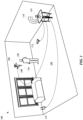
- FIG. 1 illustrates a perspective view 100 of a user 104 configuring a smart device 108 according to instructions tailored in response to feedback received during the configuring.
- the smart device 108 can be any computing device capable of communicating with other devices to perform a task.
- the illustrated smart device 108 can be a thermostat device that is capable of controlling the temperature of the home 102.
- the smart device 108 can be any other device such as a smart light, smart fan, smart appliance (e.g., refrigerator, washing machine, oven, microwave, etc.) and/or any other device.
- a smart device can be a device that includes one or more processors, memory, and communications hardware (e.g., for communicating over Wi-Fi or other communication channel(s)).
- a smart device can be characterized as such based on its limited functionality with respect to its hardware and/or software capabilities. For example, some smart devices may not include a touch screen display and/or other dynamic direct user interface. As another example, some smart devices may include firmware but not be capable of supporting additional third party applications. As yet another example, some smart device may be configured for receiving power from non-wall outlet sources such as a hardwired source, a light fixture socket, and/or any other non-wall outlet source.
- some smart devices can be mounted in places not typical for a personal computing device, such as a wall, a ceiling, and/or other structure.
- a personal computing device such as a wall, a ceiling, and/or other structure.
- other smart devices may not - and may indeed be quite robust hardware and/or software wise.
- an automated assistant can provide tailored instructions to the user 104.
- the instructions can be tailored according to feedback received from the smart device 108, a networked device 114 in the home 102, a personal computing device 112, a client device 110 that includes an automated assistant application, a remote device that is in communication with the client device 110, and/or any other source of data that is relevant to the configuration of the smart device 108.
- the automated assistant can determine that the user 104 has recently acquired the smart device 108 and offer assistance configuring the smart device 108 in response.
- the automated assistant can determine that the user 104 has acquired the smart device 108 in a variety of ways.
- the smart device 108 can provide a direct or indirect signal to the client device 110 via Bluetooth, Wi-Fi, a local area network, a wide area network, or any other connection suitable for transmitting data. This can occur when the smart device 108 is within a threshold distance of the client device 110, allowing the automated assistant to acknowledge the smart device 108 and prepare to provide tailored instructions in response.
- the automated assistant can be aware that the user 104 acquired the smart device 108 using data of the user that is available to the automated assistant.
- the data can include, for example, emailed receipts corresponding to recent purchases made by the user 104.
- the automated assistant can be put on notice that the smart device 108 has been acquired by the user 104 and prepare to provide the tailored instructions in response.
- the client device 110 can include a camera, and when the user 104 comes home 102 with the smart device 108, the client device 110 can be aware of the smart device 108 via images captured by the camera. For example, the camera can capture the images of packaging of the smart device 108 in response to motion detected by the client device 110 as the user 104 is entering the home 102. The images can then be analyzed by the client device 110, or a separate device, to identify the smart device 108. In response to identifying the smart device 108, the automated assistant can provide tailored instructions for configuring the smart device 108 in the home 102.
- the user 104 can ask the automated assistant for assistance with configuring the smart device 108, or the automated assistant can affirmatively prompt the user 104 to ask whether the user 104 would like assistance configuring the smart device 108.
- the user 104 can ask the automated assistant for assistance by audibly speaking at the client device 110 to invoke the automated assistant (e.g., "Could you help me configure my new device?"), or using a personal computing device 112 to remotely invoke the automated assistant at the client device 110. Remotely invoking the automated assistant can entail the user 104 speaking into the personal computing device 112 or typing a command into the personal computing device 112.
- the automated assistant can prompt the user 104 to ask whether the user would like assistance in response to the automated assistant determining that the smart device 108 is in the home 102.
- the automated assistant can provide an audible output 118 such as "would you like assistance configuring the smart device” or "would you like to schedule a time for configuring the smart device?"
- the automated assistant can determine, based on the feedback, that the user 104 is incorrectly configuring the smart device 108 (e.g., connecting an incorrect wire).
- the automated assistant can offer instructions for configuring the smart device 108, and the instructions can be tailored to initially address any existing issues.
- the automated assist can provide an output such as "I see you've incorrectly connected the wires. Please disconnect the wires and let's start configuring your smart device.” In this way, the user 104 does not have to individually troubleshoot the configuration attempt later on, and can seamlessly transition to executing instructions from the automated assistant.
- the automated assistant can lookup instructions for configuring the smart device 108.
- Initial instructions for configuring the smart device 108 can be stored at the client device 110, a remote device such as a server connected to the client device 110 over the internet, and/or any other device that can communicate with the automated assistant.
- the automated assistant can provide a first instruction to the user 104 via an automated assistant interface, which can be an audio interface of the client device 110 or personal computing device 112, and/or a graphical interface provided via a display panel of the client device 110 or personal computing device 112.
- the initial instruction can correspond to a step of attaching a smart device wire 116 to a home wire 106.
- the characteristics can optionally be determined based on applying the content to a trained machine learning model.
- the trained machine learning model can be trained to accept an image as input and to generate, based on the applied input, output that indicates the characteristic(s).
- a machine learning model can be trained to determine wiring characteristics based on supervised learning that utilizes labeled training instances. Each training instance can include training example input that is image that includes wiring and training example output that indicates a labeled characteristic of the wiring.
- the automated assistant application 220 can monitor the smart device 216 and/or the user while the instructions have been discontinued. For example, the smart device 216 can be monitored to identify issues (e.g., power and connectivity issues) that might be associated with the smart device 216 during a time when the instructions have been discontinued. Furthermore, the automated assistant application 220 can determine when the user is available to continue configuring the smart device 216. The automated assistant application 220 can also compile any issues identified during the period when the instructions were discontinued. The automated assistant application 220 can communicate the issues to the remote server 204 in order that the instruction engine 208 of the remote server 204 can tailor further instructions to address the issues identified during the period when the instructions were discontinued.
- issues e.g., power and connectivity issues
- the instruction engine 208 can generate the further instructions for both completing the configuration of the smart device 216 and addressing the issues identified by the automated assistant application 220, the instructions can be provided to the automated assistant application 220. Sometime thereafter, the automated assistant application 220 can continue providing the instructions to the user via the automated assistant interface 222.
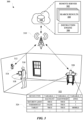
- FIG. 3 illustrates a diagram 300 of a user 316 configuring a smart device 314 using instructions provided by an automated assistant application of a client device 320, which can also receive search queries from the user 316, such as search queries submitted during an instructional session when the automated assistant application is providing guidance to the user 316.
- the user 316 can acquire a smart device 314 for installing in their home 322 and query the automated assistant application for assistance with installing the smart device 314.
- the instructions can include a step of connecting wires 312 of the home to wires of the smart device 314. In attempting to connect the wires 312 of the home to the wires of the smart device 314, the user 316 can have questions regarding the wiring, the smart device 314, or any other matter associated with connecting devices in the home 322.
- a user can submit a query via an automated assistant interface, and the automated assistant can generate a response to the query based on the query itself, and based on smart device context information.
- the query submitted by the user can be modified to include terms related to the make and/or model of the smart device and/r to include terms related to the current state of the configuring of the smart device.
- the user can submit the query during utilization of the automated assistant interface in receiving guidance for configuring the smart device.
- the user can submit the query without having previously utilized the automated assistant interface in receiving guidance for configuring the smart device.
- automated assistant responses to user queries can be generated in view of smart device context information, even in situations where the user has not, prior to the query, engaged the automated assistant in configuring the smart device.
- the instruction engine 306 can be notified of the change in residence of the user 316 and use information related to the new residence for adapting steps for configuring the smart device 314.
- the automated assistant can received the adapted steps and provide an output such as "while you're providing the Wi-Fi password to the smart device, would you like me to use the same schedules from your previous residence for all the devices?"
- the automated assistant can conserve time performing the migration while the user 316 is performing some other action (e.g., providing a password) that would not interfere with the migration. Tailoring configuration instructions in this way ensures that user will be taking advantage of each feature of their devices, while streamlining the instructions to be less taxing on the user 316.
- FIG. 4 illustrates a perspective view 400 of a user 404 configuring a smart device 402 in a home 424 according to instructions that are tailored based on historical installation data 420 associated with previous installations of similar smart devices.
- a user 404 can acquire the smart device 402 and bring it home 424 to install.
- a client device 410 that includes an automated assistant application can detect the presence of the smart device 402 and offer the user 404 assistance with configuring the smart device 402 in the home 424.
- the automated assistant can identify the smart device 402 and acquire instructions for configuring the smart device 402 from a separate device 416, which can be a remote server 418.
- the remote server 418 can include an instruction engine 422 for generating instructions for configuring the smart device 402 based on information obtained about the smart device 402.
- the automated assistant can audibly or textually provide the instructions at an interface of the automated assistant.
- the client device 410 and/or a network device 412 in the home 424 can identify other devices in the home 424 capable of assisting the user 404.
- the client device 410 or the networked device 412 can employ a packet analyzer capable of detecting other devices that are on the same network as the client device 410, such as a smart light 408 or a personal computing device 406.
- the packet analyzer can, for example, analyze contents of packets or headers of packets transmitted over one or more channels of a network 414 that is accessible to the devices in the home 424.
- the network 414 can be a local area network, a wide area network, and/or any other network where packets are transmitted between devices.
- the automated assistant or the remote server 418 can tailor the instructions accordingly. For instance, packets from the smart light 408 can be analyzed by the client device 410 and/or the network device 412, and the smart light 408 can be identified by the automated assistant. The automated assistant can indicate to the remote server 418 that the smart light 408 is available for assisting in the configuration of the smart device 402. In response, the instruction engine 422 can generate tailored instructions that include steps involving the smart light 408.
- the instructions can be tailored during the configuration process of the smart device 402, and the automated assistant can read the tailored instructions and provide an output such as "Please step back so that the smart light can see where the smart device is being installed."
- the location of the smart device 402 in the home 424 can be captured by a camera of the smart light 408 and an image that identifies of the location of the smart device 402 can be transmitted from the smart light 408 to the client device 410 and/or the remote server 418.
- the smart device 402 can include an accelerometer that can be used to identify an orientation of the smart device 402. Data collected by the accelerometer of the smart device 402 can also be transmitted to the client device 410 and/or the remote server 418 to determine an orientation of the smart device 108.
- the remote server 418 can compare the image and/or accelerometer data to historical installation data 420 to determine whether the location and/or orientation of the smart device 402 is suitable for operations of the smart device 402.
- the historical installation data 420 can include images or information associated with similar smart devices in homes that are comparable to the home 424 where the smart device 402 is being configured.
- the remote server 418 can determine whether the location of the smart device 402 should be adjusted to optimize performance. For example, if the smart device 402 is a thermostat, the remote server 418 can determine that the thermostat should be moved further away from a window 426 to avoid biasing temperature measurements of the smart device 402.
- the instruction engine 422 can tailor the instructions to include steps for advising the user 404 about moving the smart device 402 away from the window 426.
- the automated assistant can receive the updated instructions from the remote server 418 and announce to the user 404 "Thanks for stepping back.
- the view from the smart light indicates that the smart device is too close to the window and should be moved laterally away from the window.”
- the automated assistant can provide further instructions based on the devices available in the home 424. For instance, the next step in the instructions can be to configure a schedule of operation for the smart device 402.
- the automated assistant can determine that the user 404 owns a personal computing device 406 with a calendar application that can help with scheduling the operation of the smart device 402, and therefore reduce the number of steps for configuring the smart device 402.
- the automated assistant can tailor the subsequent instructions to include a query regarding using data from the calendar application.
- the automated assistant can ask, "would you like me to configure the operation of the smart device according to your calendar application?" If the user 404 agrees, the automated assistant can either cause the personal computing device 406 to directly provide data to the smart device 402, or retrieve information from the personal computing device 406 for configuring the smart device 402. In this way, devices and data already available to the automated assistant can be leveraged to tailor instructions for configuring the smart device 402.
- the remote server 418 can determine based on the comparison, further instructions for configuring the smart device 402 according to the wiring of the home 424.
- the automated assistant can use the further instructions to provide output such as "I see your home has a bare copper ground wire, please connect the bare copper wire to the ground terminal of the smart device.”
- the method 500 can include a block 502 of determining, based on a received input, that a smart device is to be configured by a user.
- the smart device can be any computing device capable of using feedback to perform a task, such as monitor a home.
- the received input can be information provided from a server that manages user data that can include purchases made by the user. Alternatively, the received input can be a signal directly or indirectly provided by the smart device via wireless communication protocol such as Bluetooth or Wi-Fi.
- one or more initial instructions for configuring the smart device can be provided via an automated assistant interface of a client device.
- the automated assistant interface can be associated with an automated assistant application stored on the client device, or otherwise accessible to the client device.
- the automated assistant application can assist the user with installing and configuring a new device, and adapt instructions specifically for the user based on various sources of data.
- a hardware feedback communication generated by the smart device can be received.
- a hardware feedback communication can be a signal resulting from an action performed by the user or the smart device during or after performing the one or more initial instructions.
- the hardware feedback communication can be communicated by the smart device when a wire of the smart device is connected to a wire of a home in which the smart device is to be installed.
- the hardware feedback communication can be communicated by the smart device when a connectivity issue occurs as a result of the smart device attempting to connect to a local network.
- one or more further instructions can be determined for configuring the smart device based on the hardware feedback communication.
- the further instructions can address an issue associated with the hardware feedback communication, thereby improving the configuration process of the smart device by eliminating issues that might otherwise be exhibited if not addressed during the configuring.
- further instructions for configuring the smart device are provided via the automated assistant interface of the client device.
- FIG. 6 illustrates a method 600 for adapting instructions for configuring a smart device based on sensor data provided from a separate device during the configuring of the smart device.
- the method 600 can be performed by a client device, a network device, and/or any other computing device capable of providing instructions to a user.
- the method 600 can include a block 602 of determining, based on received input, that a smart device is to be configured by a user.
- the received input can be a signal provided by the smart device over a network such as a local area network or a wide area network.
- the received input can be from the user providing a verbal or textual input at an automated user interface of a client device.
- the verbal or textual input can be a query from the user asking an automated assistant application for assistance with setting up their smart device.
- an instruction for using a separate device for assisting in configuration of the smart device can be provided at an automated assistant interface of the client device.
- the separate device can be a computing device that includes a sensor capable of collecting data related to a characteristic of the smart device or an environment in which the smart device is to be configured.
- the separate device can be a portable computing device that includes a camera that can capture an image or video of the smart device or the environment.
- data associated with the configuration can be received from the separate device.
- the data can be an image of packaging of the smart device, an image of the smart device itself, a network transmission associated with the smart device, and/or any other data that can be associated with a smart device.
- a characteristic of the configuration of the smart device can be determined based on the received data from the separate device.
- the characteristic of the configuration can be a wiring arrangement of the smart device, a location of the smart device, a network property of the smart device, an output of the smart device, and/or any other feature related to the configuration of the smart device.
- the automated assistant interface can provide a configuration instruction that is based on the determined characteristic of the configuration of the smart device. In this way, the configuration instructions can address any issues that can be identified from data collected by a separate device before, during, or after configuration of the smart device has begun.
- the method 700 can include a block 702 of providing, at an automated assistant interface of a client device, instructions for configuring a smart device.
- the instructions can be through an audio interface, such as a sound system of the client device, or a visual interface of the client device, such as a touch screen.
- the smart device can provide a signal to the automated assistant to indicate the configuration was completed, and the automated assistant can presume the configuration is not complete until the signal is received.
- Block 706 includes monitoring to determine whether the configuration was completed independent of the interaction with the automated assistant interface.
- the monitoring can be performed by detecting signals from the smart device to determine whether the smart device is fully operational despite the user not receiving all the instructions from the automated assistant interface.
- the monitoring can be performed by detecting a signal from a separate device that stores a status of the smart device.
- the status can indicate the extent in which the smart device has been configured, such as, for example, a partially operational configuration or a fully operational configuration. Each status can be based on which features of the smart device are operational.
- the automated assistant can be aware that the configuration was not completed independent of the automated assistant interface when the automated assistant receives a signal from the smart device indicating that there is a configuration issue at the smart device.
- the user may not have connected the smart device to another device on the network, or failed to set a schedule of operation for the smart device.
- the smart device can indicate these omissions to the automated assistant so the automated assistant can determine whether the smart device was completely configured.
- further user interface output from the automated assistant interface can be provided from the client device for further configuring the smart device.
- the further interface output can correspond to instructions for continuing the configuration of the smart device and the further output can be provided in an audio or text format from the client device or a separate device.
- FIG. 8 is a block diagram 800 of an example computer system 810.
- Computer system 810 typically includes at least one processor 814 which communicates with a number of peripheral devices via bus subsystem 812. These peripheral devices may include a storage subsystem 824, including, for example, a memory subsystem 825 and a file storage subsystem 826, user interface output devices 820, user interface input devices 822, and a network interface subsystem 816. The input and output devices allow user interaction with computer system 810.
- Network interface subsystem 816 provides an interface to outside networks and is coupled to corresponding interface devices in other computer systems.
- User interface input devices 822 may include a keyboard, pointing devices such as a mouse, trackball, touchpad, or graphics tablet, a scanner, a touchscreen incorporated into the display, audio input devices such as voice recognition systems, microphones, and/or other types of input devices.
- pointing devices such as a mouse, trackball, touchpad, or graphics tablet
- audio input devices such as voice recognition systems, microphones, and/or other types of input devices.
- use of the term "input device” is intended to include all possible types of devices and ways to input information into computer system 810 or onto a communication network.
- User interface output devices 820 may include a display subsystem, a printer, a fax machine, or non-visual displays such as audio output devices.
- the display subsystem may include a cathode ray tube (CRT), a flat-panel device such as a liquid crystal display (LCD), a projection device, or some other mechanism for creating a visible image.
- the display subsystem may also provide non-visual display such as via audio output devices.
- output device is intended to include all possible types of devices and ways to output information from computer system 810 to the user or to another machine or computer system.
- Storage subsystem 824 stores programming and data constructs that provide the functionality of some or all of the modules described herein.
- the storage subsystem 824 can include the logic to perform selected aspects of methods 500, 600, 700, and/or to implement one or more of the server devices, client devices, databases, engines, and/or modules described herein.
- Memory 825 used in the storage subsystem 824 can include a number of memories including a main random access memory (RAM) 830 for storage of instructions and data during program execution and a read only memory (ROM) 832 in which fixed instructions are stored.
- a file storage subsystem 826 can provide persistent storage for program and data files, and may include a hard disk drive, a floppy disk drive along with associated removable media, a CD-ROM drive, an optical drive, or removable media cartridges.
- the modules implementing the functionality of certain implementations may be stored by file storage subsystem 826 in the storage subsystem 824, or in other machines accessible by the processor(s) 814.
- the users may be provided with an opportunity to control whether programs or features collect user information (e.g., information about a user's social network, social actions or activities, profession, a user's preferences, or a user's current geographic location), or to control whether and/or how to receive content from the server that may be more relevant to the user.
- user information e.g., information about a user's social network, social actions or activities, profession, a user's preferences, or a user's current geographic location
- certain data may be treated in one or more ways before it is stored or used, so that personal identifiable information is removed.
Landscapes
- Engineering & Computer Science (AREA)
- Theoretical Computer Science (AREA)
- Physics & Mathematics (AREA)
- General Engineering & Computer Science (AREA)
- Software Systems (AREA)
- General Physics & Mathematics (AREA)
- Human Computer Interaction (AREA)
- Mathematical Physics (AREA)
- Computer Hardware Design (AREA)
- Multimedia (AREA)
- General Health & Medical Sciences (AREA)
- Audiology, Speech & Language Pathology (AREA)
- Health & Medical Sciences (AREA)
- Computational Linguistics (AREA)
- Databases & Information Systems (AREA)
- Data Mining & Analysis (AREA)
- Computer Networks & Wireless Communication (AREA)
- Signal Processing (AREA)
- Computer Security & Cryptography (AREA)
- Quality & Reliability (AREA)
- User Interface Of Digital Computer (AREA)
- Selective Calling Equipment (AREA)
Claims (13)
- Verfahren, das durch einen oder mehrere Prozessoren implementiert wird, wobei das Verfahren Folgendes umfasst:Bestimmen (502) durch einen automatisierten Assistenten (220) einer Client-Vorrichtung (110, 218, 320, 410) eines Benutzers (104, 316, 404) und basierend auf einer empfangenen Eingabe, dass eine intelligente Vorrichtung (108, 216, 314, 402) durch den Benutzer zu konfigurieren ist, wobei der automatisierte Assistent eine Schnittstelle (222) aufweist;basierend auf dem Bestimmen, dass die intelligente Vorrichtung durch den Benutzer zu konfigurieren ist:Bereitstellen (504) einer oder mehrerer anfänglichen Anweisungen zum Konfigurieren der intelligenten Vorrichtung über die automatisierte Assistentenschnittstelle der Client-Vorrichtung des Benutzers, wobei die Client-Vorrichtung separat von der intelligenten Vorrichtung ist,wobei die eine oder mehreren anfänglichen Anweisungen einen oder mehrere Schritte beinhalten, die durch den Benutzer durchzuführen sind, um die intelligente Vorrichtung zu konfigurieren;im Anschluss an das Bereitstellen der anfänglichen Anweisungen Empfangen (506) einer Hardware-Feedback-Kommunikation, die durch die intelligente Vorrichtung generiert wird, durch den automatisierten Assistenten, wobei die Hardware-Feedback-Kommunikation durch die intelligente Vorrichtung als Reaktion auf eine physische Interaktion mit der intelligenten Vorrichtung durch den Benutzer generiert wird und wobei die Hardware-Feedback-Kommunikation ein Konfigurationsproblem mit der intelligenten Vorrichtung angibt;als Reaktion auf das Empfangen der Hardware-Feedback-Kommunikation Bestimmen (508) einer oder mehrerer weiteren Anweisungen zum Konfigurieren der intelligenten Vorrichtung, wobei die weiteren Anweisungen angepasst sind, um das durch die Hardware-Feedback-Kommunikation angegebene Konfigurationsproblem zu beheben, und basierend auf der Hardware-Feedback-Kommunikation bestimmt werden; undBereitstellen (510) der weiteren Anweisungen zum Konfigurieren der intelligenten Vorrichtung über die automatisierte Assistentenschnittstelle der Client-Vorrichtung.
- Verfahren nach Anspruch 1, wobei die Hardware-Feedback-Kommunikation durch die intelligente Vorrichtung als Reaktion auf eine physische Interaktion mit der intelligenten Vorrichtung durch den Benutzer generiert wird;wobei die physische Interaktion mit der intelligenten Vorrichtung durch den Benutzer eine Verbindung mindestens eines Kabels mit der intelligenten Vorrichtung umfasst und die Hardware-Feedback-Kommunikation durch die intelligente Vorrichtung basierend auf einer erkannten Eigenschaft der Verbindung generiert wird; oderwobei die Hardware-Feedback-Kommunikation basierend auf Sensordaten generiert wird, die durch einen oder mehrere Sensoren der intelligenten Vorrichtung generiert werden, und die physische Interaktion Koppeln der intelligenten Vorrichtung mit einer Installationskonstruktion oder mit einer Leistungsquelle umfasst.
- Verfahren nach Anspruch 2, wobei die physische Interaktion mit der intelligenten Vorrichtung durch den Benutzer eine Verbindung mindestens eines Kabels mit der intelligenten Vorrichtung umfasst und wobei die Hardware-Feedback-Kommunikation angibt, dass die Verbindung mindestens eines Kabels mit der intelligenten Vorrichtung fehlerhaft ist.
- Verfahren nach Anspruch 2 oder Anspruch 3, wobei die Hardware-Feedback-Kommunikation durch die intelligente Vorrichtung über einen oder mehrere Kommunikationskanäle an die Client-Vorrichtung übertragen wird.
- Verfahren nach Anspruch 4, wobei die Hardware-Feedback-Kommunikation durch die intelligente Vorrichtung über einen Router in Kommunikation mit der intelligenten Vorrichtung und der Client-Vorrichtung an die Client-Vorrichtung übertragen wird.
- Verfahren nach einem der vorhergehenden Ansprüche, wobei die empfangene Eingabe eine verbale oder textuelle Eingabe ist, die durch den Benutzer an der automatisierten Assistentenschnittstelle der Client-Vorrichtung bereitgestellt wird.
- Verfahren nach einem der vorhergehenden Ansprüche, ferner umfassend:Bereitstellen einer Assistentenausgabe an der automatisierten Assistentenschnittstelle der Client-Vorrichtung basierend auf Benutzerdaten, die einem Kauf der intelligenten Vorrichtung entsprechen, wobei die Assistentenausgabe ein Angebot zur Hilfe beim Installieren der intelligenten Vorrichtung ist; undwobei die empfangene Eingabe einer bejahenden Benutzerschnittstelleneingabe als Reaktion auf das Angebot zur Hilfe beim Installieren der intelligenten Vorrichtung entspricht, wobei die bejahende Benutzerschnittstelleneingabe durch Interaktion des Benutzers mit einer oder mehreren Benutzerschnittstellen-Eingabevorrichtungen der Client-Vorrichtung bereitgestellt wird.
- Verfahren nach einem der vorhergehenden Ansprüche, wobei das Bereitstellen der einen oder mehreren anfänglichen Anweisungen Folgendes umfasst:Bereitstellen einer Anweisung zum Aufnehmen eines Bildes, das der Konfiguration der intelligenten Vorrichtung zugeordnet ist, durch die automatisierte Assistentenschnittstelle der Client-Vorrichtung oder eine zusätzliche Client-Vorrichtung des Benutzers;Empfangen des Bildes basierend darauf, dass der Benutzer das Bild als Reaktion auf die bereitgestellte Anweisung aufnimmt, wobei das Bild über eine Kamera der Client-Vorrichtung oder eine zusätzliche Client-Vorrichtung des Benutzers aufgenommen wird; Bestimmen einer Eigenschaft der Konfiguration basierend auf dem empfangenen Bild; undBereitstellen der einen oder mehreren anfänglichen Anweisungen zum Konfigurieren der intelligenten Vorrichtung durch die automatisierte Assistentenschnittstelle, wobei die eine oder mehreren anfänglichen Anweisungen auf der bestimmten Eigenschaft der Konfiguration basieren.
- Verfahren nach Anspruch 8, wobei die bestimmte Eigenschaft auf einem Vergleich des empfangenen Bildes mit anderen Konfigurationsbildern basiert, wobei die anderen Konfigurationsbilder früheren Konfigurationen von ähnlichen intelligenten Vorrichtungen zugeordnet sind.
- Verfahren nach Anspruch 8 oder 9, ferner umfassend:Zugreifen auf Kontoinformationen, um Anwendungen, die dem Benutzer zugeordnet sind, zu identifizieren; undBestimmen, dass dem Benutzer eine Kameraanwendung zugeordnet ist, wobei die Anweisung die Kameraanwendung identifiziert.
- Verfahren nach einem der Ansprüche 8 bis 10, wobei das empfangene Bild Kabeln zum Verbinden mit der intelligenten Vorrichtung entspricht und die Eigenschaft der Konfiguration einem in dem Bild identifizierten Verkabelungsproblem entspricht.
- Client-Vorrichtung, umfassend:einen oder mehrere Prozessoren; undSpeicher;wobei der eine oder die mehreren Prozessoren dazu konfiguriert sind, in dem Speicher gespeicherte Anweisungen auszuführen, um das Verfahren nach einem der vorhergehenden Ansprüche durchzuführen.
- Ein oder mehrere nichttransitorische computerlesbare Speichermedien, die Computeranweisungen speichern, die durch einen oder mehrere Prozessoren ausführbar sind, um das Verfahren nach einem der Ansprüche 1 bis 11 durchzuführen.
Applications Claiming Priority (2)
| Application Number | Priority Date | Filing Date | Title |
|---|---|---|---|
| US15/589,639 US10754673B2 (en) | 2017-05-08 | 2017-05-08 | Smart device configuration guidance via automated assistant interface of separate client device |
| PCT/US2018/031447 WO2018208693A1 (en) | 2017-05-08 | 2018-05-07 | Smart device configuration guidance via automated assistant interface of separate client device |
Publications (2)
| Publication Number | Publication Date |
|---|---|
| EP3485387A1 EP3485387A1 (de) | 2019-05-22 |
| EP3485387B1 true EP3485387B1 (de) | 2025-07-02 |
Family
ID=62555179
Family Applications (1)
| Application Number | Title | Priority Date | Filing Date |
|---|---|---|---|
| EP18729842.7A Active EP3485387B1 (de) | 2017-05-08 | 2018-05-07 | Anleitung der konfiguration einer intelligenten vorrichtung über eine automatisierte assistentenschnittstelle einer separaten client-vorrichtung |
Country Status (4)
| Country | Link |
|---|---|
| US (3) | US10754673B2 (de) |
| EP (1) | EP3485387B1 (de) |
| CN (2) | CN118069271A (de) |
| WO (1) | WO2018208693A1 (de) |
Families Citing this family (24)
| Publication number | Priority date | Publication date | Assignee | Title |
|---|---|---|---|---|
| US10755294B1 (en) | 2015-04-28 | 2020-08-25 | Intuit Inc. | Method and system for increasing use of mobile devices to provide answer content in a question and answer based customer support system |
| US10475044B1 (en) | 2015-07-29 | 2019-11-12 | Intuit Inc. | Method and system for question prioritization based on analysis of the question content and predicted asker engagement before answer content is generated |
| US10733677B2 (en) | 2016-10-18 | 2020-08-04 | Intuit Inc. | Method and system for providing domain-specific and dynamic type ahead suggestions for search query terms with a customer self-service system for a tax return preparation system |
| US10552843B1 (en) | 2016-12-05 | 2020-02-04 | Intuit Inc. | Method and system for improving search results by recency boosting customer support content for a customer self-help system associated with one or more financial management systems |
| US10748157B1 (en) | 2017-01-12 | 2020-08-18 | Intuit Inc. | Method and system for determining levels of search sophistication for users of a customer self-help system to personalize a content search user experience provided to the users and to increase a likelihood of user satisfaction with the search experience |
| US10754673B2 (en) | 2017-05-08 | 2020-08-25 | Google Llc | Smart device configuration guidance via automated assistant interface of separate client device |
| US10922367B2 (en) | 2017-07-14 | 2021-02-16 | Intuit Inc. | Method and system for providing real time search preview personalization in data management systems |
| US20190068526A1 (en) * | 2017-08-25 | 2019-02-28 | Facebook, Inc. | Methods and systems for helper bot platform assistance |
| KR102402513B1 (ko) * | 2017-09-15 | 2022-05-27 | 삼성전자주식회사 | 컨텐트를 실행하는 방법 및 장치 |
| US11093951B1 (en) | 2017-09-25 | 2021-08-17 | Intuit Inc. | System and method for responding to search queries using customer self-help systems associated with a plurality of data management systems |
| US11165866B2 (en) * | 2018-01-09 | 2021-11-02 | Stel Life, Inc. | Secure wireless communication platform |
| US11436642B1 (en) | 2018-01-29 | 2022-09-06 | Intuit Inc. | Method and system for generating real-time personalized advertisements in data management self-help systems |
| US11269665B1 (en) * | 2018-03-28 | 2022-03-08 | Intuit Inc. | Method and system for user experience personalization in data management systems using machine learning |
| JP7212500B2 (ja) * | 2018-10-31 | 2023-01-25 | ダイキン工業株式会社 | 遠隔管理装置及び遠隔管理システム |
| US11562227B2 (en) * | 2019-03-13 | 2023-01-24 | Accenture Global Solutions Limited | Interactive assistant |
| US10884762B1 (en) * | 2019-07-15 | 2021-01-05 | Capital One Services, Llc | Methods and systems for comparing computer configuration information |
| US11210108B2 (en) | 2020-02-10 | 2021-12-28 | International Business Machines Corporation | Guiding the installation process of sensor-based devices |
| US11055195B1 (en) | 2020-02-10 | 2021-07-06 | International Business Machines Corporation | Orchestrating an interruption during installation of sensor-based devices |
| WO2021219921A1 (en) * | 2020-04-29 | 2021-11-04 | Kone Corporation | A solution for generating at least one installation operation for at least one ongoing installation process at an installation site |
| US12107702B2 (en) * | 2020-10-13 | 2024-10-01 | Innovative Building Technologies, Llc | Electrical load validation for a smart space in a building |
| CN112578976A (zh) * | 2020-12-25 | 2021-03-30 | 珠海格力电器股份有限公司 | 一种显示面板定制系统及具有其的衣物处理装置 |
| US20220261817A1 (en) * | 2021-02-18 | 2022-08-18 | Elemental Cognition Inc. | Collaborative user support portal |
| DE112021007876T5 (de) * | 2021-06-24 | 2024-04-11 | Mitsubishi Electric Corporation | Informationsverarbeitungseinrichtung, informationsverarbeitungssystem, informationsverarbeitungsverfahren und informationsverarbeitungsprogramm |
| US20260037758A1 (en) * | 2024-07-31 | 2026-02-05 | Sony Group Corporation | Using artificial intelligence as a smart assistant for audio visual devices |
Citations (2)
| Publication number | Priority date | Publication date | Assignee | Title |
|---|---|---|---|---|
| US20150097663A1 (en) * | 2013-10-07 | 2015-04-09 | Google Inc. | Smart-home multi-functional hazard detector providing location-specific feature configuration |
| US20180283716A1 (en) * | 2017-03-29 | 2018-10-04 | Johnson Controls Technology Company | Thermostat with interactive installation features |
Family Cites Families (69)
| Publication number | Priority date | Publication date | Assignee | Title |
|---|---|---|---|---|
| US8161386B1 (en) * | 2002-09-04 | 2012-04-17 | Cisco Technology, Inc. | Method and apparatus for remote web-based technical support |
| US7509324B2 (en) * | 2004-09-07 | 2009-03-24 | General Electric Company | Apparatus and method for sharing configuration data among a plurality of devices |
| US20060224778A1 (en) * | 2005-04-04 | 2006-10-05 | Microsoft Corporation | Linked wizards |
| US8082123B2 (en) * | 2005-09-30 | 2011-12-20 | Rockwell Automated Technologies, Inc. | Interactive diagnostics having graphical playback and solution implementation capabilities |
| US7533339B2 (en) * | 2005-12-29 | 2009-05-12 | Sap Ag | System and method for providing user help |
| US7743328B2 (en) * | 2006-10-12 | 2010-06-22 | Microsoft Corporation | Preserving a process instance for use by different user interfaces |
| US20080183852A1 (en) | 2007-01-26 | 2008-07-31 | Pramer David M | Virtual information technology assistant |
| US20090007097A1 (en) * | 2007-06-29 | 2009-01-01 | Hinton Heather M | Product install and configuration providing choice of new installation and re-use of existing installation |
| US9202383B2 (en) * | 2008-03-04 | 2015-12-01 | Power Monitors, Inc. | Method and apparatus for a voice-prompted electrical hookup |
| US9058230B1 (en) * | 2008-05-27 | 2015-06-16 | Symantec Operating Corporation | Online expert system guided application installation |
| US20100174599A1 (en) * | 2009-01-05 | 2010-07-08 | Apple Inc. | System and method for providing content associated with a product or service |
| US9426278B2 (en) * | 2010-09-01 | 2016-08-23 | Plantronics, Inc. | Location based mobile communications device auto-configuration |
| US8918219B2 (en) * | 2010-11-19 | 2014-12-23 | Google Inc. | User friendly interface for control unit |
| US9003816B2 (en) * | 2010-11-19 | 2015-04-14 | Google Inc. | HVAC controller with user-friendly installation features facilitating both do-it-yourself and professional installation scenarios |
| US9092039B2 (en) * | 2010-11-19 | 2015-07-28 | Google Inc. | HVAC controller with user-friendly installation features with wire insertion detection |
| US20130015968A1 (en) * | 2011-07-13 | 2013-01-17 | Honeywell International Inc. | System and method of alarm installation and configuration |
| US20130198762A1 (en) * | 2012-01-26 | 2013-08-01 | Ronald Charles Thorpe | System and Method for Providing Customized Feedback to a User |
| US9418658B1 (en) | 2012-02-08 | 2016-08-16 | Amazon Technologies, Inc. | Configuration of voice controlled assistant |
| US20130241734A1 (en) * | 2012-03-15 | 2013-09-19 | General Electric Company | System and method for detecting improper wiring or configuration in a monitoring system |
| US9160844B2 (en) | 2012-08-06 | 2015-10-13 | Angel.Com Incorporated | Conversation assistant |
| US9357385B2 (en) * | 2012-08-20 | 2016-05-31 | Qualcomm Incorporated | Configuration of a new enrollee device for use in a communication network |
| US8984186B2 (en) * | 2012-08-29 | 2015-03-17 | Google Inc. | Augmenting capabilities of a host device |
| US9286397B1 (en) * | 2012-09-28 | 2016-03-15 | Google Inc. | Generating customized content |
| GB2499281B (en) * | 2012-09-28 | 2014-06-25 | Imagination Tech Ltd | Method, system and device for selecting a device to satisfy a user request |
| US9742872B2 (en) * | 2012-10-10 | 2017-08-22 | Fortinet, Inc. | Configuring initial settings of a network security device via a hand-held computing device |
| US9683753B2 (en) * | 2013-05-24 | 2017-06-20 | Emerson Electric Co. | Facilitating installation of a controller and/or maintenance of a climate control system |
| GB201312398D0 (en) * | 2013-07-10 | 2013-08-21 | Powa Technologies Ltd | Electronic transaction validation |
| WO2015026933A2 (en) * | 2013-08-21 | 2015-02-26 | Honeywell International Inc. | Devices and methods for interacting with an hvac controller |
| WO2015051142A1 (en) * | 2013-10-02 | 2015-04-09 | Assurant, Inc. | Mobile computing device instructional graphical overlay |
| US10563876B2 (en) * | 2013-11-22 | 2020-02-18 | Ademco Inc. | Setup routine to facilitate user setup of an HVAC controller |
| US9885492B2 (en) * | 2013-11-22 | 2018-02-06 | Honeywell International Inc. | Methods systems and tools for determining a wiring configuration for an HVAC controller |
| US9698999B2 (en) * | 2013-12-02 | 2017-07-04 | Amazon Technologies, Inc. | Natural language control of secondary device |
| US9479931B2 (en) * | 2013-12-16 | 2016-10-25 | Nuance Communications, Inc. | Systems and methods for providing a virtual assistant |
| US9459946B2 (en) * | 2014-01-14 | 2016-10-04 | International Business Machines Corporation | Personalizing error messages based on user behavior |
| US9514114B2 (en) * | 2014-03-04 | 2016-12-06 | International Business Machines Corporation | Managing product configuration |
| CN106465512A (zh) * | 2014-03-28 | 2017-02-22 | 罗伯特·博世有限公司 | 使用数据库和移动装置来配置照明电子器材 |
| US9704113B2 (en) * | 2014-05-02 | 2017-07-11 | Qualcomm Incorporated | Method and apparatus for setting user preferences or device configuration |
| US10063625B2 (en) * | 2014-05-15 | 2018-08-28 | Universal Electronics Inc. | System and method for appliance detection and app configuration |
| WO2015177656A1 (en) * | 2014-05-19 | 2015-11-26 | Abb Technology Ltd. | Method for allowing a configuration change of an intelligent electronic device of a power system |
| US10170123B2 (en) * | 2014-05-30 | 2019-01-01 | Apple Inc. | Intelligent assistant for home automation |
| CN106415480B (zh) | 2014-06-03 | 2019-12-17 | 三星电子株式会社 | 用于安装在移动设备上的用于允许对该移动设备进行远程配置的高速应用 |
| US20160004521A1 (en) * | 2014-07-02 | 2016-01-07 | Honeywell International Inc. | System and method of providing context sensitive help for alarm system installation |
| US20160065653A1 (en) * | 2014-08-26 | 2016-03-03 | Fujitsu Limited | Internet of things (iot) device configuration construction |
| WO2016036603A1 (en) * | 2014-09-02 | 2016-03-10 | Apple Inc. | Reduced size configuration interface |
| US10111030B2 (en) * | 2014-09-29 | 2018-10-23 | Apple Inc. | Beacon applications for content discovery and interaction |
| KR102301880B1 (ko) | 2014-10-14 | 2021-09-14 | 삼성전자 주식회사 | 전자 장치 및 이의 음성 대화 방법 |
| CN104394045B (zh) * | 2014-10-29 | 2018-02-02 | 小米科技有限责任公司 | 针对智能设备的场景模式推荐方法和装置 |
| CN104483865B (zh) * | 2014-12-26 | 2017-11-10 | 小米科技有限责任公司 | 智能硬件设备的安装实现方法及装置 |
| US9578443B2 (en) * | 2014-12-19 | 2017-02-21 | Smartlabs, Inc. | Smart home device adaptive configuration systems and methods |
| US20160182247A1 (en) * | 2014-12-19 | 2016-06-23 | Smartlabs, Inc. | Smart home device adaptive configuration systems and methods using cloud data |
| US10509829B2 (en) * | 2015-01-21 | 2019-12-17 | Microsoft Technology Licensing, Llc | Contextual search using natural language |
| EP3298593A1 (de) * | 2015-05-20 | 2018-03-28 | Assa Abloy AB | Verwendung einer mobilvorrichtung zur konfiguration eines schlosses |
| US10331321B2 (en) * | 2015-06-07 | 2019-06-25 | Apple Inc. | Multiple device configuration application |
| US10133443B2 (en) | 2015-06-14 | 2018-11-20 | Google Llc | Systems and methods for smart home automation using a multifunction status and entry point icon |
| CN104967524A (zh) * | 2015-06-29 | 2015-10-07 | 益网科技股份有限公司 | 智能型网络设备 |
| US9977415B2 (en) * | 2015-07-03 | 2018-05-22 | Afero, Inc. | System and method for virtual internet of things (IOT) devices and hubs |
| US20170118591A1 (en) * | 2015-08-02 | 2017-04-27 | Aegex Technologies, Llc | Configuring and Managing Mobile Devices in Predefined Geographic Locations |
| US20170126525A1 (en) * | 2015-11-02 | 2017-05-04 | Thington, Inc. | Systems and methods for controlling devices |
| US9870215B2 (en) * | 2015-11-30 | 2018-01-16 | International Business Machines Corporation | Tracking an application installation state |
| US10223426B2 (en) * | 2016-05-25 | 2019-03-05 | Bank Of America Corporation | System for providing contextualized search results of help topics |
| US10440122B2 (en) * | 2016-07-01 | 2019-10-08 | Intel Corporation | Efficient provisioning of devices |
| CA2943131C (en) * | 2016-09-26 | 2020-01-14 | The Toronto-Dominion Bank | Automatic provisioning of services to network-connected devices |
| US11314846B1 (en) * | 2016-09-29 | 2022-04-26 | OR Link, Inc. | Surgical communication and computerization infrastructure |
| US10735220B2 (en) * | 2016-12-23 | 2020-08-04 | Centurylink Intellectual Property Llc | Shared devices with private and public instances |
| US10169884B2 (en) * | 2017-01-03 | 2019-01-01 | International Business Machines Corporation | Image-based device configuration |
| US10601591B2 (en) * | 2017-01-25 | 2020-03-24 | Microsoft Technology Licensing, Llc | Close proximity inner circle discovery |
| US10353480B2 (en) * | 2017-04-17 | 2019-07-16 | Essential Products, Inc. | Connecting assistant device to devices |
| US10355931B2 (en) * | 2017-04-17 | 2019-07-16 | Essential Products, Inc. | Troubleshooting voice-enabled home setup |
| US10754673B2 (en) | 2017-05-08 | 2020-08-25 | Google Llc | Smart device configuration guidance via automated assistant interface of separate client device |
-
2017
- 2017-05-08 US US15/589,639 patent/US10754673B2/en active Active
-
2018
- 2018-05-07 CN CN202410167762.4A patent/CN118069271A/zh active Pending
- 2018-05-07 WO PCT/US2018/031447 patent/WO2018208693A1/en not_active Ceased
- 2018-05-07 EP EP18729842.7A patent/EP3485387B1/de active Active
- 2018-05-07 CN CN201880030420.0A patent/CN110612521B/zh active Active
-
2020
- 2020-08-24 US US17/001,306 patent/US11972279B2/en active Active
-
2024
- 2024-03-29 US US18/621,991 patent/US12625673B2/en active Active
Patent Citations (2)
| Publication number | Priority date | Publication date | Assignee | Title |
|---|---|---|---|---|
| US20150097663A1 (en) * | 2013-10-07 | 2015-04-09 | Google Inc. | Smart-home multi-functional hazard detector providing location-specific feature configuration |
| US20180283716A1 (en) * | 2017-03-29 | 2018-10-04 | Johnson Controls Technology Company | Thermostat with interactive installation features |
Also Published As
| Publication number | Publication date |
|---|---|
| US20240241739A1 (en) | 2024-07-18 |
| EP3485387A1 (de) | 2019-05-22 |
| US12625673B2 (en) | 2026-05-12 |
| US10754673B2 (en) | 2020-08-25 |
| US20180321951A1 (en) | 2018-11-08 |
| US20200387391A1 (en) | 2020-12-10 |
| CN110612521B (zh) | 2024-03-01 |
| CN118069271A (zh) | 2024-05-24 |
| WO2018208693A1 (en) | 2018-11-15 |
| CN110612521A (zh) | 2019-12-24 |
| US11972279B2 (en) | 2024-04-30 |
Similar Documents
| Publication | Publication Date | Title |
|---|---|---|
| US12625673B2 (en) | Smart device configuration guidance via automated assistant interface of separate client device | |
| US10978046B2 (en) | System and method for customizing portable natural language processing interface for appliances | |
| US11443741B2 (en) | System and method for providing portable natural language processing interface across multiple appliances | |
| US10353480B2 (en) | Connecting assistant device to devices | |
| KR102417682B1 (ko) | 음성 인식을 이용한 닉네임 관리 장치 및 방법 | |
| US10057125B1 (en) | Voice-enabled home setup | |
| US10013979B1 (en) | Expanding a set of commands to control devices in an environment | |
| US9270478B2 (en) | Systems and methods for controlling and monitoring multiple electronic devices | |
| US10176807B2 (en) | Voice setup instructions | |
| US10789335B2 (en) | Remote diagnosis management system and method for operating the same | |
| CN104615001A (zh) | 一种物联网家电的物联网功能检测方法和装置 | |
| KR20160045504A (ko) | 사물 인터넷 단말 및 그 동작 방법 | |
| US20170013064A1 (en) | Automated opc connectivity | |
| US20160170729A1 (en) | Method and device for installing smart appliance | |
| JP6815978B2 (ja) | 遠隔監視システムおよび監視対象設備の初期設定方法 | |
| CN120378244A (zh) | 一种家居设备的配网引导方法、装置、设备及存储介质 | |
| US11830500B2 (en) | System and method for digital assistant management | |
| CN113051119B (zh) | 信息处理方法及装置 | |
| KR20130046844A (ko) | 전자기기 진단/수리 방법 및 시스템 | |
| CN110726208B (zh) | 一种多台空调器的控制方法、装置、终端及可读存储介质 | |
| CN113407136A (zh) | 集成监控系统和基于集成监控系统的多屏交互方法 | |
| JP7781272B2 (ja) | 設備管理システム、通知装置、およびプログラム | |
| CN116991125A (zh) | 一种外部设备监控系统及方法 | |
| WO2018195978A1 (en) | Information displaying method, device, and system |
Legal Events
| Date | Code | Title | Description |
|---|---|---|---|
| STAA | Information on the status of an ep patent application or granted ep patent |
Free format text: STATUS: UNKNOWN |
|
| STAA | Information on the status of an ep patent application or granted ep patent |
Free format text: STATUS: THE INTERNATIONAL PUBLICATION HAS BEEN MADE |
|
| PUAI | Public reference made under article 153(3) epc to a published international application that has entered the european phase |
Free format text: ORIGINAL CODE: 0009012 |
|
| STAA | Information on the status of an ep patent application or granted ep patent |
Free format text: STATUS: REQUEST FOR EXAMINATION WAS MADE |
|
| 17P | Request for examination filed |
Effective date: 20190212 |
|
| AK | Designated contracting states |
Kind code of ref document: A1 Designated state(s): AL AT BE BG CH CY CZ DE DK EE ES FI FR GB GR HR HU IE IS IT LI LT LU LV MC MK MT NL NO PL PT RO RS SE SI SK SM TR |
|
| AX | Request for extension of the european patent |
Extension state: BA ME |
|
| DAV | Request for validation of the european patent (deleted) | ||
| DAX | Request for extension of the european patent (deleted) | ||
| STAA | Information on the status of an ep patent application or granted ep patent |
Free format text: STATUS: EXAMINATION IS IN PROGRESS |
|
| 17Q | First examination report despatched |
Effective date: 20230706 |
|
| GRAP | Despatch of communication of intention to grant a patent |
Free format text: ORIGINAL CODE: EPIDOSNIGR1 |
|
| STAA | Information on the status of an ep patent application or granted ep patent |
Free format text: STATUS: GRANT OF PATENT IS INTENDED |
|
| RIC1 | Information provided on ipc code assigned before grant |
Ipc: G06F 16/332 20190101ALI20241220BHEP Ipc: G06F 3/16 20060101ALI20241220BHEP Ipc: G06F 8/61 20180101ALI20241220BHEP Ipc: G06F 15/177 20060101AFI20241220BHEP |
|
| INTG | Intention to grant announced |
Effective date: 20250115 |
|
| GRAS | Grant fee paid |
Free format text: ORIGINAL CODE: EPIDOSNIGR3 |
|
| GRAA | (expected) grant |
Free format text: ORIGINAL CODE: 0009210 |
|
| STAA | Information on the status of an ep patent application or granted ep patent |
Free format text: STATUS: THE PATENT HAS BEEN GRANTED |
|
| P01 | Opt-out of the competence of the unified patent court (upc) registered |
Free format text: CASE NUMBER: APP_24235/2025 Effective date: 20250521 |
|
| AK | Designated contracting states |
Kind code of ref document: B1 Designated state(s): AL AT BE BG CH CY CZ DE DK EE ES FI FR GB GR HR HU IE IS IT LI LT LU LV MC MK MT NL NO PL PT RO RS SE SI SK SM TR |
|
| REG | Reference to a national code |
Ref country code: GB Ref legal event code: FG4D |
|
| REG | Reference to a national code |
Ref country code: CH Ref legal event code: EP |
|
| REG | Reference to a national code |
Ref country code: DE Ref legal event code: R096 Ref document number: 602018083179 Country of ref document: DE |
|
| REG | Reference to a national code |
Ref country code: IE Ref legal event code: FG4D |
|
| REG | Reference to a national code |
Ref country code: NL Ref legal event code: MP Effective date: 20250702 |
|
| PG25 | Lapsed in a contracting state [announced via postgrant information from national office to epo] |
Ref country code: PT Free format text: LAPSE BECAUSE OF FAILURE TO SUBMIT A TRANSLATION OF THE DESCRIPTION OR TO PAY THE FEE WITHIN THE PRESCRIBED TIME-LIMIT Effective date: 20251103 |
|
| PG25 | Lapsed in a contracting state [announced via postgrant information from national office to epo] |
Ref country code: NL Free format text: LAPSE BECAUSE OF FAILURE TO SUBMIT A TRANSLATION OF THE DESCRIPTION OR TO PAY THE FEE WITHIN THE PRESCRIBED TIME-LIMIT Effective date: 20250702 |
|
| REG | Reference to a national code |
Ref country code: AT Ref legal event code: MK05 Ref document number: 1810036 Country of ref document: AT Kind code of ref document: T Effective date: 20250702 |
|
| PG25 | Lapsed in a contracting state [announced via postgrant information from national office to epo] |
Ref country code: IS Free format text: LAPSE BECAUSE OF FAILURE TO SUBMIT A TRANSLATION OF THE DESCRIPTION OR TO PAY THE FEE WITHIN THE PRESCRIBED TIME-LIMIT Effective date: 20251102 |
|
| PG25 | Lapsed in a contracting state [announced via postgrant information from national office to epo] |
Ref country code: NO Free format text: LAPSE BECAUSE OF FAILURE TO SUBMIT A TRANSLATION OF THE DESCRIPTION OR TO PAY THE FEE WITHIN THE PRESCRIBED TIME-LIMIT Effective date: 20251002 |
|
| REG | Reference to a national code |
Ref country code: LT Ref legal event code: MG9D |
|
| PG25 | Lapsed in a contracting state [announced via postgrant information from national office to epo] |
Ref country code: AT Free format text: LAPSE BECAUSE OF FAILURE TO SUBMIT A TRANSLATION OF THE DESCRIPTION OR TO PAY THE FEE WITHIN THE PRESCRIBED TIME-LIMIT Effective date: 20250702 |
|
| PG25 | Lapsed in a contracting state [announced via postgrant information from national office to epo] |
Ref country code: FI Free format text: LAPSE BECAUSE OF FAILURE TO SUBMIT A TRANSLATION OF THE DESCRIPTION OR TO PAY THE FEE WITHIN THE PRESCRIBED TIME-LIMIT Effective date: 20250702 |
|
| PG25 | Lapsed in a contracting state [announced via postgrant information from national office to epo] |
Ref country code: HR Free format text: LAPSE BECAUSE OF FAILURE TO SUBMIT A TRANSLATION OF THE DESCRIPTION OR TO PAY THE FEE WITHIN THE PRESCRIBED TIME-LIMIT Effective date: 20250702 |
|
| PG25 | Lapsed in a contracting state [announced via postgrant information from national office to epo] |
Ref country code: GR Free format text: LAPSE BECAUSE OF FAILURE TO SUBMIT A TRANSLATION OF THE DESCRIPTION OR TO PAY THE FEE WITHIN THE PRESCRIBED TIME-LIMIT Effective date: 20251003 |
|
| PG25 | Lapsed in a contracting state [announced via postgrant information from national office to epo] |
Ref country code: SE Free format text: LAPSE BECAUSE OF FAILURE TO SUBMIT A TRANSLATION OF THE DESCRIPTION OR TO PAY THE FEE WITHIN THE PRESCRIBED TIME-LIMIT Effective date: 20250702 Ref country code: CZ Free format text: LAPSE BECAUSE OF FAILURE TO SUBMIT A TRANSLATION OF THE DESCRIPTION OR TO PAY THE FEE WITHIN THE PRESCRIBED TIME-LIMIT Effective date: 20250702 |
|
| PG25 | Lapsed in a contracting state [announced via postgrant information from national office to epo] |
Ref country code: LV Free format text: LAPSE BECAUSE OF FAILURE TO SUBMIT A TRANSLATION OF THE DESCRIPTION OR TO PAY THE FEE WITHIN THE PRESCRIBED TIME-LIMIT Effective date: 20250702 |
|
| PG25 | Lapsed in a contracting state [announced via postgrant information from national office to epo] |
Ref country code: BG Free format text: LAPSE BECAUSE OF FAILURE TO SUBMIT A TRANSLATION OF THE DESCRIPTION OR TO PAY THE FEE WITHIN THE PRESCRIBED TIME-LIMIT Effective date: 20250702 Ref country code: PL Free format text: LAPSE BECAUSE OF FAILURE TO SUBMIT A TRANSLATION OF THE DESCRIPTION OR TO PAY THE FEE WITHIN THE PRESCRIBED TIME-LIMIT Effective date: 20250702 |
|
| PG25 | Lapsed in a contracting state [announced via postgrant information from national office to epo] |
Ref country code: RS Free format text: LAPSE BECAUSE OF FAILURE TO SUBMIT A TRANSLATION OF THE DESCRIPTION OR TO PAY THE FEE WITHIN THE PRESCRIBED TIME-LIMIT Effective date: 20251002 |
|
| PG25 | Lapsed in a contracting state [announced via postgrant information from national office to epo] |
Ref country code: ES Free format text: LAPSE BECAUSE OF FAILURE TO SUBMIT A TRANSLATION OF THE DESCRIPTION OR TO PAY THE FEE WITHIN THE PRESCRIBED TIME-LIMIT Effective date: 20250702 |
|
| PG25 | Lapsed in a contracting state [announced via postgrant information from national office to epo] |
Ref country code: SM Free format text: LAPSE BECAUSE OF FAILURE TO SUBMIT A TRANSLATION OF THE DESCRIPTION OR TO PAY THE FEE WITHIN THE PRESCRIBED TIME-LIMIT Effective date: 20250702 |
|
| REG | Reference to a national code |
Ref country code: DE Ref legal event code: R097 Ref document number: 602018083179 Country of ref document: DE |
|
| PG25 | Lapsed in a contracting state [announced via postgrant information from national office to epo] |
Ref country code: DK Free format text: LAPSE BECAUSE OF FAILURE TO SUBMIT A TRANSLATION OF THE DESCRIPTION OR TO PAY THE FEE WITHIN THE PRESCRIBED TIME-LIMIT Effective date: 20250702 |
|
| PG25 | Lapsed in a contracting state [announced via postgrant information from national office to epo] |
Ref country code: IT Free format text: LAPSE BECAUSE OF FAILURE TO SUBMIT A TRANSLATION OF THE DESCRIPTION OR TO PAY THE FEE WITHIN THE PRESCRIBED TIME-LIMIT Effective date: 20250702 |
|
| PG25 | Lapsed in a contracting state [announced via postgrant information from national office to epo] |
Ref country code: SK Free format text: LAPSE BECAUSE OF FAILURE TO SUBMIT A TRANSLATION OF THE DESCRIPTION OR TO PAY THE FEE WITHIN THE PRESCRIBED TIME-LIMIT Effective date: 20250702 Ref country code: EE Free format text: LAPSE BECAUSE OF FAILURE TO SUBMIT A TRANSLATION OF THE DESCRIPTION OR TO PAY THE FEE WITHIN THE PRESCRIBED TIME-LIMIT Effective date: 20250702 |
|
| PLBE | No opposition filed within time limit |
Free format text: ORIGINAL CODE: 0009261 |
|
| STAA | Information on the status of an ep patent application or granted ep patent |
Free format text: STATUS: NO OPPOSITION FILED WITHIN TIME LIMIT |
|
| REG | Reference to a national code |
Ref country code: CH Ref legal event code: L10 Free format text: ST27 STATUS EVENT CODE: U-0-0-L10-L00 (AS PROVIDED BY THE NATIONAL OFFICE) Effective date: 20260518 |
|
| 26N | No opposition filed |
Effective date: 20260407 |
|
| PG25 | Lapsed in a contracting state [announced via postgrant information from national office to epo] |
Ref country code: LT Free format text: LAPSE BECAUSE OF FAILURE TO SUBMIT A TRANSLATION OF THE DESCRIPTION OR TO PAY THE FEE WITHIN THE PRESCRIBED TIME-LIMIT Effective date: 20250702 |
|
| PGFP | Annual fee paid to national office [announced via postgrant information from national office to epo] |
Ref country code: GB Payment date: 20260527 Year of fee payment: 9 |
|
| PGFP | Annual fee paid to national office [announced via postgrant information from national office to epo] |
Ref country code: DE Payment date: 20260528 Year of fee payment: 9 |
|
| PGFP | Annual fee paid to national office [announced via postgrant information from national office to epo] |
Ref country code: FR Payment date: 20260525 Year of fee payment: 9 |