EP3287746A2 - Verfahren zum betreiben einer navigationsvorrichtung für eine rückführ-navigation, navigationsvorrichtung und kraftfahrzeug - Google Patents
Verfahren zum betreiben einer navigationsvorrichtung für eine rückführ-navigation, navigationsvorrichtung und kraftfahrzeug Download PDFInfo
- Publication number
- EP3287746A2 EP3287746A2 EP17020364.0A EP17020364A EP3287746A2 EP 3287746 A2 EP3287746 A2 EP 3287746A2 EP 17020364 A EP17020364 A EP 17020364A EP 3287746 A2 EP3287746 A2 EP 3287746A2
- Authority
- EP
- European Patent Office
- Prior art keywords
- destination
- return
- command
- navigation device
- navigation
- Prior art date
- Legal status (The legal status is an assumption and is not a legal conclusion. Google has not performed a legal analysis and makes no representation as to the accuracy of the status listed.)
- Granted
Links
Images


Classifications
-
- G—PHYSICS
- G01—MEASURING; TESTING
- G01C—MEASURING DISTANCES, LEVELS OR BEARINGS; SURVEYING; NAVIGATION; GYROSCOPIC INSTRUMENTS; PHOTOGRAMMETRY OR VIDEOGRAMMETRY
- G01C21/00—Navigation; Navigational instruments not provided for in groups G01C1/00 - G01C19/00
- G01C21/26—Navigation; Navigational instruments not provided for in groups G01C1/00 - G01C19/00 specially adapted for navigation in a road network
- G01C21/34—Route searching; Route guidance
- G01C21/36—Input/output arrangements for on-board computers
- G01C21/3605—Destination input or retrieval
- G01C21/3617—Destination input or retrieval using user history, behaviour, conditions or preferences, e.g. predicted or inferred from previous use or current movement
Definitions
- the invention relates to a method for operating a navigation device, e.g. of a motor vehicle. It is possible to implement with the navigation device a memory command for generating a memory entry of a navigation destination.
- the invention also includes the navigation device, which can be operated according to the method, as well as a motor vehicle with the navigation device.
- Frequently accessed locations can be stored in a navigation device as fixed travel destinations (so-called favorites).
- the creation or creation of such a memory entry for a favorite usually means that you have to perform several operations to first select a memory menu and then save a position statement under a name. Due to the high operating effort, this function is used in navigation devices usually only for important and / or frequently used destinations.
- the invention has for its object to plan a journey by means of a navigation device.
- the invention provides a method for operating a navigation device.
- a position specification of a current position of the navigation device is repeatedly received by the navigation device from a localization device.
- the current position is always known.
- a predetermined store command is received.
- the current position information is temporarily stored in a predetermined buffer of the navigation device as a return destination. It is therefore not necessary to specify a name for this position specification, as is otherwise the case with the favorites described at the beginning.
- the Position information is stored in the buffer and thus receives without naming the predetermined function of the return destination.
- a localization device for determining the current position may, for example, be a receiver for a position signal of a GNSS (Global Navigation Satellite System), for example the GPS (Global Positioning System).
- GNSS Global Navigation Satellite System
- GPS Global Positioning System
- the navigation device may e.g. in a motor vehicle or in the form of a portable mobile terminal (e.g., smartphone).
- the said beginning of a journey can be signaled, for example, by an ignition-on signal of the motor vehicle.
- the beginning may also be defined by the fact that the journey has been preceded by a predetermined residence phase of the navigation device which is longer than a predetermined minimum period of time, for example one hour.
- the residence phase may e.g. be a parking phase of said motor vehicle.
- a store command can be generated, for example, by a manual operation of an actuator by a user or by a voice command that can be received and recognized by a speech recognizer.
- the store command may also be e.g. via a control panel of a touch-sensitive screen (touch screen) are received.
- the memory command can be generated automatically without the intervention of a user, for example, when starting the motor vehicle when the ignition of the motor vehicle is turned on.
- the position information stored in the buffer can be used to set for navigation assistance of the navigation device as a destination for a return journey. However, this only takes place if a predetermined return command is received or is present.
- the return command for example, as the memory command can be generated by manual operation of an actuator, by a voice command or on a touch screen by a user or automatically generated without any action by the user, for example, at the start of the motor vehicle for the subsequent trip. If the return command is present, the position of the return destination is set from the buffer as a destination for the return journey. Thereupon, the navigation assistant can then generate in a known manner maneuvering instructions by means of which the user of the navigation device is maneuvered or guided or guided back to the return journey destination.
- the invention thus provides the advantage that a current position of the motor vehicle is determined by a single memory command as return destination and by another command, namely the return command, the navigation assistant of the navigation device provides a return journey to this return destination.
- the user can therefore specify at any time that he would like to return. It is then in the cache the return destination ready. For example, he can press a back button or the voice command: "Take me back! and is then led by the navigation assistant to the return destination.
- the invention also includes optional developments, by the characteristics of which additional benefits.
- the store command and / or the return command is received via an operating device, i. a user can give the save command and / or the return command. This makes it possible to initiate the return trip at any time without time-consuming automated decision.
- a dedicated, directly accessible to the navigation device actuator is provided by the operating device for the temporary storage of the return destination in the buffer.
- This may be, for example, a mechanical actuator, for example a button, or a control panel on a touch screen, so called a soft key.
- This embodiment has the advantage that the storage of the return destination is done in one step, ie by a single or single operation of the operating element.
- the storage command (1st operation) and then the return command (2nd operation) is generated.
- This can also be provided in such a way that the memory command is generated again in a third actuation and the feedback command is generated in the case of a fourth actuation.
- a Further memory command is preferably before storing another current position information in the cache, ie before overwriting or deleting the currently stored return destination, determined a destination name or a favorite name and transferred already cached in the cache position information of the current return destination to another destination memory and there saved under the travel destination name.
- the destination designation may be received, for example, via the said operator device, for example by a user entering the destination designation, ie the name of the return destination.
- the return destination currently stored in the cache is ready for future or future travel.
- the permanent or permanent storage in the destination memory can also be made under the condition of a query to the user, ie the user is first asked if he wants to save the current return destination from the cache in the destination memory under a travel destination name. If the user refuses, the current position information is stored directly in the cache and thus erased or overwritten the previously received return destination. The user may also be asked at the end of a return trip if he wishes to permanently store the return destination in the destination memory. In case of affirmative action, a travel destination designation can be requested by the user and the travel destination can be permanently stored under the travel destination designation in the destination memory.
- a return destination may have been stored in the buffer and then the navigation device can be used further and in this case the navigation assistance of the navigation device can be used for one or more route guidance.
- the cache remains unaffected.
- a return destination A can be stored in the buffer and the navigation device used for a trip to a first destination B.
- a user can then have a route guidance from the destination B to another destination C provided by the navigation assistance of the navigation device.
- the user can then generate or enter or initiate the return command, whereby the navigation assistance is programmed or configured with the return destination A and thereby the navigation assistant performs route guidance for a return journey (from the destination C) to the return destination A.
- a return destination has been stored in the cache for at least a predetermined maximum amount of time, a user may have forgotten which location information is stored in the cache. Accordingly, it is preferably provided to delete the return destination stored in the buffer after a predetermined period of time. If the return command is subsequently generated, navigation assistance to an unknown return destination can be prevented. Thus, the user can e.g. be signaled that the cache is empty.
- a residence phase is detected on the basis of a predetermined residence criterion and the storage command is generated without any action by a user at the beginning of a trip subsequent to the residence phase.
- the dwell criterion may e.g. indicate that a motor vehicle in which the navigation device is located was switched off for longer than a predetermined minimum period of time.
- a parking phase of the motor vehicle is recognized as a residence phase if the motor vehicle was switched off for at least one hour or at least four hours or at least one day.
- the dwell criterion may include, for example, the vehicle being parked in a location that meets a predetermined outward criteria.
- the store command is generated only if the motor vehicle is generated outside a predetermined home region of the motor vehicle in which the motor vehicle is noticed with a predetermined minimum frequency.
- the memory command is generated automatically only when the motor vehicle is in a foreign environment.
- the home address of the user of the navigation device is regularly stored in the buffer, that is to say an address which the user already knows anyway.
- it is checked before saving a return destination in the buffer, whether in the said destination memory already a favorite or destination is stored, which corresponds to the current position information. Then the caching of the current position information in the buffer is unnecessary and is not carried out accordingly.
- the return destination stored in the temporary memory is sent to another navigation device in response to a transmission command.
- a first navigation device may be provided in a motor vehicle and when leaving the motor vehicle the return destination may be transmitted to a buffer of a navigation device provided by a mobile terminal of a user.
- the transmission command can be used for Example, depending on a position of the mobile terminal are generated with respect to the motor vehicle, so that, for example, when leaving the motor vehicle, the return destination is transmitted from the motor vehicle to the mobile terminal.
- a return destination can be transmitted to the navigation device of the motor vehicle.
- the boarding can be detected, for example, based on a relative position of the mobile terminal to the motor vehicle and / or based on a radio-based coupling of the mobile terminal with the motor vehicle.
- the invention comprises the navigation device for a motor vehicle, wherein the navigation device has a processor device that is configured to perform an embodiment of the method according to the invention.
- the processor device can have at least one microprocessor and / or at least one microcontroller.
- the processor device may have a program code which is set up to execute the embodiment of the method according to the invention when executed by the processor device.
- the program code may be stored in a data memory of the processor device.
- the navigation device may be configured as a device for a motor vehicle, e.g. as a navigation device or infotainment system (information entertainment system).
- the navigation device can be configured as a portable, mobile terminal, that is, for example, as a smartphone or as a tablet PC or as a smartwatch.
- the motor vehicle according to the invention is preferably designed as a motor vehicle, in particular as a passenger car or truck.
- the exemplary embodiment explained below is a preferred embodiment of the invention.
- the described components of the embodiment each represent individual features of the invention that are to be considered independently of one another, which also each independently further develop the invention and thus also individually or in a different combination than the one shown as part of the invention.
- the described embodiment can also be supplemented by further features of the invention already described.
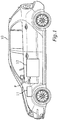
- Fig. 1 shows a motor vehicle 10, which may be, for example, a motor vehicle, in particular a passenger car or truck.
- a receiving device 11 may be provided for a position signal of a GNSS, for example the GPS.
- the position signal indicates a current position P.
- the motor vehicle 10 may have a navigation device 12.
- the navigation device 12 may be part of an infotainment system of the motor vehicle 10, for example.
- the receiving device 11 and the navigation device 12 may also be provided, for example, by a mobile terminal in the motor vehicle 10.
- the mobile terminal may be, for example, a smartphone or a tablet PC or a smartwatch.
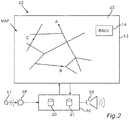
- the navigation device 12 may include a display device 13, which may be, for example, a screen.
- the display device 13 can also be touch-sensitive, that is to say a touchscreen, so that an actuating element 14 can be shown on a display surface 15 of the display device 13.
- the navigation device 12 can have a processor device 16, by means of which the display device 13 can be controlled can and an actuation of the actuating element 14 can be detected.
- a voice command 17 can be detected via a speech recognition device 18 by means of a microphone arrangement and received by the processor device 16.
- a voice output by an audio output device 19 can be output.
- driving instructions may be output to a driver of the motor vehicle 10.
- On the display device 13 may be displayed by the processor device 16, for example, a road map MAP for navigation assistance.
- a method with a return navigation can be provided.
- This feedback navigation is also referred to below as the "BACK" function. It can be controlled by the actuator 14 and / or the voice command 17.
- the navigation device 12 may be e.g. in the processor device 16 provide a cache 20 and a destination memory 21.
- the feedback assistance or feedback navigation is designed for situations where you just want to go back to where you started. For example, one would like to have a person e.g. take it from a parking lot and bring it back later. With the BACK function, this can be achieved on the top level of the navigation by direct operation or actuation of the actuating element 14, since only coordinates are stored which are present anyway in the navigation device via the receiving device 11.
- a functional scenario 1 can provide for a journey from A to B. After boarding and starting the navigation, the so-called “back button” (actuator 14) is deposited as a soft-key on the surface of the navigation screen.
- Step S1 A memory command 22 is generated at the start / location A by pressing the "Back Button". In the presence of the memory command 22, the current coordinates are stored in the buffer 20.
- Step S2 The "Back" button was pressed at the start point A.
- the button eg black ICON
- Vehicle is then along an original Itinerary R0 on the journey to a destination B.
- "Back" button remains, since the function was activated, eg green.
- Step S3 Vehicle reaches destination B. "Back Button” is still active (e.g., color green). The coordinates A are stored in the vehicle in the buffer 20. If the driver leaves the vehicle for a period of time "X”, the "BACK" function remains active as memory.
- Step S4 If the "BACK” button is pressed again when the vehicle is stopped, wherever it is (here in the example destination B), the button starts e.g. to blink. By pressing the "BACK” button after a return to the vehicle, this also happens.
- Step S5 A return message that appears (BACK?) Must be confirmed with Yes / No.
- Step S6 Upon confirmation of the destination return message with "Yes” (symbolized here by "+”), a return command 22 'is generated and then two routes are offered: Route R1 the shortest connection to return destination A from the cache 20, from where from the vehicle was originally started and therefore the coordinates have been deposited in the return, or the original route R2, where based on the coordinates the exact same route is navigated back, from where you came.
- Step S7 When confirmed on the display surface 15 of e.g. Route R0 will bring the destination route back to the display 13, i. In this case, the return journey is exactly as you have come from the coordinates.
- Step S8 The journey ends at start / location A.
- the writing "Back" in the soft key appears in e.g. Red (i.e., process completed).
- the navigation device 12 asks the user whether the start / location A is to be stored in the destination memory 21. If yes, there is an allocation of a memory location in the destination memory 21 of the navigation device 12. The driver can enter the starting point of a separate name.
- Step S9 Thereafter, on the display surface 15, for example, "Store start point YES / NO?" Appears. in conjunction with a position indicator on the road map MAP, which shows on the display device 13 where the starting point was A. If “Yes”, the user is asked if he wants to save the previous coordinates A under a name in the destination memory 21. If “Yes”, the start / viewpoint A is allocated to a normal memory space, and the new destination B as the return destination is then directly active in the cache memory 20. If “No”, the old destination (A) with the new start / location B is immediately overwritten with the destination B in the buffer 20. It will appear on the screen "STARTPOINT STORED" so destination B from the first example is now a new starting point.
- step S3 the driver gives an address C at the destination B, e.g. by hand or voice at the navigation device 12 for a navigation route guidance 23, it remains independent of the memory location of the buffer memory 20 of the "BACK button", since one can find this (address C) later objectives ".
- Location in the "BACK” function remains stored (here A).
- Step S10 Upon reaching the destination / destination address C input by hand / voice ("You have reached your destination"), when the driver presses the "BACK” button, the driver is asked by the system (the "BACK” function is still active) used from A to B): “Goal return YES / NO?” (see step S4). If “Yes” is confirmed (+), the "BACK Button” flashes green, the reverse navigation from C to A is started (step S6), the route is displayed.
- a function scenario 4 the driver enters an address C by hand / language at the destination B in step S3, and then presses the "BACK button” (step S4), he is asked whether the coordinates A are to be stored (step S5 ). Then the destination B (see function scenario 2) is stored as "BACK" starting point coordinates.
- a function scenario 5 the driver drives at destination B with his motor vehicle 10 to a destination C without navigation assistance and then actuates the "BACK” button (the "BACK” function is still active because it was used in step S1 from A to B): "Target return YES / NO?" If YES is confirmed, the "BACK Button” flashes green, the "reverse navigation" from C to A is started; the route is displayed. Two routes are offered: Route R1 the shortest connection to start location A, from where the vehicle was originally started and thus the coordinates have been deposited in the return, or route R0, where based on the coordinates the exact same distance back is navigated from where you came from. Finally, a memory query takes place (see step S8 of the function scenario 1).
- the "BACK" function in an extension can be transferred to all mobile devices via an application (so-called app), so that start points / destination feedback can also be performed with all other means of transport or on foot.
- a target return can be activated at any time.
- the "BACK” button is activated to a destination "B” which is e.g. located in a traffic-calmed downtown.
- a journey from a start / location "A” to a parking lot at the city center takes place in the vehicle that is parked there.
- the function is transferred to the mobile device. The person walks into the downtown area to their destination.
- the "BACK" function has automatically recognized the transfer of the feedback function from the vehicle to the mobile device as an alternative.
- the vehicle location is automatically stored in the system. (Location could be shown / marked on the map) but actually this is not relevant for the person as it wants to be traced back comfort-oriented)
- Scenario 1 A single return route (here eg on foot) to the vehicle is proposed (exact route of the route via coordinates), which leads directly back to the last means of transport (in this case the vehicle).
- BACK button eg blinks green
- two routes are displayed in the vehicle as in function scenario 1 or 5 respectively : the shortest or exactly the route with which one was on the way. After selecting the route, the return takes place with the vehicle. Arrival at Star / Location "A" solves the question Start / Location "A” save? out.
- Scenario 2 When leaving the vehicle, the "BACK" function is immediately transferred to the mobile device. On the mobile device appear icons / panels to select bus / train / bike / foot. The person selects via a corresponding control panel of one of the means of transport, e.g. Bicycle. The route is now captured by the mobile device for the return according to the mode of transport. On his mobile device within the app appears e.g. a bicycle icon. The person turns off the bike and goes the last way on foot. The person presses on the bicycle icon on the screen surface of their mobile device; As with leaving the vehicle, ALL "traffic symbols" appear. (Bike / bus / walk). The person now presses e.g.
- route R1, route R0 alternative routes for the means of transport used can now be offered at the respective transfer point from one means of transportation to the other (which are deposited in the system by the respective "press” of the symbol) ,
- Scenario 3 (additional function rail traffic): When leaving the vehicle, the "BACK" function is immediately transferred to the mobile device.
- the mobile device displays icons for selecting bus / train / bicycle / foot.
- the person confirms eg U8 or U5 / S4 or S8.
- the system automatically detects the direction in which the subway moves, so that the destination does not have to be queried. Upon reaching the destination station, the system detects leaving the station.
- the mobile device will return to the mobility icons. The person again selects the further locomotion for the system.
- Scenario 4 Additional function Rail - Long-distance traffic: Icons appear on the mobile device for selecting bus / train / bike / on foot. For the rail long-distance traffic, the selection would have its own icon. When calling up the railroad intercity icon, one would only have to enter e.g. enter the train number.
- Scenario 5 Aircraft: On the mobile device icons appear to select bus / train / bike / walk. The aircraft would have its own icon in the selection. When calling the aircraft icon, you would then only have to enter the flight number.
- Scenario 6 mobile device: Of course, the "BACK" function can also be started on the mobile device, wherever you are. Since there was no contact with the vehicle, the Mobility selection Bus / Train / Bike / Foot automatically appears on the mobile device. When using a vehicle in the mobility chain, the data is transferred to the vehicle.
Landscapes
- Engineering & Computer Science (AREA)
- Radar, Positioning & Navigation (AREA)
- Remote Sensing (AREA)
- Health & Medical Sciences (AREA)
- General Health & Medical Sciences (AREA)
- Social Psychology (AREA)
- Automation & Control Theory (AREA)
- Physics & Mathematics (AREA)
- General Physics & Mathematics (AREA)
- Navigation (AREA)
Description
- Die Erfindung betrifft ein Verfahren zum Betreiben einer Navigationsvorrichtung z.B. eines Kraftfahrzeugs. Es ist möglich, mit der Navigationsvorrichtung einen Speicherbefehl zum Erzeugen eines Speichereintrags eines Navigationsziels umzusetzen. Zu der Erfindung gehören auch die Navigationsvorrichtung, die gemäß dem Verfahren betrieben werden kann, sowie ein Kraftfahrzeug mit der Navigationsvorrichtung.
- Häufig angesteuerte Orte können in einer Navigationsvorrichtung als fest vorgegebene Reiseziele (so genannte Favoriten) gespeichert werden. Das Anlegen oder Erzeugen eines solchen Speichereintrags für einen Favoriten bedeutet in der Regel, dass man mehrere Bedienschritte durchführen muss, um zunächst ein Speichermenü auszuwählen und damit dann eine Positionsangabe unter einem Namen abzuspeichern. Aufgrund des hohen Bedienaufwands wird diese Funktion bei Navigationsvorrichtungen in der Regel nur für wichtige und/oder häufig verwendete Reiseziele verwendet.
- Der Erfindung liegt die Aufgabe zugrunde, mittels einer Navigationsvorrichtung eine Reise zu planen.
- Die Aufgabe wird durch die Gegenstände der unabhängigen Patentansprüche gelöst. Vorteilhafte Weiterbildungen der Erfindung sind durch die abhängigen Patentansprüche, die folgende Beschreibung sowie die Figuren beschrieben.
- Durch die Erfindung ist ein Verfahren zum Betreiben einer Navigationsvorrichtung bereitgestellt. In an sich bekannter Weise wird durch die Navigationsvorrichtung wiederholt aus einer Lokalisierungseinrichtung eine Positionsangabe einer aktuellen Position der Navigationsvorrichtung empfangen. Somit ist stets die aktuelle Position bekannt. Zu Beginn oder während einer Reise wird ein vorbestimmter Speicherbefehl empfangen. In Abhängigkeit von dem Speicherbefehl wird die aktuelle Positionsangabe in einem vorbestimmten Zwischenspeicher der Navigationsvorrichtung als Rückreiseziel zwischengespeichert. Es ist also keine Angabe eines Namens für diese Positionsangabe nötig, wie dies ansonsten bei den eingangs beschriebenen Favoriten der Fall ist. Die Positionsangabe wird in dem Zwischenspeicher gespeichert und erhält somit ohne eine Namensvergabe die vorbestimmte Funktion des Rückreiseziels.
- Eine Lokalisierungseinrichtung zum Ermitteln der aktuellen Position kann zum Beispiel ein Empfänger für ein Positionssignal eines GNSS (Global Navigation Satellite System), zum Beispiel des GPS (Global Positioning System), sein.
- Die Navigationsvorrichtung kann z.B. in einem Kraftfahrzeug oder in Form eines portablen, mobilen Endgeräts (z.B. Smartphone) bereitgestellt sein. Der besagte Beginn einer Reise kann zum Beispiel durch ein Zündung-ein-Signal des Kraftfahrzeugs signalisiert sein. Der Beginn kann auch dadurch definiert sein, dass der Reise eine vorbestimmte Aufenthaltsphase der Navigationsvorrichtung vorangegangen ist, die länger als eine vorbestimmte Mindestzeitdauer, zum Beispiel eine Stunde, ist. Die Aufenthaltsphase kann z.B. eine Parkphase des besagten Kraftfahrzeugs sein. Ein Speicherbefehl kann zum Beispiel durch eine manuelle Betätigung eines Betätigungselements von einem Benutzer erzeugt werden oder durch einen Sprachbefehl, der von einer Spracherkennungseinrichtung empfangen und erkannt werden kann. Der Speicherbefehl kann auch z.B. über ein Bedienfeld eines berührungssensitiven Bildschirms (Touchscreen) empfangen werden. Der Speicherbefehl kann auch ohne ein Zutun eines Benutzers zum Beispiel automatisiert beim Start des Kraftfahrzeugs erzeugt werden, wenn die Zündung des Kraftfahrzeugs eingeschaltet wird.
- Wenn nach dem Abspeichern des Rückreiseziels beispielsweise die Zündung des besagten Kraftfahrzeugs erneut ausgeschaltet war oder eine Parkphase erkannt worden ist, kann danach die in dem Zwischenspeicher abgespeicherte Positionsangabe verwendet werden, um für eine Navigationsassistenz der Navigationsvorrichtung als Reiseziel für eine Rückreise einzustellen. Dies erfolgt aber nur, falls ein vorbestimmter Rückführbefehl empfangen wird oder vorliegt. Der Rückführbefehl kann beispielsweise wie der Speicherbefehl durch manuelle Betätigung eines Betätigungselements, durch einen Sprachbefehl oder an einem Touchscreen durch einen Benutzer erzeugt werden oder auch ohne ein Zutun des Benutzers z.B. beim Start des Kraftfahrzeugs für die nachfolgende Reise automatisiert erzeugt werden. Falls der Rückführbefehl vorliegt, wird aus dem Zwischenspeicher die Positionsangabe des Rückreiseziels als Reiseziel für die Rückreise eingestellt. Daraufhin kann also die Navigationsassistenz in bekannter Weise Manövrieranweisungen erzeugen, durch welche der Benutzer der Navigationsvorrichtung zurück zu dem Rückreiseziel manövriert oder geleitet oder geführt wird.
- Durch die Erfindung ergibt sich somit der Vorteil, dass durch einen einzelnen Speicherbefehl eine aktuelle Position des Kraftfahrzeugs als Rückreiseziel festgelegt wird und durch einen weiteren Befehl, nämlich den Rückführbefehl, die Navigationsassistenz der Navigationsvorrichtung eine Rückreise zu diesem Rückreiseziel bereitstellt. Während der besagten nachfolgenden Reise kann also der Benutzer jederzeit festlegen, dass er zurückkehren möchte. Es steht dann in dem Zwischenspeicher das Rückreiseziel bereit. So kann er beispielsweise eine Zurück-Taste (Back-Taste) drücken oder den Sprachbefehl: "Bringt mich zurück!" aussprechen und wird dann durch die Navigationsassistenz zu dem Rückreiseziel angeführt.
- Zu der Erfindung gehören auch optionale Weiterbildungen, durch deren Merkmale sich zusätzliche Vorteile ergeben.
- In der beschriebenen Weise kann vorgesehen sein, dass der Speicherbefehl und/oder der Rückführbefehl über eine Bedieneinrichtung empfangen wird, d.h. ein Benutzer den Speicherbefehl und/oder den Rückführbefehl geben kann. Hierdurch ist es möglich, ohne aufwändige automatisierte Entscheidung jederzeit die Rückreise einleiten zu können.
- Bevorzugt ist bei dieser Variante vorgesehen, dass durch die Bedieneinrichtung für das Zwischenspeichern des Rückreiseziels in dem Zwischenspeicher ein dediziertes, direkt an der Navigationsvorrichtung zugängliches Betätigungselement bereitgestellt wird. Dies kann zum Beispiel ein mechanisches Betätigungselement, zum Beispiel eine Taste, oder ein Bedienfeld auf einem Touchscreen sein, also ein so genannter Soft-Key. Diese Ausführungsform weist den Vorteil auf, dass das Abspeichern des Rückreiseziels einschrittig erfolgt, also durch eine einzelne oder einzige Betätigung des Bedienelements.
- Bevorzugt ist hierbei vorgesehen, dass bei wiederholtem Betätigen des Betätigungselements zunächst der Speicherbefehl (1. Betätigung) und danach der Rückführbefehl (2. Betätigung) erzeugt wird. Dies kann auch in der Weise vorgesehen sein, dass bei einer 3. Betätigung wieder der Speicherbefehl und bei einer 4. Betätigung der Rückführbefehl erzeugt wird. Diese Weiterbildung weist den Vorteil auf, dass zum Planen oder Strukturieren einer Reise der Beginn einer Hinreise durch ein erstes Betätigen des Betätigungselements und der Beginn einer Rückreise durch erneutes Betätigen des selben Betätigungselements ermöglicht ist.
- Es kann bei einem solchen Betätigungselement der Speicherbefehl auch zweimal hintereinander erzeugt werden, nämlich beim 1. und beim 3. Betätigen. Bei Empfangen eines weiteren Speicherbefehls wird bevorzugt vor dem Abspeichern einer weiteren aktuellen Positionsangabe in dem Zwischenspeicher, also vor dem Überschreiben oder Löschen des aktuell gespeicherten Rückreiseziels, eine Reisezielbezeichnung oder ein Favoritenname ermittelt und die bereits in dem Zwischenspeicher zwischengespeicherte Positionsangabe des aktuellen Rückreiseziels in einen anderen Reisezielspeicher übertragen und dort unter der Reisezielbezeichnung abgespeichert. Die Reisezielbezeichnung kann zum Beispiel über die besagte Bedieneinrichtung empfangen werden, indem zum Beispiel ein Benutzer die Reisezielbezeichnung, also den Namen des Rückreiseziels, eingibt. So steht das aktuell in dem Zwischenspeicher gespeicherte Rückreiseziel in Zukunft oder für nächste oder weitere Reisen bereit. Das permanente oder dauerhafte Abspeichern im Reisezielspeicher kann auch unter der Bedingung einer Rückfrage beim Benutzer erfolgen, d.h. der Benutzer wird zunächst gefragt, ob er das aktuelle Rückreiseziel aus dem Zwischenspeicher in dem Reisezielspeicher unter einer Reisezielbezeichnung abspeichern möchte. Falls der Benutzer ablehnt, wird die aktuelle Positionsangabe direkt in dem Zwischenspeicher gespeichert und somit das bis dahin gespeicherte Rückreiseziel gelöscht oder überschrieben. Der Benutzer kann auch am Ender einer Rückreise gefragt werden, ob er das Rückreiseziel dauerhaft in dem Reisezielspeicher speichern möchte. Es kann bei Bejahen eine Reisezielbezeichnung von dem Benutzer abgefragt und das Reiseziel dauerhaft unter der Reisezielbezeichnung im Reisezielspeicher gespeichert werden.
- Indem das Rückreiseziel in dem Zwischenspeicher gespeichert ist, kann bei zwischengespeichertem Rückreiseziel eine von dem Rückreiseziel unabhängige Routenführung durch die Navigationsassistenz durchgeführt werden. Es kann also in Abhängigkeit von dem Speicherbefehl ein Rückreiseziel in dem Zwischenspeicher gespeichert worden sein und anschließend die Navigationsvorrichtung weiter benutzt werden und hierbei die Navigationsassistenz der Navigationsvorrichtung für eine oder mehrere Routenführungen verwendet werden. Der Zwischenspeicher bleibt davon unbeeinflusst. So kann zum Beispiel in dem Zwischenspeicher ein Rückreiseziel A gespeichert sein und die Navigationsvorrichtung für eine Reise zu einem ersten Reiseziel B verwendet werden. Ein Benutzer kann sich dann eine Routenführung von dem Reiseziel B zu einem weiteren Reiseziel C durch die Navigationsassistenz der Navigationsvorrichtung bereitstellen lassen. Am Reiseziel C kann der Benutzer dann den Rückführbefehl erzeugen oder eingeben oder auslösen, wodurch die Navigationsassistenz mit dem Rückreiseziel A programmiert oder konfiguriert wird und hierdurch die Navigationsassistenz eine Routenführung für eine Rückreise (vom Reiseziel C) zum Rückreiseziel A durchführt.
- Falls ein Rückreiseziel für mindestens eine vorbestimmte Höchstzeitdauer in dem Zwischenspeicher gespeichert worden ist, kann es sein, dass ein Benutzer vergessen hat, welche Positionsangabe in dem Zwischenspeicher gespeichert ist. Entsprechend ist bevorzugt vorgesehen, das in dem Zwischenspeicher gespeicherte Rückreiseziel nach einer vorbestimmten Zeitdauer zu löschen. Wird danach der Rückführbefehl erzeugt, so kann eine Navigationsassistenz zu einem unbekannten Rückreiseziel verhindert werden. So kann dem Benutzer z.B. signalisiert werden, dass der Zwischenspeicher leer ist.
- Zum automatisierten Erzeugen des Speicherbefehls kann vorgesehen sein, dass eine Aufenthaltsphase anhand eines vorbestimmten Verweilkriteriums erkannt wird und der Speicherbefehl ohne ein Zutun eines Benutzers zu Beginn einer an die Aufenthaltsphase anschließenden Reise erzeugt wird. Das Verweilkriterium kann z.B. besagen, dass ein Kraftfahrzeug, in welchem sich die Navigationsvorrichtung befindet, länger als eine vorbestimmte Mindestzeitdauer ausgeschaltet war. Z.B. kann vorgesehen sein, dass eine Parkphase des Kraftfahrzeugs als Aufenthaltsphase erkannt wird, falls das Kraftfahrzeug für mindestens eine Stunde oder mindestens 4 Stunden oder mindestens einen Tag ausgeschaltet war. Zusätzlich oder alternativ dazu kann das Verweilkriterium zum Beispiel umfassen, dass das Kraftfahrzeug an einem Ort geparkt war, der ein vorbestimmtes Auswärtskriterium erfüllt. Zum Beispiel kann als Auswärtskriterium vorgesehen sein, dass der Speicherbefehl nur erzeugt wird, falls das Kraftfahrzeug außerhalb einer vorbestimmten Heimregion des Kraftfahrzeugs, in welcher das Kraftfahrzeug sich mit einer vorbestimmten Mindesthäufigkeit auffällt, erzeugt wird. Mit anderen Worten wird der Speicherbefehl immer nur dann automatisiert erzeugt, wenn sich das Kraftfahrzeug in einer fremden Umgebung befindet. So kann zum Beispiel verhindert werden, dass im Zwischenspeicher regelmäßig die Wohnadresse des Benutzers der Navigationsvorrichtung gespeichert wird, also eine Adresse, die der Benutzer ohnehin schon kennt. Es kann auch vorgesehen sein, dass vor dem Abspeichern eines Rückreiseziels in den Zwischenspeicher überprüft wird, ob in dem besagten Reisezielspeicher bereits ein Favorit oder Reiseziel gespeichert ist, welches der aktuellen Positionsangabe entspricht. Dann ist das Zwischenspeichern der aktuellen Positionsangaben im Zwischenspeicher unnötig und wird entsprechend nicht durchgeführt.
- Es kann vorgesehen sein, dass in dem Zwischenspeicher gespeicherte Rückreiseziel in Abhängigkeit von einem Übertragungsbefehl an eine andere Navigationsvorrichtung auszusenden. Beispielsweise kann eine erste Navigationsvorrichtung in einem Kraftfahrzeug bereitgestellt sein und bei Verlassen des Kraftfahrzeugs das Rückreiseziel in einen Zwischenspeicher einer Navigationsvorrichtung, die durch ein mobiles Endgerät eines Benutzers bereitgestellt ist, übertragen werden. Der Übertragungsbefehl kann dabei zum Beispiel in Abhängigkeit von einer Position mobilen Endgeräts bezüglich des Kraftfahrzeugs erzeugt werden, sodass zum Beispiel beim Verlassen des Kraftfahrzeugs das Rückreiseziel aus dem Kraftfahrzeug an das mobile Endgerät übertragen wird. Andersherum kann bei Einsteigen in das Kraftfahrzeug ein Rückreiseziel in die Navigationsvorrichtung des Kraftfahrzeugs übertragen werden. Das Einsteigen kann zum Beispiel anhand einer relativen Position des mobilen Endgeräts zu dem Kraftfahrzeug und/oder anhand einer funkbasierten Kopplung des mobilen Endgeräts mit dem Kraftfahrzeug erkannt werden.
- Es kann vorgesehen sein, dass eine seit dem Abspeichern des Rückreiseziels zurückgelegte Reiseroute gespeichert wird und die Navigationsassistenz für die Rückreise zu dem Rückreiseziel entlang der gespeicherten Reiseroute durchgeführt wird. Somit sind also die Hinreise und die Rückreise in Bezug auf die Reiseroute identisch. Hierdurch ergibt sich der Vorteil, dass die gesamte Reiseroute rekonstruiert werden kann, nicht nur das Rückreiseziel.
- Wie bereits ausgeführt, umfasst die Erfindung auf die Navigationsvorrichtung für ein Kraftfahrzeug, wobei die Navigationsvorrichtung eine Prozessoreinrichtung aufweist, die dazu eingerichtet ist, eine Ausführungsform des erfindungsgemäßen Verfahrens durchzuführen. Die Prozessoreinrichtung kann hierzu zumindest einen Mikroprozessor und/oder zumindest einen Mikrocontroller aufweisen. Des Weiteren kann die Prozessoreinrichtung einen Programmcode aufweisen, der dazu eingerichtet ist, bei Ausführen durch die Prozessoreinrichtung die Ausführungsform des erfindungsgemäßen Verfahrens durchzuführen. Der Programmcode kann in einem Datenspeicher der Prozessoreinrichtung gespeichert sein. Die Navigationsvorrichtung kann als ein Gerät für ein Kraftfahrzeug ausgestaltet sein, z.B. als Navigationsgerät oder Infotainmentsystem (Information-Unterhaltungssystem). Die Navigationsvorrichtung kann als portables, mobiles Endgerät ausgestaltet sein, also zum Beispiel als Smartphone oder als Tablet-PC oder als Smartwatch.
- Durch Bereitstellen der Erfindung gemäß Navigationsvorrichtung in einem Kraftfahrzeug ergibt sich das erfindungsgemäße Kraftfahrzeug. Das erfindungsgemäße Kraftfahrzeug ist bevorzugt als Kraftwagen, insbesondere als Personenkraftwagen oder Lastkraftwagen, ausgestaltet.
- Im Folgenden ist ein Ausführungsbeispiel der Erfindung beschrieben. Hierzu zeigt:
- Fig. 1
- eine schematische Darstellung einer Ausführungsform des erfindungsgemäßen Kraftfahrzeugs;
- Fig. 2
- eine schematische Darstellung einer Ausführungsform der erfindungsgemäßen Navigationsvorrichtung, wie sie in dem Kraftfahrzeug von
Fig. 1 bereitgestellt sein kann; und - Fig. 3
- ein Flussdiagramm zur Veranschaulichung einer Ausführungsform des erfindungsgemäßen Verfahrens.
- Bei dem im Folgenden erläuterten Ausführungsbeispiel handelt es sich um eine bevorzugte Ausführungsform der Erfindung. Bei dem Ausführungsbeispiel stellen die beschriebenen Komponenten der Ausführungsform jeweils einzelne, unabhängig voneinander zu betrachtende Merkmale der Erfindung dar, welche die Erfindung jeweils auch unabhängig voneinander weiterbilden und damit auch einzeln oder in einer anderen als der gezeigten Kombination als Bestandteil der Erfindung anzusehen sind. Des Weiteren ist die beschriebene Ausführungsform auch durch weitere der bereits beschriebenen Merkmale der Erfindung ergänzbar.
- In den Figuren sind funktionsgleiche Elemente jeweils mit denselben Bezugszeichen versehen.
-
Fig. 1 zeigt ein Kraftfahrzeug 10, bei dem sich zum Beispiel um einen Kraftwagen, insbesondere einen Personenkraftwagen oder Lastkraftwagen, handeln kann. In dem Kraftfahrzeug 10 kann eine Empfangseinrichtung 11 für ein Positionssignal eines GNSS, zum Beispiel des GPS, bereitgestellt sein. Das Positionssignal gibt eine aktuelle Position P an. Des Weiteren kann das Kraftfahrzeug 10 eine Navigationsvorrichtung 12 aufweisen. Die Navigationsvorrichtung 12 kann zum Beispiel Bestandteil eines Infotainmentsystems des Kraftfahrzeugs 10 sein. Die Empfangseinrichtung 11 und die Navigationsvorrichtung 12 können auch zum Beispiel durch ein mobiles Endgerät in dem Kraftfahrzeug 10 bereitgestellt sein. Das mobile Endgerät kann zum Beispiel ein Smartphone oder ein Tablett-PC oder eine Smartwatch sein. -
Fig. 2 zeigt die Navigationsvorrichtung 12 noch einmal genauer. Die Navigationsvorrichtung 12 kann eine Anzeigeeinrichtung 13 aufweisen, bei der sich zum Beispiel um einen Bildschirm handeln kann. Die Anzeigeeinrichtung 13 kann auch berührungssensitiv sein, also ein Touchscreen, so das ein Betätigungselement 14 auf einer Anzeigefläche 15 der Anzeigeeinrichtung 13 dargestellt sein kann. Die Navigationsvorrichtung 12 kann eine Prozessoreinrichtung 16 aufweisen, durch welche die Anzeigeeinrichtung 13 gesteuert sein kann und eine Betätigung des Betätigungselements 14 detektiert werden kann. Des Weiteren kann vorgesehen sein, dass ein Sprachbefehl 17 über eine Spracherkennungseinrichtung 18 mittels einer Mikrofonanordnung erfasst und durch die Prozessoreinrichtung 16 empfangen werden kann. Des Weiteren kann durch die Prozessoreinrichtung 16 zum Beispiel auch für eine Navigationsassistenz eine Sprachausgabe durch eine Audioausgabeeinrichtung 19 ausgegeben werden. Somit können zum Beispiel Fahranweisungen an einen Fahrer des Kraftfahrzeugs 10 ausgegeben werden. Auf der Anzeigeeinrichtung 13 kann durch die Prozessoreinrichtung 16 zum Beispiel auch eine Straßenkarte MAP für die Navigationsassistenz angezeigt werden. - Im Folgenden ist anhand von
Fig. 3 geschrieben, wie für die Navigationsassistenz durch die Navigationsvorrichtung 12 ein Verfahren mit einer Rückführ-Navigation bereitgestellt werden kann. Diese Rückführ-Navigation wird im Folgenden auch als Funktion "BACK" bezeichnet. Sie kann durch das Betätigungselement 14 und/oder den Sprachbefehl 17 gesteuert werden. - Die Navigationsvorrichtung 12 kann z.B. in der Prozessoreinrichtung 16 eine Zwischenspeicher 20 und einen Reisezielspeicher 21 bereitstellen.
- Die Rückführunqsassistenz oder Rückführ-Navigation ist für Situationen vorgesehen, wo man einfach nur dahin zurück möchte, von wo aus man gestartet ist. Z.B. man möchte eine Person z.B. von einem Parkplatz aus mitnehmen und später wieder genau dorthin zurück bringen. Mit der BACK-Funktion ist dies auf der obersten Ebene der Navigation durch direkte Bedienung oder Betätigung des Betätigungselements 14 zu realisieren, da nur Koordinaten abspeichert werden, welche sowieso in der Navigationsvorrichtung über die Empfangseinrichtung 11 vorhanden sind.
- Ein Funktions-Szenario 1 kann eine Reise von A nach B vorsehen. Nach dem Einsteigen und dem Starten der Navigation ist der sog. "Back Button" (Betätigungselement 14) als Soft-Key auf der Oberfläche des Navigations-Bildschirms hinterlegt.
- Schritt S1: Am Start-/Standort A wird durch Betätigen des "Back Buttons" ein Speicherbefehl 22 erzeugt. Bei Vorliegen des Speicherbefehls 22 werden die aktuellen Koordinaten im Zwischenspeicher 20 gespeichert.
- Schritt S2: Der "Back" Button wurde am Startpunkt A betätig. Der Button (z.B. schwarzes ICON) wechselt nach dem Betätigen z.B. auf die Farbe Grün, um anzuzeigen, dass die "Back" Funktion nun aktiv ist. Fahrzeug befindet sich dann entlang einer originären Reiseroute R0 auf der Reise zu einem Zielort B. "Back" Button bleibt, da die Funktion aktiviert wurde, z.B. grün.
- Schritt S3: Fahrzeug erreicht Zielort B. "Back Button" ist weiterhin aktiv (z.B. Farbe grün). Die Koordinaten A bleiben im Fahrzeug im Zwischenspeicher 20 gespeichert. Verlässt der Fahrer für einen Zeitraum "X" das Fahrzeug, so bleibt die "BACK" Funktion als Speicher aktiv.
- Schritt S4: Wird der "BACK" Button beim ANHALTEN mit dem Fahrzeug, wo immer man auch ist, (hier im Beispiel Zielort B) erneut gedrückt, fängt der Button z.B. zu blinken an. Durch ein Betätigen des "BACK" Buttons nach einer Rückkehr ins Fahrzeug, geschieht dies ebenfalls.
- Schritt S5: Eine dann erscheinende Zielrückführungs-Meldung (BACK?) muss mit Ja/Nein bestätigt werden.
- Schritt S6: Bei einer Bestätigung der Zielrückführungs-Meldung mit "Ja" (hier symbolisiert durch "+") wird ein Rückführbefehle 22' erzeugt und daraufhin werden zwei Routen angeboten: Route R1 die kürzeste Verbindung zu Rückreiseziel A aus dem Zwischenspeicher 20, von wo aus das Fahrzeug ursprünglich gestartet ist und demnach die Koordinaten bei der Rückführung hinterlegt worden sind, oder aber die originäre Route R2, wo anhand der Koordinaten die exakt gleiche Strecke zurück navigiert wird, von wo aus man gekommen ist.
- Schritt S7: Bei Bestätigung auf der Anzeigefläche 15 von z.B. Route R0 erschient die Zielrückrührungs-Route dem der Anzeigeeinrichtung 13, d.h. in diesem Fall erfolgt Rückreise genau so, wie man gekommen ist anhand der Koordinaten.
- Schritt S8: Die Reise endet bei Start-/Standort A. Die Schrift "Back" im Soft-Key erscheint in z.B. Rot (d.h. Vorgang abgeschlossen). Die Navigationsvorrichtung 12 fragt den Benutzer, ob der Start-/Standort A im Reisezielspeicher 21 gespeichert werden soll. Falls Ja, erfolgt eine Zuweisung eines Speicherplatzes im Reisezielspeicher 21 der Navigationsvorrichtung 12. Der Fahrer kann dem Startpunkt einen eigenen Namen eingeben.
- Der "Back" Schriftzug wird dann z.B. wieder weiß. "Back" Funktion kann wieder mittels Betätigungselement 14 aktiviert werden.
- Weitere mögliche Szenarien sind die folgenden:
- In einem Funktions-Szenario 2 möchte der Fahrer im Schritt S5 nicht zurück zu A sondern den Zielort B als neuen Start-/Standort als ein Rückreiseziel eingeben. Er betätigt den grünen "BACK" Button und im Display erscheint in der beschriebenen Weise "Zielrückführung JA/NEIN?" (BACK?). Der Fahrer bestätigt mit Nein (symbolisiert durch -).
- Schritt S9: Danach erscheint auf der Anzeigefläche 15 z.B.: "Startpunkt speichern JA/NEIN?" in Verbindung mit einem Positionszeiger auf der Straßenkarte MAP, welcher auf der Anzeigeeinrichtung 13 zeigt, wo der Starpunkt A war. Bei "Ja" wird der Benutzer gefragt, ob er die vorherigen Koordinaten A unter einem Namen im Reisezielspeicher 21 abspeichern möchte. Wenn "Ja", wird der Start-/Standpunkt A in einen normalen Speicherplatz vergeben und das neue Ziel B als Rückreiseziel ist danach direkt im Zwischenspeicher 20 aktiv. Wenn "Nein", wird das alte Ziel (A) mit dem neuen Start-/Standort B sofort im Zwischenspeicher 20 mit Ziel B überschrieben. Es erscheint auf dem Bildschirm "STARTPUNKT GESPEICHERT" somit ist der Zielort B aus dem ersten Beispiel jetzt neuer Startpunkt.
- In einem Funktions-Szenario 3 gibt der Fahrer im Schritt S3 am Zielort B eine Adresse C z.B. per Hand oder Sprache an der Navigationsvorrichtung 12 für ein Navigations-Routenführung 23 ein, so bleibt diese vom Speicherplatz des Zwischenspeichers 20 des "BACK Buttons" unabhängig, da man diese (Adresse C) später unterletzte Ziele" wiederfinden kann. Der letzte Start-/Standort in der "BACK" Funktion bleibt weiterhin gespeichert (hier A).
- Schritt S10: Beim Erreichen der von Hand/Sprache eingegebenen Zieladresse C ("Sie haben Ihr Ziel erreicht") wird der Fahrer, wenn er den "BACK" Button betätigt, vom System gefragt (die "BACK"-Funktion ist weiterhin aktiv, da sie von A nach B verwendet wurde): "Zielrückführung JA/NEIN?" (siehe Schritt S4). Wenn "Ja" bestätigt wird (+), blinkt der "BACK Button" grün, die Rückwärts-Navigation von C zu A ist gestartet (Schritt S6), die Route wird angezeigt.
- In einem Funktions-Szenario 4 gibt der Fahrer im Schritt S3 am Zielort B eine Adresse C per Hand/Sprache ein und drückt danach den "BACK Button" (Schritt S4) so wird er gefragt, ob die Koordinaten A abgespeichert werden sollen (Schritt S5). Danach wird der Zielort B (siehe Funktions-Szenario 2) als "BACK" Startpunkt Koordinaten abgespeichert.
- In einem Funktion-Szenario 5 fährt der Fahrer am Zielort B mit seinem Kraftfahrzeug 10 zu einem Ziel C ohne Navigationsassistenz und betätigt dort dann den "BACK" Button (die "BACK"-Funktion ist weiterhin aktiv, da sie in Schritt S1 von A nach B verwendet wurde): "Zielrückführung JA/NEIN?" Wenn JA bestätigt wird, blinkt der "BACK Button" grün, die "Rückwärts Navigation" von C zu A ist gestartet; die Route wird angezeigt. Es werden zwei Routen angeboten: Route R1 die kürzeste Verbindung zu Start- Standort A, von wo aus das Fahrzeug ursprünglich gestartet ist und demnach die Koordinaten bei der Rückführung hinterlegt worden sind, oder aber Route R0, wo anhand der Koordinaten die exakt gleiche Strecke zurück navigiert wird, von wo aus man gekommen ist. Es erfolgt abschließend eine Speicherabfrage (siehe Schritt S8 des Funktions-Szenarios 1).
- Es sind zahlreiche Funktions-Ergänzungen bereitstellbar.
- In Bezug auf verwendbare Mobilgeräte ist die "BACK" Funktion in einer Erweiterung auf alle Mobilgeräte über eine Applikation (sogenannte App) transferierbar, so dass auch Startpunkte/Zielrückführung mit allen anderen Verkehrsmitteln bzw. zu Fuß durchgeführt werden können. Eine Zielrückführung kann jederzeit aktiviert werden. Am Startpunkt z.B. "A" wird der "BACK" Button aktiviert zu einem Ziel "B", welches z.B. in einer verkehrsberuhigten Innenstadt liegt. Eine Reise von einem Start-/Standort "A" zu einem Parkplatz an der Innenstadt erfolgt im Fahrzeug, das dort abgestellt wird. Mit dem Verlassen des Fahrzeugs wird die Funktion auf das Mobilgerät übertragen. Die Person läuft in den Innenstadtbereich zu ihrem Ziel. Die Person möchte zurückgeführt werden und betätigt dort den grün hinterlegten (= Funktion aktiv) "BACK" Button. Es erscheint Zielrückrührung JA/NEIN ....."JA" Zielrückführung startet ("BACK" Button z.B. blinkt).
- Die "BACK" Funktion hat die Übergabe der Rückführungsfunktion vom Fahrzeug an das Mobilgerät alternativ dazu automatisiert erkannt. Beim Ausstieg aus dem Fahrzeug wird im System automatisch der Fahrzeug-Standort hinterlegt. (Standort könnte auf der Karte gezeigt/markiert werden. Aber eigentlich ist dies für die Person nicht relevant, da sie komfortorientiert zurückgeführt werden möchte)
- Szenario 1: Es wird eine einzige Rückführungsroute (hier Bsp. zu Fuß) bis zum Fahrzeug vorgeschlagen (exakte Route des Hinweqs über Koordinaten), welche direkt zum letzten Verkehrsmittel (hier dem Fahrzeug) zurückführt. Bei der "Rück-Übergabe" der "BACK" Funktion mit dem Einstieg in das Fahrzeug und der Systemaktivierung auf dem Bildschirm, ("BACK " Button z.B. blinkt grün) werden dann wie in Funktions-Szenario 1 bzw. 5 im Fahrzeug zwei Routen angezeigt: die kürzeste oder aber genau die Route mit der man unterwegs war. Nach dem Routenwählen erfolgt die Rückführung mit dem Fahrzeug. Ankunft am Star-/Standort "A" löst die Frage Start-/Standort "A" speichern ? aus.
- In diesem Szenario 1 kann nur eine Route (die welche für den Hinweg benutzt wurde) bis zum Fahrzeug vorgeschlagen werden, da das System nicht weiß, ob vom Fahrzeug aus /bei der Übergabe an das Mobilgerät das Fahrrad/zu Fuß/Fahrrad/Skateboard oder sonstige Verkehrsmittel benutzt worden sind. Das Angebot einer Alternativroute (kürzeste) könnte hier Verkehrswege beinhalten, welche für das tatsächlich benutzte Verkehrsmittel oder aber zu Fuß ungeeignet sind.
- Szenario 2 (ZWEI ROUTEN): Mit dem Verlassen des Fahrzeugs wird sofort die Funktion "BACK" auf das Mobilgerät übertragen. Auf dem Mobilgerät erscheinen Icons/Bedienfelder zur Auswahl Bus/Bahn/Fahrrad/Fuß. Die Person wählt über ein korrespondierendes Bedienfeld eines der Verkehrsmittel, z.B. Fahrrad. Die Route wird jetzt dem Verkehrsmittel entsprechend vom Mobilgerät erfasst für die Rückführung. Auf seinem Mobilgerät innerhalb der App erscheint z.B. ein Fahrrad Symbol. Die Person stellt das Fahrrad ab und geht den letzten Weg zu Fuß. Die Person drückt auf das Fahrrad-Symbol auf der Bildschirmoberfläche ihres Mobilgerätes; es erscheinen wie beim Verlassen des Fahrzeugs ALLE "Verkehrsmittel Symbole". (Fahrrad/Bus/zu Fuß). Die Person drückt jetzt z.B. "zu Fuß" und die Route wird im "Modus" zu Fuß für die Rückführung vorbereitet. Bei der Aktivierung der "BACK" Funktion können jetzt an dem jeweiligen Übergabepunkt von einem Fortbewegungsmittel zum anderen (welche durch das jeweilige "drücken" des Symbols im System hinterlegt sind) Alternativrouten (z.B. Route R1, Route R0) für das jeweils benutzte Verkehrsmittel angeboten werden.
- Szenario 3 (Zusatzfunktion Schienenverkehr): Mit dem Verlassen des Fahrzeugs wird sofort die Funktion "BACK" auf das Mobilgerät übertragen. Auf dem Mobilgerät erscheinen Icons zur Auswahl Bus/Bahn/Fahrrad/Fuß. Die Person wählt das nächste Verkehrsmittel die U-Bahn (= Schienenfahrzeug-Icon). Da das System den Ort kennt, wo sich die Person befindet, wird der Weg zur U-Bahnstation wie gewohnt für die Rückführungsfunktion vorbereitet. Mit dem Betreten der U Bahnstation erscheint auf dem Bildschirm des Mobilgerätes die Nummern der U-Bahnen, welche dort abfahren. Die Person bestätigt z.B. U8 oder U5/S4 oder S8. Das System erkennt über die Navigation automatisch, in welche Richtung sich die U-Bahn bewegt, so dass der Zielort nicht abgefragt werden muss. Beim Erreichen des Zielbahnhofs erkennt das System das Verlassen des Bahnhofs. Auf dem Mobilgerät erscheinen wieder die Mobilitätssymbole. Die Person wählt wieder die weitere Fortbewegung für das System aus.
- Szenario 4 (Zusatzfunktion Schienen - Fernverkehr): Auf dem Mobilgerät erscheinen Icons zur Auswahl Bus/Bahn/Fahrrad/zu Fuß. Für den Schienen-Fernverkehr würde bei der Auswahl ein eigenes Icon stehen. Beim Aufrufen des Schienen-Fernverkehr-Icons müsste man dann nur z.B. die Zugnummer eintragen.
- Szenario 5 (Flugzeug): Auf dem Mobilgerät erscheinen Icons zur Auswahl Bus/Bahn/Fahrrad/zu Fuß. Für das Flugzeug würde bei der Auswahl ein eigenes Icon stehen. Beim Aufrufen des Flugzeug-Icons müsste man dann nur die Flugnummer eintragen.
- Szenario 6 (Mobilgerät): Selbstverständlich kann die "BACK"-Funktion auch auf dem Mobilgerät gestartet werden, wo immer man sich befindet. Da kein Kontakt mit dem Fahrzeug bestanden hat, erscheint automatisch die Mobilitätsauswahl Bus/Bahn/Fahrrad/Fuß auf dem Mobilgerät. Beim Benutzen eines Fahrzeugs in der Mobilitätskette werden die Daten auf das Fahrzeug übertragen.
- Systemergänzungen können sich wie folgt ergeben. Wird der Start-/Standort A im Zwischenspeicher 20 nicht mehr abgerufen, so löscht sich der Zwischenspeicher 20 z.B. nach 24 Std. automatisch. Alternativ bleibt der Speicherinhalt immer bestehen, bis er aus seiner Funktion heraus überschrieben wird.
- In einer erweiterten Funktion besteht die Möglichkeit, in den Einstellungen eine Funktion vorzusehen, welche es dem Fahrer erlaubt, einen Zeitraum X zu definieren, innerhalb dem nach Abstellen des Fahrzeugs beim Weiterfahren immer automatisch der letzte Start-/Standort mit seinen aktuellen Koordinaten im Zwischenspeicher 20 gespeichert wird. Immer der letzte Ort, wo das Kraftfahrzeug 10 länger als X Stunden/Minuten steht, wird dann automatisch zum neuen Rückreiseziel, zu dem man zurückgeführt wird und der alte Eintrag des Zwischenspeicher 20 wird überschrieben.
- Insgesamt zeigt das Beispiel, wie durch die Erfindung eine Rückführ-Navigation bereitgestellt werden kann.
-
- 10
- Kraftfahrzeug
- 11
- Empfangseinrichtung
- 12
- Navigationsvorrichtung
- 13
- Anzeigeeinrichtung
- 14
- Betätigungselement
- 15
- Anzeigefläche
- 16
- Prozessoreinrichtung
- 17
- Sprachbefehl
- 18
- Spracherkennungseinrichtung
- 19
- Audioausgabeeinrichtung
- 20
- Zwischenspeicher
- 21
- Reisezielspeicher
- 22
- Speicherbefehl
- 22'
- Rückführbefehl
- 23
- Navigations-Routenführung
- MAP
- Straßenkarte
- P
- Positionsangabe
- S1 - S10
- Schritt
Claims (12)
- Verfahren zum Betreiben einer Navigationsvorrichtung (12), wobei wiederholt aus einer Lokalisierungseinrichtung (11) eine Positionsangabe (P) einer aktuellen Position der Navigationsvorrichtung (12) empfangen wird und zu Beginn oder während einer Reise ein vorbestimmter Speicherbefehl (22) empfangen wird,
dadurch gekennzeichnet, dass
in Abhängigkeit von dem Speicherbefehl (22) die aktuelle Positionsangabe (P) in einem vorbestimmten Zwischenspeicher (20) als Rückreiseziel zwischengespeichert wird und zu Beginn oder während einer nachfolgenden Reise die in dem Zwischenspeicher (20) abgespeicherte Positionsangabe (P) für eine Navigationsassistenz der Navigationsvorrichtung (12) in Abhängigkeit von einem vorbestimmten Rückführbefehl (22') als Reiseziel für eine Rückreise eingestellt wird. - Verfahren nach Anspruch 1, wobei der Speicherbefehl (22) und/oder der Rückführbefehl (22') über eine Bedieneinrichtung empfangen wird.
- Verfahren nach Anspruch 2, wobei durch die Bedieneinrichtung für das Zwischenspeichern des Rückreiseziels in dem Zwischenspeicher (20) ein dediziertes, direkt zugängliches Betätigungselement (14) bereitgestellt wird.
- Verfahren nach Anspruch 3, wobei bei wiederholtem Betätigen des Betätigungselements (14) der Speicherbefehl (22) und danach der Rückführbefehl (22') erzeugt wird.
- Verfahren nach einem der vorhergehenden Ansprüche, wobei bei Empfangen eines weiteren Speicherbefehls (22) vor dem Abspeichern einer weiteren aktuellen Positionsangabe (P) in dem Zwischenspeicher (20) eine Reisezielbezeichnung ermittelt wird und die bereits in dem Zwischenspeicher (20) zwischengespeicherte Positionsangabe (P) in einen Reisezielspeicher (21) übertragen und dort unter der Reisezielbezeichnung abgespeichert wird.
- Verfahren nach einem der vorhergehenden Ansprüche, wobei bei zwischengespeichertem Rückreiseziel eine von dem Rückreiseziel unabhängige Routenführung (23) durch die Navigationsassistenz durchgeführt wird.
- Verfahren nach einem der vorhergehenden Ansprüche, wobei das in dem Zwischenspeicher (20) gespeicherte Rückreiseziel nach einer vorbestimmten Zeitdauer gelöscht wird.
- Verfahren nach einem der vorhergehenden Ansprüche, wobei eine Aufenthaltsphase anhand eines vorbestimmten Verweilkriteriums erkannt wird und der Speicherbefehl (22) ohne ein Zutun eines Benutzers zu Beginn einer an die Aufenthaltsphase anschließenden Reise erzeugt wird.
- Verfahren nach einem der vorhergehenden Ansprüche, wobei das in dem Zwischenspeicher (20) gespeicherte Rückreiseziel in Abhängigkeit von einem Übertragungsbefehl an eine andere Navigationsvorrichtung ausgesendet wird.
- Verfahren nach einem der vorhergehenden Ansprüche, wobei eine seit dem Abspeichern des Rückreiseziels zurückgelegte Reiseroute (R0) gespeichert wird und die Navigationsassistenz für die Rückreise zu dem Rückreiseziel entlang der gespeicherten Reiseroute (R0) durchgeführt wird.
- Navigationsvorrichtung (12), wobei die Navigationsvorrichtung (12) eine Prozessoreinrichtung (16) aufweist, die dazu eingerichtet ist, ein Verfahren nach einem der vorhergehenden Ansprüche durchzuführen.
- Kraftfahrzeug (10) mit einer Navigationsvorrichtung (12) nach Anspruch 11.
Applications Claiming Priority (1)
| Application Number | Priority Date | Filing Date | Title |
|---|---|---|---|
| CZ2016510 | 2016-08-24 |
Publications (3)
| Publication Number | Publication Date |
|---|---|
| EP3287746A2 true EP3287746A2 (de) | 2018-02-28 |
| EP3287746A3 EP3287746A3 (de) | 2018-05-30 |
| EP3287746B1 EP3287746B1 (de) | 2020-06-10 |
Family
ID=59799184
Family Applications (1)
| Application Number | Title | Priority Date | Filing Date |
|---|---|---|---|
| EP17020364.0A Active EP3287746B1 (de) | 2016-08-24 | 2017-08-18 | Verfahren zum betreiben einer navigationsvorrichtung für eine rückführ-navigation, navigationsvorrichtung und kraftfahrzeug |
Country Status (1)
| Country | Link |
|---|---|
| EP (1) | EP3287746B1 (de) |
Family Cites Families (8)
| Publication number | Priority date | Publication date | Assignee | Title |
|---|---|---|---|---|
| JP2003075183A (ja) * | 2001-09-04 | 2003-03-12 | Nissan Motor Co Ltd | 車両用経路誘導システム、車両用経路誘導装置 |
| US7877204B2 (en) * | 2006-11-24 | 2011-01-25 | Qualcomm Incorporated | System and method for sending destination locations to navigation devices |
| JP5250902B2 (ja) * | 2008-03-19 | 2013-07-31 | シャープ株式会社 | ネットワークシステム、移動通信端末、および通信方法 |
| US8180280B2 (en) * | 2008-06-24 | 2012-05-15 | Hewlett-Packard Development Company, L.P. | Techniques for tracking destinations on a mobile computing device |
| US20110106433A1 (en) * | 2009-11-04 | 2011-05-05 | Takuya Otani | Method of recording and retrieving recent location data, and related personal navigation device |
| JP2013003048A (ja) * | 2011-06-20 | 2013-01-07 | Sony Corp | 経路探索装置、経路探索方法、及びプログラム |
| US9279696B2 (en) * | 2013-10-25 | 2016-03-08 | Qualcomm Incorporated | Automatic handover of positioning parameters from a navigation device to a mobile device |
| US9297665B2 (en) * | 2014-04-25 | 2016-03-29 | Honda Motor Co., Ltd. | System and method for sending a destination point to a vehicle navigation system from a portable electronic device |
-
2017
- 2017-08-18 EP EP17020364.0A patent/EP3287746B1/de active Active
Also Published As
| Publication number | Publication date |
|---|---|
| EP3287746B1 (de) | 2020-06-10 |
| EP3287746A3 (de) | 2018-05-30 |
Similar Documents
| Publication | Publication Date | Title |
|---|---|---|
| EP3980719B1 (de) | Verfahren eines fahrzeugs zum automatisierten parken | |
| EP3281074A1 (de) | Verfahren zum betreiben eines kraftfahrzeugs und kraftfahrzeug | |
| EP1102037B1 (de) | Navigationssystem mit verbesserter Objektauswahl | |
| DE102017204180B3 (de) | Verfahren zur Ermittlung und/oder Verwaltung einer Parkraumkarte | |
| DE102017213204A1 (de) | Verfahren und System zum Fernsteuern eines Fahrzeugs | |
| DE102011109492A1 (de) | Fahrunterstützungsvorrichtung zur Unterstützung der Befahrung enger Fahrwege | |
| DE102012002581A1 (de) | Unterstützen eines Fahrers eines Kraftfahrzeugs bei einer Routenführung und einem autonomen Fahrmanöver | |
| DE102018212901A1 (de) | Verfahren zur Ermittlung einer Halteposition für ein automatisiert betriebenes Fahrzeug | |
| DE102016208793A1 (de) | Verkehrsampel-Assistent | |
| DE102014224454A1 (de) | Verfahren zum Betrieb eines Fahrzeugs | |
| DE102015213996A1 (de) | Verfahren und Vorrichtung zum Bestimmen einer Abholposition aus mehreren von einem Parkplatz umfassten Abholpositionen für ein Fahrzeug | |
| DE102021132143A1 (de) | Verfahren zum Betrieb eines Kraftfahrzeugs und Kraftfahrzeug | |
| DE102016122759A1 (de) | Verfahren zum Betreiben eines Fahrerassistenzsystems zum zumindest semi-autonomen Manövrieren eines Kraftfahrzeugs unter Berücksichtigung eines geographischen Bereichs, Fahrerassistenzsystem sowie Kraftfahrzeug | |
| DE102015225157A1 (de) | Verfahren zum Übertragen, Empfangen und Verarbeiten von Datenwerten, sowie eine Übertragungs- und Empfangsvorrichtung | |
| DE102017217131B3 (de) | Verfahren zur Unterstützung einer Parkplatzsuche für einen Fahrzeugführer eines Lastkraftwagens sowie ein System, welches dazu eingerichtet ist, ein solches Verfahren durchzuführen | |
| DE102014006559A1 (de) | Verfahren zum Betrieb eines Kraftfahrzeugs und Kraftfahrzeug | |
| EP2883770B1 (de) | Verfahren zur verwendung einer geschwindigkeitsregelanlage in einem fahrzeug | |
| EP3287746B1 (de) | Verfahren zum betreiben einer navigationsvorrichtung für eine rückführ-navigation, navigationsvorrichtung und kraftfahrzeug | |
| EP4646357A1 (de) | Verfahren zum zumindest hochautomatisierten fahren und zum infrastrukturgestützten assistieren eines kraftfahrzeugs innerhalb eines parkplatzes | |
| DE102015226728B4 (de) | Verfahren zum Unterstützen eines Fahrers eines Kraftfahrzeugs beim Führen des Kraftfahrzeugs | |
| DE102016011072A1 (de) | Verfahren zum Betreiben eines Kraftfahrzeugs, insbesondere eines Kraftwagens | |
| DE102015217659B4 (de) | Verfahren und Vorrichtung zur erweiterten Fahrerinformation | |
| DE102017213968A1 (de) | Verfahren, Vorrichtung und System zum Durchführen einer Verkehrskontrolle | |
| DE102021125649A1 (de) | Verfahren und Vorrichtung zur Steuerung einer Schließanlage eines Kraftfahrzeugs mit einer Einrichtung zum teil-autonomen Parken | |
| DE102020103905A1 (de) | Verfahren zum ferngesteuerten Betreiben eines Ziel-Kraftfahrzeugs, Steuereinrichtung, und Controller-Kraftfahrzeug |
Legal Events
| Date | Code | Title | Description |
|---|---|---|---|
| PUAI | Public reference made under article 153(3) epc to a published international application that has entered the european phase |
Free format text: ORIGINAL CODE: 0009012 |
|
| STAA | Information on the status of an ep patent application or granted ep patent |
Free format text: STATUS: THE APPLICATION HAS BEEN PUBLISHED |
|
| AK | Designated contracting states |
Kind code of ref document: A2 Designated state(s): AL AT BE BG CH CY CZ DE DK EE ES FI FR GB GR HR HU IE IS IT LI LT LU LV MC MK MT NL NO PL PT RO RS SE SI SK SM TR |
|
| AX | Request for extension of the european patent |
Extension state: BA ME |
|
| PUAL | Search report despatched |
Free format text: ORIGINAL CODE: 0009013 |
|
| AK | Designated contracting states |
Kind code of ref document: A3 Designated state(s): AL AT BE BG CH CY CZ DE DK EE ES FI FR GB GR HR HU IE IS IT LI LT LU LV MC MK MT NL NO PL PT RO RS SE SI SK SM TR |
|
| AX | Request for extension of the european patent |
Extension state: BA ME |
|
| RIC1 | Information provided on ipc code assigned before grant |
Free format text: CONSTATATION DE LA PERTE D'UN DROIT CONFORMEMENT A LA REGLE 112(1) CBE (OEB FORM 1043 EN DATE DU 30/04/2018) Ipc: G01C 21/36 20060101AFI20180424BHEP |
|
| STAA | Information on the status of an ep patent application or granted ep patent |
Free format text: STATUS: REQUEST FOR EXAMINATION WAS MADE |
|
| 17P | Request for examination filed |
Effective date: 20181130 |
|
| RBV | Designated contracting states (corrected) |
Designated state(s): AL AT BE BG CH CY CZ DE DK EE ES FI FR GB GR HR HU IE IS IT LI LT LU LV MC MK MT NL NO PL PT RO RS SE SI SK SM TR |
|
| GRAP | Despatch of communication of intention to grant a patent |
Free format text: ORIGINAL CODE: EPIDOSNIGR1 |
|
| STAA | Information on the status of an ep patent application or granted ep patent |
Free format text: STATUS: GRANT OF PATENT IS INTENDED |
|
| INTG | Intention to grant announced |
Effective date: 20200327 |
|
| GRAS | Grant fee paid |
Free format text: ORIGINAL CODE: EPIDOSNIGR3 |
|
| GRAA | (expected) grant |
Free format text: ORIGINAL CODE: 0009210 |
|
| STAA | Information on the status of an ep patent application or granted ep patent |
Free format text: STATUS: THE PATENT HAS BEEN GRANTED |
|
| AK | Designated contracting states |
Kind code of ref document: B1 Designated state(s): AL AT BE BG CH CY CZ DE DK EE ES FI FR GB GR HR HU IE IS IT LI LT LU LV MC MK MT NL NO PL PT RO RS SE SI SK SM TR |
|
| REG | Reference to a national code |
Ref country code: GB Ref legal event code: FG4D Free format text: NOT ENGLISH |
|
| REG | Reference to a national code |
Ref country code: CH Ref legal event code: EP Ref country code: AT Ref legal event code: REF Ref document number: 1279547 Country of ref document: AT Kind code of ref document: T Effective date: 20200615 |
|
| REG | Reference to a national code |
Ref country code: DE Ref legal event code: R096 Ref document number: 502017005611 Country of ref document: DE |
|
| REG | Reference to a national code |
Ref country code: IE Ref legal event code: FG4D Free format text: LANGUAGE OF EP DOCUMENT: GERMAN |
|
| REG | Reference to a national code |
Ref country code: LT Ref legal event code: MG4D |
|
| PG25 | Lapsed in a contracting state [announced via postgrant information from national office to epo] |
Ref country code: FI Free format text: LAPSE BECAUSE OF FAILURE TO SUBMIT A TRANSLATION OF THE DESCRIPTION OR TO PAY THE FEE WITHIN THE PRESCRIBED TIME-LIMIT Effective date: 20200610 Ref country code: LT Free format text: LAPSE BECAUSE OF FAILURE TO SUBMIT A TRANSLATION OF THE DESCRIPTION OR TO PAY THE FEE WITHIN THE PRESCRIBED TIME-LIMIT Effective date: 20200610 Ref country code: SE Free format text: LAPSE BECAUSE OF FAILURE TO SUBMIT A TRANSLATION OF THE DESCRIPTION OR TO PAY THE FEE WITHIN THE PRESCRIBED TIME-LIMIT Effective date: 20200610 Ref country code: NO Free format text: LAPSE BECAUSE OF FAILURE TO SUBMIT A TRANSLATION OF THE DESCRIPTION OR TO PAY THE FEE WITHIN THE PRESCRIBED TIME-LIMIT Effective date: 20200910 Ref country code: GR Free format text: LAPSE BECAUSE OF FAILURE TO SUBMIT A TRANSLATION OF THE DESCRIPTION OR TO PAY THE FEE WITHIN THE PRESCRIBED TIME-LIMIT Effective date: 20200911 |
|
| REG | Reference to a national code |
Ref country code: NL Ref legal event code: MP Effective date: 20200610 |
|
| PG25 | Lapsed in a contracting state [announced via postgrant information from national office to epo] |
Ref country code: RS Free format text: LAPSE BECAUSE OF FAILURE TO SUBMIT A TRANSLATION OF THE DESCRIPTION OR TO PAY THE FEE WITHIN THE PRESCRIBED TIME-LIMIT Effective date: 20200610 Ref country code: HR Free format text: LAPSE BECAUSE OF FAILURE TO SUBMIT A TRANSLATION OF THE DESCRIPTION OR TO PAY THE FEE WITHIN THE PRESCRIBED TIME-LIMIT Effective date: 20200610 Ref country code: BG Free format text: LAPSE BECAUSE OF FAILURE TO SUBMIT A TRANSLATION OF THE DESCRIPTION OR TO PAY THE FEE WITHIN THE PRESCRIBED TIME-LIMIT Effective date: 20200910 Ref country code: LV Free format text: LAPSE BECAUSE OF FAILURE TO SUBMIT A TRANSLATION OF THE DESCRIPTION OR TO PAY THE FEE WITHIN THE PRESCRIBED TIME-LIMIT Effective date: 20200610 |
|
| PG25 | Lapsed in a contracting state [announced via postgrant information from national office to epo] |
Ref country code: AL Free format text: LAPSE BECAUSE OF FAILURE TO SUBMIT A TRANSLATION OF THE DESCRIPTION OR TO PAY THE FEE WITHIN THE PRESCRIBED TIME-LIMIT Effective date: 20200610 Ref country code: NL Free format text: LAPSE BECAUSE OF FAILURE TO SUBMIT A TRANSLATION OF THE DESCRIPTION OR TO PAY THE FEE WITHIN THE PRESCRIBED TIME-LIMIT Effective date: 20200610 |
|
| PG25 | Lapsed in a contracting state [announced via postgrant information from national office to epo] |
Ref country code: PT Free format text: LAPSE BECAUSE OF FAILURE TO SUBMIT A TRANSLATION OF THE DESCRIPTION OR TO PAY THE FEE WITHIN THE PRESCRIBED TIME-LIMIT Effective date: 20201012 Ref country code: ES Free format text: LAPSE BECAUSE OF FAILURE TO SUBMIT A TRANSLATION OF THE DESCRIPTION OR TO PAY THE FEE WITHIN THE PRESCRIBED TIME-LIMIT Effective date: 20200610 Ref country code: RO Free format text: LAPSE BECAUSE OF FAILURE TO SUBMIT A TRANSLATION OF THE DESCRIPTION OR TO PAY THE FEE WITHIN THE PRESCRIBED TIME-LIMIT Effective date: 20200610 Ref country code: IT Free format text: LAPSE BECAUSE OF FAILURE TO SUBMIT A TRANSLATION OF THE DESCRIPTION OR TO PAY THE FEE WITHIN THE PRESCRIBED TIME-LIMIT Effective date: 20200610 Ref country code: EE Free format text: LAPSE BECAUSE OF FAILURE TO SUBMIT A TRANSLATION OF THE DESCRIPTION OR TO PAY THE FEE WITHIN THE PRESCRIBED TIME-LIMIT Effective date: 20200610 Ref country code: SM Free format text: LAPSE BECAUSE OF FAILURE TO SUBMIT A TRANSLATION OF THE DESCRIPTION OR TO PAY THE FEE WITHIN THE PRESCRIBED TIME-LIMIT Effective date: 20200610 |
|
| PG25 | Lapsed in a contracting state [announced via postgrant information from national office to epo] |
Ref country code: SK Free format text: LAPSE BECAUSE OF FAILURE TO SUBMIT A TRANSLATION OF THE DESCRIPTION OR TO PAY THE FEE WITHIN THE PRESCRIBED TIME-LIMIT Effective date: 20200610 Ref country code: PL Free format text: LAPSE BECAUSE OF FAILURE TO SUBMIT A TRANSLATION OF THE DESCRIPTION OR TO PAY THE FEE WITHIN THE PRESCRIBED TIME-LIMIT Effective date: 20200610 Ref country code: IS Free format text: LAPSE BECAUSE OF FAILURE TO SUBMIT A TRANSLATION OF THE DESCRIPTION OR TO PAY THE FEE WITHIN THE PRESCRIBED TIME-LIMIT Effective date: 20201010 |
|
| REG | Reference to a national code |
Ref country code: DE Ref legal event code: R097 Ref document number: 502017005611 Country of ref document: DE |
|
| PG25 | Lapsed in a contracting state [announced via postgrant information from national office to epo] |
Ref country code: MC Free format text: LAPSE BECAUSE OF FAILURE TO SUBMIT A TRANSLATION OF THE DESCRIPTION OR TO PAY THE FEE WITHIN THE PRESCRIBED TIME-LIMIT Effective date: 20200610 |
|
| REG | Reference to a national code |
Ref country code: CH Ref legal event code: PL |
|
| PLBE | No opposition filed within time limit |
Free format text: ORIGINAL CODE: 0009261 |
|
| STAA | Information on the status of an ep patent application or granted ep patent |
Free format text: STATUS: NO OPPOSITION FILED WITHIN TIME LIMIT |
|
| PG25 | Lapsed in a contracting state [announced via postgrant information from national office to epo] |
Ref country code: LU Free format text: LAPSE BECAUSE OF NON-PAYMENT OF DUE FEES Effective date: 20200818 Ref country code: LI Free format text: LAPSE BECAUSE OF NON-PAYMENT OF DUE FEES Effective date: 20200831 Ref country code: DK Free format text: LAPSE BECAUSE OF FAILURE TO SUBMIT A TRANSLATION OF THE DESCRIPTION OR TO PAY THE FEE WITHIN THE PRESCRIBED TIME-LIMIT Effective date: 20200610 Ref country code: CH Free format text: LAPSE BECAUSE OF NON-PAYMENT OF DUE FEES Effective date: 20200831 |
|
| 26N | No opposition filed |
Effective date: 20210311 |
|
| REG | Reference to a national code |
Ref country code: BE Ref legal event code: MM Effective date: 20200831 |
|
| PG25 | Lapsed in a contracting state [announced via postgrant information from national office to epo] |
Ref country code: SI Free format text: LAPSE BECAUSE OF FAILURE TO SUBMIT A TRANSLATION OF THE DESCRIPTION OR TO PAY THE FEE WITHIN THE PRESCRIBED TIME-LIMIT Effective date: 20200610 |
|
| PG25 | Lapsed in a contracting state [announced via postgrant information from national office to epo] |
Ref country code: IE Free format text: LAPSE BECAUSE OF NON-PAYMENT OF DUE FEES Effective date: 20200818 Ref country code: BE Free format text: LAPSE BECAUSE OF NON-PAYMENT OF DUE FEES Effective date: 20200831 |
|
| GBPC | Gb: european patent ceased through non-payment of renewal fee |
Effective date: 20210818 |
|
| PG25 | Lapsed in a contracting state [announced via postgrant information from national office to epo] |
Ref country code: TR Free format text: LAPSE BECAUSE OF FAILURE TO SUBMIT A TRANSLATION OF THE DESCRIPTION OR TO PAY THE FEE WITHIN THE PRESCRIBED TIME-LIMIT Effective date: 20200610 Ref country code: MT Free format text: LAPSE BECAUSE OF FAILURE TO SUBMIT A TRANSLATION OF THE DESCRIPTION OR TO PAY THE FEE WITHIN THE PRESCRIBED TIME-LIMIT Effective date: 20200610 Ref country code: CY Free format text: LAPSE BECAUSE OF FAILURE TO SUBMIT A TRANSLATION OF THE DESCRIPTION OR TO PAY THE FEE WITHIN THE PRESCRIBED TIME-LIMIT Effective date: 20200610 |
|
| PG25 | Lapsed in a contracting state [announced via postgrant information from national office to epo] |
Ref country code: MK Free format text: LAPSE BECAUSE OF FAILURE TO SUBMIT A TRANSLATION OF THE DESCRIPTION OR TO PAY THE FEE WITHIN THE PRESCRIBED TIME-LIMIT Effective date: 20200610 |
|
| PG25 | Lapsed in a contracting state [announced via postgrant information from national office to epo] |
Ref country code: GB Free format text: LAPSE BECAUSE OF NON-PAYMENT OF DUE FEES Effective date: 20210818 |
|
| P01 | Opt-out of the competence of the unified patent court (upc) registered |
Effective date: 20230608 |
|
| REG | Reference to a national code |
Ref country code: AT Ref legal event code: MM01 Ref document number: 1279547 Country of ref document: AT Kind code of ref document: T Effective date: 20220818 |
|
| PG25 | Lapsed in a contracting state [announced via postgrant information from national office to epo] |
Ref country code: AT Free format text: LAPSE BECAUSE OF NON-PAYMENT OF DUE FEES Effective date: 20220818 |
|
| PGFP | Annual fee paid to national office [announced via postgrant information from national office to epo] |
Ref country code: FR Payment date: 20250428 Year of fee payment: 9 |
|
| PGFP | Annual fee paid to national office [announced via postgrant information from national office to epo] |
Ref country code: CZ Payment date: 20250506 Year of fee payment: 9 |
|
| PGFP | Annual fee paid to national office [announced via postgrant information from national office to epo] |
Ref country code: DE Payment date: 20250428 Year of fee payment: 9 |