EP3267326A1 - Program for character input system, character input device, and information processing device - Google Patents
Program for character input system, character input device, and information processing device Download PDFInfo
- Publication number
- EP3267326A1 EP3267326A1 EP16758669.2A EP16758669A EP3267326A1 EP 3267326 A1 EP3267326 A1 EP 3267326A1 EP 16758669 A EP16758669 A EP 16758669A EP 3267326 A1 EP3267326 A1 EP 3267326A1
- Authority
- EP
- European Patent Office
- Prior art keywords
- candidate
- band
- area
- shaped
- character
- Prior art date
- Legal status (The legal status is an assumption and is not a legal conclusion. Google has not performed a legal analysis and makes no representation as to the accuracy of the status listed.)
- Granted
Links
Images



Classifications
-
- G—PHYSICS
- G06—COMPUTING OR CALCULATING; COUNTING
- G06F—ELECTRIC DIGITAL DATA PROCESSING
- G06F3/00—Input arrangements for transferring data to be processed into a form capable of being handled by the computer; Output arrangements for transferring data from processing unit to output unit, e.g. interface arrangements
- G06F3/01—Input arrangements or combined input and output arrangements for interaction between user and computer
- G06F3/048—Interaction techniques based on graphical user interfaces [GUI]
- G06F3/0487—Interaction techniques based on graphical user interfaces [GUI] using specific features provided by the input device, e.g. functions controlled by the rotation of a mouse with dual sensing arrangements, or of the nature of the input device, e.g. tap gestures based on pressure sensed by a digitiser
- G06F3/0488—Interaction techniques based on graphical user interfaces [GUI] using specific features provided by the input device, e.g. functions controlled by the rotation of a mouse with dual sensing arrangements, or of the nature of the input device, e.g. tap gestures based on pressure sensed by a digitiser using a touch-screen or digitiser, e.g. input of commands through traced gestures
- G06F3/04886—Interaction techniques based on graphical user interfaces [GUI] using specific features provided by the input device, e.g. functions controlled by the rotation of a mouse with dual sensing arrangements, or of the nature of the input device, e.g. tap gestures based on pressure sensed by a digitiser using a touch-screen or digitiser, e.g. input of commands through traced gestures by partitioning the display area of the touch-screen or the surface of the digitising tablet into independently controllable areas, e.g. virtual keyboards or menus
-
- G—PHYSICS
- G06—COMPUTING OR CALCULATING; COUNTING
- G06F—ELECTRIC DIGITAL DATA PROCESSING
- G06F3/00—Input arrangements for transferring data to be processed into a form capable of being handled by the computer; Output arrangements for transferring data from processing unit to output unit, e.g. interface arrangements
- G06F3/01—Input arrangements or combined input and output arrangements for interaction between user and computer
- G06F3/018—Input/output arrangements for oriental characters
-
- G—PHYSICS
- G06—COMPUTING OR CALCULATING; COUNTING
- G06F—ELECTRIC DIGITAL DATA PROCESSING
- G06F3/00—Input arrangements for transferring data to be processed into a form capable of being handled by the computer; Output arrangements for transferring data from processing unit to output unit, e.g. interface arrangements
- G06F3/01—Input arrangements or combined input and output arrangements for interaction between user and computer
- G06F3/02—Input arrangements using manually operated switches, e.g. using keyboards or dials
- G06F3/023—Arrangements for converting discrete items of information into a coded form, e.g. arrangements for interpreting keyboard generated codes as alphanumeric codes, operand codes or instruction codes
- G06F3/0233—Character input methods
- G06F3/0236—Character input methods using selection techniques to select from displayed items
-
- G—PHYSICS
- G06—COMPUTING OR CALCULATING; COUNTING
- G06F—ELECTRIC DIGITAL DATA PROCESSING
- G06F3/00—Input arrangements for transferring data to be processed into a form capable of being handled by the computer; Output arrangements for transferring data from processing unit to output unit, e.g. interface arrangements
- G06F3/01—Input arrangements or combined input and output arrangements for interaction between user and computer
- G06F3/02—Input arrangements using manually operated switches, e.g. using keyboards or dials
- G06F3/023—Arrangements for converting discrete items of information into a coded form, e.g. arrangements for interpreting keyboard generated codes as alphanumeric codes, operand codes or instruction codes
- G06F3/0233—Character input methods
- G06F3/0237—Character input methods using prediction or retrieval techniques
-
- G—PHYSICS
- G06—COMPUTING OR CALCULATING; COUNTING
- G06F—ELECTRIC DIGITAL DATA PROCESSING
- G06F3/00—Input arrangements for transferring data to be processed into a form capable of being handled by the computer; Output arrangements for transferring data from processing unit to output unit, e.g. interface arrangements
- G06F3/01—Input arrangements or combined input and output arrangements for interaction between user and computer
- G06F3/048—Interaction techniques based on graphical user interfaces [GUI]
- G06F3/0481—Interaction techniques based on graphical user interfaces [GUI] based on specific properties of the displayed interaction object or a metaphor-based environment, e.g. interaction with desktop elements like windows or icons, or assisted by a cursor's changing behaviour or appearance
- G06F3/0482—Interaction with lists of selectable items, e.g. menus
-
- G—PHYSICS
- G06—COMPUTING OR CALCULATING; COUNTING
- G06F—ELECTRIC DIGITAL DATA PROCESSING
- G06F3/00—Input arrangements for transferring data to be processed into a form capable of being handled by the computer; Output arrangements for transferring data from processing unit to output unit, e.g. interface arrangements
- G06F3/01—Input arrangements or combined input and output arrangements for interaction between user and computer
- G06F3/048—Interaction techniques based on graphical user interfaces [GUI]
- G06F3/0487—Interaction techniques based on graphical user interfaces [GUI] using specific features provided by the input device, e.g. functions controlled by the rotation of a mouse with dual sensing arrangements, or of the nature of the input device, e.g. tap gestures based on pressure sensed by a digitiser
- G06F3/0488—Interaction techniques based on graphical user interfaces [GUI] using specific features provided by the input device, e.g. functions controlled by the rotation of a mouse with dual sensing arrangements, or of the nature of the input device, e.g. tap gestures based on pressure sensed by a digitiser using a touch-screen or digitiser, e.g. input of commands through traced gestures
- G06F3/04883—Interaction techniques based on graphical user interfaces [GUI] using specific features provided by the input device, e.g. functions controlled by the rotation of a mouse with dual sensing arrangements, or of the nature of the input device, e.g. tap gestures based on pressure sensed by a digitiser using a touch-screen or digitiser, e.g. input of commands through traced gestures for inputting data by handwriting, e.g. gesture or text
-
- H—ELECTRICITY
- H03—ELECTRONIC CIRCUITRY
- H03M—CODING; DECODING; CODE CONVERSION IN GENERAL
- H03M11/00—Coding in connection with keyboards or like devices, i.e. coding of the position of operated keys
- H03M11/02—Details
- H03M11/04—Coding of multifunction keys
Definitions
- the present invention relates to a program that gives a computer connected to a touch screen the function of a character input device that inputs character information to an application that runs on the computer, as well as to a character input device and an information processing device equipped with a touch screen that use the program.
- Patent Literature 1 states that a first keyboard is displayed in which the leading character in each row of the Japanese syllabary are lined up as representative characters, and when one of the characters in this first keyboard (such as " ") has been selected, a second keyboard is displayed in which the characters other than the representative character in the row for which the selected character is the representative character (such as " ,”” ,” “ ,” and “ ") are lined up.
- the first and second keyboards are both a band-shaped area, and they may be disposed at a right angle to one another, or they may be disposed parallel to one another (see FIGS. 3 and 5 , paragraphs 0011 to 0017, etc., in Patent Literature 1).
- Patent Literature 2 states that a plurality of representative characters are arranged in an arc within a fan-shaped area, and in response to an operation in which one of the representative characters is tapped, the characters within the row corresponding to the character designated by this operation are displayed lined up to the inside of the row of representative characters, and a tap on the inside row is received as a character input operation (see FIGS. 4 and 6 , paragraphs 0031 and 0033, etc., in Patent Literature 2). Furthermore, it is stated in Patent Literature 2 that, in response to a character input operation being performed, the inputted character is displayed, and candidate character strings that can be converted from that character are displayed on the outside of the fan-shaped area, allowing for the selection of a candidate character string to be received (see FIG. 7 , paragraphs 0047 to 0049, etc., in Patent Literature 2).
- one widely used method involves receiving the selection of a candidate after displaying a candidate area in which are arranged as candidate character strings those character strings that can be inputted following the input character string confirmed in response to the confirmation of an input character string (hereinafter a candidate of this type will be referred to as a "linked candidate”) (see Patent Literature 3).
- the present invention is focused on the above problems, and it is an object thereof to improve the convenience of character input by reducing the amount of work entailed by inputting in character string units.
- a computer into which the program of the present invention has been loaded will function as a character input device comprising an input character reception means for displaying on a touch screen a key area in which a plurality of characters are arranged, and receiving as an input character a character that complies with the detection status of a touch point for the key area, a candidate display means for displaying on the touch screen a candidate area that includes candidate character strings that match the input character received by the input character reception means, and a confirmation means for confirming as the input character string a specific candidate character string that complies with the detection status of a touch point for the candidate area.
- the input character reception means has a first key area display means for displaying at a specific position on the touch screen a first band-shaped key area in which the representative characters of a plurality of character groups in which the representative characters are given one by one are lined up, and a second key area display means for displaying, in response to the detection of a touch point at the display position of one of the characters within the first band-shaped key area, a second band-shaped key area in which characters including representative characters in character groups in which said representative characters are the characters displayed at this detection position are lined up, so that this second band-shaped key area is adjacent to the first band-shaped key area in the width direction and will match the orientation of the first band-shaped key area.
- the candidate display means of the first character input device in response to the movement of a touch point detected in the first band-shaped key area to the display position of one of the characters in the second band-shaped key area, displays a band-shaped candidate area in which candidate character strings that match the character displayed at that movement position are lined up, so that this band-shaped candidate area matches the orientation of the second band-shaped key area and is adjacent to the second band-shaped key area on the opposite side from the first band-shaped key area.
- the confirmation means in response to the disappearance of the touch point that had moved to the second band-shaped key area at the display position of one of the candidate character strings after moving to the band-shaped candidate area, confirms as the input character string the candidate character string displayed at that disappearance position.
- a second band-shaped key area is displayed in which the characters in the group in which the character at the touch position is the representative character are lined up. If the user slides the touching finger to the second band-shaped key area without lifting the finger, a band-shaped candidate area is displayed in which a candidate character strings that match the character displayed at the position of the finger after this slide are lined up.
- the user can slide the finger that is touching the first band-shaped key area, through the second band-shaped key area, to the band-shaped candidate area, and then lift that finger from the touch screen at the display position of the targeted candidate character string, to confirm the candidate character string as the input character string. Since the above three band-shaped areas are arranged in order in the width direction and with their orientations aligned, movement between the areas can be performed by a slide operation along a constant direction, and the amount of operation required for this movement can also be reduced. Also, the input of a character string can be completed with a single slide operation.
- the first key area display means displays the first band-shaped key area, which is formed linearly, to conform to one edge of the touch screen within its rectangular display area.
- the second key area display means displays the second band-shaped key area, which is formed linearly, at a position that is to the inside of the first band-shaped key area within the display area, and the candidate display means displays the band-shaped candidate area, which is formed linearly, at a position that is to the inside of the second band-shaped key area within the display area.
- the user after touching the first band-shaped key area displayed at the edge of the rectangular display area, the user can slide his finger toward the inside of the display area and thereby move the finger from the first band-shaped key area, through the second band-shaped key area, to the band-shaped candidate area.
- the first key area display means displays the first band-shaped key area, which is formed in an arc shape, at a position that is a specific distance away from the edge of the touch screen within its display area.
- the second key area display means displays the second band-shaped key area, which is formed in an arc shape, at a position that is to the outside of the second band-shaped key area within the display area
- the candidate display means displays the band-shaped candidate area, which is formed in an arc shape, at a position to that to the outside of the second band-shaped key area within the display area.
- the user can slide his finger to the outside of this band-shaped key area (toward the edge of the touch screen) and thereby move the finger from the first band-shaped key area, through the second band-shaped key area, to the band-shaped candidate area.
- the second embodiment can be implemented by using an entire circular or semicircular touch screen as the display area, or can be implemented by a method in which a circular or semicircular display area is set to part of a rectangular touch screen. In the latter case, the position of the display area may be suitably varied according to the type of application, user operation, and so forth.
- the character input device of the third embodiment is further provided with an input character string display means for displaying on a touch screen confirmed character strings or character strings that are input candidates.
- This input character string display means displays the character displayed at the position of a touch point that has moved from the first band-shaped key area to the second band-shaped key area, as an input candidate at a specific position of the touch screen, while said touch point is within the second band-shaped key area, and displays the candidate character string displayed at the position of a touch point that has moved from the second band-shaped key area to the band-shaped candidate area, as an input candidate at a specific position of the touch screen, while said touch point is within the band-shaped candidate area.
- the input character string display means switches the display of the character string of the input candidate immediately prior to the disappearance of the touch point within the band-shaped candidate area, in response to this disappearance, to the display of the confirmed character string.
- the character or character string displayed at the position of the touch point is displayed as an input character on the touch screen, so accidental input is prevented and the efficiency of character input work can be further improved.
- the candidate display means in response to the movement of a touch point that had moved to the second band-shaped key area to the display position of one of the candidate character strings in the band-shaped candidate area, displays a second band-shaped candidate area, in which candidate character strings that can be inputted following the candidate character string displayed at that movement position are lined up, so as to match the direction of the first band-shaped candidate area displayed previously and so as to be adjacent to the first band-shaped candidate area on the opposite side from the second band-shaped key area.
- the confirmation means confirms as the input character string a character string with a configuration following the candidate character string displayed at the disappearance position of the touch point in the second band-shaped candidate area after the candidate character string displayed at the position of the touch point when the second band-shaped candidate area within the first band-shaped candidate area is displayed, when the touch point that had moved to the first band-shaped candidate area further moves to the second band-shaped candidate area and then disappears at the display position of one of the candidate character strings within this second band-shaped candidate area.
- a second band-shaped candidate area appears in which character strings of linked candidates for the candidate character string displayed at the position of that finger are lined up.
- the user selects a specific candidate character string in the first band-shaped candidate area first displayed by sliding his finger to that candidate character string, and when the user then lifts up his finger at the display position of one of the linked candidates by sliding the finger to the second band-shaped candidate area displayed in response to this selection, a character string with a configuration that links the character string of the linked candidate displayed at the last touch position in the second band-shaped candidate area to the candidate character string selected in the first band-shaped key area is confirmed as the input character string.
- This allows a plurality of candidate character strings to be selected all at once.
- the candidate display means has a first candidate area display means for displaying at a specific position on the touch screen a first band-shaped candidate area in which candidate character strings that match the input character received by the input character reception means are lined up, and a second candidate area display means for displaying, in response to the detection of a touch point at the display position of one of the candidate character strings within the first band-shaped candidate area, a second band-shaped candidate area in which candidate character strings that can be inputted following the candidate character string displayed at that detection position are lined up, so as to match the orientation of the first band-shaped candidate area and so as to be adjacent to the first band-shaped candidate area in the width direction.
- the confirmation means selects as the input character string a character string with a configuration following the candidate character string displayed at the disappearance position of the touch point in the second band-shaped candidate area after the candidate character string displayed at the position of the touch point within the first band-shaped candidate area when the second band-shaped candidate area is displayed, in response to the disappearance of the touch point at the display position of one of the candidate character strings in the area after the touch point detected in the first band-shaped candidate area has moved from the first band-shaped candidate area to the second band-shaped candidate area.
- a second band-shaped candidate area appears in which character strings of linked candidates for this candidate character string are lined up.
- a character string with a configuration following the candidate character string that was displayed at the position where the finger was lifted in the second band-shaped candidate area after the candidate character string selected in the first band-shaped candidate area is confirmed as the input character string.
- the band-shaped candidate areas are lined up the width direction and their orientations are aligned, the amount of operation required to move between the band-shaped candidate areas can be reduced.
- a plurality of candidate characters can be selected with a single slide operation, and this improves convenience.
- the first and second character input devices of the present invention can be applied to a variety of information processing devices equipped with a touch screen.
- FIG. 1 shows the functions of a character input system (IME) to which the pr esent invention is applied, along with the relation to a touch screen 1 provided on the front of an information processing device to which said system is applied, or to an a pplication 2 that is to undergo character input (such as an Internet browser, a mailer, or a notepad).
- the character input system 10 and the application 2 in this example a re software incorporated into a portable information processing device such as a sm art phone, a tablet terminal, or a wearable terminal, and operate under the control of an operation system (not shown).
- the character input system 10 includes a base key area display component 11, a pop-up key area display component 12, a candidate display component 13, an input character string display component 14, an operation detector 15, a candidate s earch component 16, a confirmation processor 17, a confirmation character string ou tput component 18, a key definition table 101, a dictionary database 102, and so fort h.
- the key definition table 101 and the dictionary data base 102 are memory means in which information produced by the system develope rs is registered.
- a plurality of sets of dictionary data configured so that vocabulary or notation character strings indicating commonly used phrases are associated with th e pronunciations of the characters, their priority, and so on are registered in the dictio nary database 102.
- Definition information related to the base key area 31 or the pop-up key are a 32 shown in FIG. 2 onward is registered in the key definition table 101.
- the base key area 31 in this example is a band-shaped area (first band -shaped key area) in which representative characters (leading characters) of the vari ous rows of the Japanese syllabary are lined up.
- the pop-up key area 32 is a band-shaped area (second band-shaped key area) in which characters including the repre sentative character in one row are lined up, and is provided individually to each row.
- the arrangement of characters in these key areas 31 and 32 is registered in the key definition table 101. Furthermore, registration information for the corresponding pop -up key area 32 is tied to the characters in the registration information of the base ke y area 31.
- the base key area display component 11 and the po p-up key area display component 12 display the base key area 31 or the pop-up key area 32 on the touch screen 1 by referring to the above-mentioned key definition tabl e 101.
- the candidate display component 13 displays a band-shaped candidate area 41 in which character strings of predicted candidates for a kana character string bei ng inputted (hereinafter referred to as the "first candidate area 41"), or a band-shape d candidate area 42 in which character strings of linked candidates for predicted can didates are lined up (hereinafter referred to as the "second candidate area 42").
- the candidate character strings displayed in these candidate areas 41 and 42 are extrac ted by the candidate search component 16 after searching the dictionary database 1 02.
- the input character string display component 14 displays a character string corresponding to an operation in an character input area 30 in the touch screen 1, in a confirmed or unconfirmed state.
- the confirmation processor 17 decides on a char acter string displayed in a confirmed state, and the confirmation character string outp ut component 18 outputs the confirmed character string to the application 2.
- the op eration detector 15 inputs from the operation system the coordinates of a representat ive point within the area in which finger contact was detected within the touch screen 1, and detects various kinds of operation event pertaining to character input (hereina fter referred to as a "touch event”) from a change in the inputted coordinates or a cha nge in whether or not there is input.
- a change from a state in which the coordinates of the touch point have not been inputted to a state in which they have b een inputted indicates that a finger has been placed at the position indicated by the t ouch point (hereinafter referred to as a "touch").
- a change from a state in whic h the coordinates of the touch point have been inputted to a state in which they have not been inputted indicates that a finger has been lifted from the touch screen 1 at th e position where the change occurred (where the touch point disappeared) (hereinaft er referred to as a "lift-up").
- lift-up the coordinates of the touch point m ove while no lift-up has been detected after touch, this movement is detected as a sli de operation.
- the operation detector 15 acquires through the operation system the inform ation displayed in the base key area 31, the pop-up key area 32, the first candidate a rea 41, and the second candidate area 42, along with position information for the dis play range.
- the coordinates of the touch point between a touch and a lift-up are co mpared to position information about various kinds of display information to determin e which information display range of which area the touch point or the coordinates du ring lift-up are included in, the movement path of the touch point during a slide operat ion, etc.
- the screen of the touch screen 1 changes in various ways, input character strings are confirmed as needed and outputted by the confirma tion character string output component 18 to the application 2.
- FIG. 2 shows an example of the transition of the display screen that occurs on the touch screen 1 as a result of the operation of the above-mentioned character i nput system 10.
- the arrow P in the drawing indicates the position of the touch point provided by the operation system (the same applies to subsequent drawings).
- FIG. 2 (1) is the screen at the point when the character input processing has c ommenced.
- the base key area 31 made up of the representative characters is displ ayed at the lower end, and the blank portion 30 above serves as the character input area.
- FIG. 2 (2) when one of the characters in the base key area 31 is touched, the display range of the touched character (" " in the depicted example) is distinguished from other locations by means of a different color or the like, and abov e this, adjacent to and in the same orientation as the base key area 31, is displayed t he pop-up key area 32 in which are disposed the characters of the row whose repres entative character is the character that was touched.
- FIG. 2 (3) shows the screen when a slide operation from the base key area 31 to the pop-up key area 32 has resulted in the touch point moving from the base k ey area 31 to the character " " in the pop-up key area 32.
- " " is h ighlighted as the character displayed at the position of the touch point
- " " " is als o displayed in the character input area 30.
- the " " " in the character input area 30 is underlined, which means that it has not yet been confirmed. This underlined charact er will hereinafter be called an "input candidate character," and a character string co mposed of a plurality of input candidate characters will be called an “input candidate character string.”
- the first candidate area 41 in which character strings that are predicted candidates for the above-mentioned input candidate character (words havi ng pronunciations that start with " ") are lined up, is displayed above the pop-up ke y area 32 of the screen in FIG. 2 (3) so as to match the orientation of the pop-up key area 32 and be adjacent thereto.
- FIG. 2 (4) shows the screen when another slide operation has resulted in the t ouch point included in the pop-up key area 32 on the screen in FIG. 2 (3) moving to t he first candidate area 41.
- the candidate character string displayed at the position of the touch point in the first candidate area 41 (in the depicted exam pie, " " [ kurisumasu : Christmas]) is highlighted, and the display of the cha racter input area 30 has changed from “ “ to “ .”
- the touch point is detected within the first candidate area 41, the character string in the character input area 30 is underlined, which indicates that it is an input candidate character string.
- the display of the input candidate character string also changes in response to t his movement. For example, if the touch point moves from “ “ to “ “ [ k urai : dark], the input candidate character string in the character input area 30 also c hanges from “ “ to “ .”
- FIG. 2 (5) shows the screen when a lift-up operation has been performed at the display position of " " within the first candidate area 41 on the screen i n FIG. 2 (4).
- This lift-up changes the " " of the input candidate character s tring in the character input area 30 to a confirmed character string that is not underlin ed, after which a cursor showing the input position is set.
- the pop-up key area 32 and the first candidate area 41 disappear from the sere en, but the base key area 31 is still displayed.
- everything from the selectio n of a kana character to the selection of a predicted candidate can be completed, an d the input character string confirmed, by performing a lift-up after sliding a finger pla ced in the base key area 31 from the pop-up key area 32 to the first candidate area 4 1.
- the key areas 31 and 32 and the first candidate area 41 are displayed in the sam e orientation and in order from bottom to top, so the user can easily select characters and candidate character strings by moving to the various areas by upward slide ope rations and performing slide operations to the left and right as needed.
- characte r strings to be inputted can be selected in the same work order as when another char acter is selected.
- a slide operation t hat goes back down (hereinafter referred to as a "return slide") can be performed at any time, as long as no lift-up has been performed.
- th e screen can be returned to the state in FIG. 2 (3) and a character other than " " in t he pop-up key area 32 can be selected by performing a return slide from the first can didate area 41 to the pop-up key area 32 in a state in which the input candidate char acter string made up of predicted candidates is being displayed. It is also possible to select a character other than " " " in the base key area 31 by returning to the screen in FIG. 2 (2) by means of a return slide to the base key area 31.
- lift-up is possible is not limited to inside the first candidate ar ea 41, and lift-up can also be received in the base key area 31 or the pop-up key are a 32. If lift-up occurs in the key area 31 or 32, as shown in FIG. 2 (6) and (7) , the ch aracter displayed at the position of the lift-up (" " or " " in the depicted examples) i s displayed as the input candidate character string in the character input area 30. Th e pop-up key area 32 disappears from the screen at this point, but the base key area 31 is still displayed, and the first candidate area 41 is displayed in which character st rings of predicted candidates for the input candidate character string are arranged.
- the base key area 31 in this example includes not only the representative c haracters of the various rows from “ “ to “ ,” but also the character " .”
- a pop-up key area 32 including of various symbols is displayed, but because there are so many things that can be displayed, it is possible to expand to an area of a plurality of rows by an expansion operation when necessary. After this expansion, the selection of a symbol can be received by a tap operation.
- the diacriti cal mark " " is included in the pop-up key area 32 of the " ,” “ ,” and “ “ rows, a nd the diacritical marks " " and “ “ are included in the pop-up key area 32 for the " " row.
- characters with their att ached diacritical marks ( , , , , , , , , , etc.) appear in the pop-u p key area 32.
- the first candidate area 41 and the second candidate area 42 are designed so that the user can scroll through candidate character strings accor ding to slide operations to the left or right.
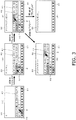
- FIG. 3 (1) is the same screen as in FIG. 2 (3), that is, a screen when " " has been selected in the base key area 31, after which " " is selected in the pop-up key area 32 displayed in response to the first selection.
- FIG. 3 (2) to (5) show examples of the transition in the screen in response to a subsequent operation.
- the first candidate area 41 in which the predicted candidates were dispose d was the end position of the slide operation, but in the example in FIG. 3 , the secon d candidate area 42, which shows linked candidates, is displayed in response to mov ement of the touch point to the first candidate area 41.
- FIG. 3 (2) shows an example in which the second candidate area 42 in whic h character strings of linked candidates for the character string of the predicted candi date displayed at the touch point position (in the depicted example, " ") ar e lined up is displayed when the touch point has moved to the first candidate area 41
- FIG. 3 (3) shows the screen when the touch point has further moved from th e first candidate area 41 to a specific candidate character string (such as " " [ purezento : present]) in the second candidate area 42.
- the input candidate char acter string in the character input area 30 changes to the character string " " [Christmas present] with the configuration following " " at th e position of the touch point that has moved to the second candidate area 42 after” ,” in the position of the touch point in the first candidate area 41when the second candidate area was displayed.
- a lift-up operation is performed in this state, as shown in FIG. 3 (4), the pop-up key area 32 and the candidate areas 41 an d 42 disappear, and " " changes to a confirmed display.
- the portion corresponding to the linked candidates of the input candidate character strings in the character input area 30 can be changed in response to movement of the touch point within the second candidate area 42. For example, if the touch point in the second candidate area 42 of the sere en in FIG. 3 (3) moves from “ “ “ to “ “ [ tsurii ; tree], the input candidate character string in the character input area 30 changes from “ “ [Christmas present] to " " [Christmas tree] as shown in FIG. 3 (5).
- a return slide can also be performed from the second candidate area 42.
- F or example if the touch point in the second candidate area 42 on the screen in FIG. 3 (3) goes back into the first candidate area 41 as the result of a return slide, the inp ut candidate character string is updated to the character string of the predicted candi date displayed at the position of the touch point in the first candidate area 41.
- the li nked candidates for the updated input candidate character string are displayed in the second candidate area 42.
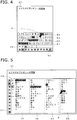
- FIG. 4 shows the screen in a third example of the input character screen, in which two other candidate areas 43 and 44 are stacked over linked candidate charac ter strings.
- the third candidate area 43 is displayed in response to movement of the touch point to the second candidate area 42
- a fourth technically e area 44 is displayed in response to movement of the touch point to the third candid ate area 43.
- candidate character strings that had been displayed at the position of the touch point in the candidate areas 41 to 44 (" ,” “ ,” “ ,” and “ ") are added in that order to the input candidate character string in the character input area 30.
- the user can put together an input of the chara cter string " " [Christmas present preparations], which us ed to be inputted by a four-stage operation.
- FIG. 5 shows an example in which the key areas 31 and 32 and the candida te areas 41 to 44, which have the same content as in FIG. 4 , are disposed so that th eir lengthwise directions are aligned in the up and down direction of the screen, with the base key area 31 at the left end and the other areas to the side of it.
- the user can select characters or candidate character strings as needed by a slide operation in the lengthwise direction of the area being to uched while moving the touch point to another area by a slide operation in the width direction of the area being touched.
- characters can be inputted more efficientl y and with less operation involved.
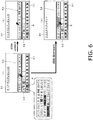
- the display in the fourth candidate area 44 is maintained so long as the tou ch point does not move down from the lower edge of the fourth candidate area 44, e ven if the user changes the slide direction to downward.
- the user can slide his finger above the third candidate area 43 that is currently being displayed, thereby co nfirming that the candidate display has been switched to the fourth candidate area 4 4, and then switch the direction of the slide to downward and select a candidate char acter string in the fourth candidate area 44.
- FIG. 6 (3) shows an example of the change in the screen when the touch po int moves downward in the third candidate area 43, and is the opposite of the exampl e in FIG. 6 (2).
- This downward movement of the touch point is treated as a return sli de to the second candidate area 42, so the fourth candidate area 44 disappears, and the third candidate area 43 goes to a state of not being touched, and is hidden.
- the position of the touch point automatically returns to the position at the point when the third candidate area 43 was produced (the display position of " "), and the input candidate character string in the character input area 30 also returns to the " " that was being displayed before the touch point went into the th ird candidate area 43.
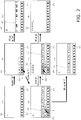
- FIG. 7 shows an example of performing display in the circular display area b y the same method as that in the working example depicted in FIG. 2 .
- This display a rea 100 can be set to be the total area of a circular touch screen 1, or it can be set to just a portion of the touch screen 1, regardless of its shape.
- a rectangular character input area 30A and a semicircular area 110 are dispo sed one above the other in the initial display area 100 shown in FIG. 7 (1).
- Represe ntative characters are lined up around an arc in the interior of the semicircular area 1 10.
- An arc-shaped area 31A in which this string of representative characters is displ ayed (the range from the imaginary arc indicated by a dotted line in the drawing to th e arc that forms the outer edge of the area) functions as a base key area.
- an arc-shaped pop-up key area 32A in which the characters of the row who se representative character is the character that was tapped are lined up, is displaye d along the outside of the arc-shaped area 31A. Furthermore, when the touch point moves from the arc-shaped area 31A to the pop-up key area 32A in response to a sli de operation, as shown in FIG. 7 (3), an arc-shaped first candidate area 41A, in whic h predicted candidates for the character " " displayed at the position of the touch po int are lined up, is displayed along the outside of the pop-up key area 32A.
- FIG. 7 (5) is an example of the display after lift-up has been detected at the display position of " " in the first candidate area 41A within the display are a 100 shown in FIG. 7 (4).
- the input candidate character string in the character input area 30 is changed to a confirmed di splay state, and the pop-up key area 32A and the first candidate area 41A disappear from the screen.
- an arc-shaped second candidate area that shows linked candidates can be displayed along the outer edge of the first candidate area 41A in response to movement of the touch point to the first candidate area 41A.
- third and f ourth candidate areas can also be displayed, and the same display method as in the example in FIG. 6 can be employed.
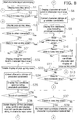
- FIGS. 8 and 9 show the flow of the main processing performed by the chara cter input system 10 shown in FIG. 1 , for specifications that allow the display of four t ypes of area, from the base key area 31 to the second candidate area 42.
- the proce ssing procedure described below will focus on a scenario of high importance, while r eferring to the screens in FIGS. 2 and 3 as needed.
- Step S1 The character input processing in the drawings is begun in response to a tap of a character input column or the like of the application 2.
- the base key area 3 1 is displayed on the screen by the base key area display component 11 (step S1), a nd the initial screen shown in FIG. 2 (1) appears as a result.
- the pop-u p key area 32 corresponding to the character displayed at the position of the touch p oint is displayed by the pop-up key area display component 12 (step S3), and the scr een changes to that in FIG. 2 (2).
- Step S3 includes processing to highlight a specific character in the base key area 31 or the pop-up key area 32 on the basis of the coor dinates of the touch point.
- the operation detector 15 determines whether or not there is a touch event, such as a slide within the base key area 31, a slide to the pop-up key area 32, or a li ft-up, on the basis of movement of the touch point on the above-mentioned screen (s teps S4, S5, and S31).
- a touch event such as a slide within the base key area 31, a slide to the pop-up key area 32, or a li ft-up
- s teps S4, S5, and S31 we will now describe the flow of processing executed in a scenario in which th e screen transitions in the order of (1) ⁇ (2) ⁇ (3) ⁇ (4) in FIG. 3 .
- step S4 becomes "No"
- an d step S5 becomes "Yes,” and the flow proceeds to step S6.
- step S6 the charact er displayed at the position of the touch point is displayed by the input character strin g display component 14 at the position of the cursor of the character input area 30 as an input candidate character.
- the candidate search component 16 searches t he dictionary database 102 using the input candidate character string, extracts chara cter strings of predicted candidates (step S7), and the candidate display component 13 receives this extraction result and displays it in the first candidate area 41 (step S 8).
- step S6 searches t he dictionary database 102 using the input candidate character string, extracts chara cter strings of predicted candidates
- step S 8 a screen with the configuration shown in FIG. 3 (1) is displayed.
- steps S9, S10, and S11 become "No”
- step S12 becomes "Yes”
- the flow proce eds to step S14 in FIG. 9 If a slide to the first candidate area 41 is detected in the determination proce ssing of the operation detector 15 on the above-mentioned screen (steps S9 to S12), steps S9, S10, and S11 become "No,” step S12 becomes "Yes,” and the flow proce eds to step S14 in FIG. 9 .
- step S14 the input character string display component 14 acquires the char acter string of a predicted candidate displayed at the position of the touch point in the first candidate area 41, and the display in the character input area 30 is updated usi ng this candidate character string as the input candidate character string.
- the candidate search component 16 searches the dictionary database 102 using the abo ve-mentioned input candidate character string, extracts character strings for linked c andidates (step S15), and the candidate display component 13 receives this extracti on result and displays the second candidate area 42 (step S16).
- a screen with the configuration shown in FIG. 3 (2) is displ ayed.
- step S17 becomes “No”
- step S18 becomes “Yes”
- step S22 the input character string display component 14 acq russias the character string of a linked candidate displayed at the position of the touch point in the second candidate area 42, and this character string is added after the inp ut candidate character string in the character input area 30.
- a screen with the configuration shown in FIG. 3 (3) is displayed.
- step S27 the input character string display component 14 con firms as the input character string the input candidate character string displayed in th e character input area 30, and updates the display to a confirmed character string th at is not underlined.
- step S28 the display of the pop-up key area 32 and th e first and second candidate areas 41 and 42 is deleted by the pop-up key area displ ay component 12 and the candidate display component 13. This processing updates the screen to the configuration shown in FIG. 3 (4), and the flow returns to step S2.
- step S23 become s "Yes” and the flow proceeds to step S26.
- step S26 the input character string di splay component 14 rewrites the portion corresponding to the character string of link ed candidates out of the input candidate character string in the character input area 30 so that it coincides with the character string of linked candidates displayed at the position of the moved touch point.
- step S20 becomes "Yes,” and steps S27 and S28 are executed.
- T his updates the screen to the configuration shown in FIG. 2 (5), and the flow returns t o step S2.
- step S24 becomes "Yes,” the flow proceeds to step S29, and the inpu t character string display component 14 deletes the portion corresponding to the link ed candidates from the input candidate character string in the character input area 3 0.
- step S30 the candidate display component 13 deletes the display of the second candidate area 42.
- step S17 becom es "Yes,” the flow proceeds to step S21, and the display of the second candidate are a 42 is deleted by the candidate display component 13. After this, the flow returns to step S6, and the character input area 30 is updated to a state in which the character displayed at the position of the touch point that had gone into the pop-up key area 3 2 as a result of a return slide is displayed as the input candidate character. Furtherm ore, steps S7 and S8 update the first candidate area 41 to content according to the u pdated input candidate character.
- step S10 in FIG. 8 becomes "Yes,” the flow proceeds to step S13, and the inpu t candidate character displayed as a result of the detection of a slide to the pop-up k ey area 32 is deleted.
- the pop-up key area 32 is also temporarily deleted at this poi nt, but thereafter the flow returns to step S3, and the pop-up key area 32 is displayed again on the basis of the touch point after the return slide.
- the display c an be updated according to the position of the moved touch point in each case.
- step S32 After the pop-up key area 32 has been displayed in response to a touch in the base key area 31 as a result of steps S1 to S3, if no slide to the pop-up key area 32 is detected and a lift-up in the base key area 31 is detected, steps S4 and S5 becom e "No," step S31 becomes "Yes,” and the flow proceeds to step S32.
- step S32 the input character string display component 14 acquires the ch aracter corresponding to the last touch point in the base key area 31, and displays th is character as an input candidate character in the character input area 30.
- the pop-up key area display component 12 receives this and deletes the display of the pop-u p key area 32 (step S33), the candidate search component 16 searches the dictionar y database 102 and extracts character strings for predicted candidates for the input c andidate character (step S34), and the candidate display component 13 displays the first candidate area 41 including the predicted candidates (step S35).
- Steps S6 to S8 are executed in response to a slide from the base key area 31 to the pop-up key area 32, and if a lift-up is detected in the pop-up key area 32 aft er a screen with the configuration shown in FIG. 2 (3) or FIG. 3 (1) is displayed, step s S9 and S10 become "No,” step S11 becomes “Yes,” and steps S33, S34, and S35 are executed. This processing changes the screen to the configuration shown in FIG . 2 (7).
- step S36 For a screen with the configuration shown in FIG. 2 (6) or FIG. 2 (7), if a tou ch is detected for a specific candidate character string within the first candidate area 41, step S36 becomes "Yes,” and the flow proceeds to step S38.
- step S38 the in put candidate character in the character input area 30 is deleted by the input charact er string display component 14, and in its place the candidate character string select ed by the touch is confirmed and displayed.
- the display of the first candidate area 4 1 by the candidate display component 13 is also deleted, and the flow returns to step S2.
- step S36 becomes "No”
- step S37 becomes “Yes”
- step S39 the input character string display component 14 maintai ns the input candidate character that is currently being displayed in the character inp ut area 30, and puts the cursor behind this.
- the flow returns to step S3, an d the pop-up key area display component 12 displays the pop-up key area 32 corres ponding to the character at the touch point.
- steps S6, S7, and S8 are executed in that order, just as described above. These steps result in the display of an input candidate characte r string with a configuration in which kana characters are provided in response to a n ew touch event to the kana characters from before, and in the display of the first can didate area 41 showing predicted candidates for this input candidate character string . Furthermore, if there is a slide to this first candidate display area, the second candi date area 42 is displayed that shows linked candidates for the candidate character st ring displayed at the position of the touch point that had gone into the first candidate display area. Thereafter, processing can proceed by the same flow as that describe d previously.
- the second candidate area 42 showing linked candidates for th e candidate character string displayed at the position of the touch point may be displ ayed above the first candidate area 41 in response to a touch of the first candidate ar ea 41 within the screen.
- a character string with a configuration that folio ws the character string of linked candidates displayed at the position of the touch poi nt after the character string of predicted candidates selected in the first candidate are a 41 can be confirmed by performing lift-up after a slide from the first candidate area 41 to the second candidate area 42.
- steps S14, S15, and S16 should be executed in response to the detection of a slide to each of the candid ate areas except for the last one,.
- a return slide in these candidate areas, or a slide or lift-up in these candidate areas, can be dealt with by processing in accordance wit h the flow described above.
- Lift-up is sometimes performed first at this stage, but here again, th e band-shaped second candidate area 42 showing linked candidates for the ist e character string displayed at the position of the touch point at that time can be displ ayed in response to the first candidate area 41 being touched.
- the user touches the desired candidate character string within th e first candidate area 41, he can slide his finger to the second candidate area 42 dis played as a result of that touch, and lift up at the display position of the desired candi date character string, thereby confirming a character string with a configuration that f ollows the candidate character string displayed at the position of the touch point in th e second candidate area 42 after the candidate character string selected in the first c andidate area 41.
- the candidate area s of a plurality of stages of linked candidates can be displayed in order in response t o a slide operation, and a character string that links the candidate character strings s elected in the various candidate areas into a single string can be confirmed in respon se to the last lift-up.
- the character input system 10 described above is not limited to a smart phon e, and can also be introduced into the controller of various kinds of compact informati on processing device having a touch screen, such as a PDA, a remote control, or a wristwatch style portable terminal device. Also, it can be applied to devices of variou s forms that are equipped with a touch screen, such as a facsimile device, a televisio n set, or a household electrical appliance.
- the input of character strings by operations that had to be broken up into a plurality of operations in the past can be carried out by a single slide operation, so character input work is easier and convenience is greatly improved.
Landscapes
- Engineering & Computer Science (AREA)
- General Engineering & Computer Science (AREA)
- Theoretical Computer Science (AREA)
- Human Computer Interaction (AREA)
- Physics & Mathematics (AREA)
- General Physics & Mathematics (AREA)
- User Interface Of Digital Computer (AREA)
- Input From Keyboards Or The Like (AREA)
- Machine Translation (AREA)
- Document Processing Apparatus (AREA)
Abstract
Description
- The present invention relates to a program that gives a computer connected to a touch screen the function of a character input device that inputs character information to an application that runs on the computer, as well as to a character input device and an information processing device equipped with a touch screen that use the program.
- There has been widespread use of technology for displaying a virtual keyboard on a touch screen or other such display device, and receiving an operation to select characters on this virtual keyboard as a character input operation. Such prior art includes ensuring a display area on the screen of an application by means of a virtual keyboard on which the characters to be inputted are lined up, and devising the configuration of the virtual keyboard so as to enhance the efficiency of character input work.
- For instance,
Patent Literature 1 states that a first keyboard is displayed in which the leading character in each row of the Japanese syllabary are lined up as representative characters, and when one of the characters in this first keyboard (such as "") has been selected, a second keyboard is displayed in which the characters other than the representative character in the row for which the selected character is the representative character (such as " ,""
 ," "
 ," and "
 ") are lined up. The first and second keyboards are both a band-shaped area, and they may be disposed at a right angle to one another, or they may be disposed parallel to one another (see

FIGS. 3 and5 , paragraphs 0011 to 0017, etc., in Patent Literature 1). -
Patent Literature 2 states that a plurality of representative characters are arranged in an arc within a fan-shaped area, and in response to an operation in which one of the representative characters is tapped, the characters within the row corresponding to the character designated by this operation are displayed lined up to the inside of the row of representative characters, and a tap on the inside row is received as a character input operation (seeFIGS. 4 and6 , paragraphs 0031 and 0033, etc., in Patent Literature 2). Furthermore, it is stated inPatent Literature 2 that, in response to a character input operation being performed, the inputted character is displayed, and candidate character strings that can be converted from that character are displayed on the outside of the fan-shaped area, allowing for the selection of a candidate character string to be received (seeFIG. 7 , paragraphs 0047 to 0049, etc., in Patent Literature 2). - Ways to improve the efficiency of character input work are not limited to those related to virtual keyboards as discussed above. For example, one widely used method involves receiving the selection of a candidate after displaying a candidate area in which are arranged as candidate character strings those character strings that can be inputted following the input character string confirmed in response to the confirmation of an input character string (hereinafter a candidate of this type will be referred to as a "linked candidate") (see Patent Literature 3).
-
- Patent Literature 1:
Japanese Laid-Open Patent Application 2003-76478 - Patent Literature 2:
Japanese Laid-Open Patent Application 2012-3545 - Patent Literature 3: Japanese Laid-Open Patent Application
2014-178953 - With the inventions discussed in
Patent Literature Patent Literature 2 is not displayed until after the character input has been finished by the second character selection operation, so an operation has to be separately performed to select the candidate character string. Similarly, a linked candidate is not displayed until after a selection operation has been performed in the candidate area one stage earlier, so the selection operation has to be repeated a number of times. - The present invention is focused on the above problems, and it is an object thereof to improve the convenience of character input by reducing the amount of work entailed by inputting in character string units.
- A computer into which the program of the present invention has been loaded will function as a character input device comprising an input character reception means for displaying on a touch screen a key area in which a plurality of characters are arranged, and receiving as an input character a character that complies with the detection status of a touch point for the key area, a candidate display means for displaying on the touch screen a candidate area that includes candidate character strings that match the input character received by the input character reception means, and a confirmation means for confirming as the input character string a specific candidate character string that complies with the detection status of a touch point for the candidate area.
- With the first character input device pertaining to the present invention, the input character reception means has a first key area display means for displaying at a specific position on the touch screen a first band-shaped key area in which the representative characters of a plurality of character groups in which the representative characters are given one by one are lined up, and a second key area display means for displaying, in response to the detection of a touch point at the display position of one of the characters within the first band-shaped key area, a second band-shaped key area in which characters including representative characters in character groups in which said representative characters are the characters displayed at this detection position are lined up, so that this second band-shaped key area is adjacent to the first band-shaped key area in the width direction and will match the orientation of the first band-shaped key area.
- The candidate display means of the first character input device, in response to the movement of a touch point detected in the first band-shaped key area to the display position of one of the characters in the second band-shaped key area, displays a band-shaped candidate area in which candidate character strings that match the character displayed at that movement position are lined up, so that this band-shaped candidate area matches the orientation of the second band-shaped key area and is adjacent to the second band-shaped key area on the opposite side from the first band-shaped key area. Also, the confirmation means, in response to the disappearance of the touch point that had moved to the second band-shaped key area at the display position of one of the candidate character strings after moving to the band-shaped candidate area, confirms as the input character string the candidate character string displayed at that disappearance position.
- With the above configuration, when the user touches a finger to the display position of one of the characters in the first band-shaped key area in which the representative characters of the various groups are lined up, a second band-shaped key area is displayed in which the characters in the group in which the character at the touch position is the representative character are lined up. If the user slides the touching finger to the second band-shaped key area without lifting the finger, a band-shaped candidate area is displayed in which a candidate character strings that match the character displayed at the position of the finger after this slide are lined up. The user can slide the finger that is touching the first band-shaped key area, through the second band-shaped key area, to the band-shaped candidate area, and then lift that finger from the touch screen at the display position of the targeted candidate character string, to confirm the candidate character string as the input character string. Since the above three band-shaped areas are arranged in order in the width direction and with their orientations aligned, movement between the areas can be performed by a slide operation along a constant direction, and the amount of operation required for this movement can also be reduced. Also, the input of a character string can be completed with a single slide operation.
- The following first to fourth embodiments can be provided for the first character input device. In the first embodiment, the first key area display means displays the first band-shaped key area, which is formed linearly, to conform to one edge of the touch screen within its rectangular display area. The second key area display means displays the second band-shaped key area, which is formed linearly, at a position that is to the inside of the first band-shaped key area within the display area, and the candidate display means displays the band-shaped candidate area, which is formed linearly, at a position that is to the inside of the second band-shaped key area within the display area.
- With the first embodiment, after touching the first band-shaped key area displayed at the edge of the rectangular display area, the user can slide his finger toward the inside of the display area and thereby move the finger from the first band-shaped key area, through the second band-shaped key area, to the band-shaped candidate area.
- In the second embodiment, the first key area display means displays the first band-shaped key area, which is formed in an arc shape, at a position that is a specific distance away from the edge of the touch screen within its display area. The second key area display means displays the second band-shaped key area, which is formed in an arc shape, at a position that is to the outside of the second band-shaped key area within the display area, and the candidate display means displays the band-shaped candidate area, which is formed in an arc shape, at a position to that to the outside of the second band-shaped key area within the display area.
- With the second embodiment, after touching the arc-shaped first band-shaped key area displayed at a specific position on the touch screen, the user can slide his finger to the outside of this band-shaped key area (toward the edge of the touch screen) and thereby move the finger from the first band-shaped key area, through the second band-shaped key area, to the band-shaped candidate area.
- Furthermore, the second embodiment can be implemented by using an entire circular or semicircular touch screen as the display area, or can be implemented by a method in which a circular or semicircular display area is set to part of a rectangular touch screen. In the latter case, the position of the display area may be suitably varied according to the type of application, user operation, and so forth.
- The character input device of the third embodiment is further provided with an input character string display means for displaying on a touch screen confirmed character strings or character strings that are input candidates. This input character string display means displays the character displayed at the position of a touch point that has moved from the first band-shaped key area to the second band-shaped key area, as an input candidate at a specific position of the touch screen, while said touch point is within the second band-shaped key area, and displays the candidate character string displayed at the position of a touch point that has moved from the second band-shaped key area to the band-shaped candidate area, as an input candidate at a specific position of the touch screen, while said touch point is within the band-shaped candidate area. Furthermore, the input character string display means switches the display of the character string of the input candidate immediately prior to the disappearance of the touch point within the band-shaped candidate area, in response to this disappearance, to the display of the confirmed character string.
- With the third embodiment, while the user is continuing a slide operation, the character or character string displayed at the position of the touch point is displayed as an input character on the touch screen, so accidental input is prevented and the efficiency of character input work can be further improved.
- In the fourth embodiment, the candidate display means, in response to the movement of a touch point that had moved to the second band-shaped key area to the display position of one of the candidate character strings in the band-shaped candidate area, displays a second band-shaped candidate area, in which candidate character strings that can be inputted following the candidate character string displayed at that movement position are lined up, so as to match the direction of the first band-shaped candidate area displayed previously and so as to be adjacent to the first band-shaped candidate area on the opposite side from the second band-shaped key area. Also, the confirmation means confirms as the input character string a character string with a configuration following the candidate character string displayed at the disappearance position of the touch point in the second band-shaped candidate area after the candidate character string displayed at the position of the touch point when the second band-shaped candidate area within the first band-shaped candidate area is displayed, when the touch point that had moved to the first band-shaped candidate area further moves to the second band-shaped candidate area and then disappears at the display position of one of the candidate character strings within this second band-shaped candidate area.
- With the fourth embodiment, when the user slides a finger from the first band-shaped key area, through the second band-shaped key area, to the band-shaped candidate area, a second band-shaped candidate area appears in which character strings of linked candidates for the candidate character string displayed at the position of that finger are lined up. The user selects a specific candidate character string in the first band-shaped candidate area first displayed by sliding his finger to that candidate character string, and when the user then lifts up his finger at the display position of one of the linked candidates by sliding the finger to the second band-shaped candidate area displayed in response to this selection, a character string with a configuration that links the character string of the linked candidate displayed at the last touch position in the second band-shaped candidate area to the candidate character string selected in the first band-shaped key area is confirmed as the input character string. This allows a plurality of candidate character strings to be selected all at once.
- With the second character input device of the present invention, the candidate display means has a first candidate area display means for displaying at a specific position on the touch screen a first band-shaped candidate area in which candidate character strings that match the input character received by the input character reception means are lined up, and a second candidate area display means for displaying, in response to the detection of a touch point at the display position of one of the candidate character strings within the first band-shaped candidate area, a second band-shaped candidate area in which candidate character strings that can be inputted following the candidate character string displayed at that detection position are lined up, so as to match the orientation of the first band-shaped candidate area and so as to be adjacent to the first band-shaped candidate area in the width direction. Also, the confirmation means selects as the input character string a character string with a configuration following the candidate character string displayed at the disappearance position of the touch point in the second band-shaped candidate area after the candidate character string displayed at the position of the touch point within the first band-shaped candidate area when the second band-shaped candidate area is displayed, in response to the disappearance of the touch point at the display position of one of the candidate character strings in the area after the touch point detected in the first band-shaped candidate area has moved from the first band-shaped candidate area to the second band-shaped candidate area.
- Again with the second character input device, when the user selects one of the candidate character strings in the first band-shaped candidate area by placing a finger on said candidate character string, a second band-shaped candidate area appears in which character strings of linked candidates for this candidate character string are lined up. After the user has selected the desired candidate character string in the first band-shaped candidate area by placing a finger on it, when that finger is lifted at the display position of one of the linked candidates by sliding the finger to the second band-shaped candidate area, a character string with a configuration following the candidate character string that was displayed at the position where the finger was lifted in the second band-shaped candidate area after the candidate character string selected in the first band-shaped candidate area is confirmed as the input character string. Since the band-shaped candidate areas are lined up the width direction and their orientations are aligned, the amount of operation required to move between the band-shaped candidate areas can be reduced. Thus, a plurality of candidate characters can be selected with a single slide operation, and this improves convenience.
- The first and second character input devices of the present invention can be applied to a variety of information processing devices equipped with a touch screen.
- With the present invention, the input of character strings, which had to be divided up into a number of operations in the past, can now be accomplished with a single slide operation, so the job of inputting characters is easier and convenience is greatly enhanced.
-
-
FIG. 1 is a function block diagram showing the configuration of a character input system to which the present invention is applied. -
FIG. 2 is a diagram illustrating an example of the transition that accompanies operation of a character input screen. -
FIG. 3 is a diagram illustrating an example of the transition that accompanies operation of a character input screen. -
FIG. 4 is a diagram illustrating an example of a screen in which the candidate area of linked candidates is provided in a plurality of stages. -
FIG. 5 is another diagram illustrating an example of a screen in which the candidate area of linked candidates is provided in a plurality of stages. -
FIG. 6 is a diagram illustrating an example of the transition in the screen accompanying operation on a character input screen configured such that a plurality of candidate areas overlap. -
FIG. 7 is a diagram illustrating an example in which the same display as inFIG. 2 is performed in a circular display area. -
FIG. 8 is a flowchart of the flow of character input processing. -
FIG. 9 is a flowchart of the flow of processing continuing fromFIG. 8 . -
FIG. 1 shows the functions of a character input system (IME) to which the pr esent invention is applied, along with the relation to atouch screen 1 provided on the front of an information processing device to which said system is applied, or to an application 2 that is to undergo character input (such as an Internet browser, a mailer, or a notepad). Thecharacter input system 10 and theapplication 2 in this example a re software incorporated into a portable information processing device such as a sm art phone, a tablet terminal, or a wearable terminal, and operate under the control of an operation system (not shown). - The
character input system 10 includes a base keyarea display component 11, a pop-up keyarea display component 12, acandidate display component 13, an input characterstring display component 14, anoperation detector 15, a candidate search component 16, aconfirmation processor 17, a confirmation character string ou tputcomponent 18, a key definition table 101, adictionary database 102, and so fort h. - Of the above components, the key definition table 101 and the
dictionary data base 102 are memory means in which information produced by the system develope rs is registered. A plurality of sets of dictionary data configured so that vocabulary or notation character strings indicating commonly used phrases are associated with th e pronunciations of the characters, their priority, and so on are registered in the dictionary database 102. - Definition information related to the base
key area 31 or the pop-up key are a 32 shown inFIG. 2 onward is registered in the key definition table 101. As shown i nFIG. 2 , etc., the basekey area 31 in this example is a band-shaped area (first band -shaped key area) in which representative characters (leading characters) of the vari ous rows of the Japanese syllabary are lined up. The pop-upkey area 32 is a band-shaped area (second band-shaped key area) in which characters including the repre sentative character in one row are lined up, and is provided individually to each row. - The arrangement of characters in these
key areas key area 32 is tied to the characters in the registration information of the baseke y area 31. - The function of the various processors in
FIG. 1 will now be described throu gh reference toFIGS. 2 and3 . The base keyarea display component 11 and the po p-up keyarea display component 12 display the basekey area 31 or the pop-upkey area 32 on thetouch screen 1 by referring to the above-mentioned keydefinition tabl e 101. Thecandidate display component 13 displays a band-shapedcandidate area 41 in which character strings of predicted candidates for a kana character string bei ng inputted (hereinafter referred to as the "first candidate area 41"), or a band-shaped candidate area 42 in which character strings of linked candidates for predicted can didates are lined up (hereinafter referred to as the "second candidate area 42"). The candidate character strings displayed in thesecandidate areas candidate search component 16 after searching thedictionary database 1 02. - The input character
string display component 14 displays a character string corresponding to an operation in ancharacter input area 30 in thetouch screen 1, in a confirmed or unconfirmed state. Theconfirmation processor 17 decides on a char acter string displayed in a confirmed state, and the confirmation character stringoutp ut component 18 outputs the confirmed character string to theapplication 2. Theop eration detector 15 inputs from the operation system the coordinates of a representat ive point within the area in which finger contact was detected within thetouch screen 1, and detects various kinds of operation event pertaining to character input (hereina fter referred to as a "touch event") from a change in the inputted coordinates or a cha nge in whether or not there is input. For example, a change from a state in which the coordinates of the touch point have not been inputted to a state in which they have b een inputted indicates that a finger has been placed at the position indicated by the t ouch point (hereinafter referred to as a "touch"). Also, a change from a state in whic h the coordinates of the touch point have been inputted to a state in which they have not been inputted indicates that a finger has been lifted from thetouch screen 1 at th e position where the change occurred (where the touch point disappeared) (hereinaft er referred to as a "lift-up"). Furthermore, when the coordinates of the touch point m ove while no lift-up has been detected after touch, this movement is detected as a sli de operation. - The
operation detector 15 acquires through the operation system the inform ation displayed in the basekey area 31, the pop-upkey area 32, the first candidate area 41, and thesecond candidate area 42, along with position information for the dis play range. The coordinates of the touch point between a touch and a lift-up are co mpared to position information about various kinds of display information to determin e which information display range of which area the touch point or the coordinates du ring lift-up are included in, the movement path of the touch point during a slide operat ion, etc. When thedisplay components 11 to 14, thecandidate search component 1 6, and theconfirmation processor 17 operate on the basis of the determination result from theoperation detector 15, the screen of thetouch screen 1 changes in various ways, input character strings are confirmed as needed and outputted by the confirma tion characterstring output component 18 to theapplication 2. -
FIG. 2 shows an example of the transition of the display screen that occurs on thetouch screen 1 as a result of the operation of the above-mentioned characteri nput system 10. The arrow P in the drawing indicates the position of the touch point provided by the operation system (the same applies to subsequent drawings). -
FIG. 2 (1) is the screen at the point when the character input processing has c ommenced. The basekey area 31 made up of the representative characters is displ ayed at the lower end, and theblank portion 30 above serves as the character input area. As shown inFIG. 2 (2), when one of the characters in the basekey area 31 is touched, the display range of the touched character ("" in the depicted example) is distinguished from other locations by means of a different color or the like, and abov e this, adjacent to and in the same orientation as the base
key area 31, is displayed t he pop-upkey area 32 in which are disposed the characters of the row whose repres entative character is the character that was touched. -
FIG. 2 (3) shows the screen when a slide operation from the basekey area 31 to the pop-upkey area 32 has resulted in the touch point moving from the basek ey area 31 to the character "" in the pop-up
key area 32. With this screen, "" is h ighlighted as the character displayed at the position of the touch point, and " " is als o displayed in the

character input area 30. The "" in the
character input area 30 is underlined, which means that it has not yet been confirmed. This underlined charact er will hereinafter be called an "input candidate character," and a character string co mposed of a plurality of input candidate characters will be called an "input candidate character string." - Furthermore, the
first candidate area 41, in which character strings that are predicted candidates for the above-mentioned input candidate character (words havi ng pronunciations that start with "") are lined up, is displayed above the pop-up
ke y area 32 of the screen inFIG. 2 (3) so as to match the orientation of the pop-upkey area 32 and be adjacent thereto. -
FIG. 2 (4) shows the screen when another slide operation has resulted in the t ouch point included in the pop-upkey area 32 on the screen inFIG. 2 (3) moving to t hefirst candidate area 41. With this screen, the candidate character string displayed at the position of the touch point in the first candidate area 41 (in the depicted exam pie, "" [kurisumasu: Christmas]) is highlighted, and the display of the cha
racter input area 30 has changed from "" to " ." While the touch point is detected within the

first candidate area 41, the character string in thecharacter input area 30 is underlined, which indicates that it is an input candidate character string. When a slide operation within thefirst candidate area 41 causes the touch point to m ove, the display of the input candidate character string also changes in response to t his movement. For example, if the touch point moves from "" to " " [k urai: dark], the input candidate character string in the

character input area 30 also c hanges from "" to " ."

-
FIG. 2 (5) shows the screen when a lift-up operation has been performed at the display position of "" within the
first candidate area 41 on the screen i nFIG. 2 (4). This lift-up changes the "" of the input candidate character s tring in the
character input area 30 to a confirmed character string that is not underlin ed, after which a cursor showing the input position is set. In response to this confirm ation, the pop-upkey area 32 and thefirst candidate area 41 disappear from the sere en, but the basekey area 31 is still displayed. - As discussed above, with this working example, everything from the selectio n of a kana character to the selection of a predicted candidate can be completed, an d the input character string confirmed, by performing a lift-up after sliding a finger pla ced in the base
key area 31 from the pop-upkey area 32 to thefirst candidate area 4 1. Thekey areas first candidate area 41 are displayed in the sam e orientation and in order from bottom to top, so the user can easily select characters and candidate character strings by moving to the various areas by upward slide ope rations and performing slide operations to the left and right as needed. Also, since th e representative characters are also included in the pop-upkey area 32, even when a representative character is selected and character input is performed, the characte r strings to be inputted can be selected in the same work order as when another char acter is selected. - Although not depicted in
FIG. 2 , in this working example, a slide operation t hat goes back down (hereinafter referred to as a "return slide") can be performed at any time, as long as no lift-up has been performed. For example, as inFIG. 2 (4), th e screen can be returned to the state inFIG. 2 (3) and a character other than "" in t he pop-up
key area 32 can be selected by performing a return slide from the first can didatearea 41 to the pop-upkey area 32 in a state in which the input candidate char acter string made up of predicted candidates is being displayed. It is also possible to select a character other than "" in the base
key area 31 by returning to the screen inFIG. 2 (2) by means of a return slide to the basekey area 31. - The place were lift-up is possible is not limited to inside the first
candidate ar ea 41, and lift-up can also be received in the basekey area 31 or the pop-up key are a 32. If lift-up occurs in thekey area FIG. 2 (6) and (7) , the ch aracter displayed at the position of the lift-up ("" or " " in the depicted examples) i s displayed as the input candidate character string in the

character input area 30. Th e pop-upkey area 32 disappears from the screen at this point, but the basekey area 31 is still displayed, and thefirst candidate area 41 is displayed in which character st rings of predicted candidates for the input candidate character string are arranged. - The base
key area 31 in this example includes not only the representative c haracters of the various rows from "" to " ," but also the character "
 ." When thi s "
 " is touched, a pop-up

key area 32 including of various symbols is displayed, but because there are so many things that can be displayed, it is possible to expand to an area of a plurality of rows by an expansion operation when necessary. After this expansion, the selection of a symbol can be received by a tap operation. The diacriti cal mark "" is included in the pop-up
key area 32 of the "," " ," and "
 " rows, a nd the diacritical marks "
 " and "
 " are included in the pop-up

key area 32 for the "" row. When the touch point has moved to these symbols, characters with their att ached diacritical marks ( ,
 ,
 ,
 ,
 ,
 ,
 ,
 ,
 ,
 , etc.) appear in the pop-u p

key area 32. - The
first candidate area 41 and the second candidate area 42 (described ne xt) are designed so that the user can scroll through candidate character strings accor ding to slide operations to the left or right. -
FIG. 3 (1) is the same screen as inFIG. 2 (3), that is, a screen when "" has been selected in the base
key area 31, after which "" is selected in the pop-up
key area 32 displayed in response to the first selection.FIG. 3 (2) to (5) show examples of the transition in the screen in response to a subsequent operation. In the example inFIG. 2 , thefirst candidate area 41 in which the predicted candidates were dispose d was the end position of the slide operation, but in the example inFIG. 3 , the second candidate area 42, which shows linked candidates, is displayed in response to mov ement of the touch point to thefirst candidate area 41. -
FIG. 3 (2) shows an example in which thesecond candidate area 42 in whic h character strings of linked candidates for the character string of the predicted candi date displayed at the touch point position (in the depicted example, "") ar e lined up is displayed when the touch point has moved to the
first candidate area 41 - . Just as in the example in
FIG. 2 (4), "," which is the selected predicted candidate character string, is displayed as the input candidate character string in the
character input area 30 at this stage. -
FIG. 3 (3) shows the screen when the touch point has further moved from th efirst candidate area 41 to a specific candidate character string (such as "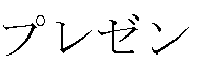 " [purezento: present]) in the

second candidate area 42. The input candidate char acter string in thecharacter input area 30 changes to the character string " " [Christmas present] with the configuration following "
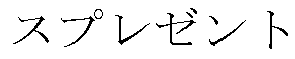 " at th e position of the touch point that has moved to the

second candidate area 42 after"," in the position of the touch point in the first candidate area 41when the second candidate area was displayed. When a lift-up operation is performed in this state, as shown in
FIG. 3 (4), the pop-upkey area 32 and thecandidate areas 41 and 42 disappear, and "" changes to a confirmed display.
- As long as there has been no lift-up, the portion corresponding to the linked candidates of the input candidate character strings in the
character input area 30 can be changed in response to movement of the touch point within thesecond candidate area 42. For example, if the touch point in thesecond candidate area 42 of the sere en inFIG. 3 (3) moves from "" to " " [tsurii; tree], the input candidate character string in the

character input area 30 changes from "" [Christmas present] to " " [Christmas tree] as shown in

FIG. 3 (5). - A return slide can also be performed from the
second candidate area 42. F or example, if the touch point in thesecond candidate area 42 on the screen inFIG. 3 (3) goes back into thefirst candidate area 41 as the result of a return slide, the inp ut candidate character string is updated to the character string of the predicted candi date displayed at the position of the touch point in thefirst candidate area 41. The li nked candidates for the updated input candidate character string are displayed in thesecond candidate area 42. -
FIG. 4 shows the screen in a third example of the input character screen, in which twoother candidate areas FIG. 3 (1) and (2) , thethird candidate area 43 is displayed in response to movement of the touch point to thesecond candidate area 42, and a fourth candidat earea 44 is displayed in response to movement of the touch point to the third candid atearea 43. During this time, candidate character strings that had been displayed at the position of the touch point in thecandidate areas 41 to 44 ("," "
 ," "
 ," and "
 ") are added in that order to the input candidate character string in the

character input area 30. Thus, the user can put together an input of the chara cter string "" [Christmas present preparations], which us ed to be inputted by a four-stage operation.
-
FIG. 5 shows an example in which thekey areas candida te areas 41 to 44, which have the same content as inFIG. 4 , are disposed so that th eir lengthwise directions are aligned in the up and down direction of the screen, with the basekey area 31 at the left end and the other areas to the side of it. With both of the screens inFIGS. 4 and 5 , the user can select characters or candidate character strings as needed by a slide operation in the lengthwise direction of the area being to uched while moving the touch point to another area by a slide operation in the width direction of the area being touched. Thus, characters can be inputted more efficientl y and with less operation involved. - However, in a situation in which there is not enough room in the display are a, such as when the
touch screen 1 has a compact size, it may be difficult to perform the displays inFIGS. 4 and 5 . In such a situation, as shown inFIG. 6 , thecandidate areas 41 to 44 may be displayed superposed. - With the screen in
FIG. 6 (1), of thefourth candidate areas 41 to 44 shown inFIGS. 4 and 5 , those up to thethird candidate area 43 are displayed superposed, wit h their display positions offset slightly. The touch point is already in the thirdcandida te area 43, and afourth candidate area 44 is also produced that shows the linked ca ndidates for the character ("" in the depicted example) that is displayed at the posit ion of this touch point. The
fourth candidate area 44 in which the touch point is not moving is hidden, but if the touch point moves up somewhat from thethird candidate area 43, the hiddenfourth candidate area 44 is displayed as shown inFIG. 6 (2). - The display in the
fourth candidate area 44 is maintained so long as the tou ch point does not move down from the lower edge of thefourth candidate area 44, e ven if the user changes the slide direction to downward. Thus, the user can slide his finger above thethird candidate area 43 that is currently being displayed, thereby co nfirming that the candidate display has been switched to thefourth candidate area 4 4, and then switch the direction of the slide to downward and select a candidate char acter string in thefourth candidate area 44. -
FIG. 6 (3) shows an example of the change in the screen when the touch po int moves downward in thethird candidate area 43, and is the opposite of the exampl e inFIG. 6 (2). This downward movement of the touch point is treated as a return sli de to thesecond candidate area 42, so thefourth candidate area 44 disappears, and thethird candidate area 43 goes to a state of not being touched, and is hidden. The position of the touch point automatically returns to the position at the point when thethird candidate area 43 was produced (the display position of ""), and the input candidate character string in the
character input area 30 also returns to the " " that was being displayed before the touch point went into the th

ird candidate area 43. -
FIG. 7 shows an example of performing display in the circular display area b y the same method as that in the working example depicted inFIG. 2 . This display area 100 can be set to be the total area of acircular touch screen 1, or it can be set to just a portion of thetouch screen 1, regardless of its shape. - A rectangular
character input area 30A and a semicircular area 110 are dispo sed one above the other in theinitial display area 100 shown inFIG. 7 (1). Represe ntative characters are lined up around an arc in the interior of thesemicircular area 1 10. An arc-shapedarea 31A in which this string of representative characters is displ ayed (the range from the imaginary arc indicated by a dotted line in the drawing to th e arc that forms the outer edge of the area) functions as a base key area. - When a character inside the arc-shaped
area 31A is tapped, as shown in FI G. 7 (2), an arc-shaped pop-upkey area 32A, in which the characters of the row who se representative character is the character that was tapped are lined up, is displaye d along the outside of the arc-shapedarea 31A. Furthermore, when the touch point moves from the arc-shapedarea 31A to the pop-upkey area 32A in response to a sli de operation, as shown inFIG. 7 (3), an arc-shapedfirst candidate area 41A, in whic h predicted candidates for the character "" displayed at the position of the touch po int are lined up, is displayed along the outside of the pop-up
key area 32A. - Just as in the example in
FIG. 2 , with thecharacter input area 30A, when th e touch point is located in the pop-upkey area 32A, the kana character displayed at t he position of the touch point is displayed as an input candidate character (FIG. 7 (3) ), and when the touch point moves to thefirst candidate area 41A, an input candidat e character string including the predicted candidate displayed at that movement posit ion is displayed (FIG. 7 (4)). Thereafter, until lift-up is detected, the display of the inp ut candidate character string can be various changed in response to movement of th e touch point. -
FIG. 7 (5) is an example of the display after lift-up has been detected at the display position of "" in the
first candidate area 41A within the display are a 100 shown inFIG. 7 (4). Here again, just as in the example inFIG. 2 (5), the input candidate character string in thecharacter input area 30 is changed to a confirmed di splay state, and the pop-upkey area 32A and thefirst candidate area 41A disappear from the screen. - Again in the working example in
FIG. 7 , if thedisplay area 100 can be made s omewhat larger, an arc-shaped second candidate area that shows linked candidates can be displayed along the outer edge of thefirst candidate area 41A in response to movement of the touch point to thefirst candidate area 41A. If necessary, third and f ourth candidate areas can also be displayed, and the same display method as in the example inFIG. 6 can be employed. -
FIGS. 8 and9 show the flow of the main processing performed by the character input system 10 shown inFIG. 1 , for specifications that allow the display of four t ypes of area, from the basekey area 31 to thesecond candidate area 42. The proce ssing procedure described below will focus on a scenario of high importance, while r eferring to the screens inFIGS. 2 and3 as needed. - The character input processing in the drawings is begun in response to a tap of a character input column or the like of the
application 2. First, the basekey area 3 1 is displayed on the screen by the base key area display component 11 (step S1), a nd the initial screen shown inFIG. 2 (1) appears as a result. When a touch to the ba sekey area 31 is detected by the operation detector 15 ("Yes" in step S2), the pop-u pkey area 32 corresponding to the character displayed at the position of the touch p oint is displayed by the pop-up key area display component 12 (step S3), and the scr een changes to that inFIG. 2 (2). Step S3 includes processing to highlight a specific character in the basekey area 31 or the pop-upkey area 32 on the basis of the coor dinates of the touch point. - The
operation detector 15 determines whether or not there is a touch event, such as a slide within the basekey area 31, a slide to the pop-upkey area 32, or a li ft-up, on the basis of movement of the touch point on the above-mentioned screen (s teps S4, S5, and S31). We will now describe the flow of processing executed in a scenario in which th e screen transitions in the order of (1) → (2) → (3) → (4) inFIG. 3 . First, if theopera tion detector 15 detects a slide to the pop-upkey area 32, step S4 becomes "No" an d step S5 becomes "Yes," and the flow proceeds to step S6. In step S6, the charact er displayed at the position of the touch point is displayed by the input character string display component 14 at the position of the cursor of thecharacter input area 30 as an input candidate character. Thecandidate search component 16 then searches t hedictionary database 102 using the input candidate character string, extracts chara cter strings of predicted candidates (step S7), and thecandidate display component 13 receives this extraction result and displays it in the first candidate area 41 (step S 8). As a result of these steps S6, S7, and S8, a screen with the configuration shown inFIG. 3 (1) is displayed. - If a slide to the
first candidate area 41 is detected in the determination proce ssing of theoperation detector 15 on the above-mentioned screen (steps S9 to S12), steps S9, S10, and S11 become "No," step S12 becomes "Yes," and the flow proce eds to step S14 inFIG. 9 . - In step S14, the input character
string display component 14 acquires the char acter string of a predicted candidate displayed at the position of the touch point in thefirst candidate area 41, and the display in thecharacter input area 30 is updated usi ng this candidate character string as the input candidate character string. Then, thecandidate search component 16 searches thedictionary database 102 using the abo ve-mentioned input candidate character string, extracts character strings for linked c andidates (step S15), and thecandidate display component 13 receives this extracti on result and displays the second candidate area 42 (step S16). As a result of these steps S14, S15, and S16, a screen with the configuration shown inFIG. 3 (2) is displ ayed. - When a slide to the
second candidate area 42 is detected in the in the deter mination processing of theoperation detector 15 on the above-mentioned screen (st eps S17 to S20), step S17 becomes "No," step S18 becomes "Yes," and the flow pro ceeds to step S22. In step S22, the input characterstring display component 14 acq uires the character string of a linked candidate displayed at the position of the touch point in thesecond candidate area 42, and this character string is added after the inp ut candidate character string in thecharacter input area 30. As a result of this proce ssing, a screen with the configuration shown inFIG. 3 (3) is displayed. - If lift-up from the
second candidate area 42 is detected in the determination processing of theoperation detector 15 on the above-mentioned screen (steps S23 t o S25), steps S23 and S24 become "No," step S25 becomes "Yes," and the flow pro ceeds to step S27. In step S27, the input characterstring display component 14 con firms as the input character string the input candidate character string displayed in th echaracter input area 30, and updates the display to a confirmed character string th at is not underlined. Then, in step S28, the display of the pop-upkey area 32 and th e first andsecond candidate areas component 12 and thecandidate display component 13. This processing updates the screen to the configuration shown inFIG. 3 (4), and the flow returns to step S2. - If there is a change in the linked candidates corresponding to the touch poin t as a result of a slide in the
second candidate area 42 from the time when a slide to t hesecond candidate area 42 is detected until a lift-up is detected, step S23 become s "Yes" and the flow proceeds to step S26. In step S26, the input character string display component 14 rewrites the portion corresponding to the character string of link ed candidates out of the input candidate character string in thecharacter input area 30 so that it coincides with the character string of linked candidates displayed at the position of the moved touch point. - If lift-up is detected in the
first candidate area 41 rather than in the secondc andidate area 42, step S20 becomes "Yes," and steps S27 and S28 are executed. T his updates the screen to the configuration shown inFIG. 2 (5), and the flow returns t o step S2. - If a return slide from the
second candidate area 42 to thefirst candidate area 41 is detected, step S24 becomes "Yes," the flow proceeds to step S29, and the inpu t characterstring display component 14 deletes the portion corresponding to the link ed candidates from the input candidate character string in thecharacter input area 3 0. In the following step S30, thecandidate display component 13 deletes the display of thesecond candidate area 42. After this, steps S14, S15, and S16 are executed, and as a result the character string of predicted candidates displayed at the position of the touch point that had gone into thefirst candidate area 41 as a result of the retu rn slide becomes the input candidate character string, and the second candidate are a 42 showing the linked candidates for this input candidate character string is display ed. - If no slide to the
second candidate area 42 is performed in the first candidat earea 41, and a return slide to the pop-upkey area 32 is detected, step S17 becom es "Yes," the flow proceeds to step S21, and the display of the second candidate are a 42 is deleted by thecandidate display component 13. After this, the flow returns to step S6, and thecharacter input area 30 is updated to a state in which the character displayed at the position of the touch point that had gone into the pop-upkey area 3 2 as a result of a return slide is displayed as the input candidate character. Furtherm ore, steps S7 and S8 update thefirst candidate area 41 to content according to the u pdated input candidate character. - If a return slide from the pop-up
key area 32 to the basekey area 31 is dete cted, step S10 inFIG. 8 becomes "Yes," the flow proceeds to step S13, and the inpu t candidate character displayed as a result of the detection of a slide to the pop-upk ey area 32 is deleted. The pop-upkey area 32 is also temporarily deleted at this poi nt, but thereafter the flow returns to step S3, and the pop-upkey area 32 is displayed again on the basis of the touch point after the return slide. - Also, if a slide is detected within the base
key area 31, the pop-upkey area 32, or the first candidate area 41 ("Yes" in any of steps S4, S9, or S19), the display c an be updated according to the position of the moved touch point in each case. - After the pop-up
key area 32 has been displayed in response to a touch in the basekey area 31 as a result of steps S1 to S3, if no slide to the pop-upkey area 32 is detected and a lift-up in the basekey area 31 is detected, steps S4 and S5 becom e "No," step S31 becomes "Yes," and the flow proceeds to step S32. - In step S32, the input character
string display component 14 acquires the ch aracter corresponding to the last touch point in the basekey area 31, and displays th is character as an input candidate character in thecharacter input area 30. The pop-up keyarea display component 12 receives this and deletes the display of the pop-u p key area 32 (step S33), thecandidate search component 16 searches the dictionar ydatabase 102 and extracts character strings for predicted candidates for the input c andidate character (step S34), and thecandidate display component 13 displays thefirst candidate area 41 including the predicted candidates (step S35). These steps S 32 to S35 change the screen to the configuration shown inFIG. 2 (6). - Steps S6 to S8 are executed in response to a slide from the base
key area 31 to the pop-upkey area 32, and if a lift-up is detected in the pop-upkey area 32 aft er a screen with the configuration shown inFIG. 2 (3) orFIG. 3 (1) is displayed, step s S9 and S10 become "No," step S11 becomes "Yes," and steps S33, S34, and S35 are executed. This processing changes the screen to the configuration shown inFIG . 2 (7). - For a screen with the configuration shown in
FIG. 2 (6) orFIG. 2 (7), if a tou ch is detected for a specific candidate character string within thefirst candidate area 41, step S36 becomes "Yes," and the flow proceeds to step S38. In step S38, the in put candidate character in thecharacter input area 30 is deleted by the input charact erstring display component 14, and in its place the candidate character string select ed by the touch is confirmed and displayed. The display of thefirst candidate area 4 1 by thecandidate display component 13 is also deleted, and the flow returns to step S2. - For a screen with the configuration in
FIG. 2 (6) orFIG. 2 (7), it is also possi ble that the basekey area 31 will be touched, rather than thefirst candidate area 41. In this case, step S36 becomes "No," step S37 becomes "Yes," and the flow procee ds to step S39. In step S39, the input characterstring display component 14 maintai ns the input candidate character that is currently being displayed in the characterinp ut area 30, and puts the cursor behind this. After this, the flow returns to step S3, an d the pop-up keyarea display component 12 displays the pop-upkey area 32 corres ponding to the character at the touch point. - If a slide to the pop-up
key area 32 displayed in step S2 after step S39 is de tected ("Yes" in step S5), then steps S6, S7, and S8 are executed in that order, just as described above. These steps result in the display of an input candidate characte r string with a configuration in which kana characters are provided in response to a n ew touch event to the kana characters from before, and in the display of the first can didatearea 41 showing predicted candidates for this input candidate character string . Furthermore, if there is a slide to this first candidate display area, the secondcandi date area 42 is displayed that shows linked candidates for the candidate character st ring displayed at the position of the touch point that had gone into the first candidate display area. Thereafter, processing can proceed by the same flow as that describe d previously. - In the above procedure, if an input character string is confirmed by lift-up in t he
candidate area candidate area FIG. 2 (5) andFIG. 3 ( 4)), but at this point thesecond candidate area 42 may be displayed that shows linke d candidates for the confirmed input character string. If the display of the secondca ndidate area 42 is continued even after the confirmation of the input character string, then a candidate character string subsequently touched can be confirmed as the inp ut character string in response to the touch of a linked candidate, and the secondca ndidate area 42 showing the next linked candidate can be displayed. If the basekey area 31 is touched without a linked candidate being touched, then the display of thesecond candidate area 42 is deleted, and the result is a state in which character inpu t is again possible by slide operation from the basekey area 31. - For a screen after a lift-up from the base
key area 31 or the pop-up key area 32 (FIG. 2 (6) or (7) ), thesecond candidate area 42 showing linked candidates for th e candidate character string displayed at the position of the touch point may be displ ayed above thefirst candidate area 41 in response to a touch of the firstcandidate ar ea 41 within the screen. Here again, a character string with a configuration that folio ws the character string of linked candidates displayed at the position of the touch poi nt after the character string of predicted candidates selected in the first candidate are a 41 can be confirmed by performing lift-up after a slide from thefirst candidate area 41 to thesecond candidate area 42. - As shown in
FIGS. 4 and 5 , if a candidate area showing linked candidates is displayed over a plurality of stages, the same procedure as in steps S14, S15, and S16 should be executed in response to the detection of a slide to each of the candid ate areas except for the last one,. A return slide in these candidate areas, or a slide or lift-up in these candidate areas, can be dealt with by processing in accordance wit h the flow described above. - All of the various working examples given above were premised on the fact t hat character input operations were received in the band-shaped base key area 31 ( 31A) and the pop-up key area 32 (32A), but this is not the only option. Even if a key area of some other form is used, the
first candidate area 41 and the second candidat earea 42 can still be used for display and selection of candidate character strings. Here again, some kind of input candidate character is displayed by means of a tap o peration, a slide operation, etc., in a key area, and the band-shaped first candidate area 41 showing predicted candidates for an input candidate character is displayed in response to this. Lift-up is sometimes performed first at this stage, but here again, th e band-shapedsecond candidate area 42 showing linked candidates for the candidat e character string displayed at the position of the touch point at that time can be displ ayed in response to thefirst candidate area 41 being touched. - Thus, after the user touches the desired candidate character string within th e
first candidate area 41, he can slide his finger to thesecond candidate area 42 dis played as a result of that touch, and lift up at the display position of the desired candi date character string, thereby confirming a character string with a configuration that f ollows the candidate character string displayed at the position of the touch point in th esecond candidate area 42 after the candidate character string selected in the firstc andidate area 41. - Here again, just as in the examples in
FIGS. 4, 5 , and6 , the candidate area s of a plurality of stages of linked candidates can be displayed in order in response t o a slide operation, and a character string that links the candidate character strings s elected in the various candidate areas into a single string can be confirmed in respon se to the last lift-up. - The
character input system 10 described above is not limited to a smart phon e, and can also be introduced into the controller of various kinds of compact informati on processing device having a touch screen, such as a PDA, a remote control, or a wristwatch style portable terminal device. Also, it can be applied to devices of variou s forms that are equipped with a touch screen, such as a facsimile device, a televisio n set, or a household electrical appliance. - With the present invention, the input of character strings by operations that had to be broken up into a plurality of operations in the past can be carried out by a single slide operation, so character input work is easier and convenience is greatly improved.
-
- 1 touch screen
- 2 application
- 10 character input system
- 11 base key area display component
- 12 pop-up key area display component
- 13 candidate display component
- 14 input character string display component
- 15 operation detector
- 16 candidate search component
- 17 confirmation processor
- 30, 30A input character area
- 31, 31A base key area (first band-shaped key area)
- 32, 32A pop-up key area (second band-shaped key area)
- 41, 41A first band-shaped candidate area
- 42 second band-shaped candidate area
- 100 circular display area
Claims (10)
- A program for a character input system, the program being used for causing a computer connected to a touch screen to function as a character input device, the character input device comprising:input character reception means for displaying on the touch screen a key area in which a plurality of characters are arranged, and receiving as an input character a character that complies with the detection status of a touch point for the key area;candidate display means for displaying on the touch screen a candidate area that includes candidate character strings that match the input character received by the input character reception means; andconfirmation means for confirming as the input character string a specific candidate character string that complies with the detection status of a touch point for the candidate area,wherein the input character reception means has first key area display means for displaying at a specific position on the touch screen a first band-shaped key area in which the representative characters of a plurality of character groups in which the representative characters are given one by one are lined up, and second key area display means for displaying, in response to the detection of a touch point at the display position of one of the characters within the first band-shaped key area, a second band-shaped key area in which characters including representative characters in character groups in which the representative characters are the characters displayed at this detection position are lined up, so that the second band-shaped key area is adjacent to the first band-shaped key area in the width direction and matches the orientation of the first band-shaped key area,the candidate display means, in response to the movement of a touch point detected in the first band-shaped key area to the display position of one of the characters in the second band-shaped key area, displays a band-shaped candidate area in which candidate character strings that match the character displayed at that movement position are lined up, so that the band-shaped candidate area matches the orientation of the second band-shaped key area and is adjacent to the second band-shaped key area on the opposite side from the first band-shaped key area, andthe confirmation means, in response to the disappearance of the touch point that moves to the second band-shaped key area at the display position of one of the candidate character strings after moving to the band-shaped candidate area, confirms as the input character string the candidate character string displayed at the disappearance position.
- The program for a character input system according to Claim 1, wherein the first key area display means displays the first band-shaped key area, which is formed linearly, to conform to one edge of the touch screen within the rectangular display area of the touch screen, and
the second key area display means displays the second band-shaped key area, which is formed linearly, at a position that is to the inside of the first band-shaped key area within the display area, and the candidate display means displays the band-shaped candidate area, which is formed linearly, at a position that is to the inside of the second band-shaped key area within the display area. - The program for a character input system according to Claim 1, wherein the first key area display means displays the first band-shaped key area, which is formed in an arc shape, at a position that is a specific distance away from the edge of the touch screen within the display area of the touch screen, and
the second key area display means displays the second band-shaped key area, which is formed in an arc shape, at a position that is to the outside of the second band-shaped key area within the display area, and the candidate display means displays the band-shaped candidate area, which is formed in an arc shape, at a position to that to the outside of the second band-shaped key area within the display area. - The program for a character input system according to any of Claims 1 to 3, wherein the character input device further comprises input character string display means for displaying the character displayed at the position of a touch point that moves from the first band-shaped key area to the second band-shaped key area, as an input candidate at a specific position of the touch screen, while the touch point is within the second band-shaped key area, displaying the candidate character string displayed at a touch point that moves from the second band-shaped key area to the band-shaped candidate area, as an input candidate at a specific position of the touch screen, while the touch point is within the band-shaped candidate area, and switching the display of the character string of the input candidate immediately prior to the disappearance of the touch point within the band-shaped candidate area, in response to the disappearance, to a confirmed character string.
- The program for a character input system according to any of Claims 1 to 3, wherein the candidate display means, in response to the movement of a touch point that moves to the second band-shaped key area to the display position of one of the candidate character strings in the band-shaped candidate area, displays a second band-shaped candidate area, in which candidate character strings that are allowed to be inputted following the candidate character string displayed at the movement position are lined up, so as to match the direction of the first band-shaped candidate area displayed previously and so as to be adjacent to the first band-shaped candidate area on the opposite side from the second band-shaped candidate area, and
the confirmation means confirms as the input character string a character string with a configuration following the candidate character string displayed at the disappearance position of the touch point in the second band-shaped candidate area after the candidate character string displayed at the position of the touch point within the first band-shaped candidate area when the second band-shaped candidate area is displayed, when the touch point that moves to the first band-shaped candidate area further moves to the second band-shaped candidate area and then disappears at the display position of one of the candidate character strings within the second band-shaped candidate area. - A program for a character input system, the program being used for causing a computer connected to a touch screen to function as a character input device, the character input device comprising:input character reception means for displaying on the touch screen a key area in which a plurality of characters are arranged, and receiving as an input character a character that complies with the detection status of a touch point for the key area;candidate display means for displaying on the touch screen a candidate area that includes candidate character strings that match the input character received by the input character reception means; andconfirmation means for confirming as the input character string a specific candidate character string that complies with the detection status of a touch point for the candidate area,wherein the candidate display means has first candidate area display means for displaying at a specific position on the touch screen a first band-shaped candidate area in which candidate character strings that match the input character received by the input character reception means are lined up, and second candidate area display means for displaying, in response to the detection of a touch point at the display position of one of the candidate character strings within the first band-shaped candidate area, a second band-shaped candidate area in which candidate character strings that are allowed to be inputted following the candidate character string displayed at that detection position are lined up, so as to match the orientation of the first band-shaped candidate area and so as to be adjacent to the first band-shaped candidate area in the width direction, andthe confirmation means selects as the input character string a character string with a configuration following the candidate character string displayed at the disappearance position of the touch point in the second band-shaped candidate area after the candidate character string displayed at the position of the touch point within the first band-shaped candidate area when the second band-shaped candidate area is displayed, in response to the disappearance of the touch point at the display position of one of the candidate character strings within the area after the touch point detected in the first band-shaped candidate area moves from the first band-shaped candidate area to the second band-shaped candidate area.
- A character input device connected to a touch screen, the character input device comprising:input character reception means for displaying on the touch screen a key area in which a plurality of characters are arranged, and receiving as an input character a character that complies with the detection status of a touch point for the key area;candidate display means for displaying on the touch screen a candidate area that includes candidate character strings that match the input character received by the input character reception means; andconfirmation means for confirming as the input character string a specific candidate character string that complies with the detection status of a touch point for the candidate area,wherein the input character reception means has first key area display means for displaying at a specific position on the touch screen a first band-shaped key area in which the representative characters of a plurality of character groups in which the representative characters are given one by one are lined up, and second key area display means for displaying, in response to the detection of a touch point at the display position of one of the characters within the first band-shaped key area, a second band-shaped key area in which characters including representative characters in character groups in which the representative characters are the characters displayed at the detection position are lined up, so that the second band-shaped key area is adjacent to the first band-shaped key area in the width direction and matches the orientation of the first band-shaped key area,the candidate display means, in response to the movement of a touch point detected in the first band-shaped key area to the display position of one of the characters in the second band-shaped key area, displays a band-shaped candidate area in which candidate character strings that match the character displayed at that movement position are lined up, so that this band-shaped candidate area matches the orientation of the second band-shaped key area and is adjacent to the second band-shaped key area on the opposite side from the first band-shaped key area, andthe confirmation means, in response to the disappearance of the touch point that moves to the second band-shaped key area at the display position of one of the candidate character strings after moving to the band-shaped candidate area, confirms as the input character string the candidate character string displayed at the disappearance position.
- A character input device connected to a touch screen, the character input device comprising:input character reception means for displaying on the touch screen a key area in which a plurality of characters are arranged, and receiving as an input character a character that complies with the detection status of a touch point for the key area;candidate display means for displaying on the touch screen a candidate area that includes candidate character strings that match the input character received by the input character reception means; andconfirmation means for confirming as the input character string a specific candidate character string that complies with the detection status of a touch point for the candidate area,wherein candidate display means has first candidate area display means for displaying at a specific position on the touch screen a first band-shaped candidate area in which candidate character strings that match the input character received by the input character reception means are lined up, and second candidate area display means for displaying, in response to the detection of a touch point at the display position of one of the candidate character strings within the first band-shaped candidate area, a second band-shaped candidate area in which candidate character strings that are allowed to be inputted following the candidate character string displayed at the detection position are lined up, so that the second band-shaped candidate area is adjacent to the first band-shaped candidate area in the width direction and matches the orientation of the first band-shaped candidate area, andthe confirmation means, in response to the disappearance of the touch point that is detected in the first band-shaped candidate area at the display position of one of the candidate character strings within the area after moving to the second band-shaped candidate area, selects as the input character string a character string with a configuration following the candidate character string displayed at the disappearance position of the touch point in the second band-shaped candidate area after the candidate character string displayed at the position of the touch point within the first band-shaped candidate area when the second band-shaped candidate area is displayed.
- An information processing device comprising a touch screen and a character input device, the character input device comprising:input character reception means for displaying on the touch screen a key area in which a plurality of characters are arranged, and receiving as an input character a character that complies with the detection status of a touch point for the key area;candidate display means for displaying on the touch screen a candidate area that includes candidate character strings that match the input character received by the input character reception means; andconfirmation means for confirming as the input character string a specific candidate character string that complies with the detection status of a touch point for the candidate area,wherein the input character reception means has first key area display means for displaying at a specific position on the touch screen a first band-shaped key area in which the representative characters of a plurality of character groups in which the representative characters are given one by one are lined up, and second key area display means for displaying, in response to the detection of a touch point at the display position of one of the characters within the first band-shaped key area, a second band-shaped key area in which characters including representative characters in character groups in which the representative characters are the characters displayed at the detection position are lined up, so that the second band-shaped key area is adjacent to the first band-shaped key area in the width direction and matches the orientation of the first band-shaped key area,the candidate display means, in response to the movement of a touch point detected in the first band-shaped key area to the display position of one of the characters in the second band-shaped key area, displays a band-shaped candidate area in which candidate character strings that match the character displayed at that movement position are lined up, so that the band-shaped candidate area matches the orientation of the second band-shaped key area and is adjacent to the second band-shaped key area on the opposite side from the first band-shaped key area, andthe confirmation means, in response to the disappearance of the touch point that moves to the second band-shaped key area at the display position of one of the candidate character strings after moving to the band-shaped candidate area, confirms as the input character string the candidate character string displayed at the disappearance position.
- An information processing device comprising a touch screen and a character input device, the character input device comprising:input character reception means for displaying on the touch screen a key area in which a plurality of characters are arranged, and receiving as an input character a character that complies with the detection status of a touch point for the key area;candidate display means for displaying on the touch screen a candidate area that includes candidate character strings that match the input character received by the input character reception means; andconfirmation means for confirming as the input character string a specific candidate character string that complies with the detection status of a touch point for the candidate area,wherein the candidate display means has first candidate area display means for displaying at a specific position on the touch screen a first band-shaped candidate area in which candidate character strings that match the input character received by the input character reception means are lined up, and second candidate area display means for displaying, in response to the detection of a touch point at the display position of one of the candidate character strings within the first band-shaped candidate area, a second band-shaped candidate area in which candidate character strings that are allowed to be inputted following the candidate character string displayed at the movement position are lined up, so as to match the orientation of the first band-shaped candidate area and so as to be adjacent to the first band-shaped candidate area in the width direction, andthe confirmation means selects as the input character string a character string with a configuration following the candidate character string displayed at the disappearance position of the touch point in the second band-shaped candidate area after the candidate character string displayed at the position of the touch point within the first band-shaped candidate area when the second band-shaped candidate area is displayed, in response to the disappearance of the touch point at the display position of one of the candidate character strings within the area after the touch point detected in the first band-shaped candidate area moves from the first band-shaped candidate area to the second band-shaped candidate area.
Applications Claiming Priority (2)
| Application Number | Priority Date | Filing Date | Title |
|---|---|---|---|
| JP2015041142A JP6459640B2 (en) | 2015-03-03 | 2015-03-03 | Program and information processing apparatus for character input system |
| PCT/JP2016/050942 WO2016139973A1 (en) | 2015-03-03 | 2016-01-14 | Program for character input system, character input device, and information processing device |
Publications (3)
| Publication Number | Publication Date |
|---|---|
| EP3267326A1 true EP3267326A1 (en) | 2018-01-10 |
| EP3267326A4 EP3267326A4 (en) | 2018-10-10 |
| EP3267326B1 EP3267326B1 (en) | 2020-03-04 |
Family
ID=56847051
Family Applications (1)
| Application Number | Title | Priority Date | Filing Date |
|---|---|---|---|
| EP16758669.2A Active EP3267326B1 (en) | 2015-03-03 | 2016-01-14 | Program for character input system, character input device, and information processing device |
Country Status (4)
| Country | Link |
|---|---|
| US (1) | US10198179B2 (en) |
| EP (1) | EP3267326B1 (en) |
| JP (1) | JP6459640B2 (en) |
| WO (1) | WO2016139973A1 (en) |
Families Citing this family (9)
| Publication number | Priority date | Publication date | Assignee | Title |
|---|---|---|---|---|
| JP2017183923A (en) * | 2016-03-29 | 2017-10-05 | 京セラ株式会社 | Electronic apparatus, character input control method, and character input program |
| JP6925789B2 (en) * | 2016-06-29 | 2021-08-25 | 京セラ株式会社 | Electronics, control methods, and programs |
| JP2018082243A (en) | 2016-11-14 | 2018-05-24 | 京セラ株式会社 | Electronic apparatus, control method, and program |
| JP6699630B2 (en) * | 2017-06-30 | 2020-05-27 | 京セラドキュメントソリューションズ株式会社 | Input device and input method |
| JP2019021108A (en) * | 2017-07-19 | 2019-02-07 | 京セラドキュメントソリューションズ株式会社 | Display control apparatus, display control method, and display control program |
| JP7147640B2 (en) * | 2019-03-14 | 2022-10-05 | オムロン株式会社 | Character input device, character input method, and character input program |
| CN112445403A (en) * | 2020-11-30 | 2021-03-05 | 北京搜狗科技发展有限公司 | Text processing method and device and text processing device |
| US12001627B2 (en) * | 2021-05-20 | 2024-06-04 | Zebra Technologies Corporation | Simulated input mechanisms for small form factor devices |
| CN114840132A (en) * | 2022-04-29 | 2022-08-02 | Oppo广东移动通信有限公司 | Display method and device of virtual keyboard, electronic equipment and storage medium |
Family Cites Families (16)
| Publication number | Priority date | Publication date | Assignee | Title |
|---|---|---|---|---|
| JP3980679B2 (en) * | 1996-02-16 | 2007-09-26 | 角田 達雄 | Character / character string input processing device |
| JP2003076478A (en) | 2001-08-31 | 2003-03-14 | Hitachi Ltd | Character input means |
| GB0201074D0 (en) * | 2002-01-18 | 2002-03-06 | 3G Lab Ltd | Graphic user interface for data processing device |
| JP2005196250A (en) * | 2003-12-26 | 2005-07-21 | Kyocera Corp | Information input support device and information input support method |
| US8395586B2 (en) * | 2006-06-30 | 2013-03-12 | Research In Motion Limited | Method of learning a context of a segment of text, and associated handheld electronic device |
| CN101281426A (en) * | 2007-04-02 | 2008-10-08 | 邓桂成 | Intelligent component building block type Chinese character input method |
| JP2009181531A (en) * | 2008-02-01 | 2009-08-13 | Kota Ogawa | Character input system |
| JP5182260B2 (en) * | 2009-09-02 | 2013-04-17 | ソニー株式会社 | Operation control device, operation control method, and computer program |
| JP5615583B2 (en) * | 2010-04-08 | 2014-10-29 | 京セラ株式会社 | Character input device, character input method, and character input program |
| JP2012003545A (en) | 2010-06-17 | 2012-01-05 | Nec Corp | Information processing terminal and operation control method therefor |
| JP5361913B2 (en) * | 2011-01-25 | 2013-12-04 | 株式会社ソニー・コンピュータエンタテインメント | Input device, input method, and computer program |
| CN102541445A (en) * | 2011-12-08 | 2012-07-04 | 华为技术有限公司 | Interaction method and interaction equipment |
| US8947380B2 (en) * | 2012-01-31 | 2015-02-03 | Blackberry Limited | Electronic device including touch-sensitive display and method of facilitating input at the electronic device |
| JP2014175689A (en) * | 2013-03-06 | 2014-09-22 | Nec Casio Mobile Communications Ltd | Information apparatus, display method and program |
| JP6221275B2 (en) | 2013-03-15 | 2017-11-01 | オムロン株式会社 | Character input program and character input device |
| WO2015061761A1 (en) * | 2013-10-24 | 2015-04-30 | Fleksy, Inc. | User interface for text input and virtual keyboard manipulation |
-
2015
- 2015-03-03 JP JP2015041142A patent/JP6459640B2/en active Active
-
2016
- 2016-01-14 US US15/510,896 patent/US10198179B2/en active Active
- 2016-01-14 EP EP16758669.2A patent/EP3267326B1/en active Active
- 2016-01-14 WO PCT/JP2016/050942 patent/WO2016139973A1/en not_active Ceased
Also Published As
| Publication number | Publication date |
|---|---|
| EP3267326A4 (en) | 2018-10-10 |
| US20170277430A1 (en) | 2017-09-28 |
| WO2016139973A1 (en) | 2016-09-09 |
| US10198179B2 (en) | 2019-02-05 |
| JP2016162267A (en) | 2016-09-05 |
| EP3267326B1 (en) | 2020-03-04 |
| JP6459640B2 (en) | 2019-01-30 |
Similar Documents
| Publication | Publication Date | Title |
|---|---|---|
| EP3267326B1 (en) | Program for character input system, character input device, and information processing device | |
| US7778818B2 (en) | Directional input system with automatic correction | |
| US20170329511A1 (en) | Input device, wearable terminal, mobile terminal, method of controlling input device, and control program for controlling operation of input device | |
| KR20120006503A (en) | Improved text input | |
| US10338809B2 (en) | Program for character input system, character input device, and information processing device | |
| KR20220044443A (en) | The method of changing the text of specific group which is allocatwd in button | |
| JP5404657B2 (en) | Touch-type character input device and method | |
| JP5345407B2 (en) | Name input device and name input method | |
| US10133362B2 (en) | Ethiopic computer and virtual keyboards | |
| JP2013097655A (en) | Information retrieval device, information retrieval method and information retrieval program | |
| US20120331383A1 (en) | Apparatus and Method for Input of Korean Characters | |
| US11244138B2 (en) | Hologram-based character recognition method and apparatus | |
| JP2006005823A (en) | Character input device | |
| US20150347004A1 (en) | Indic language keyboard interface | |
| EP2916200A2 (en) | Semi-compact keyboard and method therefor | |
| KR20150131662A (en) | Enlarging the condition of combination of characters when inputting text | |
| JP2019105866A (en) | Character input apparatus by touch operation, method and program | |
| KR100958468B1 (en) | How to input Korean / English characters and numbers | |
| KR100846042B1 (en) | How to increase button efficiency of electric and electronic equipment | |
| JP2013219638A (en) | Character input method and apparatus | |
| KR20100025628A (en) | The method of providing more bigger effect of button | |
| KR20170112667A (en) | The simple method of correction of the typograghical error while text input at electronic device | |
| JP4288479B2 (en) | Multi-stroke kana character key input method and apparatus. | |
| KR20240145935A (en) | Enlarging the condition of combination of characters when inputting text | |
| CN101627615A (en) | Ways to Provide Greater Utility to Buttons |
Legal Events
| Date | Code | Title | Description |
|---|---|---|---|
| STAA | Information on the status of an ep patent application or granted ep patent |
Free format text: STATUS: THE INTERNATIONAL PUBLICATION HAS BEEN MADE |
|
| PUAI | Public reference made under article 153(3) epc to a published international application that has entered the european phase |
Free format text: ORIGINAL CODE: 0009012 |
|
| STAA | Information on the status of an ep patent application or granted ep patent |
Free format text: STATUS: REQUEST FOR EXAMINATION WAS MADE |
|
| 17P | Request for examination filed |
Effective date: 20170310 |
|
| AK | Designated contracting states |
Kind code of ref document: A1 Designated state(s): AL AT BE BG CH CY CZ DE DK EE ES FI FR GB GR HR HU IE IS IT LI LT LU LV MC MK MT NL NO PL PT RO RS SE SI SK SM TR |
|
| AX | Request for extension of the european patent |
Extension state: BA ME |
|
| DAV | Request for validation of the european patent (deleted) | ||
| DAX | Request for extension of the european patent (deleted) | ||
| RIC1 | Information provided on ipc code assigned before grant |
Ipc: G06F 3/01 20060101AFI20180829BHEP Ipc: H03M 11/04 20060101ALN20180829BHEP Ipc: G06F 3/023 20060101ALI20180829BHEP Ipc: G06F 3/0488 20130101ALI20180829BHEP Ipc: G06F 3/0482 20130101ALI20180829BHEP |
|
| A4 | Supplementary search report drawn up and despatched |
Effective date: 20180906 |
|
| GRAP | Despatch of communication of intention to grant a patent |
Free format text: ORIGINAL CODE: EPIDOSNIGR1 |
|
| STAA | Information on the status of an ep patent application or granted ep patent |
Free format text: STATUS: GRANT OF PATENT IS INTENDED |
|
| RIC1 | Information provided on ipc code assigned before grant |
Ipc: G06F 3/023 20060101ALI20190911BHEP Ipc: G06F 3/0482 20130101ALI20190911BHEP Ipc: G06F 3/0488 20130101ALI20190911BHEP Ipc: G06F 3/01 20060101AFI20190911BHEP Ipc: H03M 11/04 20060101ALN20190911BHEP |
|
| INTG | Intention to grant announced |
Effective date: 20190924 |
|
| GRAS | Grant fee paid |
Free format text: ORIGINAL CODE: EPIDOSNIGR3 |
|
| GRAJ | Information related to disapproval of communication of intention to grant by the applicant or resumption of examination proceedings by the epo deleted |
Free format text: ORIGINAL CODE: EPIDOSDIGR1 |
|
| GRAL | Information related to payment of fee for publishing/printing deleted |
Free format text: ORIGINAL CODE: EPIDOSDIGR3 |
|
| STAA | Information on the status of an ep patent application or granted ep patent |
Free format text: STATUS: REQUEST FOR EXAMINATION WAS MADE |
|
| REG | Reference to a national code |
Ref country code: DE Ref legal event code: R079 Ref document number: 602016031105 Country of ref document: DE Free format text: PREVIOUS MAIN CLASS: G06F0017220000 Ipc: G06F0003010000 |
|
| GRAR | Information related to intention to grant a patent recorded |
Free format text: ORIGINAL CODE: EPIDOSNIGR71 |
|
| STAA | Information on the status of an ep patent application or granted ep patent |
Free format text: STATUS: GRANT OF PATENT IS INTENDED |
|
| GRAA | (expected) grant |
Free format text: ORIGINAL CODE: 0009210 |
|
| STAA | Information on the status of an ep patent application or granted ep patent |
Free format text: STATUS: THE PATENT HAS BEEN GRANTED |
|
| INTC | Intention to grant announced (deleted) | ||
| RIC1 | Information provided on ipc code assigned before grant |
Ipc: G06F 3/023 20060101ALI20200108BHEP Ipc: G06F 3/0482 20130101ALI20200108BHEP Ipc: G06F 3/0488 20130101ALI20200108BHEP Ipc: H03M 11/04 20060101ALN20200108BHEP Ipc: G06F 3/01 20060101AFI20200108BHEP |
|
| INTG | Intention to grant announced |
Effective date: 20200123 |
|
| AK | Designated contracting states |
Kind code of ref document: B1 Designated state(s): AL AT BE BG CH CY CZ DE DK EE ES FI FR GB GR HR HU IE IS IT LI LT LU LV MC MK MT NL NO PL PT RO RS SE SI SK SM TR |
|
| REG | Reference to a national code |
Ref country code: GB Ref legal event code: FG4D |
|
| REG | Reference to a national code |
Ref country code: CH Ref legal event code: EP |
|
| REG | Reference to a national code |
Ref country code: AT Ref legal event code: REF Ref document number: 1241142 Country of ref document: AT Kind code of ref document: T Effective date: 20200315 |
|
| REG | Reference to a national code |
Ref country code: DE Ref legal event code: R096 Ref document number: 602016031105 Country of ref document: DE |
|
| REG | Reference to a national code |
Ref country code: IE Ref legal event code: FG4D |
|
| PG25 | Lapsed in a contracting state [announced via postgrant information from national office to epo] |
Ref country code: NO Free format text: LAPSE BECAUSE OF FAILURE TO SUBMIT A TRANSLATION OF THE DESCRIPTION OR TO PAY THE FEE WITHIN THE PRESCRIBED TIME-LIMIT Effective date: 20200604 Ref country code: FI Free format text: LAPSE BECAUSE OF FAILURE TO SUBMIT A TRANSLATION OF THE DESCRIPTION OR TO PAY THE FEE WITHIN THE PRESCRIBED TIME-LIMIT Effective date: 20200304 Ref country code: RS Free format text: LAPSE BECAUSE OF FAILURE TO SUBMIT A TRANSLATION OF THE DESCRIPTION OR TO PAY THE FEE WITHIN THE PRESCRIBED TIME-LIMIT Effective date: 20200304 |
|
| REG | Reference to a national code |
Ref country code: NL Ref legal event code: MP Effective date: 20200304 |
|
| PG25 | Lapsed in a contracting state [announced via postgrant information from national office to epo] |
Ref country code: SE Free format text: LAPSE BECAUSE OF FAILURE TO SUBMIT A TRANSLATION OF THE DESCRIPTION OR TO PAY THE FEE WITHIN THE PRESCRIBED TIME-LIMIT Effective date: 20200304 Ref country code: LV Free format text: LAPSE BECAUSE OF FAILURE TO SUBMIT A TRANSLATION OF THE DESCRIPTION OR TO PAY THE FEE WITHIN THE PRESCRIBED TIME-LIMIT Effective date: 20200304 Ref country code: GR Free format text: LAPSE BECAUSE OF FAILURE TO SUBMIT A TRANSLATION OF THE DESCRIPTION OR TO PAY THE FEE WITHIN THE PRESCRIBED TIME-LIMIT Effective date: 20200605 Ref country code: BG Free format text: LAPSE BECAUSE OF FAILURE TO SUBMIT A TRANSLATION OF THE DESCRIPTION OR TO PAY THE FEE WITHIN THE PRESCRIBED TIME-LIMIT Effective date: 20200604 Ref country code: HR Free format text: LAPSE BECAUSE OF FAILURE TO SUBMIT A TRANSLATION OF THE DESCRIPTION OR TO PAY THE FEE WITHIN THE PRESCRIBED TIME-LIMIT Effective date: 20200304 |
|
| REG | Reference to a national code |
Ref country code: LT Ref legal event code: MG4D |
|
| PG25 | Lapsed in a contracting state [announced via postgrant information from national office to epo] |
Ref country code: NL Free format text: LAPSE BECAUSE OF FAILURE TO SUBMIT A TRANSLATION OF THE DESCRIPTION OR TO PAY THE FEE WITHIN THE PRESCRIBED TIME-LIMIT Effective date: 20200304 |
|
| PG25 | Lapsed in a contracting state [announced via postgrant information from national office to epo] |
Ref country code: SK Free format text: LAPSE BECAUSE OF FAILURE TO SUBMIT A TRANSLATION OF THE DESCRIPTION OR TO PAY THE FEE WITHIN THE PRESCRIBED TIME-LIMIT Effective date: 20200304 Ref country code: ES Free format text: LAPSE BECAUSE OF FAILURE TO SUBMIT A TRANSLATION OF THE DESCRIPTION OR TO PAY THE FEE WITHIN THE PRESCRIBED TIME-LIMIT Effective date: 20200304 Ref country code: LT Free format text: LAPSE BECAUSE OF FAILURE TO SUBMIT A TRANSLATION OF THE DESCRIPTION OR TO PAY THE FEE WITHIN THE PRESCRIBED TIME-LIMIT Effective date: 20200304 Ref country code: PT Free format text: LAPSE BECAUSE OF FAILURE TO SUBMIT A TRANSLATION OF THE DESCRIPTION OR TO PAY THE FEE WITHIN THE PRESCRIBED TIME-LIMIT Effective date: 20200729 Ref country code: EE Free format text: LAPSE BECAUSE OF FAILURE TO SUBMIT A TRANSLATION OF THE DESCRIPTION OR TO PAY THE FEE WITHIN THE PRESCRIBED TIME-LIMIT Effective date: 20200304 Ref country code: SM Free format text: LAPSE BECAUSE OF FAILURE TO SUBMIT A TRANSLATION OF THE DESCRIPTION OR TO PAY THE FEE WITHIN THE PRESCRIBED TIME-LIMIT Effective date: 20200304 Ref country code: CZ Free format text: LAPSE BECAUSE OF FAILURE TO SUBMIT A TRANSLATION OF THE DESCRIPTION OR TO PAY THE FEE WITHIN THE PRESCRIBED TIME-LIMIT Effective date: 20200304 Ref country code: RO Free format text: LAPSE BECAUSE OF FAILURE TO SUBMIT A TRANSLATION OF THE DESCRIPTION OR TO PAY THE FEE WITHIN THE PRESCRIBED TIME-LIMIT Effective date: 20200304 Ref country code: IS Free format text: LAPSE BECAUSE OF FAILURE TO SUBMIT A TRANSLATION OF THE DESCRIPTION OR TO PAY THE FEE WITHIN THE PRESCRIBED TIME-LIMIT Effective date: 20200704 |
|
| REG | Reference to a national code |
Ref country code: AT Ref legal event code: MK05 Ref document number: 1241142 Country of ref document: AT Kind code of ref document: T Effective date: 20200304 |
|
| REG | Reference to a national code |
Ref country code: DE Ref legal event code: R097 Ref document number: 602016031105 Country of ref document: DE |
|
| PLBE | No opposition filed within time limit |
Free format text: ORIGINAL CODE: 0009261 |
|
| STAA | Information on the status of an ep patent application or granted ep patent |
Free format text: STATUS: NO OPPOSITION FILED WITHIN TIME LIMIT |
|
| PG25 | Lapsed in a contracting state [announced via postgrant information from national office to epo] |
Ref country code: AT Free format text: LAPSE BECAUSE OF FAILURE TO SUBMIT A TRANSLATION OF THE DESCRIPTION OR TO PAY THE FEE WITHIN THE PRESCRIBED TIME-LIMIT Effective date: 20200304 Ref country code: DK Free format text: LAPSE BECAUSE OF FAILURE TO SUBMIT A TRANSLATION OF THE DESCRIPTION OR TO PAY THE FEE WITHIN THE PRESCRIBED TIME-LIMIT Effective date: 20200304 |
|
| 26N | No opposition filed |
Effective date: 20201207 |
|
| PG25 | Lapsed in a contracting state [announced via postgrant information from national office to epo] |
Ref country code: SI Free format text: LAPSE BECAUSE OF FAILURE TO SUBMIT A TRANSLATION OF THE DESCRIPTION OR TO PAY THE FEE WITHIN THE PRESCRIBED TIME-LIMIT Effective date: 20200304 Ref country code: PL Free format text: LAPSE BECAUSE OF FAILURE TO SUBMIT A TRANSLATION OF THE DESCRIPTION OR TO PAY THE FEE WITHIN THE PRESCRIBED TIME-LIMIT Effective date: 20200304 |
|
| PG25 | Lapsed in a contracting state [announced via postgrant information from national office to epo] |
Ref country code: MC Free format text: LAPSE BECAUSE OF FAILURE TO SUBMIT A TRANSLATION OF THE DESCRIPTION OR TO PAY THE FEE WITHIN THE PRESCRIBED TIME-LIMIT Effective date: 20200304 |
|
| REG | Reference to a national code |
Ref country code: CH Ref legal event code: PL |
|
| PG25 | Lapsed in a contracting state [announced via postgrant information from national office to epo] |
Ref country code: LU Free format text: LAPSE BECAUSE OF NON-PAYMENT OF DUE FEES Effective date: 20210114 |
|
| REG | Reference to a national code |
Ref country code: BE Ref legal event code: MM Effective date: 20210131 |
|
| PG25 | Lapsed in a contracting state [announced via postgrant information from national office to epo] |
Ref country code: LI Free format text: LAPSE BECAUSE OF NON-PAYMENT OF DUE FEES Effective date: 20210131 Ref country code: CH Free format text: LAPSE BECAUSE OF NON-PAYMENT OF DUE FEES Effective date: 20210131 |
|
| PG25 | Lapsed in a contracting state [announced via postgrant information from national office to epo] |
Ref country code: IE Free format text: LAPSE BECAUSE OF NON-PAYMENT OF DUE FEES Effective date: 20210114 |
|
| PG25 | Lapsed in a contracting state [announced via postgrant information from national office to epo] |
Ref country code: BE Free format text: LAPSE BECAUSE OF NON-PAYMENT OF DUE FEES Effective date: 20210131 |
|
| PG25 | Lapsed in a contracting state [announced via postgrant information from national office to epo] |
Ref country code: CY Free format text: LAPSE BECAUSE OF FAILURE TO SUBMIT A TRANSLATION OF THE DESCRIPTION OR TO PAY THE FEE WITHIN THE PRESCRIBED TIME-LIMIT Effective date: 20200304 |
|
| PG25 | Lapsed in a contracting state [announced via postgrant information from national office to epo] |
Ref country code: HU Free format text: LAPSE BECAUSE OF FAILURE TO SUBMIT A TRANSLATION OF THE DESCRIPTION OR TO PAY THE FEE WITHIN THE PRESCRIBED TIME-LIMIT; INVALID AB INITIO Effective date: 20160114 |
|
| PG25 | Lapsed in a contracting state [announced via postgrant information from national office to epo] |
Ref country code: MK Free format text: LAPSE BECAUSE OF FAILURE TO SUBMIT A TRANSLATION OF THE DESCRIPTION OR TO PAY THE FEE WITHIN THE PRESCRIBED TIME-LIMIT Effective date: 20200304 |
|
| PG25 | Lapsed in a contracting state [announced via postgrant information from national office to epo] |
Ref country code: TR Free format text: LAPSE BECAUSE OF FAILURE TO SUBMIT A TRANSLATION OF THE DESCRIPTION OR TO PAY THE FEE WITHIN THE PRESCRIBED TIME-LIMIT Effective date: 20200304 |
|
| PG25 | Lapsed in a contracting state [announced via postgrant information from national office to epo] |
Ref country code: MT Free format text: LAPSE BECAUSE OF FAILURE TO SUBMIT A TRANSLATION OF THE DESCRIPTION OR TO PAY THE FEE WITHIN THE PRESCRIBED TIME-LIMIT Effective date: 20200304 |
|
| PGFP | Annual fee paid to national office [announced via postgrant information from national office to epo] |
Ref country code: GB Payment date: 20260122 Year of fee payment: 11 |
|
| PGFP | Annual fee paid to national office [announced via postgrant information from national office to epo] |
Ref country code: DE Payment date: 20260120 Year of fee payment: 11 |
|
| PGFP | Annual fee paid to national office [announced via postgrant information from national office to epo] |
Ref country code: IT Payment date: 20260130 Year of fee payment: 11 |
|
| PGFP | Annual fee paid to national office [announced via postgrant information from national office to epo] |
Ref country code: FR Payment date: 20260128 Year of fee payment: 11 |