EP2908472B1 - Verfahren zum Bedienen einer Heimanlage mit Multi-Grafik-Umgebungen - Google Patents
Verfahren zum Bedienen einer Heimanlage mit Multi-Grafik-Umgebungen Download PDFInfo
- Publication number
- EP2908472B1 EP2908472B1 EP15153149.8A EP15153149A EP2908472B1 EP 2908472 B1 EP2908472 B1 EP 2908472B1 EP 15153149 A EP15153149 A EP 15153149A EP 2908472 B1 EP2908472 B1 EP 2908472B1
- Authority
- EP
- European Patent Office
- Prior art keywords
- graphic
- home
- content
- environments
- automation
- Prior art date
- Legal status (The legal status is an assumption and is not a legal conclusion. Google has not performed a legal analysis and makes no representation as to the accuracy of the status listed.)
- Not-in-force
Links
Images


Classifications
-
- H—ELECTRICITY
- H04—ELECTRIC COMMUNICATION TECHNIQUE
- H04L—TRANSMISSION OF DIGITAL INFORMATION, e.g. TELEGRAPHIC COMMUNICATION
- H04L12/00—Data switching networks
- H04L12/28—Data switching networks characterised by path configuration, e.g. LAN [Local Area Networks] or WAN [Wide Area Networks]
- H04L12/2803—Home automation networks
- H04L12/2816—Controlling appliance services of a home automation network by calling their functionalities
- H04L12/282—Controlling appliance services of a home automation network by calling their functionalities based on user interaction within the home
-
- G—PHYSICS
- G06—COMPUTING OR CALCULATING; COUNTING
- G06F—ELECTRIC DIGITAL DATA PROCESSING
- G06F3/00—Input arrangements for transferring data to be processed into a form capable of being handled by the computer; Output arrangements for transferring data from processing unit to output unit, e.g. interface arrangements
- G06F3/01—Input arrangements or combined input and output arrangements for interaction between user and computer
- G06F3/048—Interaction techniques based on graphical user interfaces [GUI]
- G06F3/0481—Interaction techniques based on graphical user interfaces [GUI] based on specific properties of the displayed interaction object or a metaphor-based environment, e.g. interaction with desktop elements like windows or icons, or assisted by a cursor's changing behaviour or appearance
-
- H—ELECTRICITY
- H04—ELECTRIC COMMUNICATION TECHNIQUE
- H04L—TRANSMISSION OF DIGITAL INFORMATION, e.g. TELEGRAPHIC COMMUNICATION
- H04L12/00—Data switching networks
- H04L12/28—Data switching networks characterised by path configuration, e.g. LAN [Local Area Networks] or WAN [Wide Area Networks]
- H04L12/2803—Home automation networks
- H04L12/2807—Exchanging configuration information on appliance services in a home automation network
- H04L12/2814—Exchanging control software or macros for controlling appliance services in a home automation network
-
- H—ELECTRICITY
- H04—ELECTRIC COMMUNICATION TECHNIQUE
- H04L—TRANSMISSION OF DIGITAL INFORMATION, e.g. TELEGRAPHIC COMMUNICATION
- H04L67/00—Network arrangements or protocols for supporting network services or applications
- H04L67/01—Protocols
- H04L67/12—Protocols specially adapted for proprietary or special-purpose networking environments, e.g. medical networks, sensor networks, networks in vehicles or remote metering networks
- H04L67/125—Protocols specially adapted for proprietary or special-purpose networking environments, e.g. medical networks, sensor networks, networks in vehicles or remote metering networks involving control of end-device applications over a network
-
- H—ELECTRICITY
- H04—ELECTRIC COMMUNICATION TECHNIQUE
- H04L—TRANSMISSION OF DIGITAL INFORMATION, e.g. TELEGRAPHIC COMMUNICATION
- H04L67/00—Network arrangements or protocols for supporting network services or applications
- H04L67/50—Network services
- H04L67/75—Indicating network or usage conditions on the user display
-
- H—ELECTRICITY
- H04—ELECTRIC COMMUNICATION TECHNIQUE
- H04L—TRANSMISSION OF DIGITAL INFORMATION, e.g. TELEGRAPHIC COMMUNICATION
- H04L12/00—Data switching networks
- H04L12/28—Data switching networks characterised by path configuration, e.g. LAN [Local Area Networks] or WAN [Wide Area Networks]
- H04L12/2803—Home automation networks
- H04L2012/284—Home automation networks characterised by the type of medium used
- H04L2012/2841—Wireless
Definitions
- the invention relates to the field of home automation.
- the subject of the invention is more particularly a method for controlling home automation services of a home automation installation.
- the French patent application FR 2,956,224 discloses a method and a system for controlling domestic equipment the device comprising a display screen, assigned to display, at a first level, equipment icons and, at a second level, grouping icons, a set of home automation equipment being associated with a grouping icon, and means for selecting at least one grouping icon and / or at least one equipment icon, in which an action on a control key has to effect a command of all equipment associated with several selected icons.
- various home automation services can be developed by different market players. These home automation services are offered to the same user in a completely independent way, by means of different software applications and / or different means of communication.
- the user experience is therefore not ergonomic, this being a brake on the installation and use of different home automation services by said user.
- the purpose of the present invention is to propose a solution to improve the current ergonomics.
- the display step is such that the first and second elements are simultaneously displayed on the screen.
- the display step is performed in such a way that the first and second elements are not displayed simultaneously, the second element comprising interaction elements making it possible to select the content of the first element and to provoke the first element.
- displaying said first element on the screen each of said at least two graphical environments including an interaction element allowing the return to the display of the second element on the screen.
- the method comprises a step of choosing to control a home automation actuator through one or another graphic environment from which the control of the home automation actuator is accessible, or more particularly a choice step driving a home automation actuator through one or another of two graphic environments from which the control of the home automation actuator is accessible.
- the method may include a step wherein at least one of the home automation actuators is operated from two different environments.
- the method may comprise a first step of actuating one of the domotic actuators consecutively to a user interaction step with a function associated with one of said at least two graphic environments contained in the first element, and a second step of actuating said home automation actuator actuated in the first actuation step following a user interaction step with a function associated with another of said at least two graphic environments contained in the first element.
- the method comprises a step of interaction of a user with the content of the first element displayed on the screen from which results a step of actuating at least one of the home automation actuators.
- the invention also relates to a home automation system according to claim 12.
- the invention also relates to a supervisory device of a home automation system according to claim 11.
- the home automation service control method of a home automation installation comprises a step E1 of supplying at least two graphic environments 101, 102 respectively associated with different home automation services and allowing the control of home automation actuators of the home automation system, said at least two graphical environments 101, 102 having different graphic charters.
- the home automation service control method of a home automation installation comprises a supplying step E1 of at least a first and a second graphic environment 101, 102 respectively associated with first and second home automation services for controlling actuators.
- domotic installation of the home automation system said at least first and second graphics environments 101, 201 respectively having a first and a second graphics.
- the first and second home services are at least partially different.
- the first and second graphic charts are at least partially different.
- a home automation system is defined for a building, or part of a building, with which a user, usually occupying the building or part of the building, is likely to interact, including using the graphical interface.
- graphical environment is meant a set of contents of a graphical interface with which the user can interact to manage all the domotic services associated with the graphical environment, each content offering the user the possibility to manage at the same time. least part of the domotic services associated with the graphical environment.
- Each content of the same graphical environment therefore gives the user access to a portion of the home automation services by enabling him to select and perform functions associated with home automation services, these functions making it possible to control one or more of the home automation actuators.
- graphical chart of a graphical environment it is meant that the graphical environment contains rules for the use of graphic signs which constitute its graphic identity. Thus, all The contents of the same graphical environment retain a visual consistency, allowing the user to easily identify the graphical environment as well as the provider of the associated home-automation services.
- two domotic services respectively associated with two distinct graphic environments can be provided by two separate companies each wanting to provide within their home automation services.
- the use of two different graphic charters makes it possible, on the one hand, for companies not to lose their identifiable graphic identity by a user, and, on the other hand, to avoid any confusion by preserving graphic charters. which the user is used to.
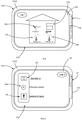
- Figures 2 and 3 illustrate two different graphic environments 101 and 102 with different logos (Logo1 and Logo2) as well as a different presentation representative of the graphical identity of the graphic environment.
- the domotic services associated with the first graphical environment 101 are related to the management of comfort in the habitat.
- Various actuators such as a boiler 103, a shutter 104, a lighting of the ground floor 105 or a floor 106 can implement the comfort functions offered by the home services associated with the first graphical environment 101.
- other home-automation services may relate to security ( figure 3 ), the security functions provided by these home automation services use interactions with one or more actuators of the facility relating to security such as an alarm 107, a smoke detector 108, a motion sensor such as a 109 camera, a lock, etc.
- Roller shutter 104 can also be associated with these home automation services.
- the home automation services referred to above may be generalist and / or expert.
- Domotic services called “generalist” allow for example to give a user control / possible control of a multiplicity of domotic actuators according to basic functions (eg full open / close, lighting 0% / 100%, simplified programming) .
- a butler's function may be associated with these general domotic services, ie a framing function of expert domotic services.
- Domotic services called “experts” can be provided by a partner specialist in a specific field, such as for example security, health, audio-visual) allowing control functions and / or expert programming of a set more restricted domotic actuators.
- the expert home automation services will include associating one or more surveillance cameras, to configure the number of shots per second of a surveillance camera, as well as different levels of alert (beeps, audible alarm, sending messages by preferentially cellular network including SMS messages for "short message service") in case of intrusion detection .
- the method comprises a step E2 in which there is provided a graphical interface comprising a first element 110 whose content is selectable from any one of said at least two graphic environments 101, 102 (in particular, it is possible to select contents of the graphic environments that we wish to display in the first element) and a second element 111 whose content has a main graphic chart preserved whatever the selected content of the first element 110 and for selecting said content of the first element 110.
- the content of the second element 111 makes it possible to select a content of the first element 110 which is representative of one of the graphic environments, from among all the contents of this graphic environment, this content of the first element 110 then being able to be modified .
- the first and second elements 110, 111 are graphical interface entities that can be displayed on a screen.
- the first element 110 and / or second element 111 may for example each be a window of the graphic interface, or a particular zone of a display of the graphical interface reproduced on the screen.
- the method comprises a step E3 display of at least a portion of the graphical interface on a screen.
- displaying at least a portion of the graphical interface it is meant that the elements of the graphical interface are not necessarily displayed at the same time on the screen.
- the second element 111 when the first and second elements 110, 111 of the graphic interface are simultaneously displayed on the screen, the second element 111 extends over a display surface of the graphic interface to screen much lower than the one occupied by the first element 110. In particular, the second element 111 extends over an area less than 10% of the available display area of the graphic interface on the screen.
- the display step is such that the first and second elements 110, 111 are displayed simultaneously on the screen, preferably in the manner described in the particular implementation above.
- the display step E3 is such that the second element 111 is arranged so as to surround the first element ( figure 2 and 3 ).
- the second element 111 then preferably takes the form of a display window border, in which the first element 110 is displayed and provided on one side of a series of selection tabs.
- the second element may be adjacent to the first element (not shown): the second element is then preferentially in the form of a display strip, adjacent to the first element, in which is represented a series of selection tabs .
- the second element may be included in the first element (not shown), especially in the form of an icon appearing in the display area of the first element.
- the display step E3 is performed such that the first 110 and second 111 elements are not displayed simultaneously.
- the second element 111 may include interaction elements 112a, 112b for selecting the content of the first element 110 and causing the display of said first element (and therefore its content) 110 on the screen.
- Each of said at least two graphical environments 101, 102 may include an interaction element 113 for returning the second element 111 to the display on the screen.
- the interaction element 112a, 112b then differs from the second element 111 in that it allows the second element 111 to be displayed, for example in the form of a screen area with a selection menu, from which carried out the selection of the content of the first element 110.
- On this figure 4 are represented two views of the same screen, for example of a mobile phone, the transition from the left view to the right view is achieved by a first interaction I 1 , schematized by a hand with the interaction element 112a and the passage from the right-hand view to the left-hand view is performed by a second interaction I 2 , schematized by a hand with the interaction element 113.
- the interaction elements of the second element 111 may each be formed by a button linked to one of the graphical environments, an interaction with the button making it possible, on the one hand, to select the content of the first element 110 and to switch from a display of the second element 111 to a display of the first element 110.
- the interaction element 113 of each of the graphic environments may be a button, for example in the form of a return arrow, whose activation causes the passage of the message. gate of the first element 110 to the display of the second element 111.
- the two graphic environments 101, 102 share at least common elements of ergonomics.
- an action on an interaction element in a first content, associated with one of the graphic environments, of the first element 110 will have the same navigation effect as the action on this interaction element in a second content, associated with another of the graphic environments, of the first element 110.
- the display step E3 is performed so that the provision of different graphical environments 101, 102 is an enjoyableitarian. In fact, this makes it possible to ensure that the choice of the graphic environment 101, 102 from the second element 111 is not favored. In other words, the display step E3 is such that it does not influence the choice of the user as to the domotic services he wishes to activate.
- the second element 111 acts as a selection portal presenting home automation services without the incentive to use one more than another.
- an avatar provision of different graphical environments may include a step of displaying on the screen of a home page (for example with menus), or a common messaging.
- the method may comprise a configuration step E4 ( figure 1 ) of the desired display on the screen by the user, allowing in particular to adapt as necessary the presentation of the second element 111.
- this E4 configuration step of the display can also allow a user to choose which graphical environment by default it wishes to display as the content of the first element 110 when it initializes the process of piloting (such an initialization can be performed by launching a corresponding software application), or the order in which graphical environments appear on the graphical interface or, more generally, the layout of the content of the second element 111.
- the navigation between the graphical environments 101, 102 comprises the use of tabs 114 belonging to the second element 111.
- the display step E3 of the graphic interface on the screen is made so as to present the first element 110 and the second element 111 (that is to say that the first and second elements - and therefore their contents - are displayed simultaneously).
- the second element 111 then comprises at least two tabs 114, one of which is active, and each associated with one of said at least two graphic environments 101, 102 (this association being preferably one-to-one, that is, one tab points to a single graphical environment and conversely a graphical environment is associated with a single tab).
- the graphic environment corresponding to the active tab is displayed on the screen as the content of the first element 110. Therefore, to implement navigation, the method may comprise a selection step, among said at least two tabs 114, a tab to be activated distinct from the current active tab, then a step of activating the selected tab 114 by modifying the content of the first displayed element 110, said modified content corresponding to the graphical environment 101, 102 associated with said auditing tab to activate so as to bring about a change
- This particular implementation is preferred because it allows a user to switch from one of the graphical environments to any other graphical environment by a single interaction with a tab.
- the control method allows the control of home automation actuators.
- the same home automation actuator can be shared with several home automation services and therefore be operable from different graphical environments 101, 102.
- This allows a user to limit costs without having to duplicate the number of home automation actuators according to the number of services. domotics and / or home service providers.
- the method may comprise a step E5 ( figure 1 ) of choice of control of a home automation actuator through one or another graphic environment 101, 102 from which the control of the home automation actuator is accessible, more particularly, the method may comprise a step E5 of choice driving a home automation actuator through one or another of two graphic environments 101, 102 from which the control of the home automation actuator is accessible.
- This selection step therefore comprises a step of interaction of a user with the content of the first element 110 selected and displayed on the screen from which results a step of actuating at least one of the home automation actuators.
- the method may comprise a step E6 ( figure 1 ) in which at least one of the home automation actuators is operated from two distinct graphic environments.
- the method comprises a first step of operating one of the domotic actuators consecutively to a user interaction step with a function associated with one of said at least two graphical environments contained in the first element 110, and a second step of actuating said home automation actuator actuated in the first actuation step following a user interaction step with a function associated with another of said at least two graphic environments contained in the first element 110. Implicitly, there is therefore, between the two interaction steps, a step of modifying the graphical environment contained in the first element 110.
- the method may comprise a step of interaction of a user with the content of the first element 110 displayed on the screen from which a step of actuation of at least one of the home automation actuators.
- the invention also relates to a home automation system 1000 ( figure 5 ) configured to implement the control method as described.
- a home automation system 1000 ( figure 5 ) configured to implement the control method as described.
- Such an installation comprises a supervision device 1001 ( Figures 2, 3 , 4, 5 ), especially mobile as a digital tablet or a smart phone, including the screen 1002 ( Figures 2, 3 , 4, 5 ) on which at least part of the GUI is displayed.
- the installation comprises home automation actuators 1003 (represented by a rolling shutter at the figure 5 ), at least one of the home automation actuators (and preferably each home automation actuator) 1003 being connected to the supervisory device 1001 so that it can be controlled from two separate graphical environments.
- home automation actuators 1003 represented by a rolling shutter at the figure 5
- the supervisory device 1001 so that it can be controlled from two separate graphical environments.
- the home automation system 1000 comprises a master box 1004 to which are connected, with or without wire, the supervision device 1001 and each of the home automation actuators 1003. Therefore, the supervision device 1001 is connected to each of the home automation actuators 1003 through the master housing 1004.
- the invention also relates to a supervision device 1001 ( Figures 2 to 5 ) a home automation system, such as the one described above.
- the supervision device comprises at least two graphic environments 101, 102 respectively associated with different home automation services and allowing the control of home automation actuators of the home automation system. Said at least two graphic environments 101, 102 have different graphic charters.
- the supervision device 1001 further comprises a screen 1002 on which is displayed at least a portion of a graphical interface for home automation installation.
- said graphic interface comprises a first element 110 whose content is selectable from any one of said at least two graphic environments 101, 102 and a second element 111 whose content has a main graphic chart preserved regardless of the selected content of the first element 110 and for selecting said content of the first element 110.
- the screen 1002 is tactile.
- the supervision device 1001 may comprise a memory provided with instructions for implementing the control method as described.
- each graphic environment is associated with a home automation service selected from: energy management expertise, security expertise, health expertise and home support.
- the second element then serves as a butler in the choice of user interaction with these graphical environments / domotic services.
- the user can select the "security" tab, then the icon representing the shutters.
- the content of the first element is then modified to reveal a list of rolling shutters in the house.
- the user can then select the icon associated with the roller shutter of the room upstairs.
- the content of the first element is then modified to reveal control elements dedicated to the shutter 104.
- the user then interacts with one of these control elements to program an opening of the shutter in case of smoke detection,
- the contents of the first element respect the graphic charter associated with the chosen graphic environment and the contents displayed for the control of the shutter in the first case differ from the contents displayed in the second case, in particular the graphic charts used in the two cases differ.
- control of a home automation actuator it is meant the control of a single actuator or an actuator group according to the same command, or of an actuator group according to different commands, for example according to a predefined scenario, the scenario comprising a set of orders associated with different actuators participating in the scenario.
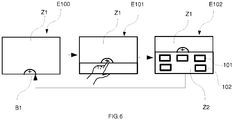
- the method may be such that during its initialization it displays (step E100) on the screen a home page in a zone Z1 and at the edge of this zone Z1 an interaction button B1.
- the display shows (E103) a zone 2 of choice of the graphic environment 101, 102 (in the example, following the interaction, the zones Z1 and Z2 are displayed simultaneously). Consequently, the choice of one of the graphic environments causes the return to step E100 with display, in the zone Z1, of the selected graphical environment.
Landscapes
- Engineering & Computer Science (AREA)
- Computer Networks & Wireless Communication (AREA)
- Signal Processing (AREA)
- Automation & Control Theory (AREA)
- General Engineering & Computer Science (AREA)
- Theoretical Computer Science (AREA)
- Human Computer Interaction (AREA)
- General Health & Medical Sciences (AREA)
- Medical Informatics (AREA)
- Physics & Mathematics (AREA)
- General Physics & Mathematics (AREA)
- Health & Medical Sciences (AREA)
- Computing Systems (AREA)
- User Interface Of Digital Computer (AREA)
Claims (12)
- Verfahren zum Steuern von Heimautomatisierungsdiensten einer Heimanlage, dadurch gekennzeichnet, dass es die folgenden Schritte aufweist:- Bereitstellen (E1) von mindestens zwei Grafikumgebungen (101, 102), die jeweils verschiedenen Heimautomatisierungsdiensten zugeordnet werden, die das Steuern von Heimautomatisierungs-Stellgliedern der Heimanlage ermöglichen, wobei die mindestens zwei Grafikumgebungen (101, 102) verschiedene grafische Darstellungen aufweisen,- Bereitstellen (E2) einer grafischen Schnittstelle, die ein erstes Element (110), dessen Inhalt aus einer beliebigen der mindestens zwei Grafikumgebungen (101, 102) auswählbar ist, und ein zweites Element (111) aufweist, dessen Inhalt eine grafische Hauptdarstellung aufweist, die unabhängig von dem ausgewählten Inhalt des ersten Elements (110) beibehalten wird, und ermöglicht, den Inhalt des ersten Elements (110) auszuwählen,- Anzeigen (E3) mindestens eines Teils der grafischen Schnittstelle auf einem Bildschirm,dadurch, dass es einen Schritt (E5) des Auswählens des Steuerns eines Heimautomatisierungs-Stellglieds durch eine oder eine andere von zwei Grafikumgebungen (101, 102) aufweist, von denen ausgehend die Steuerung des Heimautomatisierungs-Stellglieds zugänglich ist, dadurch, dass die zwei Grafikumgebungen (101, 102) mindestens gemeinsame Ergonomieelemente teilen, dadurch, dass eine Einwirkung auf ein Interaktionselement in einem ersten Inhalt, der einer der Grafikumgebungen zugeordnet ist, des ersten Element (110) den gleichen Navigationseffekt wie die Einwirkung auf dieses Interaktionselement in einem zweiten Inhalt, der einer anderen der Grafikumgebungen zugeordnet ist, des ersten Elements (110) aufweist, und dadurch, dass das Verfahren einen Schritt des Konfigurierens (E4) der Anzeige aufweist, wobei dieser Schritt des Konfigurierens ermöglicht, die Grafikumgebung (101, 102) standardmäßig auszuwählen, die als Inhalt des ersten Elements (110) angezeigt wird, wenn das Verfahren zum Steuern initialisiert wird.
- Verfahren nach dem vorhergehenden Anspruch, dadurch gekennzeichnet, dass der Schritt des Anzeigens (E3) derart ist, dass das erste und zweite Element (110, 111) gleichzeitig auf dem Bildschirm angezeigt werden.
- Verfahren nach dem vorhergehenden Anspruch, dadurch gekennzeichnet, dass der Schritt des Anzeigens (E3) derart ist, dass das zweite Element (111) derart angeordnet ist, um:- das erste Element (110) zu umgeben oder- angrenzend an das erste Element (110) zu sein oder- in dem ersten Element (110), insbesondere in der Form eines Symbols, enthalten zu sein.
- Verfahren nach Anspruch 1, dadurch gekennzeichnet, dass der Schritt des Anzeigens (E3) derart ausgeführt wird, dass das erste und das zweite Element (110, 111) nicht gleichzeitig angezeigt werden, wobei das zweite Element (111) Interaktionselemente (112a, 112b) aufweist, die ermöglichen, den Inhalt des ersten Elements (110) auszuwählen und das Anzeigen des ersten Elements (110) auf dem Bildschirm zu bewirken, wobei jede der mindestens zwei Grafikumgebungen (101, 102) ein Interaktionselement (113) aufweist, das ermöglicht, zur Anzeige des zweiten Elements (111) auf dem Bildschirm zurückzukehren.
- Verfahren nach einem der vorhergehenden Ansprüche, dadurch gekennzeichnet, dass der Schritt des Konfigurierens (E4) der gewünschten Anzeige auf dem Bildschirm durch einen Benutzer ermöglicht, die Darstellung des zweiten Elements (111) nach Bedarf anzupassen.
- Verfahren nach einem der vorhergehenden Ansprüche, dadurch gekennzeichnet, dass der Schritt des Anzeigens (E3) der grafischen Schnittstelle auf dem Bildschirm derart durchgeführt wird, um das erste Element (110) und das zweite Element (111) darzustellen, wobei das zweite Element (111) mindestens zwei Registerkarten (114) aufweist, wovon eine aktiv ist und die jeweils einer der mindestens zwei Grafikumgebungen (101, 102) zugeordnet werden, und dadurch, dass die Grafikumgebung (101, 102), die der aktiven Registerkarte entspricht, auf dem Bildschirm als Inhalt des ersten Elements (110) angezeigt wird.
- Verfahren nach dem vorhergehenden Anspruch, dadurch gekennzeichnet, dass es den folgenden Schritt aufweist:- Auswählen aus den mindestens zwei Registerkarten (114) einer zu aktivierenden Registerkarte, die von der aktuellen aktiven Registerkarte verschieden ist,- Aktivieren der ausgewählten Registerkarte (114) durch Modifizieren des Inhalts des ersten angezeigten Elements (110), wobei der modifizierte Inhalt der Grafikumgebung (101, 102) entspricht, die der ausgewählten Registerkarte zugeordnet wird, derart, um eine Änderung der Grafikkarte innerhalb des ersten Elements (110) zu bewirken.
- Verfahren nach einem der vorhergehenden Ansprüche, dadurch gekennzeichnet, dass es einen Schritt (E6) aufweist, bei dem mindestens eines der Heimautomatisierungs-Stellglieder ausgehend von zwei verschiedenen Umgebungen betätigt wird.
- Verfahren nach dem vorhergehenden Anspruch, dadurch gekennzeichnet, dass es einen ersten Schritt des Betätigens eines der Heimautomatisierungs-Stellglieder nach einem Interaktionsschritt eines Benutzers mit einer Funktion, die einer der mindestens zwei Grafikumgebungen zugeordnet wird, die in dem ersten Element (110) enthalten ist, und einen zweiten Schritt des Betätigens des Heimautomatisierungs-Stellglieds aufweist, das bei dem ersten Schritt des Betätigens nach einem Interaktionsschritt des Benutzers mit einer Funktion betätigt wird, die einer anderen der mindestens zwei Grafikumgebungen zugeordnet wird, die in dem ersten Element (110) enthalten ist.
- Verfahren nach einem der vorhergehenden Ansprüche, dadurch gekennzeichnet, dass es einen Interaktionsschritt eines Benutzers mit dem Inhalt des ersten Elements (110), das auf dem Bildschirm angezeigt wird, aufweist, woraus sich ein Schritt des Betätigens von mindestens einem der Heimautomatisierungs-Stellglieder ergibt.
- Überwachungsvorrichtung (1001) einer Heimanlage, wobei die Vorrichtung mindestens zwei Grafikumgebungen (101, 102), die jeweils verschiedenen Heimautomatisierungsdiensten zugeordnet sind und das Steuern von Heimautomatisierungs-Stellgliedern der Heimanlage ermöglichen, wobei die zwei Grafikumgebungen (101, 102) verschiedene grafische Darstellungen aufweisen, und einen Bildschirm (1002) aufweist, auf dem mindestens ein Teil einer grafischen Schnittstelle für die Heimanlage angezeigt wird, wobei die grafische Schnittstelle ein erstes Element (110), dessen Inhalt aus einer beliebigen der mindestens zwei Grafikumgebungen (101, 102) auswählbar ist, und ein zweites Element (111) aufweist, dessen Inhalt eine grafische Hauptdarstellung aufweist, die unabhängig von dem ausgewählten Inhalt des ersten Elements (110) beibehalten wird, und ermöglicht, den Inhalt des ersten Elements (110) auszuwählen, und dadurch, dass sie einen Speicher aufweist, der mit Anweisungen ausgestattet ist, die, wenn sie ausgeführt werden, alle Schritte des Verfahrens zum Steuern nach einem der Ansprüche 1 bis 10 umsetzen.
- Heimanlage (1000), umfassend eine Überwachungsvorrichtung (1001) nach Anspruch 11, auf deren Bildschirm mindestens ein Teil der grafischen Schnittstellen und der Heimautomatisierungs-Stellglieder (1003) angezeigt wird, wobei mindestens eines der Heimautomatisierungs-Stellglieder mit der Überwachungsvorrichtung (1001) derart verbunden ist, um ausgehend von zwei verschiedenen Grafikumgebungen gesteuert werden zu können.
Applications Claiming Priority (1)
| Application Number | Priority Date | Filing Date | Title |
|---|---|---|---|
| FR1451237A FR3017724B1 (fr) | 2014-02-17 | 2014-02-17 | Procede de pilotage d'une installation domotique a multi environnements graphiques |
Publications (2)
| Publication Number | Publication Date |
|---|---|
| EP2908472A1 EP2908472A1 (de) | 2015-08-19 |
| EP2908472B1 true EP2908472B1 (de) | 2018-06-06 |
Family
ID=50933298
Family Applications (1)
| Application Number | Title | Priority Date | Filing Date |
|---|---|---|---|
| EP15153149.8A Not-in-force EP2908472B1 (de) | 2014-02-17 | 2015-01-30 | Verfahren zum Bedienen einer Heimanlage mit Multi-Grafik-Umgebungen |
Country Status (2)
| Country | Link |
|---|---|
| EP (1) | EP2908472B1 (de) |
| FR (1) | FR3017724B1 (de) |
Families Citing this family (1)
| Publication number | Priority date | Publication date | Assignee | Title |
|---|---|---|---|---|
| US10115105B2 (en) | 2014-02-21 | 2018-10-30 | Groupon, Inc. | Method and system for facilitating consumer interactions for performing purchase commands |
Family Cites Families (2)
| Publication number | Priority date | Publication date | Assignee | Title |
|---|---|---|---|---|
| US8301270B2 (en) * | 2009-01-27 | 2012-10-30 | Eldon Technology Ltd. | Systems and methods for facilitating home automation |
| FR2956224B1 (fr) * | 2010-02-09 | 2012-11-02 | Somfy Sas | Procede de fonctionnement d'un dispositif de commande d'equipements domotiques |
-
2014
- 2014-02-17 FR FR1451237A patent/FR3017724B1/fr not_active Expired - Fee Related
-
2015
- 2015-01-30 EP EP15153149.8A patent/EP2908472B1/de not_active Not-in-force
Non-Patent Citations (1)
| Title |
|---|
| None * |
Also Published As
| Publication number | Publication date |
|---|---|
| EP2908472A1 (de) | 2015-08-19 |
| FR3017724A1 (fr) | 2015-08-21 |
| FR3017724B1 (fr) | 2017-05-19 |
Similar Documents
| Publication | Publication Date | Title |
|---|---|---|
| EP2631723B1 (de) | Verfahren zur Steuerung und Parametrierung einer Gebäudetechnik-Installation, und Gebäudetechnik-Installation zur Umsetzung dieser Verfahren | |
| EP2983049A2 (de) | Betriebsverfahren einer steuervorrichtung einer heiminstallation eines gebäudes, und entsprechende steuervorrichtung | |
| EP3488306B1 (de) | Verfahren zur konfiguration, steuerung oder überwachung einer heimautomationsanlage | |
| Harris | How technology hijacks people’s minds—from a magician and Google’s design ethicist | |
| EP2534542B1 (de) | Verfahren für den betrieb einer steuervorrichtung für ein domotikgerät | |
| EP3318035B1 (de) | Verfahren zur steuerung einer heimautomationsanlage | |
| WO2016049907A1 (zh) | 一种操作界面处理方法及显示装置 | |
| EP2908472B1 (de) | Verfahren zum Bedienen einer Heimanlage mit Multi-Grafik-Umgebungen | |
| EP3110080B1 (de) | Verfahren und vorrichtung zur verarbeitung von zwischen benutzern ausgetauschten nachrichten | |
| WO2017006024A1 (fr) | Installation domotique et procédé de constitution de la topologie d'une installation domotique | |
| WO2016156165A1 (fr) | Procédé et système de commande de dispositifs domotiques d'une habitation | |
| EP2093983A1 (de) | Verfahren zum Kontrollieren der Anzeige auf einem Bildschirm durch ein Radio-Endgerät | |
| WO2016135412A1 (fr) | Procédé de configuration et procédé de commande et/ou de contrôle d'une interface d'équipements domotiques | |
| WO2013083656A2 (fr) | Systèmes et procédés de configuration et d'utilisation de systèmes automatisés dans des bâtiments | |
| WO2017046512A1 (fr) | Procédé de configuration et procédé de contrôle d'une installation domotique | |
| EP2811465B1 (de) | Videoüberwachungssystem | |
| WO2015145030A1 (fr) | Dispositif d'accès à une plateforme de service pour un écran numérique | |
| EP3889762B1 (de) | Verfahren zur verwaltung mindestens einer gruppe von tonwiedergabegeräten | |
| WO2001080552A1 (fr) | Methode pour l'affichage selectif de programmes televisuels | |
| FR3075855A1 (fr) | Procede de reglage d'une commande d'un volet roulant | |
| EP2698775B1 (de) | Verfahren und Vorrichtung zur unabhängigen Präsenzsimulation | |
| EP3317731A1 (de) | Verfahren zur steuerung und verfahren zum konfigurieren einer heimautomatisierungsanlage | |
| FR3033054A1 (fr) | Procedes de configuration et de commande en fonctionnement d'un dispositif de commande d'une installation domotique, dispositif de commande et installation associes | |
| FR3033055A1 (fr) | Procede de configuration et de commande d’un dispositif de commande d’une installation domotique d’un batiment | |
| WO2012136920A1 (fr) | Procede et systeme de configuration pour configurer dynamiquement un systeme informatique de commande d'au moins un dispositif electrique |
Legal Events
| Date | Code | Title | Description |
|---|---|---|---|
| PUAI | Public reference made under article 153(3) epc to a published international application that has entered the european phase |
Free format text: ORIGINAL CODE: 0009012 |
|
| AK | Designated contracting states |
Kind code of ref document: A1 Designated state(s): AL AT BE BG CH CY CZ DE DK EE ES FI FR GB GR HR HU IE IS IT LI LT LU LV MC MK MT NL NO PL PT RO RS SE SI SK SM TR |
|
| AX | Request for extension of the european patent |
Extension state: BA ME |
|
| 17P | Request for examination filed |
Effective date: 20160219 |
|
| RBV | Designated contracting states (corrected) |
Designated state(s): AL AT BE BG CH CY CZ DE DK EE ES FI FR GB GR HR HU IE IS IT LI LT LU LV MC MK MT NL NO PL PT RO RS SE SI SK SM TR |
|
| 17Q | First examination report despatched |
Effective date: 20160615 |
|
| STAA | Information on the status of an ep patent application or granted ep patent |
Free format text: STATUS: EXAMINATION IS IN PROGRESS |
|
| REG | Reference to a national code |
Ref country code: DE Ref legal event code: R079 Ref document number: 602015011575 Country of ref document: DE Free format text: PREVIOUS MAIN CLASS: H04L0012280000 Ipc: H04L0029080000 |
|
| GRAP | Despatch of communication of intention to grant a patent |
Free format text: ORIGINAL CODE: EPIDOSNIGR1 |
|
| STAA | Information on the status of an ep patent application or granted ep patent |
Free format text: STATUS: GRANT OF PATENT IS INTENDED |
|
| RIC1 | Information provided on ipc code assigned before grant |
Ipc: H04L 12/28 20060101ALI20171204BHEP Ipc: H04L 29/08 20060101AFI20171204BHEP Ipc: G06F 3/0481 20130101ALI20171204BHEP |
|
| INTG | Intention to grant announced |
Effective date: 20171218 |
|
| RAP1 | Party data changed (applicant data changed or rights of an application transferred) |
Owner name: SOMFY ACTIVITES SA |
|
| GRAS | Grant fee paid |
Free format text: ORIGINAL CODE: EPIDOSNIGR3 |
|
| GRAA | (expected) grant |
Free format text: ORIGINAL CODE: 0009210 |
|
| STAA | Information on the status of an ep patent application or granted ep patent |
Free format text: STATUS: THE PATENT HAS BEEN GRANTED |
|
| AK | Designated contracting states |
Kind code of ref document: B1 Designated state(s): AL AT BE BG CH CY CZ DE DK EE ES FI FR GB GR HR HU IE IS IT LI LT LU LV MC MK MT NL NO PL PT RO RS SE SI SK SM TR |
|
| REG | Reference to a national code |
Ref country code: GB Ref legal event code: FG4D Free format text: NOT ENGLISH |
|
| REG | Reference to a national code |
Ref country code: CH Ref legal event code: EP Ref country code: AT Ref legal event code: REF Ref document number: 1007290 Country of ref document: AT Kind code of ref document: T Effective date: 20180615 |
|
| REG | Reference to a national code |
Ref country code: IE Ref legal event code: FG4D Free format text: LANGUAGE OF EP DOCUMENT: FRENCH |
|
| REG | Reference to a national code |
Ref country code: DE Ref legal event code: R096 Ref document number: 602015011575 Country of ref document: DE |
|
| REG | Reference to a national code |
Ref country code: NL Ref legal event code: MP Effective date: 20180606 |
|
| REG | Reference to a national code |
Ref country code: LT Ref legal event code: MG4D |
|
| PG25 | Lapsed in a contracting state [announced via postgrant information from national office to epo] |
Ref country code: SE Free format text: LAPSE BECAUSE OF FAILURE TO SUBMIT A TRANSLATION OF THE DESCRIPTION OR TO PAY THE FEE WITHIN THE PRESCRIBED TIME-LIMIT Effective date: 20180606 Ref country code: ES Free format text: LAPSE BECAUSE OF FAILURE TO SUBMIT A TRANSLATION OF THE DESCRIPTION OR TO PAY THE FEE WITHIN THE PRESCRIBED TIME-LIMIT Effective date: 20180606 Ref country code: LT Free format text: LAPSE BECAUSE OF FAILURE TO SUBMIT A TRANSLATION OF THE DESCRIPTION OR TO PAY THE FEE WITHIN THE PRESCRIBED TIME-LIMIT Effective date: 20180606 Ref country code: CY Free format text: LAPSE BECAUSE OF FAILURE TO SUBMIT A TRANSLATION OF THE DESCRIPTION OR TO PAY THE FEE WITHIN THE PRESCRIBED TIME-LIMIT Effective date: 20180606 Ref country code: BG Free format text: LAPSE BECAUSE OF FAILURE TO SUBMIT A TRANSLATION OF THE DESCRIPTION OR TO PAY THE FEE WITHIN THE PRESCRIBED TIME-LIMIT Effective date: 20180906 Ref country code: FI Free format text: LAPSE BECAUSE OF FAILURE TO SUBMIT A TRANSLATION OF THE DESCRIPTION OR TO PAY THE FEE WITHIN THE PRESCRIBED TIME-LIMIT Effective date: 20180606 Ref country code: NO Free format text: LAPSE BECAUSE OF FAILURE TO SUBMIT A TRANSLATION OF THE DESCRIPTION OR TO PAY THE FEE WITHIN THE PRESCRIBED TIME-LIMIT Effective date: 20180906 |
|
| PG25 | Lapsed in a contracting state [announced via postgrant information from national office to epo] |
Ref country code: GR Free format text: LAPSE BECAUSE OF FAILURE TO SUBMIT A TRANSLATION OF THE DESCRIPTION OR TO PAY THE FEE WITHIN THE PRESCRIBED TIME-LIMIT Effective date: 20180907 Ref country code: LV Free format text: LAPSE BECAUSE OF FAILURE TO SUBMIT A TRANSLATION OF THE DESCRIPTION OR TO PAY THE FEE WITHIN THE PRESCRIBED TIME-LIMIT Effective date: 20180606 Ref country code: HR Free format text: LAPSE BECAUSE OF FAILURE TO SUBMIT A TRANSLATION OF THE DESCRIPTION OR TO PAY THE FEE WITHIN THE PRESCRIBED TIME-LIMIT Effective date: 20180606 Ref country code: RS Free format text: LAPSE BECAUSE OF FAILURE TO SUBMIT A TRANSLATION OF THE DESCRIPTION OR TO PAY THE FEE WITHIN THE PRESCRIBED TIME-LIMIT Effective date: 20180606 |
|
| REG | Reference to a national code |
Ref country code: AT Ref legal event code: MK05 Ref document number: 1007290 Country of ref document: AT Kind code of ref document: T Effective date: 20180606 |
|
| PG25 | Lapsed in a contracting state [announced via postgrant information from national office to epo] |
Ref country code: NL Free format text: LAPSE BECAUSE OF FAILURE TO SUBMIT A TRANSLATION OF THE DESCRIPTION OR TO PAY THE FEE WITHIN THE PRESCRIBED TIME-LIMIT Effective date: 20180606 |
|
| PG25 | Lapsed in a contracting state [announced via postgrant information from national office to epo] |
Ref country code: CZ Free format text: LAPSE BECAUSE OF FAILURE TO SUBMIT A TRANSLATION OF THE DESCRIPTION OR TO PAY THE FEE WITHIN THE PRESCRIBED TIME-LIMIT Effective date: 20180606 Ref country code: RO Free format text: LAPSE BECAUSE OF FAILURE TO SUBMIT A TRANSLATION OF THE DESCRIPTION OR TO PAY THE FEE WITHIN THE PRESCRIBED TIME-LIMIT Effective date: 20180606 Ref country code: PL Free format text: LAPSE BECAUSE OF FAILURE TO SUBMIT A TRANSLATION OF THE DESCRIPTION OR TO PAY THE FEE WITHIN THE PRESCRIBED TIME-LIMIT Effective date: 20180606 Ref country code: EE Free format text: LAPSE BECAUSE OF FAILURE TO SUBMIT A TRANSLATION OF THE DESCRIPTION OR TO PAY THE FEE WITHIN THE PRESCRIBED TIME-LIMIT Effective date: 20180606 Ref country code: SK Free format text: LAPSE BECAUSE OF FAILURE TO SUBMIT A TRANSLATION OF THE DESCRIPTION OR TO PAY THE FEE WITHIN THE PRESCRIBED TIME-LIMIT Effective date: 20180606 Ref country code: AT Free format text: LAPSE BECAUSE OF FAILURE TO SUBMIT A TRANSLATION OF THE DESCRIPTION OR TO PAY THE FEE WITHIN THE PRESCRIBED TIME-LIMIT Effective date: 20180606 Ref country code: IS Free format text: LAPSE BECAUSE OF FAILURE TO SUBMIT A TRANSLATION OF THE DESCRIPTION OR TO PAY THE FEE WITHIN THE PRESCRIBED TIME-LIMIT Effective date: 20181006 |
|
| PG25 | Lapsed in a contracting state [announced via postgrant information from national office to epo] |
Ref country code: IT Free format text: LAPSE BECAUSE OF FAILURE TO SUBMIT A TRANSLATION OF THE DESCRIPTION OR TO PAY THE FEE WITHIN THE PRESCRIBED TIME-LIMIT Effective date: 20180606 Ref country code: SM Free format text: LAPSE BECAUSE OF FAILURE TO SUBMIT A TRANSLATION OF THE DESCRIPTION OR TO PAY THE FEE WITHIN THE PRESCRIBED TIME-LIMIT Effective date: 20180606 |
|
| REG | Reference to a national code |
Ref country code: DE Ref legal event code: R097 Ref document number: 602015011575 Country of ref document: DE |
|
| PLBE | No opposition filed within time limit |
Free format text: ORIGINAL CODE: 0009261 |
|
| STAA | Information on the status of an ep patent application or granted ep patent |
Free format text: STATUS: NO OPPOSITION FILED WITHIN TIME LIMIT |
|
| 26N | No opposition filed |
Effective date: 20190307 |
|
| PG25 | Lapsed in a contracting state [announced via postgrant information from national office to epo] |
Ref country code: SI Free format text: LAPSE BECAUSE OF FAILURE TO SUBMIT A TRANSLATION OF THE DESCRIPTION OR TO PAY THE FEE WITHIN THE PRESCRIBED TIME-LIMIT Effective date: 20180606 Ref country code: DK Free format text: LAPSE BECAUSE OF FAILURE TO SUBMIT A TRANSLATION OF THE DESCRIPTION OR TO PAY THE FEE WITHIN THE PRESCRIBED TIME-LIMIT Effective date: 20180606 |
|
| PG25 | Lapsed in a contracting state [announced via postgrant information from national office to epo] |
Ref country code: MC Free format text: LAPSE BECAUSE OF FAILURE TO SUBMIT A TRANSLATION OF THE DESCRIPTION OR TO PAY THE FEE WITHIN THE PRESCRIBED TIME-LIMIT Effective date: 20180606 |
|
| REG | Reference to a national code |
Ref country code: CH Ref legal event code: PL |
|
| GBPC | Gb: european patent ceased through non-payment of renewal fee |
Effective date: 20190130 |
|
| PG25 | Lapsed in a contracting state [announced via postgrant information from national office to epo] |
Ref country code: LU Free format text: LAPSE BECAUSE OF NON-PAYMENT OF DUE FEES Effective date: 20190130 |
|
| REG | Reference to a national code |
Ref country code: BE Ref legal event code: MM Effective date: 20190131 |
|
| REG | Reference to a national code |
Ref country code: IE Ref legal event code: MM4A |
|
| PG25 | Lapsed in a contracting state [announced via postgrant information from national office to epo] |
Ref country code: BE Free format text: LAPSE BECAUSE OF NON-PAYMENT OF DUE FEES Effective date: 20190131 Ref country code: AL Free format text: LAPSE BECAUSE OF FAILURE TO SUBMIT A TRANSLATION OF THE DESCRIPTION OR TO PAY THE FEE WITHIN THE PRESCRIBED TIME-LIMIT Effective date: 20180606 |
|
| PG25 | Lapsed in a contracting state [announced via postgrant information from national office to epo] |
Ref country code: LI Free format text: LAPSE BECAUSE OF NON-PAYMENT OF DUE FEES Effective date: 20190131 Ref country code: CH Free format text: LAPSE BECAUSE OF NON-PAYMENT OF DUE FEES Effective date: 20190131 Ref country code: GB Free format text: LAPSE BECAUSE OF NON-PAYMENT OF DUE FEES Effective date: 20190130 |
|
| PG25 | Lapsed in a contracting state [announced via postgrant information from national office to epo] |
Ref country code: IE Free format text: LAPSE BECAUSE OF NON-PAYMENT OF DUE FEES Effective date: 20190130 |
|
| PG25 | Lapsed in a contracting state [announced via postgrant information from national office to epo] |
Ref country code: TR Free format text: LAPSE BECAUSE OF FAILURE TO SUBMIT A TRANSLATION OF THE DESCRIPTION OR TO PAY THE FEE WITHIN THE PRESCRIBED TIME-LIMIT Effective date: 20180606 |
|
| PG25 | Lapsed in a contracting state [announced via postgrant information from national office to epo] |
Ref country code: MT Free format text: LAPSE BECAUSE OF FAILURE TO SUBMIT A TRANSLATION OF THE DESCRIPTION OR TO PAY THE FEE WITHIN THE PRESCRIBED TIME-LIMIT Effective date: 20180606 Ref country code: PT Free format text: LAPSE BECAUSE OF FAILURE TO SUBMIT A TRANSLATION OF THE DESCRIPTION OR TO PAY THE FEE WITHIN THE PRESCRIBED TIME-LIMIT Effective date: 20181008 |
|
| PG25 | Lapsed in a contracting state [announced via postgrant information from national office to epo] |
Ref country code: HU Free format text: LAPSE BECAUSE OF FAILURE TO SUBMIT A TRANSLATION OF THE DESCRIPTION OR TO PAY THE FEE WITHIN THE PRESCRIBED TIME-LIMIT; INVALID AB INITIO Effective date: 20150130 |
|
| REG | Reference to a national code |
Ref country code: DE Ref legal event code: R079 Ref document number: 602015011575 Country of ref document: DE Free format text: PREVIOUS MAIN CLASS: H04L0029080000 Ipc: H04L0065000000 |
|
| PG25 | Lapsed in a contracting state [announced via postgrant information from national office to epo] |
Ref country code: MK Free format text: LAPSE BECAUSE OF FAILURE TO SUBMIT A TRANSLATION OF THE DESCRIPTION OR TO PAY THE FEE WITHIN THE PRESCRIBED TIME-LIMIT Effective date: 20180606 |
|
| PGFP | Annual fee paid to national office [announced via postgrant information from national office to epo] |
Ref country code: FR Payment date: 20230130 Year of fee payment: 9 |
|
| PGFP | Annual fee paid to national office [announced via postgrant information from national office to epo] |
Ref country code: DE Payment date: 20230112 Year of fee payment: 9 |
|
| REG | Reference to a national code |
Ref country code: DE Ref legal event code: R119 Ref document number: 602015011575 Country of ref document: DE |
|
| PG25 | Lapsed in a contracting state [announced via postgrant information from national office to epo] |
Ref country code: DE Free format text: LAPSE BECAUSE OF NON-PAYMENT OF DUE FEES Effective date: 20240801 |
|
| PG25 | Lapsed in a contracting state [announced via postgrant information from national office to epo] |
Ref country code: FR Free format text: LAPSE BECAUSE OF NON-PAYMENT OF DUE FEES Effective date: 20240131 |
|
| PG25 | Lapsed in a contracting state [announced via postgrant information from national office to epo] |
Ref country code: FR Free format text: LAPSE BECAUSE OF NON-PAYMENT OF DUE FEES Effective date: 20240131 Ref country code: DE Free format text: LAPSE BECAUSE OF NON-PAYMENT OF DUE FEES Effective date: 20240801 |