EP2824552B1 - Verfahren zur symbolverwaltung bei einer anwendung eines mobilen endgeräts sowie mobiles endgerät - Google Patents
Verfahren zur symbolverwaltung bei einer anwendung eines mobilen endgeräts sowie mobiles endgerät Download PDFInfo
- Publication number
- EP2824552B1 EP2824552B1 EP12870833.6A EP12870833A EP2824552B1 EP 2824552 B1 EP2824552 B1 EP 2824552B1 EP 12870833 A EP12870833 A EP 12870833A EP 2824552 B1 EP2824552 B1 EP 2824552B1
- Authority
- EP
- European Patent Office
- Prior art keywords
- class
- screen
- application
- applications
- icon
- Prior art date
- Legal status (The legal status is an assumption and is not a legal conclusion. Google has not performed a legal analysis and makes no representation as to the accuracy of the status listed.)
- Active
Links
Images




Classifications
-
- G—PHYSICS
- G06—COMPUTING OR CALCULATING; COUNTING
- G06F—ELECTRIC DIGITAL DATA PROCESSING
- G06F3/00—Input arrangements for transferring data to be processed into a form capable of being handled by the computer; Output arrangements for transferring data from processing unit to output unit, e.g. interface arrangements
- G06F3/01—Input arrangements or combined input and output arrangements for interaction between user and computer
- G06F3/048—Interaction techniques based on graphical user interfaces [GUI]
- G06F3/0481—Interaction techniques based on graphical user interfaces [GUI] based on specific properties of the displayed interaction object or a metaphor-based environment, e.g. interaction with desktop elements like windows or icons, or assisted by a cursor's changing behaviour or appearance
- G06F3/04817—Interaction techniques based on graphical user interfaces [GUI] based on specific properties of the displayed interaction object or a metaphor-based environment, e.g. interaction with desktop elements like windows or icons, or assisted by a cursor's changing behaviour or appearance using icons
-
- G—PHYSICS
- G06—COMPUTING OR CALCULATING; COUNTING
- G06F—ELECTRIC DIGITAL DATA PROCESSING
- G06F3/00—Input arrangements for transferring data to be processed into a form capable of being handled by the computer; Output arrangements for transferring data from processing unit to output unit, e.g. interface arrangements
- G06F3/01—Input arrangements or combined input and output arrangements for interaction between user and computer
- G06F3/048—Interaction techniques based on graphical user interfaces [GUI]
- G06F3/0481—Interaction techniques based on graphical user interfaces [GUI] based on specific properties of the displayed interaction object or a metaphor-based environment, e.g. interaction with desktop elements like windows or icons, or assisted by a cursor's changing behaviour or appearance
- G06F3/0482—Interaction with lists of selectable items, e.g. menus
-
- G—PHYSICS
- G06—COMPUTING OR CALCULATING; COUNTING
- G06F—ELECTRIC DIGITAL DATA PROCESSING
- G06F8/00—Arrangements for software engineering
- G06F8/60—Software deployment
- G06F8/61—Installation
-
- G—PHYSICS
- G06—COMPUTING OR CALCULATING; COUNTING
- G06F—ELECTRIC DIGITAL DATA PROCESSING
- G06F9/00—Arrangements for program control, e.g. control units
- G06F9/06—Arrangements for program control, e.g. control units using stored programs, i.e. using an internal store of processing equipment to receive or retain programs
- G06F9/44—Arrangements for executing specific programs
- G06F9/451—Execution arrangements for user interfaces
-
- G—PHYSICS
- G06—COMPUTING OR CALCULATING; COUNTING
- G06F—ELECTRIC DIGITAL DATA PROCESSING
- G06F3/00—Input arrangements for transferring data to be processed into a form capable of being handled by the computer; Output arrangements for transferring data from processing unit to output unit, e.g. interface arrangements
- G06F3/01—Input arrangements or combined input and output arrangements for interaction between user and computer
- G06F3/048—Interaction techniques based on graphical user interfaces [GUI]
Definitions
- the disclosure relates to the field of mobile terminal techniques, and in particular to a method for application icon management in a mobile terminal, and a mobile terminal.
- a mobile terminal such as a mobile phone or a Personal Digital Assistant (PDA) has become an indispensable communication tool, and various convenient and recreational applications appear on a mobile terminal.
- PDA Personal Digital Assistant
- icons of various applications are either displayed all in one screen or displayed in multiple screens.
- icon display by multiple screens can facilitate a user in finding an application to some extent, but an existing method for application icon management in a mobile terminal has the following disadvantages:
- EP 2 426 898 A2 provides a mobile terminal including: a display for displaying a folder icon corresponding to at least one application; a communication unit for receiving update information corresponding at least partially to the at least one application; and a controller for controlling the display to display the folder icon and, upon receipt of the update information by the communication unit, for controlling the display to display a graphical object indicating the receipt of the update information and corresponding to the folder icon.
- US 2004/0155907 A1 provides an icon display system in which a train of icons (icon train) selectable on an icon menu screen are managed by a display icon management table (28) and non-display icon management table (29) to visualize a part of the entire icon train by disposing it on an orbit (50) while holding the other part of the icon train as invisible icons on the screen and displaying the invisible icons by moving the icon train on the orbit. Also, some icons are made to visually disappear at a discontinuity (52) of the orbit (50) by moving the icon train on the orbit (50) and the new icons can be made to appear at the discontinuity (52) to the screen.
- CN 102 360 266 A discloses a method for displaying on a screen in an area-dividing mode, where predetermined area-dividing setting information is acquired, which includes area setting information, for dividing the screen into areas, and area association information, which represents an application associated with an area; applications associated respectively with areas on the screen are displayed respectively in the areas according to the predetermined area-dividing setting information.
- An interface of an application is displayed in a separate display area on the screen corresponding to the application. A user can drag an icon on the desktop into a corresponding area to run the application directly.
- embodiments of the disclosure provide a method for application icon management in a mobile terminal, and a mobile terminal, capable of implementing batch management and multi-mode management of icons of applications of a mobile terminal.
- the disclosure provides a method for application icon management in a mobile terminal, including steps of:
- the step of establishing a table of mapping relation among a class of applications, a screen, and an application may include a step of: respectively establishing a table mapping a class of applications to a screen, a table mapping an application to a class of applications, and a table mapping an application to a screen according to affiliation in storing an icon of an application in a screen and in storing a class of applications in a screen.
- the steps of acquiring information on a rule graph corresponding to an icon object to be moved according to the icon object moving instruction, and displaying the information on the rule graph may include steps of:
- the steps of acquiring information on a rule graph corresponding to an icon object to be moved according to the icon object moving instruction, and displaying the information on the rule graph may include steps of:
- the step of updating, after successfully moving the icon object to be moved to an area on the rule graph, a table of mapping relation among a class of applications, a screen, and an application according to the move may include steps of:
- the method may further include a step of: after the steps of presetting information on a class to which an application belongs, and establishing a table of mapping relation among a class of applications, a screen, and an application, updating the table mapping an application to a class of applications according to information on a class to which a new application belongs preset in installing the new application.
- the disclosure further provides a mobile terminal, including a presetting module configured for: presetting information on a class to which an application belongs, and establishing a table of mapping relation among a class of applications, a screen, and an application; a managing module configured for: receiving an icon object moving instruction; acquiring information on a single-layer annular graph or a double-layer annular graph according to the icon object moving instruction; and updating, after successfully moving the icon object to be moved to an area on the single-layer annular graph or the double-layer annular graph, a table of mapping relation among a class of applications, a screen, and an application according to the move; and a displaying module configured for: displaying the information on the rule graph.
- a presetting module configured for: presetting information on a class to which an application belongs, and establishing a table of mapping relation among a class of applications, a screen, and an application
- a managing module configured for: receiving an icon object moving instruction; acquiring information on a single-layer annular graph or a double-layer annul
- the managing module may be further configured for:
- the displaying module may be further configured for: refreshing application class layout and application icon layout displayed on a current screen and on a target screen according to the table of mapping relation among a class of applications, a screen, and an application updated by the managing module.
- the mobile terminal may further include an installing module configured for: installing a new application; and after the new application is installed successfully, sending the managing module an icon management message corresponding to the installation, wherein the managing module may be further configured for: updating a table mapping an application to a class of applications according to the icon management message; and the displaying module may be further configured for: displaying icons of applications by class according to the table mapping an application to a class of applications updated by the managing module.
- an installing module configured for: installing a new application; and after the new application is installed successfully, sending the managing module an icon management message corresponding to the installation
- the managing module may be further configured for: updating a table mapping an application to a class of applications according to the icon management message
- the displaying module may be further configured for: displaying icons of applications by class according to the table mapping an application to a class of applications updated by the managing module.
- icons of installed applications are managed rapidly by screen or by class on a respective rule graph, such that with the disclosure, compared with an existing method for application icon management in a mobile terminal, icon management is simplified, and batch management and multi-mode management of icons of applications are achieved, thereby greatly facilitating application icon management by a user.
- information on a class to which an application belongs is preset, and a table of mapping relation among a class of applications, a screen, and an application is established; an icon object moving instruction is received, information on a rule graph corresponding to an icon object to be moved is acquired according to the icon object moving instruction, and the information on the rule graph is displayed; and after the icon object to be moved is successfully moved to an area on the rule graph, a table of mapping relation among a class of applications, a screen, and an application is updated according to the move.
- Fig.1 is a flowchart of a method for application icon management in a mobile terminal according to an embodiment of the disclosure. As shown in Fig.1 , the method includes steps as follows.
- Step S101 information on a class to which an application belongs is preset, and a table of mapping relation among a class of applications, a screen, and an application is established.
- a new class of applications may be added, and an existing class of applications may be modified or deleted through an application class customizing interface. Then, a table mapping a class of applications to a screen, a table mapping an application to a class of applications, and a table mapping an application to a screen are established respectively in advance according to affiliation in storing an icon of an application in a screen and in storing a class of applications in a screen.
- the table mapping a class of applications to a screen indicates mapping relation between a class of applications and a screen of the mobile terminal (i.e., table Class_Screen hereafter).
- the table mapping an application to a class of applications indicates mapping relation between an application and a class of applications (i.e., table App_Class hereafter).
- the table mapping an application to a screen indicates mapping relation between an application and a screen of the mobile terminal ((i.e., table App_Screen hereafter), where an application with its icon stored in the screen is not classified.
- Main fields of the table Class_Screen are as shown in Table 1
- main fields of the table App_Class are as shown in Table 2
- main fields of the table App_Screen are as shown in Table 3.
- Table 1 Field description a class the class contained in the screen with the sequence number a sequence number of a screen the sequence number of a screen in the mobile terminal
- Table 2 Field description an application an application belonging to the class of applications a class a class of applications contained in a screen of the mobile terminal
- Table 3 Field description an application an unclassified application a sequence number of a screen the sequence number of a screen in the mobile terminal
- Step S102 an icon object moving instruction is received, information on a rule graph corresponding to an icon object to be moved is acquired according to the icon object moving instruction, and the information on the rule graph is displayed.
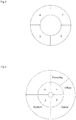
- the icon object moving instruction when it is determined according to the icon object moving instruction that the icon object to be moved is a class of applications, information on a single-layer annular graph marked with sequence numbers of screens is acquired, and the single-layer annular graph is displayed on a current screen.
- information on a double-layer annular graph marked with sequence numbers of screens and classes of applications is acquired, and the double-layer annular graph is displayed on a current screen.
- Step S103 after the icon object to be moved is moved successfully to an area on the rule graph, a table of mapping relation among a class of applications, a screen, and an application is updated according to the move.
- the table mapping a class of applications to a screen after the icon object to be moved is moved successfully to the area on the rule graph, the table mapping an application to a screen, or the table mapping an application to a screen may be updated.
- icons of installed applications are managed rapidly by screen or by class on a respective rule graph, such that with the disclosure, compared with an existing method for application icon management in a mobile terminal, icon management is simplified, and batch management and multi-mode management of icons of applications are achieved, thereby greatly facilitating application icon management by a user.
- Fig.2 is a flowchart of managing icon-display-by-screen by moving a class of applications in a method for application icon management in a mobile terminal according to an embodiment of the disclosure. As shown in Fig.2 , the flow of managing icon-display-by-screen by moving a class of applications according to the disclosure includes steps as follows.
- Step S201 an icon object is moved.
- an icon object of a class of applications or an icon of an application is dragged into a target screen or a target class of applications.
- Step S202 it is determined according to an icon object moving instruction whether the icon object is a class of applications or an icon of an application.
- the type of the icon object (a class of applications or an icon of an application) needs to be determined in the first place according to the icon object moving instruction, and when the icon object is a class of applications, the flow goes to step S203.
- Step S203 information on a single-layer annular graph marked with sequence numbers of screens is acquired; and space remaining in each screen is calculated and compared with space to be occupied by the class of applications.
- the information on the single-layer annular graph may include a total size of the graph, a total number of screens in the mobile terminal, size of an area containing a sequence number of a screen, an identifier of a color of an area, an identifier of a color of storage space occupied by each class of applications and icons of applications belonging to the each class in a screen, and the like.
- Step S204 the single-layer annular graph marked with sequence numbers of screens is displayed on a current screen.
- the single-layer annular graph displayed here includes 4 screens with sequence numbers 1, 2, 3, 4, respectively; and areas containing the sequence numbers of screens may be distinguished from each other by color.
- the sequence number of the screen is shown in bright yellow.
- the sequence number of the screen is shown in black.
- sequence numbers of screens 1, 3, 4 are shown in bright yellow, indicating that each of screen 1, screen 3, and screen 4 has sufficient free space for storing icons of all applications belonging to the class of applications.
- the sequence number of screen 2 is shown in black, indicating that the screen 2 has insufficient free space for storing icons of all applications belonging to the class of applications.
- Step S205 the class of applications is moved into an area containing a sequence number of a target screen in the single-layer annular graph, and is then released.
- Step S206 it is determined whether there is enough space remaining in the target screen for storing the class of applications; if there is, the flow goes to step S207; otherwise if there is insufficient space, the flow goes to Step S211.
- the sequence number of the target screen is shown in a bright yellow font. If the sequence number of the target screen is shown in a bright yellow font, it means that there is enough space remaining in the target screen for storing the class of applications. Otherwise if the sequence number of the target screen is not shown in a bright yellow font, it means that space remaining in the target screen is insufficient for storing the class of applications, and a user may be notified that space remaining in the target screen is insufficient for storing the class of applications.
- sequence numbers of screens 1, 3, 4 are shown in a bright yellow font, and the sequence number of screen 2 is shown in a black font.
- a class of applications in the screen 1 can be moved to the area containing the sequence number 4 or the area containing the sequence number 3, but can not be moved to the area containing the sequence number 2.
- Step S207 the area containing the sequence number of the target screen in the single-layer annular graph is highlighted.
- a class of applications in the screen with sequence number 1 is moved to the area containing the sequence number 4, then the area containing the sequence number 4 will be highlighted, indicating that the class of applications is moved successfully.
- Step S208 information on the area containing the sequence number of the target screen is recorded, an icon management message corresponding to the move of the class of applications is sent, and a table Class_Screen is updated.
- an icon management message is sent to a managing module of the mobile terminal.
- the icon management message includes an icon management type MsgType 2, indicating that the current moving operation involves move of a class of applications.
- the managing module updates the table Class_Screen, that is, updates the mapping relation between a class of applications and a screen.
- Step S209 application class layout displayed on the current screen and application class layout displayed on the target screen are refreshed.
- displayed layout of any class of applications on the current screen and on the target screen, and of icons of applications belonging to the any class of applications are refreshed according to the table Class_Screen updated in step S208.
- Step S210 display of the single-layer annular graph is cancelled.
- Step S211 a user is notified that space remaining in the target screen is insufficient for storing the class of applications.
- Step S206 If it is determined in Step S206 that space remaining in the target screen is insufficient for storing the class of applications, a notification that space remaining in the target screen is insufficient for storing the class of applications is provided on the current screen.
- Fig.3 is a flowchart of managing icon-display-by-screen or icon-display-by-class by moving an icon of an application in a method for application icon management in a mobile terminal according to an embodiment of the disclosure.
- the flow of managing icon-display-by-screen or icon-display-by-class by moving an icon of an application according to the disclosure includes steps as follows.
- Step S301 an icon object is moved.
- an icon object of a class of applications or an icon of an application is dragged into a target screen or a target class of applications.
- Step S302 it is determined according to an icon object moving instruction whether the icon object is a class of applications or an icon of an application.
- the type of the icon object (a class of applications or an icon of an application) needs to be determined in the first place according to the icon object moving instruction, and when the icon object is an icon of an application, the flow goes to step S303.
- Step S303 information on a double-layer annular graph marked with sequence numbers of screens and classes of applications is acquired, and space remaining in each screen is calculated and compared with space to be occupied by the icon of the application.
- the icon object is an icon of an application
- information on the double-layer annular graph marked with sequence numbers of screens and classes of applications is acquired, and space remaining in each screen is calculated and compared with space to be occupied by the class of applications.
- the information on the double-layer annular graph may include: a total size of the graph; a total number of screens in the mobile terminal; any class of applications already in each screen, and a number of classes of applications already in each screen; size of an area containing a class of applications; size of an area containing a sequence number of a screen; an identifier of a color of an area, an identifier of a color of storage space occupied by any class of applications and icons of applications belonging to the class in a screen, and the like.
- Step S304 the double-layer annular graph marked with sequence numbers of screens and classes of applications is displayed on a current screen.
- the double-layer annular graph displayed here includes four classes of applications, namely, everyday, office, game and system. Classes of applications displayed in a same screen occupy continuous areas in the double-layer annular graph and the continuous areas are in the same color.
- the two classes of everyday and office are located in screen 1, the game is located in screen 2, the system is located in screen 3, and currently no icon of an application belonging to a class of applications is stored in screen 4.
- the sequence number of the screen and any class of applications in the screen are shown in bright yellow.
- the sequence number of the screen and any class of applications in the screen are shown in black.
- the classes “everyday” and “office” and the sequence number "1" of the screen containing the classes “everyday” and “office” are in a bright yellow font;
- the class “system” and the sequence number "3" of the screen containing the class system are in a bright yellow font too; but class "game” and the sequence number "2" of the screen containing class game are in a black font.
- the icon of the application may be stored in either screen 1 or screen 3, but may not be stored in screen 2, as space remaining in screen 2 is insufficient.
- Step S305 the icon of the application is moved into an area containing a sequence number of a target screen or into an area containing a target class of applications in the double-layer annular graph, and is then released.
- Step S306 it is determined whether the area contains the sequence number of a target screen or contains a target class of applications; If the area contains a target class of applications, the flow goes to Step S307; otherwise if the area contains the sequence number of a target screen, the flow goes to Step S313.
- the icon of the application is moved into an area containing a sequence number of a screen or containing a class of applications in the double-layer annular graph, and is then released, it is detected whether the area is occupied by a class of applications or a sequence number of a screen. If the area is occupied by a class of applications, the flow goes to Step S307. If the area is occupied by a sequence number of a screen, the flow goes to Step S313.
- the icon of an application belonging to the class "system” in screen 3 may be moved to an area containing the sequence number "1" or "4", or to an area containing the class "everyday” or “office” in screen 1 (namely, to an area with a bright yellow font); but cannot be moved to an area containing the sequence number "2" or to an area containing the class "game” (namely, cannot be moved to an area with a black font).
- Step S307 it is determined whether there is enough space remaining in a screen containing the target class of applications for storing the icon of the application; if space remaining in the target screen is sufficient for storing the icon of the application, the flow goes to step S308; otherwise if space remaining in the target screen is insufficient for storing the icon of the application, the flow goes to Step S312.
- it is detected whether the target class of applications is shown in a bright yellow font if the target class of applications is shown in a bright yellow font, it means that there is enough space remaining for storing the icon of the application. Otherwise if the target class of applications is not shown in a bright yellow font, it means that space remaining is insufficient for storing the icon of the application.
- Step S308 the area containing the target class of applications in the double-layer annular graph is highlighted.
- Step S309 information on the area containing the target class of applications is recorded, and an icon management message corresponding to the move of the icon of the application is sent, and a table of mapping relation corresponding to the move of the icon of the application is updated.
- the information on the area containing the target class of applications is recorded, and the icon management message corresponding to the move of the icon of the application is sent to a managing module of the mobile terminal.
- the icon management message includes an icon management type MsgType 3, indicating that the current moving operation involves move of an icon of an application into a target class of applications.
- the managing module of the mobile terminal checks the table App_Class to determine whether a mapping relation between the application and a class of applications exist, i.e., checks whether the application has been classified.
- the table App_Screen is called, and a mapping relation between the application and a screen in the table App_Screen is deleted; in addition, the table App_Class is called, and a mapping relation between the application and the target class of applications is added in the table App_Class; when the application is previously classified, the table App_Class is called, and the mapping relation between the application and a class of applications is updated.
- Step S310 application icon layout displayed on a current screen and application icon layout displayed on a target screen are refreshed.
- application icon layout displayed on the current screen and application icon layout displayed on the target screen are refreshed according to a table updated in step S309.
- Step S311 display of the double-layer annular graph is cancelled.
- Step S312 a user is notified that space remaining in the screen containing the target class of applications is insufficient for storing the icon of the application.
- Step S307 if it is determined in Step S307 that space remaining in the screen containing the target class of applications is insufficient for storing the icon of the application, then a notification that space remaining in the screen containing the target class of applications is insufficient for storing the icon of the application is provided on the current screen.
- Step S313 it is determined whether there is enough space remaining in the target screen for storing the icon of the application; if there is enough space, the flow goes to step S314; otherwise if space remaining in the target screen is insufficient for storing the icon of the application, the flow goes to Step S316.
- the mobile terminal when the mobile terminal detects that the area where the icon of the application is released contains a sequence number of a screen, it is determined whether there is enough space remaining in the target screen for storing the icon of the application. That is, it is detected whether the sequence number of the target screen is shown in a bright yellow font. If the sequence number of the target screen is shown in a bright yellow font, it means that there is enough space remaining in the target screen for storing the icon of the application. Otherwise if the sequence number of the target screen is not shown in a bright yellow font, it means that space remaining in the target screen is insufficient for storing the icon of the application.
- Step S314 the area containing the sequence number of the target screen in the double-layer annular graph is highlighted.
- Step S315 information on the area containing the sequence number of the target screen is recorded, and an icon mana gement message corresponding to the move of the icon of the application is sent, and a table of mapping relation corresponding to the move of the icon of the application is updated.
- the managing module of the mobile terminal After receiving the icon management message, the managing module of the mobile terminal checks the table App_Class to determine whether a mapping relation between the application and a class of applications exist, i.e., checks whether the application has been classified.
- the table App_Screen is called, and a mapping relation between the application and a screen is updated; when the application is previously classified, the table App_Class is called, and the mapping relation between the application and any class of applications in the table App_Class is deleted, and the table App_Screen is called to add a mapping relation between the application and the target screen in the table App_Screen. Then application class layout and application icon layout displayed on a screen is refreshed according to an updated table. When no application icon is moved within a preset period of time, display of the double-layer annular graph is ancelled.
- Step S316 a user is notified that space remaining in the target screen is insufficient for storing the icon of the application.
- Step S313 If it is determined in Step S313 that space remaining in the target screen is insufficient for storing the icon of the application, a notification that space remaining in the target screen is insufficient for storing the icon of the application is provided on the current screen.
- Fig.6 is a flowchart, in installing a new application, of setting a class to which the new application belongs and directly managing display of the icon of the new application in a method for application icon management in a mobile terminal according to an embodiment of the disclosure.
- the flow, in installing a new application, of setting a class to which the new application belongs and directly managing display of the icon of the new application includes steps as follows.
- Step S601 a package file for installing a new application is read.
- a mobile terminal in installing a new application, will read a package file for installing the new application, where the package file may include information such as an icon of the application, a name of the package for installing the application and a hardware environment needed for installing the application.
- Step S602 space remaining in each screen is calculated.
- Step S603 it is determined whether there is enough space remaining in a screen for storing the icon of the new application; if there is enough space remaining in a screen for storing the icon of the new application, the flow goes to step S604; otherwise if no screen has enough free space for storing the icon of the new application, the flow goes to Step S610.
- Step S604 a sequence number of the screen with free space sufficient for storing the icon of the new application, and a class of applications contained in the screen with the sequence number, are read.
- the mobile terminal when it is detected that there is enough space remaining in a screen for storing the icon of the new application, the mobile terminal will record and read the sequence number of the screen with free space sufficient for storing the icon of the new application and any class of applications contained in the screen with the sequence number.
- Step S605 the sequence number of the screen with free space sufficient for storing the icon of the new application, and a class of applications contained in the screen with the sequence number, are displayed.
- the mobile terminal displays on a current screen the sequence number of the screen with free space sufficient for storing the icon of the new application and a class of applications contained in the screen with the sequence number, such that a user may select a class for the new application to be installed.
- Step S606 a class of applications to which the new application belongs is selected according to a displayed class of applications, and the new application is installed using the package file.
- Step S607 an icon management message is sent.
- the icon management message includes the file name of the package for installing the application, the class to which the application belongs, the sequence number of the screen for display the application and an icon management type MsgType of the new application.
- the class to which the application belongs is that selected when the new application is installed, the MsgType is 1, indicating that during installing a new application, the mobile terminal directly manages display of the icon of the application by class.
- Step S608 a table App_Class is updated according to the icon management message.
- the managing module of the mobile terminal calls the table App_Class to update a mapping relation between an application and a class of applications according to the icon management message.
- Step S609 the table App_Class is read, and layout of icons of applications belonging to the selected class of applications in display is refreshed.
- the mobile terminal after updating the table App_Class, the mobile terminal reads the table App_Class, and refreshes the layout of icons of applications belonging to the selected class of applications in display, implementing direct management of display of the icon of the new application.
- Step S610 a user is notified that the new application cannot be installed.
- display of the icon of a new application by class can be managed directly by setting a class to which the new application belongs during installation of the new application, thereby saving any icon display management after the new application is installed.
- Fig.7 is a schematic diagram of a modular structure of a mobile terminal according to an embodiment of the disclosure. As shown in Fig.7 , the mobile terminal according to the embodiment includes:
- the presetting module 701 may add a new class of applications in addition to a default class of applications in a mobile terminal, and modify or delete an existing class of applications through an application class customizing interface. Then, a table mapping a class of applications to a screen, a table mapping an application to a class of applications, and a table mapping an application to a screen are established respectively in advance according to affiliation in storing an icon of an application in a screen and in storing a class of applications in a screen.
- the managing module 702 may be further configured for: after a class of applications to be moved is moved to an area containing a sequence number of a target screen in the single-layer annular graph, determining whether there is enough space remaining in the target screen for storing the class of applications to be moved; and after the class of applications is successfully moved to the area in the single-layer annular graph, receiving an icon management message sent by the displaying module 703 and updating the table mapping a class of applications to a screen according to the icon management message.
- the displaying module 703 may be further configured for: after the class of applications is moved successfully to the area in the single-layer annular graph, sending the icon management message corresponding to the move of the class of applications to the managing module 702, and refreshing application class layout displayed on the current screen and application class layout displayed on the target screen according to the table mapping a class of applications to a screen updated by the managing module.
- the managing module 702 may be further configured for:
- the displaying module 703 may be further configured for:
- the managing module 702 may be further configured for: notifying the displaying module 703 to cancel display of the single-layer annular graph or the double-layer annular graph if no icon object moving operation is detected within a preset period of time.
- Fig.8 is a schematic diagram of a modular structure of a mobile terminal according to an embodiment of the disclosure. As shown in Fig.8 , based on the mobile terminal according to the previous embodiment, the mobile terminal according to the current embodiment further includes: an installing module 804 configured for installing a new application.
- the installing module 804 may be further configured for: during installation of a new application, determining the class to which the new application belongs according to information on a class to which an application belongs preset by a presetting module 801 and a table Class_Screen, a table App_Class and a table App_Screen, sending an icon management message corresponding to application installation to a managing module 802 to notify the managing module 802 to update the table App_Class.
- the managing module 802 may be further configured for: receiving the icon management message sent by the installing module 804 and updating the table App_Class, i.e., according to the class information (selected class to which the new application belongs) preset during installation of the new application.
- the displaying module 803 may be further configured for: after the installation of the new application is completed, displaying the icon of the new application by class according to the class selected during its installation.
Landscapes
- Engineering & Computer Science (AREA)
- Theoretical Computer Science (AREA)
- General Engineering & Computer Science (AREA)
- Software Systems (AREA)
- Physics & Mathematics (AREA)
- General Physics & Mathematics (AREA)
- Human Computer Interaction (AREA)
- User Interface Of Digital Computer (AREA)
- Telephone Function (AREA)
- Stored Programmes (AREA)
Claims (6)
- Verfahren zur Anwendungssymbolverwaltung in einem mobilen Endgerät, umfassend:Vorgeben, durch das mobile Endgerät, von Informationen über eine Klasse, zu der eine Anwendung gehört, und Aufstellen einer Tabelle einer Zuordnungsbeziehung zwischen einer Klasse von Anwendungen, einem Bildschirm und einer Anwendung (S101);Empfangen, durch das mobile Endgerät, einer Symbolgegenstand-Bewegungsanweisung (S102, S201, S301);Bestimmen, durch das mobile Endgerät, gemäß der Symbolgegenstand-Bewegungsanweisung, dass ein Symbolgegenstand, der bewegt werden soll, eine Klasse von Anwendungen oder ein Symbol einer Anwendung ist (S202, S302);Erfassen, durch das mobile Endgerät, von Informationen über ein Regeldiagramm, das dem Symbolgegenstand entspricht, der gemäß der Symbolgegenstand-Bewegungsanweisung (S102) bewegt werden soll, durch:wenn es gemäß der Symbolgegenstand-Bewegungsanweisung bestimmt wird, dass der Symbolgegenstand, der bewegt werden soll, die Klasse der Anwendungen ist, Erfassen, durch das mobile Endgerät, von Informationen über ein Einzelschicht-Ringdiagramm, das mit Sequenznummern von Bildschirmen markiert ist (S203);wenn es gemäß der Symbolgegenstand-Bewegungsanweisung bestimmt wird, dass der Symbolgegenstand, der bewegt werden soll, das Symbol der Anwendung ist, Erfassen, durch das mobile Endgerät, von Informationen über ein Doppelschicht-Ringdiagramm, das mit den Sequenznummern der Bildschirme und der Klassen von Anwendungen markiert ist (S303);Berechnen, durch das mobile Endgerät, von Raum, der in jedem der Bildschirme übrigbleibt (S203, S303);Vergleichen, durch das mobile Endgerät, des Raums, der in jedem der Bildschirme übrigbleibt, mit Raum, der von dem Symbolgegenstand, der bewegt werden soll, belegt werden soll (S203, S303);Anzeigen, durch das mobile Endgerät, der Informationen über das Regeldiagramm (S102), durch:wenn es gemäß der Symbolgegenstand-Bewegungsanweisung bestimmt wird, dass der Symbolgegenstand, der bewegt werden soll, die Klasse der Anwendungen ist, Anzeigen, durch das mobile Endgerät, des Einzelschicht-Ringdiagramms, das mit den Sequenznummern der Bildschirme markiert ist, auf einem aktuellen Bildschirm (S204), durch Zeigen, durch das mobile Endgerät, einer Sequenznummer eines Bildschirms in Hellgelb, wenn es genug Raum gibt, der im Bildschirm übrigbleibt, um Symbole aller Anwendungen zu speichern, die zu der Klasse der Anwendungen gehören, und durch das mobile Endgerät, Zeigen der Sequenznummer des Bildschirms in Schwarz, wenn der Bildschirm keinen ausreichenden freien Raum hat, um die Symbole der Anwendungen zu speichern, die zu der Klasse der Anwendungen gehören;wenn es gemäß der Symbolgegenstand-Bewegungsanweisung bestimmt wird, dass der Symbolgegenstand, der bewegt werden soll, das Symbol der Anwendung ist, Anzeigen, durch das mobile Endgerät, des Doppelschicht-Ringdiagramms, das mit den Sequenznummern der Bildschirme und den Klassen der Anwendungen markiert ist, auf dem aktuellen Bildschirm (S304), durch Zeigen, durch das mobile Endgerät, einer Sequenznummer eines Bildschirms und irgendeiner Klasse von Anwendungen im Bildschirm in Hellgelb, wenn es genug Raum gibt, der im Bildschirm übrigbleibt, um das Symbol der Anwendung zu speichern, und durch das mobile Endgerät, Zeigen der Sequenznummer des Bildschirms und irgendeiner Klasse der Anwendungen im Bildschirm in Schwarz, wenn der Bildschirm keinen ausreichenden freien Raum hat, um das Symbol der Anwendung zu speichern;nachdem die Klasse der Anwendungen in einen Bereich bewegt wird, der eine Sequenznummer eines Zielbildschirms im Einzelschicht-Ringdiagramm enthält, und dann freigegeben wird (S205), Bestimmen, durch das mobile Endgerät, ob es genug Raum gibt, der im Zielbildschirm übrigbleibt, um die Klasse der Anwendungen zu speichern (S206), durch das mobile Endgerät, Detektieren, ob die Sequenznummer eines Zielbildschirms in einer hellgelben Schrift gezeigt wird;oder, nachdem das Symbol der Anwendung in einen Bereich, der eine Sequenznummer eines Zielbildschirms enthält, oder in einen Bereich, der eine Zielklasse von Anwendungen im Doppelschicht-Ringdiagramm enthält, bewegt wird, und dann freigegeben wird (S305), Bestimmen, durch das mobile Endgerät, ob es genug Raum gibt, der im Zielbildschirm übrigbleibt, um das Symbol der Anwendung zu speichern, wenn der Bereich die Sequenznummer des Zielbildschirms enthält (S306, S313), durch das mobile Endgerät, Detektieren, ob die Sequenznummer des Zielbildschirms in der hellgelben Schrift gezeigt wird; Bestimmen, durch das mobile Endgerät, ob es genug Raum gibt, der in einem Bildschirm übrigbleibt, der die Zielklasse der Anwendungen enthält, um das Symbol der Anwendung zu speichern, wenn der Bereich die Zielklasse der Anwendungen enthält (S306, S307), durch das mobile Endgerät, Detektieren, ob die Zielklasse der Anwendungen in der hellgelben Schrift gezeigt wird;wenn es genug Raum gibt, der in dem Zielbildschirm übrigbleibt, um die Klasse der Anwendungen zu speichern, Hervorheben, durch das mobile Endgerät, des Bereichs, der die Sequenznummer des Zielbildschirms im Einzelschicht-Ringdiagramm enthält (S207), Angeben, dass die Klasse von Anwendungen erfolgreich bewegt wird;wenn es genug Raum gibt, der in dem Zielbildschirm übrigbleibt, um das Symbol der Anwendung zu speichern, Hervorheben, durch das mobile Endgerät, des Bereichs, der die Sequenznummer des Zielbildschirms im Doppelschicht-Ringdiagramm enthält (S314);wenn es genug Raum gibt, der in dem Bildschirm übrigbleibt, der die Zielklasse von Anwendungen enthält, um das Symbol der Anwendung zu speichern, Hervorheben, durch das mobile Endgerät, des Bereichs, der die Zielklasse der Anwendungen im Doppelschicht-Ringdiagramm enthält (S308);Aktualisieren, nach dem erfolgreichen Bewegen des Symbolgegenstands, der bewegt werden soll, in einen Bereich im Regeldiagramm, der Tabelle der Zuordnungsbeziehung zwischen einer Klasse von Anwendungen, einem Bildschirm und einer Anwendung gemäß der Bewegung (S103);Aufheben, durch das mobile Endgerät, der Anzeige des Einzelschicht-Ringdiagramms oder des Doppelschicht-Ringdiagramms, wenn kein Symbolgegenstand-Bewegungsvorgang innerhalb eines vorgegebenen Zeitraums detektiert wird (S210, S311),worin die vorgegebenen Informationen über eine Klasse, zu der eine Anwendung gehört, zumindest eine von einer Standard-Klasse von Anwendungen und einer Klasse von Anwendungen, die über eine Anwendungsklasse-Customizingschnittstelle hinzugefügt oder geändert werden, umfassen,worin das Aufstellen einer Tabelle einer Zuordnungsbeziehung zwischen einer Klasse von Anwendungen, einem Bildschirm und einer Anwendung umfasst:jeweils Aufstellen, durch das mobile Endgerät, einer Tabelle Class_Screen, einer Tabelle App_Class und einer Tabelle App_Screen, worin die Tabelle Class_Screen die Zuordnungsbeziehung zwischen einer Klasse von Anwendungen und einem Bildschirm angibt; die Tabelle App_Class die Zuordnungsbeziehung zwischen einer Anwendung und einer Klasse von Anwendungen angibt; die Tabelle App_Screen die Zuordnungsbeziehung zwischen einer Anwendung und einem Bildschirm angibt,worin das Aktualisieren, durch das mobile Endgerät, nach dem erfolgreichen Bewegen des Symbolgegenstands, der bewegt werden soll, in einen Bereich im Regeldiagramm, der Tabelle der Zuordnungsbeziehung zwischen einer Klasse von Anwendungen, einem Bildschirm und einer Anwendung gemäß der Bewegung umfasst:nachdem die Klasse von Anwendungen in den Bereich erfolgreich bewegt wird, der die Sequenznummer des Zielbildschirms enthält, Aufzeichnen, durch das mobile Endgerät, von Informationen über den Bereich, der die Sequenznummer des Zielbildschirms enthält, um die Tabelle Class_Screen zu aktualisieren (S208);nachdem das Symbol der Anwendung in den Bereich erfolgreich bewegt wird, der die Zielklasse der Anwendungen enthält, Aufzeichnen von Informationen über den Bereich, der die Zielklasse der Anwendungen enthält (S309); Prüfen, durch das mobile Endgerät, der Tabelle App_Class, um zu bestimmen, ob eine Zuordnungsbeziehung zwischen der Anwendung und einer Klasse von Anwendungen existiert, um zu prüfen, ob die Anwendung eingestuft worden ist; wenn die Anwendung nicht eingestuft worden ist, Löschen, durch das mobile Endgerät, einer Zuordnungsbeziehung zwischen der Anwendung und dem Bildschirm in der Tabelle App_Screen, und Hinzufügen, durch das mobile Endgerät, einer Zuordnungsbeziehung zwischen der Anwendung und der Zielklasse von Anwendungen in der Tabelle App_Class; wenn die Anwendung vorher eingestuft ist, Abrufen, durch das mobile Endgerät, der Tabelle App_Class, um die Zuordnungsbeziehung zwischen der Anwendung und einer Klasse von Anwendungen zu aktualisieren (S309);nachdem das Symbol der Anwendung in den Bereich erfolgreich bewegt wird, der die Sequenznummer des Zielbildschirms enthält, Aufzeichnen, durch das mobile Endgerät, der Informationen über den Bereich, der die Sequenznummer des Zielbildschirms enthält; Prüfen, durch das mobile Endgerät, der Tabelle App_Class, um zu bestimmen, ob die Zuordnungsbeziehung zwischen der Anwendung und einer Klasse von Anwendungen existiert, um zu prüfen, ob die Anwendung eingestuft worden ist; wenn die Anwendung nicht eingestuft worden ist, Abrufen, durch das mobile Endgerät, der Tabelle App_Screen, um die Zuordnungsbeziehung zwischen der Anwendung und einem Bildschirm zu aktualisieren; wenn die Anwendung vorher eingestuft ist, Löschen, durch das mobile Endgerät, der Zuordnungsbeziehung zwischen der Anwendung und irgendeiner Klasse von Anwendungen in der Tabelle App_Class, und Hinzufügen, durch das mobile Endgerät, der Zuordnungsbeziehung zwischen der Anwendung und dem Zielbildschirm in der Tabelle App_Screen (S315).
- Verfahren nach Anspruch 1, worin das Aktualisieren, nach dem erfolgreichen Bewegen des Symbolgegenstands, der bewegt werden soll, in einen Bereich im Regeldiagramm, der Tabelle der Zuordnungsbeziehung zwischen einer Klasse von Anwendungen, einem Bildschirm und einer Anwendung gemäß der Bewegung umfasst:nachdem die Klasse von Anwendungen, die bewegt werden sollen, in den Bereich erfolgreich bewegt wird, der die Sequenznummer des Zielbildschirms im Einzelschicht-Ringdiagramm enthält, Auffrischen des Anwendungsklassenlayouts, das auf dem aktuellen Bildschirm angezeigt wird, und des Anwendungsklassenlayouts, das auf dem Zielbildschirm angezeigt wird (S209); odernachdem das "zu bewegende" Symbol der Anwendung in den Bereich erfolgreich bewegt wird, der die Sequenznummer des Zielbildschirms oder die Zielklasse der Anwendungen im Doppelschicht-Ringdiagramm enthält, Auffrischen des Anwendungssymbollayouts, das auf dem aktuellen Bildschirm angezeigt wird, und des Anwendungssymbollayouts, das auf dem Zielbildschirm angezeigt wird (S310).
- Verfahren nach Anspruch 1, ferner umfassend: nach dem Vorgeben von Informationen über eine Klasse, zu der eine Anwendung gehört, und Aufstellen einer Tabelle einer Zuordnungsbeziehung zwischen einer Klasse von Anwendungen, einem Bildschirm und einer Anwendung,
Aktualisieren der Tabelle App_Class gemäß Informationen über eine Klasse, zu der eine neue Anwendung gehört, die bei der Installation der neuen Anwendung vorgegeben sind (S606-S608). - Mobiles Endgerät, umfassend:ein Vorgabemodul (701, 801), das dafür eingerichtet ist: Informationen über eine Klasse, zu der eine Anwendung gehört, vorzugeben und eine Tabelle einer Zuordnungsbeziehung zwischen einer Klasse von Anwendungen, einem Bildschirm und einer Anwendung aufzustellen;ein Verwaltungsmodul (702, 802), das dafür eingerichtet ist:eine Symbolgegenstand-Bewegungsanweisung zu empfangen;zu bestimmen, gemäß der Symbolgegenstand-Bewegungsanweisung, dass ein Symbolgegenstand, der bewegt werden soll, eine Klasse von Anwendungen oder ein Symbol einer Anwendung ist;Informationen über ein Regeldiagramm zu erfassen, das dem Symbolgegenstand entspricht, der gemäß der Symbolgegenstand-Bewegungsanweisung bewegt werden soll, durch:wenn es gemäß der Symbolgegenstand-Bewegungsanweisung bestimmt wird, dass der Symbolgegenstand, der bewegt werden soll, die Klasse der Anwendungen ist, Erfassen von Informationen über ein Einzelschicht-Ringdiagramm, das mit Sequenznummern von Bildschirmen markiert ist;wenn es gemäß der Symbolgegenstand-Bewegungsanweisung bestimmt wird, dass der Symbolgegenstand, der bewegt werden soll, das Symbol der Anwendung ist, Erfassen von Informationen über ein Doppelschicht-Ringdiagramm, das mit den Sequenznummern der Bildschirme und der Klassen von Anwendungen markiert ist;den Raum, der in jedem der Bildschirme übrigbleibt, zu berechnen;den Raum, der in jedem der Bildschirme übrigbleibt, mit dem Raum, der von dem Symbolgegenstand, der bewegt werden soll, belegt werden soll, zu vergleichen; undein Anzeigemodul (703, 803), das dafür eingerichtet ist, die Informationen über das Regeldiagramm anzuzeigen, durch:wenn es gemäß der Symbolgegenstand-Bewegungsanweisung bestimmt wird, dass der Symbolgegenstand, der bewegt werden soll, die Klasse der Anwendungen ist, Anzeigen des Einzelschicht-Ringdiagramms, das mit den Sequenznummern der Bildschirme markiert ist, auf einem aktuellen Bildschirm, durch Zeigen einer Sequenznummer eines Bildschirms in Hellgelb, wenn es genug Raum gibt, der im Bildschirm übrigbleibt, um Symbole aller Anwendungen zu speichern, die zu der Klasse der Anwendungen gehören, und Zeigen der Sequenznummer des Bildschirms in Schwarz, wenn der Bildschirm keinen ausreichenden freien Raum hat, um die Symbole der Anwendungen zu speichern, die zu der Klasse der Anwendungen gehören;wenn es gemäß der Symbolgegenstand-Bewegungsanweisung bestimmt wird, dass der Symbolgegenstand, der bewegt werden soll, das Symbol der Anwendung ist, Anzeigen des Doppelschicht-Ringdiagramms, das mit den Sequenznummern der Bildschirme und den Klassen der Anwendungen markiert ist, auf dem aktuellen Bildschirm, durch Zeigen einer Sequenznummer eines Bildschirms und irgendeiner Klasse von Anwendungen im Bildschirm in Hellgelb, wenn es genug Raum gibt, der im Bildschirm übrigbleibt, um das Symbol der Anwendung zu speichern, und Zeigen der Sequenznummer des Bildschirms und irgendeiner Klasse der Anwendungen im Bildschirm in Schwarz, wenn der Bildschirm keinenausreichenden freien Raum hat, um das Symbol der Anwendung zu speichern;worin das Verwaltungsmodul (702, 802) ferner dafür eingerichtet ist:nachdem die Klasse der Anwendungen in einen Bereich bewegt wird, der eine Sequenznummer eines Zielbildschirms im Einzelschicht-Ringdiagramm enthält, und dann freigegeben wird, zu bestimmen, ob es genug Raum gibt, der im Zielbildschirm übrigbleibt, um die Klasse der Anwendungen zu speichern, durch Detektieren, ob die Sequenznummer eines Zielbildschirms in einer hellgelben Schrift gezeigt wird;oder, nachdem das Symbol der Anwendung in einen Bereich, der eine Sequenznummer eines Zielbildschirms enthält, oder in einen Bereich, der eine Zielklasse von Anwendungen im Doppelschicht-Ringdiagramm enthält, bewegt wird, und dann freigegeben wird, zu bestimmen, ob es genug Raum gibt, der im Zielbildschirm übrigbleibt, um das Symbol der Anwendung zu speichern, wenn der Bereich die Sequenznummer des Zielbildschirms enthält, durch Detektieren, ob die Sequenznummer des Zielbildschirms in der hellgelben Schrift gezeigt wird; zu bestimmen, ob es genug Raum gibt, der in einem Bildschirm übrigbleibt, der die Zielklasse der Anwendungen enthält, um das Symbol der Anwendung zu speichern, wenn der Bereich die Zielklasse der Anwendungen enthält, durch Detektieren, ob die Zielklasse der Anwendungen in der hellgelben Schrift gezeigt wird;worin das Anzeigemodul (703, 803) ferner dafür eingerichtet ist:wenn es genug Raum gibt, der in dem Zielbildschirm übrigbleibt, um die Klasse der Anwendungen zu speichern, den Bereich hervorzuheben, der die Sequenznummer des Zielbildschirms im Einzelschicht-Ringdiagramm enthält, anzugeben, dass die Klasse von Anwendungen erfolgreich bewegt wird;wenn es genug Raum gibt, der in dem Zielbildschirm übrigbleibt, um das Symbol der Anwendung zu speichern, den Bereich hervorzuheben, der die Sequenznummer des Zielbildschirms im Doppelschicht-Ringdiagramm enthält;wenn es genug Raum gibt, der in dem Bildschirm übrigbleibt, der die Zielklasse von Anwendungen enthält, um das Symbol der Anwendung zu speichern, den Bereich hervorzuheben, der die Zielklasse der Anwendungen im Doppelschicht-Ringdiagramm enthält;worin das Verwaltungsmodul (702, 802) ferner dafür eingerichtet ist: nach dem erfolgreichen Bewegen des Symbolgegenstands, der bewegt werden soll, in einen Bereich im Regeldiagramm, die Tabelle der Zuordnungsbeziehung zwischen einer Klasse von Anwendungen, einem Bildschirm und einer Anwendung gemäß der Bewegung zu aktualisieren;worin das Anzeigemodul (703, 803) ferner dafür eingerichtet ist: die Anzeige des Einzelschicht-Ringdiagramms oder des Doppelschicht-Ringdiagramms aufzuheben, wenn kein Symbolgegenstand-Bewegungsvorgang innerhalb eines vorgegebenen Zeitraums detektiert wird,worin die vorgegebenen Informationen über eine Klasse, zu der eine Anwendung gehört, zumindest eine von einer Standard-Klasse von Anwendungen und einer Klasse von Anwendungen, die über eine Anwendungsklasse-Customizingschnittstelle hinzugefügt oder geändert werden, umfassen,worin das Vorgabemodul (701, 801) dafür eingerichtet ist:
jeweils eine Tabelle Class_Screen, eine Tabelle App_Class und eine Tabelle App_Screen aufzustellen, worin die Tabelle Class_Screen die Zuordnungsbeziehung zwischen einer Klasse von Anwendungen und einem Bildschirm angibt; die Tabelle App_Class die Zuordnungsbeziehung zwischen einer Anwendung und einer Klasse von Anwendungen angibt; die Tabelle App_Screen die Zuordnungsbeziehung zwischen einer Anwendung und einem Bildschirm angibt,worin das Verwaltungsmodul (702, 802) dafür eingerichtet ist:nachdem die Klasse von Anwendungen in den Bereich erfolgreich bewegt wird, der die Sequenznummer des Zielbildschirms enthält, Informationen über den Bereich aufzuzeichnen, der die Sequenznummer des Zielbildschirms enthält, um die Tabelle Class_Screen zu aktualisieren;nachdem das Symbol der Anwendung in den Bereich erfolgreich bewegt wird, der die Zielklasse der Anwendungen enthält, Informationen über den Bereich aufzuzeichnen, der die Zielklasse der Anwendungen enthält; die Tabelle App_Class zu prüfen, um zu bestimmen, ob eine Zuordnungsbeziehung zwischen der Anwendung und einer Klasse von Anwendungen existiert, um zu prüfen, ob die Anwendung eingestuft worden ist; wenn die Anwendung nicht eingestuft worden ist, eine Zuordnungsbeziehung zwischen der Anwendung und dem Bildschirm in der Tabelle App_Screen zu löschen, und eine Zuordnungsbeziehung zwischen der Anwendung und der Zielklasse von Anwendungen in der Tabelle App_Class hinzuzufügen; wenn die Anwendung vorher eingestuft ist, die Tabelle App_Class abzurufen, um die Zuordnungsbeziehung zwischen der Anwendung und einer Klasse von Anwendungen zu aktualisieren;nachdem das Symbol der Anwendung in den Bereich erfolgreich bewegt wird, der die Sequenznummer des Zielbildschirms enthält, die Informationen über den Bereich aufzuzeichnen, der die Sequenznummer des Zielbildschirms enthält; die Tabelle App_Class zu prüfen, um zu bestimmen, ob die Zuordnungsbeziehung zwischen der Anwendung und einer Klasse von Anwendungen existiert, um zu prüfen, ob die Anwendung eingestuft worden ist; wenn die Anwendung nicht eingestuft worden ist, die Tabelle App_Screen abzurufen, um die Zuordnungsbeziehung zwischen der Anwendung und einem Bildschirm zu aktualisieren; wenn die Anwendung vorher eingestuft ist, die Zuordnungsbeziehung zwischen der Anwendung und irgendeiner Klasse von Anwendungen in der Tabelle App_Class zu löschen, und die Zuordnungsbeziehung zwischen der Anwendung und dem Zielbildschirm in der Tabelle App_Screen hinzuzufügen. - Mobiles Endgerät nach Anspruch 4, worin das Anzeigemodul (703, 803) ferner dafür eingerichtet ist:
das Anwendungsklassenlayout und das Anwendungsklassenlayout, die auf dem aktuellen Bildschirm und auf einem Zielbildschirm angezeigt werden, gemäß der Tabelle der Zuordnungsbeziehung zwischen einer Klasse von Anwendungen, einem Bildschirm und einer Anwendung, die vom Verwaltungsmodul (702, 802) aktualisiert wird, aufzufrischen. - Mobiles Endgerät nach Anspruch 4, ferner umfassend ein Installationsmodul (804), das dafür eingerichtet ist: eine neue Anwendung zu installieren; und nachdem die neue Anwendung erfolgreich installiert ist, dem Verwaltungsmodul (702, 802) eine Symbolverwaltungsnachricht zu senden, die der Installation entspricht, worin
das Verwaltungsmodul (702, 802) ferner dafür eingerichtet ist: die Tabelle App_Class gemäß der Symbolverwaltungsnachricht zu aktualisieren; und
das Anzeigemodul (703, 803) ferner dafür eingerichtet ist: Symbole von Anwendungen nach Klasse gemäß der Tabelle App_Class anzuzeigen, die vom Verwaltungsmodul (702, 802) aktualisiert ist.
Applications Claiming Priority (2)
| Application Number | Priority Date | Filing Date | Title |
|---|---|---|---|
| CN201210059491 | 2012-03-08 | ||
| PCT/CN2012/075468 WO2013131321A1 (zh) | 2012-03-08 | 2012-05-14 | 移动终端应用程序图标管理的方法及移动终端 |
Publications (3)
| Publication Number | Publication Date |
|---|---|
| EP2824552A1 EP2824552A1 (de) | 2015-01-14 |
| EP2824552A4 EP2824552A4 (de) | 2015-03-25 |
| EP2824552B1 true EP2824552B1 (de) | 2020-11-04 |
Family
ID=49115902
Family Applications (1)
| Application Number | Title | Priority Date | Filing Date |
|---|---|---|---|
| EP12870833.6A Active EP2824552B1 (de) | 2012-03-08 | 2012-05-14 | Verfahren zur symbolverwaltung bei einer anwendung eines mobilen endgeräts sowie mobiles endgerät |
Country Status (4)
| Country | Link |
|---|---|
| US (1) | US9952741B2 (de) |
| EP (1) | EP2824552B1 (de) |
| CN (1) | CN103309554B (de) |
| WO (1) | WO2013131321A1 (de) |
Families Citing this family (23)
| Publication number | Priority date | Publication date | Assignee | Title |
|---|---|---|---|---|
| WO2014088540A1 (en) * | 2012-12-03 | 2014-06-12 | Thomson Licensing | Dynamic user interface |
| KR20140089976A (ko) * | 2013-01-08 | 2014-07-16 | 삼성전자주식회사 | 라이브 박스를 관리하는 방법 및 장치 |
| US10824756B2 (en) | 2013-09-20 | 2020-11-03 | Open Text Sa Ulc | Hosted application gateway architecture with multi-level security policy and rule promulgations |
| US9979751B2 (en) * | 2013-09-20 | 2018-05-22 | Open Text Sa Ulc | Application gateway architecture with multi-level security policy and rule promulgations |
| EP2851833B1 (de) | 2013-09-20 | 2017-07-12 | Open Text S.A. | Anwendungs-Gateway-Architektur mit mehrstufigen Sicherheitspolitik- und Regelverkündigungen |
| CN103577048A (zh) * | 2013-11-15 | 2014-02-12 | 广州市久邦数码科技有限公司 | 一种桌面图标智能整理系统及方法 |
| CN103729114B (zh) * | 2013-12-31 | 2017-01-18 | 贝壳网际(北京)安全技术有限公司 | 一种移动终端中显示对象在列表中的显示方法及移动终端 |
| CN104615494B (zh) * | 2015-01-24 | 2017-12-01 | 南京轩世琪源软件科技有限公司 | 一种移动终端及应用切换的方法 |
| CN105224318B (zh) * | 2015-09-23 | 2020-01-31 | 联想(北京)有限公司 | 一种信息处理方法及电子设备 |
| CN105204927B (zh) * | 2015-09-30 | 2019-07-23 | 北京奇虎科技有限公司 | 用于终端设备的应用排列装置及应用排列方法 |
| US11593075B2 (en) | 2015-11-03 | 2023-02-28 | Open Text Sa Ulc | Streamlined fast and efficient application building and customization systems and methods |
| US11388037B2 (en) | 2016-02-25 | 2022-07-12 | Open Text Sa Ulc | Systems and methods for providing managed services |
| CN105955563A (zh) * | 2016-04-15 | 2016-09-21 | 奇酷软件(深圳)有限公司 | 图标的管理方法、图标的管理系统和终端 |
| CN106155743A (zh) * | 2016-06-30 | 2016-11-23 | 维沃移动通信有限公司 | 一种应用程序安装的控制方法及移动终端 |
| CN106686433B (zh) * | 2016-12-29 | 2020-03-17 | 深圳Tcl数字技术有限公司 | 快捷应用的位置显示方法及系统 |
| CN106845206B (zh) * | 2017-02-28 | 2020-01-10 | 宇龙计算机通信科技(深圳)有限公司 | 一种解锁方法及终端 |
| CN107256152A (zh) * | 2017-05-31 | 2017-10-17 | 广东欧珀移动通信有限公司 | 快速查找应用的方法及相关产品 |
| CN108196752B (zh) * | 2018-01-15 | 2023-04-07 | 维沃移动通信有限公司 | 一种显示方法及终端设备 |
| WO2019195965A1 (zh) * | 2018-04-08 | 2019-10-17 | 深圳盒子信息科技有限公司 | 界面图标配置方法、装置及终端设备 |
| CN109992339B (zh) * | 2019-02-21 | 2023-04-07 | 维沃移动通信有限公司 | 一种应用图标的处理方法及移动终端 |
| CN112312360B (zh) * | 2020-10-28 | 2023-06-09 | 维沃移动通信有限公司 | 一种sim卡设置方法、装置和电子设备 |
| CN118244941A (zh) * | 2020-12-25 | 2024-06-25 | 荣耀终端有限公司 | 应用图标的管理方法、终端设备及存储介质 |
| CN114818987B (zh) * | 2022-06-20 | 2022-11-08 | 中山大学深圳研究院 | 一种科技服务数据的处理方法、装置以及系统 |
Family Cites Families (12)
| Publication number | Priority date | Publication date | Assignee | Title |
|---|---|---|---|---|
| US5544302A (en) * | 1993-06-03 | 1996-08-06 | Taligent, Inc. | Object-oriented framework for creating and using container objects with built-in properties |
| US7068288B1 (en) * | 2002-02-21 | 2006-06-27 | Xerox Corporation | System and method for moving graphical objects on a computer controlled system |
| JP2004295159A (ja) | 2003-02-07 | 2004-10-21 | Sony Corp | アイコン表示システム、アイコン表示方法、電子機器装置およびコンピュータプログラム |
| JP4899384B2 (ja) * | 2005-08-31 | 2012-03-21 | ソニー株式会社 | 表示制御装置および方法、並びにプログラム |
| US7693877B1 (en) * | 2007-03-23 | 2010-04-06 | Network Appliance, Inc. | Automated information lifecycle management system for network data storage |
| US8219930B2 (en) * | 2009-06-26 | 2012-07-10 | Verizon Patent And Licensing Inc. | Radial menu display systems and methods |
| KR101668240B1 (ko) | 2010-04-19 | 2016-10-21 | 엘지전자 주식회사 | 휴대 단말기 및 그 동작 제어방법 |
| KR101690595B1 (ko) | 2010-09-01 | 2016-12-28 | 엘지전자 주식회사 | 이동 단말기 및 이동 단말기의 아이콘 관리 방법 |
| CN102306080A (zh) | 2011-08-25 | 2012-01-04 | 鸿富锦精密工业(深圳)有限公司 | 触摸型电子装置及其图标移动的方法 |
| CN102306084A (zh) | 2011-09-21 | 2012-01-04 | 宇龙计算机通信科技(深圳)有限公司 | 应用程序的管理方法和装置 |
| CN102360266A (zh) | 2011-09-28 | 2012-02-22 | 宇龙计算机通信科技(深圳)有限公司 | 一种屏幕分区显示方法和装置 |
| CN102364438A (zh) | 2011-10-10 | 2012-02-29 | 宇龙计算机通信科技(深圳)有限公司 | 一种应用程序的显示及分类方法、系统及移动终端 |
-
2012
- 2012-05-14 EP EP12870833.6A patent/EP2824552B1/de active Active
- 2012-05-14 WO PCT/CN2012/075468 patent/WO2013131321A1/zh not_active Ceased
- 2012-05-14 US US14/382,592 patent/US9952741B2/en active Active
- 2012-08-07 CN CN201210278677.2A patent/CN103309554B/zh active Active
Non-Patent Citations (1)
| Title |
|---|
| None * |
Also Published As
| Publication number | Publication date |
|---|---|
| US20150026617A1 (en) | 2015-01-22 |
| EP2824552A4 (de) | 2015-03-25 |
| CN103309554A (zh) | 2013-09-18 |
| US9952741B2 (en) | 2018-04-24 |
| EP2824552A1 (de) | 2015-01-14 |
| WO2013131321A1 (zh) | 2013-09-12 |
| CN103309554B (zh) | 2016-09-28 |
Similar Documents
| Publication | Publication Date | Title |
|---|---|---|
| EP2824552A1 (de) | Verfahren zur symbolverwaltung bei einer anwendung eines mobilen endgeräts sowie mobiles endgerät | |
| US9154601B2 (en) | Intelligent user interfaces for multiple SIM cards | |
| US9357055B2 (en) | Mobile terminal and method of controlling a group operation therein | |
| EP2990939B1 (de) | Vorrichtung für drahtlose kommunikation und verfahren zur hinzufügung eines widgets dafür | |
| US9052927B2 (en) | Mobile terminal and method of setting an application indicator therein | |
| US20190121527A1 (en) | System and method for enabling customized notifications on an electronic device | |
| WO2022068862A1 (zh) | 应用程序信息显示方法、装置及电子设备 | |
| KR20140080898A (ko) | 프로그램 알림 기능을 갖는 휴대용 전자 기기 및 이를 위한 프로그램 알림 방법 | |
| JP5852392B2 (ja) | 装置、方法、及びプログラム | |
| US20160050642A1 (en) | Portable electronic device and method of controlling notifications | |
| WO2011099818A2 (en) | Method and apparatus for providing social network service widgets | |
| KR20180106231A (ko) | 오디오 출력을 제어하기 위한 전자 장치 및 그의 동작 방법 | |
| CA2917468A1 (en) | Intelligent sim selection supporting rich context of input factors | |
| JP2005222541A (ja) | 連絡先および項目をピン留めするための方法およびシステム | |
| US20150269164A1 (en) | Electronic device and contact display method therefor | |
| US7865215B2 (en) | Magnification of currently selected menu item | |
| US20150301578A1 (en) | Electronic device and content display method thereof | |
| KR20170106822A (ko) | 다면 디스플레이 장치와 그의 운영 방법 | |
| US20150277701A1 (en) | Electronic device, control method, and control program | |
| KR20140089976A (ko) | 라이브 박스를 관리하는 방법 및 장치 | |
| EP4418091A1 (de) | Tabellenverarbeitungsverfahren und -vorrichtung, elektronische vorrichtung und speichermedium | |
| US20080201660A1 (en) | Method for setting image in terminal and terminal using the same | |
| US20160253059A1 (en) | Electronic Device and Operating Method Thereof | |
| KR101867816B1 (ko) | 이동 단말기 및 이것의 모드전환에 따른 웹브라우저 제어 방법 | |
| CN105653141B (zh) | 消息展示控制方法及装置 |
Legal Events
| Date | Code | Title | Description |
|---|---|---|---|
| PUAI | Public reference made under article 153(3) epc to a published international application that has entered the european phase |
Free format text: ORIGINAL CODE: 0009012 |
|
| 17P | Request for examination filed |
Effective date: 20140915 |
|
| AK | Designated contracting states |
Kind code of ref document: A1 Designated state(s): AL AT BE BG CH CY CZ DE DK EE ES FI FR GB GR HR HU IE IS IT LI LT LU LV MC MK MT NL NO PL PT RO RS SE SI SK SM TR |
|
| AX | Request for extension of the european patent |
Extension state: BA ME |
|
| A4 | Supplementary search report drawn up and despatched |
Effective date: 20150220 |
|
| RIC1 | Information provided on ipc code assigned before grant |
Ipc: G06F 3/048 20130101AFI20150216BHEP Ipc: G06F 3/0482 20130101ALI20150216BHEP Ipc: G06F 3/0481 20130101ALI20150216BHEP Ipc: G06F 9/445 20060101ALI20150216BHEP Ipc: G06F 9/44 20060101ALI20150216BHEP |
|
| DAX | Request for extension of the european patent (deleted) | ||
| STAA | Information on the status of an ep patent application or granted ep patent |
Free format text: STATUS: EXAMINATION IS IN PROGRESS |
|
| 17Q | First examination report despatched |
Effective date: 20180524 |
|
| REG | Reference to a national code |
Ref country code: DE Ref legal event code: R079 Ref document number: 602012073137 Country of ref document: DE Free format text: PREVIOUS MAIN CLASS: G06F0003048000 Ipc: G06F0009451000 |
|
| RIC1 | Information provided on ipc code assigned before grant |
Ipc: G06F 3/0481 20130101ALI20200615BHEP Ipc: G06F 9/451 20180101AFI20200615BHEP Ipc: G06F 3/048 20130101ALI20200615BHEP |
|
| GRAP | Despatch of communication of intention to grant a patent |
Free format text: ORIGINAL CODE: EPIDOSNIGR1 |
|
| STAA | Information on the status of an ep patent application or granted ep patent |
Free format text: STATUS: GRANT OF PATENT IS INTENDED |
|
| INTG | Intention to grant announced |
Effective date: 20200724 |
|
| GRAS | Grant fee paid |
Free format text: ORIGINAL CODE: EPIDOSNIGR3 |
|
| GRAA | (expected) grant |
Free format text: ORIGINAL CODE: 0009210 |
|
| STAA | Information on the status of an ep patent application or granted ep patent |
Free format text: STATUS: THE PATENT HAS BEEN GRANTED |
|
| AK | Designated contracting states |
Kind code of ref document: B1 Designated state(s): AL AT BE BG CH CY CZ DE DK EE ES FI FR GB GR HR HU IE IS IT LI LT LU LV MC MK MT NL NO PL PT RO RS SE SI SK SM TR |
|
| REG | Reference to a national code |
Ref country code: GB Ref legal event code: FG4D |
|
| REG | Reference to a national code |
Ref country code: CH Ref legal event code: EP |
|
| REG | Reference to a national code |
Ref country code: AT Ref legal event code: REF Ref document number: 1331683 Country of ref document: AT Kind code of ref document: T Effective date: 20201115 |
|
| REG | Reference to a national code |
Ref country code: IE Ref legal event code: FG4D |
|
| REG | Reference to a national code |
Ref country code: DE Ref legal event code: R096 Ref document number: 602012073137 Country of ref document: DE |
|
| REG | Reference to a national code |
Ref country code: NL Ref legal event code: MP Effective date: 20201104 |
|
| REG | Reference to a national code |
Ref country code: AT Ref legal event code: MK05 Ref document number: 1331683 Country of ref document: AT Kind code of ref document: T Effective date: 20201104 |
|
| PG25 | Lapsed in a contracting state [announced via postgrant information from national office to epo] |
Ref country code: RS Free format text: LAPSE BECAUSE OF FAILURE TO SUBMIT A TRANSLATION OF THE DESCRIPTION OR TO PAY THE FEE WITHIN THE PRESCRIBED TIME-LIMIT Effective date: 20201104 Ref country code: FI Free format text: LAPSE BECAUSE OF FAILURE TO SUBMIT A TRANSLATION OF THE DESCRIPTION OR TO PAY THE FEE WITHIN THE PRESCRIBED TIME-LIMIT Effective date: 20201104 Ref country code: NO Free format text: LAPSE BECAUSE OF FAILURE TO SUBMIT A TRANSLATION OF THE DESCRIPTION OR TO PAY THE FEE WITHIN THE PRESCRIBED TIME-LIMIT Effective date: 20210204 Ref country code: PT Free format text: LAPSE BECAUSE OF FAILURE TO SUBMIT A TRANSLATION OF THE DESCRIPTION OR TO PAY THE FEE WITHIN THE PRESCRIBED TIME-LIMIT Effective date: 20210304 Ref country code: GR Free format text: LAPSE BECAUSE OF FAILURE TO SUBMIT A TRANSLATION OF THE DESCRIPTION OR TO PAY THE FEE WITHIN THE PRESCRIBED TIME-LIMIT Effective date: 20210205 |
|
| PG25 | Lapsed in a contracting state [announced via postgrant information from national office to epo] |
Ref country code: ES Free format text: LAPSE BECAUSE OF FAILURE TO SUBMIT A TRANSLATION OF THE DESCRIPTION OR TO PAY THE FEE WITHIN THE PRESCRIBED TIME-LIMIT Effective date: 20201104 Ref country code: BG Free format text: LAPSE BECAUSE OF FAILURE TO SUBMIT A TRANSLATION OF THE DESCRIPTION OR TO PAY THE FEE WITHIN THE PRESCRIBED TIME-LIMIT Effective date: 20210204 Ref country code: AT Free format text: LAPSE BECAUSE OF FAILURE TO SUBMIT A TRANSLATION OF THE DESCRIPTION OR TO PAY THE FEE WITHIN THE PRESCRIBED TIME-LIMIT Effective date: 20201104 Ref country code: IS Free format text: LAPSE BECAUSE OF FAILURE TO SUBMIT A TRANSLATION OF THE DESCRIPTION OR TO PAY THE FEE WITHIN THE PRESCRIBED TIME-LIMIT Effective date: 20210304 Ref country code: LV Free format text: LAPSE BECAUSE OF FAILURE TO SUBMIT A TRANSLATION OF THE DESCRIPTION OR TO PAY THE FEE WITHIN THE PRESCRIBED TIME-LIMIT Effective date: 20201104 Ref country code: PL Free format text: LAPSE BECAUSE OF FAILURE TO SUBMIT A TRANSLATION OF THE DESCRIPTION OR TO PAY THE FEE WITHIN THE PRESCRIBED TIME-LIMIT Effective date: 20201104 Ref country code: SE Free format text: LAPSE BECAUSE OF FAILURE TO SUBMIT A TRANSLATION OF THE DESCRIPTION OR TO PAY THE FEE WITHIN THE PRESCRIBED TIME-LIMIT Effective date: 20201104 |
|
| REG | Reference to a national code |
Ref country code: LT Ref legal event code: MG9D |
|
| PG25 | Lapsed in a contracting state [announced via postgrant information from national office to epo] |
Ref country code: HR Free format text: LAPSE BECAUSE OF FAILURE TO SUBMIT A TRANSLATION OF THE DESCRIPTION OR TO PAY THE FEE WITHIN THE PRESCRIBED TIME-LIMIT Effective date: 20201104 |
|
| PG25 | Lapsed in a contracting state [announced via postgrant information from national office to epo] |
Ref country code: RO Free format text: LAPSE BECAUSE OF FAILURE TO SUBMIT A TRANSLATION OF THE DESCRIPTION OR TO PAY THE FEE WITHIN THE PRESCRIBED TIME-LIMIT Effective date: 20201104 Ref country code: SK Free format text: LAPSE BECAUSE OF FAILURE TO SUBMIT A TRANSLATION OF THE DESCRIPTION OR TO PAY THE FEE WITHIN THE PRESCRIBED TIME-LIMIT Effective date: 20201104 Ref country code: LT Free format text: LAPSE BECAUSE OF FAILURE TO SUBMIT A TRANSLATION OF THE DESCRIPTION OR TO PAY THE FEE WITHIN THE PRESCRIBED TIME-LIMIT Effective date: 20201104 Ref country code: SM Free format text: LAPSE BECAUSE OF FAILURE TO SUBMIT A TRANSLATION OF THE DESCRIPTION OR TO PAY THE FEE WITHIN THE PRESCRIBED TIME-LIMIT Effective date: 20201104 Ref country code: EE Free format text: LAPSE BECAUSE OF FAILURE TO SUBMIT A TRANSLATION OF THE DESCRIPTION OR TO PAY THE FEE WITHIN THE PRESCRIBED TIME-LIMIT Effective date: 20201104 Ref country code: CZ Free format text: LAPSE BECAUSE OF FAILURE TO SUBMIT A TRANSLATION OF THE DESCRIPTION OR TO PAY THE FEE WITHIN THE PRESCRIBED TIME-LIMIT Effective date: 20201104 |
|
| REG | Reference to a national code |
Ref country code: DE Ref legal event code: R097 Ref document number: 602012073137 Country of ref document: DE |
|
| PG25 | Lapsed in a contracting state [announced via postgrant information from national office to epo] |
Ref country code: DK Free format text: LAPSE BECAUSE OF FAILURE TO SUBMIT A TRANSLATION OF THE DESCRIPTION OR TO PAY THE FEE WITHIN THE PRESCRIBED TIME-LIMIT Effective date: 20201104 |
|
| PLBE | No opposition filed within time limit |
Free format text: ORIGINAL CODE: 0009261 |
|
| STAA | Information on the status of an ep patent application or granted ep patent |
Free format text: STATUS: NO OPPOSITION FILED WITHIN TIME LIMIT |
|
| 26N | No opposition filed |
Effective date: 20210805 |
|
| PG25 | Lapsed in a contracting state [announced via postgrant information from national office to epo] |
Ref country code: AL Free format text: LAPSE BECAUSE OF FAILURE TO SUBMIT A TRANSLATION OF THE DESCRIPTION OR TO PAY THE FEE WITHIN THE PRESCRIBED TIME-LIMIT Effective date: 20201104 Ref country code: IT Free format text: LAPSE BECAUSE OF FAILURE TO SUBMIT A TRANSLATION OF THE DESCRIPTION OR TO PAY THE FEE WITHIN THE PRESCRIBED TIME-LIMIT Effective date: 20201104 Ref country code: NL Free format text: LAPSE BECAUSE OF FAILURE TO SUBMIT A TRANSLATION OF THE DESCRIPTION OR TO PAY THE FEE WITHIN THE PRESCRIBED TIME-LIMIT Effective date: 20201104 |
|
| PG25 | Lapsed in a contracting state [announced via postgrant information from national office to epo] |
Ref country code: SI Free format text: LAPSE BECAUSE OF FAILURE TO SUBMIT A TRANSLATION OF THE DESCRIPTION OR TO PAY THE FEE WITHIN THE PRESCRIBED TIME-LIMIT Effective date: 20201104 |
|
| REG | Reference to a national code |
Ref country code: CH Ref legal event code: PL |
|
| GBPC | Gb: european patent ceased through non-payment of renewal fee |
Effective date: 20210514 |
|
| PG25 | Lapsed in a contracting state [announced via postgrant information from national office to epo] |
Ref country code: LI Free format text: LAPSE BECAUSE OF NON-PAYMENT OF DUE FEES Effective date: 20210531 Ref country code: MC Free format text: LAPSE BECAUSE OF FAILURE TO SUBMIT A TRANSLATION OF THE DESCRIPTION OR TO PAY THE FEE WITHIN THE PRESCRIBED TIME-LIMIT Effective date: 20201104 Ref country code: LU Free format text: LAPSE BECAUSE OF NON-PAYMENT OF DUE FEES Effective date: 20210514 Ref country code: CH Free format text: LAPSE BECAUSE OF NON-PAYMENT OF DUE FEES Effective date: 20210531 |
|
| REG | Reference to a national code |
Ref country code: BE Ref legal event code: MM Effective date: 20210531 |
|
| PG25 | Lapsed in a contracting state [announced via postgrant information from national office to epo] |
Ref country code: IE Free format text: LAPSE BECAUSE OF NON-PAYMENT OF DUE FEES Effective date: 20210514 Ref country code: GB Free format text: LAPSE BECAUSE OF NON-PAYMENT OF DUE FEES Effective date: 20210514 |
|
| PG25 | Lapsed in a contracting state [announced via postgrant information from national office to epo] |
Ref country code: IS Free format text: LAPSE BECAUSE OF FAILURE TO SUBMIT A TRANSLATION OF THE DESCRIPTION OR TO PAY THE FEE WITHIN THE PRESCRIBED TIME-LIMIT Effective date: 20210304 |
|
| PG25 | Lapsed in a contracting state [announced via postgrant information from national office to epo] |
Ref country code: BE Free format text: LAPSE BECAUSE OF NON-PAYMENT OF DUE FEES Effective date: 20210531 |
|
| PG25 | Lapsed in a contracting state [announced via postgrant information from national office to epo] |
Ref country code: HU Free format text: LAPSE BECAUSE OF FAILURE TO SUBMIT A TRANSLATION OF THE DESCRIPTION OR TO PAY THE FEE WITHIN THE PRESCRIBED TIME-LIMIT; INVALID AB INITIO Effective date: 20120514 Ref country code: CY Free format text: LAPSE BECAUSE OF FAILURE TO SUBMIT A TRANSLATION OF THE DESCRIPTION OR TO PAY THE FEE WITHIN THE PRESCRIBED TIME-LIMIT Effective date: 20201104 |
|
| PG25 | Lapsed in a contracting state [announced via postgrant information from national office to epo] |
Ref country code: MK Free format text: LAPSE BECAUSE OF FAILURE TO SUBMIT A TRANSLATION OF THE DESCRIPTION OR TO PAY THE FEE WITHIN THE PRESCRIBED TIME-LIMIT Effective date: 20201104 |
|
| PG25 | Lapsed in a contracting state [announced via postgrant information from national office to epo] |
Ref country code: TR Free format text: LAPSE BECAUSE OF FAILURE TO SUBMIT A TRANSLATION OF THE DESCRIPTION OR TO PAY THE FEE WITHIN THE PRESCRIBED TIME-LIMIT Effective date: 20201104 |
|
| PG25 | Lapsed in a contracting state [announced via postgrant information from national office to epo] |
Ref country code: MT Free format text: LAPSE BECAUSE OF FAILURE TO SUBMIT A TRANSLATION OF THE DESCRIPTION OR TO PAY THE FEE WITHIN THE PRESCRIBED TIME-LIMIT Effective date: 20201104 |
|
| PGFP | Annual fee paid to national office [announced via postgrant information from national office to epo] |
Ref country code: FR Payment date: 20250310 Year of fee payment: 14 |
|
| PGFP | Annual fee paid to national office [announced via postgrant information from national office to epo] |
Ref country code: DE Payment date: 20250319 Year of fee payment: 14 |