EP2796980B1 - Vorrichtung und Verfahren zur Einstellung einer Zweihand-Betriebsart zum Betrieb eines Berührungsbildschirms - Google Patents
Vorrichtung und Verfahren zur Einstellung einer Zweihand-Betriebsart zum Betrieb eines Berührungsbildschirms Download PDFInfo
- Publication number
- EP2796980B1 EP2796980B1 EP13179107.1A EP13179107A EP2796980B1 EP 2796980 B1 EP2796980 B1 EP 2796980B1 EP 13179107 A EP13179107 A EP 13179107A EP 2796980 B1 EP2796980 B1 EP 2796980B1
- Authority
- EP
- European Patent Office
- Prior art keywords
- touchscreen
- contact
- points
- total number
- operate
- Prior art date
- Legal status (The legal status is an assumption and is not a legal conclusion. Google has not performed a legal analysis and makes no representation as to the accuracy of the status listed.)
- Active
Links
Images



Classifications
-
- G—PHYSICS
- G06—COMPUTING OR CALCULATING; COUNTING
- G06F—ELECTRIC DIGITAL DATA PROCESSING
- G06F3/00—Input arrangements for transferring data to be processed into a form capable of being handled by the computer; Output arrangements for transferring data from processing unit to output unit, e.g. interface arrangements
- G06F3/01—Input arrangements or combined input and output arrangements for interaction between user and computer
- G06F3/048—Interaction techniques based on graphical user interfaces [GUI]
- G06F3/0487—Interaction techniques based on graphical user interfaces [GUI] using specific features provided by the input device, e.g. functions controlled by the rotation of a mouse with dual sensing arrangements, or of the nature of the input device, e.g. tap gestures based on pressure sensed by a digitiser
- G06F3/0488—Interaction techniques based on graphical user interfaces [GUI] using specific features provided by the input device, e.g. functions controlled by the rotation of a mouse with dual sensing arrangements, or of the nature of the input device, e.g. tap gestures based on pressure sensed by a digitiser using a touch-screen or digitiser, e.g. input of commands through traced gestures
-
- G—PHYSICS
- G06—COMPUTING OR CALCULATING; COUNTING
- G06F—ELECTRIC DIGITAL DATA PROCESSING
- G06F3/00—Input arrangements for transferring data to be processed into a form capable of being handled by the computer; Output arrangements for transferring data from processing unit to output unit, e.g. interface arrangements
- G06F3/01—Input arrangements or combined input and output arrangements for interaction between user and computer
- G06F3/048—Interaction techniques based on graphical user interfaces [GUI]
- G06F3/0481—Interaction techniques based on graphical user interfaces [GUI] based on specific properties of the displayed interaction object or a metaphor-based environment, e.g. interaction with desktop elements like windows or icons, or assisted by a cursor's changing behaviour or appearance
- G06F3/04817—Interaction techniques based on graphical user interfaces [GUI] based on specific properties of the displayed interaction object or a metaphor-based environment, e.g. interaction with desktop elements like windows or icons, or assisted by a cursor's changing behaviour or appearance using icons
-
- G—PHYSICS
- G06—COMPUTING OR CALCULATING; COUNTING
- G06F—ELECTRIC DIGITAL DATA PROCESSING
- G06F3/00—Input arrangements for transferring data to be processed into a form capable of being handled by the computer; Output arrangements for transferring data from processing unit to output unit, e.g. interface arrangements
- G06F3/01—Input arrangements or combined input and output arrangements for interaction between user and computer
- G06F3/048—Interaction techniques based on graphical user interfaces [GUI]
- G06F3/0487—Interaction techniques based on graphical user interfaces [GUI] using specific features provided by the input device, e.g. functions controlled by the rotation of a mouse with dual sensing arrangements, or of the nature of the input device, e.g. tap gestures based on pressure sensed by a digitiser
- G06F3/0488—Interaction techniques based on graphical user interfaces [GUI] using specific features provided by the input device, e.g. functions controlled by the rotation of a mouse with dual sensing arrangements, or of the nature of the input device, e.g. tap gestures based on pressure sensed by a digitiser using a touch-screen or digitiser, e.g. input of commands through traced gestures
- G06F3/04886—Interaction techniques based on graphical user interfaces [GUI] using specific features provided by the input device, e.g. functions controlled by the rotation of a mouse with dual sensing arrangements, or of the nature of the input device, e.g. tap gestures based on pressure sensed by a digitiser using a touch-screen or digitiser, e.g. input of commands through traced gestures by partitioning the display area of the touch-screen or the surface of the digitising tablet into independently controllable areas, e.g. virtual keyboards or menus
-
- G—PHYSICS
- G06—COMPUTING OR CALCULATING; COUNTING
- G06F—ELECTRIC DIGITAL DATA PROCESSING
- G06F2203/00—Indexing scheme relating to G06F3/00 - G06F3/048
- G06F2203/048—Indexing scheme relating to G06F3/048
- G06F2203/04803—Split screen, i.e. subdividing the display area or the window area into separate subareas
-
- G—PHYSICS
- G06—COMPUTING OR CALCULATING; COUNTING
- G06F—ELECTRIC DIGITAL DATA PROCESSING
- G06F2203/00—Indexing scheme relating to G06F3/00 - G06F3/048
- G06F2203/048—Indexing scheme relating to G06F3/048
- G06F2203/04808—Several contacts: gestures triggering a specific function, e.g. scrolling, zooming, right-click, when the user establishes several contacts with the surface simultaneously; e.g. using several fingers or a combination of fingers and pen
Definitions
- This disclosure relates to human-computer interfaces in general and more particularly, to apparatus and method for setting a two hand mode to operate a touchscreen.
- Portable electronic devices such as portable electronic devices, have gained worldwide popularity due to their broad applications.
- Portable electronic devices may include, for example, smartphones, wireless personal digital assistants (PDAs), tablets, laptop computers with wireless or Bluetooth® capabilities, cellular telephones, etc.
- PDAs wireless personal digital assistants
- a user may use, for example, a smartphone to perform a variety of functions including making telephone calls, sending electronic messages, taking photos, reading articles, and other functions, by installing applications.
- the thumb of the user may not reach icons that are located far from the thumb location on the touchscreen. In this case, the user may need to instead use both hands to operate the portable electronic device via the touchscreen.
- existing technologies relating to Human-Computer Interaction may provide a settings menu, by which a user sets his/her hand use preference. For example, if a user prefers to use both hands to operate a touchscreen, the user can set a corresponding preference on the settings menu.
- the existing technologies are not only complicated but also require presetting. Situations may arise in which a user has a need to use both hands, even though the user usually uses one hand to operate a portable electronic device. As an example, when the user is reading an article on the portable electronic device while being a passenger in a vehicle, the user may need to use both hands to avoid shaking or dropping the portable electronic device. Due to this need, the user may not have time to preset a user preference to use both hands. As a result, a user may drop a portable electronic device while only one hand is being used to hold the portable electronic device.
- US 2007/236460 A1 discloses a method and apparatus for user interface adaptation. The method comprises the steps of recognizing a left or right handedness of a user, determining if the handedness of the user equals the handedness of a user interface, and changing physical aspects of touch targets of the user interface.
- WO 2012/019350 A1 discloses a computer-implemented method that includes receiving, at a mobile computing device, a first input that indicates a user touched a touchscreen display of the mobile computing device with a pointer, and determining a position of the mobile computing device with respect to the user based on information other than information from the user's touching of the touchscreen display. The method also includes identifying the pointer as a particular finger or type of finger of the user based upon, at least, the determined position of the mobile computing device with respect to the user, and interpreting the received first input on the touchscreen display of the mobile computing device using the identified finger or type of finger.
- JP 2012 199888 discloses a portable terminal comprising a panel contact detection part including a first contact detection line and a second contact detection line arranged in an arc shape, and a body part contact detection part including a third contact detection line and a fourth contact detection line arranged on a side part of the body part.
- the detection parts of the device are designed with a handling manner such that a user holds the body part of the portable terminal with one hand and touches an icon by a thumb.
- the panel contact detection part detects a motion of the thumb when the portable terminal is handled and the body contact detection part detects a contact condition of a palm with the body part when the portable terminal is handled with the thumb. Accordingly, a user's dominant hand can be determined and controlling the image display is made depending on the dominant hand of the user.
- a method for setting a mode to operate a touchscreen comprising: receiving, via the touchscreen, at least one point of contact on the touchscreen generated by one or more fingers of a user, the touchscreen including a plurality of icons; detecting, by at least one processing device, at one time a total number of the points of contact on the touchscreen; checking, by the at least one processing device, whether the total number of the points of contact is equal to a predetermined total number of the points of contact and if the total number of the points of contact is equal to the predetermined total number of the points of contact, then:
- an apparatus for setting a mode to operate a touchscreen comprising: a storage module configured to store computer executable instructions; and a processor, executing the computer executable instruction, configured to: receive, via the touchscreen, at least one point of contact on the touchscreen generated by one or more fingers of a user, the touchscreen including a plurality of icons; detect at one time a total number of the points of contact on the touchscreen, and respective coordinates of the points of contact; check whether the total number of the points of contact is equal to a predetermined total number of the points of contact and if the total number of the points of contact is equal to the predetermined total number of the points of contact, then: detect the respective coordinates of the points of contact; determine, based on the total number of the points of contact and the respective coordinates of the points of contact, whether the user intends to use two hands to operate the touchscreen; and control the touchscreen to display the plurality of icons into two-hand mode according to a result of the determination of two hand operation.
- a computer-readable medium including instructions, which, when executed by a processor, cause the processor to perform a method for setting a mode to operate a touchscreen, the method comprising: receiving, via the touchscreen, at least one point of contact on the touchscreen generated by one or more fingers of a user, the touchscreen including a plurality of icons; detecting at one time a total number of the points of contact on the touchscreen; checking whether the total number of the points of contact is equal to a predetermined total number of the points of contact and if the total number of the points of contact is equal to the predetermined total number of the points of contact, then:
- Exemplary embodiments may take the form of hardware embodiments, or embodiments combining both hardware and software.
- an apparatus may contain one or more circuits configured to perform a function of setting a two hand mode to operate a touchscreen.
- an apparatus may be configured to perform a function of setting a two hand mode to operate a touchscreen by implementing a software application.
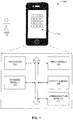
- Fig. 1 illustrates a block diagram of an apparatus 100 for setting a two hand mode to operate a touchscreen 112 of apparatus 100, according to an exemplary embodiment.
- Apparatus 100 may be a computing device configured to control a display on touchscreen 112.
- Apparatus 100 may represent a portable device including, for example, mobile telephones, smartphones, personal digital assistants (PDAs) having wireless communication capability, video game controllers, tablet personal computers (PCs), notebook computers, laptop computers, or any additional or alternative mobile device known in the art configured to include a touchscreen for input and output.
- Fig. 1 also shows a user 150 to operate apparatus 100.
- Apparatus 100 includes one or more processors, such as, for example, processor 102, also known as a central processing unit (CPU). Apparatus 100 also includes a storage module 104, an input module 106, an output module 108, and a communication module 110.
- Processor 102 may be one or more known processing devices, such as a microprocessor from the PentiumTM family manufactured by IntelTM or the TurionTM family manufactured by AMDTM.
- Processor 102 may include a single core or multiple core processor system that provides the ability to perform parallel processing.
- processor 102 may be a single core processor that is configured with virtual processing technologies known to those skilled in the art.
- processor 102 may use logical processors to simultaneously execute and control multiple processes.
- Processor 102 may implement virtual machine technologies, or other similar known technologies, to provide the ability to execute, control, run, manipulate, store, etc., multiple software processes, applications, programs, etc.
- processor 102 includes a multiple-core processor arrangement (e.g., dual or quad core) that is configured to provide parallel processing functionalities to allow apparatus 100 to execute multiple processes simultaneously.
- processor arrangement e.g., dual or quad core
- processor arrangements could be implemented that provide for the capabilities disclosed herein.
- Storage module 104 includes one or more storage devices configured to store information used by processor 102 (or another component) to perform certain functions according to exemplary embodiments.
- the one or more storage devices may include, for example, a hard drive, a flash drive, an optical drive, a random-access memory (RAM), a read-only memory (ROM), or any other computer-readable medium known in the art.
- Storage module 104 can store instructions to enable processor 102 to execute one or more applications, network communication processes, and any other type of application or software known to be available on computing devices. Additionally or alternatively, instructions, application programs, etc., may be stored in an external storage or available from a memory over a network.
- the one or more storage devices of storage module 104 may be volatile or non-volatile, magnetic, semiconductor, optical, removable, non-removable, or other type of storage device or tangible computer-readable medium.
- Input module 106 includes one or more input devices and/or mechanisms to receive input from user 150.
- input module 106 may include a keyboard, a keypad, a mouse, a joystick, a stylus, a button, a thumbwheel, a touchscreen, or any other input device configured to receive input from user 150.
- input module 106 may include touchscreen 112, which is configured to detect touch gestures of user 150 and convert the touch gestures to electronic signals for controlling the display on touchscreen 112.
- Output module 108 includes a display device, a speaker, a vibration generator, or any other output device known in the art.
- output module 108 is configured to provide feedback to user 150.
- output module 108 may be configured to receive signals from processor 102 and generate a graphical user interface screen including a plurality of graphical elements. These graphical elements may include, for example, icons associated with applications installed on apparatus 100 and stored in storage module 104, menus, buttons, sliding bars, interface controls, etc.
- touchscreen 112 is configured to function as output module 108, on which the plurality of graphical elements are displayed.
- Communication module 110 is configured to communicate with a telephone network, a wireless cellular network, or a computer network as known in the art.
- communication module 110 may include a modem configured to provide network communication with a telephone network or a wireless cellular network.
- communication module 110 may include an Ethernet interface, a Wi-Fi interface, or a Bluetooth® interface to provide network communication with an Ethernet, a local area network (LAN), a wide area network (WAN), or any other computer networks.
- LAN local area network
- WAN wide area network
- user 150 operates apparatus 100 through touchscreen 112 using, for example, hands or fingers.
- User 150 touches touchscreen 112 with one or more fingers while operating apparatus 100.
- the one or more fingers of user 150 generate at least one point of contact on touchscreen 112.
- Processor 102 is configured to detect the coordinates of the point(s) of contact generated by the one or more fingers of user 150 according to the electronic signals generated by touchscreen 112.
- processor 102 can be configured to determine whether user 150 intends to use two hands, based on respective coordinates of the points of contact generated by the four fingers on touchscreen 112.
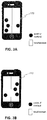
- processor 102 is configured to determine an invisible dividing line on touchscreen 112 ("dividing line"). According to the illustrated embodiments, processor 102 can be configured to determine a dividing line 200 in the middle of touchscreen 112 based on coordinate information, as shown in Fig. 2 .
- processor 102 is configured to use dividing line 200 to determine whether user 150 intends to use two hands to operate touchscreen 112 of apparatus 100. For example, if user 150 uses four fingers to touch touchscreen 112, four points of contact are generated on touchscreen 112. As shown in Fig. 3A , if the coordinates of one point of contact fall to the right side of dividing line 200, and the respective coordinates of the other three points of contact all fall to the left side of dividing line 200, processor 102 is configured to determine that user 150 intends to use two hands.
- processor 102 is configured to determine that user 150 intends to use two hands.
- processor 102 is configured to determine that user 150 intends to use two hands.
- processor 102 determines that user 150 intends to use two hands to operate touchscreen 112
- processor 102 is configured to cause touchscreen 112 to display an interface screen notifying user 150 that touchscreen 112 is set in a two hand operation mode.
- processor 102 is configured to control a display on touchscreen 112 of apparatus 100, as a result of setting a two hand mode to operate touchscreen 112.
- processor 102 is configured to cause touchscreen 112 to display the icons in a layout that facilitates the thumbs and/or the fingers of user 150 reaching all of the icons on touchscreen 112.
- Fig. 5 shows a display 500 of icons 502 on touchscreen 112 as a result of setting a two hand mode to operate touchscreen 112, according to an exemplary embodiment.
- processor 102 is configured to cause touchscreen 112 to display icons 502 in a grid layout.
- processor 102 can be configured to display icons 502 in other layouts that facilitate access during operation of touchscreen 112 in the two hand mode.
- processor 102 determines that user 150 does not intend to use two hands, and therefore a two hand mode is not set to operate touchscreen 112, processor 102 is configured to cause touchscreen 112 to maintain its default layout. For example, in the default layout, icons 502 can be displayed in the bottom corner area of either the left or the right side of touchscreen 112. Additionally or alternatively, processor 102 can determine whether user 150 intends to use two hands to operate touchscreen 112 by detecting whether user 150 presses a button. In one example, apparatus 100 is configured to include a button on either the left or the right side. If user 150 intends to use both hands, user 150 presses the button. Functions regarding displaying the icons are the same as or similar to those exemplary embodiments provided above, and the detailed description is therefore omitted. Fig.
- Process 600 illustrates a flow chart of a process 600 for setting a two hand mode to operate touchscreen 112, according to an exemplary embodiment.
- Process 600 is performed by processor 102 according to computer-executable instructions stored in storage module 104.
- user 150 starts process 600 by touching touchscreen 112.
- user 150 uses one or more fingers to touch touchscreen 112, and processor 102 is configured to detect that user 150 is touching touchscreen 112 (step 601).
- Processor 102 is configured to determine the number of points of contact generated by the one or more fingers of user 150.
- user 150 may use four fingers to operate touchscreen 112.
- processor 102 can be configured to determine whether there are four points of contact on touchscreen 112 generated by the four fingers of user 150 (step 602).
- processor 102 is configured to wait for a predetermined period of time before confirming that there are four points of contact on touchscreen 112 generated by user 150.
- processor 102 waits for 10ms before confirming whether there are four points of contact generated on touchscreen 112 (step 603).
- processor 102 If processor 102 confirms that there are four points of contact on touchscreen 112, processor 102 initiates a counter K at a value of 0 (step 604).
- Processor 102 is configured to check the total number of the points of contact and their coordinates to determine whether user 150 intends to use two hands to operate touchscreen 112.
- the predetermined total number of the points of contact can be four, but another number could be the total number of the points of contact for determining whether user 150 intends to use two hands. If the total number of the points of contact is predetermined to be four, processor 102 is configured to check whether there are only four points of contact. In such a case, processor 102 is also configured to detect the coordinates of the four points of contact to determine whether user 150 intends to use two hands to operate touchscreen 112 (step 605).
- processor 102 can be configured to determine whether the coordinates of one point of contact fall on one side (either the left side or the right side) of touchscreen 112, and respective coordinates of the other three points of contact all fall on the other side of touchscreen 112. As another example, if the total number of the points of contact is predetermined to be four, processor 102 can be configured to determine whether the coordinates of two points of contact fall on one side of touchscreen 112, and the coordinates of the other two points of contact fall on the other side of touchscreen 112.
- processor 102 determines that there are greater or fewer than a predetermined total number of points of contact detected on touchscreen 112, and/or the distribution of the points of contact are not consistent with a predetermined distribution, processor 102 is configured to determine that an invalid operation or other operation has occurred (step 606). For example, if the predetermined total number of points of contact is four, and processor 102 determines that there are greater or fewer than four points of contact detected on touchscreen 112, processor 102 can be configured to determine that an invalid operation or other operation has occurred.
- processor 102 determines that there are only four points of contact on touchscreen 112, if the distribution of the points of contact is not with one point of contact on one side and three points of contact on the different side of touchscreen 112, or with two points of contact on one side and the other two points of contact on the other side of touchscreen 112, processor 102 is configured to determine that an invalid operation or other operation has occurred. In such case, the process flows to step 612.
- processor 102 is determining whether there are only four points of contact on touchscreen 112, and the coordinates of one point of contact fall on one side (either the left side or the right side) of touchscreen 112, and the respective coordinates of the other three points of contact all fall on the other side of touchscreen 112, the counter K is incremented by 1 (step 607).
- Processor 102 is configured to determine whether the counter K has incremented to a predetermined number, such as, for example, 50 (step 608). If counter K has incremented to a number exceeding 50, processor 102 is configured to wait for a predetermined period of time, such as, for example, 10ms. After waiting for 10ms, processor 102 is configured to determine whether there are only four points of contact, and whether the coordinates of one point of contact fall on one side (left or right) of touchscreen 112, and the respective coordinates of the other three points of contact all fall on the other side of touchscreen 112 (step 609).
- a predetermined number such as, for example, 50
- processor 102 is configured to wait for a predetermined period of time, such as, for example, 10ms. After waiting for 10ms, processor 102 is configured to determine whether there are only four points of contact, and whether the coordinates of one point of contact fall on one side (left or right) of touchscreen 112, and the respective coordinates of the other three points of contact all fall on the other side
- processor 102 can be configured to cause touchscreen 112 to display a screen interface notifying user 150 that touchscreen 112 has been set in a two hand operation mode (step 610).
- Processor 102 is configured to control the display of icons on touchscreen 112 if user 150 has set a two hand mode to operate touchscreen 112 (step 611). For example, as shown in Fig. 5 , if processor 102 determines that user 150 intends to use both hands to operate touchscreen 112, processor 102 is configured to cause touchscreen 112 to display icons 502 on touchscreen 112 in, for example, a grid layout. However, the layout for displaying the icons on touchscreen 112 is not limited to the grid layout. If processor 102 determines that user 150 does not intend to use two hands, and therefore a two hand mode is not set to operate touchscreen 112, processor 102 can be configured to cause touchscreen 112 to maintain its default layout. For example, in the default layout, icons 502 can be displayed in the bottom corner area of either the left or the right side of touchscreen 112.
Landscapes
- Engineering & Computer Science (AREA)
- General Engineering & Computer Science (AREA)
- Theoretical Computer Science (AREA)
- Human Computer Interaction (AREA)
- Physics & Mathematics (AREA)
- General Physics & Mathematics (AREA)
- User Interface Of Digital Computer (AREA)
Claims (20)
- Verfahren zur Einstellung eines Modus zum Bedienen eines Berührungsbildschirms (112), welches Folgendes aufweist:Empfangen, über den Berührungsbildschirm (112), wenigstens eines Kontaktpunkts auf dem Berührungsbildschirm (112), der durch einen oder mehrere Finger eines Benutzers erzeugt wird, wobei der Berührungsbildschirm (112) eine Vielzahl von Symbolen (502) aufweist; Detektieren einer gesamten Anzahl der Kontaktpunkte auf dem Berührungsbildschirm (112) zu einer Zeit mittels wenigstens eines Verarbeitungsgeräts;gekennzeichnet durchPrüfen, mittels des wenigstens einen Verarbeitungsgeräts, ob die Gesamtzahl der Kontaktpunkte gleich einer vorbestimmten Gesamtzahl der Kontaktpunkte ist, und, wenn die Gesamtzahl der Kontaktpunkte gleich der vorbestimmten Gesamtzahl der Kontaktpunkte ist, dann:Detektieren der jeweiligen Koordinaten der Kontaktpunkte mittels des wenigstens einen Verarbeitungsgeräts;Ermitteln, basierend auf der Gesamtzahl der Kontaktpunkte und der entsprechenden Koordinaten der Kontaktpunkte, ob der Benutzer vorhat, zwei Hände zum Bedienen des Berührungsbildschirms (112) zu verwenden, undSteuern des Berührungsbildschirms (112) derart, dass dieser die Vielzahl von Symbolen (502) in einem Zweihand-Modus anzeigt, und zwar gemäß eines Ergebnisses der Ermittlung der Zweihand-Bedienung.
- Verfahren nach Anspruch 1, welches des Weiteren das Ermitteln einer Teilungslinie (200) in der Mitte des Berührungsbildschirms (112) aufweist, und wobei das Ermitteln, ob der Benutzer vorhat, zwei Hände zu verwenden, um den Berührungsbildschirm (112) zu bedienen, des Weiteren das Ermitteln einer Beziehung zwischen den entsprechenden Koordinaten der Kontaktpunkte und der Teilungslinie (200) aufweist.
- Verfahren nach Anspruch 2, welches des Weiteren das Ermitteln aufweist, dass der Benutzer vorhat, zwei Hände zu benutzen, um den Berührungsbildschirm (112) zu bedienen, falls:die Gesamtzahl der Kontaktpunkte vier ist;die Koordinaten eines Kontaktpunkts auf die linke Seite der Teilungslinie (200) fallen; unddie jeweiligen Koordinaten der anderen drei Kontaktpunkte alle auf die rechte Seite der Teilungslinie (200) fallen.
- Verfahren nach Anspruch 2, welches des Weiteren das Ermitteln aufweist, dass der Benutzer vorhat, zwei Hände zu benutzen, um den Berührungsbildschirm (112) zu bedienen, falls:die Gesamtzahl der Kontaktpunkte vier ist;die Koordinaten eines Kontaktpunkts auf die rechte Seite der Teilungslinie (200) fallen; unddie jeweiligen Koordinaten der anderen drei Kontaktpunkte alle auf die linke Seite der Teilungslinie (200) fallen.
- Verfahren nach Anspruch 2, welches des Weiteren das Ermitteln aufweist, dass der Benutzer vorhat, zwei Hände zu benutzen, um den Berührungsbildschirm (112) zu bedienen, falls:die Gesamtzahl der Kontaktpunkte vier ist;die Koordinaten von zwei Kontaktpunkten auf die linke Seite der Teilungslinie (200) fallen; unddie Koordinaten der anderen zwei Kontaktpunkte auf die rechte Seite der Teilungslinie (200) fallen.
- Verfahren nach Anspruch 1, welches des Weiteren Folgendes aufweist:
Steuern, dass, wenn ein Ergebnis des Ermitteins, dass der Benutzer vorhat, zwei Hände zu benutzen, um den Berührungsbildschirm (112) zu bedienen, der Berührungsbildschirm (112) die Vielzahl von Symbolen (502) in einem Gitterlayout anzeigt. - Verfahren nach Anspruch 1, welches des Weiteren das Erzeugen eines Schnittstellenbildschirms aufweist, der den Benutzer benachrichtigt, dass der Berührungsbildschirm (112) in dem Zweihand-Bedienungsmodus eingestellt ist, wenn ein Ergebnis des Ermittelns ist, dass der Benutzer vorhat, zwei Hände zu benutzen, um den Berührungsbildschirm (112) zu bedienen.
- Vorrichtung (100) zum Einstellen eines Modus zum Bedienen eines Berührungsbildschirms (112), welcher Folgendes aufweist:ein Speichermodul (104), das dafür vorgesehen ist, von einem Computer ausführbare Befehle zu speichern; undeinen Prozessor (102), der den von dem Computer ausführbaren Befehl ausführt und für Folgendes vorgesehen ist:Empfangen, über den Berührungsbildschirm (112), wenigstens eines Kontaktpunkts auf dem Berührungsbildschirm (112), der durch einen oder mehrere Finger eines Benutzers erzeugt wurde, wobei der Berührungsbildschirm (112) eine Vielzahl von Symbolen (502) aufweist;Detektieren zu einer Zeit eine Gesamtzahl der Kontaktpunkte auf dem Berührungsbildschirm (112);dadurch gekennzeichnet, dassder Prozessor des Weiteren für Folgendes vorgesehen ist:
Prüfen, ob die Gesamtzahl der Kontaktpunkte gleich einer vorbestimmten Gesamtzahl der Kontaktpunkte ist, und, falls die Gesamtzahl der Kontaktpunkte gleich der vorbestimmten Gesamtzahl der Kontaktpunkte ist, dann:Detektieren der entsprechenden Koordinaten der Kontaktpunkte;Ermitteln, basierend auf der Gesamtzahl der Kontaktpunkte und der entsprechenden Koordinaten der Kontaktpunkte, ob der Benutzer vorhat, zwei Hände zum Bedienen des Berührungsbildschirms (112) zu verwenden, undSteuern des Berührungsbildschirms (112) derart, dass dieser die Vielzahl von Symbolen (502) in einem Zweihand-Modus anzeigt, und zwar gemäß eines Ergebnisses der Ermittlung der Zweihand-Bedienung. - Vorrichtung (100) nach Anspruch 8, wobei der Prozessor (102) für Folgendes vorgesehen ist:Ermitteln einer Teilungslinie (200) in der Mitte des Berührungsbildschirms (112); undErmitteln einer Beziehung zwischen den entsprechenden Koordinaten der Kontaktpunkte und der Teilungslinie (200).
- Vorrichtung (100) nach Anspruch 9, wobei der Prozessor (102) dafür vorgesehen ist, zu ermitteln, dass der Benutzer vorhat, zwei Hände zu benutzen, um den Berührungsbildschirm (112) zu bedienen, falls:die Gesamtzahl der Kontaktpunkte vier ist;die Koordinaten eines Kontaktpunkts auf die linke Seite der Teilungslinie (200) fallen; unddie jeweiligen Koordinaten der anderen drei Kontaktpunkte alle auf die rechte Seite der Teilungslinie (200) fallen.
- Vorrichtung (100) nach Anspruch 9, wobei der Prozessor (102) dafür vorgesehen ist, zu ermitteln, dass der Benutzer vorhat, zwei Hände zu benutzen, um den Berührungsbildschirm (112) zu bedienen, falls:die Gesamtzahl der Kontaktpunkte vier ist;die Koordinaten eines Kontaktpunkts auf die rechte Seite der Teilungslinie (200) fallen; unddie jeweiligen Koordinaten der anderen drei Kontaktpunkte alle auf die linke Seite der Teilungslinie (200) fallen.
- Vorrichtung (100) nach Anspruch 9, wobei der Prozessor (102) dafür vorgesehen ist, zu ermitteln, dass der Benutzer vorhat, zwei Hände zu benutzen, um den Berührungsbildschirm (112) zu bedienen, falls:die Gesamtzahl der Kontaktpunkte vier ist;die Koordinaten von zwei Kontaktpunkten auf die linke Seite der Teilungslinie (200) fallen; unddie Koordinaten der anderen zwei Kontaktpunkte auf die rechte Seite der Teilungslinie (200) fallen.
- Vorrichtung (100) nach Anspruch 8, wobei der Prozessor (102) für Folgendes vorgesehen ist:
Steuern, dass, wenn ein Ergebnis des Ermittelns, dass der Benutzer vorhat, zwei Hände zu benutzen, um den Berührungsbildschirm (112) zu bedienen, der Berührungsbildschirm (112) die Vielzahl von Symbolen (502) in einem Gitterlayout anzeigt. - Vorrichtung (100) nach Anspruch 8, wobei der Prozessor (102) dafür vorgesehen ist, einen Schnittstellenbildschirm zu erzeugen, der den Benutzer benachrichtigt, dass der Berührungsbildschirm (112) in dem Zweihand-Bedienungsmodus eingestellt ist, wenn ein Ergebnis des Ermittelns ist, dass der Benutzer vorhat, zwei Hände zu benutzen, um den Berührungsbildschirm (112) zu bedienen.
- Computerlesbares Medium, das Befehle beinhaltet, die, wenn sie von einem Prozessor ausgeführt werden, bewirken, dass der Prozessor (102) ein Verfahren zur Einstellung eines Modus zum Bedienen eines Berührungsbildschirms (112) durchführt, wobei das Verfahren Folgendes aufweist:Empfangen, über den Berührungsbildschirm (112), wenigstens eines Kontaktpunkts auf dem Berührungsbildschirm (112), der durch einen oder mehrere Finger eines Benutzers erzeugt wird, wobei der Berührungsbildschirm (112) eine Vielzahl von Symbolen (502) aufweist; Detektieren einer gesamten Anzahl der Kontaktpunkte auf dem Berührungsbildschirm (112) zu einer Zeit mittels wenigstens eines Verarbeitungsgeräts;dadurch gekennzeichnet, dassdas Verfahren des Weiteren Folgendes aufweist:
Prüfen, ob die Gesamtzahl der Kontaktpunkte gleich einer vorbestimmten Gesamtzahl der Kontaktpunkte ist, und, wenn die Gesamtzahl der Kontaktpunkte gleich der vorbestimmten Gesamtzahl der Kontaktpunkte ist, dann:Detektieren der jeweiligen Koordinaten der Kontaktpunkte mittels des wenigstens einen Verarbeitungsgeräts;Ermitteln, basierend auf der Gesamtzahl der Kontaktpunkte und der entsprechenden Koordinaten der Kontaktpunkte, ob der Benutzer vorhat, zwei Hände zum Bedienen des Berührungsbildschirms (112) zu verwenden, undSteuern des Berührungsbildschirms (112) derart, dass dieser die Vielzahl von Symbolen (502) in einem Zweihand-Modus anzeigt, und zwar gemäß eines Ergebnisses der Ermittlung der Zweihand-Bedienung. - Computerlesbares Medium nach Anspruch 15, wobei das Verfahren des Weiteren das Ermitteln einer Teilungslinie (200) in der Mitte des Berührungsbildschirms (112) aufweist, und
wobei das Ermitteln, ob der Benutzer vorhat, zwei Hände zu verwenden, um den Berührungsbildschirm (112) zu bedienen, des Weiteren das Ermitteln einer Beziehung zwischen den entsprechenden Koordinaten der Kontaktpunkte und der Teilungslinie (200) aufweist. - Computerlesbares Medium nach Anspruch 16, wobei das Verfahren des Weiteren das Ermitteln aufweist, dass der Benutzer vorhat, zwei Hände zu benutzen, um den Berührungsbildschirm (112) zu bedienen, falls:die Gesamtzahl der Kontaktpunkte vier ist;die Koordinaten eines Kontaktpunkts auf die eine Seite der Teilungslinie (200) fallen; unddie jeweiligen Koordinaten der anderen drei Kontaktpunkte alle auf die andere Seite der Teilungslinie (200) fallen.
- Computerlesbares Medium nach Anspruch 16, wobei das Verfahren des Weiteren das Ermitteln aufweist, dass der Benutzer vorhat, zwei Hände zu benutzen, um den Berührungsbildschirm (112) zu bedienen, falls:die Gesamtzahl der Kontaktpunkte vier ist;die Koordinaten von zwei Kontaktpunkten auf die linke Seite der Teilungslinie (200) fallen; unddie Koordinaten der anderen zwei Kontaktpunkte auf die rechte Seite der Teilungslinie (200) fallen.
- Computerlesbares Medium nach Anspruch 15, wobei das Verfahren des Weiteren Folgendes aufweist:
Steuern, dass, wenn ein Ergebnis des Ermitteins, dass der Benutzer vorhat, zwei Hände zu benutzen, um den Berührungsbildschirm (112) zu bedienen, der Berührungsbildschirm (112) die Vielzahl von Symbolen (502) in einem Gitterlayout anzeigt. - Computerlesbares Medium nach Anspruch 15, wobei das Verfahren des Weiteren das Erzeugen eines Schnittstellenbildschirms aufweist, der den Benutzer benachrichtigt, dass der Berührungsbildschirm (112) in dem Zweihand-Bedienungsmodus eingestellt ist, wenn ein Ergebnis des Ermittelns ist, dass der Benutzer vorhat, zwei Hände zu benutzen, um den Berührungsbildschirm (112) zu bedienen.
Applications Claiming Priority (2)
| Application Number | Priority Date | Filing Date | Title |
|---|---|---|---|
| CN201310150736.2A CN103513817B (zh) | 2013-04-26 | 2013-04-26 | 一种触控设备及控制其配置操作模式的方法、装置 |
| PCT/CN2013/077390 WO2013189278A2 (en) | 2013-04-26 | 2013-06-18 | Apparatus and method for setting a two hand mode to operate a touchscreen |
Publications (2)
| Publication Number | Publication Date |
|---|---|
| EP2796980A1 EP2796980A1 (de) | 2014-10-29 |
| EP2796980B1 true EP2796980B1 (de) | 2019-04-10 |
Family
ID=48917401
Family Applications (1)
| Application Number | Title | Priority Date | Filing Date |
|---|---|---|---|
| EP13179107.1A Active EP2796980B1 (de) | 2013-04-26 | 2013-08-02 | Vorrichtung und Verfahren zur Einstellung einer Zweihand-Betriebsart zum Betrieb eines Berührungsbildschirms |
Country Status (1)
| Country | Link |
|---|---|
| EP (1) | EP2796980B1 (de) |
Families Citing this family (1)
| Publication number | Priority date | Publication date | Assignee | Title |
|---|---|---|---|---|
| JP6838563B2 (ja) | 2015-12-22 | 2021-03-03 | フォルシアクラリオン・エレクトロニクス株式会社 | 車載器、表示領域分割方法、プログラムおよび情報制御装置 |
Family Cites Families (3)
| Publication number | Priority date | Publication date | Assignee | Title |
|---|---|---|---|---|
| US10048860B2 (en) * | 2006-04-06 | 2018-08-14 | Google Technology Holdings LLC | Method and apparatus for user interface adaptation |
| WO2012019350A1 (en) * | 2010-08-12 | 2012-02-16 | Google Inc. | Finger identification on a touchscreen |
| JP5222967B2 (ja) * | 2011-03-23 | 2013-06-26 | 株式会社エヌ・ティ・ティ・ドコモ | 携帯端末 |
-
2013
- 2013-08-02 EP EP13179107.1A patent/EP2796980B1/de active Active
Non-Patent Citations (1)
| Title |
|---|
| None * |
Also Published As
| Publication number | Publication date |
|---|---|
| EP2796980A1 (de) | 2014-10-29 |
Similar Documents
| Publication | Publication Date | Title |
|---|---|---|
| US9342214B2 (en) | Apparatus and method for setting a two hand mode to operate a touchscreen | |
| US20160041674A1 (en) | Apparatus and method for controlling a touchscreen display for one hand operation | |
| US9575654B2 (en) | Touch device and control method thereof | |
| JP5105127B2 (ja) | 携帯端末、そのキー操作制御方法およびプログラム | |
| JP5759660B2 (ja) | タッチ・スクリーンを備える携帯式情報端末および入力方法 | |
| RU2687037C1 (ru) | Способ, устройство быстрого разделения экрана, электронное устройство, ui отображения и носитель хранения | |
| KR102069862B1 (ko) | 가상 키패드 제어 방법 및 그 전자 장치 | |
| US9335925B2 (en) | Method of performing keypad input in a portable terminal and apparatus | |
| CN104331182B (zh) | 具有辅助触摸屏的便携式终端 | |
| US20150185953A1 (en) | Optimization operation method and apparatus for terminal interface | |
| CN107124508A (zh) | 悬浮控件的位置调整方法、装置及终端、可读存储介质 | |
| KR20140040401A (ko) | 한 손 제어 모드를 제공하기 위한 방법 및 그 전자장치 | |
| WO2014157357A1 (ja) | 情報端末、表示制御方法及びそのプログラム | |
| KR102117086B1 (ko) | 단말기 및 그의 조작 방법 | |
| CN105630363A (zh) | 虚拟按钮的显示方法及其电子装置与显示虚拟按钮的装置 | |
| JPWO2012111230A1 (ja) | 情報処理端末およびその制御方法 | |
| TWI615747B (zh) | 虛擬鍵盤顯示系統及方法 | |
| EP2717141A1 (de) | Informationsverarbeitungsvorrichtung und steuerungsverfahren dafür | |
| CN103703435A (zh) | 信息处理装置、信息处理方法和信息处理程序 | |
| CN104898880A (zh) | 一种控制方法及电子设备 | |
| EP2796980B1 (de) | Vorrichtung und Verfahren zur Einstellung einer Zweihand-Betriebsart zum Betrieb eines Berührungsbildschirms | |
| US20150153925A1 (en) | Method for operating gestures and method for calling cursor | |
| US20160054904A1 (en) | Method and apparatus for adjusting a graphical object according to operator preference | |
| EP2796981B1 (de) | Vorrichtung und Verfahren zur Ansteuerung eines Berührungsbildschirms für einhändige Bedienung | |
| CN103500062A (zh) | 一种终端、终端控制方法及装置 |
Legal Events
| Date | Code | Title | Description |
|---|---|---|---|
| PUAI | Public reference made under article 153(3) epc to a published international application that has entered the european phase |
Free format text: ORIGINAL CODE: 0009012 |
|
| 17P | Request for examination filed |
Effective date: 20130802 |
|
| AK | Designated contracting states |
Kind code of ref document: A1 Designated state(s): AL AT BE BG CH CY CZ DE DK EE ES FI FR GB GR HR HU IE IS IT LI LT LU LV MC MK MT NL NO PL PT RO RS SE SI SK SM TR |
|
| AX | Request for extension of the european patent |
Extension state: BA ME |
|
| R17P | Request for examination filed (corrected) |
Effective date: 20150429 |
|
| RBV | Designated contracting states (corrected) |
Designated state(s): AL AT BE BG CH CY CZ DE DK EE ES FI FR GB GR HR HU IE IS IT LI LT LU LV MC MK MT NL NO PL PT RO RS SE SI SK SM TR |
|
| STAA | Information on the status of an ep patent application or granted ep patent |
Free format text: STATUS: EXAMINATION IS IN PROGRESS |
|
| 17Q | First examination report despatched |
Effective date: 20170918 |
|
| GRAP | Despatch of communication of intention to grant a patent |
Free format text: ORIGINAL CODE: EPIDOSNIGR1 |
|
| STAA | Information on the status of an ep patent application or granted ep patent |
Free format text: STATUS: GRANT OF PATENT IS INTENDED |
|
| INTG | Intention to grant announced |
Effective date: 20181105 |
|
| RAP1 | Party data changed (applicant data changed or rights of an application transferred) |
Owner name: SPREADTRUM COMMUNICATIONS (SHANGHAI) CO., LTD. |
|
| GRAS | Grant fee paid |
Free format text: ORIGINAL CODE: EPIDOSNIGR3 |
|
| GRAA | (expected) grant |
Free format text: ORIGINAL CODE: 0009210 |
|
| STAA | Information on the status of an ep patent application or granted ep patent |
Free format text: STATUS: THE PATENT HAS BEEN GRANTED |
|
| AK | Designated contracting states |
Kind code of ref document: B1 Designated state(s): AL AT BE BG CH CY CZ DE DK EE ES FI FR GB GR HR HU IE IS IT LI LT LU LV MC MK MT NL NO PL PT RO RS SE SI SK SM TR |
|
| REG | Reference to a national code |
Ref country code: GB Ref legal event code: FG4D |
|
| REG | Reference to a national code |
Ref country code: CH Ref legal event code: EP Ref country code: AT Ref legal event code: REF Ref document number: 1119601 Country of ref document: AT Kind code of ref document: T Effective date: 20190415 |
|
| REG | Reference to a national code |
Ref country code: IE Ref legal event code: FG4D |
|
| REG | Reference to a national code |
Ref country code: DE Ref legal event code: R096 Ref document number: 602013053567 Country of ref document: DE |
|
| REG | Reference to a national code |
Ref country code: NL Ref legal event code: MP Effective date: 20190410 |
|
| REG | Reference to a national code |
Ref country code: LT Ref legal event code: MG4D |
|
| REG | Reference to a national code |
Ref country code: AT Ref legal event code: MK05 Ref document number: 1119601 Country of ref document: AT Kind code of ref document: T Effective date: 20190410 |
|
| PG25 | Lapsed in a contracting state [announced via postgrant information from national office to epo] |
Ref country code: NL Free format text: LAPSE BECAUSE OF FAILURE TO SUBMIT A TRANSLATION OF THE DESCRIPTION OR TO PAY THE FEE WITHIN THE PRESCRIBED TIME-LIMIT Effective date: 20190410 |
|
| PG25 | Lapsed in a contracting state [announced via postgrant information from national office to epo] |
Ref country code: NO Free format text: LAPSE BECAUSE OF FAILURE TO SUBMIT A TRANSLATION OF THE DESCRIPTION OR TO PAY THE FEE WITHIN THE PRESCRIBED TIME-LIMIT Effective date: 20190710 Ref country code: AL Free format text: LAPSE BECAUSE OF FAILURE TO SUBMIT A TRANSLATION OF THE DESCRIPTION OR TO PAY THE FEE WITHIN THE PRESCRIBED TIME-LIMIT Effective date: 20190410 Ref country code: FI Free format text: LAPSE BECAUSE OF FAILURE TO SUBMIT A TRANSLATION OF THE DESCRIPTION OR TO PAY THE FEE WITHIN THE PRESCRIBED TIME-LIMIT Effective date: 20190410 Ref country code: HR Free format text: LAPSE BECAUSE OF FAILURE TO SUBMIT A TRANSLATION OF THE DESCRIPTION OR TO PAY THE FEE WITHIN THE PRESCRIBED TIME-LIMIT Effective date: 20190410 Ref country code: PT Free format text: LAPSE BECAUSE OF FAILURE TO SUBMIT A TRANSLATION OF THE DESCRIPTION OR TO PAY THE FEE WITHIN THE PRESCRIBED TIME-LIMIT Effective date: 20190910 Ref country code: SE Free format text: LAPSE BECAUSE OF FAILURE TO SUBMIT A TRANSLATION OF THE DESCRIPTION OR TO PAY THE FEE WITHIN THE PRESCRIBED TIME-LIMIT Effective date: 20190410 Ref country code: ES Free format text: LAPSE BECAUSE OF FAILURE TO SUBMIT A TRANSLATION OF THE DESCRIPTION OR TO PAY THE FEE WITHIN THE PRESCRIBED TIME-LIMIT Effective date: 20190410 Ref country code: LT Free format text: LAPSE BECAUSE OF FAILURE TO SUBMIT A TRANSLATION OF THE DESCRIPTION OR TO PAY THE FEE WITHIN THE PRESCRIBED TIME-LIMIT Effective date: 20190410 |
|
| PG25 | Lapsed in a contracting state [announced via postgrant information from national office to epo] |
Ref country code: GR Free format text: LAPSE BECAUSE OF FAILURE TO SUBMIT A TRANSLATION OF THE DESCRIPTION OR TO PAY THE FEE WITHIN THE PRESCRIBED TIME-LIMIT Effective date: 20190711 Ref country code: BG Free format text: LAPSE BECAUSE OF FAILURE TO SUBMIT A TRANSLATION OF THE DESCRIPTION OR TO PAY THE FEE WITHIN THE PRESCRIBED TIME-LIMIT Effective date: 20190710 Ref country code: PL Free format text: LAPSE BECAUSE OF FAILURE TO SUBMIT A TRANSLATION OF THE DESCRIPTION OR TO PAY THE FEE WITHIN THE PRESCRIBED TIME-LIMIT Effective date: 20190410 Ref country code: RS Free format text: LAPSE BECAUSE OF FAILURE TO SUBMIT A TRANSLATION OF THE DESCRIPTION OR TO PAY THE FEE WITHIN THE PRESCRIBED TIME-LIMIT Effective date: 20190410 Ref country code: LV Free format text: LAPSE BECAUSE OF FAILURE TO SUBMIT A TRANSLATION OF THE DESCRIPTION OR TO PAY THE FEE WITHIN THE PRESCRIBED TIME-LIMIT Effective date: 20190410 |
|
| PG25 | Lapsed in a contracting state [announced via postgrant information from national office to epo] |
Ref country code: IS Free format text: LAPSE BECAUSE OF FAILURE TO SUBMIT A TRANSLATION OF THE DESCRIPTION OR TO PAY THE FEE WITHIN THE PRESCRIBED TIME-LIMIT Effective date: 20190810 Ref country code: AT Free format text: LAPSE BECAUSE OF FAILURE TO SUBMIT A TRANSLATION OF THE DESCRIPTION OR TO PAY THE FEE WITHIN THE PRESCRIBED TIME-LIMIT Effective date: 20190410 |
|
| REG | Reference to a national code |
Ref country code: DE Ref legal event code: R097 Ref document number: 602013053567 Country of ref document: DE |
|
| PG25 | Lapsed in a contracting state [announced via postgrant information from national office to epo] |
Ref country code: CZ Free format text: LAPSE BECAUSE OF FAILURE TO SUBMIT A TRANSLATION OF THE DESCRIPTION OR TO PAY THE FEE WITHIN THE PRESCRIBED TIME-LIMIT Effective date: 20190410 Ref country code: RO Free format text: LAPSE BECAUSE OF FAILURE TO SUBMIT A TRANSLATION OF THE DESCRIPTION OR TO PAY THE FEE WITHIN THE PRESCRIBED TIME-LIMIT Effective date: 20190410 Ref country code: EE Free format text: LAPSE BECAUSE OF FAILURE TO SUBMIT A TRANSLATION OF THE DESCRIPTION OR TO PAY THE FEE WITHIN THE PRESCRIBED TIME-LIMIT Effective date: 20190410 Ref country code: DK Free format text: LAPSE BECAUSE OF FAILURE TO SUBMIT A TRANSLATION OF THE DESCRIPTION OR TO PAY THE FEE WITHIN THE PRESCRIBED TIME-LIMIT Effective date: 20190410 Ref country code: SK Free format text: LAPSE BECAUSE OF FAILURE TO SUBMIT A TRANSLATION OF THE DESCRIPTION OR TO PAY THE FEE WITHIN THE PRESCRIBED TIME-LIMIT Effective date: 20190410 |
|
| PLBE | No opposition filed within time limit |
Free format text: ORIGINAL CODE: 0009261 |
|
| STAA | Information on the status of an ep patent application or granted ep patent |
Free format text: STATUS: NO OPPOSITION FILED WITHIN TIME LIMIT |
|
| PG25 | Lapsed in a contracting state [announced via postgrant information from national office to epo] |
Ref country code: SM Free format text: LAPSE BECAUSE OF FAILURE TO SUBMIT A TRANSLATION OF THE DESCRIPTION OR TO PAY THE FEE WITHIN THE PRESCRIBED TIME-LIMIT Effective date: 20190410 Ref country code: IT Free format text: LAPSE BECAUSE OF FAILURE TO SUBMIT A TRANSLATION OF THE DESCRIPTION OR TO PAY THE FEE WITHIN THE PRESCRIBED TIME-LIMIT Effective date: 20190410 |
|
| 26N | No opposition filed |
Effective date: 20200113 |
|
| PG25 | Lapsed in a contracting state [announced via postgrant information from national office to epo] |
Ref country code: TR Free format text: LAPSE BECAUSE OF FAILURE TO SUBMIT A TRANSLATION OF THE DESCRIPTION OR TO PAY THE FEE WITHIN THE PRESCRIBED TIME-LIMIT Effective date: 20190410 |
|
| GBPC | Gb: european patent ceased through non-payment of renewal fee |
Effective date: 20190802 |
|
| PG25 | Lapsed in a contracting state [announced via postgrant information from national office to epo] |
Ref country code: SI Free format text: LAPSE BECAUSE OF FAILURE TO SUBMIT A TRANSLATION OF THE DESCRIPTION OR TO PAY THE FEE WITHIN THE PRESCRIBED TIME-LIMIT Effective date: 20190410 Ref country code: MC Free format text: LAPSE BECAUSE OF FAILURE TO SUBMIT A TRANSLATION OF THE DESCRIPTION OR TO PAY THE FEE WITHIN THE PRESCRIBED TIME-LIMIT Effective date: 20190410 Ref country code: LU Free format text: LAPSE BECAUSE OF NON-PAYMENT OF DUE FEES Effective date: 20190802 Ref country code: LI Free format text: LAPSE BECAUSE OF NON-PAYMENT OF DUE FEES Effective date: 20190831 Ref country code: CH Free format text: LAPSE BECAUSE OF NON-PAYMENT OF DUE FEES Effective date: 20190831 |
|
| REG | Reference to a national code |
Ref country code: BE Ref legal event code: MM Effective date: 20190831 |
|
| PG25 | Lapsed in a contracting state [announced via postgrant information from national office to epo] |
Ref country code: FR Free format text: LAPSE BECAUSE OF NON-PAYMENT OF DUE FEES Effective date: 20190831 Ref country code: IE Free format text: LAPSE BECAUSE OF NON-PAYMENT OF DUE FEES Effective date: 20190802 |
|
| PG25 | Lapsed in a contracting state [announced via postgrant information from national office to epo] |
Ref country code: GB Free format text: LAPSE BECAUSE OF NON-PAYMENT OF DUE FEES Effective date: 20190802 Ref country code: BE Free format text: LAPSE BECAUSE OF NON-PAYMENT OF DUE FEES Effective date: 20190831 |
|
| PG25 | Lapsed in a contracting state [announced via postgrant information from national office to epo] |
Ref country code: CY Free format text: LAPSE BECAUSE OF FAILURE TO SUBMIT A TRANSLATION OF THE DESCRIPTION OR TO PAY THE FEE WITHIN THE PRESCRIBED TIME-LIMIT Effective date: 20190410 |
|
| PG25 | Lapsed in a contracting state [announced via postgrant information from national office to epo] |
Ref country code: MT Free format text: LAPSE BECAUSE OF FAILURE TO SUBMIT A TRANSLATION OF THE DESCRIPTION OR TO PAY THE FEE WITHIN THE PRESCRIBED TIME-LIMIT Effective date: 20190410 Ref country code: HU Free format text: LAPSE BECAUSE OF FAILURE TO SUBMIT A TRANSLATION OF THE DESCRIPTION OR TO PAY THE FEE WITHIN THE PRESCRIBED TIME-LIMIT; INVALID AB INITIO Effective date: 20130802 |
|
| PG25 | Lapsed in a contracting state [announced via postgrant information from national office to epo] |
Ref country code: MK Free format text: LAPSE BECAUSE OF FAILURE TO SUBMIT A TRANSLATION OF THE DESCRIPTION OR TO PAY THE FEE WITHIN THE PRESCRIBED TIME-LIMIT Effective date: 20190410 |
|
| PGFP | Annual fee paid to national office [announced via postgrant information from national office to epo] |
Ref country code: DE Payment date: 20250819 Year of fee payment: 13 |