EP2575347A1 - Media processing device and method of controlling a media processing device - Google Patents
Media processing device and method of controlling a media processing device Download PDFInfo
- Publication number
- EP2575347A1 EP2575347A1 EP12184778A EP12184778A EP2575347A1 EP 2575347 A1 EP2575347 A1 EP 2575347A1 EP 12184778 A EP12184778 A EP 12184778A EP 12184778 A EP12184778 A EP 12184778A EP 2575347 A1 EP2575347 A1 EP 2575347A1
- Authority
- EP
- European Patent Office
- Prior art keywords
- function
- processing device
- disabled
- media processing
- unit
- Prior art date
- Legal status (The legal status is an assumption and is not a legal conclusion. Google has not performed a legal analysis and makes no representation as to the accuracy of the status listed.)
- Withdrawn
Links
Images


Classifications
-
- B—PERFORMING OPERATIONS; TRANSPORTING
- B41—PRINTING; LINING MACHINES; TYPEWRITERS; STAMPS
- B41J—TYPEWRITERS; SELECTIVE PRINTING MECHANISMS, i.e. MECHANISMS PRINTING OTHERWISE THAN FROM A FORME; CORRECTION OF TYPOGRAPHICAL ERRORS
- B41J13/00—Devices or arrangements of selective printing mechanisms, e.g. ink-jet printers or thermal printers, specially adapted for supporting or handling copy material in short lengths, e.g. sheets
- B41J13/0009—Devices or arrangements of selective printing mechanisms, e.g. ink-jet printers or thermal printers, specially adapted for supporting or handling copy material in short lengths, e.g. sheets control of the transport of the copy material
-
- B—PERFORMING OPERATIONS; TRANSPORTING
- B41—PRINTING; LINING MACHINES; TYPEWRITERS; STAMPS
- B41J—TYPEWRITERS; SELECTIVE PRINTING MECHANISMS, i.e. MECHANISMS PRINTING OTHERWISE THAN FROM A FORME; CORRECTION OF TYPOGRAPHICAL ERRORS
- B41J29/00—Details of, or accessories for, typewriters or selective printing mechanisms not otherwise provided for
- B41J29/38—Drives, motors, controls or automatic cut-off devices for the entire printing mechanism
- B41J29/393—Devices for controlling or analysing the entire machine ; Controlling or analysing mechanical parameters involving printing of test patterns
-
- B—PERFORMING OPERATIONS; TRANSPORTING
- B41—PRINTING; LINING MACHINES; TYPEWRITERS; STAMPS
- B41J—TYPEWRITERS; SELECTIVE PRINTING MECHANISMS, i.e. MECHANISMS PRINTING OTHERWISE THAN FROM A FORME; CORRECTION OF TYPOGRAPHICAL ERRORS
- B41J2/00—Typewriters or selective printing mechanisms characterised by the printing or marking process for which they are designed
- B41J2/005—Typewriters or selective printing mechanisms characterised by the printing or marking process for which they are designed characterised by bringing liquid or particles selectively into contact with a printing material
- B41J2/01—Ink jet
-
- B—PERFORMING OPERATIONS; TRANSPORTING
- B41—PRINTING; LINING MACHINES; TYPEWRITERS; STAMPS
- B41J—TYPEWRITERS; SELECTIVE PRINTING MECHANISMS, i.e. MECHANISMS PRINTING OTHERWISE THAN FROM A FORME; CORRECTION OF TYPOGRAPHICAL ERRORS
- B41J3/00—Typewriters or selective printing or marking mechanisms characterised by the purpose for which they are constructed
- B41J3/44—Typewriters or selective printing mechanisms having dual functions or combined with, or coupled to, apparatus performing other functions
- B41J3/445—Printers integrated in other types of apparatus, e.g. printers integrated in cameras
-
- G—PHYSICS
- G06—COMPUTING OR CALCULATING; COUNTING
- G06F—ELECTRIC DIGITAL DATA PROCESSING
- G06F3/00—Input arrangements for transferring data to be processed into a form capable of being handled by the computer; Output arrangements for transferring data from processing unit to output unit, e.g. interface arrangements
- G06F3/12—Digital output to print unit, e.g. line printer, chain printer
-
- G—PHYSICS
- G06—COMPUTING OR CALCULATING; COUNTING
- G06K—GRAPHICAL DATA READING; PRESENTATION OF DATA; RECORD CARRIERS; HANDLING RECORD CARRIERS
- G06K1/00—Methods or arrangements for marking the record carrier in digital fashion
- G06K1/12—Methods or arrangements for marking the record carrier in digital fashion otherwise than by punching
- G06K1/125—Methods or arrangements for marking the record carrier in digital fashion otherwise than by punching by magnetic means
-
- G—PHYSICS
- G06—COMPUTING OR CALCULATING; COUNTING
- G06Q—INFORMATION AND COMMUNICATION TECHNOLOGY [ICT] SPECIALLY ADAPTED FOR ADMINISTRATIVE, COMMERCIAL, FINANCIAL, MANAGERIAL OR SUPERVISORY PURPOSES; SYSTEMS OR METHODS SPECIALLY ADAPTED FOR ADMINISTRATIVE, COMMERCIAL, FINANCIAL, MANAGERIAL OR SUPERVISORY PURPOSES, NOT OTHERWISE PROVIDED FOR
- G06Q20/00—Payment architectures, schemes or protocols
- G06Q20/04—Payment circuits
- G06Q20/042—Payment circuits characterized in that the payment protocol involves at least one cheque
-
- G—PHYSICS
- G07—CHECKING-DEVICES
- G07D—HANDLING OF COINS OR VALUABLE PAPERS, e.g. TESTING, SORTING BY DENOMINATIONS, COUNTING, DISPENSING, CHANGING OR DEPOSITING
- G07D7/00—Testing specially adapted to determine the identity or genuineness of valuable papers or for segregating those which are unacceptable, e.g. banknotes that are alien to a currency
- G07D7/04—Testing magnetic properties of the materials thereof, e.g. by detection of magnetic imprint
-
- H—ELECTRICITY
- H04—ELECTRIC COMMUNICATION TECHNIQUE
- H04N—PICTORIAL COMMUNICATION, e.g. TELEVISION
- H04N1/00—Scanning, transmission or reproduction of documents or the like, e.g. facsimile transmission; Details thereof
- H04N1/00912—Arrangements for controlling a still picture apparatus or components thereof not otherwise provided for
- H04N1/00925—Inhibiting an operation
-
- H—ELECTRICITY
- H04—ELECTRIC COMMUNICATION TECHNIQUE
- H04N—PICTORIAL COMMUNICATION, e.g. TELEVISION
- H04N1/00—Scanning, transmission or reproduction of documents or the like, e.g. facsimile transmission; Details thereof
- H04N1/32—Circuits or arrangements for control or supervision between transmitter and receiver or between image input and image output device, e.g. between a still-image camera and its memory or between a still-image camera and a printer device
- H04N1/32609—Fault detection or counter-measures, e.g. original mis-positioned, shortage of paper
-
- H—ELECTRICITY
- H04—ELECTRIC COMMUNICATION TECHNIQUE
- H04N—PICTORIAL COMMUNICATION, e.g. TELEVISION
- H04N1/00—Scanning, transmission or reproduction of documents or the like, e.g. facsimile transmission; Details thereof
- H04N1/32—Circuits or arrangements for control or supervision between transmitter and receiver or between image input and image output device, e.g. between a still-image camera and its memory or between a still-image camera and a printer device
- H04N1/32609—Fault detection or counter-measures, e.g. original mis-positioned, shortage of paper
- H04N1/32646—Counter-measures
- H04N1/32673—Adjusting or controlling an operating mode, e.g. from paper reception to memory reception
Definitions
- the present invention relates to a media processing device and to a method of controlling a media processing device.
- the present invention enables reducing maintenance needs when using only some of the functions provided by a media processing device having plural function units for processing media.
- a media processing device may have a conveyance path that conveys processed media; a print unit that is disposed to the conveyance path and has a function that prints on the processed media; a reading unit that is disposed to the conveyance path and has a function that reads the processed media; and a control unit that, when a command to disable the function of the print unit or the reading unit is received from an external device, enters a function-disabled mode that disables the specified function and, when an error related to the disabled function of the print unit or the reading unit is detected, does not report the error to the external device.
- a media processing device may have a conveyance path for conveying processed media; a print unit that is disposed to the conveyance path and provides a printing function of printing on the processed media; a reading unit that is disposed to the conveyance path and provides a reading function of reading the processed media; and a control unit being configured, when a command to disable the printing function or the reading function is received from the external device, to control the media processing device such as to enter a function-disabled mode in which the respective function specified by the received command is disabled, and, when an error related to the disabled function is detected by the control unit, to refrain from reporting the detected error to the external device.
- the media processing device When the media processing device receives a command to disable either the printing function or the reading function, and an error related to the disabled function occurs, the other function can continue to be used without resolving the error. As a result, using only some functions of a media processing device with multiple functions is possible, and the burden of maintaining functions that are not used can be reduced.
- the print unit has an inkjet recording head that records by ejecting ink stored in an ink storage unit onto the processed media.
- this aspect of the invention does not report errors related to the inkjet recording head or ink supply, and enables using the reading function without performing ink-related maintenance tasks.
- the media processing device can reduce the maintenance load, and can suppress needless consumption of ink because ink is not supplied just for maintenance.
- the control unit does not enter the function-disabled mode when a command to disable a function of the print unit is received after the ink storage unit is enabled to supply ink.
- the control unit controls the media processing device such as not to enter the function-disabled mode
- ink-related maintenance is required by the system design specifications, such as when ink is supplied from the ink storage unit to the path that supplies ink
- this aspect of the invention enables the media processing device to enter the function-disabled mode only if maintenance is not required. The burden of maintenance is therefore reduced when using a function other than the printing function, and problems arising from not performing required maintenance after supplying ink is made possible can be prevented.
- the control unit when a command to disable a function of the print unit is received after the ink storage unit is enabled to supply ink, the control unit enters the function-disabled mode and enables executing specific maintenance operations related to the print unit. Specifically, when a command to disable the printing function of the print unit is received after the ink storage unit is enabled to supply ink, the control unit controls the media processing device such as to enter the function-disabled mode, and the control unit is configured to enable executing specific maintenance operations related to the print unit.
- this aspect of the invention enables performing the minimum maintenance required, thereby suppressing ink consumption and preventing problems arising from not performing required maintenance when using functions other than printing.
- the control unit considers invalid and does not report a subset of errors related to the function disabled in the function-disabled mode, but reports other errors related to the disabled function, to the external device.
- a plurality of errors may be related to the disabled function comprising a first subset of one or more errors and a second subset of one or more errors, and the control unit is configured to consider invalid errors of the first subset and is configured to not report an error of the first subset of errors related to the function disabled in the function-disabled mode upon detection of the error of the first subset, but is configured to report an error of the second subset of errors related to the disabled function upon detection of the error of the second subset, to the external device.
- Another aspect of the invention may be a method of controlling a media processing device that has a print unit with a function that prints on the processed media, and a reading unit with a function that reads the processed media, disposed to a conveyance path, the control method having steps of: entering a function-disabled mode that disables the specified function when a command to disable the function of the print unit or the reading unit is received from an external device; and when an error related to the disabled function of the print unit or the reading unit is detected, not reporting the error to the external device.
- another aspect of the invention may be a method of controlling a media processing device which is connectable to an external device and has a print unit providing a printing function of printing on a processed media and a reading unit providing a reading function of reading the processed media, disposed to a conveyance path for conveying the processed media, comprising steps of: entering, when receiving a command to disable the printing function or the reading function from the external device, a function-disabled mode in which the function specified by the received command is disabled; and refraining, when an error related to the disabled function is detected, from reporting the detected error to the external device.
- Preferred aspects of the method can be provided similar to above-described preferred aspects described with respect to the media processing device.
- the media processing device When the media processing device receives a command to disable either the printing function or the reading function, and an error related to the disabled function occurs, the other function can continue to be used without resolving the error. As a result, using only some functions of a media processing device with multiple functions is possible, and the burden of maintaining functions that are not used can be reduced.
- the invention enables using only a subset of the functions of a media processing device having plural functions, and can reduce the burden of maintenance related to unused functions.
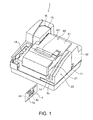
- FIG. 1 is an oblique view of a media processing device 1 according to a preferred embodiment of the invention.
- the media processing device 1 is a device that can process media such as e.g. checks 4 and/or preferably one or more other forms (generally referred to herein as "processed media") in multiple processing ways, including processing such as e.g. reading magnetic ink characters printed on the processed medium, optically imaging (scanning) both sides of the processed medium, and/or recording (printing) images including text on the processed medium.
- the media processing device 1 also functions as a card reader that can reads magnetic information recorded on card media such as credit cards or other type of cards having a magnetic recording portion such as e.g. a magnetic stripe, and further functions to produce one or more specific types of cut-sheet media, such as e.g. tickets or receipts, with an image (including text and/or figurative elements and/or pictures) recorded thereon by recording the image to thermal roll paper and cutting the paper.
- card media such as credit cards or other type of cards having a magnetic recording portion such as e.g. a magnetic stripe
- image including text and/or figurative elements and/or pictures
- a check 4 is a form (e.g. form sheet) having text information and/or image information such as a payment amount, payee, serial number, payer signature, and other information printed on a sheet (paper) potentially with a specific colored or patterned background.
- the payment amount, payee, serial number, payer signature, and other information may be printed on the face 4a (front-side) of the check 4, and an endorsement area may be provided on the back 4b (back-side) of the check 4.
- An endorsement may be printed with specific text and/or an image in the endorsement area by the inkjet head 10 described below.
- An MICR (magnetic ink character recognition) line 4c may be preprinted along the length of the check 4 on the face 4a.
- the MICR line 4c is a line of magnetic ink characters printed with magnetic ink, and can be read magnetically and optically.
- the outside case of the media processing device 1 exemplarily includes a bottom case 11 that covers the bottom part of the media processing device 1, and a cover 12 that covers the bottom case 11, and the main parts of the media processing device 1 are housed inside this outside case.
- An entrance 14 for inserting checks 4 is open at the front of the media processing device 1, and a stacker 15 that can hold a stack of plural checks 4 is provided inside the entrance 14.
- the stacker 15 can be pulled out to the front, and the checks 4 can be loaded into the stacker 15.
- the stacker 15 is adjustable to the size of the checks 4 to be stored in the stacker 15.
- the stacker 15 can be pulled out to the front, and the checks 4 can be loaded into the stacker 15 after adjusting the stacker 15 to the size of the checks 4 to be stored in the stacker 15.
- a slot 18 that is substantially U-shaped when seen from above and is used as the conveyance path W for conveying the checks 4 along the conveyance path W is formed in the cover 12, and the slot 18 ends in an exit pocket 19 arranged at the front of the media processing device 1.
- Checks 4 stored in the stacker 15 can be fed one by one into the media processing device 1 as described below, can be processed as they pass through the slot 18 along the conveyance path W, and the processed checks 4 can then be discharged from the conveyance path W into the exit pocket 19. Multiple checks 4 can accumulate in the exit pocket 19.
- the exit pocket 19 is arranged at a downstream end of the slot 18/conveyance path W and the stacker 15 is arranged at an upstream end of the slot 18/conveyance path W.
- a magnetic card reader 20 is disposed beside the stacker 15.
- the magnetic card reader 20 includes a card slot 21 exemplarily formed in the cover 12, and a MCR (magnetic card reader) head 22 ( FIG. 3 ) is disposed facing the card slot 21, for reading information magnetically recorded on cards passing through the card slot 21 with the MCR head 22.
- MCR magnetic card reader
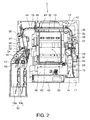
- FIG. 2 is a plan view exemplarily showing the configuration of the main unit of the media processing device 1 housed the outside case.
- a hopper 25 is disposed on one side of the stacker 15.
- the hopper 25 can pivot in the direction of the arrow by means of a hopper drive motor 26 (see FIG. 3 ), and pushes the checks 4 in the stacker 15 to the other side (to the side of the stacker 15 opposite to the side of the hopper 25).
- a pickup roller 28 driven by an ASF (automatic sheet feeder) motor 27 (see FIG.
- An ASF roller set 29 composed of a pair of rollers is disposed downstream from the stacker 15. The two rollers of the ASF roller set 29 are disposed on opposite sides of the conveyance path W, one roller of the ASF roller set 29 is driven by the ASF motor 27, and the other roller of the ASF roller set 29 is a follower roller.
- the check 4 in contact with the pickup roller 28 is nipped by the ASF roller set 29, and conveyed further downstream through the slot 18 along conveyance path W.
- An ASF paper detector 31 (see FIG. 3 ) is disposed to a specific position in the stacker 15.
- the ASF paper detector 31 is configured to detect the presence of paper/checks in the stacker and may be rendered e.g. by means of a transmissive photosensor such as in this embodiment, and detects if a check 4 is in the stacker 15.
- the present invention is not limited to the use of a transmissive photosensor for the ASF paper detector 31 and the ASF paper detector may be rendered as a detector that is configured to mechanically and/or optically detect whether a paper/check is in the stacker 15.
- a hopper position detector 32 (see FIG. 3 ) is disposed at the standby position of the hopper 25 in the stacker 15.
- the hopper position detector 32 may be rendered by such as e.g. by means of a transmissive photosensor such as in this embodiment, and detects if the hopper 25 is in the standby position.
- the present invention is not limited to the use of a transmissive photosensor for the hopper position detector 32 and the hopper position detector may be rendered as a detector that is configured to mechanically and/or optically detect whether the hopper 25 is in the standby position.
- a MICR (magnetic ink character recognition) head 35 that contacts the face 4a of the check 4 and magnetically reads the MICR line 4c (see FIG. 1 ) is disposed downstream from the ASF roller set 29.
- a MICR roller 36 is disposed opposite the MICR head 35.
- the MICR roller 36 is pushed to the MICR head 35 side, rotates while pressing the check 4 against the MICR head 35, and conveys checks 4 at a constant speed suited to reading the MICR line.
- An assist roller set 37 composed of a pair of assist rollers that guide the check 4 fed by the ASF roller set 29 to the MICR head 35 is disposed on the upstream side of the MICR head 35.
- a paper length detector 38 is disposed to the conveyance path W between the assist roller set 37 and the MICR head 35.
- the paper length detector 38 may be rendered by means of a reflective photosensor such as in this embodiment, and detects the leading end and trailing end of each check 4 by detecting if a check 4 passing through the conveyance path W is at the detection position.
- the present invention is not limited to the use of a reflective photosensor for the paper length detector 38 and the paper length detector may be rendered as a transmissive photosensor or generally as a detector that is configured to mechanically and/or optically detect the leading end and trailing end of each check 4 by detecting if a check 4 passing through the conveyance path W is at the detection position.
- the control unit 70 (control means; see FIG.
- a first conveyance roller set 40 including a pair of first conveyance rollers disposed on opposite sides of the conveyance path W is disposed to the conveyance path W on the downstream side of the MICR head 35, and a second conveyance roller set 41 including a pair of second conveyance rollers disposed on opposite sides of the conveyance path W is disposed downstream from the first conveyance roller set 40.
- the first conveyance roller set 40 and second conveyance roller set 41 are driven rotationally by a conveyance motor 42 (see FIG. 3 ), and these conveyance roller sets convey the check 4 to the inkjet printer unit 44 (print unit) exemplarily arranged downstream of the second conveyance roller set 41.
- the inkjet printer unit 44 has an inkjet head 10 (inkjet recording head).
- the inkjet head 10 is an inkjet recording head, which is supplied with ink from an ink cartridge 45 (ink storage unit) exemplarily installed in the front of the media processing device 1, and is configured to eject ink onto the check 4 for printing text and/or images to the check4.
- the inkjet head 10 in this embodiment exemplarily may print an endorsement including text or symbols on the back 4b of the check 4.
- An intermediate detector 46 is disposed between the inkjet head 10 and the second conveyance roller set 41.
- the intermediate detector 46 may be rendered e.g. by means of a reflective photosensor such as in this embodiment, and detects if a check 4 is at the intermediate detection position.
- the present invention is not limited to the use of a reflective photosensor for the intermediate detector 46 and the intermediate detector may be rendered as a transmissive photosensor or generally as a detector that is configured to mechanically and/or optically detect the presence of a check/paper is at the intermediate detection position.
- a CIS (contact image sensor) unit for optically reading checks 4 is disposed downstream from the inkjet head 10.
- This CIS unit includes a front CIS unit 47 (reading unit) for scanning/imaging the face 4a of the check 4, and a back CIS unit 48 (reading unit) for scanning/imaging the back 4b, and can thus optically scan/image the front side, the back side or both sides of each check 4.
- the front CIS unit 47 and back CIS unit 48 are disposed on opposite sides of the conveyance path W.
- a first CIS roller 50 is disposed on the upstream side and a second CIS roller 51 is disposed on the downstream side of these reading units 47 and 48.
- the first CIS roller 50 and the second CIS roller 51 are CIS rollers that are driven rotationally by the conveyance motor 42, and checks 4 are conveyed by these rollers at a constant speed while being imaged by the CIS units 47 and 48.
- a discharge detector 52 is located downstream from the second CIS roller 51.
- the discharge detector 52 may be rendered e.g. by means of a reflective photosensor such as in this embodiment, and detects if a check 4 is at the discharge detection position.
- the present invention is not limited to the use of a reflective photosensor for the discharge detector 52 and the discharge detector may be rendered as a transmissive photosensor or generally as a detector that is configured to mechanically and/or optically detect the presence of a check/paper is at the discharge detection position.
- the exit pocket 19 described above is located downstream from the front CIS unit 47 and back CIS unit 48.
- the exit pocket 19 is divided into a main pocket 19a and a sub-pocket 19b, and the slot 18 splits and is connected to both the main pocket 19a and sub-pocket 19b.
- the main pocket 19a and sub-pocket 19b can each hold a plurality of checks 4.
- a flapper 54 that switches the exit pocket 19 into which the check 4 is discharged to the main pocket 19a or sub-pocket 19b is disposed at the position where the slot 18 splits up for discharging the check 4 from the conveyance path W into either the main pocket 19a or the sub-pocket 19b.
- the flapper 54 may be rendered as a guide that - by closing the path to the main pocket 19a or the path to the sub-pocket 19b - guides the check 4 into the respective other pocket, and is driven by the flapper drive motor 55.
- a first discharge roller 56 is disposed to the path from the flapper 54 to the main pocket 19a
- another second discharge roller 57 is disposed to the other path from the flapper 54 to the sub-pocket 19b, and the checks 4 can thus be smoothly discharged by these rollers and guided by the flapper 54 into the appropriate exit pocket 19 according to the switching position of the flapper 54.
- the media processing device 1 is configured to discharge the check 4 into the main pocket 19a when the check 4 is determined to have been correctly loaded based on the result of the MICR head 35 reading the MICR line 4c, and into the sub-pocket 19b when the check 4 is determined to have not been correctly loaded.
- a thermal printer unit 60 for printing tickets with an image recorded thereon is provided in the middle of the media processing device 1.
- the thermal printer unit 60 has a printer cover 61 covering the top of the media processing device 1.
- This printer cover 61 is attached to the cover 12 so that the printer cover 61 can open and close freely.
- a roll paper compartment 62 which is a space for holding thermal roll paper, is exposed and the thermal roll paper can be installed or replaced.
- a paper exit 63 is formed in the printer cover 61, and the thermal roll paper held in the roll paper compartment 62 can be discharged through the paper exit 63.
- the thermal printer unit 60 includes a roller platen (not shown in the figure) that supplies and feeds thermal roll paper from the roll paper compartment 62 through a conveyance path of the thermal roll paper to the paper exit 63, a thermal head 65 (see FIG. 3 ) disposed opposite the platen, and a cutter unit 66 that cuts the thermal roll paper perpendicularly to the conveyance direction.
- a cut-sheet media such as e.g. a ticket or receipt
- the thermal printer unit 60 records text and/or an image on the thermal roll paper with the thermal head 65 while driving the platen and conveying the thermal roll paper in the conveyance direction, and then cuts the thermal roll paper at a specific position with the cutter unit 66 to produce a cut-sheet medium such as a ticket or receipt.
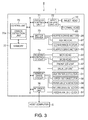
- FIG. 3 is a block diagram showing the functional configuration of a media processing system 8 composed of the media processing device 1 connected to a host computer 5 as an external device.
- the media processing device 1 has a control unit 70 including a CPU that controls media processing device 1 operation, RAM, and flash ROM; a printer control unit 71 that controls the inkjet printer unit 44 and thermal printer unit 60; and a head driver circuit 72 (generally, head driver unit rendered by means of software and/or hardware), motor driver 73, reading control circuit 74 (generally, reading control unit rendered by means of software and/or hardware), sensor drive circuit 75 (generally, a sensor drive unit rendered by means of software and/or hardware), and interface unit 76, which are connected so that they can communicate with each other.
- a control unit 70 including a CPU that controls media processing device 1 operation, RAM, and flash ROM; a printer control unit 71 that controls the inkjet printer unit 44 and thermal printer unit 60; and a head driver circuit 72 (generally, head driver unit rendered by means of software and/or
- the control unit 70 controls the other parts of the media processing device 1 by means of the CPU reading and running a control program stored in flash ROM.
- the control unit 70 also has RAM, which is memory for temporarily storing programs run by the CPU and process data.
- the control unit 70 also has memory 77 that temporarily stores data processed by the control unit 70. This memory 77 may be a memory device provided separately from or rendered using an area in the RAM of the control unit 70.
- the memory 77 has an area for temporarily storing control commands and print data received from the host computer 5, and space for writing the print image recorded by the control unit 70 on a check 4.
- the printer control unit 71 supplies drive current to the inkjet head 10 (inkjet recording head) through the head driver circuit 72 to record on a check 4 as controlled by the control unit 70.
- the printer control unit 71 also supplies drive current to the thermal head 65 through the head driver circuit 72 to record on thermal roll paper as controlled by the control unit 70.
- the motor driver 73 is connected to the hopper drive motor 26 and causes the hopper 25 to pivot as controlled by the control unit 70.
- the motor driver 73 is connected to the ASF motor 27, conveyance motor 42, and flapper drive motor 55, outputs drive current and drive pulses to the motors, and operates the motors as controlled by the control unit 70.
- the reading control circuit 74 is connected to the MCR head 22, MICR head 35, front CIS unit 47, and back CIS unit 48.
- the reading control circuit 74 causes the MCR head 22 to read the magnetic information when a card is swiped through the card slot 21 (see FIG. 1 ), and digitizes and outputs the read signal output from the MCR head 22 to the control unit 70 as controlled by the control unit 70.
- the reading control circuit 74 also reads magnetic information with the MICR head 35, and digitizes and outputs the read signal output from the MICR head 35 to the control unit 70 as controlled by the control unit 70.
- the reading control circuit 74 also images the face 4a and/or back 4b of the check 4 with the front CIS unit 47 and back CIS unit 48 as controlled by the control unit 70, and digitizes and outputs the signals output from the front CIS unit 47 and back CIS unit 48 to the control unit 70.
- the sensor drive circuit 75 is connected to the ASF paper detector 31, hopper position detector 32, paper length detector 38, intermediate detector 46, and discharge detector 52, supplies current to these detectors, gets the output values therefrom at specific times, and digitizes and outputs the acquired detection signals to the control unit 70.
- the interface unit 76 is connected to the host computer 5 by wire or wirelessly, and exchanges data, including control data, with the host computer 5 as controlled by the control unit 70.
- the control unit 70 receives process control commands (commands to execute particular processes) sent from the host computer 5, and processes checks 4 accordingly Based on a command to process a check 4, the control unit 70 gets the output value from the ASF paper detector 31 through the sensor drive circuit 75, and detects if a check 4 is in the stacker 15. If a check 4 is loaded, the sensor drive circuit 75 gets the output value of the hopper position detector 32, checks if the hopper 25 is in the initial position, controls the motor driver 73 to operate the hopper drive motor 26 and ASF motor 27, and picks and feeds one check 4 into the conveyance path W.
- process control commands commands to execute particular processes
- the control unit 70 then controls the motor driver 73 and operates the conveyance motor 42 to drive the ASF roller set 29, MICR roller 36, assist roller set 37, first conveyance roller set 40, second conveyance roller set 41, first CIS roller 50, second CIS roller 51, and discharge rollers 56, 57 to convey the check 4.
- the control unit 70 also controls the motor driver 73 and operates the flapper drive motor 55 to move the flapper 54 as needed to set the discharge destination of the check 4 after processing by the media processing device 1 is completed to the main pocket 19a or sub-pocket 19b, and discharges the check 4 with the appropriate discharge roller 56, 57.
- the motors and rollers that convey the check 4 as controlled by the control unit 70 function here as a conveyance means (conveyance unit).
- the control unit 70 controls the reading control circuit 74 to read with the MCR head 22 according to a command to read the MICR line 4c of the check 4, acquires and recognizes the magnetic waveform or data output from the MCR head 22, and outputs the recognition result to the host computer 5. Based on a command for printing a check 4 and the print data sent with the print command, the control unit 70 also writes a print image of the text and/or images to be recorded in a print buffer in memory 77. The control unit 70 also controls the printer control unit 71 to print the text and/or images in the print image on the face 4a and/or back 4b of the check 4 with the inkjet head 10.
- the control unit 70 also scans the face 4a and/or back 4b of the check 4 with the front CIS unit 47 and back CIS unit 48 according to a command to optically scan the check 4, and outputs the image data captured from the face 4a and/or back 4b of the check 4 to the host computer 5. Based on a command to print on thermal roll paper and the print data sent with the command, the control unit 70 also writes a print image of the text and/or images to be recorded in a print buffer in memory 77. The control unit 70 then controls the printer control unit 71 and motor driver 73, prints the text and images in the buffered print image to thermal roll paper with the thermal head 65, discharges the thermal roll paper after printing from the paper exit 63, and cuts the paper with the cutter unit 66.
- the media processing device 1 thus can control plural processing units (the MICR head 35, inkjet printer unit 44, front CIS unit 47 and back CIS unit 48, and thermal head 65) with the control unit 70, and processes checks 4 with an MICR function, printing function, optical reader function, and thermal roll paper printing function according to commands sent from the host computer 5.
- the media processing device 1 can use plural functions together in series, and can also use functions individually.
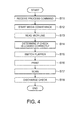
- FIG. 4 is a flow chart of operation when applying plural functions in series to a single check 4.
- the MICR function, printing function, and optical reader (scanning) function are used in a single sequence.
- the control unit 70 of the media processing device 1 drives the hopper drive motor 26 and ASF motor 27 and feeds a check 4 into the conveyance path W, and starts check 4 conveyance (step S12).
- the control unit 70 reads the MICR line 4c of the check 4 with the MICR head 35 while managing the position of the check 4 by monitoring the output from the paper length detector 38 (step S13).
- the control unit 70 determines if the check 4 was loaded correctly e.g. instead of backwards top-bottom or front-back (step S14), based thereon determines whether to discharge the check 4 into the main pocket 19a or sub-pocket 19b, and drives the flapper drive motor 55 to switch the flapper 54 as required (step S15). More specifically, if the check 4 was loaded correctly, the control unit 70 switches the flapper 54 to the main pocket 19a side, and if the check 4 was not loaded correctly, switches the flapper 54 to the sub-pocket 19b side.
- control unit 70 conveys the check 4 while monitoring the position of the check 4 based on the output from the intermediate detector 46, and records/prints a specific image on the back 4b of the check 4 with the inkjet head 10 (step S16).
- the control unit 70 then scans the face 4a of the check 4 with the front CIS unit 47 and/or simultaneously scans the back 4b with the back CIS unit 48 (step S17), and outputs the scanned image(s) to the host computer 5. Note that if the check 4 was not loaded correctly, scanning in step S17 may be skipped.
- the control unit 70 then drives the conveyance motor 42 to discharge the check 4 into the appropriate exit pocket 19 while monitoring whether or not the check 4 was discharged correctly by monitoring the output of the discharge detector 52 (step S18), and the process ends. Note that steps S14 and S15 could run parallel to steps S16 to S18.
- the control unit 70 also performs the function of an error detection unit 70a (see FIG. 3 ) by running a control program stored in flash ROM.
- the error detection unit 70a detects error factors in the media processing device 1 based on the output states of detectors detected through the sensor drive circuit 75, and determines if an error occurred or not from the content of the error factors. When an error is determined to have occurred, the error detection unit 70a stops all operation of the media processing device 1 and reports the error to the host computer 5. The main error factors detected by the error detection unit 70a are described next.
- Errors related to a check 4 may include check 4 conveyance jams and a detection that no check 4 is in the stacker 15 after a command is received.
- a check 4 is determined to be jammed when, for example, the leading end or trailing end of the check 4 is not detected by the paper length detector 38 even though the check 4 conveyance distance exceeds a specific threshold, or detecting the leading end or trailing end of the check 4 by the intermediate detector 46 or discharge detector 52 takes too long relative to the conveyance distance.
- Errors related to the inkjet printer unit 44 may include one or more of the following: the ink cartridge 45 being out of ink, the storage capacity of the waste ink tank that holds ink discharged by inkjet head 10 cleaning or flushing operations being exceeded, the number of defective nozzles detected by the inkjet head 10 nozzle check exceeding the threshold, and an abnormal temperature detected in the inkjet head 10.
- Errors related to other processing units may include one or more of an abnormal temperature in the thermal head 65, buffer errors when storing the image data from the front CIS unit 47 and back CIS unit 48 in memory 77, and running out of paper in the roll paper compartment 62.
- no ink in the ink cartridge 45, an abnormal temperature in the inkjet head 10, a full waste ink tank, an abnormal temperature in the thermal head 65, a check 4 jam, and buffer errors typically may require prompt correction of the problem in order to prevent damage, and/or require resolving the error and repeating the process, and may therefore be considered urgent errors.
- Other errors such as no paper in the roll paper compartment 62, detecting a defective nozzle in the inkjet head 10, and open cover errors, are typically unlikely to lead to irreversible damage if unaddressed, and may therefore be considered non-urgent errors.
- error detection unit 70a of the media processing device 1 goes to a mode in which commands from the host computer 5 cannot be received, or commands cannot be executed (that is, e.g. a busy or off-line state). After entering the busy or off-line mode, the error detection unit 70a monitors if the cause of the error was resolved, and could automatically return on-line when the error is resolved.
- the media processing device 1 can also execute processes individually by the respective processing units (MICR head 35, inkjet printer unit 44, front CIS unit 47 and back CIS unit 48, and thermal head 65), the media processing device 1 can also be used without, for example, ever printing with the inkjet printer unit 44. If the inkjet head 10 is never used after purchasing the media processing device 1, for example, and only the reading functions of the MICR head 35 or front CIS unit 47 and back CIS unit 48 are used, there is no need to use ink for printing.
- MICR head 35, inkjet printer unit 44, front CIS unit 47 and back CIS unit 48, and thermal head 65 the media processing device 1 can also be used without, for example, ever printing with the inkjet printer unit 44. If the inkjet head 10 is never used after purchasing the media processing device 1, for example, and only the reading functions of the MICR head 35 or front CIS unit 47 and back CIS unit 48 are used, there is no need to use ink for printing.
- the media processing device 1 may be required to perform maintenance of the nozzles of the inkjet head 10.
- Maintenance of the inkjet head 10 may include, for example, regular flushing, wiping, and/or cleaning.
- Flushing is a function that ejects a small amount of ink from all or some of the nozzles in the inkjet head 10 to remove ink that has increased in viscosity due to drying and prevent nozzle clogging.
- Wiping is an operation that maintains a desirable ink meniscus in the nozzles by wiping the nozzle face with a wiper (not shown in the figure) disposed opposite the nozzle face of the inkjet head 10, and a small amount of ink is consumed because the wiper wipes away ink.
- Cleaning is a function that applies negative pressure to an ink suction line inside a cap (not shown in the figure) that covers the nozzle face of the inkjet head 10 and suctions ink from inside the nozzles so that fresh ink flows into the nozzles and the ink supply path from the ink cartridge 45 to the nozzles to unclog the nozzles and clean the ink supply path. Because these maintenance operations require ink and are typically required to be performed even if the printing function of the inkjet head 10 is never used, the ink cartridge 45 may need to be recharged with ink as needed.
- the error detection unit in a media processing device reports an error whether or not the user uses the printing function of the inkjet head.
- the media processing device goes off-line and other functions also cannot be used.
- the media processing device 1 therefore exemplarily has a normal mode in which all functions of the plural function units are enabled, including the MICR function, printing function, optical reader function, and thermal roll paper printing function, and a disabled mode (function-disabled mode) in which using one or more of these functions is disabled. Because a subset of the functions may be disabled in the disabled mode, those disabled functions are not executed even if commands related to the disabled functions are received from the host computer 5.
- the error detection unit 70a also does not detect errors related to the disabled functions in the disabled mode, errors related to the disabled functions are not detected and the media processing device 1 does not go off-line.
- a disabled mode can be provided for any one or more of the above-described functions of the media processing device 1, but for simplicity and conciseness of this description this embodiment exemplarily describes only a printing-disabled mode that exemplarily disables a function of printing with the inkjet head 10. Any one or more other functions as described above can be analogously disabled in a corresponding disabled mode.
- FIG. 5 is a flow chart of the operation of the media processing device 1, and describes operation until the process starts when a process command is received from the host computer 5.
- the control unit 70 determines if the received command is a print command that invokes the printing function (step S22). If the received command is not a print command (step S22 returns No), the control unit 70 executes the process called by the received command (step S23).
- step S22 If the received command is a print command (step S22 returns Yes), the control unit 70 determines if the current operating mode is the printing-disabled mode (step S24), and goes to step S23 and runs the process called by the print command if the current operating mode is not the printing-disabled mode (step S24 returns No). If the current operating mode is the printing-disabled mode (step S24 returns Yes), the received command is discarded (step S25), and the process ends. Note that when the received command is discarded, a status report indicating that the printing function will not be executed can be sent to the host computer 5.
- the error detection unit 70a When in the printing-disabled mode and an error related to the printing function occurs, the error detection unit 70a does not detect the error even if the cause of the error is related to the inkjet head 10.
- a general disabled mode when a process command sent from the host computer 5 is received in connection with a function, the control unit 70 determines if the received command is a command that invokes a disabled function. If the received command is not related with a disabled function, the control unit 70 executes the process for the function called by the received command. If the received command is related with a disabled function, the control unit 70 determines if the current operating mode is the disabled mode in which the function called by the command is disabled, and runs the process of the function called by the command if the current operating mode is not the corresponding disabled mode.
- the error detection unit 70a does not detect the error even if the cause of the error is related to the processing means related with the disabled function.
- FIG. 6 is a flow chart of the operation of the media processing device 1, and shows particularly the error detection operation of the error detection unit 70a. If the error detection unit 70a receives the values or states detected by the detectors through the sensor drive circuit 75 and determines that an error occurred (step S31), the error detection unit 70a determines if the current operating mode is the printing-disabled mode (step S32). If the operating mode is not the printing-disabled mode (step S32 returns No), the error detection unit 70a determines that an error occurred based on the detected error factor (step S33), reports the error to the host computer 5 and goes off-line (step S34), and ends the process.
- the error detection unit 70a receives the values or states detected by the detectors through the sensor drive circuit 75 and determines that an error occurred (step S31), the error detection unit 70a determines if the current operating mode is the printing-disabled mode (step S32). If the operating mode is not the printing-disabled mode (step S32 returns No), the error detection unit
- step S32 determines if the error factor that occurred is related to the printing function (step S35). If the error factor was not related to printing (step S35 returns No), the error detection unit 70a goes to step S33 and detects the error. However, if the detected error factor was related to the printing function (step S35 returns Yes), the error detection unit 70a ends the process without detecting the error.
- the error detection unit 70a determines if the current operating mode is the corresponding disabled mode. If the operating mode is not the corresponding disabled mode, the error detection unit 70a determines that an error occurred based on the detected error factor, reports the error to the host computer 5 and goes off-line, and ends the process. When the cause of the error is then resolved and an operation for returning from the off-line state is performed, operation returns to the on-line state.
- the error detection unit 70a determines if the error factor that occurred is related to the corresponding disabled function. If the error factor was not related to the corresponding disabled function, the error detection unit 70a detects the error. However, if the detected error factor was related to the corresponding disabled function, the error detection unit 70a ends the process without detecting the error.
- the control unit 70 does not go off-line when inkjet printer unit 44 maintenance is not performed, and functions other than the printing function can still be used. Maintenance related to functions that are not used can therefore be omitted. Furthermore, because errors are detected unless the cause of the error is related to a disabled function, errors related to functions that are not disabled can be detected as in the normal operating mode, and such problems as equipment failures and check 4 damage can be prevented. Because the inkjet printer unit 44 is not driven in the printing-disabled mode, not performing maintenance will not result in equipment failure.
- FIG. 7A and FIG. 7B are flow charts of the operation of the media processing device 1, and more particularly show the operation related to setting the printing-disabled mode.
- FIG. 7A shows the operation related to setting the printing-disabled mode during normal operation
- FIG. 7B shows setting the printing-disabled mode in special cases.
- the control unit 70 sets the operating mode of the media processing device 1 to the printing-disabled mode according to the command (step S42).
- the host computer 5 sends a printing-disabled mode cancellation command, and the control unit 70 of the media processing device 1 receives the printing-disabled mode cancellation command and changes the operating mode to the normal mode.
- the control unit 70 sets the operating mode of the media processing device 1 to the corresponding disabled mode according to the command.
- the host computer 5 sends a corresponding disabled mode cancellation command, and the control unit 70 of the media processing device 1 receives the corresponding disabled mode cancellation command and changes the operating mode to the normal mode.
- the media processing device 1 can therefore be configured to enable setting the printing-disabled mode only if an ink cartridge 45 has never been installed.
- the control unit 70 may monitor installation of an ink cartridge 45 after the media processing device 1 power first turns on (step S51), and if an ink cartridge 45 is installed (step S51 returns Yes) turns the printing-disabled mode prohibited flag ON (step S52).
- This printing-disabled mode prohibited flag is stored in flash ROM in the control unit 70, for example. If an ink cartridge 45 is not installed (step S51 returns No), step S52 is skipped. After an ink cartridge 45 is installed and the printing-disabled mode prohibited flag is turned ON in step S52, steps S51 and S52 are skipped.
- step S53 When a set printing-disabled mode command is received from the host computer 5 (step S53), the control unit 70 reads the printing-disabled mode prohibited flag (step S54), and if the printing-disabled mode prohibited flag is OFF (step S54 returns No), changes the operating mode of the media processing device 1 to the printing-disabled mode (step S55). However, if the printing-disabled mode prohibited flag is ON (step S54 returns Yes), the control unit 70 reports that the printing-disabled mode cannot be set to the host computer 5 (step S56), and ends the process in the normal operating mode.
- the operation of steps S53 to S56 repeats on a regular cycle while the media processing device 1 power is on.
- the media processing device 1 discards the command when the received command invokes a printing function, but the command could be executed if the command relates to maintenance of the inkjet printer unit 44 in step S22 in FIG. 5 .
- This enables keeping the inkjet printer unit 44 in a usable state by performing the maintenance operation on the inkjet printer unit 44 when a command related to maintenance of the inkjet printer unit 44 is sent from the host computer 5.
- inkjet printer unit 44 maintenance normally includes flushing, wiping, and/or cleaning, and flushing is performed at a specific time interval (such as several seconds) while the cap (not shown in the figure) is removed from the nozzle face of the inkjet head 10. Wiping is performed after removing the cap before starting printing every time a print job starts or each time after a specific number of print jobs. Cleaning is performed whenever the printing time exceeds a specific threshold, or whenever a specific period of time passes with the media processing device 1 power on.
- the interval (the specific times described above) at which these flushing, wiping, and cleaning operations are performed can be preset for each function and stored in the flash ROM of the control unit 70.
- a configuration that stores at least two different intervals for flushing, wiping, and cleaning, that is, an interval for the normal mode and an interval for the printing-disabled mode, and changes the intervals for flushing, wiping, and cleaning when the printing-disabled mode is set by the operation shown in FIG. 7A is also conceivable.
- this configuration enables maintaining the inkjet printer unit 44 in a usable state, advantageously minimizes ink consumption and the time waiting for maintenance operations, and can greatly reduce the maintenance load compared with operation in the normal mode.
- the media processing device 1 has an inkjet printer unit 44 with a function for printing checks 4, and a front CIS unit 47 and back CIS unit 48 with a function for scanning checks 4, disposed to the conveyance path W through which checks 4 are conveyed, and a control unit 70 that, when a command disabling the function of the inkjet printer unit 44 or the front CIS unit 47 and back CIS unit 48 (the printing function in this example) is received from the host computer 5, enters a printing-disabled mode that disables the function specified by the command (the printing function in this example), and when in the printing-disabled mode stops sending error reports to the host computer 5 for errors related to the disabled function.
- a media processing device 1 with plural functions enables using only a subset of those functions, and enables continuing to use the media processing device 1 when an error related to a function that is not used is detected without doing anything to correct the error.
- this configuration advantageously reduces the need for maintenance related to the printing function.
- the inkjet printer unit 44 has an inkjet head 10 that records by ejecting ink stored in an ink cartridge 45 onto a check 4, and errors related to the inkjet head 10 and supplying ink are not reported when the printing-disabled mode, which uses only the front CIS unit 47 and back CIS unit 48 and does not use the inkjet printer unit 44, is set.
- the front CIS unit 47 and back CIS unit 48 can therefore be used without performing any ink-related maintenance tasks, the maintenance load can be reduced, and ink consumption can be suppressed.
- control unit 70 does not enter the printing-disabled mode when a set printing-disabled mode command is received after an ink cartridge 45 has once been installed and ink supply enabled, the maintenance load can be reduced when using functions other than the inkjet printer unit 44, and problems resulting from omitting required maintenance after supplying ink has been enabled can advantageously be prevented.
- control unit 70 can enter the function-disabled mode and enable maintenance of the inkjet printer unit 44 when a set printing-disabled mode command is received, and thereby prevent problems resulting from omitting required maintenance while also suppressing ink consumption.
- error factors related to the printing function errors related to urgent error factors are detected and reported to the host computer 5 in the printing-disabled mode, and other errors are ignored. Error detection related to the disabled function can therefore be suppressed and the maintenance load can be advantageously reduced while still appropriately reporting errors that cannot be ignored to the user.
- the media processing device 1 is described in the foregoing embodiment as being able to switch between a printing-disabled mode that disables the printing function of the inkjet head 10, and a normal mode, but the invention is not so limited. More specifically, configurations that can select a mode disabling printing by the thermal head 65, or operating modes that disable other functions, and do not detect errors for error factors related to the disabled function, are also conceivable. The causes of errors considered urgent and not-urgent above are also used as examples only, and the specific configuration of the media processing device 1 can be changed as desired.
- the media processing device 1 is described above using as an example a configuration in which ink is supplied to the inkjet head 10 from a stationary ink cartridge 45, but the actual configuration of the inkjet printer unit 44 can be changed as desired, including configurations using on-carriage ink cartridges in devices in which the inkjet head 10 is mounted on a carriage and scans with the carriage.
- the function units shown in the exemplary block diagram in FIG. 3 simply illustrate one functional configuration, the function units do not need to be rendered as discrete hardware devices, and the functions of plural function units can be combined in a single hardware device, or a single function unit can be rendered using plural hardware devices, through the cooperation of software and hardware.
- the program run by the CPU of the control unit 70 that executes the operations described above is not limited to being stored in nonvolatile memory of the control unit 70, and may be stored on a removable recording medium, or stored downloadably on another device connected over a communication line, and the media processing device 1 could download and run the program from the other device. Other aspects of the configuration can also be changed as desired.
Landscapes
- Engineering & Computer Science (AREA)
- Physics & Mathematics (AREA)
- General Physics & Mathematics (AREA)
- Signal Processing (AREA)
- Multimedia (AREA)
- Theoretical Computer Science (AREA)
- Business, Economics & Management (AREA)
- Accounting & Taxation (AREA)
- Strategic Management (AREA)
- General Business, Economics & Management (AREA)
- General Engineering & Computer Science (AREA)
- Human Computer Interaction (AREA)
- Accessory Devices And Overall Control Thereof (AREA)
- Facsimiles In General (AREA)
Abstract
Description
- The present invention relates to a media processing device and to a method of controlling a media processing device.
- Devices that perform multiple processes, such as printing and scanning images, on media to be processed are described, for example, in Japanese Unexamined Patent Appl. Pub.
JP-A-2003-248398 JP-A-2005-94141 - Media processing devices such as these that have multiple functions need to enable use of all functions, and being unable to use any function is treated as a system error. As a result, because use of the media processing device is completely disabled if an operating error occurs in either the print unit or the scanning unit, even functions where an error did not occur cannot be used. This means that even if the user of the media processing device only uses some of the available functions, the functions that are not used must also be maintained in a usable condition and therefore require maintenance.
- With consideration for the foregoing problem, the present invention enables reducing maintenance needs when using only some of the functions provided by a media processing device having plural function units for processing media.
- According to the invention, there is proposed a media processing device according to
claim 1 and a method of controlling a media processing device according to claim 6. Dependent claims relate to preferred embodiments of the present invention. - A media processing device according to one aspect of the invention may have a conveyance path that conveys processed media; a print unit that is disposed to the conveyance path and has a function that prints on the processed media; a reading unit that is disposed to the conveyance path and has a function that reads the processed media; and a control unit that, when a command to disable the function of the print unit or the reading unit is received from an external device, enters a function-disabled mode that disables the specified function and, when an error related to the disabled function of the print unit or the reading unit is detected, does not report the error to the external device.
Specifically, a media processing device according to one aspect of the invention may have a conveyance path for conveying processed media; a print unit that is disposed to the conveyance path and provides a printing function of printing on the processed media; a reading unit that is disposed to the conveyance path and provides a reading function of reading the processed media; and a control unit being configured, when a command to disable the printing function or the reading function is received from the external device, to control the media processing device such as to enter a function-disabled mode in which the respective function specified by the received command is disabled, and, when an error related to the disabled function is detected by the control unit, to refrain from reporting the detected error to the external device.
When the media processing device receives a command to disable either the printing function or the reading function, and an error related to the disabled function occurs, the other function can continue to be used without resolving the error. As a result, using only some functions of a media processing device with multiple functions is possible, and the burden of maintaining functions that are not used can be reduced. - In a media processing device according to another preferred aspect of the invention, the print unit has an inkjet recording head that records by ejecting ink stored in an ink storage unit onto the processed media.
By setting the function-disabled mode that disables the printing function when using only the reading (scanning) function and not using the print function of the inkjet recording head, this aspect of the invention does not report errors related to the inkjet recording head or ink supply, and enables using the reading function without performing ink-related maintenance tasks. As a result, the media processing device can reduce the maintenance load, and can suppress needless consumption of ink because ink is not supplied just for maintenance. - In a media processing device according to another preferred aspect of the invention, the control unit does not enter the function-disabled mode when a command to disable a function of the print unit is received after the ink storage unit is enabled to supply ink. Specifically, when a command to disable the printing function of the print unit is received after the ink storage unit is enabled to supply ink, the control unit controls the media processing device such as not to enter the function-disabled mode
When ink-related maintenance is required by the system design specifications, such as when ink is supplied from the ink storage unit to the path that supplies ink, this aspect of the invention enables the media processing device to enter the function-disabled mode only if maintenance is not required. The burden of maintenance is therefore reduced when using a function other than the printing function, and problems arising from not performing required maintenance after supplying ink is made possible can be prevented. - In an media processing device according to another preferred aspect of the invention, when a command to disable a function of the print unit is received after the ink storage unit is enabled to supply ink, the control unit enters the function-disabled mode and enables executing specific maintenance operations related to the print unit. Specifically, when a command to disable the printing function of the print unit is received after the ink storage unit is enabled to supply ink, the control unit controls the media processing device such as to enter the function-disabled mode, and the control unit is configured to enable executing specific maintenance operations related to the print unit.
When ink-related maintenance is required by the system design specifications, such as when ink is supplied from the ink storage unit to the path that supplies ink, this aspect of the invention enables performing the minimum maintenance required, thereby suppressing ink consumption and preventing problems arising from not performing required maintenance when using functions other than printing. - In an media processing device according to another preferred aspect of the invention, the control unit considers invalid and does not report a subset of errors related to the function disabled in the function-disabled mode, but reports other errors related to the disabled function, to the external device. Specifically, a plurality of errors may be related to the disabled function comprising a first subset of one or more errors and a second subset of one or more errors, and the control unit is configured to consider invalid errors of the first subset and is configured to not report an error of the first subset of errors related to the function disabled in the function-disabled mode upon detection of the error of the first subset, but is configured to report an error of the second subset of errors related to the disabled function upon detection of the error of the second subset, to the external device.
The media processing device according to this aspect of the invention disregards some errors detected in the function-disabled mode and enables continued use of only functions that are not disabled, but does not disable all errors and reports some errors to the external device. For example, errors that are related to the disabled function but cannot be left unresolved are reported. As a result, the burden of maintenance can be reduced by disabling some functions while continuing to appropriately report errors that must be addressed to the user. - Another aspect of the invention may be a method of controlling a media processing device that has a print unit with a function that prints on the processed media, and a reading unit with a function that reads the processed media, disposed to a conveyance path, the control method having steps of: entering a function-disabled mode that disables the specified function when a command to disable the function of the print unit or the reading unit is received from an external device; and when an error related to the disabled function of the print unit or the reading unit is detected, not reporting the error to the external device.
Specifically, another aspect of the invention may be a method of controlling a media processing device which is connectable to an external device and has a print unit providing a printing function of printing on a processed media and a reading unit providing a reading function of reading the processed media, disposed to a conveyance path for conveying the processed media, comprising steps of: entering, when receiving a command to disable the printing function or the reading function from the external device, a function-disabled mode in which the function specified by the received command is disabled; and refraining, when an error related to the disabled function is detected, from reporting the detected error to the external device. Preferred aspects of the method can be provided similar to above-described preferred aspects described with respect to the media processing device. When the media processing device receives a command to disable either the printing function or the reading function, and an error related to the disabled function occurs, the other function can continue to be used without resolving the error. As a result, using only some functions of a media processing device with multiple functions is possible, and the burden of maintaining functions that are not used can be reduced. - The invention enables using only a subset of the functions of a media processing device having plural functions, and can reduce the burden of maintenance related to unused functions.
Other objects and attainments together with a fuller understanding of the invention will become apparent and appreciated by referring to the following description and claims taken in conjunction with the accompanying drawings. -
-
FIG. 1 is an exemplary external oblique view of a media processing device according to a preferred embodiment of the invention. -
FIG. 2 is an exemplary plan view of the media processing device. -
FIG. 3 is an exemplary block diagram of a media processing system. -
FIG. 4 is an exemplary flow chart of the operation of the media processing device. -
FIG. 5 is an exemplary flow chart of the operation of the media processing device. -
FIG. 6 is an exemplary flow chart of the operation of the media processing device. -
FIG. 7A is an exemplary flow chart of the operation of the media processing device. -
FIG. 7B is an exemplary flow chart of the operation of the media processing device. - Preferred embodiments of the present invention are described below with reference to the accompanying figures.
FIG. 1 is an oblique view of amedia processing device 1 according to a preferred embodiment of the invention.
Themedia processing device 1 is a device that can process media such ase.g. checks 4 and/or preferably one or more other forms (generally referred to herein as "processed media") in multiple processing ways, including processing such as e.g. reading magnetic ink characters printed on the processed medium, optically imaging (scanning) both sides of the processed medium, and/or recording (printing) images including text on the processed medium. Themedia processing device 1 also functions as a card reader that can reads magnetic information recorded on card media such as credit cards or other type of cards having a magnetic recording portion such as e.g. a magnetic stripe, and further functions to produce one or more specific types of cut-sheet media, such as e.g. tickets or receipts, with an image (including text and/or figurative elements and/or pictures) recorded thereon by recording the image to thermal roll paper and cutting the paper. - This embodiment of the invention describes
processing checks 4 as an example of the processed medium. As shown inFIG. 1 , acheck 4 is a form (e.g. form sheet) having text information and/or image information such as a payment amount, payee, serial number, payer signature, and other information printed on a sheet (paper) potentially with a specific colored or patterned background. The payment amount, payee, serial number, payer signature, and other information may be printed on theface 4a (front-side) of thecheck 4, and an endorsement area may be provided on theback 4b (back-side) of thecheck 4. An endorsement may be printed with specific text and/or an image in the endorsement area by theinkjet head 10 described below. An MICR (magnetic ink character recognition)line 4c may be preprinted along the length of thecheck 4 on theface 4a. TheMICR line 4c is a line of magnetic ink characters printed with magnetic ink, and can be read magnetically and optically. - The outside case of the
media processing device 1 exemplarily includes abottom case 11 that covers the bottom part of themedia processing device 1, and acover 12 that covers thebottom case 11, and the main parts of themedia processing device 1 are housed inside this outside case. Anentrance 14 for insertingchecks 4 is open at the front of themedia processing device 1, and astacker 15 that can hold a stack ofplural checks 4 is provided inside theentrance 14. Thestacker 15 can be pulled out to the front, and thechecks 4 can be loaded into thestacker 15. Preferably, thestacker 15 is adjustable to the size of thechecks 4 to be stored in thestacker 15. Then, thestacker 15 can be pulled out to the front, and thechecks 4 can be loaded into thestacker 15 after adjusting thestacker 15 to the size of thechecks 4 to be stored in thestacker 15.
Aslot 18 that is substantially U-shaped when seen from above and is used as the conveyance path W for conveying thechecks 4 along the conveyance path W is formed in thecover 12, and theslot 18 ends in anexit pocket 19 arranged at the front of themedia processing device 1.Checks 4 stored in thestacker 15 can be fed one by one into themedia processing device 1 as described below, can be processed as they pass through theslot 18 along the conveyance path W, and the processedchecks 4 can then be discharged from the conveyance path W into theexit pocket 19.Multiple checks 4 can accumulate in theexit pocket 19. As described above, theexit pocket 19 is arranged at a downstream end of theslot 18/conveyance path W and thestacker 15 is arranged at an upstream end of theslot 18/conveyance path W.
As exemplarily shown inFIG. 1 , amagnetic card reader 20 is disposed beside thestacker 15. Themagnetic card reader 20 includes acard slot 21 exemplarily formed in thecover 12, and a MCR (magnetic card reader) head 22 (FIG. 3 ) is disposed facing thecard slot 21, for reading information magnetically recorded on cards passing through thecard slot 21 with theMCR head 22. -
FIG. 2 is a plan view exemplarily showing the configuration of the main unit of themedia processing device 1 housed the outside case. As shown inFIG. 2 , ahopper 25 is disposed on one side of thestacker 15. Thehopper 25 can pivot in the direction of the arrow by means of a hopper drive motor 26 (seeFIG. 3 ), and pushes thechecks 4 in thestacker 15 to the other side (to the side of thestacker 15 opposite to the side of the hopper 25).
Apickup roller 28 driven by an ASF (automatic sheet feeder) motor 27 (seeFIG. 3 ) described below is disposed on the other side of the stacker 15 (on the side of thestacker 15 opposite to the side of the hopper 25), and when thehopper 25 rotates toward thepickup roller 28, onecheck 4 in thestacker 15 is urged by therotating hopper 25 to thepickup roller 28, contacts thepickup roller 28, and is fed into the conveyance path W by rotation of thepickup roller 28.
An ASF roller set 29 composed of a pair of rollers is disposed downstream from thestacker 15. The two rollers of the ASF roller set 29 are disposed on opposite sides of the conveyance path W, one roller of the ASF roller set 29 is driven by theASF motor 27, and the other roller of the ASF roller set 29 is a follower roller. Thecheck 4 in contact with thepickup roller 28 is nipped by the ASF roller set 29, and conveyed further downstream through theslot 18 along conveyance path W. - An ASF paper detector 31 (see
FIG. 3 ) is disposed to a specific position in thestacker 15. TheASF paper detector 31 is configured to detect the presence of paper/checks in the stacker and may be rendered e.g. by means of a transmissive photosensor such as in this embodiment, and detects if acheck 4 is in thestacker 15. However, the present invention is not limited to the use of a transmissive photosensor for theASF paper detector 31 and the ASF paper detector may be rendered as a detector that is configured to mechanically and/or optically detect whether a paper/check is in thestacker 15.
A hopper position detector 32 (seeFIG. 3 ) is disposed at the standby position of thehopper 25 in thestacker 15. Thehopper position detector 32 may be rendered by such as e.g. by means of a transmissive photosensor such as in this embodiment, and detects if thehopper 25 is in the standby position. However, the present invention is not limited to the use of a transmissive photosensor for thehopper position detector 32 and the hopper position detector may be rendered as a detector that is configured to mechanically and/or optically detect whether thehopper 25 is in the standby position.
A MICR (magnetic ink character recognition)head 35 that contacts theface 4a of thecheck 4 and magnetically reads theMICR line 4c (seeFIG. 1 ) is disposed downstream from the ASF roller set 29. AMICR roller 36 is disposed opposite theMICR head 35. TheMICR roller 36 is pushed to theMICR head 35 side, rotates while pressing thecheck 4 against theMICR head 35, and conveyschecks 4 at a constant speed suited to reading the MICR line. An assist roller set 37 composed of a pair of assist rollers that guide thecheck 4 fed by the ASF roller set 29 to theMICR head 35 is disposed on the upstream side of theMICR head 35. - A
paper length detector 38 is disposed to the conveyance path W between the assist roller set 37 and theMICR head 35. Thepaper length detector 38 may be rendered by means of a reflective photosensor such as in this embodiment, and detects the leading end and trailing end of eachcheck 4 by detecting if acheck 4 passing through the conveyance path W is at the detection position. However, the present invention is not limited to the use of a reflective photosensor for thepaper length detector 38 and the paper length detector may be rendered as a transmissive photosensor or generally as a detector that is configured to mechanically and/or optically detect the leading end and trailing end of eachcheck 4 by detecting if acheck 4 passing through the conveyance path W is at the detection position.
The control unit 70 (control means; seeFIG. 3 ) acquires the output signals of thepaper length detector 38 and determines the length of thecheck 4 based on change in detector output.
A first conveyance roller set 40 including a pair of first conveyance rollers disposed on opposite sides of the conveyance path W is disposed to the conveyance path W on the downstream side of theMICR head 35, and a second conveyance roller set 41 including a pair of second conveyance rollers disposed on opposite sides of the conveyance path W is disposed downstream from the first conveyance roller set 40. The first conveyance roller set 40 and second conveyance roller set 41 are driven rotationally by a conveyance motor 42 (seeFIG. 3 ), and these conveyance roller sets convey thecheck 4 to the inkjet printer unit 44 (print unit) exemplarily arranged downstream of the second conveyance roller set 41.
Theinkjet printer unit 44 has an inkjet head 10 (inkjet recording head). Theinkjet head 10 is an inkjet recording head, which is supplied with ink from an ink cartridge 45 (ink storage unit) exemplarily installed in the front of themedia processing device 1, and is configured to eject ink onto thecheck 4 for printing text and/or images to the check4. Theinkjet head 10 in this embodiment exemplarily may print an endorsement including text or symbols on the back 4b of thecheck 4.
Anintermediate detector 46 is disposed between theinkjet head 10 and the second conveyance roller set 41. Theintermediate detector 46 may be rendered e.g. by means of a reflective photosensor such as in this embodiment, and detects if acheck 4 is at the intermediate detection position. However, the present invention is not limited to the use of a reflective photosensor for theintermediate detector 46 and the intermediate detector may be rendered as a transmissive photosensor or generally as a detector that is configured to mechanically and/or optically detect the presence of a check/paper is at the intermediate detection position. - A CIS (contact image sensor) unit for optically reading
checks 4 is disposed downstream from theinkjet head 10. This CIS unit includes a front CIS unit 47 (reading unit) for scanning/imaging theface 4a of thecheck 4, and a back CIS unit 48 (reading unit) for scanning/imaging theback 4b, and can thus optically scan/image the front side, the back side or both sides of eachcheck 4. Thefront CIS unit 47 and backCIS unit 48 are disposed on opposite sides of the conveyance path W. Afirst CIS roller 50 is disposed on the upstream side and asecond CIS roller 51 is disposed on the downstream side of these readingunits first CIS roller 50 and thesecond CIS roller 51 are CIS rollers that are driven rotationally by theconveyance motor 42, and checks 4 are conveyed by these rollers at a constant speed while being imaged by theCIS units
Adischarge detector 52 is located downstream from thesecond CIS roller 51. Thedischarge detector 52 may be rendered e.g. by means of a reflective photosensor such as in this embodiment, and detects if acheck 4 is at the discharge detection position. However, the present invention is not limited to the use of a reflective photosensor for thedischarge detector 52 and the discharge detector may be rendered as a transmissive photosensor or generally as a detector that is configured to mechanically and/or optically detect the presence of a check/paper is at the discharge detection position. - The
exit pocket 19 described above is located downstream from thefront CIS unit 47 and backCIS unit 48. Theexit pocket 19 is divided into amain pocket 19a and a sub-pocket 19b, and theslot 18 splits and is connected to both themain pocket 19a and sub-pocket 19b. Themain pocket 19a and sub-pocket 19b can each hold a plurality ofchecks 4.
Aflapper 54 that switches theexit pocket 19 into which thecheck 4 is discharged to themain pocket 19a or sub-pocket 19b is disposed at the position where theslot 18 splits up for discharging thecheck 4 from the conveyance path W into either themain pocket 19a or the sub-pocket 19b. Theflapper 54 may be rendered as a guide that - by closing the path to themain pocket 19a or the path to the sub-pocket 19b - guides thecheck 4 into the respective other pocket, and is driven by theflapper drive motor 55.
Afirst discharge roller 56 is disposed to the path from theflapper 54 to themain pocket 19a, anothersecond discharge roller 57 is disposed to the other path from theflapper 54 to the sub-pocket 19b, and thechecks 4 can thus be smoothly discharged by these rollers and guided by theflapper 54 into theappropriate exit pocket 19 according to the switching position of theflapper 54.
As described below, themedia processing device 1 is configured to discharge thecheck 4 into themain pocket 19a when thecheck 4 is determined to have been correctly loaded based on the result of theMICR head 35 reading theMICR line 4c, and into the sub-pocket 19b when thecheck 4 is determined to have not been correctly loaded. - As shown in
FIG. 1 andFIG. 2 , athermal printer unit 60 for printing tickets with an image recorded thereon is provided in the middle of themedia processing device 1.
A shown inFIG. 1 , thethermal printer unit 60 has aprinter cover 61 covering the top of themedia processing device 1. Thisprinter cover 61 is attached to thecover 12 so that theprinter cover 61 can open and close freely. When theprinter cover 61 is open, aroll paper compartment 62, which is a space for holding thermal roll paper, is exposed and the thermal roll paper can be installed or replaced. Apaper exit 63 is formed in theprinter cover 61, and the thermal roll paper held in theroll paper compartment 62 can be discharged through thepaper exit 63. - The
thermal printer unit 60 includes a roller platen (not shown in the figure) that supplies and feeds thermal roll paper from theroll paper compartment 62 through a conveyance path of the thermal roll paper to thepaper exit 63, a thermal head 65 (seeFIG. 3 ) disposed opposite the platen, and acutter unit 66 that cuts the thermal roll paper perpendicularly to the conveyance direction. To produce a cut-sheet media such as e.g. a ticket or receipt, thethermal printer unit 60 records text and/or an image on the thermal roll paper with thethermal head 65 while driving the platen and conveying the thermal roll paper in the conveyance direction, and then cuts the thermal roll paper at a specific position with thecutter unit 66 to produce a cut-sheet medium such as a ticket or receipt. -
FIG. 3 is a block diagram showing the functional configuration of amedia processing system 8 composed of themedia processing device 1 connected to ahost computer 5 as an external device.
As shown inFIG. 3 , themedia processing device 1 has acontrol unit 70 including a CPU that controlsmedia processing device 1 operation, RAM, and flash ROM; aprinter control unit 71 that controls theinkjet printer unit 44 andthermal printer unit 60; and a head driver circuit 72 (generally, head driver unit rendered by means of software and/or hardware),motor driver 73, reading control circuit 74 (generally, reading control unit rendered by means of software and/or hardware), sensor drive circuit 75 (generally, a sensor drive unit rendered by means of software and/or hardware), andinterface unit 76, which are connected so that they can communicate with each other. - The
control unit 70 controls the other parts of themedia processing device 1 by means of the CPU reading and running a control program stored in flash ROM. Thecontrol unit 70 also has RAM, which is memory for temporarily storing programs run by the CPU and process data. Thecontrol unit 70 also hasmemory 77 that temporarily stores data processed by thecontrol unit 70. Thismemory 77 may be a memory device provided separately from or rendered using an area in the RAM of thecontrol unit 70. Thememory 77 has an area for temporarily storing control commands and print data received from thehost computer 5, and space for writing the print image recorded by thecontrol unit 70 on acheck 4.
Theprinter control unit 71 supplies drive current to the inkjet head 10 (inkjet recording head) through thehead driver circuit 72 to record on acheck 4 as controlled by thecontrol unit 70. Theprinter control unit 71 also supplies drive current to thethermal head 65 through thehead driver circuit 72 to record on thermal roll paper as controlled by thecontrol unit 70.
Themotor driver 73 is connected to thehopper drive motor 26 and causes thehopper 25 to pivot as controlled by thecontrol unit 70.
Themotor driver 73 is connected to theASF motor 27,conveyance motor 42, andflapper drive motor 55, outputs drive current and drive pulses to the motors, and operates the motors as controlled by thecontrol unit 70. - The
reading control circuit 74 is connected to theMCR head 22,MICR head 35,front CIS unit 47, and backCIS unit 48.
Thereading control circuit 74 causes theMCR head 22 to read the magnetic information when a card is swiped through the card slot 21 (seeFIG. 1 ), and digitizes and outputs the read signal output from theMCR head 22 to thecontrol unit 70 as controlled by thecontrol unit 70.
Thereading control circuit 74 also reads magnetic information with theMICR head 35, and digitizes and outputs the read signal output from theMICR head 35 to thecontrol unit 70 as controlled by thecontrol unit 70.
Thereading control circuit 74 also images theface 4a and/or back 4b of thecheck 4 with thefront CIS unit 47 and backCIS unit 48 as controlled by thecontrol unit 70, and digitizes and outputs the signals output from thefront CIS unit 47 and backCIS unit 48 to thecontrol unit 70.
Thesensor drive circuit 75 is connected to theASF paper detector 31,hopper position detector 32,paper length detector 38,intermediate detector 46, and dischargedetector 52, supplies current to these detectors, gets the output values therefrom at specific times, and digitizes and outputs the acquired detection signals to thecontrol unit 70.
Theinterface unit 76 is connected to thehost computer 5 by wire or wirelessly, and exchanges data, including control data, with thehost computer 5 as controlled by thecontrol unit 70. - The
control unit 70 receives process control commands (commands to execute particular processes) sent from thehost computer 5, and processeschecks 4 accordingly
Based on a command to process acheck 4, thecontrol unit 70 gets the output value from theASF paper detector 31 through thesensor drive circuit 75, and detects if acheck 4 is in thestacker 15. If acheck 4 is loaded, thesensor drive circuit 75 gets the output value of thehopper position detector 32, checks if thehopper 25 is in the initial position, controls themotor driver 73 to operate thehopper drive motor 26 andASF motor 27, and picks and feeds onecheck 4 into the conveyance path W.
Thecontrol unit 70 then controls themotor driver 73 and operates theconveyance motor 42 to drive the ASF roller set 29,MICR roller 36, assist roller set 37, first conveyance roller set 40, second conveyance roller set 41,first CIS roller 50,second CIS roller 51, anddischarge rollers check 4.
Thecontrol unit 70 also controls themotor driver 73 and operates theflapper drive motor 55 to move theflapper 54 as needed to set the discharge destination of thecheck 4 after processing by themedia processing device 1 is completed to themain pocket 19a or sub-pocket 19b, and discharges thecheck 4 with theappropriate discharge roller check 4 as controlled by thecontrol unit 70 function here as a conveyance means (conveyance unit). - The
control unit 70 controls thereading control circuit 74 to read with theMCR head 22 according to a command to read theMICR line 4c of thecheck 4, acquires and recognizes the magnetic waveform or data output from theMCR head 22, and outputs the recognition result to thehost computer 5.
Based on a command for printing acheck 4 and the print data sent with the print command, thecontrol unit 70 also writes a print image of the text and/or images to be recorded in a print buffer inmemory 77. Thecontrol unit 70 also controls theprinter control unit 71 to print the text and/or images in the print image on theface 4a and/or back 4b of thecheck 4 with theinkjet head 10.
Thecontrol unit 70 also scans theface 4a and/or back 4b of thecheck 4 with thefront CIS unit 47 and backCIS unit 48 according to a command to optically scan thecheck 4, and outputs the image data captured from theface 4a and/or back 4b of thecheck 4 to thehost computer 5.
Based on a command to print on thermal roll paper and the print data sent with the command, thecontrol unit 70 also writes a print image of the text and/or images to be recorded in a print buffer inmemory 77. Thecontrol unit 70 then controls theprinter control unit 71 andmotor driver 73, prints the text and images in the buffered print image to thermal roll paper with thethermal head 65, discharges the thermal roll paper after printing from thepaper exit 63, and cuts the paper with thecutter unit 66. - The
media processing device 1 thus can control plural processing units (theMICR head 35,inkjet printer unit 44,front CIS unit 47 and backCIS unit 48, and thermal head 65) with thecontrol unit 70, and processeschecks 4 with an MICR function, printing function, optical reader function, and thermal roll paper printing function according to commands sent from thehost computer 5. Themedia processing device 1 can use plural functions together in series, and can also use functions individually. -
FIG. 4 is a flow chart of operation when applying plural functions in series to asingle check 4.
In the operation shown inFIG. 4 , the MICR function, printing function, and optical reader (scanning) function are used in a single sequence.
When a command to start processing acheck 4 is received from the host computer 5 (step S11), thecontrol unit 70 of themedia processing device 1 drives thehopper drive motor 26 andASF motor 27 and feeds acheck 4 into the conveyance path W, and startscheck 4 conveyance (step S12).
Next, thecontrol unit 70 reads theMICR line 4c of thecheck 4 with theMICR head 35 while managing the position of thecheck 4 by monitoring the output from the paper length detector 38 (step S13).
Based on the output from theMICR head 35, thecontrol unit 70 determines if thecheck 4 was loaded correctly e.g. instead of backwards top-bottom or front-back (step S14), based thereon determines whether to discharge thecheck 4 into themain pocket 19a or sub-pocket 19b, and drives theflapper drive motor 55 to switch theflapper 54 as required (step S15). More specifically, if thecheck 4 was loaded correctly, thecontrol unit 70 switches theflapper 54 to themain pocket 19a side, and if thecheck 4 was not loaded correctly, switches theflapper 54 to the sub-pocket 19b side. - Next, the
control unit 70 conveys thecheck 4 while monitoring the position of thecheck 4 based on the output from theintermediate detector 46, and records/prints a specific image on the back 4b of thecheck 4 with the inkjet head 10 (step S16).
Thecontrol unit 70 then scans theface 4a of thecheck 4 with thefront CIS unit 47 and/or simultaneously scans theback 4b with the back CIS unit 48 (step S17), and outputs the scanned image(s) to thehost computer 5. Note that if thecheck 4 was not loaded correctly, scanning in step S17 may be skipped.
Thecontrol unit 70 then drives theconveyance motor 42 to discharge thecheck 4 into theappropriate exit pocket 19 while monitoring whether or not thecheck 4 was discharged correctly by monitoring the output of the discharge detector 52 (step S18), and the process ends. Note that steps S14 and S15 could run parallel to steps S16 to S18. - The
control unit 70 also performs the function of anerror detection unit 70a (seeFIG. 3 ) by running a control program stored in flash ROM. Theerror detection unit 70a detects error factors in themedia processing device 1 based on the output states of detectors detected through thesensor drive circuit 75, and determines if an error occurred or not from the content of the error factors. When an error is determined to have occurred, theerror detection unit 70a stops all operation of themedia processing device 1 and reports the error to thehost computer 5.
The main error factors detected by theerror detection unit 70a are described next. When a cover open detector (not shown in the figure) detects that thecover 12 orprinter cover 61 is open (open cover), and thehopper position detector 32 detects that thehopper 25 is not in the initial position when operation starts, are examples of general errors related to themedia processing device 1.
Errors related to acheck 4 may include check 4 conveyance jams and a detection that nocheck 4 is in thestacker 15 after a command is received. Acheck 4 is determined to be jammed when, for example, the leading end or trailing end of thecheck 4 is not detected by thepaper length detector 38 even though thecheck 4 conveyance distance exceeds a specific threshold, or detecting the leading end or trailing end of thecheck 4 by theintermediate detector 46 ordischarge detector 52 takes too long relative to the conveyance distance.
Errors related to theinkjet printer unit 44 may include one or more of the following: theink cartridge 45 being out of ink, the storage capacity of the waste ink tank that holds ink discharged byinkjet head 10 cleaning or flushing operations being exceeded, the number of defective nozzles detected by theinkjet head 10 nozzle check exceeding the threshold, and an abnormal temperature detected in theinkjet head 10.
Errors related to other processing units may include one or more of an abnormal temperature in thethermal head 65, buffer errors when storing the image data from thefront CIS unit 47 and backCIS unit 48 inmemory 77, and running out of paper in theroll paper compartment 62. - Of these errors, no ink in the
ink cartridge 45, an abnormal temperature in theinkjet head 10, a full waste ink tank, an abnormal temperature in thethermal head 65, acheck 4 jam, and buffer errors typically may require prompt correction of the problem in order to prevent damage, and/or require resolving the error and repeating the process, and may therefore be considered urgent errors.
Other errors, such as no paper in theroll paper compartment 62, detecting a defective nozzle in theinkjet head 10, and open cover errors, are typically unlikely to lead to irreversible damage if unaddressed, and may therefore be considered non-urgent errors.
When an error occurs,error detection unit 70a of themedia processing device 1 goes to a mode in which commands from thehost computer 5 cannot be received, or commands cannot be executed (that is, e.g. a busy or off-line state). After entering the busy or off-line mode, theerror detection unit 70a monitors if the cause of the error was resolved, and could automatically return on-line when the error is resolved. - Because the
media processing device 1 can also execute processes individually by the respective processing units (MICR head 35,inkjet printer unit 44,front CIS unit 47 and backCIS unit 48, and thermal head 65), themedia processing device 1 can also be used without, for example, ever printing with theinkjet printer unit 44. If theinkjet head 10 is never used after purchasing themedia processing device 1, for example, and only the reading functions of theMICR head 35 orfront CIS unit 47 and backCIS unit 48 are used, there is no need to use ink for printing. - However, the
media processing device 1 may be required to perform maintenance of the nozzles of theinkjet head 10. Maintenance of theinkjet head 10 may include, for example, regular flushing, wiping, and/or cleaning. Flushing is a function that ejects a small amount of ink from all or some of the nozzles in theinkjet head 10 to remove ink that has increased in viscosity due to drying and prevent nozzle clogging. Wiping is an operation that maintains a desirable ink meniscus in the nozzles by wiping the nozzle face with a wiper (not shown in the figure) disposed opposite the nozzle face of theinkjet head 10, and a small amount of ink is consumed because the wiper wipes away ink. Cleaning is a function that applies negative pressure to an ink suction line inside a cap (not shown in the figure) that covers the nozzle face of theinkjet head 10 and suctions ink from inside the nozzles so that fresh ink flows into the nozzles and the ink supply path from theink cartridge 45 to the nozzles to unclog the nozzles and clean the ink supply path. Because these maintenance operations require ink and are typically required to be performed even if the printing function of theinkjet head 10 is never used, theink cartridge 45 may need to be recharged with ink as needed.
As a result, if the ink cartridge becomes empty, or the ink cartridge is not installed, the error detection unit in a media processing device according to the related art reports an error whether or not the user uses the printing function of the inkjet head. When an error is reported, the media processing device goes off-line and other functions also cannot be used. - The
media processing device 1 according to this embodiment of the invention therefore exemplarily has a normal mode in which all functions of the plural function units are enabled, including the MICR function, printing function, optical reader function, and thermal roll paper printing function, and a disabled mode (function-disabled mode) in which using one or more of these functions is disabled. Because a subset of the functions may be disabled in the disabled mode, those disabled functions are not executed even if commands related to the disabled functions are received from thehost computer 5. Theerror detection unit 70a also does not detect errors related to the disabled functions in the disabled mode, errors related to the disabled functions are not detected and themedia processing device 1 does not go off-line.
A disabled mode can be provided for any one or more of the above-described functions of themedia processing device 1, but for simplicity and conciseness of this description this embodiment exemplarily describes only a printing-disabled mode that exemplarily disables a function of printing with theinkjet head 10. Any one or more other functions as described above can be analogously disabled in a corresponding disabled mode. -
FIG. 5 is a flow chart of the operation of themedia processing device 1, and describes operation until the process starts when a process command is received from thehost computer 5.
When a process command sent from thehost computer 5 is received (step S21), thecontrol unit 70 determines if the received command is a print command that invokes the printing function (step S22). If the received command is not a print command (step S22 returns No), thecontrol unit 70 executes the process called by the received command (step S23).
If the received command is a print command (step S22 returns Yes), thecontrol unit 70 determines if the current operating mode is the printing-disabled mode (step S24), and goes to step S23 and runs the process called by the print command if the current operating mode is not the printing-disabled mode (step S24 returns No). If the current operating mode is the printing-disabled mode (step S24 returns Yes), the received command is discarded (step S25), and the process ends. Note that when the received command is discarded, a status report indicating that the printing function will not be executed can be sent to thehost computer 5.
When in the printing-disabled mode and an error related to the printing function occurs, theerror detection unit 70a does not detect the error even if the cause of the error is related to theinkjet head 10.
In a general disabled mode, when a process command sent from thehost computer 5 is received in connection with a function, thecontrol unit 70 determines if the received command is a command that invokes a disabled function. If the received command is not related with a disabled function, thecontrol unit 70 executes the process for the function called by the received command. If the received command is related with a disabled function, thecontrol unit 70 determines if the current operating mode is the disabled mode in which the function called by the command is disabled, and runs the process of the function called by the command if the current operating mode is not the corresponding disabled mode. If the current operating mode is the corresponding disabled mode, the received command is discarded, and the process ends. Note that when the received command is discarded, a status report indicating that the corresponding function will not be executed can be sent to thehost computer 5. When in the corresponding disabled mode and an error related to the disabled function occurs, theerror detection unit 70a does not detect the error even if the cause of the error is related to the processing means related with the disabled function. -
FIG. 6 is a flow chart of the operation of themedia processing device 1, and shows particularly the error detection operation of theerror detection unit 70a.
If theerror detection unit 70a receives the values or states detected by the detectors through thesensor drive circuit 75 and determines that an error occurred (step S31), theerror detection unit 70a determines if the current operating mode is the printing-disabled mode (step S32). If the operating mode is not the printing-disabled mode (step S32 returns No), theerror detection unit 70a determines that an error occurred based on the detected error factor (step S33), reports the error to thehost computer 5 and goes off-line (step S34), and ends the process. When the cause of the error is then resolved and an operation for returning from the off-line state is performed, operation returns to the on-line state.
If the current operating mode is the printing-disabled mode (step S32 returns Yes), theerror detection unit 70a determines if the error factor that occurred is related to the printing function (step S35). If the error factor was not related to printing (step S35 returns No), theerror detection unit 70a goes to step S33 and detects the error. However, if the detected error factor was related to the printing function (step S35 returns Yes), theerror detection unit 70a ends the process without detecting the error.
In a general disabled mode, if theerror detection unit 70a receives the values or states detected by the detectors through thesensor drive circuit 75 and determines that an error occurred with respect to a processing means related to the disabled function, theerror detection unit 70a determines if the current operating mode is the corresponding disabled mode. If the operating mode is not the corresponding disabled mode, theerror detection unit 70a determines that an error occurred based on the detected error factor, reports the error to thehost computer 5 and goes off-line, and ends the process. When the cause of the error is then resolved and an operation for returning from the off-line state is performed, operation returns to the on-line state. However, if the current operating mode is the corresponding disabled mode, theerror detection unit 70a determines if the error factor that occurred is related to the corresponding disabled function. If the error factor was not related to the corresponding disabled function, theerror detection unit 70a detects the error. However, if the detected error factor was related to the corresponding disabled function, theerror detection unit 70a ends the process without detecting the error. - Because the printing function is not executed when a command that invokes the printing function is received and the error is not detected when an error factor related to the printing function occurs in the printing-disabled mode, the
control unit 70 does not go off-line wheninkjet printer unit 44 maintenance is not performed, and functions other than the printing function can still be used. Maintenance related to functions that are not used can therefore be omitted. Furthermore, because errors are detected unless the cause of the error is related to a disabled function, errors related to functions that are not disabled can be detected as in the normal operating mode, and such problems as equipment failures and check 4 damage can be prevented. Because theinkjet printer unit 44 is not driven in the printing-disabled mode, not performing maintenance will not result in equipment failure. - Switching from the normal printing mode to the printing-disabled mode can be controlled by a command sent from the
host computer 5 to themedia processing device 1.
FIG. 7A and FIG. 7B are flow charts of the operation of themedia processing device 1, and more particularly show the operation related to setting the printing-disabled mode.FIG. 7A shows the operation related to setting the printing-disabled mode during normal operation, andFIG. 7B shows setting the printing-disabled mode in special cases.
As shown inFIG. 7A , when a command to set the printing-disabled mode is received from the host computer 5 (step S41), thecontrol unit 70 sets the operating mode of themedia processing device 1 to the printing-disabled mode according to the command (step S42). To end the printing-disabled mode and return to the normal operating mode, thehost computer 5 sends a printing-disabled mode cancellation command, and thecontrol unit 70 of themedia processing device 1 receives the printing-disabled mode cancellation command and changes the operating mode to the normal mode.
In a general disabled mode, when a command to set the corresponding disabled mode is received from thehost computer 5, thecontrol unit 70 sets the operating mode of themedia processing device 1 to the corresponding disabled mode according to the command. To end the corresponding disabled mode and return to the normal operating mode, thehost computer 5 sends a corresponding disabled mode cancellation command, and thecontrol unit 70 of themedia processing device 1 receives the corresponding disabled mode cancellation command and changes the operating mode to the normal mode. - Maintenance of the
inkjet head 10 by means of flushing, wiping, and/or cleaning as described above, for example, may be required, but if anink cartridge 45 has never been installed in themedia processing device 1, there is no danger of ink drying or clogging, and related maintenance is not necessary. A problem will therefore not result from not performing maintenance operations that consume ink if anink cartridge 45 has not been installed. In other words, all maintenance operations, including replenishing theink cartridge 45, can be skipped and all error factors related to the printing function, including there being no ink, can be ignored when in the printing-disabled mode, but this is only possible if anink cartridge 45 has never been installed.
Themedia processing device 1 can therefore be configured to enable setting the printing-disabled mode only if anink cartridge 45 has never been installed. - As shown in
FIG. 7B , thecontrol unit 70 may monitor installation of anink cartridge 45 after themedia processing device 1 power first turns on (step S51), and if anink cartridge 45 is installed (step S51 returns Yes) turns the printing-disabled mode prohibited flag ON (step S52). This printing-disabled mode prohibited flag is stored in flash ROM in thecontrol unit 70, for example.
If anink cartridge 45 is not installed (step S51 returns No), step S52 is skipped. After anink cartridge 45 is installed and the printing-disabled mode prohibited flag is turned ON in step S52, steps S51 and S52 are skipped. - When a set printing-disabled mode command is received from the host computer 5 (step S53), the
control unit 70 reads the printing-disabled mode prohibited flag (step S54), and if the printing-disabled mode prohibited flag is OFF (step S54 returns No), changes the operating mode of themedia processing device 1 to the printing-disabled mode (step S55). However, if the printing-disabled mode prohibited flag is ON (step S54 returns Yes), thecontrol unit 70 reports that the printing-disabled mode cannot be set to the host computer 5 (step S56), and ends the process in the normal operating mode. The operation of steps S53 to S56 repeats on a regular cycle while themedia processing device 1 power is on. - In the operation shown in
FIG. 5 and described above, themedia processing device 1 discards the command when the received command invokes a printing function, but the command could be executed if the command relates to maintenance of theinkjet printer unit 44 in step S22 inFIG. 5 . This enables keeping theinkjet printer unit 44 in a usable state by performing the maintenance operation on theinkjet printer unit 44 when a command related to maintenance of theinkjet printer unit 44 is sent from thehost computer 5.
A configuration that detects errors related to the printing function that are urgent errors, such as no ink in theink cartridge 45, an abnormal temperature in theinkjet head 10, a full waste ink tank, an abnormal temperature in thethermal head 65, acheck 4 jam, and buffer errors, in step S35 inFIG. 6 is also conceivable. Because only the causes of errors that could lead to irreversible damage to themedia processing device 1 if left unattended are reported in this case, monitoring can be limited to the minimum required for the disabled function. Because of all errors related to printing with theinkjet printer unit 44, error detection is limited to errors that are considered urgent, the need forinkjet printer unit 44 maintenance can be reduced compared with operation in the normal mode. This is particularly effective for users that do not use the printing function. - Of the functions related to the
inkjet printer unit 44, execution of functions in the printing-disabled mode could be limited to functions related toinkjet printer unit 44 maintenance. The functions related toinkjet printer unit 44 maintenance could also be limited to a minimal set of functions. As described above,inkjet printer unit 44 maintenance normally includes flushing, wiping, and/or cleaning, and flushing is performed at a specific time interval (such as several seconds) while the cap (not shown in the figure) is removed from the nozzle face of theinkjet head 10. Wiping is performed after removing the cap before starting printing every time a print job starts or each time after a specific number of print jobs. Cleaning is performed whenever the printing time exceeds a specific threshold, or whenever a specific period of time passes with themedia processing device 1 power on. The interval (the specific times described above) at which these flushing, wiping, and cleaning operations are performed can be preset for each function and stored in the flash ROM of thecontrol unit 70.
A configuration that stores at least two different intervals for flushing, wiping, and cleaning, that is, an interval for the normal mode and an interval for the printing-disabled mode, and changes the intervals for flushing, wiping, and cleaning when the printing-disabled mode is set by the operation shown inFIG. 7A , is also conceivable. When the printing-disabled mode is set after anink cartridge 45 has been installed once, this configuration enables maintaining theinkjet printer unit 44 in a usable state, advantageously minimizes ink consumption and the time waiting for maintenance operations, and can greatly reduce the maintenance load compared with operation in the normal mode. - As described above, the
media processing device 1 according to this embodiment of the invention has aninkjet printer unit 44 with a function forprinting checks 4, and a frontCIS unit 47 and backCIS unit 48 with a function forscanning checks 4, disposed to the conveyance path W through which checks 4 are conveyed, and acontrol unit 70 that, when a command disabling the function of theinkjet printer unit 44 or thefront CIS unit 47 and back CIS unit 48 (the printing function in this example) is received from thehost computer 5, enters a printing-disabled mode that disables the function specified by the command (the printing function in this example), and when in the printing-disabled mode stops sending error reports to thehost computer 5 for errors related to the disabled function.
As a result, amedia processing device 1 with plural functions enables using only a subset of those functions, and enables continuing to use themedia processing device 1 when an error related to a function that is not used is detected without doing anything to correct the error. When the printing function of theinkjet head 10 is not used, for example, this configuration advantageously reduces the need for maintenance related to the printing function. - The
inkjet printer unit 44 has aninkjet head 10 that records by ejecting ink stored in anink cartridge 45 onto acheck 4, and errors related to theinkjet head 10 and supplying ink are not reported when the printing-disabled mode, which uses only thefront CIS unit 47 and backCIS unit 48 and does not use theinkjet printer unit 44, is set. Thefront CIS unit 47 and backCIS unit 48 can therefore be used without performing any ink-related maintenance tasks, the maintenance load can be reduced, and ink consumption can be suppressed. - Furthermore, because the
control unit 70 does not enter the printing-disabled mode when a set printing-disabled mode command is received after anink cartridge 45 has once been installed and ink supply enabled, the maintenance load can be reduced when using functions other than theinkjet printer unit 44, and problems resulting from omitting required maintenance after supplying ink has been enabled can advantageously be prevented. - Further alternatively, after an
ink cartridge 45 has once been installed and ink supply enabled, thecontrol unit 70 can enter the function-disabled mode and enable maintenance of theinkjet printer unit 44 when a set printing-disabled mode command is received, and thereby prevent problems resulting from omitting required maintenance while also suppressing ink consumption. - Furthermore, of the error factors related to the printing function, errors related to urgent error factors are detected and reported to the
host computer 5 in the printing-disabled mode, and other errors are ignored. Error detection related to the disabled function can therefore be suppressed and the maintenance load can be advantageously reduced while still appropriately reporting errors that cannot be ignored to the user. - The invention is described above with reference to an exemplary preferred embodiment of the invention and exemplary modifications thereof, but the invention is not so limited. For example, the
media processing device 1 is described in the foregoing embodiment as being able to switch between a printing-disabled mode that disables the printing function of theinkjet head 10, and a normal mode, but the invention is not so limited. More specifically, configurations that can select a mode disabling printing by thethermal head 65, or operating modes that disable other functions, and do not detect errors for error factors related to the disabled function, are also conceivable.
The causes of errors considered urgent and not-urgent above are also used as examples only, and the specific configuration of themedia processing device 1 can be changed as desired.
Themedia processing device 1 is described above using as an example a configuration in which ink is supplied to theinkjet head 10 from astationary ink cartridge 45, but the actual configuration of theinkjet printer unit 44 can be changed as desired, including configurations using on-carriage ink cartridges in devices in which theinkjet head 10 is mounted on a carriage and scans with the carriage.
The function units shown in the exemplary block diagram inFIG. 3 simply illustrate one functional configuration, the function units do not need to be rendered as discrete hardware devices, and the functions of plural function units can be combined in a single hardware device, or a single function unit can be rendered using plural hardware devices, through the cooperation of software and hardware.
The program run by the CPU of thecontrol unit 70 that executes the operations described above is not limited to being stored in nonvolatile memory of thecontrol unit 70, and may be stored on a removable recording medium, or stored downloadably on another device connected over a communication line, and themedia processing device 1 could download and run the program from the other device. Other aspects of the configuration can also be changed as desired.
Although the present invention has been described in connection with the preferred embodiments thereof with reference to the accompanying drawings, it is to be noted that various changes and modifications will be apparent to those skilled in the art. Such changes and modifications are to be understood as included within the scope of the present invention as defined by the appended claims, unless they depart therefrom.
Claims (10)
- A media processing device connectable to an external device (5), comprising:a conveyance path (W) for conveying processed media (4);a print unit (44) that is disposed to the conveyance path (W) and provides a printing function of printing on the processed media (4);a reading unit (47, 48) that is disposed to the conveyance path (W) and provides a reading function of reading the processed media (4); anda control unit (70) being configured, when a command to disable the printing function or the reading function is received from the external device (5), to control the media processing device (1) such as to enter a function-disabled mode in which the respective function specified by the received command is disabled, and, when an error related to the disabled function is detected by the control unit (70), to refrain from reporting the detected error to the external device (5).
- The media processing device described in claim 1, wherein:the print unit (44) has an inkjet recording head (10) for recording by ejecting ink stored in an ink storage unit (45) onto the processed media (4).
- The media processing device described in claim 2, wherein:when a command to disable the printing function of the print unit (44) is received after the ink storage unit (45) is enabled to supply ink, the control unit (70) controls the media processing device (1) such as not to enter the function-disabled mode.
- The media processing device described in claim 2, wherein:when a command to disable the printing function of the print unit (44) is received after the ink storage unit (45) is enabled to supply ink, the control unit (70) controls the media processing device (1) such as to enter the function-disabled mode, and the control unit (70) is configured to enable executing specific maintenance operations related to the print unit (44).
- The media processing device described in at least one of claims 1 to 4, wherein:a plurality of errors is related to the disabled function comprising a first subset of one or more errors and a second subset of one or more errors, and the control unit (70) is configured to consider invalid errors of the first subset and is configured to not report an error of the first subset of errors related to the function disabled in the function-disabled mode upon detection of the error of the first subset, but is configured to report an error of the second subset of errors related to the disabled function upon detection of the error of the second subset, to the external device (5).
- A method of controlling a media processing device which is connectable to an external device (5) and has a print unit (44) providing a printing function of printing on a processed media (4) and a reading unit (47, 48) providing a reading function of reading the processed media (4), disposed to a conveyance path (W) for conveying the processed media (4), comprising steps of:entering, when receiving a command to disable the printing function or the reading function from the external device (5), a function-disabled mode in which the function specified by the received command is disabled; andrefraining, when an error related to the disabled function is detected, from reporting the detected error to the external device (5).
- The method of controlling a media processing device described in claim 6, wherein:the print unit (44) has an inkjet recording head (10) for recording by ejecting ink stored in an ink storage unit (45) onto the processed media (4).
- The method of controlling a media processing device described in claim 7, wherein:when a command to disable the printing function of the print unit (44) is received after the ink storage unit (45) is enabled to supply ink, the function-disabled mode is not entered.
- The method of controlling a media processing device described in claim 7, further comprising a step of:entering the function-disabled mode and enabling executing specific maintenance operations related to the print unit (44) when a command to disable the printing function of the print unit (44) is received after the ink storage unit (45) is enabled to supply ink.
- The method of controlling a media processing device described in at least one of claims 6 to 9, wherein:a plurality of errors is related to the disabled function comprising a first subset of one or more errors and a second subset of one or more errors, and errors of the first subset are considered invalid and an error of the first subset of errors related to the function disabled in the function-disabled mode is not reported upon detection of the error of the first subset, but an error of the second subset of errors related to the disabled function is reported to the external device (5) upon detection of the error of the second subset.
Applications Claiming Priority (1)
| Application Number | Priority Date | Filing Date | Title |
|---|---|---|---|
| JP2011212332A JP5803504B2 (en) | 2011-09-28 | 2011-09-28 | Medium processing apparatus and method for controlling medium processing apparatus |
Publications (1)
| Publication Number | Publication Date |
|---|---|
| EP2575347A1 true EP2575347A1 (en) | 2013-04-03 |
Family
ID=47357863
Family Applications (1)
| Application Number | Title | Priority Date | Filing Date |
|---|---|---|---|
| EP12184778A Withdrawn EP2575347A1 (en) | 2011-09-28 | 2012-09-18 | Media processing device and method of controlling a media processing device |
Country Status (6)
| Country | Link |
|---|---|
| US (2) | US20130077118A1 (en) |
| EP (1) | EP2575347A1 (en) |
| JP (1) | JP5803504B2 (en) |
| KR (1) | KR101396637B1 (en) |
| CN (2) | CN104354480B (en) |
| BR (1) | BR102012024862A2 (en) |
Families Citing this family (12)
| Publication number | Priority date | Publication date | Assignee | Title |
|---|---|---|---|---|
| US9141319B2 (en) * | 2013-10-04 | 2015-09-22 | Lexmark International, Inc. | Imaging system with reduced function mode, and methods therefor |
| JP2016000477A (en) * | 2014-06-11 | 2016-01-07 | 株式会社リコー | Liquid application device, image formation system, and control method of liquid application device |
| US9938100B2 (en) | 2014-12-30 | 2018-04-10 | Kodak Alaris Inc. | System and method for metallic object detection in a media transport system |
| US9617097B2 (en) | 2014-12-30 | 2017-04-11 | Kodak Alaris Inc. | System and method for metallic object detection in a media transport system |
| US10150632B2 (en) * | 2014-12-30 | 2018-12-11 | Kodak Alaris Inc. | System and method for metallic object detection in a media transport system |
| US9760722B2 (en) | 2015-07-31 | 2017-09-12 | Kofax International Switzerland Sarl | Method for reporting and addressing an unauthorized disclosure of classified information at an imaging device |
| JP6964973B2 (en) | 2016-11-29 | 2021-11-10 | キヤノン株式会社 | Image processing device, control method of image processing device, and program |
| CN107599652B (en) * | 2017-09-29 | 2024-05-07 | 广州移讯网络科技有限公司 | Automatic change system card equipment |
| US11400730B2 (en) * | 2019-11-08 | 2022-08-02 | Global Graphics Software Limited | Systems and methods for predicting printing device failures or maintenance needs |
| JP7404966B2 (en) * | 2020-03-25 | 2023-12-26 | カシオ計算機株式会社 | Electronic equipment, function setting support system, function setting support method and program |
| CN120872499A (en) * | 2020-10-31 | 2025-10-31 | 华为技术有限公司 | Communication method and device |
| JP7700449B2 (en) * | 2020-12-25 | 2025-07-01 | 富士フイルムビジネスイノベーション株式会社 | Information processing device, program and image forming system |
Citations (10)
| Publication number | Priority date | Publication date | Assignee | Title |
|---|---|---|---|---|
| US6144459A (en) * | 1995-08-29 | 2000-11-07 | Oki Data Corporation | Facsimile machine adapted to reduce risk of data loss |
| US6181440B1 (en) * | 1995-11-10 | 2001-01-30 | Minolta Co., Ltd. | Facsimile machine |
| JP2003248398A (en) | 2002-02-27 | 2003-09-05 | Kyocera Mita Corp | Image forming apparatus |
| JP2005094141A (en) | 2003-09-12 | 2005-04-07 | Sanyo Electric Co Ltd | Image display device |
| US6885469B1 (en) * | 1999-06-17 | 2005-04-26 | Murata Kikai Kabushiki Kaisha | Image processing device |
| US20070058851A1 (en) * | 2005-09-12 | 2007-03-15 | Pitney Bowes Incorporated | Confirming cancellation of truncated checks |
| US20070146823A1 (en) * | 2004-10-08 | 2007-06-28 | Borchers Gregory E | Methods and Systems for Document Manipulation |
| US20080180703A1 (en) * | 2007-01-22 | 2008-07-31 | Canon Kabushiki Kaisha | System and program product |
| US20090225355A1 (en) * | 2008-03-07 | 2009-09-10 | Ricoh Company, Ltd. | Printing apparatus and printing control method |
| US20100079803A1 (en) * | 2008-09-29 | 2010-04-01 | Oki Data Corporation | Image forming apparatus |
Family Cites Families (9)
| Publication number | Priority date | Publication date | Assignee | Title |
|---|---|---|---|---|
| KR100189925B1 (en) | 1996-06-29 | 1999-06-01 | 윤종용 | How to display mode conversion selection error in composite |
| JP3539344B2 (en) * | 1999-06-17 | 2004-07-07 | 村田機械株式会社 | Image processing system and image processing device |
| JP2005094121A (en) | 2003-09-12 | 2005-04-07 | Ricoh Co Ltd | Compound machine |
| JP4581429B2 (en) * | 2004-03-05 | 2010-11-17 | ブラザー工業株式会社 | Image recording device |
| CN101446888B (en) * | 2007-11-26 | 2010-07-14 | 北大方正集团有限公司 | A printing job processing method and system |
| US8453017B2 (en) * | 2008-08-27 | 2013-05-28 | Kyocera Document Solutions Inc. | Electronic device saving selected error information and an error management system including such a device |
| JP2010165162A (en) * | 2009-01-15 | 2010-07-29 | Brother Ind Ltd | Notification information output program, information processor for executing the notification information output program, and image forming apparatus |
| JP5284130B2 (en) * | 2009-02-02 | 2013-09-11 | キヤノン株式会社 | Management system, image forming apparatus, and management apparatus for managing image forming apparatus |
| JP5602386B2 (en) * | 2009-04-23 | 2014-10-08 | キヤノン株式会社 | Toner supply device |
-
2011
- 2011-09-28 JP JP2011212332A patent/JP5803504B2/en active Active
-
2012
- 2012-09-12 US US13/612,662 patent/US20130077118A1/en not_active Abandoned
- 2012-09-18 EP EP12184778A patent/EP2575347A1/en not_active Withdrawn
- 2012-09-20 CN CN201410705270.2A patent/CN104354480B/en active Active
- 2012-09-20 CN CN201210352316.8A patent/CN103029434B/en active Active
- 2012-09-27 KR KR1020120107805A patent/KR101396637B1/en active Active
- 2012-09-28 BR BR102012024862A patent/BR102012024862A2/en not_active Application Discontinuation
-
2015
- 2015-12-28 US US14/981,456 patent/US9643433B2/en active Active
Patent Citations (10)
| Publication number | Priority date | Publication date | Assignee | Title |
|---|---|---|---|---|
| US6144459A (en) * | 1995-08-29 | 2000-11-07 | Oki Data Corporation | Facsimile machine adapted to reduce risk of data loss |
| US6181440B1 (en) * | 1995-11-10 | 2001-01-30 | Minolta Co., Ltd. | Facsimile machine |
| US6885469B1 (en) * | 1999-06-17 | 2005-04-26 | Murata Kikai Kabushiki Kaisha | Image processing device |
| JP2003248398A (en) | 2002-02-27 | 2003-09-05 | Kyocera Mita Corp | Image forming apparatus |
| JP2005094141A (en) | 2003-09-12 | 2005-04-07 | Sanyo Electric Co Ltd | Image display device |
| US20070146823A1 (en) * | 2004-10-08 | 2007-06-28 | Borchers Gregory E | Methods and Systems for Document Manipulation |
| US20070058851A1 (en) * | 2005-09-12 | 2007-03-15 | Pitney Bowes Incorporated | Confirming cancellation of truncated checks |
| US20080180703A1 (en) * | 2007-01-22 | 2008-07-31 | Canon Kabushiki Kaisha | System and program product |
| US20090225355A1 (en) * | 2008-03-07 | 2009-09-10 | Ricoh Company, Ltd. | Printing apparatus and printing control method |
| US20100079803A1 (en) * | 2008-09-29 | 2010-04-01 | Oki Data Corporation | Image forming apparatus |
Also Published As
| Publication number | Publication date |
|---|---|
| CN104354480A (en) | 2015-02-18 |
| US9643433B2 (en) | 2017-05-09 |
| CN103029434B (en) | 2015-04-08 |
| CN103029434A (en) | 2013-04-10 |
| BR102012024862A2 (en) | 2016-10-18 |
| JP2013073440A (en) | 2013-04-22 |
| US20130077118A1 (en) | 2013-03-28 |
| JP5803504B2 (en) | 2015-11-04 |
| US20160107462A1 (en) | 2016-04-21 |
| CN104354480B (en) | 2017-06-23 |
| KR20130034619A (en) | 2013-04-05 |
| KR101396637B1 (en) | 2014-05-16 |
Similar Documents
| Publication | Publication Date | Title |
|---|---|---|
| US9643433B2 (en) | Media processing device and method of controlling a media processing device | |
| US8077331B2 (en) | Printer and printer control method | |
| US8714541B2 (en) | Image recording apparatus and control method thereof | |
| US10239332B2 (en) | Printer, and printer control method | |
| JP2009269713A (en) | Recording device | |
| US20130080806A1 (en) | Media processing device and method of controlling a media processing device | |
| US20130077120A1 (en) | Media processing device and method of controlling a media processing device | |
| US8794732B2 (en) | Media processing device, method of controlling a media processing device, and a storage medium | |
| US9004626B2 (en) | Recording device, method of controlling a recording device, and a program | |
| US9152364B2 (en) | Media processing device, control method for a media processing device, and recording medium storing a program executed by a control unit that controls a media processing device | |
| US9016826B2 (en) | Media processing device and method of controlling a media processing device | |
| JP4650154B2 (en) | Printer and printer control method | |
| US20110215130A1 (en) | Sheet handling apparatus and sheet collecting method | |
| JP2007296663A (en) | Ink jet printer and control method of ink jet printer | |
| US20250367925A1 (en) | Printing apparatus | |
| JP3983630B2 (en) | Ink level detector and ink jet image forming machine equipped with the ink level detector | |
| JP2013071379A (en) | Recording apparatus, method for controlling recording apparatus, and program | |
| JP2007296664A (en) | Ink jet printer and control method of ink jet printer |
Legal Events
| Date | Code | Title | Description |
|---|---|---|---|
| PUAI | Public reference made under article 153(3) epc to a published international application that has entered the european phase |
Free format text: ORIGINAL CODE: 0009012 |
|
| AK | Designated contracting states |
Kind code of ref document: A1 Designated state(s): AL AT BE BG CH CY CZ DE DK EE ES FI FR GB GR HR HU IE IS IT LI LT LU LV MC MK MT NL NO PL PT RO RS SE SI SK SM TR |
|
| AX | Request for extension of the european patent |
Extension state: BA ME |
|
| 17P | Request for examination filed |
Effective date: 20131004 |
|
| RBV | Designated contracting states (corrected) |
Designated state(s): AL AT BE BG CH CY CZ DE DK EE ES FI FR GB GR HR HU IE IS IT LI LT LU LV MC MK MT NL NO PL PT RO RS SE SI SK SM TR |
|
| 17Q | First examination report despatched |
Effective date: 20151204 |
|
| STAA | Information on the status of an ep patent application or granted ep patent |
Free format text: STATUS: EXAMINATION IS IN PROGRESS |
|
| STAA | Information on the status of an ep patent application or granted ep patent |
Free format text: STATUS: THE APPLICATION HAS BEEN WITHDRAWN |
|
| 18W | Application withdrawn |
Effective date: 20190410 |