EP2557770B1 - Vorrichtung und Verfahren zur Erfassung von Daten eines auf einem tragbaren Endgerät dargestellten Bildes - Google Patents
Vorrichtung und Verfahren zur Erfassung von Daten eines auf einem tragbaren Endgerät dargestellten Bildes Download PDFInfo
- Publication number
- EP2557770B1 EP2557770B1 EP12179561.1A EP12179561A EP2557770B1 EP 2557770 B1 EP2557770 B1 EP 2557770B1 EP 12179561 A EP12179561 A EP 12179561A EP 2557770 B1 EP2557770 B1 EP 2557770B1
- Authority
- EP
- European Patent Office
- Prior art keywords
- capture
- capture data
- data
- window
- output
- Prior art date
- Legal status (The legal status is an assumption and is not a legal conclusion. Google has not performed a legal analysis and makes no representation as to the accuracy of the status listed.)
- Not-in-force
Links
Images


Classifications
-
- H—ELECTRICITY
- H04—ELECTRIC COMMUNICATION TECHNIQUE
- H04B—TRANSMISSION
- H04B1/00—Details of transmission systems, not covered by a single one of groups H04B3/00 - H04B13/00; Details of transmission systems not characterised by the medium used for transmission
- H04B1/38—Transceivers, i.e. devices in which transmitter and receiver form a structural unit and in which at least one part is used for functions of transmitting and receiving
- H04B1/40—Circuits
-
- G—PHYSICS
- G06—COMPUTING OR CALCULATING; COUNTING
- G06F—ELECTRIC DIGITAL DATA PROCESSING
- G06F3/00—Input arrangements for transferring data to be processed into a form capable of being handled by the computer; Output arrangements for transferring data from processing unit to output unit, e.g. interface arrangements
- G06F3/01—Input arrangements or combined input and output arrangements for interaction between user and computer
- G06F3/048—Interaction techniques based on graphical user interfaces [GUI]
- G06F3/0481—Interaction techniques based on graphical user interfaces [GUI] based on specific properties of the displayed interaction object or a metaphor-based environment, e.g. interaction with desktop elements like windows or icons, or assisted by a cursor's changing behaviour or appearance
-
- H—ELECTRICITY
- H04—ELECTRIC COMMUNICATION TECHNIQUE
- H04N—PICTORIAL COMMUNICATION, e.g. TELEVISION
- H04N1/00—Scanning, transmission or reproduction of documents or the like, e.g. facsimile transmission; Details thereof
- H04N1/0035—User-machine interface; Control console
- H04N1/00405—Output means
- H04N1/00408—Display of information to the user, e.g. menus
- H04N1/00411—Display of information to the user, e.g. menus the display also being used for user input, e.g. touch screen
-
- G—PHYSICS
- G06—COMPUTING OR CALCULATING; COUNTING
- G06F—ELECTRIC DIGITAL DATA PROCESSING
- G06F3/00—Input arrangements for transferring data to be processed into a form capable of being handled by the computer; Output arrangements for transferring data from processing unit to output unit, e.g. interface arrangements
- G06F3/01—Input arrangements or combined input and output arrangements for interaction between user and computer
- G06F3/017—Gesture based interaction, e.g. based on a set of recognized hand gestures
-
- G—PHYSICS
- G06—COMPUTING OR CALCULATING; COUNTING
- G06F—ELECTRIC DIGITAL DATA PROCESSING
- G06F3/00—Input arrangements for transferring data to be processed into a form capable of being handled by the computer; Output arrangements for transferring data from processing unit to output unit, e.g. interface arrangements
- G06F3/01—Input arrangements or combined input and output arrangements for interaction between user and computer
- G06F3/048—Interaction techniques based on graphical user interfaces [GUI]
-
- G—PHYSICS
- G06—COMPUTING OR CALCULATING; COUNTING
- G06F—ELECTRIC DIGITAL DATA PROCESSING
- G06F3/00—Input arrangements for transferring data to be processed into a form capable of being handled by the computer; Output arrangements for transferring data from processing unit to output unit, e.g. interface arrangements
- G06F3/01—Input arrangements or combined input and output arrangements for interaction between user and computer
- G06F3/048—Interaction techniques based on graphical user interfaces [GUI]
- G06F3/0487—Interaction techniques based on graphical user interfaces [GUI] using specific features provided by the input device, e.g. functions controlled by the rotation of a mouse with dual sensing arrangements, or of the nature of the input device, e.g. tap gestures based on pressure sensed by a digitiser
- G06F3/0488—Interaction techniques based on graphical user interfaces [GUI] using specific features provided by the input device, e.g. functions controlled by the rotation of a mouse with dual sensing arrangements, or of the nature of the input device, e.g. tap gestures based on pressure sensed by a digitiser using a touch-screen or digitiser, e.g. input of commands through traced gestures
-
- G—PHYSICS
- G06—COMPUTING OR CALCULATING; COUNTING
- G06F—ELECTRIC DIGITAL DATA PROCESSING
- G06F3/00—Input arrangements for transferring data to be processed into a form capable of being handled by the computer; Output arrangements for transferring data from processing unit to output unit, e.g. interface arrangements
- G06F3/14—Digital output to display device ; Cooperation and interconnection of the display device with other functional units
-
- H—ELECTRICITY
- H04—ELECTRIC COMMUNICATION TECHNIQUE
- H04N—PICTORIAL COMMUNICATION, e.g. TELEVISION
- H04N1/00—Scanning, transmission or reproduction of documents or the like, e.g. facsimile transmission; Details thereof
- H04N1/0035—User-machine interface; Control console
- H04N1/00405—Output means
- H04N1/00408—Display of information to the user, e.g. menus
- H04N1/00413—Display of information to the user, e.g. menus using menus, i.e. presenting the user with a plurality of selectable options
- H04N1/00416—Multi-level menus
- H04N1/00419—Arrangements for navigating between pages or parts of the menu
- H04N1/00427—Arrangements for navigating between pages or parts of the menu using a menu list
-
- H—ELECTRICITY
- H04—ELECTRIC COMMUNICATION TECHNIQUE
- H04N—PICTORIAL COMMUNICATION, e.g. TELEVISION
- H04N1/00—Scanning, transmission or reproduction of documents or the like, e.g. facsimile transmission; Details thereof
- H04N1/0035—User-machine interface; Control console
- H04N1/00405—Output means
- H04N1/00408—Display of information to the user, e.g. menus
- H04N1/0044—Display of information to the user, e.g. menus for image preview or review, e.g. to help the user position a sheet
-
- H—ELECTRICITY
- H04—ELECTRIC COMMUNICATION TECHNIQUE
- H04N—PICTORIAL COMMUNICATION, e.g. TELEVISION
- H04N1/00—Scanning, transmission or reproduction of documents or the like, e.g. facsimile transmission; Details thereof
- H04N1/0035—User-machine interface; Control console
- H04N1/00405—Output means
- H04N1/00408—Display of information to the user, e.g. menus
- H04N1/0044—Display of information to the user, e.g. menus for image preview or review, e.g. to help the user position a sheet
- H04N1/00442—Simultaneous viewing of a plurality of images, e.g. using a mosaic display arrangement of thumbnails
-
- H—ELECTRICITY
- H04—ELECTRIC COMMUNICATION TECHNIQUE
- H04N—PICTORIAL COMMUNICATION, e.g. TELEVISION
- H04N1/00—Scanning, transmission or reproduction of documents or the like, e.g. facsimile transmission; Details thereof
- H04N1/0035—User-machine interface; Control console
- H04N1/00405—Output means
- H04N1/00408—Display of information to the user, e.g. menus
- H04N1/0044—Display of information to the user, e.g. menus for image preview or review, e.g. to help the user position a sheet
- H04N1/00461—Display of information to the user, e.g. menus for image preview or review, e.g. to help the user position a sheet marking or otherwise tagging one or more displayed image, e.g. for selective reproduction
-
- H—ELECTRICITY
- H04—ELECTRIC COMMUNICATION TECHNIQUE
- H04N—PICTORIAL COMMUNICATION, e.g. TELEVISION
- H04N1/00—Scanning, transmission or reproduction of documents or the like, e.g. facsimile transmission; Details thereof
- H04N1/0035—User-machine interface; Control console
- H04N1/00405—Output means
- H04N1/00474—Output means outputting a plurality of functional options, e.g. scan, copy or print
-
- H—ELECTRICITY
- H04—ELECTRIC COMMUNICATION TECHNIQUE
- H04N—PICTORIAL COMMUNICATION, e.g. TELEVISION
- H04N1/00—Scanning, transmission or reproduction of documents or the like, e.g. facsimile transmission; Details thereof
- H04N1/21—Intermediate information storage
- H04N1/2104—Intermediate information storage for one or a few pictures
- H04N1/2112—Intermediate information storage for one or a few pictures using still video cameras
-
- H—ELECTRICITY
- H04—ELECTRIC COMMUNICATION TECHNIQUE
- H04N—PICTORIAL COMMUNICATION, e.g. TELEVISION
- H04N23/00—Cameras or camera modules comprising electronic image sensors; Control thereof
- H04N23/60—Control of cameras or camera modules
- H04N23/62—Control of parameters via user interfaces
-
- H—ELECTRICITY
- H04—ELECTRIC COMMUNICATION TECHNIQUE
- H04N—PICTORIAL COMMUNICATION, e.g. TELEVISION
- H04N23/00—Cameras or camera modules comprising electronic image sensors; Control thereof
- H04N23/60—Control of cameras or camera modules
- H04N23/63—Control of cameras or camera modules by using electronic viewfinders
- H04N23/631—Graphical user interfaces [GUI] specially adapted for controlling image capture or setting capture parameters
-
- H—ELECTRICITY
- H04—ELECTRIC COMMUNICATION TECHNIQUE
- H04N—PICTORIAL COMMUNICATION, e.g. TELEVISION
- H04N2201/00—Indexing scheme relating to scanning, transmission or reproduction of documents or the like, and to details thereof
- H04N2201/32—Circuits or arrangements for control or supervision between transmitter and receiver or between image input and image output device, e.g. between a still-image camera and its memory or between a still-image camera and a printer device
- H04N2201/3201—Display, printing, storage or transmission of additional information, e.g. ID code, date and time or title
- H04N2201/3225—Display, printing, storage or transmission of additional information, e.g. ID code, date and time or title of data relating to an image, a page or a document
- H04N2201/3252—Image capture parameters, e.g. resolution, illumination conditions, orientation of the image capture device
-
- H—ELECTRICITY
- H04—ELECTRIC COMMUNICATION TECHNIQUE
- H04N—PICTORIAL COMMUNICATION, e.g. TELEVISION
- H04N2201/00—Indexing scheme relating to scanning, transmission or reproduction of documents or the like, and to details thereof
- H04N2201/32—Circuits or arrangements for control or supervision between transmitter and receiver or between image input and image output device, e.g. between a still-image camera and its memory or between a still-image camera and a printer device
- H04N2201/3201—Display, printing, storage or transmission of additional information, e.g. ID code, date and time or title
- H04N2201/3261—Display, printing, storage or transmission of additional information, e.g. ID code, date and time or title of multimedia information, e.g. a sound signal
-
- H—ELECTRICITY
- H04—ELECTRIC COMMUNICATION TECHNIQUE
- H04N—PICTORIAL COMMUNICATION, e.g. TELEVISION
- H04N2201/00—Indexing scheme relating to scanning, transmission or reproduction of documents or the like, and to details thereof
- H04N2201/32—Circuits or arrangements for control or supervision between transmitter and receiver or between image input and image output device, e.g. between a still-image camera and its memory or between a still-image camera and a printer device
- H04N2201/3201—Display, printing, storage or transmission of additional information, e.g. ID code, date and time or title
- H04N2201/3261—Display, printing, storage or transmission of additional information, e.g. ID code, date and time or title of multimedia information, e.g. a sound signal
- H04N2201/3266—Display, printing, storage or transmission of additional information, e.g. ID code, date and time or title of multimedia information, e.g. a sound signal of text or character information, e.g. text accompanying an image
-
- H—ELECTRICITY
- H04—ELECTRIC COMMUNICATION TECHNIQUE
- H04N—PICTORIAL COMMUNICATION, e.g. TELEVISION
- H04N2201/00—Indexing scheme relating to scanning, transmission or reproduction of documents or the like, and to details thereof
- H04N2201/32—Circuits or arrangements for control or supervision between transmitter and receiver or between image input and image output device, e.g. between a still-image camera and its memory or between a still-image camera and a printer device
- H04N2201/3201—Display, printing, storage or transmission of additional information, e.g. ID code, date and time or title
- H04N2201/3273—Display
-
- H—ELECTRICITY
- H04—ELECTRIC COMMUNICATION TECHNIQUE
- H04N—PICTORIAL COMMUNICATION, e.g. TELEVISION
- H04N2201/00—Indexing scheme relating to scanning, transmission or reproduction of documents or the like, and to details thereof
- H04N2201/32—Circuits or arrangements for control or supervision between transmitter and receiver or between image input and image output device, e.g. between a still-image camera and its memory or between a still-image camera and a printer device
- H04N2201/3201—Display, printing, storage or transmission of additional information, e.g. ID code, date and time or title
- H04N2201/328—Processing of the additional information
Definitions
- the present disclosure relates to an apparatus and method for capturing an output picture of a portable terminal. More particularly, the present disclosure relates to an apparatus and method for specifying a capture region, performing a picture capture for a specific region (partial region) on an output picture, and verifying contents of a capture data copied to a clipboard.
- Portable terminals have become necessities of modern life for people of all ages. Thus, service providers and terminal manufacturers are competitively developing differentiated products and services.
- the portable terminal has developed into a multimedia device capable of providing various services such as a phonebook service, a game service, a short message service, an e-mail service, a wake-up call service, an MPEG-1 Audio Layer 3 (MP3) service, a scheduling service, a digital camera service, a multimedia message service, and a wireless Internet service.
- a multimedia device capable of providing various services such as a phonebook service, a game service, a short message service, an e-mail service, a wake-up call service, an MPEG-1 Audio Layer 3 (MP3) service, a scheduling service, a digital camera service, a multimedia message service, and a wireless Internet service.
- MP3 MPEG-1 Audio Layer 3
- a commonly used method includes a process of directly recording a memo of contents on an output picture or a process of capturing an output picture.
- the process of capturing the output picture is a process of storing output contents as images without directly recording a memo of the output contents.
- the portable terminal stores a full output picture (i.e., an entire picture) as an image.
- the portable terminal pastes captured data to an application in the form of a memo note.
- the portable terminal stores the captured data in a clipboard and pastes the stored data to a position where the user wants to store the data. Accordingly, there is a problem in that the portable terminal captures a full output picture and also pastes a picture the user does not need.
- the user of the portable terminal may not verify whether the capture data is accurately captured according to his or her purposes. This means that the user may not verify contents of the capture data stored in the clipboard.
- an apparatus and method for performing a picture capture for a specific region and visually providing information of captured data in a portable terminal is needed.
- US2009/112572 discloses a portable terminal which can capture, for example, text from a selected screen portion, for pasting to another application.
- US 2004/0090548 A1 discloses an image capture system having an image region selector.
- US 2011/013049 A1 discloses an electronic device having a user adjustable magnification box.
- US 2011/0019058 A1 discloses a condition change unit having a touch panel.
- WO 2011/052457 A1 discloses an image taking device which displays a preview image superimposed over a captured image, with a transparency which gradually increases or gradually decreases.
- Another aim of certain embodiments of the present invention is to provide an apparatus and method for providing a list of captured data in a portable terminal.
- Another aim of certain embodiments of the present invention is to provide an apparatus and method for selectively editing captured data in the list of the captured data in a portable terminal.
- an apparatus for performing a picture capture in a portable terminal comprising a controller configured to: output an output picture on a screen; output a capture window specifying a region on the output picture; acquire capture data for a region corresponding to the capture window; output a floating window of a transparent layer on the output picture; output the capture data on the floating window; and continue to output the floating window floating on the output picture while contents of the output picture are changed by executing another application.
- a method of performing a picture capture in a portable terminal comprising: outputting an output picture on a screen; outputting a capture window specifying a region on the output picture; acquiring capture data for a region corresponding to the capture window; outputting a floating window of a transparent layer on the output picture; outputting the capture data on the floating window; and continuing to output the floating window floating on the output picture while contents of the output picture are changed by executing another application.
- FIGURES 1 through 6E discussed below, and the various embodiments used to describe the principles of the present disclosure in this patent document are by way of illustration only and should not be construed in any way to limit the scope of the disclosure. Those skilled in the art will understand that the principles of the present disclosure may be implemented in any suitably arranged portable device. Exemplary embodiments of the present disclosure will be described herein below with reference to the accompanying drawings. In the following description, well-known functions or constructions are not described in detail since they would obscure the disclosure in unnecessary detail.
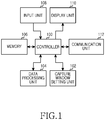
- FIG. 1 is a block diagram illustrating a configuration of a portable terminal for performing a picture capture function according to the present disclosure.
- the portable terminal may include a controller 100, a capture window setting unit 102, a data processing unit 104, a memory 106, an input unit 108, a display unit 110, and a communication unit 112.
- the controller 100 of the portable terminal controls an overall operation of the portable terminal. For example, the controller 100 processes and controls voice communication and data communication. In addition to conventional functions, the controller 100 sets a capture window for capturing a specific region when performing a picture capture process according to the present disclosure.
- the controller 100 captures an output picture or a partial region of the output picture through the set capture window and acquires capture data.
- the controller 100 manages the acquired capture data and provides information of the capture data to a user.
- the controller 100 After providing information about a plurality of capture data, the controller 100 performs an editing process for selected capture data.
- the controller 100 may sense a selection of a capture data editing item or a gesture by the user and may edit the capture data.
- the capture window setting unit 102 changes a setting of a size, a position, etc. of the capture window which is previously output under control of the controller 100.
- the data processing unit 104 acquires the capture data by capturing all or a part of the output picture under control of the controller 100.
- the data processing unit 104 forms a floating window of a transparent layer type on a picture outputted on the display unit 110 and outputs the acquired capture data on the floating window.
- the data processing unit 104 outputs a plurality of capture data on the floating window to provide a wide choice of the capture data capable of being selected by the user.
- the floating window formed by the data processing unit 104 means a window for outputting information of the data captured by the user. Although output contents of the portable terminal are changed (although contents of an output picture are changed because another application is executed), the floating window remains floating on the output picture.
- the memory 106 includes one or more of a Read Only Memory (ROM), a Random Access Memory (RAM), and a flash ROM.
- ROM stores a microcode of a program, by which the controller 100, the capture window setting unit 102, and the data processing unit 104 are processed and controlled, and a variety of reference data.
- the RAM is a working memory of the controller 100 and stores temporary data that is generated while a variety of programs are performed.
- the flash ROM stores a variety of rewritable data, such as phonebooks, outgoing messages, and incoming messages.
- the flash ROM stores the capture data acquired through the capture window according to one embodiment of the present disclosure.
- the method described hereunder of the present invention may be provided as one or more instructions in one or more software modules stored in the memory 106.
- the software modules may be executed by the controller 100.
- the input unit 108 includes numeral key buttons of '0' to '9' and a plurality of function keys such as a menu button, a cancel button, an OK button, a talk button, an end button, an Internet access button, a navigation key (or directional key) button, and a character input key.
- the input unit 108 provides key input data corresponding to a key pushed by the user to the controller 100.
- the input unit 108 provides data for input of the user for setting the capture window and data for input of the user for performing a picture capture to the controller 100 according to the present disclosure.
- the display unit 110 displays state information which is generated while the portable terminal is operated, characters, one or more moving and still pictures, and the like.
- the display unit 110 may be a color Liquid Crystal Display (LCD), an Active Matrix Organic Light Emitting Diode (AMOLED), or the like.
- the display unit 110 includes a touch input device. When the display unit 110 is applied to a touch input type portable terminal, it may be used as an input device.
- the display unit 110 outputs the capture window for picture capture and the floating window including the capture data and outputs a capture window setting process and a capture data editing process according to the present disclosure.
- the input unit 108 and display unit 110 could all be served by a single touch screen. That is, a touch sensitive display, called as a touch screen, may be used as the display unit 110. In this situation, touch input may be performed via the touch sensitive display.
- a touch sensitive display called as a touch screen
- the communication unit 112 transmits and receives a Radio Frequency (RF) signal of data which is input and output through an antenna (not shown).
- RF Radio Frequency
- data to be transmitted is subject to a channel-coding process and a spreading process, and then the data is transformed to an RF signal.
- the RF signal is received and transformed to a baseband signal, and the base-band signal is subject to a despreading process and a channel-decoding process, thereby restoring the data.
- the functions of the capture window unit 102 and the data processing unit 104 may be performed by the controller 100 of the portable terminal.
- the present disclosure includes the controller 100, the capture window unit 102, and the data processing unit 104. These are example configurations for the convenience of explanation and are not limited to a scope of the prevent disclosure. It will be understood by those skilled in the art that various changes in form and details may be made therein without departing from the scope of the present disclosure. For example, all of the components 100-104 may be arranged to be processed in the controller 100.
- an electronic device comprising one or more controller, a touch screen, a memory and one or software modules stored in the memory configured for execution by the controller, the software modules comprising one or more instruction to perform methods described hereunder.
- FIG. 2 is a flowchart illustrating a picture capture process of a portable terminal according to one embodiment of the present disclosure.
- the portable terminal may capture a part of an output picture according to one embodiment of the present disclosure as well as the entire output picture.
- the portable terminal provides a plurality of capture data such that a user uses a necessary capture data.
- the portable terminal verifies whether to perform a picture capture process in block 201.
- the picture capture process means a process of capturing all or a part of an output picture.
- the portable terminal performs a corresponding function (e.g., waiting mode).
- a corresponding function e.g., waiting mode
- the portable terminal proceeds to block 203 and outputs a capture window.
- the portable terminal proceeds to block 205 and changes a setting of the capture window while changing a size, a position, etc. of the capture window.
- the capture window means a window indicating a part capable of being actually captured on the output picture. It is possible to change a size and a position of the capture window according to input of a user.
- the portable terminal may output the capture window.
- a predetermined touch input e.g., a long touch, a short touch, a continuous touch, flicking, a gesture such as the user puts and twists a finger on the capture window, etc.
- the portable terminal may output the capture window.
- a block designation of the text region e.g., a text region is sensed
- the portable terminal may output the capture window.
- the portable terminal may output the capture window if an input of the user, for specifying a touch region, is sensed.
- the portable terminal proceeds to block 207 and verifies whether the setting of the capture window is completed.
- the portable terminal performs the processing of block 205 again.
- the portable terminal sets the capture window and selects a region to be captured.
- the portable terminal proceeds to block 209 and outputs a floating window for outputting a capture data.
- the capture data is data for a picture captured through the capture window.
- the portable terminal may generate a floating window like a transparent layer and may output a plurality of capture data on an output picture.
- the portable terminal outputs capture data acquired whenever the capture data is acquired on the floating window and provides information regarding the plurality of capture data.
- the portable terminal proceeds to block 211 and verifies whether a capture command for performing a picture capture is sensed.
- the portable terminal verifies whether a request for acquiring capture data for a picture corresponding to the capture window is sensed.
- the portable terminal If it is verified that the capture command is not sensed in block 211, the portable terminal performs the processing of block 211 again.
- the portable terminal proceeds to block 213, captures a picture corresponding to the capture window, and acquires the capture data.
- the portable terminal proceeds to block 215 and outputs the acquired capture data on the floating window.
- the portable terminal outputs the capture data on the floating window whenever the capture data is acquired.
- a plurality of capture data may output on the floating window.
- the portable terminal outputs a currently output picture and a separate floating window. The portable terminal may output the floating window together in a state where an application is executed or a waiting picture is output.
- the portable terminal proceeds to block 217 and verifies whether the picture capture process is ended.
- the portable terminal proceeds to block 203, acquires the capture data, and adds the acquired capture data on the floating window.
- the portable terminal ends the algorithm of FIG. 2 .
- the method performed according to FIG. 2 may be provided as one or more instructions in one or more software modules stored in the storage unit.
- the software modules may be executed by the controller 100.
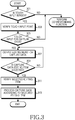
- FIG. 3 is a flowchart illustrating a process of editing a capture data in a portable terminal according to one embodiment of the present disclosure.
- the portable terminal verifies whether a touch input by a user is sensed in block 301.
- the portable terminal If a touch input is not sensed in block 301, the portable terminal performs a corresponding function (e.g., waiting mode).
- a corresponding function e.g., waiting mode
- the portable terminal proceeds to block 303 and verifies a coordinate (position) of a point where the touch input is sensed.
- the portable terminal proceeds to block 305 and verifies whether capture data included on a floating window is touched.
- the portable terminal performs an operation (e.g., touch item execution) corresponding to the touch input of the user.
- an operation e.g., touch item execution
- the portable terminal proceeds to block 307 and outputs an editing menu for the capture data.
- the portable terminal proceeds to block 309 and verifies whether a capture data editing item is selected from the user.
- the editing menu for the capture data may include an item for selecting data to be edited among capture data output on the floating window, an item for moving previously selected capture data, an item for copying previously selected capture data, and an item for pasting previously selected capture data to another application.
- the item for copying the previously selected data is an item for copying the previously selected capture data to a floating window and generating a plurality of the same capture data.
- the portable terminal proceeds to block 307 and performs the process of allowing the user to select an editing item again.
- the portable terminal proceeds to block 311 and verifies an item selected by the user among the capture data editing items.
- the portable terminal proceeds to block 313 and processes the capture data according to the editing item selected by the user.
- the portable terminal may select the capture data selected by the user and may display the selected item to be separated from capture data which is not selected (e.g., the portable terminal shades the selected capture data).
- the portable terminal changes a position of the previously selected capture data.
- the portable terminal changes a position of the capture data output on the floating window.
- the portable terminal deletes the previously selected capture data on the floating window.
- the portable terminal copies the same caption data as the previously selected capture data on the floating window.
- the portable terminal pastes the previously selected capture data to a text input window, a memo pad, a schedule input picture, or the like.
- the portable terminal which processes the capture data ends the algorithm of FIG. 3 .
- the portable terminal may sense a predetermined gesture and may edit a selected capture data.
- the portable terminal selects capture data to be edited through a touch input.
- the portable terminal may output a delete button, output a menu for performing various functions (e.g., a self-reproduction function, a paste function, a delete function), paste the capture data, perform self-reproduction, move a position of the capture data, or change a size of the capture data according to predetermined gestures (e.g., a long touch, a short touch, a continuous touch, movement, a flicking multi-touch, and so forth).
- the portable terminal selects a capture data to be edited on the floating window. If a single touch input is sensed, the portable terminal pastes the selected capture data.
- the portable terminal selects a capture data to be edited on the floating window. If a continuous touch input is sensed, the portable terminal generates the same capture data as the selected capture data.
- the portable terminal selects capture data to be edited on the floating window. If a flicking input is sensed, the portable terminal moves the selected capture data in a flicking direction.
- the portable terminal selects a capture data to be edited on the floating window. If a long touch input is sensed, the portable terminal deletes the selected capture data.
- the portable terminal selects capture data to be edited on the floating window. If a control touch input is sensed, the portable terminal enlarges or reduces a size of the selected capture data.
- the control touch input is an input of the user for changing a size of the selected capture data.
- the control touch input may include a multi-touch input for controlling a size change by a touch input at two points and a finger touch input for controlling size change through dragging where the touch input is maintained during a certain time.
- the gesture for editing the capture data may be set by the user of the portable terminal.
- the method performed according to FIG. 3 may be provided as one or more instructions in one or more software modules stored in the storage unit.
- the software modules may be executed by the controller 100.
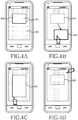
- FIGS. 4A through 4D illustrate a process of setting a capture window in a portable terminal according to one embodiment of the present disclosure.
- the portable terminal if a capture command by a user of the portable terminal is sensed, as shown in FIG. 4A , the portable terminal outputs a capture window.
- the capture window is a region for selecting a part to be captured on an output picture.
- the portable terminal outputs the capture window, changes a setting of the previously output capture window, and may perform a picture capture for a specific region the user wants to output.
- the capture window may be classified into an internal window 400, an external window 404, and a window boundary 402.
- the internal window 400 is a window for displaying a part to be captured.
- the external window 404 is a window for displaying a part which is not captured on an output picture.
- the window boundary 402 is a boundary between the internal window 400 and the external window 404.
- Each of the internal window 400, the window boundary 402, and the external window 404 may be used as a touch input region for changing a setting of the capture window.
- the portable terminal may generate and output a capture window of a tetragonal type using positions of two points simultaneously touched by the user as diagonal vertexes.
- the user of the portable terminal wants to change a position of a previously output window, as shown in FIG. 4B , if the user moves the internal window to a position to be changed in a state where he or she touches the internal window, the position of the internal window is moved from a first position 410 to a second position 412.
- the portable terminal enlarges and reduces the size of the capture window 420 in a state where the user touches the window boundary.
- the user of the portable terminal may change the size of the capture window in a desired direction using window boundaries of four sides of the capture window.
- the portable terminal deletes the previously output capture window 430 and is changed to an initial state capable of generating a new capture window.
- the portable terminal may sense one touch input of the user and movement after the touch input is sensed and may generate a touch window of a free curve shape along a touch input position.
- the method performed according to FIG. 4A through 4D may be provided as one or more instructions in one or more software modules stored in the storage unit.
- the software modules may be executed by the controller 100.
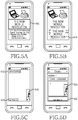
- FIGS. 5A through 5D illustrate a picture capture process of a portable terminal according to one embodiment of the present disclosure.
- the portable terminal outputs a capture window 500 for capturing an output picture.
- FIG. 5A illustrates a picture which outputs the capture window in a state where a webpage is output.
- a predetermined touch input e.g., a long touch, a short touch, a continuous touch, flicking, a gesture such as a user placing and twisting his or her finger on the capture window, etc.
- the portable terminal may output the capture window.
- the portable terminal may change a size and a position of the previously output capture window according to the touch input of the user.
- the portable terminal acquires capture data corresponding to the capture window. Because a general portable terminal stores capture data in a clipboard when performing a capture process, a user of the general portable terminal may not verify contents of the capture data stored in the clipboard after the capture process is performed. Thus, there is a problem in that the general portable terminal may store only a capture data acquired through a capture process which is recently performed in the clipboard.
- the portable terminal generates and outputs a floating window of a transparent layer type on an upper end of an output picture when performing a capture process and outputs acquired capture data on the floating window.
- the portable terminal may output capture data 510 on a previously output webpage.
- the portable terminal may output a plurality of capture data on the floating window.
- a position and a size of the capture data output on the floating window may also be changed according to a request of the user.
- FIG. 5C illustrates the floating window which outputs the plurality of capture data.
- the plurality of capture data include capture data 512 for a text called "SAMSUNG", capture data 514 for a partial article of a webpage, and capture data 516 for an image data.
- the shown capture data are output as partial contents of the capture data. For one example, when the capture data 516 for the image data is moved to the center of a picture, the entire image of the capture data may be output.
- the portable terminal when the portable terminal generates the capture data 512 for the text, it generates image data and text data with respect to the text together. This means that the portable terminal pastes the text as well as the image data when pasting the text data to an application such as a memo pad through capture of the text data. For another example, when the portable terminal pastes capture data to another application, it recognizes characters through a character recognition function and pastes the recognized character as a text data.
- the portable terminal ends a webpage and executes another application, it outputs the capture data such that the user of the portable terminal easily ascertains the captured capture data and applies the capture data to a desired application.
- the portable terminal outputs capture data 520 and 522 in a state where a text message application is executed.
- the portable terminal may include capture data selected according to a selection of the user on a text input picture.
- the portable terminal may input contents of the capture data as a text type through a character recognition function or may input capture data of an image type as an attachment type.
- the method performed according to FIG. 5A through 5D may be provided as one or more instructions in one or more software modules stored in the storage unit.
- the software modules may be executed by the controller 100.
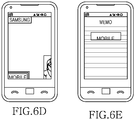
- FIGS. 6A through 6E illustrate a capture data editing process of a portable terminal according to one embodiment of the present disclosure.
- the portable terminal outputs a floating window including a plurality of capture data.
- the capture data included on the floating window may be edited through editing processes such as a position change process, a size change process, a delete process, a selection process, a copy process, and a paste process.
- the portable terminal for performing the above-described editing process senses a selection 610 (e.g., a continuous touch, a long touch, a short touch, etc.) of capture data to be edited, as shown in FIG. 6B , it outputs editing items capable of editing the selected capture data.
- a selection 610 e.g., a continuous touch, a long touch, a short touch, etc.
- the portable terminal performs an editing process for the selected capture data.
- the portable terminal may delete the selected capture data.
- the portable terminal may delete the selected capture data 612.
- the portable terminal copies and generates the same data 614 as the selected capture data.
- the portable terminal pastes the selected capture data 616 to another application.
- the portable terminal may paste the selected capture data to an application such as a memo pad, a text message, or a calendar.
- the portable terminal recognizes a text from the text data and pastes the recognized text as a text type or an image type to another application.
- the portable terminal may sense a gesture of the user and may edit a selected capture data.
- the portable terminal may perform editing processes such as a position change process, a size change process, a delete process, a selection process, a copy process, and a paste process using a predetermined gesture of the user without using the editing items shown in FIG. 6B .
- the method performed according to FIG. 6A and 6B may be provided as one or more instructions in one or more software modules stored in the storage unit.
- the software modules may be executed by the controller 100.
- the computer readable storage medium stores one or more programs (software modules), the one or more programs comprising instructions, which when executed by one or more processors in an electronic device, cause the electronic device to perform a method of the present invention.
- Any such software may be stored in the form of volatile or nonvolatile storage such as, for example, a storage device like a ROM, whether erasable or rewritable or not, or in the form of memory such as, for example, RAM, memory chips, device or integrated circuits or on an optically or magnetically readable medium such as, for example, a CD, DVD, magnetic disk or magnetic tape or the like.
- volatile or nonvolatile storage such as, for example, a storage device like a ROM, whether erasable or rewritable or not
- memory such as, for example, RAM, memory chips, device or integrated circuits or on an optically or magnetically readable medium such as, for example, a CD, DVD, magnetic disk or magnetic tape or the like.
- the storage devices and storage media are embodiments of machine-readable storage that are suitable for storing a program or programs comprising instructions that, when executed, implement embodiments of the present invention.
- embodiments provide a program comprising code for implementing apparatus or a method as claimed in any one of the claims of this specification and a machine-readable storage storing such a program. Still further, such programs may be conveyed electronically via any medium such as a communication signal carried over a wired or wireless connection and embodiments suitably encompass the same.
- the present disclosure may perform a picture capture for a specific region on an output picture and may provide information of captured data such that the user of the portable terminal verifies whether a desired part is accurately captured.
Landscapes
- Engineering & Computer Science (AREA)
- Human Computer Interaction (AREA)
- Signal Processing (AREA)
- Multimedia (AREA)
- Theoretical Computer Science (AREA)
- General Engineering & Computer Science (AREA)
- Physics & Mathematics (AREA)
- General Physics & Mathematics (AREA)
- Computer Networks & Wireless Communication (AREA)
- User Interface Of Digital Computer (AREA)
- Image Analysis (AREA)
- Telephone Function (AREA)
Claims (15)
- Vorrichtung zum Ausführen von Datenerfassung in einem tragbaren Endgerät, wobei die Vorrichtung einen Controller (100) aufweist, der konfiguriert ist zum:Ausgeben eines Ausgabebilds auf einem Bildschirm (110);Ausgeben (203) eines Erfassungsfensters (400, 412, 420), das einen Bereich auf dem Ausgabebild angibt;Erlangen (213) von Erfassungsdaten für einen Bereich, der dem Erfassungsfenster (400, 412, 420) entspricht;dadurch gekennzeichnet, dass der Controller (100) ferner konfiguriert ist zum:Ausgeben (209) eines schwebenden Fensters einer transparenten Schicht auf dem Ausgabebild; Ausgeben (215) der Erfassungsdaten auf dem schwebenden Fenster; undFortsetzen des Ausgebens (209) des schwebenden Fensters auf dem Ausgabebild, während Inhalte des Ausgabebilds durch Ausführen einer anderen Anwendung geändert werden.
- Vorrichtung nach Anspruch 1, wobei der Controller (100) eine Erfassungsfenster-Einstelleinheit (102) aufweist, die konfiguriert ist zum Ausgeben (203) des Erfassungsfensters (400, 412, 420) und zum Ändern (205) von mindestens einer Einstellung entweder von einer Größe oder einer Position des Erfassungsfensters (400, 412, 420).
- Vorrichtung nach Anspruch 1, wobei der Controller (100) eine Datenverarbeitungseinheit (104) aufweist, die konfiguriert ist zum Generieren des schwebenden Fensters und zum Ausgeben (215) der erlangten Erfassungsdaten auf dem schwebenden Fenster.
- Vorrichtung nach Anspruch 3, wobei die Datenverarbeitungseinheit (104) konfiguriert ist zum Ausgeben (215) einer Mehrzahl von Erfassungsdaten auf dem schwebenden Fenster.
- Vorrichtung nach Anspruch 3, wobei die Datenverarbeitungseinheit (104) konfiguriert ist zum Ausgeben (307) eines Bearbeitungselements für ausgewählte Erfassungsdaten, wenn eine Bearbeitungsanforderung für die Erfassungsdatenausgabe auf dem schwebenden Fenster generiert wird, und zum Verarbeiten (313) der Erfassungsdaten gemäß einem Bearbeitungselement, das von einem Benutzer ausgewählt wird.
- Vorrichtung nach Anspruch 5, wobei die Datenverarbeitungseinheit (104) konfiguriert ist zum Erkennen einer Geste des Benutzers, die einem Bearbeitungsbefehl für die Erfassungsdaten entspricht.
- Vorrichtung nach Anspruch 5, wobei das Bearbeitungselement für die Erfassungsdaten mindestens eines aufweist von: einem Erfassungsdaten-Auswahlelement, einem Erfassungsdaten-Verschiebungselement, einem Erfassungsdaten-Löschelement, Erfassungsdaten-Kopierelement und einem Erfassungsdaten-Einfügungselement.
- Vorrichtung nach Anspruch 7, wobei das Erfassungsdaten-Einfügungselement zum Einfügen der vorher ausgewählten Erfassungsdaten als Bild oder zum Einfügen der Erfassungsdaten als Textdaten durch Zeichenerkennung in eine aktuelle ausgeführte Anwendung dient.
- Verfahren zum Ausführen von Datenerfassung in einem tragbaren Endgerät, wobei das Verfahren aufweist:ein Ausgeben eines Ausgabebilds auf einem Bildschirm (110);ein Ausgeben (203) eines Erfassungsfensters (400, 412, 420), das einen Bereich auf dem Ausgabebild angibt;ein Erlangen (213) von Erfassungsdaten für einen Bereich, der dem Erfassungsfenster (400, 412, 420) entspricht;gekennzeichnet durch:ein Ausgeben eines schwebenden Fensters einer transparenten Schicht auf dem Ausgabebild; Ausgeben (215) der Erfassungsdaten auf dem schwebenden Fenster; undein Fortsetzen des Ausgebens (209) des schwebenden Fensters auf dem Ausgabebild, während Inhalte des Ausgabebilds durch Ausführen einer anderen Anwendung geändert werden.
- Verfahren nach Anspruch 9, ferner aufweisend:ein Ändern (205) von mindestens einer Einstellung entweder von einer Größe oder einer Position des vorher ausgegebenen Erfassungsfensters (400, 412, 420).
- Verfahren nach Anspruch 9, ferner aufweisend:ein Generieren des schwebenden Fensters.
- Verfahren nach Anspruch 9, wobei das schwebende Fenster eine Mehrzahl von Erfassungsdaten ausgibt.
- Verfahren nach Anspruch 9, ferner aufweisend:ein Ausgeben (307) eines Bearbeitungselements für ausgewählte Erfassungsdaten, wenn eine Bearbeitungsanforderung für die Erfassungsdatenausgabe auf dem schwebenden Fenster generiert wird; undein Verarbeiten (313) der Erfassungsdaten gemäß einem Bearbeitungselement, das von einemBenutzer ausgewählt wird.
- Verfahren nach Anspruch 9, ferner aufweisend:ein Ausgeben (307) eines Bearbeitungselements für ausgewählte Erfassungsdaten; und ein Erkennen einer Geste des Benutzers, die einem Bearbeitungsbefehl für die Erfassungsdaten entspricht.
- Verfahren nach Anspruch 13, wobei das Bearbeitungselement für die Erfassungsdaten mindestens eines aufweist von: einem Erfassungsdaten-Auswahlelement, einem Erfassungsdaten-Verschiebungselement, einem Erfassungsdaten-Löschelement, Erfassungsdaten-Kopierelement und einem Erfassungsdaten-Einfügungselement.
Applications Claiming Priority (1)
| Application Number | Priority Date | Filing Date | Title |
|---|---|---|---|
| KR1020110078721A KR101834987B1 (ko) | 2011-08-08 | 2011-08-08 | 휴대용 단말기에서 화면 캡쳐를 위한 장치 및 방법 |
Publications (3)
| Publication Number | Publication Date |
|---|---|
| EP2557770A2 EP2557770A2 (de) | 2013-02-13 |
| EP2557770A3 EP2557770A3 (de) | 2013-05-01 |
| EP2557770B1 true EP2557770B1 (de) | 2018-11-21 |
Family
ID=47018736
Family Applications (1)
| Application Number | Title | Priority Date | Filing Date |
|---|---|---|---|
| EP12179561.1A Not-in-force EP2557770B1 (de) | 2011-08-08 | 2012-08-07 | Vorrichtung und Verfahren zur Erfassung von Daten eines auf einem tragbaren Endgerät dargestellten Bildes |
Country Status (3)
| Country | Link |
|---|---|
| US (1) | US9939979B2 (de) |
| EP (1) | EP2557770B1 (de) |
| KR (1) | KR101834987B1 (de) |
Families Citing this family (16)
| Publication number | Priority date | Publication date | Assignee | Title |
|---|---|---|---|---|
| CN106027910B (zh) * | 2013-01-22 | 2019-08-16 | 华为终端有限公司 | 预览画面呈现方法、装置及终端 |
| JP6131072B2 (ja) * | 2013-03-14 | 2017-05-17 | シャープ株式会社 | 表示制御装置 |
| US8635552B1 (en) * | 2013-03-20 | 2014-01-21 | Lg Electronics Inc. | Display device capturing digital content and method of controlling therefor |
| KR102172354B1 (ko) | 2013-06-28 | 2020-10-30 | 삼성전자주식회사 | 이미지 파일 생성 방법 및 장치 |
| JP6018996B2 (ja) * | 2013-09-04 | 2016-11-02 | シャープ株式会社 | 情報処理装置 |
| US9588948B2 (en) | 2013-11-25 | 2017-03-07 | Unidocs Co., Ltd. | Apparatus and method for editing document image |
| WO2015102124A1 (ko) * | 2013-12-31 | 2015-07-09 | 엘지전자 주식회사 | 대화 서비스 제공 장치 및 방법 |
| KR102411890B1 (ko) * | 2014-09-02 | 2022-06-23 | 삼성전자주식회사 | 컨텐츠를 처리하는 방법 및 이를 위한 전자 장치 |
| CN106341540A (zh) * | 2016-09-19 | 2017-01-18 | 北京小米移动软件有限公司 | 图像截取的方法和装置 |
| CN109582189A (zh) * | 2018-11-26 | 2019-04-05 | 珠海格力电器股份有限公司 | 应用窗口管理方法和装置、移动终端 |
| WO2021073573A1 (zh) * | 2019-10-15 | 2021-04-22 | 北京嘀嘀无限科技发展有限公司 | 一种为用户展示出行相关内容的方法及系统 |
| KR102838574B1 (ko) * | 2019-10-17 | 2025-07-28 | 삼성전자 주식회사 | 전자 장치 및 전자 장치의 화면 캡쳐 운용 방법 |
| KR102824373B1 (ko) | 2020-04-02 | 2025-06-25 | 삼성전자 주식회사 | 전자 장치 및 전자 장치의 화면 캡쳐 운용 방법 |
| KR20220016727A (ko) * | 2020-08-03 | 2022-02-10 | 삼성전자주식회사 | 다중 윈도우 이미지 캡쳐 방법 및 이를 위한 전자 장치 |
| JP7683218B2 (ja) * | 2021-01-14 | 2025-05-27 | ブラザー工業株式会社 | プログラム及び情報処理装置 |
| WO2024111874A1 (ko) * | 2022-11-25 | 2024-05-30 | 삼성전자 주식회사 | 전자 장치 및 상기 전자 장치에서 디스플레이의 화면을 제어하는 방법 |
Citations (2)
| Publication number | Priority date | Publication date | Assignee | Title |
|---|---|---|---|---|
| US20090322893A1 (en) * | 2008-06-30 | 2009-12-31 | Verizon Data Services Llc | Camera data management and user interface apparatuses, systems, and methods |
| WO2011052457A1 (ja) * | 2009-10-27 | 2011-05-05 | 日本電気株式会社 | 画像撮影装置及び画像撮影方法 |
Family Cites Families (50)
| Publication number | Priority date | Publication date | Assignee | Title |
|---|---|---|---|---|
| US6249283B1 (en) * | 1997-07-15 | 2001-06-19 | International Business Machines Corporation | Using OCR to enter graphics as text into a clipboard |
| US6219679B1 (en) * | 1998-03-18 | 2001-04-17 | Nortel Networks Limited | Enhanced user-interactive information content bookmarking |
| US6538673B1 (en) * | 1999-08-23 | 2003-03-25 | Divine Technology Ventures | Method for extracting digests, reformatting, and automatic monitoring of structured online documents based on visual programming of document tree navigation and transformation |
| US6823084B2 (en) * | 2000-09-22 | 2004-11-23 | Sri International | Method and apparatus for portably recognizing text in an image sequence of scene imagery |
| US7154535B2 (en) * | 2001-07-13 | 2006-12-26 | Matsushita Electric Industrial Co., Ltd. | Digital camera capable of directly accessing images recorded on another digital camera |
| US20030101412A1 (en) * | 2001-11-28 | 2003-05-29 | Eid Eid | User aggregation of webpage content |
| JP4195625B2 (ja) * | 2002-03-13 | 2008-12-10 | Hoya株式会社 | カメラ用アダプタ装置 |
| US20030214531A1 (en) * | 2002-05-14 | 2003-11-20 | Microsoft Corporation | Ink input mechanisms |
| US7388605B2 (en) * | 2002-11-12 | 2008-06-17 | Hewlett-Packard Development Company, L.P. | Still image capturing of user-selected portions of image frames |
| US8832577B2 (en) * | 2010-10-01 | 2014-09-09 | Z124 | Universal clipboard |
| KR100584344B1 (ko) * | 2003-06-10 | 2006-05-26 | 삼성전자주식회사 | 영상입력부를 가진 휴대용 단말기에서 문자를 인식하는 방법 |
| US20040257346A1 (en) * | 2003-06-20 | 2004-12-23 | Microsoft Corporation | Content selection and handling |
| US7478336B2 (en) * | 2003-11-06 | 2009-01-13 | International Business Machines Corporation | Intermediate viewer for transferring information elements via a transfer buffer to a plurality of sets of destinations |
| US7340685B2 (en) * | 2004-01-12 | 2008-03-04 | International Business Machines Corporation | Automatic reference note generator |
| US7503012B2 (en) * | 2004-01-13 | 2009-03-10 | International Business Machines Corporation | Invoking user designated actions based upon selected computer content |
| US20050281437A1 (en) * | 2004-05-17 | 2005-12-22 | Renate Fruchter | Talking paper |
| WO2006022656A2 (en) * | 2004-07-28 | 2006-03-02 | Siegel Scott H | Radiography image management system |
| US7519573B2 (en) * | 2004-08-23 | 2009-04-14 | Fuji Xerox Co., Ltd. | System and method for clipping, repurposing, and augmenting document content |
| US7509345B2 (en) * | 2004-09-29 | 2009-03-24 | Microsoft Corporation | Method and system for persisting and managing computer program clippings |
| JP2006303651A (ja) * | 2005-04-15 | 2006-11-02 | Nokia Corp | 電子装置 |
| US9098597B2 (en) * | 2005-06-03 | 2015-08-04 | Apple Inc. | Presenting and managing clipped content |
| TWI302671B (en) * | 2005-06-27 | 2008-11-01 | Compal Electronics Inc | A portable electronic device with the ability of real time inserting image data into a menu |
| US7694234B2 (en) * | 2005-08-04 | 2010-04-06 | Microsoft Corporation | Virtual magnifying glass with on-the fly control functionalities |
| KR100736076B1 (ko) | 2005-10-24 | 2007-07-06 | 삼성전자주식회사 | 화면 캡처 기능을 제공하는 휴대용 장치 및 그 방법 |
| US7631268B2 (en) * | 2006-02-09 | 2009-12-08 | International Business Machines Corporation | Moving data to multiple target files |
| JP4743179B2 (ja) * | 2006-09-28 | 2011-08-10 | セイコーエプソン株式会社 | 画像表示制御装置、撮影装置、画像表示方法及びそのプログラム |
| FR2907244B1 (fr) * | 2006-10-12 | 2009-03-13 | Solystic Sas | Procede de traitement d'envois postaux utilisant un "intercalaire" representant une region d'interet (roi) |
| US8656295B2 (en) * | 2007-01-05 | 2014-02-18 | Apple Inc. | Selecting and manipulating web content |
| US7917846B2 (en) * | 2007-06-08 | 2011-03-29 | Apple Inc. | Web clip using anchoring |
| KR101373333B1 (ko) * | 2007-07-11 | 2014-03-10 | 엘지전자 주식회사 | 터치인식을 통한 영상촬영 기능을 구비한 휴대 단말기 및그 촬영방법 |
| US20090112572A1 (en) * | 2007-10-30 | 2009-04-30 | Karl Ola Thorn | System and method for input of text to an application operating on a device |
| US20090164883A1 (en) * | 2007-12-19 | 2009-06-25 | Apple Inc. | Multi-Source Web Clips |
| JP4497211B2 (ja) * | 2008-02-19 | 2010-07-07 | カシオ計算機株式会社 | 撮像装置、撮像方法及びプログラム |
| US20100162163A1 (en) * | 2008-12-18 | 2010-06-24 | Nokia Corporation | Image magnification |
| KR20100071754A (ko) * | 2008-12-19 | 2010-06-29 | 삼성전자주식회사 | 터치와 키조작에 의한 멀티 입력 방식을 이용한 촬영방법 및 이를 적용한 촬영장치 |
| KR20100074568A (ko) | 2008-12-24 | 2010-07-02 | 삼성전자주식회사 | 화상형성장치와 연결된 호스트장치 및 웹페이지 인쇄방법 |
| TW201031149A (en) * | 2009-02-03 | 2010-08-16 | Acer Inc | Instant data sharing system and machine readable medium thereof |
| KR101640460B1 (ko) * | 2009-03-25 | 2016-07-18 | 삼성전자 주식회사 | 휴대 단말기의 분할 화면 운용 방법 및 이를 지원하는 휴대 단말기 |
| JP5361572B2 (ja) * | 2009-06-30 | 2013-12-04 | キヤノン株式会社 | 情報処理装置、情報処理方法、およびプログラム |
| US8723988B2 (en) * | 2009-07-17 | 2014-05-13 | Sony Corporation | Using a touch sensitive display to control magnification and capture of digital images by an electronic device |
| JP2011028345A (ja) * | 2009-07-22 | 2011-02-10 | Olympus Imaging Corp | 条件変更装置、カメラ、携帯機器、およびプログラム |
| KR20110037040A (ko) * | 2009-10-05 | 2011-04-13 | 삼성전자주식회사 | 휴대 단말기 및 그의 화면 표시 방법 |
| US8577146B2 (en) * | 2010-04-09 | 2013-11-05 | Sony Corporation | Methods and devices that use an image-captured pointer for selecting a portion of a captured image |
| US20120005607A1 (en) * | 2010-06-30 | 2012-01-05 | Alcatel-Lucent Canada Inc. | Floating window |
| KR101811743B1 (ko) | 2010-09-09 | 2018-01-25 | 삼성전자주식회사 | 멀티미디어 장치 및 그의 컨텐츠 제공 방법 |
| US20120144331A1 (en) * | 2010-12-03 | 2012-06-07 | Ari Tolonen | Method for Arranging Application Windows on a Display |
| TW201227601A (en) * | 2010-12-23 | 2012-07-01 | Altek Corp | Image capturing device and image patchwork method |
| TWI445397B (zh) * | 2010-12-29 | 2014-07-11 | Altek Corp | 電子裝置、影像擷取裝置及其自動擷取影像之方法 |
| US20120289290A1 (en) * | 2011-05-12 | 2012-11-15 | KT Corporation, KT TECH INC. | Transferring objects between application windows displayed on mobile terminal |
| US9465507B2 (en) * | 2011-10-19 | 2016-10-11 | Microsoft Technology Licensing, Llc | Techniques to facilitate asynchronous communication |
-
2011
- 2011-08-08 KR KR1020110078721A patent/KR101834987B1/ko not_active Expired - Fee Related
-
2012
- 2012-08-07 EP EP12179561.1A patent/EP2557770B1/de not_active Not-in-force
- 2012-08-08 US US13/570,051 patent/US9939979B2/en active Active
Patent Citations (3)
| Publication number | Priority date | Publication date | Assignee | Title |
|---|---|---|---|---|
| US20090322893A1 (en) * | 2008-06-30 | 2009-12-31 | Verizon Data Services Llc | Camera data management and user interface apparatuses, systems, and methods |
| WO2011052457A1 (ja) * | 2009-10-27 | 2011-05-05 | 日本電気株式会社 | 画像撮影装置及び画像撮影方法 |
| EP2495953A1 (de) * | 2009-10-27 | 2012-09-05 | NEC CASIO Mobile Communications, Ltd. | Bildaufnahmevorrichtung und bildaufnahmeverfahren |
Also Published As
| Publication number | Publication date |
|---|---|
| US9939979B2 (en) | 2018-04-10 |
| US20130332878A1 (en) | 2013-12-12 |
| EP2557770A3 (de) | 2013-05-01 |
| KR20130016655A (ko) | 2013-02-18 |
| KR101834987B1 (ko) | 2018-03-06 |
| EP2557770A2 (de) | 2013-02-13 |
Similar Documents
| Publication | Publication Date | Title |
|---|---|---|
| EP2557770B1 (de) | Vorrichtung und Verfahren zur Erfassung von Daten eines auf einem tragbaren Endgerät dargestellten Bildes | |
| US10268434B2 (en) | Mobile terminal and control method therefor | |
| CN110851068B (zh) | 用于管理用户界面的方法和电子设备 | |
| CN102033710B (zh) | 用于管理文件夹的方法和相关设备 | |
| US10452333B2 (en) | User terminal device providing user interaction and method therefor | |
| EP2437152B1 (de) | Vorrichtung und Verfahren zum Blättern von e-Book-Seiten in einem tragbaren Endgerät | |
| JP5968788B2 (ja) | 複数のアプリケーション情報を提供する方法及び装置 | |
| AU2020267498A1 (en) | Handwriting entry on an electronic device | |
| CN102572260B (zh) | 执行相机的快速关联功能的方法和便携式装置 | |
| KR20140010596A (ko) | 터치 및 제스처 입력을 이용한 단말의 제어 방법 및 그 단말 | |
| KR20140122952A (ko) | 이미지 합성 방법 및 이를 구현하는 전자 장치 | |
| US20150082211A1 (en) | Terminal and method for editing user interface | |
| KR20150021964A (ko) | 다수의 페이지들을 갖는 폴더들을 관리하기 위한 디바이스, 방법, 및 그래픽 사용자 인터페이스 | |
| KR20140018377A (ko) | 문서 조작을 위한 디바이스들, 방법들 및 그래픽 사용자 인터페이스들 | |
| KR20150126494A (ko) | 이동 단말기 및 그 제어 방법 | |
| US20140351725A1 (en) | Method and electronic device for operating object | |
| US20130113742A1 (en) | Visual presentation method and apparatus for application in mobile terminal | |
| JP6048408B2 (ja) | 電子付箋の書込情報処理装置及び方法 | |
| US9665274B2 (en) | Method of controlling virtual keypad and electronic device therefor | |
| KR20130097266A (ko) | 휴대 단말기의 콘텐츠 뷰 편집 방법 및 장치 | |
| JP6209868B2 (ja) | 情報端末、情報処理プログラム、情報処理システム、及び情報処理方法 | |
| US20150015501A1 (en) | Information display apparatus | |
| JP2006048139A (ja) | 画像表示制御装置及び画像表示制御プログラム | |
| CN103473215A (zh) | 编辑对象的方法及电子设备 | |
| KR20120081878A (ko) | 통신 단말기의 동작 방법 |
Legal Events
| Date | Code | Title | Description |
|---|---|---|---|
| PUAI | Public reference made under article 153(3) epc to a published international application that has entered the european phase |
Free format text: ORIGINAL CODE: 0009012 |
|
| AK | Designated contracting states |
Kind code of ref document: A2 Designated state(s): AL AT BE BG CH CY CZ DE DK EE ES FI FR GB GR HR HU IE IS IT LI LT LU LV MC MK MT NL NO PL PT RO RS SE SI SK SM TR |
|
| AX | Request for extension of the european patent |
Extension state: BA ME |
|
| PUAL | Search report despatched |
Free format text: ORIGINAL CODE: 0009013 |
|
| AK | Designated contracting states |
Kind code of ref document: A3 Designated state(s): AL AT BE BG CH CY CZ DE DK EE ES FI FR GB GR HR HU IE IS IT LI LT LU LV MC MK MT NL NO PL PT RO RS SE SI SK SM TR |
|
| AX | Request for extension of the european patent |
Extension state: BA ME |
|
| RIC1 | Information provided on ipc code assigned before grant |
Ipc: H04N 1/21 20060101AFI20130326BHEP Ipc: H04N 5/232 20060101ALI20130326BHEP Ipc: H04N 1/00 20060101ALI20130326BHEP |
|
| 17P | Request for examination filed |
Effective date: 20131031 |
|
| 17Q | First examination report despatched |
Effective date: 20160202 |
|
| STAA | Information on the status of an ep patent application or granted ep patent |
Free format text: STATUS: EXAMINATION IS IN PROGRESS |
|
| GRAP | Despatch of communication of intention to grant a patent |
Free format text: ORIGINAL CODE: EPIDOSNIGR1 |
|
| STAA | Information on the status of an ep patent application or granted ep patent |
Free format text: STATUS: GRANT OF PATENT IS INTENDED |
|
| RIC1 | Information provided on ipc code assigned before grant |
Ipc: G06F 3/01 20060101ALI20180612BHEP Ipc: H04N 1/21 20060101AFI20180612BHEP Ipc: H04N 1/00 20060101ALI20180612BHEP Ipc: G06F 3/0488 20130101ALI20180612BHEP Ipc: H04N 5/232 20060101ALI20180612BHEP |
|
| INTG | Intention to grant announced |
Effective date: 20180703 |
|
| GRAS | Grant fee paid |
Free format text: ORIGINAL CODE: EPIDOSNIGR3 |
|
| GRAA | (expected) grant |
Free format text: ORIGINAL CODE: 0009210 |
|
| STAA | Information on the status of an ep patent application or granted ep patent |
Free format text: STATUS: THE PATENT HAS BEEN GRANTED |
|
| AK | Designated contracting states |
Kind code of ref document: B1 Designated state(s): AL AT BE BG CH CY CZ DE DK EE ES FI FR GB GR HR HU IE IS IT LI LT LU LV MC MK MT NL NO PL PT RO RS SE SI SK SM TR |
|
| REG | Reference to a national code |
Ref country code: CH Ref legal event code: EP |
|
| REG | Reference to a national code |
Ref country code: IE Ref legal event code: FG4D |
|
| REG | Reference to a national code |
Ref country code: DE Ref legal event code: R096 Ref document number: 602012053714 Country of ref document: DE |
|
| REG | Reference to a national code |
Ref country code: AT Ref legal event code: REF Ref document number: 1068935 Country of ref document: AT Kind code of ref document: T Effective date: 20181215 |
|
| REG | Reference to a national code |
Ref country code: NL Ref legal event code: MP Effective date: 20181121 |
|
| REG | Reference to a national code |
Ref country code: AT Ref legal event code: MK05 Ref document number: 1068935 Country of ref document: AT Kind code of ref document: T Effective date: 20181121 |
|
| PG25 | Lapsed in a contracting state [announced via postgrant information from national office to epo] |
Ref country code: BG Free format text: LAPSE BECAUSE OF FAILURE TO SUBMIT A TRANSLATION OF THE DESCRIPTION OR TO PAY THE FEE WITHIN THE PRESCRIBED TIME-LIMIT Effective date: 20190221 Ref country code: NO Free format text: LAPSE BECAUSE OF FAILURE TO SUBMIT A TRANSLATION OF THE DESCRIPTION OR TO PAY THE FEE WITHIN THE PRESCRIBED TIME-LIMIT Effective date: 20190221 Ref country code: HR Free format text: LAPSE BECAUSE OF FAILURE TO SUBMIT A TRANSLATION OF THE DESCRIPTION OR TO PAY THE FEE WITHIN THE PRESCRIBED TIME-LIMIT Effective date: 20181121 Ref country code: AT Free format text: LAPSE BECAUSE OF FAILURE TO SUBMIT A TRANSLATION OF THE DESCRIPTION OR TO PAY THE FEE WITHIN THE PRESCRIBED TIME-LIMIT Effective date: 20181121 Ref country code: IS Free format text: LAPSE BECAUSE OF FAILURE TO SUBMIT A TRANSLATION OF THE DESCRIPTION OR TO PAY THE FEE WITHIN THE PRESCRIBED TIME-LIMIT Effective date: 20190321 Ref country code: LT Free format text: LAPSE BECAUSE OF FAILURE TO SUBMIT A TRANSLATION OF THE DESCRIPTION OR TO PAY THE FEE WITHIN THE PRESCRIBED TIME-LIMIT Effective date: 20181121 Ref country code: ES Free format text: LAPSE BECAUSE OF FAILURE TO SUBMIT A TRANSLATION OF THE DESCRIPTION OR TO PAY THE FEE WITHIN THE PRESCRIBED TIME-LIMIT Effective date: 20181121 Ref country code: LV Free format text: LAPSE BECAUSE OF FAILURE TO SUBMIT A TRANSLATION OF THE DESCRIPTION OR TO PAY THE FEE WITHIN THE PRESCRIBED TIME-LIMIT Effective date: 20181121 Ref country code: FI Free format text: LAPSE BECAUSE OF FAILURE TO SUBMIT A TRANSLATION OF THE DESCRIPTION OR TO PAY THE FEE WITHIN THE PRESCRIBED TIME-LIMIT Effective date: 20181121 |
|
| PG25 | Lapsed in a contracting state [announced via postgrant information from national office to epo] |
Ref country code: AL Free format text: LAPSE BECAUSE OF FAILURE TO SUBMIT A TRANSLATION OF THE DESCRIPTION OR TO PAY THE FEE WITHIN THE PRESCRIBED TIME-LIMIT Effective date: 20181121 Ref country code: SE Free format text: LAPSE BECAUSE OF FAILURE TO SUBMIT A TRANSLATION OF THE DESCRIPTION OR TO PAY THE FEE WITHIN THE PRESCRIBED TIME-LIMIT Effective date: 20181121 Ref country code: RS Free format text: LAPSE BECAUSE OF FAILURE TO SUBMIT A TRANSLATION OF THE DESCRIPTION OR TO PAY THE FEE WITHIN THE PRESCRIBED TIME-LIMIT Effective date: 20181121 Ref country code: GR Free format text: LAPSE BECAUSE OF FAILURE TO SUBMIT A TRANSLATION OF THE DESCRIPTION OR TO PAY THE FEE WITHIN THE PRESCRIBED TIME-LIMIT Effective date: 20190222 Ref country code: PT Free format text: LAPSE BECAUSE OF FAILURE TO SUBMIT A TRANSLATION OF THE DESCRIPTION OR TO PAY THE FEE WITHIN THE PRESCRIBED TIME-LIMIT Effective date: 20190321 Ref country code: NL Free format text: LAPSE BECAUSE OF FAILURE TO SUBMIT A TRANSLATION OF THE DESCRIPTION OR TO PAY THE FEE WITHIN THE PRESCRIBED TIME-LIMIT Effective date: 20181121 |
|
| PG25 | Lapsed in a contracting state [announced via postgrant information from national office to epo] |
Ref country code: PL Free format text: LAPSE BECAUSE OF FAILURE TO SUBMIT A TRANSLATION OF THE DESCRIPTION OR TO PAY THE FEE WITHIN THE PRESCRIBED TIME-LIMIT Effective date: 20181121 Ref country code: IT Free format text: LAPSE BECAUSE OF FAILURE TO SUBMIT A TRANSLATION OF THE DESCRIPTION OR TO PAY THE FEE WITHIN THE PRESCRIBED TIME-LIMIT Effective date: 20181121 Ref country code: DK Free format text: LAPSE BECAUSE OF FAILURE TO SUBMIT A TRANSLATION OF THE DESCRIPTION OR TO PAY THE FEE WITHIN THE PRESCRIBED TIME-LIMIT Effective date: 20181121 Ref country code: CZ Free format text: LAPSE BECAUSE OF FAILURE TO SUBMIT A TRANSLATION OF THE DESCRIPTION OR TO PAY THE FEE WITHIN THE PRESCRIBED TIME-LIMIT Effective date: 20181121 |
|
| REG | Reference to a national code |
Ref country code: DE Ref legal event code: R097 Ref document number: 602012053714 Country of ref document: DE |
|
| PG25 | Lapsed in a contracting state [announced via postgrant information from national office to epo] |
Ref country code: RO Free format text: LAPSE BECAUSE OF FAILURE TO SUBMIT A TRANSLATION OF THE DESCRIPTION OR TO PAY THE FEE WITHIN THE PRESCRIBED TIME-LIMIT Effective date: 20181121 Ref country code: SK Free format text: LAPSE BECAUSE OF FAILURE TO SUBMIT A TRANSLATION OF THE DESCRIPTION OR TO PAY THE FEE WITHIN THE PRESCRIBED TIME-LIMIT Effective date: 20181121 Ref country code: SM Free format text: LAPSE BECAUSE OF FAILURE TO SUBMIT A TRANSLATION OF THE DESCRIPTION OR TO PAY THE FEE WITHIN THE PRESCRIBED TIME-LIMIT Effective date: 20181121 Ref country code: EE Free format text: LAPSE BECAUSE OF FAILURE TO SUBMIT A TRANSLATION OF THE DESCRIPTION OR TO PAY THE FEE WITHIN THE PRESCRIBED TIME-LIMIT Effective date: 20181121 |
|
| PLBE | No opposition filed within time limit |
Free format text: ORIGINAL CODE: 0009261 |
|
| STAA | Information on the status of an ep patent application or granted ep patent |
Free format text: STATUS: NO OPPOSITION FILED WITHIN TIME LIMIT |
|
| 26N | No opposition filed |
Effective date: 20190822 |
|
| PG25 | Lapsed in a contracting state [announced via postgrant information from national office to epo] |
Ref country code: SI Free format text: LAPSE BECAUSE OF FAILURE TO SUBMIT A TRANSLATION OF THE DESCRIPTION OR TO PAY THE FEE WITHIN THE PRESCRIBED TIME-LIMIT Effective date: 20181121 |
|
| REG | Reference to a national code |
Ref country code: DE Ref legal event code: R119 Ref document number: 602012053714 Country of ref document: DE |
|
| PG25 | Lapsed in a contracting state [announced via postgrant information from national office to epo] |
Ref country code: TR Free format text: LAPSE BECAUSE OF FAILURE TO SUBMIT A TRANSLATION OF THE DESCRIPTION OR TO PAY THE FEE WITHIN THE PRESCRIBED TIME-LIMIT Effective date: 20181121 |
|
| PG25 | Lapsed in a contracting state [announced via postgrant information from national office to epo] |
Ref country code: LU Free format text: LAPSE BECAUSE OF NON-PAYMENT OF DUE FEES Effective date: 20190807 Ref country code: MC Free format text: LAPSE BECAUSE OF FAILURE TO SUBMIT A TRANSLATION OF THE DESCRIPTION OR TO PAY THE FEE WITHIN THE PRESCRIBED TIME-LIMIT Effective date: 20181121 Ref country code: CH Free format text: LAPSE BECAUSE OF NON-PAYMENT OF DUE FEES Effective date: 20190831 Ref country code: LI Free format text: LAPSE BECAUSE OF NON-PAYMENT OF DUE FEES Effective date: 20190831 |
|
| REG | Reference to a national code |
Ref country code: BE Ref legal event code: MM Effective date: 20190831 |
|
| PG25 | Lapsed in a contracting state [announced via postgrant information from national office to epo] |
Ref country code: FR Free format text: LAPSE BECAUSE OF NON-PAYMENT OF DUE FEES Effective date: 20190831 Ref country code: IE Free format text: LAPSE BECAUSE OF NON-PAYMENT OF DUE FEES Effective date: 20190807 Ref country code: DE Free format text: LAPSE BECAUSE OF NON-PAYMENT OF DUE FEES Effective date: 20200303 |
|
| PG25 | Lapsed in a contracting state [announced via postgrant information from national office to epo] |
Ref country code: BE Free format text: LAPSE BECAUSE OF NON-PAYMENT OF DUE FEES Effective date: 20190831 |
|
| PG25 | Lapsed in a contracting state [announced via postgrant information from national office to epo] |
Ref country code: CY Free format text: LAPSE BECAUSE OF FAILURE TO SUBMIT A TRANSLATION OF THE DESCRIPTION OR TO PAY THE FEE WITHIN THE PRESCRIBED TIME-LIMIT Effective date: 20181121 |
|
| PG25 | Lapsed in a contracting state [announced via postgrant information from national office to epo] |
Ref country code: MT Free format text: LAPSE BECAUSE OF FAILURE TO SUBMIT A TRANSLATION OF THE DESCRIPTION OR TO PAY THE FEE WITHIN THE PRESCRIBED TIME-LIMIT Effective date: 20181121 Ref country code: HU Free format text: LAPSE BECAUSE OF FAILURE TO SUBMIT A TRANSLATION OF THE DESCRIPTION OR TO PAY THE FEE WITHIN THE PRESCRIBED TIME-LIMIT; INVALID AB INITIO Effective date: 20120807 |
|
| PGFP | Annual fee paid to national office [announced via postgrant information from national office to epo] |
Ref country code: GB Payment date: 20210726 Year of fee payment: 10 |
|
| PG25 | Lapsed in a contracting state [announced via postgrant information from national office to epo] |
Ref country code: MK Free format text: LAPSE BECAUSE OF FAILURE TO SUBMIT A TRANSLATION OF THE DESCRIPTION OR TO PAY THE FEE WITHIN THE PRESCRIBED TIME-LIMIT Effective date: 20181121 |
|
| GBPC | Gb: european patent ceased through non-payment of renewal fee |
Effective date: 20220807 |
|
| PG25 | Lapsed in a contracting state [announced via postgrant information from national office to epo] |
Ref country code: GB Free format text: LAPSE BECAUSE OF NON-PAYMENT OF DUE FEES Effective date: 20220807 |