EP2525271B1 - Verfahren und Vorrichtung zur Verarbeitung der Eingabe in einem mobilen Endgerät - Google Patents
Verfahren und Vorrichtung zur Verarbeitung der Eingabe in einem mobilen Endgerät Download PDFInfo
- Publication number
- EP2525271B1 EP2525271B1 EP12161544.7A EP12161544A EP2525271B1 EP 2525271 B1 EP2525271 B1 EP 2525271B1 EP 12161544 A EP12161544 A EP 12161544A EP 2525271 B1 EP2525271 B1 EP 2525271B1
- Authority
- EP
- European Patent Office
- Prior art keywords
- user
- icon
- controller
- screen
- voice
- Prior art date
- Legal status (The legal status is an assumption and is not a legal conclusion. Google has not performed a legal analysis and makes no representation as to the accuracy of the status listed.)
- Active
Links
Images




Classifications
-
- G—PHYSICS
- G06—COMPUTING OR CALCULATING; COUNTING
- G06F—ELECTRIC DIGITAL DATA PROCESSING
- G06F3/00—Input arrangements for transferring data to be processed into a form capable of being handled by the computer; Output arrangements for transferring data from processing unit to output unit, e.g. interface arrangements
- G06F3/01—Input arrangements or combined input and output arrangements for interaction between user and computer
- G06F3/011—Arrangements for interaction with the human body, e.g. for user immersion in virtual reality
- G06F3/013—Eye tracking input arrangements
-
- G—PHYSICS
- G06—COMPUTING OR CALCULATING; COUNTING
- G06F—ELECTRIC DIGITAL DATA PROCESSING
- G06F1/00—Details not covered by groups G06F3/00 - G06F13/00 and G06F21/00
- G06F1/16—Constructional details or arrangements
- G06F1/1613—Constructional details or arrangements for portable computers
- G06F1/1626—Constructional details or arrangements for portable computers with a single-body enclosure integrating a flat display, e.g. Personal Digital Assistants [PDAs]
-
- G—PHYSICS
- G06—COMPUTING OR CALCULATING; COUNTING
- G06F—ELECTRIC DIGITAL DATA PROCESSING
- G06F1/00—Details not covered by groups G06F3/00 - G06F13/00 and G06F21/00
- G06F1/16—Constructional details or arrangements
- G06F1/1613—Constructional details or arrangements for portable computers
- G06F1/1633—Constructional details or arrangements of portable computers not specific to the type of enclosures covered by groups G06F1/1615 - G06F1/1626
- G06F1/1684—Constructional details or arrangements related to integrated I/O peripherals not covered by groups G06F1/1635 - G06F1/1675
- G06F1/1686—Constructional details or arrangements related to integrated I/O peripherals not covered by groups G06F1/1635 - G06F1/1675 the I/O peripheral being an integrated camera
-
- G—PHYSICS
- G06—COMPUTING OR CALCULATING; COUNTING
- G06F—ELECTRIC DIGITAL DATA PROCESSING
- G06F3/00—Input arrangements for transferring data to be processed into a form capable of being handled by the computer; Output arrangements for transferring data from processing unit to output unit, e.g. interface arrangements
- G06F3/01—Input arrangements or combined input and output arrangements for interaction between user and computer
- G06F3/048—Interaction techniques based on graphical user interfaces [GUI]
- G06F3/0484—Interaction techniques based on graphical user interfaces [GUI] for the control of specific functions or operations, e.g. selecting or manipulating an object, an image or a displayed text element, setting a parameter value or selecting a range
- G06F3/04842—Selection of displayed objects or displayed text elements
-
- G—PHYSICS
- G06—COMPUTING OR CALCULATING; COUNTING
- G06F—ELECTRIC DIGITAL DATA PROCESSING
- G06F3/00—Input arrangements for transferring data to be processed into a form capable of being handled by the computer; Output arrangements for transferring data from processing unit to output unit, e.g. interface arrangements
- G06F3/01—Input arrangements or combined input and output arrangements for interaction between user and computer
- G06F3/048—Interaction techniques based on graphical user interfaces [GUI]
- G06F3/0484—Interaction techniques based on graphical user interfaces [GUI] for the control of specific functions or operations, e.g. selecting or manipulating an object, an image or a displayed text element, setting a parameter value or selecting a range
- G06F3/0485—Scrolling or panning
-
- G—PHYSICS
- G06—COMPUTING OR CALCULATING; COUNTING
- G06F—ELECTRIC DIGITAL DATA PROCESSING
- G06F3/00—Input arrangements for transferring data to be processed into a form capable of being handled by the computer; Output arrangements for transferring data from processing unit to output unit, e.g. interface arrangements
- G06F3/01—Input arrangements or combined input and output arrangements for interaction between user and computer
- G06F3/048—Interaction techniques based on graphical user interfaces [GUI]
- G06F3/0487—Interaction techniques based on graphical user interfaces [GUI] using specific features provided by the input device, e.g. functions controlled by the rotation of a mouse with dual sensing arrangements, or of the nature of the input device, e.g. tap gestures based on pressure sensed by a digitiser
-
- G—PHYSICS
- G06—COMPUTING OR CALCULATING; COUNTING
- G06F—ELECTRIC DIGITAL DATA PROCESSING
- G06F3/00—Input arrangements for transferring data to be processed into a form capable of being handled by the computer; Output arrangements for transferring data from processing unit to output unit, e.g. interface arrangements
- G06F3/14—Digital output to display device ; Cooperation and interconnection of the display device with other functional units
-
- G—PHYSICS
- G06—COMPUTING OR CALCULATING; COUNTING
- G06F—ELECTRIC DIGITAL DATA PROCESSING
- G06F3/00—Input arrangements for transferring data to be processed into a form capable of being handled by the computer; Output arrangements for transferring data from processing unit to output unit, e.g. interface arrangements
- G06F3/16—Sound input; Sound output
-
- G—PHYSICS
- G06—COMPUTING OR CALCULATING; COUNTING
- G06F—ELECTRIC DIGITAL DATA PROCESSING
- G06F2203/00—Indexing scheme relating to G06F3/00 - G06F3/048
- G06F2203/038—Indexing scheme relating to G06F3/038
- G06F2203/0381—Multimodal input, i.e. interface arrangements enabling the user to issue commands by simultaneous use of input devices of different nature, e.g. voice plus gesture on digitizer
-
- G—PHYSICS
- G06—COMPUTING OR CALCULATING; COUNTING
- G06F—ELECTRIC DIGITAL DATA PROCESSING
- G06F2203/00—Indexing scheme relating to G06F3/00 - G06F3/048
- G06F2203/048—Indexing scheme relating to G06F3/048
- G06F2203/04806—Zoom, i.e. interaction techniques or interactors for controlling the zooming operation
Definitions
- the present invention relates to a mobile terminal. More particularly, the present invention relates to an apparatus and a method for processing an input, on an input area of a mobile.
- a mobile terminal which includes devices including but not limited to a mobile communication terminal (cellular phone), an electronic scheduler, a personal digital assistant, etc. has become a necessity of a modern society, and serves as an important means for transferring information quickly.
- a conventional mobile terminal includes at least one button for performing an input.
- This button may be realized mechanically as a keybutton, for example, or when a touch screen is used, it may be realized in a in conjunction with software.
- an input signal i.e. an actuating signal
- the conventional button may be useless to a user with a disability that involves manipulating his/her hands or fingers. In having difficulty in manipulating his/her hands, or a user facing a circumstance where the user cannot use his hands. Therefore, there is a need in the art for an improved input method that solves this inconvenience.
- WO 2010/118292 discloses eye tracking systems and methods include such exemplary features as a display device, at least one image capture device and a processing device.
- the display device displays a user interlace including one or more interlace elements to a user.
- the at least one image capture device detects a user's gaze location relative to the display device.
- the processing device electronically analyzes the location of user elements within the user interface relative to the user's gaze location and dynamically determine whether to initiate the display of a zoom window.
- the dynamic determination of whether to initiate display of the zoom window may further include analysis of the number, size and density of user elements within the user interface relative to the user's gaze location, the application type associated with the user interface or at the user's gaze location, and/or the structure of eye movements relative to the user interface.
- US 5,689,619 relates to an eyetracker, a display driver, an adaptive display interface controller, and a digital computer.
- a user of the invention can operate a heads-up display (or a head mounted display) with an eyetracker, leaving his hands free to perform a manual control task.
- the user selects a display element from an array of choices on the heads-up display by gazing at an element while he activates a confirming mechanism. Both tasks share a common visual working area with overlaid visual images, and task interference is reduced since eye-movements and visual attention are dedicated to the same display surface.
- the adaptive display interface automatically aids the user in display operations during high manual task loading.
- the adaptive interface is driven by an electronic Expert System on human visual processes programmed as a Fuzzy Logic controller.
- the controller generates display cueing aids, under computer control, in response to the erratic eye movement patterns that occur during cognitive conflict.
- the cueing aids help the user to operate the display with a sequence of discrete eye gazes and confirming actions which only momentarily interrupt the manual control task.
- the invention provides a timing logic for element enhancement, and display markers for task feedback. While the aids would be disruptive at low cognitive loading, they provide necessary timing and memory prompts at high loadings.
- the element enhancement timing logic allows the user to momentarily look at the display and then return his attention to the tracking task before executing confirmation.
- the display cues show the user where he is looking on the display relative to the element to be selected.
- US 7,013,258 discloses a Chinese text entry system with eye-tracking technique can be used for computer input of Chinese characters.
- the system is comprised of two main components: the Chinese pinyin software and the eye-tracking system.
- Chinese characters corresponding to pinyin input are selected from a list of candidate characters by selecting the proper character through eye-tracking identification and confirming the selection by pressing a readily accessible confirmation key.
- the Chinese pinyin software implements pinyin input at both the character and word level, choosing from multiple character or word homonyms as pinyin is entered.
- the system uses eye-tracking technology that is only used to identify the correct Chinese character, with the character selection and entry occurring when the confirmation key is pressed.
- the invention is specified by claim 1 and claim 2 respectively.
- Exemplary embodiments of the present invention discussed herein provide examples utilizing a mobile terminal. More particularly, exemplary embodiments of the present invention provide an apparatus and a method for processing an input, that generate an input without a finger's button pressing. An exemplary embodiment of the present invention provides an apparatus and a method for processing an input, that uses at least one of tracking a user's eyes and voice detection, or combines them to generate an input in a mobile terminal. An exemplary embodiment of the present invention provides an apparatus and a method for processing an inputs that generate various inputs depending on eye flickering and a kind thereof in a mobile terminal. An exemplary embodiment of the present invention provides an apparatus and a method for processing an input, that generate an input for selecting a relevant icon, rearranging an icon, and performing screen scroll using eyes tracking or voice detection.
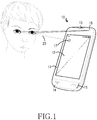
- FIG. 1 is a view illustrating performing an input using a mobile terminal according to an exemplary embodiment of the present invention.
- the mobile terminal 10 preferably includes a case frame 11, and the following elements inserted into the case frame 11.
- the mobile terminal 10 includes a known display 12, a speaker 13, a microphone 14, a key button 15, and a camera 16.
- a touch panel may be added to the display 12, so that a touch screen may be formed.
- the mobile terminal 10 captures a user's eyeball movement captured by the camera 16 to track the user's eyes 20 viewing the screen and displays the same on the screen.
- an indicator 17 is displayed on a position of the screen viewed by the user. The indicator displayed on the screen moves along movement of the user's eyes 20 viewing the screen as tracked by the camera.
- the mobile terminal 10 may detect and distinguish different kinds of a user's eye flickering captured by the camera 16 to generate a relevant input. Furthermore, the mobile terminal 10 may detect a user's voice input from the microphone 14 to generate an input. As described above, the mobile terminal 10 may perform functions such as an object (for example, an icon) selection, an object movement, a screen magnify/reduce, screen scroll, etc. using at least one of the indicator 17, eye flickering, and voice detection.
- an object for example, an icon
- the mobile terminal 10 may perform functions such as an object (for example, an icon) selection, an object movement, a screen magnify/reduce, screen scroll, etc. using at least one of the indicator 17, eye flickering, and voice detection.
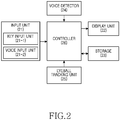
- FIG. 2 is a block diagram illustrating a mobile terminal according to an exemplary embodiment of the present invention.
- the mobile terminal 10 preferably includes an input unit 21 for generating an input signal, a display unit 22 for displaying display data, a storage 23 for storing data, a voice detector 24 for detecting voice, an eyeball tracking unit 25 for providing information regarding a user's eye movement, and a controller 26 for performing a control of an overall operation.
- the mobile terminal may further include a voice output unit for outputting voice data.
- the voice output unit and the display unit 22 may be bound and collectively called an output unit.
- the input unit 21 outputs an input signal for a relevant operation to the controller 26.
- the input signal may be classified into a key signal corresponding to button pressing and a voice signal corresponding to voice.
- a key signal corresponding to button pressing
- voice signal corresponding to voice.
- the controller 26, which comprises a processor or microprocessor, performs a relevant function according to the input signal with reference to data stored in the storage 23.
- the storage 23 stores a predetermined program for controlling an overall operation and various data input/output while a control operation is performed.
- the voice detector 24 captures a voice detect signal designated to perform a relevant operation from voice signals provided from the input unit 21, and informs the controller 26 of this.
- the eyeball tracking unit 25 informs the controller 26 of an eyeball track signal regarding eyeball movement, eye flickering, etc. using the output from camera 16.
- the camera may comprise, for example, a CCD,
- the controller 26 performs a function according to a relevant voice detect signal provided from the voice detector 24.
- controller 26 performs a function corresponding to an eyeball track signal provided from the eyeball tracking unit 25.
- the voice detector 24 and the eyeball tracking unit 25 may be included in the controller 26.
- the method described hereunder of the present invention may be provided as one or more instructions in one or more software modules stored in the storage device.
- the software modules may be executed by the controller.
- the storage 23 may comprise a ROM, a RAM and a flash ROM.
- the ROM may store the micro-cord of a program for processing and controlling the controller 26 and the eyeball tracking unit 25, and various reference data.
- the method executed by the eyeball tracking unit 25 may be provided as one or more instructions in one or more software modules stored in the storage 23.
- the software modules may be executed by the controller 26.
- FIG. 3A is a flowchart illustrating an exemplary procedure for selecting an icon on an icon menu screen according to an not part of the invention. Though an icon is taken as an example of a selected object, the object to be selected according to the presently claimed invention is not limited thereto.
- the controller 26 determines a position on a screen corresponding to a user's eyes on an icon menu screen (step 301).
- the tracking can, for example, track the position of the pupil relative to the position of the screen.
- the controller 26 displays an indicator for the determined position on the screen (step 303).
- the indicator may be displayed on the position of the screen viewed by the user.
- the indicator may be displayed in a circular selection region. Since the position on the screen corresponding to the user's eyes is not fixed, the controller 26 may determine and display the circular selection region in various methods. For one possible example, the controller 26 may determine positions on the screen corresponding to the user's eyes for a predetermined time or periodically, and then determine the circular selection region using an average and a standard deviation. Visual tracking software can be used to identify and track the eye movement.
- the controller 26 determines whether both eyes are closed and opened for a predetermined threshold time or longer is detected (step 305). When both eyes are closed and opened for a threshold time or longer is not detected, the controller 26 performs processes subsequent to step 301. In contrast, when both eyes are closed and opened for a threshold time or longer is detected, the controller 26 determines whether an icon put on the selection region exists (step 307). When an icon put on the selection region exists in step 307, the controller 26 selects an icon put on the selection region (step 309). The result is exactly the same as the case where a user touches a relevant icon with his finger to select the same in a general touch screen terminal. When an icon put on the selection region does not exist in step 307, the controller 26 displays a message informing that an icon has not been selected (step 311), and performs processes subsequent to step 301. The message may be displayed using characters or voice.
- FIG. 3B is a view illustrating a process for selecting an icon on an icon menu screen according to anexample not part of the invention.
- a position on an icon menu screen viewed by a user is displayed as a circular selection region (a). After that, when a user closes and opens both eyes, an icon put on the selection region is selected (b).
- FIG. 4A is a flowchart illustrating a procedure for rearranging an icon on an icon menu screen according to anexample not part of the invention. Though an icon is taken as an example of an object to be rearranged, the object for selection is not limited thereto.
- the controller 26 determines a position on a screen corresponding to a user's eyes on the icon menu screen (step 401).
- the controller 26 displays an indicator for the determined position on the screen (step 403).
- the indicator may be displayed as a circular selection region.
- the controller 26 determines whether one eye is closed for a threshold time or longer is detected (step 405). When detecting that one eye is not closed for the threshold time or longer, the controller 26 performs processes subsequent to step 401. In contrast, when detecting that one eye is closed for the threshold time or longer, the controller 26 determines whether an icon put on the selection region exists (step 407). When an icon put on the selection region exists in step 407, the controller 26 selects the icon put on the selection region as an object to be rearranged (step 409). The controller 26 may allow the selected icon for being rearranged to be displayed in relief compared to other icons.
- step 407 When an icon put on the selection region does not exist in step 407, the controller 26 informs that an icon for being rearrangement has not been selected, displays a message saying to open the closed eye (step 411), and performs processes subsequent to step 401.
- the message may be displayed using characters or output using voice. This process permits inducing the selection region to be put on an icon that a user desires to rearrange.
- the controller 26 determines whether the other open eye moves (step 413). When detecting that the other open eye moves, the controller 26 moves the selected icon to a position corresponding to the movement on the screen (step 415). However, when not detecting that the other open eye moves, the controller 26 re-performs processes subsequent to step 417. The controller 26 can ignore flickering of the other open eye in step 413.
- the controller 26 determines whether the closed eye is opened (step 417). When detecting that the closed eye is opened, the controller 26 arranges the selected icon to the position determined in step 413 (step 419). In contrast, when not detecting that the closed eye is opened, the controller 26 performs processes subsequent to step 413.
- FIG. 4B is a view illustrating an exemplary process for rearranging an icon on an icon menu screen according to an example not part of the invention.
- a position on the icon menu screen viewed by a user is displayed as a circular selection region (a).
- the icon put on the selection region is displayed in relief and selected as an object to be rearranged (b).
- the icon to be rearranged is also moved and displayed by a corresponding amount (c).
- arrangement of the selected icon put on the moved position is completed (d).
- the mobile terminal could respond to a voice command such as "down" or "lower left", which may be preferable at time to further tracking eye movement.
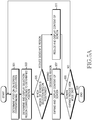
- FIG. 5A is a flowchart illustrating an example of a procedure for expanding/reducing content of a screen and displaying the same according to an example not part of the invention.
- the content of the screen may be an image such as a figure, a photo, etc., or a web page, an electronic book, etc.
- the controller 26 is accompanied by the following processes.
- the controller 26 determines a position on the screen corresponding to a user's eyes (step 501).
- the controller 26 displays an indicator regarding the determined position on the screen (step 503).
- the indicator may be displayed as a circular selection region.
- the selection region is also moved according to the user's eyes.
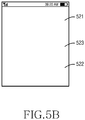
- FIG. 5B is a screen of a screen expand/reduce view mode according to anexample not part of the invention. Referring now to FIG. 5B , the screen is divided into a region 521 designating expansion of the screen and a region 522 designating reduction of the screen. Furthermore, a region 523 that does not designate expansion and reduction may be further configured. The person of ordinary skill in the art understands and appreciates that the order of 521-523 could be changed, or the areas of the screen could be columns, etc.
- the controller 26 expands and displays content of the screen (step 507). In contrast, when the selection region is positioned on the region designating reduction, the controller 26 reduces and displays content of the screen (step 511). Though not shown, when the selection region is positioned on the region 532 that does not designate expansion and reduction, the controller 26 does not expand or reduce the content of the screen.
- the controller 26 performs processes subsequent to step 501 until the screen expand/reduce mode ends (step 509).
- the mode may be ended.
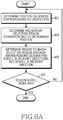
- FIG. 6A is a flowchart illustrating an exemplary procedure for scrolling contents of a screen according to anexample not part of the invention.
- the content of the screen may be an image such as a figure, a photo, etc., or a web page, an electronic book, etc.
- the controller 26 is accompanied by the following processes.
- the controller 26 determines a position on the screen corresponding to a user's eyes (step 601).
- the controller 26 displays an indicator for the determined position on the screen (step 603) that is being viewed.
- the indicator may be displayed as a circular selection region, or it could be a highlight, a flashing cursor, just to name a few non-limiting possibilities.
- the selection region is also updated and displayed according to a user's eyes. The selection region appears to move in a viewpoint of the user.
- the controller 26 determines a region on which the selection region is positioned among regions designating scroll to a relevant direction, and scrolls a content in the relevant direction (step 605).
- the controller 26 performs processes subsequent to step 601 until the screen scroll mode ends (step 607).
- the mode may be ended.
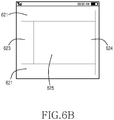
- FIG. 6B is a screen illustrating a scroll mode according to an example not part of the invention.
- the screen is divided into a region 621 designating scroll to the top, a region 622 designating scroll to the bottom, a region 623 designating scroll to the left, and a region 624 designating scroll to the right. Furthermore, a region 625 that does not designate scroll may be further configured. For example, when the selection region is positioned on the region where the scroll to the bottom is designated, the controller 26 scrolls a content of the screen to the bottom and displays the same.
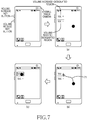
- FIG. 7 is a view illustrating a process for moving a button formed outside a screen onto the screen and selecting the same according to an example not part of the invention.
- the buttons formed outside of the screen is defined as a volume increase button and a volume reduce (i.e. decrease) button.
- buttons replacing the volume increase button and the volume reduce button formed outside the screen are displayed on the screen (a).
- a region where a volume increase has been designated and a region where a volume reduction has been designated are displayed.
- a position viewed by a user is displayed as a circular selection region on the screen.
- the selection region is updated and displayed (b). The selection region appears to move in a viewpoint of the user.
- FIG. 8A is a flowchart illustrating a procedure for selecting an icon on an icon menu screen according to an example not part of the invention. Though an icon is taken as an example of an object to be selected, the object to be selected is not limited thereto.
- the controller 26 determines a position on the screen corresponding to a position of the user's eyes on the icon menu screen (step 801).
- the controller 26 displays an indicator for the determined viewing position of the user's eyes on the screen (step 803).
- the indicator is displayed at a position of the screen viewed by a user.
- the indicator may be displayed as a circular selection region.
- the controller 26 determines whether a "select" voice detect signal is detected (step 805). When the "select" voice detect signal is not detected, the controller 26 performs processes subsequent to step 801.
- the controller 26 determines whether an icon put on the selection region exists (step 807). When an icon put on the selection region exists in step 807, the controller 26 selects the icon put on the selection region (step 809). This selection is the same as the case where a user touches a relevant icon with his finger to select the same in a general touch screen terminal. When the icon put on the selection region does not exist in step 807, the controller 26 displays a message informing that an icon has not been selected (step 811), and performs processes subsequent to step 801. The message may be displayed using characters or output using voice.
- FIG. 8B is a view illustrating a process for selecting an icon on an icon menu screen according to anexample not part of the invention.
- FIG. 8B a position on the icon menu screen viewed by a user is displayed as a circular selection region 80. After that, when the user says "select”, an icon put on the selection region is selected 90, and it can be seen that the other icons can be grayed or lightened when one particular icon is selected.
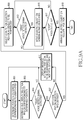
- FIG. 9A is a flowchart illustrating a process for rearranging an icon on an icon menu screen according to an exemplary embodiment of the present invention.
- an icon is taken as an example of an object to be rearranged, the object of selection is not limited thereto.
- the controller 26 determines a position on the screen corresponding to a user's eyes on the icon menu screen (step 901).
- the controller 26 displays an indicator for the determined viewing position on the screen (step 903).
- the indicator may be displayed as a circular selection region, or can be any of a plurality of possible visual indicators.
- the controller 26 determines whether a "select" voice detect signal is detected (step 905). When the "select" voice detect signal is not detected, the controller 26 performs processes subsequent to step 901. In contrast, when the "select" voice detect signal is detected, the controller 26 determines whether an icon put on the selection region exists (step 907). When the icon put on the selection region exists in step 907, the controller 26 selects the icon put on the selection region as an object to be rearranged (step 909). The controller 26 may allow the selected icon for rearrangement to be displayed in relief compared to other icons.
- step 907 the controller 26 displays a message informing that an icon for rearrangement has not been selected (step 911), and performs processes subsequent to step 901.
- the message may be displayed using characters or output using voice. This process permits inducing the selection region to be put on an icon that a user desires to rearrange.
- the controller 26 determines whether a "drag” voice detect signal is detected (step 913). When the "drag” voice detect signal is not detected, the controller 26 performs processes subsequent to step 917. When the "drag” voice detect signal is detected, the controller 26 moves the selected object on the screen along detected movement of a user's eyes (step 915).
- the controller 26 determines whether a "drop" voice detect signal is detected (step 917). When the drop" voice detect signal is not detected, the controller 26 performs processes subsequent to step 913. When the drop" voice detect signal is detected, the controller 26 arranges the selected icon to a position corresponding to the movement in step 915 on the screen (step 919).
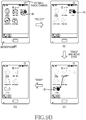
- FIG. 9B is a view illustrating a process for rearranging an icon on an icon menu screen according to an exemplary embodiment of the present invention.
- a position on the icon menu screen viewed by a user is displayed as a circular selection region 80.
- an icon put on the selection region is displayed in relief and selected as an object 90 to be rearranged.
- the selected icon moves to the position 91 to which the user's eyes has been moved.
- arrangement of the selection icon put on the moved position is completed (d).
- an exemplary embodiment of the present invention shows a construction where eyeball tracking and voice detection are combined.
- the mode for selecting an icon may be executed by selecting a relevant button on the screen using the method described with reference to FIG. 3A .
- these modes may be executed when a general key button is pressed.
- these modes may be executed via voice detection. For example, when a user says "scroll mode", a scroll mode is executed, and regions where scrolls to respective directions have been designated are displayed.
- respective modes may be switched to eye flickering. For example, when a user flickers his eyes twice while the expansion/reduction mode of FIG. 5B is executed, a mode may be switched to a scroll mode. In other words, switching between the respective modes may be designated depending on the kind of eye flickering.
- the present invention promotes a user's convenience by generating an input for a relevant function without using the user's hands.
- the above-described methods according to the present invention can be implemented in hardware or as software or computer code that can be stored in a recording medium such as a CD ROM, an RAM, a floppy disk, a hard disk, or a magneto-optical disk or downloaded over a network and stored on a non-transitory machine readable medium, so that the methods described herein can be rendered in such software using a general purpose computer, or a special processor or in programmable or dedicated hardware, such as an ASIC or FPGA.
- the computer, the processor, microprocessor controller or the programmable hardware include memory components, e.g., RAM, ROM, Flash, etc.
- Voice recognition software that is commercially available can be used for the recognizing of voice commands, and the artisan appreciates and understands that the claimed invention can use other voice commands than the exemplary one provided herein.
- visual tracking software can be used/modified to practice the present invention, which is not limited to mobile terminals and preferably includes any type of apparatus with a visual display screen.
- visual tracking software can be used/modified to practice the present invention, which is not limited to mobile terminals and preferably includes any type of apparatus with a visual display screen.
- automatic teller machines, MP 3 players virtually any device where one uses a mouse or touch screen to enter data.
Landscapes
- Engineering & Computer Science (AREA)
- Theoretical Computer Science (AREA)
- General Engineering & Computer Science (AREA)
- Human Computer Interaction (AREA)
- Physics & Mathematics (AREA)
- General Physics & Mathematics (AREA)
- Computer Hardware Design (AREA)
- Health & Medical Sciences (AREA)
- Audiology, Speech & Language Pathology (AREA)
- General Health & Medical Sciences (AREA)
- User Interface Of Digital Computer (AREA)
- Input From Keyboards Or The Like (AREA)
Claims (2)
- Verfahren zur Verwendung in einem mobilen Endgerät, wobei das Verfahren Folgendes umfasst:einen Anzeiger in einer Position auf einem Anzeigebildschirm vorzusehen, auf die ein Benutzer schaut (901, 903),durch Verfolgung der Augen des Benutzers während der Anzeige eines Objekts auf dem Anzeigebildschirm;als Reaktion auf einen ersten Sprachbefehl (905), Hervorheben (907, 909) des Objekts, auf dem der Anzeiger sich befindet; gekennzeichnet durch
die Bewegung (915) des hervorgehobenen Objekts zu einer Position auf dem Anzeigebildschirm hin, auf die der Benutzer schaut, durch Verfolgung der Augen des Benutzers; undals Reaktion auf einem zweiten Sprachbefehl (917), Vervollständigung einer Bewegung des hervorgehobenen Gegenstandes; wobei die Bewegung des hervorgehobenen Gegenstandes als Reaktion auf die Erfassung eines dritten Sprachbefehls (913) durchgeführt wird; wobei das Objekt ein Icon umfasst. - Mobiles Endgerät (10) mit:einer Verfolgungseinheit (16), konfiguriert, um die Augen eines Benutzers zu verfolgen;einem Anzeigebildschirm (12), konfiguriert, um ein Objekt anzuzeigen;einem Sprachdetektor (24), konfiguriert, um Sprachbefehle zu erfassen; undeiner Steuervorrichtung (26), konfiguriert, um:einen Anzeiger (80) in einer Position auf dem Anzeigebildschirm zu platzieren, auf die der Benutzer schaut, durch Verfolgung der Augen des Benutzers während der Anzeige des Objekts auf dem Anzeigebildschirm über die Verfolgungseinheit,als Reaktion auf einen ersten Sprachbefehl (905), der von dem Sprachdetektor identifiziert wurde, das Objekt hervorzuheben, auf dem der Anzeiger sich befindet, dadurch gekennzeichnet, dass die Steuervorrichtung des Weiteren konfiguriert ist, um das hervorgehobene Objekt zu einer Position auf dem Anzeigebildschirm zu bewegen (915), auf die der Benutzer schaut, durch Verfolgung der Augen des Benutzers über die Verfolgungseinheit, undals Reaktion auf einen zweiten Sprachbefehl (917), der von dem Sprachdetektor identifiziert wurde, Vervollständigung einer Bewegung des hervorgehobenen Objekts;wobei die Bewegung des hervorgehobenen Objekts als Reaktion auf die Erfassung eines dritten Sprachbefehls (913) durchgeführt wird, der von dem Sprachdetektor identifiziert wurde; wobei das Objekt ein Icon umfasst.
Applications Claiming Priority (1)
| Application Number | Priority Date | Filing Date | Title |
|---|---|---|---|
| KR1020110045587A KR101773845B1 (ko) | 2011-05-16 | 2011-05-16 | 휴대용 단말기에서 입력 처리 방법 및 장치 |
Publications (3)
| Publication Number | Publication Date |
|---|---|
| EP2525271A2 EP2525271A2 (de) | 2012-11-21 |
| EP2525271A3 EP2525271A3 (de) | 2014-11-19 |
| EP2525271B1 true EP2525271B1 (de) | 2019-09-04 |
Family
ID=45936937
Family Applications (1)
| Application Number | Title | Priority Date | Filing Date |
|---|---|---|---|
| EP12161544.7A Active EP2525271B1 (de) | 2011-05-16 | 2012-03-27 | Verfahren und Vorrichtung zur Verarbeitung der Eingabe in einem mobilen Endgerät |
Country Status (3)
| Country | Link |
|---|---|
| US (1) | US9170645B2 (de) |
| EP (1) | EP2525271B1 (de) |
| KR (1) | KR101773845B1 (de) |
Families Citing this family (64)
| Publication number | Priority date | Publication date | Assignee | Title |
|---|---|---|---|---|
| US8600120B2 (en) | 2008-01-03 | 2013-12-03 | Apple Inc. | Personal computing device control using face detection and recognition |
| US7953462B2 (en) | 2008-08-04 | 2011-05-31 | Vartanian Harry | Apparatus and method for providing an adaptively responsive flexible display device |
| US8638385B2 (en) | 2011-06-05 | 2014-01-28 | Apple Inc. | Device, method, and graphical user interface for accessing an application in a locked device |
| US8804148B2 (en) * | 2011-09-26 | 2014-08-12 | Brother Kogyo Kabushiki Kaisha | Image forming apparatus and non-transitory computer readable medium storing a program for controlling the same |
| KR101850035B1 (ko) * | 2012-05-02 | 2018-04-20 | 엘지전자 주식회사 | 이동 단말기 및 그 제어방법 |
| US9148537B1 (en) * | 2012-05-18 | 2015-09-29 | hopTo Inc. | Facial cues as commands |
| US9395826B1 (en) | 2012-05-25 | 2016-07-19 | hopTo Inc. | System for and method of translating motion-based user input between a client device and an application host computer |
| US8738814B1 (en) | 2012-05-25 | 2014-05-27 | hopTo Inc. | System for and method of translating motion-based user input between a client device and an application host computer |
| US8745280B1 (en) | 2012-05-25 | 2014-06-03 | hopTo, Inc. | System for and method of translating motion-based user input between a client device and an application host computer |
| US9690334B2 (en) | 2012-08-22 | 2017-06-27 | Intel Corporation | Adaptive visual output based on change in distance of a mobile device to a user |
| US20140055339A1 (en) * | 2012-08-22 | 2014-02-27 | David Stanasolovich | Adaptive visual output based on motion compensation of a mobile device |
| DE102012215407A1 (de) * | 2012-08-30 | 2014-05-28 | Bayerische Motoren Werke Aktiengesellschaft | Bereitstellen einer Eingabe für ein Bedienelement |
| US9007524B2 (en) * | 2012-09-25 | 2015-04-14 | Intel Corporation | Techniques and apparatus for audio isolation in video processing |
| US9064168B2 (en) * | 2012-12-14 | 2015-06-23 | Hand Held Products, Inc. | Selective output of decoded message data |
| US20140145966A1 (en) * | 2012-11-27 | 2014-05-29 | Research In Motion Limited | Electronic device with touch input display system using head-tracking to reduce visible offset for user input |
| KR20140073730A (ko) * | 2012-12-06 | 2014-06-17 | 엘지전자 주식회사 | 이동 단말기 및 이동 단말기 제어방법 |
| JP5875510B2 (ja) * | 2012-12-10 | 2016-03-02 | 株式会社ソニー・コンピュータエンタテインメント | 電子機器、メニュー表示方法 |
| US8854447B2 (en) * | 2012-12-21 | 2014-10-07 | United Video Properties, Inc. | Systems and methods for automatically adjusting audio based on gaze point |
| KR102049977B1 (ko) * | 2012-12-31 | 2019-11-28 | 엘지전자 주식회사 | 이동 단말기 |
| US10031637B2 (en) * | 2013-01-25 | 2018-07-24 | Lg Electronics Inc. | Image display apparatus and method for operating the same |
| JP2014160982A (ja) | 2013-02-20 | 2014-09-04 | Sony Corp | 画像処理装置および撮影制御方法、並びにプログラム |
| KR102281233B1 (ko) | 2013-03-14 | 2021-07-23 | 삼성전자 주식회사 | 화면 제어 방법 및 장치 |
| KR102068049B1 (ko) * | 2013-05-13 | 2020-01-20 | 삼성전자주식회사 | 영상 처리 장치 및 영상 처리 방법 |
| KR102111457B1 (ko) * | 2013-05-15 | 2020-05-15 | 엘지전자 주식회사 | 이동 단말기 및 이동 단말기의 제어 방법 |
| JP5958833B2 (ja) * | 2013-06-24 | 2016-08-02 | パナソニックIpマネジメント株式会社 | 指向性制御システム |
| US10914951B2 (en) * | 2013-08-19 | 2021-02-09 | Qualcomm Incorporated | Visual, audible, and/or haptic feedback for optical see-through head mounted display with user interaction tracking |
| JP6127839B2 (ja) | 2013-09-02 | 2017-05-17 | ソニー株式会社 | 情報処理装置、情報処理方法、およびプログラム |
| KR20150027614A (ko) * | 2013-09-04 | 2015-03-12 | 엘지전자 주식회사 | 이동 단말기 |
| US9898642B2 (en) | 2013-09-09 | 2018-02-20 | Apple Inc. | Device, method, and graphical user interface for manipulating user interfaces based on fingerprint sensor inputs |
| US20150127505A1 (en) * | 2013-10-11 | 2015-05-07 | Capital One Financial Corporation | System and method for generating and transforming data presentation |
| TWI489320B (zh) * | 2013-10-25 | 2015-06-21 | Utechzone Co Ltd | 電子文件標記方法及裝置 |
| WO2015064165A1 (ja) * | 2013-11-01 | 2015-05-07 | ソニー株式会社 | 情報処理装置、情報処理方法、およびプログラム |
| US10048748B2 (en) * | 2013-11-12 | 2018-08-14 | Excalibur Ip, Llc | Audio-visual interaction with user devices |
| DE102013021814A1 (de) | 2013-12-20 | 2015-06-25 | Audi Ag | Bedienvorrichtung mit Eyetracker |
| US9645641B2 (en) * | 2014-08-01 | 2017-05-09 | Microsoft Technology Licensing, Llc | Reflection-based control activation |
| US10146303B2 (en) * | 2015-01-20 | 2018-12-04 | Microsoft Technology Licensing, Llc | Gaze-actuated user interface with visual feedback |
| KR20160090584A (ko) * | 2015-01-22 | 2016-08-01 | 엘지전자 주식회사 | 디스플레이 디바이스 및 그 제어 방법 |
| KR101635049B1 (ko) * | 2015-01-29 | 2016-07-08 | 엘지전자 주식회사 | 이동 단말기 어셈블리 |
| RU2015103099A (ru) * | 2015-01-30 | 2016-08-20 | Петр Алексеевич Игнатюк | Способ перехода на интернет-страницу и запуска программы мессенджера(варианты) |
| US10401953B2 (en) * | 2015-10-26 | 2019-09-03 | Pillantas Inc. | Systems and methods for eye vergence control in real and augmented reality environments |
| KR20170054080A (ko) * | 2015-11-09 | 2017-05-17 | 삼성전자주식회사 | 전자장치 및 그의 동작 방법 |
| JP6597397B2 (ja) * | 2016-02-29 | 2019-10-30 | 富士通株式会社 | ポインティング支援装置、ポインティング支援方法およびポインティング支援プログラム |
| DK179978B1 (en) | 2016-09-23 | 2019-11-27 | Apple Inc. | Image data for enhanced user interactions |
| US10867445B1 (en) * | 2016-11-16 | 2020-12-15 | Amazon Technologies, Inc. | Content segmentation and navigation |
| JP2020520031A (ja) * | 2017-05-16 | 2020-07-02 | アップル インコーポレイテッドApple Inc. | 拡張されたユーザ対話のための画像データに関する米国特許商標局における特許出願 |
| DK180007B1 (en) | 2017-05-16 | 2020-01-16 | Apple Inc. | RECORDING AND SENDING EMOJI |
| US20200174562A1 (en) * | 2017-06-29 | 2020-06-04 | Maxell, Ltd. | Portable terminal |
| KR102185854B1 (ko) | 2017-09-09 | 2020-12-02 | 애플 인크. | 생체측정 인증의 구현 |
| US10831265B2 (en) | 2018-04-20 | 2020-11-10 | Microsoft Technology Licensing, Llc | Systems and methods for gaze-informed target manipulation |
| US12033296B2 (en) | 2018-05-07 | 2024-07-09 | Apple Inc. | Avatar creation user interface |
| US11170085B2 (en) | 2018-06-03 | 2021-11-09 | Apple Inc. | Implementation of biometric authentication |
| CN109164908B (zh) * | 2018-07-03 | 2021-12-24 | 维沃移动通信有限公司 | 一种界面控制方法及移动终端 |
| US10860096B2 (en) | 2018-09-28 | 2020-12-08 | Apple Inc. | Device control using gaze information |
| US11100349B2 (en) | 2018-09-28 | 2021-08-24 | Apple Inc. | Audio assisted enrollment |
| US11107261B2 (en) | 2019-01-18 | 2021-08-31 | Apple Inc. | Virtual avatar animation based on facial feature movement |
| DK201970530A1 (en) | 2019-05-06 | 2021-01-28 | Apple Inc | Avatar integration with multiple applications |
| KR102106432B1 (ko) * | 2020-01-17 | 2020-05-06 | (주) 알에스기획 | 눈의 정보를 추출하고 분석하는 시스템 및 그 방법 |
| EP4675470A3 (de) | 2021-01-25 | 2026-02-25 | Apple Inc. | Implementierung von biometrischer authentifizierung |
| US11762458B2 (en) * | 2021-02-15 | 2023-09-19 | Sony Group Corporation | Media display device control based on eye gaze |
| US12210603B2 (en) | 2021-03-04 | 2025-01-28 | Apple Inc. | User interface for enrolling a biometric feature |
| US12216754B2 (en) | 2021-05-10 | 2025-02-04 | Apple Inc. | User interfaces for authenticating to perform secure operations |
| KR20230125681A (ko) * | 2022-02-21 | 2023-08-29 | 삼성전자주식회사 | 플렉서블 디스플레이 장치 및 그 제어 방법 |
| US20240094977A1 (en) * | 2022-09-21 | 2024-03-21 | Rovi Guides, Inc. | Field of vision audio control for physical or mix of physical and extended reality media displays in a spatially mapped space |
| KR102592923B1 (ko) * | 2023-06-27 | 2023-10-23 | 주식회사 토노베이션 | 행동분석을 통한 사용자 맞춤형 인터페이스 제공용키오스크 및 그 방법 |
Citations (1)
| Publication number | Priority date | Publication date | Assignee | Title |
|---|---|---|---|---|
| US7013258B1 (en) * | 2001-03-07 | 2006-03-14 | Lenovo (Singapore) Pte. Ltd. | System and method for accelerating Chinese text input |
Family Cites Families (11)
| Publication number | Priority date | Publication date | Assignee | Title |
|---|---|---|---|---|
| US5850211A (en) * | 1996-06-26 | 1998-12-15 | Sun Microsystems, Inc. | Eyetrack-driven scrolling |
| US5689619A (en) | 1996-08-09 | 1997-11-18 | The United States Of America As Represented By The Secretary Of The Army | Eyetracker control of heads-up displays |
| US7365738B2 (en) * | 2003-12-02 | 2008-04-29 | International Business Machines Corporation | Guides and indicators for eye movement monitoring systems |
| KR101098687B1 (ko) | 2004-09-23 | 2011-12-23 | 엘지전자 주식회사 | 이동 통신 단말기의 눈동자 추적을 이용한 기능 실행 방법 |
| JP4755490B2 (ja) * | 2005-01-13 | 2011-08-24 | オリンパスイメージング株式会社 | ブレ補正方法および撮像装置 |
| US20070188473A1 (en) * | 2006-02-14 | 2007-08-16 | Picsel Research Limited | System and methods for document navigation |
| DE602007001600D1 (de) * | 2006-03-23 | 2009-08-27 | Koninkl Philips Electronics Nv | Hotspots zur blickfokussierten steuerung von bildmanipulationen |
| CN101945612B (zh) * | 2008-02-14 | 2013-09-25 | 诺基亚公司 | 用于确定注视方向的设备和方法 |
| KR20100110893A (ko) * | 2008-03-03 | 2010-10-13 | 파나소닉 주식회사 | 초음파 진단 장치 |
| US20100182232A1 (en) * | 2009-01-22 | 2010-07-22 | Alcatel-Lucent Usa Inc. | Electronic Data Input System |
| US20120105486A1 (en) * | 2009-04-09 | 2012-05-03 | Dynavox Systems Llc | Calibration free, motion tolerent eye-gaze direction detector with contextually aware computer interaction and communication methods |
-
2011
- 2011-05-16 KR KR1020110045587A patent/KR101773845B1/ko active Active
-
2012
- 2012-03-16 US US13/422,157 patent/US9170645B2/en active Active
- 2012-03-27 EP EP12161544.7A patent/EP2525271B1/de active Active
Patent Citations (1)
| Publication number | Priority date | Publication date | Assignee | Title |
|---|---|---|---|---|
| US7013258B1 (en) * | 2001-03-07 | 2006-03-14 | Lenovo (Singapore) Pte. Ltd. | System and method for accelerating Chinese text input |
Also Published As
| Publication number | Publication date |
|---|---|
| US9170645B2 (en) | 2015-10-27 |
| EP2525271A3 (de) | 2014-11-19 |
| EP2525271A2 (de) | 2012-11-21 |
| US20120293406A1 (en) | 2012-11-22 |
| KR101773845B1 (ko) | 2017-09-01 |
| KR20120127842A (ko) | 2012-11-26 |
Similar Documents
| Publication | Publication Date | Title |
|---|---|---|
| US9170645B2 (en) | Method and apparatus for processing input in mobile terminal | |
| US11853477B2 (en) | Zonal gaze driven interaction | |
| US10394320B2 (en) | System for gaze interaction | |
| US12422979B2 (en) | Handwriting keyboard for screens | |
| US20200285379A1 (en) | System for gaze interaction | |
| US10488919B2 (en) | System for gaze interaction | |
| US9946338B2 (en) | Information processing to vary screen display based on a gaze point of the user | |
| CN102822771B (zh) | 基于眼球跟踪器的上下文动作 | |
| EP3088997A1 (de) | Blickinteraktion mit verzögerter ausführung | |
| US20100164897A1 (en) | Virtual keypad systems and methods | |
| EP2207085A2 (de) | Touch-Click-Tastenfeld | |
| EP3187977A1 (de) | System für blickinteraktion | |
| KR20110041915A (ko) | 데이터 표시 방법 및 그를 수행하는 단말기 | |
| WO2018156912A1 (en) | System for gaze interaction | |
| JP2014142882A (ja) | 視線入力装置 | |
| EP4155891A1 (de) | Verfahren und vorrichtung zur gerätesteuerung sowie speichermedium und elektronische vorrichtung | |
| CN114341774A (zh) | 使用眼跟踪地图的动态眼跟踪相机对准 | |
| JP2016139340A (ja) | 情報入力システムおよび入力装置 |
Legal Events
| Date | Code | Title | Description |
|---|---|---|---|
| PUAI | Public reference made under article 153(3) epc to a published international application that has entered the european phase |
Free format text: ORIGINAL CODE: 0009012 |
|
| AK | Designated contracting states |
Kind code of ref document: A2 Designated state(s): AL AT BE BG CH CY CZ DE DK EE ES FI FR GB GR HR HU IE IS IT LI LT LU LV MC MK MT NL NO PL PT RO RS SE SI SK SM TR |
|
| AX | Request for extension of the european patent |
Extension state: BA ME |
|
| PUAL | Search report despatched |
Free format text: ORIGINAL CODE: 0009013 |
|
| AK | Designated contracting states |
Kind code of ref document: A3 Designated state(s): AL AT BE BG CH CY CZ DE DK EE ES FI FR GB GR HR HU IE IS IT LI LT LU LV MC MK MT NL NO PL PT RO RS SE SI SK SM TR |
|
| AX | Request for extension of the european patent |
Extension state: BA ME |
|
| RIC1 | Information provided on ipc code assigned before grant |
Ipc: G06F 3/01 20060101AFI20141013BHEP Ipc: G06F 1/16 20060101ALI20141013BHEP Ipc: G06F 3/048 20130101ALI20141013BHEP |
|
| 17P | Request for examination filed |
Effective date: 20150518 |
|
| RBV | Designated contracting states (corrected) |
Designated state(s): AL AT BE BG CH CY CZ DE DK EE ES FI FR GB GR HR HU IE IS IT LI LT LU LV MC MK MT NL NO PL PT RO RS SE SI SK SM TR |
|
| STAA | Information on the status of an ep patent application or granted ep patent |
Free format text: STATUS: EXAMINATION IS IN PROGRESS |
|
| 17Q | First examination report despatched |
Effective date: 20180215 |
|
| GRAP | Despatch of communication of intention to grant a patent |
Free format text: ORIGINAL CODE: EPIDOSNIGR1 |
|
| STAA | Information on the status of an ep patent application or granted ep patent |
Free format text: STATUS: GRANT OF PATENT IS INTENDED |
|
| INTG | Intention to grant announced |
Effective date: 20190510 |
|
| GRAS | Grant fee paid |
Free format text: ORIGINAL CODE: EPIDOSNIGR3 |
|
| GRAA | (expected) grant |
Free format text: ORIGINAL CODE: 0009210 |
|
| STAA | Information on the status of an ep patent application or granted ep patent |
Free format text: STATUS: THE PATENT HAS BEEN GRANTED |
|
| AK | Designated contracting states |
Kind code of ref document: B1 Designated state(s): AL AT BE BG CH CY CZ DE DK EE ES FI FR GB GR HR HU IE IS IT LI LT LU LV MC MK MT NL NO PL PT RO RS SE SI SK SM TR |
|
| REG | Reference to a national code |
Ref country code: GB Ref legal event code: FG4D |
|
| REG | Reference to a national code |
Ref country code: CH Ref legal event code: EP |
|
| REG | Reference to a national code |
Ref country code: AT Ref legal event code: REF Ref document number: 1176265 Country of ref document: AT Kind code of ref document: T Effective date: 20190915 |
|
| REG | Reference to a national code |
Ref country code: DE Ref legal event code: R096 Ref document number: 602012063543 Country of ref document: DE |
|
| REG | Reference to a national code |
Ref country code: IE Ref legal event code: FG4D |
|
| REG | Reference to a national code |
Ref country code: NL Ref legal event code: MP Effective date: 20190904 |
|
| REG | Reference to a national code |
Ref country code: LT Ref legal event code: MG4D |
|
| PG25 | Lapsed in a contracting state [announced via postgrant information from national office to epo] |
Ref country code: NO Free format text: LAPSE BECAUSE OF FAILURE TO SUBMIT A TRANSLATION OF THE DESCRIPTION OR TO PAY THE FEE WITHIN THE PRESCRIBED TIME-LIMIT Effective date: 20191204 Ref country code: LT Free format text: LAPSE BECAUSE OF FAILURE TO SUBMIT A TRANSLATION OF THE DESCRIPTION OR TO PAY THE FEE WITHIN THE PRESCRIBED TIME-LIMIT Effective date: 20190904 Ref country code: BG Free format text: LAPSE BECAUSE OF FAILURE TO SUBMIT A TRANSLATION OF THE DESCRIPTION OR TO PAY THE FEE WITHIN THE PRESCRIBED TIME-LIMIT Effective date: 20191204 Ref country code: FI Free format text: LAPSE BECAUSE OF FAILURE TO SUBMIT A TRANSLATION OF THE DESCRIPTION OR TO PAY THE FEE WITHIN THE PRESCRIBED TIME-LIMIT Effective date: 20190904 Ref country code: HR Free format text: LAPSE BECAUSE OF FAILURE TO SUBMIT A TRANSLATION OF THE DESCRIPTION OR TO PAY THE FEE WITHIN THE PRESCRIBED TIME-LIMIT Effective date: 20190904 Ref country code: SE Free format text: LAPSE BECAUSE OF FAILURE TO SUBMIT A TRANSLATION OF THE DESCRIPTION OR TO PAY THE FEE WITHIN THE PRESCRIBED TIME-LIMIT Effective date: 20190904 |
|
| PG25 | Lapsed in a contracting state [announced via postgrant information from national office to epo] |
Ref country code: ES Free format text: LAPSE BECAUSE OF FAILURE TO SUBMIT A TRANSLATION OF THE DESCRIPTION OR TO PAY THE FEE WITHIN THE PRESCRIBED TIME-LIMIT Effective date: 20190904 Ref country code: GR Free format text: LAPSE BECAUSE OF FAILURE TO SUBMIT A TRANSLATION OF THE DESCRIPTION OR TO PAY THE FEE WITHIN THE PRESCRIBED TIME-LIMIT Effective date: 20191205 Ref country code: LV Free format text: LAPSE BECAUSE OF FAILURE TO SUBMIT A TRANSLATION OF THE DESCRIPTION OR TO PAY THE FEE WITHIN THE PRESCRIBED TIME-LIMIT Effective date: 20190904 Ref country code: AL Free format text: LAPSE BECAUSE OF FAILURE TO SUBMIT A TRANSLATION OF THE DESCRIPTION OR TO PAY THE FEE WITHIN THE PRESCRIBED TIME-LIMIT Effective date: 20190904 Ref country code: RS Free format text: LAPSE BECAUSE OF FAILURE TO SUBMIT A TRANSLATION OF THE DESCRIPTION OR TO PAY THE FEE WITHIN THE PRESCRIBED TIME-LIMIT Effective date: 20190904 |
|
| REG | Reference to a national code |
Ref country code: AT Ref legal event code: MK05 Ref document number: 1176265 Country of ref document: AT Kind code of ref document: T Effective date: 20190904 |
|
| PG25 | Lapsed in a contracting state [announced via postgrant information from national office to epo] |
Ref country code: PT Free format text: LAPSE BECAUSE OF FAILURE TO SUBMIT A TRANSLATION OF THE DESCRIPTION OR TO PAY THE FEE WITHIN THE PRESCRIBED TIME-LIMIT Effective date: 20200106 Ref country code: AT Free format text: LAPSE BECAUSE OF FAILURE TO SUBMIT A TRANSLATION OF THE DESCRIPTION OR TO PAY THE FEE WITHIN THE PRESCRIBED TIME-LIMIT Effective date: 20190904 Ref country code: IT Free format text: LAPSE BECAUSE OF FAILURE TO SUBMIT A TRANSLATION OF THE DESCRIPTION OR TO PAY THE FEE WITHIN THE PRESCRIBED TIME-LIMIT Effective date: 20190904 Ref country code: EE Free format text: LAPSE BECAUSE OF FAILURE TO SUBMIT A TRANSLATION OF THE DESCRIPTION OR TO PAY THE FEE WITHIN THE PRESCRIBED TIME-LIMIT Effective date: 20190904 Ref country code: PL Free format text: LAPSE BECAUSE OF FAILURE TO SUBMIT A TRANSLATION OF THE DESCRIPTION OR TO PAY THE FEE WITHIN THE PRESCRIBED TIME-LIMIT Effective date: 20190904 Ref country code: RO Free format text: LAPSE BECAUSE OF FAILURE TO SUBMIT A TRANSLATION OF THE DESCRIPTION OR TO PAY THE FEE WITHIN THE PRESCRIBED TIME-LIMIT Effective date: 20190904 Ref country code: NL Free format text: LAPSE BECAUSE OF FAILURE TO SUBMIT A TRANSLATION OF THE DESCRIPTION OR TO PAY THE FEE WITHIN THE PRESCRIBED TIME-LIMIT Effective date: 20190904 |
|
| PG25 | Lapsed in a contracting state [announced via postgrant information from national office to epo] |
Ref country code: IS Free format text: LAPSE BECAUSE OF FAILURE TO SUBMIT A TRANSLATION OF THE DESCRIPTION OR TO PAY THE FEE WITHIN THE PRESCRIBED TIME-LIMIT Effective date: 20200224 Ref country code: SK Free format text: LAPSE BECAUSE OF FAILURE TO SUBMIT A TRANSLATION OF THE DESCRIPTION OR TO PAY THE FEE WITHIN THE PRESCRIBED TIME-LIMIT Effective date: 20190904 Ref country code: CZ Free format text: LAPSE BECAUSE OF FAILURE TO SUBMIT A TRANSLATION OF THE DESCRIPTION OR TO PAY THE FEE WITHIN THE PRESCRIBED TIME-LIMIT Effective date: 20190904 Ref country code: SM Free format text: LAPSE BECAUSE OF FAILURE TO SUBMIT A TRANSLATION OF THE DESCRIPTION OR TO PAY THE FEE WITHIN THE PRESCRIBED TIME-LIMIT Effective date: 20190904 |
|
| REG | Reference to a national code |
Ref country code: DE Ref legal event code: R097 Ref document number: 602012063543 Country of ref document: DE |
|
| PLBE | No opposition filed within time limit |
Free format text: ORIGINAL CODE: 0009261 |
|
| STAA | Information on the status of an ep patent application or granted ep patent |
Free format text: STATUS: NO OPPOSITION FILED WITHIN TIME LIMIT |
|
| PG2D | Information on lapse in contracting state deleted |
Ref country code: IS |
|
| PG25 | Lapsed in a contracting state [announced via postgrant information from national office to epo] |
Ref country code: DK Free format text: LAPSE BECAUSE OF FAILURE TO SUBMIT A TRANSLATION OF THE DESCRIPTION OR TO PAY THE FEE WITHIN THE PRESCRIBED TIME-LIMIT Effective date: 20190904 Ref country code: IS Free format text: LAPSE BECAUSE OF FAILURE TO SUBMIT A TRANSLATION OF THE DESCRIPTION OR TO PAY THE FEE WITHIN THE PRESCRIBED TIME-LIMIT Effective date: 20200105 |
|
| 26N | No opposition filed |
Effective date: 20200605 |
|
| PG25 | Lapsed in a contracting state [announced via postgrant information from national office to epo] |
Ref country code: SI Free format text: LAPSE BECAUSE OF FAILURE TO SUBMIT A TRANSLATION OF THE DESCRIPTION OR TO PAY THE FEE WITHIN THE PRESCRIBED TIME-LIMIT Effective date: 20190904 |
|
| PG25 | Lapsed in a contracting state [announced via postgrant information from national office to epo] |
Ref country code: MC Free format text: LAPSE BECAUSE OF FAILURE TO SUBMIT A TRANSLATION OF THE DESCRIPTION OR TO PAY THE FEE WITHIN THE PRESCRIBED TIME-LIMIT Effective date: 20190904 |
|
| REG | Reference to a national code |
Ref country code: CH Ref legal event code: PL |
|
| REG | Reference to a national code |
Ref country code: BE Ref legal event code: MM Effective date: 20200331 |
|
| PG25 | Lapsed in a contracting state [announced via postgrant information from national office to epo] |
Ref country code: LU Free format text: LAPSE BECAUSE OF NON-PAYMENT OF DUE FEES Effective date: 20200327 |
|
| PG25 | Lapsed in a contracting state [announced via postgrant information from national office to epo] |
Ref country code: IE Free format text: LAPSE BECAUSE OF NON-PAYMENT OF DUE FEES Effective date: 20200327 Ref country code: CH Free format text: LAPSE BECAUSE OF NON-PAYMENT OF DUE FEES Effective date: 20200331 Ref country code: LI Free format text: LAPSE BECAUSE OF NON-PAYMENT OF DUE FEES Effective date: 20200331 Ref country code: FR Free format text: LAPSE BECAUSE OF NON-PAYMENT OF DUE FEES Effective date: 20200331 |
|
| PG25 | Lapsed in a contracting state [announced via postgrant information from national office to epo] |
Ref country code: BE Free format text: LAPSE BECAUSE OF NON-PAYMENT OF DUE FEES Effective date: 20200331 |
|
| GBPC | Gb: european patent ceased through non-payment of renewal fee |
Effective date: 20200327 |
|
| PG25 | Lapsed in a contracting state [announced via postgrant information from national office to epo] |
Ref country code: GB Free format text: LAPSE BECAUSE OF NON-PAYMENT OF DUE FEES Effective date: 20200327 |
|
| PG25 | Lapsed in a contracting state [announced via postgrant information from national office to epo] |
Ref country code: TR Free format text: LAPSE BECAUSE OF FAILURE TO SUBMIT A TRANSLATION OF THE DESCRIPTION OR TO PAY THE FEE WITHIN THE PRESCRIBED TIME-LIMIT Effective date: 20190904 Ref country code: MT Free format text: LAPSE BECAUSE OF FAILURE TO SUBMIT A TRANSLATION OF THE DESCRIPTION OR TO PAY THE FEE WITHIN THE PRESCRIBED TIME-LIMIT Effective date: 20190904 Ref country code: CY Free format text: LAPSE BECAUSE OF FAILURE TO SUBMIT A TRANSLATION OF THE DESCRIPTION OR TO PAY THE FEE WITHIN THE PRESCRIBED TIME-LIMIT Effective date: 20190904 |
|
| PG25 | Lapsed in a contracting state [announced via postgrant information from national office to epo] |
Ref country code: MK Free format text: LAPSE BECAUSE OF FAILURE TO SUBMIT A TRANSLATION OF THE DESCRIPTION OR TO PAY THE FEE WITHIN THE PRESCRIBED TIME-LIMIT Effective date: 20190904 |
|
| PGFP | Annual fee paid to national office [announced via postgrant information from national office to epo] |
Ref country code: DE Payment date: 20260220 Year of fee payment: 15 |