EP2490107A1 - Steuerungssystem mit mehrfachberührungseingabe - Google Patents
Steuerungssystem mit mehrfachberührungseingabe Download PDFInfo
- Publication number
- EP2490107A1 EP2490107A1 EP10823512A EP10823512A EP2490107A1 EP 2490107 A1 EP2490107 A1 EP 2490107A1 EP 10823512 A EP10823512 A EP 10823512A EP 10823512 A EP10823512 A EP 10823512A EP 2490107 A1 EP2490107 A1 EP 2490107A1
- Authority
- EP
- European Patent Office
- Prior art keywords
- touch
- control mode
- control
- window
- touch input
- Prior art date
- Legal status (The legal status is an assumption and is not a legal conclusion. Google has not performed a legal analysis and makes no representation as to the accuracy of the status listed.)
- Withdrawn
Links
Images







Classifications
-
- G—PHYSICS
- G06—COMPUTING OR CALCULATING; COUNTING
- G06F—ELECTRIC DIGITAL DATA PROCESSING
- G06F3/00—Input arrangements for transferring data to be processed into a form capable of being handled by the computer; Output arrangements for transferring data from processing unit to output unit, e.g. interface arrangements
- G06F3/01—Input arrangements or combined input and output arrangements for interaction between user and computer
- G06F3/048—Interaction techniques based on graphical user interfaces [GUI]
- G06F3/0487—Interaction techniques based on graphical user interfaces [GUI] using specific features provided by the input device, e.g. functions controlled by the rotation of a mouse with dual sensing arrangements, or of the nature of the input device, e.g. tap gestures based on pressure sensed by a digitiser
- G06F3/0488—Interaction techniques based on graphical user interfaces [GUI] using specific features provided by the input device, e.g. functions controlled by the rotation of a mouse with dual sensing arrangements, or of the nature of the input device, e.g. tap gestures based on pressure sensed by a digitiser using a touch-screen or digitiser, e.g. input of commands through traced gestures
- G06F3/04886—Interaction techniques based on graphical user interfaces [GUI] using specific features provided by the input device, e.g. functions controlled by the rotation of a mouse with dual sensing arrangements, or of the nature of the input device, e.g. tap gestures based on pressure sensed by a digitiser using a touch-screen or digitiser, e.g. input of commands through traced gestures by partitioning the display area of the touch-screen or the surface of the digitising tablet into independently controllable areas, e.g. virtual keyboards or menus
-
- G—PHYSICS
- G06—COMPUTING OR CALCULATING; COUNTING
- G06F—ELECTRIC DIGITAL DATA PROCESSING
- G06F3/00—Input arrangements for transferring data to be processed into a form capable of being handled by the computer; Output arrangements for transferring data from processing unit to output unit, e.g. interface arrangements
- G06F3/01—Input arrangements or combined input and output arrangements for interaction between user and computer
- G06F3/03—Arrangements for converting the position or the displacement of a member into a coded form
- G06F3/041—Digitisers, e.g. for touch screens or touch pads, characterised by the transducing means
- G06F3/0416—Control or interface arrangements specially adapted for digitisers
-
- G—PHYSICS
- G06—COMPUTING OR CALCULATING; COUNTING
- G06F—ELECTRIC DIGITAL DATA PROCESSING
- G06F3/00—Input arrangements for transferring data to be processed into a form capable of being handled by the computer; Output arrangements for transferring data from processing unit to output unit, e.g. interface arrangements
- G06F3/01—Input arrangements or combined input and output arrangements for interaction between user and computer
- G06F3/048—Interaction techniques based on graphical user interfaces [GUI]
- G06F3/0487—Interaction techniques based on graphical user interfaces [GUI] using specific features provided by the input device, e.g. functions controlled by the rotation of a mouse with dual sensing arrangements, or of the nature of the input device, e.g. tap gestures based on pressure sensed by a digitiser
- G06F3/0488—Interaction techniques based on graphical user interfaces [GUI] using specific features provided by the input device, e.g. functions controlled by the rotation of a mouse with dual sensing arrangements, or of the nature of the input device, e.g. tap gestures based on pressure sensed by a digitiser using a touch-screen or digitiser, e.g. input of commands through traced gestures
- G06F3/04883—Interaction techniques based on graphical user interfaces [GUI] using specific features provided by the input device, e.g. functions controlled by the rotation of a mouse with dual sensing arrangements, or of the nature of the input device, e.g. tap gestures based on pressure sensed by a digitiser using a touch-screen or digitiser, e.g. input of commands through traced gestures for inputting data by handwriting, e.g. gesture or text
-
- G—PHYSICS
- G06—COMPUTING OR CALCULATING; COUNTING
- G06F—ELECTRIC DIGITAL DATA PROCESSING
- G06F2203/00—Indexing scheme relating to G06F3/00 - G06F3/048
- G06F2203/041—Indexing scheme relating to G06F3/041 - G06F3/045
- G06F2203/04104—Multi-touch detection in digitiser, i.e. details about the simultaneous detection of a plurality of touching locations, e.g. multiple fingers or pen and finger
-
- G—PHYSICS
- G06—COMPUTING OR CALCULATING; COUNTING
- G06F—ELECTRIC DIGITAL DATA PROCESSING
- G06F2203/00—Indexing scheme relating to G06F3/00 - G06F3/048
- G06F2203/048—Indexing scheme relating to G06F3/048
- G06F2203/04808—Several contacts: gestures triggering a specific function, e.g. scrolling, zooming, right-click, when the user establishes several contacts with the surface simultaneously; e.g. using several fingers or a combination of fingers and pen
Definitions
- the present invention relates to a multi-touch input control technology, and more particularly, to a multi-touch input control technology in which a user selects a specific control mode by touching one or more positions through a touch input surface capable of detecting a multi-touch, and performs various control operations in a computing device, such as cursor movement, mouse click, screen control, character input, and individual control within an application program, through a subsequent touch operation.
- More and more mobile devices such as mobile phones, MP3 players, PMP, and PDA, as well as personal computers and notebook computers include a touch input unit, such as a touch screen or touch pad, which serves as an input unit substituting for an existing keyboard and mouse.
- a touch input unit such as a touch screen or touch pad, which serves as an input unit substituting for an existing keyboard and mouse.
- the touch screen may serve as a screen display unit and an input unit, and various menu buttons may be displayed on the touch screen such that a user touches a menu button to execute a corresponding command. Accordingly, it is possible to increase the space efficiency of the computing device.
- a multi touch screen has been adopted to provide a function through which a user may conveniently control a computing device by using two fingers.
- the present invention is directed to a multi-touch input control system which is capable of performing various inputs required for controlling an electronic device having a computing function only through a user's touch operation, without using a separate input unit.
- an multi-touch input control system includes: a touch input unit having a multi-touch-type touch input surface which recognizes one or more touch points at the same time, generating the coordinates of one or more touch points inputted through the touch input surface, and transmitting touch information containing the coordinate information; and a computing unit receiving the touch information from the touch input unit, setting one of preset control modes according to the number of touch points, selecting a control command among control commands contained in the set control mode in correspondence to a variation in the number of touch points and a coordinate variation, and generating a control signal corresponding to the control command to performing internal control processing.
- the computing unit may include: a transmission interface forming an information transmission path between the touch input unit and the computing unit according to any one standard of wired transmission, wireless transmission, and data input and output through an internal line; a general agent having information on the control modes containing one or more control commands, receiving the touch information of the touch input unit through the transmission interface, determining the number of touch points from the touch information, selecting one of the control modes according to the number of touch points, and generating a control signal corresponding to a control command contained in the selected control mode according to the variation in the number of touch points and the coordinate variation; and a control module receiving the control signal from the general agent, performing internal control processing, and displaying the processing result on a screen.
- the control mode may include a cursor movement control mode containing control commands related to a cursor movement and a mouse left/right click.
- the general agent may set the control mode to the cursor movement control mode.
- the general agent may recognize the touch as a control command of the mouse left or right click, and generates a corresponding control signal.
- the general agent may generate a control signal corresponding to a control command for copying, cutting, or pasting the selected object according to the movement direction of the touch point.
- the control mode may include a screen control mode containing control commands related to upward/downward or left/right screen scroll and page transition.
- the general agent may set the control mode to a screen control mode, detects a state in which the touch state of the touch points is maintained in a limited range for a predetermined time in the screen control mode (hereafter, referred to as a long-press touch), and select any one of the screen scroll and the page transition depending on when the long-press touch occurs or not.
- the general agent may recognize the movement as a control command for the selected one of the screen scroll and the page transition, and generate a corresponding control signal.
- the control mode may include a character input control mode containing commands related to character input.
- the general agent may set the control mode to a character input control mode, select the language type of input characters in correspondence to an upward/downward or left/right movement of the touch points in the character input control mode, recognize inputs of individual characters according to predefined types of touch operations and a character table, and generates a corresponding control signal.
- the control mode may include a window control mode containing commands for controlling a window displaying a screen on which a program is executed.
- the general agent may set the control mode to the window control mode.
- the general agent may display a minimize button, a maximize button, and a close button which are matched with the touch corresponding to the third number and are the system menu of the window.
- the general agent may generate a control signal corresponding to the selected button.
- the control modes may include a character input control mode for inputting a character through a character input interface displayed on the touch input unit, and the general agent may generate a control signal to move a mouse cursor from a position at which the touch point leaves a character input permission range within a character recognition region.
- the computing unit may include: one or more application programs individually added and having one or more control commands which are defined thereby; and one or more special agents individually added in correspondence to the application programs, having information on predefined touch operations in correspondence to the control commands of the application programs, receiving the touch information of the touch input unit through the transmission interface when driven by the control module, analyzing the received touch information, generating a control signal corresponding to the control command of the application program, and providing the generated control signal to the control module.
- the control module may receive the touch information of the touch input unit through the transmission interface, and determine the number of touch points from the touch information.
- the control module may select one of the application programs according to the movement direction of the touch points, set the control mode to the application program control mode, drive a special agent corresponding to the selected application program, receive a control signal fro the special agent to perform internal control processing, and display the processing result on the screen.
- the control module may display a list of currently-executed application programs on the screen, move an application program to be selected from the application program list in correspondence to a movement of the touch points.
- the control module When the touch is separated, the currently-selected application program is executed, and a special agent corresponding to the selected application program may be driven.
- a touch corresponding to the fourth number occurs in any one control mode among the cursor movement control mode, the screen control mode, the application program control mode, and the character input control mode, the control module may return to the initial state in which an arbitrary control mode may be selected.
- touch operations corresponding to the respective control commands are divided and arranged effectively, a user may perform input control conveniently.
- Application programs and agents corresponding to the application programs may be added, and the control commands within the application programs may be carried out by a user's touch operation.
- the entire system may be conveniently carried while the input control is performed in various manners.
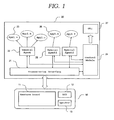
- FIG. 1 is a configuration diagram of a multi-touch input control system according to an embodiment of the present invention.
- FIG. 2 is a diagram showing operation examples in a plurality of control modes.
- FIG. 3 is a diagram showing an operation example in which a cursor movement control mode is selected by a one-finger touch.
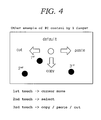
- FIG. 4 is a diagram showing another operation example of the cursor movement control mode FIG. 3 .
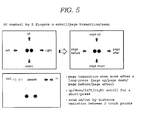
- FIG. 5 is a diagram showing an operation example in which a screen control mode is selected by a two-finger touch.
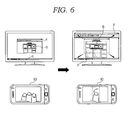
- FIG. 6 is a diagram showing an operation example in which a window control mode is used to maximize the size of a window.
- FIG. 7 is a diagram showing an operation example in which the window control mode is used to minimize the size of the window.
- FIG. 8 is a diagram showing an operation example in which the window control mode is used to control the size of the window.
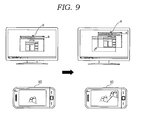
- FIG. 9 is a diagram showing an operation example in which a window displaying a screen on which a program is being executed is moved along a touch input.
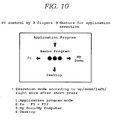
- FIG. 10 is a diagram showing an operation example in which a basic program control mode is selected by a three-finger touch.
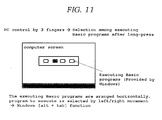
- FIG. 11 is a diagram showing an operation example in which a list of basic programs which are being executed is displayed by a long-press touch and a basic program is selected by a touch movement and release operation.
- FIG. 12 is a diagram showing an operation example in which a window for selecting functions defined in function keys F1 to F12 is displayed when touch points are dragged in the left direction of FIG. 10 .
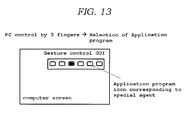
- FIG. 13 is a diagram showing an operation example in which one of currently-installed application programs is selected and executed to enter the application program control mode, when the touch points are dragged in the upward direction of FIG. 10 .
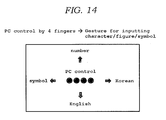
- FIG. 14 is a diagram showing an operation example in which a character input control mode is selected by a four-finger touch.
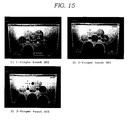
- FIG. 15 is a diagram showing a user interface in which an alphabet is selected by a touch operation using three fingers, after English is selected in the character input control mode of FIG. 14 .
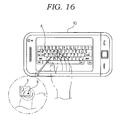
- FIG. 16 is a diagram showing a state in which a touch is inputted to the touch input unit.
- FIG. 17 is a diagram showing a process in which a keyboard input is performed through a touch input.
- FIG. 18 is a diagram showing a process in which a mouse input is performed through a touch input.
- FIG. 19 is a diagram showing a case in which a touch input corresponding to the second number occurs on a character input interface.
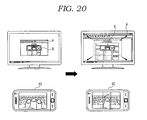
- FIG. 20 is a diagram showing a case in which a touch input corresponding to the third number occurs on the character input interface.
- FIG. 1 is a configuration diagram of a multi-touch input control system according to an embodiment of the present invention.
- the multi-touch input control system includes a touch input unit 10 and a computing unit 20.
- the touch input unit 10 and the computing unit 20 may be provided inside one device or provided separately from each other. That is, the multi-touch input control system according to the embodiment of the present invention may be implemented as a single device or a plurality of devices which are separated in a wired or wireless manner.
- the touch input unit 10 includes a multi touch input surface 11 capable of recognizing one or more touch positions at the same time.
- the touch input surface 11 may include a touch pad having no display function or a touch screen having a display function.
- the touch input unit 10 may be reduced in size.
- the touch input unit 10 may be manufactured in such a remote control type as to be easily separated and carried.
- the touch input unit 10 may be implemented as one device integrated with the computing unit 20, and the touch input surface 11 may be implemented as a touch screen corresponding to a screen display section of the computing unit 20.
- the touch input unit 10 generates the coordinates of one or more touch points inputted through the touch input surface 11. For example, when a user touches two points by using two fingers, two corresponding coordinates are generated.
- the touch input unit 10 generates touch information including the coordinate information of the touch points and transmits the generated touch information to the computing unit 20.
- the generation of the coordinates of the touch points and the transmission of the touch information may be performed in a real time basis within a very short time.
- the touch input unit 10 may include a state display section 12 and a speaker 13 which inform a user of how a control mode is operated in the computing unit 20 through visual and auditory information. At this time, the information on the current control mode is received from the computing unit 20.
- the computing unit 20 When receiving the touch information from the touch input unit 10, the computing unit 20 analyzes the received touch information and generates a control signal for processing internal control. At this time, the computing unit 20 may include any electronic devices having a basic processor mounted thereon, as well as a desktop computer or notebook computer. Therefore, the computing unit 20 may be applied to various portable electronic devices such as mobile phones, MP3 players, and PMP.
- the computing unit 20 may operate in a plurality of control modes.
- the plurality of control modes include (1) cursor movement control mode, (2) screen control mode, (3) basic program control mode, (4) character input mode, (5) window control mode, and (6) application program control mode.
- Each of the control modes includes one or more control commands.
- the character input control mode may be activated by touching a predetermined number of touch points or inputting a predetermined activation key for the character input control mode.
- the character input control mode will be described below in detail with reference to the drawings.
- the application program control mode has a distinct characteristic from the other four control modes. This will be described below in detail.
- each control mode and the selection of control commands in the control mode may be performed by a touch operation through the touch input unit 10. More specifically, the selection of each control mode is performed according to the number of touch points, and the selection of the control commands in the control mode is performed according to a variation in the number of touch points and a coordinate variation.
- FIGS. 2 to 20 are diagrams explaining the operations of the respective control modes in more detail, and the respective control modes will be described below in more detail.
- the computing unit 20 includes a transmission interface 21, a general agent 22, a basic program 23, a control module 24, a special agent 25, an application program 26, and a graphic user interface (GUI) 27.
- a plurality of special agents 25 and a plurality of application programs 26 may be additionally provided.
- the transmission interface 21 forms an information transmission path between the touch input unit 10 and the computing unit 20 according to any one standard among wired transmission, wireless transmission, and data input/output through an internal line. That is, the touch input unit 10 transmits the touch information including the coordinate information of the touch points to the transmission interface 21, and the transmission interface 21 transmits the information on the current control mode to the touch input unit 10.
- the transmission standard of the transmission interface 21 may include a wire line standard such as the universal serial bus (USB) and a wireless standard such as radio frequency (RF) or ZigBee. Furthermore, when the touch input unit 10 and the computing unit 20 are integrated as one device, the transmission interface 21 may simply serve as a path for data input/output between two components.
- a wire line standard such as the universal serial bus (USB)
- RF radio frequency
- ZigBee ZigBee
- the general agent 22 includes information on the cursor control mode, the screen control mode, the basic program control mode, the window control mode, and the character input control mode.
- the general agent 22 receives the touch information of the touch input unit 10 through the transmission interface 21, determines the number of touch points from the received touch information, and selects the corresponding control mode according to the number of touch points. For example, when the number of touch points is one, the cursor movement control mode may be set. When the number of touch points is two, the screen control mode may be set. When the number of touch points is three, the basic program control mode may be set. When the number of touch points is four, the character input control mode may be set. Furthermore, when the number of touch points is two or three, the character input control mode may be set.
- the setting examples for the respective control modes are not limited to the embodiment of the present invention.
- the general agent 22 After the control mode is selected, the general agent 22 generates a control signal by matching a variation in the number of touch points or a coordinate variation with a control command included in the selected control mode. For example, when the touch point is moved in the cursor movement control mode, the general agent 22 recognizes this movement as a cursor movement command. Furthermore, when an additional touch occurs, the general agent 22 recognizes this touch as a mouse click command, and generates a control command.
- the method for matching a touch operation and a control command may be implemented in various manners. For example, a keyboard shortcut corresponding to the control command may be matched with a touch operation.
- the basic program 23 is operated by the general agent 22, and corresponds to a program which is dependent on an operating system (OS) and is basically provided. Therefore, a control command system provided by the OS is substantially reflected into the basic program 23.
- OS operating system
- the control module 24 is a component corresponding to a CPU, a processor, or a microcomputer, and performs internal control according to a control signal received from the general agent 22 or the special agent 25. That is, the general agent 22 and the special agent 25 only analyze the touch information generated by the touch input unit 22 into a control command. Therefore, the control module 24 provided in the computing unit 20 performs a control operation according to the control command.
- the control module 24 provides a processing result based on the internal control operation to the GUI 27 to display the processing result on the screen.
- This display operation corresponds to a general operation of a computing device including a screen display unit such as a monitor.
- Each of the application programs 26 may include one or more control commands which are defined for itself. That is, the application program 26 may include a different control command system from the control commands provided by the OS.
- the application programs 26 are operated in the application program control mode, and the special agent 25 analyzes a touch operation in the application program control mode into a control command of the corresponding application program 26.
- a plurality of special agents 25 may be provided in correspondence to the respective application programs 26.
- Each of the special agents 25 include information on predetermined touch operations corresponding to the control commands of the application program 26. That is, the special agent 25 corresponding to each of the application programs 26 may be provided.
- the special agent 25 receives the touch information of the touch input unit 10 through the transmission interface 21, analyzes the received touch information, and generates a control signal corresponding to the control command of the application program 26 according to the predetermined touch operation.
- the special agent 25 is in charge of the application program control mode. When a specific event occurs while the general agent 25 operates a control mode, the general agent 25 hands over the analysis of the touch input to the special agent 25, and the application program control mode starts to execute the corresponding application program.
- the application program control mode will be described in more detail with reference to FIG. 11 .
- the GUI 27 corresponds to the entire graphic user interface of the computing unit 20, receives the processing result from the control module 24, converts the received processing result into screen information which may be effectively identified by a user, and displays a cursor movement, a mouse click, a pop-up window, and a screen movement on the screen. Furthermore, the GUI 27 provides a variety of graphic processing screens such that a user may easily select a control command through a touch operation.
- the graphic processing screens may display a basic program list, an application program installation list, a function icon, a character input direction, and so on.
- FIG. 2 is a diagram showing operation examples in the respective control modes.
- the general agent 22 is in charge of the cursor movement control mode, the screen control mode, the window control mode, the basic program control mode, and the character input control mode, and a user may freely select and use the respective control modes.
- a separate function should be provided in such a manner that the application program 26 and the special agent 25 escape from the current application program control mode and the user moves to another control mode. This is because, once the special agent 25 is driven, the special agent 25 blocks the intervention of other controllers and entirely analyzes a user's touch input.
- FIG. 2 shows four control modes provided by the general agent 22.
- the cursor movement control mode may be set by a one-finger touch
- the screen control mode may be set by a two-finger touch
- the basic program control mode may be set by a three-finger touch
- the character input control mode may be set by a four-finger touch.
- the reference values of simultaneous touch recognition for the respective control modes may be set in different manners. However, it is desirable that the character input control mode is set by a four-finger touch. This will be described below in detail with reference to FIG. 15 .
- a user may freely select and use the cursor movement control mode, the screen control mode, and the basic program control mode while switching over from one control mode to another control mode. That is, the general agent 22 changes the control mode in real time according to the number of touch points which are inputted at the same time, and analyzes the touch input to generate a control signal.
- a predetermined number hereinafter, referred to a fourth number
- the general agent 22 returns to the original state from the current character input control mode.
- the fourth number does not necessarily mean that the number of touch points is four.
- the number of touch points corresponding to the fourth number may be set to four, as shown in FIG. 2 .
- the general agent 22 when a user touches the touch input surface with four fingers while inputting a character in the character input control mode, the general agent 22 returns to the original state in which an arbitrary control mode may be selected. After that, when the user touches the touch input surface with one finger, two fingers, three fingers, or four fingers, the corresponding control mode is immediately executed.
- FIG. 3 is a diagram showing an operation example in which the cursor movement control mode is selected by a one-finger touch. In the cursor movement control mode, a cursor movement or mouse left/right click may occur.
- FIG. 4 is a diagram showing another operation example of the cursor movement control mode FIG. 3 .
- the cursor movement control mode includes control commands related to the cursor movement and the mouse left/right click.
- the general agent 22 sets the control mode to the cursor movement control mode.
- a predetermined number hereinafter, referred to as a first number
- the general agent 22 recognize the second touch as a control command for the mouse left click or the mouse right click, and generates a corresponding control signal.
- the first number does not necessarily mean that the number of touch points is one.
- the number of touch points corresponding to the first number may be set to one as shown in FIG. 3 .
- the general agent 22 recognizes the touch as a command for setting the cursor movement control mode. Then, when the user moves the touch point, the cursor is moved to the touch point and displayed. Furthermore, when the user additionally touches the left or right side of the touch point, the general agent 22 recognizes the touch as a mouse left clock or right click.
- a mouse left click is recognized as a selection command for the corresponding click point.
- this operation is recognized as a selection command.
- a mouse right click is recognized as a command for activating a pop-up window through which various commands may be selected.
- a graphic sign for selecting a copy, cut, or paste function depending on a movement direction is displayed on the screen in correspondence to the mouse right click.
- a function of copying, cutting, or pasting the selected object may be selected depending on the movement direction of the touch point.
- the selection of the object does not need to be limited to the mouse left click, and may also be performed by (shift + arrow key) or one-point movement.
- FIG. 5 is a diagram showing an operation example in which the screen control mode is selected by a two-finger touch. In the screen control mode, screen scroll, page transition, and screen zoom may be performed.
- the screen control mode includes control commands related to the up/down and left/right scroll of a screen and the page transition.
- the general agent 22 sets the control mode to the screen control mode. Then, the general agent 22 selects any one of the screen scroll and the page transition depending on whether or not the touch state of the touch point is a long-press touch in the screen control mode, and generates a control signal according to a up/down or left/right movement of the touch point.
- the second number does not necessarily mean that the number of touch points is two.
- the number of touch points corresponding to the second number may be set to two as shown in FIG. 5 .
- this operation is recognized as an input for the screen scroll. Furthermore, when the touch state is maintained for a predetermined time, the touch is recognized as a long-press touch to perform the page transition.
- the screen scroll when a user moves the touch point in the upward/downward or left/right direction, the screen is moved in the upward/downward or left/right direction, as if the screen is moved in correspondence to an operation for moving a scroll bar.
- the screen In the case of the page transition, the screen is moved and displayed by the unit of page. That is, when a user moves a touch point in the upward/downward or left/right direction on a screen including several pages, the screen may be changed to the previous page or the next page.
- the function of zooming in/out the screen may be carried out. As shown in FIG. 5 , the screen may be zoomed in or out by changing the distance between two touch points.
- FIG. 6 is a diagram showing an operation example in which the window control mode is used to maximize the size of a window.
- the window control mode controls a window for displaying a screen on which a program is executed.
- FIG. 7 is a diagram showing an operation example in which the window control mode is used to minimize the size of the window.
- FIG. 8 is a diagram showing an operation example in which the window control mode is used to control the size of the window.
- the window control mode agent is executed through a preset touch input or function key.
- the window control mode includes a system menu control mode and a window size control mode.
- the system menu control mode controls a window 'a' through a system menu 'b' including a maximize button, a minimize button, and a close button of the window 'a' displaying a screen on which a program is executed, and the window size control mode controls the size of the window 'a'.
- the system menu of the window is activated, and when a touch input corresponding to the second number is performed, a window size control object (arrow) for controlling the window size is activated.
- the general agent 22 sets the control mode to the window control mode, selects any one of the system menu control mode and the window size control mode depending on the number of touch points in the window control mode, and generates a control signal according to an input or movement of a subsequent touch point.
- the corresponding control command is executed.
- this operation is recognized as an input for the system menu control mode.
- the system menu 'b' in which the first touch point is matched with the minimize button of the window, the second touch point is matched with the maximize button of the window, and the third touch point is matched with the window close button, is outputted over the window 'a'.
- a touch input for one of the three buttons additionally occurs in a state in which the system menu 'b' is outputted, a control command matched with the corresponding touch point is generated, and the result is displayed on the screen.
- this operation may be recognized as a window minimize control command of the system menu, and the corresponding control command may be executed.
- this operation is recognized as a touch input for the window size control mode to control the size for the window 'a'.
- an arrow 'd' indicating a direction for controlling the size of the window 'a' is outputted on the screen.
- the arrow 'd' indicating the direction for controlling the size of the window 'a' is outputted in the left or upward side from the center of the two points for the touch input to activate the window size control mode, when an additional touch input corresponding to the first number occurs in the left side from the center.
- the arrow 'd' is outputted in the right or downward side from the center of the two points, when an additional touch input corresponding to the first number occurs in the right side from the center.
- FIG. 8 shows a case in which the additional touch input occurs in the left side of the center.
- the size of the window 'a' is increased in the left direction.
- the size of the window 'a' is controlled in the vertical or diagonal direction.
- the size of the window 'a' is controlled in a similar manner to when the additional touch input occurs in the left side from the center.
- one button of the system menu is selected by an additional touch input after the touch for two points is released.
- the maintained touch point may be recognized as an additional touch input, and the button of the system menu corresponding to the maintained touch point may be selected.
- FIG. 9 is a diagram showing an operation example in which a window displaying a screen on which a program is being executed is moved along a touch input.
- the control mode 24 recognizes the touch input as a touch input for the window movement control mode to move the position of the window 'a', and outputs a four-direction arrow 'e' indicating that the window may be moved.
- the window 'a' is moved in the same direction as the specific direction.
- FIG. 10 is a diagram showing an operation example in which the basic program control mode is selected by a three-finger touch.
- the basic program control mode executes basic programs provided by the OS.
- the basic program control mode includes control command related to the execution of the basic programs provided by the OS of the computing unit 20. That is, programs such as My Document, desktop, or My Computer may be executed, and various function keys may be defined in the basic program control mode. Furthermore, the basic program control mode may provide a method for entering the application program control mode. The execution of the respective programs and functions may be previously set in such a manner that the programs and functions correspond to the movement directions of touch points.
- the general agent 22 sets the control mode to the basic program control mode. Then, when the touch points are moved, the general agent 22 generates a control signal corresponding to a control command for executing a predefined basic program in correspondence to the preset movement direction.
- the third number does not necessarily mean that the number of touch points is three.
- the number of touch points may be set to three as shown in FIG. 3 .
- FIG. 10 shows a case in which when a user touches three points and then drags the touch points in the right direction, the My Document folder is opened and displayed, and when the user drags the touch points in the downward direction, the desktop is displayed. Furthermore, when the user drags the touch points in the left direction, a screen for function keys is displayed. This will be described below in detail with reference to FIG. 12 . Furthermore, when the user drags the touch points in the upward direction, the user may enter the application program mode. This will be described below in detail with reference to FIG. 13 .
- FIG. 11 is a diagram showing an operation example in which a list of basic programs which are being executed is displayed by a long-press touch and a basic program is selected by a touch movement and release operation.
- the general agent 22 displays a list of currently-executing basic programs on the screen. Then, the general agent 22 displays one of the basic programs in the list as a point. When the touch point is moved, the general agent 22 moves the point in correspondence to the movement of the touch point such that the user may select another basic program.
- FIG. 12 is a diagram showing an operation example in which a window for selecting functions defined in function keys F1 to F12 is displayed when the touch points are dragged in the left direction of FIG. 10 .
- the general agent 22 When the touch points corresponding to the third number are moved in the left direction, the general agent 22 displays function icons for performing functions defined in the respective function keys F1 to F12 on the screen. After that, when the user moves the touch to select one of the function icons and releases the touch, the corresponding function key is executed. That is, the general agent 22 generates a control signal for a control command of the corresponding function key and provides the generated control signal to the control module 24.
- the functions defined in respective function keys may be set as default values or may be arbitrarily set by a user.
- FIG. 13 is a diagram showing an operation example in which one of currently-installed application programs is selected and executed to enter the application program control mode, when the touch points are dragged in the upward direction of FIG. 10 .
- the application program control mode includes control commands which are defined by the application programs. Different application program control modes may be set for the respective application programs.
- the general agent 22 displays an application program installation list on the screen. This operation corresponds to an operation which is performed when the touch points are moved in the upward direction of FIG. 10 .
- the application program installation list includes the application programs provided in the computing unit 20.
- the general agent 22 moves and displays a point indicating an application program to be selected from the list.
- the general agent 22 selects and executes the application program indicated by the point, and sets the control mode to the application program control mode.
- the general agent 22 searches for a special agent 25 corresponding to the selected application program, and drives the special agent 25.
- the special agent 25 includes information on the touch operation which is previously defined in correspondence to the control command of the application program 26. Therefore, once the application program 26 is selected and the special agent 25 corresponding to the selected application program 26 is driven, touch information inputted through the transmission interface 21 is analyzed according to the touch operation defined in the special agent 25. Then, the special agent 25 determines the control command of the application program, generates a corresponding control signal, and provides the generated control signal to the control module 24.
- the entire system according to the embodiment of the present invention may be used as a dedicated game machine under the corresponding application program control mode.
- FIG. 14 is a diagram showing an operation example in which the character input control mode is selected by a four-finger touch.
- characters, numbers, and symbols may be inputted.
- FIG. 15 is a diagram showing operation examples in which alphabets are selected by touch operations using three fingers after English is selected in the character input control mode of FIG. 14 .
- the character input control mode includes commands related to character input.
- the general agent 22 sets the control mode to the character input control mode. Furthermore, the general agent 22 selects the language type of an input character in correspondence to the upward/downward or left/right movement of the touch points in the character input control mode, recognizes an input of individual characters according to predetermined types of touch operations and a character table, and generates the corresponding control signal.
- the fourth number does not necessarily mean that the number of touch points is four.
- the number of touch points corresponding to the fourth number may be set to four, as shown in FIG. 13 .
- the character input requires combinations of various numbers of cases. Therefore, when the operation for entering the character input control mode is set to the four-finger touch, a one-finger touch, a two-finger touch, and a three-finger touch may be assigned to the touch operations related to the character input. In this case, the character input may be performed in various manners.
- the English input may be selected. Then, a user interface through which all the alphabets may be selected within the range of the three-finger touch is displayed as shown in FIG. 15 .
- the user when the user performs an additional four-finger touch as described above with reference to FIG. 2 , the user escapes from the character input control modes and returns to the original state in which an arbitrary control mode may be selected.
- FIG. 15 shows an example in which the character input interface is applied to the touch screen.
- a user interface may be displayed through a monitor screen separated from the touch pad.
- a method for inputting characters, numbers, and symbols in the character input control mode has been applied on July 6, 2009 by the applicant of the present application (refer to Korean Patent Laid-open Publication No. 10-2009-0061297 ).
- the method disclosed in the patent document may be applied to the embodiment of the present invention. Therefore, details of the character input method will be understood with reference to the patent document, and thus the description of the character input method will be omitted.
- FIG. 16 is a diagram showing a state in which a touch is inputted to the touch input unit.
- FIG. 17 is a diagram showing a process in which a keyboard input is performed through a touch input.
- FIG. 18 is a diagram showing a process in which a mouse input is performed through a touch input.
- a user activates the character input control mode through a key input for activating the character input control mode, and touches a specific key of a character input interface with a finger.
- the character input interface is displayed in the form of a keyboard on the touch input unit 10.
- the user touches a character key 'D' of a region 'A' with a finger.
- a touch point 'b' of the touch input unit 10 with which the finger is actually contacted should be positioned within a region 'a' which is a character recognition range of the character 'D'.
- the control module 24 may recognize that the touch point is positioned at the character key 'D'.
- the touch information including the coordinates of the touch point 'b' which the user touches with the finger through the touch input unit 10 is transmitted to the computing unit 20.
- the control module 131 determines that the character 'D' is touch-inputted, and outputs the character 'D' on the screen.
- the touch input unit 10 transmits the touch information to the computing unit 20, the touch information including the coordinates which are changed when the touch input of the finger is released from the character recognition region 'a'.
- the control module 24 confirms that the touch input is released from the character recognition region 'a' having indicated the character 'D', determines that the character 'D' is finally inputted by the user, and outputs the character 'D' on the screen.
- the control module 24 recognizes the touch point 'b' as a mouse input from a point 'd' where the touch point 'b' leaves the character input permission range 'c', and moves the mouse cursor displayed on the screen, as the touch point 'b' is moved to a new touch point 'b".
- the touch input unit 10 transmits the touch information changed by the movement of the touch input from the character recognition region 'a' to the computing unit 20, and the control module 24 confirms that the touch input leaves the character input permission range 'c' having indicated the character 'D', determines that the mouse input is carried out by the user, and moves the mouse cursor displayed on the screen according to the coordinate change of the touch point.
- FIG. 19 is a diagram showing a case in which a touch input corresponding to the second number occurs on the character input interface.
- FIG. 20 is a diagram showing a case in which a touch input corresponding to the third number occurs on the character input interface.
- the control module 24 recognizes the touch input, which is additionally performed on the character input interface, as a touch input for the window size control mode as described with reference to FIG. 8 , and generates a control signal according to an additional touch input corresponding to the first number.
- An operation which will be performed after the control module 24 recognizes the touch input as the touch input for the window size control mode has been already described with reference to FIG. 8 , and thus the detailed descriptions thereof will be omitted.
- a touch input corresponding to the second number may occur in the state in which the control mode is recognized as the window size control mode. In this case, the control module 24 recognizes the touch input as a touch input for the window movement control mode, and generates a control signal according to an additional touch input corresponding to the second number.
- the control module 24 recognizes the touch input, which is additionally performed on the character input interface, as a touch input for the system menu control mode as described with reference to FIGS. 6 and 7 , and generates a control signal according to an additional touch input corresponding to the first number.
- an operation which will be performed after the control module 24 recognizes the touch input as the touch input for the system menu control mode has been already described with reference to FIGS. 6 and 7 , and thus the detailed descriptions thereof will be omitted.
Landscapes
- Engineering & Computer Science (AREA)
- General Engineering & Computer Science (AREA)
- Theoretical Computer Science (AREA)
- Human Computer Interaction (AREA)
- Physics & Mathematics (AREA)
- General Physics & Mathematics (AREA)
- User Interface Of Digital Computer (AREA)
Applications Claiming Priority (2)
| Application Number | Priority Date | Filing Date | Title |
|---|---|---|---|
| KR1020090096999A KR101117481B1 (ko) | 2009-10-12 | 2009-10-12 | 멀티터치 방식 입력제어 시스템 |
| PCT/KR2010/001122 WO2011046270A1 (ko) | 2009-10-12 | 2010-02-23 | 멀티터치 방식 입력제어 시스템 |
Publications (1)
| Publication Number | Publication Date |
|---|---|
| EP2490107A1 true EP2490107A1 (de) | 2012-08-22 |
Family
ID=43876310
Family Applications (1)
| Application Number | Title | Priority Date | Filing Date |
|---|---|---|---|
| EP10823512A Withdrawn EP2490107A1 (de) | 2009-10-12 | 2010-02-23 | Steuerungssystem mit mehrfachberührungseingabe |
Country Status (6)
| Country | Link |
|---|---|
| US (1) | US20120212420A1 (de) |
| EP (1) | EP2490107A1 (de) |
| KR (1) | KR101117481B1 (de) |
| CN (1) | CN102687101A (de) |
| BR (1) | BR112012008494A2 (de) |
| WO (1) | WO2011046270A1 (de) |
Cited By (1)
| Publication number | Priority date | Publication date | Assignee | Title |
|---|---|---|---|---|
| CN105739894A (zh) * | 2016-01-29 | 2016-07-06 | 广东欧珀移动通信有限公司 | 一种输入方法及终端 |
Families Citing this family (43)
| Publication number | Priority date | Publication date | Assignee | Title |
|---|---|---|---|---|
| JP5606281B2 (ja) * | 2010-11-08 | 2014-10-15 | シャープ株式会社 | 表示装置 |
| US10966006B2 (en) * | 2010-12-31 | 2021-03-30 | Nokia Technologies Oy | Apparatus and method for a sound generating device combined with a display unit |
| US9612743B2 (en) | 2011-01-05 | 2017-04-04 | Autodesk, Inc. | Multi-touch integrated desktop environment |
| US9600090B2 (en) | 2011-01-05 | 2017-03-21 | Autodesk, Inc. | Multi-touch integrated desktop environment |
| US9262005B2 (en) * | 2011-01-05 | 2016-02-16 | Autodesk, Inc. | Multi-touch integrated desktop environment |
| US8982062B2 (en) * | 2011-05-09 | 2015-03-17 | Blackberry Limited | Multi-modal user input device |
| US9417754B2 (en) | 2011-08-05 | 2016-08-16 | P4tents1, LLC | User interface system, method, and computer program product |
| US20130088434A1 (en) * | 2011-10-06 | 2013-04-11 | Sony Ericsson Mobile Communications Ab | Accessory to improve user experience with an electronic display |
| FR2986715B1 (fr) * | 2012-02-15 | 2014-10-17 | Archos | Procede et dispositif de controle d'au moins un appareil par au moins un autre appareil, appareil et systeme mettant en œuvre un tel dispositif |
| CN103257807A (zh) * | 2012-02-17 | 2013-08-21 | 林卓毅 | 移动通讯装置的状态切换方法及可携式电子装置 |
| CN103389816A (zh) * | 2012-05-08 | 2013-11-13 | 昆盈企业股份有限公司 | 触控输入装置的信号发送方法 |
| JP5377709B2 (ja) * | 2012-05-23 | 2013-12-25 | 株式会社スクウェア・エニックス | 情報処理装置,情報処理方法,及びゲーム装置 |
| US10489035B2 (en) | 2012-06-03 | 2019-11-26 | Maquet Critical Care Ab | System with breathing apparatus and touch screen |
| CN102750096A (zh) * | 2012-06-15 | 2012-10-24 | 深圳乐投卡尔科技有限公司 | 一种车载Android平台多点手势控制方法 |
| CN102799376A (zh) * | 2012-07-11 | 2012-11-28 | 广东欧珀移动通信有限公司 | 一种触控设备的快捷功能设定方法 |
| CN102902405A (zh) * | 2012-08-07 | 2013-01-30 | 深圳市集尚科技发展有限公司 | 智能终端遥控器及其触控方法 |
| CN103777769A (zh) * | 2012-10-23 | 2014-05-07 | 联想(北京)有限公司 | 一种输入控制方法、装置及电子设备 |
| CN103793044A (zh) * | 2012-10-31 | 2014-05-14 | 中兴通讯股份有限公司 | 一种手持式遥控装置 |
| KR102044826B1 (ko) * | 2013-01-02 | 2019-11-14 | 삼성전자 주식회사 | 마우스 기능 제공 방법 및 이를 구현하는 단말 |
| US9019223B2 (en) * | 2013-03-13 | 2015-04-28 | Adobe Systems Incorporated | Touch input layout configuration |
| KR20140136576A (ko) | 2013-05-20 | 2014-12-01 | 삼성전자주식회사 | 휴대 단말기에서 터치 입력 처리 방법 및 장치 |
| CN103354619A (zh) * | 2013-05-31 | 2013-10-16 | 深圳市同洲电子股份有限公司 | 通过移动终端远程控制数字电视终端的方法及其系统 |
| US9436304B1 (en) * | 2013-11-01 | 2016-09-06 | Google Inc. | Computer with unified touch surface for input |
| KR102206053B1 (ko) * | 2013-11-18 | 2021-01-21 | 삼성전자주식회사 | 입력 도구에 따라 입력 모드를 변경하는 전자 장치 및 방법 |
| CN103616999A (zh) * | 2013-11-27 | 2014-03-05 | 绩优科技(深圳)有限公司 | 一种基于多点触摸板的输入切换系统 |
| KR102210045B1 (ko) * | 2013-12-12 | 2021-02-01 | 삼성전자 주식회사 | 전자장치의 입력 제어장치 및 방법 |
| EP3087456B1 (de) * | 2013-12-26 | 2018-11-14 | Intel Corporation | Mehrfachberührungs-remote-steuerung |
| US10139993B2 (en) | 2014-01-22 | 2018-11-27 | Google Llc | Enhanced window control flows |
| USD774530S1 (en) | 2014-01-22 | 2016-12-20 | Google Inc. | Display screen or portion thereof with graphical user interface morphing window controls |
| CN103914224B (zh) * | 2014-03-24 | 2018-03-23 | 联想(北京)有限公司 | 信息处理方法和装置 |
| WO2015194712A1 (ko) * | 2014-06-19 | 2015-12-23 | 엘지전자 주식회사 | 컴퓨팅 장치 및 이의 제어 방법 |
| CN104503673B (zh) * | 2014-12-08 | 2018-01-16 | 昆山国显光电有限公司 | 一种显示屏可调触控方法 |
| KR20160077772A (ko) * | 2014-12-24 | 2016-07-04 | 삼성전자주식회사 | 전자 장치 및 전자 장치에서 문자 입력을 처리하는 방법 |
| CN104657053B (zh) * | 2015-01-11 | 2018-05-18 | 汪念鸿 | 一种在触摸屏终端利用多点手势实现特定功能的方法 |
| US9880733B2 (en) * | 2015-02-17 | 2018-01-30 | Yu Albert Wang | Multi-touch remote control method |
| CN104731514B (zh) * | 2015-04-09 | 2017-02-15 | 努比亚技术有限公司 | 触摸操作区域单握触摸操作的识别方法及装置 |
| US9874952B2 (en) * | 2015-06-11 | 2018-01-23 | Honda Motor Co., Ltd. | Vehicle user interface (UI) management |
| KR102535056B1 (ko) * | 2016-08-03 | 2023-05-22 | 삼성전자 주식회사 | 전자 장치 및 터치 인식 방법 |
| US10445519B2 (en) * | 2017-08-29 | 2019-10-15 | Blackberry Limited | System and method for data input resistant to capture |
| JP6418299B1 (ja) * | 2017-09-15 | 2018-11-07 | 株式会社セガゲームス | 情報処理装置及びプログラム |
| CN112527166B (zh) | 2020-12-18 | 2022-11-18 | 阿波罗智联(北京)科技有限公司 | 触控指令的处理方法、装置、设备以及存储介质 |
| US20240149147A1 (en) * | 2021-03-10 | 2024-05-09 | Bungie, Inc. | Virtual button charging |
| JP7714672B2 (ja) * | 2021-03-10 | 2025-07-29 | バンジー, インコーポレイテッド | クライアント-サーバネットワーキングのためのコントローラ状態管理 |
Family Cites Families (15)
| Publication number | Priority date | Publication date | Assignee | Title |
|---|---|---|---|---|
| US8479122B2 (en) * | 2004-07-30 | 2013-07-02 | Apple Inc. | Gestures for touch sensitive input devices |
| US6857571B2 (en) * | 2000-06-30 | 2005-02-22 | Silverbrook Research Pty Ltd | Method for surface printing |
| JP3842617B2 (ja) * | 2001-10-31 | 2006-11-08 | 株式会社ケンウッド | タッチパネル入力装置、オーディオ装置及び入力方法 |
| KR100500962B1 (ko) * | 2002-11-29 | 2005-07-14 | 주식회사 알티캐스트 | 터치 스크린이 구비된 대화형 텔레비전의 무선 입력 장치 |
| US7761814B2 (en) * | 2004-09-13 | 2010-07-20 | Microsoft Corporation | Flick gesture |
| WO2006132514A1 (en) * | 2005-06-10 | 2006-12-14 | Yong-Seok Jeong | Method for providing user interface in electric device and the device thereof |
| WO2007079425A2 (en) * | 2005-12-30 | 2007-07-12 | Apple Inc. | Portable electronic device with multi-touch input |
| CN100444094C (zh) * | 2006-02-10 | 2008-12-17 | 华硕电脑股份有限公司 | 控制应用程序的方法 |
| JP2008009668A (ja) * | 2006-06-29 | 2008-01-17 | Syn Sophia Inc | タッチパネルの駆動方法及び入力方法 |
| KR100770936B1 (ko) * | 2006-10-20 | 2007-10-26 | 삼성전자주식회사 | 문자 입력 방법 및 이를 위한 이동통신단말기 |
| KR100835378B1 (ko) * | 2007-04-03 | 2008-06-04 | 삼성전자주식회사 | 통합리모컨의 기기 제어 방법 |
| KR101435677B1 (ko) * | 2007-07-16 | 2014-09-01 | 주식회사 엘지유플러스 | 터치스크린 기능을 제공하는 단말 장치 및 그 기능을수행하는 방법 |
| KR100923443B1 (ko) | 2007-12-11 | 2009-10-27 | 제일모직주식회사 | 반도체 소자 밀봉용 에폭시 수지 조성물 및 이를 이용한반도체 소자 |
| CN101498973B (zh) * | 2008-01-30 | 2013-04-10 | 义隆电子股份有限公司 | 一种以多指手势进行触控操作的触控解译装置与方法 |
| CN101339453B (zh) * | 2008-08-15 | 2012-05-23 | 广东威创视讯科技股份有限公司 | 基于交互式输入设备的模拟鼠标输入方法 |
-
2009
- 2009-10-12 KR KR1020090096999A patent/KR101117481B1/ko not_active Expired - Fee Related
-
2010
- 2010-02-23 BR BR112012008494A patent/BR112012008494A2/pt not_active IP Right Cessation
- 2010-02-23 CN CN2010800455914A patent/CN102687101A/zh active Pending
- 2010-02-23 US US12/989,483 patent/US20120212420A1/en not_active Abandoned
- 2010-02-23 EP EP10823512A patent/EP2490107A1/de not_active Withdrawn
- 2010-02-23 WO PCT/KR2010/001122 patent/WO2011046270A1/ko not_active Ceased
Non-Patent Citations (1)
| Title |
|---|
| See references of WO2011046270A1 * |
Cited By (2)
| Publication number | Priority date | Publication date | Assignee | Title |
|---|---|---|---|---|
| CN105739894A (zh) * | 2016-01-29 | 2016-07-06 | 广东欧珀移动通信有限公司 | 一种输入方法及终端 |
| CN105739894B (zh) * | 2016-01-29 | 2019-09-24 | Oppo广东移动通信有限公司 | 一种输入方法及终端 |
Also Published As
| Publication number | Publication date |
|---|---|
| WO2011046270A1 (ko) | 2011-04-21 |
| CN102687101A (zh) | 2012-09-19 |
| US20120212420A1 (en) | 2012-08-23 |
| BR112012008494A2 (pt) | 2019-09-24 |
| KR101117481B1 (ko) | 2012-03-07 |
| KR20110039929A (ko) | 2011-04-20 |
Similar Documents
| Publication | Publication Date | Title |
|---|---|---|
| EP2490107A1 (de) | Steuerungssystem mit mehrfachberührungseingabe | |
| US10444989B2 (en) | Information processing apparatus, and input control method and program of information processing apparatus | |
| KR101085603B1 (ko) | 다점 감지 장치를 이용한 제스처링 | |
| US9239673B2 (en) | Gesturing with a multipoint sensing device | |
| US9223471B2 (en) | Touch screen control | |
| EP3591509B1 (de) | Anzeigeverfahren und -vorrichtung mit geteiltem bildschirm und elektronische vorrichtung dafür | |
| EP2575006B1 (de) | Interaktion eines Benutzers mit einer Vorrichtung auf Berührungs- und berührungsloser Basis | |
| US8456433B2 (en) | Signal processing apparatus, signal processing method and selection method of user interface icon for multi-touch panel | |
| EP2823387A1 (de) | Systeme und verfahren zur modifizierung von virtuellen tastaturen auf einer benutzerschnittstelle | |
| JP2010517197A (ja) | マルチポイント感知装置でのジェスチャー | |
| JP2010170573A (ja) | グラフィカル・ユーザ・インターフェース・オブジェクトを操作する方法及びコンピュータシステム | |
| KR102228335B1 (ko) | 그래픽 사용자 인터페이스의 일 부분을 선택하는 방법 | |
| JP2019505024A (ja) | タッチ感知面−ディスプレイによるジェスチャー制御式インタラクティブ方法及び装置 | |
| KR20130075849A (ko) | 디스플레이 장치 및 이를 이용한 영상 표시 방법 | |
| CN102629184A (zh) | 一种手持终端及其操作方法 | |
| US20140298275A1 (en) | Method for recognizing input gestures | |
| EP2846244A1 (de) | Datenverarbeitungsgerät mit berührungsempfindlichen Bildschirm, Verfahren und Programm zur Bedienung des Gerätes | |
| US20170052694A1 (en) | Gesture-based interaction method and interaction apparatus, and user equipment | |
| WO2014043275A1 (en) | Gesturing with a multipoint sensing device | |
| CN101799727A (zh) | 多点触控接口的讯号处理装置、方法及使用者接口图像的选取方法 | |
| AU2016238971B2 (en) | Gesturing with a multipoint sensing device | |
| AU2014201419B2 (en) | Gesturing with a multipoint sensing device | |
| CN105320324A (zh) | 触摸板模拟触摸屏操作方式的方法和触摸板装置 | |
| KR20160027063A (ko) | 그래픽 사용자 인터페이스의 일 부분을 선택하는 방법 |
Legal Events
| Date | Code | Title | Description |
|---|---|---|---|
| PUAI | Public reference made under article 153(3) epc to a published international application that has entered the european phase |
Free format text: ORIGINAL CODE: 0009012 |
|
| 17P | Request for examination filed |
Effective date: 20120510 |
|
| AK | Designated contracting states |
Kind code of ref document: A1 Designated state(s): AT BE BG CH CY CZ DE DK EE ES FI FR GB GR HR HU IE IS IT LI LT LU LV MC MK MT NL NO PL PT RO SE SI SK SM TR |
|
| DAX | Request for extension of the european patent (deleted) | ||
| STAA | Information on the status of an ep patent application or granted ep patent |
Free format text: STATUS: THE APPLICATION HAS BEEN WITHDRAWN |
|
| 18W | Application withdrawn |
Effective date: 20130213 |