EP2437154B1 - Vorrichtung und Verfahren zum Umblättern von E-Book-Seiten auf einem portablen Endgerät - Google Patents
Vorrichtung und Verfahren zum Umblättern von E-Book-Seiten auf einem portablen Endgerät Download PDFInfo
- Publication number
- EP2437154B1 EP2437154B1 EP11183429.7A EP11183429A EP2437154B1 EP 2437154 B1 EP2437154 B1 EP 2437154B1 EP 11183429 A EP11183429 A EP 11183429A EP 2437154 B1 EP2437154 B1 EP 2437154B1
- Authority
- EP
- European Patent Office
- Prior art keywords
- input
- book
- drag
- touch
- page
- Prior art date
- Legal status (The legal status is an assumption and is not a legal conclusion. Google has not performed a legal analysis and makes no representation as to the accuracy of the status listed.)
- Active
Links
Images






Classifications
-
- G—PHYSICS
- G06—COMPUTING OR CALCULATING; COUNTING
- G06F—ELECTRIC DIGITAL DATA PROCESSING
- G06F3/00—Input arrangements for transferring data to be processed into a form capable of being handled by the computer; Output arrangements for transferring data from processing unit to output unit, e.g. interface arrangements
- G06F3/01—Input arrangements or combined input and output arrangements for interaction between user and computer
- G06F3/017—Gesture based interaction, e.g. based on a set of recognized hand gestures
-
- G—PHYSICS
- G06—COMPUTING OR CALCULATING; COUNTING
- G06F—ELECTRIC DIGITAL DATA PROCESSING
- G06F3/00—Input arrangements for transferring data to be processed into a form capable of being handled by the computer; Output arrangements for transferring data from processing unit to output unit, e.g. interface arrangements
- G06F3/01—Input arrangements or combined input and output arrangements for interaction between user and computer
- G06F3/048—Interaction techniques based on graphical user interfaces [GUI]
- G06F3/0481—Interaction techniques based on graphical user interfaces [GUI] based on specific properties of the displayed interaction object or a metaphor-based environment, e.g. interaction with desktop elements like windows or icons, or assisted by a cursor's changing behaviour or appearance
- G06F3/0483—Interaction with page-structured environments, e.g. book metaphor
-
- G—PHYSICS
- G06—COMPUTING OR CALCULATING; COUNTING
- G06F—ELECTRIC DIGITAL DATA PROCESSING
- G06F3/00—Input arrangements for transferring data to be processed into a form capable of being handled by the computer; Output arrangements for transferring data from processing unit to output unit, e.g. interface arrangements
- G06F3/01—Input arrangements or combined input and output arrangements for interaction between user and computer
- G06F3/048—Interaction techniques based on graphical user interfaces [GUI]
- G06F3/0487—Interaction techniques based on graphical user interfaces [GUI] using specific features provided by the input device, e.g. functions controlled by the rotation of a mouse with dual sensing arrangements, or of the nature of the input device, e.g. tap gestures based on pressure sensed by a digitiser
- G06F3/0488—Interaction techniques based on graphical user interfaces [GUI] using specific features provided by the input device, e.g. functions controlled by the rotation of a mouse with dual sensing arrangements, or of the nature of the input device, e.g. tap gestures based on pressure sensed by a digitiser using a touch-screen or digitiser, e.g. input of commands through traced gestures
- G06F3/04883—Interaction techniques based on graphical user interfaces [GUI] using specific features provided by the input device, e.g. functions controlled by the rotation of a mouse with dual sensing arrangements, or of the nature of the input device, e.g. tap gestures based on pressure sensed by a digitiser using a touch-screen or digitiser, e.g. input of commands through traced gestures for inputting data by handwriting, e.g. gesture or text
Definitions
- the present invention relates to a portable terminal. More particularly, the present invention relates to an apparatus and method for turning pages of an electronic-book (e-book) in a portable terminal having an e-book function.
- e-book electronic-book
- the use of portable terminals is rapidly increasing due to convenience of portability, and thus service providers (or terminal vendors) are competitively developing terminals having more convenient functions to ensure more users.
- the portable terminals provide various functions such as a phone book, a game, a scheduler, a short message, an Internet, an e-mail, an alarm, an MPEG Audio Layer-3 (MP3), a digital camera, an electronic dictionary, an electronic (e-book), etc.
- MP3 MPEG Audio Layer-3
- a digital camera an electronic dictionary
- e-book electronic (e-book)
- the e-book for showing text contents has been introduced by using an electronic display mechanism as one of media for providing information in replacement of a conventional paper book.
- the e-book operates in such a manner that the text contents are stored in a flash memory or a built-in hard disk and then the stored text contents are displayed through a display screen.
- the e-book has an advantage in that a large volume of books are stored all together and can be read at a later time by selecting a desired part of the contents.
- the contents can be displayed only in a limited area through the display screen, and thus a User Interface (UI) for providing a function of moving or scrolling a page is required to continuously show a next part of the contents.
- UI User Interface
- a part of the text contents can be displayed on a screen while moving a page according to a page down/up function that uses a key input tool provided in the e-book. In this manner, a user can read a whole part of the text contents stored in the e-book.
- an interface for turning a page through key manipulation is the most basic form of a direction control mechanism, and is not devised based on an ergonomic design which considers user convenience, Therefore, it is difficult for the user to naturally turn a page of the contents.
- EP2104026 relates to an electronic document reproduction apparatus supporting a preview function upon outputting an electronic book, and a reproducing method thereof.
- the electronic document reproduction apparatus Includes: an Input/output unit for outputting contents of an electronic document and receiving a user's Instruction from a user; a storage unit for storing data of the electronic document; and a controller for searching for an output position of a corresponding electronic document according to the user's Instruction Input through the Input/output unit, and displaying the corresponding electronic document, wherein the controller receives a preview execution Instruction through the Input/ output unit and provides a preview function for a corresponding position to the electronic document, and the controller receives a page selection Instruction and sets a corresponding page as an output position.
- US5463725 discloses a user interface for making information available to a user provides a display similar to a printed book or magazine. In order to "turn the page" of the displayed book, the user touches the screen with his hand or a pointing device, and moves it across the screen.
- US6300933 relates to an electronic apparatus includes an acceleration sensor, an inclination detector, a pushbutton switch, a use condition detector, a screen control determiner, a screen, and a screen controller.
- the apparatus is controlled in a method that enables the execution of control in which the contents of operation intended by the user are exactly reflected.
- the acceleration sensor and the inclination detector detect an inclination of the apparatus.
- the use condition detector detects the use of the apparatus, based on whether the pushbutton switch is turned on or not.
- the screen control determiner determines whether or not to execute screen control, based on both the inclination detected by the inclination detector and the use of the apparatus detected by the use condition detector.
- WO2009/128593 relates to a mobile device and a method for controlling a user interface of the mobile device are disclosed.
- the method includes detecting a movement of the mobile device as applied by a user s gesture, scrolling at least one of a page displayed on the display and a selection point on the display according to the detected movement of the mobile device.
- US2007/188450 relates to a system for displaying data in a portable data processing system with a plurality of display interfaces.
- Data is displayed within a first display interface of the portable data processing system.
- a user input which is a change in orientation of the portable data processing system, is detected.
- data is displayed within the first display interface or a second display interface of the portable data processing system based upon the type of change in orientation.
- US2006/277478 relates to a method wherein a determination is made as to when to display and hide obstructive user interface elements. Obstructive user interface elements are removed from the display when not needed by the user and displayed when needed by the user.
- US6448986 relates to a control program or operating system managing a graphical user interface of an electronic device in such a way that substantially all of the screen of data remains visible irrespective of whether toolbars or graphical objects are displayed or hidden.
- An aspect of the present invention is to solve at least the above-mentioned problems and/or disadvantages and to provide at least the advantages described below. Accordingly, an aspect of the present invention is to provide an apparatus and method for turning pages of an electronic book (e-book) in a portable terminal having an e-book function.
- e-book electronic book
- Another aspect of the present invention is to provide an apparatus and method for turning pages of an e-book in an analog fashion in a portable terminal having an e-book function so that a user can change pages of contents in the same natural manner as turning pages of an actual paper book.
- a method for turning pages of an e-book in a portable terminal having an e-book function is are defined in claims 1 and 4.
- executing the e-book can also be described as executing, running, or carrying out the instructions of an e-book application or program.
- a touch down may also be described as the touching, pressing, or making contact with a touch sensitive input means, such as a touch sensitive screen on which pages of the e-book are displayed, for example with a finger, stylus, or other suitable implement or tool.
- a touch down therefore corresponds to an event consisting of bringing a finger, stylus, implement or tool down into contact with the touch sensitive input means.
- a touch up may also be described as ceasing or terminating a touching of the touch sensitive input means. It represents the termination of a contact with the touch sensitive input means.
- a touch up is a disengagement from, or a release of the touch sensitive input means.
- a touch up therefore corresponds to an event consisting of bringing a finger, stylus, implement or tool away from the touch sensitive input means, breaking contact.
- a touch up can also be described as a lifting off, from the touch sensitive input means, of the finger, stylus, implement or tool.
- a drag may also be described as the movement of a finger, stylus, implement or tool across a touch sensitive input means whilst maintaining contact with that input means.
- a drag will be preceded by, or begin with a touch down (contact is first made), and be followed by, or terminated by a touch up (contact is broken/released). Additionally, one drag event may immediately follow another, such that the end position of one drag is the start position of the next.
- a portable terminal as defined in claim 7 is provided.
- the present invention described hereinafter relates to an apparatus and method for turning pages of an electronic book (e-book) in an analog fashion in a portable terminal having an e-book function.
- a portable terminal described hereinafter includes a cellular phone having a touch panel, a Personal Communication System (PCS), a Personal Digital Assistant (PDA), an International Mobile Telecommunication-2000 (IMT2000) terminal, etc.
- PCS Personal Communication System
- PDA Personal Digital Assistant
- IMT2000 International Mobile Telecommunication-2000
- FIG. 1 is a block diagram illustrating a structure of a portable terminal having an e-book function according to an exemplary embodiment of the present invention.
- the portable terminal includes a controller 100, a memory 102, an input unit 104, a display unit 106, an e-book viewer 108, and a communication unit 110.
- the controller 100 provides overall control to the portable terminal. According to the present invention, the controller 100 processes a function of turning pages of an e-book in an analog fashion.
- the memory 102 stores a microcode of a program for processing and control of the controller 100, a variety of reference data, temporary data that is generated while programs are performed, and a variety of rewritable data.
- the memory 102 stores a program for turning the pages of the e-book in the analog fashion.
- the input unit 104 includes numeral key buttons and a plurality of function key buttons to provide the controller 100 with key button input data corresponding to a key button pressed by the user.
- the display unit 106 displays information such as state information, which is generated while the portable terminal operates, a limited number of characters, a large volume of moving and still pictures, etc.
- the display unit 106 is configured with a touch panel type and performs a function of the input unit 104. That is, the display unit 106 detects a touch input of the user and transmits the detected touch input to the controller 100.
- the e-book viewer 108 performs a function for turning the pages of the e-book on a single-page basis or on a multi-page basis in the analog fashion so that the user can turn the page of contents naturally as if the user turns a page of an actual paper book. Further, the e-book viewer 108 supports a bookmark function for the e-book.
- the communication unit 110 transmits and receives a Radio Frequency (RF) signal which is input and output through an antenna.
- RF Radio Frequency
- data to be transmitted is subject to a channel-coding process and a spreading process, and then the data is transformed to an RF signal.
- the RF signal is received and transformed to a base-band signal, and the base-band signal is subject to a de-spreading process and a channel-decoding process, thereby restoring the data.
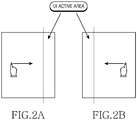
- FIG. 2 illustrates an example of a method for turning pages of an e-book on a single-page basis in an analog fashion in a portable terminal having an e-book function according to a first example not part of the invention.
- the terminal executes the e-book function and displays a pre-set page of the e-book selected by a user on a screen.
- a right portion of the screen is partially divided for a right UI active area
- a left portion of the screen is partially divided for a left UI active area.
- the right UI active area and the left UI active area are pre-set according to the terminal.
- a touch down is input from the left of the pre-set right UI active area of the e-book and a drag and touch up is input to the right while maintaining the touch down input, then the terminal displays an immediately previous page on the screen.
- FIG. 2B if a touch down is input from the right of the pre-set left UI active area of the e-book and a drag and touch up is input to the left while maintaining the touch down input, then the terminal displays an immediately next page on the screen.
- FIG. 3 is a flowchart illustrating a method for turning pages of an e-book on a single-page basis in an analog fashion in a portable terminal having an e-book function according to a first example not part of the invention.
- the terminal detects a request for executing the e-book function by user's key manipulation in step 301.
- the terminal executes the e-book function, and displays a pre-set page of the e-book selected by the user, according to configuration information of the e-book function.
- the configuration information of the e-book may be configured in advance so that a first page of the e-book is first displayed or the most recently displayed page of the e-book is displayed when executing the e-book function.
- step 305 the terminal determines whether a touch down is input from the left of a pre-set right UI active area of the e-book and a drag and touch up is input to the right while maintaining the touch down input.
- step 305 If it is determined in step 305 that the touch down is input from the left of the pre-set right UI active area of the e-book and the drag and touch up is input to the right while maintaining the touch down input, proceeding to step 307, the terminal displays an immediately previous page on a screen.
- step 305 determines whether a touch down is input from the right of a pre-set left UI active area of the e-book and a drag and touch up is input to the left while maintaining the touch down input.
- step 309 If it is determined in step 309 that the touch down is input from the right of the pre-set left UI active area of the e-book and the drag and touch up is input to the left while maintaining the touch down input, proceeding to step 311, the terminal displays an immediately next page on the screen.
- step 309 determines whether the touch down is not input from the right of the pre-set left UI active area of the e-book and the drag and touch up is not input to the left while maintaining the touch down input. If it is determined in step 309 that the touch down is not input from the right of the pre-set left UI active area of the e-book and the drag and touch up is not input to the left while maintaining the touch down input, returning to step 305, the subsequent steps are repeated.
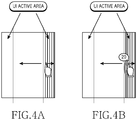
- FIG. 4 illustrates an example of a method for turning pages of an e-book on a multi-page basis in an analog fashion in a portable terminal having an e-book function according to a second example not par of the invention.
- the terminal executes the e-book function and displays a pre-set page of the e-book selected by a user on a screen.
- a right portion of the screen is partially divided for a right UI active area
- a left portion of the screen is partially divided for a left UI active area.
- the right UI active area and the left UI active area are pre-set according to the terminal.
- the terminal displays a right lateral side of the e-book.
- the terminal displays an immediately next page.
- FIG. 4B when a drag is input to the right while maintaining the touch down input, the terminal displays a page number increased by an extent of the drag in the right lateral side of the e-book, and when a drag and touch up is input to the left while maintaining the drag input, the terminal displays a next page corresponding to the increased page number.
- the terminal displays a left lateral side of the e-book.
- the terminal displays an immediately previous page on the screen.
- the terminal displays a page number decreased by an extent of the drag in the left lateral side of the e-book, and when a drag and touch up is input to the right while maintaining the drag input, the terminal displays a previous page corresponding to the decreased page number.
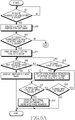
- FIG. 5A and FIG. 5B are flowcharts illustrating a method for turning pages of an e-book on a multi-page basis in an analog fashion in a portable terminal having an e-book function according to a second example not part of the invention.
- the terminal detects a request for executing the e-book function by user's key manipulation in step 501.
- the terminal executes the e-book function, and displays a pre-set page of the e-book selected by the user, according to configuration information of the e-book function.
- the configuration information of the e-book may be configured in advance so that a first page of the e-book is first displayed or the most recently displayed page of the e-book is displayed when executing the e-book function.
- step 505 the terminal determines whether a touch down is input in a pre-set right UI active area of the e-book.
- step 505 If it is determined in step 505 that the touch down is input in the pre-set right UI active area of the e-book, proceeding to step 507, the terminal displays a right lateral side of the e-book, and the procedure proceeds to step 509.
- step 509 the terminal determines whether a drag and touch up is input to the left while maintaining the touch down input.
- step 509 If it is determined in step 509 that the drag and touch up is input to the left while maintaining the touch down input, proceeding to step 511, the terminal displays an immediately next page on a screen.
- step 509 determines whether a drag is input to the right while maintaining the touch down input.
- step 513 If it is determined in step 513 that the drag is input to the right while maintaining the touch down input, proceeding to step 515, the terminal displays a page number increased by an extent of the drag in the right lateral side of the e-book, and then the procedure proceeds to step 517.
- the page number displayed in the right lateral side is increased in proportion to a speed depending on the drag.
- step 517 the terminal determines whether a drag and touch up is input to the left while maintaining the drag input.
- step 517 If it is determined in step 517 that the drag and touch up is input to the left while maintaining the drag input, proceeding to step 519, the terminal displays a next page corresponding to the increased page number.
- step 517 determines whether the drag and touch up is not input to the left while maintaining the drag input. If it is determined in step 517 that the drag and touch up is not input to the left while maintaining the drag input, proceeding to step 518, the terminal determines whether the drag is continuously input to the right while maintaining the drag input.
- step 518 If it is determined in step 518 that that drag is continuously input to the right while maintaining the drag input, returning to step 515, the subsequent steps are repeated.
- step 518 if it is determined in step 518 that the drag is not continuously input to the right while maintaining the drag input, the procedure of FIG. 5 ends. For example, if the touch up is input while maintaining the drag input without no drag input to the right or left, the procedure of FIG. 5 ends.
- step 513 determines that the drag is not input to the right while maintaining the touch down input.
- step 505 If it is determined in step 505 that the touch down is not input in the pre-set right UI active area of the e-book, proceeding to step 521, the terminal determines whether a touch down is input in a pre-set left UI active area of the e-book.
- step 521 If it is determined in step 521 that the touch down is input in the pre-set left UI active area of the e-book, proceeding to step 523, the terminal displays a left lateral side of the e-book, and the procedure proceeds to step 525.
- step 525 the terminal determines whether a drag and touch up is input to the right while maintaining the touch down input.
- step 525 If it is determined in step 525 that the drag and touch up is input to the right while maintaining the touch down input, proceeding to step 527, the terminal displays an immediately previous page.
- step 525 determines whether a drag is input to the left while maintaining the touch down input.
- step 529 If it is determined in step 529 that the drag is input to the left while maintaining the touch down input, proceeding to step 531, the terminal displays a page number decreased by an extent of the drag in the left lateral side of the e-book, and then the procedure proceeds to step 533.
- the page number displayed in the left lateral side is decreased in proportion to a speed depending on the drag.
- step 533 the terminal determines whether a drag and touch up is input to the right while maintaining the drag input.
- step 533 If it is determined in step 533 that the drag and touch up is input to the right while maintaining the drag input, proceeding to step 535, the terminal displays a previous page corresponding to the decreased page number.
- step 534 the terminal determines whether the drag is continuously input to the left while maintaining the drag input.
- step 534 If it is determined in step 534 that that drag is continuously input to the left while maintaining the drag input, returning to step 531, the subsequent steps are repeated.
- step 534 if it is determined in step 534 that the drag is not continuously input to the left while maintaining the drag input, the procedure of FIG. 5 ends. For example, if the touch up is input while maintaining the drag input without no drag input to the left or right, the procedure of FIG. 5 ends.
- step 529 determines that the drag is not input to the left while maintaining the touch down input.
- step 521 If it is determined in step 521 that the touch down is not input in the pre-set left UI active area of the e-book, returning to step 505, the subsequent steps are repeated.
- FIG. 6 illustrates an example of a method for supporting a bookmark for an e-book in a portable terminal having an e-book function according to a third example not part of the invention.
- the terminal performs the e-book function, displays a pre-set page of the e-book selected by a user on a screen, and activates a bookmark function by touching a bookmark On/Off switch.
- a bookmark On/Off switch In this case, an upper portion of the screen is partially divided for an upper UI active area, and the upper UI active area is pre-set according to the terminal.
- the bookmark On/Off switch for activating/inactivating the bookmark function may be located in a left portion of the pre-set upper UI active area of the e-book, and can be displayed, for example, in a clip shape.
- a menu for automatically storing a position before moving to a bookmark page corresponding to a clip may be located in a right portion of the pre-set upper UI active area of the e-book, and can be displayed, for example, in an arrow shape.
- the terminal determines that the bookmark needs to be added and generates a clip corresponding to the bookmark to be added.
- a location of the clip can move according to a drag direction until a touch up is input while maintaining the drag input. Thereafter, if the touch up is input while maintaining the drag input, the terminal places the generated clip to a location at which the touch up is input.
- a shape, color, or the like of the generated clip can be determined according to pre-set information.
- an input window is displayed via a popup window to receive information such as the shape, color, or the like of the generated clip from the user, and the shape, color, or the like of the generated clip can be modified according to the input information.
- the terminal displays a corresponding bookmark page, and upon detection of a long touch for the clip corresponding to the previously added bookmark, the terminal determines that information on the previously added bookmark needs to be displayed, and thus displays information on a corresponding bookmark via a popup window.
- the long touch implies a continuous touch, for example, about 1 or 2 seconds
- the information on the bookmark may include information on a date of generating the bookmark, a time of generating the bookmark, a bookmark page, etc.
- the popup window can display not only the information on the bookmark but also a memo menu for writing a memo and a move menu for changing a location of the bookmark.
- a memo window can be displayed to receive a content of memo for the bookmark, and when the user selects the move menu, a location change mode of the bookmark can be performed to receive the changed location of the clip corresponding to the bookmark.
- the terminal displays a corresponding bookmark page, and if a drag and touch up is input to the left/right while maintaining the touch down input for the clip corresponding to the previously added bookmark on which the bookmark page is displayed, then the terminal determines that it is required to move the bookmark page corresponding to the previously added bookmark, and thus moves to the bookmark page.
- the terminal determines that the previously added bookmark needs to be removed, and thus deletes the clip corresponding to the bookmark.
- FIG. 7A and FIG. 7B are flowcharts illustrating a method for supporting a bookmark for an e-book in a portable terminal having an e-book function according to a third example not part of the invention.
- the terminal detects a request for executing the e-book function by user's key manipulation in step 701.
- the terminal executes the e-book function, and displays a pre-set page of the e-book selected by the user, according to configuration information of the e-book function.
- the configuration information of the e-book may be configured in advance so that a first page of the e-book is first displayed or the most recently displayed page of the e-book is displayed when executing the e-book function.
- the terminal determines whether a bookmark On switch is touched (i.e., whether a touch up is input after a touch down).
- the bookmark On switch can be located, for example, in a left portion of a pre-set upper UI active area of the e-book, and may be displayed in a clip shape.
- the bookmark On switch can be implemented as one switch for performing both a function of the bookmark On switch and a function of a bookmark Off switch. In this case, when the switch is touched in the bookmark Off state, a state transition occurs to the bookmark On state to activate the bookmark function, and when the switch is touched in the bookmark On state, a state transition occurs to the bookmark Off state to inactivate the bookmark function.
- step 705 If it is detected in step 705 that the bookmark On switch is touched, proceeding to step 707, the terminal activates the bookmark function, and then the procedure proceeds to step 709.
- step 709 the terminal determines whether a touch down is input in the pre-set upper UI active area of the e-book and a drag is input downwards while maintaining the touch down input.
- step 709 If it is determined in step 709 that the touch down is input in the pre-set upper UI active area of the e-book and the drag is input downwards while maintaining the touch down input, proceeding to step 711, then the terminal generates a clip corresponding to a bookmark to be added, and the procedure proceeds to step 713.
- a location of the clip can move according to a drag direction until a touch up is input while maintaining the drag input.
- step 713 the terminal determines whether a touch up is input while maintaining the drag input.
- step 713 If it is determined in step 713 that the touch up is input while maintaining the drag input, proceeding to step 715, the terminal places the generated clip to a location at which the touch up is input, and then the procedure of FIG. 7 ends.
- a shape, color, or the like of the generated clip can be determined according to pre-set information.
- an input window is displayed via a popup window to receive information such as the shape, color, or the like of the generated clip from the user, and the shape, color, or the like of the generated clip can be modified according to the input information.
- step 709 determines whether a touch down is input for a clip corresponding to a previously added bookmark.
- step 717 If it is determined in step 717 that the touch down is input for the clip corresponding to the previously added bookmark, proceeding to step 718, the terminal displays a corresponding bookmark page, and the procedure proceeds to step 719.
- step 719 the terminal determines whether a long touch is detected for the clip corresponding to the previously added bookmark on which the bookmark page is indicated.
- the long touch implies a continuous touch, for example, about 1 or 2 seconds.
- the terminal determines that it is required to display information on the previously added bookmark on which the bookmark page is indicated, and proceeding to step 720, displays the information on the bookmark via a popup window, and then the procedure of FIG. 7 ends.
- the information on the bookmark may include information on a date of generating the bookmark, a time of generating the bookmark, a bookmark page, etc.
- the popup window can display not only the information on the bookmark but also a memo menu for writing a memo and a move menu for changing a location of the bookmark.
- a memo window can be displayed to receive a content of memo for the bookmark, and when the user selects the move menu, a location change mode of the bookmark can be performed to receive the changed location of the clip corresponding to the bookmark.
- step 719 determines whether a drag and touch up is input to the left/right while maintaining the touch down input.
- step 721 If it is determined in step 721 that the drag and touch up is input to the left/right while maintaining the touch down input, the terminal determines that it is required to move to a bookmark page corresponding to the previously added bookmark on which the bookmark page is indicated, and proceeding to step 722, moves to a corresponding bookmark page, and then the procedure of FIG. 7 ends.
- step 721 determines whether a touch up is input while maintaining the touch down input.
- step 723 If it is determined in step 723 that the touch up is input while maintaining the touch down input, the procedure of FIG. 7 ends.
- step 723 determines whether the touch up is not input while maintaining the touch down input. If it is determined in step 723 that the touch up is not input while maintaining the touch down input, returning to step 719, the subsequent steps are repeated.
- step 717 determines whether a touch down is input for the clip corresponding to the previously added bookmark and a drag and touch up is input upwards (e.g., up to the end of the upper direction) while maintaining the touch down input.
- step 725 If it is determined in step 725 that the touch down is input for the clip corresponding to the previously added bookmark and the drag and touch up is input upwards while maintaining the touch down input, the terminal determines that the previously added bookmark needs to be removed. In step 727, the terminal deletes the clip corresponding to the bookmark, and then the procedure of FIG. 7 ends.
- step 725 if it is determined in step 725 that the touch down is not input for the clip corresponding to the previously added bookmark and the drag and touch up is not input upwards while maintaining the touch down input, returning to step 709, the subsequent steps are repeated.
- FIG. 8 illustrates an example of a method for tuning pages of an e-book in an analog fashion by using a 3-axis sensor in a portable terminal having an e-book function according to an exemplary embodiment of the present invention.
- the terminal executes the e-book function and displays a pre-set page of the e-book selected by a user on a screen.
- a right portion of the screen is partially divided for a right UI active area
- a left portion of the screen is partially divided for a left UI active area.
- the right UI active area and the left UI active area are pre-set according to the terminal.
- the terminal displays a right lateral side of the e-book and drives the 3-axis sensor to detect an inclination of the terminal.
- the terminal upon detection of an inclination value greater than or equal to a threshold in a left direction, the terminal displays a next page to the screen on a single-page basis at a speed in proportion to the inclination value detected in the process of detecting the inclination greater than or equal to the threshold in the left direction.
- the terminal can display a User Interface (UI) for turning a page forward on the single-page basis to the screen.
- UI User Interface
- the terminal drives the 3-axis sensor to detect the inclination of the terminal, and upon detection of the inclination value greater than or equal to the threshold in the left direction, the terminal displays a next page corresponding to a page number increased by an extent of the drag to the screen.
- the terminal can display a UI for turning a page forward on a multi-page basis to the screen. As illustrated in FIG.
- the terminal upon detection of the inclination value greater than or equal to the threshold in a right direction, the terminal displays a previous page to the screen on the single-page basis at a speed in proportion to the inclination value detected in the process of detecting the inclination greater than or equal to the threshold in the right direction.
- the terminal can display a UI for turning a page back on the single-page basis to the screen.
- the terminal displays a left lateral side of the e-book and drives the 3-axis sensor to detect the inclination of the terminal.
- the terminal upon detection of the inclination value greater than or equal to the threshold in the right direction, the terminal displays a previous page to the screen on the single-page basis at a speed in proportion to the inclination value detected in the process of detecting the inclination greater than or equal to the threshold in the right direction.
- the terminal can display a UI for turning a page back on the single-page basis to the screen.
- the terminal drives the 3-axis sensor to detect the inclination of the terminal, and upon detection of the inclination value greater than or equal to the threshold in the right direction, the terminal displays a page number decreased by an extent of the drag to the screen.
- the terminal can display a UI for turning a page back on the multi-page basis to the screen.
- the terminal When the left lateral side of the e-book is displayed and the 3-axis sensor is driven to detect the inclination of the terminal, upon detection of the inclination value greater than or equal to the threshold in the left direction, the terminal displays a next page to the screen on the single-page basis at a speed in proportion to the inclination value detected in the process of detecting the inclination greater than or equal to the threshold in the left direction.
- the terminal can display a UI for turning a page forward on the single-page basis to the screen.
- the terminal drives the 3-axis sensor to display a UI for turning a page forward (or back) on the single-page basis on the screen
- the terminal can display a UI for turning a page back (or forward) on the single-page basis to the screen.
- FIG. 9 illustrates an example of a method for tuning pages of an e-book in an analog fashion by using a 3-axis sensor in a portable terminal having an e-book function according to an exemplary embodiment of the present invention.
- the terminal displays a right lateral side of the e-book.
- the terminal displays a page number increased by an extent of the drag to the right lateral side of the e-book, and drives the 3-axis sensor to detect an inclination of the terminal.
- the terminal Upon detection of an inclination value greater than or equal to a threshold in a left direction, the terminal displays a next page corresponding to the increased page number to the screen.
- the terminal can display a UI for tuning a page forward on a multi-page basis to the screen.
- the terminal displays a left lateral side of the e-book.
- the terminal displays a page number decreased by an extent of the drag to the left lateral side of the e-book, and drives the 3-axis sensor to detect the inclination of the terminal.
- the terminal Upon detection of the inclination value greater than or equal to the threshold in a right direction, the terminal displays a previous page corresponding to the decreased page number to the screen. In this case, the terminal can display a UI for tuning a page back on the multi-page basis to the screen.
- FIG. 10 illustrates an example of a method for tuning pages of an e-book in an analog fashion by using a 3-axis sensor in a portable terminal having an e-book function according to an exemplary embodiment of the present invention.
- the terminal displays a UI for turning a page forward on a multi-page basis to a screen as illustrated in FIG. 10A , and also displays a left lateral side where pages are being turned in a part of a left UI active area.
- the terminal can cancel the turning of several pages forward and can return to a page that is displayed before turning the several pages forward.
- the terminal displays a UI for turning a page back on the multi-page basis to the screen, and also displays a right lateral side where pages are being turned in a part of a right UI active area.
- the terminal can cancel the turning of several pages back and can return to a page that is displayed before turning the several pages back.
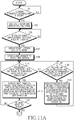
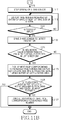
- FIG. 11A and FIG. 11B are flowcharts illustrating an example of a method for tuning pages of an e-book in an analog fashion by using a 3-axis sensor in a portable terminal having an e-book function according to an exemplary embodiment of the present invention.
- the example of FIG. 11A and FIG. 11B is a case where a right lateral side is displayed upon touching a right UI active area of the e-book.
- the terminal detects a request for executing the e-book function by user's key manipulation in step 1101.
- the terminal executes the e-book function, and displays a pre-set page of the e-book selected by the user, according to configuration information of the e-book function.
- the configuration information of the e-book may be configured in advance so that a first page of the e-book is first displayed or the most recently displayed page of the e-book is displayed when executing the e-book function.
- step 1105 the terminal determines whether a touch down is input in a pre-set right UI active area of the e-book.
- step 1105 If it is determined in step 1105 that the touch down is input in the pre-set right UI active area of the e-book, proceeding to step 1107, the terminal displays the right lateral side of the e-book.
- step 1109 the terminal drives the 3-axis sensor to detect an inclination of the terminal.
- step 1111 the terminal determines whether an inclination value greater than or equal to a threshold is detected in a left direction.
- the terminal displays a next page to a screen on a single-page basis at a speed in proportion to the inclination value detected in the process of detecting the inclination greater than or equal to the threshold in the left direction. For example, the greater the detected inclination value, the faster the speed of displaying the next page on the single-page basis.
- the terminal can display a UI for turning a page forward on the single-page basis to the screen. In this case, the terminal can report the movement of the page to the user by using voice, vibration, etc. For example, whenever a page is turned forward on the single-page basis, a sound for turning the page can be output.
- the terminal can display a popup window to display the number of pages which are turned forward or a current page number.
- step 1115 the terminal determines whether a drag is input to the right while maintaining the touch down input.
- step 1115 If it is determined in step 1115 that the drag is input to the right while maintaining the touch down input, proceeding to step 1117, the terminal stops the driving of the 3-axis sensor.
- step 1119 the terminal displays a page number increased by an extent of the drag to the right lateral side of the e-book. In this case, the terminal stops the displaying of the UI for turning the page forward on the single-page basis, and displays a UI for holding a page.
- step 1121 the terminal determines whether a touch up is input while maintaining the drag input to the right.
- step 1121 If it is determined in step 1121 that the touch up is input while maintaining the drag input to the right, proceeding to step 1122, the terminal drives the 3-axis sensor to detect the inclination of the terminal. In step 1124, the terminal determines whether the inclination value greater than or equal to the threshold is detected in the left direction.
- step 1124 If it is determined in step 1124 that the inclination value greater than or equal to the threshold is not detected in the left direction, the procedure of FIG. 11 ends.
- step 1124 the terminal displays a next page corresponding to the increased page number to the screen, and displays a left lateral side where pages are being turned in a part of a left UI active area.
- the terminal displays a UI for turning several pages forward to the screen at a slower speed than the UI for turning the pages forward on the single-page basis.
- step 1125 the terminal determines whether a touch down is input in the part of the left UI active area and a drag and touch up is input to the right while maintaining the touch down input.
- step 1125 If it is determined in step 1125 that the touch down is input in the part of the left UI active area and the drag and touch up is input to the right while maintaining the touch down input, proceeding to step 1127, the terminal cancels the displaying of the next page corresponding to the increased page number, and returns to a previous page displayed before turning several pages forward.
- step 1125 if it is determined in step 1125 that the touch down is not input in the part of the left UI active area or the drag and touch up is not input to the right while maintaining the touch down input, the procedure of FIG. 11 ends.
- step 1121 determines that the touch up is not input while maintaining the drag input to the right.
- step 1115 If it is determined in step 1115 that the drag is not input to the right while maintaining the touch down input, returning to step 1111, the subsequent steps are repeated.
- step 1111 If it is determined in step 1111 that the inclination value greater than or equal to the threshold is not detected in the left direction, proceeding to step 1129, the terminal determines whether the inclination value greater than or equal to the threshold is detected in the right direction.
- step 1131 the terminal displays a previous page to the screen on the single-page basis at a speed in proportion to the inclination value detected in the process of detecting the inclination greater than of equal to the threshold in the right direction, and returning to step 1111, the subsequent steps are repeated.
- the greater the detected inclination value the faster the speed of displaying the previous page on the single-page basis.
- the terminal can display a UI for turning a page back on the single-page basis to the screen. In this case, the terminal can report the movement of the page to the user by using voice, vibration, etc.
- the terminal can display a popup window to display the number of pages which are turned back (indicated by '-') or a current page number.
- step 1129 if it is determined in step 1129 that the inclination value greater than or equal to the threshold is not detected in the right direction, returning to step 1111, the subsequent steps are repeated.
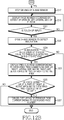
- FIG. 12A and FIG. 12B are flowcharts illustrating an example of a method for tuning pages of an e-book in an analog fashion by using a 3-axis sensor in a portable terminal having an e-book function according to an exemplary embodiment of the present invention.
- the example of FIG. 12A and FIG. 12B is a case where a left lateral side is displayed upon touching a left UI active area of the e-book.
- the terminal detects a request for executing the e-book function by user's key manipulation in step 1201.
- the terminal executes the e-book function, and displays a pre-set page of the e-book selected by the user, according to configuration information of the e-book function.
- the configuration information of the e-book may be configured in advance so that a first page of the e-book is first displayed or the most recently displayed page of the e-book is displayed when executing the e-book function.
- step 1205 the terminal determines whether a touch down is input in a pre-set left UI active area of the e-book.
- step 1205 If it is determined in step 1205 that the touch down is input in the pre-set left UI active area of the e-book, proceeding to step 1207, the terminal displays the left lateral side of the e-book.
- step 1209 the terminal drives the 3-axis sensor to detect an inclination of the terminal.
- step 1211 the terminal determines whether an inclination value greater than or equal to a threshold is detected in a right direction.
- the terminal displays a previous page to the screen on a single-page basis at a speed in proportion to the inclination value detected in the process of detecting the inclination greater than of equal to the threshold in the right direction.
- the terminal can display a UI for turning a page back on the single-page basis to the screen.
- the terminal can report the movement of the page to the user by using voice, vibration, etc. For example, whenever a page is turned back on the single-page basis, a sound for turning the page can be output.
- the terminal can display a popup window to display the number of pages which are turned back (indicated by '-') or a current page number.
- step 1215 the terminal determines whether a drag is input to the left while maintaining the touch down input.
- step 1215 If it is determined in step 1215 that the drag is input to the left while maintaining the touch down input, proceeding to step 1217, the terminal stops the driving of the 3-axis sensor.
- step 1219 the terminal displays a page number decreased by an extent of the drag to the left lateral side of the e-book. In this case, the terminal stops the displaying of the UI for turning the page back on the single-page basis, and displays a UI for holding a page.
- step 1221 the terminal determines whether a touch up is input while maintaining the drag input to the left.
- step 1221 If it is determined in step 1221 that the touch up is input while maintaining the drag input to the left, proceeding to step 1222, the terminal drives the 3-axis sensor to detect the inclination of the terminal. In step 1224, the terminal determines whether the inclination value greater than or equal to the threshold is detected in the right direction.
- step 1224 If it is determined in step 1224 that the inclination value greater than or equal to the threshold is not detected in the right direction, the procedure of FIG. 12 ends.
- step 1224 the terminal displays a previous page corresponding to the decreased page number to the screen, and displays a right lateral side of the turning page in a part of a right UI active area. In this case, the terminal displays a UI for turning several pages back to the screen at a slower speed than the UI for turning the pages back on the single-page basis.
- step 1225 the terminal determines whether a touch down is input in the part of the right UI active area and a drag and touch up is input to the left while maintaining the touch down input.
- step 1225 If it is determined in step 1225 that the touch down is input in the part of the right UI active area and the drag and touch up is input to the left while maintaining the touch down input, proceeding to step 1227, the terminal cancels the displaying of the previous page corresponding to the decreased page number, and returns to a previous page displayed before turning several pages back.
- step 1225 if it is determined in step 1225 that the touch down is not input in the part of the right UI active area or the drag and touch up is not input to the left while maintaining the touch down input, the procedure of FIG. 12 ends.
- step 1221 determines that the touch up is not input while maintaining the drag input to the left.
- step 1215 If it is determined in step 1215 that the drag is not input to the left while maintaining the touch down input, returning to step 1211, the subsequent steps are repeated.
- step 1211 If it is determined in step 1211 that the inclination value greater than or equal to the threshold is not detected in the right direction, proceeding to step 1229, the terminal determines whether the inclination value greater than or equal to the threshold is detected in the left direction.
- the terminal displays a next page to the screen on the single-page basis at a speed in proportion to the inclination value detected in the process of detecting the inclination greater than or equal to the threshold in the left direction.
- the terminal can display a UI for turning a page forward on the single-page basis to the screen.
- the terminal can report the movement of the page to the user by using voice, vibration, etc. For example, whenever a page is turned forward on the single-page basis, a sound for turning the page can be output.
- the terminal can display a popup window to display the number of pages which are turned forward or a current page number.
- step 1229 if it is determined in step 1229 that the inclination value greater than or equal to the threshold is not detected in the left direction, returning to step 1211, the subsequent steps are repeated.
- the terminal when an inclination of an opposite direction is detected in a state where a UI for turning a page forward (or back) on the single-page basis to the screen, the terminal can drive the 3-axis sensor to display a UI for turning pages back (or forward) on the single-page basis to the screen.
- the terminal can report to the user that the page moves in a direction opposite to the previous case by using voice, vibration, etc.
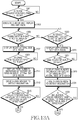
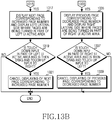
- FIG. 13A and FIG. 13B are flowcharts illustrating an example of a method for tuning pages of an e-book in an analog fashion by using a 3-axis sensor in a portable terminal having an e-book function according to an embodiment not part of the present invention.
- the terminal detects a request for executing the e-book function by user's key manipulation in step 1301.
- the terminal executes the e-book function, and displays a pre-set page of the e-book selected by the user, according to configuration information of the e-book function.
- the configuration information of the e-book may be configured in advance so that a first page of the e-book is first displayed or the most recently displayed page of the e-book is displayed when executing the e-book function.
- step 1305 the terminal determines whether a touch down is input in a pre-set right UI active area of the e-book.
- step 1305 If it is determined in step 1305 that the touch down is input in a pre-set right UI active area of the e-book, proceeding to step 1307, the terminal displays a right lateral side of the e-book.
- step 1309 the terminal determines whether a drag is input to the right while maintaining the touch down input.
- step 1309 If it is determined in step 1309 that the drag is input to the right while maintaining the touch down input, proceeding to step 1311, the terminal displays a page number increased by an extent of the drag to the right lateral side of the e-book.
- the page number displayed in the right lateral side is increased in proportion to a speed depending on the drag.
- step 1313 the terminal drives the 3-axis sensor to detect an inclination of the terminal.
- step 1315 the terminal determines whether an inclination value greater than or equal to a threshold is detected in a left direction.
- step 1315 If it is determined in step 1315 that the inclination value greater than or equal to the threshold is detected in the left direction, proceeding to step 1317, the terminal displays a next page corresponding to the increased page number to the screen, and displays a left lateral side of the turning page in a part of a left UI active area. In this case, the terminal displays a UI for turning several pages forward to the screen at a slower speed than the UI for turning the pages forward on the single-page basis.
- step 1319 the terminal determines whether a touch down is input in the part of the left UI active area and a drag and touch up is input to the right while maintaining the touch down input.
- step 1319 If it is determined in step 1319 that the touch down is input in the part of the left UI active area and the drag and touch up is input to the right while maintaining the touch down input, proceeding to step 1321, the terminal cancels the displaying of the next page corresponding to the increased page number, and returns to a previous page displayed before turning several pages forward.
- step 1319 if it is determined in step 1319 that the touch down is not input in the part of the left UI active area or the drag and touch up is not input to the right while maintaining the touch down input, the procedure of FIG. 13 ends.
- step 1305 determines whether a touch down is input in a pre-set right UI active area of the e-book.
- step 1323 If it is determined in step 1323 that the touch down is input in the pre-set left UI active area of the e-book, proceeding to step 1325, the terminal displays the left lateral side of the e-book.
- step 1327 the terminal determines whether a drag and touch up is input to the left while maintaining the touch down input.
- step 1327 If it is determined in step 1327 that the drag is input to the left while maintaining the touch down input, proceeding to step 1329, the terminal displays a page number decreased by an extent of the drag in the left lateral side of the e-book.
- the page number displayed in the left lateral side is decreased in proportion to a speed depending on the drag.
- step 1331 the terminal drives the 3-axis sensor to detect the inclination of the terminal.
- step 1333 the terminal determines whether the inclination value greater than or equal to a threshold is detected in the right direction.
- step 1335 the terminal displays a previous page corresponding to the decreased page number to the screen, and displays the right lateral side of the turning page in the part of the right UI active area. In this case, the terminal displays a UI for turning several pages back to the screen at a slower speed than the UI for turning the pages back on the single-page basis.
- step 1337 the terminal determines whether a touch down is input in the part of the right UI active area and a drag and touch up is input to the left while maintaining the touch down input.
- step 1337 If it is determined in step 1337 that the touch down is input in the part of the right UI active area and the drag and touch up is input to the left while maintaining the touch down input, proceeding to step 1339, the terminal cancels the displaying of the previous page corresponding to the decreased page number, and returns to a previous page displayed before turning several pages back.
- step 1337 if it is determined in step 1337 that the touch down is not input in the part of the right UI active area or the drag and touch up is not input to the left while maintaining the touch down input, the procedure of FIG. 13 ends.
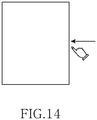
- FIG. 14 illustrates an example of a method for turning pages of an e-book in an analog fashion by using an acceleration sensor in a portable terminal having an e-book function according to an example not part of the present invention.
- the terminal upon detection of a request for executing the e-book, the terminal executes the e-book function, displays a pre-set page of the e-book selected by a user to a screen, and thereafter drives an acceleration sensor to detect an acceleration of a lateral side of the terminal.
- the terminal displays a next page to the screen.
- the terminal can display a previous page to the screen.
- FIG. 15 is a flowchart illustrating a method for turning pages of an e-book in an analog fashion by using an acceleration sensor in a portable terminal having an e-book function according to an example not part of the present invention.
- the terminal detects a request for executing the e-book function by user's key manipulation in step 1501.
- the terminal executes the e-book function, and displays a pre-set page of the e-book selected by the user, according to configuration information of the e-book function.
- the configuration information of the e-book may be configured in advance so that a first page of the e-book is first displayed or the most recently displayed page of the e-book is displayed when executing the e-book function.
- step 1505 the terminal drives the acceleration sensor to detect an acceleration of a lateral side of the terminal.
- step 1507 the terminal determines whether an acceleration value greater than or equal to a threshold is detected in the right lateral side.
- the terminal displays a next page to the screen.
- the terminal can display a UI for turning a page forward to the screen.
- the terminal can report the movement of the page to the user by using voice, vibration, etc. For example, whenever a page is turned forward, a sound for turning the page can be output.
- step 1507 determines whether the acceleration value greater than or equal to the threshold is detected in the right lateral side.
- step 1511 If it is determined in step 1511 that the acceleration value greater than or equal to the threshold is detected in the left lateral side, proceeding to step 1513, the terminal displays a previous page to the screen.
- the terminal can display a UI for turning pages back to the screen.
- the terminal can report the movement of the page to the user by using voice, vibration, etc. For example, whenever a page is turned back, a sound for turning the page can be output.
- step 1511 if it is detected in step 1511 that the acceleration value greater than or equal to the threshold is not detected in the left lateral side, returning to step 1507, the subsequent steps are repeated.
- a User Interface (UI) for turning pages of an e-book in an analog fashion is provided in a portable terminal having an e-book function. Therefore, a user can change pages of contents in the same natural feeling as turning pages of an actual paper book.
- UI User Interface
Landscapes
- Engineering & Computer Science (AREA)
- General Engineering & Computer Science (AREA)
- Theoretical Computer Science (AREA)
- Human Computer Interaction (AREA)
- Physics & Mathematics (AREA)
- General Physics & Mathematics (AREA)
- User Interface Of Digital Computer (AREA)
Claims (7)
- Verfahren zum Umblättern von Seiten eines elektronischen Buchs, E-Book, in einem tragbaren Endgerät mit einer E-Book-Funktion, wobei das Verfahren Folgendes umfasst:Durchführen (1103) der E-Book-Funktion;Bestimmen (1105), ob ein Touch-Down in einen voreingestellten rechten Benutzeroberflächen(UI)-Aktivbereich des E-Books eingegeben wird;Anzeigen (1107) einer rechten lateralen Seite des E-Books und Antreiben (1109) eines 3-Achsen-Sensors, um einen Neigungswert des tragbaren Endgeräts zu erfassen, wenn der Touch-Down in den voreingestellten rechten UI-Aktivbereich des E-Books eingegeben wird;Bestimmen (1111), ob der Neigungswert, der größer als oder gleich einem Schwellenwert ist, in einer linken Richtung erfasst wird;beim Erfassen des Neigungswerts, der größer als oder gleich dem Schwellenwert in der linken Richtung (1111-YES) ist, Anzeigen (1113) einer nächsten Seite auf einem Bildschirm auf einer Einzelseitenbasis mit einer Geschwindigkeit im Verhältnis zu dem Neigungswert, der in dem Verfahren des Erfassens des Neigungswerts erfasst wird, der größer als oder gleich dem Schwellenwert in der linken Richtung ist;Bestimmen (1115), ob ein Ziehen nach rechts eingegeben wird, während die Touch-Down-Eingabe aufrechterhalten wird;Anhalten (1117) des Antreibens des 3-Achsen-Sensors und Anzeigen (1119) einer Seitenzahl, die um ein Ausmaß des Ziehens auf die rechte laterale Seite des E-Books erhöht ist, wenn das Ziehen nach rechts eingegeben wird, während die Touch-Down-Eingabe aufrechterhalten wird;Bestimmen (1121), ob ein Touch-Up eingegeben wird, der die Zieheingabe nach rechts freigibt;Antreiben (1122) des 3-Achsen-Sensors, um den Neigungswert des tragbaren Endgeräts zu erfassen, wenn der Touch-Up eingegeben wird, der die Zieheingabe nach rechts freigibt;Bestimmen (1124), ob der Neigungswert, der größer als oder gleich dem Schwellenwert ist, in der linken Richtung erfasst wird; undbeim Erfassen des Neigungswerts, der größer als oder gleich dem Schwellenwert in der linken Richtung (1124-YES) ist, Anzeigen (1123) einer nächsten Seite, die der Seitenzahl entspricht, die um das Ausmaß des Ziehens auf den Bildschirm erhöht wird.
- Verfahren nach Anspruch 1, welches ferner umfasst:Anzeigen (1123) einer linken lateralen Seite, auf der Seiten in einem Teil des voreingestellten linken UI-Aktivbereichs umgeblättert werden;beim Bestimmen (1125), ob ein Touch-Down in den Teil des linken UI-Aktivbereichs eingegeben wird, wird ein Ziehen nach rechts eingegeben, während die Touch-Down-Eingabe aufrechterhalten wird, und ein Touch-Up wird eingegeben, der die Zieheingabe nach rechts freigibt; undbeim Annullieren (1127) des Anzeigens der nächsten Seite, die der erhöhten Seitenzahl entspricht, wenn der Touch-Down in den Teil des linken UI-Aktivbereichs eingegeben wird, wird das Ziehen nach rechts eingegeben, während die Touch-Down-Eingabe aufrechterhalten wird, und der Touch-Up wird eingegeben, der die Zieheingabe nach rechts freigibt.
- Verfahren nach Anspruch 1, wobei beim Erfassen des Neigungswerts, der größer als oder gleich dem Schwellenwert in einer rechten Richtung (1129-YES) ist, eine vorherige Seite auf der Einzelseitenbasis auf dem Bildschirm mit einer Geschwindigkeit im Verhältnis zu dem Neigungswert angezeigt (1131) wird, der in dem Verfahren des Erfassens des Neigungswerts erfasst wird, der größer als oder gleich dem Schwellenwert in die rechte Richtung ist.
- Verfahren zum Umblättern von Seiten eines elektronischen Buchs, E-Book, in einem tragbaren Endgerät mit einer E-Book-Funktion, wobei das Verfahren Folgendes umfasst:Ausführen (1203) der E-Book-Funktion;Bestimmen (1205), ob ein Touch-Down in einen voreingestellten linken Benutzeroberflächen(UI)-Aktivbereich des E-Books eingegeben wird;Anzeigen (1207) einer linken lateralen Seite des E-Books und Antreiben (1209) eines 3-Achsen-Sensors, um einen Neigungswert des tragbares Endgeräts zu erfassen, wenn der Touch-Down in den voreingestellten linken UI-Aktivbereich des E-Books eingegeben wird;Bestimmen (1211), ob der Neigungswert, der größer als oder gleich einem Schwellenwert ist, in einer rechten Richtung erfasst wird;beim Erkennen des Neigungswerts, der größer als oder gleich dem Schwellenwert in die rechte Richtung (1211-YES) ist, Anzeigen (1213) einer vorherigen Seite auf einem Bildschirm auf einer Einzelseitenbasis mit einer Geschwindigkeit im Verhältnis zu dem Neigungswert, der in dem Verfahren des Erfassens des Neigungswerts erfasst wird, der größer als oder gleich dem Schwellenwert in die rechte Richtung ist;Bestimmen (1215), ob ein Ziehen nach links eingegeben wird, während die Touch-Down-Eingabe aufrechterhalten wird;Anhalten (1217) des Antreibens des 3-Achsen-Sensors und Anzeigen (1219) einer Seitenzahl, die um ein Ausmaß des Ziehens auf die linke laterale Seite des E-Books verringert wird, wenn das Ziehen nach links eingegeben wird, während die Touch-Down-Eingabe aufrechterhalten wird;Bestimmen (1221), ob ein Touch-Up eingegeben wird, der die Zieheingabe nach links freigibt;Antreiben (1222) des 3-Achsen-Sensors, um den Neigungswert des tragbaren Endgeräts zu erfassen, wenn der Touch-Up eingegeben wird, der die Zieheingabe nach rechts freigibt;Bestimmen (1224), ob der Neigungswert, der größer als oder gleich dem Schwellenwert ist, in der rechten Richtung erfasst wird; undbeim Erkennen des Neigungswerts, der größer als oder gleich dem Schwellenwert in der rechten Richtung (1224-YES) ist, Anzeigen (1223) einer vorherigen Seite, die der Seitenzahl entspricht, die um das Ausmaß des Ziehens auf den Bildschirm verringert wird.
- Verfahren nach Anspruch 4, welches ferner umfasst:Anzeigen (1223) einer rechten lateralen Seite, auf der Seiten in einem Teil des voreingestellten rechten UI-Aktivbereichs umgeblättert werden;beim Bestimmen (1225), ob ein Touch-Down in den Teil des rechten UI-Aktivbereichs eingegeben wird, wird ein Ziehen nach links eingegeben, während die Touch-Down-Eingabe aufrechterhalten wird, und ein Touch-Up wird eingegeben, der die Zieheingabe nach links freigibt; undbeim Annullieren (1227) des Anzeigens der vorherigen Seite, die der verringerten Seitenzahl entspricht, wenn der Touch-Down in den Teil des rechten UI-Aktivbereichs eingegeben wird, wird das Ziehen nach links eingegeben, wäherend die Touch-Down-Eingabe aufrechterhalten wird, und der Touch-Up wird eingegeben, der die Zieheingabe nach links freigibt.
- Verfahren nach Anspruch 4, wobei beim Erfassen des Neigungswerts, der größer als oder gleich dem Schwellenwert in einer linken Richtung (1229-YES) ist, eine nächste Seite auf der Einzelseitenbasis auf dem Bildschirm mit einer Geschwindigkeit im Verhältnis zu dem Neigungswert angezeigt (1231) wird, der in dem Verfahren des Erfassens des Neigungswerts erfasst wird, der größer als oder gleich dem Schwellenwert in der linken Richtung ist.
- Tragbares Endgerät, welches eine Steuerung, ein Touchpanel und eine Anzeigeeinheit umfasst, wobei die Steuerung angeordnet ist, um ein Verfahren nach einem der Ansprüche 1 bis 6 auszuführen.
Applications Claiming Priority (2)
| Application Number | Priority Date | Filing Date | Title |
|---|---|---|---|
| KR20100095815 | 2010-10-01 | ||
| KR1020110008606A KR101784882B1 (ko) | 2010-10-01 | 2011-01-28 | 휴대용 단말기에서 전자책 페이지 넘김 장치 및 방법 |
Publications (3)
| Publication Number | Publication Date |
|---|---|
| EP2437154A2 EP2437154A2 (de) | 2012-04-04 |
| EP2437154A3 EP2437154A3 (de) | 2016-10-05 |
| EP2437154B1 true EP2437154B1 (de) | 2020-12-23 |
Family
ID=44720726
Family Applications (1)
| Application Number | Title | Priority Date | Filing Date |
|---|---|---|---|
| EP11183429.7A Active EP2437154B1 (de) | 2010-10-01 | 2011-09-30 | Vorrichtung und Verfahren zum Umblättern von E-Book-Seiten auf einem portablen Endgerät |
Country Status (3)
| Country | Link |
|---|---|
| US (1) | US9678572B2 (de) |
| EP (1) | EP2437154B1 (de) |
| CN (1) | CN102446069A (de) |
Families Citing this family (42)
| Publication number | Priority date | Publication date | Assignee | Title |
|---|---|---|---|---|
| KR101104721B1 (ko) * | 2009-09-04 | 2012-01-10 | 임병근 | 다중 페이지를 가지는 문서를 디스플레이하는 휴대용 멀티미디어 장치 및 그 구동 방법 |
| US10831982B2 (en) | 2009-10-14 | 2020-11-10 | Iplcontent, Llc | Hands-free presenting device |
| US8977977B2 (en) * | 2010-10-26 | 2015-03-10 | Creative Technology Ltd | Method for fanning pages of an electronic book on a handheld apparatus for consuming electronic books |
| US20120159395A1 (en) | 2010-12-20 | 2012-06-21 | Microsoft Corporation | Application-launching interface for multiple modes |
| US8689123B2 (en) | 2010-12-23 | 2014-04-01 | Microsoft Corporation | Application reporting in an application-selectable user interface |
| US8612874B2 (en) | 2010-12-23 | 2013-12-17 | Microsoft Corporation | Presenting an application change through a tile |
| US8893033B2 (en) | 2011-05-27 | 2014-11-18 | Microsoft Corporation | Application notifications |
| US9104307B2 (en) | 2011-05-27 | 2015-08-11 | Microsoft Technology Licensing, Llc | Multi-application environment |
| US20130057587A1 (en) | 2011-09-01 | 2013-03-07 | Microsoft Corporation | Arranging tiles |
| US9146670B2 (en) | 2011-09-10 | 2015-09-29 | Microsoft Technology Licensing, Llc | Progressively indicating new content in an application-selectable user interface |
| KR101339420B1 (ko) * | 2011-10-05 | 2013-12-10 | 한국과학기술원 | 베젤 영역을 이용한 전자책 컨텐츠 제어방법 및 장치 |
| JP5941264B2 (ja) * | 2011-11-01 | 2016-06-29 | キヤノン株式会社 | 情報処理装置、情報処理方法 |
| US9223472B2 (en) * | 2011-12-22 | 2015-12-29 | Microsoft Technology Licensing, Llc | Closing applications |
| JP2013228936A (ja) * | 2012-04-26 | 2013-11-07 | Kyocera Corp | 電子機器及び電子機器の制御方法 |
| US10444836B2 (en) | 2012-06-07 | 2019-10-15 | Nook Digital, Llc | Accessibility aids for users of electronic devices |
| US9658746B2 (en) * | 2012-07-20 | 2017-05-23 | Nook Digital, Llc | Accessible reading mode techniques for electronic devices |
| CN103677597A (zh) * | 2012-09-10 | 2014-03-26 | 华为终端有限公司 | 一种终端设备、同屏显示方法和系统 |
| US20140108974A1 (en) * | 2012-10-12 | 2014-04-17 | Sap Ag | Content Display Systems and Methods |
| US11270058B2 (en) * | 2012-11-29 | 2022-03-08 | Red Hat, Inc. | Referencing a portion of a document |
| CN103064583B (zh) * | 2012-12-20 | 2016-03-02 | 小米科技有限责任公司 | 显示块排列方法、显示块切换方法及移动终端 |
| CN103049173B (zh) * | 2012-12-20 | 2015-10-07 | 小米科技有限责任公司 | 内容选择方法、系统及移动终端 |
| CN103116440A (zh) * | 2013-01-23 | 2013-05-22 | 深圳市金立通信设备有限公司 | 一种在终端上移动图标的方法及终端 |
| US9971495B2 (en) | 2013-01-28 | 2018-05-15 | Nook Digital, Llc | Context based gesture delineation for user interaction in eyes-free mode |
| US9400549B2 (en) | 2013-03-08 | 2016-07-26 | Chi Fai Ho | Method and system for a new-era electronic book |
| KR20140135404A (ko) * | 2013-05-16 | 2014-11-26 | 엘지전자 주식회사 | 포터블 디바이스 및 그 제어 방법 |
| JP5736005B2 (ja) * | 2013-06-11 | 2015-06-17 | パナソニック インテレクチュアル プロパティ コーポレーション オブアメリカPanasonic Intellectual Property Corporation of America | 入力処理装置、情報処理装置、情報処理システム、入力処理方法、情報処理方法、入力処理プログラム、及び情報処理プログラム |
| US20150277677A1 (en) * | 2014-03-26 | 2015-10-01 | Kobo Incorporated | Information presentation techniques for digital content |
| US20150277678A1 (en) * | 2014-03-26 | 2015-10-01 | Kobo Incorporated | Information presentation techniques for digital content |
| CN105359094A (zh) | 2014-04-04 | 2016-02-24 | 微软技术许可有限责任公司 | 可扩展应用表示 |
| WO2015154276A1 (en) | 2014-04-10 | 2015-10-15 | Microsoft Technology Licensing, Llc | Slider cover for computing device |
| KR102107275B1 (ko) | 2014-04-10 | 2020-05-06 | 마이크로소프트 테크놀로지 라이센싱, 엘엘씨 | 컴퓨팅 디바이스에 대한 접이식 쉘 커버 |
| CN103927054B (zh) | 2014-04-15 | 2017-02-01 | 华为终端有限公司 | 一种显示操作界面的方法、装置及触摸屏终端 |
| CN103970449A (zh) * | 2014-05-26 | 2014-08-06 | 北京金山网络科技有限公司 | 一种多窗口滑动控制方法、装置 |
| CN106662891B (zh) | 2014-10-30 | 2019-10-11 | 微软技术许可有限责任公司 | 多配置输入设备 |
| US20160132477A1 (en) * | 2014-11-11 | 2016-05-12 | Kobo Inc. | Digital intra-page bookmark for use with e-books |
| KR102423447B1 (ko) * | 2015-10-22 | 2022-07-21 | 삼성전자 주식회사 | 벤디드 디스플레이를 구비한 전자 장치 및 그 제어 방법 |
| CN106648383A (zh) * | 2015-10-29 | 2017-05-10 | 阿里巴巴集团控股有限公司 | 一种浏览页面操作方法及终端设备 |
| US10430053B1 (en) * | 2016-01-05 | 2019-10-01 | Quirklogic, Inc. | Edge navigation mechanism that mimics the use of a flipchart |
| CN107562357A (zh) * | 2017-08-31 | 2018-01-09 | 努比亚技术有限公司 | 页面内容翻页方法、终端及计算机可读存储介质 |
| CN109992182B (zh) * | 2019-03-28 | 2020-01-21 | 掌阅科技股份有限公司 | 电子书批量翻页方法、电子设备及计算机存储介质 |
| CN111625128A (zh) * | 2020-05-12 | 2020-09-04 | Oppo广东移动通信有限公司 | 触摸屏的控制方法、控制装置、移动终端及存储介质 |
| US11550469B2 (en) * | 2021-02-24 | 2023-01-10 | Huawei Technologies Co., Ltd. | Devices, methods and systems for control of an electronic device using force-based gestures |
Family Cites Families (118)
| Publication number | Priority date | Publication date | Assignee | Title |
|---|---|---|---|---|
| US5463725A (en) | 1992-12-31 | 1995-10-31 | International Business Machines Corp. | Data processing system graphical user interface which emulates printed material |
| JPH06231186A (ja) | 1993-02-03 | 1994-08-19 | Fujitsu Ltd | 文書処理装置 |
| JP3990744B2 (ja) | 1995-09-08 | 2007-10-17 | キヤノン株式会社 | 電子機器及びその制御方法 |
| US6407757B1 (en) | 1997-12-18 | 2002-06-18 | E-Book Systems Pte Ltd. | Computer-based browsing method and computer program product for displaying information in an electronic book form |
| JP3063649B2 (ja) | 1996-12-03 | 2000-07-12 | 日本電気株式会社 | 情報表示装置 |
| US9292111B2 (en) | 1998-01-26 | 2016-03-22 | Apple Inc. | Gesturing with a multipoint sensing device |
| US8479122B2 (en) | 2004-07-30 | 2013-07-02 | Apple Inc. | Gestures for touch sensitive input devices |
| WO1999044117A1 (en) * | 1998-02-25 | 1999-09-02 | Sharp Kabushiki Kaisha | Display device |
| JP2000123044A (ja) | 1998-10-20 | 2000-04-28 | Nippon Telegr & Teleph Corp <Ntt> | 書籍情報操作閲覧装置 |
| US6337698B1 (en) | 1998-11-20 | 2002-01-08 | Microsoft Corporation | Pen-based interface for a notepad computer |
| JP2000163193A (ja) | 1998-11-25 | 2000-06-16 | Seiko Epson Corp | 携帯情報機器及び情報記憶媒体 |
| JP2000242390A (ja) | 1999-02-18 | 2000-09-08 | Sony Corp | 情報の表示方法及び、情報表示装置 |
| JP3941292B2 (ja) * | 1999-07-26 | 2007-07-04 | 日本電気株式会社 | ページ情報表示方法及び装置並びにページ情報表示用のプログラム又はデータを記憶した記憶媒体 |
| US6448986B1 (en) | 1999-09-07 | 2002-09-10 | Spotware Technologies Llc | Method and system for displaying graphical objects on a display screen |
| US7028267B1 (en) | 1999-12-07 | 2006-04-11 | Microsoft Corporation | Method and apparatus for capturing and rendering text annotations for non-modifiable electronic content |
| US6992687B1 (en) | 1999-12-07 | 2006-01-31 | Microsoft Corporation | Bookmarking and placemarking a displayed document in a computer system |
| US7185274B1 (en) | 1999-12-07 | 2007-02-27 | Microsoft Corporation | Computer user interface architecture wherein users interact with both content and user interface by activating links |
| US6714214B1 (en) | 1999-12-07 | 2004-03-30 | Microsoft Corporation | System method and user interface for active reading of electronic content |
| US6957233B1 (en) | 1999-12-07 | 2005-10-18 | Microsoft Corporation | Method and apparatus for capturing and rendering annotations for non-modifiable electronic content |
| US6859909B1 (en) | 2000-03-07 | 2005-02-22 | Microsoft Corporation | System and method for annotating web-based documents |
| JP2001265481A (ja) | 2000-03-21 | 2001-09-28 | Nec Corp | ページ情報表示方法及び装置並びにページ情報表示用プログラムを記憶した記憶媒体 |
| US7009626B2 (en) | 2000-04-14 | 2006-03-07 | Picsel Technologies Limited | Systems and methods for generating visual representations of graphical data and digital document processing |
| US7289102B2 (en) * | 2000-07-17 | 2007-10-30 | Microsoft Corporation | Method and apparatus using multiple sensors in a device with a display |
| WO2002019151A1 (en) | 2000-08-31 | 2002-03-07 | The Gadget Factory | Computer publication |
| JP2002082878A (ja) | 2000-09-08 | 2002-03-22 | Atmark Inc | 電子メール装置および電子メールプログラムを記録したコンピュータ読み取り可能な記録媒体 |
| JP2002140159A (ja) | 2000-10-30 | 2002-05-17 | Motoaki Fujimoto | センサー付き携帯情報機器 |
| US7139982B2 (en) | 2000-12-21 | 2006-11-21 | Xerox Corporation | Navigation methods, systems, and computer program products for virtual three-dimensional books |
| US7069518B2 (en) | 2000-12-21 | 2006-06-27 | Xerox Corporation | Indexing methods, systems, and computer program products for virtual three-dimensional books |
| US7249324B2 (en) | 2000-12-28 | 2007-07-24 | Matsushita Electric Industrial Co., Ltd. | Electronic paper file |
| US7030861B1 (en) | 2001-02-10 | 2006-04-18 | Wayne Carl Westerman | System and method for packing multi-touch gestures onto a hand |
| US6834249B2 (en) * | 2001-03-29 | 2004-12-21 | Arraycomm, Inc. | Method and apparatus for controlling a computing system |
| US6943773B2 (en) * | 2001-05-11 | 2005-09-13 | Palmone, Inc. | Page flicking mechanism for electronic display devices that paginate content |
| JP2002341991A (ja) | 2001-05-17 | 2002-11-29 | Sony Corp | 情報表示装置 |
| US7020663B2 (en) | 2001-05-30 | 2006-03-28 | George M. Hay | System and method for the delivery of electronic books |
| GB0117543D0 (en) | 2001-07-18 | 2001-09-12 | Hewlett Packard Co | Document viewing device |
| US6995745B2 (en) | 2001-09-13 | 2006-02-07 | E-Book Systems Pte Ltd. | Electromechanical information browsing device |
| JP2003157134A (ja) | 2001-11-20 | 2003-05-30 | Canon Inc | 電子データ表示装置、方法及び記憶媒体 |
| US20040006481A1 (en) | 2002-07-03 | 2004-01-08 | Daniel Kiecza | Fast transcription of speech |
| US20040008970A1 (en) | 2002-07-09 | 2004-01-15 | Junkersfeld Phillip Aaron | Enhanced bookmarks for digital video playback |
| US7574669B1 (en) | 2002-10-08 | 2009-08-11 | Microsoft Corporation | User interface control for navigating, selecting, and organizing document pages |
| JP4014504B2 (ja) * | 2002-12-27 | 2007-11-28 | アルプス電気株式会社 | 力覚付与型入出力装置 |
| JP2004355106A (ja) | 2003-05-27 | 2004-12-16 | Tetsuo Ito | コンピュータのタッチインタフェース |
| US8010579B2 (en) | 2003-11-17 | 2011-08-30 | Nokia Corporation | Bookmarking and annotating in a media diary application |
| JP2005165760A (ja) | 2003-12-03 | 2005-06-23 | Canon Inc | 表示システム、携帯通信機器、表示装置、コンピュータプログラム、及びコンピュータ読み取り可能な記録媒体 |
| JP4063246B2 (ja) | 2004-05-11 | 2008-03-19 | 日本電気株式会社 | ページ情報表示装置 |
| US7734685B2 (en) | 2004-07-27 | 2010-06-08 | International Business Machines Corporation | Method, system and program product for annotating a development artifact |
| JP2008508601A (ja) | 2004-07-30 | 2008-03-21 | アップル インコーポレイテッド | タッチ・センシティブ入力デバイスのためのジェスチャ |
| JP2006053605A (ja) | 2004-08-09 | 2006-02-23 | Sharp Corp | 情報表示装置及び電子書籍装置 |
| US7382353B2 (en) * | 2004-11-18 | 2008-06-03 | International Business Machines Corporation | Changing a function of a device based on tilt of the device for longer than a time period |
| US7898541B2 (en) | 2004-12-17 | 2011-03-01 | Palo Alto Research Center Incorporated | Systems and methods for turning pages in a three-dimensional electronic document |
| US7519468B2 (en) * | 2005-02-28 | 2009-04-14 | Research In Motion Limited | System and method for navigating a mobile device user interface with a directional sensing device |
| CN1854992A (zh) | 2005-04-28 | 2006-11-01 | 黄宏焜 | 具有书图象特征的计算机用户界面设备和系统 |
| US20060277478A1 (en) | 2005-06-02 | 2006-12-07 | Microsoft Corporation | Temporary title and menu bar |
| CN1877505B (zh) * | 2005-06-10 | 2012-06-20 | 鸿富锦精密工业(深圳)有限公司 | 数位信息阅读装置及其控制方法 |
| US8046030B2 (en) * | 2005-07-29 | 2011-10-25 | Sony Ericsson Mobile Communications Ab | Methods, devices and computer program products for operating mobile devices responsive to user input through movement thereof |
| US20070061755A1 (en) | 2005-09-09 | 2007-03-15 | Microsoft Corporation | Reading mode for electronic documents |
| JP3911515B2 (ja) | 2005-10-13 | 2007-05-09 | パイオニア株式会社 | 表示制御装置、表示方法、表示プログラムおよび記録媒体 |
| TWI309034B (en) * | 2005-12-30 | 2009-04-21 | High Tech Comp Corp | Display controller |
| US20070188450A1 (en) | 2006-02-14 | 2007-08-16 | International Business Machines Corporation | Method and system for a reversible display interface mechanism |
| KR100772909B1 (ko) | 2006-05-30 | 2007-11-05 | 삼성전자주식회사 | 이미지 검색 방법 및 장치 |
| US20080040692A1 (en) | 2006-06-29 | 2008-02-14 | Microsoft Corporation | Gesture input |
| KR100774927B1 (ko) | 2006-09-27 | 2007-11-09 | 엘지전자 주식회사 | 이동통신 단말기, 메뉴 및 아이템 선택방법 |
| US8462109B2 (en) * | 2007-01-05 | 2013-06-11 | Invensense, Inc. | Controlling and accessing content using motion processing on mobile devices |
| US20090262074A1 (en) * | 2007-01-05 | 2009-10-22 | Invensense Inc. | Controlling and accessing content using motion processing on mobile devices |
| US8219374B1 (en) | 2007-02-21 | 2012-07-10 | University Of Central Florida Research Foundation, Inc. | Symbolic switch/linear circuit simulator systems and methods |
| US7716224B2 (en) | 2007-03-29 | 2010-05-11 | Amazon Technologies, Inc. | Search and indexing on a user device |
| JP5075473B2 (ja) | 2007-05-17 | 2012-11-21 | セイコーエプソン株式会社 | 携帯情報機器及び情報記憶媒体 |
| CO6020012A1 (es) | 2007-08-28 | 2009-03-31 | Sist S Y Computadores S A Syc | Interfase grafica para la presentaciòn de informaciòn documental relacionada conceptual y logicamente con diferentes fuentes y medios respecto a una obra o tema principal |
| US8677285B2 (en) | 2008-02-01 | 2014-03-18 | Wimm Labs, Inc. | User interface of a small touch sensitive display for an electronic data and communication device |
| KR20090085470A (ko) | 2008-02-04 | 2009-08-07 | 삼성전자주식회사 | 아이템 또는 바탕화면에서 복수의 터치방식을 감지하는터치 ui 제공방법 및 이를 적용한 멀티미디어 기기 |
| KR101474450B1 (ko) | 2008-03-20 | 2014-12-22 | 엘지전자 주식회사 | 전자문서 재생 장치 및 이의 전자문서 재생 방법 |
| US8593408B2 (en) * | 2008-03-20 | 2013-11-26 | Lg Electronics Inc. | Electronic document reproduction apparatus and reproducing method thereof |
| US9582049B2 (en) | 2008-04-17 | 2017-02-28 | Lg Electronics Inc. | Method and device for controlling user interface based on user's gesture |
| US20090271731A1 (en) | 2008-04-27 | 2009-10-29 | Htc Corporation | Electronic device and user interface display method thereof |
| CN101655766B (zh) | 2008-08-22 | 2012-03-28 | 鸿富锦精密工业(深圳)有限公司 | 可体现电子文档翻页效果的电子装置及其方法 |
| US8860765B2 (en) * | 2008-09-08 | 2014-10-14 | Qualcomm Incorporated | Mobile device with an inclinometer |
| KR101481556B1 (ko) | 2008-09-10 | 2015-01-13 | 엘지전자 주식회사 | 이동 단말기 및 이를 이용한 객체 표시방법 |
| KR101031051B1 (ko) | 2008-09-19 | 2011-04-25 | 광운대학교 산학협력단 | 전자책 단말기의 구동방법 및 그 단말기 |
| KR101586627B1 (ko) | 2008-10-06 | 2016-01-19 | 삼성전자주식회사 | 멀티 터치를 이용한 리스트 관리 방법 및 장치 |
| KR101521219B1 (ko) * | 2008-11-10 | 2015-05-18 | 엘지전자 주식회사 | 플렉서블 디스플레이를 이용하는 휴대 단말기 및 그 제어방법 |
| JP2010134039A (ja) * | 2008-12-02 | 2010-06-17 | Sony Corp | 情報処理装置及び情報処理方法 |
| JP2010157060A (ja) * | 2008-12-26 | 2010-07-15 | Sony Corp | 表示装置 |
| US8499251B2 (en) | 2009-01-07 | 2013-07-30 | Microsoft Corporation | Virtual page turn |
| US8549431B2 (en) | 2009-05-19 | 2013-10-01 | Panasonic Corporation | Content display device and content display method |
| KR20100125927A (ko) * | 2009-05-22 | 2010-12-01 | 삼성전자주식회사 | 휴대용 단말기의 화면 전환 장치 및 방법 |
| CN201491069U (zh) | 2009-06-25 | 2010-05-26 | 宇龙计算机通信科技(深圳)有限公司 | 一种移动通信终端 |
| KR20110004094A (ko) | 2009-07-07 | 2011-01-13 | 삼성전자주식회사 | 문서표시장치 및 문서표시방법 |
| CN102473043B (zh) | 2009-07-30 | 2014-11-26 | 夏普株式会社 | 便携式显示装置和其控制方法 |
| KR101602643B1 (ko) | 2009-08-19 | 2016-03-11 | 삼성전자주식회사 | 전자 종이를 위한 사용자 인터페이스 제공 장치 및 방법 |
| US8451238B2 (en) | 2009-09-02 | 2013-05-28 | Amazon Technologies, Inc. | Touch-screen user interface |
| US10101898B2 (en) | 2009-10-23 | 2018-10-16 | Autodesk, Inc. | Multi-touch graphical user interface for interacting with menus on a handheld device |
| US20110153330A1 (en) | 2009-11-27 | 2011-06-23 | i-SCROLL | System and method for rendering text synchronized audio |
| CN201576359U (zh) | 2009-12-30 | 2010-09-08 | 成都时代诺亚舟教育软件有限公司 | 能感应翻页方向的电子阅读装置 |
| BR112012017096A2 (pt) | 2010-01-11 | 2016-04-05 | Apple Inc | visualização e manipulação de texto eletrônico |
| US8799765B1 (en) | 2010-02-01 | 2014-08-05 | Inkling Systems, Inc. | Systems for sharing annotations and location references for same for displaying the annotations in context with an electronic document |
| CN101794191A (zh) | 2010-02-10 | 2010-08-04 | 王家焱 | 电子书浏览器及其平移换页方法 |
| US8707174B2 (en) | 2010-02-25 | 2014-04-22 | Microsoft Corporation | Multi-screen hold and page-flip gesture |
| US9075522B2 (en) | 2010-02-25 | 2015-07-07 | Microsoft Technology Licensing, Llc | Multi-screen bookmark hold gesture |
| US8228292B1 (en) * | 2010-04-02 | 2012-07-24 | Google Inc. | Flipping for motion-based input |
| US9026932B1 (en) | 2010-04-16 | 2015-05-05 | Amazon Technologies, Inc. | Edge navigation user interface |
| KR101626301B1 (ko) | 2010-05-28 | 2016-06-01 | 엘지전자 주식회사 | 휴대 단말기 및 그 동작 제어방법 |
| TWI553545B (zh) | 2010-06-02 | 2016-10-11 | 緯創資通股份有限公司 | 驅動裝置、驅動方法及可攜式電子顯示裝置 |
| US20110316888A1 (en) * | 2010-06-28 | 2011-12-29 | Invensense, Inc. | Mobile device user interface combining input from motion sensors and other controls |
| US9223475B1 (en) | 2010-06-30 | 2015-12-29 | Amazon Technologies, Inc. | Bookmark navigation user interface |
| TW201203193A (en) | 2010-07-13 | 2012-01-16 | Pegatron Corp | Electronic book and control method thereof |
| CA2749620A1 (en) | 2010-08-20 | 2012-02-20 | Exopc | Method and apparatus for browsing an electronic book on a touch screen display |
| US8700987B2 (en) | 2010-09-09 | 2014-04-15 | Sony Corporation | Annotating E-books / E-magazines with application results and function calls |
| US20120066591A1 (en) | 2010-09-10 | 2012-03-15 | Tina Hackwell | Virtual Page Turn and Page Flip via a Touch Sensitive Curved, Stepped, or Angled Surface Side Edge(s) of an Electronic Reading Device |
| CN103154875B (zh) | 2010-09-24 | 2018-05-29 | 2236008安大略有限公司 | 便携式电子设备的告警显示 |
| KR101743632B1 (ko) | 2010-10-01 | 2017-06-07 | 삼성전자주식회사 | 휴대용 단말기에서 전자책 페이지 넘김 장치 및 방법 |
| JP2012083889A (ja) | 2010-10-08 | 2012-04-26 | Sony Corp | 情報処理装置、情報処理方法、及びプログラム |
| US9911221B2 (en) * | 2010-10-27 | 2018-03-06 | Google Llc | Animated page turning |
| US8533623B2 (en) * | 2010-11-17 | 2013-09-10 | Xerox Corporation | Interface that allows a user to riffle through pages of an electronic document |
| US20120159373A1 (en) | 2010-12-15 | 2012-06-21 | Verizon Patent And Licensing, Inc. | System for and method of generating dog ear bookmarks on a touch screen device |
| US8994646B2 (en) * | 2010-12-17 | 2015-03-31 | Microsoft Corporation | Detecting gestures involving intentional movement of a computing device |
| US8982045B2 (en) * | 2010-12-17 | 2015-03-17 | Microsoft Corporation | Using movement of a computing device to enhance interpretation of input events produced when interacting with the computing device |
| KR20120084467A (ko) | 2011-01-20 | 2012-07-30 | 삼성전자주식회사 | 전자책 단말기에서 페이지를 전환하는 방법 및 장치 |
| US20130298067A1 (en) | 2011-07-06 | 2013-11-07 | Google Inc. | Thumbmarking in an E-Book Reader with Multitouch |
-
2011
- 2011-09-14 US US13/232,595 patent/US9678572B2/en active Active
- 2011-09-30 EP EP11183429.7A patent/EP2437154B1/de active Active
- 2011-10-09 CN CN2011103078042A patent/CN102446069A/zh active Pending
Non-Patent Citations (1)
| Title |
|---|
| None * |
Also Published As
| Publication number | Publication date |
|---|---|
| EP2437154A2 (de) | 2012-04-04 |
| US9678572B2 (en) | 2017-06-13 |
| EP2437154A3 (de) | 2016-10-05 |
| US20120084704A1 (en) | 2012-04-05 |
| CN102446069A (zh) | 2012-05-09 |
Similar Documents
| Publication | Publication Date | Title |
|---|---|---|
| EP2437154A2 (de) | Vorrichtung und Verfahren zum Umblättern von E-Book-Seiten auf einem portablen Endgerät | |
| EP2437152B1 (de) | Vorrichtung und Verfahren zum Blättern von e-Book-Seiten in einem tragbaren Endgerät | |
| EP2437153A2 (de) | Vorrichtung und Verfahren zum Blättern von e-Book-Seiten in einem tragbaren Endgerät | |
| EP2437151B1 (de) | Vorrichtung und Verfahren zum Blättern von e-Book-Seiten in einem tragbaren Endgerät | |
| US12099672B2 (en) | Devices, methods, and graphical user interfaces for interaction with an intensity-sensitive input region | |
| KR101593598B1 (ko) | 휴대단말에서 제스처를 이용한 기능 실행 방법 | |
| EP2701056B1 (de) | Verfahren zum Betreiben einer Stiftfunktion und elektronische Vorrichtung damit | |
| KR102091077B1 (ko) | 입력 유닛의 피드백을 제어하는 휴대 단말 및 방법과, 이를 제공하는 상기 입력 유닛 및 방법 | |
| CN105122176B (zh) | 用于管理在电子设备上显示的内容的系统和方法 | |
| US20110283212A1 (en) | User Interface | |
| EP2360563A1 (de) | Typische Auswahlhinweise für Symbole | |
| JP2010044533A (ja) | 表示装置、表示方法及びプログラム | |
| KR20150007780A (ko) | 전자 장치의 입력 장치 및 그를 이용한 입력 방법 | |
| TWI475469B (zh) | 具有觸碰感應顯示器之可攜式電子裝置及導覽裝置及方法 |
Legal Events
| Date | Code | Title | Description |
|---|---|---|---|
| PUAI | Public reference made under article 153(3) epc to a published international application that has entered the european phase |
Free format text: ORIGINAL CODE: 0009012 |
|
| AK | Designated contracting states |
Kind code of ref document: A2 Designated state(s): AL AT BE BG CH CY CZ DE DK EE ES FI FR GB GR HR HU IE IS IT LI LT LU LV MC MK MT NL NO PL PT RO RS SE SI SK SM TR |
|
| AX | Request for extension of the european patent |
Extension state: BA ME |
|
| RAP1 | Party data changed (applicant data changed or rights of an application transferred) |
Owner name: SAMSUNG ELECTRONICS CO., LTD. |
|
| PUAL | Search report despatched |
Free format text: ORIGINAL CODE: 0009013 |
|
| AK | Designated contracting states |
Kind code of ref document: A3 Designated state(s): AL AT BE BG CH CY CZ DE DK EE ES FI FR GB GR HR HU IE IS IT LI LT LU LV MC MK MT NL NO PL PT RO RS SE SI SK SM TR |
|
| AX | Request for extension of the european patent |
Extension state: BA ME |
|
| RIC1 | Information provided on ipc code assigned before grant |
Ipc: G06F 1/16 20060101ALN20160830BHEP Ipc: G06F 3/048 20060101AFI20160830BHEP |
|
| STAA | Information on the status of an ep patent application or granted ep patent |
Free format text: STATUS: REQUEST FOR EXAMINATION WAS MADE |
|
| 17P | Request for examination filed |
Effective date: 20161215 |
|
| RBV | Designated contracting states (corrected) |
Designated state(s): AL AT BE BG CH CY CZ DE DK EE ES FI FR GB GR HR HU IE IS IT LI LT LU LV MC MK MT NL NO PL PT RO RS SE SI SK SM TR |
|
| STAA | Information on the status of an ep patent application or granted ep patent |
Free format text: STATUS: EXAMINATION IS IN PROGRESS |
|
| 17Q | First examination report despatched |
Effective date: 20190314 |
|
| GRAP | Despatch of communication of intention to grant a patent |
Free format text: ORIGINAL CODE: EPIDOSNIGR1 |
|
| STAA | Information on the status of an ep patent application or granted ep patent |
Free format text: STATUS: GRANT OF PATENT IS INTENDED |
|
| INTG | Intention to grant announced |
Effective date: 20200511 |
|
| RIC1 | Information provided on ipc code assigned before grant |
Ipc: G06F 3/01 20060101ALI20200424BHEP Ipc: G06F 3/0488 20130101AFI20200424BHEP Ipc: G06F 3/0483 20130101ALI20200424BHEP Ipc: G06F 1/16 20060101ALN20200424BHEP |
|
| GRAJ | Information related to disapproval of communication of intention to grant by the applicant or resumption of examination proceedings by the epo deleted |
Free format text: ORIGINAL CODE: EPIDOSDIGR1 |
|
| STAA | Information on the status of an ep patent application or granted ep patent |
Free format text: STATUS: EXAMINATION IS IN PROGRESS |
|
| REG | Reference to a national code |
Ref country code: DE Ref legal event code: R079 Ref document number: 602011069714 Country of ref document: DE Free format text: PREVIOUS MAIN CLASS: G06F0003048000 Ipc: G06F0003048800 |
|
| GRAP | Despatch of communication of intention to grant a patent |
Free format text: ORIGINAL CODE: EPIDOSNIGR1 |
|
| STAA | Information on the status of an ep patent application or granted ep patent |
Free format text: STATUS: GRANT OF PATENT IS INTENDED |
|
| INTC | Intention to grant announced (deleted) | ||
| RIC1 | Information provided on ipc code assigned before grant |
Ipc: G06F 3/0488 20130101AFI20200716BHEP Ipc: G06F 3/0483 20130101ALI20200716BHEP Ipc: G06F 1/16 20060101ALN20200716BHEP Ipc: G06F 3/01 20060101ALI20200716BHEP |
|
| INTG | Intention to grant announced |
Effective date: 20200810 |
|
| GRAS | Grant fee paid |
Free format text: ORIGINAL CODE: EPIDOSNIGR3 |
|
| GRAA | (expected) grant |
Free format text: ORIGINAL CODE: 0009210 |
|
| STAA | Information on the status of an ep patent application or granted ep patent |
Free format text: STATUS: THE PATENT HAS BEEN GRANTED |
|
| AK | Designated contracting states |
Kind code of ref document: B1 Designated state(s): AL AT BE BG CH CY CZ DE DK EE ES FI FR GB GR HR HU IE IS IT LI LT LU LV MC MK MT NL NO PL PT RO RS SE SI SK SM TR |
|
| REG | Reference to a national code |
Ref country code: GB Ref legal event code: FG4D |
|
| REG | Reference to a national code |
Ref country code: DE Ref legal event code: R096 Ref document number: 602011069714 Country of ref document: DE |
|
| REG | Reference to a national code |
Ref country code: AT Ref legal event code: REF Ref document number: 1348373 Country of ref document: AT Kind code of ref document: T Effective date: 20210115 |
|
| REG | Reference to a national code |
Ref country code: IE Ref legal event code: FG4D |
|
| PG25 | Lapsed in a contracting state [announced via postgrant information from national office to epo] |
Ref country code: FI Free format text: LAPSE BECAUSE OF FAILURE TO SUBMIT A TRANSLATION OF THE DESCRIPTION OR TO PAY THE FEE WITHIN THE PRESCRIBED TIME-LIMIT Effective date: 20201223 Ref country code: RS Free format text: LAPSE BECAUSE OF FAILURE TO SUBMIT A TRANSLATION OF THE DESCRIPTION OR TO PAY THE FEE WITHIN THE PRESCRIBED TIME-LIMIT Effective date: 20201223 Ref country code: NO Free format text: LAPSE BECAUSE OF FAILURE TO SUBMIT A TRANSLATION OF THE DESCRIPTION OR TO PAY THE FEE WITHIN THE PRESCRIBED TIME-LIMIT Effective date: 20210323 Ref country code: GR Free format text: LAPSE BECAUSE OF FAILURE TO SUBMIT A TRANSLATION OF THE DESCRIPTION OR TO PAY THE FEE WITHIN THE PRESCRIBED TIME-LIMIT Effective date: 20210324 |
|
| REG | Reference to a national code |
Ref country code: AT Ref legal event code: MK05 Ref document number: 1348373 Country of ref document: AT Kind code of ref document: T Effective date: 20201223 |
|
| REG | Reference to a national code |
Ref country code: NL Ref legal event code: MP Effective date: 20201223 |
|
| PG25 | Lapsed in a contracting state [announced via postgrant information from national office to epo] |
Ref country code: SE Free format text: LAPSE BECAUSE OF FAILURE TO SUBMIT A TRANSLATION OF THE DESCRIPTION OR TO PAY THE FEE WITHIN THE PRESCRIBED TIME-LIMIT Effective date: 20201223 Ref country code: LV Free format text: LAPSE BECAUSE OF FAILURE TO SUBMIT A TRANSLATION OF THE DESCRIPTION OR TO PAY THE FEE WITHIN THE PRESCRIBED TIME-LIMIT Effective date: 20201223 Ref country code: BG Free format text: LAPSE BECAUSE OF FAILURE TO SUBMIT A TRANSLATION OF THE DESCRIPTION OR TO PAY THE FEE WITHIN THE PRESCRIBED TIME-LIMIT Effective date: 20210323 |
|
| PG25 | Lapsed in a contracting state [announced via postgrant information from national office to epo] |
Ref country code: NL Free format text: LAPSE BECAUSE OF FAILURE TO SUBMIT A TRANSLATION OF THE DESCRIPTION OR TO PAY THE FEE WITHIN THE PRESCRIBED TIME-LIMIT Effective date: 20201223 Ref country code: HR Free format text: LAPSE BECAUSE OF FAILURE TO SUBMIT A TRANSLATION OF THE DESCRIPTION OR TO PAY THE FEE WITHIN THE PRESCRIBED TIME-LIMIT Effective date: 20201223 |
|
| REG | Reference to a national code |
Ref country code: LT Ref legal event code: MG9D |
|
| PG25 | Lapsed in a contracting state [announced via postgrant information from national office to epo] |
Ref country code: LT Free format text: LAPSE BECAUSE OF FAILURE TO SUBMIT A TRANSLATION OF THE DESCRIPTION OR TO PAY THE FEE WITHIN THE PRESCRIBED TIME-LIMIT Effective date: 20201223 Ref country code: SK Free format text: LAPSE BECAUSE OF FAILURE TO SUBMIT A TRANSLATION OF THE DESCRIPTION OR TO PAY THE FEE WITHIN THE PRESCRIBED TIME-LIMIT Effective date: 20201223 Ref country code: RO Free format text: LAPSE BECAUSE OF FAILURE TO SUBMIT A TRANSLATION OF THE DESCRIPTION OR TO PAY THE FEE WITHIN THE PRESCRIBED TIME-LIMIT Effective date: 20201223 Ref country code: PT Free format text: LAPSE BECAUSE OF FAILURE TO SUBMIT A TRANSLATION OF THE DESCRIPTION OR TO PAY THE FEE WITHIN THE PRESCRIBED TIME-LIMIT Effective date: 20210423 Ref country code: SM Free format text: LAPSE BECAUSE OF FAILURE TO SUBMIT A TRANSLATION OF THE DESCRIPTION OR TO PAY THE FEE WITHIN THE PRESCRIBED TIME-LIMIT Effective date: 20201223 Ref country code: CZ Free format text: LAPSE BECAUSE OF FAILURE TO SUBMIT A TRANSLATION OF THE DESCRIPTION OR TO PAY THE FEE WITHIN THE PRESCRIBED TIME-LIMIT Effective date: 20201223 Ref country code: EE Free format text: LAPSE BECAUSE OF FAILURE TO SUBMIT A TRANSLATION OF THE DESCRIPTION OR TO PAY THE FEE WITHIN THE PRESCRIBED TIME-LIMIT Effective date: 20201223 |
|
| PG25 | Lapsed in a contracting state [announced via postgrant information from national office to epo] |
Ref country code: PL Free format text: LAPSE BECAUSE OF FAILURE TO SUBMIT A TRANSLATION OF THE DESCRIPTION OR TO PAY THE FEE WITHIN THE PRESCRIBED TIME-LIMIT Effective date: 20201223 Ref country code: AT Free format text: LAPSE BECAUSE OF FAILURE TO SUBMIT A TRANSLATION OF THE DESCRIPTION OR TO PAY THE FEE WITHIN THE PRESCRIBED TIME-LIMIT Effective date: 20201223 |
|
| REG | Reference to a national code |
Ref country code: DE Ref legal event code: R097 Ref document number: 602011069714 Country of ref document: DE |
|
| PG25 | Lapsed in a contracting state [announced via postgrant information from national office to epo] |
Ref country code: IS Free format text: LAPSE BECAUSE OF FAILURE TO SUBMIT A TRANSLATION OF THE DESCRIPTION OR TO PAY THE FEE WITHIN THE PRESCRIBED TIME-LIMIT Effective date: 20210423 |
|
| PG25 | Lapsed in a contracting state [announced via postgrant information from national office to epo] |
Ref country code: AL Free format text: LAPSE BECAUSE OF FAILURE TO SUBMIT A TRANSLATION OF THE DESCRIPTION OR TO PAY THE FEE WITHIN THE PRESCRIBED TIME-LIMIT Effective date: 20201223 Ref country code: IT Free format text: LAPSE BECAUSE OF FAILURE TO SUBMIT A TRANSLATION OF THE DESCRIPTION OR TO PAY THE FEE WITHIN THE PRESCRIBED TIME-LIMIT Effective date: 20201223 |
|
| PLBE | No opposition filed within time limit |
Free format text: ORIGINAL CODE: 0009261 |
|
| STAA | Information on the status of an ep patent application or granted ep patent |
Free format text: STATUS: NO OPPOSITION FILED WITHIN TIME LIMIT |
|
| PG25 | Lapsed in a contracting state [announced via postgrant information from national office to epo] |
Ref country code: DK Free format text: LAPSE BECAUSE OF FAILURE TO SUBMIT A TRANSLATION OF THE DESCRIPTION OR TO PAY THE FEE WITHIN THE PRESCRIBED TIME-LIMIT Effective date: 20201223 Ref country code: ES Free format text: LAPSE BECAUSE OF FAILURE TO SUBMIT A TRANSLATION OF THE DESCRIPTION OR TO PAY THE FEE WITHIN THE PRESCRIBED TIME-LIMIT Effective date: 20201223 |
|
| PGFP | Annual fee paid to national office [announced via postgrant information from national office to epo] |
Ref country code: GB Payment date: 20210824 Year of fee payment: 11 |
|
| 26N | No opposition filed |
Effective date: 20210924 |
|
| PG25 | Lapsed in a contracting state [announced via postgrant information from national office to epo] |
Ref country code: SI Free format text: LAPSE BECAUSE OF FAILURE TO SUBMIT A TRANSLATION OF THE DESCRIPTION OR TO PAY THE FEE WITHIN THE PRESCRIBED TIME-LIMIT Effective date: 20201223 |
|
| REG | Reference to a national code |
Ref country code: CH Ref legal event code: PL |
|
| REG | Reference to a national code |
Ref country code: BE Ref legal event code: MM Effective date: 20210930 |
|
| PG25 | Lapsed in a contracting state [announced via postgrant information from national office to epo] |
Ref country code: IS Free format text: LAPSE BECAUSE OF FAILURE TO SUBMIT A TRANSLATION OF THE DESCRIPTION OR TO PAY THE FEE WITHIN THE PRESCRIBED TIME-LIMIT Effective date: 20210423 Ref country code: MC Free format text: LAPSE BECAUSE OF FAILURE TO SUBMIT A TRANSLATION OF THE DESCRIPTION OR TO PAY THE FEE WITHIN THE PRESCRIBED TIME-LIMIT Effective date: 20201223 |
|
| PG25 | Lapsed in a contracting state [announced via postgrant information from national office to epo] |
Ref country code: LU Free format text: LAPSE BECAUSE OF NON-PAYMENT OF DUE FEES Effective date: 20210930 Ref country code: IE Free format text: LAPSE BECAUSE OF NON-PAYMENT OF DUE FEES Effective date: 20210930 Ref country code: FR Free format text: LAPSE BECAUSE OF NON-PAYMENT OF DUE FEES Effective date: 20210930 Ref country code: BE Free format text: LAPSE BECAUSE OF NON-PAYMENT OF DUE FEES Effective date: 20210930 |
|
| PG25 | Lapsed in a contracting state [announced via postgrant information from national office to epo] |
Ref country code: LI Free format text: LAPSE BECAUSE OF NON-PAYMENT OF DUE FEES Effective date: 20210930 Ref country code: CH Free format text: LAPSE BECAUSE OF NON-PAYMENT OF DUE FEES Effective date: 20210930 |
|
| GBPC | Gb: european patent ceased through non-payment of renewal fee |
Effective date: 20220930 |
|
| PG25 | Lapsed in a contracting state [announced via postgrant information from national office to epo] |
Ref country code: HU Free format text: LAPSE BECAUSE OF FAILURE TO SUBMIT A TRANSLATION OF THE DESCRIPTION OR TO PAY THE FEE WITHIN THE PRESCRIBED TIME-LIMIT; INVALID AB INITIO Effective date: 20110930 Ref country code: CY Free format text: LAPSE BECAUSE OF FAILURE TO SUBMIT A TRANSLATION OF THE DESCRIPTION OR TO PAY THE FEE WITHIN THE PRESCRIBED TIME-LIMIT Effective date: 20201223 |
|
| PG25 | Lapsed in a contracting state [announced via postgrant information from national office to epo] |
Ref country code: GB Free format text: LAPSE BECAUSE OF NON-PAYMENT OF DUE FEES Effective date: 20220930 |
|
| PG25 | Lapsed in a contracting state [announced via postgrant information from national office to epo] |
Ref country code: MK Free format text: LAPSE BECAUSE OF FAILURE TO SUBMIT A TRANSLATION OF THE DESCRIPTION OR TO PAY THE FEE WITHIN THE PRESCRIBED TIME-LIMIT Effective date: 20201223 |
|
| PG25 | Lapsed in a contracting state [announced via postgrant information from national office to epo] |
Ref country code: TR Free format text: LAPSE BECAUSE OF FAILURE TO SUBMIT A TRANSLATION OF THE DESCRIPTION OR TO PAY THE FEE WITHIN THE PRESCRIBED TIME-LIMIT Effective date: 20201223 |
|
| PG25 | Lapsed in a contracting state [announced via postgrant information from national office to epo] |
Ref country code: MT Free format text: LAPSE BECAUSE OF FAILURE TO SUBMIT A TRANSLATION OF THE DESCRIPTION OR TO PAY THE FEE WITHIN THE PRESCRIBED TIME-LIMIT Effective date: 20201223 |
|
| PGFP | Annual fee paid to national office [announced via postgrant information from national office to epo] |
Ref country code: DE Payment date: 20250820 Year of fee payment: 15 |