EP2423799B1 - Endgerät zur speicherung eines objekts und attributinformationen und verfahren dafür - Google Patents
Endgerät zur speicherung eines objekts und attributinformationen und verfahren dafür Download PDFInfo
- Publication number
- EP2423799B1 EP2423799B1 EP11178860.0A EP11178860A EP2423799B1 EP 2423799 B1 EP2423799 B1 EP 2423799B1 EP 11178860 A EP11178860 A EP 11178860A EP 2423799 B1 EP2423799 B1 EP 2423799B1
- Authority
- EP
- European Patent Office
- Prior art keywords
- attribute information
- information
- preference
- terminal device
- image
- Prior art date
- Legal status (The legal status is an assumption and is not a legal conclusion. Google has not performed a legal analysis and makes no representation as to the accuracy of the status listed.)
- Active
Links
Images


Classifications
-
- G—PHYSICS
- G06—COMPUTING OR CALCULATING; COUNTING
- G06F—ELECTRIC DIGITAL DATA PROCESSING
- G06F3/00—Input arrangements for transferring data to be processed into a form capable of being handled by the computer; Output arrangements for transferring data from processing unit to output unit, e.g. interface arrangements
- G06F3/01—Input arrangements or combined input and output arrangements for interaction between user and computer
- G06F3/011—Arrangements for interaction with the human body, e.g. for user immersion in virtual reality
-
- G—PHYSICS
- G06—COMPUTING OR CALCULATING; COUNTING
- G06F—ELECTRIC DIGITAL DATA PROCESSING
- G06F3/00—Input arrangements for transferring data to be processed into a form capable of being handled by the computer; Output arrangements for transferring data from processing unit to output unit, e.g. interface arrangements
- G06F3/01—Input arrangements or combined input and output arrangements for interaction between user and computer
- G06F3/048—Interaction techniques based on graphical user interfaces [GUI]
- G06F3/0484—Interaction techniques based on graphical user interfaces [GUI] for the control of specific functions or operations, e.g. selecting or manipulating an object, an image or a displayed text element, setting a parameter value or selecting a range
-
- G—PHYSICS
- G06—COMPUTING OR CALCULATING; COUNTING
- G06F—ELECTRIC DIGITAL DATA PROCESSING
- G06F3/00—Input arrangements for transferring data to be processed into a form capable of being handled by the computer; Output arrangements for transferring data from processing unit to output unit, e.g. interface arrangements
- G06F3/01—Input arrangements or combined input and output arrangements for interaction between user and computer
- G06F3/048—Interaction techniques based on graphical user interfaces [GUI]
- G06F3/0484—Interaction techniques based on graphical user interfaces [GUI] for the control of specific functions or operations, e.g. selecting or manipulating an object, an image or a displayed text element, setting a parameter value or selecting a range
- G06F3/04842—Selection of displayed objects or displayed text elements
-
- G—PHYSICS
- G06—COMPUTING OR CALCULATING; COUNTING
- G06F—ELECTRIC DIGITAL DATA PROCESSING
- G06F3/00—Input arrangements for transferring data to be processed into a form capable of being handled by the computer; Output arrangements for transferring data from processing unit to output unit, e.g. interface arrangements
- G06F3/01—Input arrangements or combined input and output arrangements for interaction between user and computer
- G06F3/048—Interaction techniques based on graphical user interfaces [GUI]
- G06F3/0487—Interaction techniques based on graphical user interfaces [GUI] using specific features provided by the input device, e.g. functions controlled by the rotation of a mouse with dual sensing arrangements, or of the nature of the input device, e.g. tap gestures based on pressure sensed by a digitiser
- G06F3/0488—Interaction techniques based on graphical user interfaces [GUI] using specific features provided by the input device, e.g. functions controlled by the rotation of a mouse with dual sensing arrangements, or of the nature of the input device, e.g. tap gestures based on pressure sensed by a digitiser using a touch-screen or digitiser, e.g. input of commands through traced gestures
-
- G—PHYSICS
- G06—COMPUTING OR CALCULATING; COUNTING
- G06F—ELECTRIC DIGITAL DATA PROCESSING
- G06F3/00—Input arrangements for transferring data to be processed into a form capable of being handled by the computer; Output arrangements for transferring data from processing unit to output unit, e.g. interface arrangements
- G06F3/01—Input arrangements or combined input and output arrangements for interaction between user and computer
- G06F3/048—Interaction techniques based on graphical user interfaces [GUI]
- G06F3/0487—Interaction techniques based on graphical user interfaces [GUI] using specific features provided by the input device, e.g. functions controlled by the rotation of a mouse with dual sensing arrangements, or of the nature of the input device, e.g. tap gestures based on pressure sensed by a digitiser
- G06F3/0488—Interaction techniques based on graphical user interfaces [GUI] using specific features provided by the input device, e.g. functions controlled by the rotation of a mouse with dual sensing arrangements, or of the nature of the input device, e.g. tap gestures based on pressure sensed by a digitiser using a touch-screen or digitiser, e.g. input of commands through traced gestures
- G06F3/04886—Interaction techniques based on graphical user interfaces [GUI] using specific features provided by the input device, e.g. functions controlled by the rotation of a mouse with dual sensing arrangements, or of the nature of the input device, e.g. tap gestures based on pressure sensed by a digitiser using a touch-screen or digitiser, e.g. input of commands through traced gestures by partitioning the display area of the touch-screen or the surface of the digitising tablet into independently controllable areas, e.g. virtual keyboards or menus
-
- G—PHYSICS
- G06—COMPUTING OR CALCULATING; COUNTING
- G06F—ELECTRIC DIGITAL DATA PROCESSING
- G06F9/00—Arrangements for program control, e.g. control units
- G06F9/06—Arrangements for program control, e.g. control units using stored programs, i.e. using an internal store of processing equipment to receive or retain programs
- G06F9/44—Arrangements for executing specific programs
- G06F9/451—Execution arrangements for user interfaces
Definitions
- AR augmented reality
- Augmented reality combines a physical real-world environment with a virtual world with an additional image.
- AR can provide additional information, which may be difficult to obtain solely from a real world environment, by combining virtual objects and a view of the real world environment, whereas virtual reality (VR) can only provide virtual space and virtual objects.
- VR virtual reality
- PDAs personal digital assistants
- UMPCs ultra mobile personal computers
- a mobile device e.g., a smart phone
- EP 2 068 236 A1 including a display unit, which is divided into several subregions, and a control unit, to control the display unit to change the display screen according to a selection of a user.
- Information is displayed on the display screen according to preferences set by the user.
- WO2011/106443 A1 prior art under Article 54(3) EPC, discloses a smart phone that senses audio, imagery, and/or other stimulus from a user's environment, and acts autonomously to fulfil inferred or anticipated user desires.
- an image of a real-world environment captured by the camera of a mobile phone may be merged with attribute information of each object detected from the captured image, and the merged result may be displayed on the display unit of the mobile phone as an AR view.
- objects and their attribute information obtained from one location are unavailable in other locations.
- Exemplary embodiments of the present invention provide for storing an object identified from an augmented reality (AR) view displayed on the display unit of a terminal device and its attribute information in the terminal device.
- AR augmented reality
- Exemplary embodiments of present invention also provide for determining the order in which multiple pieces of attribute information of an object are displayed on the display unit of the terminal device based on the preference of a user.
- Exemplary embodiments of present invention also relate to sharing various objects and their respective attribute information present in a terminal device between multiple users.
- An exemplary embodiment of the present invention provides a terminal device for storing an image and attribute information of an object in a user database, according to claim 1.
- An exemplary embodiment of the present invention provides a method for storing an image and attribute information of an object in a user database, according to claim 10.
- An exemplary embodiment of the present invention also provides a display user interface device, including: a first region in which one or more objects detected from an image captured by a camera and one or more pieces of attribute information of the one or more objects are displayed, the one or more pieces of attribute information being received from an object server; and a second region which recognizes an object selected from the first region and stores the one or more pieces of attribute information of the recognized object.
- An exemplary embodiment of the present invention also provides a method for displaying augmented reality, the method including: capturing an image of an object; receiving attribute information about the object; obtaining a determined preference level for the attribute information; redetermining the preference level for the attribute information based on usage of the attribute information; and displaying the object and the attribute information, the attribute information being displayed according to the redetermined preference level.
- X, Y, and Z will be construed to indicate X only, Y only, Z only, or any combination of two or more items X, Y, and Z (e.g., XYZ, XZ, YZ).
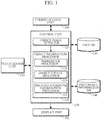
- FIG. 1 is a block diagram of a terminal device capable of storing an object therein according to an exemplary embodiment of the present invention.
- the terminal device may include a communication unit 100, a touch sensor unit 110, a control unit 120, a user database ("DB") 130, a preference information DB 140, and a display unit 150.
- the communication unit 100 may wirelessly communicate data with an object server (not shown).
- the terminal device may transmit to the object server information about an object, if any, displayed on the display unit 150, and may receive from the object server attribute information about the object.
- the object server may store the images and attribute information of multiple objects therein. In short, the terminal device may receive attribute information of the object displayed on the display unit 150 from the object server.
- the touch sensor unit 110 may determine whether and which objects displayed on the display unit 150 of the terminal device are selected.
- the terminal device may be equipped with an input device, such as a touch screen.
- the touch sensor unit 110 may sense at least one object, if any, selected from the touch screen by a user.
- the control unit 120 may control the object sensed by the touch sensor unit 110 and attribute information of the sensed object received from the object server to be stored in the user DB 130.
- the attribute information may be detailed information about the sensed object.
- the control unit 120 may share the sensed object and the attribute information of the sensed object with another terminal device.
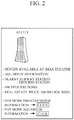
- the sensed object and attribute information about the sensed object may be displayed together on the display unit 150 of the terminal device, for example, as shown in FIG. 2 .
- FIG. 2 is a diagram illustrating an object and attribute information according to an exemplary embodiment of the present invention.
- an object “63 City” is the object sensed by the touch sensor unit 110, and information specifying various facilities (such as a theater or aquarium) housed in the "63 City” and traffic and real estate information for the area around the "63 City” may be provided as attribute information about the object "63 City”.
- control unit 120 may control the object sensed by the touch sensor unit 110 and attribute information to be stored in the user DB 130 with the aid of an object image detector 121 and an object information processor 122.
- the object image detector 121 may detect an image of an object selected through the touch sensor unit 110 by the user.
- the object information processor 122 may store the detected object image and attribute information of the selected object in the user DB 130 upon the request of the user, or may transmit the detected object image and the attribute information of the selected object to the object server.
- the object information processor 122 may store the selected object and its attribute information in the user DB 130 in response to a drag-and-drop action performed on the selected object by the user.
- the drag-and-drop action may be performed by keystrokes, a mouse, or through a touch screen.
- the object information processor 122 may arrange the attribute information of the selected object in the user DB 130 according to the preference of the user.
- the arrangement of the attribute information of the selected object according to the preference of the user may be performed by a preference processor 123 of the object information processor 122.
- the preference processor 123 may determine the preference levels of the multiple pieces of attribute information based on preference information stored in a preference information DB 140.
- the terminal device may share the preference information with another terminal device.
- the preference processor 123 may determine the order in which the multiple pieces of attribute information are displayed on the display unit 150 of the terminal device based on the determined preference levels.
- the preference information stored in the preference information DB 140 may be information provided by the user for use in determining the order in which multiple pieces of attribute information are displayed on the display unit 150 of the terminal device. Further, the preference information may indicate an amount of attribute information to be displayed by the terminal device.
- the preference information DB 140 may store multiple object attribute fields such as 'Economy,' 'Entertainment,' and 'Culture & Education,' and the user may be allowed to set preferences among the object attribute fields. For example, the user may allocate a highest preference level to the 'Entertainment' field, a second highest preference level to the 'Culture & Education,' and a lowest preference level to the 'Economy' field.
- the preferences among the object attribute fields are stored in the preference information DB 140 as preference information, and the preference processor 123 may determine the preference levels of the plurality of pieces of attribute information of the selected object based on the preference information.
- the preference processor 123 may determine the preference levels of the traffic, real estate, theater and aquarium information and may determine the order in which the traffic, real estate, theater and aquarium information is displayed on the display unit 150 of the terminal device.
- the object information processor 122 may store a detected image of the selected object, provided by the object image detector 121, the multiple pieces of attribute information of the selected object and the order in which the multiple pieces of attribute information of the selected object are displayed on the display unit 150 of the terminal device, determined by the preference processor 123, in the user DB 130.
- the preference processor 123 may redetermine the order of display of the multiple pieces of attribute information of the selected object based on usage information stored in the user DB 130 and/or the preference information stored in the preference information DB 140.
- the usage information may specify at least one of or each of the frequency, duration and location of use of each of the plurality of pieces of attribute information.
- the user DB 130 may store multiple object images, and the user may select one of the object images. If any one of a number of pieces of attribute information corresponding to the selected object image is selected, then usage information about the selected piece of attribute information, including the frequency, duration and location of the selected piece of attribute information, may also be stored in the preference information DB 140.
- the preference processor 123 may periodically redetermine the order in which a number of pieces of attribute information of each object are displayed on the display unit 150 of the terminal device based on the usage information and the preference information stored in the preference information DB 140. For example, if the traffic information for the area around the 63 City is more frequently used in a given day, week or month, the preference level of the traffic information for the area around the 63 City may be increased, or the traffic information for the area around the 63 City may be highlighted when displayed on the display unit 150 of the terminal device, and may thus become easily distinguishable from the other attribute information of the 63 City. Further, the preference level may be increased or the traffic information may be highlighted during those times when the traffic information is determined to be more frequently used.
- the preference processor 123 may redetermine the preference levels of a number of pieces of attribute information about an object based on their frequency of use and the preference of the user, and may then redetermine the order in which the pieces of attribute information are displayed on the display unit 150 of the terminal device.
- the object information processor 122 may also include an object update processor 124. If at least one object image and attribute information corresponding to the at least one object image are displayed on the display unit 150 of the terminal device upon the request of the user, the object update processor 124 may receive updates, if any, of the attribute information from the object server and may display the received updates on the display unit 150 of the terminal device. For example, if an image of the 63 City is selected from the user DB 130, the object update processor 124 may issue a request for updated attribute information of the 63 City from the object server, receive updated attribute information, if any, of the 63 City from the object server and display the received updated attribute information on the display unit 150 of the terminal device together with the image of the 63 City. Therefore, the user can be provided with updated attribute information for each object image present in the terminal device in almost real time.
- the object information processor 122 may display related attribute information, i.e., additional information related to the attribute information, on the display unit 150 of the terminal device with the aid of a related attribute information processor 125.
- the related attribute information processor 125 provides a related attribute information guide, which is a guide to related information about the theater and the aquarium information, and provides the related attribute information guide on the display unit 150 of the terminal device.
- the user can be provided with information about various theaters or aquariums, other than the theater or aquarium in the 63 City, by selecting the related attribute information guide from the display unit 150 of the terminal device.
- the related attribute information may be provided on the display unit 150 of the terminal device.
- the user DB 130, the preference information DB 140, and the display unit 150 may connected to the terminal device via a wired and/or wireless network and may be external to the terminal device.
- FIG. 3 is a flowchart of a method for storing an object in a terminal device according to an exemplary embodiment of the present invention. Although depicted as being performed serially, those skilled in the art will appreciate that at least a portion of the operations of the method of FIG. 3 may be performed contemporaneously, or in a different order than presented in FIG. 3 .
- a terminal device capable of displaying an object and attribute information associated with the object may receive the images and attribute information of a number of objects currently being displayed on the display unit from an object server.
- the terminal device displays the received object images and the received attribute information on a display unit.
- the terminal device may transmit information on each of the displayed objects to the object server and may receive attribute information about each of the displayed objects from the object server.
- the terminal device may detect an image of the selected object. In other words, the terminal device may determine whether at least one of the displayed objects is selected by the user and may detect the image of the selected object.
- the terminal device may store the detected image of the selected object and a number of pieces of attribute information about the selected object in a user DB upon the request of the user. In an exemplary embodiment, there may be multiple pieces of attribute information. In an exemplary embodiment, the terminal device may also transmit the detected image of the selected object and the attribute information of the selected object to the object server upon the request of the user. Thus, other users can also use the detected image of the selected object and the attribute information of the selected object from the object server.
- the terminal device may either store the detected image of the selected object and the pieces of attribute information about the selected object in the user DB or transmit the detected image of the selected object and the pieces of attribute information about the selected object to the object server in response to a drag-and-drop action performed on the selected object.
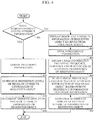
- FIG. 4 is a flowchart of a method for storing an image and attribute information of an object in a user DB of a terminal device according to an exemplary embodiment of the present invention. Although depicted as being performed serially, those skilled in the art will appreciate that at least a portion of the operations of the method of FIG. 4 may be performed contemporaneously, or in a different order than presented in FIG. 4 .
- a terminal device determines whether a request for the storage of an image and attribute information of an object requested by a user has been received.
- the terminal device may acquire preference information about the requested object from a preference information DB.
- the preference information may be information provided by the user for reference in the arrangement of the pieces of attribute information of the requested object.
- the terminal device determines the preference levels of the pieces of attribute information based on the acquired preference information.
- the terminal device may determine the order in which the pieces of attribute information of the requested object are displayed by the display unit of the terminal device, based on the preference levels determined in operation 420, and may store the pieces of attribute information of the requested object and the results of the determination in a user DB.
- multiple object attribute fields such as 'Economy,' 'Entertainment,' and 'Culture & Education' may be stored in the preference information DB of the terminal device.
- the user may set preferences among the object attribute fields present in the preference information DB of the terminal device.
- the user may allocate a highest preference level to the 'Entertainment' field, a second highest preference level to the 'Culture & Education' field and a lowest preference level to the 'Economy' field.
- the terminal device may classify the pieces of attribute information of the requested object into the 'Entertainment' field, the 'Culture & Education' field and the 'Economy' field.
- the terminal device may determine the preference levels of the pieces of attribute information of the requested object based on the results of the classification, and may determine the order in which the pieces of attribute information of the requested object are displayed on the display unit of the terminal device, based on their respective preference levels.
- the terminal device may determine the preference levels of the traffic, real estate, aquarium and theater information based on their respective object attribute fields' preference levels. The device may determine the order in which the traffic, real estate, aquarium and theater information are displayed on the display unit of the terminal device based on their respective preference levels. Thereafter, the terminal device may store an image of the "63 City" and the traffic, real estate, aquarium and theater information in the user DB.
- operation 400 If in operation 400, a request for the storage of an object and pieces of attribute information of the object was not received the method proceeds to operation 440.
- operation 440 the terminal device obtains the image and the attribute information about the requested object from the user DB, and displays the obtained image and the obtained attribute information on a display unit.
- the terminal device may obtain preference information about the attribute information from the preference information DB.
- the preference levels for each piece of attribute information may be determined after receipt of the preference information or may be predetermined.
- the terminal device may obtain usage information about the received attribute information from the user DB.
- the terminal device may redetermine the order in which the pieces of attribute information of the requested object are displayed on the display unit of the terminal device based on the obtained preference and usage information.
- the terminal device may redetermine the order in which the pieces of attribute information of the requested object are displayed on the display unit of the terminal device, based on the redetermined preference levels of the pieces of attribute information of the requested object, and may store the results of the redetermination.
- a user may select at least one of multiple object images present in the user DB. If one of a number of pieces of attribute information corresponding to the selected object image is selected, then the terminal device may store usage information, such as the frequency, duration and location of use of the selected piece of attribute information in the preference information DB.
- the terminal device may periodically redetermine the order in which the pieces of attribute information corresponding to the selected object image should be displayed on the display unit of the terminal device with reference to the usage information stored in the usage information and preference information stored in the preference information DB.
- the preference level of the traffic information may be increased, or the traffic information may be highlighted when displayed on the display unit of the terminal device, and may thus become easily distinguishable from other attribute information of the 63 City. Further, the preference level may be increased or the traffic information may be highlighted during those times when the traffic information is determined to be more frequently used. Therefore, the user can easily identify which of the pieces of attribute information of the 63 City is most frequently used.
- FIG. 5 is a diagram illustrating a display user interface (UI) device according to an exemplary embodiment of the present invention.
- the display UI device may include a first region 500 and a second region 510.
- Objects detected from an image captured by a camera and their respective attribute information received from an object server may be displayed in the first region 500.
- the second region 510 may be used to store the objects displayed in the first region 500 and their respective attribute information in the terminal device.
- the objects may be a representations or icons of objects captured by a camera. If multiple objects and multiple pieces of attribute information of each of the objects are displayed in the first region 500, a user may select any one of the objects or the multiple pieces of attribute information of each of the objects from the first region 500.
- the display UI device may save the selected object and the multiple pieces of attribute information about the selected object.
- the user can easily save each of the objects displayed in the first region 500 and attribute information associated with the objects by selecting a corresponding object and moving the corresponding object from the first region 500 to the second region 510.
- the present invention it may be possible to easily save objects and their attribute information displayed on a terminal device, thereby allowing the objects and attribute information to be used for various purposes, at a same or later time, without the need for a user to actually visit the location where the objects are located.
- it may be possible to facilitate the use of object attribute information of interest by redetermining the order of display of multiple pieces of object attribute information according to the preference of a user and displaying the multiple pieces of object attribute information on the display unit of the terminal device in the redetermined order.
Landscapes
- Engineering & Computer Science (AREA)
- Theoretical Computer Science (AREA)
- General Engineering & Computer Science (AREA)
- Human Computer Interaction (AREA)
- Physics & Mathematics (AREA)
- General Physics & Mathematics (AREA)
- Software Systems (AREA)
- User Interface Of Digital Computer (AREA)
Claims (15)
- Endgerät, umfassend:eine Kommunikationseinheit (100), um Daten mit einem Objektserver zu Kommunizieren und um mindestens ein Bild des mindestens eines Objekts und die Attributinformation des mindestens eines Objekts vom Objektserver zu empfangen;eine Anzeigeeinheit (150) zum Anzeigen des mindestens eines Objekts und der empfangenen Attributinformation des mindestens eines Objekts;eine Berührungssensoreinheit (110) zum Erfassen eines Objekts ausgewählt aus mindestens einem angezeigten Objekt;einen Objektbilddetektor (121) zum Detektieren eines Bildes des ausgewählten Objekts; undeine Steuereinheit (120) zum Speichern des detektierten Bildes des ausgewählten Objekts und der empfangenen Attributinformation des ausgewählten Objekts in einer Benutzerdatenbank(DB) (130).
- Endgerät nach Anspruch 1, wobei die Steuereinheit (120) umfasst:den Objektbilddetektor (121); undeinen Objektinformationsprozessor (122), der dazu angepasst ist, um das Bild des ausgewählten Objekts und die Attributinformation über das ausgewählte Objekt in der Benutzerdatenbank (130) zu speichern und/oder um das Bild des ausgewählten Objekts und die Attributinformation über das ausgewählte Objekt an den Objektserver zu übertragen.
- Endgerät nach Anspruch 2, wobei der Objektinformationsprozessor (122) dazu angepasst ist, um das Bild des ausgewählten Objekts und die Attributinformation über das ausgewählte Objekt als Reaktion auf eine Anforderung vom Drag & Drop-Typ in der Benutzerdatenbank (130) zu speichern.
- Endgerät nach Anspruch 2 oder 3, ferner umfassend:
eine Präferenzinformationsdatenbank(140), die dazu angepasst ist, um Präferenzinformation der Attributinformation über das ausgewählte Objekt zu speichern. - Endgerät nach einem der Ansprüche 2 bis 4, wobei der Objektinformationsprozessor (122) ferner umfasst:
einen Präferenzprozessor (123), der dazu angepasst ist, um eine Präferenzstufe von mehreren Attributinformationen über das ausgewählte Objekt basierend auf der in der Präferenzinformationsdatenbank (140) gespeicherten Präferenzinformation zu bestimmen und um eine Reihenfolge zu bestimmen, in der die Attributinformation über das ausgewählte Objekt auf der Anzeigeeinheit (150) basierend auf der bestimmten Präferenzstufe angezeigt wird. - Endgerät nach Anspruch 5, wobei die Benutzerdatenbank (130) Anwendungsinformation speichert, die mindestens eines von einer Frequenz, einer Dauer und einem Ort der Anwendung von der Attributinformation über das ausgewählte Objekt sowie Kombinationen davon umfasst.
- Endgerät nach Anspruch 5 oder 6, wobei der Präferenzprozessor (123) dazu angepasst ist, um die Präferenzstufe der Attributinformation über das ausgewählte Objekt neu zu bestimmen und um die Reihenfolge neu zu bestimmen, in der die Attributinformation über das ausgewählte Objekt auf der Anzeigeeinheit basierend auf der in der Benutzerdatenbank (130) gespeicherte Anwendungsinformation und den neu bestimmten Präferenzstufen angezeigt wird, wobei die Anwendungsinformation mindestens eines von einer Frequenz, einer Dauer und einem Ort der Anwendung von der Attributinformation des ausgewählten Objekts sowie Kombinationen davon umfasst.
- Endgerät nach einem der Ansprüche 5 bis 7, wobei der Objektinformationsprozessor (122) ferner umfasst:einen Objektaktualisierungsprozessor (124), der dazu angepasst ist, um aktualisierte Attributinformation über das ausgewählte Objekt vom Objektserver zu empfangen,wobei das Endgerät die empfangene aktualisierte Attributinformation auf der Anzeigeeinheit (150) anzeigt.
- Endgerät nach einem der Ansprüche 2 bis 8, wobei der Objektinformationsprozessor (122) ferner umfasst:
einen zugehörigen Attributinformationsprozessor (125), der dazu angepasst ist, um zugehörige Attributinformation vom Objektserver zu empfangen, bei der es sich um zusätzliche Information handelt, die sich auf den Attributinformationsleitfaden bezieht, und um die empfangene zugehörige Attributinformation in Form eines zugehörigen Attributinformationsleitfadens auf der Anzeigeeinheit (150) anzuzeigen. - Verfahren zum Speichern eines Bildes eines Objekts und der Attributinformation des Objekts in einer Benutzerdatenbank(DB) (130), wobei das Verfahren die folgenden Schritte umfasst:- Anzeigen (300) mindestens eines Objekts und der Attributinformation des mindestens eines Objekts auf einer Anzeigeeinheit, wobei mindestens ein Bild des mindestens eines Objekts und die Attributinformation von einem Objektserver empfangen wird;- Erfassen eines Objekts, das aus mindestens einem angezeigten Objekt ausgewählt wurde;- Detektieren (310) eines Bildes des ausgewählten Objekts; und- Speichern (320) des detektierten Bildes des ausgewählten Objekts und der empfangenen Attributinformation des ausgewählten Objekts in der Benutzerdatenbank (130).
- Verfahren nach Anspruch 10, wobei das Speichern (320) des detektierten Objektbildes des ausgewählten Objekts und der empfangenen Attributinformation die folgenden Schritte umfasst:- Erhalten der Präferenzinformation des ausgewählten Objekts;- Bestimmen einer Präferenzstufe der Attributinformation des ausgewählten Objekts basierend auf der Präferenzinformation; und- Bestimmen einer Reihenfolge, in der die Attributinformation des ausgewählten Objekts auf der Anzeigeeinheit (150) basierend auf der bestimmten Präferenzstufe angezeigt wird.
- Verfahren nach Anspruch 10 oder 11, das Speichern (320) des detektierten Objektbildes des ausgewählten Objekts und der empfangenen Attributinformation die folgenden Schritte umfasst:- Erhalten der Präferenzinformation über die empfangene Attributinformation aus einer Präferenzinformationsdatenbank (140), wenn das detektierte Objektbild und die empfangene Attributinformation auf der Anzeigeeinheit (150) angezeigt wird;- Erhalten der Anwendungsinformation über die empfangene Attributinformation aus der Präferenzinformationsdatenbank;- Neubestimmen der Präferenzstufen der empfangenen Attributinformation basierend auf der erhaltenen Präferenzinformation und der erhaltenen Anwendungsinformation; und- Neubestimmen einer Reihenfolge, in der die empfangene Attributinformation auf der Anzeigeeinheit (150) basierend auf den neu bestimmten Präferenzstufen angezeigt wird.
- Verfahren nach Anspruch 12, wobei die Anwendungsinformation mindestens eines von einer Frequenz, einer Dauer und einem Ort der Anwendung von der Attributinformation sowie Kombinationen davon umfasst.
- Endgerät nach einem der Ansprüche 1 bis 9, wobei die Anzeigeeinheit (150) umfasst:einen ersten Bereich (500), in dem das mindestens ein Objekt und die Attributinformation des mindestens eines Objekts angezeigt werden; undeinen zweiten Bereich (510), der ein aus dem ersten Bereich (500) ausgewähltes Objekt erkennt und die Attributinformation des erkannten Objekts speichert.
- Endgerät nach Anspruch 14, wobei das Endgerät dazu angepasst ist, um das Bild des erkannten Objekts oder die Attributinformation zu speichern, die durch Drag & Drop-Aktion von dem ersten Bereich (500) in den zweiten Bereich (510) bewegt wird.
Applications Claiming Priority (1)
| Application Number | Priority Date | Filing Date | Title |
|---|---|---|---|
| KR1020100082693A KR101317401B1 (ko) | 2010-08-25 | 2010-08-25 | 객체 저장이 가능한 단말 장치 및 방법 |
Publications (2)
| Publication Number | Publication Date |
|---|---|
| EP2423799A1 EP2423799A1 (de) | 2012-02-29 |
| EP2423799B1 true EP2423799B1 (de) | 2021-04-21 |
Family
ID=44677559
Family Applications (1)
| Application Number | Title | Priority Date | Filing Date |
|---|---|---|---|
| EP11178860.0A Active EP2423799B1 (de) | 2010-08-25 | 2011-08-25 | Endgerät zur speicherung eines objekts und attributinformationen und verfahren dafür |
Country Status (3)
| Country | Link |
|---|---|
| US (1) | US20120054635A1 (de) |
| EP (1) | EP2423799B1 (de) |
| KR (1) | KR101317401B1 (de) |
Families Citing this family (11)
| Publication number | Priority date | Publication date | Assignee | Title |
|---|---|---|---|---|
| US20130104032A1 (en) * | 2011-10-19 | 2013-04-25 | Jiyoun Lee | Mobile terminal and method of controlling the same |
| KR102051418B1 (ko) * | 2012-09-28 | 2019-12-03 | 삼성전자주식회사 | 영상에 포함된 객체를 선택하기 위한 사용자 인터페이스 제어 장치 및 그 방법 그리고 영상 입력 장치 |
| WO2014065786A1 (en) * | 2012-10-23 | 2014-05-01 | Hewlett-Packard Development Company, L.P. | Augmented reality tag clipper |
| US9852381B2 (en) * | 2012-12-20 | 2017-12-26 | Nokia Technologies Oy | Method and apparatus for providing behavioral pattern generation for mixed reality objects |
| US9846965B2 (en) | 2013-03-15 | 2017-12-19 | Disney Enterprises, Inc. | Augmented reality device with predefined object data |
| US9401048B2 (en) | 2013-03-15 | 2016-07-26 | Qualcomm Incorporated | Methods and apparatus for augmented reality target detection |
| CN103412726A (zh) * | 2013-09-03 | 2013-11-27 | 王恩惠 | 一种触摸屏解锁方法及装置 |
| KR102143633B1 (ko) * | 2014-01-17 | 2020-08-11 | 삼성전자주식회사 | 영상 디스플레이 방법 및 장치 |
| JP5913709B1 (ja) * | 2015-09-29 | 2016-04-27 | 株式会社コロプラ | 画像生成装置、画像生成方法、及び画像生成プログラム |
| KR102566149B1 (ko) * | 2018-08-08 | 2023-08-11 | 삼성전자주식회사 | 이미지에 포함된 상품 정보와 관련된 키워드를 제공하기위한 전자 장치 |
| US11481088B2 (en) * | 2020-03-16 | 2022-10-25 | International Business Machines Corporation | Dynamic data density display |
Citations (1)
| Publication number | Priority date | Publication date | Assignee | Title |
|---|---|---|---|---|
| US20110098056A1 (en) * | 2009-10-28 | 2011-04-28 | Rhoads Geoffrey B | Intuitive computing methods and systems |
Family Cites Families (20)
| Publication number | Priority date | Publication date | Assignee | Title |
|---|---|---|---|---|
| US5467444A (en) * | 1990-11-07 | 1995-11-14 | Hitachi, Ltd. | Method of three-dimensional display of object-oriented figure information and system thereof |
| US7073129B1 (en) * | 1998-12-18 | 2006-07-04 | Tangis Corporation | Automated selection of appropriate information based on a computer user's context |
| US7383504B1 (en) * | 1999-08-30 | 2008-06-03 | Mitsubishi Electric Research Laboratories | Method for representing and comparing multimedia content according to rank |
| US6771283B2 (en) * | 2000-04-26 | 2004-08-03 | International Business Machines Corporation | Method and system for accessing interactive multimedia information or services by touching highlighted items on physical documents |
| US6724370B2 (en) * | 2001-04-12 | 2004-04-20 | International Business Machines Corporation | Touchscreen user interface |
| CA2559726C (en) * | 2004-03-24 | 2015-10-20 | A9.Com, Inc. | System and method for displaying images in an online directory |
| US7720436B2 (en) * | 2006-01-09 | 2010-05-18 | Nokia Corporation | Displaying network objects in mobile devices based on geolocation |
| US20080268876A1 (en) * | 2007-04-24 | 2008-10-30 | Natasha Gelfand | Method, Device, Mobile Terminal, and Computer Program Product for a Point of Interest Based Scheme for Improving Mobile Visual Searching Functionalities |
| US8180396B2 (en) | 2007-10-18 | 2012-05-15 | Yahoo! Inc. | User augmented reality for camera-enabled mobile devices |
| US8245155B2 (en) | 2007-11-29 | 2012-08-14 | Sony Corporation | Computer implemented display, graphical user interface, design and method including scrolling features |
| US8108778B2 (en) * | 2008-09-30 | 2012-01-31 | Yahoo! Inc. | System and method for context enhanced mapping within a user interface |
| KR101512770B1 (ko) * | 2008-11-21 | 2015-04-16 | 엘지전자 주식회사 | 휴대 단말기 및 그 동작방법 |
| KR101506171B1 (ko) | 2009-01-09 | 2015-03-27 | 삼성전자주식회사 | 이동통신 시스템에서 단말의 랜덤 액세스 제어장치 및 방법 |
| WO2010127043A1 (en) * | 2009-04-28 | 2010-11-04 | Rey Flemings | System and method for annotating multimedia objects |
| US8402374B1 (en) * | 2009-05-31 | 2013-03-19 | Linkedin Corporation | Audience platform |
| US8769396B2 (en) * | 2009-06-05 | 2014-07-01 | Microsoft Corporation | Calibration and annotation of video content |
| US8670597B2 (en) * | 2009-08-07 | 2014-03-11 | Google Inc. | Facial recognition with social network aiding |
| US20110128288A1 (en) * | 2009-12-02 | 2011-06-02 | David Petrou | Region of Interest Selector for Visual Queries |
| US8400548B2 (en) * | 2010-01-05 | 2013-03-19 | Apple Inc. | Synchronized, interactive augmented reality displays for multifunction devices |
| AU2011220382A1 (en) * | 2010-02-28 | 2012-10-18 | Microsoft Corporation | Local advertising content on an interactive head-mounted eyepiece |
-
2010
- 2010-08-25 KR KR1020100082693A patent/KR101317401B1/ko active Active
-
2011
- 2011-08-08 US US13/205,302 patent/US20120054635A1/en not_active Abandoned
- 2011-08-25 EP EP11178860.0A patent/EP2423799B1/de active Active
Patent Citations (2)
| Publication number | Priority date | Publication date | Assignee | Title |
|---|---|---|---|---|
| US20110098056A1 (en) * | 2009-10-28 | 2011-04-28 | Rhoads Geoffrey B | Intuitive computing methods and systems |
| WO2011106443A1 (en) * | 2010-02-24 | 2011-09-01 | Digimarc Corporation | Intuitive computing methods and systems |
Also Published As
| Publication number | Publication date |
|---|---|
| KR101317401B1 (ko) | 2013-10-10 |
| EP2423799A1 (de) | 2012-02-29 |
| US20120054635A1 (en) | 2012-03-01 |
| KR20120019328A (ko) | 2012-03-06 |
Similar Documents
| Publication | Publication Date | Title |
|---|---|---|
| EP2423799A1 (de) | Endgerät zur Speicherung eines Objekts und Attributinformationen und Verfahren dafür | |
| US11853523B2 (en) | Display device and method of indicating an active region in a multi-window display | |
| US20120038669A1 (en) | User equipment, server, and method for selectively filtering augmented reality | |
| CN106030487B (zh) | 用于控制屏幕的组成的方法及其电子设备 | |
| US9207853B2 (en) | Mobile terminal and method of controlling the same | |
| US9282175B2 (en) | Mobile terminal and controlling method thereof | |
| EP2634682A2 (de) | Vorrichtung und Verfahren zur Erstellung eines Kontextmenüs | |
| EP2930631B1 (de) | Verfahren und vorrichtung zum steuern von inhaltsausgaben | |
| US20130219319A1 (en) | Apparatus and method for grouping application program folders in electronic device | |
| US20110219312A1 (en) | Apparatus and method for displaying user interface for transmitting contents | |
| KR20150099297A (ko) | 전자장치의 화면 표시 방법 | |
| KR20160011915A (ko) | 화면 제어 방법 및 이를 사용하는 전자 장치 | |
| EP2996023A1 (de) | Verfahren und elektronische vorrichtung zur bereitstellung von informationen | |
| KR20160020166A (ko) | 전자 장치 및 이의 화면 표시 방법 | |
| US12197700B2 (en) | Method of selecting one or more items according to user input and electronic device therefor | |
| KR20180020669A (ko) | 디스플레이를 제어하는 전자 장치 및 방법 | |
| KR20160027848A (ko) | 콘텐츠 검색 방법 및 이를 구현하는 전자 장치 | |
| KR20150092964A (ko) | 지문 처리 방법 및 그 전자 장치 | |
| KR20160005609A (ko) | 그래픽 사용자 인터페이스를 표시하는 방법 및 이를 지원하는 전자장치 | |
| KR20170084586A (ko) | 전자 장치의 플렉서블 디스플레이 및 그의 운용 방법 | |
| AU2015202698B2 (en) | Method and apparatus for processing input using display | |
| EP2713261A2 (de) | System zur Unterstützung einer manuellen benutzerschnittstellenbasierten Steuerung einer elektronischen Vorrichtung | |
| KR20150133989A (ko) | 홈 스크린 페이지를 추가하는 전자 장치 및 방법 | |
| KR102274944B1 (ko) | 오브젝트를 식별하는 전자 장치 및 방법 | |
| CN112825040A (zh) | 用户界面的显示方法、装置、设备及存储介质 |
Legal Events
| Date | Code | Title | Description |
|---|---|---|---|
| AK | Designated contracting states |
Kind code of ref document: A1 Designated state(s): AL AT BE BG CH CY CZ DE DK EE ES FI FR GB GR HR HU IE IS IT LI LT LU LV MC MK MT NL NO PL PT RO RS SE SI SK SM TR |
|
| AX | Request for extension of the european patent |
Extension state: BA ME |
|
| PUAI | Public reference made under article 153(3) epc to a published international application that has entered the european phase |
Free format text: ORIGINAL CODE: 0009012 |
|
| RIN1 | Information on inventor provided before grant (corrected) |
Inventor name: KIM, KWANG-LEA Inventor name: PARK, WON-SEOK |
|
| 17P | Request for examination filed |
Effective date: 20120829 |
|
| 19U | Interruption of proceedings before grant |
Effective date: 20160317 |
|
| 19W | Proceedings resumed before grant after interruption of proceedings |
Effective date: 20170301 |
|
| RAP1 | Party data changed (applicant data changed or rights of an application transferred) |
Owner name: PANTECH INC. |
|
| STAA | Information on the status of an ep patent application or granted ep patent |
Free format text: STATUS: EXAMINATION IS IN PROGRESS |
|
| 17Q | First examination report despatched |
Effective date: 20170911 |
|
| RAP1 | Party data changed (applicant data changed or rights of an application transferred) |
Owner name: TRIPLE REALITY TECHNOLOGIES, LLC |
|
| RAP1 | Party data changed (applicant data changed or rights of an application transferred) |
Owner name: PANTECH CORPORATION |
|
| REG | Reference to a national code |
Ref country code: DE Ref legal event code: R079 Ref document number: 602011070735 Country of ref document: DE Free format text: PREVIOUS MAIN CLASS: G06F0003048000 Ipc: G06F0003048400 |
|
| RIC1 | Information provided on ipc code assigned before grant |
Ipc: G06F 9/451 20180101ALI20201119BHEP Ipc: G06F 3/01 20060101ALI20201119BHEP Ipc: G06F 3/0488 20130101ALI20201119BHEP Ipc: G06F 3/0484 20130101AFI20201119BHEP |
|
| GRAP | Despatch of communication of intention to grant a patent |
Free format text: ORIGINAL CODE: EPIDOSNIGR1 |
|
| STAA | Information on the status of an ep patent application or granted ep patent |
Free format text: STATUS: GRANT OF PATENT IS INTENDED |
|
| INTG | Intention to grant announced |
Effective date: 20210112 |
|
| GRAS | Grant fee paid |
Free format text: ORIGINAL CODE: EPIDOSNIGR3 |
|
| GRAA | (expected) grant |
Free format text: ORIGINAL CODE: 0009210 |
|
| STAA | Information on the status of an ep patent application or granted ep patent |
Free format text: STATUS: THE PATENT HAS BEEN GRANTED |
|
| AK | Designated contracting states |
Kind code of ref document: B1 Designated state(s): AL AT BE BG CH CY CZ DE DK EE ES FI FR GB GR HR HU IE IS IT LI LT LU LV MC MK MT NL NO PL PT RO RS SE SI SK SM TR |
|
| REG | Reference to a national code |
Ref country code: GB Ref legal event code: FG4D |
|
| REG | Reference to a national code |
Ref country code: CH Ref legal event code: EP |
|
| REG | Reference to a national code |
Ref country code: DE Ref legal event code: R096 Ref document number: 602011070735 Country of ref document: DE |
|
| REG | Reference to a national code |
Ref country code: IE Ref legal event code: FG4D |
|
| REG | Reference to a national code |
Ref country code: AT Ref legal event code: REF Ref document number: 1385346 Country of ref document: AT Kind code of ref document: T Effective date: 20210515 |
|
| REG | Reference to a national code |
Ref country code: LT Ref legal event code: MG9D |
|
| REG | Reference to a national code |
Ref country code: AT Ref legal event code: MK05 Ref document number: 1385346 Country of ref document: AT Kind code of ref document: T Effective date: 20210421 |
|
| REG | Reference to a national code |
Ref country code: NL Ref legal event code: MP Effective date: 20210421 |
|
| PG25 | Lapsed in a contracting state [announced via postgrant information from national office to epo] |
Ref country code: AT Free format text: LAPSE BECAUSE OF FAILURE TO SUBMIT A TRANSLATION OF THE DESCRIPTION OR TO PAY THE FEE WITHIN THE PRESCRIBED TIME-LIMIT Effective date: 20210421 Ref country code: BG Free format text: LAPSE BECAUSE OF FAILURE TO SUBMIT A TRANSLATION OF THE DESCRIPTION OR TO PAY THE FEE WITHIN THE PRESCRIBED TIME-LIMIT Effective date: 20210721 Ref country code: HR Free format text: LAPSE BECAUSE OF FAILURE TO SUBMIT A TRANSLATION OF THE DESCRIPTION OR TO PAY THE FEE WITHIN THE PRESCRIBED TIME-LIMIT Effective date: 20210421 Ref country code: LT Free format text: LAPSE BECAUSE OF FAILURE TO SUBMIT A TRANSLATION OF THE DESCRIPTION OR TO PAY THE FEE WITHIN THE PRESCRIBED TIME-LIMIT Effective date: 20210421 Ref country code: NL Free format text: LAPSE BECAUSE OF FAILURE TO SUBMIT A TRANSLATION OF THE DESCRIPTION OR TO PAY THE FEE WITHIN THE PRESCRIBED TIME-LIMIT Effective date: 20210421 Ref country code: FI Free format text: LAPSE BECAUSE OF FAILURE TO SUBMIT A TRANSLATION OF THE DESCRIPTION OR TO PAY THE FEE WITHIN THE PRESCRIBED TIME-LIMIT Effective date: 20210421 |
|
| PG25 | Lapsed in a contracting state [announced via postgrant information from national office to epo] |
Ref country code: SE Free format text: LAPSE BECAUSE OF FAILURE TO SUBMIT A TRANSLATION OF THE DESCRIPTION OR TO PAY THE FEE WITHIN THE PRESCRIBED TIME-LIMIT Effective date: 20210421 Ref country code: RS Free format text: LAPSE BECAUSE OF FAILURE TO SUBMIT A TRANSLATION OF THE DESCRIPTION OR TO PAY THE FEE WITHIN THE PRESCRIBED TIME-LIMIT Effective date: 20210421 Ref country code: LV Free format text: LAPSE BECAUSE OF FAILURE TO SUBMIT A TRANSLATION OF THE DESCRIPTION OR TO PAY THE FEE WITHIN THE PRESCRIBED TIME-LIMIT Effective date: 20210421 Ref country code: GR Free format text: LAPSE BECAUSE OF FAILURE TO SUBMIT A TRANSLATION OF THE DESCRIPTION OR TO PAY THE FEE WITHIN THE PRESCRIBED TIME-LIMIT Effective date: 20210722 Ref country code: IS Free format text: LAPSE BECAUSE OF FAILURE TO SUBMIT A TRANSLATION OF THE DESCRIPTION OR TO PAY THE FEE WITHIN THE PRESCRIBED TIME-LIMIT Effective date: 20210821 Ref country code: PL Free format text: LAPSE BECAUSE OF FAILURE TO SUBMIT A TRANSLATION OF THE DESCRIPTION OR TO PAY THE FEE WITHIN THE PRESCRIBED TIME-LIMIT Effective date: 20210421 Ref country code: NO Free format text: LAPSE BECAUSE OF FAILURE TO SUBMIT A TRANSLATION OF THE DESCRIPTION OR TO PAY THE FEE WITHIN THE PRESCRIBED TIME-LIMIT Effective date: 20210721 Ref country code: PT Free format text: LAPSE BECAUSE OF FAILURE TO SUBMIT A TRANSLATION OF THE DESCRIPTION OR TO PAY THE FEE WITHIN THE PRESCRIBED TIME-LIMIT Effective date: 20210823 Ref country code: ES Free format text: LAPSE BECAUSE OF FAILURE TO SUBMIT A TRANSLATION OF THE DESCRIPTION OR TO PAY THE FEE WITHIN THE PRESCRIBED TIME-LIMIT Effective date: 20210421 |
|
| REG | Reference to a national code |
Ref country code: DE Ref legal event code: R097 Ref document number: 602011070735 Country of ref document: DE |
|
| PG25 | Lapsed in a contracting state [announced via postgrant information from national office to epo] |
Ref country code: EE Free format text: LAPSE BECAUSE OF FAILURE TO SUBMIT A TRANSLATION OF THE DESCRIPTION OR TO PAY THE FEE WITHIN THE PRESCRIBED TIME-LIMIT Effective date: 20210421 Ref country code: CZ Free format text: LAPSE BECAUSE OF FAILURE TO SUBMIT A TRANSLATION OF THE DESCRIPTION OR TO PAY THE FEE WITHIN THE PRESCRIBED TIME-LIMIT Effective date: 20210421 Ref country code: DK Free format text: LAPSE BECAUSE OF FAILURE TO SUBMIT A TRANSLATION OF THE DESCRIPTION OR TO PAY THE FEE WITHIN THE PRESCRIBED TIME-LIMIT Effective date: 20210421 Ref country code: SM Free format text: LAPSE BECAUSE OF FAILURE TO SUBMIT A TRANSLATION OF THE DESCRIPTION OR TO PAY THE FEE WITHIN THE PRESCRIBED TIME-LIMIT Effective date: 20210421 Ref country code: SK Free format text: LAPSE BECAUSE OF FAILURE TO SUBMIT A TRANSLATION OF THE DESCRIPTION OR TO PAY THE FEE WITHIN THE PRESCRIBED TIME-LIMIT Effective date: 20210421 Ref country code: RO Free format text: LAPSE BECAUSE OF FAILURE TO SUBMIT A TRANSLATION OF THE DESCRIPTION OR TO PAY THE FEE WITHIN THE PRESCRIBED TIME-LIMIT Effective date: 20210421 |
|
| PLBE | No opposition filed within time limit |
Free format text: ORIGINAL CODE: 0009261 |
|
| STAA | Information on the status of an ep patent application or granted ep patent |
Free format text: STATUS: NO OPPOSITION FILED WITHIN TIME LIMIT |
|
| 26N | No opposition filed |
Effective date: 20220124 |
|
| REG | Reference to a national code |
Ref country code: CH Ref legal event code: PL |
|
| PG25 | Lapsed in a contracting state [announced via postgrant information from national office to epo] |
Ref country code: MC Free format text: LAPSE BECAUSE OF FAILURE TO SUBMIT A TRANSLATION OF THE DESCRIPTION OR TO PAY THE FEE WITHIN THE PRESCRIBED TIME-LIMIT Effective date: 20210421 |
|
| REG | Reference to a national code |
Ref country code: BE Ref legal event code: MM Effective date: 20210831 |
|
| PG25 | Lapsed in a contracting state [announced via postgrant information from national office to epo] |
Ref country code: LI Free format text: LAPSE BECAUSE OF NON-PAYMENT OF DUE FEES Effective date: 20210831 Ref country code: CH Free format text: LAPSE BECAUSE OF NON-PAYMENT OF DUE FEES Effective date: 20210831 |
|
| PG25 | Lapsed in a contracting state [announced via postgrant information from national office to epo] |
Ref country code: IS Free format text: LAPSE BECAUSE OF FAILURE TO SUBMIT A TRANSLATION OF THE DESCRIPTION OR TO PAY THE FEE WITHIN THE PRESCRIBED TIME-LIMIT Effective date: 20210821 Ref country code: LU Free format text: LAPSE BECAUSE OF NON-PAYMENT OF DUE FEES Effective date: 20210825 Ref country code: AL Free format text: LAPSE BECAUSE OF FAILURE TO SUBMIT A TRANSLATION OF THE DESCRIPTION OR TO PAY THE FEE WITHIN THE PRESCRIBED TIME-LIMIT Effective date: 20210421 |
|
| PG25 | Lapsed in a contracting state [announced via postgrant information from national office to epo] |
Ref country code: IT Free format text: LAPSE BECAUSE OF FAILURE TO SUBMIT A TRANSLATION OF THE DESCRIPTION OR TO PAY THE FEE WITHIN THE PRESCRIBED TIME-LIMIT Effective date: 20210421 Ref country code: IE Free format text: LAPSE BECAUSE OF NON-PAYMENT OF DUE FEES Effective date: 20210825 Ref country code: BE Free format text: LAPSE BECAUSE OF NON-PAYMENT OF DUE FEES Effective date: 20210831 |
|
| PG25 | Lapsed in a contracting state [announced via postgrant information from national office to epo] |
Ref country code: HU Free format text: LAPSE BECAUSE OF FAILURE TO SUBMIT A TRANSLATION OF THE DESCRIPTION OR TO PAY THE FEE WITHIN THE PRESCRIBED TIME-LIMIT; INVALID AB INITIO Effective date: 20110825 Ref country code: CY Free format text: LAPSE BECAUSE OF FAILURE TO SUBMIT A TRANSLATION OF THE DESCRIPTION OR TO PAY THE FEE WITHIN THE PRESCRIBED TIME-LIMIT Effective date: 20210421 |
|
| P01 | Opt-out of the competence of the unified patent court (upc) registered |
Effective date: 20230518 |
|
| PG25 | Lapsed in a contracting state [announced via postgrant information from national office to epo] |
Ref country code: MK Free format text: LAPSE BECAUSE OF FAILURE TO SUBMIT A TRANSLATION OF THE DESCRIPTION OR TO PAY THE FEE WITHIN THE PRESCRIBED TIME-LIMIT Effective date: 20210421 |
|
| PG25 | Lapsed in a contracting state [announced via postgrant information from national office to epo] |
Ref country code: TR Free format text: LAPSE BECAUSE OF FAILURE TO SUBMIT A TRANSLATION OF THE DESCRIPTION OR TO PAY THE FEE WITHIN THE PRESCRIBED TIME-LIMIT Effective date: 20210421 |
|
| PG25 | Lapsed in a contracting state [announced via postgrant information from national office to epo] |
Ref country code: MT Free format text: LAPSE BECAUSE OF FAILURE TO SUBMIT A TRANSLATION OF THE DESCRIPTION OR TO PAY THE FEE WITHIN THE PRESCRIBED TIME-LIMIT Effective date: 20210421 |
|
| PGFP | Annual fee paid to national office [announced via postgrant information from national office to epo] |
Ref country code: DE Payment date: 20250609 Year of fee payment: 15 |
|
| PGFP | Annual fee paid to national office [announced via postgrant information from national office to epo] |
Ref country code: GB Payment date: 20260611 Year of fee payment: 16 |
|
| PGFP | Annual fee paid to national office [announced via postgrant information from national office to epo] |
Ref country code: FR Payment date: 20260609 Year of fee payment: 16 |