EP2390775A2 - Selbstjustierende Kioskanzeige - Google Patents
Selbstjustierende Kioskanzeige Download PDFInfo
- Publication number
- EP2390775A2 EP2390775A2 EP11165179A EP11165179A EP2390775A2 EP 2390775 A2 EP2390775 A2 EP 2390775A2 EP 11165179 A EP11165179 A EP 11165179A EP 11165179 A EP11165179 A EP 11165179A EP 2390775 A2 EP2390775 A2 EP 2390775A2
- Authority
- EP
- European Patent Office
- Prior art keywords
- display
- kiosk
- user
- centered
- presentations
- Prior art date
- Legal status (The legal status is an assumption and is not a legal conclusion. Google has not performed a legal analysis and makes no representation as to the accuracy of the status listed.)
- Withdrawn
Links
Images
Classifications
-
- G—PHYSICS
- G06—COMPUTING OR CALCULATING; COUNTING
- G06F—ELECTRIC DIGITAL DATA PROCESSING
- G06F3/00—Input arrangements for transferring data to be processed into a form capable of being handled by the computer; Output arrangements for transferring data from processing unit to output unit, e.g. interface arrangements
- G06F3/01—Input arrangements or combined input and output arrangements for interaction between user and computer
- G06F3/048—Interaction techniques based on graphical user interfaces [GUI]
- G06F3/0487—Interaction techniques based on graphical user interfaces [GUI] using specific features provided by the input device, e.g. functions controlled by the rotation of a mouse with dual sensing arrangements, or of the nature of the input device, e.g. tap gestures based on pressure sensed by a digitiser
- G06F3/0488—Interaction techniques based on graphical user interfaces [GUI] using specific features provided by the input device, e.g. functions controlled by the rotation of a mouse with dual sensing arrangements, or of the nature of the input device, e.g. tap gestures based on pressure sensed by a digitiser using a touch-screen or digitiser, e.g. input of commands through traced gestures
-
- G—PHYSICS
- G06—COMPUTING OR CALCULATING; COUNTING
- G06Q—INFORMATION AND COMMUNICATION TECHNOLOGY [ICT] SPECIALLY ADAPTED FOR ADMINISTRATIVE, COMMERCIAL, FINANCIAL, MANAGERIAL OR SUPERVISORY PURPOSES; SYSTEMS OR METHODS SPECIALLY ADAPTED FOR ADMINISTRATIVE, COMMERCIAL, FINANCIAL, MANAGERIAL OR SUPERVISORY PURPOSES, NOT OTHERWISE PROVIDED FOR
- G06Q30/00—Commerce
- G06Q30/02—Marketing; Price estimation or determination; Fundraising
- G06Q30/0281—Customer communication at a business location, e.g. providing product or service information, consulting
Definitions
- the kiosks come in a variety of sizes and are used for a variety of purposes. Some kiosks are provided at drive through locations, such as fast food establishments, pharmacies, banks, and the like. Other kiosks are provided at pedestrian locations, such as gas stations, grocery stores, department stores, and others.
- Kiosks are often equipped using a "one size fits all" approach. That is, the kiosks are not flexible and are not adaptable to accommodate the customers that are using the kiosks. So, shorter customers may encounter problems with a pedestrian kiosk because it is too high for them to access properly. In another situation, customers in large Sport Utility Vehicles (SUV's) that use a drive through kiosk may have to exit their car to access the kiosk properly.
- SUV's Sport Utility Vehicles
- Kiosks are rigid and not customized to the needs of the customers that come to the kiosks in all shapes, sizes, and/or a variety of transportation vehicles.
- a method for self adjusting kiosk display information is provided. An entry presentation is centered within a display of a kiosk. Next, a touch from a user is detected at a specific location on the display. Finally, the entry presentation is repositioned to be centered at the specific location within the display.
- a processor-implemented method comprising: presenting on a display of a kiosk an entry presentation centered within the display; detecting a touch from a user at a specific location on the display; and repositioning the entry presentation to be centered at the specific location within the display.
- a processor-implemented method comprising: receiving a request to re-center information presented on a display of a kiosk; and repositioning the information within the display to be centered at a location identified by the request.
- the step of receiving a request to re-center information presented on a display of a kiosk may further include detecting a user's touch at the location and raising an event as the request.
- the step of receiving a request to re-center information presented on a display of a kiosk may further include receiving an instruction identifying the location with the request from an operator that provides the instruction from a remote and different display screen after making visual contact via a video camera with a car of the user, the display part of a drive through window display.
- the step of receiving a request to re-center information presented on a display of a kiosk may further include receiving an instruction from a video detection service that identifies a height of a driver's side window driving through a drive through with the display and using the height to calculate and provide the location.
- the step of repositioning the information within the display to be centered at a location identified by the request further includes resizing the information to be centered at the location when portions of the information exceed a border of the display.
- a kiosk comprising: a display; and a processor configured to automatically recalibrate a center point for presentations within the display based on a direction of a user interacting with the kiosk.
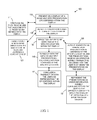
- FIG. 1 is a diagram of a method for self adjusting kiosk display information, according to an example embodiment
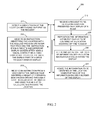
- FIG. 2 is a diagram of another method for self adjusting kiosk display information, according to an example embodiment
- FIG. 3 is a diagram of a kiosk having a self-adjusting display, according to an example embodiment.
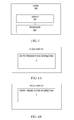
- FIGS. 4A and 4B are sample illustrations of a kiosk display before self adjusting and after self adjusting using the techniques presented herein.
- FIG. 1 is a diagram of a method 100 for self adjusting kiosk display information, according to an example embodiment.
- the method 100 (hereinafter “kiosk display service”) is implemented as instructions residing on a non-transitory computer-readable storage medium and executed by one or more processors.
- the processors are specifically configured to process the kiosk display service.
- the kiosk display service operates over a network.
- the network is wireless, wired, or a combination of wired and wireless.
- the kiosk display service executes on processors embedded within a kiosk.
- the kiosk can be part of a system, such as a drive through window at a fast food establishment, a bank, a pharmacy, and the like; or, the kiosk can be a stand alone machine designed to complete a transaction for any good or service offered by an establishment.
- the kiosk display service presents on a display of a kiosk an entry presentation centered within the display. That is, the initial greeting screen or information presented to a customer in front of the kiosk is centered based on a location that is centered with the four edges of the physical display screen.
- the kiosk display service detects an initial touch from the user that causes the entry presentation to be presented and centered within the display based on the four edges of the display screen.
- the screen may be initially blank or have some type of advertisement on it unrelated to the function of the kiosk and it is awaiting a customer for transacting business.
- the entry presentation is immediately presented and centered within the display based on the four edges of the display screen.
- the kiosk display service detects a touch from a user at a specific location on the display. This can be achieved in a few manners.
- the display screen is touch sensitive such that the specific location is immediately identified by coordinate points identifying all points on the display screen and when touched the user identifies a specific point or location within a grid being maintained by the kiosk display service.
- a hidden camera may be affixed above the screen or on the side of the screen that captures an image of where the user is touching the screen and the converts that image, via image processing, into the specific location. In this latter situation, the screen does not have to be touch-enabled display screen although to the user (customer) the screen appears to function as a touch-sensitive and enabled display screen.
- the kiosk display service presents a popup window on the display asking the user (can be referred to herein as a customer as well) to confirm the specific location as a new center for the entry presentation of the kiosk display. This may be useful when the customer inadvertently touches the screen and is not intending to recalibrate the information presented on the display screen.
- the kiosk display service automatically and dynamically in real time repositions the entry presentation centered at or about the specific location (which was detected at 120) within the display.
- the specific location is different from the center used at 110 (the center based on the four physical edges of the kiosk display).
- the kiosk display is self-adjusting based on user or customer provided direction. This permits the customer based on their situation (car, size, etc.) to decide where information on the display screen of the kiosk is to be provided.
- the kiosk display service transacts with the user, via multiple presentations, each presentation centered at the specific location. So, as information on the display changes the center of the information presented on the display remains the specific location identified by the customer.
- the kiosk display service concludes a transaction with the user and then immediately represents the entry presentation centered within the display at a center identified by the four sides of the display.
- the entry presentation is recalibrated back to its original state as soon as the session or transaction with the customer concludes at the kiosk.
- the kiosk display service alters presentations, such that each presentation is centered at the specific location. This was mentioned above but here an operator audibly transacts an order with the user that is viewing the presentations on the display.
- the kiosk display service represents the presentations as order information that is audibly communicated by the user to the operator and keyed into a terminal by the operator at the drive through window and presented on the display back at the location of the customer.
- the kiosk is a drive through window system where the customer interacts with an operator that is remotely located from the display being presented to the customer.
- the operator may visually inspect the size of the car used by the customer and provide via the terminal the specific location for recalibrating the entry presentation and other information presented to the customer on the display.
- FIG. 2 is a diagram of another method 200 for self adjusting kiosk display information, according to an example embodiment.
- the method 200 (hereinafter “self-adjusting display service”) is implemented as instruction within a computer-readable storage medium that execute on one or more processors, the processors specifically configured to execute the self-adjusting display service.
- the self-adjusting display service is operational over a network; the network is wired, wireless, or a combination of wired and wireless.
- the self-adjusting display service is implemented in a stand alone kiosk or a kiosk associated with a drive through service as discussed above with reference to the method 100 of the FIG. 1 .
- the transaction self-adjusting display service represents another and in some cases enhanced perspective of the kiosk display service, presented above with respect to the discussion of the FIG. 1 .
- self-adjusting display service receives a request to re-center or recalibrate information presented on a display of a kiosk.
- the self-adjusting display service detects a user's touch at the location and then raises an event to produce the request identified at 210.
- the detection can be achieved via a touch-sensitive display screen or can be achieved via a video camera with image processing capabilities. In the latter case, old legacy system displays that are not touch sensitive can be retrofitted to achieve the techniques presented herein with the addition of a camera and image processing.
- the self-adjusting display service receives an instruction identifying the location with the request from an operator that provides the instruction from a remote and different display screen after making visual contact via a video camera with a car of the user.
- the display is part of a kiosk system for a drive through window display. This scenario was discussed above with the embodiments of the FIG. 1 at 150 and 151.
- the self-adjusting display service receives an instruction from a video detection service that identifies a height of a driver's side window driving through with the display.
- the detected height of the window on the driver's side is used to calculate and provide the location.
- sensors can be used to determine a height of the car and an algorithm used to deduce a reduction in height to get to where a drive would be seated at the driver's side window. Calculations are then made to identify the location for recalibrating the display information on the screen of the kiosk.
- the self-adjusting display service repositions the information within the display to be centered at a location identified (or calculated as discussed above) by the request.
- the self-adjusting display service resizes the information to be centered at the location when portions of the information exceed a boarder of the display. So, when recalibration occurs about the new center at the identified location of the display, the information itself may have to have its font-type and font-size adjusted to ensure it all still is presented in a readable manner to the customer within the display.
- the self-adjusting display service auto fills blank areas that are void of information with a custom background color within the display, such as black, red, etc.
- FIG. 3 is a diagram of a kiosk 300 having a self-adjusting display, according to an example embodiment.
- the kiosk 300 includes one or more processors that are specifically configured to perform, inter alia, the processing associated with the methods 100 and 200 of the FIGS. 1 and 2 , respectively.
- the kiosk 300 includes a variety of other hardware components, such as network connections, memory, display screen, input mechanisms, and the like.
- the kiosk 300 includes a display 301 and a processor 302. Each of these and their interactions with one another will now be discussed in turn.
- the display 301 can be touch enabled (touch screen) or can be a conventional large kiosk display equipped with camera's and image processing capabilities executing on the processor 302 (as discussed above with the methods 100 and 200 of the FIGS. 1 and 2 , respectively).
- the processor 302 is configured to automatically recalibrate a center point for the presentations within the display 301 based on a direction of a user that interacts with the kiosk 300.
- the direction provided by the user is a specific location on the display 301 when the display is a touch screen device that is touched by the user at the specific location.
- the direction provided by the user is provided via arrow keys situated on one or more sides of the display 301 and activated by the user and interfaced to be captured and handled by the processor 302.
- the direction provided by the user is achieved audibly via audible commands of the user to move the information on the display 301 to the left, the right, up, and down.
- the processor 302 is enabled with speech recognition software.
- the kiosk 300 is situated inside a business and is accessed by a user that walks up to the kiosk 300.
- the kiosk 300 is situated at a drive through window system of a business.
- FIGS. 4A and 4B are sample illustrations of a kiosk display before self adjusting and after self adjusting using the techniques presented herein.
- FIG. 4A shows a large display of a kiosk having a block of information or an initial entry presentation that is centered within the display based on the original dimensions of the display itself at location "X". This is how the display screen with the entry presentation appears to a customer that initially comes up to the kiosk to interact with the kiosk for purposes of conducting a transaction.
- FIG. 4B shows the entry presentation recalibrated and re-centered about a different Center at location "Y".
- Location Y is defined by the customer that touches the display screen at location Y upon initial interaction with the kiosk. Variations and techniques for achieving this user-driven (or customer-driven) self adjusting display presentation within a kiosk display were presented above with reference to the methods 100 and 200 of the FIGS. 1 and 2 , respectively, and with respect to the kiosk 300 of the FIG. 3 .
Landscapes
- Engineering & Computer Science (AREA)
- Theoretical Computer Science (AREA)
- Business, Economics & Management (AREA)
- Development Economics (AREA)
- Finance (AREA)
- Physics & Mathematics (AREA)
- Strategic Management (AREA)
- Accounting & Taxation (AREA)
- General Engineering & Computer Science (AREA)
- General Physics & Mathematics (AREA)
- Entrepreneurship & Innovation (AREA)
- Game Theory and Decision Science (AREA)
- Human Computer Interaction (AREA)
- Economics (AREA)
- Marketing (AREA)
- General Business, Economics & Management (AREA)
- User Interface Of Digital Computer (AREA)
- Control Of Indicators Other Than Cathode Ray Tubes (AREA)
Applications Claiming Priority (1)
| Application Number | Priority Date | Filing Date | Title |
|---|---|---|---|
| US12/800,868 US9367226B2 (en) | 2010-05-25 | 2010-05-25 | Techniques for self adjusting kiosk display information |
Publications (2)
| Publication Number | Publication Date |
|---|---|
| EP2390775A2 true EP2390775A2 (de) | 2011-11-30 |
| EP2390775A3 EP2390775A3 (de) | 2015-05-06 |
Family
ID=44201894
Family Applications (1)
| Application Number | Title | Priority Date | Filing Date |
|---|---|---|---|
| EP20110165179 Withdrawn EP2390775A3 (de) | 2010-05-25 | 2011-05-06 | Selbstjustierende Kioskanzeige |
Country Status (2)
| Country | Link |
|---|---|
| US (1) | US9367226B2 (de) |
| EP (1) | EP2390775A3 (de) |
Cited By (3)
| Publication number | Priority date | Publication date | Assignee | Title |
|---|---|---|---|---|
| US20240311937A1 (en) * | 2023-03-15 | 2024-09-19 | Xenial, Inc. | Drive through system including vision system and transaction system integration |
| US20250182080A1 (en) * | 2023-12-05 | 2025-06-05 | Xenial, Inc. | Drive through system with traffic management |
| US12381673B1 (en) | 2023-07-31 | 2025-08-05 | Xenial, Inc. | Drive through audio communication system with multi-lane support |
Families Citing this family (2)
| Publication number | Priority date | Publication date | Assignee | Title |
|---|---|---|---|---|
| US9928527B2 (en) | 2014-02-12 | 2018-03-27 | Nextep Systems, Inc. | Passive patron identification systems and methods |
| US10489050B2 (en) * | 2019-03-04 | 2019-11-26 | Salleh M Barakat | User interface with automatic movement to driver window |
Citations (11)
| Publication number | Priority date | Publication date | Assignee | Title |
|---|---|---|---|---|
| AU674764B2 (en) * | 1993-08-18 | 1997-01-09 | Mark Victor Keefe Fiori | Fast food drive through facility |
| US5764034A (en) * | 1996-04-10 | 1998-06-09 | Baxter International Inc. | Battery gauge for a battery operated infusion pump |
| EP1065638A2 (de) * | 1999-06-30 | 2001-01-03 | Citicorp Development Center, Inc. | Hilfssystem und -verfahren für Sehbehinderte zur Ausführung von finanziellen Transaktionen |
| US20020070926A1 (en) * | 2000-12-11 | 2002-06-13 | Xerox Corporation | Touchscreen display calibration using results history |
| US20030055727A1 (en) * | 2001-09-18 | 2003-03-20 | Walker Jay S. | Method and apparatus for facilitating the provision of a benefit to a customer of a retailer |
| US20050049922A1 (en) * | 2003-03-24 | 2005-03-03 | Ipdev Co. | Method and apparatus for specifying toppings and their placement on a pizza and confirming same |
| US20060158425A1 (en) * | 2005-01-15 | 2006-07-20 | International Business Machines Corporation | Screen calibration for display devices |
| JP2007109075A (ja) * | 2005-10-14 | 2007-04-26 | Oki Electric Ind Co Ltd | 自動取引装置 |
| JP2007300501A (ja) * | 2006-05-01 | 2007-11-15 | Softbank Mobile Corp | 顧客情報登録システム、顧客情報登録プログラム及び端末装置。 |
| US20080270230A1 (en) * | 2007-04-27 | 2008-10-30 | Bradley Marshall Hendrickson | System and method for improving customer wait time, customer service, and marketing efficiency in the restaurant, retail, travel, and entertainment industries |
| US20100104262A1 (en) * | 2008-09-18 | 2010-04-29 | Panasonic Corporation | Playback apparatus, playback method, and playback program for playing back stereoscopic video contents |
Family Cites Families (11)
| Publication number | Priority date | Publication date | Assignee | Title |
|---|---|---|---|---|
| KR100190841B1 (ko) * | 1996-07-08 | 1999-06-01 | 윤종용 | 화면정보전송기능을 갖는 모니터화면제어장치 및 그 제어방법 |
| US6803906B1 (en) * | 2000-07-05 | 2004-10-12 | Smart Technologies, Inc. | Passive touch system and method of detecting user input |
| US20020156682A1 (en) * | 2001-04-19 | 2002-10-24 | Ncr Corporation | Scaleable drive-thru solution for quick service vending |
| US6996460B1 (en) | 2002-10-03 | 2006-02-07 | Advanced Interfaces, Inc. | Method and apparatus for providing virtual touch interaction in the drive-thru |
| US20070164554A1 (en) * | 2005-12-16 | 2007-07-19 | Krone Craig E | Order fulfillment system and method for printing products including individualized information |
| US8190483B2 (en) * | 2006-05-02 | 2012-05-29 | Nextep Systems, Inc. | Computer-based ordering system |
| US20080172243A1 (en) * | 2007-01-11 | 2008-07-17 | Kelly Michael J | System and method for providing targeted, interactive, multimedia content for entertaining, advertising, and promotional purposes |
| US20080231604A1 (en) | 2007-03-22 | 2008-09-25 | Cypress Semiconductor Corp. | Method for extending the life of touch screens |
| KR101493748B1 (ko) | 2008-06-16 | 2015-03-02 | 삼성전자주식회사 | 물품 제공장치, 디스플레이 장치 및 이를 이용한 gui제공방법 |
| US20100188342A1 (en) * | 2009-01-26 | 2010-07-29 | Manufacturing Resources International, Inc. | Method and System for Positioning a Graphical User Interface |
| US20110199335A1 (en) * | 2010-02-12 | 2011-08-18 | Bo Li | Determining a Position of an Object Using a Single Camera |
-
2010
- 2010-05-25 US US12/800,868 patent/US9367226B2/en active Active
-
2011
- 2011-05-06 EP EP20110165179 patent/EP2390775A3/de not_active Withdrawn
Patent Citations (11)
| Publication number | Priority date | Publication date | Assignee | Title |
|---|---|---|---|---|
| AU674764B2 (en) * | 1993-08-18 | 1997-01-09 | Mark Victor Keefe Fiori | Fast food drive through facility |
| US5764034A (en) * | 1996-04-10 | 1998-06-09 | Baxter International Inc. | Battery gauge for a battery operated infusion pump |
| EP1065638A2 (de) * | 1999-06-30 | 2001-01-03 | Citicorp Development Center, Inc. | Hilfssystem und -verfahren für Sehbehinderte zur Ausführung von finanziellen Transaktionen |
| US20020070926A1 (en) * | 2000-12-11 | 2002-06-13 | Xerox Corporation | Touchscreen display calibration using results history |
| US20030055727A1 (en) * | 2001-09-18 | 2003-03-20 | Walker Jay S. | Method and apparatus for facilitating the provision of a benefit to a customer of a retailer |
| US20050049922A1 (en) * | 2003-03-24 | 2005-03-03 | Ipdev Co. | Method and apparatus for specifying toppings and their placement on a pizza and confirming same |
| US20060158425A1 (en) * | 2005-01-15 | 2006-07-20 | International Business Machines Corporation | Screen calibration for display devices |
| JP2007109075A (ja) * | 2005-10-14 | 2007-04-26 | Oki Electric Ind Co Ltd | 自動取引装置 |
| JP2007300501A (ja) * | 2006-05-01 | 2007-11-15 | Softbank Mobile Corp | 顧客情報登録システム、顧客情報登録プログラム及び端末装置。 |
| US20080270230A1 (en) * | 2007-04-27 | 2008-10-30 | Bradley Marshall Hendrickson | System and method for improving customer wait time, customer service, and marketing efficiency in the restaurant, retail, travel, and entertainment industries |
| US20100104262A1 (en) * | 2008-09-18 | 2010-04-29 | Panasonic Corporation | Playback apparatus, playback method, and playback program for playing back stereoscopic video contents |
Non-Patent Citations (1)
| Title |
|---|
| ANONYMOUS: "NEXTEP and MRI unveil touchscreen drive-thru kiosk", 15 November 2009 (2009-11-15), XP055344301, Retrieved from the Internet <URL:https://www.qsrweb.com/news/nextep-and-mri-unveil-touchscreen-drive-thru-kiosk/> [retrieved on 20170209] * |
Cited By (6)
| Publication number | Priority date | Publication date | Assignee | Title |
|---|---|---|---|---|
| US20240311937A1 (en) * | 2023-03-15 | 2024-09-19 | Xenial, Inc. | Drive through system including vision system and transaction system integration |
| US12400279B2 (en) * | 2023-03-15 | 2025-08-26 | Xenial, Inc. | Drive through system including vision system and transaction system integration |
| US12381673B1 (en) | 2023-07-31 | 2025-08-05 | Xenial, Inc. | Drive through audio communication system with multi-lane support |
| US20250182080A1 (en) * | 2023-12-05 | 2025-06-05 | Xenial, Inc. | Drive through system with traffic management |
| US20250182079A1 (en) * | 2023-12-05 | 2025-06-05 | Xenial, Inc. | Drive through system with traffic management |
| US12327230B1 (en) * | 2023-12-05 | 2025-06-10 | Xenial, Inc. | Drive through system with traffic management |
Also Published As
| Publication number | Publication date |
|---|---|
| US9367226B2 (en) | 2016-06-14 |
| US20110296355A1 (en) | 2011-12-01 |
| EP2390775A3 (de) | 2015-05-06 |
Similar Documents
| Publication | Publication Date | Title |
|---|---|---|
| US11188218B1 (en) | System and method for generating a position based user interface | |
| US10373357B2 (en) | Device and method for displaying screen based on event | |
| US10572772B2 (en) | Object detection device, object detection method, and recording medium, and recording medium | |
| EP2390775A2 (de) | Selbstjustierende Kioskanzeige | |
| US20130093660A1 (en) | Method and system to control a process with bend movements | |
| US10552032B2 (en) | System, method and apparatus for implementing an improved user interface on a terminal | |
| EP3866389B1 (de) | Transparente brennstoffabgabevorrichtung | |
| US9164954B2 (en) | Vending accommodation and accessibility | |
| AU2015342838B2 (en) | Transit vending machine with automatic user interface adaption | |
| US10552778B2 (en) | Point-of-sale (POS) terminal assistance | |
| EP2955620A3 (de) | Informationseingabevorrichtung, informationseingabeverfahren, informationseingabesteuerungsprogramm und elektronische vorrichtung | |
| US20190057398A1 (en) | System to identify vulnerable card readers | |
| JP2013232181A5 (de) | ||
| EP2581808B1 (de) | Verfahren und System zur Steuerung eines Prozesses mit Biegebewegungen | |
| US20150102047A1 (en) | Vending apparatus and product vending method | |
| JPWO2012140782A1 (ja) | 瞼検出装置、瞼検出方法及びプログラム | |
| EP2891967A1 (de) | Anzeigesteuerungsvorrichtung, thin-client-system, anzeigesteuerungsverfahren und aufzeichnungsmedium | |
| TW201237730A (en) | Method of adjusting windows and electronic device using same | |
| CN104517337B (zh) | 车辆出入口读卡方法及装置 | |
| JP5192324B2 (ja) | 監視システム及び自動取引装置 | |
| US20190138199A1 (en) | System and method of finger swipe gesture detection by display edge button | |
| US20160048265A1 (en) | Touch panel system | |
| KR101494445B1 (ko) | 투명 디스플레이를 이용한 프로모션 이미지 표시장치, 표시방법 및 그 기록매체 | |
| JP2006011765A (ja) | 自動取引装置 | |
| JP6866888B2 (ja) | 情報処理装置、画面表示方法、およびプログラム |
Legal Events
| Date | Code | Title | Description |
|---|---|---|---|
| AK | Designated contracting states |
Kind code of ref document: A2 Designated state(s): AL AT BE BG CH CY CZ DE DK EE ES FI FR GB GR HR HU IE IS IT LI LT LU LV MC MK MT NL NO PL PT RO RS SE SI SK SM TR |
|
| AX | Request for extension of the european patent |
Extension state: BA ME |
|
| PUAI | Public reference made under article 153(3) epc to a published international application that has entered the european phase |
Free format text: ORIGINAL CODE: 0009012 |
|
| PUAL | Search report despatched |
Free format text: ORIGINAL CODE: 0009013 |
|
| RIC1 | Information provided on ipc code assigned before grant |
Ipc: G06F 3/048 20130101AFI20150310BHEP |
|
| AK | Designated contracting states |
Kind code of ref document: A3 Designated state(s): AL AT BE BG CH CY CZ DE DK EE ES FI FR GB GR HR HU IE IS IT LI LT LU LV MC MK MT NL NO PL PT RO RS SE SI SK SM TR |
|
| AX | Request for extension of the european patent |
Extension state: BA ME |
|
| 17P | Request for examination filed |
Effective date: 20151106 |
|
| RBV | Designated contracting states (corrected) |
Designated state(s): AL AT BE BG CH CY CZ DE DK EE ES FI FR GB GR HR HU IE IS IT LI LT LU LV MC MK MT NL NO PL PT RO RS SE SI SK SM TR |
|
| 17Q | First examination report despatched |
Effective date: 20170301 |
|
| RAP1 | Party data changed (applicant data changed or rights of an application transferred) |
Owner name: NCR CORPORATION |
|
| APBK | Appeal reference recorded |
Free format text: ORIGINAL CODE: EPIDOSNREFNE |
|
| APBN | Date of receipt of notice of appeal recorded |
Free format text: ORIGINAL CODE: EPIDOSNNOA2E |
|
| APBR | Date of receipt of statement of grounds of appeal recorded |
Free format text: ORIGINAL CODE: EPIDOSNNOA3E |
|
| APAF | Appeal reference modified |
Free format text: ORIGINAL CODE: EPIDOSCREFNE |
|
| APBT | Appeal procedure closed |
Free format text: ORIGINAL CODE: EPIDOSNNOA9E |
|
| STAA | Information on the status of an ep patent application or granted ep patent |
Free format text: STATUS: THE APPLICATION HAS BEEN WITHDRAWN |
|
| 18R | Application refused |
Effective date: 20180323 |
|
| 18W | Application withdrawn |
Effective date: 20210226 |