EP2372964B1 - System zur Unterstützung von Kollektivarbeit - Google Patents
System zur Unterstützung von Kollektivarbeit Download PDFInfo
- Publication number
- EP2372964B1 EP2372964B1 EP11164679.0A EP11164679A EP2372964B1 EP 2372964 B1 EP2372964 B1 EP 2372964B1 EP 11164679 A EP11164679 A EP 11164679A EP 2372964 B1 EP2372964 B1 EP 2372964B1
- Authority
- EP
- European Patent Office
- Prior art keywords
- recipient
- message
- user terminal
- processor
- controller
- Prior art date
- Legal status (The legal status is an assumption and is not a legal conclusion. Google has not performed a legal analysis and makes no representation as to the accuracy of the status listed.)
- Not-in-force
Links
Images



Classifications
-
- H—ELECTRICITY
- H04—ELECTRIC COMMUNICATION TECHNIQUE
- H04L—TRANSMISSION OF DIGITAL INFORMATION, e.g. TELEGRAPHIC COMMUNICATION
- H04L51/00—User-to-user messaging in packet-switching networks, transmitted according to store-and-forward or real-time protocols, e.g. e-mail
- H04L51/04—Real-time or near real-time messaging, e.g. instant messaging [IM]
-
- G—PHYSICS
- G06—COMPUTING OR CALCULATING; COUNTING
- G06Q—INFORMATION AND COMMUNICATION TECHNOLOGY [ICT] SPECIALLY ADAPTED FOR ADMINISTRATIVE, COMMERCIAL, FINANCIAL, MANAGERIAL OR SUPERVISORY PURPOSES; SYSTEMS OR METHODS SPECIALLY ADAPTED FOR ADMINISTRATIVE, COMMERCIAL, FINANCIAL, MANAGERIAL OR SUPERVISORY PURPOSES, NOT OTHERWISE PROVIDED FOR
- G06Q10/00—Administration; Management
- G06Q10/10—Office automation; Time management
-
- G—PHYSICS
- G06—COMPUTING OR CALCULATING; COUNTING
- G06F—ELECTRIC DIGITAL DATA PROCESSING
- G06F16/00—Information retrieval; Database structures therefor; File system structures therefor
- G06F16/40—Information retrieval; Database structures therefor; File system structures therefor of multimedia data, e.g. slideshows comprising image and additional audio data
-
- H—ELECTRICITY
- H04—ELECTRIC COMMUNICATION TECHNIQUE
- H04L—TRANSMISSION OF DIGITAL INFORMATION, e.g. TELEGRAPHIC COMMUNICATION
- H04L51/00—User-to-user messaging in packet-switching networks, transmitted according to store-and-forward or real-time protocols, e.g. e-mail
- H04L51/21—Monitoring or handling of messages
- H04L51/234—Monitoring or handling of messages for tracking messages
Definitions
- the present invention relates to techniques for fostering a collaborative environment and, in particular, to a collaboration system that provides improved capture, distribution and maintenance of communications and contexts therefore.
- the project at hand comprises complex work involving a significant need for interaction between team members
- remote collaborators that are not co-located with project management often have a difficult time establishing contextual knowledge relevant to the project.
- a developer in India may not fully appreciate the project requirements worked out through face-to-face meetings with the customer by U.S.-based project managers.
- a project manager may not be able to quickly appreciate the subtleties of a technological issue encountered by the development team without significantly interacting with the developers.
- Such inefficiencies can be compounded by the fact that different team members may have different levels of experience and knowledge, thereby making it difficult to maintain quality.
- differences in time zones between team members may create substantial lags in response time when critical issues arise, and provide a limited amount of time in which multiple team members may conference together.
- differences in culture or language may create difficulties when trying to understand implied instructions from team management.
- 'context' comprises any information that provides greater understanding of the subject matter of a given communication or deliverable artifact, such as a document or portion of code, beyond the actual content of the item, e.g., historical information concerning a specific issue, identification of specific parties having an interest in the specific subject matter, classification of the subject matter, etc.
- Such context in communications between team members typically ensures more meaningful communications, e.g., the difference between awareness of the content of a communication and a true understanding of the implications of such content. Therefore, a collaboration system or suite of tools that overcome these problems would represent an advancement in the art.
- WO 2004/015504 to Kryptiq Corporation describes a network environment including a messaging client endowed with semantic qualification logic in accordance with one embodiment.
- a sending device is equipped with messaging client to send and receive electronic messages to/from local and remote recipients.
- local server and remote server may each represent a mail server.
- the present teaching overcomes the limitations of the prior art described above through the use of an integrated collaboration system.
- the collaboration system in accordance with the present teaching draws upon three guiding principles in its structure and operation. First, it is necessary to organize communication channels between collaboration team members. Second, it is necessary to build context around communications between team members. Third, wherever possible, relationships between collaborators should be enhanced. To this end, the collaboration system of the present teaching provides various components that allow currently-used communication channels, e.g., electronic mail, instant messaging, etc., and content formats, e.g., text, audio, images, video, etc., to be organized such that contextual information surrounding messages sent within the system is more readily captured and used to organize the messages.
- currently-used communication channels e.g., electronic mail, instant messaging, etc.
- content formats e.g., text, audio, images, video, etc.
- a user terminal may be employed to generate a first message and, substantially simultaneously or thereafter, append a first plurality of metadata values to the first message, which metadata values are based on standardized metadata attributes.
- the present teaching ensures a level of consistency and uniformity so as to establish meaningful context around such communications.
- Subsequent messages may likewise have a second plurality of metadata values appended thereto, which messages are thereafter associated with the first message when the corresponding plurality of metadata values compare favorably.
- the association of messages in this manner is preferably carried out using a back-end controller.
- one or more content files may also be associated with such messages, which content files assist users of the system in developing context concerning various messages.
- a distribution engine is employed to disseminate messages.
- various user interfaces may be employed to display messages that are pre-filtered based on a user's group memberships.
- a distribution process is employed that takes into consideration the members of a given workgroup, the preferred communication channel of these members, and the overall workload prioritization. In this manner, team-wide context and participation may be more readily established, thereby fostering better understanding between team members and, consequently, more efficient collaboration.
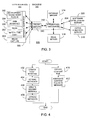
- FIG. 1 is a functional illustration of a collaboration system in accordance with an embodiment of the present teaching
- FIG. 2 is a schematic block diagram of a communication system in accordance with an embodiment of the present teaching
- FIG. 3 is a functional block diagram of a collaboration system in accordance with an embodiment of the present teaching
- FIG. 4 is a flow chart illustrating operation of a user terminal in accordance with an embodiment of the present teaching
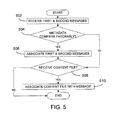
- FIG. 5 is a flow chart illustrating operation of a controller in accordance with an embodiment of the present teaching
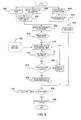
- FIG. 6 is a flow chart illustrating a distribution process in accordance with an embodiment of the present teaching
- FIGs. 7 and 8 illustrate various features of a user interface in accordance with an embodiment of the present teaching
- FIG. 9 is an illustration of an email interface in accordance with an embodiment of the present teaching.
- FIG. 10 is an illustration of an email input interface in accordance with an embodiment of the present teaching.
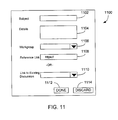
- FIG. 11 is an illustration of a media capture input interface in accordance with an embodiment of the present teaching.
- the collaboration system 100 is essentially a communication system that is enhanced with features that provide greater support to collaborative teams than currently available.
- the system 100 comprises one or more user interface components 102-108 and one or more back-end components 120, 122 communicating with each other via at least one communication channel 130.
- each of the interface components 102-108 and each of the back-end components 120, 122 are implemented using known software programming techniques.
- suitable processing devices such as desktop/laptop/handheld computers, mobile communication devices such as cellular phones, personal digital assistants, one or more server computers, etc.
- suitable processing devices may operate under the control of executable instructions to carry out the various functions described herein.
- suitable processing devices such as desktop/laptop/handheld computers, mobile communication devices such as cellular phones, personal digital assistants, one or more server computers, etc.
- ASICs application specific integrated circuits
- programmable logic arrays implementing state machines, etc.
- the interface components 102-108 serve as a mechanism for a user of the system 100 to generate communications for distribution to other users of the system 100 while providing greater ability to generate, preserve and use contextual information that fosters greater understanding among collaborators.
- the interface components may include a dashboard 102 that serves as a central portal for accessing the various features of the collaboration system.
- the dashboard 102 is implemented as a web-based, graphical interface, using techniques known to those having skill in the art.
- a user of the system may access, create, and manage any communications that he/she generates or receives, control a profile of the user maintained by the system, access such profiles of other collaborators and access and manage various content or media files generated/received by the user.
- a communication template 104 serves as a standardized interface for the generation of one or more types of communications and corresponding metadata.
- the communication template 104 is based on one or more existing, software-based communication applications, such as Microsoft's "OUTLOOK" email application.
- the metadata captured in this manner is preferably based on a plurality of standardized metadata attributes that are defined in accordance with the particular needs of the collaborative project. For example, a software development team may have one set of metadata attributes that would be most useful, whereas an industrial manufacturing team may have another set of metadata attributes that would be most useful.
- the one or more communication types supported by the communication template 104 may be any commonly used types such as email, instant messaging, short message service (SMS), etc.
- the communication template 104 may comprise multiple templates, one for each communication type, but each still implementing the standardized metadata attributes. Techniques for implementing one or more templates of this type are well known to those having ordinary skill in the art. Such multiple templates, if used, could be provided with a common user interface or maintained as separately usable entities. Regardless, the standardized nature of the templates ensures that users are triggered to provide the most important relevant information for each type of communication.
- a plug-in component 106 may be provided.
- a plug-in component 106 may be provided.
- a plug-in component 106 may be provided.
- a plug-in is a discrete software program implementing additional functions that may be readily integrated into an existing software program using a standardized interface.
- such a plug-in implements an interface allowing a user to access and generate messages in a manner similar to the communication template 104, but within an integrated development environment program in which developers are performing software development tasks.
- Those having skill in the art will appreciate that implementations other than plug-in programs may be equally employed for this purpose.
- the user interface components also comprise a multi-media capture agent 108 used to generate content files by users of the collaboration system 100.
- the capture agent 108 may be implemented using Microsoft's "WINDOWS" Media Encoder application.
- a content file may comprise data or information represented in any human-perceivable (preferably, digitally reproducible) form such as text, audio recordings, image recordings, video recordings or combinations thereof represented in any of a number of well-known formats.
- multiple capture agents such as those known to the skilled artisan, may be equally employed.
- the content files generated by the capture agent 108 may be associated with messages created within the system 100 either concurrently with or subsequent to generation of such messages.
- an interface such as that illustrated in FIG. 11 and described in further detail below, may be used to automate the creation of the standardized metadata for use with content files created using the capture agent 108.
- the back-end components 120, 122 operate to manage communications and content files generated by users of the collaboration system 100, including association of messages based on corresponding metadata values and distribution of messages to various users (via corresponding user terminals) of the system 100.
- a communication consolidation component 120 is provided to establish and maintain the associations between the various communications (and, where necessary, content files).
- an "association" between communications alludes to the circumstance in which messages concern related subject matter and may therefore be connected in some manner to maintain context.
- such association is carried out through establishment of a logical link, such as a pointer, between stored messages.
- the consolidation agent 120 ascertains when to establish such associations based on correspondence of metadata appended to the messages.
- messages sent within the system are treated as records in a database. Links between such records are established using a technique known as polymorphic association.
- all records in the database are associated via foreign keys (pointers).
- the communication consolidation component 120 tracks the message primary key (an identification) as well as the primary key for the recipient (another identification) and the type of recipient. It then retrieves messages sent to the current user as well as the workgroups /focus areas that the user belongs to, by default.
- responses to a message are associated via foreign key relationships to other messages. Reference links are simply stored as text in the database record for the message.
- media or content files are related via many-to-many relationships between messages and media files.
- the communication distribution agent 122 operates to route messages to users of the system 100 based on an interest in the subject matter at hand and/or that are the direct, intended recipients of each message. For example, in the context of a software development team, a given manager may send messages concerning "bugs" that arise during development in the software to a group of recipients that have in interest in the subject of "bugs" to the extent that they are impacted by, or may have an impact upon, the subject matter thereof. Additionally, or alternatively, the manager may wish to send the messages specifically to one or more selected recipients.
- individual users of the system may "subscribe” (or, alternatively, be “subscribed” by an initiator of a message) to receive communications concerning certain subject matter intended for a recipient group as indicated by the metadata associated with each communication.
- users may instead subscribe to specific discussions or topics.
- the present teaching provides the ability to automatically build greater team awareness with minimal additional burden on individual team members.
- FIG. 2 illustrates a schematic block diagram of a communication system 200 that may be used to implement the collaboration system 100 in accordance with one embodiment of the present teaching.
- the system 200 comprises a plurality of user terminals 202 in communication with each other and a controller 204 via one or more communication channels 206.
- each of the user terminals 202 comprises a processor-based device such as a computer (or other device) comprising one or more processors 209 in communication with at least one storage component 210.
- the processor(s) 209 may comprise microprocessors, microcontrollers, digital signal processors, etc. or combinations thereof operating under the control of executable instructions stored in the storage component(s) 210.
- the storage component(s) 210 may comprise any combination of volatile/non-volatile memory components such as read-only memory (ROM), random access memory (RAM), electrically erasable programmable read-only memory (EEPROM), etc.
- ROM read-only memory
- RAM random access memory
- EEPROM electrically erasable programmable read-only memory
- the executable instructions stored in the storage component(s) 210 may be particularly used to implement processing as described in greater detail below.
- the user terminals 202 may be implemented, in whole or in part, using other components such as ASICs, programmable logic arrays, etc. that may operate under software or hardware control.
- each user terminal 202 preferably comprises a display 211 in communication with the processor(s) 209.
- the display 211 may comprise an integral or external display such as a cathode-ray tube (CRT), liquid crystal display (LCD), light emitting diode (LED) display, etc.
- CTR cathode-ray tube
- LCD liquid crystal display
- LED light emitting diode
- the user terminals 202 preferably include user input/output components 212 as well as one or more communication interfaces 213.
- the I/O components 212 may comprise any mechanism that allows a user of the user terminal 202 to interact therewith, e.g., a mouse, keyboard, microphone, video and/or still image camera, speaker, etc.
- the communication interface(s) 213 support the use of the one or more communication channels 206 and typically comprise any combination of hardware and/or software elements necessary to terminate physical links (e.g., Ethernet, wireless, etc.) or communication protocols (e.g., HTTP, SOAP, SSL, TCP/IP, etc.). Techniques for implementing the interface(s) 213 are well known to those having skill in the art.
- the communication channels 206 may comprise any one or combination of wired or wireless communication channels, depending on the capabilities of the terminals 202 and/or controller 204. Additionally, the communication channels 206 are further defined by the type of communications supported thereby. For example, email communications, voice communications, instant messaging (IM) communications, SMS communications, multimedia messaging service (MMS) communications, etc. may all be supported by different types of communication channels, as known to those of skill in the art.
- IM instant messaging
- MMS multimedia messaging service
- the controller 204 preferably comprises a processor-based device comprising at least one processor 214 and at least one storage component 216 as described above with regard to the user terminals 202.
- the controller 204 is implemented using one or more server computers as known in the art.
- the controller 204 is preferably in communication with a database 208 that, as known in the art, can also be implanted using one or more server computers.
- the controller 204 implements the functionality described above relative to the back-end components 120, 122 whereas the database 208 stores the data (i.e., messages, content files, links therebetween, etc.) sent between user of the system 200.
- FIG. 3 An implementation of a collaboration system 300 showing additional detail regarding implementation of the back-end is further illustrated with regard to FIG. 3 .
- the collaboration system 300 as shown includes a plurality of user interfaces 301 (only one shown) in communication with the back-end 303.
- the user interface 301 is implemented via the user terminals 202 and carrying out the function of the interface components 102-108 described above.
- the system 300 illustrated in FIG. 3 is particularly adapted for use in conjunction with software development, although the present invention is not limited to this particular application.
- the user interface 301 includes a development environment plug-in 302, a web interface 304, an email toolbar and interface 306, an instant messaging (IM) or chat interface 307 and a stand-alone media capture interface 308 each operating in conjunction with a metadata generator 309.
- the development environment plug-in 302 may comprise a plug-in suitable for communicating and operating with a suitable software development program, such as the "ECLIPSE" integrated development environment software program.
- the plug-in 302 implements substantially similar functionality as the web interface 304, email toolbar interface 306, IM interface 307 or any other interface that provides the ability to generate messages, as described below.
- the web interface 304 preferably implements the functions of the dashboard 102, described in greater detail below.
- the email interface 306 and/or IM/chat interface 307 preferably implement(s) the functions of the communication template 104, also described in greater detail below.
- the stand-alone media capture interface preferably implements the functions of the multi-media capture agent 108, described in greater detail below.
- the metadata generator 309 operates in conjunction with the various user interface components 302-308 to generate metadata values in accordance with standardized metadata attributes.
- the metadata generator 309 may receive user selections corresponding to predefined metadata input values, or may comprise received data entered via a user-definable metadata value input field, as described below with further reference to FIGs. 8 and 9 .
- the metadata generator 309 using known techniques, may populate predefined metadata input fields based on variables known to the system such as date, time, user identification, communication type, etc.
- more sophisticated techniques can be used to implement the metadata generator 309, particularly techniques that allow metadata to be automatically generated based on analysis of the messages created via the various interfaces 302-308.
- the metadata generator 309 provides metadata values for each communication (message) provided to the back end 303.
- the present teaching is able to create associations between disparate communication channels, thereby creating valuable context to such communications.
- the back end 303 preferably comprises a plurality of server computers 310-320 arranged in a suitable network configuration, a fairly typical example of which is illustrated in FIG. 3 .
- Suitable server computers for implementing the functions of each of the servers 310-320 described below, as well as modifications to the network configuration, are well known in the art of database-backed dynamic web applications.
- additional implementation techniques are employed, such as using a cluster of virtual servers to implement the application web server 312, or the use of multiple clusters of servers per project collaboration team. Other refinements may be apparent to those having ordinary skill in the art.
- each of the servers 310-320 communicates with each other and/or with user terminals via a suitable communication protocol, such as TCP/IP.
- a proxy server 310 is provided as the interface to the back end 303.
- the proxy server 310 provides users of the system 300 indirect access to the services and resources made available by the other back end servers.
- the proxy server 310 is in communication with an application web server 312.
- the combination of the proxy server 310 and the application web server 312 implements the functions of the controller 204 (i.e., the back-end components 120, 122 described above and in further detail below).
- the application web server 312 is in communication with a database server 314 that stores one or more project profiles, user profiles and communication preferences, identifications o work groups and related/subscribed users, message content, metadata for messages and content files, pointers to content files and the linking information between messages.
- the email server 316 supports communications between user terminals using an email communication program. More particularly, email communications originating from a given user's terminal (and corresponding interface 301) are first processed by the proxy and web application servers 310, 312 (as described below). Thereafter, such communications can be sent to the intended recipients (e.g., workgroups and/or specific users) via the email server 316 using well known techniques.
- the additional servers illustrated comprise an active directory server 318 in communication with the application web server 312.
- the active directory server 318 allows one or more system administrators to control configuration/operation of the various components within the system 300, including the user terminals.
- a software development server 320 is also shown in communication with the application web server 312.
- the software development server 320 may implement a suitable workflow automation tool such as IBM's "RATIONAL” "CLEARQUEST” program.
- a suitable workflow automation tool such as IBM's "RATIONAL" "CLEARQUEST” program.
- other servers running applications appropriate for use on different types of collaborative projects may be equally incorporated, using known techniques, as dictated by the particular needs of such projects.
- FIG. 4 a flowchart illustrating operation of a user terminal in accordance with the present teaching is shown.
- the operations illustrated in FIG. 4 are preferably implemented using stored, executable instructions that control operation of one or more suitable processors.
- the processing of FIG. 4 is divided into two separate, parallel paths that may be carried out substantially simultaneously or at different times.
- processing begins at block 402 where a first message is created by a user of the terminal using a message creation component.
- a message can be created in any of number of ways depending on the format of the message to be created.
- an email message can be created through the use of a suitable email program, such as Microsoft's "OUTLOOK” email program, by typing the message using a keyboard.
- an instant messaging program may be used to create an instant message or the dashboard 102/web interface 304 may be used to create a new message, as described below.
- processing continues at block 404 where a first plurality of metadata values are appended to the first message.
- appending metadata to a message encompasses inclusion of the metadata in the message itself.
- the metadata may be transmitted within the same electronic message "envelope" as the message content itself, or may be directly embedded in the message content.
- the metadata may be stored separately from the message content and "appended" by virtue of a logical link (e.g., pointer values to physical storage locations) between the two.
- a logical link e.g., pointer values to physical storage locations
- such standardized metadata attributes may be categorized by type of communication being submitted (e.g., regarding a problem found, asking a question concerning requirements, making an announcement, etc.); by the groups potentially impacted by the communication (e.g., the development group, management, the testing group, etc.); by relevant references (e.g., links to other systems or other users within the system); and/or by status (e.g., priority, urgency, state of completion, etc.)
- Additional system generated metadata may include the date and timestamp of message creation or modification, the user creating or modifying the message.
- the particular standardized metadata attributes are not necessarily limited to those described herein, and may be particularly selected according to the needs of a particular project.
- the processing described above relative to blocks 402 and 404 may be respectively repeated for the creation of a second message and appending of a second plurality of metadata values.
- the first and second messages do not have to be created by the same message creation component nor do they have to be communicated by the same communication channel. So long as they both have their standardized metadata values appended thereto, the fact that they have been created using different message types (e.g., email, instant messaging, web interface, plug-in interface, etc.) will not affect the ability of the instant collaboration system to establish context between the two messages. That is, assuming the first and second message are related in some fashion, the first and second pluralities of metadata values should compare favorably such that the first and second message may be subsequently associated together.
- the second path illustrated in FIG. 4 begins at block 410 where a user creates a content file.
- various tools may be employed to create a content file depending on the format of the content file to be created, i.e., text, audio, images, video, combinations thereof, etc.
- the content file may be created well before or after or substantially at the same time as a message with which it is subsequently associated.
- corresponding standardized metadata values are preferably appended to content files when such content files are added to the collaboration system, i.e., when the content files are created or uploaded.
- a suitable interface may be provided to ensure uniform capture of the standardized metadata, an example of which is further illustrated in FIG. 11 .
- the interface 1100 comprises a number of user input mechanisms (e.g., text boxes, drop down menus, etc.) that allow a user to enter metadata input values.
- user input mechanisms e.g., text boxes, drop down menus, etc.
- FIG. 11 the examples illustrated in FIG. 11 are not intended to be exhaustive of such input mechanisms or the types of metadata that may be captured.
- a text box 1102 is provided for capturing a subject indicator, e.g., the subject matter to which the content file relates.
- a details text box 1104 is provided to capture additional information concerning the content file. That is, the details text box 1104 is intended to be freeform, allowing users to provide information/metadata that would be useful to viewers.
- a drop down menu 1106 is provided as a means for selecting a work group.
- the drop down menu 1106 provides a predefined list of available work groups (e.g., in the context of a software development project, a Project Management group, Technical Architecture group, Requirements group, Application Design group, Development group, Testing group, Communications group, Deployment group, etc.).
- a reference link text box 1108 allows a user to enter, in this example, a website address of a website that includes additional relevant information.
- a discussion pull down menu 1110 is provided that allows a user to select a particular discussion (as described below) to associate the content file with.
- a list of discussions are maintained (for example, by the controller 204), which list is used to populate the populate the various pull down menu selections.
- suitable buttons are provided that allow a user to accept his/her selections 1112 or discard (cancel) 1114 them in accordance with well known user interface paradigms.
- the content file created at block 410 is preferably stored at a centralized location, e.g., at the web application server 312, although it is understood that any suitable storage means in virtually any location may be used for this purpose.
- the content files may be uploaded automatically (after being created locally at a user terminal) when the file is created through the system applications, e.g., the media capture agent 308, or created locally by the user in an application external to the system and uploaded, e.g., to the web server 312, at a later time through the dashboard 102.
- the content file thus created and stored may be associated with a message, such as a message created in accordance with blocks 402-408 as described previously.
- association of the content file may be carried out through actual co-storage of the message and the content file, or, in a presently preferred embodiment, via logical links between the two (which links are preferably stored, along with the metadata in the database 314).
- the step of associating the content file with the message may occur substantially simultaneously with or at anytime after creation of the message. For example, as described below relative to FIGs. 8 and 10 , either the dashboard 102 or communication template 104 may be used to associate the content file with the message.
- the controller receives first and second messages from user terminals. Both the first and second messages have metadata appended thereto as described above. Note that the first and second messages may be received at the controller within a relatively short period of time or at substantially different times, e.g., weeks or even months apart. In order to determine whether the first and second messages should be associated with one another, a comparison of their respective metadata values is undertaken at block 504.
- two emails having different creation times and showing different "subject" lines may nevertheless be properly associated together if they have the same author and recipients and contain one or more identical keywords.
- the present invention is not necessarily limited by the nature of the test used to determine the existence of a favorable comparison.
- the first and second messages are associated with each other at block 506.
- this is may be accomplished by establishing one or more logical links or pointers (e.g., through the use of foreign keys) between the messages.
- each message could include a pointer to the physical location in storage of the other message.
- References to other discussions i.e., threads of messages
- reply messages such pointers are not necessary as known to those of skill in the art.
- processing may continue at block 508 where it is determined whether a content file has been received by the controller.
- the manner in which the content file is received may vary, including directly receiving the content file as in the case of an included email attachment, or indirectly as in the case of receiving a reference (e.g., a pointer) to the content file within the centralized, back end storage (e.g., the web application server 312) or in a local user terminal.
- the dashboard 102 may be used at a user terminal to manipulate graphical representations of content files and thereby associate them with specific messages.
- the content file is associated with a message.
- individual content files could be associated with more than one message.
- pointers to storage locations may be used as a matter of design choice.
- the distribution of messages is controlled, at least in part, by the particular members of a group designated to receive the messages, the preferred communication channels of such members and the workload of each recipient.
- FIG. 6 An example of such a process in accordance with a presently preferred embodiment is illustrated in FIG. 6 .
- the processing illustrated in FIG. 6 is preferably implemented using appropriately programmed processors of the types described above, both within the user interface 301 and back end 303.
- the various processing blocks 602-634 may be generally grouped into three distinct groups. In a first group, comprising blocks 602-606, information concerning availability and preferred communication channels of a user is managed. In a second group, comprising blocks 608-610, initiation of discussions, as described below, is provided. Finally, in the third group comprising blocks 612-634, distribution of specific messages, including delivery to specifically designated recipients is further illustrated.
- a user of the system may provide any necessary information to configure a particular contact type, i.e., communication channel. That is, in a presently preferred embodiment, a user can designate specific communication channels to be used to contact that user in accordance with rules or preferences of the user's own design.
- the dashboard 102/web interface 304 is used for this purpose, as described below.
- the user may designate that his/her office email account should be used to receive incoming messages without any further attempts to alert the user.
- the user may designate that, in addition to routing all incoming messages to his/her email account, a message should also be sent to the user's mobile phone via, for example, SMS.
- SMS Short Message Service
- the configuration information provided by the user at block 602 may be stored in any suitable storage device although, in a presently preferred embodiment, it is stored by the database 208.
- scheduling information for the user may be imported into the system, i.e., via the web server 312.
- the scheduling information may comprise information taken from an electronic calendar or similar mechanism.
- scheduling information is indicative of the time, places, etc. of appointments for a given user and may be encoded in a conventional manner.
- contact availability for the user is established based on the imported scheduling information from block 604 when overlaid with the contact rule types established at block 602. In this manner, the present invention allows users to very specifically tailor the communication channels at their disposal to their personal needs and schedules.
- processing begins at block 608, where a user may initiate or respond to a discussion using any of the above described user interfaces, e.g., the dashboard 102, communication template 104 or plug-in interface 106.
- a discussion is a thread of associated messages (and, possibly, content files, as described above) concerning a particular topic or subject.
- the "breadth" of such discussions i.e., the size of the group of desired recipients, may be controlled in part through the manner in which the discussions are initiated.
- a relatively broad audience may be established initially.
- selection of specific, individual recipients of a discussion allows the creator of a discussion to more closely manage its intended audience.
- the controller 204 when it receives a message to be distributed to designated recipients and workgroup members, undertakes a two-pronged delivery process in which it evaluates each recipient's availability for individual delivery of the message, as well as a general "posting" of the message to a discussion thread that is always available via the dashboard 102, as described below.
- processing is once again split along two parallel paths.
- first path embodied by block 612
- all messages are posted to the discussions to which they pertain.
- this includes publishing the message as part of a discussion to be displayed on the dashboard 102. That is, using the association process described above, the message is posted as part of a discussion thread based on its association with one or more messages in that thread.
- processing proceeds in parallel at block 614 where the controller 204 determines availability of recipients of the message, including individual members of any designated work group, by reference to such recipients' respective scheduling information. If, at block 616, it is determined that individual recipients are not available, processing continues at block 626 where the message is sent via a default communication channel to such recipients.
- a default communication channel is preferably a relatively ubiquitous, non-intrusive channel type, such as email, although other channels may be used for this purpose as a matter of design choice.
- the distribution of messages to designated recipients may be based, at least in part, upon the workloads of each designated recipient. This is illustrated at block 618 where the individual workloads of each selected recipient is determined. In a presently preferred embodiment, individual workloads are assessed through reference status tracking data 620.
- Status tracking information refers to status reports of individual users concerning their daily activities including, but not limited to, goals achieved, activities engaged in, etc. as provided by individual users of the system. Virtually any method (although preferably automated) for gathering such information may be employed by the present invention. For example, a presently preferred technique for generating such status tracking information is disclosed in co-pending U.S. Patent Application having attorney docket number 33836.00.0140, filed on even date herewith and incorporated herein in its entirety.
- those having ordinary skill in the art will appreciate that various other techniques for determining the workload of individual recipients may also be used with the present invention.
- those recipients having a favorable workload are selected to receive the message. For example, a designated recipient having a currently excessive workload may be excluded from receiving the message so as to minimize the burden placed on that particular user.
- the user, having a currently light workload may be selected as a recipient as it is presumed that the user will have the necessary time to consider the message.
- various techniques may be employed to determine the favorability of an individual's workload.
- At least three factors are combined to assign each recipient an individual score, including the recipient's activity as indicated by the specific tasks assigned to the recipient per a project plan as well as previous messages sent to the recipient. Additionally, task alignment between the subject matter of the message and the designated recipient's assigned task may also be assessed for this purpose. By combining metrics representative of these three factors using known techniques (e.g., total score, average, weighted average, etc.) the individual scores may be assigned and compared to a suitable threshold selected as a matter of design choice. Regardless of the manner in which workload is determined and assessed, processing continues at block 622, it is determined whether each individual recipient is available based on his/her workload per block 618.
- processing continues at block 624 where it is determined, for each remaining recipient, if the recipient has a communication preference for receiving such messages. If not, processing continues at block 626 where the message is sent via the default communication channel as described above. If, however, the recipient has designated a preferred communication channel, processing continues at block 628 where the message is sent to each such recipient via his/her preferred channel.
- block 630 it is determined whether a response has been received (by the controller) to the message posted at block 612 or sent at block 626, 628.
- a response may be desirable to escalate the importance of the message in the event a response has not been received to that message, as illustrated at block 632.
- escalation may include sending the message to other recipients as indicated by a project plan.
- the project plan may include listings of each user's supervisor and the supervisor's contact information.
- the threshold for determining whether to escalate a given message is based, at least in part, upon designations assigned by the message initiator. For example, a specific period of time for response may be assigned, such as "within the next two hours", etc. Alternatively, specific priorities may be assigned with the understanding that higher priority messages are escalated more quickly than lower priority messages (in accordance, for example, with a defined escalation scheme defined by a project plan). Further still, project structure according to the project plan may be employed for targeting specific, additional recipients. Thus, if escalation is required, the message could be sent to the supervisors of one or more of the originally intended recipients.
- processing continues at block 634 where the status of the discussion to which the message pertained is updated.
- update of status may include closing out the discussion, raising priority of the discussion, or any other appropriate status update.
- the interface 700 is an implementation of the dashboard 102 described above, although it is understood that other implementations of the dashboard 102 may be equally employed.
- the interface 700 comprises a title bar 702 and a display window 704 in a manner similar to the desktop interface paradigm used by many computer operating systems.
- the title bar 702 may include a search box 706 implemented and operated in a conventional manner, as well as an account selection and logout mechanisms 708, 710 implemented in this example as textual hyperlinks.
- a plurality of user selection mechanisms 712-722 are illustrated as selectable buttons.
- a Record button 712 is provided that may be selected to instantiate one or more media capture agents as described above.
- a record window 734 is illustrated having displayed therein a further plurality of selectable buttons, including a video recording selector 736 that may be used to instantiate a video recording program, a screen capture selector 738 that may be used to capture an image of a screen on a computer, a screen capture and audio recording selector 740 that may be used to capture one or more screen shots while simultaneously recording audio, and an audio selector 742 that may be used to initiate audio recording only.
- Start and stop buttons 744, 746 are provided to initiate and terminate recordings after the desired recording mode is selected.
- a Discussion button 714 is provided to instantiate a discussion window 724 that may be used to view user-selectable discussions (i.e., one or more associated messages and, possibly, content files) relevant to a user (or a group of which the user is a member). By selection of an individual discussion item, a window setting forth the relevant messages (and associated content files) may be displayed. In a presently preferred embodiment, each item may include a variety of information including a discussion identifier 725 and a discussion type 726.
- the identifier 725 may comprise any indicia that allow a discussion to be uniquely identified (in the illustrated example, a unique numerical identifier), and the discussion type 726, preferably user-configurable, sets forth some attribute value of the discussion useful for categorizing separate discussions.
- each of the discussions is of the "Bug" type, meaning that the discussion concerns a problem identified in the software being developed by the collaborative team.
- Bug the number of discussions
- FIGs. 7 and 8 illustrate only three discussions; in practice, many more discussions (or fewer) may be displayed using, for example, a scrolling window.
- a subject indicator 728 allows for a simple, short description of the subject matter of the discussion.
- the submitter and date indicators 730, 732 respectively indicate the identity of the person that initiated the discussion and the date on which the discussion was initiated.
- priority indicators 733 which may be associated with corresponding ones of the discussions, may be provided as a visual indicator of the relatively importance or urgency of each discussion. As described below, the priority of a discussion may be set by the user initiating the discussion or modified by the initiating user (or, alternatively, other users) at a subsequent time using, for example, the corresponding priority indicator 733 presuming that the indicator 733 is made user-selectable and modifiable using known techniques.
- the attributes 725-733 of each discussion may be used to sort and/or filter the displayed discussions in accordance with known sorting and filtering techniques.
- the My Media button 716 is used to instantiate a media window 802 that allows a user to view information concerning one or more media (content) files created or received by that user.
- the listing for each media file may include a media file identification 803 that comprises any indicia that may be used to uniquely identify the corresponding media file.
- a media type indicator 804 is also provided to help identify the type of media used to record the content file, e.g., audio, video, screen image, etc.
- a subject indicator 806 provides a brief textual description of each content file.
- the submitter and date indicators 808, 810 indicate who created the file and when the file was created.
- One feature of the present teaching is the ability to associate the media or content files with particular messages or discussions via the web application interface 700.
- so-called “drag-and-drop” functionality may be employed to allow a user to drag a file icon 812 using an input selector 811 to a targeted discussion 814 and, by this action, cause the media file underlying the file icon 812 to be associated with the targeted discussion 814.
- this action may cause a message to be sent to the controller 204 indicating that the media file is to be associated with the discussion or message. In this manner, significant context may be established for each given discussion, thereby allowing team members to develop better understanding of the communications being exchanged.
- a People button 718 may be provided thereby allowing a user to view or search a listing of other collaborators using the collaboration system.
- profiles of each selected collaborator may be viewed to view current profile information.
- profiles may include a picture of the collaborator, contact information (including preferred contact modalities), titles, work locations, group memberships, time zone information and presence information (e.g., currently logged in, busy, etc.) of each collaborator. In this manner, individual collaborators may quickly learn about each other.
- a Search button 720 provides an alternate method to access search functionality and the My Profile button 722 allows each user to update his/her own personal profile information, which may include designations of what types of profile information may be viewed by different entities, e.g., certain key personnel may be allowed to view a manager's home contact information whereas other personnel may be restricted from viewing such information.
- the My Profile button 722 may be used to invoke the necessary user interface(s) (as known in the art) to manage/edit communication channel preferences and rules regarding same, as well as the user's scheduling information.
- the email interface 902 is based on the familiar Microsoft "OUTLOOK" email program interface and includes a title bar 904, a menu bar 906 comprising the typical email menu items and one or more toolbars 908, 910, and a display window 912 (in this case, displaying a user's "Inbox") as known in the art.
- a user input mechanism 914 is provided (in this case, in the form of a pull down menu) that allows a user to select one of a plurality of selectable predefined metadata input values 916.
- user-selectable input mechanism 914 may instead comprise a user-definable metadata value input mechanism such as a blank text box. Additionally, although a single input mechanism 914 is illustrated in FIG. 9 , it may be desirable to include a plurality of such mechanisms (either identical or different in operation) to accommodate the possibility of entering multiple metadata values. This is further illustrated with respect to FIG. 10 .
- FIG. 10 illustrates a message window 1002 that may be instantiated in response to selection of the "ask a question" metadata value 916 illustrated in FIG. 9 .
- the message window 1002 includes the familiar menu bar 1004 and message editing window 1024 employed by many email programs.
- a control bar 1006 is provided that sets forth various user-selectable control buttons including a send button 1008 and file attachment button 1010, which may be used to append content or media files to the message, as known in the art.
- a workgroup button 1012 and a focus area button 1014 are also preferably provided.
- the workgroup button 1012 allows a user to select from a list of predefined workgroups, e.g., Project Management, Technical Architecture, Requirements, Application Design, Development, Testing, Communications, Deployment, etc. that reflect the particular organization of the collaborative team, with each possible selection comprising a potential metadata value.
- the focus areas button 1014 may allow further definition of relevant entities within each workgroup as designated by particular functions within each workgroup, or particular issues that are typically associated with a given workgroup.
- both the workgroup and focus area entries may be defined as a set of customized values. In this manner, useful, context-building metadata concerning the message may be captured and stored for use as described above.
- addressing inputs 1016 comprising the familiar data entry fields for recipients of the message (the "To” and “Cc” fields), the subject of the message (in this instance, automatically prefilled by a "Question” indicator as dictated by the original selection of the "ask a question” metadata value) as well as an attachment input field.
- An urgency input selector 1018 is provided to allow a message creator to set an urgency or priority level for the message using, in this instance, a drop down menu.
- a references field 1020 and corresponding add button 1022 allows a user to selectively add additional information to the message, such as information concerning relevant website addresses, contact people or content files.
- Each of these input mechanisms constitutes an additional source of metadata values that may be appended to the resulting message.
- FIGs. 9 and 10 concerns an email interface
- similarly functioning interfaces may also be used to develop templates for other communication modalities, such as the above-mentioned IM, SMS or MMS channels using techniques known to those of skill in the art.
- any combination of the input and display mechanisms described above with regard to FIGs. 7-10 may be incorporated into a suitable plug-in component 106 that generates an appropriate interface within the corresponding main program for which it is designed, again using known implementation techniques.
- an interface may be provided that lists the same information shown in the discussion window 724 described above. In this manner, a more effective presentation of development-related communications may be provided.
- the present teaching provides a collaboration system that organizes communication channels between collaboration team members, builds context around communications between team members and provides tools for better developing relationships between collaborators. This is achieved through the use of several user interface components, preferably implemented via a user terminal, that foster the capture of metadata values, which metadata values may be used by a controller to determine the need to associate messages together. For at least these reasons, the present teaching represents an advancement over prior art techniques.
Landscapes
- Engineering & Computer Science (AREA)
- Business, Economics & Management (AREA)
- Strategic Management (AREA)
- Entrepreneurship & Innovation (AREA)
- Human Resources & Organizations (AREA)
- Operations Research (AREA)
- Economics (AREA)
- Marketing (AREA)
- Data Mining & Analysis (AREA)
- Quality & Reliability (AREA)
- Tourism & Hospitality (AREA)
- Physics & Mathematics (AREA)
- General Business, Economics & Management (AREA)
- General Physics & Mathematics (AREA)
- Theoretical Computer Science (AREA)
- Computer Networks & Wireless Communication (AREA)
- Signal Processing (AREA)
- Information Transfer Between Computers (AREA)
Claims (15)
- Verfahren zur Verwendung in einem Kommunikationssystem (200), das eine Vielzahl von Benutzerendgeräten (202) umfasst, die über eine Vielzahl von Kommunikationskanälen (206) miteinander und mit einer Steuereinrichtung (204) in Verbindung stehen, wobei das Verfahren umfasst:Empfangen einer Nachricht durch die Steuereinrichtung von einem Senderbenutzerendgerät der Vielzahl von Benutzerendgeräten (608, 610), die zur Übermittlung an einen zu einem Empfängerbenutzerendgerät der Vielzahl von Benutzerendgeräten gehörenden Empfänger vorgesehen ist; gekennzeichnet durch:Posten der Nachricht von der Steuereinrichtung über eine grafische Benutzeroberfläche (102, 700) an eine Diskussion, die einen Strang mit dazugehörigen Nachrichten umfasst, zu dem die Nachricht basierend auf der inhaltlichen Verbindung der Nachricht mit mindestens einer Nachricht in dem Strang gehört, wobei die inhaltliche Verbindung auf der Übereinstimmung der den Nachrichten angefügten Metadaten basiert; undVerteilen der Nachricht durch die Steuereinrichtung an das Empfängerbenutzerendgerät basierend auf einem bevorzugten Kommunikationskanal, der Verfügbarkeit und des Arbeitspensums des zum Empfängerbenutzerendgerät gehörenden Empfängers.
- Verfahren nach Anspruch 1, wobei das Verteilen der Nachricht an das Empfängerbenutzerendgerät ferner umfasst:Bestimmen der Verfügbarkeit des zu einem Empfängerbenutzerendgerät gehörenden Empfängers basierend auf den Terminplaninformationen des Empfängers (614); undwenn die Terminplaninformationen ergeben, dass der Empfänger nicht verfügbar ist, Senden der Nachricht über einen Standardkommunikationskanal (612, 616) an das Empfängerbenutzerendgerät.
- Verfahren nach Anspruch 2, wobei das Verteilen der Nachricht an das Empfängerbenutzerendgerät ferner umfasst:wenn die Terminplaninformationen ergeben, dass der Empfänger verfügbar ist, Bestimmen, ob das Arbeitspensum für den Empfänger gegenwärtig zu hoch ist (618, 622); undwenn das Arbeitspensum für den Empfänger gegenwärtig zu hoch ist, Ausschließen des Empfängerbenutzerendgerätes vom Empfang der Nachricht.
- Verfahren nach Anspruch 3, wobei das Bestimmen, ob das Arbeitspensum für den Empfänger gegenwärtig zu hoch ist, ferner umfasst:dem Empfänger Zuweisen von Punkten basierend auf den dem Empfänger zugeteilten speziellen Aufgaben, früheren an den Empfänger gesendeten Nachrichten und dem Abgleich der Aufgabe aus dem Betreff der Nachricht mit einer zugeteilten Aufgabe des Empfängers; undVergleichen der Punkte des Empfängers mit einem Schwellenwert.
- Verfahren nach Anspruch 3, wobei das Verteilen der Nachricht an das Empfängerbenutzerendgerät ferner umfasst:wenn das Arbeitspensum für den Empfänger gegenwärtig nicht zu hoch ist, Bestimmen, ob der Empfänger einen bevorzugten Kommunikationskanal angegeben hat;wenn der Empfänger keinen bevorzugten Kommunikationskanal angegeben hat, Senden der Nachricht über den Standardkommunikationskanal (626) an das Empfängerbenutzerendgerät; undwenn der Empfänger einen bevorzugten Kommunikationskanal angegeben hat, Senden der Nachricht über den bevorzugten Kommunikationskanal (628) an das Empfängerbenutzerendgerät.
- Verfahren nach Anspruch 1, welches ferner umfasst:Bestimmen durch die Steuereinrichtung, ob eine Antwort auf die Nachricht empfangen wurde (630); undwenn keine Antwort auf die Nachricht empfangen wurde, Erhöhen der Wichtigkeit der Nachricht (632) durch die Steuereinrichtung.
- Verfahren nach Anspruch 6, wobei das Erhöhen der Wichtigkeit der Nachricht ferner umfasst:Verteilen der Nachricht durch die Steuereinrichtung an ein anderes Benutzerendgerät der Vielzahl von Benutzerendgeräten, das zu einem Vorgesetzten des Empfängers gehört.
- Steuereinrichtung zur Verwendung in einem Kommunikationssystem, das eine Vielzahl von Benutzerendgeräten umfasst, die über eine Vielzahl von Kommunikationskanälen miteinander und mit der Steuereinrichtung in Verbindung stehen, wobei die Steuereinrichtung umfasst:einen Prozessor (214); undeine Speicherkomponente (216), die operativ mit dem Prozessor verbunden ist und Anweisungen enthält, die bei Ausführung durch den Prozessor bewirken, dass der Prozessor:von einem Senderbenutzerendgerät der Vielzahl von Benutzerendgeräten eine Nachricht empfängt, die zur Übermittlung an einen zu einem Empfängerbenutzerendgerät der Vielzahl von Benutzerendgeräten gehörenden Empfänger vorgesehen ist;die Nachricht über eine grafische Benutzeroberfläche an eine Diskussion postet, die einen Strang mit dazugehörigen Nachrichten umfasst, zu dem die Nachricht basierend auf der inhaltlichen Verbindung der Nachricht mit mindestens einer Nachricht in dem Strang gehört, wobei die inhaltliche Verbindung auf der Übereinstimmung der den Nachrichten angefügten Metadaten basiert; unddie Nachricht basierend auf einem bevorzugten Kommunikationskanal, der Verfügbarkeit und dem Arbeitspensum des zu dem Empfängerbenutzerendgerät gehörenden Empfängers an das Empfängerbenutzerendgerät verteilt.
- Steuereinrichtung nach Anspruch 8, wobei diese Anweisungen, die bei Ausführung durch den Prozessor bewirken, dass der Prozessor die Nachricht an das Empfängerbenutzerendgerät verteilt, ferner bewirken, dass der Prozessor:basierend auf den Terminplaninformationen des Empfängers die Verfügbarkeit des zu einem Empfängerbenutzerendgerät gehörenden Empfängers bestimmt; undwenn die Terminplaninformationen ergeben, dass der Empfänger nicht verfügbar ist, die Nachricht über einen Standardkommunikationskanal an das Empfängerbenutzerendgerät sendet.
- Steuereinrichtung nach Anspruch 9, wobei diese Anweisungen, die bei Ausführung durch den Prozessor bewirken, dass der Prozessor die Nachricht an das Empfängerbenutzerendgerät verteilt, ferner bewirken, dass der Prozessor:wenn die Terminplaninformationen ergeben, dass der Empfänger verfügbar ist, bestimmt, ob das Arbeitspensum für den Empfänger gegenwärtig zu hoch ist; undwenn das Arbeitspensum für den Empfänger gegenwärtig zu hoch ist, das Empfängerbenutzerendgerät vom Empfang der Nachricht ausschließt.
- Steuereinrichtung nach Anspruch 10, wobei diese Anweisungen, die bei Ausführung durch den Prozessor bewirken, dass der Prozessor bestimmt, ob das Arbeitspensum für den Empfänger gegenwärtig zu hoch ist, ferner bewirken, dass der Prozessor:dem Empfänger basierend auf den dem Empfänger zugeteilten speziellen Aufgaben, früheren an den Empfänger gesendeten Nachrichten und dem Abgleich der Aufgabe aus dem Betreff der Nachricht mit einer zugeteilten Aufgabe des Empfängers Punkte zuweist; unddie Punkte des Empfängers mit einem Schwellenwert vergleicht.
- Steuereinrichtung nach Anspruch 10, wobei diese Anweisungen, die bei Ausführung durch den Prozessor bewirken, dass der Prozessor die Nachricht an das Empfängerbenutzerendgerät verteilt, ferner bewirken, dass der Prozessor:wenn das Arbeitspensum für den Empfänger gegenwärtig nicht zu hoch ist, bestimmt, ob der Empfänger einen bevorzugten Kommunikationskanal angegeben hat;wenn der Empfänger keinen bevorzugten Kommunikationskanal angegeben hat, die Nachricht über den Standardkommunikationskanal an das Empfängerbenutzerendgerät sendet; undwenn der Empfänger einen bevorzugten Kommunikationskanal angegeben hat, die Nachricht über den bevorzugten Kommunikationskanal an das Empfängerbenutzerendgerät sendet.
- Steuereinrichtung nach Anspruch 8, wobei die Speicherkomponente ferner Anweisungen umfasst, die bei Ausführung durch den Prozessor bewirken, dass der Prozessor:bestimmt, ob eine Antwort auf die Nachricht empfangen wurde; undwenn keine Antwort auf die Nachricht empfangen wurde, die Wichtigkeit der Nachricht erhöht.
- Steuereinrichtung nach Anspruch 13, wobei diese Anweisungen, die bei Ausführung durch den Prozessor bewirken, dass der Prozessor die Wichtigkeit der Nachricht erhöht, ferner bewirken, dass der Prozessor:die Nachricht an ein anderes Benutzerendgerät der Vielzahl von Benutzerendgeräten verteilt, das zu einem Vorgesetzten des Empfängers gehört.
- Kommunikationssystem, welches umfasst:eine Vielzahl von Kommunikationskanälen;eine Vielzahl von Benutzerendgeräten; unddie Steuereinrichtung nach einem der Ansprüche 8 bis 14, die operativ über die Vielzahl von Kommunikationskanälen mit der Vielzahl von Benutzerendgeräten verbunden ist.
Applications Claiming Priority (2)
| Application Number | Priority Date | Filing Date | Title |
|---|---|---|---|
| US11/686,708 US20080228774A1 (en) | 2007-03-15 | 2007-03-15 | Collaboration system |
| EP08250887A EP1976207A1 (de) | 2007-03-15 | 2008-03-14 | System zur Unterstützung von Kollektivarbeit |
Related Parent Applications (1)
| Application Number | Title | Priority Date | Filing Date |
|---|---|---|---|
| EP08250887.0 Division | 2008-03-14 |
Publications (2)
| Publication Number | Publication Date |
|---|---|
| EP2372964A1 EP2372964A1 (de) | 2011-10-05 |
| EP2372964B1 true EP2372964B1 (de) | 2013-10-16 |
Family
ID=39682601
Family Applications (2)
| Application Number | Title | Priority Date | Filing Date |
|---|---|---|---|
| EP11164679.0A Not-in-force EP2372964B1 (de) | 2007-03-15 | 2008-03-14 | System zur Unterstützung von Kollektivarbeit |
| EP08250887A Withdrawn EP1976207A1 (de) | 2007-03-15 | 2008-03-14 | System zur Unterstützung von Kollektivarbeit |
Family Applications After (1)
| Application Number | Title | Priority Date | Filing Date |
|---|---|---|---|
| EP08250887A Withdrawn EP1976207A1 (de) | 2007-03-15 | 2008-03-14 | System zur Unterstützung von Kollektivarbeit |
Country Status (2)
| Country | Link |
|---|---|
| US (2) | US20080228774A1 (de) |
| EP (2) | EP2372964B1 (de) |
Families Citing this family (28)
| Publication number | Priority date | Publication date | Assignee | Title |
|---|---|---|---|---|
| US7606865B2 (en) * | 2002-11-29 | 2009-10-20 | Grouptivity | Collaboration system and method |
| US20080229214A1 (en) * | 2007-03-15 | 2008-09-18 | Accenture Global Services Gmbh | Activity reporting in a collaboration system |
| US20090132920A1 (en) * | 2007-11-20 | 2009-05-21 | Microsoft Corporation | Community-based software application help system |
| US8977958B2 (en) * | 2007-11-20 | 2015-03-10 | Microsoft Technology Licensing, Llc | Community-based software application help system |
| US8126899B2 (en) | 2008-08-27 | 2012-02-28 | Cambridgesoft Corporation | Information management system |
| US8368525B2 (en) * | 2008-12-31 | 2013-02-05 | International Business Machines Corporation | System and method for distinguishing messages |
| US8812358B2 (en) * | 2009-03-19 | 2014-08-19 | Motorola Mobility Llc | Method of providing a shared virtual lounge experience |
| EP2567338B1 (de) | 2010-05-03 | 2020-04-08 | Perkinelmer Informatics, Inc. | Verfahren und vorrichtung zur verarbeitung von dokumenten zur identifikation chemischer strukturen |
| US9799004B2 (en) | 2010-07-30 | 2017-10-24 | Avaya Inc. | System and method for multi-model, context-aware visualization, notification, aggregation and formation |
| US9053182B2 (en) * | 2011-01-27 | 2015-06-09 | International Business Machines Corporation | System and method for making user generated audio content on the spoken web navigable by community tagging |
| US9519883B2 (en) * | 2011-06-28 | 2016-12-13 | Microsoft Technology Licensing, Llc | Automatic project content suggestion |
| US9177267B2 (en) * | 2011-08-31 | 2015-11-03 | Accenture Global Services Limited | Extended collaboration event monitoring system |
| US9977876B2 (en) | 2012-02-24 | 2018-05-22 | Perkinelmer Informatics, Inc. | Systems, methods, and apparatus for drawing chemical structures using touch and gestures |
| US9240970B2 (en) | 2012-03-07 | 2016-01-19 | Accenture Global Services Limited | Communication collaboration |
| US9560091B2 (en) | 2012-09-17 | 2017-01-31 | Accenture Global Services Limited | Action oriented social collaboration system |
| US9275161B2 (en) | 2012-09-17 | 2016-03-01 | Accenture Global Services Limited | Enterprise activity pattern analysis system |
| US9535583B2 (en) | 2012-12-13 | 2017-01-03 | Perkinelmer Informatics, Inc. | Draw-ahead feature for chemical structure drawing applications |
| CN104035684A (zh) * | 2013-03-06 | 2014-09-10 | 腾讯科技(深圳)有限公司 | 一种应用于移动终端上的动态截屏方法及系统 |
| AU2014250074B2 (en) | 2013-03-13 | 2019-04-04 | Revvity Signals Software, Inc. | Systems and methods for gesture-based sharing of data between separate electronic devices |
| US8854361B1 (en) | 2013-03-13 | 2014-10-07 | Cambridgesoft Corporation | Visually augmenting a graphical rendering of a chemical structure representation or biological sequence representation with multi-dimensional information |
| US10126927B1 (en) | 2013-03-15 | 2018-11-13 | Study Social, Inc. | Collaborative, social online education and whiteboard techniques |
| US9430127B2 (en) | 2013-05-08 | 2016-08-30 | Cambridgesoft Corporation | Systems and methods for providing feedback cues for touch screen interface interaction with chemical and biological structure drawing applications |
| US9751294B2 (en) | 2013-05-09 | 2017-09-05 | Perkinelmer Informatics, Inc. | Systems and methods for translating three dimensional graphic molecular models to computer aided design format |
| US9680782B2 (en) * | 2013-07-29 | 2017-06-13 | Dropbox, Inc. | Identifying relevant content in email |
| US11227261B2 (en) * | 2015-05-27 | 2022-01-18 | Salesforce.Com, Inc. | Transactional electronic meeting scheduling utilizing dynamic availability rendering |
| JP6759942B2 (ja) * | 2016-09-30 | 2020-09-23 | 横河電機株式会社 | アプリケーション開発環境提供システム、アプリケーション開発環境提供方法、アプリケーション開発環境提供プログラム、端末装置、アプリケーション表示方法、およびアプリケーション表示プログラム |
| JP6883120B2 (ja) | 2017-03-03 | 2021-06-09 | パーキンエルマー インフォマティクス, インコーポレイテッド | 化学情報を含む文書の検索および索引付けのためのシステムおよび方法 |
| US10404943B1 (en) | 2017-11-21 | 2019-09-03 | Study Social, Inc. | Bandwidth reduction in video conference group sessions |
Family Cites Families (35)
| Publication number | Priority date | Publication date | Assignee | Title |
|---|---|---|---|---|
| US6484196B1 (en) | 1998-03-20 | 2002-11-19 | Advanced Web Solutions | Internet messaging system and method for use in computer networks |
| EP1119841A1 (de) * | 1998-10-13 | 2001-08-01 | Integrated Systems Research Corporation | System und verfahren zur nachfolgung einer fahrzeugflotte |
| US6463462B1 (en) | 1999-02-02 | 2002-10-08 | Dialogic Communications Corporation | Automated system and method for delivery of messages and processing of message responses |
| ATE344510T1 (de) * | 1999-04-21 | 2006-11-15 | Spss Inc | Computerverfahren und vorrichtung zum schaffen von sichtbarer graphik unter verwendung von graph algebra |
| US7698160B2 (en) * | 1999-05-07 | 2010-04-13 | Virtualagility, Inc | System for performing collaborative tasks |
| CA2385833C (en) * | 1999-09-28 | 2016-10-18 | Parlano, Inc. | Information flow management in real time |
| US6581039B2 (en) | 1999-11-23 | 2003-06-17 | Accenture Llp | Report searching in a merger and acquisition environment |
| US6675166B2 (en) * | 2000-02-09 | 2004-01-06 | The John Hopkins University | Integrated multidimensional database |
| US7877769B2 (en) * | 2000-04-17 | 2011-01-25 | Lg Electronics Inc. | Information descriptor and extended information descriptor data structures for digital television signals |
| US20030158960A1 (en) * | 2000-05-22 | 2003-08-21 | Engberg Stephan J. | System and method for establishing a privacy communication path |
| US20020188597A1 (en) * | 2000-09-01 | 2002-12-12 | Jonathan Kern | Methods and systems for linking tasks to workflow |
| US7130885B2 (en) * | 2000-09-05 | 2006-10-31 | Zaplet, Inc. | Methods and apparatus providing electronic messages that are linked and aggregated |
| US20040003132A1 (en) * | 2000-12-06 | 2004-01-01 | Biosentients, Inc. | Data pool architecture, system, and method for intelligent object data in heterogeneous data environments |
| US7233933B2 (en) * | 2001-06-28 | 2007-06-19 | Microsoft Corporation | Methods and architecture for cross-device activity monitoring, reasoning, and visualization for providing status and forecasts of a users' presence and availability |
| US7082458B1 (en) * | 2001-08-01 | 2006-07-25 | Luigi Guadagno | Dialog facilitation system for generating contextual order-preserving dialog postings and posting summaries from electronic messages |
| US7034691B1 (en) * | 2002-01-25 | 2006-04-25 | Solvetech Corporation | Adaptive communication methods and systems for facilitating the gathering, distribution and delivery of information related to medical care |
| US7305436B2 (en) | 2002-05-17 | 2007-12-04 | Sap Aktiengesellschaft | User collaboration through discussion forums |
| US7177859B2 (en) * | 2002-06-26 | 2007-02-13 | Microsoft Corporation | Programming model for subscription services |
| US20050038687A1 (en) * | 2002-07-16 | 2005-02-17 | Galdes Frank Anthony | Business communication solutions |
| AU2003258052A1 (en) * | 2002-08-07 | 2004-02-25 | Kryptiq Corporation | Semantic qualification and contextualization of electronic messages |
| US7234117B2 (en) * | 2002-08-28 | 2007-06-19 | Microsoft Corporation | System and method for shared integrated online social interaction |
| US7912899B2 (en) * | 2002-09-06 | 2011-03-22 | Oracle International Corporation | Method for selectively sending a notification to an instant messaging device |
| US7062505B2 (en) * | 2002-11-27 | 2006-06-13 | Accenture Global Services Gmbh | Content management system for the telecommunications industry |
| US7228301B2 (en) * | 2003-06-27 | 2007-06-05 | Microsoft Corporation | Method for normalizing document metadata to improve search results using an alias relationship directory service |
| US7321886B2 (en) * | 2003-07-29 | 2008-01-22 | Accenture Global Services Gmbh | Rapid knowledge transfer among workers |
| EP1687729A4 (de) * | 2003-11-04 | 2008-07-09 | Taskport Inc | Verfahren und system zur kollaboration |
| EP2487601A1 (de) * | 2004-05-04 | 2012-08-15 | Boston Consulting Group, Inc. | Verfahren und Vorrichtung zur Auswahl, Analyse und Visualisierung ähnlicher Datenbankaufnahmen als ein Netzwerk |
| SG119242A1 (en) | 2004-07-30 | 2006-02-28 | Third Sight Pte Ltd | Method of populating a collaborative workspace anda system for providing the same |
| US7990964B2 (en) * | 2004-11-24 | 2011-08-02 | Qualcomm Incorporated | System for message delivery to field personnel |
| CN1783117A (zh) * | 2004-11-29 | 2006-06-07 | 国际商业机器公司 | 一种协作系统和方法 |
| WO2006076198A2 (en) * | 2005-01-10 | 2006-07-20 | Instant Information Inc. | Methods and systems for managing communications in a collaboration system |
| SG159530A1 (en) * | 2005-02-11 | 2010-03-30 | Volt Inf Sciences Inc | Project work change in plan/scope administrative and business information synergy system and method |
| US20070036137A1 (en) * | 2005-07-29 | 2007-02-15 | Horner Richard M | Indicating presence of a contact on a communication device |
| GB0602523D0 (en) * | 2006-01-05 | 2006-03-22 | Redburn Consulting Ltd | Community messaging system |
| US8214746B2 (en) | 2007-03-15 | 2012-07-03 | Accenture Global Services Limited | Establishment of message context in a collaboration system |
-
2007
- 2007-03-15 US US11/686,708 patent/US20080228774A1/en not_active Abandoned
-
2008
- 2008-03-14 EP EP11164679.0A patent/EP2372964B1/de not_active Not-in-force
- 2008-03-14 EP EP08250887A patent/EP1976207A1/de not_active Withdrawn
-
2011
- 2011-07-22 US US13/188,607 patent/US9641356B2/en not_active Expired - Fee Related
Also Published As
| Publication number | Publication date |
|---|---|
| US9641356B2 (en) | 2017-05-02 |
| US20080228774A1 (en) | 2008-09-18 |
| EP1976207A1 (de) | 2008-10-01 |
| US20110276905A1 (en) | 2011-11-10 |
| EP2372964A1 (de) | 2011-10-05 |
Similar Documents
| Publication | Publication Date | Title |
|---|---|---|
| EP2372964B1 (de) | System zur Unterstützung von Kollektivarbeit | |
| US8214746B2 (en) | Establishment of message context in a collaboration system | |
| US20080229214A1 (en) | Activity reporting in a collaboration system | |
| US10511560B2 (en) | Systems and methods for electronic message prioritization | |
| JP4995973B2 (ja) | 電子メール会話を読むためのユーザインタフェース | |
| US8762870B2 (en) | Multifunction drag-and-drop selection tool for selection of data objects in a social network application | |
| US20160072741A1 (en) | Metadata based user device communications | |
| US8423394B2 (en) | Method for tracking the status of a workflow using weblogs | |
| EP2533178A1 (de) | System und Verfahren zur Verwaltung von Informationen und Mitwirkung | |
| US20050055416A1 (en) | Managing instant messages | |
| US20120221372A1 (en) | System and method for an integrated workflow process, social, contact and web marketing solution | |
| US20230353651A1 (en) | Identifying suggested contacts for connection | |
| WO2014118756A2 (en) | A system and method for managing online information by a community manager | |
| US12476837B2 (en) | Scheduled synchronous multimedia collaboration sessions | |
| US12470504B2 (en) | Interactive user status | |
| US12348475B2 (en) | Smart events framework | |
| JP7073693B2 (ja) | 情報処理装置及び情報処理プログラム | |
| US12368689B2 (en) | Systems and methods for providing aggregate group presence state identifier | |
| US11777892B1 (en) | Management of queries in electronic mail messages | |
| EP4643526A1 (de) | Zur verarbeitung von erwähnungsidentifikatoren konfigurierter erwähnungsprozessor |
Legal Events
| Date | Code | Title | Description |
|---|---|---|---|
| PUAI | Public reference made under article 153(3) epc to a published international application that has entered the european phase |
Free format text: ORIGINAL CODE: 0009012 |
|
| AC | Divisional application: reference to earlier application |
Ref document number: 1976207 Country of ref document: EP Kind code of ref document: P |
|
| AK | Designated contracting states |
Kind code of ref document: A1 Designated state(s): AT BE BG CH CY CZ DE DK EE ES FI FR GB GR HR HU IE IS IT LI LT LU LV MC MT NL NO PL PT RO SE SI SK TR |
|
| 17P | Request for examination filed |
Effective date: 20120328 |
|
| 17Q | First examination report despatched |
Effective date: 20120426 |
|
| GRAP | Despatch of communication of intention to grant a patent |
Free format text: ORIGINAL CODE: EPIDOSNIGR1 |
|
| INTG | Intention to grant announced |
Effective date: 20130524 |
|
| GRAS | Grant fee paid |
Free format text: ORIGINAL CODE: EPIDOSNIGR3 |
|
| GRAA | (expected) grant |
Free format text: ORIGINAL CODE: 0009210 |
|
| AC | Divisional application: reference to earlier application |
Ref document number: 1976207 Country of ref document: EP Kind code of ref document: P |
|
| AK | Designated contracting states |
Kind code of ref document: B1 Designated state(s): AT BE BG CH CY CZ DE DK EE ES FI FR GB GR HR HU IE IS IT LI LT LU LV MC MT NL NO PL PT RO SE SI SK TR |
|
| REG | Reference to a national code |
Ref country code: GB Ref legal event code: FG4D |
|
| REG | Reference to a national code |
Ref country code: CH Ref legal event code: EP |
|
| REG | Reference to a national code |
Ref country code: IE Ref legal event code: FG4D |
|
| REG | Reference to a national code |
Ref country code: AT Ref legal event code: REF Ref document number: 636943 Country of ref document: AT Kind code of ref document: T Effective date: 20131115 |
|
| REG | Reference to a national code |
Ref country code: DE Ref legal event code: R096 Ref document number: 602008028215 Country of ref document: DE Effective date: 20131212 |
|
| REG | Reference to a national code |
Ref country code: NL Ref legal event code: VDEP Effective date: 20131016 |
|
| REG | Reference to a national code |
Ref country code: AT Ref legal event code: MK05 Ref document number: 636943 Country of ref document: AT Kind code of ref document: T Effective date: 20131016 |
|
| REG | Reference to a national code |
Ref country code: LT Ref legal event code: MG4D |
|
| PG25 | Lapsed in a contracting state [announced via postgrant information from national office to epo] |
Ref country code: IS Free format text: LAPSE BECAUSE OF FAILURE TO SUBMIT A TRANSLATION OF THE DESCRIPTION OR TO PAY THE FEE WITHIN THE PRESCRIBED TIME-LIMIT Effective date: 20140216 Ref country code: HR Free format text: LAPSE BECAUSE OF FAILURE TO SUBMIT A TRANSLATION OF THE DESCRIPTION OR TO PAY THE FEE WITHIN THE PRESCRIBED TIME-LIMIT Effective date: 20131016 Ref country code: BE Free format text: LAPSE BECAUSE OF FAILURE TO SUBMIT A TRANSLATION OF THE DESCRIPTION OR TO PAY THE FEE WITHIN THE PRESCRIBED TIME-LIMIT Effective date: 20131016 Ref country code: NO Free format text: LAPSE BECAUSE OF FAILURE TO SUBMIT A TRANSLATION OF THE DESCRIPTION OR TO PAY THE FEE WITHIN THE PRESCRIBED TIME-LIMIT Effective date: 20140116 Ref country code: LT Free format text: LAPSE BECAUSE OF FAILURE TO SUBMIT A TRANSLATION OF THE DESCRIPTION OR TO PAY THE FEE WITHIN THE PRESCRIBED TIME-LIMIT Effective date: 20131016 Ref country code: NL Free format text: LAPSE BECAUSE OF FAILURE TO SUBMIT A TRANSLATION OF THE DESCRIPTION OR TO PAY THE FEE WITHIN THE PRESCRIBED TIME-LIMIT Effective date: 20131016 Ref country code: FI Free format text: LAPSE BECAUSE OF FAILURE TO SUBMIT A TRANSLATION OF THE DESCRIPTION OR TO PAY THE FEE WITHIN THE PRESCRIBED TIME-LIMIT Effective date: 20131016 Ref country code: SE Free format text: LAPSE BECAUSE OF FAILURE TO SUBMIT A TRANSLATION OF THE DESCRIPTION OR TO PAY THE FEE WITHIN THE PRESCRIBED TIME-LIMIT Effective date: 20131016 |
|
| PG25 | Lapsed in a contracting state [announced via postgrant information from national office to epo] |
Ref country code: ES Free format text: LAPSE BECAUSE OF FAILURE TO SUBMIT A TRANSLATION OF THE DESCRIPTION OR TO PAY THE FEE WITHIN THE PRESCRIBED TIME-LIMIT Effective date: 20131016 Ref country code: CY Free format text: LAPSE BECAUSE OF FAILURE TO SUBMIT A TRANSLATION OF THE DESCRIPTION OR TO PAY THE FEE WITHIN THE PRESCRIBED TIME-LIMIT Effective date: 20131016 Ref country code: LV Free format text: LAPSE BECAUSE OF FAILURE TO SUBMIT A TRANSLATION OF THE DESCRIPTION OR TO PAY THE FEE WITHIN THE PRESCRIBED TIME-LIMIT Effective date: 20131016 Ref country code: AT Free format text: LAPSE BECAUSE OF FAILURE TO SUBMIT A TRANSLATION OF THE DESCRIPTION OR TO PAY THE FEE WITHIN THE PRESCRIBED TIME-LIMIT Effective date: 20131016 |
|
| PG25 | Lapsed in a contracting state [announced via postgrant information from national office to epo] |
Ref country code: PT Free format text: LAPSE BECAUSE OF FAILURE TO SUBMIT A TRANSLATION OF THE DESCRIPTION OR TO PAY THE FEE WITHIN THE PRESCRIBED TIME-LIMIT Effective date: 20140217 |
|
| REG | Reference to a national code |
Ref country code: DE Ref legal event code: R026 Ref document number: 602008028215 Country of ref document: DE |
|
| PLBI | Opposition filed |
Free format text: ORIGINAL CODE: 0009260 |
|
| PG25 | Lapsed in a contracting state [announced via postgrant information from national office to epo] |
Ref country code: EE Free format text: LAPSE BECAUSE OF FAILURE TO SUBMIT A TRANSLATION OF THE DESCRIPTION OR TO PAY THE FEE WITHIN THE PRESCRIBED TIME-LIMIT Effective date: 20131016 |
|
| PLAX | Notice of opposition and request to file observation + time limit sent |
Free format text: ORIGINAL CODE: EPIDOSNOBS2 |
|
| 26 | Opposition filed |
Opponent name: SCHNEIDER, WERNER Effective date: 20140716 |
|
| PG25 | Lapsed in a contracting state [announced via postgrant information from national office to epo] |
Ref country code: PL Free format text: LAPSE BECAUSE OF FAILURE TO SUBMIT A TRANSLATION OF THE DESCRIPTION OR TO PAY THE FEE WITHIN THE PRESCRIBED TIME-LIMIT Effective date: 20131016 Ref country code: SK Free format text: LAPSE BECAUSE OF FAILURE TO SUBMIT A TRANSLATION OF THE DESCRIPTION OR TO PAY THE FEE WITHIN THE PRESCRIBED TIME-LIMIT Effective date: 20131016 Ref country code: RO Free format text: LAPSE BECAUSE OF FAILURE TO SUBMIT A TRANSLATION OF THE DESCRIPTION OR TO PAY THE FEE WITHIN THE PRESCRIBED TIME-LIMIT Effective date: 20131016 Ref country code: IT Free format text: LAPSE BECAUSE OF FAILURE TO SUBMIT A TRANSLATION OF THE DESCRIPTION OR TO PAY THE FEE WITHIN THE PRESCRIBED TIME-LIMIT Effective date: 20131016 Ref country code: CZ Free format text: LAPSE BECAUSE OF FAILURE TO SUBMIT A TRANSLATION OF THE DESCRIPTION OR TO PAY THE FEE WITHIN THE PRESCRIBED TIME-LIMIT Effective date: 20131016 |
|
| PG25 | Lapsed in a contracting state [announced via postgrant information from national office to epo] |
Ref country code: DK Free format text: LAPSE BECAUSE OF FAILURE TO SUBMIT A TRANSLATION OF THE DESCRIPTION OR TO PAY THE FEE WITHIN THE PRESCRIBED TIME-LIMIT Effective date: 20131016 |
|
| REG | Reference to a national code |
Ref country code: DE Ref legal event code: R026 Ref document number: 602008028215 Country of ref document: DE Effective date: 20140716 |
|
| PG25 | Lapsed in a contracting state [announced via postgrant information from national office to epo] |
Ref country code: LU Free format text: LAPSE BECAUSE OF FAILURE TO SUBMIT A TRANSLATION OF THE DESCRIPTION OR TO PAY THE FEE WITHIN THE PRESCRIBED TIME-LIMIT Effective date: 20140314 |
|
| REG | Reference to a national code |
Ref country code: CH Ref legal event code: PL |
|
| REG | Reference to a national code |
Ref country code: IE Ref legal event code: MM4A |
|
| PLAF | Information modified related to communication of a notice of opposition and request to file observations + time limit |
Free format text: ORIGINAL CODE: EPIDOSCOBS2 |
|
| PG25 | Lapsed in a contracting state [announced via postgrant information from national office to epo] |
Ref country code: CH Free format text: LAPSE BECAUSE OF NON-PAYMENT OF DUE FEES Effective date: 20140331 Ref country code: IE Free format text: LAPSE BECAUSE OF NON-PAYMENT OF DUE FEES Effective date: 20140314 Ref country code: LI Free format text: LAPSE BECAUSE OF NON-PAYMENT OF DUE FEES Effective date: 20140331 |
|
| PG25 | Lapsed in a contracting state [announced via postgrant information from national office to epo] |
Ref country code: SI Free format text: LAPSE BECAUSE OF FAILURE TO SUBMIT A TRANSLATION OF THE DESCRIPTION OR TO PAY THE FEE WITHIN THE PRESCRIBED TIME-LIMIT Effective date: 20131016 |
|
| PLBB | Reply of patent proprietor to notice(s) of opposition received |
Free format text: ORIGINAL CODE: EPIDOSNOBS3 |
|
| REG | Reference to a national code |
Ref country code: FR Ref legal event code: PLFP Year of fee payment: 9 |
|
| PG25 | Lapsed in a contracting state [announced via postgrant information from national office to epo] |
Ref country code: MT Free format text: LAPSE BECAUSE OF FAILURE TO SUBMIT A TRANSLATION OF THE DESCRIPTION OR TO PAY THE FEE WITHIN THE PRESCRIBED TIME-LIMIT Effective date: 20131016 |
|
| PG25 | Lapsed in a contracting state [announced via postgrant information from national office to epo] |
Ref country code: MC Free format text: LAPSE BECAUSE OF FAILURE TO SUBMIT A TRANSLATION OF THE DESCRIPTION OR TO PAY THE FEE WITHIN THE PRESCRIBED TIME-LIMIT Effective date: 20131016 Ref country code: BG Free format text: LAPSE BECAUSE OF FAILURE TO SUBMIT A TRANSLATION OF THE DESCRIPTION OR TO PAY THE FEE WITHIN THE PRESCRIBED TIME-LIMIT Effective date: 20131016 |
|
| PG25 | Lapsed in a contracting state [announced via postgrant information from national office to epo] |
Ref country code: GR Free format text: LAPSE BECAUSE OF FAILURE TO SUBMIT A TRANSLATION OF THE DESCRIPTION OR TO PAY THE FEE WITHIN THE PRESCRIBED TIME-LIMIT Effective date: 20140117 |
|
| PG25 | Lapsed in a contracting state [announced via postgrant information from national office to epo] |
Ref country code: TR Free format text: LAPSE BECAUSE OF FAILURE TO SUBMIT A TRANSLATION OF THE DESCRIPTION OR TO PAY THE FEE WITHIN THE PRESCRIBED TIME-LIMIT Effective date: 20131016 Ref country code: HU Free format text: LAPSE BECAUSE OF FAILURE TO SUBMIT A TRANSLATION OF THE DESCRIPTION OR TO PAY THE FEE WITHIN THE PRESCRIBED TIME-LIMIT; INVALID AB INITIO Effective date: 20080314 |
|
| PLBP | Opposition withdrawn |
Free format text: ORIGINAL CODE: 0009264 |
|
| PLCK | Communication despatched that opposition was rejected |
Free format text: ORIGINAL CODE: EPIDOSNREJ1 |
|
| REG | Reference to a national code |
Ref country code: DE Ref legal event code: R100 Ref document number: 602008028215 Country of ref document: DE |
|
| REG | Reference to a national code |
Ref country code: FR Ref legal event code: PLFP Year of fee payment: 10 |
|
| PLBN | Opposition rejected |
Free format text: ORIGINAL CODE: 0009273 |
|
| STAA | Information on the status of an ep patent application or granted ep patent |
Free format text: STATUS: OPPOSITION REJECTED |
|
| 27O | Opposition rejected |
Effective date: 20170101 |
|
| REG | Reference to a national code |
Ref country code: FR Ref legal event code: PLFP Year of fee payment: 11 |
|
| REG | Reference to a national code |
Ref country code: DE Ref legal event code: R079 Ref document number: 602008028215 Country of ref document: DE Free format text: PREVIOUS MAIN CLASS: H04L0012580000 Ipc: H04L0051000000 |
|
| PGFP | Annual fee paid to national office [announced via postgrant information from national office to epo] |
Ref country code: FR Payment date: 20230110 Year of fee payment: 16 |
|
| PGFP | Annual fee paid to national office [announced via postgrant information from national office to epo] |
Ref country code: DE Payment date: 20230117 Year of fee payment: 16 |
|
| P01 | Opt-out of the competence of the unified patent court (upc) registered |
Effective date: 20230523 |
|
| PGFP | Annual fee paid to national office [announced via postgrant information from national office to epo] |
Ref country code: GB Payment date: 20240108 Year of fee payment: 17 |
|
| REG | Reference to a national code |
Ref country code: DE Ref legal event code: R119 Ref document number: 602008028215 Country of ref document: DE |
|
| PG25 | Lapsed in a contracting state [announced via postgrant information from national office to epo] |
Ref country code: DE Free format text: LAPSE BECAUSE OF NON-PAYMENT OF DUE FEES Effective date: 20241001 |
|
| PG25 | Lapsed in a contracting state [announced via postgrant information from national office to epo] |
Ref country code: FR Free format text: LAPSE BECAUSE OF NON-PAYMENT OF DUE FEES Effective date: 20240331 |
|
| PG25 | Lapsed in a contracting state [announced via postgrant information from national office to epo] |
Ref country code: FR Free format text: LAPSE BECAUSE OF NON-PAYMENT OF DUE FEES Effective date: 20240331 Ref country code: DE Free format text: LAPSE BECAUSE OF NON-PAYMENT OF DUE FEES Effective date: 20241001 |
|
| GBPC | Gb: european patent ceased through non-payment of renewal fee |
Effective date: 20250314 |