EP2365422B1 - Information processing apparatus controlled by hand gestures and corresponding method and program - Google Patents
Information processing apparatus controlled by hand gestures and corresponding method and program Download PDFInfo
- Publication number
- EP2365422B1 EP2365422B1 EP11153336.0A EP11153336A EP2365422B1 EP 2365422 B1 EP2365422 B1 EP 2365422B1 EP 11153336 A EP11153336 A EP 11153336A EP 2365422 B1 EP2365422 B1 EP 2365422B1
- Authority
- EP
- European Patent Office
- Prior art keywords
- gesture
- application
- user
- recognized
- information
- Prior art date
- Legal status (The legal status is an assumption and is not a legal conclusion. Google has not performed a legal analysis and makes no representation as to the accuracy of the status listed.)
- Not-in-force
Links
Images





Classifications
-
- G—PHYSICS
- G06—COMPUTING OR CALCULATING; COUNTING
- G06F—ELECTRIC DIGITAL DATA PROCESSING
- G06F3/00—Input arrangements for transferring data to be processed into a form capable of being handled by the computer; Output arrangements for transferring data from processing unit to output unit, e.g. interface arrangements
- G06F3/01—Input arrangements or combined input and output arrangements for interaction between user and computer
- G06F3/017—Gesture based interaction, e.g. based on a set of recognized hand gestures
-
- G—PHYSICS
- G06—COMPUTING OR CALCULATING; COUNTING
- G06F—ELECTRIC DIGITAL DATA PROCESSING
- G06F3/00—Input arrangements for transferring data to be processed into a form capable of being handled by the computer; Output arrangements for transferring data from processing unit to output unit, e.g. interface arrangements
- G06F3/01—Input arrangements or combined input and output arrangements for interaction between user and computer
- G06F3/03—Arrangements for converting the position or the displacement of a member into a coded form
- G06F3/041—Digitisers, e.g. for touch screens or touch pads, characterised by the transducing means
- G06F3/0412—Digitisers structurally integrated in a display
-
- G—PHYSICS
- G06—COMPUTING OR CALCULATING; COUNTING
- G06F—ELECTRIC DIGITAL DATA PROCESSING
- G06F3/00—Input arrangements for transferring data to be processed into a form capable of being handled by the computer; Output arrangements for transferring data from processing unit to output unit, e.g. interface arrangements
- G06F3/01—Input arrangements or combined input and output arrangements for interaction between user and computer
- G06F3/048—Interaction techniques based on graphical user interfaces [GUI]
-
- G—PHYSICS
- G06—COMPUTING OR CALCULATING; COUNTING
- G06F—ELECTRIC DIGITAL DATA PROCESSING
- G06F3/00—Input arrangements for transferring data to be processed into a form capable of being handled by the computer; Output arrangements for transferring data from processing unit to output unit, e.g. interface arrangements
- G06F3/01—Input arrangements or combined input and output arrangements for interaction between user and computer
- G06F3/048—Interaction techniques based on graphical user interfaces [GUI]
- G06F3/0484—Interaction techniques based on graphical user interfaces [GUI] for the control of specific functions or operations, e.g. selecting or manipulating an object, an image or a displayed text element, setting a parameter value or selecting a range
-
- G—PHYSICS
- G06—COMPUTING OR CALCULATING; COUNTING
- G06F—ELECTRIC DIGITAL DATA PROCESSING
- G06F3/00—Input arrangements for transferring data to be processed into a form capable of being handled by the computer; Output arrangements for transferring data from processing unit to output unit, e.g. interface arrangements
- G06F3/14—Digital output to display device ; Cooperation and interconnection of the display device with other functional units
Definitions
- the present invention relates to an information processing apparatus and method, and a program, for example an information processing apparatus and method, and a program that are configured to operate an application executed in the background on the basis of gestures.
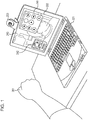
- Fig. 1 illustrates an example of a personal computer 221 according to the related art that operates an application on the basis of gestures.
- a controller 241 is displayed on a display 222 along with a mirror image 242 captured by a camera 223.
- a hand 261 of the user is recognized by the camera 223, and each button on the controller 241 is selected on the basis of the position and the shape of the user's hand 261. Through this selection, an application that is displaying an image 243 on the display 222 is controlled.
- an image corresponding to an application displayed in the foreground of the display 222 is controlled by gestures.
- an application to be controlled may not be controlled on the basis of gestures until an image corresponding to the application is displayed in the foreground of the display 222.
- US 2007/0177803 A1 discloses a multi-touch gesture dictionary.
- the gesture dictionary can include a plurality of entries, each corresponding to a particular chord.
- the dictionary entries can include a variety of motions associated with the chord and the meanings of gestures formed from the chord and the motions.
- the gesture dictionary may take the form of a dedicated computer application that may be used to look up the meaning of gestures.
- the gesture dictionary may also take the form of a computer application that may be easily accessed from other applications.
- the gesture dictionary may also be used to assign user-selected meanings to gestures. Also disclosed herein are computer systems incorporating multi-touch gesture dictionaries.
- EP 2 071 436 A1 discloses that when it is discriminated by an input-means determining unit that an input to display unit is a first input by a pen, a function of an application allocated in advance to an area on a screen of the application specified by an input coordinate of first input means determined by an input-position determining unit is executed on the basis of the first input.
- the input to the display unit is a second input by a finger
- the execution of the function of the application allocated in advance on the screen of the application is prohibited and a predetermined function not allocated to the area on the screen of the application is executed on the basis of the second input.
- US 5748974 A discloses a multimodal natural language interface that interprets user requests combining natural language input from the user with information selected from a current application and sends the request in the proper form to an appropriate auxiliary application for processing.
- An information processing apparatus according to an embodiment of the present invention is defined in claim 1.
- a program according to an embodiment of the present invention is defined in claim 8.
- the approach described herein helps to operate an application that is not displayed in the foreground of a display on the basis of gestures.
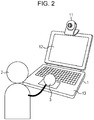
- Fig. 2 is a diagram illustrating a configuration example of a personal computer 1 according to an embodiment of the present invention.
- the personal computer 1 illustrated in Fig. 2 includes a body 13 and a display 12 on which a camera 11 is mounted.
- the camera 11 captures a still image or a moving image that may be obtained by a monocular camera, a stereo camera, an infrared camera, or the like.
- a user 2 makes a gesture in three-dimensional space using his/her hand 3, an image of the gesture is captured by the camera 11.
- the gesture is recognized on the basis of the image captured, and control corresponding to the type of gesture recognized is executed.
- the user 2 can control not an application corresponding to an image displayed on the display 12, that is, not an application operating in the foreground, but an application operating in the background.
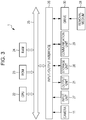
- Fig. 3 is a block diagram illustrating a configuration example of hardware of the personal computer 1.
- a CPU 22, a read only memory (ROM) 23, and a random access memory (RAM) 24 are connected to one another by a bus 25.
- An input/output interface 26 is further connected to the bus 25.
- the camera 11 including a web camera, an input unit 27 including a keyboard, a touch panel, a touch pad, a pen device, a mouse, and a microphone, the display 12, an output unit 21 including a speaker (not illustrated), and a storage unit 28 including a hard disk and a non-volatile memory are connected to the input/output interface 26.
- a communication unit 29 including a network interface and a drive 30 that drives a removable medium 31 such as a magnetic disk, an optical disk, a magneto-optical disk, or a semiconductor memory are connected to the input/output interface 26.
- the CPU 22 executes a program stored in the storage unit 28 by loading the program into the RAM 24 through the input/output interface 26 and the bus 25, in order to execute the series of processes described above.
- a program to be executed by the personal computer 1 (CPU 22) may be, for example, recorded on the removable medium 31 that is a magnetic disk (includes a flexible disk) and provided.
- the program may be recorded on the removable medium 31 that is a package medium and provided.
- a package medium an optical disk (a compact disc-read only memory (CD-ROM), a digital versatile disc (DVD), or the like), a magneto-optical disk, a semiconductor memory, or the like is used.
- the program may be provided through a wired or wireless communication medium such as a local area network, the Internet, or digital satellite broadcasting.
- the program can then be installed in the storage unit 28 through the input/output interface 26 by inserting the removable medium 31 into the drive 30.
- the program can be installed in the storage unit 28 by receiving the program with the communication unit 29 through a wired or wireless communication medium.
- the program can be installed in the ROM 23 or the storage unit 28 in advance.
- the program to be executed by the personal computer 1 may be a program that is chronologically subjected to the processing in an order described herein, or may be a program that is subjected to the processing at a necessary time such as when a call is made.
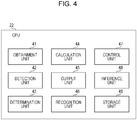
- Fig. 4 is a block diagram illustrating an example of the functional configuration of the CPU 22.
- the CPU 22 includes an obtainment unit 41, a detection unit 42, a determination unit 43, a calculation unit 44, an output unit 45, a recognition unit 46, a control unit 47, an inference unit 48, and a storage unit 49. It is to be noted that the blocks of the CPU 22 are configured to be able to provide/receive a signal to/from one another as necessary.
- the obtainment unit 41 of the CPU 22 obtains information from the camera 11, the input unit 27, or the storage unit 28.
- the detection unit 42 as detection means detects the region of a hand from the image captured by the camera 11.
- the determination unit 43 as determination means determines whether or not a process satisfies a certain condition.
- the calculation unit 44 calculates, for example, the position of the center of gravity of the detected region of the hand.
- the output unit 45 as output means outputs the information to the display 12.
- the recognition unit 46 as recognition means recognizes a gesture command.
- the control unit 47 as control means controls the operation of an application.
- the inference unit 48 as inference means infers a gesture command by analogy.
- the storage unit 49 stores the information that the obtainment unit 41 obtained from the input unit 27 in the storage unit 28.
- the personal computer 1 controls each application in a normal mode and a feedback mode.
- the normal mode is a mode in which an image of an application selected by a user is displayed.
- the feedback mode is a mode in which operation information regarding a gesture is fed back to the user.
- Fig. 5 is a diagram illustrating a display example in the normal mode. As illustrated in Fig. 5 , in the normal mode, an image 61 shown by a web browser (hereinafter simply referred to as web browser 61 as necessary) as a first application operating in the foreground is displayed on the display 12 by the output unit 45.
- web browser 61 a web browser
- a music player is operating as a second application.
- the operation of the first application is controlled on the basis of an operation in which the user directly touches the keyboard, the mouse, the touch panel, the touch pad, the pen device, or the like with his/her finger.
- the operation of the second application is controlled on the basis of a gesture operation that is performed by the user who moves his/her hand in three-dimensional space.
- a title 62 of a song selected for the music player operating in the background is displayed in the web browser 61. It is to be noted that the title 62 might not be displayed.
- FIG. 6 A process for inputting a gesture command when a gesture is input by the user in the normal mode, which has been illustrated in Fig. 5 , is illustrated in Fig. 6 .
- Fig. 6 is a flowchart describing the process for inputting a gesture command, where a gesture obtained from the user is recognized and the type of gesture recognized is input as a gesture command.
- the process for inputting a gesture command is executed when, under a condition that a certain application (a web browser, for example) is operating in the foreground, another application (a music player, for example) is operating in the background.
- a certain application a web browser, for example
- another application a music player, for example
- step S1 the obtainment unit 41 obtains an image captured by the camera 11. That is, the image is captured and a time stamp is obtained as time information at the time.
- the obtainment unit 41 obtains a plurality of images at the same time.
- the images to be obtained may be images that have been obtained by the camera 11, or may be edited images, which are, for example, grayscale images or the like.
- the detection unit 42 detects the region of a hand from the obtained images.
- the region of the hand for example, a region that changes in the plurality of images that have been obtained is detected. That is, since a background image is still, the difference in pixel values of the background portion between two images will be zero or sufficiently small. On the other hand, since the hand can move, the difference in pixel values of the hand portion between the two images may be a sufficiently large value. An area in which difference values are equal to or higher than a certain threshold value can be detected as the region of the hand.
- step S3 the determination unit 43 determines whether or not the region of the hand detected in step S2 exists. That is, a selected image and an image captured a certain period of time or more ago, which is, for example, 100 ms or more ago, are compared, so as to determine whether or not there is an area in which the dimensions of a region having the difference in the pixel values that is equal to or greater than the threshold value are within a standard range. Whether or not an image is one captured the certain period of time ago is determined on the basis of the time stamp.
- step S3 If it is determined in step S3 that the region of the hand does not exist, that is, if the dimensions of the region in which the difference in the pixel values is equal to or greater than the threshold value are larger or smaller than the standard range, the process returns to step S1.
- step S3 If it is determined in step S3 that the region of the hand exists, that is, if the dimensions of the region in which the difference in the pixel values is equal to or greater than the threshold value are within the standard range, the calculation unit 44 calculates the position of the center of gravity of the detected region of the hand in step S4.
- the calculation unit 44 may select one of the regions and calculate the position of the center of gravity of the selected region, or may calculate the position of the center of gravity for each of the detected regions of the hands.
- step S5 the output unit 45 outputs the trajectory of the position of the center of gravity of the detected region of the hand on the display 12.
- An example in which the trajectory of the center of gravity of the region of the hand is displayed on the display 12 is illustrated in Fig. 7 .
- Fig. 7 is a diagram illustrating an example in which the trajectory of the region of the user's hand is displayed in the normal mode.
- a trajectory 81 of the region of the hand is displayed on the display 12.
- the trajectory 81 illustrated in Fig. 7 is an example of the trajectory when a gesture command "left flick", which is a gesture in which the hand flicks from the right to the left of the screen, is input by the user.
- the trajectory 81 is represented by a movement of a circle whose center is the position of the center of gravity calculated in step S4 illustrated in Fig. 6 .
- the circle shown at each position along the movement is displayed for a certain period of time and disappears after a certain period of time has elapsed.
- the dimensions of the circle for the trajectory 81 may be changed to be larger or smaller in accordance with the elapse of time, the dimensions of the region of the hand, or the speed of movement of the region of the hand.
- the dimensions of the circle may become larger as the time elapses and then become smaller after reaching certain values, with the circle disappearing after that.
- the trajectory 81 can be represented not only by the circle but also by a single curve or anything else that represents the movement of the user's hand.
- the user can check his/her gestures without significantly obstructing the operation with the web browser 61.
- the trajectory 81 may be displayed only in the feedback mode and may not be displayed in the normal mode. In this case, the trajectory 81 can be prevented from causing an image corresponding to an application operating in the foreground to be difficult to see.
- the recognition unit 46 recognizes a gesture command on the basis of the trajectory of the position of the center of gravity of the region of the hand in step S6. That is, the type of gesture is recognized.
- An example of gesture commands to be recognized is illustrated in Fig. 8 .
- Fig. 8 is a control table illustrating relationships between gesture commands and corresponding operation content.
- the control table is stored in the storage unit 28 in advance. An example of the gesture commands and the corresponding operation content will be described.
- control unit 47 changes a song that is currently selected for the music player to a next song.
- “Right flick” is a gesture in which the hand flicks from the left to the right of the screen.
- the control unit 47 changes a song that is currently selected for the music player to a previous song.
- “Hold up hand” is a gesture in which the hand is held in front of the camera 11 for a certain period of time.
- the control unit 47 either stops a song that is currently playing back or plays back a song that has been stopped. Playback sound of a song is output from the speaker that forms the output unit 21 as output means.
- “Draw double circle clockwise” is a gesture in which the hand draws a circle twice clockwise.
- the control unit 47 registers a song that is currently selected by the music player as "favorite”.
- “Draw double circle counterclockwise” is a gesture in which the hand draws a circle twice counterclockwise.
- the control unit 47 removes a song that is currently selected by the music player from "favorite”.
- “Wave hand” is a gesture in which the hand is moved to the left and right several times in front of the camera 11.
- the control unit 47 performs switching of the mode.
- the operation "wave hand” is a gesture that the user naturally makes when a gesture has not been recognized, that is, when it is necessary to provide the user with feedback information. Therefore, by relating the gesture "wave hand” to the switching of the mode, the user can be provided with feedback information more easily.
- a gesture such as "open hands", where hands that have been held together are separated to the left and right like when a curtain is being opened by both hands can be related to switching of the mode.
- “Move hand up and down” is a gesture in which the hand is moved up and down several times in front of the camera 11.
- the control unit 47 randomly selects a song that is registered in the music player.
- gesture commands and the processes corresponding to the gesture commands are not limited to the example illustrated in Fig. 8 .
- step S7 the determination unit 43 determines whether or not a recognized gesture command exists. That is, it is determined whether or not the recognized gesture command matches a gesture command in the control table of Fig. 8 .
- step S7 If it is determined in step S7 that a recognized gesture command does not exist, that is, if it is determined that the recognized gesture command does not match a gesture command in the control table of Fig. 8 , a process for suggesting an input method is executed in step S8. The details of the process for suggesting an input method are illustrated in Fig. 9 .
- Fig. 9 is a flowchart illustrating the details of the process for suggesting an input method in step S8 of Fig. 6 .
- the process for suggesting an input method is a process for allowing the user to learn a method for inputting a gesture when a gesture input by the user has not been recognized.
- step S31 the determination unit 43 determines whether or not the current mode is the feedback mode.
- the details of the feedback mode are illustrated in Fig. 10 .
- Fig. 10 is a diagram illustrating a display example in the feedback mode.
- the feedback mode at least a mirror image and a gesture command list are displayed as operation information regarding the gestures.
- the trajectory 81, a mirror image 82, a gesture command list 83, gesture commands 84 (more specifically, gesture commands 84-1 to 84-6), jacket pictures 85 (more specifically, jacket pictures 85-1 to 85-7), a singer's name 86-2, and a song's name 87-2 are displayed on the display 12.
- the mirror image 82 which is an image of the user that has been captured by the camera 11 and subjected to image processing, is displayed in the background.
- a mirror image is an image in which left and right are reversed. That is, when the user moves his/her right hand, a left hand 72 moves in the image of a user 71 displayed in the mirror image 82. When the left hand of the user moves, the right hand moves in the mirror image 82.
- the movement of the user who is inputting a gesture by hand corresponds to the movement of the hand 72 of the user 71 displayed on the display 12, thereby allowing the user to easily check the operation by the gesture.
- the image obtained by performing another type of image processing on the mirror image 82 may be, for example, an image in which the color of the image has been changed to monochrome, sepia, or the like, an image in which a part of a face or a body has been recognized and changed to an avatar corresponding to the part, a pencil sketch, a painting-like image, or the like.
- a list of gestures that the user can input is displayed on the gesture command list 83.
- gesture commands 84-1 to 84-6 a simple input method for each gesture, that is, the way to move the hand, and the operation content are indicated.
- An image of the gesture command 84-1 illustrates the gesture command "left flick” in the control table of Fig. 8 .
- "Next" which corresponds to the gesture command 84-1, represents the operation content "change to next song”.
- An image of the gesture command 84-2 illustrates the gesture command "right flick” in the control table.
- "Previous”, which corresponds to the gesture command 84-2, represents the operation content "change to previous song”.
- An image of the gesture command 84-3 illustrates the gesture command "hold up hand” in the control table.
- “Play_stop”, which corresponds to the gesture command 84-3, represents the operation content "switching between playback and stop”.
- An image of the gesture command 84-4 illustrates the gesture command "draw double circle clockwise” in the control table.
- “Thumbup”, which corresponds to the gesture command 84-4 represents the operation content "registration to favorite”.
- An image of the gesture command 84-5 illustrates the gesture command "move hand up and down” in the control table.
- “Shuffle” which corresponds to the gesture command 84-5, represents the operation content "random selection of song”.
- gesture command 84-6 An image of the gesture command 84-6 illustrates the gesture command "wave hand” in the control table.
- Switchmode which corresponds to the gesture command 84-6, represents the operation content "switching of mode”.
- gesture commands 84 that simply indicate the gestures and the operation corresponding to the gestures are displayed on the gesture command list 83 as described above, the user can easily check the type of gesture and the corresponding operation content.
- the jacket picture 85-2 illustrates a jacket of a song that is currently selected.
- An image for the jacket picture 85-2 that is currently selected is, for example, made to bounce up and down or displayed bigger than jackets that are not selected, so as to make it clear that the jacket picture 85-2 is selected.
- An indication "redtallon" as the singer's name 86-2 is the singer's name of a song of the jacket picture 85-2 that is currently selected.
- the song's name 87-2 "Seishun no Mori" that is currently selected is the name of the song of the jacket picture 85-2.
- the user can check the input operation of gestures, the cause of a gesture not being recognized, the type and the operation content of a gesture, and the operation of a corresponding application such as a music player.
- step S31 if it is determined in step S31 that the current mode is not the feedback mode, that is, if it is determined that the current mode is the normal mode, the control unit 47 switches the normal mode to the feedback mode in step S32.
- step S31 If it is determined in step S31 that the current mode is the feedback mode, or after the processing of step S32 is executed, the process proceeds to step S33.
- step S33 the inference unit 48 infers a gesture command by analogy on the basis of the trajectory of the position of the center of gravity of the region of the hand calculated by the processing of step S4 of Fig. 6 .
- processing similar to the processing for recognizing a gesture command in step S6 of Fig. 6 is executed, and, furthermore, how likely a gesture is a certain gesture command (likelihood) is calculated and evaluated in order to infer the gesture command by analogy.
- the inference unit 48 calculates the likelihood that the gesture is a circle.
- the inference unit 48 determines whether or not the likelihood is equal to or higher than a threshold value, namely, for example, 60% or more. If the likelihood calculated for the circle drawn by the user is, for example, 80%, the inference unit 48 infers the gesture made by the user to be a circle by analogy.
- step S34 the determination unit 43 determines whether or not the inferred gesture command exists. That is, the likelihood calculated for the gesture is equal to or higher than the certain threshold value.
- step S34 If it is determined in step S34 that the inferred gesture command exists, that is, if it is determined that the likelihood calculated for the gesture is equal to or higher than the certain threshold value, the output unit 45 outputs the method for inputting the gesture command in step S35.
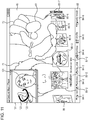
- Fig. 11 illustrates an example of outputting the method for inputting a gesture command using a moving image in the feedback mode.
- Fig. 12 illustrates an example of outputting the method for inputting a gesture command using an animation in the feedback mode.
- the user presets whether either a moving image ( Fig. 11 ) or an animation ( Fig. 12 ) is to be output as an output for the method for inputting a gesture command.
- the storage unit 49 stores the set input method in the storage unit 28.
- step S35 When the processing of step S35 is executed, the input method set by the user is read out from the storage unit 28.
- an input method suggestion window 101 is displayed on the upper left of the mirror image 82. It is to be noted that the display position of the input method suggestion window 101 is not limited to the upper left so long as the display position is within the display area of the feedback mode.
- an instructor 121 of a gesture In the input method suggestion window 101, an instructor 121 of a gesture, a hand 122 of the instructor, and a gesture instruction line 123 for learning a gesture are displayed.
- the gesture instruction line 123 represents an input method for learning a gesture of drawing a circle.
- the method for inputting a gesture is suggested to the user by playing back a moving image in which the instructor 121 moves his/her hand 122 in accordance with the gesture instruction line 123.
- the user can learn the method for inputting a gesture while checking the movement of the hand 72 and the trajectory 81 in the mirror image 82 and the moving image in the input method suggestion window 101 at the same time.
- Moving images for learning which are intended to suggest input methods, are stored in the storage unit 28 in advance and categorized in terms of the type of gesture.
- a moving image for learning to be output is determined on the basis of the gesture inferred by analogy in step S33 of Fig. 9 or the gesture that has been arbitrarily selected by the user.
- a mirror image that is obtained by performing image processing on an image to be displayed may be displayed.
- FIG. 12 an animation 141 and a trajectory 142 of the animation 141 are displayed in the mirror image 82.
- the trajectory 142 of the animation 141 represents an input method for learning a gesture of drawing a circle.
- the animation 141 moves along the trajectory 142 of the animation 141.
- the user can learn the method for inputting a gesture by moving his/her hand 72 in accordance with the animation 141.
- the trajectory 81 generated by the hand 72 that has been moved along the trajectory 142 of the animation 141 by the user is also displayed.
- Animations for suggesting input methods are also stored in the storage unit 28 in advance and categorized in terms of the type of gesture as in the case with the moving images for learning.
- An animation to be output is determined on the basis of the gesture inferred by analogy in step S33 of Fig. 9 or the gesture that has been arbitrarily selected by the user.
- step S34 if it is determined in step S34 that the inferred gesture command does not exist, that is, if it is determined that the likelihood calculated for the gesture is lower than the certain threshold value, or after the processing of step S35, the process for suggesting an input method terminates and the process returns to step S1 of Fig. 6 .
- step S32 when a gesture command has not been recognized in the normal mode, switching to the feedback mode is automatically performed (step S32) and processing for inferring a gesture command by analogy is executed (step S33).
- switching to the feedback mode may be automatically performed (step S32) only when a gesture command has been inferred by analogy after inference of the gesture command has been performed (when the processing of step S34 is determined to be "YES").
- step S7 if it is determined in step S7 that the recognized gesture command exists, that is, if it is determined that the recognized gesture command matches any of the gesture commands described in the control table of Fig. 8 , the determination unit 43 determines whether or not the gesture command is recognized as "wave hand" in step S9.
- step S9 If the gesture command is recognized as "wave hand" in step S9, that is, when switching of the mode is instructed by the user, the determination unit 43 determines whether or not the current mode is the normal mode in step S10.
- step S10 If it is determined in step S10 that the current mode is the normal mode, the control unit 47 switches the mode to the feedback mode in step S11.
- step S10 If it is determined in step S10 that the current mode is not the normal mode, that is, if it is determined that the current mode is the feedback mode, the control unit 47 switches the mode to the normal mode in step S12.
- the switching from the feedback mode to the normal mode may be performed automatically when the gesture has been correctly recognized.
- step S9 if the gesture command is not recognized as "wave hand" in step S9, that is, when a process other than mode switching is instructed by the user, the control unit 47 executes a process corresponding to the gesture command in step S13.
- a process corresponding to the gesture command refers to a process for executing the operation content described in the control table of Fig. 8 .
- a song is output from the speaker as the output unit 21, but description of specific examples is omitted since the specific examples have been described above with reference to Fig. 8 .
- step S14 the determination unit 43 determines whether or not the current mode is the normal mode.
- step S14 If it is determined in step S14 that the current mode is the normal mode, the output unit 45 outputs information corresponding to the control result of the gesture command on the display 12 for a certain period of time.
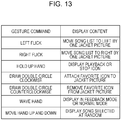
- An example of display content corresponding to the gesture commands is illustrated in Fig. 13 .
- Fig. 13 is a diagram illustrating a display table that represents relationships between the gesture commands and the display content corresponding to the gesture commands. It is to be noted that the control table of Fig. 8 and the display table of Fig. 13 may be managed together as a single table.
- the output unit 45 moves a song list to the left by one jacket picture.
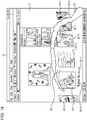
- a display example of the normal mode when "left flick" has been input is illustrated in Fig. 14 .
- Fig. 14 is a diagram illustrating a display example when "left flick" has been input as a gesture command in the normal mode.
- Fig. 14 illustrates a state in which "left flick" has been performed twice from a condition illustrated in Fig. 10 , that is, a state in which the song of the jacket picture 85-2 was selected.
- Fig. 14 illustrates a condition in which each of the jacket pictures 85-1 to 85-7 illustrated in Fig. 10 has moved to the left by two jacket pictures and the song of the jacket picture 85-4 is selected.
- the output unit 45 moves the song list to the right by one jacket picture.
- the output unit 45 displays an icon of playback or stop within a screen area of the display 12.
- the output unit 45 displays an icon indicating "favorite" on the jacket pictures 85.
- a favorite mark 88-4 displayed on the upper right of the jacket picture 85-4 in Fig. 14 is the icon indicating "favorite”.
- the output unit 45 removes the display of an icon indicating "favorite" from the jacket pictures 85. That is, the display of the favorite mark 88-4 in Fig. 14 is deleted.
- a jacket picture 85-21, a singer's name 86-21, and a song's name 87-21 (none of these are illustrated) that have been randomly selected are displayed at the positions of the jacket picture 85-4, a singer's name 86-4, and a song's name 87-4 in Fig. 14 , respectively.
- jacket pictures 85-20 and 85-22 to 85-26 (not illustrated) that precede or follow the jacket picture 85-21 are displayed instead of the jacket pictures 85-3 and 85-5 to 85-9 in Fig. 14 .
- gesture commands and the display content corresponding to the gesture commands are not limited to the example of Fig. 13 .
- the output unit 45 may output audio information such as voice or effect sound.
- the output unit 45 plays back a voice of the name of the operation such as “next song” or “next” or a name of the gesture command, or the like, or an effect sound such as wind noise or a mingling sound as the audio information.
- the output unit 45 may output either a display image or audio information corresponding to the display content on the display table of Fig. 13 , or may output both the display image and the audio information.
- a display image is deleted after a certain period of time in the normal mode.
- the display image can be restrained from causing significant obstruction to an operation performed by the user with the web browser 61.
- an icon corresponding to a gesture command may be displayed on a part of the display area of the image of the web browser 61, or the display image may be displayed on the image of the web browser 61 in a semitransparent manner.
- step S14 If it is determined in step S14 that the current mode is not the normal mode, that is, if it is determined that the current mode is the feedback mode, the output unit 45 outputs information corresponding to the control result of the gesture command in step S16.
- step S16 The information output in the processing of step S16 is the same as that output in the processing of step S15.
- steps S11, S12, S15, and S16 After the processing of steps S11, S12, S15, and S16, the process returns to step S1 and the same process is repeated.
- the user can operate an application operating in the background on the basis of gestures while seeing an application operating in the foreground.
- the user can check the result of an operation performed on an application operating in the background on the basis of a gesture without obstructing the operation of the application operating in the foreground.
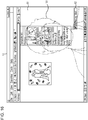
- Fig. 15 is a diagram illustrating another display example in the normal mode.
- Fig. 15 illustrates an example in which the operation of an application operating in the background is controlled by recognizing the shape of a hand as a gesture.
- a proximity region 161 of the hand in Fig. 15 is displayed instead of the trajectory 81 illustrated in Fig. 7 .
- this process is executed by calculating the shape of a hand in step S4 of Fig. 6 instead of calculating the position of the center of gravity of the region of a hand, and by outputting the proximity region 161 of the hand with the output unit 45 in step S5 instead of outputting the trajectory 81 of the position of the center of gravity of the region of the hand.
- the shape of the user's hand may be, for example, a closed hand, an open hand, or a thumb up shape (raising a thumb).
- the operation of an application operating in the background can be controlled by recognizing these gestures.
- Figs. 16 and 17 are diagrams illustrating other display examples in the feedback mode.
- Fig. 16 is a diagram illustrating an example in which an image of the feedback mode is superimposed on the image of the normal mode ( Fig. 5 ) in a semitransparent manner and output.
- a semitransparent mirror image 181 is displayed as the image of the feedback mode for simplicity.
- the user can feed back the operation of a gesture while displaying an application such as the web browser 61.
- Fig. 17 is a diagram illustrating an example in which the image of the feedback mode ( Fig. 10 ) is output in a region that is part of the image of the normal mode ( Fig. 5 ).
- a feedback window 201 is output in a lower right region of the display area of the web browser 61.
- the display in the feedback window 201 is the same as that in the image of the feedback mode illustrated in Fig. 10 .
- the trajectory 81 may be displayed on only either of the images of the modes when the image of the feedback mode is output in a region that is part of the image of the normal mode as in the example of Fig. 17 .
- the trajectory 81 is displayed only on the image of the feedback mode.
- first application and the second application are not limited to a web browser and a music player, respectively.
- the music player since a music player is operating in the background, the music player is operated on the basis of the gesture commands.
- the web browser is operated on the basis of the gesture commands.
Landscapes
- Engineering & Computer Science (AREA)
- Theoretical Computer Science (AREA)
- General Engineering & Computer Science (AREA)
- Human Computer Interaction (AREA)
- Physics & Mathematics (AREA)
- General Physics & Mathematics (AREA)
- User Interface Of Digital Computer (AREA)
- Image Analysis (AREA)
Applications Claiming Priority (1)
| Application Number | Priority Date | Filing Date | Title |
|---|---|---|---|
| JP2010050630A JP5413673B2 (ja) | 2010-03-08 | 2010-03-08 | 情報処理装置および方法、並びにプログラム |
Publications (3)
| Publication Number | Publication Date |
|---|---|
| EP2365422A2 EP2365422A2 (en) | 2011-09-14 |
| EP2365422A3 EP2365422A3 (en) | 2015-01-21 |
| EP2365422B1 true EP2365422B1 (en) | 2019-01-02 |
Family
ID=43877270
Family Applications (1)
| Application Number | Title | Priority Date | Filing Date |
|---|---|---|---|
| EP11153336.0A Not-in-force EP2365422B1 (en) | 2010-03-08 | 2011-02-04 | Information processing apparatus controlled by hand gestures and corresponding method and program |
Country Status (7)
| Country | Link |
|---|---|
| US (1) | US9229533B2 (https=) |
| EP (1) | EP2365422B1 (https=) |
| JP (1) | JP5413673B2 (https=) |
| KR (1) | KR20110102173A (https=) |
| CN (1) | CN102193627B (https=) |
| BR (1) | BRPI1101065A2 (https=) |
| RU (1) | RU2011107930A (https=) |
Families Citing this family (59)
| Publication number | Priority date | Publication date | Assignee | Title |
|---|---|---|---|---|
| US8788977B2 (en) | 2008-11-20 | 2014-07-22 | Amazon Technologies, Inc. | Movement recognition as input mechanism |
| US20120224040A1 (en) * | 2011-03-03 | 2012-09-06 | Hand Held Products, Inc. | Imager reader with hand gesture interface |
| US8386619B2 (en) | 2011-03-23 | 2013-02-26 | Color Labs, Inc. | Sharing content among a group of devices |
| TWI466021B (zh) * | 2011-05-24 | 2014-12-21 | Asustek Comp Inc | 電腦系統及其控制方法 |
| US20120304067A1 (en) * | 2011-05-25 | 2012-11-29 | Samsung Electronics Co., Ltd. | Apparatus and method for controlling user interface using sound recognition |
| US8621019B2 (en) | 2011-09-21 | 2013-12-31 | Color Labs, Inc. | Live content sharing within a social networking environment |
| JP2013084233A (ja) * | 2011-09-28 | 2013-05-09 | Kyocera Corp | 装置、方法、及びプログラム |
| JP5581292B2 (ja) | 2011-09-30 | 2014-08-27 | 楽天株式会社 | 検索装置、検索方法、記録媒体、ならびに、プログラム |
| US8847881B2 (en) | 2011-11-18 | 2014-09-30 | Sony Corporation | Gesture and voice recognition for control of a device |
| JP6243112B2 (ja) | 2011-12-09 | 2017-12-06 | ソニー株式会社 | 情報処理装置、情報処理方法、および記録媒体 |
| JP5715977B2 (ja) * | 2012-03-05 | 2015-05-13 | 東芝テック株式会社 | 操作支援表示装置およびプログラム |
| JP2013196482A (ja) * | 2012-03-21 | 2013-09-30 | Casio Comput Co Ltd | 入力ユーザーインターフェイス装置、投影装置、プログラム及びコマンド決定方法 |
| TWI476706B (zh) * | 2012-04-30 | 2015-03-11 | Pixart Imaging Inc | 偵測物件移動輸出命令的方法及其系統 |
| US20130293454A1 (en) * | 2012-05-04 | 2013-11-07 | Samsung Electronics Co. Ltd. | Terminal and method for controlling the same based on spatial interaction |
| JP2013257686A (ja) * | 2012-06-12 | 2013-12-26 | Sony Corp | 投影型画像表示装置及び画像投影方法、並びにコンピューター・プログラム |
| US20130335587A1 (en) * | 2012-06-14 | 2013-12-19 | Sony Mobile Communications, Inc. | Terminal device and image capturing method |
| US9098111B2 (en) * | 2012-06-22 | 2015-08-04 | Microsoft Technology Licensing, Llc | Focus guidance within a three-dimensional interface |
| US9684398B1 (en) | 2012-08-06 | 2017-06-20 | Google Inc. | Executing a default action on a touchscreen device |
| JP5565886B2 (ja) | 2012-08-17 | 2014-08-06 | Necシステムテクノロジー株式会社 | 入力装置、入力方法、及びプログラム |
| KR101947034B1 (ko) * | 2012-08-21 | 2019-04-25 | 삼성전자 주식회사 | 휴대 기기의 입력 장치 및 방법 |
| JP2014085965A (ja) * | 2012-10-25 | 2014-05-12 | Nec Personal Computers Ltd | 情報処理装置、情報処理方法、及びプログラム |
| JP2014085967A (ja) * | 2012-10-25 | 2014-05-12 | Nec Personal Computers Ltd | 情報処理装置、情報処理方法、及びプログラム |
| JP2014085964A (ja) * | 2012-10-25 | 2014-05-12 | Nec Personal Computers Ltd | 情報処理方法、情報処理装置、及びプログラム |
| CN103941966B (zh) * | 2013-01-21 | 2017-12-26 | 联想(北京)有限公司 | 应用控制的方法及电子设备 |
| JP6002058B2 (ja) * | 2013-02-22 | 2016-10-05 | 株式会社東芝 | 画像処理装置、方法、及びプログラム |
| JP6104639B2 (ja) | 2013-03-01 | 2017-03-29 | 東芝メディカルシステムズ株式会社 | X線診断装置 |
| US9035874B1 (en) | 2013-03-08 | 2015-05-19 | Amazon Technologies, Inc. | Providing user input to a computing device with an eye closure |
| US20140282272A1 (en) * | 2013-03-15 | 2014-09-18 | Qualcomm Incorporated | Interactive Inputs for a Background Task |
| US9436287B2 (en) | 2013-03-15 | 2016-09-06 | Qualcomm Incorporated | Systems and methods for switching processing modes using gestures |
| US20140325418A1 (en) * | 2013-04-30 | 2014-10-30 | Microsoft Corporation | Automatically manipulating visualized data based on interactivity |
| KR102089447B1 (ko) | 2013-06-04 | 2020-03-16 | 삼성전자 주식회사 | 전자 기기 및 그의 애플리케이션 제어 방법 |
| WO2015012006A1 (ja) * | 2013-07-22 | 2015-01-29 | オリンパスメディカルシステムズ株式会社 | 医療用携帯端末装置 |
| US9832452B1 (en) | 2013-08-12 | 2017-11-28 | Amazon Technologies, Inc. | Robust user detection and tracking |
| US11199906B1 (en) * | 2013-09-04 | 2021-12-14 | Amazon Technologies, Inc. | Global user input management |
| US20150139483A1 (en) * | 2013-11-15 | 2015-05-21 | David Shen | Interactive Controls For Operating Devices and Systems |
| KR20150072719A (ko) * | 2013-12-20 | 2015-06-30 | 삼성전자주식회사 | 디스플레이장치 및 그 제어방법 |
| US10057483B2 (en) | 2014-02-12 | 2018-08-21 | Lg Electronics Inc. | Mobile terminal and method thereof |
| CN103955274B (zh) * | 2014-04-21 | 2017-09-01 | 小米科技有限责任公司 | 应用控制方法和装置 |
| WO2015174526A1 (ja) * | 2014-05-16 | 2015-11-19 | エイディシーテクノロジー株式会社 | 車両制御システム |
| US10013160B2 (en) * | 2014-05-29 | 2018-07-03 | International Business Machines Corporation | Detecting input based on multiple gestures |
| US10782787B2 (en) * | 2014-06-06 | 2020-09-22 | Adobe Inc. | Mirroring touch gestures |
| JP6379822B2 (ja) * | 2014-08-01 | 2018-08-29 | ヤマハ株式会社 | 入力装置及び電子機器 |
| USD768186S1 (en) * | 2015-05-01 | 2016-10-04 | Microsoft Corporation | Display screen with graphical user interface |
| USD769928S1 (en) * | 2015-05-01 | 2016-10-25 | Microsoft Corporation | Display screen with animated graphical user interface |
| US10332297B1 (en) * | 2015-09-04 | 2019-06-25 | Vishal Vadodaria | Electronic note graphical user interface having interactive intelligent agent and specific note processing features |
| US10881713B2 (en) * | 2015-10-28 | 2021-01-05 | Atheer, Inc. | Method and apparatus for interface control with prompt and feedback |
| JP6607115B2 (ja) * | 2016-03-25 | 2019-11-20 | 三菱自動車工業株式会社 | タッチパネル装置 |
| DE102018208866A1 (de) * | 2018-06-06 | 2019-12-12 | Audi Ag | Verfahren zum Erkennen einer Eingabe |
| CN109240494B (zh) * | 2018-08-23 | 2023-09-12 | 京东方科技集团股份有限公司 | 电子显示板的控制方法、计算机可读存储介质和控制系统 |
| CN109885231B (zh) * | 2019-02-27 | 2021-07-02 | 北京市商汤科技开发有限公司 | 显示方法及装置、电子设备及存储介质 |
| EP3979954B1 (de) | 2019-06-05 | 2025-11-12 | Otto Bock Healthcare Products GmbH | Verfahren zum betreiben einer orthopädietechnischen einrichtung und entsprechende einrichtung |
| JP2021033967A (ja) * | 2019-08-29 | 2021-03-01 | アルパイン株式会社 | タッチパネル付表示装置 |
| US20220036678A1 (en) * | 2020-07-31 | 2022-02-03 | Viraat Authentication Systems Inc. | Systems, devices and methods of collecting information via touchless technology to control access to physical spaces |
| CN112835484B (zh) * | 2021-02-02 | 2022-11-08 | 北京地平线机器人技术研发有限公司 | 基于操作体的动态显示方法、装置、存储介质及电子设备 |
| EP4302167A1 (en) | 2021-03-03 | 2024-01-10 | Telefonaktiebolaget LM Ericsson (publ) | A computer a software module arrangement, a circuitry arrangement, a user equipment and a method for an improved and extended user interface |
| US20240036701A1 (en) * | 2021-03-03 | 2024-02-01 | Telefonaktiebolaget Lm Ericsson (Publ) | A computer a software module arrangement, a circuitry arrangement, a user equipment and a method for an improved and extended user interface |
| CN113849093B (zh) * | 2021-09-28 | 2024-10-22 | 联想(北京)有限公司 | 一种控制方法、装置及电子设备 |
| JP2023184002A (ja) | 2022-06-17 | 2023-12-28 | セイコーエプソン株式会社 | 制御装置の制御方法、制御装置及び表示システム |
| US12321667B2 (en) | 2022-07-14 | 2025-06-03 | Becton, Dickinson And Company | Contactless control of physiological monitors |
Family Cites Families (30)
| Publication number | Priority date | Publication date | Assignee | Title |
|---|---|---|---|---|
| US5748974A (en) * | 1994-12-13 | 1998-05-05 | International Business Machines Corporation | Multimodal natural language interface for cross-application tasks |
| KR19990011180A (ko) * | 1997-07-22 | 1999-02-18 | 구자홍 | 화상인식을 이용한 메뉴 선택 방법 |
| US8479122B2 (en) * | 2004-07-30 | 2013-07-02 | Apple Inc. | Gestures for touch sensitive input devices |
| US7840912B2 (en) * | 2006-01-30 | 2010-11-23 | Apple Inc. | Multi-touch gesture dictionary |
| US20070177804A1 (en) * | 2006-01-30 | 2007-08-02 | Apple Computer, Inc. | Multi-touch gesture dictionary |
| US6249606B1 (en) * | 1998-02-19 | 2001-06-19 | Mindmaker, Inc. | Method and system for gesture category recognition and training using a feature vector |
| US7469381B2 (en) * | 2007-01-07 | 2008-12-23 | Apple Inc. | List scrolling and document translation, scaling, and rotation on a touch-screen display |
| JP2001202174A (ja) * | 2000-01-21 | 2001-07-27 | Canon Inc | 画像表示装置、方法および記憶媒体 |
| US20030001908A1 (en) * | 2001-06-29 | 2003-01-02 | Koninklijke Philips Electronics N.V. | Picture-in-picture repositioning and/or resizing based on speech and gesture control |
| US7886236B2 (en) * | 2003-03-28 | 2011-02-08 | Microsoft Corporation | Dynamic feedback for gestures |
| JP2006527439A (ja) * | 2003-06-13 | 2006-11-30 | ユニヴァーシティ オブ ランカスター | ユーザインタフェース |
| US7365737B2 (en) * | 2004-03-23 | 2008-04-29 | Fujitsu Limited | Non-uniform gesture precision |
| EP1645944B1 (en) * | 2004-10-05 | 2012-08-15 | Sony France S.A. | A content-management interface |
| US8147248B2 (en) * | 2005-03-21 | 2012-04-03 | Microsoft Corporation | Gesture training |
| JP2007109118A (ja) * | 2005-10-17 | 2007-04-26 | Hitachi Ltd | 入力指示処理装置および入力指示処理プログラム |
| US8549442B2 (en) * | 2005-12-12 | 2013-10-01 | Sony Computer Entertainment Inc. | Voice and video control of interactive electronically simulated environment |
| US7783983B1 (en) * | 2006-04-13 | 2010-08-24 | Emc Corporation | User interface for controls |
| CN101523331B (zh) * | 2006-09-28 | 2015-12-09 | 京瓷株式会社 | 便携式终端及其控制方法 |
| JP2008140101A (ja) * | 2006-12-01 | 2008-06-19 | Advanced Telecommunication Research Institute International | 無制約、リアルタイム、かつマーカ不使用の手トラッキング装置 |
| US9311528B2 (en) * | 2007-01-03 | 2016-04-12 | Apple Inc. | Gesture learning |
| JP2008282092A (ja) | 2007-05-08 | 2008-11-20 | Canon Inc | ジェスチャーコマンドを覚えながら操作できる情報処理装置 |
| US8060063B1 (en) * | 2007-09-07 | 2011-11-15 | Sprint Communications Company L.P. | Presenting messages on a mobile device that is currently presenting other media content |
| JP2009089068A (ja) * | 2007-09-28 | 2009-04-23 | Victor Co Of Japan Ltd | 電子機器の制御装置、制御方法及び制御プログラム |
| US9545571B2 (en) * | 2008-01-25 | 2017-01-17 | Nintendo Co., Ltd. | Methods and apparatus for a video game magic system |
| US20110102570A1 (en) * | 2008-04-14 | 2011-05-05 | Saar Wilf | Vision based pointing device emulation |
| US20100031202A1 (en) * | 2008-08-04 | 2010-02-04 | Microsoft Corporation | User-defined gesture set for surface computing |
| JP4591798B2 (ja) * | 2008-10-23 | 2010-12-01 | Necカシオモバイルコミュニケーションズ株式会社 | 端末装置及びプログラム |
| KR101019335B1 (ko) * | 2008-11-11 | 2011-03-07 | 주식회사 팬택 | 제스처를 이용한 이동단말의 어플리케이션 제어 방법 및 시스템 |
| US9377857B2 (en) * | 2009-05-01 | 2016-06-28 | Microsoft Technology Licensing, Llc | Show body position |
| WO2010150201A1 (en) * | 2009-06-25 | 2010-12-29 | Koninklijke Philips Electronics N.V. | Geture recognition using chroma- keying |
-
2010
- 2010-03-08 JP JP2010050630A patent/JP5413673B2/ja not_active Expired - Fee Related
-
2011
- 2011-01-27 US US13/015,120 patent/US9229533B2/en not_active Expired - Fee Related
- 2011-02-04 EP EP11153336.0A patent/EP2365422B1/en not_active Not-in-force
- 2011-02-28 KR KR1020110017885A patent/KR20110102173A/ko not_active Withdrawn
- 2011-03-01 RU RU2011107930/08A patent/RU2011107930A/ru unknown
- 2011-03-01 BR BRPI1101065-7A patent/BRPI1101065A2/pt not_active IP Right Cessation
- 2011-03-01 CN CN201110051064.0A patent/CN102193627B/zh not_active Expired - Fee Related
Non-Patent Citations (1)
| Title |
|---|
| None * |
Also Published As
| Publication number | Publication date |
|---|---|
| BRPI1101065A2 (pt) | 2012-08-07 |
| CN102193627A (zh) | 2011-09-21 |
| JP5413673B2 (ja) | 2014-02-12 |
| US9229533B2 (en) | 2016-01-05 |
| CN102193627B (zh) | 2015-11-25 |
| RU2011107930A (ru) | 2012-09-10 |
| US20110216075A1 (en) | 2011-09-08 |
| JP2011186730A (ja) | 2011-09-22 |
| KR20110102173A (ko) | 2011-09-16 |
| EP2365422A3 (en) | 2015-01-21 |
| EP2365422A2 (en) | 2011-09-14 |
Similar Documents
| Publication | Publication Date | Title |
|---|---|---|
| EP2365422B1 (en) | Information processing apparatus controlled by hand gestures and corresponding method and program | |
| US11809637B2 (en) | Method and device for adjusting the control-display gain of a gesture controlled electronic device | |
| US20200057506A1 (en) | Systems and Methods for User Generated Content Authoring | |
| WO2022247506A1 (en) | Systems and methods for controlling virtual widgets in gesture-controlled device | |
| CN106249882B (zh) | 一种应用于vr设备的手势操控方法与装置 | |
| US10386959B2 (en) | Information processing device, operation input method and operation input program | |
| US9791918B2 (en) | Breath-sensitive digital interface | |
| CN110275664B (zh) | 用于提供视听反馈的设备、方法和图形用户界面 | |
| US9507417B2 (en) | Systems and methods for implementing head tracking based graphical user interfaces (GUI) that incorporate gesture reactive interface objects | |
| US9761277B2 (en) | Playback state control by position change detection | |
| US10572017B2 (en) | Systems and methods for providing dynamic haptic playback for an augmented or virtual reality environments | |
| KR102134882B1 (ko) | 컨텐츠 재생을 제어하기 위한 방법 및 장치 | |
| KR20160133305A (ko) | 제스쳐 인식 방법, 컴퓨팅 장치 및 제어 장치 | |
| KR101366150B1 (ko) | 동영상 재생속도 제어 사용자 인터페이싱 방법 및 그 방법을 실행하는 프로그램이 기록된 컴퓨터로 읽을 수 있는 기록매체 | |
| EP2362326A2 (en) | Systems and methods for motion recognition with minimum delay | |
| CN118251878A (zh) | 使用多模态合成进行通信的方法和设备 | |
| KR102216358B1 (ko) | 제스쳐를 이용하는 단말 제어 방법 | |
| JP2014154908A (ja) | 動画再生装置およびプログラム | |
| KR102540798B1 (ko) | 사용자 인터페이스 제공 방법 및 모바일 단말 | |
| Maru et al. | Gesto-Drive–Real-Time HCI for Peripheral-Free Gaming | |
| KR102101411B1 (ko) | 디스플레이 장치 및 그의 아바타 디스플레이 방법 | |
| CN114520849A (zh) | 媒体播放的控制方法和控制装置 |
Legal Events
| Date | Code | Title | Description |
|---|---|---|---|
| PUAI | Public reference made under article 153(3) epc to a published international application that has entered the european phase |
Free format text: ORIGINAL CODE: 0009012 |
|
| 17P | Request for examination filed |
Effective date: 20110204 |
|
| AK | Designated contracting states |
Kind code of ref document: A2 Designated state(s): AL AT BE BG CH CY CZ DE DK EE ES FI FR GB GR HR HU IE IS IT LI LT LU LV MC MK MT NL NO PL PT RO RS SE SI SK SM TR |
|
| AX | Request for extension of the european patent |
Extension state: BA ME |
|
| PUAL | Search report despatched |
Free format text: ORIGINAL CODE: 0009013 |
|
| AK | Designated contracting states |
Kind code of ref document: A3 Designated state(s): AL AT BE BG CH CY CZ DE DK EE ES FI FR GB GR HR HU IE IS IT LI LT LU LV MC MK MT NL NO PL PT RO RS SE SI SK SM TR |
|
| AX | Request for extension of the european patent |
Extension state: BA ME |
|
| RIC1 | Information provided on ipc code assigned before grant |
Ipc: G06F 3/01 20060101AFI20141218BHEP Ipc: G06F 3/03 20060101ALI20141218BHEP |
|
| STAA | Information on the status of an ep patent application or granted ep patent |
Free format text: STATUS: EXAMINATION IS IN PROGRESS |
|
| 17Q | First examination report despatched |
Effective date: 20170214 |
|
| GRAP | Despatch of communication of intention to grant a patent |
Free format text: ORIGINAL CODE: EPIDOSNIGR1 |
|
| STAA | Information on the status of an ep patent application or granted ep patent |
Free format text: STATUS: GRANT OF PATENT IS INTENDED |
|
| RIC1 | Information provided on ipc code assigned before grant |
Ipc: G06F 3/048 20060101ALI20180622BHEP Ipc: G06F 3/03 20060101ALI20180622BHEP Ipc: G06F 3/01 20060101AFI20180622BHEP |
|
| INTG | Intention to grant announced |
Effective date: 20180725 |
|
| GRAS | Grant fee paid |
Free format text: ORIGINAL CODE: EPIDOSNIGR3 |
|
| GRAA | (expected) grant |
Free format text: ORIGINAL CODE: 0009210 |
|
| STAA | Information on the status of an ep patent application or granted ep patent |
Free format text: STATUS: THE PATENT HAS BEEN GRANTED |
|
| AK | Designated contracting states |
Kind code of ref document: B1 Designated state(s): AL AT BE BG CH CY CZ DE DK EE ES FI FR GB GR HR HU IE IS IT LI LT LU LV MC MK MT NL NO PL PT RO RS SE SI SK SM TR |
|
| REG | Reference to a national code |
Ref country code: GB Ref legal event code: FG4D |
|
| REG | Reference to a national code |
Ref country code: CH Ref legal event code: EP Ref country code: AT Ref legal event code: REF Ref document number: 1085195 Country of ref document: AT Kind code of ref document: T Effective date: 20190115 |
|
| REG | Reference to a national code |
Ref country code: IE Ref legal event code: FG4D |
|
| REG | Reference to a national code |
Ref country code: DE Ref legal event code: R096 Ref document number: 602011055292 Country of ref document: DE |
|
| REG | Reference to a national code |
Ref country code: NL Ref legal event code: MP Effective date: 20190102 |
|
| REG | Reference to a national code |
Ref country code: LT Ref legal event code: MG4D |
|
| REG | Reference to a national code |
Ref country code: AT Ref legal event code: MK05 Ref document number: 1085195 Country of ref document: AT Kind code of ref document: T Effective date: 20190102 |
|
| PG25 | Lapsed in a contracting state [announced via postgrant information from national office to epo] |
Ref country code: NL Free format text: LAPSE BECAUSE OF FAILURE TO SUBMIT A TRANSLATION OF THE DESCRIPTION OR TO PAY THE FEE WITHIN THE PRESCRIBED TIME-LIMIT Effective date: 20190102 |
|
| PG25 | Lapsed in a contracting state [announced via postgrant information from national office to epo] |
Ref country code: LT Free format text: LAPSE BECAUSE OF FAILURE TO SUBMIT A TRANSLATION OF THE DESCRIPTION OR TO PAY THE FEE WITHIN THE PRESCRIBED TIME-LIMIT Effective date: 20190102 Ref country code: FI Free format text: LAPSE BECAUSE OF FAILURE TO SUBMIT A TRANSLATION OF THE DESCRIPTION OR TO PAY THE FEE WITHIN THE PRESCRIBED TIME-LIMIT Effective date: 20190102 Ref country code: NO Free format text: LAPSE BECAUSE OF FAILURE TO SUBMIT A TRANSLATION OF THE DESCRIPTION OR TO PAY THE FEE WITHIN THE PRESCRIBED TIME-LIMIT Effective date: 20190402 Ref country code: SE Free format text: LAPSE BECAUSE OF FAILURE TO SUBMIT A TRANSLATION OF THE DESCRIPTION OR TO PAY THE FEE WITHIN THE PRESCRIBED TIME-LIMIT Effective date: 20190102 Ref country code: PT Free format text: LAPSE BECAUSE OF FAILURE TO SUBMIT A TRANSLATION OF THE DESCRIPTION OR TO PAY THE FEE WITHIN THE PRESCRIBED TIME-LIMIT Effective date: 20190502 Ref country code: ES Free format text: LAPSE BECAUSE OF FAILURE TO SUBMIT A TRANSLATION OF THE DESCRIPTION OR TO PAY THE FEE WITHIN THE PRESCRIBED TIME-LIMIT Effective date: 20190102 Ref country code: PL Free format text: LAPSE BECAUSE OF FAILURE TO SUBMIT A TRANSLATION OF THE DESCRIPTION OR TO PAY THE FEE WITHIN THE PRESCRIBED TIME-LIMIT Effective date: 20190102 |
|
| PG25 | Lapsed in a contracting state [announced via postgrant information from national office to epo] |
Ref country code: LV Free format text: LAPSE BECAUSE OF FAILURE TO SUBMIT A TRANSLATION OF THE DESCRIPTION OR TO PAY THE FEE WITHIN THE PRESCRIBED TIME-LIMIT Effective date: 20190102 Ref country code: IS Free format text: LAPSE BECAUSE OF FAILURE TO SUBMIT A TRANSLATION OF THE DESCRIPTION OR TO PAY THE FEE WITHIN THE PRESCRIBED TIME-LIMIT Effective date: 20190502 Ref country code: HR Free format text: LAPSE BECAUSE OF FAILURE TO SUBMIT A TRANSLATION OF THE DESCRIPTION OR TO PAY THE FEE WITHIN THE PRESCRIBED TIME-LIMIT Effective date: 20190102 Ref country code: GR Free format text: LAPSE BECAUSE OF FAILURE TO SUBMIT A TRANSLATION OF THE DESCRIPTION OR TO PAY THE FEE WITHIN THE PRESCRIBED TIME-LIMIT Effective date: 20190403 Ref country code: RS Free format text: LAPSE BECAUSE OF FAILURE TO SUBMIT A TRANSLATION OF THE DESCRIPTION OR TO PAY THE FEE WITHIN THE PRESCRIBED TIME-LIMIT Effective date: 20190102 Ref country code: BG Free format text: LAPSE BECAUSE OF FAILURE TO SUBMIT A TRANSLATION OF THE DESCRIPTION OR TO PAY THE FEE WITHIN THE PRESCRIBED TIME-LIMIT Effective date: 20190402 |
|
| REG | Reference to a national code |
Ref country code: CH Ref legal event code: PL |
|
| REG | Reference to a national code |
Ref country code: DE Ref legal event code: R097 Ref document number: 602011055292 Country of ref document: DE |
|
| PG25 | Lapsed in a contracting state [announced via postgrant information from national office to epo] |
Ref country code: AT Free format text: LAPSE BECAUSE OF FAILURE TO SUBMIT A TRANSLATION OF THE DESCRIPTION OR TO PAY THE FEE WITHIN THE PRESCRIBED TIME-LIMIT Effective date: 20190102 Ref country code: DK Free format text: LAPSE BECAUSE OF FAILURE TO SUBMIT A TRANSLATION OF THE DESCRIPTION OR TO PAY THE FEE WITHIN THE PRESCRIBED TIME-LIMIT Effective date: 20190102 Ref country code: EE Free format text: LAPSE BECAUSE OF FAILURE TO SUBMIT A TRANSLATION OF THE DESCRIPTION OR TO PAY THE FEE WITHIN THE PRESCRIBED TIME-LIMIT Effective date: 20190102 Ref country code: CZ Free format text: LAPSE BECAUSE OF FAILURE TO SUBMIT A TRANSLATION OF THE DESCRIPTION OR TO PAY THE FEE WITHIN THE PRESCRIBED TIME-LIMIT Effective date: 20190102 Ref country code: RO Free format text: LAPSE BECAUSE OF FAILURE TO SUBMIT A TRANSLATION OF THE DESCRIPTION OR TO PAY THE FEE WITHIN THE PRESCRIBED TIME-LIMIT Effective date: 20190102 Ref country code: LU Free format text: LAPSE BECAUSE OF NON-PAYMENT OF DUE FEES Effective date: 20190204 Ref country code: SK Free format text: LAPSE BECAUSE OF FAILURE TO SUBMIT A TRANSLATION OF THE DESCRIPTION OR TO PAY THE FEE WITHIN THE PRESCRIBED TIME-LIMIT Effective date: 20190102 Ref country code: IT Free format text: LAPSE BECAUSE OF FAILURE TO SUBMIT A TRANSLATION OF THE DESCRIPTION OR TO PAY THE FEE WITHIN THE PRESCRIBED TIME-LIMIT Effective date: 20190102 Ref country code: AL Free format text: LAPSE BECAUSE OF FAILURE TO SUBMIT A TRANSLATION OF THE DESCRIPTION OR TO PAY THE FEE WITHIN THE PRESCRIBED TIME-LIMIT Effective date: 20190102 Ref country code: MC Free format text: LAPSE BECAUSE OF FAILURE TO SUBMIT A TRANSLATION OF THE DESCRIPTION OR TO PAY THE FEE WITHIN THE PRESCRIBED TIME-LIMIT Effective date: 20190102 |
|
| PLBE | No opposition filed within time limit |
Free format text: ORIGINAL CODE: 0009261 |
|
| STAA | Information on the status of an ep patent application or granted ep patent |
Free format text: STATUS: NO OPPOSITION FILED WITHIN TIME LIMIT |
|
| REG | Reference to a national code |
Ref country code: BE Ref legal event code: MM Effective date: 20190228 |
|
| REG | Reference to a national code |
Ref country code: IE Ref legal event code: MM4A |
|
| PG25 | Lapsed in a contracting state [announced via postgrant information from national office to epo] |
Ref country code: SM Free format text: LAPSE BECAUSE OF FAILURE TO SUBMIT A TRANSLATION OF THE DESCRIPTION OR TO PAY THE FEE WITHIN THE PRESCRIBED TIME-LIMIT Effective date: 20190102 |
|
| 26N | No opposition filed |
Effective date: 20191003 |
|
| PG25 | Lapsed in a contracting state [announced via postgrant information from national office to epo] |
Ref country code: CH Free format text: LAPSE BECAUSE OF NON-PAYMENT OF DUE FEES Effective date: 20190228 Ref country code: LI Free format text: LAPSE BECAUSE OF NON-PAYMENT OF DUE FEES Effective date: 20190228 |
|
| PG25 | Lapsed in a contracting state [announced via postgrant information from national office to epo] |
Ref country code: IE Free format text: LAPSE BECAUSE OF NON-PAYMENT OF DUE FEES Effective date: 20190204 |
|
| PG25 | Lapsed in a contracting state [announced via postgrant information from national office to epo] |
Ref country code: SI Free format text: LAPSE BECAUSE OF FAILURE TO SUBMIT A TRANSLATION OF THE DESCRIPTION OR TO PAY THE FEE WITHIN THE PRESCRIBED TIME-LIMIT Effective date: 20190102 Ref country code: BE Free format text: LAPSE BECAUSE OF NON-PAYMENT OF DUE FEES Effective date: 20190228 |
|
| PG25 | Lapsed in a contracting state [announced via postgrant information from national office to epo] |
Ref country code: TR Free format text: LAPSE BECAUSE OF FAILURE TO SUBMIT A TRANSLATION OF THE DESCRIPTION OR TO PAY THE FEE WITHIN THE PRESCRIBED TIME-LIMIT Effective date: 20190102 |
|
| PG25 | Lapsed in a contracting state [announced via postgrant information from national office to epo] |
Ref country code: MT Free format text: LAPSE BECAUSE OF NON-PAYMENT OF DUE FEES Effective date: 20190204 |
|
| PGFP | Annual fee paid to national office [announced via postgrant information from national office to epo] |
Ref country code: FR Payment date: 20210120 Year of fee payment: 11 |
|
| PG25 | Lapsed in a contracting state [announced via postgrant information from national office to epo] |
Ref country code: CY Free format text: LAPSE BECAUSE OF FAILURE TO SUBMIT A TRANSLATION OF THE DESCRIPTION OR TO PAY THE FEE WITHIN THE PRESCRIBED TIME-LIMIT Effective date: 20190102 |
|
| PGFP | Annual fee paid to national office [announced via postgrant information from national office to epo] |
Ref country code: GB Payment date: 20210120 Year of fee payment: 11 Ref country code: DE Payment date: 20210120 Year of fee payment: 11 |
|
| PG25 | Lapsed in a contracting state [announced via postgrant information from national office to epo] |
Ref country code: HU Free format text: LAPSE BECAUSE OF FAILURE TO SUBMIT A TRANSLATION OF THE DESCRIPTION OR TO PAY THE FEE WITHIN THE PRESCRIBED TIME-LIMIT; INVALID AB INITIO Effective date: 20110204 |
|
| PG25 | Lapsed in a contracting state [announced via postgrant information from national office to epo] |
Ref country code: MK Free format text: LAPSE BECAUSE OF FAILURE TO SUBMIT A TRANSLATION OF THE DESCRIPTION OR TO PAY THE FEE WITHIN THE PRESCRIBED TIME-LIMIT Effective date: 20190102 |
|
| REG | Reference to a national code |
Ref country code: DE Ref legal event code: R119 Ref document number: 602011055292 Country of ref document: DE |
|
| GBPC | Gb: european patent ceased through non-payment of renewal fee |
Effective date: 20220204 |
|
| PG25 | Lapsed in a contracting state [announced via postgrant information from national office to epo] |
Ref country code: FR Free format text: LAPSE BECAUSE OF NON-PAYMENT OF DUE FEES Effective date: 20220228 |
|
| PG25 | Lapsed in a contracting state [announced via postgrant information from national office to epo] |
Ref country code: GB Free format text: LAPSE BECAUSE OF NON-PAYMENT OF DUE FEES Effective date: 20220204 Ref country code: DE Free format text: LAPSE BECAUSE OF NON-PAYMENT OF DUE FEES Effective date: 20220901 |