EP1588356B1 - Schnellspiel-dvd - Google Patents
Schnellspiel-dvd Download PDFInfo
- Publication number
- EP1588356B1 EP1588356B1 EP04701781.9A EP04701781A EP1588356B1 EP 1588356 B1 EP1588356 B1 EP 1588356B1 EP 04701781 A EP04701781 A EP 04701781A EP 1588356 B1 EP1588356 B1 EP 1588356B1
- Authority
- EP
- European Patent Office
- Prior art keywords
- medium
- user
- dvd
- menu
- data blocks
- Prior art date
- Legal status (The legal status is an assumption and is not a legal conclusion. Google has not performed a legal analysis and makes no representation as to the accuracy of the status listed.)
- Expired - Lifetime
Links
- 238000000034 method Methods 0.000 claims description 22
- 230000003993 interaction Effects 0.000 claims description 6
- 238000003780 insertion Methods 0.000 claims description 3
- 230000037431 insertion Effects 0.000 claims description 3
- 238000013500 data storage Methods 0.000 claims description 2
- 230000002902 bimodal effect Effects 0.000 description 20
- 230000008569 process Effects 0.000 description 13
- 230000002452 interceptive effect Effects 0.000 description 4
- 230000006870 function Effects 0.000 description 3
- 230000008859 change Effects 0.000 description 2
- 230000000007 visual effect Effects 0.000 description 2
- 230000009471 action Effects 0.000 description 1
- 230000003466 anti-cipated effect Effects 0.000 description 1
- 230000007246 mechanism Effects 0.000 description 1
Images



Classifications
-
- G—PHYSICS
- G11—INFORMATION STORAGE
- G11B—INFORMATION STORAGE BASED ON RELATIVE MOVEMENT BETWEEN RECORD CARRIER AND TRANSDUCER
- G11B20/00—Signal processing not specific to the method of recording or reproducing; Circuits therefor
- G11B20/10—Digital recording or reproducing
-
- H—ELECTRICITY
- H04—ELECTRIC COMMUNICATION TECHNIQUE
- H04N—PICTORIAL COMMUNICATION, e.g. TELEVISION
- H04N21/00—Selective content distribution, e.g. interactive television or video on demand [VOD]
- H04N21/20—Servers specifically adapted for the distribution of content, e.g. VOD servers; Operations thereof
- H04N21/23—Processing of content or additional data; Elementary server operations; Server middleware
-
- G—PHYSICS
- G11—INFORMATION STORAGE
- G11B—INFORMATION STORAGE BASED ON RELATIVE MOVEMENT BETWEEN RECORD CARRIER AND TRANSDUCER
- G11B27/00—Editing; Indexing; Addressing; Timing or synchronising; Monitoring; Measuring tape travel
- G11B27/002—Programmed access in sequence to a plurality of record carriers or indexed parts, e.g. tracks, thereof, e.g. for editing
-
- G—PHYSICS
- G11—INFORMATION STORAGE
- G11B—INFORMATION STORAGE BASED ON RELATIVE MOVEMENT BETWEEN RECORD CARRIER AND TRANSDUCER
- G11B27/00—Editing; Indexing; Addressing; Timing or synchronising; Monitoring; Measuring tape travel
- G11B27/10—Indexing; Addressing; Timing or synchronising; Measuring tape travel
- G11B27/102—Programmed access in sequence to addressed parts of tracks of operating record carriers
- G11B27/105—Programmed access in sequence to addressed parts of tracks of operating record carriers of operating discs
-
- G—PHYSICS
- G11—INFORMATION STORAGE
- G11B—INFORMATION STORAGE BASED ON RELATIVE MOVEMENT BETWEEN RECORD CARRIER AND TRANSDUCER
- G11B27/00—Editing; Indexing; Addressing; Timing or synchronising; Monitoring; Measuring tape travel
- G11B27/10—Indexing; Addressing; Timing or synchronising; Measuring tape travel
- G11B27/34—Indicating arrangements
-
- H—ELECTRICITY
- H04—ELECTRIC COMMUNICATION TECHNIQUE
- H04N—PICTORIAL COMMUNICATION, e.g. TELEVISION
- H04N21/00—Selective content distribution, e.g. interactive television or video on demand [VOD]
- H04N21/20—Servers specifically adapted for the distribution of content, e.g. VOD servers; Operations thereof
- H04N21/21—Server components or server architectures
-
- H—ELECTRICITY
- H04—ELECTRIC COMMUNICATION TECHNIQUE
- H04N—PICTORIAL COMMUNICATION, e.g. TELEVISION
- H04N21/00—Selective content distribution, e.g. interactive television or video on demand [VOD]
- H04N21/40—Client devices specifically adapted for the reception of or interaction with content, e.g. set-top-box [STB]; Operations thereof
- H04N21/41—Structure of client; Structure of client peripherals
- H04N21/422—Input-only peripherals, i.e. input devices connected to specially adapted client devices, e.g. global positioning system [GPS]
- H04N21/42204—User interfaces specially adapted for controlling a client device through a remote control device; Remote control devices therefor
-
- H—ELECTRICITY
- H04—ELECTRIC COMMUNICATION TECHNIQUE
- H04N—PICTORIAL COMMUNICATION, e.g. TELEVISION
- H04N21/00—Selective content distribution, e.g. interactive television or video on demand [VOD]
- H04N21/40—Client devices specifically adapted for the reception of or interaction with content, e.g. set-top-box [STB]; Operations thereof
- H04N21/41—Structure of client; Structure of client peripherals
- H04N21/426—Internal components of the client ; Characteristics thereof
- H04N21/42646—Internal components of the client ; Characteristics thereof for reading from or writing on a non-volatile solid state storage medium, e.g. DVD, CD-ROM
-
- H—ELECTRICITY
- H04—ELECTRIC COMMUNICATION TECHNIQUE
- H04N—PICTORIAL COMMUNICATION, e.g. TELEVISION
- H04N21/00—Selective content distribution, e.g. interactive television or video on demand [VOD]
- H04N21/40—Client devices specifically adapted for the reception of or interaction with content, e.g. set-top-box [STB]; Operations thereof
- H04N21/43—Processing of content or additional data, e.g. demultiplexing additional data from a digital video stream; Elementary client operations, e.g. monitoring of home network or synchronising decoder's clock; Client middleware
- H04N21/432—Content retrieval operation from a local storage medium, e.g. hard-disk
- H04N21/4325—Content retrieval operation from a local storage medium, e.g. hard-disk by playing back content from the storage medium
-
- H—ELECTRICITY
- H04—ELECTRIC COMMUNICATION TECHNIQUE
- H04N—PICTORIAL COMMUNICATION, e.g. TELEVISION
- H04N21/00—Selective content distribution, e.g. interactive television or video on demand [VOD]
- H04N21/40—Client devices specifically adapted for the reception of or interaction with content, e.g. set-top-box [STB]; Operations thereof
- H04N21/47—End-user applications
- H04N21/478—Supplemental services, e.g. displaying phone caller identification, shopping application
- H04N21/4781—Games
-
- H—ELECTRICITY
- H04—ELECTRIC COMMUNICATION TECHNIQUE
- H04N—PICTORIAL COMMUNICATION, e.g. TELEVISION
- H04N5/00—Details of television systems
- H04N5/76—Television signal recording
- H04N5/91—Television signal processing therefor
-
- H—ELECTRICITY
- H04—ELECTRIC COMMUNICATION TECHNIQUE
- H04N—PICTORIAL COMMUNICATION, e.g. TELEVISION
- H04N7/00—Television systems
- H04N7/16—Analogue secrecy systems; Analogue subscription systems
-
- G—PHYSICS
- G11—INFORMATION STORAGE
- G11B—INFORMATION STORAGE BASED ON RELATIVE MOVEMENT BETWEEN RECORD CARRIER AND TRANSDUCER
- G11B2220/00—Record carriers by type
- G11B2220/20—Disc-shaped record carriers
- G11B2220/25—Disc-shaped record carriers characterised in that the disc is based on a specific recording technology
- G11B2220/2537—Optical discs
- G11B2220/2562—DVDs [digital versatile discs]; Digital video discs; MMCDs; HDCDs
Definitions
- a system and method are disclosed which generally relate to playing data stored on a medium.
- DVD's and DVD players are relatively new, but have grown in popularity very quickly. DVD sales totaled four and one third billion dollars in the year 2002. DVD sales are projected to continue to increase, almost doubling consumer spending by 2006. Sales of DVD's are anticipated to grow from 52% of consumer spending in 2001 to 83% of spending to 2006.
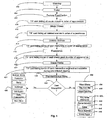
- Figure 1 illustrates a process for selecting between a pre-ordered viewing mode and a standard DVD mode of a bimodal configuration where the pre-ordered viewing mode is the default mode.
- Figure 2 illustrates a process for selecting between the pre-ordered viewing mode and the standard DVD mode of the bimodal configuration where the standard DVD viewing mode is the default mode.
- Figure 3 illustrates an embodiment in which instructions are stored on a DVD for displaying the contents of the DVD in a standard viewing format.
- Figure 4 illustrates an embodiment in which instructions are stored on a DVD for displaying the contents of a DVD in a pre-ordered viewing format.
- Figure 5 illustrates an embodiment in which an instruction set selection system selects a mode for viewing the contents of the DVD.
- a method and system are disclosed for making the viewing of DVDs more user friendly.
- a DVD player can operate according to computerized instructions stored on the DVD itself.
- a controller stored in the DVD player reads the instructions off of the DVD. The controller then issues instructions for playing the content stored on the DVD.
- a bimodal DVD allows the user to view the DVD in two modes.
- the first mode is a standard DVD viewing mode.
- the second mode is a pre-ordered viewing mode that does not require the user to interact with the DVD other than inserting the DVD into a DVD player.
- the pre-ordered viewing mode allows the user to view a DVD in the same fashion as a VHS tape. The user does not even have to touch a remote control in order to view the contents of the DVD.
- the pre-ordered viewing mode provides a set of instructions to the DVD player for a viewing order for previews, feature presentations, bonus materials, sneak peeks, etc.
- the pre-ordered viewing mode includes an instruction that instructs the DVD player to loop back to the beginning of the pre-ordered viewing contents so that the pre-ordered viewing is repeated.
- the pre-ordered viewing mode is a default mode. If the user would like to use the standard DVD viewing mode, the user can interrupt the pre-ordered viewing mode to make a selection from the standard DVD viewing mode.
- the bimodal DVD allows a user to view a DVD in an interactive manner or in a non-interactive manner.
- the standard DVD viewing mode is the default mode.
- multimodal DVDs can be used.
- the DVD can have more than two modes.
- the bimodal configuration can be used with other media for storing video or audio data that will be recognized by one of ordinary skill in the art.
- Figure 1 illustrates a process 100 for selecting between the pre-ordered viewing mode and the standard DVD mode of the bimodal configuration where the pre-ordered viewing mode is the default mode.
- a DVD is inserted into a DVD player.
- the DVD automatically starts playing after the DVD is inserted into the DVD player.
- the DVD is in a pre-ordered viewing mode.
- the process 100 periodically checks a decision block 106 to determine if the user has interacted with the DVD. If the user has not interacted with the DVD, the DVD continues playing in the pre-ordered viewing mode. If the user has interacted with the DVD, the DVD switches modes from the pre-ordered viewing mode to the standard DVD mode.
- a menu is displayed in the standard DVD mode for the user to make a selection.
- a menu is displayed when the user interacts with the DVD to provide the user with a choice of continuing the pre-ordered viewing mode or proceeding to the standard DVD mode.
- the DVD resumes playing at the point in the pre-ordered sequence at which the user interacted with the DVD.
- the user can also resume playing of the DVD at the point at which the user interacted with the DVD in the standard DVD viewing format.
- the user can switch modes and resume playing the contents of the DVD in the new mode.
- the bimodal configuration can provide a bimodal resume function.
- the data that the user wishes to view in a new mode is a subset of the data that the user viewed in the original mode, the user can resume the viewing of the subset.
- the subset is not limited to feature presentations such as movies.
- the subset can be the trailers, sneak peaks, or any data content stored on the DVD.
- the DVD viewing mode is the default mode.
- a timeout occurs after a predetermined amount of time so that the pre-ordered viewing mode automatically begins.
- the timeout can be 15 seconds. Any predetermined amount of time can be used for the timeout.
- Figure 2 illustrates a process 200 for selecting between the pre-ordered viewing mode and the standard DVD mode of the bimodal configuration where the standard DVD viewing mode is the default mode.
- the DVD is inserted into the DVD player.
- the DVD is viewed in the standard viewing mode. Accordingly, the standard viewing mode requires the user to interact with the DVD.
- the process 200 periodically checks a decision block 206 to see if a timeout has occurred. The timeout can be for any period of time. If the user has made a menu selection before the time period expires, then there is no timeout and the DVD plays in standard DVD viewing mode at the process block 204. However, if the timeout occurs at the decision block 206, then the process 200 advances to a process block 208, where the DVD is played in a pre-ordered viewing mode.
- each mode can include a set of instructions and pointers for accessing the contents stored on the DVD.
- the standard viewing format can include instructions and pointers to contents of the DVD based upon user input.
- the pre-ordered viewing format can include an ordered set of instructions and pointers for the pre-ordered viewing of the contents on the DVD.
- the contents of the DVD can be stored multiple times on the DVD according to each viewing format.
- the selection of the modes discussed above can be accomplished through an instruction set selector.
- computer code stored on the DVD that sets the default mode and rules for switching between different modes can be the instruction set selector.
- the instruction set selector can be a visual menu in which the user determines which mode is the default mode.
- the user can also use the visual display to set the rules for selecting between the modes.
- the instruction set selector is a physical input device in which the user inputs the default mode and/or rules through a physical device operably connected to or operably integrated with the DVD. player.
- Figure 3 illustrates an embodiment in which instructions are stored on a DVD for displaying the contents of the DVD in a standard viewing format.
- a warning 302 is displayed.
- the warning 302 can be an FBI warning.
- the warning 302 can also include restrictions regarding use.
- a trailer 304 is then displayed.
- the trailer 304 can include movie previews. Further, the trailer 304 can include advertisements.
- a main menu 306 is displayed so that the user can interact with the DVD to make a viewing choice.
- the trailer 304 is followed by additional trailers 304 prior to the main menu 306 being displayed.
- the main menu 306 can be displayed on any video display known to one of ordinary skill in the art.
- the main menu 306 displays a play button 308, a scene selection button 310, a setup button 312, a bonus materials button 314, and a sneak peaks button 316.
- the user can use any mechanism for making menu selections that is known to one ordinary skill in the art.
- the user can use a remote control, buttons positioned on a DVD player, touch screen buttons that allow the user to make selections by touching the screen, a mouse pointer, etc.
- the user can press the play button 308 to play a feature presentation 318.
- the feature presentation 318 can be a movie.
- the user can also press a scene selection button 310 to view individual scenes of the feature presentation 318.
- the scene selection button 110 the user can choose from a plurality of scenes 322 to view.
- the user can press a scene selection main menu button to return to the main menu 306.
- the user can also press the setup button 312 in the main menu 306 to choose various settings for viewing.
- the setup menu 324 provides the user with a spoken languages button 326, a captioning/subtitles button 328, and a return to film button 330.
- the spoken languages button 326 allows a user to view the feature presentation 318 in different languages.
- the captioning/subtitles button 328 allows the user to view the feature presentation 318 with captions and/or subtitles.
- the captioning/subtitles button 328 can provide the user with a choice for closed captioning.
- the user can chose different viewing options such as widescreen or fullscreen.
- the user can return to the feature presentation 318 by pressing the return to film button 330.
- the user can press the bonus materials button 314 in the main menu 306 to view various bonus materials.
- the bonus materials can include outtakes & bloopers, games, virtual tours, encyclopedias, aquariums, karaoke, making of music videos, backstage footage, behind the scenes footage, filmmaker's commentary, recording sessions, etc.
- the bonus materials menu 332 includes a featurette button 334, a game button 336, a multiangle button 338, a still gallery button 340, an audio commentary button 342, and a main menu button 344.
- the bonus materials menu 332 can include choices for viewing other types of bonus materials.
- the user can press the featurette button 334 to view a featurette.
- the user can press the game button 336 to play a game.
- the user can press a multiangle button 338 to view a portion of a scene, a scene, a plurality of scenes, or the entire feature presentation 318.
- the user can press a still gallery button 340 to view still images.
- the user can also press an audio commentary button 342 to hear commentary during the feature presentation 318.
- the user can press a bonus materials main menu button 344 to return to the main menu 306.
- the user can also press a sneak peaks button 316 in the main menu 306 to view a plurality of sneak peaks 348. The user can then return to the main menu 306 by pressing a sneak peeks main menu button 350.
- Figure 4 illustrates an embodiment in which instructions are stored on a DVD for displaying the contents of a DVD in pre-ordered viewing format.
- the contents on the DVD can be displayed in the following order.
- a warning 402 is displayed.
- a plurality of warnings are displayed.
- a trailer 404 follows the warning 402.
- a plurality of trailers are displayed.
- a feature presentation 406 follows the trailer 404.
- a music video listing 408 is then displayed to inform the user of the music videos that will be displayed in the order of appearance.
- the listing of music videos is accomplished through the use of a tagged image file format ("TIFF") card.
- a plurality of music videos 410 are then displayed.
- the plurality of music videos 410 is displayed without listing the videos to be displayed prior to the displaying of the music videos 410.
- a deleted scenes listing 412 is then displayed to inform the user of the deleted scenes that will be displayed in order of appearance.
- a plurality of deleted scenes 414 are then displayed.
- a featurettes listing 416 is displayed to inform the user of the featurettes that will be displayed in order of appearance.
- a plurality of featurettes 418 can then be displayed.
- a sneak peaks listing 420 is then displayed to inform the user of the sneaks peaks that will be displayed in order of appearance.
- a plurality of sneaks peaks 422 is then displayed.
- the plurality of any of the contents discussed above includes an individual block of data such as an individual music video 410.
- the pre-ordered viewing format may only have listings for a portion of the contents of the DVD to be displayed. Similarly, the pre-ordered viewing format may not have listings for any of the contents of the DVD to be displayed.
- an interactive segments listing 424 available to the user is then displayed.
- a standard bonus menu 426 is then displayed.
- a decision block 428 determines if there is any user action within a given time period after the standard bonus materials is displayed. If the user selects the bonus materials, the bonus menu 430, which is similar to the bonus materials menu 332, is displayed.
- the pre-ordered viewing format is a sequenced ordering of all the contents stored on the DVD. In other configurations, the pre-ordered viewing format is a sequenced ordering of some of the contents stored on the DVD. Buttons can be displayed for interactive segments (not shown) that were not displayed during the pre-ordered viewing format.
- a timeout occurs and the DVD loops back to the warning 402 to play the DVD again.
- a timeout occurs and a Fast Play main menu 432 is displayed.
- the term "Fast Play" is used to denote the pre-ordered viewing mode.
- the Fast Play main menu 432 provides the user with the choice of viewing the DVD in either the Fast Play mode or the standard DVD viewing mode. The user can view the DVD in the Fast Play mode by pressing a Play Fast Play button 434.
- the user can press an About Fast Play button 436 to view or listen to information about Fast Play.
- the user can press a Play Movie (Standard) button 438.
- the user can also press a scene selection button 440 to view different scenes, a setup button 442 to adjust the setup, a bonus materials button 444 to view bonus materials, or a sneak peeks button 446 to view sneak peeks.
- a timeout occurs and the DVD plays in Fast Play mode by looping back to the warning 402. The DVD then continues to be played in the pre-ordered viewing format.
- the pre-ordered viewing format is not limited to the sequence as discussed above. Rather, the pre-ordered viewing format can include variations in the order of the contents of the DVD that are displayed.
- Figure 5 illustrates an embodiment in which an instruction set selection system 500 selects a mode for viewing the contents of the DVD.
- a mode selector 502 determines whether the viewing modes is a pre-ordered mode 504 or a standard mode 506.
- the mode selector 502 can set either the pre-ordered mode 504 or the standard mode 506 as the default mode.
- the user can submit a request to the mode selector 502 to change modes.
- the user can submit the request through a menu selection, by pressing a button on a remote control, or by pressing a button positioned on the housing of the DVD player.
- the mode selector 502 can be a software configuration, a hardware configuration, or software and hardware configuration that can set a viewing mode and that can switch from one viewing mode to another viewing mode.
- the mode selector 502 is not limited to the pre-ordered mode and the standard mode but may encompass multiple other modes.
- the mode selector sets the pre-ordered mode as the viewing mode, the user can automatically view a sequence of contents stored on the DVD without interacting with the DVD.
- the pre-ordered mode is set to play trailers 508, a movie 510, bonus materials 512, games 514, and sneak peeks 516.
- the contents of the sequence can be a portion of the contents stored on the DVD or the entirety of the contents stored on the DVD. If a portion of the contents are selected for the pre-ordered mode, the selection can be based on any number of factors, including but not limited to consumer based research. For instance, certain bonus materials can be selected according to consumer based research as to the types of bonus materials users would like to view. In one embodiment, the consumer based research can be based on demographics. The actual ordering of the contents in the pre-determined mode can also be based on consumer based research. Demographics can also be used for determining the ordering of the contents in the pre-determined mode.
- the mode selected by the mode selector 502 is the standard mode 506, trailers 518 are displayed followed by a main menu 520.
- the user can select a play movie button 522, a chapter selection 524, an all bonus material button 526, a setup button 528, or a sneak peeks button 530 from the main menu 520.
- the main menu 520 can display a variety of other buttons that will allow the user to view the contents of the DVD.
- the bimodal configuration as discussed above can be used with contents stored on a plurality of mediums.
- the bimodal configuration can be used with multiple DVD sets such as a two-disc box set. If the DVD player only houses one DVD at a time, a user may need to insert a second DVD.
- an instruction can be displayed after the end of the sequence for inserting the second DVD.
- the instruction can be heard through an audio message.
- the DVD player can house multiple DVDs. The user can then insert all of the DVDs from the box set into the DVD player.
- the pre-determined mode of the bimodal configuration will have an instruction for moving to the next DVD in the box set and for automatically playing the next DVD so that the user will not need to provide any additional interaction other than inserting the DVDs of the box set into the DVD player.
- the standard viewing mode can also have an instruction for moving to the next DVD in the box set and for automatically playing the next DVD.
- an index is provided for the different contents on the multiple DVDs in the DVD box set so that users can appropriately navigate through the DVDs if they wish to use the standard viewing mode.
- the bimodal configuration as discussed above can be used with older DVD systems.
- new DVD hardware is not needed because the bimodal configuration can be stored on the DVD itself.
- the bimodal configuration can instruct older DVD players to play in either the pre-determined mode or in the standard mode.
- the bimodal configuration can be used with DVDs in different types of DVD players.
- the bimodal configuration can be used with DVDs that are inserted into DVD players positioned in the rear seats of automobiles or in other forms of transportation.
- the bimodal configuration can be used in conjunction with a DVD that is inserted into any sized DVD player.
- the bimodal configuration can be used in conjunction with a DVD that is inserted into a DVD player positioned in any location, integrated with any other electronic equipment, or integrated into any other potential viewing area.
- the bimodal configuration can be used with any advances in data storage technology.
Landscapes
- Engineering & Computer Science (AREA)
- Signal Processing (AREA)
- Multimedia (AREA)
- Human Computer Interaction (AREA)
- Databases & Information Systems (AREA)
- Indexing, Searching, Synchronizing, And The Amount Of Synchronization Travel Of Record Carriers (AREA)
- Television Signal Processing For Recording (AREA)
- Signal Processing For Digital Recording And Reproducing (AREA)
- Management Or Editing Of Information On Record Carriers (AREA)
Claims (10)
- Verfahren für automatisches Abspielen der Inhalte eines Mediums in einem Abspielgerät, wobei das Verfahren folgende Schritte aufweist:Bereitstellen eines ersten Menüs für eine im Voraus bestimmte Timeout-Periode nach Einlegen des Mediums in ein Abspielgerät, wobei das erste Menü zu einer Interaktion auffordert; undAbspielen eines Teils des Inhalts des Mediums in einer ununterbrochenen, im Voraus bestimmten Folge nachdem die im Voraus bestimmte Timeout-Periode abgelaufen ist, ohne dass eine Interaktion empfangen worden ist,ferner aufweisend nach Empfang einer Eingabe durch den Anwender nach dem im Voraus bestimmten Zeitintervall,Unterbrechen des Abspielens mehrerer Datenblöcke des Mediums in der im Voraus bestimmten Folge,Bereitstellen eines zweiten Menüs für den Anwender, damit der Anwender entweder die mehreren Datenblöcke des Mediums wählen kann, die er sich ansehen möchte, oder mit dem Ansehen der mehreren Datenblöcke des Mediums in der im Voraus bestimmten Folge fortfahren möchte, und wobeidas Abspielen der Datenblöcke des Mediums in der im Voraus bestimmten Folge am Punkt der Unterbrechung wieder aufgenommen wird.
- Verfahren nach Anspruch 1, wobei mindestens ein Trailer vor der Anzeige des ersten Menüs angezeigt wird.
- Verfahren nach Anspruch 1, ferner aufweisend Abspielen der mehreren Datenblöcke des Mediums, die der Anwender im zweiten Menü gewählt hat.
- Verfahren nach Anspruch 1, ferner aufweisend Wiederaufnahme des Abspielens der mehreren Datenblöcke, die der Anwender am Punkt der Unterbrechung aus dem zweiten Menü gewählt hat, wenn der Anwender das Abspielen für Betrachten des zweiten Menüs unterbricht.
- Greifbares Datenspeichermedium, aufweisend darauf gespeicherten Inhalt, wobei auf dem Medium Folgendes aufgezeichnet ist:Anweisungen, die ein Medienabspielgerät anweisen, ein erstes Menü während einer im Voraus bestimmten Zeitdauer nach Einlegen des Mediums in das Abspielgerät abzuspielen, wobei das erste Menü zu einer Interaktion während der im Voraus bestimmten Periode auffordert;Anweisungen, die einen Teil des Inhalts des Mediums anweisen, in einer ununterbrochenen, im Voraus bestimmten Folge nachdem die im Voraus bestimmte Timeout-Periode abgelaufen ist, ohne dass eine Interaktion empfangen worden ist, abgespielt zu werden; undferner aufweisend Anweisungen, die das Medienabspielgerät anweisen, nach Empfang einer Eingabe durch den Anwender nach dem im Voraus bestimmten Zeitintervall, das Abspielen mehrerer Datenblöcke auf dem Medium in der im Voraus bestimmten Folge zu unterbrechen, undein zweites Menü für den Anwender bereitzustellen, damit der Anwender entweder die mehreren Datenblöcke des Mediums wählen kann, die er sich ansehen möchte, oder mit dem Ansehen der mehreren Datenblöcke des Mediums in der im Voraus bestimmten Folge fortfahren kann, und wobei das Abspielen der Datenblöcke des Medium in der im Voraus bestimmen Folge am Punkt der Unterbrechung wieder aufgenommen wird.
- Medium nach Anspruch 5, ferner aufweisend Anweisungen, die das Medienabspielgerät anweisen, die mehreren Datenblöcke des Mediums, die der Anwender im zweiten Menü gewählt hat, abzuspielen.
- Medium nach Anspruch 6, ferner aufweisend Anweisungen, die das Medienabspielgerät anweisen, das Abspielen der mehreren Datenblöcke, die der Anwender im zweiten Menü gewählt hat, am Punkt der Unterbrechung wieder aufzunehmen, wenn der Anwender das Abspielen für Ansehen des zweiten Menüs unterbricht.
- Medium nach Anspruch 5, ferner aufweisend;
Anweisungen, die das Medienabspielgerät anweisen, nach Empfang einer Interaktion innerhalb der im Voraus bestimmten Timeout-Periode mehrere Datenblöcke des Mediums als Antwort auf Befehle abzuspielen, die die mehreren Datenblöcke des abzuspielenden Mediums bestimmen. - Medium nach Anspruch 5, wobei die Befehle aus dem zweiten Menü gewählt werden.
- Medium nach Anspruch 5, wobei das Medium eine digitale Bildplatte ist.
Applications Claiming Priority (3)
| Application Number | Priority Date | Filing Date | Title |
|---|---|---|---|
| US43994303P | 2003-01-13 | 2003-01-13 | |
| US439943P | 2003-01-13 | ||
| PCT/US2004/000757 WO2004064045A2 (en) | 2003-01-13 | 2004-01-13 | Fast play dvd |
Publications (4)
| Publication Number | Publication Date |
|---|---|
| EP1588356A3 EP1588356A3 (de) | 2005-10-20 |
| EP1588356A2 EP1588356A2 (de) | 2005-10-26 |
| EP1588356A4 EP1588356A4 (de) | 2008-06-18 |
| EP1588356B1 true EP1588356B1 (de) | 2013-10-09 |
Family
ID=32713524
Family Applications (1)
| Application Number | Title | Priority Date | Filing Date |
|---|---|---|---|
| EP04701781.9A Expired - Lifetime EP1588356B1 (de) | 2003-01-13 | 2004-01-13 | Schnellspiel-dvd |
Country Status (12)
| Country | Link |
|---|---|
| US (1) | US7970256B2 (de) |
| EP (1) | EP1588356B1 (de) |
| JP (1) | JP2006520058A (de) |
| KR (1) | KR20050098868A (de) |
| CN (2) | CN100521762C (de) |
| AU (1) | AU2004204969B9 (de) |
| BR (1) | BRPI0406516A (de) |
| MX (1) | MXPA05007529A (de) |
| NO (1) | NO20053806L (de) |
| RU (1) | RU2353985C2 (de) |
| WO (1) | WO2004064045A2 (de) |
| ZA (1) | ZA200505617B (de) |
Families Citing this family (10)
| Publication number | Priority date | Publication date | Assignee | Title |
|---|---|---|---|---|
| JP4059784B2 (ja) * | 2002-03-25 | 2008-03-12 | アルパイン株式会社 | ビデオコンテンツ記憶媒体の再生装置 |
| US8108890B2 (en) * | 2004-04-20 | 2012-01-31 | Green Stuart A | Localised menus |
| US8837914B2 (en) * | 2005-11-30 | 2014-09-16 | Samsung Electronics Co., Ltd. | Digital multimedia playback method and apparatus |
| WO2008002999A2 (en) * | 2006-06-27 | 2008-01-03 | Metabeam Corporation | Digital content playback |
| US9676845B2 (en) | 2009-06-16 | 2017-06-13 | Hoffmann-La Roche, Inc. | Bispecific antigen binding proteins |
| US8364018B2 (en) | 2010-03-09 | 2013-01-29 | International Business Machines Corporation | Selecting options located on a media disc |
| US9253539B2 (en) * | 2010-09-30 | 2016-02-02 | Disney Enterprises, Inc. | Systems and methods for settings management across multiple titles |
| US20130097643A1 (en) * | 2011-10-17 | 2013-04-18 | Microsoft Corporation | Interactive video |
| US10741221B2 (en) * | 2017-07-12 | 2020-08-11 | Disney Enterprises, Inc. | Menu navigation mode for media discs |
| CN110545480A (zh) * | 2018-05-29 | 2019-12-06 | 北京字节跳动网络技术有限公司 | 一种媒体文件的预加载控制方法、装置及存储介质 |
Family Cites Families (38)
| Publication number | Priority date | Publication date | Assignee | Title |
|---|---|---|---|---|
| NL7908476A (nl) | 1979-11-21 | 1981-06-16 | Philips Nv | Inrichting voor interaktieve beeldweergave. |
| DE3886431T2 (de) | 1987-02-26 | 1994-06-23 | Pioneer Electronic Corp | Einrichtung zur Wiedergabe von Stehbildern mit einem Audio-Teil. |
| JPH0263382A (ja) | 1988-08-30 | 1990-03-02 | Matsushita Electric Ind Co Ltd | ビデオディスク再生装置 |
| US5161034A (en) | 1989-07-18 | 1992-11-03 | Wnm Ventures Inc. | Branching table for interactive video display |
| JPH0568226A (ja) | 1991-09-09 | 1993-03-19 | Pioneer Electron Corp | ビデオデイスクの信号記録方法 |
| US5953485A (en) * | 1992-02-07 | 1999-09-14 | Abecassis; Max | Method and system for maintaining audio during video control |
| JP3435703B2 (ja) | 1992-05-20 | 2003-08-11 | ソニー株式会社 | 再生装置、再生方法 |
| JPH0676302A (ja) | 1992-08-31 | 1994-03-18 | Sony Corp | 動画像記録方法、動画像記録媒体及び動画像再生装置 |
| JP3264290B2 (ja) | 1992-09-22 | 2002-03-11 | ソニー株式会社 | 復号方法および復号装置 |
| KR0126791B1 (ko) | 1993-06-30 | 1998-04-01 | 김광호 | 프로그램 탐색방법 |
| US5596564A (en) | 1993-10-08 | 1997-01-21 | Matsushita Electric Industrial Co., Ltd. | Information recording medium and apparatus and method for recording and reproducing information |
| US5491704A (en) | 1993-10-21 | 1996-02-13 | Quantum Lerning Systems, Inc. | Interactive laser disc system |
| WO1995012197A1 (en) * | 1993-10-29 | 1995-05-04 | Kabushiki Kaisha Toshiba | Multi-scene recording medium and reproduction apparatus |
| MY114518A (en) | 1994-03-19 | 2002-11-30 | Sony Corp | Optical disk and method and apparatus for recording and then playing information back from that disk |
| JP3235706B2 (ja) | 1994-05-31 | 2001-12-04 | 三星電子株式会社 | ディスク記録媒体の記録方法及びその再生方法 |
| RU2229174C2 (ru) * | 1994-06-03 | 2004-05-20 | Конинклийке Филипс Электроникс Н.В. | Запись информационных сигналов в формате mpeg на носитель информации и их воспроизведение |
| JPH08161869A (ja) | 1994-11-30 | 1996-06-21 | Sony Corp | 再生装置 |
| JP3493825B2 (ja) * | 1995-08-02 | 2004-02-03 | ソニー株式会社 | 情報再生装置 |
| US5999698A (en) * | 1996-09-30 | 1999-12-07 | Kabushiki Kaisha Toshiba | Multiangle block reproduction system |
| KR100217179B1 (ko) | 1997-03-25 | 1999-09-01 | 윤종용 | 디지털비디오디스크 재생장치에서의 메뉴재생방법 |
| US20030113096A1 (en) * | 1997-07-07 | 2003-06-19 | Kabushiki Kaisha Toshiba | Multi-screen display system for automatically changing a plurality of simultaneously displayed images |
| JP3615055B2 (ja) | 1997-07-07 | 2005-01-26 | 株式会社東芝 | 多画面表示システム |
| US6222805B1 (en) | 1997-08-07 | 2001-04-24 | Matsushita Electric Industrial Co., Ltd. | Optical disk, reproduction apparatus, and reproduction method |
| US6487364B2 (en) * | 1997-09-17 | 2002-11-26 | Matsushita Electric Industrial Co., Ltd. | Optical disc, video data editing apparatus, computer-readable recording medium storing an editing program, reproduction apparatus for the optical disc, and computer-readable recording medium storing a reproduction program |
| JP3932469B2 (ja) * | 1997-11-28 | 2007-06-20 | ソニー株式会社 | データ記録媒体およびデータ再生装置 |
| US6453459B1 (en) | 1998-01-21 | 2002-09-17 | Apple Computer, Inc. | Menu authoring system and method for automatically performing low-level DVD configuration functions and thereby ease an author's job |
| US6161034A (en) * | 1999-02-02 | 2000-12-12 | Senorx, Inc. | Methods and chemical preparations for time-limited marking of biopsy sites |
| JP3383580B2 (ja) * | 1998-05-15 | 2003-03-04 | 株式会社東芝 | 情報記憶媒体と情報記録再生装置と方法 |
| US6895170B1 (en) * | 1998-10-09 | 2005-05-17 | Disney Enterprises, Inc. | Method and apparatus for storage and playback of programs recorded on random access storage media |
| DE60000009T2 (de) * | 1999-03-10 | 2002-05-02 | Matsushita Electric Industrial Co., Ltd. | Optische Platte, Vorrichtung zur Aufnahme und Wiedergabe von optischen Platten, und Verfahren zur Aufnahme und Wiedergabe von optischen Platten |
| JP4306929B2 (ja) | 2000-06-08 | 2009-08-05 | 三菱電機株式会社 | 映像再生装置 |
| JP3514223B2 (ja) | 2000-08-29 | 2004-03-31 | 船井電機株式会社 | Dvdオートチェンジャ |
| JP2002074913A (ja) | 2000-08-30 | 2002-03-15 | Mitsubishi Electric Corp | ディスク再生装置及びディスク再生方法 |
| US7058284B2 (en) | 2001-03-29 | 2006-06-06 | Matsushita Electric Industrial Co., Ltd. | Universal multimedia optic disc player and its application for revocable copy protection |
| JP2002313029A (ja) | 2001-04-11 | 2002-10-25 | Alpine Electronics Inc | Dvd再生装置 |
| US20030044171A1 (en) | 2001-05-03 | 2003-03-06 | Masato Otsuka | Method of controlling the operations and display mode of an optical disc player between a video playback mode and a user agent mode |
| JP2003087748A (ja) * | 2001-09-17 | 2003-03-20 | Funai Electric Co Ltd | 光ディスク再生装置 |
| US9445133B2 (en) * | 2002-07-10 | 2016-09-13 | Arris Enterprises, Inc. | DVD conversion for on demand |
-
2004
- 2004-01-13 CN CNB200480006781XA patent/CN100521762C/zh not_active Expired - Lifetime
- 2004-01-13 KR KR1020057013004A patent/KR20050098868A/ko not_active Ceased
- 2004-01-13 WO PCT/US2004/000757 patent/WO2004064045A2/en not_active Ceased
- 2004-01-13 MX MXPA05007529A patent/MXPA05007529A/es active IP Right Grant
- 2004-01-13 JP JP2006500925A patent/JP2006520058A/ja active Pending
- 2004-01-13 US US10/757,089 patent/US7970256B2/en not_active Expired - Lifetime
- 2004-01-13 EP EP04701781.9A patent/EP1588356B1/de not_active Expired - Lifetime
- 2004-01-13 CN CN2009101415326A patent/CN101567209B/zh not_active Expired - Lifetime
- 2004-01-13 RU RU2005123481/28A patent/RU2353985C2/ru active
- 2004-01-13 AU AU2004204969A patent/AU2004204969B9/en not_active Expired
- 2004-01-13 BR BR0406516-6A patent/BRPI0406516A/pt not_active Application Discontinuation
-
2005
- 2005-07-13 ZA ZA200505617A patent/ZA200505617B/en unknown
- 2005-08-12 NO NO20053806A patent/NO20053806L/no not_active Application Discontinuation
Non-Patent Citations (3)
| Title |
|---|
| "DVD Studio Pro User's Manual", 1 January 2001 (2001-01-01), XP055045174, Retrieved from the Internet <URL:www.arts.ucsb.edu/faculty/budgett/classes/122/dvdsp.pdf> [retrieved on 20121122] * |
| "USB Instant DVD for MAC User's Guide: Second Edition", 1 January 2003 (2003-01-01), XP055045206, Retrieved from the Internet <URL:http://ec1.images-amazon.com/media/i3d/01/A/man-migrate/MANUAL000035993.pdf> [retrieved on 20121122] * |
| BRUCE C. NAZARIAN: "DVD Companion Pro-Pack 2 Scripting for DVD Studio", 1 January 2001 (2001-01-01), XP055045209, Retrieved from the Internet <URL:http://novideo.free.fr/dossiers/dvd/PP2Doc.pdf> [retrieved on 20121122] * |
Also Published As
| Publication number | Publication date |
|---|---|
| HK1082624A1 (en) | 2006-06-09 |
| US20040179810A1 (en) | 2004-09-16 |
| CN101567209A (zh) | 2009-10-28 |
| BRPI0406516A (pt) | 2005-12-13 |
| CN100521762C (zh) | 2009-07-29 |
| NO20053806D0 (no) | 2005-08-12 |
| WO2004064045A8 (en) | 2005-03-24 |
| CN1778106A (zh) | 2006-05-24 |
| US7970256B2 (en) | 2011-06-28 |
| CN101567209B (zh) | 2012-11-28 |
| MXPA05007529A (es) | 2006-04-18 |
| RU2005123481A (ru) | 2007-02-20 |
| AU2004204969B2 (en) | 2009-06-11 |
| AU2004204969A1 (en) | 2004-07-29 |
| EP1588356A4 (de) | 2008-06-18 |
| AU2004204969B9 (en) | 2009-10-22 |
| JP2006520058A (ja) | 2006-08-31 |
| RU2353985C2 (ru) | 2009-04-27 |
| WO2004064045A2 (en) | 2004-07-29 |
| ZA200505617B (en) | 2006-08-30 |
| WO2004064045A3 (en) | 2005-10-20 |
| EP1588356A2 (de) | 2005-10-26 |
| NO20053806L (no) | 2005-10-11 |
| KR20050098868A (ko) | 2005-10-12 |
Similar Documents
| Publication | Publication Date | Title |
|---|---|---|
| JP4824846B2 (ja) | ディスプレイ・モニタを備えたシステム | |
| KR101699902B1 (ko) | 디지털 저장 장치를 구비하는 전자 프로그램 가이드 | |
| EP1671483B1 (de) | System und verfahren zur wiedergabe und merkmalsteuerung für video-abspielgeräte | |
| US20050220439A1 (en) | Interactive multimedia system and method | |
| EP1588356B1 (de) | Schnellspiel-dvd | |
| JPH07236099A (ja) | 情報再生装置を内蔵したテレビジョン装置 | |
| JP2007502080A (ja) | パーソナルビデオレコーダ内のコンテンツをナビゲートするための方法および装置 | |
| US20060051064A1 (en) | Video control system for displaying user-selected scenarios | |
| EP1654671B2 (de) | Einen interaktiven graphikstrom enthaltendes informationsspeichermedium und wiedergabevorrichtung und verfahren dafür | |
| EP1525583A1 (de) | Verfahren zum ändern einer abspielliste in einem audio- und/oder videogerät, und entsprechendes audio- und/oder videogerät | |
| HK1082624B (en) | Fast play dvd | |
| JP3919012B2 (ja) | 放送番組記録装置および放送番組記録方法 | |
| WO2009056824A1 (en) | Method and apparatus for accessing media | |
| EP1726160A2 (de) | Interaktives multimediasystem und -verfahren |
Legal Events
| Date | Code | Title | Description |
|---|---|---|---|
| PUAI | Public reference made under article 153(3) epc to a published international application that has entered the european phase |
Free format text: ORIGINAL CODE: 0009012 |
|
| PUAK | Availability of information related to the publication of the international search report |
Free format text: ORIGINAL CODE: 0009015 |
|
| 17P | Request for examination filed |
Effective date: 20050812 |
|
| AK | Designated contracting states |
Kind code of ref document: A2 Designated state(s): AT BE BG CH CY CZ DE DK EE ES FI FR GB GR HU IE IT LI LU MC NL PT RO SE SI SK TR |
|
| AX | Request for extension of the european patent |
Extension state: AL LT LV MK |
|
| AK | Designated contracting states |
Kind code of ref document: A3 Designated state(s): AT BE BG CH CY CZ DE DK EE ES FI FR GB GR HU IE IT LI LU MC NL PT RO SE SI SK TR |
|
| AX | Request for extension of the european patent |
Extension state: AL LT LV MK |
|
| RIC1 | Information provided on ipc code assigned before grant |
Ipc: 7H 04N 5/91 A |
|
| DAX | Request for extension of the european patent (deleted) | ||
| REG | Reference to a national code |
Ref country code: HK Ref legal event code: DE Ref document number: 1082624 Country of ref document: HK |
|
| RIC1 | Information provided on ipc code assigned before grant |
Ipc: G11B 27/00 20060101AFI20080502BHEP |
|
| A4 | Supplementary search report drawn up and despatched |
Effective date: 20080519 |
|
| 17Q | First examination report despatched |
Effective date: 20090127 |
|
| REG | Reference to a national code |
Ref country code: DE Ref legal event code: R079 Ref document number: 602004043520 Country of ref document: DE Free format text: PREVIOUS MAIN CLASS: G11B0027000000 Ipc: G11B0027100000 |
|
| RIC1 | Information provided on ipc code assigned before grant |
Ipc: G11B 27/34 20060101ALI20130410BHEP Ipc: H04N 7/16 20110101ALI20130410BHEP Ipc: H04N 21/426 20110101ALI20130410BHEP Ipc: G11B 27/10 20060101AFI20130410BHEP Ipc: H04N 21/422 20110101ALI20130410BHEP Ipc: H04N 21/478 20110101ALI20130410BHEP Ipc: G11B 27/00 20060101ALI20130410BHEP Ipc: H04N 21/23 20110101ALI20130410BHEP Ipc: H04N 21/432 20110101ALI20130410BHEP Ipc: H04N 21/21 20110101ALI20130410BHEP |
|
| GRAP | Despatch of communication of intention to grant a patent |
Free format text: ORIGINAL CODE: EPIDOSNIGR1 |
|
| INTG | Intention to grant announced |
Effective date: 20130524 |
|
| GRAS | Grant fee paid |
Free format text: ORIGINAL CODE: EPIDOSNIGR3 |
|
| GRAA | (expected) grant |
Free format text: ORIGINAL CODE: 0009210 |
|
| AK | Designated contracting states |
Kind code of ref document: B1 Designated state(s): AT BE BG CH CY CZ DE DK EE ES FI FR GB GR HU IE IT LI LU MC NL PT RO SE SI SK TR |
|
| REG | Reference to a national code |
Ref country code: GB Ref legal event code: FG4D |
|
| REG | Reference to a national code |
Ref country code: CH Ref legal event code: EP Ref country code: AT Ref legal event code: REF Ref document number: 635843 Country of ref document: AT Kind code of ref document: T Effective date: 20131015 |
|
| REG | Reference to a national code |
Ref country code: IE Ref legal event code: FG4D |
|
| REG | Reference to a national code |
Ref country code: DE Ref legal event code: R096 Ref document number: 602004043520 Country of ref document: DE Effective date: 20131205 |
|
| REG | Reference to a national code |
Ref country code: HK Ref legal event code: GR Ref document number: 1082624 Country of ref document: HK |
|
| REG | Reference to a national code |
Ref country code: AT Ref legal event code: MK05 Ref document number: 635843 Country of ref document: AT Kind code of ref document: T Effective date: 20131009 |
|
| REG | Reference to a national code |
Ref country code: NL Ref legal event code: VDEP Effective date: 20131009 |
|
| PG25 | Lapsed in a contracting state [announced via postgrant information from national office to epo] |
Ref country code: SI Free format text: LAPSE BECAUSE OF FAILURE TO SUBMIT A TRANSLATION OF THE DESCRIPTION OR TO PAY THE FEE WITHIN THE PRESCRIBED TIME-LIMIT Effective date: 20131009 |
|
| PG25 | Lapsed in a contracting state [announced via postgrant information from national office to epo] |
Ref country code: SE Free format text: LAPSE BECAUSE OF FAILURE TO SUBMIT A TRANSLATION OF THE DESCRIPTION OR TO PAY THE FEE WITHIN THE PRESCRIBED TIME-LIMIT Effective date: 20131009 Ref country code: NL Free format text: LAPSE BECAUSE OF FAILURE TO SUBMIT A TRANSLATION OF THE DESCRIPTION OR TO PAY THE FEE WITHIN THE PRESCRIBED TIME-LIMIT Effective date: 20131009 Ref country code: FI Free format text: LAPSE BECAUSE OF FAILURE TO SUBMIT A TRANSLATION OF THE DESCRIPTION OR TO PAY THE FEE WITHIN THE PRESCRIBED TIME-LIMIT Effective date: 20131009 Ref country code: BE Free format text: LAPSE BECAUSE OF FAILURE TO SUBMIT A TRANSLATION OF THE DESCRIPTION OR TO PAY THE FEE WITHIN THE PRESCRIBED TIME-LIMIT Effective date: 20131009 |
|
| PG25 | Lapsed in a contracting state [announced via postgrant information from national office to epo] |
Ref country code: ES Free format text: LAPSE BECAUSE OF FAILURE TO SUBMIT A TRANSLATION OF THE DESCRIPTION OR TO PAY THE FEE WITHIN THE PRESCRIBED TIME-LIMIT Effective date: 20131009 Ref country code: CY Free format text: LAPSE BECAUSE OF FAILURE TO SUBMIT A TRANSLATION OF THE DESCRIPTION OR TO PAY THE FEE WITHIN THE PRESCRIBED TIME-LIMIT Effective date: 20131009 Ref country code: AT Free format text: LAPSE BECAUSE OF FAILURE TO SUBMIT A TRANSLATION OF THE DESCRIPTION OR TO PAY THE FEE WITHIN THE PRESCRIBED TIME-LIMIT Effective date: 20131009 |
|
| PG25 | Lapsed in a contracting state [announced via postgrant information from national office to epo] |
Ref country code: PT Free format text: LAPSE BECAUSE OF FAILURE TO SUBMIT A TRANSLATION OF THE DESCRIPTION OR TO PAY THE FEE WITHIN THE PRESCRIBED TIME-LIMIT Effective date: 20140210 |
|
| REG | Reference to a national code |
Ref country code: DE Ref legal event code: R097 Ref document number: 602004043520 Country of ref document: DE |
|
| PG25 | Lapsed in a contracting state [announced via postgrant information from national office to epo] |
Ref country code: EE Free format text: LAPSE BECAUSE OF FAILURE TO SUBMIT A TRANSLATION OF THE DESCRIPTION OR TO PAY THE FEE WITHIN THE PRESCRIBED TIME-LIMIT Effective date: 20131009 |
|
| PLBE | No opposition filed within time limit |
Free format text: ORIGINAL CODE: 0009261 |
|
| STAA | Information on the status of an ep patent application or granted ep patent |
Free format text: STATUS: NO OPPOSITION FILED WITHIN TIME LIMIT |
|
| PG25 | Lapsed in a contracting state [announced via postgrant information from national office to epo] |
Ref country code: RO Free format text: LAPSE BECAUSE OF FAILURE TO SUBMIT A TRANSLATION OF THE DESCRIPTION OR TO PAY THE FEE WITHIN THE PRESCRIBED TIME-LIMIT Effective date: 20131009 Ref country code: MC Free format text: LAPSE BECAUSE OF FAILURE TO SUBMIT A TRANSLATION OF THE DESCRIPTION OR TO PAY THE FEE WITHIN THE PRESCRIBED TIME-LIMIT Effective date: 20131009 Ref country code: SK Free format text: LAPSE BECAUSE OF FAILURE TO SUBMIT A TRANSLATION OF THE DESCRIPTION OR TO PAY THE FEE WITHIN THE PRESCRIBED TIME-LIMIT Effective date: 20131009 Ref country code: IT Free format text: LAPSE BECAUSE OF FAILURE TO SUBMIT A TRANSLATION OF THE DESCRIPTION OR TO PAY THE FEE WITHIN THE PRESCRIBED TIME-LIMIT Effective date: 20131009 Ref country code: LU Free format text: LAPSE BECAUSE OF FAILURE TO SUBMIT A TRANSLATION OF THE DESCRIPTION OR TO PAY THE FEE WITHIN THE PRESCRIBED TIME-LIMIT Effective date: 20140113 Ref country code: CZ Free format text: LAPSE BECAUSE OF FAILURE TO SUBMIT A TRANSLATION OF THE DESCRIPTION OR TO PAY THE FEE WITHIN THE PRESCRIBED TIME-LIMIT Effective date: 20131009 |
|
| REG | Reference to a national code |
Ref country code: CH Ref legal event code: PL |
|
| 26N | No opposition filed |
Effective date: 20140710 |
|
| PG25 | Lapsed in a contracting state [announced via postgrant information from national office to epo] |
Ref country code: DK Free format text: LAPSE BECAUSE OF FAILURE TO SUBMIT A TRANSLATION OF THE DESCRIPTION OR TO PAY THE FEE WITHIN THE PRESCRIBED TIME-LIMIT Effective date: 20131009 |
|
| REG | Reference to a national code |
Ref country code: DE Ref legal event code: R097 Ref document number: 602004043520 Country of ref document: DE Effective date: 20140710 |
|
| PG25 | Lapsed in a contracting state [announced via postgrant information from national office to epo] |
Ref country code: LI Free format text: LAPSE BECAUSE OF NON-PAYMENT OF DUE FEES Effective date: 20140131 Ref country code: CH Free format text: LAPSE BECAUSE OF NON-PAYMENT OF DUE FEES Effective date: 20140131 |
|
| REG | Reference to a national code |
Ref country code: IE Ref legal event code: MM4A |
|
| PG25 | Lapsed in a contracting state [announced via postgrant information from national office to epo] |
Ref country code: IE Free format text: LAPSE BECAUSE OF NON-PAYMENT OF DUE FEES Effective date: 20140113 |
|
| REG | Reference to a national code |
Ref country code: FR Ref legal event code: PLFP Year of fee payment: 13 |
|
| PG25 | Lapsed in a contracting state [announced via postgrant information from national office to epo] |
Ref country code: BG Free format text: LAPSE BECAUSE OF FAILURE TO SUBMIT A TRANSLATION OF THE DESCRIPTION OR TO PAY THE FEE WITHIN THE PRESCRIBED TIME-LIMIT Effective date: 20131009 |
|
| PG25 | Lapsed in a contracting state [announced via postgrant information from national office to epo] |
Ref country code: GR Free format text: LAPSE BECAUSE OF FAILURE TO SUBMIT A TRANSLATION OF THE DESCRIPTION OR TO PAY THE FEE WITHIN THE PRESCRIBED TIME-LIMIT Effective date: 20140110 |
|
| PG25 | Lapsed in a contracting state [announced via postgrant information from national office to epo] |
Ref country code: TR Free format text: LAPSE BECAUSE OF FAILURE TO SUBMIT A TRANSLATION OF THE DESCRIPTION OR TO PAY THE FEE WITHIN THE PRESCRIBED TIME-LIMIT Effective date: 20131009 Ref country code: HU Free format text: LAPSE BECAUSE OF FAILURE TO SUBMIT A TRANSLATION OF THE DESCRIPTION OR TO PAY THE FEE WITHIN THE PRESCRIBED TIME-LIMIT; INVALID AB INITIO Effective date: 20040113 |
|
| REG | Reference to a national code |
Ref country code: FR Ref legal event code: PLFP Year of fee payment: 14 |
|
| REG | Reference to a national code |
Ref country code: FR Ref legal event code: PLFP Year of fee payment: 15 |
|
| REG | Reference to a national code |
Ref country code: DE Ref legal event code: R082 Ref document number: 602004043520 Country of ref document: DE Representative=s name: KILBURN & STRODE LLP, NL |
|
| PGFP | Annual fee paid to national office [announced via postgrant information from national office to epo] |
Ref country code: FR Payment date: 20230124 Year of fee payment: 20 |
|
| PGFP | Annual fee paid to national office [announced via postgrant information from national office to epo] |
Ref country code: GB Payment date: 20230124 Year of fee payment: 20 Ref country code: DE Payment date: 20230127 Year of fee payment: 20 |
|
| P01 | Opt-out of the competence of the unified patent court (upc) registered |
Effective date: 20230530 |
|
| REG | Reference to a national code |
Ref country code: DE Ref legal event code: R071 Ref document number: 602004043520 Country of ref document: DE |
|
| REG | Reference to a national code |
Ref country code: GB Ref legal event code: PE20 Expiry date: 20240112 |
|
| PG25 | Lapsed in a contracting state [announced via postgrant information from national office to epo] |
Ref country code: GB Free format text: LAPSE BECAUSE OF EXPIRATION OF PROTECTION Effective date: 20240112 |