EP1585027A1 - Maintenance terminal of disk array device - Google Patents
Maintenance terminal of disk array device Download PDFInfo
- Publication number
- EP1585027A1 EP1585027A1 EP04257109A EP04257109A EP1585027A1 EP 1585027 A1 EP1585027 A1 EP 1585027A1 EP 04257109 A EP04257109 A EP 04257109A EP 04257109 A EP04257109 A EP 04257109A EP 1585027 A1 EP1585027 A1 EP 1585027A1
- Authority
- EP
- European Patent Office
- Prior art keywords
- disk array
- setting
- array device
- light emitting
- maintenance terminal
- Prior art date
- Legal status (The legal status is an assumption and is not a legal conclusion. Google has not performed a legal analysis and makes no representation as to the accuracy of the status listed.)
- Withdrawn
Links
Images


Classifications
-
- G—PHYSICS
- G06—COMPUTING OR CALCULATING; COUNTING
- G06F—ELECTRIC DIGITAL DATA PROCESSING
- G06F11/00—Error detection; Error correction; Monitoring
- G06F11/30—Monitoring
- G06F11/32—Monitoring with visual or acoustical indication of the functioning of the machine
- G06F11/324—Display of status information
- G06F11/325—Display of status information by lamps or LED's
Definitions
- the present invention relates to a disk array device used as a maintenance terminal.
- a maintenance terminal attached thereto such as a service processor (SVP) has been used conventionally.
- a remote console RMC which is installed at a remote site and connected to a plurality of disk array devices via a network. This remote terminal controls the operation and maintenance of a plurality of devices.
- the maintenance terminal attached to a disk array device is not provided with a display and a keyboard from the viewpoint of cost reduction.
- a personal computer is connected to the network to which the disk array device is connected. After the personal computer (PC) accesses the disk array device via the network, the setting contents of the disk array device can be referred to. In this manner, it is not easy to refer to the setting contents.
- the maintenance terminal for a disk array of this invention is provided with a plurality of setting terminals into which a conduction pin is selectively inserted, to selectively change the setting of the disk array in a network. Since the conduction pin can be selectively inserted into or removed from a plurality of setting terminals, a simple insertion and removal operation can make setting of the disk array device in the network.
- the maintenance terminal for a disk array of this invention is also provided with a plurality of light emitting elements capable of displaying the setting state by turning on and off in correspondence with the setting state of the disk array device in a network selectively changed through insertion of the conduction pin into the plurality of setting terminals.
- the setting state of the disk array device in the network can be visually confirmed from the state displayed by turning on and off the plurality of light emitting elements.
- a maintenance terminal for a disk array device which can make setting of the disk array device and can easily confirm the setting contents of the disk array device.
- a plurality of light emitting elements can display a specific pattern representative of the setting state of the disk array device in the network for connection check in a normal state. It is possible to change the illumination pattern by selectively inserting the conduction pin into the plurality of setting terminals or in response to a remote request from an operation terminal or a host.
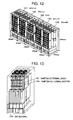
- Fig. 12 is a diagram showing a disk array device according to an embodiment of the invention.
- a disk array unit (DKU-L2) 121, a disk array unit (DKU-L1) 122, a disk array unit (DKU-R1) 124 and a disk array unit (DKU-R2) 125 respectively for storing data, together with a control unit (DKC) 123 for controlling the units are housed in the same frame.
- DKC control unit
- Fig 13 is a diagram showing maintenance terminals of the disk array device according to the invention.
- a service maintenance terminal 131 and a standby maintenance terminal 132 are mounted on the back side 133 of the control unit (DKC) 123 shown in Fig. 12.
- the reason why the service maintenance terminal 131 and standby maintenance terminal 132 are prepared is to enable setting of logical storage areas LU1 and LU2 provided for backup of each of the disk array units 121, 122, 124 and 125.
- Fig. 1 is a diagram showing an LED array and jumpers JP mounted on the maintenance terminal for the disk array according to the invention.
- each of the service maintenance terminal 131 and standby maintenance terminal 132 shown in Fig. 13 has a light emitting diode array (LED) 1 having eight light emitting elements disposed in two rows, and three setting terminals: a jumper connector (JP1) 2, a jumper connector (JP2) 3 and a jumper connector (JP3) 4, into which a conduction jumper pin 5 is inserted, respectively mounted on the same wall.
- LED light emitting diode array
- Fig. 4 is a diagram illustrating connection check using LEDs according to the invention.
- a disk array device 41 mounted with a light emitting diode array (LED) 41-1 for displaying the setting state by the jumper connector (JP1) shown in Fig. 1 a disk array device 42 mounted with a light emitting diode array (LED) 42-1 for displaying the setting state by the jumper connector (JP2) and a disk array device 43 mounted with a light emitting diode array (LED) 43-1 for displaying the setting state by the jumper connector (JP3) are connected to an operation personal computer (PC) 45 via a network 44.
- PC personal computer
- the initialization setting is performed if it is not possible to perform remote connection via the network 44 from the operation personal computer (PC) 45 to each maintenance terminal of the disk array devices 41, 42 and 43. With the initialization setting, a failure can be eliminated.
- an IP address representative of the network identification number of each maintenance terminal mounted on the disk array devices 41, 42 and 43 is forcibly initialized, and a password for allowing an input operation to each of the disk array devices 41, 42 and 43 is initialized.
- the conduction jumper pins 5 may be inserted into all the jumper connectors (JP1), (JP2) and (JP3).
- IP address display and IP address illumination according to the second embodiment of the invention.
- a number represented by one byte of binary numbers is obtained by using the light emitting diode array (LED) having eight light emitting elements. Turn-off the light emitting diode (LED) indicates “0" and turn-on indicates “1". In order to display "0", the inverted state is inserted once for 0.1 second to clarify a delimiter.
- LED light emitting diode array
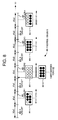
- FIG. 8 A display example is shown in Fig. 8.
- the abscissa represents time (t).
- the first illumination indicated at 81 turn-on and turn-off of the light emitting diode array (LED) 81-1 indicate "01111110”.
- the second illumination indicated at 82 all turn-off state of the light emitting diode array (LED) 82-1 is indicated "00000000"
- the inverted all turn-on state "11111111” is inserted once for 0.1 second.
- all turn-on state of the light emitting diode array (LED) 83-1 indicates "11111111".
- Turn-off events 85-1, 85-2, 85-3 and 85-4 are inserted immediately before the first to fourth turn-on events.
- the number of turned-on light emitting elements of the light emitting diode array represents a decimal number.
- "9” is represented by alternately turning on “8" and "1” at an interval of 0.5 second.
- the inverted state is inserted once for 0.1 second to clarify a delimiter.
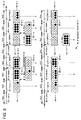
- FIG. 9 A display example is shown in Fig. 9.
- the (1-1)-th illumination indicated at 91-1 since the number of turned-on light emitting elements of the light emitting diode array (LED) 91-1-1 is "00000001", it indicates "1".
- the (1-2)-th illumination indicated at 91-2 since the number of turned-on light emitting elements "11111111” indicated at 91-2-1 and the number of turned-on light emitting elements "00000001" indicated at 91-2-2 are alternately displayed at an interval of 0.5 second, it indicates "9".
- the current status and an error code of each maintenance terminal installed in the disk array devices 41, 42 and 43 are displayed.
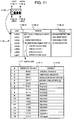
- An example of the display method is illustrated in Fig. 11. Referring to Fig. 11, the meanings 116-2 and statuses 116-3 shown in Table 116 are allocated in correspondence with the illumination display events of LED 0 to LED 7: from the LED0 of the light emitting diode array (LED) 115 indicated at 115-0, LED3 indicated at 115-3, LED4 indicated at 115-4, and to LED 7 indicated at 115-7.
- LED light emitting diode array
- turn-on of LED0 means that the maintenance terminal is in service and LED0 is in the on-state when the maintenance terminal is activated.
- Turn-on of LED1 means a modify mode and LED1 is in the on-state during the modify mode.
- Turn-on of LED2 means that a Web console can be used and LED2 turns on in a use enabled state.
- Turn-on of LED3 means a maintenance terminal abnormality detection and LED3 turns on when the abnormality is detected.
- Turn-on of LED4 means that an error code bit is 0 (MSB).
- Turn-on of LED5 means that an error code bit is 1.
- Turn-on of LED6 means that an error code bit is 2.
- Turn-on of LED7 means that an error code bit is 3 (LSB).
- error code bits 117 "0000” means that the maintenance terminal is under a normal operation. "0001” means that the maintenance terminal is under forcible initialization. "0010” means a background abnormality detection. “0011” means a Web console initialization failure.
- the error codes are continuously displayed at an interval of 1 second. If there is no return message for search broadcast from the operation personal computer (PC) 45 to each disk array device via the network 44, it is possible to confirm that a task at each maintenance terminal is normal.
- PC personal computer
- the disk array device controls LED0 so that LED0 turns on after the activation of the maintenance terminal is completed. After this LED0 turns on, the maintainer can log in and use the maintenance terminal.
- the disk array device controls LED1 so that LED1 turns on when the maintenance terminal changes its mode to the modify mode, and turns off when a view mode is resumed.
- the disk array device controls LED2 so that LED2 turns on when a Web access preparation process becomes ready.
- This ready state indicates that the Web console can be logged in.
- LED2 is controlled to be turned off, and turned off when the ready state is resumed.
- the disk array device controls LED4 to LED7 so that an application detected an error notifies the error code to an external IO control task.
- the external IO control task stores the notified error code in the maintenance terminal and displays the error code by using LED4 to LED7. When a plurality of error codes are reported, these error codes are continuously displayed at a constant time interval. Error bits are 4 bits and indicate 0 to 15.
- Connection check is performed through remote connection from the operation personal computer (PC) 45 shown in Fig. 4 via the network 44 to each maintenance terminal of the disk array devices 41, 42 and 43.
- a plurality of disk array devices are interconnected on the network (LAN) 44. It is possible to communicate with only one disk array device during maintenance by disconnecting the connection cable to the network (LAN) 44. However, disconnection of the network (LAN) 44 from some disk array devices during maintenance results in an inability to transmit a failure notice when an error occurs at another disk array device.
- the work amount and the number of errors can be reduced, when the maintenance is performed by using the operation personal computer (PC) 45 capable of connecting to all disk array devices, more than when the operation terminal is connected to each disk array device one device at a time to change the network (LAN) connection.
- PC personal computer
- Fig. 2 is a flow chart illustrating the procedure of connection check using LEDs according to the invention.
- the operation personal computer (PC) 45 is connected to the network ((LAN) 44 (Step S1), and the personal computer (PC) 45 performs a search for the connection check through broadcast to the network (LAN) 44 (Step S2).
- the operation personal computer (PC) 45 Upon reception of manufacture number information from each of the disk array devices 41, 42 and 43 (Step S3), the operation personal computer (PC) 45 executes connection by using the IP address and manufacture number (Step S4).
- the operation personal computer (PC) 45 executes remote connection to each of the disk array devices 41, 42 and 43 (Step S5), displays an LED pattern representative of the connection state of each designated one of the disk array devices 41, 42 and 43 on the display screen (Step S6), and confirms the LED illumination pattern representative of the connection state of each of the disk array devices 41, 42 and 43 (Step S7).
- the actual LED illumination pattern on the maintenance terminal of each of the disk array devices 41, 42 and 43 is compared with the LED illumination pattern on the display screen of the operation personal computer (PC) 45 (Step S8), and if both the patterns are coincide, the connection is being established (Step S9), whereas if not, the connection is not established (Step S10).
- the list of IP addresses and manufacture numbers are checked on a screen 31 shown in Fig. 3 for connection to each maintenance terminal from the operation personal computer (PC) 45. If the IP address and manufacture number are erroneously recognized, the connection not intended is established. For example, if an incorrect label of the IP address and manufacture number is attached to the disk array device, the connection not intended is established. Connection check through visual confirmation can be made by displaying the specific pattern of LEDs of the maintenance terminal of each disk array device in the network (LAN) 44 and the pattern of the same disk array device on the screen of the operation personal computer (PC) 45.
- connection check state is illustrated in Fig. 4.
- the connection check can be visually made by checking the coincidence between the LED illumination pattern "2" representative of the connection state of the disk array device 43 displayed on the screen of the operation personal computer (PC) 45 and the LED illumination pattern "2" of the maintenance terminal of the disk array device 43.
- PC personal computer
- the disk array device can be selected correctly through the above-described LED pattern check.
- Group classification check is performed when a plurality of disk array devices are classified into several groups, each being subjected to the same setting. If the same setting is made to a plurality of disk array devices at the same time, the setting work can be reduced and a setting error can be reduced more than when the setting is performed separately for each disk array device. However, there is a risk of miss-confirmation of the disk array device if the IP address and manufacture number only are used.
- the operation personal computer (PC) 45 performs setting of a plurality of disk array devices, the maintenance terminals subjected to settings are requested to turn on a certain LED pattern, whereas the other maintenance terminals are requested to turn off LEDs. In this manner, the disk array devices subjected to setting can be confirmed by only one visual check.
- the group setting screen is shown in Fig. 5, interconnection is shown in Fig. 6, and the maintainer manipulation and disk array device operation are illustrated in Fig. 7.
- Fig. 5 displayed on a group setting screen 51 are an LED illumination pattern 52 of the maintenance terminal of each of the disk array devices subjected to setting, the IP addresses and manufacture numbers 53 of the disk array devices selected, a setting key 54 and a cancel key 55.
- the maintenance terminals of the disk array devices 61, 63 and 64 subjected to setting are requested to display the LED illumination pattern "1" and the maintenance terminals of the other disk array devices 62, 65 and 66 are requested to turn off LEDs.
- Step S11 upon start of concurrent setting of disk array devices (Step S11), the setting conditions are determined (Step S12) and a connection check event is transmitted to detect connected disk array devices (Step S13). On the side of disk array device operation, upon reception of the connection check event, the IP address and manufacture number are returned (Step S21). On the side of maintainer manipulation, the disk array devices to be subjected to setting are selected (Step S14), and a notice of whether the disk array device was selected and an LED pattern are transmitted to all disk array devices (Step S15).
- the received LED pattern is turned on, and if the disk array device is not selected, the LEDs are turned off (Step S22).
- the LED illumination pattern of the disk array device is visually confirmed (Step S16), and setting conditions are transmitted for execution of setting (Step S17).
- setting is executed and thereafter the setting result is transmitted (Step S23).
- the setting results are confirmed to thereafter terminate the setting (Step S18).
- the initial LED illumination is recovered (Step S24).
- each disk array device has two maintenance terminals, the service maintenance terminal 131 and standby maintenance terminal 132 shown in Fig. 13, When a failure occurs at the service maintenance terminal 131, this terminal is replaced with the standby maintenance terminal 132. Since the power of the standby maintenance terminal 132 is always turned on, it cannot discriminate which one of the two maintenance terminals is the service maintenance terminal 131. The discrimination between the service and standby maintenance terminals can be made easily by making the standby maintenance terminal not provide the LED illumination of a specific pattern for general connection check.
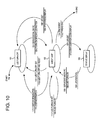
- Fig. 10 is a status transition diagram of LED representations according to the invention. Referring to Fig. 10, at a start 104 the status transits to an LED turn-off 101. In response to an event of service/standby PC 105-1, after the operation of a specific LED pattern turn-off 105-2, the status transits to an event wait 102.
Landscapes
- Engineering & Computer Science (AREA)
- Theoretical Computer Science (AREA)
- Quality & Reliability (AREA)
- Physics & Mathematics (AREA)
- General Engineering & Computer Science (AREA)
- General Physics & Mathematics (AREA)
- Debugging And Monitoring (AREA)
Applications Claiming Priority (2)
| Application Number | Priority Date | Filing Date | Title |
|---|---|---|---|
| JP2004069305A JP4454346B2 (ja) | 2004-03-11 | 2004-03-11 | ディスクアレイ装置の保守用端末 |
| JP2004069305 | 2004-03-11 |
Publications (1)
| Publication Number | Publication Date |
|---|---|
| EP1585027A1 true EP1585027A1 (en) | 2005-10-12 |
Family
ID=34909394
Family Applications (1)
| Application Number | Title | Priority Date | Filing Date |
|---|---|---|---|
| EP04257109A Withdrawn EP1585027A1 (en) | 2004-03-11 | 2004-11-17 | Maintenance terminal of disk array device |
Country Status (3)
| Country | Link |
|---|---|
| US (1) | US7225328B2 (https=) |
| EP (1) | EP1585027A1 (https=) |
| JP (1) | JP4454346B2 (https=) |
Families Citing this family (6)
| Publication number | Priority date | Publication date | Assignee | Title |
|---|---|---|---|---|
| CN100581172C (zh) | 2006-04-19 | 2010-01-13 | 杭州华三通信技术有限公司 | 一种对目的磁盘进行访问的方法和扩展磁盘容量的系统 |
| JP4906832B2 (ja) * | 2008-10-28 | 2012-03-28 | 株式会社日立製作所 | コンピュータ製品の保守支援システム |
| WO2010098744A1 (en) * | 2009-02-24 | 2010-09-02 | Hewlett-Packard Development Company, L.P. | Method and system to lower power consumption |
| JP6039464B2 (ja) * | 2013-02-28 | 2016-12-07 | アズビル株式会社 | 機器管理装置および機器管理方法 |
| KR102725202B1 (ko) * | 2017-02-17 | 2024-11-04 | 삼성전자주식회사 | 스토리지 장치 |
| JP6693540B2 (ja) * | 2018-07-31 | 2020-05-13 | 横河電機株式会社 | 装置、方法およびプログラム |
Citations (5)
| Publication number | Priority date | Publication date | Assignee | Title |
|---|---|---|---|---|
| US5880955A (en) * | 1991-11-13 | 1999-03-09 | Fujitsu Limited | Status display system for storage device |
| US20020101711A1 (en) * | 2001-01-31 | 2002-08-01 | Hewlett-Packard Company | Self managing fixed configuration raid disk in headless appliance |
| US20020142765A1 (en) * | 2001-03-30 | 2002-10-03 | Rhoads Monte J. | Network appliance wireless configuration interface |
| WO2003029985A1 (en) * | 2001-10-03 | 2003-04-10 | Frits Olsen | System with cascade coupled discs for increased capacity and backup |
| US6654382B1 (en) * | 1998-10-26 | 2003-11-25 | Hewlett-Packard Developmemt Company, L.P. | Network device with logical-address learn mode |
Family Cites Families (14)
| Publication number | Priority date | Publication date | Assignee | Title |
|---|---|---|---|---|
| FR2561428B1 (fr) * | 1984-03-16 | 1986-09-12 | Bull Sa | Procede d'enregistrement dans une memoire a disques et systeme de memoire a disques |
| US5148432A (en) * | 1988-11-14 | 1992-09-15 | Array Technology Corporation | Arrayed disk drive system and method |
| JP2548480B2 (ja) * | 1992-02-10 | 1996-10-30 | 富士通株式会社 | アレイディスク装置のディスク装置診断方法 |
| US5717570A (en) * | 1995-10-06 | 1998-02-10 | Elonex I.P. Holdings Ltd. | Enhanced mini-tower computer architecture |
| US6076142A (en) * | 1996-03-15 | 2000-06-13 | Ampex Corporation | User configurable raid system with multiple data bus segments and removable electrical bridges |
| WO1998002879A1 (de) * | 1996-07-11 | 1998-01-22 | Nsm Aktiengesellschaft | Platten-wechsler-einheit mit modularem aufbau |
| JPH10187358A (ja) | 1996-12-25 | 1998-07-14 | Hitachi Ltd | ディスクアレイ装置 |
| JP3904386B2 (ja) | 2000-11-20 | 2007-04-11 | 株式会社日立製作所 | サブシステムの管理方法 |
| US6941357B2 (en) * | 2001-07-18 | 2005-09-06 | Dell Products L.P. | Fibre channel switching appliance |
| JP4246979B2 (ja) * | 2002-09-05 | 2009-04-02 | 株式会社日立製作所 | 装置管理システム |
| US6809505B2 (en) * | 2002-09-26 | 2004-10-26 | Emc Corporation | Storage system and method of detecting an improper cable connection in the storage system |
| JP4371720B2 (ja) * | 2003-06-27 | 2009-11-25 | 株式会社日立製作所 | 記憶装置システム及び記憶装置システムの保守方法 |
| US8639866B2 (en) * | 2003-08-06 | 2014-01-28 | Hewlett-Packard Development Company, L.P. | Systems and methods for dividing a communications channel |
| JP2005182245A (ja) * | 2003-12-17 | 2005-07-07 | Hitachi Ltd | ディスクアレイ装置の接続支援方法 |
-
2004
- 2004-03-11 JP JP2004069305A patent/JP4454346B2/ja not_active Expired - Fee Related
- 2004-05-20 US US10/849,120 patent/US7225328B2/en not_active Expired - Fee Related
- 2004-11-17 EP EP04257109A patent/EP1585027A1/en not_active Withdrawn
Patent Citations (5)
| Publication number | Priority date | Publication date | Assignee | Title |
|---|---|---|---|---|
| US5880955A (en) * | 1991-11-13 | 1999-03-09 | Fujitsu Limited | Status display system for storage device |
| US6654382B1 (en) * | 1998-10-26 | 2003-11-25 | Hewlett-Packard Developmemt Company, L.P. | Network device with logical-address learn mode |
| US20020101711A1 (en) * | 2001-01-31 | 2002-08-01 | Hewlett-Packard Company | Self managing fixed configuration raid disk in headless appliance |
| US20020142765A1 (en) * | 2001-03-30 | 2002-10-03 | Rhoads Monte J. | Network appliance wireless configuration interface |
| WO2003029985A1 (en) * | 2001-10-03 | 2003-04-10 | Frits Olsen | System with cascade coupled discs for increased capacity and backup |
Also Published As
| Publication number | Publication date |
|---|---|
| JP2005258798A (ja) | 2005-09-22 |
| US20050210207A1 (en) | 2005-09-22 |
| JP4454346B2 (ja) | 2010-04-21 |
| US7225328B2 (en) | 2007-05-29 |
Similar Documents
| Publication | Publication Date | Title |
|---|---|---|
| US6867704B2 (en) | Bi-color light source for indicating status of information handling system | |
| US6188973B1 (en) | Automatic mapping, monitoring, and control of computer room components | |
| US6101559A (en) | System for identifying the physical location of one or more peripheral devices by selecting icons on a display representing the one or more peripheral devices | |
| US20070027981A1 (en) | Computer diagnostic system | |
| US20030126315A1 (en) | Data storage network with host transparent failover controlled by host bus adapter | |
| US20020113714A1 (en) | IP-addressable light-emitting diode | |
| EP1585027A1 (en) | Maintenance terminal of disk array device | |
| CN101174996A (zh) | 用于互连节点的可视指导和检验的方法和系统 | |
| CN112306821A (zh) | 一种服务器系统的状态指示方法、装置、设备及存储介质 | |
| JP2003150409A (ja) | ホットスワップ機能を備えた専用サーバ管理カード | |
| CN102479140A (zh) | 计算机系统及其硬盘状态显示方法 | |
| US7852337B2 (en) | Scalable property viewer for a massively parallel computer system | |
| US7434071B2 (en) | Multi-state recognition device of server blade system | |
| CN115408240B (zh) | 一种冗余系统主备方法、装置、设备及储存介质 | |
| CN109144824A (zh) | 双路服务器节点的运行状态显示装置 | |
| CN105426276A (zh) | 双控存储控制器的故障检测方法及存储控制器 | |
| CN113223446A (zh) | 显示模组控制器和显示系统 | |
| US10282948B2 (en) | Device for indicating a datacenter rack among a plurality of datacenter racks | |
| TW201503161A (zh) | 背板介面指示電路 | |
| CN214011939U (zh) | 电源板、单板、电源装置 | |
| CN111007815B (zh) | 一种支持双机热备的集中控制主机 | |
| JP2005258798A5 (https=) | ||
| CN1462934A (zh) | 智能型计算机切换器 | |
| US20050041019A1 (en) | Computer assembly | |
| CN1979443A (zh) | 计算机平台内存状态数据主机端自动显示方法及系统 |
Legal Events
| Date | Code | Title | Description |
|---|---|---|---|
| PUAI | Public reference made under article 153(3) epc to a published international application that has entered the european phase |
Free format text: ORIGINAL CODE: 0009012 |
|
| 17P | Request for examination filed |
Effective date: 20041206 |
|
| AK | Designated contracting states |
Kind code of ref document: A1 Designated state(s): AT BE BG CH CY CZ DE DK EE ES FI FR GB GR HU IE IS IT LI LU MC NL PL PT RO SE SI SK TR |
|
| AX | Request for extension of the european patent |
Extension state: AL HR LT LV MK YU |
|
| AKX | Designation fees paid |
Designated state(s): DE FR GB |
|
| 17Q | First examination report despatched |
Effective date: 20071126 |
|
| STAA | Information on the status of an ep patent application or granted ep patent |
Free format text: STATUS: THE APPLICATION IS DEEMED TO BE WITHDRAWN |
|
| 18D | Application deemed to be withdrawn |
Effective date: 20110913 |