EP1555623A2 - Verfahren zum Einfügen von Faltmarken in ein Dokument anlässlich des Druckens und zugehöriges Drucksystem - Google Patents
Verfahren zum Einfügen von Faltmarken in ein Dokument anlässlich des Druckens und zugehöriges Drucksystem Download PDFInfo
- Publication number
- EP1555623A2 EP1555623A2 EP05290092A EP05290092A EP1555623A2 EP 1555623 A2 EP1555623 A2 EP 1555623A2 EP 05290092 A EP05290092 A EP 05290092A EP 05290092 A EP05290092 A EP 05290092A EP 1555623 A2 EP1555623 A2 EP 1555623A2
- Authority
- EP
- European Patent Office
- Prior art keywords
- printing
- folding
- printer
- marks
- intermediate file
- Prior art date
- Legal status (The legal status is an assumption and is not a legal conclusion. Google has not performed a legal analysis and makes no representation as to the accuracy of the status listed.)
- Withdrawn
Links
Images



Classifications
-
- G—PHYSICS
- G06—COMPUTING OR CALCULATING; COUNTING
- G06F—ELECTRIC DIGITAL DATA PROCESSING
- G06F3/00—Input arrangements for transferring data to be processed into a form capable of being handled by the computer; Output arrangements for transferring data from processing unit to output unit, e.g. interface arrangements
- G06F3/12—Digital output to print unit, e.g. line printer, chain printer
- G06F3/1201—Dedicated interfaces to print systems
- G06F3/1278—Dedicated interfaces to print systems specifically adapted to adopt a particular infrastructure
- G06F3/1282—High volume printer device
-
- G—PHYSICS
- G06—COMPUTING OR CALCULATING; COUNTING
- G06F—ELECTRIC DIGITAL DATA PROCESSING
- G06F3/00—Input arrangements for transferring data to be processed into a form capable of being handled by the computer; Output arrangements for transferring data from processing unit to output unit, e.g. interface arrangements
- G06F3/12—Digital output to print unit, e.g. line printer, chain printer
- G06F3/1201—Dedicated interfaces to print systems
- G06F3/1202—Dedicated interfaces to print systems specifically adapted to achieve a particular effect
- G06F3/1203—Improving or facilitating administration, e.g. print management
- G06F3/1204—Improving or facilitating administration, e.g. print management resulting in reduced user or operator actions, e.g. presetting, automatic actions, using hardware token storing data
-
- G—PHYSICS
- G06—COMPUTING OR CALCULATING; COUNTING
- G06F—ELECTRIC DIGITAL DATA PROCESSING
- G06F3/00—Input arrangements for transferring data to be processed into a form capable of being handled by the computer; Output arrangements for transferring data from processing unit to output unit, e.g. interface arrangements
- G06F3/12—Digital output to print unit, e.g. line printer, chain printer
- G06F3/1201—Dedicated interfaces to print systems
- G06F3/1223—Dedicated interfaces to print systems specifically adapted to use a particular technique
- G06F3/1237—Print job management
- G06F3/1244—Job translation or job parsing, e.g. page banding
- G06F3/1245—Job translation or job parsing, e.g. page banding by conversion to intermediate or common format
-
- G—PHYSICS
- G06—COMPUTING OR CALCULATING; COUNTING
- G06F—ELECTRIC DIGITAL DATA PROCESSING
- G06F3/00—Input arrangements for transferring data to be processed into a form capable of being handled by the computer; Output arrangements for transferring data from processing unit to output unit, e.g. interface arrangements
- G06F3/12—Digital output to print unit, e.g. line printer, chain printer
- G06F3/1201—Dedicated interfaces to print systems
- G06F3/1223—Dedicated interfaces to print systems specifically adapted to use a particular technique
- G06F3/1237—Print job management
- G06F3/1253—Configuration of print job parameters, e.g. using UI at the client
-
- G—PHYSICS
- G06—COMPUTING OR CALCULATING; COUNTING
- G06F—ELECTRIC DIGITAL DATA PROCESSING
- G06F40/00—Handling natural language data
- G06F40/10—Text processing
- G06F40/166—Editing, e.g. inserting or deleting
- G06F40/174—Form filling; Merging
-
- G—PHYSICS
- G06—COMPUTING OR CALCULATING; COUNTING
- G06F—ELECTRIC DIGITAL DATA PROCESSING
- G06F3/00—Input arrangements for transferring data to be processed into a form capable of being handled by the computer; Output arrangements for transferring data from processing unit to output unit, e.g. interface arrangements
- G06F3/12—Digital output to print unit, e.g. line printer, chain printer
- G06F3/1201—Dedicated interfaces to print systems
- G06F3/1202—Dedicated interfaces to print systems specifically adapted to achieve a particular effect
- G06F3/1203—Improving or facilitating administration, e.g. print management
- G06F3/1205—Improving or facilitating administration, e.g. print management resulting in increased flexibility in print job configuration, e.g. job settings, print requirements, job tickets
-
- G—PHYSICS
- G06—COMPUTING OR CALCULATING; COUNTING
- G06F—ELECTRIC DIGITAL DATA PROCESSING
- G06F3/00—Input arrangements for transferring data to be processed into a form capable of being handled by the computer; Output arrangements for transferring data from processing unit to output unit, e.g. interface arrangements
- G06F3/12—Digital output to print unit, e.g. line printer, chain printer
- G06F3/1201—Dedicated interfaces to print systems
- G06F3/1223—Dedicated interfaces to print systems specifically adapted to use a particular technique
- G06F3/1237—Print job management
- G06F3/1253—Configuration of print job parameters, e.g. using UI at the client
- G06F3/1255—Settings incompatibility, e.g. constraints, user requirements vs. device capabilities
Definitions
- the present invention relates to a method of inserting marks of folding when printing a document and the system used to achieve said method.
- the present invention therefore aims to overcome some disadvantages of the prior art by proposing a method of inserting folding marks when printing a document, made by a printing system, accessible by all publishing software applications.
- the activation and parameterization step an option to insert folding marks is made during the first step of setting and validating the properties parameters of the printer in the means of entering the printer parameters and activating an impression of the editing means.
- the step of inserting folding marks is carried out in the printer driver's supervision means during the the step of converting the first intermediate file into a second file intermediate.
- the activation and parameterization step an option to insert folding marks is performed independently and in parallel with the steps of setting and validating the parameters of properties of a printer, from a first conversion of the document to print to an intermediate file, storage and queuing waiting for the first intermediate file in a memory means and detecting the position of the first intermediate file at the head of the queue Wait.
- the step of inserting folding marks is performed after the conversion step of the first intermediate file into a second intermediate file converted to a universal format.
- the insertion of folding marks first requires a step of detecting the layout data of the second intermediate file and a step of modifying said file by insertion of folding marks.
- Another object of the invention is to propose a printing system of folding marks comprising an editing means of at least one document, a printing system and a graphical interfacing means, the printing system comprising at least one driver dedicated to a printer and a print management module, the printing system being characterized in that it comprises a module for activating and adjusting the folding mark option.
- the activation and adjustment module of the folding mark option includes means for setting the parameters fold marks settings and a way of supervising the insertion folding marks.
- the activation and adjustment module of the fold mark option is built into the printer driver.
- the activation and adjustment module of the folding mark option is not built into the printer driver, the means of supervising the insertion of folding marks having a link with the module of supervision of the management of the printing of the means of management of printing.
- the activation and adjustment module of the folding mark option is software.
- the management supervision module the impression management means is a spooler allowing queue management of documents to print.
- the folding marks printing system aims to to obtain, when printing a document edited by an editing software type word processor, folding marks that can be traced by example in the margins of the said document and represented, for example, by one or more thin segments of light gray color.
- Folding marks printing is that it is accessible by all applications of an operating system, such as software applications of the Windows operating system for example Word, Excel, Photoshop ...
- Another goal is to realize the printing of the folding marks on all printers connected to the computer running the process fold marks printing.
- the operating system of a computer includes at least one means for editing (1) an active document, a graphical interfacing means (2) and a printing system (3).
- the editing means (1) can be a software application of word processing, such as for example under the Windows operating system (registered trademark) word processor Word.
- the editing means (1) comprises, inter alia, means for inputting printing parameters (10) including more particularly a means of entering the property parameters of at least one printer connected to the computer.
- the properties settings of a printer are by example the direction of orientation of a page to print in the printer (landscape or portrait), the printing of the document in color or not, a draft printing, etc.
- the graphical interfacing means (2) makes it possible to convert, for example, a Word or .doc format document file into Intermediate printing files in EMF-like image format (Enhanced Metafile), Bitmap, Printer Control Language (PCL), or postscript.
- EMF-like image format Enhanced Metafile
- PCL Printer Control Language
- the system of printing (3) comprises at least one driver (5) dedicated to a printer connected to the computer and a print management means (4).
- the driver (5) of the printer includes means for parameterizing the properties of the printer (50) and a flow generating means of data (51) representative of the characters or pixels of the document to be printed, the data streams being interpretable by the printer.
- the print management means (4) comprises a means of storing (41) the documents to be printed, a means of supervising printing (40), an interpreter of the data streams (42) and a means direct interfacing to the printer (43).
- the means of supervision of the printing (40) makes it possible to manage the management of a queue of the means of memorizing (41). Queue management can be performed either according to the order of arrival of the print files, according to their priority, either following the two.
- the interpreter of the data streams (42) allows to interpret the language of the description of a page to print. This language can be vector or pixel.
- Fig. 5 shows the printing operation method of a known document by a printing system of a PC.
- An user would like to print the document he edited in software such as word type word processing. For this, it settles by the means of printing (10) the standard parameters of a print such as number of pages to print, the choice of pages to print, it can also choose the type of printer on which he wants the printing to be executed. The user can also set the properties of the printer, connected to the computer, from the data input means printer properties settings (not shown).
- a first step (100) of the known method consists in the validation of the parameters printing and launching the print command.
- the document to be printed is sent to the graphical interface.
- the graphical interface in step (120), will convert the word document, by for example, in an intermediate file in EMF or bitmap type image format.
- the conversion step takes into account the standard setting of the printer and not the printer.
- the intermediate file is, at step (130), stored and queued in the means of storage of the printing system management means.
- Way to supervision (40) of the print management means (4) controls the queue waiting, at step (140).
- the supervision means (40) detects the intermediate print file positioned at the top of the queue of the memory means (41)
- it informs the graphical interface (2) which will retrieve the intermediate file, at step (150) and will, again, realize a conversion associated with a generation of data flows in collaboration with the data flow generator (51) of the pilot of the printer (5).
- a second intermediate file is created in a format universal type PCL or Postscript or other.
- This intermediate file includes printer properties settings.
- this file is sent to the interpreter (42) of the management means of printing (4), which interprets the data stream file and sends directly the intermediate data stream file interpreted to the interface of the printer (43) in step (170).
- a first embodiment of the printing process of folding marks of the present invention is accessible by any software publishing, however the printing of the marks is specific to a single type printer known to the applicant.
- a second embodiment of the method of printing fold marks of the present invention is accessible by any editing software, printing marks being printable by any printer using a command language standard type PLC or Postscript.
- Figure 1 shows the printing system of folding marks according to the first embodiment.
- the operation of this system is very similar to the functioning of the system shown in Figure 5.
- a way to manage folding marks (6) is inserted into the printer driver (5).
- This way of managing folding marks (6) comprises means for setting the marks of folding (61) and a means of supervising the insertion of folding marks (60).
- the folding mark parameters represent, for example, the position of the segments in a margin of the page to be printed allowing fold the latter to insert it in an envelope of a particular format.
- the means for setting the folding marks (61) takes into account the adjustment of the different parameters of the folding marks.
- these settings are specific to the printer and can be entered in the input method of the properties parameters of the printer, in the form of a tab located in the parameter window properties of the printer in the editing software.
- Way to setting of the folding marks (61) can be connected, or even inserted, by setting the properties of the printer (50).
- the way activation (60) of the insertion of the folding marks takes into account the validation of the insertion of the folding marks and communicates with the data flow generating means (51).
- a memory space can be dedicated in the memory means of the printing management means, said memory space including the various settings of marks Folder to insert in the document to print.
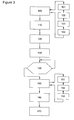
- FIG. 3 shows the operation of the printing process of folding marks according to the first embodiment.
- the first steps (101, 102) relate to setting the parameters of the marks of folding and activating the insertion of folding marks when printing
- a user will therefore select the branding option from the means of entering the print parameters of the software application, type "word" for example. More particularly the selection is made in the input means (1) parameters corresponding to the printer connected to the computer.
- the user validates his selection which is automatically taken into account by the means of parameterizing the fold marks of the fold marks management means at the step (103).
- the means for supervising the insertion of the folding marks (60) takes into account the activation of the folding mark option, in step (104).
- the steps (110 to 140) are identical to the steps described in FIG.
- the means of supervision of the insertion of the marks of folding (60) transmits the activation status of the option and the parameters selected by means of generating pilot data flow at the stage (151).
- the data flow generating means (51) takes into account the information of the supervision means (60), step (152), and inserts, at the step (153), the data relating to the position and shape of the folding marks in the intermediate file before or at the same time as the conversion and the generation of data flows are executed.
- the generator of data flow will recover in the memory space of the means of storage of the printer management means the parameters of selected folding marks and will modify from the contents of these settings the contents of the first intermediate print file of image format by inserting the fold marks.
- insertion can be done using instructions such as copy / paste contents of an image file, containing the parameters, in the first file intermediate in the background or in watermark with respect to the content of the first intermediate file.
- the second conversion and generation of data streams, step (150) are performed by the graphical interfacing means (2) and the means of generating data streams (51).
- a second intermediate file is created in a standardized format of image type, PCL or Postscript.
- the second intermediate file of printing includes the marks of folding.
- the printing process proceeds according to the steps (160, 170), as described in FIG. 5.
- This embodiment is dedicated to only when printing documents on printers manufactured by the company SAGEM S.A ..
- the stage of insertion of marks of folding (153) is performed within the printer driver itself. For all other printer, access to the operation of the printer driver is impossible, the insertion of folding marks can not be carried out according to the first embodiment.
- FIG. 2 shows the system printing according to the second embodiment.
- This system is very similar to the system presented in Figure 1.
- a management module for Fold marks (7) is present in the operating system.
- This module can be a software application activated separately externally publishing software applications.
- the brand management module of folding (7) comprises means for setting the folding marks (70) and supervisory means (71) for inserting the fold marks.
- the means for setting up the folding marks (70) includes among others means for entering and validating the parameterization and activation of folding marks.
- This input means can be represented for example through a parameter window displayed on the system desktop operating system, with an activation tab of the option inserting fold marks and input boxes or drop-down menus allowing to choose the desired parameters of the folding marks.
- any document print requested by any editing software application for example Word or Excel, will include the folding marks.
- any editing software application for example Word or Excel
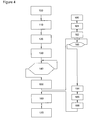
- FIG. 4 shows the operation of the printing process of folding marks according to the second embodiment.
- An user wants to print a published document in a means of editing, with folding marks.
- the user can adjust standard print settings and printer properties directly from the print parameter input means present in the editing means, at step (100).
- the user To select the insert option fold marks in the printing of the document, the user must activate the folding mark management module (7) which will open for example a window for entering and validating the fold marks option, the window being independent of the editing software window.
- This activation step (180) is performed independently and in parallel with the steps of the method printing a document, shown in FIG. 5.
- step (181) the setting means will take into account the setting of the parameters of the option of inserting fold marks and the means of supervision, to step (182), will take into account the activation of the insert option of folding marks.
- Folding marks insertion management module will activate the step of waiting (183) for the activation of the print command of the document. As soon as the print command is activated, the process performs the same steps (100 to 150) identical to the steps of FIG. Then, after the step (150) of converting the first intermediate file into a second intermediate file of standard format of the PCL or PS type, the means of supervision (71) of the folding marks management module (7) retrieves, in step (184), the second intermediate file in the format standard that he can read.
- the management means initiates, in step (185), a program using known instructions like PCL or PS to read and extract some of the format data, such as for example the position of the header and footer of the document. These data are necessary to know the position for example margins of the page to print to insert the folding marks.
- the means of supervision modifies the second intermediate file by inserting data representative of the shape and position of the folding marks. Once the modification is made, the supervision means returns the second intermediary file modified to an average interpreter means Print Management. Then the process continues the steps (160, 170) described in Figure 5. This embodiment therefore allows the insertion of the fold marks data outside the printer driver thus allowing said marks to be printed on any connected printer at the computer.
Landscapes
- Engineering & Computer Science (AREA)
- Theoretical Computer Science (AREA)
- Physics & Mathematics (AREA)
- General Engineering & Computer Science (AREA)
- General Physics & Mathematics (AREA)
- Human Computer Interaction (AREA)
- Audiology, Speech & Language Pathology (AREA)
- Computational Linguistics (AREA)
- General Health & Medical Sciences (AREA)
- Health & Medical Sciences (AREA)
- Artificial Intelligence (AREA)
- Accessory Devices And Overall Control Thereof (AREA)
- Record Information Processing For Printing (AREA)
Applications Claiming Priority (2)
| Application Number | Priority Date | Filing Date | Title |
|---|---|---|---|
| FR0400343A FR2865295B1 (fr) | 2004-01-15 | 2004-01-15 | Procede d'insertion de marques de pliage sur un document lors de son impression et systeme d'impression associe |
| FR0400343 | 2004-01-15 |
Publications (1)
| Publication Number | Publication Date |
|---|---|
| EP1555623A2 true EP1555623A2 (de) | 2005-07-20 |
Family
ID=34610774
Family Applications (1)
| Application Number | Title | Priority Date | Filing Date |
|---|---|---|---|
| EP05290092A Withdrawn EP1555623A2 (de) | 2004-01-15 | 2005-01-14 | Verfahren zum Einfügen von Faltmarken in ein Dokument anlässlich des Druckens und zugehöriges Drucksystem |
Country Status (2)
| Country | Link |
|---|---|
| EP (1) | EP1555623A2 (de) |
| FR (1) | FR2865295B1 (de) |
Families Citing this family (1)
| Publication number | Priority date | Publication date | Assignee | Title |
|---|---|---|---|---|
| EP2532327A1 (de) | 2011-06-09 | 2012-12-12 | angioclinic AG | Klebepflaster oder Verband zur Verwendung bei der Behandlung von Blutgefäßerkrankungen |
Family Cites Families (6)
| Publication number | Priority date | Publication date | Assignee | Title |
|---|---|---|---|---|
| US5495561A (en) * | 1993-06-21 | 1996-02-27 | Taligent, Inc. | Operating system with object-oriented printing interface |
| US6738156B1 (en) * | 1999-09-28 | 2004-05-18 | Hewlett-Packard Development Company, L.P. | Reusable job editing and delivery system |
| US6429947B1 (en) * | 2000-01-10 | 2002-08-06 | Imagex, Inc. | Automated, hosted prepress application |
| US6765688B1 (en) * | 2000-02-08 | 2004-07-20 | Hewlett-Packard Development Company, L.P. | Generic method of defining a watermark for both print and copy |
| JP2001328325A (ja) * | 2000-03-03 | 2001-11-27 | Brother Ind Ltd | 画像形成制御装置、画像形成装置、画像形成装置の制御方法および記憶媒体 |
| US7268910B2 (en) * | 2001-05-16 | 2007-09-11 | Agfa Corporation | Just-in-time raster image assembly |
-
2004
- 2004-01-15 FR FR0400343A patent/FR2865295B1/fr not_active Expired - Fee Related
-
2005
- 2005-01-14 EP EP05290092A patent/EP1555623A2/de not_active Withdrawn
Also Published As
| Publication number | Publication date |
|---|---|
| FR2865295B1 (fr) | 2008-09-19 |
| FR2865295A1 (fr) | 2005-07-22 |
Similar Documents
| Publication | Publication Date | Title |
|---|---|---|
| US7949945B2 (en) | Variable text processing for an electronic press | |
| US8934119B2 (en) | Greenbooks | |
| US8885181B2 (en) | Virtual press run | |
| US20090241024A1 (en) | Information processing apparatus, information processing method, and printing system | |
| CN101467123B (zh) | 信息处理装置、信息处理方法及程序 | |
| CN102830945A (zh) | 文档处理装置及文档处理方法 | |
| JP4306367B2 (ja) | 画像処理装置 | |
| US20080239359A1 (en) | Image Forming Device | |
| US20090086238A1 (en) | Methods for Determining Document Characteristics from PDL Data | |
| US8675241B2 (en) | Method for printing oversized image data | |
| US10310788B2 (en) | Control method for generating data used for printing and information processing apparatus | |
| EP1701246A3 (de) | System und Verfahren zur Verwaltung eines Ausgangspfades mit Kontexterhaltung | |
| US8438004B2 (en) | System and methods for language translation printing | |
| US20080046835A1 (en) | Object-oriented processing of tab text | |
| US10481844B2 (en) | Data communication method and information processing apparatus having multiple print settings | |
| US9141314B2 (en) | Systems and methods for updating a user interface for a printing device | |
| FR2865295A1 (fr) | Procede d'insertion de marques de pliage sur un document lors de son impression et systeme d'impression associe | |
| CN106020744A (zh) | 数据处理装置以及数据处理装置的控制方法 | |
| US10062019B2 (en) | Method, device and computer program product for processing print data to generate a print image on a print substrate | |
| US20100073727A1 (en) | System and method for greeting card template matching | |
| US20060012817A1 (en) | Integrated tab and slip sheet editing and automatic printing workflow | |
| US20100157353A1 (en) | Method and Image Forming Device for Generating Print Output | |
| JP6437076B2 (ja) | 情報処理装置及びその制御方法とプログラム | |
| US7880918B2 (en) | System and method for generating unified image output | |
| JP5335392B2 (ja) | 情報処理装置、情報処理方法及びコンピュータプログラム |
Legal Events
| Date | Code | Title | Description |
|---|---|---|---|
| PUAI | Public reference made under article 153(3) epc to a published international application that has entered the european phase |
Free format text: ORIGINAL CODE: 0009012 |
|
| AK | Designated contracting states |
Kind code of ref document: A2 Designated state(s): AT BE BG CH CY CZ DE DK EE ES FI FR GB GR HU IE IS IT LI LT LU MC NL PL PT RO SE SI SK TR |
|
| AX | Request for extension of the european patent |
Extension state: AL BA HR LV MK YU |
|
| RAP1 | Party data changed (applicant data changed or rights of an application transferred) |
Owner name: SAGEM COMMUNICATION |
|
| 17P | Request for examination filed |
Effective date: 20060117 |
|
| RAP1 | Party data changed (applicant data changed or rights of an application transferred) |
Owner name: SAGEM COMMUNICATIONS |
|
| RAP1 | Party data changed (applicant data changed or rights of an application transferred) |
Owner name: SAGEM COMMUNICATIONS SAS |
|
| RAP1 | Party data changed (applicant data changed or rights of an application transferred) |
Owner name: SAGEM COMMUNICATIONS |
|
| RAP1 | Party data changed (applicant data changed or rights of an application transferred) |
Owner name: SAGEM COMMUNICATIONS SAS |
|
| RAP1 | Party data changed (applicant data changed or rights of an application transferred) |
Owner name: SAGEMCOM DOCUMENTS SAS |
|
| STAA | Information on the status of an ep patent application or granted ep patent |
Free format text: STATUS: THE APPLICATION IS DEEMED TO BE WITHDRAWN |
|
| 18D | Application deemed to be withdrawn |
Effective date: 20160802 |