EP1531380B1 - Wiedergabegerät für digitale Daten und entsprechendes Managementsystem - Google Patents
Wiedergabegerät für digitale Daten und entsprechendes Managementsystem Download PDFInfo
- Publication number
- EP1531380B1 EP1531380B1 EP04256473.2A EP04256473A EP1531380B1 EP 1531380 B1 EP1531380 B1 EP 1531380B1 EP 04256473 A EP04256473 A EP 04256473A EP 1531380 B1 EP1531380 B1 EP 1531380B1
- Authority
- EP
- European Patent Office
- Prior art keywords
- contents
- erased
- check
- information processing
- identification information
- Prior art date
- Legal status (The legal status is an assumption and is not a legal conclusion. Google has not performed a legal analysis and makes no representation as to the accuracy of the status listed.)
- Expired - Lifetime
Links
Images




Classifications
-
- G—PHYSICS
- G06—COMPUTING OR CALCULATING; COUNTING
- G06F—ELECTRIC DIGITAL DATA PROCESSING
- G06F21/00—Security arrangements for protecting computers, components thereof, programs or data against unauthorised activity
- G06F21/10—Protecting distributed programs or content, e.g. vending or licensing of copyrighted material ; Digital rights management [DRM]
-
- G—PHYSICS
- G06—COMPUTING OR CALCULATING; COUNTING
- G06F—ELECTRIC DIGITAL DATA PROCESSING
- G06F15/00—Digital computers in general; Data processing equipment in general
- G06F15/16—Combinations of two or more digital computers each having at least an arithmetic unit, a program unit and a register, e.g. for a simultaneous processing of several programs
-
- G—PHYSICS
- G06—COMPUTING OR CALCULATING; COUNTING
- G06F—ELECTRIC DIGITAL DATA PROCESSING
- G06F12/00—Accessing, addressing or allocating within memory systems or architectures
- G06F12/14—Protection against unauthorised use of memory or access to memory
-
- G—PHYSICS
- G06—COMPUTING OR CALCULATING; COUNTING
- G06F—ELECTRIC DIGITAL DATA PROCESSING
- G06F17/00—Digital computing or data processing equipment or methods, specially adapted for specific functions
-
- Y—GENERAL TAGGING OF NEW TECHNOLOGICAL DEVELOPMENTS; GENERAL TAGGING OF CROSS-SECTIONAL TECHNOLOGIES SPANNING OVER SEVERAL SECTIONS OF THE IPC; TECHNICAL SUBJECTS COVERED BY FORMER USPC CROSS-REFERENCE ART COLLECTIONS [XRACs] AND DIGESTS
- Y10—TECHNICAL SUBJECTS COVERED BY FORMER USPC
- Y10S—TECHNICAL SUBJECTS COVERED BY FORMER USPC CROSS-REFERENCE ART COLLECTIONS [XRACs] AND DIGESTS
- Y10S707/00—Data processing: database and file management or data structures
- Y10S707/99931—Database or file accessing
- Y10S707/99932—Access augmentation or optimizing
-
- Y—GENERAL TAGGING OF NEW TECHNOLOGICAL DEVELOPMENTS; GENERAL TAGGING OF CROSS-SECTIONAL TECHNOLOGIES SPANNING OVER SEVERAL SECTIONS OF THE IPC; TECHNICAL SUBJECTS COVERED BY FORMER USPC CROSS-REFERENCE ART COLLECTIONS [XRACs] AND DIGESTS
- Y10—TECHNICAL SUBJECTS COVERED BY FORMER USPC
- Y10S—TECHNICAL SUBJECTS COVERED BY FORMER USPC CROSS-REFERENCE ART COLLECTIONS [XRACs] AND DIGESTS
- Y10S707/00—Data processing: database and file management or data structures
- Y10S707/99931—Database or file accessing
- Y10S707/99933—Query processing, i.e. searching
-
- Y—GENERAL TAGGING OF NEW TECHNOLOGICAL DEVELOPMENTS; GENERAL TAGGING OF CROSS-SECTIONAL TECHNOLOGIES SPANNING OVER SEVERAL SECTIONS OF THE IPC; TECHNICAL SUBJECTS COVERED BY FORMER USPC CROSS-REFERENCE ART COLLECTIONS [XRACs] AND DIGESTS
- Y10—TECHNICAL SUBJECTS COVERED BY FORMER USPC
- Y10S—TECHNICAL SUBJECTS COVERED BY FORMER USPC CROSS-REFERENCE ART COLLECTIONS [XRACs] AND DIGESTS
- Y10S707/00—Data processing: database and file management or data structures
- Y10S707/99941—Database schema or data structure
- Y10S707/99942—Manipulating data structure, e.g. compression, compaction, compilation
-
- Y—GENERAL TAGGING OF NEW TECHNOLOGICAL DEVELOPMENTS; GENERAL TAGGING OF CROSS-SECTIONAL TECHNOLOGIES SPANNING OVER SEVERAL SECTIONS OF THE IPC; TECHNICAL SUBJECTS COVERED BY FORMER USPC CROSS-REFERENCE ART COLLECTIONS [XRACs] AND DIGESTS
- Y10—TECHNICAL SUBJECTS COVERED BY FORMER USPC
- Y10S—TECHNICAL SUBJECTS COVERED BY FORMER USPC CROSS-REFERENCE ART COLLECTIONS [XRACs] AND DIGESTS
- Y10S707/00—Data processing: database and file management or data structures
- Y10S707/99941—Database schema or data structure
- Y10S707/99944—Object-oriented database structure
- Y10S707/99945—Object-oriented database structure processing
-
- Y—GENERAL TAGGING OF NEW TECHNOLOGICAL DEVELOPMENTS; GENERAL TAGGING OF CROSS-SECTIONAL TECHNOLOGIES SPANNING OVER SEVERAL SECTIONS OF THE IPC; TECHNICAL SUBJECTS COVERED BY FORMER USPC CROSS-REFERENCE ART COLLECTIONS [XRACs] AND DIGESTS
- Y10—TECHNICAL SUBJECTS COVERED BY FORMER USPC
- Y10S—TECHNICAL SUBJECTS COVERED BY FORMER USPC CROSS-REFERENCE ART COLLECTIONS [XRACs] AND DIGESTS
- Y10S707/00—Data processing: database and file management or data structures
- Y10S707/99941—Database schema or data structure
- Y10S707/99948—Application of database or data structure, e.g. distributed, multimedia, or image
Definitions
- the present invention relates to a data reproducing apparatus, information processing apparatus, contents management system, information processing method, and computer program. More particularly, preferred embodiments of the invention relates to a data reproducing apparatus, information processing apparatus, information processing method, and computer program that are used in a contents management configuration, in which use limitations are defined, to perform a check-out for moving contents between information processing apparatuses and exercise efficient check-out/check-in management in a situation where contents are erased at a check-out destination.
- the SDMI Secure Digital Music Initiative
- Various copyright protection schemes are proposed, including a limitation on the number of copies of contents, a limitation on the period of contents use, and check-out/check-in management, which will be described later.
- Contents downloaded via a network by a user who performs a proper procedure and contents stored on a DVD or other recording medium can be reproduced on a personal computer or other information processing apparatus that is capable of reproducing contents. If an SDMI-defined limitation is imposed on the use of such contents, the personal computer or other information processing apparatus performs a contents use control process in accordance with an LCM (Licensed Compliant Module) or other software module compliant with the SDMI standard.
- LCM Licensed Compliant Module
- the LCM is a set of modules that exercise control to permit the use of individual contents only when the use conditions imposed by a copyright holder or other similar person are met. This LCM control is exercised to prevent copyrights from being infringed mainly by illegal secondary use of contents.
- Contents use conditions subject to control include contents reproduction conditions, copy conditions, move conditions, or storage conditions.
- check-out/check-in management is exercised to perform a process for managing the contents output to an external device and the contents input from the external device.
- check-out/check-in management is exercised to provide contents use management by limiting the number of portable devices to which a set of contents can be output.
- Patent Document 1 Japanese Patent Laid-Open No. 2001-175624
- Patent Document 2 Japanese Patent Laid-Open No. 2003-77214
- the LCM of a personal computer that stores contents, for instance, on its hard disk performs authentication to check whether a portable device connected to the personal computer is authenticated.
- the LCM performs an encryption or other similar process, transfers the contents, and if necessary, performs a process for transferring contents use rights information.
- the LCM of the personal computer After performing a contents check-out process on the portable device, the LCM of the personal computer updates the contents use rights information (use conditions) about the checked-out contents. More specifically, the LCM decrements the permissible check-out count for the check-out contents by one. If, for instance, the maximum value for the permissible check-out count managed by the LCM of the personal computer is 3, the counter for keeping the permissible check-out count is decremented by one each time a check-out process is performed. As a result, the permissible check-out count is sequentially changed from 3 to 2, 1, and 0. When a permissible check-out count of 0 is reached, the associated contents cannot be checked out any more.
- the portable device stores the check-out contents, which are input from the personal computer, and contents use rights information or the like on a flash memory or other recording medium. Thus, the portable device can reproduce or use the contents in accordance with the contents use rights information.
- the contents checked out to the portable device can be returned to the personal computer's hard disk.
- the process for returning contents from the portable device to the personal computer is called a check-in process.
- the personal computer increments the permissible check-out count (counter) that is managed by the LCM.
- the personal computer increments the counter by one. More specifically, the personal computer's contents counter is incremented by one upon each check-in so that the resulting count sequentially changes from 0 to 1, 2, and 3. As a result, the contents can be checked out repeatedly in accordance with an increase in the count.
- the personal computer checks whether it performed a contents check-out for a portable device that requested a check-in process.
- the personal computer performs a check-in process only when a contents check-in process request is issued by a portable device for which the personal computer performed a check-out. If a portable device stores contents that are checked out from another personal computer, the check-in process will not be performed for such contents.
- the personal computer acquires the device ID of a portable device for which a check-out is to be performed, associates the acquired device ID with check-out contents, and stores it in the personal computer's memory.
- a "virtual check-in process” can be performed as described below. If, for instance, contents checked out to a portable device from the personal computer are erased while the portable device is away from home, the personal computer detects when the portable device is connected to the personal computer that the checked-out contents are erased from the portable device. Further, when it is verified that a check-in process is not performed by the portable device, it is concluded that a check-in process is virtually performed. The counter for erased contents is then incremented by one. Due to this virtual check-in, the counter can be reset (incremented) even if checked-out contents are erased outside.
- the personal computer When the above virtual check-in process is to be performed, the personal computer performs a process for determining whether contents it checked out are erased from the portable device. In this instance, a targeted contents identifier is searched for. If the portable device has a small capacity and the amount of stored contents is small, the time required for the search does not constitute any problem. However, if the portable device has a hard disk or large-capacity flash memory, it stores a large amount of contents. In such a situation, it takes a considerable amount of time to search a large amount of contents for target contents.
- the contents ID corresponding to the contents checked out by the portable device is recorded in a TOC (Table of Contents) file, which defines, for instance, the order of contents reproduction.
- a contents file which stores contents.
- the personal computer's LCM performs a process for verifying a contents ID that is registered in the portable device's TOC file. If a contents ID corresponding to checked-out contents is erased from the portable device's TOC file, the process verifies that the contents are erased.
- contents IDs managed by the TOC file are not always erased when the portable device performs a contents erasure process. There is a problem with the fact that contents erasure can be verified only by conducting an ID search in the TOC file.
- the personal computer's LCM In a situation where the portable device uses contents storage files for contents ID management purposes, the personal computer's LCM must check all file names on the portable device to determine whether a file name corresponding to an erased contents ID exists. The efficiency of such a file search process is lowered if an enormous amount of data is stored in file form in the portable device.
- US 2002/0161762 describes an information processing apparatus and method in which a variety of data about sound contents is recorded.
- a predetermined number of data about sound contents is recorded in a main table in a display data file while other types of data about sound contents are recorded in a sub table in the display data file as data which increase the types of data recorded in the main table.
- Embodiments seek to provide a data reproducing apparatus, information processing apparatus, contents management system, information processing method, and computer program for performing an erasure verification process
- the data reproducing apparatus generates the erased contents management file (check-in indicator file) that registers the contents identification information about check-out contents erased in the data reproducing apparatus, which is a contents check-out destination, updates it, and stores it in a storage section, as described above.
- the personal computer which is a contents check-out source, acquires the registration information in the erased contents management file (check-in indicator file) from the portable device, performs an erased contents verification process in accordance with the acquired information, and performs an update process (check-in process) on the check-out counter for contents whose erasure has been verified.
- the data reproducing apparatus generates the erased contents management file (check-in indicator file) that registers the contents identification information about check-out contents erased in the data reproducing apparatus, which is a contents check-out destination, updates it, and stores it in a storage section, as described above.
- the personal computer which is a contents check-out source, acquires the registration information in the erased contents management file (check-in indicator file) from the portable device, performs an erased contents verification process in accordance with the acquired information, and performs an update process (check-in process) on the check-out counter for contents whose erasure has been verified.
- FIG. 1 shows a typical form of contents use to which embodiments of the present invention are applicable.
- PC personal computer
- EMD Electronic Music Distribution
- WWW World Wide Web
- a CD, DVD, MD, or other recording medium 15 on which contents are recorded is set in the personal computer 20.
- the contents and incidental data (e.g., song title and use rights information) stored on the recording medium are supplied to the personal computer 20.
- the contents supplied from the EMD servers 11, 12 and WWW server 13 and the contents stored on the recording medium 15 are compressed and encrypted as needed.
- the personal computer 20 records contents data received via the network or read from the recording medium onto a recording medium (e.g., hard disk) within the personal computer. Contents-specific contents use rights information is attached to the contents data so that the personal computer 20 records both the contents and contents use rights information.
- a recording medium e.g., hard disk
- the contents use rights information includes use period limiting conditions, copy count limit, and various other items of rights information.
- One item of the contents use rights information is the information that limits the number of outputs, for instance, to a portable device (PD) 30, that is, the information for limiting the check-out count.
- the personal computer 20 can output contents to a portable device 30, which serves as a data reproducing apparatus, or other external device.
- the personal computer 20 counts the number of contents outputs (check-outs) and permits contents outputs (check-outs) until the maximum check-out count, which is set within the contents use rights information, is reached.
- the personal computer 20 does not permit check-outs if the maximum check-out count is exceeded.
- An LCM (Licensed Compliant Module), which is an SDMI (Secure Digital Music Initiative) compliant software module, performs a contents input/output management process within the personal computer 20.
- the portable device 30 which serves as a data reproducing apparatus, includes a flash memory, small-size hard disk, optical disk, magneto-optical disk, or other recording medium.
- the portable device 30 uses such a recording medium to store contents, song titles, use rights information, and other incidental data, which are supplied when the personal computer 20 performs a check-out process.
- contents use rights information the portable device 30 reproduces the contents stored on the recording medium, and outputs the contents via a headphone, speaker, or other output means.
- a contents input/output process that is, a check-out/check-in process, which is performed between the personal computer and portable device having a recording medium for storing contents, will now be described in detail.
- a check-out/check-in management program contained in the LCM which is an SDMI-compliant software module, performs a check-out process for controlling and managing the output of the contents stored on the personal computer's hard disk or other data storage means to the portable device or other external device, and performs a check-in process for controlling and managing the return of contents checked out to the portable device or other external device to the personal computer.
- the check-out/check-in management program updates a permissible check-out counter, which is variously set in accordance with contents.
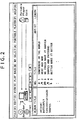
- FIG. 2 shows a typical check-out/check-in operation instruction window that appears on the personal computer's display.
- An album title, song title, artist name, and other contents-related data about a check-out/check-in process target appear on the personal computer's display.
- the "No.” field shown in the figure presents an identification number for a song title and a musical note, which indicates the current permissible check-out count.
- the personal computer stores contents and contents-related data (e.g., song title or contents use rights information such as reproduction conditions) on a recording medium within a portable device that is connected to the personal computer via an USB (Universal Serial Bus) cable.
- contents and contents-related data e.g., song title or contents use rights information such as reproduction conditions
- the personal computer updates a check-out counter for the contents stored in the portable device.
- the value of the counter corresponds to the number of musical notes shown in FIG. 2 .
- the check-out process is performed, the counter corresponding to the contents recorded in the personal computer is decremented by one. It means that the permissible check-out count is decremented by one.
- a check-out count of 0 is reached, the associated contents cannot be checked out anymore.
- the counter for setting the permissible check-out count for contents to be checked out from the personal computer is set as contents-specific use rights information as described above, it is possible to prevent a piece of contents from being copied from the personal computer to an infinite number of recording media. If, for instance, the maximum permissible check-out count is 3, the counter for contents stored on the personal computer's hard disk is set to 3. This setting permits the contents to be copied from the personal computer to up to three recording media, but prevents a copy process from being performed more than three times.
- the personal computer's contents-specific counter is sequentially updated from 3 to 2, 1, and 0.
- the associated contents cannot be transferred (checked out) from the personal computer.
- Contents checked out to the portable device and stored on a hard disk or optical disk or in a flash memory or other storage device can be returned to the personal computer's hard disk.
- the process for returning contents from the portable device to the personal computer in the above manner is called a check-in process.
- the counter corresponding to the contents stored on the personal computer's hard disk is incremented.
- the personal computer increments the counter.
- the personal computer updates its contents-specific counter from 0 to 1, 2, and 3. Therefore, the contents can be checked out repeatedly in accordance with an increase in the counter.
- the personal computer determines whether or not it checked out contents to a portable device that has requested the check-in process.
- the personal computer performs a check-in process only when it checked out contents to a portable device that has issued a request for the check-in process. In other words, the personal computer does not perform a check-in process for contents stored in a portable device if the contents were checked out from another personal computer.
- the personal computer acquires the device ID of a portable device that checks out contents, associates the acquired device ID with the checked-out contents, and stores the resulting association in the personal computer's memory.
- a "virtual check-in process” can be performed as described below. If, for instance, contents checked out to a portable device from the personal computer are erased while the portable device is away from home, the personal computer detects that the checked-out contents are erased from the portable device by connecting the portable device to the personal computer via, for example, an USB cable. Further, when it is verified that a check-in process is not performed by the portable device, it is concluded that a check-in process is virtually performed. The counter for erased contents is then incremented by one. Due to this virtual check-in, the counter can be reset (incremented) even if checked-out contents are erased outside.
- the personal computer When the above virtual check-in process is to be performed, the personal computer performs a process for determining whether or not contents it checked out are erased from the portable device. In this instance, a targeted contents identifier, that is, a contents ID, is searched for. If the portable device has a small capacity and the amount of stored contents is small, the time required for the search does not constitute any problem. However, if, for instance, a small-size hard disk is used as a portable device, the hard disk stores a large amount of contents. In such a situation, it takes a considerable amount of time to search a large amount of contents for target contents.
- a targeted contents identifier that is, a contents ID
- the configuration according to embodiments of the present invention enables the personal computer to search for a target contents identifier with ease and determine whether or not target contents exist.
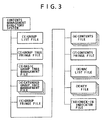
- FIG. 3 shows a contents management configuration according to an embodiment of the present invention, that is, the configuration of files checked out by a portable device or other data reproducing apparatus for entering contents by performing a check-out.
- the portable device which stores contents checked out from the personal computer, manages check-out contents in accordance with a contents management system directory shown in FIG. 3 .
- the check-in indicator file shown in FIG. 3 that is, the erased contents management file, is updated so that the check-in indicator file stores contents erasure information.
- the portable device serving as a data reproducing apparatus inputs contents targeted for management as check-out contents from the personal computer serving as an information processing apparatus for performing a contents use management process
- the aforementioned contents management directory system is set to manage the check-out contents.
- the erased contents management file in which contents identification information about erased contents is set as a data entry, that is, the check-in indicator file, is generated or updated.
- the portable device serving as a data reproducing apparatus stores the check-in indicator file and various other contents management data files contained in the directory shown in FIG. 3 in the storage means.
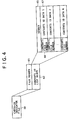
- the check-in indicator file 50 includes a file header 61 and a contents ID list block 62.
- the contents ID list block includes a header 65 and a contents ID list.
- the contents ID list which is a pair of data, includes a contents file number 66 and contents ID data 67.
- the contents file numbers and contents ID data corresponding to contents erased in the portable device are sequentially recorded in the contents ID list block.
- the contents file number is a file identification number that is set, for instance, for check-out contents as a sequential number when the check-out contents are checked out from the personal computer to the portable device.
- the contents ID is a contents-specific identifier that is assigned to contents.
- the personal computer When the personal computer performs a check-out process in relation to the portable device, the personal computer sets a file number for check-out contents and outputs the contents and file number to the portable device.
- the contents ID is preset for contents as incidental data, and transferred from the personal computer to the portable device at the time of contents output.
- the portable device When contents checked out from the personal computer and entered into the portable device are erased, the portable device performs a process for adding a file number and contents ID for the erased contents to the check-in indicator file as a data entry.
- This entry addition process for the check-in indicator file is automatically performed when the user performs a contents erasure process.
- FIG. 5 is a flowchart illustrating the sequence of a contents erasure process that is performed by the portable device. Individual contents erasure process steps will now be described.
- step S101 When step S101 is performed to enter a contents erasure command in compliance, for instance, with user instructions, step S102 is followed to perform an erasure process for contents designated for erasure.
- Step S103 is then performed to determine whether or not the erased contents are checked-out contents.
- This determination is formulated by determining whether or not the contents are targeted for management by the contents management directory system, which is described with reference to FIG. 3 .
- the determination can be formulated by checking whether or not the associated contents file is erased in the contents management directory system or by viewing the other contents management file within the contents management directory system.
- step S104 is performed to add a file number and contents ID corresponding to the erased contents to the check-in indicator file as a new entry.
- the personal computer's LCM references an indicator in the portable device's check-in indicator file and performs a contents management file update. In other words, when an erasure operation performed by the portable device is verified, the LCM performs a process for incrementing the check-out counter for the contents by one.
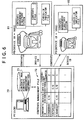
- a contents management table which is set by the personal computer's LCM and applied to check-out/check-in management, will now be described with reference to FIG. 6 .
- the personal computer 70 includes a hard disk or other storage means 71, which stores contents and contents management information.
- a contents management table 72 is contained as part of the contents management information and used as a table for check-out/check-in management.
- the contents management table 72 stores data, which defines the association among the contents ID of checked-out (C/O) contents, a portable device ID, and a check-out counter.
- the personal computer 70 When the personal computer 70 checks out contents to a portable device 81 or portable device 82, the personal computer 70 performs a predetermined authentication process.
- the personal computer 70 registers the identifier (device ID) of the portable device 81 or 82 and checks out the contents only when the authentication process is successfully completed.
- the check-out counter which is set in the contents management table, is sequentially decremented from 3 to 2, 1, and 0.
- a permissible check-out count of 0 is reached, the contents can no longer be checked out.
- the portable device 81 or 82 stores the checked-out contents, which is input from the personal computer 70, and other relevant information such as contents use rights information into a flash memory or other recording medium. Portable device 81 or 82 can then reproduce or otherwise use the contents in accordance with the contents use rights information. Portable device 81 or 82 sets up the contents management directory system, which has been described with reference to FIG. 3 , and manages the check-out contents.
- the contents management directory system includes the check-in indicator file, which is used to register the file numbers and contents IDs of contents erased in the portable device.
- the personal computer's LCM references the portable device's check-in indicator file.
- the check-out counter for the erased contents which is registered in the contents management file 72, is incremented by one.
- the sequence of a check-in process will now be described with reference to FIG. 7 .
- the LCM performs this process in which an indicator in the portable device's check-in indicator file is referenced to perform a counter update.
- step S201 the portable device is connected to the personal computer.
- the connection is established, for instance, via an USB, IEEE1394, or other interface.
- an authentication process is performed between the portable device and personal computer.
- the authentication process is performed to establish the authenticity of each other.
- Mutual authentication protocols applicable to embodiments of the present invention include the ISO/IEC 9798-2 or other protocol that uses a common key cryptosystem, the ISO/IEC 9798-3 or other protocol that uses a public key cryptosystem, and the ISO/IEC 9798-4 or other protocol that uses MACs (Message Authentication Codes).
- step S210 is followed to abort the process so that the process terminates without performing any subsequent processing step. If, on the other hand, the authentication process is successfully completed in step S202 (if query step S203 is answered "Yes") to verify that the connected device is authentic, the program flow proceeds to step S204.
- step S204 the personal computer's LCM checks whether the contents use rights information, which was output together with contents when the contents were checked out to the portable device, is falsified.
- a MAC or other falsification check value based on contents use condition description data is generated by the personal computer's private key.
- the personal computer's LCM enters the contents use rights information from the portable device and conducts a MAC check to check for falsification.
- step S210 is followed to abort the process so that the process terminates without performing any subsequent processing step. If, on the other hand, it is found that the contents use rights information is not falsified (if query step S205 is answered "No"), step S206 is performed to search the portable device's contents management directory system (see FIG. 3 ) for the check-in indicator file.
- the portable device presents the registration information about the check-in indicator file to the personal computer only when the authentication process is successfully completed between the personal computer and portable device and it is verified that the contents use rights information owned by the portable device is not falsified.
- the personal computer then performs an erased contents verification process in accordance with the registration information about the check-in indicator file owned by the portable device.
- step S210 is followed to abort the process so that the process terminates without performing any subsequent processing step. If, on the other hand, the check-in indicator file is verified and acquired (if query step S207 is answered "Yes"), step S208 is performed to determine whether or not the information about the contents managed by the personal computer's LCM, that is, the contents ID, is recorded in the check-in indicator file. This determination process is performed to check whether or not a contents ID registered in the check-in indicator file coincides with a contents ID recorded in the contents management table, which has been described with reference, for instance, to FIG. 6 .
- step S210 is followed to abort the process so that the process terminates without performing any subsequent processing step. If, on the other hand, the check-in indicator file is verified (if query step S208 is answered "Yes"), step S209 is performed to increment the check-out counter for the erased contents recording in the contents management table, which is described with reference to FIG. 6 , and update the check-in indicator file owned by the portable device by deleting a data entry corresponding to the erased contents, which are checked in by incrementing the check-out counter, from the check-in indicator file.
- the personal computer may perform the process for deleting a contents ID or other data entry corresponding to contents whose erasure from the check-in indicator file is verified. However, the personal computer may issue a data entry erasure command to the portable device, thereby causing the portable device to erase a target data entry in compliance with the received data entry erasure command.
- the personal computer's LCM generates an updated MAC value as a new falsification check value in compliance with changed use rights information data, and supplies to the portable device the updated contents use rights information to which the updated MAC value is added.
- the personal computer follows the procedure shown in FIG. 7 to verify contents erased in the portable device, updates the personal computer's contents management table (performs a check-in process involving an increase in the counter value) upon erasure verification, and updates the portable device's erased contents management file (check-in indicator file), that is, deletes a data entry corresponding to contents whose erasure is verified.
- the personal computer can compare its own contents management table (see FIG. 6 ) against only the information registered in the check-in indicator file, extract a data entry having a matching contents ID, and efficiently process the extracted data entry.
- the personal computer can efficiently identify erased contents by checking only the registration information in the check-in indicator file. As a result, it is possible to efficiently perform a check-in process, that is, a check-out counter update process on the contents management table managed by the personal computer's LCM.
- a personal computer that serves as an information processing apparatus for performing a contents use management process, that is, a check-out/check-in process and the configuration of a portable device that serves as a data reproducing apparatus and incorporates a flash memory, small-size hard disk, optical disk, magneto-optical disk, or other storage device for storing contents will now be described with reference to FIGS. 8 and 9 .
- a CPU (Central Processing Unit) 101 is a control section that performs processes in compliance with various computer programs, including an OS (Operating System) a contents reproduction process program, check-out/check-in process program, and other contents use management programs.
- the CPU 101 also performs contents encryption/decryption processes, including an encryption process based on a DES (Data Encryption Standard) or other algorithm, and a contents input/output authentication/session key sharing process in relation to a connected data reproducing apparatus (portable device).
- DES Data Encryption Standard
- a ROM (Read Only Memory) 102 stores, for instance, fixed data for programs and arithmetic operation parameters used by the CPU 101.
- the ROM 102 also stores the programs, for instance, for contents input/output authentication, contents encryption processing, and check-out/check-in processing, which are executed in relation to the above-mentioned portable device.
- a RAM (Random Access Memory) 103 stores, for instance, the programs to be executed by the CPU 101 and the parameters that vary with program executions.
- the CPU, ROM, and RAM are interconnected with a host bus 104, which is configured by, for instance, a CPU bus.
- the host bus 104 is connected to an external bus 106, such as a PCI (Peripheral Component Interconnect) bus, via a bridge 105.
- an external bus 106 such as a PCI (Peripheral Component Interconnect) bus
- a keyboard 108 is operated by the user for the purpose of entering various commands into the CPU 101.
- a pointing device 109 is operated by the user for the purpose of designating a point on the screen of a display 110 or making a selection.
- the display 110 includes an LCD, CRT (Cathode Ray Tube), or the like and displays text and images to present various information.
- a hard disk drive (HDD) 111 drives a hard disk and records or reproduces programs and information handled by the CPU 101.
- a drive 112 reads data or program recorded on a magnetic disk, optical disk, magneto-optical disk, semiconductor memory, or other removable recording medium 120.
- the drive 112 then supplies the read data or program to the RAM 103, which is connected via an interface 107, external bus 106, bridge 105, and host bus 104.
- a PD (portable device) connection port 114 is a port for portable device connection.
- a USB, IEEE1394, or other interface is connected for portable device connection.
- the PD connection port 114 outputs the data supplied from the hard disk drive 111, CPU 101, or RAM 103, such as contents or the commands for a portable device 122 to the portable device 122 via the interface 107, external bus 106, bridge 105, host bus 104, and the like.
- An audio input/output interface 115 performs an interface process for a digital or analog audio input/output having, for instance, an IEC (International Electrotechnical Commission) 60958 terminal and is connected to a speaker or other output means. A contents-specific audio output process is performed in accordance with an audio signal supplied from the input/output interface 115.
- IEC International Electrotechnical Commission
- the above-mentioned keyboard 108, pointing device 109, display 110, hard disk drive 111, drive 112, PD connection port 114, and audio input/output interface 115 are connected to the interface 107.
- the interface 107 is connected to the CPU 101 via the external bus 106, bridge 105, and host bus 104.
- a communication section 116 is connected to a network.
- the communication section 116 receives data supplied, for instance, from the CPU 101 or hard disk drive 111 (e.g., a contents transmission request or user registration request), stores the received data in packets in a specified format, and transmits the packets via the network. Further, the communication section 116 outputs contents or other data stored in received packets to the CPU 101, RAM 103, or hard disk drive 111 via the network.
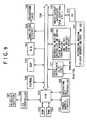
- FIG. 9 a typical configuration of a portable device, which serves as a data reproducing apparatus, will be described with reference to FIG. 9 . It is assumed that a flash memory, small-size hard disk, optical disk, magneto-optical disk, or the like is used as a contents recording medium.
- a power supply circuit 152 converts a supplied input voltage to an internal power having a predetermined voltage and supplies the resulting internal power to various components, including a CPU 153 and a display 167, for the purpose of driving the entire apparatus.
- An input/output interface 157 is an interface for connecting to a personal computer 172 that serves as a contents supply source. Therefore, the input/output interface 157 is used to establish an USB, IEEE1394, or other interface connection.
- the data transferred from the personal computer 172 is stored in packets and transferred to the portable device at a predetermined transfer rate.
- the data to be transferred to the portable device includes contents and incidental information such as contents use rights information.
- the CPU 153 which executes a main program that is read from a ROM 155 to a RAM 154, receives the contents write command so that a recording medium 161 writes the contents, for instance, into a flash memory or onto a hard disk, DVD, or CD.
- a flash memory, hard disk, DVD, and CD are enumerated as a recording medium 161.
- these media are enumerated as examples. The availability of at least one type of recording medium will suffice.
- the process for writing data onto the recording medium 161 is performed via a recording medium controller or drive 160 appropriate for the recording medium 161. If, for instance, the employed recording medium 161 is a flash memory, a write process is performed via a flash memory controller. If a hard disk (HD) is employed as the recording medium 161, a write process is performed via a hard disk drive (HDD).
- the recording medium 161, such as a flash memory, hard disk, DVD, or CD, can be used with the portable device as a removable medium.
- the CPU 153 When a contents reproduction command issued by the user is supplied to the CPU 153 via an operating key controller 162, the CPU 153 causes the recording media controller or drive 160 to read contents from the recording medium 161 and transfers the read contents to a DSP (Digital Signal Processor) 159.
- DSP Digital Signal Processor
- the DSP 159 reproduces the contents transferred from the recording medium 161.
- the DSP 159 has an encryption/decryption function, equalizer adjustment function (function for adjusting the gains in various frequency bands of an audio signal), and compression/decompression (encoding/decoding) function.
- the DSP 159 encodes a digital audio signal with high efficiency for writing it onto the recording medium 161 or decrypts data read from the recording medium 161.
- ATRAC3 which is an improved version of ATRAC (Adaptive Transform Acoustic Coding) and adopted for use with MiniDisc, is used as a high-efficiency encoding method.
- MP3 or other similar encoding method may also be used.
- a digital-to-analog converter circuit 163 converts reproduced contents to an analog audio signal and supplies the resulting analog audio signal to an amplifier circuit 164.
- the amplifier circuit 164 amplifies the audio signal and supplies the amplified audio signal to a headphone, speaker, or the like via a headphone jack 165.
- An input interface 171 inputs a digital signal or analog signal from an external source. When an analog signal is input, it is converted to its digital equivalent. In an analog-to-digital conversion process, the input signal is converted, for instance, to a 16-quantized-bit digital audio signal at a sampling rate of 44.1 kHz. Further, the digital signal supplied from an external source is converted similarly by an SRC (sampling rate converter) to a 16-quantized-bit digital audio signal at a sampling rate of 44.1 kHz.
- SRC sampling rate converter
- the CPU 153 controls an LCD controller 166 to cause the display 167 to display various information, including a reproduction mode (e.g., repetitive reproduction or introduction reproduction), equalizer adjustments (gain adjustments in various frequency bands of an audio signal), song number, song length, reproduction, stop, fast forward, rewind, sound volume, and remaining battery power.
- a reproduction mode e.g., repetitive reproduction or introduction reproduction
- equalizer adjustments gain adjustments in various frequency bands of an audio signal
- song number e.g., song length, reproduction, stop, fast forward, rewind, sound volume, and remaining battery power.
- An encryption algorithm based on the DES (Data Encryption Standard), for example, is applied to a contents encryption/decryption process that is performed by the DSP 159.
- the process for contents encryption is performed to protect the copyright on contents.
- the contents encryption process is performed during a contents transfer between the personal computer and portable device and during a contents transfer between the portable device and recording medium.
- An EEPROM 168 which includes, for instance, a flash memory, stores a key that is applied to an encryption process or authentication process.
- the stored key is applied, for instance, to an authentication process and session key sharing process, which are performed during a contents transfer between the personal computer and portable device and a contents transfer between the portable device and recording medium, and to the encryption and decryption processes for transfer data and stored data.
- a series of processes described above can be performed by hardware, software, or a combination of both.
- the processes are to be performed by software, it is possible to install a program, in which a processing sequence is recorded, in a memory of a computer incorporated in dedicated hardware and then execute the program.
- the program can be prerecorded on a hard disk, which is used as a recording medium, or in a ROM (Read Only Memory).
- the program can be stored (recorded) temporarily or permanently on a flexible disk, CD-ROM (Compact Disc Read Only Memory), MO (Magneto-Optical) disk, DVD (Digital Versatile Disc), magnetic disk, semiconductor memory, or other removable recording medium.
- CD-ROM Compact Disc Read Only Memory
- MO Magnetic-Optical
- DVD Digital Versatile Disc
- magnetic disk semiconductor memory
- semiconductor memory or other removable recording medium.
- removable recording media can be supplied as package software.
- the program may be transferred from a download site to the computer wirelessly or with a wiring connection via a network such as a LAN (Local Area Network) or the Internet.
- a network such as a LAN (Local Area Network) or the Internet.
- the computer receives the transferred program and installs it on a built-in hard disk or other similar recording medium.
- system refers to a logical aggregate of a plurality of component apparatuses.
- the component apparatuses are not always within the same housing.
Landscapes
- Engineering & Computer Science (AREA)
- Theoretical Computer Science (AREA)
- Software Systems (AREA)
- Physics & Mathematics (AREA)
- General Engineering & Computer Science (AREA)
- General Physics & Mathematics (AREA)
- Computer Hardware Design (AREA)
- Computer Security & Cryptography (AREA)
- Technology Law (AREA)
- Multimedia (AREA)
- Mathematical Physics (AREA)
- Databases & Information Systems (AREA)
- Data Mining & Analysis (AREA)
- Storage Device Security (AREA)
- Signal Processing For Digital Recording And Reproducing (AREA)
- Management Or Editing Of Information On Record Carriers (AREA)
- Reverberation, Karaoke And Other Acoustics (AREA)
- Management, Administration, Business Operations System, And Electronic Commerce (AREA)
- Debugging And Monitoring (AREA)
Claims (12)
- Datenwiedergabevorrichtung (30), die Folgendes umfasst:eine Kommunikationseinheit (157) zum Empfangen von Inhalten von einer externen Datenverarbeitungsvorrichtung (20);eine Speichereinheit (160) zum Speichern von mehreren Inhalten;eine Wiedergabeeinheit zum Wiedergeben von Inhalten; undeine Steuereinheit (153), die in Reaktion darauf, dass Inhalte durch die Datenwiedergabevorrichtung gelöscht werden, während sie nicht mit der externen Datenverarbeitungsvorrichtung verbunden ist, bestimmt, ob die gelöschten Inhalte Inhalte sind, die vorher von der externen Datenverarbeitungsvorrichtung übertragen wurden oder nicht, und dann, wenn bestimmt wird, dass die gelöschten Inhalte Inhalte sind, die vorher von der externen Datenverarbeitungsvorrichtung übertragen wurden, Identifikationsinformationen über die Inhalte, die vorher von der externen Datenverarbeitungsvorrichtung übertragen wurden, als Identifikationsinformationen gelöschter Inhalte (62) speichert.
- Datenwiedergabevorrichtung nach Anspruch 1, die ferner Folgendes umfasst:eine Löschanweisungseinheit zum Ausgeben von Anweisungen zum Löschen von Inhalten; unddie Steuereinheit, um zu bestimmen, ob die durch die Löschanweisungseinheit für das Löschen bestimmten Inhalte Inhalte sind, die vorher von der externen Datenverarbeitungsvorrichtung übertragen wurden oder nicht, und dann, wenn bestimmt wird, dass die bestimmten Inhalte Inhalte sind, die vorher von der externen Datenverarbeitungsvorrichtung übertragen wurden, die Identifikationsinformationen gelöschter Inhalte zu speichern.
- Datenwiedergabevorrichtung nach Anspruch 1, wobei die Speichereinheit eine Managementdatei gelöschter Inhalte (50) enthält; und
wobei dann, wenn bestimmt wird, dass gelöschte Inhalte Inhalte sind, die vorher von der externen Datenverarbeitungsvorrichtung übertragen wurden, die Steuereinheit die Inhalte, die vorher von der externen Datenverarbeitungsvorrichtung übertragen wurden, zu der Managementdatei gelöschter Inhalte hinzufügt. - Datenwiedergabevorrichtung nach Anspruch 3, wobei die Managementdatei gelöschter Inhalte eine Inhaltsdateinummer (66) enthält, die für Inhalte, die vorher von der externen Datenverarbeitungsvorrichtung an die Datenwiedergabevorrichtung übertragen wurden, einzustellen ist.
- Datenwiedergabevorrichtung nach Anspruch 1, wobei dann, wenn ein Befehl zum Löschen der Identifikationsinformationen gelöschter Inhalte von der externen Datenverarbeitungsvorrichtung empfangen wird, die Steuereinheit die Identifikationsinformationen gelöschter Inhalte löscht.
- Datenverarbeitungssystem, das Folgendes umfasst:die Datenwiedergabevorrichtung (30) nach einem der Ansprüche 1-5; undeine Datenverarbeitungsvorrichtung (20), die Folgendes umfasst:eine Speichereinheit (111) zum Speichern von mehreren Inhalten, Identifikationsinformationen über jeden Inhalt und Verwendungsmanagementinformationen, die die Verwendung eines jeden Inhalts angeben, in einer entsprechenden Beziehung;eine Sendeeinheit (114) zum Senden von Inhalten an die Datenwiedergabevorrichtung (30, 122), wobei die Verwendungsmanagementinformationen für die gesendeten Inhalte aktualisiert werden, um die Übertragung zu berücksichtigen;eine Empfangseinheit zum Empfangen von Identifikationsinformationen gelöschter Inhalte (62) über durch die Datenwiedergabevorrichtung gelöschte Inhalte, während sie nicht mit der Datenverarbeitungsvorrichtung verbunden ist; undeine Datenverarbeitungseinheit (101), um zu bewirken, dass die Speichereinheit dann, wenn die Empfangseinheit die Identifikationsinformationen gelöschter Inhalte empfängt, Identifikationsinformationen erfasst, die mit den Identifikationsinformationen gelöschter Inhalte übereinstimmen, und um die Verwendungsmanagementinformationen, die den erfassten Identifikationsinformationen entsprechen, zu aktualisieren, um das Löschen der gelöschten Inhalte zu berücksichtigen,wobei die Datenwiedergabevorrichtung außerhalb der Datenverarbeitungsvorrichtung ist.
- Datenverarbeitungssystem nach Anspruch 6, wobei dann, wenn ein Authentifizierungsvorgang erfolgreich in Bezug auf die Datenwiedergabevorrichtung ausgeführt wird, die Datenverarbeitungseinheit die Identifikationsinformationen gelöschter Inhalte mit den in der Datenverarbeitungsvorrichtung gespeicherten Identifikationsinformationen vergleicht und die Verwendungsmanagementinformationen über Inhalte aktualisiert, die durch die Identifikationsinformationen angegeben werden, die mit den Identifikationsinformationen gelöschter Inhalte übereinstimmen.
- Datenverarbeitungssystem nach Anspruch 6, wobei die Datenverarbeitungseinheit die Verwendungsmanagementinformationen nicht nur aktualisiert, sondern auch die Identifikationsinformationen gelöschter Inhalte in der Datenwiedergabevorrichtung löscht.
- Datenverarbeitungssystem nach Anspruch 6, wobei:die Verwendungsmanagementinformationen ein Zählerwert sind, der die Anzahl von Übertragungen repräsentiert, die von der Datenverarbeitungsvorrichtung zu der Datenwiedergabevorrichtung gemacht werden können;die Datenverarbeitungseinheit ausgelegt ist, dann, wenn die Übertragungseinheit (114) Inhalte an die Datenwiedergabevorrichtung (30, 122) sendet, den Zählerwert für die gesendeten Inhalte zu verringern; undwobei die Datenverarbeitungseinheit dann, wenn die Empfangseinheit die Identifikationsinformationen gelöschter Inhalte empfängt, bewirkt, dass die Speichereinheit die Identifikationsinformationen erfasst, die mit den Identifikationsinformationen gelöschter Inhalte übereinstimmen, und den Zählerwert entsprechend der erfassten Identifikationsinformationen erhöht.
- Datenverarbeitungssystem nach Anspruch 6, wobei die Datenverarbeitungseinheit der Datenverarbeitungsvorrichtung Verwendungsmanagementinformationen nicht nur entsprechend der erfassten Identifikationsinformationen aktualisiert, sondern auch die Datenwiedergabevorrichtung anweist, die Identifikationsinformationen gelöschter Inhalte zu löschen; und
wobei die Steuereinheit der Datenwiedergabevorrichtung die Identifikationsinformationen gelöschter Inhalte in Übereinstimmung mit einem Befehl zum Löschen der Identifikationsinformationen gelöschter Inhalte löscht. - Datenverarbeitungsverfahren für die Verwendung in einer Datenwiedergabevorrichtung (30), die von einer externen Datenverarbeitungsvorrichtung (20) übertragene Inhalte empfangen kann, wobei das Datenverarbeitungsverfahren die folgenden Schritte umfasst:Löschen von Inhalten durch die Datenwiedergabevorrichtung (30), während die Datenwiedergabevorrichtung nicht mit der externen Datenverarbeitungsvorrichtung verbunden ist;Bestimmen durch die Datenwiedergabevorrichtung, ob die gelöschten Inhalte Inhalte sind, die vorher von der externen Datenverarbeitungsvorrichtung übertragen wurden oder nicht; unddann, wenn bestimmt wird, das die gelöschten Inhalte Inhalte sind, die vorher von der externen Datenverarbeitungsvorrichtung übertragen wurden, Speichern in der Datenwiedergabevorrichtung von Identifikationsinformationen über die Inhalte, die vorher von der externen Datenverarbeitungsvorrichtung übertragen wurden, als Identifikationsinformationen gelöschter Inhalte (62).
- Computerprogramm für die Verwendung in einer Datenwiedergabevorrichtung (30) zum Ausführen des Verfahrens nach Anspruch 11.
Applications Claiming Priority (2)
| Application Number | Priority Date | Filing Date | Title |
|---|---|---|---|
| JP2003369972 | 2003-10-30 | ||
| JP2003369972A JP4379079B2 (ja) | 2003-10-30 | 2003-10-30 | データ再生処理装置、情報処理装置、および情報処理方法、並びにコンピュータ・プログラム |
Publications (3)
| Publication Number | Publication Date |
|---|---|
| EP1531380A2 EP1531380A2 (de) | 2005-05-18 |
| EP1531380A3 EP1531380A3 (de) | 2012-08-22 |
| EP1531380B1 true EP1531380B1 (de) | 2016-07-20 |
Family
ID=34431228
Family Applications (1)
| Application Number | Title | Priority Date | Filing Date |
|---|---|---|---|
| EP04256473.2A Expired - Lifetime EP1531380B1 (de) | 2003-10-30 | 2004-10-20 | Wiedergabegerät für digitale Daten und entsprechendes Managementsystem |
Country Status (5)
| Country | Link |
|---|---|
| US (1) | US7315869B2 (de) |
| EP (1) | EP1531380B1 (de) |
| JP (1) | JP4379079B2 (de) |
| KR (1) | KR20050041980A (de) |
| CN (1) | CN1619566A (de) |
Families Citing this family (11)
| Publication number | Priority date | Publication date | Assignee | Title |
|---|---|---|---|---|
| JP4144507B2 (ja) * | 2003-10-30 | 2008-09-03 | ソニー株式会社 | 情報処理装置、および情報処理方法、並びにコンピュータ・プログラム |
| CN101268451B (zh) * | 2005-09-26 | 2010-09-08 | Nec个人产品有限公司 | 内容存储系统、用户终端装置、内容存储方法、内容存储程序及存储介质 |
| US8280944B2 (en) * | 2005-10-20 | 2012-10-02 | The Trustees Of Columbia University In The City Of New York | Methods, media and systems for managing a distributed application running in a plurality of digital processing devices |
| US20070233880A1 (en) * | 2005-10-20 | 2007-10-04 | The Trustees Of Columbia University In The City Of New York | Methods, media and systems for enabling a consistent web browsing session on different digital processing devices |
| US8549646B2 (en) * | 2005-10-20 | 2013-10-01 | The Trustees Of Columbia University In The City Of New York | Methods, media and systems for responding to a denial of service attack |
| US20070245334A1 (en) * | 2005-10-20 | 2007-10-18 | The Trustees Of Columbia University In The City Of New York | Methods, media and systems for maintaining execution of a software process |
| CN101690068A (zh) * | 2006-12-06 | 2010-03-31 | 弗森多系统公司(dba弗森-艾奥) | 用于在多个独立主机之间共享的设备的装置、系统、以及方法 |
| JP5034978B2 (ja) * | 2008-01-26 | 2012-09-26 | ソニー株式会社 | コンテンツ取得装置、登録解除方法及びプログラム |
| JP4752884B2 (ja) * | 2008-08-21 | 2011-08-17 | ソニー株式会社 | 情報処理装置、およびデータ処理方法、並びにプログラム |
| JP5521479B2 (ja) * | 2009-10-14 | 2014-06-11 | 富士通株式会社 | プログラム、データ記憶装置及びデータ記憶システム |
| JP5508471B2 (ja) * | 2012-05-23 | 2014-05-28 | みずほ情報総研株式会社 | 承認管理システム、承認管理方法及び承認管理プログラム |
Citations (1)
| Publication number | Priority date | Publication date | Assignee | Title |
|---|---|---|---|---|
| JP2003186754A (ja) * | 2001-10-11 | 2003-07-04 | Matsushita Electric Ind Co Ltd | 楽曲データ削除装置、楽曲データ管理システム、楽曲データ管理装置並びに楽曲データ削除方法 |
Family Cites Families (7)
| Publication number | Priority date | Publication date | Assignee | Title |
|---|---|---|---|---|
| US6615224B1 (en) * | 1999-02-23 | 2003-09-02 | Lewis B. Davis | High-performance UNIX file undelete |
| US6529909B1 (en) * | 1999-08-31 | 2003-03-04 | Accenture Llp | Method for translating an object attribute converter in an information services patterns environment |
| US6434568B1 (en) * | 1999-08-31 | 2002-08-13 | Accenture Llp | Information services patterns in a netcentric environment |
| TW539982B (en) * | 1999-10-25 | 2003-07-01 | Sony Corp | Content providing system, content distribution method, and memory medium |
| JP2001175524A (ja) * | 1999-12-17 | 2001-06-29 | Sony Corp | 情報処理装置および方法、並びにプログラム格納媒体 |
| US6928433B2 (en) | 2001-01-05 | 2005-08-09 | Creative Technology Ltd | Automatic hierarchical categorization of music by metadata |
| JP4144507B2 (ja) | 2003-10-30 | 2008-09-03 | ソニー株式会社 | 情報処理装置、および情報処理方法、並びにコンピュータ・プログラム |
-
2003
- 2003-10-30 JP JP2003369972A patent/JP4379079B2/ja not_active Expired - Fee Related
-
2004
- 2004-10-20 EP EP04256473.2A patent/EP1531380B1/de not_active Expired - Lifetime
- 2004-10-29 KR KR1020040087404A patent/KR20050041980A/ko not_active Withdrawn
- 2004-11-01 US US10/978,919 patent/US7315869B2/en active Active
- 2004-11-01 CN CNA2004101023469A patent/CN1619566A/zh active Pending
Patent Citations (1)
| Publication number | Priority date | Publication date | Assignee | Title |
|---|---|---|---|---|
| JP2003186754A (ja) * | 2001-10-11 | 2003-07-04 | Matsushita Electric Ind Co Ltd | 楽曲データ削除装置、楽曲データ管理システム、楽曲データ管理装置並びに楽曲データ削除方法 |
Also Published As
| Publication number | Publication date |
|---|---|
| EP1531380A2 (de) | 2005-05-18 |
| CN1619566A (zh) | 2005-05-25 |
| KR20050041980A (ko) | 2005-05-04 |
| JP4379079B2 (ja) | 2009-12-09 |
| US20050144181A1 (en) | 2005-06-30 |
| JP2005135138A (ja) | 2005-05-26 |
| US7315869B2 (en) | 2008-01-01 |
| EP1531380A3 (de) | 2012-08-22 |
Similar Documents
| Publication | Publication Date | Title |
|---|---|---|
| KR100632495B1 (ko) | 정보처리장치 및 방법과 프로그램 격납매체 | |
| US8463868B2 (en) | Information processing apparatus and associated method of content exchange | |
| US20020181355A1 (en) | Method of managing the copying of contents-representing data | |
| US20020073070A1 (en) | Information processing apparatus and method, and program storing medium | |
| US7249106B1 (en) | Information processing method and apparatus and program storage medium for prohibiting duplication of contents in large quantities | |
| JP2003058430A (ja) | 情報記録処理装置、コンテンツ入出力管理装置、コンテンツ管理システム、および情報記録処理方法、コンテンツ入出力管理方法、コンテンツ管理方法、並びにコンピュータ・プログラム | |
| US20020072926A1 (en) | Information processing apparatus and method, and program storing medium | |
| EP1531380B1 (de) | Wiedergabegerät für digitale Daten und entsprechendes Managementsystem | |
| WO2000049511A1 (en) | Semiconductor ic, information processing method, information processing device, and program storage medium | |
| JP4568933B2 (ja) | 情報処理装置および方法、並びにプログラム格納媒体 | |
| AU776920B2 (en) | Method for managing content data | |
| CN100511182C (zh) | 信息处理器件和信息处理方法 | |
| JP4655470B2 (ja) | コンテンツデータ処理装置及びコンテンツデータ処理方法、並びにコンテンツデータ管理システム及びコンテンツデータ管理方法 | |
| JP2000305846A (ja) | 情報処理装置および方法、並びにプログラム格納媒体 | |
| JP2003099329A (ja) | 情報処理装置及び情報処理方法 | |
| JP4379653B2 (ja) | 情報処理装置および方法、並びにプログラム格納媒体 | |
| US8397303B2 (en) | Memory controller, nonvolatile storage system, and data management method | |
| JP4300442B2 (ja) | 情報処理装置および方法、並びにプログラム格納媒体 | |
| JP2000306006A (ja) | 情報処理装置および方法、並びにプログラム格納媒体 | |
| WO2001045083A1 (en) | Method and apparatus for information processing, and medium for storing program | |
| JP2002312522A (ja) | 情報処理装置および方法、記録媒体、並びにプログラム | |
| JP2000357371A (ja) | ディジタルデータ処理装置 | |
| JP2000305855A (ja) | 情報処理装置および方法、並びにプログラム格納媒体 | |
| JP2000307568A (ja) | 半導体ic、情報処理方法、情報処理装置、並びにプログラム格納媒体 | |
| MXPA00010101A (en) | Information processing device and method, and program storage medium |
Legal Events
| Date | Code | Title | Description |
|---|---|---|---|
| PUAI | Public reference made under article 153(3) epc to a published international application that has entered the european phase |
Free format text: ORIGINAL CODE: 0009012 |
|
| AK | Designated contracting states |
Kind code of ref document: A2 Designated state(s): AT BE BG CH CY CZ DE DK EE ES FI FR GB GR HU IE IT LI LU MC NL PL PT RO SE SI SK TR |
|
| AX | Request for extension of the european patent |
Extension state: AL HR LT LV MK |
|
| PUAL | Search report despatched |
Free format text: ORIGINAL CODE: 0009013 |
|
| AK | Designated contracting states |
Kind code of ref document: A3 Designated state(s): AT BE BG CH CY CZ DE DK EE ES FI FR GB GR HU IE IT LI LU MC NL PL PT RO SE SI SK TR |
|
| AX | Request for extension of the european patent |
Extension state: AL HR LT LV MK |
|
| RIC1 | Information provided on ipc code assigned before grant |
Ipc: G06F 1/00 20060101AFI20120717BHEP |
|
| 17P | Request for examination filed |
Effective date: 20120726 |
|
| 17Q | First examination report despatched |
Effective date: 20121122 |
|
| AKX | Designation fees paid |
Designated state(s): DE FR GB |
|
| GRAP | Despatch of communication of intention to grant a patent |
Free format text: ORIGINAL CODE: EPIDOSNIGR1 |
|
| RIC1 | Information provided on ipc code assigned before grant |
Ipc: G06F 1/00 20060101AFI20160115BHEP Ipc: G06F 21/10 20130101ALI20160115BHEP |
|
| INTG | Intention to grant announced |
Effective date: 20160201 |
|
| GRAS | Grant fee paid |
Free format text: ORIGINAL CODE: EPIDOSNIGR3 |
|
| GRAA | (expected) grant |
Free format text: ORIGINAL CODE: 0009210 |
|
| AK | Designated contracting states |
Kind code of ref document: B1 Designated state(s): DE FR GB |
|
| REG | Reference to a national code |
Ref country code: GB Ref legal event code: FG4D |
|
| REG | Reference to a national code |
Ref country code: DE Ref legal event code: R096 Ref document number: 602004049607 Country of ref document: DE |
|
| REG | Reference to a national code |
Ref country code: DE Ref legal event code: R097 Ref document number: 602004049607 Country of ref document: DE |
|
| PLBE | No opposition filed within time limit |
Free format text: ORIGINAL CODE: 0009261 |
|
| STAA | Information on the status of an ep patent application or granted ep patent |
Free format text: STATUS: NO OPPOSITION FILED WITHIN TIME LIMIT |
|
| 26N | No opposition filed |
Effective date: 20170421 |
|
| GBPC | Gb: european patent ceased through non-payment of renewal fee |
Effective date: 20161020 |
|
| REG | Reference to a national code |
Ref country code: FR Ref legal event code: ST Effective date: 20170630 |
|
| PG25 | Lapsed in a contracting state [announced via postgrant information from national office to epo] |
Ref country code: FR Free format text: LAPSE BECAUSE OF NON-PAYMENT OF DUE FEES Effective date: 20161102 Ref country code: GB Free format text: LAPSE BECAUSE OF NON-PAYMENT OF DUE FEES Effective date: 20161020 |
|
| PGFP | Annual fee paid to national office [announced via postgrant information from national office to epo] |
Ref country code: DE Payment date: 20201022 Year of fee payment: 17 |
|
| REG | Reference to a national code |
Ref country code: DE Ref legal event code: R119 Ref document number: 602004049607 Country of ref document: DE |
|
| PG25 | Lapsed in a contracting state [announced via postgrant information from national office to epo] |
Ref country code: DE Free format text: LAPSE BECAUSE OF NON-PAYMENT OF DUE FEES Effective date: 20220503 |