EP1513077A2 - Méthode et système de recherche avec identification du type des données multimedia - Google Patents
Méthode et système de recherche avec identification du type des données multimedia Download PDFInfo
- Publication number
- EP1513077A2 EP1513077A2 EP03022957A EP03022957A EP1513077A2 EP 1513077 A2 EP1513077 A2 EP 1513077A2 EP 03022957 A EP03022957 A EP 03022957A EP 03022957 A EP03022957 A EP 03022957A EP 1513077 A2 EP1513077 A2 EP 1513077A2
- Authority
- EP
- European Patent Office
- Prior art keywords
- media
- recognition
- user terminal
- feature value
- data
- Prior art date
- Legal status (The legal status is an assumption and is not a legal conclusion. Google has not performed a legal analysis and makes no representation as to the accuracy of the status listed.)
- Withdrawn
Links
Images



Classifications
-
- H—ELECTRICITY
- H04—ELECTRIC COMMUNICATION TECHNIQUE
- H04L—TRANSMISSION OF DIGITAL INFORMATION, e.g. TELEGRAPHIC COMMUNICATION
- H04L67/00—Network arrangements or protocols for supporting network services or applications
- H04L67/50—Network services
- H04L67/51—Discovery or management thereof, e.g. service location protocol [SLP] or web services
-
- G—PHYSICS
- G06—COMPUTING OR CALCULATING; COUNTING
- G06F—ELECTRIC DIGITAL DATA PROCESSING
- G06F16/00—Information retrieval; Database structures therefor; File system structures therefor
- G06F16/70—Information retrieval; Database structures therefor; File system structures therefor of video data
- G06F16/78—Retrieval characterised by using metadata, e.g. metadata not derived from the content or metadata generated manually
- G06F16/783—Retrieval characterised by using metadata, e.g. metadata not derived from the content or metadata generated manually using metadata automatically derived from the content
- G06F16/7834—Retrieval characterised by using metadata, e.g. metadata not derived from the content or metadata generated manually using metadata automatically derived from the content using audio features
-
- G—PHYSICS
- G06—COMPUTING OR CALCULATING; COUNTING
- G06F—ELECTRIC DIGITAL DATA PROCESSING
- G06F16/00—Information retrieval; Database structures therefor; File system structures therefor
- G06F16/70—Information retrieval; Database structures therefor; File system structures therefor of video data
- G06F16/73—Querying
- G06F16/732—Query formulation
- G06F16/7335—Graphical querying, e.g. query-by-region, query-by-sketch, query-by-trajectory, GUIs for designating a person/face/object as a query predicate
-
- G—PHYSICS
- G06—COMPUTING OR CALCULATING; COUNTING
- G06F—ELECTRIC DIGITAL DATA PROCESSING
- G06F16/00—Information retrieval; Database structures therefor; File system structures therefor
- G06F16/70—Information retrieval; Database structures therefor; File system structures therefor of video data
- G06F16/78—Retrieval characterised by using metadata, e.g. metadata not derived from the content or metadata generated manually
- G06F16/783—Retrieval characterised by using metadata, e.g. metadata not derived from the content or metadata generated manually using metadata automatically derived from the content
- G06F16/7847—Retrieval characterised by using metadata, e.g. metadata not derived from the content or metadata generated manually using metadata automatically derived from the content using low-level visual features of the video content
- G06F16/786—Retrieval characterised by using metadata, e.g. metadata not derived from the content or metadata generated manually using metadata automatically derived from the content using low-level visual features of the video content using motion, e.g. object motion or camera motion
-
- G—PHYSICS
- G06—COMPUTING OR CALCULATING; COUNTING
- G06F—ELECTRIC DIGITAL DATA PROCESSING
- G06F16/00—Information retrieval; Database structures therefor; File system structures therefor
- G06F16/90—Details of database functions independent of the retrieved data types
- G06F16/95—Retrieval from the web
- G06F16/951—Indexing; Web crawling techniques
Definitions
- the present invention relates to a system searching for media recognition sites that recognize such media data as video respectively, more particularly to a system searching for media recognition sites that recognize media data matching with requests from users.
- UDDI Web service searching directory
- Web service category information Web service input and output data types (data types) are specified as search conditions.
- a user who wants to use such a Web service specifies both input and output data types together with Web service type information to obtain a target Web service site address, then get connected to the site.
- a user when searching for a media recognition site, specifies a recognition site input type information (search conditions) that includes a media type (video, audio, or 3D) and its format (including both width and height of the target image, a compression method, the number of colors, and the number of audio channels). Similarly, the user specifies an output metadata type as the output type of the recognition site.
- search conditions a recognition site input type information (search conditions) that includes a media type (video, audio, or 3D) and its format (including both width and height of the target image, a compression method, the number of colors, and the number of audio channels).
- search conditions that includes a media type (video, audio, or 3D) and its format (including both width and height of the target image, a compression method, the number of colors, and the number of audio channels).
- search conditions includes a media type (video, audio, or 3D) and its format (including both width and height of the target image, a compression method, the number of colors, and the number of audio channels).
- the user might not be able to search for/select a desirable media recognition site if the user searches for it only by specifying input and output data types. This is often caused by the mismatch between the object that the user wants to recognize and the result of the recognition by the media recognition site. And, this might occur even when the media recognition method is the same between the user and the selected media recognition site; moreover, the recognition accuracy of the selected site is high. For example, if a soccer ball is followed up in a TV soccer program with use of a video obj ect follow-up function, a motion follow-up recognition site might follow up a soccer player while another motion follow-up recognition site follows up the soccer ball correctly.
- the input and output data types are the same between those motion follow-up recognition sites, that is, "video and motion information".
- both of the sites use their own algorithms to follow up motions accurately, one of the sites comes to return the soccer player's motion to the user, although the information is not desired by the user.
- each user terminal uses a search condition input tool to create a firstmedia feature value (correct feature value) to be assumed as a reference for searching for a target media recognition site on the basis of the sample video (image) data stored beforehand.
- a media recognition server recognizes and processes the sample image and transmits a second media feature value to the user terminal.
- the second media feature value is a result of the recognition by the media recognition server.
- the user terminal compares the created correct feature value with themedia feature value returned from the media recognition server to select a media recognition site that executes recognition processing according to the user's request.
- This system that is disposed at the user side comprises a user terminal 110 to be operated by the user, a plurality of media recognition servers 150, 160, and 170 for receiving such media data as video and audio data, analyzing/recognizing the data content, then returning a result to the user terminal 110 as a media feature value, and a search condition input tool acquisition server 140 for facilitating the user to search media recognition sites.
- the servers 150 to 170 and the user terminal 110 are connected to a network 130 respectively.
- each of the media recognition server A150 and the media recognition server B160 is provided with a motion follow-up recognition function for finding/following up a target object moving in video while the media recognition server C170 is provided with a voice recognition function for recognizing the content of inputted voice data to translate the content into text data.
- the user terminal 110 executes the search condition input tool 111 that is a program code.
- This search condition input tool 111 is used for the user terminal 110 to search for/select a targetmedia recognition site in accordance with each operation of the user.
- This program code is executed by the tool execution unit 113.
- the program code may be a native code depending on the CPU.
- the search condition input tool 111 may be provided with an input device 118 such as a keyboard, a mouse, etc., as well as a display device 117 for displaying user operation results as needed.
- the user terminal 110 is configured by a network unit 112 for transmitting/receiving information to/from external with use of the TCP/IP network connection protocol, a hard disk drive (a storage unit) 116 for storing various types of data, a media feature value comparison unit 114 , and a user terminal control unit 115 for controlling each unit provided in the user terminal 110.
- the user terminal control unit 115 is a general computer provided with a CPU and a memory.
- the control unit 115 stores a program used for executing processings as shown in the flowchart of Fig. 2 in the user terminal 110.
- the hard disk drive 116 stores sample video data 119, which is temporary video data used for searching for a recognition site, real video data 120 that includes an image to be analyzed actually, and a correct feature value 121, which is recorded as a correct value of the metadata desired by the user.
- sample video data 119 is temporary video data used for searching for a recognition site
- real video data 120 that includes an image to be analyzed actually
- a correct feature value 121 which is recorded as a correct value of the metadata desired by the user.
- voice data comes to be recorded for searching for voice recognition sites and photo data comes to be recorded for searching for face recognition sites.
- the search condition input tool acquisition server 140 stores a plurality of search condition input tools 143, 144, etc. in its storage unit 142 to manage media recognition sites connected to the network, by classifying the categories of media recognition methods.
- the server 140 is accessed mainly from the user terminal 110.
- the server 140 is also provided with a network unit 141.
- Each of the media recognition servers 150, 160, and 170 receives media data through a network and recognizes the received media data with use of a media recognition unit 153, then returns a media feature value to the user terminal 110 as the recognition result.
- Each of the servers 150 to 170 is provided with a network unit 151 through which it is connected to a network.
- each of the servers 150 to 170 is provided with a search condition collation unit 152 for checking whether or not a search condition for searching for a media recognition site matches with that stored in its own media recognition unit 153 and a recognition site control unit 154 for controlling each unit provided in the subject media recognition server.
- the recognition site control unit 154 is configured by a computer and a program.
- Each of the media recognition servers 160 and 170 is configured similarly to the media recognition server 150.
- the recognition processing of the media recognition unit 153 may be any of the recognition processing by automatic follow-up of an object moving in video data, the recognition processing by extracting part of a video color to denote it, and the voice recognition processing by recognizing the content of an utterance from an inputted voice and returning the content as text data.
- recognition it is premised to use a known media recognition product (voice recognition software and/or video recognition software), while no detailed description is made for them here. In this embodiment, it is important what data type is used to input media data and what data type is used to output media feature values in the recognition processing.
- the sample video data 119, the real video data 120, the media feature value comparison unit 114, and the tool execution unit 113 are provided at the user terminal 110 side.
- those items may be provided at another site (computer or server) connected to the network.
- video data itself generally, media data
- both search condition input tool 111 and tool execution unit 113 may be disposed in the search condition input tool acquisition server 140, not in the user terminal 110 so that any of the search condition input tool 111 and the tool execution unit 113 can access the display unit 117, the input unit 118, and the hard disk drive 116 provided in the user terminal 110 through the network to obtain the real data.
- the media feature value comparison unit 114 is provided in the user terminal 110, but since it is actually required to compare similarity among various media feature values, a similarity comparison server and the like may be provided additionally and the server may recognize and process.
- An information description method for multi-media contents ruled by the ISO MPEG-7 (ISO/IEC 15938) can be used to specify input and output data types.
- the MPEG-7 regulates various standard types for describing media information with use of a type definition language developed on the basis of the W3CXML Schema.
- the XML type referred to as "mpeg7:MediaFormatType" (or ⁇ MediaFormat> tag) may be prepared as a data type for describing a video type and a format so as to describe detailed format information.
- the motion follow-up information includes a type of "mpeg7:MovingRegionType" (or ⁇ MovingRegion> tag) that can describe a shape of each object and its motion information with time (coordinate positions x and y in an image and a list of the movements of the image with time t) collectively.
- the similarity between two metadata items can be calculated arithmetically. Such similarity is referred to as a media feature value (or a feature value simply) .
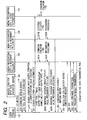
- Fig.2 shows a flowchart of the processings of the system for searching for/selecting a media recognition server.
- the user terminal 110 gets connected to the search condition input tool acquisition server 140 (step 211).
- the display unit 117 of the user terminal 110 displays the recognition type menu screen 310 shown in Fig.3 (step 212). If the user selects a media recognition type on the menu screen 310, the terminal 110 transmits the selection information to the search condition input tool acquisition server 140.
- the server 140 then downloads a search condition input tool stored in the storage unit 142 and corresponding to the selected media recognition type to the user terminal 110 (step 213).
- the "motion follow-up" button 312 is clicked, the search condition input tool for "motion follow-up" 144 is downloaded to the user terminal 110.
- the user terminal 110 executes the received search condition input tool 144 to create a correct feature value 121 in the user terminal 110 (step 221).
- the correct feature value is, for example, "following up a ball" in the sample video.
- the user terminal 110 transmits the search condition datagram to all the media recognition sites connected to the network (step 231).
- the search condition datagram includes both input and output data types of each media recognition site, as well as sample media data (sample video data 119 in this case). The details of the search condition datagram will be described later.
- each of the media recognition servers 150, 160, and 170 that have received the datagram collates both input data type and output data type in the search condition datagram with those specified in its own media recognition unit, whether or not the both data types match with the specification of the media recognition unit (step 241A, B, and C).
- the media recognition server C170 is a voice recognition server, so that the server C170 cannot process the sample data (sample video 119) (step 241C). If the collation result is NO such way, the media recognition server C170 does not execute any of the recognition processing and return processing in the subsequent steps.
- Each of the media recognition servers A150 and B160 is a server for recognizing and processing "motion follow-up", so that the collation result in each of those servers becomes YES.
- Each of the servers A150 and B160 executes the processing of the motion follow-up with use of its media recognition unit 153 according to the sample video data 119 included in the received search condition datagram (step 242A and B).
- Each of the media recognition servers A150 and B160 describes the result of the motion follow-up (listing of (x,y,t)) in the format of MPEG-7 feature value ⁇ MovingRegion> and transmits the result to the user terminal 110 together with the URL for identifying each of A150 and B160 (steps 243A and B).
- the user terminal 110 compares the MPEG-7 ⁇ MovingRegion> feature value returned from each media recognition site with the correct feature value 121 stored in itself 110 to check the similarity between them (step 251).
- the user terminal 110 selects a recognition site for outputting the recognition result (feature value) closest to the correct feature value 116.
- Fig.6 shows a concrete flowchart of the processings in step 251. It is premised here that the media recognition site A150 is selected as a site that has returned a feature value closest to the correct feature value.
- correct feature value 121 is a feature value of "following up a ball”. Selecting a feature value closest to the correct feature value 121 from among the feature values returned from media recognition sites means selecting a recognition site that follows up a ball most closely to the user's expectation of among those of other "motion follow-up" recognition sites. This is why the user can search for/select the optimal media recognition site from many media recognition sites.
- the user terminal 110 transmits a selection notice to the selected media recognition site A150 and issues a request for connection so as to distribute the real video data 120 to the site A150 (step 261).
- the media recognition site A150 returns an ACK signal for denoting "connection OK" to the user terminal 110 (step 262).
- the user terminal 110 when receiving the ACK signal, distributes the real video data 120 to the site A150 in a streaming manner (step 263) while the site A150 executes the processing of the motion follow-up to the received real video data 120 sequentially and returns each recognition result to the user terminal 110 (step 264). This streaming distribution is continued until the user terminal 110 stops the distribution.
- the MPEG-7 description method is used to represent both input and output data types in the search condition datagram distributed in step 231. For example, to represent "352x240 size, 2Mbps video, no sound", it may be described as follows.
- ⁇ outputType> denotes a tag defined in this embodiment and this represents ""MovingRegionType" type, which is a feature value described, for example, as ⁇ MovingRegion> of MPEG-7".
- the content of MovingRegionType is defined with a schema in a place denoted with xmlns:mpeg7.
- the entire sample video data 119 transmitted in step 231 is added to the search condition datagram to simplify the description. It is also possible to describe only the URL denoting a place that stores the sample video data in the search condition datagram so that the media search site that receives the search condition datagram can access the sample video through the URL as needed. This is desirable, since the communication traffic is reduced in that case.
- search condition datagram is distributed in a multicasting manner in the entire network area in this embodiment, it may also possible to provide a kind of intermediate center server (cache & proxy server for search conditions) that narrows the multicasting area and transmits the search condition datagram to the server. This method will be able to reduce the communication traffic more (while the processing load of the center server increases) .
- Fig.3 shows a recognition type menu screen 310 displayed in step 212 shown in Fig.2.
- the screen 310 is formed with, for example, the WebCGI and includes download buttons 311 to 313 corresponding to the media recognition types (voice recognition, motion follow-up, and face recognition).
- Those recognition types are obtained by classifying many media recognition sites connected to a network by recognition methods. For example, there are many methods for following up motions of a video object such as following up a specific color of the object, extracting only the motion information of an object according to a difference between the video data items, and following up an object by patterning a specific shape of the object. In this embodiment, all those methods are grouped into a "motion follow-up" category to facilitate the user to understand the recognition method.
- search condition input tool acquisition server 140 can use a list of such recognition types for the WebCGI screen format to form the recognition type menu screen 310. It is also possible to search for any of those recognition types on the recognition type menu screen 310. For example, a summary statement is created for a recognition type and stored together with the recognition type in the DB beforehand so that the recognition type is searched with use of the full text searching function of the DB, thereby the user can understand the screen 310 with the summary statement more easily.
- Fig.4 shows a screen displayed for executing the search condition input tool 144 (shown in Fig.3 and selected in step 213 in Fig.2) in step 221 in Fig.2.
- the screen shown in Fig.4 shows an example in which search conditions are set so as to open a TV soccer program that is the sample video 119 to follow up the soccer ball in the video data.
- the search condition input tool uses a program format provided with user's screens, so that each user screen specialized to various media recognition processing can be given. Consequently, the user can input search conditions (that is, the correct feature value 121) for a recognition site of "motion follow-up" without knowing so much about the recognition technique.
- the display screen 117 shown in Fig. 4 is used to input search conditions for searching for/selecting a recognition site on the basis of the user's request from among a plurality of motion follow-up recognition sites.
- the search condition input tool 144 inputs the sample video data 119 used for searching for/selecting the target recognition site, then sets the correct feature value 121 and outputs it in accordance with each user's operation.
- a short video story 411 of soccer is specified as the sample video data 119.
- the sample video data 119 is different from the real video data 120.
- the real video data 120 may be used directly or the sample video data 119 may be obtained from the video list stored in a file server connected to the network.
- such a short video story specified as the sample video data 119 makes it easier for the user to input search conditions (that is, the correct feature value).
- search conditions that is, the correct feature value
- specific video data that is known only by the user that is, it is not opened to the network
- both soccer player 423 and soccer ball 421 are displayed.
- On the screen are also displayed a locus line 422 of the soccer ball inputted by the user and a mouse cursor 415 used for the local line 422.
- the information inputted by the user on the screen denotes "what the user expects as the recognition result to be received from the recognition site is not following up any soccer player, but following up the soccer ball". And, this tool makes it possible for the user to specify target search conditions such as distinguishing between following up a soccer player and following up a soccer ball easily when in searching for/selecting a media recognition site.
- the user clicks the video select button 412 to specify the sample video data 119. Then, the user operates the video operation panel 413 to display the initial time t1 on which the soccer ball in the sample video 119 is displayed. If the user moves the mouse cursor to the soccer ball on the display screen 411 and clicks the cursor button there at the time t1, the time t1 and the mouse cursor coordinates x1 and y1 are added to the subject correct feature value as an element (x1, y1, and t1).
- the locus (x1, y1, and t1) (x2, y2, and t2),... of the soccer ball between the time t1 and the current time tn can be registered as the correct feature value 422.
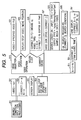
- Fig.5 shows a flowchart of the processings of the search condition input tool 144 (Fig.3) in step 221 in Fig.2.
- the tool 144 initializes video data to null, since it is not selected yet (step 501).
- the tool 144 clears the correct feature value array and the N for denoting the number of correct feature values to 0 respectively (step 502).
- the tool 144 displays a screen (step 503), then enters a loop for waiting for a user's operation event (step 504).
- the tool 144 decides what operation is done on the screen (step 510). If the user has clicked the video select button 412 (Fig.4), the tool 144 initializes the target video to a video file (sample video) specified by the user (step 521) . If the user operates the video operation panel 413 in step 510, the tool 144 plays back/stops the video or moves the position of the video data according to the user specified operation (step 523). If the user clicks the mouse button in step 510, the tool 144 adds a set of data ⁇ x and y coordinates of the mouse and the current time> to the correct feature value array, then sorts the correct feature values in the array in sequence of time (step 525).
- the tool 144 adds a set of correct feature value (coordinate points and the current time) to the correct feature value array.
- no deletion function usable for the correct feature value array is described so as to simplify the description.
- the drawing function deletes a control point when the mouse cursor positioned on the control point is clicked ([ctrl]+click). If the user clicks the correct store & site search button 414 in step 510, the tool 144 stores the correct feature value in the hard disk drive 116 of the user terminal 110 (step 527).
- the user terminal 110 searches for the target media recognition site (step 529).
- the user terminal 110 displays correct feature value array data as a motion locus 422 on the video screen 411. Concretely, the user terminal 110 loops all the whole correct arrays (step 511). In this case, 2 is assumed as the starting value of the loop for drawing a line between two points. Because the correct feature values only in a section between a past time and the current time of the video data must be drawn on the screen in the loop, the user terminal 110 checks the correct feature value [k] time (step 531). If the target correct feature value is positioned before the current time, the user terminal 110 uses the xy coordinate set to display the target line on the screen (step 541).
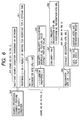
- Fig.6 shows a detailed flowchart of the processings in step 529 in Fig.5.
- the flowchart denotes processings carried out by the user terminal 110 after a correct feature value is specified in the user terminal 110.
- the search processing 529 denotes the processings in steps 231 to 264 of Fig.2 concretely.
- the correct feature value and the search condition datagram are inputted.
- the user terminal 110 multicasts the search condition data through the network (step 610). Then, the user terminal 110 waits for the datagram to be returned for a certain time and, during that time, adds the datagram returned to the user terminal 110 to the response array (step 611). The user terminal 110 then searches for a returned datagram closest to the correct feature value from among the returned feature values. Concretely, the user terminal 110 initializes the minimum similarity min to a limitless value and the optimal recognition site URL to null respectively (step 612). After that, the user terminal 110 repeats the processings in the steps 620 to 630 for all the returned data (step 613).
- the tool 144 calculates the similarity between the feature value in the returned datagram [k] and the correct feature value 121.
- the following expression may be used to calculate the similarity just simply, for example, when there are motion follow-up feature values A and B, each consisting of a ⁇ x,y,t> array just like in this embodiment.
- the user terminal 110 decides whether or not the calculated similarity value is smaller than the current min (step 621). If the decision result is YES (smaller) , the user terminal 110 inputs the similarity value calculated in step 620 in min to update the min, then updates the recognition site URL to the URL of the recognition site recorded in the returned datagram (step 630). Finally, the user terminal 110 checks whether or not the recognition site URL is null (step 614). If the check result is not null, it means that the searched/selected recognition site is optimal. The user terminal 110 then get connected to the media recognition site denoted by the recognition site URL (step 640) and loops until the real video 120 is sent out completely (step 641). After that, the user terminal 110 transmits the data in a streaming manner, and the media recognition server recognizes and processes the data and transmits the recognition result to the user terminal 110 (step 642). This series of processings are repeated.
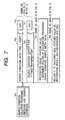
- Fig.7 shows a flowchart of the search condition collation processings (step 241 in Fig.2) carried out by the media recognition server 150. The similar processings are executed in steps 241B and 241C in Fig.2.
- the input parameters of the search condition collation (step 701) in Fig.7 are receiving side information (IP address, URL, etc. of the user terminal 110) and the search condition datagram.
- the media recognition server 150 decides whether or not the input data type in the search condition datagram is "video" (step 702). In the case of the MPEG-7 description method in this embodiment, if a ⁇ VideoCoding> tag is included in the ⁇ MediaFormat> tag, the server 150 decides the input data type as "video”. If not (ex., "audio"), the server 150 terminates the search condition processing 701 (step 710) , since the server 150 cannot process the data. The server 150 then checks whether or not the output data type in the search condition is "mpeg7:MovingRegionType" (step 703).
- the server 150 terminates the search condition processing (step 711), since the media recognition site cannot process the data. If the media recognition site can process both input and output data types, the media recognition server 150 executes the motion follow-up recognition processing according to the sample media data (sample video 119) included in the search condition datagram (step 704). The server 150 then stores the result in the storage unit (not shown) as a recognized feature value and pairs the recognized feature value with the URL of the self-media recognition site in the response datagram, then returns the datagram to the user terminal 110 (step 705).
- the embodiment of the present invention thus makes it possible to select a recognition technique to be easily understood from amongmany recognition techniques so as to search for/select an optimal media recognition site matching with search conditions including the user's subjectivity by making good use of the search condition input tool acquisition server 140, the search condition input tools 143 to 145, the correct feature value 121, and the sample video 119.
- search condition input tool it is possible to input search conditions in accordance with the user's subjectivity, since what the user wants, a soccer player or soccer ball, can be set interactively with use of a search condition input tool. And, by storing each search condition inputted by the user as a correct feature value in the user terminal and making a media recognition site recognize the same sample media data and compare on similarity, it is possible to select the media recognition site closer to the user's subjectivity.
Landscapes
- Engineering & Computer Science (AREA)
- Theoretical Computer Science (AREA)
- Multimedia (AREA)
- Databases & Information Systems (AREA)
- Physics & Mathematics (AREA)
- Data Mining & Analysis (AREA)
- General Engineering & Computer Science (AREA)
- General Physics & Mathematics (AREA)
- Library & Information Science (AREA)
- Signal Processing (AREA)
- Computer Networks & Wireless Communication (AREA)
- Human Computer Interaction (AREA)
- Mathematical Physics (AREA)
- Computational Linguistics (AREA)
- Information Retrieval, Db Structures And Fs Structures Therefor (AREA)
- Information Transfer Between Computers (AREA)
- Management, Administration, Business Operations System, And Electronic Commerce (AREA)
Applications Claiming Priority (2)
| Application Number | Priority Date | Filing Date | Title |
|---|---|---|---|
| JP2003302302A JP4300938B2 (ja) | 2003-08-27 | 2003-08-27 | メディア認識サイト検索方法およびシステム |
| JP2003302302 | 2003-08-27 |
Publications (2)
| Publication Number | Publication Date |
|---|---|
| EP1513077A2 true EP1513077A2 (fr) | 2005-03-09 |
| EP1513077A3 EP1513077A3 (fr) | 2006-05-31 |
Family
ID=34131793
Family Applications (1)
| Application Number | Title | Priority Date | Filing Date |
|---|---|---|---|
| EP03022957A Withdrawn EP1513077A3 (fr) | 2003-08-27 | 2003-10-09 | Méthode et système de recherche avec identification du type des données multimedia |
Country Status (3)
| Country | Link |
|---|---|
| US (1) | US20050050020A1 (fr) |
| EP (1) | EP1513077A3 (fr) |
| JP (1) | JP4300938B2 (fr) |
Cited By (1)
| Publication number | Priority date | Publication date | Assignee | Title |
|---|---|---|---|---|
| CN104077582A (zh) * | 2013-03-25 | 2014-10-01 | 腾讯科技(深圳)有限公司 | 访问互联网的方法、装置及移动终端 |
Families Citing this family (13)
| Publication number | Priority date | Publication date | Assignee | Title |
|---|---|---|---|---|
| US20060152504A1 (en) * | 2005-01-11 | 2006-07-13 | Levy James A | Sequential retrieval, sampling, and modulated rendering of database or data net information using data stream from audio-visual media |
| US7996443B2 (en) * | 2005-02-28 | 2011-08-09 | Microsoft Corporation | Schema grammar and compilation |
| US7756839B2 (en) | 2005-03-31 | 2010-07-13 | Microsoft Corporation | Version tolerant serialization |
| US7634515B2 (en) * | 2005-05-13 | 2009-12-15 | Microsoft Corporation | Data model and schema evolution |
| KR20080063472A (ko) * | 2005-09-16 | 2008-07-04 | 스마트쇼퍼 일렉트로닉스, 인코퍼레이티드 | 아이템 리스트 정보를 자동 컴파일하고 생성하기 위한시스템 및 방법 |
| US20110047162A1 (en) * | 2005-09-16 | 2011-02-24 | Brindisi Richard G | Handheld device and kiosk system for automated compiling and generating item list information |
| US9561351B2 (en) * | 2006-05-31 | 2017-02-07 | Advanced Cardiovascular Systems, Inc. | Drug delivery spiral coil construct |
| US7801926B2 (en) | 2006-11-22 | 2010-09-21 | Microsoft Corporation | Programmable logic and constraints for a dynamically typed storage system |
| CN101334780A (zh) * | 2007-06-25 | 2008-12-31 | 英特维数位科技股份有限公司 | 人物影像的搜寻方法、系统及存储影像元数据的记录媒体 |
| JP4963110B2 (ja) * | 2008-01-25 | 2012-06-27 | インターナショナル・ビジネス・マシーンズ・コーポレーション | サービス検索システム、方法及びプログラム |
| CN105144740B (zh) * | 2013-05-20 | 2019-05-28 | 英特尔公司 | 弹性云视频编辑和多媒体搜索 |
| WO2015001721A1 (fr) * | 2013-07-05 | 2015-01-08 | Necソリューションイノベータ株式会社 | Procédé, dispositif et programme d'examen d'interface utilisateur |
| US20150112904A1 (en) * | 2013-10-22 | 2015-04-23 | Sandia Corporation | Methods, systems and computer program products for quantifying relative system adaptability |
Family Cites Families (6)
| Publication number | Priority date | Publication date | Assignee | Title |
|---|---|---|---|---|
| JP3723296B2 (ja) * | 1996-10-28 | 2005-12-07 | 富士通株式会社 | ナビゲーション装置 |
| KR100387965B1 (ko) * | 2000-05-27 | 2003-06-18 | 엘지전자 주식회사 | 사용자 적응적 멀티미디어 서비스 시스템 |
| US20020184183A1 (en) * | 2001-06-01 | 2002-12-05 | Cherry Darrel D. | Personalized media service |
| US7454485B2 (en) * | 2001-06-29 | 2008-11-18 | Intel Corporation | Providing uninterrupted media streaming using multiple network sites |
| GB2380017A (en) * | 2001-09-21 | 2003-03-26 | Hewlett Packard Co | Selection of service providers |
| US7565137B2 (en) * | 2002-10-25 | 2009-07-21 | At&T Mobility Ii Llc | Delivery of network services |
-
2003
- 2003-08-27 JP JP2003302302A patent/JP4300938B2/ja not_active Expired - Fee Related
- 2003-10-09 US US10/681,281 patent/US20050050020A1/en not_active Abandoned
- 2003-10-09 EP EP03022957A patent/EP1513077A3/fr not_active Withdrawn
Cited By (1)
| Publication number | Priority date | Publication date | Assignee | Title |
|---|---|---|---|---|
| CN104077582A (zh) * | 2013-03-25 | 2014-10-01 | 腾讯科技(深圳)有限公司 | 访问互联网的方法、装置及移动终端 |
Also Published As
| Publication number | Publication date |
|---|---|
| US20050050020A1 (en) | 2005-03-03 |
| EP1513077A3 (fr) | 2006-05-31 |
| JP2005071195A (ja) | 2005-03-17 |
| JP4300938B2 (ja) | 2009-07-22 |
Similar Documents
| Publication | Publication Date | Title |
|---|---|---|
| EP1513077A2 (fr) | Méthode et système de recherche avec identification du type des données multimedia | |
| JP4437918B2 (ja) | 選択的に情報を検索しその後その情報の表示を可能にする装置および方法 | |
| US7664830B2 (en) | Method and system for utilizing embedded MPEG-7 content descriptions | |
| US6538663B2 (en) | Camera control system | |
| WO2022116888A1 (fr) | Procédé et dispositif de traitement de données vidéo, équipement et support | |
| DE112006001745T5 (de) | Verfahren, Vorrichtung, System und computerlesbares Medium zum Bereitstellen einer Universalmedienschnittstelle zum Steuern einer Universalmedienvorrichtung | |
| US20020026441A1 (en) | System and method for integrating multiple applications | |
| CN112162739B (zh) | 基于js-sdk的可视化埋点方法及系统 | |
| US9053196B2 (en) | Methods for interacting with and manipulating information and systems thereof | |
| CN112162740B (zh) | 基于ios-sdk的可视化数据采集方法及系统 | |
| EP1143351A2 (fr) | Procédé et système de génération d'applications et de structurisation d'informations multimedia | |
| EP1158423A2 (fr) | Système service de recherche de sites internet avec un moteur de meta-recherche | |
| US10922059B2 (en) | Integrating application features into a platform interface based on application metadata | |
| JP4516815B2 (ja) | 検索装置 | |
| CN120611800B (zh) | 一种数据分析方法、装置、存储介质及电子设备 | |
| CN102483766B (zh) | 用于提供预览信息的搜索方法、设备和系统 | |
| US20020080194A1 (en) | Computer readable recording medium storing program for managing CAD data | |
| US20030233617A1 (en) | Server and web page information providing method | |
| US6907563B1 (en) | System and method for composing heterogeneous media components into a unified environment for rich spatio-temporal hotlink authoring and action enablement in low-bandwidth presentations | |
| US20050216865A1 (en) | System and method for device selection in a computer system | |
| US20040192382A1 (en) | Personal digest delivery system and method | |
| KR20010104871A (ko) | 검색결과의 자동분류 기능을 갖는 인터넷 사이트 검색서비스 시스템 | |
| CN103077218B (zh) | 一种用于确定查询请求中查询序列的需求信息的方法与设备 | |
| CN120104859A (zh) | 一种基于多源信息融合的搜索方法 | |
| JP2002082894A (ja) | コミュニティ環境提供システムおよびオブジェクト表現制御装置 |
Legal Events
| Date | Code | Title | Description |
|---|---|---|---|
| PUAI | Public reference made under article 153(3) epc to a published international application that has entered the european phase |
Free format text: ORIGINAL CODE: 0009012 |
|
| AK | Designated contracting states |
Kind code of ref document: A2 Designated state(s): AT BE BG CH CY CZ DE DK EE ES FI FR GB GR HU IE IT LI LU MC NL PT RO SE SI SK TR |
|
| AX | Request for extension of the european patent |
Extension state: AL LT LV MK |
|
| PUAL | Search report despatched |
Free format text: ORIGINAL CODE: 0009013 |
|
| 17P | Request for examination filed |
Effective date: 20060331 |
|
| AK | Designated contracting states |
Kind code of ref document: A3 Designated state(s): AT BE BG CH CY CZ DE DK EE ES FI FR GB GR HU IE IT LI LU MC NL PT RO SE SI SK TR |
|
| AX | Request for extension of the european patent |
Extension state: AL LT LV MK |
|
| AKX | Designation fees paid |
Designated state(s): DE FR GB |
|
| 17Q | First examination report despatched |
Effective date: 20080603 |
|
| STAA | Information on the status of an ep patent application or granted ep patent |
Free format text: STATUS: THE APPLICATION IS DEEMED TO BE WITHDRAWN |
|
| 18D | Application deemed to be withdrawn |
Effective date: 20081014 |