EP1369866A2 - Operationserklärungsgerät, Operationserklärungsverfahren und Datenaufzeichnungsmedium auf dem ein Operationserklärungsprogramm aufgezeichnet ist und Operationserklärungsdatensignal - Google Patents
Operationserklärungsgerät, Operationserklärungsverfahren und Datenaufzeichnungsmedium auf dem ein Operationserklärungsprogramm aufgezeichnet ist und Operationserklärungsdatensignal Download PDFInfo
- Publication number
- EP1369866A2 EP1369866A2 EP03012715A EP03012715A EP1369866A2 EP 1369866 A2 EP1369866 A2 EP 1369866A2 EP 03012715 A EP03012715 A EP 03012715A EP 03012715 A EP03012715 A EP 03012715A EP 1369866 A2 EP1369866 A2 EP 1369866A2
- Authority
- EP
- European Patent Office
- Prior art keywords
- data
- explanation
- recording medium
- unit
- ian
- Prior art date
- Legal status (The legal status is an assumption and is not a legal conclusion. Google has not performed a legal analysis and makes no representation as to the accuracy of the status listed.)
- Withdrawn
Links
Images




Classifications
-
- G—PHYSICS
- G11—INFORMATION STORAGE
- G11B—INFORMATION STORAGE BASED ON RELATIVE MOVEMENT BETWEEN RECORD CARRIER AND TRANSDUCER
- G11B19/00—Driving, starting, stopping record carriers not specifically of filamentary or web form, or of supports therefor; Control thereof; Control of operating function ; Driving both disc and head
- G11B19/02—Control of operating function, e.g. switching from recording to reproducing
- G11B19/022—Control panels
-
- G—PHYSICS
- G06—COMPUTING OR CALCULATING; COUNTING
- G06F—ELECTRIC DIGITAL DATA PROCESSING
- G06F3/00—Input arrangements for transferring data to be processed into a form capable of being handled by the computer; Output arrangements for transferring data from processing unit to output unit, e.g. interface arrangements
- G06F3/01—Input arrangements or combined input and output arrangements for interaction between user and computer
- G06F3/048—Interaction techniques based on graphical user interfaces [GUI]
- G06F3/0487—Interaction techniques based on graphical user interfaces [GUI] using specific features provided by the input device, e.g. functions controlled by the rotation of a mouse with dual sensing arrangements, or of the nature of the input device, e.g. tap gestures based on pressure sensed by a digitiser
- G06F3/0489—Interaction techniques based on graphical user interfaces [GUI] using specific features provided by the input device, e.g. functions controlled by the rotation of a mouse with dual sensing arrangements, or of the nature of the input device, e.g. tap gestures based on pressure sensed by a digitiser using dedicated keyboard keys or combinations thereof
- G06F3/04895—Guidance during keyboard input operation, e.g. prompting
-
- G—PHYSICS
- G11—INFORMATION STORAGE
- G11B—INFORMATION STORAGE BASED ON RELATIVE MOVEMENT BETWEEN RECORD CARRIER AND TRANSDUCER
- G11B19/00—Driving, starting, stopping record carriers not specifically of filamentary or web form, or of supports therefor; Control thereof; Control of operating function ; Driving both disc and head
Definitions
- This invention relates to an operation explanation apparatus, operation explanation method and a data-recording medium on which an operation explanation program is recorded, which provide an explanation of how to operate various apparatuses.
- the computer since the user specifies the operation unit to be explained, and the computer functions to play and output from the recording medium only the explanation data corresponding to the operation of that specified operation unit, so it is possible to identify just the explanation corresponding to the operation unit to be explained, and it is possible to perform an explanation of the desired operation unit according to operations by the user.
- the explanation data are image explanation data that use images to explain the operation, it is possible to easily perform the necessary explanation in an easy-to-understand way, and operation can be performed easily even by the hearing impaired.
- the explanation data are image explanation data that use images to explain the operation, it is possible to easily perform the necessary explanation in an easy-to-understand way, and operation can be performed easily even by the hearing impaired.
- the pairs of explanation data and specification data for specifying the explanation data are recorded for just the number of operation units, by searching the specification data and playing and outputting just the explanation data corresponding to the operation unit for which an explanation is required, it is possible to identify just the explanation corresponding to the operation unit for which an explanation is desired and to perform the explanation of the necessary operation unit according to operations by the user.
- the mounted recording medium contains data for specifying whether or not the recording medium is a recording medium for operation explanation, and there is a judgment device that determines whether or not the mounted recording medium is a recording medium for operation explanation, so it is possible to automatically and efficiently determine whether or not the recording medium is for operation explanation without making changes to the normal play operation.
- an end-operation unit such as a control button for removing the recording medium from the mounting unit and ending the operation explanation process, or a stop button the stops play of the medium, so it is possible for the user to remove the recording medium and end the operation explanation whenever it is desired.
- the user since the user specifies the operation unit to be explained, and only the explanation data corresponding to the operation of that specified operation unit is played and output from the recording medium, so it is possible to identify just the explanation corresponding to the operation unit to be explained, and it is possible to perform an explanation of the desired operation unit according to operations by the user.
- the explanation data are audio explanation data that use audio for explaining the operation, it is possible to easily perform the necessary explanation, and operation can be performed easily, even by the seeing impaired.
- the explanation data are image explanation data that use images to explain the operation, it is possible to easily perform the necessary explanation in an easy-to-understand way, and operation can be performed easily, even by the hearing impaired.
- the computer since the user specifies the operation unit to be explained, and the computer functions to play and output from the recording medium only the explanation data corresponding to the operation of that specified operation unit, so it is possible to identify just the explanation corresponding to the operation unit to be explained, and it is possible to perform an explanation of the desired operation unit according to operations by the user.
- the explanation data are audio explanation data that explain operations using audio, it is possible to easily perform the necessary explanation, and operation can be performed easily even by the seeing impaired.
- the explanation data are image explanation data that explain operations using images, it is possible to perform the necessary explanations easily and in an easy-to-understand way, and operation can be performed easily even by the hearing impaired.
- the invention is applied to a player.
- FIG. 1 is a block diagram showing the basic construction of an 5 embodiment of the invention.
- the player comprises: an operation board 101, mounting unit 102, generation unit 103, memory 104, control unit 105, speaker 106, decoding unit 107 and display unit 109.
- the operation board 101 normally comprises a plurality of control buttons 108 such as a stop button, play button and volume button for operating the player 100.
- the generation- unit 103 determines which control button 108 was operated when one of the control buttons has been operated, and generates operation-unit ID data Icn for identifying the operated control button 108.
- the mounting unit 102 is for mounting and operating a recording medium DK such as an optical disk.
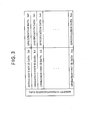
- the recording medium DK normally has music or the like recorded on it, however, as shown in FIG. 2, the recording medium DK of this invention is recorded with only explanation data Ian as disk correspondence data for each control button 108, and specification data Inn for specifying the explanation data Ian for just the number of control buttons 108.
- memory-correspondence data which indicate the correspondence between operation-unit ID data Icn and specification data Inn recorded on the recording medium DK, are stored beforehand in the memory 104.
- the control unit 105 searches for specification data Inn that corresponds to the generated operation-unit ID data Icn, then detects from the recording medium DK explanation data Ian that correspond to the specification data Inn and sends the data to the decoding unit 107.
- the decoding unit 107 decodes the explanation data Ian that were detected from the recording medium DK, then sends the data to the speaker 106 and the speaker 106 outputs that explanation data Ian.
- the normal play operation is performed.
- the control unit 105 detects the song that corresponds to the selection operation executed from the operation board 101, and sends the data to the decoding unit 107, and after the decoding unit 107 decodes the song data, the song is output from the speaker 106.
- the same operation is performed for a recording medium DK that is recorded with normal images, and the images are output by the display unit 109.
- FIG. 4 is a flowchart showing the entire operation of this embodiment of the invention.
- the recording medium DK is mounted in the mounting unit 102 (step S1).
- the recording medium DK starts to be read (step S2).
- the mounted recorded medium DK is determined as to whether or not it is a recording medium DK for explaining operations (step S3).
- the TOC (Table of Contents) data of the recording medium are automatically read.
- an operation for reading the specification area, where the disk-control data for controlling the disk are recorded is performed.
- the specification area is read automatically first after mounting, however it is also possible for some other area to be read automatically first in response to some operation. Furthermore, it is also possible to determine that the recording medium is a medium for operation explanation by some operation such as pressing a certain button.
- the processing of step S3 is executed based on control from the control unit 105 as a judgment device.
- step S3 N
- the medium is determined to be a normal recording medium recorded with music or the like, and the normal play operation is performed (step S4).
- step S3 In the case of a recoding medium that is for operation explanation (step S3: Y), the operation explanation process starts.
- an audio message such as, 'The operation explanation has started. Press the control button for which an explanation is desired.' is output from the speaker to indicate to the user that the operation explanation has started, and prompts the user to select a control button 108 to be explained (step S5).
- the prompt message can be an image or video display that is displayed on the display unit 109 in the player, or on an external display unit.
- step S6 determines whether or not the prompt message has finished (step S6), and when the prompt message has finished (step S6: Y), operation pauses until the control button 108 is selected (step S7).
- step S9 step S6: N.
- step S7 it is determined whether or not a control button 108 is selected (step S8) and when a control button 108 has been selected (step S8: Y), the explanation data Ian that correspond to the selected control button 108 are detected from the recording medium DK and output from the speaker 106 or display unit 109 (step S9).
- step S9 The operation of step S9 will be explained later.
- step S8: N the process returns to step S6, and after the prompt message ends (step S6: Y), processing pauses until a control button 108 is selected.
- step S10 it is determined whether or not the selected control button 108 is the eject button for removing the recording medium from the mounting unit 102 (step S10), and when it is not the eject button (step S10: N), the process returns to step S6 and the process is repeated, however, when it is the eject button (step S10: Y), reading of the recording medium DK stops (step S11).
- step S11 is executed to make the control unit 105 functions as a stop device.
- the recording medium DK is ejected using the eject button, and the operation explanation ends.
- step S9 the operation of step S9 will be described in detail based on the explanation-operation flowchart shown in FIG. 5.
- step S21 when a control button 108 is selected, it is determined which of the control buttons 108 has been operated (step S21), and the generation unit 103 generates operation-unit ID data Icn that corresponds to that control button 108 (step S22).
- control unit 10 searches for specification data Inn that corresponds to the generated operation-unit ID data Icn (step S23).
- Explanation data Ian that correspond to the searched specification data Inn are detected from the disk-correspondence data on the recording medium DK (step S24), and output from the speaker 106 (step S25).
- a control button 108 that needs to be explained is specified, and only the explanation data corresponding to the operation of the specified control button 108 is played and output from the recording medium DK, so it is possible to correlate and identify only an explanation corresponding to the control button 108 for which an explanation is desired to that control button 108, and to perform an explanation of the necessary control button 108 according to operation by the user.
- the explanation data Ian use audio
- the operation is explained by an audio explanation from the speaker 106, so the necessary explanation can be performed easily, and operation is simple even for the seeing impaired.
- the explanation data Ian use images or video
- the operation is explained from the display unit 109 using images or video, so the necessary explanation can be performed easily, and operation is simple even for the hearing impaired.
- the operation board 101 is not limited to being equipped in the player itself, but can be a remote controller, and the control buttons 108 can be the respective control buttons of the remote controller.
- the mounted recording medium DK when the mounted recording medium DK was determined to be a recording medium for operation explanation, the disk-control data in the specification area was used, however, it is also possible to identify that the recording medium is for operation explanation by performing certain operations after the recording medium for operation explanation has been mounted such as the user selecting a certain control button. In this case, the operation that the user desires to be explained is expressed, so after the recording medium DK is mounted (step S1), the process can move directly to the operation explanation of step S9.
- the embodiment described above is constructed such that the operation explanation process ends when the eject button is operated as the end-operation unit. This is because when explanation data are assigned to all of the control buttons of the player, the operation for ending the operation explanation cannot be performed.
- the end-operation unit for ending the operation explanation process is not limited to an eject button, and it is possible to use a button whose operation does not require an explanation or a control button that indicates directly to the user that it will end operation. For example, it is possible to use the ON/OFF button, or a Stop button that stops playing, etc. Furthermore, it is possible to have a special button for ending the operation explanation process. Also, it is possible to have the operation explanation process end when no buttons are operated after a specified amount of time after entering the operation explanation process. When ending the operation explanation process using these methods, it is possible to notify the user using sound or display that the operation explanation process is ending.
- the embodiment described above was explained for a player, however the invention can be applied to other apparatuses as well.
- the invention can be applied to any apparatus that has a player that is capable of playing a recording medium such as a disk, cassette tape or memory medium, a speaker that outputs sound, and a display that displays images or video. That is, the invention can be applied to apparatuses such as a stereo apparatus equipped with a CD player, DVD player or memory medium player, or a television monitor or personal computer equipped with a DVD player.
- the explanation data were conveyed to the user by sound or images, however, it is possible that when the explanation starts the sound volume will be '0' or at a very low level, or it is possible that the brightness of the display unit will be low making it difficult to view.
- the control unit perform control as a setting device such as automatically controlling the volume of the sound output when starting the operation explanation process to a preset level or greater, or to raise the brightness level of the display to a preset level so the display can be seen. With this kind of control, the user will more certainly be able to perform the operation explanation, and it simplifies the operations performed by the user.
- the program corresponding to the flowcharts shown in FIG. 4 and FIG. 5, or the program corresponding to the changed form described above, can be stored in advance on a flexible disk, or can be stored on a flexible disk by way of a network such as the Internet, and the operation explanation process can be executed by having the control unit 105 read these stored programs.
Landscapes
- Engineering & Computer Science (AREA)
- General Engineering & Computer Science (AREA)
- Theoretical Computer Science (AREA)
- Human Computer Interaction (AREA)
- Physics & Mathematics (AREA)
- General Physics & Mathematics (AREA)
- User Interface Of Digital Computer (AREA)
Applications Claiming Priority (2)
| Application Number | Priority Date | Filing Date | Title |
|---|---|---|---|
| JP2002166909A JP2004013571A (ja) | 2002-06-07 | 2002-06-07 | 操作説明装置、操作説明方法並びに操作説明用プログラムおよび操作説明用プログラムが記録された情報記録媒体 |
| JP2002166909 | 2002-06-07 |
Publications (2)
| Publication Number | Publication Date |
|---|---|
| EP1369866A2 true EP1369866A2 (de) | 2003-12-10 |
| EP1369866A3 EP1369866A3 (de) | 2006-01-18 |
Family
ID=29545876
Family Applications (1)
| Application Number | Title | Priority Date | Filing Date |
|---|---|---|---|
| EP03012715A Withdrawn EP1369866A3 (de) | 2002-06-07 | 2003-06-04 | Operationserklärungsgerät, Operationserklärungsverfahren und Datenaufzeichnungsmedium auf dem ein Operationserklärungsprogramm aufgezeichnet ist und Operationserklärungsdatensignal |
Country Status (3)
| Country | Link |
|---|---|
| US (1) | US20040017995A1 (de) |
| EP (1) | EP1369866A3 (de) |
| JP (1) | JP2004013571A (de) |
Family Cites Families (4)
| Publication number | Priority date | Publication date | Assignee | Title |
|---|---|---|---|---|
| US4490810A (en) * | 1982-02-16 | 1984-12-25 | Hon David C | Automated instruction, game and data retrieval system |
| US5748254A (en) * | 1995-07-24 | 1998-05-05 | Coach Master International Corporation | Systems with a remote control in which information can be retrieved from an encoded, laser readable disc |
| ID21786A (id) * | 1997-09-17 | 1999-07-22 | Matsushita Electric Industrial Co Ltd | Peralatan editing data video, disk optikal untuk digunakan sebagai media perekam peralatan editing data video dan media perekam komputer yang bisa dibaca yang menyimpan program editing |
| JPH11316636A (ja) * | 1998-05-06 | 1999-11-16 | Seiko Epson Corp | マニュアル表示装置、マニュアル表示方法およびマニュアル表示プログラムを記録した媒体 |
-
2002
- 2002-06-07 JP JP2002166909A patent/JP2004013571A/ja active Pending
-
2003
- 2003-06-04 EP EP03012715A patent/EP1369866A3/de not_active Withdrawn
- 2003-06-04 US US10/453,791 patent/US20040017995A1/en not_active Abandoned
Also Published As
| Publication number | Publication date |
|---|---|
| EP1369866A3 (de) | 2006-01-18 |
| US20040017995A1 (en) | 2004-01-29 |
| JP2004013571A (ja) | 2004-01-15 |
Similar Documents
| Publication | Publication Date | Title |
|---|---|---|
| USRE42441E1 (en) | Apparatus and method for an additional contents display of an optical disc player | |
| US20020101791A1 (en) | Audio device, method for managing track files, and method for playing back tracks | |
| US8155499B2 (en) | Screen saving method of image apparatus | |
| EP1369866A2 (de) | Operationserklärungsgerät, Operationserklärungsverfahren und Datenaufzeichnungsmedium auf dem ein Operationserklärungsprogramm aufgezeichnet ist und Operationserklärungsdatensignal | |
| JP2007172670A (ja) | 光ディスク再生装置、および光ディスク再生方法 | |
| JP2007165959A (ja) | 画像表示装置 | |
| US8195314B2 (en) | Method of reproducing previous audio file in multimedia device and multimedia device using the same | |
| JP2005285274A (ja) | タイトル表示情報生成装置 | |
| KR100313044B1 (ko) | 광디스크체인저의정보표시방법 | |
| KR100555782B1 (ko) | Dvd 플레이어에서의 복합 파일 설정 및 재생 방법 | |
| KR19980079024A (ko) | 비디오 콤팩트 디스크 시스템의 피.비.씨.재생시 배경음악 선택 방법 | |
| US20030016921A1 (en) | Video reproducing/recording system to change a logo image/sound, and method of changing the logo image/sound | |
| KR100812014B1 (ko) | 다중 미디어 플레이 기능을 가지는 오디오 시스템 및 그방법 | |
| KR100620604B1 (ko) | 텔레비젼 및 그 제어방법 | |
| KR0132818B1 (ko) | 컴팩트 디스크 플레이어 일체형 텔레비젼 수상기의 디스크 관리방법 | |
| JP2008112495A (ja) | 記録再生装置 | |
| KR100589517B1 (ko) | 광디스크 장치에서의 디스크 재생 여부 판별방법 | |
| JP2006004542A (ja) | Dvd再生装置および数値受付け装置 | |
| JP4891264B2 (ja) | 切替制御装置、その方法、そのプログラム、そのプログラムを記録した記録媒体、および再生装置 | |
| JP2007180938A (ja) | ハードディスク搭載光ディスク再生装置 | |
| KR19980079022A (ko) | 비디오 콤팩트 디스크 시스템의 피.비.씨.재생시 배경음악 선택 방법 | |
| JP2007165957A (ja) | 画像表示装置 | |
| KR20070111113A (ko) | 광디스크 플레이어의 파워오프제어방법 | |
| KR20050079488A (ko) | 부가설명을 제공하는 광재생장치 및 광재생방법 | |
| KR20070033583A (ko) | 광 디스크 시스템 및 그 제어방법 |
Legal Events
| Date | Code | Title | Description |
|---|---|---|---|
| PUAI | Public reference made under article 153(3) epc to a published international application that has entered the european phase |
Free format text: ORIGINAL CODE: 0009012 |
|
| AK | Designated contracting states |
Kind code of ref document: A2 Designated state(s): AT BE BG CH CY CZ DE DK EE ES FI FR GB GR HU IE IT LI LU MC NL PT RO SE SI SK TR |
|
| AX | Request for extension of the european patent |
Extension state: AL LT LV MK |
|
| PUAL | Search report despatched |
Free format text: ORIGINAL CODE: 0009013 |
|
| AK | Designated contracting states |
Kind code of ref document: A3 Designated state(s): AT BE BG CH CY CZ DE DK EE ES FI FR GB GR HU IE IT LI LU MC NL PT RO SE SI SK TR |
|
| AX | Request for extension of the european patent |
Extension state: AL LT LV MK |
|
| RIC1 | Information provided on ipc code assigned before grant |
Ipc: G06F 7/00 20060101ALI20051128BHEP Ipc: G06F 1/00 20060101ALI20051128BHEP Ipc: G11B 19/02 20060101ALI20051128BHEP Ipc: G11B 19/00 20060101AFI20030927BHEP |
|
| 17P | Request for examination filed |
Effective date: 20060410 |
|
| AKX | Designation fees paid |
Designated state(s): DE FR GB |
|
| 17Q | First examination report despatched |
Effective date: 20070524 |
|
| STAA | Information on the status of an ep patent application or granted ep patent |
Free format text: STATUS: THE APPLICATION IS DEEMED TO BE WITHDRAWN |
|
| 18D | Application deemed to be withdrawn |
Effective date: 20071004 |