EP1195723A2 - Verfahren zur Anzeige von Ereignissen in einem Kraftfahrzeug - Google Patents
Verfahren zur Anzeige von Ereignissen in einem Kraftfahrzeug Download PDFInfo
- Publication number
- EP1195723A2 EP1195723A2 EP01120736A EP01120736A EP1195723A2 EP 1195723 A2 EP1195723 A2 EP 1195723A2 EP 01120736 A EP01120736 A EP 01120736A EP 01120736 A EP01120736 A EP 01120736A EP 1195723 A2 EP1195723 A2 EP 1195723A2
- Authority
- EP
- European Patent Office
- Prior art keywords
- symbol
- line
- symbols
- lines
- area
- Prior art date
- Legal status (The legal status is an assumption and is not a legal conclusion. Google has not performed a legal analysis and makes no representation as to the accuracy of the status listed.)
- Granted
Links
Images



Classifications
-
- G—PHYSICS
- G07—CHECKING-DEVICES
- G07C—TIME OR ATTENDANCE REGISTERS; REGISTERING OR INDICATING THE WORKING OF MACHINES; GENERATING RANDOM NUMBERS; VOTING OR LOTTERY APPARATUS; ARRANGEMENTS, SYSTEMS OR APPARATUS FOR CHECKING NOT PROVIDED FOR ELSEWHERE
- G07C5/00—Registering or indicating the working of vehicles
- G07C5/08—Registering or indicating performance data other than driving, working, idle, or waiting time, with or without registering driving, working, idle or waiting time
- G07C5/0816—Indicating performance data, e.g. occurrence of a malfunction
- G07C5/0825—Indicating performance data, e.g. occurrence of a malfunction using optical means
-
- B—PERFORMING OPERATIONS; TRANSPORTING
- B60—VEHICLES IN GENERAL
- B60K—ARRANGEMENT OR MOUNTING OF PROPULSION UNITS OR OF TRANSMISSIONS IN VEHICLES; ARRANGEMENT OR MOUNTING OF PLURAL DIVERSE PRIME-MOVERS IN VEHICLES; AUXILIARY DRIVES FOR VEHICLES; INSTRUMENTATION OR DASHBOARDS FOR VEHICLES; ARRANGEMENTS IN CONNECTION WITH COOLING, AIR INTAKE, GAS EXHAUST OR FUEL SUPPLY OF PROPULSION UNITS IN VEHICLES
- B60K35/00—Instruments specially adapted for vehicles; Arrangement of instruments in or on vehicles
- B60K35/20—Output arrangements, i.e. from vehicle to user, associated with vehicle functions or specially adapted therefor
- B60K35/28—Output arrangements, i.e. from vehicle to user, associated with vehicle functions or specially adapted therefor characterised by the type of the output information, e.g. video entertainment or vehicle dynamics information; characterised by the purpose of the output information, e.g. for attracting the attention of the driver
-
- B—PERFORMING OPERATIONS; TRANSPORTING
- B60—VEHICLES IN GENERAL
- B60K—ARRANGEMENT OR MOUNTING OF PROPULSION UNITS OR OF TRANSMISSIONS IN VEHICLES; ARRANGEMENT OR MOUNTING OF PLURAL DIVERSE PRIME-MOVERS IN VEHICLES; AUXILIARY DRIVES FOR VEHICLES; INSTRUMENTATION OR DASHBOARDS FOR VEHICLES; ARRANGEMENTS IN CONNECTION WITH COOLING, AIR INTAKE, GAS EXHAUST OR FUEL SUPPLY OF PROPULSION UNITS IN VEHICLES
- B60K35/00—Instruments specially adapted for vehicles; Arrangement of instruments in or on vehicles
- B60K35/20—Output arrangements, i.e. from vehicle to user, associated with vehicle functions or specially adapted therefor
- B60K35/21—Output arrangements, i.e. from vehicle to user, associated with vehicle functions or specially adapted therefor using visual output, e.g. blinking lights or matrix displays
- B60K35/22—Display screens
-
- B—PERFORMING OPERATIONS; TRANSPORTING
- B60—VEHICLES IN GENERAL
- B60K—ARRANGEMENT OR MOUNTING OF PROPULSION UNITS OR OF TRANSMISSIONS IN VEHICLES; ARRANGEMENT OR MOUNTING OF PLURAL DIVERSE PRIME-MOVERS IN VEHICLES; AUXILIARY DRIVES FOR VEHICLES; INSTRUMENTATION OR DASHBOARDS FOR VEHICLES; ARRANGEMENTS IN CONNECTION WITH COOLING, AIR INTAKE, GAS EXHAUST OR FUEL SUPPLY OF PROPULSION UNITS IN VEHICLES
- B60K35/00—Instruments specially adapted for vehicles; Arrangement of instruments in or on vehicles
- B60K35/20—Output arrangements, i.e. from vehicle to user, associated with vehicle functions or specially adapted therefor
- B60K35/29—Instruments characterised by the way in which information is handled, e.g. showing information on plural displays or prioritising information according to driving conditions
-
- B—PERFORMING OPERATIONS; TRANSPORTING
- B60—VEHICLES IN GENERAL
- B60K—ARRANGEMENT OR MOUNTING OF PROPULSION UNITS OR OF TRANSMISSIONS IN VEHICLES; ARRANGEMENT OR MOUNTING OF PLURAL DIVERSE PRIME-MOVERS IN VEHICLES; AUXILIARY DRIVES FOR VEHICLES; INSTRUMENTATION OR DASHBOARDS FOR VEHICLES; ARRANGEMENTS IN CONNECTION WITH COOLING, AIR INTAKE, GAS EXHAUST OR FUEL SUPPLY OF PROPULSION UNITS IN VEHICLES
- B60K35/00—Instruments specially adapted for vehicles; Arrangement of instruments in or on vehicles
- B60K35/60—Instruments characterised by their location or relative disposition in or on vehicles
-
- B—PERFORMING OPERATIONS; TRANSPORTING
- B60—VEHICLES IN GENERAL
- B60K—ARRANGEMENT OR MOUNTING OF PROPULSION UNITS OR OF TRANSMISSIONS IN VEHICLES; ARRANGEMENT OR MOUNTING OF PLURAL DIVERSE PRIME-MOVERS IN VEHICLES; AUXILIARY DRIVES FOR VEHICLES; INSTRUMENTATION OR DASHBOARDS FOR VEHICLES; ARRANGEMENTS IN CONNECTION WITH COOLING, AIR INTAKE, GAS EXHAUST OR FUEL SUPPLY OF PROPULSION UNITS IN VEHICLES
- B60K35/00—Instruments specially adapted for vehicles; Arrangement of instruments in or on vehicles
- B60K35/65—Instruments specially adapted for specific vehicle types or users, e.g. for left- or right-hand drive
- B60K35/654—Instruments specially adapted for specific vehicle types or users, e.g. for left- or right-hand drive the user being the driver
-
- B—PERFORMING OPERATIONS; TRANSPORTING
- B60—VEHICLES IN GENERAL
- B60K—ARRANGEMENT OR MOUNTING OF PROPULSION UNITS OR OF TRANSMISSIONS IN VEHICLES; ARRANGEMENT OR MOUNTING OF PLURAL DIVERSE PRIME-MOVERS IN VEHICLES; AUXILIARY DRIVES FOR VEHICLES; INSTRUMENTATION OR DASHBOARDS FOR VEHICLES; ARRANGEMENTS IN CONNECTION WITH COOLING, AIR INTAKE, GAS EXHAUST OR FUEL SUPPLY OF PROPULSION UNITS IN VEHICLES
- B60K2360/00—Indexing scheme associated with groups B60K35/00 or B60K37/00 relating to details of instruments or dashboards
- B60K2360/18—Information management
- B60K2360/188—Displaying information using colour changes
Definitions
- the invention relates to a method according to the preamble of claim 1.
- a device of this type is known from DE 41 40 864 A1.
- This device there is a multifunctional display of diagnostic signals in the form of a dot matrix, in which normally shows a time measurement unit.
- An electronic module takes one or more information (s) or malfunction (s) and controls the display device so that a corresponding fault information is visible instead of the time data.
- the fault information are indicated by symbols, whereby, depending on the value of symbols, the order is fixed. With the help of a switch, the driver can do it all Make symbols visible one after the other.
- EP 0 872 993 A1 describes an arrangement for operator guidance in communication systems known that equipped with displays for alphanumeric or graphic-capable displays are.
- a rolling element with a push button function and a separate activation button is used as control means used and optionally assigned activation elements to the display line by line are.
- the object of the invention is the driver, in particular that of a commercial vehicle such as trucks or buses, automatically and clearly about events of his vehicle to teach or inform.
- the display is arranged in the driver's optimal field of vision so that it is problem-free can read.
- the symbols are usually shown in black on a gray background or a different color scheme can be set by the driver, e.g. B. color inverse, when parking or driving lights are switched on, which conveys a calm image and thus the Driver doesn't bother either.
- areas 3 and 4 alternate rows with each other and these two lines in turn match the line in area 2 and vice versa, so that a calm overall impression appears in the display.
- the symbol lines in areas 3 and 4 "wait" when an event in area 2 occurs.
- the area 2 has a longer rolling time in the example described, because in this Line of a symbol and a hint / recommended action for the driver to grasp have to be. Only when the longer rolling time of the line in area 2 has expired the line change takes place simultaneously with the lines in areas 3 and / or 4.
- symbol 1 shows a selection of symbols which, when there are events for almost all symbols, be shown line by line in a rolling time.
- the symbol rows or symbol lines 1 and 2 are shown in this figure, while the symbol lines 2 and 3 in the background in the display control are in the waiting position.
- Each symbol line has four examples here Symbols that can be displayed depending on the event.
- the symbols are indicated with s01, s02 ... etc., behind which there are actually symbols stand.
- the word action in the table means the process leading to the state of the corresponding Symbol line has led.
- the pictorial representation is, for example, a light background and a black symbol vehicle lighting not switched on and dark background and bright symbol vehicle lighting switched on. This setting can also be changed by the driver become.
- Fig. 2 shows the arrangement in the display.
- the symbols can be shown, for example according to FIG. 1, and, if more than two symbol lines are occupied by events, the lines can be shown at intervals (rolling), with only one symbol line being changed in the rolling distance, if there is no event.
- Area 2 is a further line in which a symbol and a note or / and a recommendation for action can be shown in writing.
- display control a large number of symbols with associated notes and / or recommendations for action are stored for area 2, which, if an event is present, also the corresponding symbol Notice immediately.
- the corresponding symbols with information and / or recommendations for action are also shown in the scrolling.
- the rolling time of the symbol lines in areas 3 and 4 is preferably shorter than that of the line with symbol and advice / recommended action in area 2, since the driver must be able to record the written form, for example.
- the coordination of the times to each other when rolling is shown in Figures 17 and 18 and described in the text.
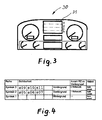
- the display 31 has areas 1, 2, 3, 4 and is centrally located in the driver's field of vision in the dashboard arranged.
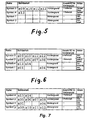
- FIG. 6 The comparison of FIG. 6 and FIG. 7 additionally shows that the symbol line 3, FIG. 6, in the background is moved, Fig. 7, and that the symbol line 4, in which the symbols s13 and s14 have been noted, FIG. 6, has been visibly placed in the foreground in the symbol line, which was longest stable, row in area 3 (claims 4 and 5).
- Figures 10 and 11 show auto-scrolling when all symbol lines are occupied. It will only one visible line of symbols in one roll time against the next in the background Waiting line of symbols exchanged and shown (claim 7).
- symbol line 3 moves into the background and symbol line 4 from the background to the foreground where symbol line 3 was (area 3).
- FIG. 12 shows the line shown, in which the event "low beam” and "rear fog lamp (s) switched on” was entered (claim 9).
- the newly displayed symbols appear inverse in color, that is to say the symbols themselves are bright for a fade-in marking time which is equal to or less than the rolling time for this area. After this marking time, these symbols appear in normal color.
- the image symbol and background
- Fig. 13 shows a symbol line shown, in the two symbols, the fog lights and the rear fog lamp (s) must be removed from the display because the above Lighting fixtures were switched off (claim 10).
- the symbols are, for example are crossed out, but remain on the display for a mark time. When the lines scroll, the time count for scrolling begins at the strikeout again. If only one line, i.e. the line shown, is filled with symbols If there is no rolling, the crossed out symbols remain a marking time still shown. The marking time is the same or can also be shorter than the rolling time his.
- FIG. 14 shows how the line shown, FIG. 13, after a rolling cycle, if this line reappears, or after a roll time if only one line is shown, appears. Appears at the place (s) where it was deleted one or more gaps (claim 11). If there is no event and the line does not appear another line is filled or filled in, the symbol becomes after the roller finish time or the symbols left-justified (is not shown, claim 12).
- Claims 13 and 14 relate to two ways of summarizing, the Both options can either be implemented in software or only in each case one of the possibilities can be implemented in software.
- the symbol s01 "headlights switched on” is classified in column 1 of area 3 because this symbol is assigned to column 1, as can be seen in FIG. 1.
- the symbols “refueling required”, (s12) and “air filter too high negative pressure” (s13) "remain in their place because they are arranged in these columns, FIG. 1.
- the symbol (s06) "little liquid in the windshield washer system” is added because the column assigned to it, Fig. 1, is occupied and should be changed as little as possible on the line to be filled.
- the change process is visible on the display 31.
- FIG. 17 shows the timing of the symbol lines in areas 3 and 4 when an event occurs in the symbol line with a note / recommended action (claim 20).
- the event is shown with a vertical arrow.
- the occurrence of an event in area 2 triggers the display times of the symbol lines, areas 3 and 4, and the rolling in areas 3 and 4 is suspended until the rolling time t R2 has expired. This means that the symbol lines, areas 3 and 4 do not change during the rolling time t R2 , which is counted from the beginning of the event in area 2.
- autorolling means that both in area 3 and in area 4 a line shown and a line waiting to be displayed in the background and is not disturbed by events.
- the symbol lines, areas 3 and 4 should be autorolling.
- the event occurs before the rolling time t R2 expires.
- the rolling time t R3 is shown, this extends the rolling time t R2 until the rolling time t R3 , counted from the beginning of the event, has expired.
- the marking "x" in the drawing means that the start of the Rolling time for the new line is as described in Fig. 17.
Landscapes
- Engineering & Computer Science (AREA)
- Chemical & Material Sciences (AREA)
- Combustion & Propulsion (AREA)
- Transportation (AREA)
- Mechanical Engineering (AREA)
- Physics & Mathematics (AREA)
- General Physics & Mathematics (AREA)
- Electric Propulsion And Braking For Vehicles (AREA)
- User Interface Of Digital Computer (AREA)
- Traffic Control Systems (AREA)
- Mobile Radio Communication Systems (AREA)
- Instrument Panels (AREA)
Abstract
Description
- Fig. 1
- eine Anordnung von Symbolen,
- Fig. 2
- die Anordnung im Display,
- Fig. 3
- die Anordnung im Armaturenbrett,
- Fig. 4
- Freiplätze in den Symbolzeilen,
- Fig. 5
- ein Hinzufügen von Symbolen,
- Fig. 6
- ein Eintragen von Symbolen im Hintergrund,
- Fig. 7
- ein Austauschen von Symbolzeilen,
- Fig. 8
- Situation vor dem Austauschen einer Symbolzeile,
- Fig. 9
- Situation nach dem Austauschen einer Symbolzeile,
- Fig. 10
- Situation, wenn alle Zeilen belegt sind und Autorollieren gegeben ist,
- Fig. 11
- Situation nach dem Autorollieren, vorherige Situation, Fig. 10,
- Fig. 12
- das Einblenden von Symbolen,
- Fig. 13
- eine Löschungsmarkierung,
- Fig. 14
- eine Symbolzeile, in der gelöscht wurde, nach einer Rollierung,
- Fig. 15
- zusammenfassbare Symbolzeilen,
- Fig. 16
- eine zusammengefasste Symbolzeile,
- Fig. 17
- zeitliche Abstimmung der Bereiche 3, 4 und 2,
- Fig. 18
- zeitliche Abstimmung der Bereiche 3, 4 und 2.


Die Rollierzeit der Symbolzeilen in den Bereichen 3 und 4 ist vorzugsweise kürzer, als die der Zeile mit Symbol und Hinweis/Handlungsempfehlung im Bereich 2, da beispielsweise die Schriftform vom Fahrzeugführer aufnehmbar sein muss. Die Abstimmung der Zeiten zueinander beim Rollieren ist in den Figuren 17 und 18 dargestellt und im Text beschrieben.
Die neu aufgezeigten Symbole erscheinen farbinvers, also die Symbole selbst hell für eine Aufblendmarkierungszeit, die gleich oder kleiner der Rollierzeit für diesen Bereich ist. Nach Ablauf dieser Markierungszeit erscheinen diese Symbole in Normalfarbgebung. Zur Kenntlichmachung eines neu aufgezeigten Symbols kann das Bild (Symbol und Untergrund) auch in einer anderen, als der standardmäßigen Farbgebung oder/und der Bilduntergrund in einem veränderten Muster dargestellt sein.
- die Zeile mit mehr Symbolen wird mit der Zeile mit weniger Symbolen gefüllt (Anspruch 17),
- wenn die zusammenfassbaren Zeilen die gleiche Anzahl von Symbolen haben, wird diejenige Zeile aufgefüllt, die als zeitlich nächste Zeile zum Aufzeigen eingeordnet ist (Anspruch 17), (die Zeile also, die im Hintergrund wartet),
- die "Lücken" in der Zeile müssen mindestens eine Rollierzeit aufgezeigt gewesen sein (Anspruch 16),
- das Auffüllen bzw. Aneinanderreihen geschieht "spaltenorientiert", das heißt, jedem Symbol soll möglichst die Spalte zugewiesen , die ihr von Anfang an zugewiesen ist,
- in der Zeile, die aufgefüllt wird, soll möglichst wenig verändert werden.
Der Vorteil dieser Methode ist, dass bei mehreren programmierten Symbolzeilen (Vordergrund und Hintergrund) eine bessere Zusammenfassungsmöglichkeit gegeben ist, was aber auch mehr Speicherkapazität in der Anzeigesteuerung erfordert.
- die Zeile mit mehr Symbolen wird mit der Zeile mit weniger Symbolen gefüllt,
- wenn die zusammenfassbaren Zeilen die gleiche Anzahl von Symbolen haben, wird diejenige Zeile aufgefüllt, die am längsten unverändert ist,
- die "Lücken" waren mindestens eine Rollierzeit aufgezeigt
- es wird zuerst ein Zusammenfassen versucht, bevor linksbündig aufgeschlossen wird,
- spaltenorientiert, das heißt, Symbole sollen möglichst in die Spalte eingeordnet werden, in die sie ursprünglich eingeordnet wurden,
- an der aufzufüllenden Zeile soll möglichst wenig verändert werden.
Das Symbol (s06) "wenig Flüssigkeit in der Scheibenwaschanlage" wird angereiht, weil die ihm zugeteilte Spalte, Fig. 1, belegt ist und an der aufzufüllenden Zeile möglichst wenig verändert werden soll.
Der Eintritt eines events im Bereich 2 triggert die Aufzeigezeiten der Symbolzeilen, Bereiche 3 und 4 neu, und das Rollieren in den Bereichen 3 und 4 wird so lange ausgesetzt, bis die Rollierzeit tR2 abgelaufen ist. Das heißt, die Symbolzeilen, Bereiche 3 und 4 ändern sich während der Rollierzeit tR2, die ab dem Beginn des events im Bereich 2 gezählt wird, nicht.
Claims (24)
- Verfahren zum Anzeigen von Ereignissen in einem Kraftfahrzeug mittels Symbolen in einem Display, das beispielsweise als Punktmatrix LCD in der Armaturentafel eines Nutzfahrzeuges angeordnet ist, wobei ein abgegrenzter Platz im Display der Symbolanzeige zugeordnet ist und die Anzahl der möglichen Symbole größer ist, als die vorhandenen Stellen im abgegrenzten Platz im Display, dadurch gekennzeichnet, dass im Display zwei Zeilen (Bereiche 3 und 4) für die sichtbare Anzeige von Symbolen (Symbolzeilen) vorgesehen sind und im Hintergrund, in einem für die Anzeigesteuerung zuständigen Rechner oder gleichwertigen Rechner (Anzeigesteuerung) und im abgegrenzten Platz im Display nicht sichtbar, beispielsweise zwei oder mehr Zeilen von Symbolen in Warteposition bringbar sind, die in einem zeitlichen Abstand voneinander (Rollierzeit) als sichtbare Zeilen automatisch aufzeigbar (autorollierbar) sind (Bereiche 3 und 4) und eine weitere Zeile im Display (Bereich 2), in der ein Symbol und ein Hinweis in Schriftform automatisch aufzeigbar ist, die weitere Zeile im Bereich 2 ebenfalls rollierbar ist und eine Vielzahl von Symbolen und den dazu gehörigen Hinweisen und/oder Handlungsempfehlungen vorgesehen und ebenfalls im Hintergrund in der Anzeigesteuerung gespeichert ist und im Falle von einem Ereignis (event) oder mehreren events ein Symbol mit einem Hinweis oder/und einer Handlungsempfehlung sofort aufgezeigt wird und in einer Rollierzeit jeweils ein weiteres Symbol mit Hinweis in Schriftform aufzeigbar ist, wobei die Aufzeigezeiten der Zeilen in den Bereichen 3 und 4 unter sich und beide Bereiche 3 und 4 mit dem Bereich 2 aufeinander abstimmbar sind.
- Verfahren nach Anspruch 1, dadurch gekennzeichnet, dass, wenn in den Bereichen 3 und 4 die sichtbar aufgezeigten Zeilen in ihren Stellen nicht voll mit Symbolen belegt sind, ein neu hinzukommendes Symbol oder mehrere neu hinzukommende Symbole in der Symbolzeile angereiht wird oder werden, die am längsten unverändert ist.
- Verfahren nach den Ansprüchen 1 und 2, dadurch gekennzeichnet, dass, wenn die Symbolzeile im Bereich 3 belegt oder aufgefüllt und in der Symbolzeile im Bereich 4 noch Platz ist oder umgekehrt, ein neu hinzukommendes Symbol oder mehrere Symbole dieser Symbolzeile von links beginnend eingetragen oder angereiht wird oder werden.
- Verfahren nach den vorhergehenden Ansprüchen, dadurch gekennzeichnet, dass, wenn die aufgezeigten Symbolzeilen in den Bereichen 3 und 4 belegt sind und ein event vorliegt, die nächstwartende Symbolzeile im Hintergrund, in der ein Symbol(e) eintragbar ist (sind), sichtbar in den Vordergrund in den Bereich 3 oder 4 gerückt wird.
- Verfahren nach Anspruch 4, dadurch gekennzeichnet, dass diejenige Symbolzeile, die am längsten stabil, also ohne event, aufgezeigt ist, gegen die im Hintergrund wartende Zeile, in die ein Symbol zum Eintragen ansteht, ausgetauscht wird.
- Verfahren nach einem oder mehreren der vorhergehenden Ansprüche, dadurch gekennzeichnet, dass beim Autorollieren die Symbolzeile, die für den nächsten Wechsel ansteht, diejenige ist, die am längsten aufgezeigt ist.
- Verfahren nach Anspruch 6, dadurch gekennzeichnet, dass, wenn alle vier Zeilen mit Symbolen belegt sind, immer nur eine Zeile und zwar die nächste im Hintergrund wartende Symbolzeile autorollierend aufgezeigt wird.
- Verfahren nach einem oder mehreren der vorhergehenden Ansprüche, dadurch gekennzeichnet, dass die Zählung der Rollierzeit in jeder der Symbolzeilen in den Bereichen 3 und 4 von neuem beginnt, wenn ein Symbol in einer der genannten Zeilen neu erscheint oder gelöscht wird.
- Verfahren nach einem oder mehreren der vorhergehenden Ansprüche, dadurch gekennzeichnet, dass bei der Einblendung eines Symbols das Symbol zunächst farbinvers oder der Bilduntergrund oder/und das Symbol in einer anderen Farbe als der standardmäßigen Farbgebung erscheint, oder/und das Symbol oder/und der Bildhintergrund mit einem veränderten Muster dargestellt ist.
- Verfahren nach einem oder mehreren der vorhergehenden Ansprüche, dadurch gekennzeichnet, dass, wenn ein Symbol gelöscht werden muss (event), eine Löschungsmarkierung, beispielsweise durch Durchstreichen dieses Symbols, aufgezeigt wird.
- Verfahren nach einem oder mehreren der vorhergehenden Ansprüche, dadurch gekennzeichnet, dass bei der Rollierung, wenn eine Zeile wieder erscheint, in der ein Symbol oder mehrere gelöscht wurden, diese Zeile zunächst ohne die gelöschten Symbole mit je einem Freiplatz an der Stelle, an der sie gelöscht wurden, erscheint.
- Verfahren nach einem oder mehreren der vorhergehenden Ansprüche, dadurch gekennzeichnet, dass, wenn nur eine Symbolzeile aufgezeigt ist, kein event vorliegt und im Hintergrund keine Symbolzeile mit einer Eintragung vorhanden ist, in der aufgezeigten Symbolzeile nach Ablauf der Rollierzeit die Symbole linksbündig aufgeschlossen werden.
- Verfahren nach einem oder mehreren der vorhergehenden Ansprüche, dadurch gekennzeichnet, dass, wenn die Symbolanzahl von einer oder mehreren anderen Symbolzeilen, bei denen die Symbolanzahl maximal die einer einzelnen Zeile ist, die Symbole beider Symbolzeilen zusammengefasst werden, wobei von der nächsten im Hintergrund wartenden Symbolzeile die Vormerkung einer Zusammenfassung ausgeht.
- Verfahren nach einem oder mehreren der vorhergehenden Ansprüche, dadurch gekennzeichnet, dass vorzugsweise die aufgezeigten Zeilen zusammengefasst werden, ohne dass die Vormerkung der Zusammenfassung von einer im Hintergrund wartenden Symbolzeile ausgeht.
- Verfahren nach Anspruch 14. dadurch gekennzeichnet, dass nach dem Löschen von Symbolen und nach der "Lückendarstellung" zuerst ein Zusammenfassen versucht wird, falls nicht zusammengefasst werden kann, linksbündig aufgeschlossen wird.
- Verfahren nach den Ansprüchen 11 und 14, dadurch gekennzeichnet, dass Lücken erst dann benutzt werden, wenn diese mindestens eine Rollierzeit aufgezeigt waren.
- Verfahren nach Anspruch 13 und 14, dadurch gekennzeichnet, dass die Zeile mit mehr Symbolen mit der Zeile gefüllt wird, die weniger Symbole eingetragen hat und im Falle, wenn beide Symbolzeilen jeweils die gleiche Anzahl von Symbolen haben, die Zeile aufgefüllt wird, die als zeitlich nächste Zeile zum Aufzeigen eingeordnet ist.
- Verfahren nach den Ansprüchen 11 bis 17, dadurch gekennzeichnet, dass beim Zusammenfassen das Auffüllen bzw. Aneinanderreihen spaltenorientiert ist, das heißt, dass die dem jeweiligen Symbol zugeordnete Stelle (Spalte) innerhalb einer Zeile, vorzugsweise in dieser Spalte, auch in einer anderen Zeile wieder zugewiesen wird.
- Verfahren nach einem oder mehreren der vorhergehenden Ansprüche, dadurch gekennzeichnet, dass, wenn in den Bereichen 3 und 4 nur eine Symbolzeile belegt ist und im Bereich 2 mehrere events vorliegen, die aufgezeigte Zeile im Bereich 3 und/oder 4 aufgezeigt bleibt, während das Rollieren im Bereich 2 fortgesetzt wird und umgekehrt.
- Verfahren nach Anspruch 1, dadurch gekennzeichnet, dass die Rollierzeit der Zeile mit Symbol und Hinweis im Bereich 2 vorzugsweise länger ist, als die der Symbolzeilen der Bereiche 3 und 4.
- Verfahren nach Anspruch 1, dadurch gekennzeichnet, dass die Aufzeigedauer der Symbolzeilen in den Bereichen 3 und 4soweit verändert wird, bis die Rollierzeit der Zeile im Bereich 2 abgelaufen ist und dann gleichzeitig der Wechsel der Zeilen in den Bereichen 2, 3 und 4 erfolgt.wenn im Bereich 2 ein Symbol mit Hinweis durch ein event erfolgt und die Rollierzeit in den Symbolzeilen noch nicht beendet ist -
- Verfahren nach Anspruch 1, dadurch gekennzeichnet, dass die Aufzeigedauer der Zeile mit Symbol und Hinweis im Bereich 2soweit verändert wird, bis nach dem letzten event in einer der Symbolzeilen in den Bereichen 3 und 4 deren Rollierzeit abgelaufen ist und dann gleichzeitig der Wechsel der Zeilen erfolgt.wenn im Bereich 3 oder 4 die Aufzeigedauer der Symbolzeile durch ein event oder mehrere events verändert wird -
- Verfahren nach einem oder mehreren der vorhergehenden Ansprüche, dadurch gekennzeichnet, dass wenn im Bereich 3 und/oder 4 nur eine Zeile belegt und aufgezeigt ist und im Bereich 2 nur ein Symbol mit Hinweis in Schriftform aufgezeigt werden muss, die genannten Bereiche unverändert aufgezeigt bleiben.
- Verfahren nach Anspruch 1, dadurch gekennzeichnet, dass drei oder mehr Symbolzeilen im Display sichtbar aufzeigbar sind.
Applications Claiming Priority (2)
| Application Number | Priority Date | Filing Date | Title |
|---|---|---|---|
| DE10046907 | 2000-09-21 | ||
| DE10046907A DE10046907A1 (de) | 2000-09-21 | 2000-09-21 | Verfahren zur Anzeige von Ereignissen in einem Kraftfahrzeug |
Publications (3)
| Publication Number | Publication Date |
|---|---|
| EP1195723A2 true EP1195723A2 (de) | 2002-04-10 |
| EP1195723A3 EP1195723A3 (de) | 2002-04-17 |
| EP1195723B1 EP1195723B1 (de) | 2004-07-28 |
Family
ID=7657175
Family Applications (1)
| Application Number | Title | Priority Date | Filing Date |
|---|---|---|---|
| EP01120736A Expired - Lifetime EP1195723B1 (de) | 2000-09-21 | 2001-09-06 | Verfahren zur Anzeige von Ereignissen in einem Kraftfahrzeug |
Country Status (3)
| Country | Link |
|---|---|
| EP (1) | EP1195723B1 (de) |
| DE (2) | DE10046907A1 (de) |
| TR (1) | TR200401742T4 (de) |
Cited By (1)
| Publication number | Priority date | Publication date | Assignee | Title |
|---|---|---|---|---|
| EP3366505A1 (de) * | 2017-02-25 | 2018-08-29 | MAN Truck & Bus AG | Verfahren und system zur abfahrtskontrolle eines kraftfahrzeugs |
Families Citing this family (1)
| Publication number | Priority date | Publication date | Assignee | Title |
|---|---|---|---|---|
| DE102004001509A1 (de) * | 2004-01-09 | 2005-08-04 | Volkswagen Ag | Verfahren und Vorrichtung einer Symbolanzeige für Kraftfahrzeuge |
Family Cites Families (7)
| Publication number | Priority date | Publication date | Assignee | Title |
|---|---|---|---|---|
| JPS5475930A (en) * | 1977-11-29 | 1979-06-18 | Nippon Soken | Fluorescent display tube multiple item display unit |
| DE2821344A1 (de) * | 1978-05-16 | 1979-11-22 | Vdo Schindling | Warneinrichtung mit zentraler anzeige zu ueberwachender betriebszustaende in kraftfahrzeugen |
| DE3046079A1 (de) * | 1980-12-06 | 1982-07-22 | SWF-Spezialfabrik für Autozubehör Gustav Rau GmbH, 7120 Bietigheim-Bissingen | Einrichtung zur anzeige unterschiedlicher information in einem kraftfahrzeug |
| GB2138251B (en) * | 1983-04-05 | 1986-07-23 | Bl Tech Ltd | Driver's information display for motor vehicles |
| DE3346370A1 (de) * | 1983-12-22 | 1985-07-11 | Robert Bosch Gmbh, 7000 Stuttgart | Verfahren zur anzeige von informationen, vorzugsweise in einem kraftfahrzeug |
| DE4433953A1 (de) * | 1994-09-23 | 1996-03-28 | Bosch Gmbh Robert | Verfahren zur Anzeige von Informationen auf einem Bildschirm |
| DE19507997B4 (de) * | 1995-03-07 | 2007-07-12 | Robert Bosch Gmbh | Verfahren zur Anzeige von mehreren Informationen |
-
2000
- 2000-09-21 DE DE10046907A patent/DE10046907A1/de not_active Withdrawn
-
2001
- 2001-09-06 DE DE50102978T patent/DE50102978D1/de not_active Expired - Lifetime
- 2001-09-06 TR TR2004/01742T patent/TR200401742T4/xx unknown
- 2001-09-06 EP EP01120736A patent/EP1195723B1/de not_active Expired - Lifetime
Cited By (1)
| Publication number | Priority date | Publication date | Assignee | Title |
|---|---|---|---|---|
| EP3366505A1 (de) * | 2017-02-25 | 2018-08-29 | MAN Truck & Bus AG | Verfahren und system zur abfahrtskontrolle eines kraftfahrzeugs |
Also Published As
| Publication number | Publication date |
|---|---|
| EP1195723A3 (de) | 2002-04-17 |
| DE10046907A1 (de) | 2002-04-11 |
| DE50102978D1 (de) | 2004-09-02 |
| EP1195723B1 (de) | 2004-07-28 |
| TR200401742T4 (tr) | 2004-08-23 |
Similar Documents
| Publication | Publication Date | Title |
|---|---|---|
| DE4128663C2 (de) | Armaturentafel für ein Kraftfahrzeug | |
| EP0870955B1 (de) | Wähleinrichtung mit einer Anzeigeeinrichtung | |
| DE3346370A1 (de) | Verfahren zur anzeige von informationen, vorzugsweise in einem kraftfahrzeug | |
| EP1190886A2 (de) | Informationseinrichtung in einem Kraftfahrzeug | |
| DE69501275T2 (de) | Verfahren zur Anzeigesteuerung und Anzeigevorrichtung | |
| DE2821344A1 (de) | Warneinrichtung mit zentraler anzeige zu ueberwachender betriebszustaende in kraftfahrzeugen | |
| AT412547B (de) | Kraftfahrzeug | |
| DE102010047778A1 (de) | Bediensystem und Verfahren zum Steuern einer Mehrzahl von Fahrerassistenzsystemen in einem Fahrzeug | |
| DE10130259A1 (de) | Verfahren zur Steuerung eines Blinklichtes | |
| EP0987138B1 (de) | Vorrichtung und Verfahren zum Anzeigen von Piktogrammen in einem Fahrzeug | |
| EP0057821A1 (de) | Service-Intervall-Anzeigevorrichtung für Kraftfahrzeuge und Schaltanordnung für eine derartige Anzeigevorrichtung | |
| DE102020133839A1 (de) | Fahrzeug mit Gestaltungselement | |
| EP3224116A1 (de) | Verfahren zum kennzeichnen von kamerabildern eines parkmanöverassistenten | |
| EP1195723A2 (de) | Verfahren zur Anzeige von Ereignissen in einem Kraftfahrzeug | |
| EP0534123A1 (de) | Auf den Stockwerken angeordnete Rufregistrier- und Anzeigeeinrichtungen für Aufzüge | |
| DE102008025177B4 (de) | Film-Anzeigeeinrichtung | |
| DE3046037A1 (de) | Textbearbeitungsgeraet | |
| EP1195722B1 (de) | Verfahren zur Anzeige von Ereignissen in einem Kraftfahrzeug | |
| DE29916000U1 (de) | Kontrolleinrichtung für ein Kraftfahrzeug | |
| DE3516416A1 (de) | Schaltungsanordnung zur erzeugung graphischer darstellungen auf einer anzeigeeinrichtung | |
| DE102008039472A1 (de) | Verfahren zum Betrieb eines Navigationsgeräts | |
| DE3502489C2 (de) | Anzeige-Steuersystem für eine Kathodenstrahlröhre | |
| DE8812334U1 (de) | Anzeigetafel für Kraftfahrzeuge | |
| EP0246392A2 (de) | Verfahren zur Programmierung des Timers eines Videorecorders | |
| DE102025108576B3 (de) | Verfahren, Anzeigevorrichtung und Anzeigesystem zur Anordnung von Anzeigeelementen auf einer Anzeigefläche in einem Fahrzeug |
Legal Events
| Date | Code | Title | Description |
|---|---|---|---|
| PUAI | Public reference made under article 153(3) epc to a published international application that has entered the european phase |
Free format text: ORIGINAL CODE: 0009012 |
|
| PUAL | Search report despatched |
Free format text: ORIGINAL CODE: 0009013 |
|
| AK | Designated contracting states |
Kind code of ref document: A2 Designated state(s): AT BE CH CY DE DK ES FI FR GB GR IE IT LI LU MC NL PT SE TR Kind code of ref document: A2 Designated state(s): DE FR IT NL SE TR |
|
| AX | Request for extension of the european patent |
Free format text: AL;LT;LV;MK;RO;SI |
|
| AK | Designated contracting states |
Kind code of ref document: A3 Designated state(s): AT BE CH CY DE DK ES FI FR GB GR IE IT LI LU MC NL PT SE TR |
|
| AX | Request for extension of the european patent |
Free format text: AL;LT;LV;MK;RO;SI |
|
| 17P | Request for examination filed |
Effective date: 20020731 |
|
| 17Q | First examination report despatched |
Effective date: 20020918 |
|
| AKX | Designation fees paid |
Free format text: DE FR IT NL SE TR |
|
| GRAP | Despatch of communication of intention to grant a patent |
Free format text: ORIGINAL CODE: EPIDOSNIGR1 |
|
| GRAS | Grant fee paid |
Free format text: ORIGINAL CODE: EPIDOSNIGR3 |
|
| GRAA | (expected) grant |
Free format text: ORIGINAL CODE: 0009210 |
|
| AK | Designated contracting states |
Kind code of ref document: B1 Designated state(s): DE FR IT NL SE TR |
|
| REG | Reference to a national code |
Ref country code: IE Ref legal event code: FG4D Free format text: GERMAN |
|
| REF | Corresponds to: |
Ref document number: 50102978 Country of ref document: DE Date of ref document: 20040902 Kind code of ref document: P |
|
| REG | Reference to a national code |
Ref country code: SE Ref legal event code: TRGR |
|
| REG | Reference to a national code |
Ref country code: IE Ref legal event code: FD4D |
|
| ET | Fr: translation filed | ||
| PLBE | No opposition filed within time limit |
Free format text: ORIGINAL CODE: 0009261 |
|
| STAA | Information on the status of an ep patent application or granted ep patent |
Free format text: STATUS: NO OPPOSITION FILED WITHIN TIME LIMIT |
|
| 26N | No opposition filed |
Effective date: 20050429 |
|
| REG | Reference to a national code |
Ref country code: NL Ref legal event code: TD Effective date: 20110420 |
|
| REG | Reference to a national code |
Ref country code: FR Ref legal event code: CD |
|
| REG | Reference to a national code |
Ref country code: DE Ref legal event code: R081 Ref document number: 50102978 Country of ref document: DE Owner name: MAN TRUCK & BUS AG, DE Free format text: FORMER OWNER: MAN NUTZFAHRZEUGE AG, 80995 MUENCHEN, DE Effective date: 20110518 |
|
| REG | Reference to a national code |
Ref country code: FR Ref legal event code: PLFP Year of fee payment: 16 |
|
| REG | Reference to a national code |
Ref country code: FR Ref legal event code: PLFP Year of fee payment: 17 |
|
| REG | Reference to a national code |
Ref country code: FR Ref legal event code: PLFP Year of fee payment: 18 |
|
| REG | Reference to a national code |
Ref country code: DE Ref legal event code: R081 Ref document number: 50102978 Country of ref document: DE Owner name: MAN TRUCK & BUS SE, DE Free format text: FORMER OWNER: MAN TRUCK & BUS AG, 80995 MUENCHEN, DE |
|
| PGFP | Annual fee paid to national office [announced via postgrant information from national office to epo] |
Ref country code: NL Payment date: 20200925 Year of fee payment: 20 Ref country code: TR Payment date: 20200831 Year of fee payment: 20 Ref country code: FR Payment date: 20200928 Year of fee payment: 20 |
|
| PGFP | Annual fee paid to national office [announced via postgrant information from national office to epo] |
Ref country code: IT Payment date: 20200923 Year of fee payment: 20 Ref country code: SE Payment date: 20200925 Year of fee payment: 20 |
|
| PGFP | Annual fee paid to national office [announced via postgrant information from national office to epo] |
Ref country code: DE Payment date: 20201127 Year of fee payment: 20 |
|
| REG | Reference to a national code |
Ref country code: DE Ref legal event code: R071 Ref document number: 50102978 Country of ref document: DE |
|
| REG | Reference to a national code |
Ref country code: NL Ref legal event code: MK Effective date: 20210905 |