EP1164465A2 - A method of processing user inputs - Google Patents
A method of processing user inputs Download PDFInfo
- Publication number
- EP1164465A2 EP1164465A2 EP01203510A EP01203510A EP1164465A2 EP 1164465 A2 EP1164465 A2 EP 1164465A2 EP 01203510 A EP01203510 A EP 01203510A EP 01203510 A EP01203510 A EP 01203510A EP 1164465 A2 EP1164465 A2 EP 1164465A2
- Authority
- EP
- European Patent Office
- Prior art keywords
- function
- user
- actuation
- indication
- control
- Prior art date
- Legal status (The legal status is an assumption and is not a legal conclusion. Google has not performed a legal analysis and makes no representation as to the accuracy of the status listed.)
- Withdrawn
Links
Images

Classifications
-
- G—PHYSICS
- G06—COMPUTING OR CALCULATING; COUNTING
- G06F—ELECTRIC DIGITAL DATA PROCESSING
- G06F3/00—Input arrangements for transferring data to be processed into a form capable of being handled by the computer; Output arrangements for transferring data from processing unit to output unit, e.g. interface arrangements
- G06F3/01—Input arrangements or combined input and output arrangements for interaction between user and computer
- G06F3/048—Interaction techniques based on graphical user interfaces [GUI]
- G06F3/0487—Interaction techniques based on graphical user interfaces [GUI] using specific features provided by the input device, e.g. functions controlled by the rotation of a mouse with dual sensing arrangements, or of the nature of the input device, e.g. tap gestures based on pressure sensed by a digitiser
- G06F3/0489—Interaction techniques based on graphical user interfaces [GUI] using specific features provided by the input device, e.g. functions controlled by the rotation of a mouse with dual sensing arrangements, or of the nature of the input device, e.g. tap gestures based on pressure sensed by a digitiser using dedicated keyboard keys or combinations thereof
-
- B—PERFORMING OPERATIONS; TRANSPORTING
- B60—VEHICLES IN GENERAL
- B60K—ARRANGEMENT OR MOUNTING OF PROPULSION UNITS OR OF TRANSMISSIONS IN VEHICLES; ARRANGEMENT OR MOUNTING OF PLURAL DIVERSE PRIME-MOVERS IN VEHICLES; AUXILIARY DRIVES FOR VEHICLES; INSTRUMENTATION OR DASHBOARDS FOR VEHICLES; ARRANGEMENTS IN CONNECTION WITH COOLING, AIR INTAKE, GAS EXHAUST OR FUEL SUPPLY OF PROPULSION UNITS IN VEHICLES
- B60K35/00—Instruments specially adapted for vehicles; Arrangement of instruments in or on vehicles
- B60K35/10—Input arrangements, i.e. from user to vehicle, associated with vehicle functions or specially adapted therefor
-
- G—PHYSICS
- G06—COMPUTING OR CALCULATING; COUNTING
- G06F—ELECTRIC DIGITAL DATA PROCESSING
- G06F3/00—Input arrangements for transferring data to be processed into a form capable of being handled by the computer; Output arrangements for transferring data from processing unit to output unit, e.g. interface arrangements
- G06F3/01—Input arrangements or combined input and output arrangements for interaction between user and computer
- G06F3/02—Input arrangements using manually operated switches, e.g. using keyboards or dials
- G06F3/023—Arrangements for converting discrete items of information into a coded form, e.g. arrangements for interpreting keyboard generated codes as alphanumeric codes, operand codes or instruction codes
-
- G—PHYSICS
- G06—COMPUTING OR CALCULATING; COUNTING
- G06F—ELECTRIC DIGITAL DATA PROCESSING
- G06F3/00—Input arrangements for transferring data to be processed into a form capable of being handled by the computer; Output arrangements for transferring data from processing unit to output unit, e.g. interface arrangements
- G06F3/01—Input arrangements or combined input and output arrangements for interaction between user and computer
- G06F3/02—Input arrangements using manually operated switches, e.g. using keyboards or dials
- G06F3/023—Arrangements for converting discrete items of information into a coded form, e.g. arrangements for interpreting keyboard generated codes as alphanumeric codes, operand codes or instruction codes
- G06F3/0233—Character input methods
- G06F3/0236—Character input methods using selection techniques to select from displayed items
-
- B—PERFORMING OPERATIONS; TRANSPORTING
- B60—VEHICLES IN GENERAL
- B60K—ARRANGEMENT OR MOUNTING OF PROPULSION UNITS OR OF TRANSMISSIONS IN VEHICLES; ARRANGEMENT OR MOUNTING OF PLURAL DIVERSE PRIME-MOVERS IN VEHICLES; AUXILIARY DRIVES FOR VEHICLES; INSTRUMENTATION OR DASHBOARDS FOR VEHICLES; ARRANGEMENTS IN CONNECTION WITH COOLING, AIR INTAKE, GAS EXHAUST OR FUEL SUPPLY OF PROPULSION UNITS IN VEHICLES
- B60K2360/00—Indexing scheme associated with groups B60K35/00 or B60K37/00 relating to details of instruments or dashboards
- B60K2360/141—Activation of instrument input devices by approaching fingers or pens
Definitions
- the invention relates to a method of processing user inputs made for the purposes of selecting a function invoking element of a user interface device whereby an indication of the function of the element is provided upon sensing a pre-selection action by a user.
- US patent No. 4,390,861 discloses a cockpit display system configured, for the purposes of preventing spatial disorientation or vertigo, to indicate visually to a pilot within his normal field of view the identity of a knob or switch which the pilot's hand is touching.
- keyboard keys can be actuated by pressing. Images corresponding to the keys are displayed together on a display screen, providing an indication of the function associated with each key.
- a method of processing user inputs comprising the steps of (a) sensing a pre-selection action by a user with respect to a function invoking element of a user interface device; (b) awaiting sensing of a subsequent selection action by the user with respect to the function invoking element; (c) recognizing passage of a predetermined period of time during which said awaiting has occurred; and (d) providing an indication of the function of the element upon such recognizing including providing such an indication temporarily.
- a user interface device employing such a method enables the user to avoid being burdened by the indication through acting quickly, for example within a predetermined time of a few tenths of a second. This is convenient, for example, for an experienced user, or for a user who is already confident about the function of an element after trying a neighboring function invoking element.
- the method may further comprise the step of disclosing a further indication of the function when sensing of the pre-selection action is not detected within a further pre-determined period of time after detecting said pre-selection action and in doing so, a hesitant user can be helped, for example, by providing help information explaining the function of the control organ.
- a useful time interval before providing help information is in the order of several seconds.
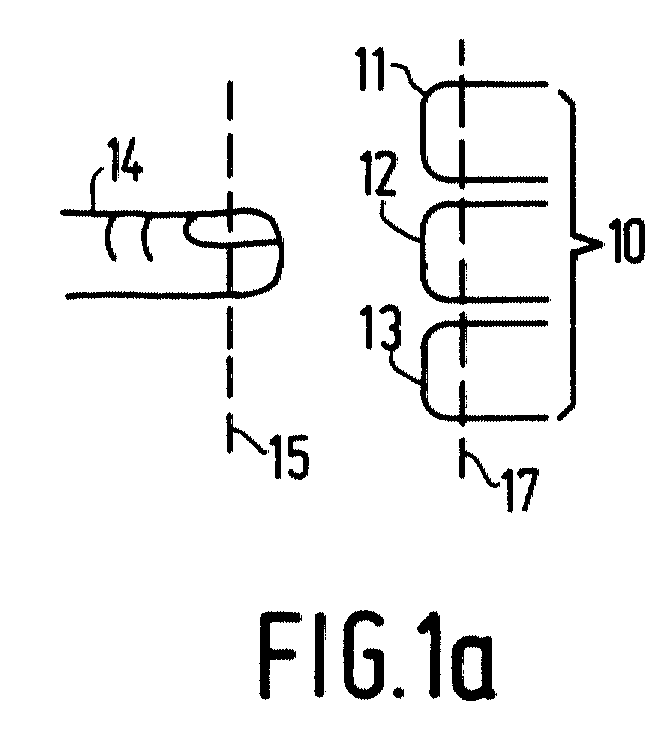
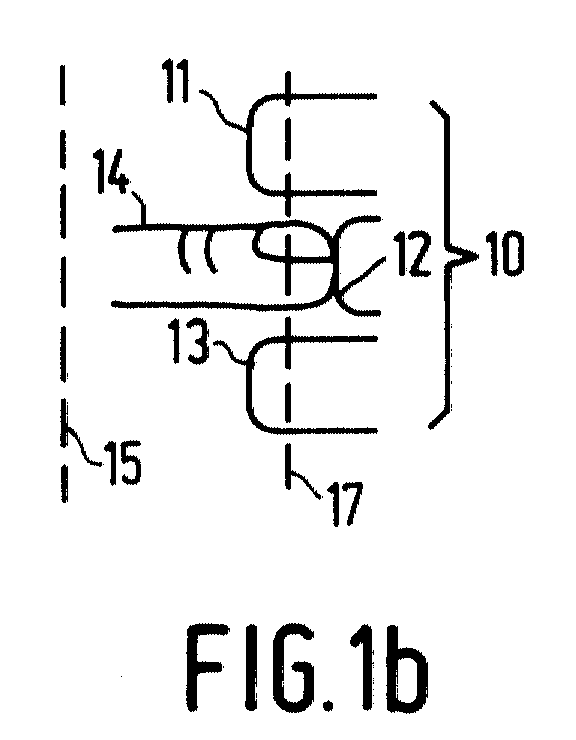
- Figures 1a, 1b, 1c show an embodiment of the successive types of actuation of control organs in an device with a human-machine interface
- Figure 2 shows a schematic diagram of an implementation of the device with a human-machine interface according to the invention
- FIGs 1a, 1b, 1c an example of an embodiment a group 10 of control organs 11, 12, 13 for a device with a user control interface is shown.
- the control organs are shown as push buttons which can be pushed by a finger 14.
- the user Conventionally, to select one button 12 from the plurality 10, the user must look at the control organs to ensure that the finger is placed on the desired button 12 from the plurality 10.
- the device with a user control interface provides, upon detection of a user action representative of impending actuation of a control organ, for an indication of the function of that control organ in such a way that the user can still prevent the function from being effected by not pursuing the action beyond the stage that lead the interface to conclude that actuation was physically impending.
- the indication is made available via a standard output interface used for different types of messages. It is made available temporarily, only for a limited time after detection of impending actuation of the control organ, that is, it is made perceptible to the user only at an attempt to actuate a function. This minimizes distraction to the user, as is essential in a vehicle.
- the idea is that an actuating action by the user will have successive stages, the interface effecting the function of the control organ only in the final stage, and in earlier stages providing indication of the function of the control organ selected.
- the user may avoid effecting the function by selectively breaking off the action before the final stage is reached.
- the successive stages are triggered by successive distances of approach of the finger 14 to the control organ 12.
- the distance of the finger may for example be sensed by a proximity sensor operating by means of light, sound or heat.
- the stage of physically impending actuation occurs in Figure 1a when the finger 14 passes the border indicated by line 15; when the device with a human-machine interface detects this, it provides an indication of the function associated with the control organ 12.
- Actual actuation is effected in Figure 1b when the finger 14 passes the border 17; this causes the device with a user control interface to effect the function associated with the control organ 12.
- the impending actuation is a physical precondition for the user to perform actuation.
- control organs It may be convenient to provide means for detecting two or more stages of actuation of all control organs. However, often it will be more attractive to do so for control organs corresponding to important functions only or for functions which are not easily reversible. This may be more convenient for economic reasons or for giving a higher alerting effect to the indication.
- control organs are often coherently placed in groups of control organs which control related functions.
- the controls for heating are placed together, the controls for the car radio are placed together.
- a desired group more quickly by giving a coarse indication of the position of the finger.
- Figure 1c A way to achieve this is illustrated in Figure 1c, where an intermediate actuation stage is detected when the finger 14 passes the border 16.
- the first border 15 might trigger function group indication
- the second border 16 specific control organ information might cause the function to be effected.
- Function group indication is also particularly useful when the function of a group of control organs may be reassigned as a group, for example when the same control organs selectably either control a car telephone or a car radio.
- the function group indication serves to warn the user when the function group must be reassigned.
- control organs such as for example potentiometers, either of the rotating or of the sliding variety.
- this is achieved by providing individual control organs with at least two sensing mechanisms, one for detecting the physically impending actuation, another for detecting the actual actuation, the one being sensitive to an earlier stage of approach of a finger than the other.
- One implementation uses a proximity sensor for impending actuation (the presence of a proximate object being detected using reflected or absorbed light, sound, electric or magnetic fields etc.) and a push button for detecting the actual actuation.
- the control organ may be sensitive independently to pushing and touching (without pushing) so as to detect the impending and actual actuation as a consequence of pushing and touching respectively.
- the control organ is a normal control organ, for example a pushbutton, which serves to detect the impending actuation; the actual actuation is detected if the button is kept pushed during a predetermined period of time (that is, long enough for the user to realize a mistake from the indication triggered by the first actuation).
- FIG. 2 shows an embodiment of an device with a human-machine interface according to the invention.
- the first detection output is coupled to a sound signal generation circuit 22, which in turn is coupled to a loudspeaker 20.
- the impending actuation is detected, for example after crossing the line 15 in Figure 1a, the function of the control organ can thus be identified via the loudspeaker.
- the use of such an audible indication has the advantage that it does not distract the eyes of the user the from the road, and that no distracting signals for the user are present until a control organ is almost actuated.
- the signal generator 22 produces a spoken message, for example by replaying a recorded message or using a speech synthesizer, but other signals, such as warning tones which identify functions as dangerous may also be useful.
- Another output 32 of the control organ 12 is for signaling that the actual actuation is detected, which will effect the function of the control organ.
- the effecting is symbolized in Figure 2 by connection of the output 32 to an activating input of a subsystem 21 for function execution.
- a second function report generator 26 triggered by detection of a second stage in the action leading up to actuation by the second stage detection output 33.
- Such stages may for example be detected by detecting a finger at different, decreasing distances to the control organ, but any combination of the detection mechanisms described above may be used, as long as one mechanism will trigger at an earlier stage of the user action than the other.
- the first and second stage detection may be used to provide a first function group indication after detection of the first stage of the action and secondly a specific function indication after detecting the second stage of the action. It may be convenient to arrange the device with a user control interface to interrupt the group information if the user activates the specific information.
- help information for an extremely hesitating user, by allowing an impending actuation signal to pass through a time duration thresholding circuit 24 for triggering a help information generating circuit. In this way, when the state of impending actuation persists, but is not followed up by actuation within, for example, a few seconds, additional help information can be reported via the loudspeaker 25.
- Figure 2 has been drawn in the form of a schematic diagram, isolating several functions in separate boxes, it will be appreciated that the part of the interface providing the links between the control organ 12 and the output 20 can also be implemented as a program in a computer system.
Landscapes
- Engineering & Computer Science (AREA)
- General Engineering & Computer Science (AREA)
- Theoretical Computer Science (AREA)
- Human Computer Interaction (AREA)
- Physics & Mathematics (AREA)
- General Physics & Mathematics (AREA)
- Chemical & Material Sciences (AREA)
- Combustion & Propulsion (AREA)
- Transportation (AREA)
- Mechanical Engineering (AREA)
- User Interface Of Digital Computer (AREA)
- Input From Keyboards Or The Like (AREA)
Abstract
Description
- 1)
- the detecting mechanisms for actuation and impending actuation may be separated physically, that is, be located at geometrically different locations,
- 2)
- the detecting mechanisms may be shared among control organs,
- 3)
- several control organs may be provided as a single physical device.
Claims (3)
- A method of processing user inputs comprising the steps of (a) sensing a pre-selection action by a user with respect to a function invoking element of a user interface device; (b) awaiting sensing of a subsequent selection action by the user with respect to the function invoking element; (c) recognizing passage of a predetermined period of time during which said awaiting has occurred; and (d) providing an indication of the function of the element upon such recognizing.
- A method according to claim 1 further comprising the step of disclosing a farther indication of the function when sensing of the pre-selection action is not detected within a further pre-determined period of time after detecting said pre-selection action.
- A method according to claim 1 wherein the indication of the function is made available temporarily, only for a limited time after sensing the pre-selection action.
Priority Applications (1)
| Application Number | Priority Date | Filing Date | Title |
|---|---|---|---|
| EP01203510A EP1164465A3 (en) | 1991-05-31 | 1992-05-22 | A method of processing user inputs |
Applications Claiming Priority (5)
| Application Number | Priority Date | Filing Date | Title |
|---|---|---|---|
| EP91201314 | 1991-05-31 | ||
| EP91201314 | 1991-05-31 | ||
| EP99201019A EP0984348B1 (en) | 1991-05-31 | 1992-05-22 | Device with a human-machine interface |
| EP92201466A EP0516228B1 (en) | 1991-05-31 | 1992-05-22 | Device with a human-machine interface |
| EP01203510A EP1164465A3 (en) | 1991-05-31 | 1992-05-22 | A method of processing user inputs |
Related Parent Applications (2)
| Application Number | Title | Priority Date | Filing Date |
|---|---|---|---|
| EP92201466.7 Division | 1992-05-22 | ||
| EP99201019.9 Division | 1999-03-31 |
Publications (2)
| Publication Number | Publication Date |
|---|---|
| EP1164465A2 true EP1164465A2 (en) | 2001-12-19 |
| EP1164465A3 EP1164465A3 (en) | 2002-01-09 |
Family
ID=26129280
Family Applications (3)
| Application Number | Title | Priority Date | Filing Date |
|---|---|---|---|
| EP01203510A Withdrawn EP1164465A3 (en) | 1991-05-31 | 1992-05-22 | A method of processing user inputs |
| EP99201019A Expired - Lifetime EP0984348B1 (en) | 1991-05-31 | 1992-05-22 | Device with a human-machine interface |
| EP92201466A Expired - Lifetime EP0516228B1 (en) | 1991-05-31 | 1992-05-22 | Device with a human-machine interface |
Family Applications After (2)
| Application Number | Title | Priority Date | Filing Date |
|---|---|---|---|
| EP99201019A Expired - Lifetime EP0984348B1 (en) | 1991-05-31 | 1992-05-22 | Device with a human-machine interface |
| EP92201466A Expired - Lifetime EP0516228B1 (en) | 1991-05-31 | 1992-05-22 | Device with a human-machine interface |
Country Status (1)
| Country | Link |
|---|---|
| EP (3) | EP1164465A3 (en) |
Cited By (1)
| Publication number | Priority date | Publication date | Assignee | Title |
|---|---|---|---|---|
| WO2003104039A1 (en) * | 2002-06-06 | 2003-12-18 | Motorola, Inc., A Corporation Of The State Of Delaware | Information interface and method of managing driver information |
Families Citing this family (18)
| Publication number | Priority date | Publication date | Assignee | Title |
|---|---|---|---|---|
| DE69314399T3 (en) * | 1992-07-23 | 2001-08-09 | Aisin Aw Co., Ltd. | Volume control for an acoustic line device for vehicles |
| DE19702225C1 (en) * | 1997-01-23 | 1998-05-20 | Harro Prof Dr Kiendl | Input device for multi-fingered data entry |
| US7256770B2 (en) | 1998-09-14 | 2007-08-14 | Microsoft Corporation | Method for displaying information responsive to sensing a physical presence proximate to a computer input device |
| DE10023820B4 (en) * | 2000-05-15 | 2006-10-19 | Siemens Ag | Software protection mechanism |
| GB0028712D0 (en) * | 2000-11-24 | 2001-01-10 | Ncr Int Inc | Self-service terminal |
| DE10140097B4 (en) * | 2001-08-16 | 2005-04-28 | Guenter Fendt | Method for assisting an operator of a device in finding the position of a control element |
| FR2833387B1 (en) * | 2001-12-10 | 2004-10-08 | Peugeot Citroen Automobiles Sa | METHOD FOR MANAGING AND OPERATING A SET OF SETPOINT BODIES OF A MOTOR VEHICLE, INCLUDING THE TRANSMISSION OF A SOUND SIGNAL |
| FR2833386B1 (en) * | 2001-12-10 | 2005-06-24 | Peugeot Citroen Automobiles Sa | METHOD FOR MANAGING AND OPERATING A SET OF INFORMATION DEVICE OF A MOTOR VEHICLE, INCLUDING THE EMISSION OF A LIGHT SIGNAL |
| DE10326215A1 (en) * | 2003-06-11 | 2004-12-30 | Bayerische Motoren Werke Ag | operating device |
| US20060082545A1 (en) * | 2004-10-20 | 2006-04-20 | Visteon Global Technologies, Inc. | Human machine interface for vehicle including proximity sensor |
| DE102004058954B4 (en) * | 2004-12-08 | 2024-03-28 | Bayerische Motoren Werke Aktiengesellschaft | Multifunctional control device for motor vehicles |
| US7808486B2 (en) | 2005-02-09 | 2010-10-05 | Research In Motion Limited | Handheld electronic device providing feedback to facilitate navigation and the entry of information, and associated method |
| EP1691257A1 (en) * | 2005-02-09 | 2006-08-16 | Research In Motion Limited | Handheld electronic device providing feedback to facilitate navigation and the entry of information, and associated method |
| DE102005012309B4 (en) * | 2005-03-17 | 2008-12-04 | Daimler Ag | Operating element as well as this operating element using information system for operating devices |
| TWI270488B (en) * | 2005-12-06 | 2007-01-11 | Sin Etke Technology Co Ltd | Vehicular remote audio support service system and method |
| US8219936B2 (en) | 2007-08-30 | 2012-07-10 | Lg Electronics Inc. | User interface for a mobile device using a user's gesture in the proximity of an electronic device |
| DE102008017777A1 (en) * | 2008-04-08 | 2009-10-15 | BSH Bosch und Siemens Hausgeräte GmbH | Household appliance device for use in cooking appliance, has control unit controlling displaying of information on two display units, and outputting additional information to control elements during activation of control elements |
| DE102019213211A1 (en) * | 2019-09-02 | 2021-03-18 | Volkswagen Aktiengesellschaft | Control system for a vehicle and method for operating a control system for a vehicle |
Family Cites Families (4)
| Publication number | Priority date | Publication date | Assignee | Title |
|---|---|---|---|---|
| US4390861A (en) * | 1979-11-02 | 1983-06-28 | The Singer Company | Cockpit display system to reduce vertigo |
| FR2488555A1 (en) * | 1980-08-12 | 1982-02-19 | Wieczorek Julien | DEVICE FOR PRESENTING INFORMATION, INDICATORS AND ALARMS TO THE DRIVER OF A MOTOR VEHICLE, BY REFLECTION ON THE WINDSHIELD |
| DE3346370A1 (en) * | 1983-12-22 | 1985-07-11 | Robert Bosch Gmbh, 7000 Stuttgart | Method for displaying information, preferably in a motor vehicle |
| JPH03189986A (en) * | 1989-12-20 | 1991-08-19 | Hitachi Ltd | Car stereo |
-
1992
- 1992-05-22 EP EP01203510A patent/EP1164465A3/en not_active Withdrawn
- 1992-05-22 EP EP99201019A patent/EP0984348B1/en not_active Expired - Lifetime
- 1992-05-22 EP EP92201466A patent/EP0516228B1/en not_active Expired - Lifetime
Cited By (2)
| Publication number | Priority date | Publication date | Assignee | Title |
|---|---|---|---|---|
| WO2003104039A1 (en) * | 2002-06-06 | 2003-12-18 | Motorola, Inc., A Corporation Of The State Of Delaware | Information interface and method of managing driver information |
| US8180516B2 (en) | 2002-06-06 | 2012-05-15 | Continental Automotive Systems, Inc. | Driver information interface and method of managing driver information |
Also Published As
| Publication number | Publication date |
|---|---|
| EP0516228B1 (en) | 1999-12-15 |
| EP0984348A2 (en) | 2000-03-08 |
| EP0516228A2 (en) | 1992-12-02 |
| EP0516228A3 (en) | 1993-03-24 |
| EP0984348A3 (en) | 2000-04-05 |
| EP0984348B1 (en) | 2002-04-10 |
| EP1164465A3 (en) | 2002-01-09 |
Similar Documents
| Publication | Publication Date | Title |
|---|---|---|
| US5923267A (en) | Device with a human-machine interface | |
| US5844500A (en) | Device with a human-machine interface | |
| EP0984348B1 (en) | Device with a human-machine interface | |
| US7057521B1 (en) | Device with a human-machine interface | |
| US8610674B2 (en) | Programmable tactile touch screen displays and man-machine interfaces for improved vehicle instrumentation and telematics | |
| US8576199B1 (en) | Computer control systems | |
| US7084859B1 (en) | Programmable tactile touch screen displays and man-machine interfaces for improved vehicle instrumentation and telematics | |
| US8482535B2 (en) | Programmable tactile touch screen displays and man-machine interfaces for improved vehicle instrumentation and telematics | |
| US8411040B2 (en) | Operating device of a motor vehicle and method for recording user inputs | |
| US20110032203A1 (en) | Human interfaces for vehicles, homes, and other applications | |
| US6697721B2 (en) | Safety devices for use in motor vehicles | |
| ES2795013T3 (en) | Multifunctional display and control system and control method of this system with an optimized graphical control representation | |
| US10486531B2 (en) | Vehicle display system | |
| US12083889B2 (en) | Vehicular sensing and control system for overhead console | |
| EP3018568A1 (en) | Information processing device | |
| US20020041260A1 (en) | System and method of operator control | |
| JP2001216069A (en) | Operation input device and direction detection method | |
| CN108153411A (en) | For the method and apparatus interacted with graphic user interface | |
| US7482943B2 (en) | Device with a human-machine interface | |
| JP7532143B2 (en) | Display control device and display control method | |
| CN113586700A (en) | Gear shifting system and vehicle | |
| JPH1064374A (en) | Multifunctional operating device | |
| JP2000194487A (en) | Touch operation input device | |
| CN109144243A (en) | Method and its electronic equipment for user and the haptic interaction of electronic equipment |
Legal Events
| Date | Code | Title | Description |
|---|---|---|---|
| PUAI | Public reference made under article 153(3) epc to a published international application that has entered the european phase |
Free format text: ORIGINAL CODE: 0009012 |
|
| PUAL | Search report despatched |
Free format text: ORIGINAL CODE: 0009013 |
|
| AC | Divisional application: reference to earlier application |
Ref document number: 984348 Country of ref document: EP Ref document number: 516228 Country of ref document: EP |
|
| AK | Designated contracting states |
Kind code of ref document: A2 Designated state(s): DE FR GB IT SE |
|
| AK | Designated contracting states |
Kind code of ref document: A3 Designated state(s): DE FR GB IT SE |
|
| 17P | Request for examination filed |
Effective date: 20020709 |
|
| AKX | Designation fees paid |
Free format text: DE FR GB IT SE |
|
| 17Q | First examination report despatched |
Effective date: 20070502 |
|
| STAA | Information on the status of an ep patent application or granted ep patent |
Free format text: STATUS: THE APPLICATION IS DEEMED TO BE WITHDRAWN |
|
| 18D | Application deemed to be withdrawn |
Effective date: 20071113 |