EP0752649A2 - Vorrichtung und Verfahren zum Texteditieren von strukturrepräsentierten Rechnerprogrammen mit aktualisierter typographischen Anzeige - Google Patents
Vorrichtung und Verfahren zum Texteditieren von strukturrepräsentierten Rechnerprogrammen mit aktualisierter typographischen Anzeige Download PDFInfo
- Publication number
- EP0752649A2 EP0752649A2 EP96304977A EP96304977A EP0752649A2 EP 0752649 A2 EP0752649 A2 EP 0752649A2 EP 96304977 A EP96304977 A EP 96304977A EP 96304977 A EP96304977 A EP 96304977A EP 0752649 A2 EP0752649 A2 EP 0752649A2
- Authority
- EP
- European Patent Office
- Prior art keywords
- program
- token
- tokens
- token stream
- user
- Prior art date
- Legal status (The legal status is an assumption and is not a legal conclusion. Google has not performed a legal analysis and makes no representation as to the accuracy of the status listed.)
- Withdrawn
Links
Images


Classifications
-
- G—PHYSICS
- G06—COMPUTING OR CALCULATING; COUNTING
- G06F—ELECTRIC DIGITAL DATA PROCESSING
- G06F8/00—Arrangements for software engineering
- G06F8/30—Creation or generation of source code
- G06F8/33—Intelligent editors
Definitions
- the present invention relates generally to computer program editors, and particularly to computer program editors for structurally-represented programs.
- Computer program editors are specialized editors that allow computer program authors, or programmers, to create and modify computer programs.
- most computer program editors provide additional editing features that are especially valuable to the programmer.
- Such additional features include highlighting important structural constructs (e.g., condition statements, keywords, brackets, etc.) and providing language-sensitive commands for navigating, modifying and reformatting or "prettyprinting" programs.
- While all existing program editors try to provide similar functions, they fall into one of two classes based on how they internally represent the program being edited: as streams of text (text-oriented editors) or as syntax trees (structure-oriented editors).
- Structure editors have several failings. First, they restrict the freedom to edit textually that users expect; experience shows that this has severely limited the acceptance of these editors. Second, they provide no useful language- oriented services for those parts of the program being edited textually; those services cannot be provided until the user has eliminated all syntax errors in parts being edited and the system has analyzed the text in order to restore the tree structure. Thus, while the user is editing the editor offers no help at all in that region. Finally, structure-editors typically provide very little support in the presence of syntax errors, since most of the language-based services they provide require a well-formed syntax tree in order to operate. Of course, while the user is editing textually, the program is syntactically ill-formed most of the time; it is therefore next to impossible to maintain a well-formed syntax tree of the program as it is being entered.
- An embodiment of the invention provides a user-friendly computer program editor and editing method that meets the needs set out above.
- An embodiment of the invention provides a process of editing structurally represented programs with on the fly typographical display of the programs being edited.
- a computer program editor executing the process of the present invention maintains a token stream representation of a computer program being edited as the computer program is edited or entered.
- the token stream representation is a sequence of tokens, where each token represents a word of the computer program being written and its associated extended lexical properties relative to the language in which the computer program is written.
- the present process typographically displays, or prettyprints, the program being edited based on the extended lexical properties associated with each of the tokens.
- the user is allowed to edit the computer program by interacting with the typographically displayed program as if the program were represented by a text stream instead of a token stream.
- the present process additionally includes an optional step of maintaining a structured representation of the program being edited, where this structured representation additionally characterizes the tokens in the token stream according to a set of extended syntactical properties.
- this optional step is implemented, the typographical display step referred to above also makes use of this additional syntactical information when prettyprinting the tokens, and the user is allowed to edit the program whose display is influenced by both the lexical and syntactical properties of the tokens as if it were internally represented as text.
- the step of maintaining the token stream representation further includes the steps of receiving each of the input events corresponding to the user's editing actions and incrementally tokenizing the program after each input.
- incrementally tokenizing means forming the tokens of the program and identifying their extended lexical properties, including their lexical class and extended type (i.e., whether they are incomplete or ill-formed tokens), all on the fly, and according to the lexical rules of the language of the program being edited.
- An embodiment of the invention also provides an editor for structurally represented programs that includes at least one input device, an extended lexical analyzer and a typographical display processor.
- a user of the present editor edits a computer program through the at least one input device, which generates a stream of input events corresponding the user's editing actions.
- This stream of input events is received by the extended lexical analyzer, which represents the program being edited as a token stream, where the token stream is sequence of tokens, or program words, each characterized as one of a catalog of extended lexical properties.
- the extended lexical analyzer updates this token stream representation after each input event.
- the typographical display processor receives the token stream maintained by the extended lexical analyzer and prettyprints, or typesets to a display, the program based on the token stream and the extended lexical properties associated with each token.
- the user edits the program by interacting with the prettyprinted program generated by the typographical display processor.
- the extended lexical analyzer includes a keystroke executive which receives all of the input events and manages the token stream and an insertion point in the token stream.
- the extended lexical analyzer also includes a tokenizer which is an expert at incremental lexical analysis that is called by the keystroke executive whenever the keystroke executive needs assistance updating the token stream.
- the keystroke executive passes the tokenizer a token stream segment consisting of tokens proximal to the insertion point which are likely to be affected by the input and queries the tokenizer as to the effect of the input event.
- the keystroke Upon receiving the tokenizer's assessment of the situation, the keystroke is free to accept or reject the recommendation based on its knowledge of the larger editing context.
- the present editor might include an optional structural analyzer that parses the token stream representation of the computer program to generate extended syntactical information associated with each token.
- the typographical display processor could also make use of this syntactical information when prettyprinting the program being edited.
- Figure 1 is a block diagram of a computer system incorporating an example of a computer program editor according to the present invention.
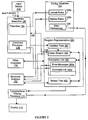
- Figure 2 is a block diagram of a preferred embodiment of the computer program editor of the present invention.
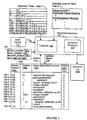
- Figure 3 is a block diagram of the keystroke executive of Figure 2 and the data structures with which it interacts.
- Figure 4 is a block diagram of the comment processor of Figure 2 and the data structures with which it interacts.
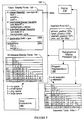
- Figure 5 is a block diagram of the typographical display processor of Figure 2 and the data structures with which it interacts.
- FIG. 1 there is shown a block diagram of a computer system 100 incorporating an editor 122 from which a user can edit a structurally-represented program 124 as if it were represented as a stream of characters.
- the system 100 has a processor 110 coupled to a primary memory 114 and a secondary memory 116 via a local bus 104.
- the system also includes at least one input device 112, such as keyboard and/or a mouse, and a display 118 coupled to the processor via a peripheral bus 102.
- the operation of these elements is set out below, following a glossary defining terms used in the description of the present invention.
- the system 100 is controlled by operating system software 120 executing in the processor 110.
- Other executable application software including an example of an editor 122 according to the invention, are stored in the secondary memory 116, as are data files such as the program to be edited 124.
- the editor 122 includes a keystroke executive 130, a structural analyzer 150 and a typographical display facility 170, which are described in depth below.
- the editor 122 also includes other analyzers, such as a semantic analyzer 175.
- the editor constantly updates the internal program representation 156, which is maintained in the primary memory 114.
- This internal representation 156 has four principal components: a token stream 158 and an annotations list 160, which together compose a program quantum; an optional syntax tree 162, including associated static semantic information; and an insertion point 157, all of which are described below.
- Many behaviors of the editor 122 are determined by a customizable editing database 164, also resident in the primary memory 114 during editing, which includes user view preferences 166 and lexical/syntactical rules 168 for the language in which the program 124 is written.
- an English syntax analyzer would be able to indicate that the adjective blue is incorrectly placed in the following sentence: "The boat blue is fast."
- this sentence would be declared legal if it were translated into French and evaluated by a French syntax analyzer, as adjectives follow nouns in French.
- Similar roles are played in the program editor 122 by the keystroke executive 130 and the structural analyzer 150. That is, the keystroke executive 130 classifies the program's words according to the parts of speech, or lexemes, of the respective computer language in which the program is written by analyzing only small chunks of code.
- the structural analyzer 150 evaluates, based on the lexical properties of the program words, whether a line of code, series of nested if statements, function, or other large scale program structure is correctly formed according to the syntax of the program language.
- lexical analysis is independently useful apart from its role as a front end to structural analysis.
- the operating system 120 loads the editor 122 and the program 124 into the primary memory 114 and begins executing the instructions of the editor 122 in the processor 110, at which point the user can edit the program 124.
- the program 124 could be an existing program or a new program, although that fact has little bearing on the operation of the editor 122, which is more fully described below in reference to Figure 2.
- FIG. 2 there is shown a block diagram illustrating additional details of and functional relationships between the input device 112, editing routines 130, 150, 170, the program representation 156, the editing database 164, and the display 118 while the program 124 is being edited.
- Additional editor 122 elements not shown in Figure 1 include the tokenizer 132 and comment processor 136, which are functional blocks within the keystroke executive 132, and the error messages 160a and comment list 160b, which are objects within the annotation list 160.
- the lexical/syntax rules 168 from Figure 1 have been subdivided into lexical rules 168a and syntax rules 168b.
- the user edits the program 124 by interacting, through the input device 112, with the displayed version 118 of the program being edited.
- these interactions could include keystrokes directing the editor 122 to move the cursor (when the user uses the cursor control keys), insert a space at the cursor (when the user hits the spacebar), delete the editable element to the left or right of the cursor, insert a character at the cursor (when the user types a character), or break the current line (when the user hits the enter key).
- these interactions could also include various types of mouse clicks. The input device relays all of these interactions, or input events, to the keystroke executive 130 as an event stream 113.
- the keystroke executive 130 is the key component of the editor 122 and is responsible for receiving every input event from the input device 112; updating, based on the event stream 113, the token stream representation 158, and managing the insertion point 157, which defines the position of the cursor with which the user performs all basic editing operations. Consequently, the keystroke executive 130 has read/write access to the insertion point 157 and the token stream 158, and is coupled to the input device 112, from which it receives the event stream 113.
- the tokenizer 132 is a subfunction of the keystroke executive and executes only when called by the keystroke executive 130, which, in the case of an insert character input event, passes the tokenizer 132 the newest character of the event stream 113, a subset, or token stream segment 138, of the token stream 158 and the position of the character being inserted relative to the token stream segment 138.
- the tokenizer 132 has read access to the lexical rules 168a; after executing, the tokenizer 132 returns its result to the keystroke executive 130.
- the comment processor 136 is another subfunction of the keystroke executive 130, which passes the comment processor 136 all input events 113 related to the editing or entering of program comments. Based on these comment-related input events, the comment processor creates and maintains comment objects, which it stores in the comment list 160b.
- the optional structural analyzer 150 At the same hierarchical level of the editor 122 as the keystroke executive 130 is the optional structural analyzer 150, which has read access to the syntax rules 168b and the token stream 158 and write access to the error messages list 160a, to which it outputs syntax error messages. More critically, the structural analyzer 150 is coupled to the syntax tree 162, which it creates, updates and maintains based on the token stream 158 and the syntax rules 168. Unlike the keystroke executive 130, the structural analyzer 150 is not called after ever keystroke of the input device 112, but when its intervention is requested by the user or when there is some other opportunity.
- the structural analyzer 150 is optional because the syntax tree 162 it maintains is not required for the program 124 to be edited or displayed in the editor 122. Both of these functions can be adequately performed by the editor 122 solely on the basis of information in the token stream representation. Instead, the syntax tree 162 provided by the structural analyzer 150 is only necessary for fine tuning the prettyprinted display of the program being edited 124 and for ancillary editing services, none of which are essential functions of the editor 122.
- the term "syntactical analysis” encompass all or part of the syntax and static semantic analysis performed by a compiler in, respectively, its second and third passes over a source code file (the first pass being lexical analysis).
- syntax analysis determines whether the tokens generated by during the lexical analysis pass are in legal positions according to the syntax rules of the programming language.
- Static semantic analysis takes an even wider view of the program being compiled. For example, static semantic analysis generates type information for variables used in statements already syntactically analyzed by referring to variable declarations not cognizable by the parser.
- the typographical display processor 170 has read access to the data structures 157, 158, 160, 162 composing the program representation 156 and the view preferences 166, which are contained in the editing database 164. Based on the user's view preferences 166, which define the type of editing information the user wishes to be displayed, the typographical display processor 170 typesets or prettyprints the information in the program representation 156 to the display 118, to which the display processor's output is coupled.
- the term "prettyprinting" means formatting the display of a program or other document, using techniques similar to those used by typesetting programs, to generate a well-formed and aesthetically pleasing image.
- the keystroke executive 130 receives the event stream 113 and accordingly updates the token-stream representation 156 of the program 124 after each user keystroke or mouse click.
- the keystroke executive 130 is able to create useful program information that would not be available from a text processor, including (1) the tokens or "words" of the program 124 and (2) the lexical types of the tokens (e.g., float constant, string, variable, keyword). Moreover, because the keystroke executive 130 also controls the insertion point 157 of the cursor, with which the user edits the program 124, the keystroke executive 130 is also able to provide on the fly the position of each token within the token stream. Thus, as the user types, the keystroke executive 130 creates a representation of the program 156 in which each word of the program is lexically classified, tokenized, and associated with a unique position in the token stream 158.
- This representation is also the ideal compromise between a flexible, but informationally-empty, text representation, and a rigid, but informationally-rich purely-structural representation. Note however that not all information entered by the user or generated by the editor 122 regarding the program 124 is stored in the token stream 158. Other information, such as program comments, which are not actual program statements, are stored in the annotation list 160, as are the syntax error messages generated by the structural analyzer 150 as it parses the program 124.
- This type of ancillary information is stored apart from the token stream 158 primarily for efficiency reasons; however, because all of the annotations are indexed to appropriate anchor points within the token stream 158, it is always possible to re-associate the annotations and the tokens, which collectively are referred to as a quantum.
- the keystroke executive 130 modifies the token stream 158 using language-independent rules. For example, if a user deletes the single character of a single character token, the keystroke executive 130 just deletes the token. This requires no language-specific knowledge. However, for most other editing situations, which demand specialized lexical knowledge, the keystroke executive 130 must seek advice from the tokenizer 132, which is an expert in the incremental, lexical analysis of program code, as to how the token stream 158 should be updated in light of new input events 113 typed at the current insertion point 157.
- the keystroke executive 130 passes the tokenizer 132 a few tokens 138 from the token stream 158 that are adjacent to the current insertion point 157 and a particular request to evaluate an insertion or deletion in light of the token stream segment 138.
- the tokenizer 132 suggests an update 138' to the token stream 158 by interpreting the few tokens in light of the lexical rules 168a provided in the editing database 164.
- These lexical rules 168a are similar to conventional lexical rules that might be used in a batch-mode lexical analyzer, such as "Lex”, but are extended to account for illegal and incomplete lexemes that arise when the program 124 is lexically analyzed as it is being entered.
- the keystroke executive 130 determines that the user is entering a new comment or editing an existing comment, it calls the comment processor 136, which has expertise in maintaining and updating the comment list 160b. While the comment processor 136 is processing a comment, the keystroke executive 130 passes all input events in the event stream 113 to the comment processor 136, which simultaneously updates the appropriate comment in the comment list 160b as if it were a simple text editor (i.e., the comment processor 136 performs no lexical analysis on the input events). When the keystroke executive 130 detects a new comment trigger, such as a comment beginning delimiter, the comment processor 136 allocates a new comment record in the comment list 160b.
- a new comment trigger such as a comment beginning delimiter
- the typographical display processor 170 typesets, or prettyprints, the program 124 to the display 118 as the user types.
- the editor 122 can provide a wide range of program editing services, such as language-sensitive support and highlighting, which are also based on the token stream representation 158 of the program 124.
- program editing services such as language-sensitive support and highlighting, which are also based on the token stream representation 158 of the program 124.
- the editor 122 allows the user to interact with the program being edited as if it were internally represented as text; i.e., the behavior of the editor 122 is practically indistinguishable from a word processor.
- the keystroke executive 130 and typographical display processor 170 of the editor 122 make this text-like editing behavior possible by carefully managing (1) the movement and placement of the cursor, which is the means by which the user interacts with the displayed program 118, and (2) the display of whitespace, or gaps, between adjacent tokens in the token stream 158.
- the editor 122 also allows a user to request a full syntactical analysis, including static semantic analysis, or "update" of the program 124 to supplement the less complete, but still useful, token stream representation of the program 158.
- the editor 122 may perform an optional update whenever there is an opportunity to do so.
- the editor 122 calls the structural analyzer 150, which analyzes the token stream 158 in light of the language-specific lexical/syntax rules 168, and then updates or forms (when the program 124 is newly entered) the syntax tree 162 of the program 124.
- the information gleaned from the update is then used by the typographical display processor 170 to update the token-based information on the display 118.
- the editor 122 is capable of seamlessly merging information from the two representations on the display 118 in a way that provides all available useful information without hindering the user.
- the typographical display facility 170 prettyprints the program 124 to the display 118 based on the token stream 158 from the keystroke executive 130 and/or the syntax tree 162 from the last update generated by the structural analyzer 150.
- the typographical display processor 170 also displays the various annotations 140, including error messages 160a and comments 160b alongside the displayed program in an intuitively useful manner determined by the user.
- the typographical display facility 170 also controls the visual whitespace between displayed tokens and positions the cursor in the displayed program so that the user can edit the displayed program as if in a text based editor rather than a structural editor.
- FIG 3 there is shown a block diagram of the keystroke executive 130, including additional details of data structures with which the keystroke executive 130 and its subroutines interact.
- the only system elements shown in Figure 3 that are not represented in Figure 2 are the separator table 168a-1 and the extended lexeme table 168a-2, which are elements of the lexical rules 168.
- the structure of these two tables 168a-1 and 168a-2 and the token stream 158 are described below.
- the keystroke executive 130 transforms, often with the assistance of the tokenizer 132, the input events 113 being entered by the user editing the program 124 into changes to a token stream 158.
- the token stream 158 is stored as an ordered list of tokens, where each token in the list is characterized by: (1) its position 158a in the token stream 158, (2) its constituent symbols, or content, 158b, and (3) its lexical type, or class, 158c. Additionally, each token may include an optional, boolean, provisional separator bit.
- the keystroke executive 130 has transformed this one line expression into a series of 13 tokens, each associated with corresponding symbols from the event stream 158b and a lexical class 158c.
- token class 158c is represented in two ways: as a lexical class description (e.g., "keyword(for begin)") and a corresponding numerical class (e.g, "21"); this class number 158c is how the other routines and data structures of the editor 122 (e.g., the separator table 168a-2 or the typographical display processor 170) refer to the class of a token.
- a lexical class description e.g., "keyword(for begin)
- a corresponding numerical class e.g, "21”
- this class number 158c is how the other routines and data structures of the editor 122 (e.g., the separator table 168a-2 or the typographical display processor 170) refer to the class of a token.
- the lexical class information 158c is generated by the tokenizer 132 and the keystroke executive 130 according to the lexical rules in the extended lexeme table 168a-2.
- This extended lexeme table 168a-2 is structured like lexeme tables used in batch-mode lexical analyzers, or lexers, such as Lex, in that it contains a series of rules defining the lexemes or lexical classes of the language in which the program is being entered.
- the extended lexeme table 168a-2 is larger than a conventional lexeme table for the same language.
- extended lexeme table 168a-2 must account for the many "incomplete and "ill-formed” tokens that are formed as the user enters and/or edits the program 124, which is lexically analyzed by the keystroke executive 130 or the tokenizer 132 after every input event.
- the extended lexeme table 168a-2 includes a lexical rule that defines a legal integer literal (class 67) expressed in hexadecimal ("hex") format, which, in C/C++, corresponds to the string "Ox” followed by a series of symbols "#", where "#" is an integer between 0 and 9 or a character between A and F.
- hex hexadecimal
- the extended lexeme table 168a-2 also includes rules that define incomplete integer/hex literals (the string “Ox” followed by nothing else), and ill-formed integer/hex literals (the string “Ox” followed by at least one symbol “$", where "$" is not an integer between 0 and 9 or a character between A and F).
- These extended lexemes i.e., incomplete and ill-formed lexemes
- are necessary in the present editor 122 which aims to provide useful lexical information regarding the lexical classes of the tokens in the token stream 158 as the user inputs the corresponding event stream 113.
- Event stream 113 which is generated by a user typing an integer hex literal
- token stream representation 158 which is generated keystroke-by-keystroke by the keystroke executive 130.
- the character just typed by the user is underlined and the corresponding insertion point 157 in the token stream 158 after the keystroke is marked with a " ⁇ " character.
- Table 1 Event stream 113 Position 158a Content 158b Lexical Class 158c 0 1 0 ⁇ Integer literal 0 x 1 0x ⁇ Incomplete integer literal 0x 5 1 0x5 ⁇ Integral literal 0x5 H 1 0x5H ⁇ Illegal integer literal
- the lexical class changes as the user types. This is because the keystroke executive 130 lexically analyzes the event stream 113 after each user keystroke. Also note that the token stream position 158a does not change as the user's keystrokes have the effect of modifying a single token, which, in this example, is the first token. Rather, what does change after each token stream 158 update is the insertion point 157, which marks both the keystroke executive's work position in the token stream 158 and the position of the cursor (displayed to the user on the display 118), with which the user interacts with the program being edited.
- the keystroke executive 130 does not represent in the token stream 158 spaces typed by the user between program tokens (however, as will be discussed later, the keystroke executive 130 does represent in the token stream 158 typed spaces in string and character literals). Instead, the textual role played by whitespace in conventional text editors is replaced in the token stream 158 by token boundaries maintained by the keystroke executive 130 as the user types. Most token boundaries are implicit in what the user types and are recognized by the keystroke executive 130 and tokenizer 132 through lexical analysis. At such implicit boundaries there is no editable element between tokens.
- ambiguous boundaries are token boundaries where a space would be required in the textual equivalent of the token stream to preserve the boundary.
- the keystroke executive 130 creates a separator, an editable element that acts something like a space. More specifically, in the present editor 122, a separator will only be associated with adjacent tokens in the token stream 158 that could legitimately be merged into one token. Generally, this determination is made by comparing the content of what the user is typing to the language definition of the program such as defined in the extended lexeme table 168a-2.
- the keystroke executive 130 In contrast, if the user types two adjacent " +" characters without any intervening spaces, the keystroke executive 130 generates a single corresponding plus-plus token “++", but if the user types a plus character "+” followed by a space "_” then another plus character “+”, the keystroke executive 130 returns a different token stream with two tokens and an intervening separator: "+ ⁇ +”. Note that the separator in the two token example is not required because the token stream representation of the event stream "+_+” would be ambiguous without it; in fact, the event stream "+_+” could be unambiguously represented as two adjacent plus ("+”) tokens having an implicit token boundary.
- This separator is also not required to create a pleasing display of the program 124 as the typographical display processor 170 displays visual whitespace between adjacent tokens based on their respective lexical classes, not user-entered spaces. Rather, the separator in the token stream 158 corresponding to the event stream "+_+" is required so that the user can edit the corresponding stream as if it were text. I.e., by providing an editable separator corresponding to the displayed whitespace between the two plus tokens, the editor 122 gives the user an object to delete, whose deletion instructs the keystroke executive 130 to join the separated tokens into the single token, "++". If this separator were not present, there would be no simple, text-like way in which a user could join the two tokens.
- adding a separator between the two plus tokens allows the user to join the two tokens in a familiar, text-like manner (i.e., by putting the cursor between the separator and the rightmost plus token, then deleteing backwards).
- a separator serves only an editing purpose and not a visual (whitespace) purpose, the keystroke executive 130 will allow only one separator between tokens, no matter how many spaces a user enters.
- a separator acts as an immutable token boundary; i.e., adjacent tokens with an intervening separator may never be joined as a side effect of other operations.
- separators are; i.e. they are editable elements that act like textual space and define immutable token boundaries.
- the following discussion sets out various ways in which separators are implemented in the present editor 122.
- the tokenizer 132 or the keystroke executive 130 determines whether a separator is required in each token boundary based on lexical properties of the two surrounding tokens.
- the keystroke executive 130 does not actually represent any required separators in the token stream 158, but decides, on the fly, whether a separator exists or should exist between two tokens. Alternatively, based on the same type of decision procedure, the keystroke executive could actually add an explicit separator to the token stream 158.
- This decision procedure can be implemented by the editor 122 in two different ways, one approximate but conservative (meaning that some unnecessary separators are introduced into the token stream, but that no necessary separators are omitted), the other exact (meaning that only necessary separators are introduced into the token stream).
- the approximate procedure must be conservative as it is ok with respect to editing behavior to have additional separators but absolutely critical not to omit necessary ones.
- the preferred embodiment of the present invention implements the approximate but conservative approach.
- the keystroke executive 130 or tokenizer 132 determines the need for a separator between two tokens by referring to the separator table 168a-1 on the basis of the lexical classes 158c of the adjacent tokens.
- the separator table 168a-1 as is shown in Figure 3, consists of a grid of boolean separator values (0/1 -> no separator/separator) indexed by the lexical class of two adjacent tokens in the token stream 158.
- the leftmost of the two adjacent tokens has a class 158b of "101" (reading the vertical axis of the table 168a-1), and the rightmost has a class 158b of "100" (reading the horizontal axis of the table 168a-2), they would be separated by a separator as their intersection in the separator table 168a-1 has a boolean separator value of "1".
- This is an approximate approach because it is based on the lexical classes of the adjacent tokens and not the particular tokens being lexically analyzed.
- class-oriented rules in the separator table 168a-1 would indicate that a separator should always be included between an identifier on the left and a floating point number on the right.
- the exact decision procedure is rule-based, but rather than being token class-oriented, this latter approach evaluates the specific adjacent tokens according to a set of lexical rules to determine whether adjacent tokens could legitimately be joined. For example, the efficient approach would prescribe a separator between the tokens "A” and "1E5" but not between the tokens "A” and ".1E5". This approach eliminates editing side effects as described above, but is more computationally intensive.
- Provisional separators are a temporary record that the user has just hit the space bar in a place, such as between two tokens, where there is no need of an additional separator.
- the keystroke executive 130 or tokenizer 132 makes use of these provisional separators based on the assumption that the user must have typed the space for a good reason, thus, a record of the space should be preserved, if only for a short time. This allows the user to enter a new token whose boundary with the previous token is ambiguous, in which event the keystroke executive 130 eventually converts the provisional separator to an ordinary separator. If the user types a new token whose boundary with the previous token is not ambiguous, the keystroke executive 130 merely eliminates the provisional separator. In the preferred embodiment of the editor 122, there can be only one provisional separator in the token stream 158, and it only exists immediately to the left of the insertion point (described later).
- the keystroke analyzer 130 would make no corresponding change in the token stream 158. I.e., the space typed by the user would not be recorded or recoverable. This is because the insertion point 157 already corresponds to an implicit token boundary between unambiguous tokens.
- the provisional separator for representing this kind of editing activity in the internal token stream 158, which allows the editor to change the provisional separator to an ordinary separator when the user enters the "c".
- the provisional separator is represented as a boolean provisional separator bit 158d (0/1- > set, not set) in the insertion point data structure 157.
- provisional separator is represented as an additional bit each token in the token stream 158 indicating whether the token is followed by a provisional separator.
- the keystroke executive 130 or tokenizer 132 sets the provisional separator bit 158d whenever the user types a space at an existing token boundary where no separator is present.
- the typographical display processor 170 will display the provisional separator as a space, but possibly in a way that is distinct from a displayed ordinary separator.
- a provisional separator 158b is ephemeral, being reset to 0 by the keystroke executive 130 and possibly replaced by an ordinary separator depending on the next user keystroke.
- the tokenizer uses the ordinary separator in this case as the token boundary between the tokens "a” and “b", which are both of the lexical class "variable/61", is ambiguous.
- maintaining the token stream 158 on the fly requires the keystroke executive 132, with the assistance of the tokenizer 132, to recognize all of the lexemes allowed by the language in which the program is being entered. Lexical analysis to this extent is well-known in batch-oriented tokenizer's, such as "Lex", which are executed on a program after the program has been entered.
- the keystroke executive 130 and the tokenizer 132 must also recognize the ill-formed and incomplete lexemes that are formed while a user of the editor 122 is typing.
- the keystroke executive 130 can sometimes update the insertion point 156 and token stream 158 by itself (e.g., when a user deletes the single character of a single character token), in most situations it must consult with the tokenizer 132, which will suggest an update to the token stream segment 138 based on the extended lexical rules 168a-2. In such a consulting situation, the keystroke executive 130 queries the tokenizer 132 differently based on whether the current editing operation is an insertion or a deletion.
- the keystroke executive 130 passes the tokenizer 132 a token stream segment 138 consisting of the token to the left of the insertion point and all of the tokens to the end of the current line of text, the character to be inserted, and the position at which that character is to be inserted, and asks the tokenizer 132 to recommend minimal changes to the token stream segment 138 that reflect the textual modification.
- the tokenizer 132 which is a narrow expert in lexical analysis, knowing nothing of the insertion point 157, visual whitespace, or cursor behavior, performs an incremental lexical analysis on the token stream segment 138 by inserting the new character into the textual equivalent of the token stream (treating all separators as spaces) in the place indicated by the keystroke executive 130, and then analyzing the result as if it were text. Because the tokenizer 132 tries to make minimal changes to the token stream 138, in most situations changes to the token stream will not go beyond the token to the right of the insertion point. The tokenizer 132 then returns its suggested token stream update to the keystroke executive 130. It must also return the position of the inserted character relative to the updated token stream segment 138' so that the keystroke executive 130 can update the insertion point appropriately.
- the keystroke executive 130 identifies the editable element in the token stream segment 138 the user wants to delete and asks the tokenizer 132, "if this element were to be deleted, how should the token stream segment 138 be updated?" As in the case of an insertion, the tokenizer 132 computes the minimal change to the token stream segment 138 and returns its suggested update and the offset of the deleted character relative to the updated token stream segment 138' to the keystroke executive 130.
- the keystroke executive 130 is then free to accept or reject the suggestion based on higher level information to which only it has access.
- the keystroke executive 130 then writes the updated token stream 138' back to the token stream 158 and updates the insertion point 157. This process is described in greater detail in a pseudocode fragment in appendix A.
- the keystroke executive 130 rejects the suggestion of the tokenizer 132
- a user about to create a comment has just typed the first character of a C-style comment beginning delimeter (i.e., "/").
- the keystroke executive 130 passes this keystroke to tokenizer 132, which concludes that this keystroke is a C division token; therefore it suggests that the keystroke executive 130 replace the token stream segment 138 with an updated token segment 138' including the new division token.
- the keystroke executive 130 has no way of knowing that the user is typing a comment; therefore, it accepts the tokenizer's suggestion.
- the tokenizer 132 using extended lexical analysis rules is aware that it should join these two tokens together to form a special token ("/*") that is not in the language. This causes no confusion because neither C nor C++ allow a division token to be meaningfully adjacent to a multiplication token. Thus, the tokenizer 132 suggests that the keystroke executive update the token stream 158 by replacing the division token "/" with the special token "/*".
- a basic tenet of the editor 122 is that comments and any other non-program information be kept separate from the token stream 158, simplifying lexical analysis of the program 124. Consequently, the keystroke executive 130 rejects the replace suggestion made by the tokenizer 132 and instead deletes the "/" from the token stream 158 and calls the comment processor 136 to create a new comment. This commenting process is described below in greater detail.
- the extended lexical type data generated by the tokenizer 132 are critical to the success of the present editor 122 as they provide information to the typographical display processor 170 that allows it to typeset the line being edited before it has been completed by the user and before it has been syntactically analyzed by the structural analyzer 150.
- the prettyprinter 170 is able to typeset the incomplete floating point token "1.0E” or the illegal token "1.0E@” according to the display specification for a completed floating point expression, while displaying the extended lexical type information (e.g., that the token is incomplete or ill-formed) in such a manner as to assist the user in completing or correction the token (e.g., by highlighting the illegal token in red). This would not be possible in a conventional batch processor, which could not handle the torrent of incomplete tokens generated as the user enters the program.
- the editor 122 can provide lexical information that is displayed by the prettyprinter as the user types would be of no value to users unless they could easily interact with and edit the program being displayed.
- users should be able to interact with the displayed program as if it were textually, not structurally, represented. This implies that cursor movement and whitespace representation in the present editor should approximate that in conventional text based editors for the most common editing operations. How the present editor 122 does this, in the context of updating the token stream 158, is set out below.
- a user edits a computer program 124 by interacting with the displayed program through a cursor whose cursor position is defined by the current insertion point 157 in the token stream 158.
- the current insertion point 157 is maintained by the keystroke executive 130, which intercepts all of the user keystrokes and transforms them into the token stream 158; the typographical display processor 170 then communicates the current insertion point 157 to the user via a cursor at the appropriate place within the prettyprinted token stream 158 on the display 118.
- the present editor 122 internally represents the program 124 as a token stream 158, small bits of which (i.e., token stream segments 138) are updated on the fly by the keystroke executive 130. Moreover, there are no inter-token spaces in the token stream representation 158; instead, the tokens are separated either implicitly or by separators.
- the keystroke executive 130 or the tokenizer 132 in determining how to update the token stream segment 138, must take into account (1) the user's keystroke/editing action (2) the position of the insertion point/cursor relative to the tokens and, possibly, separators, composing the token stream segment 138, and (3) the content 158b and lexical class 158c of the tokens in the token stream segment 138. Additionally, the keystroke executive 130 must update the insertion point appropriately, and the typographical display processor 170 must display the cursor in a screen position that (1) corresponds to the insertion point 157 and (2) is intuitive to the user.
- the first issue in defining updating rules for the keystroke executive 130 is to consider the range of editing operations permitted by the editor 122.
- the present editor 122 supports three basic text-oriented editing operations. These three basic editing operations are: (1) inserting a non-space character; (2) deleting an editable element and (3) inserting a space.
- the editor 122 also supports basic navigating operations such as mouse clicks and cursor forward and cursor backward keystrokes. These navigating operations are handled in the obvious way, by moving the insertion point over the editable elements.
- the insertion point 157 can occupy many possible positions with respect to an individual token and the aforementioned separators.
- Table 3 is not exhaustive.
- Each row of Table 3 describes the insertion point, shows its associated index, which will frequently be referred to in the following discussions, and also includes an example of a token stream segment ("n: in int") showing the respective insertion point 157.
- the keystroke executive 130 must have access to the following information to unambiguously locate the cursor in the token stream 158:
- this cursor positioning information can be stored in a data structure accessible to the keystroke executive 130 or can be determined on the fly by the keystroke executive 130 from the editing context.
- the preferred embodiment of the present invention adopts the latter approach; however, for the purposes of this application, the four values (1) through (4) are illustrated as the token_position 157b, the text_stream_position 157a, the editable_element_position 157c, and the provisional separator bit 158d of the a hypothetical insertion point data structure 157.
- the editing outcomes shown in the tables reflect notions of what is natural cursor and editing behavior in text editing (the goal of the editor 122 being to provide text-like editing of structurally-represented programs). In most cases, the outcomes follow obviously from the editing operation. In a very small percentage of the cases, the outcomes reflect presumed user preferences which could be resolved differently depending on the user. Thus, these outcomes should be understood to reflect design choices made in the invention, other outcomes being equally consistent with the teachings of the present editor 122. Moreover, not all possible outcomes are shown, or if shown, discussed as the following discussions will focus on those editing outcomes that provide insight into important aspects of the keystroke executive's behavior. These editing methods are also described by the pseudocode included herein as Appendix B.
- the keystroke executive 130 also includes heuristics that determine how the cursor position/insertion point should be updated following editing actions that cause a separator to be added or removed from the token stream 158.
- One such heuristic follows: when an editing operation results in the addition of a separator in the token stream, place the cursor behind the new separator, where "behind" means to the right of separators added to the left of a deleted character, and to the left of separators added to the right of an inserted character.
- the idea behind this heuristic is to keep the cursor from hopping past new separators to render the behavior of the cursor familiar to users of the editor.
- this and all other heuristics might not seem natural to users who do not share the same set of expectations about "natural" editor performance. Consequently, any number of cursor control heuristics can be written into the keystroke executive 130.
- the keystroke executive 130 or tokenizer 132 inserts the character into the token stream segment 138 at a position corresponding to the insertion point 157; lexically analyzes the results, treating separators as immutable token boundaries; and computes changes to token boundaries and classes.
- the resulting updated token stream segment 138' is then written back to the token stream by the keystroke executive 130.
- the lexical analysis step proceeds left to right, starting at the beginning of the left-most token touching the insertion point.
- Table 4 shows how the tokenizer 132 responds to the insertion of the character "x" in representative flows at the various insertion points. Note that in every case shown, the insertion point is displayed to the right of the new character "x" when the operation has been completed.
- Table 5 presents various examples in which the keystroke executive 130 would place the final cursor position in different final positions than those shown in Table 4. Unlike Table 4, these examples involve the insertion of different characters in different illustrative token stream segments.
- the "Example” column shows the existing token stream (bolded) and the user keystroke (in italics).
- the “Final Position” column shows the final cursor/insertion point position and the corresponding updated token stream segment, including the new insertion point marked with the " ⁇ " symbol. Ordinary and provisional separators are shown as in Tables 3 and 4.
- the user has placed the insertion point between the first "+” token and the separator (" ⁇ ") and entered another plus " + ".
- the tokenizer 132 recognizes the two plus characters "++" as a legitimate C/C ++ arithmetic operator, so it joins the two into a single "++” token.
- the tokenizer 132 also recognizes, based on the contents of the separator table 168a-1, that no separator is necessary between the "++" token and the adjacent arithmetic operator "+".
- the tokenizer 132 returns an updated token stream segment 138' in which the separator has been removed and the insertion point is now between the "++" and "+” tokens; this is position 2.
- position 4
- the separator also has disappeared after the insertion. This is because, the ambiguity, thus the need for a separator, between the adjacent variables "a” and "b” is eliminated by the insertion of the plus token "+”.
- the final insertion position in the updated token stream segment 138' is position 2, following the just-inserted plus token.
- the tokenizer 132 inserts the character "a" into the token stream segment "a ⁇ .1” and reanalyzes the resulting text string. Because, in C/C++, it might be possible to join the inserted identifier "a” with either an identifier (such as “a”, to the left of the insertion point) or a floating point literal (such as ".1" to the right of the insertion point), in the updated token stream segment 138', a separator is associated with the token boundary between the tokens "a” and ".1". However, in this particular example the new separator is unnecessary as the particular tokens "a” and “.1” could never legitimately be joined.
- the provisional separator is present because, before the current insertion event, the user typed a space between the tokens "a” and ")", where no separator was otherwise required.
- the tokenizer 132 deletes the provisional separator, which is no longer necessary given the unambiguous boundaries between the tokens "a", “+” and ")", and the insertion point lies in position 2, between the "+” and ")" tokens.
- the action taken by the keystroke executive 130 depends on the editing context.
- the keystroke executive 130 deletes the token from the token stream segment 138.
- the keystroke executive 130 joins the adjacent tokens of the token stream segment 138 into a single token.
- the keystroke executive 130 removes the character from the token. In most cases, after deleting the character the keystroke executive 130 reanalyzes the resulting flow in the same fashion as for insertions, then writes the updated token stream segment 138' back to the token stream 158.
- Table 6 shows how the keystroke executive 130 and tokenizer 132 respond to a "delete next character" command issued by the user when the cursor is at a position in the flow corresponding to the various insertion positions.
- a similar table is not shown for the "delete previous character” command as those results are nearly symmetrical to those shown below.
- the keystroke executive 130 asks the tokenizer 132 to reanalyze the textual equivalent of the starting token stream as if the space corresponding separator were not present (i.e., the text stream "A.1"). Because this textual equivalent clearly comprises an adjacent identifier and floating point literal, the tokenizer 132 does not join the three characters "A", and "1" into a single token, but returns two tokens "A" and ".1" to the keystroke executive 130. The keystroke executive 130, seeing that the tokenizer 132 did not comply with the request to join the tokens, leaves the separator in place and merely moves the insertion point over the separator.
- the user is encouraged to think of the spacebar textually (i.e., as in a traditional text editor where the user enters a space by hitting the space bar); however, in the present editor 122, by typing a space the user actually tells the keystroke executive 130 that there should be a token boundary at the insertion point.
- the keystroke executive's response to the spacebar depends on where in the token flow the user attempted to enter the space. For example, the keystroke executive 130 will not create a boundary where one already exists.
- Table 8 The possible responses of the keystroke executive 130 to the user's attempt to insert a space are illustrated in Table 8 for the six basic insertion point positions.
- the keystroke executive 130 could place the insertion point in position "6" after the user types a space at position "3". This outcome would reflect a belief that the user is typing the space as the first step in adding a new token between the tokens "in” and "int”.
- the third example in Table 7 reflects a different belief, that the user expects the insertion point to progress past the space just typed.
- the present editor 122 treats strings as tokens of the lexical class "string literal" which are included in the token stream 158.
- string literals do not have to observe the same lexical rules as program statement, apart from using the appropriate begin string and end string delimiters, such as the double quotes (") required in C and C++.
- string tokens may contain spaces.
- the keystroke executive 130 handles strings exceptionally, by forming a single token of class "string literal” containing all of the keystrokes, including characters and spaces, entered by the user, and storing that token in the token stream 158 as any other token would be stored.
- the editor 122 also provides a lexical class of "incomplete string literal", to allow the proper treatment and typographical representation of strings as they are being entered or edited.
- the keystroke executive 130 passes the double quote and a token stream segment 138 to the tokenizer 132, which recognizes the double quote as belonging to the lexical class of "incomplete string literal” and suggests that the keystroke executive insert a new token (") of class "incomplete string literal” into the token stream 158. Assuming that the user continues to type string characters after the opening double quote, the keystroke executive 130 does not call the tokenizer to analyze these subsequent keystrokes, but simply appends them to the same incomplete string literal. In other words, when the user is editing a string, the editor 122 behaves like a normal text editor. When the user ends the string by typing the closing double quote the keystroke executive 130 appends that final character to the string token and changes the lexical class of the token to "string literal.” This process can reversed by the user typing backwards starting with the closing double quote.
- the keystroke executive 130 inserts a new, incomplete string literal, including only the double quote, between the equals and the "b" tokens.
- step 5 when the user types the closing double quote, the tokenizer 132, which only analyzes a small portion of the token stream, for example, the final "d", is not aware of the opening quote some 6 tokens.
- the tokenizer 132 instead of including all of the tokens from "+” to "d” in the string literal beginning "e/, as intended by the user, the tokenizer 132 suggests that the keystroke executive 130 add another new, incomplete string literal to the token stream 158.
- the keystroke executive 130 can perform the same kind of on-the-fly, contextual matching for other bracketing characters such as parentheses, square brackets and curly braces.
- a second string literal management model is provided that does not permit unmatched string literal delimiters to be entered by users.
- the keystroke editor 130 whenever the user types an unmatched string delimiter, the keystroke editor 130 causes a complete string literal object to be created, including the closing quote, which is displayed by the typographical display processor 170 in a distinctive manner, such as within a box with visible boundaries.
- the keystroke executive 130 simply passes all user keystrokes to the appropriate string literal object.
- the keystroke executive 130 moves the insertion point across the closing quote.
- the comment processor 136 processes program comments entered by a user.
- a user has wide latitude as to where the comments are placed and what purpose they serve.
- a comment might be a line of typographical characters used to separate two blocks of code, a text paragraph explaining the function of the preceding or following block of code, or a brief description of a variable being declared on the same line.
- FIG 4 there is shown a block diagram of the editor 122 that emphasizes the functional blocks and data structures related to the comment processor 136.
- the elements in Figure 4 not shown in prior figures include comment list elements 160b-1, 160b-2.
- the comment processor 136 which is called by the keystroke executive 130, is responsible for managing the comment list 160b.
- this comment list is implemented as a C++ object that inherits certain of its properties from the Annotation List 160b, which is also implemented as a C++ object.
- the comment list 160b comprises a list of comment elements 160b-i, where i is an integer between 0 to N.
- Each of these comment elements is an instance of the C++ class "CLComment”, which is a language specific type (i.e., its attributes are specific to a specific language such as C++) that inherits from the language independent class "Annotation”, which defines the general attributes of annotations, such as comments.
- CLComment is a language specific type (i.e., its attributes are specific to a specific language such as C++) that inherits from the language independent class "Annotation”, which defines the general attributes of annotations, such as comments.
- This structure, where the comments are completely separated from the program is an important element of the editor 122. This is because, only by splitting the program representation in this way can the language comments be separated from the program tokens, allowing the keystroke executive 130 and the tokenizer 132 to analyze the program tokens on the fly.
- the attributes associated with the class 'ClComment" and with each comment list element 160b-i include a comment identifier 182a, the anchor position 182b of a comment within the token list 158, lexical_position 182d, vertical_space 182e and a text pointer (text.ptr) 182f, which addresses one or more strings containing the text of the comment as entered by the user.
- a comment identifier 182a the anchor position 182b of a comment within the token list 158
- lexical_position 182d lexical_position 182d
- vertical_space 182e a text pointer 182f
- the keystroke executive 130 initially calls the comment processor 136 whenever the insertion point 157 is between tokens and the user types a comment beginning delimiter, such as "/*", used in C, or "//", used in C++. This process was described above in the context of the discussion of the keystroke executive's lexical analysis process.
- the comment processor 136 then records every keystroke of the comment until the user types the comment ending delimiter (e.g, "*/") or the keystroke executive 130 ceases to pass on the keystrokes from the event stream 113, such as when the user moves the cursor outside the comment boundary. While a comment is being entered, the keystroke-by-keystroke lexical analysis described above is disabled. This is because the content of a comment is not subject to lexical rules like regular program statements.
- the comment processor 136 In addition to recording the text of each comment, the comment processor 136 also records a small amount of textual positioning information about each comment. This information is necessary so that the comment can be correctly positioned by the typographical display 170 processor relative to the text (tokens) with which the comment was originally associated. By storing this information outside the program syntax tree 162, two problems associated with comment storage in prior art tree-based structure editors are avoided. First, by associating the comments with the token stream 158, which is not affected by program compilation, it is easy to keep comments correctly positioned in the structured program representation 156, and therefore the program display 118, from one compile to the next. This is not possible in the prior art editors, which attach the comments to specific nodes of the syntax tree 162, which is modified by the compiler/parser.
- the comment processor 136 records the complete text of each comment.
- This text is stored in a form of representation that is suitable for textual editing.
- the preferred embodiment of the present invention stores comment texts as strings 184-i that can be accessed by a text editor.
- comments are stored as word processor documents, which can then be edited as embedded documents within the program 124.
- the comment processor 136 records the exact position of each comment with respect to the lexemes/tokens of the token stream, or flow, 158 in which the comment was entered.
- this information is represented as the variable "position" 182b, within a comment list element 160b, where the position 182b is set by the comment processor 136 to the integer position of the token in the token stream 158 immediately to the right of the comment.
- This encoding implies the following about the representation of comments by the comment processor 136:
- the comment processor 136 stores information regarding the positioning of the comment with respect to adjacent lines of the program 124 as it was entered by the program author. This type of information is represented in terms that correspond to the ways in which authors typically enter comments; e.g., whether the comment was embedded in a line of text or on a separate line, and how many blank lines the author entered around the comment.
- the comment processor 122 stores this information in one of two ways: symbolically or in terms of adjacent line breaks.
- the symbolic storage technique is employed by the preferred embodiment of the present invention and is the technique illustrated in Figure 4. This symbolic information consists of two enumerated variables, "lexical_position" 182d and "vertical_space" 182e.
- the first variable, lexical_position 182d reflects the comment's position with respect to the nearest language tokens and is selected from the set of values that includes: “Line”, “Trailing” and “Embedded”, where "Line” indicates that the comment is on a line or lines by itself; “Trailing” means that language tokens appear only to the left of the comment and on the same line, and “Embedded” indicates that language tokens are to the right of the comment and on the same line.
- the second variable, vertical_space 182e is related to the existence of vertical space above and/or below the comment and has a value that can be selected from: “noVerticalSpace", “beforeOnly”, “afterOnly” and "beforeAfter”.
- the second storage technique used in an alternative embodiment of the present invention, is simpler than the first.
- the information stored in this second technique is actually computed in the same manner as the information generated in the first storage technique, but is stored without being abstracted.
- This information consists of two integer variables, "prec_newlines” and “subs_newlines”, which represent, the respectively, the number of line breaks (newlines) that immediately preceded and followed the comment in the textual representation of the program (i.e., this representation represents where the user placed the comment in the context of the other displayed program lines).
- the comment processor 136 stores the text of a comment separately from the token stream and in a form of representation suitable for text documents. Because the keystroke executive 130 is always aware of when the user is entering a comment or has moved the cursor/insertion point 157 within the boundary of a comment object, the user is freed from delimiting and formatting each line of the comment according to C or C++ comment formats as in a text editor, but rather, can enter the comment as a free form text block to be formatted and placed by the typographical display processor 170.
- the TDP 170 can control several aspects of the display of comments.
- the TDP 170 displays comments in a visually distinct manner from the way in which it displays program statements; for example, by placing a box around the comment and/or using a different background color from the program statements.
- the TDP 170 can also format and place the comments 160b according to language specific display rules, user view preferences 166, or display options associated with each comment object.
- a user might wish to display comments (1) inline: surrounded by blank lines where appropriate or as part of a line of code (both based on the particular comment's lexical_position 182d and vertical_space 182e), or (2) out-of-line: as footnotes or marginalia (placed in the right or left margin).
- the keystroke executive 130 associates each comment 160b with an anchor position, which is an editable element within the token stream 158; i.e., deleting the anchor position deletes its associated comment 160b.
- an anchor position which is an editable element within the token stream 158; i.e., deleting the anchor position deletes its associated comment 160b.
- the TDP 170 displays an anchor, which is a visible manifestation of the anchor position to give the user a way of manipulating the associated comment which is not displayed coincidentally with its anchor position.
- no anchor is necessary because the comment is located at its anchor position.
- the structural analyzer 150 maintains a structured representation, or syntax tree, 162 of the program 124 being entered, the purpose of which is to provide the typographical display facility 170 with additional syntax information that might help it to typeset, or prettyprint, the program 124. As is shown in Figure 2, the structural analyzer 150 has read access to the syntax rules 168b and the token stream 158, and read/write access to the syntax tree 162.
- the structural analyzer 150 performs the same role as any other parser, which is to form a structured representation of a program being compiled or structurally edited that reflects the syntax of the language in which the program is written.
- the parsed program is structurally represented by the structural analyzer 150 as a syntax tree 162, which, at its higher levels, summarizes the program's functional hierarchy and, at the leaf level, represents the syntax of individual program statements. This is a representation commonly employed by parsers.
- the form of the syntax tree 162 depends on the syntax rules 168b, which are language specific.
- the structural analyzer 150 generates the syntax tree 162 by parsing the token stream according to the syntax rules 168b. If the structural analyzer 150 encounters syntax errors, it generates error messages, which it stores in the error messages list section 160a of the annotation list 160. Similarly to the comment list 160b, the error messages list 160a is a C++ object that inherits from the Annotation List 160.
- the individual error messages in the error message list 160a are instances of the C++ class "ClErrMsg" and include the same types of indexing information tying each respective error message to the appropriate node of the syntax tree 162 or, alternatively, an anchor position within the token stream 158. This information allows the typographical display processor 170 to display a unified, typeset view of the program quantum comprising the token stream 158 and its associated annotations 160 (including comments 160b and error messages 160a).
- the user invokes the structural analyzer by explicitly requesting an "update".
- the user's request for an update can be implied, such as when the user types a carriage return or a semicolon, which, in C, ends a program statement.
- the user can obtain updates whenever it is necessary or most convenient (syntactical analysis being a computer resource-intensive process).
- FIG. 5 there is shown a block diagram relating the typographical display processor 170 to the various data structures from which it receives the information it displays.
- These data structures include the insertion point 157, program representation 156, the separator table 168a-1 and view preferences 166.
- These data structures also include token display rules 192 and a whitespace display table 194, which are additional elements of the editing database 164 not shown in Figures 1 or 2.
- the typographical display processor (hereinafter referred to as the "TDP") 170 uses information from these data structures, to which it has read access, to prettyprint the program being edited 124 to the display 118, where prettyprinting the program involves the TDP 170 displaying the program being edited 124 in an aesthetically pleasing and ergonomically valuable way.
- the TDP 170 performs many tasks that are performed in WYSIWYG ("what you see is what you get") word processors.
- WYSIWYG what you see is what you get
- the fact that the TDP 170 is performing these tasks on a computer program quantum internally represented as a token stream 158 and a related set of annotations 160a, 160b means that the TDP 170 performs additional tasks not required of either prior art program editors or WYSIWYG program editors.
- These additional tasks include: (1) displaying in a visually informative manner the token stream 158 and annotations 160 comprising the program quantum being displayed, and (2) controlling the visual whitespace between the displayed tokens and the behavior and appearance of the cursor with which the user edits the program 124 when the cursor is in proximity to displayed inter-token visual whitespace, both of which are discussed below.
- the TDP 170 executes after each user keystroke.
- the TDP 170 also executes after every syntactical update performed by the structural analyzer 150.
- the TDP is able to update the prettyprinted display 118 of the program whenever the program's representation changes in any meaningful way.
- the TDP 170 After a user keystroke, the TDP 170 consults the program representation 156 to determine whether the keystroke executive 130 updated the insertion point 157 and/or the token stream 158, after which the TDP appropriately updates the display of the insertion point 157 and/or the changed tokens (i.e., the updated token stream segment). Following a syntactical update by the structural analyzer 150, the TDP 170 updates the display of whatever parts of the program were newly analyzed, combining any syntactical information newly available from the syntax tree 162 with the existing lexical information contained within the token stream 158. In the absence of subsequent requests for syntactical analysis, the TDP 170 continues to display the information in the syntax tree 162, merging the older syntactical information with the new token stream 158 data.
- the TDP 170 is able to generate the prettyprinted display 118 based solely on the token stream 158. In this way, the TDP 170 always displays the best structural/lexical information available from the program representation 156.
- a certain comment 160b-K e.g., "/* i is an index */”
- the TDP 170 can also prettyprint any of these other types of annotations.
- the user determines the extent of information displayed by the TDP 170 via the user view preferences 166, which is a table in which the user defines which classes of annotations, and types of syntax and lexical information the TDP 170 should display.
- the typographical display facility 170 displays each token with its own typographical attributes, over which the user has no direct control.
- the TDP 170 computes these attributes based on several sources of information.
- the primary source is the linguistic, or lexical, class of the token (e.g, integer literal, semicolon, variable) and the class's associated "style", defined for each class of token in the lexeme display rules 192a, where a style is a named set of visual display attributes that includes typeface, size, slant, weight, color and background.
- a style is a named set of visual display attributes that includes typeface, size, slant, weight, color and background.
- the lexeme display rules 192a set out a display style "67" associated with integer literals, or class "67” tokens.
- Figure 5 also shows that the styles for incomplete and ill-formed integers are derived from the integer literal's style with visually distinctive background changes; the display of these kinds of tokens is described later in this section.
- a second source of display information is the linguistic context of the token, also expressed via named styles defined in the context display rules 192b. For example, consider the following snapshot of a program screen displayed by the TDP 170:
- the first occurrence (i.e. declaration) of the token "i” has a contextual style "declaration” that, according to Figure 5, adds the attribute "bold” to the style for the identifier.
- the second occurrence of token "i” has no such additional context; therefore it displayed without the attribute "bold”.
- a third source derives from dynamic effects caused by non-local contextual information computed by the editor 122 during typing. For example, the nesting of parentheses (and other bracketing tokens, e.g., braces and square brackets) are computed by the keystroke executive 130 during typing. A special style can be applied to unmatched parentheses and other similar bracketing characters.
- each token has a default style 192c, from which typographic attributes are taken when no other source specifies a value. All these various sources are included within the token display rules 192 in Figure 5.
- the present editor 122 computes the local, or lexical, properties of tokens as the user types, only computing the larger linguistic, or syntactical, context when the user requests an update from the structural analyzer 150.
- the TDP 170 has less information available for new tokens, those entered or modified since the most recent update, than it does for the rest.
- visual effects for the "new" style are unobtrusive and metaphorically suggest the diminished information available, for example, the new token is indicated via a paler background shade relative to the rest of the quantum.
- Visual effects for token styles are also selected to approximate the desired final effect as closely as possible. This is so a subsequent update by the structural analyzer 150 causes as few visual changes as possible, and those visual changes should be perceived by users as adjustments to the token based typography used for new tokens. That is, when the new token is analyzed by the structural analyzer 150, only its background might change.
- the keystroke executive 130 characterizes each token according to a set of extended lexical classes from the extended lexeme table 168a-2.
- Some of the lexical types such as "incomplete floating point literal” or “incomplete string literal” correspond to tokens which are prefixes of valid tokens but are not themselves legal, which may arise during typing.
- the TDP 170 represents these incomplete tokens unobtrusively, as a slight change in background color or background effect. In all other respects (i.e., size, weight, slant)
- the TDP 170 displays the incomplete tokens identically to the legal tokens of the same general class in order not to distract the user during typing.
- the editor 122 also characterizes some tokens as ill-formed, or illegal. For example, "Bad Numeric Literal” or "Bad Identifier”. These illegal tokens are generally not prefixes of legal tokens and represent language errors.
- the TDP 170 displays these illegal tokens in a way that is noticeable to the user of the editor but not annoying.
- ill-formed tokens are displayed with the same size, weight and slant as legal tokens of the same general class but with a different background color that is, of course, different from the background color associated with an incomplete token.
- the user is made aware, as they type, of the change from an incomplete token to a legal token to an illegal token.
- the TDP 170 would first display the resulting token with the attributes associated with a new integer literal ("0"), then an incomplete integer literal "0x”, then as an integer literal "0x5" and finally as an illegal integer literal "0x5H”.
- the editor 122 can also detect and manage syntactical and static semantic errors (generated by the semantic analyzer).
- the TDP 170 could display all of these categories in distinctive ways but, in the preferred embodiment, chooses to visually downplay these different classes of errors to avoid overwhelming the user with a torrent of different visual styles.
- the TDP 170 could employ a tone or other more prominent signal to indicate that the user has entered an ill-formed token.
- the typographical display processor 170 displays the tokens is the manner in which it displays the visual whitespace between the tokens and positions and displays the cursor within the displayed token stream 158.
- the TDP's display of the visual whitespace between tokens is determined by a set of language-specific, display rules embodied in a whitespace display table 194 and the editing context, which comprises the lexical types and syntactical context of adjacent tokens to be separated by visual whitespace.
- the whitespace display table 194 allows the TDP 170 to vary the amount of visual whitespace between adjacent tokens in order to achieve a pleasing and ergonomically valuable display of the program 124.
- the whitespace display table 194 defines the visual whitespace to be displayed between adjacent tokens as one of four enumerated values: "0" (none); “1" (small); “2" (average) and “3” (wide).
- the TDP 170 is to insert "wide” whitespace between two adjacent tokens of lexeme type "61", which is associated with "variables”. This means that the TDP 170 may separate adjacent displayed tokens by no visual space at all, by a relatively large amount (as wide as one or more characters), or anything in between (i.e., visual whitespace may vary continuously the resolution of the display device).
- the TDP 170 must ensure that the different amounts of visual whitespace do not confuse users used to the behavior of conventional text editors.
- the primary way the TDP does this is by controlling the position and display of the cursor, based on the insertion point before and after the editing operation and the amount of displayed visual whitespace.
- the TDP 170 determines the correct amount of visual whitespace to display between adjacent tokens, it converts that abstract value to a physical distance related to the resolution and size of the display 118.
- the TDP 170 can use any number of visual whitespace levels in the whitespace display table 194.
- the insertion point can appear in six different contexts, which are indexed and described in Table 3. Since each of these insertion positions may produce different editing behavior (refer to preceding Tables 4-8), the TDP modifies the basic cursor I-beam shape to differentiate the various insertion points.
- the TDP 170 varies the top and bottom (horizontal) parts of the I-beam to reflect size of the visual whitespace gap in which it is positioned. Thus, when the insertion point is in positions 1, 3 or 4, the I-beam cursor displayed by the TDP 170 will be narrow and conventional.
- the cursor is between editable elements comprising, respectively, two characters (position 1); a character and a separator to the right of the character (position 3); or a separator and a character to the right of the separator (position 4).
- position 1 When the insertion point is in position 2, when the cursor is between two tokens separated only by an implicit token boundary, the TDP 170 extends the horizontal portions of the I-beam cursor in order to fill the visual whitespace gap, with the vertical bar of the cursor centered between the two tokens.
- this TDP 170 display approach accurately illustrates the situation: i.e., the cursor is positioned exactly between the tokens, and touching (both forward and backward) the characters that would be affected by a subsequent delete forward or delete backward command.
- the TDP 170 displays the I-beam cursor in the same manner as described in reference to insertion positions 1, 3 and 4, but may darken or brighten the cursor so that the presence of a provisional separator is apparent to the user. From these insertion positions, as well as position 4, the editor 122 will not respond when the user strikes the spacebar..
- the TDP 170 blinks the cursor.
- the TDP displays the cursor in a way that clearly shows the user the current editing context, allowing the user to edit editable separators when available and pass over visual whitespace where there is no editable separator.
- the TDP moves the cursor among editable elements exactly as in a text editor, enhancing ease of use.
Landscapes
- Engineering & Computer Science (AREA)
- Software Systems (AREA)
- General Engineering & Computer Science (AREA)
- Theoretical Computer Science (AREA)
- Physics & Mathematics (AREA)
- General Physics & Mathematics (AREA)
- Stored Programmes (AREA)
- Devices For Executing Special Programs (AREA)
Applications Claiming Priority (2)
| Application Number | Priority Date | Filing Date | Title |
|---|---|---|---|
| US08/499,084 US5748975A (en) | 1995-07-06 | 1995-07-06 | System and method for textual editing of structurally-represented computer programs with on-the-fly typographical display |
| US499084 | 1995-07-06 |
Publications (2)
| Publication Number | Publication Date |
|---|---|
| EP0752649A2 true EP0752649A2 (de) | 1997-01-08 |
| EP0752649A3 EP0752649A3 (de) | 1998-08-19 |
Family
ID=23983745
Family Applications (1)
| Application Number | Title | Priority Date | Filing Date |
|---|---|---|---|
| EP96304977A Withdrawn EP0752649A3 (de) | 1995-07-06 | 1996-07-05 | Vorrichtung und Verfahren zum Texteditieren von strukturrepräsentierten Rechnerprogrammen mit aktualisierter typographischen Anzeige |
Country Status (3)
| Country | Link |
|---|---|
| US (1) | US5748975A (de) |
| EP (1) | EP0752649A3 (de) |
| JP (1) | JPH09198237A (de) |
Cited By (1)
| Publication number | Priority date | Publication date | Assignee | Title |
|---|---|---|---|---|
| CN114154092A (zh) * | 2021-11-18 | 2022-03-08 | 网易有道信息技术(江苏)有限公司 | 用于对网页进行翻译的方法及其相关产品 |
Families Citing this family (118)
| Publication number | Priority date | Publication date | Assignee | Title |
|---|---|---|---|---|
| US6061675A (en) * | 1995-05-31 | 2000-05-09 | Oracle Corporation | Methods and apparatus for classifying terminology utilizing a knowledge catalog |
| US5926784A (en) * | 1997-07-17 | 1999-07-20 | Microsoft Corporation | Method and system for natural language parsing using podding |
| US6014657A (en) * | 1997-11-27 | 2000-01-11 | International Business Machines Corporation | Checking and enabling database updates with a dynamic multi-modal, rule base system |
| US6996561B2 (en) * | 1997-12-21 | 2006-02-07 | Brassring, Llc | System and method for interactively entering data into a database |
| US5999939A (en) * | 1997-12-21 | 1999-12-07 | Interactive Search, Inc. | System and method for displaying and entering interactively modified stream data into a structured form |
| US6321372B1 (en) * | 1998-12-23 | 2001-11-20 | Xerox Corporation | Executable for requesting a linguistic service |
| US6175830B1 (en) * | 1999-05-20 | 2001-01-16 | Evresearch, Ltd. | Information management, retrieval and display system and associated method |
| CA2281331A1 (en) * | 1999-09-03 | 2001-03-03 | Cognos Incorporated | Database management system |
| US6353925B1 (en) * | 1999-09-22 | 2002-03-05 | Compaq Computer Corporation | System and method for lexing and parsing program annotations |
| US7810069B2 (en) * | 1999-10-05 | 2010-10-05 | Borland Software Corporation | Methods and systems for relating data structures and object-oriented elements for distributed computing |
| EP1257957A4 (de) | 2000-02-16 | 2003-05-21 | Bea Systems Inc | Arbeitsflussintegrationssystem für die unternehmensweite elektronische kollaboration |
| US6785679B1 (en) * | 2000-03-29 | 2004-08-31 | Brassring, Llc | Method and apparatus for sending and tracking resume data sent via URL |
| US7127704B2 (en) * | 2000-06-02 | 2006-10-24 | Sun Microsystems, Inc. | Interactive software engineering tool with support for embedded lexical contexts |
| US6951010B2 (en) * | 2000-09-19 | 2005-09-27 | Fujitsu Limited | Program specification generating system |
| US7117479B2 (en) * | 2001-10-01 | 2006-10-03 | Sun Microsystems, Inc. | Language-sensitive whitespace adjustment in a software engineering tool |
| US6988265B2 (en) * | 2001-10-12 | 2006-01-17 | Sun Microsystems, Inc. | Method and apparatus for statement boundary detection |
| US20030097345A1 (en) * | 2001-10-18 | 2003-05-22 | Mitch Upton | System and method for invoking business functionality for a workflow |
| US7552222B2 (en) * | 2001-10-18 | 2009-06-23 | Bea Systems, Inc. | Single system user identity |
| US7310636B2 (en) * | 2002-01-15 | 2007-12-18 | International Business Machines Corporation | Shortcut enabled, context aware information management |
| AU2003210789A1 (en) * | 2002-02-01 | 2003-09-02 | John Fairweather | A system and method for managing dataflows |
| US7516447B2 (en) * | 2002-02-22 | 2009-04-07 | Bea Systems, Inc. | Methods and apparatus for building, customizing and using software abstractions of external entities |
| US7526519B2 (en) * | 2002-05-01 | 2009-04-28 | Bea Systems, Inc. | High availability application view deployment |
| US7424717B2 (en) | 2002-05-01 | 2008-09-09 | Bea Systems, Inc. | Systems and methods for business process plug-in development |
| US7257645B2 (en) | 2002-05-01 | 2007-08-14 | Bea Systems, Inc. | System and method for storing large messages |
| US8135772B2 (en) * | 2002-05-01 | 2012-03-13 | Oracle International Corporation | Single servlets for B2B message routing |
| US7350184B2 (en) * | 2002-05-02 | 2008-03-25 | Bea Systems, Inc. | System and method for enterprise application interactions |
| US7165249B2 (en) * | 2002-05-02 | 2007-01-16 | Bea Systems, Inc. | Systems and methods for modular component deployment |
| US7484224B2 (en) * | 2002-05-02 | 2009-01-27 | Bae Systems, Inc. | Adapter deployment without recycle |
| US7493628B2 (en) * | 2002-05-02 | 2009-02-17 | Bea Systems, Inc. | Shared common connection factory |
| US7676538B2 (en) | 2002-05-02 | 2010-03-09 | Bea Systems, Inc. | Systems and methods for application view transactions |
| US7627631B2 (en) * | 2002-05-02 | 2009-12-01 | Bea Systems, Inc. | Systems and methods for collaborative business plug-ins |
| US7222148B2 (en) * | 2002-05-02 | 2007-05-22 | Bea Systems, Inc. | System and method for providing highly available processing of asynchronous service requests |
| CA2388073A1 (en) * | 2002-05-29 | 2003-11-29 | Ibm Canada Limited-Ibm Canada Limitee | Method for semantic verification of supporting programming artefacts |
| US6988099B2 (en) | 2002-06-27 | 2006-01-17 | Bea Systems, Inc. | Systems and methods for maintaining transactional persistence |
| US20040003373A1 (en) * | 2002-06-28 | 2004-01-01 | Van De Vanter Michael L. | Token-oriented representation of program code with support for textual editing thereof |
| US20040003374A1 (en) * | 2002-06-28 | 2004-01-01 | Van De Vanter Michael L. | Efficient computation of character offsets for token-oriented representation of program code |
| US7386834B2 (en) * | 2002-06-28 | 2008-06-10 | Sun Microsystems, Inc. | Undo/redo technique for token-oriented representation of program code |
| US20040006763A1 (en) * | 2002-06-28 | 2004-01-08 | Van De Vanter Michael L. | Undo/redo technique with insertion point state handling for token-oriented representation of program code |
| US7639257B2 (en) * | 2002-07-31 | 2009-12-29 | Adobe Systems Incorporated | Glyphlets |
| US7698434B2 (en) | 2002-08-29 | 2010-04-13 | Bea Systems, Inc. | J2EE connector architecture |
| US7707544B2 (en) * | 2002-12-05 | 2010-04-27 | Bea Systems, Inc. | System and method for generating and reusing software application code with source definition files |
| US20050022164A1 (en) * | 2003-02-25 | 2005-01-27 | Bea Systems, Inc. | Systems and methods utilizing a workflow definition language |
| US7293038B2 (en) * | 2003-02-25 | 2007-11-06 | Bea Systems, Inc. | Systems and methods for client-side filtering of subscribed messages |
| US7774697B2 (en) | 2003-02-25 | 2010-08-10 | Bea Systems, Inc. | System and method for structuring distributed applications |
| US7752599B2 (en) * | 2003-02-25 | 2010-07-06 | Bea Systems Inc. | Systems and methods extending an existing programming language with constructs |
| US7707564B2 (en) * | 2003-02-26 | 2010-04-27 | Bea Systems, Inc. | Systems and methods for creating network-based software services using source code annotations |
| US20050108682A1 (en) * | 2003-02-26 | 2005-05-19 | Bea Systems, Inc. | Systems for type-independent source code editing |
| US7299454B2 (en) * | 2003-02-26 | 2007-11-20 | Bea Systems, Inc. | Method for multi-language debugging |
| US7650276B2 (en) * | 2003-02-26 | 2010-01-19 | Bea Systems, Inc. | System and method for dynamic data binding in distributed applications |
| US8032860B2 (en) | 2003-02-26 | 2011-10-04 | Oracle International Corporation | Methods for type-independent source code editing |
| US7076772B2 (en) * | 2003-02-26 | 2006-07-11 | Bea Systems, Inc. | System and method for multi-language extensible compiler framework |
| US7539985B2 (en) * | 2003-02-26 | 2009-05-26 | Bea Systems, Inc. | Systems and methods for dynamic component versioning |
| WO2004077261A2 (en) * | 2003-02-26 | 2004-09-10 | Bea Systems Inc. | Systems and methods for type-independent source code editing |
| US20040226030A1 (en) * | 2003-02-28 | 2004-11-11 | Kyle Marvin | Systems and methods for an extensible software proxy |
| US7636722B2 (en) * | 2003-02-28 | 2009-12-22 | Bea Systems, Inc. | System and method for describing application extensions in XML |
| US7444620B2 (en) * | 2003-02-28 | 2008-10-28 | Bea Systems, Inc. | Systems and methods for a common runtime container framework |
| US20050044173A1 (en) * | 2003-02-28 | 2005-02-24 | Olander Daryl B. | System and method for implementing business processes in a portal |
| US7650592B2 (en) * | 2003-03-01 | 2010-01-19 | Bea Systems, Inc. | Systems and methods for multi-view debugging environment |
| US20040225998A1 (en) * | 2003-05-06 | 2004-11-11 | Sun Microsystems, Inc. | Undo/Redo technique with computed of line information in a token-oriented representation of program code |
| US7237226B2 (en) * | 2003-05-09 | 2007-06-26 | Intentional Software Corporation | Method and system for storing pending changes to data |
| US7165238B2 (en) * | 2003-06-06 | 2007-01-16 | Intentional Software Corporation | Method and system for organizing and manipulating nodes by category in a program tree |
| US20040261055A1 (en) * | 2003-06-20 | 2004-12-23 | Bertelrud P. Anders I. | Predictively processing tasks for building software |
| CA2439214A1 (en) * | 2003-08-20 | 2005-02-20 | Sarfaraz A. Qureshi | Online marketplace for food, liquor, banquet & deejay industry in an auction and fixed price setup |
| CA2445427A1 (en) * | 2003-10-17 | 2005-04-17 | Ibm Canada Limited - Ibm Canada Limitee | A method and system for editing column oriented programming language statements |
| US7890948B2 (en) * | 2003-10-30 | 2011-02-15 | Inernational Business Machines Corporation | Methods and apparatus for customizing user-interface control in existing application |
| US7607099B2 (en) | 2003-11-03 | 2009-10-20 | Intentional Software Corporation | Method and system for reversible design tree transformations |
| US8984640B1 (en) | 2003-12-11 | 2015-03-17 | Radix Holdings, Llc | Anti-phishing |
| US8037102B2 (en) | 2004-02-09 | 2011-10-11 | Robert T. and Virginia T. Jenkins | Manipulating sets of hierarchical data |
| US7091718B1 (en) * | 2004-02-27 | 2006-08-15 | Honeywell Federal Manufacturing & Technologies, Llc | System having unmodulated flux locked loop for measuring magnetic fields |
| US9646107B2 (en) | 2004-05-28 | 2017-05-09 | Robert T. and Virginia T. Jenkins as Trustee of the Jenkins Family Trust | Method and/or system for simplifying tree expressions such as for query reduction |
| US7620632B2 (en) | 2004-06-30 | 2009-11-17 | Skyler Technology, Inc. | Method and/or system for performing tree matching |
| US7627591B2 (en) | 2004-10-29 | 2009-12-01 | Skyler Technology, Inc. | Method and/or system for manipulating tree expressions |
| US7801923B2 (en) | 2004-10-29 | 2010-09-21 | Robert T. and Virginia T. Jenkins as Trustees of the Jenkins Family Trust | Method and/or system for tagging trees |
| US7636727B2 (en) | 2004-12-06 | 2009-12-22 | Skyler Technology, Inc. | Enumeration of trees from finite number of nodes |
| US7630995B2 (en) | 2004-11-30 | 2009-12-08 | Skyler Technology, Inc. | Method and/or system for transmitting and/or receiving data |
| US8316059B1 (en) | 2004-12-30 | 2012-11-20 | Robert T. and Virginia T. Jenkins | Enumeration of rooted partial subtrees |
| US8615530B1 (en) | 2005-01-31 | 2013-12-24 | Robert T. and Virginia T. Jenkins as Trustees for the Jenkins Family Trust | Method and/or system for tree transformation |
| US7681177B2 (en) | 2005-02-28 | 2010-03-16 | Skyler Technology, Inc. | Method and/or system for transforming between trees and strings |
| US8356040B2 (en) | 2005-03-31 | 2013-01-15 | Robert T. and Virginia T. Jenkins | Method and/or system for transforming between trees and arrays |
| US7899821B1 (en) | 2005-04-29 | 2011-03-01 | Karl Schiffmann | Manipulation and/or analysis of hierarchical data |
| US20070112913A1 (en) * | 2005-11-17 | 2007-05-17 | Bales Christopher E | System and method for displaying HTML content from portlet as a page element in a communites framework |
| US20070112798A1 (en) * | 2005-11-17 | 2007-05-17 | Bea Systems, Inc. | System and method for providing unique key stores for a communities framework |
| US8046696B2 (en) * | 2005-11-17 | 2011-10-25 | Oracle International Corporation | System and method for providing active menus in a communities framework |
| US7805459B2 (en) * | 2005-11-17 | 2010-09-28 | Bea Systems, Inc. | Extensible controls for a content data repository |
| US8078597B2 (en) * | 2005-11-17 | 2011-12-13 | Oracle International Corporation | System and method for providing extensible controls in a communities framework |
| US8185643B2 (en) * | 2005-11-17 | 2012-05-22 | Oracle International Corporation | System and method for providing security in a communities framework |
| US20070112856A1 (en) * | 2005-11-17 | 2007-05-17 | Aaron Schram | System and method for providing analytics for a communities framework |
| US20070112799A1 (en) * | 2005-11-17 | 2007-05-17 | Bales Christopher E | System and method for providing resource interlinking for a communities framework |
| US7590687B2 (en) * | 2005-11-17 | 2009-09-15 | Bea Systems, Inc. | System and method for providing notifications in a communities framework |
| US7493329B2 (en) * | 2005-11-17 | 2009-02-17 | Bea Systems, Inc. | System and method for providing generic controls in a communities framework |
| US20070112781A1 (en) * | 2005-11-17 | 2007-05-17 | Mcmullen Cindy | System and method for providing search controls in a communities framework |
| US8255818B2 (en) * | 2005-11-17 | 2012-08-28 | Oracle International Corporation | System and method for providing drag and drop functionality in a communities framework |
| US7680927B2 (en) * | 2005-11-17 | 2010-03-16 | Bea Systems, Inc. | System and method for providing testing for a communities framework |
| US8533692B2 (en) * | 2005-12-30 | 2013-09-10 | Sap Ag | Dynamic software enhancement parameters |
| US8171452B2 (en) * | 2005-12-30 | 2012-05-01 | Sap Ag | Dynamic software enhancement |
| US7949949B2 (en) * | 2006-11-20 | 2011-05-24 | Intentional Software Corporation | Domain transformation languages |
| US8799856B2 (en) * | 2007-06-12 | 2014-08-05 | International Business Machines Corporation | System and method for automatically declaring variables |
| US8539443B2 (en) * | 2008-05-13 | 2013-09-17 | National Instruments Corporation | Edit time analyzer in a loosely typed textual language |
| US8479156B2 (en) * | 2009-06-18 | 2013-07-02 | National Instruments Corporation | Providing target specific information for textual code at edit time |
| US9319444B2 (en) | 2009-06-22 | 2016-04-19 | Monotype Imaging Inc. | Font data streaming |
| US8615709B2 (en) | 2010-04-29 | 2013-12-24 | Monotype Imaging Inc. | Initiating font subsets |
| US8510650B2 (en) | 2010-08-11 | 2013-08-13 | Stephen J. Garland | Multiple synchronized views for creating, analyzing, editing, and using mathematical formulas |
| US9817615B2 (en) | 2012-12-03 | 2017-11-14 | Monotype Imaging Inc. | Network based font management for imaging devices |
| WO2014100582A2 (en) | 2012-12-21 | 2014-06-26 | Monotype Imaging Inc. | Supporting color fonts |
| EP2943894A2 (de) * | 2013-01-09 | 2015-11-18 | Monotype Imaging Inc. | Erweiterter texteditor |
| US9317777B2 (en) | 2013-10-04 | 2016-04-19 | Monotype Imaging Inc. | Analyzing font similarity for presentation |
| US9535664B1 (en) * | 2014-04-23 | 2017-01-03 | William Knight Foster | Computerized software development process and management environment |
| US11294665B1 (en) | 2014-04-23 | 2022-04-05 | William Knight Foster | Computerized software version control with a software database and a human database |
| US9691169B2 (en) | 2014-05-29 | 2017-06-27 | Monotype Imaging Inc. | Compact font hinting |
| US10333696B2 (en) | 2015-01-12 | 2019-06-25 | X-Prime, Inc. | Systems and methods for implementing an efficient, scalable homomorphic transformation of encrypted data with minimal data expansion and improved processing efficiency |
| US10115215B2 (en) | 2015-04-17 | 2018-10-30 | Monotype Imaging Inc. | Pairing fonts for presentation |
| US9678724B2 (en) * | 2015-05-29 | 2017-06-13 | Intentional Software Corporation | System and method for combining text editing and tree encoding for computer programs |
| US11537262B1 (en) | 2015-07-21 | 2022-12-27 | Monotype Imaging Inc. | Using attributes for font recommendations |
| US11334750B2 (en) | 2017-09-07 | 2022-05-17 | Monotype Imaging Inc. | Using attributes for predicting imagery performance |
| US10909429B2 (en) | 2017-09-27 | 2021-02-02 | Monotype Imaging Inc. | Using attributes for identifying imagery for selection |
| US11657602B2 (en) | 2017-10-30 | 2023-05-23 | Monotype Imaging Inc. | Font identification from imagery |
| US10817264B1 (en) | 2019-12-09 | 2020-10-27 | Capital One Services, Llc | User interface for a source code editor |
| US12541343B2 (en) | 2023-01-17 | 2026-02-03 | Red Hat, Inc. | Monitoring stylistic preferences of source code in integrated development environments |
Family Cites Families (3)
| Publication number | Priority date | Publication date | Assignee | Title |
|---|---|---|---|---|
| JPH0281230A (ja) * | 1988-09-19 | 1990-03-22 | Hitachi Ltd | 構文解析および言語処理システム |
| JP2534360B2 (ja) * | 1988-09-26 | 1996-09-11 | インターナシヨナル・ビジネス・マシーンズ・コーポレーシヨン | 接続方法、ノ―ド接続方法、デ―タ処理方法、及び木内にノ―ドを挿入する方法 |
| US5513305A (en) * | 1994-03-01 | 1996-04-30 | Apple Computer, Inc. | System and method for documenting and displaying computer program code |
-
1995
- 1995-07-06 US US08/499,084 patent/US5748975A/en not_active Expired - Lifetime
-
1996
- 1996-07-05 EP EP96304977A patent/EP0752649A3/de not_active Withdrawn
- 1996-07-08 JP JP8178248A patent/JPH09198237A/ja active Pending
Cited By (2)
| Publication number | Priority date | Publication date | Assignee | Title |
|---|---|---|---|---|
| CN114154092A (zh) * | 2021-11-18 | 2022-03-08 | 网易有道信息技术(江苏)有限公司 | 用于对网页进行翻译的方法及其相关产品 |
| CN114154092B (zh) * | 2021-11-18 | 2023-04-18 | 网易有道信息技术(江苏)有限公司 | 用于对网页进行翻译的方法及其相关产品 |
Also Published As
| Publication number | Publication date |
|---|---|
| EP0752649A3 (de) | 1998-08-19 |
| JPH09198237A (ja) | 1997-07-31 |
| US5748975A (en) | 1998-05-05 |
Similar Documents
| Publication | Publication Date | Title |
|---|---|---|
| US5748975A (en) | System and method for textual editing of structurally-represented computer programs with on-the-fly typographical display | |
| US5813019A (en) | Token-based computer program editor with program comment management | |
| US5752058A (en) | System and method for inter-token whitespace representation and textual editing behavior in a program editor | |
| US5857212A (en) | System and method for horizontal alignment of tokens in a structural representation program editor | |
| US5070478A (en) | Modifying text data to change features in a region of text | |
| US5111398A (en) | Processing natural language text using autonomous punctuational structure | |
| US10684829B2 (en) | System and method for combining text editing and tree encoding for computer programs | |
| Yang | Identifying syntactic differences between two programs | |
| US6305008B1 (en) | Automatic statement completion | |
| Reps et al. | The synthesizer generator reference manual | |
| US8359189B2 (en) | Methods, computer program product, and computer system for language-enhanced programming tools | |
| Welsh et al. | A design rationale for a language‐based editor | |
| US8010951B2 (en) | Fault-tolerant dynamic editing of GUI display and source code | |
| US7117479B2 (en) | Language-sensitive whitespace adjustment in a software engineering tool | |
| US11080024B2 (en) | In-line code adornments | |
| Schröer | The GENTLE Compiler Construction System | |
| Koskimies et al. | The design of a language processor generator | |
| Graham | Languages and interactive software development | |
| JP3222173B2 (ja) | 日本語構文解析システム | |
| Maverick | Presentation by tree transformation | |
| Recanati | Success and failure of programming environments-report on the design and use of a graphic abstract syntax tree editor | |
| Reps et al. | Specifying an Editor | |
| Hautli-Janisz | Adapting Stochastic Output for Rule-Based Semantics | |
| EP0721165A2 (de) | Anordnung und Verfahren zur Datenformatänderung und Übersetzeraufbau | |
| JPH04158477A (ja) | 機械翻訳装置 |
Legal Events
| Date | Code | Title | Description |
|---|---|---|---|
| PUAI | Public reference made under article 153(3) epc to a published international application that has entered the european phase |
Free format text: ORIGINAL CODE: 0009012 |
|
| AK | Designated contracting states |
Kind code of ref document: A2 Designated state(s): DE FR GB NL SE |
|
| PUAL | Search report despatched |
Free format text: ORIGINAL CODE: 0009013 |
|
| AK | Designated contracting states |
Kind code of ref document: A3 Designated state(s): DE FR GB NL SE |
|
| 17P | Request for examination filed |
Effective date: 19990118 |
|
| 17Q | First examination report despatched |
Effective date: 20001012 |
|
| GRAG | Despatch of communication of intention to grant |
Free format text: ORIGINAL CODE: EPIDOS AGRA |
|
| GRAG | Despatch of communication of intention to grant |
Free format text: ORIGINAL CODE: EPIDOS AGRA |
|
| GRAH | Despatch of communication of intention to grant a patent |
Free format text: ORIGINAL CODE: EPIDOS IGRA |
|
| STAA | Information on the status of an ep patent application or granted ep patent |
Free format text: STATUS: THE APPLICATION IS DEEMED TO BE WITHDRAWN |
|
| 18D | Application deemed to be withdrawn |
Effective date: 20011020 |