EP0564174A2 - Verfahren und System zur Sichtdarstellung der Daten in einer Datenverarbeitungsanlage - Google Patents
Verfahren und System zur Sichtdarstellung der Daten in einer Datenverarbeitungsanlage Download PDFInfo
- Publication number
- EP0564174A2 EP0564174A2 EP93302330A EP93302330A EP0564174A2 EP 0564174 A2 EP0564174 A2 EP 0564174A2 EP 93302330 A EP93302330 A EP 93302330A EP 93302330 A EP93302330 A EP 93302330A EP 0564174 A2 EP0564174 A2 EP 0564174A2
- Authority
- EP
- European Patent Office
- Prior art keywords
- graphic user
- visual display
- user interface
- display device
- processing system
- Prior art date
- Legal status (The legal status is an assumption and is not a legal conclusion. Google has not performed a legal analysis and makes no representation as to the accuracy of the status listed.)
- Withdrawn
Links
Images

Classifications
-
- G—PHYSICS
- G06—COMPUTING OR CALCULATING; COUNTING
- G06F—ELECTRIC DIGITAL DATA PROCESSING
- G06F3/00—Input arrangements for transferring data to be processed into a form capable of being handled by the computer; Output arrangements for transferring data from processing unit to output unit, e.g. interface arrangements
- G06F3/01—Input arrangements or combined input and output arrangements for interaction between user and computer
- G06F3/048—Interaction techniques based on graphical user interfaces [GUI]
- G06F3/0481—Interaction techniques based on graphical user interfaces [GUI] based on specific properties of the displayed interaction object or a metaphor-based environment, e.g. interaction with desktop elements like windows or icons, or assisted by a cursor's changing behaviour or appearance
-
- G—PHYSICS
- G06—COMPUTING OR CALCULATING; COUNTING
- G06F—ELECTRIC DIGITAL DATA PROCESSING
- G06F9/00—Arrangements for program control, e.g. control units
- G06F9/06—Arrangements for program control, e.g. control units using stored programs, i.e. using an internal store of processing equipment to receive or retain programs
- G06F9/44—Arrangements for executing specific programs
- G06F9/451—Execution arrangements for user interfaces
Definitions
- the present invention relates to an improved method and system for the visual presentation of data in a data processing system. More particularly, the present invention relates to an improved method and system for simultaneously visually presenting data in a data processing system within multiple windows.
- graphics user interfaces provides a graphical, intuitive interface to a complex data processing system which permits a user to graphically select depicted objects and manipulate applications corresponding to those objects. Further, multiple applications may be simultaneously invoked and operated in a plurality of view ports or windows which are displayed in an electronic analog of a physical desk top. These applications may be easily manipulated utilizing a standard set of interface commands and they are shrunk down to a so-called “icon” closed, moved or rearranged in relative background/foreground position.
- VDM virtual DOS Machine
- a plurality of visual display device drivers files containing the code needed to provide a visual display
- window movements including: creation; deletion; resizing; translational movement; minimization; maximization; activation; enablement; or an alteration in relative background/foreground order are detected for each graphic user interface and that information and the associated display device driver for each graphic user interface are coupled to a virtual device driver which facilitates interprocess communication between two or more graphic user interfaces, wherein the portion of the video display which is managed by each graphic user interface may be ascertained.
- Each separate display device driver is then coupled to a single display device, wherein multiple windows supported by different graphic user interfaces may be simultaneously presented.
- the present invention provides a method in a data processing system having a visual display unit which includes a visual display screen for simultaneously visually presenting data within multiple windows supported by different graphic user interfaces, said method comprising the steps of: providing a separate visual display device driver for each graphic user interface for utilizing said visual display screen; coupling each of said separate visual display device drivers together and determining the portion of said visual display screen managed by each graphic user interface at a given time; and coupling each of said separate visual display device drivers to said visual display unit to simultaneously present multiple windows supported by different graphic user interfaces.
- the computer 102 preferably includes a visual display screen 104 and a keyboard 110, coupled in a manner well known in the prior art. Additionally, the computer 102 preferably includes a processor case 103 which may serve to mount a fixed disk drive 106 and a diskette drive 108 in addition to the main processor and solid-state memory devices (not shown). Further, in order to facilitate the utilization of a graphic user interface, computer 102 preferably includes a graphic pointing device, such as a mouse 112, which may be utilized to manipulate the position of a cursor (not shown) within a visual display on the screen 104. Those skilled in the art will appreciate that computer 102 may be implemented utilizing any state-of-the -art personal computer, such as the PS/2 Model 80 Personal Computer manufactured by International Business Machines Corporation. (PS/2 is a registered trademark of International Business Machines Corporation).
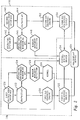
- first graphic user interface 120 is preferably operated within a Virtual DOS Machine (VDM) which is created within computer 102 (see Figure 1).
- VDM Virtual DOS Machine
- a request to run an application within a VDM must have originated within that VDM. Any new request for application which was initiated outside the VDM would result in the creation of a new VDM; however, the method and system of the present invention permits multiple applications to be run within a single VDM, from requests which originate external to the VDM.
- API 142 This ability to run multiple applications within a single VDM arises as a result of operating within an operating system Application Program Interface (API) 142.
- API 142 receives a request to initiate an application in first session 118, that request is passed through operating system environment API 146 and routed to window movement detection module 148. This request is then utilized to create first session 118 and a VDM is created. If a VDM specified for utilization within session 118 is already running, the request is routed to session 118 via window movement detection module 148, virtual device driver 134 and window movement detection module 126. Window movement detection module 126 will then make an API call to kernel 136 which initiates a new task within session 118.
- API Application Program Interface
- each graphic user interface is preferably coupled to a graphics API 122 or 144.
- graphics API 122 will comprise the known GDI API.
- graphics API 144 will comprise the known Graphics Presentation Interface (GPI) API.
- each graphics API is preferably coupled to an operating environment windowing API, such as operating environment windowing API 124 or 146.
- first user interface 120 comprises a Windows interface
- operating environment windowing API 124 may be implemented as the USER. EXE windowing interface provided in conjunction with the Windows interface.
- operating environment windowing API 146 may be implemented utilizing PMWIN, the Presentation Manager windowing API.
- both operating environment windowing API 124 and operating environment windowing API 146 will require certain minor modifications to the standard API as described above. Specifically, the implementation of each operating environment windowing API will have added thereto certain so-called "hooks" or identifiable software elements which are inserted into the software within these operating environment windowing API's to permit pre and post notifications to be generated each time a window movement takes place.
- a "window movement” comprises any significant event with regard to a window within either graphic user interface such as: the creation of a window; the deletion of a window; the size change of a window; the translational movement of a window; the minimization of a window; the maximization of a window; the activation of a window; the enablement of a window; or a change in relative background/foreground position of certain windows.
- window movement detection modules 126 and 148 may be notified of impending or completed window movements such that presentation of multiple windows supported by different graphic user interfaces maybe displayed. Further, at initialization each window movement detection module(126 and 148) requests the coordinates and size of each window and icon within the other session via a virtual device driver 134 which is utilized to allow interprocess communication. This information is utilized within each session to maintain are presentation of each object within other sessions and to generate so-called "clipping regions" for each session which may be "painted" utilizing an associated VGA device driver 132 and 154.
- graphics API 122 and 144 the outputs thereof are applied to graphics engines 130 and 152, in a manner well known in the art, in order to generate graphic data which is coupled to an associated VGA device driver 132 and 154.
- "clipping regions" established within each session are then utilized to permit multiple device drivers to share a single display device 104.
- window movement detection module 126 when window movement detection module 126 receives a pre-notification of a window movement, it disables the ability of first session 118 to "paint" to visual display device 104, via virtual display driver 134 and VGA device driver 132. After the movement occurs, the results of that movement are coupled to window movement detection module 148, via virtual device driver 134 and an identical change is made to the "clipping regions" maintained by graphics user interface 140. After this change is made, both graphic user interfaces are permitted to paint the visual display screen within their associated clipping regions. Alternately, a prenotification of a window movement within session 116 is detected at window movement detection module 148 and a similar operation occurs. In this manner, the presentation of multiple windows supported by different graphic user interfaces is synchronized without actually stopping processing by the simple expedient of disallowing the painting of windows while any window is in a state of change, and repainting each window after completion of the change.
- Cursor manipulation is also controlled utilizing this clipping region technique. "Hooks" are placed within the implementation of operating environment windowing API 124 for all cursor manipulations. Thus, cursor bit maps may be passed to window movement detection module 148 for conversion to a cursor bit map which is utilizable by session 116. Thus, in the depicted embodiment of the present invention, only session 116 will paint a cursor within the method and system of the present invention.
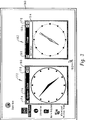
- FIG. 3 there is depicted a pictorial representation of a computer display screen 160 illustrating a presentation in accordance with the method and system of the present invention.
- computer display screen 160 includes two windows 162 and 172.
- window 162 is preferably a Windows presentation which includes a menu bar 164, a system menu icon 166, a minimize button 168, and a maximize button 170 which will be recognizable to those skilled in the art as standard interface commands utilized by the Windows graphic user interface.
- Window 162 is preferably painted within computer display screen 160 by establishing a clipping region which corresponds to the area to be occupied by that window and permitting VGA device driver 132 (see figure 2) to manage that portion of computer display screen 160.
- Presentation Manager system clock window 172 is also depicted. As illustrated, window 172 preferably includes a title bar 176, an iconic representation 174, a minimize button 178 and a maximize button 180 which will be recognizable by those skilled in the art as the standard interface commands utilized by the Presentation Manager graphic user interface. Finally, computer display screen 160 also preferably includes a cursor 182, which, in accordance with the described embodiment of the present invention, is always controlled by the Presentation Manager graphic user interface in a manner described above.
- the method and system of the present invention permits multiple windows supported by different graphic user interfaces to be simultaneously presented within a computer display such that a user may advantageously utilize applications designed for maximum efficiency with a particular graphic user interface without requiring the termination of operations in a graphic user interface and the initiation of operations in a second graphic user interface.
- a user may advantageously utilize applications designed for maximum efficiency with a particular graphic user interface without requiring the termination of operations in a graphic user interface and the initiation of operations in a second graphic user interface.
Landscapes
- Engineering & Computer Science (AREA)
- Theoretical Computer Science (AREA)
- General Engineering & Computer Science (AREA)
- Software Systems (AREA)
- Human Computer Interaction (AREA)
- Physics & Mathematics (AREA)
- General Physics & Mathematics (AREA)
- Digital Computer Display Output (AREA)
- User Interface Of Digital Computer (AREA)
Applications Claiming Priority (2)
| Application Number | Priority Date | Filing Date | Title |
|---|---|---|---|
| US86082692A | 1992-03-31 | 1992-03-31 | |
| US860826 | 1992-03-31 |
Publications (1)
| Publication Number | Publication Date |
|---|---|
| EP0564174A2 true EP0564174A2 (de) | 1993-10-06 |
Family
ID=25334115
Family Applications (1)
| Application Number | Title | Priority Date | Filing Date |
|---|---|---|---|
| EP93302330A Withdrawn EP0564174A2 (de) | 1992-03-31 | 1993-03-25 | Verfahren und System zur Sichtdarstellung der Daten in einer Datenverarbeitungsanlage |
Country Status (3)
| Country | Link |
|---|---|
| US (1) | US6118428A (de) |
| EP (1) | EP0564174A2 (de) |
| JP (1) | JP2552071B2 (de) |
Cited By (12)
| Publication number | Priority date | Publication date | Assignee | Title |
|---|---|---|---|---|
| WO1999027517A1 (en) * | 1997-11-21 | 1999-06-03 | The Pixel Company | Secondary user interface |
| WO1999063514A1 (en) * | 1998-06-05 | 1999-12-09 | Xsides Corporation | Secondary user interface |
| US6018332A (en) * | 1997-11-21 | 2000-01-25 | Ark Interface Ii, Inc. | Overscan user interface |
| WO2000065563A1 (en) * | 1999-04-23 | 2000-11-02 | Xsides Corporation | Secondary user interface |
| WO2000046781A3 (en) * | 1999-02-05 | 2001-02-22 | Xsides Corp | Display controller for a system having secondary user interface |
| WO2001022196A3 (en) * | 1999-09-21 | 2001-12-27 | Xsides Corp | Method and system for controlling a complementary user interface on a display surface |
| US6337717B1 (en) | 1997-11-21 | 2002-01-08 | Xsides Corporation | Alternate display content controller |
| US6426762B1 (en) | 1998-07-17 | 2002-07-30 | Xsides Corporation | Secondary user interface |
| US6593945B1 (en) | 1999-05-21 | 2003-07-15 | Xsides Corporation | Parallel graphical user interface |
| US6677964B1 (en) | 2000-02-18 | 2004-01-13 | Xsides Corporation | Method and system for controlling a complementary user interface on a display surface |
| US6686936B1 (en) | 1997-11-21 | 2004-02-03 | Xsides Corporation | Alternate display content controller |
| AU772369B2 (en) * | 1997-11-21 | 2004-04-22 | Xsides Corporation | Secondary user interface |
Families Citing this family (18)
| Publication number | Priority date | Publication date | Assignee | Title |
|---|---|---|---|---|
| US20040226041A1 (en) * | 2000-02-18 | 2004-11-11 | Xsides Corporation | System and method for parallel data display of multiple executing environments |
| TW531707B (en) * | 2000-05-31 | 2003-05-11 | Ibm | Method and system for displaying window sub-components from different windowing environments as a single window grouping |
| US7305680B2 (en) * | 2002-08-13 | 2007-12-04 | Sharp Laboratories Of America, Inc. | Listening module for asynchronous messages sent between electronic devices of a distributed network |
| US7487460B2 (en) * | 2003-03-21 | 2009-02-03 | Microsoft Corporation | Interface for presenting data representations in a screen-area inset |
| US7945914B2 (en) * | 2003-12-10 | 2011-05-17 | X1 Technologies, Inc. | Methods and systems for performing operations in response to detecting a computer idle condition |
| WO2007022513A2 (en) | 2005-08-19 | 2007-02-22 | Google Inc. | Software architecture for displaying information content from plug-in modules in a user interface |
| USD553144S1 (en) * | 2005-10-13 | 2007-10-16 | Argsoft Intellectual Property Holdings, Limited | Computer network monitoring dashboard interface for a computer screen |
| USD553143S1 (en) * | 2005-10-13 | 2007-10-16 | Argsoft Intellectual Property Holdings, Limited | Computer network monitoring dashboard interface for a computer screen |
| USD553142S1 (en) * | 2005-10-13 | 2007-10-16 | Argsoft Intellectual Property Holdings, Limited | Computer network monitoring dashboard interface for a computer screen |
| US7844673B2 (en) * | 2005-10-24 | 2010-11-30 | International Business Machines Corporation | Filtering features for multiple minimized instant message chats |
| US9563876B2 (en) * | 2005-10-24 | 2017-02-07 | International Business Machines Corporation | Control options for instant message display and notification |
| US20070094342A1 (en) * | 2005-10-24 | 2007-04-26 | Bostick James E | Detachable control window for instant messaging chats |
| USD650793S1 (en) * | 2010-12-01 | 2011-12-20 | Microsoft Corporation | Display screen with an animated position indicator icon |
| USD650800S1 (en) | 2010-12-01 | 2011-12-20 | Microsoft Corporation | Display screen with an icon |
| GB2511668A (en) * | 2012-04-12 | 2014-09-10 | Supercell Oy | System and method for controlling technical processes |
| CN102830964B (zh) * | 2012-07-24 | 2016-04-13 | 华为技术有限公司 | 一种显示多任务界面的方法及装置 |
| US8949320B2 (en) * | 2012-11-30 | 2015-02-03 | Red Hat Israel, Ltd. | Managing a distributed cache for virtual machines |
| KR20210125330A (ko) * | 2020-04-08 | 2021-10-18 | 삼성전자주식회사 | 보안 데이터 처리 방법 및 이를 지원하는 전자 장치 |
Family Cites Families (8)
| Publication number | Priority date | Publication date | Assignee | Title |
|---|---|---|---|---|
| US4574364A (en) * | 1982-11-23 | 1986-03-04 | Hitachi, Ltd. | Method and apparatus for controlling image display |
| US4939507A (en) * | 1986-04-28 | 1990-07-03 | Xerox Corporation | Virtual and emulated objects for use in the user interface of a display screen of a display processor |
| US5062060A (en) * | 1987-01-05 | 1991-10-29 | Motorola Inc. | Computer human interface comprising user-adjustable window for displaying or printing information |
| JPS63299518A (ja) * | 1987-05-29 | 1988-12-07 | Matsushita Electric Ind Co Ltd | 2値−3値変換回路 |
| JPH0769778B2 (ja) * | 1987-06-09 | 1995-07-31 | 富士通株式会社 | アイコンメニュ−・パレット化処理方式 |
| US4903218A (en) * | 1987-08-13 | 1990-02-20 | Digital Equipment Corporation | Console emulation for a graphics workstation |
| JP2569072B2 (ja) * | 1987-09-21 | 1997-01-08 | 株式会社日立製作所 | マルチウインドウ・システムにおけるコマンド処理方法および装置 |
| US5121478A (en) * | 1988-09-08 | 1992-06-09 | Xerox Corporation | Window system with independently replaceable window functionality |
-
1993
- 1993-02-25 JP JP5035984A patent/JP2552071B2/ja not_active Expired - Lifetime
- 1993-03-25 EP EP93302330A patent/EP0564174A2/de not_active Withdrawn
- 1993-11-15 US US08/156,951 patent/US6118428A/en not_active Expired - Lifetime
Cited By (26)
| Publication number | Priority date | Publication date | Assignee | Title |
|---|---|---|---|---|
| US6686936B1 (en) | 1997-11-21 | 2004-02-03 | Xsides Corporation | Alternate display content controller |
| US6828991B2 (en) | 1997-11-21 | 2004-12-07 | Xsides Corporation | Secondary user interface |
| US6018332A (en) * | 1997-11-21 | 2000-01-25 | Ark Interface Ii, Inc. | Overscan user interface |
| US6966036B2 (en) | 1997-11-21 | 2005-11-15 | Xsides Corporation | Method and system for displaying data in a second display area |
| AU772369B2 (en) * | 1997-11-21 | 2004-04-22 | Xsides Corporation | Secondary user interface |
| AU736654B2 (en) * | 1997-11-21 | 2001-08-02 | Xsides Corporation | Secondary user interface |
| US6310603B1 (en) | 1997-11-21 | 2001-10-30 | Xsides Corporation | Overscan user interface |
| US6330010B1 (en) | 1997-11-21 | 2001-12-11 | Xsides Corporation | Secondary user interface |
| US6678007B2 (en) | 1997-11-21 | 2004-01-13 | Xsides Corporation | Alternate display content controller |
| US6337717B1 (en) | 1997-11-21 | 2002-01-08 | Xsides Corporation | Alternate display content controller |
| US6661435B2 (en) | 1997-11-21 | 2003-12-09 | Xsides Corporation | Secondary user interface |
| WO1999027517A1 (en) * | 1997-11-21 | 1999-06-03 | The Pixel Company | Secondary user interface |
| US6437809B1 (en) | 1998-06-05 | 2002-08-20 | Xsides Corporation | Secondary user interface |
| WO1999063514A1 (en) * | 1998-06-05 | 1999-12-09 | Xsides Corporation | Secondary user interface |
| US6426762B1 (en) | 1998-07-17 | 2002-07-30 | Xsides Corporation | Secondary user interface |
| WO2000046781A3 (en) * | 1999-02-05 | 2001-02-22 | Xsides Corp | Display controller for a system having secondary user interface |
| US6590592B1 (en) | 1999-04-23 | 2003-07-08 | Xsides Corporation | Parallel interface |
| WO2000065563A1 (en) * | 1999-04-23 | 2000-11-02 | Xsides Corporation | Secondary user interface |
| US6593945B1 (en) | 1999-05-21 | 2003-07-15 | Xsides Corporation | Parallel graphical user interface |
| US6630943B1 (en) | 1999-09-21 | 2003-10-07 | Xsides Corporation | Method and system for controlling a complementary user interface on a display surface |
| WO2001022196A3 (en) * | 1999-09-21 | 2001-12-27 | Xsides Corp | Method and system for controlling a complementary user interface on a display surface |
| US7340682B2 (en) | 1999-09-21 | 2008-03-04 | Xsides Corporation | Method and system for controlling a complementary user interface on a display surface |
| US6677964B1 (en) | 2000-02-18 | 2004-01-13 | Xsides Corporation | Method and system for controlling a complementary user interface on a display surface |
| US6717596B1 (en) | 2000-02-18 | 2004-04-06 | Xsides Corporation | Method and system for controlling a complementary user interface on a display surface |
| US6727918B1 (en) | 2000-02-18 | 2004-04-27 | Xsides Corporation | Method and system for controlling a complementary user interface on a display surface |
| US6892359B1 (en) | 2000-02-18 | 2005-05-10 | Xside Corporation | Method and system for controlling a complementary user interface on a display surface |
Also Published As
| Publication number | Publication date |
|---|---|
| JPH064253A (ja) | 1994-01-14 |
| US6118428A (en) | 2000-09-12 |
| JP2552071B2 (ja) | 1996-11-06 |
Similar Documents
| Publication | Publication Date | Title |
|---|---|---|
| EP0564174A2 (de) | Verfahren und System zur Sichtdarstellung der Daten in einer Datenverarbeitungsanlage | |
| US5956032A (en) | Signalling a user attempt to resize a window beyond its limit | |
| US5046001A (en) | Method for accessing selected windows in a multi-tasking system | |
| JP3431795B2 (ja) | ウィンドウのサイズ変更方法及びコンピュータ・システム | |
| US6016145A (en) | Method and system for transforming the geometrical shape of a display window for a computer system | |
| EP0597395B1 (de) | Mehrere graphische Benutzerschnittstellen auf einer einzigen Anzeige | |
| US6259432B1 (en) | Information processing apparatus for improved intuitive scrolling utilizing an enhanced cursor | |
| US6356281B1 (en) | Method and apparatus for displaying translucent overlapping graphical objects on a computer monitor | |
| US5648795A (en) | Method of resetting a computer video display mode | |
| JP2732557B2 (ja) | Guiの機能を変更する方法及びデータ処理システム | |
| AU2014296339B2 (en) | Multi-monitor full screen mode in a windowing environment | |
| US5621434A (en) | Cursor manipulation system and method | |
| US8250486B2 (en) | Computer controlled user interactive display interface for accessing graphic tools with a minimum of display pointer movement | |
| JPH06208448A (ja) | ブラウザ項目を有する集合ブラウザをアプリケーションに供給させる方法およびコンピュータ制御表示装置 | |
| US20150309678A1 (en) | Methods and apparatus for rendering a collection of widgets on a mobile device display | |
| EP0428261A2 (de) | Rechnerbenutzerschnittstelle | |
| JPH103375A (ja) | ウィンドウの位置を配置する方法及びグラフィカル・ユーザ・インタフェース | |
| EP2553561A2 (de) | Interaktion mit entfernten, auf einem virtuellen desktop einer tablet-computervorrichtung angezeigten anwendungen | |
| JPH1011264A (ja) | ウィンドウをサイズ変更する方法及びコンピュータ・システム | |
| JP2002099370A (ja) | 仮想デスクトップ間をスイッチするための方法、システム、およびコンピュータ・プログラム製品 | |
| KR19990087910A (ko) | 관련되지않은윈도들간의연합상호작용 | |
| JP2531856B2 (ja) | カ―ソル依存型スクロ―リングを制御する方法 | |
| US5557729A (en) | Application design interface enhancement | |
| US20020118227A1 (en) | Graphical user interface | |
| Williams | A comparison of some window managers |
Legal Events
| Date | Code | Title | Description |
|---|---|---|---|
| PUAI | Public reference made under article 153(3) epc to a published international application that has entered the european phase |
Free format text: ORIGINAL CODE: 0009012 |
|
| AK | Designated contracting states |
Kind code of ref document: A2 Designated state(s): DE FR GB |
|
| 17P | Request for examination filed |
Effective date: 19931227 |
|
| STAA | Information on the status of an ep patent application or granted ep patent |
Free format text: STATUS: THE APPLICATION HAS BEEN WITHDRAWN |
|
| 18W | Application withdrawn |
Withdrawal date: 19971203 |