EP0292934B1 - Guidance message display control system - Google Patents
Guidance message display control system Download PDFInfo
- Publication number
- EP0292934B1 EP0292934B1 EP88108322A EP88108322A EP0292934B1 EP 0292934 B1 EP0292934 B1 EP 0292934B1 EP 88108322 A EP88108322 A EP 88108322A EP 88108322 A EP88108322 A EP 88108322A EP 0292934 B1 EP0292934 B1 EP 0292934B1
- Authority
- EP
- European Patent Office
- Prior art keywords
- guidance message
- display
- status
- control means
- timer
- Prior art date
- Legal status (The legal status is an assumption and is not a legal conclusion. Google has not performed a legal analysis and makes no representation as to the accuracy of the status listed.)
- Expired - Lifetime
Links
Images








Classifications
-
- G—PHYSICS
- G06—COMPUTING OR CALCULATING; COUNTING
- G06F—ELECTRIC DIGITAL DATA PROCESSING
- G06F3/00—Input arrangements for transferring data to be processed into a form capable of being handled by the computer; Output arrangements for transferring data from processing unit to output unit, e.g. interface arrangements
- G06F3/14—Digital output to display device ; Cooperation and interconnection of the display device with other functional units
-
- G—PHYSICS
- G06—COMPUTING OR CALCULATING; COUNTING
- G06F—ELECTRIC DIGITAL DATA PROCESSING
- G06F9/00—Arrangements for program control, e.g. control units
- G06F9/06—Arrangements for program control, e.g. control units using stored programs, i.e. using an internal store of processing equipment to receive or retain programs
- G06F9/44—Arrangements for executing specific programs
- G06F9/451—Execution arrangements for user interfaces
- G06F9/453—Help systems
Definitions
- the present invention relates to a guidance message display control system, more particularly, it relates to a method for controlling a display timing of a guidance message displayed on a terminal equipment (hereinafter referred to as the terminal) used as a multi-media communication terminal.
- a terminal equipment hereinafter referred to as the terminal
- a multi-media communication system for example, an ISDN (Integrated Services Digital Network) and a LAN (Local Area Network), is a high grade communication services network constituted by computers, optical fiber cables and digital signals, together with a communication satellite.
- ISDN Integrated Services Digital Network
- LAN Local Area Network
- many terminals are provided for transferring various information necessary for inter-communication among subscribers, and such a terminal has many functions, for example, telephone, facsimile, telex, and the like. These functions are displayed on the display device of the terminal together with guidance messages.
- the guidance messages usually denote procedures for operating the keyboard of the terminal, and the user operates the keyboard step by step in accordance with the displayed guidance messages.
- high grade functions for example, high speed and huge data communication functions be provided in the multi-media communication system. Therefore, recently intensive research has been carried out into the development of a "man-machine interface".
- the man-machine interface is intended to provide any required, number of functions between a human (user) and a machine (terminal).
- One of the problems of the man-machine interface is the user's skill level when using the terminal, since each user's skill level is different in accordance with the user's experience. Therefore, the display timing of the guidance messages must be geared to the user's skill level.
- Terminals having control functions operating in accordance with the user's skill level have been disclosed, in, for example, Japanese Examined Patent Publication No. 60-263256, and Japanese Unexamined Patent Publications No. 60-95625 and No. 60-186922.
- the first reference discloses a computer system having control functions operating in accordance with the user's skill level.
- the user inputs a message denoting the skill level of the user and performs the necessary steps in accordance with the guidance displayed on the display device.
- this system is based on the frequency of use of the computer by the user, often this frequency of use does not reflect the actual skill level of the user. This is because the change of skill level at each step is not input for evaluation.
- the second reference also discloses a computer system having control functions operating in accordance with the user's skill level. This system is based on data of previous use by the user, and the display speed of the guidance message is based on this data.
- the third reference (No. 60-186922) discloses a method for outputting the guidance message. This method is based on the time elapsing between key-in operations by the user. In this method, the grade of the content of the guidance is changed in accordance with the change of the elapsed time, but the same problems as that of the first reference still arise in this system.
- the object of the present invention is to provide a guidance message display control system in a terminal having an improved user's skill level control function.
- a guidance message display control system in a terminal equipment including an input unit (1), a display unit (2) and a display control unit (3) comprising: an input data analyzing means (4) operatively connected to said input unit (1) for analyzing screen coordinate input data by comparing it with predetermined input data values previously stored in a coordinate control table in a main memory and outputting a corresponding status signal: a status control means (5) operatively connected to said input data analyzing means (4) for identifying a system status according to said status signal received from said input data analyzing means (4) and predetermined system status values previously stored in a status control table in said main memory and for controlling the display delay of a guidance message on said display unit (2); a timer means (6) operatively connected to said status control means (5) for counting a user's response time and a guidance message delay at every input execution step in response to a control signal of said status control means (5); a skill control means (7) operatively connected to said status control means (5) for storing
- each of the pictures is called an "icon” and each icon denotes a telephone, an image scanner, a printer, a calculator, a mail box, a black board, and the like.
- the user initially selects, for example, the telephone icon, with the electric probe, and then the guidance messages are displayed on the screen.
- the user when the user cannot understand the guidance message, the user usually must read the instruction manual or push the keyboard button (key-in operation) generating a "help command".
- the unskilled user usually must take the above steps, and thus must make many access operations before being able to increase the skill level.
- the skilled user can operate the keyboard without the necessity for a display of a guidance message at every step. Therefore, although a display of a guidance message at every step is helpful for the unskilled user, it is irritating for a skilled user, since such a user must wait until the next guidance message is displayed. Accordingly, to eliminate the above problem, the guidance message should be displayed in accordance with the user's skill level.
- Figure 1 shows a basic structure of the guidance message display control system of a terminal used in the multi-media communication system according to the present invention.
- reference number 1 denotes an input unit, for example, a keyboard, 2 a display unit for displaying the various guidance messages, and 3 a display control unit.
- the display control unit 3 is constituted by an input analyzer 4 for analyzing the input information, a status controller 5 for controlling the display status on the screen, a timer 6 for measuring the time elapsed and setting a guidance interval, a skill controller 7 for controlling the user's skill level, and a display processor 8 for controlling the display of the guidance message on the screen.
- the user operates the keyboard 1 (key-in operation), and the input execution steps are repeated by the display control unit 3 in accordance with the input operation of the user, based on the guidance message displayed on the display device 2.
- the timer 6 detects the time interval between one input execution step and next, and the skill controller 7 detects the user's skill level based on the time interval and the correctness of the each input operation of the user, and controls the timing of the display of the guidance message in response to the detected skill level. In this case, the timer 6 decides the time for displaying the next guidance message, and the skill controller 7 changes the user's skill level based on the time set by the timer 6.
- the skill controller 7 increments the skill level by one.
- the skill controller 7 decrements the skill level by one. For example, when the user's skill level is high, the display timing of the next guidance message is delayed to enable the user to proceed to the next operation before displaying the next guidance message. Therefore, since it is not necessary to display an unwanted guidance for the user, it is possible to increase the processing speed of the terminal. On the other hand, when the user's skill level is low, the display timing made faster so that the user can guided to the next step, at every step.
- Figure 2 shows a schematic block diagram of the terminal according to an embodiment of the present invention.
- reference number 11 denotes a central processing unit (CPU), 12 a display device, 13 a display controller, 14 a tablet mounted on the display device 12, 15 an electric probe for selecting the icon on the tablet 14, 16 a tablet controller, 17 a floppy disk, 18 a printer, 20 an image scanner, 21 an input/output (I/O) controller, 22 a handset, 23 a network controller, and 24 a main memory.
- the display control unit 3 in Fig. 1 corresponds to the CPU 11 having the input analyzing function, the status controlling function, the time setting function, the skill level controlling function, and the display controlling function.
- the input unit 1 in Fig. 1 corresponds to the tablet 14 and the electric probe 15.
- the tablet 14 is mounted on the display device and is constituted by a transparent board having a plurality of electrodes arranged in a matrix at a very high density. The user can see the icon and the guidance message on the display device through the tablet, and the desired icon can be selected by touching the electric probe to the tablet.
- the various guidance messages are stored in the main memory 24 and read out by the CPU 11, and then displayed on the display device 12 through the display controller 13.
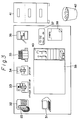
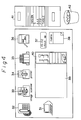
- Figures 3 to 5 show various icons and guidance messages displayed on the screen.
- each of the icons has following meaning. Namely, 31 is a terminal, 32 is a telephone, 33 is an image scanner, 34 is a printer, 35 is a bookshelf, 36 is a mail box, 37 is a clock, 38 is a memorandom paper, 39 is a desktop, 40 is a pencil box, 41 is a file cabinet, and 42 is a waste basket.
- these icons are initially displayed on the screen and the operator selects one of the icons by using the electric probe (hereinafter, electric pencil).
- the electric probe hereinafter, electric pencil
- the terminal function is selected
- the operator selects the icon 32 the telecommunication function is selected.
- a multi-functions telephone board having dialkeys, pending buttons, transfer buttons and the like are displayed on the screen, and thus the operator can communicate with other terminals through the handset 22.
- the operator selects the icon 33 documents can be written through the image scanner 20, and when the operator selects the icon 34, the documents can be printed by the printer 18.
- the operation phase is switched to the access phase, to access a data base such as a telephone directory, schedule table, and the like, and when the operator selects the icon 36, the execution step is switched to the access phase in which documents are transferred by electric mail.
- the operation phase is switched to the clock, and when the operator selects the icon 38, the operation phase is switched to the blank paper and the operator can write information on the memo 38.
- the operator selects the icon 39 the documents are displayed on the desktop and the operation phase is switched to the editing phase when the operator touches the icon 40.
- the operator selects the icon 41 the documents in the cabinet 41 are displayed on the screen, and when the operator selects the icon 42, the documents are erased after the operator touches the waste basket 42.
- this display indicates the case wherein the operator has selected the middle drawer of the file cabinet 41.
- the contents are displayed on the desktop 39 after touching the middle drawer, and the documents can be saved in the drawer when the operator touches the drawer after touching the documents.
- Figure 5 shows one example of the guidance messages.
- the "IMGSN” image is displayed on the drawer as shown by the number 41a.
- the guidance message shown in Fig. 5 is displayed on the screen. This guidance message can be moved to any optional position on the screen, to prevent obstruction of the operator's next operation.
- Figure 6 is a flowchart for explaining the basic execution step of the present invention.
- the input analyzer 4 analyzes the input information (step 1) and the status controller 5 controls the input execution step (step 2).
- the timer 6 sets the time in accordance with the user's skill level determined by the skill controller 7 (step 3). For example, in Fig. 2, when the operator touches the middle drawer of the file cabinet 41 using the electric pencil 15, the tablet controller 16 transfers the ordinate data of the file cabinet 41 to the CPU 11, and the input information is analyzed by the input analyzing function of the CPU 11.
- the time set in accordance with the user's skill level is determined by the functions of the skill controller, the timer, and the status controller in the CPU 11.
- the timer value corresponds to the timing of the display of the guidance messages.
- the CPU waits for a response from the user (step 4).
- a correct operation is performed within the timer value, the skill level is increased and the guidance messages are not displayed on the screen (step 5).
- the next operation is again started from the first step 1.
- the operation time is more than the timer value, due to a time lag or incorrect operation, the skill level is decreased (step 6).
- the display status is shown by Fig. 5 (step 7).
- the timer value corresponds to the time for reading the guidance messages.
- the reading time also corresponds to the number of characters. For example, in the guidance messages shown in Fig. 5, assuming that the user needs about 40 milli seconds to read one character, the timer value is determined by multiplying 40 msecs by the number of characters in the guidance messages (step 8).
- the CPU 11 then waits for the next response from the user (step 9).
- step 10 When the next input operation is performed by the operator within the above new set time, the skill level is newly increased based on the judgement of the CPU, since the operator did not read the guidance message shown in Fig. 5 (step 10). In this case, since the skill level was once decreased in step 5, the skill level is returned to the initial state in step 10, and the guidance message is erased after the elapse of the new set time required by the user to finish reading the guidance message (step 11).
- the input operation phases are repeated in accordance with the steps in Fig. 6.
- the timer 6 in the CPU 11 detects the time interval at every input operation phase, and therefore, when the next operation is performed before displaying the guidance message, the skill level is increased and the display timing of the next guidance is delayed, and thus the skilled user can perform the input operation without the nuisance of waiting out the guidance messages, but the unskilled user can easily perform the input operation since the guidance message is displayed for a suitable display timing before performing the next input operation.
- the guidance message may be erased when the next input operation is performed, or may be unconditionally erased after the predetermined time is elapsed.
- Figures 7 and 8 show the relationship between the guidance interval and the skill level.
- the timer value of the guidance interval becomes five seconds, i.e., the timer value in step 3 is set to five seconds.
- the skill level is decreased to the value "5" in step 6, and the timer value is changed to 4.7 seconds.
- the minimum skill level is set to the value "3", as the initial skill denoted by the value "3" is the minimum level for a typical user.
- the skill level is set to the value "7” in step 5
- the timer value becomes 5.3 seconds.
- the timer value becomes 10 seconds, but when the skill level exceeds the value "20", the timer value is always set to 10 seconds.
- the learning curve is straight in Fig. 7, but since the skill level is exponentially increased in the initial stage, the learning curve can be expressed by the exponential curve as shown in Fig. 8. This curve shows the actual state of the skill level. In this case, the timer value can be calculated from the general formula of the exponential curve.
- FIGS. 9A to 9C are timing charts for explaining the guidance interval, wherein (T1 , T2 , T 1+a , T 1-a , T 1+2a ---) denote the guidance intervals.
- the timing charts of Figs. 9A and 9B show normal patterns in the case of an unskilled user: Namely, the guidance message is displayed after each input operation (key-in). As shown in the chart, the guidance interval becomes gradually shorter with each operation.
- the timing chart of Fig. 9C shows the case of a skilled user. In this case, the display of the guidance message is delayed, since the user can perform the next operation without the guidance message.
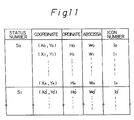
- Figure 10 shows a flowchart for explaining the operation of the input analyzer 4 in Fig. 1, and Figure 11 shows a coordinate table stored in the main memory 24 for controlling the input data.
- the input analyzer 4 waits for the information input from the input unit 1 (step 101).
- the input analyzer 4 obtains the coordinate of the input information (step 102), and detects the icon number (I) selected from the table shown in Fig. 11 based on the input coordinate (X, Y) and the present status number (S) (step 103).
- the input analyzer 4 detects the icon number, the selected icon number is sent to the status controller 5 (step 104).
- H (H0 , H0′ ---) shows the ordinate and W (W0 , W0′ ---) shows the abscissa.
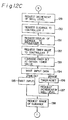
- FIGS 12A to 12C show flowcharts for explaining the operation of the status controller 5 in Fig. 1.
- the present status number S i is given by S0 (step 121)
- the status controller 5 requests the timer value before displaying the guidance message to the skill controller 7 (step 122).
- the controller 5 commands the setting of the timer value given by the controller 7 to the timer 6 (step 123), and the status controller 5 then waits for the data input, i.e., the user's response (step 124), and determines whether it is "correct", "incorrect", or a "time out” operation.
- the timer 6 is reset based on the determination of these data (steps 125, 126).
- the status controller 5 sends a request for an increment of the skill level to the skill controller 7 (step 127) and then shifts to the next operation phase based on the status number and icon number each corresponding running application and next status from the table shown in Fig. 13 (step 128).
- the table shown in Fig. 13 is therefore the status control table used in the status controller 5.
- the status controller 5 sends a request for a decrement of the skill level and retiming of the guidance messages to the skill controller 7 (steps 129, 130). Further, the status controller 5 sends a request for a display of the guidance message to the display processor 8 (step 131) and sends a request for the timer value now displayed to the skill controller 7 (step 132), and then resets the timer 6 based on the timer value given by the skill controller 7 (step 133). The status controller 5 then waits for the data input, i.e., the user's response (step 134).
- the status controller 5 waits for the data input and a request for an erasure of the guidance message is sent from the input analyzer 4 (step 135). Further, the guidance message may be erased in this time out even if the user's response is not performed.
- the request for erasure of the guidance message is sent from the input analyzer 4 in step 134
- the status controller 5 sends a request for an increment of the skill level to the skill controller 7 (step 137), after resetting the timer (step 136). Further, the status controller 5 sends a request for an erasure of the guidance message to the display processor 8 (step 138).
- the Table shown in Fig. 13 is the status control table stored in the main memory 24.
- the running application A (A0 , A1 ---) denotes, for example, the application phase for processing the contents of the drawer.
- the next status numbers (S n0 , S n1 , ---) correspond to the status number (S0 , S1 , ---).
- Figure 14 shows a flowchart for explaining the operation of the skill controller 7. All operations in the skill controller are based on commands from the status controller 5, in accordance with the skill control table shown in Fig. 15.
- the skill control table is stored in the main memory 24.
- the controller 5 requests an increment of the skill level, the skill level S k of the status number S i in the table is increased by one (step 141), and when the controller 5 requests a decrement of the skill level, the skill level of the status number in the table is decreased by one (step 142).
- the skill controller 7 detects the timer value from the skill level of the status number in the table and the learning curve, and sends same to the status controller 5 (step 143).
- the skill controller 7 When the controller 5 requests the timer value when displaying the guidance message, the skill controller 7 detects the timer value from the formula (total number of characters x 40 milli seconds) at the status number S i in the table, and sends same to the status controller 5 (step 144). When the controller 5 requests a guidance message, the skill controller 7 sends the guidance message at the status number S i in the table to the status controller 5 (step 145).
- the learning curve is given by, for example, ax + b, as shown in Fig. 7. Further the number of characters (g0 , g1 ---) is given by the number of characters x 40 ms.
Landscapes
- Engineering & Computer Science (AREA)
- Software Systems (AREA)
- Theoretical Computer Science (AREA)
- Human Computer Interaction (AREA)
- Physics & Mathematics (AREA)
- General Engineering & Computer Science (AREA)
- General Physics & Mathematics (AREA)
- Digital Computer Display Output (AREA)
- Input From Keyboards Or The Like (AREA)
- User Interface Of Digital Computer (AREA)
Description
- The present invention relates to a guidance message display control system, more particularly, it relates to a method for controlling a display timing of a guidance message displayed on a terminal equipment (hereinafter referred to as the terminal) used as a multi-media communication terminal.
- A multi-media communication system, for example, an ISDN (Integrated Services Digital Network) and a LAN (Local Area Network), is a high grade communication services network constituted by computers, optical fiber cables and digital signals, together with a communication satellite. In this system, many terminals are provided for transferring various information necessary for inter-communication among subscribers, and such a terminal has many functions, for example, telephone, facsimile, telex, and the like. These functions are displayed on the display device of the terminal together with guidance messages.
- The guidance messages usually denote procedures for operating the keyboard of the terminal, and the user operates the keyboard step by step in accordance with the displayed guidance messages. In this case, it is important that high grade functions, for example, high speed and huge data communication functions be provided in the multi-media communication system. Therefore, recently intensive research has been carried out into the development of a "man-machine interface". The man-machine interface is intended to provide any required, number of functions between a human (user) and a machine (terminal). One of the problems of the man-machine interface is the user's skill level when using the terminal, since each user's skill level is different in accordance with the user's experience. Therefore, the display timing of the guidance messages must be geared to the user's skill level.
- Terminals having control functions operating in accordance with the user's skill level have been disclosed, in, for example, Japanese Examined Patent Publication No. 60-263256, and Japanese Unexamined Patent Publications No. 60-95625 and No. 60-186922.
- The first reference (No. 60-263256) discloses a computer system having control functions operating in accordance with the user's skill level. In this system, before operating the computer system, the user inputs a message denoting the skill level of the user and performs the necessary steps in accordance with the guidance displayed on the display device. Although this system is based on the frequency of use of the computer by the user, often this frequency of use does not reflect the actual skill level of the user. This is because the change of skill level at each step is not input for evaluation. The second reference (No. 60-95625) also discloses a computer system having control functions operating in accordance with the user's skill level. This system is based on data of previous use by the user, and the display speed of the guidance message is based on this data. The third reference (No. 60-186922) discloses a method for outputting the guidance message. This method is based on the time elapsing between key-in operations by the user. In this method, the grade of the content of the guidance is changed in accordance with the change of the elapsed time, but the same problems as that of the first reference still arise in this system.
- The object of the present invention is to provide a guidance message display control system in a terminal having an improved user's skill level control function.
- In accordance with
claim 1 of the present invention, there is provided a guidance message display control system in a terminal equipment including an input unit (1), a display unit (2) and a display control unit (3) comprising:
an input data analyzing means (4) operatively connected to said input unit (1) for analyzing screen coordinate input data by comparing it with predetermined input data values previously stored in a coordinate control table in a main memory and outputting a corresponding status signal:
a status control means (5) operatively connected to said input data analyzing means (4) for identifying a system status according to said status signal received from said input data analyzing means (4) and predetermined system status values previously stored in a status control table in said main memory and for controlling the display delay of a guidance message on said display unit (2);
a timer means (6) operatively connected to said status control means (5) for counting a user's response time and a guidance message delay at every input execution step in response to a control signal of said status control means (5);
a skill control means (7) operatively connected to said status control means (5) for storing a present skill level of a plurality of predetermined skill levels each associated with a predetermined display delay for said guidance message previously stored in a skill control table in said main memory, said display delay growing with a growing skill level, retrieving a display delay for said guidance message from said skill control table corresponding to said present skill level, and incrementing or decrementing said present skill level by one value in response to a control signal from said status control means (5); and
a display control means (8) operatively connected between said status control means (5) and said display unit (2) for receiving control data from said status control means (5) and controlling a display status of said guidance message on said display unit (2) according to said control data;
wherein
said status control means (5) at predetermined system status values requests a delay value for a guidance message from said skill control means (7) and commands said delay value to said timer menas (6);
controls said display control means (8) to display or not said guidance message depending on the user response timing and correctness whereby said guidance message is not displayed if the user's response time is shorter than said delay value; and
controls said skill control means (7) to increase or decrease said present skill level by one value within the limits of said plurality of previously stored user's skill levels in accordance with said user's response timing and correctness. - Furthermore, according to
claim 18 of the present invention there is provided a method for controlling the display timing of a guidance message performed by a guidance message display control system comprising the steps of: - a) analazing sreen coordinate user input data (S1) by comparing it with predetermined previously stored input data values;
- b) setting a system status (S2) in accordance with said analyzed user input data and predetermined previously stored system status values;
- c) determining the display delay of a guidance message (S3) according to said system status dependent on a predetermined present skill level of a plurality of previously stored predetermined skill levels each associated with a predetermined display delay, wherein said display delay grows with a growing skill level;
- d) displaying or not the guidance message (S4, S7-S11) depending on the user's response timing and correctness whereby said guidance message is not displayed if the user's response time is shorter than said delay; and
- e) increasing (S5) or decreasing (S6) said present skill level by one value within the limits of said plurality of previously stored predetermined skill levels in accordance with said user's response timing and correctness.
- In the drawings:
- Fig. 1 shows a basic structure of a terminal used in a multi-media communication system according to the present invention;
- Fig. 2 shows a schematic block diagram of the terminal shown in Fig. 1;
- Figs. 3 to 5 show various icons and guidance messages displayed on a screen;
- Fig. 6 is a flowchart for explaining the present invention;
- Figs. 7 and 8 show a relationship between guidance level and skill level;
- Figs. 9A to 9C show timing charts for explaining the guidance interval;
- Fig. 10 is a flowchart for explaining the operation of the input analyzer in Fig. 1;
- Fig. 11 shows a coordinate table for controlling input data;
- Figs. 12A to 12C are flowcharts for explaining the operation of the status controller in Fig. 1;
- Fig. 13 shows a status control table;
- Fig. 14 is a flowchart for explaining the operation of the skill controller in Fig. 1; and
- Fig. 15 shows a skill control table.
- Before describing the preferred embodiments, an explanation will be given of the problems arising in conventional method for controlling the output timing of a guidance message.
- In the terminal, many kinds of guidance messages and icons are displayed pictorially on the screen, as shown in Figs. 3 to 5. Each of the pictures is called an "icon" and each icon denotes a telephone, an image scanner, a printer, a calculator, a mail box, a black board, and the like. The user initially selects, for example, the telephone icon, with the electric probe, and then the guidance messages are displayed on the screen. In this step, when the user cannot understand the guidance message, the user usually must read the instruction manual or push the keyboard button (key-in operation) generating a "help command". The unskilled user usually must take the above steps, and thus must make many access operations before being able to increase the skill level.
- The skilled user, however, can operate the keyboard without the necessity for a display of a guidance message at every step. Therefore, although a display of a guidance message at every step is helpful for the unskilled user, it is irritating for a skilled user, since such a user must wait until the next guidance message is displayed. Accordingly, to eliminate the above problem, the guidance message should be displayed in accordance with the user's skill level.
- A method for controlling the output timing of the guidance message displayed on the screen will be explained in detail hereinafter.
- Figure 1 shows a basic structure of the guidance message display control system of a terminal used in the multi-media communication system according to the present invention.
- In Fig. 1,
reference number 1 denotes an input unit, for example, a keyboard, 2 a display unit for displaying the various guidance messages, and 3 a display control unit. Thedisplay control unit 3 is constituted by aninput analyzer 4 for analyzing the input information, astatus controller 5 for controlling the display status on the screen, atimer 6 for measuring the time elapsed and setting a guidance interval, askill controller 7 for controlling the user's skill level, and adisplay processor 8 for controlling the display of the guidance message on the screen. - In this structure, the user operates the keyboard 1 (key-in operation), and the input execution steps are repeated by the
display control unit 3 in accordance with the input operation of the user, based on the guidance message displayed on thedisplay device 2. Thetimer 6 detects the time interval between one input execution step and next, and theskill controller 7 detects the user's skill level based on the time interval and the correctness of the each input operation of the user, and controls the timing of the display of the guidance message in response to the detected skill level. In this case, thetimer 6 decides the time for displaying the next guidance message, and theskill controller 7 changes the user's skill level based on the time set by thetimer 6. Therefore, when the next input operation is correctly performed by the user within the set time, theskill controller 7 increments the skill level by one. When the input operation is not performed within the set time, or the input operation is incorrectly performed, theskill controller 7 decrements the skill level by one. For example, when the user's skill level is high, the display timing of the next guidance message is delayed to enable the user to proceed to the next operation before displaying the next guidance message. Therefore, since it is not necessary to display an unwanted guidance for the user, it is possible to increase the processing speed of the terminal. On the other hand, when the user's skill level is low, the display timing made faster so that the user can guided to the next step, at every step. - Figure 2 shows a schematic block diagram of the terminal according to an embodiment of the present invention.
- In Fig. 2,
reference number 11 denotes a central processing unit (CPU), 12 a display device, 13 a display controller, 14 a tablet mounted on thedisplay device tablet 14, 16 a tablet controller, 17 a floppy disk, 18 a printer, 20 an image scanner, 21 an input/output (I/O) controller, 22 a handset, 23 a network controller, and 24 a main memory. Thedisplay control unit 3 in Fig. 1 corresponds to theCPU 11 having the input analyzing function, the status controlling function, the time setting function, the skill level controlling function, and the display controlling function. Theinput unit 1 in Fig. 1 corresponds to thetablet 14 and theelectric probe 15. - The
tablet 14 is mounted on the display device and is constituted by a transparent board having a plurality of electrodes arranged in a matrix at a very high density. The user can see the icon and the guidance message on the display device through the tablet, and the desired icon can be selected by touching the electric probe to the tablet. The various guidance messages are stored in themain memory 24 and read out by theCPU 11, and then displayed on thedisplay device 12 through thedisplay controller 13. - Figures 3 to 5 show various icons and guidance messages displayed on the screen.
- In Figs. 3 to 5, each of the icons has following meaning. Namely, 31 is a terminal, 32 is a telephone, 33 is an image scanner, 34 is a printer, 35 is a bookshelf, 36 is a mail box, 37 is a clock, 38 is a memorandom paper, 39 is a desktop, 40 is a pencil box, 41 is a file cabinet, and 42 is a waste basket.
- In Fig. 3, these icons are initially displayed on the screen and the operator selects one of the icons by using the electric probe (hereinafter, electric pencil). For example, when the operator selects the
icon 31, the terminal function is selected, and when the operator selects theicon 32, the telecommunication function is selected. In this selection, a multi-functions telephone board having dialkeys, pending buttons, transfer buttons and the like are displayed on the screen, and thus the operator can communicate with other terminals through thehandset 22. When the operator selects theicon 33, documents can be written through theimage scanner 20, and when the operator selects theicon 34, the documents can be printed by theprinter 18. - When the operator selects the
icon 35, the operation phase is switched to the access phase, to access a data base such as a telephone directory, schedule table, and the like, and when the operator selects theicon 36, the execution step is switched to the access phase in which documents are transferred by electric mail. When the operator selects theicon 37, the operation phase is switched to the clock, and when the operator selects theicon 38, the operation phase is switched to the blank paper and the operator can write information on thememo 38. When the operator selects theicon 39, the documents are displayed on the desktop and the operation phase is switched to the editing phase when the operator touches theicon 40. When the operator selects theicon 41, the documents in thecabinet 41 are displayed on the screen, and when the operator selects theicon 42, the documents are erased after the operator touches thewaste basket 42. - In Fig. 4, this display indicates the case wherein the operator has selected the middle drawer of the
file cabinet 41. The contents are displayed on thedesktop 39 after touching the middle drawer, and the documents can be saved in the drawer when the operator touches the drawer after touching the documents. - Figure 5 shows one example of the guidance messages. When the operator selects "IMGSN" in the middle drawer shown in Fig. 4, the "IMGSN" image is displayed on the drawer as shown by the number 41a. In this case, when the operator does not perform the next input operation before the set time has lapsed, the guidance message shown in Fig. 5 is displayed on the screen. This guidance message can be moved to any optional position on the screen, to prevent obstruction of the operator's next operation.
- Figure 6 is a flowchart for explaining the basic execution step of the present invention.
- In Fig. 6, when the user initially selects the function on the
display device 2, theinput analyzer 4 analyzes the input information (step 1) and thestatus controller 5 controls the input execution step (step 2). Thetimer 6 sets the time in accordance with the user's skill level determined by the skill controller 7 (step 3). For example, in Fig. 2, when the operator touches the middle drawer of thefile cabinet 41 using theelectric pencil 15, thetablet controller 16 transfers the ordinate data of thefile cabinet 41 to theCPU 11, and the input information is analyzed by the input analyzing function of theCPU 11. The time set in accordance with the user's skill level is determined by the functions of the skill controller, the timer, and the status controller in theCPU 11. The timer value corresponds to the timing of the display of the guidance messages. The relationship between the skill level and the guidance interval is shown by the learning curve in Figs. 7 and 8. That is, the higher the skill level, the larger the timer value (guidance interval). Therefore, when the user's skill level is high, the timing of the display of the next guidance message is delayed. - In this step, the CPU waits for a response from the user (step 4). When a correct operation is performed within the timer value, the skill level is increased and the guidance messages are not displayed on the screen (step 5). Then as is obvious, the next operation is again started from the
first step 1. When the operation time is more than the timer value, due to a time lag or incorrect operation, the skill level is decreased (step 6). In this case, the display status is shown by Fig. 5 (step 7). The timer value corresponds to the time for reading the guidance messages. The reading time also corresponds to the number of characters. For example, in the guidance messages shown in Fig. 5, assuming that the user needs about 40 milli seconds to read one character, the timer value is determined by multiplying 40 msecs by the number of characters in the guidance messages (step 8). TheCPU 11 then waits for the next response from the user (step 9). - When the next input operation is performed by the operator within the above new set time, the skill level is newly increased based on the judgement of the CPU, since the operator did not read the guidance message shown in Fig. 5 (step 10). In this case, since the skill level was once decreased in
step 5, the skill level is returned to the initial state instep 10, and the guidance message is erased after the elapse of the new set time required by the user to finish reading the guidance message (step 11). - As explained above, the input operation phases are repeated in accordance with the steps in Fig. 6. The
timer 6 in theCPU 11 detects the time interval at every input operation phase, and therefore, when the next operation is performed before displaying the guidance message, the skill level is increased and the display timing of the next guidance is delayed, and thus the skilled user can perform the input operation without the nuisance of waiting out the guidance messages, but the unskilled user can easily perform the input operation since the guidance message is displayed for a suitable display timing before performing the next input operation. Further, the guidance message may be erased when the next input operation is performed, or may be unconditionally erased after the predetermined time is elapsed. - Figures 7 and 8 show the relationship between the guidance interval and the skill level. In Fig. 7, when the initial value of the skill level is set to the value "6", the timer value of the guidance interval becomes five seconds, i.e., the timer value in
step 3 is set to five seconds. The skill level is decreased to the value "5" instep 6, and the timer value is changed to 4.7 seconds. The minimum skill level is set to the value "3", as the initial skill denoted by the value "3" is the minimum level for a typical user. When the skill level is set to the value "7" instep 5, the timer value becomes 5.3 seconds. Further, when the skill level is set to the value "20", the timer value becomes 10 seconds, but when the skill level exceeds the value "20", the timer value is always set to 10 seconds. As explained above, the learning curve is straight in Fig. 7, but since the skill level is exponentially increased in the initial stage, the learning curve can be expressed by the exponential curve as shown in Fig. 8. This curve shows the actual state of the skill level. In this case, the timer value can be calculated from the general formula of the exponential curve. - Figures 9A to 9C are timing charts for explaining the guidance interval, wherein (T₁ , T₂ , T1+a , T1-a , T1+2a ---) denote the guidance intervals. The timing charts of Figs. 9A and 9B, show normal patterns in the case of an unskilled user: Namely, the guidance message is displayed after each input operation (key-in). As shown in the chart, the guidance interval becomes gradually shorter with each operation. The timing chart of Fig. 9C, shows the case of a skilled user. In this case, the display of the guidance message is delayed, since the user can perform the next operation without the guidance message.
- Figure 10 shows a flowchart for explaining the operation of the
input analyzer 4 in Fig. 1, and Figure 11 shows a coordinate table stored in themain memory 24 for controlling the input data. In Fig. 10, theinput analyzer 4 waits for the information input from the input unit 1 (step 101). When the information is input by the operator from the keyboard (key-in), theinput analyzer 4 obtains the coordinate of the input information (step 102), and detects the icon number (I) selected from the table shown in Fig. 11 based on the input coordinate (X, Y) and the present status number (S) (step 103). When theinput analyzer 4 detects the icon number, the selected icon number is sent to the status controller 5 (step 104). When theinput analyzer 4 does not detect the icon number, thestatus controller 5 is informed of an incorrect input operation (step 105). In Fig. 11, H (H₀ , H₀′ ---) shows the ordinate and W (W₀ , W₀′ ---) shows the abscissa. - Figures 12A to 12C show flowcharts for explaining the operation of the
status controller 5 in Fig. 1. In Fig. 12A, it is assumed that the present status number Si is given by S₀ (step 121), and thestatus controller 5 requests the timer value before displaying the guidance message to the skill controller 7 (step 122). Thecontroller 5 commands the setting of the timer value given by thecontroller 7 to the timer 6 (step 123), and thestatus controller 5 then waits for the data input, i.e., the user's response (step 124), and determines whether it is "correct", "incorrect", or a "time out" operation. Thetimer 6 is reset based on the determination of these data (steps 125, 126). - In Fig. 12B, in the case of a correct operation, the
status controller 5 sends a request for an increment of the skill level to the skill controller 7 (step 127) and then shifts to the next operation phase based on the status number and icon number each corresponding running application and next status from the table shown in Fig. 13 (step 128). Note, the table shown in Fig. 13 is therefore the status control table used in thestatus controller 5. - In Fig. 12C, in the case of an incorrect or time out operation, the
status controller 5 sends a request for a decrement of the skill level and retiming of the guidance messages to the skill controller 7 (steps 129, 130). Further, thestatus controller 5 sends a request for a display of the guidance message to the display processor 8 (step 131) and sends a request for the timer value now displayed to the skill controller 7 (step 132), and then resets thetimer 6 based on the timer value given by the skill controller 7 (step 133). Thestatus controller 5 then waits for the data input, i.e., the user's response (step 134). When informed of a time out by thetimer 6, thestatus controller 5 waits for the data input and a request for an erasure of the guidance message is sent from the input analyzer 4 (step 135). Further, the guidance message may be erased in this time out even if the user's response is not performed. When the request for erasure of the guidance message is sent from theinput analyzer 4 instep 134, thestatus controller 5 sends a request for an increment of the skill level to the skill controller 7 (step 137), after resetting the timer (step 136). Further, thestatus controller 5 sends a request for an erasure of the guidance message to the display processor 8 (step 138). The Table shown in Fig. 13 is the status control table stored in themain memory 24. The running application A (A₀ , A₁ ---) denotes, for example, the application phase for processing the contents of the drawer. The next status numbers (Sn0 , Sn1 , ---) correspond to the status number (S₀ , S₁ , ---). - Figure 14 shows a flowchart for explaining the operation of the
skill controller 7. All operations in the skill controller are based on commands from thestatus controller 5, in accordance with the skill control table shown in Fig. 15. The skill control table is stored in themain memory 24. When thecontroller 5 requests an increment of the skill level, the skill level Sk of the status number Si in the table is increased by one (step 141), and when thecontroller 5 requests a decrement of the skill level, the skill level of the status number in the table is decreased by one (step 142). When thecontroller 5 requests the timer value before displaying the guidance message, theskill controller 7 detects the timer value from the skill level of the status number in the table and the learning curve, and sends same to the status controller 5 (step 143). When thecontroller 5 requests the timer value when displaying the guidance message, theskill controller 7 detects the timer value from the formula (total number of characters x 40 milli seconds) at the status number Si in the table, and sends same to the status controller 5 (step 144). When thecontroller 5 requests a guidance message, theskill controller 7 sends the guidance message at the status number Si in the table to the status controller 5 (step 145). In Fig. 15, the learning curve is given by, for example, ax + b, as shown in Fig. 7. Further the number of characters (g₀ , g₁ ---) is given by the number of characters x 40 ms.
Claims (18)
- A guidance message display control system in a terminal equipment including an input unit (1), a display unit (2) and a display control unit (3) comprising:
an input data analyzing means (4) operatively connected to said input unit (1) for analyzing screen coordinate input data by comparing it with predetermined input data values previously stored in a coordinate control table in a main memory and outputting a corresponding status signal;
a status control means (5) operatively connected to said input data analyzing means (4) for identifying a system status according to said status signal received from said input data analyzing means (4) and predetermined system status values previously stored in a status control table in said main memory and for controlling the display delay of a guidance message on said display unit (2);
a timer means (6) operatively connected to said status control means (5) for counting a user's response time and a guidance message delay at every input execution step in response to a control signal of said status control means (5);
a skill control means (7) operatively connected to said status control means (5) for storing a present skill level of a plurality of predetermined skill levels each associated with a predetermined display delay for said guidance message previously stored in a skill control table in said main memory, said display delay growing with a growing skill level, retrieving a display delay for said guidance message from said skill control table corresponding to said present skill level, and incrementing or decrementing said present skill level by one value in response to a control signal from said status control means (5); and
a display control means (8) operatively connected between said status control means (5) and said display unit (2) for receiving control data from said status control means (5) and controlling a display status of said guidance message on said display unit (2) according to said control data; wherein
said status control means (5) at predetermined system status values requests a delay value for a guidance message from said skill control means (7) and commands said delay value to said timer means (6);
controls said display control means (8) to display or not said guidance message depending on the user response timing and correctness; whereby said guidance message is not displayed if the user's response time is shorter than said delay value; and
controls said skill control means (7) to increase or decrease said present skill level by one value within the limits of said plurality of previously stored user's skill levels in accordance with said user's response timing and correctness. - A guidance message display control system as claimed in claim 1, wherein said input data analyzing means (4) detects a coordinate of data input from said input unit (1), detects an icon number selected from said coordinate control table based on the coordinate and a present status number, sends a selected icon number to said status control means (5) when detected, and informs said status control means (5) of an incorrect input operation when a selected icon number is not detected.
- A guidance message display control system as claimed in claim 1 or 2, wherein said status control means (5) sends a request for a guidance delay prior to a guidance display, to said skill control means (7), sends a command to set the guidance delay given by said skill control means (7) to said timer means (6), sends a request for an increment of the skill level to said skill control means (7) when the input operation is correct, and sends a request for a decrement of the skill level to said skill control means (7) when the input operation is incorrect.
- A guidance message display control system as claimed in one of claims 1 to 3, wherein said skill control means (7) increases the skill level, based on said skill control table, when receiving an increment request, decreases the skill level based on said skill control table when receiving a decrement request, informs said status control means (5) of a first guidance delay based on said skill control means (5) when receiving the request for a guidance message delay prior to a display of the guidance message, informs said status control means (5) of a second guidance message delay when receiving a request for a guidance delay on the display unit (2), and informs said status control means (5) of the guidance message when receiving the request for a guidance message.
- A guidance message display control system as claimed in claim 4, wherein said first guidance message is determined by a learning curve and the skill level in said skill control table.
- A guidance message display control system as claimed in claim 4 or 5, wherein said second guidance message delay is determined by multiplying a time for reading one character by a number of characters displayed.
- A guidance message display control system as claimed in one of claims 1 to 6, wherein said timer means (6) comprises a first timer for counting a time elapsed from a key-in operation and a second timer for counting a time elapsed from a display of the guidance message until a next key-in operation, the display timing of the guidance message being adjusted by controlling the set time of said first timer in response to the time elapsed from the key-in operation, and the display timing of the next guidance message being corrected by controlling the setting time of said second timer in response to the time elapsed from the display of the guidance message until next key-in operation.
- A guidance message display control system as claimed in claim 7 wherein said first timer counts the time elapsed from one key-in operation to a next key-in operation; when the time elapsed reaches the predetermined value, said display control means (8) commands a display of the guidance message; said first timer sets the timer value for a next display of the guidance message as smaller than said predetermined value; and said second timer sets the time interval from the key-in operation until a guidance message display as shorter than the time elapsed.
- A guidance message display control system as claimed in claim 7 or 8, wherein the timer value of said first timer is set to a large value when the next key-in operation is performed before the count in said first timer is finished, and the guidance message interval from the next key-in operation to the guidance message display is made shorter.
- A guidance message display control system as claimed in one of claims 7 to 9, wherein the timer value of said first timer is set to a large value when the key-in operation is performed before the count of said second timer reaches the predetermined value from the display of the guidance message, and the timer value from the next key-in operation to the display of the guidance is returned to the same timer value as before the key-in operation.
- A guidance message display control system as claimed in one of claims 7 to 10, wherein the display timing is set faster when the key-in operation is performed after a count of the predetermined timer value in said second timer is completed.
- A guidance message display control system as claimed in one of claims 1 to 11, wherein the control of the display timing in said status control means (5) and said display control means (8) is performed for the same guidance message display.
- A guidance message display control system as claimed in one of claims 1 to 12, wherein the control of the display timing in said status control means (5) and said display control means (8) is performed for different guidance message displays in accordance with the display status of the display unit (3).
- A guidance message display control system as claimed in one of claims 7 to 11, wherein said first and second timers are set at every guidance message display, and each guidance message display is controlled by a corresponding said first and second timer.
- A guidance message display control system as claimed in one of claims 7 to 11, wherein said second timer counts a time determined by a number of characters displayed on the display unit.
- A guidance message display control system as claimed in one of claims 7 to 11, wherein said guidance message display is made at a time when said second timer finishes a count of the timer value.
- A guidance message display control system as claimed in one of claims 7 to 11, wherein said guidance message display is erased when a key-in operation is performed after displaying the guidance message.
- A method for controlling the display timing of guidance message performed by a guidance message display control system comprising the steps of:a) analyzing screen coordinate user input data (S1) by comparing it with predetermined previously stored input data values;b) setting a system status (S2) in accordance with said analyzed user input data and predetermined previously stored system status values;c) determining the display delay of a guidance message (S3) according to said system status dependent on a predetermined present skill level of a plurality of previously stored predetermined skill levels each associated with a predetermined display delay, wherein said display delay grows with a growing skill level;d) displaying or not the guidance message (S4,S7-S11) depending on the user's response timing and correctness, whereby said guidance message is not displayed if the user's response time is shorter than said delay; ande) increasing (S5) or decreasing (S6) said present skill level by one value within the limits of said plurality of previously stored predetermined skill levels in accordance with said user's response timing and correctness.
Applications Claiming Priority (2)
| Application Number | Priority Date | Filing Date | Title |
|---|---|---|---|
| JP62125763A JPS63291111A (en) | 1987-05-25 | 1987-05-25 | Control system for output of operation guidance |
| JP125763/87 | 1987-05-25 |
Publications (3)
| Publication Number | Publication Date |
|---|---|
| EP0292934A2 EP0292934A2 (en) | 1988-11-30 |
| EP0292934A3 EP0292934A3 (en) | 1990-05-09 |
| EP0292934B1 true EP0292934B1 (en) | 1994-09-21 |
Family
ID=14918219
Family Applications (1)
| Application Number | Title | Priority Date | Filing Date |
|---|---|---|---|
| EP88108322A Expired - Lifetime EP0292934B1 (en) | 1987-05-25 | 1988-05-25 | Guidance message display control system |
Country Status (6)
| Country | Link |
|---|---|
| US (1) | US5018082A (en) |
| EP (1) | EP0292934B1 (en) |
| JP (1) | JPS63291111A (en) |
| KR (1) | KR910006697B1 (en) |
| CA (1) | CA1312962C (en) |
| DE (1) | DE3851570T2 (en) |
Families Citing this family (84)
| Publication number | Priority date | Publication date | Assignee | Title |
|---|---|---|---|---|
| JP2661701B2 (en) * | 1988-05-12 | 1997-10-08 | キヤノン株式会社 | Information processing method |
| US5230628A (en) * | 1990-06-11 | 1993-07-27 | Ricoh Company, Ltd. | Apparatus for producing operational manual |
| EP0477080B1 (en) * | 1990-09-17 | 1998-06-03 | Canon Kabushiki Kaisha | Data communication apparatus |
| JPH04241381A (en) * | 1991-01-16 | 1992-08-28 | Brother Ind Ltd | Electronic learning machine |
| US5420693A (en) * | 1991-04-01 | 1995-05-30 | Canon Kabushiki Kaisha | High-speed color image processing |
| US5437555A (en) * | 1991-05-02 | 1995-08-01 | Discourse Technologies, Inc. | Remote teaching system |
| US5692906A (en) * | 1992-04-01 | 1997-12-02 | Corder; Paul R. | Method of diagnosing and remediating a deficiency in communications skills |
| US5302132A (en) * | 1992-04-01 | 1994-04-12 | Corder Paul R | Instructional system and method for improving communication skills |
| WO1994012964A1 (en) * | 1992-11-20 | 1994-06-09 | Cohen Audrey C | System and method for computerized problem solution analysis |
| US5385474A (en) * | 1992-12-09 | 1995-01-31 | Brindle; Charles | Medical simulator |
| US5821928A (en) * | 1992-12-18 | 1998-10-13 | International Business Machines Corporation | Method and system for controlling individual messages |
| JP2543324B2 (en) * | 1993-03-23 | 1996-10-16 | インターナショナル・ビジネス・マシーンズ・コーポレイション | Method and computer system for presenting the function of computer application software to a user |
| US5385475A (en) * | 1993-04-01 | 1995-01-31 | Rauland-Borg | Apparatus and method for generating and presenting an audio visual lesson plan |
| US6186794B1 (en) * | 1993-04-02 | 2001-02-13 | Breakthrough To Literacy, Inc. | Apparatus for interactive adaptive learning by an individual through at least one of a stimuli presentation device and a user perceivable display |
| US6108001A (en) * | 1993-05-21 | 2000-08-22 | International Business Machines Corporation | Dynamic control of visual and/or audio presentation |
| US5442687A (en) * | 1993-10-13 | 1995-08-15 | Hewlett-Packard Company | Facsimile having a user interface with automatic offer of help message |
| US5559943A (en) * | 1994-06-27 | 1996-09-24 | Microsoft Corporation | Method and apparatus customizing a dual actuation setting of a computer input device switch |
| US5574798A (en) * | 1994-08-03 | 1996-11-12 | International Business Machines Corporation | Visual presentation system which determines length of time to present each slide or transparency |
| US5602982A (en) * | 1994-09-23 | 1997-02-11 | Kelly Properties, Inc. | Universal automated training and testing software system |
| US5618182A (en) * | 1994-09-30 | 1997-04-08 | Thomas; C. Douglass | Method and apparatus for improving performance on multiple-choice exams |
| JP3898238B2 (en) * | 1994-12-02 | 2007-03-28 | 株式会社バンダイナムコゲームス | Video game apparatus and image composition method thereof |
| US5717468A (en) * | 1994-12-02 | 1998-02-10 | International Business Machines Corporation | System and method for dynamically recording and displaying comments for a video movie |
| JP3488525B2 (en) * | 1994-12-13 | 2004-01-19 | 富士通株式会社 | Help screen display method and help screen display device |
| JPH0973382A (en) * | 1995-09-04 | 1997-03-18 | Fujitsu Ltd | Computer system |
| US5726688A (en) * | 1995-09-29 | 1998-03-10 | Ncr Corporation | Predictive, adaptive computer interface |
| EP0794647A1 (en) * | 1996-03-06 | 1997-09-10 | Koninklijke Philips Electronics N.V. | Telephone with a display and menu management method for the same |
| US5937417A (en) * | 1996-05-07 | 1999-08-10 | Sun Microsystems, Inc. | Tooltips on webpages |
| US8745493B2 (en) * | 1996-10-25 | 2014-06-03 | Karen A. McKirchy | Method and apparatus for providing instructional help, at multiple levels of sophistication, in a learning application |
| US5815153A (en) * | 1996-11-20 | 1998-09-29 | International Business Machines Corporation | Multifunction control with changeable appearance |
| US6986664B1 (en) | 1997-03-03 | 2006-01-17 | Robolaw Corporation | Method and apparatus for improving performance on multiple-choice exams |
| US5950045A (en) * | 1997-06-20 | 1999-09-07 | Sharp Kabushiki Kaisha | Input device |
| US6047261A (en) * | 1997-10-31 | 2000-04-04 | Ncr Corporation | Method and system for monitoring and enhancing computer-assisted performance |
| US6801751B1 (en) | 1999-11-30 | 2004-10-05 | Leapfrog Enterprises, Inc. | Interactive learning appliance |
| US6882824B2 (en) | 1998-06-10 | 2005-04-19 | Leapfrog Enterprises, Inc. | Interactive teaching toy |
| US7528508B2 (en) | 1998-10-09 | 2009-05-05 | Azoteq Pty Ltd. | Touch sensor user interface with compressible material construction |
| US7265494B2 (en) | 1998-10-09 | 2007-09-04 | Azoteq Pty Ltd. | Intelligent user interface with touch sensor technology |
| US6476913B1 (en) | 1998-11-30 | 2002-11-05 | Hitachi, Ltd. | Inspection method, apparatus and system for circuit pattern |
| JP2001056889A (en) * | 1999-08-19 | 2001-02-27 | Konica Corp | Alarm information control method for equipment and equipment having relevant function |
| US9520069B2 (en) * | 1999-11-30 | 2016-12-13 | Leapfrog Enterprises, Inc. | Method and system for providing content for learning appliances over an electronic communication medium |
| US9640083B1 (en) | 2002-02-26 | 2017-05-02 | Leapfrog Enterprises, Inc. | Method and system for providing content for learning appliances over an electronic communication medium |
| US6452617B1 (en) | 2000-01-10 | 2002-09-17 | International Business Machines Corporation | Adjusting a click time threshold for a graphical user interface |
| EP1148411A3 (en) * | 2000-04-21 | 2005-09-14 | Sony Corporation | Information processing apparatus and method for recognising user gesture |
| JP2001326714A (en) * | 2000-05-18 | 2001-11-22 | Nec Corp | Device and method for information processing and recording medium |
| WO2002071258A2 (en) * | 2001-03-02 | 2002-09-12 | Breakthrough To Literacy, Inc. | Adaptive instructional process and system to facilitate oral and written language comprehension |
| JP3929766B2 (en) * | 2001-12-10 | 2007-06-13 | 富士通株式会社 | Command input device, program |
| JP2003233273A (en) * | 2002-02-12 | 2003-08-22 | Seiko Epson Corp | Device console device and control method |
| US20030193523A1 (en) * | 2002-04-10 | 2003-10-16 | Johnson Carolynn Rae | Ebook reading timer |
| US7509529B2 (en) * | 2003-07-18 | 2009-03-24 | American Power Conversion Corporation | System and method for performing user recovery of guided procedures for an uninterruptible power supply |
| JP2006323220A (en) * | 2005-05-19 | 2006-11-30 | Noritsu Koki Co Ltd | Photo image reception device |
| JP4746352B2 (en) * | 2005-05-25 | 2011-08-10 | Nkワークス株式会社 | Print order acceptance device |
| US7752545B2 (en) * | 2006-03-15 | 2010-07-06 | Microsoft Corporation | Generator system |
| US8396736B2 (en) * | 2006-04-21 | 2013-03-12 | Process Assets, Llc | Systems and methods for providing documentation having succinct communication with scalability |
| JP2007289307A (en) * | 2006-04-24 | 2007-11-08 | Matsushita Electric Ind Co Ltd | rice cooker |
| EP1976277A1 (en) * | 2007-03-31 | 2008-10-01 | Sony Deutschland Gmbh | Method and device for displaying information |
| JP2009015652A (en) * | 2007-07-05 | 2009-01-22 | Kyocera Mita Corp | Data input device and image forming apparatus |
| CN101458611A (en) * | 2007-12-14 | 2009-06-17 | 深圳富泰宏精密工业有限公司 | Object selecting system and method |
| USD625332S1 (en) * | 2009-02-11 | 2010-10-12 | Ricoh Company, Ltd. | Display screen with icon |
| USD624935S1 (en) * | 2009-02-11 | 2010-10-05 | Ricoh Company, Ltd. | Display screen with icon |
| USD624934S1 (en) * | 2009-02-11 | 2010-10-05 | Ricoh Company, Ltd. | Display screen with icon |
| USD646695S1 (en) * | 2009-03-18 | 2011-10-11 | Gn Netcom A/S | Computer display with a set of icons |
| USD619617S1 (en) * | 2009-08-14 | 2010-07-13 | Microsoft Corporation | Group of icons for a display screen |
| JP2011043894A (en) * | 2009-08-19 | 2011-03-03 | Casio Computer Co Ltd | Electronic apparatus, voice output control method in the same, and storage medium storing voice output control program |
| JP2011069975A (en) * | 2009-09-25 | 2011-04-07 | Casio Computer Co Ltd | Electronic device |
| CN102301294A (en) * | 2009-12-07 | 2011-12-28 | 新日本制铁株式会社 | Operation support device, operation support method, and computer program |
| KR101329882B1 (en) * | 2010-08-12 | 2013-11-15 | 주식회사 팬택 | Apparatus and Method for Displaying Augmented Reality Window |
| US8539406B2 (en) * | 2011-01-31 | 2013-09-17 | Michael Mahar | Equivalence checking for retimed electronic circuit designs |
| US9811350B2 (en) * | 2011-10-12 | 2017-11-07 | Excahbur IP, LLC | Embedding non-blocking help components in a display page using discovery drawer feature cues |
| JP6020383B2 (en) * | 2013-08-09 | 2016-11-02 | 株式会社島津製作所 | Display / execution auxiliary program |
| JP5764187B2 (en) * | 2013-12-06 | 2015-08-12 | シャープ株式会社 | Image forming apparatus |
| US20160092085A1 (en) * | 2014-09-26 | 2016-03-31 | Intel Corporation | Selective access to interactive device features |
| JP6366947B2 (en) * | 2014-02-10 | 2018-08-01 | シャープ株式会社 | Washing machine |
| JP6158767B2 (en) * | 2014-08-01 | 2017-07-05 | 京セラドキュメントソリューションズ株式会社 | Electronic equipment and information provision program |
| JP6068408B2 (en) * | 2014-09-26 | 2017-01-25 | 京セラドキュメントソリューションズ株式会社 | Workflow control device and program |
| US10489492B2 (en) * | 2015-12-10 | 2019-11-26 | Dropbox, Inc. | Sending feature-instruction notifications to user computing devices |
| JP6454261B2 (en) * | 2015-12-18 | 2019-01-16 | Kddi株式会社 | Information terminal, program, and advice presentation method |
| JP6496264B2 (en) * | 2016-03-24 | 2019-04-03 | Kddi株式会社 | Mobile terminal, information processing method, and program |
| JP2018133050A (en) * | 2017-02-17 | 2018-08-23 | 株式会社東芝 | Apparatus, control method, and program |
| JP7031403B2 (en) * | 2018-03-19 | 2022-03-08 | 株式会社リコー | Electronics, methods, and programs |
| US11326886B2 (en) * | 2018-04-16 | 2022-05-10 | Apprentice FS, Inc. | Method for controlling dissemination of instructional content to operators performing procedures at equipment within a facility |
| JP6655131B2 (en) * | 2018-07-03 | 2020-02-26 | シャープ株式会社 | Washing machine |
| USD960198S1 (en) * | 2020-07-28 | 2022-08-09 | Fujifilm Corporation | Multifunction printer operation display panel with graphical user interface |
| JP7205561B2 (en) * | 2021-03-15 | 2023-01-17 | カシオ計算機株式会社 | Information processing device, control method, and program |
| JP7792785B2 (en) * | 2021-12-13 | 2025-12-26 | マクセル株式会社 | Space-floating video information display system |
| US20250044913A1 (en) * | 2023-08-04 | 2025-02-06 | Google Llc | Dynamically providing a macro to a user based on previous user interactions |
Family Cites Families (13)
| Publication number | Priority date | Publication date | Assignee | Title |
|---|---|---|---|---|
| US4114294A (en) * | 1975-04-07 | 1978-09-19 | Melvin Marmer | Arithmetic teaching device |
| AU503614B2 (en) * | 1975-04-08 | 1979-09-13 | Sony Corporation | Audiovisual teaching system |
| JPS6055847B2 (en) * | 1980-02-07 | 1985-12-06 | 日本電気株式会社 | Data display control method |
| JPS58182752A (en) * | 1982-04-19 | 1983-10-25 | Hitachi Ltd | Input guidance display system |
| US4611996A (en) * | 1983-08-01 | 1986-09-16 | Stoner Donald W | Teaching machine |
| US4571682A (en) * | 1983-08-22 | 1986-02-18 | Computerized Sports Equipment, Inc. | System and method for skill enhancement and behavior modification |
| JPS6095625A (en) * | 1983-10-31 | 1985-05-29 | Toshiba Corp | Computer system provided with skillfulness degree function |
| JPS60128522A (en) * | 1983-12-15 | 1985-07-09 | Matsushita Electric Ind Co Ltd | information processing equipment |
| JPS60186922A (en) * | 1984-03-06 | 1985-09-24 | Nec Corp | Message output system |
| JPS60243517A (en) * | 1984-05-17 | 1985-12-03 | Omron Tateisi Electronics Co | Programmable controller |
| JPS60263256A (en) * | 1984-06-11 | 1985-12-26 | Toshiba Corp | Computer provided with skill degree function |
| US4637797A (en) * | 1985-01-11 | 1987-01-20 | Access Learning Technology Corporation | Software training system |
| US4772206A (en) * | 1986-03-10 | 1988-09-20 | International Business Machines Corporation | Multi-mode teaching simulator |
-
1987
- 1987-05-25 JP JP62125763A patent/JPS63291111A/en active Granted
-
1988
- 1988-05-20 CA CA000567334A patent/CA1312962C/en not_active Expired - Fee Related
- 1988-05-25 EP EP88108322A patent/EP0292934B1/en not_active Expired - Lifetime
- 1988-05-25 KR KR1019880006141A patent/KR910006697B1/en not_active Expired
- 1988-05-25 DE DE3851570T patent/DE3851570T2/en not_active Expired - Fee Related
-
1990
- 1990-05-07 US US07/518,246 patent/US5018082A/en not_active Expired - Fee Related
Also Published As
| Publication number | Publication date |
|---|---|
| JPH0550767B2 (en) | 1993-07-29 |
| CA1312962C (en) | 1993-01-19 |
| EP0292934A3 (en) | 1990-05-09 |
| DE3851570T2 (en) | 1995-03-02 |
| US5018082A (en) | 1991-05-21 |
| JPS63291111A (en) | 1988-11-29 |
| DE3851570D1 (en) | 1994-10-27 |
| EP0292934A2 (en) | 1988-11-30 |
| KR880014457A (en) | 1988-12-23 |
| KR910006697B1 (en) | 1991-08-31 |
Similar Documents
| Publication | Publication Date | Title |
|---|---|---|
| US5018082A (en) | Guidance message display timing control using time intervals | |
| EP0403125B1 (en) | Zoom mode operations in display apparatus | |
| US5317306A (en) | System and method for dynamic control of horizontal scrolling | |
| US6496182B1 (en) | Method and system for providing touch-sensitive screens for the visually impaired | |
| US5506952A (en) | Method and system for guiding the formation of a correctly structured instruction for data processing systems | |
| US20080229197A1 (en) | Dynamic and intelligent hover assistance | |
| US20010018738A1 (en) | Computer, controlling method therefor, recording medium, and transmitting medium | |
| EP0076904B1 (en) | A text processor having an interacitve display terminal which alternately functions as a data processing terminal | |
| WO2002025420A1 (en) | Method, system and computer program for managing views at a computer display | |
| US11399106B2 (en) | Information processing apparatus and non-transitory computer readable medium for scrolling through list items | |
| JP3519007B2 (en) | Information device having map information display function, map information display method, and recording medium recording map information display program | |
| JPH10293759A (en) | Document managing device | |
| EP0780824A1 (en) | Method and system for visual display of audio data | |
| JPH0520094A (en) | Information processor | |
| JP3463331B2 (en) | Menu selection method | |
| JP4788468B2 (en) | Display device, image processing device, display method, and program | |
| JP3257107B2 (en) | Graphic editor device | |
| JPH01191269A (en) | Image controller | |
| US7761798B1 (en) | System and method for controlling the screen display appearance for a data processing system | |
| JPH04369717A (en) | Information processing method and device | |
| EP0340664A2 (en) | Method and system for setting palette data by a display mode | |
| EP0471681B1 (en) | Real-time adjustable-transform device driver for physical devices | |
| JP3037378B2 (en) | Copier control method | |
| JPH09319885A (en) | Method and device for information processing | |
| JPH0548799A (en) | Equipment |
Legal Events
| Date | Code | Title | Description |
|---|---|---|---|
| PUAI | Public reference made under article 153(3) epc to a published international application that has entered the european phase |
Free format text: ORIGINAL CODE: 0009012 |
|
| AK | Designated contracting states |
Kind code of ref document: A2 Designated state(s): DE FR GB |
|
| PUAL | Search report despatched |
Free format text: ORIGINAL CODE: 0009013 |
|
| AK | Designated contracting states |
Kind code of ref document: A3 Designated state(s): DE FR GB |
|
| 17P | Request for examination filed |
Effective date: 19900502 |
|
| 17Q | First examination report despatched |
Effective date: 19921006 |
|
| GRAA | (expected) grant |
Free format text: ORIGINAL CODE: 0009210 |
|
| AK | Designated contracting states |
Kind code of ref document: B1 Designated state(s): DE FR GB |
|
| REF | Corresponds to: |
Ref document number: 3851570 Country of ref document: DE Date of ref document: 19941027 |
|
| ET | Fr: translation filed | ||
| PLBE | No opposition filed within time limit |
Free format text: ORIGINAL CODE: 0009261 |
|
| STAA | Information on the status of an ep patent application or granted ep patent |
Free format text: STATUS: NO OPPOSITION FILED WITHIN TIME LIMIT |
|
| 26N | No opposition filed | ||
| PGFP | Annual fee paid to national office [announced via postgrant information from national office to epo] |
Ref country code: FR Payment date: 19960510 Year of fee payment: 9 |
|
| PGFP | Annual fee paid to national office [announced via postgrant information from national office to epo] |
Ref country code: GB Payment date: 19960516 Year of fee payment: 9 |
|
| PGFP | Annual fee paid to national office [announced via postgrant information from national office to epo] |
Ref country code: DE Payment date: 19960528 Year of fee payment: 9 |
|
| PG25 | Lapsed in a contracting state [announced via postgrant information from national office to epo] |
Ref country code: GB Effective date: 19970525 |
|
| GBPC | Gb: european patent ceased through non-payment of renewal fee |
Effective date: 19970525 |
|
| PG25 | Lapsed in a contracting state [announced via postgrant information from national office to epo] |
Ref country code: FR Free format text: LAPSE BECAUSE OF NON-PAYMENT OF DUE FEES Effective date: 19980130 |
|
| PG25 | Lapsed in a contracting state [announced via postgrant information from national office to epo] |
Ref country code: DE Free format text: LAPSE BECAUSE OF NON-PAYMENT OF DUE FEES Effective date: 19980203 |
|
| REG | Reference to a national code |
Ref country code: FR Ref legal event code: ST |