CN113687902A - Resource display method and device, computer equipment and storage medium - Google Patents
Resource display method and device, computer equipment and storage medium Download PDFInfo
- Publication number
- CN113687902A CN113687902A CN202111005657.3A CN202111005657A CN113687902A CN 113687902 A CN113687902 A CN 113687902A CN 202111005657 A CN202111005657 A CN 202111005657A CN 113687902 A CN113687902 A CN 113687902A
- Authority
- CN
- China
- Prior art keywords
- resource
- media resource
- target media
- target
- function
- Prior art date
- Legal status (The legal status is an assumption and is not a legal conclusion. Google has not performed a legal analysis and makes no representation as to the accuracy of the status listed.)
- Granted
Links
Images


Classifications
-
- G—PHYSICS
- G06—COMPUTING OR CALCULATING; COUNTING
- G06F—ELECTRIC DIGITAL DATA PROCESSING
- G06F9/00—Arrangements for program control, e.g. control units
- G06F9/06—Arrangements for program control, e.g. control units using stored programs, i.e. using an internal store of processing equipment to receive or retain programs
- G06F9/44—Arrangements for executing specific programs
- G06F9/451—Execution arrangements for user interfaces
-
- G—PHYSICS
- G06—COMPUTING OR CALCULATING; COUNTING
- G06F—ELECTRIC DIGITAL DATA PROCESSING
- G06F16/00—Information retrieval; Database structures therefor; File system structures therefor
- G06F16/90—Details of database functions independent of the retrieved data types
- G06F16/95—Retrieval from the web
- G06F16/957—Browsing optimisation, e.g. caching or content distillation
-
- G—PHYSICS
- G06—COMPUTING OR CALCULATING; COUNTING
- G06F—ELECTRIC DIGITAL DATA PROCESSING
- G06F16/00—Information retrieval; Database structures therefor; File system structures therefor
- G06F16/90—Details of database functions independent of the retrieved data types
- G06F16/95—Retrieval from the web
- G06F16/958—Organisation or management of web site content, e.g. publishing, maintaining pages or automatic linking
Landscapes
- Engineering & Computer Science (AREA)
- Theoretical Computer Science (AREA)
- Databases & Information Systems (AREA)
- Software Systems (AREA)
- Physics & Mathematics (AREA)
- General Engineering & Computer Science (AREA)
- General Physics & Mathematics (AREA)
- Data Mining & Analysis (AREA)
- Human Computer Interaction (AREA)
- User Interface Of Digital Computer (AREA)
- Information Transfer Between Computers (AREA)
Abstract
The application discloses a resource display method and device, computer equipment and a storage medium, and belongs to the technical field of internet. In the embodiment of the application, through setting the viewing entry of the course resource of the target function, the user can trigger to acquire the course resource and jump to the setting page of the target function by triggering the viewing entry of the course resource, so that the interface to be operated by the user can be quickly positioned, the user does not need to find the interface to be operated by himself, the human-computer interaction efficiency is improved, and the course resource is played in the form of a suspension window in the setting page of the target function, so that the user can view the course resource and set the function at the same time, the interface does not need to be switched for many times when the user sets the interface by himself, and the human-computer interaction efficiency is further improved.
Description
Technical Field
The present application relates to the field of internet technologies, and in particular, to a resource display method and apparatus, a computer device, and a storage medium.
Background
With the continuous development of internet technology, the internet has been completely integrated into the life of people, and in the internet, people can obtain new knowledge through inquiry so as to solve some problems in life. For example, when a user encounters a function setting problem on some internet products, the user performs a query on the internet, can query a tutorial such as a video tutorial or a graphic tutorial for the function setting problem, and performs a subsequent self-setting process by watching the tutorial provided on the internet.
However, for some courses with complicated setting steps, the user may forget to set the steps after finishing watching the course, so that the user still needs to switch the interface to check the course many times during self-setting, and the human-computer interaction efficiency is reduced.
Disclosure of Invention
The embodiment of the application provides a resource display method and device, computer equipment and a storage medium, and can improve human-computer interaction efficiency. The technical scheme is as follows:
in one aspect, a resource display method is provided, and the method includes:
displaying a viewing entry of a target media resource, wherein the target media resource is a tutorial resource for setting a target function;
responding to the triggering operation of the viewing entry, acquiring the target media resource, and jumping to a setting page of the target function, wherein the setting page is used for setting the target function;
and playing the target media resource in the form of a floating window in the setting page of the target function.
In some embodiments, in response to the triggering operation of the viewing portal, acquiring the target media resource comprises:
responding to the trigger operation of the viewing entry, and detecting whether the cached target media resource exists locally;
and if the cached target media resource exists locally, acquiring the cached target media resource.
In some embodiments, after detecting whether the cached target media resource exists locally, the method further comprises:
if the cached target media resource exists locally, detecting whether the cached target media resource is overdue;
if the cached target media resource is not expired, the step of obtaining the cached target media resource is executed.
In some embodiments, after detecting whether the cached target media asset is expired, the method further comprises:
if the cached target media resource is expired, updating the cached target media resource, and acquiring the updated target media resource.
In some embodiments, after detecting whether the cached target media resource exists locally, the method further comprises:
if the cached target media resources do not exist locally, sending a resource acquisition request to a server, wherein the resource acquisition request is used for requesting to acquire the tutorial resources of the target function;
and receiving the target media resource returned by the server based on the resource acquisition request.
In some embodiments, the view portal presenting the target media asset includes any of:
displaying a viewing entry of the target media resource in an introduction page of the target function;
and in the guide page of the target function, showing a viewing inlet of the target media resource.
In some embodiments, playing the target media asset in the form of a floating window in the settings page of the target function comprises:
and playing the target media resource in a picture-in-picture mode in the setting page of the target function.
In some embodiments, the target media resource is acquired, and before jumping to the setting page of the target function, the method further includes:
responding to the trigger operation of the viewing entry, and displaying a course resource selection page, wherein the course resource selection page comprises a video course selection control;
and responding to the triggering operation of the video tutorial selection control, executing the steps of acquiring the target media resource and jumping to a setting page of the target function.
In some embodiments, the tutorial resource selection page also includes a graphical tutorial selection control;
the method further comprises the following steps:
and responding to the triggering operation of the graphic tutorial selection control, and playing the graphic tutorial of the target function.
In some embodiments, after playing the target media asset in the form of a floating window in the setting page of the target function, the method further comprises:
and responding to the moving operation of the floating window, and displaying the floating window after moving.
In some embodiments, after playing the target media asset in the form of a floating window in the setting page of the target function, the method further comprises:
in response to the target function being set to completion, stopping playing the target media asset.
In one aspect, an apparatus for displaying resources is provided, the apparatus comprising:
the display module is used for displaying a viewing entrance of a target media resource, and the target media resource is a tutorial resource for setting a target function;
the acquisition module is used for responding to the trigger operation of the viewing entry, acquiring the target media resource, and jumping to a setting page of the target function, wherein the setting page is used for setting the target function;
and the playing module is used for playing the target media resource in the setting page of the target function in a floating window mode.
In some embodiments, the obtaining module includes:
the detection submodule is used for responding to the triggering operation of the checking entry and detecting whether cached target media resources exist locally;
and the determining submodule is used for acquiring the cached target media resource if the cached target media resource exists locally.
In some embodiments, the detection submodule is further configured to:
if the cached target media resource exists locally, detecting whether the cached target media resource is overdue;
the determining sub-module is further configured to execute the step of obtaining the cached target media resource if the cached target media resource is not expired.
In some embodiments, the apparatus further comprises:
and the updating module is used for updating the cached target media resource and acquiring the updated target media resource if the cached target media resource is expired.
In some embodiments, the apparatus further comprises:
a sending module, configured to send a resource obtaining request to a server if a cached target media resource does not exist locally, where the resource obtaining request is used to request to obtain a course resource of the target function;
and the receiving module is used for receiving the target media resource returned by the server based on the resource acquisition request.
In some embodiments, the display module is for any one of:
displaying a viewing entry of the target media resource in an introduction page of the target function;
and in the guide page of the target function, showing a viewing inlet of the target media resource.
In some embodiments, the playback module is configured to:
and playing the target media resource in a picture-in-picture mode in the setting page of the target function.
In some embodiments, the display module is further configured to:
responding to the trigger operation of the viewing entry, and displaying a course resource selection page, wherein the course resource selection page comprises a video course selection control;
and responding to the triggering operation of the video tutorial selection control, executing the steps of acquiring the target media resource and jumping to a setting page of the target function.
In some embodiments, the tutorial resource selection page also includes a graphical tutorial selection control;
the playing module is also used for responding to the triggering operation of the graphic tutorial selection control and playing the graphic tutorial with the target function.
In some embodiments, the display module is further configured to:
and responding to the moving operation of the floating window, and displaying the floating window after moving.
In some embodiments, the playing module is further configured to:
in response to the target function being set to completion, stopping playing the target media asset.
In one aspect, a computer device is provided, which includes a processor and a memory, where at least one program code is stored in the memory, and the at least one program code is loaded and executed by the processor to implement the resource exhibition method.
In one aspect, a computer-readable storage medium is provided, in which at least one program code is stored, and the at least one program code is loaded and executed by a processor to implement the resource exhibition method described above.
In one aspect, a computer program product is provided, the computer program product comprising computer program code stored in a computer-readable storage medium, the computer program code being read by a processor of a computer device from the computer-readable storage medium, the processor executing the computer program code to cause the computer device to perform the resource exposure method described above.
According to the technical scheme, the tutorial resources with the target function are set, the user can trigger the acquisition of the tutorial resources and jump to the set page of the target function by triggering the viewing inlet of the tutorial resources, so that the interface to be operated by the user can be quickly positioned, the user does not need to find the interface to be operated by himself, the human-computer interaction efficiency is improved, the tutorial resources are played in the form of the suspension window in the set page of the target function, the user can watch the tutorial resources and set the functions at the same time, the interface does not need to be switched for many times when the user sets the interface by himself, and the human-computer interaction efficiency is further improved.
Drawings
In order to more clearly illustrate the technical solutions in the embodiments of the present application, the drawings needed to be used in the description of the embodiments are briefly introduced below, and it is obvious that the drawings in the following description are only some embodiments of the present application, and it is obvious for those skilled in the art to obtain other drawings based on these drawings without creative efforts.
FIG. 1 is a schematic diagram of an implementation environment of a resource presentation method according to an embodiment of the present disclosure;
fig. 2 is a flowchart of a resource display method according to an embodiment of the present application;
fig. 3 is a flowchart of a resource display method according to an embodiment of the present application;
FIG. 4 is a schematic flowchart of video tutorial detection provided by an embodiment of the present application;
FIG. 5 is a flowchart of a resource display method according to an embodiment of the present disclosure;
fig. 6 is a schematic diagram of a playback page provided in an embodiment of the present application;
FIG. 7 is a schematic diagram of a course resource selection page provided by an embodiment of the present application;
fig. 8 is a schematic diagram of a charging dynamic effect setting page provided in an embodiment of the present application;
FIG. 9 is a schematic structural diagram of a resource display apparatus according to an embodiment of the present application;
fig. 10 is a block diagram of a terminal according to an embodiment of the present disclosure;
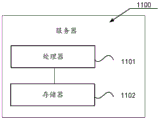
fig. 11 is a block diagram of a server according to an embodiment of the present disclosure.
Detailed Description
To make the objects, technical solutions and advantages of the present application more clear, embodiments of the present application will be described in further detail below with reference to the accompanying drawings.
Fig. 1 is a schematic diagram of an implementation environment of a resource display method according to an embodiment of the present application. Referring to fig. 1, the implementation environment includes: a terminal 101 and a server 102.
The terminal 101 may be at least one of a smartphone, a smart watch, a desktop computer, a laptop computer, a virtual reality terminal, an augmented reality terminal, a wireless terminal, a laptop portable computer, and the like. The terminal 101 has a communication function and can access the internet, and the terminal 101 may be generally referred to as one of a plurality of terminals, and this embodiment is only illustrated by the terminal 101. Those skilled in the art will appreciate that the number of terminals described above may be greater or fewer.
The terminal 101 may run various different types of applications, such as a video application, a social application, a live application, and so on. For some function setting problems on the application program, in some embodiments, a video tutorial or a graphic tutorial of the function setting problem is provided on the application program, in other embodiments, the video tutorial or the graphic tutorial corresponding to the function setting problem can be queried by querying on the internet, and then, the user can set the corresponding function by viewing the video tutorial or the graphic tutorial provided on the application program or the internet.
At present, under the condition that some out-of-application function setting problems are involved, that is, under the condition that the setting operation of the current application program in other application programs (such as setting application) needs to be exited, the problem that the user switches the interface for many times to check the tutorial during self-setting may exist, and the human-computer interaction efficiency is seriously reduced. Based on the resource display method, the problem that the user switches the interface for many times to check the tutorial when setting by himself can be avoided, and the man-machine interaction efficiency is improved.
In the embodiment of the present application, the terminal 101 is configured to display a view entry of a target media resource, obtain the target media resource in response to a trigger operation on the view entry, jump to a setting page of the target function, and play the target media resource in the setting page of the target function in the form of a floating window. Therefore, on one hand, the interface to be operated by the user can be quickly positioned, the user does not need to search for the interface to be operated by himself, the human-computer interaction efficiency is improved, on the other hand, the tutorial resources are played in the setting page of the target function in a suspension window mode, so that the user can watch the tutorial resources and set the functions at the same time, the interface does not need to be switched for many times when the user sets the functions by himself, and the human-computer interaction efficiency is further improved.
The server 102 may be an independent physical server, a server cluster or a distributed file system formed by a plurality of physical servers, or a cloud server providing basic cloud computing services such as a cloud service, a cloud database, cloud computing, a cloud function, cloud storage, a Network service, cloud communication, a middleware service, a domain name service, a security service, a CDN (Content Delivery Network), a big data and artificial intelligence platform, and the like. The server 102 and the terminal 101 may be directly or indirectly connected through wired or wireless communication, which is not limited in this embodiment of the application. Alternatively, the number of the servers 102 may be more or less, and the embodiment of the present application is not limited thereto. Of course, the server 102 may also include other functional servers to provide more comprehensive and diverse services.
In this embodiment, the server 102 is configured to, when the terminal 101 does not have the tutorial resource of the target function, respond to the received resource acquisition request sent by the terminal 101, acquire the tutorial resource of the target function based on the resource acquisition request, and return the tutorial resource of the target function to the terminal 101, so that a playing effect of the tutorial resource can be ensured.
Fig. 2 is a flowchart of a resource display method according to an embodiment of the present application. The embodiment is described by taking a terminal as an execution subject, and referring to fig. 2, the embodiment includes:
201. and the terminal displays a viewing inlet of the target media resource, wherein the target media resource is a tutorial resource for setting the target function.
Wherein, the target media resource is a course resource for setting the target function. In the embodiment of the application, a target function is used for referring to a function to be set by a user, and the target function is any function which can be set on a terminal. For example, a charging animation setting of the terminal, a ring tone setting of the terminal, a language display setting of the terminal, and the like. The target function is not limited in the embodiment of the present application.
The course resource is a resource including a setting step of a target function. In some embodiments, the course resource is a video course. Taking the charging dynamic effect with the target function as the terminal as an example, the course resource of the charging dynamic effect comprises the setting step of the charging dynamic effect.
In some embodiments, a view entry of the tutorial resource of the target function is set on the terminal, and if the user wants to view the tutorial resource of the target function, the terminal can be triggered to execute step 202 by performing a triggering operation on the view entry, so that the user can view the tutorial resource of the target function.
202. And the terminal responds to the triggering operation of the viewing entrance, acquires the target media resource, and jumps to a setting page of the target function, wherein the setting page is used for setting the target function.
The setting page of the target function is used for setting the target function. Taking the target function as the charging dynamic effect of the terminal as an example, the setting page may be a charging dynamic effect setting page, and the charging dynamic effect setting page is used for setting the charging dynamic effect.
In some embodiments, the target media resource (i.e., the tutorial resource of the target function) has an association relationship with the setting page of the target function, and the terminal acquires the target media resource in response to the trigger operation of the viewing entry, and then jumps to the setting page associated with the target media resource, so that the interface to be operated by the user can be quickly located, the user does not need to search for the interface to be operated by himself, and the human-computer interaction efficiency is improved.
203. And the terminal plays the target media resource in the setting page of the target function in a form of a floating window.
In some embodiments, the terminal plays the target media resource in the setting page of the target function in the form of a floating window, so that the user can gradually set the setting page of the target function in the process of watching the target media resource according to the setting steps shown by the target media resource, the user does not need to remember complicated setting steps, and does not need to switch interfaces for many times during self-setting, thereby not only improving the setting success rate of the target function, but also improving the operation experience of the user.
According to the technical scheme, the tutorial resources with the target function are set, the user can trigger the acquisition of the tutorial resources and jump to the set page of the target function by triggering the viewing inlet of the tutorial resources, so that the interface to be operated by the user can be quickly positioned, the user does not need to find the interface to be operated by himself, the human-computer interaction efficiency is improved, the tutorial resources are played in the form of the suspension window in the set page of the target function, the user can watch the tutorial resources and set the functions at the same time, the interface does not need to be switched for many times when the user sets the interface by himself, and the human-computer interaction efficiency is further improved.
Fig. 2 is a basic flow chart of the present application, and the following further explains a scheme provided by the present application based on a specific implementation, and fig. 3 is a flow chart of a resource display method provided in an embodiment of the present application. The embodiment is described by taking a terminal as an execution subject, and referring to fig. 3, the embodiment includes:
301. and the terminal displays a viewing inlet of the target media resource, wherein the target media resource is a tutorial resource for setting the target function.
In the embodiment of the application, a target function is used for referring to a function to be set by a user, and the target function is any function which can be set on a terminal. For example, a charging animation setting of the terminal, a ring tone setting of the terminal, a language display setting of the terminal, and the like. The target function is not limited in the embodiment of the present application. In some embodiments, the view portal of the target media asset is in the form of a control.
In some embodiments, the terminal presents the view portal of the target media asset in the relevant page of the target function. In an optional embodiment, the terminal presents the viewing entry of the target media resource in the introduction page of the target function. Taking the charging action as an example, the terminal displays the viewing entry of the target media resource in an introduction page of the charging action, and the introduction page of the charging action is used for introducing the related content of the charging action. In another optional embodiment, the terminal presents the view entry of the target media resource in the guidance page of the target function. Taking the charging dynamic effect as an example, the terminal displays the viewing entry of the target media resource in a guiding page of the charging dynamic effect, and the guiding page of the charging dynamic effect is used for prompting the setting of the charging dynamic effect. The page where the viewing entry of the target media resource is located is not limited in the embodiment of the application.
302. And the terminal responds to the trigger operation of the viewing entry and detects whether the cached target media resource exists locally.
In some embodiments, in response to the triggering operation on the view entry, the terminal queries, based on a resource identifier of a target media resource associated with the view entry, a local resource information file, and determines whether the resource information file has the target media resource corresponding to the resource identifier, where the resource information file is used to store multiple resource identifiers and media resources corresponding to the multiple resource identifiers. Therefore, the subsequent resource display process is carried out by judging whether the target media resource is cached locally or not and then preferentially acquiring the locally cached target media resource, so that the efficiency of acquiring the target media resource is improved, and the display of the media resource can be ensured.
In an optional embodiment, if a target media resource corresponding to a resource identifier exists in the resource information file, it is determined that the target media resource exists locally and is cached; in another optional embodiment, if there is no target media resource corresponding to the resource identifier in the resource information file, it is determined that there is no cached target media resource locally.
303. If the cached target media resource exists locally, whether the cached target media resource is overdue is detected.
In some embodiments, if the cached target media resource exists locally, the terminal obtains an expiration date of the target media resource, and detects whether the cached target media resource is expired based on the expiration date of the target media resource and the current time.
In an alternative embodiment, if the current time has exceeded the expiration date of the target media resource, it is determined that the cached target media resource has expired; in another alternative embodiment, if the current time does not exceed the expiration date of the target media resource, it is determined that the cached target media resource is not expired.
Step 303 is to take an example that a cached target media resource exists locally, in other embodiments, if a cached target media resource does not exist locally, a resource acquisition request is sent to the server, where the resource acquisition request is used to request to acquire a tutorial resource of the target function, the server, in response to receiving the resource acquisition request, acquires the tutorial resource of the target function based on a resource identifier carried in the resource acquisition request, determines the tutorial resource as the target media resource, and then returns the acquired target media resource to the terminal, and the terminal receives the target media resource returned by the server based on the resource acquisition request, and then performs a subsequent resource display process based on the received target media resource. In this way, when the target media resource is not cached locally at the terminal, the tutorial resource on the internet is acquired by sending the resource acquisition request to the server, so that the display of the target media resource is ensured.
304. And if the cached target media resource is not expired, acquiring the cached target media resource.
Step 304 is exemplified by that the cached target media resource is not expired, and in other embodiments, if the cached target media resource is expired, the cached target media resource is updated to obtain the updated target media resource, and then a subsequent resource display process is performed based on the updated target media resource.
It should be noted that step 304 is an optional step. In some embodiments, if the cached target media resource exists locally, the cached target media resource is obtained without performing a process of detecting whether the cached target media resource is expired.
Through steps 302 to 304, the terminal responds to the triggering operation of the viewing portal, and acquires the target media resource so as to execute the process of subsequent resource presentation.
305. And the terminal jumps to a setting page of the target function, and the setting page is used for setting the target function.
In some embodiments, the target media resource (i.e., the tutorial resource of the target function) has an association relationship with the setting page of the target function, and the terminal jumps to the setting page associated with the target media resource after acquiring the target media resource, so that the interface to be operated by the user can be quickly located without the user finding the interface to be operated by himself, thereby improving the human-computer interaction efficiency.
The process is a process of triggering the terminal to acquire the target media resource and jump to the setting page of the target function based on the viewing entry of the target media resource. In other embodiments, the terminal responds to the triggering operation of the viewing entry and further displays a tutorial resource selection page, the tutorial resource selection page comprises a video tutorial selection control, and responds to the triggering operation of the video tutorial selection control, the step of acquiring the target media resource and jumping to the setting page of the target function is executed. Therefore, under the condition of triggering the video tutorial, the process of acquiring the resources and jumping to the page is executed, and the playing effect of the target media resources is ensured. In other embodiments, the tutorial resource selection page further includes a graphical tutorial selection control, and the terminal plays the graphical tutorial of the target function in response to the triggering operation of the graphical tutorial selection control.
306. And the terminal plays the target media resource in the setting page of the target function in a form of a floating window.
In some embodiments, the terminal plays the target media resource in a picture-in-picture form in the setting page of the target function. The pip refers to displaying two pictures on the same screen by using digital technology, that is, inserting one or more compressed sub-pictures on a main picture so that the sub-pictures can be viewed while the main picture is viewed.
In an alternative embodiment, the terminal utilizes a picture-in-picture function provided by the iOS (apple operating System) 14, and plays the target media resource in a picture-in-picture form in a setting page of the target function. Therefore, the target media resource is played in a picture-in-picture mode, so that the user can also watch the target media resource when operating in the setting page of the target function, the user can watch the tutorial resource and set the function at the same time, the user does not need to switch the interface for many times when setting by himself, and the man-machine interaction efficiency is further improved.
In a specific example, fig. 4 is a schematic flowchart of a video tutorial detection provided in an embodiment of the present application, and referring to fig. 4, when a user wants to view a video tutorial with a certain function setting, a click operation may be performed on a view entry of the video tutorial, and then the terminal triggers and executes a detection process of whether to locally cache the video tutorial in response to the click operation on the view entry, and if no cache exists, obtains a network video tutorial, and jumps to a specified module (i.e., jumps to a function setting page associated with the video tutorial), and simultaneously plays the network video tutorial and caches the network video tutorial by using an iOS14 picture-in-picture function; if the cache exists, triggering and executing a detection process of whether the cache video is overdue, if the cache is overdue, updating the cache and jumping to a designated module, and simultaneously playing a cache video course by using the picture-in-picture function of iOS 14; if the cache is not expired, the user directly jumps to the designated module and plays the cached video tutorial by using the iOS14 picture-in-picture function.
In the process that the terminal plays the target media resource in the form of the floating window, the user may also operate the floating window or the target media resource, so that the user can conveniently perform function setting in the setting page of the target function, and the following describes the process:
(306A) in some embodiments, the terminal displays the moved floating window in response to the moving operation of the floating window.
In an alternative embodiment, the terminal responds to the up-shifting or down-shifting operation of the floating window and displays the floating window after up-shifting or down-shifting; in another alternative embodiment, the terminal presents the left-shifted or right-shifted floating window in response to a left-shift or right-shift operation on the floating window.
In the above embodiment, through removing the suspension window to avoid the suspension window to cause the sheltering from to the display content who sets up the page, so that the user carries out the function setting at this setting page, improved the flexibility of operation, and then improved user's operation experience.
(306B) In some embodiments, the terminal presents the resized floating window in response to an operation to resize the display of the floating window.
In an alternative embodiment, the terminal zooms the floating window to be displayed in response to the zooming operation on the floating window. For example, the terminal may present the floating window as a first size in response to a scaling operation on the floating window, the first size being a scaled size of the floating window.
In another alternative embodiment, the terminal responds to the amplification operation of the floating window to display the floating window in an amplification mode. For example, the terminal presents the floating window to a second size in response to a zoom operation on the floating window, the second size being a zoomed-in size of the floating window.
In the above embodiment, the size of the floating window is adjusted, so that the user can clearly view the playing picture of the target media resource, and the accuracy of the function setting is improved.
(306C) In some embodiments, the terminal closes the floating window in response to the closing operation of the floating window, and stops playing the target media resource.
In an optional embodiment, the floating window includes a closing control, and accordingly, in response to a triggering operation of the closing control, the terminal closes the floating window and stops playing the target media resource. Therefore, the flexibility of operation is improved, and the operation experience of a user is further improved.
(306D) In some embodiments, the terminal pauses playing the target media resource in response to a pause operation on the target media resource. Therefore, the flexibility of operation is improved, and the operation experience of a user is further improved.
(306E) In some embodiments, the terminal responds to the play progress adjustment operation of the target media resource, and plays the target media resource according to the adjusted play progress. In an optional embodiment, the terminal responds to the play progress adjusting operation in the floating window, and plays the target media resource according to the adjusted play progress.
For example, a progress bar is displayed in the playing interface of the target media resource, and accordingly, the terminal responds to the left-sliding operation or the right-sliding operation of the progress bar of the target media resource and plays the target media resource according to the adjusted playing progress; or, a progress adjustment control, such as a fast-backward control or a fast-forward control, is displayed in the playing interface of the target media resource, and accordingly, the terminal responds to the triggering operation of the fast-backward control or the fast-forward control and plays the target media resource according to the adjusted playing progress.
And in the process that the terminal plays the target media resource in the form of a floating window in the setting page of the target function, the terminal also displays setting prompt information in the setting page of the target function based on the setting content indicated by the playing progress of the target media resource so as to prompt a user to execute corresponding setting operation. The following explains the process by taking the setting content of the trigger function control as an example:
in some embodiments, if the set content indicated by the current playing progress of the target media resource is a trigger function control, the terminal displays trigger prompt information in an area where the function control is located, where the trigger prompt information is used to prompt that a trigger operation is performed on the function control.
In an optional embodiment, if the set content indicated by the current playing progress of the target media resource is a trigger function control, and the terminal does not detect the trigger operation on the function control within a target time length after the current playing progress is taken as a starting time point, the terminal displays trigger prompt information in an area where the function control is located to prompt a user to implement the trigger operation on the function control.
Wherein the target duration is a preset fixed duration, such as 2 s. For example, assuming that the current playing progress is 00:05, the terminal performs a process of presenting the trigger hint information when the terminal does not detect the trigger operation on the function control within 2s (i.e., within a time period of 00:05-00: 07) after the starting time point of 00: 05.
In the process, the information quantity displayed on the page is increased by displaying the trigger prompt message, the effect of prompting the user to implement the trigger operation on the function control is achieved, the accuracy of the function setting is improved, meanwhile, the efficiency of the function setting is also improved, and therefore the operation experience of the user is improved.
In some embodiments, if the terminal does not detect the setting operation in the setting page within the target duration, the playing of the target media resource is suspended. Therefore, when the setting operation of the user is not detected, the playing of the target media resource is automatically paused, and the user can be ensured to follow the playing progress of the target resource in time.
307. And the terminal responds to the target function being set and completed, and stops playing the target media resource.
In some embodiments, the terminal closes the floating window and stops playing the target media resource in response to the target function being set to completion. Therefore, the user does not need to close the suspension window by himself, and the human-computer interaction efficiency is improved.
In some embodiments, the terminal closes the floating window in response to the target media resource being played. Therefore, the user does not need to close the suspension window by himself, and the human-computer interaction efficiency is improved.
According to the technical scheme, the tutorial resources with the target function are set, the user can trigger the acquisition of the tutorial resources and jump to the set page of the target function by triggering the viewing inlet of the tutorial resources, so that the interface to be operated by the user can be quickly positioned, the user does not need to find the interface to be operated by himself, the human-computer interaction efficiency is improved, the tutorial resources are played in the form of the suspension window in the set page of the target function, the user can watch the tutorial resources and set the functions at the same time, the interface does not need to be switched for many times when the user sets the interface by himself, and the human-computer interaction efficiency is further improved.
In the following, taking the target function as the charging dynamic effect as an example to further explain the scheme provided by the present application, fig. 5 is a flowchart of a resource display method provided by the embodiment of the present application, in the embodiment shown in fig. 5, a first media resource is used to refer to the charging dynamic effect to be set, and a second media resource is used to refer to a course resource of the charging dynamic effect, referring to fig. 5, the embodiment includes:
501. the terminal displays a target control in a playing page of a first media resource, wherein the target control is used for triggering the setting of the first media resource as a charging dynamic effect of the terminal and the playing of a second media resource, and the second media resource is a course resource used for setting the charging dynamic effect.
In the embodiment of the application, the target control is also a viewing entry of the second media resource, and the second media resource can be triggered to be played by triggering the viewing entry.
Fig. 6 is a schematic diagram of a play page provided in an embodiment of the present application, and referring to fig. 6, fig. 6 illustrates a play page of a first media resource, in which a target control is shown, where the target control may be the "set to charge special effect" control illustrated in fig. 6.
502. And the terminal responds to the triggering operation of the target control and detects whether the cached second media resource exists locally.
503. And if the cached second media resource exists locally, detecting whether the cached second media resource is expired.
504. And if the cached second media resource is not expired, acquiring the cached second media resource.
It should be noted that, the contents of step 502 to step 504 refer to the contents of step 302 to step 304, and are not described again. Through steps 502 to 504, the terminal acquires the second media resource in response to the triggering operation of the target control, so as to execute a subsequent process of playing the second media resource.
505. The terminal jumps to a charging dynamic effect setting page, and the charging dynamic effect setting page is used for setting the charging dynamic effect of the terminal.
The process is a process of triggering the terminal to acquire the second media resource and jumping to the charging dynamic effect setting page based on the target control. In some embodiments, the terminal displays a course resource selection page in response to the triggering operation of the target control, the course resource selection page includes a video course selection control, and in response to the triggering operation of the video course selection control, the step of acquiring the second media resource and skipping to the charging dynamic effect setting page is executed. In other embodiments, the tutorial resource selection page further includes a graphical tutorial selection control, and the terminal plays the graphical tutorial of the charging animation in response to the triggering operation of the graphical tutorial selection control.
Fig. 7 is a schematic diagram of a course resource selection page provided by an embodiment of the present application, and referring to fig. 7, in the course resource selection page shown in fig. 7, a video course selection control and a graphical-text course selection control are displayed, where the video course selection control may be the "set up immediately (and view desktop video course)" control shown in fig. 7, and the graphical-text course selection control may be the "graphical-text course" control shown in fig. 7.
506. And the terminal plays the second media resource in the form of a floating window in the charging dynamic effect setting page.
For example, fig. 8 is a schematic view of a charging dynamic effect setting page provided by an embodiment of the present application, referring to fig. 8, in the charging dynamic effect setting page shown in fig. 8, a video tutorial of a charging dynamic effect is displayed in a form of a floating window, so that a user can view the video tutorial of the charging dynamic effect and perform a setting process of the charging dynamic effect at the same time, and the user does not need to switch interfaces for multiple times during self-setting, thereby further improving human-computer interaction efficiency.
507. And the terminal responds to the completion of the setting of the charging dynamic effect and stops playing the second media resource.
The technical scheme that this application embodiment provided, through setting up the target control, make the user through triggering the target control, just can trigger and acquire the course resource that fills electronic effect and jump to and fill electronic effect and set up the page, so, can fix a position the interface that waits to operate to the user fast, need not the user and look for the interface of waiting to operate by oneself, human-computer interaction efficiency has been improved, and, play this course resource with the form of suspension window in this electronic effect setting page that charges, make the user can watch the course resource and carry out the function setting on the one side, need not still to switch over the interface many times when the user sets up by oneself, human-computer interaction efficiency has further been improved.
Fig. 9 is a schematic structural diagram of a resource display apparatus according to an embodiment of the present application, and referring to fig. 9, the apparatus includes:
a display module 901, configured to display a view entry of a target media resource, where the target media resource is a tutorial resource for setting a target function;
an obtaining module 902, configured to, in response to a trigger operation on the view entry, obtain the target media resource, and jump to a setting page of the target function, where the setting page is used to set the target function;
a playing module 903, configured to play the target media resource in the form of a floating window in the setting page of the target function.
According to the technical scheme, the tutorial resources with the target function are set, the user can trigger the acquisition of the tutorial resources and jump to the set page of the target function by triggering the viewing inlet of the tutorial resources, so that the interface to be operated by the user can be quickly positioned, the user does not need to find the interface to be operated by himself, the human-computer interaction efficiency is improved, the tutorial resources are played in the form of the suspension window in the set page of the target function, the user can watch the tutorial resources and set the functions at the same time, the interface does not need to be switched for many times when the user sets the interface by himself, and the human-computer interaction efficiency is further improved.
In some embodiments, the obtaining module 902 includes:
the detection submodule is used for responding to the triggering operation of the checking entry and detecting whether cached target media resources exist locally;
and the determining submodule is used for acquiring the cached target media resource if the cached target media resource exists locally.
In some embodiments, the detection submodule is further configured to:
if the cached target media resource exists locally, detecting whether the cached target media resource is overdue;
the determining sub-module is further configured to execute the step of obtaining the cached target media resource if the cached target media resource is not expired.
In some embodiments, the apparatus further comprises:
and the updating module is used for updating the cached target media resource and acquiring the updated target media resource if the cached target media resource is expired.
In some embodiments, the apparatus further comprises:
a sending module, configured to send a resource obtaining request to a server if a cached target media resource does not exist locally, where the resource obtaining request is used to request to obtain a course resource of the target function;
and the receiving module is used for receiving the target media resource returned by the server based on the resource acquisition request.
In some embodiments, the display module 901 is used for any one of:
displaying a viewing entry of the target media resource in an introduction page of the target function;
and in the guide page of the target function, showing a viewing inlet of the target media resource.
In some embodiments, the playback module 903 is configured to:
and playing the target media resource in a picture-in-picture mode in the setting page of the target function.
In some embodiments, the display module 901 is further configured to:
responding to the trigger operation of the viewing entry, and displaying a course resource selection page, wherein the course resource selection page comprises a video course selection control;
and responding to the triggering operation of the video tutorial selection control, executing the steps of acquiring the target media resource and jumping to a setting page of the target function.
In some embodiments, the tutorial resource selection page also includes a graphical tutorial selection control;
the playing module 903 is further configured to play the graphical tutorial of the target function in response to the triggering operation of the graphical tutorial selection control.
In some embodiments, the display module 901 is further configured to:
and responding to the moving operation of the floating window, and displaying the floating window after moving.
In some embodiments, the playing module 903 is further configured to:
in response to the target function being set to completion, ceasing to play the target media asset
It should be noted that: in the resource display apparatus provided in the foregoing embodiment, when displaying resources, only the division of the functional modules is used for illustration, and in practical applications, the function distribution may be completed by different functional modules according to needs, that is, the internal structure of the device is divided into different functional modules, so as to complete all or part of the functions described above. In addition, the resource display apparatus and the resource display method provided by the above embodiments belong to the same concept, and specific implementation processes thereof are detailed in the method embodiments and are not described herein again.
The computer equipment provided by the embodiment of the application can be provided as a terminal. Fig. 10 is a block diagram of a terminal 1000 according to an embodiment of the present application. The terminal 1000 can be: a smart phone, a tablet computer, an MP3 player (Moving Picture Experts Group Audio Layer III, motion video Experts compression standard Audio Layer 3), an MP4 player (Moving Picture Experts Group Audio Layer IV, motion video Experts compression standard Audio Layer 4), a notebook computer, or a desktop computer. Terminal 1000 can also be referred to as user equipment, portable terminal, laptop terminal, desktop terminal, or the like by other names.
In general, terminal 1000 can include: a processor 1001 and a memory 1002.
In some embodiments, terminal 1000 can also optionally include: a peripheral interface 1003 and at least one peripheral. The processor 1001, memory 1002 and peripheral interface 1003 may be connected by a bus or signal line. Various peripheral devices may be connected to peripheral interface 1003 via a bus, signal line, or circuit board. Specifically, the peripheral device includes: at least one of radio frequency circuitry 1004, display screen 1005, camera assembly 1006, audio circuitry 1007, positioning assembly 1008, and power supply 1009.
The peripheral interface 1003 may be used to connect at least one peripheral related to I/O (Input/Output) to the processor 1001 and the memory 1002. In some embodiments, processor 1001, memory 1002, and peripheral interface 1003 are integrated on the same chip or circuit board; in some other embodiments, any one or two of the processor 1001, the memory 1002, and the peripheral interface 1003 may be implemented on separate chips or circuit boards, which are not limited by this embodiment.
The Radio Frequency circuit 1004 is used for receiving and transmitting RF (Radio Frequency) signals, also called electromagnetic signals. The radio frequency circuitry 1004 communicates with communication networks and other communication devices via electromagnetic signals. The radio frequency circuit 1004 converts an electrical signal into an electromagnetic signal to transmit, or converts a received electromagnetic signal into an electrical signal. Optionally, the radio frequency circuit 1004 comprises: an antenna system, an RF transceiver, one or more amplifiers, a tuner, an oscillator, a digital signal processor, a codec chipset, a subscriber identity module card, and so forth. The radio frequency circuit 1004 may communicate with other terminals via at least one wireless communication protocol. The wireless communication protocols include, but are not limited to: metropolitan area networks, various generation mobile communication networks (2G, 3G, 4G, and 5G), Wireless local area networks, and/or WiFi (Wireless Fidelity) networks. In some embodiments, the rf circuit 1004 may further include NFC (Near Field Communication) related circuits, which are not limited in this application.
The display screen 1005 is used to display a UI (User Interface). The UI may include graphics, text, icons, video, and any combination thereof. When the display screen 1005 is a touch display screen, the display screen 1005 also has the ability to capture touch signals on or over the surface of the display screen 1005. The touch signal may be input to the processor 1001 as a control signal for processing. At this point, the display screen 1005 may also be used to provide virtual buttons and/or a virtual keyboard, also referred to as soft buttons and/or a soft keyboard. In some embodiments, display screen 1005 can be one, disposed on a front panel of terminal 1000; in other embodiments, display 1005 can be at least two, respectively disposed on different surfaces of terminal 1000 or in a folded design; in other embodiments, display 1005 can be a flexible display disposed on a curved surface or a folded surface of terminal 1000. Even more, the display screen 1005 may be arranged in a non-rectangular irregular figure, i.e., a shaped screen. The Display screen 1005 may be made of LCD (Liquid Crystal Display), OLED (Organic Light-Emitting Diode), and the like.
The camera assembly 1006 is used to capture images or video. Optionally, the camera assembly 1006 includes a front camera and a rear camera. Generally, a front camera is disposed at a front panel of the terminal, and a rear camera is disposed at a rear surface of the terminal. In some embodiments, the number of the rear cameras is at least two, and each rear camera is any one of a main camera, a depth-of-field camera, a wide-angle camera and a telephoto camera, so that the main camera and the depth-of-field camera are fused to realize a background blurring function, and the main camera and the wide-angle camera are fused to realize panoramic shooting and VR (Virtual Reality) shooting functions or other fusion shooting functions. In some embodiments, camera assembly 1006 may also include a flash. The flash lamp can be a monochrome temperature flash lamp or a bicolor temperature flash lamp. The double-color-temperature flash lamp is a combination of a warm-light flash lamp and a cold-light flash lamp, and can be used for light compensation at different color temperatures.
The audio circuit 1007 may include a microphone and a speaker. The microphone is used for collecting sound waves of a user and the environment, converting the sound waves into electric signals, and inputting the electric signals to the processor 1001 for processing or inputting the electric signals to the radio frequency circuit 1004 for realizing voice communication. For stereo sound collection or noise reduction purposes, multiple microphones can be provided, each at a different location of terminal 1000. The microphone may also be an array microphone or an omni-directional pick-up microphone. The speaker is used to convert electrical signals from the processor 1001 or the radio frequency circuit 1004 into sound waves. The loudspeaker can be a traditional film loudspeaker or a piezoelectric ceramic loudspeaker. When the speaker is a piezoelectric ceramic speaker, the speaker can be used for purposes such as converting an electric signal into a sound wave audible to a human being, or converting an electric signal into a sound wave inaudible to a human being to measure a distance. In some embodiments, the audio circuit 1007 may also include a headphone jack.
A Location component 1008 is employed to locate a current geographic Location of terminal 1000 for purposes of navigation or LBS (Location Based Service). The Positioning component 1008 may be a Positioning component based on the Global Positioning System (GPS) in the united states, the beidou System in china, the graves System in russia, or the galileo System in the european union.
In some embodiments, terminal 1000 can also include one or more sensors 1010. The one or more sensors 1010 include, but are not limited to: acceleration sensor 1011, gyro sensor 1012, pressure sensor 1013, fingerprint sensor 1014, optical sensor 1015, and proximity sensor 1016.
Acceleration sensor 1011 can detect acceleration magnitudes on three coordinate axes of a coordinate system established with terminal 1000. For example, the acceleration sensor 1011 may be used to detect components of the gravitational acceleration in three coordinate axes. The processor 1001 may control the display screen 1005 to display the user interface in a landscape view or a portrait view according to the gravitational acceleration signal collected by the acceleration sensor 1011. The acceleration sensor 1011 may also be used for acquisition of motion data of a game or a user.
The gyro sensor 1012 may detect a body direction and a rotation angle of the terminal 1000, and the gyro sensor 1012 and the acceleration sensor 1011 may cooperate to acquire a 3D motion of the user on the terminal 1000. From the data collected by the gyro sensor 1012, the processor 1001 may implement the following functions: motion sensing (such as changing the UI according to a user's tilting operation), image stabilization at the time of photographing, game control, and inertial navigation.
Pressure sensor 1013 can be disposed on a side frame of terminal 1000 and/or underneath display screen 1005. When pressure sensor 1013 is disposed on a side frame of terminal 1000, a user's grip signal on terminal 1000 can be detected, and processor 1001 performs left-right hand recognition or shortcut operation according to the grip signal collected by pressure sensor 1013. When the pressure sensor 1013 is disposed at a lower layer of the display screen 1005, the processor 1001 controls the operability control on the UI interface according to the pressure operation of the user on the display screen 1005. The operability control comprises at least one of a button control, a scroll bar control, an icon control and a menu control.
The fingerprint sensor 1014 is used to collect a fingerprint of the user, and the processor 1001 identifies the user according to the fingerprint collected by the fingerprint sensor 1014, or the fingerprint sensor 1014 identifies the user according to the collected fingerprint. Upon identifying that the user's identity is a trusted identity, the processor 1001 authorizes the user to perform relevant sensitive operations including unlocking a screen, viewing encrypted information, downloading software, paying, and changing settings, etc. Fingerprint sensor 1014 may be disposed on a front, back, or side of terminal 1000. When a physical key or vendor Logo is provided on terminal 1000, fingerprint sensor 1014 can be integrated with the physical key or vendor Logo.
The optical sensor 1015 is used to collect the ambient light intensity. In one embodiment, the processor 1001 may control the display brightness of the display screen 1005 according to the ambient light intensity collected by the optical sensor 1015. Specifically, when the ambient light intensity is high, the display brightness of the display screen 1005 is increased; when the ambient light intensity is low, the display brightness of the display screen 1005 is turned down. In another embodiment, the processor 1001 may also dynamically adjust the shooting parameters of the camera assembly 1006 according to the intensity of the ambient light collected by the optical sensor 1015.
Those skilled in the art will appreciate that the configuration shown in FIG. 10 is not intended to be limiting and that terminal 1000 can include more or fewer components than shown, or some components can be combined, or a different arrangement of components can be employed.
The computer device provided by the embodiment of the application can be provided as a server. Fig. 11 is a block diagram of a server according to an embodiment of the present application, where the server 1100 may generate a relatively large difference due to different configurations or performances, and may include one or more processors (CPUs) 1101 and one or more memories 1102, where the memory 1002 stores at least one program code, and the at least one program code is loaded and executed by the processors 1101 to implement the resource exhibition method provided by the method embodiments. Of course, the server may also have components such as a wired or wireless network interface, a keyboard, and an input/output interface, so as to perform input/output, and the server may also include other components for implementing the functions of the device, which are not described herein again.
In an exemplary embodiment, there is also provided a computer-readable storage medium, such as a memory including a program code, which is executable by a processor in a terminal or a server to perform the resource exhibition method in the above-described embodiments. For example, the computer-readable storage medium may be a Read-Only Memory (ROM), a Random Access Memory (RAM), a Compact-Disc Read-Only Memory (cd-ROM), a magnetic tape, a floppy disk, an optical data storage device, and the like.
It will be understood by those skilled in the art that all or part of the steps for implementing the above embodiments may be implemented by hardware, or may be implemented by hardware associated with program code, and the program may be stored in a computer readable storage medium, and the above mentioned storage medium may be a read-only memory, a magnetic disk or an optical disk, etc.
The above description is only exemplary of the present application and should not be taken as limiting, as any modification, equivalent replacement, or improvement made within the spirit and principle of the present application should be included in the protection scope of the present application.
Claims (13)
1. A resource display method, characterized in that the method comprises:
displaying a viewing entry of a target media resource, wherein the target media resource is a tutorial resource for setting a target function;
responding to the trigger operation of the viewing entry, acquiring the target media resource, and jumping to a setting page of the target function, wherein the setting page is used for setting the target function;
and playing the target media resource in the form of a floating window in the setting page of the target function.
2. The method of claim 1, wherein the obtaining the target media resource in response to the triggering operation of the view portal comprises:
responding to the trigger operation of the viewing entry, and detecting whether a cached target media resource exists locally;
and if the cached target media resource exists locally, acquiring the cached target media resource.
3. The method of claim 2, wherein after detecting whether the cached target media resource exists locally, the method further comprises:
if the cached target media resource exists locally, detecting whether the cached target media resource is overdue;
and if the cached target media resource is not expired, executing the step of acquiring the cached target media resource.
4. The method of claim 3, wherein after detecting whether the cached target media asset is expired, the method further comprises:
and if the cached target media resource is expired, updating the cached target media resource to acquire the updated target media resource.
5. The method of claim 2, wherein after detecting whether the cached target media resource exists locally, the method further comprises:
if the cached target media resources do not exist locally, sending a resource acquisition request to a server, wherein the resource acquisition request is used for requesting to acquire the tutorial resources of the target function;
and receiving the target media resource returned by the server based on the resource acquisition request.
6. The method of claim 1, wherein the view portal presenting the target media asset comprises any one of:
displaying a viewing entry of the target media resource in an introduction page of the target function;
and displaying a viewing inlet of the target media resource in a guide page of the target function.
7. The method according to claim 1, wherein playing the target media resource in the form of a floating window in the setting page of the target function comprises:
and playing the target media resource in a picture-in-picture mode in the setting page of the target function.
8. The method of claim 1, wherein the obtaining the target media resource jumps to a setting page of the target function, and wherein the method further comprises:
responding to the trigger operation of the viewing inlet, and displaying a course resource selection page, wherein the course resource selection page comprises a video course selection control;
and responding to the triggering operation of the video tutorial selection control, executing the steps of acquiring the target media resource and jumping to a setting page of the target function.
9. The method according to claim 1, wherein after playing the target media resource in the form of a floating window in the setting page of the target function, the method further comprises:
and responding to the moving operation of the floating window, and displaying the floating window after moving.
10. The method according to claim 1, wherein after playing the target media resource in the form of a floating window in the setting page of the target function, the method further comprises:
in response to the target function being set to completion, stopping playing the target media asset.
11. An apparatus for resource exhibition, the apparatus comprising:
the display module is used for displaying a viewing entrance of a target media resource, and the target media resource is a tutorial resource for setting a target function;
an obtaining module, configured to obtain the target media resource in response to a trigger operation on the view entry, and jump to a setting page of the target function, where the setting page is used to set the target function;
and the playing module is used for playing the target media resource in the setting page of the target function in a form of a floating window.
12. A computer device, characterized in that the computer device comprises a processor and a memory, in which at least one program code is stored, which is loaded and executed by the processor to implement the resource exhibition method according to any one of claims 1 to 10.
13. A computer-readable storage medium having at least one program code stored therein, the at least one program code being loaded and executed by a processor to implement the resource exhibition method of any one of claims 1 to 10.
Priority Applications (1)
| Application Number | Priority Date | Filing Date | Title |
|---|---|---|---|
| CN202111005657.3A CN113687902B (en) | 2021-08-30 | 2021-08-30 | Resource display method, device, computer equipment and storage medium |
Applications Claiming Priority (1)
| Application Number | Priority Date | Filing Date | Title |
|---|---|---|---|
| CN202111005657.3A CN113687902B (en) | 2021-08-30 | 2021-08-30 | Resource display method, device, computer equipment and storage medium |
Publications (2)
| Publication Number | Publication Date |
|---|---|
| CN113687902A true CN113687902A (en) | 2021-11-23 |
| CN113687902B CN113687902B (en) | 2024-06-07 |
Family
ID=78584038
Family Applications (1)
| Application Number | Title | Priority Date | Filing Date |
|---|---|---|---|
| CN202111005657.3A Active CN113687902B (en) | 2021-08-30 | 2021-08-30 | Resource display method, device, computer equipment and storage medium |
Country Status (1)
| Country | Link |
|---|---|
| CN (1) | CN113687902B (en) |
Cited By (1)
| Publication number | Priority date | Publication date | Assignee | Title |
|---|---|---|---|---|
| CN117520693A (en) * | 2022-07-31 | 2024-02-06 | 腾讯科技(武汉)有限公司 | Multimedia data processing methods, devices, equipment and storage media |
Citations (10)
| Publication number | Priority date | Publication date | Assignee | Title |
|---|---|---|---|---|
| EP0613080A2 (en) * | 1993-02-24 | 1994-08-31 | Sony Electronics Inc. | Graphical user interface incorporating a horizontal panning workspace |
| CN106599680A (en) * | 2016-12-22 | 2017-04-26 | 北京猎豹移动科技有限公司 | Application program permission setting method and apparatus, and electronic equipment |
| CN106657601A (en) * | 2016-10-31 | 2017-05-10 | 努比亚技术有限公司 | Guiding device and method for operation of intelligent terminal |
| CN108108214A (en) * | 2017-12-18 | 2018-06-01 | 维沃移动通信有限公司 | A kind of guiding method of operating, device and mobile terminal |
| CN108495169A (en) * | 2018-03-23 | 2018-09-04 | 北京焦点新干线信息技术有限公司 | Information displaying method and device |
| CN110647368A (en) * | 2018-06-26 | 2020-01-03 | 联想移动通信科技有限公司 | Method and device for controlling application program to execute operation and electronic equipment |
| CN111367446A (en) * | 2020-05-26 | 2020-07-03 | 太平金融科技服务(上海)有限公司 | Business operation method and device, computer equipment and storage medium |
| CN111459376A (en) * | 2019-01-21 | 2020-07-28 | 北京沃东天骏信息技术有限公司 | Product guiding method, device and equipment |
| CN111949322A (en) * | 2020-08-24 | 2020-11-17 | 维沃移动通信有限公司 | Information display method and device |
| CN112214271A (en) * | 2020-09-23 | 2021-01-12 | 支付宝(杭州)信息技术有限公司 | Page guiding method and device and electronic equipment |
-
2021
- 2021-08-30 CN CN202111005657.3A patent/CN113687902B/en active Active
Patent Citations (10)
| Publication number | Priority date | Publication date | Assignee | Title |
|---|---|---|---|---|
| EP0613080A2 (en) * | 1993-02-24 | 1994-08-31 | Sony Electronics Inc. | Graphical user interface incorporating a horizontal panning workspace |
| CN106657601A (en) * | 2016-10-31 | 2017-05-10 | 努比亚技术有限公司 | Guiding device and method for operation of intelligent terminal |
| CN106599680A (en) * | 2016-12-22 | 2017-04-26 | 北京猎豹移动科技有限公司 | Application program permission setting method and apparatus, and electronic equipment |
| CN108108214A (en) * | 2017-12-18 | 2018-06-01 | 维沃移动通信有限公司 | A kind of guiding method of operating, device and mobile terminal |
| CN108495169A (en) * | 2018-03-23 | 2018-09-04 | 北京焦点新干线信息技术有限公司 | Information displaying method and device |
| CN110647368A (en) * | 2018-06-26 | 2020-01-03 | 联想移动通信科技有限公司 | Method and device for controlling application program to execute operation and electronic equipment |
| CN111459376A (en) * | 2019-01-21 | 2020-07-28 | 北京沃东天骏信息技术有限公司 | Product guiding method, device and equipment |
| CN111367446A (en) * | 2020-05-26 | 2020-07-03 | 太平金融科技服务(上海)有限公司 | Business operation method and device, computer equipment and storage medium |
| CN111949322A (en) * | 2020-08-24 | 2020-11-17 | 维沃移动通信有限公司 | Information display method and device |
| CN112214271A (en) * | 2020-09-23 | 2021-01-12 | 支付宝(杭州)信息技术有限公司 | Page guiding method and device and electronic equipment |
Cited By (1)
| Publication number | Priority date | Publication date | Assignee | Title |
|---|---|---|---|---|
| CN117520693A (en) * | 2022-07-31 | 2024-02-06 | 腾讯科技(武汉)有限公司 | Multimedia data processing methods, devices, equipment and storage media |
Also Published As
| Publication number | Publication date |
|---|---|
| CN113687902B (en) | 2024-06-07 |
Similar Documents
| Publication | Publication Date | Title |
|---|---|---|
| CN111147878B (en) | Stream pushing method and device in live broadcast and computer storage medium | |
| CN109327608B (en) | Song sharing method, terminal, server and system | |
| CN109144346B (en) | Song sharing method and device and storage medium | |
| CN110149557B (en) | Video playing method, device, terminal and storage medium | |
| CN113204672B (en) | Resource display method, device, computer equipment and medium | |
| CN113411680A (en) | Multimedia resource playing method, device, terminal and storage medium | |
| CN110248236B (en) | Video playing method, device, terminal and storage medium | |
| CN111083526B (en) | Video transition method and device, computer equipment and storage medium | |
| CN109922356B (en) | Video recommendation method and device and computer-readable storage medium | |
| CN114116053A (en) | Resource display method and device, computer equipment and medium | |
| CN111368114A (en) | Information display method, device, equipment and storage medium | |
| CN116033219B (en) | Picture-based video playing method and device, electronic equipment and storage medium | |
| CN109982129B (en) | Short video playing control method and device and storage medium | |
| CN111370096A (en) | Interactive interface display method, device, equipment and storage medium | |
| CN114245218A (en) | Audio and video playing method and device, computer equipment and storage medium | |
| CN111083513A (en) | Live broadcast picture processing method and device, terminal and computer readable storage medium | |
| CN113886611A (en) | Resource display method and device, computer equipment and medium | |
| CN112616082B (en) | Video preview method, device, terminal and storage medium | |
| CN111464829B (en) | Method, device and equipment for switching media data and storage medium | |
| CN113687902B (en) | Resource display method, device, computer equipment and storage medium | |
| CN112118482A (en) | Audio file playing method and device, terminal and storage medium | |
| CN111327919A (en) | Method, device, system, equipment and storage medium for virtual gift feedback processing | |
| CN115022721B (en) | Content display method and device, electronic equipment and storage medium | |
| CN113220203B (en) | Activity entry display method, device, terminal and storage medium | |
| CN110996115B (en) | Live video playing method, device, equipment, storage medium and program product |
Legal Events
| Date | Code | Title | Description |
|---|---|---|---|
| PB01 | Publication | ||
| PB01 | Publication | ||
| SE01 | Entry into force of request for substantive examination | ||
| SE01 | Entry into force of request for substantive examination | ||
| GR01 | Patent grant |