WO2025028022A1 - マッチングシステム、ユーザ装置、コンピュート装置、および方法 - Google Patents
マッチングシステム、ユーザ装置、コンピュート装置、および方法 Download PDFInfo
- Publication number
- WO2025028022A1 WO2025028022A1 PCT/JP2024/020706 JP2024020706W WO2025028022A1 WO 2025028022 A1 WO2025028022 A1 WO 2025028022A1 JP 2024020706 W JP2024020706 W JP 2024020706W WO 2025028022 A1 WO2025028022 A1 WO 2025028022A1
- Authority
- WO
- WIPO (PCT)
- Prior art keywords
- information
- company
- applicant
- recruiter
- disclosure
- Prior art date
- Legal status (The legal status is an assumption and is not a legal conclusion. Google has not performed a legal analysis and makes no representation as to the accuracy of the status listed.)
- Pending
Links
Images



















Classifications
-
- G—PHYSICS
- G06—COMPUTING OR CALCULATING; COUNTING
- G06Q—INFORMATION AND COMMUNICATION TECHNOLOGY [ICT] SPECIALLY ADAPTED FOR ADMINISTRATIVE, COMMERCIAL, FINANCIAL, MANAGERIAL OR SUPERVISORY PURPOSES; SYSTEMS OR METHODS SPECIALLY ADAPTED FOR ADMINISTRATIVE, COMMERCIAL, FINANCIAL, MANAGERIAL OR SUPERVISORY PURPOSES, NOT OTHERWISE PROVIDED FOR
- G06Q10/00—Administration; Management
- G06Q10/06—Resources, workflows, human or project management; Enterprise or organisation planning; Enterprise or organisation modelling
-
- G—PHYSICS
- G06—COMPUTING OR CALCULATING; COUNTING
- G06Q—INFORMATION AND COMMUNICATION TECHNOLOGY [ICT] SPECIALLY ADAPTED FOR ADMINISTRATIVE, COMMERCIAL, FINANCIAL, MANAGERIAL OR SUPERVISORY PURPOSES; SYSTEMS OR METHODS SPECIALLY ADAPTED FOR ADMINISTRATIVE, COMMERCIAL, FINANCIAL, MANAGERIAL OR SUPERVISORY PURPOSES, NOT OTHERWISE PROVIDED FOR
- G06Q50/00—Information and communication technology [ICT] specially adapted for implementation of business processes of specific business sectors, e.g. utilities or tourism
- G06Q50/10—Services
Definitions
- the present disclosure relates to a matching system, user device, computing device, and method for matching business cases.
- Crowdsourcing has been used by companies for some time. In general, crowdsourcing refers to the process of obtaining needed services, ideas, or content by inviting contributions from an unspecified number of people. Crowdsourcing involves finding people with the best skills for the required tasks.
- Patent Document 1 describes a method for comparing whether information about the human resources required by a development project matches information about company members, and extracting members from the entire organization of the company who match the required human resources as a search result.
- Patent Document 1 The crowdsourcing described in Patent Document 1 is carried out within a single group, that is, a company. However, in order to find more suitable human resources, it is desirable to further expand the scope of crowdsourcing. In this case, it is necessary to take into consideration the interests between users when matching business cases. For example, it is necessary to provide the matching system with a mechanism that allows the recruiter to control the recipients of business cases to prevent business cases related to matching from being disclosed to competitors. However, simply providing such a mechanism in the matching system may not prevent know-how from being leaked to competitors.
- This disclosure has been made to solve the problems described above, and its purpose is to make it possible to limit the scope of disclosure of business cases, taking into account the interests of users when matching business cases.
- a matching system is a matching system for matching business cases, comprising a user device operated by a user and a computing device configured to access a database in which business cases are registered and disclose the business cases to the user, the user device including a first user device operated by a first user belonging to a first group and a second user device operated by a second user, the computing device sets a disclosure range of the business case provided by the second user based on disclosure information indicating the disclosure range of the business case, the first user device transmits restriction information to the computing device that restricts the disclosure of the business case to the first group based on the operation of the first user, and the computing device restricts the disclosure of the business case provided by the second user to the first group in accordance with the restriction information, regardless of the disclosure range set based on the disclosure information.
- a user device is a user device that communicates with a computing device that matches business cases, the computing device being configured to access a database in which business cases are registered and to disclose the business cases to a user, the computing device setting the disclosure range of the business case based on disclosure information indicating the disclosure range of the business case and restriction information, the user device having a reception unit that receives a user operation to input the restriction information, and a transmission unit that transmits the restriction information to the computing device when the user operation is received by the reception unit, the restriction information being information that restricts the disclosure of the business case to a first group to which the first user belongs, regardless of the disclosure range based on the disclosure information.
- the computing device is a computing device that communicates with a user device and matches business cases, and includes a setting unit that accesses a database in which business cases are registered and sets business cases to be disclosed to a first group to which a first user belongs based on disclosure information indicating the disclosure range of the business case, a receiving unit that receives restriction information from the user device that restricts the disclosure of the business case to the first group, and a restriction unit that, when the restriction information is received, restricts the disclosure of the business case to the first group in accordance with the restriction information, regardless of the disclosure range set based on the disclosure information.
- a method is a method for matching business cases, and includes the steps of: accessing a database in which business cases are registered; and setting business cases to be disclosed to a first group to which a first user belongs based on disclosure information indicating the disclosure range of the business case; receiving restriction information from a user device that restricts the disclosure of the business case to the first group; and, when the restriction information is received, restricting the disclosure of the business case to the first group in accordance with the restriction information, regardless of the disclosure range set based on the disclosure information.
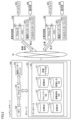
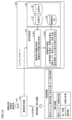
- FIG. 1 is a block diagram showing an overview of a matching system.
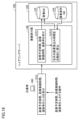
- 2 is a block diagram showing the configurations of a sharing server, a recruiter device, and an applicant device.
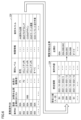
- FIG. FIG. 2 is a diagram illustrating an example of a company database.
- FIG. 4 is a diagram illustrating an example of a member database.
- FIG. 4 is a diagram illustrating an example of a community database.
- FIG. 2 is a diagram illustrating an example of a recruitment request database.
- FIG. 13 is a diagram showing an example of a side job database.
- FIG. 10 is a diagram illustrating an example of an evaluation input database.
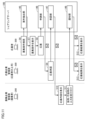
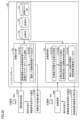
- FIG. 2 is a diagram for explaining functions of a sharing server, a recruiter device, and an applicant device.
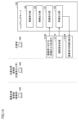
- FIG. 2 is a diagram for explaining functions of a sharing server, a recruiter device, and an applicant device.
- FIG. FIG. 2 is a diagram for further explaining the function of the applicant device.
- FIG. 13 is a diagram for explaining a procedure for registering a recruitment request in a recruitment request database.
- FIG. 13 is a diagram for explaining a procedure for searching for recruitment requests from a database.
- 13 is a diagram for explaining the procedure for registering side job plans and results in a database.
- FIG. FIG. 13 is a diagram for explaining the procedure for registering an evaluation of an applicant in a database.
- FIG. 13 is a diagram for explaining the procedure for registering an evaluation of a recruiter in a database.
- 13 is a diagram for explaining a procedure for displaying evaluations of applicants and search results of members on a display.
- FIG. 13 is a diagram for explaining the viewable range of the evaluation summary database.
- FIG. 13 is a diagram showing an example in which a disclosure range is set according to a disclosure level.
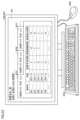
- 13 is a diagram showing a screen displayed on the applicant device of a manager (applicant's boss) when the manager checks the side job status of his/her subordinates.
- FIG. 13 is a diagram showing a screen displayed on the applicant device when an administrator changes the settings of access restrictions.
- FIG. 13 is a flowchart showing a process of limiting information executed by a sharing server according to a first modified example.
- FIG. 13 is a diagram for explaining the functions of a sharing server, a recruiter device, and an applicant device according to the second modified example.
- FIG. 13 is a diagram showing an example of a member database according to the second modified example.
- 13 is a flowchart showing the processing steps of a counter offer member search process according to the second modified example.
- FIG. 13 is a block diagram showing the configurations of a sharing server, a recruiter device, and an applicant device according to the third modified example.
- FIG. 13 is a diagram showing an example of a member group database according to Modification Example 3.
- FIG. 13 is a diagram showing an example of a recruitment request database according to the third modified example.
- FIG. 13 is a diagram for explaining the procedure for registering a recruitment request related to the modified example 3 in the recruitment request database.
- FIG. 13 is a diagram showing the configuration of a matching system according to modified example 4.
- FIG. 13 is a diagram showing an example (variation 5) in which Kerberos authentication is applied to a matching system.
- FIG. 1 is a block diagram showing an overview of a matching system 1 according to the present embodiment. First, the background for proposing the matching system 1 in the present embodiment will be described.
- the matching system 1 is used, for example, for crowdsourcing between companies.
- Crowdsourcing is generally a process of soliciting contributions from an unspecified number of people to obtain needed services, ideas, or content.
- Terms similar to in-house jargon can be used with unique meanings not only in companies, but also in non-profit organizations. Whether for-profit or non-profit, an organization may be divided into multiple units such as departments and sections, and each unit may have its own unique terms. Or, such terms may be prevalent in communities formed by bringing together multiple organizations such as companies. Therefore, when recruiters and applicants belong to different organizations, units, and communities, differences in understanding of terms may cause the business-related troubles mentioned above.
- the matching system 1 includes a sharing server 100, recruiter devices 200A, 200B, 200C . . . and applicant devices 300A, 300B, 300C .
- a database 120 necessary for the matching service is constructed.
- the database 120 includes various databases in which information necessary for providing the matching service is registered. For example, information on members and recruitment operations is registered in the database 120.
- the sharing server 100 is managed and operated by a company separate from the companies that use the matching service. Any of the companies that use the matching service may manage and operate the sharing server 100.
- recruiter device 200A is operated by an administrator of company A.
- recruiter device 200B is operated by an administrator of company B.
- recruiter device 200C is operated by an administrator of company C.
- recruiter devices 200A, 200B, 200C... may be collectively referred to as "recruiter device 200.”
- Applicant device 300A is operated by an applicant from company A.
- Applicant device 300B is operated by an applicant from company B.
- Applicant device 300C is operated by an applicant from company C.
- applicant devices 300A, 300B, 300C... may be collectively referred to as "applicant device 300.”
- FIG. 1 shows two applicants for each company, the number of applicants is not limited to this. There may be more applicants for each company, or a company may have only one applicant. Sharing server 100 may also accept applicants who do not belong to a company, such as freelancers.
- recruiters can also act as applicants for jobs being recruited by other recruiters.
- the recruiter device 200 functions as the applicant device 300.
- the device that the manager uses to use the matching service is referred to as the recruiter device 200.
- the sharing server 100 and the recruiter device 200 are configured to be able to communicate with each other via the Internet 50, which is an example of a communication line network.
- the sharing server 100 and the applicant device 300 are configured to be able to communicate with each other via the Internet 50.
- the sharing server 100 When accepting access from the recruiter device 200, the sharing server 100 requests sign-in with the input of a member ID and password. Similarly, when accepting access from the applicant device 300, the sharing server 100 requests sign-in with the input of a member ID and password. The sharing server 100 identifies each recruiter and applicant by the member ID notified at the time of sign-in.
- the recruiter device 200 accepts various operations by the recruiter.
- the recruiter device 200 accepts operations such as inputting a recruitment case (requested work), inputting an evaluation of a contractor who has completed a job, and searching for members of the matching service.
- the recruiter device 200 communicates with the sharing server 100 in response to each operation on the recruiter device 200.
- the sharing server 100 registers a recruitment request (requested work) in the database 120 in response to an operation of inputting the recruitment request, registers the evaluation of the target applicant (contractor) in the database 120 in response to an operation of inputting an evaluation, and provides member information to the recruiter device 200 in response to an operation of searching for members.
- the applicant device 300 accepts various operations by the applicant. For example, the applicant device 300 accepts operations such as searching for job openings, applying for job openings, and inputting work results.
- the applicant device 300 communicates with the sharing server 100 in response to each operation on the applicant device 300.
- the sharing server 100 provides the applicant device 300 with appropriate job postings in response to an operation to search for job postings, issues a notice of acceptance or rejection to the applicant device 300 in response to an operation to apply for a job posting, and registers the work performance in the database 120 in response to an operation to input the work performance.
- the matching system 1 includes an evaluation system that evaluates job applicants (contractors) and a recruitment system that recruits contractors for the job.
- a recruiter belonging to one department of company A can hire an applicant belonging to another department of company A as a contractor for a job.
- a recruiter belonging to company A can hire an applicant belonging to company B as a contractor for a job.
- members of the matching system 1 may be referred to as “users.”
- the recruiter device 200 and applicant device 300 operated by the members may be collectively referred to as “user device 500.”
- Users who use the matching system 1 access the sharing server 100 as recruiters or applicants using the “user device 500.”
- FIG. 1 shows a "List of business cases currently being recruited" screen 551 that is displayed when a user signs up to the sharing server 100 in administrator mode. By looking at the "List of business cases currently being recruited," the user can learn about all business cases that have been disclosed to the company to which the user belongs.
- the "List of Open Projects" includes an area where users can set viewing restrictions for business projects. Such an area is not displayed if a user signs up to the sharing server 100 in general mode other than administrator mode.
- a user with administrator privileges can select from among the many business projects those that they do not want employees of the company to view, and set viewing restrictions for the selected projects. Projects for which viewing restrictions have been set will no longer be disclosed to the company to which the user with administrator privileges belongs.
- the system may be configured so that anyone with permission from a user with administrator privileges can set the viewing restrictions for business cases.
- the system may be configured so that any user can set the viewing restrictions for business cases.
- the user can also display the applicant's profile on the user device 500.
- the user uses the user device 500 to check the applicant's work history, etc.
- the user device 500 displays the job requirements for the job.
- the user looks at the screen 552 of the user device 500 to check the details of the job.
- the user looks at the screen 552 to check the applicant's work history, etc.
- the screen 552 displays reports on ongoing work, instructions to change part of the request content, instructions to add to the request content, etc.
- the user checks the content displayed on the screen 552 and uses the user device 500 to carry out the necessary processing, such as replying to the other party with the necessary information.
- Information displayed on screen 552 may contain in-house terminology. If the company to which the user viewing screen 552 belongs is different from the company to which the user providing that information belongs, the user viewing screen 552 may not be able to correctly understand the in-house terminology.
- the matching system 1 therefore registers each company's in-house terminology and its meaning in the database 21.
- the matching system 1 generates an index of in-house terminology from documents such as job descriptions used by users, and links it to the in-house terminology registered in the database 21. In this way, the matching system 1 has an indexing function.
- user device 500 displays the in-house term in a different display mode from other terms. This allows the user to understand that it is an in-house term. Furthermore, user device 500 displays the intended meaning of the in-house term on screen 552 in response to a user operation (for example, clicking on the in-house term).
- screen 552 shown in FIG. 1 displays "DX” as an example of an in-house term.
- DX is underlined to indicate that it is an in-house term.
- a window explaining the meaning of the term “DX” is displayed on screen 552.
- DX is an abbreviation for Digital Transformation, and generally means a transformation using digital technology.
- some companies may use "DX” as an in-house term meaning the creation of some new value, regardless of whether digital technology is used. In such a case, the meaning corresponding to the in-house term is explained in the window on screen 552. This allows the user to correctly understand the meaning of "DX" that the other party intended.
- FIG. 2 is a block diagram showing the configuration of the sharing server 100, the recruiter device 200, and the applicant device 300.
- the sharing server 100 includes a processor 101 , a memory 102 , a storage 103 , and a communication interface 104 .
- Memory 102 may include a RAM (Random Access Memory), a ROM (Read Only Memory), flash memory, or any other suitable memory system. Memory 102 stores programs necessary for the arithmetic processing of processor 101, temporary data calculated in the arithmetic processing, and the like.
- RAM Random Access Memory
- ROM Read Only Memory
- flash memory or any other suitable memory system.
- Memory 102 stores programs necessary for the arithmetic processing of processor 101, temporary data calculated in the arithmetic processing, and the like.
- Storage 103 is composed of a hard disk drive, a solid state drive, and the like.
- Database 120 is stored in storage 103.
- Database 120 includes multiple types of databases.
- the multiple types of databases include a company database (company DB) 121, a member database (member DB) 122, a community database (community DB) 123, a job posting database (job posting DB) 124, a side job database (side job DB) 125, an evaluation input database (evaluation input) 126, and an evaluation summary database (evaluation summary DB) 127.
- Some of these multiple types of databases may be stored in storage provided separately from the sharing server 100.
- the sharing server 100 may be connected to a cloud service separate from the sharing server 100, and some of the multiple types of databases shown in FIG. 2 may be stored on that cloud.
- the sharing server 100 can access the necessary databases by communicating with that cloud via the Internet 50.
- the processor 101 connects to the Internet 50 via the communication interface 104 according to the program stored in the memory 102.
- the processor 101 connects to the Internet 50 and communicates with the recruiter device 200 and the applicant device 300.
- the processor 101 accesses the database 120 and executes processes such as extracting necessary data, registering new data in the database 120, and updating data registered in the database 120.
- the recruiter device 200 includes a processor 201, a memory 202, a communication interface 203, an input/output interface 204, a display 205, and an operation unit 206.
- the operation unit 206 is composed of a mouse, a keyboard, and the like.
- Memory 202 includes a RAM (Random Access Memory), a ROM (Read Only Memory), flash memory, or any other suitable memory system.
- Memory 202 stores programs necessary for the arithmetic processing of processor 201, temporary data calculated in the arithmetic processing, and the like.
- the processor 201 connects to the Internet 50 via the communication interface 203 in accordance with the program stored in the memory 202.
- the processor 201 connects to the Internet 50 and communicates with the sharing server 100.
- the processor 201 communicates with the sharing server 100 and executes processes such as sending recruitment requests, displaying information on applicant members on the display 205, ordering work from a contractor selected from the applicants, and sending the contents of the evaluation of contractors entered by the recruiter to the sharing server 100.
- Information entered by operating the operation unit 206 is notified to the processor 201 via the input/output interface 204.
- the applicant device 300 comprises a processor 301, a memory 302, a communication interface 303, an input/output interface 304, a display 305, and an operation unit 306.
- the operation unit 306 is made up of a mouse, a keyboard, and the like.
- Memory 302 includes a RAM (Random Access Memory), a ROM (Read Only Memory), flash memory, or any other suitable memory system. Memory 302 stores programs necessary for the arithmetic processing of processor 301, temporary data calculated in the arithmetic processing, and the like.
- RAM Random Access Memory
- ROM Read Only Memory
- flash memory or any other suitable memory system.
- Memory 302 stores programs necessary for the arithmetic processing of processor 301, temporary data calculated in the arithmetic processing, and the like.
- the processor 301 connects to the Internet 50 via the communication interface 303 in accordance with the program stored in the memory 302.
- the processor 301 connects to the Internet 50 and communicates with the sharing server 100.
- the processor 301 communicates with the sharing server 100 and executes processes such as applying for a job, displaying a notification of whether the applied job has been accepted or rejected on the display 305, and transmitting the results of the work received to the sharing server 100.
- Information entered by operating the operation unit 306 is notified to the processor 301 via the input/output interface 304.
- the company database 121 stores information on companies affiliated with the matching system 1.
- the member database 122 stores information on members who use the matching system 1. Many of the members are employees of companies affiliated with the matching system 1.
- Members registered in the member database 122 can act as recruiters (orderers) or applicants (recipients) by using the matching system 1.
- Members may include employees of companies registered in the company database 121 as well as individuals (freelancers) not affiliated with a company.
- the community database 123 stores information for identifying companies that belong to a community.
- a community is formed by agreement between companies. Therefore, multiple communities can be formed depending on how the agreement is reached between the companies.
- the number of companies that belong to one community can also be set in various ways.
- a relationship of trust is formed between companies that have a community relationship to the extent determined by the manner of agreement when forming the community.
- Information for identifying companies that belong to the community is registered for each community in the community database 123.
- the job posting database 124 stores jobs (job postings) for which contractors are being recruited.
- employees of each company can work in their own department as a main business within the company, and as members of the matching system 1, they can accept jobs from other departments of their own company or jobs from other companies that are registered in the job posting database 124. In this case, members accept jobs from other departments of their own company or jobs from other companies as a side job.
- the side job database 125 data showing the side job status is registered for each member.
- the data showing the side job status includes information such as side job results and side job plans.
- FIG. 3 is a diagram showing an example of the company database 121.
- a company ID for identifying the company a company name, a company address, and a side job upper limit time are registered for each company.
- the side job upper limit time is the upper limit time that an employee is permitted to work as a side job in addition to his/her main job.
- the side job upper limit time is set for each company.
- the side job upper limit time can be calculated by "prescribed overtime hours - overtime hours of the main job other than the side job".
- the "prescribed overtime hours" differ depending on the company. Note that while FIG. 3 shows the side job upper limit time in months, it may also be set in weeks.
- the unit of the side job upper limit time may also be set for each company.
- members are permitted to apply for and accept work from various companies and departments, as long as it does not exceed the side job time limit set by the company to which the member belongs.
- [Member database 122] 4 is a diagram showing an example of the member database 122.
- Various information about the member is registered in the member database 122.
- the various information about the member includes a member ID for identifying the member, the ID of the company to which the member belongs, the member's name, the member's authority, the department to which the member belongs, and the amount of time allowed for side work.
- Types of member authority include administrator and applicant.
- a member with administrator authority is given the authority to use the matching system 1 as a recruiter and an applicant.
- a member with applicant authority is given the authority to use the matching system 1 as an applicant, but is not given the authority to use the matching system 1 as a recruiter.
- Department heads within a company are given administrator authority to manage the side jobs of their subordinates within their departments.
- Managers with administrator authority are given the authority to approve applications from their subordinate applicants. Thus, managers function as approvers.
- the available side job time is the remaining time available for engaging in a side job.
- the available side job time is calculated by "maximum side job time - total side job time". If the subject is engaged in multiple side jobs, the total side job time includes the time already spent on those multiple side jobs.
- the total side job time includes the time already spent on the side job as well as the expected time for the side job.
- the expected side job time is calculated based on the expected man-hours registered in the job vacancy database 124.
- Figure 4 shows the available side job time on a monthly basis. Applicants who use the matching system 1 to search for available jobs are provided with only jobs that can be completed with man-hours within the available side job time as jobs to which they can apply.
- the solicited request information includes a request ID for identifying the solicited request, the ID of the company to which the recruiter who registered the solicited request belongs, a non-disclosure company ID list, the recruiter's member ID, the disclosure level, restriction information, the request title, the estimated man-hours, the estimated period, and the request content.
- the non-disclosure company ID list registers the IDs of companies that are prohibited from disclosing recruitment opportunities.
- the disclosure level is set to one of three levels: "our company,” “within the community,” or “all.” If the disclosure level is set to "all,” applicants outside the community will also be disclosed.
- the restriction information is information related to the viewing restrictions shown in Figure 1. The restriction information is set for each recruitment opportunity by applicant's company.
- the IDs of the companies that can view the recruitment requests are shown on the right side of the recruitment request database 124 in Figure 6.
- the recruitment cases corresponding to each case ID may be referred to as case 001, case 002, case 003, etc., using the case ID.
- the communities corresponding to each community ID may be referred to as community 01, community 02, community 03, etc., using the community ID
- the members corresponding to each member ID may be referred to as member P1, member P2, member P3, etc., using the member ID.
- the companies corresponding to each company ID may be referred to as company A, company B, company C, etc., using part of the company ID.
- restriction information for restricting members of company B from viewing case 002 is registered in the recruitment case database 124. In this case, only members belonging to either company A or company C can view case 002.
- Case 003 has the same registered companies and disclosure level as case 002. However, for case 003, "00B" is registered in the non-disclosure company ID list. Therefore, as shown in Figure 6, only members belonging to either company A or company C can view case 003, and members belonging to company B are not authorized to view case 003.
- the estimated man-hours and estimated period are used by applicants and matching system 1 to estimate the time it will take to process a recruitment request.
- the user may be able to control to whom business information is disclosed. More specifically, the screen for registering recruitment requests may be provided with check boxes for selecting companies to which business information is disclosed. Also, the user may be able to control related information and functions by selecting one of predefined options. For example, the screen for registering recruitment requests may display a list from which the user can select the scope of disclosure of business information from among "within the company,” “within the community,” and "all users.”
- the user device 500 may provide the user with a setting screen for setting various disclosure levels.
- the setting screen may display check boxes for the user to select the targets for which the case will be disclosed by industry, such as “pharmaceuticals,” “chemicals,” “electrical equipment,” “railroads and buses,” and “food.”
- the user may be able to select the targets for which the case will be disclosed by "industry” and by "company.”
- FIG. 7 is a diagram showing an example of the side job database 125.
- Information showing the side job status of a member is registered for each side job case in the side job database 125.
- the information showing the side job status includes the ID of the member engaged in the side job, the case ID, the month (period of engagement in the side job), planned side job hours, actual side job hours, expected side job hours, and progress rate.
- the planned side job time is the time that a member thinks it will take to process an order for which the member has already received the order.
- Members who have received an order for a side job input their planned side job time each month from their applicant device 300.
- the input planned side job time is reflected in the side job database 125.
- the expected man-hours for case 001 are set to 5 hours/person/month in the recruited case database 124. This means that the workload is 5 hours per person per month.
- members input their planned side job time using the expected man-hours for the recruited case as a guide.
- the actual side job time is the time that the member has actually worked on the case that has been accepted. In other words, the actual side job time is the time that the member has already worked as actual work.
- the member inputs the time that the member worked on the case at any timing on the applicant device 300.
- the cumulative value of the time input on the applicant device 300 is registered in the side job database 125 as the actual side job time for each month.
- the expected side job time is the time expected to be required for the work of the target case.
- the expected side job time is the time expected as the member's future working hours.
- the sharing server 100 automatically sets the expected side job time taking into consideration the planned side job time and the actual side job time.
- the member may be allowed to input the expected side job time on his/her own applicant device 300 at any time until the work of the target case is completed.
- the member may be allowed to modify the expected side job time that has been automatically set. It is desirable that the expected side job time be equal to or less than the planned side job time. However, depending on the situation of the case, the expected side job time may be longer than the planned side job time.
- the member engaged in the case may be allowed to update the expected side job time at any time until the work of the case is completed.
- the progress rate indicates the degree of progress of the side job.
- the progress rate is input at the discretion of the person engaged in the side job.
- the progress rate is input, for example, between 0(%) and 100(%).
- the progress rate is 0%
- the actual side job time is 0 hours
- the planned side job time and expected side job time match.
- the expected side job time changes in tandem.
- the side job database 125 shown in FIG. 7 shows side job data for member P2 from October 2021 to December 2021. Referring to the side job database 125 shown in FIG. 7, it can be seen that member P2 was engaged in case 001 and case 002 between October 2021 and December 2021.
- the December data for case 002 is registered as no actual side job hours. This means that the system is waiting for member P2 to input actual side job hours.
- the sharing server 100 calculates the member's capacity for additional side jobs using the side job expected time and side job actual time in the side job database 125. If a member is engaged in multiple side jobs, the sharing server 100 calculates the "total expected side job time,” which is the sum of the expected side job times corresponding to those multiple side jobs, and the “total actual side job time,” which is the sum of the actual side job times corresponding to those multiple side jobs.
- the "expected side job hours” may be calculated based on the formula "(man-hour progress rate/progress rate) x planned side job hours - actual side job hours.”
- the "man-hour progress rate” is calculated by "actual side job hours/planned side job hours.”
- the "progress rate” is a rate that is entered into the side job database 125 at the discretion of the person engaged in the side job.
- the man-hour progress rate is calculated to be 20%.
- the progress rate is 40%.
- [Evaluation Input Database 126] 8 is a diagram showing an example of the evaluation input database 126. Information on evaluations of ratees for ratees is registered in the evaluation input database 126. The evaluation information includes the evaluation target, the member ID of the ratee, the member ID of the evaluator, and the evaluation result.
- the evaluation input database 126 includes a recruiter evaluation section 126A and an applicant evaluation section 126B.
- the recruiter evaluation section 126A stores evaluation information for the recruiter (client).
- the applicant evaluation section 126B stores evaluation information for the applicant (contract recipient).
- the target of evaluation corresponds to the recruiter (client), and the evaluator corresponds to an applicant who applied for the recruitment work of the evaluated person and was accepted for the work.
- evaluations of the evaluated person are registered for each evaluator.
- Figure 8 shows an example in which members P1 and P2, who correspond to the evaluated person, are evaluated by evaluator members.
- Figure 8 shows an example in which member P1 is evaluated by each of evaluator members P5, P7, P11, and P12.
- the evaluation result (evaluation value) is expressed as a number with 10 as the maximum value and 0 as the minimum value.
- the applicant (contract recipient) for the recruitment project corresponds to the evaluation target (evaluated person), and the recruiter (orderer) of the project corresponds to the evaluator.
- evaluations of the evaluated person are registered for each evaluator.
- Figure 8 shows an example in which member P7, who corresponds to the evaluated person, has been evaluated by members P1, P2, and P3, who correspond to the evaluators. Note that in Figure 8, examples of evaluation results in the applicant evaluation section 126B are omitted, but various evaluation results are registered there, just like in the recruiter evaluation section 126A.
- an applicant completes an order received from a recruiter (orderer)
- he/she uses the applicant device 300 to evaluate the recruiter (evaluator), who is also the assessee.
- the evaluator's evaluation results are registered in the evaluation input database 126. If an applicant receives an order for a different job from a recruiter who has previously received an order for a job, the applicant evaluates the recruiter again. In this case, the average value of the previous evaluation result and the subsequent evaluation result is registered in the evaluation input database 126.
- the recruiter uses the recruiter device 200 to evaluate the applicant (contractor) as an evaluator.
- the evaluator's evaluation results are registered in the evaluation input database 126. If a recruiter orders a different work from an applicant who has previously requested work, the recruiter evaluates the applicant again. In this case, the average value of the previous evaluation result and the later evaluation result is registered in the evaluation input database 126.
- the evaluation results registered in the evaluation input database 126 therefore reflect the average of each evaluator's evaluation of the person being evaluated. Note that instead of the average value, a weighted average value calculated according to the number of evaluations and a standard deviation value, etc., may be used. Evaluation results by case ID may also be registered in the evaluation input database 126.
- [Evaluation Summary Database 127] 9 is a diagram showing an example of the evaluation summary database 127.
- Information on the evaluation of the appraisee by department is registered in the evaluation summary database 127.
- the information on the evaluation by organization includes the evaluation target, the member ID of the appraisee, the ID of the company to which the appraisee belongs, the ID of the company to which the evaluator belongs, the department to which the evaluator belongs, and the evaluation summary.
- the evaluation summary database 127 includes a recruiter evaluation summary section 127A and an applicant evaluation summary section 127B.
- the evaluation target (evaluated person) corresponds to the recruiter (client).
- the evaluation target (evaluated person) corresponds to the applicant (contract recipient).
- evaluation summary database 127 evaluation summaries for the evaluation targets are registered by department.
- the recruiter evaluation summary section 127A shows an example in which member P1 is the person being evaluated.
- the company ID of the person being evaluated is "00A.” Therefore, member P1 belongs to company A.
- data group 1271 represents company B's evaluation of member P1 acting as a recruiter
- data group 1272 represents company C's evaluation of member P1 acting as a recruiter.
- the evaluation of company B is classified into an evaluation of the entire company, an evaluation of the systems department within company B, and an evaluation of the planning department within company B.
- the average evaluation value corresponding to each classified category is registered in the evaluation summary.
- the evaluation summary corresponding to company B as a whole is registered with the average evaluation results of the members of company B who evaluated member P1 acting as a recruiter. In FIG. 9, this value is "4.75".
- the evaluation summary corresponding to the system department is registered with the average evaluation results of the members of company B who are members of the system department and who evaluated member P1 acting as a recruiter. In FIG. 9, this value is "4.0".
- the evaluation summary corresponding to the planning department is registered with the average evaluation results of the members of company B who are members of the planning department and who evaluated member P1 acting as a recruiter. In FIG. 9, this value is "5.0".
- data group 1271 As with data group 1271, the evaluation of company C in data group 1272 is classified into an evaluation of the entire company and an evaluation of each department within company C.
- Data groups 1271 and 1272 are data that evaluate recruiters. Therefore, the evaluation summaries registered in data groups 1271 and 1272 are recruiter evaluation summaries.
- FIG. 9 shows an example of the applicant evaluation summary section 127B in which member P7 is the person being evaluated.
- the company ID of the person being evaluated is "00C". Therefore, member P7 belongs to company C.
- evaluations of member P7, who is acting as an applicant, are registered by department.
- the applicant evaluation summary section 127B has a similar structure to the recruiter evaluation summary section 127A, except that the evaluation target is an "applicant" rather than a "recruiter.” Therefore, the explanation of the applicant evaluation summary section 127B will be replaced here with the explanation of the recruiter evaluation summary section 127A already given.
- the sharing server 100 uses the evaluation input database 126 to identify the evaluation results of each member, and uses the member database 122 to identify the affiliation of each member.
- the sharing server 100 updates the data in the evaluation summary database 127 based on these identification results.
- [Functions of the Sharing Server, recruiter Device, and Applicant Device] 10 to 12 are diagrams for explaining the functions of the sharing server, the recruiter device, and the applicant device.
- the community registration unit 140 has a function of registering communities in the community database 123.
- a system administrator who manages the matching system 1 inputs information about the community into the sharing server 100 using an operation unit such as a keyboard (not shown).
- the information about the company includes information such as the company name, address, and maximum hours for side jobs.
- the company registration unit 141 registers the company in the company database 121 according to the input by the system administrator (step S2).
- the company registration unit 141 further has a function for updating information about companies that have already been registered.
- the member registration unit 142 has a function for registering (signing up) new members who will join the matching system 1.
- the member registration unit 142 issues a member ID and password in response to a request from an individual belonging to a company that is a member of the matching system 1.
- An individual who wishes to become a member performs the sign-up process using a personal computer or the like (step S3).
- a person who wishes to become a member inputs information such as their name, company, and department into a personal computer, etc., and transmits the input information to the sharing server 100.
- the member registration unit 142 registers the input information in the member database 122. New members can sign in to the sharing server 100 using the personal computer used for member registration. In this case, the personal computer functions as the recruiter device 200 or the applicant device 300.
- Two applicant devices 300 are shown in FIG. 10.
- One is a device that is assumed to be operated by a manager of the applying company.
- the other is a device that is assumed to be operated by someone in the applying company other than the manager.
- the manager of the applying company is a managerial employee such as a department head, and corresponds to the superior of the applicants who are his or her subordinates.
- the manager of the applying company plays the role of an approver who approves applications for recruitment jobs made by his or her subordinates.
- the member search unit 143 has a function of searching for members of the matching system 1. In response to requests from the recruiter device 200 and the applicant device 300, the member search unit 143 provides information on members registered in the member database 122 to the recruiter device 200 and the applicant device 300.
- the recruiter's device 200 executes a member search process (step S4A). This allows the recruiter to view, for example, the applicant's information. The recruiter can select an applicant to accept the job from among multiple applicants, taking into consideration the applicant's information. Similarly, when the applicant's device 300 receives a search operation for a manager who is the superior of an applicant, it executes a member search process (step S4A).
- the applicant device 300 executes a member search process (step S4B).
- a member search process This allows the applicant to, for example, view the information of the recruiter.
- the applicant can select an order for a job from among multiple recruiting jobs, taking into consideration the information of the recruiter.
- step S4A The member search process (step S4A) performed by the recruiter device 200 and the processing of the member search unit 143 will be described in detail later with reference to FIG. 19.
- step S4B The member search process (step S4B) performed by the applicant device 300 and the processing of the member search unit 143 will be described in detail later with reference to FIG. 20.
- the case registration unit 144 has a function of registering a recruitment case in the recruitment case database 124.
- the recruiter device 200 receives an operation to input a recruitment case, it executes a process to register the recruitment case (step S5).
- the recruiter device 200 transmits information about the recruitment case to the sharing server 100.
- the case registration unit 144 registers the received information about the recruitment case in the recruitment case database 124.
- step S5 executed by the recruiter device 200 and the processing of the request registration unit 144 will be described in detail later with reference to FIG. 14.
- the sharing server 100 functionally includes a case extraction unit 145, an application unit 146, an approval unit 147, and a notification unit 148. These various functions are realized by a processor 101, a memory 102, a storage 103, and a communication interface 104 provided in the sharing server 100.
- the job extraction unit 145 has a function of extracting job postings that can be viewed by applicants.
- the application unit 146 has a function of submitting an application by an applicant to a manager (the applicant's superior).
- the approval unit 147 has a function of sending the contents of the application for the job posting to the recruiter on the condition that approval of the application has been received from the manager (approver).
- the notification unit 148 has a function of receiving the result of whether or not to hire the applicant from the recruiter, and notifying the applicant and the manager of the result.
- the case extraction unit 145 When the case extraction unit 145 receives a search request, it extracts cases that the applicant is permitted to view from among the recruitment cases registered in the recruitment case database 124, and transmits the extracted cases to the applicant device 300.
- the case extraction unit 145 determines whether the applicant is permitted to view the case based on a first criterion and a second criterion.
- the first criterion is the disclosure range set for the recruitment case.
- the second criterion is the applicant's spare capacity for a side job.
- the disclosure range is determined by the disclosure information shown in FIG. 14.
- the spare capacity for a side job is calculated as the available time for a side job, as shown in FIG. 15.
- the case extraction unit 145 determines cases that satisfy both the first and second criteria as cases that the applicant is permitted to view. Therefore, the case extraction unit 145 extracts cases that are permitted to be disclosed to the applicant who received the search request from among the recruitment cases registered in the recruitment case database 124. Furthermore, the case extraction unit 145 extracts cases that can be handled within the side job hours available to the applicant who received the search request from among the recruitment cases registered in the recruitment case database 124. The case extraction unit 145 transmits the cases that the applicant is permitted to view to the applicant device 300.
- the case extraction unit 145 may be configured to accept an operation to set criteria for extracting cases.
- a function may be added to the sharing server 100 that allows the system administrator to select from a first setting that enables only the first criterion, a second setting that enables only the second criterion, and a third setting that enables both the first and second criteria.
- the applicant device 300 receives the recruitment request from the request extraction unit 145.
- the applicant device 300 displays the received recruitment request on the display 305 (step S7).
- step S6 The job search process (step S6), the job display process (step S7), and the process of the job extraction unit 145 will be described in detail later with reference to FIG. 15.
- the approval unit 147 accepts the applicant's application on the condition that approval information has been received from the applicant device 300.
- the applicant's application is accepted on the condition that the manager to whom the applicant belongs approves it. Therefore, the manager can check in advance the content of the job for which the subordinate is applying. As a result, it is possible to prevent confidential information from leaking outside the company through the side job activities of employees.
- FIG. 11 shows the flow when the manager approves an application. If an operation to reject the application is accepted in step S9, rejection information is sent from the applicant device 300 of the manager to the approval unit 147. When rejection information is received, the approval unit 147 may notify the applicant device 300 of the applicant that the application has been rejected.
- the approval unit 147 which has accepted the applicant's application, sends the application information to the recruiter device 200.
- the application information includes information about the applicant and the details of the job for which the applicant is being applied.
- the recruiter device 200 displays the application details on the display 205 (step S10).
- the recruiter checks the applicant and the job for which the applicant is being applied based on the display 205, and decides whether or not to hire the applicant.
- the recruiter inputs the result of the hiring or rejection decision to the recruiter device 200.
- the recruiter device 200 accepts the input result (step S11).
- the recruiter device 200 transmits the accepted hiring or rejection result to the notification unit 148 of the sharing server 100.
- the notification unit 148 When the notification unit 148 receives a result of employment or rejection from the recruiter device 200, it transmits the application result (employment or rejection result) to the applicant device 300 of the applicant and the applicant device 300 of the manager.
- the applicant's device 300 and the manager's device 300 display the application results on the display 305 (steps S12 and S13).
- the applicant and manager check the application results by looking at the display 305.
- the performance receiving unit 149 has a function to receive the planned side job hours and actual side job hours entered by the applicant on the applicant device 300.
- the performance output unit 150 has a function to output information including the applicant's planned side job hours and actual side job hours to the recruiter device 200 or the manager's applicant device 300.
- the evaluation receiving unit 151 has a function of receiving an evaluation of an applicant (contract recipient) that is input by the recruiter on the recruiter device 200.
- the evaluation output unit 152 has a function of outputting information indicating the evaluation of the applicant to the recruiter device 200.
- an applicant engages in a side job he/she inputs the planned side job hours and the actual side job hours into the applicant device 300.
- Applicants usually input the planned side job hours into the applicant device 300 when they receive an order for a new side job, and input the actual side job hours into the applicant device 300 at any time while they are engaged in the side job. For example, if an applicant receives an order for a side job that has an expected period spanning multiple months, the applicant inputs the actual side job hours into the applicant device 300 for each month.
- the results receiving unit 149 registers the received planned side job hours and actual side job hours in the side job database 125.
- the processing of step S14 executed by the applicant device 300 and the processing of the results receiving unit 149 will be described in detail later with reference to FIG. 16.
- the performance output unit 150 transmits the planned side job time and actual side job time registered in the side job database 125 to the recruiter device 200 and the manager's applicant device 300.
- the recruiter device 200 displays the received information including the planned side job time and actual side job time on the display 205
- the manager's applicant device 300 displays the received information including the planned side job time and actual side job time on the display 305 (step S15).
- the cases being transmitted are different.
- the achievement reception unit 149 transmits to the recruiter device 200 data corresponding to cases recruited by the recruiters from among the many cases registered in the side job database 125. For example, consider a case in which, in the side job database 125 shown in FIG. 7, among multiple recruiters, a first recruiter is recruiting for case 001 and a second recruiter is recruiting for case 002.
- various data corresponding to case 001 from the side job database 125 is sent from the achievement receiving unit 149 to the recruiter device 200 operated by the first recruiter.
- Various data corresponding to case 002 from the side job database 125 is sent from the achievement receiving unit 149 to the recruiter device 200 operated by the second recruiter.
- the first and second recruiters can check the progress of their own projects by viewing the planned side job hours and actual side job hours, etc., displayed on the display 305 of the recruiter device 200.
- the recruiter device 200 When the recruiter completes the side job, he/she inputs an evaluation of the applicant into the recruiter device 200.
- the recruiter device 200 accepts the input of the evaluation of the applicant (step S16A). Therefore, when accepting the input evaluation, the recruiter device 200 functions as an evaluator device operated by the evaluator (recruiter).
- the recruiter device 200 transmits the received evaluation to the evaluation reception unit 151 of the sharing server 100.
- the evaluation reception unit 151 updates the evaluation input database 126 and the evaluation summary database 127 based on the received evaluation.
- the information in the applicant evaluation unit 126B is updated in the evaluation input database 126
- the information in the applicant evaluation summary unit 127B is updated in the evaluation summary database 127.
- the recruiter device 200 executes a viewing request process (step S17A).
- the recruiter device 200 transmits a viewing request to the evaluation output unit 152 of the sharing server 100.
- the evaluation output unit 152 transmits the applicant's evaluation (applicant evaluation summary) registered in the evaluation summary database 127 to the recruiter device 200.
- the recruiter device 200 displays the received applicant evaluation on the display 205 (step S18A).
- steps S17A and S18A executed by the recruiter device 200 and the processing of the evaluation output unit 152 will be described in detail later with reference to FIG. 19.
- FIG. 13 is a diagram for further explaining the functions of the applicant device 300.
- the evaluation receiving unit 151 further has a function of receiving an evaluation of the recruiter input by the applicant on the applicant device 300.
- the evaluation output unit 152 further has a function of outputting information indicating the evaluation of the recruiter to the applicant device 300.
- applicants are likely to rate a recruiter highly if they can communicate smoothly with the recruiter and complete the work within an appropriate time frame. Conversely, applicants are likely to rate a recruiter low if there are many requests to add, change, or modify the work content, if too much time is spent outside the scope of the work, if instructions are communicated too late, or if instructions are given unilaterally without consulting the applicant beforehand regarding modifications to the work content.
- the applicant device 300 accepts the input of an evaluation of the recruiter (step S16B). Therefore, when accepting the input evaluation, the applicant device 300 functions as an evaluator device operated by the evaluator (applicant).
- the applicant device 300 transmits the received evaluation to the evaluation reception unit 151 of the sharing server 100.
- the evaluation reception unit 151 updates the evaluation input database 126 and the evaluation summary database 127 based on the received evaluation.
- the information in the recruiter evaluation unit 126A is updated in the evaluation input database 126
- the information in the recruiter evaluation summary unit 127A is updated in the evaluation summary database 127.
- step S16B executed by the applicant device 300 and the processing of the evaluation receiving unit 151 will be explained in detail later with reference to FIG. 18.
- the applicant's device 300 When the applicant's device 300 receives an operation to view the applicant's evaluation of the recruiter, it executes a viewing request process (step S17B).
- the recruiter's device 200 transmits a viewing request to the evaluation output unit 152 of the sharing server 100.
- the evaluation output unit 152 transmits the evaluation of the recruiter (recruiter evaluation summary) registered in the evaluation summary database 127 to the applicant's device 300.
- the applicant's device 300 displays the received evaluation of the recruiter on the display 305 (step S18B).
- steps S17B and S18B executed by the applicant device 300 and the processing of the evaluation output unit 152 will be explained in detail later using FIG. 20.
- Fig. 14 is a diagram for explaining the procedure for registering a recruitment request in the recruitment request database 124. Step S5 in Fig. 10 and the function of the request registration unit 144 will be described in more detail with reference to Fig. 14.
- a recruiter who registers a recruitment request first signs in to the sharing server 100 using the recruiter device 200. This establishes a logical communication path identified by the recruiter's member ID between the recruiter device 200 and the sharing server 100.
- the recruiter uses the operation unit 206, such as a mouse and keyboard, to input business information and disclosure information for the recruitment request into the recruiter device 200.
- the information inputted by the operation unit 206 is notified to the processor 201 via the input/output interface 204 of the recruiter device 200.
- the operation unit 206 and the input/output interface 204 constitute an interface that accepts operations for inputting the contents of the business and for inputting disclosure information that specifies the target to which the business is to be disclosed.
- Business information for job postings includes the job title, job content, estimated man-hours (person-months), and estimated period.
- Disclosed information includes the disclosure level. Disclosed information may include the IDs of companies that are not subject to disclosure, depending on the employer's choice.
- the recruiter device 200 accepts input of the business information and disclosure information of the recruitment request, and executes a process to register the recruitment request (step S5). In the process of registering the recruitment request, the recruiter device 200 transmits the business information and disclosure information of the recruitment request to the sharing server 100.
- the case registration unit 144 of the sharing server 100 acquires information about the recruiter (step S1441). Specifically, the case registration unit 144 identifies the company to which the recruiter belongs.
- the sharing server 100 stores the member ID used when a member signs in to the sharing server 100 using the recruiter device 200 or the applicant device 300.
- the sharing server 100 receives any information from the recruiter device 200 or the applicant device 300 in communication established by this member ID, it identifies the member who sent the information by the member ID used to sign in.
- the case registration unit 144 uses the member ID used to sign in to identify the recruiter operating the recruiter device 200.
- the case registration unit 144 uses the identified member ID, the member database 122, and the company database 121 to identify the member who is the recruiter and the company to which the recruiter belongs.
- the case registration unit 144 executes a process of registering the solicited case in the solicited case database 124 (step S1442). Specifically, after generating a case ID, the case registration unit 144 registers the company information (company ID), the ID of the company to be withheld, the disclosure level, the case title, the estimated man-hours, the estimated period, and the case content, etc., in the solicited case database 124 in association with the generated case ID.
- company ID company ID
- the ID of the company to be withheld the disclosure level
- the case title the estimated man-hours, the estimated period, and the case content, etc.
- the recruiter can freely control the scope of disclosure of the recruitment item at the level of "within his/her own company,” “within the community,” or “unrestricted.” As a result, it is possible to prevent the recruitment item from being disclosed to a specific company without the recruiter's intention.
- the recruiter can set the disclosure range by excluding some of the multiple companies that have a community relationship with the recruiter's company. As a result, it is possible to prevent business related to a specific company in the community from being disclosed to that specific company.
- a non-disclosure member ID list for registering member IDs for which disclosure of recruitment requests is prohibited may be provided in the recruitment request database 124.
- the recruiter device 200 may accept an operation to designate a member for whom disclosure of recruitment requests is prohibited, and transmit the member ID to the sharing server 100.
- the sharing server 100 may not provide recruitment requests corresponding to a member ID listed in the non-disclosure member ID list to the member. In this way, the recruiter device 200 may accept either companies or members as persons for whom disclosure of business is prohibited.
- FIG. 15 is a diagram for explaining the procedure for searching for recruitment requests from within the database 120. The processing of steps S6 and S7 in FIG. 11 and the function of the request extraction unit 145 will be explained in more detail using FIG. 15.
- the applicant device 300 When the applicant device 300 receives an operation from the applicant requesting a search for recruitment jobs, it executes a search process for recruitment jobs (step S6). In the search process for recruitment jobs, the applicant device 300 transmits a search request to the job extraction unit 145 of the sharing server 100.
- the case extraction unit 145 When the case extraction unit 145 receives a search request, it extracts cases that are permitted for viewing by applicants from among the recruitment cases registered in the recruitment case database 124. To this end, the case extraction unit 145 executes the processes of steps S1451 to S1454.
- Steps S1451 and S1452 are processes for extracting cases that the applicant is permitted to view based on the disclosure scope set for the recruitment case.
- step S1451 the applicant's company and the company's community are determined.
- step S1452 cases that can be disclosed are extracted.
- Step S1453 is a process for extracting jobs that the applicant is allowed to view based on the applicant's spare time for a side job.
- Step S1454 is a process for finally extracting jobs that match the applicant.
- Step S1451 includes step S1451A and step S1451B.
- step S1451A the applicant's company is identified based on the member ID used when signing in, company database 121, and member database 122.
- Step S1453 includes step S1453A, step S1453B, and step S1453C.
- step S1453A the applicant's available side job time T1 is calculated.
- the available side job time is derived by calculating "maximum side job time - total side job time.”
- the maximum side job time is a time set by the company to which the applicant belongs, and is registered in the company database 121.
- the calculated available side job time is registered in the member database 122.
- the case extraction unit 145 may calculate the available side job time for all members at regular intervals, and register the calculated available side job time in the member database 122.
- the total side job time is calculated based on the expected side job time and actual side job time registered in the side job database 125, using the formula "total expected side job time + total actual side job time.”
- the total side job time includes the time already spent on the side job as well as the expected time not yet spent on the side job.
- step S1453B the time T2 required to complete the work is calculated for each job posting.
- Time T2 is calculated based on the estimated man-hours (man-months) and estimated period registered in the job posting database 124.
- the estimated man-hours (months) may be used as time T2.
- 5 hours per month may be set as time T2 for the job posting corresponding to job ID 001.
- the applicant when an applicant receives an order for a new side job, the applicant inputs the planned side job time into the applicant device 300, and inputs the actual side job time into the applicant device 300 at any time while the applicant is engaged in the side job.
- the applicant device 300 accepts the input of the planned side job time (step S14).
- the applicant device 300 transmits the accepted planned side job time and actual side job time to the performance acceptance unit 149 of the sharing server 100.
- the results receiving unit 149 receives the applicant's planned side job hours and actual side job hours, and registers the accepted applicant's planned side job hours and actual side job hours in the side job database 125 (step S1511). As a result, the applicant's planned side job hours and actual side job hours for each month are registered in the side job database 125 by case ID.
- the result receiving unit 149 automatically calculates the side job expected time for the current month (step S1512).
- the result receiving unit 149 calculates the side job expected time based on the planned side job time and the actual side job time. Specifically, as already explained, the "side job expected time” is calculated based on the calculation formula "(man-hour progress rate/progress rate) x planned side job time - actual side job time”. The result receiving unit 149 may also calculate the "side job expected time” using the calculation formula "planned side job time - actual side job time”.
- the result receiving unit 149 registers the calculated side job expected time in the side job database 125. As shown in the side job database 125 in FIG. 7, the side job expected time is registered for each case ID.
- FIG. 17 is a diagram for explaining the procedure for registering evaluations of an applicant in database 120. Step S16A in Fig. 12 and the function of evaluation receiving unit 151 will be described in more detail with reference to Fig. 17.
- the recruiter When the applicant completes the side job, he/she reports the delivery and completion to the recruiter and has the recruiter inspect the job.
- the recruiter then operates the recruiter device 200 to input an evaluation of the applicant to the recruiter device 200.
- the recruiter device 200 accepts the input evaluation (step S16A).
- the recruiter device 200 transmits the accepted evaluation to the evaluation receiving unit 151 of the sharing server 100.
- the information transmitted from the recruiter device 200 to the sharing server 100 includes the member ID of the applicant who is being evaluated and the evaluation value (0 to 10).
- the evaluation reception unit 151 When the evaluation reception unit 151 receives information on the evaluation of the person being evaluated (applicant) from the recruiter device 200, it reflects the evaluation of the person being evaluated in the evaluation input database 126 (step S1513A).
- the evaluation receiving unit 151 calculates the average value of the evaluation results for the person being evaluated, including the currently received evaluation value.
- the evaluation receiving unit 151 updates the evaluation results registered in the evaluation input database 126 with the calculated average value.
- the average evaluation values (evaluation results) for the person being evaluated (applicant) are registered for each evaluator (recruiter) in the evaluation input database 126. This updates the information in the applicant evaluation unit 126B in the evaluation input database 126.
- the evaluation receiving unit 151 identifies the evaluator (recruiter) using the member ID used by the recruiter device 200 to sign in to execute step S16A. Based on the evaluation information received in step S1513A, the company database 121, and the member database 122, the evaluation receiving unit 151 identifies the ID of the company to which the evaluator belongs, the department to which the evaluator belongs, the member ID of the person being evaluated, and the ID of the company to which the person being evaluated belongs.
- the "member ID” is an example of "identification information that enables the sharing server 100 including the evaluation receiving unit 151 to identify the affiliation (company and department) of a person accessing the sharing server 100."
- the evaluation reception unit 151 accesses the evaluation summary database 127 and detects a data row containing the identified IDs (the member ID of the person being evaluated, the ID of the company to which the person being evaluated belongs, and the ID of the company to which the evaluator belongs). The evaluation reception unit 151 updates the value of the applicant evaluation summary that corresponds to the detected data row.
- the applicant when the applicant completes the side job, he/she reports the delivery and completion to the recruiter and has the recruiter inspect the job.
- the applicant then operates the applicant device 300 to input an evaluation of the recruiter into the applicant device 300.
- the applicant device 300 accepts the input evaluation (step S16B).
- the applicant device 300 transmits the accepted evaluation to the evaluation receiving unit 151 of the sharing server 100.
- the information transmitted from the applicant device 300 to the sharing server 100 includes the member ID of the recruiter who is being evaluated and the evaluation value (0 to 10).
- the evaluation receiving unit 151 When the evaluation receiving unit 151 receives information on the evaluation of the person being evaluated (recruiter) from the applicant device 300, it reflects the evaluation of the person being evaluated in the evaluation input database 126 (step S1513B).
- the evaluation receiving unit 151 executes evaluation summary processing (step S1514B).
- the evaluation receiving unit 151 calculates the average evaluation results for the evaluatees (recruiters) by company and department, and registers the calculation results in the evaluation summary database 127. This updates the information in the recruiter evaluation summary section 127A in the evaluation summary database 127.
- the evaluation receiving unit 151 identifies the evaluator (applicant) using the member ID used by the applicant device 300 to sign in to execute step S16B. Based on the evaluation information received in step S1513B, the company database 121, and the member database 122, the evaluation receiving unit 151 identifies the ID of the company to which the evaluator belongs, the department to which the evaluator belongs, the member ID of the person being evaluated, and the ID of the company to which the person being evaluated belongs.
- the "member ID” is an example of "identification information that enables the sharing server 100 including the evaluation receiving unit 151 to identify the affiliation (company and department) of a person accessing the sharing server 100.”
- the evaluation reception unit 151 accesses the evaluation summary database 127 and detects a data row that contains the specified IDs (the member ID of the person being evaluated, the ID of the company to which the person being evaluated belongs, and the ID of the company to which the evaluator belongs). The evaluation reception unit 151 updates the value of the recruiter evaluation summary that corresponds to the detected data row.
- data group 1271 in FIG. 9 lists the member ID of the person being evaluated (P1), the ID of the company to which the person being evaluated belongs (00A), and the ID of the company to which the evaluator belongs (00B).
- P1 member ID of the person being evaluated
- 00A the ID of the company to which the person being evaluated belongs
- 00B the ID of the company to which the evaluator belongs
- step S1514B the evaluation received in step S1513B is reflected in the recruiter evaluation summary corresponding to the "whole" of data group 1271 and the recruiter evaluation summary corresponding to the "system section.”
- the evaluation receiving unit 151 sets the average value of the evaluations of the entire company B, including the evaluations received in step S1513B, as the recruiter evaluation summary corresponding to "Overall" in the data group 1271. Similarly, the evaluation receiving unit 151 sets the average value of the evaluations of the system part, including the evaluations received in step S1513B, as the recruiter evaluation summary corresponding to "System part" in the data group 1271.
- FIG. 19 is a diagram for explaining the procedure for displaying the evaluation of the applicant and the member search results on the display 205.
- step S4A processing of the recruiter device 200
- steps S17A and S18A in FIG. 12 steps S17A and S18A in FIG. 12, and the function of the evaluation output unit 152 will be explained in more detail.
- the recruiter's device 200 executes a view request process (step S17A).
- the recruiter's device 200 transmits a view request to the evaluation output unit 152 of the sharing server 100.
- the evaluation output unit 152 selects from the evaluation summary database 127 an applicant evaluation summary that the recruiter (view requester) has permission to view (step S1521A).
- the recruiter who made the viewing request is authorized to view the applicant evaluation summary for the entire company to which the recruiter belongs and the applicant evaluation summary for the department to which the recruiter belongs.
- the recruiter who made the viewing request is not authorized to view any evaluation summaries other than these.
- the evaluation output unit 152 determines the viewing authority based on the member ID of the recruiter who sent the viewing request, the company database 121, and the member database 122.
- the "member ID" is an example of "identification information that enables the sharing server 100 including the evaluation receiving unit 151 to identify the affiliation (company and department) and viewing authority of a person who has accessed the sharing server 100."
- the evaluation output unit 152 selects an applicant evaluation summary corresponding to the viewing authority from the evaluation summary database 127.
- the evaluation output unit 152 transmits data including the selected applicant evaluation summary to the recruiter device 200 (step S1522A).
- the transmitted data includes the applicant's (evaluated) membership ID, information about the company to which the applicant belongs, information about the department to which the applicant belongs, etc.
- the transmitted data may include applicant evaluation summaries corresponding to each of multiple applicants (evaluated), depending on the viewing request.
- the recruiter device 200 which has received the applicant evaluation summary, displays the applicant evaluation summary on the display 205 together with information about the company to which the applicant belongs and information about the department to which the applicant belongs (step S18A).
- the recruiter device 200 displays the applicant evaluation summaries in a list of multiple applicants (evaluated persons).
- the sharing server 100 when the sharing server 100 receives a viewing request in communication established by a member ID that can identify the company and department to which the recruiter belongs, it transmits an applicant evaluation summary, which is an example of evaluation information, to the recruiter device 200 of the recruiter that sent the viewing request.
- the recruiter device 200 When the recruiter device 200 receives a search operation from the recruiter, it executes a member search process to search for information about the applicant (step S4A). In the member search process, the recruiter device 200 sends a search request to the member search unit 143 of the sharing server 100.
- the search request includes a reference value for excluding members with low ratings as applicants. This reference value is determined, for example, based on the value of the applicant evaluation summary.
- the member search unit 143 which receives the search request, identifies the company to which the recruiter who sent the search request belongs (step S1431A).
- the company identified by step S1431A is referred to as "company Xa.”
- the member search unit 143 identifies the recruiter operating the recruiter device 200 by using the member ID used by the recruiter device 200 when signing in to the sharing server 100.
- the member search unit 143 identifies the company Xa to which the recruiter belongs by using the company database 121 and the member database 122.
- the member search unit 143 extracts from the evaluation summary database 127 members whose applicant evaluation summary values for the identified company Xa as a whole exceed a reference value (step S1432A). In other words, the member search unit 143 extracts search results by excluding members who have a low evaluation for the company Xa as a whole.
- the member search unit 143 determines whether or not the evaluation is low based on the applicant evaluation summary. That is, member ⁇ , who has the authority of both an applicant and a recruiter, may behave as an applicant or as a recruiter. Therefore, as evaluation summaries for such member ⁇ , an applicant evaluation summary and a recruiter evaluation summary are registered in the evaluation summary database 127. Member ⁇ may have a high evaluation as a recruiter, but a low evaluation as an applicant. In this case, member ⁇ may be excluded from the extraction targets in step S1432A.
- the sharing server 100 may be provided with a function for accepting setting information for the standard value from the recruiter device 200 of each company. This allows each company to exclude members with low evaluations based on their own standard value from the search results.
- the member search unit 143 then outputs the extracted member information as a search result to the recruiter device 200 that made the search request (step S1433A).
- the recruiter device 200 displays the received search results in a list on the display 205 (step S19A).
- the recruiter can view the search results on the display 205, from which members whose companies the recruiter belongs to have a low overall rating have been excluded. Therefore, when selecting contractors from among applicants, the recruiter can save the trouble of visually excluding members whose companies have a low overall rating.
- the member search unit 143 may further exclude such members from the search results.
- FIG. 20 is a diagram for explaining the procedure for displaying the evaluation of the recruiter and the search results of the members on the display 305.
- step S4B processing of the applicant device 300
- steps S17B and S18B in FIG. 13 steps S17B and S18B in FIG. 13, and the function of the evaluation output unit 152 will be explained in more detail.
- the applicant's device 300 When the applicant's device 300 receives an operation to view the applicant's evaluation of the recruiter, it executes a viewing request process (step S17B). In the viewing request process, the applicant's device 300 transmits a viewing request to the evaluation output unit 152 of the sharing server 100. In response to the viewing request, the evaluation output unit 152 selects from the evaluation summary database 127 a recruiter evaluation summary for which the applicant (view requester) has been granted viewing rights (step S1521B).
- the applicant who made the viewing request is authorized to view the recruiter evaluation summary for the entire company to which the applicant belongs and the recruiter evaluation summary for the department to which the applicant belongs.
- the applicant who made the viewing request is not authorized to view any evaluation summaries other than these.
- the evaluation output unit 152 determines the viewing authority based on the member ID of the applicant who sent the viewing request, the company database 121, and the member database 122.
- the "member ID” is an example of "identification information that enables the sharing server 100 including the evaluation receiving unit 151 to identify the affiliation (company and department) and viewing authority of a person who has accessed the sharing server 100."
- the evaluation output unit 152 selects a recruiter evaluation summary corresponding to the viewing authority from the evaluation summary database 127.
- the evaluation output unit 152 transmits data including the selected recruiter evaluation summary to the applicant device 300 (step S1522B).
- the transmitted data includes the member ID of the recruiter (person being evaluated), information about the company to which the recruiter belongs, information about the department to which the recruiter belongs, etc.
- the transmitted data may include recruiter evaluation summaries corresponding to each of multiple recruiters (persons being evaluated) depending on the viewing request.
- the applicant device 300 which has received the recruiter evaluation summary, displays the recruiter evaluation summary on the display 305 together with information about the company to which the recruiter belongs and information about the department to which the recruiter belongs (step S18B).
- the applicant device 300 displays the recruiter evaluation summaries in a list of the multiple recruiters (evaluated persons).
- the sharing server 100 when the sharing server 100 receives a viewing request in communication established by a member ID that can identify the company and department to which the applicant belongs, it transmits an applicant evaluation summary, which is an example of evaluation information, to the applicant device 300 of the applicant who sent the viewing request.
- the applicant device 300 When the applicant device 300 receives a search operation from the applicant, it executes a member search process to search for information about the recruiter (step S4B). In the member search process, the applicant device 300 transmits a search request to the member search unit 143 of the sharing server 100.
- the search request includes a reference value for excluding members with low evaluations as recruiters. This reference value is determined, for example, based on the value of the recruiter evaluation summary.
- the member search unit 143 which has received the search request, identifies the company to which the applicant who sent the search request belongs (step S1431B).
- the company identified by step S1431B is referred to as "company Xb.”
- the member search unit 143 identifies the applicant who is operating the applicant device 300 by using the member ID used by the applicant device 300 when signing in to the sharing server 100.
- the member search unit 143 identifies the company Xb to which the applicant belongs by using the company database 121 and the member database 122.
- the member search unit 143 extracts from the evaluation summary database 127 members whose recruiter evaluation summary values for the identified company Xb as a whole exceed a reference value (step S1432B). In other words, the member search unit 143 extracts search results by excluding members who have a low evaluation for company Xb as a whole.
- the sharing server 100 may be provided with a function for accepting setting information for the standard value from the recruiter device 200 of each company. This allows each company to exclude members with low evaluations based on their own standard value from the search results.
- the member search unit 143 outputs the extracted member information as a search result to the applicant device 300 that made the search request (step S1433B).
- the applicant device 300 displays the received search results in a list on the display 305 (step S19B).
- the applicant can view the search results on the display 305, which exclude members whose companies have a low overall rating. Therefore, when selecting contractors from among the recruiters, the applicant can save the trouble of visually filtering out members whose companies have a low overall rating.
- the member search unit 143 may further exclude such members from the search results.
- FIG. 21 is a diagram for explaining the viewable range of the evaluation summary database 127.
- the viewable range will be explained by taking as an example the recruiter evaluation summary section 127A, which is also shown in Fig. 9, of the evaluation summary database 127.
- the recruiter evaluation summary section 127A shown in FIG. 21 includes evaluation summaries from companies B and C for member P1, who acts as a "recruiter.” Member P1 belongs to company A.
- the evaluation summary for company B is categorized into “overall,” "system department,” and “planning department.”
- the evaluation summary for company C is categorized into “overall” and "planning department,” etc.
- Members belonging to companies B and C view the evaluation summaries for member P1 as "applicants.”
- the right to view the evaluation summary calculated from the evaluation of Company B's Systems Department is granted to members of Company B's Systems Department, but not to members other than Company B's Systems Department.
- the right to view the evaluation summary calculated from the evaluation of Company B's Planning Department is granted to members of Company B's Planning Department, but not to members other than Company B's Planning Department.
- the viewable range using the recruiter evaluation summary section 127A is also determined based on the same design concept as the recruiter evaluation summary section 127A.
- the viewers are members of Company X's first division and Company X's second division
- the viewers' authority to view the evaluation summary for the entire Company X, the evaluation summary for Company X's first division, and the evaluation summary for Company X's second division will be as shown in table 401 in FIG. 21.
- the evaluation summary that is viewed is the evaluation summary for the "recruiter.”
- the recruiter corresponds to a "viewer”
- the evaluation summary that is viewed is the evaluation summary for the "applicant.”
- Members belonging to the first division of company X can view the evaluation summary for company X as a whole and for company X's first division, but cannot view the evaluation summary for company X's second division.
- Members belonging to the second division of company X can view the evaluation summary for company X as a whole and for company X's second division, but cannot view the evaluation summary for company X's second division.
- Members belonging to company Y other than company X cannot view the evaluation summary for company X as a whole, for company X's first division, or for company X's second division.
- the evaluation summary of company X as a whole, the evaluation summary of company X's first division, and the evaluation summary of company X's second division will not be disclosed to members of companies other than company X. Therefore, when evaluating recruits belonging to company X, members who belong to company Y and act as applicants can objectively evaluate recruits belonging to company X without taking into account the relationship between the companies, etc. Similarly, when evaluating applicants belonging to company X, members who belong to company Y and act as recruiters can objectively evaluate applicants belonging to company X without taking into account the relationship between the companies, etc.
- the accuracy of the recruiter evaluation summary and the applicant evaluation summary is improved.
- the applicant evaluation summary can be usefully used as reference data when selecting a contractor.
- step S4A when the member search process (step S4A) is executed on the recruiter device 200, search results excluding low-rated members are provided to the recruiter (step S1432A).
- step S4B when the member search process (step S4B) is executed on the applicant device 300, search results excluding low-rated members are provided to the recruiter (step S1432B).
- the matching system 1 has a filtering function that provides search results excluding low-rated members.
- the sharing server 100 may also perform filtering using the evaluation summaries on a department-by-department basis.
- a command signal may be sent from the recruiter device 200 to the sharing server 100 to instruct whether filtering using an evaluation summary for the entire company or filtering using an evaluation summary for each department should be used.
- the sharing server 100 is provided with a function for changing the evaluation summary used for filtering in response to the command signal.
- Fig. 22 is a diagram showing an example in which the disclosure range is set according to the disclosure level.
- the disclosure range of the recruitment item will be as shown in table 402, depending on the company to which the recruiter belongs and the disclosure level set by the recruiter.
- the disclosure levels "Level 1" to "Level 3" shown in FIG. 22 correspond to the three levels of “Company”, "Within the Community", and “All” already explained.
- the recruitment job of the recruiter is disclosed only to applicants who belong to the same company as the recruiter's company.
- the recruitment job of the recruiter is disclosed to applicants who belong to companies that have a community relationship with the company to which the recruiter belongs.
- the recruitment job of the recruiter is disclosed to applicants who belong to all companies, including the company to which the recruiter belongs. However, if the recruiter specifies a company ID that is not to be disclosed, the company corresponding to that company ID is excluded from the companies to which disclosure is to be made, regardless of the disclosure level set.
- Level 1 corresponds to "permitting disclosure of business information to the first applicant and prohibiting disclosure of business information to applicants who do not belong to the first group”.
- Level 2 corresponds to "allowing the disclosure of business information to applicants who belong to either the first group or a community group that has formed a community relationship with the first group, and prohibiting the disclosure of business information to applicants who do not belong to either the first group or a community group.”
- Level 3 corresponds to "allowing the disclosure of business information to applicants regardless of the group to which the applicant belongs.”
- levels 1 to 3 as described above have been described as an example of multiple disclosure levels.
- the multiple disclosure levels are not limited to these.
- a community may be divided into multiple small communities, and whether or not to disclose recruitment activities may be set for each small community. More specifically, community 02 shown in FIG. 5 is divided into a first small community and a second small community. Company C belongs to the first small community, and companies D and E belong to the second small community. In this case, a recruiter from company D may be able to choose whether to disclose the scope of his or her recruitment activities within the scope of the first small community or the scope of the second small community.
- the sharing server 100 may accept an operation to set a different disclosure range for each recruitment case.
- case 001 to case 003 are given as examples to explain a specific example of setting a different disclosure range for each recruitment case.
- This level of disclosure may be adopted as a modified version of "Level 3" as shown in FIG. 22.
- levels 1 to 3 have been described as an example of multiple levels, but even more levels may be set as multiple types of disclosure levels.
- a screen displaying check boxes for setting a desired level from multiple types of levels may be displayed on the user device 500.
- FIG. 23 is a diagram showing a screen displayed on the applicant device 300 of a manager (applicant's boss) when the manager checks the side job status of his/her subordinates.
- Fig. 23 shows an example in which the side job status of the manager's subordinates is displayed on the applicant device 300 (user device 500).
- the applicant device 300 is provided with a keyboard 306A and a mouse 306B as operation units.
- the manager is, for example, the head of the sales department of company C.
- the side job status of employees in the sales department is shown on display 305.
- the manager can check the side job status of employees in the sales department by selecting tab 307A, tab 307B, tab 307C, etc. with keyboard 306A or mouse 306B. Therefore, the manager can manage the working hours of his/her subordinates so that they do not end up in a state of overwork.
- the progress rate may also be displayed on the screen.
- FIG. 24 is a diagram showing a screen displayed on the applicant device 300 when the administrator changes the settings of the viewing restrictions.
- the administrator who operates the applicant device 300 belongs to company D.
- a list of business cases currently being recruited for company D is displayed on the display 305.
- the display 305 further shows that company D has formed community relationships with companies C and E.
- the business case list includes information related to the business case, such as the "case ID,” “recruiter's company ID,” “recruiter's company name,” and “case title,” for each business case.
- case ID the "case ID”
- “recruiter's company ID” the "recruiter's company name”
- case title the "case title”
- FIG. 24 multiple cases from company C and a case from company F are shown as business cases.
- the business case list also includes a setting area in which the administrator can set "viewing restrictions" for each business case.
- the administrator can use mouse 306B to move cursor 308 to the setting area and switch the viewing restriction setting in the setting area between "ON” and "OFF.”
- "OFF” corresponds to no viewing restriction
- "ON” corresponds to viewing restriction.
- the "ON” setting is an example of restriction information for restricting viewing.
- the default setting in the setting area is "OFF.”
- Company C and Company D have a community relationship, and therefore it is understood that they are not in a competitive relationship. Based on this understanding, Company C would be happy to accept Company D's employees viewing its business cases and applying for them. However, depending on the content of the business case or the circumstances of the company, Company D may have a problem with its employees accepting business cases from Company C.
- Company D will want to avoid having its employees apply for such a special project.
- Company D may want to avoid having its employees apply for Company C's projects for the time being.
- the matching system 1 is therefore provided with a function that allows applicants to set restriction information for restricting viewing of business cases. Applicants set restriction information for business cases for which they wish to restrict viewing. This prevents all employees of the company to which the applicant belongs from viewing business cases for which restriction information has been set.
- the recruiter is not notified of which of multiple job postings the restriction information has been set for. For this reason, the recruiter understands that there will be no applications from applicants belonging to a specific company, but does not believe that viewing of the job postings is restricted. Therefore, for example, even if company D sets restriction information on a job posting from company C, this will not cause any problems in the community relationship between companies C and D.
- the system may also be configured so that viewing restrictions are set collectively for a company or case type (sales case, etc.).
- the added case may also be configured so that viewing restrictions are immediately imposed on that added case.
- the scope of the viewing restrictions may also be limited to the entire company, or to a specific department specified when setting the viewing restrictions. This allows the user to, for example, have cases hidden from the research department that handles confidential information, but visible to other departments such as the general affairs department.
- [Timing chart] 25 is a timing chart showing the setting of restriction information.
- the flow of setting viewing information for a business case will be described using an example of companies C to E that have formed a community relationship.
- Company C is a user (recruiter) that provides business cases.
- Companies D and E are users (applicants) who are permitted by company C to view business cases.
- user device 500 of company D is an example of a first user device operated by a first user belonging to a first group.
- User device 500 of company C is an example of a second user device operated by a second user.
- the user device 500 of company C sets the business case and disclosure information in response to the user's operation (step S101).
- the user device 500 of company C transmits the business case and disclosure information to the sharing server 100 in response to the user's operation (step S102).
- the user may set two or more business cases in step S101, or may set one business case.
- the sharing server 100 registers the received business case in the solicited case database 124 (step S103).
- the sharing server 100 sets the disclosure range based on the received disclosure information (step S104).
- the disclosure range of the business case is limited to the "community" by the disclosure information.
- the business case is disclosed only to companies D and E.
- the sharing server 100 sets the disclosure range of the business case provided by the second user (a user belonging to company C) based on the disclosure information indicating the disclosure range of the business case.
- steps S103 and S104 are an example of a setting unit that accesses the database in which business cases are registered and sets the business case to be disclosed to the first group to which the first user belongs based on the disclosure information indicating the disclosure range of the business case.
- the sharing server 100 discloses the business cases to company D and company E according to the set disclosure scope (step S105).
- the user device 500 of company E acquires the business cases in response to user operation (step S106).
- the user device 500 of company E displays the acquired business cases (step S107).
- the user device 500 of company D acquires the business cases (step S108).
- the user device 500 of company D displays the acquired business cases (step S109).
- Step S110 the user device 500 of company D signs up to the sharing server 100 in administrator mode in response to the user's operation.
- the user device 500 of company D sets restriction information in response to the user's operation (step S111). For example, as shown in FIG. 24, the user selects the business case for which he or she wishes to restrict viewing, and switches the setting area from "OFF" to "ON".
- Step S111 is an example of a reception section that receives a user operation to input restriction information.
- step S112 the user device 500 of company D transmits the restriction information to the sharing server 100 in response to the user's operation.
- the restriction information is transmitted to the sharing server 100 for each business case.
- step S112 is an example of a transmission unit that transmits the restriction information to the computing device when the user's operation is received by the reception unit.
- restriction information is set for the first of two business cases
- the restriction information for the first case is sent to the sharing server 100.
- restriction information for the second case is sent to the sharing server 100.
- the user device 500 is configured to selectively send restriction information for the first case and restriction information for the second case to the sharing server 100 based on the user's operation.
- Step S113 is an example of a receiving unit that receives the restriction information from the user device.
- the sharing server 100 changes the disclosure scope of the business case based on the received restriction information (step S114). More specifically, the sharing server 100 registers the restriction information for restricting users of company D from viewing the target business case in the solicited case database 124.
- Step S114 is an example of a restriction unit that restricts the disclosure of business cases to the first group according to the restriction information, regardless of the disclosure range set based on the disclosure information. Note that in step S1452 of FIG. 15, if the applicant is a user of company D, business cases for which restriction information is set are excluded from business cases that can be disclosed.
- the sharing server 100 discloses the business case only to users of company E (step S115). As a result, the business case is no longer disclosed to users of company D. In this way, the sharing server 100 restricts the disclosure of the business case provided by the second user (a user belonging to company C) to the first group (company D) in accordance with the restriction information, regardless of the disclosure range set based on the disclosure information.
- the restriction information is an example of information that restricts the disclosure of a business case to the first group to which the first user belongs, regardless of the disclosure range based on the disclosure information.
- Fig. 26 is a diagram showing details of the job content included in the recruitment job database 124.
- the job content includes the recruitment requirements.
- the job content is registered in the recruitment job database 124 by job ID.
- the job content is made public to users (applicants) who are permitted to disclose the job.
- the sentences included in the job details may contain in-house terminology.
- the in-house terminology in such sentences is registered in the job posting database 124 as "index information" so that it can be linked to the in-house terminology in the in-house terminology database 136 described below.
- the user device 500 displays the in-house term in a different display mode from other terms. This allows the user to understand that it is an in-house term. Furthermore, the user device 500 displays the intended meaning of the in-house term in response to a user operation (for example, a click on the in-house term portion).
- the user device 500 may provide the recruiter and the applicant with a web conference environment for conducting these interviews.
- the user device 500 may display the company terms in the manner shown in FIG. 1.
- FIG. 27 is a diagram showing an example of the profile database 129.
- profile information of members is registered by member ID. Some of the profile information may overlap with information registered in the member database 122.
- the profile information includes the member's name, age, and gender.
- the profile information includes affiliation information that can identify the member's affiliation (company and department).
- the affiliation information is an example of group information for identifying either the company or a department within the company.
- the profile information includes the member's competency information, which is categorized by skills, experience, and qualifications.
- FIG. 28 is a diagram showing an example of the internal company terminology database 137.
- the internal company terminology database 137 registers internal company terminology information by company ID.
- the sharing server 100 identifies internal company terms by company by referring to the internal company terminology database 137.
- the internal terminology information includes affiliation information that can identify the member's affiliation (company and department).
- the affiliation information is an example of group information for identifying either the company or a department within the company.
- the affiliation information can also be said to be information that indicates the company and department in which the internal term to be registered is prevalent.
- the internal terminology information further includes the "name,” "reading,” and “meaning” of the term to be registered.
- the "name” is registered as “DX”
- the “reading” is registered as “D-X”
- the "meaning” is registered as “creating some kind of new value, regardless of whether digital technology is used or not.”
- App development is generally understood to mean developing applications to be used on electronic devices such as smartphones. However, in a certain department of a company that handles electronic components, “app development” may mean “developing new uses for components.” In such a case, the term “app development” and its meaning (developing new uses for components) are registered in the in-house term database 137.
- Fig. 29 is a flowchart showing the processing procedures related to the index function of the matching system 1.
- the sharing server 100 registers in-house terms in the in-house terminology database 137 (step Sw1). In step Sw1, the sharing server 100 functions as an in-house terminology registration unit. Next, the sharing server 100 registers a recruitment request in the recruitment request database 124 (step Sw2). In step Sw2, the sharing server 100 functions as a request registration unit. When registering a recruitment request in the recruitment request database 124, the request registration unit indexes the in-house terms included in the recruitment request information.
- the sharing server 100 then displays the indexed case information on the user device 500 (step Sw3). For example, if an in-house term is used in a sentence explaining the details of the case, the sentence with the in-house term underlined is displayed on the user device 500. Instead of or in addition to underlining the in-house term, the in-house term may be displayed on the screen 552 of the user device 500 in a different color than the other words.
- the sharing server 100 functions as a display unit.
- FIG 30 is a flowchart showing the processing steps of the in-house terminology registration unit (Sw1).
- a company employee compiles in-house terminology, for example by using the company's own system (step Sw11). In other words, the employee creates something like an in-house glossary.
- the employee downloads a registration template from the sharing server 100 (step Sw12).
- the employee enters the necessary information into the template (step Sw13).
- the necessary information includes the in-house terminology, the meaning of the in-house term, and the meaning of the in-house term.
- the company's person in charge accesses the sharing server 100 and obtains the person's own profile information from the profile database 129 (step Sw14).
- the profile information includes the company ID of the company to which the person in charge belongs.
- the person in charge uploads a template to the matching system 1 along with the profile information (step Sw15).
- the sharing server 100 obtains the profile information and the template.
- the sharing server 100 generates in-house terminology information based on the obtained profile information and template, and registers the generated in-house terminology information in the in-house terminology database 137 (step Sw16).
- in-house terms and their meanings are registered in the in-house terminology database 137.
- In-house terms and their meanings are also registered by company in the in-house terminology database 137.
- steps Sw11 to Sw16 are executed for each company.
- in-house terminology information is registered for each company in the in-house terminology database 137.
- the sharing server 100 may also register in-house terms collectively in the in-house terminology database 137 from an external file such as a CSV (Comma Separated Value) file.
- CSV Common Separated Value
- FIG. 31 is a flowchart showing the processing steps of the case registration unit (Sw2).
- a recruiter who wishes to register a recruitment case in the system accesses the profile database 129 to obtain the recruiter's company information (step Sw21).
- the recruiter inputs the case information into the user device 500 (step Sw22).
- the case information includes various information such as the case details registered in the recruitment case database 124.
- the recruiter may input details of the case details using in-house terminology commonly used in the recruiter's company.
- the sharing server 100 then automatically searches for in-house terms contained in the input job information (step Sw23). At this time, the sharing server 100 indexes the in-house terms found by the search and links them to the in-house terminology information registered in the in-house terminology database 137. Next, the sharing server 100 registers the job information entered by the recruiter in the recruited job database 124 (step Sw24). As a result, the job information is registered in the recruited job database 124 with the in-house terminology and its meaning associated with each other.
- FIG. 32 is a flowchart showing the processing procedure for displaying the meaning of in-house terminology on the screen in response to the applicant's operation.
- FIG. 32 we explain the process for providing applicants with matching jobs that match them, taking into consideration the disclosure range for the job and the applicant's capacity for side work, and for teaching the applicant the meaning of in-house terminology as necessary.
- the sharing server 100 receives a search request for recruitment jobs from an applicant (step Sw101). Next, the sharing server 100 determines the applicant's affiliation (step Sw102). Details of this process have already been explained as step S1451.
- step Sw103 extracts cases that can be disclosed. Details of this process have been explained as step S1452.
- step Sw104 extracts cases that can be handled with side job capacity (step Sw104). Details of this process have been explained as step S1453. Note that the process of step Sw104 may be deleted from this flowchart. In other words, the sharing server 100 may extract cases that match the applicant without taking side job capacity into consideration.
- step Sw105 extracts matching cases
- step S1454 the sharing server 100 transmits the matching cases
- step Sw106 Details of this process have been explained as step S1455.
- step S1455. the sharing server 100 transmits the matching cases to the applicant device 300, thereby displaying the matching cases on the applicant device 300.
- the sharing server 100 detects a click operation on the in-house term corresponding to the registered index (step Sw107).
- the sharing server 100 refers to the in-house term database 137 and transmits the meaning of the in-house term to the applicant device 300 (step Sw108).
- the applicant device 300 displays the meaning of the in-house term on the display 305 (step Sw109). As a result, for example, the screen 552 shown in FIG. 1 is displayed on the display 305. In this way, the sharing server 100 transmits the meaning of the in-house term to the applicant device 300, thereby displaying the meaning of the in-house term on the applicant device 300.
- a matching system 1 that functions as a crowdsourcing platform can be provided.
- the sharing server 100 communicates with the applicant device 300 operated by the applicant via the communication interface 104.
- the sharing server 100 registers in the database the business information for which contractors are being recruited and disclosure information indicating the disclosure range of the business information (step S1442).
- the sharing server 100 determines, based on the disclosure information, the business information that is permitted to be disclosed to the applicant among the business information registered in the database 120 (step S1452).
- the business information includes detailed information on the content of the work (project content (recruitment outline)).
- the sharing server 100 displays on the applicant device 300 the business information that is permitted to be disclosed to the applicant, and the meanings of terms (in-house terms, including company terms) included in the detailed information (steps Sw3, Sw106, Sw109).
- the user can reduce the effort of providing supplementary explanations of in-house terms when exchanging information about cases with users outside the company.
- the sharing server 100 can automatically index in-house terms contained in case information. Therefore, the user does not need to manually index in-house terms.
- the sharing server 100 has a function for registering in-house terms in the in-house terminology database 137. Therefore, the user does not need to manually register in-house terms in the in-house terminology database 137.
- the user can recognize that the in-house terminology is not understood by other companies, and can therefore grasp cultural differences with other companies.
- company terms for a company are given as an example of “in-house terms” that are widespread in the group to which the user belongs.
- company terms instead of or in addition to “company terms,” the embodiments described thus far may also be applied to terms similar to company terms used in non-profit organizations, communities, and units within those organizations (departments, sections, etc.).
- the "group by company” and the “group by department within the same company” are examples of a "group.” Applicants who do not belong to a company, such as freelancers, may form one "group.” A "corporate group” may be formed by multiple companies.
- a "company that forms a community relationship” is an example of a "community group.”
- the "non-disclosure target" information included in the disclosure information is an example of "information that can identify a person to whom disclosure of business information is prohibited.”
- the communication (S9 in FIG. 11) for transmitting approval information from the applicant device 300 of the manager who functions as an approver to the approval unit 147 is performed on a logical communication path identified by the member ID of the approver.
- the approval unit 147 receiving the approval information on such a communication path is an example of "receiving an approval notification in a communication that includes the identification information of the approver of the first applicant.”
- the "evaluation summary" registered in the evaluation summary database 127 is an example of "evaluation information based on evaluations received from the recruiter device 200 functioning as an evaluator device.”
- the "recruiter device 200A" operated by a recruiter belonging to company A functions as an evaluator device and is an example of a "first evaluator device operated by one or more evaluators belonging to a first group.”
- the "recruiter device 200B" operated by a recruiter belonging to company B functions as an evaluator device and is an example of a "second evaluator device operated by one or more evaluators belonging to a second group different from the first group.”
- a systems department and a planning department are shown as examples of departments of company A.
- "one of the systems department and the planning department” is an example of a "first divided group” included in the first group, and the other is an example of a "second divided group” included in the first group.
- the sharing server 100 Based on the expected man-hours registered in the recruitment job database 124, the side job upper limit time registered in the company database 121, the side job actual time registered in the side job database 125, and the side job expected time registered in the side job database 125, the sharing server 100 extracts from the list of recruitment job database 124 task information for which the applicant's working hours do not exceed the upper limit time. Specifically, for example, if the applicant is engaged in multiple side jobs, the sharing server 100 calculates the total side job actual time corresponding to each side job, calculates the total side job actual time, calculates the total expected side job time corresponding to each side job, and calculates the total expected side job time. The sharing server 100 adds the calculated total side job actual time and total expected side job time to calculate the total side job time.
- the sharing server 100 calculates the applicant's available side job time by subtracting the total side job time from the applicant's upper limit side job time.
- the sharing server 100 searches the list of recruitment job database 124 for jobs that can be handled with the calculated available side job time. At this time, the sharing server 100 calculates the time required to handle each recruitment job based on the estimated man-hours in the recruitment job database 124, and searches for recruitment jobs that fall within the range of side job available time.
- the “side job upper limit time” is an example of “upper limit time that is the upper limit of the applicant's working hours
- the “side job actual time” is an example of "actual time that is the time the applicant has already worked as actual work”
- the “side job expected time” is an example of "expected time expected as the applicant's working hours”.
- the upper limit time may be not only the side job, but also the time that sets an upper limit on the total time of the main job and the side job.
- the first upper limit time may not be the side job upper limit time, but may be the upper limit time for all work including the main job and the side job.
- the first actual time and the first expected time may be not only the side job time, but also the total time of all work including the side job and the main job.
- the recruiter device 200 and the applicant device 300 may not only be equipped with all of the processor, memory, communication interface, and input/output interface shown in FIG. 2, but may also be a thin client system that uses a VDI (Virtual Desktop Infrastructure).
- a thin client system that uses a VDI is a system in which a desktop environment on a server is transferred to a terminal in a remote location for use.
- the recruiter device 200, the applicant device 300, and the sharing server 100 do not necessarily need to be independent devices.
- the functions of the recruiter device 200, the applicant device 300, and the sharing server 100 can be provided on the same aggregation server.
- the database 120 is not limited to a relational database, and may be an object-type or NoSQL-type database.
- the sharing server 100 is an example of a computing device.
- a computing device may be configured by a server (on-premise server, cloud server, etc.) or a serverless system.
- an on-premise server is a server that is installed and managed in facilities managed within a company.
- a cloud server is a server (rented server) provided by another business operator via a network.
- a serverless system is a system in which computing and memory functions can be used only when necessary, without being aware of the existence of a server.
- Computing devices include servers and serverless systems. Servers include on-premise servers and cloud servers.
- Fig. 33 is a flowchart relating to the processing of restriction information executed by the sharing server 100 as the first modification.
- restriction information an example in which restriction information is set for each business case has been introduced with reference to Figs. 24 and 25.
- Variation 1 an example is described in which the user specifies the company that provides the business case for which viewing restrictions are to be applied or the company's industry (for example, the electronic parts industry), and restriction information is set for the business case corresponding to the specified company or industry.
- the operator of matching system 1 registers, in addition to a company ID for identifying the company, an industry ID for identifying the company's industry in each of company database 121 ( Figure 3) and recruitment job database 124 ( Figure 5).
- a user belonging to the applicant company signs up to the sharing server 100 in administrator mode, and then inputs into the user device 500 the name of the company for which restriction information is to be set, or the type of business of the company.
- the inputted company name is an example of user-specified information and company-specified information.
- the inputted type of business is an example of business-specified information.
- company D is an example of the first group
- company C is an example of the second group.
- a user (first user) belonging to company D inputs the company name of company C into user device 500.
- the "company name of company C" input into user device 500 is an example of user-specified information.
- the user-specified information includes information that specifies the second group.
- the user may specify not only for-profit organizations such as companies, but also non-profit organizations and communities that use the matching system 1 as the organization for which he or she wishes to set restriction information.
- for-profit organizations such as companies
- non-profit organizations and communities that use the matching system 1 as the organization for which he or she wishes to set restriction information.
- the user may input the name of such individual member into the user device 500.
- the target specified by the user-specified information may be any of for-profit organizations, non-profit organizations, and individuals.
- the user device 500 transmits the input information about the company name or industry to the sharing server 100 as restriction information.
- the sharing server 100 accepts the setting of the restriction information from the user device 500 (step S120).
- the sharing server 100 then refers to the recruitment job database 124 and searches for a job that matches the restriction information from among the multiple job jobs that are disclosed to the user (step S121).
- a job that matches the restriction information is a job that is registered with a company ID that corresponds to the company name accepted in step S121.
- a job that matches the restriction information is a job that is registered with an industry ID that corresponds to the industry name accepted in step S121.
- the sharing server 100 sets "restriction information" in the recruitment job database 124 so that the business jobs found in the search in step S121 are excluded from the disclosure scope (step S122).
- a user belonging to the applicant company signs up to the sharing server 100 in general mode, and then requests the sharing server 100 to view the business case.
- the sharing server 100 accepts a request to view the business case from the user via the user device 500 (step S123).
- the sharing server 100 then transmits the business items to be disclosed to the user device 500 (step S124), excluding the business items excluded by the restriction information, and ends the processing based on this flowchart.
- the business items to be disclosed are displayed on the user device 500, excluding the business items excluded by the restriction information.
- restriction information is set using a company name or an industry name as a key.
- the system may be configured so that a user can combine multiple keys to specify the business case for which restriction information is to be set.
- the matching system 1 may allow a user to specify, as a first key, the name of the industry for which restriction information is to be set, and, as a second key, a company (such as a venture company) that is to be excluded from the restriction information setting targets.
- the matching system 1 may also accept a user operation to specify the industry of the company for which restriction information is to be set, as well as to specify that some companies related to that industry are to be excluded from the setting of restriction information.
- industry is merely one aspect of a restriction category.
- the restriction information may be configured using the company name or department name (for example, intellectual property department).
- Variation 2 search results including detailed member profile information are provided to recruiters who perform a member search. Furthermore, in Variation 2, member information of companies that are rivals to the recruiter's company is excluded from the search results. Variation 2 will be explained in detail below with reference to the drawings.
- FIG. 34 is a diagram for explaining the functions of the sharing server 100, recruiter device 200, and applicant device 300 related to variant example 2.
- the sharing server 100 functionally includes a counter offer request unit 161, a counter offer approval request unit 162, and a counter offer request acceptance notification unit 163 in addition to the member search unit 143. These various functions are realized by the processor 101, memory 102, storage 103, and communication interface 104 provided in the sharing server 100.
- the member search unit 143 has a function of searching for members of the matching system 1.
- the member search unit 143 has a function of providing detailed profile information of members to the searcher.
- the recruiter device 200 executes a member search process (step S21).
- the recruiter device 200 accepts a search operation for the recruiter to make a counter offer.
- the member search unit 143 provides the recruiter device 200 with information on members registered in the member database 122.
- the provided member information includes detailed profile information of the members.
- the member search unit 143 excludes member information of companies, etc. that are in a rival relationship with the recruiter's affiliated company, etc. from the search results.
- the recruiter device 200 receives the member information (search result) from the member search unit 143, and displays the member information as the search result on the display 205 (step S22). The recruiter device 200 then accepts an operation by the recruiter to select an applicant from the search results. That is, the recruiter selects a member to which to make a counter offer based on the search results, and makes the counter offer by operating the recruiter device 200 (step S23). The recruiter device 200 transmits the member ID of the member to whom the counter offer is to be made to the sharing server 100.
- the counter offer request unit 161 receives the member ID of the member who is the target of the counter offer from the recruiter device 200.
- the counter offer request unit 161 identifies the member corresponding to the received member ID.
- the counter offer request unit 161 notifies the applicant device 300 of the member who is the target of the counter offer that a request for a counter offer has been received. This notification may include information about the recruitment project that is the target of the counter offer.
- the member who is the target of the counter offer receives the request for a counter offer via the applicant device 300.
- the "request" received here is an example of "information that encourages an applicant to apply.”
- the member who is the target of the counter offer decides whether or not to accept the request for a counter offer.
- the member who is the target of the counter offer can use the applicant device 300 to perform an operation to accept the request for a counter offer or an operation to reject the request for a counter offer.
- the applicant device 300 for example, accepts the request for a counter offer (step S24).
- the applicant device 300 that has accepted the request for a counter offer transmits the application information to the counter offer approval request unit 162.
- the counter offer approval request unit 162 sends the subordinate's application information to the applicant's superior.
- the counter offer approval request unit 162 identifies the member ID of the superior, who is the applicant's manager, based on the relationship between the applicant's member ID and the superior's member ID registered in the member database 122.
- the applicant's superior checks the application information on his or her own applicant device 300 and approves the application (step S25).
- the counter offer request acceptance notifying unit 163 receives approval information from the applicant's superior. On the condition that the approval information has been received, the counter offer request acceptance notifying unit 163 accepts the applicant's application. The counter offer request acceptance notifying unit 163 notifies the recruiter device 200 that the application from the member who made the counter offer has been accepted. Based on the notification, the recruiter device 200 notifies the recruiter that the counter offer has been accepted (step S26). More specifically, the recruiter device 200 displays information on the display 205 to notify the recruiter that the counter offer has been accepted.
- FIG. 35 is a diagram showing an example of a member database 122A relating to variant example 2. Compared to the member database 122 shown in FIG. 4, the member database 122A shown in FIG. 35 has profile information and profile disclosure information indicating whether or not the profile is to be made public added to it.
- the matching system 1 gives members the authority to register and modify their own profile information in the member database 122A using the applicant device 300.
- Members use the applicant device 300 to register various pieces of their own profile information in the member database 122A.
- the profile information includes, for example, the member's SPI (Synthetic Personality Inventory) information, the member's work history, the member's track record, the member's qualifications, etc.
- the sharing server 100 registers the public profile information in the member database 122A based on the settings selected by each member. In this way, the sharing server 100 accepts input of information from each of the multiple members indicating whether or not they permit their profile information to be included in search results.
- the sharing server 100 may also be configured to accept a setting operation for whether or not to permit disclosure for each type of profile information. This allows, for example, a member to make achievements and qualifications public, while keeping SPI information private. Alternatively, if age is included in the profile information, the member can keep age private and make other profile information public. In this case, the sharing server 100 registers multiple pieces of profile information for each of multiple registrants (members) in the member database 122A. The sharing server 100 accepts input from each of the multiple registrants to set the range of the multiple pieces of profile information to be made public as search results.
- FIG. 36 is a flowchart showing the procedure for the reverse offer member search process related to Modification Example 2. The process based on this flowchart is executed by the sharing server 100.
- the sharing server 100 accepts a search request from a searcher to search for members suitable for a recruitment request (step S211).
- the searcher is a recruiter who has a recruitment request.
- the recruiter uses his/her own recruiter device 200 to search for members who have skills suitable for the recruitment request in order to make a counter offer to members.
- the recruiter's search request is accepted by the sharing server 100 in step S211.
- the search request may include the member ID of the searcher and the case ID of the recruitment request.
- the sharing server 100 identifies the company to which the searcher belongs from the member database 122A and the company database 121 (step S212).
- the sharing server 100 identifies the community to which the searcher belongs from the community database 123 (step S213).
- the sharing server 100 identifies the disclosure level and non-disclosure company ID list of the recruitment requests registered in the recruitment request database 124 (step S214). Next, the sharing server 100 extracts members who can disclose to the searcher (step S215).
- the sharing server 100 identifies companies that should not disclose recruitment opportunities held by the searcher (recruiter) based on the non-disclosure company list and disclosure level in the recruitment opportunity database 124.
- the sharing server 100 determines members belonging to such companies as members who cannot be disclosed to the searcher.
- the sharing server 100 extracts members other than those belonging to such companies as members who can be disclosed to the searcher.
- the sharing server 100 refers to the member database 122A and excludes the profile information of members who have set their profile information to non-disclosure from the extracted member information (step S216).
- the sharing server 100 then transmits the extracted member information to the search request source (step S217), and ends the processing based on this flowchart.
- the recruiter device 200 that made the search request receives the member information transmitted from the sharing server 100, and displays the information on the display 205.
- the information displayed on the display 205 shows the ID, name, and profile information of each extracted member. However, for members who have not disclosed their profile information, only the member's ID and name are displayed, and no profile information is displayed.
- a recruiter can refer to detailed profile information of members, search for members who are considered to be the best candidates to apply for the job, and make a counteroffer to those members. Furthermore, members from companies that are in a rival relationship with the recruiter's company and community are excluded from the members displayed in the search results. This prevents the recruiter from placing an order for work with members from such rival companies. Furthermore, since members themselves can decide whether or not to make their profile information public, a system can be provided that respects the free will of each member.
- recruiters can check the profile information of members who are permitted to view recruitment cases. Furthermore, recruiters can encourage applications from members with whom they themselves want to place orders. Furthermore, members who are encouraged to apply by the recruiter can view the case information and accept or reject the application. Furthermore, when registering or editing member information, each member can decide whether or not to make their profile information public. This allows recruiters to actively select who to offer to and get the most suitable applicants to work early.
- Variation 3 provides a member group application function that allows multiple members to apply for recruitment activities as a group. Variation 3 is described in detail below.
- FIG. 37 is a block diagram showing the configuration of the sharing server 100, recruiter device 200, and applicant device 300 relating to variant example 3. Compared to the block diagram shown in FIG. 2, the block diagram shown in FIG. 37 adds a member group database 128.
- the recruitment job database 124A shown in FIG. 37 adds a function to the recruitment job database 124 shown in FIG. 6 that allows registration of recruitment jobs that allow application by member groups.
- Member groups consisting of multiple members are registered in the member group database 128.
- the recruiter can register recruitment jobs that allow application by member groups in the recruitment job database 124A.
- the applicant device 300 the applicant can apply for recruitment jobs that allow application by member groups as a member group registered in the member group database 128.
- FIG. 38 is a diagram showing an example of a member group database 128 relating to variant example 3.
- Member group information is registered in the member group database 128.
- the member group information includes a group ID for identifying the member group, the company ID of the company to which each member of the member group belongs, and the member ID of each member of the member group.
- member group G1 member group G2, member group G3, etc. using the group ID.
- Member group G1 is made up of three members identified by member IDs P1, P2, and P5.
- the company ID registered for member group G1 is 00A, so it can be seen that all three members belong to company A.
- Member group G2 is composed of two members identified by member IDs P1 and P3.
- the company IDs registered corresponding to member group G2 are 00A and 00B, so it can be seen that one of the two members belongs to company A and the other belongs to company B.
- member ID P1 is registered in both member groups G1 and G2. Therefore, member P1 belongs to two member groups.
- Member group G3 is made up of four members identified by member IDs P4, P7, P8, and P14.
- the company ID registered for member group G3 is 00C, so it can be seen that all four members belong to company C.
- the member group database 128 is stored in the storage 103 of the sharing server 100, as shown in FIG. 37.
- a member forms a member group with the consent of other members who he or she has met through the same company or community, and registers the member group in the member group database 128.
- a "member group” is an example of an "application group.”
- FIG. 39 is a diagram showing an example of the recruitment job database 124A relating to variant example 3.
- the recruitment job database 124A shown in FIG. 39 has information on the recruitment type added.
- the recruiter operates the recruiter device 200 to set the recruitment type.
- the sharing server 100 registers the recruitment type based on the setting in the recruitment job database 124A in association with the business information.
- recruiters can choose between group and individual recruitment types. If the recruiter does not select a recruitment type, the recruitment type of the recruitment project is considered to be not limited to group or individual. Projects with a recruitment type set to group can only be accepted by member groups. Projects with a recruitment type set to individual can only be accepted by individual members. Projects with no recruitment type restrictions can be accepted by either member groups or individuals. "Recruitment type information" is an example of "information that can identify the job for which contractors are being recruited as a job to which multiple recruiters should jointly apply.”
- FIG. 40 is a diagram for explaining the functions of the sharing server 100, recruiter device 200, and applicant device 300 relating to variant example 3.
- a determination unit 145A has been added to the sharing server 100.
- step S7A has been added after step S7, and step S8A of group application has been adopted instead of step S8 of application.
- the applicant operates the applicant device 300 to search for recruitment jobs (step S6).
- the applicant device 300 transmits a search request to the job extraction unit 145 of the sharing server 100.
- the case extraction unit 145 When the case extraction unit 145 receives a search request, as explained with reference to FIG. 11, it extracts cases that the applicant is permitted to view from among the recruitment cases registered in the recruitment case database 124.
- the cases extracted by the case extraction unit 145 include cases where the recruitment type is "group,” "individual,” or “unlimited.”
- the case extraction unit 145 transmits the extracted recruitment cases to the applicant device 300.
- the applicant device 300 receives the recruitment cases from the case extraction unit 145.
- the applicant device 300 displays the received recruitment cases on the display 305 (step S7).
- Display 305 displays the disclosure level, project title, estimated man-hours, estimated period, project details, and recruitment type for each recruitment project. If an applicant wishes to apply as a member group, the applicant uses operation unit 306 such as a mouse and keyboard to specify the member group and select a project for which the recruitment type is set to "group” or "unlimited.” Based on the applicant's operation, applicant device 300 accepts the member group and the project for which the applicant wishes to apply (step S7A). Applicant device 300 transmits the group ID of the accepted member group and the project ID of the accepted project to sharing server 100. Determination unit 145A of sharing server 100 acquires the group ID and project ID.
- the determination unit 145A accesses the member group database 128 and identifies the member ID registered in correspondence with the acquired group ID.
- the determination unit 145A accesses the member database 122 and identifies the company ID corresponding to the identified member ID.
- the determination unit 145A accesses the community database 123 and identifies the community ID of the community to which the company with the identified company ID belongs.
- the determination unit 145A accesses the recruitment job database 124A and identifies the company ID (the company ID of the recruiter), non-disclosure company ID, disclosure level, and recruitment type registered in correspondence with the acquired job ID.
- the determination unit 145A determines, based on the information identified as above, whether or not the recruitment request accepted by the applicant device 300 is a request for which application by the member group designated by the applicant is permitted. In other words, the determination unit 145A determines whether or not to permit application by the member group.
- the determination unit 145A will not allow the member group to apply.
- the determination unit 145A will not allow the member group to apply.
- the determination unit 145A returns the determination result to the applicant device 300.
- Figure 40 shows the flow when the application by the member group is permitted by the determination unit 145A.
- the applicant device 300 accepts the application by the member group (step S8A). For example, the applicant device 300 displays on the display 305 a screen indicating that the application accepted in step S7A is permitted and a screen for confirming whether or not to apply.
- the applicant selects to apply using the operation unit 306, such as a mouse and keyboard.
- step S8A When the applicant device 300 accepts an application from a member group (step S8A), it transmits application information to the sharing server 100.
- the application unit 146 of the sharing server 100 acquires the application information.
- the subsequent processing is the same as that described using FIG. 11.
- the application unit 146 transmits the application information to the superiors of each member belonging to the member group. Therefore, the application approval processing of step S9 is executed for each superior of each member belonging to the member group. Therefore, the approval unit 147 receives approval information indicating that the subordinate's application is approved, or rejection information indicating whether the subordinate's application is rejected, from multiple superiors.
- the approval unit 147 accepts an applicant's application only if approval information has been obtained from all superiors of each member belonging to the member group. After accepting an applicant's application, the approval unit 147 transmits the application information to the recruiter device 200. As already explained using FIG. 11, the recruiter device 200 displays the application details on the display 205 (step S10). The recruiter inputs the result of the hiring or rejection decision to the recruiter device 200. The recruiter device 200 accepts the input result (step S11) and transmits the accepted hiring or rejection result to the notification unit 148 of the sharing server 100.
- the notification unit 148 transmits the application result (whether the applicant is hired or not) to the applicant device 300 of the applicant and to the applicant device 300 of the superior (manager). However, the notification unit 148 transmits the application result to the superior of each member belonging to the member group.
- the applicant's device 300 and the applicant's device 300 of the superior of each member belonging to the member group display the application results on the display 305 (steps S12 and S13).
- the applicant and the superior of each member belonging to the member group check the application results by looking at the display 305.
- FIG. 41 is a diagram for explaining the procedure for registering a recruitment request related to variant example 3 in the recruitment request database 124A.
- the recruitment type has been added to the business information input to the recruiter device 200.
- the recruiter when a recruiter who registers a recruitment request inputs the business information and disclosure information of the recruitment request into the recruiter device 200, the recruiter can include the recruitment type of the recruitment request in the business information.
- the recruitment type is either group or individual.
- the request registration unit 144 of the sharing server 100 registers the recruitment request, including the recruitment type selected by the recruiter, in the recruitment request database 124A (step S1442). If the recruiter does not select a recruitment type, the request registration unit 144 registers information indicating that the recruitment type is not limited in the recruitment request database 124A.
- the other contents shown in Figure 41 are the same as those in Figure 13 already described, and therefore will not be described again here.
- multiple members can apply for a job posting as a group.
- whether or not to accept an application from a member group is determined based on the relationship between the company and community to which the recruiter belongs and the companies and communities to which each member of the member group belongs. This makes it possible to prevent a member group that includes a member who belongs to an organization in competition with the applicant from accepting a job posting from that applicant.
- the matching system 1 By adding the member group application function described above to the matching system 1, it is possible to provide a system in which the recipient can view job postings and apply for them as a member group. This makes it possible for the matching system 1 to handle orders for large-scale work that is best done in teams.
- Fig. 42 is a diagram showing the configuration of a matching system 1A according to Modification 4. As shown in Fig. 42, the functions of the sharing server 100 may be distributed to systems within each company. That is, instead of the centralized management type matching system 1, a distributed management type matching system 1A may be adopted as the matching system 1.
- the system configuration shown in FIG. 42 is common to companies A, B, C, D, etc. Each company is provided with a user device 500, a database 520, and storage 503 for storing the database.
- a member operates the user device 500 as a recruiter
- the user device 500 functions as a recruiter device 200.
- the user device 500 functions as an applicant device 300.
- User device 500 is, for example, configured as a server.
- User device 500 is an example of a computing device that includes recruiter device 200 and applicant device 300.
- user device 500 includes a processor, a memory that stores programs and the like necessary for the processor's computational processing, and a communication interface, etc.
- Database 520 has the functions of database 120 shown in FIG. 2, and includes a recruitment job database 524 that replaces recruitment job database 124, and various other databases.
- Recruitment jobs proposed by employees of company A as recruiters are registered in company A's recruitment job database 524.
- Recruitment jobs proposed by employees of company B as recruiters are registered in company B's recruitment job database 524.
- Recruitment jobs proposed by employees of other companies as recruiters are similarly registered in other companies' recruitment job databases 524.
- the database 520 has a disclosure permission list 521 registered.
- the disclosure permission list 521 includes a list of groups (companies, communities, etc.) that are permitted to disclose job postings.
- the disclosure permission list 521 includes information corresponding to the "non-disclosure company ID list” and "disclosure level" from the information registered in the job posting database 124 shown in FIG. 6.
- the user device 500 registers the disclosure permission list 521 (disclosure information) indicating the job posting (business information) and the disclosure range of the job posting in the database 520.
- the user device 500 of company A determines which companies or communities to disclose the recruitment listing to and which companies or communities not to disclose the recruitment listing to based on the disclosure permission list 521.
- the user device 500 of company A transmits the recruitment listing to each company or community based on that determination. For example, if the user device 500 of company A decides to disclose a recruitment listing to company C but not to companies B and D, it transmits the recruitment listing to company C and does not transmit the recruitment listing to companies B and D.
- Each of the user devices 500 of companies B, C, D, etc. operates based on the disclosure permission list 521, similar to the user device 500 of company A. In this way, the user device 500 determines which recruitment applications are permitted to be disclosed to applicants among those registered in the database 520 based on the disclosure permission list 521, and provides the applicant device 300 with the recruitment applications permitted to be disclosed to applicants.
- Fig. 43 is a diagram showing an example (variation 5) in which Kerberos authentication is applied to the matching system 1A. As shown in Fig. 43, Kerberos authentication may be applied to authentication between companies in the matching system 1A. Kerberos authentication is one of the network authentication methods applied between a server and a client.
- authentication system 510A is located in company A
- authentication system 510C is located in company C
- Authentication system 110 is a KDC (Key Distribution Center).
- Authentication system 110 is operated, for example, by an authentication authority.
- Authentication system 110 is configured by a server located in the authentication authority.
- Authentication systems 510A and 510C are configured, for example, by user device 500 (see FIG. 42).
- the authentication system 110 has a function of issuing a TGT (Ticket Granting Ticket).
- the authentication system 110 includes an AS (Authentication Server) and a TGS (Ticket Granting Server).
- the AS issues a TGT (Ticket Granting Ticket).
- the TGT is a ticket required to obtain a service ticket.
- the TGS issues a service ticket. By obtaining the service ticket, company A becomes able to send data to company C.
- authentication system 510A requests authentication procedure from authentication system 110 (step Sk101).
- authentication system 510A transmits information required for authentication, such as an ID and password for logging in, to the AS of authentication system 110.
- Authentication system 510A may use a public authentication key method for the authentication procedure.
- the AS of the authentication system 110 performs authentication based on the information received from the authentication system 510A, and then transmits the TGT to the authentication system 510A (step Sk102).
- the authentication system 510A performs authorization authentication for the case, and obtains permission to issue a service ticket (step Sk103).
- the authentication system 510A requests a service ticket for company C from the TGS of the authentication system 110 (step Sk104). At this time, the authentication system 510A presents the TGT issued by the AS to the TGS. The TGS checks the TGT and then transmits the service ticket for company C to the authentication system 510A (step Sk105).
- the authentication system 510A sends a service ticket to the authentication system 510C of company C to obtain transmission permission from company C (step Sk106).
- the authentication system 510C obtains the service ticket.
- the authentication system 510C sends permission to transmit data to the authentication system 510A (step Sk107).
- authentication system 510A transmits to authentication system 510C those recruitment jobs registered in recruitment job database 524 that are permitted for disclosure to company C according to disclosure permission list 521.
- This allows company A to allow applicants from company C to view its recruitment jobs.
- the authentication system 110 may store the disclosure permission list 521 of all companies. In this case, authentication system 110 has a function of determining the viewing authority for recruitment jobs.
- company A can simplify the authentication procedures when sending a case to a company other than company C by using the acquired TGT. For example, when company A wants to send a case to company D, the authentication system 510A of company A presents the acquired TGT and requests a service ticket for company D from TGS. If there is no problem with the TGT, TGS issues a service ticket for company D to authentication system 510A.
- Kerberos authentication By using the Kerberos authentication described above, a single sign-on method can be implemented in the matching system 1. As a result, for example, when company A sends data such as recruitment information to other companies, authentication is not required for each company. Note that companies A and C are shown here as an example of multiple companies. However, the Kerberos authentication described above may also be applied as an authentication method between three or more multiple companies.
- the ordering company can provide project information only to a limited number of companies, thereby preventing the leakage of confidential information.
- the contractor company can receive project information from companies whose reliability is guaranteed by the matching system 1, 1A, thereby obtaining highly reliable project information.
- the recruiter can set companies that are not subject to disclosure separately from the disclosure level (see FIG. 13). That is, in this embodiment, the recruiter device 200 accepts an operation to input a target group (companies that are not subject to disclosure) for which disclosure of business information is prohibited, and transmits information that can identify the accepted target group ("non-disclosure targets" of the "disclosure information") to the sharing server 100.
- the sharing server 100 prohibits disclosure of business information to applicants belonging to the target group even if the disclosure level is a level that allows disclosure of business information to the target group (disclosure level) (S1442). Therefore, according to this embodiment, companies for which disclosure of recruitment requests should be restricted can be individually set.
- the details of the work that an employee has received can be confirmed by the manager of the company to which the employee belongs, preventing the leakage of confidential information. Furthermore, according to this embodiment, the company that receives the order can know the hours that the employee works at their main job and the hours that they work at their side job. This allows the company that receives the order to manage the health of their employees.
- a matching system 1, 1A that functions as a crowdsourcing platform.
- crowdsourcing In order to use crowdsourcing to find more suitable personnel, it is desirable to broaden the scope of crowdsourcing rather than limiting it to a specific company or a small number of companies. In this case, it becomes necessary to consider the conflict of interest between the recruiter who is seeking contractors for the work and the applicants who apply for the recruitment.
- the matching system 1, 1A of this embodiment it is possible to select suitable applicants that take into consideration the conflict of interest between the recruiter and the applicant.
- the sharing server 100 and the user device 500 are examples of computing devices that communicate with the applicant device and can access a database.
- the sharing server 100 and the user device 500 register business information and disclosure information indicating the scope of disclosure of the business information in the databases 120 and 520.
- the sharing server 100 and the user device 500 determine, based on the disclosure information, which business information is permitted to be disclosed to the applicant from among the business information registered in the databases 120 and 520, and provide (transmit) the business information that is permitted to be disclosed to the applicant to the applicant device 300.
- the sharing server 100 and the user device 500 determine whether or not to permit disclosure for each of the first to third applicants depending on the disclosure level (step S1452A).
- the disclosure information is set to a plurality of disclosure levels including "same company", “community”, and “unlimited”.
- the plurality of disclosure levels include a first level and a second level.
- the first level e.g., "within the company” corresponds to permitting the disclosure of business information to a first applicant belonging to a first group, and prohibiting the disclosure of business information to applicants not belonging to the first group (see FIG. 22).
- the second level (e.g., "within the community”) corresponds to permitting the disclosure of business information to applicants belonging to either the first group or a community group that has formed a community relationship with the first group, and prohibiting the disclosure of business information to applicants not belonging to either the first group or the community group (see FIG. 22).
- the third level corresponds to permitting the disclosure of business information to applicants belonging to a specific community group other than the first group and the second-level community group that has formed a community relationship with the first group, and prohibiting the disclosure of business information to applicants not belonging to either the first group or the specific community group (see the modified example in FIG. 22).
- the sharing server 100 and the user device 500 receive input of a target group (company ID of a company not subject to disclosure) for which disclosure of business information is prohibited, they prohibit disclosure of business information to applicants belonging to the target group even if the disclosure level is a level that allows disclosure of business information to the target group.
- the sharing server 100 registers multiple pieces of profile information for each of multiple registrants (members) in the database 120 (see FIG. 35).
- the sharing server 100 accepts input from each of the multiple registrants to set the range of the multiple pieces of profile information to be made public as search results (accepts a setting operation for whether to allow disclosure for each type of profile information).
- the sharing server 100 accepts input of recruitment type information (recruitment type shown in FIG. 41) that can specify whether the work for which contractors are being recruited is a group work that can be accepted when multiple applicants apply jointly, or a work that can be accepted for an application by a single applicant.
- the sharing server 100 registers the recruitment type information in the database 120 in association with the work information (step S1442).
- the sharing server 100 registers an application group (member group) consisting of multiple applicants in the database 120.
- the sharing server 100 accepts applications from the application group for business information that is permitted to be disclosed to all applicants belonging to the application group (determination unit 145A).
- An evaluation system for evaluating contractors who apply for a job comprising: a first evaluator device operated by one or more evaluators belonging to a first group; and a computing device that communicates with the first evaluator device and can access a database, wherein the first evaluator device accepts input of an evaluation of the contractor and transmits the accepted evaluation to the computing device, and the computing device registers first evaluation information based on the evaluation received from the first evaluator device in the database for each contractor, and when the computing device receives a viewing request in a first communication established by identification information that can identify the applicant as belonging to the first group, it transmits the first evaluation information to the sender that sent the viewing request in the first communication.
- (a-2) Further comprising a second evaluator device operated by one or more evaluators belonging to a second group different from the first group, the second evaluator device accepts input of an evaluation of a contractor and transmits the accepted evaluation to the computing device, the computing device registers second evaluation information based on the evaluation received from the second evaluator device in a database for each contractor, and when the computing device receives a viewing request in a second communication established by identification information that can identify the person as belonging to the second group, it transmits the second evaluation information to the sender that sent the viewing request in the second communication.
- a first group is composed of a first company, and a second group is composed of a second company different from the first company.
- the first group is composed of the first division of the first company, and the second group is composed of the second division of the first company.
- the computing device When the computing device receives evaluations of a specific contractor from multiple evaluators belonging to the first group, the computing device calculates the average of the evaluations of the specific contractor by the multiple evaluators, and transmits the average as first evaluation information of the specific contractor to the source that sent the viewing request in the first communication.
- the first group includes one or more evaluators belonging to the first division group and one or more evaluators belonging to a second division group different from the first division group, and the computing device calculates a first average value, which is an average value of the evaluations for the specified contractor, based on the evaluations for the specified contractor received from the multiple evaluators belonging to the first division group, and the computing device calculates a second average value, which is an average value of the evaluations for the specified contractor, based on the evaluations for the specified contractor received from the multiple evaluators belonging to the second division group, and the computing device calculates a second average value, which is an average value of the evaluations for the specified contractor, based on the evaluations for the specified contractor received from the multiple evaluators belonging to the first group.
- a list of contractors is registered in the database, and when the first evaluator device receives an operation to search the list, it sends a search request to the computing device, and when the computing device receives the search request, it sends the search results, in which contractors whose evaluation level does not meet the criteria specified by the first evaluation information are excluded from the list, to the sender that sent the viewing request in the first communication.
- the database has multiple pieces of business information registered together with disclosure information indicating the scope of disclosure to the applicant, and the evaluation system further includes an applicant device operated by an applicant belonging to the second group, and the computing device determines, from the multiple pieces of business information registered in the database, which pieces of business information are permitted to be disclosed to applicants belonging to the second group based on the disclosure information, and provides the applicant device with the business information that is permitted to be disclosed to applicants belonging to the second group.
- An evaluator device operated by one or more evaluators belonging to a first group comprising an interface that receives an operation to input an evaluation of a contractor who has applied for a job, a reception unit that receives a viewing request, a display, and a processor that transmits the evaluation received by the interface and the viewing request received by the reception unit to a computing device that can access the database, and the processor displays the evaluations by one or more evaluators belonging to the first group on the display when a viewing request is received.
- a method for evaluating contractors who have applied for a job including the steps of communicating with a first evaluator device operated by one or more evaluators belonging to a first group, receiving an evaluation of the contractor from the first evaluator device, registering first evaluation information based on the evaluation received from the first evaluator device in a database, and, when a viewing request is received in a first communication established by identification information that can identify the applicant as belonging to the first group, transmitting the first evaluation information to a sender that transmitted the viewing request in the first communication.
- An evaluation system for evaluating recruiters who are recruiting applicants for a job comprising a first evaluator device operated by one or more evaluators belonging to a first group, and a computing device that communicates with the first evaluator device and can access a database, the first evaluator device accepts input of an evaluation of the recruiter and transmits the accepted evaluation to the computing device, the computing device registers first evaluation information based on the evaluation received from the first evaluator device in the database for each recruiter, and when the computing device receives a viewing request in a first communication established by identification information that can identify the person as belonging to the first group, it transmits the first evaluation information to the sender that sent the viewing request in the first communication.
- (b-2) Further comprising a second evaluator device operated by one or more evaluators belonging to a second group different from the first group, the second evaluator device accepts input of an evaluation of the recruiter and transmits the accepted evaluation to the computing device, the computing device registers second evaluation information based on the evaluation received from the second evaluator device in a database for each recruiter, and when the computing device receives a viewing request in a second communication established by identification information that can identify the person as belonging to the second group, it transmits the second evaluation information to the sender that sent the viewing request in the second communication.
- a first group is composed of a first company, and a second group is composed of a second company different from the first company.
- the first group is composed of the first division of the first company, and the second group is composed of the second division of the first company.
- the computing device When the computing device receives evaluations of a specific recruiter from multiple evaluators belonging to the first group, the computing device calculates an average value of the evaluations of the specific recruiter by the multiple evaluators, and transmits the average value as first evaluation information of the specific recruiter to the source that sent the viewing request in the first communication.
- the first group includes one or more evaluators belonging to the first divided group and one or more evaluators belonging to a second divided group different from the first divided group, and the computing device calculates a first average value which is an average value of the evaluations for the specified recruiter based on the evaluations for the specified recruiter received from the multiple evaluators belonging to the first divided group, and the computing device calculates a second average value which is an average value of the evaluations for the specified recruiter based on the evaluations for the specified recruiter received from the multiple evaluators belonging to the second divided group, and the computing device calculates a second average value which is an average value of the evaluations for the specified recruiter received from the multiple evaluators belonging to the first group.
- the computing device calculates a third average value, which is the average value of the evaluations for the specified recruiter, and when the computing device receives a viewing request in a third communication established by identification information that can identify the person as belonging to the first divided group, it transmits the first average value and the third average value to the source that sent the viewing request in the third communication as the first evaluation information for the specified recruiter, and when the computing device receives a viewing request in a fourth communication established by identification information that can identify the person as belonging to the second divided group, it transmits the second average value and the third average value to the source that sent the viewing request in the fourth communication as the first evaluation information for the specified recruiter.
- a third average value which is the average value of the evaluations for the specified recruiter
- a list of recruits is registered in the database, and when the first evaluator device receives an operation to search the list, it sends a search request to the computing device, and when the computing device receives the search request, it sends the search results from the list excluding recruits whose evaluation level does not meet the criteria specified by the first evaluation information to the sender that sent the viewing request in the first communication.
- the database has multiple pieces of business information registered together with disclosure information indicating the scope of disclosure to the applicant, and the evaluation system further includes an applicant device operated by an applicant belonging to the second group, and the computing device determines, from the multiple pieces of business information registered in the database, which pieces of business information are permitted to be disclosed to applicants belonging to the second group based on the disclosure information, and provides the applicant device with the business information that is permitted to be disclosed to applicants belonging to the second group.
- An evaluator device operated by one or more evaluators belonging to a first group comprising an interface that receives an operation to input an evaluation of a recruiter who is recruiting applicants for a job, a reception unit that receives a viewing request, a display, and a processor that transmits the evaluation received by the interface and the viewing request received by the reception unit to a computing device that can access the database, and the processor displays the evaluations by one or more evaluators belonging to the first group on the display when a viewing request is received.
- a method for evaluating a recruiter who is recruiting applicants for a job including the steps of communicating with a first evaluator device operated by one or more evaluators belonging to a first group, receiving an evaluation of the recruiter from the first evaluator device, registering first evaluation information based on the evaluation received from the first evaluator device in a database, and, when a viewing request is received in a first communication established by identification information that can identify the person as belonging to the first group, transmitting the first evaluation information to a sender that transmitted the viewing request in the first communication.
- a matching system that matches applicants with recruiters seeking contractors for a job, the matching system comprising: a first applicant device operated by a first applicant; and a computing device that communicates with the first applicant device and can access a database, the computing device registers in the database business information for which contractors are being recruited and disclosure information indicating the scope of disclosure of the business information, the computing device determines, based on the disclosure information, business information that is permitted to be disclosed to the first applicant from among the business information registered in the database, the business information includes detailed information regarding the content of the job, and the computing device displays, on the first applicant device, the business information that is permitted to be disclosed to the first applicant and terms included in the detailed information.
- the computing device registers the in-house terms in a database according to the group to which the applicant belongs.
- the computing device transmits information capable of identifying the meaning of the in-house term registered in the database to the first applicant device.
- the computing device searches for in-house terms contained in the detailed information, and registers the business information in the database with the detected in-house terms associated with their meanings.
- a computing device included in a matching system that matches applicants with recruiters seeking contractors for a job having a communications interface that communicates with a first applicant device operated by a first applicant, and a processor that accesses a database, the processor registers in the database business information for which contractors are being recruited and disclosure information indicating the scope of disclosure of the business information, the processor determines, based on the disclosure information, which business information registered in the database is permitted to be disclosed to the first applicant, the business information includes detailed information regarding the content of the job, and the processor displays, on the first applicant device, the business information permitted to be disclosed to the first applicant and the meanings of terms included in the detailed information.
- a method for matching applicants with a recruiter seeking contractors for a job including the steps of communicating with a first applicant device operated by the first applicant, registering in a database business information for which contractors are being recruited and disclosure information indicating the scope of disclosure of the business information, and determining, from the business information registered in the database, business information that is permitted to be disclosed to the first applicant based on the disclosure information, the business information including detailed information regarding the content of the job, and the method further including the step of displaying on the first applicant device the business information that is permitted to be disclosed to the first applicant and the meanings of terms included in the detailed information.
- the user device includes a second applicant device operated by a second applicant different from the first applicant, and the computing device determines, from among the business cases registered in the database, business cases that are permitted to be disclosed to the second applicant based on the disclosure information, and provides the business cases that are permitted to be disclosed to the second applicant to the second applicant device.
- the user device includes a third applicant device operated by a third applicant different from the first applicant and the second applicant, multiple disclosure levels are set for the disclosure information, and the computing device determines whether or not to permit disclosure for each of the first to third applicants depending on the disclosure level.
- the first applicant belongs to a first group
- the second applicant belongs to a second group different from the first group
- the multiple disclosure levels include a first level and a second level
- the first level corresponds to permitting disclosure of the business case to the first applicant and prohibiting disclosure of the business case to applicants who do not belong to the first group
- the second level corresponds to permitting disclosure of the business case to applicants who belong to either the first group or a community group that has formed a community relationship with the first group, and prohibiting disclosure of the business case to applicants who do not belong to either the first group or the community group.
- the first applicant belongs to a first group, and the second applicant belongs to a second group different from the first group;
- the multiple disclosure levels include a first level, a second level, and a third level;
- the first level corresponds to permitting disclosure of the business case to the first applicant and prohibiting disclosure of the business case to applicants who do not belong to the first group;
- the second level corresponds to permitting disclosure of the business case to applicants who belong to either the first group or a community group that has formed a community relationship with the first group;
- the third level corresponds to permitting disclosure of the business case to applicants who belong to a specific community group that is different from the first group and the second-level community group that has formed a community relationship with the first group, and prohibiting disclosure of the business case to applicants who do not belong to either the first group or the specific community group.
- the multiple disclosure levels include a disclosure level that corresponds to allowing disclosure of the business case to an applicant regardless of the group to which the applicant belongs.
- the database stores attribute data that can identify community groups, and the computing device identifies applicants who are permitted to disclose business cases based on the disclosure information and the attribute data.
- the computing device receives a request from the recruiter device to search for information on multiple registrants registered in the database, and provides the recruiter device with search results based on the received request.
- the recruiter device receives an operation by the recruiter to select from the search results an applicant recommended by the recruiter to be recommended to apply as an applicant, and transmits identification information of the selected applicant recommended to the computing device.
- the computing device transmits information encouraging the applicant device of the selected applicant recommended to apply.
- the computing device registers multiple pieces of profile information for each of the multiple registrants in the database, and the computing device accepts input from each of the multiple registrants to set the range of the multiple pieces of profile information to be made public as search results.
- the computing device When the computing device receives input of recruitment type information that can identify whether the job for which contractors are being recruited is a group job that can be accepted when multiple applicants apply jointly, or a job that can be accepted for a single applicant, the computing device registers the recruitment type information in the database in association with the job case.
- the matching system described in paragraph 1 is a matching system for matching business cases, and includes a user device operated by a user and a computing device configured to access a database in which business cases are registered and disclose the business cases to the user, the user device includes a first user device operated by a first user belonging to a first group and a second user device operated by a second user, the computing device sets the disclosure range of the business case provided by the second user based on disclosure information indicating the disclosure range of the business case, the first user device transmits restriction information to the computing device that restricts the disclosure of the business case to the first group based on the operation of the first user, and the computing device restricts the disclosure of the business case provided by the second user to the first group in accordance with the restriction information, regardless of the disclosure range set based on the disclosure information.
- the matching system described in Section 2 is the matching system described in Section 1, in which the restriction information includes any one of user designation information for designating users to be restricted, industry designation information for designating industries to be restricted, and company designation information for designating companies to be restricted.
- the matching system described in clause 3 is the matching system described in clause 2, in which the second user belongs to a second group, and the user designation information includes information designating the second group.
- the matching system described in 4 is the matching system described in any one of 1 to 3, in which the business case provided by the second user includes a first case and a second case, and the first user device is configured to selectively transmit restriction information for the first case and restriction information for the second case to the computing device based on the operation of the first user.
- the matching system described in Section 6 is a matching system described in any one of Sections 1 to 5, in which the second user device transmits the disclosure information to the computing device in response to an operation by the second user.
- the matching system described in Section 7 is a matching system described in any one of Sections 1 to 6, in which the user device includes a first applicant device operated by the first applicant, and the computing device determines, from among the business cases registered in the database, business cases that are permitted to be disclosed to the first applicant based on the disclosure information and the restriction information, and provides the business cases that are permitted to be disclosed to the first applicant to the first applicant device.
- the matching system described in Section 8 is a matching system described in any one of Sections 1 to 7, in which the user device includes a recruiter device operated by a recruiter, and the recruiter device transmits the business case and disclosure information to the computing device.
- the matching system described in Section 9 is a matching system described in any one of Sections 1 to 7, in which the user device includes a recruiter device operated by a recruiter, and the computing device includes a recruiter device.
- the user device described in clause 10 is a user device that communicates with a computing device that matches business cases, and the computing device is configured to access a database in which business cases are registered and disclose the business cases to the user, and the computing device sets the disclosure range of the business case based on disclosure information indicating the disclosure range of the business case and restriction information, and the user device has a reception unit that receives a user operation to input the restriction information, and a transmission unit that transmits the restriction information to the computing device when the user operation is received by the reception unit, and the restriction information is information that restricts the disclosure of the business case to the first group to which the first user belongs, regardless of the disclosure range based on the disclosure information.
- the computing device described in clause 11 is a computing device that communicates with a user device and matches business cases, and includes a setting unit that accesses a database in which business cases are registered and sets business cases to be disclosed to a first group to which a first user belongs based on disclosure information indicating the disclosure range of the business case, a receiving unit that receives restriction information from the user device that restricts the disclosure of the business case to the first group, and a restriction unit that, when the restriction information is received, restricts the disclosure of the business case to the first group in accordance with the restriction information, regardless of the disclosure range set based on the disclosure information.
- Section 12 The method described in Section 12 is a method for matching business cases, and includes the steps of: accessing a database in which business cases are registered; and setting business cases to be disclosed to a first group to which a first user belongs based on disclosure information indicating the disclosure range of the business case; receiving restriction information from a user device that restricts the disclosure of the business case to the first group; and, when the restriction information is received, restricting the disclosure of the business case to the first group in accordance with the restriction information, regardless of the disclosure range set based on the disclosure information.
- 1 Matching system 50 Internet, 100 Sharing server, 101 Processor, 102 Memory, 103, 503 Storage, 104 Communication interface, 120, 520 Database (DB), 121 Company database (Company DB), 122, 122A Member database (Member DB), 123 Community database (Community DB), 124, 124A, 524 Recruitment job database ( recruitment job DB), 125 Side job database (Side job DB) , 126 evaluation input database (evaluation input DB), 126A recruiter evaluation section, 126B applicant evaluation section, 127 evaluation summary database (evaluation summary DB), 127A recruiter evaluation summary section, 127B applicant evaluation summary section, 128 member group database (member group DB), 129 profile database (profile DB), 137 in-house terminology database (in-house terminology DB), 140 community registration section, 141 company registration section, 142 member registration section, 143 member search section, 1 44.
- DB Database
- Company DB Company database
- Member DB Member database
- 123 Community database
- Case registration unit 145. Case extraction unit, 145A. Member group information acquisition unit, 146. Application unit, 147. Approval unit, 148. Notification unit, 149. Performance reception unit, 150. Performance output unit, 151. Evaluation reception unit, 152. Evaluation output unit, 161. Counter offer request unit, 162. Counter offer approval request unit, 163. Counter offer request acceptance notification unit, 200, 200A, 200B, 200C. recruiter device, 201. Processor, 202. Memory, 203. Communication interface, 204. Input/output interface, 205.
- 206 Operation unit 206A Keyboard, 206B Mouse, 300, 300A, 300B, 300C Applicant device, 301 Processor, 302 Memory, 303 Communication interface, 304 Input/output interface, 305 Display, 306 Operation unit, 306A Keyboard, 306B Mouse, 307A-307C Tab, 308 Cursor, 401, 402 Table, 500 User device, 521 Disclosure permission list, Screen 551, 552, 1271, 1272 Data group.
Landscapes
- Business, Economics & Management (AREA)
- Engineering & Computer Science (AREA)
- Human Resources & Organizations (AREA)
- Economics (AREA)
- Tourism & Hospitality (AREA)
- Strategic Management (AREA)
- General Physics & Mathematics (AREA)
- Theoretical Computer Science (AREA)
- Entrepreneurship & Innovation (AREA)
- Marketing (AREA)
- General Business, Economics & Management (AREA)
- Physics & Mathematics (AREA)
- Educational Administration (AREA)
- Quality & Reliability (AREA)
- Operations Research (AREA)
- Development Economics (AREA)
- Game Theory and Decision Science (AREA)
- Health & Medical Sciences (AREA)
- General Health & Medical Sciences (AREA)
- Primary Health Care (AREA)
- Management, Administration, Business Operations System, And Electronic Commerce (AREA)
Priority Applications (2)
| Application Number | Priority Date | Filing Date | Title |
|---|---|---|---|
| CN202480050602.XA CN121646785A (zh) | 2023-08-02 | 2024-06-06 | 匹配系统、用户装置、计算装置以及方法 |
| JP2025537702A JP7841655B2 (ja) | 2023-08-02 | 2024-06-06 | マッチングシステム、ユーザ装置、コンピュート装置、および方法 |
Applications Claiming Priority (2)
| Application Number | Priority Date | Filing Date | Title |
|---|---|---|---|
| JP2023126320 | 2023-08-02 | ||
| JP2023-126320 | 2023-08-02 |
Publications (1)
| Publication Number | Publication Date |
|---|---|
| WO2025028022A1 true WO2025028022A1 (ja) | 2025-02-06 |
Family
ID=94394402
Family Applications (1)
| Application Number | Title | Priority Date | Filing Date |
|---|---|---|---|
| PCT/JP2024/020706 Pending WO2025028022A1 (ja) | 2023-08-02 | 2024-06-06 | マッチングシステム、ユーザ装置、コンピュート装置、および方法 |
Country Status (3)
| Country | Link |
|---|---|
| JP (1) | JP7841655B2 (https=) |
| CN (1) | CN121646785A (https=) |
| WO (1) | WO2025028022A1 (https=) |
Citations (3)
| Publication number | Priority date | Publication date | Assignee | Title |
|---|---|---|---|---|
| JP2001283065A (ja) * | 2000-01-27 | 2001-10-12 | Net Century Inc | 受発注ネットワークシステム、プログラムおよび記録媒体 |
| JP2020047251A (ja) * | 2018-09-12 | 2020-03-26 | 株式会社Youtrust | 求人求職プログラム及び情報処理装置 |
| JP2021009472A (ja) * | 2019-06-28 | 2021-01-28 | トヨタ自動車株式会社 | 検索装置、システム、方法、及び、プログラム |
Family Cites Families (1)
| Publication number | Priority date | Publication date | Assignee | Title |
|---|---|---|---|---|
| JP2003044642A (ja) * | 2001-07-30 | 2003-02-14 | Nec Soft Ltd | 人材供給最適化方法 |
-
2024
- 2024-06-06 JP JP2025537702A patent/JP7841655B2/ja active Active
- 2024-06-06 WO PCT/JP2024/020706 patent/WO2025028022A1/ja active Pending
- 2024-06-06 CN CN202480050602.XA patent/CN121646785A/zh active Pending
Patent Citations (3)
| Publication number | Priority date | Publication date | Assignee | Title |
|---|---|---|---|---|
| JP2001283065A (ja) * | 2000-01-27 | 2001-10-12 | Net Century Inc | 受発注ネットワークシステム、プログラムおよび記録媒体 |
| JP2020047251A (ja) * | 2018-09-12 | 2020-03-26 | 株式会社Youtrust | 求人求職プログラム及び情報処理装置 |
| JP2021009472A (ja) * | 2019-06-28 | 2021-01-28 | トヨタ自動車株式会社 | 検索装置、システム、方法、及び、プログラム |
Also Published As
| Publication number | Publication date |
|---|---|
| JP7841655B2 (ja) | 2026-04-07 |
| CN121646785A (zh) | 2026-03-10 |
| JPWO2025028022A1 (https=) | 2025-02-06 |
Similar Documents
| Publication | Publication Date | Title |
|---|---|---|
| US6996601B1 (en) | Process for managing change within an enterprise | |
| US20110276582A1 (en) | Systems and methods for a job and referral recommendation engine | |
| US10104182B1 (en) | System and method of facilitating communication within an interface system | |
| US20250390813A1 (en) | Matching system, computing device, and method | |
| US20170228561A1 (en) | Systems and methods for identifying relevant personnel over a network | |
| JP2026010211A (ja) | マッチングシステム、および方法 | |
| JP2022037826A (ja) | 人材マッチングシステム、人材マッチングプログラム、人材マッチング方法 | |
| Miller et al. | MiHotel: applicant processing system design case | |
| JP2024107750A (ja) | マッチングシステム、コンピュート装置、および方法 | |
| JP7841655B2 (ja) | マッチングシステム、ユーザ装置、コンピュート装置、および方法 | |
| US20160048807A1 (en) | Executive search and recruiting tool | |
| JP2024105023A (ja) | マッチングシステム、コンピュート装置、および方法 | |
| JP7666661B2 (ja) | 評価システム、および方法 | |
| JP2025022080A (ja) | マッチングシステム、募集者装置、コンピュート装置、および方法 | |
| WO2025027978A1 (ja) | マッチングシステム、コンピュート装置、および方法 | |
| WO2024090162A1 (ja) | 評価システム、評価者装置、および方法 | |
| Batka | What’s in a name? Confucian considerations for referring to US military contractors | |
| JP2024103987A (ja) | 業務情報提供システム、コンピュート装置、および方法 | |
| JP2023114417A (ja) | 募集システム、応募者装置、および方法 | |
| US20250191040A1 (en) | Matching system, inviter device, and method | |
| US20250348906A1 (en) | Matching system, computing device, and method | |
| CN118648015A (zh) | 匹配系统、招募者装置以及方法 | |
| CN118661188A (zh) | 评价系统、评价者装置以及方法 | |
| Белых | Principles or profit? Ethical dilemmas in recruitment | |
| Moss et al. | An Analysis of Migration Alternatives for the Navy Reserve Apply Program |
Legal Events
| Date | Code | Title | Description |
|---|---|---|---|
| 121 | Ep: the epo has been informed by wipo that ep was designated in this application |
Ref document number: 24848683 Country of ref document: EP Kind code of ref document: A1 |
|
| ENP | Entry into the national phase |
Ref document number: 2025537702 Country of ref document: JP Kind code of ref document: A |
|
| WWE | Wipo information: entry into national phase |
Ref document number: 2025537702 Country of ref document: JP |
|
| NENP | Non-entry into the national phase |
Ref country code: DE |