WO2024237125A1 - 表示端末、表示方法、プログラムおよびサーバ - Google Patents
表示端末、表示方法、プログラムおよびサーバ Download PDFInfo
- Publication number
- WO2024237125A1 WO2024237125A1 PCT/JP2024/016924 JP2024016924W WO2024237125A1 WO 2024237125 A1 WO2024237125 A1 WO 2024237125A1 JP 2024016924 W JP2024016924 W JP 2024016924W WO 2024237125 A1 WO2024237125 A1 WO 2024237125A1
- Authority
- WO
- WIPO (PCT)
- Prior art keywords
- image
- moving
- display
- control unit
- unit
- Prior art date
- Legal status (The legal status is an assumption and is not a legal conclusion. Google has not performed a legal analysis and makes no representation as to the accuracy of the status listed.)
- Ceased
Links
Images





Classifications
-
- G—PHYSICS
- G06—COMPUTING OR CALCULATING; COUNTING
- G06T—IMAGE DATA PROCESSING OR GENERATION, IN GENERAL
- G06T11/00—Two-dimensional [2D] image generation
- G06T11/60—Creating or editing images; Combining images with text
-
- G—PHYSICS
- G06—COMPUTING OR CALCULATING; COUNTING
- G06F—ELECTRIC DIGITAL DATA PROCESSING
- G06F3/00—Input arrangements for transferring data to be processed into a form capable of being handled by the computer; Output arrangements for transferring data from processing unit to output unit, e.g. interface arrangements
- G06F3/01—Input arrangements or combined input and output arrangements for interaction between user and computer
- G06F3/048—Interaction techniques based on graphical user interfaces [GUI]
- G06F3/0481—Interaction techniques based on graphical user interfaces [GUI] based on specific properties of the displayed interaction object or a metaphor-based environment, e.g. interaction with desktop elements like windows or icons, or assisted by a cursor's changing behaviour or appearance
Definitions
- This disclosure relates to a display terminal, a display method, a program, and a server.
- Patent Document 1 describes a touch panel equipped with a tactile feedback actuator that allows the user to detect touch through vibration.
- Touch panels equipped with actuators such as those described in Patent Document 1 have not yet come into widespread use. Therefore, there is a demand for a method of transmitting tactile sensations to users using a general-purpose display device (e.g., a touch panel, a display, a projector, etc.).
- a general-purpose display device e.g., a touch panel, a display, a projector, etc.
- the present disclosure has been made to solve the above-mentioned problems, and aims to provide a display terminal, a display method, a program, and a server that enable the sensation of touching an object to be conveyed to a user via an image.
- the display terminal has a display unit, a display control unit that displays a screen on the display unit that includes a first image and a moving object for moving the first image, and a reception unit that receives a movement operation for moving the first image, and the display control unit moves the first image to follow the moving object in response to the movement operation.
- the screen further includes a second image that is positioned so as to overlap the first image by moving the first image.
- the display terminal further has an acquisition unit that acquires a tracking parameter that is set according to the object shown in the second image, and the display control unit moves the first image so as to track the moving object based on the tracking parameter.
- the display control unit sets the movement speed of the first image so as to lag behind the moving object based on the tracking parameters, and moves the first image at the set movement speed.
- the display control unit sets a delay time for the first image based on the tracking parameters, and moves the first image so that it tracks the moving object with a delay of the set delay time.
- the object is a liquid or a slurry
- the acquisition unit acquires a viscosity parameter that is set according to the viscosity of the object
- the display control unit deforms the second image based on the viscosity parameter when the first image and the second image overlap.
- the object is a solid and the tracking parameters are set according to the feel of the object.
- the display terminal further has an update unit that updates the tracking parameters based on the time since the movement of the first image has started or based on the movement history of the first image, and the display control unit moves the first image so as to follow the moving object with a delay based on the updated tracking parameters.
- the display control unit displays a third image showing the coating film at the location where the first image passed.
- the screen further includes a second image arranged at a position where it overlaps with the first image by moving the first image, and the display control unit displays the third image after the first image and the second image overlap.
- the display terminal further has an acquisition unit that acquires a volatility parameter that is set according to the volatility of the object shown by the second image, and the display control unit reduces the opacity of the third image based on the elapsed time since the third image was displayed and the volatility parameter.
- the first image is an image of a hand or fingers.
- the display device is a touch panel, and the movement operation is a swipe operation on the touch panel.
- the display method is a display method executed by a display terminal having a display unit, and is characterized in that it includes displaying a screen including a first image and a moving object for moving the first image on the display unit, accepting a movement operation for moving the first image, and moving the first image to follow the moving object in response to the movement operation.
- the program according to the embodiment is a program for a computer having a display unit, and is characterized in that it causes the computer to execute the following: displaying on the display unit a screen including a first image and a moving object for moving the first image; accepting a movement operation for moving the first image; and moving the first image to follow the moving object in response to the movement operation.
- the server is a server that communicates with a display terminal having a display unit, and has a display control unit that displays a screen including a first image and a moving object for moving the first image on the display unit, and a reception unit that receives a movement operation for moving the first image, and the display control unit moves the first image to follow the moving object in response to the movement operation.
- the display terminal, display method, program, and server make it possible to convey to the user the sensation of touching an object via an image.
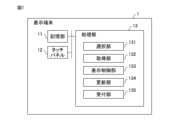
- FIG. 2 is an exemplary functional block diagram of the display terminal 1.
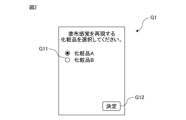
- FIG. 13 is a diagram showing an example of a target object selection screen G1.
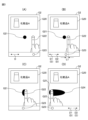
- 13A to 13C are diagrams showing an example of screen transition of a sensation transmission screen G2.
- 13A to 13C are diagrams showing an example of screen transition of a sensation transmission screen G2.
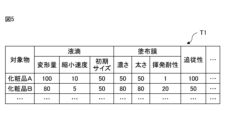
- FIG. 2 is a diagram showing an example of the data structure of an object table T1.
- 11 is a graph showing a ratio Fy/Fz of a force Fy in the direction of a swipe operation applied to a user's finger from the surface of the touch panel 12 when the user performs a swipe operation to a normal force Fz.
- FIG. 13 is a diagram illustrating an example of the data structure of an update table T2.
- FIG. 11 is a flowchart showing an example of the flow of a sensation transmission process.
- FIG. 11 is a flowchart showing an example of the flow of a screen update process.
- 13A and 13B are diagrams showing an example of screen transition of the sensation transmission screen G3 when the object is a solid object.
- FIG. 13 is a diagram showing an example of screen transition of a sensation transmission screen G4 including an image of lipstick.
- FIG. 2 is an exemplary functional block diagram of the display system 2.
- FIG. 1 is an exemplary functional block diagram of a display terminal 1 according to an embodiment of the present invention.
- the display terminal 1 is a computer such as a PC (Personal Computer), smartphone, mobile phone, tablet terminal, or portable game console.
- the display terminal 1 has a memory unit 11, a touch panel 12, and a processing unit 13.
- the display terminal 1 transmits to the user the sensation felt when touching an object via an image displayed on the touch panel 12 in response to the user's operation on the touch panel 12.
- the object is a liquid such as lotion, milky lotion, cream, serum, sunscreen, cleanser, oil, etc.
- the display terminal 1 transmits to the user the sensation felt when the object is applied to the skin surface with the fingers.
- the memory unit 11 is configured to store programs and data, and includes, for example, a semiconductor memory.
- the programs stored in the memory unit 11 include an operating system program, a driver program, and an application program used for processing by the processing unit 13.
- the programs are installed in the memory unit 11 from a computer-readable, non-transient, portable storage medium such as a CD-ROM (Compact Disc Read Only Memory) or a DVD-ROM (Digital Versatile Disc Read Only Memory).
- the programs may also be stored in a storage medium owned by a specified server and installed via a network.
- the touch panel 12 is configured to display images and accept user operations on the display terminal 1.
- the touch panel 12 is equipped with an integrated display device, such as a liquid crystal display or an organic EL (Electro Luminescence) display, and an operation device, which is a capacitive or pressure-sensitive touchpad.
- the display device displays images based on image data supplied from the processing unit 13.
- the operation device generates an operation signal according to the accepted operation and supplies it to the processing unit 13.
- the operation signal is a signal that indicates the position of a contact point detected on the touchpad.
- the processing unit 13 is configured to comprehensively control the operation of the display terminal 1, and includes one or more processors and their peripheral circuits.
- the processing unit 13 includes a CPU (Central Processing Unit).
- the processing unit 13 may also include a GPU (Graphics Processing Unit), a DSP (Digital Signal Processor), an FPGA (Field Programmable Gate Array), an ASIC (Application Specific Integrated Circuit), or the like.
- the processing unit 13 executes various processes based on the programs stored in the memory unit 11 and operation signals supplied from the touch panel 12.
- the processing unit 13 has a selection unit 131, an acquisition unit 132, a display control unit 133, an update unit 134, and a reception unit 135 as functional blocks. Each of these units is a functional module realized by a program executed by the processing unit 13. Each of these units may be implemented in the display terminal 1 as a dedicated arithmetic circuit.
- FIG. 2 is a diagram showing an example of an object selection screen G1 displayed on the touch panel 12.
- the object selection screen G1 is a screen for selecting an object that conveys a sensation when applied to the skin surface.
- the object selection screen G1 is displayed in response to the execution of an application program for conveying to the user the sensation when the object is applied to the skin surface.
- the object selection screen G1 includes a selection object G11 and a decision object G12.
- the selection object G11 is an object for selecting an object that transmits a sensation when applied to the skin surface from among a plurality of objects.
- the selection object G11 is a radio button.
- the decision object G12 is an object for deciding the object. When an operation to select the decision object G12 is performed, the object indicated by the selection object G11 is decided as the object that transmits a sensation when applied to the skin surface.
- FIGS. 3(A)-(D) and 4(A)-(B) are diagrams for explaining the screen transitions of the sensory transmission screen G2 displayed on the touch panel 12.
- the sensory transmission screen G2 is a screen for transmitting to the user the sensation felt when the object is applied to the skin surface.
- the sensory transmission screen G2 is displayed when the decision object G12 is selected on the object selection screen G1.
- FIG. 3(A) is a diagram showing an example of the sensory transmission screen G2 that is displayed first.
- the sensory transmission screen G2 includes information G20 about the selected object, an image G21 of the object, an image G22 of fingers, and a moving object G23.
- the object information G20 includes information that allows the type of the selected object to be recognized.
- the object information G20 includes an image of the object's packaging, the product name, etc.
- the object image G21 shows the object selected on the object selection screen G1. Since the object is a liquid, it is illustrated as a circle to show a droplet of the object that has been dripped onto the skin surface, as shown in FIG. 3(A).
- the object image G21 is an example of a second image.
- the image G22 of fingers moves along a predetermined direction D in response to a user's operation.
- the image G22 of fingers is positioned so that the fingertips are at a position a predetermined distance away from the image G21 of the object along the direction D.
- the image G22 of fingers is an example of a first image.
- the moving object G23 is an object for moving the image G22 of the fingers.
- the moving object G23 is a scroll bar, and is arranged at approximately the same position as the fingers in the moving direction D.
- the user can move the moving object G23 along the direction D so as to follow the swipe operation by displacing the contact point with the touch panel 12 while touching the touch panel 12.
- the image G22 of the fingers moves along the direction D so as to follow the moving object G23.
- the swipe operation is an example of a moving operation.
- the image G22 of the fingers follows the moving object G23 with a delay, but it may follow the moving object G23 without delay.
- FIG. 3(B) is a diagram showing an example of a sensory transmission screen G2 in a state in which a swipe operation is accepted in the state shown in FIG. 3(A) and the moving object G23 is moving in a direction D1.
- the image G22 of the fingers moves so as to follow the moving object G23 with a delay. Therefore, when the moving object G23 is moving, the position of the moving object G23 in the direction D differs from the position of the fingers.
- the position of the fingers is separated by a distance L1 in the direction D2 opposite to the direction D1 from the position of the moving object G23, showing that the image G22 of the fingers follows the moving object G23 with a delay.
- FIG. 3(C) shows the sensory transmission screen G2 in a state where the image G22 of the fingers has moved further from the state shown in FIG. 3(B) so that the image G22 of the fingers and the image G21 of the object overlap.
- a liquid object comes into contact with the fingers, it deforms so as to spread in a direction along the surface of the fingers depending on the viscosity and surface tension of the object. Therefore, as shown in FIG. 3(C), when at least a portion of the image G22 of the fingers and the image G21 of the object overlap and the object comes into contact with the fingers, the image G21 of the object deforms so as to spread in a direction along the surface of the fingers.
- the direction along the surface of the fingers is perpendicular to the movement direction D.
- FIG. 3(D) is a diagram showing an example of the sensory transmission screen G2 after the image G22 of the fingers and the image G21 of the object overlap and the image G22 of the fingers moves further.
- the object on the fingers is spread over the skin surface, forming a coating film of the object.
- an image G24 of the coating film of the object is displayed in the opposite direction D2 to the direction D1 in which the fingers are moving relative to the image G22 of the fingers.
- the image G21 of the object located on the side of the finger movement direction D1 has become smaller relative to the image G22 of the fingers.
- the image G24 of the coating film is an example of a third image.
- FIG. 4(A) is a diagram showing an example of the sensory transmission screen G2 after some time has passed since the state shown in FIG. 3(D).
- the painted object evaporates. Therefore, as shown in FIG. 4(A), the opacity of the coating film image G24 decreases over time. Moreover, the coating film image G24 becomes completely transparent as more time passes. In other words, the coating film image G24 is erased after a predetermined time has passed.
- the example shown in FIG. 4(A) shows that the opacity of the coating film image G24 has decreased compared to FIG. 3(D). Moreover, in the example shown in FIG. 4(A), the opacity increases in the direction D1 in which the finger is moving. In other words, since the opacity decreases over time, the further the area displayed ahead of the coating film image G24 is, the less opaque it becomes.
- FIG. 4(B) is a diagram showing an example of a sensory transmission screen G2 in a state in which a swipe operation has been accepted in the state shown in FIG. 4(A) and the moving object G23 is moving in the direction D2.
- an image G24 of the coating film on the object is displayed in the opposite direction D1 to the direction D2 in which the fingers are moving relative to the image G22 of the fingers.
- the image G21 of the object located on the side of the finger movement direction D2 has become even smaller relative to the image G22 of the fingers.
- Some objects change their feel while being applied. For example, some objects change from a fresh feel to a thick feel while being applied.
- the feel of the object is expressed by the time that the image G22 of the fingers lags behind the moving object G23. The longer the delay between the image G22 of the fingers and the moving object G23, the more the user will get the impression that the object is thick, sticky, sticky, heavy, etc. Furthermore, the shorter the delay between the image G22 of the fingers and the moving object G23, the more the user will get the impression that the object is fresh, smooth, silky, silky, silky, light, etc.
- FIG. 4(B) shows that the position of the fingers is a distance L2 away from the position of the moving object G23 in the direction D1 opposite to the direction D2.
- Distance L2 is longer than distance L1 shown in FIG. 3(B). Therefore, FIG. 4(B) shows that the time that the image G22 of the fingers lags behind the moving object G23 while the object is being applied has increased. In other words, FIG. 4(B) shows that the object has changed from a fresh feel to a sticky feel.
- FIG. 5 is a diagram showing an example of the data structure of the object table T1 stored in the storage unit 11.
- the object table T1 stores parameters related to the display mode of the sensory transmission screen G2 for each of a plurality of objects.
- the object table T1 stores parameters related to the droplets on the object, parameters related to the coating film on the object, and tracking parameters related to the tracking ability of the finger.
- the parameters related to the droplets include parameters related to the amount of deformation, the speed of shrinkage, and the initial size of the droplets.
- the parameter related to the amount of deformation indicates the degree of deformation of the droplets when the fingers come into contact with the object, i.e., when the image G22 of the fingers and the image G21 of the object overlap. The larger the parameter, the more the droplets deform, and the smaller the parameter, the smaller the droplets deform.
- the parameter related to the speed of shrinkage indicates how quickly the droplets located on the side of the finger image G22 in the direction of finger movement shrink after the fingers come into contact with the object, i.e., after the image G22 of the fingers and the image G21 of the object overlap.
- the parameter related to the initial size indicates the size of the droplets when the sensory transmission screen G2 is first displayed. The larger the parameter, the larger the size of the droplets, and the smaller the parameter, the smaller the size of the droplets.
- the droplet parameters are set in advance according to the properties of the target object. For example, the parameters for the deformation amount and shrinkage speed are set according to the viscosity and surface tension of the target object. The parameters for the initial size are set according to the amount of the target object.
- the parameters related to the coating film include parameters related to the darkness, thickness, and volatility resistance of the coating film.
- the parameter related to darkness indicates the magnitude of difference between the color of the coating film and the background color. The larger the parameter, the greater the difference between the color of the coating film and the background color, and the smaller the parameter, the smaller the difference between the color of the coating film and the background color.
- the parameter related to thickness indicates the width of the image G24 of the coating film in the direction perpendicular to the direction of movement of the finger. The larger the parameter, the greater the width, and the smaller the parameter, the smaller the width.
- the parameter related to volatility resistance indicates the period from when the image G24 of the coating film is displayed to when it is erased. The larger the parameter, the longer the period until the coating film is erased, and the smaller the parameter, the shorter the period until the coating film is erased.
- the parameter related to volatility resistance is an example of a volatility parameter.
- Parameters related to the coating film are set in advance according to the properties of the object. For example, parameters related to the thickness are set according to the color and transparency of the object. Parameters related to the thickness are set according to the viscosity and amount of the object. Parameters related to the volatility resistance are set according to the volatility of the object.
- the tracking parameter indicates the amount of delay between the image G22 of the fingers and the moving object G23.
- the larger the tracking parameter the higher the tracking ability and therefore the smaller the delay, and the smaller the tracking parameter, the lower the tracking ability and therefore the greater the delay.
- the larger the tracking parameter the smaller the difference between the moving speed of the image G22 of the fingers and the moving speed of the moving object G23, and the smaller the parameter, the greater the difference between the moving speed of the image of the fingers and the moving object.
- the tracking parameter is set according to the viscosity, surface tension, etc. of the object.
- the display terminal 1 can transmit the texture of the object not only visually but also through touch by displaying the sensory transmission screen G2.
- FIG. 6 is a graph showing the ratio Fy/Fz between the force Fy in the swipe direction applied to the user's finger from the surface of the touch panel 12 when the user performs a swipe operation and the normal force Fz.
- the horizontal axis of the graph shows the value of the tracking parameter.
- the ratio Fy/Fz was large when the tracking parameter was 50 or 100, and the ratio Fy/Fz was small when the tracking parameter was 20 or 10. In other words, it was confirmed that the higher the tracking ability of the image G22 of the finger, the smaller the normal force Fz, and the smaller the friction force felt by the user.
- the p-value between the tracking parameter and the ratio Fy/Fz of the data shown in FIG. 6 was less than 0.05, confirming that there is a significant correlation between the two.
- the tracking parameters are set according to factors such as the frictional force that the user's fingers receiving from the touch panel when swiping, and help convey the tactile sensation of the object.
- FIG. 7 is a diagram showing an example of the data structure of update table T2 stored in storage unit 11.
- Update table T2 stores, for each of a number of objects, information regarding changes in the feel of the object while the object is being applied.
- update table T2 stores parameter update conditions and update contents.
- the parameter update conditions are information indicating the conditions for updating the parameters stored in the object table T1.
- the update conditions are, for example, the time since the movement of the image G22 of the fingers started, or conditions related to the movement history of the image G22 of the fingers.
- FIG. 7 shows that for cosmetic A, the parameters related to volatilization resistance and the tracking parameters are updated when 10 seconds have passed since the image of the fingers started to move.
- cosmetic B it is shown that the parameters are updated when the image G22 of the fingers makes one round trip.
- One round trip of the image of the fingers means that the image of the fingers starts moving, stops, starts moving in the opposite direction, and stops again.
- the condition related to the movement history may be a condition related to the distance moved since the image G22 of the fingers started to move.
- the update conditions and update contents of the parameters are set in advance based on the change in the feel of the object while it is being applied. For example, the update contents of an object that changes from a thick feel to a fresh feel while it is being applied are set so that the tracking parameter is updated from a small value to a large value, and the parameter related to volatility resistance is updated from a large value to a small value. Note that for objects whose feel does not change while they are being applied, the update conditions and update contents are not set, and the parameters do not need to be updated.
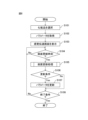
- FIG. 8 is a flow diagram showing an example of the flow of the sensory transmission process executed by the processing unit 13.
- the sensory transmission process is a process for transmitting to the user, via an image, the sensation felt when a target substance is applied to the skin surface.
- the sensory transmission process is executed in response to receipt of an operation to launch a specific application program.
- the sensory transmission process is realized by the processing unit 13 working in cooperation with other components of the display terminal 1 based on a program stored in the memory unit 11.
- the selection unit 131 selects an object that transmits a sensation when applied to the skin surface in response to a user operation (step S101). For example, the selection unit 131 causes the touch panel 12 to display the object selection screen G1 by supplying display data for the object selection screen to the display device of the touch panel 12. The selection unit 131 selects the object indicated by the selection object G11 when the decision object G12 is selected as the object that transmits a sensation when applied to the skin surface.
- the acquisition unit 132 acquires parameters related to the selected object (step S102).
- the acquisition unit 132 acquires droplet parameters, coating film parameters, and tracking parameters associated with the selected object in the object table T1.
- the display control unit 133 displays the sensory transmission screen G2 on the touch panel 12 (step S103).
- the display control unit 133 displays the sensory transmission screen G2 by supplying display data for the sensory transmission screen G2 to the display device of the touch panel 12.
- the display control unit 133 determines whether the screen update time has arrived (step S104).
- the screen update time is the time when the sensory transmission screen G2 is displayed or a predetermined time after the immediately preceding screen update time.
- the predetermined time is the frame update interval of the display device of the touch panel 12, and is, for example, 1/60 seconds.
- step S104-No If the screen update time has not arrived (step S104-No), the sensory transmission process returns to step S104. In other words, the display control unit 133 waits until the screen update time arrives.
- step S105 the display control unit 133 executes a screen update process.
- the screen update process is a process for updating the sensory transmission screen G2. The details of the screen update process will be described later.
- the update unit 134 determines whether the update condition is satisfied (step S106).
- the update unit 134 acquires the update condition associated with the object displayed on the sensory transmission screen G2 in the update table T2.
- the update unit 134 determines whether the acquired update condition is satisfied.
- step S106-Yes the update unit 134 updates the parameters acquired in step S102 (step S107).
- the update unit 134 refers to the update table T2 and updates the parameters as indicated by the update content associated with the satisfied update condition.
- step S108 the display control unit 133 determines whether or not the termination condition is satisfied (step S108).
- the termination condition is, for example, that an operation to terminate a specific application program has been performed, or that a swipe operation has not been accepted continuously for a specific period of time or more.
- step S108-No If the termination condition is not met (step S108-No), the sensory transmission process returns to step S104, and the display control unit 133 waits until the next screen update time arrives.
- step S108-Yes If the termination condition is met (step S108-Yes), the sensory transmission process ends.
- FIG. 9 is a flow diagram showing an example of the flow of the screen update process.
- the screen update process is executed in step S105 of the sensory transmission process.
- the reception unit 135 receives a swipe operation on the touch panel 12 (step S201).
- the reception unit 135 determines whether or not a swipe operation has been performed based on an operation signal supplied from an operation device of the touch panel 12. For example, the reception unit 135 determines whether or not a contact is continuously detected based on the operation signal. If a contact is continuously detected, the reception unit 135 acquires the amount of displacement of the most recently detected contact along the movement direction D relative to the contact detected immediately before that. The reception unit 135 determines that a swipe operation has been performed if the magnitude of the acquired amount of displacement is equal to or greater than a threshold value.
- the display control unit 133 sets the movement speed of the moving object G23 (step S202). For example, the display control unit 133 sets the value obtained by dividing the amount of displacement acquired in step S201 by the screen update interval as the movement speed of the moving object G23.
- the display control unit 133 sets the moving speed of the image G22 of the fingers (step S203).
- the display control unit 133 sets the moving speed of the image G22 of the fingers based on the positions and the following parameters of the nearest moving object G23 and the image G22 of the fingers. For example, the display control unit 133 sets the moving speed vf of the image G22 of the fingers so as to follow the moving object G23 with a delay.
- the moving speed vf is set according to the following formula.
- vobj is the movement speed of the nearest moving object G23
- k is the tracking parameter
- xf(n) is the position of the nearest finger image G22
- xobj(n) is the position of the nearest moving object G22
- ⁇ t is the interval between screen update times.
- the display control unit 133 determines whether the image G22 of the fingers and the image G21 of the object are already overlapping (step S204). For example, when a contact flag described below is set, the display control unit 133 determines that the image G22 of the fingers and the image G21 of the object are already overlapping.
- the display control unit 133 If the image G22 of the finger and the image G21 of the object already overlap (step S204-Yes), the display control unit 133 generates an image G24 of the coating film (step S205).
- the display control unit 133 identifies an area that is included in the closest image G22 of the finger and is not included in the image G22 of the finger after the screen update as an area in which the image G24 of the coating film is to be displayed.
- the display control unit 133 generates an image G24 of the coating film of a width specified by a parameter related to the thickness of the coating film in the identified area.
- the display control unit 133 reduces the image G21 of the object (step S206). For example, the display control unit 133 reduces the image of the object located on the side of the image G22 of the finger in the direction of movement of the image G22 of the finger by a ratio based on a parameter related to the reduction speed of the droplet.
- step S207 the display control unit 133 determines whether the image G22 of the fingers and the image G21 of the object overlap for the first time as a result of the currently executed screen update process.
- the display control unit 133 determines whether there is an overlap between the area of the image G21 of the object and the area of the image G22 of the fingers after the screen update, based on the positions of the image G21 of the object and the image G22 of the fingers after the screen update, and the shapes of the image G21 of the object and the image G22 of the fingers. If there is an overlap, the display control unit 133 determines that the image G22 of the fingers and the image G21 of the object overlap for the first time as a result of the currently executed screen update process.
- the display control unit 133 deforms the image G21 of the object (step S208). For example, the display control unit 133 compresses the image G21 of the object along the movement direction D of the image G22 of the hand at a ratio based on a parameter related to the deformation amount of the droplet, and expands it along a direction perpendicular to the movement direction D at a ratio based on a parameter related to the deformation amount.
- step S201-No If a swipe operation is not accepted in step S201 (step S201-No), if the image G22 of the finger does not overlap the image G21 of the object in step S207 (step S207-No), or after step S206 or S208, the display control unit 133 determines whether the image G24 of the coating film is displayed on the sensory transmission screen G2 (step S209).
- the display control unit 133 reduces the opacity of the coating film image G24 (step S210).
- the display control unit 133 calculates the transparency of the coating film image G24 after the screen update so that the opacity decreases as the time that has elapsed since the coating film image G24 was displayed increases.
- the display control unit 133 may keep the opacity constant until a predetermined time has elapsed since the coating film image G24 was displayed.
- the display control unit 133 may prevent the opacity from falling below a predetermined threshold until a predetermined time has elapsed since the coating film image G24 was displayed.
- the predetermined threshold is, for example, 0.2.
- the predetermined time may be a default value or may be set based on a parameter related to volatilization resistance.
- the display control unit 133 calculates the opacity ⁇ of the coating film image G24 after the screen is updated according to the following formula.
- ⁇ th is a predetermined threshold value for opacity
- ⁇ 0 is the initial value of opacity
- x is a parameter related to the volatility resistance of the coating film
- N is the number of screen update processes performed since the image G24 of the coating film is displayed.
- step S209-No the display control unit 133 updates the sensory transmission screen G2 (step S211).
- the display control unit 133 moves the moving object G23 and the image G22 of the finger at the moving speeds set in steps S202 and S203, respectively, arranges the coating film image G24 generated in step S205, arranges the image of the object generated in step S206 or S208, and generates image data for the sensory transmission screen G2 in which the opacity calculated in step S210 is set for the coating film image G24.
- the display control unit 133 updates the sensory transmission screen G2 by supplying the generated image data to the display device of the touch panel 12. This ends the screen update process.
- the display control unit 133 of the display terminal 1 moves the moving object G23 to follow the swipe operation, and moves the image G22 of the finger to follow the moving object G23. This enables the display terminal 1 to convey to the user, via the image, the sensation felt when touching an object. In particular, the display terminal 1 enables the user to convey the tactile feel of the object.
- the display control unit 133 also moves the image of the hand and fingers so that it follows the moving object with a time delay based on the following parameters set according to the object. This enables the display terminal 1 to convey to the user, via the image, the sensation felt when touching each of the multiple objects.
- the object is a liquid
- the display control unit 133 deforms the image of the object based on the viscosity parameter when the image of the finger and the image of the object overlap, thereby enabling the display terminal 1 to convey to the user, via the image, the sensation of the object deforming when the object touches the skin surface.
- the display control unit 133 displays the image G24 of the coating film at the location where the image G22 of the fingers passed. This enables the display terminal 1 to convey to the user, via the image, the sensation of spreading when the coating is applied to the object.
- the display control unit 133 erases the image of the spread object when a time based on the volatility parameter has elapsed since the image G24 of the coating film was displayed. This enables the display terminal 1 to convey the volatility sensation when the object is coated to the user through the image.
- the update unit 134 also updates the tracking parameters based on the time since the movement of the image of the hand and fingers has started or on the movement history of the image of the hand and fingers, and the display control unit 133 moves the image G22 of the hand and fingers so that it follows the moving object G23 with a time delay based on the updated tracking parameters. This enables the display terminal 1 to communicate to the user via the image the change in the feel of the object while it is being applied.
- the object is a liquid.
- the object is not limited to this example, and may be a slurry such as foundation.
- the display terminal 1 can also transmit the sensation of touching the object to the user via an image.
- the display control unit 133 does not need to reduce the opacity of the image G24 of the coating film.
- the object may also be lipstick, eyeliner, eyebrows, etc.
- the object may also be a solid object, such as a cosmetic compact case.
- the object may also be a container for lotion, milk, serum, facial cleanser, etc.
- the container may be a bottle or a tube.
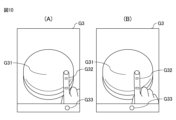
- FIGS. 10(A)-(B) are diagrams showing an example of screen transitions on the sensory transmission screen G3 when the object is a solid.
- the object is a cosmetic compact case.
- the sensory transmission screen G3 when the object is a solid is a screen for transmitting the tactile sensation of the object's surface to the user.
- the sensory transmission screen G3 when the object is a solid, includes an object image G31, a hand image G32, and a moving object G33, just like when the object is a liquid or slurry.
- the moving object G33 moves to follow the swipe operation, and the hand image G32 moves to follow the moving object G33 with a delay.
- the display control unit 133 of the display terminal 1 moves the moving object G33 to follow the swipe operation, and moves the image G32 of the finger to follow the moving object G33 with a predetermined time delay. This enables the display terminal 1 to convey to the user, via the image, the sensation felt when touching an object. In particular, the display terminal 1 enables the user to convey the tactile sensation of a solid object.
- the sensory transmission screen G2 includes an image G22 of fingers, and an image G24 of an applied film is displayed at the location where the image G22 of the fingers has passed only after the image G22 of the fingers and the image G21 of the object overlap.
- the sensory transmission screen G2 may include, as an example of the first image, an image of lipstick or an image of a puff for applying foundation, instead of the image G22 of fingers.
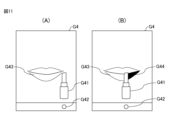
- FIGS. 11(A)-(B) are diagrams showing an example of the display properties of the sensory transmission screen G4 when an image of lipstick is displayed instead of an image of fingers.
- the sensory transmission screen G4 includes an image of lipstick G41, a moving object G42, and an image of lips G43 to be applied.
- the moving object G42 moves to follow the swipe operation, and the lipstick image G41 moves to follow the moving object G42.
- the display control unit 133 displays an image G44 of a coating film showing spread lipstick in the area through which the lipstick image G41 has passed. That is, in the example shown in FIG. 3, the image of the coating film was displayed only after the image of the object and the fingers overlapped, but in the example shown in FIG. 11(B), the image of the coating film is displayed regardless of whether the image of the object and the fingers overlap.
- Figs. 11(A) and (B) the action of applying lipstick to the lips is displayed.
- the present invention is not limited to this example, and the action of applying skin care products to the arms or face may also be displayed.
- the images of the lips, arms, and face to which the product is applied may be illustrations or photographs.
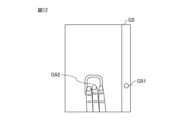
- FIG. 12 is a diagram showing an example of a sensory transmission screen G5 including an image of a puff used to apply foundation.
- the sensory transmission screen G5 includes a puff image G51 and a moving object G52.
- the moving object G52 moves to follow the swipe operation, and the puff image G51 moves to follow the moving object G52.
- the display control unit 133 displays an image of an applied film showing the foundation spread in the area through which the puff image G51 has passed. As shown in FIG. 12, the moving direction of the moving object G52 and the puff image G51 may be vertical.
- the display terminal 1 has the touch panel 12 including an integrated display device and operation device.
- the present invention is not limited to this example, and the display terminal 1 may have a display unit and an operation unit separate from the display unit.
- the operation unit is, for example, a mouse, a keyboard, or a keypad.
- the reception unit 135 receives a drag operation, a key input operation, or the like as an operation for moving the moving object G23.
- the display terminal 1 accepts user operations on the display terminal 1 via the touch panel 12.
- the present invention is not limited to this example, and the display terminal 1 may accept user operations on the display terminal 1 via a gesture input system or a gesture recognition system.
- the gesture input system or the gesture recognition system acquires, for example, information indicating the shape or movement of the user's body detected by a spatial sensor such as an imaging device or a distance measuring device, or output from an acceleration sensor attached to the user's body.
- the gesture input system or the gesture recognition system recognizes a user's gesture based on the information or output acquired from the above sensor, and accepts the user's operation on the display terminal 1 based on the gesture.
- the object table T1 stores parameters for each of a plurality of objects.
- the present invention is not limited to this example, and the object table T1 may store parameters for only one object.
- step S101 of the sensory transmission process may be omitted, and an object may not be selected.
- the processing unit 13 generates a sensory transmission screen G2 including information G20 of a selected object, an image G21 of the object, an image G22 of fingers, and a moving object G23.
- This example is not limited to the above, and the processing unit 13 may generate a sensory transmission screen G2 that includes the image G21 of the object and does not include at least one of the information G20 of the object, the image G22 of the fingers, and the moving object G23.
- the processing unit 13 can provide the user with various AR (Augmented Reality) experiences or VR (Virtual Reality) experiences by controlling (a) the presence or absence of various images or objects arranged on the sensory transmission screen G2, and (b) at least one of the procedures for generating the images or objects.
- the sensory transmission screen G2 includes the moving object G23.
- the image G22 of the hand and fingers moves to follow the user's input operation.
- the image G22 of the hand and fingers may follow the input operation without delay, or may follow the input operation with a delay.
- Examples of the input operation include a swipe operation, a drag operation, a tap operation, and a click operation.
- the input operation may be input via a touch panel, a mouse, a keyboard, or a keypad, or may be input via a gesture input system or a gesture recognition system.
- the position of the image G22 of the fingers on the sensory transmission screen G2 is determined, for example, so that a predetermined position or area of the image G22 of the fingers is located at an input position or input coordinates (sometimes referred to as a designated position) on the screen indicated by a user's input operation.
- the position of the image G22 of the fingers on the sensory transmission screen G2 is determined, for example, so that a predetermined position or area of the image G22 of the fingers is located at a position offset by a predetermined distance or relative position from the designated position described above.
- the position of the image G22 of the fingers on the sensory transmission screen G2 is determined, for example, such that a predetermined position or area of the image G22 of the fingers changes within a predetermined area in the sensory transmission screen G2 in a manner similar to the change in the indicated position described above.
- the predetermined position or area of the image G22 of the fingers may change with a delay from the change in the indicated position described above.
- the position of the image G22 of the fingers on the sensory transmission screen G2 is determined, for example, such that the movement of the predetermined position or area of the image G22 of the fingers follows the movement of the indicated position described above.
- the degree of tracking or delay can be set arbitrarily. The tactile sensation of the object can be reproduced depending on the degree of tracking or delay described above.
- the sensory transmission screen G2 includes an image G21 of an object placed on the skin surface, an image G22 of fingers, and a moving object G23.
- the sensory transmission screen G2 may include an image or object of an object (sometimes called a support) on which the object is placed, such as the skin in the above example.
- the procedure for generating the image or object of the object is not particularly limited, but the image or object may be generated using an image acquired by a spatial sensor such as an imaging device or a distance measuring device, or may be generated by computer graphics.
- the sensory transmission screen G2 includes an image G21 of an object placed on the skin surface, an image G22 of fingers, and a moving object G23.
- This example is not limited to the above, and the sensory transmission screen G2 does not need to include the image G22 of fingers.
- the sensory transmission screen G2 is generated so that the shape, pattern, or color of the object shown by the image G21 changes according to the movement of the user's fingers.
- the shape, pattern, and/or color of the object shown by the image G21 may change with a delay following the change in the above-described designated position.
- the tactile sensation of the object can be reproduced according to the degree of the delay.
- the parameters stored in the object table T1 are set based on the properties or texture of the object. This example is not limiting, and these parameters may be set based on the skin condition of the user. For example, if the user has dry skin, the object penetrates quickly and the object feels moist. Therefore, the tracking parameter may be set large. Also, if the user has oily skin, the object feels sticky. Therefore, the tracking parameter may be set small.
- the parameters related to the object may be set based on whether or not the sensory transmission process was executed immediately before, or based on the type of object selected in the sensory transmission process executed immediately before. For example, the properties and feel of lotion change when a user applies lotion to bare skin compared to when the user applies lotion over toner. Therefore, the parameters related to the object may differ depending on whether or not the sensory transmission process was executed immediately before and another object was selected.
- the display control unit 133 sets the moving speed of the image G22 of the fingers based on the tracking parameters, and moves the image G22 of the fingers at the set moving speed.
- the display control unit 133 may set a delay time for the image G22 of the fingers based on the tracking parameters.
- the display control unit 133 moves the image G22 of the fingers so that it follows the moving object G23 with a delay of the set delay time.
- the display control unit 133 places the image G22 of the fingers in a position along the direction D of the moving object G23 at the time just before the delay time. Even in this way, the display terminal 1 can convey the sensation of touching an object to the user via the image.
- step S208 of the screen update process the display control unit 133 deforms the image of the object when the image G22 of the fingers and the image G21 of the object overlap.
- the display control unit 133 may move the image G21 of the object together with the image G22 of the fingers without deforming it when the image G22 of the fingers and the image G21 of the object overlap.
- the display control unit 133 may erase the image G21 of the object when the image G22 of the fingers and the image G21 of the object overlap.
- step S205 of the screen update process the display control unit 133 displays the image G24 of the coating film at the location where the image G22 of the fingers passed after the image G22 of the finger and the image G21 of the object overlap.
- This example is not limited to this, and the display control unit 133 does not have to display the image G24 of the coating film.
- the display control unit 133 erases the image of the coating film when a predetermined time has elapsed since the image G24 of the coating film was displayed.
- This example is not limited to the above, and the display control unit 133 does not have to erase the displayed image G24 of the coating film.
- the display control unit 133 may prevent the opacity from falling below a predetermined threshold value regardless of the elapsed time since the image G24 of the coating film was displayed.
- the display control unit 133 may keep the opacity of the image G24 of the coating film constant without decreasing it depending on the elapsed time since the image G24 of the coating film was displayed.
- FIG. 13 is an exemplary functional block diagram of a display system 2 according to another embodiment.
- the display system 2 has a display terminal 3 and a server 4 which communicate with each other via a network N.
- the display terminal 3 differs from the display terminal 1 in that it further has a communication unit 34, and in that it has a receiving unit 334 and a transmitting unit 335 as functional blocks of the processing unit 13.
- the same reference numerals are used and the description is omitted.
- the communication unit 34 is a component that enables the display terminal 3 to communicate with the server 4, and includes a communication interface circuit.
- the communication interface circuit included in the communication unit 34 is a communication interface circuit such as a wireless LAN (Local Area Network) or a wired LAN.
- the communication unit 34 transmits data supplied from the processing unit 13 to the server 4, and also supplies data received from the server 4 to the processing unit 13.
- the server 4 has a memory unit 41, a communication unit 42, and a processing unit 43.
- the storage unit 41 is configured to store programs and data, and includes, for example, a semiconductor memory.
- the programs stored in the storage unit 41 include operating system programs, driver programs, and application programs used in processing by the processing unit 43.
- the programs are installed in the storage unit 41 from a computer-readable, non-transitory, portable storage medium such as a CD-ROM or DVD-ROM.
- the programs may also be stored in a storage medium possessed by the display terminal 3 or another server, and installed via a network.
- the communication unit 42 is a component that enables the server 4 to communicate with the display terminal 3, and includes a communication interface circuit.
- the communication interface circuit included in the communication unit 42 is a communication interface circuit for a wireless LAN or a wired LAN.
- the communication unit 42 transmits data provided from the processing unit 43 to the display terminal 3, and provides data received from the display terminal 3 to the processing unit 43.
- the processing unit 43 is configured to comprehensively control the operation of the server 4, and includes one or more processors and their peripheral circuits.
- the processing unit 43 includes a CPU.
- the processing unit 43 may also include a GPU, DSP, FPGA, or ASIC, etc.
- the processing unit 43 executes various processes based on the programs stored in the memory unit 41.
- the processing unit 43 has a selection unit 431, an acquisition unit 432, a display control unit 433, an update unit 434, and a reception unit 435 as functional blocks. Each of these units is a functional module realized by a program executed by the processing unit 43. Each of these units may be implemented in the server 4 as a dedicated arithmetic circuit.
- the selection unit 431, acquisition unit 432, display control unit 433, update unit 434, and reception unit 435 execute the sensory transmission process in the same manner as the selection unit 131, acquisition unit 132, display control unit 133, update unit 134, and reception unit 135 of the display terminal 1.
- the selection unit 431 transmits the display data to the display terminal 3 via the communication unit 42.
- the receiving unit 334 of the display terminal 3 supplies the received display data to the touch panel 12.
- the selection unit 431 displays the object selection screen G1 on the touch panel 12.
- the transmitting unit 335 of the display terminal 3 transmits information about the object indicated by the selection object G11 when the decision object G12 is selected to the server 4 via the communication unit 34.
- step S103 of the sensory transmission process and step S211 of the screen update process instead of supplying the display data of the sensory transmission screen G2 to the touch panel 12, the display control unit 433 transmits the display data to the display terminal 3 via the communication unit 42.
- the receiving unit 334 of the display terminal 3 supplies the received display data to the touch panel 12. In this way, the selection unit 431 displays the sensory transmission screen G2 on the touch panel 12.
- step S201 of the screen update process instead of acquiring the operation signal from the touch panel 12, the reception unit 435 receives information on the operation signal transmitted by the transmission unit 335 of the display terminal 3 via the communication unit 42.
- the display system 2 like the display terminal 1, makes it possible to convey to the user the sensation of touching an object via an image.
- REFERENCE SIGNS LIST 1 display terminal 11 storage unit 12 touch panel 131 selection unit 132 acquisition unit 133 display control unit 134 update unit 135 reception unit
Landscapes
- Engineering & Computer Science (AREA)
- Theoretical Computer Science (AREA)
- Physics & Mathematics (AREA)
- General Physics & Mathematics (AREA)
- General Engineering & Computer Science (AREA)
- Human Computer Interaction (AREA)
- User Interface Of Digital Computer (AREA)
Priority Applications (2)
| Application Number | Priority Date | Filing Date | Title |
|---|---|---|---|
| JP2025520519A JPWO2024237125A1 (https=) | 2023-05-12 | 2024-05-07 | |
| CN202480024742.XA CN120917491A (zh) | 2023-05-12 | 2024-05-07 | 显示终端、显示方法、程序以及服务器 |
Applications Claiming Priority (2)
| Application Number | Priority Date | Filing Date | Title |
|---|---|---|---|
| JP2023079250 | 2023-05-12 | ||
| JP2023-079250 | 2023-05-12 |
Publications (1)
| Publication Number | Publication Date |
|---|---|
| WO2024237125A1 true WO2024237125A1 (ja) | 2024-11-21 |
Family
ID=93519111
Family Applications (1)
| Application Number | Title | Priority Date | Filing Date |
|---|---|---|---|
| PCT/JP2024/016924 Ceased WO2024237125A1 (ja) | 2023-05-12 | 2024-05-07 | 表示端末、表示方法、プログラムおよびサーバ |
Country Status (3)
| Country | Link |
|---|---|
| JP (1) | JPWO2024237125A1 (https=) |
| CN (1) | CN120917491A (https=) |
| WO (1) | WO2024237125A1 (https=) |
Citations (4)
| Publication number | Priority date | Publication date | Assignee | Title |
|---|---|---|---|---|
| JP2002000939A (ja) * | 2000-06-19 | 2002-01-08 | Sega Corp | 電子ゲーム装置、その方法及び記憶媒体 |
| JP2009070416A (ja) * | 2009-01-05 | 2009-04-02 | Sony Computer Entertainment Inc | 制御システムおよび制御方法 |
| JP2017029577A (ja) * | 2015-08-05 | 2017-02-09 | 株式会社コロプラ | ゲームシステム、制御方法、及びプログラム |
| JP2022087933A (ja) * | 2020-12-02 | 2022-06-14 | 任天堂株式会社 | ゲームプログラム、ゲーム装置およびゲーム制御方法 |
-
2024
- 2024-05-07 JP JP2025520519A patent/JPWO2024237125A1/ja active Pending
- 2024-05-07 WO PCT/JP2024/016924 patent/WO2024237125A1/ja not_active Ceased
- 2024-05-07 CN CN202480024742.XA patent/CN120917491A/zh active Pending
Patent Citations (4)
| Publication number | Priority date | Publication date | Assignee | Title |
|---|---|---|---|---|
| JP2002000939A (ja) * | 2000-06-19 | 2002-01-08 | Sega Corp | 電子ゲーム装置、その方法及び記憶媒体 |
| JP2009070416A (ja) * | 2009-01-05 | 2009-04-02 | Sony Computer Entertainment Inc | 制御システムおよび制御方法 |
| JP2017029577A (ja) * | 2015-08-05 | 2017-02-09 | 株式会社コロプラ | ゲームシステム、制御方法、及びプログラム |
| JP2022087933A (ja) * | 2020-12-02 | 2022-06-14 | 任天堂株式会社 | ゲームプログラム、ゲーム装置およびゲーム制御方法 |
Also Published As
| Publication number | Publication date |
|---|---|
| JPWO2024237125A1 (https=) | 2024-11-21 |
| CN120917491A (zh) | 2025-11-07 |
Similar Documents
| Publication | Publication Date | Title |
|---|---|---|
| US11157158B2 (en) | Coordination of static backgrounds and rubberbanding | |
| KR102373116B1 (ko) | 증강 및 가상 현실 환경들과 상호작용하기 위한 시스템들, 방법들, 및 그래픽 사용자 인터페이스들 | |
| US9170649B2 (en) | Audio and tactile feedback based on visual environment | |
| Hinckley et al. | Input/Output Devices and Interaction Techniques. | |
| EP2972732B1 (en) | Device, method, and graphical user interface for adjusting the appearance of a control | |
| US6278443B1 (en) | Touch screen with random finger placement and rolling on screen to control the movement of information on-screen | |
| CN103955336B (zh) | 传感装置和方法 | |
| US20090153468A1 (en) | Virtual Interface System | |
| EP2660697B1 (en) | Method and apparatus for text selection | |
| EP3267303B1 (en) | Multi-touch display panel and method of controlling the same | |
| EP3596591B1 (en) | Devices, methods, and graphical user interfaces for seamless transition of user interface behaviors | |
| Elmadjian et al. | Gazebar: Exploiting the midas touch in gaze interaction | |
| WO2015121958A1 (ja) | 電子機器、入力装置、及び電子機器の駆動制御方法 | |
| JP5220898B2 (ja) | 押圧によるスクロール制御が可能なユーザインタフェース装置、画像スクロール方法及びプログラム | |
| WO2018191092A1 (en) | Live ink presence for real-time collaboration | |
| US20140191958A1 (en) | Cursor control method for a touch screen | |
| JP6758922B2 (ja) | 電子機器及びその制御方法 | |
| Freeman | Ultrasound haptic feedback for touchless user interfaces: Design patterns | |
| EP3365762B1 (en) | Device and control methods for enlarging selection detection areas based on a prediction of an object to be selected | |
| WO2024237125A1 (ja) | 表示端末、表示方法、プログラムおよびサーバ | |
| WO2009119716A1 (ja) | 情報処理システム、情報処理装置、方法及びプログラム | |
| Darbar et al. | Text selection in ar-hmd using a smartphone as an input device | |
| US20160117075A1 (en) | Advanced touch user interface | |
| Kang et al. | UFO-Zoom: A new coupled map navigation technique using hand trajectories in the air | |
| Nowosielski | Minimal interaction touchless text input with head movements and stereo vision |
Legal Events
| Date | Code | Title | Description |
|---|---|---|---|
| 121 | Ep: the epo has been informed by wipo that ep was designated in this application |
Ref document number: 24807078 Country of ref document: EP Kind code of ref document: A1 |
|
| ENP | Entry into the national phase |
Ref document number: 2025520519 Country of ref document: JP Kind code of ref document: A |
|
| WWE | Wipo information: entry into national phase |
Ref document number: 2025520519 Country of ref document: JP Ref document number: 202480024742.X Country of ref document: CN |
|
| WWP | Wipo information: published in national office |
Ref document number: 202480024742.X Country of ref document: CN |
|
| NENP | Non-entry into the national phase |
Ref country code: DE |