WO2024204142A1 - コンピュータプログラム、情報処理方法及び情報処理装置 - Google Patents
コンピュータプログラム、情報処理方法及び情報処理装置 Download PDFInfo
- Publication number
- WO2024204142A1 WO2024204142A1 PCT/JP2024/011851 JP2024011851W WO2024204142A1 WO 2024204142 A1 WO2024204142 A1 WO 2024204142A1 JP 2024011851 W JP2024011851 W JP 2024011851W WO 2024204142 A1 WO2024204142 A1 WO 2024204142A1
- Authority
- WO
- WIPO (PCT)
- Prior art keywords
- information
- document
- computer program
- file
- list
- Prior art date
- Legal status (The legal status is an assumption and is not a legal conclusion. Google has not performed a legal analysis and makes no representation as to the accuracy of the status listed.)
- Ceased
Links
Images




Classifications
-
- G—PHYSICS
- G06—COMPUTING OR CALCULATING; COUNTING
- G06F—ELECTRIC DIGITAL DATA PROCESSING
- G06F16/00—Information retrieval; Database structures therefor; File system structures therefor
- G06F16/30—Information retrieval; Database structures therefor; File system structures therefor of unstructured textual data
- G06F16/34—Browsing; Visualisation therefor
-
- G—PHYSICS
- G06—COMPUTING OR CALCULATING; COUNTING
- G06F—ELECTRIC DIGITAL DATA PROCESSING
- G06F16/00—Information retrieval; Database structures therefor; File system structures therefor
- G06F16/30—Information retrieval; Database structures therefor; File system structures therefor of unstructured textual data
- G06F16/38—Retrieval characterised by using metadata, e.g. metadata not derived from the content or metadata generated manually
-
- G—PHYSICS
- G06—COMPUTING OR CALCULATING; COUNTING
- G06F—ELECTRIC DIGITAL DATA PROCESSING
- G06F16/00—Information retrieval; Database structures therefor; File system structures therefor
- G06F16/90—Details of database functions independent of the retrieved data types
- G06F16/907—Retrieval characterised by using metadata, e.g. metadata not derived from the content or metadata generated manually
-
- G—PHYSICS
- G06—COMPUTING OR CALCULATING; COUNTING
- G06N—COMPUTING ARRANGEMENTS BASED ON SPECIFIC COMPUTATIONAL MODELS
- G06N20/00—Machine learning
Definitions
- the present invention relates to a computer program, an information processing method, and an information processing device.
- Patent Document 1 discloses a new multi-center biomedical data collaboration processing system without patient data sharing, which includes a cloud server for collaborating on asynchronous calculations with model parameters of each medical center, and a medical center client for deploying local high-performance calculations on the data.
- Patent Document 1 has the problem that it does not necessarily improve the convenience of data sharing.
- the purpose of this disclosure is to provide a computer program etc. that can improve the convenience of data sharing.
- a computer program causes a computer to execute a process of storing a plurality of documents created by a plurality of users in a group, outputting list information showing selectable summary information that represents an outline of each stored document, obtaining a selection of one of the plurality of summary information in the output list information, extracting detailed information that represents the details of the document that corresponds to the selected summary information, and outputting the extracted detailed information.
- a computer program causes a computer to execute a process of obtaining list information that displays selectable summary information representing summaries of multiple documents created by multiple users in a group, displaying the obtained list information, accepting a selection of one of the multiple summary information in the displayed list information, outputting the accepted selection of the summary information, obtaining detailed information that represents the details of the document corresponding to the selected summary information, and displaying the obtained detailed information.
- This disclosure makes it possible to improve the convenience of data sharing.
- FIG. 1 is a block diagram showing an example of the configuration of a search system according to an embodiment of the present invention
- FIG. 4 is a diagram showing an example of the contents of information stored in a document DB
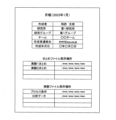
- FIG. 13 is a diagram showing an example of the contents of a cover page.
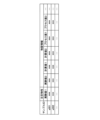
- FIG. 13 is a diagram showing an example of the contents of a summary file.
- 13 is a flowchart illustrating an example of a procedure for a document acquisition process executed by the search system.
- 13 is a flowchart showing an example of a procedure of a search process executed by the search system.
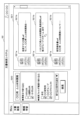
- FIG. 13 is a schematic diagram illustrating an example of a reception screen displayed on a display unit of the terminal device.
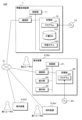
- FIG. 13 is a schematic diagram showing an example of an overview screen displayed on a display unit of the terminal device.
- FIG. 11 is a block diagram showing a configuration example of a search system according to a second embodiment.
- FIG. 2 is an explanatory diagram showing an overview of a learning model.
- 13 is a flowchart illustrating an example of a processing procedure executed by the search system according to the second embodiment.
- FIG. 1 is a block diagram showing an example of the configuration of a search system 100 according to the present embodiment.
- the search system 100 manages a plurality of documents collected within a company (company) as shared data, and provides a desired document to a user.
- a company is an example of a group to which a plurality of users belong.
- a "group" means a group that shares data.
- a group may be one company (organization), may be made up of a plurality of companies, or may be a smaller unit that divides a company.
- the search system 100 includes an information processing device 1 and a plurality of terminal devices 2.
- the information processing device 1 and each of the terminal devices 2 are connected to each other so as to be able to communicate with each other via a network N, such as a LAN (Local Area Network) or the Internet.
- a network N such as a LAN (Local Area Network) or the Internet.
- the information processing device 1 is a device capable of various types of information processing and sending and receiving information, and is, for example, a server computer, a personal computer, a quantum computer, etc.
- the information processing device 1 may be a local computer installed in the same facility as the terminal device 2, or may be a cloud computer communicatively connected to the terminal device 2 via the Internet or the like.
- the information processing device 1 may be integrated into any of the terminal devices 2.
- the number of terminal devices 2 may be 1, 2, or 4 or more.
- the terminal device 2 is an information processing terminal used by a user who uses the search system 100.
- the terminal device 2 is, for example, a personal computer, a smartphone, or a tablet terminal.
- the first user is a user who provides documents to this system
- the second user is a user who searches and uses the provided documents
- the terminal device 2 of the first user is described as terminal device 2a
- the terminal device 2 of the second user is described as terminal device 2b.
- terminal device 2b when there is no need to distinguish between the first user and the second user, they are also simply referred to as users, and when there is no need to distinguish between the terminal devices 2a and 2b, they are also simply referred to as terminal device 2.
- the first user and the second user belong to different departments of the same organization, such as belonging to different teams within the same company.
- the information processing device 1 accepts documents created by each first user through the terminal device 2a and stores the accepted documents in a database described below.
- the documents stored in the database are, for example, technical documents, and specifically include monthly reports, research reports, experiment reports, academic papers, etc.
- the information processing device 1 provides information about the stored documents to the terminal device 2b.
- each user By collecting large amounts of experimental results and research results across departments and tasks, which were previously kept individually by each user, and utilizing them as shared data, it is expected that technological development will be promoted.
- the creation of business data is highly personal based on business knowledge, and the data format and content vary depending on the creator. Therefore, in order to improve the utilization of data, it is important to store data in a manner suitable for data sharing. Particularly in the field of chemistry, research and development is personal, and the way experimental data is collected varies depending on the user, so it is necessary to store it in a format that allows easy mutual use.
- each user generates a document or a file related to the document according to predetermined rules.
- the generated information is centrally managed by the information processing device 1, allowing smooth data sharing.
- the information processing device 1 is a computer, and as shown in FIG. 1, includes a control unit 11, a storage unit 12, and a communication unit 13.
- the information processing device 1 may be a multi-computer consisting of multiple computers, or may be a virtual machine virtually constructed by software.
- the control unit 11 has one or more arithmetic processing devices such as a CPU (Central Processing Unit), an MPU (Micro-Processing Unit), or a GPU (Graphics Processing Unit).
- the control unit 11 controls each component and executes processing using built-in memory such as a ROM (Read Only Memory) or RAM (Random Access Memory), a clock, a counter, etc.
- the functions of the information processing device 1 may be realized by software, or some or all of them may be realized by hardware such as an ASIC (Application Specific Integrated Circuit) or an FPGA (Field Programmable Gate Array).
- the storage unit 12 includes a non-volatile memory such as a hard disk, a flash memory, or an SSD (Solid State Drive).
- the storage unit 12 may be an external storage device connected to the information processing device 1.
- the storage unit 12 stores various computer programs and data referenced by the control unit 11.
- the storage unit 12 stores a program 1P for causing a computer to execute processes related to the provision of documents, and a document DB (Data Base) 121 as data necessary for executing the program 1P.
- the document DB 121 is a database that stores information related to documents received from each user.
- a computer program (computer program product) including program 1P may be provided by a non-transitory recording medium 1A on which the computer program is recorded in a readable manner.
- the storage unit 12 stores the computer program read from the recording medium 1A by a reading device (not shown).
- the recording medium 1A is, for example, a magnetic disk, an optical disk, or a semiconductor memory.
- the computer program may also be downloaded from an external server connected to a communications network and stored in the storage unit 12.
- Program 1P may be a single computer program or may be composed of multiple computer programs, and may be executed on a single computer or on multiple computers interconnected by a communications network.
- the communication unit 13 includes a communication device that realizes communication via the network N.
- the control unit 11 transmits and receives data to and from each terminal device 2 via the communication unit 13.
- the configuration of the information processing device 1 is not limited to the above example, and may include, for example, an operation unit for accepting user operations, a display unit for displaying images, etc.
- the terminal device 2 is a computer and includes a control unit 21, a memory unit 22, a communication unit 23, a display unit 24, and an operation unit 25.
- the control unit 21 includes one or more arithmetic processing devices such as a CPU, MPU, GPU, etc.
- the control unit 11 uses built-in memory such as ROM or RAM, clocks, counters, etc. to control each component and execute processing.
- the storage unit 22 includes a non-volatile memory such as a hard disk, a flash memory, or an SSD.
- the storage unit 22 stores various computer programs and data referenced by the control unit 21.
- the storage unit 22 stores a program 2P for causing the computer to execute processes related to document search.
- the communication unit 23 includes a communication device that realizes communication via the network N.
- the control unit 21 transmits and receives data to and from the information processing device 1 via the communication unit 23.
- the display unit 24 includes a display device such as a liquid crystal display or an organic EL (Electro Luminescence) display.
- the display unit 24 displays documents and the like received from the information processing device 1 in accordance with instructions from the control unit 21.
- the operation unit 25 is an interface that accepts operations from the user.
- the operation unit 25 includes, for example, a keyboard, a mouse, a touch panel device with a built-in display, a speaker, a microphone, and the like.
- the operation unit 25 accepts operation input from the user and sends a control signal according to the operation content to the control unit 21.
- the document DB 121 stores records that link information such as document information, summary file information, and experiment file information using, for example, a data ID as a key.
- the document information includes information about the document created by the user.
- the document information includes, for example, a document ID that identifies the document, the document file (document data), and the update date that indicates the date the document file was updated.
- the document file column stores the actual file.
- a document file includes a cover page and a body text.
- the cover page is a page on which specified items are written according to a preset format.
- the body text includes data such as text, images, and audio, and is free-form data based on the syntax and language of the document creator.
- the body text of the document file in this embodiment is unstructured data.
- Unstructured data means data that does not contain meaning that allows statistical processing by a computer. Note that a document file is not limited to being a series of documents consisting of a cover page and body text, and may be composed of a cover file and a body text file.
- Summary file information includes information about summary files.
- a summary file is created in association with a document, and is a file that organizes and summarizes specific information related to the document.
- Summary file information includes, for example, a summary file ID that identifies the summary file, the summary file (summary data), and link information.
- the summary file column stores actual files.
- the link information includes link information (path information) to the summary file for accessing the summary file.
- the number of summary files linked to one document file may be one, three or more, or even zero.
- the experimental file information includes information related to the experimental file.
- the experimental file represents the experimental data of the experiment related to the document.
- the experimental file information includes, for example, an experimental file ID for identifying the experimental file, the experimental file (experimental data), and link information.
- the experimental file column stores actual files.
- the experimental file includes data such as text, graphs, images, and the like, and is unstructured data.
- the link information includes link information (path information) to the experimental file for accessing the experimental file.
- the number of experimental files linked to one document file may be one, three or more, or may be zero.
- the document DB121 has, for example, a hierarchical file structure, and stores document sets according to the hierarchical structure.
- the document DB121 is composed of the first to third hierarchies.
- the first hierarchical level is composed of a company folder.
- the second hierarchical level is composed of multiple folders associated with each of the company's research laboratories.
- the third hierarchical level which is a level below the research laboratories folder, is composed of one or more folders associated with each group as a department of the research laboratories, and one or more folders associated with each project in the research laboratories.
- a document set corresponding to a group is stored in each group folder.
- a document set corresponding to a project is stored in each project folder.
- the above-mentioned hierarchical structure is merely an example, and the document management system of the document DB121 may be designed appropriately according to the organizational structure and the document management purpose.
- the project folder may be included in the second hierarchical level.
- the document DB121 does not have to be hierarchical.
- the folder in which to store the document set is automatically determined by the information processing device 1 based on, for example, the type of document and the department to which the creator belongs.
- the storage destination of the document set may be determined by accepting a designation from the first user when the document set is obtained from the terminal device 2a.
- the first user uses the terminal device 2a to input the necessary items according to a predetermined format and create a cover page. If necessary, the first user also inputs experimental or research results, etc. according to a predetermined format to create a summary file.
- the first user sends to the information processing device 1 a document set in which the document file with a cover page added to the main text of the document corresponds to the generated summary file and the previously created (saved) experimental file.
- the information processing device 1 may, for example, accept an upload of a document set from the terminal device 2a, or may receive a message such as an email or a chat message sent from the terminal device 2a and thereby acquire a document set attached to the message.
- the information processing device 1 stores the acquired document set in the document DB 121.
- the contents of the document DB 121 are updated as necessary.
- Figure 3 is a diagram showing an example of the contents of the cover.
- items written on the cover include, for example, bibliographic information, summary file storage location, and experimental file storage location.
- bibliographic information is information for identifying a document, and includes, for example, the document title, the name of the creator, the creator's affiliation, the creator's team, the creator's contact information, and the document creation date.
- the summary file storage location indicates the storage location (link information) of a summary file related to the document. Depending on whether or not a file name and link information are written in the summary file storage location, it is possible to know whether or not there is a summary file related to the document.
- the experimental file storage location indicates the storage location (link information) of an experimental file. Depending on whether or not there is a file name and link information written in the experimental file storage location, it is possible to know whether or not there is an experimental file related to the document.
- Figure 4 shows an example of the contents of a summary file.
- a summary file is a collection of data in which data such as experimental or research results related to a document are written and arranged according to a predefined structure.
- a summary file is structured data. Structured data refers to data that is written according to a certain structure (rules) and contains meanings that allow statistical processing on a computer.
- the summary file is in a tabular format having "columns" and “rows", and is structured by giving meaning to the "columns” etc.
- the summary file includes as items a sample ID for identifying the sample (substance), a physical property of interest, and substance information.
- the physical property of interest is a physical property of interest among the multiple data in the summary file, for example a physical property that is the subject of a physical property evaluation.
- the substance information is information about the substance, and includes information that may have a relationship with the physical property of interest.
- the substance information may include, for example, physical property values that represent the physical properties of the substance, structural data that represent the structure, process values related to processes in the substance, etc.
- the summary file of this embodiment includes experimental value 1 as the property of interest, and experimental value 2, calculated value 1, calculated value 2, process value 1, and process value 2 as material information. Note that the number and types of data included in the property of interest and material information are merely examples.
- the property of interest may include multiple types of properties.
- An experimental value corresponds to a physical property value and is a value obtained by experiment.
- a calculated value corresponds to a physical property value or structural data and is a value obtained by calculation based on, for example, experimental values or other calculated values.
- Process values include, for example, process conditions for various processes related to a substance. Examples of process values include synthesis conditions in a synthesis process in which a substance is synthesized, and production conditions in a production process in which a substance is produced (prepared), etc.
- the calculated value may be a simulation value representing a physical property.
- the simulation value is a physical property value of a substance obtained by a specified algorithm.
- the simulation value is obtained by theoretical calculation such as quantum chemistry calculation, molecular dynamics calculation, first-principles calculation, etc.
- the calculated value may be a molecular descriptor representing the structure of the substance.
- the molecular descriptor is a numerical representation of the structural features and physicochemical properties of a substance to make them easier to handle on a computer.
- the molecular descriptor can be calculated from the structural formula of the substance, and can be obtained using known software such as RDKit, modred, MOE, alvaDesc, PaDEL-Descriptor, Codessa, etc.
- FIG. 5 is a flowchart showing an example of a document acquisition process performed by the search system 100.
- the process in the flowchart below is executed by the control unit 11 in accordance with a program 1P stored in the storage unit 12 of the information processing device 1.
- the information processing device 1 executes the following process.
- the control unit 11 of the information processing device 1 acquires a document set in which a document file, a summary file, and an experiment file are associated with each other from the terminal device 2a (step S11). One or both of the summary file and the experiment file do not have to be associated with the document file.
- the control unit 11 stores the acquired document file, summary file, and experimental file in the document DB 121 in association with each other (step S12).
- step S12 the control unit 11 determines the storage destination of the document set based on, for example, the type of acquired document file and the department to which the creator belongs, and stores the document set in the folder of the determined storage destination.
- the control unit 11 identifies the link destination of the summary file and the link destination of the experimental file based on the determined storage destination, and stores the identified link destination in the document DB 121.
- the control unit 11 also adds the identified link destination to the summary file storage location and the experimental file storage location of the cover. Note that the file storage location of the cover and the experimental file storage location may be input in advance by the first user. In this case, the control unit 11 stores the summary file and the experimental file in the storage location according to the input storage location, and stores each storage location in the document DB 121.
- the summary file and/or the experimental file may not necessarily be stored in the document DB 121, but may be stored in the terminal device 2a of the first user.
- the information processing device 1 may obtain the document file and the link destination for accessing the summary file and the experimental file from the terminal device 2a in association with each other.
- the above process is repeated each time a document set is sent from each terminal device 2a, and a wide variety of documents created by multiple users within the company are stored in the document DB 121.
- FIG. 6 is a flowchart showing an example of a search processing procedure executed by the search system 100.
- the processing in each of the following flowcharts is executed by the control unit 11 in accordance with program 1P stored in the storage unit 12 of the information processing device 1, and is also executed by the control unit 21 in accordance with program 2P stored in the storage unit 12 of the terminal device 2b.
- the control unit 21 of the terminal device 2b executes the following processing, for example, when program 2P is selected and started by the second user and "document search" is selected from the menu.
- the control unit 21 of the terminal device 2b accepts document search conditions and a search request input by the second user through operation of the operation unit 25 (step S21).
- the control unit 21 causes the display unit 24 to display a reception screen for accepting search conditions, and accepts the search conditions and the search request for document search using the reception screen.
- FIG. 7 is a schematic diagram showing an example of a reception screen 31 displayed on the display unit 24 of the terminal device 2b.
- the control unit 21 of the terminal device 2b accepts a login from a second user using account information for a document search service provided by the information processing device 1, the control unit 21 displays the reception screen 31 shown in FIG. 7 based on the screen information transmitted from the information processing device 1.
- the reception screen 31 includes, for example, a keyword field 310 for receiving input of search keywords related to the document, a filtering condition field 311 for receiving input of filtering conditions, and a search button 312 for receiving input of a search request instruction.
- the keyword field 310 has a character input field.
- the second user can search for documents that include the desired search keyword by inputting a search keyword into the keyword field 310 using the operation unit 25.
- the narrowing down condition field 311 is configured to be able to accept narrowing down conditions for, for example, multiple narrowing down condition items.
- the narrowing down condition field 311 has a first area 311a that accepts the specification of the narrowing down condition of the update date, and a second area 311b that accepts the specification of the narrowing down condition of the search folder range.
- the first area 311a and the second area 311b are provided with multiple check boxes 313 that correspond to each of the narrowing down condition items.
- the second user can search for documents that match the desired narrowing down condition items by checking one or more check boxes 313 in the narrowing down condition field 311 using the operation unit 25.
- Examples of narrowing down conditions for update dates include “within 5 days,” “within 2 weeks,” “within 1 month,” etc.
- Examples of narrowing down conditions for the search folder scope include “whole company,” “XX Research Institute,” “XX Group,” “XX Project,” etc.
- the search scope corresponds to the folder names at each level in the document DB 121 described above.
- the configuration of the filtering condition field 311 is not particularly limited as long as it is capable of accepting filtering condition items.
- the filtering condition field 311 is not limited to accepting a selection from preset filtering condition item candidates, and may be configured to be capable of accepting the designation of any filtering condition item, for example, any update period or any folder range, in response to input from the second user.
- the document DB 121 may define access rights according to a predetermined standard, for example, for each hierarchy and for each folder created in each hierarchy.
- the information processing device 1 identifies the access rights of the second user performing the document search based on the logged-in account information.
- the information processing device 1 can display in the area only folders within the range of access rights permitted to the second user as search folder range narrowing condition items.
- the filtering condition field 311 may be configured to include a third area 311c for selecting filtering items and to accept selection, modification, addition, etc. of filtering items according to the user's selection.
- the third area 311c has, for example, a pull-down menu. By opening the pull-down menu, the second user can select one filtering condition from a plurality of filtering conditions prepared in advance.
- the third area 311c may be configured to display a plurality of check boxes 313 corresponding to each of the filtering condition items, similar to the first area 311a and the second area 311b.
- the second user presses the search button 312, which inputs search conditions and a document search request to the operation unit 25.
- the control unit 21 accepts the search conditions and the document search request. Note that the second user may specify only one of the search keyword and the refinement condition as the search condition.
- control unit 21 transmits the received search conditions and a document search request to the information processing device 1 (step S22).
- the control unit 11 of the information processing device 1 receives the search conditions and a document search request from the terminal device 2b (step S23).
- the search conditions include, for example, a search keyword and one or more refinement conditions.
- the control unit 11 Based on the information stored in document DB 121, the control unit 11 identifies documents stored in document DB 121 that satisfy the received search conditions (step S24). For example, if a search keyword is acquired, the control unit 11 identifies documents whose document files contain the acquired search keyword. If an update date narrowing condition is acquired, the control unit 11 identifies documents whose update dates in the document information fall within the period of the acquired update date narrowing condition. If a search folder range narrowing condition is acquired, the control unit 11 searches for documents limited to the range of the acquired search folder range. The control unit 11 executes a search of document DB 121 and extracts documents that satisfy all of the search conditions.
- the control unit 11 generates a summary screen including summary information of each document that satisfies the specified search criteria (step S25), and transmits the generated summary screen to the terminal device 2b of the logged-in second user (step S26).
- the summary information includes information that represents the summary of the document.
- the control unit 21 of the terminal device 2b receives the summary screen from the information processing device 1 (step S27) and displays the received summary screen on the display unit 24 (step S28).
- the overview screen 32 includes, for example, a search condition field 320 that displays search conditions related to a document, and an overview information field 321 that displays overview information about the document.
- the search condition field 320 displays search conditions corresponding to the document displayed in the summary information field 321.
- the control unit 11 of the information processing device 1 causes the search conditions, such as the search keywords and refinement conditions used to search for the document, to be displayed in the search condition field 320.
- the search condition field 320 has a function as a reception screen 31, and may be configured to be able to accept changes, additions, etc. of the search conditions on the search condition field 320.
- the summary information field 321 displays a list of summary information for each document that satisfies the search conditions shown in the search condition field 320.
- Summary information is information that represents an overview of a document.
- the summary information field 321 includes a fourth area 321a that displays a thumbnail of the cover of the document, and a fifth area 321b that displays excerpt information that excerpts part of the document, and displays the thumbnail and excerpt information as summary information.
- control unit 11 of the information processing device 1 When the control unit 11 of the information processing device 1 identifies documents that satisfy the search conditions, it reads the cover of each identified document from the document DB 121, generates a thumbnail of the read cover, and displays the generated thumbnail in the fourth area 321a.
- the thumbnail of the document may be a thumbnail of a part other than the cover.
- the control unit 11 may generate, for example, a thumbnail of a page that includes the search keywords, a thumbnail of the first page of the main text, etc.
- the control unit 11 also reads out a document file from the document DB 121, extracts a predetermined length of text data from the read out document file, for example including the search keyword, and displays the characters of the extracted text data as excerpt information in the fifth area 321b.
- the control unit 11 may perform a predetermined display process, such as highlighting, on the character portion corresponding to the search keyword. Note that if a search keyword has not been acquired as a search condition, a specific portion that is initially set (for example, the first line of the main text) may be excerpted.
- the summary information listed in the summary information field 321 is configured to be selectable.
- the summary information field 321 also functions as a document selection field that accepts the selection of summary information relating to any of the documents displayed in the summary information field 321.
- the second user can select a document for which further detailed information is requested by using the operation unit 25 to select (specify) the fourth area 321a or the fifth area 321b corresponding to any of the documents.
- Detailed information is information that describes the details of a document and contains more information than summary information.
- detailed information includes not only details about the document itself, such as a document file containing a cover page and the main text, but also details about files linked to the document, such as a summary file and experimental files.
- the second user designates either the fourth area 321a or the fifth area 321b, whereby a selection of a specific document and a request for detailed information on the specific document are input to the operation unit 25.
- the control unit 21 accepts the selection of a specific document and the request for detailed information.
- the control unit 21 automatically determines the document corresponding to the request for detailed information, for example, based on the designated fourth area 321a or fifth area 321b.
- the control unit 21 identifies the designated fourth area 321a or fifth area 321b, for example, based on the position coordinates on the overview screen 32 input to the operation unit 25, and recognizes the thumbnail or excerpt information corresponding to the identified fourth area 321a or fifth area 321b.
- the control unit 21 identifies the document ID of the document corresponding to the request for detailed information, based on the metadata of the recognized thumbnail or excerpt information, etc.
- the control unit 21 accepts the selection of a specific document and a request for detailed information about the specific document (step S29).
- the control unit 21 transmits the accepted selection of the specific document and the request for detailed information to the information processing device 1 (step S30).
- the control unit 11 of the information processing device 1 receives the selection of a specific document and a request for detailed information (step S31). Note that the identification of the document corresponding to the request for detailed information may be performed on the information processing device 1 side. In this case, the information processing device 1 may receive information indicating the position coordinates related to the selection of the document accepted through the operation unit 25 of the terminal device 2b from the terminal device 2b, and identify the document corresponding to the request for detailed information based on the received position coordinates.
- the control unit 11 acquires detailed information about the specific document for which detailed information has been requested based on the information stored in the document DB 121 (step S32).
- the control unit 11 extracts, for example, a document file corresponding to the document ID of the specific document from the document DB 121 as the document details.
- the control unit 11 generates a details screen including the acquired document file (step S33).
- the control unit 11 transmits the generated details screen to the terminal device 2b of the logged-in second user (step S34).
- the control unit 21 of the terminal device 2b receives the details screen from the information processing device 1 (step S35) and displays the received details screen on the display unit 24 (step S36).
- the details screen displays the document file.
- the details screen displays the cover and each page of the main text so that it can be confirmed, for example, by scrolling or turning pages.
- the cover displays link information to each file in the case where a summary file or an experiment file related to the document exists, as described above.
- the control unit 21 determines whether or not to acquire a summary file or an experimental file (step S37). If it is determined that a summary file or an experimental file is not to be acquired because the selection of the link information of the cover page by the operation of the second user has not been accepted (S37: NO), the control unit 21 ends the process.
- the control unit 21 When it is determined that a summary file or an experimental file is to be acquired by accepting the selection of the link information of the cover by the operation of the second user (S37: YES), the control unit 21 requests the summary file or the experimental file from the information processing device 1 (step S38). In detail, the control unit 21 requests the summary file or the experimental file stored in the link destination of the selected link information from the information processing device 1.
- the information processing device 1 receives a request for a summary file or an experimental file from the terminal device 2b (step S39).
- the information processing device 1 reads out from the document DB 121 the summary file or the experimental file to be stored in the storage location indicated in the selected link information, and transmits the read summary file or the experimental file to the terminal device 2b (step S40).
- the control unit 21 of the terminal device 2b receives the summary file or the experimental file from the information processing device 1 (step S41) and displays the received summary file or experimental file on the display unit 24 (step S42). If the summary file or experimental file is stored in another device other than the information processing device 1 (e.g., another terminal device 2), the control unit 21 may request the summary file or the experimental file from the other device according to the link information. The control unit 21 may request the summary file or the experimental file from the other device via the information processing device 1. The control unit 21 ends the process. The control unit 21 may return the process to steps S21, S28, S36, etc., and continue accepting operations.
- technical documents created by multiple users are managed centrally by the information processing device 1, allowing each user to easily search for and obtain a desired document using a search screen, improving the convenience of data sharing. Since shared documents are accompanied by a cover page in a specified format, all users can easily and clearly understand the contents of the document at a glance.
- Creating a structured summary file based on various data related to a document can improve the interoperability of data acquired individually by each user. Storing data as structured data enables efficient data understanding and analysis, reduces discrepancies in data recognition that occur when promoting data sharing, and increases the usability of data.
- search keywords and narrowing down conditions can be set, allowing the user to efficiently search for desired documents. Thumbnails and partial excerpts of documents are displayed in a list on the summary screen 32, allowing the user to understand the search results at a glance.
- link information to attachments in the cover page the user can easily and reliably determine whether or not there are attachments, and can easily obtain attachments when necessary, improving usability.
- Second Embodiment In the second embodiment, a configuration for constructing a learning model using a summary file will be described. In the following embodiment, differences from the first embodiment will be mainly described, and the same reference numerals will be used to designate the same components as in the first embodiment, and detailed descriptions thereof will be omitted.
- FIG. 9 is a block diagram showing an example of the configuration of a search system 100 according to the second embodiment.
- a learning model 122 is stored in the storage unit 12 of the information processing device 1 according to the second embodiment.
- the learning model 122 is a learning model generated by machine learning.
- the learning model 122 is expected to be used as a program module constituting part of artificial intelligence software.
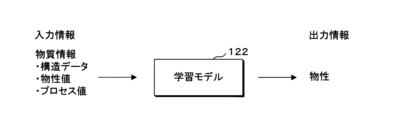
- Fig. 10 is an explanatory diagram showing an overview of the learning model 122.
- Fig. 10 illustrates an example of the learning model 122, which receives material information about a substance as input and outputs information indicating the physical properties of the substance.
- the learning model 122 is, for example, a neural network.
- the learning model 122 includes an input layer to which material information is input, an output layer that outputs physical property values, and an intermediate layer (hidden layer) that extracts features.
- the intermediate layer may include a convolutional layer, a pooling layer, a fully connected layer, and the like.
- the intermediate layer has a plurality of nodes that extract features of the input data, and passes the features extracted using various parameters to the output layer.
- the material information input to the learning model 122 includes, for example, structural data representing the structure of the material, physical property values representing the physical properties, process values relating to the process, etc.
- the structural data, physical property values, and process values may each include multiple types of data. At least one of the structural data, physical property values, and process values may be input to the learning model 122.
- the output layer of the learning model 122 has one node, and outputs a continuous value indicating a predetermined physical property from the node. Note that the configuration of the output layer is not particularly limited as long as information regarding the physical property to be predicted can be obtained.
- the learning model 122 may be configured to be able to predict multiple types of physical properties.
- the learning model 122 can be generated by preparing training data in which data indicating known physical property values are labeled for material information about a substance, and using the training data to train an untrained neural network through machine learning.
- data in a summary file is used as the training data.
- the summary file stores structural data for multiple substances, experimental values corresponding to physical properties or process values, calculated values, and process values as structured data. Therefore, for example, by using data in the substance information column in the summary file as input information and data in the target physical property column as output information, training data consisting of multiple data sets in which physical property values that are correct values are assigned to substance information can be easily obtained.
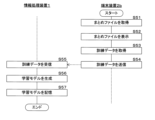
- FIG. 11 is a flowchart showing an example of a processing procedure executed by the search system 100 of the second embodiment. For example, when the program 2P is selected and started by the second user and "machine learning" is selected from the menu, the control unit 21 of the terminal device 2b executes the following processing.
- the control unit 21 of the terminal device 2b acquires link information to any of the summary files by accepting an operation from the second user, and acquires the summary file stored at the acquired link destination (step S51).
- the control unit 21 displays the acquired summary file on the display unit 24 (step S52).
- the second user may use the summary file as is as training data, or may use the operation unit 25 to delete part of the data in the summary file or add other data, thereby generating training data consisting of a desired data set.
- the control unit 21 acquires the training data generated using the summary file (step S53).
- the control unit 21 may acquire the training data in which the input information and the output information are associated by receiving a selection from the second user of a data string that will be the input information and a data string that will be the output information in the training data for the displayed summary file.
- the control unit 21 transmits the acquired training data to the information processing device 1 (step S54).
- the control unit 21 may upload the training data to a specified registration screen.
- the control unit 11 of the information processing device 1 receives the training data from the terminal device 2b (step S55).
- the control unit 11 uses the received training data to generate a learning model 122 that outputs a physical property value of a predetermined physical property of a substance when material information of the substance is input (step S56).
- control unit 11 inputs material information contained in the training data to the input layer of the learning model 122, and obtains physical property values output from the output layer after arithmetic processing in the intermediate layer.
- the control unit 11 compares the physical property values output from the output layer with the physical property values contained in the training data, and optimizes parameters such as the weights (coupling coefficients) between neurons so that the physical property values output from the output layer approach the correct values.
- parameters such as the weights (coupling coefficients) between neurons so that the physical property values output from the output layer approach the correct values.
- the control unit 11 optimizes various parameters using the backpropagation method. Before learning begins, it is assumed that initial settings are given to the definition information describing the learning model 122. When learning is completed by errors, the number of learning times, etc. satisfying predetermined criteria, optimized parameters are obtained.
- control unit 11 stores the definition information regarding the learned learning model 122 in the storage unit 12 as the learned learning model 122 (step S57), and ends the series of processes.
- a learning model 122 is constructed that has been trained to be able to appropriately predict the physical property values of the specified physical properties for the material information of the substance.
- the information processing device 1 can execute a physical property prediction process for each substance using the constructed learning model 122.
- the information processing device 1 receives substance information of a substance to be the target of physical property prediction from, for example, the terminal device 2b of the second user.
- the information processing device 1 may acquire substance information of a substance to be the target of physical property prediction by accepting the designation of a specific string in any of the summary files.
- the information processing device 1 inputs the acquired substance information of the substance into the learning model 122 and acquires physical property values output from the learning model 122.
- the information processing device 1 transmits the acquired physical property values to the terminal device 2b.
- the generated learning model 122 may be deployed to the terminal device 2b, and the prediction process may be executed on the terminal device 2b side.
- At least one of Program 1P and Program 2P may include, for example, an ETL tool for generating training data and a machine learning tool for performing machine learning, or may link with these tools between applications.
- An ETL tool is a tool that executes a series of processes, such as extracting data stored in a database, transforming it into a form that is easy to use in software such as a data warehouse, and writing it out into the software.
- the second user may generate training data by processing data in a summary file using the ETL tool.
- the information processing device 1 may automatically execute a series of processes from generating the training data to constructing the learning model 122.
- the information processing device 1 accepts a request to generate the learning model 122 specifying any summary file by accepting an operation from the second user.
- the information processing device 1 analyzes the data in the summary file and generates training data by recognizing a data sequence that will be input information and a data sequence that will be output information.
- the information processing device 1 may specify the substance information sequence in the summary file as input information and the physical property sequence of interest as output information.
- the information processing device 1 constructs the learning model 122 using the generated training data.
- only some of the data strings in the summary file may be selectively used. For example, based on the correlation between the target property and each substance information item, only substance information items that are relatively strongly correlated with the target property may be adopted as explanatory variables. Alternatively, based on the correlation between the substance information items, only a predetermined number of substance information items among a plurality of substance information items that are highly correlated with each other may be adopted as explanatory variables, and the substance information of the remaining substance information items may be deleted, thereby reducing the amount of data.
- the correlation may be identified, for example, from past knowledge, or may be obtained from the data in the summary file using a formula for obtaining a predetermined correlation coefficient.
- the information processing device 1 obtains the degree of correlation (for example, the value of the correlation coefficient) based on the summary file, and generates training data based on the obtained degree of correlation and the training data generation conditions.
- the information processing device 1 may provide the obtained degree of correlation to the terminal device 2b.
- the second user can check the provided degree of correlation and select data to be used for the training data.
- the learning model 122 can be easily generated by using the summary file.
- the summary file can be efficiently acquired based on documents searched from the shared data, improving user convenience. Since the summary file is generated in advance as structured data, it can be used in the learning process of the learning model 122 without complicated processing. By using the summary file, multiple experimental results obtained by multiple users can be easily linked, improving the quality of the training data and leading to the generation of a more accurate learning model 122.
- (Appendix 3) Obtain search conditions including search keywords or refinement conditions, Identifying the summary information that satisfies the acquired search criteria; 3.
- (Appendix 4) Acquire the document and structured data related to the document in association with each other; storing the acquired document and the acquired structured data in association with each other; 4.
- the computer program according to claim 1, further comprising: outputting information relating to the structured data as the detailed information. (Appendix 5) Obtaining training data including the detailed information; 5.
- the detailed information includes substance information related to a substance and a physical property value representing a predetermined physical property
- (Appendix 7) Obtain a selection as to whether or not to generate a learning model using the detailed information;
- Appendix 9 The computer program of any one of claims 1 to 8, wherein the detailed information includes a link to a file including at least one of experimental values, calculated values, and process information related to the substance.
- Appendix 10 10. The computer program product of claim 1, wherein the document has a cover page created according to a predetermined format.
- (Appendix 12) storing a plurality of documents created by a plurality of users in the group in a storage device; outputting a list of summary information showing a summary of each stored document in a selectable list; Obtaining a selection of any one of the plurality of pieces of summary information in the output list information; Extracting detailed information representing details of the document corresponding to the selected summary information;
- the information processing device further comprises a control unit that executes a process of outputting the extracted detailed information.
- Reference Signs List 1 Information processing device 11 Control unit 12 Storage unit 13 Communication unit 1A Recording medium 1P Program 121 Document DB 122 Learning model 2 Terminal device 21 Control unit 22 Storage unit 23 Communication unit 24 Display unit 25 Operation unit 2A Recording medium 2P Program
Landscapes
- Engineering & Computer Science (AREA)
- Theoretical Computer Science (AREA)
- Databases & Information Systems (AREA)
- Data Mining & Analysis (AREA)
- Physics & Mathematics (AREA)
- General Engineering & Computer Science (AREA)
- General Physics & Mathematics (AREA)
- Software Systems (AREA)
- Library & Information Science (AREA)
- Artificial Intelligence (AREA)
- Computer Vision & Pattern Recognition (AREA)
- Evolutionary Computation (AREA)
- Medical Informatics (AREA)
- Computing Systems (AREA)
- Mathematical Physics (AREA)
- Information Retrieval, Db Structures And Fs Structures Therefor (AREA)
Abstract
データ共有の利便性を向上することができるコンピュータプログラム等を提供する。 コンピュータプログラムは、グループ内における複数のユーザにより作成された複数の文書を記憶しておき、記憶した各文書の概要を表す概要情報を選択可能に一覧で示す一覧情報を出力し、出力した前記一覧情報における複数の概要情報のうちのいずれかの概要情報の選択を取得し、選択された概要情報に対応する文書の詳細を表す詳細情報を抽出し、抽出した前記詳細情報を出力する処理をコンピュータに実行させる。
Description
本発明は、コンピュータプログラム、情報処理方法及び情報処理装置に関する。
従来、データの共有に関する技術が提案されている。例えば特許文献1には、新たな患者データ共有無しの多中心生物医学データコラボレーション処理システムであって、各医療センターモデルパラメータと非同期計算をコラボレートするためのクラウドサーバ及びデータにローカル高性能計算を展開するための医療センタークライアントを含むシステムが開示されている。
しかしながら、特許文献1に記載の技術は、必ずしもデータ共有の利便性を向上するものではないという問題がある。
本開示の目的は、データ共有の利便性を向上することができるコンピュータプログラム等を提供することである。
本開示の一態様に係るコンピュータプログラムは、グループ内における複数のユーザにより作成された複数の文書を記憶しておき、記憶した各文書の概要を表す概要情報を選択可能に一覧で示す一覧情報を出力し、出力した前記一覧情報における複数の概要情報のうちのいずれかの概要情報の選択を取得し、選択された概要情報に対応する文書の詳細を表す詳細情報を抽出し、抽出した前記詳細情報を出力する処理をコンピュータに実行させる。
本開示の一態様に係るコンピュータプログラムは、グループ内における複数のユーザにより作成された複数の文書の概要を表す概要情報を選択可能に一覧で示す一覧情報を取得し、取得した前記一覧情報を表示し、表示した前記一覧情報における複数の概要情報のうちのいずれかの概要情報の選択を受け付け、受け付けた前記概要情報の選択を出力し、選択された概要情報に対応する文書の詳細を表す詳細情報を取得し、取得した前記詳細情報を表示する処理をコンピュータに実行させる。
本開示によれば、データ共有の利便性を向上することができる。
本開示をその実施の形態を示す図面を参照して具体的に説明する。
(第1実施形態)
図1は、本実施形態の検索システム100の構成例を示すブロック図である。本実施形態の検索システム100は、企業(会社)内で収集された複数の文書を共有データとして管理し、ユーザに対して所望の文書を提供する。企業は、複数のユーザが属するグループの一例である。本明細書において、「グループ」とは、データの共有を行う集団を意味する。グループは、1つの企業(組織)であってもよく、複数の企業からなるものであってもよく、企業を区切るより小さな単位であってもよい。検索システム100は、情報処理装置1と、複数の端末装置2とを備える。情報処理装置1と、端末装置2それぞれとは、例えばLAN(Local Area Network)又はインターネット等のネットワークNを介して通信可能に接続されている。
図1は、本実施形態の検索システム100の構成例を示すブロック図である。本実施形態の検索システム100は、企業(会社)内で収集された複数の文書を共有データとして管理し、ユーザに対して所望の文書を提供する。企業は、複数のユーザが属するグループの一例である。本明細書において、「グループ」とは、データの共有を行う集団を意味する。グループは、1つの企業(組織)であってもよく、複数の企業からなるものであってもよく、企業を区切るより小さな単位であってもよい。検索システム100は、情報処理装置1と、複数の端末装置2とを備える。情報処理装置1と、端末装置2それぞれとは、例えばLAN(Local Area Network)又はインターネット等のネットワークNを介して通信可能に接続されている。
情報処理装置1は、種々の情報処理、情報の送受信が可能な装置であり、例えばサーバコンピュータ、パーソナルコンピュータ、量子コンピュータ等である。情報処理装置1は端末装置2と同じ施設に設置されたローカルコンピュータであってもよく、インターネット等を介して端末装置2に通信接続されたクラウドコンピュータであってもよい。情報処理装置1は、いずれかの端末装置2に統合されてもよい。端末装置2の数は1、2又は4以上であってもよい。
端末装置2は、検索システム100を利用するユーザに用いられる情報処理端末である。端末装置2は、例えばパーソナルコンピュータ、スマートフォン、タブレット端末等である。以下の説明では、便宜上、第1ユーザが本システムに文書を提供するユーザであり、第2ユーザが提供された文書を検索、利用するユーザであるものとして、第1ユーザの端末装置2を端末装置2a、第2ユーザの端末装置2を端末装置2bと記載する。なお、第1ユーザ及び第2ユーザを区別して説明する必要がない場合には、単にユーザとも記載し、端末装置2a,2bを区別して説明する必要がない場合には、単に端末装置2とも記載する。第1ユーザ及び第2ユーザは、例えば同じ会社内の別チーム所属といったように、同一組織の異なる部署に属する。
上記のユーザの区別は便宜的なものであり、文書を提供するユーザが文書を検索するユーザとなる場合も想定される。すなわち、本システムはユーザ同士の文書の共有を実現するものであり、ユーザは文書の提供者又は提供を受ける者のどちらか一方のみに分類されるものではない。
情報処理装置1は、端末装置2aを通じて、第1ユーザそれぞれにより作成された文書を受け付け、受け付けた文書を後述するデータベースに保存する。データベースに保存される文書とは、例えば技術文書であり、具体的には月報、研究報告書、実験報告書、学術論文等を含む。情報処理装置1は、第2ユーザからの要求に応じて、保存された文書に関する情報を端末装置2bに提供する。
従来ユーザ毎に個別に保持されていた実験結果や研究成果を、部署や業務を跨いで大量に収集し共有データとして利活用することにより、技術開発の促進効果が期待される。しかしながら、業務データの作成は業務知識に基づく属人性が高く、作成者に応じてデータ形式やデータ内容が異なるため、データの利活用を向上するためには、データ共有に適した態様でデータを保存することが重要である。特に化学分野においては、研究開発が属人化しており、実験データの取り方がユーザに応じて異なっており、相互利用が容易な形式で保存する必要がある。本実施形態では、所定ルールに従い各ユーザが文書又は当該文書に関連するファイルを生成する。生成された情報を情報処理装置1により一元管理することで、スムーズなデータ共有を実現する。
情報処理装置1は、コンピュータであり、図1に示すように、制御部11、記憶部12、及び通信部13を備える。情報処理装置1は複数のコンピュータからなるマルチコンピュータであってもよく、ソフトウェアによって仮想的に構築された仮想マシンであってもよい。
制御部11は、一又は複数のCPU(Central Processing Unit)、MPU(Micro-Processing Unit)、GPU(Graphics Processing Unit)等の演算処理装置を備える。制御部11は、内蔵するROM(Read Only Memory)又はRAM(Random Access Memory)等のメモリ、クロック、カウンタ等を用い、各構成部を制御して処理を実行する。なお、情報処理装置1の機能は、ソフトウェア的に実現してもよいし、一部又は全部を、例えばASIC(Application Specific Integrated Circuit)、FPGA(Field Programmable Gate Array)等のハードウェアで実現してもよい。
記憶部12は、例えばハードディスク、フラッシュメモリ、SSD(Solid State Drive)等の不揮発性メモリを備える。記憶部12は、情報処理装置1に接続された外部記憶装置であってもよい。記憶部12は、制御部11が参照する各種コンピュータプログラム及びデータを記憶する。記憶部12は、文書の提供に関する処理をコンピュータに実行させるためのプログラム1Pと、当該プログラム1Pの実行に必要なデータとしての文書DB(Data Base:データベース)121とを記憶している。文書DB121は、各ユーザから受け付けた文書に関する情報を格納するデータベースである。
プログラム1Pを含むコンピュータプログラム(コンピュータプログラム製品)は、当該コンピュータプログラムを読み取り可能に記録した非一時的な記録媒体1Aにより提供されてもよい。記憶部12は、不図示の読出装置によって記録媒体1Aから読み出されたコンピュータプログラムを記憶する。記録媒体1Aは、例えば磁気ディスク、光ディスク、半導体メモリ等である。また、通信ネットワークに接続されている外部サーバからコンピュータプログラムをダウンロードし、記憶部12に記憶させてもよい。プログラム1Pは、単一のコンピュータプログラムでも複数のコンピュータプログラムにより構成されるものでもよく、また、単一のコンピュータ上で実行されても通信ネットワークによって相互接続された複数のコンピュータ上で実行されてもよい。
通信部13は、ネットワークNを介した通信を実現する通信デバイスを備える。制御部11は、通信部13を介して各端末装置2との間でデータを送受信する。
情報処理装置1の構成は上述の例に限定されず、例えばユーザの操作を受け付けるための操作部、画像を表示する表示部等を備えてもよい。
端末装置2は、コンピュータであり、制御部21、記憶部22、通信部23、表示部24、及び操作部25を備える。
制御部21は、一又は複数のCPU、MPU、GPU等の演算処理装置を備える。制御部11は、内蔵するROM又はRAM等のメモリ、クロック、カウンタ等を用い、各構成部を制御して処理を実行する。
記憶部22は、例えばハードディスク、フラッシュメモリ、SSD等の不揮発性メモリを備える。記憶部22は、制御部21が参照する各種コンピュータプログラム及びデータを記憶する。記憶部22は、文書の検索に関する処理をコンピュータに実行させるためのプログラム2Pを記憶している。
通信部23は、ネットワークNを介した通信を実現する通信デバイスを備える。制御部21は、通信部23を介して情報処理装置1との間でデータを送受信する。
表示部24は、例えば液晶ディスプレイ、有機EL(Electro Luminescence)ディスプレイ等のディスプレイ装置を備える。表示部24は、制御部21からの指示に従い、情報処理装置1から受信した文書等を表示する。
操作部25は、ユーザの操作を受け付けるインタフェースである。操作部25は、例えばキーボード、マウス、ディスプレイ内蔵のタッチパネルデバイス、スピーカ及びマイクロフォン等を備える。操作部25は、ユーザからの操作入力を受け付け、操作内容に応じた制御信号を制御部21へ送出する。
図2は、文書DB121に記憶される情報の内容例を示す図である。文書DB121には、例えばデータIDをキーに、文書情報、まとめファイル情報、及び実験ファイル情報等の情報を紐付けたレコードが格納されている。
文書情報は、ユーザにより作成された文書に関する情報を含む。文書情報には、例えば、文書を識別する文書ID、文書ファイル(文書データ)、及び文書ファイルが更新された日付を表す更新年月日等が含まれる。文書ファイル列には、実体ファイルが格納される。
文書ファイルには、表紙と、本文とが含まれる。表紙は、予め設定される形式に従い、所定項目が記載されたページである。本文は、例えばテキスト、画像、音声等のデータを含み、文書の作成者の構文や言語等に基づく自由形式のデータである。すなわち、本実施形態における文書ファイルの本文は、非構造化データである。非構造化データとは、計算機で統計処理が行えるような意味づけが含まれてないデータを意味する。なお、文書ファイルは、表紙及び本文からなる一連の文書であるものに限らず、表紙ファイル及び本文ファイルにより構成されてもよい。
まとめファイル情報は、まとめファイルに関する情報を含む。まとめファイルとは、文書に対応付けて作成されるものであり、文書に関する所定の情報を整理してまとめ上げたファイルである。まとめファイル情報には、例えば、まとめファイルを識別するまとめファイルID、まとめファイル(まとめデータ)、及びリンク情報等が含まれる。まとめファイル列には、実体ファイルが格納される。リンク情報は、まとめファイルへアクセスするための当該まとめファイルへのリンク情報(パス情報)を含む。なお、1つの文書ファイルに紐付けられるまとめファイルの数は1又は3以上であってもよく、ゼロであってもよい。
実験ファイル情報は、実験ファイルに関する情報を含む。実験ファイルは、文書に関連する実験の実験データを表す。実験ファイル情報には、例えば、実験ファイルを識別する実験ファイルID、実験ファイル(実験データ)、及びリンク情報等が含まれる。実験ファイル列には、実体ファイルが格納される。実験ファイルは、例えば、テキスト、グラフ、画像等のデータを含み、非構造化データである。リンク情報は、実験ファイルへアクセスするための当該実験ファイルへのリンク情報(パス情報)を含む。なお、1つの文書ファイルに紐付けられる実験ファイルの数は1又は3以上であってもよく、ゼロであってもよい。
文書DB121は、例えば階層化されたファイル構造を有し、当該階層構造に合わせて文書セットを記憶する。一例として、文書DB121は、第1階層から第3階層で構成される。第1階層は、全社フォルダで構成される。第2階層は、会社の研究所それぞれに対応付けられた複数のフォルダで構成される。研究所フォルダの下階層である第3階層は、研究所の部署としてのグループそれぞれに対応付けられた一又は複数のフォルダと、研究所におけるプロジェクトそれぞれに対応付けられた一又は複数のフォルダとで構成される。各グループフォルダに、グループに対応する文書セットが格納される。また各プロジェクトフォルダに、プロジェクトに対応する文書セットが格納される。なお、上述の階層構造は単なる例示であり、文書DB121の文書の管理体制は組織の構成や文書の管理目的に応じて適宜設計されてよい。例えば、プロジェクトフォルダは第2階層に含まれてもよい。文書DB121は階層型でなくてもよい。
文書セットを格納するフォルダは、例えば文書の種類や作成者の所属部署に基づき情報処理装置1が自動的に判定する。なお文書セットの格納先は、文書セットを端末装置2aから取得する際に第1ユーザからの指定を受け付けることにより決定されてもよい。
第1ユーザは、作成した文書を本システムに提供する際、端末装置2aを用いて、予め設定された所定形式に従い必要項目を入力し、表紙を作成する。また、必要に応じて、予め設定された所定形式に従い実験結果又は研究結果等を入力して、まとめファイルを作成する。第1ユーザは、文書の本文に表紙を添えた文書ファイルに、生成したまとめファイル及び予め作成(保存)済みの実験ファイルを対応付けた文書セットを情報処理装置1へ送る。
情報処理装置1は、例えば、端末装置2aから文書セットのアップロードを受け付けてもよく、端末装置2aから送信された電子メールやチャットメッセージ等のメッセージを受信することにより、当該メッセージに添付された文書セットを取得してもよい。情報処理装置1は、取得した文書セットを文書DB121に記憶する。文書DB121の内容は、随時更新される。
図3は、表紙の内容例を示す図である。図3に示すように、表紙に記載される事項には、例えば、書誌情報、まとめファイル保存場所、実験ファイル保存場所等が含まれる。書誌情報は、文書を特定するための情報であり、例えば、文書のタイトル、作成者氏名、作成者の所属先、作成者の所属チーム、作成者の連絡先、文書の作成年月日等を含む。まとめファイル保存場所は、文書に関連するまとめファイルの保存場所(リンク情報)を表す。まとめファイル保存場所におけるファイル名及びリンク情報の記載有無により、文書に関連するまとめファイルの存否を把握可能である。実験ファイル保存場所は、実験ファイルの保存場所(リンク情報)を表す。実験ファイル保存場所におけるファイル名及びリンク情報の記載有無により、文書に関連する実験ファイルの存否を把握可能である。
図4は、まとめファイルの内容例を示す図である。まとめファイルは、例えば文書に関連する実験結果や研究結果等のデータを、予め定義された構造に従って記述、配置したデータ集合である。すなわち、まとめファイルは構造化データである。構造化データとは、一定の構造(規則)に従って記述され、計算機で統計処理が行えるような意味づけが予め含まれているデータを意味する。
図4に示す例にて、まとめファイルは、「列」及び「行」を有する表形式であり、「列」等に意味を持たせて構造化したものである。まとめファイルは、項目として、サンプル(物質)を識別するためのサンプルID、注目物性及び物質情報を含む。注目物性は、まとめファイルの複数のデータのうちの注目すべき物性であり、例えば物性評価の対象となった物性である。物質情報は、物質に関する情報であって、注目物性と関係性を有し得る情報を含む。物質情報は、例えば物質の物性を表す物性値、構造を表す構造データ、物質におけるプロセスに関するプロセス値等を含んでもよい。
本実施形態のまとめファイルには、注目物性としての実験値1と、物質情報としての実験値2、計算値1、計算値2、プロセス値1、及びプロセス値2とが含まれている。なお、注目物性及び物質情報に含まれるデータ数及びデータ種類は単なる例示である。注目物性には、複数種類の物性が含まれていてもよい。
実験値は、物性値に対応し、実験により得られた値である。計算値は、物性値又は構造データに対応し、例えば実験値や他の計算値等に基づく計算により得られた値である。プロセス値には、例えば物質に関する各種プロセスのプロセス条件が含まれる。プロセス値としては、例えば、物質を合成する合成工程における合成条件、物質を作製(調製)する作製工程における作製条件等が挙げられる。
計算値は、物性を表すシミュレーション値であってもよい。シミュレーション値は、所定のアルゴリズムにより求められた物質の物性値である。シミュレーション値は、例えば、量子化学計算、分子動力学計算、第一原理計算等の理論計算により得られる。計算値は、物質の構造を表す分子記述子であってもよい。分子記述子は、物質の持つ構造的特徴や物理化学的特性等を計算機で扱いやすくするために数値化したものである。分子記述子は、物質の構造式から計算可能であり、公知のソフトウェア、例えばRDKit、mordred、MOE、alvaDesc、PaDEL-Descriptor、Codessa等を用いて求めることができる。
まとめファイルの内容は上述の例に限らず、技術文書の内容に応じて適宜の項目を設定することができる。
図5は、検索システム100が実行する文書の取得処理手順の一例を示すフローチャートである。以下のフローチャートにおける処理は、情報処理装置1の記憶部12に記憶するプログラム1Pに従って制御部11によって実行される。情報処理装置1は、例えば端末装置2aから文書セットが送信されると、以下の処理を実行する。
情報処理装置1の制御部11は、端末装置2aから文書ファイル、まとめファイル及び実験ファイルを対応付けた文書セットを取得する(ステップS11)。まとめファイル及び実験ファイルの一方又は両方は文書ファイルに対応付けられていなくてもよい。
制御部11は、取得した文書ファイル、まとめファイル及び実験ファイルを対応付けて文書DB121に記憶する(ステップS12)。ステップS12において制御部11は、例えば、取得した文書ファイルの種類や作成者の所属部署に基づき文書セットの格納先を決定し、決定した格納先のフォルダへ文書セットを格納する。制御部11は、決定した格納先に基づきまとめファイルのリンク先及び実験ファイルのリンク先を特定し、特定したリンク先を文書DB121に記憶する。制御部11はまた、特定したリンク先を、表紙のまとめファイル保存場所及び実験ファイル保存場所に追加する。なお、表紙のファイル保存場所及び実験ファイル保存場所は、第1ユーザ側で予め入力されていてもよい。この場合、制御部11は、入力された保存場所に従い、当該保存場所にまとめファイル及び実験ファイルを格納するとともに、各保存場所を文書DB121に記憶する。
まとめファイル及び実験ファイルの一方又は両方は、文書DB121に保存されるものに限らず、第1ユーザの端末装置2aに記憶されていてもよい。この場合、情報処理装置1は、文書ファイルと、まとめファイル及び実験ファイルにアクセスするためのリンク先とを対応付けて端末装置2aから取得してもよい。
各端末装置2aから文書セットが送信される度、上述の処理が繰り返し実行されることにより、社内における複数のユーザにより作成された多種多様な文書が文書DB121に蓄積される。
図6は、検索システム100が実行する検索処理手順の一例を示すフローチャートである。以下の各フローチャートにおける処理は、情報処理装置1の記憶部12に記憶するプログラム1Pに従って制御部11によって実行されるとともに、端末装置2bの記憶部12に記憶するプログラム2Pに従って制御部21によって実行される。端末装置2bの制御部21は、例えば、プログラム2Pが第2ユーザによって選択されて起動され、メニューから「文書検索」が選択されると、以下の処理を実行する。
端末装置2bの制御部21は、第2ユーザの操作部25の操作による文書の検索条件及び検索要求を受け付ける(ステップS21)。ステップS21では、制御部21は、検索条件を受け付ける受付画面を表示部24に表示させ、受付画面を利用して文書の検索に対する検索条件及び検索要求を受け付ける。
図7は、端末装置2bの表示部24に表示される受付画面31の一例を示す模式図である。端末装置2bの制御部21は、例えば、情報処理装置1が提供する文書検索サービスに対する第2ユーザからのアカウント情報を用いたログインを受け付けた場合、情報処理装置1から送信される画面情報に基づき、図7に示す受付画面31を表示させる。
受付画面31には、例えば、文書に関する検索キーワードの入力を受け付けるキーワード欄310と、絞り込み条件の入力を受け付ける絞り込み条件欄311と、検索要求の指示の入力を受け付ける検索ボタン312とが含まれる。
キーワード欄310は、文字入力欄を有する。第2ユーザは、操作部25を用いてキーワード欄310に検索キーワードを入力することにより、所望の検索キーワードを含む文書を検索することが可能である。
絞り込み条件欄311は、例えば複数の絞り込み条件項目に対する絞り込み条件を受け付け可能に構成される。図7では、絞り込み条件欄311は、更新日の絞り込み条件の指定を受け付ける第1領域311aと、検索フォルダ範囲の絞り込み条件の指定を受け付ける第2領域311bとを備える。第1領域311a及び第2領域311bには、各絞り込み条件項目それぞれに対応付けられた複数のチェックボックス313が設けられている。第2ユーザは、操作部25を用いて絞り込み条件欄311における一又は複数のチェックボックス313にチェックを入力することにより、所望の絞り込み条件項目に該当する文書を検索することが可能である。
更新日の絞り込み条件項目としては、例えば、「5日以内」、「2週間以内」、「1か月以内」等が挙げられる。検索フォルダ範囲の絞り込み条件項目としては、例えば、「全社」、「○○研究所」、「○○グループ」、「○○プロジェクト」等が挙げられる。検索範囲は、上述した文書DB121における各階層のフォルダ名に対応する。
絞り込み条件欄311の構成は、絞り込み条件項目を受け付け可能であれば特に限定されない。絞り込み条件欄311は、予め設定される絞り込み条件項目候補の中から選択を受け付けるものに限らず、第2ユーザからの入力に応じて任意の絞り込み条件項目、例えば任意の更新期間、任意のフォルダ範囲の指定を受け付け可能に構成されてもよい。
なお、文書DB121は、例えば階層毎及び各階層に作成されたフォルダ毎のように、所定基準でアクセス権が定義されていてもよい。この場合、情報処理装置1は、端末装置2bへの受付画面31の提供に際し、ログインされたアカウント情報に基づき、文書検索を行う第2ユーザのアクセス権を特定する。情報処理装置1は、第2ユーザに許容されたアクセス権の範囲内におけるフォルダのみを、検索フォルダ範囲の絞り込み条件項目として領域に表示させることができる。
絞り込み条件欄311は、図7に示すように、絞り込み項目を選択する第3領域311cを備え、ユーザの選択に応じて、絞り込み項目の選択、変更、追加等を受け付け可能に構成されてもよい。第3領域311cは、例えばプルダウン式のメニューを有する。第2ユーザは、プルダウン式のメニューを開くことによって、予め用意されている複数の絞り込み条件の中から一つの絞り込み条件を選択することが可能である。いずれかの絞り込み条件が選択された場合、第3領域311cは、第1領域311a及び第2領域311bと同様に、絞り込み条件項目それぞれに対応付けられた複数のチェックボックス313を表示するよう構成されてもよい。
キーワード欄310及び絞り込み条件欄311に検索キーワード及びチェックが入力された状態で、検索ボタン312を第2ユーザが指定することにより、操作部25に検索条件及び文書の検索の要求が入力される。制御部21は、検索条件及び文書の検索の要求を受け付ける。なお第2ユーザは、検索キーワード及び絞り込み条件のいずれか一方のみを検索条件として指定してもよい。
図6に戻り説明を続ける。制御部21は、受け付けた検索条件及び文書の検索の要求を情報処理装置1に送信する(ステップS22)。
情報処理装置1の制御部11は、端末装置2bから検索条件及び文書の検索の要求を受信する(ステップS23)。検索条件には、例えば検索キーワードと、一又は複数の絞り込み条件とが含まれる。
制御部11は、文書DB121に記憶する情報に基づき、文書DB121に保存される文書のうち、受信した検索条件を満たす文書を特定する(ステップS24)。例えば、検索キーワードを取得した場合、制御部11は、文書ファイルに取得した検索キーワードが含まれる文書を特定する。更新日の絞り込み条件を取得した場合、制御部11は、文書情報における更新年月日が、取得した更新日の絞り込み条件の期間に含まれる文書を特定する。検索フォルダ範囲の絞り込み条件を取得した場合、制御部11は、取得した検索フォルダ範囲の範囲内に限定して文書を検索する。制御部11は、文書DB121の検索を実行し、全ての検索条件を満たす文書を抽出する。
制御部11は、特定した検索条件を満たす各文書の概要情報を含む概要画面を生成し(ステップS25)、生成した概要画面をログインした第2ユーザの端末装置2bに送信する(ステップS26)。概要情報は、文書の概要を表す情報を含む。
端末装置2bの制御部21は、概要画面を情報処理装置1から受信し(ステップS27)、受信した概要画面を表示部24に表示する(ステップS28)。
図8は、端末装置2bの表示部24に表示される概要画面32の一例を示す模式図である。概要画面32には、例えば、文書に関する検索条件を表示する検索条件欄320と、文書の概要情報を表示する概要情報欄321とが含まれる。
検索条件欄320は、概要情報欄321に表示される文書に対応する検索条件を表示する。情報処理装置1の制御部11は、文書の検索に用いた検索キーワード及び絞り込み条件等の検索条件を検索条件欄320に表示させる。検索条件欄320は、受付画面31としての機能を備え、当該検索条件欄320上で検索条件の変更、追加等を受け付け可能に構成されてもよい。
概要情報欄321は、検索条件欄320に示される検索条件を満たす各文書の概要情報を一覧で表示する。概要情報とは、文書の概要を表す情報である。図8に示す例にて、概要情報欄321は、文書の表紙のサムネイルを表示する第4領域321aと、文書の一部を抜粋した抜粋情報を表示する第5領域321bとを含み、概要情報としてのサムネイル及び抜粋情報を表示する。
情報処理装置1の制御部11は、検索条件を満たす文書を特定した場合、特定された各文書について、文書DB121から表紙を読み出し、読み出した表紙のサムネイルを生成し、生成したサムネイルを第4領域321aに表示させる。なお文書のサムネイルは表紙以外の部分のサムネイルであってもよい。制御部11は、例えば検索キーワードを含むページのサムネイル、本文の1ページ目のサムネイル等を生成してもよい。
制御部11はまた、文書DB121から文書ファイルを読み出し、読み出した文書ファイルのうち、例えば検索キーワードを含む所定長のテキストデータを抜粋し、抜粋したテキストデータの文字を抜粋情報として第5領域321bに表示させる。制御部11は、検索キーワードに対応する文字部分に対し、ハイライト表示等の所定の表示処理を施してもよい。なお、検索条件として検索キーワードを取得していない場合には、初期設定される特定部分(例えば本文の最初の一行)が抜粋されてもよい。
概要情報欄321に一覧表示される各概要情報は、選択可能に構成されている。概要情報欄321は、当該概要情報欄321に表示される文書に係る概要情報のうちのいずれかの文書に係る概要情報の選択を受け付ける文書選択欄としても機能する。第2ユーザは、操作部25を用いていずれかの文書に対応する第4領域321a又は第5領域321bを選択(指定)することにより、さらなる詳細情報の取得を要求する文書を選択することが可能である。
詳細情報とは、文書の詳細を表す情報であり、概要情報よりも多くの情報量を含む。本明細書において、詳細情報とは、例えば表紙及び本文を含む文書ファイルのように文書自体の詳細に加え、まとめファイル及び実験ファイルのように文書に紐付けられたファイルの詳細も、その意味に含む。
図8に示す如く概要画面32が表示された状態で、いずれかの第4領域321a又は第5領域321bを第2ユーザが指定することにより、操作部25に特定の文書の選択及び当該特定の文書に対する詳細情報の要求が入力される。制御部21は、特定の文書の選択及び詳細情報の要求を受け付ける。詳細情報の要求に対応する文書の特定は、例えば指定された第4領域321a又は第5領域321bに基づき制御部21が自動的に判定する。制御部21は、例えば操作部25に入力された概要画面32上の位置座標に基づき、指定された第4領域321a又は第5領域321bを特定し、特定した第4領域321a又は第5領域321bに対応するサムネイル又は抜粋情報を認識する。制御部21は、認識したサムネイル又は抜粋情報のメタデータ等に基づき、詳細情報の要求に対応する文書の文書IDを特定する。
図6に戻り説明を続ける。制御部21は、特定の文書の選択及び当該特定の文書に対する詳細情報の要求を受け付ける(ステップS29)。制御部21は、受け付けた特定の文書の選択及び詳細情報の要求を情報処理装置1に送信する(ステップS30)。
情報処理装置1の制御部11は、特定の文書の選択及び詳細情報の要求を受信する(ステップS31)。なお、詳細情報の要求に対応する文書の特定は、情報処理装置1側で行ってもよい。この場合、情報処理装置1は、端末装置2bの操作部25を通じて受け付けた文書の選択に係る位置座標を示す情報を端末装置2bから受信し、受信した位置座標に基づき詳細情報の要求に対応する文書を特定してもよい。
制御部11は、文書DB121に記憶する情報に基づき、詳細情報が要求された特定の文書の詳細情報を取得する(ステップS32)。制御部11は、例えば、文書の詳細として特定の文書の文書IDに対応する文書ファイルを文書DB121から抽出する。制御部11は、取得した文書ファイルを含む詳細画面を生成する(ステップS33)。制御部11は、生成した詳細画面をログインした第2ユーザの端末装置2bに送信する(ステップS34)。
端末装置2bの制御部21は、詳細画面を情報処理装置1から受信し(ステップS35)、受信した詳細画面を表示部24に表示する(ステップS36)。詳細画面には、文書ファイルが表示される。詳細画面は、例えばスクロール又はページめくり機能等により、表紙及び本文の各ページを確認可能に表示する。表紙には、上述の通り文書に関連するまとめファイル又は実験ファイルが存在する場合における各ファイルへのリンク情報が表示されている。
制御部21は、まとめファイル又は実験ファイルを取得するか否かを判定する(ステップS37)。第2ユーザの操作による表紙のリンク情報の選択を受け付けていないことにより、まとめファイル又は実験ファイルを取得しないと判定した場合(S37:NO)、制御部21は処理を終了する。
第2ユーザの操作による表紙のリンク情報の選択を受け付けたことにより、まとめファイル又は実験ファイルを取得すると判定した場合(S37:YES)、制御部21は、情報処理装置1にまとめファイル又は実験ファイルを要求する(ステップS38)。詳細には、制御部21は、情報処理装置1に選択されたリンク情報のリンク先に格納されるまとめファイル又は実験ファイルを要求する。
情報処理装置1は、まとめファイル又は実験ファイルの要求を端末装置2bから受け付ける(ステップS39)。情報処理装置1は、選択されたリンク情報に示される保存場所に記憶するまとめファイル又は実験ファイルを文書DB121から読み出し、読み出したまとめファイル又は実験ファイルを端末装置2bに送信する(ステップS40)。
端末装置2bの制御部21は、まとめファイル又は実験ファイルを情報処理装置1から受信し(ステップS41)、受信したまとめファイル又は実験ファイルを表示部24に表示する(ステップS42)。なお、情報処理装置1以外の他装置(例えば他の端末装置2)にまとめファイル又は実験ファイルが格納されている場合には、制御部21は、リンク情報に従い、他装置にまとめファイル又は実験ファイルを要求してもよい。制御部21は情報処理装置1を介して他装置にまとめファイル又は実験ファイルを要求してもよい。制御部21は処理を終了する。制御部21は、処理をステップS21、S28、S36等へ戻し、操作受付を続行してもよい。
本実施形態によれば、複数のユーザ間で生成された技術文書を情報処理装置1により一元管理することで、各ユーザが検索画面を用いて所望の文書を容易に検索、取得することができ、データ共有の利便性が向上される。共有される文書には、所定フォーマットの表紙が添えられているため、全てのユーザが一見して容易且つ明確にその文書の内容を把握することができる。
文書を提供するユーザは、用意されたフォーマットを利用することで、表紙の生成や文書の登録を容易に行うことができる。
文書には、文書に関連するまとめファイルや実験ファイルが紐付けられているため、文書の全内容に加えて、より多くの情報を効率的に取得することができる。まとめファイルや実験ファイルといった添付資料自体の内容は直接の検索対象とせず、検索対象を文書のみにすることで、検索負荷を低減し、処理性能が向上される。
文書に関連する各種データに基づき構造化されたまとめファイルが生成されることで、各ユーザが個々に取得したデータの相互運用性を高めることができる。構造化データとしてデータを保存することで、効率的なデータ把握や分析が可能であり、データ連携を進める上で発生するデータの認識齟齬を低減することができ、データの利活用性が高まる。
文書検索に際し、検索キーワードや絞り込み条件を設定することができるため、所望の文書を効率的に検索することができる。概要画面32には、文書のサムネイルや一部抜粋が一覧表示されるため、検索結果を一見して把握することができる。また、表紙に添付資料へのリンク情報を埋め込むことで、ユーザは容易且つ確実に添付資料の有無を把握できるとともに、必要に応じて添付資料を容易に入手することができ、使用性が向上される。
(第2実施形態)
第2実施形態では、まとめファイルを用いて学習モデルを構築する構成を説明する。以下の実施形態では主に第1実施形態との相違点を説明し、第1実施形態と共通する構成については同一の符号を付してその詳細な説明を省略する。
第2実施形態では、まとめファイルを用いて学習モデルを構築する構成を説明する。以下の実施形態では主に第1実施形態との相違点を説明し、第1実施形態と共通する構成については同一の符号を付してその詳細な説明を省略する。
図9は、第2実施形態の検索システム100の構成例を示すブロック図である。第2実施形態における情報処理装置1の記憶部12には、学習モデル122が記憶されている。学習モデル122は、機械学習により生成された学習モデルである。学習モデル122は、人工知能ソフトウェアの一部を構成するプログラムモジュールとしての利用が想定される。
図10は、学習モデル122の概要を示す説明図である。図10では、学習モデル122として、物質に関する物質情報を入力として、当該物質の物性を示す情報を出力するモデルを例示する。
学習モデル122は、例えばニューラルネットワークである。学習モデル122は、物質情報が入力される入力層と、物性値を出力する出力層と、特徴量を抽出する中間層(隠れ層)とを備える。中間層は、畳み込み層、プーリング層及び全結合層等を含んでもよい。中間層は、入力データの特徴量を抽出する複数のノードを有し、各種パラメータを用いて抽出された特徴量を出力層に受け渡す。入力層に物質情報が入力された場合、学習済みパラメータによって中間層で演算が行なわれ、出力層から、物性を示す出力情報が出力される。
学習モデル122に入力される物質情報は、例えば物質の構造を表す構造データ、物性を表す物性値、プロセスに関するプロセス値等を含む。構造データ、物性値及びプロセス値にはそれぞれ、複数種類のデータが含まれてもよい。学習モデル122には、構造データ、物性値及びプロセス値の少なくとも1つが入力されてもよい。
学習モデル122の出力層は1つのノードを有し、当該ノードから所定の物性を示す連続値を出力する。なお、予測すべき物性に関する情報を得ることができれば、出力層の構成は特に限定されない。学習モデル122は、複数種類の物性を予測可能に構成されてもよい。
学習モデル122は、物質の物質情報に対し、既知の物性値を示すデータがラベリングされた訓練データを用意し、当該訓練データを用いて未学習のニューラルネットワークを機械学習させることにより生成することができる。
本実施形態では、上記訓練データとして、まとめファイルのデータを利用する。まとめファイルには、図4に示したように、複数の物質についての構造データ、物性値又はプロセス値に相当する実験値、計算値及びプロセス値が、構造化データとして記憶されている。従って、例えば、まとめファイルにおける物質情報列のデータを入力情報とし、注目物性列のデータを出力情報とすることで、物質情報に対し、正解値となる物性値が付与された複数のデータセットからなる訓練データを容易に得ることができる。
図11は、第2実施形態の検索システム100が実行する処理手順の一例を示すフローチャートである。端末装置2bの制御部21は、例えば、プログラム2Pが第2ユーザによって選択されて起動され、メニューから「機械学習」が選択されると、以下の処理を実行する。
端末装置2bの制御部21は、第2ユーザの操作を受け付けることによるいずれかのまとめファイルへのリンク情報を取得し、取得したリンク先に格納されるまとめファイルを取得する(ステップS51)。制御部21は、取得したまとめファイルを表示部24に表示する(ステップS52)。第2ユーザは、まとめファイルをそのまま訓練データとしてもよく、あるいは操作部25を用いてまとめファイルのデータのうちの一部を削除又は他のデータを追加等することにより、所望のデータセットからなる訓練データを生成することが可能である。
制御部21は、まとめファイルを用いて生成された訓練データを取得する(ステップS53)。制御部21は、表示したまとめファイルに対し、訓練データにおける入力情報となるデータ列と、出力情報となるデータ列との選択を第2ユーザから受け付けることにより、入力情報と出力情報とを対応付けた訓練データとして取得してもよい。制御部21は、取得した訓練データを情報処理装置1に送信する(ステップS54)。制御部21は、所定の登録画面に訓練データをアップロードしてもよい。
情報処理装置1の制御部11は、端末装置2bから訓練データを受信する(ステップS55)。制御部11は、受信した訓練データを用いて、物質の物質情報を入力した場合に、当該物質の所定物性の物性値を出力する学習モデル122を生成する(ステップS56)。
具体的には、制御部11は、訓練データに含まれる物質情報を学習モデル122の入力層に入力し、中間層での演算処理を経て、出力層から出力される物性値を取得する。制御部11は、出力層から出力された物性値と、訓練データに含まれる物性値とを比較し、出力層から出力される物性値が正解値に近づくように、ニューロン間の重み(結合係数)等のパラメータを最適化する。パラメータの最適化の方法は特に限定されないが、例えば制御部11は誤差逆伝播法を用いて各種パラメータの最適化を行う。学習が開始される前の段階では、学習モデル122を記述する定義情報には、初期設定値が与えられているものとする。誤差、学習回数等が所定基準を満たすことによって学習が完了すると、最適化されたパラメータが得られる。
学習が完了すると、制御部11は、学習済みの学習モデル122として、学習済みの学習モデル122に関する定義情報を記憶部12に記憶させ(ステップS57)、一連の処理を終了する。上述の処理により、物質の物質情報に対し所定物性の物性値を適切に予測可能に学習された学習モデル122が構築される。
情報処理装置1は、構築した学習モデル122を用いて、各物質の物性予測処理を実行することができる。情報処理装置1は、例えば第2ユーザの端末装置2bから、物性予測対象となる物質の物質情報を受信する。情報処理装置1は、いずれかのまとめファイルにおける所定列の指定を受け付けることにより、物性予測対象となる物質の物質情報を取得してもよい。情報処理装置1は、取得した物質の物質情報を学習モデル122に入力して、学習モデル122から出力される物性値を取得する。情報処理装置1は、得られた物性値を端末装置2bへ送信する。なお、生成された学習モデル122は、端末装置2bにデプロイされ、端末装置2b側で予測処理が実行されてもよい。
上述の処理において、プログラム1P及びプログラム2Pの少なくとも一方は、例えば訓練データを生成するためのETLツール及び機械学習を実行するための機械学習ツールを含む、又はこれらとアプリケーション間連携するものであってもよい。ETLツールとは、データベースに蓄積されたデータを抽出(Extract)し、データウェアハウスをはじめとするソフトウェアで利用しやすい形に変換(Transform)し、ソフトウェアに書き出す(Load)という一連の処理を実行するツールである。例えば第2ユーザは、ETLツールを利用してまとめファイルのデータを加工することにより、訓練データを生成してもよい。
上述の処理において、情報処理装置1は、訓練データの生成から学習モデル122の構築までを一連の処理として自動で実行してもよい。情報処理装置1は、例えば、第2ユーザの操作を受け付けることによるいずれかのまとめファイルを指定した学習モデル122の生成要求を受け付ける。情報処理装置1は、まとめファイルのデータを解析して、入力情報となるデータ列及び出力情報となるデータ列を認識することにより、訓練データを生成する。情報処理装置1は、まとめファイルにおける物質情報列を入力情報とし、注目物性列を出力情報と特定してもよい。情報処理装置1は、生成した訓練データを用いて、学習モデル122を構築する。
訓練データには、まとめファイルにおける一部のデータ列のみが選択的に使用されてもよい。例えば、注目物性と各物質情報項目との相関関係に基づいて、注目物性と相関が比較的強い物質情報項目のみを説明変数として採用してもよい。又は、物質情報項目同士の相関関係に基づいて、互いに相関が強い複数の物質情報項目のうちの所定数の物質情報項目のみを説明変数として採用し、残りの物質情報項目の物質情報を削除することで、データ量を削減してもよい。相関関係は、例えば過去の知見から特定されてもよく、所定の相関係数を求める算式を用いて、まとめファイルのデータから求めてもよい。情報処理装置1は、まとめファイルに基づき相関関係の度合い(例えば相関係数の値)を求め、求めた相関関係の度合いと、訓練データ生成条件とに基づき訓練データを生成する。情報処理装置1は、求めた相関関係の度合いを端末装置2bに提供してもよい。第2ユーザは、提供された相関関係の度合いを確認して、訓練データに使用するデータを選択することができる。
本実施形態によれば、まとめファイルを利用して容易に学習モデル122を生成することができる。共有データから検索された文書に基づき、まとめファイルを効率的に取得することができるため、ユーザの利便性が向上する。まとめファイルは予め構造化データとして生成されているため、煩雑な処理を行うことなく学習モデル122の学習処理に使用することができる。まとめファイルを利用することで、複数のユーザにより得られた複数の実験結果を容易に連携させることができるため、訓練データの品質が向上し、精度のよい学習モデル122の生成につながる。
今回開示した実施の形態は、全ての点で例示であって、制限的なものではないと考えられるべきである。各実施例にて記載されている技術的特徴は互いに組み合わせることができ、本発明の範囲は、請求の範囲内での全ての変更及び請求の範囲と均等の範囲が含まれることが意図される。
各実施形態に示すシーケンスは限定されるものではなく、矛盾の無い範囲で、各処理手順はその順序を変更して実行されてもよく、また並行して複数の処理が実行されてもよい。各処理の処理主体は限定されるものではなく、矛盾の無い範囲で、各装置の処理を他の装置が実行してもよい。
各実施形態に示すシーケンスは限定されるものではなく、矛盾の無い範囲で、各処理手順はその順序を変更して実行されてもよく、また並行して複数の処理が実行されてもよい。各処理の処理主体は限定されるものではなく、矛盾の無い範囲で、各装置の処理を他の装置が実行してもよい。
各実施形態に記載した事項は相互に組み合わせることが可能である。また、請求の範囲に記載した独立請求項及び従属請求項は、引用形式に関わらず全てのあらゆる組み合わせにおいて、相互に組み合わせることが可能である。さらに、請求の範囲には他の2以上のクレームを引用するクレームを記載する形式(マルチクレーム形式)を用いているが、これに限るものではない。マルチクレームを少なくとも一つ引用するマルチクレーム(マルチマルチクレーム)を記載する形式を用いて記載してもよい。
以上の実施形態で説明した事項は、以下の付記のようにも記載され得る。
(付記1)
グループ内における複数のユーザにより作成された複数の文書を記憶しておき、
記憶した各文書の概要を表す概要情報を選択可能に一覧で示す一覧情報を出力し、
出力した前記一覧情報における複数の概要情報のうちのいずれかの概要情報の選択を取得し、
選択された概要情報に対応する文書の詳細を表す詳細情報を抽出し、
抽出した前記詳細情報を出力する
処理をコンピュータに実行させるためのコンピュータプログラム。
(付記2)
前記概要情報は、文書の一部を表すサムネイル又は抜粋を含む
付記1に記載のコンピュータプログラム。
(付記3)
検索キーワード又は絞り込み条件を含む検索条件を取得し、
取得した前記検索条件を満たす前記概要情報を特定し、
特定した前記概要情報を含む前記一覧情報を出力する
付記1又は付記2に記載のコンピュータプログラム。
(付記4)
前記文書と、前記文書に関連する構造化データとを対応付けて取得し、
取得した前記文書及び前記構造化データを対応付けて記憶し、
前記構造化データに関する情報を前記詳細情報として出力する
付記1から付記3のいずれか1つに記載のコンピュータプログラム。
(付記5)
前記詳細情報を含む訓練データを取得し、
取得した前記訓練データに基づいて所定の学習モデルを生成する
付記1から付記4のいずれか1つに記載のコンピュータプログラム。
(付記6)
前記詳細情報は、物質に関する物質情報と、所定の物性を表す物性値とを含み、
前記物質情報と所定の物性を表す物性値とを含む前記訓練データに基づいて、物質に関する物質情報に応じた所定の物性を予測する前記学習モデルを生成する
付記5に記載のコンピュータプログラム。
(付記7)
前記詳細情報を用いて学習モデルを生成するか否かの選択を取得し、
学習モデルを生成するとの選択を取得した場合、前記詳細情報を含む訓練データに基づいて所定の学習モデルを生成する
付記1から付記6のいずれか1つに記載のコンピュータプログラム。
(付記8)
前記詳細情報は、物質に関する実験値、計算値及びプロセス情報の少なくとも1つを含む
付記1から付記7のいずれか1つに記載のコンピュータプログラム。
(付記9)
前記詳細情報は、物質に関する実験値、計算値及びプロセス情報の少なくとも1つを含むファイルへのリンク情報を含む
付記1から付記8のいずれか1つに記載のコンピュータプログラム。
(付記10)
前記文書は、所定形式に従い作成される表紙を備える
付記1から付記9のいずれか1つに記載のコンピュータプログラム。
(付記11)
グループ内における複数のユーザにより作成された複数の文書を記憶しておき、
記憶した各文書の概要を表す概要情報を選択可能に一覧で示す一覧情報を出力し、
出力した前記一覧情報における複数の概要情報のうちのいずれかの概要情報の選択を取得し、
選択された概要情報に対応する文書の詳細を表す詳細情報を抽出し、
抽出した前記詳細情報を出力する
情報処理方法。
(付記12)
グループ内における複数のユーザにより作成された複数の文書を記憶装置に記憶し、
記憶した各文書の概要を表す概要情報を選択可能に一覧で示す一覧情報を出力し、
出力した前記一覧情報における複数の概要情報のうちのいずれかの概要情報の選択を取得し、
選択された概要情報に対応する文書の詳細を表す詳細情報を抽出し、
抽出した前記詳細情報を出力する
処理を実行する制御部を備える
情報処理装置。
(付記13)
グループ内における複数のユーザにより作成された複数の文書の概要を表す概要情報を選択可能に一覧で示す一覧情報を取得し、
取得した前記一覧情報を表示し、
表示した前記一覧情報における複数の概要情報のうちのいずれかの概要情報の選択を受け付け、
受け付けた前記概要情報の選択を出力し、
選択された概要情報に対応する文書の詳細を表す詳細情報を取得し、
取得した前記詳細情報を表示する
処理をコンピュータに実行させるためのコンピュータプログラム。
(付記1)
グループ内における複数のユーザにより作成された複数の文書を記憶しておき、
記憶した各文書の概要を表す概要情報を選択可能に一覧で示す一覧情報を出力し、
出力した前記一覧情報における複数の概要情報のうちのいずれかの概要情報の選択を取得し、
選択された概要情報に対応する文書の詳細を表す詳細情報を抽出し、
抽出した前記詳細情報を出力する
処理をコンピュータに実行させるためのコンピュータプログラム。
(付記2)
前記概要情報は、文書の一部を表すサムネイル又は抜粋を含む
付記1に記載のコンピュータプログラム。
(付記3)
検索キーワード又は絞り込み条件を含む検索条件を取得し、
取得した前記検索条件を満たす前記概要情報を特定し、
特定した前記概要情報を含む前記一覧情報を出力する
付記1又は付記2に記載のコンピュータプログラム。
(付記4)
前記文書と、前記文書に関連する構造化データとを対応付けて取得し、
取得した前記文書及び前記構造化データを対応付けて記憶し、
前記構造化データに関する情報を前記詳細情報として出力する
付記1から付記3のいずれか1つに記載のコンピュータプログラム。
(付記5)
前記詳細情報を含む訓練データを取得し、
取得した前記訓練データに基づいて所定の学習モデルを生成する
付記1から付記4のいずれか1つに記載のコンピュータプログラム。
(付記6)
前記詳細情報は、物質に関する物質情報と、所定の物性を表す物性値とを含み、
前記物質情報と所定の物性を表す物性値とを含む前記訓練データに基づいて、物質に関する物質情報に応じた所定の物性を予測する前記学習モデルを生成する
付記5に記載のコンピュータプログラム。
(付記7)
前記詳細情報を用いて学習モデルを生成するか否かの選択を取得し、
学習モデルを生成するとの選択を取得した場合、前記詳細情報を含む訓練データに基づいて所定の学習モデルを生成する
付記1から付記6のいずれか1つに記載のコンピュータプログラム。
(付記8)
前記詳細情報は、物質に関する実験値、計算値及びプロセス情報の少なくとも1つを含む
付記1から付記7のいずれか1つに記載のコンピュータプログラム。
(付記9)
前記詳細情報は、物質に関する実験値、計算値及びプロセス情報の少なくとも1つを含むファイルへのリンク情報を含む
付記1から付記8のいずれか1つに記載のコンピュータプログラム。
(付記10)
前記文書は、所定形式に従い作成される表紙を備える
付記1から付記9のいずれか1つに記載のコンピュータプログラム。
(付記11)
グループ内における複数のユーザにより作成された複数の文書を記憶しておき、
記憶した各文書の概要を表す概要情報を選択可能に一覧で示す一覧情報を出力し、
出力した前記一覧情報における複数の概要情報のうちのいずれかの概要情報の選択を取得し、
選択された概要情報に対応する文書の詳細を表す詳細情報を抽出し、
抽出した前記詳細情報を出力する
情報処理方法。
(付記12)
グループ内における複数のユーザにより作成された複数の文書を記憶装置に記憶し、
記憶した各文書の概要を表す概要情報を選択可能に一覧で示す一覧情報を出力し、
出力した前記一覧情報における複数の概要情報のうちのいずれかの概要情報の選択を取得し、
選択された概要情報に対応する文書の詳細を表す詳細情報を抽出し、
抽出した前記詳細情報を出力する
処理を実行する制御部を備える
情報処理装置。
(付記13)
グループ内における複数のユーザにより作成された複数の文書の概要を表す概要情報を選択可能に一覧で示す一覧情報を取得し、
取得した前記一覧情報を表示し、
表示した前記一覧情報における複数の概要情報のうちのいずれかの概要情報の選択を受け付け、
受け付けた前記概要情報の選択を出力し、
選択された概要情報に対応する文書の詳細を表す詳細情報を取得し、
取得した前記詳細情報を表示する
処理をコンピュータに実行させるためのコンピュータプログラム。
1 情報処理装置
11 制御部
12 記憶部
13 通信部
1A 記録媒体
1P プログラム
121 文書DB
122 学習モデル
2 端末装置
21 制御部
22 記憶部
23 通信部
24 表示部
25 操作部
2A 記録媒体
2P プログラム
11 制御部
12 記憶部
13 通信部
1A 記録媒体
1P プログラム
121 文書DB
122 学習モデル
2 端末装置
21 制御部
22 記憶部
23 通信部
24 表示部
25 操作部
2A 記録媒体
2P プログラム
Claims (13)
- グループ内における複数のユーザにより作成された複数の文書を記憶しておき、
記憶した各文書の概要を表す概要情報を選択可能に一覧で示す一覧情報を出力し、
出力した前記一覧情報における複数の概要情報のうちのいずれかの概要情報の選択を取得し、
選択された概要情報に対応する文書の詳細を表す詳細情報を抽出し、
抽出した前記詳細情報を出力する
処理をコンピュータに実行させるためのコンピュータプログラム。 - 前記概要情報は、文書の一部を表すサムネイル又は抜粋を含む
請求項1に記載のコンピュータプログラム。 - 検索キーワード又は絞り込み条件を含む検索条件を取得し、
取得した前記検索条件を満たす前記概要情報を特定し、
特定した前記概要情報を含む前記一覧情報を出力する
請求項1又は請求項2に記載のコンピュータプログラム。 - 前記文書と、前記文書に関連する構造化データとを対応付けて取得し、
取得した前記文書及び前記構造化データを対応付けて記憶し、
前記構造化データに関する情報を前記詳細情報として出力する
請求項1から請求項3のいずれか一項に記載のコンピュータプログラム。 - 前記詳細情報を含む訓練データを取得し、
取得した前記訓練データに基づいて所定の学習モデルを生成する
請求項1から請求項4のいずれか一項に記載のコンピュータプログラム。 - 前記詳細情報は、物質に関する物質情報と、所定の物性を表す物性値とを含み、
前記物質情報と所定の物性を表す物性値とを含む前記訓練データに基づいて、物質に関する物質情報に応じた所定の物性を予測する前記学習モデルを生成する
請求項5に記載のコンピュータプログラム。 - 前記詳細情報を用いて学習モデルを生成するか否かの選択を取得し、
学習モデルを生成するとの選択を取得した場合、前記詳細情報を含む訓練データに基づいて所定の学習モデルを生成する
請求項1から請求項6のいずれか一項に記載のコンピュータプログラム。 - 前記詳細情報は、物質に関する実験値、計算値及びプロセス情報の少なくとも1つを含む
請求項1から請求項7のいずれか一項に記載のコンピュータプログラム。 - 前記詳細情報は、物質に関する実験値、計算値及びプロセス情報の少なくとも1つを含むファイルへのリンク情報を含む
請求項1から請求項8のいずれか一項に記載のコンピュータプログラム。 - 前記文書は、所定形式に従い作成される表紙を備える
請求項1から請求項9のいずれか一項に記載のコンピュータプログラム。 - グループ内における複数のユーザにより作成された複数の文書を記憶しておき、
記憶した各文書の概要を表す概要情報を選択可能に一覧で示す一覧情報を出力し、
出力した前記一覧情報における複数の概要情報のうちのいずれかの概要情報の選択を取得し、
選択された概要情報に対応する文書の詳細を表す詳細情報を抽出し、
抽出した前記詳細情報を出力する
情報処理方法。 - グループ内における複数のユーザにより作成された複数の文書を記憶装置に記憶し、
記憶した各文書の概要を表す概要情報を選択可能に一覧で示す一覧情報を出力し、
出力した前記一覧情報における複数の概要情報のうちのいずれかの概要情報の選択を取得し、
選択された概要情報に対応する文書の詳細を表す詳細情報を抽出し、
抽出した前記詳細情報を出力する
処理を実行する制御部を備える
情報処理装置。 - グループ内における複数のユーザにより作成された複数の文書の概要を表す概要情報を選択可能に一覧で示す一覧情報を取得し、
取得した前記一覧情報を表示し、
表示した前記一覧情報における複数の概要情報のうちのいずれかの概要情報の選択を受け付け、
受け付けた前記概要情報の選択を出力し、
選択された概要情報に対応する文書の詳細を表す詳細情報を取得し、
取得した前記詳細情報を表示する
処理をコンピュータに実行させるためのコンピュータプログラム。
Applications Claiming Priority (2)
| Application Number | Priority Date | Filing Date | Title |
|---|---|---|---|
| JP2023058077A JP7356612B1 (ja) | 2023-03-31 | 2023-03-31 | コンピュータプログラム、情報処理方法及び情報処理装置 |
| JP2023-058077 | 2023-03-31 |
Publications (1)
| Publication Number | Publication Date |
|---|---|
| WO2024204142A1 true WO2024204142A1 (ja) | 2024-10-03 |
Family
ID=88198241
Family Applications (1)
| Application Number | Title | Priority Date | Filing Date |
|---|---|---|---|
| PCT/JP2024/011851 Ceased WO2024204142A1 (ja) | 2023-03-31 | 2024-03-26 | コンピュータプログラム、情報処理方法及び情報処理装置 |
Country Status (2)
| Country | Link |
|---|---|
| JP (1) | JP7356612B1 (ja) |
| WO (1) | WO2024204142A1 (ja) |
Citations (5)
| Publication number | Priority date | Publication date | Assignee | Title |
|---|---|---|---|---|
| JPH1125092A (ja) * | 1997-07-09 | 1999-01-29 | Just Syst Corp | 文書管理支援装置およびその装置としてコンピュータを機能させるためのコンピュータ読み取り可能な記録媒体 |
| JP2007026220A (ja) * | 2005-07-19 | 2007-02-01 | Japan Water Agency | 情報登録検索システムおよび情報登録方法並びに情報検索方法 |
| JP2011103075A (ja) * | 2009-11-11 | 2011-05-26 | Kansai Electric Power Co Inc:The | 抜粋文抽出方法 |
| US20110313992A1 (en) * | 2008-01-31 | 2011-12-22 | Microsoft Corporation | Generating Search Result Summaries |
| JP2018173681A (ja) * | 2017-03-31 | 2018-11-08 | 株式会社野村総合研究所 | 検索結果要約装置、プログラム及び方法 |
-
2023
- 2023-03-31 JP JP2023058077A patent/JP7356612B1/ja active Active
-
2024
- 2024-03-26 WO PCT/JP2024/011851 patent/WO2024204142A1/ja not_active Ceased
Patent Citations (5)
| Publication number | Priority date | Publication date | Assignee | Title |
|---|---|---|---|---|
| JPH1125092A (ja) * | 1997-07-09 | 1999-01-29 | Just Syst Corp | 文書管理支援装置およびその装置としてコンピュータを機能させるためのコンピュータ読み取り可能な記録媒体 |
| JP2007026220A (ja) * | 2005-07-19 | 2007-02-01 | Japan Water Agency | 情報登録検索システムおよび情報登録方法並びに情報検索方法 |
| US20110313992A1 (en) * | 2008-01-31 | 2011-12-22 | Microsoft Corporation | Generating Search Result Summaries |
| JP2011103075A (ja) * | 2009-11-11 | 2011-05-26 | Kansai Electric Power Co Inc:The | 抜粋文抽出方法 |
| JP2018173681A (ja) * | 2017-03-31 | 2018-11-08 | 株式会社野村総合研究所 | 検索結果要約装置、プログラム及び方法 |
Non-Patent Citations (1)
| Title |
|---|
| MORIKAWA, KOJI: "Application of Materials Informatics to Inorganic Compounds", JOURNAL OF THE JAPANESE SOCIETY FOR ARTIFICIAL INTELLIGENCE, vol. 34, no. 3, May 2019 (2019-05-01), pages 364 - 369, XP055868753 * |
Also Published As
| Publication number | Publication date |
|---|---|
| JP7356612B1 (ja) | 2023-10-04 |
| JP2024145637A (ja) | 2024-10-15 |
Similar Documents
| Publication | Publication Date | Title |
|---|---|---|
| US11263273B2 (en) | Systems and methods for graphical exploration of forensic data | |
| US11226976B2 (en) | Systems and methods for graphical exploration of forensic data | |
| US7596574B2 (en) | Complex-adaptive system for providing a facted classification | |
| US7860817B2 (en) | System, method and computer program for facet analysis | |
| CA2662063C (en) | System, method, and computer program for a consumer defined information architecture | |
| US8392472B1 (en) | Auto-classification of PDF forms by dynamically defining a taxonomy and vocabulary from PDF form fields | |
| US12373633B2 (en) | Systems and methods for displaying digital forensic evidence | |
| US20240281124A1 (en) | Interactive patent visualization systems and methods | |
| CN100495393C (zh) | 用于定制搜索结果的系统和方法 | |
| JP2011065546A (ja) | ファイル検索システム及びプログラム | |
| Gerrard et al. | Digital preservation at big data scales: proposing a step-change in preservation system architectures | |
| US20160085389A1 (en) | Knowledge automation system thumbnail image generation | |
| US20250251850A1 (en) | Interactive patent visualization systems and methods | |
| JP7597963B1 (ja) | 採用支援システム、採用支援方法及びプログラム | |
| JP2020080157A (ja) | 情報管理装置、情報管理方法及び情報管理プログラム | |
| Rossetto‐Harris et al. | Rapid character scoring and tabulation of large leaf‐image libraries using Adobe Bridge | |
| JP2025164691A (ja) | 情報処理システム、情報処理方法及びプログラム | |
| JP7356612B1 (ja) | コンピュータプログラム、情報処理方法及び情報処理装置 | |
| JP2024152921A (ja) | 文書処理プログラム、情報処理装置及び文書処理方法 | |
| US11151653B1 (en) | Method and system for managing data | |
| JP4287464B2 (ja) | システム基盤構成策定支援システム及び支援方法 | |
| Oliveira et al. | Specifying the Computation viewpoints for a corporate Spatial Data Infrastructure using ICA’s formal model | |
| Liu et al. | Developing an institutional repository using DigiTool | |
| Ranjan et al. | Vector Databases in AI Applications in Enterprise Agentic AI | |
| Galimkhanov et al. | Breaking Down Silos: LLM/API Driven Experience Management Tool for Well Construction |
Legal Events
| Date | Code | Title | Description |
|---|---|---|---|
| 121 | Ep: the epo has been informed by wipo that ep was designated in this application |
Ref document number: 24780255 Country of ref document: EP Kind code of ref document: A1 |
|
| NENP | Non-entry into the national phase |
Ref country code: DE |
|
| 122 | Ep: pct application non-entry in european phase |
Ref document number: 24780255 Country of ref document: EP Kind code of ref document: A1 |