WO2024195491A1 - 画像処理装置及び画像処理方法 - Google Patents
画像処理装置及び画像処理方法 Download PDFInfo
- Publication number
- WO2024195491A1 WO2024195491A1 PCT/JP2024/007964 JP2024007964W WO2024195491A1 WO 2024195491 A1 WO2024195491 A1 WO 2024195491A1 JP 2024007964 W JP2024007964 W JP 2024007964W WO 2024195491 A1 WO2024195491 A1 WO 2024195491A1
- Authority
- WO
- WIPO (PCT)
- Prior art keywords
- image
- image processing
- processor
- processing device
- user
- Prior art date
- Legal status (The legal status is an assumption and is not a legal conclusion. Google has not performed a legal analysis and makes no representation as to the accuracy of the status listed.)
- Ceased
Links
Images




Classifications
-
- G—PHYSICS
- G06—COMPUTING OR CALCULATING; COUNTING
- G06T—IMAGE DATA PROCESSING OR GENERATION, IN GENERAL
- G06T11/00—Two-dimensional [2D] image generation
- G06T11/60—Creating or editing images; Combining images with text
- G06T11/65—Creating or editing images; Combining images with text on geographic maps
-
- G—PHYSICS
- G02—OPTICS
- G02B—OPTICAL ELEMENTS, SYSTEMS OR APPARATUS
- G02B27/00—Optical systems or apparatus not provided for by any of the groups G02B1/00 - G02B26/00, G02B30/00
- G02B27/01—Head-up displays
- G02B27/017—Head mounted
-
- G—PHYSICS
- G06—COMPUTING OR CALCULATING; COUNTING
- G06F—ELECTRIC DIGITAL DATA PROCESSING
- G06F3/00—Input arrangements for transferring data to be processed into a form capable of being handled by the computer; Output arrangements for transferring data from processing unit to output unit, e.g. interface arrangements
- G06F3/01—Input arrangements or combined input and output arrangements for interaction between user and computer
- G06F3/011—Arrangements for interaction with the human body, e.g. for user immersion in virtual reality
-
- G—PHYSICS
- G06—COMPUTING OR CALCULATING; COUNTING
- G06T—IMAGE DATA PROCESSING OR GENERATION, IN GENERAL
- G06T19/00—Manipulating three-dimensional [3D] models or images for computer graphics
-
- G—PHYSICS
- G06—COMPUTING OR CALCULATING; COUNTING
- G06V—IMAGE OR VIDEO RECOGNITION OR UNDERSTANDING
- G06V10/00—Arrangements for image or video recognition or understanding
- G06V10/40—Extraction of image or video features
- G06V10/44—Local feature extraction by analysis of parts of the pattern, e.g. by detecting edges, contours, loops, corners, strokes or intersections; Connectivity analysis, e.g. of connected components
-
- G—PHYSICS
- G06—COMPUTING OR CALCULATING; COUNTING
- G06V—IMAGE OR VIDEO RECOGNITION OR UNDERSTANDING
- G06V10/00—Arrangements for image or video recognition or understanding
- G06V10/70—Arrangements for image or video recognition or understanding using pattern recognition or machine learning
- G06V10/74—Image or video pattern matching; Proximity measures in feature spaces
- G06V10/761—Proximity, similarity or dissimilarity measures
-
- G—PHYSICS
- G06—COMPUTING OR CALCULATING; COUNTING
- G06V—IMAGE OR VIDEO RECOGNITION OR UNDERSTANDING
- G06V20/00—Scenes; Scene-specific elements
- G06V20/20—Scenes; Scene-specific elements in augmented reality scenes
Definitions
- the present invention relates to an image processing device and an image processing method for processing images in a virtual space.
- Patent Document 1 describes the provision of virtual content that corresponds to a specific location in the real world.
- One embodiment of the technology disclosed herein provides an image processing device and an image processing method for processing images in a virtual space.
- the image processing device includes a processor and a memory that stores a program to be executed by the processor, and the processor refers to the memory to acquire information about the virtual space including three-dimensional position information, acquires a specific position in the virtual space, acquires evaluation information regarding the evaluation of the specific position, judges the evaluation information based on preset criteria, and, depending on the result of the judgment, changes the image at the specific position in the virtual space using a first image, which is a real-world image corresponding to the specific position.
- an image at a specific position in a virtual space is modified using a first image, which is a real-world image corresponding to the specific position, in accordance with the result of the determination of the evaluation information.
- the processor can allow a user of the image processing device to view the modified image.
- the "specific location” is, for example, a location that the user of the image processing device views among the locations visited in the virtual space, but it may also be other locations that the user pays attention to.
- the processor determines that the "evaluation information at the specific location satisfies the criteria," it can change the image at the specific location.
- evaluation information there may be one or more evaluation criteria or scales.
- the "virtual space information” includes three-dimensional location information, and may also include other information such as shape, color, brightness, and pattern. In the initial state (before the image is changed), some image may be displayed or mapped.
- the image processing device can be constructed, for example, as a server device on a network, but is not limited to this aspect.
- the processor uses the first image to change the image at a specific position in the virtual space when the evaluation value calculated based on the evaluation information is equal to or greater than a threshold value.
- the processor makes a judgment based on at least one of the following criteria: the number of first images taken for the specific location, the photographer of the first images for the specific location, the number of positive reviews for the specific location, comments by the user of the image processing device about the specific location, and biometric information of the photographer linked to the first images for the specific location.
- the processor selects the first image based on conditions specified by a user of the image processing device or based on conditions determined by the processor.
- the processor identifies the shooting location of the real-world image included in the first image group, and selects the first image based on the shooting location.
- shooting location refers to the location where the photographer or shooting device was present when the real-world image was captured, for example, and includes at least latitude and longitude, but may also include altitude.
- the shooting location may be represented in a three-dimensional Cartesian coordinate system rather than (latitude, longitude, altitude).
- the processor of the fifth aspect identifies the location where the image was taken by using at least one of feature extraction using a machine learning technique and pattern matching between images.
- the processor identifies at least one of the azimuth angle of the image capture, the elevation angle of the image capture, and the magnification ratio of the image capture, in addition to the location of the image capture, and selects the first image from the first image group based on the location of the image capture and at least one of the azimuth angle of the image capture, the elevation angle of the image capture, and the magnification ratio of the image capture.
- the image processing device is any one of the first to seventh aspects, in which the processor, in the modification, spatially or temporally continuously changes the image of the virtual space corresponding to the shooting range of the first image and the image of the virtual space corresponding to the area outside the shooting range.
- the image processing device is any one of the first to eighth aspects, in which the processor makes the change in response to a user of the image processing device performing a predetermined operation or a predetermined action.
- the image processing device is any one of the first to ninth aspects, in which the processor adjusts the degree of change according to the attributes of the user of the image processing device.
- the image processing device is the tenth aspect, and the processor adjusts the degree of change using one or more of the user's age, sex, and preferences as attributes.
- the image processing device is any one of the first to eleventh aspects, in which the processor modifies an image uploaded to the image processing device by a user of the image processing device as the first image.
- the image processing device is any one of the first to twelfth aspects, in which the processor accesses a publicly available website via a network and uses an image obtained from the website as the first image for modification.
- the processor sets a sound corresponding to a specific position based on the sound associated with the first image when making a change.
- the image processing device is any one of the first to fourteenth aspects, in which the processor presents information about the specific position to a user of the image processing device.
- the processor presents to the user at least one of the following information regarding the specific location: a description of the candidate place to be visited, which is a place in the real world that corresponds to the specific location; a website introducing the candidate place to be visited; an access address of a travel agency that handles travel products to the candidate place to be visited; and an access address of a shop that sells souvenirs from the candidate place to be visited.
- the processor changes the first image to an image obtained by performing image processing on the first image.
- the image processing device is the seventeenth aspect, in which the processor applies image processing to the first image based on instructions from a user of the image processing device.
- the image processing device is any one of the first to 18th aspects, further comprising an image storage device that stores the first image, and the processor performs the modification based on an image selected from among the first images stored in the image storage device.
- the image processing device is any one of the first to nineteenth aspects, in which the processor identifies the specific position based on the output of a sensor that is worn by a user of the image processing device and detects the position and posture of the user.
- the image processing device is any one of the first to 20th aspects, in which the processor displays a virtual space on a goggle-type device that is worn by a user of the image processing device and has a display device.
- the image processing method according to the twenty-second aspect of the present invention is an image processing method executed by an image processing device having a processor and a memory that stores a program executed by the processor, in which the processor refers to the memory to acquire information about a virtual space including three-dimensional position information, acquires a specific position in the virtual space, acquires evaluation information related to the evaluation of the specific position, judges the evaluation information based on preset criteria, and changes the image at the specific position in the virtual space using a first image, which is an image of the real world that corresponds to the specific position, depending on the judgment result.
- the image processing method according to the twenty-second aspect may have a configuration similar to the second to twenty-first aspects.
- image processing programs that cause a computer to execute the image processing methods of these aspects, and non-transitory, tangible recording media on which computer-readable code for such image processing programs is recorded can also be cited as aspects of the present invention.
- FIG. 1 is a conceptual diagram showing how an image is changed in a virtual space.
- FIG. 2 is a conceptual diagram showing how an image of a part of an object is changed.
- FIG. 3 is a diagram showing the configuration of an image processing system according to the first embodiment.
- FIG. 4 is a diagram showing the configuration of the image processing server.
- FIG. 5 is a diagram showing information recorded in the database.
- FIG. 6 is a diagram showing a state in which an image and evaluation information are displayed.
- FIG. 7 is a diagram showing the configuration of a user system in the first embodiment.
- FIG. 8 is a diagram showing the configuration of the goggles.
- FIG. 9 is a flowchart (1/2) showing the process of the image processing method according to the first embodiment.
- FIG. 10 is a flowchart (2/2) showing the process of the image processing method according to the first embodiment.
- FIG. 11 is a diagram showing an example of information displayed on the display.
- FIG. 12 is a diagram showing how an image is changed.
- FIG. 13 is a diagram showing an example of display of information relating to visited places and the like.
- FIG. 14 is a flow chart showing the image acquisition and recording process.
- FIG. 15 is a diagram showing an example of image processing corresponding to a change in the shooting time.
- VR space virtual reality space
- virtual reality space virtual reality space
- the content of the VR space itself is produced by a platform provider, and participants receive a travel experience service within that space, so the experience content is exactly the same regardless of the user.
- the content of the VR space does not reflect the user's actual experience when visiting, and as a result, the appeal and value of the VR experience is insufficient.
- a key experience area (key experience space) in the VR space is identified based on a still image/video image (first image) taken in the real world of the original location, or an image (first image) based on such an image, and the color, brightness, contrast, etc. of the area in the VR space and the space are converted based on the data (image).
- FIG. 1 is a conceptual diagram showing how an image is changed in the present invention.
- an object in a virtual space can be expressed by, for example, a three-dimensional polygon, a wire frame, or a surface model.
- an object in a virtual space may have color, brightness, and variations therein (shading, shadow, etc.).
- An image may be set for the object in an initial state (a state before the image is changed) (a texture may be mapped onto the three-dimensional model). It is assumed that an object in a virtual space has three-dimensional position information corresponding to the real world.
- Part (b) of FIG. 1 shows an image of an image (first image) corresponding to a specific position in virtual space.
- the image processing server 20 acquires evaluation information of the specific position in virtual space, and based on the result of judging the evaluation information, can use the first image to change the image at the specific position in virtual space.
- Part (c) of FIG. 1 shows an example of such an image change. This part shows an example of mapping the image in part (b) onto the three-dimensional object shown in part (a) of FIG. 1.
- FIG. 2 is a conceptual diagram showing how an image of only part of an object is changed.
- Part (a) of Figure 2 shows an image captured in the real world (which has a narrower range than the image shown in part (b) of Figure 1)
- part (b) of Figure 2 shows how the image of only part of an object has been changed based on the image shown in part (a) (the image shown in part (a) has been mapped onto the object). Note that by changing the image of only part of an object in this way, it is possible to change the processing load more than when changing the image of the entire object.
- an image that has undergone specific image processing may be used (see below).
- [Image Processing System Configuration] 3 is a diagram showing a schematic configuration of an image processing system according to the first embodiment.
- the image processing system 1 includes a user system 10 (user terminal, VR display device, goggle-type device) and an image processing server 20 (image processing device), which are connected via a network NW (communication line) such as the Internet or a cloud.
- NW communication line
- the image processing server 20 can access a database 30 (image storage device).
- [Image Processing Server Configuration] 4 is a diagram showing the configuration of an image processing server 20 (image processing device).
- the image processing server 20 includes a processor 22, a ROM 24 (ROM: Read Only Memory, memory), and a RAM 26, and is also connected to a database 30.
- the processor 22 includes a virtual space information acquisition unit 22A, a specific position evaluation unit 22B, an evaluation information acquisition unit 22C, an evaluation information judgment unit 22D, an image change unit 22E, and an output control unit 22F.
- the image processing server 20 manages the position and shape of an object in the virtual space, the sound and lighting (brightness, saturation, etc.) in the virtual space, and changes thereto, and also changes the image, which will be described later.
- the processor 22 is composed of various processors and electrical circuits, such as a CPU (Central Processing Unit), a GPU (Graphics Processing Unit), an FPGA (Field Programmable Gate Array), and a PLD (Programmable Logic Device).
- processors and electrical circuits execute software (programs)
- the software is stored in a non-transient and tangible recording medium, such as a code ROM 24 that can be read by the computer (e.g., various processors and electrical circuits that constitute the processor, and/or a combination thereof) of the software to be executed, and the computer references the software.
- the software stored in the non-transient and tangible recording medium includes the image processing program of the present invention (a program that causes a computer to execute the image processing method of the present invention) and data used in executing the program.
- the code may be recorded in a non-transient and tangible recording medium, such as a flash ROM or an EEPROM (Electronically Erasable and Programmable Read Only Memory). Note that this "non-transient and tangible recording medium" does not include non-tangible recording media such as carrier signals or the propagation signals themselves.
- RAM 26 is used as a temporary storage area or working area.
- the database 30 includes various non-transient and tangible recording media such as magneto-optical recording media and semiconductor recording media, and a control device for these media, and can record and output various information required for managing the virtual space and image processing. For this reason, the database 30 records information on the virtual space, including at least three-dimensional position information of the virtual space.
- the three-dimensional position information of the virtual space is preferably information corresponding to the three-dimensional position information of the real world, and it is preferable that the three-dimensional position can be specified by a set of coordinates such as latitude, longitude, altitude, or equivalent coordinates (three-dimensional orthogonal coordinates, etc.).
- the three-dimensional position information of the virtual space may have information on shape, color, brightness, pattern, etc., or may have some image or texture added in the initial state (in a state where the image is not changed, which will be described later). It is preferable that the information on the virtual space is information that imitates the real world in shape, color, brightness, etc., but it does not have to be strictly the same, and it is sufficient if the user of the image processing system 1 can recognize the sameness with the real world.
- images captured in the real world and/or images obtained by performing image processing on images captured in the real world are recorded in database 30 in association with three-dimensional positions.
- These images are one aspect of the "first image” and "first image group” in the present invention, and as will be described in detail below, the first image is used to change an image at a specific position in the virtual space.
- database 30 records related information such as photographer information and user comments in association with these images.
- FIG. 5 is a diagram showing an example of images and related information recorded in database 30.
- database 30 records in association with each other three-dimensional positions in virtual space, real-world images corresponding to those positions, information about the photographer of the images, and user ratings of the images.
- Image processing server 20 can refer to this information to select a first image (a real-world image corresponding to a specific position, an image used to change the image in virtual space), and can present this information to the user.
- the user can refer to the presented information to perform an operation to select a first image. Below, the manner in which information is associated and recorded will be explained.
- the "three-dimensional position” is three-dimensional position information in the virtual space corresponding to the three-dimensional position information in the real world.
- the three-dimensional positions are indicated by numbers, and it is preferable to associate these numbers with three-dimensional coordinates (e.g., latitude, longitude, and altitude). It is also preferable to associate the three-dimensional positions with place names (or names of facilities, landmarks, etc.).
- the "overall evaluation” is an evaluation (evaluation value) for the position or location, and can be calculated, for example, by quantifying one or more pieces of evaluation information and performing statistical processing (sum, weighted sum, average, etc.). It is also possible for multiple images to be recorded for the first position, and multiple pieces of evaluation information to be recorded for one image.
- the image is associated with the date and time of shooting, but the shooting direction (elevation angle, azimuth angle), magnification, and shooting conditions (shutter speed, exposure, etc.) may also be associated with the image.
- the "real-world image” first image may be the captured image itself, or an image that has been subjected to image processing on the captured image (acquisition of images will be described later).
- the image is associated with information about the photographer of the image.
- the "identification information” is, for example, the name, ID, or nickname of the photographer, and the photographer's attributes (age, sex, professional or amateur, etc.) may be associated with the identification information.
- the "biometric information” is, for example, the heart rate, blood pressure, breathing frequency, brainwaves, etc. of the photographer when the image was taken, and this biometric information can be used as a clue to determine whether the photographer was excited or moved when the image was taken, whether the photographer was in a calm and relaxed mood, etc.
- the “comment” is, for example, a comment by the photographer such as "I was moved!, “I recommend sightseeing from behind the waterfall here,” or “It's best to visit during the day on a sunny day,” and this comment can be used as a clue to determine whether the target location or place is a highly rated location (or the above-mentioned key experience area or key experience space).
- a user's evaluation can be recorded in association with a position in the virtual space or an image.
- the evaluation information may consist of one item, or may consist of multiple items (N items in the example of FIG. 5) like a vector in a multidimensional feature space. It may also include multiple items and an overall evaluation. It is preferable that the evaluation information includes at least one of an evaluation of the "place itself" and an evaluation of the image. Furthermore, the evaluation information may include a user's comment (for example, "I was impressed too!, "I definitely want to go there!, etc.).
- FIG. 6 is a diagram showing how images and rating information are displayed.
- the figure shows the image, the photographer, the photographer's comments, and the results of user reviews (in the example shown in the figure, the overall rating and the distribution of ratings).
- the image processing server 20 (processor 22) can select highly rated locations (highly rated locations) based on the rating information and display them as shown in FIG. 6.
- the image processing server 20 changes the image of the location (specific position) shown in the image in the virtual space, as will be described in detail later, and presents it to the user (displays it on the display 204 of the goggles 200).
- the image processing server 20 presents the image and rating information to the user, thereby allowing the user to share the excitement and stimulating their desire to visit.
- [User System Configuration] 7 is a diagram showing the configuration of the user system in the first embodiment.
- the user system 10 includes goggles 200 (server connection device, goggle-type device) and a router 300, and the goggles 200 are connected to the network NW via the router 300.
- the goggles 200 and the router 300 can be connected by wired communication or wireless communication such as Wi-Fi (registered trademark).
- the user system 10 may include a terminal device such as a smartphone, a tablet terminal, or a personal computer. These terminal devices can be used for uploading images, which will be described later.
- FIG. 8 is a diagram showing the configuration of the goggles 200.
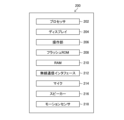
- the goggles 200 include a processor 202, a display 204, an operation unit 206, a flash ROM 208, a RAM 210, a wireless communication interface 212, a microphone 214, and a speaker 216, and communicate with the image processing server 20 via a router 300 and a network NW.
- the goggles 200 function as a server connection device and a display device of a virtual space, and can be configured as a VR goggle type device (VR: Virtual Reality) that the user wears (puts on) on the head.
- VR Virtual Reality
- the goggles 200 may further include a memory card and/or a motion sensor (acceleration sensor, angular velocity sensor, etc.).
- the user system 10 may include a motion sensor separate from the goggles 200. These motion sensors are, for example, attached to the user's head, torso, limbs, etc., and can be used to detect changes in the user's position and posture.
- the processor 202 of the goggles 200 can be configured using a CPU, GPU, etc., in the same manner as described above for the processor 22 of the image processing server 20, and executes processes such as connection to the image processing server 20 and display of the virtual space.
- processes such as connection to the image processing server 20 and display of the virtual space.
- programs and data stored in the flash ROM 208 can be used, and the RAM 210 can be used as a temporary storage area or working area.
- the connection to the image processing server 20 is made via a wireless communication interface 212.
- the user can perform operations required for viewing (visiting) the virtual space, etc., via the operation unit 206.
- the display 204 can display three-dimensional virtual space, images, information related to images, etc.
- the goggles 200 also allow the user to operate the device by voice input via the microphone 214 and speaker 216, listen to sounds within the virtual space, and converse with other users who are connected to (participating in) the virtual space.
- the goggles 200 (processor 202) may output messages to the user via these devices.
- the processor 202 can also recognize voice input via the microphone 214.
- the processor 202 sets the goggles 200 to a virtual space connection mode and connects to the image processing system 1 (image processing server 20) (step S100).
- the trigger for the connection may be, for example, detection of an operation on the operation unit 206, detection of a specific action by the motion sensor 218, or recognition of a voice input to the microphone 214 (in this case, the processor 202 of the goggles 200 is assumed to have a voice recognition function), etc.
- the processor 22 specifies the conditions for selecting the first image by a user operation or automatically without a user operation (step S110).
- the user operation is, for example, an operation on the operation unit 206 and/or a voice input to the microphone 214.
- the processor 202 of the goggles 200 can perform voice recognition of the operation content input via the microphone 214 and transmit the result to the image processing server 20.
- the selection conditions for the first image include, for example, that it has a high user rating, that it is the latest image (posted within the last 7 days, etc.), that it is an image from a specific season (spring, summer, fall, winter), time period (morning, daytime, evening, night, etc.) or weather (sunny, rainy, snow, etc.), that it is an image taken by a photographer with specified identification information and/or attributes, etc.
- These conditions may be specified during the following process.
- the user may specify the conditions in advance or separately on a device other than the goggles 200 that can be connected to the image processing system 1 (for example, a smartphone or personal computer).
- the processor 22 determines the place to be visited by the user in the virtual space (obtains a specific position in the virtual space) by the user's operation or automatically without the user's operation.
- the user's operation may be an operation of inputting the name or keyword of a specific place or landmark (e.g., "mountain”, “sea”, “random”, etc.), or an operation of selecting a candidate presented by the image processing server 20, and the user can operate the operation unit 206 and/or input voice into the microphone 214.
- the processor 22 also determines the place to be visited by a method such as selecting from places highly rated by the user based on the evaluation information in the database 30 (see FIG. 5), determining based on keywords input by the user, or determining randomly.
- the place to be visited may be specified or changed during the following process.
- the processor 22 outputs information about the virtual space at the specified place to be visited (step S130). Specifically, the processor 22 transmits the three-dimensional shape, objects, etc. of the specified place to be visited to the user system 10, and displays them on the display 204 of the goggles 200.
- the information about the virtual space is modeled after the real world, and may include color and brightness information in addition to three-dimensional position information and three-dimensional shape information.
- the information about the virtual space may include audio information in addition to this visual information.
- the goggles 200 can output audio from the speaker 216.
- the goggles 200 use the motion sensor 218 to detect the user's movements and changes in posture at predetermined times, and transmit the detected information to the image processing server 20.
- the processor 22 of the image processing server 20 outputs information about the virtual space that corresponds to that information.
- FIG. 11 is a diagram showing an example of information displayed on the display 204.
- Part (a) of FIG. 11 shows an image captured in the real world
- part (b) of the same figure shows the state of the virtual space corresponding to the real world (a state in which "image modification", described below, has not been performed).
- the information of the virtual space includes three-dimensional position information and three-dimensional shape, and has color, brightness, texture, etc. Note that in part (b) of FIG. 11, the texture of water and rock surfaces is expressed with a fill pattern, but images of rocks, soil, water, trees, grass, etc. may also be mapped onto the three-dimensional shape.
- an avatar of the user or another user may be displayed. Also, the user may be allowed to select whether or not to display the avatar.
- the image processing server 20 can execute processes related to the display and movement of the avatar in the virtual space.
- the processor 22 acquires a position (specific position) in the virtual space that the user is paying attention to (step S140).
- the processor 22 can acquire the specific position based on the above-mentioned three-dimensional position of the visited place and information on the user's posture (which can be detected by the motion sensor 218).
- the processor 22 then refers to the database 30 to acquire evaluation information related to the evaluation of the specific position (step S150).
- the processor 22 judges whether the evaluation information acquired for the specific location satisfies a preset criterion (step S160).
- the processor 22 can judge that the specific location "satisfies the preset criterion" when the specific location is, for example, a highly rated location such as a popular tourist spot.
- the processor 22 can make a judgment using at least one of the following as the "preset criterion" for the specific location: the number of first images taken, the photographer and the number of the first images, the number of positive evaluations, the user's comments, and the biometric information of the photographer linked to the first image.
- step S170 If the evaluation information satisfies the criterion, the process proceeds to step S170, and if the evaluation information does not satisfy the criterion, the process proceeds to step S220.
- the processor 22 can use, for example, "the number of images is 100 or more” or "the user's overall evaluation is 4 or more out of 5 stars (see the example of FIG. 6)" as the criterion.
- the processor can change the image in response to detection of a trigger (if Yes in step S170), and can also use the user's performance of a predetermined operation or a predetermined motion as a "trigger.”
- This "predetermined operation” or “predetermined motion” can be detected by the operation unit 206, microphone 214, and motion sensor 218. Note that the utterance of a specific phrase is also included in the predetermined operation or motion.
- the processor 22 selects the first image based on the above-mentioned conditions (step S180). As described below (see the explanation of step S320 in FIG. 14), the processor 22 can identify the location where the image was taken and select the first image based on the identified location.
- the processor 22 may apply image processing to the selected first image (step S190). This is because the same image may give different impressions to different users.
- the processor 22 may also adjust the degree of modification or image processing depending on the attributes of the user.
- attributes refers to one or more of the user's age, sex, and preferences, for example. It is generally known that with age, spectral luminosity decreases, particularly for short-wavelength light (wavelengths of about 400 nm to 500 nm, purple to blue) (according to JIS S 0031, etc.), and for example, if the user is elderly, image processing may be applied that emphasizes purple and blue colors.
- Figure 12 is a diagram showing how the image is changed.
- Part (a) of Figure 12 shows the state of the virtual space before the change, the dotted line part is the area where the image is to be changed (the place that the user is viewing or paying attention to; the specific position), and part (b) of the same figure shows the selected first image (an image taken in the real world).
- Part (c) of Figure 12 shows the state after the image has been changed (assuming a situation in which the first image has been mapped onto a three-dimensional shape in the virtual space). Note that in this example, the "visited location” is a wide area including the waterfall, the flat terrain nearby, and the cliff, and the "specific position” is the top of the cliff.
- the processing load would be high, and in reality it may be difficult or impossible to carry out.
- the first embodiment even in such cases, by changing the image at a specific position, it is possible to reduce the processing load while reflecting the appearance of the real world in the virtual space.
- Part (d) of FIG. 12 shows an example where the area near the boundary between the virtual space and the first image where the image is to be changed is blurred to create a smooth change (one aspect of "spatially continuous change").
- the brightness or color may be changed continuously.
- the processor 22 may adjust the shape or size of the image as necessary to create a smooth connection at the boundary.
- the above-mentioned “continuous change” may be “continuous change over time.”
- the processor 22 may not change the entire image all at once (instantaneously), but may gradually (over a certain period of time) bring the image closer to the real world image.
- the user facing a specific position may be the trigger for starting the change.
- the "continuous change” may be “continuous change in audio.” For example, near the boundary of the area where the image is to be changed, the processor 22 may lower the volume of the audio associated with the virtual space and the audio associated with the first image.
- the processor 22 may display comments from the photographer of the image (first image) used for the change, comments from other users, evaluation information, etc.
- changing may include not only changing the initial image, but also setting a new image in a virtual space where no image has been set.
- a user who has viewed the image of the virtual space thus modified can input a comment on the image.
- the user can input a comment in the form of, for example, selecting the number of "stars” or a numerical value indicating a rating, selecting "like", inputting a sentence, etc.
- the user can input a comment via the operation unit 206 or microphone 214 of the goggles 200.
- the processor 22 records the input comment in the database 30 in association with the image (first image) at the specific position (corresponding to "comment” in "rating information” in FIG. 5).
- FIG. 13 is a diagram showing an example of display of such information, showing a state in which buttons 900 to 904 are displayed in a state in which the above-mentioned changes have been made (the state shown in part (d) of FIG. 12).
- buttons 900 to 904 are displayed in a state in which the above-mentioned changes have been made (the state shown in part (d) of FIG. 12).
- the button 900 links to a website (e.g., a website of a local government, a tourist association, or a facility operator) (access destination) that introduces information on the geographical features, history, and climate of a candidate visited place (a place in the real world corresponding to a visited place, etc. in the virtual world), the button 902 links to a website of a store that sells souvenirs, and the button 904 links to a website of a travel agency that handles travel products to the visited place, etc.
- a website e.g., a website of a local government, a tourist association, or a facility operator
- the button 902 links to a website of a store that sells souvenirs
- the button 904 links to a website of a travel agency that handles travel products to the visited place, etc.
- the processor 22 acquires images uploaded to the image processing system 1 (image processing device) by multiple users of the image processing system 1, and related information for those images (step S300).
- "Related information” is, for example, the date and time the image was taken and information about the photographer (see FIG. 5). Users can connect digital cameras, smartphones, personal computers, etc. to the image processing server 20 via, for example, the goggles 200 or the router 300, and upload images and related information.
- the processor 22 can also access publicly available websites, databases, etc. via the network NW and acquire images and related information from those websites, databases, etc. (step S310). These "websites” include blogs and various SNSs (social networking services, or social networking sites). The images acquired in steps S300 and S310 constitute a first image group.
- steps S300 and S310 may be arbitrary, and these steps may be repeated. Furthermore, the processor 22 may execute only one of steps S300 and S310. It is assumed that permission to use the images and related information is obtained separately or has already been obtained.
- the processor 22 identifies the shooting location of the real world image included in the first image group described above (step S320).
- the identified shooting location is recorded in the database 30 in association with the image (see the example of FIG. 5), and in the above-mentioned step S180, the first image is selected based on the identified shooting location.
- the processor 22 can identify the shooting location of each image by the latitude and longitude information of the image for images in the first image group that are provided with latitude and longitude information (one example of three-dimensional position information) of the shooting location by a positioning system such as a GPS (Global Positioning System).
- a positioning system such as a GPS (Global Positioning System).
- the processor 22 can identify the shooting location by using at least one of feature extraction using a machine learning method and pattern matching between images.
- the machine learning method used to identify the shooting location is not particularly limited, and for example, a neural network such as a CNN (Convolutional Neural Network) or a DNN (Deep Neural Network), or other deep learning algorithms can be used.
- a trained model may be used that is trained to output the shooting location when an image is input by providing training data that pairs an image with a shooting location.
- pattern matching may be performed between the images included in the first image group and images whose shooting locations are known.
- the processor 22 identifies at least one of the azimuth angle of the image capture, the elevation angle of the image capture, and the magnification ratio of the image capture, in addition to the image capture location.
- the processor 22 can select the first image from the first image group based on the image capture location and at least one of the azimuth angle of the image capture, the elevation angle of the image capture, and the magnification ratio of the image capture (step S180 described above).
- the processor 22 judges whether or not to perform image processing on the acquired image (step S330), and if the judgment result is Yes, the processor 22 performs image processing on the acquired image (step S340).
- image processing when the acquired image differs from the image envisioned by the photographer, an image close to the image envisioned by the photographer may be obtained.
- the contents of the image processing include, for example, adjustment of one or more of the following: image movement, enlargement or reduction, rotation, degree of focus, noise, color tone, brightness, contrast, and contour, but are not limited to these examples.
- the processor 22 may determine the contents of the image processing based on the user's instruction, or may determine the contents of the image processing independently of the user's instruction.
- the processor 22 may also perform image processing equivalent to changing the shooting time.
- the processor 22 can perform such image processing in cases where, for example, the photographer thinks, "I actually took the picture during the day, but I really wanted to take it at dusk," or "It was cloudy when I took the picture, but I wanted to take it on a sunny day.”
- Figure 15 is a diagram showing an example of image processing equivalent to changing the shooting time. Note that the original image is assumed to be in the state shown in part (a) of Figure 11 (taken on a bright but cloudy day).
- Parts (a) to (c) of Figure 15 are examples of image processing that makes it appear as if the image was taken during a clear day, at dusk, and at night on a clear day, respectively.
- image processing has been applied to change the color and brightness of the sky in the image and to place objects (a bright shining sun, a setting sun, and stars) to represent a blue sky, a sunset, or a starry sky, but the processor 22 may also change the brightness and color of the ground to match the virtual shooting time. For example, if you want to evoke the image of dusk, you could give the ground and water surface a reddish color.
- the processor 22 can determine whether to perform the above-mentioned image processing based on factors such as "whether the user has instructed image processing when uploading an image" and "whether the photographer's comments include the 'original intention of the photograph'". When making such a determination, the processor 22 may use a machine learning technique to analyze the photographer's comments and infer the "original intention of the photograph".
- the technique used for image processing is not particularly limited, and a machine learning technique such as GAN (Generative Adversarial Networks) may be used, for example.
- this type of image processing allows the image that the photographer had in mind and the emotions of the photographer to be easily shared among users.
- the processor 22 can perform the above-mentioned change (step S200) by treating the image that has been subjected to image processing on the original image as the first image.
- the processor 22 associates the image (the acquired image itself or the image after image processing) and related information and records them in the database 30 (step S350). If the specific position has changed, the processor 22 changes the image in response to the change (if Yes in step S220, proceed to step S150). If the visited location has changed, the processor 22 returns to step S130 and repeats the above process.
- the image processing system 1 can improve the value of the VR experience by stimulating the desire to visit or revisit places in the real world, and by allowing the sharing of impressions about a particular place with others.
- the goggles 200 are used for connection to the image processing server 20 and image display, but devices such as smartphones, tablet terminals, and personal computers may be used instead of goggle-type devices.
- devices such as smartphones, tablet terminals, and personal computers may be used instead of goggle-type devices.
- the sense of immersion in the virtual space is reduced compared to the case of goggle-type devices, but the field of vision is not covered, so the user can easily visit the virtual space.
- these devices generally have a character input function using a keyboard or touch panel, making it easy to input comments, etc.
- Image processing system 10 User system 20 Image processing server 22 Processor 30 Database 200 Goggles 202 Processor 204 Display 206 Operation unit 212 Wireless communication interface 214 Microphone 216 Speaker 218 Motion sensor 300 Router 900 Button 902 Button 904 Button
Landscapes
- Engineering & Computer Science (AREA)
- Theoretical Computer Science (AREA)
- Physics & Mathematics (AREA)
- General Physics & Mathematics (AREA)
- General Engineering & Computer Science (AREA)
- Computer Vision & Pattern Recognition (AREA)
- Software Systems (AREA)
- Multimedia (AREA)
- Human Computer Interaction (AREA)
- Computer Hardware Design (AREA)
- Computer Graphics (AREA)
- Artificial Intelligence (AREA)
- Databases & Information Systems (AREA)
- Evolutionary Computation (AREA)
- General Health & Medical Sciences (AREA)
- Medical Informatics (AREA)
- Computing Systems (AREA)
- Health & Medical Sciences (AREA)
- Optics & Photonics (AREA)
- Processing Or Creating Images (AREA)
Priority Applications (4)
| Application Number | Priority Date | Filing Date | Title |
|---|---|---|---|
| CN202480019440.3A CN120836043A (zh) | 2023-03-17 | 2024-03-04 | 图像处理装置及图像处理方法 |
| JP2025508280A JPWO2024195491A1 (https=) | 2023-03-17 | 2024-03-04 | |
| EP24774636.5A EP4682835A1 (en) | 2023-03-17 | 2024-03-04 | Image processing device and image processing method |
| US19/330,561 US20260017896A1 (en) | 2023-03-17 | 2025-09-16 | Image processing apparatus and image processing method |
Applications Claiming Priority (2)
| Application Number | Priority Date | Filing Date | Title |
|---|---|---|---|
| JP2023-043053 | 2023-03-17 | ||
| JP2023043053 | 2023-03-17 |
Related Child Applications (1)
| Application Number | Title | Priority Date | Filing Date |
|---|---|---|---|
| US19/330,561 Continuation US20260017896A1 (en) | 2023-03-17 | 2025-09-16 | Image processing apparatus and image processing method |
Publications (1)
| Publication Number | Publication Date |
|---|---|
| WO2024195491A1 true WO2024195491A1 (ja) | 2024-09-26 |
Family
ID=92842048
Family Applications (1)
| Application Number | Title | Priority Date | Filing Date |
|---|---|---|---|
| PCT/JP2024/007964 Ceased WO2024195491A1 (ja) | 2023-03-17 | 2024-03-04 | 画像処理装置及び画像処理方法 |
Country Status (5)
| Country | Link |
|---|---|
| US (1) | US20260017896A1 (https=) |
| EP (1) | EP4682835A1 (https=) |
| JP (1) | JPWO2024195491A1 (https=) |
| CN (1) | CN120836043A (https=) |
| WO (1) | WO2024195491A1 (https=) |
Citations (3)
| Publication number | Priority date | Publication date | Assignee | Title |
|---|---|---|---|---|
| JP2009129398A (ja) * | 2007-11-28 | 2009-06-11 | Olympus Imaging Corp | 画像表示装置および画像表示方法 |
| US20180204380A1 (en) * | 2017-01-13 | 2018-07-19 | Samsung Electronics Co., Ltd. | Method and apparatus for providing guidance in a virtual environment |
| JP2022122810A (ja) | 2021-02-10 | 2022-08-23 | 株式会社コロプラ | プログラム、情報処理方法、情報処理装置、及びシステム |
-
2024
- 2024-03-04 EP EP24774636.5A patent/EP4682835A1/en active Pending
- 2024-03-04 JP JP2025508280A patent/JPWO2024195491A1/ja active Pending
- 2024-03-04 WO PCT/JP2024/007964 patent/WO2024195491A1/ja not_active Ceased
- 2024-03-04 CN CN202480019440.3A patent/CN120836043A/zh active Pending
-
2025
- 2025-09-16 US US19/330,561 patent/US20260017896A1/en active Pending
Patent Citations (3)
| Publication number | Priority date | Publication date | Assignee | Title |
|---|---|---|---|---|
| JP2009129398A (ja) * | 2007-11-28 | 2009-06-11 | Olympus Imaging Corp | 画像表示装置および画像表示方法 |
| US20180204380A1 (en) * | 2017-01-13 | 2018-07-19 | Samsung Electronics Co., Ltd. | Method and apparatus for providing guidance in a virtual environment |
| JP2022122810A (ja) | 2021-02-10 | 2022-08-23 | 株式会社コロプラ | プログラム、情報処理方法、情報処理装置、及びシステム |
Non-Patent Citations (3)
| Title |
|---|
| "Utilization of VR for Advanced Tourism Resources", PRIME MINISTER'S OFFICE TOURISM STRATEGY PROMOTION TASK FORCE, 6 March 2023 (2023-03-06), Retrieved from the Internet <URL:https://www.kantei.go.jp/jp/singi/kanko_vision/kankotf_dail8/siryou5.pdf> |
| See also references of EP4682835A1 |
| SHIZUNO YUKIYA, REI HAMAKAWA: "Proposal of Immersive "Memories" Sharing System in a First-Person Point of View Using the VR-Street View", PROCEEDINGS OF IPSJ INTERACTION 2015, 6 March 2015 (2015-03-06), XP093213113 * |
Also Published As
| Publication number | Publication date |
|---|---|
| EP4682835A1 (en) | 2026-01-21 |
| CN120836043A (zh) | 2025-10-24 |
| US20260017896A1 (en) | 2026-01-15 |
| JPWO2024195491A1 (https=) | 2024-09-26 |
Similar Documents
| Publication | Publication Date | Title |
|---|---|---|
| JP7002684B2 (ja) | 拡張現実および仮想現実のためのシステムおよび方法 | |
| KR102872616B1 (ko) | 3d 신체 모델 생성 | |
| JP7348261B2 (ja) | 拡張現実および仮想現実のためのシステムおよび方法 | |
| CN115917600B (zh) | 基于纹理的姿势验证 | |
| KR102796687B1 (ko) | 컨텍스트 전송 메뉴 | |
| KR102730929B1 (ko) | 증강 현실 컨텐츠 항목들에서의 머신 러닝 | |
| CN115311422B (zh) | 用于设备定位的多重集成模型 | |
| CN116508062B (zh) | 自适应骨骼关节平滑 | |
| TWI615776B (zh) | 移動物件的虛擬訊息建立方法、搜尋方法與應用系統 | |
| US12449891B2 (en) | Timelapse re-experiencing system | |
| US20240069627A1 (en) | Contextual memory experience triggers system | |
| US11580682B1 (en) | Messaging system with augmented reality makeup | |
| CN116457821A (zh) | 使用神经网络的对象重新照明 | |
| US20240071004A1 (en) | Social memory re-experiencing system | |
| US12099702B2 (en) | Messaging system for resurfacing content items | |
| WO2024195491A1 (ja) | 画像処理装置及び画像処理方法 | |
| CN118451299A (zh) | 用于选择和呈现室内导航系统的楼层改变航路点的方法和设备 | |
| US20250245877A1 (en) | Information processing device, information processing method, and information processing program | |
| US20240362857A1 (en) | Depth Image Generation Using a Graphics Processor for Augmented Reality | |
| JP2026039009A (ja) | システム | |
| CN116648718A (zh) | 使用神经网络的照亮估计 |
Legal Events
| Date | Code | Title | Description |
|---|---|---|---|
| 121 | Ep: the epo has been informed by wipo that ep was designated in this application |
Ref document number: 24774636 Country of ref document: EP Kind code of ref document: A1 |
|
| ENP | Entry into the national phase |
Ref document number: 2025508280 Country of ref document: JP Kind code of ref document: A |
|
| WWE | Wipo information: entry into national phase |
Ref document number: 2025508280 Country of ref document: JP |
|
| WWE | Wipo information: entry into national phase |
Ref document number: 202480019440.3 Country of ref document: CN |
|
| WWE | Wipo information: entry into national phase |
Ref document number: 202517088610 Country of ref document: IN |
|
| WWE | Wipo information: entry into national phase |
Ref document number: 2024774636 Country of ref document: EP |
|
| WWP | Wipo information: published in national office |
Ref document number: 202517088610 Country of ref document: IN |
|
| NENP | Non-entry into the national phase |
Ref country code: DE |
|
| WWP | Wipo information: published in national office |
Ref document number: 202480019440.3 Country of ref document: CN |
|
| ENP | Entry into the national phase |
Ref document number: 2024774636 Country of ref document: EP Effective date: 20251017 |
|
| ENP | Entry into the national phase |
Ref document number: 2024774636 Country of ref document: EP Effective date: 20251017 |
|
| ENP | Entry into the national phase |
Ref document number: 2024774636 Country of ref document: EP Effective date: 20251017 |
|
| ENP | Entry into the national phase |
Ref document number: 2024774636 Country of ref document: EP Effective date: 20251017 |
|
| ENP | Entry into the national phase |
Ref document number: 2024774636 Country of ref document: EP Effective date: 20251017 |