WO2024195166A1 - コンテンツ管理システム、コンテンツ管理方法、コンテンツ管理プログラム、およびユーザ端末 - Google Patents
コンテンツ管理システム、コンテンツ管理方法、コンテンツ管理プログラム、およびユーザ端末 Download PDFInfo
- Publication number
- WO2024195166A1 WO2024195166A1 PCT/JP2023/037423 JP2023037423W WO2024195166A1 WO 2024195166 A1 WO2024195166 A1 WO 2024195166A1 JP 2023037423 W JP2023037423 W JP 2023037423W WO 2024195166 A1 WO2024195166 A1 WO 2024195166A1
- Authority
- WO
- WIPO (PCT)
- Prior art keywords
- comment
- terminal
- content
- video content
- displaying
- Prior art date
- Legal status (The legal status is an assumption and is not a legal conclusion. Google has not performed a legal analysis and makes no representation as to the accuracy of the status listed.)
- Ceased
Links
Images




Classifications
-
- G—PHYSICS
- G06—COMPUTING OR CALCULATING; COUNTING
- G06Q—INFORMATION AND COMMUNICATION TECHNOLOGY [ICT] SPECIALLY ADAPTED FOR ADMINISTRATIVE, COMMERCIAL, FINANCIAL, MANAGERIAL OR SUPERVISORY PURPOSES; SYSTEMS OR METHODS SPECIALLY ADAPTED FOR ADMINISTRATIVE, COMMERCIAL, FINANCIAL, MANAGERIAL OR SUPERVISORY PURPOSES, NOT OTHERWISE PROVIDED FOR
- G06Q50/00—Information and communication technology [ICT] specially adapted for implementation of business processes of specific business sectors, e.g. utilities or tourism
-
- G—PHYSICS
- G06—COMPUTING OR CALCULATING; COUNTING
- G06Q—INFORMATION AND COMMUNICATION TECHNOLOGY [ICT] SPECIALLY ADAPTED FOR ADMINISTRATIVE, COMMERCIAL, FINANCIAL, MANAGERIAL OR SUPERVISORY PURPOSES; SYSTEMS OR METHODS SPECIALLY ADAPTED FOR ADMINISTRATIVE, COMMERCIAL, FINANCIAL, MANAGERIAL OR SUPERVISORY PURPOSES, NOT OTHERWISE PROVIDED FOR
- G06Q50/00—Information and communication technology [ICT] specially adapted for implementation of business processes of specific business sectors, e.g. utilities or tourism
- G06Q50/10—Services
-
- H—ELECTRICITY
- H04—ELECTRIC COMMUNICATION TECHNIQUE
- H04N—PICTORIAL COMMUNICATION, e.g. TELEVISION
- H04N21/00—Selective content distribution, e.g. interactive television or video on demand [VOD]
- H04N21/20—Servers specifically adapted for the distribution of content, e.g. VOD servers; Operations thereof
- H04N21/23—Processing of content or additional data; Elementary server operations; Server middleware
- H04N21/235—Processing of additional data, e.g. scrambling of additional data or processing content descriptors
-
- H—ELECTRICITY
- H04—ELECTRIC COMMUNICATION TECHNIQUE
- H04N—PICTORIAL COMMUNICATION, e.g. TELEVISION
- H04N21/00—Selective content distribution, e.g. interactive television or video on demand [VOD]
- H04N21/20—Servers specifically adapted for the distribution of content, e.g. VOD servers; Operations thereof
- H04N21/25—Management operations performed by the server for facilitating the content distribution or administrating data related to end-users or client devices, e.g. end-user or client device authentication, learning user preferences for recommending movies
- H04N21/258—Client or end-user data management, e.g. managing client capabilities, user preferences or demographics, processing of multiple end-users preferences to derive collaborative data
-
- H—ELECTRICITY
- H04—ELECTRIC COMMUNICATION TECHNIQUE
- H04N—PICTORIAL COMMUNICATION, e.g. TELEVISION
- H04N21/00—Selective content distribution, e.g. interactive television or video on demand [VOD]
- H04N21/40—Client devices specifically adapted for the reception of or interaction with content, e.g. set-top-box [STB]; Operations thereof
- H04N21/43—Processing of content or additional data, e.g. demultiplexing additional data from a digital video stream; Elementary client operations, e.g. monitoring of home network or synchronising decoder's clock; Client middleware
- H04N21/431—Generation of visual interfaces for content selection or interaction; Content or additional data rendering
Definitions
- One aspect of the present disclosure relates to a content management system, a content management method, a content management program, and a user terminal.
- Patent Document 1 describes a live streaming system that includes an image display unit that performs image processing to display comments on a live video based on comment data sent from a viewer terminal.
- a content management system includes at least one processor.
- the at least one processor displays video content generated by a first terminal on at least one target terminal selected from a group of terminals including the first terminal and a second terminal, displays a comment input on the first terminal or the second terminal while the video content is being displayed at a first position on the at least one target terminal together with the video content, and displays the comment on at least one of the at least one target terminal at a second position different from the first position in response to a user operation on the comment that is accepted on the first terminal or the second terminal while the video content and the comment are being displayed.
- the comment in response to a user operation received while the video content and the comment are being displayed, the comment is displayed in a different position. This mechanism can improve the convenience of the comment.
- FIG. 1 illustrates an example of an application of a content management system.
- FIG. 2 is a diagram illustrating an example of a hardware configuration related to a content management system.
- FIG. 2 is a diagram illustrating an example of a functional configuration related to a content management system.
- FIG. 11 is a sequence diagram showing an example of an operation of the content management system.
- FIG. 13 is a diagram illustrating an example of a comment control operation.
- FIG. 13 is a diagram showing another example of a comment control operation.
- FIG. 13 is a diagram showing yet another example of a comment control operation.
- FIG. 13 is a diagram showing yet another example of a comment control operation.
- the content management system is a computer system that manages content distributed to users.
- Content refers to information provided by a computer or computer system and recognizable by humans.
- Electronic data indicating content is called content data.
- the content is video content expressed by video that may include audio.
- Video content may include video generated by an imaging device such as a camera, may include computer graphics (CG), or may include both.
- Content can be used for various types of information transmission or communication, and may be used in various situations or purposes such as news, education, medical care, games, chat, business transactions, lectures, seminars, training, concerts, and surveys.
- Content distribution refers to a process performed to provide content to a user, for example, a process of transmitting information to a user via a communication network.
- the content management system provides video content to a user by transmitting content data indicating the video content to the user terminal.
- the video content is provided by a distributor.
- a distributor is a person who intends to provide information to a viewer through the content management system, and is the sender of the video content.
- a viewer is a person who intends to obtain information through the content management system, and is the user of the video content.
- the content management system transmits the content data provided from the distributor terminal to the viewer terminal.
- the viewer terminal processes the content data and displays the video content on the screen.
- the distributor and viewer are sometimes collectively referred to as users, and the distributor terminal and viewer terminal are sometimes collectively referred to as user terminals.
- the content management system may perform real-time distribution.
- the distributor terminal processes the captured video to generate content data and transmits the content data to the content management system in real time.
- the content management system receives the content data and transmits the content data to the viewer terminal in real time.
- the content data may be generated in the content management system. That is, the content management system may process real-time video provided from the distributor terminal to generate content data and transmit the content data to the viewer terminal in real time.
- the content management system may be used for time shifting, which allows content to be viewed for a given period of time after real-time distribution.
- the content management system may perform on-demand distribution, allowing viewers to view content at any time.
- the content management system may store content data generated by processing previously captured video in a storage device such as a database.
- the content management system may transmit the stored content data to the viewer's terminal in response to a viewer's request.
- the content management system displays video content generated by the first terminal on at least one target terminal selected from a group of terminals including the first terminal and the second terminal.
- the first terminal is, for example, a distributor terminal
- the second terminal is, for example, a viewer terminal.
- the target terminal can be at least one of a distributor terminal and a viewer terminal. When there are multiple viewer terminals, the target terminal may be at least one of the multiple viewer terminals.
- the content management system displays comments input on the first or second terminal while video content is being displayed, together with the video content, at a first position on at least one target terminal. That is, the content management system displays the posted comments together with the video content.
- the first position is the position where the comments are initially displayed.
- a comment is information input by a user and independent of the video content.
- Electronic data indicating a comment is called comment data.
- a comment may be generated by at least one of comment text and an image, and may include, for example, at least one of characters (text), emoticons, still images (photos, illustrations, etc.), and moving images (video or animation). "Displaying a comment together with video content” refers to a process of displaying both the comment and the video content on the same screen.
- the comment may be displayed without overlapping with the video content, or may be displayed so that at least a portion of the comment overlaps with the video content.
- the content management system In response to a user operation on the comment that is received on the first terminal or the second terminal while the video content and the comment are being displayed, the content management system displays the comment on at least one of the at least one target terminal at a second position different from the first position.
- the content management system transmits comment control data for displaying the comment at the second position to the target terminal, and causes the target terminal to display the comment at the second position.
- the content management system may set the first position and the second position at various locations on the screen of the target device. For example, the content management system may set at least one of the first position and the second position so that it overlaps with video content, or so that it does not overlap with video content. The content management system may set at least one of the first position and the second position on a surplus area, also known as a black band.
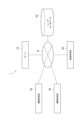
- FIG. 1 is a diagram showing an application of a content management system 1 according to an example.
- the content management system 1 includes a server 10.
- the server 10 is a computer that distributes content data.
- the server 10 is connected to one or more distributor terminals 20 (first terminals) and one or more viewer terminals 30 (second terminals) via a communication network N.
- the server 10 is also connected to a user database 40 via the communication network N.
- the communication network N may be configured to include the Internet or an intranet.
- the distributor terminal 20 is a computer used by a distributor.
- the distributor terminal 20 has a function of generating video content and a function of accessing the content management system 1 and transmitting content data indicating the video content.
- the distributor terminal 20 may be a shooting system having functions of shooting, recording, and transmitting video.
- the distributor terminal 20 may be a portable terminal such as a high-performance mobile phone (smartphone), a tablet terminal, a wearable terminal (e.g., a head-mounted display (HMD), smart glasses, etc.), a laptop personal computer, or a mobile phone.
- the distributor terminal 20 may be a stationary terminal such as a desktop personal computer.
- the viewer terminal 30 is a computer used by a viewer.
- the viewer terminal 30 has a function of accessing the content management system 1 to receive and display content data.
- the viewer terminal 30 may be a portable terminal such as a high-function mobile phone (smartphone), a tablet terminal, a wearable terminal (e.g., a head-mounted display (HMD), smart glasses, etc.), a laptop personal computer, or a mobile phone.
- the viewer terminal 30 may be a stationary terminal such as a desktop personal computer.
- Distributors operate the distributor terminal 20 to log in to the content management system 1, thereby enabling them to provide video content to viewers.
- Viewers operate the viewer terminal 30 to log in to the content management system 1, thereby enabling them to view the content.
- This disclosure is based on the premise that viewers and distributors of the content management system 1 are already logged in. Viewers may be omitted from logging in to the content management system 1.
- the content management system 1 may transmit content data to the viewer terminal 30 of a general viewer who is not logged in. In this case, general viewers who are not logged in can also view the content.
- the user database 40 is a non-transient storage device that stores user data related to users who use the content management system 1.
- each record of the user data includes a user ID, which is an identifier that uniquely identifies an individual user, and attribute information that indicates the attributes of the user.
- the attributes of a user refer to information that indicates the characteristics or nature of a user.
- the attribute information may include a name, age, sex, one or more content IDs that are identifiers of the content viewed by the user, or the number of times each content has been viewed.
- the attribute information may include an icon that the user can use.
- the icon of the user may be created by the user, may be provided to the user by another person as a gift, or may be able to be provided by the user to another person as a gift.
- the icon as a gift may have a special display form different from a normal icon, or may have a function of giving a reward such as money to the recipient of the gift.
- the attribute information may be stored in an area other than the user database 40.
- the attribute information may be stored in a cookie area of the browser in the viewer terminal 30.
- the attribute information may include information indicating whether the user is logged in to the content management system 1.
- the user database 40 may be constructed as a single database or may be a collection of multiple databases.
- the user database 40 may be a component of the content management system 1, or may be provided in a computer system separate from the content management system 1.
- FIG. 2 is a diagram showing an example of a hardware configuration related to the content management system 1.
- FIG. 2 shows a server computer 100 functioning as the server 10, and a terminal computer 200 functioning as the distributor terminal 20 or the viewer terminal 30.
- the server computer 100 has a processor 101, a main memory unit 102, an auxiliary memory unit 103, and a communication unit 104 as hardware components.
- the processor 101 is a computing device that executes an operating system and application programs, and is, for example, a CPU (Central Processing Unit) or a GPU (Graphics Processing Unit).
- the main memory unit 102 is a device that stores programs to be executed, calculation results, etc., and is, for example, composed of a ROM (Read Only Memory) or a RAM (Random Access Memory).
- the auxiliary memory unit 103 is a device that can generally store a larger amount of data than the main memory unit 102, and is, for example, composed of a non-volatile storage medium such as a hard disk or flash memory.
- the auxiliary memory unit 103 stores the server program P1 and various data for causing the server computer 100 to function as the server 10.
- the communication unit 104 is a device that performs data communication with other computers via the communication network N, and is configured, for example, by a network card or a wireless communication module.
- the content management program is implemented as a server program P1.
- Each functional element of the server 10 is realized by loading the server program P1 onto the processor 101 or the main memory unit 102 and having the processor 101 execute the program.
- the server program P1 includes code for realizing each functional element of the server 10.
- the processor 101 operates the communication unit 104 in accordance with the server program P1, and executes reading and writing of data in the main memory unit 102 or the auxiliary memory unit 103.
- the server 10 may be composed of one or more computers. When multiple computers are used, these computers are connected to each other via a communication network N to logically constitute a single server 10.
- the terminal computer 200 includes, as hardware components, a processor 201, a main memory unit 202, an auxiliary memory unit 203, a communication unit 204, an input interface 205, an output interface 206, and an imaging unit 207.
- the processor 201 is a computing device that executes an operating system and application programs, and is, for example, a CPU or a GPU.
- the main memory unit 202 is a device that stores programs to be executed, calculation results, etc., and is, for example, composed of a ROM or a RAM.
- the auxiliary memory unit 203 is a device that can generally store a larger amount of data than the main memory unit 202, and is, for example, composed of a non-volatile storage medium such as a hard disk or a flash memory.
- the auxiliary memory unit 203 stores a client program P2 and various data for causing the terminal computer 200 to function as a distributor terminal 20 or a viewer terminal 30.
- the communication unit 204 is a device that executes data communication with other computers via the communication network N, and is, for example, composed of a network card or a wireless communication module.
- the input interface 205 is a device that accepts data based on a user's operation or action, and is composed of at least one of a keyboard, operation buttons, a pointing device, a touch panel, a microphone, a sensor, and a camera, for example.
- the output interface 206 is a device that outputs data processed by the terminal computer 200, and is composed of a display device such as a monitor, a touch panel, or an HMD, for example.
- the imaging unit 207 is a device that captures an image (video or photo) of the real world, and is, for example, a camera. The imaging unit 207 can also function as the input interface 205.
- Each functional element of the distributor terminal 20 or the viewer terminal 30 is realized by loading the corresponding client program P2 into the processor 201 or the main memory unit 202 and having the processor 201 execute the program.
- the client program P2 includes code for realizing each functional element of the distributor terminal 20 or the viewer terminal 30.
- the processor 201 operates the communication unit 204, the input interface 205, the output interface 206, or the imaging unit 207 in accordance with the client program P2, and reads and writes data in the main memory unit 202 or the auxiliary memory unit 203.
- At least one of the server program P1 and the client program P2 may be provided after being non-temporarily recorded on a tangible recording medium such as a CD-ROM, DVD-ROM, or semiconductor memory.
- a tangible recording medium such as a CD-ROM, DVD-ROM, or semiconductor memory.
- at least one of these programs may be provided via the communications network N as a data signal superimposed on a carrier wave. These programs may be provided separately or together.
- FIG. 3 is a diagram showing an example of a functional configuration related to the content management system 1.
- the server 10 has a content transfer unit 11 and a comment control unit 12 as functional elements.
- the content transfer unit 11 is a functional element that receives content data sent from the distributor terminal 20 and transmits the content data to the viewer terminal 30.
- the comment control unit 12 is a functional element that controls comments entered at the distributor terminal 20 or the viewer terminal 30.
- the distributor terminal 20 has the following functional elements: a content generation unit 21, a content display unit 22, a comment acceptance unit 23, a comment display unit 24, and a position acceptance unit 25.
- the content generation unit 21 is a functional element that generates video content and transmits content data indicating the video content to the server 10.
- the content display unit 22 is a functional element that displays the generated video content on the screen of the distributor terminal 20.
- the comment acceptance unit 23 is a functional element that accepts comments entered by the distributor and transmits comment data indicating the comments to the server 10.
- the comment display unit 24 is a functional element that receives comment data or comment control data from the server 10 and displays the comments on the screen based on the data.
- the position acceptance unit 25 is a functional element that accepts a user operation by the distributor for a comment displayed on the screen and transmits comment operation data indicating the user operation to the server 10.
- the viewer terminal 30 comprises a content display unit 31, a comment acceptance unit 32, a comment display unit 33, and a position acceptance unit 34.
- the content display unit 31 is a functional element that receives content data from the server 10 and displays video content based on the content data.
- the comment acceptance unit 32 is a functional element that accepts comments entered by the viewer and transmits comment data indicating the comments to the server 10.
- the comment display unit 33 is a functional element that receives comment data or comment control data from the server 10 and displays the comments on the screen based on the data.
- the position acceptance unit 34 is a functional element that accepts user operations by the viewer on comments displayed on the screen and transmits comment operation data indicating the user operations to the server 10.
- Fig. 4 is a sequence diagram showing an example of the operation of the content management system 1 as a process flow S1.
- step S101 the content generation unit 21 of the distributor terminal 20 generates video content.
- the content generation unit 21 starts generating video content in response to a user operation by the distributor to start distribution.
- the content generation unit 21 may generate video content including video captured by the imaging unit 207, or may generate video content based on content material stored in the auxiliary storage unit 203.
- step S102 the content generation unit 21 transmits content data indicating the video content to the server 10.
- the content generation unit 21 continuously transmits content data to the server 10 in response to the generation of video content based on the shooting of a video.
- the content transfer unit 11 receives the content data.
- step S103 the content transfer unit 11 transmits the content data to the viewer terminal 30.
- the content transfer unit 11 responds to a content request from the viewer terminal 30 and begins transmitting content data to the viewer terminal 30.
- the content request is a data signal for requesting the server 10 to play video content.
- the content transfer unit 11 continuously transmits content data to the viewer terminal 30.
- the content display unit 31 receives the content data transmitted from the content transfer unit 11.
- step S104 the content display unit 22 of the distributor terminal 20 displays on the screen the video content generated by the content generation unit 21. If the video content includes audio, the content display unit 22 may output the audio included in the video content from a speaker.
- step S105 the content display unit 31 of the viewer terminal 30 processes the received content data and displays the video content on the screen. If the video content includes audio, the content display unit 31 may output the audio included in the video content from a speaker.
- steps S106 and S107 are executed.
- the comment receiving unit 23 receives the comment input by the broadcaster.
- the comment may be input, for example, by inputting characters via a keyboard or the like, or by converting voice received by a microphone into text data.
- the comment receiving unit 23 may further receive an input for designating the broadcaster terminal 20 as the user terminal on which the input comment will be displayed. This input is made, for example, when the broadcaster wants the comment to be displayed only on his or her own terminal for the purpose of taking notes or the like.
- the comment acceptance unit 23 transmits comment data indicating the comment to the server 10. For example, in response to a user operation by the distributor to transmit a comment, the comment acceptance unit 23 generates comment data including the input comment and a comment ID that is an identifier that uniquely identifies the comment. The comment acceptance unit 23 may also generate comment data that further indicates the specified user terminal. The comment acceptance unit 23 transmits the generated comment data. In the server 10, the comment control unit 12 receives the comment data.
- steps S108 and S109 are executed.
- the comment acceptance unit 32 accepts comments entered by the viewer.
- comments may be entered by character input or by converting voice into text data.
- the comment acceptance unit 32 may further accept an input for designating the viewer terminal 30 as the user terminal on which the entered comment will be displayed. This input is made, for example, when a viewer wants the comment to be displayed only on his or her own terminal for the purpose of taking notes or the like.
- the comment acceptance unit 32 transmits comment data indicating the comment to the server 10. For example, in response to a viewer performing a user operation to transmit a comment, the comment acceptance unit 32 generates comment data including the input comment and a comment ID that identifies the comment. The comment acceptance unit 32 may also generate comment data that further indicates the specified user terminal. The comment acceptance unit 32 transmits the generated comment data. In the server 10, the comment control unit 12 receives the comment data.
- step S110 the comment control unit 12 transmits the comment data received from the distributor terminal 20 or the viewer terminal 30 to the user terminal that is to display the comment.
- the comment control unit 12 may refer to the user database 40 to obtain the icon of the user corresponding to the comment data, i.e., the user who entered the comment, add the icon to the comment data, and transmit this processed comment data. If no user terminal is specified, the comment control unit 12 may transmit the comment data to the distributor terminal 20 and each viewer terminal 30 that are displaying the video content. If a user terminal is specified, the comment control unit 12 transmits the content data to that user terminal. In process flow S1, the comment control unit 12 transmits the comment data to the distributor terminal 20 and the viewer terminal 30.
- step S111 the comment display unit 24 of the broadcaster terminal 20 displays the comment at a first position on the screen based on the comment data received from the server 10.
- the comment display unit 24 displays the comment in a comment area that displays one or more comments in the order in which the comment data is received.
- the comment area can be said to be an area that includes the first position.
- step S112 the comment display unit 33 of the viewer terminal 30 displays the comment in a first position on the screen based on the comment data received from the server 10.
- the screen on the viewer terminal 30 also includes a comment area, similar to the broadcaster terminal 20, and the comment display unit 33 displays the comment in that comment area.
- the first position used by the comment display units 24 and 33 may be represented by a single coordinate, an area defined by multiple coordinates, or data other than coordinates.
- steps S113 and S114 are executed.
- the position receiving unit 25 accepts a user operation for changing the display mode of the comment.
- the position receiving unit 25 may accept, as the user operation, an operation including the designation of a second position where the comment is to be newly displayed.
- the position receiving unit 25 may accept a drag-and-drop as the operation, in which case the position or area corresponding to the drop corresponds to the second position.
- the position receiving unit 25 may accept an operation that does not include the designation of the second position.
- the position receiving unit 25 may accept a simple tap or click on the comment.
- the position receiving unit 25 may accept a user operation for changing other display modes of the comment in addition to or instead of the display position.
- the position receiving unit 25 may accept a user operation for changing at least one of the size, orientation, and color of the comment.
- the position receiving unit 25 may accept a user operation for changing at least one of the presence or absence of an icon displayed together with the comment and the type of the icon.
- the position receiving unit 25 may further accept an input for designating the broadcaster terminal 20 as the user terminal on which the input comment is controlled. This input is done, for example, when a broadcaster wants to control comments only on their own device.
- step S114 the position receiving unit 25 transmits comment operation data indicating the received user operation to the server 10.
- the position receiving unit 25 generates comment operation data including the comment ID and the second position of the operated comment based on drag and drop.
- the position receiving unit 25 generates comment operation data including the comment ID of the operated comment but not the second position based on a tap or click.
- the position receiving unit 25 may generate comment operation data including information for changing the display mode other than the display position.
- the position receiving unit 25 may generate comment operation data further indicating the specified user terminal.
- steps S115 and S116 are executed.
- the position acceptance unit 34 accepts a user operation for changing the display mode of the comment.
- the position acceptance unit 34 may accept a user operation that includes designation of a second position at which the comment is to be newly displayed, or may accept a user operation that does not include designation of the second position.
- the position acceptance unit 34 may accept a user operation for changing other display modes of the comment in addition to or instead of the display position.
- the position acceptance unit 34 may further accept an input for designating the viewer terminal 30 as the user terminal at which the input comment will be controlled. This input is made, for example, when the viewer wants the comment to be controlled only on his or her own terminal.
- step S116 the position receiving unit 34 transmits comment operation data indicating the accepted user operation to the server 10.
- the position receiving unit 34 generates comment operation data indicating the comment ID of the operated comment and the second position based on drag and drop.
- the position receiving unit 34 generates comment operation data including the comment ID of the operated comment and not including the second position based on a tap or click.
- the position receiving unit 34 may generate comment operation data including information for changing the display mode other than the display position.
- the position receiving unit 34 may generate comment operation data further indicating the specified user terminal.
- step S117 the comment control unit 12 controls the comments displayed on the distributor terminal 20 and the viewer terminal 30 based on the comment operation data received from the distributor terminal 20 or the viewer terminal 30. Based on the comment operation data, the comment control unit 12 generates comment control data for instructing the distributor terminal 20 and the viewer terminal 30 to change the display mode of the comments. Based on the comment operation data, the comment control unit 12 can generate comment control data including information for changing the display mode other than the display position.
- the comment control unit 12 generates comment control data including the comment ID and the second position indicated in the comment operation data. That is, the comment control unit 12 can generate comment control data including the second position specified by a user operation.
- the comment control unit 12 determines, as the second position, a predetermined position that is set in advance by a distributor, a viewer, or an administrator of the content management system 1 and stored in the auxiliary storage unit 103.
- the predetermined position may be a position within a content area that displays video content.
- the comment control unit 12 may dynamically determine the second position based on a predetermined rule. This rule may be, for example, to display the comment in a background area of the video content, or to display the comment adjacent to another comment displayed in the content area.
- the comment control unit 12 may determine, as the second position, a position within the background area or a position adjacent to another comment.
- the comment control unit 12 may determine a new position so that the comment to be controlled does not overlap with other comments.
- the comment control unit 12 generates comment control data including the comment ID indicated in the comment operation data and the determined second position.
- the comment control unit 12 may set the second position indicated by the comment operation data as is, or may set a predetermined position or a second position determined by dynamic determination.
- the second position indicated by the comment control data may be represented by a single absolute coordinate, or may be represented by an area defined by multiple absolute coordinates.
- the second position may be defined by a relative value, such as a position within the background area of the video content or a position adjacent to another comment.
- step S118 the comment control unit 12 sends the comment control data to the user terminal that is to display the comment. If a user terminal is not specified, the comment control unit 12 may send the comment data to the distributor terminal 20 and each viewer terminal 30 that are displaying the comment. If a user terminal is specified, the comment control unit 12 sends the comment control data to that user terminal. In process flow S1, the comment acceptance unit 23 sends the comment data to the distributor terminal 20 and viewer terminal 30.
- the comment display unit 24 of the broadcaster terminal 20 controls the displayed comments based on the comment control data.
- the comment display unit 24 displays a comment identified by the comment ID at a second position (i.e., a new position) based on the comment ID and second position indicated in the comment control data.
- the comment display unit 24 may continue to display the identified comment at the first position, while also displaying the comment at the second position.
- the comment display unit 24 may erase the comment displayed at the first position, and display the comment at the second position.
- the comment display unit 24 may change the display position of the comment from the first position to the second position.
- the comment display unit 24 may change the display mode other than the display position based on the comment control data.
- step S120 the comment display unit 33 of the viewer terminal 30 controls the displayed comments based on the comment control data.
- the comment display unit 33 displays the comment identified by the comment ID at the second position (new position) based on the comment control data.
- the comment display unit 33 may continue to display the identified comment at the first position, while also displaying the comment at the second position.
- the comment display unit 33 may erase the comment displayed at the first position, and display the comment at the second position.
- the comment display unit 33 may change the display mode other than the display position based on the comment control data.
- the server 10 transmits various data such as content data, comment data, and comment control data to the target terminal (the distributor terminal 20 or the viewer terminal 30) and causes the target terminal to control the display of the video content and comments.
- control of the target terminal by the server 10 is an example of the server 10 (content management system 1) displaying video content and comments on the target terminal.
- Figures 5 to 8 are all diagrams showing such examples. It should be noted that although Figures 5 to 8 show a smartphone used as the distributor terminal 20, the examples shown in these figures can also be implemented in the viewer terminal 30 in the same way.
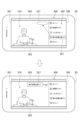
- the distributor terminal 20 displays a screen 300 including a content area 301 that displays video content, and a comment area 302 that displays one or more comments. Due to the aspect ratio between the screen 300 and the content area 301, the screen 300 further includes a surplus area 303.
- the content area 301 displays a live broadcast of a game commentary by a player as video content 310.
- the comment area 302 displays a comment list 320 in which comments entered at the distributor terminal 20 or the viewer terminal 30 are arranged in chronological order. An icon corresponding to the user who entered the comment is displayed next to each comment. Newly posted comments are added to the bottom of the comment list 320. As new comments are added one after another, existing comments move up in the comment area 302, and then disappear from view by moving outside the comment area 302. In other words, the comment area 302 displays the comments so that they flow in a predetermined direction.
- the video content 310 and the comment list 320 are also distributed to one or more viewer terminals 30, and therefore the distributor and the viewer share this information simultaneously or almost simultaneously.
- Figure 6 shows an example of comment control after fixed comment 321' is displayed.
- the position acceptance unit 25 of the broadcaster terminal 20 accepts the user operation (step S113).
- the position acceptance unit 25 then generates comment operation data including the comment ID of comment 322, and transmits the comment operation data to the server 10 (step S114).
- the comment control unit 12 dynamically determines a new position (second position) of comment 322 based on a predetermined rule that comment 322 is displayed adjacent to another comment (step S117).
- the comment control unit 12 generates comment control data including the comment ID of comment 322 and the determined new position, and transmits the comment control data to the broadcaster terminal 20 and the viewer terminal 30 (steps S117, S118).
- the comment display unit 24 displays the comment 322 as a fixed comment 322' based on the comment control data so that the comment 322 is fixed within the content area 301 (step S119).
- the comment display unit 24 displays the fixed comment 322' at a position (second position) adjacent to the fixed comment 321'.
- the comment display unit 24 may cause the display mode of the pinned comments 321', 322' to be different from the display mode of the comments 321, 322.
- the comment display unit 24 displays the pinned comments 321', 322' so that the comments 321, 322 are displayed in speech bubbles.
- the comment display unit 24 may cause the icons to be different between the original comment and the pinned comment.
- Comments 321, 322 in comment area 302 move up in response to new comments being posted.
- pinned comments 321', 322' continue to be displayed in the second position.
- This type of comment control allows the broadcaster to, for example, pin on screen 300 comments that the broadcaster wants to keep from the list of comments that flow through comment area 302. For example, the broadcaster can continue to display on screen 300 comments that the broadcaster wants viewers to pay attention to, comments to develop communication with viewers, etc. as pinned comments.
- the comment display unit 24 leaves comments 321, 322 displayed in the comment list 320 (i.e., in the first position), and displays the comments 321, 322 as fixed comments 321', 322' in the second position.
- the comment display unit 24 may delete the operated comments 321, 322 from the comment list 320 (first position), and display the comments 321, 322 as fixed comments 321', 322' in the second position. In other words, the comment display unit 24 may change the display positions of comments 321, 322.
- a user operation (tap) on a comment does not specify the second position, but the comment control unit 12 dynamically determines the second position in response to the user operation. Therefore, a user can display a desired comment in another location without specifying a second position. For example, when comments are frequently posted by one or more users and comments flow through the comment area 302 at high speed, each user can pick out a desired comment from the large number of comments with a simple operation and keep the comment displayed in the content area 301.
- the user may change the comment displayed in the second position to yet another position (third position) by dragging and dropping it.
- a series of processes consisting of steps S113, S114, and S117 to S120 is executed, and the comment is changed from the second position to the third position.
- the user may erase the comment displayed in the second position from the screen by dragging and dropping it.
- a series of processes consisting of steps S113, S114, and S117 to S120 is executed, and the comment is erased from the screen.
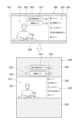
- FIG. 7 shows an example of comment control after the fixed comment 322' is displayed.
- the broadcaster moves the fixed comment 322' to position 332 on the surplus area 303 by dragging and dropping.
- the position acceptance unit 25 of the broadcaster terminal 20 accepts the user operation (step S113).
- the position acceptance unit 25 then generates comment operation data including the comment ID and position 332 of the fixed comment 322', and transmits the comment operation data to the server 10 (step S114).
- the comment control unit 12 generates comment control data including the comment ID and position 332, and transmits the comment control data to the broadcaster terminal 20 and the viewer terminal 30 (steps S117, S118).
- the comment display unit 24 changes the display position of the fixed comment 322' from the current position (second position) to position 332 (third position) based on the comment control data (step S119).
- the position acceptance unit 25 of the distributor terminal 20 accepts the user operation (step S113). Then, the position acceptance unit 25 generates comment operation data including the comment ID of the fixed comment 321' and a deletion flag indicating deletion, and transmits the comment operation data to the server 10 (step S114).
- the comment control unit 12 In the server 10, the comment control unit 12 generates comment control data including the comment ID and the deletion flag, and transmits the comment control data to the distributor terminal 20 and the viewer terminal 30 (steps S117, S118).
- the comment display unit 24 erases the fixed comment 321' from the screen 300 based on the comment control data (step S119). That is, the content management system 1 may erase the comment in response to a further user operation for erasing the comment that is accepted in the user terminal that displays the comment in the second position.
- Figure 8 shows another example of comment control after fixed comment 322' is displayed.
- Position acceptance unit 25 of distributor terminal 20 accepts the change in display mode (step S113).
- Position acceptance unit 25 then generates comment control data including the comment IDs of fixed comment 321' and fixed comment 322' and the display mode of video content 310, and indicating distributor terminal 20, and transmits the comment control data to server 10 (step S114).
- comment control unit 12 generates comment control data including the comment IDs and the display mode of video content 310, and transmits the comment control data to distributor terminal 20 (steps S117, S118).
- the comment display unit 24 changes the display position of the fixed comment 321' from the current position (second position) to position 333 (third position) on the surplus area 303 based on the comment control data, and changes the display position of the fixed comment 322' from the current position (second position) to position 334 (third position) on the surplus area 303 (step S119).
- the position accepting unit 25 may automatically change the positional relationship between the video content 310 and the fixed comment in accordance with a predetermined rule.
- changes in the display mode of the video content 310 include changes in the display mode due to switching between a horizontal screen and a vertical screen, as well as changes in the display mode due to switching between a full-screen display and a reduced display.
- the position accepting unit 25 may automatically change the display position of the fixed comment so as to change the positional relationship between the video content and the fixed comment as shown in FIG. 8, or to maintain that positional relationship.
- the position accepting unit 34 may automatically change the display position of the fixed comment by processing similar to that of the position accepting unit 25.
- a user terminal is a user terminal that is connected to other terminals via a communication network and includes at least one processor.
- the at least one processor displays video content on a screen, displays comments inputted at the user terminal or other terminals while the video content is being displayed together with the video content at a first position on the screen, and displays the comments at a second position different from the first position in response to a user operation on the comments received at the user terminal or other terminals while the video content and the comments are being displayed.
- the user terminal includes a user terminal that can access the above-mentioned content management system.
- the user terminal and the other terminal may be either a first terminal (distributor terminal 20) or a second terminal (viewer terminal 30).
- a user terminal includes a user terminal manufactured to be capable of the above-mentioned operations, a user terminal having a program installed that enables the above-mentioned operations, or a user terminal to which hardware that enables the above-mentioned operations is connected.
- the comment control unit 12 may dynamically control the comments or comment list in the comment area without accepting user operations. For example, the comment control unit 12 may identify the user who input (posted) the comment displayed in the second position, and may count the number of times the comment was displayed in the second position for each user as the number of pick-ups, and store the number of pick-ups in a storage device such as the user database 40. The comment control unit 12 may then control the display of comments in the comment area based on the number of pick-ups. For example, the comment control unit 12 may display comments of users who have been picked up many times in the comment area for a longer period of time than comments of other users.
- the comment control unit 12 may display comments posted as gifts or comments to which other users have responded (e.g., "liked") in the comment area for a longer period of time than other comments.
- the comment control unit 12 may display the comment list so that the comment list flows around the pinned comment.
- the content management system 1 includes a server 10, but the content management system may also be applied to content distribution between user terminals without using a server.
- each functional element of the server 10 may be implemented in one of the user terminals, or may be implemented separately in multiple user terminals.
- the content management program may be realized as a client program.
- the content management system may be configured using a server, or may be configured without using a server.
- the content management system may be implemented using a client-server system, or may be implemented using P2P (Peer to Peer) or E2E (End to End) encryption, which is a client-client system.
- P2P Peer to Peer
- E2E End to End
- a distributor terminal 20 and a viewer terminal 30 are shown as user terminals, but other types of user terminals may have the same functional elements as the distributor terminal 20 or the viewer terminal 30.
- a moderator terminal which is a computer used by a moderator who manages video content, may have the functional elements.
- the expression "at least one processor executes a first process, executes a second process, ... executes an nth process” or a corresponding expression indicates a concept including cases where the entity executing the n processes from the first process to the nth process (i.e., the processor) changes midway.
- this expression indicates a concept including both cases where all n processes are executed by the same processor and cases where the processor changes among the n processes according to an arbitrary policy.
- the processing procedure of the method executed by at least one processor is not limited to the example in the above embodiment.
- some of the above-mentioned steps may be omitted, or the steps may be executed in a different order.
- any two or more of the above-mentioned steps may be combined, or some of the steps may be modified or deleted.
- other steps may be executed in addition to the above-mentioned steps.
- any part or all of the functional elements described in this specification may be realized by a program.
- the programs mentioned in this specification may be distributed by being non-temporarily recorded on a computer-readable recording medium, or may be distributed via a communication line (including wireless communication) such as the Internet, or may be distributed in a state where they are installed on any terminal.
- a configuration described in this specification as a single device may be realized by multiple devices.
- a configuration described in this specification as multiple devices may be realized by a single device.
- some or all of the means or functions included in a device e.g., a server
- another device e.g., a user terminal.
- At least one processor At least one processor; the at least one processor: Displaying the video content generated by the first terminal on at least one target terminal selected from a terminal group including the first terminal and the second terminal; displaying a comment input on the first terminal or the second terminal while the video content is being displayed, together with the video content, at a first position on the at least one target terminal; displaying the comment at a second position different from the first position on at least one of the at least one target terminal in response to a user operation on the comment, the operation being accepted on the first terminal or the second terminal while the video content and the comment are being displayed; Content management system.
- Each of the at least one target terminal displays a screen including a content area for displaying the video content and a comment area for displaying the comment at the first position; the at least one processor: setting the second position within the content area; displaying the comment at the set second position; 2.
- the content management system of claim 1. the comment area is an area for displaying a group of comments including the comment so that the group of comments flows in a predetermined direction, the at least one processor displays the comment at the established second location such that the comment is anchored within the content area.
- the predetermined rule indicates that the comment is to be displayed adjacent to another comment that is displayed within a content area that displays the video content; the at least one processor determines a position adjacent to the other comment as the second position; 6.
- the content management system of claim 5. the user operation includes designating the second position; the at least one processor displays the comment at the second position designated by the user operation. 7.
- a content management system according to any one of claims 1 to 6. (Appendix 8) 1.
- a content management method performed by a content management system having at least one processor comprising: displaying the video content generated by the first terminal on at least one target terminal selected from a group of terminals including the first terminal and the second terminal; displaying a comment input on the first terminal or the second terminal while the video content is being displayed, together with the video content, at a first position on the at least one target terminal; displaying the comment at a second position different from the first position on at least one of the at least one target terminal in response to a user operation on the comment that is accepted on the first terminal or the second terminal while the video content and the comment are being displayed;
- Content management methods including: (Appendix 9) displaying the video content generated by the first terminal on at least one target terminal selected from a group of terminals including the first terminal and the second terminal; displaying a comment input on the first terminal or the second terminal while the video content is being displayed, together with the video content, at a first position on the at least one target terminal; displaying the comment at a second position different from the first position on at least
- a user terminal that connects to other terminals via a communication network, At least one processor, the at least one processor: Display video content on the screen displaying a comment inputted at the user terminal or the other terminal while the video content is being displayed at a first position on the screen together with the video content; displaying the comment at a second position different from the first position in response to a user operation on the comment that is accepted at the user terminal or the other terminal while the video content and the comment are being displayed; User terminal.
- Supplementary Notes 1, 8 to 10 in response to a user operation received while video content and comments are being displayed, a comment in a first position is displayed in a separate second position. This mechanism can improve the convenience of the comment.
- the comment is displayed in a content area separate from the comment area, so the comment can be displayed separately from other comments. As a result, the visibility of the comment is improved.
- Supplementary Note 3 while comments in the comment area are displayed in a flowing manner, specific comments displayed in the content area continue to be displayed independently of the flow. This type of display improves the visibility of specific comments.
- a distributor of video content can select specific comments they wish to keep from among the comments posted by viewers, and pin the comments to the content area.
- a viewer who starts watching video content partway through can easily understand the video content by looking at the pinned comments.
- Supplementary Note 6 a comment is displayed adjacent to other comments, so that multiple comments that have been operated on can be displayed in an orderly manner. As a result, the visibility of the multiple comments is improved.
- the comment is displayed at the second position specified by the user's operation.
- This configuration allows the user to more intuitively operate the comment display position, thus further improving the convenience of the comments.
- 1...content management system 10...server, 11...content transfer unit, 12...comment control unit, 20...distributor terminal, 21...content generation unit, 22...content display unit, 23...comment acceptance unit, 24...comment display unit, 25...position acceptance unit, 30...viewer terminal, 31...content display unit, 32...comment acceptance unit, 33...comment display unit, 34...position acceptance unit, 40...user database, 300...screen, 301...content area, 302...comment area, 303...surplus area, 310...video content, 320...comment list, 321, 322...comments, 321', 322'...fixed comments, P1...server program, P2...client program.
Landscapes
- Engineering & Computer Science (AREA)
- Business, Economics & Management (AREA)
- Tourism & Hospitality (AREA)
- Signal Processing (AREA)
- Multimedia (AREA)
- General Business, Economics & Management (AREA)
- General Health & Medical Sciences (AREA)
- Primary Health Care (AREA)
- Strategic Management (AREA)
- Physics & Mathematics (AREA)
- Human Resources & Organizations (AREA)
- General Physics & Mathematics (AREA)
- Marketing (AREA)
- Theoretical Computer Science (AREA)
- Health & Medical Sciences (AREA)
- Databases & Information Systems (AREA)
- Economics (AREA)
- Computer Graphics (AREA)
- Two-Way Televisions, Distribution Of Moving Picture Or The Like (AREA)
- Management, Administration, Business Operations System, And Electronic Commerce (AREA)
- Information Transfer Between Computers (AREA)
Priority Applications (1)
| Application Number | Priority Date | Filing Date | Title |
|---|---|---|---|
| CN202380095139.6A CN120787433A (zh) | 2023-03-17 | 2023-10-16 | 内容管理系统、内容管理方法、内容管理程序、以及用户终端 |
Applications Claiming Priority (2)
| Application Number | Priority Date | Filing Date | Title |
|---|---|---|---|
| JP2023043291A JP7375241B1 (ja) | 2023-03-17 | 2023-03-17 | コンテンツ管理システム、コンテンツ管理方法、コンテンツ管理プログラム、およびユーザ端末 |
| JP2023-043291 | 2023-03-17 |
Publications (1)
| Publication Number | Publication Date |
|---|---|
| WO2024195166A1 true WO2024195166A1 (ja) | 2024-09-26 |
Family
ID=88645873
Family Applications (1)
| Application Number | Title | Priority Date | Filing Date |
|---|---|---|---|
| PCT/JP2023/037423 Ceased WO2024195166A1 (ja) | 2023-03-17 | 2023-10-16 | コンテンツ管理システム、コンテンツ管理方法、コンテンツ管理プログラム、およびユーザ端末 |
Country Status (3)
| Country | Link |
|---|---|
| JP (2) | JP7375241B1 (https=) |
| CN (1) | CN120787433A (https=) |
| WO (1) | WO2024195166A1 (https=) |
Citations (1)
| Publication number | Priority date | Publication date | Assignee | Title |
|---|---|---|---|---|
| JP2022024982A (ja) * | 2020-07-28 | 2022-02-09 | 株式会社ドワンゴ | コメント配信システム、コメント配信サーバ、端末、コメント配信方法、およびプログラム |
Family Cites Families (1)
| Publication number | Priority date | Publication date | Assignee | Title |
|---|---|---|---|---|
| JP7065545B1 (ja) | 2021-11-12 | 2022-05-12 | 株式会社フロンティア | ライブ配信システム、ライブ配信方法、及びライブ配信プログラム |
-
2023
- 2023-03-17 JP JP2023043291A patent/JP7375241B1/ja active Active
- 2023-10-16 CN CN202380095139.6A patent/CN120787433A/zh active Pending
- 2023-10-16 WO PCT/JP2023/037423 patent/WO2024195166A1/ja not_active Ceased
- 2023-10-25 JP JP2023182976A patent/JP2024132829A/ja active Pending
Patent Citations (1)
| Publication number | Priority date | Publication date | Assignee | Title |
|---|---|---|---|---|
| JP2022024982A (ja) * | 2020-07-28 | 2022-02-09 | 株式会社ドワンゴ | コメント配信システム、コメント配信サーバ、端末、コメント配信方法、およびプログラム |
Non-Patent Citations (2)
| Title |
|---|
| ANONYMOUS: "[PC] How to watch YouTube broadcasts in full screen with chat [Display comments] [Youtube Chat in Fullscreen]", 21 June 2022 (2022-06-21), XP093213191, Retrieved from the Internet <URL:https://nobita-retire.com/youtube-chat-fullscreen/> * |
| ANONYMOUS: "Instagram Live: How to hide or delete comments on Instagram Live? Explaining the confusing specifications", LIVESTREAMING.NET, pages 4 - 6, XP009560156, Retrieved from the Internet <URL:https://web.archive.org/web/20201124150047/https://live-live-live.net/2422> [retrieved on 20230530] * |
Also Published As
| Publication number | Publication date |
|---|---|
| JP2024132503A (ja) | 2024-10-01 |
| CN120787433A (zh) | 2025-10-14 |
| JP2024132829A (ja) | 2024-10-01 |
| JP7375241B1 (ja) | 2023-11-07 |
Similar Documents
| Publication | Publication Date | Title |
|---|---|---|
| US11899900B2 (en) | Augmented reality computing environments—immersive media browser | |
| US12449961B2 (en) | Adaptive video conference user interfaces | |
| US10838574B2 (en) | Augmented reality computing environments—workspace save and load | |
| US11050701B2 (en) | System and method of embedding rich media into text messages | |
| US10187484B2 (en) | Non-disruptive display of video streams on a client system | |
| US9235268B2 (en) | Method and apparatus for generating a virtual interactive workspace | |
| WO2022205772A1 (zh) | 直播间的页面元素展示方法及装置 | |
| WO2019199569A1 (en) | Augmented reality computing environments | |
| KR20080089573A (ko) | 미디어의 동시 협업을 위한 시스템, 방법 및 컴퓨터프로그램 프로덕트 | |
| JP2012530321A (ja) | ソーシャルネットワークにおける選択的コンテンツアクセス性 | |
| WO2015112881A1 (en) | Systems and methods for exchanging information | |
| US11935172B2 (en) | Method, system, and non-transitory computer readable record medium for expressing emotion in conversation message using gesture | |
| WO2022089209A1 (zh) | 一种图片评论的处理方法、装置、电子设备和存储介质 | |
| CN111597359A (zh) | 信息流的分享方法、装置、设备及存储介质 | |
| JP7469536B1 (ja) | コンテンツ管理システム、コンテンツ管理方法、コンテンツ管理プログラム、およびユーザ端末 | |
| JP7375241B1 (ja) | コンテンツ管理システム、コンテンツ管理方法、コンテンツ管理プログラム、およびユーザ端末 | |
| CN114968025B (zh) | 评论信息的发布方法、装置、存储介质及电子设备 | |
| CN117806742A (zh) | 在线文档的显示方法、装置、设备及存储介质 | |
| JP6695826B2 (ja) | 情報表示プログラム、情報表示装置、情報表示方法および配信装置 | |
| JP7367258B1 (ja) | 情報処理システム、情報処理方法、情報処理プログラム、および配信者端末 | |
| JP7520264B1 (ja) | ユーザ端末、リアクション制御方法、およびリアクション制御プログラム、および配信システム | |
| JP2020154858A (ja) | 情報表示プログラム、情報表示装置、情報表示方法、配信装置、および制御サーバ | |
| HK40048695B (zh) | 基於直播的互动图像管理方法、装置、设备和存储介质 | |
| KR20240177874A (ko) | 채팅방의 콘텐츠를 저장 및 공유하는 방법, 서버 및 사용자 단말 | |
| JP2024018844A (ja) | コンテンツ配信システム、コンテンツ配信方法、およびコンテンツ配信プログラム |
Legal Events
| Date | Code | Title | Description |
|---|---|---|---|
| 121 | Ep: the epo has been informed by wipo that ep was designated in this application |
Ref document number: 23928739 Country of ref document: EP Kind code of ref document: A1 |
|
| WWE | Wipo information: entry into national phase |
Ref document number: 202380095139.6 Country of ref document: CN |
|
| WWP | Wipo information: published in national office |
Ref document number: 202380095139.6 Country of ref document: CN |
|
| NENP | Non-entry into the national phase |
Ref country code: DE |
|
| 122 | Ep: pct application non-entry in european phase |
Ref document number: 23928739 Country of ref document: EP Kind code of ref document: A1 |