WO2024154657A1 - サポートプログラム - Google Patents
サポートプログラム Download PDFInfo
- Publication number
- WO2024154657A1 WO2024154657A1 PCT/JP2024/000573 JP2024000573W WO2024154657A1 WO 2024154657 A1 WO2024154657 A1 WO 2024154657A1 JP 2024000573 W JP2024000573 W JP 2024000573W WO 2024154657 A1 WO2024154657 A1 WO 2024154657A1
- Authority
- WO
- WIPO (PCT)
- Prior art keywords
- image
- data
- printer
- program
- Prior art date
- Legal status (The legal status is an assumption and is not a legal conclusion. Google has not performed a legal analysis and makes no representation as to the accuracy of the status listed.)
- Ceased
Links
Images



Classifications
-
- G—PHYSICS
- G06—COMPUTING OR CALCULATING; COUNTING
- G06F—ELECTRIC DIGITAL DATA PROCESSING
- G06F3/00—Input arrangements for transferring data to be processed into a form capable of being handled by the computer; Output arrangements for transferring data from processing unit to output unit, e.g. interface arrangements
- G06F3/12—Digital output to print unit, e.g. line printer, chain printer
- G06F3/1201—Dedicated interfaces to print systems
- G06F3/1223—Dedicated interfaces to print systems specifically adapted to use a particular technique
- G06F3/1237—Print job management
- G06F3/1253—Configuration of print job parameters, e.g. using UI at the client
-
- G—PHYSICS
- G06—COMPUTING OR CALCULATING; COUNTING
- G06F—ELECTRIC DIGITAL DATA PROCESSING
- G06F3/00—Input arrangements for transferring data to be processed into a form capable of being handled by the computer; Output arrangements for transferring data from processing unit to output unit, e.g. interface arrangements
- G06F3/12—Digital output to print unit, e.g. line printer, chain printer
- G06F3/1201—Dedicated interfaces to print systems
- G06F3/1202—Dedicated interfaces to print systems specifically adapted to achieve a particular effect
- G06F3/1203—Improving or facilitating administration, e.g. print management
- G06F3/1205—Improving or facilitating administration, e.g. print management resulting in increased flexibility in print job configuration, e.g. job settings, print requirements, job tickets
-
- G—PHYSICS
- G06—COMPUTING OR CALCULATING; COUNTING
- G06F—ELECTRIC DIGITAL DATA PROCESSING
- G06F3/00—Input arrangements for transferring data to be processed into a form capable of being handled by the computer; Output arrangements for transferring data from processing unit to output unit, e.g. interface arrangements
- G06F3/12—Digital output to print unit, e.g. line printer, chain printer
- G06F3/1201—Dedicated interfaces to print systems
- G06F3/1202—Dedicated interfaces to print systems specifically adapted to achieve a particular effect
- G06F3/1203—Improving or facilitating administration, e.g. print management
- G06F3/1206—Improving or facilitating administration, e.g. print management resulting in increased flexibility in input data format or job format or job type
-
- G—PHYSICS
- G06—COMPUTING OR CALCULATING; COUNTING
- G06F—ELECTRIC DIGITAL DATA PROCESSING
- G06F3/00—Input arrangements for transferring data to be processed into a form capable of being handled by the computer; Output arrangements for transferring data from processing unit to output unit, e.g. interface arrangements
- G06F3/12—Digital output to print unit, e.g. line printer, chain printer
- G06F3/1201—Dedicated interfaces to print systems
- G06F3/1202—Dedicated interfaces to print systems specifically adapted to achieve a particular effect
- G06F3/1203—Improving or facilitating administration, e.g. print management
- G06F3/1208—Improving or facilitating administration, e.g. print management resulting in improved quality of the output result, e.g. print layout, colours, workflows, print preview
-
- G—PHYSICS
- G06—COMPUTING OR CALCULATING; COUNTING
- G06F—ELECTRIC DIGITAL DATA PROCESSING
- G06F3/00—Input arrangements for transferring data to be processed into a form capable of being handled by the computer; Output arrangements for transferring data from processing unit to output unit, e.g. interface arrangements
- G06F3/12—Digital output to print unit, e.g. line printer, chain printer
- G06F3/1201—Dedicated interfaces to print systems
- G06F3/1223—Dedicated interfaces to print systems specifically adapted to use a particular technique
- G06F3/1237—Print job management
- G06F3/1244—Job translation or job parsing, e.g. page banding
- G06F3/1245—Job translation or job parsing, e.g. page banding by conversion to intermediate or common format
-
- G—PHYSICS
- G06—COMPUTING OR CALCULATING; COUNTING
- G06F—ELECTRIC DIGITAL DATA PROCESSING
- G06F3/00—Input arrangements for transferring data to be processed into a form capable of being handled by the computer; Output arrangements for transferring data from processing unit to output unit, e.g. interface arrangements
- G06F3/12—Digital output to print unit, e.g. line printer, chain printer
- G06F3/1201—Dedicated interfaces to print systems
- G06F3/1223—Dedicated interfaces to print systems specifically adapted to use a particular technique
- G06F3/1237—Print job management
- G06F3/1267—Job repository, e.g. non-scheduled jobs, delay printing
-
- G—PHYSICS
- G06—COMPUTING OR CALCULATING; COUNTING
- G06F—ELECTRIC DIGITAL DATA PROCESSING
- G06F3/00—Input arrangements for transferring data to be processed into a form capable of being handled by the computer; Output arrangements for transferring data from processing unit to output unit, e.g. interface arrangements
- G06F3/12—Digital output to print unit, e.g. line printer, chain printer
- G06F3/1201—Dedicated interfaces to print systems
- G06F3/1278—Dedicated interfaces to print systems specifically adapted to adopt a particular infrastructure
- G06F3/1285—Remote printer device, e.g. being remote from client or server
Definitions
- the technical field disclosed in this specification relates to a support program that supports the control of a printer.
- a printer driver provided by a printer vendor has an archive saving function, and when a print command is issued, an image file showing the image to be printed is saved.
- the OS-standard general-purpose printing program mentioned above does not have a function for archiving an image file showing the image to be printed when a print command is issued. Therefore, in such a printing environment, users are inconvenienced.
- the support program made for the purpose of solving the above-mentioned problems is executable by a computer of an information processing device, and is a support program corresponding to a printer connected to the information processing device, and is configured to cause the computer to execute the following steps when a print instruction is output from an application program incorporated in the information processing device, the print instruction being for causing the printer to print an image to a general-purpose print program possessed by the operating system of the information processing device, and intermediate data representing an image to be printed by the print instruction is input from the general-purpose print program to the support program: an acquisition process for acquiring image data representing the image to be printed, the image data being in a specific file format different from the file format of the intermediate data, based on the intermediate data; a storage process for storing the image data in the specific file format acquired by the acquisition process in a specified storage area; and a print process for performing processing to cause the printer to print the image to be printed based on the intermediate data.
- the support program disclosed in this specification when a print instruction is given to a general-purpose print program of the operating system, performs processing to cause the printer to print the image to be printed based on intermediate data representing the image to be printed, and also obtains image data in a specific file format based on the intermediate data and saves the image data in a specified storage area.
- an image file representing the printed image can be saved even on an information processing device in which a printer driver is not installed.
- An information processing device incorporating the above-mentioned support program, a computer-readable storage medium storing the support program, a control method for implementing the functions of the support program, and a printing system including the support program and a printer are also novel and useful.
- the technology disclosed in this specification realizes a technology that, in an information processing device incorporating an OS-standard general-purpose printing program, saves an image file showing the image to be printed when a print command is received.
- FIG. 2 is a block diagram showing an outline of the electrical configuration of a PC.
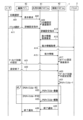
- FIG. 11 is a sequence diagram illustrating an example of a print setting procedure.
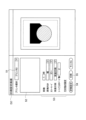
- FIG. 4 is an explanatory diagram showing an example of a print setting screen.
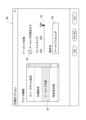
- FIG. 13 is an explanatory diagram showing an example of an option setting screen.
- FIG. 11 is a sequence diagram illustrating an example of a printing execution procedure. 13 is a flowchart showing a procedure for an archive process.
- FIG. 11 is a sequence diagram illustrating an example of a printing execution procedure.
- PC personal computer
- the PC 1 of this embodiment is equipped with a controller 10 including a CPU 11 and a memory 12.
- the PC 1 is an example of an information processing device.
- the CPU 11 is an example of a computer.
- the PC 1 also has a user interface (hereinafter referred to as "user IF") 13 and a communication interface (hereinafter referred to as "communication IF") 14, which are electrically connected to the controller 10.
- user IF user interface
- communication IF hereinafter referred to as "communication IF”
- the controller 10 in FIG. 1 is a general term for the hardware and software used to control the PC 1, and does not necessarily represent a single piece of hardware that actually exists in the PC 1.
- the CPU 11 of the PC 1 executes various processes according to the programs read from the memory 12 and based on the user's operations. Various programs and data are stored in the memory 12.
- the memory 12 is also used as a working area when various processes are executed.
- the buffer provided in the CPU 11 is also an example of a memory. Note that an example of the memory 12 is not limited to the ROM, RAM, HDD, etc. built into the PC 1, but may also be a storage medium that can be read and written by the CPU 11, such as a recording medium such as a CD-ROM or DVD-ROM.
- User IF 13 includes display 13a, which is hardware that displays a screen to notify the user of information, and hardware that accepts operations by the user.
- User IF 13 may be a combination of display 13a capable of displaying information and a mouse or keyboard or the like that has an input acceptance function, or it may be a touch panel that has the functions of display 13a and an input acceptance function.
- the communication IF 14 includes hardware for communicating with external devices such as the printer 2.
- the communication standards of the communication IF 14 include Ethernet (registered trademark), Wi-Fi (registered trademark), USB, etc.
- the PC 1 may be connectable to the Internet via the communication IF 14.
- the PC 1 may be equipped with multiple communication IFs 14 that support multiple communication standards.
- the memory 12 of the PC 1 stores various programs and data, including an operating system (hereinafter referred to as "OS") 21 including a general-purpose print program 41, an auxiliary program 42, and an editing application 43.
- OS operating system
- the auxiliary program 42 is an example of a support program.
- the editing application 43 is an example of an application program.
- OS21 is a multitasking OS that can process multiple tasks in parallel by managing and switching between multiple tasks.
- Examples of OS21 include Windows (registered trademark), MacOS (registered trademark), Linux (registered trademark), iOS (registered trademark), and Android (registered trademark).
- the OS 21 includes a generic print program 41.
- the generic print program 41 is a standard OS program that is prepared by the OS 21 vendor and provided as part of the OS 21.
- the generic print program 41 is not configured to use printer drivers specific to each printer.
- the generic printing program 41 is a program that has the functionality to cause multiple models of printers provided by multiple vendors to print based on user instructions.
- the generic printing program 41 supports generic functions that allow printing to be performed on many printers. Unlike printer drivers specific to each printer, the generic printing program 41 does not support functions specific to each printer or printer driver, particularly functions that require complex processing.
- the general-purpose printing program 41 is a program that includes a function that receives image data specified as the print target in print instructions output from various applications based on user instructions, and generates intermediate image data based on that image data.
- the intermediate image data is, for example, XPS data.
- the general-purpose printing program 41 further has a function that generates print data in a format that can be used for printing on various printers based on the intermediate image data.
- the print data is, for example, PWGRaster data or PDF data.
- the general-purpose printing program 41 also has a function that transmits the generated print data to the printer specified as the device to execute printing, via the communication function of the OS 21.
- the auxiliary program 42 is a program or group of programs that executes processing based on instructions from the OS 21 in conjunction with the processing of the general-purpose printing program 41, and is a program that supports the control of the target hardware.
- the auxiliary program 42 in this embodiment corresponds to the model of the printer 2 connected to the PC 1, and is provided, for example, by the vendor of the printer 2.
- the general-purpose printing program 41 starts the auxiliary program 42 corresponding to the printer 2 when the printer 2 is selected as the device to execute printing, when an instruction for detailed print settings is received with the printer 2 selected, when an instruction to execute printing on the printer 2 is received, etc.
- the auxiliary program 42 is, for example, called a print support app (abbreviated as PSA) or a hardware support app (abbreviated as HSA).
- auxiliary program 42 may be a combination of multiple programs that each accept execution commands, or it may be a single program that can execute different processes depending on the command.
- the auxiliary program may also be a program prepared by the printer vendor for each type of printer. For example, an auxiliary program for inkjet printers and an auxiliary program for laser printers may be prepared. There may also be auxiliary programs prepared not only for each type of printer, but also for each model of printer or each series of printer models.
- OS21 of PC1 can download an appropriate auxiliary program from a printer vendor's server or the like according to the type and model of the connected printer and install it in PC1.
- OS21 associates the identification information of the installed auxiliary program with the printer information of the newly connected printer and stores it in memory 12.
- the editing application 43 is, for example, a program for creating and editing image data and document data.
- the editing application 43 may be, for example, Microsoft's (registered trademark) Word (registered trademark) or PowerPoint (registered trademark), or may be a program provided by the vendor of the printer 2.
- the editing application 43 is capable of accepting, for example, a print execution instruction to cause the printer 2 to execute printing via the user IF 13.
- the editing application 43 is not limited to a program for creating and editing data, and may also be a program having a function for accepting display instructions and print instructions for various types of information, such as map information and web pages, in response to a user request.
- the PC 1 is connected to the printer 2 via the communication IF 14 as shown in FIG. 1.
- the printer 2 is a device that has at least a printing function and a communication function. For example, when the printer 2 receives print data from the PC 1 or the like, it can execute printing based on the received print data.
- each process in this embodiment basically indicates processing by the CPU 11 according to commands written in a program such as the auxiliary program 42. Processing by the CPU 11 also includes control of hardware using the API of the OS 21. In this specification, the operation of each program will be described without a detailed description of the OS 21. Also, "obtain" is used as a concept that does not necessarily require a request.
- Editing application 43 accepts creation and editing of text and images based on instructions from the user. Then, when the user wishes to print the text or image being displayed, the user selects print in editing application 43 (A01). The user can select print, for example, from a menu of operation items provided in editing application 43.
- the editing application 43 When the editing application 43 accepts the selection of printing, it requests the general-purpose printing program 41 of the OS 21 to display a screen for accepting instructions regarding printing (A02). In response to the request, the general-purpose printing program 41 causes the user IF 13 to display a print setting screen (A03).
- the print setting screen is a screen that accepts user instructions regarding various print settings that can be accepted by the general-purpose printing program 41. Note that the print setting screen may be displayed by the editing application 43.
- the print setting screen D2 in the example of FIG. 3 includes a printer selection field 51, an information display field 52, a basic print setting selection field 53, a detailed settings button 54, and a print button 55.
- the printer selection field 51 is a field that accepts the selection of the device to be printed.
- the information display field 52 is a field that displays information specified by an auxiliary program corresponding to the device selected in the printer selection field 51. For example, when the selection of printer 2 is accepted in the printer selection field 51, or when a print instruction is accepted with printer 2 set as the printer to be normally used in the OS 21, the general-purpose print program 41 can start the auxiliary program 42 and display an image prepared by the auxiliary program 42 in the information display field 52.
- the basic print settings selection field 53 is a field that accepts basic settings such as the number of copies to be printed and the document orientation.
- the detailed settings button 54 is a button that accepts an instruction to make detailed settings that are not included in the basic print settings selection field 53.
- the print button 55 is a button that accepts an instruction to execute printing with the selected print settings.
- the general-purpose print program 41 passes an instruction to the auxiliary program 42 corresponding to printer 2 to start accepting the detailed print settings (A12).
- the auxiliary program 42 When the auxiliary program 42 is started in response to the instruction of A12, it acquires the capabilities information of the printer 2. Specifically, the auxiliary program 42 requests the general-purpose printing program 41 to acquire the capabilities information (A13). The general-purpose printing program 41 sends a command requesting the capabilities information to the printer 2 and acquires the capabilities information from the printer 2 (A14). The general-purpose printing program 41 passes the acquired capabilities information to the auxiliary program 42 (A15). This allows the auxiliary program 42 to acquire the capabilities information of the printer 2.
- the general-purpose printing program 41 communicates with the printer 2 via the OS 21 in A14, for example, by communication according to IPP (short for Internet Printing Protocol).
- the auxiliary program 42 may obtain capability information directly from the printer 2, for example, by using MIB (short for Management Information Base), instead of making a request to the general-purpose printing program 41.
- the capability information acquired from the printer 2 includes information on parameters that can be set as print settings.
- the capability information may further include, for example, information on remaining amounts of consumables, information on selectable trays, information such as the paper size of each tray, and information on the format of image data that can be supported.
- the printer 2 may also have a function for performing image processing based on the accepted print job and printing based on the data after image processing, such as a function for performing aggregate printing such as Nin1, composite printing such as watermarks, and economical printing that saves on coloring agents. If the printer 2 has an image processing function that can be executed by the printer 2, the printer 2 may pass capability information including information on that function.
- the printer 2 may also pass capability information including information indicating its own status.
- the auxiliary program 42 Based on the acquired capability information, the auxiliary program 42 causes the user IF 13 to display a detailed settings screen that accepts detailed print settings (A17).
- the detailed settings screen displayed by the auxiliary program 42 includes as options parameters within the range that can be executed by the printer 2.
- the auxiliary program 42 can accept user operations on the displayed detailed settings screen. Since there are many print setting items that can be accepted on the detailed settings screen, the auxiliary program 42 may be able to accept an instruction to switch the items to be selected, for example, by using multiple tabs.
- the auxiliary program 42 can accept, for example, archive printing settings in response to user operations.
- Archive printing is one of the optional functions of the auxiliary program 42, and is a function that saves data indicating the image to be printed in a specified memory area when printing is performed.
- the auxiliary program 42 can display, for example, an option setting screen 60 as shown in FIG. 4 on the user IF 13 as a screen for accepting archive printing settings.
- the auxiliary program 42 accepts the user's instructions on the displayed option setting screen 60.
- the option setting screen 60 shown in FIG. 4 includes options 61 indicating items for accepting settings for archive printing.
- the auxiliary program 42 displays a check box 62 for accepting an instruction to perform archive printing, as shown in FIG. 4.
- the check box 62 is checked, the auxiliary program 42 enters a state in which archive printing is accepted, and furthermore, selectably displays a selection bar 63 for accepting settings for reducing the image size, and a folder selection field 64 indicating the destination for saving the archive file.
- the auxiliary program 42 when the auxiliary program 42 receives an instruction to print an image while an instruction for archive printing has been accepted by checking the check box 62, the auxiliary program 42 saves PDF format data showing the image to be printed in a folder specified in the folder selection field 64.
- the process of accepting the selection of whether or not to save an image depending on whether or not the check box 62 is checked is an example of a save selection acceptance process.
- the auxiliary program 42 can accept, via the selection bar 63, a selection as to whether or not to save a reduced image of the image to be printed, and a setting of the reduction ratio if the reduced image is to be saved.
- the process of accepting a user's instruction via the selection bar 63 is an example of a reduction ratio acceptance process, and an example of a reduction selection acceptance process. Note that, in the default setting, the auxiliary program 42 may not reduce the image.
- auxiliary program 42 accepts a user setting for the image reduction ratio, making it possible to strike a balance between reducing the load on memory 12 and preventing image quality degradation depending on the use of the image, etc.
- auxiliary program 42 is not limited to accepting the reduction ratio as a selection from selection bar 63, and may accept a numerical value such as 0 to 100, or a degree of reduction such as high, medium, or low.
- the destination to save the archive file specified in the folder selection field 64 is an example of a predetermined storage area.
- the auxiliary program 42 may be able to accept a specification of a storage area of an external device, for example, as the destination to save the archive file, other than an area of the memory 12 of the PC 1.
- the destination to save the archive file may also be determined in advance.
- the user specifies various print settings, including the archive printing settings described above, and issues an instruction to end the print settings (operating the OK button in FIG. 4).
- the auxiliary program 42 ends the display of the option setting screen 60, and stores the accepted print setting information, such as the archive printing settings (A23).
- the general-purpose printing program 41 can accept registration of PDF pass-through to set the PDF file to be sent directly to the printer 2 when the image file to be printed is a PDF file.
- the auxiliary program 42 determines whether or not to register PDF pass-through in the general-purpose printing program 41 based on the capability information acquired from the printer 2 and the detailed print settings accepted by user instructions (A31).
- the general-purpose print program 41 does not launch the auxiliary program 42.
- the general-purpose print program 41 does not generate intermediate image data or print data, but sends the PDF data as is to the printer 2. According to this procedure, the image data to be printed is not converted to intermediate image data, so there is no wasted processing and the deterioration of image quality that accompanies data format conversion is also suppressed.
- PDF pass-through is an example of a specific mode.
- the auxiliary program 42 determines that PDF pass-through registration is possible if the printer 2 is compatible with the PDF format and has not accepted a setting for archive printing. Note that the printer 2 being compatible with PDF format data means that the printer 2 is able to receive PDF data and execute printing based on that PDF data. Information on whether the printer 2 is compatible with the PDF format is included in the capability information of the printer 2, for example. The auxiliary program 42 may determine whether the printer 2 is compatible with the PDF format based on the model of the printer 2.
- the auxiliary program 42 passes information instructing the general-purpose printing program 41 to register PDF pass-through (A32).
- A32 is an example of a first mode setting process.
- the general-purpose printing program 41 receives information instructing PDF pass-through registration from the auxiliary program 42, it stores the PDF pass-through registration in association with the identification information of the auxiliary program 42.
- the auxiliary program 42 determines that PDF pass-through registration is not possible. If it determines that PDF pass-through registration is not possible (alt: [PDF pass-through not possible]), the auxiliary program 42 passes information to cancel the PDF pass-through registration to the general-purpose printing program 41 (A33).
- A33 is an example of the second mode setting process.
- the general-purpose printing program 41 When the general-purpose printing program 41 receives information to cancel the PDF pass-through registration from the auxiliary program 42, if PDF pass-through has already been registered in association with the identification information of the auxiliary program 42, the general-purpose printing program 41 cancels the registration. If PDF pass-through has not been registered, the general-purpose printing program 41 does not have to do anything. If PDF pass-through has not been registered, even if the image data to be printed is PDF data, the general-purpose printing program 41 does not send the PDF data to the printer 2, but generates intermediate image data and requests the auxiliary program 42 to process it.
- the general-purpose printing program 41 will not generate intermediate image data and will not start the auxiliary program 42. Therefore, the auxiliary program 42 cannot save image data for archive printing. If the auxiliary program 42 has accepted the archive printing setting, it will cancel the registration of PDF pass-through, so that the general-purpose printing program 41 can generate intermediate image data and start the auxiliary program 42.
- the auxiliary program 42 notifies the general-purpose printing program 41 that acceptance of the detailed print settings has been completed (A35). Based on the notification from the auxiliary program 42, the general-purpose printing program 41 notifies the editing application 43 that acceptance of the print settings has been completed (A36). The auxiliary program 42 may also notify the editing application 43 that acceptance of the print settings has been completed.
- the editing application 43 activates the print settings screen displayed in A03 (for example, the print settings screen D2 shown in FIG. 3), and becomes available to accept user instructions such as an instruction to execute printing or an instruction to cancel printing.
- print setting screen D2 includes an information display field 52 capable of displaying an image prepared by auxiliary program 42. Furthermore, when the general-purpose print program 41 accepts an operation on the information display field 52, it passes information on that operation to auxiliary program 42.
- auxiliary program 42 can display, for example, an information screen capable of accepting archive printing settings in information display field 52, and accept archive printing settings in response to a user instruction in information display field 52.
- auxiliary program 42 stores the archive printing setting information when it is accepted via information display field 52.
- the print execution procedure will be described with reference to the sequence diagram in FIG. 5.
- the user inputs an instruction to execute printing in the editing application 43 (B01).
- the editing application 43 receives an operation on the print button 55 on the print settings screen D2 shown in FIG. 3, it determines that it has received an execution instruction to the general-purpose printing program 41 to cause the printer 2 to print the selected image.
- the sequence diagram in FIG. 5 describes a case where a print instruction including archive printing settings has been received. Note that the user's instruction to execute printing may also be input directly to the general-purpose printing program 41.
- the editing application 43 passes the received print instruction information to the general-purpose printing program 41 (B02).
- the general-purpose printing program 41 obtains, as the print instruction information, information indicating the image data of the image to be printed and information indicating the print settings from the editing application 43.
- the general-purpose printing program 41 generates intermediate image data by converting the format of the image data of the image to be printed into the format of intermediate image data based on the information obtained from the editing application 43 (B03).
- the image data contained in the editing application 43 is of various types, and the general-purpose printing program 41 converts the image data to be printed into intermediate image data suitable for generating print data. Note that if the image data to be printed is suitable for generating print data, the generation of the intermediate image data may be omitted and the intermediate image data may be used as is.
- the general-purpose printing program 41 may start an auxiliary program 42 corresponding to the designated device, the printer 2, and notify the printer 2 that the print job processing has started.
- the auxiliary program 42 is started from the general-purpose printing program 41, it can pass information indicating various instructions used when generating the intermediate image data to the general-purpose printing program 41 as necessary.
- the general-purpose printing program 41 After generating the intermediate image data, the general-purpose printing program 41 starts the auxiliary program 42 (B05).
- the auxiliary program 42 can obtain the intermediate image data generated by the general-purpose printing program 41 by making a request to the general-purpose printing program 41.
- the auxiliary program 42 can then edit the intermediate image data and print setting information based on the detailed print settings that have already been accepted.
- the auxiliary program 42 passes an instruction to cancel PDF pass-through to the general-purpose printing program 41 (A33 in FIG. 2). Therefore, in the procedure in FIG. 5, even if the image data format of the image to be printed obtained from the editing application 43 is PDF data, the general-purpose printing program 41 generates intermediate image data and passes it to the auxiliary program 42.
- the auxiliary program 42 Upon receiving the execution instruction of B05, the auxiliary program 42 requests rasterization from the general-purpose printing program 41 (B11).
- the general-purpose printing program 41 rasterizes the intermediate image data based on the request, and generates raster data, which is bitmap data (B12).
- the general-purpose printing program 41 passes the generated raster data to the auxiliary program 42 (B13). As a result, the auxiliary program 42 obtains the raster data.
- the raster data that the auxiliary program 42 obtains from the general-purpose printing program 41 is an example of intermediate data.
- the auxiliary program 42 may perform rasterization. However, if the general-purpose printing program 41 performs rasterization, the auxiliary program 42 will have less processing to do, and the program size of the auxiliary program 42 can be reduced.
- auxiliary program 42 executes an archive process (B15).
- the procedure of the archive process will be described with reference to the flowchart in FIG. 6.
- This archive process is executed by the CPU 11 of the PC 1 based on the auxiliary program 42.
- the CPU 11 determines whether the printer 2 supports PDF data (C01). Information indicating whether the printer 2 supports PDF data is included in the capability information of the printer 2 acquired in A15 of FIG. 2, for example.
- the CPU 11 determines whether or not a selection to reduce images has been accepted as an archive setting (C02). If it is determined that a selection to reduce images has been accepted (C02: YES), the CPU 11 creates a copy of the raster data received from the general-purpose printing program 41 in B13 of FIG. 5, reduces the raster data of the copy at a reduction ratio specified by the user, and generates reduced raster data (C03). The reduction ratio can be accepted using the selection bar 63 on the option setting screen 60 (see FIG. 4) described above.
- the CPU 11 After C03, or if it is determined that the selection to reduce the size has not been accepted (C02: NO), the CPU 11 creates PDF data to be saved (C05). Specifically, the CPU 11 creates PDF data to be saved based on the reduced raster data generated in C03, or a copy of the raster data received from the general-purpose printing program 41 in B13 of FIG. 5. C05 is an example of an acquisition process.
- the PDF data to be saved is an example of image data in a specific file format.
- PDF data showing a reduced image of the image to be printed is created in C05.
- the PDF data in this case is an example of first PDF data.
- the CPU 11 creates PDF data showing the unreduced image to be printed in C05.
- the PDF data in this case is an example of second PDF data.
- the CPU 11 saves the created file containing the PDF data to be saved in a save destination specified by the user (C06).
- C06 is an example of a save process.
- the save destination is the folder specified in the folder selection field 64 on the option setting screen 60 (see FIG. 4) described above.
- the CPU 11 then encodes the original raster data, which is the raster data received from the general-purpose printing program 41, into print data including PDL data (C07).
- the PDL data is data in a format that is compatible with the printer 2. If the printer 2 does not support PDF data, the CPU 11 creates and saves PDF data for storage separately from the PDL data for printing. Furthermore, if a reduction setting has been made, the CPU 11 creates reduced PDF data for storage based on the raster data, making it possible to support both printing and reduced storage.
- the CPU 11 creates PDF data, which is image data in PDF format, based on the raster data received from the general-purpose printing program 41 in B13 of FIG. 5, and encodes the PDF data into print data that includes the PDF data (C11).
- the PDF data created in C11 is an example of third PDF data.
- the CPU 11 determines whether or not a selection to reduce the image has been accepted as an archive setting (C12). If it determines that a selection to reduce the image has been accepted (C12: YES), the CPU 11 copies the PDF data created in C11 and generates reduced PDF data by reducing the image at the reduction ratio specified by the user (C13).
- the CPU 11 After C13, or if it is determined that the selection to reduce the size has not been accepted (C12: NO), the CPU 11 creates a PDF file for storage (C15). Specifically, if the CPU 11 has generated reduced PDF data in C13, it creates a file for storage that includes the reduced PDF data. Also, if the selection to reduce the size has not been accepted, the CPU 11 creates a file for storage that includes a copy of the PDF data created in C11. C15 is an example of an acquisition process. The PDF file for storage is an example of image data in a specific file format.
- the printer 2 is compatible with PDF
- the PDF data to be saved can also be used for printing.
- the processing load is reduced compared to creating PDL data for printing separately from the PDF data to be saved.
- the printer 2 is compatible with PDF data and a reduction setting is configured, it can create reduced PDF data for saving and PDF data for printing separately, making it possible to handle both printing and reduced saving.
- the CPU 11 saves the created PDF file in a storage location specified by the user as an archive setting (C16).
- C16 is an example of a save process.
- the CPU 11 ends the archive process and returns to the print execution procedure of FIG. 5.
- the auxiliary program 42 passes the print data including the PDL data created in C07 of the archive process, or the print data including the PDF data created in C11 of the archive process, to the general-purpose print program 41 and instructs it to send to the printer 2 (B21).
- B21 is a process for causing the printer 2 to print, and is an example of a print process.
- the general-purpose printing program 41 sends print data including PDL data or PDF data to the printer 2 in response to instructions from the auxiliary program 42, and instructs the printer 2 to print (B22).
- the printer 2 executes printing based on the received print data (B23). This creates a printout on which the image to be printed is printed. If the printer 2 supports printing based on PDF data, the printer 2 receives the PDF data in B22, analyzes the PDF data, and executes printing.
- the auxiliary program 42 does not execute the archive process. Therefore, the auxiliary program 42 does not create a file for storage, and does not save the file. In this case, the auxiliary program 42 creates print data based on the raster data received from the general-purpose print program 41 in B13, passes the created print data to the general-purpose print program 41, and instructs it to send it to the printer 2.
- Saving image data based on an archive print instruction allows the user to check the print contents, but places a burden on the CPU 11 and memory 12.
- the user can select whether or not to save image data, so it is possible to avoid unnecessary processing and unnecessary use of memory 12 when saving image data is not necessary.
- the auxiliary program 42 may send a print command instructing the printer 2 to execute printing, together with the print data. For example, if the print settings include settings related to image processing that can be executed by the printer 2, the auxiliary program 42 may generate a print command that also includes information about that processing. In this case, the auxiliary program 42 may notify the general-purpose print program 41 of the end information after completing the transmission of the print data.
- the general-purpose printing program 41 does not launch the auxiliary program 42 when it receives a print instruction including PDF data while PDF pass-through registration is being accepted, but it may also be launched.
- the general-purpose printing program 41 may be configured to pass the PDF data as is to the auxiliary program 42 without generating intermediate image data or print data when it receives a print instruction including PDF data while PDF pass-through registration is being accepted.
- the following describes the procedure for a case in which the general-purpose printing program 41 is configured to launch the auxiliary program 42 and pass the PDF data when it receives a print instruction including PDF data while PDF pass-through registration is being accepted.
- the auxiliary program 42 determines whether to register PDF pass-through based on the capabilities of the printer 2 in A31 of FIG. 2, regardless of whether the setting for archive printing has been accepted. Specifically, the auxiliary program 42 determines whether the printer 2 supports PDF data, and if the printer 2 supports PDF data, determines that PDF pass-through registration is possible, and if the printer 2 does not support PDF data, determines that PDF pass-through registration is not possible. Then, if the printer 2 supports PDF data, the auxiliary program 42 instructs registration of PDF pass-through (A32 of FIG. 2), and if the printer 2 does not support PDF data, instructs deregistration of PDF pass-through (A33 of FIG. 2).
- the user inputs a command to execute printing in the editing application 43 (B01).
- the editing application 43 passes the received print command information to the general-purpose printing program 41 (B02).
- the general-purpose printing program 41 If PDF pass-through is not registered or if the received image data is not PDF data (alt: [no PDF pass-through or other than PDF]), the general-purpose printing program 41 generates intermediate image data (B03) and starts the auxiliary program 42 (B05) in the same manner as in the sequence diagram of Fig. 5.
- the auxiliary program 42 requests rasterization from the general-purpose printing program 41 (B11), receives raster data from the general-purpose printing program 41 (B13), and executes the archive process of Fig. 6 (B15), in the same manner as in the sequence diagram of Fig. 5.
- the general-purpose print program 41 in this configuration starts the auxiliary program 42 and passes an execution instruction including the PDF data to the auxiliary program 42 (D01).
- the auxiliary program 42 determines whether or not the selection to reduce the image has been accepted as an archive setting. If it is determined that the selection to reduce the image has been accepted (alt: [Reduce]), the auxiliary program 42 creates a copy of the received PDF data and reduces the created copy at the reduction ratio specified by the user (D02). This creates reduced image data that indicates a reduced image obtained by reducing the image to be printed that is indicated by the PDF data.
- the auxiliary program 42 saves a copy of the PDF data received in D01, or the PDF data reduced in D02, as a PDF file in a destination specified by the user in the archive settings (D03).
- D03 in the case of saving the PDF data received in D01, is an example of a specific saving process.
- D03 in the case of saving the PDF data reduced in D02, is an example of a reduced saving process.
- the auxiliary program 42 passes the print data created in the archive process of B15 or the PDF data received in D01 as print data to the general-purpose print program 41 and instructs it to send it to the printer 2 (B21).
- B21 is a process for causing the printer 2 to print.
- B21, in which the PDF data received in D01 is passed to the general-purpose print program 41, is an example of a specific print process.
- the general-purpose print program 41 sends the print data to the printer 2 and instructs it to print (B22).
- the printer 2 executes printing based on the received print data (B23).
- the auxiliary program 42 of this embodiment performs processing to cause the printer to print the image to be printed based on the input intermediate image data, and also obtains PDF data based on the intermediate image data and saves the PDF data in a specified storage area.
- the PC 1 can save PDF data indicating the printed image.
- the auxiliary program 42 of this embodiment saves a file including the PDF data, the saved image data is easy for the user to use.
- the device connected to PC1 is not limited to a printer with a single printing function, but may be any device with a printing function, such as a multifunction device, copier, or fax machine.
- the number of printers connected to PC1 may be two or more.
- the example images are all merely examples and are not limited to the examples shown in the figures.
- any text, object shape, background, etc. displayed on each screen shown in the figures may be used.
- FIG. 3 shows print setting screen D2 including one information display field 52
- the arrangement, shape, size, number, etc. of information display field 52 are not limited to the example shown in this figure.
- information display field 52 may not be present.
- the file format of the file in which the image data is saved need only be a file format different from that of the intermediate image data, and is not limited to a PDF file.
- the image data for saving may be, for example, JPEG, PNG, or bitmap.
- the auxiliary program 42 may be capable of accepting a user's designation regarding the file format of the image data for saving.
- the timing at which the auxiliary program 42 acquires the printer 2 capability information is not limited to the example shown in FIG. 2.
- the auxiliary program 42 may acquire the capability information after accepting an archive printing instruction, or may acquire the capability information again after accepting a printing instruction.
- the auxiliary program 42 reduces the raster data or PDF data, but the general-purpose printing program 41 may perform this process.
- the general-purpose printing program 41 may perform rasterization for a reduced image to obtain raster data for the reduced image, in addition to the raster data for printing.
- the auxiliary program 42 may also be started not only when printing is selected, but also when, for example, printer 2 is selected as a device setting. Even in this case, the auxiliary program 42 may display a setting screen that can accept settings related to archiving. When an archive setting is accepted as a device setting, the auxiliary program 42 stores the accepted setting information as the default print setting.
- the general-purpose print program 41 may start the auxiliary program 42.
- the auxiliary program 42 may also display, for example, an information screen in the information display field 52 that can accept settings related to archiving.
- auxiliary program 42 only the printing operation is described in detail as the operation of the auxiliary program 42, but the auxiliary program 42 may have other roles as well.
- the program that executes the processing of this embodiment is not limited to the auxiliary program 42, but may be any program that receives instructions from the OS 21 or the general-purpose printing program 41 when printing using the general-purpose printing program 41.
- it may be a print workflow application (Print workflow) whose specifications have been published by Microsoft.
- auxiliary program 42 may be executed in response to a direct execution instruction from OS 21, or auxiliary program 42 may be resident. If auxiliary program 42 is resident, it may receive an execution command and perform the above-mentioned operations.
- the processes disclosed in the embodiments may be executed by a single CPU, multiple CPUs, hardware such as an ASIC, or a combination of these.
- the processes disclosed in the embodiments may be realized in various ways, such as a recording medium on which a program for executing the processes is recorded, or a method.
Landscapes
- Engineering & Computer Science (AREA)
- Theoretical Computer Science (AREA)
- Human Computer Interaction (AREA)
- Physics & Mathematics (AREA)
- General Engineering & Computer Science (AREA)
- General Physics & Mathematics (AREA)
- Quality & Reliability (AREA)
- Accessory Devices And Overall Control Thereof (AREA)
Priority Applications (1)
| Application Number | Priority Date | Filing Date | Title |
|---|---|---|---|
| US19/272,977 US20250348250A1 (en) | 2023-01-18 | 2025-07-17 | Non-transitory computer-readable storage medium storing instructions implementing supporting program |
Applications Claiming Priority (2)
| Application Number | Priority Date | Filing Date | Title |
|---|---|---|---|
| JP2023005833A JP2024101733A (ja) | 2023-01-18 | 2023-01-18 | サポートプログラム |
| JP2023-005833 | 2023-01-18 |
Related Child Applications (1)
| Application Number | Title | Priority Date | Filing Date |
|---|---|---|---|
| US19/272,977 Continuation US20250348250A1 (en) | 2023-01-18 | 2025-07-17 | Non-transitory computer-readable storage medium storing instructions implementing supporting program |
Publications (1)
| Publication Number | Publication Date |
|---|---|
| WO2024154657A1 true WO2024154657A1 (ja) | 2024-07-25 |
Family
ID=91956038
Family Applications (1)
| Application Number | Title | Priority Date | Filing Date |
|---|---|---|---|
| PCT/JP2024/000573 Ceased WO2024154657A1 (ja) | 2023-01-18 | 2024-01-12 | サポートプログラム |
Country Status (3)
| Country | Link |
|---|---|
| US (1) | US20250348250A1 (enExample) |
| JP (1) | JP2024101733A (enExample) |
| WO (1) | WO2024154657A1 (enExample) |
Families Citing this family (2)
| Publication number | Priority date | Publication date | Assignee | Title |
|---|---|---|---|---|
| JP7899111B2 (ja) * | 2023-02-21 | 2026-08-03 | キヤノン株式会社 | 情報処理装置、情報処理装置の制御方法ならびにアプリケーション |
| JP2025001977A (ja) * | 2023-06-21 | 2025-01-09 | キヤノン株式会社 | 制御プログラム、情報処理装置の制御方法および情報処理装置 |
Citations (7)
| Publication number | Priority date | Publication date | Assignee | Title |
|---|---|---|---|---|
| JP2006072739A (ja) * | 2004-09-02 | 2006-03-16 | Canon Inc | 情報処理装置及びその制御方法、プログラム |
| JP2006209708A (ja) * | 2005-01-31 | 2006-08-10 | Seiko Epson Corp | プリンタドライバ |
| JP2007160674A (ja) * | 2005-12-13 | 2007-06-28 | Fuji Xerox Co Ltd | イメージログ機能表示プログラム、イメージログ機能表示方法、画像処理装置および画像処理システム |
| JP2008028629A (ja) * | 2006-07-20 | 2008-02-07 | Konica Minolta Business Technologies Inc | 画像管理システム、画像出力装置及びプログラム |
| JP2009188505A (ja) * | 2008-02-04 | 2009-08-20 | Sharp Corp | 画像形成装置 |
| JP2009199419A (ja) * | 2008-02-22 | 2009-09-03 | Brother Ind Ltd | コンピュータ、印刷制御プログラム及び印刷制御装置 |
| JP2020004254A (ja) * | 2018-06-29 | 2020-01-09 | キヤノン株式会社 | 情報処理装置、制御方法及びプログラム |
-
2023
- 2023-01-18 JP JP2023005833A patent/JP2024101733A/ja active Pending
-
2024
- 2024-01-12 WO PCT/JP2024/000573 patent/WO2024154657A1/ja not_active Ceased
-
2025
- 2025-07-17 US US19/272,977 patent/US20250348250A1/en active Pending
Patent Citations (7)
| Publication number | Priority date | Publication date | Assignee | Title |
|---|---|---|---|---|
| JP2006072739A (ja) * | 2004-09-02 | 2006-03-16 | Canon Inc | 情報処理装置及びその制御方法、プログラム |
| JP2006209708A (ja) * | 2005-01-31 | 2006-08-10 | Seiko Epson Corp | プリンタドライバ |
| JP2007160674A (ja) * | 2005-12-13 | 2007-06-28 | Fuji Xerox Co Ltd | イメージログ機能表示プログラム、イメージログ機能表示方法、画像処理装置および画像処理システム |
| JP2008028629A (ja) * | 2006-07-20 | 2008-02-07 | Konica Minolta Business Technologies Inc | 画像管理システム、画像出力装置及びプログラム |
| JP2009188505A (ja) * | 2008-02-04 | 2009-08-20 | Sharp Corp | 画像形成装置 |
| JP2009199419A (ja) * | 2008-02-22 | 2009-09-03 | Brother Ind Ltd | コンピュータ、印刷制御プログラム及び印刷制御装置 |
| JP2020004254A (ja) * | 2018-06-29 | 2020-01-09 | キヤノン株式会社 | 情報処理装置、制御方法及びプログラム |
Also Published As
| Publication number | Publication date |
|---|---|
| JP2024101733A (ja) | 2024-07-30 |
| US20250348250A1 (en) | 2025-11-13 |
Similar Documents
| Publication | Publication Date | Title |
|---|---|---|
| US12014094B2 (en) | Support program, information processing device, and printing method | |
| JP7775759B2 (ja) | サポートプログラムおよび印刷システム | |
| US20250231723A1 (en) | Information processing device using default print setting stored on printer according to support program | |
| WO2023145532A1 (ja) | サポートプログラム | |
| JP7711599B2 (ja) | サポートプログラム | |
| JP2024101733A (ja) | サポートプログラム | |
| WO2024185577A1 (ja) | サポートプログラム | |
| WO2024185576A1 (ja) | サポートプログラム | |
| JP2026002870A (ja) | サポートプログラム | |
| JP7790236B2 (ja) | サポートプログラム | |
| JP7753951B2 (ja) | サポートプログラム | |
| WO2024154660A1 (ja) | サポートプログラム | |
| JP7585823B2 (ja) | サポートプログラム | |
| JP2023147785A (ja) | サポートプログラムおよび印刷システム | |
| WO2022163429A1 (ja) | サポートプログラム | |
| JP7928308B2 (ja) | サポートプログラム | |
| WO2024154659A1 (ja) | サポートプログラム | |
| US20260267576A1 (en) | Non-transitory computer readable storage medium | |
| WO2024166809A1 (ja) | サポートプログラム | |
| JP2024129683A (ja) | サポートプログラム | |
| WO2026134000A1 (ja) | サポートプログラム | |
| WO2025239014A1 (ja) | サポートプログラムおよび印刷システム | |
| JP2025170567A (ja) | サポートプログラムおよび印刷システム | |
| JP2024167503A (ja) | サポートプログラム | |
| JP2024117348A (ja) | サポートプログラム |
Legal Events
| Date | Code | Title | Description |
|---|---|---|---|
| 121 | Ep: the epo has been informed by wipo that ep was designated in this application |
Ref document number: 24744580 Country of ref document: EP Kind code of ref document: A1 |
|
| NENP | Non-entry into the national phase |
Ref country code: DE |
|
| 122 | Ep: pct application non-entry in european phase |
Ref document number: 24744580 Country of ref document: EP Kind code of ref document: A1 |