WO2023190109A1 - 情報処理装置、情報処理方法、及び記録媒体 - Google Patents
情報処理装置、情報処理方法、及び記録媒体 Download PDFInfo
- Publication number
- WO2023190109A1 WO2023190109A1 PCT/JP2023/011718 JP2023011718W WO2023190109A1 WO 2023190109 A1 WO2023190109 A1 WO 2023190109A1 JP 2023011718 W JP2023011718 W JP 2023011718W WO 2023190109 A1 WO2023190109 A1 WO 2023190109A1
- Authority
- WO
- WIPO (PCT)
- Prior art keywords
- comment
- comments
- exhibit
- virtual space
- user
- Prior art date
- Legal status (The legal status is an assumption and is not a legal conclusion. Google has not performed a legal analysis and makes no representation as to the accuracy of the status listed.)
- Ceased
Links
Images












Classifications
-
- G—PHYSICS
- G09—EDUCATION; CRYPTOGRAPHY; DISPLAY; ADVERTISING; SEALS
- G09G—ARRANGEMENTS OR CIRCUITS FOR CONTROL OF INDICATING DEVICES USING STATIC MEANS TO PRESENT VARIABLE INFORMATION
- G09G5/00—Control arrangements or circuits for visual indicators common to cathode-ray tube indicators and other visual indicators
- G09G5/22—Control arrangements or circuits for visual indicators common to cathode-ray tube indicators and other visual indicators characterised by the display of characters or indicia using display control signals derived from coded signals representing the characters or indicia, e.g. with a character-code memory
- G09G5/32—Control arrangements or circuits for visual indicators common to cathode-ray tube indicators and other visual indicators characterised by the display of characters or indicia using display control signals derived from coded signals representing the characters or indicia, e.g. with a character-code memory with means for controlling the display position
-
- G—PHYSICS
- G06—COMPUTING OR CALCULATING; COUNTING
- G06T—IMAGE DATA PROCESSING OR GENERATION, IN GENERAL
- G06T15/00—Three-dimensional [3D] image rendering
- G06T15/10—Geometric effects
-
- G—PHYSICS
- G06—COMPUTING OR CALCULATING; COUNTING
- G06F—ELECTRIC DIGITAL DATA PROCESSING
- G06F3/00—Input arrangements for transferring data to be processed into a form capable of being handled by the computer; Output arrangements for transferring data from processing unit to output unit, e.g. interface arrangements
- G06F3/01—Input arrangements or combined input and output arrangements for interaction between user and computer
- G06F3/011—Arrangements for interaction with the human body, e.g. for user immersion in virtual reality
-
- G—PHYSICS
- G06—COMPUTING OR CALCULATING; COUNTING
- G06Q—INFORMATION AND COMMUNICATION TECHNOLOGY [ICT] SPECIALLY ADAPTED FOR ADMINISTRATIVE, COMMERCIAL, FINANCIAL, MANAGERIAL OR SUPERVISORY PURPOSES; SYSTEMS OR METHODS SPECIALLY ADAPTED FOR ADMINISTRATIVE, COMMERCIAL, FINANCIAL, MANAGERIAL OR SUPERVISORY PURPOSES, NOT OTHERWISE PROVIDED FOR
- G06Q10/00—Administration; Management
- G06Q10/40—Business processes related to social networking or social networking services
-
- G—PHYSICS
- G06—COMPUTING OR CALCULATING; COUNTING
- G06Q—INFORMATION AND COMMUNICATION TECHNOLOGY [ICT] SPECIALLY ADAPTED FOR ADMINISTRATIVE, COMMERCIAL, FINANCIAL, MANAGERIAL OR SUPERVISORY PURPOSES; SYSTEMS OR METHODS SPECIALLY ADAPTED FOR ADMINISTRATIVE, COMMERCIAL, FINANCIAL, MANAGERIAL OR SUPERVISORY PURPOSES, NOT OTHERWISE PROVIDED FOR
- G06Q30/00—Commerce
- G06Q30/02—Marketing; Price estimation or determination; Fundraising
- G06Q30/0282—Rating or review of business operators or products
-
- G—PHYSICS
- G06—COMPUTING OR CALCULATING; COUNTING
- G06T—IMAGE DATA PROCESSING OR GENERATION, IN GENERAL
- G06T11/00—Two-dimensional [2D] image generation
- G06T11/10—Texturing; Colouring; Generation of textures or colours
-
- G—PHYSICS
- G06—COMPUTING OR CALCULATING; COUNTING
- G06T—IMAGE DATA PROCESSING OR GENERATION, IN GENERAL
- G06T11/00—Two-dimensional [2D] image generation
- G06T11/60—Creating or editing images; Combining images with text
-
- G—PHYSICS
- G06—COMPUTING OR CALCULATING; COUNTING
- G06T—IMAGE DATA PROCESSING OR GENERATION, IN GENERAL
- G06T11/00—Two-dimensional [2D] image generation
- G06T11/60—Creating or editing images; Combining images with text
- G06T11/65—Creating or editing images; Combining images with text on geographic maps
-
- G—PHYSICS
- G06—COMPUTING OR CALCULATING; COUNTING
- G06T—IMAGE DATA PROCESSING OR GENERATION, IN GENERAL
- G06T19/00—Manipulating three-dimensional [3D] models or images for computer graphics
-
- G—PHYSICS
- G06—COMPUTING OR CALCULATING; COUNTING
- G06T—IMAGE DATA PROCESSING OR GENERATION, IN GENERAL
- G06T7/00—Image analysis
- G06T7/70—Determining position or orientation of objects or cameras
-
- G—PHYSICS
- G09—EDUCATION; CRYPTOGRAPHY; DISPLAY; ADVERTISING; SEALS
- G09G—ARRANGEMENTS OR CIRCUITS FOR CONTROL OF INDICATING DEVICES USING STATIC MEANS TO PRESENT VARIABLE INFORMATION
- G09G5/00—Control arrangements or circuits for visual indicators common to cathode-ray tube indicators and other visual indicators
- G09G5/36—Control arrangements or circuits for visual indicators common to cathode-ray tube indicators and other visual indicators characterised by the display of a graphic pattern, e.g. using an all-points-addressable [APA] memory
- G09G5/37—Details of the operation on graphic patterns
-
- G—PHYSICS
- G09—EDUCATION; CRYPTOGRAPHY; DISPLAY; ADVERTISING; SEALS
- G09G—ARRANGEMENTS OR CIRCUITS FOR CONTROL OF INDICATING DEVICES USING STATIC MEANS TO PRESENT VARIABLE INFORMATION
- G09G5/00—Control arrangements or circuits for visual indicators common to cathode-ray tube indicators and other visual indicators
- G09G5/36—Control arrangements or circuits for visual indicators common to cathode-ray tube indicators and other visual indicators characterised by the display of a graphic pattern, e.g. using an all-points-addressable [APA] memory
- G09G5/37—Details of the operation on graphic patterns
- G09G5/377—Details of the operation on graphic patterns for mixing or overlaying two or more graphic patterns
-
- G—PHYSICS
- G09—EDUCATION; CRYPTOGRAPHY; DISPLAY; ADVERTISING; SEALS
- G09G—ARRANGEMENTS OR CIRCUITS FOR CONTROL OF INDICATING DEVICES USING STATIC MEANS TO PRESENT VARIABLE INFORMATION
- G09G5/00—Control arrangements or circuits for visual indicators common to cathode-ray tube indicators and other visual indicators
- G09G5/36—Control arrangements or circuits for visual indicators common to cathode-ray tube indicators and other visual indicators characterised by the display of a graphic pattern, e.g. using an all-points-addressable [APA] memory
- G09G5/38—Control arrangements or circuits for visual indicators common to cathode-ray tube indicators and other visual indicators characterised by the display of a graphic pattern, e.g. using an all-points-addressable [APA] memory with means for controlling the display position
-
- H—ELECTRICITY
- H04—ELECTRIC COMMUNICATION TECHNIQUE
- H04N—PICTORIAL COMMUNICATION, e.g. TELEVISION
- H04N7/00—Television systems
- H04N7/14—Systems for two-way working
- H04N7/15—Conference systems
- H04N7/157—Conference systems defining a virtual conference space and using avatars or agents
-
- G—PHYSICS
- G06—COMPUTING OR CALCULATING; COUNTING
- G06T—IMAGE DATA PROCESSING OR GENERATION, IN GENERAL
- G06T2200/00—Indexing scheme for image data processing or generation, in general
- G06T2200/04—Indexing scheme for image data processing or generation, in general involving 3D image data
-
- H—ELECTRICITY
- H04—ELECTRIC COMMUNICATION TECHNIQUE
- H04N—PICTORIAL COMMUNICATION, e.g. TELEVISION
- H04N21/00—Selective content distribution, e.g. interactive television or video on demand [VOD]
- H04N21/80—Generation or processing of content or additional data by content creator independently of the distribution process; Content per se
- H04N21/81—Monomedia components thereof
- H04N21/816—Monomedia components thereof involving special video data, e.g 3D video
Definitions
- the present disclosure relates to an information processing device, an information processing method, and a recording medium, and in particular, an information processing device, an information processing method, and a recording medium that can more appropriately arrange comments on exhibits in a virtual space. Regarding.
- Patent Document 1 discloses a technique for increasing the time from placement to cancellation of a comment placed in a virtual space as the number of received supports increases.
- the present disclosure has been made in view of this situation, and is intended to enable comments on exhibits in a virtual space to be more appropriately placed.
- An information processing device includes a position information acquisition unit that acquires position information indicating a position of an exhibit in a virtual space, and a position information acquisition unit that associates a comment regarding the exhibit with a specific position in the virtual space.
- a comment that places the comment near the exhibit based on a comment registration unit to be registered, attribute information of the comment, position information indicating the position of the avatar existing in the virtual space, and position information of the exhibit.
- the information processing apparatus includes an arrangement section and an image output section that outputs an image of a virtual space from a specific viewpoint corresponding to the avatar based on the arranged comments.
- An information processing method and a recording medium according to one aspect of the present disclosure are an information processing method and a recording medium corresponding to an information processing apparatus according to one aspect of the present disclosure.
- position information indicating a position of an exhibit in a virtual space is acquired, and a comment on the exhibit is posted at a specific position in the virtual space.
- the comment is registered in association with the exhibit, and the comment is placed near the exhibit based on attribute information of the comment, position information indicating the position of the avatar existing in the virtual space, and position information of the exhibit,
- an image of the virtual space from a specific viewpoint corresponding to the avatar is output.
- the information processing device may be an independent device or may be an internal block forming one device.
- FIG. 1 is a diagram illustrating a configuration example of an embodiment of a system to which the present disclosure is applied.
- FIG. 2 is a block diagram showing a configuration example of a terminal device.
- FIG. 2 is a block diagram showing a configuration example of a server.
- FIG. 2 is a block diagram showing an example of a functional configuration of a server.
- FIG. 3 is a diagram illustrating an example of comment states for exhibits at a virtual exhibition.
- FIG. 6 is a diagram illustrating an example of comment arrangement for exhibits. It is a figure which shows the example of a screen of normal display. It is a figure which shows the example of a screen of map display. It is a figure which shows the example of a screen of a comment amount map.
- FIG. 7 is a diagram showing an example of a screen before comment display control is performed. It is a figure which shows the example of a screen after performing comment display control.
- FIG. 3 is a diagram illustrating an example of a method for controlling comment display for each user.
- FIG. 6 is a diagram illustrating an example of comment display control according to the background and the angle of view. It is a flowchart explaining the flow of comment display control processing.
- FIG. 7 is a diagram showing an example of common information and personal information used for comment display control.
- FIG. 6 is a diagram illustrating an example of rearranging comments for exhibits.
- FIG. 3 is a diagram illustrating an example of a configuration for controlling comment display according to importance. It is a figure which shows the example of 2D display of a comment.
- FIG. 3 is a diagram showing a first example of 3D display of comments.
- FIG. 7 is a diagram showing a second example of 3D display of comments.
- FIG. 2 is a diagram illustrating an example of a configuration for converting user voice into 3D text.
- FIG. 3 is a diagram illustrating an example of sharing 3D text in virtual space and real space.
- FIG. 2 is a diagram illustrating an example of a configuration for sharing 3D text in a virtual space and a real space. It is a figure which shows the example of a screen containing an artist's comment. It is a flowchart explaining the whole picture of processing to which this indication is applied.
- FIG. 1 is a diagram illustrating a configuration example of an embodiment of a system to which the present disclosure is applied.
- a system is a logical collection of multiple devices.
- a system 1 includes terminal devices 10-1 to 10-N (N is an integer of 1 or more) and a server 20. Each of the terminal devices 10-1 to 10-N and the server 20 are interconnected via a network 30.
- the terminal device 10-1 is, for example, an electronic device such as a smartphone, a PC (Personal Computer), a tablet terminal, an HMD (Head Mounted Display), a game console, or a music player.
- an application hereinafter also referred to as an application
- the virtual space may be provided using not only an application but also a browser or the like.
- the terminal devices 10-2 to 10-N are electronic devices such as smartphones and PCs, and each is used by a different user, and each user can participate in the virtual space. In the following description, if there is no need to distinguish between the terminal devices 10-1 to 10-N, they will simply be referred to as the terminal device 10.
- the server 20 has a function of providing a virtual space to the terminal devices 10-1 to 10-N.
- the server 20 transmits various data related to the virtual space to each of the terminal devices 10-1 to 10-N via the network 30.
- Each of the terminal devices 10-1 to 10-N receives various data transmitted from the server 20 via the network 30, and uses the received various data to provide a virtual space to each user.
- the server 20 records various data necessary to provide a virtual space. Further, the server 20 manages various information such as user information regarding users participating in the virtual space in a database, and can use various information as necessary.
- a virtual exhibition is provided as the virtual space.
- virtual exhibitions artists' works are exhibited as exhibits, and users who participate using avatars or the like can freely view the exhibited exhibits.
- a virtual exhibition is provided as the virtual space will be exemplified.
- the network 30 includes a communication network such as the Internet, an intranet, or a mobile phone network, and enables interconnection between devices using communication protocols such as TCP/IP (Transmission Control Protocol/Internet Protocol). .
- TCP/IP Transmission Control Protocol/Internet Protocol
- server may be provided. Further, other servers such as an application server that provides applications and an SNS server that provides SNS (Social Networking Service) may be separately provided.
- SNS Social Networking Service
- FIG. 2 is a block diagram showing a configuration example of the terminal device 10 in FIG. 1.
- a CPU Central Processing Unit
- ROM Read Only Memory
- RAM Random Access Memory
- the CPU 101 controls the operation of each part of the terminal device 10 by executing programs recorded in the ROM 102 and the storage unit 107. Various types of data are appropriately stored in the RAM 103.
- An input/output I/F 109 is also connected to the bus 104.
- An input section 105, an output section 106, a storage section 107, and a communication section 108 are connected to the input/output I/F 109.
- the input unit 105 supplies various input signals to each unit including the CPU 101 via the input/output I/F 109.
- the input unit 105 includes an operation unit 121, a sensor unit 122, and a sound input unit 123.
- the operation unit 121 is operated by the user and supplies an operation signal corresponding to the operation to the CPU 101.
- the operation unit 121 includes physical buttons, a touch panel, a mouse, a keyboard, and the like.
- the sensor unit 122 senses spatial information, time information, etc., and outputs a sensor signal obtained as a result of the sensing.
- the sensor section 122 includes an acceleration sensor, a gyro sensor, an IMU (Inertial Measurement Unit), and the like.
- the sensor unit 122 may be configured with a camera including an image sensor.
- the sound input unit 123 is composed of a microphone that collects sounds such as the user's voice, and outputs a sound signal according to the collected sounds.
- the output unit 106 outputs various information according to control from the CPU 101 via the input/output I/F 109.
- the output section 106 includes a display section 131 and a sound output section 132.
- the display unit 131 is composed of a display, and displays information such as images, videos, and text according to the image signal.
- the sound output unit 132 is configured with a speaker, headphones, etc. connected to an output terminal, and outputs sound according to the sound signal.
- the storage unit 107 records various data and programs under control from the CPU 101.
- the CPU 101 reads various data from the storage unit 107 and processes it, and executes programs.
- the storage unit 107 is composed of an auxiliary storage device such as a semiconductor memory.
- the storage unit 107 may be configured as an internal storage, or may be an external storage such as a memory card.
- the communication unit 108 communicates with other devices via the network 30 under control from the CPU 101.
- the communication unit 108 is configured with a communication module compatible with cellular communication (for example, LTE-Advanced, 5G, etc.), wireless communication such as wireless LAN (Local Area Network), or wired communication.
- cellular communication for example, LTE-Advanced, 5G, etc.
- wireless communication such as wireless LAN (Local Area Network), or wired communication.
- FIG. 3 is a block diagram showing a configuration example of the server 20 in FIG. 1.
- the CPU 201, ROM 202, and RAM 203 are interconnected by a bus 204.
- An input/output I/F 210 is further connected to the bus 204.
- An input section 205, an output section 206, a storage section 207, a communication section 208, and a drive 209 are connected to the input/output I/F 210.
- the input unit 205 is composed of a keyboard, a mouse, etc.
- the output unit 206 includes a speaker, a display, and the like.
- the storage unit 207 is composed of an auxiliary storage device such as a HDD (Hard Disk Drive) or a semiconductor memory.
- the communication unit 208 is configured with a communication I/F that supports wireless communication such as wireless LAN or wired communication such as Ethernet (registered trademark).
- the drive 209 drives a removable recording medium 211 such as a semiconductor memory, an optical disk, a magnetic disk, or a magneto-optical disk.
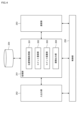
- FIG. 4 is a block diagram showing an example of the functional configuration of the server 20 in FIG. 3.
- a control unit 250 corresponds to the CPU 201 in FIG. 3
- an input/output unit 252 corresponds to the input unit 205 and output unit 206 in FIG. 3
- a communication unit 253 corresponds to the communication unit 208 in FIG.
- the storage unit 254 corresponds to the storage unit 207 in FIG. 3.
- the functions of the processing unit 251 are realized by executing a program by the CPU 201 in FIG. Alternatively, all or some of the functions of the processing unit 251 may be realized by dedicated hardware.
- the processing unit 251 performs processing for providing a virtual space such as a virtual exhibition.
- the storage unit 254 records various data and various information necessary for providing a virtual space such as a virtual exhibition.
- the processing unit 251 records various data and various information in the storage unit 254, and reads out various data and various information recorded in the storage unit 254.
- the processing unit 251 includes a position information acquisition unit 261, a comment registration unit 262, a comment placement unit 263, and an image output unit 264.
- the position information acquisition unit 261 acquires position information within the virtual space.
- the position information includes position information indicating the position of an exhibit in the virtual space, position information indicating the position of a comment on the exhibit in the virtual space, and position information indicating the position of an avatar existing in the virtual space.
- the comment registration unit 262 registers comments regarding exhibits in the virtual space in association with specific positions in the virtual space. Data regarding comments is recorded in the storage unit 254.
- the comment placement unit 263 places comments near the exhibit in the virtual space based on the position information acquired by the position information acquisition unit 261 and the data recorded in the storage unit 254.
- the image output unit 264 outputs an image of the virtual space from a specific viewpoint corresponding to the avatar based on the comments placed by the comment placement unit 263.
- the output virtual space image is displayed on the display unit 131 of the terminal device 10.
- FIG. 4 shows an example of the functional configuration of the server 20, all or part of the processing executed by the processing unit 251 may be executed by the terminal device 10. That is, the functions of the processing unit 251 are not limited to being realized on the server 20 side, but may be realized on the terminal device 10 side by, for example, executing a program by the CPU 101 in FIG. 2. Therefore, in the following description, when the processing executed by the processing unit 251 is described, the processing unit 251 of the server 20 or the processing unit 251 of the terminal device 10 is meant.
- the server 20 and the terminal device 10 are an example of an information processing device to which the present disclosure is applied.
- FIG. 5 is a diagram illustrating an example of comment states for exhibits in a virtual space that is a virtual exhibition.
- Comment states can be roughly divided into four states: comment production (S1), comment waiting (S2), comment display (S3), and shooting/SNS (S4). Comment creation and comment display are basically performed by different users.
- a user who creates a comment for an exhibit in the virtual space can write a comment or place a comment so that the comment for the exhibit can be posted to a specific location in the virtual space. It is registered in association with the location.
- relocation of comments FIG. 18
- conversion of user voice into 3D text FIGS. 23 to 25
- the comment standby (S2) state is the state from when a comment is created until it is displayed. Comments registered at a specific location in the virtual space may always be displayed in full depending on the user's location in the virtual space, but they may also be displayed or hidden depending on the distance from the user, etc. It is possible. In the following explanation, a map display of the amount of comments (FIGS. 7 to 10) will be explained as an example of waiting for comments.
- a comment registered at a specific position within the virtual space is displayed to a user (a user different from the user who created the comment) moving within the virtual space.
- the user can view the displayed comments and can react to the comments, such as giving a "like" rating.
- the comments may be displayed in common for all users, or may be displayed differently for each user. It is also possible to perform display control such as moving comments or erasing them at predetermined timing.
- comment display for each user (FIGS. 12 to 17), how to display comments (FIGS. 19 to 22), and communication with artists (FIG. 26) will be explained.
- comments regarding exhibits in the virtual space can be displayed to the user, for example, as shown in the top view shown in FIG. 6.
- comments 282A to 282I are registered for an exhibit 281.
- an area 292 represented by a broken line circle centered at position 291 can be set as an area where comments can be displayed.
- the registered comments are displayed as they are (normally displayed).
- the comments 282C to 282I outside the area 292 can be displayed differently from the normal display by displaying a reduced amount of information, such as a simplified display, instead of displaying the registered comments as they are.
- the position 291 is a position that corresponds to the viewpoint position of the user who uses the terminal device 10 on which the application has been started, and for example, when operating an avatar that acts in a virtual space, the position It can be a particular point of view.
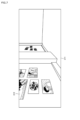
- a normal display terminal screen 311 as shown in FIG. 7 is displayed on the display unit 131.
- Exhibits 312 such as paintings and photographs installed in the virtual space are displayed on the terminal screen 311, so the user can move within the virtual space or change the viewpoint by operating the operation unit 121. By changing the display, you can see exhibits that interest you.
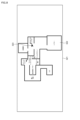
- a terminal screen 321 with a map display as shown in FIG. 8 is displayed on the display unit 131.
- a map 322 of the virtual exhibition is displayed on the terminal screen 321, and an icon 323 indicating the user's current location is displayed in a superimposed manner.
- the user can confirm his or her current location at the virtual exhibition venue.
- the user can randomly access other areas by operating the operation unit 121 to select a desired exhibition area (exhibit) while checking his or her current location.
- the map 322 is an overhead image of the venue of the virtual exhibition, and is mapped to the exhibition area (exhibit) in the virtual space.
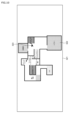
- the amount of comments on the exhibit can be displayed superimposed on the map 322.
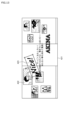
- the upper area of the map 322 in FIG. The virtual exhibition includes exhibition areas such as a Music Clip theater, musical instrument exhibition, discography, past video theater, and moving photographs, and these exhibition areas are displayed as a map 322 on the terminal screen 321 in FIG.
- a comment amount 331A of "30” is superimposed on the Music Clip theater on the map 322
- a comment amount 331B of "20” is superimposed on the musical instrument display
- the discography is
- a comment amount 331C of "13” is superimposed.
- a comment amount 331D of "28” is superimposed on the past video theater
- a comment amount 331E of "18” is superimposed on the moving photo.
- the numerical value of the amount of comments represents the number of comments on the exhibit in a predetermined period (period of a month, one day, etc.).
- the user can, for example, recognize that there are many comments on the Music Clip theater or the past video theater, and recognize those exhibition areas as exciting places. can do.
- the map 322 in FIGS. 8 and 9 may be displayed superimposed on the normal display terminal screen 311 in FIG. 7.
- the amount of comments on exhibits installed in the exhibition area on the map 322 is expressed as a numerical value according to the number of comments, but the amount of comments is not limited to numerical values. It may be expressed in the following way. For example, as shown in FIG. 10, the amount of comments on exhibits may be visualized using a heat map expressed using colors and shading.
- the density of dots expresses the amount of comments on exhibits.
- the display areas with the next highest dot density such as musical instrument exhibits, moving photographs, and theaters, are expressed in orange because they receive a relatively large number of comments.
- the discography and entrance areas are represented in yellow, etc. because there are few comments, and other exhibition areas are represented in green, etc., because there are almost no comments.
- an exhibition tour can be automatically generated by extracting exhibits with 20 or more comments and determining a short route based on the distance between the extracted exhibits. More specifically, an exhibition tour that sequentially views the past video theater exhibits, the musical instrument exhibits, and the Music Clip theater exhibits along that route is automatically generated and can be presented to the user.
- exhibits are automatically switched and displayed at a predetermined timing on the display unit 131 of the terminal device 10 where the application has been started, in the order of the past video theater, musical instrument exhibition, and Music Clip theater routes. Users can enjoy exhibition tours without manual operations. Note that the user may manually move between exhibits in the virtual space according to the content of the exhibit tour.
- the number of comments for each exhibit was aggregated under predetermined conditions as the amount of comments, but the value regarding the amount of comments may be calculated using other indicators.
- the amount of comments may be determined not only in units of exhibits but also in units of exhibition areas where a plurality of exhibits are installed.
- the map display of the amount of comments corresponds to the comment waiting state (S2) in the comment state in Figure 5, and by superimposing and displaying the amount of comments for exhibits on the map of the virtual exhibition, users can In contrast, an exhibition area with a large number of comments can be recognized as a lively area.
- the flow of the SNS sharing process will be explained with reference to the flowchart in FIG.
- the SNS sharing process is executed by the processing unit 251 of the terminal device 10 or the server 20.
- step S101 the processing unit 251 links the SNS to which the comment is posted and the user's account in response to the user's operation on the application.
- step S102 the processing unit 251 sets the posting wording and posting time reservation according to the user's operation.
- the application here is not limited to an application for providing a virtual space, and other applications may be used.
- step S103 the processing unit 251 selects the comment with the most "likes" at a predetermined time, and extracts the selected comment and the exhibit on which the comment is written. For example, when selecting a comment, a period such as a month or a day can be set, and the comment can be selected based on the total amount of "likes" in the set period.
- step S104 it is determined whether the avatar should appear in the posted image posted to the SNS. If the avatar is not to appear in the posted image (No in S104), the process proceeds to step S105.
- step S105 the processing unit 251 places the virtual camera at a point in the virtual space that directly faces the exhibit and where the exhibit falls within the angle of view, and relocates the comment to a position that does not interfere with the exhibit. and capture it. This captures an image containing exhibits and comments from the perspective of the virtual camera.
- step S106 the processing unit 251 places the virtual camera at a point in the virtual space that directly faces the exhibit and where the exhibit falls within the angle of view, and then places the comment and avatar in a position that does not interfere with the exhibit. Reposition and capture. This captures an image containing exhibits, comments, and avatars from the perspective of the virtual camera.
- step S107 the processing unit 251 uses the scheduled posting function of the SNS to schedule posting of the comment (the wording of the scheduled posting) and the captured image (the image captured in S105 or S106). Then, when the reserved posting time arrives, the comment (wording of the reserved posting) and the captured image are posted on the SNS (S108).
- the images posted here are the images that include the comments with the highest total number of "likes" and their exhibits, and are images of popular exhibits. That is, the images of popular exhibits correspond to the set period, and are, for example, images of this month's popular exhibits or today's popular exhibits.
- SNS sharing corresponds to the comment status photograph/SNS (S4) in Figure 5, and includes comments that have received many positive user reactions within a certain period and the exhibits on which the comments are written.
- An image containing the image is posted to an external SNS.
- the popularity of comments can be shared to external SNS and communicated not only to users using the app but also to other users using SNS.
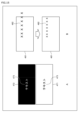
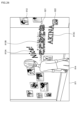
- a terminal screen 411 as shown in FIG. 12 is displayed when the user moves in the virtual space by operating the terminal device 10 on which an application has been launched.
- an exhibit 412 is displayed on the wall in the virtual space, but since the comment 413 is placed over a part of the exhibit 412 in the three-dimensional space, the user cannot see the exhibit 412. I can't see part of it. Further, since the comment 413 is not oriented toward the user, the user cannot read the content of the comment 413.
- a terminal screen 421 as shown in FIG. 13 can be displayed.
- controls are performed to adjust the position, orientation, color, size, etc. of comments based on information such as the position of each user and the position of exhibits, so that comments 423 for exhibits 422 are appropriately placed. has been done.
- the color of the comment 423 may be adjusted according to the background, or the font size of the comment 423 may be adjusted according to the angle of view. are doing. Therefore, the user can view the exhibit 422 without being disturbed by the comments 423 and can confirm the contents of the comments 423.
- an avatar 414 of the user operating the terminal device 10 is displayed in the virtual space, and performs actions according to the user's operations. It is optional whether an avatar is displayed on the terminal screen, and a terminal screen according to the user's viewpoint may be displayed without displaying the avatar, as in the terminal screen 421 in FIG. 13.
- FIG. 14 is a diagram showing an example of display control of comments for each user.
- display control is performed to move the comment 452 from the position of the broken line to the position of the solid line.
- an arrow A1 from the virtual camera 462 in the virtual space represents the direction of a viewpoint vector corresponding to the user's viewpoint, and the avatar 461 is arranged in this direction.
- the comment 452 is placed at the position indicated by the broken line, it may overlap the exhibit 451 and become a hindrance to the user. Therefore, in FIG. 14, when considering an arc A2 centered on the virtual camera 462, control is performed to change the angle by moving on the arc A2 so that the comment 452 faces the center.
- the following parameters are used when controlling the position and orientation of the comment 452 with respect to the exhibit 451. That is, the information includes the current position of the avatar 461, visual field information regarding the viewpoint of the user using the terminal device 10 (orientation of the virtual camera 462), position information (coordinates) of the exhibit 451 and the comment 452 in the virtual space, and the like. Further, the parameters can include the importance level of the comment 452 and pre-setting of an important area (for example, an area set in the exhibit 451) that the comment 452 should not cover.
- FIG. 14 shows display control regarding the position and orientation of the comment 452, when performing display control according to the background or angle of view, comment display control as shown in FIG. 15, for example, is performed.
- a in FIG. 15 shows an example of comment color adjustment control according to the background.
- the color of the comment 473 has been changed to match the background 471 and background 472.
- B in FIG. 15 shows an example of the comment font size and line spacing adjustment control according to the viewing angle.
- the comment 482 is controlled to fit within the angle of view 481 by adjusting the font size and line spacing of the comment 482 according to the angle of view 481. In this adjustment control, at least one of the font size and line spacing of the comment may be adjusted.
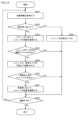
- the comment display control process is executed by the processing unit 251 of the terminal device 10 or the server 20.
- step S201 the processing unit 251 acquires position information according to the movement of the user (avatar) within the virtual space.
- avatar the movement of the user
- position information indicating the current position of the avatar and position information of an exhibit near the avatar's destination are acquired.
- step S202 the processing unit 251 determines whether the user (avatar) is close to the exhibit based on the acquired position information. If it is determined that the user is close to the exhibit (Yes in S202), the process proceeds to step S203.
- step S203 the processing unit 251 changes the angle of the comment on the target exhibit according to parameters such as the avatar's position information and visual field information.
- step S204 the processing unit 251 determines whether the comment for the target exhibit covers an avatar or an important area (for example, an area set for the exhibit). If it is determined that the comment applies to the avatar or the important area (Yes in S204), the process proceeds to step S205.
- step S205 the processing unit 251 moves the comment onto the arc of the virtual camera. This movement control is similar to the control shown in FIG.
- step S206 the processing unit 251 determines whether there is another comment at the destination of the comment moved on the arc. If it is determined that another comment already exists at the destination (Yes in S206), the process proceeds to step S207.
- step S207 the processing unit 251 adjusts the position of the comment depending on the importance of the comment. For example, by comparing the importance of a comment moved on an arc with other comments that were originally at the destination, the comment with lower importance is moved in the depth direction or in the direction of the edge in the virtual space. It can be placed so as to push it away. As a result, among a plurality of comments, comments that are arranged at overlapping positions can be moved to positions that do not overlap.
- step S208 the process proceeds to step S208.
- step S202 determines whether the user (avatar) is far from the exhibit (No in S202). If it is determined in step S202 that the user (avatar) is far from the exhibit (No in S202), the process proceeds to step S209. In step S209, the processing unit 251 hides comments regarding the exhibit. When the process in step S209 ends, the process proceeds to step S208.
- step S204 determines whether the comment does not cover the avatar or the important area (No in S204), or if it is determined in step S206 that there is no other comment at the destination (No in S206), Also, the process proceeds to step S208.
- step S208 the processing unit 251 determines whether the movement of the user (avatar) continues. If it is determined that the user's movement continues (Yes in S208), the process returns to step S201, and the above-described process is repeated. On the other hand, if it is determined that the user's movement will not continue (No in S208), the series of processes ends.
- the parameters used in the series of processes described above include, for example, common information common to all users as shown in FIG. 17, and personal information for each user.
- the common information includes at least position information of exhibits and position information of comments.
- the personal information includes at least the avatar's position information and the user's field of view information.
- comment display control is performed using these parameters, so that comments on exhibits in the virtual space are appropriately arranged and displayed.
- the importance of comments and important areas that comments should not cover are also included in the parameters used in the series of processes.
- the importance of comments and important areas can be set in advance.
- the user avatar
- the comment display for each user corresponds to the comment display (S3) in the comment state in FIG. 5, and uses various parameters to display the direction and position of the comment for the exhibit in the virtual space, Comments can be placed more appropriately by adjusting the color, size, etc. as appropriate.
- the various parameters include comment attribute information, avatar position information, exhibit position information, and the like. Further, in the adjustment control, it is not necessary to adjust all the directions, positions, colors, and sizes of comments, but it is only necessary to adjust at least one of them. This allows the user to reliably view comments on the exhibit.
- ⁇ Relocation of comments> By setting an area where comments cannot be placed as a place where comments cannot be placed, it is possible to rearrange the area where comments cannot be placed so that no comments are placed.
- the timing for determining areas where comments cannot be placed can be determined in advance by determining areas where comments cannot be placed, or by determining areas where comments cannot be placed based on the user's movements.
- viewing direction information related to the viewing direction in which most users view an exhibit is collected, and when a comment is placed in an area corresponding to the viewing direction information (hereinafter also referred to as the most viewing direction area), , so that the comment is automatically moved to a position where it will not get in the way.
- the viewing direction information can also be said to be information regarding a specific viewpoint corresponding to the avatar existing in the virtual space. This prevents comments from being placed in the most viewed direction area.
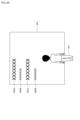
- FIG. 18 is a diagram showing an example of rearranging comments for exhibits in the virtual space.
- an important area 531 is set in advance as an area where comments cannot be placed when comments 512A to 512F are placed on the exhibit 511.
- the comment 512E is placed within the important area 531, so the comment 512E is moved outside the important area 531, as shown by the rightward arrow in the figure.
- the most viewed direction area 532 which is an area where comments cannot be placed, is set in the direction toward the exhibit 511 from the position 521 corresponding to the user's viewpoint position.
- comment 512C is placed within the most viewed direction area 532, so the comment 512C is moved outside the most viewed direction area 532, as shown by the rightward arrow in the figure. has been done.
- comment relocation corresponds to comment production (S1) in the comment state in Figure 5, and when a comment is placed in a statically or dynamically set comment placement prohibited area, The comment can be rearranged and moved outside the comment placement prohibited area. This allows comments to be placed more appropriately. Note that the comment rearrangement process is executed by the processing unit 251 (comment placement unit 263).
- FIG. 19 is a diagram showing an example of a configuration for controlling comment display according to importance.
- the overall importance level is stored for each comment.
- the overall importance is the overall importance. For example, the more users rate a comment as "like", the higher its overall importance becomes.
- the personal importance level is a level of importance customized to each user, and can be determined based on the user's preference information, for example. For example, if the user is a fan of a particular artist, the importance of that artist becomes high. Personal importance may be set manually by the user, or may be set automatically based on the analysis results of the user's behavior in the virtual space (for example, looking at a particular exhibit for a long time). .
- the comment importance calculation unit 613 calculates the importance of the comment to be placed based on the overall importance stored in the comment list 611 and the individual importance stored in the user list 612.
- the importance of a comment is not only considered as a whole, such as having received a lot of "likes," but also taking into account the importance customized by an individual, such as being a fan of a particular artist.
- the importance level is calculated.
- the comment display control unit 614 displays (arranges) comments in the virtual space based on position information of the user (avatar), exhibits, etc. Furthermore, when displaying a comment, the comment display control unit 614 controls how the displayed comment is displayed (visibility) based on the importance calculated by the comment importance calculation unit 613.
- the more important a comment is the larger the font size is, or the comment is displayed in a different color from other comments.
- the comments may be classified into popular comments, unpopular comments, etc., and the way the comments are displayed may be changed for each classification. For example, popular comments can be made larger in font size, and unpopular comments can be made smaller in font size.
- the display time of the comment may be extended and displayed longer than other comments.
- the comment may be hidden.
- a comment string instead of displaying the entire comment string, only one word or title from the comment string may be displayed. Furthermore, an avatar moving in the virtual space may touch a comment, and the size of a comment that is touched by more users may be increased or a specific effect (for example, a flashy effect) may be added to the comment.
- a specific effect for example, a flashy effect
- the display method can be changed depending on the space in which comments are displayed.
- FIG. 20 is a diagram showing an example of a 2D display of comments.
- comments 652A to 652D are displayed in a 2D display space 651 for an avatar 641.
- Comments 652A to 652D have different font sizes; for example, comments that have been rated "like” have a larger font size, and comments that have not been rated "like” have a larger font size. Font size becomes smaller.
- comments 652A to 652D can each be set to indicate whether or not there is a display time, and if there is a display time, the display time. Further, among the comments 652A to 652D, the display time of comments rated as "like" can be extended.
- FIG. 21 is a diagram showing a first example of 3D display of comments.
- comments 662A to 662C are displayed in a 3D display space 661 that is deep relative to the avatar 641.
- Comments 662A to 662C can be placed in front of 3D display space 661 with respect to avatar 641.
- the comments 662A to 662C may be displayed or hidden, and when the avatar 641 approaches the 3D display space 661 to a predetermined distance, the hidden comments 662A to 662C may be displayed. .
- comments 662A to 662C can be displayed according to their importance. For example, if comment 662B has the highest importance among comments 662A to 662C, only comment 662B can be displayed even when avatar 641 is away from 3D display space 661.
- FIG. 22 is a diagram showing a second example of 3D display of comments.
- comments 672A to 672D are displayed in a 3D display space 671 surrounding an avatar 641.
- the comment 672A with the highest degree of importance is displayed on the front 671A
- the comment 672D with the lowest degree of importance is displayed on the back 671D.
- the comments 672B and 672C have intermediate importance, and are therefore displayed on the left side 671B and right side 671C, respectively. Thereby, the user can easily check the most important comment 672A displayed on the front 671A from a specific viewpoint corresponding to the avatar 641.
- the moving speed may change depending on the degree of importance. For example, the higher the importance of a comment, the slower the moving speed and the more slowly the comment is displayed, thereby increasing the user's visibility. Furthermore, the color of the characters may be changed depending on the destination of the comment. Inappropriate comments can be hidden or deleted by reporting them to the administrator.
- the importance of comments was described, but for example, the priority of comments can also be controlled in the same way as the importance.
- the importance and priority of a comment are examples of attribute information of a comment, and attribute information such as a user's reaction to a comment (for example, a rating of "like") and information about the user who entered the comment.
- comments can be placed (displayed) according to the content of the attribute information.
- the way comments are displayed corresponds to the comment display (S3) in the comment state in Figure 5, and the comment display is controlled for each user according to the importance of the comment and the user's reaction to the comment. Ru.
- the comment importance calculation unit 613 and comment display control unit 614 are provided as functions of the processing unit 251 in FIG. 4. Further, the comment list 611 and the user list 612 are recorded in the storage unit 254 in FIG. 4.
- Voices emitted by users such as voice chat may be converted into 3D text and made to appear in the virtual space. For example, by allowing a user's voice converted into 3D text to be registered as a comment on an exhibit in a virtual space, the user can save the effort of manually inputting comments. Furthermore, voice messages and cheers from users who are fans of the artist may be individually recognized and displayed on a large screen in a virtual space, or pasted on a wall or a 3D object.
- FIG. 23 is a diagram showing an example of a configuration for converting user voice into 3D text.
- user voices such as messages and cheers are input to a voice recognition unit 711 and a tone analysis unit 713.
- the speech recognition section 711 performs speech recognition processing on the user speech input therein, converts the user speech into text, and supplies it to the important word extraction/text interpretation section 712 as a speech recognition result.
- a known technique can be used for the voice recognition process.
- the important word extraction/text interpretation unit 712 performs processing such as extracting important words included in the user voice text and interpreting the text based on the voice recognition result from the voice recognition unit 711, and uses the character data obtained as a result. , is supplied to the 3D character generation unit 714.
- the timbre analysis unit 713 performs timbre analysis processing on the user voice input thereto, and supplies format information obtained as a result to the 3D character generation unit 714.
- the format information is information indicating a format corresponding to the user voice analyzed in the timbre analysis process.
- format variations include texture, material, action, etc.
- Texture includes color, pattern, etc.
- Materials include elasticity, hardness, weight, size, light reflection coefficient, friction, ice, fire, electricity, water, etc.
- Actions are actions that occur when an avatar touches a character in virtual space, and include glowing, burning, freezing, being blown away, and the like.
- the timbre analysis may also use setting information manually set by the user. Note that sound effects may be added to the 3D text generated by the 3D character generation unit 714 at the subsequent stage.
- the 3D character generation unit 714 generates 3D text based on the character data from the important word extraction/text interpretation unit 712 in a format indicated by the format information from the timbre analysis unit 713, and stores it in the 3D text DB 715.
- the 3D text stored in the 3D text DB 715 in this manner can be placed in virtual space. Before placing the 3D text in the virtual space, various adjustments such as position and color may be made.
- the important word extraction/text interpretation section 712 does not necessarily need to be provided, and instead of extracting important words included in the user voice text, it targets all sentences and analyzes them in 3D. Text may also be displayed. Alternatively, 3D text corresponding to important words may be arranged (displayed), and when selected by the user (tap operation, etc.), 3D text corresponding to all wordings may be displayed.
- FIG. 24 is a diagram illustrating an example of sharing 3D text between virtual space and real space.
- a user 731 in the real space utters a voice "XXXXXX"
- the voice is converted into 3D text and can be displayed in the virtual space.
- a message "XXXXXX" converted into 3D text is displayed.
- a similar message can be displayed on a large-scale vision installed in the real concert venue.
- a concert in virtual space 741 and a concert in real space 742 are performed by the same artist, and a message (cheering) of "XXXXXXX" uttered by user 731, who is a fan of the artist, is converted into text. being shared.
- the user 731 may paste and display "XXXXXX", which is a 3D text of the user's voice, on a wall in the virtual space 743.
- the 3D text "XXXXXX” may be pasted to a 3D object such as a car existing in the virtual space 744 and displayed as a 3D object. Note that by converting the voice uttered by a celebrity into 3D text and pasting it on the 3D object, the 3D object can be treated specially.
- voice messages and cheers from fans of an artist can be shared between the virtual space and the real space.
- the user's voice can be converted into text, clearly indicating who sent the message and where it was directed, and can be displayed on a large screen or 3D object, or recorded. can.
- FIG. 25 is a diagram showing an example of a configuration for sharing 3D text between virtual space and real space.
- a terminal device 10 used by a user is connected to a server 20 via a network 30.
- An application is activated on the terminal device 10.
- the server 20 is connected to the terminal device 10 via the network 30, and is also connected to the terminal device 40 installed in the real concert venue.
- the terminal device 40 is connected to a large-sized vision 50 as a display device, and can display information such as images and text.
- the voice emitted by the user is collected by the microphone and input to the voice recognition unit 751.
- the speech recognition unit 751 performs speech recognition processing on the user's speech, and the user's speech is converted into 3D text.
- the terminal device 10 transmits the text information obtained by converting it into 3D text to the server 20 via the network 30 along with the personal ID that identifies the user who made the voice.
- the linking processing unit 761 links the personal ID and text information sent from the terminal device 10, and the linking information obtained as a result is sent to the terminal device 10 and the terminal device via the network 30. Send to 40.
- the display control unit 752 controls, based on the association information from the server 20, so that 3D text corresponding to the user's voice is displayed on the large-scale vision of the concert in the virtual space.
- the terminal device 40 controls the large-sized vision 50 to display text corresponding to the user's voice based on the linking information from the server 20.
- converting user voice into 3D text corresponds to comment creation (S1) in the comment state in FIG. 5, and it is possible to convert user voice into 3D text and place it in a virtual space.
- the 3D text corresponding to the user's voice can be shared not only in the virtual space but also in the real space.
- the above example shows a case where a message displayed on a large screen is shared at a concert in virtual space and real space, but in the same way, comments on exhibits at a virtual exhibition (virtual space) are shared, It may be displayed on a display device such as a display device installed at an exhibition in real space.
- the speech recognition unit 711, important word extraction/text interpretation unit 712, tone analysis unit 713, and 3D character generation unit 714 are provided as functions of the processing unit 251 in FIG. .
- the 3D text DB 715 is recorded in the storage unit 254 in FIG. 4.
- the voice recognition section 751 and the display control section 752 are provided as functions of the processing section 251 of the terminal device 10.
- the link processing unit 761 is provided as a function of the processing unit 251 of the server 20.
- Comments on exhibits are not limited to comments from general users, but may include comments from artists who are sponsors of the exhibition. In such a case, the user can communicate with the artist by distinguishing between the artist's comment and the general user's comment and displaying the artist's comment conspicuously.
- a terminal screen 811 as shown in FIG. 26 is displayed on the display unit 131.
- exhibits 812 such as pictures and photographs installed in the virtual space, general user comments 813A to 813C regarding the exhibits 812, and user avatars 814.
- a comment 821 that reads "Look here" is displayed on the terminal screen 811.
- the comment 821 is an artist's comment regarding the virtual exhibition (exhibit 812), and is displayed so as to be distinguishable from general user comments 813A to 813C such as "Nice!.
- the comment 821 may be displayed in front of other comments to the user in a 3D display space that shines or has depth, or may be marked with a mark to make it more appealing to general users.
- the comments can be identified as comments 813A to 813C.
- a mode may be provided in which only the artist's comments 821 among the comments on the exhibits can be viewed, and the user may select one.
- the user selects the mode, only the artist's comment 821 is displayed without general user's comments 813A to 813C being displayed, so that the user can reliably read the artist's comment 821.
- a stamp 822 with a picture related to the artist is displayed on the terminal screen 811.
- the stamp 822 is a stamp (artist's stamp) for identifying a comment for the user.
- the stamp 822 consists of a 3D avatar or the like that performs a predetermined action. Note that when the artist reacts to a comment, the user who wrote the comment may be notified.
- communication with the artist corresponds to the comment display (S3) in the comment state in FIG. 5, and the artist's comment and the general user's comment can be displayed in a distinguishable manner.
- a more highly visible UI User Interface
- artist comments divided into two cases: comments for the exhibition and comments for the user.
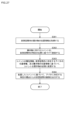
- FIG. 27 is a flowchart illustrating the overall process to which the present disclosure is applied.
- the processing shown in FIG. 27 is realized by the processing unit 251 of the server 20 or the terminal device 10, or by the processing unit 251 of the server 20 and the processing unit 251 of the terminal device 10 working together. Realized.
- step S301 the position information acquisition unit 261 acquires position information of the exhibit in the virtual space.
- step S302 the comment registration unit 262 registers a comment regarding the exhibit in association with a specific position in the virtual space.
- step S303 the comment placement unit 263 places the comment near the exhibit based on the attribute information of the comment, the position information of the avatar existing in the virtual space, and the position information of the exhibit.
- the comment placement unit 263 places the multiple comments in the vicinity of the exhibit based on the attribute information of each of the multiple comments, the avatar's position information, and the exhibit's position information. Place it in The attribute information of the comment includes the user's reaction to the comment, information about the user who input the comment, the importance and priority of the comment, and the like.
- step S304 the image output unit 264 outputs an image of the virtual space from a specific viewpoint corresponding to the avatar based on the placed comments.
- the output virtual space image is displayed on the display unit 131 of the terminal device 10.
- a virtual space such as a virtual exhibition is an online space where users interact through avatars, so it can also be said to be a metaverse space.
- processing for displaying a map of the amount of comments processing for sharing on SNS, processing for displaying comments for each user, processing for rearranging comments, processing for displaying comments, processing for converting user voices into 3D text, and processing for artist
- processing of communication with the server 20 or the processing unit 251 of the terminal device 10 is realized, or the processing unit 251 of the server 20 and the processing unit 251 of the terminal device 10 operate in cooperation. This is achieved by
- the processing in each step of the flowchart described above can be executed by hardware or software.
- a program constituting the software is installed in the computer of each device.
- a program executed by a computer can be provided by being recorded on a removable recording medium such as a package medium, for example. Additionally, programs can be provided via wired or wireless transmission media, such as LAN, the Internet, and digital satellite broadcasting.
- a program can be installed in the storage unit via the input/output I/F by attaching a removable recording medium to the drive. Further, the program can be received by the communication unit via a wired or wireless transmission medium and installed in the storage unit. Other programs can be preinstalled in ROM or storage.
- the processes performed by a computer according to a program do not necessarily need to be performed chronologically in the order described as a flowchart. That is, the processing that a computer performs according to a program includes processing that is performed in parallel or individually (for example, parallel processing or processing using objects).
- program may be processed by one computer (processor), or may be distributed and processed by multiple computers. Furthermore, the program may be transferred to a remote computer and executed.
- the present disclosure can have the following configuration.
- a position information acquisition unit that acquires position information indicating the position of the exhibit in the virtual space; a comment registration unit that registers comments regarding the exhibit in association with a specific position in the virtual space; a comment placement unit that places the comment near the exhibit based on attribute information of the comment, position information indicating the position of the avatar existing in the virtual space, and position information of the exhibit; and an image output unit that outputs an image of a virtual space from a specific viewpoint corresponding to the avatar based on the placed comments.
- the comment arrangement unit arranges a plurality of comments for the exhibit near the exhibit.
- the comment arrangement unit arranges the plurality of comments near the exhibit based on attribute information of each of the plurality of comments, position information of the avatar, and position information of the exhibit. ).
- the comment arrangement unit arranges the plurality of comments near the exhibit according to the importance of each comment.
- the information processing device according to any one of (2) to (4), wherein the comment placement unit moves comments whose placement positions overlap among the plurality of comments to non-overlapping positions.
- the attribute information of the comment includes a user's reaction to the comment.
- the attribute information of the comment includes information regarding the user who input the comment.
- the information processing device (8) The information processing device according to any one of (1) to (4), wherein the image output unit outputs an overhead image of the virtual space mapped to an exhibit in the virtual space. (9) The information processing device according to (8), wherein the image output unit superimposes information regarding the amount of comments on the exhibit on the bird's-eye view image. (10) The information processing device according to any one of (1) to (4), wherein the comment placement unit prevents the comment from being placed in an area where the comment cannot be placed. (11) The information processing device according to (10), wherein the area where the comment cannot be placed is set in advance or based on information regarding a specific viewpoint corresponding to the avatar.
- the image output unit outputs an image of the virtual space based on the comment including a favorable evaluation as the user's reaction,
- the information processing device according to (6) above, wherein the image of the virtual space to be output is posted to an SNS (Social Networking Service).
- SNS Social Networking Service
- the information processing device Obtain location information indicating the location of exhibits in virtual space, registering a comment on the exhibit in association with a specific position in the virtual space; arranging the comment near the exhibit based on attribute information of the comment, position information indicating the position of the avatar existing in the virtual space, and position information of the exhibit; An information processing method that outputs an image of a virtual space from a specific viewpoint corresponding to the avatar based on the placed comments.
- a position information acquisition unit that acquires position information indicating the position of the exhibit in the virtual space
- a comment registration unit that registers comments regarding the exhibit in association with a specific position in the virtual space
- a comment placement unit that places the comment near the exhibit based on attribute information of the comment, position information indicating the position of the avatar existing in the virtual space, and position information of the exhibit
- a recording medium on which a program is recorded that functions as an image output unit that outputs an image of a virtual space from a specific viewpoint corresponding to the avatar based on the placed comments.
Landscapes
- Engineering & Computer Science (AREA)
- Physics & Mathematics (AREA)
- Theoretical Computer Science (AREA)
- General Physics & Mathematics (AREA)
- Computer Hardware Design (AREA)
- Business, Economics & Management (AREA)
- General Engineering & Computer Science (AREA)
- Strategic Management (AREA)
- Computer Graphics (AREA)
- General Business, Economics & Management (AREA)
- Marketing (AREA)
- Accounting & Taxation (AREA)
- Development Economics (AREA)
- Entrepreneurship & Innovation (AREA)
- Finance (AREA)
- Economics (AREA)
- Software Systems (AREA)
- Computer Vision & Pattern Recognition (AREA)
- Geometry (AREA)
- Game Theory and Decision Science (AREA)
- Human Computer Interaction (AREA)
- Multimedia (AREA)
- Signal Processing (AREA)
- Human Resources & Organizations (AREA)
- Operations Research (AREA)
- Quality & Reliability (AREA)
- Tourism & Hospitality (AREA)
- Information Transfer Between Computers (AREA)
- Processing Or Creating Images (AREA)
Priority Applications (3)
| Application Number | Priority Date | Filing Date | Title |
|---|---|---|---|
| US18/848,141 US20250218107A1 (en) | 2022-03-30 | 2023-03-24 | Information processing device, information processing method, and recording medium |
| JP2024512319A JPWO2023190109A1 (https=) | 2022-03-30 | 2023-03-24 | |
| DE112023001654.2T DE112023001654T5 (de) | 2022-03-30 | 2023-03-24 | Informationsverarbeitungsvorrichtung, informationsverarbeitungsverfahren und aufzeichnungsmedium |
Applications Claiming Priority (2)
| Application Number | Priority Date | Filing Date | Title |
|---|---|---|---|
| JP2022-056495 | 2022-03-30 | ||
| JP2022056495 | 2022-03-30 |
Publications (1)
| Publication Number | Publication Date |
|---|---|
| WO2023190109A1 true WO2023190109A1 (ja) | 2023-10-05 |
Family
ID=88202204
Family Applications (1)
| Application Number | Title | Priority Date | Filing Date |
|---|---|---|---|
| PCT/JP2023/011718 Ceased WO2023190109A1 (ja) | 2022-03-30 | 2023-03-24 | 情報処理装置、情報処理方法、及び記録媒体 |
Country Status (4)
| Country | Link |
|---|---|
| US (1) | US20250218107A1 (https=) |
| JP (1) | JPWO2023190109A1 (https=) |
| DE (1) | DE112023001654T5 (https=) |
| WO (1) | WO2023190109A1 (https=) |
Cited By (1)
| Publication number | Priority date | Publication date | Assignee | Title |
|---|---|---|---|---|
| WO2026022945A1 (ja) * | 2024-07-23 | 2026-01-29 | キャディ株式会社 | 情報処理装置、情報処理プログラム、及び情報処理方法 |
Citations (2)
| Publication number | Priority date | Publication date | Assignee | Title |
|---|---|---|---|---|
| JP2009129398A (ja) * | 2007-11-28 | 2009-06-11 | Olympus Imaging Corp | 画像表示装置および画像表示方法 |
| JP2013050956A (ja) * | 2012-09-11 | 2013-03-14 | Olympus Imaging Corp | 画像鑑賞システム、画像鑑賞方法、画像鑑賞用サーバー、および端末機器 |
Family Cites Families (1)
| Publication number | Priority date | Publication date | Assignee | Title |
|---|---|---|---|---|
| JP2017041780A (ja) | 2015-08-20 | 2017-02-23 | 株式会社 ディー・エヌ・エー | 動画を特定の視野で表示するシステム、方法、及びプログラム |
-
2023
- 2023-03-24 US US18/848,141 patent/US20250218107A1/en active Pending
- 2023-03-24 WO PCT/JP2023/011718 patent/WO2023190109A1/ja not_active Ceased
- 2023-03-24 DE DE112023001654.2T patent/DE112023001654T5/de active Pending
- 2023-03-24 JP JP2024512319A patent/JPWO2023190109A1/ja active Pending
Patent Citations (2)
| Publication number | Priority date | Publication date | Assignee | Title |
|---|---|---|---|---|
| JP2009129398A (ja) * | 2007-11-28 | 2009-06-11 | Olympus Imaging Corp | 画像表示装置および画像表示方法 |
| JP2013050956A (ja) * | 2012-09-11 | 2013-03-14 | Olympus Imaging Corp | 画像鑑賞システム、画像鑑賞方法、画像鑑賞用サーバー、および端末機器 |
Cited By (1)
| Publication number | Priority date | Publication date | Assignee | Title |
|---|---|---|---|---|
| WO2026022945A1 (ja) * | 2024-07-23 | 2026-01-29 | キャディ株式会社 | 情報処理装置、情報処理プログラム、及び情報処理方法 |
Also Published As
| Publication number | Publication date |
|---|---|
| DE112023001654T5 (de) | 2025-01-16 |
| US20250218107A1 (en) | 2025-07-03 |
| JPWO2023190109A1 (https=) | 2023-10-05 |
Similar Documents
| Publication | Publication Date | Title |
|---|---|---|
| US12079942B2 (en) | Augmented and virtual reality | |
| US20220407735A1 (en) | Presenting participant reactions within a virtual conferencing system | |
| KR100854253B1 (ko) | 리치 미디어 툴들을 포함하는 통신 방법 및 장치 | |
| US11430211B1 (en) | Method for creating and displaying social media content associated with real-world objects or phenomena using augmented reality | |
| US20210375052A1 (en) | Information processor, information processing method, and program | |
| EP4200792A1 (en) | Integrating overlaid digital content into displayed data via graphics processing circuitry | |
| US20220350650A1 (en) | Integrating overlaid digital content into displayed data via processing circuitry using a computing memory and an operating system memory | |
| US9940512B2 (en) | Digital image processing apparatus and system and control method thereof | |
| WO2023190109A1 (ja) | 情報処理装置、情報処理方法、及び記録媒体 | |
| US12212877B2 (en) | Camera settings and effects shortcuts | |
| JP2011145794A (ja) | 情報処理プログラム、情報処理装置、情報処理方法および情報処理システム | |
| WO2023211660A1 (en) | Camera settings and effects shortcuts | |
| CN117063474A (zh) | 发布系统 | |
| CN109863746B (zh) | 用于数据探索的沉浸式环境系统和视频投影模块 | |
| JP2011129969A (ja) | 通信装置、通信方法およびプログラム | |
| Martins et al. | Portraits of no one: an interactive installation | |
| JP7810248B1 (ja) | 情報処理システム、情報処理方法、およびプログラム | |
| EP4436191A1 (en) | Display terminal, communication system, display method, and carrier means | |
| CN119094858B (zh) | 视频剪辑方法、装置、设备、存储介质及计算机程序 | |
| JP6043320B2 (ja) | 情報処理プログラム、情報処理装置、情報処理方法および情報処理システム | |
| CA3067417C (en) | Systems and methods for displaying and interacting with a dynamic real-world environment | |
| CN120723952A (zh) | 社交信息的显示方法、装置、设备及存储介质 |
Legal Events
| Date | Code | Title | Description |
|---|---|---|---|
| 121 | Ep: the epo has been informed by wipo that ep was designated in this application |
Ref document number: 23780119 Country of ref document: EP Kind code of ref document: A1 |
|
| ENP | Entry into the national phase |
Ref document number: 2024512319 Country of ref document: JP Kind code of ref document: A |
|
| WWE | Wipo information: entry into national phase |
Ref document number: 18848141 Country of ref document: US |
|
| WWE | Wipo information: entry into national phase |
Ref document number: 112023001654 Country of ref document: DE |
|
| 122 | Ep: pct application non-entry in european phase |
Ref document number: 23780119 Country of ref document: EP Kind code of ref document: A1 |
|
| WWP | Wipo information: published in national office |
Ref document number: 18848141 Country of ref document: US |