WO2023017860A1 - 情報処理プログラム、情報処理方法および情報処理システム - Google Patents
情報処理プログラム、情報処理方法および情報処理システム Download PDFInfo
- Publication number
- WO2023017860A1 WO2023017860A1 PCT/JP2022/030755 JP2022030755W WO2023017860A1 WO 2023017860 A1 WO2023017860 A1 WO 2023017860A1 JP 2022030755 W JP2022030755 W JP 2022030755W WO 2023017860 A1 WO2023017860 A1 WO 2023017860A1
- Authority
- WO
- WIPO (PCT)
- Prior art keywords
- battle
- player
- boss
- condition
- sub
- Prior art date
- Legal status (The legal status is an assumption and is not a legal conclusion. Google has not performed a legal analysis and makes no representation as to the accuracy of the status listed.)
- Ceased
Links
Images








Classifications
-
- A—HUMAN NECESSITIES
- A63—SPORTS; GAMES; AMUSEMENTS
- A63F—CARD, BOARD, OR ROULETTE GAMES; INDOOR GAMES USING SMALL MOVING PLAYING BODIES; VIDEO GAMES; GAMES NOT OTHERWISE PROVIDED FOR
- A63F13/00—Video games, i.e. games using an electronically generated display having two or more dimensions
- A63F13/55—Controlling game characters or game objects based on the game progress
- A63F13/58—Controlling game characters or game objects based on the game progress by computing conditions of game characters, e.g. stamina, strength, motivation or energy level
-
- A—HUMAN NECESSITIES
- A63—SPORTS; GAMES; AMUSEMENTS
- A63F—CARD, BOARD, OR ROULETTE GAMES; INDOOR GAMES USING SMALL MOVING PLAYING BODIES; VIDEO GAMES; GAMES NOT OTHERWISE PROVIDED FOR
- A63F13/00—Video games, i.e. games using an electronically generated display having two or more dimensions
- A63F13/50—Controlling the output signals based on the game progress
- A63F13/52—Controlling the output signals based on the game progress involving aspects of the displayed game scene
-
- A—HUMAN NECESSITIES
- A63—SPORTS; GAMES; AMUSEMENTS
- A63F—CARD, BOARD, OR ROULETTE GAMES; INDOOR GAMES USING SMALL MOVING PLAYING BODIES; VIDEO GAMES; GAMES NOT OTHERWISE PROVIDED FOR
- A63F13/00—Video games, i.e. games using an electronically generated display having two or more dimensions
- A63F13/60—Generating or modifying game content before or while executing the game program, e.g. authoring tools specially adapted for game development or game-integrated level editor
- A63F13/69—Generating or modifying game content before or while executing the game program, e.g. authoring tools specially adapted for game development or game-integrated level editor by enabling or updating specific game elements, e.g. unlocking hidden features, items, levels or versions
-
- A—HUMAN NECESSITIES
- A63—SPORTS; GAMES; AMUSEMENTS
- A63F—CARD, BOARD, OR ROULETTE GAMES; INDOOR GAMES USING SMALL MOVING PLAYING BODIES; VIDEO GAMES; GAMES NOT OTHERWISE PROVIDED FOR
- A63F13/00—Video games, i.e. games using an electronically generated display having two or more dimensions
- A63F13/50—Controlling the output signals based on the game progress
- A63F13/53—Controlling the output signals based on the game progress involving additional visual information provided to the game scene, e.g. by overlay to simulate a head-up display [HUD] or displaying a laser sight in a shooting game
- A63F13/533—Controlling the output signals based on the game progress involving additional visual information provided to the game scene, e.g. by overlay to simulate a head-up display [HUD] or displaying a laser sight in a shooting game for prompting the player, e.g. by displaying a game menu
Definitions
- the present invention relates to an information processing program, an information processing method, and an information processing system.
- Patent Document 1 discloses a game in which players cooperate with other players to battle enemy characters.
- An object of the present invention is to provide an information processing program, an information processing method, and an information processing system that can enhance the interest of a game.
- an information processing program provides a plurality of opponents including an opponent to which at least one or more first conditions are provided and an opponent to which at least one or more second conditions are provided.
- a process that allows one to be selected from a process of performing a competitive game against the opponent selected by the player; a process of giving a first advantageous condition advantageous to the player in the competitive game against the opponent in which the first condition is satisfied when the first condition is satisfied in the competitive game; a process of giving a second advantageous condition advantageous to the player in the competitive game against the opponent other than the opponent for whom the second condition is satisfied when the second condition is satisfied in the competitive game; is executed by a computer,
- the first advantageous condition and the second advantageous condition may be given in duplicate in the competitive game with one opponent.
- a parameter is set for the opponent, In the process of performing the competitive game, the parameters of the opponent are changed, In the process of applying the first advantageous condition, when the parameter of the opponent reaches a predetermined value, the first condition is assumed to be satisfied, and the first advantageous condition may be applied for a predetermined period of time. good.
- a parameter is set for the opponent, In the process of performing the competitive game, the parameters of the opponent are changed, In the process of applying the second advantageous condition, when the parameter of the opponent reaches a specific value, the second condition is deemed to be satisfied and the second advantageous condition is applied; In the process of making the opponent selectable, the opponent whose parameter has reached the specific value may be made unselectable.
- the information processing method is an information processing method performed by one or more computers, A process that enables selection of one of a plurality of opponents including opponents provided with at least one or more first conditions and opponents provided with at least one or more second conditions; a process of performing a competitive game against the opponent selected by the player; a process of giving a first advantageous condition advantageous to the player in the competitive game against the opponent in which the first condition is satisfied when the first condition is satisfied in the competitive game; a process of giving a second advantageous condition advantageous to the player in the competitive game against the opponent other than the opponent for whom the second condition is satisfied when the second condition is satisfied in the competitive game; including The first advantageous condition and the second advantageous condition may be redundantly given to one opponent.
- an information processing system is an information processing system comprising one or more computers,
- the computer is A process that enables selection of one of a plurality of opponents including opponents provided with at least one or more first conditions and opponents provided with at least one or more second conditions; a process of performing a competitive game against the opponent selected by the player; a process of giving a first advantageous condition advantageous to the player in the competitive game against the opponent in which the first condition is satisfied when the first condition is satisfied in the competitive game; a process of giving a second advantageous condition advantageous to the player in the competitive game against the opponent other than the opponent for whom the second condition is satisfied when the second condition is satisfied in the competitive game; carry out
- the first advantageous condition and the second advantageous condition may be redundantly given to one opponent.
- FIG. 1 is an explanatory diagram showing a schematic configuration of an information processing system.
- FIG. 2A is a diagram for explaining the hardware configuration of the player terminal.
- FIG. 2B is a diagram for explaining the hardware configuration of the server.
- FIG. 3A is a diagram showing an example of a home screen.
- FIG. 3B is a diagram illustrating an example of a teammate character confirmation screen.
- FIG. 3C is a diagram showing an example of a quest screen.
- FIG. 4A is a diagram illustrating an example of a main quest screen.
- FIG. 4B is a diagram illustrating an example of a main quest selection screen.
- FIG. 4C is a first diagram illustrating an example of a party selection screen.
- FIG. 5A is a diagram illustrating an example of a battle screen.
- FIG. 5A is a diagram illustrating an example of a battle screen.
- FIG. 5A is a diagram illustrating an example of a battle screen.
- FIG. 5A is a
- FIG. 5B is a diagram illustrating an example of a result screen.
- FIG. 6A is a diagram illustrating an example of an event battle screen.
- FIG. 6B is a diagram illustrating an example of a support setting screen.
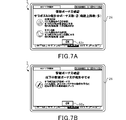
- FIG. 7A is a diagram illustrating an example of a superiority bonus confirmation screen.
- FIG. 7B is a diagram illustrating an example of the defeat bonus confirmation screen.
- FIG. 8 is a diagram illustrating an example of a bonus granting condition setting table.
- FIG. 9A is a diagram illustrating an example of an event battle selection screen.
- FIG. 9B is a diagram illustrating an example of a party selection screen.
- FIG. 9C is a diagram illustrating an example of a support character selection screen.
- FIG. 9A is a diagram illustrating an example of an event battle selection screen.
- FIG. 9B is a diagram illustrating an example of a party selection screen.
- FIG. 9C is a diagram illustrating an example of a support character selection screen.
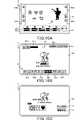
- FIG. 10A is a diagram illustrating an example of a battle screen relating to a sub-boss battle.
- FIG. 10B is a diagram illustrating an example of an event battle screen.
- FIG. 10C is a diagram illustrating an example of an event battle selection screen.
- FIG. 11A is a diagram illustrating an example of a party selection screen.
- FIG. 11B is a diagram illustrating an example of a support character selection screen.
- FIG. 12 is a diagram for explaining the configuration of a memory in a player terminal and functions as a computer.
- FIG. 13 is a diagram for explaining the configuration of a memory in a server and functions as a computer.
- FIG. 14 is a sequence diagram illustrating basic processing of the player terminal and server.
- FIG. 14 is a sequence diagram illustrating basic processing of the player terminal and server.
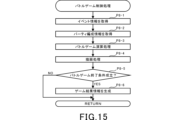
- FIG. 15 is a flowchart illustrating an example of battle game control processing in a player terminal.
- FIG. 16 is a flowchart for explaining an example of superiority bonus imparting processing in the server.
- FIG. 17 is a flowchart for explaining an example of a defeat bonus imparting process in the server.
- FIG. 1 is an explanatory diagram showing a schematic configuration of an information processing system S.
- the information processing system S is a so-called client-server system including a player terminal 1, a server 100, and a communication network 200 having a communication base station 200a.
- the player terminal (information processing device) 1 can establish communication with the server 100 via the communication network 200 .
- the player terminal 1 includes a wide range of electronic devices that can be connected to the server 100 for wireless or wired communication. Examples of the player terminal 1 include smart phones, mobile phones, tablet devices, personal computers, game machines, and the like. In this embodiment, a case where a smart phone is used as the player terminal 1 will be described.
- the server 100 is configured to be able to communicate with a plurality of player terminals 1, and is connected to the plurality of player terminals 1 for communication.
- the server 100 accumulates various types of information (player information) for each player ID for identifying a player who plays the game.
- the communication base station 200a is connected to the communication network 200 and wirelessly transmits and receives information to and from the player terminal 1.
- the communication network 200 is composed of a mobile phone network, an Internet network, a LAN (Local Area Network), a dedicated line, etc., and realizes wireless or wired communication connection between the player terminal 1 and the server 100 .
- the player terminal 1 and the server 100 function as the game device G.
- the player terminal 1 and the server 100 are responsible for controlling the progress of the game, respectively.
- FIG. 2A is a diagram for explaining the hardware configuration of the player terminal 1.
- FIG. 2B is a diagram for explaining the hardware configuration of the server 100.
- the player terminal 1 includes a CPU (Central Processing Unit) 10, a memory 12, a bus 14, an input/output interface 16, a storage section 18, a communication section 20, an input section 22, and an output section 24. be done.
- CPU Central Processing Unit
- the server 100 includes a CPU 110, a memory 112, a bus 114, an input/output interface 116, a storage section 118, a communication section 120, an input section 122, and an output section .
- the configurations and functions of the CPU 110, the memory 112, the bus 114, the input/output interface 116, the storage unit 118, the communication unit 120, the input unit 122, and the output unit 124 of the server 100 are the same as those of the CPU 10, the memory 12, and the They are substantially the same as the bus 14 , input/output interface 16 , storage section 18 , communication section 20 , input section 22 and output section 24 . Therefore, the hardware configuration of the player terminal 1 will be described below, and the description of the server 100 will be omitted.
- the CPU 10 operates programs stored in the memory 12 to control the progress of the game.
- the memory 12 is composed of ROM (Read Only Memory) or RAM (Random Access Memory), and stores programs and various data necessary for controlling the progress of the game.
- Memory 12 is connected to CPU 10 via bus 14 .
- An input/output interface 16 is connected to the bus 14 .
- a storage unit 18 , a communication unit 20 , an input unit 22 and an output unit 24 are connected to the input/output interface 16 .
- the storage unit 18 is composed of a semiconductor memory such as a DRAM (Dynamic Random Access Memory), and stores various programs and data.
- the programs and data stored in the storage unit 18 are loaded by the CPU 10 into the memory 12 (RAM).
- the communication unit 20 is wirelessly connected to the communication base station 200 a and transmits and receives information such as various data and programs to and from the server 100 via the communication network 200 .
- the program or the like received from the server 100 is stored in the memory 12 or the storage section 18 .
- the input unit 22 is composed of, for example, a touch panel, buttons, a keyboard, a mouse, a cross key, an analog controller, etc., through which player's operations are input (accepts operations). Also, the input unit 22 may be a dedicated controller provided in the player terminal 1 or connected (externally attached) to the player terminal 1 . Furthermore, the input unit 22 may be configured with an acceleration sensor that detects the tilt or movement of the player terminal 1, or a microphone that detects the voice of the player. That is, the input unit 22 broadly includes a device capable of inputting the player's intention in an identifiable manner.
- the output unit 24 includes a display device and a speaker. Note that the output unit 24 may be a device connected (externally attached) to the player terminal 1 .
- the player terminal 1 includes a display 26 as the output unit 24 and a touch panel provided as an input unit 22 so as to overlap the display 26 .
- a so-called battle game is provided in which friendly characters battle enemy characters.
- a plurality of teammate characters are provided.
- the player selects a plurality of (here, five) ally characters from the provided ally characters to form a party.
- the player can play a plurality of types of battle games with different enemy characters and different degrees of difficulty.
- the purpose of the battle game is for allied characters organized in a party to defeat (clear) enemy characters and obtain rewards.
- FIG. 3A is a diagram showing an example of the home screen.
- FIG. 3B is a diagram illustrating an example of a teammate character confirmation screen.
- FIG. 3C is a diagram showing an example of a quest screen.
- the display 26 of the player terminal 1 displays game screens as shown in FIGS. 3A, 3B, and 3C. In this embodiment, the game screen is roughly divided into a normal screen and a battle screen.
- the normal screen is mainly for the player to confirm various settings and information.
- the battle screen is a screen displayed on the display 26 from the start to the end of the battle game.
- all screens other than the battle screen are normal screens.
- the normal screen includes the home screen shown in FIG. 3A, the friend character confirmation screen shown in FIG. 3B, the quest screen shown in FIG. 3C, the main quest screen shown in FIG. 4A described later, the event battle screen shown in FIGS.
- a plurality of screens such as a support setting screen shown in FIG. 6B, which will be described later, a gacha screen (not shown), a menu screen, and a shop screen are provided.
- a menu bar 30 is displayed at the bottom of the display 26.
- the menu bar 30 is provided with a plurality of operation units that can be operated (tapped) by the player.
- the menu bar 30 includes a home screen selection operation section 30a labeled "Home”, a teammate character confirmation screen selection operation section 30b labeled “Character”, a story screen selection operation section 30c labeled "Story”, A quest screen selection operation section 30d marked with "quest”, a gacha screen selection operation section 30e marked with "gacha”, and a menu screen selection operation section 30f marked with "menu” are provided.
- the operation section corresponding to each screen is highlighted so that the screen being displayed on the display 26 can be identified.
- FIG. 3A When the home screen selection operation unit 30a is tapped, the home screen shown in FIG. 3A is displayed on the display 26.
- FIG. When the gacha screen selection operation unit 30 e is tapped, a gacha screen (not shown) is displayed on the display 26 .
- a menu screen (not shown) is displayed on the display 26.
- FIG. 4A Although detailed explanation is omitted, on the story screen, a new story is released when the player advances a main quest (see FIG. 4A), which will be described later, on the quest screen. can be seen from On the gacha screen, it is possible to perform a gacha lottery in which a teammate character can be obtained by lottery. Also, on the menu screen, you can check game settings and various information.
- the home screen shown in FIG. 3A corresponds to the initial screen, and a header display area 31 is provided at the top.
- the header display area 31 displays level information 31a indicating the player level associated with the player ID, and a stamina display bar 31b indicating the stamina of the player associated with the player ID.
- the player information also includes information about the level information 31a and stamina.
- stamina is a parameter necessary for the player to play the battle game.
- a plurality of types of battle games are provided, and each battle game is set with a consumption value of stamina required for playing, the maximum number of times it can be executed per day, and the like.
- the player can play the battle game by consuming stamina. Therefore, the player cannot play the battle game when the stamina is insufficient.
- the player can obtain a predetermined value as a player experience value.
- a predetermined value for example, 1 point
- the upper limit value of stamina increases as the player level increases.
- Stamina recovers by a predetermined value (for example, 1 point) at regular intervals (for example, 5 minutes) within the range of the upper limit.
- the stamina display bar 31b displays the current remaining amount of stamina with respect to the upper limit of stamina so that the user can visually grasp the remaining amount of stamina.
- the event battle operation section 32 may be displayed on the right end of the home screen. When an event battle, which will be described later in detail, is held, an event battle operation section 32 marked with "event battle” is displayed during the event battle period.
- the event battle operation section 32 labeled "event battle” is tapped, the event battle screen (see FIGS. 6A and 10B) is displayed on the display 26. Note that when the event battle is not being held, the event battle operation section 32 is hidden.
- the friend character confirmation screen shown in FIG. 3B is displayed on the display 26.
- FIG. On the teammate character confirmation screen all images of teammate characters corresponding to the teammate character ID associated with the player ID are displayed. That is, on the teammate character confirmation screen, all teammate characters possessed by the player are displayed.
- the teammate character ID is for identifying the teammate character, and a different ID is assigned to each teammate character. Then, when the player acquires a new ally character through, for example, a gacha lottery, the player ID of the player is associated with the ally character ID of the acquired ally character.
- the teammate character ID is configured as part of the player information.
- Information about experience points and information about levels are stored in association with the ally character ID.
- the experience value increases when the player wins a battle game, which will be described later, or when a predetermined item is used.
- the level is set according to the experience value, and the level rises each time the experience value reaches a predetermined value.
- Each ally character has an upper limit of level, and the level increases only within the range up to the upper limit.
- allied characters have base combat power values such as life points, offensive power, and defensive power based on their level. The player can progress the battle game more advantageously as the combat power of the ally character increases. Also, each base value set for an ally character increases as the level increases.
- each piece of equipment is set with an additional value for attack power, defense power, and the like.
- the added value of each equipment is added to the above-mentioned base value, and the fighting power of the ally character can be increased.
- Information related to equipment such as weapons and armor is also associated with the teammate character ID and configured as part of the player information.
- the quest screen selection operation section 30d shown in FIG. 3A When the quest screen selection operation section 30d shown in FIG. 3A is tapped, the quest screen shown in FIG. 3C is displayed on the display 26.
- the quest screen displays a plurality of game type selection operation sections 44 in which the types of provided battle games are described. Here, five types of battle games are provided, and five game type selection operation sections 44 are displayed.
- the game type selection operation unit 44 includes a main quest selection operation unit 44a labeled “main quest”, a guild battle selection operation unit 44b labeled “guild battle”, and a 1V1 battle selection operation unit 44b labeled “1V1 battle”.
- An operation unit 44c, a 3V3 battle selection operation unit 44d labeled "3V3 battle”, and an event battle operation unit 44e labeled "event battle” are provided.
- the event battle operation section 44e is displayed while the event battle is being held, and is hidden when the event battle is not being held.
- FIG. 4A When the main quest selection operation section 44a is tapped, the main quest screen shown in FIG. 4A is displayed on the display 26. Further, when the guild battle selection operation portion 44b is tapped, a guild battle screen (not shown) is displayed on the display 26. FIG. Similarly, when the 1V1 battle selection operation section 44c is tapped, a 1V1 battle screen (not shown) is displayed on the display 26. FIG. Further, when the 3V3 battle selection operation section 44d is tapped, a 3V3 battle screen (not shown) is displayed on the display 26. FIG. Further, when the event battle operation section 44e is tapped, an event battle screen (see FIGS. 6A and 10B) is displayed on the display 26. FIG.
- the release conditions include, for example, that the player level is a predetermined value or higher, that a specific story is being viewed from the story screen, that another predetermined battle game has been cleared, and the like.
- a plurality of battle games belong to each battle game type. An opening condition is set for each of these battle games. Then, when the opening condition is satisfied, the game opening information included in the player information is updated.
- the player terminal 1 it is determined whether or not the battle game is released based on the game release information, and only the game type selection operation section 44 of the battle game that satisfies the release condition accepts the player's operation (tap). . Therefore, the player can only play the battle game that satisfies the opening conditions.
- FIG. 4A is a diagram explaining an example of the main quest screen.
- FIG. 4B is a diagram illustrating an example of a main quest selection screen.
- FIG. 4C is a first diagram illustrating an example of a party selection screen.
- the main quest selection operation section 44a in the game type selection operation section 44 shown in FIG. 3C is tapped, the main quest screen shown in FIG. 4A is displayed on the display 26.
- the main quest screen displays a quest operation section 45 for selecting multiple battle games (levels) belonging to the main quest.
- a menu bar 30 and a header display area 31 are also displayed on the main quest screen.
- Clear information for each battle game is also displayed in the quest operation section 45.
- Clear information is indicated by, for example, three stars.
- stars are obtained according to the number of ally characters whose life points are 0 when the battle game is cleared. For example, if there is no ally character whose life point is 0, three stars are obtained. If there is one ally character whose life point is 0, two stars are obtained. If there are two or more allied characters whose life points are 0, one star is obtained.
- the main quest selection screen shown in FIG. 4B is displayed on the display 26.
- the main quest selection screen displays enemy characters appearing in the battle game and items (rewards) obtainable in the battle game.
- the written cancel operation section 40 is displayed.
- the cancel operation unit 40 When the cancel operation unit 40 is operated (tapped), the main quest screen shown in FIG. 4A is displayed on the display 26, and the selected "1-4" battle game challenge is canceled.
- the party selection screen shown in FIG. 4C is displayed on the display 26.
- the party selection screen all teammate characters possessed by the player are displayed, and a selected teammate character display area 47 for displaying the selected teammate character is displayed below.
- a cancel operation section 40 and a battle start operation section 49 labeled "Battle Start” are displayed.
- the operated ally character is displayed in the selected ally character display area 47 . That is, here, among a plurality of teammate character IDs associated with the player ID, the teammate character ID for use in the battle game (for determining the party) is selected. A party is organized by the player selecting a plurality of ally characters. It should be noted that the same ally character cannot be duplicated in the party organization.
- FIG. 5A is a diagram explaining an example of a battle screen.
- FIG. 5B is a diagram illustrating an example of a result screen.
- a battle screen is displayed as shown in Fig. 5A.
- a friend character and an enemy character are displayed on the display 26 on the battle screen.
- a friend character operates under computer control, and damages an enemy character or receives damage from the enemy character.
- the enemy character operates under computer control, and inflicts damage on the ally character or receives damage from the ally character.
- damage points When damage points are given to an enemy character, the damage points are subtracted from the enemy character's life points. Similarly, when damage points are given to an ally character, the damage points are subtracted from the life points of the ally character. When the life points of all enemy characters become 0, the player wins (clears), and when the life points of all ally characters become 0 (defeat), the player loses.
- an ally character display area 50 is provided at the bottom of the battle screen, as shown in FIG. 5A.
- a life point 50a and a deathblow gauge 50b for each ally character are displayed.
- the deathblow gauge 50b rises when the ally character receives damage from the enemy character or damages the enemy character. Then, when the deathblow gauge 50b reaches a predetermined maximum value, the ally character can use the deathblow.
- a special move gives more damage points to an enemy character than a normal attack, recovers the life points of an ally character, or gives a special effect to the enemy character.
- two patterns are provided for the method of using the special move.
- One is a method in which the player operates (tap) a friend character displayed in the friend character display area 50 and whose deathblow gauge 50b has reached the maximum value.
- the other is a method in which when the deathblow gauge 50b reaches the maximum value in the auto state, the ally character uses a deathblow under computer control.
- the battle screen displays an auto-selection operation unit 51, and the player can switch between the auto state and the manual state by operating the auto-selection operation unit 51.
- FIG. When the automatic selection operation unit 51 is operated in the manual state, the automatic state is entered in which the deathblow is automatically used.
- FIG. 5B shows, as an example, a result screen when a teammate character wins.
- At least part of the game result information of the battle game is displayed on the result screen, and an end operation section 53 labeled "Close" is displayed.
- the game result information includes the friendly character ID (party) of the friendly character, the enemy character ID of the enemy character, the remaining status of the friendly character and the enemy character at the end of the battle (whether the life points are 0 at the end of the battle game). or not), damage points given (total value), manual state or auto state, battle log ID, battle game type (main quest, guild battle, etc.), information associated with each battle game type ( Clear information, battle game floors, etc.), granted item information, etc. are included.
- manual mode or auto mode if the battle game is in auto mode from start to finish and the special move is not manually used by the player, it is in auto mode, otherwise it is in manual mode.
- a battle log ID is uniquely assigned to each battle game.
- the information associated with each type of battle game has different contents for each type of battle game.
- the display on the display 26 switches from the battle screen to the normal screen. That is, the result screen is part of the battle screen.
- the normal screen switched from the result screen may be the screen displayed immediately before switching to the battle screen, or may be a predetermined screen such as the home screen.
- the battle game ends when the display of the result screen ends.
- FIG. 6A is a diagram illustrating an example of an event battle screen.
- FIG. 6B is a diagram illustrating an example of a support setting screen.
- FIG. 7A is a diagram illustrating an example of a superiority bonus confirmation screen.
- FIG. 7B is a diagram illustrating an example of the defeat bonus confirmation screen.
- event battle a battle game is played in which all players stored in the server 100 cooperate with each other to fight a powerful enemy character (sub-boss in this embodiment).
- the event battle of this embodiment is closely related to the story, and reproduces a battle game in which the main character of the story battles the main boss after a specific story. Therefore, event battles have participation conditions.
- the participation condition is that the story screen selection operation unit 30c shown in FIG. 3A is operated and that a specific story is viewed from the story screen (the player information includes flag information indicating that the specific story has been viewed). It is set as so that players who have viewed a specific story can participate in the event battle. Therefore, players who have not seen a specific story cannot participate in the event battle.
- the event battle screen displays four sub-bosses (sub-boss A, sub-boss B, sub-boss C, sub-boss D) and one main boss, along with a remaining challenge right display area 60a, a challenge right recovery time display area 60b, and a support A setting operation section 60c and a raid HP display area 60d are displayed.
- each player when an event battle is held, each player is given a certain number of challenge rights to challenge multiple sub-bosses. For example, when each player logs in during the event battle period, each player is given the right to challenge the sub-boss five times at the first login. Note that the right to challenge has an upper limit value, and in this embodiment, the upper limit value is 5 times.
- the player executes a battle game with each sub-boss (hereinafter also referred to as a sub-boss battle), and the battle game satisfies the end condition (life points of all ally characters or sub-bosses are 0, or a certain period of time has elapsed). , 1 challenge right is consumed. If the player retires in the middle of the battle game, the challenge right is not consumed, and the damage points given to the sub-bosses during the battle game are reset.
- a sub-boss battle hereinafter also referred to as a sub-boss battle
- the battle game satisfies the end condition (life points of all ally characters or sub-bosses are 0, or a certain period of time has elapsed).
- 1 challenge right is consumed. If the player retires in the middle of the battle game, the challenge right is not consumed, and the damage points given to the sub-bosses during the battle game are reset.
- the remaining challenge right display area 60a the current remaining challenge right with respect to the upper limit of the challenge right is displayed.
- 3 times is displayed as the remaining challenge right in the remaining challenge right display area 60a.
- the right to challenge is granted a predetermined number of times at predetermined time intervals. For example, challenge rights are granted three times every six hours.
- the challenge right recovery time display area 60b displays the remaining time until the next challenge right is granted (restored). In the example shown in FIG. 6A, 5 hours and 42 minutes are displayed as the remaining time until the challenge right is granted in the challenge right recovery time display area 60b.
- the support setting operation section 60c is displayed on the event battle screen, and is displayed only during the event battle.
- the support setting screen shown in FIG. 6B is displayed.
- a support character setting area 61 marked with "event battle” is displayed. The player can set up to two support characters in the support character setting area 61 .
- the player can set their own friendly characters as support characters that can be loaned to other players.
- Other players can borrow support characters set by the players and fight against enemy characters.
- the player can obtain rewards by setting support characters.
- the player can obtain in-game currency as a reward for training a friend character owned by the player.
- the player can make friend settings, follow settings, support settings, etc. on the menu screen.
- the friend settings the player can register friends with other players.
- Friend registration is performed when a player sends a friend application to another player and the other player approves the friend application, or when the player approves a friend application sent from another player.
- the player ID and other player IDs are associated as friends, and the other player IDs are stored in server 100 as the player's friend IDs.
- the player ID is for identifying the player, and is assigned a different ID for each player. That is, the player ID is assigned an ID different from other player IDs.
- the follow setting allows a player to register to follow other players.
- follow registration is performed by a player sending a follow request to another player, and does not require approval from the other player.
- the follow registration is completed, the player ID is associated with another player ID, and the other player ID is stored in the server 100 as the player's follow ID.
- another player can borrow a support character set in the support character setting area 61 from a player who has completed friend registration.
- the player can borrow a support character set in the support character setting area 61 from another player who has completed friend registration.
- the support character set in the support character setting area 61 may be lent and borrowed between a player who has not completed friend registration and another player (non-friend).
- the support character set in the support character setting area 61 may be borrowed from another player (non-friend) with whom the player has followed registration.
- each player can belong to a guild. Then, the support character set in the support character setting area 61 may be borrowed from another player (guild member) belonging to the same guild. Similarly, guild members may be able to borrow support characters set in the support character setting area 61 from players belonging to the same guild.
- the player has set one support character in the support character setting area 61 .
- the support character set in the support character setting area 61 is stored as part of the player information with the support character ID associated with the player ID.
- Player information including the support character ID is transmitted from the player terminal 1 to the server 100 and stored in the server 100 .
- the support character setting area 61 displays an additional settable mark 61a to which additional support characters can be set.
- the player can newly add a support character other than the support characters already set in the support character setting area 61 by operating (tapping) the additional setting possible mark 61a.
- the support character set in the support character setting area 61 is provided with a setting cancellation portion 61b.
- the player can cancel the setting of the support character by operating the setting cancellation section 61b.
- the association between the player ID and the support character ID is released, and the information regarding the support character ID is deleted from the player information.
- the setting of the support character cannot be canceled until a certain period of time (for example, 30 minutes) has passed since it was set.
- the setting canceling unit 61b is in a state of not accepting an operation from the player until a certain period of time has passed since the support character was set. Note that when the event battle ends, the support character set in the support character setting area 61 is automatically canceled.
- Other players can borrow the support character set by the player in the support character setting area 61 when playing the "event battle" battle game. For example, another player can borrow a support character set in the player's support character setting area 61 . Similarly, the player can borrow a support character set in the support character setting area 61 of another player.
- Each sub-boss has two types of hit points (hereafter referred to as HP). Specifically, raid HP and battle HP are set for each sub-boss. In this embodiment, the initial value of the raid HP of each sub-boss is set to 2 trillion, and the initial value of the battle HP of each sub-boss is set to 2 million.
- each sub-boss battle the battle HP of the opponent's sub-boss is subtracted based on the damage dealt to the opponent's sub-boss, and when the battle HP of the opponent's sub-boss reaches 0, the opponent's sub-boss is defeated.
- the raid HP of the opponent's sub-boss is reduced according to the damage given to the opponent's sub-boss by the player in the sub-boss battle.
- each sub-boss has a set extinction condition, and even if the sub-boss is defeated by the player, the sub-boss is revived until the raid HP reaches zero. It should be noted that a value obtained by calculating a predetermined coefficient for the damage inflicted by the player on the opponent's sub-boss in the sub-boss battle may be subtracted from the raid HP.
- the raid HP is a value common to all players participating in the event battle, and the server 100 manages this value (raid HP) during the event battle period.
- each sub-boss satisfies the extinction condition and disappears.
- the server 100 subtracts the raid HP based on the damage given to each sub-boss by all players participating in the event battle. Then, the server 100 determines whether or not the raid HP of each sub-boss has reached 0 (that is, whether or not the elimination condition for each sub-boss has been satisfied), and determines whether the raid HP has reached 0 (ie, whether the elimination condition has been satisfied).
- an effect process is executed to eliminate the sub-boss.
- the opponent's parameters (raid HP and battle HP) are set, and the opponent's parameters (raid HP and battle HP) change as the sub-boss battle in the event battle is executed. (decrease).
- the sub-boss is not limited to this.
- the sub-boss may have only raid HP without battle HP.
- the damage caused by the player to the sub-boss of the opponent in the sub-boss battle may be subtracted from the raid HP of the sub-boss of the opponent.
- a raid HP display area 60d is displayed below each sub-boss.
- a raid HP display bar indicating the remaining value of the raid HP of each sub-boss is displayed.
- the raid HP display bar displayed in the raid HP display area 60d reaches 0 (that is, the conditions for the disappearance of each sub-boss are satisfied), the sub-boss disappears, and an effect of disappearing the sub-boss is generated from the event battle screen. . Also, in the raid HP display area 60d, there is a notation indicating that the sub-boss has disappeared. For example, after the sub-boss is extinguished, the raid HP display area 60d displays the text "Defense Successful". The player can freely battle any of the four sub-bosses for which the elimination condition is not satisfied.
- a superiority bonus (first advantageous condition) and a defeat bonus (second advantageous condition) advantageous to the player are given to the player in the sub-boss battle with each sub-boss.
- the superiority bonus (first advantageous condition) and defeat bonus (second advantageous condition) granted in the sub-boss battle with each sub-boss are valid for all players in common.
- a superiority bonus (first advantageous condition) and a defeat bonus (second advantageous condition) that are effective for at least some players may be provided.
- the superiority bonus (first advantageous condition) and the defeat bonus (second advantageous condition) may be effective for so-called novice players.
- the superiority bonus (first advantageous condition) and the defeat bonus (second advantageous condition) may be effective only among guild members or players who have completed friend registration.
- the contents of the superiority bonus (first advantageous condition) and the defeat bonus (second advantageous condition) are not particularly limited as long as they are advantageous to the player.
- the superiority bonus (first advantageous condition) and the defeat bonus (second advantageous condition) for example, strengthening your character (ally character or support character) in a sub-boss battle (various statuses such as attack power and defense power It can be an effect of weakening the opponent's sub-boss (reducing various statuses such as attack power and defense power of the sub-boss, inhibiting the action of the sub-boss, etc.).
- the status of granting superiority bonus (first advantageous condition) and defeat bonus (second advantageous condition) to each sub-boss is notified to the player by superiority bonus icon 60e and defeat bonus icon 60f.
- superiority bonus icon 60e and defeat bonus icon 60f At the top of the display 26, there is predetermined information related to the superiority bonus (first advantageous condition) and the defeat bonus (second advantageous condition) newly given in the sub-boss battle with each sub-boss.
- a bonus information display portion 60g that is displayed over a period is displayed. Specifically, the superiority bonus (first advantageous condition) and defeat bonus (second advantageous condition) that did not occur when transitioning to the previous event battle screen and newly occurred when transitioning to the event battle screen this time is displayed for a predetermined period of time.
- a superiority bonus icon 60e is displayed horizontally at the bottom of the raid HP display area 60d.
- a list is displayed in a line, and a list of defeat bonus icons 60f is displayed in a horizontal line below the superiority bonus icon 60e.
- a defeat bonus icon 60f is displayed in a horizontal row at the bottom of the raid HP display area 60d.
- a list is displayed.
- a list of superiority bonus icons 60e is displayed in a row below the raid HP display area 60d.
- the superiority bonus confirmation screen shown in FIG. 7A is displayed on the display 26.
- the superiority bonus confirmation screen shown in FIG. 7A is displayed on the display 26.
- FIG. 8 On the superiority bonus confirmation screen, a list of superiority bonuses granted in the sub-boss battle with the sub-boss corresponding to the superiority bonus icon 60e operated (tapped) by the player is displayed, and an OK operation indicated as "OK” is displayed.
- a portion 62a is displayed.
- the OK operation unit 62a is operated (tapped) on the superiority bonus confirmation screen, the superiority bonus confirmation screen is terminated, and the event battle screen is displayed on the display .
- each superiority bonus has an effect advantageous to the player and a remaining effective time for granting the superiority bonus in the sub-boss battle with the sub-boss.
- the superiority bonus granted in the sub-boss battle with the sub-boss disappears.
- the superiority bonus whose remaining effective time is set to "permanent" will continue to be granted until the sub-boss disappearance condition of the sub-boss battle to be granted is satisfied.
- the superiority bonus icon 60e corresponding to the superiority bonus for which the remaining valid time is set is displayed so that the remaining valid time can be identified.
- the remaining valid time is subtracted from the time when the superiority bonus is granted in the sub-boss battle with the sub-boss regardless of whether the sub-boss battle is executed or not.
- the effect of the superiority bonus will be effective in the sub-boss battle. treated as That is, at least at the start of the sub-boss battle, if the superiority bonus is within the remaining valid time, the superiority bonus is treated as valid in the sub-boss battle.
- the upper limit of the number of superiority bonuses that can be activated at the same time (activation upper limit) is set.
- the superiority bonus according to the newly established first condition will not be granted in the sub-boss battle with that sub-boss. be able to. In this case, the superiority bonus newly generated when the upper limit is reached is nullified, and is not applied again even if the upper limit is exceeded.
- the present disclosure is not limited to this, and if the number of superiority bonuses granted in the sub-boss battle with one sub-boss exceeds the upper limit, the superiority bonus given in the sub-boss battle with the sub-boss at an earlier timing may be preferentially activated.
- a priority may be set for each type of superiority bonus, and the superiority bonus having the higher priority may be preferentially activated.
- the superiority bonus having the higher priority may be preferentially activated.
- the defeat bonus confirmation screen shown in FIG. 7B is displayed on the display 26.
- the defeat bonus confirmation screen shown in FIG. 7B is displayed on the display 26 .
- the defeat bonus confirmation screen a list of defeat bonuses granted in the sub-boss battle with the sub-boss corresponding to the defeat bonus icon 60f operated (tapped) by the player is displayed, and an OK operation indicated as "OK” is displayed.
- a portion 62a is displayed.
- the defeat bonus has an effect that is advantageous to the player.
- the defeat bonus continues to be granted until the sub-boss disappearance condition of the sub-boss battle to be granted is satisfied.
- the remaining effective time may be set in the same manner as the superiority bonus.
- FIG. 8 is a diagram illustrating an example of a bonus granting condition setting table.
- each sub-boss is provided with a first condition and a second condition.
- a plurality of first conditions are set based on the raid HP value of each sub-boss. Specifically, as shown in FIG. 8, as the first condition, if the raid HP is subtracted and reaches (below) "1900000000000”, the raid HP is subtracted and the result is "1000000000000”. ”, if the raid HP is subtracted and the result reaches “500000000000” (if it is below), if the raid HP is subtracted and the result reaches “10000000000” ( below) are provided.
- the type of superiority bonus granted when each first condition is satisfied and the type of sub-boss of the sub-boss battle to which the superiority bonus is granted are set in advance.
- a superiority bonus of a specified type is set to be given in a sub-boss battle with a sub-boss for which each first condition is satisfied. Specifically, for example, when the raid HP for the sub-boss A reaches "1900000000000", the superiority bonus A1 is given in the sub-boss battle with the sub-boss A.
- the superiority bonus A1 to superiority bonus A4, the superiority bonus B1 to superiority bonus B4, the superiority bonus C1 to superiority bonus C4, and the superiority bonus D1 to superiority bonus D4 are each associated with one or more types of superiority bonuses. .
- a first advantageous condition that is advantageous to the player is granted in the competitive game against the opponent for whom the first condition is satisfied.
- the opponent's parameter here, the raid HP is "1900000000000”, "1000000000000”, “500000000000”, "10000000000”
- the first advantageous condition is provided for a predetermined period of time.
- different dominant bonus types are set for each sub-boss, but the same dominant bonus type may be set for at least some of the sub-bosses.
- the predetermined value that satisfies the first condition is common to each sub-boss has been described.
- the content of the first advantageous condition (superiority bonus) given when the first condition is satisfied may be determined by lottery.
- one second condition is set for each sub-boss. Specifically, as shown in FIG. 8, the second condition is provided when the raid HP reaches "0". That is, when the conditions for disappearance of each sub-boss are satisfied, the second condition is satisfied at the same time.
- the type of defeat bonus granted when each second condition is met and the sub-boss type of the sub-boss battle to which the defeat bonus is granted are set in advance.
- a defined type of defeat bonus is set to be given in a sub-boss battle with a sub-boss other than the sub-boss for which each second condition is satisfied.
- a defeat bonus A when the raid HP for sub-boss A reaches "0", it is set that a defeat bonus A will be granted in sub-boss battles with sub-bosses other than sub-boss A.
- Each of the defeat bonus A, the defeat bonus B, the defeat bonus C, and the defeat bonus D is associated with one or a plurality of types of defeat bonuses.
- a second advantageous condition that is advantageous to the player is granted in the competitive game against opponents other than the opponent for whom the second condition is satisfied.
- the opponent's parameter reaches a specific value (here, the raid HP is "0")
- the second advantageous condition defeat bonus
- the superiority bonus and the defeat bonus can be given in duplicate in a sub-boss battle with one sub-boss. That is, as the progress of the sub-boss battle progresses, the number of superiority bonuses and defeat bonuses given in the sub-boss battle with one sub-boss increases. It becomes possible to execute the sub-boss battle advantageously. As a result, it is possible to prevent the player from feeling tired due to the prolonged sub-boss battle, thereby making the game more interesting.
- the present embodiment shows a case where a plurality of first conditions are provided and one second condition is provided, but the present disclosure is not limited to this.
- a plurality of opponents (sub-bosses) including a sub-boss with only the first condition a sub-boss with only the second condition, and a sub-boss with both the first and second conditions Either one may be selectable.
- an opponent for which neither the first condition nor the second condition is provided may be included.
- the specific value of the parameter (raid HP) of the opponent meeting the second condition may be the same as the predetermined value of the parameter (raid HP) of the opponent meeting the first condition.
- the first condition and the second condition are set based on the value of the raid HP. , Raid HP.
- the first condition and the second condition may be set based on the cumulative value of the number of times the battle HP of each sub-boss becomes "0" (that is, the number of times each sub-boss has been defeated). good.
- various conditions such as the cumulative number of times a special move is used against each sub-boss, whether or not a predetermined item possessed by each player is used, etc.
- a first condition and a second condition may be set.
- the first condition is considered to be satisfied, and the first advantage is obtained.
- a condition (superiority bonus) is granted for a predetermined period of time, and when the parameter of the opponent (sub-boss) reaches a specific value, the second condition is regarded as fulfilled and a second advantageous condition (defeat bonus) is granted. .
- FIG. 9A is a diagram explaining an example of the event battle selection screen.
- FIG. 9B is a diagram illustrating an example of a party selection screen.
- FIG. 9C is a diagram illustrating an example of a support character selection screen.
- the event battle selection screen displays enemy characters (sub-boss A) appearing in the battle game and items (rewards) obtainable in the battle game.
- a special effect character display portion 63a, a superiority bonus display portion 63b, a defeat bonus display portion 63c, a challenge operation portion 46, and a cancel operation portion 40 are displayed on the event battle selection screen.
- each sub-boss has a plurality of characters with special effects set in advance, and when the sub-boss battle is executed using the characters with special effects set for each sub-boss, the sub-boss battle progresses favorably for the player. Become.
- each sub-boss is provided with a plurality of special characters linked to a story (scenario).
- the correction value set for each special effect character is added to various parameters (level, HP, attack power, etc.), By multiplying them, a damage calculation result that is advantageous to the player is derived.
- the correction value is set to be larger for the ally character than for the support character.
- the superiority bonus display portion 63b lists the types of superiority bonuses (first advantageous condition) given in the sub-boss battle with the enemy character (sub-boss A) displayed on the event battle selection screen. Then, when the superiority bonus display portion 63b is operated (tapped), the superiority bonus confirmation screen shown in FIG. 7A is displayed on the display .
- the defeat bonus display section 63c lists the types of defeat bonuses (second advantageous conditions) granted in the sub-boss battle with the enemy character (sub-boss A) displayed on the event battle selection screen. Then, when the defeat bonus display portion 63c is operated (tapped), the defeat bonus confirmation screen shown in FIG. 7B is displayed on the display 26.
- FIG. 7B the defeat bonus confirmation screen shown in FIG. 7B is displayed on the display 26.
- the cancel operation unit 40 When the cancel operation unit 40 is operated (tapped), the event battle screen shown in FIG. 6A is displayed on the display 26, and the selected "sub-boss A" battle game challenge is cancelled.
- the party selection screen shown in FIG. 9B is displayed on the display 26.
- the party selection screen all teammate characters possessed by the player are displayed, a selected teammate character display area 47 is displayed at the bottom, and a support character selection operation section 48 is displayed at the top.
- a cancel operation section 40 and a battle start operation section 49 are also displayed on the party selection screen.
- the player When the player operates (tap) a displayed ally character on the party selection screen, the operated ally character is displayed in the selected ally character display area 47, and a party is organized. It should be noted that the player is required to organize at least one ally character owned by himself/herself when forming a party for the event battle.
- the special effect character set for the selected sub-boss is displayed in an identifiable manner on the party selection screen. Specifically, an ally character set as a special effect character is marked with the notation "special effect".
- the support character selection operation section 48 is operated (tapped) on the party selection screen
- the support character selection screen shown in FIG. 9C is displayed.
- the support character selection screen displays support characters set by other players in the support character setting area 61 of the "event battle".
- the special effect character set for the selected sub-boss is displayed in an identifiable manner on the support character selection screen.
- a support character set as a special effect character is marked with the notation "special effect".
- the one ally character set as the special effect character advances the sub-boss battle more favorably to the player than the one support character set as the special effect character.
- the operated support character is displayed in the selected ally character display area 47 .
- an upper limit (for example, 4) may be set for the number of selectable support characters. That is, in a battle game belonging to an event battle, the player may be able to borrow up to four support characters, for example. However, it is not limited to this, and the number of support characters borrowed by the player may be varied, for example, depending on the type of sub-boss or the main boss described later.
- FIG. 10A is a diagram illustrating an example of a battle screen relating to a sub-boss battle. As shown in FIG. 10A, a superiority bonus display portion 64a and a defeat bonus display portion 64b are displayed on the left and right sides of the battle screen relating to the sub-boss battle.
- the superiority bonus display section 64a lists the types of superiority bonuses (first advantageous condition) given in the sub-boss battle with the enemy character (sub-boss A) displayed on the event battle selection screen. Then, when the superiority bonus display portion 64a is operated (tapped), the superiority bonus confirmation screen shown in FIG. 7A is displayed on the display 26.
- FIG. 7A the superiority bonus confirmation screen shown in FIG. 7A is displayed on the display 26.
- the defeat bonus display section 64b lists the types of defeat bonuses (second advantageous conditions) granted in the sub-boss battle with the enemy character (sub-boss A) displayed on the event battle selection screen. Then, when the defeat bonus display portion 64b is operated (tapped), the defeat bonus confirmation screen shown in FIG. 7B is displayed on the display 26.
- FIG. 7B illustrates the defeat bonus confirmation screen
- the player's stamina is consumed to play the battle game, while in the sub-boss battle, the player's stamina is not consumed, but the challenge right granted to the player is consumed to play the battle game. .
- the reward for subjugating one sub-boss is a reward that can be obtained only by the player who has subjugated one sub-boss.
- the player can obtain a sub-boss subjugation reward each time he subjugates one sub-boss.
- the disappearance reward is a common reward that can be obtained by all players who access the event battle screen during the event battle after the sub-boss disappears.
- Event battles include sub-boss battles where you fight sub-bosses, as well as battle games where you fight the main bosses (hereinafter also referred to as main boss battles).
- the main boss battle is displayed on the event battle screen when all the sub-bosses are eliminated in the sub-boss battle, or when a certain period of time has passed since the start of the event battle. In other words, the player cannot fight the main boss until all the sub-bosses are eliminated in the sub-boss battle or a certain period of time has passed since the start of the event.
- FIG. 10B is a diagram explaining an example of the event battle screen.
- FIG. 10C is a diagram illustrating an example of an event battle selection screen.
- FIG. 11A is a diagram illustrating an example of a party selection screen.
- FIG. 11B is a diagram illustrating an example of a support character selection screen.
- Fig. 10B shows the event battle screen after all the sub-bosses have been eliminated in the sub-boss battle or after a certain period of time has passed since the start of the event.
- the event battle screen displays one main boss, as well as a remaining challenge right display area 60a, a support setting operation section 60c, and an HP display bar 63d.
- main boss battles unlike sub-boss battles, players will face the main boss individually. In other words, in the main boss battle, all players cannot cooperate with each other to fight against the main boss. However, in the main boss battle, all players may cooperate with each other to fight the main boss.
- the support setting operation section 60c is also displayed on the event battle screen of the main boss battle shown in FIG. 10B in the same way as the event battle screen of the sub-boss battle shown in FIG. 6A.
- the support setting operation unit 60c is operated (tapped)
- the support setting screen shown in FIG. 6B is displayed.
- an HP display bar 63d is displayed below the main boss.
- Each player can defeat the main boss by setting the HP of the main boss to 0 in the main boss battle.
- the victory condition for each player is to set the HP of the main boss (HP display bar 63d) to zero.
- one type of HP is set for the main boss, and more specifically, the initial value of the HP of the main boss is set to 20 million. That is, in this embodiment, the HP of the main boss is set to be lower than the raid HP of the sub-bosses and higher than the battle HP of the sub-bosses.
- the HP of the main boss may be set to be the same as the battle HP of the sub-boss or less than the battle HP of the sub-boss. Also, the HP of the main boss may be set differently for each player. For example, the HP of the main boss may be higher for advanced players than for beginner players.
- the event battle selection screen shown in FIG. 10C is displayed on the display 26.
- the event battle selection screen displays enemy characters (main bosses) appearing in the battle game and items (rewards) obtainable in the battle game. Also, on the event battle selection screen, a challenge operation section 46 for challenging the battle game and a cancel operation section 40 are displayed.
- the above-mentioned elite characters are not set in the main boss battles.
- the superiority bonus and defeat bonus described above are not given. Therefore, in the event battle screen of the main boss battle as shown in FIG. 10B, the superiority bonus icon 60e and the defeat bonus icon 60f in the event battle screen of the sub-boss battle shown in FIG. 6A are not displayed. Further, in the event battle selection screen for the main boss battle as shown in FIG. 10C, the special effect character display portion 63a, superior bonus display portion 63b, and defeat bonus display portion 63c in the event battle selection screen for the sub-boss battle shown in FIG. 9A are not displayed. can't break
- the party selection screen shown in FIG. 11A is displayed on the display 26.
- the party selection screen all teammate characters possessed by the player are displayed, a selected teammate character display area 47 is displayed at the bottom, and a support character selection operation section 48 is displayed at the top.
- a cancel operation section 40 and a battle start operation section 49 are also displayed on the party selection screen.
- the player When the player operates (tap) a displayed ally character on the party selection screen, the operated ally character is displayed in the selected ally character display area 47, and a party is organized.
- the support character selection operation section 48 is operated (tapped) on the party selection screen
- the support character selection screen shown in FIG. 11B is displayed.
- the support character selection screen displays support characters set by other players in the support character setting area 61 of the "event battle".
- the party selection screen for the main boss battle does not include the notation of "special effects” attached to the ally character set as the special effect character in the party selection screen for the sub-boss battle shown in FIG. 9B. .
- the notation of "special effect” added to the friendly character set as the special effect character on the support character selection screen for the sub-boss battle shown in FIG. Not done.
- the operated support character is displayed in the selected ally character display area 47 .
- an upper limit (for example, 4) may be set for the number of selectable support characters.
- the battle game starts. Since the basic parts of the battle game are the same as those of the sub-boss battle and the main quest, the description thereof will be omitted. Unlike the sub-boss battle, the main boss battle has unlimited challenge rights and does not need to consume stamina, so the player can challenge the main boss battle any number of times until the victory conditions are met. As described above, the superiority bonus and defeat bonus are not given in the main boss battle with the main boss. Therefore, in the battle game screen of the main boss battle, the superiority bonus display portion 64a and the defeat bonus display portion 64b in the battle game screen of the sub-boss battle shown in FIG. 10B are not displayed.
- FIG. 12 is a diagram for explaining the configuration of the memory 12 in the player terminal 1 and its function as a computer.
- the memory 12 is provided with a program storage area 12a and a data storage area 12b.
- the CPU 10 stores a terminal-side game control program (module) in the program storage area 12a.
- the terminal-side game control program includes a game execution control program 80, a battle game execution program 81, a player information storage program 82, a support character setting program 83, a party organization program 84, and a display control program 85. Note that the programs listed in FIG. 12 are only examples, and many other programs are provided in the terminal-side game control program.
- a game information storage section 90 In the data storage area 12b, a game information storage section 90, a player information storage section 91, a support character information storage section 92, and a party organization information storage section 93 are provided as storage sections for storing data.
- the storage units described above are only examples, and the data storage area 12b is provided with a large number of other storage units.
- the CPU 10 operates each program stored in the program storage area 12a and updates data in each storage section in the data storage area 12b. Then, the CPU 10 causes the player terminal 1 (computer) to function as the terminal-side game control section 1A by operating each program stored in the program storage area 12a.
- the terminal-side game control section 1A includes a game execution control section 80a, a battle game execution section 81a, a player information storage section 82a, a support character setting section 83a, a party organization section 84a, and a display control section 85a.
- the CPU 10 operates the game execution control program 80 and causes the computer to function as the game execution control section 80a.
- the CPU 10 operates a battle game execution program 81, a player information storage program 82, a support character setting program 83, a party formation program 84, and a display control program 85, and executes a battle game execution section 81a, a player information storage section 82a, and a display control program 85, respectively. It functions as a support character setting section 83a, a party formation section 84a, and a display control section 85a.
- the game execution control unit 80a controls the progress of the entire game.
- the game execution control unit 80a transmits login information to the server 100, for example, when logging into the game. Also, the game execution control unit 80 a acquires event information from the server 100 and stores it in the game information storage unit 90 .
- the event information includes the raid HP of each sub-boss in the event battle, the battle HP, the presence or absence of the superiority bonus, the superiority bonus information including the type of superiority bonus granted, the presence or absence of the defeat bonus, and the amount of the defeat bonus granted. It contains information such as defeat bonus information including types, types of special effects characters, and the like.
- the battle game execution unit 81a is responsible for controlling the execution of the battle game. For example, the battle game execution unit 81a updates the battle screen, controls the actions of the ally characters and enemy characters, and derives damage points based on operations input to the player terminal 1. FIG.
- the battle game execution unit 81a selects an opponent (sub-boss) provided with at least one or more first conditions and an opponent (sub-boss) provided with at least one or more second conditions.
- a sub-boss whose raid HP becomes 0 cannot be selected.
- the battle game executing section 81a executes a battle game against an opponent (sub-boss or main boss) selected by the player.
- the battle game execution unit 81a calculates the damage points based on the superiority bonus or the defeat bonus. Run the derivation. At this time, if the superiority bonus and the defeat bonus are given in duplicate in the sub-boss battle with one sub-boss, the battle game execution unit 81a derives damage points based on both the superiority bonus and the defeat bonus. to run.
- the player information storage unit 82a stores the player information acquired from the server 100 in the player information storage unit 91. Further, when the player information is changed according to the player's operation, the player information storage unit 82a stores the changed player information in the player information storage unit 91 and transmits the changed player information to the server 100.
- the player information includes a player ID, an ally character ID, a support character ID, and the like.
- the server 100 can determine whether or not each player satisfies the conditions for participation in the event battle (main boss battle) based on the player information of each player.
- the support character setting unit 83a sets the player's support character based on the player's input operation to the support character setting area 61. Further, the support character setting unit 83 a stores information (support character information: support character ID) on the set support character in the support character information storage unit 92 and transmits the information to the server 100 .
- the party organization unit 84a organizes a party based on the player's input operation on the party selection screen.
- the party organization section 84a also stores information about the organized party (party organization information: teammate character ID and support character ID) in the party organization information storage section 93 and transmits the information to the server 100 .
- the display control unit 85a generates a screen to be displayed on the display 26 and causes the display 26 to display the generated screen. For example, as shown in FIGS. 6A, 9A, and 10A, the display control unit 85a displays the superiority bonus (first advantageous condition) and defeat bonus (second advantageous condition) given in the sub-boss battle with the opponent to the player. identifiable in the list.
- FIG. 13 is a diagram for explaining the configuration of memory 112 in server 100 and its function as a computer.
- the memory 112 is provided with a program storage area 112a and a data storage area 112b.
- the CPU 110 stores a server-side game control program (module) in the program storage area 112a.
- the server-side game control programs include a game execution control program 180, a battle game execution program 181, a player information storage program 182, a support character information storage program 183, a party formation information storage program 184, a reward giving program 185, and an advantage bonus giving program. 186, a defeat bonus granting program 187, and an effective character setting program 188 are included.
- the programs listed in FIG. 13 are only examples, and many other programs are provided in the server-side game control program.
- a game information storage section 190 In the data storage area 112b, a game information storage section 190, a player information storage section 191, a support character information storage section 192, and a party formation information storage section 193 are provided as storage sections for storing data.
- the storage units described above are only examples, and the data storage area 112b is provided with a large number of other storage units.
- the CPU 110 operates each program stored in the program storage area 112a and updates the data in each storage section in the data storage area 112b. Then, the CPU 110 causes the server 100 to function as the server-side game control section 100A by operating each program stored in the program storage area 112a.
- the server-side game control unit 100A includes a game execution control unit 180a, a battle game execution unit 181a, a player information storage unit 182a, a support character information storage unit 183a, a party organization information storage unit 184a, a reward provision unit 185a, and an advantage bonus provision unit 186a. , a defeat bonus imparting unit 187a, and a special effect character setting unit 188a.
- the CPU 110 operates the game execution control program 180 and causes the computer to function as the game execution control section 180a. Similarly, the CPU 110 executes a battle game execution program 181, a player information storage program 182, a support character information storage program 183, a party formation information storage program 184, a reward granting program 185, a superiority bonus granting program 186, a defeat bonus granting program 187, a special effect
- a character setting program 188 is operated, and a battle game execution unit 181a, a player information storage unit 182a, a support character information storage unit 183a, a party formation information storage unit 184a, a reward granting unit 185a, a superiority bonus granting unit 186a, and a defeat bonus granting unit are respectively executed.
- 187a functions as a special effect character setting unit 188a.
- the game execution control unit 180a controls the progress of the entire game. For example, when the login information is received from the player terminal 1, the game execution control unit 180a stores the event information stored in the game information storage unit 190, the player information stored in the player information storage unit 191, and the support character information storage unit 192. The stored support character information and the party organization information stored in the party organization information storage unit 193 are set so that the player terminal 1 can acquire them.
- the battle game execution unit 181a manages the battle HP and raid HP of each sub-boss during the event battle period. Specifically, the battle game execution unit 181a determines the battle HP and raid HP of each sub-boss based on the execution results of sub-boss battles with sub-boss A, sub-boss B, sub-boss C, and sub-boss D by each player participating in the event battle. is subtracted. If the raid HP of each sub-boss has not reached 0, the battle game execution unit 181a allows each sub-boss to survive, and if the raid HP of each sub-boss has reached 0, eliminates each sub-boss. Also, the battle game execution unit 181a allows each sub-boss to survive when the battle HP of the sub-boss has not reached 0, and defeats each sub-boss when the battle HP of each sub-boss has reached 0.
- the player information storage unit 182a Upon receiving player information (for example, game result information) from the player terminal 1, the player information storage unit 182a stores the received player information in the player information storage unit 191.
- the support character information storage section 183a Upon receiving the support character information from the player terminal 1, the support character information storage section 183a stores the received support character information in the support character information storage section 192. At this time, the support character information storage unit 183a associates and stores the player ID and the support character ID.
- the support character information includes information on the type of support character (support character ID), status information on the status of the support character (information on the level of the support character, information on equipment, information on HP, information on attack power, etc.). information, information about defense, etc.).
- the party formation information storage section 184a stores the received party formation information in the party formation information storage section 193.
- the reward giving unit 185a gives a reward to the player.
- the reward giving unit 185a gives an item corresponding to the cleared battle game to the player who has cleared the battle game. More specifically, the reward giving unit 185a adds an item to be given to the player information corresponding to the player ID of the player who has cleared the battle game, and stores the added item in the player information storage unit 191 .
- the superiority bonus granting unit 186a refers to the bonus granting condition setting table shown in FIG. 8, and updates the superiority bonus information related to the sub-boss for which the first condition is satisfied. That is, when the opponent's parameter (raid HP) reaches a predetermined value, the superiority bonus granting unit 186a determines that the first condition is satisfied, and grants the first advantageous condition (superiority bonus) for a predetermined period of time. .
- the defeat bonus granting unit 187a refers to the bonus granting condition setting table shown in FIG. 8, and updates the defeat bonus information related to the living sub-bosses (whose raid HP is greater than 0) other than the sub-bosses for which the second condition is satisfied. I do. That is, when the second condition is satisfied in the battle game, the defeat bonus granting unit 187a grants a second advantageous condition advantageous to the player to the opponent other than the opponent for whom the second condition is satisfied. In other words, when the opponent's parameter (raid HP) reaches a specific value, the defeat bonus granting unit 187a determines that the second condition is satisfied and grants a second advantageous condition (defeat bonus). Also, the defeat bonus granting unit 187a sets the event information stored in the game information storage unit 190 so that the player terminal 1 can acquire it.
- the special effect character setting unit 188a sets a special effect character for each sub-boss.
- FIG. 14 is a sequence diagram illustrating basic processing of the player terminal 1 and the server 100.
- processing in the player terminal 1 will be indicated as Pn (n is an arbitrary integer).
- processing in the server 100 is represented by Sn (n is an arbitrary integer).
- the game execution control unit 80a transmits login information to the server 100.
- the game execution control unit 180a of the server 100 identifies the player ID associated with the login information and performs login processing (S1).
- the game execution control unit 180a sets the player information corresponding to the identified player ID so that the player terminal 1 can download it from the player information storage unit 191.
- the game execution control unit 80a of the player terminal 1 transmits operation information to the server 100 when the event battle operation unit 32 or the event battle operation unit 44e is operated by the player during the event battle period ( P2).
- the game execution control unit 180a of the server 100 Upon receiving the operation information, the game execution control unit 180a of the server 100 sets the event information stored in the game information storage unit 190 so that the player terminal 1 can acquire it (S2).
- the game execution control unit 80a and the display control unit 85a of the player terminal 1 display the event battle screen (FIG. 6A or FIG. 10B) on the display 26 based on the acquired event information (event battle screen). process) is executed (P3).
- the game execution control unit 80a and the display control unit 85a of the player terminal 1 display the support character setting area 61 on the display 26 when the player operates the support setting operation unit 60c on the event battle screen (support setting screen processing) is executed (P3).
- the support character setting unit 83a of the player terminal 1 saves the set support character information (support character ID) in the support character information storage unit 92.
- Send to server 100 P4.
- the support character information storage unit 183a of the server 100 stores the received support character information in the support character information storage unit 192 in association with the player ID (support character information storage processing). (S3).
- the battle game execution unit 81a and the display control unit 85a of the player terminal 1 transmit start information to the server 100 (P5), and select a party.
- the screen is displayed on the display 26.
- This start information includes player information, battle information, and the like.
- the battle information includes information about the type of battle game selected by the player, enemy character IDs, and the like.
- the display control unit 85a of the player terminal 1 displays "special effect" for the ally character set as the special effect character based on the event information.
- the party organization unit 84a of the player terminal 1 organizes the operated teammate character into a party (party organization screen processing) is performed (P6).
- the display control unit 85a of the player terminal 1 displays the support character selection screen on the display 26 when the player operates the support character selection operation unit 48 of the party selection screen.
- the party selection screen is displayed on the display 26 .
- the display control unit 85a of the player terminal 1 causes the support character set as the special effect character to be displayed as "special effect" based on the event information.
- the party formation section 84a saves the party formation information in the party formation information storage section 93 and transmits it to the server 100. do.
- the server 100 executes the battle game start process (S5).
- the party formation information storage section 184 a of the server 100 stores the party formation information received from the player terminal 1 in the party formation information storage section 193 .
- the battle game execution unit 181a of the server 100 sets battle game start information and event information necessary for starting the battle game so that the player terminal 1 can acquire them.
- the battle game execution unit 81a of the player terminal 1 acquires the battle game start information, it performs battle game start processing for starting the battle game (P7).
- the battle game execution control unit 80 a stores the event information acquired from the server 100 in the game information storage unit 90 .
- FIG. 15 is a flowchart illustrating an example of battle game control processing in the player terminal 1.
- FIG. 15 is a flowchart illustrating an example of battle game control processing in the player terminal 1.
- the number of frames is not particularly limited. For example, the number of frames per second is 30-60. Therefore, during the battle game, information is updated in the player terminal 1 at intervals of about 16 ms (milliseconds) to 33 ms.
- the battle game execution unit 81a of the player terminal 1 acquires the event information stored in the game information storage unit 90 (P8-1), and acquires the party formation information stored in the party formation information storage unit 93 (P8- 2).
- the battle game execution unit 81a of the player terminal 1 collects the information on the type of elite character included in the event information acquired in step P8-1, the superiority bonus information and the defeat bonus information, and the party organization information acquired in step P8-2. Based on such information, the enemy character and the ally character are made to move and attack in accordance with a predetermined algorithm.
- the battle game execution unit 81a performs battle game calculation processing for calculating damage when an ally character attacks an enemy character or when an enemy character attacks an ally character (P8-3).
- a first advantageous condition that is advantageous to the player is given to the player, and an opponent other than the opponent who satisfies the second condition is provided. It can be said that the second advantageous condition is given to the player in the competitive game.
- various parameters (fixed values or values corresponding to characters and sub-bosses) set for each type of superiority bonus and defeat bonus are added or multiplied. By combining them, a damage calculation result that is advantageous to the player is derived. Also, for example, a state in which the enemy character for the superiority bonus (hereinafter referred to as the first stealth character) and the enemy character for the defeat bonus (hereinafter referred to as the second stealth character) cannot be identified by the player and are not battle opponents. , that is, it may be placed as an in-game object for setting a bonus.
- a skill corresponding to the superiority bonus information related to the sub-boss of the opponent is set to the placed first stealth character
- a skill corresponding to the defeat bonus information related to the sub-boss of the opponent is set to the placed second stealth character. You can set it.
- the display control unit 85a of the player terminal 1 executes drawing processing for drawing the battle screen on the display 26 (P8-4), based on the processing of step P8-3.
- the battle game execution unit 81a of the player terminal 1 determines whether or not the conditions for ending the battle game are satisfied (P8-5). As a result, when the battle game end condition is satisfied, the process proceeds to step P8-6, and when the battle game end condition is not satisfied, the battle game control process ends.
- the battle game execution unit 81a of the player terminal 1 When the battle game end condition is satisfied, the battle game execution unit 81a of the player terminal 1 generates game result information and ends the battle game control process (P8-6).
- the battle game end processing in which the battle game execution unit 81a of the player terminal 1 transmits the game result information generated in step P8-6 to the server 100 and displays the result screen on the display 26 is executed. Executed (P9).
- the battle game execution unit 181a of the server 100 Upon receiving the game result information, the battle game execution unit 181a of the server 100 executes event information update processing for updating the event information (S6). Specifically, the raid HP of the opponent's sub-boss is updated based on the received game result information. Also, the reward granting unit 185a grants items based on the game result information.
- FIG. 16 is a flow chart illustrating an example of superiority bonus imparting processing in the server 100 .
- the superiority bonus imparting unit 186a of the server 100 sets a sub-boss to be processed based on the received game result information (S7-1).
- the superior bonus granting unit 186a of the server 100 refers to the bonus granting condition setting table shown in FIG. 8 for the sub-boss to be processed set in step S7-1 above, and determines whether or not the first condition is newly satisfied. Determine (S7-2). As a result, when the first condition is newly satisfied, the process moves to step S7-3, and when the first condition is not newly satisfied, the superiority bonus imparting process ends.
- the superiority bonus granting unit 186a of the server 100 updates the superiority bonus information related to the sub-boss satisfying the first condition based on the bonus granting condition setting table shown in FIG. 8 (S7-3), and grants the superiority bonus. End the process.
- FIG. 17 is a flow chart for explaining an example of the defeat bonus imparting process in the server 100. As shown in FIG. The defeat bonus granting unit 187a of the server 100 sets a sub-boss to be processed based on the received game result information (S8-1).
- the defeat bonus granting unit 187a of the server 100 refers to the bonus granting condition setting table shown in FIG. 8 for the target sub-boss set in step S8-1 above, and determines whether the second condition is newly satisfied. Determine (S8-2). As a result, when the second condition is newly satisfied, the process proceeds to step S8-3, and when the first condition is newly not satisfied, the process proceeds to step S8-4.
- the defeat bonus granting unit 187a of the server 100 based on the bonus granting condition setting table shown in FIG. is updated (S8-3).
- the defeat bonus granting unit 187a of the server 100 sets the event information stored in the game information storage unit 190 so that the player terminal 1 can obtain it, and terminates the defeat bonus granting process.
- the player terminal 1 is provided with a game execution control program 80, a battle game execution program 81, a player information storage program 82, a support character setting program 83, a party formation program 84, and a display control program 85.
- the player terminal 1 also functions as a game execution control section 80a, a battle game execution section 81a, a player information storage section 82a, a support character setting section 83a, a party organization section 84a, and a display control section 85a.
- some or all of these programs and functional units may be provided in server 100 . In other words, these programs and functional units may be provided in one or both of the player terminal 1 and the server 100 .
- the server 100 also includes a game execution control program 180, a battle game execution program 181, a player information storage program 182, a support character information storage program 183, a party organization information storage program 184, a reward giving program 185, an advantage bonus giving program 186, A defeat bonus imparting program 187 and an effective character setting program 188 are provided.
- the server 100 also includes a game execution control unit 180a, a battle game execution unit 181a, a player information storage unit 182a, a support character information storage unit 183a, a party formation information storage unit 184a, a reward granting unit 185a, a superiority bonus granting unit 186a, a defeat It functions as a bonus granting section 187a and an effective character setting section 188a.
- some or all of these programs and functional units may be provided in the player terminal 1 . In other words, these programs and functional units may be provided in one or both of the player terminal 1 and the server 100 .
- a battle game is performed in which all the players stored in the server 100 cooperate with each other to fight a powerful enemy character (in this embodiment, the sub-boss) in the event battle.
- a powerful enemy character in this embodiment, the sub-boss
- the present disclosure is not limited to this, and an event battle may be held individually for each player.
- the sharing of processing performed by the player terminal 1 and the server 100 is merely an example.
- each of the above-described processes may be executed by at least one of the player terminal 1 and the server 100, and the execution timing and execution device are not particularly limited.
- processing of the player terminal 1 and the server 100 in the above embodiment is merely an example. It goes without saying that the processing in the player terminal 1 and the server 100 can be appropriately designed without departing from the object of the present invention.
- the processing regarding the superiority bonus (first advantageous condition) or the defeat bonus (second advantageous condition) in the server 100 may be as follows. First, based on the game result information received from the player terminal 1 of each player, subtraction processing (parameter update processing) regarding the raid HP of each sub-boss is executed. Then, based on the raid HP of each sub-boss after execution of subtraction processing, it is determined whether or not a superiority bonus (first advantageous condition) or a defeat bonus (second advantageous condition) is to be generated. Then, when the superiority bonus (first advantageous condition) or the defeat bonus (second advantageous condition) occurs, the sub-boss ID for which the superiority bonus (first advantageous condition) or the defeat bonus (second advantageous condition) is generated.
- the player terminal 1 receives from the server 100 a list of times when the superiority bonus (first advantageous condition) occurred for each sub-boss, a list of the generated superiority bonus IDs, and a disappearance bonus.
- a list of sub-boss IDs for which the conditions have been met may be obtained, and the event battle screen may be displayed based on the obtained information.
- the player terminal 1 receives from the server 100 the time at which the superiority bonus (first advantageous condition) is generated for each sub-boss.
- a list, a list of generated dominant bonus IDs, and a list of sub-boss IDs for which the elimination condition has been met may be obtained.
- the player terminal 1 obtains the ID of the obtained superiority bonus and the ID of the sub-boss for which the disappearance condition is satisfied, and determines the type of the superiority bonus (first advantageous condition) and the defeat bonus (second advantageous condition) to be generated.
- the superiority bonus type and the superiority bonus ID, and the defeat bonus type and the sub-boss ID may be associated with each other and stored in advance so that they can be identified.
- an update operation section labeled "Update” may be provided on the event battle screen.
- the same processing communication between the player terminal 1 and the server 100
- information regarding each bonus and raid HP is displayed. It may be updated.
- the player terminal 1 receives from the server 100 the time of occurrence of all superior bonuses (first advantageous conditions) regardless of whether they are valid or invalid, and performs each superior bonus (first advantageous condition). The determination (judgment) of the validity and invalidity of is executed at the player terminal 1 .
- each superiority bonus (first advantageous condition) was effective at the time of occurrence, or the occurrence state of each superiority bonus (first advantageous condition) at the time of occurrence is reproduced. Then, the dominant bonus (first advantageous condition) that was valid at the time of occurrence is narrowed down. Then, after applying the above narrowing down, a two-stage calculation may be performed, such as comparing with the current time and determining which dominant bonus (first advantageous condition) is valid or invalid at the current time (current time). This eliminates the need for the server 100 to determine whether the superiority bonus (first advantageous condition) is valid or invalid at the time of occurrence, thereby reducing the calculation load and implementation load on the server 100. becomes possible.
- the time that has elapsed since the start of the event battle period or the time until the end of the event battle period may be used.
- the information processing program for executing the processes in the above embodiments may be stored in a computer-readable non-temporary storage medium and provided as the non-temporary storage medium. Furthermore, it may be provided as a player terminal or an information processing system including this storage medium. Further, the above embodiment may be an information processing method that implements each function and the steps shown in the flowchart.
Landscapes
- Engineering & Computer Science (AREA)
- Multimedia (AREA)
- Theoretical Computer Science (AREA)
- Human Computer Interaction (AREA)
- Management, Administration, Business Operations System, And Electronic Commerce (AREA)
Priority Applications (2)
| Application Number | Priority Date | Filing Date | Title |
|---|---|---|---|
| CN202280054752.9A CN117794626A (zh) | 2021-08-13 | 2022-08-12 | 信息处理程序、信息处理方法和信息处理系统 |
| US18/436,665 US20240181353A1 (en) | 2021-08-13 | 2024-02-08 | Non-transitory computer readable medium, information processing method, and information processing system |
Applications Claiming Priority (2)
| Application Number | Priority Date | Filing Date | Title |
|---|---|---|---|
| JP2021-131958 | 2021-08-13 | ||
| JP2021131958A JP7196252B1 (ja) | 2021-08-13 | 2021-08-13 | 情報処理プログラム、情報処理方法および情報処理システム |
Related Child Applications (1)
| Application Number | Title | Priority Date | Filing Date |
|---|---|---|---|
| US18/436,665 Continuation US20240181353A1 (en) | 2021-08-13 | 2024-02-08 | Non-transitory computer readable medium, information processing method, and information processing system |
Publications (1)
| Publication Number | Publication Date |
|---|---|
| WO2023017860A1 true WO2023017860A1 (ja) | 2023-02-16 |
Family
ID=84600880
Family Applications (1)
| Application Number | Title | Priority Date | Filing Date |
|---|---|---|---|
| PCT/JP2022/030755 Ceased WO2023017860A1 (ja) | 2021-08-13 | 2022-08-12 | 情報処理プログラム、情報処理方法および情報処理システム |
Country Status (4)
| Country | Link |
|---|---|
| US (1) | US20240181353A1 (https=) |
| JP (2) | JP7196252B1 (https=) |
| CN (1) | CN117794626A (https=) |
| WO (1) | WO2023017860A1 (https=) |
Families Citing this family (2)
| Publication number | Priority date | Publication date | Assignee | Title |
|---|---|---|---|---|
| JP2023171047A (ja) * | 2022-05-20 | 2023-12-01 | 合同会社Exnoa | ゲームプログラム、及びゲーム方法 |
| JP7424526B1 (ja) | 2023-03-03 | 2024-01-30 | 株式会社セガ | プログラム及び情報処理装置 |
Family Cites Families (6)
| Publication number | Priority date | Publication date | Assignee | Title |
|---|---|---|---|---|
| JP5990238B2 (ja) * | 2014-11-10 | 2016-09-07 | グリー株式会社 | ゲームプログラム、コンピュータの制御方法、およびコンピュータ |
| CN108970115A (zh) * | 2018-07-13 | 2018-12-11 | 腾讯科技(深圳)有限公司 | 对战游戏中的信息显示方法、装置、设备及存储介质 |
| JP6570726B1 (ja) | 2018-12-21 | 2019-09-04 | グリー株式会社 | プログラム、情報処理装置及び制御方法 |
| JP6768892B2 (ja) * | 2019-07-11 | 2020-10-14 | グリー株式会社 | プログラム、サーバ装置および制御方法 |
| JP6781809B1 (ja) | 2019-07-17 | 2020-11-04 | グリー株式会社 | ゲーム装置、ゲーム方法、及びゲームプログラム |
| JP7173596B2 (ja) * | 2020-02-05 | 2022-11-16 | 株式会社コナミデジタルエンタテインメント | ゲームシステム、及びプログラム |
-
2021
- 2021-08-13 JP JP2021131958A patent/JP7196252B1/ja active Active
-
2022
- 2022-08-12 WO PCT/JP2022/030755 patent/WO2023017860A1/ja not_active Ceased
- 2022-08-12 CN CN202280054752.9A patent/CN117794626A/zh active Pending
- 2022-12-14 JP JP2022199283A patent/JP2023026472A/ja active Pending
-
2024
- 2024-02-08 US US18/436,665 patent/US20240181353A1/en active Pending
Non-Patent Citations (4)
| Title |
|---|
| "Monster hunter 3 (tri) the master guide first edition", 30 September 2009, ASCII MEDIA WORKS, INC., Japan, ISBN: 978-4-04-868102-5, article ANONYMOUS: "Passage, Chapter 1; Monster Hunter 3 (Tri) The Master Guide", pages: 39 - 49, XP009543374 * |
| ANONYMOUS: ""Orthros" Appears as Raid Boss! Raid Event Held!", SQUARE ENIX BRIDGE, XP009543676, Retrieved from the Internet <URL:https://cache.sqex-bridge.jp/guest/information/19662> [retrieved on 20220218] * |
| ANONYMOUS: "Capture at the End of the Distant Battle | 2.5th Anniversary Battle ", ROMA SAGA RS CHEATS WIKI., 29 June 2021 (2021-06-29), XP093034642, Retrieved from the Internet <URL:https://gamewith.jp/saga-reuniverse/article/show/285566> [retrieved on 20230324] * |
| ANONYMOUS: "Grasp the character's status with icons during battle", DANMEMO, 18 July 2017 (2017-07-18), XP093034640, Retrieved from the Internet <URL:https://abikosan.com/danmemo_state> [retrieved on 20230324] * |
Also Published As
| Publication number | Publication date |
|---|---|
| CN117794626A (zh) | 2024-03-29 |
| JP2023026197A (ja) | 2023-02-24 |
| JP7196252B1 (ja) | 2022-12-26 |
| JP2023026472A (ja) | 2023-02-24 |
| US20240181353A1 (en) | 2024-06-06 |
Similar Documents
| Publication | Publication Date | Title |
|---|---|---|
| JP7461149B2 (ja) | 情報処理プログラム、情報処理方法、ゲーム装置および情報処理システム | |
| JP7399253B1 (ja) | 情報処理プログラム、情報処理方法および情報処理システム | |
| JP7203002B2 (ja) | 情報処理プログラム、情報処理方法および情報処理システム | |
| JP2023026472A (ja) | 情報処理プログラム、情報処理方法および情報処理システム | |
| WO2021166416A1 (ja) | ゲームシステム、ゲームサーバ及びゲームプログラム | |
| JP7475318B2 (ja) | 情報処理プログラム、情報処理方法および情報処理システム | |
| US20240108986A1 (en) | Game system, game method, game program, and game server | |
| JP2024025782A (ja) | 情報処理プログラム、情報処理方法およびゲーム装置 | |
| JP7721476B2 (ja) | 情報処理プログラム、情報処理方法および情報処理システム | |
| US20250177860A1 (en) | Non-transitory computer readable medium, information processing method, and game apparatus | |
| JP2023007410A (ja) | 情報処理プログラム、情報処理方法、および、情報処理システム | |
| JP2018075050A (ja) | ゲームプログラム及びゲームシステム | |
| JP7267489B1 (ja) | 情報処理プログラム、情報処理方法および情報処理システム | |
| JP2017213401A (ja) | ビデオゲーム処理プログラム、及びビデオゲーム処理システム | |
| JP7236580B1 (ja) | 情報処理プログラム、情報処理方法および情報処理システム | |
| HK40101889A (zh) | 信息处理程序、信息处理方法和信息处理系统 | |
| JP7588698B1 (ja) | 情報処理プログラム、情報処理方法および情報処理システム | |
| JP7488479B2 (ja) | 情報処理装置、情報処理方法およびプログラム | |
| JP6189905B2 (ja) | ビデオゲーム処理プログラム、及びビデオゲーム処理システム | |
| JP7535155B1 (ja) | 情報処理システム、情報処理方法および情報処理プログラム | |
| JP2019193890A (ja) | ビデオゲーム処理プログラム、及びビデオゲーム処理システム | |
| JP7267328B2 (ja) | 情報処理システム、情報処理方法および情報処理プログラム | |
| JP2018158217A (ja) | ゲームプログラム及びゲームシステム | |
| JP2026006103A (ja) | 情報処理プログラム、情報処理方法および情報処理システム | |
| JP6896026B2 (ja) | ゲームプログラム、制御方法、及び情報処理装置 |
Legal Events
| Date | Code | Title | Description |
|---|---|---|---|
| 121 | Ep: the epo has been informed by wipo that ep was designated in this application |
Ref document number: 22855922 Country of ref document: EP Kind code of ref document: A1 |
|
| WWE | Wipo information: entry into national phase |
Ref document number: 202280054752.9 Country of ref document: CN |
|
| NENP | Non-entry into the national phase |
Ref country code: DE |
|
| 122 | Ep: pct application non-entry in european phase |
Ref document number: 22855922 Country of ref document: EP Kind code of ref document: A1 |