WO2022270445A1 - シートシステム - Google Patents
シートシステム Download PDFInfo
- Publication number
- WO2022270445A1 WO2022270445A1 PCT/JP2022/024443 JP2022024443W WO2022270445A1 WO 2022270445 A1 WO2022270445 A1 WO 2022270445A1 JP 2022024443 W JP2022024443 W JP 2022024443W WO 2022270445 A1 WO2022270445 A1 WO 2022270445A1
- Authority
- WO
- WIPO (PCT)
- Prior art keywords
- seat
- sensor
- sensors
- user
- control unit
- Prior art date
- Legal status (The legal status is an assumption and is not a legal conclusion. Google has not performed a legal analysis and makes no representation as to the accuracy of the status listed.)
- Ceased
Links
Images




















Classifications
-
- A—HUMAN NECESSITIES
- A47—FURNITURE; DOMESTIC ARTICLES OR APPLIANCES; COFFEE MILLS; SPICE MILLS; SUCTION CLEANERS IN GENERAL
- A47C—CHAIRS; SOFAS; BEDS
- A47C17/00—Sofas; Couches; Beds
- A47C17/02—Sofas, couches, settees, or the like, without movable parts
-
- A—HUMAN NECESSITIES
- A47—FURNITURE; DOMESTIC ARTICLES OR APPLIANCES; COFFEE MILLS; SPICE MILLS; SUCTION CLEANERS IN GENERAL
- A47C—CHAIRS; SOFAS; BEDS
- A47C7/00—Parts, details, or accessories of chairs or stools
- A47C7/62—Accessories for chairs
-
- A—HUMAN NECESSITIES
- A63—SPORTS; GAMES; AMUSEMENTS
- A63F—CARD, BOARD, OR ROULETTE GAMES; INDOOR GAMES USING SMALL MOVING PLAYING BODIES; VIDEO GAMES; GAMES NOT OTHERWISE PROVIDED FOR
- A63F13/00—Video games, i.e. games using an electronically generated display having two or more dimensions
- A63F13/20—Input arrangements for video game devices
- A63F13/21—Input arrangements for video game devices characterised by their sensors, purposes or types
- A63F13/218—Input arrangements for video game devices characterised by their sensors, purposes or types using pressure sensors, e.g. generating a signal proportional to the pressure applied by the player
-
- B—PERFORMING OPERATIONS; TRANSPORTING
- B60—VEHICLES IN GENERAL
- B60N—SEATS SPECIALLY ADAPTED FOR VEHICLES; VEHICLE PASSENGER ACCOMMODATION NOT OTHERWISE PROVIDED FOR
- B60N2/00—Seats specially adapted for vehicles; Arrangement or mounting of seats in vehicles
- B60N2/02—Seats specially adapted for vehicles; Arrangement or mounting of seats in vehicles the seat or part thereof being movable, e.g. adjustable
- B60N2/04—Seats specially adapted for vehicles; Arrangement or mounting of seats in vehicles the seat or part thereof being movable, e.g. adjustable the whole seat being movable
- B60N2/06—Seats specially adapted for vehicles; Arrangement or mounting of seats in vehicles the seat or part thereof being movable, e.g. adjustable the whole seat being movable slidable
-
- B—PERFORMING OPERATIONS; TRANSPORTING
- B60—VEHICLES IN GENERAL
- B60N—SEATS SPECIALLY ADAPTED FOR VEHICLES; VEHICLE PASSENGER ACCOMMODATION NOT OTHERWISE PROVIDED FOR
- B60N2/00—Seats specially adapted for vehicles; Arrangement or mounting of seats in vehicles
- B60N2/02—Seats specially adapted for vehicles; Arrangement or mounting of seats in vehicles the seat or part thereof being movable, e.g. adjustable
- B60N2/04—Seats specially adapted for vehicles; Arrangement or mounting of seats in vehicles the seat or part thereof being movable, e.g. adjustable the whole seat being movable
- B60N2/14—Seats specially adapted for vehicles; Arrangement or mounting of seats in vehicles the seat or part thereof being movable, e.g. adjustable the whole seat being movable rotatable, e.g. to permit easy access
-
- B—PERFORMING OPERATIONS; TRANSPORTING
- B60—VEHICLES IN GENERAL
- B60N—SEATS SPECIALLY ADAPTED FOR VEHICLES; VEHICLE PASSENGER ACCOMMODATION NOT OTHERWISE PROVIDED FOR
- B60N2/00—Seats specially adapted for vehicles; Arrangement or mounting of seats in vehicles
- B60N2/02—Seats specially adapted for vehicles; Arrangement or mounting of seats in vehicles the seat or part thereof being movable, e.g. adjustable
- B60N2/04—Seats specially adapted for vehicles; Arrangement or mounting of seats in vehicles the seat or part thereof being movable, e.g. adjustable the whole seat being movable
- B60N2/16—Seats specially adapted for vehicles; Arrangement or mounting of seats in vehicles the seat or part thereof being movable, e.g. adjustable the whole seat being movable height-adjustable
-
- B—PERFORMING OPERATIONS; TRANSPORTING
- B60—VEHICLES IN GENERAL
- B60N—SEATS SPECIALLY ADAPTED FOR VEHICLES; VEHICLE PASSENGER ACCOMMODATION NOT OTHERWISE PROVIDED FOR
- B60N2/00—Seats specially adapted for vehicles; Arrangement or mounting of seats in vehicles
- B60N2/24—Seats specially adapted for vehicles; Arrangement or mounting of seats in vehicles for particular purposes or particular vehicles
- B60N2/42—Seats specially adapted for vehicles; Arrangement or mounting of seats in vehicles for particular purposes or particular vehicles the seat constructed to protect the occupant from the effect of abnormal g-forces, e.g. crash or safety seats
-
- B—PERFORMING OPERATIONS; TRANSPORTING
- B60—VEHICLES IN GENERAL
- B60N—SEATS SPECIALLY ADAPTED FOR VEHICLES; VEHICLE PASSENGER ACCOMMODATION NOT OTHERWISE PROVIDED FOR
- B60N2/00—Seats specially adapted for vehicles; Arrangement or mounting of seats in vehicles
- B60N2/90—Details or parts not otherwise provided for
-
- B—PERFORMING OPERATIONS; TRANSPORTING
- B60—VEHICLES IN GENERAL
- B60R—VEHICLES, VEHICLE FITTINGS, OR VEHICLE PARTS, NOT OTHERWISE PROVIDED FOR
- B60R11/00—Arrangements for holding or mounting articles, not otherwise provided for
- B60R11/02—Arrangements for holding or mounting articles, not otherwise provided for for radio sets, television sets, telephones, or the like; Arrangement of controls thereof
-
- G—PHYSICS
- G01—MEASURING; TESTING
- G01G—WEIGHING
- G01G19/00—Weighing apparatus or methods adapted for special purposes not provided for in the preceding groups
- G01G19/52—Weighing apparatus combined with other objects, e.g. furniture
-
- G—PHYSICS
- G01—MEASURING; TESTING
- G01L—MEASURING FORCE, STRESS, TORQUE, WORK, MECHANICAL POWER, MECHANICAL EFFICIENCY, OR FLUID PRESSURE
- G01L5/00—Apparatus for, or methods of, measuring force, work, mechanical power, or torque, specially adapted for specific purposes
-
- G—PHYSICS
- G06—COMPUTING OR CALCULATING; COUNTING
- G06F—ELECTRIC DIGITAL DATA PROCESSING
- G06F3/00—Input arrangements for transferring data to be processed into a form capable of being handled by the computer; Output arrangements for transferring data from processing unit to output unit, e.g. interface arrangements
- G06F3/01—Input arrangements or combined input and output arrangements for interaction between user and computer
-
- H—ELECTRICITY
- H01—ELECTRIC ELEMENTS
- H01M—PROCESSES OR MEANS, e.g. BATTERIES, FOR THE DIRECT CONVERSION OF CHEMICAL ENERGY INTO ELECTRICAL ENERGY
- H01M10/00—Secondary cells; Manufacture thereof
- H01M10/42—Methods or arrangements for servicing or maintenance of secondary cells or secondary half-cells
- H01M10/48—Accumulators combined with arrangements for measuring, testing or indicating the condition of cells, e.g. the level or density of the electrolyte
-
- H—ELECTRICITY
- H02—GENERATION; CONVERSION OR DISTRIBUTION OF ELECTRIC POWER
- H02J—ELECTRIC POWER NETWORKS; CIRCUIT ARRANGEMENTS OR SYSTEMS FOR SUPPLYING OR DISTRIBUTING ELECTRIC POWER; SYSTEMS FOR STORING ELECTRIC ENERGY
- H02J7/00—Circuit arrangements for charging or discharging batteries or for supplying loads from batteries
Definitions
- the present disclosure relates to a seat system that includes a seat with sensors.
- a seat system includes a seat body, a plurality of sensors provided on the seat body, and a control section that executes an application program (hereinafter also simply referred to as an "application") based on information from the sensors. known (see JP-A-2019-182167).
- the seat body is configured as a seat for one person.
- a seat system that allows one or more users to run an application by providing a plurality of sensors on a seat body that is elongated in the left-right direction.
- the control unit cannot obtain information from the sensor, and the application cannot be executed.
- the user sit at a specific position on the couch-like seat body, but in this case, the place where the user can sit is extremely limited, resulting in a problem of poor convenience for the user.
- a seat system includes a seat body elongated in the left-right direction, and a plurality of seats provided on the seat body for acquiring information for specifying the physical condition of a user sitting on the seat body. and a plurality of sensors located at different positions in the left and right direction, and a control unit that executes an application program based on information from the sensors. Based on the outputs of the plurality of sensors, the control unit selects some of the plurality of sensors positioned at different positions in the left-right direction, which have a stronger reaction than other sensors, to be used in the application program. set as
- the senor may be a pressure sensor.
- control unit can execute an application that operates based on a change in the pressure applied to the pressure sensor by the user.
- the sensors include a plurality of first sensors arranged in the left-right direction, and a plurality of second sensors arranged in the left-right direction, which are positioned at different positions in an orthogonal direction perpendicular to the left-right direction with respect to the first sensors. and a second sensor.
- control unit selects two first sensors with the strongest reaction among the plurality of first sensors and two second sensors with the strongest reaction among the plurality of second sensors with the application sensor. may be set as
- the optimum sensor can be set as the application sensor.
- the second sensors are arranged in the orthogonal direction with respect to the first sensors, and the control unit controls two first sensors with the strongest reaction among the plurality of first sensors and two sensors with the strongest reaction.
- a second sensor arranged in the orthogonal direction with respect to each of the two first sensors may be set as the application sensor.
- the signal from the second sensor is unnecessary in setting the application sensor, so the processing in the control unit can be simplified.
- control unit includes a first control unit connected to the first sensor and the second sensor located within a first range in the left-right direction, and a second control unit connected to the first sensor and the second sensor located within a first range in the left-right direction. a second control unit connected to the first sensor and the second sensor located in the If the number of 1 sensors is less than the standard number, an instruction may be output prompting the user to re-seat.
- the sensors are identified by two control units, so the burden of processing in one control unit can be reduced. Further, when the number of the first sensors whose response strength is equal to or greater than the predetermined value is less than the standard number, it is highly likely that the user is not sitting in an appropriate position. By outputting an instruction prompting to set the application sensor, the setting of the application sensor can be reliably performed by one of the first control unit and the second control unit.
- the seat main body may include a seat cushion and a seat back
- the first sensor may be positioned in the rear portion of the seat cushion
- the second sensor may be positioned in the front portion of the seat cushion.
- the pressure from the user is more likely to be applied to the first sensor than to the second sensor.
- a seat system in one aspect, includes a seat body on which a user can sit, a plurality of sensors provided on the seat body to which information is input by the user, and control for acquiring information from the sensors. and The control unit changes the output based on the matching degree of information input timings to at least two of the sensors.
- the output is changed based on the coincidence of the input timings of the information to the two sensors. can be improved.
- control unit may execute an application program based on information from the sensor, and may give a higher evaluation value in the application program as the matching degree of the input timing is higher.
- the application program is a program for moving a character on the screen, and the control unit may increase the speed of the character as the matching degree of the input timing is higher.
- the sensors may be pressure sensors, and the control unit may determine that the smaller the difference between the pressure values of the two pressure sensors acquired at the same time, the higher the matching of the input timings.
- control unit calculates the sum of the differences in the pressure values of the two pressure sensors during a predetermined period from the present time to the past, and determines that the smaller the sum is, the higher the degree of coincidence of the input timings is. good too.
- control unit may notify the input timing of information to the sensor.
- the seat main body can be seated by two or more users, and the plurality of sensors include a first sensor to which information is input from a first user and a second sensor to which information is input from a second user.
- the control unit based on the degree of coincidence between the input timing of information to the first sensor by the first user and the input timing of information to the second sensor by the second user, You can change the output.
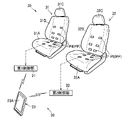
- the seat body includes a first seat body on which a first user can sit, and a second seat body which is separate from the first seat body and on which a second user can sit.
- the first seat body has a first sensor to which information is input from a first user
- the second seat body has a second sensor to which information is input from a second user.
- the control unit changes the output based on the degree of coincidence between the input timing of information to the first sensor by the first user and the timing of information input to the second sensor by the second user. good too.
- a seat system in another aspect, includes a seat, a seat actuator for moving the entire seat, and a controller.
- the seat has a seat body and a sensor that acquires user information, which is information about a user sitting on the seat body.
- the control unit can execute an application program that operates based on the user information acquired by the sensor. During execution of the application program, the control unit controls the seat operating device based on the user information acquired by the sensor to move the entire seat.
- the entire seat is moved based on the user information while the application program that operates based on the user information is being executed.
- the entire seat can be moved by pressing the seat, and the entertainment of the seat can be improved.
- the seat actuating device may include rails for movably supporting the seat, and a motor for moving the seat on the rails.
- the seat can be moved along the rails while the application program is running.
- the application program is a program for moving a character on a screen, and the control unit changes the moving speed of the character and the moving speed of the sheet according to the user information. good.
- the moving speed of the character on the screen and the moving speed of the sheet are changed according to the user information, so that the sheet's entertainment can be further improved.
- the sensor includes a first sensor and a second sensor arranged on one side of the sheet moving direction with respect to the first sensor. Based on the information from the second sensor, it is determined whether the user leans to one side or the other side in the movement direction, and if it is determined that the user leans to one side in the movement direction, the seat is moved to the The sheet may be moved to one side in the movement direction, and when it is determined that the user has tilted to the other side in the movement direction, the sheet may be moved to the other side in the movement direction.
- the seat can be moved in the direction in which the body is tilted by the user tilting the body on the seat.
- the seat operating device may include a pedestal that rotatably supports the seat, and a motor that rotates the seat.
- the seat can be rotated while the application program is running.
- the senor has a left sensor arranged on the left side of the seat body and a right sensor arranged on the right side of the seat body, and the control section controls the sensor to receive the signals from the left sensor and the right sensor. Based on the information, it is determined whether the user has leaned left or right, and if it is determined that the user has leaned left, the seat is rotated counterclockwise, and if it is determined that the user has leaned right, the The seat may be rotated clockwise.
- the seat can be rotated by the user tilting the body left and right on the seat.
- Japanese Patent Application Laid-Open No. 2019-153135 discloses that a character displayed on a smartphone screen is moved toward a goal by causing a person sitting on a seat body to alternately raise and lower both legs as a predetermined action.
- a sheet system is disclosed that executes an application program that causes
- a seat body installed on the floor, a height adjustment mechanism that changes the height of the seat body, and an application program that causes a occupant sitting on the seat body to perform a predetermined action. and a control unit, wherein when the application program is executed, the control unit controls the height adjustment mechanism to adjust the height of the seat body from a first height to above the first height.
- a seat system that changes to a higher second height.
- the height of the seat body can be increased. , the influence of the impact given to the floor by the seated person can be mitigated.
- the seat system may have a configuration in which a battery is arranged under the floor.
- the floor may be the floor of the compartment of the vehicle.
- the second height may be the highest height in the height movable range of the seat body.
- a vehicle system includes a battery provided in a vehicle, a vehicle-side control unit that detects a charge amount of the battery, and acquires information on the charge amount from the vehicle-side control unit. and a mobile terminal.
- the portable terminal notifies the user of the charge amount without user's request operation when the charge amount is equal to or less than the first threshold, and notifies the user of the charge amount when the charge amount is greater than the first threshold. , the charging amount is not notified to the user.
- the portable terminal when the charge amount of the battery of the vehicle is equal to or less than the first threshold value, the portable terminal notifies the user of the charge amount even without the user's requesting operation.
- the user can know the charge amount of the battery of the vehicle via the mobile terminal without starting the dedicated application.
- the vehicle system includes a seat member having a seat surface, and a sensor that acquires user information that is information of a user sitting on the seat member, the sensor being supplied with electricity from the battery.
- the portable terminal may execute a sheet application that operates based on the user information acquired by the sensor.
- the portable terminal may notify the user of the charge amount even while the sheet application is being executed.
- the mobile terminal may change the notification method according to the charge amount.
- the mobile terminal may display a charge amount image, which is an image indicating the charge amount, on the screen, and the smaller the charge amount, the larger the charge amount image may be displayed.
- the smaller the charge amount of the battery the easier it is for the user to recognize the charge amount image, so it is possible to prevent the battery from becoming empty without the user noticing the display of the charge amount image.
- the mobile terminal may display a charge amount image, which is an image indicating the charge amount, on the screen, and make the color of the charge amount image more conspicuous as the charge amount is smaller.
- the smaller the charge amount of the battery the easier it is for the user to recognize the charge amount image, so it is possible to prevent the battery from becoming empty without the user noticing the display of the charge amount image.
- a vehicle system includes a battery provided in a vehicle, a vehicle-side control unit that detects a charge amount of the battery, a mobile terminal that acquires information on the charge amount from the vehicle-side control unit, Prepare.
- the mobile terminal always displays the charge amount on the screen while the mobile terminal is running.
- the user can check the charge amount via the mobile terminal without activating a dedicated application for checking the charge amount. It is possible to know the charge amount of the battery of the vehicle.
- the user moves on the cushion according to instructions from the power generation application, so the power generation device can actively generate power.
- control unit instructs to prompt the use of the power generation application on condition that the charge amount of the battery becomes equal to or less than a predetermined value. may be notified to the user.
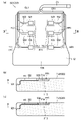
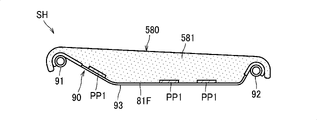
- the cushion may include a pad body and a skin member covering the pad body, and the power generation device may be positioned between the pad body and the skin member.
- the senor may be a pressure sensor.
- the cushion may be detachable from the seating surface of the seat.
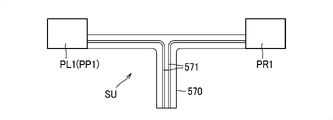
- the cushion further includes a harness connected to the sensor, the sensor is positioned laterally displaced from the center of the pad in the lateral direction, and the harness extends laterally outward from the sensor. May be extended.
- the senor includes a left sensor positioned to the left of the center of the pad in the left-right direction, and a right sensor positioned to the right of the center of the pad in the left-right direction.
- a left harness extending laterally outward from the sensor and then extending in a direction orthogonal to the lateral direction; and a right harness extending laterally outward from the right sensor and extending in a direction orthogonal to the lateral direction;
- One of the left harness and the right harness may extend in the left-right direction toward the other harness and be bundled with the other harness at the left-right end of the pad.
- the left and right harnesses can be pulled out together from the left and right ends of the cushion, so that the harnesses can be prevented from coming into contact with the user.
- the pad may have a recess recessed from the back surface, and at least part of the harness may be in the recess.
- the senor may have a detection surface for detecting the user's physical condition, and the detection surface may face the support surface side.
- the sensor can accurately detect the user's physical condition.
- the cushion may be attachable to and detachable from the seat portion or the backrest of a seat having a seat portion and a backrest.
- the seat according to the present disclosure may include the cushion and a seat frame that supports the back surface of the cushion.
- the seat frame may include a pan frame that supports the back surface of the cushion.
- a seat belt reminder system includes a seat, a controller, and a belt sensor.
- the seat has a seat body and a sensor that acquires occupant information, which is information about a occupant sitting on the seat body.
- the control unit is capable of communicating with a terminal capable of executing an application program that operates based on the occupant information acquired by the sensor, and transmits the occupant information to the terminal.
- the belt sensor detects whether or not the occupant is wearing a seat belt.
- the control unit is capable of determining whether or not the control unit is communicating with the terminal, and whether or not the occupant is wearing a seatbelt based on information acquired from the belt sensor, and is communicating with the terminal. and when it is determined that the occupant is not wearing the seatbelt, the occupant is notified to wear the seatbelt.
- the information that the control unit communicates with the terminal can be used as a substitute for the pressure sensor dedicated to the seatbelt reminder system. increase can be suppressed.
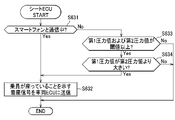
- the seat body has a seat cushion provided with the pressure sensor, and the pressure sensor has a first pressure sensor and a second pressure sensor located forward of the first pressure sensor. and the control unit determines that a first pressure value obtained from the first pressure sensor is equal to or greater than a first threshold, a second pressure value obtained from the second pressure sensor is equal to or greater than a second threshold, and It may be determined that the occupant is sitting on the seat body when the first pressure value is greater than the second pressure value.
- the seat body has a seat back provided with the pressure sensor, and the pressure sensor has a third pressure sensor and a fourth pressure sensor located above the third pressure sensor. and the control unit, when a third pressure value obtained from the third pressure sensor is equal to or higher than a third threshold and a fourth pressure value obtained from the fourth pressure sensor is equal to or higher than a fourth threshold, the occupant is sitting on the seat body.
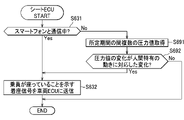
- control unit determines that the history of the pressure values obtained from the pressure sensor during the predetermined period is a change in the pressure value corresponding to a movement peculiar to a person on the seat, the occupant It may be determined that the person is sitting on the seat body.
- this configuration for example, it is possible to distinguish whether an object, an animal, or a person is present on the seat cushion, so that it is possible to suppress an erroneous notification prompting the user to fasten the seat belt.
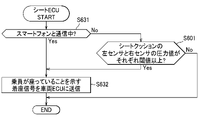
- a seat belt reminder switch that has multiple switches that are turned on by pressure
- the seat belt reminder switch is provided. A judgment equivalent to that of the system can be made.
- the terminal may be a mobile terminal.
- the passenger information may be information for detecting the actions of the passenger.
- the application program may be a program that outputs an instruction for operating the passenger on the seat body.
- the terminal may have a screen
- the application program may be a program that operates an operation target on the screen based on the passenger information.
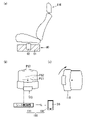
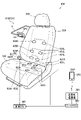
- FIG. 4 is a diagram showing a configuration of a seat
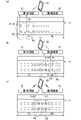
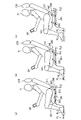
- FIG. 13A is a top view of a third example of the seat system, showing the seat positions where the occupant can sit on each seat (a), and the seat positions when the seat app is executed; It is a figure (b).
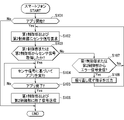
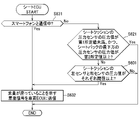
- 4 is a flow chart showing the operation of a smart phone
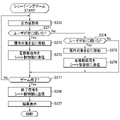
- 10 is a flow chart showing processing of a 100m run game.
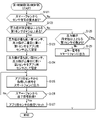
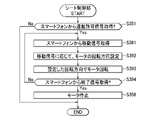
- 4 is a flow chart showing the operation of a seat control unit
- FIG. 10A shows an image for selecting linking between a seat application and a seat
- FIG. 11A shows the position of each seat and the screen display at the start of the 100m run game
- FIG. 11B shows the position of each seat and the screen display during execution of the 100m run game.
- FIG. 10A shows an image for selecting linking between a seat application and a seat
- FIG. 11A shows the position of each seat and the screen display at the start of the 100m run game
- FIG. 11B shows the position of each seat and the screen
- FIG. 11B is a diagram showing a screen when the charge amount is 20%;
- FIG. 4 is a flow chart showing a form in which the charge amount is always displayed on the screen while the smartphone is running.
- 1 is a perspective view showing a first example of a cushion system;
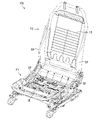
- FIG. It is a perspective view of a seat frame.
- 4 is a flow chart showing the operation of a smart phone;
- the seat 10 is a chaise longue-shaped seat, and includes a seat body 11 whose seat surface is longer in the left-right direction than in the front-rear direction, and a plurality of pressure sensors P as an example of sensors.
- the seat body 11 includes a seat cushion 11A and a seat back 11B.
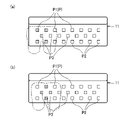
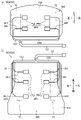
- the first control unit 21 controls the two first sensors P1 with the strongest reaction among the six right first sensors P1 and the six right second sensors P2. has the function of setting the two second sensors P2 with the strongest , as application sensors used in the application.
- the two first sensors P1 and the two second sensors P2 with the strongest response are indicated by hatching with dots.
- the first control unit 21 sets the application sensors from the plurality of pressure sensors P within the first range R1, and sets the four pressure sensors P as the application sensors. to the smart phone 23.
- the second control unit 22 controls the two first sensors P1 with the strongest response among the six left first sensors P1 and the six left second sensors P2 with the strongest response. has the function of setting the two second sensors P2 with the strongest , as application sensors used in the application.
- the second control unit 22 sets the application sensors from the plurality of pressure sensors P within the second range R2, and sets the four pressure sensors P set as the application sensors. to the smart phone 23.
- the first control unit 21 or the second control unit 22 determines that the number of sensors whose reaction strength is equal to or greater than a predetermined value is less than four. When it is determined that it is, an error signal corresponding to an instruction prompting the user to re-sit is output to the smart phone 23 .
- the smartphone 23 repeatedly executes the process shown in FIG. 3 .
- the smartphone 23 first determines whether or not the 100m run game application has started (S101). If it is determined in step S101 that the application has not started (No), the smartphone 23 terminates this process.
- the smartphone 23 determines whether or not the sensor signal has been acquired from the first control unit 21 or the second control unit 22 (S103). When it is determined that the sensor signal has been acquired in step S103 (Yes), the smartphone 23 executes the application based on the acquired sensor signal (S104).
- step S104 the smartphone 23 determines whether the application has ended (S105). If it is determined in step S105 that the application has not ended (No), the smartphone 23 returns to the process of step S104. When it is determined that the application has ended in step S105 (Yes), the smartphone 23 transmits an end signal indicating that the application has ended to the first control unit 21 and the second control unit 22 (S106). , the process ends.
- step S103 When it is determined in step S103 that the sensor signal has not been acquired from either the first control unit 21 or the second control unit 22 (No), the smartphone 23 controls the first control unit 21 or the second control unit 22 (S107). If it is determined in step S107 that an error signal has not been received from either the first control unit 21 or the second control unit 22 (No), the smartphone 23 returns to the process of step S102.
- step S107 If it is determined in step S107 that an error signal has been received from the first control unit 21 or the second control unit 22 (Yes), the smartphone 23 outputs an instruction to prompt resit based on the error signal ( S108) and returns to the process of step S102.
- the instruction to prompt the user to re-sit may be displayed as an image on the screen 23A, may be output as an audio signal, or may be a combination of an image and an audio signal.
- the first control unit 21 and the second control unit 22 repeatedly execute the processing shown in FIG.
- the processing in the first control unit 21 will be described as a representative, and the processing in the second control unit 22 is the same, so the description will be omitted.
- step S128 If it is determined in step S128 that the number of first sensors P1 whose pressure values are equal to or greater than the predetermined value is not 0 (No), at least part of the user's body is outside the first range R1.
- the first control unit 21 outputs an error signal to the smartphone 23 to instruct the user to re-seat (S129), and ends this process.
- the smartphone 23 requests the first control unit 21 and the second control unit 22 for sensor signals (steps S101 and S102 in FIG. 3).
- the first control unit 21 When the first control unit 21 receives a sensor signal request from the smartphone 23 (S121: Yes), it determines Yes in step S122 and sets the application sensor (S123, 124). Specifically, the first control unit 21 sets the four pressure sensors P indicated by dotted hatching as application sensors. After that, the first control unit 21 outputs the sensor signal acquired from each pressure sensor P set as the application sensor to the smartphone 23 (S125).
- the smartphone 23 When the smartphone 23 receives the sensor signal from the first control unit 21 (S103: Yes), it executes the application based on the sensor signal (S104). Specifically, the smartphone 23 moves the cursor on the screen 23A according to the inclination of the user's body, and causes the character on the screen 23A to run according to the movement of alternately moving both legs up and down.
- the smartphone 23 transmits a termination signal to the first control unit 21 (S105: Yes ⁇ S106).
- the end signal is obtained from the smartphone 23 (S126: Yes)
- the first control unit 21 resets the setting of the application sensor (S127).
- the application sensor is set by the second control unit 22, and the application sensor is set by the first control unit 21. Sensor settings and error signal output are not performed.
- FIG. 2B shows an example in which pressure values equal to or greater than a predetermined value are output from the five first sensors P1 to the second control unit 22, but even in this case, the second The control unit 22 determines Yes in step S122, and executes processing for setting the application sensor (S123, S124).
- the smartphone 23 When the smartphone 23 receives an error signal from the first control unit 21 or the second control unit 22 (S107: Yes), it outputs an instruction to prompt the user to re-seat (S108).
- the instruction to reposition the seat may be, for example, a message such as "Please do not sit in the center of the seat.”
- the first control unit 21 sets the application sensor.
- the second control unit 22 sets the application sensor.
- the seat system 1 Since the application sensor is set according to the seating position of the user on the seat body 11 that is long in the left-right direction, the seat system 1 that has the seat body 11 that is long in the left-right direction can prevent the user from being extremely restricted in the place where the user sits. While suppressing this, it is possible to prevent the smartphone 23 from being unable to obtain information from the pressure sensor P and thus being unable to execute the application.
- Two first sensors P1 with the strongest reaction among the plurality of first sensors P1 and two second sensors P2 with the strongest reaction among the plurality of second sensors P2 are set as application sensors.
- An optimum pressure sensor P can be set as the sensor.
- control unit includes a first control unit connected to the first sensor and the second sensor located within a first range in the left-right direction, and a second control unit connected to the first sensor and the second sensor located within a first range in the left-right direction. a second control unit connected to the first sensor and the second sensor located in the If the number of 1 sensors is less than 2, an instruction prompting the user to re-seat may be output.
- the pressure sensor P is discriminated by two control units such as the first control unit 21 and the second control unit 22, it is possible to lighten the burden of processing in one control unit. Also, if the number of first sensors P1 whose response strength is greater than or equal to the predetermined value is less than the standard number, there is a high possibility that the user is not sitting in an appropriate position. In this case, by outputting an instruction prompting the user to re-seat, the application sensor can be reliably set by one of the first control unit 21 and the second control unit 22 .
- first example of the seat system can be modified and implemented in various forms as exemplified below.
- members and processes that are substantially the same as those of the first example of the seat system are denoted by the same reference numerals, and description thereof will be omitted.
- the method of setting the application sensor is not limited to the method of the first example of the seat system.
- two first sensors P1 with the strongest reaction among the plurality of first sensors P1 and second sensors P2 arranged in the front-rear direction with respect to each of the two first sensors P1 with the strongest reaction are used for the application. It may be set as a sensor.
- step S144 a new process of step S144 may be provided instead of step S124 in the process of FIG. Then, in step S144, the smartphone 23 may set the two second sensors P2 in front of the two first sensors P1 set as the application sensors as the application sensors.
- the signal from the second sensor P2 is unnecessary in setting the application sensor, so the processing in the smartphone 23 can be simplified.
- the second sensor P2 is set as an application sensor. Configure sensor settings. Therefore, for example, compared to the method of setting the application sensor for the first sensor P1 after setting the application sensor for the second sensor P2, it is possible to select the two pressure sensors P having the strongest response. can be done with certainty.
- the controller 20 stores in advance a basic pattern of combinations of two first sensors P1 and two second sensors P2, and selects one of the plurality of pressure sensors P.
- the app sensors may be set based on the pressure value from one pressure sensor P that responds the strongest.
- the control unit 20 stores, for example, basic patterns of combinations of four pressure sensors P as indicated by hatching of dots in FIG. 2(a).
- the control unit 20 controls the first sensor P1, the first sensor P1 shifted left by two pitches with respect to the first sensor P1, and the two second sensors P1 in front of these two first sensors P1.
- the basic pattern of the combination of sensor P2 is stored.
- the control unit 20 first identifies a plurality of pressure sensors P whose pressure values are greater than or equal to a predetermined value.
- the pressure sensors P whose pressure values are greater than or equal to the predetermined value are the eight pressure sensors P within the chain double-dashed line indicating the contour of the user's body.
- the pressure sensors P that may apply to the basic pattern are the four pressure sensors P indicated by hatching of dots and the four pressure sensors P without hatching of dots.
- the control unit 20 sets the four pressure sensors P indicated by hatching dots as sensors for the application. .
- the control unit 20 sets the four pressure sensors P without dot hatching as application sensors. .
- a mark positioned at the center of the basic pattern may be provided on the seat surface of the seat body 11 . In this case, the number of sensors can be reduced.
- the arrangement of the pressure sensor P is not limited to the arrangement of the first example of the seat system.
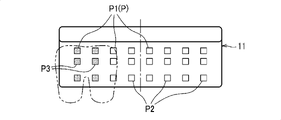
- a third sensor P3 may be provided between the first sensor P1 and the second sensor P2 in the front-rear direction.
- two first sensors P1 with the strongest reaction, two second sensors P2 with the strongest reaction, and two third sensors P3 with the strongest reaction may be set as application sensors.
- the third sensor P3 shown in FIG. 6 may be displaced in the horizontal direction from the first sensor P1 and the second sensor P2.
- pressure sensors P having different arrangement patterns may be set as application sensors according to the type of application used. Specifically, for example, when executing a 100 m run game application, the control unit 20 sets five pressure sensors P indicated by dotted hatching in FIG. 7A as application sensors. For example, when executing a game application that moves a character on the screen 23A up, down, left, and right, the control unit 20 uses the four pressure sensors P indicated by hatching dots in FIG. 7B as application sensors. set.
- the first sensor P1 and the second sensor P2 are arranged in the front-rear direction.
- the position in the left-right direction may be different from the position of the first sensor.
- the pressure sensor P may be provided on the seat back 11B.
- the orthogonal direction orthogonal to the horizontal direction may be the vertical direction.
- the pressure sensor P was exemplified as the sensor, but the sensor may be, for example, a temperature sensor, a humidity sensor, a radio wave sensor, a sound sensor, or the like.
- Information for identifying the user's physical condition is not limited to pressure values, and may be any information.
- the radio wave sensor may acquire information on the heartbeat, which is the physical condition of the user.
- two or three rows of a plurality of sensors arranged in the horizontal direction are provided. may be
- control unit 21 and the second control unit 22 are provided, but one control unit acquires signals from all the sensors provided on the seat body. It may be configured as
- the seat system may be configured so that multiple people can sit on one seat 10 and play the same application at the same time.
- the seat system may also be configured so that multiple people can sit on one seat 10 and play different applications at the same time.
- the application sensor settings may be reset when the user stands up from the seat 10.
- the number of sensors located at different positions in the left-right direction is preferably 3 or more, more preferably 4 or more, and even more preferably 5 or more.
- the seat 10 includes a plurality of pressure sensors PP as an example of sensors. Two or more users can sit on the seat body 11 .
- the pressure sensor PP is a sensor that acquires pressure, which is information for identifying the physical condition of the user sitting on the seat body 11 (posture and movement of the user's body).
- the pressure sensor PP is provided between the skin of the seat cushion 11A and the pad.
- the plurality of pressure sensors PP includes a plurality of first sensors P4 to which pressure information is input from the first user, and a plurality of second sensors P5 to which pressure information is input from the second user.
- the number of first sensors P4 and the number of second sensors P5 are twelve.
- the plurality of first sensors P4 are arranged within a first range R1, which is a range on the right side of the center of the seat cushion 11A in the left-right direction.
- the plurality of first sensors P4 are arranged so that two rows of six first sensors P4 spaced apart in the left-right direction are arranged in two rows spaced in the front-rear direction.
- the six first sensors P4 on the rear side are arranged at positions corresponding to the buttocks of the seated person.
- the six first sensors P4 on the front side are arranged at positions corresponding to the thighs of the seated person.
- the plurality of second sensors P5 are arranged within a second range R2, which is a range on the left side of the center of the seat cushion 11A in the left-right direction.
- the plurality of second sensors P5 are arranged so that two rows of six second sensors P5 spaced apart in the left-right direction are arranged in two rows spaced in the front-rear direction.
- the six rear second sensors P5 are arranged at positions corresponding to the buttocks of the seated person.
- the six second sensors P5 on the front side are arranged at positions corresponding to the thighs of the seated person.
- the control unit 20 has a function of executing an application program (hereinafter also simply referred to as "application”) based on information from the pressure sensor PP.
- application an application program
- an application that provides a three-legged game is exemplified as an application.
- a first user and a second user sitting on the seat body 11 move their left and right legs alternately up and down while matching the movement of the other's legs, so that the screen 23A of the smartphone 23 This is a game in which the displayed character runs.
- the higher the coincidence of the timing of the vertical movement of the left legs or the right legs of the first user and the second user the more A game in which the speed of the character increases.
- the first control unit 21 is connected to each first sensor P4 and acquires information from each first sensor P4.
- the second controller 22 is connected to each second sensor P5 and acquires information from each second sensor P5.
- the first control unit 21 has a function of setting the two first sensors P4 with the strongest reaction among the six first sensors P4 on the front side as the first application sensors used in the application.
- the first control unit 21 sets the first application sensors from the plurality of first sensors P4, and controls the left and right first application sensors set as the first application sensors.
- the information acquired from the sensor P4 is output to the smartphone 23.
- the left first sensor P4 is also referred to as the "first left leg sensor”
- the right first sensor P4 is also referred to as the "first left leg sensor”.
- the second control unit 22 has a function of setting the two second sensors P5 having the strongest response among the six second sensors P5 on the front side as sensors for the second application used in the application.
- the second control unit 22 sets the second application sensors from the plurality of second sensors P5, and sets the left and right second sensors P5 as the second application sensors. to the smart phone 23.
- the left and right second sensors P5 set as the sensors for the second application the left second sensor P5 is also referred to as a "second left leg sensor”
- the right second sensor P5 is also referred to as a "second left leg sensor”.
- the smartphone 23 has a function of executing a three-legged game application based on information from the first application sensor and the second application sensor.
- the smartphone 23 has a function of changing the output based on the degree of coincidence between the timing of inputting information to the sensor for the first application and the timing of inputting information to the sensor for the second application.
- the smart phone 23 increases the speed of the character on the screen 23A as the timing of inputting information to the first right leg sensor and the timing of inputting information to the second right leg sensor match.
- the smart phone 23 increases the speed of the character on the screen 23A as the timing of inputting information to the first left leg sensor and the timing of inputting information to the second left leg sensor match.
- the character's speed is directly linked to the time from start to finish, so it is equivalent to the app's evaluation value. In other words, the higher the evaluation value, the more advantageous the game progresses.
- the speed of the character corresponds to the evaluation value.
- the smart phone 23 evaluates in the app the higher the degree of coincidence between the timing of inputting information to the first right leg sensor and the timing of inputting information to the second right leg sensor. increase the value.
- the smart phone 23 increases the evaluation value in the application as the degree of coincidence between the timing of inputting information to the first left leg sensor and the timing of inputting information to the second left leg sensor is higher.
- the smart phone 23 has a higher matching degree of input timing as the absolute value of the difference ⁇ P between the pressure value PV1 of the first right leg sensor and the pressure value PV2 of the second right leg sensor, which are acquired simultaneously, is smaller. It has a function to determine In addition, the smartphone 23 has a function of determining that the degree of coincidence of input timing is higher as the absolute value of the difference between the pressure values of the first left leg sensor and the pressure value of the second left leg sensor acquired at the same time is smaller.
- the smartphone 23 detects the absolute value of the difference ⁇ P between the pressure values PV1 and PV2 of the first right leg sensor and the second right leg sensor, the first left leg sensor and The sum S of the difference between the pressure values of the second left leg sensor and the absolute value is calculated.
- the smartphone 23 starts the processing shown in FIG. 9 (START). In this process, the smartphone 23 first determines whether or not it is in a state capable of communicating with the seat 10 (S201).
- step S201 If it is determined in step S201 that communication is not possible (No), the smartphone 23 terminates this process.
- the smartphone 23 displays a start image of the three-legged game on the screen 23A (S202). It is assumed that the start image displays a start button for starting the three-legged game and an end button for ending the application.
- the smartphone 23 requests the pressure values used in the three-legged game from the first control unit 21 and the second control unit 22 .
- the first control unit 21 and the second control unit 22 set the first application sensor and the second application sensor, and transmit the pressure value of each application sensor to the smartphone 23 .
- step S202 the smartphone 23 determines whether or not the start button displayed on the screen 23A has been selected (S203). When it is determined that the start button has been selected in step S203 (Yes), the smartphone 23 determines whether the flag F indicating whether the calibration in the three-legged game has already been executed in the past is 0 ( S204).
- calibration means that, in a three-legged game, the peak of the pressure value input from the first user to the first application sensor and the peak of the pressure value input from the second user to the first application sensor are This is a process of aligning to an equivalent value.
- the smartphone 23 displays instructions for each user on the screen 23A during calibration. For example, the smartphone 23 displays on the screen 23A a message "Please alternately move both legs up and down for a predetermined period of time.”
- the smartphone 23 sets a correction value for correcting the peak values of the pressure values of the left leg sensors acquired during a predetermined period of time to the same value.
- the smartphone 23 sets correction values for the right leg sensors as well as for the left leg sensors so as to align the peak values of the respective pressure values.
- step S205 the smartphone 23 sets the flag F to 1 (S206), and executes the three-legged game (S207). Processing in the three-legged game will be described in detail later.
- step S207 the smartphone 23 displays the start image and determines whether or not the end button displayed on the screen 23A has been selected (S208). If it is determined in step S208 that the end button has not been selected (No), the smartphone 23 returns to the process of step S202. If it is determined in step S208 that the end button has been selected (Yes), the smartphone 23 terminates this process.
- the smartphone 23 notifies each user of the signal to start the character, and then acquires the pressure value from the pressure sensor PP corresponding to each leg of each user (S221). Specifically, the smartphone 23 acquires pressure values of the first left leg sensor, the second left leg sensor, the first right leg sensor, and the second right leg sensor in step S221. Further, the smartphone 23 corrects the pressure value on the side of the first user or the pressure value on the side of the second user so that the peaks of the pressure value on the side of the first user and the pressure value on the side of the second user are aligned.
- the smartphone 23 may notify each user of the timing of inputting information to each left leg sensor or each right leg sensor after notifying the signal to start the character. Specifically, the smartphone 23 notifies each user of a message such as "1, 2, 1, 2, " or a message of "inside, outside, inside, outside, " by voice. You may In addition, the input timing may be notified by simple sound other than voice, video, light, vibration, or the like.
- the smartphone 23 detects the absolute value of the difference between the pressure values of the first right leg sensor and the second right leg sensor, and the pressure values of the first left leg sensor and the second A total sum S of the difference between the pressure values of the left leg sensor and the absolute value is calculated (S222).
- each pressure value is acquired every 50 ms, and the predetermined period is 0.5 s.
- the number of differences obtained during the predetermined period is 10 on the right leg side and 10 on the left leg side.
- the pressure value data is expressed in 10 bits. Therefore, the minimum value of the difference between the two pressure values is 0, and the maximum value is 1023. Since the number of differences obtained during the predetermined period is 10 on the right leg side and 10 on the left leg side, the maximum value of the sum S of all differences is 20,460. Therefore, the smaller the ratio obtained by dividing the sum S of the differences in the predetermined period by the maximum value 20460 of the sum S, the smaller the value indicating that the input timing of each user is off. Then, by subtracting this ratio from 1, a degree of coincidence D indicating how well the input timings of the respective users coincide is calculated. It should be noted that the higher the degree of coincidence D, the more the input timings of the users are coincident.
- step S224 the smartphone 23 sets the speed of the character based on the degree of matching D (S224). Specifically, in step S224, the smartphone 23 increases the speed of the character as the degree of matching D increases.
- step S224 the smartphone 23 moves the character on the screen 23A at the speed set in step S223 (S225). After step S225, the smartphone 23 determines whether or not the character has reached the goal (S226).
- step S226 If it is determined in step S226 that the character has not reached the goal (No), the smartphone 23 returns to the process of step S221. If it is determined in step S226 that the character has reached the goal (Yes), the smartphone 23 displays the result on the screen 23A (S227), and terminates this process.
- control unit 20 Next, an example of the operation of the control unit 20 will be described.
- the example below shows an example where calibration has not been performed in the past.
- the first user operates the smartphone 23 while the first user sits in a first range R1 on the right side of the seat 10 and the second user sits in a second range R2 on the left side of the seat 10.
- the smartphone 23 requests the first control unit 21 and the second control unit 22 for pressure values to be used in the three-legged game.
- the first control unit 21 and the second control unit 22 transmit the pressure value of each application sensor to the smartphone 23 in response to a request.
- calibration is executed (S203: Yes ⁇ S204: Yes ⁇ S205).
- instructions for each user are displayed on the screen 23A, so each user alternately moves both legs up and down according to the instructions.
- Each user may look at the screen 23A of the smart phone 23 together, or look at the screen of the large monitor to which the smart phone 23 is connected.
- the smartphone 23 executes a three-legged game (S207).
- each user alternately moves both legs up and down while synchronizing the movements of the legs.
- the speed of the characters on the screen 23A is low, so each user tries to align their leg movements by, for example, synchronizing their voices.
- the output is changed based on the coincidence of the input timing of information to each right leg sensor or each left leg sensor, it is possible to provide a user with a three-legged game application and improve the entertainment of the seat 10. ⁇ can be done.
- the second example of the seat system can be modified and implemented in various forms as exemplified below.
- members having substantially the same structure as in the second example of the seat system are denoted by the same reference numerals, and their description is omitted.
- the method of setting the application sensor is not limited to the method of the second example of the seat system.
- the application sensor may be set by setting the origin at a predetermined position of the seat cushion 11A and obtaining the center of gravity of the user based on the set origin.
- the first control unit 21 or the second control unit 22 controls pressure values of a plurality of pressure sensors PP that detect a pressure value equal to or higher than a predetermined value according to the seating of the user. Based on the moment applied to the origin, the x-coordinate Gx and y-coordinate Gy of the center of gravity G are obtained.
- the seat control section obtains the x-coordinate Gx and y-coordinate Gy of the center of gravity G using the following equations (2) and (3).
- Gx ⁇ Fn ⁇ xn/ ⁇ Fn (2)
- Gy ⁇ Fn ⁇ yn/ ⁇ Fn (3)
- xn x-coordinate of the n-th pressure sensor PP
- yn y-coordinate of the n-th pressure sensor PP
- the seat control unit After obtaining the x-coordinate Gx and y-coordinate Gy of the center of gravity G, the seat control unit sets the application sensor based on the center of gravity G. For example, in a three-legged game application that uses load information from both legs of the user, such as the second example of the seat system, the seat control unit uses two pressure sensors Pc and Pd located in front of the center of gravity G to It can be set as an app sensor.
- the seating surface of the seat cushion 11A may be marked with a mark that the user can recognize as an application sensor.
- the seat control unit may execute the application using the pressure sensor corresponding to the mark as the application sensor.
- the seat cushion 11A is provided with the pressure sensor PP, but the seat back 11B may be provided with the pressure sensor PP.
- the couch-shaped seat body 11 on which two or more users can sit is exemplified.
- a second seat body 32 that is separate from the first seat body 31 may be provided.
- the first seat body 31 is capable of being seated by the first user, and has a seat cushion 31A, a seat back 31B and a headrest 31C.
- the seat cushion 31A and the seat back 31B have a first sensor P4 to which information is input by the first user.
- the first sensor P4 is connected to the first controller 21 .
- the first sensor P4 may be provided on at least one of the seat cushion 31A, seat back 31B and headrest 31C.
- a second user can sit on the second seat main body 32, and has a seat cushion 32A, a seat back 32B and a headrest 32C.
- the seat cushion 32A and seat back 32B have a second sensor P5 to which information is input from the second user.
- the second sensor P5 is connected to the second controller 22 .
- the second sensor P5 may be provided on at least one of the seat cushion 32A, seat back 32B and headrest 32C.
- the smartphone 23 changes the output based on the degree of coincidence between the input timing of information to the first sensor P4 by the first user and the timing of information input to the second sensor P5 by the second user.
- the smartphone 23 is capable of executing the three-person tripod game application similar to that of the second example of the seat system. Even with such a form, the same effect as in the second example of the seat system can be obtained.
- an application may be adopted in which the first user and the second user input pressure using only one first seat body 31 .
- the first user may manually press the pressure sensor PP of the seat cushion 31A
- the second user may manually press the pressure sensor PP of the seat back 31B.
- a game in which points increase at an accelerated rate when two users press the pressure sensor PP at the same timing can be adopted.
- 10 points are added when two people match the timing once, 100 points are added when the timing is matched twice in a row, 1000 points are added when the timing is matched 3 times in a row, and 1000 points are added when the timing is matched 4 times in a row. If the timing is correct, 10000 points are added, and if the timing is not correct, the game can be restarted from 10 points. It should be noted that the game is not limited to the game in which the score increases according to the number of times the timing is matched, and the game may be a game in which the score increases as the timing coincides.
- the speed of the character is increased when the motion timings of the right legs or the left legs of each user are highly matched.
- the speed of the character may be increased when the motion timings of the left and right inner legs or the left and right outer legs of each user have a high degree of coincidence in motion timing.
- the determination of the matching degree of information input timing to the sensor is not limited to the second example of the seat system. For example, it may be determined that the smaller the difference between the time when the pressure value from the first user reaches the peak value and the time when the pressure value from the second user reaches the peak value, the higher the degree of matching.
- a character can be a car, an airplane, or the like.
- the character may also move relative to the background by moving the background around the character.
- the seat may be a vehicle seat used in automobiles, ships, etc., or a seat installed in a room such as a public facility.
- the control unit is composed of the first control unit 21, the second control unit 22, and the smartphone 23.
- the control unit is connected to each sensor of the seat, and the car navigation It may be connected to a monitor such as a system.
- the control unit may cause the character on the monitor to act by executing an application based on information from each sensor.
- the control unit may increase the speed of the character as the timing of inputting information to three or more sensors increases.
- a three-person, four-legged game can be adopted as the application.
- the control unit should change the output based on the matching degree of information input timing to multiple sensors. For example, the control unit causes the object moved by the control unit to move when the matching degree of the input timing is equal to or higher than a predetermined value, and does not move the object when the matching degree of the input timing is less than the predetermined value. be able to.
- the object may be, for example, a character on the screen, a vehicle such as a cart on which the user rides, or a robot.
- the sensor may be any sensor that receives information input from the user, and may be, for example, an optical sensor, a capacitance sensor, a temperature sensor, a humidity sensor, a radio wave sensor, a sound sensor, or the like.
- Information is not limited to pressure values, and may be any information.
- two rows of a plurality of sensors arranged in the horizontal direction are provided.
- control unit 21 and second control unit 22 In the second example of the seat system, two control units (first control unit 21 and second control unit 22) are provided, but one control unit acquires signals from all the sensors provided on the seat body. It may be configured as
- the application sensor settings may be reset when the user stands up from the seat 10.
- the sensors may be provided on the left and right sides of the seat cushion or seat back (parts protruding from the seat surface), headrests, armrests, or parts around the seat (instrument panel, door, floor).
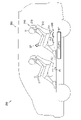
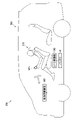
- the seat system 100 is provided in a vehicle 50 having three rows of seats.
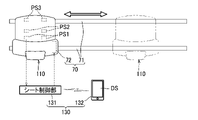
- the seat system 100 includes a seat 110 , a seat actuator 120 and a controller 130 .
- front and rear, left and right, and up and down are based on the occupant sitting on the seat 110 .
- the seat 110 is a seat in the third row among the three rows of seats.
- One seat 110 is provided on each of the left side and the right side of the passenger compartment (see FIG. 16).
- the seats 41 in the first row and the seats 42 in the second row do not have sensors and do not constitute the seat system 100 .
- the seat operating device 120 is a device that moves the entire seat 110 in the front-rear direction.
- One seat actuator 120 is provided for each of the left seat 110 and the right seat 110, as shown in FIG. 16(a).
- the left seat operating device 120 will be described as a representative, and description of the right side will be omitted.
- the seat actuator 120 includes rails 121 and motors 122 .
- the rails 121 extend in the front-rear direction from the first row to the third row of the three-row seats, and are provided on the left and right sides of each of the seats 41 , 42 , 110 .
- the rail 121 supports the three seats 41, 42, 110 so as to be movable in the longitudinal direction. Specifically, as shown in FIG. 14, the three seats 41, 42, 110 are supported by sliders 60 movably supported by rails 121, respectively.
- the motor 122 is a motor for moving the rearmost sheet 110 on the rails 121 and is provided on the rearmost slider 60 .
- the rearmost slider 60 has a wheel (not shown) to which the driving force of the motor 122 is transmitted, and moves on the rail 121 as the wheel rotates.
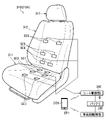
- the seat 110 has a seat body 110A and pressure sensors PS1 to PS6 as an example of sensors.
- the seat body 110A is a member having a seat surface that supports the user.
- the seat body 110A includes a seat cushion 111, a seat back 112, and a headrest 113. As shown in FIG.
- the seat cushion 111, the seat back 112, and the headrest 113 each have a frame forming a skeleton, a pad covering the frame, and an outer skin covering the pad.
- the upper surface of the seat cushion 111 serves as a seat surface.
- Each front surface of the seat back 112 and the headrest 113 serves as a seat surface.
- the pressure sensors PS1 and PS2 are arranged on the seat cushion 111 at positions corresponding to the user's buttocks. Specifically, the pressure sensor PS1 is arranged at a position corresponding to the lowest part of the user's ischium where the load from the user is the greatest, and the pressure sensor PS2 is arranged at a position slightly in front of the pressure sensor PS1. Pressure sensors PS1 and PS2 acquire pressure values from the user's buttocks.
- the pressure sensor PS3 is arranged at a position far forward from the pressure sensors PS1 and PS2, specifically at a position corresponding to the user's thighs. A pressure sensor PS3 acquires a pressure value from the user's thigh.
- Pressure sensors PS4 and PS5 are arranged below the seat back 112 . Specifically, the pressure sensor PS4 is arranged at a position corresponding to the back of the user's waist, and the pressure sensor PS5 is arranged at a position slightly above the pressure sensor PS4. Pressure sensors PS4 and PS5 obtain pressure values from the waist of the user. The pressure sensor PS6 is arranged at a position far upward from the pressure sensors PS4 and PS5, specifically at a position corresponding to the upper back of the user. Pressure sensor PS6 obtains pressure values from a position corresponding to the user's upper back.
- the pressure sensors PS1 to PS6 are elements whose electric resistance changes, for example, depending on the pressure from the outside, and the higher the pressure value, the higher or lower the voltage of the detection signal.
- the pressure sensors PS1 to PS6 output pressure values to the control section 130 (specifically, the seat control section 131, which will be described later).
- the control unit 130 has a seat control unit 131 and a smartphone 132.
- the smartphone 132 has the function of executing the sheet application.
- the seat application is an application that operates based on the pressure values obtained from the pressure sensors PS1 to PS6 via the seat control unit 131.
- a sheet application is, for example, a game that uses the sheet 110 as a controller. Games include, for example, a 100-meter run game.
- the 100m run game is a game in which the user sitting on the seat 110 alternately moves his/her legs up and down to run (move) the character displayed on the screen DS of the smartphone 132 .
- the smartphone 132 proceeds with the game by determining whether the user's legs are raised or lowered based on the pressure values from the left and right pressure sensors PS3, for example.
- the smartphone 132 When the smartphone 132 starts executing the seat application, it makes an inquiry to the seat control unit 131 to acquire pressure values from the pressure sensors PS1 to PS6. When receiving an inquiry from the smartphone 132 , the seat control unit 131 acquires pressure values from the pressure sensors PS1 to PS6 and transmits the acquired pressure values to the smartphone 132 .
- the smartphone 132 After setting the moving speed of the seat 110 , the smartphone 132 transmits the set moving speed of the seat 110 to the seat control unit 131 .
- the sheet control unit 131 Upon receiving the moving speed of the sheet 110, the sheet control unit 131 sets the rotational speed of the motor 122 based on the moving speed of the sheet 110, and drives the motor 122 at the set rotational speed.
- the rotation speed of the motor 122 is set to a higher value as the movement speed of the sheet 110 increases.
- the user can select the link between the sheet application and the sheet 110 .
- the seat control unit 131 rotates the motor 122 at the rotational speed set as described above when the seat application and the seat 110 are permitted to be linked.
- the seat control unit 131 does not rotate the motor 122 when the seat application and the seat 110 are not permitted to be linked.
- the smartphone 132 executes the processing shown in FIG. 17 when the sheet application is activated.
- the smartphone 132 first displays on the screen DS an image for selecting interlocking between the sheet application and the sheet 110 (S301).
- An image for selecting interlocking between the sheet application and the sheet 110 is, for example, the image shown in FIG. This image includes an image of characters such as "Do you want to move the seat in conjunction with the 100m game?" and a button image B2 on which the character "No" is written.
- the smartphone 132 determines whether or not there is a request to link the seat 110 with the seat application (S302). Specifically, in step S302, if the smartphone 132 determines that the button image B1 has been selected, it determines that there is a request, and if it determines that the button image B2 has been selected, it determines that there is no request.
- step S302 If it is determined in step S302 that there is a request (Yes), the smartphone 132 notifies the user of an instruction to place the seats 41, 42, and 110 in the game positions (S303).
- An instruction to place the seats 41, 42, 110 in the game positions can be given by displaying, for example, an image shown in FIG. 20(b) on the screen DS. This image includes an image of characters such as "Place the seats in the first and second rows at the front, and the seats in the third row at the back.” and a button image B3 on which the characters "OK" are described for proceeding with the process after placing the sheet in the game position.
- step S303 the smartphone 132 transmits an interlocking permission signal for interlocking the seat 110 with the seat application to the seat control unit 131 (S304). Specifically, after step S303, the smartphone 132 determines whether or not the button image B3 is selected, and executes the process of step S304 when the button image B3 is selected.
- the smartphone 132 displays the start image of the 100m run game on the screen DS (S305).
- the start image includes a start button for starting the 100m run game, an end button for ending the sheet application, and a number setting button for setting the number of players participating in the game. do.
- step S305 the smartphone 132 determines whether the start button displayed on the screen DS has been selected (S306). When it is determined that the start button has been selected in step S306 (Yes), the smartphone 132 determines whether or not the flag F indicating whether the calibration in the 100m run game has already been executed in the past is 0. (S307).
- calibration is the process of determining the standard value of the pressure value according to the weight of the user in the 100m run game.
- the smartphone 132 determines whether the user's legs are raised or lowered by comparing the pressure values acquired by the pressure sensors PS1 to PS6 with standard values. Note that when the number of players is two, the smart phone 132 performs calibration for each player sitting on each seat 110 .
- step S307 If it is determined that F is not 0 in step S307 (No), that is, if calibration has been performed in the past, the smartphone 132 starts the 100m run game without performing calibration (S308). (S310).
- step S310 the smartphone 132 displays the start image and determines whether or not the end button displayed on the screen DS has been selected (S311). If it is determined in step S311 that the end button has not been selected (No), the smartphone 132 returns to the process of step S305. If it is determined in step S311 that the end button has been selected (Yes), the smartphone 132 terminates this process.
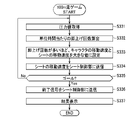
- the smartphone 132 when the smartphone 132 starts the 100m run game, it first acquires pressure values from the pressure sensors PS1 to PS6 of the seat 110 (S331). After step S331, the smartphone 132 calculates the number of leg raises per unit time based on the pressure value (S332).
- step S332 the smartphone 132 sets the movement speed of the character and the seat 110 according to the number of times the leg is lifted per unit time (S333). Specifically, in step S333, the smart phone 132 sets the movement speed of the character and the seat 110 to a higher value as the number of leg raises per unit time increases. After setting the movement speed of the character, the smartphone 132 moves the character on the screen DS at the set movement speed.
- the moving speed of the seat 110 may have an upper limit so that the user sitting on the seat 110 does not interfere with the second row of seats 42 .
- the upper limit can be determined through experiments, simulations, or the like. In this case, if the moving speed of the seat 110 set based on the number of leg raises per unit time is greater than the upper limit, the smartphone 132 sets the upper limit to the "moving speed of the seat 110".
- step S333 the smartphone 132 transmits the set moving speed of the seat 110 to the seat control unit 131 (S334).
- the smartphone 132 determines whether the character on the screen DS has reached the goal (S335). Note that when the number of players is two, the smartphone 132 performs the processing of steps S331 to S334 for each of the left and right seats 110, and in step S335, determines whether one of the two characters has reached the goal. determine whether or not
- step S335 If it is determined in step S335 that the goal has not been reached (No), the smartphone 132 returns to step S331. When it is determined that the goal has been reached in step S335 (Yes), the smartphone 132 transmits an end signal to the seat control unit 131 (S336). After step S336, the smartphone 132 displays the result of the game on the screen DS and terminates this process.
- the seat control unit 131 repeatedly executes the processing shown in FIG. In the process shown in FIG. 19, the seat control unit 131 first determines whether or not an interlocking permission signal has been acquired from the smartphone 132 (S351). If it is determined in step S351 that the interlocking permission signal has not been acquired (No), the seat control section 131 terminates this process.
- the seat control unit 131 acquires the moving speed of the seat 110 from the smartphone 132 (S352). After step S352, the sheet control unit 131 sets the rotational speed of the motor 122 according to the moving speed of the sheet 110 (S353).
- step S353 the seat control unit 131 rotates the motor 122 at the set rotational speed (S354).
- step S354 the seat control unit 131 determines whether or not an end signal has been acquired from the smartphone 132 (S355).
- step S355 If it is determined in step S355 that the end signal has not been acquired (No), the sheet control unit 131 returns to the process of step S352. If it is determined in step S355 that the end signal has been acquired (Yes), the seat control unit 131 stops the motor 122 (S356), and ends this process.
- the seat control unit 131 When the number of players is two, the seat control unit 131 performs the processing of steps S352 to S354 and S356 for each of the left and right seats 110. Further, in step S356, the seat control unit 131 may reversely rotate the motor 122 to return the seat 110 to the rearmost position, which is the initial position, and then stop the motor 122 .
- the smartphone 132 displays the image shown in FIG. 20(a) on the screen DS.
- the smartphone 132 displays the image shown in FIG. 20(b) on the screen DS.
- the first user U1 arranges the sheets 41, 42, and 110 in game positions as shown in FIG.
- a start image (not shown) is displayed on the screen DS.
- the smartphone 132 sits on the left seat 110 as shown in FIGS.
- the moving speed of the first character CH1 and the moving speed of the left seat 110 are set according to the number of times the first user U1 raises the leg.
- the smartphone 132 sets the moving speed of the second character CH2 and the moving speed of the right seat 110 according to the number of times the second user U2 sitting on the right seat 110 raises the leg.
- the smartphone 132 moves the second character CH2 forward on the screen DS at a faster moving speed than the first character CH1.
- the seat control unit 131 moves the right seat 110 forward at a faster moving speed than the left seat 110 .
- the smartphone 132 changes the moving speeds of the characters CH1 and CH2 in accordance with the change in the number of leg raises of the users U1 and U2. Further, the seat control unit 131 changes the moving speed of the seat 110 in accordance with the change in the number of leg lifts of each of the users U1 and U2. Then, when either of the characters CH1 and CH2 reaches the goal on the screen DS, the smartphone 132 displays the result of the 100m run game on the screen DS and ends the game. Also, the sheet control unit 131 stops the movement of each sheet 110 .
- the smartphone 132 displays only one character on the screen DS and moves only one character. Also, when the number of players is set to one, the sheet control unit 131 moves only one sheet 110 and does not move the other sheet 110 .
- the correspondence between characters and sheets 110 may be selectable by the user, for example, when setting the number of players. For example, when the first user U1 sits on the right seat 110 and the second user U2 sits on the left seat 110, the identification number of the right seat 110 is associated with the first character CH1 to identify the left seat 110. A number may be associated with the second character CH2.
- the entire seat 110 is moved based on the pressure value during execution of the seat application that operates based on the pressure value, the entire seat 110 can be moved according to the game when executing the 100-meter run game. , the entertainment of the seat 110 can be improved.
- the seat actuator 120 includes rails 121 that movably support the seat 110 and motors 122 that move the seat 110 on the rails 121, the seat 110 can be moved along the rails 121 during execution of the 100m running game. can be moved by
- the entertainment of the seat 110 can be improved.
- the third example of the seat system can be modified and implemented in various forms as exemplified below.
- members and processes having substantially the same structure as those of the third example of the seat system are denoted by the same reference numerals, and description thereof will be omitted.
- the seat actuator 70 has a pair of front and rear rails 71 extending left and right, and a motor 72 for moving the seat 110 left and right on the rails 71.
- the left pressure sensor PS2 is exemplified as the first sensor
- the right pressure sensor PS2 is used as the second sensor arranged on one side of the first sensor in the moving direction of the seat 110. Illustrate.
- the smartphone 132 has a function of determining whether the user leans to the right or left based on the pressure values from the left and right pressure sensors PS2.
- the smartphone 132 determines that the user leans to the right, the seat control unit 131 moves the seat 110 to the right.
- the smartphone 132 determines that the user leans leftward, the seat control unit 131 moves the seat 110 leftward.
- the seat application is a shooting game in which the fighter, which is the object of the user's operation, is moved left and right, and the fighter shoots bullets to defeat the enemy.
- the smartphone 132 executes the processing in FIG. 17 from when the sheet application is activated until it is terminated.
- the smartphone 132 executes a shooting game instead of the 100-meter run game in step S310 of the process of FIG.
- the smartphone 132 acquires pressure values from the left and right pressure sensors PS2 (S331), and then determines whether the user leans left based on the pressure values (S371). . Specifically, in step S371, the smartphone 132, for example, determines whether the pressure value of the left pressure sensor PS2 is greater than the pressure value of the right pressure sensor PS2 by a predetermined value or more.
- step S371 If it is determined in step S371 that the user has tilted to the left (Yes), the smartphone 132 moves the operation target on the screen DS to the left (S372). After step S372, the smartphone 132 transmits a left movement signal for moving the seat 110 to the left to the seat controller 131 (S373).
- step S371 determines whether the user is leaning to the left (No). If it is determined in step S371 that the user is not leaning to the left (No), the smartphone 132 determines whether the user is leaning to the right based on the pressure value (S374). Specifically, in step S374, the smartphone 132 determines, for example, whether the pressure value of the pressure sensor PS2 on the right side is greater than the pressure value of the pressure sensor PS2 on the left side by a predetermined value or more.
- step S374 When it is determined that the smartphone 132 has tilted to the right in step S374 (Yes), the smartphone 132 moves the operation target on the screen DS to the right (S375). After step S375, the smartphone 132 transmits a right movement signal for moving the seat 110 to the right to the seat control unit 131 (S376). When the difference between the left and right pressure values is less than the predetermined value, the smartphone 132 transmits neither the left movement signal nor the right movement signal to the seat control unit 131 (step S374: No).
- any method can be used to fire bullets from fighter planes.
- a bullet may be fired from the fighter automatically without user manipulation, or the fighter may fire a bullet when the user presses a pressure sensor located on the seat back 112 .
- the seat control unit 131 repeatedly executes the processing of FIG.
- the seat control unit 131 first executes the process of step S351 as in the third example of the seat system. If the seat control unit 131 determines No in step S351, it ends this process, and if it determines Yes, it acquires a left movement signal or a right movement signal from the smartphone 132 (S391).
- the seat control unit 131 sets the rotation direction of the motor 72 according to the left movement signal or right movement signal (S392). Specifically, when the left movement signal is acquired in step S391, the seat control unit 131 sets the rotation direction of the motor 72 to the first rotation direction for moving the seat 110 to the left. When the seat control unit 131 acquires the rightward movement signal in step S391, the seat control unit 131 sets the rotation direction of the motor 72 to the direction opposite to the first rotation direction, more specifically, to the rotation direction for moving the seat 110 to the right. A certain second rotation direction is set. Further, when neither the left movement signal nor the right movement signal is acquired in step S391, the seat control section 131 does not set the rotation direction of the motor 72 and keeps the motor 72 in a stopped state.
- step S392 if the rotation direction of the motor 72 is set in step S392, the seat control unit 131 rotates the motor 72 in the set rotation direction (S393). If the direction of rotation of the motor 72 is not set in step S392, the seat control unit 131 does not rotate the motor 72 in step S393.
- step S393 the seat control unit 131 determines whether or not an end signal has been acquired from the smartphone 132 (S394). If it is determined in step S394 that the end signal has not been acquired (No), the sheet control section 131 returns to the process of step S391.
- step S394 If it is determined in step S394 that the end signal has been acquired (Yes), the seat control unit 131 stops the motor 72 (S356) and ends this process.
- the seat control unit 131 stops the motor 72 (S356) and ends this process.
- control method for moving the seat 110 in the tilt direction of the user's body can also be applied to the structure of the third example of the seat system.
- the first sensor and the second sensor may be sensors arranged at different positions in the front-rear direction, and the control unit may move the seat 110 in the front-rear direction according to the inclination of the user in the front-rear direction.
- the seat actuator 80 includes a pedestal 81 that supports a seat 110 so as to be rotatable about a vertical axis, and a motor 82 that rotates the seat 110. ing.
- the left pressure sensor PS2 is exemplified as the left sensor
- the right pressure sensor PS2 is exemplified as the right sensor.
- the smartphone 132 has a function of determining whether the user leans left or right based on the pressure values from the left and right pressure sensors PS2. When the smartphone 132 determines that the user leans to the left, the seat control unit 131 rotates the seat 110 counterclockwise. When the smartphone 132 determines that the user leans to the right, the seat control unit 131 rotates the seat 110 clockwise.
- the seat application is a shooting game in which a rotating turret, which is the user's operation target, is rotated left and right and shots are fired from the rotating turret to defeat the enemy.
- the smartphone 132 executes the processing in FIG. 17 from when the sheet application is activated until it is terminated.
- the smartphone 132 executes a shooting game instead of the 100-meter run game in step S310 of the process of FIG.
- the smartphone 132 performs substantially the same processing as the processing in FIG. Specifically, the smartphone 132 rotates the operation target counterclockwise in the processing of step S372, and transmits a left rotation signal to the seat control unit 131 in the processing of step S373. Further, the smartphone 132 rotates the operation target clockwise in the processing of step S375, and transmits a right rotation signal to the seat control unit 131 in the processing of step S376. Since other processes in the process of FIG. 23 are the same, the description is omitted.
- the seat control unit 131 performs substantially the same processing as the processing in FIG. Specifically, the seat control unit 131 acquires the left rotation signal or the right rotation signal in step S391, and sets the rotation direction of the motor 82 according to the left rotation signal or the right rotation signal in step S392. . Since other processes in the process of FIG. 24 are the same, the description is omitted.
- the operation target and the seat 110 can be rotated by tilting the body left and right on the seat 110 .
- the control unit is composed of the seat control unit and the smartphone, but for example, the control unit may be composed of only the vehicle-side control unit provided in the vehicle.
- the vehicle-side control unit may acquire information from the sensor of the seat and execute the seat application on the screen of the car navigation system.
- the control unit may be configured to stop the movement of the seat when the user stands up from the seat while the seat application is running. In this case, whether or not the user has risen from the seat can be determined, for example, by determining whether or not each pressure value of all the pressure sensors has become zero.
- control unit may be configured to stop movement of the seat when the user presses a seat stop button displayed on the screen while the seat application is running. Further, the control unit may be configured to stop the movement of the seat when receiving a seat stop command by the user's voice during execution of the seat application.
- control unit may be configured to stop movement of the seat when an abnormal load equal to or greater than a predetermined value is applied to the motor for moving the seat while the seat app is running. Further, the control unit may be configured to stop the movement of the seat when an abnormality such as disconnection occurs in the seat system.
- control unit may be configured not to move the seat during execution of the seat app when the charge amount of the vehicle battery that supplies power to the motor that moves the seat is equal to or less than a predetermined value.
- the manner of moving the seat is not limited to the third to fifth examples of the seat system.
- a first user and a second user play a competitive game (dice, rock-paper-scissors, etc.) on the screen of a smartphone, the seat of the winning side moves forward, and the seat of the losing side moves backward. It may be configured to move. Further, for example, the seat may be configured to move backward when the user presses the back against the seat back.
- Motors may be provided for the first and second row seats, and these seats may be included in the seat system.
- the control unit drives the motors of the seats in the first and second rows to move the seats in the first and second rows to the forwardmost positions.
- the rail 121 in the third example of the seat system may be a normal slide rail instead of a long rail extending from the first row to the third row.
- the speed at which the sheet moves may be constant.
- the sheet may advance at a constant speed only when the moving speed of the character is equal to or higher than a predetermined value.
- the operation target is moved with respect to the background of the screen. may be moved relative to the background.
- Mobile devices are not limited to smartphones, but may be tablets, for example.
- the seat application may be a game such as a dance game or car race.
- the seat application is not limited to a game, and may be any application that operates a seat using the seat as a controller. Specifically, it may be an application for simply operating a seat. In this case, only the sheet may be moved according to the movement of the user on the sheet without displaying the operation target on the screen. For example, only the operation method of the seat may be displayed on the screen, and the seat may be moved by moving the user's body on the seat while watching the operation method.
- the pressure sensor was exemplified as the sensor, but the sensor may be, for example, an optical sensor, a capacitance sensor, a temperature sensor, a humidity sensor, a radio wave sensor, a sound sensor, or the like.
- User information is not limited to pressure values, and may be any information.
- the radio wave sensor may acquire information on the heartbeat, which is the physical condition of the user.
- the sensors may be provided on the left and right sides of the seat cushion or seat back (parts protruding from the seat surface), headrests, armrests, or parts around the seat (instrument panel, door, floor).
- the seat system 200 includes a seat body 210, a height adjustment mechanism 240 for changing the height of the seat body 210, and a smartphone SP as an example of a control section.
- the seat body 210 includes a seat cushion 211, a seat back 212, and a headrest 213.
- the seat cushion 211 includes a seat cushion frame forming a frame of the seat cushion 211, a seat cushion pad covering the seat cushion frame, and a seat cushion skin covering the seat cushion frame and the seat cushion pad.
- the seat back 212 includes a seat back frame forming a frame of the seat back 212, a seat back pad covering the seat back frame, and a seat back skin covering the seat back frame and the seat back pad.
- the seat body 210 is installed on the floor FL.
- the floor FL is the floor of the passenger compartment of the vehicle 250 . That is, seat body 210 is mounted on vehicle 250 .
- the floor FL consists of a first floor FL1 positioned at the feet of a seated person H sitting on the seat body 210, and a second floor FL2 positioned behind the first floor FL1 and higher than the first floor FL1. and
- the seat body 210 is installed on the second floor FL2.
- Vehicle 250 may be, for example, an electric vehicle using only a motor as a power source, or a hybrid vehicle having two or more power sources including a motor.
- the seat body 210 is provided as a rear seat of the automobile, but may be provided as a driver's seat, a passenger's seat, or a center seat of the third row.
- the seat system 200 further includes pressure sensors 221-226 provided on the seat body 210.
- the pressure sensors 221 to 226 are sensors for detecting the load applied from the seated person H to the seat surface of the seat body 210 .
- the pressure sensors 221 to 226 detect the pressure exerted by the seated person H on the seat surface of the seat body 210 .
- the pressure sensors 221 to 226 are provided in pairs symmetrically with respect to the left and right center of the seat body 210 .
- the pressure sensors 221 to 223 are provided on the seat cushion 211 of the seat body 210.
- the pressure sensors 221 to 223 detect the pressure applied from the seated person H to the seat surface of the seat cushion 211 .
- the pressure sensors 221-223 are arranged, for example, between the seat cushion pad and the seat cushion skin.
- the pressure sensor 221 is arranged at a position corresponding to the thighs of the seated person H. As shown in FIG. The pressure sensor 221 can measure the pressure applied from the thighs of the seated person H to the seat surface of the seat cushion 211 .
- the pressure sensors 222 and 223 are arranged at positions rearwardly away from the pressure sensor 221, specifically, at positions corresponding to the buttocks of the seated person H. As shown in FIG. The pressure sensors 222 and 223 can measure the pressure applied from the buttocks of the seated person H to the seat surface of the seat cushion 211 .
- the pressure sensors 224 to 226 are provided on the seat back 212 of the seat body 210.
- the pressure sensors 224 to 226 detect the pressure applied from the seated person H to the seat surface of the seat back 212 .
- the pressure sensors 224-226 are arranged, for example, between the seat back pad and the seat back skin.
- the pressure sensors 224 and 225 are arranged under the seat back 212, specifically at positions corresponding to the waist of the seated person H. As shown in FIG. The pressure sensors 224 and 225 can measure the pressure applied from the waist of the seated person H to the seat surface of the seat back 212 .
- the pressure sensor 226 is arranged at a position spaced upward from the pressure sensors 224 and 225, specifically at a position corresponding to the upper back of the seated person H. As shown in FIG. The pressure sensor 226 can measure the pressure applied to the seating surface of the seat back 212 from a position corresponding to the upper back of the seated person H.
- the height adjustment mechanism 240 includes a base portion 241 , a front link 242 , a rear link 243 and a drive source 245 .
- the base portion 241 is installed on the second floor FL2.
- a slide rail for sliding the seat body 210 back and forth may be provided on the second floor FL2. may be placed on top.
- the front link 242 and the rear link 243 each have a lower end rotatably connected to the base portion 241 and an upper end rotatably connected to the seat cushion frame (not shown) of the seat cushion 211 .
- the front link 242 is positioned forward of the rear link 243 .
- the rear link 243 has gear teeth (not shown) arranged in an arc centering on the rotation shaft at the upper end.
- the drive source 245 includes a forward and reverse rotatable motor (not shown) and a reduction gear.
- the output gear which rotates by reducing the rotation of the motor, engages with the gear teeth of the rear link 243 to rotate the rear link 243.
- the base portion 241, the front link 242, the rear link 243, and the seat cushion frame of the seat cushion 211 form a four-bar link.
- the height adjustment mechanism 240 shifts from the state in which the front link 242 and the rear link 243 lie down, for example, as shown in the order of FIGS.
- the seat body 210 is raised to increase the height of the seat body 210.
- Also in the height adjustment mechanism 240, when the motor of the drive source 245 rotates in the reverse direction, the front link 242 and the rear link 243 rise as shown in the order of FIGS. 28(c), (b) and (a).
- the seat body 210 is lowered to lower the height of the seat body 210.
- the smartphone SP acquires the pressure values acquired by the pressure sensors 221 to 226 via an ECU (electronic control unit) 700.
- the smartphone SP also controls the drive source 245 of the height adjustment mechanism 240 via the ECU 700 .
- the ECU 700 includes a CPU, ROM, RAM, and rewritable non-volatile memory (not shown), and implements predetermined functions by executing pre-stored programs.
- the ECU 700 is connected to a short-range communication device 3A that enables short-range wireless communication such as Bluetooth (registered trademark) and Wi-Fi (registered trademark).
- the ECU 700 is also connected to pressure sensors 221-226.
- the ECU 700 is also connected to the drive source 245 of the height adjustment mechanism 240 .
- the ECU 700 has a function of transmitting pressure values obtained from the pressure sensors 221 to 226 to the smartphone SP via the short-range communication device 3A.
- ECU 700 and near field communication device 3A may be provided in seat body 210 or may be provided in vehicle 250 (excluding seat body 210).
- the smartphone SP can execute multiple application programs (hereinafter abbreviated as "apps"). Specifically, a plurality of applications are installed on the smartphone SP, and the smartphone SP can execute the installed applications. Applications include, for example, game applications that provide games. Game applications include, for example, a 100-meter run game application, a Zen meditation game application, and the like.
- the 100m run game application provides a game in which the character displayed on the screen of the smartphone SP is moved toward the goal by alternately raising and lowering both legs while the seated person H is sitting on the seat body 210. .
- the faster the leg is raised and lowered the faster the character can run.
- the smartphone SP determines whether or not the legs of the seated person H are raised and lowered, the speed, etc., based on the pressure value acquired from the pressure sensor 221, and progresses the game.
- the zazen game app provides a game that adjusts the way you sit so that the mark that shows the center of gravity of your body displayed on the screen of your smartphone SP is closer to the reference point.
- the closer the mark indicating the center of gravity of the body is to the reference point the higher the score can be obtained. It will be sitting still on the main body 210 .
- the smartphone SP determines the position of the center of gravity of the seated person H based on the pressure values obtained from the pressure sensors 221 to 226, and progresses the game.
- Applications that can be executed by the smartphone SP include applications that cause the seated person H sitting on the seat body 210 to perform a predetermined action. That is, the smartphone SP can execute an application (hereinafter referred to as "predetermined action application") that causes the seated person H to perform a predetermined action.
- predetermined action application an application that causes the seated person H to perform a predetermined action.
- the predetermined motion application is a game application that provides a game including motions of moving the legs as the predetermined motion.
- the predetermined action app is a 100m run game app.
- the 100m run game application causes the seated person H to alternately raise and lower both legs as an action to move the legs.
- the smartphone SP controls the height adjustment mechanism 240 to change the height of the seat body 210 from the current first height to a second height higher than the first height. Specifically, when executing an application, the smartphone SP first determines whether the application to be executed is a predetermined action application.
- the smartphone SP controls the drive source 245 of the height adjustment mechanism 240 to change the height of the seat body 210 from the first height to the second height. change to height.
- the smartphone SP does not change the height of the seat body 210 from the first height when the application to be executed is not the predetermined action application such as the Zen meditation game application. That is, the smartphone SP maintains the height of the seat body 210 at the first height when the application to be executed is not the predetermined action application.
- the second height is the highest height in the height movable range of the seat body 210 (see FIG. 28(c)).
- Determination of whether or not the application to be executed is the predetermined action app is performed, for example, when a flag indicating that it is the predetermined action app is stored in advance in the predetermined action application, and the flag is stored. It is possible to determine that the application to be executed is the predetermined action app and that the application to be executed is not the predetermined action app when the flag is not stored.
- the smartphone SP controls the height adjustment mechanism 240 to change the height of the seat body 210 from the second height to the first height.
- the smartphone SP controls the driving source 245 of the height adjustment mechanism 240 to change the height of from the second height to the first height. That is, when ending the predetermined action app, the smartphone SP restores the height of the seat body 210 to the original height before executing the predetermined action app.
- the smartphone SP determines whether or not the seated person H has used the smartphone SP to launch an application (S401). If the seated person H has not launched the application (S401, No), the smartphone SP ends the process.
- the smartphone SP determines whether the application to be executed is a predetermined action application (S402). If the application is not the predetermined action application (S402, No), the smartphone SP ends the process without changing the height of the seat body 210 from the first height.
- the smartphone SP controls the height adjustment mechanism 240 to change the height of the seat body 210 from the first height to the second height ( S403). Specifically, the smartphone SP changes the height of the seat body 210 from the current first height to the second height, which is the highest height within the movable range of the height of the seat body 210 .
- the smartphone SP determines whether or not the seated person H has performed an operation to end the application using the smartphone SP (S404). Then, when the seated person H performs an operation to end the application (S404, Yes), the smartphone SP controls the height adjustment mechanism 240 to change the height of the seat body 210 from the second height to the original first height. The height is changed (S405), and the process ends.
- the seat system 200 when an impact is applied to the floor FL from the feet of the seated person H due to a predetermined action, such as the action of alternately raising and lowering both legs, performed by the seated person H by executing the application.
- a predetermined action such as the action of alternately raising and lowering both legs
- the height of the seat body 210 it is possible to mitigate the impact of the impact from the seated person H on the floor FL.
- the height of the seat body 210 is the first height lower than the second height before the application is executed, the seated person H can easily sit on the seat body 210 .
- the second height is the highest height in the movable range of the height of the seat body 210, it is possible to minimize the impact of the seated person H on the floor FL.
- the height of the seat body 210 is changed from the first height to the second height, and when the application to be executed is not the predetermined motion app, the height of the seat body 210 is changed. Since the height is not changed from the first height, the height of the seat body 210 can be prevented from being changed more than necessary.
- the seat body 210 can be automatically returned to the first height, that is, the original height.
- the seat system can be appropriately modified and implemented as exemplified below.
- points different from the sixth example of the seat system will be explained, and the same points will be denoted by the same reference numerals, and the explanation will be omitted as appropriate.
- the seat system 200 may be configured to include a rug 61 or a plate-like member 62 having shock absorption properties laid under the legs of the seated person H.
- a mat 61 or a plate member 62 is laid on the first floor FL1 located at the feet of the seated person H.
- the rug 61 is, for example, a mat, a carpet, or the like.
- the plate-like member 62 is a plate-like member made of foamed polypropylene, polystyrene foam, rubber, or the like, for example.
- the rug 61 and the plate member 62 may be removable from the floor FL. In other words, the rug 61 and the plate member 62 may be removed from the floor FL. Moreover, the rug 61 and the plate-like member 62 may be fixed to the floor FL by being attached to the floor FL.
- the seat system 200 may further include an elastic member 63 arranged between the floor FL (first floor FL1) and the plate member 62.
- the elastic member 63 is, for example, a coil spring.
- the seat system 200 may be configured to include a floor reinforcing structure 270 that reinforces the floor FL.
- the floor reinforcing structure 270 is provided under the seated person H's feet.
- a floor reinforcing structure 270 shown in FIG. 31 has a cross member 272 arranged under a floor material 271 that constitutes the floor FL and supporting the floor material 271 from below.
- the cross member 272 is made of metal, and the left and right ends thereof are fixed by welding or the like to left and right side sills (not shown) provided on the vehicle body of the vehicle 250, for example.
- the cross member 272 may be fixed to the side sill or, instead of being fixed to the side sill, fixed to the floor material 271 by welding or the like.
- the floor reinforcing structure may be, for example, a structure in which the portion of the floor located under the feet of the seated person is made thicker than the surrounding portion.
- the seat system 200 may be configured to include shock absorbing members 281 and 282 that absorb the shock applied from the seat body 210 to the second floor FL2. .
- Impact absorbing members 281 and 282 are provided under seat body 210 .
- the impact absorbing member 281 is a member made of expanded polypropylene, expanded polystyrene, rubber, or the like, and is arranged between the second floor FL2 and the base portion 241 of the height adjustment mechanism 240.
- the impact absorbing member 282 is a damper, and is arranged between the base portion 241 and the seat cushion 211 of the seat body 210, for example.
- the impact absorbing members 281 and 282 By providing such impact absorbing members 281 and 282, the effect of the impact given to the second floor FL2 by the seated person H through the seat body 210 due to the predetermined action performed by the seated person H by executing the application is mitigated. be able to. Further, for example, in the case where the battery BT1 is arranged behind the first floor FL1 and below the second floor FL2 as indicated by the phantom line, the impact absorbing members 281 and 282 are provided so that the seat can be It is possible to prevent the battery BT1 from being affected by the impact given by the person H to the second floor FL2.
- the smartphone SP has a configuration in which the second height is set to the highest height within the movable range of the height of the seat body 210.
- the configuration may be such that the second height is set based on detection by the pressure sensor 221 as an example.
- the smartphone SP when the height of the seat body 210 is changed from the first height to the second height, the smartphone SP first controls the height adjustment mechanism 240 to The seat body 210 is raised from the current first height (S411, t1).
- the thighs of the occupant H come into contact with the seating surface of the seat cushion 211 (see FIG. 28).
- the pressure value P21 increases.
- the amount of change ⁇ P per unit time of the pressure value P21 that is, the slope of the graph in FIG. 34(a) gradually decreases.
- the smartphone SP After starting to raise the seat body 210, the smartphone SP acquires the pressure value P21 from the pressure sensor 221 (S412). Then, the smartphone SP calculates the amount of change ⁇ P per unit time of the acquired pressure value P21 (S413), and determines whether or not the calculated amount of change ⁇ P is equal to or less than the threshold ⁇ Pth (S414). If the amount of change ⁇ P is not less than or equal to the threshold ⁇ Pth (S414, No), the smart phone SP returns to step S412.
- the smartphone SP controls the height adjustment mechanism 240 to stop the seat body 210 (S415, t2).
- the height of the seat body 210 when the seat body 210 is stopped is the second height set based on the detection by the pressure sensor 221 .
- the seat system for example, is equipped with sensors and cameras for measuring the height and leg length of the seated person.
- the configuration may be such that the height is set.
- the smartphone may be configured to set the second height based on information such as the height input by the seated person.
- the configuration may be such that the seated person can arbitrarily set the second height by inputting or selecting the second height.
- the height of the seat body 210 when terminating the application, is changed from the second height to the first height (original height).
- the height of the seat body may be maintained at the second height.
- the seated person when executing the application, the seated person may be allowed to select whether or not to enable the function of changing the height of the seat body from the first height to the second height.
- the smartphone displays a screen for selecting whether to enable the height change function on the screen, and when the seated person operates the YES button
- the height change function may be enabled, and the height change function may be disabled when the seated person H operates the NO button.
- the smartphone does not change the height of the seat body when executing the application.
- the smartphone may be configured to disable the height change function if there is a failure in the seat system, such as a failure of the height adjustment mechanism, disconnection of the pressure sensor, or communication failure.
- the motion of moving the legs may be any motion other than the motion of moving the leg as long as it is a motion that gives an impact to the floor. It should be noted that, even if an application causes an action to give an impact to the floor, it may be determined that an application that causes such an action less frequently is not a predetermined action application.
- the smart phone SP that can be carried by the seated person H is exemplified as the control unit, but the control unit may be, for example, a tablet terminal.
- the control unit may be a terminal provided on the seat body, a terminal provided on the vehicle (excluding the seat body), or the like, instead of the mobile terminal.
- the control unit may be configured such that a portable terminal such as a smart phone executes a part of the functions, and a terminal provided on the seat body or the like executes the rest of the functions. That is, the control unit may be configured to include a mobile terminal and a terminal provided on the seat body or the like.
- the height adjustment mechanism 240 including the base portion 241, the front link 242, the rear link 243, and the drive source 245 is illustrated. It may be a configuration in which the height of is changed.
- the seat body 210 including the seat cushion 211, the seat back 212 and the headrest 213 was illustrated, but for example, the seat body may be configured without the headrest, or the seat body may be configured without the headrest. It may be a configuration without Further, for example, the seat body may have a configuration in which the seat cushion and the seat back are integrally formed, a configuration in which the seat back and the headrest are integrally formed, or a structure in which the seat cushion and the seat back are integrally formed. and the headrest may be integrally formed.
- An example of a vehicle system will be described below with reference to the drawings. As shown in FIG.
- the vehicle system 300 includes a seat 310, a battery B, a vehicle-side control section 330, a seat control section 340, and a smartphone SP1 as an example of a portable terminal.
- Battery B is a battery provided in vehicle 360 .
- battery B is a battery that supplies electric power to a motor for running vehicle 360, which is an electric vehicle.
- the seat 310 has a seat body 310A as an example of a seat surface member and pressure sensors SE1 to SE6 as an example of sensors.
- the pressure sensors SE1 to SE3 are sensors that acquire measured pressure values (hereinafter also referred to as "pressure values") from the user sitting on the seat body 310A.
- the pressure value from the user corresponds to user information, which is information about the user sitting on the seat body 310A.
- the pressure sensors SE1 to SE3 are provided between the skin of the seat cushion 311 and the pad, and the pressure sensors SE4 to SE6 are provided between the skin of the seat back 312 and the pad. Each pair of pressure sensors SE1 to SE6 is provided symmetrically with respect to the left and right center of the seat 310 .
- the pressure sensors SE1 and SE2 are arranged on the seat cushion 311 at positions corresponding to the user's buttocks. Specifically, the pressure sensor SE1 is arranged at a position corresponding to the lowest part of the user's ischium where the load from the user is the greatest, and the pressure sensor SE2 is arranged at a position slightly in front of the pressure sensor SE1. Pressure sensors SE1 and SE2 acquire pressure values from the user's buttocks.
- the pressure sensor SE3 is arranged at a position far forward from the pressure sensors SE1 and SE2, specifically at a position corresponding to the user's thighs. The pressure sensor SE3 acquires pressure values from the user's thighs.
- the pressure sensors SE4 and SE5 are arranged below the seat back 312 . Specifically, the pressure sensor SE4 is arranged at a position corresponding to the back of the user's waist, and the pressure sensor SE5 is arranged at a position slightly above the pressure sensor SE4. Pressure sensors SE4 and SE5 acquire pressure values from the waist of the user. The pressure sensor SE6 is arranged at a position far upward from the pressure sensors SE4 and SE5, specifically at a position corresponding to the upper back of the user. Pressure sensor SE6 acquires pressure values from a position corresponding to the user's upper back.
- the pressure sensors SE1 to SE6 are elements whose electric resistance changes, for example, depending on the pressure from the outside, and the higher the pressure value, the higher or lower the voltage of the detection signal. Pressure sensors SE1-SE6 output pressure values to seat control unit 340. FIG.
- the vehicle-side control unit 330, the seat control unit 340, and the smartphone SP1 have a CPU, ROM, RAM, and rewritable non-volatile memory (not shown), and execute processing based on pre-stored programs.
- Battery B supplies electricity to vehicle-side control unit 330 and seat control unit 340, and also to pressure sensors SE1 to SE6 via seat control unit 340.
- the seat control unit 340 can communicate with the smartphone SP1.
- the seat control unit 340 transmits the pressure values acquired from the pressure sensors SE1 to SE6 to the smart phone SP1.
- the vehicle-side control unit 330 can communicate with the smartphone SP1. Vehicle-side control unit 330 has a function of detecting the amount of charge in battery B. FIG. The vehicle-side control unit 330 transmits information on the amount of charge to the smart phone SP1.
- the smartphone SP1 has a function to run the sheet application.
- the seat application is an application that operates based on the pressure values obtained from the pressure sensors SE1 to SE6 via the seat control unit 340.
- a sheet application is, for example, a game that uses the sheet 310 as a controller.
- the game includes, for example, a 100m run game as shown in FIG.
- the 100m run game is a game in which the user sitting on the seat 310 alternately moves both legs up and down to run the character CH3 displayed on the screen DS1 of the smartphone SP1.
- the smartphone SP1 proceeds with the game by determining whether the user's legs are raised or lowered based on the pressure values from the left and right pressure sensors SE3, for example.
- the smartphone SP1 When the smartphone SP1 starts executing the seat application, it makes an inquiry to the seat control unit 340 to acquire pressure values from the pressure sensors SE1 to SE6.
- the seat control unit 340 does not supply electricity to the pressure sensors SE1 to SE6 unless it receives an inquiry from the smartphone SP1.
- the seat control unit 340 supplies electricity to the pressure sensors SE1 to SE6 to obtain pressure values, and transmits the obtained pressure values to the smartphone SP1.
- the smartphone SP1 transmits an end signal indicating the end to the seat control unit 340.
- the seat control unit 340 receives the end signal, it stops supplying electricity to the pressure sensors SE1 to SE6.
- the smartphone SP1 has a function to change the notification method according to the amount of charge.
- the smart phone SP1 displays the charge amount image C in a larger size as the charge amount is smaller.
- the smartphone SP1 does not notify the user of the charge amount when the charge amount is greater than the first threshold.
- the first threshold is 40%.
- the smartphone SP1 has a function to notify the user of the amount of charge even while the sheet application is running.
- the smartphone SP1 has a function of prohibiting execution of the sheet application when the charge amount is equal to or less than the second threshold.
- the second threshold is set to a value smaller than the first threshold, specifically 10%.
- the smartphone SP1 has a function of displaying the charge amount image C on the entire screen DS1 when the charge amount is equal to or less than the second threshold.
- the smartphone SP1 repeatedly executes each process shown in FIGS. 37 and 38 in parallel at all times, for example, at predetermined time intervals.
- the smartphone SP1 first makes an inquiry to the vehicle-side control unit 330 to acquire the amount of charge of the battery B (S501). Upon receiving the inquiry from the smartphone SP1, the vehicle-side control unit 330 transmits the charge amount of the battery B to the smartphone SP1.
- the smartphone SP1 acquires the amount of charge transmitted from the vehicle-side control unit 330 (S502). After step S502, the smart phone SP1 determines whether or not the charge amount is equal to or less than the second threshold, that is, 10% (S503).
- step S503 When it is determined in step S503 that the charge amount is equal to or less than the second threshold (Yes), the smartphone SP1 sets a prohibition flag F for prohibiting execution of the sheet application to 1 (S504). After step S504, the smartphone SP1 displays the charge amount image C over the entire screen DS1 (S505), and ends this process.
- step S503 If it is determined in step S503 that the charge amount is not equal to or less than the second threshold, that is, is greater than 10% (No), the smartphone SP1 determines whether the charge amount is equal to or less than the first threshold, that is, 40% or less. (S506). If it is determined in step S506 that the charge amount is equal to or less than the first threshold (Yes), the smartphone SP1 displays the charge amount image C larger as the charge amount is smaller (S507), and ends this process. .
- step S506 When it is determined in step S506 that the charge amount is not equal to or less than the first threshold value, that is, is greater than 40% (No), the smartphone SP1 sets the prohibition flag F to 0 (S508), and displays the charge amount image C on the screen DS1. This process ends without
- the smartphone SP1 determines whether the user has performed an operation to launch the sheet application (S521).
- the operation for launching the sheet application is, for example, the operation of the user tapping the icon of the sheet application displayed on the screen DS1.
- step S521 If it is determined in step S521 that the operation to launch the sheet application has not been performed (No), the smartphone SP1 terminates this process. If it is determined in step S521 that the sheet application has been activated (Yes), the smartphone SP1 determines whether the prohibition flag F is 1 (S522).
- step S523 the smartphone SP1 prohibits execution of the sheet application (S523), and terminates this process. Specifically, in step S523, if it is time to start the sheet application, the smartphone SP1 does not start the sheet application. Also, in step S523, if the sheet application is being executed, the smartphone SP1 forcibly terminates the sheet application.
- step S522 If it is determined that F is not 1 in step S522 (No), the smartphone SP1 executes the sheet application (S524). After step S524, the smartphone SP1 determines whether the sheet application has ended (S525). Specifically, in step S525, the smartphone SP1 determines that the sheet application has ended when the user presses the game end button displayed on the screen DS1.
- step S525 If it is determined in step S525 that the sheet application has not ended (No), the smartphone SP1 returns to the process of step S522. If it is determined in step S525 that the sheet application has ended (Yes), the smartphone SP1 ends this process.
- the smartphone SP1 determines that the charge amount of the battery B of the vehicle 360 is 40% during execution of the seat application
- a screen DS1 is displayed by executing the seat application.
- a charge amount image C of a first size corresponding to 40% is displayed on the screen DS1 by superimposing it on the application images (characters CH3, CH4, etc.).
- the charge amount image C includes an image of characters such as "vehicle battery charge level 40%", an image of a frame surrounding the image of the characters, and an image serving as a background of the characters within the frame. .
- the smartphone SP1 determines that the charge level is 30%, it displays a charge level image C of a second size, which is larger than the first size, on the screen DS1.
- the smartphone SP1 determines that the charge amount is 20%, it displays the charge amount image C of the third size, which is larger than the second size, on the screen DS1.
- the smartphone SP1 determines that the charge amount is 10%, it forcibly terminates the sheet application and displays the charge amount image C on the entire screen DS1.
- the first size, second size, and third size described above are the sizes of the charge amount image C set corresponding to each charge amount when the screen DS1 is used in landscape orientation. As will be described later, when the screen DS1 is used in portrait orientation, the size for portrait orientation is set corresponding to the amount of charge.
- the smartphone SP1 determines that the amount of charge is 40% in the sleep state in which no image is displayed on the screen DS1, the smartphone SP1 cancels the sleep state and displays the smartphone SP1. is displayed on the screen DS1, and the charge amount image C of the fourth size corresponding to 40% is displayed on the screen DS1 superimposed on the initial image.
- the smartphone SP1 determines that the charge amount is 30%, it displays the charge amount image C of the fifth size, which is larger than the fourth size, on the screen DS1.
- the smartphone SP1 determines that the charge amount is 20%, it displays the charge amount image C of the sixth size, which is larger than the fifth size, on the screen DS1.
- the smartphone SP1 displays the charge amount image C on the entire vertical screen DS1 when determining that the charge amount is 10%.
- the 40 and 41 representatively show the charge amount images C when the charge amounts are 10%, 20%, 30%, and 40%. %, . . . , the charge amount image C having a size corresponding to each charge amount may be displayed. Further, for example, when the charge amount is 40% or less and more than 30%, the charge amount image C having a size corresponding to 40% is displayed. You may display the charge amount image C of the corresponding size.
- the smartphone SP1 When the charge amount of the battery B of the vehicle 360 is equal to or less than the first threshold, the smartphone SP1 notifies the user of the charge amount without the user's requesting operation. The user can know the charge amount of the battery B of the vehicle 360 via the smart phone SP1 without the user activating .
- the charged amount of battery B becomes equal to or less than the first threshold value during execution of the seat application, the charged amount is notified to the user.
- the user can decide whether to continue using the application according to the amount of charge.
- the charging amount is displayed on the screen DS1 when the charging amount is equal to or less than the first threshold, and the charging amount is not displayed on the screen DS1 when the charging amount is greater than the first threshold.
- the smartphone SP1 may be configured to always display the charge amount on the screen DS1 while the smartphone SP1 is running.
- the smartphone SP1 always repeatedly executes the process shown in FIG. 42, for example.
- the smartphone SP1 determines whether or not the smartphone SP1 is activated after executing the processes of steps S501 and S502 similar to the example of the vehicle system (S541).
- being active means that the smartphone SP1 is not in a sleep state and that some image is displayed on the screen DS1.
- step S541 If it is determined in step S541 that the smartphone SP1 is running (Yes), the smartphone SP1 displays the charge amount on the screen DS1 (S542). It should be noted that the display of the charge amount in step S542 may be performed by changing the size of the charge amount image C according to the size of the charge amount, as in the example of the vehicle system described above, or by displaying the charge amount image C in a constant size. You may display the charge amount image C of the low.
- the charge amount image C having a certain size may be, for example, a charge amount image C having a size smaller than the size of the screen DS1 as shown in FIG. It may be a quantity image C.
- step S542 the smartphone SP1 ends this process. If the determination in step S541 is No, the smartphone SP1 terminates this process.
- the charge amount is always displayed on the screen DS1 while the smartphone SP1 is running. can know the charge amount of the battery B of the vehicle 360.
- the smaller the charge amount the more noticeable the charge amount image C may be.
- the color of the character image with respect to the color of the background image forming the charge amount image C can be made more conspicuous as the charge amount becomes smaller.
- the color of the charge amount image C may have higher saturation as the charge amount decreases, or the color of the charge amount image C may have higher brightness as the charge amount decreases.
- the method of notifying the user of the amount of charge is not limited to the method of displaying an image on the screen, and may be, for example, notification by sound, notification by vibration, or notification by light. Also, various notification methods may be used singly or in combination.
- the vehicle-side control unit 330 or the seat control unit 340 may perform the determination process of comparing the charge amount with each threshold value.
- the vehicle-side control unit 330 performs the determination process, if the vehicle-side control unit 330 determines that the charge amount is equal to or less than the second threshold value, the vehicle-side control unit 330 sets the prohibition flag F to 1 and transmits the charge amount image to the smartphone SP1.
- a display instruction for displaying C on the entire screen DS1 is transmitted to the smartphone SP1.
- the vehicle-side control unit 330 determines the size of the charge amount image C according to the charge amount, and displays the charge amount image C of the determined size on the screen DS1.
- a display instruction for displaying is transmitted to the smartphone SP1.
- the smartphone SP1 displays the charge amount image C having a size corresponding to the display instruction on the screen DS1.
- the seat control unit 340 inquires of the vehicle-side control unit 330 to acquire the charge amount of the battery B. After obtaining the charge amount, the seat control unit 340 performs determination processing in the same manner as the determination processing performed by the vehicle-side control unit 330 described above.
- the position of the charge amount image C is not limited to the bottom of the screen DS1 as in the example of the vehicle system, but may be the top, left, or right of the screen DS1. may be
- the seat app is forcibly terminated when the charge level falls below the second threshold value while the seat app is running.
- the charge amount image C may be displayed on the full screen.
- the sheet application may be restarted when the charge amount becomes greater than the second threshold.
- step S508 is provided after step S506 is determined as No, but step S508 may be provided after step S503 is determined as No and before step S506. .
- the seat body 310A was exemplified as the seat member, but the seat member may be a cushion that can be attached to and detached from the seat of the vehicle.
- the smartphone SP1 may guide the user to the nearest charging station.
- the smartphone SP1 may guide the charging station closest to the current position of the vehicle 360 using a known map application that displays the current position of the vehicle 360 and a map.
- the charge amount notification may be performed while an application other than the sheet application is running.
- Applications other than sheet applications may be, for example, video applications, game applications, browser applications, and the like.
- the amount of charge may be notified using the vehicle's speaker, lighting, or car navigation system.
- Mobile devices are not limited to smartphones, but may be tablets, for example.
- the seat application is not limited to a 100m race game, but may be a dance game, car race, or other game.
- the sheet application is not limited to a game, and may be any application that operates an operation target on the screen using the sheet as a controller.
- the motion of the operation target includes, for example, a change in the size of the operation target, a change in the volume or tone of sound emitted from the operation target, and the like.
- a pressure sensor was used as the sensor, but the sensor may be, for example, an optical sensor, a capacitance sensor, a temperature sensor, a humidity sensor, a radio wave sensor, a sound sensor, or the like.
- User information is not limited to pressure values, and may be any information.
- the radio wave sensor may acquire information on the heartbeat, which is the physical condition of the user.
- the cushion system 400 includes a seat S, a controller CN, and a battery 470.
- the seat S may be installed in the vehicle, or may be installed in a facility other than the vehicle.
- the seat S includes a seat portion S1, a backrest S2, and a headrest S3. Specifically, the seat S includes a seat frame FR as shown in FIG. 44, a pad body 410 covering the seat frame FR as shown in FIGS. 18.
- the pad main body 410 and the skin member 18 constitute a cushion on which the user can sit.
- the cushion is supported by the seat frame FR.
- the seat frame FR has a seat portion frame F1 that forms the frame of the seat portion S1 and a backrest frame F2 that forms the frame of the backrest S2.
- the frame of the headrest S3 is detachably attached to the backrest frame F2 at the upper end of the backrest frame F2.
- the frame of the headrest S3 is also covered with the pad main body and the skin member.
- the seat frame F1 and the backrest frame F2 each comprise left and right side frames SF spaced apart from each other in the left and right direction, and supporting members 15 placed between the left and right side frames SF for receiving the load from the user. have. As shown in FIGS. 45(a) and 45(b), the support member 15 supports the central portion of the pad body 410 in the left-right direction.
- the seat portion S1 includes a front surface S11 facing forward, a central surface S12 positioned in the center in the left-right direction of the upper surface on which the user rests, and a center surface S12 positioned on both left and right sides of the central surface S12. and an overhang surface S13 overhanging above S12.
- the backrest S2 has a central surface S22 positioned in the center in the left-right direction, which is a surface supporting the user from behind, and projecting surfaces S23 positioned on both left and right sides of the central surface S22 and projecting forward from the central surface S22.
- the seat S is provided with a plurality of pressure sensors PS (421 to 426) as an example of sensors on the seat portion S1 and the backrest S2.
- the pressure sensor PS is arranged on the user side of the pad main body 410, specifically, between the pad main body 410 and the skin member 18 (see FIG. 45(b)).
- the pressure sensor PS is, for example, an element whose resistance value changes due to external pressure.
- the pressure sensor PS is arranged so as to be able to detect the state of the seat surface facing the user sitting on the seat S, and detects the pressure exerted by the user sitting on the seat S on the seat surface.
- the pressure from the user is the information for detecting the user's motion while sitting on the cushion.
- Each pair of pressure sensors 421 to 426 is provided symmetrically with respect to the center of the left and right sides of the seat S. Pressure sensors 421 to 423 are provided on the seat portion S1.
- the pressure sensor 421 is provided in front of the center of the seat S1 in the front-rear direction, and is arranged so as to be able to measure the pressure from the user's thighs.
- the pressure sensor 422 and the pressure sensor 423 are for measuring the pressure from the user's buttocks. Since both the pressure sensor 422 and the pressure sensor 423 are for measuring the pressure from the user's buttocks, only one of them may be provided.
- the pressure sensor 422 and the pressure sensor 423 are positioned behind the center of the seat surface of the seat portion S1 in the front-rear direction.
- the pressure sensor 422 and the pressure sensor 423 are arranged far behind the pressure sensor 421 . Specifically, the pressure sensor 423 is provided at a position corresponding to the bottom of the user's sit bones. In this position, the user's load is greatest. The pressure sensor 422 is arranged slightly before the pressure sensor 423 .
- Pressure sensors 424 to 426 are provided on the backrest S2.
- the pressure sensor 424 is provided at a position corresponding to the back of the user's waist.
- Pressure sensor 425 is positioned slightly above pressure sensor 424 . Both the pressure sensor 424 and the pressure sensor 425 are for measuring the pressure from the waist of the user, and only one of them may be provided.
- Pressure sensor 426 is positioned above and at a large distance from pressure sensor 424 and pressure sensor 425 .
- a pressure sensor 426 is positioned corresponding to the user's shoulder and is capable of measuring pressure from the user's shoulder.
- the seat is provided with a plurality of power generation devices PG (431-434, 441-446) on the seat portion S1 and the backrest S2.
- Each power generation device PG is arranged on the user side of the pad body 410, specifically between the pad body 410 and the skin member 18 (see FIGS. 45(a) and 45(b)).
- the power generation device PG is a device that generates power by vibration.
- the power generation device PG generates power according to the action of the user sitting on the seat S.
- a pair of power generation devices 431 are arranged on the front surface S11 of the seat portion S1 so as to be spaced apart from each other in the left and right direction.
- a pair of power generation devices 432 are arranged at the front end portion of the center surface S12 of the seat portion S1 so as to be separated from each other in the left and right direction.
- a pair of the power generation devices 433 are arranged at a position overlapping the pressure sensor 422 on the center surface S12 of the seat portion S1 so as to be spaced apart from each other to the left and right.
- the power generation devices 434 are arranged on the left and right projecting surfaces S13 of the seat portion S1. Each power generation device 434 is positioned substantially at the center in the front-rear direction.
- the power generation devices 441, 442, 443, 444 are arranged in this order from the bottom to the top in the left and right center portions of the center surface S22 of the backrest S2.
- the power generation device 441 is positioned below the center of the backrest S2 in the vertical direction, corresponding to the waist height of the user.
- the power generation device 442 is positioned substantially at the center of the backrest S2 in the vertical direction, corresponding to the center of the user's back.
- the power generation devices 443 and 444 are positioned above the center of the backrest S2 in the vertical direction, corresponding to the height of the user's shoulders.
- a pair of power generation devices 445 are arranged on the center surface S22 of the backrest S2 so as to be spaced apart from each other in the left and right direction.
- the power generation device 445 is provided corresponding to the height of the center of the user's back.
- the power generation devices 446 are arranged on the left and right projecting surfaces S23 of the backrest S2. Each power generation device 446 is positioned substantially in the center in the vertical direction.
- the power generation device PG has a power generation element made of a piezoelectric element or the like.
- the power generation element is formed in a size and shape that can efficiently generate power at the frequency of vibration caused by the user's motion.
- the power generation device PG is connected to the pressure sensor PS by wiring so as to supply the generated power to the pressure sensor PS.
- the power generation device PG also supplies the generated power to a seat control unit 461 and a battery 470, which will be described later.
- the pad body 410 has a concave portion 411 on the user-side surface 410F.
- the power generation device PG is positioned inside the recess 411 .
- the user-side surface PGF of the power generation device PG is flush with the user-side surface 410F of the pad body 410 .
- the pressure sensor PS and the power generation device PG are arranged to overlap like the pressure sensor 422 and the power generation device 433 shown in FIG. Overlapping, it is arranged on the user side of the power generation device PG. In this case, the user-side surface PSF of the pressure sensor PS is flush with the user-side surface 410F of the pad body 410 .
- control unit CN has a seat control unit 461 and a smartphone 462.
- the seat control unit 461 can communicate with the smartphone 462.
- the seat control unit 461 can acquire the pressure value from the pressure sensor PS of the seat S, and can transmit the acquired pressure value to the smart phone 462 .
- the smart phone 462 has the function of executing a power generation application.
- the power generation application is an application that operates based on the pressure value obtained from pressure sensor PS via seat control unit 461. It is an application that instructs the user to move on the sheet S.
- the power generation application is, for example, a game that uses the seat S as a controller. Games include, for example, a 100-meter run game.
- the 100m run game is a game in which the user sitting on the seat S alternately moves both legs up and down to run (move) the character displayed on the screen DS2 of the smartphone 462 .
- the smartphone 462 determines whether the user's leg is raised or lowered based on the pressure values from the left and right pressure sensors 421, for example, to proceed with the game.
- the smartphone 462 When the smartphone 462 starts executing the power generation application, the smartphone 462 makes an inquiry to the seat control unit 461 to acquire the pressure value from the pressure sensor PS. Upon receiving an inquiry from smartphone 462 , seat control unit 461 acquires a pressure value from pressure sensor PS and transmits the acquired pressure value to smartphone 462 .
- the smartphone 462 notifies an instruction to move the user on the seat S when executing the 100m run game.
- the "instruction to move the user on the sheet S" may be an instruction to notify a specific action such as "Please alternately move both legs up and down” by text or voice, or may simply be an instruction displayed on the screen DS2. It may be a start signal (such as a countdown) that triggers the character to start running.
- the battery 470 has a function of charging the electricity generated by the power generation device PG. Battery 470 supplies electricity to pressure sensor PS and seat controller 461 .
- the battery 470 may be provided in the seat S, or may be provided in a vehicle in which the seat S is installed.
- the smartphone 462 When the smartphone 462 is running an application other than the power generation application, the smartphone 462 has a function of notifying the user of an instruction to use the power generation application on the condition that the charge amount of the battery 470 is equal to or less than a predetermined value. have.
- Smartphone 462 executes the process shown in FIG. 46 when the application is activated.
- the smartphone 462 first determines whether or not the activated application is a power generation compatible application (ST1).
- whether or not the application is for power generation can be determined, for example, by determining whether or not the application requires an inquiry of the pressure value to the seat control unit 461 .
- the smartphone 462 can determine whether the power generation compatible application is based on the information in the storage unit. good.
- identification information indicating that the application is a power generation compatible application in advance into the power generation compatible application, it may be determined whether the smartphone 462 is a power generation compatible application based on the identification information.
- step ST1 If it is determined in step ST1 that the application is not compatible with power generation (No), the smartphone 462 determines whether the charge amount of the battery 470 is equal to or less than a predetermined value (ST2). If it is determined in step ST2 that the charge amount is equal to or less than the predetermined value (Yes), the smartphone 462 notifies the user to use the power generation support application (ST3).
- the notification prompting the user to use the power generation application may be, for example, a text notification displayed on the screen DS2, or may be a voice notification.
- step ST3 use of a power generation support application that has higher power generation efficiency as the charge amount is smaller may be encouraged.
- the smartphone 462 prompts the use of the first power generation compatible application in which the power generation efficiency is the first efficiency. If the power generation efficiency is less than or equal to the second small threshold, the user may be encouraged to use the second power generation support application that provides the second efficiency, which is higher than the first efficiency.
- information indicating power generation efficiency may be incorporated in the power generation support application in advance.
- step ST3 the smart phone 462 executes the activated application (ST4) and terminates this process. If it is determined in step ST1 that the application corresponds to power generation (Yes), the smartphone 462 skips steps ST2 and ST3 and executes the application corresponding to power generation (ST4).
- step ST4 when the power generation support application is executed, smartphone 462 displays the total amount of electric power generated by using the power generation support application this time on screen DS2 when the power generation support application ends. good too.
- the smartphone 462 and the seat control unit 461 may execute the following processing, for example.
- the smartphone 462 transmits a start signal indicating the start to the seat control unit 461 .
- the seat control unit 461 starts measuring the amount of power generated by each power generation device PG, and transmits the measured amount of power to the smart phone 462 .
- the smartphone 462 When terminating the power generation support application, the smartphone 462 integrates the power amount transmitted from the seat control unit 461 during execution of the power generation support application, calculates the total power amount, and displays the total power amount on the screen DS2. to display.
- smartphone 462 When the user seated on the seat S illustrated in FIG. 43 launches an application that is not compatible with power generation on smartphone 462 and the amount of charge in battery 470 is equal to or less than a predetermined value, smartphone 462 is compatible with power generation. Send a notification to encourage the use of the app. Specifically, the smartphone 462 displays, for example, an image of characters such as "The battery charge is low, so please use the 100m run game application to generate power.” on the screen DS2.
- the smartphone 462 Upon receiving this notification, the user can know that the battery charge is low, so immediately terminate the non-compatible application and start the 100m running game application, which is a power generation compatible application.
- the smartphone 462 When starting the 100-meter run game, the smartphone 462 outputs an instruction to move the user on the seat S by a message such as text or voice saying "Don't get ready for the position!.
- the smartphone 462 determines whether the user's leg is raised or lowered based on the pressure values from the left and right pressure sensors 421, and causes the character on the screen DS2 to run from the start position toward the goal.
- the user moves both legs up and down on the seat S, so that power is generated by the power generation device PG, particularly the power generation device 432 arranged at the front end of the seat S1, and the battery 470 is charged. be.
- the smartphone 462 displays the amount of power generated in the current game on the screen DS2.
- the power generation device PG can actively generate power.
- the cushion system 400 includes the battery 470, the battery 470 can be charged with electricity generated by the power generation device PG.
- the user When the amount of charge in the battery 470 becomes low, the user is notified of an instruction prompting the use of the power generation support application, and the user executes the power generation support application according to the instruction, thereby preventing the battery 470 from becoming empty. can.
- the power generation device PG that generates power by vibration is arranged on the user side of the pad body 410, the vibration is efficiently transmitted to the power generation device PG when the user moves. Therefore, it is possible to efficiently generate power according to the movement of the user.
- the power generation device PG is located in the recess 411 of the pad body 410, the user does not feel the power generation device PG as a foreign object, and the sitting comfort can be improved.
- the pressure sensor PS overlaps the power generation device PG, it is easy to connect the pressure sensor PS and the power generation device PG. Further, since it is arranged on the user side of the power generation device PG, the sensitivity of the pressure sensor PS is not impaired.
- the seat S may further include a cover pad 12, as shown in FIGS. 47(a) and 47(b), in order to further improve sitting comfort.
- the cover pad 12 is arranged to overlap the user side of the power generation device PG.
- the recess 411 is formed with a depth that is the sum of the thickness of the power generation device PG and the thickness of the cover pad 12, and the user-side surface 12F of the cover pad 12 is flush with the user-side surface 410F of the pad body 410.
- the cover pad 12 is arranged to overlap the user side of the pressure sensor PS.
- the concave portion 411 is formed with a depth that is the sum of the thickness of the power generation device PG, the thickness of the pressure sensor PS, and the thickness of the cover pad 12 , and the surface 12 ⁇ /b>F of the cover pad 12 facing the user faces the user side of the pad main body 410 . is flush with the surface 410F of .
- the cover pad 12 is arranged on the user side of the power generation device PG, so that the user does not feel the power generation device PG as a foreign object, and the sitting comfort is improved. can be improved.
- the cushion system 2 includes a cushion CU, a controller CN, and a battery 470. As shown in FIG. 48, the cushion system 2 includes a cushion CU, a controller CN, and a battery 470. As shown in FIG.
- the cushion CU is arranged and used on the seating surface of the seat S10.
- the cushion CU is attachable to and detachable from the seating surface of the seat S10.
- the seat S10 has a seat portion S110 and a backrest S120.
- the cushion CU has a seat portion cushion CU1 arranged on the seating surface of the seat portion S110 and a backrest cushion CU2 arranged on the seating surface of the backrest S120.
- the seat cushion CU1 and the backrest cushion CU2 are configured independently.
- the seat cushion CU1 and the backrest cushion CU2 are provided with a plurality of pressure sensors PS and a plurality of power generation devices PG, as in the first example of the cushion system. Some of the power generation devices PG are arranged overlapping the pressure sensor PS, and other power generation devices PG are arranged without overlapping the pressure sensor PS.
- the battery 470 is built in the seat cushion CU1, for example.
- the cushion CU (CU1, CU2) includes a pad main body 810 and a skin member 118 covering the pad main body 810.
- the power generation device PG is arranged on the user side of the pad body 810 , specifically between the pad body 810 and the skin member 118 .
- the pad main body 810 has a concave portion 811 on a user-side surface 810F.
- the power generation device PG is located inside the recess 811 .
- the user-side surface PGF of the power generation device PG is flush with the user-side surface 810F of the pad body 810 .
- the pressure sensor PS and the power generation device PG are arranged to overlap, the pressure sensor PS is arranged on the user side of the power generation device PG so as to overlap the power generation device PG, as shown in FIG. 49(b).
- the user-side surface PSF of the pressure sensor PS is flush with the user-side surface 810F of the pad body 810 .
- the cushion CU configured as described above, since the power generation device PG that generates power by vibration is arranged on the user side of the pad body 810, when the user moves, the power generation device PG is efficiently vibrated. transmitted. Therefore, it is possible to efficiently generate power according to the movement of the user.
- the power generation device PG is located in the recess 811 of the pad body 810, the user does not feel the power generation device PG as a foreign object, and the sitting comfort can be improved.
- the pressure sensor PS overlaps the power generation device PG, it is easy to connect the pressure sensor PS and the power generation device PG. Further, since it is arranged on the user side of the power generation device PG, the sensitivity of the pressure sensor PS is not impaired.
- the power generation device PG supplies power to the communication device, it is possible to transmit the detected pressure from the cushion CU provided with the pressure sensor PS to the smartphone 462 without requiring a power supply, so the seat experience system using the cushion CU can be used in places where there is no power supply.
- the seat S may further include a cover pad 812, as shown in FIGS. 49(c) and 49(d), in order to further improve sitting comfort.
- the cover pad 812 is arranged to overlap the user side of the power generation device PG.
- the recess 811 is formed with a depth that is the sum of the thickness of the power generation device PG and the thickness of the cover pad 812, and the user-side surface 812F of the cover pad 812 is flush with the user-side surface 810F of the pad body 810.
- the cover pad 812 is arranged to overlap the user side of the pressure sensor PS.
- the concave portion 811 is formed with a depth that is the sum of the thickness of the power generation device PG, the thickness of the pressure sensor PS, and the thickness of the cover pad 812 . is flush with the surface 810F of .
- the cover pad 812 is arranged on the user side of the power generation device PG, so that the user does not feel the power generation device PG as a foreign object, and sitting comfort is improved. can be improved.
- the example of the cushion system has been described above, the example of the cushion system can be modified and implemented as appropriate.
- the power generation device PG was located in the recess 411 of the pad body 410, but instead of providing the recess 411 in the pad body 410, the user side of the pad body 410 may be arranged on the surface 410F of the power generation device PG.
- the headrest S3 is not provided with the power generation device PG, but the headrest S3 may be provided with the power generation device PG.
- the seat S and the cushion CU described above are provided with the skin members 18 and 118, they may not be provided with the skin members.
- the seat cushion CU1 and the backrest cushion CU2 are configured independently, but the seat cushion CU1 and the backrest cushion CU2 may be connected.
- the power generation device PG and the battery 470 supply power to the pressure sensor PS, but they may supply power to something other than the pressure sensor.
- the power generating device or battery may, for example, power heaters, lights, blowers, motors, vehicle batteries that power motors for driving electric vehicles, and the like.
- the power generation device may generate power by movement other than vibration.
- the power generation device may be provided on the side of the cushion opposite to the user side, or may be provided on the seat frame that supports the cushion.
- the power generation application can be any application that instructs the user to move on the seat.
- the power generation application may be a game such as a dance game or a car race.
- the control unit may be able to execute a power generation management application.
- the power generation management application is an application that manages the amount of power generated by various power generation compatible applications for each user.
- the control unit records and accumulates the power generation amount for each user in the power generation management application.
- the control unit may be capable of displaying the accumulated power generation amount on a daily, weekly, monthly, or yearly basis.
- the control unit may compare the power generation amounts of a plurality of users and display them on the screen in a ranking format.
- the control unit may compare the power generation amounts of users around the world via the Internet.
- the control unit may give points according to the amount of power generation. Specifically, the control unit can be configured to give one point when a certain amount of power generation is accumulated. Points may be redeemable for cash.
- the power generation function may be automatically limited.
- the control unit may be configured to disconnect the power generation device and the battery when determining that the charge amount of the battery has reached the upper limit value. In this case, the control unit may notify on a screen or the like that the power generation function is stopped because the charge amount has reached the upper limit value.
- control unit may limit the power generation function.
- the control unit is composed of the seat control unit and the smartphone, but for example, the control unit may be composed of only the vehicle-side control unit provided in the vehicle.
- the vehicle-side control unit may acquire information from the sensor of the seat and execute the seat application on the screen of the car navigation system.
- Smartphones can be replaced with other mobile devices such as tablets.
- the sensors may be provided on the left and right sides of the seat cushion or seat back (parts protruding from the seat surface), headrests, armrests, or parts around the seat (instrument panel, door, floor).
- front and rear, left and right, and up and down refer to front and back, left and right, and up and down as seen from a user sitting on a seat cushion placed on a seat.
- a seat cushion SC as an example of a cushion is placed on the seating surface of a chair 500 and used.
- the chair 500 is a chair having a seat portion 511 , a backrest 512 , two left and right front legs 513 , and two left and right rear legs 514 . Both the seating surface of the seat portion 511 and the seating surface of the backrest 512 are flat.
- the backrest 512 is vertically spaced apart from the seat portion 511 .
- the members constituting the rear legs 514 are integrally provided with the rear legs 514 extending downward from the seat portion 511 and the column portions 515 located on the rear legs 514 and extending vertically so as to connect the seat portion 511 and the backrest 512 . doing.
- the seat cushion SC has a seat portion cushion SC1 arranged on the seating surface of the seat portion 511 and a backrest cushion SC2 arranged on the seating surface of the backrest 512.
- the seat cushion SC ⁇ b>1 is detachable from the seat 511 of the chair 500 .
- the backrest cushion SC2 is detachable from the backrest 512 of the chair 500. As shown in FIG.
- the seat cushion SC1 has an elastically deformable pad 520, a skin member 530 covering the pad 520, and six pressure sensors PP1.
- the six pressure sensors PP1 are sensors that acquire pressure, which is information for identifying the user's physical state (posture and movement of the user's body).
- the six pressure sensors PP1 have three left sensors PL1 and three right sensors PR1.
- the three left sensors PL1 are positioned to the left of the center of the pad 520 in the left-right direction.
- the three left sensors PL1 are arranged at intervals in the front-rear direction.
- the three right sensors PR1 are positioned to the right of the center of the pad 520 in the horizontal direction.
- the three right sensors PR1 are arranged at intervals in the front-rear direction.
- the backrest cushion SC2 has an elastically deformable pad 540, a skin member 550 covering the pad 540, and four pressure sensors PP2.
- the four pressure sensors PP2 have two left sensors PL2 and two right sensors PR2.
- the two left sensors PL2 are positioned to the left of the center of the pad 540 in the horizontal direction.
- the two left sensors PL2 are vertically spaced apart from each other.
- the two right sensors PR2 are positioned to the right of the center of the pad 540 in the horizontal direction.
- the two right sensors PR2 are vertically spaced apart from each other.
- each of the pads 520 and 540 has support surfaces F11 and F21 for supporting the user and back surfaces F12 and F22 opposite to the support surfaces F11 and F21. have.
- the support surfaces F11 and F21 constitute the surfaces of the pads 520 and 540 facing the user.
- the distances from the pressure sensors PP1, PP2 to the back surfaces F12, F22 are smaller than the distances from the pressure sensors PP1, PP2 to the support surfaces F11, F21.
- the pressure sensors PP1 and PP2 have a distance of 0 to the back surfaces F12 and F22, and are fixed to the back surfaces F12 and F22 with double-sided tape (not shown) or the like.
- Each pressure sensor PP1, PP2 has a detection surface F13, F23 for detecting pressure from the user.
- the detection surfaces F13 and F23 have elements for detecting pressure and face the support surfaces F11 and F21.
- FIG. 52 is a view of the seat cushion SC1 and the backrest cushion SC2 viewed from the rear surfaces F12 and F22.
- the seat cushion SC1 further includes a harness H1 connected to the pressure sensor PP1 and an adhesive tape T1 for fixing the harness H1 to the pad 520.
- a harness H1 connected to the pressure sensor PP1 and an adhesive tape T1 for fixing the harness H1 to the pad 520.
- the harness H1 has three left harnesses HL1 and three right harnesses HR1. Each left harness HL1 extends laterally outward from the corresponding left sensor PL1 and then extends rearward. Each right harness HR1 extends laterally outward from the corresponding right sensor PR1 and then extends rearward.
- the three left harnesses HL1 are bundled at the rear end of the pad 520 to form one left cable CL1.
- Left cable CL1 extends toward the center of pad 520 in the left-right direction.
- the three right harnesses HR1 are bundled at the rear end of the pad 520 to form one right cable CR1.
- Right cable CR1 extends toward the center of pad 520 in the left-right direction.
- the left cable CL1 and the right cable CR1 are bundled at the central portion of the pad 520 in the left-right direction to form one main cable C1.
- the cable C1 extends outward from the center in the left-right direction of the rear end of the seat cushion SC1 (see FIG. 50).
- the pad 520 has recesses 521 on the left and right sides, respectively. As shown in FIG. 51(b), each recess 521 is recessed from the rear surface F12. Returning to FIG. 52(b), each concave portion 521 is a stepped concave portion that opens outward in the left-right direction. Further, each recess 521 is formed from the approximate central portion of the pad 520 in the front-rear direction to the rear end of the pad 520 . Each recess 521 opens rearward.
- each left harness HL1 extending in the front-rear direction is contained in the recess 521 on the left side.
- a portion of each right harness HR1 extending in the front-rear direction is contained in the recess 521 on the left side.
- the depth of each recess 521 from the back surface F12 is greater than the diameter of the harness H1.
- the depth of each recess 521 from the left and right side surfaces of pad 520 is greater than the diameter of harness H1.
- the adhesive tape T1 is a rectangular tape that is long in the front-rear direction. A film, a nonwoven fabric, or the like can be used as the base material of the adhesive tape T1.
- the adhesive tapes T1 are provided on the left and right sides of the pad 520 one by one.
- the adhesive tape T1 on the left side is affixed to the back surface F12 together with the portions of the three left harnesses HL1 that extend in the left-right direction along the back surface F12.
- the adhesive tape T1 on the right side is affixed to the rear surface F12 of the three right harnesses HR1 along the rear surface F12 and extending in the left-right direction.
- the backrest cushion SC2 further includes a harness H2 connected to the pressure sensor PP2 and an adhesive tape T2 for fixing the harness H2 to the pad 540.
- the harness H2 has two left harnesses HL2 and two right harnesses HR2.
- Right harness HR2 is longer than left harness HL2.
- Each left harness HL2 extends laterally outward from the corresponding left sensor PL2 and then extends downward.
- Each right harness HR2 extends laterally outward from the corresponding right sensor PR2 and then extends downward.
- the two left harnesses HL2 are bundled at the lower end of the pad 540 to form one left cable CL2.
- the left cable CL2 extends slightly toward the center of the pad 520 in the left-right direction.
- the two right harnesses HR2 are bundled at the lower end of the pad 540 to form one right cable CR2.
- the right cable CR2 extends in the left-right direction toward the left cable CL2.
- the left cable CL2 and the right cable CR2 are bundled at the left and right ends of the pad 540 to form one main cable C2.
- the cable C2 extends outward from the left and right ends of the lower end of the backrest cushion SC2 (see FIG. 50).
- the adhesive tape T2 is a rectangular tape that is long in the vertical direction. A film, a nonwoven fabric, or the like can be used as the base material of the adhesive tape T2.
- the adhesive tapes T2 are provided on the left and right sides of the pad 540 one by one.
- the adhesive tape T2 on the left side is affixed to the back surface F22 of the two left harnesses HL2 that extend in the left-right direction and the up-down direction along the back surface F22.
- the adhesive tape T2 on the right side collectively adheres to the back surface F22 the portions of the two right harnesses HR2 that extend in the left-right direction and the up-down direction along the back surface F22.
- the cables C1 and C2 are connected to a control device (not shown).
- the control device has a CPU, ROM, RAM, and the like.
- the control device also has a communication unit that enables short-range wireless communication such as Bluetooth (registered trademark) and Wi-Fi (registered trademark).
- the control device is a device that acquires measured values from the pressure sensors PP1 and PP2 and outputs them to a terminal such as a smartphone (not shown).
- a terminal such as a smartphone can execute an application program using the measured values from the pressure sensors PP1 and PP2.
- the control device is arranged under the seat portion 511 of the chair 500, for example, by being held by a band extending from the seat cushion SC1.
- the following effects can be obtained in the present cushion example.
- the pressure sensors PP1, PP2 to the back surfaces F12, F22 smaller than the distance from the pressure sensors PP1, PP2 to the support surfaces F11, F21, the pressure sensors PP1, PP2 are kept away from the support surfaces F11, F21. Therefore, it is possible to prevent the user sitting on the seat cushion SC from feeling uncomfortable.
- the pressure sensors PP1 and PP2 are fixed to the back surfaces F12 and F22, the pressure sensors PP1 and PP2 can be arranged furthest from the support surfaces F11 and F21.
- the pressure sensors PP1 and PP2 can be arranged furthest from the support surfaces F11 and F21.
- harnesses H1 and H2 extend outward in the left-right direction from the pressure sensors PP1 and PP2, pressure from the user is less likely to be applied to the harnesses H1 and H2, so breakage of the harnesses H1 and H2 can be suppressed. Moreover, since the harnesses H1 and H2 are not in the center of the pads 520 and 540 in the left-right direction, it is possible to prevent the user from feeling the harnesses H1 and H2 as foreign objects.
- the left and right harnesses HL2 and HR2 of the backrest cushion SC2 are collectively pulled out as the main cable C2 from the left and right ends of the lower end of the backrest cushion SC2. Can be laid out side by side. Accordingly, even if part of the user's body enters the space between the seat portion 511 and the backrest 512 of the chair 500, the cable C2 can be prevented from touching the user.
- harnesses H1 and H2 are attached to the pads 520 and 540 with the adhesive tapes T1 and T2, the harnesses H1 and H2 can be easily fixed to the pads 520 and 540.
- a portion of the harness H1 enters the recessed portion 521 of the pad 520, so that it is possible to further suppress the application of pressure from the user to the harness H1.
- the detection surfaces F13 and F23 of the pressure sensors PP1 and PP2 face the support surfaces F11 and F21, the pressure from the user can be accurately detected by the pressure sensors PP1 and PP2.
- the example of the cushion can be modified and implemented in various forms as exemplified below.
- members having substantially the same structure as in the example of the cushion are denoted by the same reference numerals, and their description is omitted.
- the seat cushion SC1 has, in addition to the recess 521, a second recess 522 for receiving other parts of the harness H1 and a third recess 523 for receiving the pressure sensor PP1.
- You may have The third recesses 523 are arranged at positions corresponding to the respective pressure sensors PP1 on the rear surface F12.
- the depth of the third recess 523 is greater than the vertical dimension of the pressure sensor PP1.
- the back surface F14 is arranged so as to be substantially flush with the back surface F12. Therefore, the depth of the third recess 523 may be slightly smaller than the vertical dimension of the pressure sensor PP1.
- the second recessed portion 522 extends laterally outward from the third recessed portion 523 and is connected to the recessed portion 521 .
- the second recessed portion 522 accommodates a portion of the harness H1 that extends from the pressure sensor PP1 to the recessed portion 521 .
- the depth of the second recess 522 from the rear surface F12 is greater than the diameter of the harness H1 and smaller than the depth of the recess 521 from the rear surface F12.
- the pressure sensor PP1 since the pressure sensor PP1 enters the third recess 523, it is possible to prevent the user from feeling the pressure sensor PP1 as a foreign object.
- the portions of the harness H1 that overlap the rear surface F12 when viewed from above and below can be accommodated in the recesses 521 and 522, it is possible to further suppress the application of pressure from the user to the harness H1.
- a plate 560 harder than the pad 520 may be provided on the back surface F14 of the pressure sensor PP1.
- the plate 560 covers the entire back surface F14 of the pressure sensor PP1 and has a size that can be accommodated in the third recess 523.
- the outer surface of the plate 560 on the side opposite to the pressure sensor PP1 is substantially flush with the back surface F12. According to this, the back surface F14 of the pressure sensor PP1 can be firmly supported by the flat seating surface of the chair 500, so that the responsiveness of the pressure sensor PP1 can be enhanced.
- the plate 560 may have a size that covers all the pressure sensors PP1 arranged on the back surface F12 of the pad 520, for example, a size that covers the entire back surface F12. In this case, the skin member 530 does not have to cover the plate 560 . That is, plate 560 may directly contact seat 511 of chair 500 .
- the modifications shown in FIGS. 4(a) to 4(c) may be applied to the backrest cushion SC2.
- the left and right pressure sensors PP1 may be configured integrally as one sensor unit SU.
- the sensor unit SU has left and right pressure sensors PP1 and a flat flexible cable 570 connecting the left and right pressure sensors PP1.
- Wiring 571 connected to each pressure sensor PP1 is formed on the flat flexible cable 570 by printing technology. According to this, the work time for attaching the plurality of pressure sensors PP1 to the pad 520 can be shortened.
- three or more pressure sensors may be connected by a flat flexible cable having wiring.
- an example of this cushion may be applied to a seat cushion 580 constituting a seat SH of a vehicle.
- the seat SH includes a seat cushion 580 to which the pressure sensor PP1 is fixed on the back surface 81F side of the pad 581, and a seat frame 90 that supports the back surface of the seat cushion 580.
- the skin member of the seat cushion 580 is omitted for the sake of convenience.
- the seat frame 90 is supported by left and right side frames (not shown), a front pipe 91 connecting front ends of the left and right side frames, a rear pipe 92 connecting rear ends of the left and right side frames, and supported by the front pipe 91 and the rear pipe 92 .
- a pan frame 93 is provided.
- the pan frame 93 supports the back surface of the seat cushion 580 .
- the seat surface of the seat cushion 580 is more sensitive to the seat surface than, for example, a structure in which the pressure sensor is fixed to the seat frame. It is possible to obtain the effect that the position of the pressure sensor PP1 can be arranged with high accuracy.
- the cushion is not limited to the seat cushion as described above, and may be, for example, a cushion-like cushion used on tatami mats or floors.
- pressure sensors PP1 and PP2 are used as sensors, but the sensors may be temperature sensors, humidity sensors, radio wave sensors, sound sensors, or the like.
- Information for identifying the user's physical condition is not limited to pressure values, and may be any information.
- the radio wave sensor may acquire information on the heartbeat, which is the physical condition of the user.
- one cushion is provided with a plurality of sensors, but one cushion may be provided with one sensor.
- the harness was fixed to the pad with the adhesive tape, but the sensor and the harness may be collectively fixed to the pad with one sheet of wide adhesive tape.
- seat belt reminder system 600 includes seat SS, belt sensor BS, seat ECU 800 and vehicle ECU 900 as an example of a control unit.
- the seat SS includes a seat body S100 and pressure sensors 621 to 626 as an example of sensors.
- the seat body S100 is a vehicle seat installed in a vehicle such as a vehicle, and in the first example of the seat belt reminder system, it is assumed to be a front passenger seat arranged in the first row of the automobile.
- the seat body S100 has a seat cushion S20, a seat back S30 and a headrest S40.
- a plurality of pressure sensors 621 to 626 are provided under the skin of the seat cushion S20 and the seat back S30.
- the pressure sensors 621 to 626 are sensors for obtaining pressure values as occupant information, which is information about the occupant sitting on the seat body S100. Specifically, the occupant information is information for detecting the motion of the occupant sitting on the seat body S100.
- the pressure sensors 621 to 626 are arranged so as to be able to detect the state of the seat facing the occupant seated on the seat body S100 (hereinafter also referred to as the "seated person"), and acquire pressure values from the seated person.
- the seat ECU 800 is a device that controls the operation of the seat body S100 (for example, an electric reclining motor and a heater (not shown)), and is connected to the pressure sensors 621 to 626 so that measured values can be obtained from the pressure sensors 621 to 626. It is
- Each pair of pressure sensors 621 to 626 is provided symmetrically with respect to the center of the left and right sides of the seat SS.
- the pressure sensors 621 to 26 arranged on the left side are denoted by the suffix "L”
- the pressure sensors 621 to 26 arranged on the right side are denoted by the suffix "L”. may be distinguished by attaching "R" to .
- the seat cushion S20 is provided with pressure sensors 621-623.
- the pressure sensor 621 is provided at a position corresponding to the lowest portion of the seated person's ischium. In this position, the load of the occupant is the greatest.
- the "seated person” refers to a person having an average adult figure.
- the pressure sensor 621 (621L, 621R) arranged at the position corresponding to the lowest part of the ischium of the seated person is referred to as the "first pressure sensor 621".
- the pressure sensor 622 is arranged slightly in front of the pressure sensor 621.
- Both the pressure sensor 621 and the pressure sensor 622 are for measuring the pressure from the seated person's buttocks, and only one of them may be provided.
- the pressure sensor 623 is arranged far forward from the pressure sensor 621 and the pressure sensor 622 .
- a pressure sensor 623 is located under the seated person's thighs and is capable of measuring pressure values from the seated person's thighs.
- the pressure sensors 623 (623L, 623R) arranged at positions corresponding to the lowest thighs of the seated person are referred to as "second pressure sensors 623".
- the seat back S30 is provided with pressure sensors 624-626.
- the pressure sensor 624 is provided at a position corresponding to the back of the seated person's waist.
- the pressure sensor 625 is arranged slightly above the pressure sensor 624 .
- Both the pressure sensor 624 and the pressure sensor 625 are for measuring the pressure from the waist of the seated person, and only one of them may be provided.
- the pressure sensor 626 is arranged at a large distance above the pressure sensors 624 and 625 .
- a pressure sensor 626 is positioned corresponding to the shoulder of the seated person and can measure the pressure value from the shoulder of the seated person.
- the seat body S100 is provided with a holder 4 for holding a terminal and a smartphone SP2 as an example of a mobile terminal.
- the holder 4 is formed by bending a wire, one end of which is fixed to the seat back S30, and the other end of which is provided with a fixing portion 4A for fixing the smartphone SP2.
- the belt sensor BS is a sensor for detecting whether or not the occupant is wearing a seat belt (not shown).
- the belt sensor BS is provided, for example, on a buckle BC to which a tongue plate provided on a seat belt is detachable. When the tongue plate of the seat belt is attached to the buckle BC, the belt sensor BS outputs a wearing signal indicating that the seat belt has been attached to the vehicle ECU 900 .
- the seat ECU 800, the vehicle ECU 900, and the smartphone SP2 have a CPU, ROM, RAM, and rewritable non-volatile memory (not shown), and execute pre-stored programs.
- the seat ECU 800 is provided in the seat body S100.
- Vehicle ECU 900 is provided in the vehicle.
- the seat ECU 800 is connected to a short-range communication device 30A that enables short-range wireless communication such as Bluetooth (registered trademark) or Wi-Fi (registered trademark).
- the near field communication device 30A is provided in the seat body S100.
- the seat ECU 800 is also connected to pressure sensors 621-626.
- the seat ECU 800 can communicate with the smartphone SP2 via the short-range communication device 30A. Further, the seat ECU 800 has a function of transmitting pressure values acquired from the pressure sensors 621 to 626 to the smart phone SP2 and the vehicle ECU 900 . The seat ECU 800 can determine whether or not the occupant is sitting on the seat body S100 based on the presence or absence of communication with the smartphone SP2 or the pressure values of the pressure sensors 621-626.
- the seat ECU 800 can determine whether or not communication is being performed with the smartphone SP2, and has a function of determining that the occupant is sitting on the seat main body S100 when it is determined that communication is being performed with the smartphone SP2. have. Note that, in the first example of the seat belt reminder system, the seat ECU 800 determines that "communicating with the smartphone SP2" when information indicating that an application described later has been activated is obtained from the smartphone SP2. It is assumed that
- the seat ECU 800 has a function of determining whether or not the occupant is sitting on the seat body S100 based on the information from the first pressure sensor 621 and the second pressure sensor 623. have. Specifically, the seat ECU 800 determines that the first pressure value obtained from the first pressure sensor 621 is equal to or greater than the first threshold, the second pressure value obtained from the second pressure sensor 623 is equal to or greater than the second threshold, and the second pressure value is equal to or greater than the second threshold. If the first pressure value is greater than the second pressure value, it is determined that the occupant is sitting on the seat body S100. When the seat ECU 800 determines that the occupant is seated on the seat body S100, the seat ECU 800 outputs a seating signal indicating this fact to the vehicle ECU 900 .
- first threshold and the second threshold may be different values or the same value.
- the first threshold values to be compared with the pressure values of the left and right pressure sensors 621L and 621R constituting the first pressure sensor 621 may also be different values or the same value. The same applies to the second pressure sensor 623 as well.
- the first pressure value obtained from the first pressure sensor 621 is equal to or higher than the first threshold
- the second pressure value obtained from the second pressure sensor 623 is equal to or higher than the second threshold
- the first pressure value is equal to or higher than the first threshold. 2 greater than the pressure value. Therefore, it is possible to determine whether the object on the seat cushion S20 is a person or luggage by determining whether the passenger is seated under the above conditions.
- the smartphone SP2 has a display DSP as an example of a screen.
- the smartphone SP2 is capable of executing an application program (hereinafter also simply referred to as “app”) that operates based on the pressure values of the pressure sensors 621 to 626 acquired from the seat ECU 800.
- the application is a program that outputs an instruction for operating the passenger on the seat body S100.
- the application is a program that operates an operation target on the display DSP based on the pressure value.
- An example of an application is a 100m race in which a character to be operated on a display DSP runs 100m.
- the smartphone SP2 outputs to the occupant an instruction to alternately move the left and right legs of the occupant up and down. Further, the smartphone SP2 determines the speed of the character based on the magnitude of the pressure values of the pressure sensors 623L and 623R corresponding to the left and right feet, the interval between peaks, and the like, and moves the character on the display DSP at the determined speed.
- the vehicle ECU 900 can determine whether or not the occupant is wearing a seatbelt based on the information obtained from the belt sensor BS. Specifically, the vehicle ECU 900 determines that the seat belt is worn when the wear signal is acquired from the belt sensor BS, and determines that the seat belt is not worn when the wear signal is not acquired.
- the vehicle ECU 900 has a function of notifying the occupant to fasten the seatbelt when it determines that the seatbelt is not fastened even though the seat ECU 800 outputs the seating signal. . That is, when the control unit including the seat ECU 800 and the vehicle ECU 900 determines that the seat ECU 800 is communicating with the smartphone SP2 and the vehicle ECU 900 determines that the seat belt is not worn, the seat belt is instructed to be worn. Notify the crew. Further, when the seat ECU 800 is not communicating with the smartphone SP2, the control unit determines that the occupant is sitting on the seat body S100 based on the information from the first pressure sensor 621 and the second pressure sensor 623. When the vehicle ECU 900 determines that the seatbelt is not fastened, the occupant is notified that the seatbelt is fastened.
- the seat ECU 800 executes the processing shown in FIG. 57 when receiving an inquiry from the vehicle ECU 900 as will be described later.
- the seat ECU 800 first determines whether communication with the smartphone SP2 is in progress (S631). When it is determined in step S631 that communication with the smartphone SP2 is in progress (Yes), the seat ECU 800 transmits a seating signal indicating that the occupant is sitting on the seat body S100 to the vehicle ECU 900 (S632). End the process.
- step S631 When it is determined in step S631 that communication with the smartphone SP2 is not performed (No), the seat ECU 800 determines that the first pressure value obtained from the first pressure sensor 621 is equal to or greater than the first threshold and It is determined whether or not the obtained second pressure value is equal to or greater than the second threshold (S633). Incidentally, in the determination of step S633, it may be determined whether or not each pressure value obtained from all the pressure sensors 621 to 623 provided on the seat cushion S20 is equal to or greater than the respective threshold value. Each threshold may be a different value or the same value.
- step S633 When it is determined in step S633 that each pressure value is equal to or greater than each threshold value (Yes), the seat ECU 800 determines whether the first pressure value is greater than the second pressure value (S634). If it is determined in step S634 that the first pressure value is greater than the second pressure value (Yes), the seat ECU 800 transmits a seating signal to the vehicle ECU 900 (S632) and terminates this process. If the determination in step S633 or step S634 is No, the seat ECU 800 ends this process without outputting a seating signal.
- Vehicle ECU 900 periodically executes the process shown in FIG. 58 while the vehicle is running.
- the vehicle ECU 900 first inquires of the seat ECU 800 whether or not an occupant is sitting on the seat SS (S651). After step S651, the vehicle ECU 900 determines whether or not a seating signal has been received from the seat ECU 800 (S652).
- step S652 determines whether or not the occupant is wearing a seat belt based on the information from the belt sensor BS (S653). . If it is determined in step S653 that the occupant is not wearing the seatbelt (Yes), the occupant is notified of an instruction to fasten the seatbelt (S654), and this process ends.
- the notification method includes, for example, a method of using voice, a method of displaying characters or the like on a screen, and the like.
- the speaker and screen for outputting sound may be the speaker and screen of the car navigation system, the speaker and screen of the smartphone SP2, and the like. When using the speaker or screen of the smart phone SP2, the vehicle ECU 900 may notify the smart phone SP2 via the seat ECU800.
- step S652 or step S653 the vehicle ECU 900 terminates this process without issuing an instruction to prompt the user to fasten the seatbelt.
- the seat ECU 800 determines Yes in step S631 and transmits a seating signal to the vehicle ECU 900 (S632).
- the vehicle ECU 900 determines Yes in step S653 and issues an instruction to the occupant to wear the seatbelt. Accordingly, it is possible to encourage the occupant to fasten the seat belt.
- the seat ECU 800 determines Yes in both steps S633 and S634 and notifies the occupant of an instruction to fasten the seatbelt. Accordingly, it is possible to encourage the occupant to fasten the seat belt.
- the pressure value of the second pressure sensor 623 may be less than the second threshold.
- the seat ECU 800 makes a negative determination in step S633 and does not issue an instruction to fasten the seat belt.
- the first pressure value may become equal to or less than the second pressure value.
- the seat ECU 800 makes a negative determination in step S634 and does not issue an instruction to fasten the seatbelt.
- the following effects can be obtained in the first example of the seat belt reminder system.
- the information communicated by the seat ECU 800 with the smartphone SP2 can be used as a substitute for a pressure sensor dedicated to the seatbelt reminder system, so there is no need to provide a pressure sensor dedicated to the seatbelt reminder system. can be done.
- the seat ECU 800 When the seat ECU 800 is not communicating with the smartphone SP2, it is determined based on the information from the pressure sensors 621 and 623 used in the application whether or not to notify the user to fasten the seat belt. Since there is no need to provide a pressure sensor dedicated to the system, an increase in cost can be suppressed.
- the second example of the seatbelt reminder system is obtained by partially changing the processing by the seat ECU 800 according to the first example of the seatbelt reminder system.
- the same reference numerals are given to the same components and processes, and the description thereof will be omitted.
- the seat ECU 800 executes the processing of FIG. 59 upon receiving an inquiry from the vehicle ECU 900 .
- the processing of FIG. 59 has a configuration in which a new step S671 is provided instead of steps S633 and S634 in the processing of FIG.
- the pressure sensor 624 arranged at the position corresponding to the back of the waist of the seated person is referred to as the "third pressure sensor 624".
- the pressure sensor 626 arranged at the position corresponding to the shoulder of the seated person is referred to as "fourth pressure sensor 626".
- step S631 when the seat ECU 800 according to the second example of the seat belt reminder system determines that communication with the smartphone SP2 is not performed in step S631 (No), the third pressure sensor 624 and the fourth pressure sensor 626 Based on the information from the seat body, it is determined whether or not the occupant is sitting on the seat body (S671).
- step S671 the seat ECU 800 determines that the third pressure value obtained from the third pressure sensor 624 is greater than or equal to the third threshold and the fourth pressure value obtained from the fourth pressure sensor 626 is greater than or equal to the fourth threshold. In some cases, it is determined that the occupant is sitting on the seat body. Incidentally, in the determination of step S671, it may be determined whether or not each pressure value obtained from all the pressure sensors 624 to 626 provided in the seat back S30 is equal to or higher than the respective threshold value. Each threshold may be a different value or the same value.
- step S671 When it is determined in step S671 that each pressure value is equal to or greater than each threshold value (Yes), the seat ECU 800 transmits a seating signal to the vehicle ECU 900 (S632), and ends this process. If it is determined in step S671 that each pressure value is not equal to or greater than each threshold value (No), the seat ECU 800 ends this process without outputting a seating signal.
- the following effects can be obtained in the second example of the seat belt reminder system.
- a load is applied to the seat back S30 from the back and waist of the person.
- it is possible to suppress an erroneous notification prompting the user to fasten the seat belt when a load is placed on the seat cushion S20.
- the third example of the seatbelt reminder system is obtained by partially changing the processing by the seat ECU 800 according to the first example of the seatbelt reminder system.
- the same reference numerals are given to the same components and processes, and the description thereof will be omitted.
- the seat ECU 800 executes the process of FIG. 60 when receiving an inquiry from the vehicle ECU 900 .
- the process of FIG. 60 has new steps S691 and S692 instead of steps S633 and S634 in the process of FIG.
- the seat ECU 800 determines whether the occupant is seated based on a plurality of pressure values. It is determined whether or not the user is sitting on the main body (S691, S692).
- the plurality of pressure values may be at least two pressure values among the pressure values from the plurality of pressure sensors 621-626.
- step S691 the seat ECU 800 acquires a plurality of pressure values for a predetermined period.
- the seat ECU 800 determines that the history of the pressure values acquired in a predetermined period is a change in the pressure values corresponding to movements peculiar to humans on the seat SS (hereinafter also referred to as "human-specific changes"). ) to determine whether the occupant is seated on the seat body S100 (S692).
- human-specific changes can be changes that can distinguish between animals, luggage, and people.
- animals such as cats and dogs are lighter in weight than humans, so even if the animal moves on the seat cushion S20, the variation in pressure value is relatively small. Therefore, the human-specific change can be a "first change" that is a change equal to or greater than a threshold value that is greater than the amount of change in the pressure value due to movement of the animal.
- the human-specific change can be a "second change" that is an irregular change in the pressure balance between the pressure sensors.
- the luggage When a vehicle runs with luggage placed on the seat cushion S20, the luggage may move due to vibration of the vehicle, but the movement is regular. Therefore, by setting irregular changes in the pressure balance between the pressure sensors as human-specific changes, it is possible to distinguish between cargo and people.
- the human-specific change can be a "third change" that is a change according to the motion of the person to sit back.
- a large load is applied to the pressure sensor 623 on the front side of the seat cushion S20, and then a large load is applied to the pressure sensor 621 on the rear side of the seat cushion S20.
- a large load is applied to each pressure sensor after the load on each pressure sensor of the seat back S30 is removed.
- the human-specific change may be a "fourth change" that is a periodic change in the load corresponding to respiration/heartbeat. By setting such a load change as a human-specific change, it is possible to distinguish between an object, an animal, and a person.
- the human-specific change may be a combination of at least two of the first change, second change, third change, and fourth change described above.
- step S692 If it is determined in step S692 that the pressure value history is a change peculiar to humans (Yes), the seat ECU 800 transmits a seating signal to the vehicle ECU 900 (S632), and terminates this process. If it is determined in step S692 that the pressure value history is not a human-specific change (No), the seat ECU 800 ends this process without outputting a seating signal.
- the third example of the seat belt reminder system it is possible to distinguish between an object, an animal, and a person existing on the seat cushion S20. can be suppressed.
- the fourth example of the seatbelt reminder system is obtained by partially changing the processing by the seat ECU 800 according to the first example of the seatbelt reminder system described above.
- the same reference numerals are given to components and processing that are substantially the same as , and the description thereof will be omitted.
- the seat ECU 800 executes the process of FIG. 61 when receiving an inquiry from the vehicle ECU 900 .
- the processing of FIG. 6 has a configuration in which a new step S601 is provided instead of steps S633 and S634 in the processing of FIG.
- the left pressure sensor 622L is referred to as the “left sensor 622L”
- the right pressure sensor 622R is referred to as the "left sensor 622L”.
- step S631 when the seat ECU 800 according to the fourth example of the seat belt reminder system determines that communication with the smartphone SP2 is not performed in step S631 (No), the pressure values of the left sensor 622L and the right sensor 622R are Based on this, it is determined whether or not the occupant is sitting on the seat body (S601).
- step S601 the seat ECU 800 determines whether the occupant sits on the seat body when the pressure value obtained from the left sensor 622L is equal to or higher than the left threshold and the pressure value obtained from the right sensor 622R is equal to or higher than the right threshold. determined to be Note that the left threshold and the right threshold may be different values or may be the same value.
- step S601 If it is determined in step S601 that the left and right pressure values are equal to or greater than each threshold value (Yes), the seat ECU 800 transmits a seating signal to the vehicle ECU 900 (S632), and ends this process. If it is determined in step S601 that each pressure value is not equal to or greater than each threshold value (No), the seat ECU 800 ends this process without outputting a seating signal.
- the following effects can be obtained in the fourth example of the seat belt reminder system.
- a seatbelt reminder switch having a plurality of switches that are turned on by pressure
- the fourth example of the seat belt reminder system it is determined that the occupant is sitting on the seat body when the pressure value of the left sensor 622L is equal to or higher than the left threshold and the pressure value of the right sensor 622R is equal to or higher than the right threshold.
- the same judgment can be made as in a system equipped with a seat belt reminder switch.
- the seat SS' has mounting brackets 630 for mounting a child seat (not shown).
- the mounting bracket 630 is provided between the seat cushion S20 and the seat back S30.
- the mounting brackets 630 are provided one each on the left side and the right side of the rear end of the seat cushion S20.
- the seat ECU 800 executes the processing of FIG. 63 upon receiving an inquiry from the vehicle ECU 900.
- the processing of FIG. 63 has a configuration in which a new step S621 is provided before step S601 in the processing of FIG.
- Step S621 is a process for distinguishing between a child seat and a person (adult) present on the seat cushion S20.
- step S621 when the seat ECU 800 according to the fifth example of the seat belt reminder system determines in step S631 that communication with the smartphone SP2 is not performed (No), it executes the process of step S621.
- step S621 the seat ECU 800 determines whether the pressure value of the pressure sensor of the seat cushion S20 is less than a first predetermined value and the pressure value of the lowest pressure sensor 624 of the seat back S30 is greater than or equal to a second predetermined value. , it is determined whether or not the object present on the seat cushion S20 is a child seat.
- the "pressure sensor of the seat cushion S20" used in the determination may be any sensor as long as it is arranged on the installation surface of the child seat.
- the number of “pressure sensors of the seat cushion S20" used in the determination may be any number.
- the first predetermined value may be a value smaller than the average weight of an adult and slightly larger than the weight of the heaviest child seat among various types of child seats.
- the "lowest pressure sensor 624 of the seat back S30" used in the determination may be the two left and right pressure sensors 624L and 624R, or may be one of the left and right pressure sensors.
- the second predetermined value can be a value slightly smaller than the minimum pressure value among the pressure values applied to the pressure sensor 624 when various types of child seats are attached to the seat SS'.
- step S621 determines in step S621 that the child seat is present on the seat cushion S20 (Yes)
- the seat ECU 800 terminates this process without transmitting the seating signal to the vehicle ECU 900.
- step S621 determines in step S621 that the object on the seat cushion S20 is not a child seat (No)
- the process proceeds to step S601.
- the seat belt reminder system it is possible to determine whether or not there is a child seat on the seat cushion S20. , it is possible to prevent an erroneous notification prompting the user to fasten the seat belt.
- the example seat belt reminder system can be used in a variety of forms, as exemplified below.
- the control unit is composed of the seat ECU 800 and the vehicle ECU 900, but the control unit may be, for example, only the seat ECU.
- the processing performed by the vehicle ECU 900 in the example of the seat belt reminder system may be performed by the seat ECU 800 .
- Seating determination of the occupant when not communicating with the smartphone SP2 is performed by the processing of the first example of the seatbelt reminder system (S633, S634), the processing of the second example of the seatbelt reminder system (S671), the seatbelt reminder Two or more of the processing of the third example of the system (S691, S692) and the processing of the fourth example of the seat belt reminder system (S601) may be combined.
- the two pressure sensors 621L and 621R are the first pressure sensors 621, but the number of first pressure sensors may be one or three or more. The same applies to the second pressure sensor, the third pressure sensor and the fourth pressure sensor. Also, the number of left sensors or right sensors is not limited to one, and may be plural.
- the seat body is the front passenger seat, which is the first row seat, but it may be the driver seat, the second row seat, or the third row seat, for example. .
- the control unit may be able to distinguish whether the person sitting on the seat SS is an adult or a child.
- the size of the body can be determined from the pressure distribution in the seat cushion or seat back. In the case of a seat cushion, it can be determined that the person is an adult if the sensor on the front side has a large input value. Also, in the case of a seat back, if there is a large input value up to the sensor on the upper side, it can be determined that the person is an adult.
- control unit may be able to determine whether the seated person is sleeping from the pressure distribution in the seat cushion or seat back. For example, it can be determined that the seated person is asleep when there is a large left-right difference in pressure distribution. Also, when there is a strong input to the sensor at the top of the seat back, it can be determined that the seated person is asleep. Moreover, it is possible to determine whether the seated person is asleep based on the breathing state.
- control unit may be able to determine whether or not the person is in a deadman state (fainting state/cardiac arrest state) based on the heartbeat or pulse, uneven pressure distribution on the seat, or the like. It should be noted that the determination as to whether the vehicle is in a deadman state may be made based on information from an in-vehicle camera. In the determination method based on the information from the in-vehicle camera, if there is a seated person in the blind spot of the in-vehicle camera, it is not possible to determine the dead man state. It is possible to determine the dead man state even if there is a seated person.
- the switching may be triggered by the presence or absence of a seatbelt, the level of automatic driving, the vehicle speed, or the like.
- the mode is set to the application use mode, and the control unit sends information from the seat pressure sensor to the smartphone. Output.
- the level of automatic operation is equal to or lower than the predetermined level, the mode is set to the dead man determination mode, and the control unit uses information from the seat pressure sensor for dead man determination.
- Determining whether communication with the smartphone SP2 is performed when, for example, the smartphone SP2 and the seat ECU 800 simply become communicable (when the smartphone SP2 establishes connection with the short-range communication device 30A). It may be determined that
- the belt sensor may be provided in a device that winds up the seat belt.
- Mobile devices are not limited to smartphones, but may be tablets, for example.
- the terminal is not limited to a mobile terminal, and may be any device capable of executing an application using a predetermined seat sensor, such as a car navigation system terminal.
- the app is not limited to a 100m race game, but may be a dance game, car race, or other game. Also, the application is not limited to a game, and may be an application that operates an operation target on the screen using a sheet as a controller. Note that the motion of the operation target includes, for example, a change in the size of the operation target, a change in the volume or tone of sound emitted from the operation target, and the like.
- the seat is not limited to a vehicle seat used in an automobile, but may be a seat for other vehicles such as a seat used in a ship or an aircraft, or a car racing arcade installed in a game center. It may be a seat of a game machine.
- the pressure sensors 621 to 626 are illustrated as sensors, but the sensors may be, for example, optical sensors, capacitance sensors, temperature sensors, humidity sensors, radio wave sensors, sound sensors, etc. .
- the occupant information is not limited to pressure values, and may be any information.
- the radio wave sensor may acquire information on the heartbeat, which is the physical condition of the user.
- the sensors may be provided on the left and right sides of the seat cushion or seat back (parts protruding from the seat surface), headrests, armrests, or parts around the seat (instrument panel, door, floor).
Landscapes
- Engineering & Computer Science (AREA)
- Mechanical Engineering (AREA)
- Transportation (AREA)
- Aviation & Aerospace Engineering (AREA)
- General Physics & Mathematics (AREA)
- Human Computer Interaction (AREA)
- Multimedia (AREA)
- Physics & Mathematics (AREA)
- Theoretical Computer Science (AREA)
- General Engineering & Computer Science (AREA)
- Power Engineering (AREA)
- Nursing (AREA)
- General Health & Medical Sciences (AREA)
- Health & Medical Sciences (AREA)
- Manufacturing & Machinery (AREA)
- Chemical & Material Sciences (AREA)
- Chemical Kinetics & Catalysis (AREA)
- Electrochemistry (AREA)
- General Chemical & Material Sciences (AREA)
- Seats For Vehicles (AREA)
Abstract
左右方向に長いシート本体を備え、ユーザの座る場所が極端に制限されるのを抑制しつつ、制御部がセンサから情報を得られずにアプリを実行できなくなることを抑制するシートシステムを開示する。シートシステム(1)は、左右方向に長いシート本体(11)と、シート本体(11)に設けられ、シート本体(11)に座っているユーザの身体状態を特定するための情報を取得する複数のセンサ(圧力センサP)であって、左右方向で異なる位置に位置する複数のセンサと、センサからの情報に基づいてアプリケーションプログラムを実行する制御部(20)と、を備える。制御部(20)は、複数のセンサの出力に基づいて、左右方向で異なる位置に位置する複数のセンサのうち他のセンサよりも反応が強い一部のセンサを、アプリケーションプログラムで使用するアプリ用センサとして設定する。
Description
本開示は、センサを有するシートを備えるシートシステムに関する。
従来、シートシステムとして、シート本体と、シート本体に設けられる複数のセンサと、センサからの情報に基づいてアプリケーションプログラム(以下、単に「アプリ」とも称する。)を実行する制御部とを備えるものが知られている(特開2019-182167号公報参照)。この技術では、シート本体が、1人用のシートとして構成されている。
左右方向に長い長椅子状のシート本体に複数のセンサを設け、1人または複数のユーザがアプリを実行可能となるシートシステムを提供することも考えられる。しかしながら、この場合、ユーザがシート本体のうちセンサからずれた位置に着座すると、制御部がセンサから情報を得られず、アプリを実行できなくなる問題が生じる。また、長椅子状のシート本体の特定の位置にユーザを座らせることも考えられるが、この場合、ユーザの座る場所が極端に限定されてしまい、ユーザの利便性が悪くなる問題が生じる。
左右方向に長いシート本体を備えるシートシステムにおいて、ユーザの座る場所が極端に制限されるのを抑制しつつ、制御部がセンサから情報を得られずにアプリを実行できなくなることを抑制することが望まれている。
上述の背景に鑑み、一態様において、シートシステムは、左右方向に長いシート本体と、前記シート本体に設けられ、前記シート本体に座っているユーザの身体状態を特定するための情報を取得する複数のセンサであって、左右方向で異なる位置に位置する複数のセンサと、前記センサからの情報に基づいてアプリケーションプログラムを実行する制御部と、を備える。
前記制御部は、複数のセンサの出力に基づいて、左右方向で異なる位置に位置する複数のセンサのうち他のセンサよりも反応が強い一部のセンサを、前記アプリケーションプログラムで使用するアプリ用センサとして設定する。
前記制御部は、複数のセンサの出力に基づいて、左右方向で異なる位置に位置する複数のセンサのうち他のセンサよりも反応が強い一部のセンサを、前記アプリケーションプログラムで使用するアプリ用センサとして設定する。
この構成によれば、ユーザがシート本体の第1位置に座った場合には、第1位置に対応した一部のセンサがアプリ用センサとして設定される。また、ユーザがシート本体の第1位置とは異なる第2位置に座った場合には、第2位置に対応した一部のセンサがアプリ用センサとして設定される。そのため、左右方向に長いシート本体を備えるシートシステムにおいて、ユーザの座る場所が極端に制限されるのを抑制しつつ、制御部がセンサから情報を得られずにアプリを実行できなくなることを抑制することができる。
また、前記センサは、圧力センサであってもよい。
この構成によれば、ユーザから圧力センサに加わる圧力の変化に基づいて作動するアプリを、制御部で実行することができる。
また、前記センサは、左右方向に並ぶ複数の第1センサと、前記第1センサに対して左右方向に直交する直交方向で異なる位置に位置する第2センサであって、左右方向に並ぶ複数の第2センサと、を有していてもよい。
この構成によれば、制御部で判別するユーザの動作の種類を多くすることができるので、様々なアプリを制御部で実行することができる。
また、前記制御部は、複数の前記第1センサのうち反応が最も強い2つの第1センサと、複数の前記第2センサのうち反応が最も強い2つの第2センサと、を前記アプリ用センサとして設定してもよい。
この構成によれば、アプリ用センサとして最適なセンサを設定することができる。
また、前記第2センサは、前記第1センサに対して前記直交方向に並び、前記制御部は、複数の前記第1センサのうち反応が最も強い2つの第1センサと、反応が最も強い2つの第1センサのそれぞれに対して前記直交方向に並ぶ第2センサとを、前記アプリ用センサとして設定してもよい。
この構成によれば、アプリ用センサの設定において、第2センサからの信号が不要となるので、制御部での処理を簡易化することができる。
また、前記制御部は、左右方向における第1範囲内に位置する前記第1センサおよび前記第2センサと接続される第1制御部と、左右方向において前記第1範囲とは異なる第2範囲内に位置する前記第1センサおよび前記第2センサと接続される第2制御部と、を有し、前記第1制御部または前記第2制御部は、反応の強さが所定値以上となる第1センサの数が標準個数未満の場合には、ユーザに座り直すことを促す指示を出力してもよい。
この構成によれば、2つの制御部によってセンサの判別を行うので、1つの制御部での処理にかかる負担を軽くすることができる。また、反応の強さが所定値以上となる第1センサの数が標準個数未満の場合には、ユーザが適正な位置に座っていない可能性が高いため、この場合に、ユーザに座り直すことを促す指示を出力することで、アプリ用センサの設定を、第1制御部および第2制御部の一方で確実に行うことができる。
また、前記シート本体は、シートクッションおよびシートバックを備え、前記第1センサは、前記シートクッションの後部に位置し、前記第2センサは、前記シートクッションの前部に位置してもよい。
この構成によれば、第2センサよりも第1センサにユーザからの圧力が加わりやすいので、例えば、反応が最も強い2つの第1センサのそれぞれに対して直交方向に並ぶ第2センサをアプリ用センサとして設定する場合において、反応が最も強い2つの第1センサの選別をより確実に行うことができる。
さらに、従来、乗員の着座姿勢を検出するために、シート上に複数の圧力センサを配置した車両用シートが知られている(特開2017-65504号公報)。
しかしながら、従来の車両用シートは、運転者の着座姿勢を評価して提示するだけであるので、あまり有効に利用できないという問題がある。
そこで、シートの新たな価値を提案するべく、シートのエンターテイメント性を向上させることが望まれている。
上述の背景に鑑み、一態様において、シートシステムは、ユーザが着座可能なシート本体と、前記シート本体に設けられ、ユーザから情報が入力される複数のセンサと、前記センサから情報を取得する制御部と、を備える。
前記制御部は、少なくとも2つの前記センサへの情報の入力タイミングの一致度に基づいて、出力を変更する。
前記制御部は、少なくとも2つの前記センサへの情報の入力タイミングの一致度に基づいて、出力を変更する。
この構成によれば、2つのセンサへの情報の入力タイミングの一致度に基づいて出力が変更されるので、例えば、ゲームなどの様々なアプリケーションプログラムをユーザに提供することができ、シートのエンターテイメント性を向上させることができる。
また、前記制御部は、前記センサからの情報に基づいてアプリケーションプログラムを実行し、前記入力タイミングの一致度が高いほど、前記アプリケーションプログラムでの評価値を高くしてもよい。
また、前記アプリケーションプログラムは、画面上のキャラクタを移動させるプログラムであり、前記制御部は、前記入力タイミングの一致度が高いほど、前記キャラクタの速度を大きくしてもよい。
この構成によれば、例えば、二人三脚のゲームなどをユーザに提供することができる。
また、前記センサは、圧力センサであり、前記制御部は、同時に取得した2つの圧力センサのそれぞれの圧力値の差が小さいほど、入力タイミングの一致度が高いと判定してもよい。
また、前記制御部は、現時点から過去に遡った所定期間の間における2つの圧力センサの圧力値の差の総和を算出し、前記総和が小さいほど、入力タイミングの一致度が高いと判定してもよい。
また、前記制御部は、前記センサへの情報の入力タイミングを報知してもよい。
また、前記シート本体は、2人以上のユーザが着座可能であり、前記複数のセンサは、第1ユーザから情報が入力される第1センサと、第2ユーザから情報が入力される第2センサと、を有し、前記制御部は、前記第1ユーザによる前記第1センサへの情報の入力タイミングと、前記第2ユーザによる前記第2センサへの情報の入力タイミングの一致度に基づいて、出力を変更してもよい。
また、前記シート本体は、第1ユーザが着座可能な第1シート本体と、前記第1シート本体とは別体の第2シート本体であって、第2ユーザが着座可能な第2シート本体と、を有し、前記第1シート本体は、第1ユーザから情報が入力される第1センサを有し、前記第2シート本体は、第2ユーザから情報が入力される第2センサを有し、前記制御部は、前記第1ユーザによる前記第1センサへの情報の入力タイミングと、前記第2ユーザによる前記第2センサへの情報の入力タイミングの一致度に基づいて、出力を変更してもよい。
他の態様において、シートシステムは、シートと、前記シートの全体を動かすシート作動装置と、制御部と、を備える。
前記シートは、シート本体と、前記シート本体に座っているユーザの情報であるユーザ情報を取得するセンサとを有する。
前記制御部は、前記センサが取得した前記ユーザ情報に基づいて動作するアプリケーションプログラムを実行可能である。前記制御部は、前記アプリケーションプログラムの実行中において、前記センサが取得した前記ユーザ情報に基づいて前記シート作動装置を制御して、前記シートの全体を動かす。
前記シートは、シート本体と、前記シート本体に座っているユーザの情報であるユーザ情報を取得するセンサとを有する。
前記制御部は、前記センサが取得した前記ユーザ情報に基づいて動作するアプリケーションプログラムを実行可能である。前記制御部は、前記アプリケーションプログラムの実行中において、前記センサが取得した前記ユーザ情報に基づいて前記シート作動装置を制御して、前記シートの全体を動かす。
この構成によれば、ユーザ情報に基づいて動作するアプリケーションプログラムの実行中において、ユーザ情報に基づいてシートの全体が動かされるので、例えば、ゲームを提供するアプリケーションプログラムを実行する際に、ゲームに応じてシートの全体を動かすことができ、シートのエンターテイメント性を向上させることができる。
また、前記シート作動装置は、前記シートを移動可能に支持するレールと、前記シートを前記レール上で移動させるためのモータと、を備えていてもよい。
この構成によれば、アプリケーションプログラムの実行中に、シートをレールに沿って移動させることができる。
また、前記アプリケーションプログラムは、画面上のキャラクタを移動させるプログラムであり、前記制御部は、前記ユーザ情報に応じて、前記キャラクタの移動速度を変更するとともに、前記シートの移動速度を変更してもよい。
この構成によれば、画面上のキャラクタの移動速度と、シートの移動速度とが、ユーザ情報に応じて変更されるので、シートのエンターテイメント性をさらに向上させることができる。
また、前記センサは、第1センサと、前記第1センサに対して、前記シートの移動方向の一方側に配置される第2センサと、を有し、前記制御部は、前記第1センサおよび前記第2センサからの情報に基づいて、ユーザが前記移動方向の一方側または他方側に傾いたか否かを判定し、ユーザが前記移動方向の一方側に傾いたと判定した場合、前記シートを前記移動方向の一方側に移動させ、ユーザが前記移動方向の他方側に傾いたと判定した場合、前記シートを前記移動方向の他方側に移動させてもよい。
この構成によれば、シート上でユーザが身体を傾けることで、身体を傾けた方向にシートを移動させることができる。
また、前記シート作動装置は、前記シートを回動可能に支持する台座と、前記シートを回動させるモータと、を備えていてもよい。
この構成によれば、アプリケーションプログラムの実行中に、シートを回動させることができる。
また、前記センサは、前記シート本体の左側に配置される左センサと、前記シート本体の右側に配置される右センサと、を有し、前記制御部は、前記左センサおよび前記右センサからの情報に基づいて、ユーザが左または右に傾いたか否かを判定し、ユーザが左に傾いたと判定した場合、前記シートを左回りに回動させ、ユーザが右に傾いたと判定した場合、前記シートを右回りに回動させてもよい。
この構成によれば、シート上でユーザが身体を左右に傾けることで、シートを回動させることができる。
さらに、従来、シート本体に座る着座者に所定の動作を行わせるアプリケーションプログラムを実行可能なシートシステムが知られている。例えば、特開2019-153135号公報には、シート本体に座る着座者に所定の動作として両脚を交互に上げ下げする動作を行わせることで、スマートフォンの画面に表示されたキャラクタをゴールへ向けて移動させるアプリケーションプログラムを実行するシートシステムが開示されている。
アプリケーションプログラムの実行によって着座者が行う所定の動作により着座者の足下からシート本体が設置されたフロアに衝撃が与えられる場合がある。
そこで、着座者からフロアに与えられる衝撃の影響を緩和することができるシートシステムを提供することが望まれている。
上述の背景に鑑み、フロア上に設置されるシート本体と、前記シート本体の高さを変更する高さ調整機構と、前記シート本体に座る着座者に所定の動作を行わせるアプリケーションプログラムを実行可能な制御部と、を備え、前記制御部は、前記アプリケーションプログラムを実行する場合、前記高さ調整機構を制御して、前記シート本体の高さを、第1高さから、前記第1高さよりも高い第2高さに変更するシートシステムを開示する。
このような構成によれば、アプリケーションプログラムの実行によって着座者が行う所定の動作により着座者の足下からフロアに衝撃が与えられるような場合であっても、シート本体の高さを高くすることで、着座者からフロアに与えられる衝撃の影響を緩和することができる。
また、シートシステムは、前記フロアの下にバッテリが配置されている構成であってもよい。
これによれば、着座者からフロアに与えられる衝撃の影響がフロアの下に配置されたバッテリに及ばないようにすることができる。
また、前記フロアは、車両の車室のフロアであってもよい。
また、前記第2高さは、前記シート本体の高さの可動範囲のうち最も高い高さであってもよい。
これによれば、着座者からフロアに与えられる衝撃の影響を最小限にすることができる。
また、シートシステムは、前記シート本体のシートクッションに設けられたセンサであって、前記シートクッションの座面にかかる荷重を検出するセンサを備え、前記制御部は、前記センサの検出に基づいて、前記第2高さを設定する構成であってもよい。
これによれば、着座者に応じた適切な第2高さを設定することができるので、着座者からフロアに与えられる衝撃の影響を効果的に緩和することができる。
また、前記制御部は、複数の前記アプリケーションプログラムを実行可能であり、前記アプリケーションプログラムを実行する場合において、実行するアプリケーションプログラムが前記所定の動作として足を動かす動作を含むアプリケーションプログラムであるか否かを判定し、足を動かす動作を含むアプリケーションプログラムである場合、前記シート本体の高さを前記第1高さから前記第2高さに変更し、足を動かす動作を含むアプリケーションプログラムでない場合、前記シート本体の高さを前記第1高さから変更しない構成であってもよい。
これによれば、シート本体の高さを必要以上に変更しないようにすることができる。
また、前記制御部は、前記アプリケーションプログラムを終了する場合、前記高さ調整機構を制御して、前記シート本体の高さを前記第2高さから前記第1高さに変更する構成であってもよい。
これによれば、アプリケーションプログラムを終了する場合にシート本体を自動的に第1高さに戻すことができる。
また、シートシステムは、着座者の足の下に敷かれた、敷物、または、衝撃吸収性を有する板状部材を備える構成であってもよい。
これによれば、着座者からフロアに与えられる衝撃の影響をより緩和することができる。
また、シートシステムは、前記フロアを補強するフロア補強構造であって、着座者の足の下に設けられたフロア補強構造を備える構成であってもよい。
これによれば、着座者からフロアに与えられる衝撃の影響をより緩和することができる。
また、前記フロアは、着座者の足元に位置する第1フロアと、前記第1フロアの後方であって、前記第1フロアよりも高い位置に位置する第2フロアとを有し、前記シート本体は、前記第2フロア上に設置され、シートシステムは、前記シート本体から前記第2フロアに与えられる衝撃を吸収する衝撃吸収部材を備える構成であってもよい。
これによれば、アプリケーションプログラムの実行によって着座者が行う所定の動作により着座者からシート本体を介して第2フロアに与えられる衝撃の影響を緩和することができる。
さらに、従来、車両用システムとして、車両に設けられたバッテリおよび制御装置と、携帯端末とを備えたものが知られている(特開2008-247080号公報参照)。この技術では、制御装置は、バッテリの充電量を携帯端末に送信し、携帯端末の画面でバッテリの充電量を表示する。
しかしながら、従来技術では、バッテリの充電量を携帯端末の画面に表示するタイミングについて一切考慮されていない。従来技術を実用化する場合には、バッテリの充電量を確認するための専用のアプリケーションプログラム(以下、「アプリ」ともいう。)を携帯端末にダウンロードし、専用のアプリの起動中において、バッテリの充電量を携帯端末の画面に表示することが考えられる。しかしながら、この場合、ユーザが専用のアプリを起動させなければ、バッテリの充電量を携帯端末の画面で見ることができないといった問題が生じる。
そこで、バッテリの充電量を確認するための専用のアプリをユーザが起動しなくても、ユーザが携帯端末を介して車両のバッテリの充電量を知ることができる車両用システムを提供することが求められている。
上述の背景に鑑み、一態様において、車両用システムは、車両に設けられるバッテリと、前記バッテリの充電量を検出する車両側制御部と、前記車両側制御部から前記充電量の情報を取得する携帯端末と、を備える。
前記携帯端末は、前記充電量が第1閾値以下の場合には、ユーザによる要求の操作がなくても、前記充電量をユーザに通知し、前記充電量が前記第1閾値より大きい場合には、前記充電量をユーザに通知しない。
前記携帯端末は、前記充電量が第1閾値以下の場合には、ユーザによる要求の操作がなくても、前記充電量をユーザに通知し、前記充電量が前記第1閾値より大きい場合には、前記充電量をユーザに通知しない。
この構成によれば、車両のバッテリの充電量が第1閾値以下の場合には、携帯端末が、ユーザによる要求の操作がなくても充電量をユーザに通知するので、充電量を確認するための専用のアプリをユーザが起動しなくても、ユーザが携帯端末を介して車両のバッテリの充電量を知ることができる。
また、前記車両用システムは、座面を有する座面部材と、前記座面部材に座っているユーザの情報であるユーザ情報を取得するセンサであって、前記バッテリから電気が供給されるセンサと、をさらに備え、前記携帯端末は、前記センサが取得した前記ユーザ情報に基づいて動作するシートアプリを実行してもよい。
また、前記携帯端末は、前記シートアプリを実行中であっても、前記充電量をユーザに通知してもよい。
この構成によれば、シートアプリの実行中において、バッテリの充電量が第1閾値以下になった場合には、充電量がユーザに通知されるので、バッテリの電力を消費するセンサを使ったシートアプリの使用の継続をユーザが充電量に応じて決めることができる。
また、前記携帯端末は、前記充電量が第2閾値以下の場合には、前記シートアプリの実行を禁止してもよい。
この構成によれば、充電量が第2閾値以下の場合には、シートアプリの実行が禁止されるので、シートアプリの使用によってバッテリの電力が消費されるのを抑制することができる。
また、前記携帯端末は、前記充電量に応じて通知の方法を変えてもよい。
また、前記携帯端末は、前記充電量を示す画像である充電量画像を画面に表示し、前記充電量が小さいほど、前記充電量画像を大きく表示してもよい。
この構成によれば、バッテリの充電量が小さいほど、充電量画像をユーザが認識しやすいので、充電量画像の表示にユーザが気づかずにバッテリが空になってしまうのを抑制することができる。
また、前記携帯端末は、前記充電量を示す画像である充電量画像を画面に表示し、前記充電量が小さいほど、前記充電量画像の色を目立つ色にしてもよい。
この構成によれば、バッテリの充電量が小さいほど、充電量画像をユーザが認識しやすいので、充電量画像の表示にユーザが気づかずにバッテリが空になってしまうのを抑制することができる。
また、前記携帯端末は、前記充電量を示す画像である充電量画像を画面全体に表示してもよい。
この構成によれば、充電量画像の表示にユーザが気づかずにバッテリが空になってしまうのを抑制することができる。
また、本開示に係る車両用システムは、車両に設けられるバッテリと、前記バッテリの充電量を検出する車両側制御部と、前記車両側制御部から前記充電量の情報を取得する携帯端末と、を備える。
前記携帯端末は、当該携帯端末の起動中において、前記充電量を画面に常に表示する。
前記携帯端末は、当該携帯端末の起動中において、前記充電量を画面に常に表示する。
この構成によれば、携帯端末の起動中には充電量が常に画面に表示されるので、充電量を確認するための専用のアプリをユーザが起動しなくても、ユーザが携帯端末を介して車両のバッテリの充電量を知ることができる。
さらに、従来、乗員の着座姿勢を検出するために、シートクッションに複数の圧力センサを配置した車両用シートが知られている(特開2017-65504号公報)。
しかしながら、従来のシートクッションは、運転者の着座姿勢を評価して提示するだけであるので、あまり有効に利用できないという問題がある。
そこで、クッションの新たな価値を提案するべく、クッションに座ったユーザの動きによって発電することができるクッションシステムを提供することが求められている。
上述の背景に鑑み、一態様において、クッションシステムは、ユーザが着座可能なクッションと、前記クッションに座っているユーザの動作によって発電する発電デバイスと、前記クッションに座っているユーザの動作を検出するための情報を取得するセンサと、発電対応アプリを実行可能な制御部と、を備える。前記発電対応アプリは、前記センサが取得した情報に基づいて動作するアプリケーションプログラムであって、前記クッション上でユーザを動かす指示を行うアプリケーションプログラムである。
この構成によれば、発電対応アプリからの指示によって、ユーザがクッション上で動くので、発電デバイスで積極的に発電することができる。
また、前記クッションシステムは、前記発電デバイスで発電した電気を充電するバッテリをさらに備えていてもよい。
この構成によれば、発電デバイスで発電した電気を、バッテリに充電することができる。
また、前記制御部は、前記発電対応アプリ以外のアプリケーションプログラムを実行している場合には、前記バッテリの充電量が所定値以下になったことを条件として、前記発電対応アプリの使用を促す指示をユーザに通知してもよい。
この構成によれば、バッテリの充電量が少なくなると、発電対応アプリの使用を促す指示がユーザに通知されるので、ユーザが指示に従って発電対応アプリを実行することで、バッテリが空になるのを抑制することができる。
また、前記クッションは、パッド本体と、前記パッド本体を覆う表皮部材と、を備え、前記発電デバイスは、前記パッド本体と前記表皮部材の間に位置していてもよい。
また、前記センサは、前記発電デバイスに重なって、前記発電デバイスのユーザ側に配置されていてもよい。
この構成によれば、センサと発電デバイスを接続しやすいとともに、センサの感度を損なうことがない。
また、前記センサは、圧力センサであってもよい。
また、前記クッションシステムは、前記クッションを支持するシートフレームをさらに備えていてもよい。
また、前記クッションは、シートの着座面に着脱可能であってもよい。
さらに、従来、クッションとして、パッドと、パッドを覆う表皮部材と、表皮部材とパッドの間に配置されるセンサとを備えたものが知られている(特開2019-182167号公報参照)。この技術では、センサは、パッドのうちユーザ側の面に配置されている。
しかしながら、センサをパッドのユーザ側の面に配置すると、クッションに座ったユーザがセンサを異物として感じてしまい、違和感を覚えるおそれがある。
そこで、センサを有するクッションに座ったユーザが違和感を覚えるのを抑制することが望まれている。
上述の背景に鑑み、一態様において、クッションは、弾性変形可能なパッドと、ユーザの身体状態を特定するための情報を取得するセンサであって、前記パッドに固定されるセンサと、を備える。
前記パッドは、ユーザを支持する支持面と、前記支持面とは反対に位置する裏面と、を有する。
前記センサから前記裏面までの距離は、前記センサから前記支持面までの距離よりも小さい。
前記パッドは、ユーザを支持する支持面と、前記支持面とは反対に位置する裏面と、を有する。
前記センサから前記裏面までの距離は、前記センサから前記支持面までの距離よりも小さい。
この構成によれば、支持面からセンサを遠ざけることができるので、クッションに座ったユーザが違和感を覚えるのを抑制することができる。
また、前記センサは、前記裏面に固定されていてもよい。
この構成によれば、センサを支持面からより遠ざけることができる。
また、前記クッションは、前記センサに接続されるハーネスをさらに備え、前記センサは、前記パッドの左右方向の中心から左右方向にずれた位置に位置し、前記ハーネスは、前記センサから左右方向外側に延びていてもよい。
この構成によれば、ユーザからの圧力がハーネスに加わりにくいので、ハーネスが断線するのを抑制することができる。また、ハーネスがパッドの左右方向中央にないので、ユーザがハーネスを異物として感じるのを抑制することができる。
また、前記センサは、前記パッドの左右方向の中心よりも左に位置する左センサと、前記パッドの左右方向の中心よりも右に位置する右センサと、を有し、前記ハーネスは、前記左センサから左右方向外側に延びた後、左右方向に直交する方向に延びる左ハーネスと、前記右センサから左右方向外側に延びた後、左右方向に直交する方向に延びる右ハーネスと、を有し、前記左ハーネスおよび前記右ハーネスの一方のハーネスは、他方のハーネスに向けて左右方向に延び、前記パッドの左右方向の端部で、他方のハーネスと束ねられていてもよい。
この構成によれば、左ハーネスと右ハーネスを、クッションの左右方向の端部からまとめて引き出すことができるので、ハーネスがユーザに触れるのを抑制することができる。
また、前記クッションは、前記センサおよび前記ハーネスのうち少なくとも前記ハーネスを前記パッドに固定するための粘着テープをさらに備えていてもよい。
この構成によれば、粘着テープによってハーネスをパッドに簡単に固定することができる。
また、前記パッドは、前記裏面から凹む凹部を有し、前記ハーネスの少なくとも一部は、前記凹部に入っていてもよい。
この構成によれば、ユーザからの圧力がハーネスに加わるのをより抑制することができる。
また、前記センサは、ユーザの身体状態を検出するための検出面を有し、前記検出面は、前記支持面側を向いていてもよい。
この構成によれば、センサによって、ユーザの身体状態を精度よく検出することができる。
また、前記クッションは、座部と背もたれを有するシートの前記座部または前記背もたれに着脱可能であってもよい。
また、本開示に係るシートは、前記クッションと、前記クッションの前記裏面を支持するシートフレームと、を備えていてもよい。また、前記シートフレームは、前記クッションの前記裏面を支持するパンフレームを備えていてもよい。
さらに、従来、シートベルトリマインダシステムとして、シートに乗員が着座したかを検知する圧力センサを備えるものが知られている(特開2017-81504号公報参照)。
シートベルトリマインダシステムで用いる圧力センサを、シートベルトリマインダシステムだけにしか使わない専用のセンサとした場合、コストがかかるという問題が生じる。特に、圧力センサとして、従来技術のような圧力によりONとなる複数のスイッチ部を備えるシートベルトリマインダスイッチを用いる場合、コストがかかる。
そこで、シートベルトリマインダシステム専用の圧力センサを設けないことで、コストの増加を抑えることが望まれている。
上述の背景に鑑み、一態様において、シートベルトリマインダシステムは、シートと、制御部と、ベルトセンサと、を備える。
前記シートは、シート本体と、前記シート本体に座っている乗員の情報である乗員情報を取得するセンサを有する。
前記制御部は、前記センサが取得した前記乗員情報に基づいて動作するアプリケーションプログラムを実行可能な端末と通信可能な制御部であって、前記乗員情報を前記端末に送信する。
前記ベルトセンサは、乗員がシートベルトを装着しているか否かを検知する。
前記制御部は、前記端末と通信しているか否かと、前記ベルトセンサから取得した情報に基づいて乗員がシートベルトを装着しているか否かと、を判定可能であり、前記端末と通信していると判定し、かつ、乗員がシートベルトを装着していないと判定した場合に、シートベルトを装着することを乗員に報知する。
前記シートは、シート本体と、前記シート本体に座っている乗員の情報である乗員情報を取得するセンサを有する。
前記制御部は、前記センサが取得した前記乗員情報に基づいて動作するアプリケーションプログラムを実行可能な端末と通信可能な制御部であって、前記乗員情報を前記端末に送信する。
前記ベルトセンサは、乗員がシートベルトを装着しているか否かを検知する。
前記制御部は、前記端末と通信しているか否かと、前記ベルトセンサから取得した情報に基づいて乗員がシートベルトを装着しているか否かと、を判定可能であり、前記端末と通信していると判定し、かつ、乗員がシートベルトを装着していないと判定した場合に、シートベルトを装着することを乗員に報知する。
この構成によれば、制御部が端末と通信している情報を、シートベルトリマインダシステム専用の圧力センサの代わりとして用いることができるので、シートベルトリマインダシステム専用の圧力センサを設ける必要がなく、コストの増加を抑えることができる。
また、前記制御部は、前記乗員情報に基づいて乗員がシート本体に座っているか否かを判定可能であり、前記端末と通信していないと判定した場合には、前記乗員情報に基づいて乗員がシート本体に座っていると判定し、かつ、乗員がシートベルトを装着していないと判定した場合に、シートベルトを装着することを乗員に報知してもよい。
この構成によれば、制御部が、端末と通信していない場合には、アプリケーションプログラムで使用するセンサからの乗員情報に基づいて、シートベルトの装着を促す報知をするか否かを判定するので、シートベルトリマインダシステム専用の圧力センサを設ける必要がなく、コストの増加を抑えることができる。
また、前記センサは、前記乗員情報としての圧力値を取得する圧力センサであってもよい。
また、前記シート本体は、前記圧力センサが設けられたシートクッションを有し、前記圧力センサは、第1圧力センサと、前記第1圧力センサよりも前方に位置する第2圧力センサと、を有し、前記制御部は、前記第1圧力センサから取得した第1圧力値が第1閾値以上、かつ、前記第2圧力センサから取得した第2圧力値が第2閾値以上であり、かつ、前記第1圧力値が前記第2圧力値よりも大きい場合に、乗員がシート本体に座っていると判定してもよい。
人がシートクッションに座る場合にはシートクッションの後側に大きな圧力がかかるので、第1圧力値が第2圧力値よりも大きいか否かを判定することで、シートクッション上に荷物が載っている場合に誤ってシートベルトの装着を促す報知をすることを抑制することができる。
また、前記シート本体は、前記圧力センサが設けられたシートバックを有し、前記圧力センサは、第3圧力センサと、前記第3圧力センサよりも上方に位置する第4圧力センサと、を有し、前記制御部は、前記第3圧力センサから取得した第3圧力値が第3閾値以上、かつ、前記第4圧力センサから取得した第4圧力値が第4閾値以上である場合に、乗員がシート本体に座っていると判定してもよい。
人がシートに座る場合には人の背中や腰からシートバックに荷重がかかるので、第3圧力値が第3閾値以上、かつ、第4圧力値が第4閾値以上であるか否かを判定することで、シートクッション上に荷物が載っている場合に誤ってシートベルトの装着を促す報知をすることを抑制することができる。
また、前記制御部は、前記圧力センサから所定期間の間に複数取得した圧力値の履歴が、シート上での人間特有の動きに対応した圧力値の変化であると判定した場合に、乗員がシート本体に座っていると判定してもよい。
この構成によれば、例えばシートクッション上に存在するものが、物や動物か人かを区別することができるので、誤ってシートベルトの装着を促す報知をすることを抑制することができる。
また、前記シート本体は、前記圧力センサが設けられたシートクッションを有し、前記圧力センサは、左右方向に離れた左センサおよび右センサを有し、前記制御部は、前記左センサから取得した圧力値が左側閾値以上、かつ、前記右センサから取得した圧力値が右側閾値以上である場合に、乗員がシート本体に座っていると判定してもよい。
圧力によりONとなる複数のスイッチ部を備えるシートベルトリマインダスイッチを備えたシステムでは、左右方向に離れた2つのスイッチ部に電流が流れたときに人がシートに座っていると判定する。前述した構成では、左センサの圧力値が左側閾値以上、かつ、右センサの圧力値が右側閾値以上である場合に乗員がシート本体に座っていると判定するので、シートベルトリマインダスイッチを備えたシステムと同等の判定を行うことができる。
また、前記端末は、携帯端末であってもよい。
また、前記乗員情報は、乗員の動作を検出するための情報であってもよい。
また、前記アプリケーションプログラムは、前記シート本体上で乗員を動作させるための指示を出力するプログラムであってもよい。
また、前記端末は、画面を有し、前記アプリケーションプログラムは、前記乗員情報に基づいて画面上の操作対象を動作させるプログラムであってもよい。
以下、図面を参照しながら、シートシステムの第1の例について説明する。
図1に示すように、シートシステム1は、シート10と、制御部20とを備えている。なお、以下の説明において、前後、左右、上下は、シート10に座るユーザを基準とする。
図1に示すように、シートシステム1は、シート10と、制御部20とを備えている。なお、以下の説明において、前後、左右、上下は、シート10に座るユーザを基準とする。
シート10は、長椅子状のシートであり、座面が前後方向よりも左右方向に長いシート本体11と、センサの一例としての複数の圧力センサPとを備えている。シート本体11は、シートクッション11Aと、シートバック11Bとを備える。
圧力センサPは、シート本体11に座っているユーザの身体状態(ユーザの身体の姿勢や動き)を特定するための情報である圧力を取得するセンサである。圧力センサPは、シートクッション11Aの表皮とパッドの間に設けられている。
複数の圧力センサPは、左右方向に並ぶ複数の第1センサP1と、左右方向に並ぶ複数の第2センサP2とを有している。シートシステムの第1の例では、第1センサP1の数および第2センサP2の数を、それぞれ12としている。
複数の第1センサP1は、シートクッション11Aの後部に位置し、左右方向に一定の間隔を空けて並んでいる。複数の第2センサP2は、シートクッション11Aの前部に位置し、左右方向に一定の間隔を空けて並んでいる。各第2センサP2は、対応する第1センサP1に対して、左右方向に直交する直交方向の一例としての前後方向に間隔を空けて並んでいる。
制御部20は、圧力センサPからの情報に基づいてアプリケーションプログラム(以下、単に「アプリ」とも称する。)を実行する機能を有している。制御部20は、第1制御部21と、第2制御部22と、スマートフォン23とを有する。第1制御部21、第2制御部22およびスマートフォン23は、それぞれ、図示しないCPU、ROM、RAM、書換可能な不揮発性メモリ等を有し、予め記憶されたプログラムを実行する。なお、スマートフォン23は、画面23Aをさらに備えている。
第1制御部21および第2制御部22は、スマートフォン23と通信可能となっている。なお、第1制御部21および第2制御部22は、シート本体11に設けられていてもよいし、シート本体11およびスマートフォン23とは別の装置として構成されていてもよい。
シートシステムの第1の例では、アプリとして、100m走ゲームを提供するアプリを例示する。100m走ゲームは、シート本体11に座ったユーザが、両脚を交互に上下動させることで、スマートフォン23の画面23A上に表示されたキャラクターを走らせるゲームとする。
第1制御部21は、シートクッション11Aの左右方向における第1範囲R1内に位置する、6つの第1センサP1と6つの第2センサP2とに接続されている。第2制御部22は、シートクッション11Aの左右方向において第1範囲R1とは異なる第2範囲R2内に位置する、6つの第1センサP1と6つの第2センサP2とに接続されている。シートシステムの第1の例では、第1範囲R1を、シートクッション11Aの左右方向の中央から右端までの範囲とし、第2範囲R2を、シートクッション11Aの左右方向の中央から左端までの範囲とする。
図2(a)に示すように、第1制御部21は、右側の6つの第1センサP1のうち反応が最も強い2つの第1センサP1と、右側の6つの第2センサP2のうち反応が最も強い2つの第2センサP2を、アプリで使用するアプリ用センサとして設定する機能を有する。なお、図2では、反応が最も強い2つの第1センサP1および2つの第2センサP2を、ドットのハッチングで示す。第1制御部21は、ユーザが第1範囲R1内に座った場合に、第1範囲R1内の複数の圧力センサPからアプリ用センサを設定し、アプリ用センサとして設定した4つの圧力センサPから取得した情報をスマートフォン23に出力する。
図2(b)に示すように、第2制御部22は、左側の6つの第1センサP1のうち反応が最も強い2つの第1センサP1と、左側の6つの第2センサP2のうち反応が最も強い2つの第2センサP2を、アプリで使用するアプリ用センサとして設定する機能を有する。第2制御部22は、ユーザが第2範囲R2内に座った場合に、第2範囲R2内の複数の圧力センサPからアプリ用センサを設定し、アプリ用センサとして設定した4つの圧力センサPから取得した情報をスマートフォン23に出力する。
図2(c)に示すように、第1制御部21は、反応の強さが所定値以上となる第1センサP1の数が、標準個数未満の場合には、ユーザに座り直すことを促す指示を出力する機能を有している。第2制御部22も、同様に、反応の強さが所定値以上となる第1センサP1の数が、標準個数未満の場合には、ユーザに座り直すことを促す指示を出力する機能を有している。ここで、標準個数は、身体の大きさが平均的な大きさとなるユーザの臀部の幅内に配置されると予測されるセンサの数であり、シートシステムの第1の例では、4つとする。また、所定値は、ある程度低めの値に設定される。第1制御部21または第2制御部22は、ユーザが第1範囲R1と第2範囲R2とに跨って座った場合などにおいて、反応の強さが所定値以上となるセンサの数が4未満であると判定した場合、ユーザに座り直すことを促す指示に相当するエラー信号をスマートフォン23に出力する。
次に、スマートフォン23、第1制御部21および第2制御部22の動作について詳細に説明する。スマートフォン23は、図3に示す処理を繰り返し実行している。
図3に示す処理において、スマートフォン23は、まず、100m走ゲームのアプリが開始されたか否かを判定する(S101)。ステップS101においてアプリが開始されていないと判定した場合には(No)、スマートフォン23は、本処理を終了する。
ステップS101においてアプリが開始されたと判定した場合には(Yes)、スマートフォン23は、第1制御部21および第2制御部22に対して、圧力センサPで取得した情報(以下、「センサ信号」ともいう。)をスマートフォン23に出力するように指示する要求を出力する(S102)。
ステップS102の後、スマートフォン23は、第1制御部21または第2制御部22からセンサ信号を取得したか否かを判定する(S103)。ステップS103においてセンサ信号を取得したと判定した場合には(Yes)、スマートフォン23は、取得したセンサ信号に基づいてアプリを実行する(S104)。
具体的には、スマートフォン23は、例えば、各圧力センサPの圧力値に基づいて、ユーザの身体が前後左右のいずれに傾いているかを判定し、画面23A上に表示されたカーソルを、身体が傾く方向に移動させることで、100m走ゲームの開始や終了などをユーザに選択させる。100m走ゲームを開始した後、スマートフォン23は、左右の第2センサP2からのセンサ信号に基づいて、ユーザが両脚を交互に上下動させているかを判定し、画面23A上に表示されたキャラクターを走らせる。
ステップS104の後、スマートフォン23は、アプリが終了したか否かを判定する(S105)。ステップS105においてアプリが終了していないと判定した場合には(No)、スマートフォン23は、ステップS104の処理に戻る。ステップS105においてアプリが終了したと判定した場合には(Yes)、スマートフォン23は、第1制御部21および第2制御部22に、アプリが終了したことを示す終了信号を送信して(S106)、本処理を終了する。
ステップS103において第1制御部21および第2制御部22のどちらからもセンサ信号を取得していないと判定した場合には(No)、スマートフォン23は、第1制御部21または第2制御部22からエラー信号を受信したか否かを判定する(S107)。ステップS107において第1制御部21および第2制御部22のどちらからもエラー信号を受信していないと判定した場合には(No)、スマートフォン23は、ステップS102の処理に戻る。
ステップS107において第1制御部21または第2制御部22からエラー信号を受信したと判定した場合には(Yes)、スマートフォン23は、エラー信号に基づいて、座り直しを促す指示を出力して(S108)、ステップS102の処理に戻る。ここで、座り直しを促す指示は、画面23Aに画像で表示してもよいし、音声により出力してもよいし、画像・音声の組み合わせであってもよい。
第1制御部21および第2制御部22は、図4に示す処理を繰り返し実行している。以下の説明では、第1制御部21での処理を代表して説明し、第2制御部22での処理については同様であるため、説明を省略する。
図4に示す処理において、第1制御部21は、まず、スマートフォン23からセンサ信号の要求があるか否かを判定する(S121)。ステップS121においてセンサ信号の要求がないと判定した場合には(No)、第1制御部21は、本処理を終了する。
ステップS121においてセンサ信号の要求があると判定した場合には(Yes)、第1制御部21は、圧力値が所定値以上となる第1センサP1が4つ以上あるか否かを判定することで、ユーザの身体が第1範囲R1内に位置するか否かを判定する(S122)。ステップS122において圧力値が所定値以上となる第1センサP1が4つ以上あると判定した場合には(Yes)、第1制御部21は、圧力値が最も高い第1センサP1と、圧力値が二番目に高い第1センサP1を、アプリ用センサとして設定する(S123)。
ステップS123の後、第1制御部21は、圧力値が最も高い第2センサP2と、圧力値が二番目に高い第2センサP2を、アプリ用センサとして設定する(S124)。ステップS124の後、第1制御部21は、アプリ用センサとして設定された各圧力センサPから取得したセンサ信号をスマートフォン23に出力する(S125)。
ステップS125の後、第1制御部21は、スマートフォン23から終了信号を取得したか否かを判定する(S126)。ステップS126において終了信号を取得していないと判定した場合には(No)、第1制御部21は、ステップS125の処理に戻る。ステップS126において終了信号を取得したと判定した場合には(Yes)、第1制御部21は、アプリ用センサの設定をリセットして(S127)、本処理を終了する。
ステップS122において圧力値が所定値以上となる第1センサP1が4つ以上ないと判定した場合には(No)、第1制御部21は、圧力値が所定値以上となる第1センサP1の数が0であるか否かを判定する(S128)。ステップS128において圧力値が所定値以上となる第1センサP1の数が0である場合には(Yes)、ユーザが第1範囲R1内に座っていない状態であるため、第1制御部21は、アプリ用センサを設定せずに、本処理を終了する。
ステップS128において圧力値が所定値以上となる第1センサP1の数が0でないと判定した場合には(No)、ユーザの身体の少なくとも一部が第1範囲R1外にある状態であるため、第1制御部21は、ユーザに座り直しを指示するためのエラー信号をスマートフォン23に出力して(S129)、本処理を終了する。
次に、スマートフォン23、第1制御部21および第2制御部22の動作の具体例について説明する。
図2(a)に示すように、ユーザがシート本体11の右端寄りに座った場合には、例えば、右側の4つの第1センサP1から所定値以上の圧力値が第1制御部21に出力される。シート本体11に座ったユーザがスマートフォン23のアプリを立ち上げると、スマートフォン23から第1制御部21および第2制御部22にセンサ信号の要求がなされる(図3のステップS101,S102)。
図2(a)に示すように、ユーザがシート本体11の右端寄りに座った場合には、例えば、右側の4つの第1センサP1から所定値以上の圧力値が第1制御部21に出力される。シート本体11に座ったユーザがスマートフォン23のアプリを立ち上げると、スマートフォン23から第1制御部21および第2制御部22にセンサ信号の要求がなされる(図3のステップS101,S102)。
第1制御部21は、スマートフォン23からセンサ信号の要求を受けると(S121:Yes)、ステップS122においてYesと判定して、アプリ用センサの設定を行う(S123,124)。詳しくは、第1制御部21は、ドットのハッチングで示す4つの圧力センサPを、アプリ用センサとして設定する。その後、第1制御部21は、アプリ用センサとして設定した各圧力センサPから取得したセンサ信号をスマートフォン23に出力する(S125)。
一方、第2制御部22には、圧力センサPからセンサ信号が出力されていないので、第2制御部22は、スマートフォン23からセンサ信号の要求を受けても(S121:Yes)、アプリ用センサの設定やエラー信号の出力を行うことなく、図4の処理を終了する(S122:No→S128:Yes→END)。
スマートフォン23は、第1制御部21からセンサ信号を受けると(S103:Yes)、センサ信号に基づいてアプリを実行する(S104)。具体的に、スマートフォン23は、ユーザの身体の傾きに応じて画面23A上のカーソルを動かしたり、両脚を交互に上下動させる動きに応じて画面23A上のキャラクターを走らせたりさせる。
ユーザがアプリを終了すると、スマートフォン23は、第1制御部21に終了信号を送信する(S105:Yes→S106)。第1制御部21は、スマートフォン23から終了信号を取得すると(S126:Yes)、アプリ用センサの設定をリセットする(S127)。
図2(b)に示すように、ユーザがシート本体11の第2範囲R2内に座った場合には、アプリ用センサの設定が第2制御部22でなされ、第1制御部21ではアプリ用センサの設定やエラー信号の出力が行われない。なお、図2(b)の例では、5つの第1センサP1から所定値以上の圧力値が第2制御部22に出力される例を示しているが、この場合であっても、第2制御部22は、ステップS122でYesと判定して、アプリ用センサの設定の処理を実行する(S123,S124)。
図2(c)に示すように、ユーザが第1範囲R1と第2範囲R2に跨って座った場合には、第1範囲R1内の2つの第1センサP1から所定値以上の圧力値が第1制御部21に出力され、第2範囲R2内の3つの第1センサP1から所定値以上の圧力値が第2制御部22に出力される。この場合において、ユーザがアプリを立ち上げると、第1制御部21および第2制御部22は、ともに、S122:No→S128:Noと判定し、エラー信号をスマートフォン23に出力する(S129)。
スマートフォン23は、第1制御部21または第2制御部22からエラー信号を受けると(S107:Yes)、座り直しを促す指示を出力する(S108)。座り直しを促す指示としては、例えば、「シートの左右中央には座らないでください。」などのメッセージとすることができる。座り直しを促す指示を受けたユーザが、身体を移動させてシート本体11の第1範囲R1内に座り直すと、第1制御部21によってアプリ用センサの設定が行われる。また、座り直しを促す指示を受けたユーザが、身体を移動させてシート本体11の第2範囲R2内に座り直すと、第2制御部22によってアプリ用センサの設定が行われる。
以上によれば、シートシステムの第1の例において以下のような効果を得ることができる。
左右方向に長いシート本体11におけるユーザの着座位置に応じてアプリ用センサが設定されるので、左右方向に長いシート本体11を備えるシートシステム1において、ユーザの座る場所が極端に制限されるのを抑制しつつ、スマートフォン23が圧力センサPから情報を得られずにアプリを実行できなくなることを抑制することができる。
左右方向に長いシート本体11におけるユーザの着座位置に応じてアプリ用センサが設定されるので、左右方向に長いシート本体11を備えるシートシステム1において、ユーザの座る場所が極端に制限されるのを抑制しつつ、スマートフォン23が圧力センサPから情報を得られずにアプリを実行できなくなることを抑制することができる。
センサとして圧力センサPを採用したので、ユーザから圧力センサPに加わる圧力の変化に基づいて作動する、100m走ゲームなどのアプリを、制御部20で実行することができる。
左右方向に並ぶ複数の第1センサP1と、第1センサP1の前に配置されて左右方向に並ぶ複数の第2センサP2を設けることで、スマートフォン23で判別するユーザの動作の種類を多くすることができるので、様々なアプリをスマートフォン23で実行することができる。
複数の第1センサP1のうち反応が最も強い2つの第1センサP1と、複数の第2センサP2のうち反応が最も強い2つの第2センサP2を、アプリ用センサとして設定するので、アプリ用センサとして最適な圧力センサPを設定することができる。
また、前記制御部は、左右方向における第1範囲内に位置する前記第1センサおよび前記第2センサと接続される第1制御部と、左右方向において前記第1範囲とは異なる第2範囲内に位置する前記第1センサおよび前記第2センサと接続される第2制御部と、を有し、前記第1制御部および前記第2制御部は、反応の強さが所定値以上となる第1センサの数が2未満の場合には、ユーザに座り直すことを促す指示を出力してもよい。
第1制御部21および第2制御部22といった2つの制御部によって圧力センサPの判別を行うので、1つの制御部での処理にかかる負担を軽くすることができる。また、反応の強さが所定値以上となる第1センサP1の数が標準個数未満の場合には、ユーザが適正な位置に座っていない可能性が高い。この場合に、ユーザに座り直すことを促す指示を出力することで、アプリ用センサの設定を、第1制御部21および第2制御部22の一方で確実に行うことができる。
なお、シートシステムの第1の例は、以下に例示するように様々な形態に変形して実施することができる。以下の説明においては、シートシステムの第1の例と略同様の部材や処理には同一の符号を付し、その説明は省略する。
アプリ用センサの設定方法は、シートシステムの第1の例の方法に限られない。例えば、複数の第1センサP1のうち反応が最も強い2つの第1センサP1と、反応が最も強い2つの第1センサP1のそれぞれに対して前後方向に並ぶ第2センサP2とを、アプリ用センサとして設定してもよい。
具体的には、図5に示すように、図4の処理における、ステップS124の代わりに、新たなステップS144の処理を設けてもよい。そして、スマートフォン23は、ステップS144において、アプリ用センサとして設定された2つの第1センサP1の前にある2つの第2センサP2をアプリ用センサとして設定すればよい。
この形態によれば、アプリ用センサの設定において、第2センサP2からの信号が不要となるので、スマートフォン23での処理を簡易化することができる。また、この形態では、前側の第2センサP2よりもユーザからの圧力が加わりやすい後側の第1センサP1に対してアプリ用センサの設定を行った後に、第2センサP2に対してアプリ用センサの設定を行う。よって、例えば第2センサP2に対してアプリ用センサの設定を行った後に第1センサP1に対してアプリ用センサの設定を行う方法と比べ、反応が最も強い2つの圧力センサPの選別をより確実に行うことができる。
また、アプリ用センサの他の設定方法としては、制御部20において、2つの第1センサP1および2つの第2センサP2の組み合わせの基本パターンを予め記憶しておき、複数の圧力センサPのうち反応が最も強い1つの圧力センサPからの圧力値に基づいて、アプリ用センサを設定してもよい。具体的には、制御部20は、例えば、図2(a)にドットのハッチングで示すような4つの圧力センサPの組み合わせの基本パターンを記憶している。詳しくは、制御部20は、第1センサP1と、当該第1センサP1に対して2ピッチだけ左にずれた第1センサP1と、これら2つの第1センサP1の前にある2つの第2センサP2という組み合わせの基本パターンを記憶している。
制御部20は、まず、圧力値が所定値以上となる複数の圧力センサPを特定する。図2(a)の例では、圧力値が所定値以上となる圧力センサPは、ユーザの身体の輪郭を示す二点鎖線内にある8つの圧力センサPである。この場合、基本パターンに当てはまる可能性のある圧力センサPは、ドットのハッチングで示す4つの圧力センサPと、ドットのハッチングがない4つの圧力センサPである。
制御部20は、反応が最も強い1つの圧力センサPが、ドットのハッチングで示す4つの圧力センサPのいずれかである場合、ドットのハッチングで示す4つの圧力センサPをアプリ用センサとして設定する。制御部20は、反応が最も強い1つの圧力センサPが、ドットのハッチングがない4つの圧力センサPのいずれかである場合、ドットのハッチングがない4つの圧力センサPをアプリ用センサとして設定する。
なお、このような基本パターンを記憶しておく場合には、基本パターンの中心に位置するマークを、シート本体11の座面に設けてもよい。この場合、センサの数を減らすことができる。
圧力センサPの配置は、シートシステムの第1の例の配置に限られない。例えば、図6に示すように、前後方向において第1センサP1と第2センサP2との間に、第3センサP3を設けてもよい。この場合、反応が最も強い2つの第1センサP1と、反応が最も強い2つの第2センサP2と、反応が最も強い2つの第3センサP3を、アプリ用センサとして設定してもよい。
また、図7(a)に示すように、図6に示した第3センサP3を、第1センサP1および第2センサP2とは左右方向に位置をずらして配置してもよい。また、図7(a),(b)に示すように、使用するアプリの種類に応じて、異なる配置パターンの圧力センサPをアプリ用センサとして設定してもよい。具体的には、例えば100m走ゲームのアプリを実行する場合には、制御部20は、図7(a)にドットのハッチングで示す5つの圧力センサPをアプリ用センサとして設定する。また、制御部20は、例えば画面23A上のキャラクターを上下左右に移動させるゲームのアプリを実行する場合には、図7(b)にドットのハッチングで示す4つの圧力センサPをアプリ用センサとして設定する。
シートシステムの第1の例では、第1センサP1と第2センサP2を前後方向で並べたが、第2センサは、第1センサに対して前後方向で異なる位置に位置していればよく、左右方向の位置が第1センサの位置とは異なる位置であってもよい。また、圧力センサPは、シートバック11Bに設けられていてもよい。この場合、左右方向に直交する直交方向は、上下方向であってもよい。
シートシステムの第1の例では、センサとして圧力センサPを例示したが、センサは、例えば温度センサ、湿度センサ、電波センサ、音センサなどであってもよい。ユーザの身体状態を特定するための情報は、圧力値に限らず、どのような情報であってもよい。例えば、センサとして電波センサを採用した場合には、電波センサによって、ユーザの身体状態である心拍に関する情報を取得してもよい。
シートシステムの第1の例では、左右方向に並ぶ複数のセンサからなる列を、2列または3列設けたが、例えば、左右方向に並ぶ複数のセンサからなる列は、1列または4列以上であってもよい。
シートシステムの第1の例では、2つの制御部(第1制御部21および第2制御部22)を設けたが、1つの制御部が、シート本体に設けたすべてのセンサから信号を取得するように構成されていてもよい。
また、シートシステムは、複数人が1つのシート10に座って同時に同じアプリをプレイできるように構成されていてもよい。また、シートシステムは、複数人が1つのシート10に座って同時に別々のアプリをプレイできるように構成されていてもよい。
アプリ用センサの設定は、ユーザがシート10から立ち上がった場合に、リセットされてもよい。
左右方向で異なる位置に位置するセンサの数は、3つ以上が好ましく、4つ以上がより好ましく、5つ以上がさらに好ましい。
以下、図面を参照しながら、シートシステムの第2の例について説明する。以下の説明においては、シートシステムの第1の例と略同様の部材には同一の符号を付し、その説明は省略する。
図8に示すように、シート10は、センサの一例としての複数の圧力センサPPを備えている。シート本体11は、2人以上のユーザが着座可能となっている。
圧力センサPPは、シート本体11に座っているユーザの身体状態(ユーザの身体の姿勢や動き)を特定するための情報である圧力を取得するセンサである。圧力センサPPは、シートクッション11Aの表皮とパッドの間に設けられている。
圧力センサPPは、シート本体11に座っているユーザの身体状態(ユーザの身体の姿勢や動き)を特定するための情報である圧力を取得するセンサである。圧力センサPPは、シートクッション11Aの表皮とパッドの間に設けられている。
複数の圧力センサPPは、第1ユーザから情報としての圧力が入力される複数の第1センサP4と、第2ユーザから情報としての圧力が入力される複数の第2センサP5とを有している。シートシステムの第2の例では、第1センサP4の数および第2センサP5の数を、それぞれ12としている。
複数の第1センサP4は、シートクッション11Aの左右方向中心よりも右側の範囲である第1範囲R1内に配置されている。複数の第1センサP4は、左右方向に間隔を空けて並ぶ6つの第1センサP4からなる列が前後方向に間隔を空けて2列並ぶように、配置されている。後側の6つの第1センサP4は、着座者の臀部に対応した位置に配置されている。前側の6つの第1センサP4は、着座者の大腿に対応した位置に配置されている。
複数の第2センサP5は、シートクッション11Aの左右方向中心よりも左側の範囲である第2範囲R2内に配置されている。複数の第2センサP5は、左右方向に間隔を空けて並ぶ6つの第2センサP5からなる列が前後方向に間隔を空けて2列並ぶように、配置されている。後側の6つの第2センサP5は、着座者の臀部に対応した位置に配置されている。前側の6つの第2センサP5は、着座者の大腿に対応した位置に配置されている。
制御部20は、圧力センサPPからの情報に基づいてアプリケーションプログラム(以下、単に「アプリ」とも称する。)を実行する機能を有している。
シートシステムの第2の例では、アプリとして、二人三脚ゲームを提供するアプリを例示する。二人三脚ゲームは、シート本体11に座った第1ユーザと第2ユーザが、それぞれ左右の脚の動きを相手の動きに合わせながら、両脚を交互に上下動させることで、スマートフォン23の画面23A上に表示されたキャラクタを走らせるゲームとする。なお、シートシステムの第2の例における二人三脚ゲームでは、実際の二人三脚とは異なり、第1ユーザおよび第2ユーザのそれぞれの左脚同士または右脚同士の上下動のタイミングの一致度が高いほど、キャラクタの速度が大きくなるゲームとする。
第1制御部21は、各第1センサP4に接続され、各第1センサP4から情報を取得する。第2制御部22は、各第2センサP5に接続され、各第2センサP5から情報を取得する。
第1制御部21は、前側の6つの第1センサP4のうち反応が最も強い2つの第1センサP4を、アプリで使用する第1アプリ用センサとして設定する機能を有する。第1制御部21は、第1ユーザが第1範囲R1内に座った場合に、複数の第1センサP4から第1アプリ用センサを設定し、第1アプリ用センサとして設定した左右の第1センサP4から取得した情報をスマートフォン23に出力する。なお、以下の説明では、第1アプリ用センサとして設定された左右の第1センサP4のうち、左側の第1センサP4を、「第1左脚センサ」とも称し、右側の第1センサP4を、「第1右脚センサ」とも称する。
第2制御部22は、前側の6つの第2センサP5のうち反応が最も強い2つの第2センサP5を、アプリで使用する第2アプリ用センサとして設定する機能を有する。第2制御部22は、ユーザが第2範囲R2内に座った場合に、複数の第2センサP5から第2アプリ用センサを設定し、第2アプリ用センサとして設定した左右の第2センサP5から取得した情報をスマートフォン23に出力する。なお、以下の説明では、第2アプリ用センサとして設定された左右の第2センサP5のうち、左側の第2センサP5を、「第2左脚センサ」とも称し、右側の第2センサP5を、「第2右脚センサ」とも称する。
スマートフォン23は、第1アプリ用センサおよび第2アプリ用センサからの情報に基づいて、二人三脚ゲームのアプリを実行する機能を有する。スマートフォン23は、第1アプリ用センサへの情報の入力タイミングと、第2アプリ用センサへの情報の入力タイミングの一致度に基づいて、出力を変更する機能を有する。詳しくは、スマートフォン23は、第1右脚センサへの情報の入力タイミングと、第2右脚センサへの情報の入力タイミングの一致度が高いほど、画面23A上のキャラクタの速度を大きくする。また、スマートフォン23は、第1左脚センサへの情報の入力タイミングと、第2左脚センサへの情報の入力タイミングの一致度が高いほど、画面23A上のキャラクタの速度を大きくする。
二人三脚ゲームにおいて、キャラクタの速度は、スタートからゴールするまでのタイムに直結するため、アプリでの評価値に相当する。言い換えると、評価値は、数値が高ければ高いほど、ゲームを有利に進める値であり、シートシステムの第2の例では、キャラクタの速度が評価値に相当する。
そのため、シートシステムの第2の例では、スマートフォン23は、第1右脚センサへの情報の入力タイミングと、第2右脚センサへの情報の入力タイミングの一致度が高いほど、アプリでの評価値を高くする。また、スマートフォン23は、第1左脚センサへの情報の入力タイミングと、第2左脚センサへの情報の入力タイミングの一致度が高いほど、アプリでの評価値を高くする。
図11に示すように、スマートフォン23は、同時に取得した第1右脚センサの圧力値PV1および第2右脚センサの圧力値PV2の差ΔPの絶対値が小さいほど、入力タイミングの一致度が高いと判定する機能を有する。また、スマートフォン23は、同時に取得した第1左脚センサの圧力値および第2左脚センサの圧力値の差の絶対値が小さいほど、入力タイミングの一致度が高いと判定する機能を有する。
詳しくは、スマートフォン23は、現時点から過去に遡った所定期間の間における、第1右脚センサおよび第2右脚センサの圧力値PV1,PV2の差ΔPの絶対値と、第1左脚センサおよび第2左脚センサの圧力値の差の絶対値との総和Sを算出し、総和Sが小さいほど、入力タイミングの一致度が高いと判定する。
次に、スマートフォン23の動作について詳細に説明する。
スマートフォン23は、ユーザが二人三脚ゲームのアプリを立ち上げると、図9に示す処理を開始する(START)。この処理において、スマートフォン23は、まず、シート10と通信可能な状態であるか否かを判断する(S201)。
スマートフォン23は、ユーザが二人三脚ゲームのアプリを立ち上げると、図9に示す処理を開始する(START)。この処理において、スマートフォン23は、まず、シート10と通信可能な状態であるか否かを判断する(S201)。
ステップS201において通信可能な状態でないと判断した場合には(No)、スマートフォン23は、本処理を終了する。ステップS201において通信可能な状態であると判断した場合には(Yes)、スマートフォン23は、二人三脚ゲームのスタート画像を画面23A上に表示する(S202)。なお、スタート画像には、二人三脚ゲームを開始するためのスタートボタンと、アプリを終了するためのエンドボタンが表示されていることとする。
また、通信可能な状態であると判断した場合、スマートフォン23は、二人三脚ゲームで使用する圧力値を、第1制御部21および第2制御部22に要求する。第1制御部21および第2制御部22は、要求を受けると、第1アプリ用センサおよび第2アプリ用センサの設定を行い、各アプリ用センサの圧力値をスマートフォン23に送信する。
ステップS202の後、スマートフォン23は、画面23Aに表示されたスタートボタンが選択されたか否かを判断する(S203)。ステップS203においてスタートボタンが選択されたと判断した場合には(Yes)、スマートフォン23は、二人三脚ゲームにおけるキャリブレーションが過去に既に実行されているかを示すフラグFが0であるか否かを判断する(S204)。
ここで、キャリブレーションとは、二人三脚ゲームにおいて、第1ユーザから第1アプリ用センサに入力される圧力値のピークと、第2ユーザから第1アプリ用センサに入力される圧力値のピークを、同等の値に揃える処理である。
ステップS204においてF=0でないと判定した場合(No)、つまりキャリブレーションが過去に実行されている場合には、スマートフォン23は、キャリブレーション(S205)を実行せずに、二人三脚ゲームを開始する(S207)。ステップS204においてF=0と判定した場合(Yes)、つまりキャリブレーションが過去に一度も実行されていない場合には、スマートフォン23は、キャリブレーションを実行する(S205)。
スマートフォン23は、キャリブレーションにおいて、画面23Aに、各ユーザに対する指示を表示する。例えば、スマートフォン23は、画面23Aに、「所定時間の間、両脚を交互に上下動させてください。」というメッセージを表示する。スマートフォン23は、所定時間の間に取得した各左脚センサの各圧力値のピーク値が同等の値となるように補正する補正値を設定する。また、スマートフォン23は、各右脚センサについても、各左脚センサと同様に、各圧力値のピーク値を揃えるような補正値を設定する。
スマートフォン23は、ステップS205の後、フラグFを1にして(S206)、二人三脚ゲームを実行する(S207)。なお、二人三脚ゲームでの処理については、後で詳述する。
ステップS207の後、または、ステップS203でNoと判定した場合、スマートフォン23は、スタート画像を表示し、画面23Aに表示されたエンドボタンが選択されたか否かを判断する(S208)。ステップS208においてエンドボタンが選択されていないと判断した場合には(No)、スマートフォン23は、ステップS202の処理に戻る。ステップS208においてエンドボタンが選択されたと判断した場合には(Yes)、スマートフォン23は、本処理を終了する。
図10に示すように、スマートフォン23は、二人三脚ゲームにおいて、キャラクタをスタートさせる合図を各ユーザに報知した後、各ユーザの各脚に対応した圧力センサPPから圧力値を取得する(S221)。詳しくは、スマートフォン23は、ステップS221において、第1左脚センサ、第2左脚センサ、第1右脚センサおよび第2右脚センサの各圧力値を取得する。また、スマートフォン23は、第1ユーザ側の圧力値と第2ユーザ側の圧力値のピークを揃えるように、第1ユーザ側の圧力値または第2ユーザ側の圧力値を補正する。
なお、スマートフォン23は、キャラクタをスタートさせる合図を報知した後、各左脚センサまたは各右脚センサへの情報の入力タイミングを各ユーザに報知してもよい。具体的には、スマートフォン23は、例えば、「1、2、1、2、・・・」といったメッセージや「内、外、内、外、・・・」というメッセージなどを音声により各ユーザに報知してもよい。また、音声以外の単なる音や、映像、光、振動などによって、入力タイミングの報知を行ってもよい。
ステップS221の後、スマートフォン23は、現時点から過去に遡った所定期間の間における、第1右脚センサと第2右脚センサの圧力値の差の絶対値と、第1左脚センサと第2左脚センサの圧力値の差の絶対値との総和Sを算出する(S222)。なお、シートシステムの第2の例では、50msごとに各圧力値を取得することとし、所定期間を0.5sとする。これにより、所定期間の間に得られる差の数は、右脚側で10個、左脚側で10個となっている。
ステップS222の後、スマートフォン23は、総和Sと以下の式(1)とにより、一致度Dを算出する(S223)。
D=1-S/20460 ・・・(1)
D=1-S/20460 ・・・(1)
ここで、圧力値のデータは、10bitで表されている。そのため、2つの圧力値の差の最小値は、0となり、最大値は、1023となる。所定期間の間に得られる差の数は、右脚側で10個、左脚側で10個であるため、すべての差の総和Sの最大値は、20460となる。そのため、所定期間における各差の総和Sを、総和Sの最大値20460で割ることで求まる割合は、小さいほど各ユーザの入力タイミングがずれていることを示す値となる。そして、この割合を、1から引くことで、各ユーザの入力タイミングがどの程度一致しているかを示す一致度Dが算出される。なお、一致度Dは、大きいほど、各ユーザの入力タイミングが一致していることを示す。
ステップS223の後、スマートフォン23は、一致度Dに基づいてキャラクタの速度を設定する(S224)。詳しくは、ステップS224において、スマートフォン23は、一致度Dが大きいほど、キャラクタの速度を大きくする。
ステップS224の後、スマートフォン23は、ステップS223で設定した速度で画面23A上のキャラクタを移動させる(S225)。ステップS225の後、スマートフォン23は、キャラクタがゴールしたか否かを判定する(S226)。
ステップS226においてキャラクタがゴールしていないと判定した場合には(No)、スマートフォン23は、ステップS221の処理に戻る。ステップS226においてキャラクタがゴールしたと判定した場合には(Yes)、スマートフォン23は、結果を画面23A上に表示して(S227)、本処理を終了する。
次に、制御部20の動作の一例について説明する。以下の例では、キャリブレーションが過去に実行されていない場合の例を示す。
図8に示すように、シート10の右側の第1範囲R1内に第1ユーザが座り、左側の第2範囲R2内に第2ユーザが座った状態で、第1ユーザがスマートフォン23を操作して二人三脚ゲームのアプリを立ち上げると、スマートフォン23は、二人三脚ゲームで使用する圧力値を、第1制御部21および第2制御部22に要求する。第1制御部21および第2制御部22は、要求に応じて、各アプリ用センサの圧力値をスマートフォン23に送信する。
スマートフォン23がスタート画像を画面23A上に表示し、スタート画像のスタートボタンを第1ユーザが選択すると、キャリブレーションが実行される(S203:Yes→S204:Yes→S205)。キャリブレーションにおいては、画面23A上に各ユーザに対する指示が表示されるので、各ユーザは、指示に応じて、両脚を交互に上下動させる。なお、各ユーザは、スマートフォン23の画面23Aを一緒に見てもよいし、スマートフォン23が接続された大型のモニタの画面を一緒に見てもよい。
キャリブレーションが終了すると、スマートフォン23は二人三脚ゲームを実行する(S207)。二人三脚ゲームでは、各ユーザは、互いの脚の動きを揃えながら、交互に両脚を上下動させる。二人三脚ゲームにおいて、各ユーザの脚の動きが揃っていない場合、画面23A上のキャラクタの速度が低いため、各ユーザは声を合わせるなどして脚の動きを揃えるように努力する。
二人三脚ゲームにおいて、各ユーザの脚の動きが揃ってくると、キャラクタの速度が上がっていく。キャラクタがゴールをすると、スマートフォン23は、スタートからゴールまでのタイムを結果として表示して、二人三脚ゲームを終了する。
以上によれば、シートシステムの第2の例において以下のような効果を得ることができる。
各右脚センサまたは各左脚センサへの情報の入力タイミングの一致度に基づいて出力が変更されるので、二人三脚ゲームのアプリをユーザに提供することができ、シート10のエンターテイメント性を向上させることができる。
各右脚センサまたは各左脚センサへの情報の入力タイミングの一致度に基づいて出力が変更されるので、二人三脚ゲームのアプリをユーザに提供することができ、シート10のエンターテイメント性を向上させることができる。
なお、シートシステムの第2の例は、以下に例示するように様々な形態に変形して実施することができる。以下の説明においては、シートシステムの第2の例と略同様の構造となる部材には同一の符号を付し、その説明は省略する。
アプリ用センサの設定方法は、シートシステムの第2の例の方法に限定されない。例えば、図12に示すように、シートクッション11Aの所定位置に原点を設定し、設定した原点に基づいてユーザの重心を求めることでアプリ用センサを設定してもよい。
具体的に、この例では、後側の圧力センサPPのうち左右に隣接する2つの圧力センサPa,Pbと、これらの圧力センサPa,Pbの前に位置する2つの圧力センサPc,Pdから等距離の位置を原点に設定し、原点より左をx座標のプラス、原点より後ろをy座標のプラスに設定している。第1制御部21または第2制御部22(以下、単に「シート制御部」ともいう。)は、ユーザの着座に応じた所定値以上の圧力値を検出する複数の圧力センサPPの各位置から原点にかかるモーメントに基づいて、重心Gのx座標Gxおよびy座標Gyを求める。
具体的に、シート制御部は、以下の式(2),(3)により、重心Gのx座標Gxおよびy座標Gyを求める。
Gx=ΣFn・xn/ΣFn ・・・(2)
Gy=ΣFn・yn/ΣFn ・・・(3)
Fn:所定値以上の圧力値を検出する複数の圧力センサPPのうち、n番目の圧力センサPPの圧力値
xn:n番目の圧力センサPPのx座標
yn:n番目の圧力センサPPのy座標
Gx=ΣFn・xn/ΣFn ・・・(2)
Gy=ΣFn・yn/ΣFn ・・・(3)
Fn:所定値以上の圧力値を検出する複数の圧力センサPPのうち、n番目の圧力センサPPの圧力値
xn:n番目の圧力センサPPのx座標
yn:n番目の圧力センサPPのy座標
図12に示す4つの圧力センサPa~Pdのみに所定値以上の圧力値が加わっている場合、シート制御部は、以下の式(4),(5)によって、重心Gのx座標Gxおよびy座標Gyを求める。
Gx={Fa・(-xa)+Fc・(-xc)+Fb・xb+Fd・xd}/(Fa+Fb+Fc+Fd) ・・・(4)
Gy={Fc・(-yc)+Fd・(-yd)+Fa・ya+Fb・yb}/(Fa+Fb+Fc+Fd) ・・・(5)
ここで、Fやxの記号の後ろに付す記号は、圧力センサPPの後ろに付す符号に対応させている。つまり、圧力センサPaの圧力値は、Faであり、圧力センサPaのx,y座標は、-xa,yaである。
Gx={Fa・(-xa)+Fc・(-xc)+Fb・xb+Fd・xd}/(Fa+Fb+Fc+Fd) ・・・(4)
Gy={Fc・(-yc)+Fd・(-yd)+Fa・ya+Fb・yb}/(Fa+Fb+Fc+Fd) ・・・(5)
ここで、Fやxの記号の後ろに付す記号は、圧力センサPPの後ろに付す符号に対応させている。つまり、圧力センサPaの圧力値は、Faであり、圧力センサPaのx,y座標は、-xa,yaである。
原点を4つの圧力センサPa~Pdから等距離に設定しているので、前述した式(5),(6)は、以下の式(7),(8)となる。
Gx={(Fb+Fd)-(Fa+Fc)}/(Fa+Fb+Fc+Fd) ・・・(7)
Gy={(Fa+Fb)-(Fc+Fd)}/(Fa+Fb+Fc+Fd) ・・・(8)
Gx={(Fb+Fd)-(Fa+Fc)}/(Fa+Fb+Fc+Fd) ・・・(7)
Gy={(Fa+Fb)-(Fc+Fd)}/(Fa+Fb+Fc+Fd) ・・・(8)
重心Gのx座標Gxおよびy座標Gyを求めた後、シート制御部は、重心Gを基準にしてアプリ用センサを設定する。例えば、シートシステムの第2の例のようなユーザの両脚からの荷重の情報を使う二人三脚ゲームのアプリにおいては、シート制御部は、重心Gよりも前にある2つの圧力センサPc,Pdを、アプリ用センサとして設定することができる。
なお、シートクッション11Aの座面に、アプリ用センサとしてユーザが認識できるようなマークを付してもよい。この場合、シート制御部は、マークに対応した圧力センサをアプリ用センサとして用いてアプリを実行すればよい。
シートシステムの第2の例では、シートクッション11Aのみに圧力センサPPを設けたが、シートバック11Bに圧力センサPPを設けてもよい。
シートシステムの第2の例では、2人以上のユーザが着座可能な長椅子状のシート本体11を例示したが、例えば、図13に示すように、シート本体30は、第1シート本体31と、第1シート本体31とは別体の第2シート本体32とを有していてもよい。
第1シート本体31は、第1ユーザが着座可能であり、シートクッション31A、シートバック31Bおよびヘッドレスト31Cを有している。シートクッション31Aおよびシートバック31Bは、第1ユーザから情報が入力される第1センサP4を有している。第1センサP4は、第1制御部21に接続されている。なお、第1センサP4は、シートクッション31A、シートバック31Bおよびヘッドレスト31Cのうち少なくとも1つに設けられていればよい。
第2シート本体32は、第2ユーザが着座可能であり、シートクッション32A、シートバック32Bおよびヘッドレスト32Cを有している。シートクッション32Aおよびシートバック32Bは、第2ユーザから情報が入力される第2センサP5を有している。第2センサP5は、第2制御部22に接続されている。なお、第2センサP5は、シートクッション32A、シートバック32Bおよびヘッドレスト32Cのうち少なくとも1つに設けられていればよい。
スマートフォン23は、第1ユーザによる第1センサP4への情報の入力タイミングと、第2ユーザによる第2センサP5への情報の入力タイミングの一致度に基づいて、出力を変更する。具体的には、スマートフォン23は、シートシステムの第2の例と同様の二人三脚ゲームのアプリを実行可能となっている。このような形態であっても、シートシステムの第2の例と同様の効果を得ることができる。
なお、この形態において、1つの第1シート本体31のみを使って、第1ユーザと第2ユーザが圧力の入力を行うようなアプリを採用してもよい。具体的には、シートクッション31Aの圧力センサPPを第1ユーザが手で押し、シートバック31Bの圧力センサPPを第2ユーザが手で押してもよい。また、この場合のアプリとしては、例えば、2人のユーザによる圧力センサPPを押すタイミングが揃うことで得点が加速度的に増大するゲームなどを採用することができる。
このゲームは、例えば、2人のタイミングが1回揃うと、10点加算され、2回連続して揃うと、100点加算され、3回連続して揃うと1000点加算され、4回連続して揃うと、10000点加算され、タイミングが揃わなかった場合には10点からやり直すゲームとすることができる。なお、タイミングが揃った回数に応じて得点が増大するゲームに限らず、タイミングの一致度が高いほど得点が増大するゲームとしてもよい。
シートシステムの第2の例では、実際の二人三脚とは異なり、各ユーザの右脚同士または左脚同士の動作タイミングの一致度が高い場合にキャラクタの速度を上げたが、例えば、実際の二人三脚のように、各ユーザの左右内側の脚同士または左右外側の脚同士の動作タイミングの一致度が高い場合にキャラクタの速度を上げてもよい。
センサへの情報の入力タイミングの一致度の判定は、シートシステムの第2の例に限定されない。例えば、第1ユーザからの圧力値がピーク値になった時点と、第2ユーザからの圧力値がピーク値になった時点との差が小さいほど、一致度が高いと判定してもよい。
キャラクタは、車、飛行機などであってもよい。また、キャラクタは、キャラクタの周りにある背景が移動することで、背景に対して相対的に移動してもよい。
シートは、自動車や船舶などで使用される乗物用シートであってもよいし、公共の施設などの室内に設置されるシートであってもよい。
シートシステムの第2の例では、制御部を、第1制御部21、第2制御部22およびスマートフォン23で構成したが、例えば、制御部は、シートの各センサに接続され、かつ、カーナビゲーションシステムなどのモニタに接続されるものであってもよい。この場合、制御部は、各センサからの情報に基づいてアプリを実行することで、モニタ上のキャラクタを動作させてもよい。
制御部は、3つ以上のセンサへの情報の入力タイミングの一致度が高いほど、キャラクタの速度を大きくしてもよい。この場合、アプリとしては、例えば、三人四脚のゲームを採用することができる。
制御部は、複数のセンサへの情報の入力タイミングの一致度に基づいて、出力を変更すればよい。例えば、制御部は、入力タイミングの一致度が所定値以上の場合に、制御部が動かす対象物を動作させ、入力タイミングの一致度が所定値未満の場合には対象物を動作させないようにすることができる。なお、対象物は、例えば、画面上のキャラクタであってもよいし、ユーザが乗るカートなどの乗物であってもよいし、ロボットなどであってもよい。
センサは、ユーザから情報が入力されるセンサであればよく、例えば、光センサ、静電容量センサ、温度センサ、湿度センサ、電波センサ、音センサなどであってもよい。情報は、圧力値に限らず、どのような情報であってもよい。
図8のシートシステムの第2の例では、左右方向に並ぶ複数のセンサからなる列を、2列設けたが、例えば、左右方向に並ぶ複数のセンサからなる列は、1列または3列以上であってもよい。
シートシステムの第2の例では、2つの制御部(第1制御部21および第2制御部22)を設けたが、1つの制御部が、シート本体に設けたすべてのセンサから信号を取得するように構成されていてもよい。
アプリ用センサの設定は、ユーザがシート10から立ち上がった場合に、リセットされてもよい。
また、センサは、シートクッションまたはシートバックの左右の側部(座面から突出した部分)、ヘッドレスト、アームレスト、または、シート周りの部品(インパネ、ドア、フロア)などに設けられていてもよい。
以下、図面を参照しながら、シートシステムの第3の例について説明する。
図14に示すように、シートシステム100は、3列シートを有する車両50に設けられている。シートシステム100は、シート110と、シート作動装置120と、制御部130と、を備える。なお、以下の説明において、前後、左右、上下は、シート110に座る乗員を基準とする。
図14に示すように、シートシステム100は、3列シートを有する車両50に設けられている。シートシステム100は、シート110と、シート作動装置120と、制御部130と、を備える。なお、以下の説明において、前後、左右、上下は、シート110に座る乗員を基準とする。
シート110は、3列シートのうち3列目のシートである。シート110は、車室の左側と右側に1つずつ設けられている(図16参照)。なお、シートシステムの第3の例では、1列目のシート41と2列目のシート42は、センサを有さず、シートシステム100を構成していないものとする。
シート作動装置120は、シート110の全体を前後方向に移動させる装置である。シート作動装置120は、図16(a)に示すように、左側のシート110と右側のシート110のそれぞれに対して1つずつ設けられている。以下の説明では、左側のシート作動装置120を代表して説明し、右側については説明を省略する。
シート作動装置120は、レール121と、モータ122とを備えている。レール121は、3列シートの1列目から3列目まで前後方向に延びており、各シート41,42,110の左右に1つずつ設けられている。レール121は、3つのシート41,42,110を前後方向に移動可能に支持している。詳しくは、図14に示すように、3つのシート41,42,110は、それぞれ、レール121に移動可能に支持されるスライダ60に支持されている。
モータ122は、最後方のシート110をレール121上で移動させるためのモータであり、最後方のスライダ60に設けられている。最後方のスライダ60は、モータ122の駆動力が伝達される図示せぬ車輪を有し、車輪が回転することでレール121上を移動する。
図15に示すように、シート110は、シート本体110Aと、センサの一例としての圧力センサPS1~PS6とを有している。
シート本体110Aは、ユーザを支持する座面を有する部材である。シート本体110Aは、シートクッション111と、シートバック112と、ヘッドレスト113とを備えている。シートクッション111、シートバック112およびヘッドレスト113は、それぞれ、骨格を構成するフレームと、フレームを覆うパッドと、パッドを覆う表皮とを有している。シートクッション111の上面は、座面となっている。シートバック112およびヘッドレスト113の各前面は、座面となっている。
圧力センサPS1~PS3は、シート本体110Aに座っているユーザからの圧力の測定値(以下、「圧力値」ともいう。)を取得するセンサである。ユーザからの圧力値は、シート本体110Aに座っているユーザの情報であるユーザ情報に相当する。圧力センサPS1~PS3は、シートクッション111の表皮とパッドの間に設けられ、圧力センサPS4~PS6は、シートバック112の表皮とパッドの間に設けられている。各圧力センサPS1~PS6は、シート110の左右の中心に対して左右対称に一対ずつ設けられている。
圧力センサPS1,PS2は、シートクッション111におけるユーザの臀部に対応する位置に配置されている。詳しくは、圧力センサPS1は、ユーザからの荷重が最も大きくかかるユーザの坐骨の最下部に対応する位置に配置され、圧力センサPS2は、圧力センサPS1の少し前の位置に配置されている。圧力センサPS1,PS2は、ユーザの臀部からの圧力値を取得する。
圧力センサPS3は、圧力センサPS1,PS2から前方に大きく離れた位置、具体的には、ユーザの大腿に対応する位置に配置されている。圧力センサPS3は、ユーザの大腿からの圧力値を取得する。
圧力センサPS3は、圧力センサPS1,PS2から前方に大きく離れた位置、具体的には、ユーザの大腿に対応する位置に配置されている。圧力センサPS3は、ユーザの大腿からの圧力値を取得する。
圧力センサPS4,PS5は、シートバック112の下部に配置されている。詳しくは、圧力センサPS4は、ユーザの腰の後ろに対応する位置に配置され、圧力センサPS5は、圧力センサPS4の少し上の位置に配置されている。圧力センサPS4,PS5は、ユーザの腰からの圧力値を取得する。
圧力センサPS6は、圧力センサPS4,PS5から上方に大きく離れた位置、具体的には、ユーザの背中の上部に対応する位置に配置されている。圧力センサPS6は、ユーザの背中の上部に対応する位置からの圧力値を取得する。
圧力センサPS6は、圧力センサPS4,PS5から上方に大きく離れた位置、具体的には、ユーザの背中の上部に対応する位置に配置されている。圧力センサPS6は、ユーザの背中の上部に対応する位置からの圧力値を取得する。
圧力センサPS1~PS6は、外部からの圧力によって、例えば、電気抵抗が変化する素子であり、圧力値が大きい程、検出信号の電圧が高くなる、または、低くなる。圧力センサPS1~PS6は、圧力値を制御部130(詳しくは、後述するシート制御部131)に出力する。
制御部130は、シート制御部131と、スマートフォン132とを有する。
シート制御部131は、スマートフォン132と通信可能となっている。シート制御部131は、左右のシート110の圧力センサPS1~PS6から圧力値を取得可能であり、取得した圧力値をスマートフォン132に送信可能となっている。また、シート制御部131は、スマートフォン132から送信されてくる情報に基づいてモータ122を制御することで、シート110の全体を移動させる機能を有する。モータ122の制御については、後述する。
スマートフォン132は、シートアプリを実行する機能を有している。シートアプリは、スマートフォン132で実行される様々なアプリケーションプログラム(以下、「アプリ」ともいう。)のうち、圧力センサPS1~PS6からシート制御部131を介して取得した圧力値に基づいて動作するアプリである。シートアプリは、例えば、シート110をコントローラとして利用するゲームである。ゲームとしては、例えば、100m走ゲームが挙げられる。
100m走ゲームは、シート110に座ったユーザが、両脚を交互に上下動させることで、スマートフォン132の画面DS上に表示されたキャラクタを走らせる(移動させる)ゲームとする。スマートフォン132は、例えば、左右の圧力センサPS3からの圧力値に基づいて、ユーザの脚の上げ下げを判定して、ゲームを進行する。
スマートフォン132は、シートアプリの実行を開始すると、圧力センサPS1~PS6から圧力値を取得するための問い合わせを、シート制御部131に対して行う。シート制御部131は、スマートフォン132から問い合わせを受けると、圧力センサPS1~PS6から圧力値を取得し、取得した圧力値をスマートフォン132に送信する。
また、スマートフォン132は、シートアプリの実行中において、圧力値に基づいてキャラクタおよびシート110の移動速度を設定する機能を有する。キャラクタおよびシート110の移動速度は、例えば、単位時間当たりのユーザの脚の上げ下げの回数が多いほど、大きな速度に設定することができる。
スマートフォン132は、シート110の移動速度を設定すると、設定したシート110の移動速度をシート制御部131に送信する。シート制御部131は、シート110の移動速度を受信すると、シート110の移動速度に基づいてモータ122の回転速度を設定し、設定した回転速度でモータ122を駆動する。モータ122の回転速度は、シート110の移動速度が大きいほど大きな値に設定される。
なお、シートシステムの第3の例では、シートアプリとシート110の連動は、ユーザによって選択できることとする。シート制御部131は、シートアプリとシート110の連動が許可されている場合には、前述したように設定した回転速度でモータ122を回転させる。シート制御部131は、シートアプリとシート110の連動が許可されていない場合には、モータ122を回転させない。
次に、スマートフォン132およびシート制御部131の動作について詳細に説明する。
スマートフォン132は、シートアプリが起動されると、図17に示す処理を実行する。
スマートフォン132は、シートアプリが起動されると、図17に示す処理を実行する。
図17の処理において、スマートフォン132は、まず、シートアプリとシート110の連動を選択させる画像を画面DSに表示する(S301)。シートアプリとシート110の連動を選択させる画像は、例えば図20(a)に示す画像である。この画像は、「100mゲームに連動させてシートを動かしますか?」といった文字の画像と、連動を選択するための「はい」の文字が記載されたボタン画像B1と、連動を選択しないための「いいえ」の文字が記載されたボタン画像B2とを含む。
図17に戻って、スマートフォン132は、ステップS301の後、シート110をシートアプリに連動させる要求があるか否かを判定する(S302)。詳しくは、ステップS302において、スマートフォン132は、ボタン画像B1が選択されたと判定すると、要求があると判定し、ボタン画像B2が選択されたと判定すると、要求がないと判定する。
ステップS302において要求があると判定した場合には(Yes)、スマートフォン132は、シート41,42,110をゲーム用の位置に配置させる指示をユーザに通知する(S303)。シート41,42,110をゲーム用の位置に配置させる指示は、例えば図20(b)に示す画像を画面DSに表示することで行うことができる。この画像は、「1,2列目のシートを最前方、3列目のシートを最後方に配置して下さい。」といった文字の画像と、シートの配置を示した図面の画像と、ユーザがシートをゲーム用の位置に配置した後に処理を先に進めるための「OK」の文字が記載されたボタン画像B3とを含む。
図17に戻って、スマートフォン132は、ステップS303の後、シートアプリにシート110を連動させるための連動許可信号をシート制御部131に送信する(S304)。詳しくは、スマートフォン132は、ステップS303の後、ボタン画像B3が選択されたか否かを判定し、ボタン画像B3が選択された場合に、ステップS304の処理を実行する。
ステップS304の後、または、ステップS302でNoと判定した場合、スマートフォン132は、100m走ゲームのスタート画像を画面DS上に表示する(S305)。なお、スタート画像には、100m走ゲームを開始するためのスタートボタンと、シートアプリを終了するためのエンドボタンと、ゲームに参加するプレイヤーの数を設定する人数設定ボタンが表示されていることとする。
ステップS305の後、スマートフォン132は、画面DSに表示されたスタートボタンが選択されたか否かを判定する(S306)。ステップS306においてスタートボタンが選択されたと判定した場合には(Yes)、スマートフォン132は、100m走ゲームにおけるキャリブレーションが過去に既に実行されているかを示すフラグFが0であるか否かを判断する(S307)。
ここで、キャリブレーションとは、100m走ゲームにおいて、ユーザの体重に応じて圧力値の標準値を決める処理である。スマートフォン132は、圧力センサPS1~PS6で取得した圧力値を標準値と比較することで、ユーザの脚の上げ下げを判定する。なお、プレイヤーの数が2人の場合には、スマートフォン132は、各シート110に座る各プレイヤーに対してキャリブレーションを行う。
ステップS307においてF=0と判定した場合(Yes)、つまりキャリブレーションが過去に一度も実行されていない場合には、スマートフォン132は、キャリブレーションを実行する(S308)。ステップS308の後、スマートフォン132は、フラグFを1にして(S309)、100m走ゲームを実行する(S310)。なお、100m走ゲームでの処理については、後で詳述する。
ステップS307においてF=0でないと判定した場合(No)、つまりキャリブレーションが過去に実行されている場合には、スマートフォン132は、キャリブレーション(S308)を実行せずに、100m走ゲームを開始する(S310)。
ステップS310の後、または、ステップS306でNoと判定した場合、スマートフォン132は、スタート画像を表示し、画面DSに表示されたエンドボタンが選択されたか否かを判定する(S311)。ステップS311においてエンドボタンが選択されていないと判定した場合には(No)、スマートフォン132は、ステップS305の処理に戻る。ステップS311においてエンドボタンが選択されたと判断した場合には(Yes)、スマートフォン132は、本処理を終了する。
図18に示すように、スマートフォン132は、100m走ゲームを開始すると、まず、シート110の圧力センサPS1~PS6から圧力値を取得する(S331)。ステップS331の後、スマートフォン132は、圧力値に基づいて単位時間当たりの脚上げ回数を算出する(S332)。
ステップS332の後、スマートフォン132は、単位時間当たりの脚上げ回数に応じて、キャラクタおよびシート110の移動速度を設定する(S333)。詳しくは、ステップS333において、スマートフォン132は、単位時間当たりの脚上げ回数が多いほど、キャラクタおよびシート110の移動速度を大きな値に設定する。スマートフォン132は、キャラクタの移動速度を設定すると、設定した移動速度で画面DS上のキャラクタを移動させる。
なお、シート110の移動速度は、シート110に座っているユーザが2列目のシート42と干渉しないように、上限値が決められていてもよい。上限値は、実験やシミュレーション等で決めることができる。この場合、スマートフォン132は、単位時間当たりの脚上げ回数に基づいて設定したシート110の移動速度が上限値より大きいと、上限値を、「シート110の移動速度」とする。
ステップS333の後、スマートフォン132は、設定したシート110の移動速度をシート制御部131に送信する(S334)。ステップS334の後、スマートフォン132は、画面DS上のキャラクタがゴールに到達したか否かを判定する(S335)。なお、プレイヤーの数が2人の場合には、スマートフォン132は、ステップS331~S334の処理を左右のシート110ごとに行い、ステップS335において、2つのキャラクタのうちのいずれかがゴールに到達したか否かを判定する。
ステップS335においてゴールに到達していないと判定した場合には(No)、スマートフォン132は、ステップS331の処理に戻る。ステップS335においてゴールに到達したと判定した場合には(Yes)、スマートフォン132は、終了信号をシート制御部131に送信する(S336)。ステップS336の後、スマートフォン132は、ゲームの結果を画面DSに表示して、本処理を終了する。
シート制御部131は、図19に示す処理を繰り返し実行している。
図19に示す処理において、シート制御部131は、まず、スマートフォン132から連動許可信号を取得したか否かを判定する(S351)。ステップS351において連動許可信号を取得していないと判定した場合には(No)、シート制御部131は、本処理を終了する。
図19に示す処理において、シート制御部131は、まず、スマートフォン132から連動許可信号を取得したか否かを判定する(S351)。ステップS351において連動許可信号を取得していないと判定した場合には(No)、シート制御部131は、本処理を終了する。
ステップS351において連動許可信号を取得したと判定した場合には(Yes)、シート制御部131は、スマートフォン132からシート110の移動速度を取得する(S352)。ステップS352の後、シート制御部131は、シート110の移動速度に応じて、モータ122の回転速度を設定する(S353)。
ステップS353の後、シート制御部131は、設定した回転速度でモータ122を回転させる(S354)。ステップS354の後、シート制御部131は、スマートフォン132から終了信号を取得したか否かを判定する(S355)。
ステップS355において終了信号を取得していないと判定した場合には(No)、シート制御部131は、ステップS352の処理に戻る。ステップS355において終了信号を取得したと判定した場合には(Yes)、シート制御部131は、モータ122を停止させて(S356)、本処理を終了する。
なお、プレイヤーの数が2人の場合には、シート制御部131は、ステップS352~S354,S356の処理を左右のシート110ごとに行う。また、ステップS356において、シート制御部131は、モータ122を逆回転させて、シート110を初期位置である最後方の位置に戻した後に、モータ122を停止させてもよい。
次に、スマートフォン132およびシート制御部131の動作の一例について説明する。
図21(a)に示す第1ユーザU1がシートアプリを起動させると、スマートフォン132は、図20(a)に示す画像を画面DSに表示する。第1ユーザU1がボタン画像B1を選択すると、スマートフォン132は、図20(b)に示す画像を画面DSに表示する。
図21(a)に示す第1ユーザU1がシートアプリを起動させると、スマートフォン132は、図20(a)に示す画像を画面DSに表示する。第1ユーザU1がボタン画像B1を選択すると、スマートフォン132は、図20(b)に示す画像を画面DSに表示する。
第1ユーザU1は、画面DSに表示された文字や図形の指示に従って、各シート41,42,110を、図16(b)に示すようなゲーム用の位置に配置させる。第1ユーザU1がボタン画像B3を選択すると、画面DSに図示せぬスタート画像が表示される。
スタート画像において第1ユーザU1がプレイヤーの数を2人に設定し、100m走ゲームをスタートさせると、図21(a),(b)に示すように、スマートフォン132は、左側のシート110に座った第1ユーザU1の脚上げ回数に応じて、第1キャラクタCH1の移動速度と左側のシート110の移動速度を設定する。また、スマートフォン132は、右側のシート110に座った第2ユーザU2の脚上げ回数に応じて、第2キャラクタCH2の移動速度と右側のシート110の移動速度を設定する。
脚上げ回数が第1ユーザU1よりも第2ユーザU2の方が多い場合、スマートフォン132は、画面DS上において、第2キャラクタCH2を第1キャラクタCH1よりも大きな移動速度で前方に移動させる。脚上げ回数が第1ユーザU1よりも第2ユーザU2の方が多い場合、シート制御部131は、右側のシート110を左側のシート110よりも大きな移動速度で前方に移動させる。
その後も同様に、スマートフォン132は、ユーザU1,U2の脚上げ回数の変化に応じて、キャラクタCH1,CH2の移動速度を変更する。また、シート制御部131は、各ユーザU1,U2の脚上げ回数の変化に応じて、シート110の移動速度を変更する。そして、画面DS上のゴールにキャラクタCH1,CH2のいずれかが到達すると、スマートフォン132は、100m走ゲームの結果を画面DSに表示してゲームを終了する。また、シート制御部131は、各シート110の移動を止める。
なお、プレイヤーの数が1人に設定された場合、スマートフォン132は、画面DS上に1つのキャラクタのみを表示し、1つのキャラクタのみを移動させる。また、プレイヤーの数が1人に設定された場合、シート制御部131は、1つのシート110のみを移動させ、他方のシート110を移動させない。
キャラクタとシート110の対応関係は、例えば、プレイヤーの数を設定する際に、ユーザによって選択可能であってもよい。例えば、第1ユーザU1が右側のシート110に座り、第2ユーザU2が左側のシート110に座る場合には、右側のシート110の識別番号と第1キャラクタCH1を関連付け、左側のシート110の識別番号と第2キャラクタCH2を関連付けてもよい。
以上によれば、シートシステムの第3の例において以下のような効果を得ることができる。
圧力値に基づいて動作するシートアプリの実行中において、圧力値に基づいてシート110の全体が動かされるので、100m走ゲームを実行する際に、ゲームに応じてシート110の全体を動かすことができ、シート110のエンターテイメント性を向上させることができる。
圧力値に基づいて動作するシートアプリの実行中において、圧力値に基づいてシート110の全体が動かされるので、100m走ゲームを実行する際に、ゲームに応じてシート110の全体を動かすことができ、シート110のエンターテイメント性を向上させることができる。
シート作動装置120が、シート110を移動可能に支持するレール121と、シート110をレール121上で移動させるためのモータ122を備えるので、100m走ゲームの実行中に、シート110をレール121に沿って移動させることができる。
画面DS上のキャラクタの移動速度とシート110の移動速度が、ユーザの脚上げ動作によって変わる圧力値に応じて変更されるので、シート110のエンターテイメント性を向上させることができる。
なお、シートシステムの第3の例は、以下に例示するように様々な形態に変形して実施することができる。以下の説明においては、シートシステムの第3の例と略同様の構造となる部材や処理には同一の符号を付し、その説明は省略する。
図22に示すように、シートシステムの第4の例に係るシート作動装置70は、左右に延びる前後一対のレール71と、シート110をレール71上で左右に移動させるためのモータ72とを有する。シートシステムの第4の例では、第1センサとして左側の圧力センサPS2を例示し、第1センサに対してシート110の移動方向の一方側に配置される第2センサとして右側の圧力センサPS2を例示する。
スマートフォン132は、左右の圧力センサPS2からの圧力値に基づいて、ユーザが右側または左側に傾いたか否かを判定する機能を有する。スマートフォン132は、ユーザが右側に傾いたと判定した場合、シート制御部131によってシート110を右側に移動させる。スマートフォン132は、ユーザが左側に傾いたと判定した場合、シート制御部131によってシート110を左側に移動させる。
シートシステムの第4の例では、シートアプリとして、ユーザの操作対象としての戦闘機を左右に動かしつつ戦闘機から弾を発射させることで敵を倒すシューティングゲームを例示することとする。スマートフォン132は、シートアプリが起動されてから終了されるまでの間、図17の処理を実行する。シートシステムの第4の例では、スマートフォン132は、図17の処理のステップS310における100m走ゲームの代わりにシューティングゲームを実行する。
図23に示すように、シューティングゲームにおいて、スマートフォン132は、左右の圧力センサPS2から圧力値を取得した後(S331)、圧力値に基づいてユーザが左に傾いたか否かを判定する(S371)。具体的には、ステップS371において、スマートフォン132は、例えば、左側の圧力センサPS2の圧力値が、右側の圧力センサPS2の圧力値よりも所定値以上大きいか否かを判定する。
ステップS371においてユーザが左に傾いたと判定した場合には(Yes)、スマートフォン132は、画面DS上の操作対象を左に移動させる(S372)。ステップS372の後、スマートフォン132は、シート110を左に移動させるための左移動信号をシート制御部131に送信する(S373)。
ステップS371においてユーザが左に傾いていないと判定した場合には(No)、スマートフォン132は、圧力値に基づいてユーザが右に傾いたか否かを判定する(S374)。具体的には、ステップS374において、スマートフォン132は、例えば、右側の圧力センサPS2の圧力値が、左側の圧力センサPS2の圧力値よりも所定値以上大きいか否かを判定する。
ステップS374において右に傾いたと判定した場合には(Yes)、スマートフォン132は、画面DS上の操作対象を右に移動させる(S375)。ステップS375の後、スマートフォン132は、シート110を右に移動させるための右移動信号をシート制御部131に送信する(S376)。なお、スマートフォン132は、左右の圧力値の差が所定値未満である場合には、左移動信号および右移動信号のいずれもシート制御部131に送信しない(ステップS374:No)。
ステップS373またはステップS376の後、または、ステップS374でNoと判定した場合、スマートフォン132は、ゲームが終了したか否かを判定する(S377)。ステップS377においてゲームが終了していないと判定した場合には(No)、スマートフォン132は、ステップS331の処理に戻る。ステップS377においてゲームが終了したと判定した場合には(Yes)、スマートフォン132は、シートシステムの第3の例と同様のステップS336,S337の処理を行って、本処理を終了する。
なお、シューティングゲームにおいて戦闘機から弾を発射させる操作は、どのような方法であってもよい。例えば、ユーザの操作なしに戦闘機から自動的に弾が発射されてもよいし、シートバック112に位置する圧力センサをユーザが押すことで戦闘機から弾が発射されてもよい。
シートシステムの第4の例では、シート制御部131は、図24の処理を繰り返し実行する。図24の処理において、シート制御部131は、まず、シートシステムの第3の例と同様のステップS351の処理を実行する。シート制御部131は、ステップS351において、Noと判定すると本処理を終了し、Yesと判定すると、スマートフォン132から左移動信号または右移動信号を取得する(S391)。
ステップS391の後、シート制御部131は、左移動信号または右移動信号に応じて、モータ72の回転方向を設定する(S392)。具体的に、シート制御部131は、ステップS391において左移動信号を取得した場合、モータ72の回転方向を、シート110を左に移動させるための回転方向である第1回転方向に設定する。また、シート制御部131は、ステップS391において右移動信号を取得した場合、モータ72の回転方向を、第1回転方向とは逆の方向、詳しくはシート110を右に移動させるための回転方向である第2回転方向に設定する。さらに、シート制御部131は、ステップS391において左移動信号および右移動信号のいずれも取得しない場合には、モータ72の回転方向を設定せずに、モータ72を停止した状態にする。
ステップS392の後、シート制御部131は、ステップS392でモータ72の回転方向を設定した場合には、設定した回転方向でモータ72を回転させる(S393)。なお、シート制御部131は、ステップS392でモータ72の回転方向を設定しなかった場合には、ステップS393においてモータ72を回転させない。
ステップS393の後、シート制御部131は、スマートフォン132から終了信号を取得したか否かを判定する(S394)。ステップS394において終了信号を取得していないと判定した場合には(No)、シート制御部131は、ステップS391の処理に戻る。
ステップS394において終了信号を取得したと判定した場合には(Yes)、シート制御部131は、モータ72を停止して(S356)、本処理を終了する。以上、シートシステムの第4の例によれば、シート110上でユーザが身体を左右に傾けることで、身体を傾けた方向に操作対象とシート110を移動させることができる。
なお、ユーザの身体の傾き方向にシート110を移動させる制御方法は、シートシステムの第3の例の構造でも適用可能である。この際、第1センサおよび第2センサを、前後方向で異なる位置に配置されるセンサとし、制御部は、ユーザの前後方向の傾きに応じてシート110を前後方向に移動させればよい。
図25に示すように、シートシステムの第5の例に係るシート作動装置80は、シート110を鉛直軸回りに回動可能に支持する台座81と、シート110を回動させるモータ82とを備えている。シートシステムの第5の例では、左センサとして左側の圧力センサPS2を例示し、右センサとして右側の圧力センサPS2を例示する。
スマートフォン132は、左右の圧力センサPS2からの圧力値に基づいて、ユーザが右または左に傾いたか否かを判定する機能を有する。スマートフォン132は、ユーザが左に傾いたと判定した場合、シート制御部131によってシート110を左回りに回動させる。スマートフォン132は、ユーザが右に傾いたと判定した場合、シート制御部131によってシート110を右回りに回動させる。
シートシステムの第5の例では、シートアプリとして、ユーザの操作対象としての回転砲台を左右に回動させつつ回転砲台から弾を発射させることで敵を倒すシューティングゲームを例示することとする。スマートフォン132は、シートアプリが起動されてから終了されるまでの間、図17の処理を実行する。シートシステムの第5の例では、スマートフォン132は、図17の処理のステップS310における100m走ゲームの代わりにシューティングゲームを実行する。
シートシステムの第5の例では、スマートフォン132は、図23の処理と略同様の処理を行う。具体的には、スマートフォン132は、ステップS372の処理において操作対象を左回りに回動させ、ステップS373の処理において左回動信号をシート制御部131に送信する。また、スマートフォン132は、ステップS375の処理において操作対象を右回りに回動させ、ステップS376の処理において右回動信号をシート制御部131に送信する。図23の処理におけるその他の処理は、同様であるため、説明は省略する。
シートシステムの第5の例では、シート制御部131は、図24の処理と略同様の処理を行う。具体的には、シート制御部131は、ステップS391において左回動信号または右回動信号を取得し、ステップS392において左回動信号または右回動信号に応じてモータ82の回転方向を設定する。図24の処理におけるその他の処理は、同様であるため、説明は省略する。
以上、シートシステムの第5の例によれば、シート110上でユーザが身体を左右に傾けることで、操作対象とシート110を回動させることができる。
シートシステムの第3~5の例では、制御部を、シート制御部とスマートフォンで構成したが、例えば、制御部は、車両に設けられる車両側制御部のみで構成されていてもよい。この場合、車両側制御部は、シートのセンサから情報を取得するとともに、カーナビゲーションシステムの画面上でシートアプリを実行してもよい。
制御部は、シートアプリの実行中において、ユーザがシートから立ち上がった場合に、シートの動きを止めるように構成されていてもよい。この場合、ユーザがシートから立ち上がったかの判定は、例えば、すべての圧力センサの各圧力値が0になったか否かを判定すればよい。
また、制御部は、シートアプリの実行中に、画面に表示されたシート停止ボタンをユーザが押した場合に、シートの動きを止めるように構成されていてもよい。また、制御部は、シートアプリの実行中に、ユーザの音声によるシートの停止命令を受けたときに、シートの動きを止めるように構成されていてもよい。
また、制御部は、シートアプリの実行中に、シートを動かすためのモータに所定値以上の異常な負荷がかかった場合に、シートの動きを止めるように構成されていてもよい。また、制御部は、シートシステムに断線などの異常が発生した場合に、シートの動きを止めるように構成されていてもよい。
また、制御部は、シートを動かすモータに電力を供給する車両バッテリの充電量が所定値以下である場合には、シートアプリの実行中にシートを動かさないように構成されていてもよい。
シートの動かし方は、シートシステムの第3~5の例に限定されない。
例えば、第1ユーザと第2ユーザが、スマートフォンの画面上で対戦ゲーム(サイコロやじゃんけん等)を行い、勝負に勝った方のシートが前方に移動し、勝負に負けた方のシートが後方に移動するように構成されていてもよい。また、例えば、シートバックにユーザが背中を押し付けると、シートが後方に移動するように構成されていてもよい。
例えば、第1ユーザと第2ユーザが、スマートフォンの画面上で対戦ゲーム(サイコロやじゃんけん等)を行い、勝負に勝った方のシートが前方に移動し、勝負に負けた方のシートが後方に移動するように構成されていてもよい。また、例えば、シートバックにユーザが背中を押し付けると、シートが後方に移動するように構成されていてもよい。
1,2列目のシートにモータを設け、これらのシートをシートシステムに含めてもよい。この場合、100m走ゲームが起動されると、制御部が、1,2列目のシートのモータを駆動して、1,2列目のシートをそれぞれ最前方の位置に移動させるように構成されていてもよい。
シートシステムの第3の例におけるレール121は、1列目から3列目まで延びるロングレールではなく、通常のスライドレールであってもよい。
シートが動く速度は一定であってもよい。例えば、100m走ゲームの場合、キャラクタの移動速度が所定値以上のときのみに、シートが一定の速度で前進するように構成されていてもよい。
シートシステムの第3~5の例では、操作対象を画面の背景に対して移動させたが、例えば、操作対象を画面上の所定位置に固定させ、背景を動かすことで、画面上の操作対象を背景に対して相対的に移動させてもよい。
携帯端末は、スマートフォンに限らず、例えばタブレットなどであってもよい。
シートアプリは、ダンスゲームやカーレースなどのゲームであってもよい。また、シートアプリは、ゲームに限らず、シートをコントローラとしてシートを動作させるアプリであればよい。具体的には、単にシートを動作させるためのアプリであってもよい。この場合、画面に操作対象を表示させずに、シート上でのユーザの動きに応じてシートのみを動かしてもよい。例えば、画面にはシートの操作方法のみが表示され、ユーザが操作方法を見ながらシート上で身体を動かすことでシートが動くように構成されていてもよい。
シートシステムの第3~5の例では、センサとして圧力センサを例示したが、センサは、例えば光センサ、静電容量センサ、温度センサ、湿度センサ、電波センサ、音センサなどであってもよい。ユーザ情報は、圧力値に限らず、どのような情報であってもよい。例えば、センサとして電波センサを採用した場合には、電波センサによって、ユーザの身体状態である心拍に関する情報を取得してもよい。
また、センサは、シートクッションまたはシートバックの左右の側部(座面から突出した部分)、ヘッドレスト、アームレスト、または、シート周りの部品(インパネ、ドア、フロア)などに設けられていてもよい。
以下、図面を参照しながらシートシステムの第6の例について説明する。なお、以下の説明において、前後、左右、上下は、シート本体に座った者(着座者)を基準とする。
図26に示すように、シートシステム200は、シート本体210と、シート本体210の高さを変更するための高さ調整機構240と、制御部の一例としてスマートフォンSPとを備えている。
図26に示すように、シートシステム200は、シート本体210と、シート本体210の高さを変更するための高さ調整機構240と、制御部の一例としてスマートフォンSPとを備えている。
シート本体210は、シートクッション211と、シートバック212と、ヘッドレスト213とを備えている。図示は省略するが、シートクッション211は、シートクッション211のフレームを構成するシートクッションフレームと、シートクッションフレームを覆うシートクッションパッドと、シートクッションフレームおよびシートクッションパッドを覆うシートクッション表皮とを備えている。また、シートバック212は、シートバック212のフレームを構成するシートバックフレームと、シートバックフレームを覆うシートバックパッドと、シートバックフレームおよびシートバックパッドを覆うシートバック表皮とを備えている。
シート本体210は、フロアFL上に設置されている。シートシステムの第6の例では、フロアFLは、車両250の車室のフロアである。すなわち、シート本体210は、車両250に搭載されている。フロアFLは、シート本体210に座る着座者Hの足元に位置する第1フロアFL1と、第1フロアFL1の後方であって、かつ、第1フロアFL1よりも高い位置に位置する第2フロアFL2とを有している。シート本体210は、第2フロアFL2上に設置されている。
フロアFLの下には、例えば、リチウムイオン電池などのバッテリBTが配置されている。車両250は、例えば、モータだけを動力源とする電気自動車であってもよいし、モータを含む2つ以上の動力源を有するハイブリッド自動車であってもよい。シートシステムの第6の例では、シート本体210は、自動車の後部座席として設けられているが、運転席や助手席、3列席の中央席として設けられていてもよい。
図27に示すように、シートシステム200は、シート本体210に設けられた圧力センサ221~226をさらに備えている。圧力センサ221~226は、着座者Hからシート本体210の座面にかかる荷重を検出するセンサである。具体的には、圧力センサ221~226は、着座者Hからシート本体210の座面にかかる圧力を検出する。圧力センサ221~226は、それぞれ、シート本体210の左右の中心に対して左右対称に一対ずつ設けられている。
圧力センサ221~223は、シート本体210のシートクッション211に設けられている。圧力センサ221~223は、着座者Hからシートクッション211の座面にかかる圧力を検出する。圧力センサ221~223は、例えば、シートクッションパッドとシートクッション表皮の間に配置されている。
圧力センサ221は、着座者Hの大腿に対応する位置に配置されている。圧力センサ221は、着座者Hの大腿からシートクッション211の座面にかかる圧力を測定可能である。
圧力センサ222,223は、圧力センサ221から後方に離れた位置、具体的には、着座者Hの臀部に対応する位置に配置されている。圧力センサ222,223は、着座者Hの臀部からシートクッション211の座面にかかる圧力を測定可能である。
圧力センサ222,223は、圧力センサ221から後方に離れた位置、具体的には、着座者Hの臀部に対応する位置に配置されている。圧力センサ222,223は、着座者Hの臀部からシートクッション211の座面にかかる圧力を測定可能である。
圧力センサ224~226は、シート本体210のシートバック212に設けられている。圧力センサ224~226は、着座者Hからシートバック212の座面にかかる圧力を検出する。圧力センサ224~226は、例えば、シートバックパッドとシートバック表皮の間に配置されている。
圧力センサ224,225は、シートバック212の下部、具体的には、着座者Hの腰に対応する位置に配置されている。圧力センサ224,225は、着座者Hの腰からシートバック212の座面にかかる圧力を測定可能である。
圧力センサ226は、圧力センサ224,225から上方に離れた位置、具体的には、着座者Hの背中の上部に対応する位置に配置されている。圧力センサ226は、着座者Hの背中の上部に対応する位置からシートバック212の座面にかかる圧力を測定可能である。
圧力センサ226は、圧力センサ224,225から上方に離れた位置、具体的には、着座者Hの背中の上部に対応する位置に配置されている。圧力センサ226は、着座者Hの背中の上部に対応する位置からシートバック212の座面にかかる圧力を測定可能である。
図28(a)に示すように、高さ調整機構240は、ベース部241と、フロントリンク242と、リアリンク243と、駆動源245とを備えている。
ベース部241は、第2フロアFL2上に設置されている。なお、第2フロアFL2上には、シート本体210を前後にスライド移動させるためのスライドレールが設けられていてもよく、この場合、ベース部241は、例えば、スライドレールを介して第2フロアFL2上に設置されていてもよい。
ベース部241は、第2フロアFL2上に設置されている。なお、第2フロアFL2上には、シート本体210を前後にスライド移動させるためのスライドレールが設けられていてもよく、この場合、ベース部241は、例えば、スライドレールを介して第2フロアFL2上に設置されていてもよい。
フロントリンク242およびリアリンク243は、それぞれ、下端部がベース部241に回動可能に連結され、上端部がシートクッション211の図示しないシートクッションフレームに回動可能に連結されている。フロントリンク242は、リアリンク243よりも前に位置する。リアリンク243は、上端部の回動軸を中心とする円弧上に配列された図示しないギヤ歯を有する。
駆動源245は、図示しない正逆回転可能なモータと減速ギヤとを含み、モータの回転を減速させて回転する出力ギヤが、リアリンク243のギヤ歯と係合してリアリンク243を回動させる。
ベース部241、フロントリンク242、リアリンク243、および、シートクッション211のシートクッションフレームは、四節リンクを構成する。
ベース部241、フロントリンク242、リアリンク243、および、シートクッション211のシートクッションフレームは、四節リンクを構成する。
高さ調整機構240は、駆動源245のモータが正回転すると、例えば、図28(a),(b),(c)の順に示すように、フロントリンク242およびリアリンク243が寝た状態から起き上がっていき、シート本体210を上昇させて、シート本体210の高さを高くする。また、高さ調整機構240は、駆動源245のモータが逆回転すると、例えば、図28(c),(b),(a)の順に示すように、フロントリンク242およびリアリンク243が起き上がった状態から寝ていき、シート本体210を下降させて、シート本体210の高さを低くする。
図27に示すように、スマートフォンSPは、圧力センサ221~226で取得された圧力値をECU(電子制御ユニット)700を介して取得する。また、スマートフォンSPは、ECU700を介して高さ調整機構240の駆動源245を制御する。
ECU700は、図示しないCPU、ROM、RAM、書換可能な不揮発性メモリなどを備え、予め記憶されたプログラムを実行することで所定の機能を実現する。ECU700には、例えば、ブルートゥース(登録商標)、Wi-Fi(登録商標)などの近距離無線通信を可能にする近距離通信機3Aが接続されている。また、ECU700は、圧力センサ221~226と接続されている。また、ECU700は、高さ調整機構240の駆動源245と接続されている。
ECU700は、圧力センサ221~226から取得した圧力値を近距離通信機3Aを介してスマートフォンSPに送信する機能を有している。ECU700や近距離通信機3Aは、シート本体210に設けられていてもよいし、車両250(シート本体210を除く。)に設けられていてもよい。
スマートフォンSPは、複数のアプリケーションプログラム(以下、省略して「アプリ」という。)を実行可能である。詳しくは、スマートフォンSPには、複数のアプリがインストールされており、スマートフォンSPは、インストールされたアプリを実行可能である。アプリは、例えば、ゲームを提供するゲームアプリを含む。ゲームアプリとしては、例えば、100m走ゲームアプリ、座禅ゲームアプリなどを含む。
100m走ゲームアプリは、着座者Hがシート本体210に座った状態で両脚を交互に上げ下げする動作を行うことで、スマートフォンSPの画面に表示されたキャラクタをゴールへ向けて移動させるゲームを提供する。100m走ゲームでは、脚を速く上げ下げするほど、キャラクタを速く走らせることができる。スマートフォンSPは、例えば、圧力センサ221から取得した圧力値に基づいて着座者Hの脚の上げ下げの有無や速さなどを判定し、ゲームを進行する。
座禅ゲームアプリは、スマートフォンSPの画面に表示された身体の重心を示すマークを基準点に近づくように座り方を調整するゲームを提供する。座禅ゲームでは、身体の重心を示すマークが基準点の近くにあるほど高い得点を得ることができるので、着座者Hは身体の重心を示すマークを基準点に近づけた後はなるべく動かず、シート本体210上でじっと座っていることになる。スマートフォンSPは、例えば、圧力センサ221~226から取得した圧力値に基づいて着座者Hの重心位置を判定し、ゲームを進行する。
スマートフォンSPが実行可能なアプリは、シート本体210に座る着座者Hに所定の動作を行わせるアプリを含む。すなわち、スマートフォンSPは、着座者Hに所定の動作を行わせるアプリ(以下、「所定動作アプリ」という。)を実行可能である。
シートシステムの第6の例では、所定動作アプリは、所定の動作として足を動かす動作を含むゲームを提供するゲームアプリである。一例として、所定動作アプリは、100m走ゲームアプリである。100m走ゲームアプリは、着座者Hに足を動かす動作としての両脚を交互に上げ下げする動作を行わせる。
スマートフォンSPは、アプリを実行する場合、高さ調整機構240を制御して、シート本体210の高さを、現在の第1高さから、第1高さよりも高い第2高さに変更する。詳しくは、スマートフォンSPは、アプリを実行する場合において、まず、実行するアプリが所定動作アプリであるか否かを判定する。
スマートフォンSPは、実行するアプリが100m走ゲームアプリのような所定動作アプリである場合、高さ調整機構240の駆動源245を制御して、シート本体210の高さを第1高さから第2高さに変更する。一方、スマートフォンSPは、実行するアプリが座禅ゲームアプリのような所定動作アプリでない場合、シート本体210の高さを第1高さから変更しない。すなわち、スマートフォンSPは、実行するアプリが所定動作アプリでない場合、シート本体210の高さを第1高さに維持する。
シートシステムの第6の例では、第2高さは、シート本体210の高さの可動範囲のうち最も高い高さである(図28(c)参照)。
実行するアプリが所定動作アプリであるか否かの判定は、例えば、所定動作アプリに予め所定動作アプリであること示すフラグを記憶させておき、スマートフォンSPは、フラグが記憶されている場合に実行するアプリが所定動作アプリであると判定し、フラグが記憶されていない場合に実行するアプリが所定動作アプリでないと判定するように構成することができる。
スマートフォンSPは、アプリを終了する場合、高さ調整機構240を制御して、シート本体210の高さを第2高さから第1高さに変更する。詳しくは、スマートフォンSPは、所定動作アプリを終了する場合、例えば、着座者Hが所定動作アプリを終了する操作を行った場合、高さ調整機構240の駆動源245を制御して、シート本体210の高さを第2高さから第1高さに変更する。すなわち、スマートフォンSPは、所定動作アプリを終了する場合、シート本体210の高さを、所定動作アプリを実行する前の元の高さに戻す。
次に、フローチャートを参照しながらスマートフォンSPの動作について説明する。
図29に示すように、スマートフォンSPは、着座者HがスマートフォンSPを用いてアプリの立ち上げ操作を行ったか否かを判定する(S401)。着座者Hがアプリの立ち上げ操作を行っていない場合(S401,No)、スマートフォンSPは、処理を終了する。
図29に示すように、スマートフォンSPは、着座者HがスマートフォンSPを用いてアプリの立ち上げ操作を行ったか否かを判定する(S401)。着座者Hがアプリの立ち上げ操作を行っていない場合(S401,No)、スマートフォンSPは、処理を終了する。
着座者Hがアプリの立ち上げ操作を行った場合(S401,Yes)、スマートフォンSPは、実行するアプリが所定動作アプリであるか否かを判定する(S402)。所定動作アプリでない場合(S402,No)、スマートフォンSPは、シート本体210の高さを第1高さから変更することなく、処理を終了する。
実行するアプリが所定動作アプリである場合(S402,Yes)、スマートフォンSPは、高さ調整機構240を制御して、シート本体210の高さを第1高さから第2高さに変更する(S403)。詳しくは、スマートフォンSPは、シート本体210の高さを、現在の第1高さから、シート本体210の高さの可動範囲のうち最も高い高さである第2高さに変更する。
その後、スマートフォンSPは、着座者HがスマートフォンSPを用いてアプリの終了操作を行ったか否かを判定する(S404)。そして、着座者Hがアプリの終了操作を行った場合(S404,Yes)、スマートフォンSPは、高さ調整機構240を制御して、シート本体210の高さを第2高さから元の第1高さに変更し(S405)、処理を終了する。
以上のシートシステム200によれば、アプリの実行によって着座者Hが行う、両脚を交互に上げ下げする動作のような、所定の動作により着座者Hの足下からフロアFLに衝撃が与えられるような場合であっても、シート本体210の高さを高くすることで、着座者HからフロアFLに与えられる衝撃の影響を緩和することができる。これにより、例えば、着座者Hが行う所定の動作に伴って発生する振動や騒音などを緩和することができる。また、アプリを実行する前はシート本体210の高さが第2高さよりも低い第1高さなので、着座者Hがシート本体210に座りやすい。
また、着座者HからフロアFLに与えられる衝撃の影響がフロアFLの下に配置されたバッテリBTに及ばないようにすることができる。
また、第2高さがシート本体210の高さの可動範囲のうち最も高い高さであるので、着座者HからフロアFLに与えられる衝撃の影響を最小限にすることができる。
また、実行するアプリが所定動作アプリである場合、シート本体210の高さを第1高さから第2高さに変更し、実行するアプリが所定動作アプリでない場合、シート本体210の高さを第1高さから変更しないので、シート本体210の高さを必要以上に変更しないようにすることができる。
また、アプリを終了する場合にシート本体210を自動的に第1高さ、すなわち、元の高さに戻すことができる。
以上、シートシステムの第6の例について説明したが、シートシステムは以下に例示するように適宜変形して実施することができる。なお、以下の説明では、シートシステムの第6の例と異なる点について説明し、同じ点については同じ符号を付すなどして適宜説明を省略する。
図30(a)に示すように、シートシステム200は、着座者Hの足の下に敷かれた、敷物61、または、衝撃吸収性を有する板状部材62を備える構成であってもよい。敷物61または板状部材62は、着座者Hの足元に位置する第1フロアFL1に敷かれている。敷物61は、例えば、マット、カーペットなどである。また、板状部材62は、例えば、発泡ポリプロピレン、発泡スチロール、ゴムなどからなる板状の部材である。このような敷物61や板状部材62を備えることで、着座者HからフロアFL(第1フロアFL1)に与えられる衝撃の影響をより緩和することができる。
なお、敷物61や板状部材62は、フロアFLに対して取り外し可能であってもよい。すなわち、敷物61や板状部材62は、フロアFL上に敷いた状態から取り払うことができるものであってもよい。また、敷物61や板状部材62は、フロアFLに貼り付けるなどしてフロアFLに固定されていてもよい。
また、図30(b)に示すように、シートシステム200は、フロアFL(第1フロアFL1)と板状部材62との間に配置された弾性部材63をさらに備える構成であってもよい。弾性部材63は、例えば、コイルバネなどである。このような弾性部材63をさらに備えることで、着座者HからフロアFLに与えられる衝撃の影響をより一層緩和することができる。
また、図31に示すように、シートシステム200は、フロアFLを補強するフロア補強構造270を備える構成であってもよい。フロア補強構造270は、着座者Hの足の下に設けられている。例えば、図31に示すフロア補強構造270は、フロアFLを構成するフロア材271の下に配置されて、フロア材271を下から支持するクロスメンバ272を有する。クロスメンバ272は、金属からなり、左右の端部が、例えば、車両250の車体に設けられた左右の図示しないサイドシルに溶接などによって固定されている。クロスメンバ272は、サイドシルに固定されつつ、または、サイドシルに固定する代わりに、フロア材271に溶接などによって固定されていてもよい。
このようなフロア補強構造270を備えることで、着座者HからフロアFLに与えられる衝撃の影響をより緩和することができる。
なお、フロア補強構造は、例えば、フロアの着座者の足下に位置する部分を周囲の部分よりもフロア材を厚くした構造などであってもよい。
なお、フロア補強構造は、例えば、フロアの着座者の足下に位置する部分を周囲の部分よりもフロア材を厚くした構造などであってもよい。
また、図32(a),(b)に示すように、シートシステム200は、シート本体210から第2フロアFL2に与えられる衝撃を吸収する衝撃吸収部材281,282を備える構成であってもよい。衝撃吸収部材281,282は、シート本体210の下に設けられている。例えば、図32(a)に示すように、衝撃吸収部材281は、発泡ポリプロピレン、発泡スチロール、ゴムなどからなる部材であり、第2フロアFL2と高さ調整機構240のベース部241との間に配置されている。また、図32(b)に示すように、衝撃吸収部材282は、ダンパであり、例えば、ベース部241とシート本体210のシートクッション211との間に配置されている。
このような衝撃吸収部材281,282を備えることで、アプリの実行によって着座者Hが行う所定の動作により着座者Hからシート本体210を介して第2フロアFL2に与えられる衝撃の影響を緩和することができる。また、例えば、第1フロアFL1の後方であって、第2フロアFL2の下に、仮想線で示すようなバッテリBT1が配置されている場合において、衝撃吸収部材281,282を備えることで、着座者Hから第2フロアFL2に与えられる衝撃の影響がバッテリBT1に及ばないようにすることができる。
シートシステムの第6の例では、スマートフォンSPは、第2高さをシート本体210の高さの可動範囲のうち最も高い高さに設定する構成であったが、例えば、スマートフォンSPは、センサの一例としての圧力センサ221の検出に基づいて、第2高さを設定する構成であってもよい。
一例として、図33および図34に示すように、スマートフォンSPは、シート本体210の高さを第1高さから第2高さに変更する場合、まず、高さ調整機構240を制御して、シート本体210を現在の第1高さから上昇させる(S411,t1)。シート本体210を上昇させると、着座者Hの大腿部がシートクッション211の座面に当たり(図28参照)、この当たる力が徐々に強くなっていくので、図34(a)に示すように、圧力値P21が上昇していく。そして、シート本体210がある程度上昇すると、圧力値P21の単位時間あたりの変化量ΔP、すなわち、図34(a)のグラフの傾きは、徐々に小さくなる。
スマートフォンSPは、シート本体210の上昇を開始してから、圧力センサ221から圧力値P21を取得する(S412)。そして、スマートフォンSPは、取得した圧力値P21の単位時間あたりの変化量ΔPを算出し(S413)、算出した変化量ΔPが閾値ΔPth以下になったか否かを判定する(S414)。変化量ΔPが閾値ΔPth以下になっていない場合(S414,No)、スマートフォンSPは、ステップS412に戻る。
変化量ΔPが閾値ΔPth以下になった場合(S414,Yes)、スマートフォンSPは、高さ調整機構240を制御して、シート本体210を停止させる(S415,t2)。本変形例では、シート本体210を停止させたときのシート本体210の高さが、圧力センサ221の検出に基づいて設定された第2高さである。
このように圧力センサ221の検出に基づいて第2高さを設定することで、着座者Hに応じた適切な第2高さを設定することができるので、着座者HからフロアFLに与えられる衝撃の影響を効果的に緩和することができる。
なお、シートシステムは、例えば、着座者の身長や脚の長さなどを測定するためのセンサやカメラを備え、スマートフォンは、着座者の身長や脚の長さなどの測定値に基づいて第2高さを設定する構成であってもよい。また、例えば、スマートフォンは、着座者が入力した身長などの情報に基づいて第2高さを設定する構成であってもよい。また、着座者が第2高さを入力したり、選択したりして任意に設定できる構成であってもよい。
シートシステムの第6の例では、アプリを終了する場合、シート本体210の高さを第2高さから第1高さ(元の高さ)に変更したが、例えば、アプリを終了する場合、シート本体の高さを第2高さに維持してもよい。
また、アプリを実行する場合において、シート本体の高さを第1高さから第2高さに変更する機能を有効にするか否かを着座者が選択できるようにしてもよい。例えば、着座者がスマートフォンを操作してアプリを立ち上げると、スマートフォンは、画面に高さ変更機能を有効にするか否かを選択させる画面を表示し、着座者がYESボタンを操作した場合に高さ変更機能を有効にし、着座者HがNOボタンを操作した場合に高さ変更機能を無効にする構成であってもよい。高さ変更機能を無効にした場合、スマートフォンは、アプリを実行する場合においてシート本体の高さを変更しない。
また、例えば、高さ調整機構の故障、圧力センサの断線、通信障害など、シートシステムに障害が発生している場合、スマートフォンは、高さ変更機能を無効にする構成であってもよい。
シートシステムの第6の例では、足を動かす動作として両脚を交互に上げ下げする動作を例示したが、例えば、足を動かす動作は、片脚を上げ下げする動作や、かかとを上げ下げする動作などであってもよい。また、所定の動作は、フロアに衝撃が与えられるような動作であれば、足を動かす動作以外の動作であってもよい。なお、フロアに衝撃が与えられるような動作を行わせるアプリであっても、そのような動作を行わせる頻度が少ないアプリについては、所定動作アプリではないと判定するように構成してもよい。
シートシステムの第6の例では、制御部として、着座者Hが携帯可能なスマートフォンSPを例示したが、例えば、制御部は、タブレット端末などであってもよい。また、制御部は、携帯端末ではなく、例えば、シート本体に設けられた端末や、車両(シート本体を除く。)に設けられた端末などであってもよい。また、例えば、制御部は、一部の機能をスマートフォンなどの携帯端末が実行し、残りの機能をシート本体などに設けられた端末が実行する構成であってもよい。すなわち、制御部は、携帯端末と、シート本体などに設けられた端末とを備えてなる構成であってもよい。
シートシステムの第6の例では、シートクッション211の座面にかかる荷重を検出するセンサとして圧力センサ221を例示したが、例えば、センサは、静電容量センサなどであってもよい。また、シートシステムは、シートクッションの座面にかかる荷重を検出するセンサを備えない構成であってもよい。
シートシステムの第6の例では、車両として自動車を例示したが、例えば、車両は、鉄道車両などであってもよい。また、シートシステムの第6の例では、フロアFLが車両250の車室のフロアであったが、フロアは、車両以外の乗物、例えば、船舶、航空機などのキャビンのフロアであってもよい。また、フロアは、ゲームセンターなどの施設のフロアや、住宅のフロアなどであってもよい。
シートシステムの第6の例では、フロアFLの下にバッテリBTが配置されていたが、例えば、フロアの下にバッテリが配置されていなくてもよい。また、シートシステムの第6の例では、フロアFLは、着座者Hの足元に位置する第1フロアFL1と、シート本体210が設置される第2フロアFL2との間に段差がある構成であったが、例えば、フロアは、着座者の足元に位置する部分と、シート本体が設置される部分との間に段差がない構成であってもよい。
シートシステムの第6の例では、ベース部241、フロントリンク242、リアリンク243および駆動源245を備える高さ調整機構240を例示したが、例えば、高さ調整機構は、電動シリンダなどによってシート本体の高さを変更する構成であってもよい。
シートシステムの第6の例では、シートクッション211、シートバック212およびヘッドレスト213を備えるシート本体210を例示したが、例えば、シート本体は、ヘッドレストを備えない構成であってもよいし、さらにシートバックを備えない構成であってもよい。また、例えば、シート本体は、シートクッションとシートバックが一体に形成された構成であってもよいし、シートバックとヘッドレストが一体に形成された構成であってもよいし、シートクッション、シートバックおよびヘッドレストが一体に形成された構成であってもよい。
以下、図面を参照しながら、車両用システムの一例について説明する。
図35に示すように、車両用システム300は、シート310と、バッテリBと、車両側制御部330と、シート制御部340と、携帯端末の一例としてのスマートフォンSP1とを備えている。バッテリBは、車両360に設けられるバッテリである。本車両用システムでは、バッテリBを、電気自動車である車両360を走行させるためのモータに電力を供給するバッテリとする。
以下、図面を参照しながら、車両用システムの一例について説明する。
図35に示すように、車両用システム300は、シート310と、バッテリBと、車両側制御部330と、シート制御部340と、携帯端末の一例としてのスマートフォンSP1とを備えている。バッテリBは、車両360に設けられるバッテリである。本車両用システムでは、バッテリBを、電気自動車である車両360を走行させるためのモータに電力を供給するバッテリとする。
図36に示すように、シート310は、座面部材の一例としてのシート本体310Aと、センサの一例としての圧力センサSE1~SE6とを有している。
シート本体310Aは、ユーザを支持する座面を有する部材である。シート本体310Aは、シートクッション311と、シートバック312と、ヘッドレスト313とを備えている。シートクッション311、シートバック312およびヘッドレスト313は、それぞれ、骨格を構成するフレームと、フレームを覆うパッドと、パッドを覆う表皮とを有している。シートクッション311の上面は、座面となっている。シートバック312およびヘッドレスト313の各前面は、座面となっている。
圧力センサSE1~SE3は、シート本体310Aに座っているユーザからの圧力の測定値(以下、「圧力値」ともいう。)を取得するセンサである。ユーザからの圧力値は、シート本体310Aに座っているユーザの情報であるユーザ情報に相当する。圧力センサSE1~SE3は、シートクッション311の表皮とパッドの間に設けられ、圧力センサSE4~SE6は、シートバック312の表皮とパッドの間に設けられている。各圧力センサSE1~SE6は、シート310の左右の中心に対して左右対称に一対ずつ設けられている。
圧力センサSE1,SE2は、シートクッション311におけるユーザの臀部に対応する位置に配置されている。詳しくは、圧力センサSE1は、ユーザからの荷重が最も大きくかかるユーザの坐骨の最下部に対応する位置に配置され、圧力センサSE2は、圧力センサSE1の少し前の位置に配置されている。圧力センサSE1,SE2は、ユーザの臀部からの圧力値を取得する。
圧力センサSE3は、圧力センサSE1,SE2から前方に大きく離れた位置、具体的には、ユーザの大腿に対応する位置に配置されている。圧力センサSE3は、ユーザの大腿からの圧力値を取得する。
圧力センサSE3は、圧力センサSE1,SE2から前方に大きく離れた位置、具体的には、ユーザの大腿に対応する位置に配置されている。圧力センサSE3は、ユーザの大腿からの圧力値を取得する。
圧力センサSE4,SE5は、シートバック312の下部に配置されている。詳しくは、圧力センサSE4は、ユーザの腰の後ろに対応する位置に配置され、圧力センサSE5は、圧力センサSE4の少し上の位置に配置されている。圧力センサSE4,SE5は、ユーザの腰からの圧力値を取得する。
圧力センサSE6は、圧力センサSE4,SE5から上方に大きく離れた位置、具体的には、ユーザの背中の上部に対応する位置に配置されている。圧力センサSE6は、ユーザの背中の上部に対応する位置からの圧力値を取得する。
圧力センサSE6は、圧力センサSE4,SE5から上方に大きく離れた位置、具体的には、ユーザの背中の上部に対応する位置に配置されている。圧力センサSE6は、ユーザの背中の上部に対応する位置からの圧力値を取得する。
圧力センサSE1~SE6は、外部からの圧力によって、例えば、電気抵抗が変化する素子であり、圧力値が大きい程、検出信号の電圧が高くなる、または、低くなる。圧力センサSE1~SE6は、圧力値をシート制御部340に出力する。
車両側制御部330、シート制御部340およびスマートフォンSP1は、図示しないCPU、ROM、RAM、書換可能な不揮発性メモリ等を有し、予め記憶されたプログラムに基づいて処理を実行する。バッテリBは、車両側制御部330およびシート制御部340に電気を供給するとともに、シート制御部340を介して圧力センサSE1~SE6に電気を供給する。
シート制御部340は、スマートフォンSP1と通信可能となっている。シート制御部340は、圧力センサSE1~SE6から取得した圧力値をスマートフォンSP1に送信する。
車両側制御部330は、スマートフォンSP1と通信可能となっている。車両側制御部330は、バッテリBの充電量を検出する機能を有する。車両側制御部330は、充電量の情報をスマートフォンSP1に送信する。
スマートフォンSP1は、シートアプリを実行する機能を有している。シートアプリは、スマートフォンSP1で実行される様々なアプリケーションプログラム(以下、「アプリ」ともいう。)のうち、圧力センサSE1~SE6からシート制御部340を介して取得した圧力値に基づいて動作するアプリである。シートアプリは、例えば、シート310をコントローラとして利用するゲームである。ゲームとしては、例えば、図39に示すような100m走ゲームが挙げられる。
100m走ゲームは、シート310に座ったユーザが、両脚を交互に上下動させることで、スマートフォンSP1の画面DS1上に表示されたキャラクターCH3を走らせるゲームとする。スマートフォンSP1は、例えば、左右の圧力センサSE3からの圧力値に基づいて、ユーザの脚の上げ下げを判定して、ゲームを進行する。
スマートフォンSP1は、シートアプリの実行を開始すると、圧力センサSE1~SE6から圧力値を取得するための問い合わせを、シート制御部340に対して行う。シート制御部340は、スマートフォンSP1から問い合わせを受けていない状態では、圧力センサSE1~SE6に電気を供給しない。シート制御部340は、スマートフォンSP1から問い合わせを受けると、圧力センサSE1~SE6に電気を供給して圧力値を取得し、取得した圧力値をスマートフォンSP1に送信する。
スマートフォンSP1は、シートアプリを終了すると、終了したことを示す終了信号をシート制御部340に送信する。シート制御部340は、終了信号を受けると、圧力センサSE1~SE6への電気の供給を停止する。
また、スマートフォンSP1は、車両側制御部330から充電量の情報を取得し、取得した充電量の大きさに基づいて、充電量を様々な方法でユーザに通知したり、シートアプリの実行を禁止したりする機能を有している。具体的に、スマートフォンSP1は、充電量が第1閾値以下の場合には、ユーザによる要求の操作がなくても、充電量をユーザに通知する機能を有する。本車両用システムでは、スマートフォンSP1は、充電量を示す画像である充電量画像C(図39参照)を画面DS1に表示することで、充電量をユーザに通知する。ここで、「ユーザによる要求の操作」とは、ユーザが充電量を知るためにスマートフォンSP1に対して行う操作であり、例えば充電量を表示するための専用の充電量表示アプリを起動させる操作などをいう。
スマートフォンSP1は、充電量に応じて通知の方法を変える機能を有している。本車両用システムでは、スマートフォンSP1は、充電量が小さいほど、充電量画像Cを大きく表示する。
スマートフォンSP1は、充電量が第1閾値より大きい場合には、充電量をユーザに通知しない。本車両用システムでは、第1閾値を40%とする。
スマートフォンSP1は、シートアプリを実行中であっても、充電量をユーザに通知する機能を有している。スマートフォンSP1は、充電量が第2閾値以下の場合には、シートアプリの実行を禁止する機能を有している。本車両用システムでは、第2閾値を、第1閾値よりも小さな値、具体的には10%とする。
また、スマートフォンSP1は、充電量が第2閾値以下の場合には、充電量画像Cを画面DS1の全体に表示する機能を有している。
次に、スマートフォンSP1の動作について詳細に説明する。
スマートフォンSP1は、図37および図38に示す各処理を並行して常時、例えば所定時間ごとに繰り返し実行している。
スマートフォンSP1は、図37および図38に示す各処理を並行して常時、例えば所定時間ごとに繰り返し実行している。
図37に示す処理において、スマートフォンSP1は、まず、車両側制御部330に対して、バッテリBの充電量を取得するための問い合わせを行う(S501)。車両側制御部330は、スマートフォンSP1から問い合わせを受けると、バッテリBの充電量をスマートフォンSP1に送信する。
ステップS501の後、スマートフォンSP1は、車両側制御部330から送信されてくる充電量を取得する(S502)。ステップS502の後、スマートフォンSP1は、充電量が第2閾値、つまり10%以下であるか否かを判定する(S503)。
ステップS503において充電量が第2閾値以下であると判定した場合には(Yes)、スマートフォンSP1は、シートアプリの実行を禁止するための禁止フラグFを1にする(S504)。ステップS504の後、スマートフォンSP1は、充電量画像Cを画面DS1の全体に表示して(S505)、本処理を終了する。
ステップS503において充電量が第2閾値以下でない、つまり10%より大きいと判定した場合には(No)、スマートフォンSP1は、充電量が第1閾値以下、つまり40%以下であるか否かを判定する(S506)。ステップS506において充電量が第1閾値以下であると判定した場合には(Yes)、スマートフォンSP1は、充電量が小さいほど、充電量画像Cを大きく表示して(S507)、本処理を終了する。
ステップS506において充電量が第1閾値以下でない、つまり40%より大きいと判定した場合には(No)、スマートフォンSP1は、禁止フラグFを0にし(S508)、充電量画像Cを画面DS1に表示することなく、本処理を終了する。
図38に示す処理において、スマートフォンSP1は、シートアプリを立ち上げるための操作がユーザによってなされたか否かを判定する(S521)。ここで、シートアプリを立ち上げるための操作は、例えば、画面DS1上に表示されたシートアプリのアイコンをユーザがタップする操作などである。
ステップS521においてシートアプリの立ち上げ操作がなされていないと判定した場合には(No)、スマートフォンSP1は、本処理を終了する。ステップS521においてシートアプリの立ち上げ操作がなされたと判定した場合には(Yes)、スマートフォンSP1は、禁止フラグFが1であるか否かを判定する(S522)。
ステップS522においてF=1であると判定した場合には(Yes)、スマートフォンSP1は、シートアプリの実行を禁止して(S523)、本処理を終了する。具体的には、ステップS523において、シートアプリの起動時である場合には、スマートフォンSP1は、シートアプリを起動させない。また、ステップS523において、シートアプリの実行中である場合には、スマートフォンSP1は、シートアプリを強制終了させる。
ステップS522においてF=1でないと判定した場合には(No)、スマートフォンSP1は、シートアプリを実行する(S524)。ステップS524の後、スマートフォンSP1は、シートアプリが終了したか否かを判定する(S525)。具体的には、ステップS525において、スマートフォンSP1は、画面DS1上に表示されるゲーム終了ボタンがユーザによって押された場合に、シートアプリが終了したと判定する。
ステップS525においてシートアプリが終了していないと判定した場合には(No)、スマートフォンSP1は、ステップS522の処理に戻る。ステップS525においてシートアプリが終了したと判定した場合には(Yes)、スマートフォンSP1は、本処理を終了する。
次に、スマートフォンSP1の動作の具体例を詳細に説明する。
図39(a)に示すように、スマートフォンSP1は、シートアプリの実行中において車両360のバッテリBの充電量が40%であると判定した場合には、シートアプリの実行により画面DS1に表示されるアプリ画像(キャラクターCH3,CH4等)に重ねて、40%に対応した第1サイズの充電量画像Cを画面DS1に表示する。本車両用システムでは、充電量画像Cは、「車両バッテリ充電量40%」といった文字の画像と、文字の画像を囲う枠の画像と、枠内の文字の背景となる画像とを含んでいる。
図39(a)に示すように、スマートフォンSP1は、シートアプリの実行中において車両360のバッテリBの充電量が40%であると判定した場合には、シートアプリの実行により画面DS1に表示されるアプリ画像(キャラクターCH3,CH4等)に重ねて、40%に対応した第1サイズの充電量画像Cを画面DS1に表示する。本車両用システムでは、充電量画像Cは、「車両バッテリ充電量40%」といった文字の画像と、文字の画像を囲う枠の画像と、枠内の文字の背景となる画像とを含んでいる。
図39(b)に示すように、スマートフォンSP1は、充電量が30%であると判定した場合には、第1サイズよりも大きな第2サイズの充電量画像Cを画面DS1に表示する。図40(a)に示すように、スマートフォンSP1は、充電量が20%であると判定した場合には、第2サイズよりも大きな第3サイズの充電量画像Cを画面DS1に表示する。
図40(b)に示すように、スマートフォンSP1は、充電量が10%であると判定した場合には、シートアプリを強制終了するとともに、充電量画像Cを画面DS1の全体に表示する。なお、前述した第1サイズ、第2サイズおよび第3サイズは、画面DS1を横向きに使用する場合における、各充電量に対応して設定される充電量画像Cの大きさである。後述するように画面DS1を縦向きに使用する場合には、縦向き用のサイズが充電量に対応して設定されている。
図41(a)に示すように、スマートフォンSP1は、画面DS1に画像が表示されていないスリープ状態において、充電量が40%であると判定した場合には、スリープ状態を解除して、スマートフォンSP1の起動時の画像である初期画像を画面DS1に表示するとともに、初期画像に重ねて、40%に対応した第4サイズの充電量画像Cを画面DS1に表示する。
図41(b)に示すように、スマートフォンSP1は、充電量が30%であると判定した場合には、第4サイズよりも大きな第5サイズの充電量画像Cを画面DS1に表示する。図41(c)に示すように、スマートフォンSP1は、充電量が20%であると判定した場合には、第5サイズよりも大きな第6サイズの充電量画像Cを画面DS1に表示する。図示は省略するが、スマートフォンSP1は、充電量が10%であると判定した場合には、縦向きの画面DS1の全体に充電量画像Cを表示する。
なお、図40および図41では、充電量が10%、20%、30%、40%のときの充電量画像Cを代表して図示したが、例えば、充電量が11%、12%、13%、・・・の場合であっても、各充電量に対応した大きさの充電量画像Cを表示してもよい。また、例えば、充電量が40%以下で30%より大きい場合に、40%に対応したサイズの充電量画像Cを表示し、充電量が30%以下で20%より大きい場合に、30%に対応したサイズの充電量画像Cを表示してもよい。
以上によれば、本車両用システムにおいて以下のような効果を得ることができる。
車両360のバッテリBの充電量が第1閾値以下の場合には、スマートフォンSP1が、ユーザによる要求の操作がなくても充電量をユーザに通知するので、充電量を確認するための専用のアプリをユーザが起動しなくても、ユーザがスマートフォンSP1を介して車両360のバッテリBの充電量を知ることができる。
車両360のバッテリBの充電量が第1閾値以下の場合には、スマートフォンSP1が、ユーザによる要求の操作がなくても充電量をユーザに通知するので、充電量を確認するための専用のアプリをユーザが起動しなくても、ユーザがスマートフォンSP1を介して車両360のバッテリBの充電量を知ることができる。
シートアプリの実行中において、バッテリBの充電量が第1閾値以下になった場合には、充電量がユーザに通知されるので、バッテリBの電力を消費する圧力センサSE1~SE6を使ったシートアプリの使用の継続をユーザが充電量に応じて決めることができる。
充電量が第2閾値以下の場合には、シートアプリの実行が禁止されるので、シートアプリの使用によってバッテリBの電力が消費されるのを抑制することができる。
バッテリBの充電量が小さいほど充電量画像Cが大きく表示され、最終的には充電量画像Cが画面DS1の全体に表示されるので、充電量画像Cの表示にユーザが気づかずにバッテリBが空になってしまうのを抑制することができる。
なお、車両用システムの例は、以下に例示するように様々な形態に変形して実施することができる。以下の説明においては、前記車両用システムの例と略同様の部材や処理には同一の符号を付し、その説明は省略する。
前記車両用システムの例では、充電量が第1閾値以下の場合に充電量を画面DS1に表示し、充電量が第1閾値より大きい場合に充電量を画面DS1には表示しない構成としたが、スマートフォンSP1は、当該スマートフォンSP1の起動中において、充電量を画面DS1に常に表示するように構成されていてもよい。
この場合、スマートフォンSP1は、例えば図42に示す処理を常時繰り返し実行する。図42に示す処理において、スマートフォンSP1は、前記車両用システムの例と同様のステップS501,S502の処理を実行した後、スマートフォンSP1が起動中であるか否かを判定する(S541)。ここで、起動中とは、スマートフォンSP1がスリープ状態でなく、画面DS1に何らかの画像が表示されている状態をいう。
ステップS541において起動中であると判定した場合には(Yes)、スマートフォンSP1は、充電量を画面DS1に表示する(S542)。なお、ステップS542での充電量の表示は、前記車両用システムの例と同様に充電量の大きさに応じて充電量画像Cの大きさを変えて表示してもよいし、常に一定の大きさの充電量画像Cを表示してもよい。一定の大きさの充電量画像Cは、例えば図41(a)に示すように画面DS1のサイズよりも小さなサイズの充電量画像Cであってもよいし、画面DS1の全体に表示される充電量画像Cであってもよい。
ステップS542の後、スマートフォンSP1は、本処理を終了する。ステップS541でNoと判定した場合には、スマートフォンSP1は、本処理を終了する。
この構成によれば、スマートフォンSP1の起動中には充電量が常に画面DS1に表示されるので、充電量を確認するための専用のアプリをユーザが起動しなくても、ユーザがスマートフォンSP1を介して車両360のバッテリBの充電量を知ることができる。
前記車両用システムの例では、バッテリBの充電量が小さいほど充電量画像Cを大きく表示したが、例えば、充電量が小さいほど、充電量画像Cの色を目立つ色にしてもよい。具体的には、例えば、充電量画像Cを構成する背景の画像の色に対する文字の画像の色を、充電量が小さいほど目立つ色にすることができる。また、例えば、充電量が小さいほど充電量画像Cの色を彩度が高い色としてもよいし、充電量が小さいほど充電量画像Cの色を明度が高い色としてもよい。
この構成でも、バッテリBの充電量が小さいほど、充電量画像Cをユーザが認識しやすいので、充電量画像Cの表示にユーザが気づかずにバッテリBが空になってしまうのを抑制することができる。
ユーザへの充電量の通知は、画像を画面に表示する方法に限らず、例えば、音声による通知、振動による通知、光による通知などであってもよい。また、各種の通知方法は、単独または複数の組み合わせで行ってもよい。
充電量を各閾値と比較する判定処理は、車両側制御部330またはシート制御部340で行われてもよい。車両側制御部330で判定処理を行う場合、車両側制御部330は、充電量が第2閾値以下であると判定した場合、禁止フラグFを1にしてスマートフォンSP1に送信するとともに、充電量画像Cを画面DS1の全体に表示するための表示指示をスマートフォンSP1に送信する。また、車両側制御部330は、充電量が第1閾値以下であると判定した場合、充電量に応じて充電量画像Cのサイズを決定し、決定したサイズの充電量画像Cを画面DS1に表示するための表示指示をスマートフォンSP1に送信する。スマートフォンSP1は、表示指示を受けると、表示指示に対応したサイズの充電量画像Cを画面DS1に表示する。
シート制御部340で判定処理を行う場合、シート制御部340は、車両側制御部330に対して、バッテリBの充電量を取得するための問い合わせを行う。シート制御部340は、充電量を取得した後は、前述した車両側制御部330での判定処理と同様の方法で判定処理を行う。
充電量画像Cを画面DS1の一部に表示する場合の充電量画像Cの位置は、前記車両用システムの例のように画面DS1の下に限らず、画面DS1の上、左、または、右であってもよい。
前記車両用システムの例では、シートアプリの実行中に充電量が第2閾値以下になった場合にはシートアプリを強制終了するとしたが、強制終了の代わりにシートアプリを中断し、中断中は、充電量画像Cを全画面表示してもよい。この場合、充電量が第2閾値より大きくなった場合に、シートアプリを再開してもよい。
前記車両用システムの例では、ステップS508をステップS506でNoと判定した後に設けたが、ステップS508を、ステップS503でNoと判定した後であって、かつ、ステップS506の前に設けてもよい。
前記車両用システムの例では、座面部材としてシート本体310Aを例示したが、座面部材は、車両のシートに着脱可能なクッションであってもよい。
スマートフォンSP1は、充電量を通知した後、最寄りの充電スタンドを案内してもよい。この場合、スマートフォンSP1は、車両360の現在位置と地図とを表示する公知の地図アプリを利用して、車両360の現在位置に最も近い充電スタンドを案内してもよい。
充電量の通知は、シートアプリ以外のアプリの実行中に行ってもよい。シートアプリ以外のアプリとしては、例えば、動画アプリ、ゲームアプリ、ブラウザアプリなどであってもよい。
充電量の通知は、車両のスピーカ、照明、カーナビゲーションシステムを利用して行ってもよい。
携帯端末は、スマートフォンに限らず、例えばタブレットなどであってもよい。
シートアプリは、100m競争のゲームに限らず、ダンスゲームやカーレースなどのゲームであってもよい。また、シートアプリは、ゲームに限らず、シートをコントローラとして画面上の操作対象を動作させるアプリであればよい。なお、操作対象の動作としては、例えば、操作対象の大きさが変化したり、操作対象から発せられる音の大きさや音色が変化したりすることなども含む。
前記車両用システムの例では、センサとして圧力センサを例示したが、センサは、例えば光センサ、静電容量センサ、温度センサ、湿度センサ、電波センサ、音センサなどであってもよい。ユーザ情報は、圧力値に限らず、どのような情報であってもよい。例えば、センサとして電波センサを採用した場合には、電波センサによって、ユーザの身体状態である心拍に関する情報を取得してもよい。
また、センサは、シートクッションまたはシートバックの左右の側部(座面から突出した部分)、ヘッドレスト、アームレスト、または、シート周りの部品(インパネ、ドア、フロア)などに設けられていてもよい。
次に、クッションシステムの第1の例について、適宜図面を参照しながら詳細に説明する。
図43に示すように、クッションシステム400は、シートSと、制御部CNと、バッテリ470とを備えている。シートSは、車両に設置されていてもよいし、車両以外の施設等に設置されていてもよい。
次に、クッションシステムの第1の例について、適宜図面を参照しながら詳細に説明する。
図43に示すように、クッションシステム400は、シートSと、制御部CNと、バッテリ470とを備えている。シートSは、車両に設置されていてもよいし、車両以外の施設等に設置されていてもよい。
シートSは、座部S1と、背もたれS2と、ヘッドレストS3とを備えてなる。詳しくは、シートSは、図44に示すようなシートフレームFRと、図45(a),(b)に示すような、シートフレームFRに被さったパッド本体410と、パッド本体410を覆う表皮部材18とを備えて構成されている。
パッド本体410と表皮部材18は、ユーザが着座可能なクッションを構成する。クッションは、シートフレームFRに支持されている。
図44に示すように、シートフレームFRは、座部S1のフレームとなる座部フレームF1と、背もたれS2のフレームとなる背もたれフレームF2とを有する。また、図示は省略するが、背もたれフレームF2の上端部には、ヘッドレストS3のフレームが、背もたれフレームF2に対して着脱可能に設けられる。ヘッドレストS3のフレームにも、パッド本体と表皮部材が被せられている。
座部フレームF1および背もたれフレームF2は、それぞれ、左右に離間して配置された左右のサイドフレームSFと、左右のサイドフレームSFの間に配置された、ユーザからの荷重を受ける支持部材15とを有する。支持部材15は、図45(a),(b)に示すように、パッド本体410の左右方向の中央部を支持する。
図43に示すように、座部S1は、前方を向く前面S11と、ユーザが載る上面のうち、左右方向中央部に位置する中央面S12と、中央面S12の左右両側に位置し、中央面S12よりも上に張り出した張出面S13とを有する。また、背もたれS2は、ユーザを後から支える面である、左右方向中央部に位置する中央面S22と、中央面S22の左右両側に位置し、中央面S22よりも前に張り出した張出面S23とを有する。なお、以下の説明において、前後、左右、上下は、シートSに座るユーザを基準とする。
シートSは、座部S1と背もたれS2に、センサの一例としての複数の圧力センサPS(421~426)が設けられている。圧力センサPSは、パッド本体410のユーザ側、具体的には、パッド本体410と表皮部材18の間に配置されている(図45(b)参照)。圧力センサPSは、例えば、外部からの圧力により抵抗値が変化する素子である。圧力センサPSは、シートSに着座するユーザに対向する座面の状態を検知可能に配置され、シートSに座っているユーザから座面にかかる圧力を検出する。クッションシステムの第1の例では、ユーザからの圧力が、クッションに座っているユーザの動作を検出するための情報に相当する。
各圧力センサ421~426は、シートSの左右の中心に対して左右対称に1対ずつ設けられている。座部S1には、圧力センサ421~423が設けられている。
圧力センサ421は、座部S1の前後方向の中央よりも前の前部に設けられ、ユーザの大腿からの圧力を測定可能に配置されている。
圧力センサ422および圧力センサ423は、ユーザの臀部からの圧力を測定するためのものである。なお、圧力センサ422および圧力センサ423は、いずれも、ユーザの臀部からの圧力を測定するためのものであるため、いずれか一方のみが設けられていてもよい。圧力センサ422および圧力センサ423は、前後方向において座部S1の座面の中央よりも後に位置している。
圧力センサ422および圧力センサ423は、圧力センサ421から後方に大きく離れて配置されている。詳しくは、圧力センサ423は、ユーザの坐骨の最下部に対応する位置に設けられている。この位置では、ユーザの荷重が最も大きくかかる。圧力センサ422は、圧力センサ423の少し前に配置されている。
背もたれS2には、圧力センサ424~426が設けられている。圧力センサ424は、ユーザの腰の後ろに対応する位置に設けられている。圧力センサ425は、圧力センサ424の少し上に配置されている。圧力センサ424および圧力センサ425は、いずれも、ユーザの腰からの圧力を測定するためのものであり、いずれか一方のみが設けられていてもよい。圧力センサ426は、圧力センサ424および圧力センサ425から上方に大きく離れて配置されている。圧力センサ426は、ユーザの肩に対応して位置し、ユーザの肩からの圧力を測定可能である。
また、シートは、座部S1と背もたれS2に、複数の発電デバイスPG(431~434,441~446)が設けられている。各発電デバイスPGは、パッド本体410のユーザ側、具体的には、パッド本体410と表皮部材18の間に配置されている(図45(a),(b)参照)。発電デバイスPGは、振動によって発電する装置である。発電デバイスPGは、シートSに座っているユーザの動作によって発電する。
発電デバイス431は、座部S1の前面S11に、左右に離間して一対配置されている。
発電デバイス432は、座部S1の中央面S12の前端部に、左右に離間して一対配置されている。
発電デバイス433は、座部S1の中央面S12の、圧力センサ422と重なる位置に、左右に離間して一対配置されている。
発電デバイス434は、座部S1の左右の張出面S13に配置されている。各発電デバイス434は、前後方向の略中央部に位置している。
発電デバイス432は、座部S1の中央面S12の前端部に、左右に離間して一対配置されている。
発電デバイス433は、座部S1の中央面S12の、圧力センサ422と重なる位置に、左右に離間して一対配置されている。
発電デバイス434は、座部S1の左右の張出面S13に配置されている。各発電デバイス434は、前後方向の略中央部に位置している。
発電デバイス441,442,443,444は、背もたれS2の中央面S22の左右中央部に、下から上に向かってこの順に配置されている。発電デバイス441は、ユーザの腰の高さに対応して、背もたれS2の上下方向の中央よりも下に位置している。発電デバイス442は、ユーザの背中の中央に対応して、背もたれS2の上下方向の略中央に位置している。発電デバイス443,444は、ユーザの肩の高さに対応して、背もたれS2の上下方向の中央よりも上に位置している。
発電デバイス445は、背もたれS2の中央面S22に、左右に離間して一対配置されている。発電デバイス445は、ユーザの背中の中央の高さに対応して設けられている。
発電デバイス446は、背もたれS2の左右の張出面S23に配置されている。各発電デバイス446は、上下方向の略中央に位置している。
発電デバイス445は、背もたれS2の中央面S22に、左右に離間して一対配置されている。発電デバイス445は、ユーザの背中の中央の高さに対応して設けられている。
発電デバイス446は、背もたれS2の左右の張出面S23に配置されている。各発電デバイス446は、上下方向の略中央に位置している。
発電デバイスPGは、圧電素子などからなる発電素子を有する。発電素子は、ユーザの運動による振動の周波数で効率良く発電できる大きさおよび形状に形成されている。発電デバイスPGは、発電した電力を圧力センサPSに供給するように、圧力センサPSと配線により接続されている。また、発電デバイスPGは、発電した電力を、後述するシート制御部461とバッテリ470にも供給する。
図45(a)に示すように、パッド本体410は、ユーザ側の面410Fに凹部411を有している。発電デバイスPGは、凹部411の中に位置している。発電デバイスPGのユーザ側の面PGFは、パッド本体410のユーザ側の面410Fと面一となっている。
図43に示した圧力センサ422と発電デバイス433のように、圧力センサPSと発電デバイスPGが重なって配置される場合、図45(b)に示すように、圧力センサPSは、発電デバイスPGに重なって、発電デバイスPGのユーザ側に配置される。この場合、圧力センサPSのユーザ側の面PSFは、パッド本体410のユーザ側の面410Fと面一となっている。
図43に示すように、制御部CNは、シート制御部461と、スマートフォン462とを有する。
シート制御部461は、スマートフォン462と通信可能となっている。シート制御部461は、シートSの圧力センサPSから圧力値を取得可能であり、取得した圧力値をスマートフォン462に送信可能となっている。
スマートフォン462は、発電対応アプリを実行する機能を有している。発電対応アプリは、スマートフォン462で実行される様々なアプリケーションプログラム(以下、「アプリ」ともいう。)のうち、圧力センサPSからシート制御部461を介して取得した圧力値に基づいて動作するアプリであって、シートS上でユーザを動かす指示を行うアプリである。発電対応アプリは、例えば、シートSをコントローラとして利用するゲームである。ゲームとしては、例えば、100m走ゲームが挙げられる。
100m走ゲームは、シートSに座ったユーザが、両脚を交互に上下動させることで、スマートフォン462の画面DS2上に表示されたキャラクタを走らせる(移動させる)ゲームとする。スマートフォン462は、例えば、左右の圧力センサ421からの圧力値に基づいて、ユーザの脚の上げ下げを判定して、ゲームを進行する。
スマートフォン462は、発電対応アプリの実行を開始すると、圧力センサPSから圧力値を取得するための問い合わせを、シート制御部461に対して行う。シート制御部461は、スマートフォン462から問い合わせを受けると、圧力センサPSから圧力値を取得し、取得した圧力値をスマートフォン462に送信する。
スマートフォン462は、100m走ゲームを実行する場合、シートS上でユーザを動かす指示を通知する。「シートS上でユーザを動かす指示」は、「両脚を交互に上下動させてください。」というような具体的な動作を文字や音声で通知する指示であってもよいし、単に画面DS2上でキャラクタが走り出すきっかけとなるスタート合図(カウントダウンなど)であってもよい。
バッテリ470は、発電デバイスPGで発電した電気を充電する機能を有する。バッテリ470は、圧力センサPSおよびシート制御部461に電気を供給する。バッテリ470は、シートSに設けられていてもよいし、シートSが設置される車両などに設けられていてもよい。
スマートフォン462は、発電対応アプリ以外のアプリを実行している場合には、バッテリ470の充電量が所定値以下になったことを条件として、発電対応アプリの使用を促す指示をユーザに通知する機能を有している。
次に、スマートフォン462の動作について詳細に説明する。
スマートフォン462は、アプリが起動されると、図46に示す処理を実行する。
スマートフォン462は、アプリが起動されると、図46に示す処理を実行する。
図46に示す処理において、スマートフォン462は、まず、起動されたアプリが、発電対応アプリであるか否かを判定する(ST1)。ここで、発電対応アプリであるかの判定は、例えば、シート制御部461に対して圧力値の問い合わせが必要となるアプリであるかを判定することで行うことができる。また、予めユーザが複数のアプリから発電対応アプリを選択してスマートフォン462の記憶部に記憶させておくことで、スマートフォン462が記憶部の情報に基づいて発電対応アプリであるかを判定してもよい。また、発電対応アプリであることを示す識別情報を発電対応アプリに予め組み込んでおくことで、スマートフォン462が識別情報に基づいて発電対応アプリであるかを判定してもよい。
ステップST1において発電対応アプリでないと判定した場合には(No)、スマートフォン462は、バッテリ470の充電量が所定値以下であるか否かを判定する(ST2)。ステップST2において充電量が所定値以下であると判定した場合には(Yes)、スマートフォン462は、発電対応アプリの使用を促す通知を行う(ST3)。
発電対応アプリの使用を促す通知としては、例えば、画面DS2上に表示する文字などによる通知であってもよいし、音声による通知であってもよい。また、ステップST3において、充電量が小さいほど発電効率の高い発電対応アプリの使用を促してもよい。具体的には、スマートフォン462は、充電量が第1閾値以下の場合に、発電効率が第1効率となる第1発電対応アプリの使用を促し、スマートフォン462は、充電量が第1閾値よりも小さい第2閾値以下の場合に、発電効率が第1効率よりも高い第2効率となる第2発電対応アプリの使用を促してもよい。この場合、発電効率を示す情報を、発電対応アプリに予め組み込んでおけばよい。
ステップST3の後、スマートフォン462は、起動されたアプリを実行して(ST4)、本処理を終了する。ステップST1において発電対応アプリであると判定した場合には(Yes)、スマートフォン462は、ステップST2,ST3の処理を飛ばして、発電対応アプリを実行する(ST4)。
なお、ステップST4において、発電対応アプリを実行する場合には、スマートフォン462は、発電対応アプリが終了したときに、今回の発電対応アプリの使用によって発電された総電力量を画面DS2に表示してもよい。この場合、スマートフォン462およびシート制御部461は、例えば、以下に示す処理を実行すればよい。
スマートフォン462は、発電対応アプリを開始する場合には、開始したことを示す開始信号をシート制御部461に送信する。シート制御部461は、開始信号を受信すると、各発電デバイスPGで発電される電力量の測定を開始し、測定した電力量をスマートフォン462に送信する。
スマートフォン462は、発電対応アプリを終了する場合には、発電対応アプリの実行中にシート制御部461から送信されてきた電力量を積算して、総電力量を算出し、総電力量を画面DS2に表示する。
次に、スマートフォン462およびシート制御部461の動作の一例について説明する。
図43に示すシートSに着座したユーザが、スマートフォン462で発電対応アプリではない非対応アプリを立ち上げた際において、バッテリ470の充電量が所定値以下の場合には、スマートフォン462は、発電対応アプリの使用を促す通知を行う。具体的に、スマートフォン462は、例えば、「バッテリの充電量が少ないので、100m走ゲームのアプリを使用して、発電を行ってください。」などの文字の画像を画面DS2に表示する。
図43に示すシートSに着座したユーザが、スマートフォン462で発電対応アプリではない非対応アプリを立ち上げた際において、バッテリ470の充電量が所定値以下の場合には、スマートフォン462は、発電対応アプリの使用を促す通知を行う。具体的に、スマートフォン462は、例えば、「バッテリの充電量が少ないので、100m走ゲームのアプリを使用して、発電を行ってください。」などの文字の画像を画面DS2に表示する。
この通知を受けたユーザは、バッテリの充電量が少ないことを知ることができるので、非対応アプリを即座に終了して、発電対応アプリである100m走ゲームのアプリを起動させる。スマートフォン462は、100m走ゲームを開始する際、「位置について用意ドン!」という文字や音声などのメッセージによって、ユーザをシートS上で動かす指示を出力する。
ユーザは、この指示に従って、シートS上で両脚を交互に上下動させる。スマートフォン462は、左右の圧力センサ421からの圧力値に基づいて、ユーザの脚の上げ下げを判定して、画面DS2上のキャラクタをスタート位置からゴールに向けて走らせる。
100m走ゲームの実行中においては、ユーザがシートS上で両脚を上下動させるので、発電デバイスPG、特に座部S1の前端部に配置された発電デバイス432によって発電されて、バッテリ470が充電される。キャラクタがゴールに到達して100m走ゲームが終了すると、スマートフォン462は、今回のゲームで発電された電力量を画面DS2に表示する。
以上によれば、クッションシステムの第1の例において以下のような効果を得ることができる。
発電対応アプリからの指示によって、ユーザがシートS上で動くので、発電デバイスPGで積極的に発電することができる。
発電対応アプリからの指示によって、ユーザがシートS上で動くので、発電デバイスPGで積極的に発電することができる。
クッションシステム400がバッテリ470を備えるので、発電デバイスPGで発電した電気を、バッテリ470に充電することができる。
バッテリ470の充電量が少なくなると、発電対応アプリの使用を促す指示がユーザに通知されるので、ユーザが指示に従って発電対応アプリを実行することで、バッテリ470が空になるのを抑制することができる。
振動によって発電する発電デバイスPGが、パッド本体410のユーザ側に配置されているので、ユーザが動いた場合に、発電デバイスPGに振動が効率良く伝わる。このため、ユーザの動きにより効率的に発電することができる。
そして、発電デバイスPGは、パッド本体410の凹部411の中に位置するので、ユーザが発電デバイスPGを異物として感じにくく、座り心地を向上させることができる。
また、圧力センサPSが、発電デバイスPGに重なっていることで、圧力センサPSと発電デバイスPGを接続しやすい。そして、発電デバイスPGのユーザ側に配置されていることで、圧力センサPSの感度を損なうことがない。
シートSは、座り心地をさらに向上させるため、図47(a),(b)に示すように、カバーパッド12をさらに備えていてもよい。
図47(a)に示すように、発電デバイスPGに圧力センサPSが重ならない場合、カバーパッド12は、発電デバイスPGのユーザ側に重なって配置される。凹部411は、発電デバイスPGの厚みとカバーパッド12の厚みを合わせた深さで形成され、カバーパッド12のユーザ側の面12Fは、パッド本体410のユーザ側の面410Fと面一となっている。
図47(b)に示すように、発電デバイスPGの上に圧力センサPSが重なる場合、カバーパッド12は、圧力センサPSのユーザ側に重なって配置される。凹部411は、発電デバイスPGの厚みと、圧力センサPSの厚みと、カバーパッド12の厚みとを合わせた深さで形成され、カバーパッド12のユーザ側の面12Fは、パッド本体410のユーザ側の面410Fと面一となっている。
このような図47(a),(b)の構成によれば、カバーパッド12が発電デバイスPGのユーザ側に配置されることで、ユーザが発電デバイスPGを異物として感じにくく、座り心地をさらに向上させることができる。
[第2の例]
次に、クッションシステムの第2の例について説明する。本実施形態において、クッションシステムの第1の例と実質的に同じ部分は、適宜説明を省略する。
図48に示すように、クッションシステム2は、クッションCUと、制御部CNと、バッテリ470とを備えている。
次に、クッションシステムの第2の例について説明する。本実施形態において、クッションシステムの第1の例と実質的に同じ部分は、適宜説明を省略する。
図48に示すように、クッションシステム2は、クッションCUと、制御部CNと、バッテリ470とを備えている。
クッションCUは、シートS10の着座面に配置されて使用される。クッションCUは、シートS10の着座面に着脱可能である。シートS10は、座部S110と背もたれS120を有する。クッションCUは、座部S110の着座面に配置される座部クッションCU1と、背もたれS120の着座面に配置される背もたれクッションCU2とを有する。座部クッションCU1と背もたれクッションCU2とは、独立に構成されている。
座部クッションCU1と背もたれクッションCU2は、クッションシステムの第1の例と同様に、複数の圧力センサPSと、複数の発電デバイスPGとが配置されている。一部の発電デバイスPGは、圧力センサPSと重なって配置され、他の発電デバイスPGは、圧力センサPSと重ならずに配置されている。バッテリ470は、例えば、座部クッションCU1に内蔵されている。
図49(a)に示すように、クッションCU(CU1,CU2)は、パッド本体810と、パッド本体810を覆う表皮部材118を備える。発電デバイスPGは、パッド本体810のユーザ側、具体的には、パッド本体810と表皮部材118の間に配置されている。
パッド本体810は、ユーザ側の面810Fに凹部811を有している。発電デバイスPGは、凹部811の中に位置している。発電デバイスPGのユーザ側の面PGFは、パッド本体810のユーザ側の面810Fと面一となっている。
圧力センサPSと発電デバイスPGが重なって配置される場合、図49(b)に示すように、圧力センサPSは、発電デバイスPGに重なって、発電デバイスPGのユーザ側に配置される。この場合、圧力センサPSのユーザ側の面PSFは、パッド本体810のユーザ側の面810Fと面一となっている。
以上のように構成されたクッションCUによれば、振動によって発電する発電デバイスPGが、パッド本体810のユーザ側に配置されているので、ユーザが動いた場合に、発電デバイスPGに振動が効率良く伝わる。このため、ユーザの動きにより効率的に発電することができる。
そして、発電デバイスPGは、パッド本体810の凹部811の中に位置するので、ユーザが発電デバイスPGを異物として感じにくく、座り心地を向上させることができる。
また、圧力センサPSが、発電デバイスPGに重なっていることで、圧力センサPSと発電デバイスPGを接続しやすい。そして、発電デバイスPGのユーザ側に配置されていることで、圧力センサPSの感度を損なうことがない。
また、発電デバイスPGが通信機に電力を供給することで、電源を必要とせずに圧力センサPSを設けたクッションCUからスマートフォン462に検出した圧力を送信できるので、クッションCUを利用したシート体験システムを電源がない場所で使用することができる。
シートSは、座り心地をさらに向上させるため、図49(c),(d)に示すように、カバーパッド812をさらに備えていてもよい。
図49(c)に示すように、発電デバイスPGに圧力センサPSが重ならない場合、カバーパッド812は、発電デバイスPGのユーザ側に重なって配置される。凹部811は、発電デバイスPGの厚みとカバーパッド812の厚みを合わせた深さで形成され、カバーパッド812のユーザ側の面812Fは、パッド本体810のユーザ側の面810Fと面一となっている。
図49(d)に示すように、発電デバイスPGの上に圧力センサPSが重なる場合、カバーパッド812は、圧力センサPSのユーザ側に重なって配置される。凹部811は、発電デバイスPGの厚みと、圧力センサPSの厚みと、カバーパッド812の厚みとを合わせた深さで形成され、カバーパッド812のユーザ側の面812Fは、パッド本体810のユーザ側の面810Fと面一となっている。
このような図49(c),(d)の構成によれば、カバーパッド812が発電デバイスPGのユーザ側に配置されることで、ユーザが発電デバイスPGを異物として感じにくく、座り心地をさらに向上させることができる。
以上にクッションシステムの例について説明したが、クッションシステムの例は、適宜変形して実施することができる。
例えば、前記クッションシステムの第1の例においては、発電デバイスPGは、パッド本体410の凹部411の中に位置していたが、パッド本体410に凹部411を設けずに、パッド本体410のユーザ側の面410Fに発電デバイスPGを配置してもよい。
例えば、前記クッションシステムの第1の例においては、発電デバイスPGは、パッド本体410の凹部411の中に位置していたが、パッド本体410に凹部411を設けずに、パッド本体410のユーザ側の面410Fに発電デバイスPGを配置してもよい。
前記したシートSにおいて、ヘッドレストS3には、発電デバイスPGを設けていなかったが、ヘッドレストS3に発電デバイスPGを設けてもよい。
前記したシートSおよびクッションCUでは、表皮部材18,118を備えていたが、表皮部材を備えなくてもよい。
前記したクッションCUは、座部クッションCU1と背もたれクッションCU2とが独立に構成されていたが、座部クッションCU1と背もたれクッションCU2はつながっていてもよい。
発電デバイスPGと圧力センサPSを重ねて配置する場合、発電デバイスPGと圧力センサPSの間に他の部材を挟んでもよい。
前記クッションシステムの例においては、発電デバイスPGおよびバッテリ470は、圧力センサPSに電力を供給するものとしたが、圧力センサ以外の物に電力を供給してもよい。発電デバイスまたはバッテリは、例えば、ヒータ、照明、ブロワ、モータ、電気自動車の走行用のモータに電力を供給する車両バッテリなどに電力を供給してもよい。
発電デバイスは、振動以外の動きで発電してもよい。発電デバイスは、クッションのユーザ側とは反対側に設けられていてもよいし、クッションを支持するシートフレームに設けられていてもよい。
発電対応アプリは、シート上でユーザを動かす指示を行うアプリであればどのようなアプリでもよい。例えば、発電対応アプリは、ダンスゲームやカーレースなどのゲームであってもよいし、ゲームに限らず、シートをコントローラとするアプリであればよい。
制御部は、発電管理アプリを実行可能であってもよい。発電管理アプリは、様々な発電対応アプリで発電された発電量をユーザごとに管理するアプリである。制御部は、発電管理アプリにおいて、ユーザごとに発電量を記録して蓄積する。制御部は、累積した発電量を、日、週、月、年単位で表示可能であってもよい。制御部は、複数のユーザの発電量を比較し、ランキング形式で画面に表示してもよい。制御部は、インターネットを介して、世界のユーザの発電量を比較してもよい。
制御部は、発電量に応じてポイントを付与してもよい。具体的には、制御部は、発電量が一定量貯まると、1ポイントを付与する構成とすることができる。ポイントは、現金に還元可能であってもよい。
バッテリの充電量が上限値に達した場合には、自動で発電機能が制限されてもよい。具体的には、例えば、制御部は、バッテリの充電量が上限値に達したと判定した場合に、発電デバイスとバッテリの接続を切るように構成されていてもよい。この場合、制御部は、充電量が上限値に達しているために発電機能が停止されていることを、画面などで通知してもよい。
クッションシステム、例えば発電デバイスに断線などの異常が発生している場合には、制御部は、発電機能を制限してもよい。
前記クッションシステムの例では、制御部を、シート制御部とスマートフォンで構成したが、例えば、制御部は、車両に設けられる車両側制御部のみで構成されていてもよい。この場合、車両側制御部は、シートのセンサから情報を取得するとともに、カーナビゲーションシステムの画面上でシートアプリを実行してもよい。
スマートフォンは、例えばタブレットなどの他の携帯端末に置き換え可能である。
前記クッションシステムの例では、センサとして圧力センサを例示したが、センサは、例えば光センサ、静電容量センサ、温度センサ、湿度センサ、電波センサ、音センサなどであってもよい。ユーザ情報は、圧力値に限らず、どのような情報であってもよい。
また、センサは、シートクッションまたはシートバックの左右の側部(座面から突出した部分)、ヘッドレスト、アームレスト、または、シート周りの部品(インパネ、ドア、フロア)などに設けられていてもよい。
以下、図面を参照しながら、クッションの一例について説明する。なお、以下の説明において、前後、左右、上下は、シートに配置された状態のシートクッションに座ったユーザから見た、前後、左右、上下を基準とする。
図50に示すように、クッションの一例としてのシートクッションSCは、椅子500の着座面に配置されて使用される。椅子500は、座部511と、背もたれ512と、左右2つの前脚513と、左右2つの後脚514とを有する椅子である。座部511の着座面および背もたれ512の着座面は、両方とも平面となっている。背もたれ512は、座部511に対して上下方向に間隔を空けて配置されている。後脚514を構成する部材は、座部511から下に延びる後脚514と、後脚514の上に位置し、座部511と背もたれ512をつなぐように上下に延びる柱部515を一体に有している。
シートクッションSCは、座部511の着座面に配置される座部クッションSC1と、背もたれ512の着座面に配置される背もたれクッションSC2とを有する。座部クッションSC1は、椅子500の座部511に着脱可能となっている。背もたれクッションSC2は、椅子500の背もたれ512に着脱可能となっている。
座部クッションSC1は、弾性変形可能なパッド520と、パッド520を覆う表皮部材530と、6つの圧力センサPP1を有する。6つの圧力センサPP1は、ユーザの身体状態(ユーザの身体の姿勢や動き)を特定するための情報である圧力を取得するセンサである。6つの圧力センサPP1は、3つの左センサPL1と、3つの右センサPR1を有する。
3つの左センサPL1は、パッド520の左右方向の中心よりも左に位置する。3つの左センサPL1は、前後方向に間隔を空けて並んでいる。3つの右センサPR1は、パッド520の左右方向の中心よりも右に位置する。3つの右センサPR1は、前後方向に間隔を空けて並んでいる。
背もたれクッションSC2は、弾性変形可能なパッド540と、パッド540を覆う表皮部材550と、4つの圧力センサPP2を有する。4つの圧力センサPP2は、2つの左センサPL2と、2つの右センサPR2を有する。
2つの左センサPL2は、パッド540の左右方向の中心よりも左に位置する。2つの左センサPL2は、上下方向に間隔を空けて並んでいる。2つの右センサPR2は、パッド540の左右方向の中心よりも右に位置する。2つの右センサPR2は、上下方向に間隔を空けて並んでいる。
図51(a),(b)に示すように、各パッド520,540は、それぞれ、ユーザを支持する支持面F11,F21と、支持面F11,F21とは反対に位置する裏面F12,F22を有する。支持面F11,F21は、パッド520,540のユーザ側の面を構成している。
圧力センサPP1,PP2から裏面F12,F22までの距離は、圧力センサPP1,PP2から支持面F11,F21までの距離よりも小さい。本クッションの例では、圧力センサPP1,PP2は、裏面F12,F22までの距離が0であり、裏面F12,F22に図示せぬ両面テープなどで固定されている。
各圧力センサPP1,PP2は、ユーザからの圧力を検出するための検出面F13,F23を有している。検出面F13,F23は、圧力を検出する素子を有し、支持面F11,F21側を向いている。
図52は、座部クッションSC1および背もたれクッションSC2を、裏面F12,F22から見た図である。図52(b)に示すように、座部クッションSC1は、圧力センサPP1に接続されるハーネスH1と、ハーネスH1をパッド520に固定するための粘着テープT1をさらに備えている。
ハーネスH1は、3本の左ハーネスHL1と、3本の右ハーネスHR1を有する。各左ハーネスHL1は、対応する左センサPL1から左右方向外側に延びた後、後方に延びている。各右ハーネスHR1は、対応する右センサPR1から左右方向外側に延びた後、後方に延びている。
3本の左ハーネスHL1は、パッド520の後端部で束ねられて1本の左ケーブルCL1となっている。左ケーブルCL1は、パッド520の左右方向の中心に向けて延びている。
3本の右ハーネスHR1は、パッド520の後端部で束ねられて1本の右ケーブルCR1となっている。右ケーブルCR1は、パッド520の左右方向の中心に向けて延びている。
左ケーブルCL1と右ケーブルCR1は、パッド520の左右方向の中央部で束ねられて1本の本ケーブルC1となっている。本ケーブルC1は、座部クッションSC1の後端部における左右方向の中央部から外側に延出している(図50参照)。
パッド520は、左右の側部に、それぞれ、凹部521を有している。図51(b)に示すように、各凹部521は、裏面F12から凹んでいる。図52(b)に戻って、各凹部521は、左右方向外側に向けて開口する段差状の凹部となっている。また、各凹部521は、パッド520の前後方向の略中央部からパッド520の後端にわたって形成されている。各凹部521は、後方に向けて開口している。
各左ハーネスHL1の前後方向に延びる部分は、左側の凹部521に入っている。各右ハーネスHR1の前後方向に延びる部分は、左側の凹部521に入っている。各凹部521の裏面F12からの深さは、ハーネスH1の直径よりも大きい。パッド520の左右の側面からの各凹部521の深さは、ハーネスH1の直径よりも大きい。
粘着テープT1は、前後方向に長い矩形のテープである。粘着テープT1の基材としては、フィルムや不織布などを採用することができる。粘着テープT1は、パッド520の左右に一つずつ設けられている。左側の粘着テープT1は、3本の左ハーネスHL1のうち、裏面F12に沿って左右方向に延びる部分をまとめて裏面F12に貼り付けている。右側の粘着テープT1は、3本の右ハーネスHR1の裏面F12に沿って左右方向に延びる部分をまとめて裏面F12に貼り付けている。
図52(a)に示すように、背もたれクッションSC2は、圧力センサPP2に接続されるハーネスH2と、ハーネスH2をパッド540に固定するための粘着テープT2をさらに備えている。
ハーネスH2は、2本の左ハーネスHL2と、2本の右ハーネスHR2を有する。右ハーネスHR2は、左ハーネスHL2よりも長い。各左ハーネスHL2は、対応する左センサPL2から左右方向外側に延びた後、下方に延びている。各右ハーネスHR2は、対応する右センサPR2から左右方向外側に延びた後、下方に延びている。
2本の左ハーネスHL2は、パッド540の下端部で束ねられて1本の左ケーブルCL2となっている。左ケーブルCL2は、パッド520の左右方向の中心に向けて僅かに延びている。
2本の右ハーネスHR2は、パッド540の下端部で束ねられて1本の右ケーブルCR2となっている。右ケーブルCR2は、左ケーブルCL2に向けて左右方向に延びている。
左ケーブルCL2と右ケーブルCR2は、パッド540の左右方向の端部で束ねられて1本の本ケーブルC2となっている。本ケーブルC2は、背もたれクッションSC2の下端部における左右方向の端部から外側に延出している(図50参照)。
粘着テープT2は、上下方向に長い矩形のテープである。粘着テープT2の基材としては、フィルムや不織布などを採用することができる。粘着テープT2は、パッド540の左右に一つずつ設けられている。左側の粘着テープT2は、2本の左ハーネスHL2のうち、裏面F22に沿って左右方向および上下方向に延びる部分をまとめて裏面F22に貼り付けている。右側の粘着テープT2は、2本の右ハーネスHR2のうち、裏面F22に沿って左右方向および上下方向に延びる部分をまとめて裏面F22に貼り付けている。
本ケーブルC1,C2は、図示せぬ制御装置に接続されている。制御装置は、CPU、ROM、RAMなどを有している。また、制御装置は、ブルートゥース(登録商標)、Wi-Fi(登録商標)などの近距離無線通信を可能にする通信部を有している。制御装置は、圧力センサPP1,PP2から測定値を取得して、図示しないスマートフォンなどの端末に出力する装置である。これにより、スマートフォンなどの端末において、圧力センサPP1,PP2からの測定値を利用したアプリケーションプログラムを実行可能となっている。なお、制御装置は、例えば、座部クッションSC1から延びるバンドで保持されることによって、椅子500の座部511の下に配置される。
以上によれば、本クッションの例において以下のような効果を得ることができる。
圧力センサPP1,PP2から裏面F12,F22までの距離を、圧力センサPP1,PP2から支持面F11,F21までの距離よりも小さくすることで、支持面F11,F21から圧力センサPP1,PP2を遠ざけることができるので、シートクッションSCに座ったユーザが違和感を覚えるのを抑制することができる。
圧力センサPP1,PP2から裏面F12,F22までの距離を、圧力センサPP1,PP2から支持面F11,F21までの距離よりも小さくすることで、支持面F11,F21から圧力センサPP1,PP2を遠ざけることができるので、シートクッションSCに座ったユーザが違和感を覚えるのを抑制することができる。
圧力センサPP1,PP2が裏面F12,F22に固定されているので、圧力センサPP1,PP2を支持面F11,F21から最も遠くに配置することができる。また、例えば圧力センサを支持面に配置する構造に比べ、ハーネスを通す孔をパッドに形成する必要がないので、パッドの製造にかかるコストを低減することができるとともに、パッドの耐久性を向上させることができる。
ハーネスH1,H2が圧力センサPP1,PP2から左右方向外側に延びることで、ユーザからの圧力がハーネスH1,H2に加わりにくいので、ハーネスH1,H2が断線するのを抑制することができる。また、ハーネスH1,H2がパッド520,540の左右方向中央にないので、ユーザがハーネスH1,H2を異物として感じるのを抑制することができる。
背もたれクッションSC2における左ハーネスHL2と右ハーネスHR2が、背もたれクッションSC2の下端部における左右方向の端部からまとめて本ケーブルC2として引き出されるので、本ケーブルC2を、椅子500の一方の柱部515に這わせて配置することができる。これにより、椅子500の座部511と背もたれ512の間の空間にユーザの身体の一部が入った場合であっても、本ケーブルC2がユーザに触れるのを抑制することができる。
粘着テープT1,T2によってハーネスH1,H2をパッド520,540に貼り付けるので、ハーネスH1,H2をパッド520,540に簡単に固定することができる。
ハーネスH1の一部がパッド520の凹部521に入るので、ユーザからの圧力がハーネスH1に加わるのをより抑制することができる。
圧力センサPP1,PP2の検出面F13,F23が支持面F11,F21側を向いているので、圧力センサPP1,PP2によって、ユーザからの圧力を精度よく検出することができる。
なお、クッションの例は、以下に例示するように様々な形態に変形して実施することができる。以下の説明においては、前記クッションの例と略同様の構造となる部材には同一の符号を付し、その説明は省略する。
図53(a),(b)に示すように、座部クッションSC1は、凹部521に加え、ハーネスH1の他の部分が入る第2凹部522と、圧力センサPP1が入る第3凹部523を有していてもよい。第3凹部523は、裏面F12のうち各圧力センサPP1に対応した位置に配置されている。第3凹部523の深さは、圧力センサPP1の上下方向の寸法よりも大きい。なお、圧力センサPP1の検出面F13とは反対側の裏側面F14を、椅子500の平面状の着座面でしっかり支持するには、裏側面F14は、裏面F12と略面一となるように配置するのが好ましいため、第3凹部523の深さは、圧力センサPP1の上下方向の寸法よりも若干小さくてもよい。
第2凹部522は、第3凹部523から左右方向外側に延びて凹部521に繋がっている。第2凹部522は、ハーネスH1のうち圧力センサPP1から凹部521まで延びる部分を収容する。第2凹部522の裏面F12からの深さは、ハーネスH1の直径よりも大きく、凹部521の裏面F12からの深さよりも小さい。
この形態では、圧力センサPP1が第3凹部523に入るので、ユーザが圧力センサPP1を異物として感じるのをより抑えることができる。また、ハーネスH1のうち上下方向から見て裏面F12と重なる部分を各凹部521,522に収納できるので、ユーザからの圧力がハーネスH1にかかるのをより抑えることができる。
図53(c)に示すように、圧力センサPP1の裏側面F14に、パッド520よりも硬い板560を設けてもよい。この形態では、板560は、圧力センサPP1の裏側面F14の全体を覆い、かつ、第3凹部523内に収納可能な大きさとなっている。板560の圧力センサPP1とは反対側の外面は、裏面F12と略面一となっている。これによれば、圧力センサPP1の裏側面F14を、椅子500の平面状の着座面でしっかり支持することができるので、圧力センサPP1の応答性を高くすることができる。
なお、板560は、パッド520の裏面F12に配置されるすべての圧力センサPP1を覆う大きさ、例えば裏面F12の全体を覆う大きさであってもよい。この場合、表皮部材530で、板560を覆わなくてもよい。つまり、板560が、椅子500の座部511に直接接触してもよい。なお、図4(a)~(c)に示す変形例は、背もたれクッションSC2に適用してもよい。
図54に示すように、左右の圧力センサPP1が、一つのセンサユニットSUとして一体に構成されていてもよい。具体的に、センサユニットSUは、左右の圧力センサPP1と、左右の圧力センサPP1を連結するフラットフレキシブルケーブル570を有している。フラットフレキシブルケーブル570には、各圧力センサPP1に接続される配線571が印刷技術により形成されている。これによれば、複数の圧力センサPP1をパッド520に取り付ける作業時間を短縮することができる。なお、3つ以上の圧力センサを、配線を有するフラットフレキシブルケーブルで連結させてもよい。
図55に示すように、車両のシートSHを構成するシートクッション580に本クッションの一例を適用してもよい。具体的に、シートSHは、パッド581の裏面81F側に圧力センサPP1が固定されたシートクッション580と、シートクッション580の裏面を支持するシートフレーム90を備えている。なお、図55においては、便宜上、シートクッション580の表皮部材は、図示を省略している。
シートフレーム90は、図示せぬ左右のサイドフレームと、左右のサイドフレームの前端部を連結するフロントパイプ91と、左右のサイドフレームの後端部を連結するリアパイプ92と、フロントパイプ91およびリアパイプ92に支持されるパンフレーム93を備えている。パンフレーム93は、シートクッション580の裏面を支持する。この形態によれば、前記クッションの例と同様の効果に加え、パッド581に圧力センサPP1を固定することで、例えば、シートフレームに圧力センサを固定する構造に比べ、シートクッション580の座面に対する圧力センサPP1の位置を精度よく配置することができるという効果を得ることができる。
なお、クッションは、前述したようなシートクッションに限定されず、例えば、畳や床において使用される座布団状のクッションであってもよい。
前記クッションの例では、センサとして圧力センサPP1,PP2を例示したが、センサは、例えば温度センサ、湿度センサ、電波センサ、音センサなどであってもよい。ユーザの身体状態を特定するための情報は、圧力値に限らず、どのような情報であってもよい。例えば、センサとして電波センサを採用した場合には、電波センサによって、ユーザの身体状態である心拍に関する情報を取得してもよい。
前記クッションの例では、1つのクッションに複数のセンサを設けたが、1つのクッションに1つのセンサを設けてもよい。
前記クッションの例では、粘着テープによってハーネスをパッドに固定したが、1枚の幅広の粘着テープによってセンサおよびハーネスをまとめてパッドに固定してもよい。
次に、シートベルトリマインダシステムの第1の例について、適宜図面を参照しながら詳細に説明する。
図56に示すように、シートベルトリマインダシステム600は、シートSSと、ベルトセンサBSと、制御部の一例としてのシートECU800および車両ECU900とを備えている。
図56に示すように、シートベルトリマインダシステム600は、シートSSと、ベルトセンサBSと、制御部の一例としてのシートECU800および車両ECU900とを備えている。
シートSSは、シート本体S100と、センサの一例としての圧力センサ621~626とを備えている。シート本体S100は、車両などの乗物に設置される乗物用シートであり、シートベルトリマインダシステムの第1の例では自動車の一列目に配置される助手席のシートとする。シート本体S100は、シートクッションS20、シートバックS30およびヘッドレストS40を有する。シートクッションS20とシートバックS30には、表皮の下に複数の圧力センサ621~626が設けられている。圧力センサ621~626は、シート本体S100に座っている乗員の情報である乗員情報として圧力値を取得するセンサである。詳しくは、乗員情報は、シート本体S100に座っている乗員の動作を検出するための情報である。
圧力センサ621~626は、シート本体S100に着座する乗員(以下、「着座者」ともいう。)に対向する座面の状態を検知可能に配置され、着座者からの圧力値を取得する。シートECU800は、シート本体S100の動作(例えば、図示しない電動リクライニングのモータやヒータなど)を制御する装置であり、各圧力センサ621~626から、測定値を取得可能に圧力センサ621~626と接続されている。
各圧力センサ621~626は、シートSSの左右の中心に対して左右対称に1対ずつ設けられている。なお、以下の説明や図面においては、左側に配置される圧力センサ621~26については、符号の末尾に「L」を付し、右側に配置される圧力センサ621~26については、符号の末尾に「R」を付して区別することもある。
シートクッションS20には、圧力センサ621~623が設けられている。
圧力センサ621は、着座者の坐骨の最下部に対応する位置に設けられている。この位置では、着座者の荷重が最も大きくかかる。ここで、「着座者」とは、大人の平均的な体形を有する者をいう。シートベルトリマインダシステムの第1の例では、着座者の坐骨の最下部に対応する位置に配置された圧力センサ621(621L,621R)を、「第1圧力センサ621」とする。
圧力センサ621は、着座者の坐骨の最下部に対応する位置に設けられている。この位置では、着座者の荷重が最も大きくかかる。ここで、「着座者」とは、大人の平均的な体形を有する者をいう。シートベルトリマインダシステムの第1の例では、着座者の坐骨の最下部に対応する位置に配置された圧力センサ621(621L,621R)を、「第1圧力センサ621」とする。
圧力センサ622は、圧力センサ621の少し前に配置されている。
圧力センサ621および圧力センサ622は、いずれも、着座者の臀部からの圧力を測定するためのものであり、いずれか一方のみが設けられていてもよい。
圧力センサ623は、圧力センサ621および圧力センサ622から前方に大きく離れて配置されている。圧力センサ623は、着座者の大腿の下に位置し、着座者の大腿からの圧力値を測定可能である。シートベルトリマインダシステムの第1の例では、着座者の大腿の最下部に対応する位置に配置された圧力センサ623(623L,623R)を、「第2圧力センサ623」とする。
シートバックS30には、圧力センサ624~626が設けられている。圧力センサ624は、着座者の腰の後ろに対応する位置に設けられている。
圧力センサ625は、圧力センサ624の少し上に配置されている。
圧力センサ624および圧力センサ625は、いずれも、着座者の腰からの圧力を測定するためのものであり、いずれか一方のみが設けられていてもよい。
圧力センサ626は、圧力センサ624および圧力センサ625から上方に大きく離れて配置されている。圧力センサ626は、着座者の肩に対応して位置し、着座者の肩からの圧力値を測定可能である。
シート本体S100には、端末および携帯端末の一例としてのスマートフォンSP2を保持するためのホルダ4が設けられている。ホルダ4は、ワイヤを屈曲させて形成され、一端がシートバックS30に固定され、他端にスマートフォンSP2を固定する固定部4Aが設けられている。
ベルトセンサBSは、乗員が、図示せぬシートベルトを装着しているか否かを検知するためのセンサである。ベルトセンサBSは、例えば、シートベルトに設けられるタングプレートが着脱可能なバックルBCに設けられている。ベルトセンサBSは、シートベルトのタングプレートがバックルBCに装着されると、シートベルトが装着されたことを示す装着信号を車両ECU900に出力する。
シートECU800、車両ECU900およびスマートフォンSP2は、図示しないCPU、ROM、RAM、書換可能な不揮発性メモリ等を有し、予め記憶されたプログラムを実行する。シートベルトリマインダシステムの第1の例では、シートECU800は、シート本体S100に設けられている。また、車両ECU900は、車両に設けられている。
シートECU800には、ブルートゥース(登録商標)またはWi-Fi(登録商標)などの近距離無線通信を可能にする近距離通信機30Aが接続されている。シートベルトリマインダシステムの第1の例では、近距離通信機30Aは、シート本体S100に設けられている。また、シートECU800は、圧力センサ621~626と接続されている。
シートECU800は、近距離通信機30Aを介して、スマートフォンSP2と通信可能となっている。また、シートECU800は、圧力センサ621~626から取得した圧力値を、スマートフォンSP2および車両ECU900に送信する機能を有する。シートECU800は、スマートフォンSP2との通信の有無または圧力センサ621~626の圧力値に基づいて、乗員がシート本体S100に座っているか否かを判定可能となっている。
具体的に、シートECU800は、スマートフォンSP2と通信しているか否かを判定可能であり、スマートフォンSP2と通信していると判定した場合に、乗員がシート本体S100に座っていると判定する機能を有する。なお、シートベルトリマインダシステムの第1の例では、シートECU800は、スマートフォンSP2から、後述するアプリが起動されたことを示す情報を取得した場合に、「スマートフォンSP2と通信している」と判定することとする。
また、シートECU800は、スマートフォンSP2と通信していない場合には、第1圧力センサ621および第2圧力センサ623からの情報に基づいて乗員がシート本体S100に座っているか否かを判定する機能を有する。詳しくは、シートECU800は、第1圧力センサ621から取得した第1圧力値が第1閾値以上、かつ、第2圧力センサ623から取得した第2圧力値が第2閾値以上であり、かつ、第1圧力値が第2圧力値よりも大きい場合に、乗員がシート本体S100に座っていると判定する。シートECU800は、乗員がシート本体S100に座っていると判定すると、そのことを示す着座信号を車両ECU900に出力する。
なお、第1閾値と第2閾値は、互いに異なる値であってもよいし、同じ値であってもよい。また、第1圧力センサ621を構成する左右の圧力センサ621L,621Rの各圧力値と比較する各第1閾値の値も、互いに異なる値であってもよいし、同じ値であってもよい。第2圧力センサ623についても同様である。
ここで、人がシートSSに座る場合、大多数の人が、シートクッションS20の後部に臀部を位置させ、シートバックS30に背中をもたれかけさせる姿勢をとる。この場合、第1圧力センサ621から取得した第1圧力値が第1閾値以上、かつ、第2圧力センサ623から取得した第2圧力値が第2閾値以上となり、かつ、第1圧力値が第2圧力値よりも大きくなる。そのため、前述した条件で乗員の着座を判定することで、シートクッションS20上のものが、人であるか荷物であるかを判別することが可能となっている。
スマートフォンSP2は、画面の一例としてのディスプレイDSPを有している。スマートフォンSP2は、シートECU800から取得した圧力センサ621~626の圧力値に基づいて動作するアプリケーションプログラム(以下、単に「アプリ」とも称する。)を実行可能となっている。アプリは、シート本体S100上で乗員を動作させるための指示を出力するプログラムである。また、アプリは、圧力値に基づいてディスプレイDSP上の操作対象を動作させるプログラムである。
アプリの一例としては、例えばディスプレイDSP上の操作対象であるキャラクタが100mを走る100m競争が挙げられる。スマートフォンSP2は、このアプリにおいて、乗員の左右の足を交互に上下動させる指示を、乗員に出力する。また、スマートフォンSP2は、左右の足に対応した圧力センサ623L,623Rの圧力値の大きさやピークの間隔などに基づいてキャラクタの速度を決定し、決定した速度でキャラクタをディスプレイDSP上で移動させる。
車両ECU900は、ベルトセンサBSから取得した情報に基づいて、乗員がシートベルトを装着しているか否かを判定可能となっている。具体的に、車両ECU900は、ベルトセンサBSから装着信号を取得した場合にシートベルトが装着されていると判定し、装着信号を取得していない場合にシートベルトが装着されていないと判定する。
車両ECU900は、シートECU800から着座信号の出力があるのにも関わらず、シートベルトが装着されていないと判定した場合には、シートベルトを装着することを乗員に報知する機能を有している。つまり、シートECU800および車両ECU900からなる制御部は、シートECU800がスマートフォンSP2と通信していると判定し、かつ、車両ECU900がシートベルトの非装着を判定した場合に、シートベルトを装着することを乗員に報知する。また、制御部は、シートECU800がスマートフォンSP2と通信していない場合には、シートECU800が第1圧力センサ621および第2圧力センサ623からの情報に基づいて乗員がシート本体S100に座っていると判定し、かつ、車両ECU900がシートベルトの非装着を判定した場合に、シートベルトを装着することを乗員に報知する。
次に、シートECU800および車両ECU900の動作について詳細に説明する。シートECU800は、後述するような車両ECU900からの問い合わせがあったときに、図57に示す処理を実行する。
図57に示す処理において、シートECU800は、まず、スマートフォンSP2と通信中であるか否かを判定している(S631)。ステップS631においてスマートフォンSP2と通信中であると判定した場合には(Yes)、シートECU800は、乗員がシート本体S100に座っていることを示す着座信号を車両ECU900に送信して(S632)、本処理を終了する。
ステップS631においてスマートフォンSP2と通信していないと判定した場合には(No)、シートECU800は、第1圧力センサ621から取得した第1圧力値が第1閾値以上、かつ、第2圧力センサ623から取得した第2圧力値が第2閾値以上であるか否かを判定する(S633)。なお、ステップS633の判定において、シートクッションS20に設けられるすべての圧力センサ621~623から取得した各圧力値が、それぞれの閾値以上であるか否かを判定してもよい。それぞれの閾値は、異なる値であってもよいし、同じ値であってもよい。
ステップS633において各圧力値が各閾値以上であると判定した場合には(Yes)、シートECU800は、第1圧力値が第2圧力値よりも大きいか否かを判定する(S634)。ステップS634において第1圧力値が第2圧力値よりも大きいと判定した場合には(Yes)、シートECU800は、着座信号を車両ECU900に送信して(S632)、本処理を終了する。ステップS633またはステップS634においてNoと判定した場合には、シートECU800は、着座信号を出力せずに、本処理を終了する。
車両ECU900は、車両の起動中において、定期的に、図58に示す処理を実行している。
図58に示す処理において、車両ECU900は、まず、シートSSに乗員が座っているか否かについての問い合わせをシートECU800に対して行う(S651)。ステップS651の後、車両ECU900は、シートECU800から着座信号を取得したか否かを判定する(S652)。
図58に示す処理において、車両ECU900は、まず、シートSSに乗員が座っているか否かについての問い合わせをシートECU800に対して行う(S651)。ステップS651の後、車両ECU900は、シートECU800から着座信号を取得したか否かを判定する(S652)。
ステップS652において着座信号を取得したと判定した場合には(Yes)、車両ECU900は、ベルトセンサBSからの情報に基づいて、乗員がシートベルトを装着していないか否かを判定する(S653)。ステップS653において乗員がシートベルトを装着していないと判定した場合には(Yes)、シートベルトの装着を促す指示を乗員に報知して(S654)、本処理を終了する。なお、報知の方法は、例えば、音声による方法、画面に文字等を表示する方法などが挙げられる。音声を出力するスピーカや画面は、カーナビゲーションシステムのスピーカや画面であってもよいし、スマートフォンSP2のスピーカや画面などであってもよい。スマートフォンSP2のスピーカや画面を用いる場合には、車両ECU900は、シートECU800を介して、スマートフォンSP2で報知してもよい。
ステップS652またはステップS653でNoと判定した場合には、車両ECU900は、シートベルトの装着を促す指示を報知をせずに、本処理を終了する。
次に、シートベルトリマインダシステム600の具体的な動作の一例を詳細に説明する。
シートSSに座った乗員がスマートフォンSP2のアプリを起動すると、シートECU800は、ステップS631でYesと判定して、着座信号を車両ECU900に送信する(S632)。
シートSSに座った乗員がスマートフォンSP2のアプリを起動すると、シートECU800は、ステップS631でYesと判定して、着座信号を車両ECU900に送信する(S632)。
乗員がシートベルトを装着していない場合、車両ECU900は、ステップS653でYesと判定して、シートベルトの装着を促す指示を乗員に報知する。これにより、シートベルトの装着を、乗員に促すことができる。
スマートフォンSP2のアプリが起動されていない場合において、乗員がシートSSに座ると、シートECU800は、ステップS633,S634でともにYesと判定して、シートベルトの装着を促す指示を乗員に報知する。これにより、シートベルトの装着を、乗員に促すことができる。
比較的小さな荷物がシートクッションS20の後部に置かれた場合には、第2圧力センサ623の圧力値が第2閾値未満となることがある。この場合、シートECU800は、ステップS633でNoと判定し、シートベルトの装着を促す指示を報知しない。また、シートクッションS20の前端から後端までにわたる大きめの荷物がシートクッションS20に置かれた場合には、第1圧力値が第2圧力値以下となることがある。この場合、シートECU800は、ステップS634でNoと判定し、シートベルトの装着を促す指示を報知しない。
以上によれば、シートベルトリマインダシステムの第1の例において以下のような効果を得ることができる。
シートECU800がスマートフォンSP2と通信している情報を、シートベルトリマインダシステム専用の圧力センサの代わりとして用いることができるので、シートベルトリマインダシステム専用の圧力センサを設ける必要がなく、コストの増加を抑えることができる。
シートECU800がスマートフォンSP2と通信している情報を、シートベルトリマインダシステム専用の圧力センサの代わりとして用いることができるので、シートベルトリマインダシステム専用の圧力センサを設ける必要がなく、コストの増加を抑えることができる。
シートECU800がスマートフォンSP2と通信していない場合には、アプリで使用する圧力センサ621,623からの情報に基づいて、シートベルトの装着を促す報知をするか否かを判定するので、シートベルトリマインダシステム専用の圧力センサを設ける必要がなく、コストの増加を抑えることができる。
人がシートクッションS20に座る場合にはシートクッションS20の後側に大きな圧力がかかるので、第1圧力値が第2圧力値よりも大きいか否かを判定することで、シートクッションS20上に荷物が載っている場合に誤ってシートベルトの装着を促す報知をすることを抑制することができる。
次に、シートベルトリマインダシステムの第2の例について、適宜図面を参照しながら詳細に説明する。なお、シートベルトリマインダシステムの第2の例は、シートベルトリマインダシステムの第1の例に係るシートECU800による処理の一部を変更したものであるため、シートベルトリマインダシステムの第1の例と略同様の構成要素や処理については、同一符号を付し、その説明を省略することとする。
シートベルトリマインダシステムの第2の例に係るシートECU800は、車両ECU900からの問い合わせがあったときに図59の処理を実行する。図59の処理は、図57の処理におけるステップS633,S634の代わりに新たなステップS671を設けた構成となっている。
なお、シートベルトリマインダシステムの第2の例では、着座者の腰の後ろに対応する位置に配置された圧力センサ624を、「第3圧力センサ624」とする。また、着座者の肩に対応する位置に配置された圧力センサ626を、「第4圧力センサ626」とする。
図59に示すように、シートベルトリマインダシステムの第2の例に係るシートECU800は、ステップS631においてスマートフォンSP2と通信していないと判定すると(No)、第3圧力センサ624および第4圧力センサ626からの情報に基づいて、乗員がシート本体に座っているか否かを判定する(S671)。
具体的に、シートECU800は、ステップS671において、第3圧力センサ624から取得した第3圧力値が第3閾値以上、かつ、第4圧力センサ626から取得した第4圧力値が第4閾値以上である場合に、乗員がシート本体に座っていると判定する。なお、ステップS671の判定において、シートバックS30に設けられるすべての圧力センサ624~626から取得した各圧力値が、それぞれの閾値以上であるか否かを判定してもよい。それぞれの閾値は、異なる値であってもよいし、同じ値であってもよい。
ステップS671において各圧力値が各閾値以上であると判定した場合には(Yes)、シートECU800は、着座信号を車両ECU900に送信して(S632)、本処理を終了する。ステップS671において各圧力値が各閾値以上でないと判定した場合には(No)、シートECU800は、着座信号を出力せずに、本処理を終了する。
以上によれば、シートベルトリマインダシステムの第2の例において以下のような効果を得ることができる。
人がシートSSに座る場合には人の背中や腰からシートバックS30に荷重がかかるので、第3圧力値が第3閾値以上、かつ、第4圧力値が第4閾値以上であるか否かを判定することで、シートクッションS20上に荷物が載っている場合に誤ってシートベルトの装着を促す報知をすることを抑制することができる。
人がシートSSに座る場合には人の背中や腰からシートバックS30に荷重がかかるので、第3圧力値が第3閾値以上、かつ、第4圧力値が第4閾値以上であるか否かを判定することで、シートクッションS20上に荷物が載っている場合に誤ってシートベルトの装着を促す報知をすることを抑制することができる。
次に、シートベルトリマインダシステムの第3の例について、適宜図面を参照しながら詳細に説明する。なお、シートベルトリマインダシステムの第3の例は、シートベルトリマインダシステムの第1の例に係るシートECU800による処理の一部を変更したものであるため、シートベルトリマインダシステムの第3の例と略同様の構成要素や処理については、同一符号を付し、その説明を省略することとする。
シートベルトリマインダシステムの第3の例に係るシートECU800は、車両ECU900からの問い合わせがあったときに図60の処理を実行する。図60の処理は、図57の処理におけるステップS633,S634の代わりに新たなステップS691,S692を設けた構成となっている。
図60に示すように、シートベルトリマインダシステムの第3の例に係るシートECU800は、ステップS631においてスマートフォンSP2と通信していないと判定すると(No)、複数の圧力値に基づいて、乗員がシート本体に座っているか否かを判定する(S691,S692)。ここで、複数の圧力値は、複数の圧力センサ621~626からの圧力値のうち、少なくとも2つの圧力値であればよい。
詳しくは、シートECU800は、ステップS691において、所定期間の間、複数の圧力値を取得する。ステップS691の後、シートECU800は、所定期間の間に複数取得した圧力値の履歴が、シートSS上での人間特有の動きに対応した圧力値の変化(以下、「人間特有変化」ともいう。)であるか否かを判定することで、乗員がシート本体S100に座っているか否かを判定する(S692)。
ここで、人間特有変化は、動物、荷物、人を区別できる変化とすることができる。例えば、猫や犬などの動物は人と比べ、体重が軽いため、シートクッションS20上で動物が動いても、圧力値の変動量が比較的小さい。そのため、人間特有変化は、動物のうごきによる圧力値の変動量よりも大きな閾値以上の変化である「第1変化」とすることができる。
また、人間特有変化は、圧力センサ間の圧力のバランスの不規則な変化である「第2変化」とすることができる。シートクッションS20上に荷物を載せて車両が走行する場合、車両の振動で荷物が動くことがあるが、その動きは規則的なものとなる。そのため、圧力センサ間の圧力のバランスの不規則な変化を、人間特有変化として設定することで荷物と人を区別することができる。
また、人間特有変化は、人が座り直す動作に応じた変化である「第3変化」とすることができる。人が座り直す場合、シートクッションS20の前側にある圧力センサ623に大きな荷重が加わった後、シートクッションS20の後側にある圧力センサ621に大きな荷重が加わる。また、人が座り直す場合、シートバックS30の各圧力センサへの荷重がなくなった後、各圧力センサに大きな荷重が加わる。このような荷重の変化を、人間特有変化として設定することで動物と人を区別することができる。
また、人間特有変化は、呼吸・心拍に対応した荷重の周期的な変化である「第4変化」であってもよい。このような荷重の変化を、人間特有変化として設定することで物や動物か人かを区別することができる。なお、人間特有変化は、前述した第1変化、第2変化、第3変化および第4変化の少なくとも2つを組み合わせたものであってもよい。
ステップS692において圧力値の履歴が人間特有変化であると判定した場合には(Yes)、シートECU800は、着座信号を車両ECU900に送信して(S632)、本処理を終了する。ステップS692において圧力値の履歴が人間特有変化でないと判定した場合には(No)、シートECU800は、着座信号を出力せずに、本処理を終了する。
以上、シートベルトリマインダシステムの第3の例によれば、例えばシートクッションS20上に存在するものが、物や動物か人かを区別することができるので、誤ってシートベルトの装着を促す報知をすることを抑制することができる。
次に、シートベルトリマインダシステムの第4の例について、適宜図面を参照しながら詳細に説明する。なお、シートベルトリマインダシステムの第4の例は、前記したシートベルトリマインダシステムの第1の例に係るシートECU800による処理の一部を変更したものであるため、シートベルトリマインダシステムの第1の例と略同様の構成要素や処理については、同一符号を付し、その説明を省略することとする。
シートベルトリマインダシステムの第4の例に係るシートECU800は、車両ECU900からの問い合わせがあったときに図61の処理を実行する。図6の処理は、図57の処理におけるステップS633,S634の代わりに新たなステップS601を設けた構成となっている。
なお、シートベルトリマインダシステムの第4の例では、着座者の臀部の前側部分に配置された圧力センサ622のうち、左側の圧力センサ622Lを、「左センサ622L」とし、右側の圧力センサ622Rを、「右センサ622R」とする。
図61に示すように、シートベルトリマインダシステムの第4の例に係るシートECU800は、ステップS631においてスマートフォンSP2と通信していないと判定すると(No)、左センサ622Lおよび右センサ622Rの圧力値に基づいて、乗員がシート本体に座っているか否かを判定する(S601)。
具体的に、シートECU800は、ステップS601において、左センサ622Lから取得した圧力値が左側閾値以上、かつ、右センサ622Rから取得した圧力値が右側閾値以上である場合に、乗員がシート本体に座っていると判定する。なお、左側閾値と右側閾値は、異なる値であってもよいし、同じ値であってもよい。
ステップS601において左右の圧力値が各閾値以上であると判定した場合には(Yes)、シートECU800は、着座信号を車両ECU900に送信して(S632)、本処理を終了する。ステップS601において各圧力値が各閾値以上でないと判定した場合には(No)、シートECU800は、着座信号を出力せずに、本処理を終了する。
以上によれば、シートベルトリマインダシステムの第4の例において以下のような効果を得ることができる。
例えば圧力によりONとなる複数のスイッチ部を備えるシートベルトリマインダスイッチを備えたシステムでは、左右方向に離れた2つのスイッチ部に電流が流れたときに人がシートに座っていると判定する。シートベルトリマインダシステムの第4の例では、左センサ622Lの圧力値が左側閾値以上、かつ、右センサ622Rの圧力値が右側閾値以上である場合に乗員がシート本体に座っていると判定するので、シートベルトリマインダスイッチを備えたシステムと同等の判定を行うことができる。
例えば圧力によりONとなる複数のスイッチ部を備えるシートベルトリマインダスイッチを備えたシステムでは、左右方向に離れた2つのスイッチ部に電流が流れたときに人がシートに座っていると判定する。シートベルトリマインダシステムの第4の例では、左センサ622Lの圧力値が左側閾値以上、かつ、右センサ622Rの圧力値が右側閾値以上である場合に乗員がシート本体に座っていると判定するので、シートベルトリマインダスイッチを備えたシステムと同等の判定を行うことができる。
次に、シートベルトリマインダシステムの第5の例について、適宜図面を参照しながら詳細に説明する。なお、本実施形態は、シートベルトリマインダシステムの第4の例に係るシートECU800による処理の一部を変更したものであるため、シートベルトリマインダシステムの第4の例と略同様の構成要素や処理については、同一符号を付し、その説明を省略することとする。
図62に示すように、シートベルトリマインダシステムの第5の例に係るシートSS´は、図示せぬチャイルドシートを取り付けるための取付金具630を備えている。取付金具630は、シートクッションS20とシートバックS30の間に設けられている。取付金具630は、シートクッションS20の後端の左側と右側に一つずつ設けられている。
シートベルトリマインダシステムの第5の例に係るシートECU800は、車両ECU900からの問い合わせがあったときに図63の処理を実行する。図63の処理は、図61の処理におけるステップS601の前に新たなステップS621を設けた構成となっている。ステップS621は、シートクッションS20上に存在するものが、チャイルドシートか人(大人)かを区別するための処理である。
図63に示すように、シートベルトリマインダシステムの第5の例に係るシートECU800は、ステップS631においてスマートフォンSP2と通信していないと判定すると(No)、ステップS621の処理を実行する。ステップS621において、シートECU800は、シートクッションS20の圧力センサの圧力値が第1所定値未満、かつ、シートバックS30の最下方の圧力センサ624の圧力値が第2所定値以上であるか否かを判定することで、シートクッションS20上に存在するものがチャイルドシートであるか否かを判定する。
ここで、判定で用いる「シートクッションS20の圧力センサ」は、チャイルドシートの設置面に配置されるセンサであれば、どのセンサであってもよい。また、判定で用いる「シートクッションS20の圧力センサ」の数は、いくつであってもよい。第1所定値は、大人の平均的な体重よりも小さな値であって、かつ、様々な種類のチャイルドシートのうち最も重いチャイルドシートの重さよりもわずかに大きい値とすることができる。
また、判定で用いる「シートバックS30の最下方の圧力センサ624」は、左右の2つの圧力センサ624L,624Rであってもよいし、左右のうちいずれかの圧力センサであってもよい。第2所定値は、様々な種類のチャイルドシートをシートSS´に取り付けたときに圧力センサ624に加わる圧力値のうち最小の圧力値よりもわずかに小さな値とすることができる。
シートECU800は、ステップS621においてシートクッションS20上に存在するものがチャイルドシートであると判定すると(Yes)、着座信号を車両ECU900に送信せずに、本処理を終了する。シートECU800は、ステップS621においてシートクッションS20上に存在するものがチャイルドシートでないと判定すると(No)、ステップS601の処理に移行する。
以上、シートベルトリマインダシステムの第5の例によれば、シートクッションS20上に存在するものがチャイルドシートであるか否かを判定することができるので、チャイルドシートがシートSS´に取り付けられているときに、誤ってシートベルトの装着を促す報知をすることを抑制することができる。
なお、前記シートベルトリマインダシステムの例は、以下に例示するように様々な形態で利用できる。
前記シートベルトリマインダシステムの例では、制御部を、シートECU800と車両ECU900とで構成したが、例えば、制御部は、シートECUのみであってもよい。つまり、前記シートベルトリマインダシステムの例において車両ECU900で行っていた処理を、シートECU800で行ってもよい。
前記シートベルトリマインダシステムの例では、制御部を、シートECU800と車両ECU900とで構成したが、例えば、制御部は、シートECUのみであってもよい。つまり、前記シートベルトリマインダシステムの例において車両ECU900で行っていた処理を、シートECU800で行ってもよい。
スマートフォンSP2と通信していないときにおける乗員の着座判定は、シートベルトリマインダシステムの第1の例の処理(S633,S634)、シートベルトリマインダシステムの第2の例の処理(S671)、シートベルトリマインダシステムの第3の例の処理(S691,S692)およびシートベルトリマインダシステムの第4の例の処理(S601)の2つ以上を組み合わせて行ってもよい。
前記シートベルトリマインダシステムの例では、2つの圧力センサ621L,621Rを第1圧力センサ621としたが、第1圧力センサの数は、1つ、または、3つ以上であってもよい。第2圧力センサ、第3圧力センサおよび第4圧力センサについても同様である。また、左センサまたは右センサの数は、1つに限らず、複数であってもよい。
前記シートベルトリマインダシステムの例では、シート本体を、一列目のシートである助手席のシートとしたが、例えば、運転席のシート、二列目のシート、三列目のシートであってもよい。
制御部は、シートSSに座った人が、大人であるか子供であるかを区別することが可能であってもよい。大人と子供の区別の方法としては、例えば、シートクッションまたはシートバックにおける圧力分布によって身体の大小を判定することができる。シートクッションの場合、前方側のセンサまで大きな入力値があれば、大人であると判定することができる。また、シートバックの場合、上方側のセンサまで大きな入力値があれば、大人であると判定することができる。
また、制御部は、シートクッションまたはシートバックにおける圧力分布から着座者が眠っているかどうかを判定可能であってもよい。例えば、圧力分布の左右差が大きい場合には、着座者が眠っていると判定することができる。また、シートバックの最上方のセンサまで強い入力がある場合、着座者が眠っていると判定することができる。また、呼吸状態に基づいて、着座者が眠っているか否かを判定することができる。
また、制御部は、心拍または脈拍やシート上での圧力分布の片寄りなどから、デッドマン(失神状態/心停止状態)状態であるか否かを判定可能であってもよい。なお、デッドマン状態であるかの判定は、車内カメラからの情報に基づいて行ってもよい。なお、車内カメラからの情報に基づいて判定する方法では、車内カメラの死角に着座者がいる場合、デッドマン状態の判定を行うことができないが、圧力センサを用いた判定では、車内カメラの死角に着座者がいてもデッドマン状態の判定を行うことができる。
また、通常のアプリ使用モードとデッドマン判定モードを、特定のきっかけで切り替えてもよい。例えば、シートベルトの有無、自動運転のレベル、車速などをきっかけにして、切り替えてもよい。例えば、自動運転のレベルが所定レベルよりも高い場合には(例えば運転者による車両の操作が不要の場合)、モードを、アプリ使用モードにして、シートの圧力センサの情報を制御部がスマートフォンに出力する。また、自動運転のレベルが所定レベル以下の場合には、モードを、デッドマン判定モードにして、シートの圧力センサの情報を制御部がデッドマン判定に用いる。
「スマートフォンSP2と通信しているかの判定」は、例えば、スマートフォンSP2とシートECU800が単に通信可能になったとき(スマートフォンSP2が近距離通信機30Aとの接続を確立したとき)に、「通信している」と判定してもよい。
ベルトセンサは、シートベルトを巻き取る装置内などに設けられていてもよい。
携帯端末は、スマートフォンに限らず、例えばタブレットなどであってもよい。また、端末は、携帯端末に限らず、所定のシートのセンサを利用したアプリを実行可能なものであればよく、例えば、カーナビゲーションシステムの端末などであってもよい。
アプリは、100m競争のゲームに限らず、ダンスゲームやカーレースなどのゲームであってもよい。また、アプリは、ゲームに限らず、シートをコントローラとして画面上の操作対象を動作させるアプリであればよい。なお、操作対象の動作としては、例えば、操作対象の大きさが変化したり、操作対象から発せられる音の大きさや音色が変化したりすることなども含む。
シートは、自動車で使用される車両用シートに限らず、その他の乗物用シート、例えば、船舶や航空機などで使用されるシートであってもよいし、ゲームセンタに設置されるカーレース用のアーケードゲーム機のシートであってもよい。
前記シートベルトリマインダシステムの例では、センサとして圧力センサ621~626を例示したが、センサは、例えば光センサ、静電容量センサ、温度センサ、湿度センサ、電波センサ、音センサなどであってもよい。乗員情報は、圧力値に限らず、どのような情報であってもよい。例えば、センサとして電波センサを採用した場合には、電波センサによって、ユーザの身体状態である心拍に関する情報を取得してもよい。
また、センサは、シートクッションまたはシートバックの左右の側部(座面から突出した部分)、ヘッドレスト、アームレスト、または、シート周りの部品(インパネ、ドア、フロア)などに設けられていてもよい。
前記した実施形態および変形例で説明した各要素を、任意に組み合わせて実施してもよい。
Claims (7)
- 左右方向に長いシート本体と、
前記シート本体に設けられ、前記シート本体に座っているユーザの身体状態を特定するための情報を取得する複数のセンサであって、左右方向で異なる位置に位置する複数のセンサと、
前記センサからの情報に基づいてアプリケーションプログラムを実行する制御部と、を備えたシートシステムであって、
前記制御部は、複数のセンサの出力に基づいて、左右方向で異なる位置に位置する複数のセンサのうち他のセンサよりも反応が強い一部のセンサを、前記アプリケーションプログラムで使用するアプリ用センサとして設定することを特徴とするシートシステム。 - 前記センサは、圧力センサであることを特徴とする請求項1に記載のシートシステム。
- 前記センサは、
左右方向に並ぶ複数の第1センサと、
前記第1センサに対して左右方向に直交する直交方向で異なる位置に位置する第2センサであって、左右方向に並ぶ複数の第2センサと、を有することを特徴とする請求項1または請求項2に記載のシートシステム。 - 前記制御部は、
複数の前記第1センサのうち反応が最も強い2つの第1センサと、複数の前記第2センサのうち反応が最も強い2つの第2センサと、を前記アプリ用センサとして設定することを特徴とする請求項3に記載のシートシステム。 - 前記第2センサは、前記第1センサに対して前記直交方向に並び、
前記制御部は、
複数の前記第1センサのうち反応が最も強い2つの第1センサと、反応が最も強い2つの第1センサのそれぞれに対して前記直交方向に並ぶ第2センサとを、前記アプリ用センサとして設定することを特徴とする請求項3に記載のシートシステム。 - 前記制御部は、
左右方向における第1範囲内に位置する前記第1センサおよび前記第2センサと接続される第1制御部と、
左右方向において前記第1範囲とは異なる第2範囲内に位置する前記第1センサおよび前記第2センサと接続される第2制御部と、を有し、
前記第1制御部または前記第2制御部は、反応の強さが所定値以上となる第1センサの数が標準個数未満の場合には、ユーザに座り直すことを促す指示を出力することを特徴とする請求項4または請求項5に記載のシートシステム。 - 前記シート本体は、シートクッションおよびシートバックを備え、
前記第1センサは、前記シートクッションの後部に位置し、
前記第2センサは、前記シートクッションの前部に位置することを特徴とする請求項3から請求項6のいずれか1項に記載のシートシステム。
Applications Claiming Priority (16)
| Application Number | Priority Date | Filing Date | Title |
|---|---|---|---|
| JP2021104365A JP7727172B2 (ja) | 2021-06-23 | 2021-06-23 | シートシステム |
| JP2021-104365 | 2021-06-23 | ||
| JP2021-104758 | 2021-06-24 | ||
| JP2021104758A JP7765694B2 (ja) | 2021-06-24 | 2021-06-24 | クッションおよびシート |
| JP2021188770A JP7795075B2 (ja) | 2021-11-19 | 2021-11-19 | シートシステム |
| JP2021188767A JP7817520B2 (ja) | 2021-11-19 | 2021-11-19 | シートベルトリマインダシステム |
| JP2021-188770 | 2021-11-19 | ||
| JP2021-188767 | 2021-11-19 | ||
| JP2022017289A JP7827968B2 (ja) | 2022-02-07 | 2022-02-07 | シートシステム |
| JP2022017285A JP2023114781A (ja) | 2022-02-07 | 2022-02-07 | 車両用システム |
| JP2022-017289 | 2022-02-07 | ||
| JP2022-017292 | 2022-02-07 | ||
| JP2022-017285 | 2022-02-07 | ||
| JP2022017292A JP7832460B2 (ja) | 2022-02-07 | 2022-02-07 | クッションシステム |
| JP2022-017751 | 2022-02-08 | ||
| JP2022017751A JP7799175B2 (ja) | 2022-02-08 | 2022-02-08 | シートシステム |
Publications (1)
| Publication Number | Publication Date |
|---|---|
| WO2022270445A1 true WO2022270445A1 (ja) | 2022-12-29 |
Family
ID=84545705
Family Applications (1)
| Application Number | Title | Priority Date | Filing Date |
|---|---|---|---|
| PCT/JP2022/024443 Ceased WO2022270445A1 (ja) | 2021-06-23 | 2022-06-20 | シートシステム |
Country Status (1)
| Country | Link |
|---|---|
| WO (1) | WO2022270445A1 (ja) |
Cited By (4)
| Publication number | Priority date | Publication date | Assignee | Title |
|---|---|---|---|---|
| CN116869315A (zh) * | 2023-08-29 | 2023-10-13 | 东莞市艾慕寝室用品有限公司 | 基于智能沙发的交互方法及相关产品 |
| WO2025109807A1 (ja) * | 2023-11-22 | 2025-05-30 | テイ・エス テック株式会社 | シートシステムおよび車両内装システム |
| JP2025084652A (ja) * | 2023-11-22 | 2025-06-03 | テイ・エス テック株式会社 | シートシステム |
| WO2026009435A1 (ja) * | 2024-07-05 | 2026-01-08 | 株式会社ソニー・インタラクティブエンタテインメント | 玩具 |
Citations (5)
| Publication number | Priority date | Publication date | Assignee | Title |
|---|---|---|---|---|
| JP2006503599A (ja) * | 2002-02-27 | 2006-02-02 | ホ チョ,ミョン | 姿勢感知道具 |
| JP2007163322A (ja) * | 2005-12-14 | 2007-06-28 | Denso Corp | 車両用衝突荷重測定装置及びそれを用いた車両用衝突体判定装置 |
| JP2019182200A (ja) * | 2018-04-10 | 2019-10-24 | テイ・エス テック株式会社 | シート |
| WO2020049848A1 (ja) * | 2018-09-03 | 2020-03-12 | テイ・エス テック株式会社 | 乗物用シート |
| US20200346106A1 (en) * | 2019-05-02 | 2020-11-05 | Hyundai Motor Company | Entertainment method for self-driving vehicle |
-
2022
- 2022-06-20 WO PCT/JP2022/024443 patent/WO2022270445A1/ja not_active Ceased
Patent Citations (5)
| Publication number | Priority date | Publication date | Assignee | Title |
|---|---|---|---|---|
| JP2006503599A (ja) * | 2002-02-27 | 2006-02-02 | ホ チョ,ミョン | 姿勢感知道具 |
| JP2007163322A (ja) * | 2005-12-14 | 2007-06-28 | Denso Corp | 車両用衝突荷重測定装置及びそれを用いた車両用衝突体判定装置 |
| JP2019182200A (ja) * | 2018-04-10 | 2019-10-24 | テイ・エス テック株式会社 | シート |
| WO2020049848A1 (ja) * | 2018-09-03 | 2020-03-12 | テイ・エス テック株式会社 | 乗物用シート |
| US20200346106A1 (en) * | 2019-05-02 | 2020-11-05 | Hyundai Motor Company | Entertainment method for self-driving vehicle |
Cited By (6)
| Publication number | Priority date | Publication date | Assignee | Title |
|---|---|---|---|---|
| CN116869315A (zh) * | 2023-08-29 | 2023-10-13 | 东莞市艾慕寝室用品有限公司 | 基于智能沙发的交互方法及相关产品 |
| CN116869315B (zh) * | 2023-08-29 | 2025-09-12 | 东莞市艾慕寝室用品有限公司 | 基于智能沙发的交互方法及相关产品 |
| WO2025109807A1 (ja) * | 2023-11-22 | 2025-05-30 | テイ・エス テック株式会社 | シートシステムおよび車両内装システム |
| JP2025084652A (ja) * | 2023-11-22 | 2025-06-03 | テイ・エス テック株式会社 | シートシステム |
| JP7737037B2 (ja) | 2023-11-22 | 2025-09-10 | テイ・エス テック株式会社 | シートシステム |
| WO2026009435A1 (ja) * | 2024-07-05 | 2026-01-08 | 株式会社ソニー・インタラクティブエンタテインメント | 玩具 |
Similar Documents
| Publication | Publication Date | Title |
|---|---|---|
| JP7424244B2 (ja) | シートリクライニング位置制御装置 | |
| KR102706634B1 (ko) | 시트 시스템 | |
| US12071043B2 (en) | Sensor unit, and seat equipped with sensor unit | |
| JP6262853B2 (ja) | 車両座席を調節するための方法及び車両座席を調節するためのシステム | |
| JP7801626B2 (ja) | シートシステム | |
| JP7709085B2 (ja) | シートシステム | |
| US20250317687A1 (en) | Acoustic system and vehicle | |
| US20190001853A1 (en) | Headrest for a vehicle seat | |
| US20260084046A1 (en) | Seat system | |
| JP7568966B2 (ja) | シートシステム | |
| JP7758988B2 (ja) | シートシステム | |
| WO2023054404A1 (ja) | 乗り物用シート | |
| JP2020175807A (ja) | シートシステム | |
| JP7530021B2 (ja) | シート体験システム | |
| CN121152736A (zh) | 座椅及座椅系统 | |
| WO2018230202A1 (ja) | 椅子及び姿勢判定方法 | |
| JP7716008B2 (ja) | シートおよびシートシステム | |
| JP2023075700A (ja) | シートベルトリマインダシステム | |
| JP7741358B2 (ja) | シート体験システム | |
| JP2026083106A (ja) | シートシステム | |
| JP2024028281A (ja) | シート体験システム | |
| JP2023115506A (ja) | シートシステム | |
| JP2025022702A (ja) | 乗物用シート装置 | |
| JP2025137581A (ja) | シートシステムおよび車両 | |
| CN121420273A (zh) | 座椅系统及车辆内饰系统 |
Legal Events
| Date | Code | Title | Description |
|---|---|---|---|
| 121 | Ep: the epo has been informed by wipo that ep was designated in this application |
Ref document number: 22828362 Country of ref document: EP Kind code of ref document: A1 |
|
| NENP | Non-entry into the national phase |
Ref country code: DE |
|
| 122 | Ep: pct application non-entry in european phase |
Ref document number: 22828362 Country of ref document: EP Kind code of ref document: A1 |