WO2022269799A1 - 擬似触覚提示装置、擬似触覚提示方法、およびプログラム - Google Patents
擬似触覚提示装置、擬似触覚提示方法、およびプログラム Download PDFInfo
- Publication number
- WO2022269799A1 WO2022269799A1 PCT/JP2021/023774 JP2021023774W WO2022269799A1 WO 2022269799 A1 WO2022269799 A1 WO 2022269799A1 JP 2021023774 W JP2021023774 W JP 2021023774W WO 2022269799 A1 WO2022269799 A1 WO 2022269799A1
- Authority
- WO
- WIPO (PCT)
- Prior art keywords
- state
- information
- change
- visual
- pseudo
- Prior art date
- Legal status (The legal status is an assumption and is not a legal conclusion. Google has not performed a legal analysis and makes no representation as to the accuracy of the status listed.)
- Ceased
Links
Images


Classifications
-
- G—PHYSICS
- G06—COMPUTING OR CALCULATING; COUNTING
- G06F—ELECTRIC DIGITAL DATA PROCESSING
- G06F3/00—Input arrangements for transferring data to be processed into a form capable of being handled by the computer; Output arrangements for transferring data from processing unit to output unit, e.g. interface arrangements
- G06F3/01—Input arrangements or combined input and output arrangements for interaction between user and computer
- G06F3/016—Input arrangements with force or tactile feedback as computer generated output to the user
-
- G—PHYSICS
- G06—COMPUTING OR CALCULATING; COUNTING
- G06F—ELECTRIC DIGITAL DATA PROCESSING
- G06F3/00—Input arrangements for transferring data to be processed into a form capable of being handled by the computer; Output arrangements for transferring data from processing unit to output unit, e.g. interface arrangements
- G06F3/01—Input arrangements or combined input and output arrangements for interaction between user and computer
-
- G—PHYSICS
- G06—COMPUTING OR CALCULATING; COUNTING
- G06F—ELECTRIC DIGITAL DATA PROCESSING
- G06F3/00—Input arrangements for transferring data to be processed into a form capable of being handled by the computer; Output arrangements for transferring data from processing unit to output unit, e.g. interface arrangements
- G06F3/01—Input arrangements or combined input and output arrangements for interaction between user and computer
- G06F3/011—Arrangements for interaction with the human body, e.g. for user immersion in virtual reality
-
- G—PHYSICS
- G06—COMPUTING OR CALCULATING; COUNTING
- G06F—ELECTRIC DIGITAL DATA PROCESSING
- G06F3/00—Input arrangements for transferring data to be processed into a form capable of being handled by the computer; Output arrangements for transferring data from processing unit to output unit, e.g. interface arrangements
- G06F3/01—Input arrangements or combined input and output arrangements for interaction between user and computer
- G06F3/048—Interaction techniques based on graphical user interfaces [GUI]
- G06F3/0481—Interaction techniques based on graphical user interfaces [GUI] based on specific properties of the displayed interaction object or a metaphor-based environment, e.g. interaction with desktop elements like windows or icons, or assisted by a cursor's changing behaviour or appearance
-
- G—PHYSICS
- G06—COMPUTING OR CALCULATING; COUNTING
- G06F—ELECTRIC DIGITAL DATA PROCESSING
- G06F3/00—Input arrangements for transferring data to be processed into a form capable of being handled by the computer; Output arrangements for transferring data from processing unit to output unit, e.g. interface arrangements
- G06F3/01—Input arrangements or combined input and output arrangements for interaction between user and computer
- G06F3/048—Interaction techniques based on graphical user interfaces [GUI]
- G06F3/0484—Interaction techniques based on graphical user interfaces [GUI] for the control of specific functions or operations, e.g. selecting or manipulating an object, an image or a displayed text element, setting a parameter value or selecting a range
-
- G—PHYSICS
- G06—COMPUTING OR CALCULATING; COUNTING
- G06F—ELECTRIC DIGITAL DATA PROCESSING
- G06F3/00—Input arrangements for transferring data to be processed into a form capable of being handled by the computer; Output arrangements for transferring data from processing unit to output unit, e.g. interface arrangements
- G06F3/01—Input arrangements or combined input and output arrangements for interaction between user and computer
- G06F3/048—Interaction techniques based on graphical user interfaces [GUI]
- G06F3/0487—Interaction techniques based on graphical user interfaces [GUI] using specific features provided by the input device, e.g. functions controlled by the rotation of a mouse with dual sensing arrangements, or of the nature of the input device, e.g. tap gestures based on pressure sensed by a digitiser
- G06F3/0488—Interaction techniques based on graphical user interfaces [GUI] using specific features provided by the input device, e.g. functions controlled by the rotation of a mouse with dual sensing arrangements, or of the nature of the input device, e.g. tap gestures based on pressure sensed by a digitiser using a touch-screen or digitiser, e.g. input of commands through traced gestures
-
- G—PHYSICS
- G06—COMPUTING OR CALCULATING; COUNTING
- G06F—ELECTRIC DIGITAL DATA PROCESSING
- G06F2203/00—Indexing scheme relating to G06F3/00 - G06F3/048
- G06F2203/01—Indexing scheme relating to G06F3/01
- G06F2203/014—Force feedback applied to GUI
Definitions
- the present invention relates to technology for presenting a pseudo tactile sensation.
- Non-Patent Document 1 By displaying an avatar of the user's hands and fingers on the screen and increasing or decreasing the size of the movement of the avatar relative to the size of the actual movement of the user's hands and fingers, the user can A method of giving a pseudo-tactile sensation to the user has been proposed (see, for example, Non-Patent Document 1).
- the present invention provides a technology that allows the user to perceive a pseudo-tactile sensation regardless of the spatial correspondence between the user's movement and the presented visual information.
- the pseudo-tactile presentation device of the first aspect presents visual information in which the state representing at least one of the color attributes changes stepwise over time based on the visual adjustment information when operation information based on motion is input. generate a presentation signal for
- the visual adjustment information corresponds to the change delay amount corresponding to the time from when the operation information is input until the change in the state starts, or the time from the start to the end of the change in the state.
- This information is information for controlling at least one of a change continuation amount and a change speed corresponding to a change amount of the state per unit time.
- the state representing at least one of the color attributes changes step by step over time based on the visual adjustment information.
- a presentation signal is generated for presenting visual information.
- the visual adjustment information corresponds to a change delay amount corresponding to the time from when the motion information is output to when the change in the state starts, or to the time when the change in the state starts to end.
- the information is information for controlling the visual adjustment parameter, which is at least one of a continuous amount of change of the state and a rate of change corresponding to the amount of change per unit time of the state.
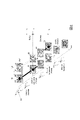
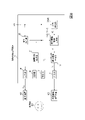
- FIG. 1 is a block diagram for explaining the functional configuration of the pseudo-tactile sense presentation device of the embodiment.
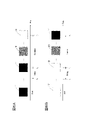
- FIG. 2 is a diagram for illustrating the flow of an experiment that is a premise of the embodiment.
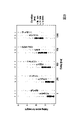
- FIG. 3 is a diagram for exemplifying experimental results that are the premise of the embodiment.
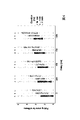
- FIG. 4 is a diagram for exemplifying experimental results that are the premise of the embodiment.
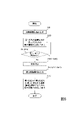
- FIG. 5 is a flow diagram for explaining the processing of the embodiment. 6A and 6B are diagrams for illustrating the visual information presented.
- FIG. 7 is a flow diagram for explaining the processing of the embodiment.
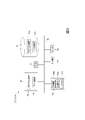
- FIG. 8 is a block diagram for explaining the functional configuration of the pseudo-tactile sense presentation device of the embodiment.
- FIG. 9 is a block diagram illustrating the hardware configuration of the pseudo-tactile sense presentation device of this embodiment.
- the display device displays an image 110 with a black square 111 drawn on a gray background 115 or an image 120 with a white square 121 drawn on a gray background 125 (Start). .
- the subject presses the key 132 with the finger 131 while looking at the displayed image 110 or 120 .
- the brightness of the square 111 or 121 displayed on the display device is changed stepwise over a certain time (Duration).
- FIG. 3 exemplifies the experimental results regarding the feeling of heaviness for all subjects.
- the horizontal axis in FIG. 3 represents Delay [ms], and the vertical axis represents the evaluation score of the sense of weight (evaluation score on a scale of 1 to 5). The higher the evaluation score, the greater the feeling of weight.
- Durations of 500, 1000, and 2000 [ms] are represented by a, b, and c, respectively.
- the evaluation scores averaged for each subject under each experimental condition are plotted.
- Delay and Duration have a significant effect on the feeling of heaviness. rice field.
- FIG. 4 shows the experimental results regarding the feeling of hardness.
- the horizontal axis in FIG. 4 represents Delay [ms], and the vertical axis represents the hardness evaluation score (five-level evaluation score from 1 to 5). The larger the evaluation score, the larger the feeling of hardness.
- Durations of 500, 1000, and 2000 [ms] are represented by a, b, and c, respectively.
- FIG. 4 also plots the evaluation scores averaged for each subject under each experimental condition. As exemplified in FIG. 4, Delay and Duration have a significant effect on the feeling of hardness. rice field.
- the brightness of the square 111 or 121 is changed according to the movement of the finger without spatially reproducing the movement of the finger (the action of pressing the key).
- temporal factors such as , Delay and Duration
- pseudo-tactile sensations such as weight, hardness, and unevenness.
- Such laws of nature were hitherto unknown.
- the brightness of the square in the image was changed stepwise over time.
- this law of nature requires a change delay amount corresponding to the time from when the operation is performed until the state change starts, and a change continuation amount corresponding to the time from the start to the end of the state change. This is generally true when manipulating quantities. Furthermore, the change continuation amount has a close relationship with the change speed corresponding to the change amount per unit time of the state. So this law of nature also holds true when manipulating the rate of change. In addition, such a law of nature is based on the fact that when an operation based on the motion of a body part of a human or animal other than the subject is performed, the subject is watching the situation, and at least some of the visual information being presented to the subject. This holds true even when the state representing the color attribute is changed step by step with the lapse of time.
- the state representing at least one of the color attributes changes stepwise over time based on the visual adjustment information. It generates and outputs a presentation signal for presenting visual information.
- this visual adjustment information corresponds to the change delay amount corresponding to the time from the input of the operation information to the start of the change in the state, or the time from the start to the end of the change in the state. or the rate of change corresponding to the amount of change per unit time of the state.
- This information is based on the newly discovered laws of nature described above, and is information that would not be used for pseudo-tactile presentation without such a discovery.
- the user can perceive a pseudo-tactile sensation regardless of the spatial correspondence between the visual information and the user's movement.
- the pseudo-tactile sense presentation device 1 of the present embodiment includes a visual adjustment information generation unit 11, a presentation signal generation unit 12, an output unit 13, an input unit 14, an operation detection unit 15, and a visual adjustment information generation unit. 17, a control unit 18, and a storage unit 19, and executes each process based on the control of the control unit 18.
- FIG. Input information to the pseudo-tactile sense presentation device 1 and information obtained by each unit are stored in the storage unit 19, and are read and used as necessary.
- the hardware configuration of the pseudo-tactile sense presentation device 1 will be described later.
- the input unit 14 of the pseudo-tactile presentation device 1 is connected to the operating device 101 by wire or wirelessly.
- the operation device 101 is a device that detects an operation based on the motion of the body part of the user 100 .
- a device that detects an operation performed while the body part of the user 100 is in contact with an object can be used as the operation device 101 .
- the operation device 101 is a physical key (for example, a key of a keyboard) that is pressed by the finger of the user 100 will be explained.
- FIG. 1 is only an example, and any device can be used as long as it detects an operation based on the motion of the body part of the user 100 (for example, hands, fingers, feet, head, face, eyes, etc.). You may use it as the operating device 101.
- FIG. 1 is only an example, and any device can be used as long as it detects an operation based on the motion of the body part of the user 100 (for example, hands, fingers, feet, head, face, eyes, etc.). You may use it as the operating device 101.
- FIG. 1 is only an example, and any device can be used as long as it detects an operation based on the motion of the body part of the user 100 (for example, hands, fingers, feet, head, face, eyes, etc.). You may use it as the operating device 101.
- a visual information presentation device 102 is connected to the output unit 13 of the pseudo-tactile presentation device 1 by wire or wirelessly.
- the visual information presentation device 102 is a device that presents visual information representing color attributes.
- the "visual information" may be any information that represents color attributes.
- the visual information is an image and the visual information presentation device 102 is a display (for example, a liquid crystal display) that displays (presents) the image will be exemplified.
- a display for example, a liquid crystal display
- any device that presents visual information representing color attributes may be used as the visual information presentation device 102 .
- the visual adjustment information generator 11 of the pseudo-tactile sense presentation device 1 generates information V 0 representing initial visual information.
- “visual information” is information representing color attributes. Any state that represents the color attribute of the initial visual information may be used.
- the "state representing the color attribute” may be the state of the color attribute itself (for example, hue, saturation, or luminance or lightness), or the state for making the apparent color attribute perceived. may For example, images having pixels with different color attributes such as brightness naturally have different perceived color attributes.
- the "state representing a color attribute” means a state corresponding to the finally perceived color attribute.
- Information V0 representing initial visual information is sent to the presentation signal generator 12 (step S11).
- the presentation signal generation unit 12 uses the input information V 0 representing the initial visual information to generate and output a presentation signal V t for presenting the visual information whose color attribute is in the first state. .
- the presentation signal Vt is information for presenting visual information at each time t .
- the "first state” may be a state representing the color attribute of the initial visual information, or may be a state representing other color attributes.
- the "first state” may be a fixed specific state (predetermined specific state that does not change for each operation), or a changeable state (for example, based on input information, random numbers, etc.) state that can change from time to time). However, by fixing the first state to a specific state, the difference in the pseudo tactile sense according to the visual adjustment information becomes clear.
- the visual information in the first state is the image of the black square 111 (for example, the image at the time of “Start” in FIGS. 2 and 6A), and when the white A case of an image of a square 121 (for example, the image at "Start” in FIGS. 2 and 6B) is illustrated.
- a state representing other color attributes may be set as the first state.
- a presentation signal V t for presenting visual information in the first state is sent to the visual information presentation device 102 .
- the visual information presentation device 102 presents the visual information in the first state at each time t according to this presentation signal Vt. For example, if the visual information in the first state is an image of a black square 111, the visual information presentation device 102 displays that image (eg, the image at "Start" in FIGS. 2 and 6A). For example, if the visual information in the first state is the image of the white square 121, the visual information presentation device 102 presents the image (for example, the image at the time of "Start" in FIGS. 2 and 6B) (step S121 ).
- the user 100 operates the operation device 101 (operation based on the motion of a body part) at an arbitrary timing while viewing an image (visual information) displayed by the visual information presentation device 102 .
- the operation device 101 exemplified in this embodiment is a physical key, and the user 100 can operate the operation device 101 with a finger (pressing operation in the example of this embodiment).
- the operation device 101 outputs operation information (operation information based on the motion of a body part) Oin indicating that the operation has been performed.
- Operation information O in output from the operation device 101 is input to the input unit 14 of the pseudo-tactile presentation device 1 and sent to the operation detection unit 15 .
- the operation detection unit 15 monitors whether or not the operation information O in is input.
- control unit 18 If it is determined that the operation information O in has not been input, the control unit 18 returns the process to step S121. On the other hand, when it is determined that the operation information Oin has been input, the operation detection unit 15 sends a trigger signal T indicating that the operation information Oin has been input to the visual adjustment information generation unit 17 (step S15).
- the visual adjustment information generator 17 to which the trigger signal T is input generates visual adjustment information for gradually changing the state representing the color attribute of the visual information being presented from the first state to the second state over time.
- the second state is a state obtained by gradually changing the state representing at least one of the color attributes of the first state.
- the second state is obtained by gradually changing at least one of the color attributes of the initial visual information in the first state (for example, hue, saturation, or at least part of luminance or lightness).
- the second state is the state obtained by gradually changing the state representing the apparent color attribute of the initial visual information in the first state (for example, the density of pixels to be displayed).
- the first state may be different from the second state, or may be the same state as the second state.
- the second state may be a fixed state (predetermined specific state that does not change for each operation) or a changeable state (for example, input information, random numbers, etc.). It may be a state that can change for each operation).
- a specific state predetermined specific state
- the difference in the pseudo tactile sensation according to the visual adjustment information A becomes clear.
- both the first state and the second state to specific states fixing both the first state and the second state to specific states in each operation
- the difference in pseudo-tactile sensation becomes clearer.
- the visual adjustment information A is based on a hitherto unknown law of nature.
- a specific example of the change delay amount is as follows. A change in the state representing the color attribute of the presented visual information (from the first state to the second time De1 until the gradual change to the state) starts. The time De2 from when the operation device 101 is operated to when the state representing the color attribute of the presented visual information starts to change. - Information that can identify time De1 or De2. There is no limit to the amount of delay change, but for example, any time De1 or De2 between 0-1000 [ms] or information that can specify the time De1 or De2 may be used as the amount of delay change. .
- the state representing the same color attribute may change step by step from the first state to the second state (for example, the brightness continues to change step by step with the passage of time).
- the states representing the color attributes of may change stepwise at the same time (for example, hue and brightness may continue to change stepwise at the same time over time), or different color attributes over time
- the state representing the may change sequentially (for example, in the first half, the luminance changes gradually over time, and in the second half, the hue changes gradually over time, etc.) .
- There is no limit to the size of the amount of continuation of change but for example, any time Du1 between 0.5 and 2 [s] or information that can specify the time Du1 may be used as the amount of continuation of change.
- a change amount Cr1 per unit time of the state representing the color attribute of the presented visual information from the first state to the second state.
- the presentation state during the period from when the operation information O in is input to any of the input unit 14, the operation detection unit 15, and the visual adjustment information generation unit 17 until the state representing the color attribute of the visual information changes to the second state.
- Cr2 is the amount of change per unit time of the state representing the color attribute of visual information.
- ⁇ Information that can identify any one of the amount of change Cr1, Cr2, and Cr3 per period.
- the amount of change per unit time of the state representing the color attribute of visual information may be, for example, the amount of change per unit time of a single color attribute (e.g., luminance), or may be the amount of change per unit time of a plurality of color attributes (e.g., , hue and luminance), or the amount of change per unit time of a state representing apparent color attributes (for example, the density of displayed pixels).
- the amount of change per unit time of the state representing the color attribute of visual information may be constant from the first state to the second state, or may not be constant (changes over time). may be used).
- the change amounts Cr1, Cr2, and Cr3 per unit time that change from the first state to the second state in 0.5-2 [s] or Information that can specify the amounts of change Cr1, Cr2, and Cr3 per unit time may be used as the rate of change.
- the visual adjustment information A allows the presentation signal generation unit 12 to uniquely specify at least one of (1) a change delay amount, (2) a change continuation amount, or (3) a change speed (visual adjustment parameter). Information. Any information may be used as the visual adjustment information A as long as it is such information. For example, (1) focusing on the change delay amount, if the presentation signal generator 12 does not use a predetermined constant value as the change delay amount, the visual adjustment information A should include at least the change delay amount. For example, focusing on (2) the amount of continuous change or (3) the rate of change, if the first state and the second state are predetermined, the visual adjustment information A is at least the amount of continuous change or the rate of change. Either should be included.
- the visual adjustment information A should include at least information about the first state and the second state.
- the visual adjustment information A may include information indicating which state representing the color attribute changes in stages over time, or how the state representing the color attribute changes in stages. It may also include information indicating whether it changes over time.
- the visual adjustment information generator 17 sends the visual adjustment information A to the presentation signal generator 12 (step S172).
- the presentation signal generation unit 12 to which the visual adjustment information A is input uses the input visual adjustment information A and the information V 0 representing the initial visual information, and changes the state representing at least one color attribute step by step over time.
- a presentation signal Vt is generated for presenting (displaying) changing visual information (visual information that gradually changes from the first state to the second state over time).
- the presentation signal generation unit 12 causes the state representing the color attribute of the initial visual information represented by the information V 0 to change step by step over time from the first state to the second state. Generating a presentation signal V t for presenting visual information.
- a visual adjustment parameter which is at least one of a change delay amount, a change continuation amount, and a change speed of the visual information, is uniquely determined based on the visual adjustment information A.
- FIG. Items that cannot be determined based on the visual adjustment information A may be determined in advance, may be determined based on an input, or may be determined at random.
- the presentation signal Vt is sent to the visual information presentation device 102, and the visual information presentation device 102 presents the visual information at each time t according to this presentation signal Vt .
- the visual information in the first state is an image of a black square 111
- the following visual information is presented (FIGS. 2 and 6A).
- time t 0 when operation information O in is input to any of the input unit 14, operation detection unit 15, and visual adjustment information generation unit 17, or when the operation device 101 is operated
- time t 1 a point in time when a time (Delay) corresponding to the change delay amount has elapsed from the point in time t 0
- an image of a black square 111 (visual information in the first state) is presented.
- the visual information in the first state is an image of a white square 121
- the following visual information is presented (FIGS. 2 and 6B).
- time t 0 when operation information O in is input to any of the input unit 14, operation detection unit 15, and visual adjustment information generation unit 17, or when the operation device 101 is operated
- time t 1 the time when the time (Delay) corresponding to the change delay amount has elapsed from the time t 0
- the image of the white square 121 (visual information in the first state) is presented.
- the visual information in the first state is the image of the black square 111
- the following visual information may be presented.
- the pseudo-tactile presentation device 1 displays at least one color attribute based on the visual adjustment information.
- a presentation signal for presenting visual information whose state changes stepwise over time is generated and output, and the visual information presentation device 102 presents the visual information to the user 100 .
- the visual adjustment information is a change delay amount corresponding to the time from the input of the operation information to the start of the state change, or a change corresponding to the time from the start to the end of the state change.
- a visual adjustment parameter that is at least one of a continuous amount and a rate of change corresponding to the amount of change in the state per unit time.
- Non-Patent Document 1 in order to perceive a pseudo-tactile sensation, spatio-temporal velocity and acceleration information of hand and finger movements are measured by a computer mouse, pen tablet, motion sensor, etc., and the hand is measured. It was necessary to draw on the screen an avatar that has a spatio-temporal correspondence with the movement of the fingers. Therefore, in an environment where only ON/OFF information can be input, such as keys and buttons, it was not possible to obtain speed and acceleration information corresponding to the movement of the hand or fingers, and it was not possible to perceive a pseudo-tactile sensation. .
- the method of the present embodiment it is possible to perceive a pseudo-tactile sense only by temporal correspondence such as change delay amount, change continuation amount, and change speed without using spatial correspondence. Therefore, it is possible to perceive a pseudo-tactile sensation in an environment in which operation can be performed based on at least some motion of a body part (for example, a motion expressing an intention to turn ON/OFF).
- an environment that can present visual information in which the state representing any color attribute changes step by step over time for example, an environment where an image can be displayed on a small screen such as a smart watch, or , an environment where one LED light source can be lit at any brightness
- the method of this embodiment does not require visual acceleration information in the sense of a spring-mass-damper system, and even if the state representing the color attribute of the visual information changes at a constant speed, the pseudo-tactile sensation is perceived. be able to.
- the method of the present embodiment does not require any spatial correspondence between the presented visual information and the body part or operating device, but only temporal correspondence such as change delay amount, change continuation amount, and change speed. It is possible to perceive a pseudo-tactile sensation.
- the color attributes for example, color and luminance
- a psychological effect that is, a pseudo-tactile sensation can be produced. Therefore, even if the pseudo-tactile sense presentation device 1 does not have a large computing power, it is possible to perceive the pseudo-tactile sense.
- the difference in the pseudo tactile sense according to the visual adjustment information becomes clear. Therefore, it is desirable to fix at least one of the first state and the second state to a specific state. In particular, if both the first state and the second state are fixed to respective specific states, the difference in the pseudo tactile sense according to the visual adjustment information becomes clearer. Therefore, it is desirable to fix both the first state and the second state to specific states.
- the operation device 101 be a device that receives an operation performed while the body part is in contact with an object and outputs operation information based on the operation.
- the visual adjustment information is generated (step S172), and the visual information that changes stepwise from the first state to the second state is presented.
- a presentation signal was generated and output (step S122).
- this is not a limitation of the invention and other processing sequences may be used to implement the invention.
- the visual adjustment information is generated, and the presentation signal is generated for presenting the visual information that changes stepwise from the first state to the second state. You can Such modifications are shown below. In the following description, differences from the items described above will be mainly described, and the same reference numerals will be used for common parts to simplify the description.
- the visual adjustment information generator 11 of the pseudo-tactile sense presentation device 1 generates information V 0 representing initial visual information.
- Information V0 representing initial visual information is sent to the presentation signal generator 12 (step S11).
- the visual adjustment information generation unit 17 generates visual adjustment information A for gradually changing the state representing the color attribute of the visual information being presented from the first state to the second state over time.
- the visual adjustment information generator 17 sends the visual adjustment information A to the presentation signal generator 12 (step S172').
- the presentation signal generation unit 12 uses the input information V 0 representing the initial visual information and the visual adjustment information A to generate the presentation signal V t for presenting the visual information whose state representing the color attribute is the first state. and a presentation signal V for presenting visual information in which the state representing at least one of the color attributes changes stepwise over time (visual information that changes stepwise from the first state to the second state over time). t is generated (step S12).
- a presentation signal V t for presenting visual information in the first state is sent to the visual information presentation device 102 .
- the visual information presentation device 102 presents the visual information in the first state at each time t according to this presentation signal Vt (step S121').
- the user 100 operates the operation device 101 (operation based on the motion of a body part) at an arbitrary timing while viewing an image (visual information) displayed by the visual information presentation device 102 .
- the operation device 101 outputs operation information (operation information based on the motion of a body part) Oin indicating that the operation has been performed.
- Operation information O in output from the operation device 101 is input to the input unit 14 of the pseudo-tactile presentation device 1 and further sent to the operation detection unit 15 .
- the operation detection unit 15 monitors whether or not the operation information O in is input. If the operation information O in has not been input, the control unit 18 returns the process to step S121′.
- the operation detection unit 15 sends a trigger signal T indicating that the operation information O in has been input to the presentation signal generation unit 12 (step S15′).
- the presentation signal generation unit 12 to which the trigger signal T is input generates visual information in which the state representing at least one of the color attributes changes stepwise with the passage of time (a stepwise change from the first state to the second state with the passage of time).
- a presentation signal V t for presenting visual information to be displayed is sent to the visual information presentation device 102 .
- the visual information presentation device 102 presents the visual information at each time t according to this presentation signal Vt (step S122').
- This embodiment is a modification of the first embodiment, and differs from the first embodiment in that visual information is generated using visual adjustment information based on operation content.
- the pseudo-tactile sense presentation device 2 of the present embodiment includes a visual adjustment information generation unit 11, a presentation signal generation unit 12, an output unit 13, an input unit 14, an operation detection unit 15, and a visual adjustment information generation unit. 27, a control unit 18, and a storage unit 19, and each process is executed based on the control of the control unit 18.
- FIG. The hardware configuration of the pseudo-tactile sense presentation device 2 will be described later.
- An operation device 101 is connected to the input unit 14 of the pseudo-tactile presentation device 2 by wire or wirelessly.
- a visual information presentation device 102 is connected to the output unit 13 of the pseudo-tactile presentation device 2 by wire or wirelessly.
- the operating device 101 and the visual information presentation device 102 may be of any type.
- the storage unit 19 stores association information (for example, a table) that associates a plurality of operation contents with visual adjustment information corresponding to each of the operation contents.
- the operation content stored in the association information may be the operation content based on the motion of a body part performed on the operation device 101, or may be an operation device (second operation device) other than the operation device 101 (not shown). ) may be the operation content based on the motion of the body part.
- an example will be described in which the operation content based on the motion of the body part performed on the operation device 101 is stored in the storage unit 19 .
- this is not a limitation of the invention.
- the contents of a plurality of operations stored in the storage unit 19 may be of any kind.
- the storage unit 19 may store a plurality of operation contents with different operation time lengths and/or operation counts for the operation device 101 .
- the operation device 101 is a physical key, it stores operation contents such as "pressing operation performed only once for a short time", “pressing operation performed twice successively for a short time”, and “pressing operation performed for a long time”. Keep However, this does not limit the invention.
- any kind of visual adjustment information may be associated with each of a plurality of operation contents.
- the visual adjustment information associated with each of the plurality of operation contents are not all the same, and at least some of the visual adjustment information are different from each other.
- different values of the same visual adjustment parameter may be associated with different operation contents.
- the value of the visual adjustment parameter specified by the visual adjustment information associated with certain operation content first operation content
- the value of the visual adjustment parameter specified by the visual adjustment information associated with the second operation content may be different from the value of the visual adjustment parameter specified by the visual adjustment information associated with the second operation content different from the content.
- different visual adjustment parameters may be associated with different operation contents.
- a visual adjustment parameter for example, a change delay amount specified by visual adjustment information associated with certain operation content (first operation content) may be changed to another operation content (second operation content different from the first operation content). may be different from the visual adjustment parameter (eg, change continuation amount) specified by the visual adjustment information associated with .
- visual adjustment information corresponding to a pseudo tactile sensation having at least one of a greater sense of weight, hardness, and unevenness may be associated with an operation content that takes a longer time to operate the operation device 101 .
- an operation content with a longer operation time on the operation device 101 may be associated with visual adjustment information with a larger change delay amount and/or a change continuation amount, or may be associated with visual adjustment information with a lower change speed. good.
- the greater the number of times the operation device 101 is operated the greater the pseudo tactile sensation of at least one of the feeling of weight, the feeling of hardness, and the feeling of unevenness.
- Corresponding vision adjustment information may be associated. For example, the greater the number of times the operation device 101 is operated, the greater the change delay amount and/or change continuation amount of visual adjustment information may be associated, or the slower the change speed may be associated with visual adjustment information.
- the operation information O representing the content of the operation is output from the operation device 101.
- FIG. Among such operation information O only operation information representing specific operation contents (for example, pressing operation performed for a long time) is treated as the above-mentioned operation information O in (operation information based on the motion of a body part).
- This specific operation content may be any one of a plurality of operation content stored in the correspondence information of the storage unit 19, or may be other than that.
- FIG. 1 When the user 100 performs an operation on the operation device 101 using a body part, operation information O representing the details of the operation is sent to the input unit 14 and then to the operation detection unit 15 .
- the operation detection unit 15 sends the input operation information O to the visual adjustment information generation unit 27 (step S261).
- the visual adjustment information generation unit 11 executes the process of step S11 described in the first embodiment.
- Operation information O is input to the visual adjustment information generation unit 27 .
- the visual adjustment information generation unit 27 refers to the association information in the storage unit 19, and extracts the visual adjustment information associated with the operation content represented by the operation information O (for example, a pressing operation performed only once for a short time). , is sent to the presentation signal generator 12 as visual adjustment information A (step S272').
- steps S12, S121', S15', and S122' are as described in Modification 1 of the first embodiment.
- the value of the visual adjustment parameter when the operation content is the first operation content is It can be made different from the value of the visual adjustment parameter when the content of the second operation is different from the content of the first operation.
- different pseudo tactile sensations can be presented depending on whether the operation content is the first operation content or the second operation content.
- the visual adjustment parameter when the operation contents are the first operation contents is changed to the visual adjustment parameter when the operation contents are the first operation contents. It can be made different from the visual adjustment parameter at the time of the second operation content different from the content. Thereby, different pseudo tactile sensations can be presented depending on whether the operation content is the first operation content or the second operation content.
- the pseudo tactile sensation that is correlated with the operation content can be presented.
- the present embodiment is a modification of the first embodiment, and differs from the first embodiment in that visual information is generated using visual adjustment information based on an operation state.
- the pseudo-tactile sense presentation device 3 of the present embodiment includes a visual adjustment information generation unit 11, a presentation signal generation unit 12, an output unit 13, an input unit 14, an operation detection unit 15, a state detection unit 36, It has a visual adjustment information generation unit 37 , a control unit 18 and a storage unit 19 , and executes each process under the control of the control unit 18 .
- a hardware configuration of the pseudo-tactile presentation device 3 will be described later.
- An operation device 101 is connected to the input unit 14 of the pseudo-tactile presentation device 3 by wire or wirelessly.
- a visual information presentation device 102 is connected to the output unit 13 of the pseudo-tactile presentation device 3 by wire or wirelessly.
- the operation device 101 and the visual information presentation device 102 may be of any type, but in this embodiment, the operation device 101 is a touch panel.
- association information (for example, a table) that associates a plurality of operation states with visual adjustment information corresponding to each of the operation states is stored in the storage unit 19 .
- the operation state stored in the association information may be an operation state based on a motion of a body part performed on the operation device 101, or may be an operation device other than the operation device 101 (not shown) (second operation device ) may be an operation state based on the motion of a body part performed on the device.
- second operation device may be an operation state based on the motion of a body part performed on the device.
- any number of operation states may be stored in the storage unit 19 .
- a plurality of operation states with different speeds and/or strengths of operations on the operation device 101 may be stored in the storage unit 19 .
- the operation states such as “slow operation state”, “quick operation state”, “strong force operation state”, and “weak force operation state” are stored.
- this does not limit the invention.
- any kind of visual adjustment information may be associated with each of a plurality of operation contents.
- the visual adjustment information associated with each of the plurality of operation contents are not all the same, and at least some of the visual adjustment information are different from each other.
- different values of the same visual adjustment parameter may be associated with different operation states.
- the value of the visual adjustment parameter specified by the visual adjustment information associated with a certain operation state first operation It may be different from the value of the visual adjustment parameter specified by the visual adjustment information associated with (second operation state different from the state).
- different visual adjustment parameters may be associated with different operation states. For example, if a visual adjustment parameter (for example, change delay amount) specified by visual adjustment information associated with a certain operation state (first operation state) is changed to another operation state (a second operation state different from the first operation state). may be different from the visual adjustment parameter (eg, change continuation amount) specified by the visual adjustment information associated with .
- visual adjustment information corresponding to a pseudo tactile sensation in which at least one of a feeling of weight, a feeling of hardness, and a feeling of unevenness decreases as the operation state becomes slower may be associated.
- visual adjustment information with a smaller change delay amount and/or change continuation amount may be associated, or visual adjustment information with a faster change speed may be associated.
- visual adjustment information corresponding to a pseudo tactile sense in which at least one of the sense of weight, the sense of hardness, and the sense of unevenness increases as the operation state with stronger force may be associated.
- an operation state with stronger force may be associated with visual adjustment information with a larger change delay amount and/or a change continuation amount, or may be associated with visual adjustment information with a lower change speed.
- the operating device 101 when an operation based on the motion of a body part is performed on the operating device 101, the operating device 101 outputs operation information O representing the content of the operation and the operating state.
- operation information O representing the content of the operation and the operating state.
- operation information O only operation information representing a specific operation content (for example, long press) is treated as the above-described operation information O in (operation information based on the motion of a body part).
- FIG. 1 After the processing of steps S11 and S121 described in the first embodiment, the processing of step S15 is performed.
- the operation device 101 exemplified in this embodiment is a physical key, and the user 100 can operate the operation device 101 with a finger (touch operation in the example of this embodiment).
- the operating device 101 When the operating device 101 is operated based on the motion of a body part, the operating device 101 outputs operation information O representing the content of the operation and the operating state. Operation information O output from the operation device 101 is input to the input unit 14 of the pseudo-tactile presentation device 1 and sent to the operation detection unit 15 .
- step S15 operation information O representing specific operation content
- the control section 18 returns the process to step S121.
- the operation detection unit 15 sends a trigger signal T indicating that the operation information O in has been input to the visual adjustment information generation unit 37, and sets the operation information O to the state. Send to the detector 36 .
- the state detection unit 36 to which the operation information O is input extracts the operation state represented by the operation information O, and sends the information C representing the operation state to the visual adjustment information generation unit 37 (step S361).
- the visual adjustment information generation unit 37 refers to the association information in the storage unit 19, extracts the visual adjustment information associated with the operation state (for example, slow operation state) indicated by the input information C, and extracts the visual adjustment information. is sent to the presentation signal generator 12 as visual adjustment information A (step S372).
- step S122 The subsequent processing of step S122 is as described in the first embodiment.
- the value of the visual adjustment parameter when the operation state is the first operation state is It can be made different from the value of the vision adjustment parameter when the state is in the second operation state different from the first operation state.
- different pseudo tactile sensations can be presented depending on whether the operation state is the first operation state or the second operation state.
- the visual adjustment parameters when the operation state is the first operation state are set to the visual adjustment parameters when the operation state is the first operation state. It can be made different from the visual adjustment parameter in the second operation state different from the state. Thereby, different pseudo tactile sensations can be presented depending on whether the operation state is the first operation state or the second operation state.
- the pseudo tactile sensation correlated with the operation state can be presented.
- Modification 1 of the third embodiment If the operation state stored in the association information in the storage unit 19 is an operation state based on a motion of a body part performed on a second operation device other than the operation device 101 (not shown), When an operation based on the motion of the body part is performed, operation information O representing the operation state is output from the second operation device. Further, when an operation based on the motion of a body part is performed on the operation device 101, the operation information O in representing the operation state is output from the operation device 101. FIG. The operation information O and the operation information O in are respectively sent to the input section 14 and further sent to the operation detection section 15 . Other processing is the same as in the third embodiment.
- This embodiment is a modification of the first embodiment, and differs from the first embodiment in that visual information is generated using visual adjustment information based on the state of the target device (device state).
- the pseudo-tactile sense presentation device 4 of the present embodiment includes a visual adjustment information generation unit 11, a presentation signal generation unit 12, an output unit 13, an input unit 14, an operation detection unit 15, a state detection unit 46, It has a visual adjustment information generation unit 47 , a control unit 18 and a storage unit 19 , and executes each process under the control of the control unit 18 .
- the hardware configuration of the pseudo-tactile sense presentation device 4 will be described later.
- An operation device 101 is connected to the input unit 14 of the pseudo-tactile presentation device 4 by wire or wirelessly.
- a visual information presentation device 102 is connected to the output unit 13 of the pseudo-tactile presentation device 4 by wire or wirelessly.
- the operation device 101 and the visual information presentation device 102 may be of any type, but in this embodiment, the operation device 101 is a physical key (for example, A remote controller button) will be described as an example.
- the storage unit 19 stores association information (for example, a table) that associates a plurality of device states (states of the target device) with visual adjustment information corresponding to each of the device states. store it in
- the target device may be the pseudo-tactile presentation device 4, a device including the pseudo-tactile presentation device 4 (for example, a remote controller having physical keys as the operating device 101), or a pseudo-tactile presentation device. 4 external device. Further, the target device may be a device having a function correlated with the function of the pseudo-tactile presentation device 4, or may be a device having a function uncorrelated with the function of the pseudo-tactile presentation device 4. .
- the plurality of device states stored in the storage unit 19 may be of any type.
- a plurality of device states with different functional states and/or environments may be stored in the storage unit 19 .
- the device is a remote controller that has a function of increasing the volume each time a button is pressed
- device states such as "volume level” and "temperature” are stored.
- this does not limit the invention.
- Any visual adjustment information may be associated with each of the plurality of device states.
- the visual adjustment information associated with each of the plurality of device states is not all the same, and at least some of the visual adjustment information is different from each other.
- different values of the same visual adjustment parameter may be associated with different device states.
- the value of the visual adjustment parameter specified by the visual adjustment information associated with a certain device state is different from that of other device states (first state and It may be different from the value of the visual adjustment parameter specified by the visual adjustment information associated with the different second state).
- different visual adjustment parameters may be associated with different device states.
- a visual adjustment parameter for example, change delay amount specified by visual adjustment information associated with a device state (first state) is associated with another device state (second state different from the first state). It may be different from the visual adjustment parameter (for example, continuous change amount) specified by the visual adjustment information provided.
- the device state and the pseudo-tactile sensation presented by the visual information may be based on the visual adjustment information associated with the device state. For example, the more transitional the device state is (for example, the more the remote controller button is pressed and the volume is increased), the more weighty, hard, and bumpy the device state. Visual adjustment information corresponding to a pseudo-tactile sense of whichever is greater may be associated. For example, a device state in a more transitional functional state may be associated with visual adjustment information having a larger change delay amount and/or a change continuation amount, or may be associated with visual adjustment information having a smaller change speed. good too.
- visual adjustment information corresponding to a pseudo tactile sense in which at least one of a feeling of weight, a feeling of hardness, and a feeling of unevenness increases as the temperature of the device increases may be associated.
- a device state at a higher temperature may be associated with visual adjustment information with a larger change delay amount and/or a change continuation amount, or may be associated with visual adjustment information with a lower change speed.
- step S15 After the processing of steps S11 and S121 described in the first embodiment, the processing of step S15 is performed. However, if it is determined in step S15 that the operation information O in has not been input, the control unit 18 returns the process to step S121. On the other hand, when it is determined that the operation information O in has been input, the operation detection unit 15 sends a trigger signal T indicating that the operation information O in has been input to the visual adjustment information generation unit 17 and the state detection unit 46 .
- the state detection unit 46 to which the trigger signal T is input detects the device state of the target device and sends information C representing the device state to the visual adjustment information generation unit 47 (step S461).
- the visual adjustment information generation unit 47 refers to the association information in the storage unit 19, extracts the visual adjustment information associated with the device state (for example, the volume level) represented by the input information C, and converts it to It is sent to the presentation signal generator 12 as visual adjustment information A (step S472).
- step S122 The subsequent processing of step S122 is as described in the first embodiment.
- the value of the visual adjustment parameter when the device state is the first state is assigned to the device state can be different from the value of the visual adjustment parameter when in a second state different from the first state.
- different pseudo tactile sensations can be presented depending on whether the device state is the first state or the second state.
- the visual adjustment parameters when the device state is in the first state are set to the visual adjustment parameters when the device state is in the first state.
- the visual adjustment parameters can be different in different second states. Thereby, different pseudo tactile sensations can be presented depending on whether the device state is the first state or the second state.
- the pseudo tactile sensation correlated with the device state can be presented.
- Modification 1 of the fourth embodiment As in Modification 1 of the first embodiment, the device state is detected and visual adjustment information is generated before operation information is input to the pseudo-tactile sense presentation device, and the state changes from the first state to the second state in stages. A presentation signal for presenting visual information to be displayed may be generated.
- the state detection unit 46 detects the device state of the target device, and sends information C representing the device state to the visual adjustment information generation unit 47 (step S461).
- the visual adjustment information generation unit 47 refers to the correspondence information in the storage unit 19 and corresponds to the apparatus state represented by the input information C.
- the attached visual adjustment information is extracted and sent to the presentation signal generator 12 as visual adjustment information A (step S472').
- steps S12, S121', S15', and S122' are as described in Modification 1 of the first embodiment.
- the difference of the fifth embodiment from the first to fourth embodiments and their modifications is that the operation information based on the motion of the body part of the user 100 is input to the pseudo-tactile presentation device, and the user 100
- operation information based on motions of other body parts of humans or animals or motions of parts of the motion device is input to the pseudo-tactile presentation device, and that the user 100 sees the situation.
- Others are the same as the first to fourth embodiments and their modifications.
- the pseudo-tactile sensation perceived by the user 100 is an indirect pseudo-tactile sensation such as "seems heavy” and "seems hard”.
- the visual information in which the state representing at least one of the color attributes changes step by step over time based on the visual adjustment information is used.
- An example presented to the person 100 is shown.
- motion information for operating a motion device for example, a crane for a crane game
- the state representing at least one of the color attributes changes over time based on the visual adjustment information.
- the user 100 may be presented with visually changing visual information. Even in such a case, the user 100 perceives an indirect pseudo-tactile sensation such as "seems heavy" and "seems hard”.
- the change delay amount in this case corresponds to the time from when the operation information is output to when the state indicating the color attribute starts to change.
- the pseudo-tactile sense presentation device 6 of this embodiment includes an output section 64 and an operation control section 65 instead of the input section 14 and the operation detection section 15 .
- the configuration of the pseudo-tactile presentation device 6 other than this is the same as any of the pseudo-tactile presentation devices 1 to 4 of the first to fourth embodiments.
- An operating device 601 is connected to the output unit 64 of the pseudo-tactile presentation device 6 by wire or wirelessly.
- the operating device 601 may be any device as long as it performs an action.
- the motion device 601 is a device that performs a motion that exerts a mechanical action on an object.
- the motion device 601 may apply the dynamic action while in contact with the object, or the motion device 601 may apply the dynamic action to the object in a non-contact state.
- Examples of mechanical actions applied to objects are grasping, pinching, lifting, pushing, pulling, compressing, stretching, moving, separating, joining, etc.
- Specific examples of the operating device 601 are a robot, a crane for a crane game, etc., but these are not intended to limit the present invention.
- step S65 the following step S65 is executed.
- the motion controller 65 controls the motion of the motion device 601 .
- the control unit 18 returns the process to step S121.
- the motion control unit 65 can generate and output motion information O out for operating the motion device 601 at arbitrary timing, predetermined timing, or designated timing.
- the output motion information O out is sent to the output unit 64 and then to the motion device 601 .
- the motion device 601 performs motion based on the input motion information Oout .
- the motion control unit 65 sends a trigger signal T indicating that the motion information Oout has been output to the visual adjustment information generation unit 17 (step S65).
- the visual adjustment information generation unit 17 changes the state representing the color attribute of the visual information being presented from the first state to the second state in stages over time.
- the change delay amount corresponds to the time from when the motion information O out is output to when the state representing the color attribute of the visual information starts to change.
- a specific example of (1) the change delay amount in this embodiment is as follows. A change in the state representing the color attribute of the presented visual information (a stepwise change from the first state to the second state) after the motion information O out is output from either the output unit 64 or the motion control unit 65 ) until the start of De1'. A time De2' from when the motion device 601 performs the motion based on the motion information Oout to when the state representing the color attribute of the presented visual information starts to change. - Information that can identify the time De1' or De2'.
- step S122 The subsequent processing of step S122 is as described in the first embodiment.
- step S65' is executed instead of step S15' described in Modification 1 of the first embodiment.
- the motion controller 65 controls the motion of the motion device 601 .
- the control unit 18 returns the process to step S121'.
- the motion control unit 65 can generate and output motion information O out for operating the motion device 601 at arbitrary timing, predetermined timing, or designated timing.
- the output motion information O out is sent to the output unit 64 and then to the motion device 601 .
- the motion device 601 performs motion based on the input motion information Oout .
- the motion control unit 65 sends a trigger signal T indicating that the motion information Oout has been output to the presentation signal generation unit 12 (step S65').
- the preprocessing described in the second embodiment is executed.
- operation information O representing the details of the operation is output from the second operating device.
- the operation information O is sent to the visual adjustment information generator 27 .
- the second operating device may be operated based on the body part of the user 100, or may be operated based on the body part of a human being or an animal other than the user 100.
- FIG. An example of the second operating device is an operating device for controlling the operating device 601 (for example, an operating device for operating a crane in a crane game).
- the operation information O may also be sent to the operation control section 65, and the operation control section 65 may generate and output the operation information O out based on the operation information O (step S261).
- step S11 described in the first embodiment
- step S272' described in the second embodiment
- steps S12 and S121' described in Modification 1 of the first embodiment
- step S65' is executed.
- the process of step S122' described in the modification 1 of the first embodiment is executed.
- the second operating device when an operation based on the motion of a body part is performed on the second operating device (not shown), the second operating device outputs the operation information O representing the operation content and operation state.
- the second operating device may be operated based on the body part of the user 100, or may be operated based on the body part of a human being or an animal other than the user 100.
- FIG. An example of the second operating device is an operating device for controlling the operating device 601 (for example, an operating device for operating a crane in a crane game).
- the operation information O may also be sent to the operation control section 65, and the operation control section 65 may generate and output the operation information O out based on the operation information O.
- the operation information O output from the second operating device is input to the state detection unit 36, and the process of step S361 described in the third embodiment and the process of step S122 described in the first embodiment are executed.
- step S65 is performed after the processes of steps S11 and S121 described in the first embodiment.
- the trigger signal T output from the operation control section 65 is sent to the visual adjustment information generation section 47 and the state detection section 46 .
- the state detection unit 46 to which the trigger signal T is input detects the device state of the target device and sends information C representing the device state to the visual adjustment information generation unit 47 .
- the target device can be anything, but one example of the target device is the operating device 601 (step S461).
- step S472 described in the fourth embodiment and the process of step S122 described in the first embodiment are executed.
- the state detection unit 46 detects the device state of the target device and sends information C representing the device state to the visual adjustment information generation unit 47 .
- the target device can be anything, but one example of the target device is the operating device 601 (step S461).
- step 11 the process of step 11 described in the first embodiment, the process of step S472' described in modification 1 of the fourth embodiment, and the processes of steps S12 and S121' described in modification 1 of the first embodiment. is executed.
- step S65' the process of step S65' described above is executed, and when the trigger signal T is sent to the presentation signal generator 12, the process of step S122' described in the modification 1 of the first embodiment is executed.
- the pseudo-tactile presentation devices 1-4 and 6 in each embodiment are, for example, processors (hardware processors) such as CPUs (central processing units), RAMs (random-access memories), ROMs (read-only memories), etc. It is a device configured by executing a predetermined program on a general-purpose or dedicated computer equipped with a memory or the like. That is, the pseudo-tactile presentation devices 1-4, 6 in each embodiment, for example, have processing circuitry configured to implement each unit they have.
- This computer may have a single processor and memory, or may have multiple processors and memories.
- This program may be installed in the computer, or may be recorded in ROM or the like in advance.
- processing units may be configured using an electronic circuit that independently realizes processing functions, instead of an electronic circuit that realizes a functional configuration by reading a program like a CPU.
- an electronic circuit that constitutes one device may include a plurality of CPUs.
- FIG. 9 is a block diagram illustrating the hardware configuration of the pseudo-tactile presentation devices 1-4 and 6 in each embodiment.
- the pseudo-tactile presentation devices 1-4 and 6 of this example include a CPU (Central Processing Unit) 10a, an input unit 10b, an output unit 10c, a RAM (Random Access Memory) 10d, a ROM (Read Only Memory) 10e, an auxiliary storage device 10f and a bus 10g.
- the CPU 10a of this example has a control section 10aa, an arithmetic section 10ab, and a register 10ac, and executes various arithmetic processing according to various programs read into the register 10ac.
- the input unit 10b is an input terminal for data input, a keyboard, a mouse, a touch panel, and the like.
- the output unit 10c is an output terminal for outputting data, a display, a LAN card controlled by the CPU 10a having read a predetermined program, and the like.
- the RAM 10d is SRAM (Static Random Access Memory), DRAM (Dynamic Random Access Memory), or the like, and has a program area 10da in which a predetermined program is stored and a data area 10db in which various data are stored.
- the auxiliary storage device 10f is, for example, a hard disk, an MO (Magneto-Optical disc), a semiconductor memory, or the like, and has a program area 10fa in which a predetermined program is stored and a data area 10fb in which various data are stored.
- the bus 10g connects the CPU 10a, the input section 10b, the output section 10c, the RAM 10d, the ROM 10e, and the auxiliary storage device 10f so that information can be exchanged.
- the CPU 10a writes the program stored in the program area 10fa of the auxiliary storage device 10f to the program area 10da of the RAM 10d according to the read OS (Operating System) program.
- the CPU 10a writes various data stored in the data area 10fb of the auxiliary storage device 10f to the data area 10db of the RAM 10d. Then, the address on the RAM 10d where the program and data are written is stored in the register 10ac of the CPU 10a.
- the control unit 10aa of the CPU 10a sequentially reads these addresses stored in the register 10ac, reads the program and data from the area on the RAM 10d indicated by the read address, and causes the calculation unit 10ab to sequentially execute the calculation indicated by the program, The calculation result is stored in the register 10ac.
- the above program can be recorded on a computer-readable recording medium.
- a computer-readable recording medium is a non-transitory recording medium. Examples of such recording media are magnetic recording devices, optical discs, magneto-optical recording media, semiconductor memories, and the like.
- the distribution of this program is carried out, for example, by selling, assigning, lending, etc. portable recording media such as DVDs and CD-ROMs on which the program is recorded. Further, the program may be distributed by storing the program in the storage device of the server computer and transferring the program from the server computer to other computers via the network.
- a computer that executes such a program for example, first stores the program recorded on a portable recording medium or transferred from a server computer in its own storage device. When executing the process, this computer reads the program stored in its own storage device and executes the process according to the read program. Also, as another execution form of this program, the computer may read the program directly from a portable recording medium and execute processing according to the program, and the program is transferred from the server computer to this computer.
- the processing according to the received program may be executed sequentially.
- the above-mentioned processing is executed by a so-called ASP (Application Service Provider) type service, which does not transfer the program from the server computer to this computer, and realizes the processing function only by its execution instruction and result acquisition.
- ASP Application Service Provider
- the program in this embodiment includes information that is used for processing by a computer and that conforms to the program (data that is not a direct instruction to the computer but has the property of prescribing the processing of the computer, etc.).
- the device is configured by executing a predetermined program on a computer, but at least part of these processing contents may be implemented by hardware.
- the present invention is not limited to the above-described embodiments.
- the operation device 101 and the visual information presentation device 102 are provided outside the pseudo-tactile presentation device 1-4.
- the operation device 101 may be provided in the pseudo-tactile presentation device 1-4
- the visual information presentation device 102 may be provided in the pseudo-tactile presentation device 1-4.
- the pseudo-tactile presentation device 6 may be provided with the operating device 601
- the pseudo-tactile presentation device 6 may be provided with the visual information presentation device 102 .
- the operation device 101 is a physical key or a touch panel
- Any device may be used as the operation device 101 as long as it outputs operation information (operation information based on an action) indicating that the operation has been performed.
- a physical key such as a keyboard, a touch panel, a pull tab, a knob, a fader, a mouse, a pedal, etc. may be used as the operation device 101 .
- Examples of operations based on these actions include pushing down, pulling in, rotating, sliding, dragging, clicking, swiping, pinching, and stepping.
- virtual presses, pulls, drags, clicks, swipes, pinches, footsteps, etc. can be performed by detecting contact with physical surfaces such as tables and floors using touch detection technology using cameras and electrostatic sensors. may be used as the operating device 101 .
- the case of using the operating device 101 that detects an operation performed while the body part of the user 100 is in contact with an object has been illustrated, but this does not limit the present invention.
- the operation device 101 is a device that detects an operation by body part motion such as waving a hand, nodding, moving an eyeball, or blinking, or an operation by motion device part motion such as grasping, moving, or rotating.
- a motion sensor such as an acceleration sensor or a gyro sensor
- an eye tracker that detects movement.
- the operation information based on the motion of the body part of the user 100 detects the operation based on the motion of the body part that expresses the intention of the user 100 (for example, some ON/OFF intention), and the operation is detected.
- Any device may be used as the operation device 101 as long as it outputs operation information (operation information based on the motion of a body part) indicating that there has been an event.
- the visual information may be any information that represents color attributes.
- visual information may be LED (Light Emitting Diode) light, laser light, projection images, holograms, retinal projection images, and the like.
- the visual information may be information representing a single color, or information representing a pattern composed of multiple colors (for example, a noise image).
- the "state representing the color attribute” may be the state of the color attribute itself, or it may be the state for perceiving the apparent color attribute.
- the “visual information in which the state of the color attribute changes gradually over time” may be visual information in which the color attribute itself changes gradually over time, or the number of information presentations per unit area ( For example, it may be visual information in which the apparent color attribute (that is, the perceived color attribute) changes gradually over time as the number of display pixels, the number of LED light emission, the number of laser light irradiation, etc.) changes. However, it may be visual information in which the apparent color attribute changes step by step with the lapse of time by other methods.
- the visual information presentation device 102 is a display
- a touch panel, VR (Virtual Reality) goggles, LED, laser light irradiation device, projector, 3D hologram display, retinal projection device, etc. may be used as the visual information presentation device 102 .
- the visual information presentation device 102 may be a liquid crystal display or LED, such as physical keys, knobs, faders, etc., provided to the operation device 101, or may be configured integrally with the operation device 101 like a touch panel. It may be a liquid crystal display that is physically independent of the operation device 101, or a projector that projects an image onto a surface such as a table.
- the visual information presentation device 102 may present visual information at a position corresponding to the operating position of the operating device 101, or may present visual information at a position uncorrelated with the operating position.
- visual information may be presented at the touch panel touch position with a finger or at a touch panel position corresponding to that position or operation. may present sensory information at uncorrelated locations.
- the visual information presentation device 102 may be an LED provided on the physical key, or may be a liquid crystal display independent of the physical key.
- the operation device 101 and the visual information presentation device 102 may or may not be linked for functions other than the above-described pseudo-tactile sensation.
- the operation device 101 is an operation button (physical key) of a remote controller
- the visual information presentation device 102 may be a liquid crystal screen or a television screen for displaying the operation content of the remote controller, or may be a visual information presentation device.
- Device 102 may be a liquid crystal display independent of the remote controller.
- the shape of the visual information may also change.
Landscapes
- Engineering & Computer Science (AREA)
- General Engineering & Computer Science (AREA)
- Theoretical Computer Science (AREA)
- Human Computer Interaction (AREA)
- Physics & Mathematics (AREA)
- General Physics & Mathematics (AREA)
- User Interface Of Digital Computer (AREA)
Abstract
擬似触覚提示装置は、動作に基づく操作情報が入力されたときに、視覚調整情報に基づき、少なくとも何れかの色属性を表す状態が時間経過とともに段階的に変化する視覚情報を提示するための提示信号を生成する。ここで視覚調整情報は、当該操作情報が入力されてから当該状態の変化を開始するまでの時間に対応する変化遅延量、または、当該状態の変化を開始してから終了するまでの時間に対応する変化継続量、または、当該状態の単位時間当たりの変化量に対応する変化速度、のうちの少なくともいずれか1つを制御するための情報である。
Description
本発明は、擬似的な触覚を提示する技術に関する。
利用者の手や指のアバタを画面に表示し、そのアバタの動きの大きさを実際の利用者の手や指の動きの大きさに対して大きくしたり小さくしたりすることで、利用者に擬似触覚を与える手法が提案されている(例えば、非特許文献1等参照)。
Samad, Majed and Gatti, Elia and Hermes, Anne and Benko, Hrvoje and Parise, Cesare, "Pseudo-Haptic Weight: Changing the Perceived Weight of Virtual Objects By Manipulating Control-Display Ratio," CHI ’19, pp.1-13, 2019, doi = 10.1145/3290605.3300550.
しかし、従来手法は、利用者の動きとアバタの動きとの間に空間的な対応関係があることを前提しており、これが実用化に制限を課していた。
本発明は、利用者の動きと提示される視覚情報との間の空間的な対応関係にかかわらず、利用者に擬似触覚を知覚させることができる技術を提供する。
第1態様の擬似触覚提示装置は、動作に基づく操作情報が入力されたときに、視覚調整情報に基づき、少なくとも何れかの色属性を表す状態が時間経過とともに段階的に変化する視覚情報を提示するための提示信号を生成する。ここで視覚調整情報は、当該操作情報が入力されてから当該状態の変化を開始するまでの時間に対応する変化遅延量、または、当該状態の変化を開始してから終了するまでの時間に対応する変化継続量、または、当該状態の単位時間当たりの変化量に対応する変化速度、のうちの少なくともいずれか1つを制御するための情報である。
第2態様の擬似触覚提示装置は、動作装置を動作させるための動作情報が出力されるときに、視覚調整情報に基づき、少なくとも何れかの色属性を表す状態が時間経過とともに段階的に変化する視覚情報を提示するための提示信号を生成する。ここで視覚調整情報は、当該動作情報が出力されてから当該状態の変化を開始するまでの時間に対応する変化遅延量、または、当該状態の変化を開始してから終了するまでの時間に対応する変化継続量、または、当該状態の単位時間当たりの変化量に対応する変化速度、のうちの少なくともいずれか1つである視覚調整パラメータを制御するための情報である。
これにより、利用者の動きと提示される視覚情報との間の空間的な対応関係にかかわらず、利用者に擬似触覚を知覚させることができる。
以下、図面を参照して本発明の実施形態を説明する。
[原理]
発明者は以下のような実験を行い、前提となる自然法則(生理学上の法則)を発見した。
[原理]
発明者は以下のような実験を行い、前提となる自然法則(生理学上の法則)を発見した。
<実験手順>
図2に例示するように、灰色の背景115に黒色の正方形111が描かれた画像110、または、灰色の背景125に白色の正方形121が描かれた画像120を表示装置で表示する(Start)。被験者は表示された画像110または120を見ながら指131でキー132を押し下げる。キー132が押し下げられてからある時間(Delay)が経過した後、ある時間(Duration)をかけて、表示装置に表示された正方形111または121の輝度を時間経過とともに段階的に変化させる。すなわち、キー132が押されてから(Start of keystroke)、ある時間(例えば、0, 250, 500, 750, 1000 [ms]のいずれかのDelay)が経過した後、正方形111または121の輝度の変化を開始し(Start of luminance change)、ある時間(500, 1000, 2000 [ms]のいずれかのDuration)をかけて、正方形111を黒色から白色に段階的に変化させるか、または、正方形121の色を白色から黒色に段階的に変化させる。正方形111または121の輝度の変化が終了すると(End of luminance change)、正方形111または121が消え、被験者はキー132の押し下げを終了する(End of keystroke)。正方形111または121の輝度の変化が終了してから一定時間(例えば、500[ms])経過後、被験者がキーを押している間に感じた「重さ感(抵抗感)」「硬さ感」「凹凸感」を5段階評価させ、1から5の評価スコアを入力させた。ランダムな順序で各実験条件(5つのDelayおよび3つのDurationの組み合わせ)での評価を5回ずつ繰り返し、各被験者は合計75回の試行を行った。
図2に例示するように、灰色の背景115に黒色の正方形111が描かれた画像110、または、灰色の背景125に白色の正方形121が描かれた画像120を表示装置で表示する(Start)。被験者は表示された画像110または120を見ながら指131でキー132を押し下げる。キー132が押し下げられてからある時間(Delay)が経過した後、ある時間(Duration)をかけて、表示装置に表示された正方形111または121の輝度を時間経過とともに段階的に変化させる。すなわち、キー132が押されてから(Start of keystroke)、ある時間(例えば、0, 250, 500, 750, 1000 [ms]のいずれかのDelay)が経過した後、正方形111または121の輝度の変化を開始し(Start of luminance change)、ある時間(500, 1000, 2000 [ms]のいずれかのDuration)をかけて、正方形111を黒色から白色に段階的に変化させるか、または、正方形121の色を白色から黒色に段階的に変化させる。正方形111または121の輝度の変化が終了すると(End of luminance change)、正方形111または121が消え、被験者はキー132の押し下げを終了する(End of keystroke)。正方形111または121の輝度の変化が終了してから一定時間(例えば、500[ms])経過後、被験者がキーを押している間に感じた「重さ感(抵抗感)」「硬さ感」「凹凸感」を5段階評価させ、1から5の評価スコアを入力させた。ランダムな順序で各実験条件(5つのDelayおよび3つのDurationの組み合わせ)での評価を5回ずつ繰り返し、各被験者は合計75回の試行を行った。
<実験結果>
図3に全被験者に対する重さ感に関する実験結果を例示する。図3の横軸はDelay[ms]を表し、縦軸は重さ感の評価スコア(1から5の5段階の評価スコア)を表す。評価スコアが大きいほど、重さ感が大きいことを表す。また、500, 1000, 2000 [ms]のDurationをそれぞれa, b, cで表す。図3では、各実験条件での評価スコアを被験者ごとに平均化したものをプロットしてある。図3に例示するように、DelayとDurationが重さ感に有意な影響を与えており、Delayが大きくなるほど、またDurationが長くなるほど(変化が遅くなるほど)、知覚される重さ感が大きくなった。
図3に全被験者に対する重さ感に関する実験結果を例示する。図3の横軸はDelay[ms]を表し、縦軸は重さ感の評価スコア(1から5の5段階の評価スコア)を表す。評価スコアが大きいほど、重さ感が大きいことを表す。また、500, 1000, 2000 [ms]のDurationをそれぞれa, b, cで表す。図3では、各実験条件での評価スコアを被験者ごとに平均化したものをプロットしてある。図3に例示するように、DelayとDurationが重さ感に有意な影響を与えており、Delayが大きくなるほど、またDurationが長くなるほど(変化が遅くなるほど)、知覚される重さ感が大きくなった。
図4に硬さ感に関する実験結果を例示する。図4の横軸はDelay[ms]を表し、縦軸は硬さ感の評価スコア(1から5の5段階の評価スコア)を表す。評価スコアが大きいほど、硬さ感が大きいことを表す。また、500, 1000, 2000 [ms]のDurationをそれぞれa, b, cで表す。図4でも、各実験条件での評価スコアを被験者ごとに平均化したものをプロットしてある。図4に例示するように、DelayとDurationが硬さ感に有意な影響を与えており、Delayが大きくなるほど、またDurationが長くなるほど(変化が遅くなるほど)、知覚される硬さ感が大きくなった。
実験結果は割愛するが凹凸感でも同様に、DelayとDurationが凹凸感に有意な影響を与えていることが分かった。
以上のように、指の動き(キーを押し込む動作)を空間的に再現することなく、指の動きに応じて正方形111または121の輝度を変えるという、直感的ではない状況であるにもかかわらず、DelayやDurationという時間的要因を操作するだけで、重さ感、硬さ感、凹凸感というような擬似触覚を変化させることができた。このように、提示される視覚情報と被験者の動きとの空間的な対応関係にかかわらず、提示される視覚情報の時間的要因を操作するだけで、被験者に擬似触覚を知覚させることができることが分かる。このような自然法則(生理学上の法則)はこれまで知られていなかったものである。なお、この実験では、指でキーが押された際に画像中の正方形の輝度を時間経過とともに段階的に変化させた。しかしながら、この自然法則は、被験者の身体部位の動作に基づく操作が行われた際に、当該被験者に提示中の視覚情報の少なくとも何れかの色属性を表す状態を時間経過とともに段階的に変化させる場合であれば、一般的に成り立つ。なお「視覚情報」とは、色属性を表す情報を意味する。「色属性」とは色の三属性の少なくとも何れかを意味する。色の三属性はHSL色空間の「色相」「彩度」「輝度」であってもよいし、HSV色空間の「色相」「彩度」「明度」であってもよい。すなわち、例えば、色属性は色彩や輝度を表す属性である。また、この実験では、DelayやDurationという時間的要因を操作した。しかし、この自然法則は、当該操作が行われてから当該状態の変化を開始するまでの時間に対応する変化遅延量や、状態の変化を開始してから終了するまでの時間に対応する変化継続量を操作する場合であれば、一般に成り立つ。さらに変化継続量は、当該状態の単位時間当たりの変化量に対応する変化速度とも密接な関係を有する。そのため、この自然法則は、変化速度を操作する場合にも成り立つ。また、このような自然法則は、被験者以外の人間や動物の身体部位の動作に基づく操作が行われた際に、その様子を被験者が見ており、当該被験者に提示中の視覚情報の少なくとも何れかの色属性を表す状態を時間経過とともに段階的に変化させる場合にも、成り立つ。さらには、このような自然法則は、被験者以外のロボット等の動作装置の動作に基づく操作が行われた際に、その様子を被験者が見ており、当該被験者に提示中の視覚情報の少なくとも何れかの色属性を表す状態を時間経過とともに段階的に変化させる場合にも、成り立つ。後者の場合、動作装置の動作に基づく操作が行われたことを契機にすることに代え、当該動作装置を動作させるための動作情報が出力されたことを契機にした場合にも、このような自然法則が成り立つ。ただし、この場合の変化遅延量は、動作情報が出力されてから色属性を表す状態の変化を開始するまでの時間に対応する。このような場合、被験者は「重そう」「硬そう」といった間接的な擬似触覚を知覚する。ここで、変化遅延量、変化継続量、または変化速度のうちの少なくともいずれかを制御することで、このような擬似触覚を変化させることができる。
<自然法則の利用>
各実施形態では、擬似触覚提示装置が、身体部位の動作に基づく操作情報が入力されたときに、視覚調整情報に基づき、少なくとも何れかの色属性を表す状態が時間経過とともに段階的に変化する視覚情報を提示するための提示信号を生成して出力する。ただし、この視覚調整情報は、操作情報が入力されてから当該状態の変化を開始するまでの時間に対応する変化遅延量、または、当該状態の変化を開始してから終了するまでの時間に対応する変化継続量、または、当該状態の単位時間当たりの変化量に対応する変化速度、のうちの少なくともいずれか1つを制御するためのものである。これは新たに発見された上述の自然法則に基づくものであり、このような発見がなければ擬似触覚に提示のために利用されない情報である。このような提示信号に基づく視覚情報が利用者に提示されることにより、当該視覚情報と利用者の動きとの空間的な対応関係にかかわらず、利用者に擬似触覚を知覚させることができる。以下、各実施形態を詳細に説明する。
各実施形態では、擬似触覚提示装置が、身体部位の動作に基づく操作情報が入力されたときに、視覚調整情報に基づき、少なくとも何れかの色属性を表す状態が時間経過とともに段階的に変化する視覚情報を提示するための提示信号を生成して出力する。ただし、この視覚調整情報は、操作情報が入力されてから当該状態の変化を開始するまでの時間に対応する変化遅延量、または、当該状態の変化を開始してから終了するまでの時間に対応する変化継続量、または、当該状態の単位時間当たりの変化量に対応する変化速度、のうちの少なくともいずれか1つを制御するためのものである。これは新たに発見された上述の自然法則に基づくものであり、このような発見がなければ擬似触覚に提示のために利用されない情報である。このような提示信号に基づく視覚情報が利用者に提示されることにより、当該視覚情報と利用者の動きとの空間的な対応関係にかかわらず、利用者に擬似触覚を知覚させることができる。以下、各実施形態を詳細に説明する。
[第1実施形態]
本発明の第1実施形態を説明する。
本発明の第1実施形態を説明する。
<構成>
図1に例示するように、本実施形態の擬似触覚提示装置1は、視覚調整情報生成部11、提示信号生成部12、出力部13、入力部14、操作検出部15、視覚調整情報生成部17、制御部18、および記憶部19を有し、制御部18の制御に基づいて各処理を実行する。擬似触覚提示装置1への入力情報および各部で得られた情報は記憶部19に格納され、必要に応じて読み出されて使用される。擬似触覚提示装置1のハードウェア構成については後述する。
図1に例示するように、本実施形態の擬似触覚提示装置1は、視覚調整情報生成部11、提示信号生成部12、出力部13、入力部14、操作検出部15、視覚調整情報生成部17、制御部18、および記憶部19を有し、制御部18の制御に基づいて各処理を実行する。擬似触覚提示装置1への入力情報および各部で得られた情報は記憶部19に格納され、必要に応じて読み出されて使用される。擬似触覚提示装置1のハードウェア構成については後述する。
擬似触覚提示装置1の入力部14には、有線または無線で操作装置101が接続されている。操作装置101は、利用者100の身体部位の動作に基づく操作を検知する装置である。例えば、利用者100の身体部位が物体に接触した状態で行われる操作を検知する装置を操作装置101として用いることができる。本実施形態では、説明の簡略化のため、操作装置101が利用者100の指で押し込み操作される物理キー(例えば、キーボードのキー)である場合を例にとって説明する。しかし、これは一例であって、利用者100の身体部位(例えば、手、指、足、頭部、顔、眼など)の動作に基づく操作を検知するものであれば、どのような装置を操作装置101として用いてもよい。
また、擬似触覚提示装置1の出力部13には、有線または無線で視覚情報提示装置102が接続されている。視覚情報提示装置102は、色属性を表す視覚情報を提示する装置である。「視覚情報」は色属性を表す情報であればどのようなものであってもよい。本実施形態では、説明の簡略化のため、視覚情報が画像であり、視覚情報提示装置102が当該画像を表示(提示)するディスプレイ(例えば、液晶ディスプレイ)である場合を例示する。しかし、これは一例であって、色属性を表す視覚情報を提示する装置であれば、どのような装置を視覚情報提示装置102として用いてもよい。
<処理>
次に、図1、図2、図5、図6Aおよび図6Bを用いて第1実施形態の処理を説明する。
擬似触覚提示装置1の視覚調整情報生成部11は、初期の視覚情報を表す情報V0を生成する。前述のように、「視覚情報」は色属性を表す情報である。初期の視覚情報の色属性を表す状態はどのようなものであってもよい。ここで「色属性を表す状態」とは、色属性そのもの(例えば、色相、彩度、または、輝度もしくは明度)の状態であってもよいし、見かけの色属性を知覚させるための状態であってもよい。例えば、輝度などの色属性そのものが異なる画素を持つ画像は、当然ながら知覚される色属性も異なる。それだけではなく、例えば、同じ色属性の画素を持つ画像であったとしても、単位面積当たりに表示される画素数、すなわち、表示される画素の密度が異なれば、知覚される見かけの色属性は異なる。このように「色属性を表す状態」とは、最終的に知覚される色属性に対応する状態を意味する。本実施形態では、視覚情報が四角形の画像である場合を例にとって説明する。初期の視覚情報を表す情報V0は提示信号生成部12に送られる(ステップS11)。
次に、図1、図2、図5、図6Aおよび図6Bを用いて第1実施形態の処理を説明する。
擬似触覚提示装置1の視覚調整情報生成部11は、初期の視覚情報を表す情報V0を生成する。前述のように、「視覚情報」は色属性を表す情報である。初期の視覚情報の色属性を表す状態はどのようなものであってもよい。ここで「色属性を表す状態」とは、色属性そのもの(例えば、色相、彩度、または、輝度もしくは明度)の状態であってもよいし、見かけの色属性を知覚させるための状態であってもよい。例えば、輝度などの色属性そのものが異なる画素を持つ画像は、当然ながら知覚される色属性も異なる。それだけではなく、例えば、同じ色属性の画素を持つ画像であったとしても、単位面積当たりに表示される画素数、すなわち、表示される画素の密度が異なれば、知覚される見かけの色属性は異なる。このように「色属性を表す状態」とは、最終的に知覚される色属性に対応する状態を意味する。本実施形態では、視覚情報が四角形の画像である場合を例にとって説明する。初期の視覚情報を表す情報V0は提示信号生成部12に送られる(ステップS11)。
提示信号生成部12は、入力された初期の視覚情報を表す情報V0を用い、色属性を表す状態が第1状態にある視覚情報を提示するための提示信号Vtを生成して出力する。提示信号Vtは各時刻tで視覚情報を提示するための情報である。「第1状態」は初期の視覚情報の色属性を表す状態であってもよいし、それ以外の色属性を表す状態であってもよい。また「第1状態」は固定された特定の状態(操作ごとに変化しない予め定められた特定の状態)であってもよいし、変更可能な状態(例えば、入力情報や乱数等に基づき、操作ごとに変化し得る状態)であってもよい。ただし、第1状態を特定の状態に固定することで、視覚調整情報に応じた擬似触覚の違いが明確になる。本実施形態では、説明の簡略化のため、第1状態にある視覚情報が黒色の正方形111の画像(例えば、図2および図6Aの「Start」時点の画像)である場合、および、白色の正方形121の画像(例えば、図2および図6Bの「Start」時点の画像)である場合を例示する。しかし、これらは本発明を限定するものではなく、その他の色属性を表す状態を第1状態としてもよい。
第1状態にある視覚情報を提示するための提示信号Vtは視覚情報提示装置102に送られる。視覚情報提示装置102は、この提示信号Vtに従って、各時刻tにおいて第1状態にある視覚情報を提示する。例えば、第1状態にある視覚情報が黒色の正方形111の画像である場合、視覚情報提示装置102は当該画像を表示する(例えば、図2および図6Aの「Start」時点の画像)。例えば、第1状態にある視覚情報が白色の正方形121の画像である場合、視覚情報提示装置102は当該画像を提示する(例えば、図2および図6Bの「Start」時点の画像)(ステップS121)。
利用者100は視覚情報提示装置102で表示された画像(視覚情報)を見ながら、任意のタイミングで操作装置101に対する操作(身体部位の動作に基づく操作)を行う。前述のように、本実施形態で例示する操作装置101は物理キーであり、利用者100は指で操作装置101への操作(本実施形態の例では押し込み操作)を行うことができる。操作装置101に対する操作が行われると、操作装置101は当該操作があったことを表す操作情報(身体部位の動作に基づく操作情報)Oinを出力する。操作装置101から出力された操作情報Oinは、擬似触覚提示装置1の入力部14に入力され、操作検出部15に送られる。操作検出部15は、操作情報Oinの入力の有無を監視している。操作情報Oinが入力されていないと判断された場合、制御部18は処理をステップS121に戻す。一方、操作情報Oinが入力されたと判断された場合、操作検出部15は、操作情報Oinが入力された旨を示すトリガー信号Tを視覚調整情報生成部17に送る(ステップS15)。
トリガー信号Tが入力された視覚調整情報生成部17は、提示中の視覚情報の色属性を表す状態を、第1状態から第2状態にまで時間経過とともに段階的に変化させるための視覚調整情報Aを生成する。第2状態は、第1状態の少なくとも何れかの色属性を表す状態を段階的に変化させて得られる状態である。例えば、第1状態にある初期視覚情報の少なくとも何れかの色属性そのもの(例えば、色相、彩度、または、輝度もしくは明度の少なくとも一部)を、段階的に変化させて得られる状態が第2状態であってもよいし、第1状態にある初期視覚情報の見かけの色属性を表す状態(例えば、表示される画素の密度)を、段階的に変化させて得られる状態が第2状態であってもよい。また、第1状態は第2状態と異なっていてもよいし、第2状態と同じ状態であってもよい。すなわち、第1状態の少なくとも何れかの色属性を表す状態を段階的に変化させていくことで、第1状態と異なる第2状態に至ってもよいし、元の第1状態と同じ第2状態に至ってもよい。また、第1状態と同様、第2状態は固定された状態(操作ごとに変化しない予め定められた特定の状態)であってもよいし、変更可能な状態(例えば、入力情報や乱数等に基づき、操作ごとに変化し得る状態)であってもよい。しかし、第2状態を特定の状態(予め定められた特定の状態)に固定することで、視覚調整情報Aに応じた擬似触覚の違いが明確になる。特に、第1状態および第2状態の両方をそれぞれ特定の状態に固定する(各操作で第1状態および第2状態の両方をそれぞれ特定の状態に固定する)ことで、視覚調整情報Aに応じた擬似触覚の違いがより明確になる。
視覚調整情報Aは、これまで知られていなかった自然法則に基づくものであり、(1)操作情報Oinが入力されてから視覚情報の色属性を表す状態の変化を開始するまでの時間に対応する変化遅延量、または、(2)当該視覚情報の色属性を表す状態の変化を開始してから終了(停止)するまでの時間に対応する変化継続量、または、(3)当該視覚情報の色属性を表す状態の単位時間当たりの変化量に対応する変化速度、のうちの少なくともいずれか1つである「視覚調整パラメータ」を制御するための情報である。
(1)変化遅延量の具体例は以下の通りである。
・操作情報Oinが入力部14、操作検出部15、視覚調整情報生成部17の何れかに入力されてから、提示された視覚情報の色属性を表す状態の変化(第1状態から第2状態までの段階的に変化)が開始されるまでの時間De1。
・操作装置101に対する操作が行われてから、提示された視覚情報の色属性を表す状態の変化が開始されるまでの時間De2。
・時間De1またはDe2を特定可能な情報。
変化遅延量の大きさに制限はないが、例えば、0-1000[ms]の間の何れかの時間De1もしくはDe2、または当該時間De1もしくはDe2を特定可能な情報を変化遅延量とすればよい。
・操作情報Oinが入力部14、操作検出部15、視覚調整情報生成部17の何れかに入力されてから、提示された視覚情報の色属性を表す状態の変化(第1状態から第2状態までの段階的に変化)が開始されるまでの時間De1。
・操作装置101に対する操作が行われてから、提示された視覚情報の色属性を表す状態の変化が開始されるまでの時間De2。
・時間De1またはDe2を特定可能な情報。
変化遅延量の大きさに制限はないが、例えば、0-1000[ms]の間の何れかの時間De1もしくはDe2、または当該時間De1もしくはDe2を特定可能な情報を変化遅延量とすればよい。
(2)変化継続量の具体例は以下の通りである。
・提示された視覚情報の色属性を表す状態が第1状態から段階的に変化していき第2状態に至るまでの時間Du1。
・時間Du1を特定可能な情報。
なお、第1状態から第2状態に至るまで同じ色属性を表す状態が段階的に変化していってもよいし(例えば、輝度が時間経過に伴って段階的に変化し続けるなど)、複数の色属性を表す状態が同時に段階的に変化していってもよいし(例えば、色相と輝度が時間経過に伴って同時に段階的に変化し続けるなど)、時間経過に伴って互いに異なる色属性を表す状態が順次変化していってもよい(例えば、前半では輝度が時間経過に伴って段階的に変化していき、後半では色相が時間経過に伴って段階的に変化していくなど)。また、変化継続量の大きさに制限はないが、例えば、0.5-2[s]の間の何れかの時間Du1、または当該時間Du1を特定可能な情報を変化継続量とすればよい。
・提示された視覚情報の色属性を表す状態が第1状態から段階的に変化していき第2状態に至るまでの時間Du1。
・時間Du1を特定可能な情報。
なお、第1状態から第2状態に至るまで同じ色属性を表す状態が段階的に変化していってもよいし(例えば、輝度が時間経過に伴って段階的に変化し続けるなど)、複数の色属性を表す状態が同時に段階的に変化していってもよいし(例えば、色相と輝度が時間経過に伴って同時に段階的に変化し続けるなど)、時間経過に伴って互いに異なる色属性を表す状態が順次変化していってもよい(例えば、前半では輝度が時間経過に伴って段階的に変化していき、後半では色相が時間経過に伴って段階的に変化していくなど)。また、変化継続量の大きさに制限はないが、例えば、0.5-2[s]の間の何れかの時間Du1、または当該時間Du1を特定可能な情報を変化継続量とすればよい。
(3)変化速度の具体例は以下の通りである。
・第1状態から第2状態に至るまでの間における、提示された視覚情報の色属性を表す状態の単位時間当たりの変化量Cr1。
・操作情報Oinが入力部14、操作検出部15、視覚調整情報生成部17の何れかに入力されてから視覚情報の色属性を表す状態が第2状態に至るまでの間における、提示された視覚情報の色属性を表す状態の単位時間当たりの変化量Cr2。
・操作装置101に対する操作が行われてから視覚情報の色属性を表す状態が第2状態に至るまでの間における、提示された視覚情報の色属性を表す状態の単位時間当たりの変化量Cr3。
・位時間当たりの変化量Cr1,Cr2,Cr3の何れかを特定可能な情報。
なお、視覚情報の色属性を表す状態の単位時間当たりの変化量は、例えば、単数の色属性(例えば、輝度)の単位時間当たりの変化量であってもよいし、複数の色属性(例えば、色相と輝度)それぞれの単位時間当たりの変化量であってもよいし、見かけの色属性を表す状態(例えば、表示される画素の密度)の単位時間当たりの変化量であってもよい。また、視覚情報の色属性を表す状態の単位時間当たりの変化量は、第1状態から第2状態に至るまで一定であってもよいし、一定でなくてもよい(時間経過に応じて変化してもよい)。また、変化速度の大きさに制限はないが、例えば、第1状態から第2状態に至るまで0.5-2[s]で変化し終える単位時間当たりの変化量Cr1,Cr2,Cr3、または、当該単位時間当たりの変化量Cr1,Cr2,Cr3を特定可能な情報を変化速度とすればよい。
・第1状態から第2状態に至るまでの間における、提示された視覚情報の色属性を表す状態の単位時間当たりの変化量Cr1。
・操作情報Oinが入力部14、操作検出部15、視覚調整情報生成部17の何れかに入力されてから視覚情報の色属性を表す状態が第2状態に至るまでの間における、提示された視覚情報の色属性を表す状態の単位時間当たりの変化量Cr2。
・操作装置101に対する操作が行われてから視覚情報の色属性を表す状態が第2状態に至るまでの間における、提示された視覚情報の色属性を表す状態の単位時間当たりの変化量Cr3。
・位時間当たりの変化量Cr1,Cr2,Cr3の何れかを特定可能な情報。
なお、視覚情報の色属性を表す状態の単位時間当たりの変化量は、例えば、単数の色属性(例えば、輝度)の単位時間当たりの変化量であってもよいし、複数の色属性(例えば、色相と輝度)それぞれの単位時間当たりの変化量であってもよいし、見かけの色属性を表す状態(例えば、表示される画素の密度)の単位時間当たりの変化量であってもよい。また、視覚情報の色属性を表す状態の単位時間当たりの変化量は、第1状態から第2状態に至るまで一定であってもよいし、一定でなくてもよい(時間経過に応じて変化してもよい)。また、変化速度の大きさに制限はないが、例えば、第1状態から第2状態に至るまで0.5-2[s]で変化し終える単位時間当たりの変化量Cr1,Cr2,Cr3、または、当該単位時間当たりの変化量Cr1,Cr2,Cr3を特定可能な情報を変化速度とすればよい。
視覚調整情報Aは、提示信号生成部12が(1)変化遅延量、(2)変化継続量、または(3)変化速度のうちの少なくともいずれか1つ(視覚調整パラメータ)を一意に特定できる情報である。このような情報である限り、どのような情報を視覚調整情報Aとしてもよい。例えば、(1)変化遅延量に着目すると、提示信号生成部12が変化遅延量として予め定めた一定値を用いないのであれば、視覚調整情報Aは少なくとも変化遅延量を含めばよい。例えば、(2)変化継続量または(3)変化速度に着目すると、第1状態および第2状態を予め定められたものとするのであれば、視覚調整情報Aは少なくとも変化継続量または変化速度のいずれかを含めばよい。例えば、変化継続量または変化速度を予め定められたものとするのであれば、視覚調整情報Aは少なくとも第1状態および第2状態についての情報を含めばよい。その他、いずれの場合おいても、視覚調整情報Aが、どの色属性を表す状態が時間経過とともに段階的に変化するかを表す情報を含んでもよいし、色属性を表す状態がどのように段階的に時間変化するかを表す情報を含んでもよい。視覚調整情報生成部17は、視覚調整情報Aを提示信号生成部12に送る(ステップS172)。
視覚調整情報Aが入力された提示信号生成部12は、入力された視覚調整情報Aおよび初期視覚情報を表す情報V0を用い、少なくとも何れかの色属性を表す状態が時間経過とともに段階的に変化する視覚情報(第1状態から第2状態に時間経過とともに段階的に変化する視覚情報)を提示(表示)するための提示信号Vtを生成する。例えば、提示信号生成部12は、視覚調整情報Aに基づき、情報V0が表す初期の視覚情報の色属性を表す状態が第1状態から第2状態に至るまで時間経過とともに段階的に変化する視覚情報を提示するための提示信号Vtを生成する。この視覚情報の変化遅延量、変化継続量、または変化速度の少なくともいずれか1つである視覚調整パラメータは、視覚調整情報Aに基づいて一意に定まる。視覚調整情報Aに基づいて定まらないものは、予め定められていてもよいし、入力に基づいて定められてもよいし、ランダムに定められてもよい。提示信号Vtは視覚情報提示装置102に送られ、視覚情報提示装置102は、この提示信号Vtに従って各時刻tでの視覚情報を提示する。
例えば、第1状態にある視覚情報が黒色の正方形111の画像である場合、以下のような視覚情報が提示される(図2および図6A)。
(i)時点t0(入力部14、操作検出部15、視覚調整情報生成部17の何れかに操作情報Oinが入力された時点または操作装置101に対する操作が行われた時点)から時点t1(当該時点t0から変化遅延量に対応する時間(Delay)が経過した時点)までの間は、黒色の正方形111の画像(第1状態にある視覚情報)が提示される。
(ii)時点t1から時点t2(変化継続量に対応する時間(Duration)が経過した時点)まで間は、時間経過に伴って、正方形111の画像の輝度が黒色(第1状態)のものから白色(第2状態)のものに段階的に変化する。時点t2に至ると当該輝度の変化が停止する。
(i)時点t0(入力部14、操作検出部15、視覚調整情報生成部17の何れかに操作情報Oinが入力された時点または操作装置101に対する操作が行われた時点)から時点t1(当該時点t0から変化遅延量に対応する時間(Delay)が経過した時点)までの間は、黒色の正方形111の画像(第1状態にある視覚情報)が提示される。
(ii)時点t1から時点t2(変化継続量に対応する時間(Duration)が経過した時点)まで間は、時間経過に伴って、正方形111の画像の輝度が黒色(第1状態)のものから白色(第2状態)のものに段階的に変化する。時点t2に至ると当該輝度の変化が停止する。
例えば、第1状態にある視覚情報が白色の正方形121の画像である場合、以下のような視覚情報が提示される(図2および図6B)。
(i)時点t0(入力部14、操作検出部15、視覚調整情報生成部17の何れかに操作情報Oinが入力された時点または操作装置101に対する操作が行われた時点)から時点t1(当該時点t0から変化遅延量に対応する時間(Delay)が経過した時点)までの間は、白色の正方形121の画像(第1状態にある視覚情報)が提示される。
(ii)時点t1から時点t2(変化継続量に対応する時間(Duration)が経過した時点)まで間は、時間経過に伴って、正方形111の画像の輝度が白色(第1状態)のものから黒色(第2状態)のものに段階的に変化する。時点t2に至ると当該輝度の変化が停止する。
(i)時点t0(入力部14、操作検出部15、視覚調整情報生成部17の何れかに操作情報Oinが入力された時点または操作装置101に対する操作が行われた時点)から時点t1(当該時点t0から変化遅延量に対応する時間(Delay)が経過した時点)までの間は、白色の正方形121の画像(第1状態にある視覚情報)が提示される。
(ii)時点t1から時点t2(変化継続量に対応する時間(Duration)が経過した時点)まで間は、時間経過に伴って、正方形111の画像の輝度が白色(第1状態)のものから黒色(第2状態)のものに段階的に変化する。時点t2に至ると当該輝度の変化が停止する。
その他、例えば、第1状態にある視覚情報が黒色の正方形111の画像である場合、以下のような視覚情報が提示されてもよい。
(i)時点t0から時点t1(当該時点t0から変化遅延量に対応する時間(Delay)が経過した時点)までの間は、黒色の正方形111の画像(第1状態にある視覚情報)が提示される。
(ii)時点t1から時点t2(変化継続量に対応する時間(Duration)が経過した時点)まで間は、時間経過に伴って、正方形111の画像の輝度が黒色(第1状態)のものから白色のものに段階的に変化し、そこからさらに黒色のもの(第2状態)に段階的に変化する。時点t2に至ると当該輝度の変化が停止する(ステップS122)。
(i)時点t0から時点t1(当該時点t0から変化遅延量に対応する時間(Delay)が経過した時点)までの間は、黒色の正方形111の画像(第1状態にある視覚情報)が提示される。
(ii)時点t1から時点t2(変化継続量に対応する時間(Duration)が経過した時点)まで間は、時間経過に伴って、正方形111の画像の輝度が黒色(第1状態)のものから白色のものに段階的に変化し、そこからさらに黒色のもの(第2状態)に段階的に変化する。時点t2に至ると当該輝度の変化が停止する(ステップS122)。
<第1実施形態の特徴>
本実施形態では、利用者100の身体部位の動作に基づく操作情報が擬似触覚提示装置1に入力されたときに、擬似触覚提示装置1が視覚調整情報に基づき、少なくとも何れかの色属性を表す状態が時間経過とともに段階的に変化する視覚情報を提示するための提示信号を生成して出力し、視覚情報提示装置102から当該視覚情報を利用者100に提示した。ここで、視覚調整情報は、操作情報が入力されてから状態の変化を開始するまでの時間に対応する変化遅延量、または、状態の変化を開始してから終了するまでの時間に対応する変化継続量、または、状態の単位時間当たりの変化量に対応する変化速度、のうちの少なくともいずれか1つである視覚調整パラメータを制御するための情報である。これにより、利用者100の動きと提示される視覚情報との間の空間的な対応関係にかかわらず、利用者100(ヒト)の身体部位(例えば、指などの操作を行った身体部位)に重さ感、硬さ感、凹凸感といった擬似触覚を知覚させることができる。これらの原理は前述の自然法則の発見に基づく。前述のように、このような擬似触覚の大きさは、変化遅延量、変化継続量、および変化速度によって異なる。そのため、視覚調整パラメータを制御することで、擬似触覚の大きさ(例えば、重さ感の大きさ、硬さ感の大きさ、凹凸感の大きさ)を変化させることもできる。
本実施形態では、利用者100の身体部位の動作に基づく操作情報が擬似触覚提示装置1に入力されたときに、擬似触覚提示装置1が視覚調整情報に基づき、少なくとも何れかの色属性を表す状態が時間経過とともに段階的に変化する視覚情報を提示するための提示信号を生成して出力し、視覚情報提示装置102から当該視覚情報を利用者100に提示した。ここで、視覚調整情報は、操作情報が入力されてから状態の変化を開始するまでの時間に対応する変化遅延量、または、状態の変化を開始してから終了するまでの時間に対応する変化継続量、または、状態の単位時間当たりの変化量に対応する変化速度、のうちの少なくともいずれか1つである視覚調整パラメータを制御するための情報である。これにより、利用者100の動きと提示される視覚情報との間の空間的な対応関係にかかわらず、利用者100(ヒト)の身体部位(例えば、指などの操作を行った身体部位)に重さ感、硬さ感、凹凸感といった擬似触覚を知覚させることができる。これらの原理は前述の自然法則の発見に基づく。前述のように、このような擬似触覚の大きさは、変化遅延量、変化継続量、および変化速度によって異なる。そのため、視覚調整パラメータを制御することで、擬似触覚の大きさ(例えば、重さ感の大きさ、硬さ感の大きさ、凹凸感の大きさ)を変化させることもできる。
非特許文献1に記載された従来技術では、擬似触覚を知覚させるために、手や指の動きの時空間的な速度・加速度情報をコンピュータ・マウスやペンタブレット、モーションセンサなどで計測し、手や指の動きと時空間的な対応関係のあるアバタを画面上に描画する必要があった。そのため、キーやボタンのようにON/OFFの情報しか入力できないような環境では、手や指の動きに対応する速度・加速度情報を得ることができず、擬似触覚を知覚させることができなかった。これに対し、本実施形態の手法では、空間的な対応関係を用いることなく、変化遅延量、変化継続量、および変化速度といった時間的な対応関係のみで擬似触覚を知覚させることができる。そのため、少なくとも何かしらの身体部位の動作(例えば、ON/OFFの意図が表れている動作)に基づく操作を行うことができる環境であれば、擬似触覚を知覚させることができる。
また、従来技術では利用者の手や指のアバタをある程度の大きさ・解像度を持った画面上で表示する必要があったため、このような画像を表示できない環境では擬似触覚を知覚させることができなかった。これに対し、本実施形態の手法では、何れかの色属性を表す状態が時間経過とともに段階的に変化する視覚情報を提示できる環境(例えば、スマートウォッチなどの小さな画面で画像を表示できる環境や、LED光源1つを任意の明るさで点灯できる環境)があれば、擬似触覚を知覚させることができる。
本実施形態の手法は、バネ・マス・ダンパ系でいうところの視覚的加速度情報を必要とせず、たとえ視覚情報の色属性を表す状態が一定の速度で変化したとしても、擬似触覚を知覚させることができる。また本実施形態の手法は、提示される視覚情報と身体部位や操作装置との間に空間的な対応関係がなくとも、変化遅延量、変化継続量、および変化速度といった時間的な対応関係のみで擬似触覚を知覚させることができる。また、本実施形態の手法を用いれば、提示する視覚情報の色属性(例えば、色彩や輝度)自体が操作や操作状態を直感させるものでなくとも、心理的な効果、すなわち擬似触覚を生み出せる。そのため、たとえ擬似触覚提示装置1が大きな計算能力を持たない場合であっても、擬似触覚を知覚させることができる。
また、前述のように、視覚調整情報にかかわらず、第1状態および第2状態の少なくとも一方を特定の状態に固定しておけば、視覚調整情報に応じた擬似触覚の違いが明確になる。そのため、第1状態および第2状態の少なくとも一方を特定の状態に固定することが望ましい。特に、第1状態および第2状態の両方をそれぞれ特定の状態に固定しておけば、視覚調整情報に応じた擬似触覚の違いがより明確になる。そのため、第1状態および第2状態の両方をそれぞれ特定の状態に固定することが望ましい。
また、身体部位が物体に接触した状態で行う操作の場合、より明確に擬似触覚を知覚させることができる。そのため、操作装置101は、身体部位が物体に接触した状態で行う操作を受け付け、それに基づく操作情報を出力する装置であることが望ましい。
[第1実施形態の変形例1]
第1実施形態では、擬似触覚提示装置に操作情報が入力された後に、視覚調整情報を生成し(ステップS172)、第1状態から第2状態に段階的に変化する視覚情報を提示するための提示信号を生成して出力した(ステップS122)。しかしながら、これは本発明を限定するものではなく、その他の処理順序で本発明が実施されてもよい。例えば、擬似触覚提示装置に操作情報が入力される前に、視覚調整情報を生成し、第1状態から第2状態に段階的に変化する視覚情報を提示するための提示信号を生成しておいてもよい。以下にこのような変形例を示す。なお、以降では、これまで説明した事項との相違点を中心に説明し、共通する部分については同じ参照番号を用いて説明を簡略化する。
第1実施形態では、擬似触覚提示装置に操作情報が入力された後に、視覚調整情報を生成し(ステップS172)、第1状態から第2状態に段階的に変化する視覚情報を提示するための提示信号を生成して出力した(ステップS122)。しかしながら、これは本発明を限定するものではなく、その他の処理順序で本発明が実施されてもよい。例えば、擬似触覚提示装置に操作情報が入力される前に、視覚調整情報を生成し、第1状態から第2状態に段階的に変化する視覚情報を提示するための提示信号を生成しておいてもよい。以下にこのような変形例を示す。なお、以降では、これまで説明した事項との相違点を中心に説明し、共通する部分については同じ参照番号を用いて説明を簡略化する。
<構成>
第1実施形態と同じである。
第1実施形態と同じである。
<処理>
図7を用いて、本変形例の処理を説明する。擬似触覚提示装置1の視覚調整情報生成部11は、初期の視覚情報を表す情報V0を生成する。初期の視覚情報を表す情報V0は提示信号生成部12に送られる(ステップS11)。
図7を用いて、本変形例の処理を説明する。擬似触覚提示装置1の視覚調整情報生成部11は、初期の視覚情報を表す情報V0を生成する。初期の視覚情報を表す情報V0は提示信号生成部12に送られる(ステップS11)。
視覚調整情報生成部17は、提示中の視覚情報の色属性を表す状態を、第1状態から第2状態にまで時間経過とともに段階的に変化させるための視覚調整情報Aを生成する。視覚調整情報生成部17は、視覚調整情報Aを提示信号生成部12に送る(ステップS172’)。
提示信号生成部12は、入力された初期の視覚情報を表す情報V0および視覚調整情報Aを用い、色属性を表す状態が第1状態にある視覚情報を提示するための提示信号Vt、および、少なくとも何れかの色属性を表す状態が時間経過とともに段階的に変化する視覚情報(第1状態から第2状態に時間経過とともに段階的に変化する視覚情報)を提示するための提示信号Vtを生成する(ステップS12)。
第1状態にある視覚情報を提示するための提示信号Vtは視覚情報提示装置102に送られる。視覚情報提示装置102は、この提示信号Vtに従って、各時刻tにおいて第1状態にある視覚情報を提示する(ステップS121’)。
利用者100は視覚情報提示装置102で表示された画像(視覚情報)を見ながら、任意のタイミングで操作装置101に対する操作(身体部位の動作に基づく操作)を行う。操作装置101に対する操作が行われると、操作装置101は当該操作があったことを表す操作情報(身体部位の動作に基づく操作情報)Oinを出力する。操作装置101から出力された操作情報Oinは、擬似触覚提示装置1の入力部14に入力され、さらに操作検出部15に送られる。操作検出部15は、操作情報Oinの入力の有無を監視している。操作情報Oinが入力されていない場合、制御部18は処理をステップS121’に戻す。一方、操作情報Oinが入力された場合、操作検出部15は、操作情報Oinが入力された旨を示すトリガー信号Tを提示信号生成部12に送る(ステップS15’)。
トリガー信号Tが入力された提示信号生成部12は、少なくとも何れかの色属性を表す状態が時間経過とともに段階的に変化する視覚情報(第1状態から第2状態に時間経過とともに段階的に変化する視覚情報)を提示するための提示信号Vtを視覚情報提示装置102に送る。視覚情報提示装置102は、この提示信号Vtに従って各時刻tでの視覚情報を提示する(ステップS122’)。
<第1実施形態の変形例1の特徴>
このようにしても第1実施形態と同様な効果を得ることができる。
このようにしても第1実施形態と同様な効果を得ることができる。
[第2実施形態]
本実施形態は第1実施形態の変形例であり、操作内容に基づく視覚調整情報を用いて視覚情報を生成する点が第1実施形態と相違する。
本実施形態は第1実施形態の変形例であり、操作内容に基づく視覚調整情報を用いて視覚情報を生成する点が第1実施形態と相違する。
<構成>
図1に例示するように、本実施形態の擬似触覚提示装置2は、視覚調整情報生成部11、提示信号生成部12、出力部13、入力部14、操作検出部15、視覚調整情報生成部27、制御部18、および記憶部19を有し、制御部18の制御に基づいて各処理を実行する。擬似触覚提示装置2のハードウェア構成については後述する。擬似触覚提示装置2の入力部14には、有線または無線で操作装置101が接続されている。擬似触覚提示装置2の出力部13には、有線または無線で視覚情報提示装置102が接続されている。前述のように、操作装置101および視覚情報提示装置102はどのようなものであってもよい。
図1に例示するように、本実施形態の擬似触覚提示装置2は、視覚調整情報生成部11、提示信号生成部12、出力部13、入力部14、操作検出部15、視覚調整情報生成部27、制御部18、および記憶部19を有し、制御部18の制御に基づいて各処理を実行する。擬似触覚提示装置2のハードウェア構成については後述する。擬似触覚提示装置2の入力部14には、有線または無線で操作装置101が接続されている。擬似触覚提示装置2の出力部13には、有線または無線で視覚情報提示装置102が接続されている。前述のように、操作装置101および視覚情報提示装置102はどのようなものであってもよい。
<処理>
本実施形態では、前処理として、複数の操作内容と、当該操作内容のそれぞれに対応する視覚調整情報と、を対応付けた対応付け情報(例えば、テーブル)を記憶部19に格納しておく。対応付け情報に格納される操作内容は、操作装置101に対して行われる身体部位の動作に基づく操作内容であってもよいし、図示していない操作装置101以外の操作装置(第2操作装置)に対して行われる身体部位の動作に基づく操作内容であってもよい。本実施形態では、説明の簡略化のため、操作装置101に対して行われる身体部位の動作に基づく操作内容を記憶部19に格納しておく例を説明する。しかし、これは本発明を限定するものではない。
本実施形態では、前処理として、複数の操作内容と、当該操作内容のそれぞれに対応する視覚調整情報と、を対応付けた対応付け情報(例えば、テーブル)を記憶部19に格納しておく。対応付け情報に格納される操作内容は、操作装置101に対して行われる身体部位の動作に基づく操作内容であってもよいし、図示していない操作装置101以外の操作装置(第2操作装置)に対して行われる身体部位の動作に基づく操作内容であってもよい。本実施形態では、説明の簡略化のため、操作装置101に対して行われる身体部位の動作に基づく操作内容を記憶部19に格納しておく例を説明する。しかし、これは本発明を限定するものではない。
記憶部19に格納しておく複数の操作内容はどのようなものであってもよい。例えば、操作装置101に対する操作時間の長さおよび/または操作回数が異なる複数の操作内容を記憶部19に格納しておいてもよい。例えば、操作装置101が物理キーである場合、「1回だけ短時間行われる押し下げ操作」「2回続けて行われる短時間の押し下げ操作」「長時間行われる押し下げ操作」などの操作内容を記憶しておく。ただし、これは本発明を限定するものではない。
複数の操作内容のそれぞれに対応付けられる視覚調整情報は、どのようなものであってもよい。ただし、複数の操作内容それぞれに対応付けられる視覚調整情報はすべてが同一ではなく、少なくとも何れかの視覚調整情報は互いに相違している。
例えば、異なる操作内容のそれぞれに同じ視覚調整パラメータ(例えば、変化遅延量)の異なる値が対応付けられてもよい。例えば、同じ視覚調整パラメータ(例えば、変化遅延量)について、ある操作内容(第1操作内容)に対応付けられる視覚調整情報によって特定される視覚調整パラメータの値が、その他の操作内容(第1操作内容と異なる第2操作内容)に対応付けられる視覚調整情報によって特定される視覚調整パラメータの値と異なっていてもよい。
また、例えば、異なる操作内容のそれぞれに異なる視覚調整パラメータ(例えば、変化遅延量と変化継続量)が対応付けられてもよい。例えば、ある操作内容(第1操作内容)に対応付けられる視覚調整情報によって特定される視覚調整パラメータ(例えば、変化遅延量)が、その他の操作内容(第1操作内容と異なる第2操作内容)に対応付けられる視覚調整情報によって特定される視覚調整パラメータ(例えば、変化継続量)と異なっていてもよい。
また、操作内容と、当該操作内容に対応付けられる視覚調整情報に基づく視覚情報によって提示される擬似触覚とに、相関があってもよい。例えば、操作装置101に対する操作時間が長い操作内容ほど、重さ感、硬さ感、凹凸感の少なくとも何れかが大きな擬似触覚に対応する視覚調整情報が対応付けられてもよい。例えば、操作装置101に対する操作時間が長い操作内容ほど、変化遅延量および/または変化継続量が大きな視覚調整情報が対応付けられてもよいし、変化速度が小さな視覚調整情報が対応付けられてもよい。その他、操作回数が異なる複数の操作内容を記憶部19に格納しておく場合、操作装置101に対する操作回数が多いほど、重さ感、硬さ感、凹凸感の少なくとも何れかが大きな擬似触覚に対応する視覚調整情報が対応付けられてもよい。例えば、操作装置101に対する操作回数が多いほど、変化遅延量および/または変化継続量が大きな視覚調整情報が対応付けられてもよいし、変化速度が小さな視覚調整情報が対応付けられてもよい。
また、操作装置101に対して身体部位の動作に基づく操作が行われると、その操作内容を表す操作情報Oが操作装置101から出力される。そのような操作情報Oのうち特定の操作内容(例えば、長時間行われる押し下げ操作)を表す操作情報のみを前述の操作情報Oin(身体部位の動作に基づく操作情報)として扱う。この特定の操作内容は、記憶部19の対応付け情報に格納しておく複数の操作内容の何れかであってもよいし、それ以外であってもよい。
以上の前提のもと、図1および図7を用いて第2実施形態の処理を説明する。
利用者100が身体部位を用いて操作装置101に対する操作を行うと、その操作内容を表す操作情報Oが入力部14に送られ、さらに操作検出部15に送られる。操作検出部15は、入力された操作情報Oを視覚調整情報生成部27に送る(ステップS261)。
利用者100が身体部位を用いて操作装置101に対する操作を行うと、その操作内容を表す操作情報Oが入力部14に送られ、さらに操作検出部15に送られる。操作検出部15は、入力された操作情報Oを視覚調整情報生成部27に送る(ステップS261)。
その後、視覚調整情報生成部11が第1実施形態で説明したステップS11の処理を実行する。
視覚調整情報生成部27には操作情報Oが入力される。視覚調整情報生成部27は、記憶部19の対応付け情報を参照し、操作情報Oが表す操作内容(例えば、1回だけ短時間行われる押し下げ操作)に対応付けられた視覚調整情報を抽出し、これを視覚調整情報Aとして提示信号生成部12に送る(ステップS272’)。
それ以降のステップS12,S121’,S15’,S122’の処理は第1実施形態の変形例1で説明した通りである。
<第2実施形態の特徴>
このようにしても第1実施形態と同じ効果を得ることができる。さらに、操作内容に基づく視覚調整情報を用いて視覚情報を生成することで、操作内容に応じた疑似触覚を提示することができる。
このようにしても第1実施形態と同じ効果を得ることができる。さらに、操作内容に基づく視覚調整情報を用いて視覚情報を生成することで、操作内容に応じた疑似触覚を提示することができる。
例えば、記憶部19の対応付け情報において、異なる操作内容のそれぞれに同じ視覚調整パラメータの異なる値が対応付けておいた場合、操作内容が第1操作内容のときの視覚調整パラメータの値を、操作内容が第1操作内容と異なる第2操作内容のときの視覚調整パラメータの値と相違させることができる。これにより、操作内容が第1操作内容であるか第2操作内容によって、異なる疑似触覚を提示することができる。
例えば、記憶部19の対応付け情報において、異なる操作内容のそれぞれに異なる視覚調整パラメータを対応付けておいた場合、操作内容が第1操作内容のときの視覚調整パラメータを、操作内容が第1操作内容と異なる第2操作内容のときの視覚調整パラメータと異ならせることができる。これにより、操作内容が第1操作内容であるか第2操作内容によって、異なる疑似触覚を提示することができる。
また、記憶部19の対応付け情報における、操作内容と、当該操作内容に対応付けられる視覚調整情報に基づく視覚情報によって提示される擬似触覚とに相関がある場合、操作内容に相関のある擬似触覚を提示することができる。
[第2実施形態の変形例1]
記憶部19の対応付け情報に格納される操作内容が、図示していない操作装置101以外の第2操作装置に対して行われる身体部位の動作に基づく操作内容の場合、第2操作装置に対して身体部位の動作に基づく操作が行われると、その操作内容を表す操作情報Oが第2操作装置から出力される。また、操作装置101に対して身体部位の動作に基づく操作が行われると、その操作内容を表す操作情報Oinが操作装置101から出力される。操作情報Oおよび操作情報Oinはそれぞれ入力部14に送られ、さらに操作検出部15に送られる。それ以外の処理は第2実施形態と同じである。
記憶部19の対応付け情報に格納される操作内容が、図示していない操作装置101以外の第2操作装置に対して行われる身体部位の動作に基づく操作内容の場合、第2操作装置に対して身体部位の動作に基づく操作が行われると、その操作内容を表す操作情報Oが第2操作装置から出力される。また、操作装置101に対して身体部位の動作に基づく操作が行われると、その操作内容を表す操作情報Oinが操作装置101から出力される。操作情報Oおよび操作情報Oinはそれぞれ入力部14に送られ、さらに操作検出部15に送られる。それ以外の処理は第2実施形態と同じである。
[第3実施形態]
本実施形態は第1実施形態の変形例であり、操作状態に基づく視覚調整情報を用いて視覚情報を生成する点が第1実施形態と相違する。
本実施形態は第1実施形態の変形例であり、操作状態に基づく視覚調整情報を用いて視覚情報を生成する点が第1実施形態と相違する。
<構成>
図1に例示するように、本実施形態の擬似触覚提示装置3は、視覚調整情報生成部11、提示信号生成部12、出力部13、入力部14、操作検出部15、状態検出部36、視覚調整情報生成部37、制御部18、および記憶部19を有し、制御部18の制御に基づいて各処理を実行する。擬似触覚提示装置3のハードウェア構成については後述する。擬似触覚提示装置3の入力部14には、有線または無線で操作装置101が接続されている。擬似触覚提示装置3の出力部13には、有線または無線で視覚情報提示装置102が接続されている。前述のように、操作装置101および視覚情報提示装置102はどのようなものであってもよいが、本実施形態では、操作装置101がタッチパネルである場合を例示する。
図1に例示するように、本実施形態の擬似触覚提示装置3は、視覚調整情報生成部11、提示信号生成部12、出力部13、入力部14、操作検出部15、状態検出部36、視覚調整情報生成部37、制御部18、および記憶部19を有し、制御部18の制御に基づいて各処理を実行する。擬似触覚提示装置3のハードウェア構成については後述する。擬似触覚提示装置3の入力部14には、有線または無線で操作装置101が接続されている。擬似触覚提示装置3の出力部13には、有線または無線で視覚情報提示装置102が接続されている。前述のように、操作装置101および視覚情報提示装置102はどのようなものであってもよいが、本実施形態では、操作装置101がタッチパネルである場合を例示する。
<処理>
本実施形態では、前処理として、複数の操作状態と、当該操作状態のそれぞれに対応する視覚調整情報と、を対応付けた対応付け情報(例えば、テーブル)を記憶部19に格納しておく。対応付け情報に格納される操作状態は、操作装置101に対して行われる身体部位の動作に基づく操作状態であってもよいし、図示していない操作装置101以外の操作装置(第2操作装置)に対して行われる身体部位の動作に基づく操作状態であってもよい。本実施形態では、説明の簡略化のため、操作装置101に対して行われる身体部位の動作に基づく操作状態を記憶部19に格納しておく例を説明する。しかし、これは本発明を限定するものではない。
本実施形態では、前処理として、複数の操作状態と、当該操作状態のそれぞれに対応する視覚調整情報と、を対応付けた対応付け情報(例えば、テーブル)を記憶部19に格納しておく。対応付け情報に格納される操作状態は、操作装置101に対して行われる身体部位の動作に基づく操作状態であってもよいし、図示していない操作装置101以外の操作装置(第2操作装置)に対して行われる身体部位の動作に基づく操作状態であってもよい。本実施形態では、説明の簡略化のため、操作装置101に対して行われる身体部位の動作に基づく操作状態を記憶部19に格納しておく例を説明する。しかし、これは本発明を限定するものではない。
記憶部19に格納しておく複数の操作状態はどのようなものであってもよい。例えば、操作装置101に対する操作の速さおよび/または強さが異なる複数の操作状態を記憶部19に格納しておいてもよい。例えば、操作装置101がタッチパネルである場合、「ゆっくりとした操作状態」「素早い操作状態」「強い力の操作状態」「弱い力の操作状態」などの操作状態を記憶しておく。ただし、これは本発明を限定するものではない。
複数の操作内容のそれぞれに対応付けられる視覚調整情報は、どのようなものであってもよい。ただし、複数の操作内容それぞれに対応付けられる視覚調整情報はすべてが同一ではなく、少なくとも何れかの視覚調整情報は互いに相違している。
例えば、異なる操作状態のそれぞれに同じ視覚調整パラメータ(例えば、変化遅延量)の異なる値が対応付けられてもよい。例えば、同じ視覚調整パラメータ(例えば、変化遅延量)について、ある操作状態(第1操作状態)に対応付けられる視覚調整情報によって特定される視覚調整パラメータの値が、その他の操作状態(第1操作状態と異なる第2操作状態)に対応付けられる視覚調整情報によって特定される視覚調整パラメータの値と異なっていてもよい。
また、例えば、異なる操作状態のそれぞれに異なる視覚調整パラメータ(例えば、変化遅延量と変化継続量)が対応付けられてもよい。例えば、ある操作状態(第1操作状態)に対応付けられる視覚調整情報によって特定される視覚調整パラメータ(例えば、変化遅延量)が、その他の操作状態(第1操作状態と異なる第2操作状態)に対応付けられる視覚調整情報によって特定される視覚調整パラメータ(例えば、変化継続量)と異なっていてもよい。
また、操作状態と、当該操作状態に対応付けられる視覚調整情報に基づく視覚情報によって提示される擬似触覚とに、相関があってもよい。例えば、ゆっくりとした操作状態であるほど、重さ感、硬さ感、凹凸感の少なくとも何れかが小さな擬似触覚に対応する視覚調整情報が対応付けられてもよい。例えば、ゆっくりとした操作状態であるほど、変化遅延量および/または変化継続量が小さな視覚調整情報が対応付けられてもよいし、変化速度が大きな視覚調整情報が対応付けられてもよい。その他、強い力の操作状態であるほど、重さ感、硬さ感、凹凸感の少なくとも何れかが大きな擬似触覚に対応する視覚調整情報が対応付けられてもよい。例えば、強い力の操作状態であるほど、変化遅延量および/または変化継続量が大きな視覚調整情報が対応付けられてもよいし、変化速度が小さな視覚調整情報が対応付けられてもよい。
また、操作装置101に対して身体部位の動作に基づく操作が行われると、その操作内容および操作状態を表す操作情報Oが操作装置101から出力される。そのような操作情報Oのうち特定の操作内容(例えば、長押し)を表す操作情報のみを前述の操作情報Oin(身体部位の動作に基づく操作情報)として扱う。
以上の前提のもと、図1および図5を用いて第3実施形態の処理を説明する。
まず、第1実施形態で説明したステップS11,S121の処理の後、ステップS15の処理が行われる。ただし、本実施形態で例示する操作装置101は物理キーであり、利用者100は指で操作装置101への操作(本実施形態の例ではタッチ操作)を行うことができる。操作装置101に対して身体部位の動作に基づく操作が行われると、その操作内容および操作状態を表す操作情報Oが操作装置101から出力される。操作装置101から出力された操作情報Oは、擬似触覚提示装置1の入力部14に入力され、操作検出部15に送られる。操作情報Oin(特定の操作内容を表す操作情報O)の入力の有無を監視している。ステップS15において、操作情報Oinが入力されていないと判断された場合、制御部18は処理をステップS121に戻す。一方、操作情報Oinが入力されたと判断された場合、操作検出部15は、操作情報Oinが入力された旨を示すトリガー信号Tを視覚調整情報生成部37に送り、操作情報Oを状態検出部36に送る。
まず、第1実施形態で説明したステップS11,S121の処理の後、ステップS15の処理が行われる。ただし、本実施形態で例示する操作装置101は物理キーであり、利用者100は指で操作装置101への操作(本実施形態の例ではタッチ操作)を行うことができる。操作装置101に対して身体部位の動作に基づく操作が行われると、その操作内容および操作状態を表す操作情報Oが操作装置101から出力される。操作装置101から出力された操作情報Oは、擬似触覚提示装置1の入力部14に入力され、操作検出部15に送られる。操作情報Oin(特定の操作内容を表す操作情報O)の入力の有無を監視している。ステップS15において、操作情報Oinが入力されていないと判断された場合、制御部18は処理をステップS121に戻す。一方、操作情報Oinが入力されたと判断された場合、操作検出部15は、操作情報Oinが入力された旨を示すトリガー信号Tを視覚調整情報生成部37に送り、操作情報Oを状態検出部36に送る。
操作情報Oが入力された状態検出部36は、操作情報Oが表す操作状態を抽出し、当該操作状態を表す情報Cを視覚調整情報生成部37に送る(ステップS361)。
視覚調整情報生成部37は、記憶部19の対応付け情報を参照し、入力された情報Cが表す操作状態(例えば、ゆっくりとした操作状態)に対応付けられた視覚調整情報を抽出し、これを視覚調整情報Aとして提示信号生成部12に送る(ステップS372)。
それ以降のステップS122の処理は第1実施形態で説明した通りである。
<第3実施形態の特徴>
このようにしても第1実施形態と同じ効果を得ることができる。さらに、操作状態に基づく視覚調整情報を用いて視覚情報を生成することで、操作状態に応じた疑似触覚を提示することができる。
このようにしても第1実施形態と同じ効果を得ることができる。さらに、操作状態に基づく視覚調整情報を用いて視覚情報を生成することで、操作状態に応じた疑似触覚を提示することができる。
例えば、記憶部19の対応付け情報において、異なる操作状態のそれぞれに同じ視覚調整パラメータの異なる値が対応付けておいた場合、操作状態が第1操作状態のときの視覚調整パラメータの値を、操作状態が第1操作状態と異なる第2操作状態のときの視覚調整パラメータの値と相違させることができる。これにより、操作状態が第1操作状態であるか第2操作状態によって、異なる疑似触覚を提示することができる。
例えば、記憶部19の対応付け情報において、異なる操作状態のそれぞれに異なる視覚調整パラメータを対応付けておいた場合、操作状態が第1操作状態のときの視覚調整パラメータを、操作状態が第1操作状態と異なる第2操作状態のときの視覚調整パラメータと異ならせることができる。これにより、操作状態が第1操作状態であるか第2操作状態によって、異なる疑似触覚を提示することができる。
また、記憶部19の対応付け情報における、操作状態と、当該操作状態に対応付けられる視覚調整情報に基づく視覚情報によって提示される擬似触覚とに相関がある場合、操作状態に相関のある擬似触覚を提示することができる。
[第3実施形態の変形例1]
記憶部19の対応付け情報に格納される操作状態が、図示していない操作装置101以外の第2操作装置に対して行われる身体部位の動作に基づく操作状態の場合、第2操作装置に対して身体部位の動作に基づく操作が行われると、その操作状態を表す操作情報Oが第2操作装置から出力される。また、操作装置101に対して身体部位の動作に基づく操作が行われると、その操作状態を表す操作情報Oinが操作装置101から出力される。操作情報Oおよび操作情報Oinはそれぞれ入力部14に送られ、さらに操作検出部15に送られる。それ以外の処理は第3実施形態と同じである。
記憶部19の対応付け情報に格納される操作状態が、図示していない操作装置101以外の第2操作装置に対して行われる身体部位の動作に基づく操作状態の場合、第2操作装置に対して身体部位の動作に基づく操作が行われると、その操作状態を表す操作情報Oが第2操作装置から出力される。また、操作装置101に対して身体部位の動作に基づく操作が行われると、その操作状態を表す操作情報Oinが操作装置101から出力される。操作情報Oおよび操作情報Oinはそれぞれ入力部14に送られ、さらに操作検出部15に送られる。それ以外の処理は第3実施形態と同じである。
[第4実施形態]
本実施形態は第1実施形態の変形例であり、対象装置の状態(装置状態)に基づく視覚調整情報を用いて視覚情報を生成する点が第1実施形態と相違する。
本実施形態は第1実施形態の変形例であり、対象装置の状態(装置状態)に基づく視覚調整情報を用いて視覚情報を生成する点が第1実施形態と相違する。
<構成>
図1に例示するように、本実施形態の擬似触覚提示装置4は、視覚調整情報生成部11、提示信号生成部12、出力部13、入力部14、操作検出部15、状態検出部46、視覚調整情報生成部47、制御部18、および記憶部19を有し、制御部18の制御に基づいて各処理を実行する。擬似触覚提示装置4のハードウェア構成については後述する。擬似触覚提示装置4の入力部14には、有線または無線で操作装置101が接続されている。擬似触覚提示装置4の出力部13には、有線または無線で視覚情報提示装置102が接続されている。前述のように、操作装置101および視覚情報提示装置102はどのようなものであってもよいが、本実施形態では、操作装置101が利用者100の指で押し込み操作される物理キー(例えば、リモートコントローラのボタン)である場合を例にとって説明する。
図1に例示するように、本実施形態の擬似触覚提示装置4は、視覚調整情報生成部11、提示信号生成部12、出力部13、入力部14、操作検出部15、状態検出部46、視覚調整情報生成部47、制御部18、および記憶部19を有し、制御部18の制御に基づいて各処理を実行する。擬似触覚提示装置4のハードウェア構成については後述する。擬似触覚提示装置4の入力部14には、有線または無線で操作装置101が接続されている。擬似触覚提示装置4の出力部13には、有線または無線で視覚情報提示装置102が接続されている。前述のように、操作装置101および視覚情報提示装置102はどのようなものであってもよいが、本実施形態では、操作装置101が利用者100の指で押し込み操作される物理キー(例えば、リモートコントローラのボタン)である場合を例にとって説明する。
<処理>
本実施形態では、前処理として、複数の装置状態(対象装置の状態)と、当該装置状態のそれぞれに対応する視覚調整情報と、を対応付けた対応付け情報(例えば、テーブル)を記憶部19に格納しておく。対象装置は、擬似触覚提示装置4であってもよいし、擬似触覚提示装置4を含む装置(例えば、操作装置101である物理キーを持つリモートコントローラ)であってもよいし、擬似触覚提示装置4の外部の装置であってもよい。また、対象装置は、擬似触覚提示装置4の機能と相関関係のある機能を持つ装置であってもよいし、擬似触覚提示装置4の機能と相関関係のない機能を持つ装置であってもよい。
本実施形態では、前処理として、複数の装置状態(対象装置の状態)と、当該装置状態のそれぞれに対応する視覚調整情報と、を対応付けた対応付け情報(例えば、テーブル)を記憶部19に格納しておく。対象装置は、擬似触覚提示装置4であってもよいし、擬似触覚提示装置4を含む装置(例えば、操作装置101である物理キーを持つリモートコントローラ)であってもよいし、擬似触覚提示装置4の外部の装置であってもよい。また、対象装置は、擬似触覚提示装置4の機能と相関関係のある機能を持つ装置であってもよいし、擬似触覚提示装置4の機能と相関関係のない機能を持つ装置であってもよい。
記憶部19に格納しておく複数の装置状態はどのようなものであってもよい。例えば、機能状態および/または環境が異なる複数の装置状態を記憶部19に格納しておいてもよい。例えば、当該装置がボタンを押すたびに音量を上げる機能を持つリモートコントローラである場合、「音量の大きさ」や「気温」などの装置状態を記憶しておく。ただし、これは本発明を限定するものではない。
複数の装置状態のそれぞれに対応付けられる視覚調整情報は、どのようなものであってもよい。ただし、複数の装置状態それぞれに対応付けられる視覚調整情報はすべてが同一ではなく、少なくとも何れかの視覚調整情報は互いに相違している。
例えば、異なる装置状態のそれぞれに同じ視覚調整パラメータ(例えば、変化遅延量)の異なる値が対応付けられてもよい。例えば、同じ視覚調整パラメータ(例えば、変化遅延量)について、ある装置状態(第1状態)に対応付けられる視覚調整情報によって特定される視覚調整パラメータの値が、その他の装置状態(第1状態と異なる第2状態)に対応付けられる視覚調整情報によって特定される視覚調整パラメータの値と異なっていてもよい。
また、例えば、異なる装置状態のそれぞれに異なる視覚調整パラメータ(例えば、変化遅延量と変化継続量)が対応付けられてもよい。例えば、ある装置状態(第1状態)に対応付けられる視覚調整情報によって特定される視覚調整パラメータ(例えば、変化遅延量)が、その他の装置状態(第1状態と異なる第2状態)に対応付けられる視覚調整情報によって特定される視覚調整パラメータ(例えば、変化継続量)と異なっていてもよい。
また、装置状態と、当該装置状態に対応付けられる視覚調整情報に基づく視覚情報によって提示される擬似触覚とに、相関があってもよい。例えば、より遷移した機能状態(例えば、リモートコントローラのボタンが何度も押されて音量が大きくなっている機能状態)にある装置状態であるほど、重さ感、硬さ感、凹凸感の少なくとも何れかが大きな擬似触覚に対応する視覚調整情報が対応付けられてもよい。例えば、より遷移した機能状態にある装置状態であるほど、変化遅延量および/または変化継続量が大きな視覚調整情報が対応付けられてもよいし、変化速度が小さな視覚調整情報が対応付けられてもよい。その他、高い温度にある装置状態であるほど、重さ感、硬さ感、凹凸感の少なくとも何れかが大きな擬似触覚に対応する視覚調整情報が対応付けられてもよい。例えば、高い温度にある装置状態であるほど、変化遅延量および/または変化継続量が大きな視覚調整情報が対応付けられてもよいし、変化速度が小さな視覚調整情報が対応付けられてもよい。
以上の前提のもと、図1および図5を用いて第4実施形態の処理を説明する。
まず、第1実施形態で説明したステップS11,S121の処理の後、ステップS15の処理が行われる。ただし、ステップS15では、操作情報Oinが入力されていないと判断された場合、制御部18は処理をステップS121に戻す。一方、操作情報Oinが入力されたと判断された場合、操作検出部15は、操作情報Oinが入力された旨を示すトリガー信号Tを視覚調整情報生成部17および状態検出部46に送る。
まず、第1実施形態で説明したステップS11,S121の処理の後、ステップS15の処理が行われる。ただし、ステップS15では、操作情報Oinが入力されていないと判断された場合、制御部18は処理をステップS121に戻す。一方、操作情報Oinが入力されたと判断された場合、操作検出部15は、操作情報Oinが入力された旨を示すトリガー信号Tを視覚調整情報生成部17および状態検出部46に送る。
トリガー信号Tが入力された状態検出部46は、対象装置の装置状態を検出し、当該装置状態を表す情報Cを視覚調整情報生成部47に送る(ステップS461)。
視覚調整情報生成部47は、記憶部19の対応付け情報を参照し、入力された情報Cが表す装置状態(例えば、音量の大きさ)に対応付けられた視覚調整情報を抽出し、これを視覚調整情報Aとして提示信号生成部12に送る(ステップS472)。
それ以降のステップS122の処理は第1実施形態で説明した通りである。
<第4実施形態の特徴>
このようにしても第1実施形態と同じ効果を得ることができる。さらに、装置状態に基づく視覚調整情報を用いて視覚情報を生成することで、装置状態に応じた疑似触覚を提示することができる。
このようにしても第1実施形態と同じ効果を得ることができる。さらに、装置状態に基づく視覚調整情報を用いて視覚情報を生成することで、装置状態に応じた疑似触覚を提示することができる。
例えば、記憶部19の対応付け情報において、異なる装置状態のそれぞれに同じ視覚調整パラメータの異なる値が対応付けておいた場合、装置状態が第1状態のときの視覚調整パラメータの値を、装置状態が第1状態と異なる第2状態のときの視覚調整パラメータの値と相違させることができる。これにより、装置状態が第1状態であるか第2状態によって、異なる疑似触覚を提示することができる。
例えば、記憶部19の対応付け情報において、異なる装置状態のそれぞれに異なる視覚調整パラメータを対応付けておいた場合、装置状態が第1状態のときの視覚調整パラメータを、装置状態が第1状態と異なる第2状態のときの視覚調整パラメータと異ならせることができる。これにより、装置状態が第1状態であるか第2状態によって、異なる疑似触覚を提示することができる。
また、記憶部19の対応付け情報における、装置状態と、当該装置状態に対応付けられる視覚調整情報に基づく視覚情報によって提示される擬似触覚とに相関がある場合、装置状態に相関のある擬似触覚を提示することができる。
[第4実施形態の変形例1]
第1実施形態の変形例1と同様、擬似触覚提示装置に操作情報が入力される前に、装置状態を検出して視覚調整情報を生成し、第1状態から第2状態に段階的に変化する視覚情報を提示するための提示信号を生成しておいてもよい。
第1実施形態の変形例1と同様、擬似触覚提示装置に操作情報が入力される前に、装置状態を検出して視覚調整情報を生成し、第1状態から第2状態に段階的に変化する視覚情報を提示するための提示信号を生成しておいてもよい。
<構成>
第4実施形態と同じである。
第4実施形態と同じである。
<処理>
図7を用いて、本変形例の処理を説明する。
状態検出部46は、対象装置の装置状態を検出し、当該装置状態を表す情報Cを視覚調整情報生成部47に送る(ステップS461)。
図7を用いて、本変形例の処理を説明する。
状態検出部46は、対象装置の装置状態を検出し、当該装置状態を表す情報Cを視覚調整情報生成部47に送る(ステップS461)。
次に、第1実施形態で説明したステップ11の処理が実行された後、視覚調整情報生成部47は、記憶部19の対応付け情報を参照し、入力された情報Cが表す装置状態に対応付けられた視覚調整情報を抽出し、これを視覚調整情報Aとして提示信号生成部12に送る(ステップS472’)。
それ以降のステップS12,S121’,S15’,S122’の処理は第1実施形態の変形例1で説明した通りである。
<第4実施形態の変形例1の特徴>
このようにしても第4実施形態と同様な効果を得ることができる。
このようにしても第4実施形態と同様な効果を得ることができる。
[第5実施形態]
第1から4実施形態およびそれらの変形例では、利用者100の身体部位の動作に基づく操作情報が入力されたときに、視覚調整情報に基づき、少なくとも何れかの色属性を表す状態が時間経過とともに段階的に変化する視覚情報を、利用者100に提示した。しかしながら、利用者100以外の人間、動物、動作装置(例えば、ロボット等)の動作に基づく操作情報が入力されたときに、視覚調整情報に基づき、少なくとも何れかの色属性を表す状態が時間経過とともに段階的に変化する視覚情報を当該利用者100に提示させてもよい。この場合であっても、利用者100がその操作の様子を視覚情報とともに見ていれば、利用者100は「重そう」「硬そう」といった間接的な擬似触覚を知覚する。また、変化遅延量、変化継続量、または変化速度のうちの少なくともいずれかを制御することで、このような擬似触覚を変化させることもできる。
第1から4実施形態およびそれらの変形例では、利用者100の身体部位の動作に基づく操作情報が入力されたときに、視覚調整情報に基づき、少なくとも何れかの色属性を表す状態が時間経過とともに段階的に変化する視覚情報を、利用者100に提示した。しかしながら、利用者100以外の人間、動物、動作装置(例えば、ロボット等)の動作に基づく操作情報が入力されたときに、視覚調整情報に基づき、少なくとも何れかの色属性を表す状態が時間経過とともに段階的に変化する視覚情報を当該利用者100に提示させてもよい。この場合であっても、利用者100がその操作の様子を視覚情報とともに見ていれば、利用者100は「重そう」「硬そう」といった間接的な擬似触覚を知覚する。また、変化遅延量、変化継続量、または変化速度のうちの少なくともいずれかを制御することで、このような擬似触覚を変化させることもできる。
第5実施形態の第1から4実施形態およびそれらの変形例との相違点は、利用者100の身体部位の動作に基づく操作情報が擬似触覚提示装置に入力されることに代え、利用者100以外の人間または動物の身体部位の動作、または動作装置の部位の動作に基づく操作情報が擬似触覚提示装置に入力される点、利用者100がその様子を見ている点のみである。その他は、第1から4実施形態およびそれらの変形例と同じである。
<第5実施形態の特徴>
このようにしても、第1から4実施形態およびそれらの変形例と同様の効果を得ることができる。ただし、利用者100が知覚する擬似触覚は「重そう」「硬そう」といった間接的な擬似触覚となる。
このようにしても、第1から4実施形態およびそれらの変形例と同様の効果を得ることができる。ただし、利用者100が知覚する擬似触覚は「重そう」「硬そう」といった間接的な擬似触覚となる。
[第6実施形態]
第5実施形態では、動作装置の動作に基づく操作情報が入力されたときに、視覚調整情報に基づき、少なくとも何れかの色属性を表す状態が時間経過とともに段階的に変化する視覚情報を当該利用者100に提示する例を示した。さらにこの変形例として、動作装置(例えば、クレーンゲームのクレーン)を動作させるための動作情報が出力されるときに、視覚調整情報に基づき、少なくとも何れかの色属性を表す状態が時間経過とともに段階的に変化する視覚情報を当該利用者100に提示してもよい。このような場合にも、利用者100は、「重そう」「硬そう」といった間接的な擬似触覚を知覚する。また変化遅延量、変化継続量、または変化速度のうちの少なくともいずれかを制御することで、このような擬似触覚を変化させることができる。例えば、動作装置がクレーンゲームのクレーンである場合、当該クレーンが物を掴む際に利用者100に提示される視覚情報の変化遅延量、変化継続量、または変化速度のうちの少なくともいずれかを制御することで、掴んだ物の重さや硬さが異なっているように知覚させることができる。ただし、この場合の変化遅延量は、動作情報が出力されてから色属性を表す状態の変化を開始するまでの時間に対応する。
第5実施形態では、動作装置の動作に基づく操作情報が入力されたときに、視覚調整情報に基づき、少なくとも何れかの色属性を表す状態が時間経過とともに段階的に変化する視覚情報を当該利用者100に提示する例を示した。さらにこの変形例として、動作装置(例えば、クレーンゲームのクレーン)を動作させるための動作情報が出力されるときに、視覚調整情報に基づき、少なくとも何れかの色属性を表す状態が時間経過とともに段階的に変化する視覚情報を当該利用者100に提示してもよい。このような場合にも、利用者100は、「重そう」「硬そう」といった間接的な擬似触覚を知覚する。また変化遅延量、変化継続量、または変化速度のうちの少なくともいずれかを制御することで、このような擬似触覚を変化させることができる。例えば、動作装置がクレーンゲームのクレーンである場合、当該クレーンが物を掴む際に利用者100に提示される視覚情報の変化遅延量、変化継続量、または変化速度のうちの少なくともいずれかを制御することで、掴んだ物の重さや硬さが異なっているように知覚させることができる。ただし、この場合の変化遅延量は、動作情報が出力されてから色属性を表す状態の変化を開始するまでの時間に対応する。
<構成>
図8に例示するように、本実施形態の擬似触覚提示装置6は、入力部14および操作検出部15に代え、出力部64および動作制御部65を備える。これ以外の擬似触覚提示装置6の構成は、第1から4実施形態の擬似触覚提示装置1から4の何れかと同一である。
図8に例示するように、本実施形態の擬似触覚提示装置6は、入力部14および操作検出部15に代え、出力部64および動作制御部65を備える。これ以外の擬似触覚提示装置6の構成は、第1から4実施形態の擬似触覚提示装置1から4の何れかと同一である。
擬似触覚提示装置6の出力部64には、有線または無線で動作装置601が接続されている。動作装置601は動作を行う装置であればどのようなものであってもよい。例えば、動作装置601は、物体に力学的な作用を施す動きを行う装置である。動作装置601が当該物体に接触した状態で力学的な作用を施してもよいし、動作装置601が当該物体に非接触の状態で力学的な作用を施してもよい。物体に施す力学的な作用の例は、物体を掴む、挟む、持ち上げる、押す、引く、圧縮する、伸ばす、移動させる、分離する、結合するなどである。動作装置601の具体例は、ロボット、クレーンゲームのクレーンなどであるが、これらは本発明を限定するものではない。
<処理>
以下、第1から4実施形態およびそれらの変形例の処理との相違点を中心に本実施形態の処理を説明する
≪第1実施形態の処理との相違点≫
図5を用いて、第1実施形態の処理に基づく第6実施形態の処理を説明する。第1実施形態の処理に基づく場合、第6実施形態の処理は以下のようになる。
以下、第1から4実施形態およびそれらの変形例の処理との相違点を中心に本実施形態の処理を説明する
≪第1実施形態の処理との相違点≫
図5を用いて、第1実施形態の処理に基づく第6実施形態の処理を説明する。第1実施形態の処理に基づく場合、第6実施形態の処理は以下のようになる。
まず第1実施形態で説明したステップS11およびS121の処理が実行される。
次にステップS15に代えて、以下のステップS65が実行される。動作制御部65は動作装置601の動作を制御している。動作制御部65が動作装置601を動作させるための動作情報Ooutを出力していないときには、制御部18は処理をステップS121に戻す。一方、動作制御部65は、任意のタイミング、予め定められたタイミング、または指定されたタイミングで、動作装置601を動作させるための動作情報Ooutを生成して出力することができる。出力された動作情報Ooutは、出力部64に送られ、さらに動作装置601に送られる。動作装置601は、入力された動作情報Ooutに基づく動作を行う。この際、利用者100は、視覚情報提示装置102で表示された画像(視覚情報)および動作装置601の動作を見ているものとする。動作制御部65は、動作情報Ooutが出力された旨を示すトリガー信号Tを視覚調整情報生成部17に送る(ステップS65)。
トリガー信号Tが視覚調整情報生成部17に送られると、視覚調整情報生成部17は、提示中の視覚情報の色属性を表す状態を、第1状態から第2状態にまで時間経過とともに段階的に変化させるための視覚調整情報Aを生成する(ステップS172)。第1実施形態との相違点は、(1)変化遅延量が、動作情報Ooutが出力されてから視覚情報の色属性を表す状態の変化を開始するまでの時間に対応する点である。本実施形態の(1)変化遅延量の具体例は以下の通りである。
・動作情報Ooutが出力部64または動作制御部65の何れかから出力されてから、提示された視覚情報の色属性を表す状態の変化(第1状態から第2状態までの段階的に変化)が開始されるまでの時間De1'。
・動作装置601が動作情報Ooutに基づく動作を行ってから、提示された視覚情報の色属性を表す状態の変化が開始されるまでの時間De2'。
・時間De1'またはDe2'を特定可能な情報。
・動作情報Ooutが出力部64または動作制御部65の何れかから出力されてから、提示された視覚情報の色属性を表す状態の変化(第1状態から第2状態までの段階的に変化)が開始されるまでの時間De1'。
・動作装置601が動作情報Ooutに基づく動作を行ってから、提示された視覚情報の色属性を表す状態の変化が開始されるまでの時間De2'。
・時間De1'またはDe2'を特定可能な情報。
その後のステップS122の処理は第1実施形態で説明した通りである。
≪第1実施形態の変形例1の処理との相違点≫
図7を用いて、第1実施形態の変形例1の処理に基づく第6実施形態の処理を説明する。第1実施形態の変形例1の処理に基づく場合、第6実施形態の処理は以下のようになる。
図7を用いて、第1実施形態の変形例1の処理に基づく第6実施形態の処理を説明する。第1実施形態の変形例1の処理に基づく場合、第6実施形態の処理は以下のようになる。
まず、第1実施形態の変形例1で説明したステップS11、ステップS172’、ステップS12、およびステップS121’の処理が実行される。
次に第1実施形態の変形例1で説明したステップS15’に代えて、以下のステップS65’が実行される。
動作制御部65は動作装置601の動作を制御している。動作制御部65が動作装置601を動作させるための動作情報Ooutを出力していないときには、制御部18は処理をステップS121’に戻す。一方、動作制御部65は、任意のタイミング、予め定められたタイミング、または指定されたタイミングで、動作装置601を動作させるための動作情報Ooutを生成して出力することができる。出力された動作情報Ooutは、出力部64に送られ、さらに動作装置601に送られる。動作装置601は、入力された動作情報Ooutに基づく動作を行う。この際、利用者100は、視覚情報提示装置102で表示された画像(視覚情報)および動作装置601の動作を見ているものとする。動作制御部65は、動作情報Ooutが出力された旨を示すトリガー信号Tを提示信号生成部12に送る(ステップS65’)。
動作制御部65は動作装置601の動作を制御している。動作制御部65が動作装置601を動作させるための動作情報Ooutを出力していないときには、制御部18は処理をステップS121’に戻す。一方、動作制御部65は、任意のタイミング、予め定められたタイミング、または指定されたタイミングで、動作装置601を動作させるための動作情報Ooutを生成して出力することができる。出力された動作情報Ooutは、出力部64に送られ、さらに動作装置601に送られる。動作装置601は、入力された動作情報Ooutに基づく動作を行う。この際、利用者100は、視覚情報提示装置102で表示された画像(視覚情報)および動作装置601の動作を見ているものとする。動作制御部65は、動作情報Ooutが出力された旨を示すトリガー信号Tを提示信号生成部12に送る(ステップS65’)。
トリガー信号Tが提示信号生成部12に送られた場合、第1実施形態の変形例1で説明したステップS122’の処理が実行される。
≪第2実施形態の変形例1の処理との相違点≫
図7を用いて、第2実施形態の変形例1の処理に基づく第6実施形態の処理を説明する。第2実施形態の変形例1の処理に基づく場合、第6実施形態の処理は以下のようになる。
図7を用いて、第2実施形態の変形例1の処理に基づく第6実施形態の処理を説明する。第2実施形態の変形例1の処理に基づく場合、第6実施形態の処理は以下のようになる。
まず第2実施形態で説明した前処理が実行される。これを前提とし、第2操作装置(図示せず)に対して身体部位に基づく動作に基づく操作が行われると、その操作内容を表す操作情報Oが第2操作装置から出力される。操作情報Oは視覚調整情報生成部27に送られる。なお、第2操作装置には、利用者100の身体部位に基づく操作が行われてもよいし、利用者100以外の人間や動物の身体部位に基づく動作に基づく操作が行われてもよい。第2操作装置の例は、動作装置601を制御するための操作装置(例えば、クレーンゲームのクレーンを操作するための操作装置)などである。この場合、操作情報Oは動作制御部65にも送られ、動作制御部65が操作情報Oに基づいて動作情報Ooutを生成して出力してもよい(ステップS261)。
その後、第1実施形態で説明したステップS11の処理、第2実施形態で説明したステップS272’の処理、第1実施形態の変形例1で説明したステップS12,S121’の処理が実行される。その後、ステップS65’の処理が実行される。トリガー信号Tが提示信号生成部12に送られた場合、第1実施形態の変形例1で説明したステップS122’の処理が実行される。
≪第3実施形態の変形例1の処理との相違点≫
図5を用いて、第3実施形態の変形例1の処理に基づく第6実施形態の処理を説明する。第3実施形態の変形例1の処理に基づく場合、第6実施形態の処理は以下のようになる。
図5を用いて、第3実施形態の変形例1の処理に基づく第6実施形態の処理を説明する。第3実施形態の変形例1の処理に基づく場合、第6実施形態の処理は以下のようになる。
第3実施形態で説明した前処理が実行される。これを前提とし、第1実施形態で説明したステップS11,S121の処理の後、ステップS65の処理が行われる。ただし、動作制御部65から出力されたトリガー信号Tは視覚調整情報生成部37に送られる。
前述のように、第2操作装置(図示せず)に対して身体部位の動作に基づく操作が行われると、その操作内容および操作状態を表す操作情報Oが第2操作装置から出力される。なお、第2操作装置には、利用者100の身体部位に基づく操作が行われてもよいし、利用者100以外の人間や動物の身体部位に基づく動作に基づく操作が行われてもよい。第2操作装置の例は、動作装置601を制御するための操作装置(例えば、クレーンゲームのクレーンを操作するための操作装置)などである。この場合、操作情報Oは動作制御部65にも送られ、動作制御部65が操作情報Oに基づいて動作情報Ooutを生成して出力してもよい
第2操作装置から出力された操作情報Oは状態検出部36に入力され、第3実施形態で説明したステップS361の処理、および第1実施形態で説明したステップS122の処理が実行される。
≪第4実施形態の処理との相違点≫
図5を用いて、第4実施形態の処理に基づく第6実施形態の処理を説明する。第4実施形態の処理に基づく場合、第6実施形態の処理は以下のようになる。
図5を用いて、第4実施形態の処理に基づく第6実施形態の処理を説明する。第4実施形態の処理に基づく場合、第6実施形態の処理は以下のようになる。
第4実施形態で説明した前処理が実行される。これを前提とし、第1実施形態で説明したステップS11,S121の処理の後、ステップS65の処理が行われる。ただし、動作制御部65から出力されたトリガー信号Tは視覚調整情報生成部47および状態検出部46に送られる。
トリガー信号Tが入力された状態検出部46は、対象装置の装置状態を検出し、当該装置状態を表す情報Cを視覚調整情報生成部47に送る。前述のように、対象装置はどのようなものであってもよいが、対象装置の一例は動作装置601である(ステップS461)。
その後、第4実施形態で説明したステップS472の処理、および第1実施形態で説明したステップS122の処理が実行される。
≪第4実施形態の変形例1の処理との相違点≫
図7を用いて、第4実施形態の変形例1の処理に基づく第6実施形態の処理を説明する。第4実施形態の変形例1の処理に基づく場合、第6実施形態の処理は以下のようになる。
図7を用いて、第4実施形態の変形例1の処理に基づく第6実施形態の処理を説明する。第4実施形態の変形例1の処理に基づく場合、第6実施形態の処理は以下のようになる。
第4実施形態で説明した前処理が実行される。これを前提とし、状態検出部46が、対象装置の装置状態を検出し、当該装置状態を表す情報Cを視覚調整情報生成部47に送る。前述のように、対象装置はどのようなものであってもよいが、対象装置の一例は動作装置601である(ステップS461)。
次に、第1実施形態で説明したステップ11の処理、第4実施形態の変形例1で説明したステップS472’の処理、第1実施形態の変形例1で説明したステップS12,S121’の処理が実行される。その後、上述のステップS65’の処理が実行され、トリガー信号Tが提示信号生成部12に送られた場合、第1実施形態の変形例1で説明したステップS122’の処理が実行される。
<第6実施形態の特徴>
このようにしても、第1から4実施形態およびそれらの変形例と同様の効果を得ることができる。ただし、利用者100が知覚する擬似触覚は「重そう」「硬そう」といった間接的な擬似触覚となる。
このようにしても、第1から4実施形態およびそれらの変形例と同様の効果を得ることができる。ただし、利用者100が知覚する擬似触覚は「重そう」「硬そう」といった間接的な擬似触覚となる。
[ハードウェア構成]
各実施形態における擬似触覚提示装置1-4,6は、例えば、CPU(central processing unit)等のプロセッサ(ハードウェア・プロセッサ)やRAM(random-access memory)・ROM(read-only memory)等のメモリ等を備える汎用または専用のコンピュータが所定のプログラムを実行することで構成される装置である。すなわち、各実施形態における擬似触覚提示装置1-4,6は、例えば、それぞれが有する各部を実装するように構成された処理回路(processing circuitry)を有する。このコンピュータは1個のプロセッサやメモリを備えていてもよいし、複数個のプロセッサやメモリを備えていてもよい。このプログラムはコンピュータにインストールされてもよいし、予めROM等に記録されていてもよい。また、CPUのようにプログラムが読み込まれることで機能構成を実現する電子回路(circuitry)ではなく、単独で処理機能を実現する電子回路を用いて一部またはすべての処理部が構成されてもよい。また、1個の装置を構成する電子回路が複数のCPUを含んでいてもよい。
各実施形態における擬似触覚提示装置1-4,6は、例えば、CPU(central processing unit)等のプロセッサ(ハードウェア・プロセッサ)やRAM(random-access memory)・ROM(read-only memory)等のメモリ等を備える汎用または専用のコンピュータが所定のプログラムを実行することで構成される装置である。すなわち、各実施形態における擬似触覚提示装置1-4,6は、例えば、それぞれが有する各部を実装するように構成された処理回路(processing circuitry)を有する。このコンピュータは1個のプロセッサやメモリを備えていてもよいし、複数個のプロセッサやメモリを備えていてもよい。このプログラムはコンピュータにインストールされてもよいし、予めROM等に記録されていてもよい。また、CPUのようにプログラムが読み込まれることで機能構成を実現する電子回路(circuitry)ではなく、単独で処理機能を実現する電子回路を用いて一部またはすべての処理部が構成されてもよい。また、1個の装置を構成する電子回路が複数のCPUを含んでいてもよい。
図9は、各実施形態における擬似触覚提示装置1-4,6のハードウェア構成を例示したブロック図である。図9に例示するように、この例の擬似触覚提示装置1-4,6は、CPU(Central Processing Unit)10a、入力部10b、出力部10c、RAM(Random Access Memory)10d、ROM(Read Only Memory)10e、補助記憶装置10f及びバス10gを有している。この例のCPU10aは、制御部10aa、演算部10ab及びレジスタ10acを有し、レジスタ10acに読み込まれた各種プログラムに従って様々な演算処理を実行する。また、入力部10bは、データが入力される入力端子、キーボード、マウス、タッチパネル等である。また、出力部10cは、データが出力される出力端子、ディスプレイ、所定のプログラムを読み込んだCPU10aによって制御されるLANカード等である。また、RAM10dは、SRAM (Static Random Access Memory)、DRAM (Dynamic Random Access Memory)等であり、所定のプログラムが格納されるプログラム領域10da及び各種データが格納されるデータ領域10dbを有している。また、補助記憶装置10fは、例えば、ハードディスク、MO(Magneto-Optical disc)、半導体メモリ等であり、所定のプログラムが格納されるプログラム領域10fa及び各種データが格納されるデータ領域10fbを有している。また、バス10gは、CPU10a、入力部10b、出力部10c、RAM10d、ROM10e及び補助記憶装置10fを、情報のやり取りが可能なように接続する。CPU10aは、読み込まれたOS(Operating System)プログラムに従い、補助記憶装置10fのプログラム領域10faに格納されているプログラムをRAM10dのプログラム領域10daに書き込む。同様にCPU10aは、補助記憶装置10fのデータ領域10fbに格納されている各種データを、RAM10dのデータ領域10dbに書き込む。そして、このプログラムやデータが書き込まれたRAM10d上のアドレスがCPU10aのレジスタ10acに格納される。CPU10aの制御部10aaは、レジスタ10acに格納されたこれらのアドレスを順次読み出し、読み出したアドレスが示すRAM10d上の領域からプログラムやデータを読み出し、そのプログラムが示す演算を演算部10abに順次実行させ、その演算結果をレジスタ10acに格納していく。このような構成により、擬似触覚提示装置1-4,6の機能構成が実現される。
上述のプログラムは、コンピュータで読み取り可能な記録媒体に記録しておくことができる。コンピュータで読み取り可能な記録媒体の例は非一時的な(non-transitory)記録媒体である。このような記録媒体の例は、磁気記録装置、光ディスク、光磁気記録媒体、半導体メモリ等である。
このプログラムの流通は、例えば、そのプログラムを記録したDVD、CD-ROM等の可搬型記録媒体を販売、譲渡、貸与等することによって行う。さらに、このプログラムをサーバコンピュータの記憶装置に格納しておき、ネットワークを介して、サーバコンピュータから他のコンピュータにそのプログラムを転送することにより、このプログラムを流通させる構成としてもよい。上述のように、このようなプログラムを実行するコンピュータは、例えば、まず、可搬型記録媒体に記録されたプログラムもしくはサーバコンピュータから転送されたプログラムを、一旦、自己の記憶装置に格納する。そして、処理の実行時、このコンピュータは、自己の記憶装置に格納されたプログラムを読み取り、読み取ったプログラムに従った処理を実行する。また、このプログラムの別の実行形態として、コンピュータが可搬型記録媒体から直接プログラムを読み取り、そのプログラムに従った処理を実行することとしてもよく、さらに、このコンピュータにサーバコンピュータからプログラムが転送されるたびに、逐次、受け取ったプログラムに従った処理を実行することとしてもよい。また、サーバコンピュータから、このコンピュータへのプログラムの転送は行わず、その実行指示と結果取得のみによって処理機能を実現する、いわゆるASP(Application Service Provider)型のサービスによって、上述の処理を実行する構成としてもよい。なお、本形態におけるプログラムには、電子計算機による処理の用に供する情報であってプログラムに準ずるもの(コンピュータに対する直接の指令ではないがコンピュータの処理を規定する性質を有するデータ等)を含むものとする。
各実施形態では、コンピュータ上で所定のプログラムを実行させることにより、本装置を構成することとしたが、これらの処理内容の少なくとも一部をハードウェア的に実現することとしてもよい。
[その他の変形例等]
なお、本発明は上述の実施形態に限定されるものではない。例えば、上述の実施形態では、擬似触覚提示装置1-4の外部に操作装置101および視覚情報提示装置102が設けられていた。しかしながら、擬似触覚提示装置1-4に操作装置101が設けられていてもよいし、擬似触覚提示装置1-4に視覚情報提示装置102が設けられていてもよい。同様に、擬似触覚提示装置6に動作装置601が設けられていてもよいし、擬似触覚提示装置6に視覚情報提示装置102が設けられていてもよい。
なお、本発明は上述の実施形態に限定されるものではない。例えば、上述の実施形態では、擬似触覚提示装置1-4の外部に操作装置101および視覚情報提示装置102が設けられていた。しかしながら、擬似触覚提示装置1-4に操作装置101が設けられていてもよいし、擬似触覚提示装置1-4に視覚情報提示装置102が設けられていてもよい。同様に、擬似触覚提示装置6に動作装置601が設けられていてもよいし、擬似触覚提示装置6に視覚情報提示装置102が設けられていてもよい。
また、上述の実施形態では、操作装置101が物理キーやタッチパネルである場合を例にとって説明した。しかしながら、これは一例であって、利用者100や利用者以外の人間や動物の身体部位(例えば、手、指、足、頭部、顔、眼など)又は動作装置の動作に基づく操作を検知し、当該操作があったことを表す操作情報(動作に基づく操作情報)を出力するものであれば、どのような装置を操作装置101として用いてもよい。例えば、キーボードなどの物理キーやタッチパネルの他、プルタブ、つまみ、フェーダー、マウス、ペダルなどを操作装置101として用いてもよい。これらによる動作に基づく操作としては、押し下げ、引き込み、回転、スライド、ドラッグ、クリック、スワイプ、ピンチ、足踏みなどを例示できる。その他、カメラや静電センサなどを用いたタッチ検出技術によってテーブルや床などの物理的な面への接触を検知することで、仮想的な押し下げ、引き込み、ドラッグ、クリック、スワイプ、ピンチ、足踏みなどを検知する装置を操作装置101として用いてもよい。また、上述の実施形態では、利用者100の身体部位が物体に接触した状態で行われる操作を検知する操作装置101を用いる場合を例示したが、これは本発明を限定するものではない。すなわち、身体部位又は動作装置の部位が物体に接触することなく、当該身体部位又は動作装置の部位の動作に基づく操作を検知し、当該操作があったことを表す操作情報(動作に基づく操作情報)を出力する操作装置101が用いられてもよい。例えば、手を振る、うなずく、眼球を動かす、瞬きをするなどの身体部位の動作による操作や、掴む、移動する、回転するなどの動作装置の部位の動作による操作を検知する装置を操作装置101として用いてもよい。このような操作装置101の例は、加速度センサやジャイロセンサなどのモーションセンサで身体部位の動きをトラッキングする装置、角膜反射法、暗瞳孔法、ステレオ画像法などの公知のアイトラッキング技術によって眼の動きを検知するアイトラッカーなどである。例えば、利用者100の身体部位の動作に基づく操作情報は、利用者100の意図(例えば、何かしらのON/OFFの意図)が表れている身体部位の動作に基づく操作を検知し、当該操作があったことを表す操作情報(身体部位の動作に基づく操作情報)を出力するものであれば、どのような装置を操作装置101として用いてもよい。
また、上述の実施形態では、視覚情報が画像である場合を例にとって説明した。しかしながら、これは一例であって、本発明を限定するものではない。すなわち、視覚情報は色属性を表す情報であればどのようなものであってもよい。例えば、画像の他、LED(Light Emitting Diode)光、レーザー光、投影画像、ホログラム、網膜投影画像などが視覚情報であってもよい。また、視覚情報は単色を表す情報であってもよいし、複数色からなる模様を表す情報(例えば、ノイズ画像)であってもよい。
前述のように、「色属性を表す状態」とは、色属性そのものの状態であってもよいし、見かけの色属性を知覚させるための状態であってもよい。「色属性を表す状態が時間経過とともに段階的に変化する視覚情報」とは、色属性そのものが時間経過とともに段階的に変化する視覚情報であってもよいし、単位面積当たりの情報提示数(例えば、表示画素数、LED発光数、レーザー光照射数など)が変化することで見かけの色属性(すなわち、知覚される色属性)が時間経過とともに段階的に変化する視覚情報であってもよいし、その他の手法によって見かけの色属性が時間経過とともに段階的に変化する視覚情報であってもよい。
また、上述の実施形態では、視覚情報提示装置102がディスプレイである場合を例にとって説明した。しかしながら、これは一例であって、本発明を限定するものではない。すなわち、色属性を表す視覚情報を提示(例えば、表示)する装置であれば、どのような装置を視覚情報提示装置102として用いてもよい。例えば、ディスプレイの他、タッチパネル、VR(Virtual Reality)ゴーグル、LED、レーザー光照射装置、プロジェクタ、3Dホログラムディスプレイ、網膜投影装置などを視覚情報提示装置102として用いてもよい。
視覚情報提示装置102と操作装置101との空間的位置関係に制約はない。例えば、視覚情報提示装置102は、物理キー、つまみ、フェーダーなどといった操作装置101に備え付けられた液晶ディスプレイやLEDなどであってもよいし、タッチパネルのように操作装置101と一体構成されたものであってもよいし、操作装置101と物理的に独立した液晶ディスプレイであってもよいし、テーブルなどの面に画像を投影するプロジェクタなどであってもよい。
視覚情報提示装置102は、操作装置101の操作位置に対応する位置に視覚情報を提示してもよいし、当該操作位置とは無相関の位置に視覚情報を提示してもよい。例えば、操作装置101および視覚情報提示装置102がタッチパネルである場合、指によるタッチパネルの接触位置またはその位置や操作と対応関係のあるタッチパネルの位置に視覚情報を提示してもよいし、接触位置とは無相関な位置に覚情報を提示してもよい。その他、例えば、操作装置101が物理キーである場合、視覚情報提示装置102は当該物理キーに設けられたLEDであってもよいし、当該物理キーと独立した液晶ディスプレイであってもよい。
また、上述した擬似触覚を知覚させる以外の機能について、操作装置101と視覚情報提示装置102とが連動していてもよいし、連動していなくてもよい。例えば、操作装置101がリモートコントローラの操作ボタン(物理キー)である場合に、視覚情報提示装置102が当該リモートコントローラによる操作内容を表示する液晶画面やテレビ画面であってもよいし、視覚情報提示装置102が当該リモートコントローラと無関係な液晶ディスプレイであってもよい。
また、提示される視覚情報が第1状態から第2状態になるまで、操作装置101に対する身体部位に基づく操作を開始した利用者100に対し、当該操作を継続するよう指示する情報を、視覚情報提示装置102から提示してもよい。また、利用者が操作装置101に対する身体部位に基づく操作を開始した後、提示される視覚情報が第2状態になる前に当該操作が中断された場合、視覚情報(少なくとも何れかの色属性を表す状態が時間経過とともに段階的に変化する視覚情報)の提示をやり直してもよい。
また、提示される視覚情報の少なくとも何れかの色属性を表す状態が時間経過とともに段階的に変化することに加え、視覚情報の形状も変化してもよい。
また、上述の各種の処理は、記載に従って時系列に実行されるのみならず、処理を実行する装置の処理能力あるいは必要に応じて並列的にあるいは個別に実行されてもよい。その他、本発明の趣旨を逸脱しない範囲で適宜変更が可能であることはいうまでもない。
1-4,6 擬似触覚提示装置
12 提示信号生成部
36,46 状態検出部
17,27,37,47 視覚調整情報生成部
101 操作装置
601 動作装置
102 視覚情報提示装置
12 提示信号生成部
36,46 状態検出部
17,27,37,47 視覚調整情報生成部
101 操作装置
601 動作装置
102 視覚情報提示装置
Claims (11)
- 動作に基づく操作情報が入力されたときに、視覚調整情報に基づき、少なくとも何れかの色属性を表す状態が時間経過とともに段階的に変化する視覚情報を提示するための提示信号を生成する提示信号生成部を有し、
前記視覚調整情報は、
前記操作情報が入力されてから前記状態の変化を開始するまでの時間に対応する変化遅延量、または、
前記状態の変化を開始してから終了するまでの時間に対応する変化継続量、または、
前記状態の単位時間当たりの変化量に対応する変化速度、
のうちの少なくともいずれか1つである視覚調整パラメータを制御するための情報である、
擬似触覚提示装置。 - 請求項1の擬似触覚提示装置であって、
前記操作情報は、身体部位の動作に基づく情報である、擬似触覚提示装置。 - 請求項2の擬似触覚提示装置であって、
前記操作情報は、前記身体部位が物体に接触した状態で行う操作に基づく情報である、擬似触覚提示装置。 - 動作装置を動作させるための動作情報が出力されるときに、視覚調整情報に基づき、少なくとも何れかの色属性を表す状態が時間経過とともに段階的に変化する視覚情報を提示するための提示信号を生成する提示信号生成部を有し、
前記視覚調整情報は、
前記動作情報が出力されてから前記状態の変化を開始するまでの時間に対応する変化遅延量、または、
前記状態の変化を開始してから終了するまでの時間に対応する変化継続量、または、
前記状態の単位時間当たりの変化量に対応する変化速度、
のうちの少なくともいずれか1つである視覚調整パラメータを制御するための情報である、
擬似触覚提示装置。 - 請求項1から4の何れかの擬似触覚提示装置であって、
前記視覚調整情報は、操作内容に基づく情報であり、
前記操作内容が第1操作内容のときの前記視覚調整パラメータの値は、前記操作内容が前記第1操作内容と異なる第2操作内容のときの前記視覚調整パラメータの値と異なる、および/または、前記操作内容が前記第1操作内容のときの前記視覚調整パラメータは、前記操作内容が前記第2操作内容のときの前記視覚調整パラメータと異なる、擬似触覚提示装置。 - 請求項1から5の何れかの擬似触覚提示装置であって、
前記視覚調整情報は、操作状態に基づく情報であり、
前記操作状態が第1操作状態のときの前記視覚調整パラメータの値は、前記操作状態が前記第1操作状態と異なる第2操作状態のときの前記視覚調整パラメータの値と異なる、および/または、前記操作状態が前記第1操作状態のときの前記視覚調整パラメータは、前記操作状態が前記第2操作状態のときの前記視覚調整パラメータと異なる、擬似触覚提示装置。 - 請求項1から6の何れかの擬似触覚提示装置であって、
前記視覚調整情報は、装置状態に基づく情報であり、
前記装置状態が第1状態のときの前記視覚調整パラメータの値は、前記装置状態が前記第1状態と異なる第2状態のときの前記視覚調整パラメータの値と異なる、および/または、前記装置状態が前記第1状態のときの前記視覚調整パラメータは、前記装置状態が前記第2状態のときの前記視覚調整パラメータと異なる、擬似触覚提示装置。 - 請求項1から7の何れかの擬似触覚提示装置であって、
前記状態は、第1状態から第2状態にまで時間経過とともに段階的に変化し、前記視覚調整情報にかかわらず、前記第1状態および前記第2状態の少なくとも一方が特定の状態に固定されている、擬似触覚提示装置。 - 動作に基づく操作情報が入力されたときに、視覚調整情報に基づき、少なくとも何れかの色属性を表す状態が時間経過とともに段階的に変化する視覚情報を提示するための提示信号を生成する提示信号生成ステップを有し、
前記視覚調整情報は、
前記操作情報が入力されてから前記状態の変化を開始するまでの時間に対応する変化遅延量、または、
前記状態の変化を開始してから終了するまでの時間に対応する変化継続量、または、
前記状態の単位時間当たりの変化量に対応する変化速度、
のうちの少なくともいずれか1つである視覚調整パラメータを制御するための情報である、
擬似触覚提示方法。 - 動作装置を動作させるための動作情報が出力されるときに、視覚調整情報に基づき、少なくとも何れかの色属性を表す状態が時間経過とともに段階的に変化する視覚情報を提示するための提示信号を生成する提示信号生成ステップを有し、
前記視覚調整情報は、
前記動作情報が出力されてから前記状態の変化を開始するまでの時間に対応する変化遅延量、または、
前記状態の変化を開始してから終了するまでの時間に対応する変化継続量、または、
前記状態の単位時間当たりの変化量に対応する変化速度、
のうちの少なくともいずれか1つである視覚調整パラメータを制御するための情報である、
擬似触覚提示方法。 - 請求項1から8の何れかの擬似触覚提示装置としてコンピュータを機能させるためのプログラム。
Priority Applications (3)
| Application Number | Priority Date | Filing Date | Title |
|---|---|---|---|
| US18/571,159 US12591310B2 (en) | 2021-06-23 | 2021-06-23 | Pseudo haptic sense presentation apparatus, pseudo haptic sense presentation method, and program |
| PCT/JP2021/023774 WO2022269799A1 (ja) | 2021-06-23 | 2021-06-23 | 擬似触覚提示装置、擬似触覚提示方法、およびプログラム |
| JP2023529314A JP7548435B2 (ja) | 2021-06-23 | 2021-06-23 | 擬似触覚提示装置、擬似触覚提示方法、およびプログラム |
Applications Claiming Priority (1)
| Application Number | Priority Date | Filing Date | Title |
|---|---|---|---|
| PCT/JP2021/023774 WO2022269799A1 (ja) | 2021-06-23 | 2021-06-23 | 擬似触覚提示装置、擬似触覚提示方法、およびプログラム |
Publications (1)
| Publication Number | Publication Date |
|---|---|
| WO2022269799A1 true WO2022269799A1 (ja) | 2022-12-29 |
Family
ID=84545341
Family Applications (1)
| Application Number | Title | Priority Date | Filing Date |
|---|---|---|---|
| PCT/JP2021/023774 Ceased WO2022269799A1 (ja) | 2021-06-23 | 2021-06-23 | 擬似触覚提示装置、擬似触覚提示方法、およびプログラム |
Country Status (3)
| Country | Link |
|---|---|
| US (1) | US12591310B2 (ja) |
| JP (1) | JP7548435B2 (ja) |
| WO (1) | WO2022269799A1 (ja) |
Citations (2)
| Publication number | Priority date | Publication date | Assignee | Title |
|---|---|---|---|---|
| WO2017043610A1 (ja) * | 2015-09-08 | 2017-03-16 | ソニー株式会社 | 情報処理装置、方法およびコンピュータプログラム |
| JP2019106566A (ja) * | 2017-12-08 | 2019-06-27 | 大日本印刷株式会社 | 操作表示装置及びプログラム |
Family Cites Families (6)
| Publication number | Priority date | Publication date | Assignee | Title |
|---|---|---|---|---|
| WO2008111245A1 (ja) * | 2007-03-14 | 2008-09-18 | Japan Science And Technology Agency | 仮想感覚提示装置 |
| JP5988141B2 (ja) * | 2012-06-08 | 2016-09-07 | 国立大学法人電気通信大学 | 携帯端末セット、携帯端末用ジャケット、携帯端末、情報処理システム、およびプログラム |
| US10627904B2 (en) * | 2014-02-07 | 2020-04-21 | Ultrahaptics IP Two Limited | Systems and methods of determining interaction intent in three-dimensional (3D) sensory space |
| US9805514B1 (en) * | 2016-04-21 | 2017-10-31 | Microsoft Technology Licensing, Llc | Dynamic haptic retargeting |
| US10365719B2 (en) * | 2017-07-26 | 2019-07-30 | Google Llc | Haptic feedback of user interface scrolling with synchronized visual animation components |
| US11662822B1 (en) * | 2021-12-20 | 2023-05-30 | Huawei Technologies Co., Ltd. | Systems and methods for generating pseudo haptic feedback |
-
2021
- 2021-06-23 JP JP2023529314A patent/JP7548435B2/ja active Active
- 2021-06-23 US US18/571,159 patent/US12591310B2/en active Active
- 2021-06-23 WO PCT/JP2021/023774 patent/WO2022269799A1/ja not_active Ceased
Patent Citations (2)
| Publication number | Priority date | Publication date | Assignee | Title |
|---|---|---|---|---|
| WO2017043610A1 (ja) * | 2015-09-08 | 2017-03-16 | ソニー株式会社 | 情報処理装置、方法およびコンピュータプログラム |
| JP2019106566A (ja) * | 2017-12-08 | 2019-06-27 | 大日本印刷株式会社 | 操作表示装置及びプログラム |
Non-Patent Citations (2)
| Title |
|---|
| NARUMI, TAKUJI: " Interfacing application of cross-modal perception.", JOURNAL OF THE INSTITUTE OF IMAGE INFORMATION AND TELEVISION ENGINEERS., vol. 72, no. 1, 1 January 2018 (2018-01-01), pages 1 - 7, XP093017330 * |
| OKAJIMA, KATSUNORI: "Cross-modal effects induced by visual information. ", JOURNAL OF THE INSTITUTE OF IMAGE INFORMATION AND TELEVISION ENGINEERS, vol. 72, no. 1, 1 January 2018 (2018-01-01), pages 1 - 4, XP093017324 * |
Also Published As
| Publication number | Publication date |
|---|---|
| JP7548435B2 (ja) | 2024-09-10 |
| JPWO2022269799A1 (ja) | 2022-12-29 |
| US20240377887A1 (en) | 2024-11-14 |
| US12591310B2 (en) | 2026-03-31 |
Similar Documents
| Publication | Publication Date | Title |
|---|---|---|
| Slater | Place illusion and plausibility can lead to realistic behaviour in immersive virtual environments | |
| US9292083B2 (en) | Interacting with user interface via avatar | |
| KR102223693B1 (ko) | Nui 관여의 검출 | |
| CN102193624B (zh) | 用于基于姿势的用户界面的物理交互区 | |
| Yoon et al. | Fine tactile representation of materials for virtual reality | |
| Khalaf et al. | A comparative study of hand gesture recognition devices in the context of game design | |
| Lin et al. | Effects of displays on visually controlled task performance in three‐dimensional virtual reality environment | |
| Dewez et al. | Do you need another hand? investigating dual body representations during anisomorphic 3d manipulation | |
| Carter et al. | Remote gaze and gesture tracking on the microsoft kinect: Investigating the role of feedback | |
| JP2023067892A (ja) | 情報処理プログラム、情報処理方法、情報処理装置 | |
| Bulling et al. | Pervasive eye-tracking for real-world consumer behavior analysis | |
| JP2024125265A (ja) | 人工現実環境におけるユーザインターフェースインタラクションの容易化 | |
| Ban et al. | Age and gender differences in the pseudo-haptic effect on computer mouse operation in a desktop environment | |
| TW201242644A (en) | Laser diode modes | |
| Monnoyer et al. | Rapid change of friction causes the illusion of touching a receding surface | |
| JP7548435B2 (ja) | 擬似触覚提示装置、擬似触覚提示方法、およびプログラム | |
| Saddik et al. | Haptics: general principles | |
| JP6110764B2 (ja) | メガネ型表示装置、表示制御装置、表示システム及びコンピュータプログラム | |
| Kim et al. | Effects of visual and haptic latency on touchscreen interaction: A case study using painting task | |
| Galko et al. | Tools used in ambient user interfaces | |
| Lee | Bridging divide with innovative media: Telexistence and human augmentation | |
| Hillaire et al. | Using a visual attention model to improve gaze tracking systems in interactive 3d applications | |
| JP7656301B2 (ja) | 擬似触覚提示装置、擬似触覚提示方法、およびプログラム | |
| Hakim et al. | Towards Understanding how Changing Translation Gain Affects Detection Thresholds | |
| Shinoda et al. | Superimposing visual images on mid-air ultrasonic haptic stimulation |
Legal Events
| Date | Code | Title | Description |
|---|---|---|---|
| 121 | Ep: the epo has been informed by wipo that ep was designated in this application |
Ref document number: 21946265 Country of ref document: EP Kind code of ref document: A1 |
|
| WWE | Wipo information: entry into national phase |
Ref document number: 2023529314 Country of ref document: JP |
|
| NENP | Non-entry into the national phase |
Ref country code: DE |
|
| 122 | Ep: pct application non-entry in european phase |
Ref document number: 21946265 Country of ref document: EP Kind code of ref document: A1 |