WO2022102000A1 - 表示制御装置、表示制御方法および表示制御プログラム - Google Patents
表示制御装置、表示制御方法および表示制御プログラム Download PDFInfo
- Publication number
- WO2022102000A1 WO2022102000A1 PCT/JP2020/041980 JP2020041980W WO2022102000A1 WO 2022102000 A1 WO2022102000 A1 WO 2022102000A1 JP 2020041980 W JP2020041980 W JP 2020041980W WO 2022102000 A1 WO2022102000 A1 WO 2022102000A1
- Authority
- WO
- WIPO (PCT)
- Prior art keywords
- component
- frequency
- display control
- user
- expansion
- Prior art date
- Legal status (The legal status is an assumption and is not a legal conclusion. Google has not performed a legal analysis and makes no representation as to the accuracy of the status listed.)
- Ceased
Links
Images

Classifications
-
- G—PHYSICS
- G06—COMPUTING OR CALCULATING; COUNTING
- G06F—ELECTRIC DIGITAL DATA PROCESSING
- G06F3/00—Input arrangements for transferring data to be processed into a form capable of being handled by the computer; Output arrangements for transferring data from processing unit to output unit, e.g. interface arrangements
- G06F3/01—Input arrangements or combined input and output arrangements for interaction between user and computer
- G06F3/048—Interaction techniques based on graphical user interfaces [GUI]
- G06F3/0481—Interaction techniques based on graphical user interfaces [GUI] based on specific properties of the displayed interaction object or a metaphor-based environment, e.g. interaction with desktop elements like windows or icons, or assisted by a cursor's changing behaviour or appearance
- G06F3/0482—Interaction with lists of selectable items, e.g. menus
-
- G—PHYSICS
- G06—COMPUTING OR CALCULATING; COUNTING
- G06F—ELECTRIC DIGITAL DATA PROCESSING
- G06F3/00—Input arrangements for transferring data to be processed into a form capable of being handled by the computer; Output arrangements for transferring data from processing unit to output unit, e.g. interface arrangements
- G06F3/01—Input arrangements or combined input and output arrangements for interaction between user and computer
- G06F3/048—Interaction techniques based on graphical user interfaces [GUI]
- G06F3/0484—Interaction techniques based on graphical user interfaces [GUI] for the control of specific functions or operations, e.g. selecting or manipulating an object, an image or a displayed text element, setting a parameter value or selecting a range
-
- G—PHYSICS
- G06—COMPUTING OR CALCULATING; COUNTING
- G06F—ELECTRIC DIGITAL DATA PROCESSING
- G06F3/00—Input arrangements for transferring data to be processed into a form capable of being handled by the computer; Output arrangements for transferring data from processing unit to output unit, e.g. interface arrangements
- G06F3/01—Input arrangements or combined input and output arrangements for interaction between user and computer
- G06F3/048—Interaction techniques based on graphical user interfaces [GUI]
- G06F3/0481—Interaction techniques based on graphical user interfaces [GUI] based on specific properties of the displayed interaction object or a metaphor-based environment, e.g. interaction with desktop elements like windows or icons, or assisted by a cursor's changing behaviour or appearance
-
- G—PHYSICS
- G06—COMPUTING OR CALCULATING; COUNTING
- G06F—ELECTRIC DIGITAL DATA PROCESSING
- G06F3/00—Input arrangements for transferring data to be processed into a form capable of being handled by the computer; Output arrangements for transferring data from processing unit to output unit, e.g. interface arrangements
- G06F3/01—Input arrangements or combined input and output arrangements for interaction between user and computer
- G06F3/048—Interaction techniques based on graphical user interfaces [GUI]
- G06F3/0484—Interaction techniques based on graphical user interfaces [GUI] for the control of specific functions or operations, e.g. selecting or manipulating an object, an image or a displayed text element, setting a parameter value or selecting a range
- G06F3/04847—Interaction techniques to control parameter settings, e.g. interaction with sliders or dials
-
- G—PHYSICS
- G06—COMPUTING OR CALCULATING; COUNTING
- G06F—ELECTRIC DIGITAL DATA PROCESSING
- G06F3/00—Input arrangements for transferring data to be processed into a form capable of being handled by the computer; Output arrangements for transferring data from processing unit to output unit, e.g. interface arrangements
- G06F3/01—Input arrangements or combined input and output arrangements for interaction between user and computer
- G06F3/048—Interaction techniques based on graphical user interfaces [GUI]
- G06F3/0487—Interaction techniques based on graphical user interfaces [GUI] using specific features provided by the input device, e.g. functions controlled by the rotation of a mouse with dual sensing arrangements, or of the nature of the input device, e.g. tap gestures based on pressure sensed by a digitiser
- G06F3/0489—Interaction techniques based on graphical user interfaces [GUI] using specific features provided by the input device, e.g. functions controlled by the rotation of a mouse with dual sensing arrangements, or of the nature of the input device, e.g. tap gestures based on pressure sensed by a digitiser using dedicated keyboard keys or combinations thereof
- G06F3/04895—Guidance during keyboard input operation, e.g. prompting
-
- G—PHYSICS
- G06—COMPUTING OR CALCULATING; COUNTING
- G06F—ELECTRIC DIGITAL DATA PROCESSING
- G06F9/00—Arrangements for program control, e.g. control units
- G06F9/06—Arrangements for program control, e.g. control units using stored programs, i.e. using an internal store of processing equipment to receive or retain programs
- G06F9/44—Arrangements for executing specific programs
- G06F9/445—Program loading or initiating
- G06F9/44521—Dynamic linking or loading; Link editing at or after load time, e.g. Java class loading
- G06F9/44526—Plug-ins; Add-ons
-
- G—PHYSICS
- G06—COMPUTING OR CALCULATING; COUNTING
- G06F—ELECTRIC DIGITAL DATA PROCESSING
- G06F9/00—Arrangements for program control, e.g. control units
- G06F9/06—Arrangements for program control, e.g. control units using stored programs, i.e. using an internal store of processing equipment to receive or retain programs
- G06F9/44—Arrangements for executing specific programs
- G06F9/451—Execution arrangements for user interfaces
Definitions
- the present invention relates to a display control device, a display control method, and a display control program.
- a UI extension technique that displays an extended UI (User Interface) on an operation screen without modifying an application of an existing system and displays information required by an application user.
- a technique for appropriately updating the UI extended display according to changes in the business scene by defining a business scene for performing UI extended display and a display rule for each business scene (see Patent Document 1). ..
- the present invention has been made in view of the above, and an object of the present invention is to display annotations suitable for the situation of each user.
- the display control device is a target of the user's frequency of use of the UI extension component of the GUI component constituting a predetermined application and the operation of the UI extension component. Based on the acquisition unit that acquires the usage frequency of the user of the cooperation component that is a GUI component, the usage frequency of the UI expansion component, and the utilization frequency of the UI expansion component calculated by using the usage frequency of the cooperation component. It is characterized by having a determination unit for determining whether or not to display the UI extension component to the user.
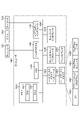
- FIG. 1 is a schematic diagram illustrating a schematic configuration of a display control device according to the present embodiment.
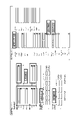
- FIG. 2 is a diagram for explaining a UI extension component.
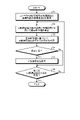
- FIG. 3 is a flowchart illustrating the display control processing procedure.
- FIG. 4 is a diagram illustrating a computer that executes a display control program.
- FIG. 1 is a schematic diagram illustrating a schematic configuration of a display control device 10.
- the display control device 10 of the present embodiment is realized by a general-purpose computer such as a workstation or a personal computer, and has an input unit 11, an output unit 12, a communication control unit 13, a storage unit 14, and a control unit. 15 is provided.
- the input unit 11 is realized by using an input device such as a keyboard or a mouse, and inputs various instruction information such as processing start to the control unit 15 in response to an input operation by the operator.
- the output unit 12 is realized by a display device such as a liquid crystal display, a printing device such as a printer, an information communication device, and the like.
- the communication control unit 13 controls communication with an external device via a telecommunication line such as a LAN (Local Area Network) or the Internet. For example, the communication control unit 13 controls communication between the terminal operated by the user, a management device that manages the user's operation log, and the like, and the control unit 15.
- the storage unit 14 is realized by a semiconductor memory element such as a RAM (Random Access Memory) or a flash memory (Flash Memory), or a storage device such as a hard disk or an optical disk.
- the storage unit 14 may be configured to communicate with the control unit 15 via a telecommunication line such as a LAN or the Internet.
- the storage unit 14 records, for example, information about a UI expansion component to be displayed and controlled, which will be described later.
- the information about the UI extension component is, for example, information about how to display the UI extension component as an annotation display, information for specifying the GUI component corresponding to the UI extension component, operation setting of the UI extension component, and operation.
- the linked component is a GUI component that is the target of the operation of the UI extension component. That is, the linked component is, for example, a UI extension component that accepts inputs such as check boxes and selection inputs, when an operation setting is made such that if there is an input, the input is performed to a predetermined GUI component. It is a GUI component to be input.
- the linked component is a plurality of GUI components to be input when the operation setting is performed for the UI extension component to collectively input to a plurality of predetermined GUI components. .. In this way, the operation settings are set in advance for the UI extension parts so as to control the linked parts.
- FIG. 2 is a diagram for explaining UI expansion parts.
- the UI extension component surrounded by a thick frame is superimposed on the GUI component on the screen and displayed.
- the user can easily input to the GUI component by using the UI extension component such as a check box and selection input.
- the UI extension component such as a check box and selection input.
- the information in each line of the person in charge information is collectively input.
- the user can also directly input to the linked parts without using the UI extension parts.
- the user can directly input the information in each line of the person in charge information.
- the control unit 15 is realized by a CPU (Central Processing Unit) or the like, executes a processing program stored in a memory, and functions as an acquisition unit 15a, a determination unit 15b, and a display control unit 15c as shown in FIG. It should be noted that these functional parts may be implemented in different hardware, respectively or in part.
- the acquisition unit 15a may be mounted on hardware different from the determination unit 15b and the display control unit 15c.
- the control unit 15 may have another functional unit.
- the acquisition unit 15a acquires the frequency of use of the user of the UI extension component of the GUI component constituting the predetermined application and the frequency of use of the linked component which is the target GUI component for the operation of the UI extension component. Specifically, the acquisition unit 15a determines the frequency of use of the UI extension component of the GUI component constituting the predetermined application in the past by the user from the terminal operated by the user or from the management device that manages the operation log of the user. , The frequency of use of the linked parts of the UI extension parts is acquired.
- the acquisition unit 15a acquires the frequency of use in a predetermined time, with the number of times of input such as pressing to the UI expansion component as the number of times of use.
- the frequency of use of the UI extension component is, for example, the number of times the UI extension component is used in a predetermined time.
- the frequency of use of the UI extension component may be the ratio of the number of times the UI extension component is used when the number of times the entire UI extension component is used is a predetermined number of times.
- the acquisition unit 15a acquires the frequency of use in a predetermined time, with the number of times of direct input to the linked parts as the number of times of use.
- the frequency of use of the linking component is, for example, the number of times the linking component is used in a predetermined period.
- the frequency of use of the linked parts may be the ratio of the number of times the linked parts are used when the number of times all the linked parts are used is a predetermined number of times.
- the acquisition unit 15a sets the monitoring time T to a predetermined period such as the latest 24 hours, and for each user who operates the application, the number of times each of the i UI expansion components used by the user during the monitoring time T is Nii. And the number of times Rij of each of the j linked parts of the UI extension part is acquired. Further, the acquisition unit 15a calculates the frequency of use of each UI expansion component and the frequency of use of each cooperation component by using the acquired information.
- the acquisition unit 15a may store in the storage unit 14 the number of times the acquired UI expansion component is used and the number of times the cooperation component is used, or the calculated frequency of use of the UI expansion component and the frequency of use of the cooperation component.
- the determination unit 15b displays the UI expansion component to this user based on the frequency of use of the UI expansion component by the user and the frequency of utilization of the UI expansion component calculated by using the frequency of use of the cooperation component. Judge whether or not.
- the determination unit 15b determines whether or not to display the UI extension component to the user by using the frequency of use and the frequency of utilization of the UI extension component for the user.
- the determination unit 15b calculates the display control value Di by adding the function value of the frequency of use of the UI extension component and the function value of the frequency of utilization of the UI extension component. Specifically, as shown in the following equation (1), the determination unit 15b determines the function value of the frequency of use of the linked component of the UI extension component from the function value of the frequency of use of the UI extension component for each UI extension component. The display control value Di is calculated by subtracting.
- the function f of the first term is a function of the frequency of use of the UI extension component.
- the function g in the second term is a function of the linked component, and a function obtained by multiplying the function g by ⁇ (minus) is a function of the utilization frequency of the UI extension component. That is, the determination unit 15b calculates the display control value Di by adding the positive function value of the frequency of use of the UI extension component and the negative function value of the frequency of utilization of the UI extension component.
- the display control unit 15c displays the UI extension component determined by the determination unit 15b to display to the user. For example, the display control unit 15c superimposes the UI expansion component on the GUI component displayed on the screen of the terminal operated by the user via the communication control unit 13.
- the display control device 10 displays the UI expansion component only to the users who have frequently used and used the UI expansion component in the past. As a result, the display control device 10 can display annotations suitable for the situation of each user.
- FIG. 3 is a flowchart illustrating the display control processing procedure.
- the flowchart of FIG. 3 is started, for example, at the timing when there is an input instructing the start of the display control process.
- the acquisition unit 15a acquires the frequency of use of the UI extension component of the GUI component constituting the predetermined application and the frequency of use of the linked component which is the target GUI component for the operation of the UI extension component. (Step S1). For example, the acquisition unit 15a sets the latest 24 hours as the monitoring time T, and for each user who operates the application, the number of times Ni of each of the i UI expansion components used by the user during the monitoring time T and the UI expansion concerned. Acquire the number of times Rij of each of the j linked parts of the parts. Further, the acquisition unit 15a calculates the frequency of use of each UI expansion component and the frequency of use of each cooperation component by using the acquired information.
- the determination unit 15b calculates the display control value Di using the frequency of use of the UI expansion component by the user and the frequency of utilization of the UI expansion component calculated by using the frequency of use of the cooperation component (step). S2).
- the determination unit 15b determines whether or not to display the UI extension component to this user based on the calculated display control value Di (step S3). For example, the determination unit 15b determines that the UI extension component is displayed when the calculated display control value Di is equal to or greater than a predetermined threshold value K. Further, the determination unit 15b determines that the UI extension component is not displayed when the display control value Di is less than the predetermined threshold value K.
- step S4 determines that the display is to be performed (step S4, Yes)
- the display control unit 15c displays this UI extension component on the screen of the terminal operated by the user (step S5).
- step S4 determines that the display is not performed (step S4, No)
- step S6 the determination unit 15b proceeds to the process in step S6.
- step S6 No when the determination unit 15b has not determined whether or not to display all the UI expansion parts (step S6, No), the process returns to step S2 and displays the other UI expansion parts in the same manner. Judge whether or not.
- step S6 determines whether or not to display all the UI extension parts.
- the acquisition unit 15a determines the frequency of use of the UI extension component of the GUI component constituting a predetermined application by the user, and the operation target GUI of the UI extension component.
- the frequency of use of the linked component which is a component, is acquired.
- the determination unit 15b displays the UI expansion component to the user based on the frequency of use of the UI expansion component of the user and the frequency of utilization of the UI expansion component calculated by using the frequency of use of the cooperation component. Determine whether to do it.
- the display control device 10 determines whether or not to display the UI expansion component for each user by using the appearance frequency and utilization frequency of the past UI expansion component by each user. This enables the display control device to display annotations suitable for the situation of each user.
- the determination unit 15b determines that the value obtained by adding the positive function value of the frequency of use of the UI extension component and the negative function value of the frequency of utilization of the UI extension component is equal to or more than a predetermined threshold value of the UI extension component. Judged to display. That is, the determination unit 15b determines that the UI extension component is displayed when the value obtained by subtracting the function value of the frequency of use of the linked component from the function value of the frequency of use of the UI extension component is equal to or greater than a predetermined threshold value. As described above, when the cooperation component is frequently used, the display control device 10 determines that the corresponding UI extension component is not used frequently, and determines that the UI extension component is not displayed. can.
- the display control device 10 can be implemented by installing a display control program that executes the above display control process as package software or online software on a desired computer. For example, by causing the information processing device to execute the above display control program, the information processing device can be made to function as the display control device 10.
- the information processing device referred to here includes a desktop type or notebook type personal computer.
- the information processing device includes smartphones, mobile phones, mobile communication terminals such as PHS (Personal Handyphone System), and slate terminals such as PDAs (Personal Digital Assistants).
- the display control device 10 can be implemented as a server device in which the terminal device used by the user is a client and the service related to the above display control process is provided to the client.
- the display control device 10 is implemented as a server device that provides a display control processing service that inputs a Web page and outputs a display of additional information.
- the display control device 10 may be implemented as a Web server, or may be implemented as a cloud that provides the above-mentioned service related to the display control process by outsourcing.
- a computer that executes a display control program that realizes the same functions as the display control device 10 will be described.
- FIG. 4 is a diagram showing an example of a computer that executes a display control program.
- the computer 1000 has, for example, a memory 1010, a CPU 1020, a hard disk drive interface 1030, a disk drive interface 1040, a serial port interface 1050, a video adapter 1060, and a network interface 1070. Each of these parts is connected by a bus 1080.
- the memory 1010 includes a ROM (Read Only Memory) 1011 and a RAM 1012.
- the ROM 1011 stores, for example, a boot program such as a BIOS (Basic Input Output System).
- BIOS Basic Input Output System
- the hard disk drive interface 1030 is connected to the hard disk drive 1031.
- the disk drive interface 1040 is connected to the disk drive 1041.
- a removable storage medium such as a magnetic disk or an optical disk is inserted into the disk drive 1041.
- a mouse 1051 and a keyboard 1052 are connected to the serial port interface 1050.
- a display 1061 is connected to the video adapter 1060.
- the hard disk drive 1031 stores, for example, the OS 1091, the application program 1092, the program module 1093, and the program data 1094. Each piece of information described in the above embodiment is stored in, for example, the hard disk drive 1031 or the memory 1010.
- the display control program is stored in the hard disk drive 1031 as, for example, a program module 1093 in which a command executed by the computer 1000 is described.
- the program module 1093 in which each process executed by the display control device 10 described in the above embodiment is described is stored in the hard disk drive 1031.
- the data used for information processing by the display control program is stored as program data 1094 in, for example, the hard disk drive 1031.
- the CPU 1020 reads the program module 1093 and the program data 1094 stored in the hard disk drive 1031 into the RAM 1012 as needed, and executes each of the above-mentioned procedures.
- the program module 1093 and program data 1094 related to the display control program are not limited to the case where they are stored in the hard disk drive 1031. For example, they are stored in a removable storage medium and read by the CPU 1020 via the disk drive 1041 or the like. It may be issued. Alternatively, the program module 1093 and the program data 1094 related to the display control program are stored in another computer connected via a network such as a LAN (Local Area Network) or WAN (Wide Area Network), and are stored via the network interface 1070. It may be read by the CPU 1020.
- LAN Local Area Network
- WAN Wide Area Network
- Display control device 11 Input unit 12 Output unit 13 Communication control unit 14 Storage unit 15 Control unit 15a Acquisition unit 15b Judgment unit 15c Display control unit
Landscapes
- Engineering & Computer Science (AREA)
- Theoretical Computer Science (AREA)
- General Engineering & Computer Science (AREA)
- Physics & Mathematics (AREA)
- General Physics & Mathematics (AREA)
- Software Systems (AREA)
- Human Computer Interaction (AREA)
- User Interface Of Digital Computer (AREA)
- Digital Computer Display Output (AREA)
Abstract
Description
図1は、表示制御装置10の概略構成を例示する模式図である。図2に例示するように、本実施形態の表示制御装置10は、ワークステーションやパソコン等の汎用コンピュータで実現され、入力部11、出力部12、通信制御部13、記憶部14、および制御部15を備える。

次に、図3は、表示制御処理手順を例示するフローチャートである。図3のフローチャートは、例えば、表示制御処理の開始を指示する入力があったタイミングで開始される。
上記実施形態に係る表示制御装置10が実行する処理をコンピュータが実行可能な言語で記述したプログラムを作成することもできる。一実施形態として、表示制御装置10は、パッケージソフトウェアやオンラインソフトウェアとして上記の表示制御処理を実行する表示制御プログラムを所望のコンピュータにインストールさせることによって実装できる。例えば、上記の表示制御プログラムを情報処理装置に実行させることにより、情報処理装置を表示制御装置10として機能させることができる。ここで言う情報処理装置には、デスクトップ型またはノート型のパーソナルコンピュータが含まれる。また、その他にも、情報処理装置にはスマートフォン、携帯電話機やPHS(Personal Handyphone System)等の移動体通信端末、さらには、PDA(Personal Digital Assistants)等のスレート端末等がその範疇に含まれる。
11 入力部
12 出力部
13 通信制御部
14 記憶部
15 制御部
15a 取得部
15b 判定部
15c 表示制御部
Claims (8)
- 所定のアプリケーションを構成するGUI部品のUI拡張部品のユーザの使用頻度と、該UI拡張部品の動作の対象GUI部品である連携部品の該ユーザの使用頻度とを取得する取得部と、
前記UI拡張部品の使用頻度と、前記連携部品の使用頻度を用いて算出した該UI拡張部品の活用頻度とに基づいて、前記ユーザに対して該UI拡張部品の表示を行うか否かを判定する判定部と、
を有することを特徴とする表示制御装置。 - 前記判定部は、前記UI拡張部品の使用頻度の正の関数値と該UI拡張部品の活用頻度の負の関数値とを加算した値が所定の閾値以上である場合に、前記UI拡張部品の表示を行うと判定することを特徴とする請求項1に記載の表示制御装置。
- 前記UI拡張部品の使用頻度は、所定の期間における該UI拡張部品の使用回数であることを特徴とする請求項1に記載の表示制御装置。
- 前記UI拡張部品の使用頻度は、全UI拡張部品の使用回数が所定回数である場合における、該UI拡張部品の使用回数の割合であることを特徴とする請求項1に記載の表示制御装置。
- 前記連携部品の使用頻度は、所定の期間における該連携部品の使用回数であることを特徴とする請求項1に記載の表示制御装置。
- 前記連携部品の使用頻度は、全連携部品の使用回数が所定回数である場合における、該連携部品の使用回数の割合であることを特徴とする請求項1に記載の表示制御装置。
- 表示制御装置が実行する表示制御方法であって、
所定のアプリケーションを構成するGUI部品のUI拡張部品のユーザの使用頻度と、該UI拡張部品の動作の対象GUI部品である連携部品の該ユーザの使用頻度とを取得する取得工程と、
前記UI拡張部品の使用頻度と、前記連携部品の使用頻度を用いて算出した該UI拡張部品の活用頻度とに基づいて、前記ユーザに対して該UI拡張部品の表示を行うか否かを判定する工程と、
を含んだことを特徴とする表示制御方法。 - 所定のアプリケーションを構成するGUI部品のUI拡張部品のユーザの使用頻度と、該UI拡張部品の動作の対象GUI部品である連携部品の該ユーザの使用頻度とを取得する取得ステップと、
前記UI拡張部品の使用頻度と、前記連携部品の使用頻度を用いて算出した該UI拡張部品の活用頻度とに基づいて、前記ユーザに対して該UI拡張部品の表示を行うか否かを判定するステップと、
をコンピュータに実行させるための表示制御プログラム。
Priority Applications (3)
| Application Number | Priority Date | Filing Date | Title |
|---|---|---|---|
| JP2022561741A JP7485078B2 (ja) | 2020-11-10 | 2020-11-10 | 表示制御装置、表示制御方法および表示制御プログラム |
| US18/035,374 US12112021B2 (en) | 2020-11-10 | 2020-11-10 | Display control device, display control method, and display control program |
| PCT/JP2020/041980 WO2022102000A1 (ja) | 2020-11-10 | 2020-11-10 | 表示制御装置、表示制御方法および表示制御プログラム |
Applications Claiming Priority (1)
| Application Number | Priority Date | Filing Date | Title |
|---|---|---|---|
| PCT/JP2020/041980 WO2022102000A1 (ja) | 2020-11-10 | 2020-11-10 | 表示制御装置、表示制御方法および表示制御プログラム |
Publications (1)
| Publication Number | Publication Date |
|---|---|
| WO2022102000A1 true WO2022102000A1 (ja) | 2022-05-19 |
Family
ID=81600864
Family Applications (1)
| Application Number | Title | Priority Date | Filing Date |
|---|---|---|---|
| PCT/JP2020/041980 Ceased WO2022102000A1 (ja) | 2020-11-10 | 2020-11-10 | 表示制御装置、表示制御方法および表示制御プログラム |
Country Status (3)
| Country | Link |
|---|---|
| US (1) | US12112021B2 (ja) |
| JP (1) | JP7485078B2 (ja) |
| WO (1) | WO2022102000A1 (ja) |
Cited By (1)
| Publication number | Priority date | Publication date | Assignee | Title |
|---|---|---|---|---|
| JP2025118097A (ja) * | 2024-01-31 | 2025-08-13 | テックタッチ株式会社 | 情報処理システム、情報処理方法及びプログラム |
Citations (2)
| Publication number | Priority date | Publication date | Assignee | Title |
|---|---|---|---|---|
| JP2013041378A (ja) * | 2011-08-12 | 2013-02-28 | Kyocera Corp | 携帯電子機器、制御方法、および、制御プログラム |
| JP2016148886A (ja) * | 2015-02-10 | 2016-08-18 | コニカミノルタ株式会社 | 処理装置、表示方法、およびコンピュータプログラム |
Family Cites Families (2)
| Publication number | Priority date | Publication date | Assignee | Title |
|---|---|---|---|---|
| JP6817253B2 (ja) | 2018-06-29 | 2021-01-20 | 日本電信電話株式会社 | 表示制御装置、表示制御方法、および表示制御プログラム |
| AU2020414715A1 (en) * | 2019-12-27 | 2022-08-25 | Methodical Mind, Llc. | Graphical user interface system |
-
2020
- 2020-11-10 JP JP2022561741A patent/JP7485078B2/ja active Active
- 2020-11-10 US US18/035,374 patent/US12112021B2/en active Active
- 2020-11-10 WO PCT/JP2020/041980 patent/WO2022102000A1/ja not_active Ceased
Patent Citations (2)
| Publication number | Priority date | Publication date | Assignee | Title |
|---|---|---|---|---|
| JP2013041378A (ja) * | 2011-08-12 | 2013-02-28 | Kyocera Corp | 携帯電子機器、制御方法、および、制御プログラム |
| JP2016148886A (ja) * | 2015-02-10 | 2016-08-18 | コニカミノルタ株式会社 | 処理装置、表示方法、およびコンピュータプログラム |
Cited By (2)
| Publication number | Priority date | Publication date | Assignee | Title |
|---|---|---|---|---|
| JP2025118097A (ja) * | 2024-01-31 | 2025-08-13 | テックタッチ株式会社 | 情報処理システム、情報処理方法及びプログラム |
| JP7825297B2 (ja) | 2024-01-31 | 2026-03-06 | テックタッチ株式会社 | 情報処理システム、情報処理方法及びプログラム |
Also Published As
| Publication number | Publication date |
|---|---|
| JP7485078B2 (ja) | 2024-05-16 |
| US20240012542A1 (en) | 2024-01-11 |
| JPWO2022102000A1 (ja) | 2022-05-19 |
| US12112021B2 (en) | 2024-10-08 |
Similar Documents
| Publication | Publication Date | Title |
|---|---|---|
| US12395517B2 (en) | Infrastructure as code predeployment compliance testing | |
| CN113808231B (zh) | 信息处理方法及装置、图像渲染方法及装置、电子设备 | |
| CN114564924B (zh) | 数据插入方法、装置、设备及存储介质 | |
| US20210232374A1 (en) | Integrated System for Designing a User Interface | |
| US20170249192A1 (en) | Downloading visual assets | |
| WO2021008576A1 (zh) | 上下文信息管理方法、装置、系统及计算机可读存储介质 | |
| CN110288625A (zh) | 用于处理图像的方法和装置 | |
| CN114327271B (zh) | 生命周期的管理方法、装置、设备以及存储介质 | |
| US20210232375A1 (en) | Integrated System for Designing a User Interface | |
| CN113656717B (zh) | 一种网页的控件渲染方法、装置、设备及存储介质 | |
| US11074054B1 (en) | Integrated system for designing a user interface | |
| CN117668352A (zh) | 生成落地页的方法、装置、设备、存储介质及程序产品 | |
| JP2013120201A (ja) | 情報処理装置及び方法 | |
| JP7485078B2 (ja) | 表示制御装置、表示制御方法および表示制御プログラム | |
| CN113434221B (zh) | 软件自动化运行方法、装置、系统和服务器设备 | |
| CN113900734A (zh) | 一种应用程序文件配置方法、装置、设备及存储介质 | |
| KR20210107523A (ko) | Rom 기반 동적 열 관리 분석 및 제어를 위한 방법 및 시스템 | |
| CN116363260B (zh) | 图像生成方法、装置及电子设备 | |
| CN112312021A (zh) | 拍摄参数调整方法及装置 | |
| CN119127505A (zh) | 配置数据处理流的交互方法、装置、电子设备及存储介质 | |
| CN118916042A (zh) | 一种大语言模型分析方法、装置及相关设备 | |
| CN113377378B (zh) | 用于小程序的处理方法、装置、设备及存储介质 | |
| CN113342885B (zh) | 数据导入方法、装置、设备及计算机程序产品 | |
| CN115526731A (zh) | 任务批处理方法、装置、计算机设备及存储介质 | |
| US20250156783A1 (en) | Techniques for generating workflows using an llm-based system |
Legal Events
| Date | Code | Title | Description |
|---|---|---|---|
| 121 | Ep: the epo has been informed by wipo that ep was designated in this application |
Ref document number: 20961528 Country of ref document: EP Kind code of ref document: A1 |
|
| ENP | Entry into the national phase |
Ref document number: 2022561741 Country of ref document: JP Kind code of ref document: A |
|
| WWE | Wipo information: entry into national phase |
Ref document number: 18035374 Country of ref document: US |
|
| NENP | Non-entry into the national phase |
Ref country code: DE |
|
| 122 | Ep: pct application non-entry in european phase |
Ref document number: 20961528 Country of ref document: EP Kind code of ref document: A1 |