WO2021220695A1 - 画像形成装置と画像形成装置の制御方法、及びプログラム - Google Patents
画像形成装置と画像形成装置の制御方法、及びプログラム Download PDFInfo
- Publication number
- WO2021220695A1 WO2021220695A1 PCT/JP2021/013288 JP2021013288W WO2021220695A1 WO 2021220695 A1 WO2021220695 A1 WO 2021220695A1 JP 2021013288 W JP2021013288 W JP 2021013288W WO 2021220695 A1 WO2021220695 A1 WO 2021220695A1
- Authority
- WO
- WIPO (PCT)
- Prior art keywords
- setting
- image forming
- batch
- information
- Prior art date
- Legal status (The legal status is an assumption and is not a legal conclusion. Google has not performed a legal analysis and makes no representation as to the accuracy of the status listed.)
- Ceased
Links
Images




Classifications
-
- G—PHYSICS
- G06—COMPUTING OR CALCULATING; COUNTING
- G06F—ELECTRIC DIGITAL DATA PROCESSING
- G06F3/00—Input arrangements for transferring data to be processed into a form capable of being handled by the computer; Output arrangements for transferring data from processing unit to output unit, e.g. interface arrangements
- G06F3/12—Digital output to print unit, e.g. line printer, chain printer
- G06F3/1201—Dedicated interfaces to print systems
- G06F3/1278—Dedicated interfaces to print systems specifically adapted to adopt a particular infrastructure
- G06F3/1285—Remote printer device, e.g. being remote from client or server
-
- B—PERFORMING OPERATIONS; TRANSPORTING
- B41—PRINTING; LINING MACHINES; TYPEWRITERS; STAMPS
- B41J—TYPEWRITERS; SELECTIVE PRINTING MECHANISMS, i.e. MECHANISMS PRINTING OTHERWISE THAN FROM A FORME; CORRECTION OF TYPOGRAPHICAL ERRORS
- B41J29/00—Details of, or accessories for, typewriters or selective printing mechanisms not otherwise provided for
- B41J29/38—Drives, motors, controls or automatic cut-off devices for the entire printing mechanism
-
- G—PHYSICS
- G06—COMPUTING OR CALCULATING; COUNTING
- G06F—ELECTRIC DIGITAL DATA PROCESSING
- G06F3/00—Input arrangements for transferring data to be processed into a form capable of being handled by the computer; Output arrangements for transferring data from processing unit to output unit, e.g. interface arrangements
- G06F3/12—Digital output to print unit, e.g. line printer, chain printer
- G06F3/1201—Dedicated interfaces to print systems
- G06F3/1202—Dedicated interfaces to print systems specifically adapted to achieve a particular effect
- G06F3/1203—Improving or facilitating administration, e.g. print management
- G06F3/1204—Improving or facilitating administration, e.g. print management resulting in reduced user or operator actions, e.g. presetting, automatic actions, using hardware token storing data
-
- G—PHYSICS
- G06—COMPUTING OR CALCULATING; COUNTING
- G06F—ELECTRIC DIGITAL DATA PROCESSING
- G06F3/00—Input arrangements for transferring data to be processed into a form capable of being handled by the computer; Output arrangements for transferring data from processing unit to output unit, e.g. interface arrangements
- G06F3/12—Digital output to print unit, e.g. line printer, chain printer
- G06F3/1201—Dedicated interfaces to print systems
- G06F3/1202—Dedicated interfaces to print systems specifically adapted to achieve a particular effect
- G06F3/1203—Improving or facilitating administration, e.g. print management
- G06F3/1205—Improving or facilitating administration, e.g. print management resulting in increased flexibility in print job configuration, e.g. job settings, print requirements, job tickets
-
- G—PHYSICS
- G06—COMPUTING OR CALCULATING; COUNTING
- G06F—ELECTRIC DIGITAL DATA PROCESSING
- G06F3/00—Input arrangements for transferring data to be processed into a form capable of being handled by the computer; Output arrangements for transferring data from processing unit to output unit, e.g. interface arrangements
- G06F3/12—Digital output to print unit, e.g. line printer, chain printer
- G06F3/1201—Dedicated interfaces to print systems
- G06F3/1223—Dedicated interfaces to print systems specifically adapted to use a particular technique
- G06F3/1237—Print job management
- G06F3/1253—Configuration of print job parameters, e.g. using UI at the client
- G06F3/1257—Configuration of print job parameters, e.g. using UI at the client by using pre-stored settings, e.g. job templates, presets, print styles
-
- G—PHYSICS
- G06—COMPUTING OR CALCULATING; COUNTING
- G06F—ELECTRIC DIGITAL DATA PROCESSING
- G06F3/00—Input arrangements for transferring data to be processed into a form capable of being handled by the computer; Output arrangements for transferring data from processing unit to output unit, e.g. interface arrangements
- G06F3/12—Digital output to print unit, e.g. line printer, chain printer
- G06F3/1201—Dedicated interfaces to print systems
- G06F3/1278—Dedicated interfaces to print systems specifically adapted to adopt a particular infrastructure
- G06F3/1292—Mobile client, e.g. wireless printing
-
- H—ELECTRICITY
- H04—ELECTRIC COMMUNICATION TECHNIQUE
- H04N—PICTORIAL COMMUNICATION, e.g. TELEVISION
- H04N1/00—Scanning, transmission or reproduction of documents or the like, e.g. facsimile transmission; Details thereof
-
- G—PHYSICS
- G06—COMPUTING OR CALCULATING; COUNTING
- G06F—ELECTRIC DIGITAL DATA PROCESSING
- G06F3/00—Input arrangements for transferring data to be processed into a form capable of being handled by the computer; Output arrangements for transferring data from processing unit to output unit, e.g. interface arrangements
- G06F3/12—Digital output to print unit, e.g. line printer, chain printer
- G06F3/1201—Dedicated interfaces to print systems
- G06F3/1278—Dedicated interfaces to print systems specifically adapted to adopt a particular infrastructure
- G06F3/1285—Remote printer device, e.g. being remote from client or server
- G06F3/1287—Remote printer device, e.g. being remote from client or server via internet
-
- Y—GENERAL TAGGING OF NEW TECHNOLOGICAL DEVELOPMENTS; GENERAL TAGGING OF CROSS-SECTIONAL TECHNOLOGIES SPANNING OVER SEVERAL SECTIONS OF THE IPC; TECHNICAL SUBJECTS COVERED BY FORMER USPC CROSS-REFERENCE ART COLLECTIONS [XRACs] AND DIGESTS
- Y02—TECHNOLOGIES OR APPLICATIONS FOR MITIGATION OR ADAPTATION AGAINST CLIMATE CHANGE
- Y02D—CLIMATE CHANGE MITIGATION TECHNOLOGIES IN INFORMATION AND COMMUNICATION TECHNOLOGIES [ICT], I.E. INFORMATION AND COMMUNICATION TECHNOLOGIES AIMING AT THE REDUCTION OF THEIR OWN ENERGY USE
- Y02D10/00—Energy efficient computing, e.g. low power processors, power management or thermal management
Definitions
- the present invention is an image forming apparatus, a control method of the image forming apparatus, and a program.
- IPP Internet Printing Protocol
- the information processing apparatus can select various print settings according to the ability information notified from the image forming apparatus on the print screen of the information processing apparatus.
- the present invention relates to this ability notification and selection method.
- the setting values of a plurality of setting items are registered in the image forming apparatus as one set, and the printing setting is performed in the information processing apparatus using the set of setting values registered in the image forming apparatus.
- a user sets a plurality of setting items in the image forming apparatus in advance and registers them in the image forming apparatus.
- the information processing device acquires information for identifying a set of set values registered in the image forming device from the image forming device and displays it on the display unit of the information processing device.
- the identification information acquired by the information processing device is displayed, and the user accepts the selection of the identification information to be used for printing. Then, the information processing device transmits the selected identification information to the image forming device.
- the setting items that can be set by the user are limited to the setting items defined by IPP, and the setting items and settings peculiar to the vendor of the image forming apparatus.
- the value cannot be set.
- the vendor-specific setting items and setting values are, for example, setting items and setting values related to the "opening direction" and the "creep correction amount" when performing the bookbinding process.
- the vendor-specific setting items and setting values are included in a set of a plurality of setting items registered in the image forming apparatus, the vendor-specific setting items are displayed on the print setting screen provided by the print service corresponding to IPP. And settings cannot be displayed or changed.
- the image forming apparatus in the present embodiment requests a storage means for storing the set values of a plurality of setting items and the identification information in association with each other and a request for acquiring the identification information stored in the storage means. It has a receiving means received from a predetermined print service and a transmitting means for transmitting the stored identification information to the predetermined print service based on the received acquisition request, and the transmitting means has the identification. Based on the fact that the setting items corresponding to the information include the predetermined items, the predetermined print service is characterized in that the information for setting the predetermined items is transmitted to the predetermined print service. ..
- the image forming apparatus described in the present application can display information on a set of print settings registered in the image forming apparatus on a print setting screen provided by a predetermined print service, even with vendor-specific settings. can do.
- the user registers presets and templates in the image forming apparatus with the setting values of a plurality of setting items as one set.
- the information processing device acquires identification information of batch setting, which is a set of setting values of a plurality of setting items, from the image forming device and displays it on the print setting screen.
- the user acquires the identification information of the batch setting specified in the print setting from the print setting screen of the information processing device.
- vendor-specific setting items and setting values can be set as batch settings.
- the image forming device identifies the setting items that need to be changed before the job is executed, among the setting items included in one batch setting.
- the vendor-specific setting items and setting values that may be changed before the job is executed are notified to the image forming apparatus in the form of being linked with the identification information of the batch setting. do.
- the information processing device makes the setting even if the selected batch setting includes a vendor-specific item. You can change the print settings of items before executing the job.
- FIG. 1 is a diagram illustrating an example of the configuration of the printing system of the present invention.
- the image forming apparatus 101 is connected to a LAN (Local Area Network) 100.
- the information processing devices 103, 104, and 105 are connected to the LAN 100 via the AP access point 102.
- information processing devices 103, 104, 105 such as a tablet, a smartphone, and a PC will be described as an example.
- tablets, smartphones, PCs, etc. are collectively referred to as information processing devices.
- These information processing devices can transmit print data to the image forming device 101 via the LAN 100.
- the above configuration example will be described as an example of the printing system, but the present invention is not limited to this, and at least one or more information processing devices and an image forming device communicate with each other via a network. It suffices if it is connected as possible.
- the network may be wireless or wired.
- FIG. 2 is a diagram showing an example of the hardware configuration of the image forming apparatus 101.
- FIG. 2 is a block diagram illustrating a hardware configuration of the image forming apparatus 101 according to the present embodiment.
- the image forming apparatus will be described as an example, but the image forming apparatus may be an image forming apparatus such as an MFP (Multifunction Peripheral) including a scanner and a FAX function.
- the control unit including the CPU (Central Processing Unit) 211 controls the operation of the entire image forming apparatus 101.
- the CPU 211 expands the program stored in the ROM (Read Only Memory) 212 or the storage 214 into the RAM 213, and executes the program to perform various controls such as print control and read control.
- the ROM 212 stores a control program, a boot program, and the like that can be executed by the CPU 211.
- the RAM (Random Access Memory) 213 is the main storage memory of the CPU 211, and is used as a work area or a temporary storage area for expanding various control programs.
- the storage 214 stores print data, image data, various programs, and various setting information.
- an auxiliary storage device such as an HDD (Hard Disk Drive) is assumed as the storage 214, but a non-volatile memory such as an SSD (Solid State Drive) may be used.
- one CPU 211 uses one RAM 213 to execute each process shown in the flowchart described later, but other modes may be used.
- a plurality of CPUs, RAMs, ROMs, and storages may be made to cooperate with each other to execute each process shown in a flowchart described later.
- a part of the processing may be executed by using a hardware circuit such as an ASIC (Application Specific Integrated Circuit) or an FPGA (Field-Programmable Gate Array).
- ASIC Application Specific Integrated Circuit
- FPGA Field-Programmable Gate Array
- the operation unit interface I / F 216 connects the operation unit 217 and the control unit.
- the operation unit 217 is provided with a display unit having a touch panel function, various hard keys, and the like, and functions as a display unit for displaying information and a reception unit for receiving user's instructions.
- the printing unit I / F 218 connects the printing unit 219 and the control unit.
- the image data generated by analyzing the print job received from the information processing device is transferred from the control unit to the print unit 219 via the print unit I / F 218.
- the printing unit 219 receives a control command and a print job to be printed via the control unit, and prints an image on a sheet fed from the paper feed cassette not shown based on the print job.
- the printing method of the printing unit 219 may be an electrophotographic method or an inkjet method. Further, other printing methods such as a thermal transfer method can also be applied.
- the control unit is connected to the LAN 100 via the communication unit I / F222.
- the communication unit I / F 222 transmits information to the information processing devices 103, 104, 105, and receives print jobs and information from the information processing devices 103, 104, 105 on the LAN 100.
- the image processing unit 215 has a RIP (Raster Image Processor) function that expands print jobs received from the information processing devices 103, 104, and 105 to generate print image data.
- the image processing unit 215 can also perform resolution conversion and correction processing of the image data obtained by developing the print job.
- the image processing unit 215 is realized by a hardware circuit ASIC, FPGA, or the like, but the present invention is not limited to this.
- the image forming apparatus 101 may further include a processor for image processing applications, and the processor may execute an image processing program to realize image processing and expansion processing into print data.
- the processor and the CPU 211 cooperate to realize the flowchart described later.
- the CPU 211 may execute a program for performing image processing, and may be configured to perform image processing and print data expansion processing. Further, the image processing may be performed by any combination of these.
- the sheet processing unit I / F 220 connects the control unit and the sheet processing unit 221.
- the sheet processing unit 221 receives a control command from the control unit, and performs post-processing on the sheet printed by the printing unit 219 according to the control command.
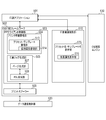
- FIG. 4 is a diagram showing an example of the software configuration of the image forming apparatus 101.
- each functional block shown in FIG. 4 is achieved by executing the program expanded in the RAM 213 by the CPU 211.
- the WebUI control unit 415 has a function of registering a plurality of print settings shown in FIG. 6 described later as a set and registering / editing the batch settings to be applied collectively.
- the user registers a plurality of print settings selected and set in advance as one batch setting through the registration screen 600 described later.
- the batch settings created by the user through the Web UI are saved in the preset / template DB416 as presets or templates.
- the preset / template DB 416 internally has an extended attribute DB 417 that holds detailed information data types, ranges, and initial values of vendor-specific extended attributes that are not defined in the IPP standard.
- not only the setting items specified in the IPP standard but also vendor-specific settings can be included in the presets and templates.
- “Number of Copies” and “2-Sided Printing” are attributes defined by IPP.
- "Booklet”, “Store”, and “Toner Save” are vendor-specific setting items.
- “Booklet” is a setting item for whether or not to perform bookbinding printing, and when Booklet is turned ON, the opening direction of the output and the correction value of the creep amount can be set.
- “Store” is a setting instructing the image forming apparatus 101 to save the received print data. When Store is set to ON, the user can set in which box of the box which is the storage folder of the image forming apparatus 101 to save the print data.
- Toner Save is a setting for whether or not to perform printing with reduced toner consumption during printing. Toner Save can be switched by ON / OFF.
- the setting items are defined by IPP such as "Standard” and "Punch”
- the setting values specific to the vendor can be set, and the settings cannot be set by the predetermined print service provided by the OS.
- the setting items including the setting values that cannot be set by the predetermined print service as described above are treated as vendor-specific setting items. For example, when “Standard” for binding the output is set to ON, a screen for setting which position of the paper to staple is displayed in addition to the number of staples is displayed. As for "Punch” for punching holes in paper, when the setting is turned ON, a screen for setting how many punch holes to punch and in which position of the paper to punch holes is displayed.
- the setting items related to these vendor extensions are linked with the name of the batch setting and notified to the information processing device as the capability information of the image forming device.
- the IPP server control unit 401 has a printer capability notification unit 402.
- the printer capability notification unit 402 receives an inquiry from the information processing devices 103, 104, 105 to the image forming apparatus and notifies the capability information of the printer.
- Specific examples of the ability information to be notified include the name list of the batch setting of print items held by the preset / template DB416 and the detailed information data type, range, and initial value of the vendor extension attribute included in the batch setting.
- the language-compatible DB418 provides a character string for UI display in the Message-Catalog format.
- the information processing devices 103, 104, and 105 After acquiring the printer capacity, the information processing devices 103, 104, and 105 generate a print job suitable for the printer and send it to the image forming device.
- the IPP server control unit 401 processes the reception of print data from the information processing device.
- the image forming apparatus When the image forming apparatus receives the IPP print job from the information processing devices 103, 104, 105, it generates a new job in the job control unit 407 via the print job generation unit 404. Subsequently, the job setting saving / verification unit 403 verifies the job attribute specified by the IPP attribute and writes it in the job attribute saving unit 408.
- the image forming apparatus inquires about the attributes to be applied to the preset / template DB416 and reflects them in the print settings. If individual print attributes are set in addition to the batch settings, the batch settings will be overwritten. Details of the attributes that can be set collectively will be described with reference to FIG.
- the IPP server control unit 401 transfers and temporarily saves the drawing data of the job data to the data reception control unit 405 in parallel with the attribute processing.
- the data reception control unit 405 is a buffer area of the print job received by the print job generation unit 404, and stores each print job in the storage 214.
- the PDL analysis unit 406 included in the image forming apparatus 101 of this embodiment corresponds to the PDF and PWG-Raster formats.
- the PDL analysis unit 406 requests print drawing data from the data reception control unit 405 in response to an instruction from the job control unit 407, and performs analysis processing.
- the page control unit 409 stores the image data in the page storage unit 410 and the page attribute information in the page attribute storage unit 411 with respect to the page data generated by the PDL analysis unit 406.
- the page control unit 409 controls the page analysis process of the PDL analysis unit 406, the RIP process of the RIP control unit 413, and the print control process of the print control unit 412.
- the print control unit 412 acquires the RIP-completed image data from the page storage unit 410, color-separates it into RGB, and transfers it to the engine control unit 414.
- the engine control unit 414 receives image data for each RGB from the print control unit 412 on a page-by-page basis, and controls the print control unit 412 to print each page.
- the Web UI control unit 415 acquires information on the status of the print job being processed from the job control unit 407, and displays the processing status of the print job on the UI screen.
- FIG. 3 is a diagram showing an example of the hardware configuration of the information processing devices 103, 104, and 105.
- the control unit 300 including the CPU 311 controls the operation of the entire information processing device.
- the CPU 311 expands the program stored in the ROM 314 or the storage 313 into the RAM 312, executes the program, and performs various controls such as control of the print setting screen, generation of print data, and transfer of print jobs.
- the ROM 314 stores a control program, a boot program, and the like that can be executed by the CPU 311.
- the RAM 312 is the main storage memory of the CPU 311 and is used as a work area or a temporary storage area for developing various programs.
- the storage 313 stores the OS, the print application, the OS print framework, the print job generated by the OS print framework, and various setting information.
- an auxiliary storage device such as HDD Hard Disk Drive is assumed as the storage 313, but a non-volatile memory such as SSD Solid State Drive may be used.
- the touch panel 318 is connected to the operation unit I / F 315, and notifies not only the screen drawing for each application or the print setting screen but also the user's touch operation to the application running on the CPU 311.
- FIG. 5 is a diagram showing an example of software configurations of the information processing devices 103, 104, and 105.
- the OS provides a predetermined print service in accordance with IPP.
- the application 501 is an arbitrary application installed by the user on the information processing device, and is a general application such as a word processor, a spreadsheet, a database, a mail, and a web browser.
- the OS print framework 502 is composed of an IPP client control unit 503, a print spooler 509, and a print screen control unit 510.
- the IPP client control unit 503 is composed of a printer information management unit 504 and a print job generation unit 505.
- the printer information management unit 504 makes an inquiry to the image forming apparatus 101 through the data communication control unit 520, and acquires and holds the capability information of the image forming apparatus 101.
- the printer information management unit 504 provides the capability information of the image forming apparatus 101 as a name list of batch settings such as presets or templates, and data type, value range, and initial information which are detailed information of vendor-specific print settings included in the batch settings. Get the value etc.
- the preset / template management unit 513 in the printer information management unit 504 holds a list of names for batch settings.
- the extended attribute management unit 514 outputs vendor-specific setting items and setting value attribute names, data types, and range information from the image forming device. get.
- the extended attribute management unit 514 stores the acquired vendor-specific setting items and setting values in the extended attribute management unit 514.
- the print screen control unit 510 displays the print screen in response to the call of the application 501.
- the print screen control unit 510 has a preset name / template name display unit 515, and displays the names of batch settings held by the preset / template management unit 513.
- the IPP-Preset format batch setting is a format in which the information processing device is notified of the batch setting and what kind of setting items and setting values are set in response to an inquiry of ability information from the information processing device. ..
- the finalizing-template format batch setting is a format in which the name of the batch setting is notified and the set setting items and setting values are not notified.
- the extended attribute management unit 514 processes the vendor-specific setting item included in the batch setting name selected for the image forming apparatus. Inquire about the information required to display the screen set on the device.
- the batch setting includes vendor-specific setting items and setting values
- the information about the data type, value range, and initial value saved in the extended attribute DB417 of the image forming device from the image forming device is linked to the name of the batch setting. It is notified to the information processing device as ability information in the form.
- the information processing apparatus saves the detailed information of the notified setting items in the extended attribute management unit 514, and at the same time, displays the vendor extended attribute setting items on the print setting screen through the extended attribute display unit 516. The user sets the print settings from the print screen and prints.
- the print screen control unit 510 and the print job generation unit 505 generate job attributes and document attributes of the IPP job from the setting items of the print screen.
- job attributes and document attributes of the IPP job In addition to the batch settings supported by the image forming device 101 and the batch settings, the IPP standard print attributes and vendor extended attributes that were changed immediately before printing are acquired, and the attributes are specified for each job or page in the print data. do.
- the print screen control unit 510 and the print job generation unit 505 send information on vendor-specific setting items to the information processing device in addition to the setting name of the batch setting. Notice.
- the print screen control unit 510 and the print job generation unit 505 perform jobs in the print data for both the IPP standard attribute and the vendor extended attribute included in the batch setting. Specify for each page or page. At this time, the specified attribute is reflected on the print setting screen for both the IPP standard attribute and the vendor-specific setting item, and the value is reflected again as the print job attribute. If the user changes the setting value. The changed value is reflected as it is.
- the page generation unit 507 cooperates with the PDL generation unit 508 to convert the drawing data generated by the application 501 through the OS drawing engine 530 into PDL data supported by the image forming apparatus 101 and transmit the drawing data to the image forming apparatus 101.
- the OS drawing engine 530 draws the print page data in the OS standard drawing format according to the request of the application 501, and passes it to the page generation unit 507 of the OS print framework 502.
- the data communication control unit 520 transmits / receives a communication for printer management and a message for job transmission / job management generated by the IPP client control unit to the image forming apparatus 101.
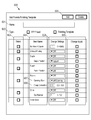
- FIG. 6 is an example of a screen displayed on the touch panel 318 by accessing the image forming apparatus from any of the information processing apparatus 103, 104, and 105 via the network and logging in to the image forming apparatus.
- the authentication for login here is executed by comparing the user name and password information input by the user with the user management table 1110 described later in FIG.
- the input field 601 is a field for inputting an arbitrary batch setting name to be given to the batch setting to be registered.
- the name entered in the input field 601 is notified to the information processing apparatus and displayed on the print setting screen as a selectable batch setting.
- the selection check box 602 is a check box for setting whether to notify the information processing apparatus of the batch setting to be registered as IPP-Preset or the information processing apparatus as Finishing-Template.
- IPP-Preset the image forming apparatus notifies the information processing apparatus of the name of the batch setting, the set setting item, and the set value.
- Finishing-Template the name of the batch setting is notified to the image forming apparatus.
- the selection check box 603 is a check box for selecting individual setting items to be included in the batch setting.
- the setting item name 609 is the name of the setting item that can be set as a batch setting.
- the setting item name 609 is defined by the IPP, and includes a setting item that can be displayed on the print setting screen provided by the OS without acquiring the item name, data type, and range from the image forming apparatus. I'm out. Further, the setting item name 609 is not defined by the IPP like 607 and 608, and the name of the item provided from the printing device and the data type of the above item are displayed on the print setting screen provided by the OS. , Contains items related to the range.
- the Opening Style 607 is the opening direction of the output material at the time of bookbinding printing, and the set value can be selected from right opening, left opening, top opening, and bottom opening.
- Creep Direction 608 is a setting for adjusting the print position of the image with respect to the paper at the time of bookbinding printing. The user can set the print position in mm.
- the range selection list / input field 604 is an area for selecting / inputting the setting value of each setting item to be included in the batch setting.
- the selection check box 605 is a check box for selecting whether or not the setting values of the setting items to be included in the batch setting can be changed for each job immediately before printing.
- the selection check box 605 the user can change the setting value of the setting item included in the selected batch setting after selecting the batch setting to be used for printing in the information processing apparatus.
- the image forming device tells the information processing device the name of the setting item. Notify the data type, range, and initial value. As a result, the user can operate the information processing device to change the print settings included in the batch settings even if the setting items are not defined by the IPP.
- the "Add" button 606 is a button for registering templates and presets that are batch settings in the preset / template DB.
- the settings set on the registration screen 600 are registered in the preset / template DB.
- vendor-specific setting items can be included in the batch setting that handles a plurality of setting items as one set, and whether or not to allow the setting change for those items before printing is performed. Can be set.
- the image forming apparatus 101 notifies the information processing apparatus 103 of the information necessary for the setting.
- the information processing apparatus 103 can change the settings of the vendor-specific setting items in the predetermined print service provided by the OS.
- FIG. 7 will explain a process in which the image forming apparatus stores data in the preset / template DB416 and the extended attribute DB417 for batch setting.
- the process described in FIG. 7 is realized by the CPU 211 controlling the WebUI control unit 415 of the image forming apparatus.
- the process shown in FIG. 7 is started according to the selection of the "Add" button 606 on the registration screen 600 shown in FIG.
- the WebUI control unit 415 extracts the name of the batch setting set in the input field 601 of the registration screen 600 and the setting item selected in the selection check box 603 (S711).
- the WebUI control unit 415 determines whether or not one of the setting items extracted in S711 is a setting item that allows the change of the set value before printing (S712).
- the WebUI control unit 415 refers to the selection check box 605 of the setting item, and determines whether or not the check box is selected. If selected, the WebUI control unit 415 advances the process to S713. On the other hand, when the selection check box 605 is not selected, the WebUI control unit 415 proceeds to S714.
- the WebUI control unit 415 sets the attribute ID indicating the setting item, the initial value indicating the setting value, and the last-minute change flag indicating the change of the setting value before printing for the setting item determined in S712 to allow the change of the setting value before printing.
- the WebUI control unit 415 changes the attribute ID indicating the setting item, the initial value indicating the setting value, and the change immediately before indicating the change of the setting value before printing.
- the flag is set to the extended attribute DB417 (S714). Details of the information stored in the extended attribute DB 417 will be described later using the batch setting management table 1120 and the batch attribute management table 1140 of FIG. In S714, since the change of the set value before printing is not permitted, the last-minute change flag is set to NO.
- the WebUI control unit 415 determines whether or not the processing of S712 has been performed for all the setting items extracted in S711 (S715). When the registration to the extended attribute DB 417 is completed for all the setting items set on the registration screen 600, the WebUI control unit 415 completes the process shown in FIG. 7. If there is a setting item for which the processing has not been completed, the WebUI control unit 415 returns the processing to S712 and executes the processing after S712.
- FIG. 8 is an example of a print screen provided by the OS of the information processing devices 103, 104, and 105 corresponding to the two batch setting methods of IPP-Preset (preset) and Finishing-Template (template).
- the information processing apparatus 103 will be described as an example.
- the screen 800 is a print setting screen displayed when the user instructs the user to print data.
- the printer selection area 803 is an area for the information processing device 103 to select an image forming device capable of transmitting print data.
- a list of image forming devices used for printing is displayed, and the user can select an image forming device to be used for printing from the displayed image forming devices.
- the object having the same shape as the object 804 described on the screens 800, 810, 820, 830, 840, and 850 is a button for displaying a list of options for the corresponding setting item.
- the preset selection area 801 is an area for selecting a preset to be used for setting from the IPP-Preset registered in the image forming apparatus.
- the screen 820 is displayed.
- the user selects a preset to be used from the list of IPP-Preset names acquired from the image forming apparatus 101.
- the settings corresponding to the selected preset are displayed on the screen 820. For example, when “Sided” corresponding to "com.canon.oip.grsetting002" registered in the batch setting management table of FIG. 11 is selected, the screen 850 is displayed.
- the setting corresponding to the selected Side is displayed, and "Two-Sided” is set to "Long Edge" on both sides for left opening.
- the values set as defaults are set.
- Box1 is set as a storage destination. It is specified.
- these setting items are not displayed on the screen 850.
- the screen 840 displays settings for setting items that cannot be displayed on the screen 850 provided by the OS of the information processing device 103.
- Area 841 displays the name of the selected preset.
- the areas 842 and 843 are areas displayed based on the attribute ID, data type, initial value, and range acquired from the image forming apparatus 101.
- the area 842 is an area for setting the enable / disable of the Store function. As an initial value, "ON" set by the user on the registration screen 600 is displayed.
- the range notified by the image forming apparatus is displayed as a settable option, and the user can change the setting before issuing a print instruction.
- Area 843 is an area in which the number of the box to be saved can be set.
- the numerical value 844 is a value notified as a range from the image forming apparatus, and is information indicating a range of numerical values that can be set in the setting item.
- the user selects "close” 845 after completing the settings. When "close” 845 is selected, the information processing apparatus 103 displays the screen 850. The user sets other print settings, selects "Print” 852, and instructs the execution of printing.
- the user selects the option button 802 on the screen 800 without selecting a preset.
- only one of the preset and the template can be used. Therefore, when using the template, the option button 802 is selected without selecting the preset in the preset selection area 801 or the option button 802 is selected after deselecting the preset.
- the screen 810 is displayed.
- Screen 810 is a screen for selecting the Finishing-Template to be used.
- a list of templates acquired from the image forming apparatus 101 is displayed.
- the user selects a template to use for print settings from the displayed list.
- screen 830 is displayed.
- the user selects "close" 812.
- Area 831 is an area for selecting a template to be used.
- a list of template names is displayed, and the user can select the template to be used.
- the name is "Booklet”
- the left opening of bookbinding printing is set
- the creep amount is 0.1 mm
- all the setting items are set to be allowed to change the settings before printing. Is selected.
- Area 832 displays the names and initial values of the setting items included in the template that can be changed.
- the range is displayed as a settable option notified by the image forming apparatus 101.
- Area 833 displays the names and initial values of the setting items included in the template that can be changed.
- the numerical range registered as the range in the image forming apparatus 101 is displayed as a numerical range (0.00-10.00) that can be set on the screen 830.
- the screen 800 is displayed.
- the user selects "Print” 805 and instructs the print execution.
- the setting items defined by the IPP included in the template are not displayed on the print setting screen of the information processing apparatus 103, and the settings before printing are not changed.
- the above is the outline of the operation until the user operates the information processing device 103 to instruct the print execution using the preset or the template.
- FIG. 9A is realized by the CPU 311 controlling each software module shown in FIG.
- the print screen control unit 510 receives an instruction to open the print setting screen 800 from the application on the information processing device, and displays the screen shown on the screen 800 (S901).
- the print screen control unit 510 controls the IPP client control unit 503 and acquires information on the batch settings registered in the batch setting management table 1120 stored in the preset / template DB 416 from the IPP server control unit 401 of the image forming apparatus. (S902).
- the print screen control unit 510 notifies the image forming apparatus 101 of the user ID of the user logged in to the information processing apparatus 103, and acquires the name of the batch setting corresponding to the user ID.
- the batch setting set as IPP-press the name of the preset, the name of the setting item defined by the IPP associated with the preset, and the initial value are acquired.
- the batch setting set as Finishing-Template only the name of the template is acquired.
- the print screen control unit 510 accepts the user to select a batch setting to be used for the print setting (S903).
- the print screen control unit 510 displays the screen 810 or the screen 820 and accepts the selection of the batch setting.
- the batch setting accepted may be IPP-Preset or Finishing-Template.
- the print screen control unit 510 determines whether or not the selected batch setting is an IPP-Preset format batch setting (S904).
- the information of the batch setting acquired in S902 includes whether each batch setting is a batch setting in the IPP-Preset format or a batch setting in the Finishing-Template format.
- the print screen control unit 510 refers to the above information and determines whether or not the selected batch setting is an IPP-Preset format batch setting. In the case of the IPP-Preset format batch setting, the print screen control unit 510 proceeds to S905 for processing. If the batch setting is not in the IPP-Preset format, the batch setting is in the Finishing-Template format, so the print screen control unit 510 proceeds to S906 for processing.
- the print screen control unit 510 reflects the initial values of the setting items defined by the IPP included in the batch setting information acquired in S902 on the print setting screen provided by the OS, and displays the screen 850 (S905). .. For the setting items corresponding to the selected batch settings that can be set on the print setting screen 800 displayed by the OS, even if the registration screen 600 is not set to allow the setting change before printing. , The setting can be changed.
- the extended attribute display unit 516 requests the image forming apparatus 101 to acquire the names of the vendor-specific setting items that are the setting items corresponding to the batch settings selected in S903 and the setting changes are permitted before printing. Is transmitted (S906). The acquisition result is stored in the extended attribute management unit 514.
- the extended attribute display unit 516 acquires the data type, initial value, and range information of the setting items acquired in S906 from the image forming apparatus 101 (S907). The acquisition result is also stored in the extended attribute management unit 514.
- the extended attribute display unit 516 displays a screen (for example, screen 830 or screen 840) on which the setting values of the vendor-specific setting items corresponding to the selected batch settings shown on the screen 810 or 820 can be input (for example, screen 830 or screen 840). S908).
- the set value set on the registration screen 600 is displayed as an initial value.
- the user accepts an instruction to change the setting, displays a list of options, and changes the setting to the option selected by the user.
- the setting items for inputting the set value the values that can be input, the character type, etc. are displayed, and the input of the number or the character to be the set value is accepted from the user.
- the print job generation unit 505 Upon receiving a print instruction from the user, the print job generation unit 505 generates a print job (S909).
- a print job is generated with the changed setting values.
- the PDL generation unit 508 determines whether the batch setting is set in the print setting, and if the batch setting is set, which format, the IPP-Preset format or the Finishing-Template format, is selected. Judgment (S910). When the set batch setting is an IPP-Preset format batch setting, the PDL generation unit 508 proceeds to S911. When the set batch setting is a batch setting in the Finishing-Template format, the PDL generation unit 508 proceeds to S912. If none of the batch settings are set, the PDL generation unit 508 proceeds to S913 for processing.
- the PDL generation unit 508 acquires the setting values set on the screens 850 and 840 from the print screen control unit 510 for the setting items corresponding to the selected presets and adds them to the print job (S911). At this time, the image forming apparatus 101 notifies the setting items corresponding to the selected preset, which are vendor-specific setting items for which the change of the setting before printing is not permitted, even if they are not displayed on the screen. Add the value to the print job. For setting items whose settings have not been changed by the user, the values are added to the print job. When using a preset, it is not necessary to add the preset name to the print job.
- the PDL generation unit 508 adds the name of the selected template, the name of the vendor-specific setting item, and the setting value to the print job (S912). Regarding the vendor-specific setting items that are set when the setting before printing is permitted on the registration screen 600, the attribute values and setting values of the items are added to the print job. For the setting items displayed on the print setting screen provided by the OS, the values set on the print setting screen are added to the print job.
- the PDL generation unit 508 acquires the setting values of the setting items defined by the IPP immediately before printing from the print screen control unit 510 and adds them to the job (S913).
- the print job generated by the print job generation unit 505 is transmitted to the printing device via the print spooler 509 (S914).
- the information processing apparatus 103 can transmit the print job of the print setting set by using the batch setting to the image forming apparatus 101.
- FIG. 9B the processing on the image forming apparatus 101 side while the information processing apparatus 103 displays the print setting screen and generates the print job will be described.
- Each process shown in FIG. 9B is realized by the CPU 211 controlling each module shown in FIG.
- the printer capability notification unit 402 determines whether or not a batch setting acquisition request has been received from the information processing device 103 (S921). If the batch setting acquisition request has not been received, the printer capability notification unit 402 repeats the process of S921.
- the printer capability notification unit 402 executes the process described in S922.
- the printer capability notification unit 402 refers to the preset / template DB 416, and sets the batch setting key 1125 of the batch setting of the type 1124 of "presset", which is the batch setting registered in the batch setting management table 1120 described later in FIG. Extract. Further, the printer capability notification unit 402 refers to the batch attribute management table 1140 for the setting items set for the extracted batch settings and for which the extended attribute 1133 of the batch attribute master table 1130 is “NO”. , Get the initial value. Then, the printer capability notification unit 402 notifies the information processing apparatus 103 of the extracted batch setting key and the initial value of the setting item defined by the IPP.
- the printer capability notification unit 402 refers to the preset / template DB 416 and extracts the batch setting key 1125 whose type 1124 is “fin-template”, which is the batch setting registered in the batch setting management table 1120 of FIG. S923). Then, the printer capability notification unit 402 notifies the information processing device 103 of the extracted batch setting key.
- the printer capability notification unit 402 determines whether or not the batch setting key of the batch setting selected on the print setting screen has been received from the information processing device 103 (S924). If the batch setting key has not been received, the process proceeds to S928.
- the printer capability notification unit 402 determines whether or not the selected batch setting is a vendor-specific setting item and includes a setting item for which changes before printing are permitted (S925). ).
- the printer capability notification unit 402 refers to the batch attribute management table 1140 and the batch attribute master table.
- the printer capability notification unit 402 determines whether or not there is an attribute ID corresponding to the batch setting key notified from the information processing device 103 in S924, and whether or not there is a setting item in which the last change 1143 is YES and the extended attribute 1133 is YES. do.
- the printer capability notification unit 402 proceeds to S928. If there is no setting item corresponding to the notified batch setting and there is no vendor-specific setting item and a setting item for which setting change before printing is permitted, the printer capability notification unit 402 proceeds to S926 for processing.
- the printer capability notification unit 402 notifies the information processing apparatus 103 of the names of the vendor-specific setting items corresponding to the selected batch settings and the setting changes are permitted immediately before printing (S926). ..
- the printer capability notification unit 402 sends the attribute key 1132 of the setting item, which is a vendor-specific setting item corresponding to the selected batch setting and is permitted to change the setting immediately before printing, to the information processing device 103. Notice.
- the printer capability notification unit 402 notifies the information processing apparatus 103 of the data type, range, and initial value of the vendor-specific setting items notified in S926 (S927).
- the printer capability notification unit 402 refers to the batch attribute master table 1130, and notifies the information processing apparatus 103 of the data type 1134 and the range 1135 of the attribute key 1132 corresponding to the setting item notified in S926. Further, the printer capability notification unit 402 refers to the batch attribute management table 1140 and notifies the information processing apparatus 103 of the initial value 1144 corresponding to the batch setting ID of the selected batch settings and the setting ID notified in S926. ..
- the print job generation unit 404 determines whether or not a print job has been received from the information processing device 103 (S928). If the print job generation unit 404 has not received the print job, the print job generation unit 404 returns the process to S924. When the print job is received, the print job generation unit 404 proceeds to S929.
- the print job generation unit 404 determines whether or not the received print job includes the name of the finishing-template that identifies the finishing-template (S929). If the received print job does not include the name of Finishing-Template, the print job generation unit 404 proceeds to S931.
- the print job generation unit 404 reads the Finishing-Template with the name received from the preset / template DB416 and applies it to the print job.
- the value set in the received print job is set.
- the setting values stored in the preset / template DB416 are set in the print job.
- the print job generation unit 404 executes printing based on the print job received from the information processing device 103 or the print job to which the setting is added in S930 (S931).
- the image forming apparatus 101 can execute printing using the batch setting.
- information necessary for changing the settings is transmitted from the image forming apparatus to the information processing apparatus only for the vendor-specific setting items set as the batch setting.
- the information required for displaying the screen for changing the settings of the vendor-specific setting items is reduced, and the vendor-specific setting items are changed promptly. Can display the screen for.
- FIG. 10 is a sequence diagram showing processing between the image forming apparatus 101 and the information processing apparatus 103 when displaying the print setting screen shown in FIG.
- the printer information management unit 504 inquires the printer capability notification unit 402 of the image forming apparatus whether or not the batch setting IPP-Preset format is supported and whether or not the Finishing-Template format is supported.
- the printer information management unit 504 further inquires the image forming apparatus 101 of the supported language in the Message-Catalog format (S1001). At this time, the information processing device 103 notifies the image forming device of the identification information of the user logged in to the information processing device.
- the printer capability notification unit 402 refers to the batch setting management table 1120, and returns the batch setting setting key corresponding to the user ID notified from the image forming device to the image forming device 101 (S1002).
- the printer capability notification unit 402 processes information that "com.canon.oip.grsetting002" registered as IPP-Preset and double-sided printing on the short side of the binding margin are set as setting items defined by IPP. Notify device 103. Of the settings associated with "com.canon.oip.grsetting002", the extended attribute 1133 is YES and the vendor-specific item is not notified. Further, the printer capability notification unit 402 notifies that "com.canon.oip.grsetting001" is registered as the Finishing-Template.
- the printer capability notification unit 402 also notifies the information processing apparatus 103 that "English” and “Japanese” are also supported for the language information supported in the Message-Catalog format.
- the printer information management unit 504 of the information processing apparatus 103 notifies the image forming apparatus 101 which of the languages notified to be supported is to be displayed.
- the image forming apparatus 101 is notified that the display is performed in English (en) (S1003).
- the image forming apparatus 101 identifies the URI for acquiring the message catalog to be notified to the information processing apparatus 103 based on the received language display information.
- the message catalog is text information used when the information processing apparatus 103 displays the attribute information notified by the image forming apparatus 101.
- the message catalog is, for example, a table as shown in the message catalog table 1150 of FIG.
- the printer capability notification unit 402 of the image forming apparatus 101 notifies the information processing apparatus 103 of the URL for acquiring the message catalog table (S1004).
- the print screen control unit 510 accesses the URI notified in S1004, and transmits a request for acquiring a message catalog corresponding to English from the printing device (S1005).
- the printer capability notification unit 402 of the image forming apparatus 101 returns the message catalog table 1150 of FIG. 11 to the information processing apparatus 103.
- the print screen control unit 510 of the information processing device displays the print setting screen according to the acquired message catalog (S1007).
- the print screen control unit 510 can display "com.canon.oip.grsetting001" as “Booklet”.
- the information processing apparatus 103 can display "com.canon.oip.grsetting002" notified from the image forming apparatus 101 as “Sides”.
- the user selects "Booklet”, which is a batch setting of the Finishing-Template format, in the area 811 of the screen 810 (S1008).
- the printer information management unit 504 of the information processing device transmits a request for acquiring information on vendor-specific setting items corresponding to the batch setting key "com.canon.oip.grsetting001" to the image forming device 101 (S1009).
- the printer capability notification unit 402 of the printing device extracts the vendor-specific setting items corresponding to "com.canon.oip.grsetting001" and the setting items for which the setting change before printing is permitted.
- Vendor-specific setting items corresponding to "com.canon.oip.grsetting001" are specified from the batch attribute management table of FIG.
- “com.canon.oip.booklet”, “com.canon.oip.book-opening-type", and “com.canon.oip.book-creep-correction” are specified. Of these, "com.canon.oip.book” does not notify the information processing apparatus 103 because the setting change before printing is not permitted.
- the printer capability notification unit 402 notifies the information processing apparatus 103 of "com.canon.oip.book-opening-type" and “com.canon.oip.book-creep-correction” (S1011).
- the printer information management unit 504 of the information processing device 103 receives a request from the extended attribute display unit 516 and requests the printing device for the data type, range, and initial value of "com.canon.oip.book-opening-type" ( S1012).
- the printer capability notification unit 402 refers to the batch attribute master table 1130 and extracts the data type 1134 and the range 1135 corresponding to "com.canon.oip.book-opening-type" (S1013). Then, the printer capability notification unit 402 notifies the information processing device 103 of the data type, the range, and the initial value (S1014).
- the printer information management unit 504 of the information processing device 103 receives a request from the extended attribute display unit 516 and requests the printing device for the data type, range, and initial value of "com.canon.oip.book-creep-correction" ( S1015).
- the printer capability notification unit 402 refers to the batch attribute master table 1130 and extracts the data type 1134 and the range 1135 corresponding to "com.canon.oip.bookcret-crepe-correction" (S1016). Then, the printer capability notification unit 402 notifies the information processing device 103 of the data type, the range, and the initial value (S1017).
- the print screen control unit 510 and the extended attribute display unit 516 of the information processing device reload the message catalog and display the print setting screen of the vendor-specific setting items (S1018).
- “Com.canon.oip.book-opening-type” is displayed as “OpeningType”.
- “com.canon.oip.book-creep-correction” is displayed as "CreepCorrection”.
- the range and initial value are reflected in the list menu from the message catalog.
- the user modifies the value of the vendor extended attribute included in the batch setting: Booklet (S1019). For example, the opening direction of the booklet is changed to Right, and the creep correction is corrected to 2.0 mm.
- the print job generation unit 505 generates a print job including the set value set on the print setting screen, and transmits the print job to the image forming apparatus 101 via the print spooler 509 (S1020).
- the print job notifies the image forming apparatus 101 of the used Finishing-Template batch setting key and the changed setting value.
- IPP-Preset As a batch setting and using Finishing-Template is the processing when IPP-Preset used in S1008 is selected.
- IPP-press When IPP-press is selected, the setting items and setting values notified in S1002 are reflected on the print setting screen. Therefore, in IPP-Preset, the setting of the IPP attribute can be changed before printing.
- Each table shown in FIG. 11 is stored in the storage 214 of the image forming apparatus, and the CPU 211 expands the table information in the storage into the RAM 213, updates it, and reflects it in the stored data in the storage.
- the user management table 1110 will be described.
- This management table is composed of a user ID 1111 that uniquely identifies a user for each record, a user password 1112, and a user name 1113.
- the user ID is automatically assigned a unique ID that does not overlap in order to identify the registrant of each batch setting in the batch setting management table.
- the WebUI control unit 415 can access the batch setting registration screen 600 only when the user name 1113 and the password 1112 match.
- the user ID is also used when managing the users who have registered the batch settings.
- the batch setting management table 1120 is a table for managing batch settings such as templates and presets.
- the registered vehicle ID 1121 is information indicating which user is the user who has collectively set the settings via the registration screen 600.
- the batch setting ID is information for identifying the batch settings registered on the registration screen 600, and is an ID shared and used in a plurality of tables shown in FIG.
- the type 1124 is information indicating whether the registered batch setting is IPP-Preset or Finishing-Template. “Fin-template” indicates that it is a Finishing-Template. “Preset” indicates that it is an IPP-Preset.
- the batch setting name 1123 is the name of the batch setting entered on the registration screen 600. The name is also registered in the message catalog table 1150, which will be described later.
- the batch setting key 1125 is a character string for specifying the batch setting, and is one of the identification information for identifying the batch setting.
- the batch attribute master table 1130 is a table showing the name, data type, and range of setting items defined by IPP and vendor-specific setting items.
- Attribute ID 1131 is identification information unique to the setting item.
- the attribute ID is commonly used among the tables shown in FIG.
- the attribute key 1132 is a character string indicating a setting item used when the image forming apparatus 101 notifies the information processing apparatus 103 of the ability information.
- the extended attribute 1133 is information indicating whether each setting item is a setting item defined by IPP or a vendor-specific setting item. “YES” indicates that the setting item is a vendor-specific setting item. On the other hand, "NO” indicates that the item is a setting item defined by IPP.
- Data type 1134 indicates the data type when the setting item is set. Boolean indicates to take either "true” or "false”. Indicator shows that it can take an integer value.
- Type2Keyword and Type3 Keyword indicate that regional representation is performed based on the format defined by IPP.
- the batch attribute management table 1140 indicates which setting item is set as the initial value for each batch setting for the batch settings registered in the batch setting management table 1120. Since one batch setting is composed of one or more attributes, the printer capability notification unit 402 acquires a record of a plurality of lines in order to acquire the information of one batch setting.
- the batch setting ID 1141 is an ID common to the batch setting ID 1122 in the batch setting management table, and indicates which batch setting the row is related to.
- the attribute ID 1142 is an ID common to the attribute ID 1131 of the batch attribute master table 1130, and is information indicating which setting item is set.
- the last-minute change 1143 indicates whether or not the change of the set value of the setting item is permitted after the batch setting is reflected. If the selection check box 605 on the registration screen 600 is checked and changes before printing are permitted, "YES" is set. If the selection check box 605 on the registration screen 600 is not checked and the setting change before printing is not permitted, "NO" is set.
- the initial value 1144 is an initial value when the batch setting is displayed on the print setting screen. In the initial value 1144, the value set in 604 of the registration screen 600 is stored.
- the preset / template DB416 of the image forming apparatus receives an inquiry from the information processing apparatus for each vendor extension attribute associated with the batch setting, and refers to the table shown in FIG.
- the image forming apparatus concatenates 1131 of the batch attribute master table 1130 and 1142 of the batch attribute management table 1140 as the primary key, and concatenates 1122 of the batch setting management table 1120 and 1141 of the batch attribute management table 1140 as the primary key. Then, the image forming apparatus searches for the attribute information corresponding to the batch setting ID of the table in which the three are concatenated.
- the message catalog table 1150 is a table for converting the batch setting key 1125, the attribute key 1132, and the range 1135 of each table shown in FIG. 11 into a character string for displaying on the print setting screen.
- the table is created for each corresponding language.
- the message catalog table 1150 is a table acquired when the information processing apparatus 103 displays the print setting screen. This table may be managed at a place different from that of the image forming apparatus 101.
- the identification information of the user logged in to the information processing apparatus 103 is transmitted to the image forming apparatus 101, and the batch setting corresponding to the user ID of the user is acquired.
- the user identification information may not be transmitted, and all the batch setting information registered in the image forming apparatus 101 may be transmitted to the information processing apparatus 103.
- the attribute key, data type, range, and initial value of the vendor-specific setting items corresponding to the selected batch setting are transmitted to the information processing device 103.
- the attribute key, data type, range, and initial value of the vendor-specific setting items corresponding to the batch settings registered in the image forming apparatus may be transmitted to the information processing apparatus 103.
- IPP-Preset it is permitted to change the settings before printing for the items defined by IPP. Therefore, when IPP-Preset is selected in Type 602, the Change by job of the item defined by IPP may be grayed out so that it cannot be set. In this case, "YES" is set in the last-minute change 1143 of the batch attribute management table 1140.
- the present invention is also realized by executing the following processing. That is, software (program) that realizes the functions of the above-described embodiment is supplied to the system or device via a network or various storage media, and the computer (or CPU, MPU, etc.) of the system or device reads the program code. This is the process to be executed.
- the computer program and the storage medium that stores the computer program constitute the present invention.
Landscapes
- Engineering & Computer Science (AREA)
- Theoretical Computer Science (AREA)
- Human Computer Interaction (AREA)
- Physics & Mathematics (AREA)
- General Engineering & Computer Science (AREA)
- General Physics & Mathematics (AREA)
- Multimedia (AREA)
- Signal Processing (AREA)
- Computer Networks & Wireless Communication (AREA)
- Accessory Devices And Overall Control Thereof (AREA)
- Facsimiles In General (AREA)
Priority Applications (2)
| Application Number | Priority Date | Filing Date | Title |
|---|---|---|---|
| CN202180032019.2A CN115515794B (zh) | 2020-04-30 | 2021-03-29 | 图像形成装置和控制图像形成装置的控制方法 |
| US18/050,752 US12386572B2 (en) | 2020-04-30 | 2022-10-28 | Image forming apparatus, and control method for controlling image forming apparatus |
Applications Claiming Priority (2)
| Application Number | Priority Date | Filing Date | Title |
|---|---|---|---|
| JP2020-080775 | 2020-04-30 | ||
| JP2020080775A JP7409611B2 (ja) | 2020-04-30 | 2020-04-30 | 画像形成装置と画像形成装置の制御方法、及びプログラム |
Related Child Applications (1)
| Application Number | Title | Priority Date | Filing Date |
|---|---|---|---|
| US18/050,752 Continuation US12386572B2 (en) | 2020-04-30 | 2022-10-28 | Image forming apparatus, and control method for controlling image forming apparatus |
Publications (1)
| Publication Number | Publication Date |
|---|---|
| WO2021220695A1 true WO2021220695A1 (ja) | 2021-11-04 |
Family
ID=78281243
Family Applications (1)
| Application Number | Title | Priority Date | Filing Date |
|---|---|---|---|
| PCT/JP2021/013288 Ceased WO2021220695A1 (ja) | 2020-04-30 | 2021-03-29 | 画像形成装置と画像形成装置の制御方法、及びプログラム |
Country Status (4)
| Country | Link |
|---|---|
| US (1) | US12386572B2 (https=) |
| JP (2) | JP7409611B2 (https=) |
| CN (1) | CN115515794B (https=) |
| WO (1) | WO2021220695A1 (https=) |
Families Citing this family (2)
| Publication number | Priority date | Publication date | Assignee | Title |
|---|---|---|---|---|
| JP2024001771A (ja) * | 2022-06-22 | 2024-01-10 | ブラザー工業株式会社 | 制御装置、制御装置のためのコンピュータプログラム、及び、制御方法 |
| JP7665665B2 (ja) * | 2023-02-13 | 2025-04-21 | キヤノン株式会社 | 印刷装置、制御方法及びプログラム |
Citations (3)
| Publication number | Priority date | Publication date | Assignee | Title |
|---|---|---|---|---|
| JP2010160579A (ja) * | 2009-01-06 | 2010-07-22 | Canon Inc | 印刷システム、印刷サーバ及びその制御方法、プログラム |
| US20110235085A1 (en) * | 2010-03-16 | 2011-09-29 | Google Inc. | Printer with anonymous printer registration in a cloud-based print service |
| JP2019006099A (ja) * | 2017-06-27 | 2019-01-17 | キヤノン株式会社 | 印刷システム、印刷装置と情報処理装置とその制御方法、及びプログラム |
Family Cites Families (8)
| Publication number | Priority date | Publication date | Assignee | Title |
|---|---|---|---|---|
| JP2008152545A (ja) * | 2006-12-18 | 2008-07-03 | Seiko Epson Corp | 印刷処理システム及び印刷方法 |
| JP5528125B2 (ja) * | 2010-01-08 | 2014-06-25 | キヤノン株式会社 | 管理装置、画像形成装置の管理方法、及び、プログラム |
| JP6249753B2 (ja) * | 2013-12-12 | 2017-12-20 | キヤノン株式会社 | 情報処理装置、情報処理方法及びプログラム |
| JP6454213B2 (ja) * | 2015-04-09 | 2019-01-16 | キヤノン株式会社 | 画像出力システム、画像処理装置、画像出力装置、これらにおける方法及びプログラム |
| US9870182B2 (en) * | 2015-09-07 | 2018-01-16 | Ricoh Company, Ltd. | Information processing apparatus, printing system, and information processing method, configured to present acquired setting values as candidate setting values in print setting interface |
| JP7512007B2 (ja) * | 2017-12-28 | 2024-07-08 | キヤノン株式会社 | 画像形成装置、通信装置、制御方法及びプログラム |
| JP7301503B2 (ja) * | 2018-06-29 | 2023-07-03 | キヤノン株式会社 | 情報処理装置、情報処理装置の制御方法、プログラム及びアプリケーション |
| JP7229680B2 (ja) * | 2018-06-29 | 2023-02-28 | キヤノン株式会社 | 情報処理装置、制御方法及びプログラム |
-
2020
- 2020-04-30 JP JP2020080775A patent/JP7409611B2/ja active Active
-
2021
- 2021-03-29 CN CN202180032019.2A patent/CN115515794B/zh active Active
- 2021-03-29 WO PCT/JP2021/013288 patent/WO2021220695A1/ja not_active Ceased
-
2022
- 2022-10-28 US US18/050,752 patent/US12386572B2/en active Active
-
2023
- 2023-12-11 JP JP2023208660A patent/JP7604605B2/ja active Active
Patent Citations (3)
| Publication number | Priority date | Publication date | Assignee | Title |
|---|---|---|---|---|
| JP2010160579A (ja) * | 2009-01-06 | 2010-07-22 | Canon Inc | 印刷システム、印刷サーバ及びその制御方法、プログラム |
| US20110235085A1 (en) * | 2010-03-16 | 2011-09-29 | Google Inc. | Printer with anonymous printer registration in a cloud-based print service |
| JP2019006099A (ja) * | 2017-06-27 | 2019-01-17 | キヤノン株式会社 | 印刷システム、印刷装置と情報処理装置とその制御方法、及びプログラム |
Also Published As
| Publication number | Publication date |
|---|---|
| CN115515794B (zh) | 2026-01-06 |
| JP2021172072A (ja) | 2021-11-01 |
| JP2024025809A (ja) | 2024-02-26 |
| US20230082502A1 (en) | 2023-03-16 |
| JP7604605B2 (ja) | 2024-12-23 |
| CN115515794A (zh) | 2022-12-23 |
| JP7409611B2 (ja) | 2024-01-09 |
| US12386572B2 (en) | 2025-08-12 |
Similar Documents
| Publication | Publication Date | Title |
|---|---|---|
| JP7690524B2 (ja) | 印刷設定アプリケーション、制御方法、及び情報処理装置 | |
| JP7757495B2 (ja) | 画像形成装置と画像形成装置の制御方法、及びプログラム | |
| JP2020004158A (ja) | 情報処理装置、情報処理装置の制御方法、及びプログラム | |
| US9135528B2 (en) | Information processing apparatus, job processing method in information processing apparatus, and storage medium | |
| JP7118714B2 (ja) | 画像形成装置、および、該画像形成装置の制御方法、制御プログラム | |
| JP7604605B2 (ja) | 画像形成装置と画像形成装置の制御方法、及びプログラム | |
| JP7479867B2 (ja) | 印刷装置とその制御方法、及びプログラム | |
| US20250355604A1 (en) | Information processing apparatus, method, and non-transitory computer-readable storage medium storing program | |
| JP2016177432A (ja) | プログラム、情報処理装置、記憶媒体、画面作成方法 | |
| JP2012155401A (ja) | 印刷システム、印刷装置、印刷システムの制御方法、印刷装置の制御方法、プログラム | |
| JP2020030697A (ja) | 情報処理装置、端末装置、設定画面表示システム、設定画面表示方法 | |
| JP7676203B2 (ja) | 情報処理装置、ならびに、印刷設定アプリケーション | |
| JP7362384B2 (ja) | 情報処理装置、その制御方法、及びプログラム | |
| JP7370732B2 (ja) | 画像形成装置と通信する情報処理装置とその制御方法、及びプログラム | |
| JP2006171991A (ja) | 代行及び分散印刷システム | |
| JP7639099B1 (ja) | 情報処理装置、情報処理装置の制御方法及びプログラム | |
| US20240329890A1 (en) | Information processing apparatus and method of controlling the same, and storage medium | |
| JP7324009B2 (ja) | 情報処理装置、印刷装置、それらの制御方法、及びプログラム | |
| JP6388379B2 (ja) | 情報処理装置、情報処理装置の制御方法、及びプログラム | |
| JP2023019057A (ja) | 印刷システム、情報処理装置、印刷装置、それらの制御方法、及びプログラム |
Legal Events
| Date | Code | Title | Description |
|---|---|---|---|
| 121 | Ep: the epo has been informed by wipo that ep was designated in this application |
Ref document number: 21797697 Country of ref document: EP Kind code of ref document: A1 |
|
| NENP | Non-entry into the national phase |
Ref country code: DE |
|
| 122 | Ep: pct application non-entry in european phase |
Ref document number: 21797697 Country of ref document: EP Kind code of ref document: A1 |