WO2021162008A1 - 文書作成支援装置、文書作成支援方法及びプログラム - Google Patents
文書作成支援装置、文書作成支援方法及びプログラム Download PDFInfo
- Publication number
- WO2021162008A1 WO2021162008A1 PCT/JP2021/004835 JP2021004835W WO2021162008A1 WO 2021162008 A1 WO2021162008 A1 WO 2021162008A1 JP 2021004835 W JP2021004835 W JP 2021004835W WO 2021162008 A1 WO2021162008 A1 WO 2021162008A1
- Authority
- WO
- WIPO (PCT)
- Prior art keywords
- property
- texts
- text
- specified
- image
- Prior art date
- Legal status (The legal status is an assumption and is not a legal conclusion. Google has not performed a legal analysis and makes no representation as to the accuracy of the status listed.)
- Ceased
Links
Images





Classifications
-
- G—PHYSICS
- G16—INFORMATION AND COMMUNICATION TECHNOLOGY [ICT] SPECIALLY ADAPTED FOR SPECIFIC APPLICATION FIELDS
- G16H—HEALTHCARE INFORMATICS, i.e. INFORMATION AND COMMUNICATION TECHNOLOGY [ICT] SPECIALLY ADAPTED FOR THE HANDLING OR PROCESSING OF MEDICAL OR HEALTHCARE DATA
- G16H15/00—ICT specially adapted for medical reports, e.g. generation or transmission thereof
-
- G—PHYSICS
- G06—COMPUTING OR CALCULATING; COUNTING
- G06F—ELECTRIC DIGITAL DATA PROCESSING
- G06F40/00—Handling natural language data
- G06F40/40—Processing or translation of natural language
- G06F40/55—Rule-based translation
- G06F40/56—Natural language generation
-
- G—PHYSICS
- G06—COMPUTING OR CALCULATING; COUNTING
- G06F—ELECTRIC DIGITAL DATA PROCESSING
- G06F3/00—Input arrangements for transferring data to be processed into a form capable of being handled by the computer; Output arrangements for transferring data from processing unit to output unit, e.g. interface arrangements
- G06F3/01—Input arrangements or combined input and output arrangements for interaction between user and computer
- G06F3/048—Interaction techniques based on graphical user interfaces [GUI]
- G06F3/0481—Interaction techniques based on graphical user interfaces [GUI] based on specific properties of the displayed interaction object or a metaphor-based environment, e.g. interaction with desktop elements like windows or icons, or assisted by a cursor's changing behaviour or appearance
- G06F3/0482—Interaction with lists of selectable items, e.g. menus
-
- G—PHYSICS
- G06—COMPUTING OR CALCULATING; COUNTING
- G06F—ELECTRIC DIGITAL DATA PROCESSING
- G06F40/00—Handling natural language data
- G06F40/10—Text processing
- G06F40/166—Editing, e.g. inserting or deleting
-
- G—PHYSICS
- G06—COMPUTING OR CALCULATING; COUNTING
- G06T—IMAGE DATA PROCESSING OR GENERATION, IN GENERAL
- G06T7/00—Image analysis
- G06T7/0002—Inspection of images, e.g. flaw detection
- G06T7/0012—Biomedical image inspection
-
- G—PHYSICS
- G06—COMPUTING OR CALCULATING; COUNTING
- G06V—IMAGE OR VIDEO RECOGNITION OR UNDERSTANDING
- G06V20/00—Scenes; Scene-specific elements
- G06V20/70—Labelling scene content, e.g. deriving syntactic or semantic representations
-
- G—PHYSICS
- G16—INFORMATION AND COMMUNICATION TECHNOLOGY [ICT] SPECIALLY ADAPTED FOR SPECIFIC APPLICATION FIELDS
- G16H—HEALTHCARE INFORMATICS, i.e. INFORMATION AND COMMUNICATION TECHNOLOGY [ICT] SPECIALLY ADAPTED FOR THE HANDLING OR PROCESSING OF MEDICAL OR HEALTHCARE DATA
- G16H30/00—ICT specially adapted for the handling or processing of medical images
- G16H30/20—ICT specially adapted for the handling or processing of medical images for handling medical images, e.g. DICOM, HL7 or PACS
-
- G—PHYSICS
- G16—INFORMATION AND COMMUNICATION TECHNOLOGY [ICT] SPECIALLY ADAPTED FOR SPECIFIC APPLICATION FIELDS
- G16H—HEALTHCARE INFORMATICS, i.e. INFORMATION AND COMMUNICATION TECHNOLOGY [ICT] SPECIALLY ADAPTED FOR THE HANDLING OR PROCESSING OF MEDICAL OR HEALTHCARE DATA
- G16H30/00—ICT specially adapted for the handling or processing of medical images
- G16H30/40—ICT specially adapted for the handling or processing of medical images for processing medical images, e.g. editing
-
- G—PHYSICS
- G16—INFORMATION AND COMMUNICATION TECHNOLOGY [ICT] SPECIALLY ADAPTED FOR SPECIFIC APPLICATION FIELDS
- G16H—HEALTHCARE INFORMATICS, i.e. INFORMATION AND COMMUNICATION TECHNOLOGY [ICT] SPECIALLY ADAPTED FOR THE HANDLING OR PROCESSING OF MEDICAL OR HEALTHCARE DATA
- G16H50/00—ICT specially adapted for medical diagnosis, medical simulation or medical data mining; ICT specially adapted for detecting, monitoring or modelling epidemics or pandemics
- G16H50/20—ICT specially adapted for medical diagnosis, medical simulation or medical data mining; ICT specially adapted for detecting, monitoring or modelling epidemics or pandemics for computer-aided diagnosis, e.g. based on medical expert systems
-
- G—PHYSICS
- G16—INFORMATION AND COMMUNICATION TECHNOLOGY [ICT] SPECIALLY ADAPTED FOR SPECIFIC APPLICATION FIELDS
- G16H—HEALTHCARE INFORMATICS, i.e. INFORMATION AND COMMUNICATION TECHNOLOGY [ICT] SPECIALLY ADAPTED FOR THE HANDLING OR PROCESSING OF MEDICAL OR HEALTHCARE DATA
- G16H50/00—ICT specially adapted for medical diagnosis, medical simulation or medical data mining; ICT specially adapted for detecting, monitoring or modelling epidemics or pandemics
- G16H50/30—ICT specially adapted for medical diagnosis, medical simulation or medical data mining; ICT specially adapted for detecting, monitoring or modelling epidemics or pandemics for calculating health indices; for individual health risk assessment
-
- G—PHYSICS
- G16—INFORMATION AND COMMUNICATION TECHNOLOGY [ICT] SPECIALLY ADAPTED FOR SPECIFIC APPLICATION FIELDS
- G16H—HEALTHCARE INFORMATICS, i.e. INFORMATION AND COMMUNICATION TECHNOLOGY [ICT] SPECIALLY ADAPTED FOR THE HANDLING OR PROCESSING OF MEDICAL OR HEALTHCARE DATA
- G16H50/00—ICT specially adapted for medical diagnosis, medical simulation or medical data mining; ICT specially adapted for detecting, monitoring or modelling epidemics or pandemics
- G16H50/70—ICT specially adapted for medical diagnosis, medical simulation or medical data mining; ICT specially adapted for detecting, monitoring or modelling epidemics or pandemics for mining of medical data, e.g. analysing previous cases of other patients
-
- G—PHYSICS
- G06—COMPUTING OR CALCULATING; COUNTING
- G06F—ELECTRIC DIGITAL DATA PROCESSING
- G06F40/00—Handling natural language data
- G06F40/10—Text processing
- G06F40/103—Formatting, i.e. changing of presentation of documents
-
- G—PHYSICS
- G06—COMPUTING OR CALCULATING; COUNTING
- G06T—IMAGE DATA PROCESSING OR GENERATION, IN GENERAL
- G06T2207/00—Indexing scheme for image analysis or image enhancement
- G06T2207/10—Image acquisition modality
- G06T2207/10072—Tomographic images
-
- G—PHYSICS
- G06—COMPUTING OR CALCULATING; COUNTING
- G06T—IMAGE DATA PROCESSING OR GENERATION, IN GENERAL
- G06T2207/00—Indexing scheme for image analysis or image enhancement
- G06T2207/10—Image acquisition modality
- G06T2207/10072—Tomographic images
- G06T2207/10081—Computed x-ray tomography [CT]
-
- G—PHYSICS
- G06—COMPUTING OR CALCULATING; COUNTING
- G06T—IMAGE DATA PROCESSING OR GENERATION, IN GENERAL
- G06T2207/00—Indexing scheme for image analysis or image enhancement
- G06T2207/20—Special algorithmic details
- G06T2207/20081—Training; Learning
-
- G—PHYSICS
- G06—COMPUTING OR CALCULATING; COUNTING
- G06T—IMAGE DATA PROCESSING OR GENERATION, IN GENERAL
- G06T2207/00—Indexing scheme for image analysis or image enhancement
- G06T2207/20—Special algorithmic details
- G06T2207/20084—Artificial neural networks [ANN]
-
- G—PHYSICS
- G06—COMPUTING OR CALCULATING; COUNTING
- G06T—IMAGE DATA PROCESSING OR GENERATION, IN GENERAL
- G06T2207/00—Indexing scheme for image analysis or image enhancement
- G06T2207/30—Subject of image; Context of image processing
- G06T2207/30004—Biomedical image processing
- G06T2207/30061—Lung
-
- G—PHYSICS
- G06—COMPUTING OR CALCULATING; COUNTING
- G06T—IMAGE DATA PROCESSING OR GENERATION, IN GENERAL
- G06T2207/00—Indexing scheme for image analysis or image enhancement
- G06T2207/30—Subject of image; Context of image processing
- G06T2207/30004—Biomedical image processing
- G06T2207/30096—Tumor; Lesion
-
- G—PHYSICS
- G06—COMPUTING OR CALCULATING; COUNTING
- G06V—IMAGE OR VIDEO RECOGNITION OR UNDERSTANDING
- G06V2201/00—Indexing scheme relating to image or video recognition or understanding
- G06V2201/03—Recognition of patterns in medical or anatomical images
Definitions
- Disclosure technology relates to document creation support devices, document creation support methods and programs.
- Japanese Patent Application Laid-Open No. 2009-82443 describes a storage means for storing image feature information and a finding sentence of an interpretation result in association with each other, and an acquisition means for acquiring image feature information of a region of interest designated in an image to be read.
- a search means that searches for image feature information similar to the image feature information acquired by the acquisition means from the storage means, and acquires a finding sentence that is stored in association with the searched image feature information from the storage means.
- a desired term is selected from a plurality of terms prepared in advance, and a fixed phrase generated according to a combination of the selected terms or an input candidate is used as a sentence.
- a registration means for selecting what to do, accepting corrections to the selected sentence, and registering the combination of terms selected by the operation input control means and the correction sentence in the dictionary as a correction sentence.
- the search means for searching the dictionary for the correction sentence in which the combination of the terms selected by the operation input control means and the combination of the terms associated with the registration means match, and the correction sentence searched by the search means are operated.
- a document creation support device including a display control means for displaying as an input candidate of a sentence selected by the input control means is described.
- the text automatically generated based on the medical image may lack important matters or contain unimportant matters, and the text that meets the user's request may not always be generated.
- it is preferable that the description contents of the plurality of candidate texts are varied.
- there is a high possibility that a plurality of candidate texts that meet the user's request are included.
- by reflecting the tendency of the description content of the text selected by the user in the subsequent text generation it is more likely that the plurality of candidate texts match the user's request.
- the disclosed technology was made in view of the above points, and aims to increase the possibility that text that meets the user's request is generated when text is automatically generated based on an image.
- the document support creation device is a document support creation device provided with at least one processor.
- a processor identifies the properties of a feature portion contained in an image for each of a plurality of predetermined property items, and generates a plurality of different texts describing at least one of the specified properties. Generates multiple texts so that the combination of property items corresponding to the properties described in each of the texts differs between the multiple texts, and is selected when any one of the plurality of texts is selected.
- a selection item that is a property item corresponding to the property described in the text described in the text, and a property identification result that is the result of specifying the property for each of the plurality of property items when generating a plurality of texts including the selected text.
- the selection item associated with the property identification result is generated.
- a priority text describing the specified property for the same property item as is generated as one of a plurality of texts.
- the processor may control the display of the priority text so as to be distinguishable from other texts.
- the processor may control the display of a plurality of texts side by side in the vertical direction of the display screen so that the priority text is located at the top of the display screen.
- the processor may also control highlighting the preferred text.
- the processor may generate corresponding data each time any one of the plurality of texts is selected, and store the generated corresponding data in the storage unit.
- the document creation support method specifies the properties of the feature portion included in the image for each of a plurality of predetermined property items, and describes at least one of the specified properties.
- a plurality of texts are generated so that the combination of property items corresponding to the properties described in each of the plurality of texts is different from each other among the plurality of texts, and any one of the plurality of texts is generated.
- a selection item that is a property item corresponding to the property described in the selected text, and a property for each of the plurality of property items when generating multiple texts including the selected text.
- Correspondence data corresponding to the property identification result which is the specified result is generated, and when the property specified for each of the plurality of property items and the property identification result included in the corresponding data match, the property identification is performed. Includes generating as one of a plurality of texts a preferred text that describes the properties identified for the same property item as the selection item associated with the result.
- the program according to the disclosed technique identifies the properties of the feature portion contained in the image for each of a plurality of predetermined property items, and generates a plurality of different texts describing at least one of the specified properties.
- a plurality of texts are generated so that the combination of property items corresponding to the properties described in each of the plurality of texts is different from each other among the plurality of texts, and one of the plurality of texts is selected.
- the selection item which is a property item corresponding to the property described in the selected text, and the result of specifying the property for each of the plurality of property items when generating a plurality of texts including the selected text.
- Corresponding data corresponding to the property identification result is generated, and when the property specified for each of a plurality of property items matches the property identification result included in the corresponding data, the property identification result is supported.
- This is a program for causing a computer to execute a process of generating a priority text describing a property specified for the same property item as the attached selection item as one of a plurality of texts.
- FIG. 1 is a diagram showing a schematic configuration of a medical information system 1 to which a document creation support device according to an embodiment of the disclosed technique is applied.
- the medical information system 1 uses a known ordering system to take an image of a part to be inspected of a subject, store a medical image acquired by the image, and interpret the medical image by an image interpreter based on an examination order from a doctor in a clinical department using a known ordering system.
- This is a system for creating an interpretation report, viewing the interpretation report by the doctor of the requesting clinical department, and observing the details of the medical image to be interpreted.
- the medical information system 1 includes a plurality of imaging devices 2, a plurality of image interpretation workstations (WS) 3, a clinical department workstation (WS) 4, an image server 5, an image database 6, an image interpretation report server 7, and an image interpretation terminal.
- the report database 8 is configured to be connected to each other via a wired or wireless network 9 so as to be able to communicate with each other.
- Each device is a computer on which an application program for functioning as a component of the medical information system 1 is installed.
- the application program is recorded and distributed on a recording medium such as a DVD (Digital Versatile Disc) or a CD-ROM (Compact Disc Read Only Memory), and is installed on the computer from the recording medium.
- a recording medium such as a DVD (Digital Versatile Disc) or a CD-ROM (Compact Disc Read Only Memory)
- it is stored in the storage device of the server computer connected to the network 9 or in the network storage in a state of being accessible from the outside, and is downloaded and installed in the computer upon request.
- the photographing device 2 is a device that generates a medical image representing the diagnosis target part by photographing the part to be diagnosed of the subject.
- the imaging device 2 may be, for example, a simple X-ray imaging device, a CT device, an MRI device, a PET (Positron Emission Tomography) device, or the like.
- the medical image generated by the imaging device 2 is transmitted to the image server 5 and stored.
- the clinical department WS4 is a computer used by clinical department doctors for detailed observation of medical images, viewing of interpretation reports, creation of electronic medical records, etc., and is a processing device, a display device such as a display, and input such as a keyboard and a mouse. It is composed of devices.
- a patient's medical record electronic medical record
- an image viewing request is made to the image server 5
- a medical image received from the image server 5 is displayed, and an area suspected of having a disease in the medical image is automatically detected or highlighted.
- Each process such as a request for viewing the image interpretation report to the image interpretation report server 7 and a display of the image interpretation report received from the image interpretation report server 7 is performed by executing a software program for each process.
- the image server 5 is a general-purpose computer in which a software program that provides a database management system (DataBase Management System: DBMS) function is installed. Further, the image server 5 includes an image database 6 including storage.
- the image database 6 may be a hard disk device connected to the image server 5 by a data bus, or a disk device connected to NAS (Network Attached Storage) and SAN (Storage Area Network) connected to network 9. It may be.
- NAS Network Attached Storage
- SAN Storage Area Network
- the image data of the medical image acquired by the imaging device 2 and the incidental information incidental to the image data are registered in the image database 6.
- the incidental information is assigned to, for example, an image ID for identifying each medical image, a patient ID (identification) for identifying the patient who is the subject, an examination ID for identifying the examination content, and each medical image.
- Unique ID UID: unique identification
- examination date when the medical image was generated examination time
- type of imaging device used in the examination to acquire the medical image patient information such as patient name, age, gender, etc.
- Examination site imaging site
- imaging information imaging protocol, imaging sequence, imaging method, imaging conditions, presence / absence of contrast medium, etc. Series number or collection number when multiple medical images are acquired in one examination, etc. Information is included.
- the image server 5 receives the viewing request from the image interpretation WS3 via the network 9, the image server 5 searches for the medical image registered in the image database 6 and transmits the searched medical image to the requester's image interpretation WS3.
- the interpretation report server 7 incorporates a software program that provides the functions of a database management system to a general-purpose computer.
- the image interpretation report server 7 receives the image interpretation report registration request from the image interpretation WS3, the image interpretation report server 7 prepares the image interpretation report in a database format and registers it in the image interpretation report database 8. Further, when the search request for the interpretation report is received, the interpretation report is searched from the interpretation report database 8.
- an image ID for identifying a medical image to be interpreted for example, an image ID for identifying a medical image to be interpreted, an image interpreter ID for identifying an image diagnostician who performed image interpretation, a lesion name, lesion position information, findings, and confidence in the findings are stored in the image interpretation report database 8.
- An interpretation report in which information such as the degree is recorded is registered.
- Network 9 is a wired or wireless local area network that connects various devices in the hospital.
- the network 9 may be configured such that the local area networks of each hospital are connected to each other by the Internet or a dedicated line. In any case, it is preferable that the network 9 has a configuration capable of realizing high-speed transfer of medical images such as an optical network.
- the interpretation WS3 requests the image server 5 to browse the medical image, various image processes for the medical image received from the image server 5, display of the medical image, analysis process for the medical image, highlighting of the medical image based on the analysis result, and analysis result. For each process, such as creating an image interpretation report based on the above, supporting the creation of an image interpretation report, requesting the image interpretation report server 7 to register and view the image interpretation report, and displaying the image interpretation report received from the image interpretation report server 7. This is done by executing the software program of.
- the interpretation WS3 includes the document creation support device 10 described later, and among the above-mentioned processes, the processes other than the processes performed by the document creation support device 10 are performed by a well-known software program. The description is omitted.
- the image interpretation WS3 does not perform any processing other than the processing performed by the document creation support device 10, and a computer that performs the processing is separately connected to the network 9, and the computer requests the processing in response to the processing request from the interpretation WS3.
- the processed processing may be performed.
- the document creation support device 10 included in the interpretation WS3 will be described in detail.
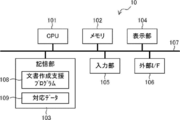
- FIG. 2 is a diagram showing an example of the hardware configuration of the document creation support device 10.
- the document creation support device 10 includes a CPU (Central Processing Unit) 101, a memory 102, a storage unit 103, a display unit 104 such as a liquid crystal display, an input unit 105 such as a keyboard and a mouse, and an external I / F (InterFace) 106. ..
- the input unit 105 may be provided with a microphone that accepts voice input.
- the CPU 101, the memory 102, the storage unit 103, the display unit 104, the input unit 105, and the external I / F 106 are connected to the bus 107.
- the document creation support device 10 is connected to the network 9 of the medical information system 1 via the external I / F 106.
- the CPU 101 is an example of a processor in the disclosed technology.
- the storage unit 103 is realized by an HDD (Hard Disk Drive), an SSD (Solid State Drive), a flash memory, or the like.
- the document creation support program 108 is stored in the storage unit 103.
- the document creation support program 108 is recorded and distributed on a recording medium such as a DVD or a CD-ROM, and is installed in the document creation support device 10 from the recording medium.
- the document creation support program 108 is stored in the storage device of the server computer connected to the network or in the network storage in a state of being accessible from the outside, and is downloaded and installed in the document creation support device 10 as requested.
- NS The CPU 101 reads the document creation support program 108 from the storage unit 103, expands it into the memory 102, and executes the expanded document creation support program 108.
- the corresponding data 109 is stored in the storage unit 103. The details of the corresponding data 109 will be described later.
- FIG. 3 is a functional block diagram showing an example of the functional configuration of the document creation support device 10.
- the document creation support device 10 includes an image acquisition unit 11, a feature extraction unit 12, an analysis unit 13, a text generation unit 14, a display control unit 15, and a corresponding data generation unit 16.
- the CPU 101 executes the document creation support program 108, the document creation support device 10 serves as an image acquisition unit 11, a feature extraction unit 12, an analysis unit 13, a text generation unit 14, a display control unit 15, and a corresponding data generation unit 16. Function.
- the image acquisition unit 11 acquires a medical image to be diagnosed (hereinafter referred to as a diagnosis target image).
- the image to be diagnosed is stored in the image database 6, is transmitted from the image database 6 to the document creation support device 10 in response to a request from the document creation support device 10 (interpretation workstation 3), and is stored in the storage unit 103.
- NS The image acquisition unit 11 acquires a diagnosis target image stored in the storage unit 103.
- the image acquisition unit 11 may directly acquire the image to be diagnosed stored in the image database 6 from the image database 6. In the following, a case where the image to be diagnosed is a chest CT image will be described as an example.
- the feature extraction unit 12 extracts a shadow (hereinafter referred to as an abnormal shadow) suspected of having a disease such as a nodule or a mass from the image to be diagnosed acquired by the image acquisition unit 11 as a feature portion.
- the feature extraction unit 12 may extract an abnormal shadow using, for example, a learned model learned by machine learning such as deep learning.
- the trained model is learned by machine learning using, for example, a plurality of combinations of a medical image including an abnormal shadow and information specifying a region in an image in which the abnormal shadow exists as training data.
- the trained model described above takes a medical image as an input and outputs a result of identifying an abnormal shadow region in the medical image.
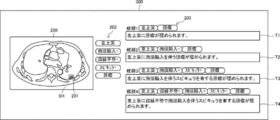
- FIG. 4 shows an example in which an abnormal shadow SH is extracted from the image to be diagnosed 200.
- the analysis unit 13 analyzes the abnormal shadows extracted by the feature extraction unit 12 to specify the properties of the abnormal shadows for each of a plurality of predetermined property items.
- the property items specified for the abnormal shadow include the position, the presence or absence of spicula, the presence or absence of marginal irregularities, the presence or absence of pleural invagination, and the type of disease in the abnormal shadow.
- the analysis unit 13 may identify the nature of the abnormal shadow using, for example, a learned model learned by machine learning such as deep learning.
- the trained model is learned by machine learning using, for example, a plurality of combinations of a medical image including an abnormal shadow and a property label representing the property of the abnormal shadow as training data.
- the trained model described above takes a medical image as an input, and outputs a property score derived for each property item in the abnormal shadow included in the medical image.
- the property score is a score indicating the prominence of the property for the property item.
- the property score takes, for example, a value of 0 or more and 1 or less, and the larger the value of the property score, the more remarkable the property.
- the property score for "presence or absence of spicula" which is one of the property items of the abnormal shadow
- the property for "presence or absence of spicula" of the abnormal shadow is “spicula”. If it is identified as “yes (positive)” and the property score for "presence or absence of spicula” is, for example, less than 0.5, the property for "presence or absence of spicula” of the abnormal shadow is "no spicula (negative)”. Identify that.
- the threshold value 0.5 used for the property determination is merely an example, and is set to an appropriate value for each property item.
- the properties of the abnormal shadow SH extracted from the image to be diagnosed 200 are shown as “upper left lobe”, “pleural invagination +”, “marginal irregularity +”, “spicula +”, and “tumor”. Is shown as an example. The "+” notation in the specified property indicates that the property is positive.
- the text generation unit 14 generates a plurality of different texts describing the properties of the abnormal shadow as candidate text for the abnormal shadow extracted by the feature extraction unit 12.
- the text generation unit 14 generates a plurality of texts so that at least one property for each of the plurality of property items specified by the analysis unit 13 is described in each text. Further, the text generation unit 14 generates a plurality of texts so that the combination of the property items corresponding to the properties described in each of the plurality of texts is different from each other among the plurality of texts.
- FIG. 4 shows an example in which the text generation unit 14 generates four different texts that describe the properties of the abnormal shadow SH.
- the text generator 14 is the first among the properties specified for each of the plurality of property items, including the description "a tumor is found in the upper left lobe” based on, for example, “upper left lobe” and “mass”. Generate text T1.
- the text generation unit 14 is accompanied by "pleural invagination in the upper left lobe” based on, for example, “upper left lobe”, “pleural invagination +", and "tumor" among the properties specified for each of the plurality of property items.
- the text generation unit 14 sets the "upper left lobe” based on, for example, “upper left lobe”, “pleural invagination +", “spicula +”, and “tumor” among the properties specified for each of the plurality of property items. A tumor with spicula with pleural invagination is found. ”Generates a third text T3 containing the statement. Further, the text generation unit 14 has, among the properties specified for each of the plurality of property items, for example, “upper left lobe", “pleural invagination +", “marginal irregularity +”, “spicula +”, “tumor”. Generates a fourth text T4 containing the statement "A tumor with irregular margins and pleural invagination is found in the upper left lobe.”
- the text generation unit 14 at least one of the properties specified for each of the plurality of predetermined property items is described in each of the plurality of texts, and the property is described in each of the plurality of texts. Generate multiple texts so that the combination of corresponding property items is different from each other among the texts.
- the number of texts generated by the text generation unit 14 may be 3 or less, or 5 or more.
- the text generation unit 14 may generate a plurality of priority texts to be described later. Generate as one of the texts in.
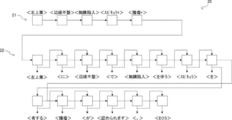
- the text generation unit 14 includes a recurrent neural network that has been trained to create a text from the input words.
- FIG. 5 is a diagram showing a schematic configuration of a recurrent neural network.
- the recurrent neural network 20 includes an encoder 21 and a decoder 22. Characters corresponding to the properties specified by the analysis unit 13 are input to the encoder 21.
- the encoder 21 has a “upper left leaf” and an “irregular edge +” in which the properties specified by the analysis unit 13 are transcribed. , "Pleural invagination", “Spicula”, “Tumor” are entered.
- the decoder 22 has been learned to document the words input to the encoder 21, and from the above input words, "a tumor having an irregular margin and a pleural invagination in the upper left lobe is recognized.
- a fourth text T4 is generated.
- "EOS” indicates the end of the sentence (End Of Sentence).
- the display control unit 15 controls the display unit 104 to display a plurality of texts generated by the text generation unit 14.
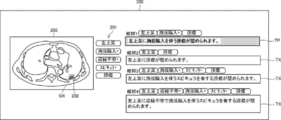
- FIG. 6 is a diagram showing an example of a display mode of information displayed on the display screen 300 of the display unit 104 under the control of the display control unit 15.
- the first to fourth texts T1 to T4 generated by the text generation unit 14 are displayed on the display screen 300.
- the diagnosis target image 200 including the abnormal shadow SH corresponding to the first to fourth texts T1 to T4 is displayed on the display screen 300.
- the diagnosis target image 200 may be given a mark 201 indicating the position of the abnormal shadow SH.
- a property label 202 indicating the properties of each property item specified for the abnormal shadow SH is displayed.
- a property label 203 indicating the property described in the text is displayed.
- the user can select any one of the plurality of texts displayed on the display screen 300 and use the selected texts as a part or all of the document (interpretation report) created by the user. ..
- the text can be selected, for example, by clicking the display area of the text to be selected with the pointer.
- the display control unit 15 displays the priority text so as to be distinguishable from other texts.
- the display mode of the priority text will be described later.
- the corresponding data generation unit 16 generates the corresponding data 109 when any one of the plurality of texts generated by the text generation unit 14 is selected.
- Correspondence data 109 is a selection item which is a property item corresponding to the property described in the text selected by the user, and each of the plurality of property items when generating a plurality of texts including the text selected by the user. It is the data in which the property identification result, which is the result of specifying the property, is associated with the property identification result.
- the corresponding data generation unit 16 stores the generated corresponding data 109 in the storage unit 103.
- the property is specified for each of the plurality of predetermined property items by the analysis of the analysis unit 13.
- a document (interpretation report) created by a user often describes only the properties of some property items that the user deems necessary.
- the property identification result which is the result of the property specified for each of the plurality of property items
- the property item that the user wants to include in the document (interpretation report) in consideration of the property identification result. It is considered to be correlated.
- Corresponding data 109 in which the property identification result and the selected item are associated with each other can be said to be data that records the user's tendency regarding the selection of the property item to be included in the document (interpretation report).
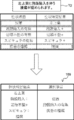
- the process of generating the corresponding data 109 by the corresponding data generation unit 16 is taken as an example when the second text T2 of the first to fourth texts T1 to T4 illustrated in FIG. 6 is selected by the user. This will be described with reference to FIG. 7.
- the second text T2 contains the description "A tumor with pleural invagination is found in the upper left lobe.” That is, the second text T2 is the property "upper left lobe" specified for the property item “position”, the property “pleural invagination +” and the property specified for the property item “presence or absence of pleural invagination”. It was generated based on the "mass” which is the specified property for the item "type of disease”.
- the corresponding data generation unit 16 has the property items "position”, “presence or absence of pleural invagination", and "presence or absence of pleural invagination” which are property items corresponding to the properties described in the second text T2.
- the corresponding data generation unit 16 includes a plurality of texts (first to fourth) including the specified selection items “position”, “presence / absence of pleural invagination”, “type of disease”, and the selected second text T2.
- Property identification results “upper left lobe”, “pleural invagination +”, “marginal irregularity +”, “spicula +”, which are the results of specifying properties for each of multiple property items when generating texts T1 to T4).
- the corresponding data 109 associated with the “tumor” is generated, and this is stored in the storage unit 103.
- the corresponding data 109 shows "position” and “mass” when “upper left lobe”, “pleural invagination +", “marginal irregularity +”, “spicula +” and “tumor” are obtained as property identification results. Indicates that the document (interpretation report) is likely to include properties related to "presence or absence of pleural invagination” and "type of disease”.
- the corresponding data generation unit 16 generates the corresponding data 109 each time a plurality of texts generated by the text generation unit 14 are selected by the user, and stores the corresponding data 109 in the storage unit 103. That is, the storage unit 103 stores the corresponding data 109 in which the property identification result and the selected item are associated with each other in the past various abnormal shadows.
- the text generation unit 14 accesses the storage unit 103 when generating a plurality of texts regarding the abnormal shadow included in the image to be diagnosed, and the property identification result that matches the property specified for the abnormal shadow included in the image to be diagnosed. It is determined whether or not the corresponding data 109 including the above exists. When the text generation unit 14 determines that such corresponding data 109 exists, the text generation unit 14 creates a text describing the specified property for the same property item as the selection item associated with the property identification result included in the corresponding data 109. Generate as preferred text. The text generation unit 14 generates one or more texts in addition to the priority text. The text generation unit 14 generates a plurality of texts including the priority text so that the combination of the property items corresponding to the properties described in each of the plurality of texts is different from each other among the plurality of texts.
- a plurality of texts are generated based on a predetermined rule.
- the predetermined rule may be, for example, to generate text for all combinations that select M (M ⁇ N) or more property items from among N property items. In this case, the number of property items contained in each text may be different from each other or the same among the plurality of texts.
- the properties identified this time for the abnormal shadow included in the image to be diagnosed are "upper left lobe”, “pleural invagination +", and " In the case of "marginal irregularity +", “spicula +” and “tumor”, the text generator 14 determines that these properties identified this time match the past property identification results included in the corresponding data 109. .. In this case, the text generation unit 14 has the same property items as the selection items "position”, “presence or absence of pleural invagination", and "type of disease” associated with the property identification result in the corresponding data 109.
- FIG. 8 is a diagram showing an example of the display form of the priority text. As shown in FIG. 8, the display control unit 15 displays a plurality of texts side by side in the vertical direction of the display screen 300 so that the priority text TP is located at the top of the display screen 300, and emphasizes the priority text TP. Control the display. FIG. 8 illustrates a case where the priority text TP is displayed in bold and the background color of the priority text TP is displayed differently from other text TXs as highlighting.
- the display control unit 15 may control the display of characters or marks indicating that the text is the priority text in the vicinity of the display area of the priority text.
- FIG. 9 is a flowchart showing an example of the flow of the document creation support process executed by the CPU 101 executing the document creation support program 108.
- the document creation support program 108 is executed, for example, when an instruction to start execution is input by the user via the input unit 105. It is assumed that the image to be diagnosed is downloaded from the image server 5 to the document creation support device 10 (interpretation workstation 3) and stored in the storage unit 103.
- step ST1 the image acquisition unit 11 acquires the image to be diagnosed stored in the storage unit 103.
- step ST2 the feature extraction unit 12 extracts an abnormal shadow as a feature portion from the diagnosis target image acquired by the image acquisition unit 11.
- step ST3 the analysis unit 13 analyzes the abnormal shadow extracted from the image to be diagnosed, and identifies the property of the abnormal shadow for each of the plurality of predetermined property items.
- step ST4 the text generation unit 14 generates a plurality of different texts describing the properties specified in step ST3.
- the text generation unit 14 at least one of the properties specified for each of the plurality of predetermined property items is described in each of the plurality of texts, and the property item corresponding to the property described in each of the plurality of texts. Generate multiple texts so that the combination of is different between the multiple texts.
- FIG. 10 is a flowchart showing the details of the text generation process performed in step ST4.
- the text generation unit 14 accesses the storage unit 103 and determines whether or not there is corresponding data 109 including the property identification result that matches the property specified in step ST3.
- the process proceeds to step ST12, and when it determines that such corresponding data 109 does not exist, the text generation unit 14 shifts the process to step ST13. ..
- step ST12 the text generation unit 14 identifies the same property item as the selected item associated with the property identification result included in the corresponding data 109 hit in the process of step ST11 among the properties specified in step ST3.
- a priority text describing the properties is generated as one of a plurality of texts.
- the text generation unit 14 generates a plurality of texts based on a predetermined rule.
- the predetermined rule may be, for example, to generate text for all combinations that select M (M ⁇ N) or more property items from among N property items. In this case, the number of property items contained in each text may be different from each other or the same among the plurality of texts.
- step ST5 the display control unit 15 controls the display unit 104 to display a plurality of texts generated by the text generation unit 14.
- FIG. 11 is a flowchart showing the details of the display control process performed in step ST5.
- the display control unit 15 determines whether or not the priority text exists in the plurality of texts generated by the text generation unit 14. When the display control unit 15 determines that the priority text exists, the process proceeds to step ST22, and when it determines that the priority text does not exist, the display control unit 15 shifts the process to step ST23.
- step ST22 the display control unit 15 displays the priority text on the display screen of the display unit 104 so as to be distinguishable from other texts.
- the display control unit 15 causes the user to identify the priority text by displaying and highlighting the priority text at the top of the display screen, for example.
- the display control unit 15 displays a plurality of texts on the display screen of the display unit 104 based on a predetermined rule.
- the predetermined rule may be, for example, displaying a plurality of texts side by side in an order according to the number of property items corresponding to the properties described in the plurality of texts.
- the user can select any one of the plurality of texts displayed on the display unit 104 and use the selected text as a part or all of the document (interpretation report) created by the user. ..
- step ST6 the corresponding data generation unit 16 determines whether or not any one of the plurality of texts generated by the text generation unit 14 is selected.
- step ST7 the corresponding data generation unit 16 associates the selection item, which is the property item corresponding to the property described in the text selected by the user, with the property identification result obtained by the analysis in step ST3. Generate corresponding data 109.
- step ST8 the corresponding data generation unit 16 stores the corresponding data 109 generated in step ST7 in the storage unit 103. If the corresponding data generation unit 16 determines in step ST11 that the corresponding data 109 including the property identification result matching the property specified in step ST3 already exists in the storage unit 103, the corresponding data generation unit 16 determines that the corresponding data 109 already exists in the storage unit 103. Corresponding data 109 may be overwritten.
- a plurality of different texts describing the properties of the abnormal shadows extracted from the image to be diagnosed are generated as candidate texts.
- a plurality of texts have different combinations of property items corresponding to the properties described in each text. This makes it possible to generate a plurality of texts whose description contents are varied. As a result, there is a high possibility that a plurality of texts that meet the user's request are included, and it becomes possible to effectively support the user in creating a document (interpretation report).
- Correspondence data 109 is generated in which the selection item which is a property item and the property identification result which is the result of specifying the property for each of the plurality of property items when generating a plurality of texts including the selected text are associated with each other. Will be done. Then, when the property specified for the abnormal shadow extracted from the image to be diagnosed and the property identification result included in the corresponding data 109 match, the same property item as the selection item associated with the property identification result is selected. A preferred text describing the identified properties is generated as one of a plurality of texts. Correspondence data 109 in which the property identification result and the selected item are associated with each other can be said to be data showing the tendency of the user regarding the selection of the property item to be included in the document (interpretation report).
- the priority text generated based on the correspondence data 109 By generating the priority text generated based on the correspondence data 109 as one of the plurality of texts, it is possible to further increase the possibility that the plurality of texts include the ones that meet the user's request. It will be possible. Further, since the priority text is displayed on the display screen so as to be distinguishable from other texts, the priority text can be presented as the recommended text. In this way, by reflecting the tendency of the description content of the text selected by the user in the subsequent text generation, it is possible to increase the possibility that the plurality of candidate texts match the user's request. It will be possible.
- the various processors include a CPU, which is a general-purpose processor that executes software (program) and functions as various processing units, and after manufacturing an FPGA (field-programmable gate array) or the like.
- a CPU which is a general-purpose processor that executes software (program) and functions as various processing units, and after manufacturing an FPGA (field-programmable gate array) or the like.
- FPGA field-programmable gate array
- Dedicated processor with a circuit configuration designed exclusively for executing specific processing such as programmable logic device (PLD) and ASIC (Application Specific Integrated Circuit), which are processors whose circuit configuration can be changed. Includes electrical circuits and the like.
- One processing unit may be composed of one of these various processors, or a combination of two or more processors of the same type or different types (for example, a combination of a plurality of FPGAs or a combination of a CPU and an FPGA). It may be composed of a combination). Further, a plurality of processing units may be configured by one processor.
- one processor is configured by a combination of one or more CPUs and software, as represented by a computer such as a client and a server.
- the processor functions as a plurality of processing units.
- SoC System On Chip
- the various processing units are configured by using one or more of the above-mentioned various processors as a hardware structure.
- an electric circuit in which circuit elements such as semiconductor elements are combined can be used.
Landscapes
- Engineering & Computer Science (AREA)
- Health & Medical Sciences (AREA)
- Medical Informatics (AREA)
- General Health & Medical Sciences (AREA)
- Theoretical Computer Science (AREA)
- Public Health (AREA)
- Physics & Mathematics (AREA)
- General Physics & Mathematics (AREA)
- Epidemiology (AREA)
- Primary Health Care (AREA)
- General Engineering & Computer Science (AREA)
- Radiology & Medical Imaging (AREA)
- Nuclear Medicine, Radiotherapy & Molecular Imaging (AREA)
- Data Mining & Analysis (AREA)
- Biomedical Technology (AREA)
- Computational Linguistics (AREA)
- Pathology (AREA)
- Databases & Information Systems (AREA)
- Quality & Reliability (AREA)
- Audiology, Speech & Language Pathology (AREA)
- Artificial Intelligence (AREA)
- Computer Vision & Pattern Recognition (AREA)
- Multimedia (AREA)
- Human Computer Interaction (AREA)
- Medical Treatment And Welfare Office Work (AREA)
Priority Applications (2)
| Application Number | Priority Date | Filing Date | Title |
|---|---|---|---|
| JP2022500424A JP7376674B2 (ja) | 2020-02-10 | 2021-02-09 | 文書作成支援装置、文書作成支援方法及びプログラム |
| US17/879,784 US12094584B2 (en) | 2020-02-10 | 2022-08-03 | Document creation support apparatus, document creation support method, and program |
Applications Claiming Priority (2)
| Application Number | Priority Date | Filing Date | Title |
|---|---|---|---|
| JP2020020866 | 2020-02-10 | ||
| JP2020-020866 | 2020-02-10 |
Related Child Applications (1)
| Application Number | Title | Priority Date | Filing Date |
|---|---|---|---|
| US17/879,784 Continuation US12094584B2 (en) | 2020-02-10 | 2022-08-03 | Document creation support apparatus, document creation support method, and program |
Publications (1)
| Publication Number | Publication Date |
|---|---|
| WO2021162008A1 true WO2021162008A1 (ja) | 2021-08-19 |
Family
ID=77292325
Family Applications (1)
| Application Number | Title | Priority Date | Filing Date |
|---|---|---|---|
| PCT/JP2021/004835 Ceased WO2021162008A1 (ja) | 2020-02-10 | 2021-02-09 | 文書作成支援装置、文書作成支援方法及びプログラム |
Country Status (3)
| Country | Link |
|---|---|
| US (1) | US12094584B2 (https=) |
| JP (1) | JP7376674B2 (https=) |
| WO (1) | WO2021162008A1 (https=) |
Families Citing this family (2)
| Publication number | Priority date | Publication date | Assignee | Title |
|---|---|---|---|---|
| WO2021107098A1 (ja) * | 2019-11-29 | 2021-06-03 | 富士フイルム株式会社 | 文書作成支援装置、文書作成支援方法及び文書作成支援プログラム |
| WO2022015730A1 (en) * | 2020-07-13 | 2022-01-20 | Ai21 Labs | Controllable reading guides and natural language generation |
Citations (5)
| Publication number | Priority date | Publication date | Assignee | Title |
|---|---|---|---|---|
| WO2009041586A1 (ja) * | 2007-09-28 | 2009-04-02 | Canon Kabushiki Kaisha | 診断支援装置及びその制御方法 |
| JP2011100254A (ja) * | 2009-11-05 | 2011-05-19 | Hitachi Medical Corp | 医用診断レポートシステム、当該システムとして機能させるためのプログラム、および医用診断レポートの作成支援方法 |
| JP2017029411A (ja) * | 2015-07-31 | 2017-02-09 | キヤノン株式会社 | 医用文書作成装置およびその制御方法、プログラム |
| JP2017191520A (ja) * | 2016-04-14 | 2017-10-19 | キヤノンマーケティングジャパン株式会社 | 医用画像診断支援システム、その制御方法、及びプログラム、並びに情報処理装置、その制御方法、及びプログラム |
| JP2019153250A (ja) * | 2018-03-06 | 2019-09-12 | 富士フイルム株式会社 | 医療文書作成支援装置、方法およびプログラム |
Family Cites Families (6)
| Publication number | Priority date | Publication date | Assignee | Title |
|---|---|---|---|---|
| US8520978B2 (en) * | 2007-10-31 | 2013-08-27 | Mckesson Technologies Inc. | Methods, computer program products, apparatuses, and systems for facilitating viewing and manipulation of an image on a client device |
| JP5288866B2 (ja) | 2008-04-16 | 2013-09-11 | 富士フイルム株式会社 | 文書作成支援装置、文書作成支援方法、並びに文書作成支援プログラム |
| US8538113B2 (en) * | 2008-09-01 | 2013-09-17 | Hitachi Medical Corporation | Image processing device and method for processing image to detect lesion candidate region |
| US10803581B2 (en) * | 2017-11-06 | 2020-10-13 | Beijing Keya Medical Technology Co., Ltd. | System and method for generating and editing diagnosis reports based on medical images |
| US11610667B2 (en) * | 2018-11-19 | 2023-03-21 | RAD AI, Inc. | System and method for automated annotation of radiology findings |
| US10909681B2 (en) * | 2019-01-03 | 2021-02-02 | The Regents Of The University Of California | Automated selection of an optimal image from a series of images |
-
2021
- 2021-02-09 JP JP2022500424A patent/JP7376674B2/ja active Active
- 2021-02-09 WO PCT/JP2021/004835 patent/WO2021162008A1/ja not_active Ceased
-
2022
- 2022-08-03 US US17/879,784 patent/US12094584B2/en active Active
Patent Citations (5)
| Publication number | Priority date | Publication date | Assignee | Title |
|---|---|---|---|---|
| WO2009041586A1 (ja) * | 2007-09-28 | 2009-04-02 | Canon Kabushiki Kaisha | 診断支援装置及びその制御方法 |
| JP2011100254A (ja) * | 2009-11-05 | 2011-05-19 | Hitachi Medical Corp | 医用診断レポートシステム、当該システムとして機能させるためのプログラム、および医用診断レポートの作成支援方法 |
| JP2017029411A (ja) * | 2015-07-31 | 2017-02-09 | キヤノン株式会社 | 医用文書作成装置およびその制御方法、プログラム |
| JP2017191520A (ja) * | 2016-04-14 | 2017-10-19 | キヤノンマーケティングジャパン株式会社 | 医用画像診断支援システム、その制御方法、及びプログラム、並びに情報処理装置、その制御方法、及びプログラム |
| JP2019153250A (ja) * | 2018-03-06 | 2019-09-12 | 富士フイルム株式会社 | 医療文書作成支援装置、方法およびプログラム |
Also Published As
| Publication number | Publication date |
|---|---|
| US20220375562A1 (en) | 2022-11-24 |
| JPWO2021162008A1 (https=) | 2021-08-19 |
| JP7376674B2 (ja) | 2023-11-08 |
| US12094584B2 (en) | 2024-09-17 |
Similar Documents
| Publication | Publication Date | Title |
|---|---|---|
| JP5744182B2 (ja) | 放射線ディスクリプタを用いた報告ビューア | |
| JP2019153250A (ja) | 医療文書作成支援装置、方法およびプログラム | |
| JP7542710B2 (ja) | 文書作成支援装置、文書作成支援方法及びプログラム | |
| WO2022215530A1 (ja) | 医用画像装置、医用画像方法、及び医用画像プログラム | |
| JP2017533522A (ja) | テキスト認識に基づくテキストイメージリンキングを伴うピクチャアーカイビングシステム | |
| JP7504987B2 (ja) | 情報処理装置、情報処理方法及び情報処理プログラム | |
| US20220285011A1 (en) | Document creation support apparatus, document creation support method, and program | |
| US20190267120A1 (en) | Medical document creation support apparatus, method, and program | |
| JP7102509B2 (ja) | 医療文書作成支援装置、医療文書作成支援方法、及び医療文書作成支援プログラム | |
| JPWO2019193983A1 (ja) | 医療文書表示制御装置、医療文書表示制御方法、及び医療文書表示制御プログラム | |
| EP3954277A1 (en) | Medical document generation device, method, and program | |
| WO2021107098A1 (ja) | 文書作成支援装置、文書作成支援方法及び文書作成支援プログラム | |
| US12094584B2 (en) | Document creation support apparatus, document creation support method, and program | |
| JP7371220B2 (ja) | 情報処理装置、情報処理方法及び情報処理プログラム | |
| US12387825B2 (en) | Information processing apparatus, information processing method, and information processing program | |
| EP4310853A1 (en) | Information management device, method, and program, and information processing device, method, and program | |
| WO2022230641A1 (ja) | 文書作成支援装置、文書作成支援方法、及び文書作成支援プログラム | |
| US20230317254A1 (en) | Document creation support apparatus, document creation support method, and program | |
| WO2022215529A1 (ja) | 医用画像解析装置、医用画像解析方法、及び医用画像解析プログラム | |
| WO2021107142A1 (ja) | 文書作成支援装置、方法およびプログラム | |
| US20240338407A1 (en) | Information processing apparatus, method, and program | |
| WO2022224848A1 (ja) | 文書作成支援装置、文書作成支援方法、及び文書作成支援プログラム | |
| WO2022239593A1 (ja) | 文書作成支援装置、文書作成支援方法、及び文書作成支援プログラム | |
| WO2022220158A1 (ja) | 作業支援装置、作業支援方法、及び作業支援プログラム | |
| JP2024162560A (ja) | 情報処理装置、方法およびプログラム |
Legal Events
| Date | Code | Title | Description |
|---|---|---|---|
| 121 | Ep: the epo has been informed by wipo that ep was designated in this application |
Ref document number: 21754527 Country of ref document: EP Kind code of ref document: A1 |
|
| ENP | Entry into the national phase |
Ref document number: 2022500424 Country of ref document: JP Kind code of ref document: A |
|
| NENP | Non-entry into the national phase |
Ref country code: DE |
|
| 122 | Ep: pct application non-entry in european phase |
Ref document number: 21754527 Country of ref document: EP Kind code of ref document: A1 |