WO2021131552A1 - 作業分析装置及び作業分析方法 - Google Patents
作業分析装置及び作業分析方法 Download PDFInfo
- Publication number
- WO2021131552A1 WO2021131552A1 PCT/JP2020/044829 JP2020044829W WO2021131552A1 WO 2021131552 A1 WO2021131552 A1 WO 2021131552A1 JP 2020044829 W JP2020044829 W JP 2020044829W WO 2021131552 A1 WO2021131552 A1 WO 2021131552A1
- Authority
- WO
- WIPO (PCT)
- Prior art keywords
- work
- time
- analysis
- joint
- processor
- Prior art date
- Legal status (The legal status is an assumption and is not a legal conclusion. Google has not performed a legal analysis and makes no representation as to the accuracy of the status listed.)
- Ceased
Links
Images




Classifications
-
- G—PHYSICS
- G06—COMPUTING OR CALCULATING; COUNTING
- G06Q—INFORMATION AND COMMUNICATION TECHNOLOGY [ICT] SPECIALLY ADAPTED FOR ADMINISTRATIVE, COMMERCIAL, FINANCIAL, MANAGERIAL OR SUPERVISORY PURPOSES; SYSTEMS OR METHODS SPECIALLY ADAPTED FOR ADMINISTRATIVE, COMMERCIAL, FINANCIAL, MANAGERIAL OR SUPERVISORY PURPOSES, NOT OTHERWISE PROVIDED FOR
- G06Q10/00—Administration; Management
- G06Q10/06—Resources, workflows, human or project management; Enterprise or organisation planning; Enterprise or organisation modelling
- G06Q10/063—Operations research, analysis or management
- G06Q10/0639—Performance analysis of employees; Performance analysis of enterprise or organisation operations
- G06Q10/06398—Performance of employee with respect to a job function
-
- G—PHYSICS
- G05—CONTROLLING; REGULATING
- G05B—CONTROL OR REGULATING SYSTEMS IN GENERAL; FUNCTIONAL ELEMENTS OF SUCH SYSTEMS; MONITORING OR TESTING ARRANGEMENTS FOR SUCH SYSTEMS OR ELEMENTS
- G05B19/00—Program-control systems
- G05B19/02—Program-control systems electric
- G05B19/418—Total factory control, i.e. centrally controlling a plurality of machines, e.g. direct or distributed numerical control [DNC], flexible manufacturing systems [FMS], integrated manufacturing systems [IMS] or computer integrated manufacturing [CIM]
-
- G—PHYSICS
- G06—COMPUTING OR CALCULATING; COUNTING
- G06Q—INFORMATION AND COMMUNICATION TECHNOLOGY [ICT] SPECIALLY ADAPTED FOR ADMINISTRATIVE, COMMERCIAL, FINANCIAL, MANAGERIAL OR SUPERVISORY PURPOSES; SYSTEMS OR METHODS SPECIALLY ADAPTED FOR ADMINISTRATIVE, COMMERCIAL, FINANCIAL, MANAGERIAL OR SUPERVISORY PURPOSES, NOT OTHERWISE PROVIDED FOR
- G06Q10/00—Administration; Management
- G06Q10/06—Resources, workflows, human or project management; Enterprise or organisation planning; Enterprise or organisation modelling
- G06Q10/063—Operations research, analysis or management
- G06Q10/0639—Performance analysis of employees; Performance analysis of enterprise or organisation operations
- G06Q10/06395—Quality analysis or management
-
- G—PHYSICS
- G06—COMPUTING OR CALCULATING; COUNTING
- G06Q—INFORMATION AND COMMUNICATION TECHNOLOGY [ICT] SPECIALLY ADAPTED FOR ADMINISTRATIVE, COMMERCIAL, FINANCIAL, MANAGERIAL OR SUPERVISORY PURPOSES; SYSTEMS OR METHODS SPECIALLY ADAPTED FOR ADMINISTRATIVE, COMMERCIAL, FINANCIAL, MANAGERIAL OR SUPERVISORY PURPOSES, NOT OTHERWISE PROVIDED FOR
- G06Q50/00—Information and communication technology [ICT] specially adapted for implementation of business processes of specific business sectors, e.g. utilities or tourism
- G06Q50/04—Manufacturing
-
- G—PHYSICS
- G06—COMPUTING OR CALCULATING; COUNTING
- G06T—IMAGE DATA PROCESSING OR GENERATION, IN GENERAL
- G06T7/00—Image analysis
- G06T7/20—Analysis of motion
- G06T7/246—Analysis of motion using feature-based methods, e.g. the tracking of corners or segments
- G06T7/251—Analysis of motion using feature-based methods, e.g. the tracking of corners or segments involving models
-
- G—PHYSICS
- G06—COMPUTING OR CALCULATING; COUNTING
- G06V—IMAGE OR VIDEO RECOGNITION OR UNDERSTANDING
- G06V10/00—Arrangements for image or video recognition or understanding
- G06V10/20—Image preprocessing
- G06V10/22—Image preprocessing by selection of a specific region containing or referencing a pattern; Locating or processing of specific regions to guide the detection or recognition
- G06V10/235—Image preprocessing by selection of a specific region containing or referencing a pattern; Locating or processing of specific regions to guide the detection or recognition based on user input or interaction
-
- G—PHYSICS
- G06—COMPUTING OR CALCULATING; COUNTING
- G06V—IMAGE OR VIDEO RECOGNITION OR UNDERSTANDING
- G06V10/00—Arrangements for image or video recognition or understanding
- G06V10/40—Extraction of image or video features
- G06V10/62—Extraction of image or video features relating to a temporal dimension, e.g. time-based feature extraction; Pattern tracking
-
- G—PHYSICS
- G06—COMPUTING OR CALCULATING; COUNTING
- G06V—IMAGE OR VIDEO RECOGNITION OR UNDERSTANDING
- G06V20/00—Scenes; Scene-specific elements
- G06V20/20—Scenes; Scene-specific elements in augmented reality scenes
-
- G—PHYSICS
- G06—COMPUTING OR CALCULATING; COUNTING
- G06V—IMAGE OR VIDEO RECOGNITION OR UNDERSTANDING
- G06V20/00—Scenes; Scene-specific elements
- G06V20/50—Context or environment of the image
- G06V20/52—Surveillance or monitoring of activities, e.g. for recognising suspicious objects
-
- G—PHYSICS
- G06—COMPUTING OR CALCULATING; COUNTING
- G06V—IMAGE OR VIDEO RECOGNITION OR UNDERSTANDING
- G06V40/00—Recognition of biometric, human-related or animal-related patterns in image or video data
- G06V40/10—Human or animal bodies, e.g. vehicle occupants or pedestrians; Body parts, e.g. hands
- G06V40/103—Static body considered as a whole, e.g. static pedestrian or occupant recognition
-
- G—PHYSICS
- G06—COMPUTING OR CALCULATING; COUNTING
- G06V—IMAGE OR VIDEO RECOGNITION OR UNDERSTANDING
- G06V40/00—Recognition of biometric, human-related or animal-related patterns in image or video data
- G06V40/20—Movements or behaviour, e.g. gesture recognition
- G06V40/23—Recognition of whole body movements, e.g. for sport training
-
- G—PHYSICS
- G06—COMPUTING OR CALCULATING; COUNTING
- G06T—IMAGE DATA PROCESSING OR GENERATION, IN GENERAL
- G06T2207/00—Indexing scheme for image analysis or image enhancement
- G06T2207/30—Subject of image; Context of image processing
- G06T2207/30196—Human being; Person
-
- Y—GENERAL TAGGING OF NEW TECHNOLOGICAL DEVELOPMENTS; GENERAL TAGGING OF CROSS-SECTIONAL TECHNOLOGIES SPANNING OVER SEVERAL SECTIONS OF THE IPC; TECHNICAL SUBJECTS COVERED BY FORMER USPC CROSS-REFERENCE ART COLLECTIONS [XRACs] AND DIGESTS
- Y02—TECHNOLOGIES OR APPLICATIONS FOR MITIGATION OR ADAPTATION AGAINST CLIMATE CHANGE
- Y02P—CLIMATE CHANGE MITIGATION TECHNOLOGIES IN THE PRODUCTION OR PROCESSING OF GOODS
- Y02P90/00—Enabling technologies with a potential contribution to greenhouse gas [GHG] emissions mitigation
- Y02P90/30—Computing systems specially adapted for manufacturing
Definitions
- the present disclosure relates to a work analysis device and a work analysis method in which a processor executes a process of outputting analysis information on the work status of the worker based on a video of the work of the worker.
- the measuring unit acquires motion information (coordinate values of joints, etc.) that quantitatively represents the motion of the worker, and the motion information is used as a reference motion.
- motion information that quantitatively expresses (standard motion)
- non-standard motion motions that deviate from the standard motion
- the shooting unit captures the state in which the worker is working.
- Patent Document 1 there is known a technique for extracting an image of a scene in which a non-standard operation is executed from the image.
- the skill level (efficiency) of the worker's work operation is determined by the worker himself or a user such as an administrator based on a video of the worker's work, and the work status of another worker.
- a request for easy confirmation by comparing with the person's past work situation but the conventional technology did not give any consideration to such a request.
- work analysis for evaluating the work movement of the worker can be easily performed without any trouble, and further, the skill level of the work movement of the worker can be obtained by other workers.
- the main purpose is to provide a work analysis device and a work analysis method that can be easily confirmed by comparing the work status with the past work status of the person.
- the work analysis device of the present disclosure is a work analysis device in which a processor executes a process of outputting analysis information on the work status of the worker based on an image of the work of the worker.
- the joint position of the worker is estimated from the video, time-series data related to a plurality of joint positions is acquired based on the estimation result, the efficiency of the work operation is judged based on the time-series data, and the judgment result is obtained.
- the analysis information including the information on the range of interest in the work process and the video is output.
- the work analysis method of the present disclosure is a work analysis method in which a processor executes a process of outputting analysis information regarding the work status of the worker based on a video of the work of the worker.
- the joint position of the worker is estimated from the above, time-series data related to a plurality of joint positions is acquired based on the estimation result, the efficiency of the work operation is judged based on the time-series data, and the judgment result is used. Therefore, the analysis information including the information on the range of interest in the work process and the video is output.
- the worker himself or a user such as an administrator can immediately check the work status in the range of interest.
- the first invention made to solve the above-mentioned problems is a work analyzer that executes a process of outputting analysis information on a worker's work situation by a processor based on an image of a worker's work. Therefore, the processor estimates the joint position of the worker from the video, acquires time-series data regarding a plurality of joint positions based on the estimation result, and based on the time-series data, the efficiency of the work operation. Is determined, and based on the determination result, the analysis information including the information regarding the range of interest in the work process and the video is output.
- the processor is configured to output information regarding a section determined to have low work operation efficiency as the attention range.
- the user can immediately confirm the operation status of the section where the efficiency of the work operation is low, that is, the section in which improvement is highly necessary.
- the third invention has a configuration in which the processor superimposes and outputs an image representing the attention range as the analysis information on a time-series graph that visualizes the time-series data.
- the fourth invention is configured such that the processor superimposes and outputs a posture image drawn with reference to the joint position as the analysis information on the image.
- a posture image schematically showing the posture of the worker is superimposed on the image, so that the specific operation status of the worker can be confirmed immediately.
- the fifth invention relates to the operation case targeted for analysis by selecting a model operation case having high efficiency of work operation as an operation example to be compared with the operation case targeted for analysis by the processor.
- the analysis information and the analysis information regarding the model operation example are output.
- the skill level of the work operation of the worker to be analyzed can be easily confirmed by comparing with the work situation of other workers.
- the processor outputs thumbnail images of the video relating to the plurality of model operation cases, and when the user selects one of the plurality of thumbnail images, the selected thumbnail image is displayed.
- the configuration is such that the analysis information regarding the corresponding model operation example is output.
- the user can browse the analysis information of the model operation case selected by the user from a plurality of model operation cases.
- the processor selects a past operation case relating to the same person as the operation case to be analyzed as the operation case to be compared with the operation case to be analyzed, and uses the analysis target. It is configured to output the analysis information regarding the operation example performed and the analysis information regarding the past operation example.
- the processor outputs thumbnail images of the video relating to the plurality of past operation cases, and when the user selects one of the plurality of thumbnail images, the selected thumbnail image is displayed.
- the configuration is such that the analysis information regarding the corresponding past operation case is output.
- the user can browse the analysis information of the past operation case selected by the user from a plurality of past operation cases.
- the ninth invention is configured such that the processor outputs a search screen for causing a user to input a search condition, and outputs the analysis information regarding an operation example corresponding to the search condition input on the search screen. ..
- the user can easily narrow down the target operation cases.
- the tenth invention is configured such that the processor outputs a setting screen for designating a target joint and outputs the analysis information for the joint designated on the setting screen.
- the user can easily narrow down the target joints.
- the eleventh invention is a work analysis method in which a processor executes a process of outputting analysis information regarding the work status of the worker based on a video of the work of the worker, and the work is performed from the video. Estimate the joint position of a person, acquire time-series data related to a plurality of joint positions based on the estimation result, judge the efficiency of work operation based on the time-series data, and based on the judgment result, The analysis information including the information on the range of interest in the work process and the video is output.
- FIG. 1 is an overall configuration diagram of the work analysis system according to the present embodiment.
- This work analysis system analyzes the work situation of a worker in a factory or the like and presents the analysis result to the manager.
- Camera 1 captures how the worker works in the place.
- the recorder 2 records the video output from the camera 1.
- the server 3 acquires an image from the camera 1 or the recorder 2, analyzes the work situation of the worker based on the image, and outputs the analysis result.
- the user terminal 4 is used by a user such as a system administrator, a work manager, or the worker himself / herself, and is composed of a PC, a tablet terminal, or the like.
- the system administrator performs various setting operations related to the processing performed by the server 3.
- the user terminal 4 displays the analysis result output from the server 3 and is viewed by the work manager or the worker himself / herself.
- processing performed on the server 3 may be real-time processing performed at the same time as shooting or post-processing performed after shooting.
- the camera 1, the server 3, and the user terminal 4 may be connected to the network. Further, when only post-processing is performed, the video stored in the recorder 2 may be transferred to the server 3 via an appropriate storage medium.
- FIG. 2 is an explanatory diagram showing an outline of the joint position estimation process performed by the server 3.
- the joint position of a person is estimated from the frame image of each time included in the target video data, and the joint position information of each time (each frame image) is acquired (joint position estimation process).
- the joint positions are represented by two-dimensional coordinates (x, y).
- the work of preliminarily separating the parts used in the production line and storing them in the parts case is performed.
- the worker since the worker mainly moves each part of the upper body to perform the work, the eight joints of the upper body (left wrist, left elbow, left shoulder, right shoulder, head, right elbow, right wrist, abdomen) are measured. And.
- a posture image that models the posture of a person is superimposed and drawn on the work image.
- This posture image is a drawing of a line (skeleton line) connecting joint positions based on the skeletal structure of a person. Each line is color-coded and drawn. As a result, the user can immediately grasp the movement of the person.
- the joint position data for each joint at each time is generated as the estimation result.
- the joint position data includes a process ID, a measurement number, a person ID, time information, and joint coordinate information.
- the process ID is identification information given to each process.
- the measurement number is a serial number assigned to work measurements performed multiple times for one process.
- the person ID is identification information given to each worker.
- the time information is information on the measurement time (year, month, day, hour, minute, second).
- the operation case is distinguished by the combination of the process ID, the measurement number, and the person ID, and if the same process and the same person have different measurement numbers, another operation case is obtained.
- the joint coordinate information includes the joint coordinate value (x coordinate and y coordinate) and the reliability score.
- the reliability score is an index showing the reliability of the joint coordinate value as a result of the joint position estimation, and the larger the value, the higher the reliability.
- FIG. 3 is an explanatory diagram showing a time series graph generated by the server 3.
- time-series data for each joint related to the joint position is generated based on the joint position data for each joint at each time (time-series data generation process). Then, a time-series graph that visualizes the time-series data of the joint position is generated (time-series graph generation process).
- time-series graph generation process the analysis is performed separately for the movement in the X-axis direction (horizontal direction on the image) and the movement in the Y-axis direction (vertical direction on the image). That is, time-series graphs are separately generated for the position of the joint in the X-axis direction (X coordinate) and the position in the Y-axis direction (Y coordinate), and as shown in FIG. 3 (A-1), the joint related to the X coordinate.
- a time-series graph of positions and a time-series graph of joint positions with respect to the Y coordinate are generated as shown in FIG. 3 (A-2).
- the horizontal axis represents time and the vertical axis represents the X and Y coordinates.
- the joint speed can be selected in addition to the joint position as the joint information to be analyzed.
- the time series graph of the joint speed with respect to the X coordinate as shown in FIG. 3 (B-1) and the time series of the joint speed with respect to the Y coordinate as shown in FIG. 3 (B-2). Generate a graph.
- the horizontal axis represents time and the vertical axis represents the speed of the X and Y coordinates.
- the joint speed may be obtained from the amount of change in the joint position at each time (each frame).
- the time series graph for each joint is drawn as a line graph.
- the time series graph for each joint is drawn in different colors.
- the movement of each part of the body is synchronized.
- the roles of the left and right hands are determined, and the movements of the left and right hands are synchronized.
- an expert performs the operation of storing the part with the right hand after acquiring another part at the same time with both hands.
- the operation of storing the parts is performed with the right hand.
- the time series graph for example, since both hands are moving to the right at the same time, it can be seen that the operation of acquiring the parts is performed with both hands.
- FIG. 4 is an explanatory diagram showing an outline of an operation case evaluation process performed on the server 3.
- the efficiency (proficiency) of work movements is evaluated according to whether or not the movements of each part of the body are synchronized.
- the degree of similarity between the time-series data for each joint is calculated, and based on the degree of similarity, it is determined whether or not the movements of each part of the body are synchronized. That is, the efficiency of work movement is evaluated based on the similarity between the time series data for each joint. For example, if the degree of similarity between the time-series data for each joint is high, it is determined that the efficiency of the work operation is high, and if the degree of similarity between the time-series data for each joint is low, the efficiency of the work operation is high. Is judged to be low.
- a co-occurrence score representing the degree of similarity is calculated as an index value for evaluating the efficiency of work motion.
- the index of the degree of similarity between the two time series data includes the Euclidean distance and the DTW distance.
- the DTW distance is calculated as an index of the degree of similarity between the time series data for each joint.
- the Euclidean distance is the distance between two points at the same time in two time series data, as shown in FIG. 4 (A).
- DTW Dynamic Time Warping, dynamic time expansion / contraction method
- the two time series data The distance when the distance between the two is the shortest is acquired as the DTW distance.
- the distance between two points is calculated by 28 (8 ⁇ 7/2) combinations.
- the efficiency of work movement is determined based on the similarity of the time-series data for each joint, but it is not the time-series data of the joints but the body part unit such as the right arm and the left arm.
- the efficiency of the work operation may be judged from the time series data summarized in.
- the efficiency of work movement is determined based on the similarity of time series data of the right arm and the left arm.
- the position information of each joint of the right arm may be integrated to generate the position information of the right arm
- the position information of each joint of the left arm may be integrated to generate the position information of the left arm.
- a co-occurrence score (efficiency movement score) indicating the similarity between time-series data for each joint, specifically, the degree of similarity is calculated.
- the efficiency of the work operation may be determined by using an index value other than the co-occurrence score.
- the efficiency of work operation may be determined by using the dispersion of joint positions. If the swing width of the joint is large, there are many useless movements, which is not an efficient movement. In this case, the value of variance becomes large. Therefore, the efficiency of the work operation can be determined by the dispersion of the joint positions. Further, the efficiency of the work operation may be determined by using the joint speed (movement speed of the joint).
- FIG. 5 is a block diagram showing a schematic configuration of the server 3.
- the server 3 includes a video input unit 11, a screen output unit 12, a memory 13, and a processor 14.
- the video input unit 11 in the case of real-time processing, the video captured by the camera 1 is input, and in the case of post-processing, the video recorded by the recorder 2 is input.
- the screen output unit 12 outputs various screens generated by the processor 14, and various screens are displayed on the user terminal 4.
- the memory 13 stores a program executed by the processor 14. Further, the memory 13 stores the video data acquired by the video input unit 11. Further, the memory 13 stores joint position data generated by the processor 14, information related to a model operation example, and the like.
- the processor 14 performs various processes related to work analysis by executing the program stored in the memory 13.
- the processor 14 performs joint position estimation processing, analysis processing, analysis result visualization processing, and the like.
- the processor 14 acquires a frame at each time from the video data, estimates the joint position of the person reflected in each frame, and acquires the coordinate information for each joint at each time.
- the coordinate information for each joint at each time acquired by this joint position estimation process is stored in the memory 13 as joint position data at each time together with the process ID, measurement number, person ID, time information, and the like.
- the analysis process includes a time series data generation process, an operation case evaluation process, and an operation case ranking process.
- the processor 14 In the time-series data generation process, the processor 14 generates time-series data of the joint position for each joint based on the joint position data for each joint at each time acquired in the joint position estimation process.
- the processor 14 calculates a co-occurrence score (efficiency motion score) representing the degree of similarity between time-series data for each joint as an index value for evaluating the efficiency of work motion related to the motion case. At this time, the processor 14 calculates the co-occurrence score for the entire time-series data based on the time-series data of the operation example to be evaluated. Further, the processor 14 calculates the co-occurrence score for each unit interval in which the time series data is divided by a predetermined time (for example, 3 to 5 seconds).
- a predetermined time for example, 3 to 5 seconds
- the co-occurrence score for the first 5 seconds of the time-series data is obtained, and then 1 from the beginning of the time-series data.
- the co-occurrence score for 5 seconds is calculated starting from a second, and then the co-occurrence score is calculated by sequentially shifting the starting point from the beginning of the time-series data to 2 seconds, 3 seconds, and so on. Repeat for up to 5 seconds at the end of the data.
- the unit interval may be changed according to the time of the time series data, such as 10 seconds or 30 seconds, in order to reduce the number of times the desired co-occurrence score is obtained.
- the processor 14 ranks the operation cases for each operation case (operation case with the same process ID) having the same work content based on the co-occurrence score of each operation case. Then, a predetermined number (for example, 5 cases) of motion cases from the one with the highest co-occurrence score are selected as model motion cases (cases in which work is performed with highly efficient motion).
- the analysis result visualization process includes a time series graph generation process, a focus range acquisition process, a focus range drawing process, a posture image generation process, a posture image composition process, and a screen generation process.
- the processor 14 In the time-series graph generation process, the processor 14 generates a time-series graph (see FIG. 3) that visualizes the time-series data of the joint positions acquired in the time-series data generation process.
- the processor 14 acquires the attention range based on the co-occurrence score for each unit interval acquired in the operation case evaluation process.
- This range of attention is the range in which the similarity between the time-series data for each joint is low within the target work process (measurement period of time-series data), specifically, the co-occurrence score is below a predetermined threshold value. Is the range.
- the processor 14 superimposes and draws rectangular labels 65, 66 (mark images) representing the attention range acquired in the attention range acquisition process on the time series graph.
- the processor 14 In the posture image generation process, the processor 14 generates a posture image at each time (each frame image) based on the joint position data at each time. This posture image connects the joint positions with color-coded lines and schematically represents the posture of the operator.
- the processor 14 superimposes the posture image at each time acquired in the posture image generation process on the frame image to generate a composite image.
- the processor 14 In the screen generation process, the processor 14 generates a screen to be displayed on the user terminal 4 and outputs the screen to the user terminal 4.
- the processor 14 has a setting screen (see FIG. 9), an analysis result screen in the independent mode (see FIG. 10), an analysis result screen in the model operation case comparison mode (see FIG. 11), and an analysis in the self-comparison mode.
- a result screen (see FIG. 12) and the like are generated.
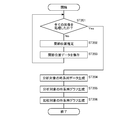
- FIG. 6 is a flow chart showing a procedure of processing at the time of collecting operation cases performed on the server 3.
- the processor 14 acquires the video data of the operation example that is a candidate for the model operation example from the memory 13, and determines whether or not all the frame images including the video data have been processed ( ST101).
- the processor 14 estimates the joint position of the worker from the target frame image (joint position estimation process) (ST102). Next, the processor 14 generates joint position data including coordinate information of the joint position for each joint and stores it in the memory 13 (ST103).
- the processor 14 generates time-series data of the joint positions related to each joint based on the joint position data for each joint at each time (time-series data generation process) (ST104).
- the processor 14 calculates the co-occurrence score of the motion case to be analyzed based on the time series data regarding the joint position for each joint (motion case evaluation process) (ST105).
- the processor 14 ranks the operation cases for each operation case having the same work content based on the co-occurrence score of each operation case (operation case ranking process) (ST106).
- FIG. 7 is a flow chart showing a procedure of processing at the time of designating an analysis target performed by the server 3.
- the processor 14 acquires the video data to be analyzed from the memory 13 and determines whether or not all the frame images including the video data have been processed (ST201).
- the processor 14 estimates the joint position of the worker from the target frame image (joint position estimation process) (ST202). Next, the processor 14 generates joint position data including coordinate information of the joint position for each joint and stores it in the memory 13 (ST203).
- the processor 14 generates time-series data related to the joint position for each joint based on the joint position data for each joint at each time (time-series data generation process) (ST204).
- the processor 14 generates a time-series graph that visualizes the time-series data to be analyzed (time-series graph generation process) (ST205).
- the processor 14 acquires time-series data related to the operation example to be compared from the memory 13 and generates a time-series graph that visualizes the time-series data (time-series graph generation process) (ST206).
- the comparison target is an operation example selected by the user from the model operation examples.
- the model operation example is an operation example in which the efficiency of the work operation is particularly high among the operation examples having the same work contents as the operation example to be analyzed.
- the process of calculating the co-occurrence score for each unit section of the time-series data (operation case evaluation process) and the process of acquiring the attention range (section with low operation efficiency) (attention).
- Range acquisition processing processing to superimpose and draw rectangular labels 65 and 66 representing the range of interest on a time series graph (processing to draw the range of interest), processing to generate a posture image from joint position data (position image generation processing), and so on.
- a process of superimposing a posture image on a frame image (attitude image composition process), a process of generating and outputting an analysis result screen including a time-series graph and an image (screen generation process), and the like are performed.
- FIG. 8 is an explanatory diagram showing a search screen displayed on the user terminal 4.
- a search screen for searching for an operation example corresponding to the search condition is displayed.
- This search screen is provided with input units 31, 32, 33 for each item of process ID, measurement number, and person ID, and an analysis button 34.
- the process ID, the measurement number, and the person ID can be input as the search conditions.
- the process ID, measurement number, and person ID can be selected from the pull-down menu.
- options filtered by the conditions selected in other items are displayed.
- a setting button 35 is provided on this search screen.
- the screen transitions to the setting screen (see FIG. 9).
- FIG. 9 is an explanatory diagram showing a setting screen displayed on the user terminal 4.
- a setting screen for setting various processes related to work analysis is displayed. This setting screen is displayed by operating the setting button 35 on the search screen (see FIG. 8).
- a joint designation unit 41 is provided on this setting screen.
- a joint to be analyzed can be designated by a check box for each joint.
- eight joints of the upper body left wrist, left elbow, left shoulder, right shoulder, head, right elbow, right wrist, abdomen
- an operation information designation unit 42 is provided on this setting screen.
- the motion information designation unit 42 either the joint position or the joint speed can be designated as the motion information to be analyzed by the radio button.
- processing related to work analysis time-series data generation processing, motion case evaluation processing, time-series graph generation processing, etc.
- the processing related to the work analysis is performed using the joint speed as motion information.
- the attention range designation unit 43 is provided on this setting screen.
- a threshold value regarding the co-occurrence score when setting the attention range and an upper limit value for limiting the number of attention ranges can be input.
- a setting button 44 is provided on this setting screen.
- this setting button 44 When this setting button 44 is operated, a process of setting setting information with the input contents of the joint designation unit 41, the motion information designation unit 42, and the attention range designation unit 43 is performed.
- FIG. 10 is an explanatory diagram showing an analysis result screen in a single mode displayed on the user terminal 4.
- an analysis result screen in a single mode for presenting the analysis result regarding the operation example corresponding to the search condition specified by the user (administrator or the like) to the user is displayed.
- the analysis result screen of this independent mode on the search screen (see FIG. 8), each item of the process ID, the measurement number, and the person ID is input by the input units 31, 32, 33, and the analysis button 34 is operated. Is displayed.
- a time series graph display unit 51 is provided on the analysis result screen of this independent mode.
- the time-series graph display unit 51 displays a time-series graph of two joint positions related to the motion example to be analyzed.
- One time series graph relates to the X coordinate of the joint position, and the other time series graph relates to the Y coordinate of the joint position.
- a work image display unit 52 is provided on the analysis result screen of this independent mode.
- the work video display unit 52 displays a work video related to an operation example to be analyzed. Further, in the work video display unit 52, a posture image showing the posture of the worker is superimposed and drawn on the work video. Further, the work image display unit 52 displays the shooting time and the frame number of the work image.
- the frame number is a serial number assigned with the first frame as 0 for each frame included in the target work video data.
- the first frame image of the work video data is displayed as a still image on the work video display unit 52 as an initial state.
- the user performs an operation (click) to specify an arbitrary position on the time series graph
- the work image from the specified position (time) is reproduced on the work image display unit 52.
- an image 58 showing the reproduction position of the work image displayed on the work image display unit 52 is displayed on the time series graph.
- a joint designation unit 53 is provided on the analysis result screen of this independent mode. Similar to the setting screen (see FIG. 9), the joint designation unit 53 is provided with a check box for each joint. With this check box for each joint, it is possible to change the initial setting contents specified on the setting screen and respecify the joint to be analyzed.
- the joint designation unit 53 is provided with an update button 54.
- the time series graph generation process is executed, and the time series graph of the time series graph display unit 51 targets the joint specified by the user. It will be updated to the one that was.
- the analysis result screen of this independent mode is provided with a button 55 for "comparison of model operation cases", a button 56 for “comparison of self-operation cases”, and a thumbnail display unit 57.
- a predetermined number (five in FIG. 10) of thumbnail images of the work video are displayed on the thumbnail display unit 57.
- the thumbnail display unit 57 is displayed in the model operation case, that is, the operation case having the same work content (same process ID) as the operation case to be analyzed.
- Multiple thumbnail images of work videos related to operation cases with higher rankings are displayed.
- the plurality of thumbnail images are displayed side by side in descending order of co-occurrence score.
- the screen transitions to the analysis result screen (see FIG. 11) of the model operation example comparison mode.
- the thumbnail display unit 57 displays a plurality of thumbnail images of the work video relating to the past operation case of the same person and the same process as the operation case to be analyzed. ..
- the plurality of thumbnail images relate to an operation case at a time point (for example, one day ago, one week ago, one month ago, etc.) that goes back a predetermined period from the measurement time point of the operation case to be analyzed.
- the screen transitions to the analysis result screen (see FIG. 12) of the self-operation case comparison mode.
- the motion case evaluation process and the motion case ranking process are executed for the joint specified by the user, and if there is a change in the order of the motion cases, , The thumbnail image of the thumbnail display unit 57 is updated.
- FIG. 11 is an explanatory diagram showing an analysis result screen of the model operation example comparison mode displayed on the user terminal 4.
- the analysis result screen of the model operation example comparison mode for comparing the operation example targeted for analysis and the model operation example is displayed.
- the analysis result screen of the model operation example comparison mode is displayed by the user performing an operation of selecting a thumbnail image of the model operation example displayed on the thumbnail display unit 57 on the analysis result screen of the independent mode (see FIG. 10). To.
- the analysis result screen in the model motion case comparison mode includes a time series graph display section 51 and a work image display section 52 related to the motion case to be analyzed, and joints.
- a designation unit 53, a button 55 for “comparison of model operation cases”, a button 56 for “comparison of self-operation cases”, and a thumbnail display unit 57 are provided.
- the analysis result screen of this model operation case comparison mode is provided with a time series graph display unit 61 and a work video display unit 62 regarding the operation cases to be compared.
- the time-series graph display unit 61 displays a time-series graph of two joint positions relating to a model motion example to be compared.
- the work video display unit 62 displays a work video relating to a model operation example to be compared.
- the time-series graph relating to the operation case targeted for analysis and the time-series graph relating to the model operation case are displayed side by side. It is possible to confirm the difference on the graph of the work operation from the model operation example.
- the work video of the motion example targeted for analysis and the work video of the model motion example are displayed side by side, the two are visually compared, and the video of the work motion is displayed between the motion example targeted for analysis and the model motion example. You can see the difference above.
- a rectangular label 65 surrounding the attention range on the time series graph is displayed as a mark image showing the attention range of the analysis target.
- the range of attention of this analysis target is a period during which the co-occurrence score is low, specifically, a period during which the co-occurrence score is equal to or less than a predetermined threshold value.
- the time-series graph display unit 61 relating to the operation example to be compared also displays the rectangular label 66 indicating the range of attention of the comparison target, similarly to the time-series graph display unit 51 of the analysis target display unit.
- the attention range of the comparison target is an error section having a predetermined width added before and after the section corresponding to the attention range of the analysis target. Since the progress of the work varies depending on the person, the attention range of the analysis target is expanded back and forth to set the attention range of the comparison target. As a result, it is possible to present to the user the period during which the analysis target and the comparison target are performing the same work.
- the rectangular labels 65 and 66 are displayed as the mark image representing the attention range, but the mark image representing the attention range is not limited to the rectangular labels 65 and 66.
- a symbol such as "! That calls the user's attention may be displayed.
- the time-series graph display units 51 and 61 may display the time-series graph of only the attention range.
- one attention range is set, but when a period with a low co-occurrence score appears intermittently, the attention range is the number of attention ranges set on the setting screen of FIG. Multiple displays can be made according to.
- the range of attention that is, the section where the efficiency of the work operation is low is emphasized, so that the user can immediately confirm the work operation that needs improvement.
- the button 55 of the "model operation case comparison” and the button 56 of the "self-operation case comparison” are displayed, as in the analysis result screen of the independent mode (see FIG. 10). And are provided.
- the screen transitions to the analysis result screen (see FIG. 12) of the self-operation case comparison mode.
- FIG. 12 is an explanatory diagram showing an analysis result screen of the self-operation case comparison mode displayed on the user terminal 4.
- the analysis result screen of the self-operation case comparison mode for comparing the operation example targeted for analysis with the past operation example of the same person and the same process as the operation example is displayed.
- the analysis result screen of the self-operation case comparison mode is displayed by the user operating the "self-operation case comparison" button 56 on the analysis result screen (see FIG. 11) of the model operation case comparison mode.
- the analysis result screen of the self-operation case comparison mode has a time-series graph display unit 51 and a work video display unit 52 related to the operation example as the analysis target.
- a thumbnail display unit 57 are provided.
- the time-series graph display unit 61 for the motion cases to be compared displays the time-series graphs of the two joint positions related to the past motion cases to be compared.
- the work video display unit 62 displays a work video relating to a past operation example to be compared.
- the time-series graphs of the motion cases targeted for analysis and the time-series graphs of the past motion cases of the same person are displayed side by side, so that they are visually compared and used as the analysis target. It is possible to confirm the difference on the graph of the work operation between the operation example and the past operation example.
- the work video of the motion example targeted for analysis and the work video of the past motion case are displayed side by side, the video of the work motion is displayed side by side between the motion example targeted for analysis and the past motion example by visually comparing the two. You can see the difference above.
- time-series graph display unit 51 of the analysis target and the time-series graph display unit 61 of the comparison target have rectangles representing the attention range of the analysis target, as in the analysis result screen (see FIG. 11) of the model operation case comparison mode.
- a label 65 and a rectangular label 66 representing a range of attention to be compared are displayed.
- a button 55 of "model operation case comparison” and a button 56 of "self-operation case comparison” are provided.
- the screen transitions to the analysis result screen (see FIG. 11) of the model operation case comparison mode.
- the time-series graphs of the joint positions are displayed on the time-series graph display units 51 and 61, but the operation information designation unit 42 on the setting screen (see FIG. 9)
- the time series graphs (see FIGS. 3 (B-1) and (B-2)) of the joint speed are displayed on the time series graph display units 51 and 61.
- the work analysis device and the work analysis method according to the present disclosure can easily perform work analysis for evaluating the work movement of the worker without any trouble, and further, the skill level of the work movement of the worker and the like. Has the effect of being able to be easily confirmed by comparing the work status of other workers and the past work status of the worker, and the worker is based on the video of the worker's work. It is useful as a work analysis device and a work analysis method for executing a process of outputting analysis information regarding the work status of the above by a processor.
Landscapes
- Engineering & Computer Science (AREA)
- Business, Economics & Management (AREA)
- Human Resources & Organizations (AREA)
- General Physics & Mathematics (AREA)
- Physics & Mathematics (AREA)
- Theoretical Computer Science (AREA)
- Strategic Management (AREA)
- Economics (AREA)
- Entrepreneurship & Innovation (AREA)
- Educational Administration (AREA)
- Development Economics (AREA)
- Multimedia (AREA)
- Quality & Reliability (AREA)
- Marketing (AREA)
- General Business, Economics & Management (AREA)
- Tourism & Hospitality (AREA)
- Operations Research (AREA)
- Game Theory and Decision Science (AREA)
- Computer Vision & Pattern Recognition (AREA)
- Human Computer Interaction (AREA)
- Health & Medical Sciences (AREA)
- General Health & Medical Sciences (AREA)
- Manufacturing & Machinery (AREA)
- Social Psychology (AREA)
- Psychiatry (AREA)
- Primary Health Care (AREA)
- General Engineering & Computer Science (AREA)
- Automation & Control Theory (AREA)
- General Factory Administration (AREA)
- Management, Administration, Business Operations System, And Electronic Commerce (AREA)
- Image Analysis (AREA)
Priority Applications (3)
| Application Number | Priority Date | Filing Date | Title |
|---|---|---|---|
| US17/788,533 US20230044842A1 (en) | 2019-12-27 | 2020-12-02 | Work analyzing device and work analyzing method |
| CN202080089115.6A CN114846514A (zh) | 2019-12-27 | 2020-12-02 | 作业分析装置和作业分析方法 |
| JP2021567122A JP7573216B2 (ja) | 2019-12-27 | 2020-12-02 | 作業分析装置及び作業分析方法 |
Applications Claiming Priority (2)
| Application Number | Priority Date | Filing Date | Title |
|---|---|---|---|
| JP2019-238048 | 2019-12-27 | ||
| JP2019238048 | 2019-12-27 |
Publications (1)
| Publication Number | Publication Date |
|---|---|
| WO2021131552A1 true WO2021131552A1 (ja) | 2021-07-01 |
Family
ID=76573910
Family Applications (1)
| Application Number | Title | Priority Date | Filing Date |
|---|---|---|---|
| PCT/JP2020/044829 Ceased WO2021131552A1 (ja) | 2019-12-27 | 2020-12-02 | 作業分析装置及び作業分析方法 |
Country Status (4)
| Country | Link |
|---|---|
| US (1) | US20230044842A1 (https=) |
| JP (1) | JP7573216B2 (https=) |
| CN (1) | CN114846514A (https=) |
| WO (1) | WO2021131552A1 (https=) |
Cited By (9)
| Publication number | Priority date | Publication date | Assignee | Title |
|---|---|---|---|---|
| US20220083769A1 (en) * | 2020-09-14 | 2022-03-17 | Kabushiki Kaisha Toshiba | Work estimation apparatus, method and non-transitory computer-readable storage medium |
| JPWO2023017647A1 (https=) * | 2021-08-12 | 2023-02-16 | ||
| WO2023095329A1 (ja) * | 2021-11-29 | 2023-06-01 | 日本電気株式会社 | 動作評価システム、動作評価方法、及び非一時的なコンピュータ可読媒体 |
| WO2023119906A1 (ja) * | 2021-12-23 | 2023-06-29 | コニカミノルタ株式会社 | 情報処理システム、行動定量化プログラム、および行動定量化方法 |
| WO2024029411A1 (ja) * | 2022-08-03 | 2024-02-08 | オムロン株式会社 | 作業特徴量表示装置、作業特徴量表示方法、及び作業特徴量表示プログラム |
| WO2024242073A1 (ja) * | 2023-05-22 | 2024-11-28 | パナソニックIpマネジメント株式会社 | 作業分析装置および作業分析方法 |
| JP7649416B1 (ja) * | 2024-10-22 | 2025-03-19 | ブレインズテクノロジー株式会社 | プログラム、情報処理装置、及び方法 |
| WO2025141745A1 (ja) * | 2023-12-27 | 2025-07-03 | 日産自動車株式会社 | 映像補正方法及び映像補正装置 |
| WO2025182021A1 (ja) * | 2024-02-29 | 2025-09-04 | 日本電気株式会社 | 作業分析装置、作業分析方法、及び記録媒体 |
Families Citing this family (3)
| Publication number | Priority date | Publication date | Assignee | Title |
|---|---|---|---|---|
| JP2024009636A (ja) * | 2022-07-11 | 2024-01-23 | パナソニックIpマネジメント株式会社 | 作業管理システム、及び作業管理方法 |
| CN115457585A (zh) * | 2022-08-12 | 2022-12-09 | 科大讯飞股份有限公司 | 作业批改的处理方法、装置、计算机设备及可读存储介质 |
| KR102919389B1 (ko) * | 2025-08-04 | 2026-01-27 | (주)이프 | 시분할 현장 활동 모니터링 시스템 |
Citations (4)
| Publication number | Priority date | Publication date | Assignee | Title |
|---|---|---|---|---|
| JP2008077424A (ja) * | 2006-09-21 | 2008-04-03 | Toshiba Corp | 作業分析システム及び方法 |
| JP2018045395A (ja) * | 2016-09-13 | 2018-03-22 | 株式会社ジェイテクト | 教育支援装置 |
| JP2019096328A (ja) * | 2015-10-29 | 2019-06-20 | キヤノンマーケティングジャパン株式会社 | 情報処理装置、情報処理方法、プログラム |
| JP2019200560A (ja) * | 2018-05-16 | 2019-11-21 | パナソニックIpマネジメント株式会社 | 作業分析装置および作業分析方法 |
Family Cites Families (9)
| Publication number | Priority date | Publication date | Assignee | Title |
|---|---|---|---|---|
| WO2003058518A2 (en) * | 2002-01-07 | 2003-07-17 | Stephen James Crampton | Method and apparatus for an avatar user interface system |
| JP5892060B2 (ja) | 2012-12-25 | 2016-03-23 | カシオ計算機株式会社 | 表示制御装置、表示制御システム、表示制御方法及びプログラム |
| JP2018097874A (ja) * | 2013-05-07 | 2018-06-21 | 安東 秀夫 | ユーザインターフェース装置およびサービス提供方法 |
| CN107295091A (zh) * | 2017-07-03 | 2017-10-24 | 成都博煜科技有限公司 | 一种基于物联网的麻将机 |
| JP6824838B2 (ja) * | 2017-07-07 | 2021-02-03 | 株式会社日立製作所 | 作業データ管理システム及び作業データ管理方法 |
| CN107743006B (zh) * | 2017-10-28 | 2020-05-19 | 珠海磐磊智能科技有限公司 | 电机控制方法、电机控制系统及行驶装置 |
| WO2019108798A1 (en) * | 2017-11-29 | 2019-06-06 | Heed, Llc | Systems comprising flexible sensors for monitoring electronic athletic performance data |
| US10783711B2 (en) * | 2018-02-07 | 2020-09-22 | International Business Machines Corporation | Switching realities for better task efficiency |
| CN113557540A (zh) * | 2019-03-11 | 2021-10-26 | 三菱电机株式会社 | 作业分配装置、作业分配系统及作业分配方法 |
-
2020
- 2020-12-02 JP JP2021567122A patent/JP7573216B2/ja active Active
- 2020-12-02 WO PCT/JP2020/044829 patent/WO2021131552A1/ja not_active Ceased
- 2020-12-02 CN CN202080089115.6A patent/CN114846514A/zh active Pending
- 2020-12-02 US US17/788,533 patent/US20230044842A1/en not_active Abandoned
Patent Citations (4)
| Publication number | Priority date | Publication date | Assignee | Title |
|---|---|---|---|---|
| JP2008077424A (ja) * | 2006-09-21 | 2008-04-03 | Toshiba Corp | 作業分析システム及び方法 |
| JP2019096328A (ja) * | 2015-10-29 | 2019-06-20 | キヤノンマーケティングジャパン株式会社 | 情報処理装置、情報処理方法、プログラム |
| JP2018045395A (ja) * | 2016-09-13 | 2018-03-22 | 株式会社ジェイテクト | 教育支援装置 |
| JP2019200560A (ja) * | 2018-05-16 | 2019-11-21 | パナソニックIpマネジメント株式会社 | 作業分析装置および作業分析方法 |
Cited By (14)
| Publication number | Priority date | Publication date | Assignee | Title |
|---|---|---|---|---|
| US12142081B2 (en) * | 2020-09-14 | 2024-11-12 | Kabushiki Kaisha Toshiba | Work estimation apparatus, method and non-transitory computer-readable storage medium |
| US20220083769A1 (en) * | 2020-09-14 | 2022-03-17 | Kabushiki Kaisha Toshiba | Work estimation apparatus, method and non-transitory computer-readable storage medium |
| JPWO2023017647A1 (https=) * | 2021-08-12 | 2023-02-16 | ||
| WO2023017647A1 (ja) * | 2021-08-12 | 2023-02-16 | ソニーセミコンダクタソリューションズ株式会社 | 行動分析装置、行動分析方法、行動分析プログラム、撮影装置および行動分析システム |
| JP7826321B2 (ja) | 2021-08-12 | 2026-03-09 | ソニーセミコンダクタソリューションズ株式会社 | 行動分析装置、行動分析方法、行動分析プログラムおよび行動分析システム |
| WO2023095329A1 (ja) * | 2021-11-29 | 2023-06-01 | 日本電気株式会社 | 動作評価システム、動作評価方法、及び非一時的なコンピュータ可読媒体 |
| JPWO2023095329A1 (https=) * | 2021-11-29 | 2023-06-01 | ||
| WO2023119906A1 (ja) * | 2021-12-23 | 2023-06-29 | コニカミノルタ株式会社 | 情報処理システム、行動定量化プログラム、および行動定量化方法 |
| WO2024029411A1 (ja) * | 2022-08-03 | 2024-02-08 | オムロン株式会社 | 作業特徴量表示装置、作業特徴量表示方法、及び作業特徴量表示プログラム |
| JP2024021467A (ja) * | 2022-08-03 | 2024-02-16 | オムロン株式会社 | 作業特徴量表示装置、作業特徴量表示方法、及び作業特徴量表示プログラム |
| WO2024242073A1 (ja) * | 2023-05-22 | 2024-11-28 | パナソニックIpマネジメント株式会社 | 作業分析装置および作業分析方法 |
| WO2025141745A1 (ja) * | 2023-12-27 | 2025-07-03 | 日産自動車株式会社 | 映像補正方法及び映像補正装置 |
| WO2025182021A1 (ja) * | 2024-02-29 | 2025-09-04 | 日本電気株式会社 | 作業分析装置、作業分析方法、及び記録媒体 |
| JP7649416B1 (ja) * | 2024-10-22 | 2025-03-19 | ブレインズテクノロジー株式会社 | プログラム、情報処理装置、及び方法 |
Also Published As
| Publication number | Publication date |
|---|---|
| US20230044842A1 (en) | 2023-02-09 |
| JPWO2021131552A1 (https=) | 2021-07-01 |
| CN114846514A (zh) | 2022-08-02 |
| JP7573216B2 (ja) | 2024-10-25 |
Similar Documents
| Publication | Publication Date | Title |
|---|---|---|
| WO2021131552A1 (ja) | 作業分析装置及び作業分析方法 | |
| US9357181B2 (en) | Tracking assistance device, a tracking assistance system and a tracking assistance method | |
| US9251599B2 (en) | Tracking assistance device, a tracking assistance system and a tracking assistance method that enable a monitoring person to perform a task of correcting tracking information | |
| JP6951685B2 (ja) | 動作分析システム、動作分析装置、動作分析方法及び動作分析プログラム | |
| US11842511B2 (en) | Work analyzing system and work analyzing method | |
| US10181197B2 (en) | Tracking assistance device, tracking assistance system, and tracking assistance method | |
| JP2019159885A (ja) | 動作分析装置、動作分析方法、動作分析プログラム及び動作分析システム | |
| US20200404222A1 (en) | Tracking assistance device, tracking assistance system and tracking assistance method | |
| JP4752721B2 (ja) | 移動パターン特定装置、移動パターン特定方法、移動パターン特定プログラム、およびこれを記録した記録媒体 | |
| JP2023028120A (ja) | 作業支援システムおよび作業支援方法 | |
| JP6618349B2 (ja) | 映像検索システム | |
| WO2020152879A1 (ja) | 動作分析装置、動作分析方法、動作分析プログラム及び動作分析システム | |
| JP2008077424A (ja) | 作業分析システム及び方法 | |
| CN120812357B (zh) | 一种视频回放方法及控制系统、电子设备和计算机可读存储介质 | |
| JP7500895B1 (ja) | 作業管理装置、作業管理システム、および、作業管理方法 | |
| JP2009110239A (ja) | 作業動作分析システム及び作業動作分析方法 | |
| US20250071251A1 (en) | System and method for locating and visualizing camera images in relation to a large-scale manufacturing product | |
| JP2024170040A (ja) | 作業分析装置および作業分析方法 | |
| JP2025080667A (ja) | 画像処理装置、画像処理装置の制御方法およびプログラム | |
| JP2024021467A (ja) | 作業特徴量表示装置、作業特徴量表示方法、及び作業特徴量表示プログラム | |
| JP2025140187A (ja) | 作業解析システム | |
| WO2023181805A1 (ja) | 作業分析装置および作業分析方法 | |
| JP2011066535A (ja) | 画像合成装置及び画像合成方法 |
Legal Events
| Date | Code | Title | Description |
|---|---|---|---|
| 121 | Ep: the epo has been informed by wipo that ep was designated in this application |
Ref document number: 20904534 Country of ref document: EP Kind code of ref document: A1 |
|
| ENP | Entry into the national phase |
Ref document number: 2021567122 Country of ref document: JP Kind code of ref document: A |
|
| NENP | Non-entry into the national phase |
Ref country code: DE |
|
| 122 | Ep: pct application non-entry in european phase |
Ref document number: 20904534 Country of ref document: EP Kind code of ref document: A1 |