WO2020166256A1 - 情報処理端末、プログラム、情報処理システム及び色補正方法 - Google Patents
情報処理端末、プログラム、情報処理システム及び色補正方法 Download PDFInfo
- Publication number
- WO2020166256A1 WO2020166256A1 PCT/JP2020/000967 JP2020000967W WO2020166256A1 WO 2020166256 A1 WO2020166256 A1 WO 2020166256A1 JP 2020000967 W JP2020000967 W JP 2020000967W WO 2020166256 A1 WO2020166256 A1 WO 2020166256A1
- Authority
- WO
- WIPO (PCT)
- Prior art keywords
- display
- image
- display image
- information processing
- unit
- Prior art date
- Legal status (The legal status is an assumption and is not a legal conclusion. Google has not performed a legal analysis and makes no representation as to the accuracy of the status listed.)
- Ceased
Links
Images






Classifications
-
- H—ELECTRICITY
- H04—ELECTRIC COMMUNICATION TECHNIQUE
- H04N—PICTORIAL COMMUNICATION, e.g. TELEVISION
- H04N23/00—Cameras or camera modules comprising electronic image sensors; Control thereof
- H04N23/10—Cameras or camera modules comprising electronic image sensors; Control thereof for generating image signals from different wavelengths
-
- G—PHYSICS
- G06—COMPUTING OR CALCULATING; COUNTING
- G06T—IMAGE DATA PROCESSING OR GENERATION, IN GENERAL
- G06T1/00—General purpose image data processing
-
- H—ELECTRICITY
- H04—ELECTRIC COMMUNICATION TECHNIQUE
- H04N—PICTORIAL COMMUNICATION, e.g. TELEVISION
- H04N17/00—Diagnosis, testing or measuring for television systems or their details
-
- H—ELECTRICITY
- H04—ELECTRIC COMMUNICATION TECHNIQUE
- H04N—PICTORIAL COMMUNICATION, e.g. TELEVISION
- H04N17/00—Diagnosis, testing or measuring for television systems or their details
- H04N17/02—Diagnosis, testing or measuring for television systems or their details for colour television signals
-
- H—ELECTRICITY
- H04—ELECTRIC COMMUNICATION TECHNIQUE
- H04N—PICTORIAL COMMUNICATION, e.g. TELEVISION
- H04N23/00—Cameras or camera modules comprising electronic image sensors; Control thereof
- H04N23/60—Control of cameras or camera modules
-
- H—ELECTRICITY
- H04—ELECTRIC COMMUNICATION TECHNIQUE
- H04N—PICTORIAL COMMUNICATION, e.g. TELEVISION
- H04N23/00—Cameras or camera modules comprising electronic image sensors; Control thereof
- H04N23/70—Circuitry for compensating brightness variation in the scene
- H04N23/76—Circuitry for compensating brightness variation in the scene by influencing the image signals
Definitions
- the present invention relates to an information processing terminal, a program, an information processing system, and a color correction method.
- the color of the shot image will change depending on the surrounding lighting environment and the settings of the shooting device. Therefore, in order to correctly reproduce the color from the captured image, it is necessary to correct the color.
- Patent Document 1 Japanese Patent Document 1
- a color chart must be prepared in order to perform color correction. Further, since it is necessary to include the color chart in the shooting scene, it is necessary to prevent other parts from being captured in the color chart portion, which limits the range in which shooting is possible. Also, the color chart itself is reflected in the captured image.
- An object of one embodiment of the present invention is to provide an information processing terminal capable of performing color correction on a captured image without using a color chart.
- the disclosed information processing terminal is an information processing terminal having a display unit for displaying a display image and a photographing unit capable of photographing the face of a user looking at the display unit, and the display unit has one color.
- Display control means for displaying a display image including the above colors, photographing control means for causing the photographing section to photograph the display image in a displayed state, and display image extraction for extracting reflected light of the display image from the photographed image
- a color correction unit that corrects the color of the captured image based on the extracted reflected light of the display image.
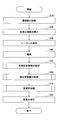
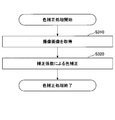
- 6 is a flowchart of an example of overall processing of a color correction method using the information processing terminal according to the present embodiment.
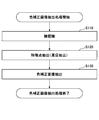
- 7 is a flowchart of a color-corrected image extraction process in the information processing terminal according to the present embodiment.
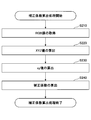
- 6 is a flowchart of a correction coefficient calculation process in the information processing terminal according to the present embodiment.
- 7 is a flowchart of a color correction process in the information processing terminal according to the present embodiment.
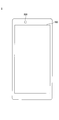
- FIG. 1 is a front view of the information processing terminal 1 according to the present embodiment.
- the information processing terminal 1 may be a communication terminal such as a mobile phone or a smartphone, or an information terminal such as a portable personal computer or a tablet computer.
- a smartphone will be described as an example of the information processing terminal 1 of the present embodiment.
- a display unit 100 and an image capturing unit 200 are provided on the front side of the information processing terminal 1.
- the display unit 100 is a so-called touch panel.
- the photographing unit 200 is a camera provided on the display unit 100 side of the information processing terminal 1, that is, a so-called in-camera.
- the information processing terminal 1 is realized by, for example, an information processing terminal having the hardware configuration shown in FIG.
- FIG. 2 is a hardware configuration diagram of an example of the information processing terminal according to the present embodiment.
- the information processing terminal 1 in FIG. 2 includes a CPU (Central Processing Unit) 10, a RAM (Random Access Memory) 20, a ROM (Read Only Memory) 30, an external I/F 40, a recording medium 45, and a wireless I/F 50.
- the audio processing unit 60, the display unit 100, and the photographing unit 200 are provided. Each is connected by a bus B1.
- the CPU 10 is an arithmetic unit that reads a program (application) from a storage device such as the ROM 30 or the recording medium 45 onto the RAM 20 and executes processing.
- RAM 20 is an example of a volatile semiconductor memory (storage device) that temporarily holds programs (applications) and the like.
- the ROM 30 is an example of a non-volatile semiconductor memory (storage device) that can retain programs (applications) even when the power is turned off.
- the ROM 30 stores programs such as BIOS (Basic Input/Output System) executed at the time of booting, various settings such as OS (Operating System) settings and network settings.
- BIOS Basic Input/Output System
- OS Operating System
- the external I/F 40 is an interface with an external device such as the recording medium 45.
- the information processing terminal 1 of FIG. 2 can read and/or write the recording medium 45 using the external I/F 40.
- the recording medium 45 includes an SD (Secure Digital) memory card, a USB (Universal Serial Bus) memory, and the like.
- SD Secure Digital
- USB Universal Serial Bus
- the wireless I/F 50 is an interface that wirelessly connects to an external network such as a wireless LAN (Local Area Network) or the Internet.
- the wireless I/F 50 has an antenna and is connected to an external network using a mobile communication system such as LTE (Long Term Evolution) or a wireless communication system such as a wireless LAN (Local Area Network) or Bluetooth (registered trademark). ..
- the information processing terminal 1 can use the wireless I/F 50 to communicate with an external server device or the like.
- the voice processing unit 60 is a device that performs input/output processing of voice and the like.
- a microphone 62 and a speaker 64 are connected to the voice processing unit 60, a voice is input from the microphone 62 and a sound is output from the speaker 64.
- the display unit 100 is a display with a touch panel.
- the display unit 100 displays a display image, a UI (User Interface), information, and the like, which will be described later.
- UI User Interface
- an operation or the like is input by detecting a touch on the screen.
- the image capturing unit 200 is a camera provided on the display unit 100 side of the information processing terminal 1, a so-called in-camera. Since the image capturing unit 200 is provided on the display unit 100 side of the information processing terminal 1 as shown in FIG. 1, the image capturing unit 200 can capture, for example, the user's face in the state in which the user looks at the display unit 100.
- the information processing terminal 1 can realize various processes as described below by executing a program (app) in the above hardware configuration.
- the information processing terminal 1 uses the image of the user's face captured by the image capturing unit 200 to perform color correction on the captured image of the user's face. Specifically, the information processing terminal 1 displays a predetermined display image on the display unit 100. The photographing unit 200 of the information processing terminal 1 photographs the face of the user while the user is looking at the display unit 100. The information processing terminal 1 calculates a color correction coefficient using the display image of the display unit 100 shown in the captured image of the user's face. Color correction of the image of the photographed user's face is performed using the correction coefficient.
- FIG. 3 is a processing block diagram of an example of the information processing terminal 1 according to the present embodiment.
- the information processing terminal 1 includes a display control unit 310, a shooting control unit 320, a display image extraction unit 330, a correction coefficient calculation unit 340, a color correction unit 350, and a control unit 400.
- the display control unit 310 controls to display a predetermined image (for example, a display image described later) on the display unit 100 of the information processing terminal 1.
- the display unit 100 displays a predetermined image under the control of the display control unit 310.
- the image capturing control unit 320 controls the image capturing unit 200 of the information processing terminal 1 to capture an image while a predetermined image is displayed on the display unit 100 of the information processing terminal 1.
- the image capturing unit 200 captures an image under the control of the image capturing control unit 320.
- the display image extracting means 330 displays the image (display image) displayed by the display unit 100 in the eyes of the user, in particular, the so-called iris portion (the portion of the iris and the pupil) of the image captured by the imaging unit 200. ) Is extracted.
- the correction coefficient calculation means 340 obtains the chromaticity value of the image extracted by the display image extraction means 330. A color correction coefficient is calculated based on the obtained chromaticity value and the chromaticity value of the image (display image) displayed by the display unit 100.
- the color correction unit 350 corrects the color of the image captured by the image capturing unit 200 using the correction coefficient calculated by the correction coefficient calculation unit 340.
- the control means 400 controls the entire information processing terminal 1.
- FIG. 4 is a flowchart showing an example of the overall processing of the information processing terminal 1 according to the present embodiment.
- the display image 500 is displayed, the image is captured by the image capturing unit 200, the correction coefficient is calculated using the captured image, and the color of the captured image is corrected.
- Step S10 The control unit 400 of the information processing terminal 1 controls to start the image capturing unit 200 when the program (app) is executed by the user.
- the image capturing unit 200 is activated under the control of the control unit 400.
- Step S20 The display control means 310 of the information processing terminal 1 controls the display unit 100 to display a display image.
- the display unit 100 displays a display image under the control of the display control unit 310.
- FIG. 8 is a figure which shows an example of the display image displayed on the display part 100 of the information processing terminal 1 which concerns on this embodiment.
- the display image 500 has a pattern of five colors in which each place is filled with white, red, green, blue, and gray. Display pure colors for red, green, and blue. Note that in FIG. 8, white, red, green, blue, and gray are represented by letters W, R, G, B, and GY, respectively. (The same applies to FIGS. 12A, 12B, 12C, and 12D.)
- White and red are arranged in the first row of the display image 500, green and blue in the second row, and gray in the third row.
- the height of the third stage is higher than that of the first stage and the second stage.
- Step S30 The information processing terminal 1 instructs the user to turn his face to the display unit 100. Specifically, the control means 400 of the information processing terminal 1 gives a voice instruction from the speaker 64 by the voice processing unit 60, "Please turn your face to the screen.”
- the information processing terminal 1 may instruct the user to remove glasses or contact lenses when instructing the display unit 100 to turn his face.
- Step S40 The image capturing control unit 320 of the information processing terminal 1 controls the image capturing unit 200 to capture an image.
- the image capturing unit 200 is controlled by the image capturing control unit 320 to perform image capturing.
- the image capturing control unit 320 causes the display image 100 to be displayed on the display unit 100.
- shooting may be performed. Further, when the user operates a button such as a shutter button, a picture may be taken. Further, the countdown may be performed by the display of the display unit 100 or the voice from the speaker 64 by the voice processing unit 60, and then the photographing may be performed when the countdown is completed.
- the image capturing unit 200 captures an image
- the image capturing control unit 320 causes the display unit 100 to display the display image 500.
- steps S20 and S30 may be reversed. That is, first, the information processing terminal 1 instructs the user to turn his/her face to the display unit 100. After that, the display control unit 310 of the information processing terminal 1 controls the display unit 100 to display the display image.
- the words “Please turn your face to the screen” on the display unit 100 may be displayed.
- an illustration, an icon, or the like may be displayed on the display unit 100 to instruct the user to turn his or her face to the display unit 100.
- An image taken by the image capturing unit 200 may be displayed.
- the image capturing control unit 320 causes the display control unit 310 to display the display image 500 on the display unit 100 immediately before image capturing, and displays immediately after image capturing.
- the image 500 may not be displayed. That is, the display image 100 may be displayed for a short period (instantaneous time) of the timing of shooting, like the flash of a camera on the display unit 100.
- Step S50 The color by which the display image extracting means 330 of the information processing terminal 1 extracts the image (display image) displayed by the display unit 100 that is seen by the user from the image (captured image) captured by the image capturing unit 200. Corrected image extraction processing is performed.
- the image (display image) displayed on the display unit 100 in the eyes of the user is an image in which the reflected light reflected by the eyes of the display image is captured.
- the color-corrected image extraction processing will be described in detail in a later paragraph.
- Step S60 The correction coefficient calculation means 340 of the information processing terminal 1 obtains the chromaticity value of the image extracted by the display image extraction means 330. A correction coefficient calculation process for calculating a color correction coefficient is performed based on the obtained chromaticity value and the chromaticity value of the image (display image) displayed by the display unit 100. The correction coefficient calculation process will be described in detail in a later paragraph.
- Step S70 The color correction unit 350 of the information processing terminal 1 uses the correction coefficient calculated by the correction coefficient calculation unit 340 to perform color correction processing for correcting the color of the image captured by the image capturing unit 200.
- color correction is performed on a captured image. The color correction process will be described in detail in a later paragraph.
- Step S80 The control means 400 of the information processing terminal 1 saves the color-corrected image.
- FIG. 5 is a flowchart of an example of the color-corrected image extraction processing.
- a portion where the display image is reflected by the eyes and is reflected is extracted from the captured image.
- the process of extracting the reflected image of the display image in the color-corrected image extraction process is an example of the process of extracting the reflected light of the display image.
- Step S110 The display image extraction means 330 of the information processing terminal 1 performs face recognition processing on the image (photographed image) photographed by the photographing unit 200, and recognizes the face included in the photographed image.
- Known techniques can be applied to the face recognition processing.
- Step S120 The display image extracting means 330 of the information processing terminal 1 extracts a face part from the result of face recognition in step S110. Further, facial feature points are extracted.
- the display image extracting means 330 of the present embodiment extracts so-called iris parts (the part of the iris and the pupil) of the eyes as the feature points.
- the display image extraction means 330 of the information processing terminal 1 cannot extract the so-called iris part of the eye (the part of the iris and the pupil) when extracting the feature points of the face.
- the user closes his eyes or wears glasses or contacts when taking a picture by performing a blink or the like.
- the process may return to step S20 and the image may be taken again.
- Step S130 The display image extracting means 330 of the information processing terminal 1 reflects the display image 500 displayed on the display unit 100 by the eyes from the so-called iris part (the part of the iris and the pupil) of the eyes extracted in step S120.
- the displayed image 505 is extracted.
- FIG. 9 shows a display image 505 reflected on the so-called iris part (the part of the iris and the pupil) of the right eye.
- the display image 505 reflected on the so-called black-eye part (the part of the iris and the pupil) of the right eye is extracted.
- the display image 505 is extracted from the so-called iris portion of the eye (the iris and the pupil portion), but the place where the display image 505 is extracted is the iris portion (the iris and the pupil portion). ). If the color can be extracted, the display image 505 reflected on the so-called white part of the eye may be extracted.
- FIG. 6 is a flowchart of an example of the correction coefficient calculation process.
- the correction coefficient calculation process calculates a correction coefficient necessary for performing color correction.
- the correction coefficient calculation unit 340 of the information processing terminal 1 acquires the RGB value of the portion corresponding to each color of the display image 500 for the display image 505 reflected by the eyes extracted by the display image extraction unit 330.
- the display image 500 is composed of five colors of white, red, green, blue and gray.
- white, red, green, blue, and gray are referred to as color 1, color 2, color 3, color 4, and color 5, respectively.
- the RGB value of the portion of the display image 505 corresponding to the color i portion of the display image 500 may be, for example, an average value of the RGB values of the portion of the display image 505 corresponding to the color i portion of the display image 500. .. Further, for example, it may be the RGB value of the pixel at the center of the portion of the display image 505 corresponding to the color i portion of the display image 500 or the average value of the RGB values of the pixels near the center.
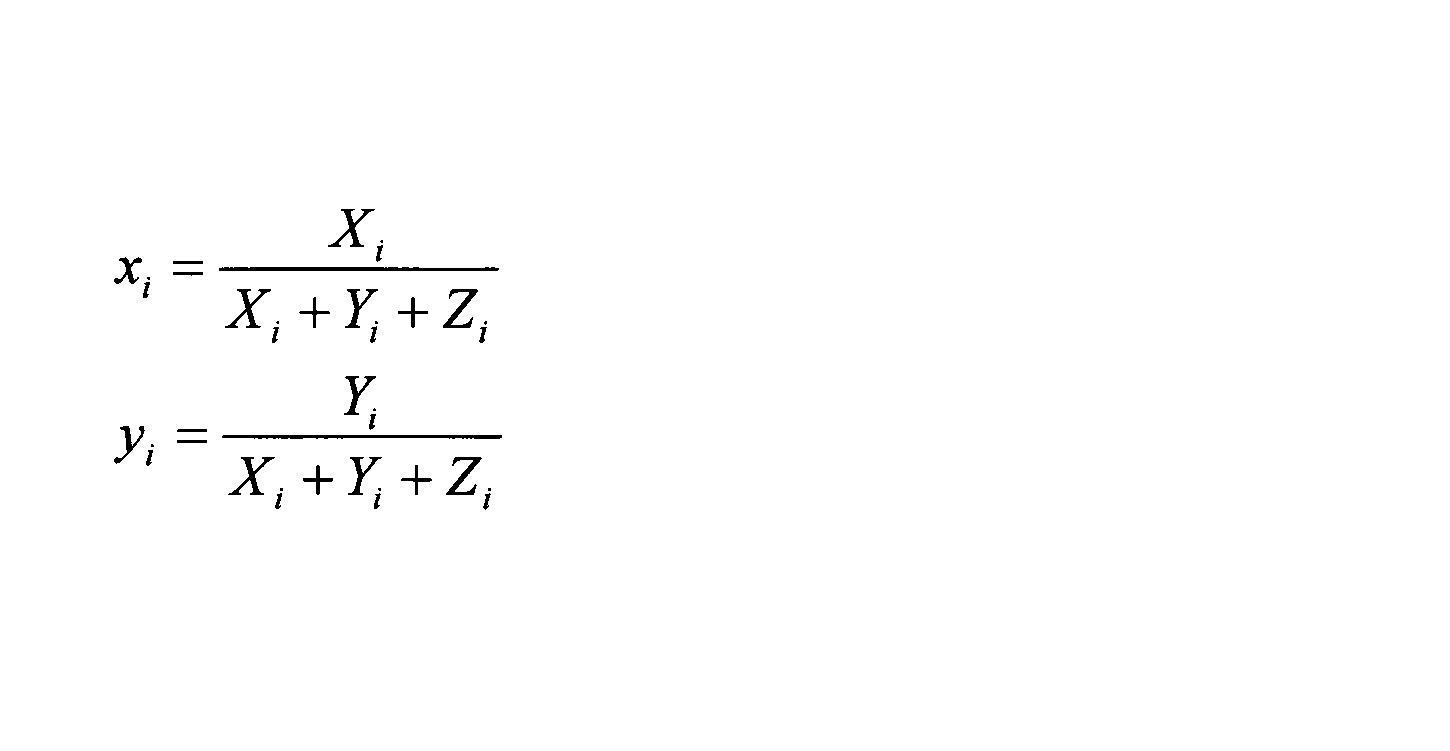
- Step S230 The correction coefficient calculation unit 340 of the information processing terminal 1 uses the XYZ values (X i , Y i , Z i ) of each color calculated in step S220 to calculate the xy value (chromaticity value) based on Equation 2. ).
- the xy values corresponding to X i , Y i , and Z i of the XYZ values are x i and y i .
- Step S240 The correction coefficient calculation unit 340 of the information processing terminal 1 uses the xy values of each color calculated in step S230 to obtain the correction coefficients ⁇ x i and ⁇ y i based on Equation 3. Note that x0 i and y0 i are xy values of the color i of the display image 500.
- FIG. 7 is a flowchart of an example of color correction processing.
- the color of the image is corrected using the correction coefficient calculated in the correction coefficient calculation process.
- Step S310 The color correction unit 350 of the information processing terminal 1 acquires an image to be corrected.
- it is the image captured in step S30. That is, it is the image used when the color correction coefficient is obtained.
- Step S320 The color correction unit 350 of the information processing terminal 1 divides the image to be corrected into a red image, a green image, and a blue image which are divided by RGB components.
- the red image will be described in detail.
- the Y value (Y r ) is obtained based on Equation 1.
- the y value of pure red is y r0 .
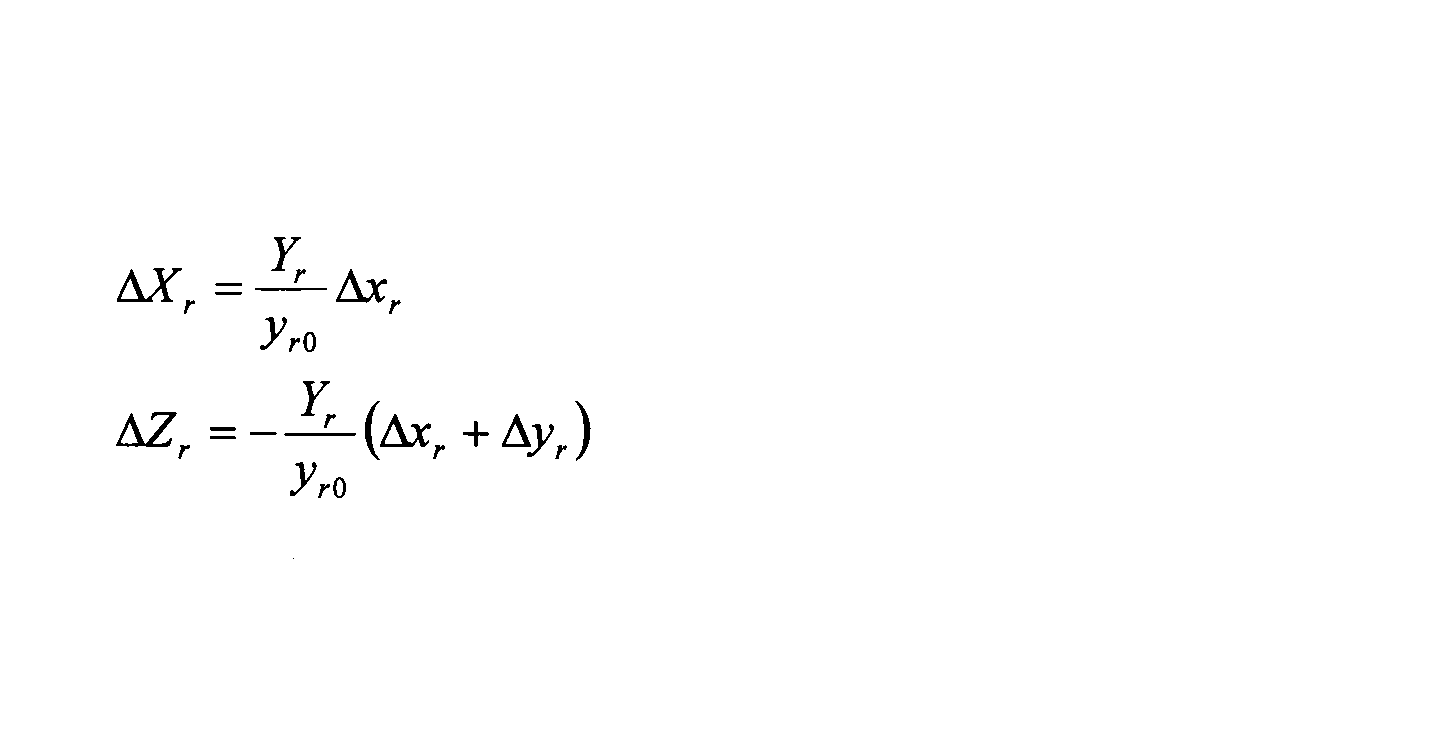
- the correction values obtained for the red color of the display image 500 are ⁇ x r and ⁇ y r . Based on Equation 4, correction values ⁇ X r and ⁇ Z r in the XYZ value space are obtained.
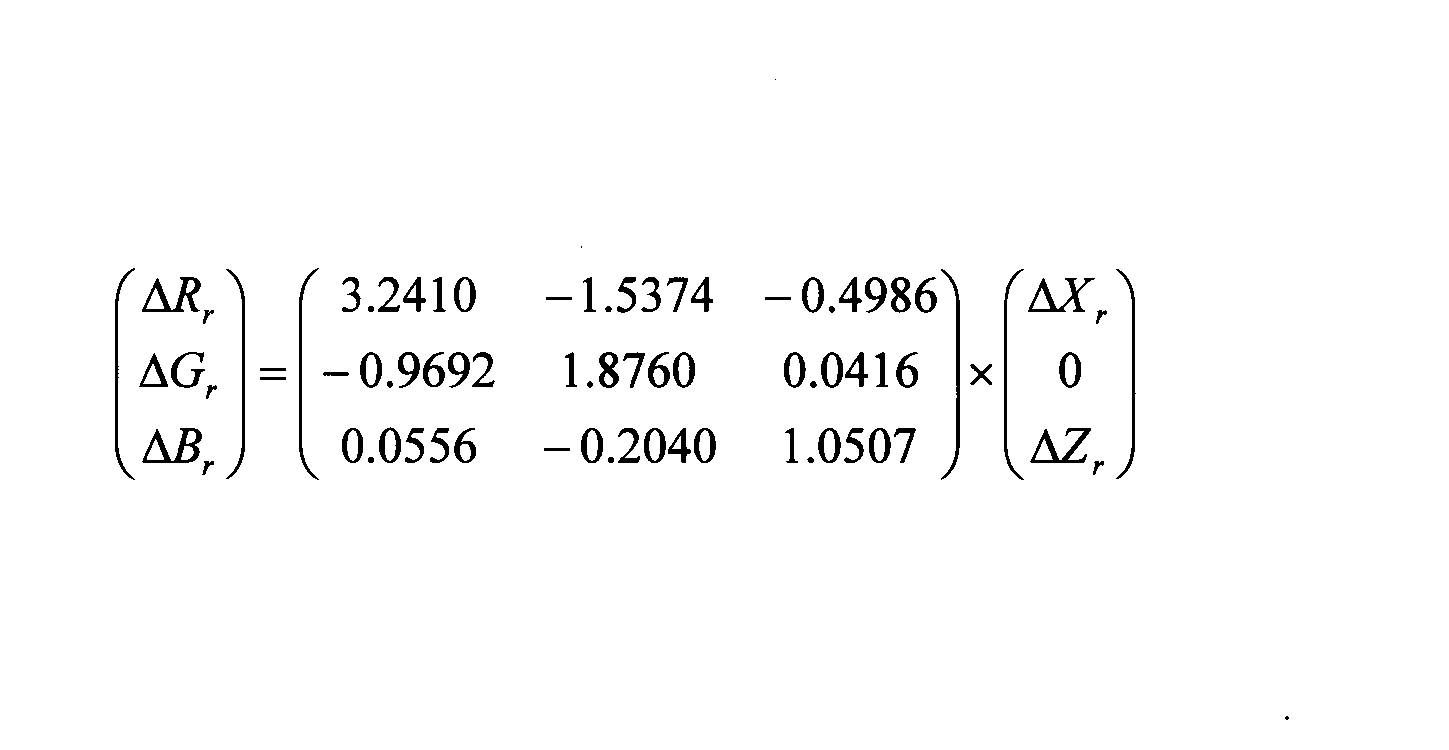
- correction values ⁇ R r , ⁇ G r , and ⁇ B r of each pixel in the RGB space are obtained.
- the correction values ⁇ R r , ⁇ G r , and ⁇ B r of each pixel in the obtained RGB space are subtracted from each pixel value of the red image.
- each pixel of the red image is corrected.
- Similar processing is performed on the green image and the blue image.
- the corrected red image, the blue image, and the green image are combined by, for example, addition or the like to create a final corrected image.
- the color correction is performed using the correction coefficient obtained for each color.
- the obtained correction coefficients are averaged and the same correction coefficient is used for all colors. Good. Further, only some colors may be corrected.
- the correction coefficients ⁇ x and ⁇ y are converted into the correction values in the RGB space to perform the correction.
- the pixel values are converted into the xy space, and the correction coefficients ⁇ x, The correction may be performed using ⁇ y.
- the display image reflected by the eye is an image in which the light from the display is reflected by the cornea or crystalline lens of the eye. Therefore, the intensity varies greatly depending on the reflectance of the cornea of the eye or the crystalline lens. In the present embodiment, by using the chromaticity value, it is possible to reduce the influence on the fluctuation of the intensity and perform the color correction.
- color correction can be performed using the information processing terminal 1 without preparing a color chart. Further, since the color chart is not used, it is not necessary to secure a space for photographing the color chart, and the color chart itself is not reflected in the photographed image.
- the display image 505 that is visible in the eye is small, so there is usually no problem even if the display image 505 remains visible. However, if the display image 505 is anxious, the display image 505 can be corrected to have the same color as the surrounding color.
- FIG. 10 is a diagram illustrating a processing example of color correction processing by the information processing terminal 1 according to the present embodiment.
- FIG. 10 is a diagram in which pure colors (red (R), green (G), blue (B)), uncorrected (unprocessed) colors, and corrected colors are plotted on the CIE1976a*b* coordinates. .. With respect to three colors (pure colors) of red (R), green (G) and blue (B), a red marker was plotted with a circular marker R0, a green marker was a square marker G0, and a blue marker was plotted with an inverted triangular marker B0. It should be noted that the intensity is changed for each pure color and a plurality of plots are made. Note that the intensity of each pure color increases as the distance from the origin increases.
- the values calculated from the RGB values before correction were plotted with the diamond-shaped markers MR, MG, and MR, and the values calculated from the RGB values after correction were plotted with the triangular markers CR, CG, and CB.
- the marker MR of the RGB value before correction is plotted on the red pure color marker R0 or between the markers R0.
- red it is indicated that on the a*b* coordinate, if it is above the line connecting the red pure color markers R0, the green component is included, and if it is below, the blue component is included.
- the marker MG of the RGB value before correction is plotted on the green pure color marker G0 or between the markers G0.
- the marker MG of the RGB value before correction is plotted on the green pure color marker G0 or between the markers G0.
- it is indicated on the a*b* coordinate that a red component is included above the line connecting the green pure color markers G0, and a blue component is included below the line.
- the marker MB of the RGB value before correction is plotted on or between the markers B0 of pure blue color.
- the marker MB of the RGB value before correction is plotted on or between the markers B0 of pure blue color.
- a red component is included above the line connecting the blue pure color markers B0, and a green component is included below.
- the marker MB is on the line connecting the markers B0, which are pure blue colors. Therefore, it is considered that the color is reproduced for blue.
- the marker MR is plotted on the right as compared to the solid red marker R0. Therefore, it can be determined that the color is slightly bluish.
- the green color is plotted on the lower side compared to the pure color marker G0. Therefore, it can be determined that the color is slightly bluish.
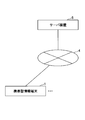
- the information processing terminal 1 alone performs the processing, but as shown in FIG. 11, the information processing terminal 1 and the server device 5 (information The processing may be performed as an information processing system by combining a processing device). For example, the following may be done. First, the information processing terminal 1 performs the processes of steps S10 to S40 of FIG. Next, the image captured by the image capturing unit 200 of the information processing terminal 1 is transmitted to the server device 5. The server device 5 performs the processes of steps S50 to S60. The correction coefficient calculated by the server device 5 is transmitted to the information processing terminal 1. Finally, the information processing terminal 1 performs the processes of steps S70 to S80.
- the server device 5 may perform the processes of steps S50 to S70 to transmit the color-corrected image to the information processing terminal 1.
- the information is not limited to being transmitted to the imaged information processing terminal 1, but may be transmitted to another information processing terminal or server device.
- the display image displayed on the display unit 100 is not limited to the display image 500.
- the color arrangement of the display image 500 may be exchanged.
- green and blue may be arranged in the first row of the display image 500, white and red in the second row, and gray may be arranged in the third row.
- the height of the third tier is higher than that of the first and second tiers, so gray is arranged in the third tier.
- other colors may be arranged.
- the number of colors of the display image is not limited to 5 colors like the display image 500 shown in FIG.
- the display image may include one or more colors.
- the color array itself may be changed as shown in FIGS. 12A, 12B, 12C, and 12D.
- displaying only one color at a time for example, displaying the display image 510 of white (W), gray (GY),... You may repeat.
- a correction coefficient may be obtained for each of the display images 510, and color correction may be performed on any or all of the captured images.
- the continuous display function of the camera may be used to sequentially display and display the display images 510 of the respective colors.
- the order of displayed colors may be changed as appropriate.
- one color may be displayed in one row.
- the color arrangement is not limited to the example shown in FIG. 12B and may be changed.
- one color may be displayed with a plurality of gradations. For example, changing the gradation of achromatic color such as light gray (GY1) in the first row, darker gray (GY2) in the second row, and darker gray (GY3) in the third row. It may be displayed. Note that the color is not limited to an achromatic color such as gray (GY) as in the example of FIG. 12C, and may be changed to another color.
- the color area may not be displayed in the entire horizontal direction of the display unit 100, but may be displayed in an oval shape in the middle.
- the shape is not limited to an ellipse but may be a polygon.
- the background color may be gray (GY) or white (W). Further, the color may not be displayed, that is, the color may be black.
- the colors are not limited to white, red, green, blue, and gray, and cyan, magenta, yellow, etc. may be used. Further, cyan, magenta, yellow, etc. may be included in the color combination.
- White balance can be adjusted by using an achromatic image as the display image.
- achromatic image such as red, green, and blue
- each color can be corrected. Therefore, it is desirable to combine achromatic colors with each color.
- all colors may be provided in the same display image, or they may be displayed in order. For example, white (achromatic color) may be displayed first, white balance may be adjusted, and then a pure color such as red may be displayed to calculate the correction coefficient for each color.
- any device having a camera, a so-called in-camera, on the display screen side can be applied.
- a mobile phone with an in-camera a portable personal computer with an in-camera (so-called notebook computer or laptop computer), or a tablet computer may be applied.
- the camera an external camera may be used as long as it can photograph the display screen side.
- the color of the display may differ from the pure color.
- the influence of the color development of the display unit may be corrected by post-processing based on the model information of the smartphone and the like.
- the correction is performed using the still image, but the correction may be performed using the moving image.
- a moving image may be taken before and after the operation.
- the information processing terminal 1 performs the process of calculating the correction coefficient using the captured image and performing the color correction of the captured image, but the calculated correction coefficient is applied to the image different from the captured image. Color correction may be performed by using the above.
- the display image reflected by the eyes is used, but if the reflected display image is captured, the place where the display image is reflected is not limited to the eyes.
- an image reflected by a mirror or glasses may be used.
- the display image reflected by the eyes of the user is used, but the display image reflected by the eyes of an animal (eg, dog or cat) may be used.
- Information processing terminal 100 Display unit 200 Imaging unit 310 Display control unit 320 Imaging control unit 330 Display image extraction unit 340 Correction coefficient calculation unit 350 Color correction unit
Landscapes
- Engineering & Computer Science (AREA)
- Multimedia (AREA)
- Signal Processing (AREA)
- Health & Medical Sciences (AREA)
- Biomedical Technology (AREA)
- General Health & Medical Sciences (AREA)
- Physics & Mathematics (AREA)
- General Physics & Mathematics (AREA)
- Theoretical Computer Science (AREA)
- Image Processing (AREA)
- Color Television Image Signal Generators (AREA)
- Studio Devices (AREA)
Abstract
表示画像を表示する表示部と、前記表示部を見ている状態のユーザの顔を撮影可能な撮影部とを有する情報処理端末であって、前記表示部に1色以上の色を含む表示画像を表示させる表示制御手段と、前記表示画像が表示された状態で前記撮影部に撮影させる撮影制御手段と、撮影画像から前記表示画像の反射光を抽出する表示画像抽出手段と、抽出した前記表示画像の反射光に基づいて撮影した画像の色補正を行う色補正手段と、を有する情報処理端末。
Description
本発明は、情報処理端末、プログラム、情報処理システム及び色補正方法に関する。
カメラ等の撮影装置で撮影した際に、周りの照明環境や撮影装置の設定等により、撮影した画像の色が変化してしまう。そのために、撮影した画像から正しく色を再現させるためには、色の補正を行う必要がある。
従来、カラーチャートを用意して、カラーチャートを撮影することにより、色を補正する技術が知られている。(特許文献1)
しかしながら、従来技術では、色の補正を行うためにはカラーチャートを用意しなければならない。また、撮影シーンの中にカラーチャートに含める必要があることから、カラーチャートの部分は他のものが写らないようにしなければならず、撮影可能な範囲が制限される。また、撮影した画像には、カラーチャート自体も写りこんでしまう。
本発明の一実施形態は、カラーチャートを用いることなく撮影した画像の色補正を行うことができる情報処理端末を提供することを目的とする。
開示の情報処理端末は、表示画像を表示する表示部と、前記表示部を見ている状態のユーザの顔を撮影可能な撮影部とを有する情報処理端末であって、前記表示部に1色以上の色を含む表示画像を表示させる表示制御手段と、前記表示画像が表示された状態で前記撮影部に撮影させる撮影制御手段と、撮影画像から前記表示画像の反射光を抽出する表示画像抽出手段と、抽出した前記表示画像の反射光に基づいて撮像した画像の色補正を行う色補正手段と、を有する。
カラーチャートを用いることなく情報処理端末で撮影した画像の色補正を行うことができる。
以下に図面を参照して本実施形態について説明する。
<ハードウェア構成>
《情報処理端末1》
図1は、本実施形態に係る情報処理端末1の正面図である。情報処理端末1としては、携帯電話やスマートフォンなどの通信端末や携帯型パーソナルコンピュータやタブレット型コンピュータなどの情報端末であってもよい。ここでは本実施形態の情報処理端末1として、スマートフォンを例として説明する。情報処理端末1の正面側には、表示部100と撮影部200を備える。表示部100は、いわゆる、タッチパネルである。撮影部200は、情報処理端末1の表示部100側に設けられたカメラ、いわゆる、インカメラである。
《情報処理端末1》
図1は、本実施形態に係る情報処理端末1の正面図である。情報処理端末1としては、携帯電話やスマートフォンなどの通信端末や携帯型パーソナルコンピュータやタブレット型コンピュータなどの情報端末であってもよい。ここでは本実施形態の情報処理端末1として、スマートフォンを例として説明する。情報処理端末1の正面側には、表示部100と撮影部200を備える。表示部100は、いわゆる、タッチパネルである。撮影部200は、情報処理端末1の表示部100側に設けられたカメラ、いわゆる、インカメラである。
情報処理端末1は例えば図2に示すハードウェア構成の情報処理端末により実現される。図2は本実施形態に係る情報処理端末の一例のハードウェア構成図である。
図2の情報処理端末1は、CPU(Central Processing Unit)10、RAM(Random Access Memory)20、ROM(Read Only Memory)30、外部I/F(Interface)40、記録媒体45、無線I/F50、音声処理部60、表示部100、撮影部200を備える。それぞれは、バスB1により接続されている。
CPU10は、ROM30や記録媒体45などの記憶装置からプログラム(アプリ)をRAM20上に読み出し、処理を実行する演算装置である。
RAM20はプログラム(アプリ)等を一時保持する揮発性の半導体メモリ(記憶装置)の一例である。
ROM30は、電源を切ってもプログラム(アプリ)等を保持することができる不揮発性の半導体メモリ(記憶装置)の一例である。ROM30には、起動時に実行されるBIOS(Basic Input/Output System)などのプログラム、OS(Operating System)設定やネットワーク設定などの各種設定が格納されている。
外部I/F40は、記録媒体45などの外部装置とのインタフェースである。図2の情報処理端末1は外部I/F40を利用して記録媒体45の読み取り及び/又は書き込みを行うことができる。
記録媒体45にはSD(Secure Digital)メモリカード、USB(Universal Serial Bus)メモリなどがある。
無線I/F50は、無線LAN(Local Area Network)やインターネットなどの外部のネットワークに無線で接続するインタフェースである。無線I/F50はアンテナを備え、LTE(Long Term Evolution)などの移動体通信方式、または無線LAN(Local Area Network)やBluetooth(登録商標)などの無線通信方式を用いて外部のネットワークに接続する。情報処理端末1は無線I/F50を利用し、外部のサーバ装置等と通信を行うことができる。
音声処理部60は、音声等の入出力処理を行う装置である。音声処理部60には、マイク62とスピーカ64が接続され、マイク62から音声を入力し、スピーカ64から音を出力する。
表示部100は、タッチパネル付きディスプレイである。表示部100は、後述する表示画像やUI(User Interface)、情報等の表示を行う。また、画面のタッチを検出することにより、操作等の入力を行う。
撮影部200は、情報処理端末1の表示部100側に設けられたカメラ、いわゆる、インカメラである。撮影部200は、図1のように、情報処理端末1の表示部100側に設けられていることから、例えば、ユーザが表示部100を見た状態のユーザの顔を撮影可能である。
本実施形態に係る情報処理端末1は上記したハードウェア構成においてプログラム(アプリ)を実行することにより後述するような各種処理を実現できる。
本実施形態の情報処理端末1は撮影部200により撮影されたユーザの顔の画像を用いて当該撮影したユーザの顔の画像について色の補正を行う。具体的には、情報処理端末1は所定の表示画像を表示部100に表示する。ユーザが表示部100を見た状態で、情報処理端末1の撮影部200はユーザの顔を撮影する。情報処理端末1は、当該撮影したユーザの顔の画像に写っている表示部100の表示画像を用いて、色の補正係数を算出する。当該補正係数を用いて当該撮影したユーザの顔の画像の色補正を行う。
<ソフトウェア構成>
情報処理端末1を例として、本実施形態のソフトウェア構成について説明する。図3は本実施形態に係る情報処理端末1の一例の処理ブロック図である。情報処理端末1は、表示制御手段310と、撮影制御手段320と、表示画像抽出手段330と、補正係数算出手段340と、色補正手段350と、制御手段400と、を備える。
情報処理端末1を例として、本実施形態のソフトウェア構成について説明する。図3は本実施形態に係る情報処理端末1の一例の処理ブロック図である。情報処理端末1は、表示制御手段310と、撮影制御手段320と、表示画像抽出手段330と、補正係数算出手段340と、色補正手段350と、制御手段400と、を備える。
表示制御手段310は、情報処理端末1の表示部100に所定の画像(例えば、後述する表示画像)を表示するように制御する。表示部100は、表示制御手段310の制御により、所定の画像を表示する。
撮影制御手段320は、情報処理端末1の表示部100に所定の画像が表示された状態で、情報処理端末1の撮影部200を撮影するように制御する。撮影部200は、撮影制御手段320の制御により撮影を行う。
表示画像抽出手段330は、撮影部200が撮影した画像(撮像画像)から、ユーザの目、特に、目のいわゆる黒目部分(虹彩と瞳孔の部分)に写る表示部100が表示した画像(表示画像)を抽出する。
補正係数算出手段340は、表示画像抽出手段330が抽出した画像の色度値を求める。求めた色度値と、表示部100が表示した画像(表示画像)の色度値に基づいて、色の補正係数を算出する。
色補正手段350は、補正係数算出手段340が算出した補正係数を用いて、撮影部200が撮影した画像の色を補正する。
制御手段400は、情報処理端末1の全体を制御する。
<処理>
《全体処理》
本実施形態に係る情報処理端末1は、例えば図4に示すような手順で処理を行う。図4は、本実施形態に係る情報処理端末1の全体処理の一例を示したフローチャートである。本実施形態においては、表示画像500を表示して撮影部200で撮像し、その撮像画像を用いて補正係数の算出し、当該撮像画像の色補正を行う。
《全体処理》
本実施形態に係る情報処理端末1は、例えば図4に示すような手順で処理を行う。図4は、本実施形態に係る情報処理端末1の全体処理の一例を示したフローチャートである。本実施形態においては、表示画像500を表示して撮影部200で撮像し、その撮像画像を用いて補正係数の算出し、当該撮像画像の色補正を行う。
(ステップS10) 情報処理端末1の制御手段400は、ユーザによりプログラム(アプリ)が実行されると、撮影部200を起動させるように制御する。撮影部200は、制御手段400からの制御により起動する。
(ステップS20) 情報処理端末1の表示制御手段310は、表示部100に表示画像を表示させるように制御する。表示部100は、表示制御手段310からの制御により、表示画像を表示する。
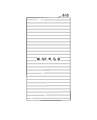
表示部100が表示する表示画像の例について説明する。図8は、本実施形態に係る情報処理端末1の表示部100で表示する表示画像の一例を示す図である。表示画像500は、白色、赤色、緑色、青色、灰色で各場所を塗りつぶした5色の模様となっている。赤色、緑色、青色については純色を表示するようにする。なお、図8では、白色、赤色、緑色、青色、灰色をそれぞれ、W、R、G、B、GYという文字を付して表している。(図12A、図12B、図12C、図12Dも同様である。)
表示画像500の1段目には白色と赤色、2段目には緑色と青色、3段目には灰色が配置されている。本実施形態の表示画像500では、3段目が1段目、2段目に対して、高さが高くなっている。
(ステップS30) 情報処理端末1は、ユーザに対して表示部100に顔を向けるように指示する。具体的には、情報処理端末1の制御手段400は、「画面に顔を向けてください。」と音声処理部60によりスピーカ64から音声で指示する。
なお、情報処理端末1は、必要であれば、ユーザに対して表示部100に顔を向けるように指示する際にメガネやコンタクトレンズを外すように指示してもよい。
(ステップS40) 情報処理端末1の撮影制御手段320は、撮影部200に撮影させるように制御する。撮影部200は、撮影制御手段320からの制御を受けて、撮影を行う。撮影部200が撮影を行う際には、撮影制御手段320は、表示部100に表示画像500が表示された状態であるようにする。
撮影の際のタイミングについて、例えば、ユーザが表示部100をタップしたら、撮影するようにしてもよい。また、ユーザがシャッターボタン等のボタンを操作したら、撮影するようにしてもよい。さらに、表示部100の表示や音声処理部60によるスピーカ64からの音声によりカウントダウンすることによって、カウントダウンが終了したら、撮影するようにしてもよい。いずれの場合にしても、撮影部200が撮影を行う際には、撮影制御手段320は、表示部100に表示画像500が表示された状態であるようにする。
なお、ステップS20とステップS30については順番を逆にしてもよい。すなわち、先に、情報処理端末1は、ユーザに対して表示部100に顔を向けるように指示する。その後に、情報処理端末1の表示制御手段310は、表示部100に表示画像を表示させるように制御する。
その際には、「画面に顔を向けてください。」と音声処理部60によりスピーカ64から音声で指示するのに換えて、表示部100に「画面に顔を向けてください。」と文字を表示してもよい。また、表示部100にイラストやアイコン等を表示してユーザに対して表示部100に顔を向けるように指示してもよい。撮影部200で撮影している画像を表示してもよい。
また、ステップS20とステップS30の順番を逆にした場合には、撮影制御手段320は、撮影する直前に表示制御手段310に対して表示部100に表示画像500を表示させ、撮像した直後に表示画像500を表示させないようにするようにしてもよい。すなわち、表示部100をカメラのフラッシュのように、撮影するタイミングの短期間(一瞬)だけ表示画像500を表示するようにしてもよい。
(ステップS50) 情報処理端末1の表示画像抽出手段330は、撮影部200が撮影した画像(撮影画像)から、ユーザの目に写った表示部100が表示した画像(表示画像)を抽出する色補正画像抽出処理を行う。ユーザの目に写った表示部100が表示した画像(表示画像)は、表示画像の目によって反射した反射光が撮影された画像である。色補正画像抽出処理については、後の段落で詳細に説明する。
(ステップS60) 情報処理端末1の補正係数算出手段340は、表示画像抽出手段330が抽出した画像の色度値を求める。求めた色度値と、表示部100が表示した画像(表示画像)の色度値に基づいて、色の補正係数を算出する補正係数算出処理を行う。補正係数算出処理については、後の段落で詳細に説明する。
(ステップS70) 情報処理端末1の色補正手段350は、補正係数算出手段340が算出した補正係数を用いて、撮影部200が撮影した画像の色を補正する色補正処理を行う。本実施形態では、撮影画像について色の補正を行う。色補正処理については、後の段落で詳細に説明する。
(ステップS80) 情報処理端末1の制御手段400は、色補正処理を行った画像を保存する。
《S50:色補正画像抽出処理》
ステップS50の色補正画像抽出処理について説明する。図5は色補正画像抽出処理の一例のフローチャートである。色補正画像抽出処理は、撮影画像から、表示画像が目で反射して写っている部分を抽出する。色補正画像抽出処理の表示画像が目で反射して写っている部分を抽出する処理が、表示画像の反射光を抽出する処理の一例である。
ステップS50の色補正画像抽出処理について説明する。図5は色補正画像抽出処理の一例のフローチャートである。色補正画像抽出処理は、撮影画像から、表示画像が目で反射して写っている部分を抽出する。色補正画像抽出処理の表示画像が目で反射して写っている部分を抽出する処理が、表示画像の反射光を抽出する処理の一例である。
(ステップS110) 情報処理端末1の表示画像抽出手段330は、撮影部200が撮影した画像(撮影画像)対して顔認識処理を行い、撮影画像中に含まれる顔を認識する。顔認識処理については、公知の技術を適用することができる。
(ステップS120) 情報処理端末1の表示画像抽出手段330は、ステップS110で顔認識した結果から、顔の部分を抽出する。さらに、顔の特徴点を抽出する。本実施形態の表示画像抽出手段330では、特徴点として目のいわゆる黒目部分(虹彩と瞳孔の部分)を抽出する。
なお、情報処理端末1の表示画像抽出手段330が、顔の特徴点を抽出する際に、目のいわゆる黒目部分(虹彩と瞳孔の部分)を抽出できない場合が考えられる。例えば、瞬き等を行って、撮影する際に目を閉じている場合やメガネやコンタクトを着用している場合等が考えられる。そのように、目のいわゆる黒目部分(虹彩と瞳孔の部分)を抽出できない場合は、再度ステップS20に戻って、再度撮影を行うようにしてもよい。
(ステップS130) 情報処理端末1の表示画像抽出手段330は、ステップS120で抽出した目のいわゆる黒目部分(虹彩と瞳孔の部分)から、表示部100で表示した表示画像500が目で反射して写っている表示画像505を抽出する。図9は、右目のいわゆる黒目部分(虹彩と瞳孔の部分)に反射した表示画像505を示している。ステップS130では、この右目のいわゆる黒目部分(虹彩と瞳孔の部分)に反射した表示画像505を抽出する。
なお、本実施形態の情報処理端末1では、目のいわゆる黒目部分(虹彩と瞳孔の部分)から表示画像505を抽出したが、表示画像505を抽出する場所は、黒目部分(虹彩と瞳孔の部分)に限らない。色が抽出できるのであれば、目のいわゆる白目部分に反射した表示画像505を抽出してもよい。
《S60:補正係数算出処理》
ステップS60の補正係数算出処理について説明する。図6は補正係数算出処理の一例のフローチャートである。補正係数算出処理は、色補正を行うために必要な補正係数を算出する。
ステップS60の補正係数算出処理について説明する。図6は補正係数算出処理の一例のフローチャートである。補正係数算出処理は、色補正を行うために必要な補正係数を算出する。
(ステップS210) 情報処理端末1の補正係数算出手段340は、表示画像抽出手段330が抽出した目に反射した表示画像505について、表示画像500の各色に対応する部分のRGB値を取得する。表示画像500は、白色、赤色、緑色、青色、灰色の5色により構成している。ここでは、白色、赤色、緑色、青色、灰色をそれぞれ色1、色2、色3、色4、色5とする。表示画像500の色i(i=1、・・・、5)の部分に対応する表示画像505の部分のRGB値(Ri、Gi、Bi)を取得する。
なお、表示画像500の色iの部分に対応する表示画像505の部分のRGB値は、例えば、表示画像500の色iの部分に対応する表示画像505の部分のRGB値の平均値としてもよい。また、例えば、表示画像500の色iの部分に対応する表示画像505の部分の中心の画素のRGB値又は中心付近の画素のRGB値の平均値としてもよい。
(ステップS220) 情報処理端末1の補正係数算出手段340は、ステップS210で取得した表示画像500の色i(i=1、・・・、5)に対応する部分のRGB値(Ri、Gi、Bi)から数1に基づいて色iのXYZ値を算出する。RGB値(Ri、Gi、Bi)から算出したXYZ値を(Xi、Yi、Zi)とする。

(ステップS230) 情報処理端末1の補正係数算出手段340は、ステップS220で算出した各色のXYZ値(Xi、Yi、Zi)を用いて、数2に基づいてxy値(色度値)を求める。XYZ値のXi、Yi、Ziに対応するxy値をxi、yiする。
(ステップS240) 情報処理端末1の補正係数算出手段340は、ステップS230で算出した各色のxy値を用いて、数3に基づいて補正係数Δxi、Δyiを求める。なお、x0i、y0iは、表示画像500の色iのxy値である。

本実施形態の情報処理端末1では、表示画像500として、赤色、緑色、青色は純色を表示するようにしている。すなわち、表示画像500の赤色は、赤色の成分のみ、すなわち、(R、G、B)=(1、0、0)である。同様に、表示画像500の緑色は、緑色の成分のみ、すなわち、(R、G、B)=(0、1、0)、表示画像500の青色は、青色の成分のみ、すなわち、(R、G、B)=(0、0、1)である。したがって、表示画像500の赤色、緑色、青色のxy値(x0i、y0i)は、純色の色度値となる。
《S70:色補正処理》
ステップS70の色補正処理について説明する。図7は色補正処理の一例のフローチャートである。色補正処理は、補正係数算出処理で算出した補正係数を用いて、画像の色を補正する。
ステップS70の色補正処理について説明する。図7は色補正処理の一例のフローチャートである。色補正処理は、補正係数算出処理で算出した補正係数を用いて、画像の色を補正する。
(ステップS310) 情報処理端末1の色補正手段350は、補正を行う画像を取得する。本実施形態の情報処理端末1においては、ステップS30で撮影した画像である。すなわち、色補正係数を求めるときに用いた画像である。
(ステップS320) 情報処理端末1の色補正手段350は、補正を行う画像をそれぞれRGB成分で分けた赤色画像、緑色画像、青色画像に分ける。ここでは、赤色画像について詳細に説明する。赤色画像の各画素、すなわち、補正を行う画像の各画素のR値について、数1に基づいてY値(Yr)を求める。純色の赤のy値をyr0とする。表示画像500の赤色に対して求めた補正値を、Δxr、Δyrとする。式4に基づいて、XYZ値空間での補正値ΔXr、ΔZrを求める。次に、式5に基づいて、RGB空間での各画素の補正値ΔRr、ΔGr、ΔBrを求める。求めたRGB空間での各画素の補正値ΔRr、ΔGr、ΔBrを赤画像の各画素値から減算する。以上の処理により、赤画像の各画素を補正する。緑色画像、青色画像についても同様の処理を行う。そして、補正した赤色画像、青色画像、緑色画像を、例えば加算等を行い組み合わせることによって、最終的な補正画像を作成する。
なお、本実施形態では、色の補正は各色について求めた補正係数を用いて補正しているが、例えば求めた補正係数について平均などを行い、すべての色に同じ補正係数を用いて補正してもよい。また、一部の色のみを補正してもよい。本実施形態では、補正係数Δx、ΔyをRGB空間の補正値に変換して、補正を行っているが、補正する画像について、画素値をxy空間に変換して、xy空間で補正係数Δx、Δyを用いて補正を行ってもよい。
目で反射された表示画像は、表示部からの光が目の角膜や水晶体で反射された画像である。そのことから強度については、目の角膜や水晶体の反射率等により大きく変動する。本実施形態では、色度値を用いることによって、強度の変動に影響を小さくして色の補正を行うことができる。
本実施形態の情報処理端末1により、カラーチャートを用意しなくても、情報処理端末1を用いて色補正を行うことができる。また、カラーチャートを用いていないことから、カラーチャートを撮影するためのスペースを確保する必要なく、撮影した画像に、カラーチャート自体が写りこむこともない。
なお、色補正後の画像について、目に写った表示画像505は小さいので、表示画像505が写ったままでも通常は問題ない。しかし、もし表示画像505が気になる場合は、当該表示画像505を周辺の色と同色の色とする修正を行うこともできる。
《処理例》
実際に処理を行った結果について説明する。図10は、本実施形態に係る情報処理端末1よる色補正処理の処理例を説明する図である。
実際に処理を行った結果について説明する。図10は、本実施形態に係る情報処理端末1よる色補正処理の処理例を説明する図である。
図10は、CIE1976a*b*座標上に、純色(赤色(R)、緑色(G)、青色(B))と、補正前(未処理)の色、補正後の色をプロットした図である。赤色(R)、緑色(G)、青色(B)の3色(純色)について、赤色は円形のマーカーR0、緑色は四角形のマーカーG0、青色は逆三角形のマーカーB0でプロットした。なお、各純色について強度を変えて複数プロットしている。なお、原点から離れるほど各純色の強度は強いことを表している。
また、補正前のRGB値から算出した値を菱形のマーカーMR、MG、MR、補正後のRGB値から算出した値を三角形のマーカーCR、CG、CBでプロットした。
図10において、撮影した画像のRGB値が正しい場合は、例えば赤色について、補正前のRGB値のマーカーMRは、赤色の純色のマーカーR0上又はマーカーR0の間にプロットされる。なお、赤色の場合は、a*b*座標上で、赤色の純色のマーカーR0を結ぶ線より上側にある場合は緑色の成分、下側にある場合は青色の成分が含まれることを表している。
同様に、例えば緑色について、撮影した画像のRGB値が正しい場合は、補正前のRGB値のマーカーMGは、緑色の純色のマーカーG0上又はマーカーG0の間にプロットされる。なお、緑色の場合は、a*b*座標上で、緑色の純色のマーカーG0を結ぶ線より上側にある場合は赤色の成分、下側にある場合は青色の成分が含まれることを表している。
同様に、例えば青色について、撮影した画像のRGB値が正しい場合は、補正前のRGB値のマーカーMBは、青色の純色のマーカーB0上又はマーカーB0の間にプロットされる。なお、青色の場合は、a*b*座標上で、青色の純色のマーカーB0を結ぶ線より上側にある場合は赤色の成分、下側にある場合は緑色の成分が含まれることを表している。
図10の補正前の菱形のマーカーMR、MG、MBについて検討する。青色については、マーカーMBはほぼ青色の純色のマーカーB0を結ぶ線上にある。したがって、青色については、色が再現されていると考えられる。赤色については、マーカーMRは、赤色の純色のマーカーR0と比較して右側にプロットされている。したがって、若干青みを帯びていると判断することができる。緑色については、純色のマーカーG0と比較して下側にプロットされている。したがって、若干青みを帯びていると判断することができる。
図10の補正後の三角形のマーカーCR、CG、CBについて検討する。補正された結果、それぞれほぼ純色のマーカーR0、G0、B0上又はマーカーR0、G0、B0の間にプロットされていることがわかる。そのことから、各色とのに正しい色に補正されたことがわかる。
<変形例>
本実施形態では、情報処理端末1単体で処理を行ったが、図11のように情報処理端末1と、情報処理端末1とネットワーク4を介してデータ通信可能に接続されるサーバ装置5(情報処理装置)と、を組み合わせること情報処理システムとして処理を行ってもよい。例えば、以下のようにしてもよい。最初に、図4のステップS10~S40の処理を情報処理端末1で行う。次に、情報処理端末1の撮影部200で撮影した画像をサーバ装置5に送信する。サーバ装置5でステップS50~S60の処理を行う。サーバ装置5で算出した補正係数を情報処理端末1に送信する。最後に、ステップS70~S80の処理を情報処理端末1で行う。
本実施形態では、情報処理端末1単体で処理を行ったが、図11のように情報処理端末1と、情報処理端末1とネットワーク4を介してデータ通信可能に接続されるサーバ装置5(情報処理装置)と、を組み合わせること情報処理システムとして処理を行ってもよい。例えば、以下のようにしてもよい。最初に、図4のステップS10~S40の処理を情報処理端末1で行う。次に、情報処理端末1の撮影部200で撮影した画像をサーバ装置5に送信する。サーバ装置5でステップS50~S60の処理を行う。サーバ装置5で算出した補正係数を情報処理端末1に送信する。最後に、ステップS70~S80の処理を情報処理端末1で行う。
また、サーバ装置5でステップS50~S70までの処理を行って、色補正した画像を情報処理端末1に送信するようにしてもよい。その場合には、撮像した情報処理端末1に送信することに限らず、別の情報処理端末やサーバ装置に送信するようにしてもよい。
表示部100に表示する表示画像は、表示画像500に限らない。例えば、表示画像500の色の配置を入れ替えてもよい。例えば、表示画像500の1段目には緑色と青色、2段目には白色と赤色、3段目には灰色が配置されるようにしてもよい。なお、前述のように、本実施形態の表示画像500では、3段目が1段目、2段目に対して、高さが高くなっていることから、3段目には灰色を配置することが望ましいが、ほかの色を配置してもよい。
表示画像の色の数は、図8に示す表示画像500のように5色に限らない。表示画像は1色以上の色を含むようにすればよい。
図12A、図12B、図12C、図12Dのように、色の配列自体を変更してもよい。例えば、図12Aの表示画像510のように、1度に1色のみを表示して、例えば、白色(W)、灰色(GY)、・・・の表示画像510を順に表示して撮像すること繰り返すようにしてもよい。その場合には、表示画像510のそれぞれについて補正係数を求めて、撮像した画像の何れかに又はすべてについて色補正を行ってもよい。
また、それぞれの色の表示画像510を順に表示して撮影することを、カメラの連写機能を用いて行ってもよい。表示する色の順番についても適宜変更してもよい。
図12Bの表示画像520のように、一つの段に1色表示するようにしてもよい。なお、色の配置については、図12Bの例に限らず変更してもよい。
図12Cの表示画像530のように、一つの色を複数の階調で表示するようにしてもよい。例えば、1段目に明るい灰色(GY1)、2段目に1段目より暗い灰色(GY2)、3段目には更に暗い灰色(GY3)のように無彩色の色の階調を変えて表示するようにしてもよい。なお、色については、図12Cの例のように灰色(GY)のような無彩色に限らずほかの色に変更してもよい。
図12Dの表示画像540のように、色の領域を表示部100の横方向すべてに表示するのではなく、中間に楕円形状に表示してもよい。なお、形状については楕円に限らず多角形でもよい。また、背景の色は灰色(GY)でもよいし、白色(W)でもよい。また、色を表示しない、すなわち、黒色、でもよい。
なお、色については、白色、赤色、緑色、青色、灰色に限らず、シアン、マゼンダ、黄色等を用いてもよい。また、シアン、マゼンダ、黄色等を色の組み合わせに含めてもよい。
表示画像として無彩色の画像を用いることによって、ホワイトバランスを調整することができる。表示画像として赤色、緑色、青色等の純色の画像を用いることによって、各色それぞれの色を補正することができる。そのことから、無彩色と各色を組み合わせることが望ましい。組み合わせについては、同じ表示画像の中にすべての色を備えるようにしてもよいし、順に表示するようにしてもよい。例えば、最初に白色(無彩色)を表示して、ホワイトバランスを調整した後に、赤色等の純色を表示してそれぞれの色の補正係数を算出するようにしてもよい。
情報処理端末1としては、表示画面側にカメラ、いわゆる、インカメラ、を備えている装置であれば、適用することが可能である。例えば、インカメラ付きの携帯電話やインカメラ付きの携帯型パーソナルコンピュータ(いわゆるノートパソコンやラップトップコンピュータ)やタブレット型コンピュータを適用してもよい。なお、カメラについては、外付けのカメラでも、表示画面側を撮影可能であればよい。
市販のスマートフォンにおいて、表示部の発色が純色から異なる場合がある。その場合は、本実施形態で補正係数を算出する際に、スマートフォンの機種情報等から表示部の発色による影響を後処理で補正するようにしてもよい。
本実施形態の情報処理端末1では、静止画を用いて補正を行ったが、動画を用いて行ってもよい。例えば、ユーザがシャッターボタン等のボタンを操作したら、その前後の時間において、動画を撮影するようにしてもよい。
本実施形態の情報処理端末1では、撮像画像を用いて補正係数の算出と当該撮像画像の色補正を行う処理を行ったが、撮像画像とは別の画像に対して、算出した補正係数を用いて色補正を行ってもよい。
本実施形態の情報処理端末1では、目で反射した表示画像を用いたが、反射した表示画像が撮影されていれば、表示画像が反射される場所は目に限らない。例えば、鏡やメガネ等で反射した画像を用いてもよい。
本実施形態の情報処理端末1では、ユーザ(人)の目で反射した表示画像を用いたが、動物(例えば、犬や猫)の目に反射した表示画像を用いるようにしてもよい。
以上、実施形態について詳述したが、上記の実施形態はすべての点で例示であって、上記の実施形態に限定されるものではない。上記の実施形態は、特許請求の範囲に記載された本発明の実施形態の要旨の範囲内において、種々の変形、変更が可能である。
本願は、日本特許庁に2019年 2月14日に出願された基礎出願特願2019-024573号の優先権を主張するものであり、その全内容を参照によりここに援用する。
1 情報処理端末
100 表示部
200 撮影部
310 表示制御手段
320 撮影制御手段
330 表示画像抽出手段
340 補正係数算出手段
350 色補正手段
100 表示部
200 撮影部
310 表示制御手段
320 撮影制御手段
330 表示画像抽出手段
340 補正係数算出手段
350 色補正手段
Claims (8)
- 表示画像を表示する表示部と、前記表示部を見ている状態のユーザの顔を撮影可能な撮影部とを有する情報処理端末であって、
前記表示部に1色以上の色を含む表示画像を表示させる表示制御手段と、
前記表示画像が表示された状態で前記撮影部に撮影させる撮影制御手段と、
撮影画像から前記表示画像の反射光を抽出する表示画像抽出手段と、
抽出した前記表示画像の反射光に基づいて、撮影した画像の色補正を行う色補正手段と、
を有する情報処理端末。 - 前記表示画像抽出手段は、前記表示画像の反射光として前記撮影画像から前記ユーザの目に写った前記表示画像を抽出すること
を特徴とする請求項1に記載の情報処理端末。 - 前記表示制御手段は、赤色、緑色及び青色を含む前記表示画像を表示させ、
前記色補正手段は、抽出した前記表示画像の反射光に含まれる赤色、緑色及び青色の色度値と純色の赤色、緑色及び青色の色度値とに基づいて、前記表示部が表示する前記表示画像の色補正を行うこと
を特徴とする請求項1又は2のいずれかに記載の情報処理端末。 - 前記表示制御手段は、無彩色を含む前記表示画像を表示させ、
前記色補正手段は、抽出した前記表示画像の反射光に含まれる表示画像色の色度値に基づいて、前記表示部が表示する前記表示画像の色補正を行うこと
を特徴とする請求項1乃至3のいずれか一項に記載の情報処理端末。 - 前記表示制御手段は、白色、赤色、緑色、青色及び灰色の模様を含む前記表示画像を前記表示部に表示させること
を特徴とする請求項1乃至4のいずれか一項に記載の情報処理端末。 - 表示画像を表示する表示部と、前記表示部を見ている状態のユーザの顔を撮影可能な撮影部とを有する情報処理端末を、
前記表示部に1色以上の色を含む表示画像を表示させる表示制御手段、
前記表示画像が表示された状態で前記撮影部に撮影させる撮影制御手段、
撮影画像から前記表示画像の反射光を抽出する表示画像抽出手段、
抽出した前記表示画像の反射光に基づいて撮影した画像の色補正を行う色補正手段、
として機能させるためのプログラム。 - 表示画像を表示する表示部、及び、前記表示部を見た状態のユーザの顔を撮影可能な撮影部を有する情報処理端末と、前記情報処理端末とネットワークを介してデータ通信可能に接続された情報処理装置と、を有する情報処理システムであって、
前記表示部に1色以上の色を含む表示画像を表示させる表示制御手段と、
前記表示画像が表示された状態で前記撮影部に撮影させる撮影制御手段と、
撮影画像から前記表示画像の反射光を抽出する表示画像抽出手段と、
抽出した前記表示画像の反射光に基づいて撮影した画像の色補正を行う色補正手段と、
を有する情報処理システム。 - 表示画像を表示する表示部と、前記表示部を見た状態のユーザの顔を撮影可能な撮影部とを有する情報処理端末が実行する色補正方法であって、
前記表示部に1色以上の色を含む表示画像を表示させる表示制御ステップと、
前記表示画像が表示された状態で前記撮影部に撮影させる撮影制御ステップと、
撮影画像から前記表示画像の反射光を抽出する表示画像抽出ステップと、
抽出した前記表示画像の反射光に基づいて撮影した画像の色補正を行う色補正ステップと、
を有する色補正方法。
Priority Applications (2)
| Application Number | Priority Date | Filing Date | Title |
|---|---|---|---|
| JP2020572129A JP7335283B2 (ja) | 2019-02-14 | 2020-01-15 | 情報処理端末、プログラム、情報処理システム及び色補正方法 |
| CN202080012931.7A CN113412615B (zh) | 2019-02-14 | 2020-01-15 | 信息处理终端、记录介质、信息处理系统及颜色校正方法 |
Applications Claiming Priority (2)
| Application Number | Priority Date | Filing Date | Title |
|---|---|---|---|
| JP2019024573 | 2019-02-14 | ||
| JP2019-024573 | 2019-02-14 |
Publications (1)
| Publication Number | Publication Date |
|---|---|
| WO2020166256A1 true WO2020166256A1 (ja) | 2020-08-20 |
Family
ID=72045293
Family Applications (1)
| Application Number | Title | Priority Date | Filing Date |
|---|---|---|---|
| PCT/JP2020/000967 Ceased WO2020166256A1 (ja) | 2019-02-14 | 2020-01-15 | 情報処理端末、プログラム、情報処理システム及び色補正方法 |
Country Status (3)
| Country | Link |
|---|---|
| JP (1) | JP7335283B2 (ja) |
| CN (1) | CN113412615B (ja) |
| WO (1) | WO2020166256A1 (ja) |
Cited By (1)
| Publication number | Priority date | Publication date | Assignee | Title |
|---|---|---|---|---|
| CN112911148A (zh) * | 2021-01-28 | 2021-06-04 | 维沃移动通信有限公司 | 图像处理方法、装置及电子设备 |
Citations (4)
| Publication number | Priority date | Publication date | Assignee | Title |
|---|---|---|---|---|
| JP2005124105A (ja) * | 2003-10-20 | 2005-05-12 | Seiko Precision Inc | プロジェクタ及びその色補正方法 |
| JP2009200782A (ja) * | 2008-02-21 | 2009-09-03 | Nikon Corp | 画像出力特性補正システム |
| JP2010157988A (ja) * | 2008-12-05 | 2010-07-15 | Astro Design Inc | 色評価方法及び色評価システム |
| WO2016103525A1 (ja) * | 2014-12-27 | 2016-06-30 | 株式会社Fove | ヘッドマウントディスプレイ |
Family Cites Families (1)
| Publication number | Priority date | Publication date | Assignee | Title |
|---|---|---|---|---|
| JP2017026943A (ja) * | 2015-07-27 | 2017-02-02 | 株式会社東芝 | 画像表示装置及び画像処理装置 |
-
2020
- 2020-01-15 CN CN202080012931.7A patent/CN113412615B/zh active Active
- 2020-01-15 JP JP2020572129A patent/JP7335283B2/ja active Active
- 2020-01-15 WO PCT/JP2020/000967 patent/WO2020166256A1/ja not_active Ceased
Patent Citations (4)
| Publication number | Priority date | Publication date | Assignee | Title |
|---|---|---|---|---|
| JP2005124105A (ja) * | 2003-10-20 | 2005-05-12 | Seiko Precision Inc | プロジェクタ及びその色補正方法 |
| JP2009200782A (ja) * | 2008-02-21 | 2009-09-03 | Nikon Corp | 画像出力特性補正システム |
| JP2010157988A (ja) * | 2008-12-05 | 2010-07-15 | Astro Design Inc | 色評価方法及び色評価システム |
| WO2016103525A1 (ja) * | 2014-12-27 | 2016-06-30 | 株式会社Fove | ヘッドマウントディスプレイ |
Cited By (2)
| Publication number | Priority date | Publication date | Assignee | Title |
|---|---|---|---|---|
| CN112911148A (zh) * | 2021-01-28 | 2021-06-04 | 维沃移动通信有限公司 | 图像处理方法、装置及电子设备 |
| CN112911148B (zh) * | 2021-01-28 | 2022-10-14 | 维沃移动通信有限公司 | 图像处理方法、装置及电子设备 |
Also Published As
| Publication number | Publication date |
|---|---|
| CN113412615B (zh) | 2024-04-05 |
| CN113412615A (zh) | 2021-09-17 |
| JP7335283B2 (ja) | 2023-08-29 |
| JPWO2020166256A1 (ja) | 2021-12-23 |
Similar Documents
| Publication | Publication Date | Title |
|---|---|---|
| US10827140B2 (en) | Photographing method for terminal and terminal | |
| US20130242127A1 (en) | Image creating device and image creating method | |
| CN104754239B (zh) | 拍照方法及装置 | |
| JP5933105B2 (ja) | 画像処理装置、撮像装置、フィルタ生成装置、画像復元方法及びプログラム | |
| US20170318233A1 (en) | Noise Models for Image Processing | |
| CN105075239B (zh) | 复原滤波器生成装置以及方法、图像处理装置以及方法、摄像装置以及记录介质 | |
| WO2018176925A1 (zh) | Hdr图像的生成方法及装置 | |
| EP4340383B1 (en) | Image processing method and related device thereof | |
| KR102318013B1 (ko) | 복수의 이미지들을 합성하는 전자장치 및 방법 | |
| US10348958B2 (en) | Image processing apparatus for performing predetermined processing on a captured image | |
| JP2014078926A (ja) | 画像調整装置、画像調整方法およびプログラム | |
| JP7039183B2 (ja) | 画像処理装置、画像処理方法、及びプログラム | |
| US20170154437A1 (en) | Image processing apparatus for performing smoothing on human face area | |
| JP2021518617A (ja) | パノラマ画像の色補正方法及び電子設備 | |
| US20020080251A1 (en) | Digital imaging device, image processing device, digital imaging method, and image processing program | |
| US10957092B2 (en) | Method and apparatus for distinguishing between objects | |
| KR20190096748A (ko) | 외부 전자 장치를 이용한 이미지 보정 방법 및 전자 장치 | |
| JP5768193B2 (ja) | 画像処理装置、撮像装置、画像処理方法、画像処理プログラム | |
| JP7335283B2 (ja) | 情報処理端末、プログラム、情報処理システム及び色補正方法 | |
| KR20200114275A (ko) | 전자 장치 및 이미지에 포함된 개인 정보의 보안 방법 | |
| US20240251154A1 (en) | Image capture apparatus, image processing apparatus, and method | |
| EP3739864A1 (en) | Electronic apparatus, control method of electronic apparatus, program, and computer readable medium | |
| JP2020191546A (ja) | 画像処理装置、画像処理方法、およびプログラム | |
| CN113615148B (zh) | 相机色彩图像处理 | |
| JP6260094B2 (ja) | 画像処理装置、画像処理方法及びプログラム |
Legal Events
| Date | Code | Title | Description |
|---|---|---|---|
| 121 | Ep: the epo has been informed by wipo that ep was designated in this application |
Ref document number: 20754861 Country of ref document: EP Kind code of ref document: A1 |
|
| ENP | Entry into the national phase |
Ref document number: 2020572129 Country of ref document: JP Kind code of ref document: A |
|
| NENP | Non-entry into the national phase |
Ref country code: DE |
|
| 122 | Ep: pct application non-entry in european phase |
Ref document number: 20754861 Country of ref document: EP Kind code of ref document: A1 |