WO2020087232A1 - 通知显示方法、电子装置和计算机设备 - Google Patents
通知显示方法、电子装置和计算机设备 Download PDFInfo
- Publication number
- WO2020087232A1 WO2020087232A1 PCT/CN2018/112504 CN2018112504W WO2020087232A1 WO 2020087232 A1 WO2020087232 A1 WO 2020087232A1 CN 2018112504 W CN2018112504 W CN 2018112504W WO 2020087232 A1 WO2020087232 A1 WO 2020087232A1
- Authority
- WO
- WIPO (PCT)
- Prior art keywords
- notification
- display screen
- display
- electronic device
- displayed
- Prior art date
- Legal status (The legal status is an assumption and is not a legal conclusion. Google has not performed a legal analysis and makes no representation as to the accuracy of the status listed.)
- Ceased
Links
Images


Classifications
-
- G—PHYSICS
- G06—COMPUTING OR CALCULATING; COUNTING
- G06F—ELECTRIC DIGITAL DATA PROCESSING
- G06F3/00—Input arrangements for transferring data to be processed into a form capable of being handled by the computer; Output arrangements for transferring data from processing unit to output unit, e.g. interface arrangements
- G06F3/01—Input arrangements or combined input and output arrangements for interaction between user and computer
- G06F3/048—Interaction techniques based on graphical user interfaces [GUI]
- G06F3/0481—Interaction techniques based on graphical user interfaces [GUI] based on specific properties of the displayed interaction object or a metaphor-based environment, e.g. interaction with desktop elements like windows or icons, or assisted by a cursor's changing behaviour or appearance
Definitions
- This application relates to the field of electronic technology, and in particular, to a notification display method, an electronic device, and a computer device.
- Embodiments of the present application provide a notification display method, electronic device, and computer equipment.
- the notification display method of the embodiment of the present application is applied to an electronic device having a first display screen and a second display screen, where the first display screen and the second display screen are different, and the notification display method includes the steps of
- the second display screen is controlled to display the notification.
- the notification display method of the embodiment of the present application when a notification is received, it can determine whether the notification corresponding to the notification push request meets the preset condition, and when the preset condition is met, control the second display screen to display the notification.
- the second display screen notification can prompt the user in a more concealed and weak prompt mode, which can meet the anti-disturbance needs of the user in various special scenarios and improve the user experience.
- the electronic device includes a first display screen and a second display screen.
- the first display screen is different from the second display screen.
- the electronic device further includes the first display screen and the second display screen.
- a processor connected to the display screen and the second display screen, the processor is configured to receive a notification push request and determine whether a notification corresponding to the notification push request satisfies a preset condition and control when the notification satisfies the preset condition
- the second display screen displays the notification.
- the notification when a notification is received, the notification can be controlled to be displayed on the second display screen with different display effects according to the time sequence of the received notification.
- the display notification information with different display effects can prompt the user in a more concealed and weak prompt manner, which can meet the anti-disturbance needs of the user in various special scenarios and improve the user experience.
- the computer device when receiving the notification, it can determine whether the notification corresponding to the notification push request meets the preset condition, and when the preset condition is met, control the second display screen to display the notification.
- the notification displayed on the display screen can prompt the user in a more concealed and weak prompt manner, which can meet the anti-disturb demand of the user in various special scenarios and improve the user experience.
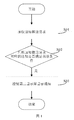
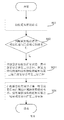
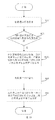
- FIG. 1 is a schematic flowchart of a notification display method according to an embodiment of the present application
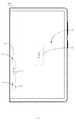
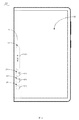
- FIG. 2 is a schematic structural diagram of an electronic device according to an embodiment of the present application.
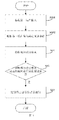
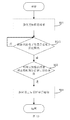
- FIG. 3 is another schematic flowchart of a notification display method according to an embodiment of the present application.
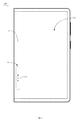
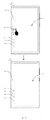
- FIG. 5 is a schematic diagram of a scene of an electronic device according to an embodiment of the present application.
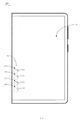
- FIG. 6 is a schematic diagram of another scenario of an electronic device according to an embodiment of the present application.
- FIG. 7 is a schematic diagram of another scene of an electronic device according to an embodiment of the present application.
- FIG. 8 is a schematic flowchart of a notification display method according to an embodiment of the present application.
- FIG. 9 is a schematic diagram of still another scenario of an electronic device according to an embodiment of the present application.
- FIG. 10 is another schematic flowchart of the notification display method according to the embodiment of the present application.
- FIG. 11 is a schematic diagram of another scene of an electronic device according to an embodiment of the present application.
- FIG. 13 is another schematic flowchart of the notification display method according to the embodiment of the present application.
- FIG. 14 is a schematic block diagram of a computer device according to an embodiment of the present application.
- Electronic device 100 First display screen 10, second display screen 11, first display effect 12, capsule icon 121, second display effect 13, bubble icon 131, processor 20, computer device 200, system bus 30, memory 40 , Internal memory 50, display device 60, input device 70.
- first and second are used for description purposes only, and cannot be understood as indicating or implying relative importance or implicitly indicating the number of technical features indicated.
- features defined as “first” and “second” may explicitly or implicitly include one or more of the features.
- the meaning of “plurality” is two or more, unless otherwise specifically limited.
- connection should be understood in a broad sense, for example, it can be fixed connection or detachable Connect, or connect integrally. It can be a mechanical connection or an electrical connection. It can be directly connected or indirectly connected through an intermediate medium. It can be the connection between two elements or the interaction between two elements. Those of ordinary skill in the art can understand the specific meanings of the above terms in this application according to specific situations.
- an embodiment of the present application provides a notification display method for an electronic device 100.
- the electronic device 100 includes a first display screen 10 and a second display screen 11, and the first display screen 10 and the second display The screen 11 is different, and the notification display method includes the following steps:
- an embodiment of the present application provides an electronic device 100, the electronic device 100 includes a first display screen 10, a second display screen 11 and a processor 20, the processor 20 is connected to the first display screen 10 and the second display Screen 11.
- the notification display method in the embodiment of the present application is used in the electronic device 100 in the embodiment of the present application, and steps S01 to S03 may be implemented by the processor 20. That is, the processor 20 can receive the notification push request and determine whether the notification corresponding to the notification push request meets the preset condition, and when the notification meets the preset condition, display the notification on the second display screen 11.
- the different surfaces of the first display screen 10 and the second display screen 11 mean that the two are not located in the same plane, that is, the planes where the two are located intersect or are parallel.
- the first display screen 10 is the main screen
- the second display screen 11 is the side screen
- the second display screen 11 is used to assist the display of the first display screen 10
- the second display screen 11 and the first display screen An angle is formed between 10 or the second display screen 11 bends and extends from the first display screen 10. It can be understood that the angle between the second display screen 11 and the first display screen 10 may be directly formed, or the second display screen 11 may smoothly extend from the first display screen 10.
- the first display screen 10 and the second display screen 11 are connected to form a continuous flexible display screen, for example, the first display screen 10 is a flat screen, and the second display screen 11 is a display from the first A continuous curved screen with the edges of the screen 10 extending seamlessly.
- the first display screen 10 and the second display screen 11 are both curved screens, and the two are connected to each other to form a continuous flexible display screen.
- the electronic device 100 further includes a third display screen, the third display screen and the first display screen 10 are disposed opposite to each other, and the second display screen 11 is connected to the first display screen 10 and the third display screen to form
- the continuous flexible display screen, the formed flexible display screen can be folded and unfolded, when unfolding, the three form a large display area, and when folded, the second display screen 11 is in a bent state.
- the electronic device 100 includes but is not limited to a mobile phone, a tablet computer, a notebook computer, a wearable smart device (such as a wristband, a head-mounted display, etc.), etc.
- the electronic device 100 of the embodiment of the present application is described by taking a mobile phone as an example.
- notifications are generally displayed on the homepage.
- This display method is unreasonable and cannot fully utilize Advantages, to provide customers with a more intuitive and convenient user experience, in addition, it is easy to cause inconvenience to users in certain occasions.
- the notification display method of the embodiment of the present application when a notification push request is received, it can determine whether the notification corresponding to the notification push request meets the preset condition, and when the preset condition is met, control the second display screen 11 to display the notification (As shown in FIG. 2), in this way, displaying the notification on the second display screen 11 can prompt the user in a more concealed and weak prompt manner, which can meet the anti-interference requirement of the user in various special scenarios and improve the user experience.
- the first display screen 10 when the second display screen 11 displays the notification, the first display screen 10 is in a screen-off state or a display state. Specifically, when the second display screen 11 displays the notification, the first display screen 10 may be in the off state or in the on state, which is not specifically limited.
- the notification display method includes:
- S002 Determine a preset condition according to the first user input.
- the above steps S001 and S002 may be implemented by the processor 20. That is to say, the processor 20 can receive the first user input and determine the preset condition according to the first user input.
- step S001 and step S002 are performed before step S01.
- the notification is pushed by the application program of the electronic device, and the above-mentioned preset condition refers to an application program set by the user and capable of displaying the notification on the second display screen 11. Judging whether the notification satisfies the preset condition refers to judging whether the notification belongs to the notification pushed by the application program set by the user. If it is, it indicates that the preset condition is satisfied, and if it is not, it is not satisfied.
- the above-mentioned first user input may be an operation instruction generated by a user operating on a setting menu on the electronic device 100. The user can enter the setting menu of the electronic device 100 to set a notification of an application that can be displayed according to his own needs.
- the user can set the notification of the application that can be displayed according to his own needs. For example, the user can set the notification of some applications that he does not need to disallow display, and the notification of some applications that he needs Set to allow display. The notification that cannot be displayed is not displayed, and the notification that can be displayed is displayed on the second display screen.
- step S03 includes steps:
- S031 Control the newly received notification to be displayed on the second display screen 11 with the first display effect 12, and the notification received before the newly received notification is displayed on the second display screen 11 with the second display effect 13.
- the above step S031 may be implemented by the processor 20. That is to say, the processor 20 is used to control the latest received notification to be displayed on the second display screen 11 with the first display effect 12, and the received notification before the latest received notification is displayed on the second display with the second display effect 13 Screen 11.
- the first display effect 12 includes the capsule icon 121 and the first information related to the notification information
- the second display effect 13 includes the bubble icon 131 and the first information related to the notification information.
- Second information That is to say, as shown in FIG. 2, in the present embodiment, the first presentation effect 12 displays the notification in the state of the capsule icon 121, and the capsule icon 121 displays the first information related to the latest received notification information , Such as the text of the notification.
- the second presentation effect 13 is displayed in a state of a bubble icon 131 on which is displayed second information related to the notification information received before the latest received notification, such as the number of notifications.
- the second display screen 11 has one and only one capsule icon 121, that is, only the latest notification will be displayed in the state of the capsule icon 121, and the remaining historical notifications are all in bubbles The status of icon 131 is displayed.
- the notification can be pushed by the application of the electronic device 100.
- the information of the notification includes the text content of the notification, the name and icon of the application (APP) to which it belongs, the number of notifications, etc.
- the display effect is related to the information of the notification, which allows the user to quickly understand the text content of the notification and the name of the application Or icons, the number of notifications, etc.
- the second display screen 11 when the user clears the notification of the second display screen 11, the second display screen 11 does not display any notification, or when the electronic device 100 does not receive the notification, the first The second display 11 does not display notifications.
- the above notification is pushed by the application of the electronic device 100
- the first information includes part or all of the text content of the notification, and / or the name of the application to which the notification belongs
- the second information includes the number of notifications and / Or the icon of the application to which the notification belongs.
- applications such as mobile phones and other electronic devices 100 are installed, and application programs include system applications such as not limited to time, weather, alarm clock, music, and third-party applications such as WeChat, Weibo, Alipay, and QQ.
- system applications such as not limited to time, weather, alarm clock, music, and third-party applications such as WeChat, Weibo, Alipay, and QQ.
- the above-mentioned first information includes part or all of the text content of the notification, and / or the name of the application to which the notification belongs, that is, part or all of the text content of the latest notification and the application to which the latest notification belongs are displayed in the capsule icon 121
- the name of the program, or only part or all of the text content of the latest notification is displayed in the capsule icon 121, or the name of the application to which the notification belongs.
- the first information may also include other information such as the icon of the application program and the time of the received notification, which is not specifically limited.
- the above-mentioned second information includes at least one of the number of notifications and the icon of the application to which the notification belongs.
- the above-mentioned second information includes the number of notifications and the icon of the application to which the notification belongs, that is to say, the icon of the application and the information pushed by the application are displayed in the bubble icon 131
- the number of notifications As shown in FIG. 2, in this embodiment, the number of notifications is displayed on the upper right of the bubble icon 131 in the form of a corner, and the icon of the application is displayed inside the bubble icon. It can be understood that in other embodiments, the number of notifications is displayed at any position of the bubble icon 131 in the form of a subscript, for example, directly above, above left, below right, and below left, etc.
- the number of bubble icons 131 existing on the second display screen 11 is represented by how many received application notifications are pushed by the application.
- the notifications issued by the same application are displayed as the bubble icon 131 except for the latest notification received by the electronic device 100 as the capsule icon 121, and the cumulative number of notifications is displayed on the bubble icon 131 in the form of a subscript. That is to say, each notification pushed by a different application has a different bubble icon 131.
- the notification display method further includes steps:
- step S04 may be implemented by the processor 20. That is to say, the processor 20 is used to control the newly received notification to be displayed on the second display with the second display effect 13 after the latest received notification is displayed on the second display screen 11 with the first display effect 12 for a preset duration Screen 11.
- step S04 is performed after step S03. That is to say, when the latest notification received is displayed on the second display 11 with the first display effect 12, the time when the latest notification is displayed with the first display effect 12 (that is, displayed in the state of the capsule icon) is detected Whether the preset duration is reached, after the preset duration is reached, the notification is directly displayed on the second display screen 11 as a second display effect 13 (that is, displayed in the state of a bubble icon).
- the preset time duration may be a time duration that the electronic device 100 has preset before leaving the factory, or may be a time duration set by the user in the setting program of the electronic device 100 according to the user's own wishes.
- the preset duration can be set to five seconds, that is, after the latest notification with the first display effect 12 is displayed on the second display screen 11 for five seconds, the second display effect 13 is directly displayed.
- the above specific preset The duration is only exemplary, and the specific duration can be set according to the actual situation and the wishes of the user.
- the newly received notification is automatically converted to be displayed with the second display effect 13, and the second display 11 shows only The bubble icon 131 and the second information, without the capsule icon 121 and the first information.
- the aforementioned preset duration is positively related to the priority of the application to which the notification belongs.
- the priority of the application can be set by the user.
- the user can prioritize the applications in the electronic device 100 according to the applications that he considers to be of higher importance.
- the application with higher priority is displayed with the first display effect 12 for a longer display duration, and the application with a lower priority is displayed with the first display effect 12 with a shorter display duration. That is to say, the application with higher priority will be displayed for a long time with the first display effect 12, and the application with a lower priority will be displayed with the first display effect 12 for a shorter time.
- the specific duration can be set by the user .
- the priority of the application is set by default and can be changed by the user.
- the notification display method further includes steps:
- S06 Convert the notification displayed with the first display effect 12 to the second display effect 11 on the second display screen 11 according to the second user input.
- the above steps S05 and S06 may be implemented by the processor 20. That is to say, the processor 20 is used to receive the second user input and convert the notification displayed with the first display effect 12 into the second display effect 13 to be displayed on the second display screen 11 according to the second user input.
- the user can choose whether to convert the first display effect 12 into the second display effect 13 according to his own wishes, which improves the user's experience.
- step S05 is performed after step S03. That is to say, when displaying the latest notification with the first display effect 12 on the second display screen 11, the processor 20 can read the time when the latest notification is displayed with the first effect 12 or can be based on the user's second user input Convert the latest notification from the first display effect 12 to display with the second display effect 13.
- the first display screen 10 may be a touch first display screen
- the second user input may be that the user operates by sliding the capsule icon 121 on the first display screen 10
- the specific sliding direction can be set by the user or set by default, without specific limitation. That is to say, the user can directly convert the notification displayed with the first display effect 12 to the second display effect 13 display through the sliding operation on the capsule icon 121. As shown in FIG.
- the second user input is a downward sliding operation of the capsule icon 121 by the user on the first display screen 10.
- the notification display method further includes steps:
- the above step S07 may be implemented by the processor 20. That is to say, the processor 20 is used to display the notification of the same application on the second display screen 11 with the second presentation effect 13 when the number of notifications of the same application exceeds the set threshold.
- some applications push more notifications.
- a threshold can be set.
- the second display effect 13 ie The bubble icon 131
- the second display effect 13 is displayed on the second display screen 11.
- QQ and WeChat when there are many notification messages, when the number of notifications exceeds a certain value, you can directly display the notifications as subsequent notifications pushed in with the second display effect 13, even for the latest received notifications
- the second display effect 13 is directly displayed.
- the notification display method further includes steps:
- the above step S011 may be implemented by the processor 20. That is to say, after receiving the notification push request, the processor 20 is used to determine whether the electronic device 100 is in the predetermined mode and when the electronic device 100 is in the predetermined mode, determine whether the notification corresponding to the notification push request meets a preset condition.
- step S011 is performed after step S01 and before S02.
- the predetermined modes include, but are not limited to, meetings, interviews, breaks, driving, and parties, etc., which do not want to be directly disturbed.
- the predetermined mode may be entered according to third user input.
- the third user input may be a user's setting operation in the setting menu of the electronic device 100, for example, the user may select a conference mode, a driving mode, and so on.
- the processor 20 determines whether the notification corresponding to the notification push request meets the preset condition, and when the notification meets the preset condition, controls the second The display shows the notification. Therefore, the user is prompted with a more concealed and weak prompt method to improve the user experience.
- determining whether the first display screen 10 is in the predetermined mode is a continuous detection process, that is, the electronic device 100 can detect whether the first display screen 10 is in the predetermined mode in real time.
- users can also set up notification applications that can be displayed in a predetermined mode according to their own needs. For example, when a user is in a meeting, he can set that only notifications of some applications can be displayed, while notifications of other applications can not be displayed.
- the applications that can be displayed in each predetermined mode can be the same. It can be different, users can set it by themselves.
- the above-mentioned preset mode also includes a screen-off mode, that is to say, only when the electronic device is in the screen-off mode, the notification is judged to be sufficient to meet the preset condition, only It is displayed on the second display screen only when the preset conditions are met.
- the above-mentioned predetermined mode does not include the screen-off mode.
- the electronic device may also first determine whether the electronic device 100 is in the predetermined mode. When the electronic device 100 is in the predetermined mode, Then determine whether the first display screen 10 is in the off-screen state, or whether the first display screen 10 is in the off-screen state, and then determine whether the electronic device 100 is in a predetermined mode. Only when these two conditions are met, the processor Only then will it be judged whether the notification corresponding to the notification push request meets the preset condition. When any one of these conditions is not met, it can be directly displayed in a more direct manner, that is, it can be displayed in the existing conventional notification method.
- the first display screen 10 is not in the off state, indicating that the user may be using the electronic device 100 or viewing the notification. Show it in a more direct way.
- the electronic device 100 is in a screen-off state, although it is in a screen-off state at this time, it is not in a predetermined mode, indicating that the user can directly view the notification and does not need to notify in a manner that does not disturb. At this time, It can be displayed in a more direct manner, for example, directly on the first display screen 10.
- an embodiment of the present application further provides a computer device 200.
- the computer device 200 includes a memory 40 and a processor 20.
- the memory 40 stores computer-readable instructions.
- the processor 20 executes the notification and prompting method of the electronic device 100 according to any of the foregoing embodiments, such as performing steps S01: Receive a notification push request; Step S02: Determine whether the notification corresponding to the notification push request satisfies the preset condition; and Step S03: When the notification meets the preset condition, control the second display screen 11 to display the notification.
- FIG. 14 is a schematic diagram of internal modules of the computer device 200 in an embodiment.
- the computer device 20 includes a processor 20 connected via a system bus 30, a memory 40 (for example, a non-volatile storage medium), an internal memory 50, a display device 60, and an input device 70.
- the memory 40 of the computer device 20 stores an operating system and computer readable instructions.
- the computer readable instructions can be executed by the processor 20 to implement the notification and prompting method of any one of the above embodiments.
- the processor 20 can be used to provide computing and control capabilities to support the operation of the entire computer device.
- the internal memory 50 of the computer device provides an environment for the execution of computer-readable instructions in the memory 40.
- the display device 60 of the computer device may be an OLED display device, and the input device 70 may be a touch layer covered on the display device 60, or a button, trackball, or touch pad provided on the computer device housing, or an external keyboard , Touchpad or mouse, etc.
- the computer device 200 may be a mobile phone, a tablet computer, a notebook computer, or the like. Those skilled in the art can understand that the structure shown in FIG. 14 is only a schematic diagram of a part of the structure related to the solution of the present application, and does not constitute a limitation on the computer device 200 to which the solution of the present application is applied.
- the specific computer device 200 may include more or fewer components than shown in the figures, or combine certain components, or have a different arrangement of components.
- the storage medium may be a magnetic disk, an optical disk, a read-only memory (Read-Only Memory, ROM), etc.
Landscapes
- Engineering & Computer Science (AREA)
- General Engineering & Computer Science (AREA)
- Theoretical Computer Science (AREA)
- Human Computer Interaction (AREA)
- Physics & Mathematics (AREA)
- General Physics & Mathematics (AREA)
- User Interface Of Digital Computer (AREA)
Abstract
一种通知显示方法、电子装置(100)和计算机设备(200),通知显示方法用于电子装置(100)和计算机设备(200),所述电子装置(100)包括第一显示屏(10)和第二显示屏(11),第一显示屏(10)与第二显示屏(11)异面,通知显示方法包括步骤:接收通知推送请求;判断通知推送请求对应的通知是否满足预设条件;当通知满足预设条件时,控制第二显示屏(11)显示通知。
Description
本申请涉及电子技术领域,特别涉及一种通知显示方法、电子装置和计算机设备。
人们对电子装置的性能和外观的需求越来越高,因此,显示屏也在快速地向多面屏方向发展。在现有技术中,通知一般都展示于主页面上,这种展示方式并不合理,也无法充分利用多面屏的优势,为客户提供更直观方便的使用体验,此外,在某些场合容易对用户带来不便。
发明内容
本申请实施方式提供一种通知显示方法、电子装置和计算机设备。
本申请的实施方式的通知显示方法应用于具有第一显示屏及第二显示屏的电子装置,所述第一显示屏与所述第二显示屏异面,所述通知显示方法包括步骤:
接收通知推送请求;
判断所述通知推送请求对应的通知是否满足预设条件;
当所述通知满足预设条件时,控制所述第二显示屏显示所述通知。
本申请实施方式的通知显示方法中,在接收到通知时,能够判断通知推送请求所对应的通知是否满足预设条件,在满足预设条件时,控制第二显示屏显示通知,这样,在第二显示屏显示通知能够以一种更加隐蔽和微弱的提示方式来提示用户,可以满足用户处于各个特殊场景时的防打扰需求,提高了用户体验。
本申请实施方式的电子装置,所述电子装置包括第一显示屏及第二显示屏,所述第一显示屏与所述第二显示屏异面,所述电子装置还包括与所述第一显示屏和所述第二显示屏连接的处理器,所述处理器用于接收通知推送请求和判断所述通知推送请求对应的通知是否满足预设条件以及当所述通知满足预设条件时,控制所述第二显示屏显示所述通知。
本申请实施方式的电子装置中,在接收到通知时,可以根据接收到的通知的时间先后顺序控制通知以不同的展示效果显示在第二显示屏,这样,在显示屏的第二显示屏以不同的展示效果展示通知信息能够以一种更加隐蔽和微弱的提示方式来提示用户,可以满足用户处于各个特殊场景时的防打扰需求,提高了用户体验。
本申请实施方式的计算机设备中,在接收到通知时,能够判断通知推送请求所对应 的通知是否满足预设条件,在满足预设条件时,控制第二显示屏显示通知,这样,在第二显示屏显示通知能够以一种更加隐蔽和微弱的提示方式来提示用户,可以满足用户处于各个特殊场景时的防打扰需求,提高了用户体验。
本申请的附加方面和优点将在下面的描述中部分给出,部分将从下面的描述中变得明显,或通过本申请的实践了解到。
本申请的上述和/或附加的方面和优点从结合下面附图对实施方式的描述中将变得明显和容易理解,其中:
图1是本申请的实施方式的通知显示方法的流程示意图;
图2是本申请的实施方式的电子装置的结构示意图;
图3是本申请的实施方式的通知显示方法的另一流程示意图;
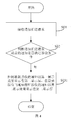
图4是本申请的实施方式的通知显示方法的又一流程示意图;
图5是本申请的实施方式的电子装置的场景示意图;
图6是本申请的实施方式的电子装置的另一场景示意图;
图7是本申请的实施方式的电子装置的又一场景示意图;
图8是本申请的实施方式的通知显示方法的在一流程示意图;
图9是本申请的实施方式的电子装置的再一场景示意图;
图10是本申请的实施方式的通知显示方法的再一流程示意图;
图11是本申请的实施方式的电子装置的又一场景示意图;
图12是本申请的实施方式的通知显示方法的又一流程示意图;
图13是本申请的实施方式的通知显示方法的再一流程示意图;
图14是本申请的实施方式的计算机设备的模块示意图。
主要元件符号说明:
电子装置100、第一显示屏10、第二显示屏11、第一展示效果12、胶囊图标121、第二展示效果13、气泡图标131、处理器20、计算机设备200、系统总线30、存储器40、内存储器50、显示装置60、输入装置70。
下面详细描述本申请的实施方式,所述实施方式的示例在附图中示出,其中自始至终相同或类似的标号表示相同或类似的元件或具有相同或类似功能的元件。下面通过参 考附图描述的实施方式是示例性的,仅用于解释本申请,而不能理解为对本申请的限制。
在本申请的描述中,需要理解的是,术语“中心”、“纵向”、“横向”、“长度”、“宽度”、“厚度”、“上”、“下”、“前”、“后”、“左”、“右”、“竖直”、“水平”、“顶”、“底”、“内”、“外”、“顺时针”、“逆时针”等指示的方位或位置关系为基于附图所示的方位或位置关系,仅是为了便于描述本申请和简化描述,而不是指示或暗示所指的装置或元件必须具有特定的方位、以特定的方位构造和操作,因此不能理解为对本申请的限制。此外,术语“第一”、“第二”仅用于描述目的,而不能理解为指示或暗示相对重要性或者隐含指明所指示的技术特征的数量。由此,限定有“第一”、“第二”的特征可以明示或者隐含地包括一个或者更多个所述特征。在本申请的描述中,“多个”的含义是两个或两个以上,除非另有明确具体的限定。
在本申请的描述中,需要说明的是,除非另有明确的规定和限定,术语“安装”、“相连”、“连接”应做广义理解,例如,可以是固定连接,也可以是可拆卸连接,或一体地连接。可以是机械连接,也可以是电连接。可以是直接相连,也可以通过中间媒介间接相连,可以是两个元件内部的连通或两个元件的相互作用关系。对于本领域的普通技术人员而言,可以根据具体情况理解上述术语在本申请中的具体含义。
请参阅图1和图2,本申请实施方式提供一种通知显示方法,用于电子装置100,电子装置100包括第一显示屏10和第二显示屏11,第一显示屏10和第二显示屏11异面,通知显示方法包括步骤:
S01:接收通知推送请求;
S02:判断通知推送请求对应的通知是否满足预设条件;
S03:当通知满足预设条件时,控制第二显示屏11显示通知。
请继续参阅图2,本申请实施方式提供一种电子装置100,电子装置100包括第一显示屏10、第二显示屏11和处理器20,处理器20连接第一显示屏10和第二显示屏11。本申请实施方式的通知显示方法用于本申请实施方式的电子装置100,步骤S01至步骤S03可由处理器20实现。也即是说,处理器20能够接收通知推送请求和判断通知推送请求对应的通知是否满足预设条件,以及当通知满足预设条件时,在第二显示屏11显示通知。
具体地,在本实施方式中,第一显示屏10与第二显示屏11异面是指两者不是位于同一个平面内,即两者所在的平面相交或者平行。此外,在本实施方式中,第一显示屏10为主屏,第二显示屏11为侧屏,第二显示屏11用于辅助第一显示屏10显示,第二显示屏11与第一显示屏10之间形成夹角或第二显示屏11自第一显示屏10弯曲延伸。可以理解,第二显示屏11与第一显示屏10之间可以是直接形成夹角,也可以是第二显 示屏11自第一显示屏10光滑延伸。
此外,在某些实施方式中,第一显示屏10和第二显示屏11连接以形成连续的柔性显示屏,例如,第一显示屏10为平面屏,第二显示屏11为从第一显示屏10边缘无缝延伸的连续的曲面屏。又例如,第一显示屏10和第二显示屏11均为曲面屏,两者相互连接以形成连续的柔性显示屏。在例如,在一些例子中,电子装置100还包括第三显示屏,第三显示屏和第一显示屏10相背设置,第二显示屏11连接第一显示屏10和第三显示屏以形成连续的柔性显示屏,形成的柔性显示屏可以折叠和展开,在展开时,三者形成一个大的显示区域,在折叠时,第二显示屏11处于弯折状态。
电子装置100包括但不限于手机、平板电脑、笔记本电脑、可穿戴智能设备(如手环,头戴显示器等)等。
本申请实施例的电子装置100以手机为例进行说明,在现有技术的手机等电子装置中,通知一般都展示于主页面上,这种展示方式并不合理,也无法充分利用多面屏的优势,为客户提供更直观方便的使用体验,此外,在某些场合容易对用户带来不便。而在本申请实施方式的通知显示方法中,在接收到通知推送请求时,能够判断通知推送请求所对应的通知是否满足预设条件,在满足预设条件时,控制第二显示屏11显示通知(如图2),这样,在第二显示屏11显示通知能够以一种更加隐蔽和微弱的提示方式来提示用户,可以满足用户处于各个特殊场景时的防打扰需求,提高了用户体验。
此外,在上述实施方式中,在第二显示屏11显示通知时,第一显示屏10处于熄屏状态或显示状态。具体地,在第二显示屏11显示通知时,第一显示屏10可以是处于熄灭状态也可以是处于点亮状态,具体不作限制。
请参阅图3,在某些实施方式中,通知显示方法包括:
S001:接收第一用户输入;
S002:根据第一用户输入确定预设条件。
请参阅图2,在某些实施方式中,上述步骤S001和步骤S002可由处理器20实现。也即是说,处理器20能够接收第一用户输入以及根据第一用户输入确定预设条件。
可以理解的是,在本实施方式中步骤S001和步骤S002是在步骤S01之前进行的。
具体地,通知由电子装置的应用程序进行推送,上述预设条件是指用户所设定的能够以第二显示屏11显示通知的应用程序。判断通知是否满足预设条件是指判断通知是否是属于用户所设定应用程序所推送的通知,若是,则表示满足预设条件,若不是,则不满足。上述第一用户输入可以是用户在电子装置100上的设置菜单进行操作而产生的操作指令。用户能够进入电子装置100的设置菜单根据自身需要设置能够被展示的应用程序的通知。
可以理解的是,用户可以根据自身需要设定能够被显示的应用程序的通知,例如,用户可以将一些自身不需要的应用程序的通知设置成不允许显示,将一些自身需要的应用程序的通知设置成允许显示。不能显示的通知则不显示,能够显示的通知则显示在第二显示屏上。
请参阅图4,在上述实施方式中,上述步骤S03包括步骤:
S031:控制最新接收的通知以第一展示效果12显示在第二显示屏11,在最新接收的通知前所接收的通知以第二展示效果13显示在第二显示屏11。
请参阅图2,在某些实施方式中,上述步骤S031可以由处理器20实现。也即是说,处理器20用于控制最新接收的通知以第一展示效果12显示在第二显示屏11,在最新接收的通知前所接收的通知以第二展示效果13显示在第二显示屏11。
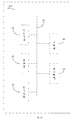
具体地,如图2所示,在上述实施方式中,第一展示效果12包括胶囊图标121和与通知信息相关的第一信息,第二展示效果13包括气泡图标131和与通知信息相关的第二信息。也即是说,如图2所示,在本实施方式中,第一展示效果12是以胶囊图标121的状态展示通知,在胶囊图标121中显示有与最新接收的通知信息相关的第一信息,例如通知的文字内容。第二展示效果13是以气泡图标131的状态展示,在气泡图标131上显示有与在最新接收的通知前接收的通知信息相关的第二信息,例如通知的数量。
可以理解的是,在某些实施方式中,第二显示屏11有且只有一个胶囊图标121,也即是说,只有最新通知才会以胶囊图标121的状态显示,其余的历史通知均以气泡图标131的状态显示。
通常地,通知可由电子装置100的应用程序推送。通知的信息包括通知的文字内容,所属的应用程序(APP)名称和图标,通知的数量等信息,展示效果与通知的信息相关,可使用户快速了解通知的文字内容、所属的应用程序的名称或图标,通知的数量等。
可以理解的是,请参阅图5,在本实施方式中,当用户清除第二显示屏11的通知时,第二显示屏11不显示任何通知,或电子装置100在没有接收到通知时,第二显示屏11不显示通知。
进一步地,在上述实施方式中,上述通知由电子装置100的应用程序推送,第一信息包括通知的部分或全部文字内容,和/或通知所属的应用程序名称,第二信息包括通知的数量和/或通知所属的应用程序的图标。
具体地,手机等电子装置100均安装有应用程序,应用程序包括不限于时间、天气、闹钟、音乐等系统应用,以及微信、微博、支付宝、QQ等等第三方应用。
上述的第一信息包括通知的部分或全部文字内容,和/或通知所属的应用程序名称,也即是说,在胶囊图标121中显示有最新通知的部分或者全部文字内容以及最新通知所 属的应用程序的名称,或者在胶囊图标121中仅显示有最新通知的部分或者全部文字内容,或通知所属的应用程序的名称。可以理解的是,第一信息除了包括上述的内容外,还可以包括应用程序的图标、接收到的通知的时间等其他信息,具体不作限制。
上述的第二信息包括通知的数量、通知所属的应用程序的图标中的至少一种。在图示的实施方式中,上述的第二信息包括通知的数量和通知所属的应用程序的图标,也即是说,在气泡图标131中显示的是应用程序的图标以及由此应用程序推送的通知的数量。如图2所示,在本实施方式中,通知的数量以角标的形式显示在气泡图标131的右上方,应用程序的图标显示在气泡图标内。可以理解的是,在其他实施方式中,通知的数量以角标的形式显示在气泡图标131任意位置,例如,正上方、左上方、右下方和左下方等等。
此外,可以理解的是,在图6的实施方式中,接收的历史通知是由多少个应用程序推送就代表第二显示屏11存在多少个气泡图标131。由同一个应用程序发出的通知,除了是电子装置100最新接收的通知以胶囊图标121状态显示外,其他的仅显示为气泡图标131,通知的累积数量以角标的形式显示在气泡图标131上。也即是说,每一个不同应用程序推送的通知拥有不同的气泡图标131,同一个应用程序发出的通知只存在一个气泡图标131,通知的数量以角标的形式显示在气泡图标131上(如图6所示)。
另外,在图7的实施方式中,在仅接收到一条通知时,在第二显示屏11只存在胶囊图标121和第一信息,而不存在气泡图标131和第二信息。
请参阅图8,在某些实施方式中,通知显示方法还包括步骤:
S04:在最新接收的通知以第一展示效果12显示在第二显示屏11持续预设时长后,控制最新接收的通知以第二展示效果13显示在第二显示屏11。
请参阅图2,在某些实施方式中,步骤S04可以由处理器20实现。也即是说,处理器20用于在最新接收的通知以第一展示效果12显示在第二显示屏11持续预设时长后,控制最新接收的通知以第二展示效果13显示在第二显示屏11。
可以理解的是,步骤S04是在步骤S03之后进行的。也即是说,在将接收到的最新通知并以第一展示效果12显示在第二显示屏11时,检测此最新通知以第一展示效果12(即以胶囊图标的状态展示)展示的时间是否达到预设时长,在达到预设时长后,直接将此通知以第二展示效果13(即以气泡图标的状态展示)显示在第二显示屏11。
可以理解的是,预设时长可以是电子装置100在出厂前就已经预设的时长,也可以是用户在电子装置100的设置程序里根据用户自身的意愿而设置的时长。例如,预设时长可以设置为五秒,即,在最新通知以第一展示效果12在第二显示屏11展示的时长达到五秒后,直接以第二展示效果13展示,上述具体的预设时长仅仅只是示例性的,具 体时长可以根据实际情况以及用户的意愿进行设定。
在图9所示的示例中,在接收到最新通知后预定时长内如果没有接收到后续的通知,最新接收的通知自动转为以第二展示效果13展示,在第二显示屏11只显示有气泡图标131以及第二信息,而没有胶囊图标121和第一信息。
在某些实施方式中,上述的预设时长与通知所属的应用程序的优先级正相关。
具体的,在一个例子中,应用程序的优先级可由用户进行设定。用户可以根据自身认为重要性较高的应用程序在电子装置100中对应用程序进行优先级排序。优先级较高的应用程序以较长的展示时长以第一展示效果12进行显示,优先级较低的应用程序以较短的展示时长以第一展示效果12进行展示。也即是说,优先级较高的应用以第一展示效果12展示的时间较长,优先级较低的应用程序以第一展示效果12展示的时间较短,具体时长用户可以自行进行设定。在其它例子中,应用程序的优先级是默认设定的,并可由用户进行变更。
请参阅图10,在某些实施方式中,通知显示方法还包括步骤:
S05:接收第二用户输入;
S06:根据第二用户输入将以第一展示效果12显示的通知转换为以第二展示效果13显示在第二显示屏11。
请继续参阅图2,在某些实施方式中,上述步骤S05和步骤S06可以由处理器20实现。也即是说,处理器20用于接收第二用户输入并根据第二用户输入将以第一展示效果12显示的通知转换为以第二展示效果13显示在第二显示屏11。
如此,用户可以根据自身的意愿来选择是否将第一展示效果12转化为第二展示效果13,提高了用户的体验。
可以理解的是,步骤S05是在步骤S03之后进行的。也即是说,在第二显示屏11上以第一展示效果12展示最新通知时,处理器20可以读取最新通知以第一效果展示12的时间,也可以根据用户的第二用户输入来将最新通知从第一展示效果12转换成以第二展示效果13展示。
具体地,第一显示屏10可以为触摸第一显示屏,当第一显示屏10为触摸第一显示屏时,第二用户输入可以是用户在第一显示屏10上通过滑动胶囊图标121操作来实现输入,例如,在胶囊图标121所在位置向下滑动、向上滑动或者是向其他方向滑动,具体的滑动方向可以由用户进行设定或是默认设定,具体不作限制。也即是说,用户可以通过在胶囊图标121上的滑动操作直接将以第一展示效果12展示的通知转换为第二展示效果13展示。如图10所示,在根据第二用户输入将以第一展示效果12显示的通知转换为以第二展示效果13显示在第二显示屏11时,第二显示屏11仅显示有气泡图标 131和第二信息而不存在胶囊图标121和第一信息。在图11的示例中,第二用户输入为用户在第一显示屏10上对胶囊图标121的向下滑动操作。
请参阅图12,在某些实施方式中,通知显示方法还包括步骤:
S07:当同一个应用程序的通知的数量超过设定阈值时,将同一个应用程序的通知以第二展示效果13显示在第二显示屏11。
请参阅图2,在某些实施方式中,上述步骤S07可以由处理器20实现。也即是说,处理器20用于当同一个应用程序的通知的数量超过设定阈值时,将同一个应用程序的通知以第二展示效果13显示在第二显示屏11。
具体地,在电子装置100中,有些应用程序推送的通知较多,此时,可以设定阈值,接收到同一个应用程序推送的通知的数量超过阈值时,直接以第二展示效果13(即气泡图标131)显示在第二显示屏11。例如,QQ和微信等应用,在通知消息较多的情况下,当通知数量超过一定的数值时,可以直接将通知以第二展示效果13显示后续推送进来的通知,即使是最新接收的通知也是直接以第二展示效果13进行显示。
可以理解的是,在通知数量没有超过阈值时,同一个应用程序的最新通知还是以第一展示效果12显示,历史通知以第二展示效果13显示,在通知数量超过阈值时,超过阈值数量部分的通知不论是最新消息还是历史消息均直接以第二展示效果13展示。
请参阅图13,在某些实施方式中,通知显示方法还包括步骤:
S011:在接收通知推送请求后,确定所述电子装置是否处于预定模式;
若是,进入步骤S02。
请再次参阅图2,在某些实施方式中,上述步骤S011可以由处理器20实现。也即是说,处理器20用于在接收通知推送请求后,确定电子装置100是否处于预定模式以及在电子装置100处于预定模式时,判断通知推送请求对应的通知是否满足预设条件。
可以理解的是,上述步骤S011是在步骤S01之后,在S02之前进行的。
具体地,预定模式包括但不限于会议、面试、休息、驾驶和聚会等等不希望被直接打扰的模式。预定模式可以根据第三用户输入来进入。例如,第三用户输入可以是用户在电子装置100的设置菜单中的设置操作,例如,用户可以选择会议模式、驾驶模式等等。在电子装置100处于上述预定模式时,则表示用户可能不希望被打扰,此时,处理器20判断通知推送请求对应的通知是否满足预设条件,并当通知满足预设条件时,控制第二显示屏显示通知。从而以一种更加隐蔽和微弱的提示方式来提示用户,以提高用户体验。
可以理解的是,在检测到电子装置100没有处于预定模式时,表示用户可以直接查看接收到的通知,此时,可以直接以更加直接方式进行展示,即可以以现有的常规的通 知方法进行展示。可以理解,确定第一显示屏10是否处于预定模式是一个连续检测的过程,即电子装置100可以实时检测第一显示屏10是否处于预定模式。
此外,用户还可以根据自身需要设定处于预定模式下能够被展示的通知的应用程序。例如,用户在处于会议时,可以设置只有部分应用程序的通知能够被展示,其他的应用程序的通知则不被展示,每个预定模式所设定的能够被展示的通知的应用程序可以相同也可以不同,用户可以自行进行设定。
可以理解是,在某些实施方式中,上述预设模式也包括熄屏模式,也即是说,只有在电子装置处于熄屏模式时,才会对通知进行判断是够满足预设条件,只有在满足预设条件时才会以被显示在第二显示屏。
另外,还可以理解的是,在某些实施方式中,上述预定模式不包括熄屏模式,此时,电子装置也可以先判定电子装置100是否处于预定模式,在电子装置100处于预定模式时,再判定第一显示屏10是否处于熄屏状态,或者是先在判定第一显示屏10是否处于熄屏状态,再判定电子装置100是否处于预定模式,只有在满足这两个条件时,处理器20才会判断通知推送请求对应的通知是否满足预设条件。在不满足其中的任意一个条件时,则可以直接以更加直接方式进行展示,即可以以现有的常规的通知方法进行展示。例如,在电子装置100处于预定模式时,此时,虽然处于预定模式,但是第一显示屏10并没有处于熄屏状态,表示用户可能正在使用电子装置100或者正在查看通知,此时,可以以更加直接方式进行展示。再例如,在电子装置100处于熄屏状态时,此时,虽然处于熄屏状态,但是并未处于预定模式,表示用户可以直接查看通知,并不需要以不打扰的方式进行通知,此时,可以以更加直接方式进行展示,例如,直接在第一显示屏10上展示。
请参阅图14,本申请实施方式还提供了一种计算机设备200。计算机设备200包括存储器40及处理器20,存储器40中储存有计算机可读指令,指令被处理器20执行时,处理器20执行上述任一实施方式的电子装置100的通知提示方法,例如执行步骤S01:接收通知推送请求;步骤S02:判断通知推送请求对应的通知是否满足预设条件;和步骤S03:当通知满足预设条件时,控制第二显示屏11显示通知。
图14为一个实施例中的计算机设备200的内部模块示意图。如图14所示,该计算机设备20包括通过系统总线30连接的处理器20、存储器40(例如为非易失性存储介质)、内存储器50、显示装置60和输入装置70。其中,计算机设备20的存储器40存储有操作系统和计算机可读指令。该计算机可读指令可被处理器20执行,以实现上述任意一项实施方式的通知提示方法。该处理器20可用于提供计算和控制能力,支撑整个计算机设备的运行。计算机设备的内存储器50为存储器40中的计算机可读指令运行 提供环境。计算机设备的显示装置60可以是OLED显示装置,输入装置70可以是显示装置60上覆盖的触摸层,也可以是计算机设备外壳上设置的按键、轨迹球或触控板,也可以是外接的键盘、触控板或鼠标等。该计算机设备200可以是手机、平板电脑、笔记本电脑等。本领域技术人员可以理解,图14中示出的结构,仅仅是与本申请方案相关的部分结构的示意图,并不构成对本申请方案所应用于其上的计算机设备200的限定,具体的计算机设备200可以包括比图中所示更多或更少的部件,或者组合某些部件,或者具有不同的部件布置。
本领域普通技术人员可以理解实现上述实施例方法中的全部或部分流程,是可以通过计算机程序来指令相关的硬件来完成,所述的程序可存储于一非易失性计算机可读存储介质中,该程序在执行时,可包括如上述各方法的实施例的流程。其中,所述的存储介质可为磁碟、光盘、只读存储记忆体(Read-Only Memory,ROM)等。
在本说明书的描述中,参考术语“一个实施方式”、“一些实施方式”、“示意性实施方式”、“示例”、“具体示例”、或“一些示例”等的描述意指结合实施方式或示例描述的具体特征、结构、材料或者特点包含于本申请的至少一个实施方式或示例中。在本说明书中,对上述术语的示意性表述不一定指的是相同的实施方式或示例。而且,描述的具体特征、结构、材料或者特点可以在任何的一个或多个实施方式或示例中以合适的方式结合。
以上所述实施例仅表达了本申请的几种实施方式,其描述较为具体和详细,但并不能因此而理解为对本申请专利范围的限制。应当指出的是,对于本领域的普通技术人员来说,在不脱离本申请构思的前提下,还可以做出若干变形和改进,这些都属于本申请的保护范围。因此,本申请专利的保护范围应以所附权利要求为准。
Claims (27)
- 一种通知显示方法,其特征在于,应用于具有第一显示屏及第二显示屏的电子装置,所述第一显示屏与所述第二显示屏异面,方法包括步骤:接收通知推送请求;判断所述通知推送请求对应的通知是否满足预设条件;当所述通知满足预设条件时,控制所述第二显示屏显示所述通知。
- 如权利要求1所述的通知显示方法,其特征在于,所述第一显示屏为主屏,所述第二显示屏为侧屏,所述第二显示屏与所述第一显示屏之间形成夹角或所述第二显示屏自所述第一显示屏弯曲延伸。
- 如权利要求1所述的通知显示方法,其特征在于,所述第一显示屏与所述第二显示屏连接以形成连续的柔性显示屏。
- 如权利要求1所述的通知显示方法,其特征在于,在所述第二显示屏显示所述通知时,所述第一显示屏处于熄屏状态或显示状态。
- 如权利要求1所述的通知显示方法,其特征在于,所述通知显示方法包括:接收第一用户输入;根据所述第一用户输入确定所述预设条件。
- 如权利要求1所述的通知显示方法,其特征在于,所述控制所述第二显示屏显示所述通知的步骤包括步骤:控制最新接收的所述通知以第一展示效果显示在所述第二显示屏,在最新接收的所述通知前所接收的所述通知以第二展示效果显示在所述第二显示屏。
- 如权利要求6所述的通知显示方法,其特征在于,所述第一展示效果包括胶囊图标和/或与所述通知的信息相关的第一信息,所述第二展示效果包括气泡图标和/或与所述通知的信息相关的第二信息。
- 如权利要求7所述的通知显示方法,其特征在于,所述通知由所述电子装置的应用程序推送,所述第一信息包括所述通知的部分或全部文字内容,所述通知所属的应用程序名称,所述通知所属的应用程序的图标、接收到的所述通知的时间中的至少一种,所述第二信息包括所述通知的数量、所述通知所属的应用程序的图标中的至少一种。
- 如权利要求6所述的通知显示方法,其特征在于,所述通知显示方法包括步骤:在最新接收的所述通知以所述第一展示效果显示在所述第二显示屏持续预设时长后,控制所述最新接收的所述通知以所述第二展示效果显示在所述第二显示屏。
- 如权利要求9所述的通知显示方法,其特征在于,所述通知由所述电子装置的 应用程序推送,所述预设时长与所述通知所属的应用程序的优先级正相关。
- 如权利要求6所述的通知显示方法,其特征在于,所述通知显示方法包括:接收第二用户输入;根据所述第二用户输入将以所述第一展示效果显示的所述通知转换为以所述第二展示效果显示在所述第二显示屏。
- 如权利要求6所述的通知显示方法,其特征在于,所述通知由所述电子装置的应用程序推送,所述通知显示方法包括:当同一个所述应用程序的所述通知的数量超过设定阈值时,将同一个所述应用程序的所述通知以所述第二展示效果显示在所述第二显示屏。
- 如权利要求1所述的通知显示方法,其特征在于,所述通知显示方法包括:在接收通知推送请求后,确定所述电子装置是否处于预定模式;若是,进入所述判断所述通知是否满足预设条件的步骤。
- 一种电子装置,其特征在于,所述电子装置包括第一显示屏及第二显示屏,所述第一显示屏与所述第二显示屏异面,所述电子装置还包括与所述第一显示屏和所述第二显示屏连接的处理器,所述处理器用于接收通知推送请求和判断所述通知推送请求对应的通知是否满足预设条件以及当所述通知满足预设条件时,控制所述第二显示屏显示所述通知。
- 如权利要求14所述的电子装置,其特征在于,所述第一显示屏为主屏,所述第二显示屏为侧屏,所述第二显示屏与所述第一显示屏之间形成夹角或所述第二显示屏自所述第一显示屏弯曲延伸。
- 如权利要求14所述的电子装置,其特征在于,所述第一显示屏与所述第二显示屏连接以形成连续的柔性显示屏。
- 如权利要求14所述的电子装置,其特征在于,在所述第二显示屏显示所述通知时,所述第一显示屏处于熄屏状态或显示状态。
- 如权利要求14所述的电子装置,其特征在于,所述处理器用于接收第一用户输入以及根据所述第一用户输入确定所述预设条件。
- 如权利要求14所述的电子装置,其特征在于,所述处理器用于控制最新接收的所述通知以第一展示效果显示在所述第二显示屏,在最新接收的所述通知前所接收的所述通知以第二展示效果显示在所述第二显示屏。
- 如权利要求19所述的电子装置,其特征在于,所述第一展示效果包括胶囊图标和/或与所述通知的信息相关的第一信息,所述第二展示效果包括气泡图标和/或与所述通知的信息相关的第二信息。
- 如权利要求20所述的电子装置,其特征在于,所述通知由所述电子装置的应用程序推送,所述第一信息包括所述通知的部分或全部文字内容,所述通知所属的应用程序名称,所述通知所属的应用程序的图标、接收到的所述通知的时间中的至少一种,所述第二信息包括所述通知的数量、所述通知所属的应用程序的图标中的至少一种。
- 如权利要求19所述的电子装置,其特征在于,所述处理器用于在最新接收的所述通知以所述第一展示效果显示在所述第二显示屏持续预设时长后,控制所述最新接收的所述通知以所述第二展示效果显示在所述第二显示屏。
- 如权利要求22所述的电子装置,其特征在于,所述通知由所述电子装置的应用程序推送,所述预设时长与所述通知所属的应用程序的优先级正相关。
- 如权利要求19所述的电子装置,其特征在于,所述处理器用于接收第二用户输入以及根据所述第二用户输入将以所述第一展示效果显示的所述通知转换为以所述第二展示效果显示在所述第二显示屏。
- 如权利要求19所述的电子装置,其特征在于,所述通知由所述电子装置的应用程序推送,所述处理器用于当同一个所述应用程序的所述通知的数量超过设定阈值时,将同一个所述应用程序的所述通知以所述第二展示效果显示在所述第二显示屏。
- 如权利要求14所述的电子装置,其特征在于,所述处理器用于在接收通知推送请求后,确定所述电子装置是否处于预定模式,以及在所述电子装置处于预定模式时,进入所述判断所述通知是否满足预设条件的步骤。
- 一种计算机设备,包括存储器及处理器,所述存储器中储存有计算机可读指令,所述指令被所述处理器执行时,使得所述处理器执行权利要求1至13中任一项所述的通知显示方法。
Priority Applications (2)
| Application Number | Priority Date | Filing Date | Title |
|---|---|---|---|
| CN201880096113.2A CN112689819A (zh) | 2018-10-29 | 2018-10-29 | 通知显示方法、电子装置和计算机设备 |
| PCT/CN2018/112504 WO2020087232A1 (zh) | 2018-10-29 | 2018-10-29 | 通知显示方法、电子装置和计算机设备 |
Applications Claiming Priority (1)
| Application Number | Priority Date | Filing Date | Title |
|---|---|---|---|
| PCT/CN2018/112504 WO2020087232A1 (zh) | 2018-10-29 | 2018-10-29 | 通知显示方法、电子装置和计算机设备 |
Publications (1)
| Publication Number | Publication Date |
|---|---|
| WO2020087232A1 true WO2020087232A1 (zh) | 2020-05-07 |
Family
ID=70462304
Family Applications (1)
| Application Number | Title | Priority Date | Filing Date |
|---|---|---|---|
| PCT/CN2018/112504 Ceased WO2020087232A1 (zh) | 2018-10-29 | 2018-10-29 | 通知显示方法、电子装置和计算机设备 |
Country Status (2)
| Country | Link |
|---|---|
| CN (1) | CN112689819A (zh) |
| WO (1) | WO2020087232A1 (zh) |
Citations (4)
| Publication number | Priority date | Publication date | Assignee | Title |
|---|---|---|---|---|
| US20140229880A1 (en) * | 2012-06-27 | 2014-08-14 | Google Inc. | Systems and methods for prioritizing notifications on mobile devices |
| CN104322040A (zh) * | 2012-06-29 | 2015-01-28 | 宇龙计算机通信科技(深圳)有限公司 | 终端和通知消息的管理方法 |
| CN107688422A (zh) * | 2017-09-05 | 2018-02-13 | 广东欧珀移动通信有限公司 | 通知消息显示方法及装置 |
| CN108234743A (zh) * | 2017-11-24 | 2018-06-29 | 北京珠穆朗玛移动通信有限公司 | 基于双屏的通知提示方法、移动终端及装置 |
Family Cites Families (5)
| Publication number | Priority date | Publication date | Assignee | Title |
|---|---|---|---|---|
| KR20150003446A (ko) * | 2013-07-01 | 2015-01-09 | 삼성전자주식회사 | 단말기 및 그의 상태 알림 정보 표시 방법 |
| CN107995354A (zh) * | 2017-10-31 | 2018-05-04 | 努比亚技术有限公司 | 一种应用程序控制方法、终端及计算机可读存储介质 |
| CN108196762A (zh) * | 2017-11-30 | 2018-06-22 | 努比亚技术有限公司 | 一种终端控制方法、终端及计算机可读存储介质 |
| CN108255378B (zh) * | 2018-02-09 | 2020-05-26 | 维沃移动通信有限公司 | 一种显示控制方法及移动终端 |
| CN108549519B (zh) * | 2018-04-19 | 2020-03-10 | Oppo广东移动通信有限公司 | 分屏处理方法、装置、存储介质和电子设备 |
-
2018
- 2018-10-29 WO PCT/CN2018/112504 patent/WO2020087232A1/zh not_active Ceased
- 2018-10-29 CN CN201880096113.2A patent/CN112689819A/zh active Pending
Patent Citations (4)
| Publication number | Priority date | Publication date | Assignee | Title |
|---|---|---|---|---|
| US20140229880A1 (en) * | 2012-06-27 | 2014-08-14 | Google Inc. | Systems and methods for prioritizing notifications on mobile devices |
| CN104322040A (zh) * | 2012-06-29 | 2015-01-28 | 宇龙计算机通信科技(深圳)有限公司 | 终端和通知消息的管理方法 |
| CN107688422A (zh) * | 2017-09-05 | 2018-02-13 | 广东欧珀移动通信有限公司 | 通知消息显示方法及装置 |
| CN108234743A (zh) * | 2017-11-24 | 2018-06-29 | 北京珠穆朗玛移动通信有限公司 | 基于双屏的通知提示方法、移动终端及装置 |
Also Published As
| Publication number | Publication date |
|---|---|
| CN112689819A (zh) | 2021-04-20 |
Similar Documents
| Publication | Publication Date | Title |
|---|---|---|
| US12511023B2 (en) | Operating method for multiple windows and electronic device supporting the same | |
| US11537268B2 (en) | Electronic device comprising multiple displays and method for operating same | |
| US20220391158A1 (en) | Systems and Methods for Interacting with Multiple Display Devices | |
| US11221695B2 (en) | Electronic device | |
| US11137881B2 (en) | Method and apparatus for changing screen in electronic device | |
| US10613701B2 (en) | Customizable bladed applications | |
| US10140018B2 (en) | Flexible device | |
| CN106415431B (zh) | 用于发送指令的方法、计算机可读介质和电子设备 | |
| EP3082028B1 (en) | Apparatus and method for providing information via portion of display | |
| EP3335410B1 (en) | Electronic apparatus and notification displaying method for electronic apparatus | |
| BR112012030039B1 (pt) | Dispositivo móvel tendo um estado de bloqueio de toque e método para operar dispositivo móvel | |
| US20200202629A1 (en) | System and method for head mounted device input | |
| CN108351696A (zh) | 包含多个显示器的电子设备及其操作方法 | |
| CN108604172A (zh) | 多屏幕移动设备和操作 | |
| EP2998854A1 (en) | Electronic device having independent screen configurations | |
| US20160018984A1 (en) | Method of activating user interface and electronic device supporting the same | |
| WO2022256681A2 (en) | Systems and methods for interacting with multiple display devices | |
| KR20180094359A (ko) | 알림 제공 방법 및 이를 구현한 전자 장치 | |
| US9256358B2 (en) | Multiple panel touch user interface navigation | |
| US12379822B2 (en) | Devices, methods, and graphical user interfaces for displaying menus, windows, and cursors on a display with a notch | |
| CN108885524A (zh) | 电子装置及其控制方法 | |
| CN105022490A (zh) | 一种智能手表的应用程序控制方法及智能手表 | |
| WO2020087232A1 (zh) | 通知显示方法、电子装置和计算机设备 | |
| KR20180108182A (ko) | 어플리케이션의 표시 비율 변경 방법 및 이를 구현한 전자 장치 |
Legal Events
| Date | Code | Title | Description |
|---|---|---|---|
| 121 | Ep: the epo has been informed by wipo that ep was designated in this application |
Ref document number: 18938262 Country of ref document: EP Kind code of ref document: A1 |
|
| NENP | Non-entry into the national phase |
Ref country code: DE |
|
| 122 | Ep: pct application non-entry in european phase |
Ref document number: 18938262 Country of ref document: EP Kind code of ref document: A1 |