WO2020054314A1 - 受診管理システム、リマインド方法、病院端末、および、プログラム - Google Patents
受診管理システム、リマインド方法、病院端末、および、プログラム Download PDFInfo
- Publication number
- WO2020054314A1 WO2020054314A1 PCT/JP2019/032147 JP2019032147W WO2020054314A1 WO 2020054314 A1 WO2020054314 A1 WO 2020054314A1 JP 2019032147 W JP2019032147 W JP 2019032147W WO 2020054314 A1 WO2020054314 A1 WO 2020054314A1
- Authority
- WO
- WIPO (PCT)
- Prior art keywords
- consultation
- patient
- data
- date
- management system
- Prior art date
- Legal status (The legal status is an assumption and is not a legal conclusion. Google has not performed a legal analysis and makes no representation as to the accuracy of the status listed.)
- Ceased
Links
Images













Classifications
-
- G—PHYSICS
- G16—INFORMATION AND COMMUNICATION TECHNOLOGY [ICT] SPECIALLY ADAPTED FOR SPECIFIC APPLICATION FIELDS
- G16H—HEALTHCARE INFORMATICS, i.e. INFORMATION AND COMMUNICATION TECHNOLOGY [ICT] SPECIALLY ADAPTED FOR THE HANDLING OR PROCESSING OF MEDICAL OR HEALTHCARE DATA
- G16H40/00—ICT specially adapted for the management or administration of healthcare resources or facilities; ICT specially adapted for the management or operation of medical equipment or devices
- G16H40/20—ICT specially adapted for the management or administration of healthcare resources or facilities; ICT specially adapted for the management or operation of medical equipment or devices for the management or administration of healthcare resources or facilities, e.g. managing hospital staff or surgery rooms
Definitions
- the present invention relates to a consultation management system, a reminding method, a hospital terminal, and a program.
- Patent Document 1 discloses an outpatient notification method and a outpatient notification program that enable a patient to follow a doctor's instructions and do not forget to go to a hospital and take medicine.
- Patent Literature 1 displays, on a patient's mobile terminal, a visit notification indicating that a visit date is approaching when a next visit date is determined in advance.
- a visit notification indicating that a visit date is approaching when a next visit date is determined in advance.
- Patent Document 1 Japanese Patent Application Laid-Open No. 2017-130227 (Patent Document 1) does not mention the case where the reservation date is not strictly determined. In such a case, the reservation date cannot be used and the outpatient notification program is improved. There is room.
- An object of the present invention is to provide a consultation management system, a reminding method, a hospital terminal, and a program for prompting consultation of a patient whose target clinic is expanded.
- the present disclosure relates to a consultation management system that prompts patients to consult.
- the consultation management system includes a storage unit, second data indicating a consultation date corresponding to the patient, a period until the next consultation determined by the doctor, a scheduled next consultation date, or And a control device for storing third data indicating one of the days in the storage unit.
- the control device executes a process for sending a reminder to encourage the patient to have a scheduled consultation date calculated from the period up to the next consultation indicated by the third data within the first predetermined number of days.
- control device further causes the storage unit to further store fourth data indicating whether or not a reminder to prompt the patient to consult is necessary and fifth data indicating the type of the reminder.
- the control device the fourth data indicates that a reminder is required, and, for a patient whose scheduled consultation date calculated from the period until the next consultation indicated by the third data has approached within the first predetermined number of days, Based on the fifth data, an electronic mail sending process or a mail printing process for prompting a consultation is selected and executed.
- control device after executing the e-mail transmission process or mail printing process for prompting a consultation, when the updated consultation date of the patient is not stored in the storage unit within a certain period, An e-mail sending process or a postal matter printing process for prompting a consultation is further executed.
- the control device stores the sixth data specifying the medicine prescribed by the doctor, the seventh data indicating the amount of the medicine prescribed by the doctor, and the eighth data indicating the date on which the medicine was prescribed, in the storage unit.
- the control device calculates a reference date on which the remaining amount of the medicine becomes zero based on the sixth data, the seventh data, and the eighth data, and calculates a reference date when the reference date approaches within the second predetermined number of days. To perform an e-mail sending process or a postal matter printing process for prompting a consultation.
- the doctor is an ophthalmologist
- the control device receives information on the date of opening the eye drops and information on the day when the eye drops have been used from the patient, stores the information in the storage unit, and responds to a request from the ophthalmologist.
- the information including the usage period and the usage amount of the eye drops is transmitted to the hospital terminal located in the ophthalmic clinic.
- the doctor is an ophthalmologist
- the control device receives from the patient the information of the date of opening the eye drops and the information of the day when the eye drops have been used up and stores them in the storage unit, and the expiration date has expired from the date of opening. If the patient has not communicated the date of use even after the predetermined period has elapsed, an e-mail is sent to the patient notifying that the use of the eye drops has expired.
- control device stores the second data in the storage unit every time the patient consults.
- the control device displays, on the hospital terminal used by the doctor, information indicating the continuation rate of the patient's visit from the second data stored in the storage unit in response to the request from the doctor.
- control device sends additional information other than the reminder to the patient when performing the process for sending the reminder.
- the present disclosure relates to a reminding method in which a computer prompts a patient to consult.
- the reminding method includes a step of storing second data indicating a consultation date corresponding to the patient in the storage unit in association with the first data specifying the patient, and a step of correlating with the first data until the next consultation determined by the doctor. Storing the third data indicating the period, the next scheduled consultation date, or the appointment date in the storage unit; and determining the period until the next consultation indicated by the third data, the next scheduled consultation date, or the appointment date. Sending a reminder to encourage the patient to have the calculated scheduled consultation date approached within a predetermined number of days.
- the step of storing the third data in the storage unit further stores, in the storage unit, fourth data indicating whether a reminder to prompt the patient to consult is necessary and fifth data indicating the type of the reminder.
- the step of sending a reminder is for a patient whose fourth data indicates that a reminder is needed, and whose scheduled consultation date calculated from the period until the next consultation indicated by the third data approaches within a predetermined number of days, An e-mail sending process or a mail printing process for prompting a consultation is selected based on the fifth data.
- Yet another aspect of the present disclosure relates to a consultation management program for causing a computer to execute the above-described reminding method.
- the hospital terminal includes a first data specifying the patient, a second data indicating a consultation date corresponding to the patient in association with the first data, and a second data indicating a period until the next consultation determined by the doctor or a scheduled next consultation date.
- An input unit configured to input three data and a fourth data indicating whether or not a reminder to urge the patient to consult is required; and a transmitting unit configured to transmit the first to fourth data to the consultation management system.
- the hospital terminal includes a first data specifying the patient, a second data indicating a consultation date corresponding to the patient in association with the first data, and a second data indicating a period until the next consultation determined by the doctor or a scheduled next consultation date.
- an input unit configured to input the third data and fourth data indicating whether or not a reminder to urge the patient to consult is necessary, and transmitting the first to fourth data to the consultation management system.
- the system includes a configured transmitting unit, a requesting unit that requests the consultation management system to output medicine information, and a medicine information receiving unit.
- the input unit includes sixth data indicating the medicine prescribed by the doctor selected from the medicine information received by the reception unit, seventh data indicating the amount of medicine prescribed by the doctor, and second data indicating the date on which the medicine was prescribed. 8 data.
- the transmission unit is configured to further transmit the sixth to eighth data to the consultation management system.
- the request unit indicates to the consultation management system a percentage of patients who received a consultation within a second predetermined number of days on which the reference date at which the remaining amount of the drug calculated based on the sixth data, the seventh data, and the eighth data becomes zero is within a second predetermined number of days Request more information output.
- the receiving unit is configured to further receive the patient information.
- Still another aspect of the present disclosure relates to a program for causing a computer operating as a hospital terminal to execute the following processing.
- First data specifying a patient, second data indicating a consultation date corresponding to the patient in association with the first data, third data indicating a period until the next consultation determined by a doctor or a scheduled next consultation date,
- First data specifying a patient, second data indicating a consultation date corresponding to the patient in association with the first data, third data indicating a period until the next consultation determined by a doctor or a scheduled next consultation date,
- a process of receiving, via an input unit, fourth data indicating whether or not a reminder to encourage a patient to receive a consultation is provided; a process of transmitting the first to fourth data to a consultation management system; Requesting output of medicine; processing of receiving medicine information; sixth data indicating a medicine prescribed by a doctor selected from the received medicine information, seventh data indicating an amount of medicine prescribed by the doctor, A process of further receiving the eighth data indicating the prescription date via the input unit; a process of further transmitting the sixth to eighth data to the consultation management system; the sixth data, the seventh data, and the seventh data to the consultation management system.
- 8 days Processing for receiving patient information; the remaining amount of the calculated drug treatment for
- the reminder to prompt the patient to be consulted in a timely manner is performed in a manner desired by the patient, so that an improvement in the consultation rate can be expected.
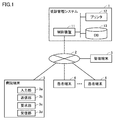
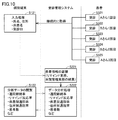
- FIG. 2 is a diagram showing a consultation management system according to Embodiment 1 and a terminal to which the consultation management system exchanges data. It is a figure showing the contents of the data held in the database of the consultation management system.
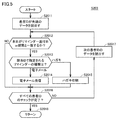
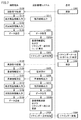
- 5 is a flowchart illustrating processing performed between the consultation management system, the hospital terminal, and the patient in the first embodiment. It is a flowchart for demonstrating the patient information accumulation
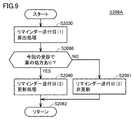
- FIG. 9 is a flowchart illustrating processing performed between a consultation management system, a hospital terminal, and a patient in Embodiment 2. It is a flowchart which shows the detail of a process of step S202A. It is a flowchart for demonstrating the process of step S208A.
- 15 is a flowchart for describing an information providing service added in the third embodiment. It is a figure showing the contents of the data which registered the visit history of two or more times held in the database. It is a flowchart which shows the detail of a process performed in step S222 of FIG. 15 is a flowchart for describing an information providing service added in the fourth embodiment.
- FIG. 14 is a flowchart illustrating details of a process performed in step S203B of FIG.
- 15 is a flowchart illustrating an information collection service according to the fifth embodiment. It is a flowchart for demonstrating the service which implements a questionnaire for all patients. 39 is a flowchart for describing a suggestion box service which is another specific example of the fifth embodiment. 15 is a flowchart for explaining a service in which a consultation management system provides drug information to a patient from a drug database in a sixth embodiment. 17 is a flowchart for explaining a service in which the consultation management system notifies the patient of the time of instillation of eye drops in the sixth embodiment.
- 21 is a flowchart for explaining a service in which a consultation management system reports an instillation execution time to an ophthalmologist or a family in Embodiment 7.
- 21 is a flowchart for explaining a service in which the consultation management system reports the average amount of eye drops used to the ophthalmologist in the seventh embodiment.
- 21 is a flowchart for explaining a service in which the consultation management system manages the expiration date of eye drops in the eighth embodiment.
- 33 is a flowchart illustrating a service in which a consultation management system notifies a patient of the remaining amount of eye drops from an image in a ninth embodiment.
- FIG. 21 is a diagram showing a configuration using a consultation management system according to Embodiment 10.
- FIG. 35 is a diagram showing a configuration using a consultation management system according to Embodiment 11. It is a flowchart for demonstrating the service which a consultation management system provides to a hay fever patient.
- FIG. 1 is a diagram showing a consultation management system according to Embodiment 1 and a terminal to which the consultation management system exchanges data.
- the consultation management system 1 includes a control device 11, a database 13 as a storage unit for storing data, and a printer 12.
- the control device 11 is configured to include a computer.
- the consultation management system 1 includes, via a computer network 2 such as the Internet, a hospital terminal 3 installed in an ophthalmic clinic, a plurality of patient terminals 4 owned by a plurality of patients, and a service provider managing the consultation management system. Connected to the management terminal 5.
- the connection between the computer network 2 and each terminal is not limited to a wired connection, but may be performed wirelessly via a mobile phone line, a wireless LAN, or the like.
- a plurality of hospital terminals 3 may be provided, and the consultation management system 1 may be provided commonly to a plurality of hospitals.
- a personal computer, a tablet computer, or the like can be used.
- the patient terminal 4 may be a personal computer, a tablet computer, a smartphone, a mobile phone, or any other device capable of receiving an e-mail.
- the e-mail includes a message exchanged by a short message service (short mail) that can specify a destination by a telephone number and another message application software (message application).
- the consultation management system 1 realizes so-called cloud computing, which provides computer resources to doctors or patients in a hospital via a computer network 2 in the form of a service.
- the consultation management system 1 has a visit management function and a remind function.
- the visit management function is a function that can be shown to an ophthalmologist or the like so that the patient's consultation date, the outpatient state, and the outpatient dropout state can be easily grasped.
- the reminder function is a function of sending a reminder for prompting a patient who needs a medical examination to perform a medical examination on behalf of a clinic.
- the “reminder” includes a communication medium such as an application software (app) for displaying a notification on a terminal having the same function as an e-mail and an e-mail, and a paper medium such as a postcard and a sealed letter. Indicates a medium for notifying that the consultation date is near. Further, the “reminder” may be one that transmits an automatic voice to a patient using a telephone.
- FIG. 2 is a diagram showing the contents of data held in the database of the consultation management system.
- a patient ID IDentification
- a name, a consultation date a period until the next consultation or a scheduled visit, a necessity of a reminder, and a reminder.
- the type, reminder sending date, contact information, disease name, prescription product, quantity, prescription date, and the like are registered in the database 13. If postcard delivery is specified as the type of the reminder, the address and the postal code are further registered in the database 13. When short mail or telephone is specified as the type of the reminder, the telephone number is further registered in the database 13. It should be noted that the disease name, the prescription product, the quantity, and the prescription date do not have to be recorded in the database 13 when the amount of the medicine is not managed.
- the consultation management system 1 includes a database 13 serving as a storage unit and a control device 11.
- the control device 11 associates the first data (patient ID) specifying the patient with the second data indicating the consultation date corresponding to the patient, the third data indicating the period until the next consultation determined by the doctor,
- the fourth data indicating whether or not a reminder to prompt a consultation is necessary and the fifth data indicating the type of the reminder are stored in the database 13.
- the control device 11 indicates that the reminder is required by the fourth data, and the scheduled consultation date calculated from the period until the next consultation indicated by the third data is within the first predetermined number of days (for example, 7 days).
- an e-mail sending process or a mail printing process for prompting a patient to approach the patient based on the fifth data is selected and executed.
- the controller 11 executes a reminding method in which the computer prompts the patient to consult.
- a reminding method as shown in the flowcharts of FIGS. 3, 4, and 5, a step of storing second data indicating a consultation date corresponding to the patient in the storage unit in association with the first data specifying the patient.
- the consultation management system 1 is manufactured by installing a consultation management program for causing a computer to execute the reminding method in a computer included in the control device 11.
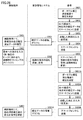
- FIG. 3 is a flowchart showing processing performed between the consultation management system, the hospital terminal, and the patient in the first embodiment.
- steps S101 and S301 the patient first comes to the hospital and the first consultation reception process is executed.
- the name, address or e-mail address of the patient, and the date of consultation are registered in the hospital terminal.
- the clerk who performs the reception process performs registration by looking at the patient's medical questionnaire and the like.
- the patient may temporarily use the hospital terminal 3 to register his / her name, address, and the like.
- the office staff and the patient who perform the reception process may operate the hospital terminal 3 together.
- step S102 a process of inputting the next consultation information based on the result of the examination of the patient by the ophthalmologist is performed.
- the next consultation information may be the appointment date if the appointment system is used, or the guideline until the next consultation determined by the ophthalmologist if the appointment system is not adopted (for example, One week later, etc.).
- the ophthalmologist or hospital clerk enters the next consultation information into the hospital terminal.
- the ophthalmologist or the office staff listens to the patient's request and inputs whether or not he / she wants a reminder which is a notification for prompting a consultation.
- the type of the reminder desired (for example, whether the e-mail is good or the postcard is good) is heard and input to the hospital terminal 3.
- the e-mail may be in another format such as a short message service (SMS), and may be of any type as long as the notification is delivered to the patient terminal.
- SMS short message service
- the ophthalmologist or the office staff inputs contact information (e-mail address or address, etc.) corresponding to the type of the reminder into the hospital terminal.
- steps S103 and S201 the data input to the hospital terminal 3 is transmitted to the consultation management system 1 via the computer network 2.
- the data transmission performed in step S103 may be performed in each of steps S101 and S201 for each data input of one item.
- step S201 when the reception of the data (hereinafter referred to as patient information data) such as the patient's name, consultation date, e-mail address or address, necessity of reminder, type of reminder, etc. is completed, the consultation management system 1 proceeds to step S201.
- patient information data such as the patient's name, consultation date, e-mail address or address, necessity of reminder, type of reminder, etc.
- the consultation management system 1 proceeds to step S201.
- the patient information data is recorded in the database 13, and the reminder sending date is calculated based on the recorded patient information data.
- step S203 the consultation management system 1 executes a reminder sending process.
- the patient receives the reminder by e-mail or receives the reminder in a form such as a postcard.
- the e-mail includes a message exchanged by a short message service (short mail) that can specify a destination by a telephone number and another message application software (message application).
- step S105 when the patient receives a medical examination in step S305 after the second time, the hospital terminal 3 performs a re-examination acceptance processing in step S105.
- step S106 a request is made from the hospital terminal 3 to the consultation management system 1 to transmit the remaining registered information of the patient.
- the consultation management system 1 When the consultation management system 1 receives the transmission request in step S205, the consultation management system 1 outputs the registered information of the patient to the hospital terminal 3 in step S206. If the registered data is changed, the data is updated at this time.
- the consultation date may be updated on the latest consultation date, but it may be possible to calculate the consultation rate etc., so it is possible to add the latest consultation date while keeping the past consultation date. preferable.
- step S108 a process similar to that in step S102, that is, a process of inputting next consultation information based on the result of the examination of the patient by the ophthalmologist is performed. Also at this time, it is preferable that the patient information at the previous consultation is displayed on the hospital terminal in advance, and only the part to be updated needs to be input.
- steps S109 and S207 the data input to the hospital terminal 3 is transmitted to the consultation management system 1 via the computer network 2.
- the transmission of the data may be performed every time one item of update data is input in step S108.
- the consultation management system 1 When the reception of the patient information data is completed in step S207, the consultation management system 1 records the patient information data in the database 13 in step S208, and updates the reminder sending date based on the recorded patient information data.
- step S209 the consultation management system 1 executes a reminder sending process similar to step S203.
- step S306 the patient receives the reminder by e-mail or receives the reminder in a form such as a postcard.
- FIG. 4 is a flowchart for explaining the patient information accumulation and reminder sending date calculation processing executed by the consultation management system in step S202.
- consultation management system 1 stores the patient ID and the consultation date in database 13.
- the consultation management system 1 stores the period until the next consultation in the database 13.
- the consultation management system 1 calculates the scheduled consultation date based on the consultation date and the period until the next consultation, calculates the reminder sending date in step S2004 based on the consultation scheduled date, and stores it in the database 13.
- step S2005 the process returns to the main routine.
- the consultation management system 1 sets the scheduled consultation date to July 15, 2018, 14 days after the consultation date.
- the scheduled consultation date is only a guideline for visiting the hospital, and there is no problem if the patient comes to the hospital on his or her convenient day within a few days before and after the scheduled consultation date.
- the consultation management system 1 sets the reminder sending date in step S2004 in consideration of the scheduled consultation date.
- the consultation tolerance range is ⁇ D days with respect to the scheduled consultation date.
- the date before the scheduled consultation date is calculated as the reminder sending date.
- D indicating the allowable range of consultation
- the ophthalmologist may be able to change the type or symptom of the disease.
- a date or time at which the patient can receive the reminder may be specified in advance, and may be taken into account when the reminder sending date is determined in step S2004. For example, if a time when a patient wants to send a reminder is transmitted to the consultation management system 1 through a computer network in advance, the consultation management system 1 determines a reminder sending date in consideration of this time.
- the specification of the time to request the transmission may be, for example, the specification of the day of the week or the specification of the time. Conversely, a day of the week for which sending should be avoided may be specified.
- application software may be installed on the hospital terminal 3 side, the above-described calculation process may be performed, and the reminder sending date may be transmitted to the consultation management system 1.
- FIG. 5 is a flowchart for explaining a reminder sending process executed by the consultation management system in step S203.
- the processing of this flowchart is periodically called and executed from the main routine.
- the processing of this flowchart may be determined to be executed at 3:00 pm on weekdays, for example, or may be determined to be executed at noon three times a week on Monday, Wednesday and Friday, for example.
- consultation management system 1 reads data starting with patient ID from database 13.
- step S2012 the consultation management system 1 determines whether or not the reminder sending date recorded corresponding to the read patient ID matches the current date. If the reminder sending date matches the current date (YES in S2012), the consultation management system 1 determines in step S2013 whether the type of the reminder specified by the ID is an e-mail or a postcard. .
- the consultation management system 1 sends an e-mail to the registered e-mail address.
- the consultation management system 1 prints the postcard on the printer 12 in step S2015.
- the printed postcard is periodically collected by the administrator of the consultation management system 1 and sent out via a post office or the like. Instead of printing the postcard, the name, address, and telephone number of the patient to whom the reminder should be sent to the shipping agent may be transmitted to order the postcard.
- the patient information stored in the database 13 is transmitted from the control device 11 to an external company or a service operator via the computer network 2, and the external company or the service operator prints a postcard.
- the type of the reminder is e-mail and mail.
- the type of the reminder is not limited to these, and other options may be available.
- a list with the telephone number of the target patient to be reminded may be sent to the hospital staff, and the hospital staff may contact the target patient by telephone, or the facsimile or the like may send the reminder to the target patient.
- a reminder may be given to the patient by automatic voice using a telephone.
- step S2012 if today is not the same as the reminder sending date, or if the reminder processing is performed in any of steps S2014 and S2015, in step S2016, the consultation management system 1 completes the check of all patient IDs. It is determined whether or not.
- the consultation management system 1 If all the patient IDs have not been checked yet (NO in S2016), the consultation management system 1 reads the next patient ID data from the database 13 in step S2017. Then, the processing after step S2012 is repeatedly executed. On the other hand, when all the patient IDs have been checked (YES in S2016), the consultation management system 1 proceeds to step S2018 and returns to the main routine.
- Some patients may forget to visit the hospital even after sending such a reminder. A reminder may be sent again to such a patient.
- FIG. 6 is a flowchart for explaining the process of sending a reminder again.
- the process of this flowchart (referred to as step S203A) is executed after step S203 of FIG. 3 and FIG. 5 for sending a reminder is executed.
- step S2021 the consultation management system 1 determines whether today is the check date after sending the reminder.
- the check date may be a day outside the allowable range of consultation.
- the date may be four days after the reminder is sent.
- step S2022 If today is not the check date after sending the reminder (NO in S2021), it is unnecessary to send the reminder again, so the process proceeds to step S2024. If today is the check date after sending the reminder (YES in S2021), in step S2022, the consultation management system 1 determines whether the latest consultation date has been updated.
- step S2022 If the latest consultation date has been updated (YES in S2022), it is considered that the next consultation corresponding to the reminder sending date has been performed. For this reason, there is no need to send a reminder again, and the process proceeds to step S2024. On the other hand, if the latest consultation date has not been updated (NO in S2022), it is necessary to send a reminder again. In this case, the consultation management system 1 executes another reminder sending in step S2023, and the process returns to the main routine in step S2024.
- the control device 11 stores the updated consultation date of the patient within a certain period in a database. If the information is not stored in the electronic mail 13, a (second) e-mail sending process or a postal matter printing process for prompting a consultation is executed. Note that the control device 11 may be configured to send a third or later reminder if there is no response even after sending the second or later reminder.
- the patient consultation rate can be further improved.
- the reminder sending date is determined based on the consultation date and the period until the next consultation.
- the reminder sending date is considered in consideration of the amount of the prescribed eye drops. Determine the date. For example, as for prescribed eye drops, since the amount used varies depending on the patient, it is common to come to the hospital when the eye drops, but this may cause the eye drops to run out and prevent eye drops. In the second embodiment, running out of eye drops is prevented by sending a reminder.
- FIG. 7 is a flowchart showing processing performed between the consultation management system, the hospital terminal, and the patient in the second embodiment.
- the same processes as those in FIG. 3 described above are denoted by the same reference numerals, and description thereof will not be repeated.
- step S111 a process of inputting a prescription product after an examination by an ophthalmologist is performed.
- a product name of eye drops and the number of prescriptions are input.
- the consultation management system 1 preferably outputs the product information to the hospital terminal 3 as shown in step S211.
- the consultation management system 1 outputs to the hospital terminal 3 a product information list screen indicating the product name of the relevant type and the indication of each product from the drug database prepared in advance, and the ophthalmologist displays the product.
- the product to be prescribed may be selected from the following.
- the disease name, the prescription product, the quantity, the prescription date and the like are recorded in the database as shown in FIG. Then, in steps S102, S103, and S201, the same processing as the processing described in FIG. 3 is executed.
- step S201 when the consultation management system 1 receives the patient information data from the hospital terminal 3, in the second embodiment, the patient information data is recorded in the database 13 in step S202A, and the reminder is performed based on the recorded patient information data.
- the sending date (1) and the reminder sending date (2) are calculated.
- the reminder sending date (1) is a date calculated from the period until the next consultation instructed by the ophthalmologist, similarly to the reminder sending date in the first embodiment.
- the reminder sending date (2) is a date added based on the date on which the re-prescription of the drug corresponding to the prescription amount of the drug is required, which is added in the second embodiment.
- FIG. 8 is a flowchart showing details of the process in step S202A.
- the consultation management system 1 stores the patient ID and the consultation date in the database 13.
- the consultation management system 1 stores a period until the next consultation in the database 13.
- the consultation management system 1 calculates the scheduled consultation date (1) based on the consultation date and the period until the next consultation, and based on the scheduled consultation date (1), in step S2034, sends the reminder sending date ( 1) is calculated and stored in the database 13.
- a reminder sending date (2) calculation process S2040 is further executed.
- the reminder sending date (2) is a day on which a reminder that the amount of the eye drop is less than the prescribed amount is sent.
- the consultation management system 1 stores in the database 13 the prescription product name, the prescription amount, and whether the eyedrops are single-eye drops or binocular drops.
- the prescription amount may be the prescription number and the filling amount of the eye drops. From these pieces of information stored in the database 13, the amount of liquid per day can be determined, and how many days the prescribed amount can be determined. Subsequently, in step S2042, the consultation management system 1 calculates a scheduled consultation date (2).
- the scheduled consultation date (2) is set to 30 days after the present consultation (10 days ⁇ 3). You. However, the scheduled consultation date (2) is only a guideline for a visit, and there is no problem if a visit is made on a convenient day while the remaining amount of eye drops does not become zero.
- the consultation management system 1 sets the reminder sending date (2) to several days before the scheduled consultation date (2) in step S2043 and stores it in the database 13. Then, in step S2050, the process returns to the main routine.
- step S203 a reminder sending process is executed in step S203.
- the process of FIG. 5 described in the first embodiment is executed on each of the reminder sending date (1) and the reminder sending date (2).
- the description of the processing in FIG. 5 will not be repeated here.
- the reminder mail (1) is a mail transmitted on the reminder sending date (1), and is a mail notifying the date of consultation for an ophthalmologist to perform a medical examination.
- the reminder mail (2) is a mail transmitted on the reminder sending date (2), and is a mail notifying the consultation date for the ophthalmologist to issue the prescription of the medicine.
- the reminder may be notified by a postcard instead of the e-mail.
- step S105 Upon receiving the reminder, the patient receives a medical examination in step S305, and the re-examination processing starting from the re-examination reception processing in step S105 is performed as in the first embodiment.
- steps S105, S106, S107, S108, S109, S205, S206, and S207 the same processing as the processing described in FIG. 3 is executed. Also, the processing in steps S112 and S212 is the same as the processing in steps S111 and S211 described above, respectively, and thus description thereof will not be repeated.
- the consultation management system 1 records the patient information data in the database 13 in step S208A, and updates the reminder sending date based on the recorded patient information data. At this time, it is necessary to pay attention to the necessity of updating the reminder sending date (2) depending on whether there is a new prescription at the time of consultation.
- FIG. 9 is a flowchart for explaining the process of step S208A.
- the same processing as the processing described with reference to FIG. 8 is executed for the first reminder sending date (1) calculation processing S2030.
- the consultation management system 1 determines whether or not a medicine has been prescribed at the present consultation.
- the consultation management system 1 determines the presence or absence of a medicine based on whether the present consultation date recorded in the database 13 is the same as the medicine prescription date.
- step S2040 the consultation management system 1 executes a process of updating the reminder sending date (2). Specifically, the processes of steps S2041 to S2043 described with reference to FIG. 8 are executed again based on the new prescription information. If the patient has not used up the eye drops, the reminder delivery date (2) may be calculated by adding the newly prescribed amount to the remaining amount of the eye drops.
- the consultation management system 1 does not update the reminder sending date (2) in step S2061. At this time, the previously set reminder sending date (2) is maintained.
- step S2040 or step S2061 ends, the processing returns to the main routine in step S2062.
- control device 11 has sixth data (prescription product) specifying the medicine prescribed by the doctor and seventh data (quantity) indicating the amount of medicine prescribed by the doctor. And the eighth data (prescription date) indicating the date on which the medicine was prescribed is stored in the database 13.
- the seventh data may be information on both the amount of the drug solution filled in the eye drop bottle and the number of prescribed eye drops, or the case where the amount filled in the eye drop bottle is obvious from the sixth data. May mean only information on the number of prescribed eye drops.
- the control device 11 sets the remaining amount of the medicine based on the sixth data, the seventh data, and the eighth data.
- an e-mail transmission process or a mail print process is performed to urge a patient who has approached the calculated reference date within a second predetermined number of days (for example, 7 days) to receive a consultation.
- a second predetermined number of days for example, 7 days
- I do When there are a plurality of prescribed eye drops, an eye drop whose remaining amount is the earliest among them may be used as a reminder reference. Alternatively, the remaining amount may be individually managed for a plurality of types of eye drops, and each time a new eye drop is prescribed, the reference date may be reset for the eye drop.
- the hospital terminal 3 includes an input unit 3a, a transmission unit 3b, a request unit 3c, and a reception unit 3d.
- the input unit 3a is configured to input first to eighth data.
- the first data is data for specifying a patient.
- the second data indicates a consultation date corresponding to the patient in association with the first data.
- the third data indicates a period up to the next consultation determined by the doctor or a scheduled next consultation date.
- the fourth data indicates whether a reminder to prompt the patient to visit is necessary.
- the transmitting unit 3b is configured to transmit the first to fourth data to the consultation management system 1.
- the request unit 3c is configured to request the consultation management system 1 to output medicine information.
- the receiving unit 3d is configured to receive medicine information from the consultation management system 1.
- the sixth data indicates a medicine selected by the doctor selected from the medicine information received by the reception unit 3d or directly input to the hospital terminal 3.
- the seventh data indicates the amount of the medicine prescribed by the doctor.
- Eighth data indicates the date when the drug was prescribed.
- the transmission unit 3b is configured to further transmit the sixth to eighth data to the consultation management system 1.
- the request unit 3c determines the percentage of patients who received a consultation in the consultation management system 1 within the second predetermined number of days on which the reference date on which the remaining amount of the drug calculated based on the sixth data, the seventh data, and the eighth data becomes zero is within the second predetermined number of days. Request further output of the patient information to be shown.
- the receiving unit 3d is configured to further receive the patient information.
- the hospital terminal 3 has data 9 for specifying the number of times of administration (instillation) of the medicine prescribed by the doctor per day (for example, it may be indirect information such as instillation before going to bed), It is also possible to input data 10 (which may be indirect information such as right eye instillation) for specifying whether the medicine prescribed by the doctor is one eye or two eyes, and these data and By combining the sixth to eighth data, it is possible to more accurately calculate the reference date on which the remaining amount of the medicine prescribed by the doctor becomes zero.
- a reminder for recommending consultation before the prescribed drug is exhausted can be sent in a timely manner. For this reason, situations such as running out of medicine at the time of instillation are reduced, and an improvement in therapeutic effect can be expected.
- FIG. 10 is a flowchart for explaining the information providing service added in the third embodiment.
- the patient information is input from the hospital terminal 3 in step S121.
- the patient information includes the name, address, disease name, date of consultation, and the like.
- the consultation management system 1 stores the patient information in the database 13 in step S221.
- the consultation management system 1 performs a data analysis process in step S222. In the data analysis process, the consultation management system 1 calculates the hospital visit continuation rate, the reminder response rate, and the number of patients based on the accumulated patient information.
- the hospitalization continuation rate for each certain period is calculated using the Kaplan-Meier method (KM method) generally used in survival analysis and the like.
- the hospital visit continuity rate can be output from several perspectives, such as those for each hospital as a whole, those calculated for each disease, and those for each address based on postal code data.
- the reminding response rate is calculated by dividing the number of patients who have been consulted by the number of reminders sent out, and is an index for grasping how many patients who have sent reminders actually led to consultations.
- the reminding response rate can be analyzed by reminding medium (e-mail, SMS, postcard, etc.) or by patient who has been consulted.
- step S122 when a request for browsing the analysis data is transmitted from the hospital terminal 3 to the consultation management system 1, the consultation management system 1 transmits screen information including the requested analysis item to the hospital terminal 3.
- FIG. 11 is a diagram showing the contents of data in which a plurality of visit histories stored in the database are registered.
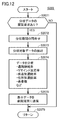
- FIG. 12 is a flowchart showing details of the processing executed in step S222 of FIG.
- consultation management system 1 determines whether or not there is a request for browsing analysis data from hospital terminal 3 in step S2071. If there is no browsing request, the process exits the process of this flowchart in step S2076. On the other hand, if there is a browsing request (YES in S2071), the consultation management system 1 inquires of the analysis period in step S2072. The analysis period may be specified, for example, as in the last year, or the start date and end date of the period may be specified. Upon receiving the designation of the analysis period from the hospital terminal 3, the consultation management system 1 extracts the analysis target data from the patient information data stored in the database 13 as shown in FIG.
- step S2074 the consultation management system 1 analyzes the data, and calculates the hospitalization continuation rate, the reminding reaction rate, the hospitalization rate by disease, the hospitalization rate by address, the number of patients, and the like.
- the consultation management system 1 transmits the display data to the hospital terminal 3 in step S2075, and exits the processing in this flowchart in step S2076.
- control device 11 stores the second data in the database 13 every time a patient consults. Then, the control device 11 displays, on the hospital terminal 3 used by the doctor, information indicating the continuation rate of the patient's visit from the second data stored in the database 13 in response to the request from the doctor.
- the hospital terminal 3 includes an input unit 3a, a transmission unit 3b, a request unit 3c, and a reception unit 3d.
- the input unit 3a is configured to input first to fourth data.
- the first data is data for specifying a patient.
- the second data indicates a consultation date corresponding to the patient in association with the first data.
- the third data indicates a period up to the next consultation determined by the doctor or a scheduled next consultation date.
- the fourth data and whether or not a reminder to encourage the patient to consult is needed.
- the transmitting unit 3b is configured to transmit the first to fourth data to the consultation management system.
- the request unit 3c requests the consultation management system 1 to output the information on the hospitalization continuation rate.
- the receiving unit 3d is configured to receive the information on the hospitalization continuation rate from the consultation management system 1.
- the hospitalization continuation rate the case of a disease that is cured once is excluded. In this case, the ratio of a patient who has been interrupted in the middle of a hospital visit and a patient who has not been interrupted during the analysis period is calculated as the hospital continuation rate. In calculating the reminding response rate, the proportion of patients who have received a reminder within the analysis period within a few days before or after the scheduled date of diagnosing is calculated.
- the consultation management system according to the third embodiment is also effective as a management analysis tool for an ophthalmic clinic.
- the consultation management system 1 provides information from a hospital to a patient in combination with transmitting a reminder as in the first or second embodiment.
- the information provided to the patient may be a URL (Uniform Resource Locator) of a hospital homepage.
- the patient can know various information by looking at the homepage of the hospital.
- the information that the hospital wants to contact the patient may be directly described in an e-mail or postcard of the reminder.
- some ophthalmology clinics decide on the day of the week when surgery will be performed and will not accept general medical treatment on that day, but there are cases where surgery is not scheduled. In such a case, information that general medical treatment is possible may be provided to the patient. Conversely, information on the day when the outpatient is temporarily closed for surgery or a conference may be provided to the patient.
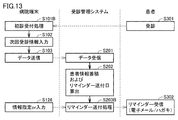
- FIG. 13 is a flowchart for explaining the information providing service added in the fourth embodiment.
- steps S101B and S301 the patient first comes to the hospital and the first consultation reception process is executed.
- the name, address or e-mail address of the patient, and the date of consultation are registered in the hospital terminal.
- step S101B in addition to the process of step S101 described with reference to FIG. 3, registration of the necessity of providing information from the hospital determined according to the patient's request is also performed.
- step S102 a process of inputting the next consultation information based on the result of the examination of the patient by the ophthalmologist is performed.
- the next consultation information includes the appointment date or a reference period until the next consultation, the necessity of a reminder that is a notification for prompting consultation, the type of the reminder desired, and the like.
- steps S103 and S201 the data input to the hospital terminal 3 is transmitted to the consultation management system 1 via the computer network 2.
- the consultation management system 1 When the reception of the patient information data is completed in step S201, the consultation management system 1 records the patient information data in the database 13 in step S202, and calculates a reminder sending date based on the recorded patient information data.
- step S203B the consultation management system 1 executes a reminder sending process.
- the process in step S203B is basically the same as the process in step S203 in FIG. 3, but also includes the information to be provided in the reminder.
- the consultation management system 1 includes the URL of the hospital homepage in an e-mail or prints it on a postcard in step S203B.
- the consultation management system 1 includes the information registered in step S203B in an e-mail or prints it on a postcard.
- step S302 the patient receives the reminder by e-mail or receives the reminder in a form such as a postcard.
- the patient can know the message from the hospital.
- FIG. 14 is a flowchart illustrating details of the process performed in step S203B of FIG.
- the processing of steps S2081 to S2083 is added to the processing of step S203 described in FIG. Therefore, only the additional part will be described here.
- step S2081 it is determined whether information provision of the ID is necessary. This determination is made according to the necessity of providing the information input in step S101B of FIG.
- the consultation management system 1 sets the contents of the transmission as a reminder + information to be provided.
- the consultation management system 1 sets only the reminder as the transmission content.
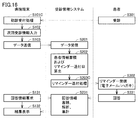
- FIG. 15 is a diagram for explaining two modes of delivering a message of an ophthalmologist to a patient.
- the first mode is distribution in which information is included in the reminder described above.
- steps S127, S227, S327, and S328 when sending a reminder of a consultation, a message from the ophthalmologist is reflected on a reminder medium and sent to the patient.
- the second mode is an occasional delivery to all patients and the like, and is a delivery separate from the reminder.
- steps S129, S229, and S329 a message from the ophthalmologist is sent to the patient by e-mail.
- the second form may be used to distribute communications such as temporary medical holidays, scheduled medical treatment dates for the year-end and New Year holidays, and guidance for receiving initial treatment before the full-scale season of hay fever has arrived.
- the control device 11 when executing the processing for sending a reminder, the control device 11 sends additional information other than the reminder to the patient. That is, since information desired to be notified to the patient can be added to the reminder, it can be used for communication or the like, and convenience is improved. It is also possible to simultaneously transmit information to a patient using a consultation management system configured to transmit a reminder.
- FIG. 16 is a flowchart illustrating the information collection service according to the fifth embodiment.
- steps S101C and S301 the patient first visits the hospital and the first consultation reception process is executed.
- the name, address or e-mail address of the patient, and the date of consultation are registered in the hospital terminal 3.
- step S101C in addition to the process of step S101 described with reference to FIG. 3, registration of whether or not to send a questionnaire from a hospital determined according to the patient's request is also performed.
- step S102 a process of inputting the next consultation information based on the result of the examination of the patient by the ophthalmologist is performed.
- the next consultation information includes the appointment date or a reference period until the next consultation, the necessity of a reminder that is a notification for prompting consultation, the type of the reminder desired, and the like.
- steps S103 and S201 the data input to the hospital terminal 3 is transmitted to the consultation management system 1 via the computer network 2.
- the consultation management system 1 When the reception of the patient information data is completed in step S201, the consultation management system 1 records the patient information data in the database 13 in step S202, and calculates a reminder sending date based on the recorded patient information data.
- step S203C the consultation management system 1 executes a reminder sending process.
- the process of step S203C is basically the same as the process of step S203 of FIG. 3, but also includes a process of including the provided questionnaire information in the reminder.
- the consultation management system 1 includes, for example, a URL of a homepage on which a questionnaire display and a response to the questionnaire can be input in the e-mail in step S203C.
- the consultation management system 1 prints, for example, a questionnaire and a response column for the questionnaire in step S203C.
- the URL of the homepage where the answer can be input by a QR code (registered trademark) or the like may be printed on the postcard.
- the patient accesses a homepage for answer input from a smartphone or the like and inputs an answer.
- printing may be performed on a reciprocating postcard so that the reply can be collected by a reply postcard.
- step S302 the patient receives the reminder by e-mail or receives the reminder in a form such as a postcard.
- the patient can know that there is a questionnaire.
- step S331 the patient answers the questionnaire.
- step S231 the consultation management system 1 accumulates, analyzes, and tallies the response information. Then, in step S131, when the ophthalmologist or the like requests response information to the questionnaire from the hospital terminal 3 in step S131, the consultation management system 1 transmits a screen indicating the total result of the responses to the hospital terminal 3, and in step S132, A screen showing the result of the counting is displayed on the hospital terminal 3.
- a questionnaire of the content that an ophthalmologist or the like wants to ask a question to a patient to whom a reminder is sent can be performed using the consultation management system 1, and the result of the questionnaire can be used for management of a hospital.
- the questionnaire is not limited to the patient to whom the reminder is sent, and may be performed simultaneously for all patients or selected patients at another timing.
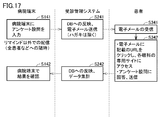
- FIG. 17 is a flowchart for explaining a service for conducting a questionnaire for all patients.
- an ophthalmologist or a staff member inputs a questionnaire from the hospital terminal 3 in step S141.
- the questionnaire may be input from the management terminal 5.
- This question is reflected in the homepage data stored in the database 13 of the consultation management system 1 in step S241.
- the consultation management system 1 sends an e-mail to the patient whose e-mail is registered. In this case, for convenience of data collection, a patient who sends a postcard and reminds may be excluded.
- the consultation management system 1 transmits a link to a homepage on which a questionnaire is to be sent, including the link in an e-mail.
- step S341 Upon receiving the e-mail in step S341, the patient accesses the dedicated ophthalmic survey site from the URL described in the e-mail in step S342, answers the questionnaire, and transmits the result.
- step S242 the consultation management system 1 accumulates the contents of the questionnaire in the database 13 and totals the response data. Then, the ophthalmologist or the like can browse the answers stored from the hospital terminal 3 in step S142.
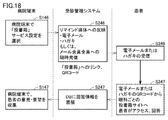
- FIG. 18 is a flowchart for explaining a suggestion box service which is another specific example of the fifth embodiment.
- step S146 it is possible to select to apply the letter box service to the patient at the first consultation or at the second consultation.
- step S246 the consultation management system 1 attaches a link to a homepage that provides a suggestion box service to an e-mail that is a reminder medium for a patient to which the application of the suggestion box service is set, or a URL of the homepage. Is printed on a postcard that is a reminder medium.
- a link to the suggestion box may be transmitted to all e-mail members registered with the e-mail at any time.
- the patient When the patient receives the e-mail or receives the postcard in step S346, the patient accesses the suggestion box site for each ophthalmology from the link of the e-mail or the QR code (registered trademark) of the postcard in step S347, and answers a request or the like.
- step S247 the consultation management system 1 stores the contents of the answer in the database 13. Then, the ophthalmologist or the like can browse the answers accumulated from the hospital terminal 3 in step S147 and collect the opinions and requests of the patient.
- Embodiment 6 describes that the consultation management system 1 provides information required by a patient.
- FIG. 19 is a flowchart for explaining a service in which the consultation management system provides the patient with information on the medicine from the medicine database in the sixth embodiment.
- the patient or ophthalmological staff
- the medicine name label is automatically recognized.
- application software having a special character recognition function is installed in a patient's smartphone, imaging and automatic recognition can be easily performed.
- step S353 the patient (or the ophthalmic staff) transmits the medicine name and the patient ID obtained from the recognition result to the consultation management system 1.
- the consultation management system 1 performs a process of registering the medicine information in the database 13 in association with the patient ID in step S251. Further, the consultation management system 1 picks up data indicating the link destination of the “drug bookmark” of the registered medicine in step S252, and transmits an e-mail to the patient in step S253.
- step S354 the patient receives an e-mail at the patient terminal 4. By clicking on the link included in the email, the patient can see the bookmarks such as eye drops prescribed for him.
- FIG. 20 is a flowchart for explaining a service in which the consultation management system notifies the patient of the time of instillation of eye drops in the sixth embodiment.
- the patient or ophthalmological staff
- the medicine name label is automatically recognized. For example, if application software having a dedicated character recognition function is installed in a smartphone, shooting and automatic recognition can be easily performed.
- step S363 the patient (or ophthalmic staff) transmits the medicine name and the patient ID obtained from the recognition result to the consultation management system 1.
- the consultation management system 1 performs a process of registering the medicine information in the database 13 in association with the patient ID in step S261. Further, the consultation management system 1 picks up data indicating the link destination of the homepage where the “registered eye drop timing” of the medicine registered in step S262 can be performed, and transmits an e-mail to the patient in step S263. On this homepage, a screen for designating a time desired by a patient for each usage of eye drops is prepared in advance.
- the e-mail includes a message exchanged by a short message service (short mail) that can specify a destination by a telephone number and another message application software (message application).
- step S364 the patient receives an e-mail at the patient terminal 4. By clicking on the link included in the e-mail, the patient can reach an input screen that matches the eye drops or the like prescribed for him.
- step S365 the patient sets the instillation time along the usage of the registered medicine from the linked screen. For example, if the usage is three times a day, the patient may designate a time three times a day when a smartphone, a mobile phone, or the like is at hand and the reception of the e-mail for reminding is easy to understand.
- the consultation management system 1 When the patient sets the time of instillation from the screen at the link destination, the information on the time of instillation is transmitted to the consultation management system 1, and the consultation management system 1 records the time of instillation in the database 13 in step S264. When the set time of instillation is reached, the consultation management system 1 sends an e-mail to the patient in step S265 indicating that it is the scheduled time of instillation.
- step S366 The patient receives the e-mail in step S366, and if it is understood that this is the content for informing the instillation time, performs the instillation in step S367.
- the control device 11 when executing the process for sending a reminder, the control device 11 sends additional information other than the reminder to the patient, that is, information for notifying the eye drop time.
- additional information other than the reminder to the patient that is, information for notifying the eye drop time.
- Embodiment 7 In the seventh embodiment, an ophthalmologist or the like is notified of the state of implementation in which a patient performs eye drops.
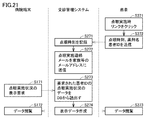
- FIG. 21 is a flowchart illustrating a service in which the consultation management system reports the instillation execution time to the ophthalmologist or family in the seventh embodiment.
- a home page on which an input button for reporting the instillation is displayed is prepared in advance, registered in the consultation management system 1, and the URL of the patient is notified.
- step S372 The patient clicks a button on the link destination screen at the time of instillation in step S371. Then, in step S372, the instillation time, the medicine name, and the patient ID are transmitted from the patient terminal 4 to the consultation management system 1. In response to this, in step S271, the patient ID and the instillation time are stored in the database 13. In addition, it was explained that the patient reports the instillation by clicking the button on the linked screen at the time of instillation.However, for example, the instillation is detected by using an instillation container device having a detection sensor. , You can also report. Examples of the detection sensor include, for example, a detection sensor for detecting the inclination and the pressed state of the eyedropper.
- the consultation management system 1 transmits an eye drop implementation notification mail to a mail address of a family or the like as necessary.
- Receiving such an e-mail enables the family to check whether the patient's eye drops are being performed at the correct time and frequency, which is particularly effective when the family needs to be watched because the patient is elderly or the like. . Also, if the patient lives away from his family, such an email is useful for confirming the safety of the patient.
- the instillation notification mail may be a message exchanged by a short message service (short mail) that can specify a destination by a telephone number or another message application software (message application).
- the consultation management system 1 sets the time indicating the instillation implementation status of the patient ID requested from the hospital terminal 3. The data is read from the database 13.
- step S274 the consultation management system 1 creates display data and transmits it to the hospital terminal 3, and in step S172, the ophthalmologist can browse the data from the hospital terminal 3.
- the ophthalmologist who sees this can give guidance on instillation to the patient, for example, when the patient instills the frequency or time incorrectly.
- the display data created in step S274 is transmitted to the patient terminal 4, the patient can browse the data from the patient terminal 4 in step S373. This allows the patient to check his or her eye drop situation.
- FIG. 22 is a flowchart illustrating a service in which the consultation management system reports the average amount of eye drops used to the ophthalmologist in the seventh embodiment.
- the patient or ophthalmological staff
- the medicine name label is automatically recognized. For example, if application software having a dedicated character recognition function is installed in a smartphone, shooting and automatic recognition can be easily performed.
- step S383 the patient (or ophthalmological staff) transmits the medicine name and the patient ID obtained from the recognition result to the consultation management system 1.
- the consultation management system 1 performs a process of registering the medicine information in the database 13 in step S281 in association with the patient ID. Further, the consultation management system 1 picks up the data indicating the link destination of the homepage where the “opening date setting” of the registered drug can be performed in step S282, and transmits an e-mail to the patient in step S283. On this homepage, a screen on which the opening date and end date of use of the eye drops can be input for each patient ID is prepared in advance.
- the e-mail includes a message exchanged by a short message service (short mail) that can specify a destination by a telephone number and another message application software (message application).
- step S384 the patient receives an e-mail at the patient terminal 4. By clicking on the link in the email, the patient can reach a screen where they can enter the date they opened their prescribed eye drops.
- step S385 the patient inputs the opening date of the eye drops from the linked screen, thereby transmitting information indicating the opening date to the consultation management system 1.
- the patient when the patient uses up the eye drops, the patient inputs the end date of use of the eye drops from the linked screen in step S386, thereby transmitting information indicating the end date of use to the consultation management system 1.
- the use end date information is transmitted to the consultation management system 1, and the consultation management system 1 records the use end date in the database 13 in step S285.
- step S181 when the ophthalmologist or the like requests display of the average amount of medicine used at the time of medical examination or the like from the hospital terminal 3, the consultation management system 1 sets the opening date and time of the eye drops corresponding to the patient ID requested from the hospital terminal 3. Calculate the average usage from the use end date. Then, in step S287, the consultation management system 1 creates data indicating the average usage.
- the average usage amount may be displayed, for example, such as “use 0.5 mL per day, use one bottle per two weeks”.
- step S287 the consultation management system 1 creates display data and transmits it to the hospital terminal 3, and in step S182, the ophthalmologist or the like can browse the data from the hospital terminal 3.
- the control device 11 receives the information on the date of opening the eye drops and the information on the day when the eye drops are used from the patient, stores the information in the database 13, and stores the information on the eye drops in response to a request from the ophthalmologist.
- the information including the usage period and the usage amount is transmitted to the hospital terminal 3 arranged in the ophthalmic clinic.
- the ophthalmologist who sees this information can use it for guidance in instilling the patient or determining the prescribed amount of the drug.
- Embodiment 8 In the eighth embodiment, an example will be described in which information useful for managing eye drops is provided to a patient using the consultation management system 1.
- information on the date of opening and the end of use of the eye drops may be used to manage the expiration date of the eye drops.
- the expiration date of unopened eye drops is indicated on the container, but when opened, the expiration date may be about one month from the start of use regardless of the expiration date indicated on the container. Many. However, this is not well known to patients. Therefore, if there is no input of the use end date even after a long time has passed since opening, the consultation management system 1 may notify the patient that the use end date has passed.
- FIG. 23 is a flowchart for explaining a service in which the consultation management system manages the period of use of eye drops in the eighth embodiment.
- the processes in S381 to S385 and S281 to S285 are the same as those in FIG. 22, and thus description thereof will not be repeated.
- step S288 the consultation management system 1 periodically checks the database 13 to determine whether there is any eye drops whose expiration date has passed from the opening date before receiving the use end date. If the expiration date has elapsed, in step S289, an e-mail recommending disposal of the expired eye drops is transmitted to the patient. The patient receives the e-mail in step S387, and can know that the expiration date of the currently used eye drops has elapsed.
- the control device 11 receives the information on the opening date of the eye drops and the information on the date when the eye drops are used from the patient, stores the information in the database 13, and stores the expiration date from the opening date. If the patient has not communicated the date of using the eye drops even after the elapse of the predetermined period of time, an e-mail notifying that the use of the eye drops has expired is transmitted to the patient. Thus, patients can avoid using expired eye drops.
- FIG. 24 is a flowchart for explaining a service in which the consultation management system notifies the patient of the remaining amount of eye drops from an image in the ninth embodiment.
- the patient or ophthalmological staff
- the medicine name label is automatically recognized.
- the automatic recognition may be a method of recognizing a barcode or a QR code (registered trademark) printed on a medicine name label other than character recognition.
- step S393 the patient (or the ophthalmic staff) transmits the medicine name and the patient ID obtained from the recognition result to the consultation management system 1.
- the consultation management system 1 performs a process of registering the medicine information in the database 13 in step S291 in association with the patient ID. Further, the consultation management system 1 picks up data indicating the link destination of the homepage on which the "remaining amount determination" of the registered medicine can be performed in step S292, and transmits an e-mail to the patient in step S293. On this homepage, a screen is provided in advance to inform the patient of the remaining amount when the patient transmits an image of the currently used eye drop container.
- step S394 the patient receives an e-mail at the patient terminal 4. By clicking on the link included in the e-mail, the patient can reach a screen for inputting image data of eye drops prescribed for him. In step S395, the patient inputs an image of the container of eye drops taken from the linked screen.
- the image data is transmitted to the consultation management system 1, and the consultation management system 1 receives the image data in step S294.
- the consultation management system 1 compares the image of the unopened container in which the prescribed amount of eye drops is enclosed and the image of the current container in step S295 to determine the ratio of the liquid amount estimated from the current image,
- the remaining amount information is transmitted to the patient by e-mail.
- the patient can know the percentage of the remaining amount by looking at the e-mail received in step S396.
- the remaining amount information transmitted from the consultation management system 1 to the patient can be variously changed.
- the remaining amount (mL) may be calculated from the container shape and the liquid level and the number of days corresponding to the standard usage amount may be provided as remaining amount information.
- the container for the eye drops has no scale or the like, and the amount used differs depending on the patient, so it is difficult for the patient to grasp the remaining amount. According to the ninth embodiment, it is possible to know how many days the remaining amount of the eye drops is, and it is possible to prevent the medicine from running out before the consultation date arrives.
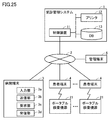
- FIG. 25 is a diagram showing a configuration using the consultation management system according to the tenth embodiment.
- the configuration shown in FIG. 25 is different from the configuration shown in FIG. 1 in that the patient terminal 4 is connected to the portable inspection device 21.
- Other configurations are the same as those in FIG. 1, and therefore description thereof will not be repeated.
- the patient terminal 4 is a smartphone, a personal computer, or the like
- a Wi-Fi registered trademark
- Bluetooth registered trademark
- NFC Near Field Communication
- a patient reports biological information measured by the portable inspection device 21 at home to an ophthalmologist using the consultation management system 1.
- the biological information may be, for example, blood pressure, pulse rate, body temperature, etc., particularly in the case of ophthalmology, intraocular pressure measured by an intraocular pressure measuring device as biological information, a fundus photograph taken by a fundus photographing device. And the like.
- Glaucoma eye drops are prescribed for the purpose of lowering intraocular pressure, but intraocular pressure fluctuates within a day. Also, the fluctuation period and degree of intraocular pressure vary depending on the individual. Therefore, the optimal time to use eye drops varies from patient to patient. If the data of the fine intraocular pressure fluctuation measured at home can be provided to the ophthalmologist, it will be possible to receive guidance on the time of instillation from the ophthalmologist.
- FIG. 26 is a flowchart for explaining a service that the consultation management system collects information on the portable examination device and provides to the ophthalmologist.
- the patient measures the intraocular pressure or takes a photograph of the fundus with portable inspection device 21.
- the patient performs the intraocular pressure measurement at regular intervals during the day, and the measurement data is stored in the portable inspection device 21 together with the measurement time.
- time-series intraocular pressure data is transmitted to the patient terminal 4 such as a smartphone via wireless communication such as WiFi (registered trademark), Bluetooth (registered trademark), or NFC (Near Field Communication).
- the patient inputs the time at which the eye drops were applied to the smartphone while measuring the intraocular pressure data to be transmitted, and transmits the time together with the intraocular pressure data to the consultation management system 1 in step S604.
- step S501 the consultation management system 1 stores the intraocular pressure data received from the patient terminal 4 and creates a graph.
- the ophthalmologist can view the patient's own intraocular pressure measurement data graphed by the consultation management system 1 via the hospital terminal 3.
- the ophthalmologist inputs an instruction to the patient to the hospital terminal 3 in step S402.
- the ophthalmologist transmits the instillation time adjusted to the peak time of the intraocular pressure to the consultation management system 1 as advice for the patient.
- the consultation management system 1 stores the patient advice received from the hospital terminal 3 in step S502 in the database 13 and transmits the patient advice to the patient terminal 4 by e-mail.
- the patient receives the instruction content of the ophthalmologist on the patient terminal 4.
- the patient can change the instillation time based on the instruction content of the ophthalmologist.
- step S601A the patient measures the intraocular pressure with the portable inspection device 21 in step S601A after changing the instillation time.
- step S602A time-series intraocular pressure data is transmitted to the patient terminal 4 such as a smartphone via Wifi (registered trademark).
- step S603A the patient inputs the time at which the eye drops were instilled (after change based on the instruction of the ophthalmologist) to the smartphone while measuring the intraocular pressure data to be transmitted, and consulted the patient with the intraocular pressure data in step S604A. Send it to the management system 1.
- the consultation management system 1 stores the intraocular pressure data received from the patient terminal 4 in step S501A and makes a graph.
- the patient-specific intraocular pressure measurement data graphed by the consultation management system 1 can be viewed by the ophthalmologist via the hospital terminal 3 in step S403. In this way, the ophthalmologist can confirm the effect of changing the instillation time on the fluctuation of intraocular pressure.
- the consultation management system of the tenth embodiment it is possible to notify the patient of the optimal timing of instillation of glaucoma ophthalmic solution in consideration of daily intraocular pressure fluctuation under the check of the ophthalmologist.
- the ophthalmologist can also know the effect of changing the instillation time.
- FIG. 27 is a diagram showing a configuration using the consultation management system according to the eleventh embodiment.
- the configuration shown in FIG. 25 is such that, in addition to the configuration shown in FIG. 1, the patient terminal 4 can acquire the position of the patient terminal 4 using a GPS 31 including a plurality of GPS (Global Positioning System) satellites.
- the consultation management system 1 is configured to be able to acquire information such as weather, wind direction, and temperature from a weather information provider 32 such as the Meteorological Agency.
- Other configurations are the same as those in FIG. 1, and therefore description thereof will not be repeated.
- the patient terminal 4 is a smartphone, it is often configured to be able to acquire position information from GPS.
- the patient terminal 4 when the hay fever patient inputs the degree of hay fever to the patient terminal 4, the patient terminal 4 simultaneously acquires the positional information using the GPS 31.
- the consultation management system 1 obtains weather conditions such as the weather, wind direction, and temperature at that point from the weather information provider 32 and records them in the database 13.
- FIG. 28 is a flowchart for explaining services provided by the consultation management system to hay fever patients.
- the patient inputs the degree of itchiness of the hay fever that he / she is aware to to the patient terminal 4 in step S611. For example, when the patient feels itching strongly, he operates the smartphone and inputs that itching is strong. Then, the time and position information are automatically acquired by the smartphone in step S612, and information such as “14:00 on March 10, itching +++” and the position information are transmitted from the smartphone to the consultation management system 1 in step S613.
- the location information is not limited to the location where the patient is actually located, and the patient may manually input the location information.
- step S511 the consultation management system 1 acquires weather data (wind direction, wind speed, temperature, etc.) at a point included in the information transmitted from the patient terminal 4. Then, in step S512, the consultation management system 1 sets (1) itching degree, (2) position data, and (3) weather data transmitted from the patient as one set and accumulates them in the database 13.
- weather data wind direction, wind speed, temperature, etc.
- the consultation management system 1 analyzes conditions under which the patient strongly feels itching.
- the consultation management system 1 specifies a combination of a temperature, a point, a wind direction, and the like on a day when the patient strongly feels itching based on the accumulated data.
- step S514 the consultation management system 1 sends the “hay fever risk information” customized for each patient to the patient terminal 4 by e-mail.
- the hay fever risk information is received by e-mail in step S614, the patient can take measures against hay fever, such as masking when going out, changing the place to go out, or refraining from going out.
- the above embodiment has been described with reference to the specific example introduced to the ophthalmic clinic, it may be introduced to another clinic. In that case, the eye drops may be read as oral medications or the like.
- 1 consultation management system 2 computer network, 3 hospital terminal, 3a input unit, 3b transmission unit, 3c request unit, 3d reception unit, 4 patient terminal, 11 control unit, 12 printer, 13 database, 21 portable inspection equipment, 32 weather Information provider.
Landscapes
- Business, Economics & Management (AREA)
- General Business, Economics & Management (AREA)
- Health & Medical Sciences (AREA)
- Engineering & Computer Science (AREA)
- Biomedical Technology (AREA)
- Epidemiology (AREA)
- General Health & Medical Sciences (AREA)
- Medical Informatics (AREA)
- Primary Health Care (AREA)
- Public Health (AREA)
- Medical Treatment And Welfare Office Work (AREA)
Abstract
受診管理システム(1)は、記憶部として働くデータベース(13)と、制御装置(11)とを備える。制御装置(11)は、患者を特定する第1データに関連付けて、患者に対応する受診日を示す第2データと、医師の決定した次回受診までの期間を示す第3データと、患者に受診を促すリマインダーが必要であるか否かを示す第4データと、リマインダーの種類を示す第5データとを記憶部に記憶させる。制御装置(11)は、リマインダーが必要であることを第4データが示し、かつ、第3データが示す次回受診までの期間から算出された受診予定日が所定日数以内に近づいた患者に対して、第5データに基づいて受診を促すための電子メール発信処理および郵便物印刷処理のいずれかを選択して実行する。このような構成とすることによって、対象とする医院が拡大された患者の受診を促す受診管理システムを提供することができる。
Description
この発明は、受診管理システム、リマインド方法、病院端末、および、プログラムに関する。
患者が医療機関で受診した場合、1回の受診では疾病が治癒しない場合があり、再度の来院が必要となる場合がある。痛みなどの自覚症状があまりない場合には、患者は再度の来院を忘れがちである。このような通院を忘れがちな患者に対しては何らかの方法で来院を促すことが望まれる。
特開2017-130227号公報(特許文献1)には、患者が医師の指示に従って通院および薬の服用を忘れずに実行できるようにする通院通知方法および通院通知プログラムが開示されている。
特開2017-130227号公報(特許文献1)は、次回の通院日が予め決定されている場合に、通院日が近づいたことを示す通院通知を患者の携帯端末に表示する。しかし、非常に混雑する大きな病院または診療時間が長くなる歯科医院等でなければ、厳格な予約システムを取り入れる必要性が低く予約制を採用していない病院も多い。したがって、そのような医院では、再診が必要な場合には、医師から次回の来院時期の目安の期間、例えば「2週間後」等、を指示される場合が多い。
特開2017-130227号公報(特許文献1)には、予約日が厳密に決定されていない場合についての言及は無く、このような場合には使用することができず通院通知プログラムにも改善の余地がある。
この発明の目的は、対象とする医院が拡大された患者の受診を促す受診管理システム、リマインド方法、病院端末、および、プログラムを提供することである。
本開示は、患者に対して受診を促す受診管理システムに関する。受診管理システムは、記憶部と、患者を特定する第1データに関連付けて、患者に対応する受診日を示す第2データと、医師の決定した次回受診までの期間、次回受診予定日、または予約日のいずれかを示す第3データとを記憶部に記憶させる制御装置とを備える。制御装置は、第3データが示す次回受診までの期間から算出された受診予定日が第1所定日数以内に近づいた患者に対して、受診を促すためのリマインダーを送るための処理を実行する。
好ましくは、制御装置は、患者に受診を促すリマインダーが必要であるか否かを示す第4データと、リマインダーの種類を示す第5データとを記憶部にさらに記憶させる。制御装置は、リマインダーが必要であることを第4データが示し、かつ、第3データが示す次回受診までの期間から算出された受診予定日が第1所定日数以内に近づいた患者に対して、第5データに基づいて受診を促すための電子メール発信処理または郵便物印刷処理を選択して実行する。
より好ましくは、制御装置は、受診を促すための電子メール発信処理または郵便物印刷処理を実行してから、一定期間内に患者の更新された受診日が記憶部に記憶されていない場合に、受診を促すための電子メール発信処理または郵便物印刷処理をさらに実行する。
好ましくは、制御装置は、医師が処方した薬を特定する第6データと、医師が処方した薬の量を示す第7データと、薬が処方された日を示す第8データとを、記憶部に記憶させ、制御装置は、第6データ、第7データおよび第8データに基づいて薬の残量がゼロとなる基準日を算出し、基準日が第2所定日数以内に近づいた患者に対して受診を促すための電子メール発信処理または郵便物印刷処理を実行する。
好ましくは、医師は眼科医であり、制御装置は、患者から点眼薬の開封日の情報と点眼薬を使い切った日の情報とを受けて記憶部に記憶させ、眼科医からの求めに応じて点眼薬の使用期間と使用量を含む情報を眼科医院に配置された病院端末に送信する。
好ましくは、医師は眼科医であり、制御装置は、患者から点眼薬の開封日の情報と点眼薬を使い切った日の情報とを受けて記憶部に記憶させ、開封日から使用期限が超過した所定期間が経過しても使い切った日が患者から連絡されていない場合には、点眼薬の使用期限が切れた旨を連絡する電子メールを患者に発信する。
好ましくは、制御装置は、患者が受診するごとに第2データを記憶部に蓄積させる。制御装置は、医師の求めに応じて記憶部に蓄積された第2データから患者の通院継続率を示す情報を医師が使用する病院端末に表示させる。
好ましくは、制御装置は、リマインダーを送るための処理を実行する際に、患者に対してリマインダー以外の追加の情報を送る。
本開示は他の局面ではコンピュータが患者に対して受診を促すリマインド方法に関する。リマインド方法は、患者を特定する第1データに関連付けて、患者に対応する受診日を示す第2データを記憶部に記憶するステップと、第1データに関連付けて、医師の決定した次回受診までの期間、次回受診予定日、または予約日のいずれかを示す第3データを記憶部に記憶させるステップと、第3データが示す次回受診までの期間、次回受診予定日、または予約日のいずれかから算出された受診予定日が所定日数以内に近づいた患者に対して、受診を促すためのリマインダーを送るステップとを備える。
好ましくは、第3データを記憶部に記憶させるステップは、患者に受診を促すリマインダーが必要であるか否かを示す第4データと、リマインダーの種類を示す第5データとを記憶部にさらに記憶させる。リマインダーを送るステップは、リマインダーが必要であることを第4データが示し、かつ、第3データが示す次回受診までの期間から算出された受診予定日が所定日数以内に近づいた患者に対して、第5データに基づいて受診を促すための電子メール発信処理または郵便物印刷処理を選択する。
本開示のさらに他の局面は、上記のリマインド方法をコンピュータに実行させるための受診管理プログラムに関する。
本開示のさらに他の局面は、病院端末に関する。病院端末は、患者を特定する第1データと、第1データに関連付けて、患者に対応する受診日を示す第2データと、医師の決定した次回受診までの期間または次回受診予定日を示す第3データと、患者に受診を促すリマインダーが必要であるか否かを示す第4データとを入力するように構成された入力部と、第1~第4データを受診管理システムに送信する送信部と、受診管理システムに通院継続率の情報の出力を要求する要求部と、情報を受信する受信部とを備える。
本開示のさらに他の局面は、病院端末に関する。病院端末は、患者を特定する第1データと、第1データに関連付けて、患者に対応する受診日を示す第2データと、医師の決定した次回受診までの期間または次回受診予定日を示す第3データと、患者に受診を促すリマインダーが必要であるか否かを示す第4データとを入力するように構成された入力部と、第1~第4データを受診管理システムに送信するように構成された送信部と、受診管理システムに薬剤情報の出力を要求する要求部と、薬剤情報の受信部とを備える。入力部は、受信部で受信した薬剤情報から選択された医師が処方した薬を示す第6データと、医師が処方した薬の量を示す第7データと、薬が処方された日を示す第8データとをさらに入力するように構成される。送信部は、第6~第8データを受診管理システムにさらに送信するように構成される。要求部は、受診管理システムに第6データ、第7データおよび第8データに基づいて算出された薬の残量がゼロとなる基準日が第2所定日数以内に受診した患者の割合を示す患者情報の出力をさらに要求する。受信部は、患者情報をさらに受信するように構成される。
本開示のさらに他の局面は、以下の処理を病院端末として動作するコンピュータに実行させるためのプログラムに関する。患者を特定する第1データと、第1データに関連付けて、患者に対応する受診日を示す第2データと、医師の決定した次回受診までの期間または次回受診予定日を示す第3データと、患者に受診を促すリマインダーが必要であるか否かを示す第4データとを入力部を経由して受ける処理;第1~第4データを受診管理システムに送信する処理;受診管理システムに通院継続率の情報の出力を要求する処理;情報を受信する処理。
本開示のさらに他の局面は、以下の処理を病院端末として動作するコンピュータに実行させるためのプログラムに関する。患者を特定する第1データと、第1データに関連付けて、患者に対応する受診日を示す第2データと、医師の決定した次回受診までの期間または次回受診予定日を示す第3データと、患者に受診を促すリマインダーが必要であるか否かを示す第4データとを入力部を経由して受ける処理;第1~第4データを受診管理システムに送信する処理;受診管理システムに薬剤情報の出力を要求する処理;薬剤情報を受信する処理;受信した薬剤情報から選択された医師が処方した薬を示す第6データと、医師が処方した薬の量を示す第7データと、薬が処方された日を示す第8データとを入力部を経由してさらに受ける処理;第6~第8データを受診管理システムにさらに送信する処理;受診管理システムに第6データ、第7データおよび第8データに基づいて算出された薬の残量がゼロとなる基準日が第2所定日数以内に受診した患者の割合を示す患者情報の出力をさらに要求する処理;患者情報を受信する処理。
本発明によれば、予約日が厳密に決定されていない場合でも、適時に患者に受診を促すリマインダーが患者の望む方法で行なわれるので、受診率の向上が期待できる。
以下、本発明の実施の形態について、図面を参照しながら詳細に説明する。以下では、複数の実施の形態について説明するが、各実施の形態で説明された構成を適宜組合わせることは出願当初から予定されている。なお、図中同一又は相当部分には同一符号を付してその説明は繰返さない。
[実施の形態1]
図1は、実施の形態1に係る受診管理システムおよび受診管理システムがデータを授受する端末を示す図である。
図1は、実施の形態1に係る受診管理システムおよび受診管理システムがデータを授受する端末を示す図である。
受診管理システム1は、制御装置11と、データを記憶する記憶部であるデータベース13と、プリンタ12とを含む。制御装置11は、コンピュータを含んで構成される。受診管理システム1は、インターネットなどのコンピュータネットワーク2を介して、眼科医院に設置される病院端末3、複数の患者がそれぞれ所有する複数の患者端末4、および受診管理システムを管理するサービス提供者の管理端末5に接続される。なお、コンピュータネットワーク2と各端末との接続は、有線に限らず携帯電話回線、無線LANなどを介した無線で行なっても良い。また、病院端末3も複数であっても良く、複数の病院に共通して受診管理システム1が設けられていても良い。
病院端末3としては、パーソナルコンピュータ、タブレット型コンピュータ等を用いることができる。患者端末4は、パーソナルコンピュータ、タブレット型コンピュータ、スマートフォン、携帯電話等、電子メールを受信できるものであれば良い。なお、電子メールには、電話番号で宛先を特定できるショートメッセージサービス(ショートメール)および他のメッセージアプリケーションソフト(メッセージアプリ)でやり取りされるメッセージも含むものとする。
受診管理システム1は、コンピュータネットワーク2を経由してコンピュータ資源をサービスの形で病院の医師または患者に提供する、いわゆるクラウドコンピューティングを実現する。
受診管理システム1は、来院管理機能と、リマインド(remind)機能とを有する。来院管理機能は、患者の受診日、通院状況および患者の通院脱落状況を容易に把握できるように眼科医等に示すことができる機能である。リマインド機能は、受診が必要な患者に対して受診を促すリマインダー(reminder)を医院に代わって発送する機能である。本明細書では、「リマインダー」は、電子メールおよび電子メールと同様な機能を有する端末上に通知表示を出すアプリケーションソフト(アプリ)などの通信媒体、ハガキや封書などの紙媒体を含むものであって、受診日が近いことを通知するための媒体を示す。また、「リマインダー」は、電話を用いて自動音声を患者に伝えるものであっても良い。
図2は、受診管理システムのデータベースに保持されているデータの内容を示す図である。図2を参照して、各患者に対して患者ID(IDentification)が割り当てられており、患者IDごとに、氏名、受診日、次回受診までの期間または来院予定日、リマインダーの要否、リマインダーの種類、リマインダー送付日、連絡先、疾患名、処方製品、数量、処方日等がデータベース13に登録されている。なお、リマインダーの種類としてハガキ発送が指定される場合は住所および郵便番号がさらにデータベース13に登録される。また、リマインダーの種類として、ショートメールまたは電話が指定される場合には、電話番号がさらにデータベース13に登録される。なお、疾患名、処方製品、数量、処方日については、薬剤量の管理を行なわない場合にはデータベース13に記録されていなくても良い。
図1、図2を参照して、受診管理システム1は、記憶部として働くデータベース13と、制御装置11とを備える。制御装置11は、患者を特定する第1データ(患者ID)に関連付けて、患者に対応する受診日を示す第2データと、医師の決定した次回受診までの期間を示す第3データと、患者に受診を促すリマインダーが必要であるか否かを示す第4データと、リマインダーの種類を示す第5データとをデータベース13に記憶させる。制御装置11は、リマインダーが必要であることを第4データが示し、かつ、第3データが示す次回受診までの期間から算出された受診予定日が第1所定日数(たとえば、7日)以内に近づいた患者に対して、第5データに基づいて受診を促すための電子メール発信処理または郵便物印刷処理を選択して実行する。
制御装置11によって、コンピュータが患者に対して受診を促すリマインド方法が実行される。このリマインド方法は、図3、図4、図5のフローチャートに示したように、患者を特定する第1データに関連付けて、患者に対応する受診日を示す第2データを記憶部に記憶するステップ(S2001)と、第1データに関連付けて、医師の決定した次回受診までの期間を示す第3データと、患者に受診を促すリマインダーが必要であるか否かを示す第4データと、リマインダーの種類を示す第5データとを記憶部に記憶させるステップ(S2002)と、リマインダーが必要であることを第4データが示し、かつ、第3データが示す次回受診までの期間から算出された受診予定日が所定日数以内に近づいた患者に対して、第5データに基づいて受診を促すための電子メール発信処理または郵便物印刷処理を選択するステップ(S203)とを備える。このリマインド方法をコンピュータに実行させるための受診管理プログラムが制御装置11に含まれるコンピュータにインストールされることによって、受診管理システム1が製造される。
図3は、実施の形態1において受診管理システムと病院端末および患者との間で行なわれる処理を示すフローチャートである。ステップS101およびS301では、患者が初回に病院に来院し初診受付処理が実行される。初診受付処理では、病院端末において、患者の氏名、住所または電子メールアドレス、受診日の登録が行なわれる。
例えば、デスクトップ型のパーソナルコンピュータを病院端末3として使用する場合には、受付処理を行なう事務職員が患者の問診票などを見て登録を行なう。また例えば、病院端末3としてタブレット型コンピュータを用いる場合には、患者が病院端末3を一時的に使用して患者自身が氏名、住所等の登録を行なうようにしても良い。また、受付処理を行なう事務職員と患者とが一緒に病院端末3を操作しても良い。
続いて、ステップS102では、眼科医による患者の診察の結果を踏まえて次回受診情報を入力する処理が行なわれる。次回受診情報は、予約制を採用している場合には予約日であっても良いし、予約制を採用していない場合には、眼科医が決めた次回受診までの目安の期間(例えば、一週間後など)であっても良い。眼科医または病院の事務職員が病院端末に次回受診情報を入力する。また、次回来院予定がある場合には、眼科医または事務職員は、患者の希望を聞いて、受診を促す通知であるリマインダーを希望するか否かを入力する。リマインダーを希望する患者に対しては、希望するリマインダーの種類(例えば、電子メールがよいか、ハガキが良いかなど)を聞いて、病院端末3に入力する。なお、電子メールは、ショートメッセージサービス(SMS)など他の形式でもよく、患者端末に通知を配信するものであればどのようなものでもよい。また、眼科医または事務職員は、リマインダーの種類に対応する連絡先のデータ(電子メールアドレスまたは住所等)を病院端末に併せて入力する。
さらに、ステップS103およびS201では、病院端末3に入力されたデータがコンピュータネットワーク2を経由して受診管理システム1に送信される。なお、ステップS103で行なわれたデータの送信は、ステップS101、S201の各々において、1項目のデータ入力ごとに行なわれても良い。
ステップS201において、患者についての氏名、受診日、電子メールアドレスまたは住所、リマインダーの要否、リマインダーの種類、等のデータ(以下患者情報データという)の受信が完了すると、受診管理システム1は、ステップS202において患者情報データをデータベース13に記録するとともに、記録した患者情報データに基づいて、リマインダー送付日を算出する。
続いて、受診管理システム1は、ステップS203において、リマインダー送付処理を実行する。患者は、ステップS302において、リマインダーを電子メールで受信するか、またはハガキ等の書面で受領する。なお、電子メールには、電話番号で宛先を特定できるショートメッセージサービス(ショートメール)および他のメッセージアプリケーションソフト(メッセージアプリ)でやり取りされるメッセージも含むものとする。
なお、受診管理システム1が行なうステップS202およびS203の処理については、後にフローチャートを用いて詳しく説明する。
次に、2回目以降に患者がステップS305で受診すると、病院端末3では、ステップS105において再診受付処理が行なわれる。患者の氏名またはIDが入力されると、ステップS106において、病院端末3から受診管理システム1に対して、患者の残りの登録済み情報を送信するように要求が行なわれる。
受診管理システム1がステップS205において送信要求を受け付けると、受診管理システム1は、ステップS206において患者の登録済み情報を病院端末3に出力する。登録済みデータに変更があった場合には、このときにデータの更新が行なわれる。なお受診日については、最新の受診日に更新しても良いが、受診率などの計算をする場合も考えられるので、過去の受診日を保持したまま最新の受診日を追記していくことが好ましい。
続いて、ステップS108では、ステップS102と同様な処理、つまり眼科医による患者の診察の結果を踏まえて次回受診情報を入力する処理が行なわれる。このときにも、予め前回の受診時の患者情報を病院端末に表示しておき、更新すべき部分だけ入力すればよいようにしておくことが好ましい。
さらに、ステップS109およびS207では、病院端末3に入力されたデータがコンピュータネットワーク2を経由して受診管理システム1に送信される。なお、データの送信は、ステップS108において、1項目の更新データ入力ごとに行なわれても良い。
ステップS207において、患者情報データの受信が完了すると、受診管理システム1は、ステップS208において患者情報データをデータベース13に記録するとともに、記録した患者情報データに基づいて、リマインダー送付日を更新する。
続いて、受診管理システム1は、ステップS209において、ステップS203と同様なリマインダー送付処理を実行する。患者は、ステップS306において、リマインダーを電子メールで受信するか、またはハガキ等の書面で受領する。
図4は、ステップS202で受診管理システムが実行する患者情報蓄積およびリマインダー送付日算出処理を説明するためのフローチャートである。図4を参照して、ステップS2001において、受診管理システム1は、患者IDおよび受診日をデータベース13に記憶する。続いて、ステップS2002において、受診管理システム1は、次回受診までの期間をデータベース13に記憶する。さらにステップS2003においては、受診管理システム1は、受診日および次回受診までの期間に基づいて、受診予定日を算出し、受診予定日を基準としてステップS2004においてリマインダー送付日を算出するとともにデータベース13に記憶する。そしてステップS2005において処理がメインルーチンに戻る。
例えば、図2において患者IDが0001の患者の場合には、受診日が2018年7月1日であり、次回受診を眼科医が2週間後と指定している。この場合、受診管理システム1は受診予定日を受診日から14日後の2018年7月15日に設定する。ただし、受診予定日はあくまでも来院の目安の日であり、患者は受診予定日の前後数日間のうち自分の都合がよい日に来院すれば問題ない。ステップS2003において、受診予定日が決定されたら、受診管理システム1は、この受診予定日を考慮してステップS2004においてリマインダー送付日を設定する。
具体的には、受診予定日に対して受診許容範囲が±D日であるとする。すると電子メールでリマインダーを送付する患者に対しては、受診予定日よりもD日前をリマインダー送付日として算出する。またハガキ等の書面で送付する患者の場合には、さらに送付期間としてZ日前倒しにリマインダー送付日を決定する。例えばD=2、Z=1であるとすると、患者IDが0001の患者については、電子メールの場合は2018年7月13日にリマインダー送付日が設定され、書面通知の場合には2018年7月12日にリマインダー送付日が設定される。
なお、受診許容範囲を示すDについては、疾病の種類または症状について、眼科医が変更できるようにしても良い。また、患者がリマインダーを受領可能な日または時刻などを予め指定し、ステップS2004におけるリマインダー送付日の決定時に考慮するようにしても良い。例えば、患者がコンピュータネットワークを通じてリマインダーの送付を希望する時期を予め受診管理システム1に送信しておけば、この時期を考慮してリマインダー送付日を受診管理システム1が決定する。送付を求めたい時期の指定は、例えば曜日の指定であっても良く、時刻の指定であっても良い。逆に、送付を避けてほしい曜日などを指定しておいても良い。
また、リマインダー送付日については、病院端末3側にアプリケーションソフトをインストールしておいて上記の算出処理を行ない、リマインダー送付日を受診管理システム1に送信するようにしても良い。
図5は、ステップS203で受診管理システムが実行するリマインダー送付処理を説明するためのフローチャートである。このフローチャートの処理は、定期的にメインルーチンから呼び出されて実行される。このフローチャートの処理は、例えば、平日の午後3時に実行するように決められていても良く、また例えば、月曜日、水曜日、金曜日の週3回の正午に実行するように決められていても良い。図5を参照して、ステップS2011において、受診管理システム1は、患者IDが先頭のデータをデータベース13から読み出す。
続いて、ステップS2012において、受診管理システム1は、読み出した患者IDに対応して記録されているリマインダー送付日と現在の日付が一致するか否かを判断する。リマインダー送付日と現在の日付が一致する場合(S2012でYES)、受診管理システム1は、ステップS2013において、該当IDで指定されているリマインダーの種類が、電子メールかまたはハガキであるかを判断する。
リマインダーの種類が電子メールであった場合、ステップS2014において、受診管理システム1は、登録されている電子メールアドレスに電子メールを発信する。一方、リマインダーの種類がハガキであった場合、ステップS2015において、受診管理システム1は、プリンタ12でハガキを印刷する。この印刷されたハガキは、定期的に受診管理システム1の管理者によって回収されて、郵便局などを介して発送される。なお、ハガキを印刷する代わりに、発送代行業者にリマインダーを送付すべき患者の氏名、住所、電話番号を送信し、ハガキの発送を発注するようにしても良い。この場合、データベース13に蓄積された患者情報が制御装置11からコンピュータネットワーク2を介して外部業者またはサービス運用者に送信され、外部業者またはサービス運用者においてハガキが印刷される。
なお、リマインダーの種類は、この実施の形態では電子メールと郵送を例示したが、これらに限定される必要はなく、他の選択肢があっても良い。例えば、リマインダーを行なう対象患者の電話番号付きリストを病院の担当者に送付し病院の担当者が電話で対象患者に連絡しても良く、ファクシミリなどで対象患者にリマインダーを送信しても良い。また、電話を用いて自動音声で患者に対してリマインダーを行なっても良い。
ステップS2012において、本日がリマインダー送付日に一致しない場合、およびステップS2014、S2015のいずれかでリマインダー処理が行なわれた場合、ステップS2016において、受診管理システム1は、すべての患者IDのチェックが完了したか否かを判断する。
すべての患者IDのチェックがまだ完了していない場合(S2016でNO)、ステップS2017において、受診管理システム1は、次の患者IDのデータをデータベース13から読み出す。そしてステップS2012以降の処理を繰返して実行する。一方、すべての患者IDのチェックが完了した場合(S2016でYES)、受診管理システム1は、ステップS2018に処理を進め、メインルーチンに処理を戻す。
以上説明した処理によって、予めはっきりした予約日が決定されていない場合でも、患者に対して適時にリマインドを行なうことが可能となる。
このようなリマインダーを送付しても、来院を忘れてしまう患者がいることも考えられる。そのような患者に対しては、再度のリマインダーを送付するようにしても良い。
図6は、再度のリマインダーを送付する処理の説明するためのフローチャートである。このフローチャートの処理(ステップS203Aとする)は、リマインダー送付をする図3および図5のステップS203が実行された後に実行される。まずステップS2021において、受診管理システム1は、本日がリマインダー送付後のチェック日となったか否かを判断する。チェック日は、受診許容範囲から後ろに外れた日とするとよい。例えばリマインダー送付から4日経過した日などとすることができる。
本日がリマインダー送付後のチェック日でない場合(S2021でNO)、再度のリマインダーの送付は不要であるので、ステップS2024に処理が進む。本日がリマインダー送付後のチェック日であった場合(S2021でYES)、ステップS2022において、受診管理システム1は、最新の受診日の更新があったか否かを判断する。
最新の受診日の更新がされていた場合(S2022でYES)には、リマインダー送付日に対応する次回受診が行なわれたと考えられる。このため、再度のリマインダーの送付は不要であるので、ステップS2024に処理が進む。一方、最新の受診日の更新がされていない場合(S2022でNO)には、再度のリマインダーの送付が必要である。この場合は、受診管理システム1は、ステップS2023において再度のリマインダー送付を実行し、ステップS2024において処理がメインルーチンに戻される。
図6に示すように、制御装置11は、受診を促すための(1回目の)電子メール発信処理または郵便物印刷処理を実行してから、一定期間内に患者の更新された受診日がデータベース13に記憶されていない場合に、受診を促すための(2回目の)電子メール発信処理または郵便物印刷処理を実行する。なお、制御装置11は、2回目以降のリマインダーを送付しても応答がない場合はさらに3回目以降のリマインダーを送付するように構成されても良い。
このように、適時に再度のリマインダーを送付することによって、患者の受診率をさらに向上させることができる。
[実施の形態2]
実施の形態1では、受診日および次回受診までの期間に基づいてリマインダー送付日を決定していたが、実施の形態2ではこれに加えて、処方された点眼薬の量を考慮してリマインダー送付日を決定する。例えば、処方された点眼薬については、使用量が患者によってまちまちであるため、なくなったら来院するという場合が多いが、これでは点眼薬切れで点眼できないことが発生しうる。実施の形態2では、リマインダー送付により点眼薬切れを防止する。
実施の形態1では、受診日および次回受診までの期間に基づいてリマインダー送付日を決定していたが、実施の形態2ではこれに加えて、処方された点眼薬の量を考慮してリマインダー送付日を決定する。例えば、処方された点眼薬については、使用量が患者によってまちまちであるため、なくなったら来院するという場合が多いが、これでは点眼薬切れで点眼できないことが発生しうる。実施の形態2では、リマインダー送付により点眼薬切れを防止する。
図7は、実施の形態2において受診管理システムと病院端末および患者との間で行なわれる処理を示すフローチャートである。図7では、先に説明した図3と同じ処理については同じ符号を付し、説明を繰返さない。
ステップS101、S301については、図3において説明した処理と同じ処理が実行される。ステップS111においては、眼科医の診察後に処方製品を入力する処理が行なわれる。例えば、眼科の場合には点眼薬の製品名と処方する本数が入力される。このときに眼科医が薬の種類を指定すると、ステップS211に示すように、受診管理システム1が製品情報を病院端末3に出力することが好ましい。例えば、予め準備されている薬剤データベースから該当する種類の製品名と各製品の適応症等とを示す製品情報一覧画面を受診管理システム1が病院端末3に出力し、眼科医が表示された製品の中から処方する製品を選択するようにしても良い。
実施の形態2の場合には、このように処方製品情報が入力されるので、図2に示すように、疾患名、処方製品、数量、処方日などがデータベースに記録される。そして、ステップS102、S103、S201については図3において説明した処理と同じ処理が実行される。
ステップS201において、受診管理システム1が病院端末3から患者情報データを受信すると、実施の形態2ではステップS202Aにおいて、患者情報データをデータベース13に記録するとともに、記録した患者情報データに基づいて、リマインダー送付日(1)、リマインダー送付日(2)を算出する。ここで、リマインダー送付日(1)は、実施の形態1におけるリマインダー送付日と同様に、眼科医に指示された次回受診までの期間から算出された日付である。一方、リマインダー送付日(2)は、実施の形態2において追加された、薬剤の処方量に対応する薬剤の再処方が必要になる日を基準として定められる日付である。
図8は、ステップS202Aの処理の詳細を示すフローチャートである。図8において前半のリマインダー送付日(1)算出処理S2030については、図4に示したステップS202とほぼ同じ処理が実行される。具体的には、ステップS2031において、受診管理システム1は、患者IDおよび受診日をデータベース13に記憶する。続いて、ステップS2032において、受診管理システム1は、次回受診までの期間をデータベース13に記憶する。さらにステップS2033においては、受診管理システム1は、受診日および次回受診までの期間に基づいて、受診予定日(1)を算出し、受診予定日(1)を基準としてステップS2034においてリマインダー送付日(1)を算出するとともにデータベース13に記憶する。
リマインダー送付日(1)の算出方法については、実施の形態1で説明したリマインダー送付日の算出方法と同じであるので、ここでは説明は繰返さない。
実施の形態2では、リマインダー送付日(2)算出処理S2040がさらに実行される。例えば処方製品が点眼薬である場合には、リマインダー送付日(2)は、点眼薬の液量が規定量を下回る旨のリマインダーを送付する日である。より詳細には、ステップS2041において、受診管理システム1は、処方製品名およびその処方量、片眼点眼/両眼点眼のいずれであるか、点眼回数をデータベース13に記憶する。処方量は、点眼薬の処方本数と充填量であっても良い。データベース13に記憶されたこれらの情報から1日あたりの液量が分かり処方量が何日分かが分かる。続いて、ステップS2042において、受診管理システム1は、受診予定日(2)を算出する。例えば、点眼薬の処方量が3本であり、1本が10日分であった場合には、受診予定日(2)は、今回の受診日の30日後(10日×3)に設定される。ただし、受診予定日(2)はあくまでも来院の目安の日であり、点眼薬の残量がゼロにならない間に自分の都合がよい日に来院すれば問題ない。ステップS2042において、受診予定日が決定されたら、受診管理システム1は、ステップS2043においてリマインダー送付日(2)を受診予定日(2)の数日前とし、データベース13に記憶する。そしてステップS2050において処理がメインルーチンに戻る。
再び、図7を参照して、ステップS202Aの処理が終了すると、ステップS203においてリマインダー送付処理が実行される。この処理は、リマインダー送付日(1)およびリマインダー送付日(2)の各々において、実施の形態1で説明した図5の処理が実行される。図5の処理については、ここでは説明は繰返さない。
受診管理システム1がリマインダー送付処理を実行すると、ステップS302Aにおいて、患者は患者端末4においてリマインダーメール(1)またはリマインダーメール(2)を受信する。リマインダーメール(1)は、リマインダー送付日(1)に発信されるメールであって、眼科医が診察を行なうための受診日を知らせるメールである。リマインダーメール(2)は、リマインダー送付日(2)に発信されるメールであって、眼科医が薬剤の処方箋を発行するための受診日を知らせるメールである。なお、電子メールに代えてリマインダーはハガキで通知されても良い。
リマインダーの送付を受けると、患者はステップS305で受診し、実施の形態1と同様にステップS105の再診受付処理から始まる再診時の処理が実行される。ステップS105、S106、S107、S108、S109、S205、S206、S207については、図3において説明した処理と同じ処理が実行される。また、ステップS112およびステップS212の処理については、先に説明したステップS111およびステップS211の処理とそれぞれ同じであるので説明は繰返さない。
ステップS207において、患者情報データの受信が完了すると、受診管理システム1は、ステップS208Aにおいて患者情報データをデータベース13に記録するとともに、記録した患者情報データに基づいて、リマインダー送付日を更新する。このときのリマインダー送付日(2)の更新処理は、受診時に新たに薬剤の処方があったか否かによって更新の必要性が異なる点に注意が必要である。
図9は、ステップS208Aの処理を説明するためのフローチャートである。図9において、最初に実行されるリマインダー送付日(1)の算出処理S2030については、図8で説明した処理と同じ処理が実行される。続いて、ステップS2060において、受診管理システム1は、今回の受診で薬の処方があったか否かを判断する。受診管理システム1は、データベース13に記録された今回の受診日と薬剤の処方日とが同じか否かに基づいて、薬剤の処方の有無を判断する。
薬剤の処方があった場合には(S2060でYES)、ステップS2040において、受診管理システム1は、リマインダー送付日(2)の更新処理を実行する。具体的には、新たな処方情報に基づいて、図8で説明したステップS2041~ステップS2043の処理が再び実行される。なお、患者が手持ちの点眼薬を使い切っていなかった場合には、新たに処方された量を点眼薬の残量に加えてリマインダー送付日(2)を算出するようにしても良い。
一方、今回の受診日において薬剤の処方が無かった場合には(S2060でYES)、受診管理システム1はステップS2061においてリマインダー送付日(2)を更新しない。このときには今までに設定されているリマインダー送付日(2)が維持される。
ステップS2040またはステップS2061の処理が終了すると、ステップS2062において処理がメインルーチンに戻される。
実施の形態2では、図2に示すように、制御装置11は、医師が処方した薬を特定する第6データ(処方製品)と、医師が処方した薬の量を示す第7データ(数量)と、薬が処方された日を示す第8データ(処方日)とを、データベース13に記憶させる。なお、第7データは、点眼ボトルに充填された薬液量および処方された点眼薬の本数の両方の情報であることもあるし、第6データから点眼ボトルに充填された量が自明である場合には処方された点眼薬の本数の情報のみを意味することもある。図7、図8に示すように、制御装置11は、通常、一回点眼量が約30~50μLであることから、上記第6データ、第7データおよび第8データに基づいて薬の残量がゼロとなる基準日を算出し、算出された基準日が第2所定日数(たとえば、7日)以内に近づいた患者に対して受診を促すための電子メール発信処理または郵便物印刷処理を実行する。なお、処方されている点眼薬が複数種類である場合、それらの中で一番早くに残量がゼロになる点眼薬をリマインダーの基準としても良い。また、複数種類の点眼薬について個別に残量を管理し、新たに点眼薬が処方される毎にその点眼薬について基準日をリセットするようにしても良い。
また、病院端末3は、入力部3aと、送信部3bと、要求部3cと、受信部3dとを含む。入力部3aは、第1~第8データを入力するように構成される。第1データは、患者を特定するデータである。第2データは、第1データに関連付けて、患者に対応する受診日を示す。第3データは、医師の決定した次回受診までの期間または次回受診予定日を示す。第4データは、患者に受診を促すリマインダーが必要であるか否かを示す。送信部3bは、第1~第4データを受診管理システム1に送信するように構成される。要求部3cは、受診管理システム1に薬剤情報の出力を要求するように構成される。受信部3dは、薬剤情報を受診管理システム1から受診するように構成される。また、第6データは、受信部3dで受信した薬剤情報から選択されたまたは病院端末3に直接入力された医師が処方した薬を示す。第7データは、医師が処方した薬の量を示す。第8データは、薬が処方された日を示す。送信部3bは、第6~第8データを受診管理システム1にさらに送信するように構成される。要求部3cは、受診管理システム1に第6データ、第7データおよび第8データに基づいて算出された薬の残量がゼロとなる基準日が第2所定日数以内に受診した患者の割合を示す患者情報の出力をさらに要求する。受信部3dは、この患者情報をさらに受信するように構成される。
さらに、病院端末3には、医師が処方した薬の一日当たりの投与(点眼)回数を特定するためのデータ9(例えば、就寝前に点眼するといった間接的な情報であることもあり得る)、医師が処方した薬が片眼点眼または両眼点眼であるかを特定するためのデータ10(右眼点眼といった間接的な情報であることもあり得る)を入力することもでき、これらのデータと前記第6~第8データを組み合わせることで、医師が処方した薬の残量がゼロとなる基準日をより正確に算出することができる。
以上説明したように、実施の形態2においては、実施の形態1で行なった次回受診日のリマインダーに加えて、処方された薬剤がなくなる前の受診を勧めるリマインダーを適時に送ることができる。このため、点眼時に薬切れが発生するなどの事態が減り、治療効果の向上が期待できる。
[実施の形態3]
実施の形態3では、実施の形態1または2のようなリマインダーを送信することに組み合わせて経営に役立つ情報を眼科医等に提供する。
実施の形態3では、実施の形態1または2のようなリマインダーを送信することに組み合わせて経営に役立つ情報を眼科医等に提供する。
図10は、実施の形態3で付加される情報提供サービスについて説明するためのフローチャートである。ステップS321~S325に示すように、患者A,Bが繰り返し病院に通院するたびに、ステップS121において病院端末3から患者の情報が入力される。患者の情報は、氏名、住所、疾患名、受診日等を含む。その都度、受診管理システム1に患者情報データが送信され、ステップS221において受診管理システム1はデータベース13に患者情報を蓄積する。そして、受診管理システム1は、ステップS222においてデータ分析処理を行なう。データ分析処理では、受診管理システム1は、蓄積された患者情報に基づいて、通院継続率、リマインド反応率、患者数を算出する。
ここで、通院継続率については、生存分析などで一般的に用いられるKaplan-Meier法(KM法)を用い、ある一定期間ごとの通院継続率を算出する。なお、通院継続率については、各病院全体のものや、疾患ごとに算出したもの、郵便番号データをもとにした住所別のものなどのいくつかの切り口でみた出力が可能である。
また、リマインド反応率は、受診のあった患者数をリマインド発送数で除したもので算出され、リマインドを発送した患者が実際にどれだけ受診につながったかを把握する指標である。リマインド反応率も、リマインドの媒体別(電子メール、SMS、ハガキなど)での分析や、受診した患者別にみた分析も可能である。
ステップS122において、分析データの閲覧要求が病院端末3から受診管理システム1に送信されると、受診管理システム1は要求があった分析項目を含む画面情報を病院端末3に送信する。
図11は、データベースに保持されている複数回の来院履歴が登録されたデータの内容を示す図である。図12は、図10のステップS222で実行される処理の詳細を示すフローチャートである。
図12を参照して、受診管理システム1は、ステップS2071において、病院端末3から分析データの閲覧要求があるか否かを判断する。閲覧要求がなければ、ステップS2076においてこのフローチャートの処理から抜ける。一方閲覧要求がある場合(S2071でYES)、ステップS2072において受診管理システム1は、分析期間の問合せを行なう。分析期間は、例えば直近の1年間のように指定してもよく、期間の開始日と終了日を指定するようにしても良い。病院端末3から分析期間の指定を受けると、受診管理システム1は、ステップS2073において、データベース13に記憶されている図11に示すような患者情報データから分析対象データを抽出する。
そして、受診管理システム1は、ステップS2074において、データの分析を行ない、通院継続率、リマインド反応率、疾患別通院率、住所別通院率、患者数などを算出する。各種データが算出されたら、受診管理システム1は、ステップS2075において、表示データを病院端末3に送信し、ステップS2076においてこのフローチャートの処理から抜ける。
実施の形態3では、制御装置11は、患者が受診するごとに第2データをデータベース13に蓄積させる。そして、制御装置11は、医師の求めに応じてデータベース13に蓄積された第2データから患者の通院継続率を示す情報を医師が使用する病院端末3に表示させる。
病院端末3は、入力部3aと、送信部3bと、要求部3cと、受信部3dとを含む。入力部3aは、第1~第4データを入力するように構成される。第1データは、患者を特定するデータである。第2データは、第1データに関連付けて、患者に対応する受診日を示す。第3データは、医師の決定した次回受診までの期間または次回受診予定日を示す。第4データと、患者に受診を促すリマインダーが必要であるか否かを示す。送信部3bは、第1~第4データを受診管理システムに送信するように構成される。要求部3cは、受診管理システム1に通院継続率の情報の出力を要求する。受信部3dは、受診管理システム1から通院継続率の情報を受信するように構成される。
なお、通院継続率の算出では、1回で治癒するような疾患の場合は除外される。この場合は通院継続率として、通院の途中で中断した患者と分析期間内において中断していない患者との割合が算出される。リマインド反応率の算出は、分析期間内にリマインダーを送付した患者の中で、受診予定日前後数日以内に受診日が記録されている患者の割合が算出される。
また、疾患別通院率を見ることによって、例えば毎年の病気の傾向を把握することができる。住所別通院率を見ることによって、例えば広告看板を建てる地域を検討することができる。また患者数を見ることによって、医療設備の導入数量の計画作成に役立てることができる。
このように各種の分析データを病院端末3に表示することが可能であるので、実施の形態3の受診管理システムは、眼科医院の経営分析ツールとしても有効である。
[実施の形態4]
実施の形態4では、受診管理システム1は、実施の形態1または2のようなリマインダーを送信することに組み合わせて、病院から患者に情報を提供する。
実施の形態4では、受診管理システム1は、実施の形態1または2のようなリマインダーを送信することに組み合わせて、病院から患者に情報を提供する。
例えば、患者に提供する情報としては、病院のホームページのURL(Uniform Resource Locator)を挙げることができる。患者は、病院のホームページを見ることによって、種々の情報を知ることができる。また、ホームページを持っていない病院の場合には、病院が患者に連絡したい事項を直接リマインダーの電子メールまたはハガキに記載するようにしても良い。
例えば、手術をする曜日を決めておき、その日は一般診療を受け付けないようにしている眼科医院もあるが、手術が予定されていない場合もある。そのような場合に一般診療が可能であるという情報を患者に提供してもよい。逆に、手術または学会などのために外来が臨時休診となる日の情報などを患者に提供しても良い。
図13は、実施の形態4で付加される情報提供サービスについて説明するためのフローチャートである。ステップS101BおよびS301では、患者が初回に病院に来院し初診受付処理が実行される。初診受付処理では、病院端末において、患者の氏名、住所または電子メールアドレス、受診日の登録が行なわれる。ステップS101Bの処理では、図3で説明したステップS101の処理に加えて、患者の希望に従って決められた病院からの情報提供の要否の登録も行なわれる。
続いて、ステップS102では、眼科医による患者の診察の結果を踏まえて次回受診情報を入力する処理が行なわれる。次回受診情報としては、予約日または次回受診までの目安の期間、受診を促す通知であるリマインダーの要否、希望するリマインダーの種類などである。
さらに、ステップS103およびS201では、病院端末3に入力されたデータがコンピュータネットワーク2を経由して受診管理システム1に送信される。
ステップS201において、患者情報データの受信が完了すると、受診管理システム1は、ステップS202において患者情報データをデータベース13に記録するとともに、記録した患者情報データに基づいて、リマインダー送付日を算出する。
続いて、受診管理システム1は、ステップS203Bにおいて、リマインダー送付処理を実行する。ステップS203Bの処理は、基本的には図3のステップS203の処理と同じであるが、提供する情報をリマインダーに含める処理も併せて行なわれる。
提供する情報が病院のホームページのURLである場合には、受診管理システム1は、ステップS203Bにおいて病院のホームページのURLを電子メールに含めたり、ハガキに印刷したりする。
また、提供する情報が病院からの連絡事項である場合には、ステップS126において眼科医等が病院端末3から情報を指定または入力し、受診管理システム1に登録しておく。この場合、受診管理システム1は、ステップS203Bにおいて登録されていた情報を電子メールに含めたり、ハガキに印刷したりする。
患者は、ステップS302において、リマインダーを電子メールで受信するか、またはハガキ等の書面で受領する。電子メールまたはハガキを見ることによって、患者が病院からの連絡事項などを知ることができる。
図14は、図13のステップS203Bで実行される処理の詳細を説明するためのフローチャートである。図14のフローチャートは、図5で説明したステップS203の処理に、ステップS2081~S2083の処理が追加されている。したがって、ここでは追加部分のみ説明する。
図14では、ステップS2012において本日がリマインダー送付日と一致した場合にステップS2081に処理が進められる。ステップS2081では、該当IDの情報提供が必要か否かが判断される。この判断は、図13のステップS101Bにおいて入力された情報提供の要否に従って行なわれる。
情報提供が必要である場合(S2081でYES)、受診管理システム1は、送付内容をリマインダー+提供する情報とする。一方、情報提供が必要でない場合(S2081でNO)、受診管理システム1は、送付内容をリマインダーのみとする。ステップS2082またはS2083においてリマインダーの内容が決まると、ステップS2013に処理が進められ、以降は図5と同じ処理が実行される。
なお、情報の提供は、リマインダー送付時以外にも行なっても良い。図15は、眼科医のメッセージを患者に配信する2態様を説明するための図である。第1の態様は上記に説明したリマインダーに情報を含める形での配信である。第1の態様では、ステップS127、S227,S327,S328に示すように、受診のリマインダーを送付する際に眼科医からのメッセージをリマインダーの媒体に反映させて患者に送付する。第2の態様は、全患者などへの随時の配信であり、リマインダーとは別途の配信である。第2の態様では、ステップS129、S229,S329に示すように、眼科医からのメッセージを電子メールによって患者に送付する。例えば、臨時休診日、年末年始の診療予定日、花粉症の本格シーズン到来前の初期療法の受診案内などの連絡を第2の態様で配信するとよい。
以上説明したように、実施の形態4では、制御装置11は、リマインダーを送るための処理を実行する際に、患者に対してリマインダー以外の追加の情報を送る。すなわち、リマインダーに患者に知らせたい情報を付加できるので、連絡などに使用することができて利便性が向上する。また、リマインダーを送信するように構成された受診管理システムを用いて、患者に一斉に情報を発信することも可能である。
[実施の形態5]
実施の形態4では、病院から患者に情報を配信する例を説明したが、実施の形態5では、情報を患者に配信するとともに、患者から情報を収集して病院端末に表示する例を説明する。
実施の形態4では、病院から患者に情報を配信する例を説明したが、実施の形態5では、情報を患者に配信するとともに、患者から情報を収集して病院端末に表示する例を説明する。
図16は、実施の形態5の情報収集サービスを説明するためのフローチャートである。ステップS101CおよびS301では、患者が初回に病院に来院し初診受付処理が実行される。初診受付処理では、病院端末3において、患者の氏名、住所または電子メールアドレス、受診日の登録が行なわれる。ステップS101Cの処理では、図3で説明したステップS101の処理に加えて、患者の希望に従って決められた病院からのアンケート送付の可否の登録も行なわれる。
続いて、ステップS102では、眼科医による患者の診察の結果を踏まえて次回受診情報を入力する処理が行なわれる。次回受診情報としては、予約日または次回受診までの目安の期間、受診を促す通知であるリマインダーの要否、希望するリマインダーの種類などである。
さらに、ステップS103およびS201では、病院端末3に入力されたデータが受診管理システム1にコンピュータネットワーク2を経由して送信される。
ステップS201において、患者情報データの受信が完了すると、受診管理システム1は、ステップS202において患者情報データをデータベース13に記録するとともに、記録した患者情報データに基づいて、リマインダー送付日を算出する。
続いて、受診管理システム1は、ステップS203Cにおいて、リマインダー送付処理を実行する。ステップS203Cの処理は、基本的には図3のステップS203の処理と同じであるが、提供するアンケート情報をリマインダーに含める処理も併せて行なわれる。
リマインダーの媒体が電子メールである場合には、受診管理システム1は、例えば、アンケートの表示とそれに対する回答を入力できるホームページのURLを、ステップS203Cにおいて電子メールに含める。
リマインダーの媒体がハガキである場合には、受診管理システム1は、例えば、アンケートとそれに対する回答欄をステップS203Cにおいてハガキに印刷する。この場合ハガキにQRコード(登録商標)などによって回答を入力できるホームページのURLを印刷しておいても良い。この場合には、患者がスマートフォンなどから回答入力用のホームページにアクセスして回答を入力する。また、回答を返信用ハガキによって回収できるように、ステップS203Cにおいて印刷を往復ハガキに行なっても良い。
患者は、ステップS302において、リマインダーを電子メールで受信するか、またはハガキ等の書面で受領する。電子メールまたはハガキを見ることによって、アンケートがあることを患者が知ることができる。ステップS331では患者がアンケートに回答する。
ステップS231では、受診管理システム1が回答情報の蓄積、解析および集計を行なう。そして受診管理システム1は、ステップS131において、眼科医等が病院端末3からアンケートに対する回答情報を要求すると、受診管理システム1は回答の集計結果を示す画面を病院端末3に送信し、ステップS132において集計結果を示す画面が病院端末3に表示される。このように、リマインダーを送付する患者に対して、受診管理システム1を使用して眼科医等が質問したい内容のアンケートを実施できるので、アンケート結果を病院の経営に役立てることができる。
なお、アンケートについては、リマインダーを送付する患者に限定せず、別のタイミングで、全患者または選択した患者に対して一斉に行なっても良い。
図17は、全患者を対象としてアンケートを実施するサービスを説明するためのフローチャートである。図17において、ステップS141で病院端末3から眼科医または職員がアンケートの設問を入力する。なお、アンケートの設問は、管理端末5から入力されても良い。この設問は、ステップS241において受診管理システム1のデータベース13に記憶されたホームページのデータに反映される。そして受診管理システム1は、電子メールが登録されている患者に対して電子メールを送信する。なお、この時にはデータ収集の便宜のため、ハガキを送付してリマインドする患者を除外しても良い。受診管理システム1は、アンケートを行なうホームページへのリンク先を電子メールに含めて発信する。
患者は、ステップS341において電子メールを受信すると、ステップS342において電子メールに記載のURLから、各眼科のアンケート専用サイトへアクセスし、アンケートの設問に回答し、結果を送信する。
ステップS242において、受診管理システム1は、データベース13にアンケートの回答内容を蓄積し、回答データを集計する。そして、眼科医等は、ステップS142において病院端末3から蓄積された回答を閲覧することができる。
以上、アンケートについて説明したが、アンケートは回答内容が病院側の想定した設問に限定される。しかし、病院が想定していない内容に病院の改善点がある場合も考えられる。そのような改善点に関する情報を集めるために、患者が困っていることなどをある程度自由に入力できる投書箱サービスを受診管理システムによって行なうことも考えられる。
図18は、実施の形態5の他の具体例である投書箱サービスを説明するためのフローチャートである。図18において、ステップS146で初診時または再診時に投書箱サービスを患者に適用することを選択可能にしておく。
受診管理システム1は、ステップS246において、投書箱サービスの適用が設定されている患者に対しては、リマインド媒体である電子メールに投書箱サービスを行なうホームページへのリンクを貼ったり、そのホームページのURLを示すQRコード(登録商標)をリマインド媒体であるハガキに印刷したりする。もしくは、電子メールが登録されているメール会員全員に対して、随時に投書箱へのリンク先を発信しても良い。
患者は、ステップS346において電子メールを受信またはハガキを受領すると、ステップS347において電子メールのリンクまたはハガキのQRコード(登録商標)から、眼科ごとの投書箱サイトへアクセスし、要望などを回答する。
ステップS247において、受診管理システム1は、データベース13に回答内容を蓄積する。そして、眼科医等は、ステップS147において病院端末3から蓄積された回答を閲覧し、患者の意見および要望を収集することができる。
患者は、病院に対して意見を言う機会があまりなく、不満があれば他の病院に代わってしまうことも考えられる。アンケートまたは投書箱サービスによって、例えば「駐車場が狭い」「待合室の空調がうるさい」などの、患者の意見を知ることができれば、病院のさらなる改善を行なうことができ、受診率の向上にも役立てることができる。
[実施の形態6]
実施の形態6は、患者が必要とする情報を受診管理システム1が提供することについて説明する。
実施の形態6は、患者が必要とする情報を受診管理システム1が提供することについて説明する。
図19は、実施の形態6において受診管理システムが薬剤データベースから患者に対して薬剤の情報を提供するサービスを説明するためのフローチャートである。図19を参照して、ステップS351では、患者(または眼科スタッフ)が点眼容器をカメラで撮影し、ステップS352において、薬剤名ラベルを自動認識させる。例えば、専用の文字認識機能を有するアプリケーションソフトを患者のスマートフォンにインストールしておけば、撮影と自動認識を容易に行なうことができる。
続いて、ステップS353では、患者(または眼科スタッフ)が認識結果によって得られた薬剤名および患者IDを受診管理システム1に送信する。
これを受けて、受診管理システム1は、ステップS251において患者IDに関連付けて薬剤情報をデータベース13に登録する処理を行なう。さらに、受診管理システム1は、ステップS252において登録された薬剤の「薬のしおり」のリンク先を示すデータをピックアップし、ステップS253において患者に対して電子メールを送信する。
ステップS354では、患者が患者端末4で電子メールを受信する。電子メールに含まれているリンク先をクリックすれば、患者は自分に処方されている点眼薬等のしおりを見ることができる。
このような薬のしおりは、紙で配布しても確実に保存しておくことは患者にとって難しい。このため、このようなサービスは、患者が自分に処方された薬の適用病名および薬の用法を忘れた場合に患者にとって便利である。
図20は、実施の形態6において受診管理システムが患者に対して点眼薬の点眼時刻を報知するサービスを説明するためのフローチャートである。図20を参照して、ステップS361では、患者(または眼科スタッフ)が点眼容器をカメラで撮影し、ステップS362において、薬剤名ラベルを自動認識させる。例えば、専用の文字認識機能を有するアプリケーションソフトをスマートフォンにインストールしておけば、撮影と自動認識を容易に行なうことができる。
続いて、ステップS363では、患者(または眼科スタッフ)が認識結果によって得られた薬剤名および患者IDを受診管理システム1に送信する。
これを受けて、受診管理システム1は、ステップS261において患者IDに関連付けて薬剤情報をデータベース13に登録する処理を行なう。さらに、受診管理システム1は、ステップS262において登録された薬剤の「点眼タイミング設定」を行なうことができるホームページのリンク先を示すデータをピックアップし、ステップS263において患者に対して電子メールを送信する。このホームページでは、点眼薬の用法ごとに患者の好みの時刻を指定できる画面が予め用意されている。なお、電子メールには、電話番号で宛先を特定できるショートメッセージサービス(ショートメール)および他のメッセージアプリケーションソフト(メッセージアプリ)でやり取りされるメッセージも含むものとする。
ステップS364では、患者が患者端末4で電子メールを受信する。電子メールに含まれているリンク先をクリックすれば、患者は自分に処方されている点眼薬等に合った入力画面にたどり着くことができる。ステップS365では、患者がリンク先の画面から登録薬剤の用法に沿った点眼時刻を設定する。例えば、用法が1日3回であれば、患者は、スマートフォン、携帯電話等が手元にあって、リマインドの電子メールの着信が分かりやすい時刻を1日3回分指定すればよい。
リンク先の画面から患者が点眼時刻を設定すると、点眼時刻の情報は受診管理システム1に送信され、受診管理システム1は、ステップS264において点眼時刻をデータベース13に記録する。受診管理システム1は、設定された点眼時刻になると、ステップS265において患者に点眼予定時刻であることを示す電子メールを送信する。
患者は、ステップS366において電子メールを受信し、これが点眼時刻を報知する内容であることが分かると、ステップS367において点眼を行なう。
実施の形態6においても、制御装置11は、リマインダーを送るための処理を実行する際に、患者に対してリマインダー以外の追加の情報、すなわち、点眼時刻を報知する情報を送る。このような点眼時刻を報知するサービスを受診管理システム1に組み入れることによって、点眼を忘れることが予防され、治療効果を向上させることに役立つ。
[実施の形態7]
実施の形態7では、患者が点眼を行なう実施状況を眼科医等に報知する。
実施の形態7では、患者が点眼を行なう実施状況を眼科医等に報知する。
図21は、実施の形態7において受診管理システムが点眼実施時刻を眼科医または家族に報告するサービスを説明するためのフローチャートである。点眼の実施を報告するための入力ボタンが表示されたホームページを予め用意して受診管理システム1に登録しておくとともに、患者にそのURLを連絡しておく。
患者は、ステップS371において点眼実施時にリンク先画面のボタンをクリックする。すると、ステップS372において患者端末4から受診管理システム1に点眼時刻、薬剤名、患者IDが送信される。これを受けてステップS271において、患者IDと点眼時刻をデータベース13に記憶する。なお、患者が点眼実施時にリンク先画面のボタンをクリックすることで点眼の実施を報告することを説明したが、例えば、検知センサーを備えた点眼容器用のデバイスを用いて点眼の実施を検知し、報告することもできる。検知センサーの例としては、例えば、点眼容器の傾きや押圧状態の検知センサー等が挙げられる。そして受診管理システム1は、必要に応じて、家族等のメールアドレスに点眼実施連絡メールを送信する。このようなメールを受けると、家族が患者の点眼が正しい時刻、頻度で行なわれているかを確認することができるので、患者が高齢等のため家族が見守る必要がある場合には特に有効である。また患者が家族と離れて暮らしている場合には、患者の安否の確認にもこのようなメールが役立つ。なお、点眼実施連絡メールは、電話番号で宛先を特定できるショートメッセージサービス(ショートメール)または他のメッセージアプリケーションソフト(メッセージアプリ)でやり取りされるメッセージであってもよい。
一方、病院端末3からは、眼科医等が診察時などにステップS171において点眼実施状況の表示を要求すると、受診管理システム1は、病院端末3から要求された患者IDの点眼実施状況を示す時刻データをデータベース13から読出す。
そして、ステップS274において受診管理システム1が表示データを作成し病院端末3に送信すると、ステップS172において病院端末3から眼科医等がデータを閲覧することが可能となる。これを見た眼科医は、患者が頻度または時刻を間違って点眼していた場合などに患者に対する点眼の指導を行なうことができる。なお、ステップS274において作成された表示データを患者端末4に送信すると、ステップS373において患者端末4から患者がデータを閲覧することも可能である。これにより、患者が自らの点眼状況を確認することができる。
図22は、実施の形態7において受診管理システムが点眼薬の平均使用量を眼科医に報告するサービスを説明するためのフローチャートである。図22を参照して、ステップS381では、患者(または眼科スタッフ)が点眼容器をカメラで撮影し、ステップS382において、薬剤名ラベルを自動認識させる。例えば、専用の文字認識機能を有するアプリケーションソフトをスマートフォンにインストールしておけば、撮影と自動認識を容易に行なうことができる。
続いて、ステップS383では、患者(または眼科スタッフ)が認識結果によって得られた薬剤名および患者IDを受診管理システム1に送信する。
これを受けて、受診管理システム1は、ステップS281において患者IDに関連付けて薬剤情報をデータベース13に登録する処理を行なう。さらに、受診管理システム1は、ステップS282において登録された薬剤の「開封日設定」を行なうことができるホームページのリンク先を示すデータをピックアップし、ステップS283において患者に対して電子メールを送信する。このホームページでは、患者IDごとに点眼薬の開封日および使用終了日を入力できる画面が予め用意されている。なお、電子メールには、電話番号で宛先を特定できるショートメッセージサービス(ショートメール)および他のメッセージアプリケーションソフト(メッセージアプリ)でやり取りされるメッセージも含むものとする。
ステップS384では、患者が患者端末4で電子メールを受信する。電子メールに含まれているリンク先をクリックすれば、患者は自分に処方されている点眼薬を開封した日を入力する画面にたどり着くことができる。ステップS385では、患者がリンク先の画面から点眼薬の開封日を入力することによって、受診管理システム1に開封日を示す情報を送信する。
リンク先の画面から患者が開封日を設定すると、開封日の情報は受診管理システム1に送信され、受診管理システム1は、ステップS284において開封日をデータベース13に記録する。
また、患者は、点眼薬を使い切ると、ステップS386において患者がリンク先の画面から点眼薬の使用終了日を入力することによって、受診管理システム1に使用終了日を示す情報を送信する。
リンク先の画面から患者が使用終了日を設定すると、使用終了日の情報は受診管理システム1に送信され、受診管理システム1は、ステップS285において使用終了日をデータベース13に記録する。
ステップS181において、病院端末3から眼科医等が診察時などに薬剤平均使用量の表示を要求すると、受診管理システム1は、病院端末3から要求された患者IDに対応する点眼薬の開封日および使用終了日から平均使用量を算出する。そしてステップS287において、受診管理システム1は、平均使用量を表示するデータを作成する。平均使用量は、例えば「1日あたり0.5mL使用、2週間で1本使用」などのように表示すればよい。
そして、受診管理システム1は、ステップS287において表示データを作成し病院端末3に送信すると、ステップS182において病院端末3から眼科医等がデータを閲覧することが可能となる。
実施の形態7では、制御装置11は、患者から点眼薬の開封日の情報と点眼薬を使い切った日の情報とを受けてデータベース13に記憶させ、眼科医からの求めに応じて点眼薬の使用期間と使用量を含む情報を眼科医院に配置された病院端末3に送信する。
したがって、この情報を見た眼科医は、患者に対する点眼の指導または薬剤の処方量の決定などに役立てることができる。
[実施の形態8]
実施の形態8では、受診管理システム1を用いて点眼薬の管理に役立つ情報を患者に提供する例を説明する。
実施の形態8では、受診管理システム1を用いて点眼薬の管理に役立つ情報を患者に提供する例を説明する。
例えば、点眼薬の開封日および使用終了日の情報を利用して、点眼薬の使用期限管理に役立てても良い。点眼薬には未開封時の有効期限が容器に表示されている場合が多いが、開封した場合は容器に表示された有効期限に関わらず使用開始後から約1カ月を使用期限とする場合が多い。しかし、このことはあまり患者には知られていない。したがって、開封後長期間経過しても使用終了日の入力がない場合は、受診管理システム1によって患者に使用期限が過ぎたことを連絡するようにしても良い。
図23は、実施の形態8において受診管理システムが点眼薬の使用期限の管理を行なうサービスを説明するためのフローチャートである。図23のフローチャートは、S381~S385およびS281~S285の処理については、図22と共通するので、説明は繰返さない。
ステップS288において、受診管理システム1は定期的にデータベース13をチェックして、使用終了日を受信する前に開封日から使用期限が経過した点眼薬があるか否かをチェックする。そして使用期限が経過していた場合にはステップS289において、使用期限が経過した点眼薬の廃棄を推奨する電子メールを患者に対して送信する。患者はステップS387において電子メールを受信し、今使っている点眼薬の使用期限が経過したことを知ることができる。
以上説明したように、実施の形態8では、制御装置11は、患者から点眼薬の開封日の情報と点眼薬を使い切った日の情報とを受けてデータベース13に記憶させ、開封日から使用期限が超過した所定期間が経過しても使い切った日が患者から連絡されていない場合には、点眼薬の使用期限が切れた旨を連絡する電子メールを患者に発信する。したがって、患者は使用期限が切れた点眼薬を使用することを避けることができる。
[実施の形態9]
図24は、実施の形態9において受診管理システムが画像から点眼薬の残量を患者に連絡するサービスを説明するためのフローチャートである。図24を参照して、ステップS391では、患者(または眼科スタッフ)が点眼容器をカメラで撮影し、ステップS392において、薬剤名ラベルを自動認識させる。例えば、専用の文字認識機能を有するアプリケーションソフトをスマートフォンにインストールしておけば、撮影と自動認識を容易に行なうことができる。なお、自動認識は、文字の認識以外でも、薬剤名ラベルに印字されたバーコードまたはQRコード(登録商標)を認識するものであっても良い。
図24は、実施の形態9において受診管理システムが画像から点眼薬の残量を患者に連絡するサービスを説明するためのフローチャートである。図24を参照して、ステップS391では、患者(または眼科スタッフ)が点眼容器をカメラで撮影し、ステップS392において、薬剤名ラベルを自動認識させる。例えば、専用の文字認識機能を有するアプリケーションソフトをスマートフォンにインストールしておけば、撮影と自動認識を容易に行なうことができる。なお、自動認識は、文字の認識以外でも、薬剤名ラベルに印字されたバーコードまたはQRコード(登録商標)を認識するものであっても良い。
続いて、ステップS393では、患者(または眼科スタッフ)が認識結果によって得られた薬剤名および患者IDを受診管理システム1に送信する。
これを受けて、受診管理システム1は、ステップS291において患者IDに関連付けて薬剤情報をデータベース13に登録する処理を行なう。さらに、受診管理システム1は、ステップS292において登録された薬剤の「残量判定」を行なうことができるホームページのリンク先を示すデータをピックアップし、ステップS293において患者に対して電子メールを送信する。このホームページでは、患者が現在使用中の点眼薬の容器を撮影した画像を送信すると残量を患者に教える画面が予め用意されている。
ステップS394では、患者が患者端末4で電子メールを受信する。電子メールに含まれているリンク先をクリックすれば、患者は自分に処方されている点眼薬の画像データを入力する画面にたどり着くことができる。ステップS395では、患者がリンク先の画面から点眼薬の容器を撮影した画像を入力する。
リンク先の画面から患者が画像を送信すると、画像データは受診管理システム1に送信され、受診管理システム1は、ステップS294において画像データを受信する。受診管理システム1は、ステップS295において規定量の点眼薬が封入されている開封前の容器の画像と現在の容器の画像とを比べて現在の画像から推定される液量の割合を判断し、ステップS296において残量情報を電子メールで患者に送信する。患者は、ステップS396で受信した電子メールを見ることによって、残量がどのくらいの割合であるのかを知ることができる。
なお、受診管理システム1から患者に送信される残量情報は、種々に変更することもできる。例えば、容器形状と液面レベルから残量(mL)を算出し、標準的な使用量から考えてこれが何日分にあたるかを残量情報として提供しても良い。点眼薬の容器には目盛なども無く、使用量も患者によって異なるので、患者は残量を把握することが難しい。実施の形態9によれば、点眼薬の残量が約何日分であるのかを知ることができ、受診日が到来する前に薬剤切れとなることを未然に防止することができる。
[実施の形態10]
図25は、実施の形態10に係る受診管理システムを用いる構成を示す図である。図25に示す構成は、図1に示した構成に加えて、患者端末4がポータブル検査機器21に接続される点が異なる。他の構成については、図1と同じであるので説明は繰返さない。例えば、患者端末4がスマートフォン、パーソナルコンピュータ等である場合には、ポータブル検査機器21と患者端末4との間には、Wifi(登録商標)、Bluetooth(登録商標)、NFC(Near Field Communication)等の無線通信を用いても良い。
図25は、実施の形態10に係る受診管理システムを用いる構成を示す図である。図25に示す構成は、図1に示した構成に加えて、患者端末4がポータブル検査機器21に接続される点が異なる。他の構成については、図1と同じであるので説明は繰返さない。例えば、患者端末4がスマートフォン、パーソナルコンピュータ等である場合には、ポータブル検査機器21と患者端末4との間には、Wifi(登録商標)、Bluetooth(登録商標)、NFC(Near Field Communication)等の無線通信を用いても良い。
実施の形態10では、受診管理システム1を使用して、患者が自宅においてポータブル検査機器21によって測定した生体情報を眼科医に報告する例を説明する。生体情報は、例えば、血圧、脈拍数、体温などであってもよいが、特に眼科の場合には、生体情報として眼圧測定機器によって測定した眼圧、眼底写真撮影機器によって撮影された眼底写真などが挙げられる。
緑内障点眼薬は、眼圧を下げることを目的として処方されるが、眼圧は1日のうちに変動する。また個人により眼圧の変動周期および程度は異なる。したがって、点眼薬を使用する最適な時刻は、患者ごとに異なる。自宅で測定した細かな眼圧変動のデータを眼科医に提供することができれば、眼科医から点眼時刻についての指導を受けることが可能となる。
図26は、受診管理システムがポータブル検査機器の情報を収集して眼科医に提供するサービスを説明するためのフローチャートである。図26を参照して、患者がステップS601において、ポータブル検査機器21で眼圧を測定したり眼底写真を撮影したりする。患者は、眼圧測定を1日のうち一定時間ごとに行ないその測定データは測定時刻とともにポータブル検査機器21に記憶されている。ステップS602において、Wifi(登録商標)、Bluetooth(登録商標)、NFC(Near Field Communication)等の無線通信経由で時系列の眼圧データをスマートフォンなどの患者端末4に送信する。患者は、ステップS603において、送信する眼圧データを測定していたときに点眼薬を点眼した時刻をスマートフォンに入力し、ステップS604において、眼圧データとともに受診管理システム1に送信する。
受診管理システム1は、ステップS501において、患者端末4から受信した眼圧データを保管し、グラフ化する。受診管理システム1がグラフ化した患者別の自己眼圧測定データは、ステップS401において、眼科医が病院端末3を介して閲覧することができる。また、眼科医は、ステップS402において患者への指示を病院端末3に入力する。例えば、眼科医は、眼圧のピーク時刻に合わせた点眼時刻を患者向けのアドバイスとして受診管理システム1に送信する。
受診管理システム1は、ステップS502において病院端末3から受けた患者向けアドバイスをデータベース13に保管するとともに、患者端末4に電子メールで患者向けアドバイスを送信する。ステップS605では、患者が患者端末4で眼科医の指示内容を受信する。患者は眼科医の指示内容に基づいて、点眼時刻を変更することができる。
続いて、患者は、点眼時刻を変更した後にステップS601Aにおいて、ポータブル検査機器21で眼圧を測定する。ステップS602Aにおいて、Wifi(登録商標)経由で時系列の眼圧データをスマートフォンなどの患者端末4に送信する。患者は、ステップS603Aにおいて、送信する眼圧データを測定していたときに点眼薬を点眼した時刻(眼科医の指示に基づく変更後)をスマートフォンに入力し、ステップS604Aにおいて、眼圧データとともに受診管理システム1に送信する。
受診管理システム1は、ステップS501Aにおいて、患者端末4から受信した眼圧データを保管し、グラフ化する。受診管理システム1がグラフ化した患者別の自己眼圧測定データは、ステップS403において、眼科医が病院端末3を介して閲覧することができる。このようにして、眼科医は、点眼時刻の変更が眼圧の変動に及ぼす効果を確認することができる。
以上説明したように、実施の形態10の受診管理システムによれば、眼科医のチェックのもとで1日の眼圧変動を考慮した緑内障用点眼液の点眼の最適タイミングを患者に報知することができ、眼科医も点眼時刻の変更の効果を知ることができる。
[実施の形態11]
実施の形態11では、花粉症の患者に対して受診管理システム1が各種情報を提供することについて説明する。
実施の形態11では、花粉症の患者に対して受診管理システム1が各種情報を提供することについて説明する。
図27は、実施の形態11に係る受診管理システムを用いる構成を示す図である。図25に示す構成は、図1に示した構成に加えて、患者端末4が複数のGPS(Global Positioning System)衛星を含むGPS31を使用して患者端末4の位置を取得することが可能に構成されており、また、受診管理システム1が気象庁などの気象情報提供者32から天候、風向き、温度などの情報を取得することが可能に構成されている点が異なる。他の構成については、図1と同じであるので説明は繰返さない。例えば、患者端末4がスマートフォンである場合には、GPSから位置情報を取得できるように構成されている場合が多い。
実施の形態11では、花粉症の患者が、花粉症のかゆみの程度を患者端末4に入力すると患者端末4において位置情報がGPS31を利用して同時に取得される。受診管理システム1は、その時のその地点での天候、風向き、温度などの気象条件を気象情報提供者32から得てデータベース13に記録する。
このような情報を蓄積しておくことによって、例えば、翌年、天気予報で似た条件になると、花粉症危険度を予め患者に報知することができる。
図28は、受診管理システムが花粉症の患者に対して提供するサービスを説明するためのフローチャートである。図28を参照して、患者は、ステップS611において、自覚する花粉症のかゆみの度合いを患者端末4に入力する。例えば、患者は、かゆみを強く感じた時に、スマートフォンを操作してかゆみが強い旨を入力する。すると時刻と位置情報がステップS612においてスマートフォンで自動的に取得され、「3月10日14時、かゆみ+++」といった情報と位置情報とがステップS613においてスマートフォンから受診管理システム1に送信される。なお、位置情報については、患者が実際にいる場所に限らず、患者自らが位置情報を手動で入力しても良い。
受診管理システム1は、ステップS511において、患者端末4から送信されてきた情報に含まれる地点における気象データ(風向き、風速、気温など)を取得する。そして、ステップS512において、受診管理システム1は、患者から送信されてきた(1)かゆみ度、(2)位置データ、(3)気象データを1セットにして、データベース13に蓄積する。
続いて、受診管理システム1は、ステップS513において、患者がかゆみを強く感じる条件を分析する。例えば、受診管理システム1は、蓄積されたデータに基づいて、患者がかゆみを強く感じた日の気温、地点、風向きなどの組み合わせを特定する。
分析結果に基づいて、ステップS514では、受診管理システム1は、個々の患者にカスタマイズされた「花粉症危険情報」を患者端末4に電子メールで送信する。ステップS614において花粉症危険情報を電子メールで受信すると、患者は、外出時にマスクをする、外出する場所を変更する、外出を控えるなどの花粉症の対策をとることができる。
なお、以上の実施の形態は、眼科医院に導入した具体例によって説明したが、他の医院に導入しても良い。その場合、点眼薬は内服薬などと読み替えればよい。
今回開示された実施の形態は、すべての点で例示であって制限的なものではないと考えられるべきである。本発明の範囲は、上記した実施の形態の説明ではなくて請求の範囲によって示され、請求の範囲と均等の意味及び範囲内でのすべての変更が含まれることが意図される。
1 受診管理システム、2 コンピュータネットワーク、3 病院端末、3a 入力部、3b 送信部、3c 要求部、3d 受信部、4 患者端末、11 制御装置、12 プリンタ、13 データベース、21 ポータブル検査機器、32 気象情報提供者。
Claims (15)
- 患者に対して受診を促す受診管理システムであって、
記憶部と、
前記患者を特定する第1データに関連付けて、前記患者に対応する受診日を示す第2データと、医師の決定した次回受診までの期間、次回受診予定日、または予約日のいずれかを示す第3データとを前記記憶部に記憶させる制御装置とを備え、
前記制御装置は、前記第3データが示す前記次回受診までの期間から算出された受診予定日が第1所定日数以内に近づいた患者に対して、受診を促すためのリマインダーを送るための処理を実行する、受診管理システム。 - 前記制御装置は、前記患者に受診を促すリマインダーが必要であるか否かを示す第4データと、リマインダーの種類を示す第5データとを前記記憶部にさらに記憶させ、
前記制御装置は、リマインダーが必要であることを前記第4データが示し、かつ、前記第3データが示す前記次回受診までの期間から算出された受診予定日が第1所定日数以内に近づいた患者に対して、前記第5データに基づいて受診を促すための電子メール発信処理または郵便物印刷処理を選択して実行する、請求項1に記載の受診管理システム。 - 前記制御装置は、受診を促すための電子メール発信処理または郵便物印刷処理を実行してから、一定期間内に前記患者の更新された受診日が前記記憶部に記憶されていない場合に、受診を促すための電子メール発信処理または郵便物印刷処理をさらに実行する、請求項2に記載の受診管理システム。
- 前記制御装置は、医師が処方した薬を特定する第6データと、医師が処方した薬の量を示す第7データと、薬が処方された日を示す第8データとを、前記記憶部に記憶させ、
前記制御装置は、前記第6データ、前記第7データおよび前記第8データに基づいて薬の残量がゼロとなる基準日を算出し、前記基準日が第2所定日数以内に近づいた患者に対して受診を促すための電子メール発信処理または郵便物印刷処理を実行する、請求項1~3のいずれか1項に記載の受診管理システム。 - 前記医師は眼科医であり、
前記制御装置は、前記患者から点眼薬の開封日の情報と前記点眼薬を使い切った日の情報とを受けて前記記憶部に記憶させ、前記眼科医からの求めに応じて前記点眼薬の使用期間と使用量を含む情報を眼科医院に配置された病院端末に送信する、請求項1~4のいずれか1項に記載の受診管理システム。 - 前記医師は眼科医であり、
前記制御装置は、前記患者から点眼薬の開封日の情報と前記点眼薬を使い切った日の情報とを受けて前記記憶部に記憶させ、前記開封日から使用期限が超過した所定期間が経過しても前記使い切った日が前記患者から連絡されていない場合には、前記点眼薬の前記使用期限が切れた旨を連絡する電子メールを前記患者に発信する、請求項1~5のいずれか1項に記載の受診管理システム。 - 前記制御装置は、前記患者が受診するごとに前記第2データを前記記憶部に蓄積させ、
前記制御装置は、前記医師の求めに応じて前記記憶部に蓄積された前記第2データから前記患者の通院継続率を示す情報を前記医師が使用する病院端末に表示させる、請求項1に記載の受診管理システム。 - 前記制御装置は、前記リマインダーを送るための処理を実行する際に、前記患者に対して前記リマインダー以外の追加の情報を送る、請求項1に記載の受診管理システム。
- コンピュータが患者に対して受診を促すリマインド方法であって、
前記患者を特定する第1データに関連付けて、前記患者に対応する受診日を示す第2データを記憶部に記憶するステップと、
前記第1データに関連付けて、医師の決定した次回受診までの期間、次回受診予定日、または予約日のいずれかを示す第3データを前記記憶部に記憶させるステップと、
前記第3データが示す前記次回受診までの期間、次回受診予定日、または予約日のいずれかから算出された受診予定日が所定日数以内に近づいた患者に対して、受診を促すためのリマインダーを送るステップとを備える、リマインド方法。 - 前記第3データを前記記憶部に記憶させるステップは、前記患者に受診を促すリマインダーが必要であるか否かを示す第4データと、リマインダーの種類を示す第5データとを前記記憶部にさらに記憶させ、
前記リマインダーを送るステップは、リマインダーが必要であることを前記第4データが示し、かつ、前記第3データが示す前記次回受診までの期間から算出された受診予定日が所定日数以内に近づいた患者に対して、前記第5データに基づいて受診を促すための電子メール発信処理または郵便物印刷処理を選択する、請求項9に記載のリマインド方法。 - 請求項9または10に記載のリマインド方法をコンピュータに実行させるための受診管理プログラム。
- 患者を特定する第1データと、前記第1データに関連付けて、前記患者に対応する受診日を示す第2データと、医師の決定した次回受診までの期間または次回受診予定日を示す第3データと、前記患者に受診を促すリマインダーが必要であるか否かを示す第4データとを入力するように構成された入力部と、
前記第1~第4データを受診管理システムに送信する送信部と、
前記受診管理システムに通院継続率の情報の出力を要求する要求部と、
前記情報を受信する受信部とを備える、病院端末。 - 患者を特定する第1データと、前記第1データに関連付けて、前記患者に対応する受診日を示す第2データと、医師の決定した次回受診までの期間または次回受診予定日を示す第3データと、前記患者に受診を促すリマインダーが必要であるか否かを示す第4データとを入力するように構成された入力部と、
前記第1~第4データを受診管理システムに送信するように構成された送信部と、
前記受診管理システムに薬剤情報の出力を要求する要求部と、
前記薬剤情報の受信部とを備え、
前記入力部は、前記受信部で受信した前記薬剤情報から選択された医師が処方した薬を示す第6データと、医師が処方した薬の量を示す第7データと、薬が処方された日を示す第8データとをさらに入力するように構成され、
前記送信部は、前記第6~第8データを前記受診管理システムにさらに送信するように構成され、
前記要求部は、前記受診管理システムに前記第6データ、前記第7データおよび前記第8データに基づいて算出された薬の残量がゼロとなる基準日が第2所定日数以内に受診した患者の割合を示す患者情報の出力をさらに要求し、
前記受信部は、前記患者情報をさらに受信するように構成される、病院端末。 - 患者を特定する第1データと、前記第1データに関連付けて、前記患者に対応する受診日を示す第2データと、医師の決定した次回受診までの期間または次回受診予定日を示す第3データと、前記患者に受診を促すリマインダーが必要であるか否かを示す第4データとを入力部を経由して受ける処理と、
前記第1~第4データを受診管理システムに送信する処理と、
前記受診管理システムに通院継続率の情報の出力を要求する処理と、
前記情報を受信する処理と、を病院端末として動作するコンピュータに実行させるためのプログラム。 - 患者を特定する第1データと、前記第1データに関連付けて、前記患者に対応する受診日を示す第2データと、医師の決定した次回受診までの期間または次回受診予定日を示す第3データと、前記患者に受診を促すリマインダーが必要であるか否かを示す第4データとを入力部を経由して受ける処理と、
前記第1~第4データを受診管理システムに送信する処理と、
前記受診管理システムに薬剤情報の出力を要求する処理と、
前記薬剤情報を受信する処理と、
受信した前記薬剤情報から選択された医師が処方した薬を示す第6データと、医師が処方した薬の量を示す第7データと、薬が処方された日を示す第8データとを前記入力部を経由してさらに受ける処理と、
前記第6~第8データを前記受診管理システムにさらに送信する処理と、
前記受診管理システムに前記第6データ、前記第7データおよび前記第8データに基づいて算出された薬の残量がゼロとなる基準日が第2所定日数以内に受診した患者の割合を示す患者情報の出力をさらに要求する処理と、
前記患者情報を受信する処理と、を病院端末として動作するコンピュータに実行させるためのプログラム。
Priority Applications (2)
| Application Number | Priority Date | Filing Date | Title |
|---|---|---|---|
| JP2020546788A JP7424987B2 (ja) | 2018-09-10 | 2019-08-16 | 受診管理システム |
| JP2024004936A JP7742434B2 (ja) | 2018-09-10 | 2024-01-17 | 受診管理システム、リマインド方法、病院端末、および、プログラム |
Applications Claiming Priority (2)
| Application Number | Priority Date | Filing Date | Title |
|---|---|---|---|
| JP2018168548 | 2018-09-10 | ||
| JP2018-168548 | 2018-09-10 |
Publications (1)
| Publication Number | Publication Date |
|---|---|
| WO2020054314A1 true WO2020054314A1 (ja) | 2020-03-19 |
Family
ID=69776747
Family Applications (1)
| Application Number | Title | Priority Date | Filing Date |
|---|---|---|---|
| PCT/JP2019/032147 Ceased WO2020054314A1 (ja) | 2018-09-10 | 2019-08-16 | 受診管理システム、リマインド方法、病院端末、および、プログラム |
Country Status (3)
| Country | Link |
|---|---|
| JP (2) | JP7424987B2 (ja) |
| TW (1) | TW202025174A (ja) |
| WO (1) | WO2020054314A1 (ja) |
Cited By (7)
| Publication number | Priority date | Publication date | Assignee | Title |
|---|---|---|---|---|
| JP2021179989A (ja) * | 2020-05-11 | 2021-11-18 | 株式会社グリーン・シップ | 情報通知システム、情報通知方法、および情報通知プログラム |
| CN114064104A (zh) * | 2021-10-21 | 2022-02-18 | 深圳市元征科技股份有限公司 | 一种软件续费提醒的方法、装置、电子设备及存储介质 |
| KR102451146B1 (ko) * | 2021-05-20 | 2022-10-06 | (주)아이케어닥터 | 원격 진료, 처방 및 의약품 배송 중개 방법, 서버 및 프로그램 |
| KR20230033207A (ko) * | 2021-08-30 | 2023-03-08 | 박상일 | 치과의 진료서비스와 계속구강건강 관리서비스 제공시스템 및 방법 |
| KR20230052616A (ko) * | 2021-10-13 | 2023-04-20 | 서울대학교병원 | 맞춤 검진프로그램 추천 서비스 제공 시스템 |
| KR20230061721A (ko) * | 2021-10-29 | 2023-05-09 | 주식회사 레몬헬스케어 | 전자처방전을 통한 처방조제약약품 조제, 유통 및 배송 서비스 제공방법 및 시스템 |
| KR20240140777A (ko) * | 2023-03-17 | 2024-09-24 | 주식회사 플라잉닥터 | 병원 고객 관계 관리 제공 시스템 및 방법 |
Families Citing this family (1)
| Publication number | Priority date | Publication date | Assignee | Title |
|---|---|---|---|---|
| JP7776097B1 (ja) * | 2024-11-13 | 2025-11-26 | 株式会社オプテック | オーラルアドバイザーシステム及びリコール情報生成方法 |
Citations (2)
| Publication number | Priority date | Publication date | Assignee | Title |
|---|---|---|---|---|
| JP2004220331A (ja) * | 2003-01-15 | 2004-08-05 | Nouvelle Place Inc | 通院服薬等告知支援方法及びそのためのサーバ並びにプログラム |
| JP2018092375A (ja) * | 2016-12-02 | 2018-06-14 | 日本メディカルソリューションズ株式会社 | 情報提供システム、サーバ装置、情報提供プログラム、および情報提供方法 |
Family Cites Families (5)
| Publication number | Priority date | Publication date | Assignee | Title |
|---|---|---|---|---|
| JPH11213069A (ja) * | 1998-01-27 | 1999-08-06 | Sanyo Electric Co Ltd | 医療事務用コンピュータ及び記録媒体 |
| JP2005285033A (ja) | 2004-03-31 | 2005-10-13 | Teijin Pharma Ltd | 通院アラートシステム |
| US7212100B2 (en) * | 2005-02-08 | 2007-05-01 | Cordis Corporation | Medical product expiration alerting |
| TW201044308A (en) * | 2009-06-10 | 2010-12-16 | Dynalab Singapore Ltd | A business model of patient's nursing at home on 3 Nets |
| US9171280B2 (en) * | 2013-12-08 | 2015-10-27 | Kit Check, Inc. | Medication tracking |
-
2019
- 2019-08-16 JP JP2020546788A patent/JP7424987B2/ja active Active
- 2019-08-16 WO PCT/JP2019/032147 patent/WO2020054314A1/ja not_active Ceased
- 2019-09-09 TW TW108132480A patent/TW202025174A/zh unknown
-
2024
- 2024-01-17 JP JP2024004936A patent/JP7742434B2/ja active Active
Patent Citations (2)
| Publication number | Priority date | Publication date | Assignee | Title |
|---|---|---|---|---|
| JP2004220331A (ja) * | 2003-01-15 | 2004-08-05 | Nouvelle Place Inc | 通院服薬等告知支援方法及びそのためのサーバ並びにプログラム |
| JP2018092375A (ja) * | 2016-12-02 | 2018-06-14 | 日本メディカルソリューションズ株式会社 | 情報提供システム、サーバ装置、情報提供プログラム、および情報提供方法 |
Non-Patent Citations (1)
| Title |
|---|
| INNERVISION CO., LTD., IT VISION, no. 38, 25 June 2018 (2018-06-25), pages 62 * |
Cited By (11)
| Publication number | Priority date | Publication date | Assignee | Title |
|---|---|---|---|---|
| JP2021179989A (ja) * | 2020-05-11 | 2021-11-18 | 株式会社グリーン・シップ | 情報通知システム、情報通知方法、および情報通知プログラム |
| KR102451146B1 (ko) * | 2021-05-20 | 2022-10-06 | (주)아이케어닥터 | 원격 진료, 처방 및 의약품 배송 중개 방법, 서버 및 프로그램 |
| KR20230033207A (ko) * | 2021-08-30 | 2023-03-08 | 박상일 | 치과의 진료서비스와 계속구강건강 관리서비스 제공시스템 및 방법 |
| KR102583918B1 (ko) * | 2021-08-30 | 2023-09-27 | 박상일 | 치과의 진료서비스와 계속구강건강 관리서비스 제공시스템 및 방법 |
| KR20230052616A (ko) * | 2021-10-13 | 2023-04-20 | 서울대학교병원 | 맞춤 검진프로그램 추천 서비스 제공 시스템 |
| KR102666179B1 (ko) * | 2021-10-13 | 2024-05-16 | 서울대학교병원 | 맞춤 검진프로그램 추천 서비스 제공 시스템 |
| CN114064104A (zh) * | 2021-10-21 | 2022-02-18 | 深圳市元征科技股份有限公司 | 一种软件续费提醒的方法、装置、电子设备及存储介质 |
| KR20230061721A (ko) * | 2021-10-29 | 2023-05-09 | 주식회사 레몬헬스케어 | 전자처방전을 통한 처방조제약약품 조제, 유통 및 배송 서비스 제공방법 및 시스템 |
| KR102773154B1 (ko) | 2021-10-29 | 2025-02-27 | 주식회사 레몬헬스케어 | 전자처방전을 통한 처방조제약약품 조제, 유통 및 배송 서비스 제공방법 및 시스템 |
| KR20240140777A (ko) * | 2023-03-17 | 2024-09-24 | 주식회사 플라잉닥터 | 병원 고객 관계 관리 제공 시스템 및 방법 |
| KR102896734B1 (ko) | 2023-03-17 | 2025-12-15 | 주식회사 플라잉닥터 | 병원 고객 관계 관리 제공 시스템 및 방법 |
Also Published As
| Publication number | Publication date |
|---|---|
| JPWO2020054314A1 (ja) | 2021-08-30 |
| JP7424987B2 (ja) | 2024-01-30 |
| TW202025174A (zh) | 2020-07-01 |
| JP7742434B2 (ja) | 2025-09-19 |
| JP2024038401A (ja) | 2024-03-19 |
Similar Documents
| Publication | Publication Date | Title |
|---|---|---|
| JP7742434B2 (ja) | 受診管理システム、リマインド方法、病院端末、および、プログラム | |
| US10074059B1 (en) | Medical treatment application for optimizing medical patient visits based on known preferences and other selection criteria | |
| CA2294294A1 (en) | Telemedicine | |
| US10262384B1 (en) | Medical treatment application for optimizing medical patient visits based on known preferences and other selection criteria | |
| US20030036923A1 (en) | Patient compliance and monitoring system | |
| US20020022973A1 (en) | Medical information management system and patient interface appliance | |
| WO2020021973A1 (ja) | 病院予約システム及びサーバ装置 | |
| JP2017079065A (ja) | 医療機関マッチングシステム | |
| JP2006023973A (ja) | 予約管理方法、予約管理システム及びそれに用いる端末装置 | |
| JP2009193134A (ja) | 来院支援装置及び方法、並びに医用ネットワークシステム | |
| KR20240058401A (ko) | 인공지능 기술이 적용된 능동형 대화 에이전트를 이용한 환자의 내원 일정을 능동적으로 예약하는 방법 및 이를 위한 주치의 주도적 내원 권유 장치 | |
| CA2579081A1 (en) | Home health point-of-care and administration system | |
| JP2008511902A (ja) | 患者リマインダ生成 | |
| JP2015166999A (ja) | 在宅診療予約システム | |
| KR20120028585A (ko) | 1차 의료기관 통합형 가상종합병원 시스템 | |
| JP7373934B2 (ja) | 患者情報配信装置、患者情報配信方法、及び患者情報配信プログラム | |
| JP2005063456A (ja) | 疾患症状予測サーバ、疾患症状予測システム、疾患症状予測方法、及びプログラム | |
| US11282153B1 (en) | Medical treatment application for optimizing medical patient visits based on known preferences and other selection criteria | |
| KR20100071751A (ko) | 치매환자 생활가이드 서비스 제공 방법 | |
| JP2005285033A (ja) | 通院アラートシステム | |
| US20190259498A1 (en) | Hand Hygiene Compliance System for Medical Facilities | |
| JP6819979B1 (ja) | 医療看護提供方法、システムおよびプログラム | |
| JP6912128B1 (ja) | 問診システム、問診方法及び問診プログラム | |
| KR20240058402A (ko) | 인공지능 기술이 적용된 능동형 대화 에이전트를 이용한 환자-주치의 관계를 맺을 병원을 추천하는 방법 및 이를 위한 병원 추천 장치 | |
| JP2007279859A (ja) | 施設運用の管理システム |
Legal Events
| Date | Code | Title | Description |
|---|---|---|---|
| 121 | Ep: the epo has been informed by wipo that ep was designated in this application |
Ref document number: 19859941 Country of ref document: EP Kind code of ref document: A1 |
|
| ENP | Entry into the national phase |
Ref document number: 2020546788 Country of ref document: JP Kind code of ref document: A |
|
| NENP | Non-entry into the national phase |
Ref country code: DE |
|
| 122 | Ep: pct application non-entry in european phase |
Ref document number: 19859941 Country of ref document: EP Kind code of ref document: A1 |