WO2018135064A1 - 電子情報処理システム及びコンピュータプログラム - Google Patents
電子情報処理システム及びコンピュータプログラム Download PDFInfo
- Publication number
- WO2018135064A1 WO2018135064A1 PCT/JP2017/038718 JP2017038718W WO2018135064A1 WO 2018135064 A1 WO2018135064 A1 WO 2018135064A1 JP 2017038718 W JP2017038718 W JP 2017038718W WO 2018135064 A1 WO2018135064 A1 WO 2018135064A1
- Authority
- WO
- WIPO (PCT)
- Prior art keywords
- character
- user
- input
- exchange
- unit
- Prior art date
- Legal status (The legal status is an assumption and is not a legal conclusion. Google has not performed a legal analysis and makes no representation as to the accuracy of the status listed.)
- Ceased
Links
Images




Classifications
-
- G—PHYSICS
- G06—COMPUTING OR CALCULATING; COUNTING
- G06F—ELECTRIC DIGITAL DATA PROCESSING
- G06F3/00—Input arrangements for transferring data to be processed into a form capable of being handled by the computer; Output arrangements for transferring data from processing unit to output unit, e.g. interface arrangements
- G06F3/16—Sound input; Sound output
- G06F3/167—Audio in a user interface, e.g. using voice commands for navigating, audio feedback
-
- A—HUMAN NECESSITIES
- A61—MEDICAL OR VETERINARY SCIENCE; HYGIENE
- A61B—DIAGNOSIS; SURGERY; IDENTIFICATION
- A61B3/00—Apparatus for testing the eyes; Instruments for examining the eyes
- A61B3/10—Objective types, i.e. instruments for examining the eyes independent of the patients' perceptions or reactions
- A61B3/113—Objective types, i.e. instruments for examining the eyes independent of the patients' perceptions or reactions for determining or recording eye movement
-
- G—PHYSICS
- G06—COMPUTING OR CALCULATING; COUNTING
- G06F—ELECTRIC DIGITAL DATA PROCESSING
- G06F3/00—Input arrangements for transferring data to be processed into a form capable of being handled by the computer; Output arrangements for transferring data from processing unit to output unit, e.g. interface arrangements
- G06F3/01—Input arrangements or combined input and output arrangements for interaction between user and computer
- G06F3/011—Arrangements for interaction with the human body, e.g. for user immersion in virtual reality
- G06F3/013—Eye tracking input arrangements
-
- G—PHYSICS
- G06—COMPUTING OR CALCULATING; COUNTING
- G06F—ELECTRIC DIGITAL DATA PROCESSING
- G06F3/00—Input arrangements for transferring data to be processed into a form capable of being handled by the computer; Output arrangements for transferring data from processing unit to output unit, e.g. interface arrangements
- G06F3/01—Input arrangements or combined input and output arrangements for interaction between user and computer
- G06F3/011—Arrangements for interaction with the human body, e.g. for user immersion in virtual reality
- G06F3/015—Input arrangements based on nervous system activity detection, e.g. brain waves [EEG] detection, electromyograms [EMG] detection, electrodermal response detection
-
- G—PHYSICS
- G06—COMPUTING OR CALCULATING; COUNTING
- G06F—ELECTRIC DIGITAL DATA PROCESSING
- G06F3/00—Input arrangements for transferring data to be processed into a form capable of being handled by the computer; Output arrangements for transferring data from processing unit to output unit, e.g. interface arrangements
- G06F3/01—Input arrangements or combined input and output arrangements for interaction between user and computer
- G06F3/018—Input/output arrangements for oriental characters
-
- G—PHYSICS
- G06—COMPUTING OR CALCULATING; COUNTING
- G06F—ELECTRIC DIGITAL DATA PROCESSING
- G06F3/00—Input arrangements for transferring data to be processed into a form capable of being handled by the computer; Output arrangements for transferring data from processing unit to output unit, e.g. interface arrangements
- G06F3/01—Input arrangements or combined input and output arrangements for interaction between user and computer
- G06F3/02—Input arrangements using manually operated switches, e.g. using keyboards or dials
- G06F3/023—Arrangements for converting discrete items of information into a coded form, e.g. arrangements for interpreting keyboard generated codes as alphanumeric codes, operand codes or instruction codes
- G06F3/0233—Character input methods
- G06F3/0236—Character input methods using selection techniques to select from displayed items
-
- G—PHYSICS
- G06—COMPUTING OR CALCULATING; COUNTING
- G06F—ELECTRIC DIGITAL DATA PROCESSING
- G06F3/00—Input arrangements for transferring data to be processed into a form capable of being handled by the computer; Output arrangements for transferring data from processing unit to output unit, e.g. interface arrangements
- G06F3/01—Input arrangements or combined input and output arrangements for interaction between user and computer
- G06F3/02—Input arrangements using manually operated switches, e.g. using keyboards or dials
- G06F3/023—Arrangements for converting discrete items of information into a coded form, e.g. arrangements for interpreting keyboard generated codes as alphanumeric codes, operand codes or instruction codes
- G06F3/0233—Character input methods
- G06F3/0237—Character input methods using prediction or retrieval techniques
-
- G—PHYSICS
- G06—COMPUTING OR CALCULATING; COUNTING
- G06F—ELECTRIC DIGITAL DATA PROCESSING
- G06F3/00—Input arrangements for transferring data to be processed into a form capable of being handled by the computer; Output arrangements for transferring data from processing unit to output unit, e.g. interface arrangements
- G06F3/01—Input arrangements or combined input and output arrangements for interaction between user and computer
- G06F3/048—Interaction techniques based on graphical user interfaces [GUI]
- G06F3/0484—Interaction techniques based on graphical user interfaces [GUI] for the control of specific functions or operations, e.g. selecting or manipulating an object, an image or a displayed text element, setting a parameter value or selecting a range
-
- G—PHYSICS
- G06—COMPUTING OR CALCULATING; COUNTING
- G06F—ELECTRIC DIGITAL DATA PROCESSING
- G06F40/00—Handling natural language data
- G06F40/10—Text processing
- G06F40/12—Use of codes for handling textual entities
-
- G—PHYSICS
- G10—MUSICAL INSTRUMENTS; ACOUSTICS
- G10L—SPEECH ANALYSIS TECHNIQUES OR SPEECH SYNTHESIS; SPEECH RECOGNITION; SPEECH OR VOICE PROCESSING TECHNIQUES; SPEECH OR AUDIO CODING OR DECODING
- G10L25/00—Speech or voice analysis techniques not restricted to a single one of groups G10L15/00 - G10L21/00
- G10L25/48—Speech or voice analysis techniques not restricted to a single one of groups G10L15/00 - G10L21/00 specially adapted for particular use
- G10L25/51—Speech or voice analysis techniques not restricted to a single one of groups G10L15/00 - G10L21/00 specially adapted for particular use for comparison or discrimination
- G10L25/63—Speech or voice analysis techniques not restricted to a single one of groups G10L15/00 - G10L21/00 specially adapted for particular use for comparison or discrimination for estimating an emotional state
-
- G—PHYSICS
- G06—COMPUTING OR CALCULATING; COUNTING
- G06F—ELECTRIC DIGITAL DATA PROCESSING
- G06F2203/00—Indexing scheme relating to G06F3/00 - G06F3/048
- G06F2203/01—Indexing scheme relating to G06F3/01
- G06F2203/011—Emotion or mood input determined on the basis of sensed human body parameters such as pulse, heart rate or beat, temperature of skin, facial expressions, iris, voice pitch, brain activity patterns
-
- G—PHYSICS
- G10—MUSICAL INSTRUMENTS; ACOUSTICS
- G10L—SPEECH ANALYSIS TECHNIQUES OR SPEECH SYNTHESIS; SPEECH RECOGNITION; SPEECH OR VOICE PROCESSING TECHNIQUES; SPEECH OR AUDIO CODING OR DECODING
- G10L15/00—Speech recognition
- G10L15/26—Speech to text systems
-
- G—PHYSICS
- G10—MUSICAL INSTRUMENTS; ACOUSTICS
- G10L—SPEECH ANALYSIS TECHNIQUES OR SPEECH SYNTHESIS; SPEECH RECOGNITION; SPEECH OR VOICE PROCESSING TECHNIQUES; SPEECH OR AUDIO CODING OR DECODING
- G10L25/00—Speech or voice analysis techniques not restricted to a single one of groups G10L15/00 - G10L21/00
- G10L25/78—Detection of presence or absence of voice signals
Definitions
- the present disclosure relates to an electronic information processing system and a computer program.
- various application programs can be executed.
- a character that is not intended by the user may be input when a character input operation from the user is accepted. For example, even if the user intends to input hiragana characters, if the character input mode is initially set to half-width alphanumeric input mode, when the user performs a character input operation, the user does not intend half-width alphanumeric characters. Is entered.
- the user performs an operation of deleting the input half-width alphanumeric character, performs an operation of changing the character input mode from the half-width alphanumeric input mode to the hiragana input mode, and performs the character input operation again. Troublesome work is required.
- Patent Document 1 detects a change in magnetic field or electric field generated by the function of a language center when a user performs a character input operation in time series, and generates a character code of the character that the user intends to input. The technology to be described is described.
- Patent Document 1 It is assumed that the character intended by the user is input by applying the technique of Patent Document 1 to the problem that requires complicated labor as described above.
- Patent Document 1 it is necessary to detect changes in magnetic field and electric field generated by the function of the language center in time series. Therefore, there is a problem that it takes a lot of processing time until a character intended by the user is input. Further, since a character code is generated for each character, there is a problem that it is not suitable for inputting a large number of characters.
- the present disclosure is to provide an electronic information processing system and a computer program that can improve convenience when a user performs a character input operation.
- the operation reception unit receives a character input operation from a user.
- the brain activity detection unit detects a user's brain activity.
- the gaze direction detection unit detects the gaze direction of the user.
- the first display control unit displays the received character as an input character in the character display area.
- the presentation necessity determination unit needs to present the exchange candidate character corresponding to the input character using the detection result of the brain activity detection unit after the character accepted by the character input operation from the user is displayed as the input character. The presence or absence of is determined.
- the second display control unit displays the exchange candidate character in the exchange candidate display area.
- the exchange necessity determination unit determines whether or not the input character needs to be exchanged with the exchange candidate character using the detection result of the gaze direction detection unit and the detection result of the brain activity detection unit after the exchange candidate character is displayed. If it is determined that the character needs to be exchanged with the exchange candidate character, the exchange target character is selected from the exchange candidate characters. When a character to be exchanged is selected from the exchange candidate characters, the character confirmation unit confirms the selected character to be exchanged as a confirmed character.
- the user Even if the user does not change the character input mode or the character input operation again, the user selects the intended character from among the exchange candidate characters as the exchange target character and confirms it as the confirmed character. can do. Thereby, the convenience at the time of a user performing character input operation can be improved.
- the conventional method using the time series change of the magnetic field and electric field generated by the action of the language center it uses the difference in the brain activity of the user, so it does not take a lot of processing time, and the number of characters Suitable for character input.
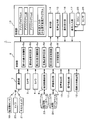
- FIG. 1 is a functional block diagram illustrating an embodiment.
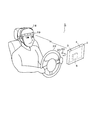
- FIG. 2 is a diagram illustrating a mode in which the user visually checks the display.
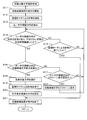
- FIG. 3 is a flowchart (part 1).
- FIG. 4 is a flowchart (part 2).
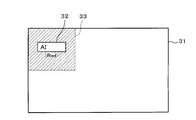
- FIG. 5 is a diagram (part 1) showing a character input screen.
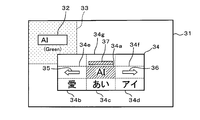
- FIG. 6 is a diagram (part 2) illustrating the character input screen.
- FIG. 7 is a diagram (part 1) illustrating a mode in which the replacement candidate screen is displayed.
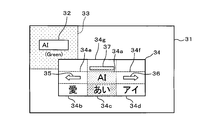
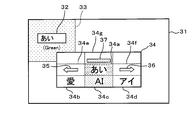
- FIG. 8 is a diagram (part 2) showing a mode in which the replacement candidate screen is displayed.
- FIG. 9 is a diagram (No.
- FIG. 10 is a diagram (part 4) illustrating a mode in which the replacement candidate screen is displayed.
- FIG. 11 is a diagram (No. 5) showing a mode in which the exchange candidate screen is displayed.
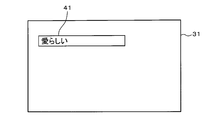
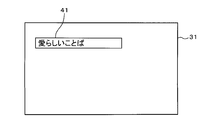
- FIG. 12 is a diagram (part 3) illustrating the character input screen.
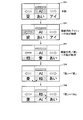
- FIG. 13 is a diagram (part 1) showing transition of the exchange candidate screen.
- FIG. 14 is a diagram (part 2) illustrating the transition of the replacement candidate screen.
- FIG. 15 is a diagram (part 3) illustrating the transition of the replacement candidate screen.
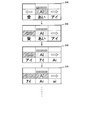
- FIG. 16 is a diagram (part 4) illustrating the transition of the exchange candidate screen.
- FIG. 17 is a diagram (part 5) showing the transition of the exchange candidate screen.
- FIG. 18 is a diagram (part 6) showing transition of the exchange candidate screen.
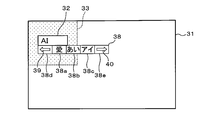
- FIG. 19 is a diagram (No. 6) illustrating a mode in which the replacement candidate screen is displayed.
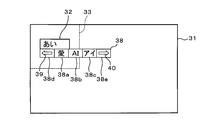
- FIG. 20 is a diagram (part 7) illustrating a mode in which the replacement candidate screen is displayed.
- FIG. 21 is a diagram (part 4) illustrating the character input screen.
- FIG. 22 is a diagram showing the character input screen (No. 5).
- FIG. 23 is a diagram (part 8) illustrating a mode in which the replacement candidate screen is displayed.
- FIG. 24 is a diagram (No. 9) illustrating a mode in which the replacement candidate screen is displayed.
- FIG. 25 is a diagram (No. 10) showing a mode in which the replacement candidate screen is displayed.
- FIG. 26 is a diagram (No.
- FIG. 11 is a diagram (No. 12) showing a mode in which the replacement candidate screen is displayed.
- FIG. 28 is a diagram (No. 13) illustrating an aspect in which an exchange candidate screen is displayed.
- the electronic information processing system 1 includes a display 2 that can be visually recognized by a user who is a driver in a passenger compartment.
- the display device 2 is disposed at a position that does not interfere with the user's forward view.
- the display device 2 includes two cameras 3 and 4 for photographing a user's face, and a control unit 5 including various electronic components.
- the electronic information processing system 1 includes a control unit 6, a communication unit 7, a brain activity detection unit 8, a behavior detection unit 9, a voice detection unit 10, an operation detection unit 11, a line-of-sight direction detection unit 12, and a storage Unit 13, display unit 14, sound output unit 15, operation receiving unit 16, and signal input unit 17.
- the control unit 6 includes a microcomputer having a CPU (Central Processing Unit), a ROM (Read Only Memory), a RAM (Random Access Memory), and an I / O (Input / Output).
- the control unit 6 executes processing corresponding to the computer program by executing the computer program stored in the non-transitional tangible recording medium, and controls the overall operation of the electronic information processing system 1.
- the communication unit 7 includes a brain activity sensor 19 provided in a plurality of headsets 18 attached to the user's head, a microphone 20 that collects voice spoken by the user, and a hand switch 21 that can be operated by the user.
- a brain activity sensor 19 provided in a plurality of headsets 18 attached to the user's head
- a microphone 20 that collects voice spoken by the user
- a hand switch 21 that can be operated by the user.
- short-range wireless communication conforming to a communication standard such as Bluetooth (registered trademark) or WiFi (registered trademark) is performed.
- the microphone 20 is disposed at a position where it is easy to collect a voice uttered by the user, such as around the handle 22.
- the microphone 20 may be attached integrally with the headset 18.
- the hand switch 21 is disposed, for example, at a position where the user can easily operate while holding the handle 22.
- the brain activity sensor 19 irradiates the user's scalp with near infrared light, receives light that is irregularly reflected by the irradiated near infrared light, and monitors the user's brain activity.
- near-infrared light When near-infrared light is irradiated onto the user's scalp, the light component of the near-infrared light diffuses into the brain tissue due to the high biological permeability that penetrates the skin and bones, and is about 20-30 mm from the scalp.
- the brain activity sensor 19 detects the light component irregularly reflected at a location several centimeters away from the irradiation point, utilizing the property that the light absorption characteristics differ between the oxyhemoglobin concentration and the deoxyhemoglobin concentration in the blood.
- the brain activity sensor 19 estimates a change in the oxyhemoglobin concentration and deoxyhemoglobin concentration in the cerebral cortex, and transmits a brain activity monitoring signal indicating the estimated change to the communication unit 7. .
- the brain activity sensor 19 In addition to the oxyhemoglobin concentration and deoxyhemoglobin concentration in the cerebral cortex, the brain activity sensor 19 also estimates a change in total hemoglobin concentration, which is the sum of both, and transmits a brain activity monitoring signal indicating the estimated change to the communication unit 7. You may send to.
- the microphone 20 collects and detects the voice uttered by the user, the microphone 20 transmits a voice detection signal indicating the detected voice to the communication unit 7.
- the hand switch 21 detects a user operation, the hand switch 21 transmits an operation detection signal indicating the detected operation to the communication unit 7.
- the communication unit 7 receives the brain activity monitoring signal, the voice detection signal, and the operation detection signal from the brain activity sensor 19, the microphone 20, and the hand switch 21, respectively, the communication unit 7 receives the received brain activity monitoring signal, voice detection signal, and operation detection signal. Output to the control unit 6.
- the brain activity sensor 19, the microphone 20, and the hand switch 21 are all configured to be wirelessly powered, and no power supply line is required.
- the brain activity detector 8 detects the user's brain activity using NIRS (Near Infra-Red Spectroscopy) technology.
- NIRS Near Infra-Red Spectroscopy
- the brain activity detection unit 8 receives the input brain activity monitoring signal. To detect changes in oxyhemoglobin concentration and deoxyhemoglobin concentration in cerebral cortex.
- the brain activity detection unit 8 stores the brain activity data obtained by digitizing the detection result in the brain activity database 23 one by one, updates the brain activity data stored in the brain activity database 23, and detects the detected brain activity data. Is compared with past brain activity data.
- the brain activity detection unit 8 sets a comfort threshold value and a discomfort threshold value as criteria for determination from the brain activity data stored in the brain activity database 23. If the value of the brain activity data is equal to or greater than the comfort threshold value, the user Detects that you feel comfortable. The brain activity detection unit 8 detects that the user feels normal (that is, neither comfortable nor uncomfortable) if the numerical value of the brain activity data is less than the comfort threshold and greater than the uncomfortable threshold. The brain activity detection unit 8 detects that the user feels uncomfortable if the numerical value of the brain activity data is less than the unpleasant threshold. The brain activity detection unit 8 outputs a detection result signal indicating the detection result of the user's brain activity detected in this way to the control unit 6.
- the behavior detection unit 9 detects the user's behavior using image analysis and voice recognition techniques.
- a video signal is input to the control unit 6 from the cameras 3 and 4
- the behavior detection unit 9 detects the user's eye movement, mouth movement, and facial expression from the input video signal, and the detection result is expressed numerically.
- the converted behavior data is stored in the behavior database 24 one by one, the behavior data stored in the behavior database 24 is updated, and the detected behavior data is collated with past behavior data.
- the behavior detection unit 9 sets a comfort threshold value and a discomfort threshold value as determination criteria from the behavior data stored in the behavior database 24. If the behavior data value is equal to or greater than the comfort threshold value, the user feels comfortable. Detects that The behavior detection unit 9 detects that the user feels normal (that is, neither comfortable nor uncomfortable) if the numerical value of the behavior data is less than the comfort threshold and greater than the uncomfortable threshold. The behavior detection unit 9 detects that the user feels uncomfortable if the numerical value of the behavior data is less than the unpleasant threshold. The behavior detection unit 9 outputs a detection result signal indicating the detection result of the user behavior thus detected to the control unit 6.
- the voice detection signal When the voice detection signal is received by the communication unit 7 from the microphone 20 when the user speaks, and the received voice detection signal is input to the control unit 6, the voice detection signal is input. The voice uttered by the user is detected, and a detection result signal indicating the detected detection result is output to the control unit 6.
- the operation detection signal When the operation detection signal is received by the communication unit 7 from the hand switch 21 when the user operates the hand switch 21, and the received operation detection signal is input to the control unit 6, the operation detection unit 11 receives the input. The user's operation is detected from the detected operation detection signal, and a detection result signal indicating the detected detection result is output to the control unit 6.
- a video signal is input to the control unit 6 from the cameras 3 and 4
- the gaze direction detection unit 12 detects the user's gaze direction from the input video signal, and a detection result signal indicating the detection result is detected by the control unit. 6 is output.
- the storage unit 13 stores a plurality of programs that can be executed by the control unit 6.
- the programs stored in the storage unit 13 include a plurality of types of application programs A, B, C,... That can accept character input in a plurality of character input modes, and a Kana-Kanji conversion program for Japanese input.
- Kana-kanji conversion program for Japanese input is software that performs kana-kanji conversion for inputting Japanese text, also called Japanese input program, Japanese input front-end processor (FEP), Kana-Kanji conversion program. Is done.
- the character input mode includes a half-width alphanumeric input mode, a full-width alphanumeric input mode, a half-width katakana input mode, a full-width katakana input mode, a hiragana input mode, and the like.
- the display unit 14 is configured by, for example, a liquid crystal display or the like, and when a display command signal is input from the control unit 6, a screen specified by the input display command signal is displayed.
- the audio output unit 15 is constituted by, for example, a speaker or the like. When an audio output command signal is input from the control unit 6, the audio output unit 15 outputs audio specified by the input audio output command signal.
- the operation receiving unit 16 includes a touch panel formed on the screen of the display unit 14, a mechanical switch, and the like. When receiving a character input operation from the user, the operation receiving unit 16 displays the content of the received character input operation.
- the character input detection signal shown is output to the control unit 6.
- the signal input unit 17 inputs various signals from various ECUs (Electronic Control Unit) 25 and various sensors 26 mounted on the vehicle.
- the control unit 6 executes various programs stored in the storage unit 13.
- the control unit 6 starts the Kana-Kanji conversion program for Japanese input when the character input mode of the application program being executed is the hiragana input mode.
- the control unit 6 starts Kana-Kanji conversion program for Japanese input in the hiragana input mode to enable Kana character input, and further performs Kana-Kanji conversion (that is, conversion from Kana characters to Kanji). It is possible.
- the control unit 6 includes a first display control unit 6a, a presentation necessity determination unit 6b, a second display control unit 6c, a replacement necessity determination unit 6d, a third display control unit 6e, and a character determination unit 6f. And have.
- Each of these units 6a to 6f is configured by a computer program executed by the control unit 6, and is realized by software.
- the first display control unit 6a When the first display control unit 6a receives a character input operation from the user, the first display control unit 6a causes the display unit 14 to display the received character as an input character.
- the presentation necessity determination unit 6b uses the detection result of the subsequent brain activity detection unit 8 and the detection result of the behavior detection unit 9 when the character accepted by the character input operation from the user is displayed as the input character. It is determined whether or not the exchange candidate character corresponding to the input character needs to be presented.
- the second display control unit 6c causes the display unit 14 to display the exchange candidate character when it is determined by the presentation necessity determination unit 6b that it is necessary to present the exchange candidate character.
- the exchange necessity determination unit 6d exchanges input characters using the detection result of the subsequent gaze direction detection unit 12, the detection result of the brain activity detection unit 8, and the detection result of the behavior detection unit 9. It is determined whether or not it is necessary to exchange with a candidate character. If it is determined that the input character needs to be exchanged with the exchange candidate character, the exchange necessity determining unit 6d selects the exchange target character from the exchange candidate characters.
- the third display control unit 6e displays the exchange target character instead of the input character. Display on the unit 14.
- the character determination unit 6f determines the selected replacement target character as a fixed character.
- the control unit 6 monitors a character input operation from the user (S1), and determines whether or not a character input operation from the user is accepted (S2). Corresponds to the operation acceptance procedure).
- S1 a character input operation from the user
- S2 determines whether or not a character input operation from the user is accepted
- S3 the character corresponding to the character input mode set at that time Is displayed on the display unit 14 as an input character
- the control unit 6 receives the received operation.
- a character is displayed in the character display area 32 as an input character.
- the control unit 6 performs a half-width alphanumeric input mode when the “A” key is first pressed and then the “I” key is pressed as a character input operation from the user. Is set, “AI (half-width)” is displayed in the character display area 32. Further, immediately after the input character is displayed in the character display area 32, the control unit 6 displays the background color of the peripheral area 33 that is the periphery of the character display area 32 in, for example, white.
- the control unit 6 sets “AI (full-width)” if the full-width alphanumeric input mode is set. Display.
- the control unit 6 displays “eye (half-width)” if the half-width katakana input mode is set, and displays “eye (full-width)” if the full-width katakana input mode is set. If is set, “Ai” is displayed.
- a configuration in which a character input operation from the user is accepted when the user speaks may be used. By visually recognizing the character displayed in the character display area 32, the user can determine whether or not the character has been input as intended.
- the control unit 6 analyzes the brain activity data using the detection result signal input from the brain activity detection unit 8 (S4), and analyzes the behavior data using the detection result signal input from the behavior detection unit 9 (S5). .
- the control unit 6 determines the brain activity and behavior of the user at that time, that is, the emotion immediately after visually recognizing the character input by the user through his / her character input operation, and determines whether or not the exchange candidate character needs to be presented (S6, corresponding to the presentation necessity determination procedure).
- the user if the user intends to input single-byte alphanumeric characters, the user visually recognizes that the character has been input as intended. At this time, the user feels comfortable or normal, the user does not feel uncomfortable, and the user's brain activity and behavioral changes are not activated. On the other hand, if the user does not intend to input single-byte alphanumeric characters but intends to input hiragana, for example, the user visually recognizes that a character contrary to his / her intention has been input. At this time, the user feels uncomfortable and changes in the user's brain activity and behavior are activated.
- control unit 6 determines that it is not necessary to present the exchange candidate character (S6: NO).
- the control unit 6 determines the character currently displayed in the character display area 32, that is, the input character as a confirmed character (S7), and ends the character input process. In other words, if the user does not feel uncomfortable with “AI (half-width)” that is an input character input by the character input operation from the user, the control unit 6 sets “AI (half-width)” as a confirmed character. Determine.
- the control unit 6 determines that it is necessary to present the exchange candidate character (S6). : YES). As shown in FIG. 6, the control unit 6 changes the background color of the peripheral region 33 from white to red, for example, and shifts to a replacement target character selection process for displaying replacement candidate characters corresponding to the input characters (S8).
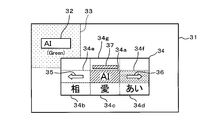
- the control unit 6 When the control unit 6 starts the replacement target character selection process, as shown in FIG. 7, the control unit 6 changes the background color of the peripheral area 33 from red to, for example, green, and displays a pop-up display of the replacement candidate screen 34 on the character input screen 31. Start (S11, corresponding to the second display control procedure), and start counting by the monitoring timer (S12). At this time, the control unit 6 causes the replacement candidate screen 34 to be displayed substantially at the center of the character input screen 31.
- the monitoring timer is a timer that defines the upper limit of the display time of the replacement candidate screen 34.
- the exchange candidate screen 34 has an input character section 34a, exchange candidate character sections 34b to 34d (corresponding to exchange candidate display areas), scroll sections 34e and 34f, and indicator section 34g.
- the control unit 6 displays the characters displayed in the character display area 32, that is, the input characters in the input character section 34a, and displays the exchange candidate characters corresponding to the input characters in the exchange candidate character sections 34b to 34d.
- the control unit 6 displays “AI (half-width)” as an input character in the input character section 34 a, and “Love”, “Ai”, and “Eye (full-width)” are exchange candidates as exchange candidate characters. It is displayed in the character sections 34b to 34d.
- the control unit 6 displays the left arrow icon 35 in the scroll section 34e, displays the right arrow icon 36 in the scroll section 34f, and displays an indicator 37 indicating emotion in the indicator section 34g. At this time, the control unit 6 displays the input character section 34a and the indicator 37 in red.
- the control unit 6 When the control unit 6 pops up the replacement candidate screen 34 on the character input screen 31 in this way, the control unit 6 detects the user's gaze direction using the detection result signal input from the gaze direction detection unit 12 (S13). Then, the control unit 6 determines whether or not the state in which the user's line-of-sight direction is directed to a specific section and the user's brain activity and behavior are not unpleasant continues for a predetermined time (S14), and the time measurement by the monitoring timer is performed. It is determined whether or not it has expired (S15).
- control unit 6 determines that the state in which the user's line-of-sight direction is directed to a specific section and the user's brain activity and behavior are not unpleasant continues for a predetermined time before determining that the time measurement by the monitoring timer has expired. (S14: YES), the section is determined (S16, S17, corresponding to the replacement necessity determination procedure).
- the control unit 6 determines that the section to which the user's line-of-sight direction is directed is the exchange candidate character sections 34b to 34d (S16: YES), the control unit 6 exchanges exchange candidate characters belonging to the section to which the user's line-of-sight direction is directed.
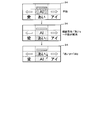
- the target character is selected (S18), and the time measurement by the monitoring timer is terminated (S19). That is, as shown in FIG. 8, if the section in which the user's line of sight is directed is the replacement candidate character section 34c, the control unit 6 sets “ai” belonging to the replacement candidate character section 34c as the replacement target character. select. At this time, the control unit 6 displays the replacement candidate character section 34c in, for example, yellow, and changes the input character section 34a and the indicator 37 from red to green.
- control unit 6 exchanges “AI” belonging to the exchange candidate character section 34c selected as the character to be exchanged with “AI (half-width)” belonging to the input character section 34a.
- the control unit 6 changes the input character section 34a from green to yellow, and changes the replacement candidate character section 34c from yellow to green.
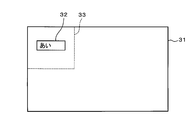
- the control unit 6 changes the character displayed in the character display area 32 from “AI (half-width)” to “Ai” (S20).
- the control unit 6 changes the background color of the peripheral area 33 from green to white (that is, returns to white), and ends the pop-up display of the replacement candidate screen 34 on the character input screen 31 (S21). ),
- the exchange target character selection process is terminated, and the process returns to the character input process.
- the user simply turns the line-of-sight direction to a desired exchange candidate character for a predetermined period of time without changing the character input operation, so that the character displayed in the character display area 32 can be replaced with the desired exchange candidate. Can be changed to letters.
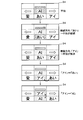
- the control unit 6 determines that the sections to which the user's line-of-sight direction is directed are the scroll sections 34e and 34f (S17: YES), the control unit 6 scrolls and displays the replacement candidate characters (S22), and steps S14 and 15 described above Return to. That is, as shown in FIG. 11, if the section to which the user's line of sight is directed is the scroll section 34e, the control unit 6 scrolls the replacement target characters belonging to the replacement candidate character sections 34b to 34d to the left. “Ai”, “eye (full-width)”, and “eye (half-width)” are displayed in the exchange candidate character sections 34b to 34d. Further, as shown in FIG.
- the control unit 6 scrolls the replacement target characters belonging to the replacement candidate character sections 34b to 34d to the right. And display “phase”, “love”, and “ai” in the exchange candidate character sections 34b to 34d.
- the exchange candidate character belonging to the section to which the user's line-of-sight direction is directed is selected. Select as replacement target character.
- the user can display the desired replacement candidate character simply by directing the gaze direction to the left arrow icon 35 or the right arrow icon 36 for a predetermined time. Can be made.
- the user similarly desires the character displayed in the character display area 32 without performing the character input operation by simply directing the line-of-sight direction to the desired exchange candidate character for a predetermined time. Can be changed to the replacement candidate character.
- control unit 6 determines that the section to which the user's line of sight is directed is not one of the replacement candidate character sections 34b to 34d and the scroll sections 34e and 34f (S16: NO, S17: NO), the above-described steps Return to S14,15.
- control unit 6 determines that the time count by the monitoring timer has expired before it is determined that the state in which the user's line of sight is directed to a specific section and the user's brain activity and behavior are not unpleasant continues for a predetermined time. If it determines (S15: YES), the pop-up display of the exchange candidate screen 34 will be complete
- the control unit 6 determines whether or not the exchange target character has been selected in the exchange target character selection process (S9). When determining that the exchange target character has been selected (S9: YES), the control unit 6 determines the selected exchange target character as a confirmed character (S10, corresponding to a character confirmation procedure), and ends the character input process. That is, the user feels uncomfortable with “AI (half-width)” that is an input character input by the character input operation from the user, and the user determines the line-of-sight direction on the replacement candidate screen 34 and exchanges “ai”, for example. If it is selected as the target character, the control unit 6 confirms “Ai” selected as the replacement target character as a confirmed character.
- AI half-width
- the control unit 6 determines that the character to be exchanged has not been selected (S9: NO)
- the character displayed in the character display area 32 that is, the input character is confirmed as a confirmed character (S7)
- character input processing is performed. Exit.
- the control unit 6 determines the input character as a confirmed character.
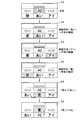
- the control unit 6 determines the fixed character as follows by performing the above processing. If the user intends to input “Ai”, as shown in FIG. 13, the control unit 6 causes the user's line-of-sight direction to be “Ai” and the user's brain activity and behavior are uncomfortable. If it is determined that the non-continuous state has continued for a predetermined time, “AI” and “AI (half-width)” are exchanged, and “AI” is determined as a fixed character. Also, if the user intends to input “eye (full-width)” characters, as shown in FIG. 14, the control unit 6 may display “Ai” even if the user ’s line-of-sight direction is “Ai”. "Is not fixed as a fixed character.
- control unit 6 determines that the user's line-of-sight direction is directed to “eye (full-width)” and the user's brain activity and behavior are not unpleasant for a predetermined time, “eye (full-width)” and “ai” Are exchanged, “eye (full-width)” and “AI (half-width)” are exchanged, and “eye (full-width)” is confirmed as a final character.
- the control unit 6 displays “No” even if the user ’s line-of-sight direction is “Ai” or “Eye”. Do not confirm “Ai” or “Ai” as final characters.
- the control unit 6 determines that the state in which the user's line of sight is directed to “love” and the user's brain activity and behavior are not unpleasant continues for a predetermined time, the control unit 6 exchanges “love” and “ai”, ”And“ AI (half-width) ”are exchanged, and“ Love ”is confirmed as a confirmed character. Further, if the user intends to input “phase” characters, as shown in FIG.
- the control unit 6 causes the user's line-of-sight direction to be directed to the left arrow icon 35 and the user's brain activity and If it is determined that the state in which the behavior is not unpleasant continues for a predetermined time, the replacement candidate character is scroll-displayed to display “phase”.
- the control unit 6 determines that the state in which the user's line of sight is directed to “phase” and the user's brain activity and behavior are not unpleasant continues for a predetermined time, the control unit 6 exchanges “phase” and “love”. ”And“ AI (half-width) ”are exchanged, and“ phase ”is confirmed as a fixed character.
- the control unit 6 moves the replacement candidate character to the left as the time during which the user's line-of-sight direction is directed to the left arrow icon 35 becomes longer. For example, “eye (half-width)”, “Ai (half-width)”, “ai (half-width)”, and the like are sequentially displayed. Further, as shown in FIG. 18, the control unit 6 displays the replacement candidate character in the right direction as the time during which the user's line-of-sight direction is directed to the right arrow icon 36 becomes longer. For example, “phase”, “go”, “indigo”, etc. are sequentially displayed.
- the above is a description of the configuration for determining the user's brain activity and behavior and determining whether or not the exchange candidate character needs to be presented, but determining that the user speaks or that the user operates the hand switch 21, It may be configured to determine whether or not it is necessary to present the exchange candidate character. That is, if the control unit 6 determines that the user has uttered, for example, “present exchange candidate characters” or has operated the hand switch 21 for a predetermined time, the control unit 6 determines that it is necessary to present the exchange candidate characters. Also good.
- the configuration for determining the user's brain activity and behavior and determining whether or not the input character needs to be exchanged with the exchange candidate character has been described.
- the user speaks or the user operates the hand switch 21.
- the configuration may be such that it is determined whether or not the input character needs to be exchanged with the exchange candidate character. That is, if the control unit 6 determines that the user has spoken, for example, “exchanged for that character” or has operated the hand switch 21 for a predetermined time, the control unit 6 determines that the input character needs to be replaced with a replacement candidate character. You may do it.
- the number of the replacement candidate character sections 34b to 34d is set to “3” to display the three replacement candidate characters at the same time, but the number of replacement candidate character sections is set to “4”. It is possible to adopt a configuration in which four or more replacement candidate characters are displayed simultaneously by setting the above.
- the replacement candidate screen 34 is displayed at substantially the center of the character input screen 31. However, as shown in FIG. 19, the replacement candidate screen 38 is displayed directly below the character display area 32. good.
- the exchange candidate screen 38 is a simpler screen than the above-described exchange candidate screen 34, and includes exchange candidate character sections 38a to 38c (corresponding to exchange candidate display areas) and scroll sections 38d and 38e.
- the control unit 6 displays “love”, “ai”, and “eye (full-width)” as exchange candidate characters in the exchange candidate character sections 38a to 38c, displays the left arrow icon 39 in the scroll section 38d, and displays the right arrow icon. 40 is displayed in the scroll section 38e.
- the control unit 6 determines that if the section in which the user's line of sight is directed is the replacement candidate character section 38b, “Ai” belonging to the exchange candidate character section 38b is selected as a character to be exchanged, and the character displayed in the character display area 32 is changed from “AI (half-width)” to “Ai”. Further, if the section to which the user's line of sight is directed is the scroll sections 38d and 38e, the control unit 6 scrolls and displays the replacement target characters belonging to the replacement candidate character sections 38a to 38c.
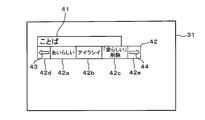
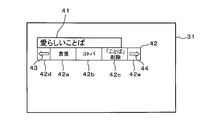
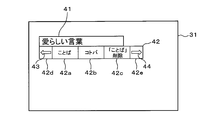
- control unit 6 may be configured to determine whether or not it is necessary to present the exchange candidate character, and determine whether or not the input character needs to be exchanged with the exchange candidate character, with a clause in the sentence as a unit. That is, as shown in FIG. 21, when “Adorable” is received by the operation receiving unit 16 by a character input operation from the user, the control unit 6 displays the received “Adorable” in the character display area 41. . Subsequently, as illustrated in FIG. 22, when the “word” is received by the operation receiving unit 16, the control unit 6 causes the received “word” to be displayed in the character display area 41 following “Adorable”.
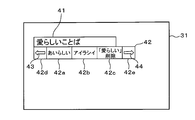
- the control unit 6 determines that it is necessary to present a replacement candidate character, Display exchange candidate characters corresponding to the input characters. That is, the control unit 6 displays the replacement candidate screen 42 immediately below the character display area 41 as shown in FIG.
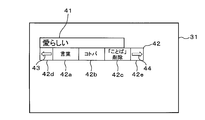
- the exchange candidate screen 42 has exchange candidate character sections 42a to 42c (corresponding to exchange candidate display areas) and scroll sections 42d and 42e.
- the control unit 6 displays “Adorable”, “Irashii”, “Delete“ Adorable ”” as replacement candidate characters corresponding to the first phrase “Adorable” in the replacement candidate character sections 42a to 42c, and the left arrow icon 43 Is displayed in the scroll section 42d, and the right arrow icon 44 is displayed in the scroll section 42e.
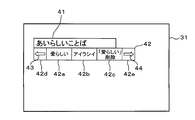
- the control unit 6 sets “word”, “kotoba”, and “deletion of“ word ”” as the exchange candidate character section 42a as the exchange candidate characters corresponding to the next phrase “word”. To 42c. As shown in FIG. 27, if the section to which the user's line of sight is directed is the replacement candidate character section 42a, the control unit 6 selects a “word” belonging to the replacement candidate character section 42a as a replacement target character, The character displayed in the character display area 41 is changed from “word” to “word”. In addition, as shown in FIG. 28, the control unit 6 deletes the “word” displayed in the character display area 41 if the section to which the user's line of sight is directed is the replacement candidate character section 42 c.
- the following effects can be obtained.
- a difference occurs in the user's brain activity and behavior between when a character intended by the user is input and when an unintended character is input. Focused on that.
- the replacement candidate character is displayed. did.
- the exchange target character is selected from the exchange candidate characters, and the selection is performed.
- the exchange target character was confirmed as a confirmed character.
- the user Even if the user does not change the character input mode or the character input operation again, the user selects the intended character from among the exchange candidate characters as the exchange target character and confirms it as the confirmed character. can do. Thereby, the convenience at the time of a user performing character input operation can be improved.
- the conventional method using the time series change of the magnetic field and electric field generated by the action of the language center it uses the difference in the brain activity of the user, so it does not take a lot of processing time, and the number of characters Suitable for character input.
- the replacement target character when a replacement target character is selected from the replacement candidate characters, the replacement target character is displayed in the character display area 32 instead of the input character, and the replacement target character displayed in the character display area 32 is displayed.
- the replacement target character displayed in the character display area 32 was displayed.
- the exchange target character By displaying the exchange target character in the character display area 32 instead of the input character, the user can appropriately know that the input character and the exchange target character have been exchanged.
- the input character needs to be exchanged with the exchange candidate character. It was determined that there was a character, and that particular character was selected as the character to be exchanged. By determining the time during which the user's line-of-sight direction is directed to a specific character, it is possible to easily determine whether or not it is necessary to replace the input character with a replacement candidate character.
- the exchange candidate character in addition to the detection result of the user's brain activity and behavior, it is necessary to present the exchange candidate character corresponding to the input character using the voice uttered by the user and the detection result of the user's operation. The presence or absence was judged. Even when the detection result of the brain activity or behavior of the user is uncertain, the exchange candidate character can be presented by the user speaking the voice or operating the hand switch 21. Further, in addition to the detection result of the user's brain activity and behavior, the voice uttered by the user and the detection result of the user's operation are also used to determine whether or not the input character needs to be exchanged with the exchange candidate character. Even when the detection result of the user's brain activity or behavior is uncertain, the user can exchange the input character with the exchange candidate character by speaking the voice or operating the hand switch 21.
- the exchange candidate characters are displayed in a state where the input characters are displayed in the character display area 32.
- the user can grasp the input character and the exchange candidate character at the same time, and can appropriately select the exchange target character while comparing with the input character.
- a plurality of exchange candidate characters are displayed simultaneously. A character to be exchanged can be appropriately selected while comparing a plurality of exchange candidate characters.
- the input character displayed in the character display area 32 is confirmed as a confirmed character. If the character accepted by the character input operation from the user is an intended character, the input character can be confirmed as a confirmed character as it is.
- the configuration is not limited to the configuration applied to the in-vehicle use, and may be the configuration applied to the usage other than the in-vehicle usage.
- the NIRS technique is used as a technique for detecting the brain activity of the user, but other techniques may be used.
- the detection result of the brain activity detection unit 8 and the detection result of the behavior detection unit 9 are used together. However, only the detection result of the brain activity detection unit 8 is used to determine whether or not it is necessary to present the exchange candidate character. Or determining whether it is necessary to replace the input character with a replacement candidate character.
- the layout of the character input screen and the exchange candidate screen may be a layout other than that illustrated.
Landscapes
- Engineering & Computer Science (AREA)
- Theoretical Computer Science (AREA)
- General Engineering & Computer Science (AREA)
- Physics & Mathematics (AREA)
- Human Computer Interaction (AREA)
- General Physics & Mathematics (AREA)
- Health & Medical Sciences (AREA)
- General Health & Medical Sciences (AREA)
- Audiology, Speech & Language Pathology (AREA)
- Biomedical Technology (AREA)
- Life Sciences & Earth Sciences (AREA)
- Multimedia (AREA)
- Dermatology (AREA)
- Neurology (AREA)
- Neurosurgery (AREA)
- Computational Linguistics (AREA)
- Child & Adolescent Psychology (AREA)
- Hospice & Palliative Care (AREA)
- Psychiatry (AREA)
- Signal Processing (AREA)
- Acoustics & Sound (AREA)
- Medical Informatics (AREA)
- Animal Behavior & Ethology (AREA)
- Ophthalmology & Optometry (AREA)
- Heart & Thoracic Surgery (AREA)
- Artificial Intelligence (AREA)
- Molecular Biology (AREA)
- Surgery (AREA)
- Biophysics (AREA)
- Public Health (AREA)
- Veterinary Medicine (AREA)
- User Interface Of Digital Computer (AREA)
- Document Processing Apparatus (AREA)
- Eye Examination Apparatus (AREA)
- Position Input By Displaying (AREA)
Priority Applications (1)
| Application Number | Priority Date | Filing Date | Title |
|---|---|---|---|
| US16/511,087 US20190339772A1 (en) | 2017-01-18 | 2019-07-15 | Electronic information process system and storage medium |
Applications Claiming Priority (2)
| Application Number | Priority Date | Filing Date | Title |
|---|---|---|---|
| JP2017-006728 | 2017-01-18 | ||
| JP2017006728A JP6790856B2 (ja) | 2017-01-18 | 2017-01-18 | 電子情報処理システム及びコンピュータプログラム |
Related Child Applications (1)
| Application Number | Title | Priority Date | Filing Date |
|---|---|---|---|
| US16/511,087 Continuation US20190339772A1 (en) | 2017-01-18 | 2019-07-15 | Electronic information process system and storage medium |
Publications (1)
| Publication Number | Publication Date |
|---|---|
| WO2018135064A1 true WO2018135064A1 (ja) | 2018-07-26 |
Family
ID=62908047
Family Applications (1)
| Application Number | Title | Priority Date | Filing Date |
|---|---|---|---|
| PCT/JP2017/038718 Ceased WO2018135064A1 (ja) | 2017-01-18 | 2017-10-26 | 電子情報処理システム及びコンピュータプログラム |
Country Status (3)
| Country | Link |
|---|---|
| US (1) | US20190339772A1 (enExample) |
| JP (1) | JP6790856B2 (enExample) |
| WO (1) | WO2018135064A1 (enExample) |
Cited By (1)
| Publication number | Priority date | Publication date | Assignee | Title |
|---|---|---|---|---|
| US20220013117A1 (en) * | 2018-11-20 | 2022-01-13 | Sony Group Corporation | Information processing apparatus and information processing method |
Families Citing this family (3)
| Publication number | Priority date | Publication date | Assignee | Title |
|---|---|---|---|---|
| JP7308430B2 (ja) * | 2018-03-15 | 2023-07-14 | パナソニックIpマネジメント株式会社 | ユーザの心理状態を推定するためのシステム、記録媒体、および方法 |
| WO2023146416A1 (en) * | 2022-01-28 | 2023-08-03 | John Chu | Character retrieval method and apparatus, electronic device and medium |
| US20250291458A1 (en) * | 2024-03-18 | 2025-09-18 | Glorymakeup Inc. | Multi-Tiered Content Navigation Provided by a Graphical User Interface |
Citations (2)
| Publication number | Priority date | Publication date | Assignee | Title |
|---|---|---|---|---|
| JP2010015360A (ja) * | 2008-07-03 | 2010-01-21 | Japan Health Science Foundation | 制御システム及び制御方法 |
| JP2012068963A (ja) * | 2010-09-24 | 2012-04-05 | Nec Embedded Products Ltd | 情報処理装置、選択文字表示方法及びプログラム |
Family Cites Families (7)
| Publication number | Priority date | Publication date | Assignee | Title |
|---|---|---|---|---|
| JP2899194B2 (ja) * | 1993-06-30 | 1999-06-02 | キヤノン株式会社 | 意思伝達支援装置及び意思伝達支援方法 |
| US7013258B1 (en) * | 2001-03-07 | 2006-03-14 | Lenovo (Singapore) Pte. Ltd. | System and method for accelerating Chinese text input |
| JP3949469B2 (ja) * | 2002-02-22 | 2007-07-25 | 三菱電機株式会社 | 脳波信号を用いた制御装置及び制御方法 |
| CN100387192C (zh) * | 2004-07-02 | 2008-05-14 | 松下电器产业株式会社 | 生体信号利用机器及其控制方法 |
| JP2010019708A (ja) * | 2008-07-11 | 2010-01-28 | Hitachi Ltd | 車載装置 |
| JP5544620B2 (ja) * | 2010-09-01 | 2014-07-09 | 独立行政法人産業技術総合研究所 | 意思伝達支援装置及び方法 |
| JP2015219762A (ja) * | 2014-05-19 | 2015-12-07 | 国立大学法人電気通信大学 | 文字入力装置及び文字入力システム |
-
2017
- 2017-01-18 JP JP2017006728A patent/JP6790856B2/ja not_active Expired - Fee Related
- 2017-10-26 WO PCT/JP2017/038718 patent/WO2018135064A1/ja not_active Ceased
-
2019
- 2019-07-15 US US16/511,087 patent/US20190339772A1/en not_active Abandoned
Patent Citations (2)
| Publication number | Priority date | Publication date | Assignee | Title |
|---|---|---|---|---|
| JP2010015360A (ja) * | 2008-07-03 | 2010-01-21 | Japan Health Science Foundation | 制御システム及び制御方法 |
| JP2012068963A (ja) * | 2010-09-24 | 2012-04-05 | Nec Embedded Products Ltd | 情報処理装置、選択文字表示方法及びプログラム |
Cited By (2)
| Publication number | Priority date | Publication date | Assignee | Title |
|---|---|---|---|---|
| US20220013117A1 (en) * | 2018-11-20 | 2022-01-13 | Sony Group Corporation | Information processing apparatus and information processing method |
| US11900931B2 (en) | 2018-11-20 | 2024-02-13 | Sony Group Corporation | Information processing apparatus and information processing method |
Also Published As
| Publication number | Publication date |
|---|---|
| JP6790856B2 (ja) | 2020-11-25 |
| JP2018116468A (ja) | 2018-07-26 |
| US20190339772A1 (en) | 2019-11-07 |
Similar Documents
| Publication | Publication Date | Title |
|---|---|---|
| WO2018135064A1 (ja) | 電子情報処理システム及びコンピュータプログラム | |
| US10730524B2 (en) | Vehicle seat | |
| JP7302005B2 (ja) | 車両のインタラクション方法及び装置、電子機器、記憶媒体並びに車両 | |
| US20210124422A1 (en) | Nonverbal Multi-Input and Feedback Devices for User Intended Computer Control and Communication of Text, Graphics and Audio | |
| US20190295096A1 (en) | Smart watch and operating method using the same | |
| US20190337521A1 (en) | Method and control unit for operating a self-driving car | |
| CN113655938A (zh) | 一种用于智能座舱的交互方法、装置、设备和介质 | |
| US20150331665A1 (en) | Information provision method using voice recognition function and control method for device | |
| US9170724B2 (en) | Control and display system | |
| KR20190141348A (ko) | 전자 장치에서 생체 정보 제공 방법 및 장치 | |
| US10276151B2 (en) | Electronic apparatus and method for controlling the electronic apparatus | |
| CN113287175A (zh) | 互动式健康状态评估方法及其系统 | |
| JPH10260773A (ja) | 情報入力方法及びその装置 | |
| US20240134505A1 (en) | System and method for multi modal input and editing on a human machine interface | |
| US20220219717A1 (en) | Vehicle interactive system and method, storage medium, and vehicle | |
| JP2017045242A (ja) | 情報表示装置 | |
| CN114882999A (zh) | 生理状态检测方法、装置、设备及存储介质 | |
| JP2019182244A (ja) | 音声認識装置及び音声認識方法 | |
| EP3435277A1 (en) | Body information analysis apparatus capable of indicating blush-areas | |
| US10983808B2 (en) | Method and apparatus for providing emotion-adaptive user interface | |
| JP2021174058A (ja) | 制御装置、情報処理システム、および制御方法 | |
| JP6485345B2 (ja) | 電子情報処理システム及びコンピュータプログラム | |
| US10915768B2 (en) | Vehicle and method of controlling the same | |
| CN118918558A (zh) | 一种基于多模态智能化交互提升驾驶信任度的系统及方法 | |
| CN114386763B (zh) | 一种车辆交互方法、车辆交互装置及存储介质 |
Legal Events
| Date | Code | Title | Description |
|---|---|---|---|
| 121 | Ep: the epo has been informed by wipo that ep was designated in this application |
Ref document number: 17892112 Country of ref document: EP Kind code of ref document: A1 |
|
| NENP | Non-entry into the national phase |
Ref country code: DE |
|
| 122 | Ep: pct application non-entry in european phase |
Ref document number: 17892112 Country of ref document: EP Kind code of ref document: A1 |