WO2017134801A1 - 項目名対応付け処理方法、項目名対応付け処理プログラム及び情報処理装置 - Google Patents
項目名対応付け処理方法、項目名対応付け処理プログラム及び情報処理装置 Download PDFInfo
- Publication number
- WO2017134801A1 WO2017134801A1 PCT/JP2016/053389 JP2016053389W WO2017134801A1 WO 2017134801 A1 WO2017134801 A1 WO 2017134801A1 JP 2016053389 W JP2016053389 W JP 2016053389W WO 2017134801 A1 WO2017134801 A1 WO 2017134801A1
- Authority
- WO
- WIPO (PCT)
- Prior art keywords
- item
- item name
- name
- names
- row
- Prior art date
- Legal status (The legal status is an assumption and is not a legal conclusion. Google has not performed a legal analysis and makes no representation as to the accuracy of the status listed.)
- Ceased
Links
Images










Classifications
-
- G—PHYSICS
- G06—COMPUTING OR CALCULATING; COUNTING
- G06Q—INFORMATION AND COMMUNICATION TECHNOLOGY [ICT] SPECIALLY ADAPTED FOR ADMINISTRATIVE, COMMERCIAL, FINANCIAL, MANAGERIAL OR SUPERVISORY PURPOSES; SYSTEMS OR METHODS SPECIALLY ADAPTED FOR ADMINISTRATIVE, COMMERCIAL, FINANCIAL, MANAGERIAL OR SUPERVISORY PURPOSES, NOT OTHERWISE PROVIDED FOR
- G06Q10/00—Administration; Management
- G06Q10/10—Office automation; Time management
-
- G—PHYSICS
- G06—COMPUTING OR CALCULATING; COUNTING
- G06F—ELECTRIC DIGITAL DATA PROCESSING
- G06F40/00—Handling natural language data
- G06F40/10—Text processing
- G06F40/166—Editing, e.g. inserting or deleting
- G06F40/177—Editing, e.g. inserting or deleting of tables; using ruled lines
- G06F40/18—Editing, e.g. inserting or deleting of tables; using ruled lines of spreadsheets
-
- G—PHYSICS
- G06—COMPUTING OR CALCULATING; COUNTING
- G06F—ELECTRIC DIGITAL DATA PROCESSING
- G06F16/00—Information retrieval; Database structures therefor; File system structures therefor
- G06F16/20—Information retrieval; Database structures therefor; File system structures therefor of structured data, e.g. relational data
- G06F16/25—Integrating or interfacing systems involving database management systems
- G06F16/258—Data format conversion from or to a database
-
- G—PHYSICS
- G06—COMPUTING OR CALCULATING; COUNTING
- G06F—ELECTRIC DIGITAL DATA PROCESSING
- G06F16/00—Information retrieval; Database structures therefor; File system structures therefor
- G06F16/20—Information retrieval; Database structures therefor; File system structures therefor of structured data, e.g. relational data
- G06F16/28—Databases characterised by their database models, e.g. relational or object models
- G06F16/284—Relational databases
- G06F16/285—Clustering or classification
-
- G—PHYSICS
- G06—COMPUTING OR CALCULATING; COUNTING
- G06F—ELECTRIC DIGITAL DATA PROCESSING
- G06F40/00—Handling natural language data
- G06F40/10—Text processing
- G06F40/103—Formatting, i.e. changing of presentation of documents
-
- G—PHYSICS
- G06—COMPUTING OR CALCULATING; COUNTING
- G06F—ELECTRIC DIGITAL DATA PROCESSING
- G06F40/00—Handling natural language data
- G06F40/10—Text processing
- G06F40/166—Editing, e.g. inserting or deleting
- G06F40/177—Editing, e.g. inserting or deleting of tables; using ruled lines
Definitions
- the present invention relates to an item name association processing method, an item name association processing program, and an information processing apparatus.
- the local governments have gathered various information about sightseeing spots in the area of the local government and published them on a website on the Internet.
- the local government collects information on the sightseeing spot by receiving information from a facility in the sightseeing spot.
- the consignment company of the local government receives and inputs information on sightseeing spots as open data from the local government.
- the information to be provided is information based on various formats such as various spreadsheet software file formats, CSV (Comma-Separated Values) format, TSV (Tab-Separated Values) format, etc. It is.
- item names may not be unified, such as names and names. Therefore, it is conceivable to unify the item names by associating the collected information item names with the defined standardized vocabulary.
- the present invention provides an item name association processing method, an item name association processing program, and an information processing apparatus that can associate item names with standardized vocabularies.
- the computer executes a process of extracting a plurality of item names from the tabular data.
- the item name association processing method refers to a storage unit in which a plurality of item groups are stored, and which item group includes item names having a predetermined similarity relationship with each of the extracted item names.
- the computer executes a process for determining whether or not.
- the item name association processing method includes a process of selecting, as an association target, an item name having the predetermined similarity for an item name for which a positive determination result is obtained from the plurality of item names.
- the computer runs.
- the item name association processing method associates, for item names for which a negative determination result is obtained, an item group determined to include an item name having the predetermined similarity with another item name.
- the computer executes a process presented as a candidate.
- Item names can be associated with standardized vocabulary.
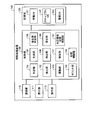
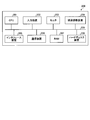
- FIG. 1 is a block diagram illustrating an example of the configuration of the information processing apparatus according to the embodiment.
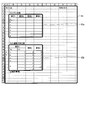
- FIG. 2 is a diagram illustrating an example of tabular data and tabular data.
- FIG. 3 is a diagram illustrating an example of the information DB.
- FIG. 4A is a diagram illustrating an example of a vocabulary DB.
- FIG. 4B is a diagram illustrating an example of a vocabulary DB.
- FIG. 4C is a diagram illustrating an example of a vocabulary DB.
- FIG. 5 is a diagram illustrating an example of the history DB.
- FIG. 6 is a diagram illustrating an example of table data extraction.
- FIG. 7 is a diagram illustrating another example of table data extraction.
- FIG. 8 is a diagram illustrating an example of editing processing.
- FIG. 1 is a block diagram illustrating an example of the configuration of the information processing apparatus according to the embodiment.
- FIG. 2 is a diagram illustrating an example of tabular data and tabular data.
- FIG. 9 is a diagram illustrating another example of the editing process.
- FIG. 10 is a diagram illustrating another example of the editing process.
- FIG. 11 is a diagram illustrating an example of cell connection release in a row that is not an item row.
- FIG. 12 is a diagram illustrating an example of generating item names.
- FIG. 13 is a diagram illustrating another example of generation of item names.
- FIG. 14 is a diagram illustrating an example of specifying item lines.
- FIG. 15 is a diagram illustrating another example of specifying item lines.
- FIG. 16 is a diagram illustrating another example of specifying item lines.
- FIG. 17 is a diagram illustrating another example of specifying item lines.
- FIG. 18 is a diagram illustrating an example of specifying an item string.
- FIG. 10 is a diagram illustrating another example of the editing process.
- FIG. 11 is a diagram illustrating an example of cell connection release in a row that is not an item row.
- FIG. 12 is a diagram illustrating an
- FIG. 19 is a diagram illustrating another example of specifying an item string.
- FIG. 20 is a diagram illustrating an example of adding item lines.
- FIG. 21 is a diagram illustrating another example of adding item lines.
- FIG. 22 is a diagram illustrating an example of the table data after shaping.
- FIG. 23 is a diagram illustrating an example of an assignment screen.
- FIG. 24 is a flowchart illustrating an example of analysis processing according to the embodiment.
- FIG. 25 is a flowchart illustrating an example of a standardization process according to the embodiment.
- FIG. 26 is a diagram illustrating an example of a computer that executes an item name association processing program.
- FIG. 1 is a block diagram illustrating an example of the configuration of the information processing apparatus according to the embodiment.
- the information processing apparatus 100 illustrated in FIG. 1 extracts a plurality of item names from tabular data. Further, the information processing apparatus 100 refers to a storage unit in which a plurality of item groups are stored, and which item group includes item names having a predetermined similarity with each of the extracted item names. judge. Further, the information processing apparatus 100 selects, as an association target, an item name having a predetermined similarity relationship for an item name for which a positive determination result is obtained from among a plurality of item names.
- the information processing apparatus 100 presents, as an association candidate, an item group determined to include an item name having a predetermined similarity relationship with other item names for item names for which a negative determination result is obtained. To do.
- the information processing apparatus 100 can associate the item name with the standardized vocabulary. In the following description, the description will be made mainly focusing on the row direction, but the same applies to the column direction.
- the information processing apparatus 100 illustrated in FIG. 1 includes a communication unit 110, a display unit 111, an operation unit 112, a storage unit 120, and a control unit 130.
- the information processing apparatus 100 may include various functional units included in known computers, for example, functional units such as various communication devices, input devices, and audio output devices, in addition to the functional units illustrated in FIG. .
- a stationary computer such as a server can be employed.
- the information processing apparatus 100 not only a stationary computer such as the server described above but also a portable or stationary personal computer can be adopted as the information processing apparatus 100.
- the communication unit 110 is realized by, for example, a NIC (Network Interface Card).
- the communication unit 110 is a communication interface that is connected to a terminal device of a user (not shown) via a network (not shown) in a wired or wireless manner and manages information communication with the terminal device.
- the communication unit 110 receives tabular data and selection information from the terminal device.
- the communication unit 110 outputs the received tabular data and selection information to the control unit 130. Further, the communication unit 110 receives an assignment screen from the control unit 130.
- the communication unit 110 transmits the input assignment screen to the terminal device.
- FIG. 2 is a diagram illustrating an example of tabular data and tabular data.
- the tabular data 11 illustrated in FIG. 2 is data including, for example, a plurality of tabular data 12a and 12b, a title of the tabular data 11, and the like.
- data of one entire file is expressed as tabular data
- individual tables in the tabular data are expressed as tabular data.
- table data having items (headers) in the uppermost row table data having items in the uppermost row and the leftmost column, and cells are connected to represent small items.
- the table data is not limited to these, and any data may be used as long as the data can be expressed in the form of a matrix.
- the tabular data can be, for example, open data provided from a public office or a local government.
- the display unit 111 is a display device for displaying various information.
- the display unit 111 is realized by, for example, a liquid crystal display as a display device.
- the display unit 111 displays various screens such as a display screen input from the control unit 130.
- the operation unit 112 is an input device that receives various operations from the administrator of the information processing apparatus 100.
- the operation unit 112 is realized by, for example, a keyboard or a mouse as an input device.
- the operation unit 112 outputs an operation input by the administrator to the control unit 130 as operation information.
- the operation unit 112 may be realized by a touch panel or the like as an input device, and the display device of the display unit 111 and the input device of the operation unit 112 may be integrated.
- the storage unit 120 is realized by, for example, a semiconductor memory element such as a RAM (Random Access Memory) or a flash memory, or a storage device such as a hard disk or an optical disk.
- the storage unit 120 includes an information database 121, a vocabulary database 122, and a history database 123. In the following description, the database is abbreviated as DB.
- the storage unit 120 stores information used for processing in the control unit 130.
- the information DB 121 stores items, values, and vocabulary in association with each other for table data.
- FIG. 3 is a diagram illustrating an example of the information DB. As illustrated in FIG. 3, the information DB 121 includes items such as “row”, “item”, “value”, “standardized vocabulary”, and “group”. Information DB121 memorizes as one record for every cell which constitutes table data, for example.
- “Row” is information indicating the row of cells in which data is input, that is, the number of data rows.
- “Item” is information indicating an item corresponding to a cell, that is, an item name.
- “Value” is information indicating data stored in a cell.
- “Standardized vocabulary” is information indicating the standardized vocabulary associated with the item, that is, the item name.
- “Group” is information indicating a group to which the standardized vocabulary belongs. The group is also referred to as an item group. In the example of the first row in FIG. 3, the value of the item “x1” in the “1” row of the table data is “y1”, the standardized vocabulary associated with the item “x1” is “B01”, and the group is “ G02 ". In the description of FIG.
- items, values, standardized vocabularies, and groups are represented by symbols and numbers for the sake of simplicity. For example, in a certain record, an item “address”, a value “Tokyo Metropolitan ...”, a standardized vocabulary “address”, and a group “common” are stored in association with each other.
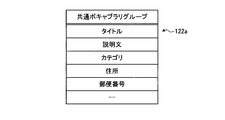
- FIG. 4A is a diagram illustrating an example of a vocabulary DB.
- FIG. 4A shows a group that stores a common vocabulary common to all industries among standardized vocabularies.
- the common vocabulary group 122a of the vocabulary DB 122 stores, for example, a vocabulary common to all industries such as “title” and “description” together with the group name “common vocabulary group”.
- the group name may be omitted and “common” may be used.
- the vocabulary DB 122 may be used by fetching the database, or if there is no existing database, it may be newly generated.
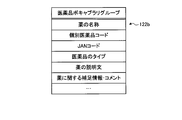
- FIG. 4B is a diagram illustrating an example of a vocabulary DB.
- FIG. 4B shows a pharmaceutical vocabulary group that is an example of a group that stores vocabularies for each type of industry among standardized vocabularies.
- the drug vocabulary group 122b of the vocabulary DB 122 stores, for example, a vocabulary common to drugs such as “drug name” and “individual drug code” together with the group name “pharmaceutical vocabulary group”.
- the group name may be omitted and “medicine” may be used.
- FIG. 4C is a diagram illustrating an example of a vocabulary DB.
- FIG. 4C shows a transaction vocabulary group that is an example of a group that stores vocabularies for each type of industry among standardized vocabularies.
- the transaction vocabulary group 122c of the vocabulary DB 122 stores, for example, a vocabulary common to transactions such as “transaction creditor” and “transaction debtor” together with the group name “transaction vocabulary group”.
- the group name may be omitted and “transaction” may be used.
- the common vocabulary group 122a, the pharmaceutical vocabulary group 122b, and the transaction vocabulary group 122c are examples of a predetermined item group.
- the history DB 123 stores a history in which association was performed in the past by manual determination.
- FIG. 5 is a diagram illustrating an example of the history DB.
- the history DB 123 includes items such as “item name”, “standardized vocabulary”, and “group”.
- the history DB 123 stores, for example, one record for each item name.
- the history DB 123 stores a correspondence relationship between the adopted candidate and the item name from which a negative determination result is obtained.
- the history DB 123 can present a more appropriate standardized vocabulary by using the history of all users.
- “Item name” is information indicating the item name extracted from the tabular data and manually determined.
- “Standardized vocabulary” is information indicating the standardized vocabulary adopted as a result of manual determination.
- “Group” is information indicating a group to which the standardized vocabulary belongs. The example of the first line in FIG. 5 indicates that the standardized vocabulary “telephone number” belonging to the group “common” is adopted in the manual determination for the item name “TEL”.
- control unit 130 executes, for example, a program stored in an internal storage device using a RAM as a work area by a CPU (Central Processing Unit), an MPU (Micro Processing Unit), or the like. Is realized.
- the control unit 130 may be realized by an integrated circuit such as ASIC (Application Specific Integrated Circuit) or FPGA (Field Programmable Gate Array).
- the control unit 130 includes a determination unit 131, an extraction unit 132, an editing unit 133, a counting unit 134, a generation unit 135, a detection unit 136, a specifying unit 137, and a storage control unit 138.
- the control unit 130 includes an item group determination unit 139, a presentation unit 140, and a correspondence relationship storage control unit 141, and realizes or executes functions and operations of information processing described below. Note that the internal configuration of the control unit 130 is not limited to the configuration illustrated in FIG. 1, and may be another configuration as long as the information processing described below is performed.
- the determination unit 131 determines the presence or absence of a cell in which data is input for each row or each column of the input table format data. That is, the determination unit 131 determines whether there is a data input cell of tabular data. The determination unit 131 outputs the tabular data and the determination result to the extraction unit 132.
- the extraction unit 132 When the tabular data and the determination result are input from the determination unit 131, the extraction unit 132, based on the determination result, from the tabular data, a plurality of continuous row or column clusters in which cells to which data is input exist. Are extracted as a portion related to one table data. That is, the extraction unit 132 sandwiches one or a plurality of continuous rows or columns in which cells into which data is input are sandwiched between one or more continuous rows or columns in which no data is input. When two are detected, each of the two chunks is extracted as different table data. When extracting the table data, the extraction unit 132 outputs the extracted table data to the editing unit 133 and the generation unit 135 as first table data. Further, the extraction unit 132 stores the first table data in the storage unit 120.
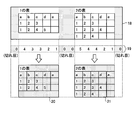
- FIG. 6 is a diagram illustrating an example of table data extraction.
- FIG. 6 shows an example in which a plurality of table data exist in the vertical direction.
- the number of data inputs 14 in each row is detected for the tabular data 13. For example, in the tabular data 13, since the title of the tabular data 13 is input to one cell in the first row, the data input number 14 is “1”. In the second row, since there is no cell in which data is input, the data input number 14 is “0”. Similarly, the number of data inputs 14 in each row is detected.
- the extraction unit 132 determines that the row whose data input number 14 is “0” is a break of the table data, and divides the tabular data 13 by the break.
- a lump that is a part related to the divided table data is also referred to as a cluster.
- the tabular data 13 is divided into a cluster 15, a cluster 16, and a cluster 17.
- the cluster 15 is the title of the tabular data 13.
- the cluster 16 is the first table data.
- the cluster 17 is the second table data.
- the extraction unit 132 extracts the cluster 16 and the cluster 17 as first table data. Note that the extracted first table data is expanded in a tabular format using, for example, a two-dimensional array on a memory. In the following description, the same applies to each table data based on the first table data.
- FIG. 7 is a diagram showing another example of table data extraction.
- FIG. 7 shows an example in which a plurality of table data exist in the horizontal direction.
- the number of data inputs 19 in each column is detected for the tabular data 18.
- the tabular data 18 there is no cell in which data is input in the first column, so the data input number 19 is “0”.
- the title of the tabular data 18 is input to the first row, “a” is input to the second row, “1” is input to the third row, and “1” is input to the fourth row. Equation 19 is “4”.
- the number of data inputs 19 in each column is detected.
- the extraction unit 132 determines that the column whose data input number 19 is “0” is a break of the table data, and divides the tabular data 18 by the break.
- the tabular data 18 is divided into a cluster 20 and a cluster 21.
- the cluster 20 is the first table data.
- the cluster 21 is the second table data.
- the extraction unit 132 extracts the cluster 20 and the cluster 21 as first table data. Note that the cluster 20 has no data input cell in the fifth row as compared with the cluster 21, but adds a null character to the fifth row to make the table size uniform.
- the editing unit 133 executes an editing process on the input first table data.
- the editing unit 133 tentatively determines the uppermost row or the leftmost column among the cells constituting the table excluding the title cell in the first table data as an item row or an item column.
- the title cell can be determined as the uppermost or leftmost row or column in the first table data in which the number of data inputs used by the extraction unit 132 is “1”.
- the editing unit 133 divides the specific cell into unit cells when the specific cell subjected to the cell concatenation process is included in the temporarily determined item row or item column. Further, the editing unit 133 inputs the same data as the data input to the specific cell to each of the divided unit cells.
- the editing unit 133 outputs the table data for which the editing process has been completed to the counting unit 134 and the generation unit 135 as second table data. Further, the editing unit 133 counts the input first table data as the second table data as it is when the specified row or column does not include a specific cell subjected to the cell concatenation process. 134 and the generation unit 135.
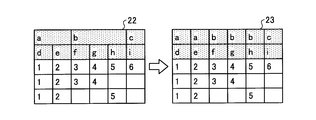
- FIG. 8 is a diagram illustrating an example of editing processing.
- the first row of the first table data 22 includes a cell that has been subjected to cell concatenation processing. That is, the cells with the values “a” and “b” are specific cells that have been subjected to the cell concatenation process.
- the editing unit 133 divides a specific cell into unit cells, and inputs the values “a” and “b” to each of the divided unit cells.
- the editing unit 133 outputs the second table data 23 for which the editing process has been completed to the counting unit 134 and the generating unit 135.
- FIG. 9 is a diagram illustrating another example of the editing process.
- the values “a” and “b” of specific cells subjected to the cell concatenation process of the first table data 24 are input to each of the divided unit cells.
- the second table data 25 is used.
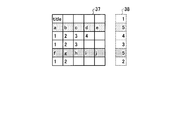
- FIG. 10 is a diagram illustrating another example of the editing process.
- the first column of the first table data 26 includes a cell that has been subjected to cell connection processing. That is, the cells with the values “g” and “h” are specific cells that have been subjected to the cell concatenation process.
- the editing unit 133 divides a specific cell into unit cells, and inputs the values “g” and “h” to each of the divided unit cells.
- the editing unit 133 outputs the second table data 27 for which the editing process has been completed to the counting unit 134 and the generating unit 135.
- the editing unit 133 divides a specific cell that has been subjected to cell connection processing in the row direction and a specific cell that has been subjected to cell connection processing in the column direction into unit cells, and each of the divided unit cells Enter the value of a specific cell in.
- FIG. 11 is a diagram showing an example of cell decoupling in a row that is not an item row.
- the last row of the first table data 28, that is, the fourth row includes cells that have been subjected to cell concatenation processing. That is, the cell with the value “100” is a specific cell that has been subjected to the cell concatenation process.
- the editing unit 133 divides a specific cell into unit cells and inputs the value “100” to one of the divided unit cells.
- the editing unit 133 outputs the second table data 29 for which the editing process has been completed to the counting unit 134 and the generating unit 135.
- FIG. 11 is a diagram showing an example of cell decoupling in a row that is not an item row.
- the counting unit 134 counts the number of cells in which data is input for each row or column in the second table data. To do. That is, the count unit 134 counts the number of cells in which data is input in the row or column cluster for each row or column. The count unit 134 outputs the number of cells counted for each row or column to the detection unit 136 as a count value.
- the first table data is input from the extraction unit 132 and the second table data is input from the editing unit 133 to the generation unit 135.
- the generation unit 135 temporarily determines the uppermost row or the leftmost column as the item row or the item column among the cells constituting the table excluding the title cell in the input first table data. .
- the title cell can be determined in the same manner as the editing unit 133.
- the generation unit 135 may include a plurality of consecutive item rows or a plurality of consecutive items including a range including the specific cell when the specific cell subjected to the cell concatenation process is included in the temporarily determined item row or item column. Temporarily determine the column.
- the generation unit 135 includes a row or column including each unit cell obtained by dividing a specific cell, and a row or column adjacent to the lower side or right side of the row or column, a plurality of consecutive item rows or columns. Temporarily determine a sequence of multiple items.
- the generating unit 135 When the generating unit 135 temporarily determines a plurality of continuous item rows or a plurality of continuous item strings, the generating unit 135 generates item names for the second table data input from the editing unit 133. That is, the generation unit 135 includes the values of connected cells including cells in the same column or the same column, or cells in the same row or the same row, for a plurality of consecutive item rows or a plurality of continuous item columns that are temporarily determined. A value obtained by combining the values of linked cells is generated as an item name. Note that a connected cell is a specific cell that has been subjected to cell connection processing. The generation unit 135 outputs the second table data to which the generated item name is applied to the detection unit 136 as third table data. If the determined item row or item column does not include the specific cell subjected to the cell concatenation process, the generation unit 135 uses the input second table data as it is as the third table data to the detection unit 136. Output.
- FIG. 12 is a diagram illustrating an example of generating item names.
- the generation unit 135 tentatively determines the first row and the second row as item rows and the first and second columns as item rows for the first table data 30.
- the generation unit 135 generates, as the item names of the item rows, the values obtained by combining the values of the connected cells including cells in the same column or the same column in the first row and the second row.
- the synthesized value is generated based on the second table data (not shown) in which the cell connection process is canceled for a specific cell that has been subjected to the cell connection process.
- the generation unit 135 generates “b / f” obtained by combining “b” in the first row and the third column of the first table data 30 and “f” in the second row and the third column in one row of the third table data 31. Generated as item names in two columns.
- the generation unit 135 generates a value obtained by combining the values of the linked cells including cells in the same row or the same row as the item names of the item columns in the first column and the second column. For example, the generation unit 135 generates “j / m” obtained by combining “j” in the third row and first column of the first table data 30 and “m” in the third row and second column in the second row of the third table data 31. Generated as one column item name. In the first table data 30, the four cells of 1 row 1 column, 1 row 2 column, 2 rows 1 column, and 2 rows 2 columns are connected and the value is “a”. In this case, the item name in the first row and the first column is “a”.
- FIG. 13 is a diagram showing another example of generating item names.
- the generation unit 135 tentatively determines the first row and the second row as item rows for the first table data 32.
- the generation unit 135 generates, as the item names of the item rows, the values obtained by combining the values of the connected cells including cells in the same column or the same column in the first row and the second row.
- the synthesized value is generated based on the second table data (not shown) in which the cell connection process is canceled for a specific cell that has been subjected to the cell connection process.
- the generation unit 135 generates “a / d” obtained by combining “a” in the first row and the first column of the first table data 32 and “d” in the second row and the first column into one row of the third table data 33. Generated as one column item name.
- the generation unit 135 generates, for example, “a / e” obtained by combining “a” in the first row and the second column of the first table data 32 and “e” in the second row and the second column in the third table data 33. It is generated as an item name of 1 row and 2 columns.
- the count value is input from the count unit 134 and the third table data is input from the generation unit 135 to the detection unit 136.
- the detection unit 136 detects the uppermost row or the leftmost column among the rows or columns with the maximum input count value with respect to the input third table data.
- the detection unit 136 outputs the detected uppermost row or leftmost column as a detection result to the specifying unit 137 together with the count value and the third table data.
- the detection result, count value, and third table data are input from the detection unit 136 to the identification unit 137.
- the specifying unit 137 specifies the uppermost row or the leftmost column among the rows or columns having the maximum count value as a row or column indicating a table item. That is, the specifying unit 137 specifies an item row or an item column.
- the specifying unit 137 sets the third table data that has been specified as fourth table data.
- the specifying unit 137 outputs the specified item row or item column and the fourth table data to the storage control unit 138.
- the specifying unit 137 may specify the item row or the item column based on the detection result, the count value, and the third table data. If the count value corresponding to the lower row adjacent to the detected uppermost row is not the maximum, the specifying unit 137 specifies the uppermost row as a row indicating a table item. Alternatively, the specifying unit 137 specifies the leftmost column as a column indicating a table item when the count value corresponding to the rightmost column adjacent to the detected leftmost column is not the maximum. That is, the specifying unit 137 specifies an item row or an item column. The specifying unit 137 sets the third table data that has been specified as fourth table data. The specifying unit 137 outputs the specified item row or item column and the fourth table data to the storage control unit 138.
- the specifying unit 137 may specify an item row or an item column based on the proportion of cells in which non-numeric data is input.
- the specifying unit 137 selects items based on the proportion of cells in which non-numeric data is input among the cells in the row. Identify the line to show.
- the specifying unit 137 is based on the proportion of cells in which non-numeric data is input among the cells in the column for the plurality of columns. , Specified as a column indicating an item.
- the specifying unit 137 specifies an item row or an item column.
- the specifying unit 137 sets the third table data that has been specified as fourth table data.
- the specifying unit 137 outputs the specified item row or item column and the fourth table data to the storage control unit 138.
- the specifying unit 137 may specify the item row or the item column by adopting the item row or the item column temporarily determined by the editing unit 133. Furthermore, the specifying unit 137 may use a plurality of continuous item rows or a plurality of continuous item columns temporarily determined by the generation unit 135 to specify the item rows or the item columns. The specifying unit 137 sets the third table data that has been specified as fourth table data. The specifying unit 137 outputs the specified item row or item column and the fourth table data to the storage control unit 138.
- the specifying unit 137 regards the uppermost row or the leftmost column as the item row or the item column, and sets the item row or the item column. May be specified.
- the specifying unit 137 selects the uppermost row or column from the row or column having the maximum count value even when the uppermost row or the leftmost column includes a cell whose input data is not an item name.
- the leftmost column is specified as an item row or item column.
- the specifying unit 137 sets the third table data that has been specified as fourth table data.
- the specifying unit 137 outputs the specified item row or item column and the fourth table data to the storage control unit 138.
- the specifying unit 137 may add a new item row or item column when the input data includes overlapping cells. When the uppermost row or the leftmost column among the rows or columns with the maximum count value includes cells in which the input data overlaps, the specifying unit 137 further moves to the uppermost or leftmost side of the uppermost row. Add a new row or column to the left of the column. The specifying unit 137 specifies the added row or column as an item row or item column. The specifying unit 137 sets the third table data that has been specified by adding a new row or column as the fourth table data. The specifying unit 137 outputs the specified item row or item column and the fourth table data to the storage control unit 138.
- the specifying unit 137 may add a new item row or item column when the uppermost row or the leftmost column includes a blank cell.
- a blank cell is represented by a null character (NULL). If the uppermost row or the leftmost column among the rows or columns having the maximum count value includes a blank cell, the specifying unit 137 further moves to the left of the uppermost row or the leftmost column. Add a new row or column to The specifying unit 137 specifies the added row or column as an item row or item column.
- the specifying unit 137 sets the third table data that has been specified by adding a new row or column as the fourth table data.
- the specifying unit 137 outputs the specified item row or item column and the fourth table data to the storage control unit 138.
- FIG. 14 is a diagram illustrating an example of specifying item lines.
- the example of FIG. 14 is a case where an item row is specified when there is one row with the maximum count value.
- the second row is “5”, which is the maximum.
- the specifying unit 137 specifies the second row as an item row because the count value of the third row, which is the lower row adjacent to the second row, is “4” and not the maximum.
- FIG. 15 is a diagram showing another example of specifying item rows.
- the example of FIG. 15 is a case where an item row is specified when there are a plurality of rows having the maximum count value.
- the second row and the fifth row are “5”, which is the maximum.
- the specifying unit 137 specifies the second row, which is the uppermost row among the rows having the largest count value, as the item row.
- FIG. 16 is a diagram showing another example of specifying item rows.
- the example of FIG. 16 is a case where an item row is specified based on the ratio of cells in which non-numeric data is input.
- the third table data 41 when the count value 42 is viewed, the second row and the third row are “5”, which is the maximum. Note that the count values 42 of other rows are omitted.
- the ratio 43 of cells in which non-numeric data is input is 100% for the second row and 40% for the third row.
- the specifying unit 137 determines whether or not the ratio of the third row adjacent to the second row is 50% or more, for example. Since the ratio of the third row is 40%, the specifying unit 137 determines that the third row is not an item row and specifies the second row as an item row.
- FIG. 17 is a diagram showing another example of specifying item lines.
- the example of FIG. 17 is a case where an item row is specified based on the ratio of cells in which non-numeric data is input.
- the third table data 46 when the count value 47 is viewed, the second and third rows are “5”, which is the maximum. Note that the count values 47 of other rows are omitted.
- the ratio 48 of cells in which non-numeric data is input is 100% for the second row and 60% for the third row.
- the specifying unit 137 determines whether or not the ratio of the third row adjacent to the second row is 50% or more, for example.
- the specifying unit 137 determines that the third line is an item line, and specifies the second and third lines as item lines.
- the numerical data entered in the item row for example, the number of transportation means and the like can be mentioned.
- FIG. 18 is a diagram showing an example of specifying an item string.
- the example of FIG. 18 is a case where the leftmost column is regarded as the item column and the item column is specified when the table has no item column.
- the first row is an item row, but data is input to cells in the first column after the second row.
- the identifying unit 137 regards the first column, which is the leftmost column, as an item column, and identifies the first column as an item column.
- FIG. 19 is a diagram showing another example of specifying an item string.
- the example of FIG. 19 is a case where the leftmost column is regarded as the item column and the item column is specified when the table has no item column.
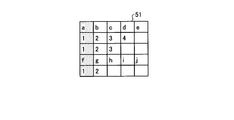
- the first table data 53 is a specific cell in which a cell of 1 row and 1 column is connected to a cell of 1 row and 2 columns.
- the specific unit 137 since the specific unit 137 includes the specific cell in the first column, the column including the specific cell, that is, the first column and the second column are regarded as the item columns, and the first column and the second column. Identify the eye as an item sequence.
- the specifying unit 137 specifies an item string by referring to the first table data stored in the storage unit 120 in addition to the detection result, the count value, and the third table data.
- FIG. 20 is a diagram showing an example of adding item lines.
- the example of FIG. 20 is a case where a new item row or item column is added when the input data includes overlapping cells.
- the third table data 56 includes cells in which both the data in the first row and the first column and the data in the first row and the second column are “a” and the data inputted in the first row overlap.
- the specifying unit 137 adds a new row to the upper side of the uppermost row to obtain fourth table data 58.
- the specifying unit 137 specifies the added row 59 of the fourth table data 58 as an item row.
- FIG. 21 is a diagram showing another example of adding item lines.
- the example of FIG. 21 is a case where a new item row is added when the uppermost row includes a blank cell.
- the specifying unit 137 adds a new row to the upper side of the uppermost row to obtain fourth table data 62.
- the specifying unit 137 specifies the added row 63 of the fourth table data 62 as an item row.
- the third table data 60 there are blank cells in other rows, and the first row is included in the row with the maximum count value. In such a case, the second and subsequent lines are not misrecognized as item lines, which is applicable.
- FIG. 22 is a diagram showing an example of the table data after shaping.
- the fourth table data 64 shown in FIG. 22 is table data after the item row or the item column is specified by the specifying unit 137, that is, after the shaping.
- the fourth table data 64 has an item row 65, a data row number 66, and a data portion 67. That is, the fourth table data 64 is in a state in which the number of rows and the item name are associated with each data (cell value).
- the data row number 66 may not be included in the fourth table data 64, and may be added by counting the number of rows when stored in the information DB 121.
- the storage control unit 138 receives the item row or item column specified from the specifying unit 137 and the fourth table data.
- the storage control unit 138 uses the input data of each cell of the item row or item column as the item name based on the specified item row or item column and the fourth table data, and the item corresponding to the value of each row or each column
- the information is stored in the information DB 121 in association with the name and the number of data rows.
- the storage control unit 138 outputs a determination instruction to the item group determination unit 139.
- Each unit from the determination unit 131 to the storage control unit 138 corresponds to an item name extraction unit that extracts input data of each cell of the item row or item column identified from the tabular data as an item name.
- the item group determination unit 139 refers to the information DB 121, the vocabulary DB 122, and the history DB 123 to determine an item group (group) corresponding to each item name. That is, the item group determination unit 139 refers to the vocabulary DB 122 and the history DB 123 in which a plurality of item groups are stored, and determines which item name has a predetermined similarity with each of the plurality of item names stored in the information DB 121. It is determined whether it is included in the item group.
- the item group determination unit 139 reads item names in order from the first record of the information DB 121 and shapes the item names.
- the item group determination unit 139 formats the item name by removing, from the read item name, for example, an annotated element such as parentheses or a space before and after the item name. For example, when the item group determination unit 139 reads the item name “public transportation (JR)”, the item group determination unit 139 shapes the item into “public transportation”.
- JR public transportation
- the item group determination unit 139 refers to the vocabulary DB 122 and executes matching with the standardized vocabulary using the item name after shaping.
- the item group determination unit 139 determines whether the item name matches the standardized vocabulary.
- the item group determination unit 139 determines that matching is performed when the item name and the standardized vocabulary completely match or partially match during matching. For example, when the item name is “public transportation” and the standardized vocabulary is “public transportation”, the item group determination unit 139 determines that the items match completely, and the standardized vocabulary is “transportation”. Judge as a match.
- the item group determination unit 139 adopts the matched standardized vocabulary when the item name matches the standardized vocabulary.
- the item group determination unit 139 stores the adopted standardized vocabulary and the group to which the standardized vocabulary belongs in the information DB 121.
- the item group determination unit 139 checks the item name against the history DB 123. That is, the item group determination unit 139 performs matching of the item name with the past manual determination association history. The item group determination unit 139 determines whether the item name matches the item name in the history DB 123. At this time, the item group determination unit 139 determines that matching has been performed when the item name completely matches the item name in the history DB 123. For example, when the item name is “Bus”, the item group determination unit 139 determines that the item name “Bus” in the history DB 123 matches and matches.
- the item group determination unit 139 adopts the standardized vocabulary of the history DB 123 when the item name matches the item name of the history DB 123.
- the item group determination unit 139 employs a standardized vocabulary “public transportation” associated with the item name “bus” in the history DB 123.
- the item group determination unit 139 stores the adopted standardized vocabulary and the group to which the standardized vocabulary belongs in the information DB 121.
- the item group determination unit 139 adds the item name to the manual determination stock.
- the manual determination stock is a storage area provided in the storage unit 120.
- the item group determination unit 139 refers to the vocabulary DB 122 and the history DB 123, and to which group (item group) the standardized vocabulary having a predetermined similarity relationship that completely matches or partially matches the item name is included. Determine whether. If the result is a positive determination result, the item group determination unit 139 stores the adopted standardized vocabulary and the group to which the standardized vocabulary belongs in the information DB 121. The item group determination unit 139 does not store the standardized vocabulary and the group in the information DB 121 if the determination result is negative.
- the history DB 123 to be referred to may be a database that stores a history corresponding to a group for each business type. In this case, the item group determination unit 139 can preferentially determine the history of the industry.
- the item group determination unit 139 determines whether or not matching of all item names has been completed.
- the item group determination unit 139 repeats matching for the item name of the next record in the information DB 121 when matching of all item names is not completed.
- the item group determination unit 139 outputs a presentation instruction to the presentation unit 140 when matching of all item names is completed.
- the presentation unit 140 When the presentation instruction is input from the item group determination unit 139, the presentation unit 140 stores the item name for which a positive determination result is obtained, that is, the item name in which the standardized vocabulary and the group are stored in the information DB 121.
- the standardized vocabulary that has been set is selected as the target of association. That is, the presentation unit 140 automatically selects a standardized vocabulary stored in the vocabulary DB 122 or the history DB 123 for the item name.
- the presenting unit 140 outputs the selected standardized vocabulary and group and the corresponding item name to the correspondence storage control unit 141.
- the presentation unit 140 has a predetermined similarity relationship that the item name for which a negative determination result is obtained, that is, the item name stored in the manual determination stock, is completely or partially matched with the other item names in the table.
- a group including a standardized vocabulary having “” is presented as an association candidate.
- the presentation unit 140 transmits an allocation screen for presenting standardized vocabulary candidates, that is, association candidates, to the item names stored in the manual determination stock to the terminal device (not shown) via the communication unit 110 for display.
- the presentation unit 140 receives selection information from a terminal device (not shown) via the communication unit 110.
- the presentation unit 140 receives the selection information, and outputs the standardized vocabulary and the group that received the selection to the corresponding storage control unit 141.
- the presentation unit 140 may further present a predetermined item group as another association candidate. For example, in addition to the standardized vocabulary belonging to the group “medicine”, the presenting unit 140 may present the standardized vocabulary belonging to the group “common” as the association candidate.
- the presentation unit 140 selects other item names extracted from the same table among the plurality of tables. And a group including item names having a predetermined similarity relationship may be presented as association candidates. That is, the presentation unit 140 may present a group including a standardized vocabulary that completely or partially matches another item name extracted from the same table as an association candidate.
- the presentation unit 140 may preferentially present the group to which the standardized vocabulary that matches with other item names included in the same table belongs. That is, the presentation unit 140 determines that the first item name having a predetermined similarity with the item name included in the same table as the item name from which the negative determination result is obtained, and is negative. When it is determined that an item name having a predetermined similarity with the second item name included in the table different from the item name from which the determination result is obtained is included, the item name from which a negative determination result is obtained , The item group (group) including the first item name is presented as a candidate for matching with priority over the item group including the second item name.
- the presenting unit 140 displays the specific item name. May be selected as an association target.
- the specific item name is a standardized vocabulary related to the correspondence.
- an item group (group) including a specific item name (standardized vocabulary related to the correspondence) May be presented as a matching candidate in preference to other item groups.
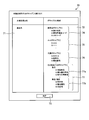
- FIG. 23 is a diagram illustrating an example of an assignment screen.
- the assignment screen 70 has an unconfirmed item name field 71, a vocabulary candidate field 72, and a decision button 73.
- the unconfirmed item name column 71 an item name stored in the manual judgment stock, that is, an item name for which the corresponding standardized vocabulary is unconfirmed is displayed.
- the vocabulary candidate column 72 association candidates for standardized vocabulary are displayed for each group. For example, when the determination button 73 is pressed in a state where a radio button provided at the top of the association candidate is selected, the selection information is transmitted using the association candidate selected as the radio button as a standardized vocabulary. It is a button.
- correspondence candidates such as “medicine name”, “individual drug code”, and “JAN code” belonging to the pharmaceutical vocabulary group 74 are displayed at the top, that is, standardized vocabulary candidates. Is done.
- the pharmaceutical vocabulary group 74 is a vocabulary group matched in another item name.
- the vocabulary candidate fields 72 are displayed in order from the group with the largest number of matching. For example, in the vocabulary candidate column 72, a ⁇ vocabulary group 75 having a smaller number of matching than the pharmaceutical vocabulary group 74 is displayed next to the pharmaceutical vocabulary group 74. That is, the presentation unit 140 displays a group of standardized vocabularies that are highly likely to match the table being processed in the vocabulary candidate field 72.
- the common vocabulary group 76 is displayed next to the ⁇ vocabulary group 75. That is, in the vocabulary candidate column 72, the vocabulary group 76 that is likely to be matched next is displayed next to the vocabulary group matched in another item name.
- all other vocabulary groups 77 are displayed next to the common vocabulary group 76. Further, all other vocabulary groups 77 are displayed separately for each vocabulary group, such as a transaction vocabulary group 77a and a product / article vocabulary group 77b, so as to be easily selected.
- the correspondence storage control unit 141 associates the item name with the standardized vocabulary and group. And stored in the information DB 121.
- the item name, the standardized vocabulary, and the group are stored in the information DB 121 by the item group determination unit 139, and may be overwritten, or the corresponding record in the information DB 121 is read and checked. You may do it.
- the correspondence relationship storage control unit 141 stores the item name, the standardized vocabulary, and the group in association with each other in the information DB 121.
- the correspondence relationship storage control unit 141 stores the item name, the standardized vocabulary, and the group in association with each other in the history DB 123. That is, the correspondence relationship storage control unit 141 is a correspondence relationship between the adopted candidate and the item name from which the negative determination result is obtained among the correspondence candidates presented for the item name from which the negative determination result is obtained. Is stored in the history DB 123.
- FIG. 24 is a flowchart illustrating an example of analysis processing according to the embodiment.
- the communication unit 110 of the information processing apparatus 100 receives tabular data from a terminal device (not shown).
- the communication unit 110 outputs the received tabular data to the control unit 130.
- the determination unit 131 determines whether there is a data input cell of the input tabular data (step S1).
- the determination unit 131 outputs the tabular data and the determination result to the extraction unit 132.
- the extraction unit 132 When the tabular data and the determination result are input from the determination unit 131, the extraction unit 132, based on the determination result, from the tabular data, a plurality of continuous row or column clusters in which cells to which data is input exist. Are extracted as one table data (step S2).
- the extraction unit 132 outputs the extracted table data to the editing unit 133 and the generation unit 135 as first table data. Further, the extraction unit 132 stores the first table data in the storage unit 120.
- the editing unit 133 executes an editing process on the input first table data (step S3).
- the editing unit 133 outputs the table data for which the editing process has been completed to the counting unit 134 and the generation unit 135 as second table data.
- the counting unit 134 When the second table data is input from the editing unit 133, the counting unit 134 counts the number of cells into which data is input in the second table data for each row or column (step S4). The count unit 134 outputs the number of cells counted for each row or column to the detection unit 136 as a count value.
- the first table data is input from the extraction unit 132 and the second table data is input from the editing unit 133 to the generation unit 135.
- the generation unit 135 temporarily determines an item row or an item column based on the input first table data.
- the generation unit 135 may include a plurality of continuous item rows or a plurality of continuous item strings corresponding to a specific cell when the determined item row or item column includes a specific cell subjected to the cell concatenation process. Is temporarily determined.
- the generating unit 135 When the generating unit 135 temporarily determines a plurality of continuous item rows or a plurality of continuous item strings, the generating unit 135 generates item names for the second table data input from the editing unit 133 (step S5).
- the generation unit 135 outputs the second table data to which the generated item name is applied to the detection unit 136 as third table data. If the determined item row or item column does not include the specific cell subjected to the cell concatenation process, the generation unit 135 uses the input second table data as it is as the third table data to the detection unit 136. Output.
- the detection unit 136 receives the count value from the count unit 134 and the third table data from the generation unit 135.
- the detection unit 136 detects the uppermost row or the leftmost column among the rows or columns having the maximum input count value with respect to the input third table data (step S6).
- the detection unit 136 outputs the detected uppermost row or leftmost column as a detection result to the specifying unit 137 together with the count value and the third table data.
- the detection result, count value, and third table data are input from the detection unit 136 to the identification unit 137.
- the specifying unit 137 specifies an item row or an item column based on the detection result, the count value, and the third table data (step S7).
- the specifying unit 137 sets the third table data that has been specified as the fourth table data, and outputs the specified item row or item column and the fourth table data to the storage control unit 138.
- the storage control unit 138 receives the item row or item column specified from the specifying unit 137 and the fourth table data.
- the storage control unit 138 stores the value of each cell of the fourth table data in association with the item name and the number of data rows in the information DB 121 based on the identified item row or item column and the fourth table data. (Step S8).
- the storage control unit 138 When the storage control unit 138 stores the number of data rows, the item name, and the value in association with each other in the information DB 121, the storage control unit 138 outputs a determination instruction to the item group determination unit 139. Thereby, the information processing apparatus 100 can easily register tabular data of various formats in the database.
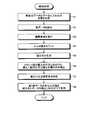
- FIG. 25 is a flowchart illustrating an example of a standardization process according to the embodiment.
- the item group determination unit 139 When the determination instruction is input from the storage control unit 138, the item group determination unit 139 reads item names sequentially from the first record of the information DB 121. The item group determination unit 139 shapes the read item name (step S11). The item group determination unit 139 refers to the vocabulary DB 122 and executes matching with the standardized vocabulary using the item name after shaping. The item group determination unit 139 determines whether the item name matches the standardized vocabulary (step S12).
- step S12 When the item name matches the standardized vocabulary (step S12: Yes), the item group determining unit 139 adopts the matched standardized vocabulary (step S13), and proceeds to step S18.
- the item group determination unit 139 stores the adopted standardized vocabulary and the group to which the standardized vocabulary belongs in the information DB 121.
- the item group determination unit 139 checks the item name against the history DB 123 (Step S14). That is, the item group determination unit 139 performs matching of the item name with the past manual determination association history. The item group determination unit 139 determines whether the item name matches the item name in the history DB 123 (step S15).
- step S15 When the item name matches the item name in the history DB 123 (step S15: Yes), the item group determination unit 139 adopts the standardized vocabulary in the history DB 123 (step S16), and proceeds to step S18.
- the item group determination unit 139 stores the adopted standardized vocabulary and the group to which the standardized vocabulary belongs in the information DB 121. If the item name does not match the item name in the history DB 123 (No at Step S15), the item group determination unit 139 adds the item name to the manual determination stock (Step S17).
- the item group determination unit 139 determines whether or not matching of all item names has been completed (step S18).
- the item group determination part 139 returns to step S11, when matching of all the item names is not completed (step S18: No).
- the item group determination unit 139 outputs a presentation instruction to the presentation unit 140 when matching of all item names is completed (step S18: Yes).
- the presentation unit 140 selects the stored standardized vocabulary as an association target for the item name in which the standardized vocabulary and the group are stored in the information DB 121.
- the presenting unit 140 outputs the selected standardized vocabulary and group and the corresponding item name to the correspondence storage control unit 141.
- the presenting unit 140 transmits an assignment screen for presenting standardized vocabulary candidates to an item name stored in the manual judgment stock, and displays the assignment screen on a terminal device (not shown) (step S19).
- the presentation unit 140 receives selection information from a terminal device (not shown).
- the presentation unit 140 receives the selection information, and outputs the standardized vocabulary and the group that received the selection to the corresponding storage control unit 141.
- the correspondence relationship storage control unit 141 receives the standardized vocabulary selected from the presentation unit 140 and the item name corresponding to the group. Alternatively, the correspondence relationship storage control unit 141 receives an item name corresponding to the standardized vocabulary and the group that have received the selection from the presentation unit 140. The correspondence relationship storage control unit 141 stores the standardized vocabulary and group selected or accepted for selection in the information DB 121 in association with the item name (step S20). Also, the correspondence relationship storage control unit 141 stores the standardized vocabulary and group that have received the selection in the history DB 123 in association with the item name. As a result, the information processing apparatus 100 can associate the item name with the standardized vocabulary. Further, the information processing apparatus 100 can use various data in an integrated manner by using a standardized vocabulary. Furthermore, the information processing apparatus 100 can present an appropriate standardized vocabulary for an item name for which the standardized vocabulary is not automatically adopted.
- the information processing apparatus 100 extracts a plurality of item names from the tabular data.
- the information processing apparatus 100 refers to the vocabulary DB 122 in which a plurality of item groups are stored, and which item group includes item names having a predetermined similarity relationship with each of the extracted item names. judge.
- the information processing apparatus 100 selects, as an association target, an item name having a predetermined similarity relationship for an item name for which a positive determination result is obtained from among a plurality of item names.
- the information processing apparatus 100 presents, as an association candidate, an item group determined to include an item name having a predetermined similarity relationship with other item names for item names for which a negative determination result is obtained. To do.
- item names can be associated with standardized vocabulary.
- the information processing apparatus 100 presents, as an association candidate, an item group determined to include an item name having a predetermined similarity relationship with other item names for item names for which a negative determination result is obtained.
- a predetermined item group is presented as another association candidate.
- the plurality of item groups include an item group formed for each industry and an item group formed for the industry, and the predetermined item group is an item formed for the industry. Corresponds to the group. As a result, it is possible to present a standardized vocabulary of groups having a high possibility of matching.
- the plurality of item names are extracted from the table detected as one table from the tabular data.
- item names in one table can be associated with standardized vocabularies.
- the plurality of item names are extracted from the plurality of tables detected from the tabular data.
- the information processing apparatus 100 also includes, for item names for which a negative determination result is obtained, item names having a predetermined similarity relationship with other item names extracted from the same table among a plurality of tables.
- the determined item group is presented as an association candidate. As a result, it is possible to present a standardized vocabulary of groups having a high possibility of matching.
- the information processing apparatus 100 determines that the first item name having a predetermined similarity relationship with the item name included in the same table as the item name from which the negative determination result is obtained, and is negative.
- the item name for which a negative determination result is obtained when it is determined that an item name having a predetermined similarity with the second item name included in the table different from the item name for which the correct determination result is obtained
- the item group including the first item name is preferentially presented as an association candidate over the item group including the second item name. As a result, it is possible to present a standardized vocabulary of groups in which other item names are matched.
- the information processing apparatus 100 records the correspondence relationship between the adopted candidate and the item name from which the negative determination result is obtained among the association candidates presented for the item name from which the negative determination result is obtained. Store in DB123.
- the information processing apparatus 100 converts the specific item name into the tabular data or other Is selected as the correspondence target of the item name extracted from the tabular data. As a result, a standardized vocabulary of groups included in the history can be presented.
- the information processing apparatus 100 presents an association candidate for another item name for which a negative determination result is obtained, the item group including the specific item name is given priority over the other item group. Are presented as matching candidates. As a result, the standardized vocabulary of the group included in the history can be preferentially presented.
- the information processing apparatus 100 converts the item name selected as the correspondence target or the item name received from the item name included in the presented item group to each of the plurality of item names of the tabular data.
- the information is stored in the information DB 121 in association with the item name.
- item names can be associated with standardized vocabulary.
- the information processing apparatus 100 determines whether or not there is a cell in which data is input for each row or each column of the input tabular data. In addition, the information processing apparatus 100 extracts a plurality of continuous row or column clusters in which cells into which data is input exist as portions related to one table. In addition, the information processing apparatus 100 identifies an item row or an item column among rows or columns of columns. Further, the information processing apparatus 100 extracts input data of each cell in the specified item row or item column as an item name. As a result, item names can be extracted from tabular data.
- the case where the title of the table is described at the upper part of the main body of the table is given as an example.
- the main body portion of the table can be extracted in the same manner as in the above embodiment.
- the information DB 121 has one record for each cell constituting the table data, but is not limited to this.
- the information DB 121 may be any type of database as long as the original table data can be restored.
- the standardized vocabulary and the group are determined together, but the present invention is not limited to this.
- the standardization process for determining the standardized vocabulary and group may be performed when the table data stored in the information DB 121 is used.
- the standardized vocabulary and group can be determined on the basis of the standard unified by the user who uses the table data.
- other local governments and traders can assist the registration.
- each component of each part illustrated does not necessarily need to be physically configured as illustrated.
- the specific form of distribution / integration of each part is not limited to the one shown in the figure, and all or a part thereof may be functionally or physically distributed / integrated in arbitrary units according to various loads and usage conditions. Can be configured.
- the determination unit 131 and the extraction unit 132 may be integrated.
- the illustrated processes are not limited to the above-described order, and may be performed at the same time as long as the process contents are not contradictory, or may be performed in a different order.
- various processing functions performed in each device may be executed entirely or arbitrarily on a CPU (or a microcomputer such as an MPU or MCU (Micro Controller Unit)).
- the various processing functions may be executed entirely or arbitrarily on a program that is analyzed and executed by a CPU (or a microcomputer such as an MPU or MCU) or hardware based on wired logic. Needless to say, it is good.
- FIG. 26 is a diagram illustrating an example of a computer that executes an item name association processing program.
- the computer 200 includes a CPU 201 that executes various arithmetic processes, an input device 202 that receives data input, and a monitor 203.
- the computer 200 also includes a medium reading device 204 that reads a program and the like from a storage medium, an interface device 205 for connecting to various devices, and a communication device 206 for connecting to other information processing devices and the like by wire or wirelessly.
- Have The computer 200 also includes a RAM 207 that temporarily stores various types of information and a hard disk device 208.
- the devices 201 to 208 are connected to a bus 209.
- the hard disk device 208 has the same processing units as the determination unit 131, the extraction unit 132, the editing unit 133, the counting unit 134, the generation unit 135, the detection unit 136, the specifying unit 137, and the storage control unit 138 shown in FIG.
- An item name association processing program having a function is stored.
- the hard disk device 208 stores an item name association processing program having the same functions as the processing units of the item group determination unit 139, the presentation unit 140, and the correspondence relationship storage control unit 141.
- the hard disk device 208 stores an information DB 121, a vocabulary DB 122, a history DB 123, and various data for realizing an item name association processing program.
- the input device 202 receives input of various information such as operation information and management information from an administrator of the computer 200, for example.
- the monitor 203 displays various screens such as a management screen to the administrator of the computer 200, for example.
- the interface device 205 is connected to, for example, a printing device.
- the communication device 206 has the same function as the communication unit 110 shown in FIG. 1 and is connected to a network (not shown), and exchanges various types of information with a terminal device (not shown).
- the CPU 201 reads out each program stored in the hard disk device 208, develops it in the RAM 207, and executes it to perform various processes. These programs also cause the computer 200 to function as the determination unit 131, the extraction unit 132, the editing unit 133, the counting unit 134, the generation unit 135, the detection unit 136, the specifying unit 137, and the storage control unit 138 illustrated in FIG. be able to. In addition, these programs can cause the computer 200 to function as the item group determination unit 139, the presentation unit 140, and the correspondence relationship storage control unit 141 illustrated in FIG.
- the above item name association processing program is not necessarily stored in the hard disk device 208.
- the computer 200 may read and execute a program stored in a storage medium readable by the computer 200.
- the storage medium readable by the computer 200 corresponds to, for example, a portable recording medium such as a CD-ROM, a DVD disk, a USB (Universal Serial Bus) memory, a semiconductor memory such as a flash memory, and a hard disk drive.
- the item name association processing program may be stored in a device connected to a public line, the Internet, a LAN, or the like, and the computer 200 may read and execute the item name association processing program therefrom.
Landscapes
- Engineering & Computer Science (AREA)
- Theoretical Computer Science (AREA)
- Physics & Mathematics (AREA)
- General Physics & Mathematics (AREA)
- General Engineering & Computer Science (AREA)
- Business, Economics & Management (AREA)
- Databases & Information Systems (AREA)
- General Health & Medical Sciences (AREA)
- Computational Linguistics (AREA)
- Audiology, Speech & Language Pathology (AREA)
- Artificial Intelligence (AREA)
- Health & Medical Sciences (AREA)
- Data Mining & Analysis (AREA)
- Entrepreneurship & Innovation (AREA)
- Human Resources & Organizations (AREA)
- Strategic Management (AREA)
- Economics (AREA)
- Marketing (AREA)
- Operations Research (AREA)
- Quality & Reliability (AREA)
- Tourism & Hospitality (AREA)
- General Business, Economics & Management (AREA)
- Information Retrieval, Db Structures And Fs Structures Therefor (AREA)
- Management, Administration, Business Operations System, And Electronic Commerce (AREA)
- Machine Translation (AREA)
- Document Processing Apparatus (AREA)
Abstract
項目名を標準化したボキャブラリに対応付けできる項目名対応付け処理方法、項目名対応付け処理プログラム及び情報処理装置を提供する。項目名対応付け処理方法は、以下の各処理をコンピュータ(100)が実行する。項目名対応付け処理方法は、表形式データから複数の項目名を抽出する。また、項目名対応付け処理方法は、複数の項目群が記憶された記憶部を参照して、抽出した複数の項目名のそれぞれと所定の類似関係を有する項目名がどの項目群に含まれるか否か判定する。また、項目名対応付け処理方法は、複数の項目名のうち、肯定的な判定結果が得られた項目名については、所定の類似関係を有する項目名を対応付け対象として選択する。また、項目名対応付け処理方法は、否定的な判定結果が得られた項目名については、他の項目名と所定の類似関係を有する項目名が含まれると判定された項目群を対応付け候補として提示する。
Description
本発明は、項目名対応付け処理方法、項目名対応付け処理プログラム及び情報処理装置に関する。
近年、例えば地方自治体が、当該地方自治体の地域内の観光地について様々な情報を集約し、インターネット上のホームページで公開することが行われている。当該地方自治体は、観光地の施設等から情報の提供を受けることで、観光地の情報を収集する。また、当該自治体の委託先企業が自治体からオープンデータとして観光地の情報の提供を受けて入力する場合もある。この場合、提供を受ける情報は、例えば、表形式データである各種表計算ソフトウェアのファイル形式、CSV(Comma-Separated Values)形式、TSV(Tab-Separated Values)形式等の様々なフォーマットに基づいた情報である。
しかしながら、収集された情報は、例えば、名前と氏名のように、項目名が統一されていない場合がある。このため、収集された情報の項目名を定義済みの標準化ボキャブラリに関連付けることで、項目名を統一することが考えられる。ところが、項目名に適切な標準化ボキャブラリを探し出すには、相応の知識を有する者による探索の手間が発生する。
一つの側面では、本発明は、項目名を標準化したボキャブラリに対応付けできる項目名対応付け処理方法、項目名対応付け処理プログラム及び情報処理装置を提供することにある。
一つの態様では、項目名対応付け処理方法は、表形式データから複数の項目名を抽出する処理をコンピュータが実行する。また、項目名対応付け処理方法は、複数の項目群が記憶された記憶部を参照して、抽出した前記複数の項目名のそれぞれと所定の類似関係を有する項目名がどの項目群に含まれるか否か判定する処理をコンピュータが実行する。また、項目名対応付け処理方法は、前記複数の項目名のうち、肯定的な判定結果が得られた項目名については、前記所定の類似関係を有する項目名を対応付け対象として選択する処理をコンピュータが実行する。また、項目名対応付け処理方法は、否定的な判定結果が得られた項目名については、他の項目名と前記所定の類似関係を有する項目名が含まれると判定された項目群を対応付け候補として提示する処理をコンピュータが実行する。
項目名を標準化したボキャブラリに対応付けできる。
以下、図面に基づいて、本願の開示する項目名対応付け処理方法、項目名対応付け処理プログラム及び情報処理装置の実施例を詳細に説明する。なお、本実施例により、開示技術が限定されるものではない。また、以下の実施例は、矛盾しない範囲で適宜組みあわせてもよい。
図1は、実施例の情報処理装置の構成の一例を示すブロック図である。図1に示す情報処理装置100は、表形式データから複数の項目名を抽出する。また、情報処理装置100は、複数の項目群が記憶された記憶部を参照して、抽出した複数の項目名のそれぞれと所定の類似関係を有する項目名がどの項目群に含まれるか否か判定する。また、情報処理装置100は、複数の項目名のうち、肯定的な判定結果が得られた項目名については、所定の類似関係を有する項目名を対応付け対象として選択する。また、情報処理装置100は、否定的な判定結果が得られた項目名については、他の項目名と所定の類似関係を有する項目名が含まれると判定された項目群を対応付け候補として提示する。これにより、情報処理装置100は、項目名を標準化したボキャブラリに対応付けできる。なお、以下の説明では、主に行方向に着目して説明するが、列方向についても同様に適用可能である。
図1に示す情報処理装置100は、通信部110と、表示部111と、操作部112と、記憶部120と、制御部130とを有する。なお、情報処理装置100は、図1に示す機能部以外にも既知のコンピュータが有する各種の機能部、例えば各種の通信デバイス、入力デバイスや音声出力デバイス等の機能部を有することとしてもかまわない。情報処理装置100の一例としては、サーバ等の据置型のコンピュータを採用できる。情報処理装置100には、上記のサーバ等の据置型のコンピュータのみならず、可搬型や据置型のパーソナルコンピュータを情報処理装置100として採用することもできる。
通信部110は、例えば、NIC(Network Interface Card)等によって実現される。通信部110は、図示しないネットワークを介して図示しないユーザの端末装置と有線又は無線で接続され、端末装置との間で情報の通信を司る通信インタフェースである。通信部110は、端末装置から表形式データと、選択情報とを受信する。通信部110は、受信した表形式データと、選択情報とを制御部130に出力する。また、通信部110は、制御部130から割当画面が入力される。通信部110は、入力された割当画面を端末装置に送信する。
ここで、図2を用いて表形式データについて説明する。図2は、表形式データ及び表データの一例を示す図である。図2に示す表形式データ11は、例えば、複数の表データ12a、12bと、表形式データ11のタイトル等を含むデータである。なお、以下の説明では、例えば1つのファイル全体のデータを表形式データと表現し、表形式データ内の個々の表を表データと表現する。表形式データ11には、例えば、最上段の行に項目(ヘッダ)がある表データ、最上段の行と最左列の列に項目がある表データ、小項目を表すためにセルが連結されて項目行が2行に渡る表データ等が含まれる。なお、表データは、これらに限定されず、行列の形で表すことができるデータであれば、どのようなデータでもよい。また、表形式データは、例えば、官公庁や自治体から提供されるオープンデータを用いることができる。
図1の説明に戻って、表示部111は、各種情報を表示するための表示デバイスである。表示部111は、例えば、表示デバイスとして液晶ディスプレイ等によって実現される。表示部111は、制御部130から入力された表示画面等の各種画面を表示する。
操作部112は、情報処理装置100の管理者から各種操作を受け付ける入力デバイスである。操作部112は、例えば、入力デバイスとして、キーボードやマウス等によって実現される。操作部112は、管理者によって入力された操作を操作情報として制御部130に出力する。なお、操作部112は、入力デバイスとして、タッチパネル等によって実現されるようにしてもよく、表示部111の表示デバイスと、操作部112の入力デバイスとは、一体化されるようにしてもよい。
記憶部120は、例えば、RAM(Random Access Memory)、フラッシュメモリ(Flash Memory)等の半導体メモリ素子、ハードディスクや光ディスク等の記憶装置によって実現される。記憶部120は、情報データベース121と、ボキャブラリデータベース122と、履歴データベース123とを有する。なお、以下の説明では、データベースをDBと省略して表現する。また、記憶部120は、制御部130での処理に用いる情報を記憶する。
情報DB121は、表データについて、項目と値とボキャブラリとを対応付けて記憶する。図3は、情報DBの一例を示す図である。図3に示すように、情報DB121は、「行」、「項目」、「値」、「標準化ボキャブラリ」、「グループ」といった項目を有する。情報DB121は、例えば、表データを構成するセルごとに1レコードとして記憶する。
「行」は、データが入力されているセルの行、つまりデータ行数を示す情報である。「項目」は、セルに対応する項目、つまり項目名を示す情報である。「値」は、セルに格納されているデータを示す情報である。「標準化ボキャブラリ」は、当該項目、つまり項目名に対応付けられた標準化ボキャブラリを示す情報である。「グループ」は、標準化ボキャブラリの属するグループを示す情報である。なお、グループは、項目群ともいう。図3の1行目の例では、表データの「1」行目の項目「x1」の値は「y1」となり、項目「x1」に対応付けられた標準化ボキャブラリは「B01」、グループは「G02」である。なお、図3の説明では、項目、値、標準化ボキャブラリ及びグループは、簡単のために記号と数字とで表しているが、実際には具体的な文字等が入る。例えば、あるレコードには、項目「住所」と、値「東京都・・・」と、標準化ボキャブラリ「住所」と、グループ「共通」とが対応付けられて記憶される。
図1の説明に戻って、ボキャブラリDB122は、標準化ボキャブラリをグループごとに記憶する。図4Aは、ボキャブラリDBの一例を示す図である。図4Aは、標準化ボキャブラリのうち、全業種で共通する共通ボキャブラリを記憶するグループを示す。図4Aに示すように、ボキャブラリDB122の共通ボキャブラリグループ122aは、例えば、グループ名「共通ボキャブラリグループ」とともに、「タイトル」、「説明文」といった全業種で共通するボキャブラリを記憶する。なお、グループ名は省略して「共通」としてもよい。また、ボキャブラリDB122は、既存のデータベースがあれば、当該データベースを取り込んで用いてもよいし、既存のデータベースがなければ、新規に生成するようにしてもよい。
図4Bは、ボキャブラリDBの一例を示す図である。図4Bは、標準化ボキャブラリのうち、業種ごとのボキャブラリを記憶するグループの一例である医薬品ボキャブラリグループを示す。図4Bに示すように、ボキャブラリDB122の医薬品ボキャブラリグループ122bは、例えば、グループ名「医薬品ボキャブラリグループ」とともに、「薬の名称」、「個別医薬品コード」といった医薬品に関して共通するボキャブラリを記憶する。なお、グループ名は省略して「医薬品」としてもよい。
図4Cは、ボキャブラリDBの一例を示す図である。図4Cは、標準化ボキャブラリのうち、業種ごとのボキャブラリを記憶するグループの一例である取引ボキャブラリグループを示す。図4Cに示すように、ボキャブラリDB122の取引ボキャブラリグループ122cは、例えば、グループ名「取引ボキャブラリグループ」とともに、「取引の債権者」、「取引の債務者」といった取引に関して共通するボキャブラリを記憶する。なお、グループ名は省略して「取引」としてもよい。また、共通ボキャブラリグループ122a、医薬品ボキャブラリグループ122b及び取引ボキャブラリグループ122cは、所定の項目群の一例である。
図1の説明に戻って、履歴DB123は、過去に手動判定で対応付けが行われた履歴を記憶する。図5は、履歴DBの一例を示す図である。図5に示すように、履歴DB123は、「項目名」、「標準化ボキャブラリ」、「グループ」といった項目を有する。履歴DB123は、例えば、項目名ごとに1レコードとして記憶する。言い換えると、履歴DB123は、採用された候補と否定的な判定結果が得られた項目名との対応関係を記憶する。なお、履歴DB123は、全てのユーザの履歴を用いることで、より適切な標準化ボキャブラリを提示させることができる。
「項目名」は、表形式データから抽出され、手動判定が行われた項目名を示す情報である。「標準化ボキャブラリ」は、手動判定が行われた結果、採用された標準化ボキャブラリを示す情報である。「グループ」は、標準化ボキャブラリが属するグループを示す情報である。図5の1行目の例では、項目名「TEL」に対して、グループ「共通」に属する標準化ボキャブラリ「電話番号」が手動判定にて採用されたことを示す。
図1の説明に戻って、制御部130は、例えば、CPU(Central Processing Unit)やMPU(Micro Processing Unit)等によって、内部の記憶装置に記憶されているプログラムがRAMを作業領域として実行されることにより実現される。また、制御部130は、例えば、ASIC(Application Specific Integrated Circuit)やFPGA(Field Programmable Gate Array)等の集積回路により実現されるようにしてもよい。
制御部130は、判定部131と、抽出部132と、編集部133と、カウント部134と、生成部135と、検出部136と、特定部137と、記憶制御部138とを有する。また、制御部130は、項目群判定部139と、提示部140と、対応関係記憶制御部141と有し、以下に説明する情報処理の機能や作用を実現又は実行する。なお、制御部130の内部構成は、図1に示した構成に限られず、後述する情報処理を行う構成であれば他の構成であってもよい。
判定部131は、通信部110から表形式データが入力されると、入力された表形式データの各行又は各列について、データが入力されたセルの有無を判定する。すなわち、判定部131は、表形式データのデータ入力セルの有無を判定する。判定部131は、表形式データ及び判定結果を抽出部132に出力する。
抽出部132は、判定部131から表形式データ及び判定結果が入力されると、判定結果に基づいて、表形式データから、データが入力されたセルが存在する複数の連続する行又は列の塊を1つの表データに関連する部分として抽出する。すなわち、抽出部132は、データが入力されたセルが存在しない1又は複数の連続する行又は列を挟んで、データが入力されたセルが存在する1又は複数の連続する行又は列の塊を2つ検出すると、該2つの塊のそれぞれを異なる表データとして抽出する。抽出部132は、表データを抽出すると、抽出した表データを第1表データとして編集部133及び生成部135に出力する。また、抽出部132は、第1表データを記憶部120に記憶する。
ここで、図6及び図7を用いて表データの抽出について説明する。図6は、表データの抽出の一例を示す図である。図6は、表データが縦方向に複数存在する場合の一例である。図6の例では、表形式データ13について、各行のデータ入力数14を検出する。例えば、表形式データ13では、1行目は表形式データ13のタイトルが1つのセルに入力されているので、データ入力数14は「1」となる。また、2行目は、データが入力されているセルがないので、データ入力数14は「0」となる。以下同様に、各行のデータ入力数14を検出する。
抽出部132は、データ入力数14が「0」である行を表データの切れ目と判定し、表形式データ13を切れ目で分割する。なお、以下の説明では、分割された表データに関する部分である塊をクラスタともいう。表形式データ13は、クラスタ15と、クラスタ16と、クラスタ17とに分割される。クラスタ15は、表形式データ13のタイトルである。クラスタ16は、1つ目の表データである。クラスタ17は、2つ目の表データである。抽出部132は、クラスタ16及びクラスタ17を第1表データとして抽出する。なお、抽出された第1表データは、例えばメモリ上で二次元配列等を用いて表形式に展開される。また、以下の説明において、第1表データに基づく各表データも同様である。
図7は、表データの抽出の他の一例を示す図である。図7は、表データが横方向に複数存在する場合の一例である。図7の例では、表形式データ18について、各列のデータ入力数19を検出する。例えば、表形式データ18では、1列目はデータが入力されているセルがないので、データ入力数19は「0」となる。また、2列目は、1行目に表形式データ18のタイトル、2行目に「a」、3行目に「1」、4行目に「1」が入力されているので、データ入力数19は「4」となる。以下同様に、各列のデータ入力数19を検出する。
抽出部132は、データ入力数19が「0」である列を表データの切れ目と判定し、表形式データ18を切れ目で分割する。表形式データ18は、クラスタ20と、クラスタ21とに分割される。クラスタ20は、1つ目の表データである。クラスタ21は、2つ目の表データである。抽出部132は、クラスタ20及びクラスタ21を第1表データとして抽出する。なお、クラスタ20は、クラスタ21と比べて、5行目にデータ入力セルがないが、5行目に空文字を付加して表の大きさを揃えている。
図1の説明に戻って、編集部133は、抽出部132から第1表データが入力されると、入力された第1表データに対して編集処理を実行する。編集部133は、まず、第1表データのうち、タイトルのセルを除く表を構成するセルの中で、最も上側の行又は最も左側の列を項目行又は項目列と仮に決定する。なお、タイトルのセルは、第1表データの中で、抽出部132で用いたデータ入力数が「1」である最も上側又は最も左側の行又は列として判定できる。編集部133は、仮に決定した項目行又は項目列にセル連結処理が施された特定のセルが含まれる場合には、特定のセルを単位セルに分割する。また、編集部133は、分割された単位セルのそれぞれに特定のセルに入力されたデータと同じデータを入力する。編集部133は、編集処理を完了した表データを第2表データとしてカウント部134及び生成部135に出力する。また、編集部133は、仮に決定した項目行又は項目列にセル連結処理が施された特定のセルが含まれない場合には、入力された第1表データをそのまま第2表データとしてカウント部134及び生成部135に出力する。
ここで、図8から図11を用いて編集処理について説明する。図8は、編集処理の一例を示す図である。図8の例では、第1表データ22の1行目にセル連結処理が施されたセルが含まれている。つまり、値「a」、「b」のセルが、セル連結処理が施された特定のセルである。編集部133は、特定のセルを単位セルに分割し、値「a」、「b」を、分割された単位セルのそれぞれに入力する。編集部133は、編集処理を完了した第2表データ23をカウント部134及び生成部135に出力する。
図9は、編集処理の他の一例を示す図である。図9の例では、図8の例と同様に、第1表データ24のセル連結処理が施された特定のセルの値「a」、「b」を、分割された単位セルのそれぞれに入力して第2表データ25としている。
図10は、編集処理の他の一例を示す図である。図10の例では、第1表データ26の1列目にセル連結処理が施されたセルが含まれている。つまり、値「g」、「h」のセルが、セル連結処理が施された特定のセルである。編集部133は、特定のセルを単位セルに分割し、値「g」、「h」を、分割された単位セルのそれぞれに入力する。編集部133は、編集処理を完了した第2表データ27をカウント部134及び生成部135に出力する。すなわち、編集部133は、行方向のセル連結処理が施された特定のセルと、列方向のセル連結処理が施された特定のセルとを単位セルに分割し、分割された単位セルのそれぞれに特定のセルの値を入力する。
図11は、項目行ではない行におけるセルの連結解除の一例を示す図である。図11の例では、第1表データ28の最終行、つまり4行目にセル連結処理が施されたセルが含まれている。つまり、値「100」のセルが、セル連結処理が施された特定のセルである。編集部133は、第1表データ28の最終行が項目行ではないので、特定のセルを単位セルに分割し、値「100」を分割した単位セルのうち1つのセルに入力する。編集部133は、編集処理を完了した第2表データ29をカウント部134及び生成部135に出力する。なお、図11の例では、1行目のセルの連結処理の解除の説明は省略している。なお、項目行ではない行におけるセルの連結解除は、特定部137において項目行又は項目列が特定された後に行ってもよい。
図1の説明に戻って、カウント部134は、編集部133から第2表データが入力されると、第2表データのうち、データが入力されたセルの数を行ごと又は列ごとにカウントする。すなわち、カウント部134は、行又は列の塊のうち、データが入力されたセルの数を行ごと又は列ごとにカウントする。カウント部134は、行ごと又は列ごとにカウントしたセルの数をカウント値として検出部136に出力する。
生成部135には、抽出部132から第1表データが入力され、編集部133から第2表データが入力される。生成部135は、まず、入力された第1表データのうち、タイトルのセルを除く表を構成するセルの中で、最も上側の行又は最も左側の列を項目行又は項目列と仮に決定する。なお、タイトルのセルは、編集部133と同様に判定できる。生成部135は、仮に決定した項目行又は項目列にセル連結処理が施された特定のセルが含まれる場合には、特定のセルを含む範囲を連続する複数の項目行又は連続する複数の項目列と仮に決定する。すなわち、生成部135は、特定のセルを分割したそれぞれの単位セルが含まれる行又は列と、当該行又は列の下側又は右側に隣接する行又は列とを、連続する複数の項目行又は連続する複数の項目列と仮に決定する。
生成部135は、連続する複数の項目行又は連続する複数の項目列を仮に決定すると、編集部133から入力された第2表データに対して、項目名の生成を実行する。すなわち、生成部135は、仮に決定した連続する複数の項目行若しくは連続する複数の項目列について、同じ列若しくは同じ列のセルを含む連結セルの値、又は、同じ行若しくは同じ行のセルを含む連結セルの値を合成した値を項目名として生成する。なお、連結セルは、セル連結処理が施された特定のセルのことである。生成部135は、生成した項目名を適用した第2表データを第3表データとして検出部136に出力する。生成部135は、仮に決定した項目行又は項目列にセル連結処理が施された特定のセルが含まれない場合には、入力された第2表データをそのまま第3表データとして検出部136に出力する。
ここで、図12及び図13を用いて項目名の生成について説明する。図12は、項目名の生成の一例を示す図である。図12の例では、生成部135は、第1表データ30について、1行目及び2行目を項目行、並びに、1列目及び2列目を項目列と仮に決定する。次に、生成部135は、1行目及び2行目において、同じ列若しくは同じ列のセルを含む連結セルの値を合成した値を、項目行のそれぞれの項目名として生成する。なお、合成した値は、セル連結処理が施された特定のセルについてセル連結処理が解除された図示しない第2表データに基づいて生成される。生成部135は、例えば、第1表データ30の1行3列の「b」と、2行3列の「f」とを合成した「b/f」を、第3表データ31の1行2列の項目名として生成する。
また、生成部135は、1列目及び2列目において、同じ行若しくは同じ行のセルを含む連結セルの値を合成した値を、項目列のそれぞれの項目名として生成する。生成部135は、例えば、第1表データ30の3行1列の「j」と、3行2列の「m」とを合成した「j/m」を、第3表データ31の2行1列の項目名として生成する。なお、第1表データ30では、1行1列、1行2列、2行1列及び2行2列の4つのセルは連結されて値が「a」であるので、第3表データ31では、1行1列の項目名を「a」としている。
図13は、項目名の生成の他の一例を示す図である。図13の例では、生成部135は、第1表データ32について、1行目及び2行目を項目行と仮に決定する。次に、生成部135は、1行目及び2行目において、同じ列若しくは同じ列のセルを含む連結セルの値を合成した値を、項目行のそれぞれの項目名として生成する。なお、合成した値は、セル連結処理が施された特定のセルについてセル連結処理が解除された図示しない第2表データに基づいて生成される。生成部135は、例えば、第1表データ32の1行1列の「a」と、2行1列の「d」とを合成した「a/d」を、第3表データ33の1行1列の項目名として生成する。また、生成部135は、例えば、第1表データ32の1行2列の「a」と、2行2列の「e」とを合成した「a/e」を、第3表データ33の1行2列の項目名として生成する。
図1の説明に戻って、検出部136には、カウント部134からカウント値が入力され、生成部135から第3表データが入力される。検出部136は、入力された第3表データに対して、入力されたカウント値が最大の行又は列のうち、最も上側の行又は最も左側の列を検出する。検出部136は、検出された最も上側の行又は最も左側の列を検出結果として、カウント値及び第3表データとともに特定部137に出力する。
特定部137には、検出部136から検出結果、カウント値及び第3表データが入力される。特定部137は、カウント値及び第3表データに基づいて、カウント値が最大の行又は列のうち、最も上側の行又は最も左側の列を表の項目を示す行又は列として特定する。すなわち、特定部137は、項目行又は項目列を特定する。特定部137は、特定が完了した第3表データを第4表データとする。特定部137は、特定した項目行又は項目列と、第4表データとを記憶制御部138に出力する。
また、特定部137は、検出結果、カウント値及び第3表データに基づいて、項目行又は項目列を特定してもよい。特定部137は、検出した最も上側の行に隣接する下側の行に対応するカウント値が最大でない場合に、最も上側の行を表の項目を示す行として特定する。又は、特定部137は、検出した最も左側の列に隣接する右側の列に対応するカウント値が最大でない場合に、最も左側の列を表の項目を示す列として特定する。すなわち、特定部137は、項目行又は項目列を特定する。特定部137は、特定が完了した第3表データを第4表データとする。特定部137は、特定した項目行又は項目列と、第4表データとを記憶制御部138に出力する。
さらに、特定部137は、複数行が同じカウント値である場合に、非数値データが入力されたセルの割合に基づいて、項目行又は項目列を特定してもよい。特定部137は、検出した最も上側の行を含み連続する複数行が同じカウント値である場合に、複数行について行内のセルのうち非数値データが入力されたセルの割合に基づいて、項目を示す行を特定する。又は、特定部137は、検出した最も左側の列を含み連続する複数列が同じカウント値である場合に、複数列について列内のセルのうち非数値データが入力されたセルの割合に基づいて、項目を示す列として特定する。すなわち、特定部137は、項目行又は項目列を特定する。特定部137は、特定が完了した第3表データを第4表データとする。特定部137は、特定した項目行又は項目列と、第4表データとを記憶制御部138に出力する。
また、特定部137は、編集部133で仮に決定された項目行又は項目列を採用して項目行又は項目列を特定してもよい。さらに、特定部137は、生成部135で仮に決定された連続する複数の項目行又は連続する複数の項目列を採用して、項目行又は項目列を特定してもよい。特定部137は、特定が完了した第3表データを第4表データとする。特定部137は、特定した項目行又は項目列と、第4表データとを記憶制御部138に出力する。
また、特定部137は、第3表データが、項目行又は項目列が存在しない表である場合に、最も上側の行又は最も左側の列を項目行又は項目列とみなして項目行又は項目列を特定してもよい。特定部137は、カウント値が最大の行又は列のうち、最も上側の行又は最も左側の列が、入力されたデータが項目名ではないセルを含む場合であっても、最も上側の行又は最も左側の列を、項目行又は項目列として特定する。特定部137は、特定が完了した第3表データを第4表データとする。特定部137は、特定した項目行又は項目列と、第4表データとを記憶制御部138に出力する。
さらに、特定部137は、入力されたデータが重複するセルを含む場合に、新たな項目行又は項目列を追加してもよい。特定部137は、カウント値が最大の行又は列のうち、最も上側の行又は最も左側の列が、入力されたデータが重複するセルを含む場合に、最も上側の行のさらに上側又は最も左側の列のさらに左側に新たな行又は列を追加する。特定部137は、追加した行又は列を項目行又は項目列として特定する。特定部137は、新たな行又は列が追加されて特定が完了した第3表データを第4表データとする。特定部137は、特定した項目行又は項目列と、第4表データとを記憶制御部138に出力する。
また、特定部137は、最も上側の行又は最も左側の列が空白のセルを含む場合に、新たな項目行又は項目列を追加してもよい。なお、空白のセルは、空文字(NULL)で表される。特定部137は、カウント値が最大の行又は列のうち、最も上側の行又は最も左側の列が、空白のセルを含む場合に、最も上側の行のさらに上側又は最も左側の列のさらに左側に新たな行又は列を追加する。特定部137は、追加した行又は列を項目行又は項目列として特定する。特定部137は、新たな行又は列が追加されて特定が完了した第3表データを第4表データとする。特定部137は、特定した項目行又は項目列と、第4表データとを記憶制御部138に出力する。
ここで、図14から図22を用いて、項目行の特定について説明する。図14は、項目行の特定の一例を示す図である。図14の例は、カウント値が最大の行が1つの場合に、項目行を特定する場合である。第3表データ34は、カウント値35を見ると、2行目が「5」であり最大である。特定部137は、2行目に隣接する下側の行である3行目のカウント値が「4」であり最大でないので、2行目を項目行と特定する。
図15は、項目行の特定の他の一例を示す図である。図15の例は、カウント値が最大の行が複数の場合に、項目行を特定する場合である。第3表データ37は、カウント値38を見ると、2行目及び5行目が「5」であり最大である。特定部137は、カウント値が最大の行のうち、最も上側の行である2行目を項目行と特定する。
図16は、項目行の特定の他の一例を示す図である。図16の例は、非数値データが入力されたセルの割合に基づいて、項目行を特定する場合である。第3表データ41は、カウント値42を見ると、2行目及び3行目が「5」であり最大である。なお、他の行のカウント値42は省略している。また、第3表データ41は、非数値データが入力されたセルの割合43は、2行目が100%、3行目が40%である。特定部137は、2行目に隣接する3行目の当該割合が、例えば50%以上であるか否かを判定する。特定部137は、3行目の当該割合が40%であるので、3行目は項目行でないと判定し、2行目を項目行と特定する。
図17は、項目行の特定の他の一例を示す図である。図17の例は、非数値データが入力されたセルの割合に基づいて、項目行を特定する場合である。第3表データ46は、カウント値47を見ると、2行目及び3行目が「5」であり最大である。なお、他の行のカウント値47は省略している。また、第3表データ46は、非数値データが入力されたセルの割合48は、2行目が100%、3行目が60%である。特定部137は、2行目に隣接する3行目の当該割合が、例えば50%以上であるか否かを判定する。特定部137は、3行目の当該割合が60%であるので、3行目は項目行であると判定し、2行目及び3行目を項目行と特定する。なお、項目行に入る数値データは、例えば、交通手段の数等が挙げられる。
図18は、項目列の特定の一例を示す図である。図18の例は、項目列が存在しない表である場合に、最も左側の列を項目列とみなして項目列を特定する場合である。第3表データ51は、1行目が項目行であるが、2行目以降の1列目のセルには、データが入力されている。この場合に、特定部137は、最も左側の列である1列目を項目列とみなして、1列目を項目列と特定する。
図19は、項目列の特定の他の一例を示す図である。図19の例は、項目列が存在しない表である場合に、最も左側の列を項目列とみなして項目列を特定する場合である。第1表データ53は、1行目が項目行であるが、2行目以降の1列目のセルには、データが入力されている。また、第1表データ53は、1行1列のセルと1行2列のセルとが連結された特定のセルである。この場合に、特定部137は、1列目に特定のセルが含まれるので、特定のセルが含まれる列、つまり1列目及び2列目を項目列とみなして、1列目及び2列目を項目列と特定する。なお、特定部137は、検出結果、カウント値及び第3表データの他に、記憶部120に記憶された第1表データを参照して、項目列を特定する。
図20は、項目行の追加の一例を示す図である。図20の例は、入力されたデータが重複するセルを含む場合に、新たな項目行又は項目列を追加する場合である。第3表データ56は、1行1列と1行2列のデータがともに「a」であり、1行目が入力されたデータが重複するセルを含む。この場合に、特定部137は、最も上側の行のさらに上側に新たな行を追加して第4表データ58とする。特定部137は、第4表データ58の追加した行59を項目行として特定する。
図21は、項目行の追加の他の一例を示す図である。図21の例は、最も上側の行が空白のセルを含む場合に、新たな項目行を追加する場合である。第3表データ60は、1行3列のセルが空白である。この場合に、特定部137は、最も上側の行のさらに上側に新たな行を追加して第4表データ62とする。特定部137は、第4表データ62の追加した行63を項目行として特定する。なお、第3表データ60は、他の行にも空白のセルがあり、1行目がカウント値が最大の行に含まれる場合である。このような場合には、2行目以降の行が項目行と誤認識されないので適用可能である。
図22は、整形後の表データの一例を示す図である。図22に示す第4表データ64は、特定部137で項目行又は項目列が特定された後、つまり整形後の表データである。第4表データ64は、項目行65と、データ行数66と、データ部分67とを有する。すなわち、第4表データ64は、データ(セルの値)1つ1つに対して行数と項目名との関連付けが行われた状態である。なお、データ行数66は、第4表データ64に含まれなくてもよく、情報DB121への記憶時に行数をカウントして付加してもよい。
図1の説明に戻って、記憶制御部138には、特定部137から特定した項目行又は項目列と、第4表データとが入力される。記憶制御部138は、特定した項目行又は項目列と、第4表データとに基づいて、項目行又は項目列の各セルの入力データを項目名とし、各行又は各列の値を対応する項目名とデータ行数とに対応付けて、情報DB121に記憶する。記憶制御部138は、データ行数と項目名と値とを対応付けて情報DB121に記憶すると、項目群判定部139に判定指示を出力する。なお、判定部131から記憶制御部138の各部は、表形式データから特定した項目行又は項目列の各セルの入力データを項目名として抽出する項目名抽出部に対応する。
項目群判定部139は、記憶制御部138から判定指示が入力されると、情報DB121、ボキャブラリDB122及び履歴DB123を参照して、各項目名に対応する項目群(グループ)を判定する。すなわち、項目群判定部139は、複数の項目群が記憶されたボキャブラリDB122及び履歴DB123を参照して、情報DB121に記憶された複数の項目名のそれぞれと所定の類似関係を有する項目名がどの項目群に含まれるか否か判定する。
具体的には、項目群判定部139は、例えば、情報DB121の1レコード目から順に項目名を読み込み、項目名を整形する。項目群判定部139は、読み込んだ項目名から、例えば、カッコ書き等の注釈的な要素や、項目名の前後の空白を取り除くことで項目名を整形する。項目群判定部139は、例えば、「公共交通機関(JR)」という項目名を読み込むと、「公共交通機関」に整形する。
項目群判定部139は、ボキャブラリDB122を参照し、整形後の項目名を用いて、標準化ボキャブラリとのマッチングを実行する。項目群判定部139は、項目名が標準化ボキャブラリとマッチングしたか否かを判定する。項目群判定部139は、マッチング時に、項目名と標準化ボキャブラリとが完全一致した場合、又は、部分一致した場合に、マッチングしたと判定する。項目群判定部139は、例えば、項目名が「公共交通機関」である場合に、標準化ボキャブラリが「公共交通機関」であれば完全一致と判定し、標準化ボキャブラリが「交通機関」であれば部分一致と判定する。
項目群判定部139は、項目名が標準化ボキャブラリとマッチングした場合には、マッチングした標準化ボキャブラリを採用する。項目群判定部139は、採用した標準化ボキャブラリと、標準化ボキャブラリが属するグループとを情報DB121に記憶する。
項目群判定部139は、項目名が標準化ボキャブラリとマッチングしない場合には、項目名を履歴DB123と照合する。つまり、項目群判定部139は、項目名を過去の手動判定の対応付け履歴とのマッチングを実行する。項目群判定部139は、項目名が履歴DB123の項目名とマッチングしたか否かを判定する。このとき、項目群判定部139は、項目名が履歴DB123の項目名と完全一致した場合に、マッチングしたと判定する。項目群判定部139は、例えば、項目名が「バス」である場合に、履歴DB123の項目名の「バス」と完全一致するとマッチングしたと判定する。
項目群判定部139は、項目名が履歴DB123の項目名とマッチングした場合には、履歴DB123の標準化ボキャブラリを採用する。例えば、項目群判定部139は、履歴DB123の項目名「バス」に対応付けられている標準化ボキャブラリ「公共交通機関」を採用する。項目群判定部139は、採用した標準化ボキャブラリと、標準化ボキャブラリが属するグループとを情報DB121に記憶する。項目群判定部139は、項目名が履歴DB123の項目名とマッチングしない場合には、項目名を手動判定ストックに追加する。なお、手動判定ストックは、記憶部120に設けられる記憶領域である。
言い換えると、項目群判定部139は、ボキャブラリDB122及び履歴DB123を参照し、項目名と完全一致又は部分一致したという所定の類似関係を有する標準化ボキャブラリが、どのグループ(項目群)に含まれるか否かを判定する。項目群判定部139は、肯定的な判定結果であると、採用した標準化ボキャブラリと、標準化ボキャブラリが属するグループとを情報DB121に記憶する。項目群判定部139は、否定的な判定結果であると、標準化ボキャブラリとグループとを情報DB121に記憶しない。なお、参照する履歴DB123は、業種ごとのグループに応じた履歴を記憶するデータベースとしてもよい。この場合には、項目群判定部139は、当該業種の履歴を優先して判定できる。
項目群判定部139は、全ての項目名のマッチングが完了したか否かを判定する。項目群判定部139は、全ての項目名のマッチングが完了していない場合には、情報DB121の次のレコードの項目名についてマッチングを繰り返す。項目群判定部139は、全ての項目名のマッチングが完了した場合には、提示指示を提示部140に出力する。
提示部140は、項目群判定部139から提示指示が入力されると、肯定的な判定結果が得られた項目名、つまり、情報DB121に標準化ボキャブラリ及びグループが記憶されている項目名は、記憶されている標準化ボキャブラリを対応付け対象として選択する。すなわち、提示部140は、項目名に対してボキャブラリDB122又は履歴DB123に記憶される標準化ボキャブラリを自動的に選択する。提示部140は、選択した標準化ボキャブラリ及びグループと対応する項目名とを対応関係記憶制御部141に出力する。
提示部140は、否定的な判定結果が得られた項目名、つまり、手動判定ストックに記憶された項目名については、表内の他の項目名と完全一致又は部分一致したという所定の類似関係を有する標準化ボキャブラリが含まれるグループを対応付け候補として提示する。すなわち、提示部140は、手動判定ストックに記憶された項目名に対して標準化ボキャブラリ候補、つまり対応付け候補を提示する割当画面を、通信部110を介して、図示しない端末装置に送信して表示させる。
提示部140は、通信部110を介して、図示しない端末装置から選択情報を受信する。提示部140は、選択情報を受け付け、選択を受け付けた標準化ボキャブラリ及びグループと対応する項目名とを対応関係記憶制御部141に出力する。
また、提示部140は、対応付け候補を提示する際に、さらに、所定の項目群を他の対応付け候補として提示してもよい。提示部140は、例えば、グループ「医薬品」に属する標準化ボキャブラリに加えて、グループ「共通」に属する標準化ボキャブラリを対応付け候補として提示してもよい。
さらに、提示部140は、複数の項目名は、表形式データから検出された複数の表の中から抽出されたものである場合に、複数の表のうち同じ表から抽出された他の項目名と所定の類似関係を有する項目名が含まれるグループを対応付け候補として提示してもよい。すなわち、提示部140は、同じ表から抽出された他の項目名と完全一致又は部分一致する標準化ボキャブラリが含まれるグループを対応付け候補として提示してもよい。
また、提示部140は、同じ表に含まれる他の項目名でマッチングした標準化ボキャブラリが属するグループを優先して提示するようにしてもよい。すなわち、提示部140は、否定的な判定結果が得られた項目名と同じ表に含まれる項目名と所定の類似関係を有する第1の項目名が含まれると判定され、かつ、否定的な判定結果が得られた項目名と異なる表に含まれる第2の項目名と所定の類似関係を有する項目名が含まれると判定された場合に、否定的な判定結果が得られた項目名について、第1の項目名が含まれる項目群(グループ)を第2の項目名が含まれる項目群よりも優先して対応付け候補として提示する。
さらに、提示部140は、表形式データ又は他の表形式データから抽出した項目名が、履歴DB123に記憶される対応関係によって特定の項目名に対応付けられている場合は、当該特定の項目名を対応付け対象として選択するようにしてもよい。なお、特定の項目名は、対応関係に係る標準化ボキャブラリである。
また、提示部140は、否定的な判定結果が得られた他の項目名の対応付け候補を提示する際に、特定の項目名(対応関係に係る標準化ボキャブラリ)が含まれる項目群(グループ)を、他の項目群よりも優先して対応付け候補として提示するようにしてもよい。
ここで、図23を用いて、割当画面の一例について説明する。図23は、割当画面の一例を示す図である。図23に示すように、割当画面70は、未確定項目名欄71と、ボキャブラリ候補欄72と、決定ボタン73とを有する。未確定項目名欄71には、手動判定ストックに記憶された項目名、つまり、対応する標準化ボキャブラリが未確定の項目名が表示される。ボキャブラリ候補欄72には、グループごとに標準化ボキャブラリの対応付け候補が表示される。決定ボタン73は、例えば、対応付け候補の先頭に設けられたラジオボタンが選択された状態で押下されると、当該ラジオボタンが選択された対応付け候補を、標準化ボキャブラリとして選択情報を送信するためのボタンである。
図23の例では、ボキャブラリ候補欄72には、先頭に、医薬品ボキャブラリグループ74に属する「薬の名称」、「個別医薬品コード」、「JANコード」といった対応付け候補、つまり標準化ボキャブラリの候補が表示される。なお、医薬品ボキャブラリグループ74は、他の項目名においてマッチングしたボキャブラリグループである。また、ボキャブラリ候補欄72には、他の項目名においてマッチングしたボキャブラリグループが複数ある場合には、マッチングした数の多いグループから順に表示される。例えば、ボキャブラリ候補欄72には、医薬品ボキャブラリグループ74よりもマッチング数が少ない△△ボキャブラリグループ75が、医薬品ボキャブラリグループ74の次に表示される。すなわち、提示部140は、処理中の表にマッチングする可能性の高い標準化ボキャブラリのグループを、ボキャブラリ候補欄72に表示する。
また、ボキャブラリ候補欄72には、△△ボキャブラリグループ75の次に、共通ボキャブラリグループ76が表示される。すなわち、ボキャブラリ候補欄72には、他の項目名においてマッチングしたボキャブラリグループに続いて、次にマッチングする可能性が高いボキャブラリグループとして、共通ボキャブラリグループ76が表示される。
さらに、ボキャブラリ候補欄72には、共通ボキャブラリグループ76の次に、その他全てのボキャブラリグループ77が表示される。また、その他全てのボキャブラリグループ77は、選択しやすいように、例えば、取引ボキャブラリグループ77a、製品・物品ボキャブラリグループ77bといったように、ボキャブラリグループごとに括りを分けて表示される。
図1の説明に戻って、対応関係記憶制御部141は、提示部140から選択された標準化ボキャブラリ及びグループと対応する項目名とが入力されると、項目名と標準化ボキャブラリ及びグループとを対応付けて情報DB121に記憶する。なお、この場合には、項目名と標準化ボキャブラリ及びグループとが、項目群判定部139によって情報DB121に記憶されているので、上書きしてもよいし、情報DB121の該当するレコードを読み込んで確認するようにしてもよい。
対応関係記憶制御部141は、提示部140から選択を受け付けた標準化ボキャブラリ及びグループと対応する項目名とが入力されると、項目名と標準化ボキャブラリ及びグループとを対応付けて情報DB121に記憶する。また、対応関係記憶制御部141は、項目名と標準化ボキャブラリ及びグループとを対応付けて履歴DB123に記憶する。すなわち、対応関係記憶制御部141は、否定的な判定結果が得られた項目名について提示した対応付け候補のうち、採用された候補と否定的な判定結果が得られた項目名との対応関係を履歴DB123に記憶する。
次に、実施例の情報処理装置100の動作について説明する。まず、解析処理について説明する。図24は、実施例の解析処理の一例を示すフローチャートである。
情報処理装置100の通信部110は、図示しない端末装置から表形式データを受信する。通信部110は、受信した表形式データを制御部130に出力する。判定部131は、通信部110から表形式データが入力されると、入力された表形式データのデータ入力セルの有無を判定する(ステップS1)。判定部131は、表形式データ及び判定結果を抽出部132に出力する。
抽出部132は、判定部131から表形式データ及び判定結果が入力されると、判定結果に基づいて、表形式データから、データが入力されたセルが存在する複数の連続する行又は列の塊を1つの表データとして抽出する(ステップS2)。抽出部132は、表データを抽出すると、抽出した表データを第1表データとして編集部133及び生成部135に出力する。また、抽出部132は、第1表データを記憶部120に記憶する。
編集部133は、抽出部132から第1表データが入力されると、入力された第1表データに対して編集処理を実行する(ステップS3)。編集部133は、編集処理を完了した表データを第2表データとしてカウント部134及び生成部135に出力する。
カウント部134は、編集部133から第2表データが入力されると、第2表データのうち、データが入力されたセルの数を行ごと又は列ごとにカウントする(ステップS4)。カウント部134は、行ごと又は列ごとにカウントしたセルの数をカウント値として検出部136に出力する。
生成部135には、抽出部132から第1表データが入力され、編集部133から第2表データが入力される。生成部135は、入力された第1表データに基づいて、項目行又は項目列を仮に決定する。生成部135は、仮に決定した項目行又は項目列にセル連結処理が施された特定のセルが含まれる場合には、特定のセルに対応する連続する複数の項目行又は連続する複数の項目列を仮に決定する。生成部135は、連続する複数の項目行又は連続する複数の項目列を仮に決定すると、編集部133から入力された第2表データに対して、項目名の生成を実行する(ステップS5)。生成部135は、生成した項目名を適用した第2表データを第3表データとして検出部136に出力する。生成部135は、仮に決定した項目行又は項目列にセル連結処理が施された特定のセルが含まれない場合には、入力された第2表データをそのまま第3表データとして検出部136に出力する。
検出部136には、カウント部134からカウント値が入力され、生成部135から第3表データが入力される。検出部136は、入力された第3表データに対して、入力されたカウント値が最大の行又は列のうち、最も上側の行又は最も左側の列を検出する(ステップS6)。検出部136は、検出された最も上側の行又は最も左側の列を検出結果として、カウント値及び第3表データとともに特定部137に出力する。
特定部137には、検出部136から検出結果、カウント値及び第3表データが入力される。特定部137は、検出結果、カウント値及び第3表データに基づいて、項目行又は項目列を特定する(ステップS7)。特定部137は、特定が完了した第3表データを第4表データとし、特定した項目行又は項目列と、第4表データとを記憶制御部138に出力する。
記憶制御部138には、特定部137から特定した項目行又は項目列と、第4表データとが入力される。記憶制御部138は、特定した項目行又は項目列と、第4表データとに基づいて、第4表データの各セルの値を項目名とデータ行数とに対応付けて、情報DB121に記憶する(ステップS8)。記憶制御部138は、データ行数と項目名と値とを対応付けて情報DB121に記憶すると、項目群判定部139に判定指示を出力する。これにより、情報処理装置100は、多様なフォーマットの表形式データを容易にデータベースに登録できる。
次に、標準化処理について説明する。図25は、実施例の標準化処理の一例を示すフローチャートである。
項目群判定部139は、記憶制御部138から判定指示が入力されると、情報DB121の1レコード目から順に項目名を読み込む。項目群判定部139は、読み込んだ項目名を整形する(ステップS11)。項目群判定部139は、ボキャブラリDB122を参照し、整形後の項目名を用いて、標準化ボキャブラリとのマッチングを実行する。項目群判定部139は、項目名が標準化ボキャブラリとマッチングしたか否かを判定する(ステップS12)。
項目群判定部139は、項目名が標準化ボキャブラリとマッチングした場合には(ステップS12:肯定)、マッチングした標準化ボキャブラリを採用し(ステップS13)、ステップS18に進む。項目群判定部139は、採用した標準化ボキャブラリと、標準化ボキャブラリが属するグループとを情報DB121に記憶する。
項目群判定部139は、項目名が標準化ボキャブラリとマッチングしない場合には(ステップS12:否定)、項目名を履歴DB123と照合する(ステップS14)。つまり、項目群判定部139は、項目名を過去の手動判定の対応付け履歴とのマッチングを実行する。項目群判定部139は、項目名が履歴DB123の項目名とマッチングしたか否かを判定する(ステップS15)。
項目群判定部139は、項目名が履歴DB123の項目名とマッチングした場合には(ステップS15:肯定)、履歴DB123の標準化ボキャブラリを採用し(ステップS16)、ステップS18に進む。項目群判定部139は、採用した標準化ボキャブラリと、標準化ボキャブラリが属するグループとを情報DB121に記憶する。項目群判定部139は、項目名が履歴DB123の項目名とマッチングしない場合には(ステップS15:否定)、項目名を手動判定ストックに追加する(ステップS17)。
項目群判定部139は、全ての項目名のマッチングが完了したか否かを判定する(ステップS18)。項目群判定部139は、全ての項目名のマッチングが完了していない場合には(ステップS18:否定)、ステップS11に戻る。項目群判定部139は、全ての項目名のマッチングが完了した場合には(ステップS18:肯定)、提示指示を提示部140に出力する。
提示部140は、項目群判定部139から提示指示が入力されると、情報DB121に標準化ボキャブラリ及びグループが記憶されている項目名は、記憶されている標準化ボキャブラリを対応付け対象として選択する。提示部140は、選択した標準化ボキャブラリ及びグループと対応する項目名とを対応関係記憶制御部141に出力する。
提示部140は、手動判定ストックに記憶された項目名に対して、標準化ボキャブラリ候補を提示する割当画面を図示しない端末装置に送信して表示させる(ステップS19)。提示部140は、図示しない端末装置から選択情報を受信する。提示部140は、選択情報を受け付け、選択を受け付けた標準化ボキャブラリ及びグループと対応する項目名とを対応関係記憶制御部141に出力する。
対応関係記憶制御部141には、提示部140から選択された標準化ボキャブラリ及びグループと対応する項目名とが入力される。又は、対応関係記憶制御部141には、提示部140から選択を受け付けた標準化ボキャブラリ及びグループと対応する項目名とが入力される。対応関係記憶制御部141は、選択された又は選択を受け付けた標準化ボキャブラリ及びグループを、項目名と対応付けて情報DB121に記憶する(ステップS20)。また、対応関係記憶制御部141は、選択を受け付けた標準化ボキャブラリ及びグループを項目名と対応付けて履歴DB123に記憶する。これにより、情報処理装置100は、項目名を標準化したボキャブラリに対応付けできる。また、情報処理装置100は、標準化ボキャブラリを用いることで、各種データを統合して利用することができる。さらに、情報処理装置100は、自動的に標準化ボキャブラリが採用されない項目名に対して、適切な標準化ボキャブラリを提示することができる。
このように、情報処理装置100は、表形式データから複数の項目名を抽出する。また、情報処理装置100は、複数の項目群が記憶されたボキャブラリDB122を参照して、抽出した複数の項目名のそれぞれと所定の類似関係を有する項目名がどの項目群に含まれるか否か判定する。また、情報処理装置100は、複数の項目名のうち、肯定的な判定結果が得られた項目名については、所定の類似関係を有する項目名を対応付け対象として選択する。また、情報処理装置100は、否定的な判定結果が得られた項目名については、他の項目名と所定の類似関係を有する項目名が含まれると判定された項目群を対応付け候補として提示する。その結果、項目名を標準化したボキャブラリに対応付けできる。
また、情報処理装置100は、否定的な判定結果が得られた項目名については、他の項目名と所定の類似関係を有する項目名が含まれると判定された項目群を対応付け候補として提示する際に、さらに、所定の項目群を他の対応付け候補として提示する。その結果、マッチングする可能性の高いグループの標準化ボキャブラリを提示できる。
また、情報処理装置100では、複数の項目群は、業種ごとに形成された項目群と、業種共通に形成された項目群とを含み、所定の項目群は、該業種共通に形成された項目群に対応する。その結果、マッチングする可能性の高いグループの標準化ボキャブラリを提示できる。
また、情報処理装置100では、複数の項目名は、表形式データから1つの表として検出された表の中から抽出されたものである。その結果、1つの表における項目名を標準化したボキャブラリに対応付けできる。
また、情報処理装置100では、複数の項目名は、表形式データから検出された複数の表の中から抽出されたものである。また、情報処理装置100は、否定的な判定結果が得られた項目名については、複数の表のうち同じ表から抽出された他の項目名と所定の類似関係を有する項目名が含まれると判定された項目群を対応付け候補として提示する。その結果、マッチングする可能性の高いグループの標準化ボキャブラリを提示できる。
また、情報処理装置100は、否定的な判定結果が得られた項目名と同じ表に含まれる項目名と所定の類似関係を有する第1の項目名が含まれると判定され、かつ、否定的な判定結果が得られた項目名と異なる表に含まれる第2の項目名と所定の類似関係を有する項目名が含まれると判定された場合に、否定的な判定結果が得られた項目名について、第1の項目名が含まれる項目群を第2の項目名が含まれる項目群よりも優先して対応付け候補として提示する。その結果、他の項目名がマッチングしたグループの標準化ボキャブラリを提示できる。
また、情報処理装置100は、否定的な判定結果が得られた項目名について提示した対応付け候補のうち、採用された候補と否定的な判定結果が得られた項目名との対応関係を履歴DB123に記憶する。また、情報処理装置100は、表形式データ又は他の表形式データから抽出した項目名が対応関係によって特定の項目名に対応付けられている場合は、該特定の項目名を表形式データ又は他の表形式データから抽出した項目名の対応付け対象として選択する。その結果、履歴に含まれるグループの標準化ボキャブラリを提示できる。
また、情報処理装置100は、否定的な判定結果が得られた他の項目名の対応付け候補を提示する際に、特定の項目名が含まれる項目群を、他の項目群よりも優先して対応付け候補として提示する。その結果、履歴に含まれるグループの標準化ボキャブラリを優先して提示できる。
また、情報処理装置100は、対応付け対象として選択された項目名、又は、提示された項目群に含まれる項目名から選択を受け付けた項目名を、表形式データの複数の項目名のそれぞれの項目名と対応付けて情報DB121に記憶する。その結果、項目名を標準化したボキャブラリに対応付けできる。
また、情報処理装置100は、入力された表形式データの各行又は各列についてデータが入力されたセルの有無を判定する。また、情報処理装置100は、データが入力されたセルが存在する複数の連続する行又は列の塊を1つの表に関連する部分として抽出する。また、情報処理装置100は、行又は列の塊のうち項目行又は項目列を特定する。また、情報処理装置100は、特定した項目行又は項目列の各セルの入力データを項目名として抽出する。その結果、表形式データから項目名を抽出できる。
なお、上記実施例では、表の本体部分の上部に表のタイトルが記載されている場合を一例として挙げたが、これに限定されない。例えば、表の本体部分の上部に数行に渡って見出しや注釈が記載されている場合であっても、上記実施例と同様に、表の本体部分を抽出することができる。
また、上記実施例では、情報DB121の形態として、表データを構成するセルごとに1レコードとしたが、これに限定されない。例えば、情報DB121は、元の表データを復元できれば、どの様な形態のデータベースでもよい。
また、上記実施例では、表データを情報DB121に登録する際に、併せて標準化ボキャブラリ及びグループを決定したが、これに限定されない。例えば、標準化ボキャブラリ及びグループを決定する標準化処理を、情報DB121に記憶された表データを用いる際に行ってもよい。これにより、表データを使用するユーザが統一した基準で標準化ボキャブラリ及びグループを決定できる。さらに、例えば、他の自治体の各種データを登録する際に、他の自治体や業者が登録を支援することができる。
また、図示した各部の各構成要素は、必ずしも物理的に図示の如く構成されていることを要しない。すなわち、各部の分散・統合の具体的形態は図示のものに限られず、その全部又は一部を、各種の負荷や使用状況等に応じて、任意の単位で機能的又は物理的に分散・統合して構成することができる。例えば、判定部131と抽出部132とを統合してもよい。また、図示した各処理は、上記の順番に限定されるものではなく、処理内容を矛盾させない範囲において、同時に実施してもよく、順序を入れ替えて実施してもよい。
さらに、各装置で行われる各種処理機能は、CPU(又はMPU、MCU(Micro Controller Unit)等のマイクロ・コンピュータ)上で、その全部又は任意の一部を実行するようにしてもよい。また、各種処理機能は、CPU(又はMPU、MCU等のマイクロ・コンピュータ)で解析実行されるプログラム上、又はワイヤードロジックによるハードウェア上で、その全部又は任意の一部を実行するようにしてもよいことは言うまでもない。
ところで、上記の実施例で説明した各種の処理は、予め用意されたプログラムをコンピュータで実行することで実現できる。そこで、以下では、上記の実施例と同様の機能を有するプログラムを実行するコンピュータの一例を説明する。図26は、項目名対応付け処理プログラムを実行するコンピュータの一例を示す図である。
図26に示すように、コンピュータ200は、各種演算処理を実行するCPU201と、データ入力を受け付ける入力装置202と、モニタ203とを有する。また、コンピュータ200は、記憶媒体からプログラム等を読み取る媒体読取装置204と、各種装置と接続するためのインタフェース装置205と、他の情報処理装置等と有線又は無線により接続するための通信装置206とを有する。また、コンピュータ200は、各種情報を一時記憶するRAM207と、ハードディスク装置208とを有する。また、各装置201~208は、バス209に接続される。
ハードディスク装置208には、図1に示した判定部131、抽出部132、編集部133、カウント部134、生成部135、検出部136、特定部137及び記憶制御部138の各処理部と同様の機能を有する項目名対応付け処理プログラムが記憶される。また、ハードディスク装置208には、項目群判定部139、提示部140及び対応関係記憶制御部141の各処理部と同様の機能を有する項目名対応付け処理プログラムが記憶される。また、ハードディスク装置208には、情報DB121、ボキャブラリDB122、履歴DB123、及び、項目名対応付け処理プログラムを実現するための各種データが記憶される。入力装置202は、例えば、コンピュータ200の管理者から操作情報、管理情報等の各種情報の入力を受け付ける。モニタ203は、例えば、コンピュータ200の管理者に対して管理画面等の各種画面を表示する。インタフェース装置205は、例えば印刷装置等が接続される。通信装置206は、例えば、図1に示した通信部110と同様の機能を有し図示しないネットワークと接続され、図示しない端末装置と各種情報をやりとりする。
CPU201は、ハードディスク装置208に記憶された各プログラムを読み出して、RAM207に展開して実行することで、各種の処理を行う。また、これらのプログラムは、コンピュータ200を図1に示した判定部131、抽出部132、編集部133、カウント部134、生成部135、検出部136、特定部137及び記憶制御部138として機能させることができる。また、これらのプログラムは、コンピュータ200を図1に示した項目群判定部139、提示部140及び対応関係記憶制御部141として機能させることができる。
なお、上記の項目名対応付け処理プログラムは、必ずしもハードディスク装置208に記憶されている必要はない。例えば、コンピュータ200が読み取り可能な記憶媒体に記憶されたプログラムを、コンピュータ200が読み出して実行するようにしてもよい。コンピュータ200が読み取り可能な記憶媒体は、例えば、CD-ROMやDVDディスク、USB(Universal Serial Bus)メモリ等の可搬型記録媒体、フラッシュメモリ等の半導体メモリ、ハードディスクドライブ等が対応する。また、公衆回線、インターネット、LAN等に接続された装置にこの項目名対応付け処理プログラムを記憶させておき、コンピュータ200がこれらから項目名対応付け処理プログラムを読み出して実行するようにしてもよい。
100 情報処理装置
110 通信部
111 表示部
112 操作部
120 記憶部
121 情報DB
122 ボキャブラリDB
123 履歴DB
130 制御部
131 判定部
132 抽出部
133 編集部
134 カウント部
135 生成部
136 検出部
137 特定部
138 記憶制御部
139 項目群判定部
140 提示部
141 対応関係記憶制御部
110 通信部
111 表示部
112 操作部
120 記憶部
121 情報DB
122 ボキャブラリDB
123 履歴DB
130 制御部
131 判定部
132 抽出部
133 編集部
134 カウント部
135 生成部
136 検出部
137 特定部
138 記憶制御部
139 項目群判定部
140 提示部
141 対応関係記憶制御部
Claims (30)
- 表形式データから複数の項目名を抽出し、
複数の項目群が記憶された記憶部を参照して、抽出した前記複数の項目名のそれぞれと所定の類似関係を有する項目名がどの項目群に含まれるか否か判定し、
前記複数の項目名のうち、肯定的な判定結果が得られた項目名については、前記所定の類似関係を有する項目名を対応付け対象として選択し、否定的な判定結果が得られた項目名については、他の項目名と前記所定の類似関係を有する項目名が含まれると判定された項目群を対応付け候補として提示する、
処理をコンピュータが実行することを特徴とする項目名対応付け処理方法。 - 前記提示する処理は、否定的な判定結果が得られた項目名については、他の項目名と前記所定の類似関係を有する項目名が含まれると判定された項目群を対応付け候補として提示する際に、さらに、所定の項目群を他の対応付け候補として提示する、
ことを特徴とする請求項1に記載の項目名対応付け処理方法。 - 前記複数の項目群は、業種ごとに形成された項目群と、業種共通に形成された項目群とを含み、前記所定の項目群は、該業種共通に形成された項目群に対応する、
ことを特徴とする請求項2に記載の項目名対応付け処理方法。 - 前記複数の項目名は、前記表形式データから1つの表として検出された表の中から抽出されたものである、
ことを特徴とする請求項1に記載の項目名対応付け処理方法。 - 前記複数の項目名は、前記表形式データから検出された複数の表の中から抽出されたものであり、
前記提示する処理は、否定的な判定結果が得られた項目名については、前記複数の表のうち同じ表から抽出された他の項目名と前記所定の類似関係を有する項目名が含まれると判定された項目群を対応付け候補として提示する、
ことを特徴とする請求項1に記載の項目名対応付け処理方法。 - 前記提示する処理は、前記否定的な判定結果が得られた項目名と同じ表に含まれる項目名と前記所定の類似関係を有する第1の項目名が含まれると判定され、かつ、前記否定的な判定結果が得られた項目名と異なる表に含まれる第2の項目名と前記所定の類似関係を有する項目名が含まれると判定された場合に、前記否定的な判定結果が得られた項目名について、前記第1の項目名が含まれる項目群を前記第2の項目名が含まれる項目群よりも優先して対応付け候補として提示する、
ことを特徴とする請求項1に記載の項目名対応付け処理方法。 - 否定的な判定結果が得られた項目名について提示した対応付け候補のうち、採用された候補と前記否定的な判定結果が得られた項目名との対応関係を記憶部に記憶し、
前記提示する処理は、前記表形式データ又は他の表形式データから抽出した項目名が前記対応関係によって特定の項目名に対応付けられている場合は、該特定の項目名を前記表形式データ又は他の表形式データから抽出した項目名の対応付け対象として選択する、
ことを特徴とする請求項1に記載の項目名対応付け処理方法。 - 前記提示する処理は、否定的な判定結果が得られた他の項目名の対応付け候補を提示する際に、前記特定の項目名が含まれる項目群を、他の項目群よりも優先して対応付け候補として提示する、
ことを特徴とする請求項7に記載の項目名対応付け処理方法。 - 前記対応付け対象として選択された項目名、又は、前記提示された項目群に含まれる項目名から選択を受け付けた項目名を、前記表形式データの前記複数の項目名のそれぞれの項目名と対応付けて記憶部に記憶する、
ことを特徴とする請求項1に記載の項目名対応付け処理方法。 - 前記項目名を抽出する処理は、
入力された表形式データの各行又は各列についてデータが入力されたセルの有無を判定し、
データが入力されたセルが存在する複数の連続する行又は列の塊を1つの表に関連する部分として抽出し、
前記行又は列の塊のうち項目行又は項目列を特定し、
特定した前記項目行又は前記項目列の各セルの入力データを前記項目名として抽出する、
ことを特徴とする請求項1に記載の項目名対応付け処理方法。 - 表形式データから複数の項目名を抽出し、
複数の項目群が記憶された記憶部を参照して、抽出した前記複数の項目名のそれぞれと所定の類似関係を有する項目名がどの項目群に含まれるか否か判定し、
前記複数の項目名のうち、肯定的な判定結果が得られた項目名については、前記所定の類似関係を有する項目名を対応付け対象として選択し、否定的な判定結果が得られた項目名については、他の項目名と前記所定の類似関係を有する項目名が含まれると判定された項目群を対応付け候補として提示する、
処理をコンピュータに実行させることを特徴とする項目名対応付け処理プログラム。 - 前記提示する処理は、否定的な判定結果が得られた項目名については、他の項目名と前記所定の類似関係を有する項目名が含まれると判定された項目群を対応付け候補として提示する際に、さらに、所定の項目群を他の対応付け候補として提示する、
ことを特徴とする請求項11に記載の項目名対応付け処理プログラム。 - 前記複数の項目群は、業種ごとに形成された項目群と、業種共通に形成された項目群とを含み、前記所定の項目群は、該業種共通に形成された項目群に対応する、
ことを特徴とする請求項12に記載の項目名対応付け処理プログラム。 - 前記複数の項目名は、前記表形式データから1つの表として検出された表の中から抽出されたものである、
ことを特徴とする請求項11に記載の項目名対応付け処理プログラム。 - 前記複数の項目名は、前記表形式データから検出された複数の表の中から抽出されたものであり、
前記提示する処理は、否定的な判定結果が得られた項目名については、前記複数の表のうち同じ表から抽出された他の項目名と前記所定の類似関係を有する項目名が含まれると判定された項目群を対応付け候補として提示する、
ことを特徴とする請求項11に記載の項目名対応付け処理プログラム。 - 前記提示する処理は、前記否定的な判定結果が得られた項目名と同じ表に含まれる項目名と前記所定の類似関係を有する第1の項目名が含まれると判定され、かつ、前記否定的な判定結果が得られた項目名と異なる表に含まれる第2の項目名と前記所定の類似関係を有する項目名が含まれると判定された場合に、前記否定的な判定結果が得られた項目名について、前記第1の項目名が含まれる項目群を前記第2の項目名が含まれる項目群よりも優先して対応付け候補として提示する、
ことを特徴とする請求項11に記載の項目名対応付け処理プログラム。 - 否定的な判定結果が得られた項目名について提示した対応付け候補のうち、採用された候補と前記否定的な判定結果が得られた項目名との対応関係を記憶部に記憶し、
前記提示する処理は、前記表形式データ又は他の表形式データから抽出した項目名が前記対応関係によって特定の項目名に対応付けられている場合は、該特定の項目名を前記表形式データ又は他の表形式データから抽出した項目名の対応付け対象として選択する、
ことを特徴とする請求項11に記載の項目名対応付け処理プログラム。 - 前記提示する処理は、否定的な判定結果が得られた他の項目名の対応付け候補を提示する際に、前記特定の項目名が含まれる項目群を、他の項目群よりも優先して対応付け候補として提示する、
ことを特徴とする請求項17に記載の項目名対応付け処理プログラム。 - 前記対応付け対象として選択された項目名、又は、前記提示された項目群に含まれる項目名から選択を受け付けた項目名を、前記表形式データの前記複数の項目名のそれぞれの項目名と対応付けて記憶部に記憶する、
ことを特徴とする請求項11に記載の項目名対応付け処理プログラム。 - 前記項目名を抽出する処理は、
入力された表形式データの各行又は各列についてデータが入力されたセルの有無を判定し、
データが入力されたセルが存在する複数の連続する行又は列の塊を1つの表に関連する部分として抽出し、
前記行又は列の塊のうち項目行又は項目列を特定し、
特定した前記項目行又は前記項目列の各セルの入力データを前記項目名として抽出する、
ことを特徴とする請求項11に記載の項目名対応付け処理プログラム。 - 表形式データから複数の項目名を抽出する項目名抽出部と、
複数の項目群が記憶された記憶部を参照して、抽出した前記複数の項目名のそれぞれと所定の類似関係を有する項目名がどの項目群に含まれるか否か判定する項目群判定部と、
前記複数の項目名のうち、肯定的な判定結果が得られた項目名については、前記所定の類似関係を有する項目名を対応付け対象として選択し、否定的な判定結果が得られた項目名については、他の項目名と前記所定の類似関係を有する項目名が含まれると判定された項目群を対応付け候補として提示する提示部と、
を有することを特徴とする情報処理装置。 - 前記提示部は、否定的な判定結果が得られた項目名については、他の項目名と前記所定の類似関係を有する項目名が含まれると判定された項目群を対応付け候補として提示する際に、さらに、所定の項目群を他の対応付け候補として提示する、
ことを特徴とする請求項21に記載の情報処理装置。 - 前記複数の項目群は、業種ごとに形成された項目群と、業種共通に形成された項目群とを含み、前記所定の項目群は、該業種共通に形成された項目群に対応する、
ことを特徴とする請求項22に記載の情報処理装置。 - 前記複数の項目名は、前記表形式データから1つの表として検出された表の中から抽出されたものである、
ことを特徴とする請求項21に記載の情報処理装置。 - 前記複数の項目名は、前記表形式データから検出された複数の表の中から抽出されたものであり、
前記提示部は、否定的な判定結果が得られた項目名については、前記複数の表のうち同じ表から抽出された他の項目名と前記所定の類似関係を有する項目名が含まれると判定された項目群を対応付け候補として提示する、
ことを特徴とする請求項21に記載の情報処理装置。 - 前記提示部は、前記否定的な判定結果が得られた項目名と同じ表に含まれる項目名と前記所定の類似関係を有する第1の項目名が含まれると判定され、かつ、前記否定的な判定結果が得られた項目名と異なる表に含まれる第2の項目名と前記所定の類似関係を有する項目名が含まれると判定された場合に、前記否定的な判定結果が得られた項目名について、前記第1の項目名が含まれる項目群を前記第2の項目名が含まれる項目群よりも優先して対応付け候補として提示する、
ことを特徴とする請求項21に記載の情報処理装置。 - さらに、否定的な判定結果が得られた項目名について提示した対応付け候補のうち、採用された候補と前記否定的な判定結果が得られた項目名との対応関係を記憶部に記憶する対応関係記憶制御部を有し、
前記提示部は、前記表形式データ又は他の表形式データから抽出した項目名が前記対応関係によって特定の項目名に対応付けられている場合は、該特定の項目名を前記表形式データ又は他の表形式データから抽出した項目名の対応付け対象として選択する、
ことを特徴とする請求項21に記載の情報処理装置。 - 前記提示部は、否定的な判定結果が得られた他の項目名の対応付け候補を提示する際に、前記特定の項目名が含まれる項目群を、他の項目群よりも優先して対応付け候補として提示する、
ことを特徴とする請求項27に記載の情報処理装置。 - さらに、前記対応付け対象として選択された項目名、又は、前記提示された項目群に含まれる項目名から選択を受け付けた項目名を、前記表形式データの前記複数の項目名のそれぞれの項目名と対応付けて記憶部に記憶する対応関係記憶制御部、
を有することを特徴とする請求項21に記載の情報処理装置。 - 前記項目名抽出部は、
入力された表形式データの各行又は各列についてデータが入力されたセルの有無を判定する判定部と、
データが入力されたセルが存在する複数の連続する行又は列の塊を1つの表に関連する部分として抽出する抽出部と、
前記行又は列の塊のうち項目行又は項目列を特定する特定部と、を有し、
特定した前記項目行又は前記項目列の各セルの入力データを前記項目名として抽出する、
ことを特徴とする請求項21に記載の情報処理装置。
Priority Applications (3)
| Application Number | Priority Date | Filing Date | Title |
|---|---|---|---|
| PCT/JP2016/053389 WO2017134801A1 (ja) | 2016-02-04 | 2016-02-04 | 項目名対応付け処理方法、項目名対応付け処理プログラム及び情報処理装置 |
| JP2017565354A JP6652141B2 (ja) | 2016-02-04 | 2016-02-04 | 項目名対応付け処理方法、項目名対応付け処理プログラム及び情報処理装置 |
| US16/036,088 US20180322108A1 (en) | 2016-02-04 | 2018-07-16 | Item name association processing method, computer-readable recording medium, and information processing apparatus |
Applications Claiming Priority (1)
| Application Number | Priority Date | Filing Date | Title |
|---|---|---|---|
| PCT/JP2016/053389 WO2017134801A1 (ja) | 2016-02-04 | 2016-02-04 | 項目名対応付け処理方法、項目名対応付け処理プログラム及び情報処理装置 |
Related Child Applications (1)
| Application Number | Title | Priority Date | Filing Date |
|---|---|---|---|
| US16/036,088 Continuation US20180322108A1 (en) | 2016-02-04 | 2018-07-16 | Item name association processing method, computer-readable recording medium, and information processing apparatus |
Publications (1)
| Publication Number | Publication Date |
|---|---|
| WO2017134801A1 true WO2017134801A1 (ja) | 2017-08-10 |
Family
ID=59499591
Family Applications (1)
| Application Number | Title | Priority Date | Filing Date |
|---|---|---|---|
| PCT/JP2016/053389 Ceased WO2017134801A1 (ja) | 2016-02-04 | 2016-02-04 | 項目名対応付け処理方法、項目名対応付け処理プログラム及び情報処理装置 |
Country Status (3)
| Country | Link |
|---|---|
| US (1) | US20180322108A1 (ja) |
| JP (1) | JP6652141B2 (ja) |
| WO (1) | WO2017134801A1 (ja) |
Cited By (3)
| Publication number | Priority date | Publication date | Assignee | Title |
|---|---|---|---|---|
| CN109829146A (zh) * | 2019-01-16 | 2019-05-31 | 腾讯科技(深圳)有限公司 | 一种信息收集管理方法及装置 |
| CN111832304A (zh) * | 2020-06-29 | 2020-10-27 | 上海巧房信息科技有限公司 | 楼盘名称的查重方法、装置、电子设备及存储介质 |
| JP2020177293A (ja) * | 2019-04-15 | 2020-10-29 | 株式会社フィエルテ | 文書解析装置、文書解析方法及び文書解析プログラム |
Citations (2)
| Publication number | Priority date | Publication date | Assignee | Title |
|---|---|---|---|---|
| JP2000305824A (ja) * | 1999-04-26 | 2000-11-02 | Just Syst Corp | データベース処理装置、及びデータベース処理プログラムが記憶された記憶媒体 |
| JP2005242587A (ja) * | 2004-02-25 | 2005-09-08 | Fuji Xerox Co Ltd | クロス表作成のためのプログラム及び方法及び装置 |
-
2016
- 2016-02-04 JP JP2017565354A patent/JP6652141B2/ja not_active Expired - Fee Related
- 2016-02-04 WO PCT/JP2016/053389 patent/WO2017134801A1/ja not_active Ceased
-
2018
- 2018-07-16 US US16/036,088 patent/US20180322108A1/en not_active Abandoned
Patent Citations (2)
| Publication number | Priority date | Publication date | Assignee | Title |
|---|---|---|---|---|
| JP2000305824A (ja) * | 1999-04-26 | 2000-11-02 | Just Syst Corp | データベース処理装置、及びデータベース処理プログラムが記憶された記憶媒体 |
| JP2005242587A (ja) * | 2004-02-25 | 2005-09-08 | Fuji Xerox Co Ltd | クロス表作成のためのプログラム及び方法及び装置 |
Cited By (5)
| Publication number | Priority date | Publication date | Assignee | Title |
|---|---|---|---|---|
| CN109829146A (zh) * | 2019-01-16 | 2019-05-31 | 腾讯科技(深圳)有限公司 | 一种信息收集管理方法及装置 |
| CN109829146B (zh) * | 2019-01-16 | 2022-06-14 | 腾讯科技(深圳)有限公司 | 一种信息收集管理方法及装置 |
| JP2020177293A (ja) * | 2019-04-15 | 2020-10-29 | 株式会社フィエルテ | 文書解析装置、文書解析方法及び文書解析プログラム |
| CN111832304A (zh) * | 2020-06-29 | 2020-10-27 | 上海巧房信息科技有限公司 | 楼盘名称的查重方法、装置、电子设备及存储介质 |
| CN111832304B (zh) * | 2020-06-29 | 2024-02-27 | 上海巧房信息科技有限公司 | 楼盘名称的查重方法、装置、电子设备及存储介质 |
Also Published As
| Publication number | Publication date |
|---|---|
| US20180322108A1 (en) | 2018-11-08 |
| JPWO2017134801A1 (ja) | 2018-12-06 |
| JP6652141B2 (ja) | 2020-02-19 |
Similar Documents
| Publication | Publication Date | Title |
|---|---|---|
| WO2019184219A1 (zh) | 智能搜索方法、服务器及存储介质 | |
| US20210141996A1 (en) | System and method for note taking and management | |
| US20210342341A1 (en) | Data analysis assistance device, data analysis assistance method, and data analysis assistance program | |
| JP2017041171A (ja) | テストシナリオ生成支援装置およびテストシナリオ生成支援方法 | |
| CN112199483A (zh) | 信息录入辅助方法、装置、电子设备及存储介质 | |
| CN115578155A (zh) | 一种订单搜索方法、装置、计算机设备和存储介质 | |
| CN112214554A (zh) | 一种Excel数据整合分析系统和方法 | |
| JP6652141B2 (ja) | 項目名対応付け処理方法、項目名対応付け処理プログラム及び情報処理装置 | |
| HK1247341A1 (zh) | 数据变换系统及方法 | |
| US10216792B2 (en) | Automated join detection | |
| US20170186083A1 (en) | Data mining a transaction history data structure | |
| US20210357372A1 (en) | Data analysis assistance device, data analysis assistance method, and data analysis assistance program | |
| CN104462311B (zh) | 一种信息的展示方法和装置 | |
| JP6638739B2 (ja) | 表形式データの解析方法、表形式データの解析プログラム及び情報処理装置 | |
| JP2014164385A (ja) | 要件検出装置及び要件検出プログラム | |
| EP3828712A1 (en) | Data parsing method and device | |
| CN119357334B (zh) | 生产数据处理方法、装置、存储介质及程序产品 | |
| JP2019159837A (ja) | データベース結合装置、データベース結合方法及びデータベース結合プログラム | |
| JP6138547B2 (ja) | 診療支援装置 | |
| JP6763967B2 (ja) | データ変換装置とデータ変換方法 | |
| CN112771508A (zh) | 研讨会辅助系统和研讨会辅助方法 | |
| CN114217714B (zh) | 待处理单据的展示方法、装置、计算机设备和存储介质 | |
| CN105229618A (zh) | 数据协调支援装置和数据协调支援方法 | |
| JP6646699B2 (ja) | 検索装置及び検索方法 | |
| JP6716919B2 (ja) | 情報抽出装置、抽出方法、および、抽出プログラム |
Legal Events
| Date | Code | Title | Description |
|---|---|---|---|
| 121 | Ep: the epo has been informed by wipo that ep was designated in this application |
Ref document number: 16889287 Country of ref document: EP Kind code of ref document: A1 |
|
| WWE | Wipo information: entry into national phase |
Ref document number: 2017565354 Country of ref document: JP |
|
| NENP | Non-entry into the national phase |
Ref country code: DE |
|
| 122 | Ep: pct application non-entry in european phase |
Ref document number: 16889287 Country of ref document: EP Kind code of ref document: A1 |