WO2017110271A1 - 電子情報処理システム及びコンピュータプログラム - Google Patents
電子情報処理システム及びコンピュータプログラム Download PDFInfo
- Publication number
- WO2017110271A1 WO2017110271A1 PCT/JP2016/082964 JP2016082964W WO2017110271A1 WO 2017110271 A1 WO2017110271 A1 WO 2017110271A1 JP 2016082964 W JP2016082964 W JP 2016082964W WO 2017110271 A1 WO2017110271 A1 WO 2017110271A1
- Authority
- WO
- WIPO (PCT)
- Prior art keywords
- character input
- input mode
- unit
- user
- character
- Prior art date
- Legal status (The legal status is an assumption and is not a legal conclusion. Google has not performed a legal analysis and makes no representation as to the accuracy of the status listed.)
- Ceased
Links
Images



Classifications
-
- G—PHYSICS
- G06—COMPUTING OR CALCULATING; COUNTING
- G06F—ELECTRIC DIGITAL DATA PROCESSING
- G06F3/00—Input arrangements for transferring data to be processed into a form capable of being handled by the computer; Output arrangements for transferring data from processing unit to output unit, e.g. interface arrangements
- G06F3/01—Input arrangements or combined input and output arrangements for interaction between user and computer
- G06F3/011—Arrangements for interaction with the human body, e.g. for user immersion in virtual reality
- G06F3/015—Input arrangements based on nervous system activity detection, e.g. brain waves [EEG] detection, electromyograms [EMG] detection, electrodermal response detection
-
- G—PHYSICS
- G06—COMPUTING OR CALCULATING; COUNTING
- G06F—ELECTRIC DIGITAL DATA PROCESSING
- G06F3/00—Input arrangements for transferring data to be processed into a form capable of being handled by the computer; Output arrangements for transferring data from processing unit to output unit, e.g. interface arrangements
- G06F3/01—Input arrangements or combined input and output arrangements for interaction between user and computer
- G06F3/02—Input arrangements using manually operated switches, e.g. using keyboards or dials
- G06F3/023—Arrangements for converting discrete items of information into a coded form, e.g. arrangements for interpreting keyboard generated codes as alphanumeric codes, operand codes or instruction codes
-
- A—HUMAN NECESSITIES
- A61—MEDICAL OR VETERINARY SCIENCE; HYGIENE
- A61B—DIAGNOSIS; SURGERY; IDENTIFICATION
- A61B5/00—Measuring for diagnostic purposes; Identification of persons
- A61B5/0002—Remote monitoring of patients using telemetry, e.g. transmission of vital signals via a communication network
- A61B5/0004—Remote monitoring of patients using telemetry, e.g. transmission of vital signals via a communication network characterised by the type of physiological signal transmitted
- A61B5/0013—Medical image data
-
- A—HUMAN NECESSITIES
- A61—MEDICAL OR VETERINARY SCIENCE; HYGIENE
- A61B—DIAGNOSIS; SURGERY; IDENTIFICATION
- A61B5/00—Measuring for diagnostic purposes; Identification of persons
- A61B5/0059—Measuring for diagnostic purposes; Identification of persons using light, e.g. diagnosis by transillumination, diascopy, fluorescence
- A61B5/0077—Devices for viewing the surface of the body, e.g. camera, magnifying lens
-
- A—HUMAN NECESSITIES
- A61—MEDICAL OR VETERINARY SCIENCE; HYGIENE
- A61B—DIAGNOSIS; SURGERY; IDENTIFICATION
- A61B5/00—Measuring for diagnostic purposes; Identification of persons
- A61B5/103—Measuring devices for testing the shape, pattern, colour, size or movement of the body or parts thereof, for diagnostic purposes
- A61B5/107—Measuring physical dimensions, e.g. size of the entire body or parts thereof
- A61B5/1079—Measuring physical dimensions, e.g. size of the entire body or parts thereof using optical or photographic means
-
- A—HUMAN NECESSITIES
- A61—MEDICAL OR VETERINARY SCIENCE; HYGIENE
- A61B—DIAGNOSIS; SURGERY; IDENTIFICATION
- A61B5/00—Measuring for diagnostic purposes; Identification of persons
- A61B5/103—Measuring devices for testing the shape, pattern, colour, size or movement of the body or parts thereof, for diagnostic purposes
- A61B5/11—Measuring movement of the entire body or parts thereof, e.g. head or hand tremor or mobility of a limb
- A61B5/1121—Determining geometric values, e.g. centre of rotation or angular range of movement
- A61B5/1122—Determining geometric values, e.g. centre of rotation or angular range of movement of movement trajectories
-
- A—HUMAN NECESSITIES
- A61—MEDICAL OR VETERINARY SCIENCE; HYGIENE
- A61B—DIAGNOSIS; SURGERY; IDENTIFICATION
- A61B5/00—Measuring for diagnostic purposes; Identification of persons
- A61B5/16—Devices for psychotechnics; Testing reaction times ; Devices for evaluating the psychological state
- A61B5/162—Testing reaction times
-
- A—HUMAN NECESSITIES
- A61—MEDICAL OR VETERINARY SCIENCE; HYGIENE
- A61B—DIAGNOSIS; SURGERY; IDENTIFICATION
- A61B5/00—Measuring for diagnostic purposes; Identification of persons
- A61B5/24—Detecting, measuring or recording bioelectric or biomagnetic signals of the body or parts thereof
- A61B5/316—Modalities, i.e. specific diagnostic methods
- A61B5/369—Electroencephalography [EEG]
- A61B5/375—Electroencephalography [EEG] using biofeedback
-
- A—HUMAN NECESSITIES
- A61—MEDICAL OR VETERINARY SCIENCE; HYGIENE
- A61B—DIAGNOSIS; SURGERY; IDENTIFICATION
- A61B5/00—Measuring for diagnostic purposes; Identification of persons
- A61B5/24—Detecting, measuring or recording bioelectric or biomagnetic signals of the body or parts thereof
- A61B5/316—Modalities, i.e. specific diagnostic methods
- A61B5/369—Electroencephalography [EEG]
- A61B5/377—Electroencephalography [EEG] using evoked responses
- A61B5/378—Visual stimuli
-
- A—HUMAN NECESSITIES
- A61—MEDICAL OR VETERINARY SCIENCE; HYGIENE
- A61B—DIAGNOSIS; SURGERY; IDENTIFICATION
- A61B5/00—Measuring for diagnostic purposes; Identification of persons
- A61B5/24—Detecting, measuring or recording bioelectric or biomagnetic signals of the body or parts thereof
- A61B5/316—Modalities, i.e. specific diagnostic methods
- A61B5/369—Electroencephalography [EEG]
- A61B5/377—Electroencephalography [EEG] using evoked responses
- A61B5/38—Acoustic or auditory stimuli
-
- A—HUMAN NECESSITIES
- A61—MEDICAL OR VETERINARY SCIENCE; HYGIENE
- A61B—DIAGNOSIS; SURGERY; IDENTIFICATION
- A61B5/00—Measuring for diagnostic purposes; Identification of persons
- A61B5/24—Detecting, measuring or recording bioelectric or biomagnetic signals of the body or parts thereof
- A61B5/316—Modalities, i.e. specific diagnostic methods
- A61B5/369—Electroencephalography [EEG]
- A61B5/384—Recording apparatus or displays specially adapted therefor
-
- A—HUMAN NECESSITIES
- A61—MEDICAL OR VETERINARY SCIENCE; HYGIENE
- A61B—DIAGNOSIS; SURGERY; IDENTIFICATION
- A61B5/00—Measuring for diagnostic purposes; Identification of persons
- A61B5/40—Detecting, measuring or recording for evaluating the nervous system
- A61B5/4058—Detecting, measuring or recording for evaluating the nervous system for evaluating the central nervous system
- A61B5/4064—Evaluating the brain
-
- A—HUMAN NECESSITIES
- A61—MEDICAL OR VETERINARY SCIENCE; HYGIENE
- A61B—DIAGNOSIS; SURGERY; IDENTIFICATION
- A61B5/00—Measuring for diagnostic purposes; Identification of persons
- A61B5/48—Other medical applications
- A61B5/4803—Speech analysis specially adapted for diagnostic purposes
-
- A—HUMAN NECESSITIES
- A61—MEDICAL OR VETERINARY SCIENCE; HYGIENE
- A61B—DIAGNOSIS; SURGERY; IDENTIFICATION
- A61B5/00—Measuring for diagnostic purposes; Identification of persons
- A61B5/74—Details of notification to user or communication with user or patient; User input means
- A61B5/7405—Details of notification to user or communication with user or patient; User input means using sound
- A61B5/741—Details of notification to user or communication with user or patient; User input means using sound using synthesised speech
-
- A—HUMAN NECESSITIES
- A61—MEDICAL OR VETERINARY SCIENCE; HYGIENE
- A61B—DIAGNOSIS; SURGERY; IDENTIFICATION
- A61B5/00—Measuring for diagnostic purposes; Identification of persons
- A61B5/74—Details of notification to user or communication with user or patient; User input means
- A61B5/742—Details of notification to user or communication with user or patient; User input means using visual displays
- A61B5/7435—Displaying user selection data, e.g. icons in a graphical user interface
-
- A—HUMAN NECESSITIES
- A61—MEDICAL OR VETERINARY SCIENCE; HYGIENE
- A61B—DIAGNOSIS; SURGERY; IDENTIFICATION
- A61B5/00—Measuring for diagnostic purposes; Identification of persons
- A61B5/74—Details of notification to user or communication with user or patient; User input means
- A61B5/7475—User input or interface means, e.g. keyboard, pointing device, joystick
- A61B5/749—Voice-controlled interfaces
-
- G—PHYSICS
- G06—COMPUTING OR CALCULATING; COUNTING
- G06F—ELECTRIC DIGITAL DATA PROCESSING
- G06F3/00—Input arrangements for transferring data to be processed into a form capable of being handled by the computer; Output arrangements for transferring data from processing unit to output unit, e.g. interface arrangements
- G06F3/01—Input arrangements or combined input and output arrangements for interaction between user and computer
- G06F3/018—Input/output arrangements for oriental characters
-
- H—ELECTRICITY
- H03—ELECTRONIC CIRCUITRY
- H03M—CODING; DECODING; CODE CONVERSION IN GENERAL
- H03M11/00—Coding in connection with keyboards or like devices, i.e. coding of the position of operated keys
- H03M11/02—Details
- H03M11/04—Coding of multifunction keys
- H03M11/14—Coding of multifunction keys by using additional keys, e.g. shift keys, which determine the function performed by the multifunction key
-
- A—HUMAN NECESSITIES
- A61—MEDICAL OR VETERINARY SCIENCE; HYGIENE
- A61B—DIAGNOSIS; SURGERY; IDENTIFICATION
- A61B2576/00—Medical imaging apparatus involving image processing or analysis
-
- A—HUMAN NECESSITIES
- A61—MEDICAL OR VETERINARY SCIENCE; HYGIENE
- A61B—DIAGNOSIS; SURGERY; IDENTIFICATION
- A61B5/00—Measuring for diagnostic purposes; Identification of persons
- A61B5/103—Measuring devices for testing the shape, pattern, colour, size or movement of the body or parts thereof, for diagnostic purposes
- A61B5/11—Measuring movement of the entire body or parts thereof, e.g. head or hand tremor or mobility of a limb
- A61B5/1104—Measuring movement of the entire body or parts thereof, e.g. head or hand tremor or mobility of a limb induced by stimuli or drugs
-
- A—HUMAN NECESSITIES
- A61—MEDICAL OR VETERINARY SCIENCE; HYGIENE
- A61B—DIAGNOSIS; SURGERY; IDENTIFICATION
- A61B5/00—Measuring for diagnostic purposes; Identification of persons
- A61B5/72—Signal processing specially adapted for physiological signals or for diagnostic purposes
- A61B5/7235—Details of waveform analysis
- A61B5/7246—Details of waveform analysis using correlation, e.g. template matching or determination of similarity
Definitions
- the present disclosure relates to an electronic information processing system and a computer program.
- various application programs can be executed.
- an application program that accepts character input from a user when the user performs a character input operation, a character unintended by the user may be input. For example, even if the user intends to input hiragana characters, if the character input mode is initially set to half-width alphanumeric input mode, when the user performs a character input operation, the user does not intend half-width alphanumeric characters. Will be entered.
- the user performs an operation of deleting the input half-width alphanumeric character, performs an operation of changing the character input mode from the half-width alphanumeric input mode to the hiragana input mode, and performs the character input operation again. Troublesome work is required.
- Patent Document 1 discloses a technique for detecting a change in a magnetic field or an electric field generated by the function of a language center when a user performs a character input operation in time series, and generating a character code of the character that the user intends to input. Is described.
- Patent Document 1 It is assumed that the character intended by the user is input by applying the technique of Patent Document 1 to the problem that requires complicated labor as described above.
- Patent Document 1 it is necessary to detect a change in magnetic field or electric field generated by the action of the language center in time series, and thus there is a problem that it takes a lot of processing time until a character intended by the user is input. Further, since a character code is generated for each character, there is a problem that it is not suitable for inputting a large number of characters.
- the program execution unit can execute an application program that can accept character input in a plurality of character input modes.
- the operation receiving unit receives a character input operation from the user.
- the character input mode setting unit alternatively sets one of a plurality of character input modes.
- the display control unit displays characters according to the character input mode set by the character input mode setting unit when a character input operation from the user is received by the operation receiving unit while the application program is being executed by the program execution unit. Display on the screen.
- the brain activity detection unit detects the activity of the user's brain.
- the change determination unit uses the detection result of the brain activity detection unit after the character corresponding to the one character input mode set by the character input mode setting unit is displayed on the display unit by the display control unit. It is determined whether or not the input mode needs to be changed to another character input mode.
- the character input mode setting unit sets another character input mode instead of the one character input mode when the change determination unit determines that one character input mode needs to be changed to another character input mode. .
- FIG. 1 is a functional block diagram illustrating an embodiment.
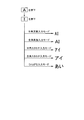
- FIG. 2 is a diagram showing a character input mode.
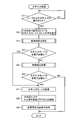
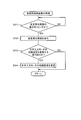
- FIG. 3 is a flowchart (part 1).
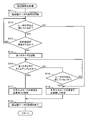
- FIG. 4 is a flowchart (part 2).
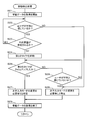
- FIG. 5 is a flowchart (part 3).
- FIG. 6 is a flowchart (part 4).
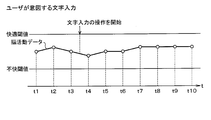
- FIG. 7A is a diagram (part 1) showing a change in brain activity data;
- FIG. 7B is a diagram (part 2) showing a change in brain activity data;
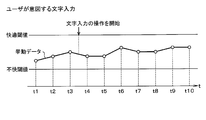
- FIG. 8A is a diagram (part 1) showing a change in behavior data;
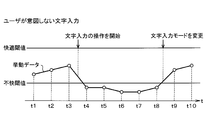
- FIG. 8B is a diagram (part 2) showing changes in behavior data;
- FIG. 9 is a diagram showing a change inquiry screen.
- the electronic information processing system 1 includes a control unit 2, a brain activity detection unit 3, a brain activity database 4, a behavior detection unit 5, a behavior database 6, a storage unit 7, a display unit 8, and a voice output unit 9. And an operation input unit 10 and a signal input unit 11.
- the control unit 2 includes a microcomputer having a CPU (Central Processing Unit), a ROM (Read Only Memory), a RAM (Random Access Memory), and an I / O (Input / Output).
- the control unit 2 executes a computer program stored in a non-transitional tangible recording medium, thereby executing processing corresponding to the computer program and controlling the overall operation of the electronic information processing system 1.
- the brain activity detector 3 detects the activity of the user's brain using NIRS (Near Infra-Red Spectroscopy) technology.
- NIRS Near Infra-Red Spectroscopy
- the user is a driver who drives the vehicle.
- NIRS Near Infra-Red Spectroscopy
- the information processing of the brain it is considered that two systems, an information transmission system responsible for neural activity, and an energy supply system supporting neural activity are closely related.
- nerve activity occurs, the surrounding blood vessels expand, and a regulating mechanism that supplies a lot of arterial blood including oxygen and glucose as energy sources works.
- the tissue near the active nerve it is assumed that the blood flow volume and the blood volume increase, and the oxidation state of blood (that is, the ratio between the oxyhemoglobin concentration and the deoxyhemoglobin concentration) changes.
- This relationship between neural activity and cerebral blood response is called neurovascular coupling, and the NIRS technology detects the local hemoglobin concentration in the brain based on the assumption
- the brain activity detection unit 3 includes an irradiation unit 3a that irradiates near infrared light on the user's scalp, and a light receiving unit 3b that receives light obtained by irregularly reflecting near infrared light emitted from the irradiation unit.
- a light receiving unit 3b that receives light obtained by irregularly reflecting near infrared light emitted from the irradiation unit.
- the brain activity detection unit 3 detects the light component in this manner, thereby estimating the change in the oxyhemoglobin concentration and deoxyhemoglobin concentration in the cerebral cortex and detecting the activity of the user's brain.
- the brain activity detection unit 3 may estimate a change in the total hemoglobin concentration, which is the sum of both, and detect the activity of the user's brain.
- the brain activity detection unit 3 When detecting the brain activity of the user, stores the brain activity data obtained by digitizing the detection result in the brain activity database 4 one by one, and updates the brain activity data stored in the brain activity database 4 At the same time, the detected brain activity data is collated with the past brain activity data.
- the brain activity detection unit 3 sets a comfortable threshold value and an unpleasant threshold value as determination criteria from the brain activity data stored in the brain activity database 4, and if the numerical value of the brain activity data is equal to or greater than the comfortable threshold value, Detects that you feel comfortable.
- the brain activity detection unit 3 detects that the user feels normal (that is, neither comfortable nor uncomfortable) if the numerical value of the brain activity data is less than the comfort threshold and greater than the uncomfortable threshold.
- the brain activity detection unit 3 detects that the user feels uncomfortable if the numerical value of the brain activity data is less than the unpleasant threshold.
- the brain activity detection unit 3 outputs a detection result signal indicating the detection result of the user's brain activity thus detected to the control unit 2.
- the brain activity detection unit 3 may always detect the activity of the user's brain, start detection on the condition that the detection start command signal is input from the control unit 2, and detect the end command from the control unit 2. Detection may be terminated on condition of signal input.
- the behavior detection unit 5 detects a user's behavior using image analysis and voice recognition technology.
- the behavior detection unit 5 includes a photographing unit 5a that captures the upper body including the user's face, and a voice input unit 5b that inputs voice spoken by the user.
- the behavior detection unit 5 captures the user's eye movement (that is, line of sight), mouth movement (that is, utterance), and facial expression by the photographing unit 5a, and inputs the voice spoken by the user through the voice input unit 5b.
- the movement of the mouth, the movement of the mouth, the facial expression and the change of the voice spoken by the user are specified, and the behavior of the user is detected.
- the behavior detection unit 5 may detect the user's behavior from at least one of these eye movements, mouth movements, facial expressions, and voices spoken by the user, or detect a user's behavior by combining a plurality of them. You may do it.
- the behavior detecting unit 5 When detecting the behavior of the user, stores the behavior data obtained by quantifying the detection result in the behavior database 6 one by one, updates the behavior data stored in the behavior database 6, and also detects the detected behavior. Check the data against past behavior data.
- the behavior detection unit 5 sets a comfort threshold value and a discomfort threshold value that are determination criteria from the behavior data stored in the behavior database 6, and the user feels comfortable if the numerical value of the behavior data is equal to or greater than the comfort threshold value. Detects that The behavior detection unit 5 detects that the user feels normal (that is, neither comfortable nor uncomfortable) if the numerical value of the behavior data is less than the comfort threshold and greater than the uncomfortable threshold.
- the behavior detection unit 5 detects that the user feels uncomfortable if the numerical value of the behavior data is less than the unpleasant threshold.
- the behavior detection unit 5 outputs a detection result signal indicating the detection result of the user behavior detected as described above to the control unit 2.
- the behavior detection unit 5 may detect the user's behavior at all times, start detection on the condition that the detection start command signal is input from the control unit 2, and input the detection end command signal from the control unit 2. Detection may be terminated on the condition.
- the storage unit 7 stores a plurality of programs that can be executed by the control unit 2.
- the programs stored in the storage unit 7 include an application program that can accept character input in a plurality of character input modes, and a Kana-Kanji conversion program for Japanese input (corresponding to a character conversion program for a predetermined language input). It is.
- Kana-kanji conversion program for Japanese input is software that performs kana-kanji conversion for inputting Japanese text, also called Japanese input program, Japanese input front-end processor (FEP), Kana-Kanji conversion program. Is done.
- the character input mode includes a half-width alphanumeric input mode, a full-width alphanumeric input mode, a half-width katakana input mode, a full-width katakana input mode, a hiragana input mode, and the like.
- the display unit 8 is configured by a liquid crystal display, for example, and displays a screen specified by the input display command signal when the display command signal is input from the control unit 2.
- the audio output unit 9 is configured by a speaker or the like, for example. When the audio output command signal is input from the control unit 2, the audio output unit 9 outputs audio specified by the input audio output command signal.
- the operation input unit 10 is configured by a touch panel, a mechanical switch, or the like formed on the screen of the display unit 8. When an operation from the user is detected, an operation detection signal indicating the content of the operation is transmitted to the control unit 2. Output to.
- the touch panel is formed with a plurality of character keys that can be pressed by the user.
- the signal input unit 11 inputs various signals from various ECUs (Electronic Control Units) 12 and various sensors 13 mounted on the vehicle.
- the control unit 2 includes a program execution unit 2a, a character input mode setting unit 2b, a display control unit 2c, and a change determination unit 2d. Each of these units 2a to 2d is configured by a computer program executed by the control unit 2, and is realized by software.
- the program execution unit 2a executes various programs stored in the storage unit 7. While executing any application program, the program execution unit 2a starts a Kana-Kanji conversion program for Japanese input when the character input mode of the application program being executed is the hiragana input mode.
- the program execution unit 2a starts the Kana-Kanji conversion program for Japanese input in the hiragana input mode, thereby enabling Kana character input and further Kana-Kanji conversion (ie, conversion from Kana characters to Kanji). Is possible.
- the character input mode setting unit 2b alternatively sets any one of the plurality of character input modes described above.
- the display control unit 2c receives the character input set by the character input mode setting unit 2b. Characters corresponding to the mode are displayed in the character display area of the display unit 8. That is, as shown in FIG. 2, when the user presses the “A” key first and then the “I” key as shown in FIG. Characters are displayed on the display unit 8.
- the display controller 2c displays “AI” if the half-width alphanumeric input mode is set, displays “AI” if the full-width alphanumeric input mode is set, and the half-width katakana input mode is set. "Eye (half-width display)” is displayed, “eye (full-width display)” is displayed if the full-width katakana input mode is set, and "ai” is displayed if the hiragana input mode is set.
- the change determination unit 2d uses the detection result of the brain activity detection unit 3 and the detection result of the behavior detection unit 5 to change one character input mode, which is the current character input mode, to another character input mode. It is determined whether or not it is necessary to change to.
- the control unit 2 monitors the character input operation from the user (S1).
- the control unit 2 inputs an operation detection signal from the operation receiving unit 10 and determines that a character input operation from the user has been received (S1: YES)
- the control unit 2 selects a character corresponding to the character input mode set at that time. It is displayed on the display unit 8 (S2). That is, the user can determine whether or not the character intended by the user has been input by visually recognizing the character displayed on the display unit 8.
- the control part 2 transfers to a brain activity detection process (S3, it corresponds to a 1st procedure).
- the control unit 2 starts acquiring brain activity data based on the detection result signal input from the brain activity detection unit 3 (S11).
- the control unit 2 periodically acquires brain activity data at a predetermined cycle (for example, a cycle of several milliseconds), and the user visually recognizes the activity of the user's brain at that time, that is, the characters displayed on the display unit 8.
- the emotion immediately after is determined (S12). If the user intends to input single-byte alphanumeric characters, the character input mode is set according to his / her intention, so that the user visually recognizes that the character intended by the user has been input. At this time, the change in the activity of the user's brain is not activated, and the user feels comfortable or normal and does not feel uncomfortable.
- control unit 2 determines that the numerical value of the brain activity data is not less than the unpleasant threshold and the user does not feel uncomfortable (S12: NO)
- the control unit 2 specifies that it is not necessary to change the character input mode (S18), and the brain
- the acquisition of activity data is terminated (S19), and the brain activity detection process is terminated. That is, as shown in FIG. 7A, if the character is input as intended by the user, the numerical value of the brain activity data does not become less than the unpleasant threshold, so the control unit 2 changes the character input mode. It is determined that there is no need, and the brain activity detection process is terminated.
- the control unit 2 determines that the numerical value of the brain activity data is less than the unpleasant threshold (corresponding to the first predetermined state) and the user feels uncomfortable (S12: YES), an external factor is assumed. It is determined whether or not (S13).
- the external factor is, for example, a change in the environment around the user.
- step S13 the control unit 2 returns to step S12 and repeats step S12 and subsequent steps.
- the change in the environment around the user is, for example, a sudden change in the vehicle state, such as a sudden change in acceleration or vibration applied to the vehicle.
- the control unit 2 uses various signals input from the various ECUs 12 and various sensors 13 via the signal input unit 11 to determine whether the environment around the user has changed, and is an external factor assumed? Determine whether or not.
- the control unit 2 When determining that no external factor is assumed (S13: NO), the control unit 2 starts a first timer that measures a first predetermined period (for example, several seconds) (S14), and the first timer times out. Whether or not the user feels uncomfortable is monitored (S15). When the control unit 2 determines that the timer has expired without leaving the state in which the user feels uncomfortable, that is, the state in which the user feels uncomfortable has continued for a predetermined period (S15: YES), character input It is determined that the mode needs to be changed (S17), the acquisition of brain activity data is terminated (S19), and the brain activity detection process is terminated. That is, as shown in FIG.
- the numerical value of the brain activity data becomes less than the unpleasant threshold, and the state of feeling uncomfortable continues for a predetermined period. Identifies that it is necessary to change the character input mode, and ends the brain activity detection process.
- the control unit 2 determines whether or not the character input mode needs to be changed as a specific result of the brain activity detection process (S4, corresponding to the second procedure).
- the control unit 2 changes the character input mode from the half-width alphanumeric input mode to the hiragana input mode (S7, corresponding to the third procedure).
- the control part 2 starts together the kana-kanji conversion program of Japanese input (S8).
- the character input mode is changed from the single-byte alphanumeric input mode to the hiragana input mode, and the Kana-Kanji conversion program for Japanese input is also started, so that the user can perform subsequent character input in the hiragana input mode. Can be converted to kanji.
- the control unit 2 determines that it is not necessary to change the character input mode (S4: NO)
- the control unit 2 proceeds to a behavior detection process (S5, corresponding to the fourth procedure).
- the control unit 2 starts acquiring behavior data based on the detection result signal input from the behavior detection unit 5 (S21).
- the control unit 2 periodically acquires behavior data at a predetermined cycle (for example, a cycle of several milliseconds), and the user's behavior at that time, that is, the emotion immediately after the user visually recognizes the character displayed on the display unit 8. Is determined (S22). Also at this time, if the user intends to input single-byte alphanumeric characters, since the character input mode is set as intended, the user visually recognizes that the character intended by the user has been input. At this time, the user's behavior is stabilized as usual, and the user does not feel uncomfortable by feeling comfortable or normal.
- control unit 2 determines that the numerical value of the behavior data is not less than the unpleasant threshold and the user does not feel uncomfortable (S22: NO)
- the control unit 2 specifies that it is not necessary to change the character input mode (S28), and the behavior data Acquisition is terminated (S29), and the behavior detection process is terminated. That is, as shown in FIG. 8A, if the character is input as intended by the user, the numerical value of the behavior data does not become less than the unpleasant threshold value, so the control unit 2 needs to change the character input mode. The behavior detection process is terminated.
- the character input mode is not set according to his / her intention, so that the user visually recognizes that an unintended character has been input.
- the movement of the user's eyes and changes in facial expression become intense, and the user's behavior becomes unstable instead of normal, and the user feels uncomfortable.
- control unit 2 determines that the behavior data value is less than the unpleasant threshold (corresponding to the second predetermined state) and the user feels uncomfortable (S22: YES), in this case as well, an external factor is present. It is determined whether or not it is assumed (S23). If it determines with the external factor being assumed (S22: YES), the control part 2 will return to step S21 and will repeat step S21 and subsequent steps. When determining that no external factor is assumed (S23: NO), the control unit 2 starts a second timer for measuring a second predetermined period (for example, several seconds) (S24), and the second timer times out. Whether or not the user feels uncomfortable is monitored (S26).
- control unit 2 determines that the second timer has timed up without leaving the state in which the user feels uncomfortable, that is, the state in which the user feels uncomfortable has continued for a predetermined period (S25: YES). Then, it is determined that the character input mode needs to be changed (S27), the acquisition of the behavior data is terminated (S29), and the behavior detection process is terminated. That is, as shown in FIG. 8B, if the character is not input as intended by the user, the numerical value of the behavior data becomes less than the unpleasant threshold value, and the state of feeling uncomfortable continues for a predetermined period. Then, it is determined that the character input mode needs to be changed, and the brain activity detection process is terminated.
- control unit 2 determines that the user feels uncomfortable before the second timer expires (S26: YES)
- the control unit 2 specifies that it is not necessary to change the character input mode ( S27), the acquisition of behavior data is terminated (S29), and the behavior detection process is terminated.
- the control unit 2 determines whether or not the character input mode needs to be changed as a specific result of the behavior detection process (S6, corresponding to the fifth procedure).
- the control unit 2 changes the character input mode from the half-width alphanumeric input mode to the hiragana mode (S7, corresponding to the sixth procedure).
- the control part 2 starts together the kana-kanji conversion program of Japanese input (S8).
- control unit 2 changes the character input mode from the half-width alphanumeric input mode to the hiragana mode and starts the kana-kanji conversion program for Japanese input in this way, the control unit 2 proceeds to a change inquiry screen display process (S9).
- S9 change inquiry screen display process
- control unit 2 ends the character input process without changing the character input mode.
- the control unit 2 determines whether or not it is the display timing of the change inquiry screen (S31), and determines that it is the display timing of the change inquiry screen (S31: YES). 9), the change inquiry screen M is displayed on the display unit 8 as shown in FIG. 9 (S32). In the change inquiry screen M, the control unit 2 asks the user whether or not to change the initial setting of the character input mode, that is, whether or not to start the corresponding application program in the hiragana input mode. It waits for an inquiry and an answer from the user (S33).
- control unit 2 determines that the user presses the “YES” key K1 on the change inquiry screen M and the user performs an operation to change the initial setting of the character input mode (that is, the change of the initial setting is permitted). (S33: YES), the initial setting of the character input mode is changed (S34), and the change inquiry screen display process is terminated.
- the control unit 2 starts the application program with the initial setting of the character input mode at the next startup of the application program as the hiragana input mode.
- control unit 2 the user presses the “NO” key K2 on the change inquiry screen M, and the user does not perform an operation of changing the initial setting of the character input mode (that is, the change of the initial setting is prohibited). Is determined (S33: NO), the change inquiry screen display process is terminated without changing the initial setting of the character input mode.
- the control unit 2 activates the application program with the initial setting of the character input mode at the next activation of the application program as the half-width alphanumeric input mode.
- control part 2 started the Kana-Kanji conversion program of the Japanese input by changing from the half-width alphanumeric input mode to the hiragana input mode, it may be when changing to a character input mode other than the hiragana input mode.
- the Kana-Kanji conversion program for Japanese input will not be started.
- any combination of the change from one character input mode to another character input mode may be used.
- the active Japanese input Kana-Kanji conversion program may be stopped.
- the control unit 2 may previously set which character input mode to change to when the user feels uncomfortable by an operation from the user, or character input when the user does not feel uncomfortable You may learn and set the mode.
- the following effects can be obtained.
- a difference occurs in the activity of the user's brain between when the character intended by the user is input and when the character not intended is input. Focused on that.
- it is determined whether or not the current character input mode needs to be changed, and if it is determined that the character input mode needs to be changed, another character is used instead of the one character input mode.
- the input mode was set. As a result, if the user desires character input in another character input mode, the character intended by the user is input, and the convenience for the user to perform character input operations can be improved.
- the electronic information processing system 1 when the period in which the user feels uncomfortable based on the detection result of the brain activity of the user continues for the first predetermined period, it is determined that the character input mode needs to be changed. . Accordingly, when the determination is made based on the detection result of the user's brain activity, it is possible to avoid the possibility of erroneous determination that the user feels uncomfortable due to noise or the like although the user does not feel uncomfortable.
- the electronic information processing system 1 when the user performs a character input operation, in addition to the activity of the user's brain, when the user's intended character is input and when the unintended character is input, We paid attention to differences in the behavior of the user's eyes and facial expressions. Using the detection result of the user's behavior, it is determined whether or not the current character input mode needs to be changed, and if it is determined that the character input mode needs to be changed, another character input mode is substituted for the one character input mode. Was set. As a result, if the user desires character input in another character input mode, the character intended by the user is input, and the convenience for the user to perform character input operations can be improved.
- the electronic information processing system 1 when the period in which the user feels uncomfortable based on the detection result of the user's behavior continues for the second predetermined period, it is determined that the character input mode needs to be changed. Accordingly, even when the determination is made based on the detection result of the user's behavior, it is possible to avoid the possibility of erroneous determination that the user feels uncomfortable due to noise or the like even though the user does not feel uncomfortable.
- the electronic information processing system 1 when the electronic information processing system 1 is changed to the hiragana input mode, the kana-kanji conversion program for Japanese input is also started. As a result, not only hiragana input but also conversion from kana characters to kanji can be performed, and the convenience when performing character input operations using Japanese input can be further enhanced. Furthermore, in the electronic information processing system 1, the user can select whether or not to change the initial setting of the character input mode at the next startup. Thereby, by changing the initial setting of the character input mode at the next start-up, it can be avoided that the user feels uncomfortable at the next start-up of the application program.
- the configuration is not limited to the configuration applied to the in-vehicle use, and may be the configuration applied to the usage other than the in-vehicle usage.
- the detection result of the brain activity detection unit 3 and the detection result of the behavior detection unit 5 are used together, but it is determined whether or not to change the character input mode using only the detection result of the brain activity detection unit 3. You may do it. That is, the detection result of the behavior detection unit 5 may be used as necessary.
- the NIRS technique is used as a technique for detecting the brain activity of the user, but other techniques may be used.
Landscapes
- Health & Medical Sciences (AREA)
- Engineering & Computer Science (AREA)
- Life Sciences & Earth Sciences (AREA)
- Physics & Mathematics (AREA)
- Biomedical Technology (AREA)
- General Health & Medical Sciences (AREA)
- Surgery (AREA)
- Biophysics (AREA)
- Medical Informatics (AREA)
- Molecular Biology (AREA)
- Animal Behavior & Ethology (AREA)
- Pathology (AREA)
- Public Health (AREA)
- Veterinary Medicine (AREA)
- Heart & Thoracic Surgery (AREA)
- Theoretical Computer Science (AREA)
- General Engineering & Computer Science (AREA)
- Human Computer Interaction (AREA)
- General Physics & Mathematics (AREA)
- Psychology (AREA)
- Neurology (AREA)
- Psychiatry (AREA)
- Neurosurgery (AREA)
- Physiology (AREA)
- Dermatology (AREA)
- Dentistry (AREA)
- Audiology, Speech & Language Pathology (AREA)
- Oral & Maxillofacial Surgery (AREA)
- Geometry (AREA)
- Developmental Disabilities (AREA)
- Social Psychology (AREA)
- Nuclear Medicine, Radiotherapy & Molecular Imaging (AREA)
- Radiology & Medical Imaging (AREA)
- Computer Networks & Wireless Communication (AREA)
- Child & Adolescent Psychology (AREA)
- Acoustics & Sound (AREA)
- Hospice & Palliative Care (AREA)
- Educational Technology (AREA)
- User Interface Of Digital Computer (AREA)
- Input From Keyboards Or The Like (AREA)
Abstract
電子情報処理システム(1)において、脳活動検出部(3)は、ユーザの脳の活動を検出する。変更判定部(2d)は、文字入力モード設定部(2b)により設定されている一の文字入力モードに応じた文字が表示制御部(2c)により表示部(8)に表示された後の脳活動検出部(3)の検出結果を用い、一の文字入力モードを他の文字入力モードに変更する必要の有無を判定する。文字入力モード設定部は、一の文字入力モードを他の文字入力モードに変更する必要が有ると変更判定部により判定されると、一の文字入力モードに代えて他の文字入力モードを設定する。
Description
本出願は、2015年12月24日に出願された日本出願番号2015-251498号に基づくもので、ここにその記載内容を援用する。
本開示は、電子情報処理システム及びコンピュータプログラムに関する。
電子情報処理システムでは、様々なアプリケーションプログラム(以下、アプリプログラムと称する)を実行可能である。ユーザからの文字入力を受け付けるアプリプログラムでは、ユーザが文字入力の操作を行うと、ユーザが意図しない文字が入力される場合がある。例えばユーザがひらがな入力を意図しているにも拘らず文字入力モードの初期設定が半角英数入力モードになっていれば、ユーザが文字入力の操作を行うと、ユーザが意図しない半角英数文字が入力されることになる。そのような場合、ユーザは当該入力された半角英数文字を消去する操作を行い、文字入力モードを半角英数入力モードからひらがな入力モードに変更する操作を行い、文字入力の操作を再度行うという煩雑な手間が必要となる。
特許文献1には、ユーザが文字入力の操作を行うときの言語中枢の働きにより発生する磁場又は電場の変化を時系列で検出し、そのユーザが入力しようとする文字の文字コードを発生させる技術が記載されている。
上記したような煩雑な手間が必要となる問題に対し、特許文献1の技術を適用することで、ユーザが意図する文字が入力されると想定される。特許文献1では、言語中枢の働きにより発生する磁場又は電場の変化を時系列で検出する必要があるので、ユーザが意図する文字が入力されるまで多大な処理時間がかかるという問題がある。又、1文字毎に文字コードを発生させるので、多大な文字数の文字入力には適さないという問題もある。
本開示は、ユーザが文字入力の操作を行う際の利便性を高めることができる電子情報処理システム及びコンピュータプログラムを提供することにある。
本開示の一態様によれば、プログラム実行部は、文字入力を複数の文字入力モードにより受け付け可能なアプリケーションプログラムを実行可能である。操作受付部は、ユーザからの文字入力の操作を受け付ける。文字入力モード設定部は、複数の文字入力モードのうち何れかを択一的に設定する。表示制御部は、アプリケーションプログラムがプログラム実行部により実行中にユーザからの文字入力の操作が操作受付部により受け付けられると、文字入力モード設定部により設定されている文字入力モードに応じた文字を表示部に表示させる。脳活動検出部は、ユーザの脳の活動を検出する。変更判定部は、文字入力モード設定部により設定されている一の文字入力モードに応じた文字が表示制御部により表示部に表示された後の脳活動検出部の検出結果を用い、一の文字入力モードを他の文字入力モードに変更する必要の有無を判定する。文字入力モード設定部は、一の文字入力モードを他の文字入力モードに変更する必要が有ると変更判定部により判定されると、一の文字入力モードに代えて他の文字入力モードを設定する。
本開示の一態様によれば、プログラム実行部は、文字入力を複数の文字入力モードにより受け付け可能なアプリケーションプログラムを実行可能である。操作受付部は、ユーザからの文字入力の操作を受け付ける。文字入力モード設定部は、複数の文字入力モードのうち何れかを択一的に設定する。表示制御部は、アプリケーションプログラムがプログラム実行部により実行中にユーザからの文字入力の操作が操作受付部により受け付けられると、文字入力モード設定部により設定されている文字入力モードに応じた文字を表示部に表示させる。脳活動検出部は、ユーザの脳の活動を検出する。変更判定部は、文字入力モード設定部により設定されている一の文字入力モードに応じた文字が表示制御部により表示部に表示された後の脳活動検出部の検出結果を用い、一の文字入力モードを他の文字入力モードに変更する必要の有無を判定する。文字入力モード設定部は、一の文字入力モードを他の文字入力モードに変更する必要が有ると変更判定部により判定されると、一の文字入力モードに代えて他の文字入力モードを設定する。
ユーザが文字入力の操作を行うときに、ユーザが意図する文字が入力された場合と意図しない文字が入力された場合とでユーザの脳の活動に差が発生することに着目した。ユーザの脳の活動の検出結果を用い、現在の文字入力モードである一の文字入力モードを他の文字入力モードに変更する必要が有ると判定すると、一の文字入力モードに代えて他の文字入力モードを設定するようにした。これにより、ユーザが他の文字入力モードによる文字入力を望んでいれば、ユーザが意図する文字が入力されるようになり、ユーザが文字入力の操作を行う際の利便性を高めることができる。この場合、言語中枢の働きにより発生する磁場又は電場の時系列の変化を利用する従来とは異なり、ユーザの脳の活動の差を利用するので、多大な処理時間がかかることがなく、多大な文字数の文字入力にも適する。
本開示についての上記目的及びその他の目的、特徴や利点は、添付の図面を参照しながら下記の詳細な記述により、より明確になる。その図面は、
図1は、一実施形態を示す機能ブロック図であり、
図2は、文字入力の態様を示す図であり、
図3は、フローチャート(その1)であり、
図4は、フローチャート(その2)であり、
図5は、フローチャート(その3)であり、
図6は、フローチャート(その4)であり、
図7Aは、脳活動データの変化を示す図(その1)であり、
図7Bは、脳活動データの変化を示す図(その2)であり、
図8Aは、挙動データの変化を示す図(その1)であり、
図8Bは、挙動データの変化を示す図(その2)であり、
図9は、変更問合画面を示す図である。
以下、本実施形態に係る電子情報処理システムについて図面を参照して説明する。電子情報処理システム1は、制御部2と、脳活動検出部3と、脳活動データベース4と、挙動検出部5と、挙動データベース6と、記憶部7と、表示部8と、音声出力部9と、操作入力部10と、信号入力部11とを有する。
制御部2は、CPU(Central Processing Unit)、ROM(Read Only Memory)、RAM(Random Access Memory)及びI/O(Input/Output)を有するマイクロコンピュータにより構成されている。制御部2は、非遷移的実体的記録媒体に格納されているコンピュータプログラムを実行することで、コンピュータプログラムに対応する処理を実行し、電子情報処理システム1の動作全般を制御する。
脳活動検出部3は、NIRS(Near Infra-Red Spectoroscopy)の技術を用いてユーザの脳の活動を検出する。本実施形態では、ユーザは車両を運転する運転者である。脳の情報処理では、神経活動が担う情報伝達系と、神経活動を支えるエネルギー供給系との2つの系が密接に関係していると考えられている。神経活動が起こると、その周囲にある血管が拡張し、エネルギー源となる酸素やグルコースを含む多くの動脈血を供給する調整機構が働く。そして、活動神経の近傍の組織では、血流量及び血液量が増大し、血液の酸化状態(即ちオキシヘモグロビン濃度とデオキシヘモグロビン濃度との比率)が変化すると仮定されている。このような神経活動と脳血液反応との関係はニューロバスキュラーカップリングと称されており、NIRSの技術ではニューロバスキュラーカップリングが存在するという仮定に基づき脳の局所ヘモグロビン濃度を検出することで、ユーザの脳の活動を検出する。
具体的には、脳活動検出部3は、ユーザの頭皮上に近赤外光を照射する照射部3aと、照射部から照射された近赤外光が乱反射した光を受光する受光部3bとを有する。近赤外光が照射部3aからユーザの頭皮上に照射されると、皮膚や骨を透過する高い生体透過性により、その近赤外光の光成分が脳組織内に拡散し、頭皮上から約20~30mmの深部にある大脳皮質に到達する。そして、血液中のオキシヘモグロビン濃度とデオキシヘモグロビン濃度とで光吸収特性が異なる性質により、照射点から数cm離れた箇所で乱反射した光成分を受光部3bにより検出する。脳活動検出部3は、このようにして光成分を検出することで、大脳皮質のオキシヘモグロビン濃度とデオキシヘモグロビン濃度との変化を推定し、ユーザの脳の活動を検出する。尚、脳活動検出部3は、大脳皮質のオキシヘモグロビン濃度とデオキシヘモグロビン濃度とに加え、両者の総計である総ヘモグロビン濃度の変化も推定し、ユーザの脳の活動を検出しても良い。
脳活動検出部3は、ユーザの脳の活動を検出すると、その検出結果を数値化した脳活動データを脳活動データベース4に逐一記憶し、脳活動データベース4に記憶されている脳活動データを更新すると共に、その検出した脳活動データを過去の脳活動データと照合する。脳活動検出部3は、脳活動データベース4に記憶されている脳活動データから判定基準となる快適閾値と不快閾値とを設定しており、脳活動データの数値が快適閾値以上であれば、ユーザが快適と感じていると検出する。脳活動検出部3は、脳活動データの数値が快適閾値未満であり不快閾値以上であれば、ユーザが平常(即ち快適でも不快でもない)と感じていると検出する。脳活動検出部3は、脳活動データの数値が不快閾値未満であれば、ユーザが不快と感じていると検出する。脳活動検出部3は、このようにして検出したユーザの脳の活動の検出結果を示す検出結果信号を制御部2に出力する。尚、脳活動検出部3は、ユーザの脳の活動を常時検出しても良いし、制御部2からの検出開始命令信号の入力を条件として検出を開始し、制御部2からの検出終了命令信号の入力を条件として検出を終了しても良い。
挙動検出部5は、画像解析や音声認識の技術を用いてユーザの挙動を検出する。具体的には、挙動検出部5は、ユーザの顔を含む上半身を撮影する撮影部5aと、ユーザが発話した音声を入力する音声入力部5bとを有する。挙動検出部5は、ユーザの目の動き(即ち視線)や口の動き(即ち発話)や表情を撮影部5aにより撮影し、ユーザが発話した音声を音声入力部5bにより入力し、ユーザの目の動きや口の動きや表情やユーザが発話した音声の変化を特定し、ユーザの挙動を検出する。尚、挙動検出部5は、これら目の動き、口の動き、表情、ユーザが発話した音声のうち少なくとも1つからユーザの挙動を検出しても良いし、複数を組み合わせてユーザの挙動を検出しても良い。
挙動検出部5は、ユーザの挙動を検出すると、その検出結果を数値化した挙動データを挙動データベース6に逐一記憶し、挙動データベース6に記憶されている挙動データを更新すると共に、その検出した挙動データを過去の挙動データと照合する。挙動検出部5は、挙動データベース6に記憶されている挙動データから判定基準となる快適閾値と不快閾値とを設定しており、挙動データの数値が快適閾値以上であれば、ユーザが快適と感じていると検出する。挙動検出部5は、挙動データの数値が快適閾値未満であり不快閾値以上であれば、ユーザが平常(即ち快適でも不快でもない)と感じていると検出する。挙動検出部5は、挙動データの数値が不快閾値未満であれば、ユーザが不快と感じていると検出する。挙動検出部5は、このようにして検出したユーザの挙動の検出結果を示す検出結果信号を制御部2に出力する。尚、挙動検出部5は、ユーザの挙動を常時検出しても良いし、制御部2からの検出開始命令信号の入力を条件として検出を開始し、制御部2からの検出終了命令信号の入力を条件として検出を終了しても良い。
記憶部7は、制御部2が実行可能な複数のプログラムを記憶している。記憶部7に記憶されているプログラムには、文字入力を複数の文字入力モードにより受け付け可能なアプリプログラムと、日本語入力のかな漢字変換プログラム(所定言語入力の文字変換プログラムに相当する)とが含まれる。日本語入力のかな漢字変換プログラムは、日本語の文章を入力するためにかな漢字変換を行うソフトウェアであり、日本語入力プログラム、日本語入力フロントエンドプロセッサ(FEP:Front End Processor)、かな漢字変換プログラムとも称される。文字入力モードは、半角英数入力モード、全角英数入力モード、半角カタカナ入力モード、全角カタカナ入力モード、ひらがな入力モード等である。
表示部8は、例えば液晶ディスプレイ等により構成されており、制御部2から表示指令信号を入力すると、その入力した表示指令信号により指定される画面を表示する。音声出力部9は、例えばスピーカ等により構成されており、制御部2から音声出力指令信号を入力すると、その入力した音声出力指令信号により指定される音声を出力する。操作入力部10は、表示部8の画面上に形成されるタッチパネルや機械的なスイッチ等により構成されており、ユーザからの操作を検知すると、その操作の内容を示す操作検知信号を制御部2に出力する。尚、タッチパネルにはユーザが押下可能な複数の文字キーが形成される。信号入力部11は、車両に搭載されている各種ECU(Electronic Control Unit)12や各種センサ13から各種信号を入力する。
制御部2は、プログラム実行部2aと、文字入力モード設定部2bと、表示制御部2cと、変更判定部2dとを有する。これらの各部2a~2dは制御部2が実行するコンピュータプログラムにより構成されており、ソフトウェアにより実現されている。プログラム実行部2aは、記憶部7に記憶されている各種プログラムを実行する。プログラム実行部2aは、何れかのアプリプログラムを実行中では、その実行中のアプリプログラムの文字入力モードがひらがな入力モードであるときには日本語入力のかな漢字変換プログラムを併せて起動する。即ち、プログラム実行部2aは、ひらがな入力モードであるときに日本語入力のかな漢字変換プログラムを併せて起動することで、かな文字入力を可能とし、更にかな漢字変換(即ちかな文字から漢字への変換)を可能としている。
文字入力モード設定部2bは、前述した複数の文字入力モードのうち何れかを択一的に設定する。表示制御部2cは、何れかのアプリプログラムがプログラム実行部2aにより実行中にユーザからの文字入力の操作が操作受付部10により受け付けられると、文字入力モード設定部2bにより設定されている文字入力モードに応じた文字を表示部8の文字表示領域に表示させる。即ち、表示制御部2cは、図2に示すように、ユーザからの文字入力の操作として、最初に「A」のキーが押下され、続いて「I」のキーが押下されると、以下の文字を表示部8に表示させる。表示制御部2cは、半角英数入力モードが設定されていれば「AI」を表示させ、全角英数入力モードが設定されていれば「AI」を表示させ、半角カタカナ入力モードが設定されていれば「アイ(半角表示)」を表示させ、全角カタカナ入力モードが設定されていれば「アイ(全角表示)」を表示させ、ひらがな入力モードが設定されていれば「あい」を表示させる。変更判定部2dは、詳しくは後述するように脳活動検出部3の検出結果と挙動検出部5の検出結果とを用い、現在の文字入力モードである一の文字入力モードを他の文字入力モードに変更する必要の有無を判定する。
次に、上記した構成の作用について、図3から図9を参照して説明する。ここでは、例えば文字入力モードの初期設定が半角英数入力モードのアプリプログラムが実行中に、ひらがな入力を望むユーザが文字入力の操作を行い、その半角英数入力をユーザが不快と感じたことで、文字入力モードを半角英数入力モードからひらがな入力モードに変更する場合を一例として説明する。
電子情報処理システム1において、制御部2は、文字入力処理を開始すると、ユーザからの文字入力の操作を監視する(S1)。制御部2は、操作検知信号を操作受付部10から入力し、ユーザからの文字入力の操作を受け付けたと判定すると(S1:YES)、その時点で設定されている文字入力モードに応じた文字を表示部8に表示させる(S2)。即ち、ユーザは、表示部8に表示された文字を視認することで、自分が意図する文字が入力されたか否かを判断可能となる。そして、制御部2は、脳活動検出処理に移行する(S3、第1の手順に相当する)。
制御部2は、脳活動検出処理を開始すると、脳活動検出部3から入力する検出結果信号による脳活動データの取得を開始する(S11)。制御部2は、脳活動データを所定周期(例えば数ミリ秒周期)で定期的に取得し、その時点でのユーザの脳の活動、即ち、表示部8に表示された文字をユーザが視認した直後の感情を判定する(S12)。ユーザは、半角英数入力を意図していれば、文字入力モードが自分の意図通りに設定されているので、自分が意図する文字が入力されたことを視認する。このとき、ユーザの脳の活動の変化が活性化することはなく、ユーザが快適又は平常と感じて不快と感じることはない。
制御部2は、脳活動データの数値が不快閾値未満でなく、ユーザが不快と感じていないと判定すると(S12:NO)、文字入力モードを変更する必要が無いと特定し(S18)、脳活動データの取得を終了し(S19)、脳活動検出処理を終了する。即ち、図7Aに示すように、ユーザが意図する通りに文字が入力されていれば、脳活動データの数値が不快閾値未満となることがないので、制御部2は、文字入力モードを変更する必要が無いと特定し、脳活動検出処理を終了する。
一方、ユーザは、半角英数入力ではない例えばひらがな入力を意図していれば、文字入力モードが自分の意図通りに設定されていないので、自分が意図しない文字が入力されたことを視認する。このとき、ユーザの脳の活動の変化が活性化し、ユーザが不快と感じる。制御部2は、脳活動データの数値が不快閾値未満(第1の所定状態に相当する)であり、ユーザが不快と感じていると判定すると(S12:YES)、外的要因が想定されるか否かを判定する(S13)。外的要因とは例えばユーザの周囲の環境の変化である。即ち、ユーザが文字入力の操作を行ったタイミングとユーザの周囲の環境が変化したタイミングとが偶々重なり、ユーザが文字入力の操作では不快と感じないがユーザの周囲の環境の変化で一時的に不快と感じる場合もあり得る。制御部2は、そのような場合を排除すべく外的要因が想定されると判定すると(ステップS13:YES)、ステップS12に戻り、ステップS12以降を繰り返して行う。ユーザの周囲の環境の変化としては例えば車両状態の急変であり、車両に加わる加速度や振動の急変等である。制御部2は、各種ECU12や各種センサ13から信号入力部11を経由して入力する各種信号を用い、ユーザの周囲の環境が変化したか否かを判定し、外的要因が想定されるか否かを判定する。
制御部2は、外的要因が想定されないと判定すると(S13:NO)、第1の所定期間(例えば数秒)を計測する第1のタイマを起動し(S14)、第1のタイマがタイムアップしたか否かを監視すると共に(S15)、ユーザが不快と感じている状態から脱したか否かを監視する(S16)。制御部2は、ユーザが不快と感じている状態から脱することなくタイマがタイムアップした、即ち、ユーザが不快と感じている状態が所定期間継続したと判定すると(S15:YES)、文字入力モードを変更する必要が有ると特定し(S17)、脳活動データの取得を終了し(S19)、脳活動検出処理を終了する。即ち、図7Bに示すように、ユーザが意図する通りに文字が入力されていなければ、脳活動データの数値が不快閾値未満となり、不快と感じている状態が所定期間継続するので、制御部2は、文字入力モードを変更する必要が有ると特定し、脳活動検出処理を終了する。
又、制御部2は、第1のタイマがタイムアップする前にユーザが不快と感じている状態から脱したと判定すると(S16:YES)、文字入力モードを変更する必要が無いと特定し(S18)、脳活動データの取得を終了し(S19)、脳活動検出処理を終了する。
制御部2は、脳活動検出処理を終了すると、脳活動検出処理による特定結果として文字入力モードを変更する必要の有無を判定する(S4、第2の手順に相当する)。制御部2は、文字入力モードを変更する必要有りと判定すると(S4:YES)、文字入力モードを半角英数入力モードからひらがな入力モードに変更する(S7、第3の手順に相当する)。そして、制御部2は、日本語入力のかな漢字変換プログラムを併せて起動する(S8)。このようにして文字入力モードが半角英数入力モードからひらがな入力モードに変更され、日本語入力のかな漢字変換プログラムが併せて起動されることで、ユーザは、これ以降の文字入力をひらがな入力モードで行うことができ、そのかなを漢字に変換させることができる。一方、制御部2は、文字入力モードを変更する必要無しと判定すると(S4:NO)、挙動検出処理に移行する(S5、第4の手順に相当する)。
制御部2は、挙動検出処理を開始すると、挙動検出部5から入力する検出結果信号による挙動データの取得を開始する(S21)。制御部2は、挙動データを所定周期(例えば数ミリ秒周期)で定期的に取得し、その時点でのユーザの挙動、即ち、表示部8に表示された文字をユーザが視認した直後の感情を判定する(S22)。このときも、ユーザは、半角英数入力を意図していれば、文字入力モードが自分の意図通りに設定されているので、自分が意図する文字が入力されたことを視認する。このとき、ユーザの挙動が平常通りに安定し、ユーザが快適又は平常と感じて不快と感じることはない。
制御部2は、挙動データの数値が不快閾値未満でなく、ユーザが不快と感じていないと判定すると(S22:NO)、文字入力モードを変更する必要が無いと特定し(S28)、挙動データの取得を終了し(S29)、挙動検出処理を終了する。即ち、図8Aに示すように、ユーザが意図する通りに文字が入力されていれば、挙動データの数値が不快閾値未満となることがないので、制御部2は、文字入力モードを変更する必要が無いと特定し、挙動検出処理を終了する。
一方、ユーザは、半角英数入力ではない例えばひらがな入力を意図していれば、文字入力モードが自分の意図通りに設定されていないので、自分が意図しない文字が入力されたことを視認する。このとき、例えばユーザの目の動きや表情の変化が激しくなる等してユーザの挙動が平常通りとならずに不安定となり、ユーザが不快と感じる。
制御部2は、挙動データの数値が不快閾値未満(第2の所定状態に相当する)であり、ユーザが不快と感じていると判定すると(S22:YES)、この場合も、外的要因が想定されるか否かを判定する(S23)。制御部2は、外的要因が想定されると判定すると(S22:YES)、ステップS21に戻り、ステップS21以降を繰り返して行う。制御部2は、外的要因が想定されないと判定すると(S23:NO)、第2の所定期間(例えば数秒)を計測する第2のタイマを起動し(S24)、第2のタイマがタイムアップしたか否かを監視すると共に(S25)、ユーザが不快と感じている状態から脱したか否かを監視する(S26)。制御部2は、ユーザが不快と感じている状態から脱することなく第2のタイマがタイムアップした、即ち、ユーザが不快と感じている状態が所定期間継続したと判定すると(S25:YES)、文字入力モードを変更する必要が有ると特定し(S27)、挙動データの取得を終了し(S29)、挙動検出処理を終了する。即ち、図8Bに示すように、ユーザが意図する通りに文字が入力されていなければ、挙動データの数値が不快閾値未満となり、不快と感じている状態が所定期間継続するので、制御部2は、文字入力モードを変更する必要が有ると特定し、脳活動検出処理を終了する。
又、制御部2は、第2のタイマがタイムアップする前にユーザが不快と感じている状態から脱したと判定すると(S26:YES)、文字入力モードを変更する必要が無いと特定し(S27)、挙動データの取得を終了し(S29)、挙動検出処理を終了する。
制御部2は、挙動検出処理を終了すると、挙動検出処理による特定結果として文字入力モードを変更する必要の有無を判定する(S6、第5の手順に相当する)。制御部2は、文字入力モードを変更する必要有りと判定すると(S6:YES)、文字入力モードを半角英数入力モードからひらがなモードに変更する(S7、第6の手順に相当する)。そして、制御部2は、日本語入力のかな漢字変換プログラムを併せて起動する(S8)。
又、制御部2は、このようにして文字入力モードを半角英数入力モードからひらがなモードに変更し、日本語入力のかな漢字変換プログラムを起動すると、変更問合画面表示処理に移行する(S9)。一方、制御部2は、文字入力モードを変更する必要無しと判定すると(S6:NO)、文字入力モードを変更せずに文字入力処理を終了する。
制御部2は、変更問合画面表示処理を開始すると、変更問合画面の表示タイミングであるか否かを判定し(S31)、変更問合画面の表示タイミングであると判定すると(S31:YES)、図9に示すように、変更問合画面Mを表示部8に表示させる(S32)。制御部2は、変更問合画面Mでは、文字入力モードの初期設定を変更するか否か、即ち、該当するアプリプログラムを次に起動するときにひらがな入力モードで起動するか否かをユーザに問合せ、ユーザからの回答を待機する(S33)。制御部2は、ユーザが変更問合画面Mの「YES」キーK1を押下し、ユーザが文字入力モードの初期設定を変更する操作を行った(即ち初期設定の変更を許可した)と判定すると(S33:YES)、文字入力モードの初期設定を変更し(S34)、変更問合画面表示処理を終了する。制御部2は、このようにしてユーザが初期設定の変更を許可すると、そのアプリプログラムの次の起動時における文字入力モードの初期設定をひらがな入力モードとして当該アプリプログラムを起動する。一方、制御部2は、ユーザが変更問合画面Mの「NO」キーK2を押下し、ユーザが文字入力モードの初期設定を変更する操作を行ってない(即ち初期設定の変更を禁止した)と判定すると(S33:NO)、文字入力モードの初期設定を変更することなく、変更問合画面表示処理を終了する。制御部2は、このようにしてユーザが初期設定の変更を禁止すると、そのアプリプログラムの次の起動時における文字入力モードの初期設定を半角英数入力モードとして当該アプリプログラムを起動する。
尚、以上は、制御部2が半角英数入力モードからひらがな入力モードに変更することで、日本語入力のかな漢字変換プログラムを起動したが、ひらがな入力モード以外の文字入力モードに変更する場合であれば、日本語入力のかな漢字変換プログラムを起動することはない。又、一の文字入力モードから他の文字入力モードへの変更はどのような組み合わせでも良い。ひらがな入力モードから他の文字入力モードに変更する場合であれば、起動している日本語入力のかな漢字変換プログラムを停止しても良い。尚、制御部2は、ユーザが不快と感じたときに何れの文字入力モードに変更するかを、予めユーザからの操作により設定していても良いし、ユーザが不快と感じないときの文字入力モードを学習して設定しても良い。
以上説明したように本実施形態によれば、次に示す効果を得ることができる。
電子情報処理システム1において、ユーザが文字入力の操作を行うときに、ユーザが意図する文字が入力された場合と意図しない文字が入力された場合とで、ユーザの脳の活動に差が発生することに着目した。ユーザの脳の活動の検出結果を用い、現在の文字入力モードを変更する必要の有無を判定し、文字入力モードを変更する必要が有ると判定すると、一の文字入力モードに代えて他の文字入力モードを設定するようにした。これにより、ユーザが他の文字入力モードによる文字入力を望んでいれば、ユーザが意図する文字が入力されるようになり、ユーザが文字入力の操作を行う際の利便性を高めることができる。
電子情報処理システム1において、ユーザが文字入力の操作を行うときに、ユーザが意図する文字が入力された場合と意図しない文字が入力された場合とで、ユーザの脳の活動に差が発生することに着目した。ユーザの脳の活動の検出結果を用い、現在の文字入力モードを変更する必要の有無を判定し、文字入力モードを変更する必要が有ると判定すると、一の文字入力モードに代えて他の文字入力モードを設定するようにした。これにより、ユーザが他の文字入力モードによる文字入力を望んでいれば、ユーザが意図する文字が入力されるようになり、ユーザが文字入力の操作を行う際の利便性を高めることができる。
又、電子情報処理システム1において、ユーザの脳の活動の検出結果によりユーザが不快と感じている期間が第1の所定期間継続すると、文字入力モードを変更する必要が有ると判定するようにした。これにより、ユーザの脳の活動の検出結果により判定する場合に、ユーザが不快と感じていないにも拘らずノイズ等によりユーザが不快と感じていると誤判定する虞を回避することができる。
又、電子情報処理システム1において、ユーザが文字入力の操作を行うときに、ユーザが意図する文字が入力された場合と意図しない文字が入力された場合とで、ユーザの脳の活動に加え、ユーザの目の動きや表情等の挙動にも差が発生することに着目した。ユーザの挙動の検出結果を用い、現在の文字入力モードを変更する必要の有無を判定し、文字入力モードを変更する必要が有ると判定すると、一の文字入力モードに代えて他の文字入力モードを設定するようにした。これにより、ユーザが他の文字入力モードによる文字入力を望んでいれば、ユーザが意図する文字が入力されるようになり、ユーザが文字入力の操作を行う際の利便性を高めることができる。
又、電子情報処理システム1において、ユーザの挙動の検出結果によりユーザが不快と感じている期間が第2の所定期間継続すると、文字入力モードを変更する必要が有ると判定するようにした。これにより、ユーザの挙動の検出結果により判定する場合にも、ユーザが不快と感じていないにも拘らずノイズ等によりユーザが不快と感じていると誤判定する虞を回避することができる。
又、電子情報処理システム1において、ひらがな入力モードに変更すると、日本語入力のかな漢字変換プログラムを併せて起動するようにした。これにより、ひらがな入力を行うのみでなく、かな文字から漢字への変換も行うことができ、日本語入力による文字入力の操作を行う際の利便性をより一層高めることができる。更に、電子情報処理システム1において、次の起動時における文字入力モードの初期設定を変更するか否かをユーザが選択可能とした。これにより、次の起動時における文字入力モードの初期設定を変更することで、アプリプログラムの次の起動時にユーザが不快と感じることを回避することができる。
本開示は、実施形態に準拠して記述されたが、当該実施形態や構造に限定されるものではないと理解される。本開示は、様々な変形例や均等範囲内の変形をも包含する。加えて、様々な組み合わせや形態、更には、それらに一要素のみ、それ以上、或いはそれ以下、を含む他の組み合わせや形態をも、本開示の範疇や思想範囲に入るものである。
車載の用途に適用する構成に限らず、車載以外の用途に適用する構成でも良い。
本実施形態では、脳活動検出部3の検出結果と挙動検出部5の検出結果とを併用したが、脳活動検出部3の検出結果のみを用いて文字入力モードを変更するか否かを判定しても良い。即ち、挙動検出部5の検出結果を必要に応じて用いれば良い。
本実施形態では、脳活動検出部3の検出結果と挙動検出部5の検出結果とを併用したが、脳活動検出部3の検出結果のみを用いて文字入力モードを変更するか否かを判定しても良い。即ち、挙動検出部5の検出結果を必要に応じて用いれば良い。
本実施形態では、ユーザの脳の活動を検出する技術としてNIRSの技術を用いたが、他の技術を用いても良い。
Claims (11)
- 文字入力を複数の文字入力モードにより受け付け可能なアプリケーションプログラムを実行可能なプログラム実行部(2a)と、
ユーザからの文字入力の操作を受け付ける操作受付部(10)と、
複数の文字入力モードのうち何れかを択一的に設定する文字入力モード設定部(2b)と、
前記アプリケーションプログラムが前記プログラム実行部により実行中にユーザからの文字入力の操作が前記操作受付部により受け付けられると、前記文字入力モード設定部により設定されている文字入力モードに応じた文字を表示部(8)に表示させる表示制御部(2c)と、
ユーザの脳の活動を検出する脳活動検出部(3)と、
前記文字入力モード設定部により設定されている一の文字入力モードに応じた文字が前記表示制御部により前記表示部に表示された後の前記脳活動検出部の検出結果を用い、一の文字入力モードを他の文字入力モードに変更する必要の有無を判定する変更判定部(2d)と、を備え、
前記文字入力モード設定部は、一の文字入力モードを他の文字入力モードに変更する必要が有ると前記変更判定部により判定されると、一の文字入力モードに代えて他の文字入力モードを設定する電子情報処理システム(1)。 - 前記変更判定部は、前記脳活動検出部の検出結果としてユーザの脳の活動が第1の所定状態で第1の所定期間継続した場合に、一の文字入力モードを他の文字入力モードに変更する必要が有ると判定する請求項1に記載の電子情報処理システム。
- ユーザの挙動を検出する挙動検出部(5)を備え、
前記変更判定部は、前記文字入力モード設定部により設定されている一の文字入力モードに応じた文字が前記表示制御部により前記表示部に表示された後の前記脳活動検出部の検出結果と前記挙動検出部の検出結果とを用い、一の文字入力モードを他の文字入力モードに変更する必要の有無を判定する請求項1又は2に記載の電子情報処理システム。 - 前記変更判定部は、前記脳活動検出部の検出結果としてユーザの脳の活動が第1の所定状態で第1の所定期間継続した場合、又は前記挙動検出部の検出結果としてユーザの挙動が第2の所定状態で第2の所定期間継続した場合に、一の文字入力モードを他の文字入力モードに変更する必要が有ると判定する請求項3に記載の電子情報処理システム。
- 前記プログラム実行部は、アプリケーションプログラムを実行可能であることに加え、所定言語入力の文字変換プログラムを実行可能であり、一の文字入力モードに代えて他の文字入力モードが前記文字入力モード設定部により設定されると、所定言語入力の文字変換プログラムを起動する請求項1から4の何れか一項に記載の電子情報処理システム。
- 前記プログラム実行部は、所定言語入力の文字変換プログラムとして日本語入力のかな漢字変換プログラムを起動する請求項5に記載の電子情報処理システム。
- 前記プログラム実行部は、アプリケーションプログラムを実行中に一の文字入力モードに代えて他の文字入力モードが前記文字入力モード設定部により設定されると、そのアプリケーションプログラムの次の起動時における文字入力モードの初期設定を他の文字入力モードとして当該アプリケーションプログラムを起動可能である請求項1から6の何れか一項に記載の電子情報処理システム。
- 前記プログラム実行部は、ユーザが初期設定の変更を許可した場合に、そのアプリケーションプログラムの次の起動時における文字入力モードの初期設定を他の文字入力モードとして当該アプリケーションプログラムを起動する請求項7に記載の電子情報処理システム。
- 前記プログラム実行部は、ユーザが初期設定の変更を禁止した場合に、そのアプリケーションプログラムの次の起動時における文字入力モードの初期設定を一の文字入力モードとして当該アプリケーションプログラムを起動する請求項7又は8に記載の電子情報処理システム。
- 文字入力を複数の文字入力モードにより受け付け可能なアプリケーションプログラムを実行可能であり、前記アプリケーションプログラムが実行中にユーザからの文字入力の操作が操作受付部(10)により受け付けられると、設定している文字入力モードに応じた文字を表示部(8)に表示させる電子情報処理システム(1)の制御部(2)に、
設定している一の文字入力モードに応じた文字が前記表示部に表示された後のユーザの脳の活動を脳活動検出部(3)により検出する第1の手順と、
前記第1の手順による検出結果を用い、一の文字入力モードを他の文字入力モードに変更する必要の有無を判定する第2の手順と、
一の文字入力モードを他の文字入力モードに変更する必要が有ると前記第2の手順により判定すると、一の文字入力モードに代えて他の文字入力モードを設定する第3の手順と、を実行させるコンピュータプログラム。 - 一の文字入力モードを他の文字入力モードに変更する必要が無いと前記第2の手順により判定すると、設定している一の文字入力モードに応じた文字が前記表示部に表示された後のユーザの挙動を挙動検出部(5)により検出する第4の手順と、
前記第4の手順による検出結果を用い、一の文字入力モードを他の文字入力モードに変更する必要の有無を判定する第5の手順と、
一の文字入力モードを他の文字入力モードに変更する必要が有ると前記第5の手順により判定すると、一の文字入力モードに代えて他の文字入力モードを設定する第6の手順と、を実行させる請求項10に記載のコンピュータプログラム。
Priority Applications (1)
| Application Number | Priority Date | Filing Date | Title |
|---|---|---|---|
| US16/063,816 US10838512B2 (en) | 2015-12-24 | 2016-11-07 | Electronic information processing system and storage medium |
Applications Claiming Priority (2)
| Application Number | Priority Date | Filing Date | Title |
|---|---|---|---|
| JP2015251498A JP6485345B2 (ja) | 2015-12-24 | 2015-12-24 | 電子情報処理システム及びコンピュータプログラム |
| JP2015-251498 | 2015-12-24 |
Publications (1)
| Publication Number | Publication Date |
|---|---|
| WO2017110271A1 true WO2017110271A1 (ja) | 2017-06-29 |
Family
ID=59089340
Family Applications (1)
| Application Number | Title | Priority Date | Filing Date |
|---|---|---|---|
| PCT/JP2016/082964 Ceased WO2017110271A1 (ja) | 2015-12-24 | 2016-11-07 | 電子情報処理システム及びコンピュータプログラム |
Country Status (3)
| Country | Link |
|---|---|
| US (1) | US10838512B2 (ja) |
| JP (1) | JP6485345B2 (ja) |
| WO (1) | WO2017110271A1 (ja) |
Families Citing this family (2)
| Publication number | Priority date | Publication date | Assignee | Title |
|---|---|---|---|---|
| JP7091643B2 (ja) * | 2017-12-11 | 2022-06-28 | 日産自動車株式会社 | 違和感判別方法及び違和感判別装置 |
| KR102850875B1 (ko) * | 2022-06-16 | 2025-08-27 | 한국과학기술연구원 | 군집에서 두뇌와 물체간 상호 활동의 모니터링 장치 및 방법, 이 방법을 수행하기 위한 기록 매체 |
Citations (2)
| Publication number | Priority date | Publication date | Assignee | Title |
|---|---|---|---|---|
| WO2006051709A1 (ja) * | 2004-11-10 | 2006-05-18 | Matsushita Electric Industrial Co., Ltd. | 誤操作検出装置およびこれを有する機器、誤操作検出方法、並びに機器評価方法 |
| JP2015148945A (ja) * | 2014-02-06 | 2015-08-20 | 国立大学法人名古屋大学 | 文字入力装置及びプログラム |
Family Cites Families (1)
| Publication number | Priority date | Publication date | Assignee | Title |
|---|---|---|---|---|
| JP2924321B2 (ja) | 1991-07-22 | 1999-07-26 | 日本電気株式会社 | ディジタル計算機におけるかな文字入力方式 |
-
2015
- 2015-12-24 JP JP2015251498A patent/JP6485345B2/ja not_active Expired - Fee Related
-
2016
- 2016-11-07 WO PCT/JP2016/082964 patent/WO2017110271A1/ja not_active Ceased
- 2016-11-07 US US16/063,816 patent/US10838512B2/en not_active Expired - Fee Related
Patent Citations (2)
| Publication number | Priority date | Publication date | Assignee | Title |
|---|---|---|---|---|
| WO2006051709A1 (ja) * | 2004-11-10 | 2006-05-18 | Matsushita Electric Industrial Co., Ltd. | 誤操作検出装置およびこれを有する機器、誤操作検出方法、並びに機器評価方法 |
| JP2015148945A (ja) * | 2014-02-06 | 2015-08-20 | 国立大学法人名古屋大学 | 文字入力装置及びプログラム |
Also Published As
| Publication number | Publication date |
|---|---|
| US20200272242A1 (en) | 2020-08-27 |
| JP6485345B2 (ja) | 2019-03-20 |
| JP2017118315A (ja) | 2017-06-29 |
| US10838512B2 (en) | 2020-11-17 |
Similar Documents
| Publication | Publication Date | Title |
|---|---|---|
| KR101143862B1 (ko) | 정보처리단말 및 통신시스템 | |
| EP2416698B1 (en) | Method and system for training of perceptual skills using neurofeedback | |
| JP6432543B2 (ja) | 経路計算システム及びコンピュータプログラム | |
| CN112568904A (zh) | 车辆交互方法、装置、计算机设备及存储介质 | |
| US20190339772A1 (en) | Electronic information process system and storage medium | |
| JP3786952B2 (ja) | サービス提供装置、期待はずれ判定装置および期待はずれ判定方法 | |
| JP2019185230A (ja) | 会話処理装置、会話処理システム、会話処理方法及びプログラム | |
| JP6485345B2 (ja) | 電子情報処理システム及びコンピュータプログラム | |
| US10983808B2 (en) | Method and apparatus for providing emotion-adaptive user interface | |
| Caligari et al. | Writing with the Eyes: The Effect of Age on Eye‐Tracking Performance in Non‐Disabled Adults and a Comparison with Bimanual Typing | |
| JP7443908B2 (ja) | 制御装置、情報処理システム、および制御方法 | |
| JP2010187810A (ja) | 居眠り防止装置及び居眠り防止方法 | |
| KR20200083901A (ko) | 자율주행차의 제어권 전환 hmi 평가 장치, 방법 및 저장 매체 | |
| CN119937797A (zh) | 一种拼图和音乐结合互动训练系统及方法 | |
| JP2025004432A (ja) | 学習方法、学習装置、学習プログラム、及び感情推定装置 | |
| Yashin | A Challenge for Bringing a BCI Closer to Motor Control: The “Interface Uncanny Valley” Hypothesis | |
| CN119078622B (zh) | 一种按摩控制方法、按摩控制装置、按摩座椅及汽车 | |
| Klug et al. | Passive brain–computer interfaces: tracking mental states for neuroadaptive technology | |
| JP2017000649A (ja) | 脳波の分析方法および分析装置 | |
| Saran et al. | EyeO: Autocalibrating Gaze Output with Gaze Input | |
| Chenwen | Exploring Non-Verbal Methods in Voice Interaction Systems for Autonomous Driving Applications | |
| CN120632141B (zh) | 辅助背诵方法、装置、电子设备及计算机可读存储介质 | |
| Hemati et al. | Capturing Voices at Risk: Designing Semi-Structured Speech Tasks for Voice Data Collection in Depression and Anxiety Risk Groups | |
| CN121130253A (zh) | 基于车机的疗愈方法、装置、设备及计算机可读存储介质 | |
| SAPAICO et al. | Visual text entry based on morse code generated with tongue gestures |
Legal Events
| Date | Code | Title | Description |
|---|---|---|---|
| 121 | Ep: the epo has been informed by wipo that ep was designated in this application |
Ref document number: 16878169 Country of ref document: EP Kind code of ref document: A1 |
|
| NENP | Non-entry into the national phase |
Ref country code: DE |
|
| 122 | Ep: pct application non-entry in european phase |
Ref document number: 16878169 Country of ref document: EP Kind code of ref document: A1 |