WO2017104579A1 - 情報処理装置および操作受付方法 - Google Patents
情報処理装置および操作受付方法 Download PDFInfo
- Publication number
- WO2017104579A1 WO2017104579A1 PCT/JP2016/086795 JP2016086795W WO2017104579A1 WO 2017104579 A1 WO2017104579 A1 WO 2017104579A1 JP 2016086795 W JP2016086795 W JP 2016086795W WO 2017104579 A1 WO2017104579 A1 WO 2017104579A1
- Authority
- WO
- WIPO (PCT)
- Prior art keywords
- icons
- icon
- user
- virtual space
- menu screen
- Prior art date
- Legal status (The legal status is an assumption and is not a legal conclusion. Google has not performed a legal analysis and makes no representation as to the accuracy of the status listed.)
- Ceased
Links
Images





Classifications
-
- G—PHYSICS
- G06—COMPUTING OR CALCULATING; COUNTING
- G06F—ELECTRIC DIGITAL DATA PROCESSING
- G06F3/00—Input arrangements for transferring data to be processed into a form capable of being handled by the computer; Output arrangements for transferring data from processing unit to output unit, e.g. interface arrangements
- G06F3/01—Input arrangements or combined input and output arrangements for interaction between user and computer
- G06F3/048—Interaction techniques based on graphical user interfaces [GUI]
- G06F3/0481—Interaction techniques based on graphical user interfaces [GUI] based on specific properties of the displayed interaction object or a metaphor-based environment, e.g. interaction with desktop elements like windows or icons, or assisted by a cursor's changing behaviour or appearance
- G06F3/0482—Interaction with lists of selectable items, e.g. menus
-
- G—PHYSICS
- G02—OPTICS
- G02B—OPTICAL ELEMENTS, SYSTEMS OR APPARATUS
- G02B27/00—Optical systems or apparatus not provided for by any of the groups G02B1/00 - G02B26/00, G02B30/00
- G02B27/01—Head-up displays
- G02B27/017—Head mounted
- G02B27/0172—Head mounted characterised by optical features
-
- G—PHYSICS
- G06—COMPUTING OR CALCULATING; COUNTING
- G06F—ELECTRIC DIGITAL DATA PROCESSING
- G06F3/00—Input arrangements for transferring data to be processed into a form capable of being handled by the computer; Output arrangements for transferring data from processing unit to output unit, e.g. interface arrangements
- G06F3/01—Input arrangements or combined input and output arrangements for interaction between user and computer
- G06F3/011—Arrangements for interaction with the human body, e.g. for user immersion in virtual reality
-
- G—PHYSICS
- G06—COMPUTING OR CALCULATING; COUNTING
- G06F—ELECTRIC DIGITAL DATA PROCESSING
- G06F3/00—Input arrangements for transferring data to be processed into a form capable of being handled by the computer; Output arrangements for transferring data from processing unit to output unit, e.g. interface arrangements
- G06F3/01—Input arrangements or combined input and output arrangements for interaction between user and computer
- G06F3/011—Arrangements for interaction with the human body, e.g. for user immersion in virtual reality
- G06F3/012—Head tracking input arrangements
-
- G—PHYSICS
- G06—COMPUTING OR CALCULATING; COUNTING
- G06F—ELECTRIC DIGITAL DATA PROCESSING
- G06F3/00—Input arrangements for transferring data to be processed into a form capable of being handled by the computer; Output arrangements for transferring data from processing unit to output unit, e.g. interface arrangements
- G06F3/01—Input arrangements or combined input and output arrangements for interaction between user and computer
- G06F3/017—Gesture based interaction, e.g. based on a set of recognized hand gestures
-
- G—PHYSICS
- G06—COMPUTING OR CALCULATING; COUNTING
- G06F—ELECTRIC DIGITAL DATA PROCESSING
- G06F3/00—Input arrangements for transferring data to be processed into a form capable of being handled by the computer; Output arrangements for transferring data from processing unit to output unit, e.g. interface arrangements
- G06F3/01—Input arrangements or combined input and output arrangements for interaction between user and computer
- G06F3/03—Arrangements for converting the position or the displacement of a member into a coded form
- G06F3/033—Pointing devices displaced or positioned by the user, e.g. mice, trackballs, pens or joysticks; Accessories therefor
- G06F3/0346—Pointing devices displaced or positioned by the user, e.g. mice, trackballs, pens or joysticks; Accessories therefor with detection of the device orientation or free movement in a three-dimensional [3D] space, e.g. 3D mice, 6-DOF [six degrees of freedom] pointers using gyroscopes, accelerometers or tilt-sensors
-
- G—PHYSICS
- G06—COMPUTING OR CALCULATING; COUNTING
- G06F—ELECTRIC DIGITAL DATA PROCESSING
- G06F3/00—Input arrangements for transferring data to be processed into a form capable of being handled by the computer; Output arrangements for transferring data from processing unit to output unit, e.g. interface arrangements
- G06F3/01—Input arrangements or combined input and output arrangements for interaction between user and computer
- G06F3/048—Interaction techniques based on graphical user interfaces [GUI]
- G06F3/0481—Interaction techniques based on graphical user interfaces [GUI] based on specific properties of the displayed interaction object or a metaphor-based environment, e.g. interaction with desktop elements like windows or icons, or assisted by a cursor's changing behaviour or appearance
- G06F3/04812—Interaction techniques based on cursor appearance or behaviour, e.g. being affected by the presence of displayed objects
-
- G—PHYSICS
- G06—COMPUTING OR CALCULATING; COUNTING
- G06F—ELECTRIC DIGITAL DATA PROCESSING
- G06F3/00—Input arrangements for transferring data to be processed into a form capable of being handled by the computer; Output arrangements for transferring data from processing unit to output unit, e.g. interface arrangements
- G06F3/01—Input arrangements or combined input and output arrangements for interaction between user and computer
- G06F3/048—Interaction techniques based on graphical user interfaces [GUI]
- G06F3/0481—Interaction techniques based on graphical user interfaces [GUI] based on specific properties of the displayed interaction object or a metaphor-based environment, e.g. interaction with desktop elements like windows or icons, or assisted by a cursor's changing behaviour or appearance
- G06F3/04815—Interaction with a metaphor-based environment or interaction object displayed as three-dimensional [3D], e.g. changing the user viewpoint with respect to the environment or object
-
- G—PHYSICS
- G06—COMPUTING OR CALCULATING; COUNTING
- G06F—ELECTRIC DIGITAL DATA PROCESSING
- G06F3/00—Input arrangements for transferring data to be processed into a form capable of being handled by the computer; Output arrangements for transferring data from processing unit to output unit, e.g. interface arrangements
- G06F3/01—Input arrangements or combined input and output arrangements for interaction between user and computer
- G06F3/048—Interaction techniques based on graphical user interfaces [GUI]
- G06F3/0481—Interaction techniques based on graphical user interfaces [GUI] based on specific properties of the displayed interaction object or a metaphor-based environment, e.g. interaction with desktop elements like windows or icons, or assisted by a cursor's changing behaviour or appearance
- G06F3/04817—Interaction techniques based on graphical user interfaces [GUI] based on specific properties of the displayed interaction object or a metaphor-based environment, e.g. interaction with desktop elements like windows or icons, or assisted by a cursor's changing behaviour or appearance using icons
-
- G—PHYSICS
- G06—COMPUTING OR CALCULATING; COUNTING
- G06F—ELECTRIC DIGITAL DATA PROCESSING
- G06F3/00—Input arrangements for transferring data to be processed into a form capable of being handled by the computer; Output arrangements for transferring data from processing unit to output unit, e.g. interface arrangements
- G06F3/01—Input arrangements or combined input and output arrangements for interaction between user and computer
- G06F3/048—Interaction techniques based on graphical user interfaces [GUI]
- G06F3/0484—Interaction techniques based on graphical user interfaces [GUI] for the control of specific functions or operations, e.g. selecting or manipulating an object, an image or a displayed text element, setting a parameter value or selecting a range
- G06F3/04842—Selection of displayed objects or displayed text elements
-
- G—PHYSICS
- G02—OPTICS
- G02B—OPTICAL ELEMENTS, SYSTEMS OR APPARATUS
- G02B27/00—Optical systems or apparatus not provided for by any of the groups G02B1/00 - G02B26/00, G02B30/00
- G02B27/01—Head-up displays
- G02B27/0101—Head-up displays characterised by optical features
- G02B2027/014—Head-up displays characterised by optical features comprising information/image processing systems
-
- G—PHYSICS
- G02—OPTICS
- G02B—OPTICAL ELEMENTS, SYSTEMS OR APPARATUS
- G02B27/00—Optical systems or apparatus not provided for by any of the groups G02B1/00 - G02B26/00, G02B30/00
- G02B27/01—Head-up displays
- G02B27/017—Head mounted
- G02B2027/0178—Eyeglass type
Definitions
- the present invention relates to an information processing apparatus that performs information processing by interaction with a user and an operation reception method that is performed by the information processing apparatus.
- a game in which a user's body and marker are photographed with a camera, the area of the image is replaced with another image, and displayed on a display.
- the technology for analyzing the measured values by attaching and gripping various sensors to the user and reflecting them in information processing such as games depends on the scale, from small game machines to leisure facilities. It is used in a wide range of fields.
- a system has been developed in which a panoramic image is displayed on a head-mounted display, and a panoramic image corresponding to the line-of-sight direction is displayed when a user wearing the head-mounted display rotates his head.
- a head-mounted display By using a head-mounted display, it is possible to enhance the sense of immersion in the video and improve the operability of applications such as games.
- a walk-through system has been developed in which a user wearing a head-mounted display can physically walk around in a space displayed as an image by physically moving.
- the present invention has been made in view of these problems, and an object of the present invention is to provide a technique capable of achieving both the world view expressed by the virtual space and the operability in the display of the operation reception screen.
- the information processing apparatus is an information processing apparatus that generates a menu screen including a plurality of icons and receives a selection operation from a user, and includes an icon arrangement unit that arranges the plurality of icons in a virtual space, and a posture of the user's head
- a display device that obtains information and determines a visual field plane for the virtual space based on the information, and generates a menu screen on which a projected image of the virtual space on the visual field is drawn and a cursor representing the user's viewpoint is superimposed and displayed.
- An image generation unit that outputs the image, an image of an icon or other object drawn on the menu screen, and an operation determination unit that specifies the operation content based on the positional relationship with the cursor.
- a plurality of icons are arranged such that the center of at least one icon has a vertical displacement from the center of the other icons. Characterized in that for arranging down.
- the operation reception method is an operation reception method by an information processing apparatus that generates a menu screen including a plurality of icons and receives a selection operation from a user, the step of arranging a plurality of icons in a virtual space, and a user's head
- the step of outputting to the device, the step of specifying the operation content based on the positional relationship between the image drawn on the menu screen and icons and other objects, and the cursor, and arranging the icons is a virtual space In the horizontal direction, the center of at least one icon is shifted vertically from the center of other icons. Characterized in that for arranging the plurality of icons to.
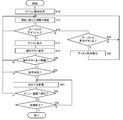
- FIG. 6 is a flowchart illustrating a processing procedure in which the information processing apparatus generates a menu screen and accepts a selection operation in the present embodiment.
- a screen for accepting a selection operation such as a menu screen is displayed while changing the visual field according to the movement of the user's line of sight.
- the type of device that displays an image is not particularly limited, and any of a wearable display, a flat panel display, a projector, and the like may be used.
- a head-mounted display will be described as an example of a wearable display.
- the user's line of sight can be estimated approximately by a built-in motion sensor.
- the user can detect the line of sight by wearing a motion sensor on the head or by detecting infrared reflection using a gaze point detection device.
- the user's head may be attached with a marker, and the line of sight may be estimated by analyzing an image of the appearance, or any of those techniques may be combined.
- FIG. 1 is an external view of the head mounted display 100.
- the head mounted display 100 includes a main body portion 110, a forehead contact portion 120, and a temporal contact portion 130.
- the head mounted display 100 is a display device that is worn on the user's head and enjoys still images and moving images displayed on the display, and listens to sound and music output from the headphones.
- Posture information such as the rotation angle and inclination of the head of the user wearing the head mounted display 100 can be measured by a motion sensor built in or externally attached to the head mounted display 100.
- the head mounted display 100 is an example of a “wearable display device”.
- the wearable display device is not limited to the head-mounted display 100 in a narrow sense, but includes glasses, glasses-type displays, glasses-type cameras, headphones, headsets (headphones with microphones), earphones, earrings, ear-mounted cameras, hats, hats with cameras, Any wearable display device such as a hair band is included.
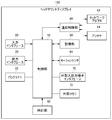
- FIG. 2 is a functional configuration diagram of the head mounted display 100.
- the control unit 10 is a main processor that processes and outputs signals such as image signals and sensor signals, commands and data.
- the input interface 20 receives operation signals and setting signals from the user and supplies them to the control unit 10.
- the output interface 30 receives the image signal from the control unit 10 and displays it on the display.
- the backlight 32 supplies a backlight to the liquid crystal display.
- the communication control unit 40 transmits data input from the control unit 10 to the outside by wired or wireless communication via the network adapter 42 or the antenna 44.
- the communication control unit 40 also receives data from the outside via wired or wireless communication via the network adapter 42 or the antenna 44 and outputs the data to the control unit 10.
- the storage unit 50 temporarily stores data, parameters, operation signals, and the like processed by the control unit 10.
- the motion sensor 64 detects posture information such as the rotation angle and tilt of the main body 110 of the head mounted display 100.
- the motion sensor 64 is realized by appropriately combining a gyro sensor, an acceleration sensor, an angular acceleration sensor, and the like.
- the external input / output terminal interface 70 is an interface for connecting peripheral devices such as a USB (Universal Serial Bus) controller.
- the external memory 72 is an external memory such as a flash memory.
- the clock unit 80 sets time information according to a setting signal from the control unit 10 and supplies time data to the control unit 10.
- the control unit 10 can supply the image and text data to the output interface 30 to be displayed on the display, or can supply the image and text data to the communication control unit 40 to be transmitted to the outside.
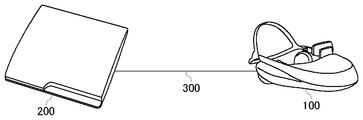
- FIG. 3 is a configuration diagram of the information processing system according to the present embodiment.
- the head mounted display 100 is connected to the information processing apparatus 200 through an interface 300 for connecting peripheral devices such as wireless communication or USB.
- the information processing apparatus 200 may be further connected to a server via a network.
- the server may provide the information processing apparatus 200 with an online application such as a game that allows a plurality of users to participate via a network.
- the head mounted display 100 may be connected to a computer or a mobile terminal instead of the information processing apparatus 200.
- the image displayed on the head-mounted display 100 may be a 360-degree panoramic still image or a panoramic video imaged in advance, or an artificial panoramic image such as a game space. Further, it may be a live video of a remote place distributed via a network.
- the present embodiment is not intended to be limited to panoramic images, and whether or not to make a panoramic image may be appropriately determined depending on the type of display device.
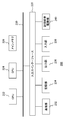
- FIG. 4 shows the internal circuit configuration of the information processing apparatus 200.
- the information processing apparatus 200 includes a CPU (Central Processing Unit) 222, a GPU (Graphics Processing Unit) 224, and a main memory 226. These units are connected to each other via a bus 230. An input / output interface 228 is further connected to the bus 230.
- CPU Central Processing Unit
- GPU Graphics Processing Unit
- the input / output interface 228 includes a peripheral device interface such as USB or IEEE1394, a communication unit 232 including a wired or wireless LAN network interface, a storage unit 234 such as a hard disk drive or a nonvolatile memory, and a display device such as the head mounted display 100.
- An output unit 236 that outputs data to the head, an input unit 238 that inputs data from the head mounted display 100, and a recording medium driving unit 240 that drives a removable recording medium such as a magnetic disk, an optical disk, or a semiconductor memory are connected.
- the CPU 222 controls the entire information processing apparatus 200 by executing an operating system stored in the storage unit 234.
- the CPU 222 also executes various programs read from the removable recording medium and loaded into the main memory 226 or downloaded via the communication unit 232.
- the GPU 224 has a function of a geometry engine and a function of a rendering processor, performs a drawing process according to a drawing command from the CPU 222, and stores a display image in a frame buffer (not shown). Then, the display image stored in the frame buffer is converted into a video signal and output to the output unit 236.
- the main memory 226 includes a RAM (Random Access Memory) and stores programs and data necessary for processing.
- FIG. 5 shows functional blocks of the information processing apparatus 200 in the present embodiment.
- the information processing apparatus 200 changes the field of view by the movement of the line of sight, and receives a screen for receiving an input for selecting one of a plurality of options by the line of sight (hereinafter referred to as “menu screen”). Call). Then, a selection input for the screen is accepted, and processing corresponding to the input is executed.
- the processing performed according to the selection is not particularly limited, but here, as an example, processing of electronic content such as a game or a moving image is assumed. An array of icons representing each electronic content is displayed on the menu screen.
- At least a part of the functions of the information processing apparatus 200 shown in FIG. 5 may be mounted on the control unit 10 of the head mounted display 100.
- at least a part of the functions of the information processing apparatus 200 may be mounted on a server connected to the information processing apparatus 200 via a network.
- a function for generating a menu screen and accepting a selection input may be provided as a menu screen control device separately from a device for processing electronic content.
- This figure is a block diagram mainly focusing on the function related to the control of the menu screen among the functions of the information processing apparatus 200.
- These functional blocks can be realized in terms of hardware by the configuration of the CPU, GPU, and various memories shown in FIG. 4, and in terms of software, the data input function and data retention loaded from the recording medium to the memory. It is realized by a program that exhibits various functions such as a function, an image processing function, and a communication function. Therefore, it is understood by those skilled in the art that these functional blocks can be realized in various forms by hardware only, software only, or a combination thereof, and is not limited to any one.
- the information processing apparatus 200 stores a position / posture acquisition unit 712 that acquires the position and posture of the head-mounted display 100, a visual field control unit 714 that controls the visual field of a display image based on the user's line of sight, and information related to icons to be displayed.
- An icon information storage unit 720 an icon arrangement unit 722 that determines an icon arrangement in the virtual space, an operation determination unit 718 that determines that an operation has been performed due to a change in line of sight, a content processing unit 728 that processes the selected electronic content,
- An image generation unit 716 that generates display image data, a content information storage unit 724 that stores information related to the content to be selected, and an output unit 726 that outputs the generated data.
- the position / posture acquisition unit 712 acquires the position and posture of the user's head wearing the head mounted display 100 at a predetermined rate based on the detection value of the motion sensor 64 of the head mounted display 100.
- the position / orientation acquisition unit 712 further acquires the position and orientation of the head based on an image captured by an imaging apparatus (not shown) connected to the information processing apparatus 200, and integrates the result with information from the motion sensor. Also good.
- the visual field control unit 714 sets a visual field surface (screen) for the three-dimensional space to be drawn based on the position and posture of the head acquired by the position / posture acquisition unit 712.
- a plurality of icons to be displayed are expressed as if they are floating in the hollow of the virtual space. Therefore, the visual field control unit 714 holds information on a virtual three-dimensional space for arranging the icon.
- the thing represented in the space other than the icon is not particularly limited.
- a surface representing a background or an object is defined in a global coordinate system similar to general computer graphics.
- an omnidirectional background object having a size that encompasses an icon floating in the air and the user's head may be arranged. This creates a sense of depth in the space and makes it more impressive that the icon is floating in the air.
- the visual field control unit 714 sets screen coordinates with respect to the global coordinate system at a predetermined rate based on the attitude of the head mounted display 100.
- the orientation of the user's face is determined by the posture of the head mounted display 100, that is, the Euler angle of the user's head.
- the visual field control unit 714 sets the screen coordinates corresponding to at least the direction in which the face faces, so that the virtual space is drawn on the screen plane with the visual field according to the direction in which the user faces.
- the normal vector of the user's face is estimated as the direction of the line of sight.
- line-of-sight information can be obtained by using a device that detects a gazing point by infrared reflection or the like.
- the direction in which the user is looking which is estimated or detected regardless of the derivation method, is generally referred to as the “line of sight” direction.
- the visual field control unit 714 may prevent the image from being unintentionally blurred by ignoring the detected change in the angle until the change in the posture of the user's head exceeds a predetermined value.
- the sensitivity of the head angle detection may be adjusted based on the zoom magnification.
- the icon arrangement unit 722 determines the arrangement of icons representing each electronic content. As described above, the icons are represented as floating in the virtual space. More specifically, the icons are arranged in the horizontal direction on or in the same horizontal plane as the line of sight when the user is facing the front (horizontal direction). As a result, the icon can be selected based on the operation of shaking the head sideways.
- the icon is an object such as a sphere representing a thumbnail image of each electronic content.
- the icon information storage unit 720 stores information related to the shape of the icon and the electronic content on which the icon is to be displayed.
- the icon arrangement unit 722 specifies the number of icons to be displayed based on the information stored in the icon information storage unit 720, and optimizes the arrangement pattern and the range covered by the arrangement accordingly. Although a specific example will be described later, in consideration of the range in which icons can be arranged in the virtual space and the number of icons to be displayed, optimization is performed by shifting the center position of the icons up and down. Thereby, even if it is many icons, it enables it to select efficiently, maintaining an appropriate space
- the icon arrangement unit 722 further displaces such an icon arrangement in the virtual space while maintaining the permutation in accordance with a user operation. That is, the array itself is displaced in the global coordinate system. Thereby, even if it is an arrangement
- the icon arrangement unit 722 associates the content identification information with the arrangement information of the icon representing the content, and supplies the information to the image generation unit 716.
- the operation determination unit 718 determines whether any operation other than a change in the visual field of the menu screen has been performed based on the movement of the user's line of sight.
- the operations determined here include selection of an icon, playback of electronic content corresponding to the selected icon, processing start, download, information display, transition to display on the corresponding website, display of help information, and the like. . For example, when the line of sight reaches one icon in the icon array, it is determined that the icon is selected. In response to this, an operation button for selecting a specific operation content for the corresponding content is additionally displayed, and when the line of sight is moved to this, it is determined that the operation has been performed.
- the operation determination unit 718 holds determination information for performing such processing and setting information related to processing to be performed accordingly. When it is determined that an operation has been performed and it is to display an additional object such as an operation button on the menu screen, the operation determination unit 718 notifies the image generation unit 716 of a request to that effect. In other cases where processing is completed in the virtual space for the menu screen, for example, when an operation for displaying an overview of the selected content is performed, or when an operation for displaying help information for the menu screen is performed, The operation determination unit 718 notifies the image generation unit 716 of a processing request to that effect.
- the operation determination unit 718 When an operation for switching the display from the virtual space for the menu screen is performed, such as playback / processing start of electronic content or transition to display on a website, the operation determination unit 718 notifies the content processing unit 728 of a request to that effect. To do. The operation determination unit 718 further determines whether or not an operation for displacing the icon array has been performed, and if so, notifies the icon arrangement unit 722 of a request to that effect.
- the image generation unit 716 draws an image to be displayed as a menu screen at a predetermined rate by projecting a virtual space including the icon arrangement determined by the icon arrangement unit 722 onto the screen determined by the visual field control unit 714. As described above, things other than the icon array such as background objects may exist in the virtual space.
- the image generation unit 716 may switch the texture image of the background object so that the thumbnail image of the icon in the selected state, that is, the line of sight is displayed on the entire background.
- the image generation unit 716 may generate an image of the menu screen so that the head mounted display 100 can be viewed stereoscopically. That is, parallax images for the left eye and right eye for displaying the screen of the head-mounted display 100 in respective regions divided into right and left may be generated.
- the image generation unit 716 further changes the image in response to a request from the operation determination unit 718. For example, an icon in a selected state is enlarged and an operation button for accepting a specific operation is displayed near such an icon.
- the content information storage unit 724 stores panoramic image data created for each electronic content or created for the menu screen. Keep it.
- a panoramic image is an example of an image of a surrounding space centered on a fixed point.
- the surrounding space panoramic space
- the background image may be a moving image or still image content created in advance, or may be rendered computer graphics.
- the content processing unit 728 processes electronic content corresponding to the selected icon in response to a request from the operation determination unit 718. That is, a moving image or a still image is played or a game is started. Data and programs for that purpose are stored in the content information storage unit 724 in association with content identification information.
- the image generation unit 716 also generates an image for content display such as a moving image or a game screen in accordance with a request from the content processing unit 728. Since a general technique can be applied to specific processing of content, description thereof is omitted here.
- the output unit 726 sends the image data generated by the image generation unit 716 to the head mounted display 100 at a predetermined rate.
- the output unit 726 may also output audio data such as audio for menu screen music and various contents.
- FIG. 6 illustrates a menu screen displayed on the head mounted display 100.
- the menu screen 500 represents an object in the visual field corresponding to the user's line of sight in the virtual space constructed around the user. Therefore, among the plurality of icons arranged by the icon arrangement unit 722, some icons 502a to 502g within the field of view are displayed. Above each of the icons 502a to 502g, the title of the content represented by the icon is displayed as character information. The user can move his / her line of sight and, consequently, the field of view by shaking his / her head in the horizontal direction, and can also view other icons.
- An object representing the background is also drawn behind the icons 502a to 502g.
- the texture image pasted on it is expressed with a sense of depth.
- the icons 502a to 502g can be rendered as if they are floating in the space encompassed by the background object.
- the icons 502a to 502g are spherical objects obtained by texture mapping thumbnail images of the respective electronic contents. However, this is not intended to limit the shape of the icon.
- the menu screen 500 further displays a cursor 504 representing the point where the image plane and the user's line of sight intersect, that is, the user's viewpoint on the menu screen.
- the visual field of the menu screen 500 changes according to the movement of the line of sight.
- the cursor 504 representing the viewpoint is placed at the approximate center of the menu screen 500 regardless of the movement of the line of sight. That is, when the direction of the user's line of sight changes, the field of view also changes, so that the cursor 504 is at a fixed position on the screen, and the virtual world including the icon array and the background object is displaced in the opposite direction.
- the cursor 504 informs the user of the position that the information processing apparatus 200 recognizes as the viewpoint, and the user intuitively adjusts the swing width of the neck using this as a clue, so that a desired icon or operation button can be accurately displayed. It will be possible to operate. As long as that is the case, the cursor 504 may not exactly match the user's viewpoint. Further, it may be off the center of the screen depending on the speed of movement of the line of sight.
- the menu screen 500 may further display other objects not shown.
- an operation button for displaying help information may be arranged below the virtual space, and may appear on the screen by directing the line of sight downward to accept the operation.
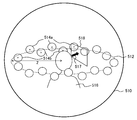
- FIG. 7 schematically shows an example of a virtual space constructed when generating a menu image.
- icons are arranged in the virtual space in the horizontal direction with reference to a horizontal plane that crosses the head of the user 516, for example, a horizontal plane that includes a line-of-sight vector when the user 516 faces the front.
- icons for example, icons 514a and 514b
- a spherical surface 510 centered on the position of the head of the user 516 is set as a background object. Then, the direction of the user's face (face normal vector 517) is specified as a line of sight, and a screen 518 is set on a vertical plane centered on the line of sight to project an object in the virtual space. Thereby, the menu screen 500 as shown in FIG. 6 is drawn.
- the icon arrangement unit 722 optimizes the icon arrangement according to the situation as described above. In the simplest case, it can be considered that all the icons are arranged in a line (one round) so that the centers of the icons are located on the circumference 512. All icons may be arranged at equal intervals, or may be preferentially arranged in a range corresponding to the front of the user.
- the upper limit of the number of icons that can be displayed is increased by arranging the centers of at least one icon so as to have a vertical difference from the centers of other icons.
- icons 514a whose centers represented by x marks are above the circumference 512 and icons 514b below are alternately arranged. That is, the vertical position is alternately changed.
- the upper limit of the number of icons that can be displayed can be increased by about 50% even if the radius Z is not changed and the interval between the icons is kept at the same level as compared with the case where they are arranged in a line. it can.
- FIG. 8 exemplifies the transition of the menu screen according to the movement of the line of sight.
- the portion of the icon arrangement in the menu screen is shown on the left side, and the state when the user's head at that time is viewed from the left side is shown on the right side.
- an array of icons 520 displayed as described above and a cursor 522 representing the user's viewpoint are displayed on the upper screen (a).
- the icon 520 in the virtual space is arranged so as to surround the head at the height of the line of sight when the user faces the front.
- the center of the icon array in the vertical direction is substantially the same height as the cursor 522 representing the viewpoint.
- the cursor 522 since the cursor 522 does not overlap the icon 520, all icons are in a non-selected state and have the same size. Note that since the virtual distance from the user becomes farther toward the center of the screen, the icon 520 is displayed in a size corresponding to such a distance, but is ignored here. The same applies to the subsequent drawings.
- the field of view of the screen moves to the right accordingly.
- the position of the cursor 522 in the screen does not change, but the icon arrangement moves relatively to the left.
- the icon array moves to the right in the screen.
- an operation button is additionally displayed below the icon 524.
- the operation buttons may vary depending on the type of content represented by the icon, but in the figure, assuming the moving image content, the information display button 526a, the reproduction start button 526b, the corresponding website display button 526c (hereinafter collectively referred to as “operation button 526”). 3) is displayed. In this state, when the user moves his gaze downward with nodding, the field of view of the screen moves downward accordingly.
- the position of the cursor 522 in the screen does not change, but the icon array moves relatively upward.
- an operation corresponding to the operation button is accepted.
- a playback start operation of the moving image content represented by the icon 524 in the selected state is accepted, and playback processing is started.
- the content processing unit 728 performs the control.
- the display is switched to character information that outlines a moving image in the same virtual space as the menu screen.
- the display is switched to the website display by connecting to the server that provides the website.
- a button for downloading the electronic content represented by the selected icon may be displayed.
- Some conditions may be set in order to validate the operation on the operation button and start the corresponding processing.
- the operation may be determined to be valid on the condition that a predetermined time has elapsed after the cursor 522 overlaps the operation button.
- an indicator indicating the remaining time until the operation is validated may be separately displayed.
- one of the arranged icons can be selected by swinging left and right, and various operations on the content represented by the icon can be performed with nodding.
- swinging left and right or nodding is less burdensome than looking up, regardless of posture. Therefore, by arranging the icons horizontally according to the swinging of the left and right with a wider variable range, and displaying the operation buttons below only when the operation is intended, more icons can be selected and there is no difficulty Intuitive operation is possible.
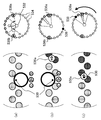
- FIG. 9 schematically shows the relationship between icon arrangement and viewpoint movement.
- the circular icons represent a part of the arrangement in the virtual space, and may actually be arranged on a circumference surrounding the user's head as shown in FIG.
- the locus of the cursor with respect to the icon arrangement by swinging left and right is indicated by a dotted arrow.
- (a) in the upper stage shows a state in which icons are arranged in a line. In this case, all the icons can be sequentially selected by simply turning the face to the right or left.
- (b) in the middle row shows a case where the center position of the icon is shifted up and down as described above, and particularly shows a case where the icons in the upper and lower rows are alternately arranged.
- more icons can be arranged in the same range than in the case of (a).
- the radius r of the icon and the vertical displacement ⁇ C of the upper and lower icons are determined so that all the icons intersect with the same horizontal plane. That is, 2r> ⁇ C> 0 is satisfied. However, if the icon is not a sphere, the radius r is replaced with half the length of the icon in the vertical direction.
- the upper and lower icons are alternately arranged, but the effect is the same even if they are not alternated as shown in (c) of the lower part of the figure.
- (b) has the largest number of icons that can be displayed at one time.
- the icon arrangement unit 722 arranges icon arrangements by combining icon display patterns, that is, combinations of (a) to (c) in FIG. You may optimize. For example, when the number of icons to be displayed is small, the icons are arranged in order from the front of the user in the pattern (a).
- the icons When the icons increase and the display range reaches 360 ° around the user and the icons increase, the icons are increased and displayed in front of the user in the pattern (b). Or you may arrange
- FIG. 10 exemplifies the transition of the menu screen including the operation for moving the icon array.
- the portion of the icon arrangement in the menu screen is shown on the left side, and the state in which the user orientation at that time and the icon arrangement in the virtual space are looked down is shown on the right side.
- the field of view on the screen changes as the user turns his / her face to the right or left, and the icon on which the cursor 530 overlaps is enlarged and displayed.
- a state in which an operation button is displayed below is shown.
- the icons 534 are arranged on a circle centering on the user's head, and the icon in the field of view is the display target.
- icons to be displayed are indicated by thick circles
- icons not to be displayed are indicated by dotted circles
- the user's line of sight is indicated by white arrows.
- the visual field control unit 714 further arranges displacement buttons 536a and 536b for displacing the icon arrangement on the circumference where the icons are arranged.
- the displacement buttons 536a and 536b are arranged at both ends of the angle range ⁇ on which the user can easily face his face on the circumference of the icon array.
- the angle range ⁇ is a range wider than the viewing angle of the menu screen with the direction corresponding to the front of the user as the center.
- the displacement buttons 536a and 536b are out of the field of view and are not displayed. For example, when the user swings his head to the right, as shown in (b) in the middle of the figure, one displacement button 536a eventually enters the field of view. By disposing the displacement button 536a on the user side from the icon array, the display overlaps the icon.
- the icon array continues to rotate while the cursor 530 is over the displacement button 536a.
- the icon 538 located behind the user in the state (b) can be moved forward in the state (c).
- the figure shows a case where the head is swung to the right, but the same applies to the case of the left.
- the user can select icons arranged around 360 ° only by the movement of the neck without twisting the body or changing the direction of standing.
- an angle at which the line of sight can be changed without difficulty is obtained by experiments or the like.
- the angle range ⁇ may be varied for each assumed user state, such as whether or not the user is seated.
- the cursor 530 is superimposed on the displacement button 536a, and the icon that has passed through the displacement button 536a can be selected during the period in which the icon array is displaced. At this time, regarding the icon on which the displacement button 536a overlaps and the icon following the icon, the selection is invalid by making it semi-transparent.
- an invalid icon is represented by a darker shade than a valid icon.
- the desired icon enters the field of view and becomes valid as a result of such displacement of the icon arrangement, the desired icon is selected as shown in the screen of (b) by removing the cursor 530 from the displacement button 536a. Can be in a state. Note that the operation of removing the cursor 530 from the displacement button 536a is performed by moving the cursor in the direction opposite to that when the cursor 530 is superimposed on the displacement button 536a, that is, by swinging the head to the left in the example of FIG.
- FIG. 11 is a flowchart illustrating a processing procedure in which the information processing apparatus 200 generates a menu screen and receives a selection operation. This flowchart is started when the user wears the head mounted display 100 and turns on the information processing apparatus 200, for example.
- the icon arrangement unit 722 of the information processing device 200 specifies the number of contents on which icons are to be displayed based on the icon information stored in the icon information storage unit 720, and determines the icon arrangement in the virtual space accordingly ( S10).
- the visual field control unit 714 defines a virtual space including a background object and determines a visual field plane (screen) for the virtual space based on the position and orientation of the user's head.
- the image generation unit 716 draws a menu screen by projecting a virtual space including the icon arrangement on the screen (S12).
- a general computer graphics technique can be applied to the drawing process itself.
- the image generation unit 716 superimposes and displays a cursor representing the user's viewpoint on the menu screen.
- the visual field control unit 714 changes the screen according to the change in the posture of the head, and the image generation unit 716 repeats the process of drawing an image on the screen at a predetermined rate.
- the output unit 726 sequentially outputs the generated image data to the head mounted display 100, so that the menu screen is dynamically expressed according to the movement of the line of sight.
- the image generation unit 716 enlarges and displays the icon as a selected state (S16). Then, a predetermined operation button is displayed below the enlarged icon (S18). At the same time, the background object image may be updated to one corresponding to the icon in the selected state.
- the operation determination unit 718 selects the operation target. Processing is requested to the image generation unit 716 or the content processing unit 728 depending on the type of button. Thereby, a corresponding process is performed (S24).
- the icon arrangement unit 722 continues to displace (rotate) the icon array, and the image generation unit 716 continues to draw the pattern (S32, S12).
- the image generation unit 716 draws the icon arrangement only in accordance with the visual field change (N in S14, N in S30, and S12).
- the image generation unit 716 restarts the drawing process of the menu screen (Y in S26, S12). If the operation for returning to the menu screen is not performed, the image generation unit 716 or the content processing unit 728 continues the processing so far (N in S26, N in S28, and S24). However, in the process, if it is necessary to end the process by a user operation or the like, the information processing apparatus 200 ends the entire process (Y in S28).
- the menu screen that accepts selection inputs from a plurality of icons is expressed as a virtual space whose field of view changes according to the change in the face direction and line of sight of the user.
- the icons are arranged in parallel to the horizontal plane of the virtual space so that the icons can be selected by the movement of the line of sight by swinging left and right, and operation buttons for receiving detailed operations on the selected icons are Display below the icon.
- the icon arrangement has a vertical shift, enabling a unique effect of floating icons so as to surround the user, while allowing more icons to be easily viewed.
- the array pattern and the range covered by the array can be optimized according to the number of icons to be displayed.
- the icon radius and the shift width are determined so that the upper and lower icons intersect the same horizontal plane.
- the icons are sequentially selected by a simple operation of swinging their heads to the left and right, as in the case of arranging them in a line, so that it is easy to understand the operation method.
- only the upper icon or only the lower icon can be selected by adjusting the angle of the neck slightly in the vertical direction, and the selection efficiency is improved.
- an operation for rotating the icon array itself is accepted.
- an icon at a position where the user is difficult to face, such as behind can be moved to a favorable range, and the burden can be further reduced.
- the displacement buttons for performing such operations as objects as in the case of the icon arrangement, it is possible to perform an easy displacement operation as an extension of the icon selection without having to separately acquire an operation method.
- an advanced selection operation can be performed by the movement of the line of sight with respect to the virtual space, it is particularly effective when it is difficult to operate the input device such as a head-mounted display.
- the selection operation can be performed with an expression suitable for the world view of the content.
- control unit 20 input interface, 30 output interface, 32 backlight, 40 communication control unit, 42 network adapter, 44 antenna, 50 storage unit, 64 motion sensor, 70 external input / output terminal interface, 72 external memory, 80 clock unit , 100 head mounted display, 200 information processing device, 222 CPU, 224 GPU, 226 main memory, 712 position / attitude acquisition unit, 714 visual field control unit, 716 image generation unit, 718 operation determination unit, 720 icon information storage unit, 722 Icon placement unit, 724 content information storage unit, 726 output unit, 728 content processing unit.
- the present invention can be used for game machines, information processing apparatuses, image display apparatuses, and systems including any of them.
Landscapes
- Engineering & Computer Science (AREA)
- General Engineering & Computer Science (AREA)
- Theoretical Computer Science (AREA)
- Physics & Mathematics (AREA)
- General Physics & Mathematics (AREA)
- Human Computer Interaction (AREA)
- Optics & Photonics (AREA)
- User Interface Of Digital Computer (AREA)
- Position Input By Displaying (AREA)
Priority Applications (1)
| Application Number | Priority Date | Filing Date | Title |
|---|---|---|---|
| US15/780,003 US10620791B2 (en) | 2015-12-17 | 2016-12-09 | Information processing apparatus and operation reception method |
Applications Claiming Priority (2)
| Application Number | Priority Date | Filing Date | Title |
|---|---|---|---|
| JP2015246485A JP6560974B2 (ja) | 2015-12-17 | 2015-12-17 | 情報処理装置および操作受付方法 |
| JP2015-246485 | 2015-12-17 |
Publications (1)
| Publication Number | Publication Date |
|---|---|
| WO2017104579A1 true WO2017104579A1 (ja) | 2017-06-22 |
Family
ID=59056615
Family Applications (1)
| Application Number | Title | Priority Date | Filing Date |
|---|---|---|---|
| PCT/JP2016/086795 Ceased WO2017104579A1 (ja) | 2015-12-17 | 2016-12-09 | 情報処理装置および操作受付方法 |
Country Status (3)
| Country | Link |
|---|---|
| US (1) | US10620791B2 (enExample) |
| JP (1) | JP6560974B2 (enExample) |
| WO (1) | WO2017104579A1 (enExample) |
Cited By (1)
| Publication number | Priority date | Publication date | Assignee | Title |
|---|---|---|---|---|
| WO2019160730A1 (en) * | 2018-02-19 | 2019-08-22 | Microsoft Technology Licensing, Llc | Curved display of content in mixed reality |
Families Citing this family (25)
| Publication number | Priority date | Publication date | Assignee | Title |
|---|---|---|---|---|
| USD795887S1 (en) * | 2015-04-09 | 2017-08-29 | Sonos, Inc. | Display screen with icon |
| JP6236691B1 (ja) * | 2016-06-30 | 2017-11-29 | 株式会社コナミデジタルエンタテインメント | 端末装置、及びプログラム |
| US10867445B1 (en) * | 2016-11-16 | 2020-12-15 | Amazon Technologies, Inc. | Content segmentation and navigation |
| US20190156792A1 (en) * | 2017-01-10 | 2019-05-23 | Shenzhen Royole Technologies Co., Ltd. | Method and system for adjusting display content and head-mounted display |
| JP6340464B1 (ja) * | 2017-09-27 | 2018-06-06 | 株式会社Cygames | プログラム、情報処理方法、情報処理システム、頭部装着型表示装置、情報処理装置 |
| WO2019176910A1 (ja) * | 2018-03-14 | 2019-09-19 | 本田技研工業株式会社 | 情報表示装置、情報表示方法および情報表示プログラム |
| US11907417B2 (en) * | 2019-07-25 | 2024-02-20 | Tectus Corporation | Glance and reveal within a virtual environment |
| US11662807B2 (en) | 2020-01-06 | 2023-05-30 | Tectus Corporation | Eye-tracking user interface for virtual tool control |
| USD914054S1 (en) * | 2019-11-18 | 2021-03-23 | Citrix Systems, Inc. | Display screen or portion thereof with animated graphical user interface |
| USD914746S1 (en) * | 2019-11-18 | 2021-03-30 | Citrix Systems, Inc. | Display screen or portion thereof with animated graphical user interface |
| USD923049S1 (en) * | 2019-11-18 | 2021-06-22 | Citrix Systems, Inc. | Display screen or portion thereof with icon |
| USD914745S1 (en) * | 2019-11-18 | 2021-03-30 | Citrix Systems, Inc. | Display screen or portion thereof with animated graphical user interface |
| KR102734523B1 (ko) | 2020-07-01 | 2024-11-27 | 삼성전자주식회사 | 증강 현실을 제공하는 전자 장치 및 그 방법 |
| USD975731S1 (en) | 2021-04-22 | 2023-01-17 | Meta Platforms, Inc. | Display screen with a graphical user interface |
| USD973097S1 (en) * | 2021-04-22 | 2022-12-20 | Meta Platforms, Inc. | Display screen with an animated graphical user interface |
| US11949636B1 (en) | 2021-04-22 | 2024-04-02 | Meta Platforms, Inc. | Systems and methods for availability-based streaming |
| USD974404S1 (en) | 2021-04-22 | 2023-01-03 | Meta Platforms, Inc. | Display screen with a graphical user interface |
| US11516171B1 (en) | 2021-04-22 | 2022-11-29 | Meta Platforms, Inc. | Systems and methods for co-present digital messaging |
| USD973100S1 (en) | 2021-04-22 | 2022-12-20 | Meta Platforms, Inc. | Display screen with a graphical user interface |
| US12135471B2 (en) | 2021-09-10 | 2024-11-05 | Tectus Corporation | Control of an electronic contact lens using eye gestures |
| US11592899B1 (en) | 2021-10-28 | 2023-02-28 | Tectus Corporation | Button activation within an eye-controlled user interface |
| US11619994B1 (en) | 2022-01-14 | 2023-04-04 | Tectus Corporation | Control of an electronic contact lens using pitch-based eye gestures |
| JP7771361B2 (ja) * | 2022-03-29 | 2025-11-17 | 株式会社ソニー・インタラクティブエンタテインメント | 情報処理装置、情報処理装置の制御方法、及びプログラム |
| US11874961B2 (en) | 2022-05-09 | 2024-01-16 | Tectus Corporation | Managing display of an icon in an eye tracking augmented reality device |
| JP2024055288A (ja) * | 2022-10-07 | 2024-04-18 | 株式会社Nttドコモ | 情報処理装置 |
Citations (6)
| Publication number | Priority date | Publication date | Assignee | Title |
|---|---|---|---|---|
| JPH0764709A (ja) * | 1993-08-26 | 1995-03-10 | Olympus Optical Co Ltd | 指示処理装置 |
| JPH07271546A (ja) * | 1994-03-31 | 1995-10-20 | Olympus Optical Co Ltd | 画像表示制御方法 |
| JPH0997162A (ja) * | 1995-10-02 | 1997-04-08 | Sony Corp | 画像制御装置および方法 |
| JP2003196017A (ja) * | 2001-12-25 | 2003-07-11 | Gen Tec:Kk | データ入力方法及び同装置等 |
| JP2008033891A (ja) * | 2006-06-27 | 2008-02-14 | Matsushita Electric Ind Co Ltd | 表示装置及びその制御方法 |
| JP2014072576A (ja) * | 2012-09-27 | 2014-04-21 | Kyocera Corp | 表示装置および制御方法 |
Family Cites Families (11)
| Publication number | Priority date | Publication date | Assignee | Title |
|---|---|---|---|---|
| US5898435A (en) | 1995-10-02 | 1999-04-27 | Sony Corporation | Image controlling device and image controlling method |
| AU5066399A (en) * | 1998-08-24 | 2000-03-14 | Hitachi Limited | Method for displaying multimedia information processing method, processing device, and processing system |
| US7928926B2 (en) * | 2006-06-27 | 2011-04-19 | Panasonic Corporation | Display apparatus and method for hands free operation that selects a function when window is within field of view |
| JP2010218195A (ja) * | 2009-03-17 | 2010-09-30 | Cellius Inc | 画像生成システム、プログラム、情報記憶媒体、及びサーバシステム |
| US9329746B2 (en) * | 2009-11-27 | 2016-05-03 | Lg Electronics Inc. | Method for managing contents and display apparatus thereof |
| JP5790255B2 (ja) * | 2011-07-29 | 2015-10-07 | ソニー株式会社 | 表示制御装置、表示制御方法、およびプログラム |
| US8970452B2 (en) * | 2011-11-02 | 2015-03-03 | Google Inc. | Imaging method |
| CN106020620B (zh) * | 2012-09-27 | 2019-07-26 | 京瓷株式会社 | 显示装置、控制方法和控制程序 |
| TWI566134B (zh) * | 2013-02-05 | 2017-01-11 | 財團法人工業技術研究院 | 摺疊式顯示器、可撓式顯示器及電腦圖像之控制方法 |
| KR20150026336A (ko) * | 2013-09-02 | 2015-03-11 | 엘지전자 주식회사 | 웨어러블 디바이스 및 그 컨텐트 출력 방법 |
| US10203762B2 (en) * | 2014-03-11 | 2019-02-12 | Magic Leap, Inc. | Methods and systems for creating virtual and augmented reality |
-
2015
- 2015-12-17 JP JP2015246485A patent/JP6560974B2/ja active Active
-
2016
- 2016-12-09 WO PCT/JP2016/086795 patent/WO2017104579A1/ja not_active Ceased
- 2016-12-09 US US15/780,003 patent/US10620791B2/en active Active
Patent Citations (6)
| Publication number | Priority date | Publication date | Assignee | Title |
|---|---|---|---|---|
| JPH0764709A (ja) * | 1993-08-26 | 1995-03-10 | Olympus Optical Co Ltd | 指示処理装置 |
| JPH07271546A (ja) * | 1994-03-31 | 1995-10-20 | Olympus Optical Co Ltd | 画像表示制御方法 |
| JPH0997162A (ja) * | 1995-10-02 | 1997-04-08 | Sony Corp | 画像制御装置および方法 |
| JP2003196017A (ja) * | 2001-12-25 | 2003-07-11 | Gen Tec:Kk | データ入力方法及び同装置等 |
| JP2008033891A (ja) * | 2006-06-27 | 2008-02-14 | Matsushita Electric Ind Co Ltd | 表示装置及びその制御方法 |
| JP2014072576A (ja) * | 2012-09-27 | 2014-04-21 | Kyocera Corp | 表示装置および制御方法 |
Cited By (3)
| Publication number | Priority date | Publication date | Assignee | Title |
|---|---|---|---|---|
| WO2019160730A1 (en) * | 2018-02-19 | 2019-08-22 | Microsoft Technology Licensing, Llc | Curved display of content in mixed reality |
| US10585294B2 (en) | 2018-02-19 | 2020-03-10 | Microsoft Technology Licensing, Llc | Curved display on content in mixed reality |
| CN111742283A (zh) * | 2018-02-19 | 2020-10-02 | 微软技术许可有限责任公司 | 混合现实中内容的弯曲显示 |
Also Published As
| Publication number | Publication date |
|---|---|
| JP6560974B2 (ja) | 2019-08-14 |
| US10620791B2 (en) | 2020-04-14 |
| JP2017111669A (ja) | 2017-06-22 |
| US20180348969A1 (en) | 2018-12-06 |
Similar Documents
| Publication | Publication Date | Title |
|---|---|---|
| JP6560974B2 (ja) | 情報処理装置および操作受付方法 | |
| EP3396511B1 (en) | Information processing device and operation reception method | |
| JP6511386B2 (ja) | 情報処理装置および画像生成方法 | |
| EP3321776B1 (en) | Operation input device and operation input method | |
| US11317072B2 (en) | Display apparatus and server, and control methods thereof | |
| CN111630478B (zh) | 高速交错双眼跟踪系统 | |
| JP2018523326A (ja) | 全球状取込方法 | |
| JP2022531599A (ja) | 視点回転の方法、装置、端末およびコンピュータプラグラム | |
| JP2020024417A (ja) | 情報処理装置 | |
| US11882172B2 (en) | Non-transitory computer-readable medium, information processing method and information processing apparatus | |
| US10369468B2 (en) | Information processing apparatus, image generating method, and program | |
| JP6262283B2 (ja) | 仮想空間を提供する方法、プログラム、および記録媒体 | |
| EP3600578B1 (en) | Zoom apparatus and associated methods | |
| JP6207691B1 (ja) | 情報処理方法および当該情報処理方法をコンピュータに実行させるためのプログラム | |
| JP7777474B2 (ja) | 情報処理装置および床面高さ調整方法 | |
| JP6266823B1 (ja) | 情報処理方法、情報処理プログラム、情報処理システム及び情報処理装置 | |
| JP7030075B2 (ja) | プログラム、情報処理装置、及び情報処理方法 | |
| JP2017228322A (ja) | 仮想空間を提供する方法、プログラム、および記録媒体 | |
| US20250321632A1 (en) | Information processing apparatus capable of properly controlling virtual object, method of controlling information processing apparatus, and storage medium | |
| CN119002682A (zh) | 基于扩展现实的控制方法、装置、电子设备和存储介质 | |
| WO2025094265A1 (ja) | コンテンツサーバおよびコンテンツ処理方法 | |
| WO2025094264A1 (ja) | 画像処理装置および画像処理方法 | |
| JP2018163642A (ja) | 情報処理方法、情報処理プログラム、情報処理システム及び情報処理装置 | |
| JP2018098697A (ja) | コンテンツを提示するためにコンピュータで実行される方法、当該方法をコンピュータに実行させるプログラム、および、情報処理装置 |
Legal Events
| Date | Code | Title | Description |
|---|---|---|---|
| 121 | Ep: the epo has been informed by wipo that ep was designated in this application |
Ref document number: 16875559 Country of ref document: EP Kind code of ref document: A1 |
|
| NENP | Non-entry into the national phase |
Ref country code: DE |
|
| 122 | Ep: pct application non-entry in european phase |
Ref document number: 16875559 Country of ref document: EP Kind code of ref document: A1 |