WO2017009910A1 - 電子書籍表示装置、電子書籍表示方法、及びプログラム - Google Patents
電子書籍表示装置、電子書籍表示方法、及びプログラム Download PDFInfo
- Publication number
- WO2017009910A1 WO2017009910A1 PCT/JP2015/069955 JP2015069955W WO2017009910A1 WO 2017009910 A1 WO2017009910 A1 WO 2017009910A1 JP 2015069955 W JP2015069955 W JP 2015069955W WO 2017009910 A1 WO2017009910 A1 WO 2017009910A1
- Authority
- WO
- WIPO (PCT)
- Prior art keywords
- electronic book
- character
- image
- unit
- display device
- Prior art date
- Legal status (The legal status is an assumption and is not a legal conclusion. Google has not performed a legal analysis and makes no representation as to the accuracy of the status listed.)
- Ceased
Links
Images





Classifications
-
- G—PHYSICS
- G06—COMPUTING OR CALCULATING; COUNTING
- G06V—IMAGE OR VIDEO RECOGNITION OR UNDERSTANDING
- G06V20/00—Scenes; Scene-specific elements
- G06V20/60—Type of objects
- G06V20/62—Text, e.g. of license plates, overlay texts or captions on TV images
-
- G—PHYSICS
- G06—COMPUTING OR CALCULATING; COUNTING
- G06V—IMAGE OR VIDEO RECOGNITION OR UNDERSTANDING
- G06V30/00—Character recognition; Recognising digital ink; Document-oriented image-based pattern recognition
- G06V30/10—Character recognition
- G06V30/14—Image acquisition
- G06V30/1444—Selective acquisition, locating or processing of specific regions, e.g. highlighted text, fiducial marks or predetermined fields
- G06V30/1456—Selective acquisition, locating or processing of specific regions, e.g. highlighted text, fiducial marks or predetermined fields based on user interactions
-
- G—PHYSICS
- G06—COMPUTING OR CALCULATING; COUNTING
- G06V—IMAGE OR VIDEO RECOGNITION OR UNDERSTANDING
- G06V2201/00—Indexing scheme relating to image or video recognition or understanding
- G06V2201/01—Solutions for problems related to non-uniform document background
-
- G—PHYSICS
- G06—COMPUTING OR CALCULATING; COUNTING
- G06V—IMAGE OR VIDEO RECOGNITION OR UNDERSTANDING
- G06V30/00—Character recognition; Recognising digital ink; Document-oriented image-based pattern recognition
- G06V30/10—Character recognition
Definitions
- the present invention relates to an electronic book display device, an electronic book display method, and a program.
- Patent Document 1 repeatedly scans a binarized image in the vertical and horizontal directions, extracts areas sandwiched by white lines where no black pixels exist, and includes characters for each area. A technique for determining whether or not to be performed is described.
- the present invention has been made in view of the above problems, and an object thereof is to quickly identify a region of a character group included in an image.
- an electronic book display device is obtained by an image acquisition unit that acquires the image data stored in a unit that stores image data of an electronic book, and the image acquisition unit.
- Display control means for displaying an electronic book image on display means based on image data, expansion means for expanding and combining each of a plurality of regions indicating objects included in the electronic book image, and expansion by the expansion means
- character determination means for determining whether or not a character is included in the combined region.
- An electronic book display method includes an image acquisition step for acquiring the image data stored in a means for storing image data of the electronic book, and an electronic book based on the image data acquired by the image acquisition step.
- a display control step for displaying an image on a display means, an expansion step for expanding and combining each of a plurality of regions indicating an object included in the electronic book image, and characters in the region expanded and combined by the expansion step
- a character determination step for determining whether or not the character is included.
- the program according to the present invention includes an image acquisition unit that acquires the image data stored in a unit that stores image data of an electronic book, and a display unit that displays an electronic book image based on the image data acquired by the image acquisition unit.
- the computer is caused to function as character determination means for determining.
- the information storage medium according to the present invention is a computer-readable information storage medium storing the above-described program.
- the electronic book display device when the outline of the region indicating the object included in the electronic book image or the size of the region itself is greater than or equal to a reference, It further includes a coupling restriction means for restricting the coupling between the area expanded by the expansion means and the area.
- the combination restriction unit displays the region with a background color. It is characterized by restricting combining with the area expanded by the expansion means by painting.
- the electronic book display device determines whether the region is determined by the character determination unit when the contour of the region expanded by the expansion unit or the size of the region itself is less than a reference. It further includes a determination limiting means for limiting the target.
- the determination limiting unit fills the region with a background color when the contour of the region expanded by the expansion unit or the size of the region itself is less than a reference. It is limited to be a determination target of the character determination means.
- the electronic book display device further includes a designation operation accepting unit that accepts a designation operation for an area expanded by the expansion unit, and the character determination unit is configured by the designation operation accepting unit. It is characterized in that it is determined whether or not a character is included in an area designated by the accepted designation operation.
- the display control means enlarges and displays the area determined to contain a character by the character determination means.
- FIG. 1 It is a figure which shows the hardware constitutions of the electronic book display apparatus in this embodiment. It is a functional block diagram which shows an example of the function implement
- FIG. 1 is a diagram illustrating a hardware configuration of an electronic book display device according to the present embodiment.
- the electronic book display device 1 is a computer operated by a user, and is, for example, a mobile phone (including a smartphone), a portable information terminal (including a tablet computer), an electronic book reader terminal, or a personal computer.
- the electronic book display device 1 includes a control unit 10, a storage unit 11, a communication unit 12, an operation unit 13, a display unit 14, and an input / output unit 15.
- the control unit 10 includes, for example, one or a plurality of microprocessors.
- the control unit 10 executes processing according to programs and data stored in the storage unit 11.
- the storage unit 11 includes a main storage unit and an auxiliary storage unit.
- the main storage unit is a RAM
- the auxiliary storage unit is a hard disk or a solid state drive.
- the communication unit 12 is a communication interface such as a network card.
- the operation unit 13 is a general input device, for example, a pointing device such as a touch panel or a mouse.
- the operation unit 13 transmits the operation contents of the user to the control unit 10.
- the display unit 14 is, for example, a liquid crystal display unit or an organic EL display unit.
- the display unit 14 displays a screen according to instructions from the control unit 10.
- the input / output unit 15 is an input / output interface for inputting / outputting data to / from an external device.
- the input / output unit 15 reads data or a program from a computer-readable information storage medium (for example, an optical disk or a memory card).
- the program and data described as being stored in the storage unit 11 may be supplied from the server computer connected to the network to the storage unit 11 via the communication unit 12 or an information storage medium. May be supplied to the storage unit 11 via the input / output unit 15.
- the hardware configuration of the electronic book display device 1 is not limited to the above example, and various computer hardware can be applied.
- FIG. 2 is a functional block diagram illustrating an example of functions realized by the electronic book display device 1.
- a data storage unit 100 an image acquisition unit 101, a display control unit 102, a combination restriction unit 103, an expansion unit 104, a determination restriction unit 105, a character area candidate recording unit 106, The designation operation receiving unit 107 and the character determination unit 108 are realized.
- the data storage unit 100 is realized mainly by the storage unit 11, and other functions are realized mainly by the control unit 10.
- the data storage unit 100 stores various data related to electronic books.
- the data storage unit 100 stores image data of an electronic book.
- the electronic book may be a book that is electronically displayed on the display unit 14, and is, for example, a comic book, a picture book, or a magazine.
- the electronic book includes at least characters.
- An electronic book may include a picture, a photograph, a figure, and the like in addition to characters. Note that the picture here is not limited to a picture drawn by a person by hand and read by a scanner and includes CG drawn by a person using a computer.
- As the data format of the image data a data format generally used in electronic books may be used.
- the electronic book may be composed of a plurality of pages or may be composed of only one page.
- image data may exist for each page, or only one image data in which the plurality of pages are grouped may exist.
- the electronic book may be in color, monochrome, or gray scale.
- a grayscale cartoon composed of a plurality of pages will be described as an example of an electronic book.
- the data storage unit 100 may store data other than image data.
- the data storage unit 100 may store incidental data attached to the image data.
- the accompanying data is the number of pages of each page.
- the data storage unit 100 may store an electronic book reader application (viewer application).
- the data storage unit 100 may store learning data for character determination described later.
- the image acquisition unit 101 acquires image data stored in the data storage unit 100 that stores image data of an electronic book.
- the image acquisition unit 101 may acquire image data of all these pages at once, or only image data of some pages. May be obtained.
- the image acquisition unit 101 acquires only the image data of some pages, the image acquisition unit 101 may acquire only the image data of the display target page, or the display target page and the previous and subsequent pages. Image data may be acquired.
- the display target may be only one page, or a plurality of pages such as a spread.
- the electronic book is a comic as in the present embodiment, only one frame in one page may be displayed. In this embodiment, a case where any one of a plurality of pages is a display target will be described as an example.
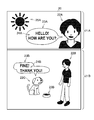
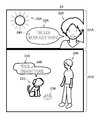
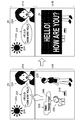
- FIG. 3 is a diagram illustrating an example of an electronic book image.
- a comic composed of a plurality of pages will be described as an example of an electronic book. Therefore, as shown in FIG. 3, the electronic book image 20 is each page of a comic.
- the electronic book image 20 includes one or more frames 21.
- the frame 21 is a section where pictures and characters are drawn in the page.
- the electronic book image 20 includes two frames 21 (these are also described as frames 21A and 21B).
- each frame 21 is surrounded by a frame, but may not be surrounded by a frame.
- Each frame 21 includes an object such as a picture, a speech bubble, or a character.
- the balloon line represents the dialogue of the cartoon character.
- the character is a cartoon character and may be an animal, a robot, or a fictitious creature other than a human being.
- One or a plurality of characters representing the dialogue of the character are included inside the balloon.
- a group of a plurality of characters is referred to as a character group.
- a character 22A, a speech bubble 23A, a character group 24A, and a sun 25A are drawn on the frame 21A
- characters 22B and 22C, a speech bubble 23B, a character group 24B, and Tableware 25B is drawn.
- the characters 22A to 22C, the sun 25A, and the tableware 25B are examples of the picture described above.
- the speech line 23A indicates the line of the character 22A
- the speech line 23B indicates the line of the character 22C.
- the display control unit 102 may display the entire page as illustrated in FIG. 3 or may display only a part of the page. . When displaying only a part of the page, the display control unit 102 displays the part designated by the user using the operation unit 13.
- the combination restriction unit 103 When the outline of the region indicating the object included in the electronic book image 20 or the size of the region itself is greater than or equal to the reference, the combination restriction unit 103 combines the region and the region expanded by the expansion unit 104 described later. Limit what you do. For example, if the character group 24A is expanded and combined with the speech balloon 23A, the character group 24A cannot be detected as a lump of characters. For this reason, the combination limiting unit 103 increases the accuracy of detection of the character group 24A by limiting the combination as described below.
- the image processing target by the combination restriction unit 103, the expansion unit 104, the determination restriction unit 105, and the character area candidate recording unit 106 is displayed on the display unit 14.
- the electronic book image 20 before being displayed on the display unit 14 may be a target of image processing.
- the electronic book images 20 on the pages before and after the page displayed on the display unit 14 may be subjected to image processing.
- the region is a portion (pixel) in which an object is drawn in the electronic book image 20, and is a portion of a color (for example, black or gray) other than the background color (for example, white).
- a color for example, black or gray
- portions in which objects such as characters 22A to 22C, speech balloons 23A and 23B, character groups 24A and 24B, the sun 25A, and tableware 25B are drawn correspond to the region referred to in the present embodiment.
- the object can be said to be a drawn object appearing in a portion other than the background of the electronic book image 20.
- the outline is a border of the area, and in the present embodiment, what is expressed as a line by the electronic book display device 1 is described as an outline.
- the region can also be referred to as the inside of the contour or a portion sandwiched between the contour and the contour.
- the character “L” is an area inside the contour
- the character “O” is a region sandwiched between the outer contour and the inner contour.
- the size of the contour may be, for example, the width of the contour, the length of the contour line, the area inside the contour, and the like. In this embodiment, the size of the circumscribed rectangle of the contour is used as the size of the contour. .
- the size of the region may be, for example, the width of the region, but in this embodiment, the size of the circumscribed rectangle of the region is used as the size of the region.
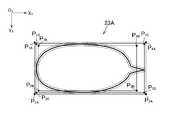
- FIG. 4 is an explanatory diagram of the outline and the size of the area.
- the Xs axis and Ys axis in FIG. 4 are coordinate axes of the screen coordinate system.
- the balloon line 23A is taken as an example of the region, and the size of the outline of the balloon line 23A and the size of the balloon line 23A itself will be described.
- the outer peripheral outline and the inner peripheral outline of the balloon line 23A are drawn with broken lines, and the balloon line 23A itself is drawn with a solid line.
- an interval is provided between the solid line and the broken line, but there is actually no interval between them.
- the circumscribed rectangle of the contour line is a region between the minimum value and the maximum value of the Xs coordinate and between the minimum value and the maximum value of the Ys coordinate in the contour line.
- the circumscribed rectangle of the outer peripheral contour line is a rectangle having vertices at points P 1A to P 4A , and the size of this rectangle corresponds to the size of the outer peripheral contour line.
- the circumscribed rectangle of the inner peripheral contour line is a rectangle having points P 1B to P 4B as vertices, the size of this rectangle corresponds to the size of the inner peripheral contour line.
- the circumscribed rectangle of the balloon line 23A is an area between the minimum value and the maximum value of the Xs coordinate and the area between the minimum value and the maximum value of the Ys coordinate among the pixels occupied by the balloon line 23A. Since the circumscribed rectangle of the speech line 23A is a rectangle having the points P 1C to P 4C as vertices, the size of this rectangle corresponds to the size of the speech line 23A itself.
- the connection restriction unit 103 may use either the size of the contour or the size of the region itself, but in this embodiment, a case where the size of the contour is used will be described.
- the combination restriction unit 103 extracts a circumscribed rectangle of the outline of each region in the electronic book image 20 and determines whether or not the size of the circumscribed rectangle is equal to or larger than a reference.
- the numerical value indicating the size at least one of the vertical width and the horizontal width of the circumscribed rectangle may be used, or the area of the circumscribed rectangle may be used.
- the length of the diagonal line of the circumscribed rectangle may be used as a numerical value indicating the size.
- a case where both the vertical width and the horizontal width of a circumscribed rectangle are used as numerical values indicating the size will be described as an example.
- Thresholds T 1 indicating the reference size may be a fixed value or may be a variable value. If the threshold T 1 is a fixed value, the value in the data storage unit 100 and is stored, if the threshold T 1 is a variable value, based on the values stored in the data storage unit 100 Will be calculated. In the present embodiment, a case thresholds T 1 is a fixed value. For example, binding limiting unit 103 by the vertical width and the horizontal width of the circumscribed rectangle to determine whether a respective thresholds T 1 or more, determines whether the magnitude of each contour is beyond.
- the combination restriction unit 103 restricts the combination with the area expanded by the expansion unit 104 described later by filling the area with the background color.
- the background color is a predetermined color designated for the image, for example, the color that occupies the largest proportion in the image.
- the background color is white or black.
- bonding in this embodiment is that a certain area
- the connection limiting unit 103 determines that the outline of the speech line 23A is larger than the reference, and fills the speech line 23A with the background color.
- the combination restriction unit 103 performs (1) binarization inversion processing, (2) contour extraction processing, (3) contour line expansion processing, and (4) expansion contour as follows. By executing the line superimposing process, the balloon line 23A and the like are filled.
- the combination restriction unit 103 performs binarization processing and inversion processing on the electronic book image 20.
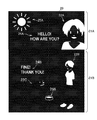
- FIG. 5 is a diagram illustrating an electronic book image 20 that is binarized and inverted.
- the combination restriction unit 103 executes binarization processing based on the pixel value and threshold value of each pixel of the electronic book image 20 illustrated in FIG. 3 and sets each pixel to white or black.
- the threshold value may be determined by a P tile method or a mode method.
- the combination restriction unit 103 inverts the pixel value of each binarized pixel to make the white pixel black and the black pixel white, whereby the electronic book image 20 shown in FIG. 4 is shown in FIG.
- the pixel value after inversion is calculated by subtracting the current value of the pixel value from the maximum pixel value of each color (255 for 8-bit gray scale). May be.
- the combination restriction unit 103 executes contour extraction processing on the electronic book image 20 (FIG. 5) that has been binarized and inverted, and extracts the contour of the closed region.
- FIG. 6 is a diagram showing contour lines extracted from the electronic book image 20 shown in FIG.
- the outline extracted by the connection limiting unit 103 is indicated by a broken line.
- the outline may be a line having a predetermined thickness (for example, one pixel).
- the color of the outline may be a predetermined color, but is black here. This is because the balloon lines 23A and 23B in the electronic book image 20 (FIG. 5) that has been binarized and inverted are drawn in white, and are therefore painted in black as the background color.
- the contour extraction process itself can be applied to various known contour extraction algorithms. For example, by detecting edges in an image using a differential filter, a Prewitt filter, a Sobel filter, or the like, the contour of each region is detected. May be extracted. Further, in the electronic book image 20 shown in FIG. 5, since the left head and left shoulder of the character 22A touch the outline of the top 21A, as shown in FIG. 6, the outlines of the character 22A and the top 21A are a series of outlines. It has become.
- the combination restriction unit 103 enlarges a contour line having a size larger than the reference among the contour lines extracted by the contour extraction process.
- Ligated restriction unit 103 extracts a circumscribed rectangle of each contour line, so that its size is determined whether a threshold value above T 1.
- the vertical width and the horizontal width of the circumscribed rectangle determining whether a respective thresholds T 1 or more By doing so, it is determined whether or not the size of each contour line is greater than or equal to the reference.
- the connection restriction unit 103 enlarges the outline that is larger than the reference. Enlarging the contour line means making the contour line thicker.
- the degree of enlargement of the contour line (the number of pixels that thicken the line) may be a fixed value or a variable value.
- the value is stored in the data storage unit 100.
- the value is a variable value, the value is calculated based on the numerical value stored in the data storage unit 100.
- the coupling restriction unit 103 may calculate the degree of enlargement of the contour line based on the position of the contour line and the size of the contour line. In this case, the closer the contour line is to the center of the image, the higher the probability that the contour line is that of the speech balloons 23A and 23B.
- the degree of enlargement of the contour line is increased so that the contour line can be filled more reliably. May be.
- the larger the contour line the higher the probability that the contour line is that of the balloon lines 23A and 23B. Therefore, the degree of enlargement of the contour line may be increased so that the contour line can be more reliably painted.
- the degree of enlargement is a fixed value and the line is thickened by a predetermined pixel will be described.
- FIG. 7 is a diagram showing a state of each contour line after enlarging the contour line having a size larger than the reference.
- the outlines of the frames 21A and 21B, the partial outlines of the characters 22A to 22C, the outlines of the speech balloons 23A and 23B, and the partial outline of the sun 25A are thick by a predetermined pixel. It has become.
- the connection restriction unit 103 enlarges the contour line, the nearby contour lines may be combined into one thick contour line.
- the outer peripheral contour lines and the inner peripheral contour lines of the balloon lines 23A and 23B are enlarged, and these are combined with each other to form one thick contour line.
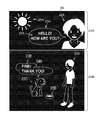
- FIG. 8 is a diagram illustrating an electronic book image 20 on which enlarged contour lines are superimposed.
- balloon lines 23A and 23B are blacked out by superimposing balloon lines 23A and 23B with an enlarged and thick outline. For this reason, even if the expansion unit 104 expands the character groups 24A and 24B by the processing described later, it is not coupled to the callout lines 23A and 23B.
- the balloon lines 23A and 23B can be painted with the background color.
- the method of painting the balloon lines 23A and 23B with the background color is not limited to the method described above.
- the combination restricting unit 103 may select a region (for example, the balloons 23A and 23B) sandwiched between outlines larger than the reference, and perform color reversal processing again only for the selected range. Good.
- the color of the balloon lines 23A and 23B shown in FIG. 5 returns from white to black, so that the balloon lines 23A and 23B can be painted black.
- connection limiting unit 103 is configured to fill a region that is sandwiched between contour lines larger than a reference and whose contour line interval is less than a certain distance with a background color. Also good. Further, for example, the coupling restriction unit 103 may fill a section in which a region sandwiched between contour lines continues for a certain distance or more with a background color.
- the method of preventing the balloon lines 23A and 23B and the character groups 24A and 24B from being combined is not limited to the method of painting the balloon lines 23A and 23B with the background color.
- the combination restriction unit 103 records the position of a region larger than the reference (the position of the pixels constituting the region) in the data storage unit 100, and the region expanded by the expansion unit 104 described later is the pixel. Even if included, the pixel may not be regarded as the same region. In order not to consider the same region, for example, in the labeling process for extracting the same region, the same number may not be assigned.
- the coupling limiting unit 103 may limit the extension unit 104 so as not to expand the area in the direction of the outline larger than the reference. Even in this way, for example, since the character groups 24A and 24B do not expand in the direction of the speech lines 23A and 23B, it is possible to prevent the speech lines 23A and 23B and the character groups 24A and 24B from being combined. Can do.
- the expansion unit 104 expands and combines each of a plurality of regions indicating an object included in the electronic book image 20.
- the expansion unit 104 may expand all the regions in the electronic book image 20 illustrated in FIG. 8, or the region where the size of the contour extracted by the combination restriction unit 103 is larger than the reference is not expanded, and the contour You may make it extend the area
- the degree of area expansion may be a fixed value or a variable value.
- the value is stored in the data storage unit 100.
- the value is calculated based on the numerical value stored in the data storage unit 100.
- the expansion unit 104 may calculate the degree of expansion of the area based on the position and size of the area in the image. In this case, the closer the area is to the center of the image, the higher the probability that the area is a character. Therefore, the extent of expansion of the area may be increased so as to be more reliably combined with other characters.
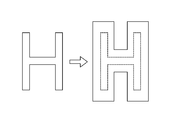
- FIG. 9 and 10 are explanatory diagrams of processing contents of the extension unit 104.
- the extension unit 104 extends “H” by a predetermined pixel.
- the extension unit 104 fills pixels within a predetermined distance from “H” (that is, pixels around “H”) with white.
- the expansion unit 104 expands characters other than “H” in “HELLO! HOW ARE YOU?” In the character group 24A by a predetermined number of pixels as in “H”.
- the extension unit 104 expands each character in the character group 24A, as shown in FIG. 10, the characters in the character group 24A are combined to make the character group 24A one area.
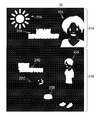
- FIG. 11 is a diagram showing a state after the area is expanded by the expansion unit 104.
- the areas of the characters included in the character groups 24A and 24B are expanded and joined together to form one area.
- each region of the tableware 25B is expanded and coupled to each other. Other areas were expanded but not joined because there was no other area nearby.
- Threshold T 2 showing the above criteria may be less than the threshold value T 1.
- the threshold value T 2 is may be a fixed value, the point may be a variable value is the same as the threshold value T 1.
- determining limiting unit 105 by the vertical width and the horizontal width of the circumscribed rectangle to determine whether a respective threshold T 2 or more expansion It is determined whether or not the contour of the area expanded by the unit 104 is less than the reference.
- FIG. 12 is a diagram illustrating a state after a region having a contour size less than the reference is filled with a background color. For example, since the outline of a part of the sun 25A, such as the eyes, nose, and mouth of the characters 22A and 22C, is smaller than the reference, the determination limiting unit 105 paints them in black as shown in FIG. Yes.
- the determination restriction unit 105 records the position of an area having a size smaller than the reference in the data storage unit 100 so that the character determination unit 108 does not execute the determination process even if the user designates the area. Also good.
- the character area candidate recording unit 106 records data indicating the character area candidates in the electronic book image 20 in the data storage unit 100.
- the character area candidate is an area that is a target of character determination by the character determination unit 108.
- the character area candidate is an area that may contain a character.
- the white pixel region in the electronic book image 20 (FIG. 12) after the processing by the determination limiting unit 105 is performed becomes a character region candidate.
- FIG. 13 is a diagram illustrating an example of a character area candidate.
- the character area candidate recording unit 106 performs outline extraction processing on the electronic book image 20 shown in FIG. 12 to extract the outline of the white pixel area (shown by a broken line in FIG. 13).
- the contour extraction process itself may be the same as the process performed by the connection restriction unit 103.
- the character area candidate recording unit 106 extracts the outline of the closed area, the outline of the character 22A shown in FIG. 12 is not extracted.
- the character area candidate recording unit 106 records data indicating the position of the extracted contour line in the data storage unit 100.
- data for identifying a character area candidate data indicating the position of the contour is taken as an example, but any data that can identify a character area candidate may be used.
- the character region candidate recording unit 106 performs labeling processing on the electronic book image 20 illustrated in FIG. 12, and assigns the same number to pixels in which white pixels are continuous, thereby identifying data for identifying character region candidates. It may be recorded.
- the designation operation accepting unit 107 accepts a designation operation for the area expanded by the expansion unit 104.
- the designation operation may be an operation for designating an area in the electronic book image 20, and is an operation for designating a position in the electronic book image 20, for example.
- an operation for designating a position in the display screen of the display unit 14 by the operation unit 13 corresponds to a designation operation.
- the area including the position designated by the operation unit 13 is designated by the designation operation.
- the designation operation can be said to be an operation for designating any one of the character area candidates.
- the character determination unit 108 determines whether a character is included in the region expanded and combined by the expansion unit 104. For example, the character determination unit 108 determines whether or not a character is included in the area specified by the specifying operation received by the specifying operation receiving unit 107. In the present embodiment, since the designation operation accepting unit 107 accepts designation of a character area candidate, the character determining unit 108 determines whether or not a character is included in the character area candidate. In the present embodiment, a case is described in which the character determination unit 108 executes the determination process using the electronic book image 20 in the state illustrated in FIG. 3. If changed, the electronic book image 20 in the state shown in FIGS. 5 and 8 may be used.
- the character pattern learning data is stored in the data storage unit 100, and the character determination unit 108 compares the character region candidate with the character pattern indicated by the learning data, so that a character is included in the character region candidate. It is determined whether or not it is included.
- the learning data a plurality of determination items are defined. For example, character determination is performed using the following determination items.
- FIG. 14 is an explanatory diagram of character determination processing using learning data.
- the character determination unit 108 determines whether the overall size of the character region candidate is equal to or greater than a reference.
- the size of the character region candidate the size of the circumscribed rectangle may be used, or the number of pixels of the character region candidate may be counted.
- the threshold value T 3 indicating this reference may be the same as or different from the threshold values T 1 and T 2 .
- the threshold T 3 is similar to the threshold value T 1, T 2, may be a fixed value or may be a variable value. If the size of the circumscribed rectangle is greater than or equal to the reference, the character determination unit 108 determines that the character area.
- the character determination unit 108 determines whether or not the number of white pixels in each line is greater than or equal to a reference number.
- This reference number may be a fixed value or a variable value. When the number of white pixels is equal to or greater than the reference number, the character determination unit 108 determines that the character area.
- the character determination unit 108 scans the pixels of each line from the end, counts the number of inverted white pixels and black pixels, and determines whether the count number is equal to or greater than the reference number. judge.
- This reference number may also be a fixed value or a variable value. When the count number is equal to or greater than the reference number, the character determination unit 108 determines that the character area.
- the character determination unit 108 scans the pixels of each line from the end, and determines whether or not the position where the white pixel is first found is a predetermined position. For example, if the position where the first white pixel is found is within the reference distance from the end, the character determination unit 108 determines that the character area. As a fifth determination item, the character determination unit 108 scans the pixels of each line from the end, and determines whether or not the position where the white pixel is finally found is a predetermined position. For example, if the position where the white pixel is finally found is within the reference distance from the end, the character determination unit 108 determines that the character area.
- the character determination unit 108 determines that the character region candidate is a character region when it is determined that all of the first determination item to the fifth determination item defined in the learning pattern are character regions. Alternatively, when a predetermined number or more (for example, three or more) determination items are determined to be character areas, the character area candidates may be determined to be character areas.
- the method for determining whether or not a character area candidate includes a character is not limited to the method described above, and various known methods can be applied.
- the character determination unit 108 may determine whether or not a character is included in the character region candidate by comparing the character shape pattern with the character region candidate and calculating the degree of similarity between them.
- a supervised machine learning method (SVM: Support Vector Vector Machine) may be used to determine whether or not a character is included in a character region candidate.
- SVM Support Vector Vector Machine
- learning data is prepared, and when a plurality of items are input as parameters to the determination algorithm, the determination algorithm uses the input parameters and learning data to determine whether the character area candidate is a character area. I can get some output.
- the character region can be specified more reliably.
- the display control unit 102 enlarges and displays the area determined to be included by the character determination unit 108.
- FIG. 15 is a diagram illustrating a state in which the character group 24A is enlarged and displayed. As shown in FIG. 15, when the user designates a character area candidate corresponding to the character group 24A, the character determination process is performed by the character determination unit 108, so that the character is determined to be a character. The enlarged image 26 cut out is displayed. In the example of FIG. 15, the display control unit 102 cuts out and enlarges the character region candidate in the electronic book image 20 shown in FIG. 8, so that the enlarged image 26 displays characters with the colors reversed. ing.
- the display control unit 102 may cut out and enlarge the character area candidate of the electronic book image 20 shown in FIG.
- the character color in the enlarged image 26 is not reversed.
- the range to be cut out in the enlarged image 26 is not limited to the rectangle as shown in FIG. 15, and may be an arbitrary shape such as an ellipse.
- the display position of the enlarged image 26 may be determined at random, or may be determined based on a position designated by the user.
- the enlargement ratio of characters in the enlarged image 26 may be determined based on the size of the character area candidate, or may be a predetermined enlargement ratio.
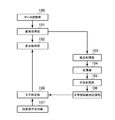
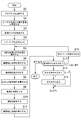
- FIG. 16 is a flowchart showing an example of processing executed in the electronic book display device 1.
- the process illustrated in FIG. 16 is executed by the control unit 10 operating according to a program stored in the storage unit 11.
- the functional blocks shown in FIG. 2 are realized by executing the processing described below. For example, when the user instructs to start the program using the operation unit 13, the following processing is executed.
- the control unit 10 activates a program stored in the storage unit 11 (S1), and specifies an electronic book designated by the user based on an input from the operation unit 13 (S2).
- the program activated in S1 is an electronic book reader application.
- the control unit 10 causes the display unit 14 to display a list of electronic books whose image data is stored in the storage unit 11, and in S2, the control unit 10 displays the electronic book designated by the user from the list. Will be specified.
- the control unit 10 refers to the storage unit 11 and acquires image data of the electronic book designated by the user (S3). It is assumed that the storage unit 11 stores the identification information of the electronic book held by the user and the image data in association with each other.
- the control unit 10 displays the first page of the electronic book on the display unit 14 based on the image data acquired in S3 (S4). In S4, the control unit 10 causes the display unit 14 to display the electronic book image 20 (FIG. 3) indicated by the image data.
- the control unit 10 executes binarization processing and inversion processing on the electronic book image 20 (S5). As described above, the case where the image processing of S5 to S11 is executed on the electronic book image 20 displayed on the display unit 14 will be described. Before and after the electronic book image 20 displayed on the display unit 14 The image processing of S5 to S11 may be executed in advance for the electronic book image 20 of the page. In S ⁇ b> 5, the control unit 10 generates data of the electronic book image 20 (FIG. 5) that has been binarized and inverted and records the data in the storage unit 11.
- the control unit 10 performs contour extraction processing on the electronic book image 20 generated in S5 (S6).
- S ⁇ b> 6 the control unit 10 generates data indicating the contour line (FIG. 6) in the electronic book image 20 and records it in the storage unit 11.
- the control unit 10 enlarges the contour line having a size larger than the reference among the contour lines extracted in S6 (S7).
- the control unit 10 generates data (FIG. 7) indicating the enlarged contour line and records it in the storage unit 11. Note that the control unit 10 may update the outline data recorded in the storage unit 11 in S6 instead of newly generating this data.
- the control unit 10 superimposes the contour line enlarged in S7 on the electronic book image 20 generated in S5 (S8).
- the control unit 10 generates data indicating the electronic book image 20 (FIG. 8) after superimposition and records it in the storage unit 11.
- the control unit 10 may update the data of the electronic book image 20 recorded in the storage unit 11 in S5 instead of newly generating this data.
- the control unit 10 expands the region in the electronic book image 20 on which the contour line is superimposed in S8 (S9).
- the control unit 10 generates data indicating the expanded electronic book image 20 (FIG. 11) and records it in the storage unit 11.
- the control unit 10 may update the data of the electronic book image 20 recorded in the storage unit 11 in S5 or S8 instead of newly generating this data.
- the control unit 10 removes an area having a size less than the reference from the area of the electronic book image 20 expanded in S9 (S10).
- the control unit 10 records data indicating the electronic book image 20 (FIG. 12) after removing an area having a size less than the reference in the storage unit 11.
- the control unit 10 may update the data of the electronic book image 20 recorded in the storage unit 11 in S5, S8, or S9, instead of newly generating this data.
- the control unit 10 executes the contour extraction process on the electronic book image 20 from which the area has been removed in S10 (S11).
- the processing content of S11 is the same as that of S6, and the contour extracted in S11 is the contour of the character region candidate.
- the control unit 10 generates data indicating the contour line (FIG. 13) in the electronic book image 20 from which the region has been removed in S ⁇ b> 10 and records the data in the storage unit 11.
- the control unit 10 receives an input from the operation unit 13 (S12).
- the control unit 10 determines whether or not a character is included in the designated character region candidate (S13).
- S13 the control unit 10 determines whether or not a character is included in the character region candidate based on the learning data and the pixel value in the character region candidate.
- the control unit 10 enlarges and displays the character area candidate designated by the designation operation (S14).
- the control unit 10 cuts out the inside of the character area candidate from the electronic book image 20 shown in FIG. 8 and enlarges and displays it on the display unit 14.
- the control unit 10 displays the next page on the display unit 14 (S15), and returns to the process of S5. It is assumed that information indicating the displayed page is stored in the storage unit 11. After returning to S5, the image processing of S5 to S11 is executed for the next page, and character area candidates are extracted.
- this process ends.
- the data recorded in the storage unit 11 in S5 to S11 may be discarded at the end of this process, or may be discarded when the corresponding page is no longer displayed from the display unit 14.
- the page may be discarded.
- the characters of the character groups 24A and 24B are enlarged and combined with each other, the characters can be determined after the characters of the character groups 24A and 24B are grouped together. Compared with the case where character determination is performed individually for each character of the character groups 24A and 24B, the regions of the character groups 24A and 24B included in the electronic book image 20 can be quickly identified. Furthermore, in the case of individually determining characters, it is impossible to specify whether a certain character and another character are one character group related to each other. However, the electronic book display device 1 uses the character groups 24A and 24B. As described above, characters related to each other can be recognized as a group of characters. Furthermore, compared with the case where data indicating the position of each character group is stored in advance in the storage unit 11 when the electronic book is purchased, the character group is dynamically recognized when the electronic book is displayed. As a result, the memory capacity can be used effectively.
- the character groups 24A and 24B are enlarged and joined to the balloon lines 23A and 23B, the character group cannot be recognized as a lump.
- the electronic book display device 1 uses the balloon lines 23A and 23B and the characters. Since the groups 24A and 24B are limited so as not to be combined, the character group can be recognized as a lump and the accuracy of character determination can be improved. Furthermore, by removing the balloon lines 23A and 23B as noise, it is possible to prevent the balloon lines 23A and 23B from being enlarged when enlarged display is performed.
- the character area candidates determined to contain characters it is possible to quickly display the enlarged character group as compared with the case where characters are recognized one by one. Furthermore, since the character determination is performed after making a group of characters, the group of characters can be enlarged and displayed instead of enlarging one character at a time.
- the characters drawn on each frame 21 may represent not only the words uttered by the characters but also the emotions of the characters and the sound effects of the comics. Even such a character can be recognized as a lump by the extension unit 104 expanding the area.
- the case where the dialogue of the comic is described in English is taken as an example, but any language that can be recognized by the electronic book display device 1 may be used, and other languages may be used.
- the case where the line of the character is described in horizontal writing will be described, vertical writing may be used.
- a learning pattern for horizontal writing and a learning pattern for vertical writing are prepared in the data storage unit 100, and the character determination unit 108 selects either of the learning pattern for horizontal writing or vertical writing. If it is determined as a character area, the character area candidate may be determined as a character area.
- the binarization inversion process performed by the combination restriction unit 103 may be omitted.
- the character may be a predetermined font or handwritten. Even handwritten characters can be recognized as chunks by the processing of the extension unit 104.
- the font, size, color, and brightness of characters may differ depending on the balloon, frame, and page. Even if the font, size, color, and brightness are different, the extension unit 104 can recognize the character as a group by expanding the area in the image.
- the processing content for the character area candidate determined to include a character is not limited to the enlarged display.
- the electronic book display device 1 may translate characters in a character region candidate determined to include characters, or may output a machine voice. Further, the electronic book display device 1 performs character extraction by OCR within a character region candidate determined to include a character, and records the extracted character data in the storage unit 11 so that character search in the electronic book is possible. You may do it.
- the display control unit 102 may display an enlarged display based on character data detected by OCR, instead of cutting out and displaying an enlarged character area candidate determined as a character area.
- a comic is described as an example of an electronic book, but the present invention can be applied to any electronic book that includes characters.
- the character region can be extracted in the same manner as in the embodiment, and thus may be applied to a picture book, a magazine, or the like.
Landscapes
- Engineering & Computer Science (AREA)
- Physics & Mathematics (AREA)
- General Physics & Mathematics (AREA)
- Multimedia (AREA)
- Theoretical Computer Science (AREA)
- Human Computer Interaction (AREA)
- Computer Vision & Pattern Recognition (AREA)
- Controls And Circuits For Display Device (AREA)
- Image Analysis (AREA)
- Facsimile Image Signal Circuits (AREA)
- Character Input (AREA)
- Processing Or Creating Images (AREA)
Abstract
画像に含まれる文字群の領域を迅速に特定する。電子書籍表示装置(1)の画像取得手段(101)は、電子書籍の画像データを記憶する手段(100)に記憶された画像データを取得する。表示制御手段(102)は、画像取得手段(101)により取得された画像データに基づいて、電子書籍画像を表示手段(14)に表示させる。拡張手段(104)は、電子書籍画像に含まれる物体を示す複数の領域の各々を拡張して結合させる。文字判定手段(108)は、拡張手段(104)により拡張して結合した領域内に文字が含まれるか否か判定する。
Description
本発明は、電子書籍表示装置、電子書籍表示方法、及びプログラムに関する。
従来、光学文字認識(OCR:Optical Character Recognition)のように、画像内の文字群の各文字に対して個別に文字認識を行う技術が知られている。例えば、特許文献1には、2値化画像内を縦方向及び横方向に繰り返し走査して、黒画素が存在しない白ラインで挟まれた領域を抽出して、各領域に対して文字が含まれるか否かを判定する技術が記載されている。
しかしながら、従来の技術では、例えば、画像内の文字群をひとかたまりとして特定したいような場合であっても、当該文字群に含まれる各文字の領域を抽出して、当該領域に対して個別に文字であるか否かを判定することになるので、画像内の文字群の領域を特定するのに時間がかかっていた。
本発明は上記課題に鑑みてなされたものであって、その目的は、画像に含まれる文字群の領域を迅速に特定することである。
上記課題を解決するために、本発明に係る電子書籍表示装置は、電子書籍の画像データを記憶する手段に記憶された前記画像データを取得する画像取得手段と、前記画像取得手段により取得された画像データに基づいて、電子書籍画像を表示手段に表示させる表示制御手段と、前記電子書籍画像に含まれる物体を示す複数の領域の各々を拡張して結合させる拡張手段と、前記拡張手段により拡張して結合した領域内に文字が含まれるか否か判定する文字判定手段と、を含むことを特徴とする。
本発明に係る電子書籍表示方法は、電子書籍の画像データを記憶する手段に記憶された前記画像データを取得する画像取得ステップと、前記画像取得ステップにより取得された画像データに基づいて、電子書籍画像を表示手段に表示させる表示制御ステップと、前記電子書籍画像に含まれる物体を示す複数の領域の各々を拡張して結合させる拡張ステップと、前記拡張ステップにより拡張して結合した領域内に文字が含まれるか否か判定する文字判定ステップと、を含むことを特徴とする。
本発明に係るプログラムは、電子書籍の画像データを記憶する手段に記憶された前記画像データを取得する画像取得手段、前記画像取得手段により取得された画像データに基づいて、電子書籍画像を表示手段に表示させる表示制御手段、前記電子書籍画像に含まれる物体を示す複数の領域の各々を拡張して結合させる拡張手段、前記拡張手段により拡張して結合した領域内に文字が含まれるか否か判定する文字判定手段、としてコンピュータを機能させる。
本発明に係る情報記憶媒体は、上記記載のプログラムが記憶されたコンピュータ読み取り可能な情報記憶媒体である。
また、本発明の一態様によれば、前記電子書籍表示装置は、前記電子書籍画像に含まれる物体を示す領域の輪郭又は当該領域自身の大きさが基準以上である場合、当該領域と、前記拡張手段により拡張した領域と、が結合することを制限する結合制限手段を更に含む、ことを特徴とする。
また、本発明の一態様によれば、前記結合制限手段は、前記電子書籍画像に含まれる物体を示す領域の輪郭又は当該領域自身の大きさが基準以上である場合、当該領域を背景色で塗りつぶすことによって、前記拡張手段により拡張した領域と結合することを制限する、ことを特徴とする。
また、本発明の一態様によれば、前記電子書籍表示装置は、前記拡張手段により拡張した領域の輪郭又は当該領域自身の大きさが基準未満である場合、当該領域が前記文字判定手段の判定対象となることを制限する判定制限手段を更に含む、ことを特徴とする。
また、本発明の一態様によれば、前記判定制限手段は、前記拡張手段により拡張した領域の輪郭又は当該領域自身の大きさが基準未満である場合、当該領域を背景色で塗りつぶすことによって、前記文字判定手段の判定対象となることを制限する、ことを特徴とする。
また、本発明の一態様によれば、前記電子書籍表示装置は、前記拡張手段により拡張した領域の指定操作を受け付ける指定操作受付手段を更に含み、前記文字判定手段は、前記指定操作受付手段により受け付けられた指定操作により指定された領域内に文字が含まれるか否かを判定する、ことを特徴とする。
また、本発明の一態様によれば、前記表示制御手段は、前記文字判定手段により文字が含まれると判定された領域内を拡大して表示させる、ことを特徴とする。
本発明によれば、画像に含まれる文字群の領域を迅速に特定することが可能になる。
[1.電子書籍表示装置のハードウェア構成]
以下、本発明に係る実施形態を図面に基づき詳細に説明する。図1は、本実施形態における電子書籍表示装置のハードウェア構成を示す図である。電子書籍表示装置1は、ユーザが操作するコンピュータであり、例えば、携帯電話機(スマートフォンを含む)、携帯情報端末(タブレット型コンピュータを含む)、電子書籍リーダー端末、又はパーソナルコンピュータ等である。図1に示すように、電子書籍表示装置1は、制御部10、記憶部11、通信部12、操作部13、表示部14、及び入出力部15を含む。
以下、本発明に係る実施形態を図面に基づき詳細に説明する。図1は、本実施形態における電子書籍表示装置のハードウェア構成を示す図である。電子書籍表示装置1は、ユーザが操作するコンピュータであり、例えば、携帯電話機(スマートフォンを含む)、携帯情報端末(タブレット型コンピュータを含む)、電子書籍リーダー端末、又はパーソナルコンピュータ等である。図1に示すように、電子書籍表示装置1は、制御部10、記憶部11、通信部12、操作部13、表示部14、及び入出力部15を含む。
制御部10は、例えば、一又は複数のマイクロプロセッサを含む。制御部10は、記憶部11に記憶されたプログラムやデータに従って処理を実行する。記憶部11は、主記憶部及び補助記憶部を含む。例えば、主記憶部はRAMであり、補助記憶部は、ハードディスク又はソリッドステートドライブ等である。通信部12は、ネットワークカード等の通信インタフェースである。
操作部13は、一般的な入力デバイスであり、例えば、タッチパネルやマウス等のポインティングデバイスである。操作部13は、ユーザの操作内容を制御部10に伝達する。表示部14は、例えば、液晶表示部又は有機EL表示部等である。表示部14は、制御部10の指示に従って画面を表示する。入出力部15は、外部機器とのデータの入出力を行う入出力インタフェースである。例えば、入出力部15は、コンピュータ読み取り可能な情報記憶媒体(例えば、光ディスクやメモリカード等)からデータやプログラムを読み取る。
なお、記憶部11に記憶されるものとして説明するプログラム及びデータは、ネットワークに接続されたサーバコンピュータから、通信部12を介して記憶部11に供給されるようにしてもよいし、情報記憶媒体から、入出力部15を介して記憶部11に供給されるようにしてもよい。また、電子書籍表示装置1のハードウェア構成は、上記の例に限られず、種々のコンピュータのハードウェアを適用可能である。
[2.電子書籍表示装置において実現される機能]
図2は、電子書籍表示装置1で実現される機能の一例を示す機能ブロック図である。図2に示すように、電子書籍表示装置1では、データ記憶部100、画像取得部101、表示制御部102、結合制限部103、拡張部104、判定制限部105、文字領域候補記録部106、指定操作受付部107、及び文字判定部108が実現される。データ記憶部100は、記憶部11を主として実現され、他の各機能は、制御部10を主として実現される。
図2は、電子書籍表示装置1で実現される機能の一例を示す機能ブロック図である。図2に示すように、電子書籍表示装置1では、データ記憶部100、画像取得部101、表示制御部102、結合制限部103、拡張部104、判定制限部105、文字領域候補記録部106、指定操作受付部107、及び文字判定部108が実現される。データ記憶部100は、記憶部11を主として実現され、他の各機能は、制御部10を主として実現される。
[2-1.データ記憶部]
データ記憶部100は、電子書籍に関する各種データを記憶する。例えば、データ記憶部100は、電子書籍の画像データを記憶する。電子書籍は、表示部14に電子的に表示される書籍であればよく、例えば、漫画、絵本、又は雑誌である。電子書籍は、少なくとも文字を含む。電子書籍は、文字以外に、絵・写真・図形等を含むようにしてよい。なお、ここでの絵とは、人が手で描画した絵をスキャナで読み込んで電子化したものに限らず、人がコンピュータを使って描画したCGを含む意味である。画像データのデータ形式は、一般的に電子書籍で用いられているデータ形式を用いればよい。
データ記憶部100は、電子書籍に関する各種データを記憶する。例えば、データ記憶部100は、電子書籍の画像データを記憶する。電子書籍は、表示部14に電子的に表示される書籍であればよく、例えば、漫画、絵本、又は雑誌である。電子書籍は、少なくとも文字を含む。電子書籍は、文字以外に、絵・写真・図形等を含むようにしてよい。なお、ここでの絵とは、人が手で描画した絵をスキャナで読み込んで電子化したものに限らず、人がコンピュータを使って描画したCGを含む意味である。画像データのデータ形式は、一般的に電子書籍で用いられているデータ形式を用いればよい。
電子書籍は、複数のページにより構成されてもよいし、1ページのみから構成されてもよい。電子書籍が複数のページから構成される場合には、ページごとに画像データが存在してもよいし、これら複数ページをひとまとめにした1つの画像データのみが存在してもよい。また、電子書籍は、カラーであってもよいし、モノクロ又はグレースケールであってもよい。本実施形態では、複数ページから構成されるグレースケールの漫画を、電子書籍の一例として説明する。
なお、データ記憶部100は、画像データ以外のデータを記憶していてもよい。例えば、データ記憶部100は、画像データに付帯する付帯データを記憶してもよい。付帯データは、各ページのページ数等である。他にも例えば、データ記憶部100は、電子書籍リーダーのアプリケーション(ビューワアプリケーション)を記憶してもよい。また例えば、データ記憶部100は、後述する文字判定のための学習データを記憶してもよい。
[2-2.画像取得部]
画像取得部101は、電子書籍の画像データを記憶するデータ記憶部100に記憶された画像データを取得する。本実施形態のように、電子書籍が複数のページから構成される場合、画像取得部101は、これら全てのページの画像データを一度に取得してもよいし、一部のページの画像データのみを取得してもよい。画像取得部101が一部のページの画像データのみを取得する場合、画像取得部101は、表示対象のページの画像データのみを取得してもよいし、表示対象のページとその前後のページの画像データを取得してもよい。なお、表示対象となるのは、1ページだけであってもよいし、見開き等のように複数ページであってもよい。更に、本実施形態のように電子書籍が漫画の場合、1ページの中の1コマのみが表示対象となってもよい。本実施形態では、複数ページのうちの何れか1ページが表示対象になる場合を例に挙げて説明する。
画像取得部101は、電子書籍の画像データを記憶するデータ記憶部100に記憶された画像データを取得する。本実施形態のように、電子書籍が複数のページから構成される場合、画像取得部101は、これら全てのページの画像データを一度に取得してもよいし、一部のページの画像データのみを取得してもよい。画像取得部101が一部のページの画像データのみを取得する場合、画像取得部101は、表示対象のページの画像データのみを取得してもよいし、表示対象のページとその前後のページの画像データを取得してもよい。なお、表示対象となるのは、1ページだけであってもよいし、見開き等のように複数ページであってもよい。更に、本実施形態のように電子書籍が漫画の場合、1ページの中の1コマのみが表示対象となってもよい。本実施形態では、複数ページのうちの何れか1ページが表示対象になる場合を例に挙げて説明する。
[2-3.表示制御部]
表示制御部102は、画像取得部101により取得された画像データに基づいて、電子書籍画像を表示部14に表示させる。図3は、電子書籍画像の一例を示す図である。本実施形態では、複数ページからなる漫画を電子書籍の一例として説明するので、図3に示すように、電子書籍画像20は、漫画の各ページである。電子書籍画像20は、1又は複数のコマ21を含む。コマ21は、ページ内で絵や文字が描画される区画である。図3の例では、電子書籍画像20は、2つのコマ21(これらをコマ21A,21Bとも記載する)を含む。図3の例では、各コマ21は、枠で囲われているが、枠で囲われていなくてもよい。
表示制御部102は、画像取得部101により取得された画像データに基づいて、電子書籍画像を表示部14に表示させる。図3は、電子書籍画像の一例を示す図である。本実施形態では、複数ページからなる漫画を電子書籍の一例として説明するので、図3に示すように、電子書籍画像20は、漫画の各ページである。電子書籍画像20は、1又は複数のコマ21を含む。コマ21は、ページ内で絵や文字が描画される区画である。図3の例では、電子書籍画像20は、2つのコマ21(これらをコマ21A,21Bとも記載する)を含む。図3の例では、各コマ21は、枠で囲われているが、枠で囲われていなくてもよい。
各コマ21は、絵、吹き出し線、文字等の物体を含む。吹き出し線は、漫画のキャラクタの台詞を表す。キャラクタは、漫画の登場人物であり、人間以外にも動物・ロボット・架空の生物であってもよい。吹き出し線の内側には、キャラクタの台詞を表す1又は複数の文字が含まれている。以降、複数の文字のまとまりのことを文字群という。図3の例では、コマ21Aには、キャラクタ22A、吹き出し線23A、文字群24A、及び太陽25Aが描かれており、コマ21Bには、キャラクタ22B,22C、吹き出し線23B、文字群24B、及び食器25Bが描かれている。なお、キャラクタ22A~22C、太陽25A、及び食器25Bは、上記説明した絵の一例である。吹き出し線23Aは、キャラクタ22Aの台詞を示し、吹き出し線23Bは、キャラクタ22Cの台詞を示す。
なお、本実施形態のように表示対象が1ページの場合、表示制御部102は、図3のようにページの全体を表示させてもよいし、ページ内の一部のみを表示させてもよい。ページ内の一部のみを表示させる場合、表示制御部102は、ユーザが操作部13を用いて指示した部分を表示させることになる。
[2-4.結合制限部]
結合制限部103は、電子書籍画像20に含まれる物体を示す領域の輪郭又は当該領域自身の大きさが基準以上である場合、当該領域と、後述する拡張部104により拡張した領域と、が結合することを制限する。例えば、文字群24Aが拡張して吹き出し線23Aに結合すると、文字群24Aを文字のかたまりとして検出できなくなってしまう。このため、結合制限部103は、下記に説明するようにして、これらの結合を制限することで、文字群24Aの検出の精度を高めるようにしている。
結合制限部103は、電子書籍画像20に含まれる物体を示す領域の輪郭又は当該領域自身の大きさが基準以上である場合、当該領域と、後述する拡張部104により拡張した領域と、が結合することを制限する。例えば、文字群24Aが拡張して吹き出し線23Aに結合すると、文字群24Aを文字のかたまりとして検出できなくなってしまう。このため、結合制限部103は、下記に説明するようにして、これらの結合を制限することで、文字群24Aの検出の精度を高めるようにしている。
なお、本実施形態では、説明の簡略化のため、結合制限部103、拡張部104、判定制限部105、及び文字領域候補記録部106による画像処理の対象となるのは、表示部14に表示された電子書籍画像20である場合を説明するが、表示部14に表示される前の電子書籍画像20が画像処理の対象となってもよい。この場合、表示部14に表示されたページの前後のページの電子書籍画像20が画像処理の対象となるようにしてよい。
領域とは、電子書籍画像20のうち物体が描かれている部分(画素)であり、背景色(例えば、白)以外の色(例えば、黒又はグレー)の部分である。例えば、キャラクタ22A~22C、吹き出し線23A,23B、文字群24A,24B、太陽25A、及び食器25B等の物体が描かれている部分が、本実施形態でいう領域に相当する。なお、物体は、電子書籍画像20の背景以外の部分に表れている描画物といえる。
輪郭は、領域を縁取ったものであり、本実施形態では、電子書籍表示装置1が線として表現したものを輪郭線と記載する。領域は、輪郭の内部、又は、輪郭と輪郭で挟まれた部分ということもできる。例えば、文字群24Aであれば、「L」の文字は、輪郭の内部が領域であり、「O」の文字は、外周の輪郭と内周の輪郭とに挟まれた部分が領域である。
輪郭の大きさは、例えば、輪郭の幅、輪郭線の長さ、輪郭の内側の面積等であってよいが、本実施形態では、輪郭の外接矩形の大きさを、輪郭の大きさとして用いる。領域の大きさは、例えば、領域の幅であってよいが、本実施形態では、領域の外接矩形の大きさを、領域の大きさとして用いる。
図4は、輪郭と領域の大きさの説明図である。図4のXs軸及びYs軸は、スクリーン座標系の座標軸である。ここでは、領域の一例として吹き出し線23Aを挙げて、吹き出し線23Aの輪郭の大きさと、吹き出し線23A自身の大きさと、について説明する。図4では、吹き出し線23Aの外周輪郭線と内周輪郭線を破線で描き、吹き出し線23A自身を実線で描いている。なお、図4では、説明の都合上、実線と破線の間に間隔を設けているが、実際には、これらに間隔はない。
例えば、輪郭線の外接矩形は、輪郭線のうち、Xs座標の最小値と及び最大値の間であり、かつ、Ys座標の最小値と最大値の間の領域である。図4に示す例では、外周輪郭線の外接矩形は、点P1A~P4Aを頂点とする長方形なので、この長方形の大きさが外周輪郭線の大きさに相当する。一方、内周輪郭線の外接矩形は、点P1B~P4Bを頂点とする長方形なので、この長方形の大きさが内周輪郭線の大きさに相当する。
また例えば、吹き出し線23Aの外接矩形は、吹き出し線23Aが占める画素のうち、Xs座標の最小値と最大値の間であり、かつ、Ys座標の最小値と最大値の間の領域である。吹き出し線23Aの外接矩形は、点P1C~P4Cを頂点とする長方形なので、この長方形の大きさが吹き出し線23A自身の大きさに相当する。
結合制限部103は、輪郭の大きさと領域自身の大きさの何れを用いてもよいが、本実施形態では、輪郭の大きさを用いる場合を説明する。結合制限部103は、電子書籍画像20内の各領域の輪郭の外接矩形を抽出し、外接矩形の大きさが基準以上であるか否かを判定する。なお、大きさを示す数値としては、外接矩形の縦幅及び横幅の少なくとも一方が用いられてもよいし、外接矩形の面積が用いられてもよい。他にも例えば、外接矩形の対角線の長さが、大きさを示す数値として用いられてもよい。本実施形態では、大きさを示す数値として、外接矩形の縦幅と横幅の両方が用いられる場合を例に挙げて説明する。
大きさの基準を示す閾値T1は、固定値であってもよいし、可変値であってもよい。閾値T1が固定値である場合には、データ記憶部100にその値が記憶されており、閾値T1が可変値である場合には、データ記憶部100に記憶された数値をもとに計算されることになる。本実施形態では、閾値T1が固定値である場合を説明する。例えば、結合制限部103は、外接矩形の縦幅と横幅がそれぞれ閾値T1以上であるか否かを判定することによって、各輪郭の大きさが基準以上であるか否かを判定する。
本実施形態では、結合制限部103は、領域の輪郭の大きさが基準以上である場合、当該領域を背景色で塗りつぶすことによって、後述する拡張部104により拡張した領域と結合することを制限する場合を説明する。背景色は、画像に対して指定された所定の色であり、例えば、画像内で占める割合が最も多い色である。例えば、背景色は、白又は黒である。なお、本実施形態における結合とは、ある領域が他の領域と接触又は重畳して1つの領域となることである。
例えば、吹き出し線23Aの輪郭は比較的大きいので、結合制限部103は、吹き出し線23Aの輪郭を基準以上の大きさであると判定し、吹き出し線23Aを背景色で塗りつぶすことになる。その結果、吹き出し線23Aと、後述する拡張部104により拡張された文字群24Aと、が結合することを防止することができるようになっている。具体的には、本実施形態では、結合制限部103は、下記のように、(1)2値化反転処理、(2)輪郭抽出処理、(3)輪郭線拡大処理、(4)拡大輪郭線重畳処理を実行することによって、吹き出し線23A等を塗りつぶすことになる。
[2値化反転処理]
まず、結合制限部103は、電子書籍画像20に対して2値化処理と反転処理を実行する。図5は、2値化され反転された電子書籍画像20を示す図である。結合制限部103は、図3に示す電子書籍画像20の各画素の画素値と閾値に基づいて2値化処理を実行し、各画素を白又は黒に設定する。2値化処理自体は、公知の種々のアルゴリズムを適用可能であり、例えば、Pタイル法やモード法によって閾値を定めてもよい。結合制限部103は、2値化した各画素の画素値を反転させ、白の画素を黒にして黒の画素を白にすることによって、図4に示す電子書籍画像20を、図5に示す状態にする。反転処理自体も、公知の種々の手法を適用可能であり、例えば、各色の画素値の最大値(8ビットグレースケールなら255)から画素値の現在値を引くことで反転後の画素値を計算してもよい。
まず、結合制限部103は、電子書籍画像20に対して2値化処理と反転処理を実行する。図5は、2値化され反転された電子書籍画像20を示す図である。結合制限部103は、図3に示す電子書籍画像20の各画素の画素値と閾値に基づいて2値化処理を実行し、各画素を白又は黒に設定する。2値化処理自体は、公知の種々のアルゴリズムを適用可能であり、例えば、Pタイル法やモード法によって閾値を定めてもよい。結合制限部103は、2値化した各画素の画素値を反転させ、白の画素を黒にして黒の画素を白にすることによって、図4に示す電子書籍画像20を、図5に示す状態にする。反転処理自体も、公知の種々の手法を適用可能であり、例えば、各色の画素値の最大値(8ビットグレースケールなら255)から画素値の現在値を引くことで反転後の画素値を計算してもよい。
[輪郭抽出処理]
結合制限部103は、2値化して反転させた電子書籍画像20(図5)に対して輪郭抽出処理を実行し、閉領域の輪郭を抽出する。図6は、図5に示す電子書籍画像20から抽出された輪郭線を示す図である。図6では、結合制限部103が抽出した輪郭線を破線で示している。輪郭線は、所定の太さの線(例えば、1ピクセル)であればよい。また、輪郭線の色は、予め定められた色であればよいが、ここでは黒とする。これは、2値化して反転させた電子書籍画像20(図5)内の吹き出し線23A,23Bが白で描かれているため、これを背景色である黒で塗りつぶすためである。
結合制限部103は、2値化して反転させた電子書籍画像20(図5)に対して輪郭抽出処理を実行し、閉領域の輪郭を抽出する。図6は、図5に示す電子書籍画像20から抽出された輪郭線を示す図である。図6では、結合制限部103が抽出した輪郭線を破線で示している。輪郭線は、所定の太さの線(例えば、1ピクセル)であればよい。また、輪郭線の色は、予め定められた色であればよいが、ここでは黒とする。これは、2値化して反転させた電子書籍画像20(図5)内の吹き出し線23A,23Bが白で描かれているため、これを背景色である黒で塗りつぶすためである。
なお、輪郭抽出処理自体は、公知の種々の輪郭抽出アルゴリズムを適用可能であり、例えば、微分フィルタ、Prewittフィルタ、又はSobelフィルタ等を用いて画像内のエッジを検出することによって、各領域の輪郭を抽出するようにしてよい。また、図5に示す電子書籍画像20では、キャラクタ22Aの左側頭部と左肩がコマ21Aの輪郭に触れているので、図6に示すように、キャラクタ22Aとコマ21Aの輪郭線は一連のものになっている。
[輪郭線拡大処理]
結合制限部103は、輪郭抽出処理によって抽出した輪郭線のうち、基準以上の大きさの輪郭線を拡大する。結合制限部103は、各輪郭線の外接矩形を抽出して、その大きさが閾値T1以上であるか否かを判定することになる。先述したように、本実施形態では、外接矩形の縦幅と横幅を大きさとして用いるので、結合制限部103は、外接矩形の縦幅と横幅がそれぞれ閾値T1以上であるか否かを判定することによって、各輪郭線の大きさが基準以上であるか否かを判定する。
結合制限部103は、輪郭抽出処理によって抽出した輪郭線のうち、基準以上の大きさの輪郭線を拡大する。結合制限部103は、各輪郭線の外接矩形を抽出して、その大きさが閾値T1以上であるか否かを判定することになる。先述したように、本実施形態では、外接矩形の縦幅と横幅を大きさとして用いるので、結合制限部103は、外接矩形の縦幅と横幅がそれぞれ閾値T1以上であるか否かを判定することによって、各輪郭線の大きさが基準以上であるか否かを判定する。
結合制限部103は、基準以上の大きさの輪郭線を拡大する。輪郭線を拡大するとは、輪郭線を太くすることである。輪郭線の拡大の程度(線を太らせるピクセル数)は、固定値であってもよいし、可変値であってもよい。固定値である場合には、データ記憶部100にその値が記憶されており、可変値である場合には、データ記憶部100に記憶された数値をもとに計算されることになる。例えば、結合制限部103は、輪郭線の位置や輪郭線の大きさに基づいて、当該輪郭線の拡大の程度を計算してもよい。この場合、輪郭線が画像の中央付近にあるほど、その輪郭線が吹き出し線23A,23Bのものである蓋然性が高いので、輪郭線の拡大の程度を大きくして、より確実に塗りつぶせるようにしてもよい。また例えば、輪郭線が大きいほど、その輪郭線が吹き出し線23A,23Bのものである蓋然性が高いので、輪郭線の拡大の程度を大きくして、より確実に塗りつぶせるようにしてもよい。本実施形態では、拡大の程度が固定値であり、所定ピクセル分だけ線を太らせる場合を説明する。
図7は、基準以上の大きさの輪郭線を拡大した後の各輪郭線の状態を示す図である。図7に示す例では、コマ21A,21Bの輪郭線、キャラクタ22A~22Cの一部の輪郭線、吹き出し線23A,23Bの輪郭線、及び太陽25Aの一部の輪郭線が所定ピクセル分だけ太くなっている。図7に示すように、結合制限部103が輪郭線を拡大させると、近くにある輪郭線同士が結合して1つの太い輪郭線になることがある。例えば、図7に示す例では、吹き出し線23A,23Bの外周の輪郭線と内周の輪郭線がそれぞれ拡大し、これらが互いに結合して1つの太い輪郭線となっている。
[拡大輪郭線重畳処理]
結合制限部103は、2値化して反転させた電子書籍画像20(図5)に、拡大した輪郭線(図7)を重畳させる。図8は、拡大した輪郭線が重畳された電子書籍画像20を示す図である。図8に示すように、拡大して太い1本になった輪郭線で吹き出し線23A,23Bを重畳したことによって、吹き出し線23A,23Bが黒く塗りつぶされている。このため、後述する処理によって、拡張部104が文字群24A,24Bを拡張したとしても、吹き出し線23A,23Bに結合しないことになる。
結合制限部103は、2値化して反転させた電子書籍画像20(図5)に、拡大した輪郭線(図7)を重畳させる。図8は、拡大した輪郭線が重畳された電子書籍画像20を示す図である。図8に示すように、拡大して太い1本になった輪郭線で吹き出し線23A,23Bを重畳したことによって、吹き出し線23A,23Bが黒く塗りつぶされている。このため、後述する処理によって、拡張部104が文字群24A,24Bを拡張したとしても、吹き出し線23A,23Bに結合しないことになる。
上記のようにして、吹き出し線23A,23Bを背景色で塗りつぶすことができる。なお、吹き出し線23A,23Bを背景色で塗りつぶす方法は、上記説明した方法に限られない。例えば、結合制限部103は、基準以上の大きさの輪郭線で挟まれた領域(例えば、吹き出し線23A,23B)を選択して、その選択範囲についてのみ、もう一度色の反転処理をしてもよい。このようにすれば、例えば、図5に示す吹き出し線23A,23Bの色が白から黒に戻るので、吹き出し線23A,23Bを黒く塗りつぶすことができる。他にも例えば、結合制限部103は、基準以上の大きさの輪郭線で挟まれた領域であり、かつ、当該輪郭線の間隔が一定距離未満である領域を、背景色で塗りつぶすようにしてもよい。更に、例えば、結合制限部103は、輪郭線で挟まれた領域が一定距離以上続いている区間を、背景色で塗りつぶすようにしてもよい。結合制限部103の処理対象となる領域に、このような条件を追加することによって、当該条件によって特定される領域が、吹き出し線23A,23Bのような線が描かれた部分である蓋然性が高まる。このため、より確実に、吹き出し線23A,23Bのような線の部分を塗りつぶし、文字群24A,24Bと結合することを防止することができる。
また例えば、吹き出し線23A,23Bと、文字群24A,24Bと、を結合させないようにする方法は、吹き出し線23A,23Bを背景色で塗りつぶす方法に限られない。例えば、結合制限部103は、基準以上の大きさの領域の位置(領域を構成する画素の位置)をデータ記憶部100に記録しておき、後述する拡張部104により拡張された領域が当該画素に含まれても、その画素は同じ領域とみなさないようにしてもよい。同じ領域とみなさないためには、例えば、同一領域を抽出するラベリング処理において、同じ番号を振らないようにすればよい。他にも例えば、結合制限部103は、基準以上の大きさの輪郭線の方向には、拡張部104が領域を拡張しないように制限をするようにしてもよい。このようにすることでも、例えば、文字群24A,24Bが吹き出し線23A,23Bの方向には拡張しないので、吹き出し線23A,23Bと、文字群24A,24Bと、が結合することを防止することができる。
[2-5.拡張部]
拡張部104は、電子書籍画像20に含まれる物体を示す複数の領域の各々を拡張して結合させる。なお、拡張部104は、図8に示す電子書籍画像20内の全ての領域を拡張してもよいし、結合制限部103が抽出した輪郭の大きさが基準以上の領域は拡張せず、輪郭の大きさが基準未満の領域を拡張するようにしてもよい。即ち、例えば、拡張部104は、キャラクタ22A,22B,22Cの目・鼻・口等、文字群24A,24Bの各文字、太陽25Aの一部、食器25Bのように、輪郭の大きさが基準未満のもののみを拡張してもよい。
拡張部104は、電子書籍画像20に含まれる物体を示す複数の領域の各々を拡張して結合させる。なお、拡張部104は、図8に示す電子書籍画像20内の全ての領域を拡張してもよいし、結合制限部103が抽出した輪郭の大きさが基準以上の領域は拡張せず、輪郭の大きさが基準未満の領域を拡張するようにしてもよい。即ち、例えば、拡張部104は、キャラクタ22A,22B,22Cの目・鼻・口等、文字群24A,24Bの各文字、太陽25Aの一部、食器25Bのように、輪郭の大きさが基準未満のもののみを拡張してもよい。
なお、領域を拡張するとは、領域を太らせることであり、領域が占める面積を大きくすることである。領域の拡張の程度は、固定値であってもよいし、可変値であってもよい。固定値である場合には、データ記憶部100にその値が記憶されており、可変値である場合には、データ記憶部100に記憶された数値をもとに計算されることになる。例えば、拡張部104は、画像における領域の位置や大きさに基づいて、当該領域の拡張の程度を計算してもよい。この場合、領域が画像の中央付近にあるほど、その領域が文字である蓋然性が高いので、領域の拡張の程度を大きくして、より確実に他の文字と結合させるようにしてもよい。また、他の領域との距離が近いほど、その領域が文字群の1文字である蓋然性が高いので、領域の拡張の程度を大きくして、より確実に他の文字と結合させるようにしてもよい。また例えば、領域の大きさが一定範囲(文字と推測される程度の広さ)におさまっていれば、その領域が文字である蓋然性が高いので、領域の拡張の程度を大きくして、より確実に他の文字と結合させるようにしてもよい。本実施形態では、拡張の程度が固定値であり、所定ピクセル分だけ領域を太らせる場合を説明する。
図9及び図10は、拡張部104の処理内容の説明図である。ここでは、拡張部104が、文字群24Aの各文字を拡張する場合を例に挙げて説明する。例えば、図9に示すように、拡張部104は、「H」を所定ピクセル分だけ拡張する。別の言い方をすれば、拡張部104は、「H」から所定距離以内にある画素(即ち、「H」の周囲の画素)を白で塗りつぶす。拡張部104は、文字群24Aの「HELLO! HOW ARE YOU?」の「H」以外の文字も、「H」と同様に所定ピクセル分だけ拡張する。拡張部104が文字群24Aの各文字を拡張させると、図10に示すように、文字群24Aの各文字が結合して、文字群24Aを1つの領域とすることができる。
図11は、拡張部104により領域が拡張された後の状態を示す図である。図11に示すように、ここでは、文字群24A,24Bに含まれる各文字の領域が拡張して互いに結合し、1つの領域になっている。他にも例えば、食器25Bの各領域も拡張して互いに結合している。他の領域については、拡張はされたものの、付近に別の領域が無かったため結合していない。
[2-6.判定制限部]
判定制限部105は、拡張部104により拡張した領域(図12)の輪郭又は当該領域自身の大きさが基準未満である場合、当該領域が文字判定部108の判定対象となることを制限する。なお、判定制限部105の説明でも、結合制限部103と同様、輪郭の大きさが用いられる場合を説明する。
判定制限部105は、拡張部104により拡張した領域(図12)の輪郭又は当該領域自身の大きさが基準未満である場合、当該領域が文字判定部108の判定対象となることを制限する。なお、判定制限部105の説明でも、結合制限部103と同様、輪郭の大きさが用いられる場合を説明する。
上記の基準を示す閾値T2は、閾値T1よりも小さくてよい。なお、閾値T2が固定値であってもよいし、可変値であってもよい点については、閾値T1と同様である。本実施形態では、外接矩形の縦幅と横幅を大きさとして用いるので、判定制限部105は、外接矩形の縦幅と横幅がそれぞれ閾値T2以上であるか否かを判定することによって、拡張部104により拡張した領域の輪郭が基準未満であるか否かを判定する。
本実施形態では、判定制限部105は、拡張部104により拡張した領域の輪郭の大きさが基準未満である場合、当該領域を背景色で塗りつぶすことによって、文字判定部108の判定対象となることを制限する場合を説明する。図12は、輪郭の大きさが基準未満である領域が背景色で塗りつぶされた後の状態を示す図である。例えば、キャラクタ22A,22Cの目・鼻・口等、太陽25Aの一部の輪郭が基準未満の大きさであるため、図12に示すように、判定制限部105は、これらを黒で塗りつぶしている。
なお、基準未満の大きさの領域を背景色で塗りつぶす以外の方法で、文字判定部108の文字判定の対象外とするようにしてもよい。例えば、判定制限部105は、基準未満の大きさの領域の位置をデータ記憶部100に記録しておき、ユーザがその領域を指定しても文字判定部108による判定処理を実行しないようにしてもよい。
[2-7.文字領域候補記録部]
文字領域候補記録部106は、電子書籍画像20内の文字領域候補を示すデータをデータ記憶部100に記録する。文字領域候補は、文字判定部108による文字判定の対象となる領域である。別の言い方をすれば、文字領域候補は、文字が含まれている可能性のある領域である。本実施形態では、判定制限部105による処理が実行された後の電子書籍画像20(図12)内の白画素の領域が、文字領域候補となる。
文字領域候補記録部106は、電子書籍画像20内の文字領域候補を示すデータをデータ記憶部100に記録する。文字領域候補は、文字判定部108による文字判定の対象となる領域である。別の言い方をすれば、文字領域候補は、文字が含まれている可能性のある領域である。本実施形態では、判定制限部105による処理が実行された後の電子書籍画像20(図12)内の白画素の領域が、文字領域候補となる。
図13は、文字領域候補の一例を示す図である。文字領域候補記録部106は、図12に示す電子書籍画像20に対して輪郭抽出処理を実行して、白画素の領域の輪郭(図13に破線で示す)を抽出する。輪郭抽出処理自体は、結合制限部103による処理と同様であってよい。ここでは、文字領域候補記録部106は、閉領域の輪郭を抽出するので、図12に示すキャラクタ22Aについては輪郭を抽出しないことになる。文字領域候補記録部106は、抽出した輪郭線の位置を示すデータをデータ記憶部100に記録する。
なお、ここでは文字領域候補を識別するデータとして、輪郭線の位置を示すデータを例に挙げるが、文字領域候補を識別可能なデータであればよい。例えば、文字領域候補記録部106は、図12に示す電子書籍画像20に対してラベリング処理を実行し、白画素が連続する画素に同じ番号を付与することによって、文字領域候補を識別するデータを記録するようにしてもよい。
[2-8.指定操作受付部]
指定操作受付部107は、拡張部104により拡張した領域の指定操作を受け付ける。指定操作は、電子書籍画像20内の領域を指定するための操作であればよく、例えば、電子書籍画像20内の位置を指定する操作である。本実施形態では、操作部13により表示部14の表示画面内の位置を指定する操作が指定操作に相当する。操作部13により指定された位置を含む領域が、指定操作により指定されたことになる。本実施形態では、指定操作は、文字領域候補のうちの何れかを指定する操作といえる。
指定操作受付部107は、拡張部104により拡張した領域の指定操作を受け付ける。指定操作は、電子書籍画像20内の領域を指定するための操作であればよく、例えば、電子書籍画像20内の位置を指定する操作である。本実施形態では、操作部13により表示部14の表示画面内の位置を指定する操作が指定操作に相当する。操作部13により指定された位置を含む領域が、指定操作により指定されたことになる。本実施形態では、指定操作は、文字領域候補のうちの何れかを指定する操作といえる。
[2-9.文字判定部]
文字判定部108は、拡張部104により拡張して結合した領域内に文字が含まれるか否か判定する。例えば、文字判定部108は、指定操作受付部107により受け付けられた指定操作により指定された領域内に文字が含まれるか否かを判定する。本実施形態では、指定操作受付部107は、文字領域候補の指定を受け付けるので、文字判定部108は、文字領域候補内に文字が含まれるか否かを判定することになる。なお、本実施形態では、文字判定部108は、図3に示す状態の電子書籍画像20を用いて判定処理を実行する場合を説明するが、使用する画像の状態に応じて文字判定の方法を変えるようにすれば、図5や図8に示す状態の電子書籍画像20を用いてもよい。
文字判定部108は、拡張部104により拡張して結合した領域内に文字が含まれるか否か判定する。例えば、文字判定部108は、指定操作受付部107により受け付けられた指定操作により指定された領域内に文字が含まれるか否かを判定する。本実施形態では、指定操作受付部107は、文字領域候補の指定を受け付けるので、文字判定部108は、文字領域候補内に文字が含まれるか否かを判定することになる。なお、本実施形態では、文字判定部108は、図3に示す状態の電子書籍画像20を用いて判定処理を実行する場合を説明するが、使用する画像の状態に応じて文字判定の方法を変えるようにすれば、図5や図8に示す状態の電子書籍画像20を用いてもよい。
例えば、文字パターンの学習データをデータ記憶部100に記憶させておき、文字判定部108は、文字領域候補と、学習データが示す文字パターンと、を比較することによって、文字領域候補内に文字が含まれるか否かを判定する。学習データには、複数の判定項目が定義されており、例えば、下記のような判定項目によって文字判定が行われる。
図14は、学習データを用いた文字判定処理の説明図である。まず、第1の判定項目として、文字判定部108は、文字領域候補の全体の大きさが基準以上であるか否かを判定する。文字領域候補の大きさは、外接矩形の大きさを用いてもよいし、文字領域候補のピクセル数をカウントしてもよい。ここでは、外接矩形を用いる場合を説明する。この基準を示す閾値T3は、閾値T1,T2と同じであってもよいし、異なっていてもよい。また、閾値T3は、閾値T1,T2と同様、固定値であってもよいし、可変値であってもよい。文字判定部108は、外接矩形の大きさが基準以上である場合、文字領域と判定する。
図14に示すように、文字判定部108は、外接矩形をnマス×mマス(n,mは、ともに2以上の整数。ここでは、n=m=10とする。)の矩形領域に区切る。そして、矩形領域の垂直ライン(図14では1列目~10列目の各ライン)及び水平ライン(図14では1行目~10行目の各ライン)のそれぞれについて、第2の判定項目~第5の判定項目について判定する。なお、全てのマスについて判定処理を行ってもよいし、一部のマス(例えば、外周の一部のマスを除いたマス)についてのみ判定処理を行ってもよい。
第2の判定項目として、文字判定部108は、各ラインの白ピクセルの数が基準数以上であるか否かを判定する。この基準数は、固定値であってもよいし、可変値であってもよい。文字判定部108は、白ピクセルの数が基準数以上である場合、文字領域と判定する。第3の判定項目として、文字判定部108は、各ラインの画素を端から走査し、白画素と黒画素とが反転した数をカウントし、当該カウント数が基準数以上であるか否かを判定する。この基準数も、固定値であってもよいし、可変値であってもよい。文字判定部108は、カウント数が基準数以上である場合、文字領域と判定する。
第4の判定項目として、文字判定部108は、各ラインの画素を端から走査し、最初に白の画素を発見した位置が所定の位置であるか否かを判定する。例えば、文字判定部108は、最初に白の画素を発見した位置が端から基準距離以内であれば、文字領域と判定する。第5の判定項目として、文字判定部108は、各ラインの画素を端から走査し、最後に白の画素を発見した位置が所定の位置であるか否かを判定する。例えば、文字判定部108は、最後に白の画素を発見した位置が端から基準距離以内であれば、文字領域と判定する。
文字判定部108は、学習パターンに定義された第1の判定項目~第5の判定項目の全てについて文字領域であると判定された場合に、文字領域候補が文字領域であると判定するようにしてもよいし、所定数以上(例えば、3つ以上)の判定項目について文字領域であると判定された場合に、文字領域候補が文字領域であると判定するようにしてもよい。
なお、文字領域候補に文字が含まれるか否かを判定する方法は、上記説明した方法に限られず、公知の種々の手法を適用可能である。例えば、文字判定部108は、文字の形状のパターンと文字領域候補とを比較して、互いの類似度を計算することによって、文字領域候補に文字が含まれるか否かを判定してもよい。他にも例えば、教師ありの機械学習手法(SVM:Support Vector Machine)を用いて、文字領域候補に文字が含まれるか否かを判定してもよい。この手法では、学習データを用意しておき、複数の項目をパラメータとして判定アルゴリズムに入力すると、判定アルゴリズムは、入力されたパラメータと学習データとを用いて、文字領域候補が文字領域であるか否かの出力を得ることができるようになっている。このような手法を用いることで、例えば、種々の形状の文字や絵が含まれる漫画のような画像であっても、より確実に文字領域を特定することができる。
本実施形態では、表示制御部102は、文字判定部108により文字が含まれると判定された領域内を拡大して表示させる。図15は、文字群24Aが拡大表示される様子を示す図である。図15に示すように、ユーザが文字群24Aに対応する文字領域候補を指定すると、文字判定部108により文字判定処理が行われて文字と判定されるので、表示制御部102は、文字領域候補内を切り出した拡大画像26を表示させる。図15の例では、表示制御部102は、図8に示す電子書籍画像20の文字領域候補内を切り出して拡大させて表示させるので、拡大画像26は、色が反転した状態で文字が表示されている。
なお、表示制御部102は、図3に示す電子書籍画像20の文字領域候補内を切り出して拡大させて表示させてもよい。この場合、拡大画像26における文字の色は反転しないことになる。また、拡大画像26に切り出す範囲は、図15のような長方形に限られず、楕円形等の任意の形状であってよい。また、拡大画像26の表示位置は、ランダムに決定されてもよいし、ユーザが指定した位置に基づいて定まってもよい。また、拡大画像26における文字の拡大率は、文字領域候補の大きさに基づいて決まってもよいし、所定の拡大率であってもよい。
[3.電子書籍表示装置において実行される処理]
図16は、電子書籍表示装置1において実行される処理の一例を示すフロー図である。図16に示す処理は、制御部10が、記憶部11に記憶されたプログラムに従って動作することによって実行される。本実施形態では、下記に説明する処理が実行されることにより、図2に示す機能ブロックが実現される。例えば、ユーザが操作部13を用いて、プログラムの起動を指示した場合に、下記の処理が実行される。
図16は、電子書籍表示装置1において実行される処理の一例を示すフロー図である。図16に示す処理は、制御部10が、記憶部11に記憶されたプログラムに従って動作することによって実行される。本実施形態では、下記に説明する処理が実行されることにより、図2に示す機能ブロックが実現される。例えば、ユーザが操作部13を用いて、プログラムの起動を指示した場合に、下記の処理が実行される。
図16に示すように、制御部10は、記憶部11に記憶されたプログラムを起動し(S1)、操作部13からの入力に基づいて、ユーザが指定した電子書籍を特定する(S2)。例えば、S1において起動するプログラムは、電子書籍リーダーのアプリケーションである。S1においては、制御部10は、記憶部11に画像データが記憶された電子書籍の一覧を表示部14に表示させ、S2において、制御部10は、一覧の中からユーザにより指定された電子書籍を特定することになる。
制御部10は、記憶部11を参照して、ユーザが指定した電子書籍の画像データを取得する(S3)。なお、記憶部11には、ユーザが保有する電子書籍の識別情報と、画像データと、が関連付けられて記憶されているものとする。制御部10は、S3で取得した画像データに基づいて、電子書籍の1ページ目を表示部14に表示させる(S4)。S4においては、制御部10は、画像データが示す電子書籍画像20(図3)を表示部14に表示させることになる。
制御部10は、電子書籍画像20に対して、2値化処理と反転処理を実行する(S5)。なお、先述したように、表示部14に表示される電子書籍画像20に対してS5~S11の画像処理が実行される場合を説明するが、表示部14に表示される電子書籍画像20の前後のページの電子書籍画像20に対しても、予めS5~S11の画像処理を実行しておくようにしてもよい。S5においては、制御部10は、2値化して反転した電子書籍画像20(図5)のデータを生成して記憶部11に記録する。
制御部10は、S5で生成した電子書籍画像20内に対して、輪郭抽出処理を実行する(S6)。S6においては、制御部10は、電子書籍画像20内の輪郭線(図6)を示すデータを生成して記憶部11に記録する。
制御部10は、S6で抽出した輪郭線のうち、基準以上の大きさの輪郭線を拡大させる(S7)。S7においては、制御部10は、拡大した輪郭線を示すデータ(図7)を生成して記憶部11に記録する。なお、制御部10は、このデータを新たに生成するのではなく、S6で記憶部11に記録した輪郭線のデータを更新するようにしてもよい。
制御部10は、S5で生成した電子書籍画像20に、S7で拡大した輪郭線を重畳させる(S8)。S8においては、制御部10は、重畳後の電子書籍画像20(図8)を示すデータを生成して記憶部11に記録する。なお、制御部10は、このデータを新たに生成するのではなく、S5で記憶部11に記録した電子書籍画像20のデータを更新するようにしてもよい。
制御部10は、S8で輪郭線を重畳させた電子書籍画像20内の領域を拡張させる(S9)。S9においては、制御部10は、拡張後の電子書籍画像20(図11)を示すデータを生成して記憶部11に記録する。なお、制御部10は、このデータを新たに生成するのではなく、S5又はS8で記憶部11に記録した電子書籍画像20のデータを更新するようにしてもよい。
制御部10は、S9で拡張した電子書籍画像20の領域のうち、基準未満の大きさの領域を除去する(S10)。S10においては、制御部10は、基準未満の大きさの領域を除去した後の電子書籍画像20(図12)を示すデータを記憶部11に記録する。なお、制御部10は、このデータを新たに生成するのではなく、S5、S8、又はS9で記憶部11に記録した電子書籍画像20のデータを更新するようにしてもよい。
制御部10は、S10で領域が除去された電子書籍画像20に対して、輪郭抽出処理を実行する(S11)。S11の処理内容は、S6と同様であり、S11で抽出される輪郭は、文字領域候補の輪郭である。S11においては、制御部10は、S10で領域が除去された電子書籍画像20内の輪郭線(図13)を示すデータを生成して記憶部11に記録する。
制御部10は、操作部13からの入力を受け付ける(S12)。ここでは、ユーザは、文字領域候補の指定操作、ページ送り操作、又は終了操作の何れかをすることができるものとする。ユーザが文字領域候補の指定操作をしたと判定された場合(S12;指定操作)、制御部10は、指定された文字領域候補内に文字が含まれるか否かを判定する(S13)。S13においては、制御部10は、学習データと文字領域候補内の画素値とに基づいて、文字領域候補内に文字が含まれるか否かを判定する。
文字領域候補内に文字が含まれると判定された場合(S13;Y)、制御部10は、指定操作により指定された文字領域候補内を拡大表示させる(S14)。S14においては、制御部10は、図8に示す電子書籍画像20から文字領域候補の内部を切り出して、表示部14に拡大して表示させる。
一方、ユーザがページ送り操作をしたと判定された場合(S11;ページ送り操作)、制御部10は、次のページを表示部14に表示させ(S15)、S5の処理に戻る。なお、表示中のページを示す情報は、記憶部11に記憶されているものとする。S5に戻った後は、当該次のページに対してS5~S11の画像処理が実行されて、文字領域候補が抽出されることになる。
ユーザが終了操作をしたと判定された場合(S12;終了操作)、本処理は終了する。なお、S5~S11で記憶部11に記録されたデータは、本処理の終了時に破棄してもよいし、表示部14から該当するページが表示されなくなったときに破棄してもよい。他にも例えば、表示部14に表示されているページとのページ差が基準以上になった場合に破棄してもよい。
以上説明した電子書籍表示装置1によれば、文字群24A,24Bの各文字を拡大して互いに結合させ、文字群24A,24Bの各文字をひとかたまりにしたうえで文字判定をすることができるので、文字群24A,24Bの各文字に対して個別に文字判定をする場合に比べて、電子書籍画像20に含まれる文字群24A,24Bの領域を迅速に特定することができる。更に、文字を個別に判定する場合には、ある文字と他の文字が互いに関連する1つの文字群であるのかを特定することができないが、電子書籍表示装置1は、文字群24A,24Bのように、互いに関連する文字同士を文字群のかたまりとして認識することができる。更に、電子書籍の購入時などに、各文字群の位置を示すデータを予め記憶部11に記憶させておくような場合に比べて、電子書籍を表示させる場合に動的に文字群の認識を行うので、メモリ容量を有効活用することができる。
また、文字群24A,24Bが拡大して、吹き出し線23A,23Bに結合してしまうと、文字群をかたまりとして認識することができないが、電子書籍表示装置1は、吹き出し線23A,23Bと文字群24A,24Bとが結合しないように制限するので、文字群をかたまりとして認識することができ、文字判定の精度も向上させることができる。更に、吹き出し線23A,23Bをノイズとして除去することで、拡大表示した際に吹き出し線23A,23Bも拡大されてしまうようなことを防止することができる。
更に、吹き出し線23A,23Bの領域を背景色で塗りつぶすことによって、比較的簡易な処理で、文字群24A,24Bと結合しないようにすることができるので、電子書籍表示装置1の処理負荷を軽減することができる。
また、小さな領域を文字判定の対象外とすることで、ノイズを確実に除去することができ、明らかに文字が含まれていない領域に対しても文字判定をすることがなくなり、無駄な処理を実行することがなくなる。更に、小さな領域を記憶部11に記憶させず破棄する場合には、メモリ領域の有効活用をすることができる。
また、小さな領域を背景色で塗りつぶすことによって、比較的簡易な処理で、文字判定の対象外とすることができるので、電子書籍表示装置1の処理負荷を軽減することができる。
また、指定操作により指定された文字領域候補に対して文字判定を行うことによって、ユーザが指定していない文字領域候補以外に対しては文字判定をしないので、無駄な文字判定をする必要がなくなり、電子書籍表示装置1の処理負荷を軽減することができる。
また、文字が含まれると判定された文字領域候補を拡大表示することによって、文字を1つずつ認識するような場合に比べて、迅速に文字群の拡大表示をすることができる。更に、文字をひとかたまりにしたうえで文字判定を行うので、1文字ずつ拡大するのではなく、文字のかたまりを拡大表示させることができる。
[4.変形例]
なお、本発明は、以上に説明した実施の形態に限定されるものではない。本発明の趣旨を逸脱しない範囲で、適宜変更可能である。
なお、本発明は、以上に説明した実施の形態に限定されるものではない。本発明の趣旨を逸脱しない範囲で、適宜変更可能である。
例えば、各コマ21に描かれる文字は、キャラクタが発する言葉だけでなく、キャラクタの心情や漫画の効果音を表すものであってもよい。このような文字であっても、拡張部104が領域を拡張することで、文字をかたまりとして認識可能である。また、実施形態では、漫画の台詞が英語で記述されている場合を例に挙げたが、電子書籍表示装置1で文字認識が可能な言語であればよく、他の言語であってよい。更に、キャラクタの台詞が横書きで記述される場合を説明するが、縦書きであってもよい。この場合、横書き用の学習パターンと、縦書き用の学習パターンと、の2つをデータ記憶部100に用意しておき、文字判定部108は、横書き用と縦書き用の学習パターンの何れかで文字領域と判定されれば、文字領域候補を文字領域と判定すればよい。
また例えば、結合制限部103が行う2値化反転処理は省略してもよい。また、実施形態では、文字が吹き出し線に囲われている場合を説明したが、文字は、吹き出し線に囲われていなくてもよい。この場合、結合制限部103の処理は省略してよい。また、文字は、所定のフォントであってもよいし、手書きであってもよい。手書きの文字であっても、拡張部104の処理により文字をかたまりとして認識可能である。更に、吹き出し・コマ・ページによって、文字のフォントや大きさ・色彩・輝度が異なってもよい。フォントや大きさ・色彩・輝度が異なっていたとしても、拡張部104が画像内の領域を拡張させることで、文字をかたまりとして認識可能である。
また例えば、文字判定部108により文字を含むと判定された文字領域候補を拡大表示する場合を説明したが、文字を含むと判定された文字領域候補に対する処理内容は、拡大表示に限られない。他にも、電子書籍表示装置1は、文字を含むと判定された文字領域候補内の文字を翻訳するようにしてもよいし、機械音声を出力するようにしてもよい。更に、電子書籍表示装置1は、文字を含むと判定された文字領域候補内をOCRにより文字抽出を行い、当該抽出した文字のデータを記憶部11に記録して、電子書籍における文字検索を可能なようにしてもよい。更に、表示制御部102は、文字領域と判定された文字領域候補内を切り出して拡大表示するのではなく、OCRにより検出した文字のデータに基づいて拡大表示してもよい。
また例えば、実施形態では、電子書籍の一例として漫画を説明したが、文字を含む電子書籍であれば、本発明は適用可能である。例えば、文字の周りに一定のスペースが存在する絵本や雑誌等に対しても、実施形態と同様の文字領域の抽出が可能なため、絵本や雑誌等に適用してもよい。
Claims (9)
- 電子書籍の画像データを記憶する手段に記憶された前記画像データを取得する画像取得手段と、
前記画像取得手段により取得された画像データに基づいて、電子書籍画像を表示手段に表示させる表示制御手段と、
前記電子書籍画像に含まれる物体を示す複数の領域の各々を拡張して結合させる拡張手段と、
前記拡張手段により拡張して結合した領域内に文字が含まれるか否か判定する文字判定手段と、
を含むことを特徴とする電子書籍表示装置。 - 前記電子書籍表示装置は、前記電子書籍画像に含まれる物体を示す領域の輪郭又は当該領域自身の大きさが基準以上である場合、当該領域と、前記拡張手段により拡張した領域と、が結合することを制限する結合制限手段を更に含む、
ことを特徴とする請求項1に記載の電子書籍表示装置。 - 前記結合制限手段は、前記電子書籍画像に含まれる物体を示す領域の輪郭又は当該領域自身の大きさが基準以上である場合、当該領域を背景色で塗りつぶすことによって、前記拡張手段により拡張した領域と結合することを制限する、
ことを特徴とする請求項2に記載の電子書籍表示装置。 - 前記電子書籍表示装置は、前記拡張手段により拡張した領域の輪郭又は当該領域自身の大きさが基準未満である場合、当該領域が前記文字判定手段の判定対象となることを制限する判定制限手段を更に含む、
ことを特徴とする請求項1~3の何れかに記載の電子書籍表示装置。 - 前記判定制限手段は、前記拡張手段により拡張した領域の輪郭又は当該領域自身の大きさが基準未満である場合、当該領域を背景色で塗りつぶすことによって、前記文字判定手段の判定対象となることを制限する、
ことを特徴とする請求項4に記載の電子書籍表示装置。 - 前記電子書籍表示装置は、前記拡張手段により拡張した領域の指定操作を受け付ける指定操作受付手段を更に含み、
前記文字判定手段は、前記指定操作受付手段により受け付けられた指定操作により指定された領域内に文字が含まれるか否かを判定する、
ことを特徴とする請求項1~5の何れかに記載の電子書籍表示装置。 - 前記表示制御手段は、前記文字判定手段により文字が含まれると判定された領域内を拡大して表示させる、
ことを特徴とする請求項1~6の何れかに記載の電子書籍表示装置。 - 電子書籍の画像データを記憶する手段に記憶された前記画像データを取得する画像取得ステップと、
前記画像取得ステップにより取得された画像データに基づいて、電子書籍画像を表示手段に表示させる表示制御ステップと、
前記電子書籍画像に含まれる物体を示す複数の領域の各々を拡張して結合させる拡張ステップと、
前記拡張ステップにより拡張して結合した領域内に文字が含まれるか否か判定する文字判定ステップと、
を含むことを特徴とする電子書籍表示方法。 - 電子書籍の画像データを記憶する手段に記憶された前記画像データを取得する画像取得手段、
前記画像取得手段により取得された画像データに基づいて、電子書籍画像を表示手段に表示させる表示制御手段、
前記電子書籍画像に含まれる物体を示す複数の領域の各々を拡張して結合させる拡張手段、
前記拡張手段により拡張して結合した領域内に文字が含まれるか否か判定する文字判定手段、
としてコンピュータを機能させるためのプログラム。
Priority Applications (7)
| Application Number | Priority Date | Filing Date | Title |
|---|---|---|---|
| PCT/JP2015/069955 WO2017009910A1 (ja) | 2015-07-10 | 2015-07-10 | 電子書籍表示装置、電子書籍表示方法、及びプログラム |
| JP2016509172A JPWO2017009910A1 (ja) | 2015-07-10 | 2015-07-10 | 電子書籍表示装置、電子書籍表示方法、及びプログラム |
| CA2991106A CA2991106C (en) | 2015-07-10 | 2016-07-05 | Image processing device, image processing method, and program |
| US15/742,024 US10572759B2 (en) | 2015-07-10 | 2016-07-05 | Image processing device, image processing method, and program |
| PCT/JP2016/069884 WO2017010351A1 (ja) | 2015-07-10 | 2016-07-05 | 画像処理装置、画像処理方法、及びプログラム |
| JP2017528611A JP6294572B2 (ja) | 2015-07-10 | 2016-07-05 | 画像処理装置、画像処理方法、及びプログラム |
| TW105121569A TWI633498B (zh) | 2015-07-10 | 2016-07-07 | Image processing device, image processing method, and program product |
Applications Claiming Priority (1)
| Application Number | Priority Date | Filing Date | Title |
|---|---|---|---|
| PCT/JP2015/069955 WO2017009910A1 (ja) | 2015-07-10 | 2015-07-10 | 電子書籍表示装置、電子書籍表示方法、及びプログラム |
Publications (1)
| Publication Number | Publication Date |
|---|---|
| WO2017009910A1 true WO2017009910A1 (ja) | 2017-01-19 |
Family
ID=57756956
Family Applications (2)
| Application Number | Title | Priority Date | Filing Date |
|---|---|---|---|
| PCT/JP2015/069955 Ceased WO2017009910A1 (ja) | 2015-07-10 | 2015-07-10 | 電子書籍表示装置、電子書籍表示方法、及びプログラム |
| PCT/JP2016/069884 Ceased WO2017010351A1 (ja) | 2015-07-10 | 2016-07-05 | 画像処理装置、画像処理方法、及びプログラム |
Family Applications After (1)
| Application Number | Title | Priority Date | Filing Date |
|---|---|---|---|
| PCT/JP2016/069884 Ceased WO2017010351A1 (ja) | 2015-07-10 | 2016-07-05 | 画像処理装置、画像処理方法、及びプログラム |
Country Status (5)
| Country | Link |
|---|---|
| US (1) | US10572759B2 (ja) |
| JP (2) | JPWO2017009910A1 (ja) |
| CA (1) | CA2991106C (ja) |
| TW (1) | TWI633498B (ja) |
| WO (2) | WO2017009910A1 (ja) |
Families Citing this family (1)
| Publication number | Priority date | Publication date | Assignee | Title |
|---|---|---|---|---|
| JP7067262B2 (ja) * | 2018-05-21 | 2022-05-16 | 富士フイルムビジネスイノベーション株式会社 | 情報処理装置及びプログラム |
Citations (6)
| Publication number | Priority date | Publication date | Assignee | Title |
|---|---|---|---|---|
| JPH0271379A (ja) * | 1988-09-07 | 1990-03-09 | Fuji Xerox Co Ltd | 画像処理装置 |
| JPH08221513A (ja) * | 1995-02-10 | 1996-08-30 | Canon Inc | 画像処理装置及びその方法 |
| JP2000181931A (ja) * | 1998-12-18 | 2000-06-30 | Sharp Corp | 自動オーサリング装置および記録媒体 |
| JP2001143074A (ja) * | 1999-11-10 | 2001-05-25 | Minolta Co Ltd | 画像処理装置、画像処理方法および画像処理プログラムを記録したコンピュータ読取可能な記録媒体 |
| JP2002165079A (ja) * | 2000-11-27 | 2002-06-07 | Minolta Co Ltd | 画像処理装置及び方法 |
| JP2005328348A (ja) * | 2004-05-14 | 2005-11-24 | Ricoh Co Ltd | 画像処理装置、プログラム、及び記憶媒体 |
Family Cites Families (9)
| Publication number | Priority date | Publication date | Assignee | Title |
|---|---|---|---|---|
| JPH0540849A (ja) | 1991-08-05 | 1993-02-19 | Oki Electric Ind Co Ltd | 文書画像の領域抽出方法 |
| US5920655A (en) | 1995-02-10 | 1999-07-06 | Canon Kabushiki Kaisha | Binarization image processing for multi-level image data |
| JP4150842B2 (ja) * | 2000-05-09 | 2008-09-17 | コニカミノルタビジネステクノロジーズ株式会社 | 画像認識装置、画像認識方法および画像認識プログラムを記録したコンピュータ読取可能な記録媒体 |
| EP1555804A3 (en) | 2004-01-19 | 2006-08-16 | Ricoh Company, Ltd. | Image processing apparatus, image processing program and storage medium |
| JP4349183B2 (ja) | 2004-04-01 | 2009-10-21 | 富士ゼロックス株式会社 | 画像処理装置および画像処理方法 |
| JP2010057017A (ja) * | 2008-08-29 | 2010-03-11 | Konica Minolta Business Technologies Inc | 画像処理装置および画像処理方法 |
| KR100967379B1 (ko) * | 2009-11-04 | 2010-07-05 | (주)올라웍스 | 그래프 컷의 초기값을 설정하는 방법, 단말 장치, 및 컴퓨터 판독 가능한 기록 매체 |
| KR101727137B1 (ko) * | 2010-12-14 | 2017-04-14 | 한국전자통신연구원 | 텍스트 영역의 추출 방법, 추출 장치 및 이를 이용한 번호판 자동 인식 시스템 |
| TWM457241U (zh) * | 2012-11-26 | 2013-07-11 | Ya Technology Co Ltd | 結合擴增實境的圖像文字辨識系統 |
-
2015
- 2015-07-10 WO PCT/JP2015/069955 patent/WO2017009910A1/ja not_active Ceased
- 2015-07-10 JP JP2016509172A patent/JPWO2017009910A1/ja not_active Withdrawn
-
2016
- 2016-07-05 WO PCT/JP2016/069884 patent/WO2017010351A1/ja not_active Ceased
- 2016-07-05 JP JP2017528611A patent/JP6294572B2/ja active Active
- 2016-07-05 US US15/742,024 patent/US10572759B2/en active Active
- 2016-07-05 CA CA2991106A patent/CA2991106C/en active Active
- 2016-07-07 TW TW105121569A patent/TWI633498B/zh active
Patent Citations (6)
| Publication number | Priority date | Publication date | Assignee | Title |
|---|---|---|---|---|
| JPH0271379A (ja) * | 1988-09-07 | 1990-03-09 | Fuji Xerox Co Ltd | 画像処理装置 |
| JPH08221513A (ja) * | 1995-02-10 | 1996-08-30 | Canon Inc | 画像処理装置及びその方法 |
| JP2000181931A (ja) * | 1998-12-18 | 2000-06-30 | Sharp Corp | 自動オーサリング装置および記録媒体 |
| JP2001143074A (ja) * | 1999-11-10 | 2001-05-25 | Minolta Co Ltd | 画像処理装置、画像処理方法および画像処理プログラムを記録したコンピュータ読取可能な記録媒体 |
| JP2002165079A (ja) * | 2000-11-27 | 2002-06-07 | Minolta Co Ltd | 画像処理装置及び方法 |
| JP2005328348A (ja) * | 2004-05-14 | 2005-11-24 | Ricoh Co Ltd | 画像処理装置、プログラム、及び記憶媒体 |
Also Published As
| Publication number | Publication date |
|---|---|
| JP6294572B2 (ja) | 2018-03-14 |
| WO2017010351A1 (ja) | 2017-01-19 |
| US20180189589A1 (en) | 2018-07-05 |
| CA2991106A1 (en) | 2017-01-19 |
| US10572759B2 (en) | 2020-02-25 |
| CA2991106C (en) | 2021-02-16 |
| JPWO2017009910A1 (ja) | 2017-07-13 |
| TWI633498B (zh) | 2018-08-21 |
| TW201705042A (zh) | 2017-02-01 |
| JPWO2017010351A1 (ja) | 2018-03-08 |
Similar Documents
| Publication | Publication Date | Title |
|---|---|---|
| CN106254933B (zh) | 字幕提取方法及装置 | |
| US20110305397A1 (en) | Systems and methods for retargeting an image utilizing a saliency map | |
| US9384557B2 (en) | Information processing device, image modification method, and computer program product | |
| EP3992903A1 (en) | Image processing method, apparatus, and device | |
| KR20150106330A (ko) | 화상 표시 장치 및 화상 표시 방법 | |
| JP2017049686A (ja) | 画像処理装置 | |
| JP6294572B2 (ja) | 画像処理装置、画像処理方法、及びプログラム | |
| CN104504712B (zh) | 图片处理方法和装置 | |
| JP2010074342A (ja) | 画像処理装置、画像形成装置、及びプログラム | |
| Syahputra et al. | Finger recognition as interaction media in Augmented Reality for historical buildings in Matsum and Kesawan regions of Medan City | |
| JP7677429B2 (ja) | メディアコンテンツのオーバーレイに適した画像スペースの検出 | |
| KR20120035360A (ko) | 문자 인식 장치 및 방법 | |
| US9159118B2 (en) | Image processing apparatus, image processing system, and non-transitory computer-readable medium | |
| JP4966912B2 (ja) | 線画処理装置、線画処理方法およびプログラム | |
| JP5991704B1 (ja) | 電子書籍表示装置、電子書籍表示方法、及びプログラム | |
| CN108804652B (zh) | 封面图片的生成方法、装置、存储介质和电子装置 | |
| JP7459151B2 (ja) | 情報処理装置、情報処理システム、情報処理方法、及びプログラム | |
| US12307681B1 (en) | Programmatic generation of object images with polygonal outlines | |
| KR101651842B1 (ko) | 전자문서 레이아웃 생성 방법 및 장치 | |
| JP7533011B2 (ja) | 情報処理装置、プログラム及び情報処理方法 | |
| KR101525409B1 (ko) | 이미지 인식모듈을 이용한 컨텐츠 증강방법 | |
| CN114841906A (zh) | 一种图像合成方法、装置、电子设备和存储介质 | |
| WO2017034012A1 (ja) | 画像処理装置およびプログラム | |
| WO2017203705A1 (ja) | 画像処理装置、画像処理方法及び画像処理プログラム | |
| JP2013003990A (ja) | 画像処理装置、画像処理方法及びプログラム |
Legal Events
| Date | Code | Title | Description |
|---|---|---|---|
| ENP | Entry into the national phase |
Ref document number: 2016509172 Country of ref document: JP Kind code of ref document: A |
|
| 121 | Ep: the epo has been informed by wipo that ep was designated in this application |
Ref document number: 15898226 Country of ref document: EP Kind code of ref document: A1 |
|
| NENP | Non-entry into the national phase |
Ref country code: DE |
|
| 122 | Ep: pct application non-entry in european phase |
Ref document number: 15898226 Country of ref document: EP Kind code of ref document: A1 |